1
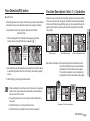
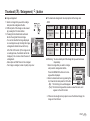
Instructions
Getting to Know your camera
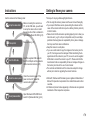
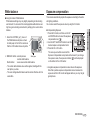
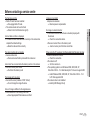
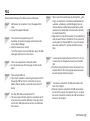
Use this camera in the following order.
Set up the camera driver
Before connecting the camera to a
PC, via the USB cable, you will need
to set up the camera driver. Install
the camera driver that is contained in
Application software CD-ROM. (p.79)
Take a picture
Take a picture. (p.16)
Insert the USB cable
Insert the supplied USB cable into
the PC’s USB port and the camera’s
USB connection terminal. (p.81)
Check the camera's power
Check the camera’s power. If the
power is turned off, preset the
camera button to turn it on.
Check [Removable Disk]
Open Windows’s EXPLORER and
search for [Removable Disk]. (p.82)
Thank you for buying a Samsung Digital Camera.
Prior to using this camera, please read the user manual thoroughly.
If you require After Sales service, please bring the camera and the
cause of the camera malfunction (such as battery, Memory card etc.)
to the A/S centre.
Please check that the camera is operating properly prior to when you
intend to use it (e.g. for a trip or an important event) to avoid disappointment. Samsung takes no responsibility for any loss or damage
that may result from camera malfunction.
Keep this manual in a safe place.
If you use a card reader to copy the images on the memory card to
your PC, the images could be damaged. When transferring the images taken with the camera to your PC, be sure to use the supplied
USB cable to connect the camera to your PC. Please note that the
manufacturer holds no responsibility for loss or damage of images on
the memory card due to the use of a card reader.
The contents and illustrations of this manual are subject to change
without prior notice for upgrading the camera functions.
ÄMicrosoft, Windows and Windows logo are registered trademarks of
Microsoft Corporation incorporated in the United States and/or other
countries.
ÄAll brand and product names appearing in this manual are registered
trademarks of their respective companies.
1
Danger
Warning
DANGER indicates an imminently hazardous situation which, if not
avoided, will result in death or serious injury.
WARNING indicates a potentially hazardous situation which, if not
avoided, could result in death or serious injury.
Do not attempt to modify this camera in any way. To do so may
result in fire, injury, electric shock or severe damage to you or your
camera. internal inspection, maintenance and repairs should only
be carried out by your dealer or Samsung Camera Service centre.
Please do not use this product in close proximity to flammable or
explosive gases, as this could increase the risk of explosion.
Should any form of liquid or a foreign object enter the camera, do
not use it. Switch off the camera, and then disconnect the power
source. You must contact your dealer or Samsung Camera Service
centre. Do not continue to use the camera as this may cause a fire
or electric shock.
Do not insert or drop metallic or inflammable foreign objects into the
camera through access points e.g. the memory card slot and battery
chamber. This may cause a fire or electric shock.
Do not operate this camera with wet hands. This could pose a risk
of electric shock.
2
Do not use the flash in close proximity to people or animals. Positioning the flash too close to your subject’s eyes may cause eyesight
damage.
For safety reasons keep this product and accessories out of reach of
children or animals to prevent accidents e.g.:
- Swallowing battery or small camera accessories. If an accident
should occur, please consult a doctor immediately.
- There is the possibility of injury from the camera’s moving parts.
Battery and camera may become hot during prolonged use and it
may result in camera malfunction. Should this be the case, allow the
camera to sit idle for a few minutes to allow it time to cool.
Do not leave this camera in places subject to extremely high temperatures, such as a sealed vehicle, direct sunlight or other places
of extremes in temperature. Exposure to extreme temperatures may
adversely affect the camera’s internal components and could cause a
fire.
When in use, do not cover the camera or Charger. This may cause
heat to build up and distort the camera body or cause a fire. Always
use the camera and its accessories in a well-ventilated area.
Caution
CAUTION indicates a potentially hazardous situation which, if not
avoided, may result in a minor or moderate injury.
Leaking, overheating, or damaged battery could result in fire or injury.
- Use battery with the correct specification for the camera.
- Do not short circuit, heat or dispose of battery in fire.
- Do not insert the battery with the polarities reversed.
Remove the battery when not planning to use the camera for a long
period of time. Otherwise the battery may leak corrosive electrolyte
and permanently damage the camera’s components.
Do not fire the flash while it is in contact with hands or objects. Do not
touch the flash after using it continuously. It may cause burns.
Do not move the camera while it is switched on, if you are using the
AC Charger. After use, always switch off the camera before unplugging the cable from the wall socket. Then make sure that any connector cords or cables to other devices are disconnected before moving
the camera. Failure to do so may damage the cords or cables and
cause a fire or electric shock.
Take care not to touch the lens or lens cover to avoid taking an unclear image and possibly causing camera malfunction.
Avoid obstructing the lens or the flash when you capture an image.
Credit cards may be demagnetized if left near case. Avoid leaving
magnetic strip cards near the case.
Using an AC adapter that doesn’t match with the camera specification
may cause camera malfunction. We recommend supplied battery or
exclusive rechargeable battery.
Ä Available AC adapter :
Voltage: 3.3V, Ampere: 2.0A, Diameter:
2.35
After turning on the camera, Check whether the battery type and the
camera setting set on the [Settings] > [Battery Type] menu (p. 49) are
same.
Contents
READY 007 System chart
07
008
008
009
010
010
010
011
011
012
013
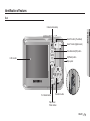
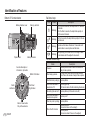
Identification of features
Front & Top
Back
Bottom / 5 Function button
Self-timer lamp
Camera Status Lamp
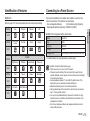
Mode icon
Connecting to a Power Source
Inserting the memory card
Instructions on how to use the memory card
RECORDING 015 LCD monitor indicator
15
016
016
016
017
017
018
019
019
020
020
020
Starting the recording mode
How to use the Auto mode
How to use the Program mode
How to use the Manual mode
How to use the DIS mode
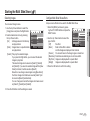
Using the Photo Help Guide mode
How to use the Portrait mode
How to use the Scene modes
How to use the Movie clip mode
Recording the movie clip without sound
Pausing while recording a movie clip
(Successive Recording)
3
Contents
021
022
022
022
022
024
025
026
027
028
030
031
032
032
033
033
034
034
035
035
036
036
037
4
Things to Watch Out for When Taking Pictures
Using the camera buttons to set the camera
POWER button
SHUTTER button
ZOOM W / T button
Face Detection(FD) button
Function Description / Info / Up button
Macro / Down button
Focus lock
Flash / Left button
Self-timer / Right button
MENU / OK button
E (Effect) button
E (Effect) button : Colour
Fn button
How to use the Fn menu
Size
Quality / Frame rate
Metering
Sharpness
ISO
White balance
Exposure compensation
SETUP 038 Using the LCD monitor to adjust the
38
038
038
039
039
040
040
041
041
041
041
041
042
042
042
042
043
043
044
044
044
045
045
046
camera settings
Recording
Auto Focus type
Voice Memo
Voice Recording
Recording the movie clip without voice
SCENE mode
Sound menu
Sound
Volume
Start up sound
Shutter sound
Beep Sound
AF sound
Self Portrait
Setup menu
Display
Language
Setting up the Date / Time / Date type
Start up image
LCD brightness
Quick view
LCD save
Settings
Contents
046
046
047
047
048
048
049
049
Formatting a memory
Initialisation
File name
Imprinting the recording date
Auto power off
Selecting Video out type
Auto Focus lamp
Selecting a battery type
PLAY 050 Starting play mode
50
050
050
051
051
051
052
052
052
054
054
055
055
055
056
Playing back a still image
Playing back a movie clip
Movie clip capture function
Playing back a recorded voice
Playing back a voice memo
LCD monitor Indicator
Using the camera buttons to set the camera
Thumbnail / Enlargement button
Info / Up button
Play & Pause / Down button
Left / Right / Menu / OK button
Printer button
Delete button
E (Effect) button : Resize
057
057
059
060
060
061
061
062
062
062
062
063
063
064
066
067
068
068
069
069
071
072
074
E (Effect) button : Rotating an image
E (Effect) button : Colour
Setting up the play back function using the
LCD monitor
Starting the Multi Slide Show
Start the Multi Slide Show
Selecting Images
Configure Multi Slide Show effects
Setting play interval
Setting Background Music
Playback
Voice memo
Deleting images
Protecting images
DPOF
Copy To Card
PictBridge
PictBridge : Picture Selection
PictBridge : Print Setting
PictBridge : Reset
Important notes
Warning indicator
Before contacting a service centre
Specifications
5
Contents
SOFTWARE 077 Software Notes
77
6
077
078
079
081
084
085
085
085
086
089
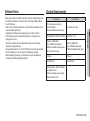
System Requirements
About the software
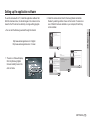
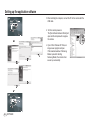
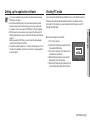
Setting up the application software
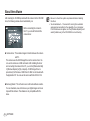
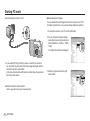
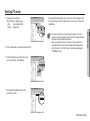
Starting PC mode
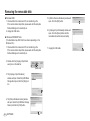
Removing the removable disk
Setting up the USB Driver for MAC
Using the USB Driver for MAC
Removing the USB Driver for Windows 98SE
Samsung Master
FAQ
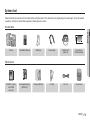
System chart
Please check that you have the correct contents before using this product. The contents can vary depending on the sales region. To buy the optional
equipment, contact your nearest Samsung dealer or Samsung service centre.
Included items
01 READY
Camera
AA Alkaline Batteries
USB cable
Camera strap
Software CD
(see p.78)
User manual,
Product warranty
Rechargeable battery
(SNB-2512)
Charger (SBC-N2)
AV cable
AC cord
Camera case
Optional items
SD/SDHC memory
card / MMC
(see p.12)
READY_ 7
Identification of features
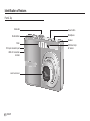
Front & Top
Mode dial
Shutter button
Power button
Microphone
Speaker
Flash
DC input connection port
USB / AV connection
terminal
Lens/ Lens cover
8 _READY
Self-timer lamp /
AF sensor
Identification of features
Back
Camera status lamp
Zoom T button (Digital zoom)
Face Detection(FD) button
E (Effects) button
Strap eyelet
LCD monitor
Fn / Delete button
5 function button
Play mode /
Printer button
READY_ 9
01 READY
Zoom W button (Thumbnail)
Identification of features
Bottom / 5 Function button
Self-timer lamp
Battery chamber cover
Tripod socket
Memory card slot
Battery chamber
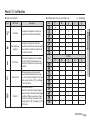
Icon
Status
Description
- For the first 8 seconds, the lamp blinks at 1 second
intervals.
- For the final 2 seconds, the lamp blinks quickly at
0.25-second intervals.
✢
Blinking
✡
Blinking
For the 2 seconds, the lamp blinks quickly at 0.25-second intervals.
✣
Blinking
A picture will be taken after about 10 seconds and 2
seconds later a second picture will be taken.
Blinking
After pressing the Shutter button, the image is taken
in accordance with the subject’s movement.
Camera Status Lamp
Status
Function Description /
Information / Up button
Power on
MENU / OK button
After taking a picture
Description
The lamp turns on and off when the camera is
ready to take a picture
The lamp blinks while saving the image data and
turns off when the camera is ready to take a picture
When flash battery is charging The lamp blinks
Flash /
Left button
Self-timer /
Right button
When the USB cable is
inserted to a PC
The lamp lights up
(LCD monitor turns off after initializing the device)
Transmitting Data with a PC The lamp blinks (LCD monitor turns off)
When the USB cable is
inserted into a printer
Macro / Down button
Play & Pause button
10 _READY
The lamp is off
When the printer is printing The lamp blinks
When the AF activates
The lamp turns on
(The camera focus on the subject)
The lamp blinks
(The camera doesn’t focus on the subject)
Identification of features
Connecting to a Power Source
Mode icon
We recommend batteries for a digital camera (Within a year from the
date of manufacture). The batteries are listed below.
- Non rechargeable batteries
: 2 X AA Alkaline (High Capacity)
- Rechargeable batteries (Optional) : SNB-2512 (Ni-MH)
Refer to page 16 for more information about the camera mode setting.
Auto
Program
Manual
DIS
ICON
Š
‰
✆
ÿ
MODE
Photo Help
Guide
Portrait
Scene
Movie
_
ICON
MODE
³
†
SCENE
01 READY
MODE
SNB-2512 rechargeable battery Specification
Model
SNB-2512
Type
Ni-MH
Capacity
2500mAh
Voltage
1.2V x 2
Charging time
Approximately 300 Minutes (Use for SBC-N2)
Ä Included battery may vary depending on sales region.
Nightscene
Children
Landscape
Close up
ICON
MODE
Text
Sunset
Dawn
Backlight
ICON
MODE
Firework
Beach&Snow
-
-
ICON
Important information about battery usage.
When camera is not in use, turn off the power.
Please remove the battery if the camera will not be used for long
periods. Batteries can lose power over time and are prone to leaking
if kept inside the camera.
Low temperatures (below 0°C) can affect the performance of the
battery and you may experience reduced battery life.
Batteries will usually recover at normal temperatures.
During extended use of the camera, the camera body may become
warm. This is perfectly normal.
It is easy to buy alkaline batteries. However, the duration for using
batteries varies in accordance with the battery manufacturer or the
photographic conditions
Do not use manganese batteries as manganese batteries cannot
deliver sufficient power.
READY_ 11
Connecting to a Power Source
Inserting the memory card
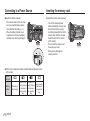
Insert the battery as shown
Insert the memory card as shown.
- If the camera does not turn on after
you have inserted battery, please
check whether the battery (+ / -).
- When the battery chamber cover
is opened, do not force the battery
chamber cover, this may damage it.
- Turn off the camera’s power
before inserting the memory card.
- Have the front of the memory
card facing toward the front of the
camera (lens) and the card pins
toward the back of the camera
(LCD monitor).
- Do not insert the memory card
the wrong way round.
Doing so may damage the
memory card slot.
There are 4 indicators for battery condition that are displayed on the
LCD monitor.
Battery
indicator
Battery
status
12 _READY
i
The battery is
fully charged
h
g
Low battery ca- Low battery capacity (Prepare pacity (Prepare
to recharge or to recharge or
use spare bat- use spare battery)
tery)
f
Battery empty.
(Recharge or
use spare battery)
Instructions on how to use the memory card
If the memory card is subjected to any of the following, the recorded
data may become corrupted :
- When the memory card is used incorrectly.
- If the power is switched off or the memory card is removed while
recording, deleting (formatting) or reading.
Samsung cannot be held responsible for lost data.
It is advisable to copy important data onto other media as back-up e.g.
floppy disks, hard disks, CD etc.
If there is insufficient memory available :
A [Memory Full!] message will appear and the camera will not operate.
To optimise the amount of memory in the camera, replace the memory
card or delete unnecessary images stored on the memory card.
Don't remove the memory card when the camera status lamp is blinking as this may cause damage to data in the memory card.
READY_ 13
01 READY
Be sure to format the memory card (see p.46) if you are using a newly
purchased memory card for the first time, if it contains data that the
camera cannot recognise, or if it contains images captured with a different camera.
Turn off the camera power whenever the memory card is being inserted
or removed.
Repeated use of the memory card will eventually reduce the memory
card’s performance. Should this be the case, you will need to purchase
a new memory card. Wear and tear on the memory card is not covered
by the Samsung warranty.
The memory card is an electronic precision device.
Do not bend, drop or subject the memory card to any heavy impact.
Do not store the memory card in an environment with strong electronic
or magnetic fields, e.g. near loud speakers or TV receivers.
Please do not use or store in an environment where there are extremes
in temperature.
Do not allow the memory card to become dirty or to come into contact
with any liquid. Should this happen, clean the memory card with a soft
cloth.
Please keep the memory card in its case when not in use.
During and after periods of extended use, you may notice that the
memory card is warm. This is perfectly normal.
Do not use a memory card that is used in another digital camera. To
use the memory card in this camera, format the memory card using this
camera.
Do not use a memory card formatted by another digital camera or
memory card reader.
Instructions on how to use the memory card
The camera can use SD/SDHC Memory Cards and MMC (Multi Media
Cards).
Card pins
Write protect switch
Label
[SD (Secure Digital) memory card]
The SD/SDHC memory card has a write protect switch that prevents
image files from being deleted or formatted. By sliding the switch to the
bottom of the SD/SDHC memory card, the data will be protected. By
sliding the switch to the top of the SD/SDHC memory card, the data
protection will be cancelled.
Slide the switch to the top of the SD/SDHC memory card before taking
a picture.
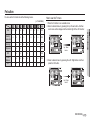
When using a 256MB MMC memory, the specified shooting capacity will
be as follows. These figures are approximate as image capacities can
be affected by variables such as subject matter and memory card type.
- S860
Recorded image
Super Fine
size
About 58
Ÿ
About 64
¬
About 76
Still
image
About 91
✩
About 140
✨
About 459
ì
*Movie
clip
❪
Fine
Normal
About 83
About 132
About 151
About 179
About 269
About 600
-
About 118
About 186
About 195
About 252
About 372
About 744
-
Fine
Normal
About 130
About 147
About 173
About 173
About 274
About 710
-
About 190
About 205
About 248
About 248
About 372
About 744
-
30FPS
15FPS
About 2'3" About 4'7"
About 7'44" About 13'24"
- S760
Recorded image
Super Fine
size
About 65
+
About 74
þ
About 88
Still
image
About 88
✩
About 140
✨
About 538
ì
*Movie
clip
❪
30FPS
15FPS
About 2'3" About 4'7"
About 7'44" About 13'24"
The zoom button doesn’t function during the movie recording.
The recording times can be changed by the zoom operation.
14 _READY
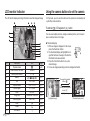
LCD monitor indicator
The LCD monitor displays information about the shooting
functions and selections.
No.
Description
Icons
Page
5
Memory card icon /
Internal memory icon
Ö/×
-
6
Battery
8
[Image & Full Status]
No.
Description
1
Recording mode
2
3
4
Icons
Page
p.11
Optical / Digital Zoom bar /
Digital Zoom rate
Voice Memo /
Without Sound
Number of available
shots remaining
Ï/Ç
p.39/40
5
p.14
Remaining time
00:00:00
p.22
p.14
Image Size
p.34
S760
Image Quality / Frame Rate
p.34
9
Metering
p.35
10
Sharpness
p.35
11
ISO
p.36
12
White Balance
p.36
13
Exposure compensation
14
Date / Time
p.37
2007/12/01 01:00 PM
p.44
15
Camera shake Warning
p.21
16
Auto Focus Frame
p.38
17
Color
p.32
18
Macro
p.26
19
Self-timer
p.30
20
Flash
p.28
21 Aperture Value / Shutter Speed
22
Face Detection /
Self Portrait
F2.8, 1/45
/
p.17
p.24/25
RECORDING_ 15
02 RECORDING
7
p.12
S860
Starting the recording mode
How to use the Auto mode ( μ )
How to use the Program mode ( )
Select this mode for quick and easy picture taking with minimal user
interaction.
Selecting the automatic mode will configure the camera with optimal
settings. You can still manually configure all functions except the aperture value and shutter speed.
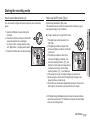
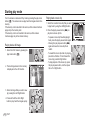
1. Insert the batteries (p.12). Insert the
batteries taking note of the polarity (+ / -).
2. Insert the memory card (p.12). As this
camera has a 11MB internal memory,
you do not need to insert the memory
card. If the memory card is not inserted,
an image will be stored in the internal
memory. If the memory card is inserted,
an image will be stored on the memory
card.
3. Close the battery chamber cover.
4. Press the power button to turn on the
camera. (If the date/time that is displayed on the LCD monitor is
incorrect, reset the date/time before taking a picture.)
5. Select the AUTO mode by rotating the mode dial.
6. Point the camera towards the subject and compose the image by
using the LCD monitor.
7. Press the shutter button to capture an image.
If the auto focus frame turns to red when you press the shutter button
down half way, it means that the camera cannot focus on the subject.
Should this be the case, the camera is unable to capture an image
clearly.
16 _RECORDING
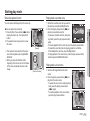
1. Select the PROGRAM mode by rotating
the mode dial.
2. Press the Fn button to configure advanced
functions such as Image Size (p.34),
Quality (p.34), Metering (p.35), Sharpness
(p.35), ISO (p.36), White Balance (p.36)
and Exposure Value(p.37).
Starting the recording mode
How to use the Manual mode ( ¸ )
How to use the DIS mode ( )
You can manually configure all functions aperture value and shutter
speed.
Digital Image Stabilisation (DIS) mode.
This mode will reduce the effect of camera shake and help you get a
well-exposed image in dim conditions.
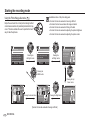
Things to watch out for using the DIS mode
1. The digital zoom will not operate in the
DIS mode.
2. If the lighting condition is brighter than
fluorescent lighting conditions, the DIS will
not activate.
3. If the lighting condition is darker than
in fluorescent lighting conditions, camera shake warning indicator ( Ã ) will
display. For best results only take pictures
in situations where the camera shake
warning indicator ( Ã ) is not displayed.
4. If the subject is moving, the captured image may be blurred.
5. Avoid moving the camera while the [Capturing!] message is displayed to achieve a better result.
6. As the DIS uses the camera's digital signal processor, it may take a
little longer for the camera to process and save the images.
Ä DIS (Digital Image Stabilisation) function does not operate while the
camera is connected to a TV. Remember to keep the camera steady
when you are taking pictures.
RECORDING_ 17
02 RECORDING
1. Select the MANUAL mode by rotating the
mode dial.
2. Press the Fn button and menu for the shutter
speed and aperture value will display.
Up / Down button : changes aperture value
Left / Right button : changes shutter speed.
3. Press the Fn button twice and take an image.
Starting the recording mode
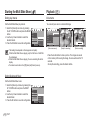
Using the Photo Help guide mode ( ` )
Available functions of the photo help guide
Helps the user learn the correct picture taking method
and includes solutions for potential problems that may
occur. This also enables the user to practice the best
way to take the pictures.
Function that can be used when focusing is difficult
Functions that can be used when the image is blurred
Function that can be used when filming in the dark
Function that can be used when adjusting the picture brightness
Function that can be used when adjusting the picture colour
1/2
Features to use when the image is out of focus
PHOTO HELP GUIDE
Features to use when the image is out of focus Features to counter camera shake
Features to use in low light conditions
Features to use when adjusting brightness
Features to use when adjusting colours
Move
²
Pressing the
Left/Right button
Next
Half press shutter button to focus
To focus on a subject 80cm or more away
To focus on a subject less than 80 cm away
To focus on people’s faces
± Back
²
Half press shutter button to focus
Pressing the
Left/Right button
Next
Focusing status can be checked
by half-pressing shutter button
- Green: Focusing successful
- Red: Focusing failed
± Back
²
Practice
Pressing the
MENU button
Pressing the Up/
Down button
2/2
Half press shutter button to focus
Pressing the shutter button
MENU Guide list
Practice begins when
you press the shutter.
Pressing the Right button
MENU Guide list
[Function that can be used when focusing is difficult]
18 _RECORDING
When focusing is successful, fully
press the shutter button to shoot.
If focusing fails, half press the
button again.
± Back
²
Practice
Starting the recording mode
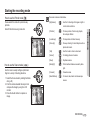
How to use the Portrait mode (
)
Please select this mode for quick and easy
portraits.
Select Portrait mode using mode dial.
The scene modes are listed below.
[Nightscene]
( ) : Use this for shooting still images at night or
[Children]
( ) : To take a picture of fast moving objects,
[Landscape]
( ) : To take pictures of distant scenery.
[Close Up]
( ) : Close-up shooting for small objects such as
[Text]
( ) : Use this mode to shoot a document.
in other dark conditions.
plants and insects.
How to use the Scene modes ( )
Use the menu to easily configure optimal settings for a variety of shooting situations.
1. Select the Scene mode by rotating the Mode
dial. (p.40)
2. Point the camera towards the subject and
compose the image by using the LCD
monitor.
3. Press the shutter button to capture an
image.
[Sunset]
( ) : For taking pictures of sunsets.
[Dawn]
( ) : Daybreak scenes.
[Backlight]
( ) : Portrait without shadows caused by back-
[Firework]
( ) : Firework scenes.
[Beach&Snow]
( ) : For ocean, lake, beach and snowscape
light.
scenes.
RECORDING_ 19
02 RECORDING
for example, children.
Starting the recording mode
How to use the Movie clip mode ( ´ )
A movie clip can be recorded for as long as the available recording time
of the memory capacity allows.
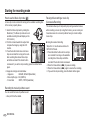
1. Select the Movie clip mode by rotating the
Mode dial. ( The Movie clip mode icon and
available recording time will display on the
LCD monitor.).
2. Point the camera towards the subject and
compose the image by using the LCD
monitor.
3. Press the shutter button once and movie
clips are recorded for as long as the available recording time allows. Movie clips
will still be recorded if the shutter button
is released. If you wish to stop recording, press the shutter button
again.
Ä Image size and type are listed below.
- Image size
: 640x480, 320x240 (Selectable)
- Movie clip file type : AVI (MJPEG)
- Frame Rate
: 30FPS, 15FPS (Selectable)
Recording the movie clip without sound
You can record the movie clip without sound.
Ä See p.40 for further details.
20 _RECORDING
Pausing while recording a movie clip
(Successive Recording)
This camera allows you to temporarily stop during unwanted scenes,
while recording a movie clip. Using this function, you can record your
favourite scenes into a movie clip without having to create multiple
movie clips.
Using Successive Recording
Steps from 1-2 are the same as those for
MOVIE CLIP mode.
3. Press the shutter button and movie clips
are recorded for as long as the available
REC
SH Stop
recording time. Movie clips will still be
recorded if the shutter button is released.
4. Press the Pause button ( Ø ) to pause recording.
5. Press the Pause button ( Ø ) again to resume the recording.
6. If you wish to stop recording, press the shutter button again.
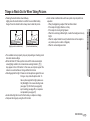
Things to Watch Out for When Taking Pictures
Pressing the shutter button down half way.
Lightly press the shutter button to confirm focus and flash battery
charge. Press the shutter button all way down to take the picture.
[Press the shutter button]
The available memory capacity may vary depending on shooting conditions and camera settings.
When the Flash Off, Slow synchro mode or DIS mode is selected in
a low lighting condition, the camera shake warning indicator ( Ã )
may appear on the LCD monitor. In this case, use a tripod, support the
camera on a solid surface or change to flash shot mode.
Shooting against the light : Please do not take pictures against the sun.
Doing so may make the picture dark. To
take a picture against the light, please use
the [Backlight] in the scene shooting mode
(see page 19), fill-in flash (see page 28),
spot metering (see page 35), or exposure
compensation (see page 37).
Avoid obstructing the lens or the flash when you capture an image.
Compose the image by using the LCD monitor.
RECORDING_ 21
02 RECORDING
[Lightly press the shutter button]
Under certain conditions the auto focus system may not perform as
expected.
- When photographing a subject that has little contrast.
- If the subject is highly reflective or shiny.
- If the subject is moving at high speed.
- When there is strong reflected light, or when the background is very
bright.
- When the subject matter has only horizontal lines or the subject is
very narrow (such as a stick or flagpole).
- When the surroundings are dark.
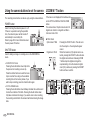
Using the camera buttons to set the camera
ZOOM W / T button
The recording mode function can be set up by using the camera buttons.
If the menu is not displayed, this button works
as the OPTICAL ZOOM or DIGITAL ZOOM
button.
This camera has a 3X optical zoom and a 3X
digital zoom function. Using both will offer a
total zoom ratio of 9X.
POWER button
Used for turning the camera’s power on / off.
If there is no operation during the specified
time, the camera's power will be turned off
automatically to save battery life.
Refer to page 48 for more information about
the auto power off function.
SHUTTER button
Used for taking an image or recording voice in the RECORDING
mode.
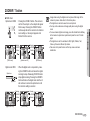
TELE Zoom
Optical zoom TELE
Digital zoom TELE
In MOVIE CLIP mode
Pressing the shutter button down fully starts
the process for recording a movie clip.
Press the shutter button once and the movie
clip is recorded for as long as the available
recording time in the memory allows. If you
wish to stop recording, press the shutter button again.
In STILL IMAGE mode
Pressing the shutter button down halfway activates the autofocus and
checks the condition of the flash. Pressing the shutter button down
fully takes and stores the image. If you select voice memo recording,
the recording will start after the camera has finished storing the image
data.
22 _RECORDING
: Pressing the ZOOM T button. This will zoom
into the subject i.e. the subject will appear
nearer.
: When the maximum (3X) optical zoom is selected, pressing the ZOOM T button activates
the digital zoom software. Releasing ZOOM
T button stops the digital zooming at the
required setting. Once the maximum digital
zoom (3X) is achieved, pressing the ZOOM T
button will have no effect.
Pressing
the ZOOM
T button
Pressing
the ZOOM
T button
[WIDE zoom]
[TELE zoom]
[Digital zoom 3.0X]
ZOOM W / T button
WIDE Zoom
Optical zoom WIDE
Images taken using the digital zoom may take a little longer for the
Pressing
the ZOOM
W button
Pressing
the ZOOM
W button
[TELE zoom]
[Optical zoom 2X]
Digital zoom WIDE
Optical zoom
Digital zoom
zoom.
To view a clearer digital zoom image, press the shutter button halfway
at the maximum optical zoom position and press the zoom T button
again.
The digital zoom can’t be activated in DIS, Night, Children, Text,
Close up, Firework or Movie Clip modes.
Take care not to press the lens as this may cause a camera
malfunction.
[WIDE zoom]
: When the digital zoom is in operation, pressing the ZOOM W button will reduce the digital
zooming in steps. Releasing ZOOM W button
stops digital zooming. Pressing the ZOOM W
button will reduce the digital zoom and then it
will continue to reduce the optical zoom until
the minimum setting is reached.
Pressing
the ZOOM
W button
Pressing
the ZOOM
W button
[Digital zoom 3.0X]
camera to process. Allow time for this to take place.
The digital zoom cannot be used in movie clip shots.
You may notice a decrease in image quality when using the digital
[TELE zoom]
[WIDE zoom]
RECORDING_ 23
02 RECORDING
: Pressing the ZOOM W button. This will zoom
out from the subject i.e. the subject will appear
further away. Pressing the ZOOM W button
continuously will set the camera to its minimum
zoom setting i.e. the subject appears at its
furthest from the camera.
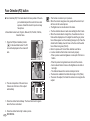
Face Detection(FD) button
Face Detection(FD): This mode detects the face position of the subject automatically and then sets the focus and
exposure. Select this mode for quick and easy
face picture.
Ä Selectable modes: Auto, Program, Manual, DIS, Portrait, Children,
Beach & Snow
1. Press the FD(Face Detection) button
( ! ) in the selectable modes. The FD
icon will be displayed on the screen left
side.
2. The size and position of the auto focus
frame is set at the face of the subject
automatically.
3. Press the shutter button halfway. The focus frame turns to green
when the focus is activated.
4. Press the shutter button fully to take a picture.
24 _RECORDING
This function can detect up to 9 persons.
When the camera recognises many people at the same time, it
will focus on the nearest person.
The Digital zoom is not activated in this mode.
The face detection does not work when setting the effect mode.
When the camera detects a target face, the white colour focus
frame will be displayed over the target face and the grey colour
focus frame appear over the remaining faces(up to 8). Press the
shutter button halfway down to focus on the face and the white
focus frame turns green.(Total 9)
Return to previous AF mode if face detection was failure.
In some conditions this function cannot work properly.
- When a person wears dark glasses or some part of the face is
hidden.
- When the person being taken does not look at the camera.
- Camera doesn't detect a face as the brightness is too dark or
too bright.
- The distance between the camera and object are far.
The maximum available Face Detection range is 2.5m (Wide).
The nearer the subject, the faster the camera can recognize the
subject.
Face Detection(FD) button
Function Description / Info ( î ) / Up button
Self Portrait
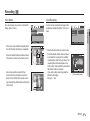
While the menu is showing, the Up button operates as a direction button.
If the menu screen does not appear, information or function descriptions
of the current filming image (filming mode) can be accessed through the
liquid crystal monitor by pressing the Function description/ Information
( î ) button.
When taking pictures of yourself, the area of your face is automatically
detected so that you can take self pictures more easily and quickly.
1. When pressing the Face Detection button again on the face
location screen, the Self Portrait icon appears ( ).
Pressing the
FD button
2. For self-filming, set the camera lens towards the face of the object.
It automatically detects the face of the object, and emits a guiding
sound.
Display every piece of information
about shooting.
Display the basic information.
Display description for each feature.
[Filming screen]
[Information screen]
[Function description screen]
Function description : When pressing the Function description button on the information screen mode, detailed
descriptions of the functions can be viewed.
The function description can be cancelled by
pressing the Function description button again.
3. Start filming by pressing the shutter button.
When locating the face in the center of the screen, it repeatedly
emits a faster sound unlike the sounds that are emitted when
the face is not in the center.
Pressing the
Function
description button
Display description for each feature.
Pressing the
Fn button
The guiding sound can be set using the sound setting menu.
(See p.42)
If [Self Portrait] is set, it is fixed to Macro focus.
Set the photo size.
Size
3264X2448
[Examples of Function descriptions ]
If [Self Portrait] is set, [Motion Timer] cannot be selected.
RECORDING_ 25
02 RECORDING
Ä Selectable modes: Auto, Program, Manual, DIS, Portrait,
Beach & Snow
Macro ( e ) / Down button
While the menu is showing, press the DOWN button to move from the
main menu to a sub menu, or to move down the sub menu. When the
menu is not showing, you can use the MACRO / DOWN button to take
macro pictures.
The distance ranges are shown below. Press the Macro button until the
desired macro mode indicator appears on the LCD monitor.
Types of focus mode and focus range (W : Wide, T : Tele)
Mode
Auto ( Š )
Focus Type
Auto macro ( d )
Normal
Focus range
W : 10 ~ Infinity
T : 50 ~ Infinity
W : 80 ~ Infinity
T : 80 ~ Infinity
Mode
[Auto Focus]
[Macro ( e )]
[Auto Macro ( d )]
(Unit: cm)
Program ( ‰ )
Focus Type
macro ( e )
Normal
Focus range
W : 10 ~ 80
T : 50 ~ 80
W : 80 ~ Infinity
T : 80 ~ Infinity
Mode
DIS Mode ( ÿ )
Focus Type
Auto macro ( d )
Normal
Focus range
W : 10 ~ Infinity
T : 50 ~ Infinity
W : 80 ~ Infinity
T : 80 ~ Infinity
When the macro mode is selected, be particularly careful to avoid
camera shake.
When you take a picture within 30cm (Wide zoom) or 50cm (Tele zoom)
in the Macro mode, select the FLASH OFF mode.
When you take a picture within the 10cm macro range, the autofocus on
the camera will take longer to set the correct focus distance.
26 _RECORDING
Macro ( e ) / Down button
Focus lock
Available focusing method, by recording mode
( o : Selectable, : Infinity focus range)
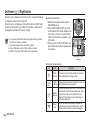
To focus on a subject not positioned in the centre of the picture, use the
focus lock function.
Auto macro
Š
‰
✆
ÿ
_
†
o
Mode
Macro
Normal
o
o
o
o
o
o
o
o
o
o
o
o
SCENE
Auto macro
Macro
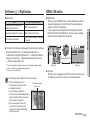
Using the Focus Lock
1. Ensure the subject is in the centre of the autofocus frame.
2. Press the SHUTTER button halfway. When the green auto focus
frame lights up, it means the camera is focused on the subject. Be
careful not to press the SHUTTER button all the way down to avoid
taking an unwanted picture.
3. With the SHUTTER button still pressed down only halfway, move
the camera to recompose your picture as desired, and then press
the SHUTTER button completely to take the picture. If you release
your finger from the SHUTTER button, the focus lock function will be
cancelled.
Normal
o
o
o
1. The image to be
captured.
o
2. Press the SHUTTER button halfway
and focus on the
subject.
3. Recompose the picture and fully depress
the SHUTTER button.
o
o
RECORDING_ 27
02 RECORDING
Mode
Flash ( ) / Left button
When the menu is displayed on the LCD
monitor, pressing the LEFT button makes the
cursor shift to the left tab.
When the menu is not displayed on the LCD
monitor, the LEFT button operates as the
FLASH button.
If you press the shutter button after selecting the Auto, Fill-in, Slow
[Selecting the Auto flash]
Selecting the flash mode
1. Press the Mode button to select a RECORDING mode with the
exception of the Movie clip mode or the DIS mode.(p.16)
2. Press the Flash button until the desired flash mode indicator is
displayed on the LCD monitor.
3. A flash mode indicator will be displayed on the LCD monitor.
Use the correct flash to suit the environment.
(Unit: m)
Flash range
ISO
AUTO
Normal
WIDE
TELE
Macro
WIDE
TELE
Auto macro
WIDE
TELE
0.8 ~ 4.0 0.8 ~ 2.1 0.3 ~ 0.8 0.5 ~ 0.8 0.3 ~ 4.0 0.5 ~ 2.1
28 _RECORDING
synchro flash, the first flash fires to check the shooting condition
(Flash range and Power ratio of flash).
Do not move the camera until the second flash fires.
Using the flash frequently will reduce the life of the battery.
Under normal operating conditions the re-charging time for the flash
is usually within 5.5 seconds. If the battery is weak, the charging
time will be longer.
In the DIS mode, [Landscape], [Close up], [Text], [Sunset], [Dawn],
[Firework] scene modes and the Movie clip mode, the flash function
will not operate.
Take photographs within the flash range.
The image quality is not guaranteed if the subject is too close or
highly reflective.
When taking an image in poorly lit conditions with the flash, there
may be a white speck in the captured image. The speck is caused
by the flash light reflecting off atmospheric dust.
Flash ( ) / Left button
Flash mode indicator
Icon
]
ª
Œ
Auto flash
Auto & Red eye
reduction
Fill in flash
Slow synchro
Flash off
( o : Selectable)
Available flash mode, by recording mode
Description
If the subject or background is dark, the
camera flash will operate automatically.
If a subject or background is dark, the
camera flash will work automatically and will
reduce the red-eye effect by using the redeye reduction function.
The flash fires regardless of the available
light. The intensity of the flash will be automatically controlled to suit the prevailing
conditions.
The flash operates with a slow shutter
speed to obtain a balanced correct exposure. In poor lighting conditions the camera
shake warning indicator ( Ã ) will display
on the LCD monitor.
The flash does not fire.
Select this mode when capturing images in
a place or situation where flash photography
is prohibited. When you capture an image
in poorly lit conditions, the camera shake
warning indicator ( Ã ) will appear on the
LCD monitor.
Mode
^
]
Š
‰
✆
‚
_
†
o
o
o
o
Mode
ª
Œ
o
o
o
o
o
o
o
o
o
o
o
o
o
o
o
SCENE
^
]
o
ª
Œ
o
o
o
o
o
o
o
o
o
o
o
RECORDING_ 29
02 RECORDING
^
Flash mode
Self-timer ( ✢ ) / Right button
When the menu is displayed on the LCD monitor, pressing the Right button makes the cursor shift to the right tab.
When the menu is not displayed on the LCD monitor, the RIGHT button
operates as the Self-timer ( ✢ ) button. This function is used when the
photographer would also like to be in the image.
If you operate the Self-timer button during the self-timer operation,
the self-timer function is cancelled.
Use a tripod to prevent the camera from shaking.
In Movie Clip mode, only the 10SEC self-timer will work.
If [Motion Timer] is set, [Self Portrait] cannot be selected.
Selecting the self-timer
1. Rotate the Mode dial to select a desired
RECORDING mode.
2. Press the SELF-TIMER / RIGHT ( ✢ ) button
until the desired mode indicator displays on the
LCD monitor. A 10 second, 2 second, Double
self-timer or Motion timer icon appears on the
LCD monitor.
3. When you press the SHUTTER button, the
picture will be taken after the specified time
has elapsed.
[Selecting the 10 SEC
self-timer]
Self-timer mode indecator
30 _RECORDING
Icon
Mode
Description
✢
10SEC
self-timer
Pressing the shutter button will allow an interval of
10 seconds before the image is taken.
✡
2SEC
self-timer
Pressing the shutter button will allow an interval of 2
seconds before the image is taken.
✣
Double
self-timer
Motion
Timer
A picture will be taken after about 10 seconds and 2
seconds later a second picture will be taken. When
using the flash, the 2-second self-timer may be
delayed for longer than 2 seconds depending on
the flash charging time.
The camera detects the subject's movement 6
seconds after pressing the Shutter button, and the
picture is taken when the movement is stopped.
MENU / OK button
Motion Timer
MENU button
- When you press the MENU button, a menu related to each camera
mode will be displayed on the LCD monitor. Pressing it again will
return the LCD to the initial display.
- A menu option can be displayed when the following are selected :
MOVIE CLIP and STILL IMAGE mode. There is no menu available
when the voice recording function is selected.
Motion
Pressing the Shuter button after
setting the Motion Timer
Icon & Self-timer lamp
Blink (1 second interval)
Detecting the subject's movement
Blink (0.25 second interval)
No movement is detected
Turn on and the image is taken after
2 seconds
The Motion Timer flows are as followings. (Movie Clip mode excluded)
RECORDING
Foucs Area
Selecting the Motion Timer Pressing the Shutter button Confirming the composition (Within 6 sec.)*1 Starting the detection
(Swing your hands fully)*2 Stopping the detection (Do not move)
Taking an image (after 2 sec.)
*1: The camera detects the subject's movement 6 seconds after pressing the Shtter
button, so confirm the composition within 6 seconds.
*2: Move your body or hands fully.
In the following cases, the Motion Timer may not operate.
The focus distance is over 3m.
The exposure is too bright or dark
In backlight conditions.
The movement is insignificant
The movement is detected beyond the
Voice Memo
Center AF
Off
Voice Record
[Pressing the MENU button]
MENU Exit
[Menu off]
Move
[Menu on]
OK button
- When the menu is displayed on the LCD monitor, this button is used
for shifting the cursor to the sub menu or for confirming data.
The detection range of
Motion Timer
center part (50%) of the sensor where
the movement is recognized.
If the camera doesn`t sense any
movement for 30 seconds, or the
camera doesn’t sense stillness after
sensing movement
RECORDING_ 31
02 RECORDING
Self-timer ( ✢ ) / Right button
E (Effect) button
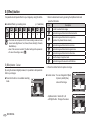
It is possible to add special effects to your images by using this button.
Available Effects, by recording mode
æ
( o : Selectable)
†
Š
‰
✆
o
o
o
o
o
o
o
o
This button will not operate in DIS, Voice recording mode and some
scene modes (Nightscene, Text, Sunset, Dawn, Backlight, Firework,
Beach&Snow).
Even if the camera is turned off, the effect setting will be preserved.
To cancel the settings, select ( ä ).
1. Select a desired sub menu by pressing the Up/Down button and
press the OK button.
Icon
ä
Û
Ü
Þ
ß
Ý
Description
No effect is added to the image.
Captured images will be stored in black and white.
Captured images will be stored in a sepia tone
(a gradient of yellowish brown colours).
Captured images will be stored in a red tone.
Captured images will be stored in a green tone.
Captured images will be stored in a blue tone.
Save the image in negative mode.
¼
E (Effect) button : Colour
2. Press the shutter button to capture an image.
By using the camera’s digital processor, it is possible to add special effects to your images
Press the E button in an available recording
mode.
Captured image will be saved in set RGB tone.
COLOR
Custom colour : You can change the R (Red),
G (Green) and B (Blue)
values of the image.
Custom Color
Move
Move
E
Exit
- Up/Down button : Selects R, G, B
- Left/Right button : Changes the values
Custom Color
Move
32 _RECORDING
OK Set
OK Set
Fn button
How to use the Fn menu
You can use the Fn button to set the following menus.
( o : Selectable)
‰
✆
ÿ
Size
o
o
o
Quality/
Frame rate
o
o
Metering
Shapness
³
†
Page
o
o
o
o
p.34
o
o
o
o
o
p.34
o
o
o
o
p.35
o
o
ISO
o
o
White
Balance
o
o
EV
o
_
o
p.35
o
p.36
o
o
o
p.36
o
o
o
p.37
1. Press the Fn button in an available mode.
2. Select a desired menu by pressing the Up / Down button. And then
a sub menu will be displayed at the bottom right of the LCD monitor.
SIZE
3264X2448
Up / Down
button
QUALITY
Fine
3. Select a desired menu by pressing the Left / Right button and then
press the OK button.
SIZE
3264X2448
Left / Right
button
SIZE
3264X2176
RECORDING_ 33
02 RECORDING
Š
Quality / Frame rate
Size
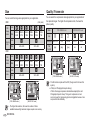
You can select the image size appropriate for your application.
- S860
(Unit: pixel)
Still
image
mode
Movie clip
mode
Icon
Ÿ
¬
✩
✨
Size
3264 x
2448
3264 x
2176
3264 x
1836
2592 x
1944
2048 x
1536
1024 x
768
Icon
ì
❪
Size
640 x 480
320 x 240
Movie clip
mode
+
þ
✩
✨
Size
3072 x
2304
3072 x
2048
3072 x
1728
2592 x
1944
2048 x
1536
1024 x
768
ì
STILL IMAGE mode
V
Icon
File
Format
Icon
Icon
Mode
Sub menu Super Fine
- S760
Still
image
mode
You can select the compression ratio appropriate for your application of
the captured images. The higher the compression ratio, the lower the
picture quality.
jpeg
❪
MOVIE CLIPO mode
W
X
¥
Fine
Normal
30FPS
15FPS
jpeg
jpeg
avi
avi
FRAME RATE
QUALITY
30FPS
Fine
640 x 480
Size
320 x 240
[ STILL IMAGE mode ]
[ MOVIE CLIP mode ]
This file format complies with the DCF (Design rule for Camera File
system).
JPEG (Joint Photographic Experts Group) :
SIZE
3264X2448
[ STILL IMAGE mode ]
SIZE
640X480
[ MOVIE CLIP mode ]
The higher the resolution, the lower the number of shots
available because high resolution images require more memory.
34 _RECORDING
JPEG is the image compression standard developed by the Joint
Photographic Experts Group. This type of compression is most
commonly used for compressing photos and graphics because it can
compress the files efficiently.
Sharpness
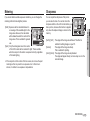
If you cannot obtain suitable exposure conditions, you can change the
metering method to take brighter pictures.
You can adjust the sharpness of the picture
you are about to take. You cannot check the
sharpness effect on the LCD monitor before you
take a picture, because this function is applied
only when the captured image is stored on the
memory.
[Multi] : Exposure will be calculated based on
an average of the available light in the
image area. However, the calculation
will be biased towards the centre of the
image area. This is suitable for general
METERING
use.
Multi
[Spot] : Only the rectangular area in the centre
of the LCD monitor will be metered for light. This is suitable
when the subject in the centre is exposed correctly, regardless
of the back lighting.
Ä If the subject is not the centre of the focus area, do not use the spot
metering as this may result in an exposure error. In this circumstance, it is better to use exposure compensation.
Sharpness
Normal
[Soft+]/ [Soft] : The edges of the image are softened. This effect is
suitable for editing images on your PC.
[Normal]
: The edges of the image are sharp.
This is suitable for printing.
[Vivid]/ [Vivid+] : The edges of the image are emphasized.
The edges will appear sharp, but noise may occur in the
recorded image.
RECORDING_ 35
02 RECORDING
Metering
ISO
White balance
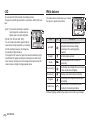
You can select the ISO sensitivity when taking pictures.
The speed or specific light-sensitivity of a camera is rated by ISO numbers.
The white balance control allows you to adjust
the colours to appear more natural.
[Auto] : The camera's sensitivity is automatically changed by variables such as
lighting value or subject brightness.
[ISO 80, 100, 200, 400, 800, 1000 ] :
ISO
You can increase the shutter speed while the
same amount of light is present, by increasing
Auto
the ISO sensitivity. However, the image may
be saturated in high luminance.
The higher the ISO value, the higher the camera’s sensitivity to light
and therefore the greater its capacity to take pictures in dark conditions. However, the noise level in the image will increase as the ISO
value increases, making the image appear coarse.
WHITE BALANCE
Auto WB
Mode
Icon
Description
Auto WB
x
The camera automatically selects the
appropriate white balance settings,
depending on the prevailing lighting
conditions.
Daylight
z
For taking images outside.
Cloudy
&
Fluorescent_H
'
Fluorescent_L
(
Tungsten
Custom Set
Å
For taking images under a cloudy and
overcast sky.
For shooting under daylight fluorescent types
of three-way fluorescent lighting.
Shooting under white fluorescent lighting.
For shooting under tungsten (standard light
bulb) lighting.
Allows the user to set the white balance
according to the shooting condition.
Ä Different lighting conditions may cause a colour cast on your images.
36 _RECORDING
White balance
Exposure compensation
Using the Custom White Balance
White balance settings may vary slightly depending on the shooting
environment. You can select the most appropriate white balance setting for a given shooting environment by setting up the custom white
balance.
This camera automatically adjusts the exposure according to the ambient lighting conditions.
You can also select the exposure value by using the Fn button.
White paper
2. MENU/OK button : selects previous
custom white balance.
Shutter button
: saves new custom white balance.
- The custom white balance value will be applied, starting with the
next picture you take.
- The user configured white balance will be remain effective until it is
overwritten.
Ä A negative exposure compensation value reduces the exposure.
Note that a positive exposure compensation value increases the
exposure and the LCD monitor will appear white or you may not get
good pictures.
RECORDING_ 37
02 RECORDING
1. Select the CUSTOM ( Å ) menu of
the White Balance and place a sheet
of white paper in front of the camera so
that the LCD monitor shows only white.
Compensating Exposure
1. Press the Fn button, and then use the UP
and DOWN buttons to select the exposure
compensation icon ( Â ).
2. Use the LEFT and RIGHT buttons to set the
desired exposure compensation factor.
EV
3. Press the OK or Fn button.
The value you set will be saved and the
Exposure Compensation setup mode will be closed. If you change
the exposure value, the exposure indicator ( Â ) will be displayed
on the bottom of the LCD monitor.
Recording ( Ò )
You can use the menu on the LCD monitor to set up recording functions.
The items indicated by
are default settings.
Auto Focus type
Mode
Menu
Sub menu
Available mode
Page
Foucs Area
Center AF
Multi AF
p.38
Voice Memo
Off
On
p.39
You can select your preferred Focus Area
according to the shooting conditions.
RECORDING
Foucs Area
Voice Memo
Ò
( Recording )
Voice Mute
-
Off
p.39
On
p.40
Nightscene
Children
Landscape
Close up
Text
Sunset
Dawn
Backlight
Firework
Beach&Snow
-
-
Scene
Center AF
Multi AF
Voice Record
Voice Record
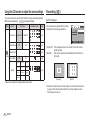
Using the LCD monitor to adjust the camera settings
Back
OK
Set
[Center AF] : The rectangular area in the center of the LCD monitor
will be focused
[Multi AF] : This camera selects all of available AF point from the 9
AF points.
p.40
[Center AF]
[Multi AF]
Ä Menus are subject to change without prior notice.
Ä When the camera focuses on the subject, the auto focus frame turns
to green. When the camera doesn't focus on the subject, the auto
focus frame turns to red.
38 _SETUP
Recording ( Ò )
Voice Memo
Foucs Area
Voice Memo
Voice Record
Off
OK
Back
Set
Press the shutter button to record a voice.
- Press the shutter button once and voice
is recorded for as long as the available
recording time (max:10 hour) allows. The
recording time will be displayed on the
LCD monitor. Voice will still be recorded if
the shutter button is released.
- If you wish to stop recording, press the
shutter button again.
- File type : *.wav
- Press the shutter button and take a picture.
The picture is stored on the memory card.
- Voice memo will be recorded for ten
seconds from the moment the picture is
stored. In the middle of the sound recording, pressing the shutter button will stop the
voice memo.
SH
Foucs Area
Voice Memo
Center AF
Off
Voice Record
On
- If the voice memo indicator is displayed on
the LCD monitor, the setting is completed.
RECORDING
Move
OK
SH
REC
MENU Exit
Set
[Voice recording mode]
Stop
SETUP_ 39
03 SETUP
A voice can be recorded for as long as the
available recording time (Max. 10 hour) allows.
RECORDING
You can add your voice-over to a stored still
image. (Max. 10 sec.)
Voice Recording
Recording ( Ò )
Voice Recording
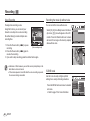
Recording the movie clip without voice
Pausing while recording a voice
You can record the movie without voice.
RECORDING
SH
Stop
REC
1. Press the Pause button ( Ø ) to pause
[Voice recording mode]
recording.
2. Press the Pause button ( Ø ) again to
resume the recording.
3. If you wish to stop recording, press the shutter button again.
Select [On] of [Voice Mute] menu in the Movie
clip mode. ( Ç ) icon will appear on the LCD
monitor. Press the Shutter button and a movie
will record for as long as the memory capacity
allows without voice.
Voice Mute
Using this function, you can record your
favourite voice clips into a voice recording
file without having to create multiple voice
recording files.
Off
On
OK
Back
Set
A distance of 40cm between you and the camera (microphone) is the
the voice recording is cancelled.
SCENE mode
Use the menu to easily configure optimal
settings for a variety of shooting situations.
Press the MENU button and select a desired
sub menu.
Ä Refer to page 19 for more information.
40 _SETUP
RECORDING
Scene
best distance to record sound.
If the camera power is turned off while the voice recording is paused,
Nightscene
Foucs Area
Children
Voice Memo
Voice Record
Landscape
Close up
Text
Sunset
Back
OK
Set
Sound menu
Sound ( * )
In this mode, you can set up sound settings. You can use the setup menu
in all camera modes, except Voice Recording mode.
The items indicated by
are default settings.
Volume
Start Sound
Shutter Sound
*
( Sound )
Beep Sound
Off
Low
Medium
High
Off
Sound 1
Sound 2
Sound 3
Off
Sound 1
Sound 2
Sound 3
Off
Sound 1
Sound 2
Sound 3
Available mode
Page
p.41
SOUND
Volume
Off
Start Sound
Low
Shutter Sound
Beep Sound
High
AF Sound
Self Portrait
p.41
- Start up sound : [Off], [Sound 1, 2, 3]
Set
SOUND
Volume
Start Sound
Off
Shutter Sound
Sound 1
Beep Sound
AF Sound
Self Portrait
Sound 2
Sound 3
OK
Back
Set
p.42
Shutter sound
On
You can select the shutter sound.
- Shutter sound : [Off], [Sound 1, 2, 3]
SOUND
Volume
Start Sound
p.42
Shutter Sound
Off
On
OK
Back
Start up sound
p.41
p.42
Self Portrait
Medium
You can select the sound that is activated whenever the camera is
turned on.
Off
AF Sound
- [Volume] sub menu : [Off], [Low],
[Medium], [High]
Beep Sound
AF Sound
Self Portrait
Back
Off
Sound 1
Sound 2
Sound 3
OK
Set
SETUP_ 41
03 SETUP
Volume
Sub Menu
Menu
Mode
You can select a volume of start up sound, shutter sound, beep
sound and AF sound.
Setup menu
Sound ( * )
Beep Sound
If you set sound to ON, various sounds will be activated for camera
startup, when buttons are pressed, so that you can be aware of the
camera operation status.
Mode
Sub menu
Menu
Page
SOUND
Volume
Start Sound
Shutter Sound
Beep Sound
- [Beep Sound] sub menu : [Off], [Sound 1, 2, 3]
In this mode, you can set up basic settings. You can use the setup menu
in all camera modes, except Voice Recording mode.
The items indicated by
are default settings.
AF Sound
Self Portrait
Off
Sound 1
Sound 2
Language
Sound 3
OK
Back
Set
p.43
AF sound
If you set AF sound to ON, AF sound will be activated when a subject is
focused so that you can be aware of the camera operation status.
- [AF sound] sub menu : [Off], [On]
SOUND
Volume
Start Sound
AF Sound
Self Portrait
,
Shutter Sound
Beep Sound
Off
dd/mm/yyyy
mm/dd/yyyy
London
(Display)
Off
On
OK
Back
yyyy/mm/dd
Set
Self Portrait
This feature automatically detects the location of the face and optimises
the camera settings to ensure a great self portrait.
42 _SETUP
World Time
Moscow
Teheran
Abu Dhabi
Kabul
Tashkent
Mumbai, New Delhi
Kathmandu
Almaty
Yangon
Bankok, Jakarta Beijing, Hong Kong
SOUND
Volume
Start Sound
Shutter Sound
Beep Sound
AF Sound
Self Portrait
Back
Seoul, Tokyo Darwin, Adelaide
- This feature can be set byusing the [OFF]
and [ON] buttons.
Date & Time
Rome,Paris,Berlin
Athens. Helsinki
Guam, Sydney
OK
Okhotsk
Wellington, Auckland Samoa, Midway
Off
On
Set
Honolulu, Hawaii
Alaska
p.44
Setup menu
Menu
Sub menu
Page
LA, San Francisco Denver, Phoenix
Date & Time
(Display)
Start Image
LCD Bright
Quick View
Buenos Aires
Mid-Atlantic
Cape Verde
-
Off
User Image
Logo
-
Auto
Dark
Normal
Bright
Off
0.5 sec
1 sec
3 sec
p.44
p.44
p.44
Off
On
p.45
Format
No
Yes
p.46
Reset
No
Yes
p.46
File
Reset
Series
p.47
Off
Date
Date&Time
-
”
Off
1 min
5 min
10 min
-
Video Out
NTSC
PAL
AF Lamp
Off
On
p.49
Battery Type
Alkaline
Ni-MH
p.49
Ä Menus are subject to change without prior notice.
DISPLAY
Language
Date&Time
ENGLISH
䚐ạ㛨
Start Image
FRANÇAIS
LCD Bright
DEUTSCH
Quick View
LCD Save
Back
ESPAÑOL
ITALIANO
OK
Set
p.47
3 min
Power Off
- Language sub menu
: English, Korean, French, German,
Spanish, Italian, S.Chinese, T.Chinese,
Japanese, Russian, Portuguese, Dutch,
Danish, Swedish, Finnish, Thai, Bahasa
(Malay / Indonesian), Arabic, Czech,
Polish, Hungarian and Turkish.
p.45
LCD Save
Imprint
(Settings)
Chicago, Dallas New York, Miami
Caracas, La Paz Newfoundland
There is a choice of language that can be displayed on the LCD monitor. Even if the battery is removed and inserted again, the language
setting will be preserved.
p.48
p.48
SETUP_ 43
03 SETUP
,
World
Time
Language
Mode
Display ( , )
Display ( )
Setting up the Date / Time / Date type
Start up image
You can change the date and time that will be displayed on the captured images and set up the date type. Setting [World Time] enables
you to display the local date and time on the LCD monitor when
travelling overseas.
You can select the image that is first displayed on the LCD monitor
whenever the camera is turned on.
DISPLAY
Language
Date&Time
London
Start Image
2007/12/01
LCD Bright
Quick View
13:00
LCD Save
Back
yyyy/mm/dd
OK
Set
DISPLAY
Language
Date&Time
Start Image
Date type : [yyyy/mm/dd], [Off],
[dd/mm/yyyy], [mm/dd/yyyy]
- Sub menus : [Off], [LOGO], [User Image]
- Use a saved image for the start-up image
with the [Start Image] in the [RESIZE] menu
in the play mode.
- The start-up image will not be deleted by
[Delete] or [Format] menu.
- The User images will be deleted by [Reset]
menu.
LCD Bright
Quick View
LCD Save
Off
OK
Back
Set
World Time
Ä DST : Daylight Saving Time
44 _SETUP
LCD brightness
You can adjust the LCD brightness.
- Sub menus : [Auto], [Dark], [Normal], [Bright]
DISPLAY
Language
Date&Time
Start Image
LCD Bright
- Available cities:
DISPLAY
London, Cape Verde, Mid-Atlantic, Buenos
Aires, Newfoundland, Caracas, La Paz,
NewYork, Miami, Chicago, Dallas, Denver,
Phoenix, LA, San Francisco, Alaska, HonoLondon
[ GMT +00:00 ] 2007 /12 / 01 01:00 PM
lulu, Hawaii, Samoa, Midway, Wellington,
OK Confirm
DST
Auckland, Okhotsk, Guam, Sydney, Darwin
Adelaide, Seoul, Tokyo, Beijing, Hong Kong, Bankok, Jakarta, Yangon, Almaty, Kathmandu, Mumbai, New Delhi, Tashkent, Kabul, Abu
Dhabi, Teheran, Moscow, Athens, Helsinki, Rome, Paris, Berlin
Quick View
LCD Save
Back
Auto
Dark
Normal
Bright
OK
Set
Display ( , )
Quick view
LCD save
If you enable Quick View before capturing an image, you can view the
image you just captured on the LCD monitor for the duration set in the
[Quick View] setup. Quick view is possible only with still images.
If you set the [LCD save] to On and the camera isn't operated during
the specified time, the LCD monitor will be turned off automatically.
DISPLAY
Language
Date&Time
Start Image
LCD Bright
Quick View
LCD Save
Back
Off
0.5 sec
1 sec
3 sec
OK
DISPLAY
Language
Date&Time
Start Image
LCD Bright
Quick View
LCD Save
: The quick view function
can’t be activated.
[0.5, 1, 3 sec] : The captured image is
briefly displayed during the
selected time.
- Sub menus
[Off] : The LCD monitor will not be turned
off.
[On] : If the camera isn't operated during
the specified time (about 30 SEC.),
the camera power will be idle (Camera status lamp:Blinking) automatically.
03 SETUP
- Sub menus
[Off]
Back
Off
On
OK
Set
Set
SETUP_ 45
Settings ( ” )
Formatting a memory
Initialisation
This is used for formatting the memory. If you run [Format] on the memory, all images, including the protected images, will be deleted. Be sure to
download important images to your PC before formatting the memory.
All camera menu and function settings will be restored to their default
values. However, values for DATE / TIME, LANGUAGE, and VIDEO
OUT will not be changed.
- Sub menus
[No] : The memory will not be formatted.
[Yes] : A window for confirming the selection
displays. Select the [Yes] menu. A
[Processing!] message appears and
the memory will be formatted. If you
run FORMAT in Play mode, a [No
Image!] message will appear.
- Sub menus
[No] : Settings will not be restored to their
defaults.
[Yes] : A window to confirm the selection will
be displayed. Select the [Yes] menu
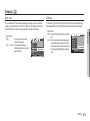
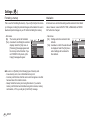
and all settings will be restored to
their defaults.
No
Reset
Yes
File
Imprint
Format
Power Off
Video Out
Back
OK
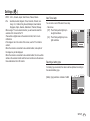
Set
Be sure to run [Format] on the following types of memory card.
- A new memory card, or an unformatted memory card
- A memory card that has a file this camera can't recognise or one that
has been taken from another camera.
- Always format the memory card using this camera. If you insert a
memory card that has been formatted using other cameras, memory
card readers, or PCs, you will get a [Card Error!] message.
46 _SETUP
SETTINGS
Format
Reset
SETTINGS
No
File
Yes
Imprint
Power Off
Video Out
Back
OK
Set
Settings ( ” )
Imprinting the recording date
This function allows the user to select the file naming format.
There is an option to include DATE / TIME on still images.
[Reset] : After using the reset function, the
next file name will be set from 0001
even after formatting, deleting all or
inserting a new memory card.
[Series] : New files are named using numbers
that follow the previous sequence,
even when a new memory card is
used, or after formatting, or after
deleting all pictures.
- Sub menus
[Off]
: The DATE & TIME will not be
imprinted on the image file.
[Date]
: Only the DATE will be
imprinted on the image file.
[Date&Time] : The DATE & TIME will be
imprinted on the image file.
Format
Reset
File
Reset
Imprint
Series
Power Off
Video Out
Back
OK
Set
- The first stored folder name is 100SSCAM, and the first file name is
SDC10001.
- File names are assigned sequentially from SDC10001 $ SDC10002
$ ~ $ SDC19999.
- The folder number is assigned sequentially from 100 to 999 as
follows: 100SSCAM $ 101SSCAM $ ~ $ 999SSCAM.
- Maximum numbers of files in a folder are 9999.
- The files used with the memory card conform to the DCF (Design rule
for Camera File systems) format. If you change the image file name,
the image may not play back.
SETTINGS
Format
Reset
File
Imprint
SETTINGS
Off
Power Off
Date
Video Out
Date&Time
Back
OK
Set
Ä The Date & Time are imprinted at the bottom right side of the still
image.
Ä The imprint function is applied only to still images.
Ä Depending on the manufacturer and print mode, the date printed on
an image may not be printed correctly.
SETUP_ 47
03 SETUP
File name
Settings ( ” )
Auto power off
Selecting Video out type
This function switches the camera off after a set amount of time in order
to prevent unnecessary battery drainage.
The Movie output signal from the camera can be NTSC or PAL.
Your choice of output will be governed by the type of device (monitor or
TV, etc.) to which the camera is connected. PAL mode can support only
BDGHI.
: The power off function will SETTINGS
Format
not operate.
Reset
Off
[1, 3, 5, 10 min] : The power will turn off
File
1 min
Imprint
3 min
automatically if not used
Power Off
5 min
for the period of time
10 min
Video Out
OK Set
Back
specified.
- After replacing the battery, the power off setting will be preserved.
- Note that the automatic power off function will not operate if the
camera is in the PC / Printer mode, slide show, playing back a voice
recording and playing back a movie clip.
Connecting to an external monitor
When the camera is connected to an external monitor, the image and menus on the
LCD monitor will be visible on the external
monitor and the LCD monitor of the camera.
Format
Reset
File
Imprint
Power Off
Video Out
Yellow - Video
White - sound
48 _SETUP
SETTINGS
- Sub menus
[Off]
Back
NTSC
PAL
OK
Set
Settings ( ” )
Auto Focus lamp
You can turn on and off the Auto Focus lamp.
SETTINGS
Reset
File
Imprint
Power Off
Video Out
AF Lamp
- Sub menus
[Off] : The AF lamp will not light up in
low light conditions.
[On] : The AF lamp will light up in low
light conditions.
03 SETUP
Off
On
OK
Back
Set
Selecting a battery type
If a battery type is selected, the camera will be optimized according to
the selected battery type.
[Battery Type] sub Menu : Alkaline / Ni-MH
SETTINGS
File
Imprint
Power Off
Video Out
AF Lamp
Battery Type
- NTSC : U.S.A, Canada, Japan, South Korea, Taiwan, Mexico.
- PAL : Australia, Austria, Belgium, China, Denmark, Finland, Germany, U.K., Holland, Italy, Kuwait, Malaysia, New Zealand,
Singapore, Spain, Sweden, Switzerland, Thailand, Norway.
- When using a TV as an external monitor, you will need to select the
external or AV channel of the TV.
- There will be a digital noise on the external monitor, but it is not a
malfunction.
- If the image is not in the centre of the screen, use the TV controls to
centre it.
- When the camera is connected to an external monitor, some parts of
the image may not be displayed.
- When the camera is connected to an external monitor, the menu will be
visible on the external monitor and the menu functions are the same as
those indicated on the LCD monitor.
Back
Alkaline
Ni-MH
OK
Set
SETUP_ 49
Starting play mode
Turn the camera on and select Play mode by pressing the play mode
button ( Î ). The camera can now play back the images stored in the
memory.
If the memory card is inserted in the camera, all the camera functions
apply only to the memory card.
If the memory card is not inserted in the camera, all the camera
functions apply only to the internal memory.
Playing back a still image
1. Select the PLAY mode by pressing the
play mode button ( Î ).
2. The last image stored on the memory
is displayed on the LCD monitor.
3. Select an image that you want to view
by pressing the Left/ Right button.
Ä Press and hold the Left or Right
button to play back the images quickly.
50 _PLAY
Playing back a movie clip
1. Select the recorded movie clip that you want
to play back by using the Left/Right button.
2. Press the play & pause button ( Ø ) to
play back a movie clip file.
- To pause a movie clip file while playing it
back, press the play & pause button again.
- Pressing the play & pause button (Ø)
again will cause the movie clip file to
restart.
- To rewind the movie clip while it is playing,
press the Left button. To fast forward the
movie clip, press the Right button.
- To stop playback of the movie clip, press
the play & pause button, and then press
the Left or Right button.
Play
E
Capture
Starting play mode
Playing back a recorded voice
1. Select the recorded voice that you want to
play back by using the Left/Right button.
2. Press the play & pause button ( Ø ) to
play back a recorded voice file.
- To pause a recorded voice file, while playing it back, press the play & pause button
Play
again.
- To resume playback of the voice file, press the play & pause button
- To rewind the voice file while it is playing, press the Left button.
To fast forward the voice file, press the Right button.
- To stop playback of the voice memo, press the play & pause button
and then press the MENU/OK button.
How to capture the movie clip
1. Press the Play / Pause button( Ø ) while
playing the movie clip. Then press the E
button.
2. The paused movie clip is saved in a new
file name.
Play
E
Capture
[Paused]
Ä The captured movie clip file is the same
size as the original movie clip (640x480,
320x240).
Ä When you press the E button at the
beginning of the movie clip, the first frame
of the movie clip will be saved as a still
image.
Playing back a voice memo
[Press the E button]
1. Select a still image that has the voice
memo.
2. Press the play & pause button ( Ø ) to
play back the voice memo.
- To pause the voice memo, while playing it
back, press the play & pause button
( Ø ) again.
- To resume playback of the voice memo,
press the play & pause button.
Pause
PLAY_ 51
04 PLAY
Movie clip capture function
You can capture still images from the movie clip.
LCD monitor Indicator
Using the camera buttons to set the camera
The LCD monitor displays shooting information about the displayed image.
In Play mode, you can use the buttons on the camera to conveniently set
up the Play mode functions.
Thumbnail ( º ) / Enlargement ( í ) button
You can view multiple pictures, enlarge a selected picture, and crop and
save a selected area of an image.
No.
1
2
3
4
5
6
7
8
9
10
11
Description
Playback mode
Folder name & File name
Memory card indicator
Battery
ISO
Aperture value
Shutter speed
Flash
Image size
Recording date
DPOF
12
13
Protect
Voice Memo
52 _PLAY
Icon
Î
100-0010
Ö/×
f g h i
80 ~ 1000
F2.8 ~ F15.3
8 ~ 1/2,000
ON / OFF
3264x2448 ~ 256X144
2007/12/01
Ñ
Ð
Ï
Page
p.50
p.47
p.12
p.36
p.17
p.17
p.28
p.34
p.44
p.64
p.63
p.39
Thumbnail display
1. While an image is displayed on full screen,
press the thumbnail button.
2. The thumbnail display will highlight the image that had been showing at the time the
thumbnail mode was selected.
3. Press the 5 function button to move to a
desired image.
4. To view an image separately, press the enlargement button.
Pressing the thumbnail
button ( º )
Pressing the enlargement
button ( í )
Highlighted image
[Highlighted image]
[ Thumbnail display mode ]
Thumbnail ( º ) / Enlargement ( í ) button
The maximum enlargement rate in proportion to the image size
1. Select an image that you want to enlarge
and press the enlargement button.
2. Different parts of the image can be viewed
by pressing the 5 function button.
3. Pressing the thumbnail button will zoom
back to the original full sized image.
- You can tell whether the image displayed
is an enlarged view by checking the image
enlargement indicator shown at the top
left of the LCD monitor. (If the image is not
an enlarged view, the indicator will not be
displayed.) You can also check the area of
enlargement.
- Movie clips and WAV files can’t be enlarged.
- If an image is enlarged, a loss of quality may occur.
- S860
Image size
Ÿ
¬
✩
✨
Maximum
enlargement
rate
X12.8
X12.4
X12.8
X10.1
X8.0
X4.0
Image size
+
þ
✩
✨
Maximum
enlargement
rate
X12.0
X11.6
X12.0
X10.1
X8.0
X4.0
- S760
OK Trim
Trimming : You can extract part of the image that you want and save
it separately.
1. Select an image that you want to enlarge
and press the enlargement button.
Press the MENU/OK button and a mesTrimming?
sage will be displayed.
No
Yes
2. Select a desired sub menu by pressing the
Up / Down button and press the OK button.
OK Confirm
- [No] : The trimming menu will disappear.
- [Yes] : The trimmed image will be saved as a new file name, and
appear on the LCD monitor.
Ä If there is not enough memory space to save the trimmed image, the
image can’t be trimmed.
PLAY_ 53
04 PLAY
Image enlargement
Info( î ) / Up button
Play & Pause ( Ø ) / Down button
When the menu is displayed on the LCD monitor, the UP button operates
as a direction button.
When the menu is not displayed on the LCD monitor, pressing the Info
button will display image information on the LCD monitor.
In Play mode, the play & pause/ down button works as follows:
Info ( î ) button
Info ( î ) button
- If the menu is displayed
Press the DOWN button to move from the main menu to a sub menu,
or to move down the sub menu cursor.
- If a still image with a voice memo, a voice file, or a movie clip is playing
·In Stop mode
: Plays a still image with a voice memo, a voice file,
or a movie clip.
·During playback : Temporarily stops playback.
·In Pause mode : Resumes playback
Info ( î ) button
Play
Pause
OK Stop
[ Voice recording is stopped ] [ Voice recording is playing ]
54 _PLAY
Play
OK Stop
[ Voice recording is paused ]
Left / Right / Menu / OK button
Delete ( Õ ) button
LEFT / RIGHT / MENU / OK buttons activate the following.
This deletes images stored on the memory card.
- LEFT button
Printer ( » ) button
When the camera is connected to a PictBridge printer, you can print images by pressing the Printer button.
Print
1. Select an image that you want to delete by pressing the Left / Right
button and press the DELETE ( Õ ) button.
T
Select
Delete ?
Delete ?
No
Yes
No
Yes
OK Confirm
[Single Image]
04 PLAY
: While the menu is showing, the LEFT button operates as a direction button. While the menu is not
showing, press the LEFT button to select the previous image.
- RIGHT button : While the menu is showing, the RIGHT button operates as a direction button. While the menu is not
showing, press the RIGHT button to select the next
image.
- MENU button : When you press the MENU button, the play mode
menu will be displayed on the LCD monitor. Pressing it again will return the LCD to the initial display.
- OK button
: When the menu is displayed on the LCD monitor,
the OK button is used for confirming data that is
changed by using the 5 function button.
OK Confirm
[Thumbnail Image]
2. To delete images, press the T button.
- Left/Right button : Selects images
- T button
: checks for deletion
- OK button
: deletes the selected
images.
Prev
T
Select
Next
OK Delete
3. Select the submenu values by pressing the Up / Down button and
then press the OK button.
- If [No] is selected : cancels "Delete Image".
- If [Yes] is selected : deletes the selected images.
OK Menu
PLAY_ 55
E (Effect) button : Resize
Change the resolution (size) of pictures taken. Select [Start image] to
save an image to be the start-up image.
1. Press the play mode button and press the
E button.
2. Press the Left / Right button and select
the [RESIZE] ( ñ ) menu tab.
3. Select a desired sub menu by pressing
the Up / Down button and press the OK
button.
+
✩
✨
RESIZE
Move
E
Exit
Image Resize Types
- S860
Ÿ
✩
✨
¬
56 _PLAY
✩
✨
✧
ð
o
o
o
o
o
o
o
o
o
o
’
‘
þ
o
o
o
{
( o : Selectable)
✩
✨
✧
ð
o
o
o
o
o
o
o
o
o
o
“
’
‘
o
o
o
{
- S760
o
o
o
- A large sized image can be resized to a smaller sized image, but not
vice versa.
- Only JPEG images can be resized. Movie clip (AVI), Voice recording
(WAV) files can’t be resized.
- You can change the resolution of only those files compressed in the
JPEG 4:2:2 format.
- The resized image will have a new file name. The [Start Image] image is stored not on the memory card but on the internal memory.
- If a new user image is saved, one of the two user images will be
deleted in order.
- If the memory capacity is insufficient to store the resized image, a
[Memory Full!] message will appear on the LCD monitor and the
resized image can't be stored.
E (Effect) button : Colour
You can rotate the stored images by various degrees.
It is possible to add colour effects to your images by using this button.
1. Press the play mode button and press the
E button.
2. Press the LEFT / RIGHT button and select
the [ROTATE] ( ò ) menu tab.
3. Select a desired sub menu by pressing the
UP / DOWN button.
1. Press the play mode button and press the E button.
2. Select ( æ ) menu tab by pressing the
Left / Right button.
COLOR
ROTATE
Move
E
Exit
Right 90°
OK Set
Left 90°
E Back
[ ô : Right 90˚]
: Rotate picture in a
clock-wise direction
180°
E Back
[ ó : Left 90˚]
: Rotate picture in a counterclock-wise direction
Horizontal
OK Set
Move
E Exit
3. Select a desired sub menu by pressing the Up / Down button and
press the OK button.
Icon
OK Set
04 PLAY
E (Effect) button : Rotating an image
Descroption
E Back
[ õ : 180˚]
: Rotate picture 180 degrees
Vertical
Û
Captured images will be stored in black and white.
Ü
Captured images will be stored in a sepia tone
(a gradient of yellowish brown colours).
Þ
Captured images will be stored in a red tone.
ß
Captured images will be stored in a green tone.
Ý
Captured images will be stored in a blue tone.
Save the image in negative mode.
OK Set
E Back
[ ö : Horizontal]
: Rotate picture horizontally
OK Set
E Back
[ ® : Vertical]
: Rotate picture vertically
§
Captured images will be stored in set RGB tone.
4. The changed image is saved as a new file name.
If you display the rotated image on the LCD monitor, empty spaces
may appear to the left and right of the image.
PLAY_ 57
E (Effect) button : Colour
Custom colour
You can change the R (Red), G (Green) and B
(Blue) values of the image.
Custom Color
Move
- OK button : Select / setup the Custom Colour
- Up / Down button : Selects R, G, B
- Left / Right button : Change the values
Custom Color
Move
58 _PLAY
OK Set
OK Set
Setting up the play back function using the LCD monitor
PLAY mode functions can be changed by using the LCD monitor.
In the PLAY mode, pressing the MENU button displays the menu on the
LCD monitor. The menus you can set up in Play mode are as follows. To
capture an image after setting up the play menu, press the PLAY mode
button or shutter button.
(
❸)
-
All Pics
-
Sub Menu
Secondary Menu
Page
-
p.60
Auto
-
All
Date
-
Select
-
p.61
PostCard
Card
-
4X6
-
Effect
Interval
Delete
ø
Secondary Menu
One Pic
Play / Repeat Play
Voice Memo
(
Images
Sub Menu
Show
Music
PLAYBACK
Main Menu
Main Menu
Images
Multi Slide
Show
Menu Tab
Protect
)
DPOF
Copy To Card
Off
Basic
Classic
Memories
Rhythmic
Delight
1, 3, 5, 10 sec
-
Off
Panorama
First Smile
Remembrance
Off
-
On
-
Select
-
All
No / Yes
Select
All
Unlock / Lock
Standard
Select / All Pics / Cancel
Index
No / Yes
Size
Select / All Pics / Cancel
No
-
Yes
-
p.61
L
-
p.62
2L
-
p.62
Letter
-
A4
-
Size
❹
p.62
p.63
p.63
Layout
p.64
~
p.65
p.66
A3
-
Auto
-
Full
-
1
-
2
-
4
-
8
-
9
-
16
-
Index
-
Page
p.68
p.68
PLAY_ 59
04 PLAY
Menu Tab
This menu is available while the camera is connected to a PictBridge
supporting printer (direct connection to the camera, sold separately) with
a USB cable.
Setting up the play back function using the LCD monitor
Menu Tab
Main Menu
Type
Quality
❹
Date Print
File Name
Reset
Sub Menu
Secondary Menu
Auto
-
Plain
-
Photo
-
FastPhoto
-
Auto
-
Draft
-
Normal
-
Fine
-
Auto
-
Off
-
On
-
Auto
-
Off
-
On
-
No
-
Yes
-
Ä Menus are subject to change without prior notice.
60 _PLAY
Page
Starting the Multi Slide Show ( ❸ )
Images can be displayed continuously at pre-set intervals.
You can view the Multi Slide Show by connecting the camera to an external monitor.
1. Press the play mode button and press the menu button.
2. Press the LEFT / RIGHT button and select the [MULTI SLIDE SHOW]
menu tab.
Start the Multi Slide Show
p.68
p.69
The Multi Slide Show can start only in the [Show] menu.
1. Use the Up / Down buttons to select the
[Show] menu and press the Right button.
MULTI SLIDE SHOW
2. Select a desired sub menu by pressing the
Show
Play
Image
Repeat Play
Up / Down button.
Effect
[Play] : The Multi Slide Show is closed
Interval
Music
after one cycle.
OK Set
Back
[Repeat Play] : The Multi Slide Show is
repeated until cancelled.
3. Press the OK button and the slideshow will be started.
- To pause the slide shown while playing it back, press the play &
pause( Ø ) button again.
- Pressing the play & pause( Ø ) button again will cause the Multi
Slide Show restart.
- To stop playback of the Multi Slide Show, press the play & pause
( Ø ) button, and then press the OK / Menu button.
Starting the Multi Slide Show ( ❸ )
Configure Multi Slide Show effects
You can select image to view
Unique screen effects can be used for the Multi Slide Show.
1. Use the Up / Down buttons to select the
[Image] menu and press the Right button.
1. Select the [Effect] sub menu by pressing the UP / DOWN button and press the
RIGHT button.
MULTI SLIDE SHOW
Show
2. Select a desired sub menu by pressing
Image
All
the Up / Down button.
Effect
Date
Select
[All]
: All images saved in the Memory Interval
Music
are played back.
OK Set
Back
[Date] : Images taken in a specified date
are played back.
[Select] : Play only the selected images.
If you press the Right button, you can select the desired
images to play back.
The selected image can be saved as [Select1], [Select2]
and [Select3]. If you save the selected image with the [New
Select] command, it will be saved as [Select1].
But when a new image is saved again using [New Select],
the former image which had been saved as [Select1] will
be saved as [Select2] automatically.
You can change and cancel the images which were saved
as [Select1], [Select2] and [Select3].
MULTI SLIDE SHOW
Show
Off
Image
Basic
Effect
Classic
Interval
Memories
Music
Rhythmic
Delight
OK Set
Back
2. Use the Up / Down button to select the
type of effect.
[Off]
: No effect.
[Basic]
: Fade In/Out effect is added
and the Images are displayed at set interval.
[Classic] : You can add noise to the image to give a classic feel.
[Memories] : Scratches are added to give an old movie effect.
[Rhythmic] : Images are displayed with a special effect.
[Delight] : Images are displayed with a special effect.
3. Press the OK button to confirm the setting.
3. Press the OK button and the settings are saved.
PLAY_ 61
04 PLAY
Selecting Images
Starting the Multi Slide Show ( ❸ )
Playback ( ø )
Setting play interval
Voice memo
Set the Multi Slide Show play interval.
You can add your voice to a stored still image.
1. Select the [Interval] sub menu by pressing
the UP / DOWN button and press the RIGHT
button.
2. Use the Up / Down buttons to select the
desired interval.
3. Press the OK button to save the configuration.
MULTI SLIDE SHOW
Show
Image
Effect
1 sec
Interval
3 sec
Music
5 sec
10 sec
OK Set
Back
The loading time depends on the image size and quality.
While the Multi Slide Show is playing, only the first frame of a MOVIE
file is displayed.
While the Multi Slide Show is playing, the voice recording file will not
display.
The interval menu functions in the [Off], [Basic] and [Classic] menu only.
Setting Background Music
Set the Multi Slide Show music.
1. Select the [Music] sub menu by pressing the
UP / DOWN button and press the RIGHT
button.
2. Use the Up / Down buttons to select the
desired Music.
3. Press the OK button to save the configuration.
62 _PLAY
MULTI SLIDE SHOW
Show
Image
Effect
Off
Interval
Panorama
Music
First Smile
Remembrance
OK Set
Back
PLAYBACK
Voice Memo
Delete
Protect
DPOF
Copy to Card
Back
Off
On
OK
SH Stop
Set
[Voice memo menu]
[Ready for recording]
[Voice is recording]
- Press the shutter button to take a picture. The images are saved
on the memory. After saving the image, the voice will record for 10
seconds.
- To stop the recording, press the shutter button.
Playback ( ø )
Deleting images
Protecting images
This deletes images stored on the memory.
This is used to protect specific shots from being accidentally erased
(Lock). It also unprotects images that have been previously protected
(Unlock).
Of all the files stored in the memory card, the unprotected files in the DCIM subfolder
will be deleted. Remember that this will permanently delete unprotected images.
Important shots should be stored on a computer before deletion takes place. The
startup image is stored in the camera's internal memory (i.e., not on the memory
card) and it will not be deleted even if you delete all files on the memory card.
1. Press the Up / Down button and select the
[Protect] menu tab. And then press the
Right button.
2. Select a desired sub menu by pressing
the UP / DOWN button and press the OK
button.
[Select ] : Selection window for an image
to be protected / released is
displayed.
- Up / Down / Left / Right : Select an image
- Zoom W / T Button : Protect / release the
image
- OK button : Your changes will be saved
and the menu will disappear.
[All] : Protect / release all saved images
- If you protect an image, the protect icon
will be displayed on the LCD monitor. (An
unprotected image has no indicator)
- An image in LOCK mode will be protected from the delete function or [Delete]
functions, but will NOT be protected from
the [Format] function.
PLAYBACK
Voice Memo
Delete
Protect
DPOF
Copy to Card
04 PLAY
1. Press the Up / Down button and select
the [Delete] menu tab. And then press the
PLAYBACK
Voice Memo
Right button.
Delete
Select
Protect
All
2. Select a desired sub menu by pressing
DPOF
the UP / DOWN button and press the OK
Copy to Card
button.
OK Set
Back
[Select] : Selection window for an image to
delete is displayed.
- Up/ Down/ Left/ Right : Select an image
- Zoom T Button : Select the image for deletion. ( Ë mark)
- OK Button : Press the OK button to display
T Select
OK Delete
the confirmation message.
Select the [Yes] menu and
press the OK button to delete
Delete All?
marked images.
No
Yes
[All] : Displays confirmation window. Select
the [Yes] menu and press the OK butOK Confirm
ton to delete all unprotected images. If
there aren’t protected images, all the
images are deleted and a [No Image!] message will appear.
3. After deletion, the screen will be changed to the play mode screen.
Select
All
OK
Back
T/W Unlock
Set
OK
Set
Protect All?
Unlock
Lock
OK Confirm
PLAY_ 63
Playback ( ø )
DPOF(Digital Print Order Format) allows you to embed printing information on your memory card’s MISC folder. Select the pictures to be
printed and how many prints to make.
The DPOF indicator will display on the LCD monitor when an image
that has DPOF information plays back. Images can then be printed
on DPOF printers, or at an increasing number of photo labs.
This function is not available for Movie clips and Voice recording files.
When the wide angle image is printed as a wide angle print, 8% of the
left and right side of the image may not be printed. Check that your
printer can support the wide angle image when you print the image.
When you print the image at a photo lab, request that the image is
printed as a wide angle image. (Some photo labs may not support the
wide angle size print.)
64 _PLAY
Standard
This function allows you to embed printing quantity information on a
stored image.
1. Press the Up / Down button and select the
[DPOF] menu tab. And then press the Right
button.
2. Press the Right button again and [Standard]
sub menu will display.
3. Select a desired sub menu by pressing the
Up / Down button and press the OK button.
[Select] : Selection window for an image to
print is displayed.
- Up / Down / Left / Right : Select an image to
print.
- Zoom W / T Button : Select the number of
prints.
[All Pics] : Configure number of prints for
all pictures except movie and
voice files.
- W / T button : Select a number of prints
[Cancel] : Cancel the print setup.
4. Press the OK button to confirm the setting.
If an image carries DPOF instructions, the
DPOF indicator ( Ñ ) will show.
PLAYBACK
Standard
Index
Size
DPOF
Select
All Pics
Cancel
OK
Back
W
00 Images
Set
T
OK Set
W
00 Images
OK
Set
T
Playback ( ø )
1. Press the Up / Down button and select the
[DPOF] menu tab. And then press the Right
button.
2. Press the Right button again and select the
[Size]. Sub menu will display.
3. Select a desired sub menu by pressing the
UP / DOWN button and press the OK button.
[Select] : Selection window to change the
printed size of the image is
displayed.
- Up / Down / Left / Right : Select an image.
- Zoom W / T Button : Change the print size.
- OK button : Your changes will be saved
and the menu will disappear.
[All Pics] : Change print size of all saved
images.
- W / T button : Select a print size
- OK button : Confirm the changed setting.
[Cancel] : Cancel all of the print size settings.
PLAYBACK
Standard
Index
Size
04 PLAY
1. Press the Up / Down button and select the
[DPOF] menu tab. And then press the Right PLAYBACK
Standard
button.
Index
No
Size
Yes
2. Press the Right button again and [Index]
sub menu will display.
3. Select a desired sub menu by pressing the
OK Set
Back
UP / DOWN button.
If [No] is selected : Cancel the index print setting.
If [Yes] is selected : The image will be printed in index format.
4. Press the OK button to confirm the setting.
Print size
You can specify the print size when printing images stored on the
memory card. The [Size] menu is available only for DPOF 1.1 compatible printers.
Select
All Pics
Cancel
Index
Images (except for movie clips and voice file) are printed as index
type.
Back
W
OK
Cancel
Set
T
OK Set
W
Cancel
T
OK Set
Ä DPOF [Size] secondary menu : Cancel, 3X5, 4X6, 5X7, 8X10
Depending on the manufacturer and print model, cancelling the printing may take a little longer for the printer to process.
PLAY_ 65
Playback ( ø )
Copy To Card
When this menu is selected without inserting a memory card, the [No
This enables you to copy image files, movie clips and voice
recording files to the memory card.
If there is not enough space available in the memory card to copy
1. Select the [Copy To Card] menu tab by
PLAYBACK
pressing the Up / Down button. And then
Voice Memo
press the Right button.
Delete
2. Select a desired sub menu by pressing the Protect
DPOF
UP/ DOWN button and press the OK button. Copy to Card No
Yes
- [No] : Cancels "Copy to Card".
OK Set
Back
- [Yes] : All images, movie clips and voice
recording files saved in the internal
memory are copied to the memory card after the [Processing!] message is displayed. After copying has been completed, the screen will return to play mode.
66 _PLAY
Card] message will be displayed.
saved images in the internal memory (About 11 MB), the [Copy
To Card] command will copy only some of the images and display
[Memory Full!] message. Then the system will return to the playback
mode. Please be sure to delete any unnecessary files to free up
space before inserting the memory card into the camera.
When you move the images that are stored in the internal memory
by doing [Copy To Card] to the card, the next number of file names
will be created in the card to avoid duplication of the file name.
- When the [Reset] of the [File] setup menu is set : The copied file
names start from after the last stored file name.
- When the [Series] of the [File] setup menu is set : The copied file
names start from after the last captured file name. After completing [Copy To Card], the last stored image of the last copied folder
is displayed on the LCD monitor.
PictBridge
You can use the USB cable to connect this camera to a printer that
supports PictBridge (sold separately) and print the stored images
directly. Movie clips and voice files cannot be printed.
1. Connect the camera and printer with USB
cable.
2. Select the [Printer] menu by pressing Up /
Down button and press the OK button.
Connecting the Camera to a Printer
Select USB
Computer
Printer
OK Confirm
Easy printing
When you connect the camera to printer in
the Play back mode, you can print a picture
easily.
- Pressing the printer ( » ) button :
Currently displayed image will be printed
with the printer’s default setting.
- Pressing the Left / Right button :
Selects a previous / next image.
04 PLAY
Setting up the camera for connection to the
printer
Ä If the [USB] menu is set to the [Computer], you cannot connect a
Pictbridge compatible printer to the camera through USB cable with
[Connecting Computer] message. In this case, remove the cable and
do the step 1 and 2 again.
Print
OK Menu
PLAY_ 67
PictBridge : Picture Selection
PictBridge : Print Setting
You can select images you want to print.
You can select the Paper Size, Print Format, Paper Type, Print Quality,
Date Print, and File Name Print menus for printed pictures.
Setting the Number of Copies to Print
1. Press the Menu button and the PictBridge
menu will display.
2. Use the Up / Down buttons to select the
[Images] menu and press the Right button.
3. Use the Up / Down buttons to select a desired sub menu and press the OK button.
- Select [One Pic] or [All Pics]. A screen
where you can set the number of copies
to print will appear as shown below.
0
0
Prev SH Exit
PICTBRIDGE
Images
Size
Layout
Type
Quality
Date
Back
One Pic
All Pic
OK Set
OK Set
SH Exit
OK Set
[When [All Pics] is selected]
- Press the Up / Down button to select the number of prints.
- When [One Pic] is selected : Use the Left / Right button to select
another picture. After selecting
another picture, select the number of
prints for another picture.
- After setting the number of prints, press the OK button to save.
- Press the Shutter button to return to the menu without setting the
number of prints.
4. Press the Print button ( » ) and images will be printed.
PICTBRIDGE
Images
Size
Layout
Type
Quality
Date
Back
Auto
PostCard
Card
4x6
L
2L
OK Set
Menu
Function
Sub menu
Size
Set the size of the printing paper
Auto, PostCard, Card, 4X6, L,
2L, Letter, A4, A3
Layout
Set the number of pictures to be
printed on a sheet of paper
Auto, Full, 1, 2, 4, 8, 9,
16, Index
Set the quality of the printing
paper
Auto, Plain, Photo,
FastPhoto
Set the quality of the picture to be
printed
Auto, Draft, Normal, Fine
Date
Set whether to print the date
Auto, Off, On
File Name
Set whether to print the file name
Auto, Off, On
Next
[When [One Pic] is selected]
68 _PLAY
1. Press the Menu button and the PictBridge
menu will display.
2. Use the Up / Down buttons to select the desired menu, and then press the Right button.
3. Use the Up / Down buttons to select the
desired sub menu value, and then press the
OK button.
Type
Quality
Ä Some menu options are not supported on all printers.
If not supported, the menus are still displayed in the LCD, but are not
selectable.
PictBridge : Reset
Important notes
Initialises user-changed configurations.
Be sure to observe the following precautions!
Ä Default print setting varies depending on the printer manufacturer.
For your printer’s default setting, refer to the user’s guide that came
with your printer.
This unit contains precision electronic components. Do not use or
store this unit in the following locations.
- Areas exposed to severe changes in temperature and humidity.
- Areas exposed to dust and dirt.
- Areas exposed to direct sunlight or the inside of a vehicle in hot
weather.
- Environments where there is high magnetism or excessive vibration.
- Areas with high explosives or highly flammable materials.
Do not leave this camera in places subject to dust, chemicals (like
naphthalene and mothballs), high temperature and high humidity.
Keep this camera with silica gel in a hermetically sealed box when not
planning to use the camera for a long period of time
Sand can be particularly troublesome to cameras.
- Do not let sand get inside the camera when using it on beaches,
coastal dunes, or other areas where there is lots of sand.
- Doing so may result in failure or may permanently render the camera unusable.
Handling the camera
- Never drop the camera or subject it to severe shocks or vibrations.
- Protect the large size LCD monitor from an impact. When this
camera is not used, keep it in the camera case.
- Avoid obstructing the lens or the flash when you capture an image.
- This camera is not waterproof.
To avoid dangerous electrical shocks, never hold or operate the
camera with wet hands.
PLAY_ 69
04 PLAY
1. Use the Up / Down buttons to select the
[Reset] menu tab. And then press the Right PICTBRIDGE
Layout
button.
Type
2. Use the Up / Down buttons to select the
Quality
desired sub menu value, and then press the Date
File Name
No
Reset
Yes
OK button.
OK Set
Back
If [No] is selected : Settings will not be
reset.
If [Yes] is selected : All print and image settings will be reset.
Important notes
- If you use this camera in wet places, such as beach or pool, do
not let water or sand get inside the camera. Doing so may result in
failure or may permanently damage the unit.
Extremes in temperature may cause problems.
- If the camera is transferred from a cold to a warm and humid environment, condensation can form on the delicate electronic circuitry.
If this occurs, turn the camera off and wait for at least 1 hour until
all moisture is dispersed. Moisture built up can also occur on the
memory card. If this happens, turn off the camera and remove the
memory card. Wait until the moisture has dispersed.
Caution on Using the Lens
- If the lens is subjected to direct sunlight, it could result in the discoloration and deterioration of the image sensor.
- Take care not to get fingerprints or foreign substances on the surface of the lens.
If the digital camera is not used for a long period, an electric discharge can occur. It is a good idea to remove the battery and the
memory card if you do not intend using the camera for an extended
period of time.
70 _PLAY
If the camera is exposed to an electronic interference, it will turn itself
off to protect the memory card.
Camera Maintenance
- Use a soft brush (available from photo stores) to gently clean the lens
and LCD assemblies. If this does not work, lens-cleaning paper with
lens cleaning fluid can be used.
Clean the camera body with a soft cloth. Do not allow this camera to
come into contact with solvent materials such as benzol, insecticide,
thinners etc. This may damage the body shell of the camera and also
affect its performance. Rough handling can damage the LCD monitor.
Take care to avoid damage and keep the camera in its protective
carry case at all times when not in use.
Do not attempt to disassemble or modify the camera.
Under certain conditions, static electricity can cause the flash unit to
fire. This is not harmful to the camera and is not a malfunction.
When images are uploaded or downloaded, the data transfer may be
affected by static electricity. In this case, disconnect and re-connect
the USB cable before trying the transfer again.
Before an important event or going on a trip, you should check the
camera condition.
- Take a picture for testing the camera condition and prepare extra battery.
- Samsung cannot be held responsible for camera malfunctions.
Warning indicator
There are several warnings that may appear on the LCD display.
[ Card Locked! ]
The memory card is locked
$ SD/SDHC memory card : Slide the write protect switch to the top
of the memory card
04 PLAY
[ Card Error!]
Memory card error
$ Turn off the camera power and turn it on again
$ Insert the memory card again
$ Insert and format the memory card (p.46)
[ File Error! ]
File error
$ Delete the file.
Memory card error
$ Contact a camera service centre.
[ Low Battery! ]
There is low battery capacity
$ Insert fresh batteries.
[ Low Light! ]
When taking pictures in dark places
$ Take pictures in Flash Photography mode.
[ Memory Full! ]
The memory card or internal memory is full.
$ Insert new memory card.
$ Delete the unnecessary image files
[ No Image! ]
There are no images stored on the memory
$ Take images
$ Insert a memory card that is holding some images
PLAY_ 71
Before contacting a service centre
Please check the following
The camera doesn’t switch on
There is low battery capacity
$ Insert fresh batteries. (p.12)
Battery is inserted incorrectly with the polarities reversed.
$ Insert the battery according to the polarity marks (+, -).
The camera power ceases while in use
The battery is exhausted
$ Insert fresh batteries.
The Camera is turned off automatically
$ Turn on the camera power again.
Battery power quickly drains
The Camera is being used in low temperatures
$ Keep the camera in warm conditions (i.e. inside a coat or jacket)
and only remove it in order to take images.
Camera does not take images when pressing the Shutter button
There is insufficient memory capacity
$ Delete unnecessary image files
The memory card has not been formatted
$ Format the memory card (p.46)
The memory card is exhausted
$ Insert a new memory card
The memory card is locked
$ Refer to [Card Locked!] error message
The camera's power is off
$ Turn the camera power on
The battery is exhausted
$ Insert fresh batteries (p.12)
Battery is inserted incorrectly with the polarities reversed.
$ Insert the battery according to the polarity marks (+, -)
The camera suddenly stops working while in use
The camera stopped due to a malfunction
$ Remove /re-insert battery and switch the camera on
The images are unclear
A picture was taken of the subject without setting an appropriate
macro mode
$ Select an appropriate macro mode to take a clear image.
Taking a picture beyond the flash range
$ Take a picture within the flash range
The lens is smudged or dirty
$ Clean the lens
72 _PLAY
Before contacting a service centre
The flash does not fire
Flash off mode has been selected
Dis-engage flash off mode
The camera mode can't use the flash
Refer to the FLASH instruction (p.28)
The camera buttons do not operate
Camera malfunction
Remove/re-insert battery and switch the camera on
A card error has occurred while the memory card is in the camera.
Incorrect memory card format
Re-format the memory card
The images don't play back
Incorrect file name (Violation of DCF format)
Do not change the image file name
No image on external monitor
The external monitor has not been connected properly with
the camera
Check the connection cables
There are incorrect files in the memory card
Insert a memory card that has correct files
04 PLAY
Incorrect date and time is displayed
The date and time have been set incorrectly or the camera has
adopted the default settings
Reset the date and time correctly
Images are too bright
Exposure is excessive
Reset exposure compensation
When using the PC’s explorer, the [Removable Disk] file does not show
Cable connection is incorrect
Check the connection
The camera is off
Turn the camera on
The operating system is not Windows 98SE, 2000, ME, XP,
Vista / Mac OS 9.2 - 10.4. Alternatively the PC does not support USB
Install Windows 98SE, 2000, ME, XP, Vista / Mac OS 9.2 - 10.4
to PC that supports USB
The camera driver is not installed
Install a [USB Storage Driver]
Colour of image is different to the original scene
White balance or effect setting is incorrect
Select appropriate White balance and effect
PLAY_ 73
Specifications
Image Sensor - Type : 1/2.5" CCD
- Effective Pixel : S860 : Approx. 8.1 Mega-pixel
S760 : Approx. 7.2 Mega-pixel
- Total Pixel : S860 : Approx. 8.3 Mega-pixel
S760 : Approx. 7.2 Mega-pixel
Flash
- Modes : Auto, Auto & Red-eye reduction, Fill-in flash,
Slow sync, Flash off
- Range : Wide : 0.3m ~ 4.0m,
Tele : 0.5m ~ 2.1m
- Recharging Time : Approx. 5.5 sec
Lens
- Focal Length : SHD Lens f = 6.3 ~ 18.9mm
(35mm film equivalent : 38 ~ 114mm)
- F No. : F2.8(W) ~ F5.2(T)
- Digital Zoom : ·Still Image mode :1.0X ~ 3.0X
·Play mode : 1.0X ~ 12.8X
(depends on image size)
Sharpness
- Soft+, Soft, Normal, Vivid, Vivid+
Color Effect
- Normal, B&W, Sepia, Red, Green, Blue, Negative,
Custom Color
White Balance
- Auto, Daylight, Cloudy, Fluorescent_H, Fluorescent_L,
Tungsten, Custom
LCD Monitor
- 2.4" color TFT LCD (230,000 dots)
Focusing
- Type : TTL auto focus (Multi AF, Center AF, Face Detection AF)
- Range
Voice Recording - Voice Recording (max. 10 hours)
- Voice Memo in Still Image (max. 10 sec.)
Normal
Wide
Tele
80cm ~ Infinity
Macro
Auto Macro
10cm ~ 80cm
10cm ~ Infinity
50cm ~ 80cm
50cm ~ Infinity
Shutter
- Speed 1~1/2,000 sec.
(Manual / Night : 8~1/2,000 sec., Firework : 4 sec.)
Exposure
- Control : Program AE
- Metering : Multi, Spot, Face Detection AE
- Compensation : ±2EV (1/3EV steps)
- ISO : Auto, 80, 100, 200, 400, 800, 1000
74 _PLAY
Date Imprinting
- Date, Date & Time, Off (user selectable)
Shooting
- Still Image
·Mode : Auto, Program, Manual, DIS,
Photo Help Guide , Portrait, Scene
·Scene : Night, Children, Landscape, Close-up,
Text, Sunset, Dawn, Backlight, Firework,
Beach & Snow
·Self-timer : 10 sec., 2 sec., Double, Motion Timer
Specifications
Storage
- Media
·Internal memory : About 11MB flash memory
·External Memory (Optional) :
MMC card (Up to 1GB guaranteed)
SD card (Up to 2GB guaranteed)
SDHC card (Up to 4GB guaranteed)
- File Format
·Still Image : JPEG (DCF), EXIF 2.2, DPOF 1.1,
PictBridge 1.0
·Movie Clip : AVI (MJPEG)
·Audio : WAV
- Image Size
· S860
Ÿ
¬
✩
✨
3264X
2448
3264X
2176
3264X
1836
2592X
1944
2048X
1536
1024X
768
· S760
+
þ
✩
✨
3072X
2304
3072X
2048
3072X
1728
2592X
1944
2048X
1536
1024X
768
- Capacity (256 MB Size)
· S860
Ÿ
¬
✩
✨
Super Fine
About 58 About 64 About 76 About 91 About 140 About 459
Fine
About 83 About 132 About 151 About 179 About 269 About 600
Normal
About 118 About 186 About 195 About 252 About 372 About 744
· S760
+
þ
✩
✨
Super Fine
About 65 About 74 About 88 About 88 About 140 About 538
Fine
About 130 About 147 About 173 About 173 About 274 About 710
Normal
About 190 About 205 About 248 About 248 About 372 About 744
Ä These figures are measured under Samsung standard conditions and
may vary depending on shooting conditions and camera settings.
“E” Button
- Effect : Color
- Editing : Resize, Rotate, Color
Image Play
- Type : Single image, Thumbnails, Multi Slide Show,
Movie Clip
Interface
- Digital output connector : USB 2.0
- Audio : Mono
- Video output : NTSC, PAL (user selectable)
- DC Adapter : 3.3V
PLAY_ 75
04 PLAY
- Movie Clip
·With Audio (recording time : memory capacity dependent)
·Size : 640x480, 320x240
·Frame rate : 30 fps, 15 fps
·3X Optical Zoom and Mute in Zooming
·Movie Editing (Embedded): Pause during
recording, Still Image Capture
Specifications
Power Source
- Primary Battery : 2 X AA Alkaline
- Rechargeable battery (Optional) :
SNB-2512B KIT( 2xAA Ni-MH Battery & Charger )
Ä Included battery may vary depending on sale region.
Dimensions (WxHxD)
- 93 X 62 X 26.5mm
(excluding protrusions)
Weight
- Approx. 123g (without batteries and card)
Operating Temperature - 0 ~ 40°C
Operating Humidity
- 5 ~ 85%
Software
- Samsung Master, Adobe Reader
Specifications are subject to change without prior notice.
All trademarks are the property of their respective owners.
76 _PLAY
Software Notes
For Windows
For Macintosh
PC with processor better than
Pentium 450MHz
(Pentium 800MHz recommended)
Power Mac G3 or later
Windows 98SE / 2000 / ME / XP/Vista
Mac OS 9.2 ~ 10.4
Minimum 128MB RAM
(Over 512MB recommended)
200MB of available hard disk space
(Over 1GB recommend)
Minimum 64MB RAM
(Over 256MB recommended)
110MB of available hard-disk space
USB port
USB port
CD-ROM drive
CD-ROM drive
1024x768 pixels, 16bit color display
compatible monitor
(24bit color display recommended)
MicroSoft DirectX 9.0C
SOFTWARE_ 77
05 SOFTWARE
Please ensure that you read the instruction manual carefully before use.
- The attached software is a camera driver and image editing software
tool for Windows.
- Under no circumstances should all or part of either the software or the
user manual be reproduced.
- Copyrights for software are licensed only for use with a camera.
- In the unlikely event of a manufacturing fault, we will repair or exchange your camera.
We cannot, however, be held responsible in any way for damage
caused by inappropriate use.
- Using a Hand-made PC or a PC and OS that has not been guaranteed
by the manufacturer is not covered by the Samsung warranty.
- Before reading this manual, you should have a basic knowledge of
computers and O/S (Operating Systems).
System Requirements
About the software
After inserting the CD-ROM provided with this camera into the CD-ROM
drive, the following window should automatically run.
Before connecting the camera to
the PC, you should first install the
camera driver.
Camera driver : This enables images to transfer between the camera
and PC.
This camera uses the USB Storage Driver as the camera driver. You
can use the camera as a USB card reader. After installing the driver
and connecting this camera to the PC, you can find [Removable Disk]
in [Windows Explorer] or [My computer]. A USB Storage Driver is
provided only for Windows. A USB Driver for MAC is not included with
the Application CD. You can use the camera with Mac OS 9.2~10.4.
Samsung Master : This is the all-in-one multi media software solution.
You can download, view, edit and save your digital images and movie
clips with this software. This software is only compatible with Windows.
78 _SOFTWARE
Be sure to check the system requirements before installing
the driver.
You should allow 5 ~ 10 seconds for running the automatic
setup program according to the capability of your computer.
If the frame does not appear, run the [Windows Explorer] and
select [Installer.exe] in the CD-ROM Drive root directory.
Setting up the application software
To use this camera with a PC, install the application software first.
After this has been done, the stored images in the camera can be
moved to the PC and can be edited by an image editing program.
2. Install the camera driver, DirectX, Samsung Master and Adobe
Reader by selecting a button shown on the monitor. If a recent version of DirectX has been installed on your computer, DirectX may
not be installed.
You can visit the Samsung web-site through the internet.
05 SOFTWARE
http://www.samsungcamera.com : English
http://www.samsungcamera.co.kr : Korean
1. The auto run frame will display.
Click the [Samsung Digital
Camera Installer] menu in the
Auto run frame.
SOFTWARE_ 79
Setting up the application software
3. After restarting the computer, connect the PC to the camera with the
USB cable.
4. Turn the camera power on.
The [Found New Hardware Wizard] will
open and the computer will recognise
the camera.
Ä If your OS is Windows XP/ Vista, an
image viewer program will open.
If the download window of Samsung
Master opens after starting
Samsung Master, the camera driver
was set up successfully.
80 _SOFTWARE
Setting up the application software
If you have installed the camera driver, the [Found New Hardware
If you connect the USB cable to a USB port on your PC and then turn on
the power, the camera will automatically switch to "computer connection mode". In this mode, you can download stored images to your PC
through the USB cable.
Camera settings for connection
1. Turn on the camera
2. Connect the camera and computer with
the supplied USB cable.
3. Turn on the computer. The camera and
computer are connected.
4. External device selection menu will be
displayed on the LCD monitor.
5. Select the [Computer] by pressing the Up
/ Down button and press the OK button.
Select USB
Computer
Printer
OK Confirm
SOFTWARE_ 81
05 SOFTWARE
Wizard] may not open.
On a Windows 98SE system, the Found New Hardware Wizard
dialog box opens and a window asking you to select a driver file
may appear. In this case, specify "USB Driver" in the CD supplied.
PDF documents of user manual are included in the Software CDROM supplied with this camera. Search the PDF files with Windows
explorer.
Before opening the PDF files, you must install the Adobe Reader
included in the Software CD-ROM.
To install the Adobe Reader 6.0.1 correctly, Internet Explorer 5.01 or
later has to be installed. Visit "www.microsoft.com" and upgrade the
Internet Explorer.
Starting PC mode
Starting PC mode
Connecting the camera to a PC
Downloading stored images
You can download the still images stored on the camera to your PC's
hard disk and print them or use a photo editing software to edit them.
1. Connect the camera to your PC with the USB cable.
2. On your computer's desktop display,
select [My computer] and double click
[Removable Disk DCIM 100SSCAM].
The image files will then be displayed.
Ä If you selected [Printer] in Step 5, when you connect the camera to
your computer, the [Connecting Printer] message will display and the
connection will not be established.
In this case, disconnect the USB cable, and then follow the procedure
from Step 2 and onward.
Disconnecting the camera and PC
Refer to page 84 (Removing the removable disk).
82 _SOFTWARE
3. Select an image and press the right
mouse button.
Starting PC mode
4. A pop-up menu will open.
Click the [Cut] or [Copy] menu.
- [Cut]
: cuts a selected file.
- [Copy] : copies files.
- By using [Samsung Master], you can see the stored images in the
memory directly on the PC monitor and you can copy or move the
image files.
5. Click a folder where you want to paste the file.
view them. Opening images directly from the removable disk may
be subject to unexpected disconnection.
When you upload a file that is not taken by this camera to the
Removable Disk, the [File Error!] message will be displayed on
the LCD monitor in the PLAY mode, and nothing is displayed in
THUMBNAIL mode.
6. Press the right mouse button and a popup menu will open. Click [Paste].
7. An image file is transferred from the
camera to your PC.
SOFTWARE_ 83
05 SOFTWARE
We recommend that you should copy the images to the PC to
Removing the removable disk
Windows 98SE
1. Check whether the camera and PC are transferring a file.
If the camera status lamp blinks, please wait until the lamp has
finished blinking and is constantly on.
2. Unplug the USB cable.
Windows 2000/ME/XP/Vista
(The illustrations may differ from those shown depending on the
Windows O/S.)
1. Check whether the camera and PC are transferring a file.
If the camera status lamp blinks, please wait until the lamp has
finished blinking and is constantly on.
2. Double-click the [Unplug or Eject Hardware] icon on the task bar.
[Double-click!]
3. The [Unplug or Eject Hardware]
window will open. Select the [USB Mass
Storage Device] and click the [Stop] button.
4. The [Stop a Hardware device] window
will open. Select the [USB Mass Storage
Device] and click the [OK] button.
84 _SOFTWARE
5. A [Safe to Remove Hardware] window will
open. Click the [OK] button.
6. A [Unplug or Eject Hardware] window will
open. Click the [Close] button and the
removable disk will be removed safely.
7. Unplug the USB cable.
Removing the USB Driver for Windows 98SE
1. A USB Driver for MAC is not included with the software CD as MAC
OS supports the camera driver.
2. Check the MAC OS version during start-up.
This camera is compatible with MAC OS 9.2 ~ 10.4.
3. Connect the camera to the Macintosh and turn the camera power on.
4. A new icon will be displayed on the desktop after connecting the
camera to the MAC.
To remove the USB driver, refer to the process shown below.
1. Connect the camera to your PC and turn them on.
2. Check whether the Removable Disk is on the [My Computer].
3. Remove the [Samsung Digital Camera] on the Device manager.
Using the USB Driver for MAC
1. Double click a new icon on the desktop and the folder in the memory
will be displayed.
2. Select an image file and copy or move it to MAC.
For Mac OS 10.0 or later : First complete uploading from computer to
camera and then remove the removable
disk with the Extract command.
4. Disconnect the USB cable.
5. Remove the [Samsung USB Driver] on the Add/Remove
Programs Properties.
6. Uninstallation is complete.
SOFTWARE_ 85
05 SOFTWARE
Setting up the USB Driver for MAC
Samsung Master
You can download, view, edit and save your images and movies with
this software. This software is only compatible with Windows.
To start the program, click [Start $ Programs $Samsung $Samsung
Master $Samsung Master].
Downloading images
1. Connect the camera to your PC.
2. A window for downloading images
will be displayed after connecting the
camera to your PC.
- To download the captured images,
select the [Select All] button.
- Select desired folder in the window
and click the [Select All] button.
You can save captured images and
selected folder.
- If you click the [Cancel] button, downloading will be cancelled.
4. Select a destination and make a
folder to save downloaded images
and folders.
- Folder names can be made in order
of date and images will be downloaded.
- Folder name will be made as you
want and images will be downloaded.
- After selecting a folder that was
made before, images will be downloaded.
5. Click [Next >] button.
6. A window will open as shown alongside.
The destination of the selected folder
will be displayed on the upper side of
the window.
Click the [Start] button to download the
images.
3. Click [Next >] button.
7. Downloaded images will be displayed.
86 _SOFTWARE
Samsung Master
Image viewer : You can view the stored images.
Image edit : You can edit the still image.
05 SOFTWARE
- Image viewer functions are listed below.
Ì Menu bar : You can select menus. File, Edit, View, Tools, Change
functions, Auto download, help, etc.
Í Image selection window : You can select the desired images in this
window.
Media type selection menu : You can select image viewer, image edit
and movie edit functions in this menu.
Preview window : You can preview an image or a movie clip and
check the multi media information.
Zoom bar : You can change preview size.
Folder display window : You can see the folder location of the selected image.
Image display window : Images of the selected folder are displayed.
Ä Refer to the [Help] menu in Samsung Master for further information.
- Image edit functions are listed below.
Ì Edit menu : You can select the following menus.
[Tools] : You can resize or crop the selected image. See the [Help]
menu.
[Adjust] : You can modify image quality. See the [Help] menu.
[Retouch] : You can change image or insert effects on the image.
See the [Help] menu.
Í Drawing tools : Tools for editing an image.
Image display window : A selected image displays in this window.
Preview window : You can preview the changed image.
Ä A still image edited with Samsung Master can’t be played back on the
camera.
Ä Refer to the [Help] menu in Samsung Master for further information.
SOFTWARE_ 87
Samsung Master
Movie edit : You can get the still image, movie clip, narration, music
files together in a movie clip.
- Movie clip edit functions are listed below.
Ì Edit menu : You can select the following menus.
[Add Media] : You can add other media elements to a movie.
[Edit Clip] : You can change the brightness, contrast, colour and
saturation.
[Effects]
: You can insert an effect.
[Set Text]
: You can insert texts.
[Narrate]
: You can insert a narration.
[Produce] : You can save the edited multi media as a new file
name.
You can select AVI, Windows media (wmv) and Windows media (asf) file types.
Í Frame display window : You can insert multi media in this window.
88 _SOFTWARE
Ä Some movie clips that were compressed with a codec that is not
compatible with the Samsung Master can’t play back in the Samsung
Master.
Ä Refer to the [Help] menu in Samsung Master for further information.
FAQ
Please check the following if the USB connection malfunctions.
USB cable is not connected or it is not the supplied USB
cable.
Connect the supplied USB cable.
Case 2
The camera is not recognised by your PC.
Sometimes, the camera may appear under [Unknown Devices] in Device Manager.
Install the camera driver correctly.
Turn off the camera, remove the USB cable, plug in the USB
cable again, and then turn on the camera.
Case 3
There is an unexpected error during file transfer.
Turn the camera power off and on again. Transfer the file
again.
Case 4
When using the USB hub.
There may be a problem in connecting the camera to the PC
through the USB hub if the PC and the hub are not compatible. Wherever possible, connect the camera to the PC
directly.
Case 5
Are other USB cables connected to the PC?
The camera may malfunction when it is connected to the PC
at the same time as another USB cable. In this case, disconnect the other USB cable, and connect only one USB cable
to the camera.
When I open the Device Manager (by clicking Start (Settings) Control Panel (Performance and Maintenance)
System (Hardware) Device Manager), there are
Unknown Devices or Other Devices entries with a yellow
question mark(?) beside them or devices with an exclamation mark(!) beside them.
Right-click on the entry with the question (?) or exclamation (!)
mark and select "Remove". Restart the PC and connect the
camera again. For Windows 98SE PC, remove the camera
driver also, restart the PC, and then reinstall the camera
driver.
Case 7
In some security programs (Norton Anti Virus, V3, etc.), the
computer may not recognise the camera as a removable
disk.
Stop the security programs and connect the camera to the
computer. Refer to the security program instructions about
how to temporarily disable the program.
Case 8
The camera is connected to the USB port located on the
front of the computer.
When the camera is connected to the USB port located on
the front of the computer, the computer may not recognise
the camera. Connect the camera to the USB port located on
the back of the computer.
SOFTWARE_ 89
05 SOFTWARE
Case 1
Case 6
FAQ
Correct Disposal of This Product
When the DirectX 9.0 or later is not installed
$ Install the DirectX 9.0 or later
1) Insert the CD provided with the camera
2) Run the windows explorer and select the [CD-ROM drive:\ USB
Driver\DirectX 9.0] folder and click the DXSETUP.exe file.
The DirectX will be installed. Visit the following site for
downloading the DirectX.http://www.microsoft.com/directx
Correct Disposal of This Product (Waste Electrical & Electronic Equipment)
(Applicable in the European Union and other European
countries with separate collection systems) This marking
shown on the product or its literature, indicates that it should
not be disposed with other household wastes at the end of
its working life. To prevent possible harm to the environment or human
health from uncontrolled waste disposal, please separate this from other
types of wastes and recycle it responsibly to promote the sustainable
re-use of material resources. Household users should contact either the
retailer where they purchased this product, or their local government
office, for details of where and how they can take this item for environmentally safe recycling. Business users should contact their supplier
and check the terms and conditions of the purchase contract. This
product should not be mixed with other commercial wastes for disposal.
If a PC (Windows 98SE) stops responding while the camera and PC
are connected repeatedly
$ If a PC (Windows 98SE) is turned on for a long time and the camera is connected repeatedly, the PC may not recognise the camera.
In this case, re-start the PC.
If a PC connected with the camera stops responding while Windows
is starting.
$ In this case, disconnect the PC and the camera and Windows will
start. If the problem happens continuously, set the Legacy USB
Support to disable and re-start the PC. The Legacy USB Support
is in the BIOS setup menu. (The BIOS setup menu differs from the
PC manufacturers and some BIOS menus don’t have Legacy USB
Support) If you can’t change the menu by yourself, contact to the
PC manufacturer or BIOS manufacturer.
If the movie clip can’t be deleted, or the removable disk can’t be
extracted or an error message displays during the file transfer.
$ If you install only the Samsung Master, the problems mentioned
above occasionally happen.
- Close the Samsung Master program by clicking the Samsung
Master icon on the Taskbar.
- Install all the application programs included in the software CD.
90 _SOFTWARE
Samsung Techwin cares for the environment at all product
manufacturing stages to preserve the environment, and is
taking a number of steps to provide customers with more
environment-friendly products. The Eco mark represents
Samsung Techwin's will to create environment-friendly
products, and indicates that the product satisfies the EU
RoHS Directive.
FCC notice
NOTE :
Trade Name
: SAMSUNG TECHWIN
Model No.
: SAMSUNG S860/S760
Responsible Party : Samsung Opto-Electronics America, INC.
Address
: 40 Seaview Dr. Secaucus,NJ 07094
Telephone No.
: 201-902-0347
This device complies with Part 15 of the FCC Rules.
Operation is subject to the following two conditions: (1) This device
may not cause harmful interference, and (2) this device must
accept any interference received, including interference that may
cause undesired operation.
CAUTION :
Changes or modifications not expressly approved by the manufacturer
responsible for compliance could void the user’s authority to operate the
equipment.
SOFTWARE_ 91
05 SOFTWARE
This equipment has been tested and found to comply with the limits for a
Class B digital device, pursuant to part 15 of the FCC Rules. These limits
are designed to provide reasonable protection against harmful interference
in a residential installation. This equipment generates, uses and can radiate
radio frequency energy and, if not installed and used in accordance with
the instructions, may cause harmful interference to radio communications.
However, there is no guarantee that interference will not occur in a particular
installation. If this equipment does cause harmful interference to radio or television reception, which can be determined by turning the equipment off and
on, the user is encouraged to try to correct the interference by one or more of
the following measures:
- Reorient or relocate the receiving antenna.
- Increase the distance between the equipment and receiver.
- Connect the equipment to an outlet on a circuit different from that to
which the receiver is connected.
- Consult the dealer or an experienced radio/TV technician for help.
Declaration of Conformity
MEMO
92