1
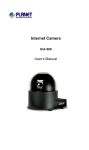
Internet Camera
ICA-500
User’s Manual
Copyright
Copyright (C) 2005 PLANET Technology Corp. All rights reserved.
The products and programs described in this User’s Manual are licensed products of
PLANET Technology, This User’s Manual contains proprietary information protected
by copyright, and this User’s Manual and all accompanying hardware, software, and
documentation are copyrighted.
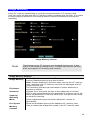
No part of this User’s Manual may be copied, photocopied, reproduced, translated, or
reduced to any electronic medium or machine-readable form by any means by
electronic or mechanical. Including photocopying, recording, or information storage
and retrieval systems, for any purpose other than the purchaser's personal use, and
without the prior express written permission of PLANET Technology.
Declaration of Conformity
This device complies with part 15 of the FCC Rules. Operation is subject to the
following two conditions:
(1) This device may not cause harmful interference, and
(2) This device must accept any interference received, including interference that may
cause undesired operation.
Disclaimer
PLANET Technology does not warrant that the hardware will work properly in all
environments and applications, and makes no warranty and representation, either
implied or expressed, with respect to the quality, performance, merchantability, or
fitness for a particular purpose.
PLANET has made every effort to ensure that this User’s Manual is accurate;
PLANET disclaims liability for any inaccuracies or omissions that may have occurred.
Information in this User’s Manual is subject to change without notice and does not
represent a commitment on the part of PLANET. PLANET assumes no responsibility
for any inaccuracies that may be contained in this User’s Manual. PLANET makes no
commitment to update or keep current the information in this User’s Manual, and
reserves the right to make improvements to this User’s Manual and/or to the products
described in this User’s Manual, at any time without notice.
If you find information in this manual that is incorrect, misleading, or incomplete, we
would appreciate your comments and suggestions.
Trademarks
The PLANET logo is a trademark of PLANET Technology. This documentation may
refer to numerous hardware and software products by their trade names. In most, if
not all cases, these designations are claimed as trademarks or registered trademarks
by their respective companies.
Revision
User’s Manual for PLANET Pan / Tilt Internet camera:
Model: ICA-500
Rev: 5.0 (August 2005)
Part No. EM-ICA500V5
ii
Table of Contents
CHAPTER 1 INTRODUCTION.............................................................................................. 1
Overview ............................................................................................................................ 1
Physical Details .................................................................................................................. 3
Package Contents .............................................................................................................. 4
CHAPTER 2 BASIC SETUP ................................................................................................... 5
System Requirements........................................................................................................ 5
Installation ......................................................................................................................... 6
Setup ................................................................................................................................... 7
CHAPTER 3 ADVANCED VIEWING SETUP ..................................................................... 9
Introduction ....................................................................................................................... 9
Adjusting the Video Image ............................................................................................... 9
Controlling User Access to the Video Stream ............................................................... 12
Making Video available from the Internet.................................................................... 13
CHAPTER 4 WEB-BASED MANAGEMENT .................................................................... 17
Introduction ..................................................................................................................... 17
Connecting to ICA-500.................................................................................................... 17
Welcome Screen............................................................................................................... 18
Viewing Area ................................................................................................................... 19
Control Panel Screen....................................................................................................... 20
Advanced Configuration Area ....................................................................................... 21
Camera Advanced setting Menu .................................................................................... 21
System Screen .................................................................................................................. 22
Camera Screen................................................................................................................. 23
Network Screen................................................................................................................ 25
User Screen ...................................................................................................................... 28
IP Filter Screen................................................................................................................ 28
FTP Client Screen ........................................................................................................... 30
SMTP Screen ................................................................................................................... 31
Image Memory................................................................................................................. 32
Alarm 1 & Alarm 2 Screen ............................................................................................. 34
Schedule Screen ............................................................................................................... 34
Motion Detection Screen................................................................................................. 35
Time Setting Screen......................................................................................................... 36
Popup Screen ................................................................................................................... 37
Firmware upgrade Screen .............................................................................................. 38
Factory Default Screen.................................................................................................... 39
ActiveX Control............................................................................................................... 40
CHAPTER 5 CLIENT UTILITY .......................................................................................... 46
INSTALLATION ............................................................................................................ 46
HOW TO USE ................................................................................................................. 50
APPENDIX A ALARM I/O CONNECTOR......................................................................... 65
Appendix A Alarm I/O Connector................................................................................. 65
APPENDIX B TROUBLESHOOTING ................................................................................ 66
Appendix B Troubleshooting.......................................................................................... 66
APPENDIX C BANDWIDTH CALCULATION ................................................................. 70
Appendix C: Bandwidth Calculation............................................................................. 70
i
APPENDIX D SPECIFICATIONS........................................................................................ 71
Appendix D: Specifications............................................................................................. 71
ii
1
Chapter 1
Introduction
This Chapter provides details of the ICA-500's features, components
and capabilities.
Overview
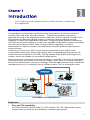
As broadband communication gets more and more popular, it becomes easier to
transfer video and audio through network. Traditional surveillance system is
gradually evolving to be deployed in packet switching TCP/IP network. PLANET ICA500 provides an advanced digital solution of Internet Camera with pan and tilt
capability to meet more application demands. It supports wired Ethernet networking.
ICA-500 can be placed either in a LAN or an available xDSL/Cable modem connection.
ICA-500 also supports DDNS. With its Plug-N-Watch capability, a network
administrator or system operator can seamlessly complete network deployment in
simply minutes.
Combining 1/3 inch color CCD sensor with the advanced motion JPEG video
compression technology, sharp, high-quality video is digitized and delivered by the
advanced microcomputer in ICA-500. The high quality of M-JPEG files brings vivid
images, which are suitable for surveillance applications.
Motion detection is a powerful function enhanced in ICA-500. If a motion is detected in
surveillance spot, this function will capture images, attach them in an email, and alert
the system administrator via pop-up message. With bundled camera utility, centralized
management (up to 16 cameras) can be fulfilled to save TOC for enterprise users.
Headquarter
Warehouse
ICA-500
Production Area
IVS-100
ICA-500
ICA-500/IVS-100 applications
Features
•
Pan and Tilt capability
ICA-500 is able to perform PAN (0°~325°) and tilt (10°~90°) adjustment, which
brings more convenience and flexibility in network deployment.
1
•
Ease of use
Plug-N-Watch capability to simplify system integration in an existing network
environment
•
Meeting SOHO, business, or public facilities surveillance needs
ICA-500 can be deployed in many different situations, such as library, train station
or factory production line to provide efficient, human-resource reducing, and
offers flexibility, affordability, and reliability for the proper surveillance of
manufacturing facilities.
•
Multi-Platform support
Supporting TCP/IP networking, SMTP e-mail, and HTTP public network standards,
ICA-500 can be applied and utilized to a mixed IP network environment.
•
Motion Detection
This feature will send you alert message when motion is detected. The ICA-500
will compare consecutive frames to detect changes caused by the movement of
large objects.
•
Audio Support
With built-in microphone, the voice around can be recorded with live image.
Internet Features
•
User-definable administration port number.
This allows Internet Gateways to use “port mapping” so the ICA-500 a and a Web
Server can share the same Internet IP address.
•
DDNS Support
In order to view video over Internet, user must know the Internet IP address of the
gateway used by ICA-500. An easy-to-remember DDNS (Dynamic DNS) name
will help you memorize your site more easily.
•
NTP (Network-Time-Protocol) Support
NTP allows the ICA-500 to calibrate its internal clock from an Internet TimeServer. This ensures that the time stamp on the recorded video from the ICA-500
will be correct.
Security Features
•
User Authentication
If desired, the camera access can be restricted to known users. Users will have
to enter their username and password before being able to view the video stream.
Up to 10 users can be entered.
•
IP filter
The camera access not only can be restricted by username/password, but also
can be limited by the IP range to bring users more security.
2
Physical Details
ICA-500 Rear Panel
Rear Panel
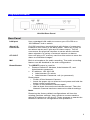
LAN port
Use a standard LAN cable to connect your ICA-500 to a
10/100BaseT hub or switch.
Alarm I/O
Connector
ICA-500 provides a terminal block with 8 pins of connectors
located on the center of the back panel. There are 3 pins for
two alarm inputs and 5 pins are for alarm output. The I/O
connectors are physical interface to sense and/or activate
alarm signals to a variety of external sensors or alarms.
CF SLOT
User can plug a CF memory card into this socket to store the
alarm or scheduled images.
MIC
Built-in microphone for audio recording. The audio recording
feature can be disabled in the web configuration.
Reset Button
The RESET button is used for
•
•
Restore Default IP Address, Administrator ID, and
Administrator password.
IP address: 192.168.0.20
• Administrator ID: admin
• Administrator Password: null (no password)
Reset steps:
• Power off the Network Camera.
• Insert the paper clip or other tool and press and hold the
button down continuously.
• Power on the Network Camera again.
• Wait at least 8 seconds and release the tool. Then the
Network Camera has been restored to default settings.
Note:
Restoring the factory default configurations will lose the
existing machine settings. User needs to access machine
default IP address or use the IP Finder program to search the
Network Camera for configuration and operations..
3
Package Contents
The following items should be included: If any of these items are damaged or missing,
please contact your dealer immediately.
•
•
•
•
•
•
•
Planet ICA-500 Pan / Tilt Camera x 1
Power adapter x 1
Power cord x 1
Decoration ring x 1
Screw x 4
Terminator for Alarm I/O x 1
Installation software and manual CD x 1
4
Chapter 2
Basic Setup
2
This Chapter provides details of installing and configuring the ICA-500.
System Requirements
•
To use the LAN interface, a standard 10/100BaseT hub or switch and network
cable is required.
•
System Requirement for Viewer & Recorder:
System
Hardware
1-4 cameras surveillance application
•
CPU: Pentium III, 800 MHz or above
•
Memory Size: 128 MB (256 MB
recommended)
•
VGA card resolution: 1024 x 768 or above
4 or more cameras surveillance application
L Hint
•
CPU: Pentium 4, 1.7G MHz or above
•
Memory Size: 512 MB or above
•
VGA card resolution: 1024 x 768 or above
Note: The listed information is minimum system requirements only.
Actual requirement will vary depending on the nature of your
environment.
5
Installation
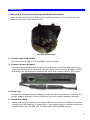
1. Mount the Camera on the supplied Base and Stand.
Use 4 screws to fix the ICA-500 onto the ceiling as below. You can also put the
Network Camera on the table directly.
ICA-500 Installation
2. Connect the LAN Cable
Connect the ICA-500 to a 10/100BaseT hub or switch.
3. Connect power adapter
Connect the external power supply to the DC power connector attached on the
extension cable from the Network Camera. Note: use the power adapter, 12VDC,
included in the package and connect the other end to wall outlet for AC power.
4. Power Up
Connect the supplied power adapter to the ICA-500 and power up. Use only the
power adapter provided. Using a different one may cause hardware damage.
5. Check the LEDs
•
When powering on machine, the status LED will turn green. It means the system
is booting up successfully. Furthermore, if you have a proper network connection,
and access to the ICA-500, the 10/100M LAN LED will flash orange
6
Setup
Initial setup can be performed either from the web browser or using the supplied
Windows-based camera utilities. This program can locate the ICA-500 even if its IP
address is invalid for your network. You can then configure the ICA-500 with
appropriate TCP/IP settings for your LAN.
Subsequent administration can be performed with your Web browser, as explained in
Chapter 3 - Web-based Administration.
Setup Procedure
Before setup operations
The ICA-500 provides GUI (Web based, Graphical User Interface) for machine
management and maintenance.
To start ICA-500 web configuration, the requirement of the web browser should be:
Microsoft Internet Explorer 6.0 or higher with Java support
L Note
Current firmware supports Microsoft Internet Explorer, the Netscape
Navigator support is planned in the future firmware release
Default LAN interface IP address of ICA-500 is 192.168.0.20. You may now open your
web browser, and insert http://192.168.0.20 in the address bar of your web browser to
logon ICA-500 web configuration page.
ICA-500 will prompt for User Name and Password, please enter: admin as username
to continue machine Web Management.
Or you may execute IPEditV3 to discover/edit IP address of ICA-500.
Procedures of IPEdit utility
•
Please find the IPEditV3.exe in the Utility folder on user’s manual CD
•
Double-click the IPEditV3.exe and the following screen should be prompt on your
computer.
7
•
Choose the destination camera for IP address and device name modifications
•
After modifications, you may now connect the camera via web browser.
8
Chapter 3
Advanced Viewing Setup
3
This Chapter provides information about the optional settings and
features for viewing video via the ICA-500. This Chapter is for
Administrators only.
Introduction
After finishing the network setup, the ICA-500 can immediately be used by all users on
your LAN.
This chapter describes some additional settings and options for viewing live Video:
•
Adjusting the video image
•
Controlling user access to the live video stream
•
Making video available from the Internet
Adjusting the Video Image
If necessary, the ICA-500 Administrator can adjust the Video image. Settings are
provided for:
•
Image size - Select the desired size. The larger sizes require greater bandwidth.
•
Image quality - This determines the degree of compression applied to the Video
stream. Higher quality requires greater bandwidth.
•
Saturation, Sharpness, Contrast, Hue adjustment -
To Adjust the Video Image:
1. Connect to the Web-based interface of the ICA-500.
2. On the Administration menu, select Image. You will see a screen like the example
below.
9
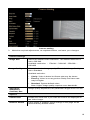
Camera setting
3. Make the required adjustments, as explained below, and save your changes.
Camera Settings
Image Size
Select the desired video resolution. The default resolution is
set to 320*240.
Available resolution: ‧176x144‧320x240‧352x288 ‧
640x480
Image Quality
Select the desired image quality. The default Image Quality is
set to Standard.
Available selection:
Saturation,
Sharpness,
Contrast, Hue
•
Clarity: Video is better but frame rate may be slower
•
Fluency: Video is not as good as Clarity but frame rate
may be higher
•
Standard: System default value.
Note: Higher image quality requires more bandwidth.
Image quality adjustment, the parameter ranges from 0 to 255
Options
Camera tour
Enable the check box if you want the time to be displayed on
the Video image.
Reset to default
If this option is enabled, all the settings in this page will be
reset to factory default values.
10
L Note
Please check the appendix B for more information on the image
adjustment.
11
Controlling User Access to the Video Stream
By default, only system administrators can connect to the ICA-500 and view live Video.
If desired, you may apply the access privileges to known users, by requiring each user
to login to the ICA-500 with their individual username and password.
To Enable this feature:
1. Connect to the Web-based interface of the ICA-500. (Please check related
chapters for details.)
2. In machine Administration menu, select User.
3. You may add up to 10 users in machine database, choose the user number, and
enter the name, password and access right for each user.
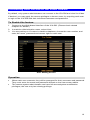
User Setting Screen
Operation
•
When each user connects, they will be prompted for their username and password.
They must enter the name and password defined on the User screen above.
•
The camera system administrator can have full access/system modification
privileges; the user only has viewing privilege.
12
Making Video available from the Internet
If your LAN is connected to the Internet, typically by a Broadband Gateway/Router and
Broadband modem, you can make the ICA-500 available via the Internet.
ICA-500 Setup
The ICA-500 configuration does NOT have be changed, unless:
•
You wish to change the port number from the default value (1024).
•
You wish to use the DDNS (Dynamic DNS) feature of the ICA-500.
Second HTTP Port Configuration
Normally, HTTP (Web) connections use port 80. Since the ICA-500 uses HTTP, but
port 80 is likely to be used by a Web Server, you can use a different port for the ICA500. This port is called the "HTTP Port2". (The first port is port 80.)
The HTTP port2 is disabled in default settings. If you prefer to use a different port
number than port 80, you can specify the port number on the ICA-500's Network
screen, as shown below.
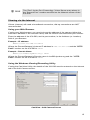
Network Screen
The Network screen is part of the Web-based Administration interface. See Webbased Management for further details on using this interface.
L Hint
Viewers need to know this port number in order to connect and
view live Video, so the current communication port number has to
be informed to the remote users to connect to.
13
DDNS (Dynamic DNS)
Many Internet connections use a "Dynamic IP address", where the Internet IP address
is allocated whenever the Internet connection is established.
This means that other Internet users don't know the IP address, so can't establish a
connection.
DDNS is designed to solve this problem, by allowing users to connect to your LAN
using a domain name, rather than an IP address.
To use DDNS:
1. Register for the DDNS service with a supported DDNS service provider. You can
then apply for, and be allocated, a Domain Name.
2. Enter and save the correct DDNS settings on the DDNS Setting screen in the
Network setting menu.
3. Operation is then automatic:
•
The ICA-500 will then automatically contact the DDNS server whenever it
detects that the Internet IP address has changed, and inform the DDNS server
of the new IP address.
•
Internet users can then connect to your LAN using the Domain Name
allocated by the DDNS service provider.
•
Limitation: if the ICA-500 is installed with private IP address behind the NAT
router, please find and enable the DDNS feature on the router. This can
prevent the remote users not able to connect to the camera.
•
Current supported DDNS service provider: www.dyndns.org , www.no-ip.com
DDNS Setting Screen
Router/Gateway Setup for remote viewing
Your Router or Gateway must be configured to pass incoming TCP (HTTP)
connections (from remote viewers) to the ICA-500. The Router/Gateway uses the Port
Number to determine which incoming connections are intended for the ICA-500.
This feature is normally called Port Forwarding or Virtual Servers in the router. The
Port Forwarding/Virtual Server entry tells the Router/Gateway that incoming TCP
connections should be passed to the ICA-500. If necessary, check the user manual for
your Router/Gateway for further details.
14
L Hint
The "Port" for the Port Forwarding / Virtual Server entry above is
the "Second Port" number specified on the Network screen of the
ICA-500.
Viewing via the Internet
Clients (viewers) will need a broadband connection; dial-up connections are NOT
recommended.
Using your Web Browser
If using your Web browser, you need to know the address of the camera (either the
Internet IP address or the Domain name) and the correct communication port number.
Enter the address of the ICA-500, and its port number, in the Address (or Location)
field of your Browser.
Example - IP address:
HTTP://203.70.249.52:1024
Where the Router/Gateway's Internet IP address is 203.70.212.52 and the "HTTP
Port2" number on the ICA-500 is 1024.
Example - Domain Name:
HTTP://ica500.dyndns.org: 1024
Where the Router/Gateway's Domain name is ica500.dyndns.org and the " HTTP
Port2" number on the ICA-500 is 1024.
Using the Windows Viewing/Recording Utility
If using the CamView Utility, the details of the ICA-500 must be entered on the Internet
tab of the Add Camera screen.
CamView - Add Camera Screen
15
You can then select the camera in the Cameras list on the main screen, and click OK
to establish a connection and view live video.
Please check respective chapter for further details of viewing Video using either the
Windows Viewing/Recording utility or Web Browser.
16
4
Chapter 4
Web-based Management
This Chapter provides Setup details of the ICA-500’s Web-based
Interface. This Chapter is for Administrators only.
Introduction
The ICA-500 can be configured using your Web Browser. The ICA-500 must have an
IP address, which is compatible with your PC.
Connecting to ICA-500
•
If you have run the CamView utility, the screen provided a button
this button will immediately connect to the ICA-500.
•
If using only your Web Browser, use the following procedure to establish a
connection from your PC to the ICA-500:
•
Once connected, you can add the ICA-500 to your Browser's Favorites or
Bookmarks.
. Clicking
Connecting using your Web Browser
1. Start your web browser.
2. In the Address box, enter "HTTP://" and the IP Address of the ICA-500, as in this
example, which uses the ICA-500's default IP Address:
HTTP://192.168.0.20
3. Default username/password for machine login: admin/ <no password>
4. If the Administrator ID and Password have been assigned, enter the name and
password you assigned.
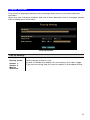
17
Welcome Screen
When you connect, the camera Home screen will be displayed.
Camera Home Screen
The Home screen can be divided into three areas:
•
Viewing Area - Images from the ICA-500
•
Control Panel Area – ICA-500 Camera Manipulation and image quality control
•
Advanced Configuration area - only available for administrator. Camera
administrator can have full configuration in this menu.
These options are explained in the following sections.
18
Viewing Area
This screen is displayed when you log in machine
Viewing Area Screen
•
The ICA-500 web page requires ActiveX control to display the video content. The
ActiveX control must be downloaded from the camera and installed on your PC.
•
The security settings on the Internet Explorer must allow the ActiveX plug in to be
functional.
•
To use the ICA-500, please execute your Internet Explorer and browse to ”Tools”
Î ”Internet Options…” Î ”Security” ΔCustom Level…” and change the settings
as follows:
• Download the signed ActiveX controls
• Download the unsigned ActiveX controls
• Initialize and script the ActiveX controls not masked as safe to Prompt
•
After the ActiveX installation completed, video content will start playing
automatically. Due to various network conditions, the video display may be a delay
of a few seconds while the video stream is buffered.
19
Control Panel Screen
When you connect, the camera control panel screen will be displayed.
Camera direction Up, Down, Left, Right, Home
Camera speed adjustment
Adjust camera focus Recall/Preset Mode
Camera Preset/Recall positions
Frame rate adjustment via image quality
Video Resolution
Video Brightness adjustment positions
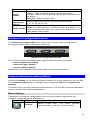
Audio feature On/Off
Camera Control Panel Screen
The function on the control panel can be shown below:
Button
Camera
Direction
Camera
Speed
Recall/Preset
mode
Video
Resolution
Preset
or
Recall
positions
Video
Brightness
Definition
Control camera up/down/left/right and home position
Increase/decrease the camera Pan/Tilt speed
Preset: set up camera fixed locations before operation
Recall: Set camera position to preset location
Adjust Video resolution
The ICA-500 provides 4 resolutions:
640x480, 352x288, 320x240, 176x144
For NTSC camera: 320x240 is suitable
For PAL camera: 352x288 and 176x144 are suitable
However, all resolution are available for NTSC and PAL
camera
Preset or Recall camera 1~16 location(s)
Ex. If you press 5, then the camera will move to preset
location 5.
Adjust Camera video brightness
20
Adjustment
Image
quality
Adjust image quality.
Clarity: Video is better but frame rate may be slower
Fluency: Video is not as good as Clarity but frame rate may
be higher
Standard: System default value
Frame rate
adjustment
directly
Adjust video frame rate via giving a number directly.
1, 5, 10, 15, 20, 25, 30
Audio On/Off
Turn on/off audio output function.
Note: The Microphone is located on the rear panel. You
need to position the MIC hole face to the audio source to
have better audio quality.
Advanced Configuration Area
The Advanced Configuration menu offers more features and camera control
privileges to meet various application demands.
Advanced Configuration Screen
The ICA-500 Advanced Configuration page divided into three sub-menus:
• Camera Advanced Setting
• Camera Trigger Setting
• Screen capture Setting
Respective menu descriptions are illustrated in the following sections.
Camera Advanced setting Menu
Clicking on Setting on the menu provides privileges to all the settings for the ICA-500.
The Advanced Setting menu is divided into 2 categories: Basic and Application
settings:
The Basic menu provides essential configurations of the ICA-500, and the Application
menu is provided for various applications.
Basic Setting
Parameters in the Basic configuration menu provide machine adjustment; the
available configurations are listed below:
Icon
Menu Link
System
Definition
Define Frame Rate, Turn on/off “Remote
camera control”, and view system log file.
21
Camera
Adjust camera parameters and set camera
tour
Network
Configure Network setting such as DHCP
On/Off, DDNS and PPPoE
User
Setup user name, password and login privilege
IP Filter
Setup legal IP address of user login (This
function should be used with function “User”
respectively)
System Screen
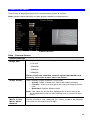
After entering machine Home screen, click on the System menu, you will see a
screen like the example below.
System Screen
Data - System Screen
System Settings
Serial Number
Product serial number
Camera Name
This displays the name for the ICA-500; camera name is useful
while multiple unit installation.
Default frame
rate
The default frame rate in ICA-500 is 30fps, the video frame rate
can be adjusted in this menu or on the Control panel menu
Remote
camera
control:
Enable or disable remote control feature in ICA-500
Log
Administrator can check the log information in machine,
including the Main Info, Appended Info, Operator IP, Operator
MAC, and Time.
Select the “View” button to check the log file.
22
Camera Screen
This screen is displayed when the Camera menu option is clicked.
Note: please adjust carefully to have proper machine configurations.
Camera Screen
Data - Camera Screen
Camera Settings
Image Size
Display resolution selection, supported resolution in ICA-500:
‧176x144
‧ 352x288
‧ 320x240
‧ 640x480
Please check the available network upload bandwidth and
carefully select the proper video resolution.
Image Quality
Image, Rotate,
Mirror, Focus
Mode, White
Balance
Video display quality selection in ICA-500:
• Clarity: Video is better but frame rate may be slower
• Fluency: Video is not as good as Clarity but higher frame
rate
• Standard: System default value
Note: The value on the list box displays the current setting all
the modifications will not take effects until it is saved in this
menu.
These functions are reserved for future product developing.
They are not functional in ICA-500.
23
Saturation,
Sharpness,
Contrast, Hue
Key in respective value for image adjustment. It is not required
to adjust this value when the image is vivid.
Camera Tour
To use the camera tour function, user must preset some camera
positions first.
Select the “SET Tour” button to enter the Camera Tour setting
page.
Reset to
Default
Restore the values of these pages to factory default value.
Camera Tour
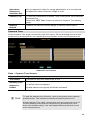
In the Camera Tour page, choose the one tour name. Fill the dwelling time and tour
sequence by preset points, can repeat above procedure to set more camera tours.
Camera Tour Screen
Data – Camera Tour Screen
Camera Tour Settings
Tour Name
Choose the one tour name from A to E
Dwelling Time
The time period between every tour point.
Sequence
16 points can be assigned.
Enable
Enable camera tour group should be activated
L Hint
To use the camera tour function, user must preset some camera
positions first. The maximum number of preset points is 16.
In the Camera Tour page, choose the one tour name from A to E.
Fill the dwelling time and tour sequence by preset points, and
then save these setting. You can repeat above procedure to set
more camera tours.
24
Network Screen
This screen is displayed configure Network setting such as IP address, DHCP, DDNS
and PPPoE.
Network screen
Data - Network Screen
Network Settings
DHCP
Enable or disable DHCP client in ICA-500
IP address,
Subnet mask,
Default
gateway,
Primary DNS,
Secondary
DNS
This parameter allows users to setup the IP address assigned by
ISP. Your ISP should provide all the information requied for
Internet access.
HTTP Port 1,
HTTP Port 2
Users could assign the port number of http protocol, and the
WAN users should follow the port number to login.
User can use IP Edit software program to find Internet Cameras
or edit related parameters on the LAN. Disable this option to
restrict the modification of related parameters by IP Edit software
IP Edit
Note: User need to reboot the Network Camera to make this
setting to take effect.
DDNS Setting
The DDNS is designed to solve this problem, by allowing users to connect to your
LAN using a domain name, rather than an IP address.
25
DDNS screen
DDNS Settings
Enable DDNS
Enable or disable DDNS function.
Username,
Password
Enter the Username/Password for your DDNS account.
Domain Name
Enter the host name, which DDNS service provider assigned.
HTTP Proxy,
Proxy
Username,
Proxy
Password
Enter the parameter, which DDNS service provider assigned.
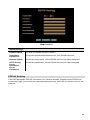
PPPoE Setting
If the ISP demands PPPoE connection for Internet access, please select PPPoE as
connection type, and insert the username/password by your ISP to connect you to the
Internet.
26
PPPoE screen
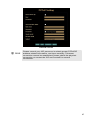
L Hint
Please consult your ISP personnel to obtain proper PPPoE/IP
address related information, and input carefully. If Internet
connection cannot be established, please check the physical
connection or contact the ISP service staff for support
information.
27
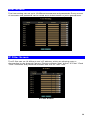
User Screen
This User setting can set up to 10 different usernames and passwords. Every one set
of username and password can be acted as an Administrator or just a general user.
User Screen
IP Filter Screen
The IP filter can set 10 different user’s IP address, which are allowing enter or
disregarding by the Network Camera. Please configure “User” before “IP Filter”. Each
“User” username and password matches with one “IP Filter” user.
IP Filter Screen
28
Application Setting
Parameters in the Basic configuration menu provide machine adjustment; the
available configurations are listed below:
Icon
Menu Link
Definition
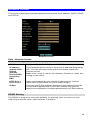
FTP Client Setup IVS-100 as a FTP client and configure
Server site in order to upload images to server
SMTP
Setup Mail transferring service configuration
Image
Memory
Setup CF memory card setting or view the
pictures stored in CF memory card.
Alarm 1
Setup Alarm Output 1 action via manual or
event
Alarm 2
Setup Alarm Output 2 action via manual or
event
Schedule
Schedule Motion Detection to send email or
upload images.
Motion
Detection
Setup motion detection area and sensor
sensitivity
Time
Setting
Setup the Network Camera time configuration
Popup
Setup event message while motion or sensors
has been activated
Firmware
Upgrade
Product firmware upgrade
Factory
Default
Pre-default the Network Camera factory
default setting
29
FTP Client Screen
FTP Client Screen
FTP Client Settings
FTP server
name
IP address or domain name of the destination FTP server
Username,
Password
Please input the Username/Password for the FTP server
Remote path
Please input the path to the destination.
Image file
name
Please input the basic file name you want to assign to the
images when sending to the FTP server.
Suffix
Select the suffix to add to the file name.
Sequence No.
clear
Enable or disable clear sequence number
Mode
Motion Detection / Sensor1 / Sensor2 / Periodical sending / Off
Please select send a captured image mode.
30
SMTP Screen
This screen is displayed when the SMTP menu option is clicked.
SMTP (Simple Mail Transfer Protocol) is a protocol for sending e-mail messages
between servers. The mail server address must be filled in this field.
SMTP Screen
Network Settings
SMTP server
name
Enter the address of SMTP server used to send the mail. Please
ensure the server is using SMTP protocol and able to relay mails
for you. Some SMTP server may require authentication. Please
enable the “Check Password”, and enter the Account Password
fields below for authentication.
Username,
Password
Enter the Username/Password for your SMTP account.
Sender’s Mail
Box
Enter the sender e-mail address in the field. This field must be
entered with a valid e-mail format.
Receiver’s Mail
Box
Enter the receiver e-mail address in the field.
Subject
Enter the subject of outgoing mail.
Mode
Motion Detection / Sensor1 / Sensor2 / Periodical sending / Off
Please select send a captured image mode.
31
Image Memory
Setup CF memory card setting or view the pictures stored in CF memory card.
User can store the pictures into CF memory card by enabling this function. It is useful
to keep image as evidence even though without remote surveillance and remote
recording.
Image Memory Screen
Note
This function is for CF memory card enabled version only. If this
option is not listed on setting menu, it means this Internet Camera
does not support CF memory card function.
Image Memory Settings
Image Memory
File Name
Overwrite
Capacity
Warming
Mode
Free Space
Memory
Content
Choose Enable to activate the CF memory card function or
choose Disable button to stop this function.
Note: Please disable this function when remove the CF memory
card, otherwise the CF memory card may be damaged and all
image files are lost.
The recording filename can be based on either date/time or
sequence number.
Choose On to overwrite the files in the oldest day or choose
OFF to stop recording while the attached CF memory card is full
While the attached CF memory card is full, this device can send
an email for warning.
Send a captured image via motion detection / sensor or
periodically.
Show the available space of the attached CF memory card.
View or delete the image files stored in the CF memory card.
32
Note
We strongly suggest using SanDisk CF memory card to avoid
compatible issue with this device.
Because this device does not support plug and play function yet.
Therefore, while you want to plug a CF memory card into slot,
please make sure power off the device first, then plug this CF
memory card carefully.
When you want to remove this CF memory card from device,
make sure click the disable button first, then remove CF memory
card. Otherwise, this CF memory card may be damaged and all
image files are lost.
33
Alarm 1 & Alarm 2 Screen
This screen is displayed when the Alarm 1/Alarm 2 menu option is clicked. You can
select Manual or Event for the Alarm mode.
Alarm1 Screen
Schedule Screen
The Schedule can enable motion detection in an arranged period in order to avoid
unnecessary images transmitting and catch the desired images.
Schedule Setting Screen
34
Motion Detection Screen
This screen is displayed when the Motion Detection menu option is clicked. You can
Enable/Disable function and adjust the sensitivity level
Motion Detection Screen
Motion Detection Settings
Enable Motion
Detection
Enable or disable Motion Detection function in ICA-500
Sensitivity
Select the desired option to suit your environment. If covering a
large area, you usually need higher sensitivity, since a moving
object will take only a small portion of the image.
Area
Use the adjust the determine which areas of the image are
examined for motion
35
Time Setting Screen
This screen is displayed when the Time Setting menu option is clicked.
Time Screen
Time Settings
IP Cam Time
Provides settings of adjusting the camera’s time
PC Time
This is default time value for PC.
Set Time
Three options of Synchronize with PC's time / User Input / NTP
are available for your selection to link with the Time Server. The
default setting is Synchronize the time with PC’s time
Date
(yy/mm/dd)
To set the Date Time manually select “User Input” and system
administrator must enter the Date and Time in the respective
field manually.
Time
(hh:mm:ss)
Time Zone
L Hint
System administrator must select the time zone for the region.
Please refer to the appendix for the time zone selection table.
Please find below NTP server web address for your reference to
set the timeserver.
http://www.eecis.udel.edu/~mills/ntp/clock1.htm
http://www.eecis.udel.edu/~mills/ntp/clock2.htm
36
Popup Screen
This screen is displayed setting event message while motion or sensors has been
activated
When any one of alarms enabled, and one of them detected, then a message window
will be displayed on the screen.
Pop up Screen
Pop up Settings
Pop-up text
Input the warming text.
Display mode
Select display mode for your
Enable or disable the display of a text string in the video image.
Type the text string that you want to display in the adjacent field.
Sensor 1,
Sensor 2,
Motion
detection
37
Firmware upgrade Screen
This screen is displayed when you click the Firmware Upgrade menu on the Status
screen.
Firmware Upgrade Screen
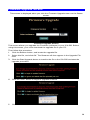
This screen allows you upgrade the Firmware (software) in your ICA-500. Before
using this screen, your must download the upgrade file to your PC.
Then follow this procedure:
1. Click the Browse button, and locate the upgrade file.
2. Select this file, and click OK. The filename will then appear in the Upgrade File
field.
3. Click the Start Upgrade button to transfer the file to the ICA-500 and start the
upgrade procedure.
4. Click the “here” button to begin to upgrade firmware.
5. Click the “OK” button to continue.
38
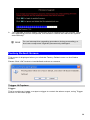
6. The upgrade progress status information will be displayed on the screen. Once
the upgrading process completed, the Network Camera will reboot the system
automatically.
L Hint
Do not interrupt the upgrading procedure during proceeding; or
the inner component might be permanently damaged.
Factory Default Screen
This screen is displayed when you click the Factory Default menu on the Status
screen.
Please Click “OK” button to load default settings to camera.
Trigger & Capture
Trigger:
This is sending an image or output a trigger to control the alarm output, using Trigger
section on the main page.
39
Trigger Settings
FTP
Upload a captured image to server
Mail
Mail captured image to specific mail address
Image Memory
Save images in attached CF memory card
Alarm 1
Enable Alarm output 1
Alarm 2
Enable Alarm output 2
Clear Alarm 1
Clear alarm1 output status
Clear Alarm 2
Clear alarm2 output status
Capture:
This screen is displayed when you click the Capture menu and the function can
capture current image and save it to storage media. The image is saved in the JPEG
format.
ActiveX Control
This feature only supports on the ActiveX control within Microsoft® Internet Explorer.
40
View
This screen is displayed when you click the “View” menu on the ActiveX control.
View Settings
Resizable
Actual size
Status Bar
Make the image is resizable, but “Actual size disable”, the
“Splits” is supported on this mode.
Make the image show as the actual size, the “Splits” function
does not work on this mode.
A status bar display on the button of the image.
41
Split
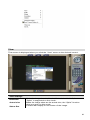
This screen is displayed when you click the “Split” menu on the ActiveX control.
The Network Camera provides four setting for Window split, it can display different
time frame images of the selected Network Camera. The time string with green
characters is the current displayed image.
Available Split: ‧1 x 1 (Default) ‧ 2 x 2‧ 3 x 3‧ 4 x 4
Rotate & Quality & Resolution
Rotate:
An image can be rotated in predefined 180-degree increments.
Quality:
Available quality : ‧High (Default)‧Low.
Resolution:
Available resolution: ‧176x144‧320x240‧352x288 ‧640x480
Image Recording
This screen is displayed when you click the “Image Recording” menu on the ActiveX
control.
42
Recoding Screen
Save as JPEG:
Select this option and click “Save as JPEG” for detailed configurations. The predefined schedule can be set by JPEG.
During the JPGEG file recording, a red icon displays on lower right position of the
image to indicate the AVI saving process. If want stop the recording, please press the
“Stop Image Recording” to stop the save as JPEG process.
43
Save as AVI:
Select this option and click “Save as AVI” for detailed configurations. The pre-defined
schedule can be set by AVI.
During the AVI file recording, a red icon displays on lower right position of the image to
indicate the AVI saving process. If want stop the recording, please press the “Stop
Image Recording” to stop the save as AVI process.
Recording File Path:
Save Current Picture As
This screen is displayed when you click the “Save Current Picture As” menu on the
ActiveX control.
How to configure Motion Detection
• Please select the “Save Current Picture As “ to save the current display image into
the local PC.
•
Please input the saved ”file name”, and click “Save” button.
•
Please select the file to display the saved image by using any one of graph editing
tools.
44
45
Chapter 5
Client UTILITY
5
INSTALLATION
The CamView utility is a powerful utility for video recording, viewing, and camera
administrations.
Please insert the user’s manual CD and start the CamView installation from the
default page or manually browse the Utility folder in the CD to install the software:
5.1. CamView Installation
•
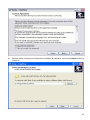
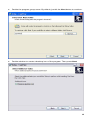
Run the “setup.exe” to start installation. A welcome message is shown as the
following figure, and then hit the Next button to continue.
•
Read the license agreement first, please. If you accept the agreement, select I
accept the agreement, and then hit the Next button to continue.
46
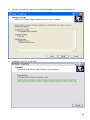
• Decide which directory to install the software. By default, just hit the Next button to
continue
47
• Decide the program group name. By default, just hit the Next button to continue.
• Decide whether to create a desktop icon of the program. Then press Next.
48
• Ready to install. By default, just hit the Install button to start installation.
• Installing, wait for a moment.
49
•
Installation complete. CamView software can be launched after pressing Finish.
HOW TO USE
After successfully installing the utility, this icon
desktop. Double click it to launch the program.
will be added to the
User need login authentication while starting to use CamView.
Two pairs of default login ID and password: admin/admin and guest/guest.
Admin ID has supreme authority to adjust any settings.
Guest ID has view only privilege, and does not have authority to adjust machine
settings.
Note: It is strongly suggested to change the Login ID and Password for security
concerns.
50
5.2. CamView User Interface
1
2
12
3
4
5
6
7
8
12
11
9
10
CamView main screen
5.2.1. Date and Time
The current date and time of the computer are displayed here.
5.2.2. Alert Message
A message box will appear while alert event occurs. Ex: free space is almost
exhausted.
5.2.3. Recording and Playback
Here are the buttons for playback, record / stop record and snapshot.
51
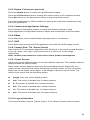
5.2.4. Rotate, Full screen and Lock
Press the Rotate button to rotate the up-side-down images.
Press the Full Screen button to enlarge the viewer screen to full computer screen.
Press Esc button on the keyboard to return to main CamView screen.
Press the Lock button to forbid intruders to operate the CamView unless they input
the correct password.
5.2.5. Camera and Application Settings
Press Camera Configuration button to adjust the camera settings in Web.
Press Application Configuration button to adjust and maintain the CamView tasks.
5.2.6. EMap
Press this button to do central location management for 16 cameras.
5.2.7. DVR
Press this button to recall the DVR application and view the DVR images as well.
5.2.8. Camera Pan / Tilt / Zoom Control
Here are the PTZ controllers integrated in the CamView to move the camera direction
to the up / down / left / right / home and zoom in or zoom out on the image
respectively.
Note: camera zoom feature is reserved for future product development.
5.2.9. Viewer Screen
Users may choose different layout to monitor different cameras. The available camera
display modes are shown below:
Each viewer section displays video from the associated camera. Right click on a
viewer section, and then the viewer will change to Single viewer. At this movement,
Right click on the single viewer again, it will change to previous layout mode. The
layout of the screen has the following modes:
z
Single: Only one viewer displays video.
z
2x2: The screen is divided into 4 viewer sections.
z
6: The screen is divided into 6 viewer sections.
z
3x3: The screen is divided into 9 viewer sections.
z
13: The screen is divided into 13 viewer sections.
z
4x4: The screen is divided into 16 viewer sections.
5.2.10. Layout Selection
There are six kinds of layout (Please refer to 5.2.9 Viewer Screen) can be chosen.
52
5.2.11. Camera Selector
Here are the camera number buttons to select cameras.
Blue color: the normal camera icon.
Pink color: the current selected camera.
5.2.12. Minimize, Audio and Close application button
The right top button is for minimizing the CanView software; all the proceeding tasks
will not be terminated.
Press Audio button to enable the audio from the associated Internet Camera. To
enable audio function from CamView, please also enable audio in Web configuration.
(Please refer to the Chapter 4 Web-Based ManagementÆ Control Panel Screen)
Press power symbol button to close the CamView software; all the proceeding tasks
will be terminated.
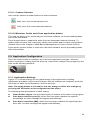
5.3. Application Configuration
Press the button below to configure the CamView application program. After the
button is pressed, a dialog form will show up. Users then configure the program by the
form as the following sections.
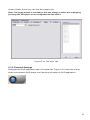
5.3.1. Application Settings
Figure 5.3.1 shows settings for the global scope of the application including
initialization and basic environment settings. After all settings are complete, press the
OK button to save the configuration, and exit the form.
Note: The Apply button is unused for this tab; always confirm the settings by
pressing the OK button to let configurations take effect.
The following lists descriptions of each setting:
z
Initial Viewer Layout: Set the initial layout of viewers at the start of the program.
z
Free Space Alert Percent (%): When the free space reaches the specific
percentage, an alert message will appear automatically.
z
Free Space Alert Size [MB]: When the free space reaches the specified hard
drive size, an alert message will appear automatically.
53
Note: Free Space Alert Percent (%) and Free Space Alert Size [MB] is OR
condition combination, any one above is TRUE, then an alert message will
appear automatically.
z
Max Number of Events: Set the number of lines which you want to show in the
alert message window.
z
Continuous Recording: IF free space is not enough, CamView will delete the
oldest recording file and keep recording.
z
Export: Select the item to save the configuration(Application Configuration)
z
Import: Select the item to load the configuration(Application Configuration)
Figure 5.3.1. The Application Tab
5.3.2. Camera Settings
As shown in Figure 5.3.2, users can set parameters of each camera.
If the Restore button is pressed, the current setting modifications of the specified
camera will be cleared and restore to the original.
If the Apply button is pressed, the current setting modifications will be applied to the
specified camera. Note that these modifications are not saved to the persistent
storage like HD on the computer.
If the OK button is pressed, all settings on all tabs will be saved, and exit the form.
Note: The Apply button is unused for this tab; always confirm the settings by
pressing the OK button to let configurations take effect.
54
The following lists describe for each setting:
•
IP: IP address of the camera.
•
Port: Connection port of the camera. The default is 80.
•
Login ID: Please input the login ID if you enable authentication function of the
specific camera.
•
Password: Please input the password if you enable authentication function of the
specific camera.
•
Video Path: A directory to store recorded video files. Double-click the input field or
click the square button to select the directory.
•
Video Frame Rate:
•
Video Number of Frame: The maximum number of images in a video file. If the
value is smaller,
•
Snapshot Path: A directory to store snapshots. Double-click the input field or click
the square button to select the directory.
•
Motion Rec Interval[Sec]: If Motion Detection is enabled, then when Motion
Detection starts, CamView will do recording for the specified duration. Minimum
unit is second.
Figure 5.3.2 The Camera Tab
• Auto Recording: If the box is checked, the program will do recording for the
specified camera automatically at the beginning of CamView starts.
• Motion Detection: Check this option will enable Motion Detection in CamView.
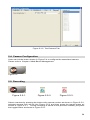
5.3.3. Scheduling
As shown in Figure 5.3.3, users can schedule recording.
When you press the Add button, the editing task will be added to the Schedule Items
column.
55
When the Modify button is pressed, the new schedule recording will be updated to the
specified item.
If the Remove button is pressed, the specified task will be removed from the list.
Note: The Apply button is unused for this tab; always confirm the settings by
pressing the OK button to let configurations take effect.
The following lists describe for each setting:
• Hour: Set the hour of time in 24- hour clock format. * stands for all hours.
•
Minute: Set the minute of time. * stands for all minutes.
•
Month: Set the month for recording tasks. * stands for all months.
•
Day: Set the day for recording tasks. * stands for all days.
•
Weekday: Set the specific weekday of a week. If no day is specified, All
weekdays will fit.
•
Duration (Sec): The duration in seconds for the schedule recording. 0 (zero)
means no limit.
For example, set a recording task which begins at 10:00 every Monday with duration
3600 seconds. The configuration is like below:
Hour = 10, Minute = 0, Month = *, Day = *, Weekday = Mon, Duration = 3600
Figure 5.3.3 The Scheduling Tab
5.3.4. User Settings
Two accounts to access CamView.
Admin / Admin: Administrator has the supreme authority to change all the settings.
56
Guest / Guest: Guest only can view the images only.
Note: The Apply button is unused for this tab; always confirm the settings by
pressing the OK button to let configurations take effect.
Figure 5.3.4 The User Tab
5.3.5. External Settings
Designate the DVR application path in External tab. Figure 5.3.5 show the setting.
When user presses DVR button, the CamView will switch to DVR application.
57
Figure 5.3.5. The External Tab
5.4. Camera Configuration
Users can hit the button shown in Figure 5.4 to configure the associated camera
Please refer to Chapter 4 Web-Based Management.
Figure 5.4
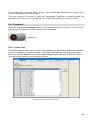
5.5. Recording
Figure 5.5-1.
Figure 5.5-2.
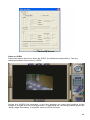
Figure 5.5-3.
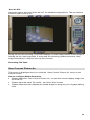
Select a camera by pressing the button with camera number as shown in Figure 5.5-2,
selected camera icon will be like Figure 5.5-3 and then press the toggle button as
shown in Figure 5.5-1. To stop recording is similar to the previous method, just press
the toggle button as shown in Figure 5.5-1.
58
The second way to record automatically, the method has described in section 5.3.2
Camera SettingÆ Auto Recording.
The last method to record is done by scheduling. Schedule recording tasks are
described in section 5.3.3 Scheduling. The CamView will start to record on time.
5.6. Playback
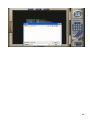
When you press the Playback button on the panel as shown in Figure 5.6, a form will
appear to show the list of video records and snapshots.
Figure 5.6
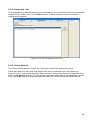
5.6.1. Video List
The Video List tab lists video records, and displays the information about the specified
record, for example: Camera number, recording start time and recording file length.
When you hit the Play button, the Windows Media Player will start to play the video.
The Video list is shown in the following figure.
Figure 5.6.1 The Video List Tab
59
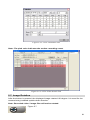
5.6.2. Snapshot List
The Snapshot List tab lists snapshots, and displays the information about the specified
snapshot file. When you hit the Show button, Internet Explorer will be invoked to
display the snapshot.
Figure 5.6.2 The Snapshot List Tab
5.6.3. Video Search
The video search tab lists video file information about the specified search.
Press the start time and end time toggle tab, then a calendar form will appear as
Figure 5.6.3-1, then select a proper date and time. After press OK in the calendar form
then hit the Search button, you will get the matched video files in the following column.
Press the Play button to play the selected video file via the Windows Media Player.
60
Figure 5.6.3-1 The Calendar Form
Note: The pink color indicates the motion recording event.
Figure 5.6.3-2 The Video Search Tab
5.7. Image Rotation
After the button is pressed, the displayed image rotates 180 degree. It is used for the
camera being installed upside-down direction.
Note: Recorded video / image files will not be rotated.
Figure 5.7
61
5.8. Full Screen
After this button is pressed, it will show full screen mode and press the keyboard "Esc"
key or the center of screen to return normal mode.
Figure 5.8
5.9. Lock Application
Press this button will avoid strangers to access CamView unless they have correct
password.
Figure 5.9
5.10. EMap
When you press the EMap button on the panel as shown in Figure 5.10, a form will
appear to show the eMap function.
Figure 5.10
5.8.1. EMap Setting
Select the File from the File menu bar and the following are descriptions:
1. New EMap: First, create a new layout.
2. Insert Map Image: Choose a proper image file or map layout to load.
3. Delete EMap: Delete current editing EMap layout.
3. Save: Save all settings.
4. Exit: Exit Emap function. Before you select it, we recommend you to save the
current settings.
The following describes Edit menu bar:
1. Reset: Remove all camera icons in current layout.
In the menu bar, select Window to change EMap.
62
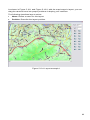
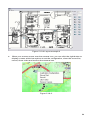
As shown in Figure 5.10-1 and Figure 5.10-2, with the map image in layout, you can
drag the camera icons into proper positions to deploy your cameras.
The following describes layout entries:
•
Name: Define a name for this layout.
•
Position: Describe the layout position.
Figure 5.10-1 Layout example 1
63
Figure 5.10-2 Layout example 2
• When your mouse moves over the camera icon, you can click the right button to
display a menu which has options to set the configuration, show the record list,
record, show video and remove the camera icon.
Figure 5.10-3.
64
Appendix A
Alarm I/O Connector
Appendix A Alarm I/O Connector
The terminal block is used in applications for e.g. motion detection, event triggering,
time lapse recording, alarm notification via email, image storage to FTP locations, etc.
ICA-500 provides a general I/O terminal block with two digital inputs and two outputs
for device control. Pin 1 and 2 can be connected to an external sensor 1. Pin 2 and 3
can be connected to an external sensor 2. Both of the inputs, the voltage will be
monitored from the initial state ‘LOW’. The relay switch of pin 4, 5 and 6 can be used
to turn on or off the external device. The relay switch of pin 7 and pin 8 can be used to
turn on or off the external device. External Inputs/Outputs are working independently.
Pin
Function
1
Alarm Input #1 (A). Max 24VDC, 12mA.
2
Alarm Input #1/2 (K).
3
Alarm Input #2 (A). Max 24VDC, 12mA
4
Alarm Output #1 (NC). Max 24VDC, 1A
5
Alarm Output #1 (COM)
6
Alarm Output #1 (NO)
7
Alarm Output #2 (COM). Max 24VDC, 1A
8
Alarm Output #2 (NO)
65
Appendix B
Troubleshooting
Appendix B Troubleshooting
Q: The video and audio codec is adopted in the Network Camera?
A: The Network Camera utilizes JPEG compression to providing high quality
images. JPEG is a standard for image compression and can be applied to
various web browsers without the need to install extra software. The audio
codec is ADPCM compression.
Q: The maximum number of users access Network Camera simultaneously.
A: The maximum number of users is depending on the total bandwidth accessed
to Network Camera from clients. The data throughout of Network Camera is
around 5~6Mbps. Therefore, the maximum number of connected clients is
varying by settings of resolution and frame rate. Obviously, the performance of
the each connected client will slow down when many users are logged on.
Q: The Network Camera can be used outdoors or not.
A: The Network Camera is not weatherproof. It needs to be equipped with a
weatherproof case for outdoors using. However, equipped with a weatherproof
case will disable the audio function of Network Camera.
Q: The network cabling is required for the Network Camera.
A: The Network Camera uses Category 5 UTP cable allowing 10 and/or 100
Base-T networking.
Q: Why doe the Status LED not light up
A: • Check and confirm that the standard AC adaptor, included in packaged, is
used. Secure the power connector and re powers it on again.
• If the problem is not solved, the Network Camera might be faulty. Contact
your dealer for further help.
Q: The Network Camera will be installed and work if a firewall exists on the
network.
A: If a firewall exists on the network, port 80 is open for ordinary data
communication. The Network Camera uses port 80(default) only. This port (or
the port you specify from the Configuration screen if you change the default
port) needs to be opened on the firewall.
Q: The username and password for the first time or after factory default
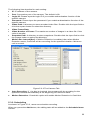
reset
A: Username = admin and leave password blank.
Note that it’s all case sensitivity.
Q: Forgot the username and password
A: Follow the steps below.
•Restore the factory default setting by press pressing and holding down more
than 8 seconds when power on Network Camera.
•Reconfigure the Network Camera.
66
Q: Forgot the IP address of the Network Camera.
A: Check IP address of Network Camera by using the IP Finder (ipeditv3)
program.
Q: IP Finder program (ipeditv3) cannot find ICA-500
A:• Re power the ICA-500 if cannot find the unit within 1 minute.
• Do not connect ICA-500 over a router. IP Finder program cannot detect ICA500.
• If IP address is not assigned to the PC which running IP Finder program, and
then IP Finder program cannot find ICA-500. Make sure that IP address is
assigned to the PC properly.
• Antivirus software on the PC might interfere with the setup program. Disable
the firewall of the antivirus software during setting up ICA-500.
Q: Internet Explorer does not seem to work well with the ICA-500
A: Make sure that your Internet Explorer is version 6.0 or later. If you are
experiencing problems, try upgrading to the latest version of Microsoft’s Internet
Explorer from the Microsoft webpage at: http://www.microsoft.com/windows/ie.
Q: Internet Explorer does not seem to work well with the ICA-500
A: IP Finder program fails to save the network parameters.
• Don’t leave any
space in the name field. Use underline, “_”, or dash, “-“ to replace the space,
“ “. • Network may have trouble. Confirm the parameters and connections of the
ICA-500.
Q: Internet Explorer does not seem to work well with the ICA-500
Cannot
access the login page and other web pages of ICA-500 from Internet
Explorer
A: • Another device or computer is already using Maybe the IP Address of the
ICA-500. To confirm this possible problem, disconnect the ICA-500 from the
network first, and then run the PING utility to check it out.
• Maybe due to the network cable. Try correcting your network cable and
configuration. Test the network interface by connecting a local computer to the
ICA-500 via a crossover cable.
• Make sure the Internet connection and setting is ok.
• Make sure enter the IP address of Internet Explorer is correct. If ICA-500 has a
dynamic address, it may have changed since you last checked it.
• Network congestion may prevent the web page appearing quickly. Wait for a
while.
The IP address and Subnet Mask of the PC and ICA-500 must be in the same
class of the private IP address on the LAN.
• Make sure the http port used by the ICA-500, default=80, is forward to the ICA500’s private IP address.
• The port number assigned in your ICA-500 might not be available via Internet.
Check your ISP for available port.
• The proxy server may prevent you from connecting directly to ICA-500, set up
not to use the proxy server.
• Confirm that Default Gateway address is correct.
• The router needs Port Forwarding feature. Refer to your router's manual for
details.
• Packet Filtering of the router may prohibit access from an external network.
Refer to your router's manual for details.
• Access ICA-500 from the Internet with the global IP address of the router and
port number of ICA-500.
• Some routers reject the global IP address to access ICA-500 on the same
LAN. Access with the private IP address and correct port number of ICA-500.
• When you use DDNS, you need to set Default Gateway and DNS server
address.
• If it’s not working after above procedure, reset ICA-500 to default setting and
installed it again.
67
• If the problem is not solved, the ICA-500 might be faulty. Contact your dealer
for further help.
Q: Image or video does not appear in the main page
A: ‧ The first time the PC connects to ICA-500, a pop-up Security Warning
window will appear to download ActiveX Controls. When using Windows NT,
Windows 2000 or Windows XP, log on with an appropriate account that is
authorized to install applications.• Network congestion may prevent the Image
screen from appearing quickly. You may choose lower resolution to reduce
the required bandwidth.
Q: Check the ICA-500’s ActiveX is installed on your computer
A: Go to C:\Windows\Downloaded Program Files and check to see if there is an
entry for the file “WebWatch Class”. The status column should show
“Installed”. If the file is not listed, make sure your Security Settings in Internet
Explorer are configured properly and then try reloading the ICA-500’s home
page. Most likely, the ICA-500 ActiveX control did not download and install
correctly. Check your Internet Explorer security settings and then close and
restart Internet Explorer. Try to browse and log in again.
Q: Check the ICA-500’s ActiveX is installed on your computer
A: Internet Explorer displays the following message: “Your current security
settings prohibit downloading ActiveX controls”.
Setup the IE security
settings or configure the individual settings to allow downloading and scripting of
unsigned ActiveX controls.
Q: The ICA-500 works in local network, but not accessible from remote
network
A: This might be caused from the firewall protection. Check the Internet firewall
with your system or network administrator. The firewall may need to have
some settings changed in order for the ICA-500 to be accessible outside your
LAN.• Make sure that the ICA-500 isn’t conflicting with any other web server
running on your LAN.• Check the configuration of the router settings allow the
ICA-500 to be accessed outside your local LAN.
Q: There are unreadable characters displayed in machine configuration
pages
A: Use the operating system of the selected language. Set the Encoding or the
Character Set of the selected language on the Internet Explorer.
Q: Frame rate is slower than the setting
A: • The traffic of the network and the object of the image affect the frame rate.
The network congestion causes frame rate slower than the setting. • When more
than one client were viewing, the frame rate becomes slower. • Ethernet
switching hub can smooth the frame rate especially in viewing on the MultiCamera screen.
Q: Blank screen or very slow video when audio is enabled
A: ‧ Your connection to the ICA-500 does not have enough bandwidth to support
a higher frame rate for the streamed image size. Try reducing the video
streaming size to 176x144 or 320x240 and/or disabling audio.• Audio will
consume 32 to 64 kbps. Disable audio to improve video. Your Internet
connection may not have enough bandwidth to support streaming audio from
the ICA-500.
Q: Image Transfer on e-mail or FTP does not work
A: ‧ Default Gateway and DNS server address should be set up correctly. • If
FTP does not work properly, ask your ISP or network administrator about the
transferring mode of FTP server.
Q: The focus on the camera is fuzzy.
A: ‧ The lens is dirty or dust is attached. Fingerprints, dust, stain, etc. on the lens
can degrade the performance camera. Clean the lens with lens cleaner.
• Manual focusing may be setup on the external camera to prevent this.
68
• Blurred images may have been registered when registering or modifying the
preset button or home position button. Adjust the focus in manual focusing
again
• The image may be out of focus, if the object is too near, or depending on the
zoom position. Move the object off ICA-500, or adjust the zoom position.
• Some objects are difficult to focus on by the camera. When the objects are still
out of focus, adjust the focus using manual focusing, or change the objects
using Pan/Tilt operation.
Q: The color of the image is poor or strange
A:
• To insure the images you are viewing are the best they can be, set the Display
property setting (color quality) to 16bit at least and 24 bit or higher if possible
within your computer.
•The configuration on the ICA-500 image display is incorrect. You need to adjust
the image related parameters such as brightness, contrast, hue and saturation
properly.
Q: Image flickers
A: ‧ Wrong power line frequency makes images flicker. Make sure the NTSC or
PAL format of your ICA-500
.• If the object is dark, the image will flicker. Make the condition around the ICA500 brighter.
Q: Noisy images occurs
A: The video images might be noisy if the ICA-500 is located in a very low light
environment. Make the condition around the ICA-500 brighter.
Q: How to Reboot the ICA-500
A: If you just want to reboot system without change anything. Go to Network page
and click SAVE button directly, then system will reboot again.
Q: Can not play the recorded AVI file
A: Have installed Microsoft’s® DirectX 9.0 or later and use the Windows Media
Player 9 or later to play the AVI filed recorded by the ActiveX.
69
Appendix C
Bandwidth Calculation
Appendix C: Bandwidth Calculation
The frame rate of video transmitted from the ICA-500 depends on connection
bandwidth between client and server and quality setting of server. Here is a guideline
to help you roughly estimate the bandwidth requirements form your ICA-500.
Image bandwidth is approximately equal to the average frame rate in frames per
second multiplied by the average frame data size in kilobits. Frame data size, or the
number of bits comprising a single video frame varies a great deal from depending on
scene complexity, lighting conditions, camera noise, etc. The table shown below is
reference figures. Actual results generated by the ICA-500 may be varying.
Image Resolution
Average range of Data Sizes
176 x 144 (QCIF)
320 x 240 (QVGA)
352 x 288 (CIF)
640 x 480 (VGA)
20 – 40k bit
56– 92k bit
64 – 112k bit
160 – 320k bit
For example, streaming 2 fps of 320 x 240 video requires 112 to 184 kbps (kilobits per
second). Therefore, with a 128K upload connection; you will typically see 3 to 6
frames per second with 176 x 144 resolution and 1 to 2 frames per second with 320 x
240 resolution without audio stream.
ÍNot
e
Audio streaming also takes bandwidth around 32 kbps to
64kbps. Most ADSL/Cable modem upload speeds may not
even reach up to 128 kbps. Thus, you may not be able to
receive any video while streaming audio on a 128 kbps
or lower connection. Even though the upload speed is
more than 128kbps, for optimal video performance,
disabling audio streaming will get better video
performance.
70
Appendix D
Specifications
Appendix D: Specifications
Model
Hardware
Sensor
Iris control
Gain control
White balance
Focus
Minimum Illumination
PAN (Horizontal Rotation)
Tilt (Vertical Rotation)
Network
ICA-500
1/3” CCD sensor
Video-drive iris control
High/Low switchable
Indoor, auto mode (color temperature: 2500K~9000K)
Fixed, lens length=3.6mm, manually fine tune
[email protected]
0°~325°
10°~90°
1 x 10/100Mbps RJ-45 port
Generic I/O port
Two for input and two for output
Video interface
BNC connector for monitoring
Audio interface
Built-in microphone for audio recording
Image (Video setting)
Image compression
Video Resolution and Frame
Rate
Image Rotate
JPEG, 3 levels
640 x 480 (20fps), 352 x 288 (30fps), 320 x 240
(30fps), 176 x 144 (30fps)
Rotate 0, Rotate 180, Flip Horizontal, Flip Vertical (note: the
recorded video will not be rotated)
Environment
Operating Temperature
Power Requirement
5~45 degree C, 10~80% humidity
EMC/EMI
CE, FCC
Network and Configuration
Connection type
Static IP, PPPoE, DHCP
Management
Web, CamView camera utility
12V DC
71