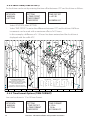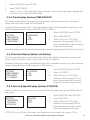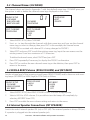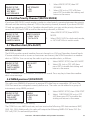
1
Pub. 988-0158-051 www.lowrance.com LVR-250 VHF Radio Installation and Operation Instructions Copyright © 2008 Navico All rights reserved. Lowrance® is a registered trademark of Navico No part of this manual may be copied, reproduced, republished, transmitted or distributed for any purpose, without prior written consent of Lowrance Electronics. Any unauthorized commercial distribution of this manual is strictly prohibited. Lowrance Electronics may find it necessary to change or end our policies, regulations, and special offers at any time. We reserve the right to do so without notice. All features and specifications subject to change without notice. All screens in this manual are simulated. On the cover: LVR-250 shown. Other models covered in the manual are similar. For free owner’s manuals and the most current information on this product, its operation and accessories, visit our web site: www.lowrance.com Lowrance Electronics 12000 E. Skelly Dr. Tulsa, OK USA 74128-2486 Printed in China. Important safety information Please read carefully before installation and use. DANGER This is the safety alert symbol. It is used to alert you to potential personal injury hazards, Obey all safety messages that follow this symbol to avoid possible injury or death. WARNING WARNING indicates a potentially hazardous situation which, if not avoided, could result in death or serious injury CAUTION CAUTION indicates a potentially hazardous situation which, if not avoided, could result in minor or moderate injury. CAUTION CAUTION used without the safety alert symbol indicates a potentially hazardous situation which, if not avoided, may result in property damage. Table of Contents Installation.........................................................................................................6 Installation Options...................................................................................................................................6 Location Requirements............................................................................................................................6 Checklist........................................................................................................................................................7 Gimbal Installation.....................................................................................................................................8 Change the Viewing Angle.....................................................................................................................8 Recessed Installation.................................................................................................................................8 Install the Microphone Bulkhead Mount...........................................................................................9 Fix the DSC label...................................................................................................................................... 10 Connect the Radio Cables.................................................................................................................... 10 Set Up the Radio...................................................................................................................................... 11 Enter Your User MMSI............................................................................................................................. 11 The Completed Installation................................................................................................................. 12 Notes:........................................................................................................................................................... 13 Section 1 - General Information......................................................................14 1-1 Features............................................................................................................................................... 14 1-2 Customizing your Lowrance VHF Radio................................................................................... 15 1-3 How to Display and Navigate Menus........................................................................................ 15 1-4 How to Enter Alphanumeric Data.............................................................................................. 15 1-5 LCD Symbols and Meanings ....................................................................................................... 15 1-6 Basic Operation and Key Functions........................................................................................... 17 Section 2 - The Radio Menu (MENU).................................................................20 2-1 Radio Menu Options (Menu) ...................................................................................................... 20 2-2 Maintain Your Buddy List (BUDDY LIST)................................................................................... 21 2-2-1 Add an Entry.....................................................................................................................................................21 2-2-2 Edit an Entry......................................................................................................................................................21 2-2-3 Delete an Entry................................................................................................................................................22 2-3 Local or Distance Sensitivity (LOCAL/DIST)............................................................................ 22 2-3-1 Set Distance Sensitivity..............................................................................................................................22 2-3-2 Set Local Sensitivity......................................................................................................................................22 2-4 Backlighting (BACKLIGHT) and Contrast (CONTRAST)...................................................... 22 2-4-1 Set the Backlighting Level........................................................................................................................23 2.4.2 Set the Contrast Level...................................................................................................................................23 Lowrance - LVR-250 Installation and Operation Instructions 3 2-5 GPS Data and Time (GPS/DATA).................................................................................................. 23 2-5-1 Manually Enter Position and UTC Time (MANUAL)...................................................................23 2-5-2 Local Time (TIME OFFSET)........................................................................................................................24 2-5-3 Time Format Options (TIME FORMAT)..............................................................................................24 2-5-4 Time Display Options (TIME DISPLAY)..............................................................................................25 2-5-5 Position Display Options (LL display).................................................................................................25 2-5-6 Course & Speed Display Options (COG/SOG)..............................................................................25 2-5-7 GPS Alert Options (ALERT) .....................................................................................................................26 2-6 GPS Simulator (SIMULATOR)........................................................................................................ 26 2-7 Reset to Factory Defaults (RESET).............................................................................................. 26 Section 3 - Radio Setup Menu (RADIO SETUP).................................................27 3-1 Radio Setup Menu (RADIO SETUP)............................................................................................ 27 3-2 Channel (UIC)..................................................................................................................................... 27 3-3 Channel Names (CH NAME)........................................................................................................ 28 3-4 RING & BEEP Volume (RING VOLUME) and (KEY BEEP)....................................................... 28 3-5 Internal Speaker Connections (INT SPEAKER)........................................................................ 28 3-6 Set the Priority Channel (WATCH MODE)................................................................................ 29 3-7 Weather Alert (Wx ALERT) ........................................................................................................... 29 3-8 NMEA protocol (COM PORT)........................................................................................................ 29 Section 4 - DSC Setup Menu (DSC SETUP).........................................................30 4-1 DSC Setup - Menu Options........................................................................................................... 30 4-2 Enter Your USER MMSI (USER MMSI)......................................................................................... 30 4-3 Maintain Your Groups (GROUP SETUP).................................................................................... 31 4-3-1 Create a Group (GROUP SETUP)............................................................................................................31 4-3-2 Edit Group Name Details .........................................................................................................................31 4-3-3 Delete a Group................................................................................................................................................32 4-4 Response to Individual Calls (INDIV REPLY)............................................................................ 32 4-5 ATIS MMSI & ATIS Functionality.................................................................................................. 32 4-5-1 Enter or Edit YOUR ATIS MMSI................................................................................................................33 4-5-2 Enable ATIS Functionality (ATIS FUNC) LVR-250 EU ONLY.....................................................33 4-6 DSC functionality options (DSC FUNC).................................................................................... 34 4-7 Response Type to LL Polling Calls (LL REPLY)......................................................................... 34 Section 5 - Sending and Receiving DSC Calls...................................................35 5-1 What is DSC?...................................................................................................................................... 35 5-2 Sending DSC calls............................................................................................................................ 35 5-2-1 Make a Routine Call (Individual)...........................................................................................................36 5-2-2 Retrying a Routine Call...............................................................................................................................36 4 Lowrance - LVR-250 Installation and Operation Instructions 5-2-3 Acknowledgement of an Individual Incoming Call (INDIV)................................................37 5-2-4 Recall the Most Recent Incoming Call (LAST)..............................................................................37 5-2-5 Call a Group (GROUP)..................................................................................................................................37 5-2-6 Call All Ships (ALL SHIPS)...........................................................................................................................38 5-2-7 Call using the Call Log (CALL LOG).....................................................................................................38 5-2-8 Call using the Distress Log (DIST LOG)..............................................................................................39 5-2-9 Call distress relay using the Distress Log (DIST LOG)...............................................................39 5-2-10 Request the LL Position of a Buddy (LL REQUEST).................................................................40 5-3 Receiving DSC Calls......................................................................................................................... 41 5-3-1 Receiving an All Ships Call (ALL SHIPS).............................................................................................41 5-3-2 Receiving an Individual Call (INDIV)...................................................................................................41 5-3-3 Receiving a Group Call (GROUP)...........................................................................................................42 5-3-4 Receiving a Geographic Call (GEOGRAPH).....................................................................................42 5-3-5 Receiving a Polled Position Call (POSITION)..................................................................................42 Section 6 - Distress Calls...................................................................................43 6-1 Sending a Distress Call................................................................................................................... 43 6-2 Receiving a Distress Call (DISTRESS!)........................................................................................ 44 6-3 Distress Acknowledgement (distress ack) or Relay ...................................................... 44 Appendix A - Technical Specifications.............................................................45 Appendix B - Troubleshooting..........................................................................47 Appendix C - VHF Marine Channel Charts.......................................................48 C-1 International Channel Chart........................................................................................................ 48 Special Notes on International Channel Usage.......................................................................................49 C-2 USA Channel Chart.......................................................................................................................... 50 Special Notes on USA Channel Usage...........................................................................................................51 C-3 CANADA Channel Chart................................................................................................................ 52 Special Notes on Canada Channel Usage...................................................................................................53 C-4 WEATHER Channels......................................................................................................................... 54 Appendix D - EU Inland Waterway Channels .................................................55 D-1 Special Channels 2 . ....................................................................................................................... 58 Appendix E - MMSI and License Information...................................................59 FCC Compliance..........................................................................................................................................................59 Navico Full Two-Year Lowrance VHF Warranty...............................................60 How to Obtain Service ......................................................................................61 Lowrance - LVR-250 Installation and Operation Instructions 5 Installation This Lowrance radio is designed to generate a digital maritime distress call to facilitate search and rescue. To be effective as a safety device, this radio must be used only within the geographic range of a shore-based VHF marine Channel 70 distress and safety watch system. The geographic range may vary but under normal conditions is approximately 20 nautical miles. Installation Options There are two ways to install the radio. You can choose: • A deck or overhead mounted gimbal installation. The reversible mounting gimbal is fixed to a suitable site and the radio is placed into it. The radio can be removed for storage and the viewing angle can be adjusted. • A recessed installation. The radio is recessed into a cavity cut into a bulkhead. The radio fixture is permanent and the viewing angle cannot be adjusted. Location Requirements Please check these before doing any cutting or drilling. Whichever installation method you choose, ensure that the chosen location: • Is at least 3’ (1 m) from the antenna • Allows easy connection to (at least) a 10 Amp fused 13.6 V DC electrical source and the antenna • Is at least 1.5’ (45 cms) from the compass to avoid creating magnetic deviation of the compass during radio operation • Has a suitable space close by for installing the microphone bulkhead mount • Provides easy access to the controls on the front panel • Provides reasonable access to the wiring at the back of the radio • Provides enough room to fix the DSC warning label The VHF has a large LCD screen with an optimum viewing angle of approx. +/-20 deg. Ensure the chosen location provides a suitable view of the display. Ideally, the user should be directly in front of the display or no more than +/-20 deg from the front of the display. Side 20˚ 20˚ Top 20˚ 20˚ Note: If unsure, temporarily power up the radio and check for a suitable location. 6 Lowrance - LVR-250 Installation and Operation Instructions Checklist The following items should be supplied in the box. Check before starting the installation and contact your dealer if an item is missing. Note: An antenna is not provided. Consult your Lowrance dealer for advice if necessary. 1. Mounting gimbal for the VHF radio 2. Power supply cable with in built 7 Amp fuse 3. External speaker connection cable with white (+) wire and black (-) wire 4. GPS connection cable 5. Two mounting knobs 6. Microphone bulkhead mount 7. Four self-tapping screws for the mounting gimbal 8. Four flat screws for the mounting gimbal 9. Four spring washers for the mounting gimbal 10. Four plain washers for the mounting gimbal 11. Four nuts for the mounting gimbal 1 12. Two self-tapping screws for the microphone bulkhead mount 13. Two flat screws for the microphone bulkhead mount 14. Two spring washers for the microphone bulkhead mount 15. Two plain washers for the microphone bulkhead mount 16. Two nuts for the microphone bulkhead mount 17. Four M5x32 screws for recessed installation 18. Four nuts for the recessed installation Not pictured: Two plastic stoppers for the recessed installation. Installation template. One 7 Amp spare fuse in case of accidental reverse of battery polarity. Base unit and microphone. Protective cover. 7 5 8 6 9 10 11 2 3 17 12 18 4 13 14 15 16 Lowrance - LVR-250 Installation and Operation Instructions 7 Gimbal Installation 1. Hold the mounting gimbal at the chosen location and use a soft pencil to mark the screw hole positions onto the mounting surface. 2. If you can’t reach behind the mounting surface to attach the nuts, use the self-tapping screws instead of the flat screws shown in the picture. If you’re drilling into fibreglass, use a drill bit smaller than 3/16” (5mm) to drill the pilot holes. Otherwise, drill the four screw holes where marked, using a 3/16” (5mm) drill bit. Drill completely through the mounting surface. 3. Use a Philips screwdriver and the set of four flat screws, spring washers, plain washers, and nuts to attach the mounting gimbal to the location site. 4. Slide the radio into the mounting gimbal. 5. Insert the two mounting knobs through the holes and tighten them sufficiently to hold the radio at the desired viewing angle. Change the Viewing Angle The viewing angle on the gimbal mount has a 20º tilt range. To change the current viewing angle on the gimbal mount: 1. Support the radio, then cautiously loosen the mounting knobs until the radio can be moved. 2. Re-position the radio then tighten the mounting knobs again. Recessed Installation 1. Tape the installation template onto the chosen location site. 2. Cut out the area marked by the solid dark line. (The dashed line indicates the total area 8 Lowrance - LVR-250 Installation and Operation Instructions that will be covered by the radio fascia after installation.) Drill the 4 mounting holes. 3. Remove the installation template and slide the radio into the cavity. 4. Screw each M5x32 screw through the screw hole in the mounting bracket, then attach the stopper. If your bulkhead exceeds 0.51” (13mm), the stopper can be discarded if necessary. 5. Tighten the M5x32 screws until the radio is held firmly against the rear of the bulkhead. Install the Microphone Bulkhead Mount 3. Use a short length Philips screwdriver and the set of two flat screws, spring washers, plain washers, and nuts to secure the microphone bulkhead mount at the location site. 4. Hang the microphone on its mount. MM Drill the two pilot screw holes where marked. MM 2. MM Hold the microphone bulkhead mount at the chosen location and use a soft pencil to mark the screw hole positions on the mounting surface. Ensure that the microphone curly cable will comfortably reach this location BEFORE you drill. M 1. Lowrance - LVR-250 Installation and Operation Instructions 9 Fix the DSC label CAUTION A DSC warning label is supplied with the LVR-250. To comply with FCC regulations, this warning label must be affixed in a location that is clearly visible from the operating controls of this Lowrance radio. Make sure that the chosen location is clean and dry before applying this label. Connect the Radio Cables The connectors are on the rear of the base unit, as follows: 1. GPS/COM connector. For connection to GPS device via NMEA. See the following table for wiring and color codes. (If you’re not using this, be sure to put the protective cap securely over the connector to protect it from moisture and dust.) 2. External Speaker connector. Plug the external speaker cable jack into the connector BEFORE powering on the radio. Use a 4 Ohm 4 Watt external speaker. 3. Red Power wire. Connect this to the Positive (+) battery terminal. Check that a 10 Amp fuse is installed on this power cable close to the battery. 4. Black Power wire. Connect this to the Negative (-) battery terminal. 5. ANT. A radio antenna is not supplied. A suitable radio antenna must be mounted and connected before operating the LVR-250 radio. Consult your dealer for advice if necessary. 6. GND. A ground connection is not usually required. 5 1 2 3 6 4 10 Lowrance - LVR-250 Installation and Operation Instructions Wiring for GPS/COM connector Pin 1 2 3 4 5 6 7 8 Wire Red Orange White Green Yellow Black Blue Grey Function Notes No connection (Not used) OUT (+) Program/clone IN (-) IN (+) OUT (-) (To No connection (Not used) No connection (Not used) ) (Not used) (From ) (From ) (Ground) 8 Grey 5 Yellow 2 Orange 4 Green 1 Bare wire 3 White 7 Blue 6 Black Set Up the Radio CAUTION You can’t make any DSC transmissions until you’ve obtained a user MMSI and entered it into your LVR-250. The user MMSI is a unique nine digit number, similar to a personal telephone number. It is used on marine transceivers that are capable of using DSC (Digital Select Calling). If you don’t have a user MMSI contact the appropriate authorities in your country. If you’re unsure who to contact, consult your Lowrance dealer. Enter Your User MMSI Refer to 4.2 Enter your user MMSI. Lowrance - LVR-250 Installation and Operation Instructions 11 The Completed Installation External speaker GPS product VHF Antenna External speaker connection cable Antenna connection cable Fuse on Red power cable Base unit with microphone 12 Lowrance - LVR-250 Installation and Operation Instructions Black power cable Battery Notes: Lowrance - LVR-250 Installation and Operation Instructions 13 Section 1 - General Information 1-1 Features Congratulations on your purchase of a Lowrance LVR-250 marine band VHF radio. It provides the following useful features: • Prominent channel display • Adjustable contrast settings for the LCD • Adjustable keypad backlighting for easy night-time use • Waterproof and submersible to comply with JIS-7 • GPS latitude and longitude (LL) and time display (when connected to a GPS) • Choice of High or Low (25 W or 1 W) transmission power • Top centred PTT button for comfortable left- or right-handed use • Powerful 4 W external audio output • Access to all currently-available marine VHF channel banks (USA, Canada, International) including weather channels where available • Special CH16 or CH16/9 key for quick access to the priority (international distress) channel • Special 3CH key to select your three favourite channels • PSCAN (similar to dual watch) facility In addition, the LVR-250 US/EU models also provide: • DSC (Digital Select Calling) capability that meets USCG SC101/Class D Standards. LVR-250 US only. • DSC (Digital Select Calling) capability that meets EC Class D Standards. LVR-250 EU only. • DISTRESS call button to automatically transmit the MMSI and position until an acknowledgement is received • Easy access to a buddy list of up to 20 favourite people • MMSI storage for three favourite groups • Group Call and All Ships Call facility • LL position polling information • Weather alert facility where available. LVR-250 US only. • ATIS facility for inland waterways. LVR-250 EU only. 14 Lowrance - LVR-250 Installation and Operation Instructions 1-2 Customizing your Lowrance VHF Radio You can customize the radio to suit your individual preferences. Some preferences can be set directly through the keys as explained in this Section. Other preferences are set up through the built-in menus and these are explained in the other Sections. 1-3 How to Display and Navigate Menus 1. Press MENU (or CALL). Note that only three menu items can be displayed at any one time on the screen. 2. Rotate the Rotary knob, or use + / - keys on the microphone to scroll up and down the menu until the cursor is positioned at the desired option. Press ENT (press the Push To Select) to display that option. 3. Make any entries or changes as explained in the following section. 4. Press ENT to confirm changes. Otherwise, press EXIT to keep the original entry. 5. Press EXIT to backup one screen (this key is equivalent to an ESC function on a PC) 1-4 How to Enter Alphanumeric Data If your radio does not have the optional alphanumeric microphone, you can Rotate the Rotary knob, or use + / - keys on the microphone key to enter alphanumeric data. Press - to count through numbers, or hold down to scroll rapidly to the desired number. Press + to step through the alphabet, or hold down to scroll rapidly to the desired character. If you make an error, press - until < is displayed, then press ENT to backup and correct the entry. 1-5 LCD Symbols and Meanings Lowrance - LVR-250 Installation and Operation Instructions 15 This simulation shows the locations of all the following information symbols: Symbol Meaning TX Transmitting. HI LO Transmission power. High (HI) 25W or Low (LO) 1W. WX Weather channel. LVR-250 US only. WX ALT Weather Alert. Alarm beeps will sound. LVR-250 US only. BUSY Receiver busy with an incoming signal. PRI Priority channel is selected. D Duplex operation. Otherwise, blank for Simplex operation. LOCAL Local calling is selected. Otherwise, blank for distance calling. DSC DSC capability is available. Incoming DSC call. Low Battery warning (activates at 10.5 V). Channel selected. USA INT CAN Selected channel bank for VHF radio operations and regulations. X Channel is temporarily deleted from the ALL SCAN operation. B A Channel suffix, if applicable. CH1 CH2 CH3 Shows which of the 3 favourite channels, if any, are selected. Otherwise blank. ATIS LVR-250 EU only, and enabled for radios in European inland waterways. A typical operational display is shown here. The latitude and longitude of the vessel and the local time are shown. A transmission on Channel 16 is being made at high power using the International channel bank. Channel 16 is set as the Priority channel. It is also set as favourite channel 1. There is an incoming DSC call so the receiver is busy. 16 Lowrance - LVR-250 Installation and Operation Instructions 1-6 Basic Operation and Key Functions All possible keys and their functions are listed here. Note that some of the keys may not be available depending on your Lowrance VHF radio model. Key Function VOL/PWR Volume and Power. Turn clockwise to power on. Continue to turn until a comfortable volume is reached. VOL/PWR will also adjust the settings of an external speaker, if connected. SQL Squelch or Threshold Level. Sets the threshold level for the minimum receiver signal. Turn fully counterclockwise until random noise is heard, then turn slowly clockwise until the random noise disappears. VR-2 Make another 1/4 turn clockwise for best reception in open sea conditions. In areas of high noise (eg close to large cities) reception may improve if sensitivity is reduced. Either turn SQL slowly clockwise or use the LOCAL setting. See section 2.3. 16/9 Priority Channel. Also on the microphone. Press to cancel all other modes and to tune into the priority channel. Press again to return to your original channel. The default is Channel 16. To make Channel 09 the priority channel, hold down 16/9 until a beep sounds and 09 is displayed. 16 Priority Channel. LVR-250 EU only. Also on the microphone. Press to cancel all other modes and to tune into the priority channel. Channel 16, on high power. Press again to return to your original channel. Lowrance - LVR-250 Installation and Operation Instructions 17 Weather Channel. LVR-250 US only. In USA and Canadian waters, press to hear the most recently selected weather station. The WX symbol is displayed on the LCD. Rotate the dial or + / - on the microphone to change to a different weather channel. Press WX again to return to the most recent channel. If the weather alert mode (ALT) is ON and an alert tone of 1050Hz is broadcast from the weather station, it is picked up automatically and the alarm sounds. Press any key to hear the weather alert voice message. H/L Transmission Power. (Located on the microphone). High (HI) 25W or Low (LO) 1W. Press to toggle between high or low transmission power for the entire channel bank. The HI or LO selection is shown on the LCD. Some channels allow only low power transmissions. Error beeps will sound if the power transmission setting is incorrect. Some channels allow only low power transmissions initially, but can be changed to high power by holding down H/L and PTT at the same time. See Appendix C for a complete listing of channel charts. 3CH Three Favourite Channels. Also on the microphone. Press to toggle between your favourite channels. The CH1, CH2, or CH3 symbol appears on the LCD to show which favourite channel is selected. To scan only one of your favourite channels, press 3CH then immediately press and release SCAN. If you want to scan all three favourite channels, press 3CH then immediately press and hold SCAN. To add a favourite channel for the first time, select that channel then hold 3CH to store it in the CH1 location. Repeat the procedure to store two more favourite channels in the CH2 and CH3 locations respectively. If you try and add another favourite channel it will overwrite the existing CH3. CH1 and CH2 remain unless you delete them. To delete a favourite channel, select that channel then hold down 3CH until the CH1, CH2 or CH3 symbol disappears off the LCD. Scan. Press to scan between your current channel and the priority channel in DUAL or TRI WATCH mode. The weather channel is also scanned if the USA channel bank is selected and the weather alert mode (ALT) is ON. WX SCAN Hold down SCAN to enter ALL SCAN mode where the priority channel is checked every 1.5 seconds. When a signal is received, scanning stops at that channel and BUSY appears on the screen. If the signal ceases for more than 5 seconds, the scan restarts. 18 Press ENT to temporarily skip over (lock out) an “always busy” channel when in ALL SCAN mode and resume the scan. An X is shown on the screen to Lowrance - LVR-250 Installation and Operation Instructions designate a skipped channel. Note that it is not possible to skip over the priority channel. Press SCAN to stop at the current channel. PUSH TO SELECT Enter (ENT). Use ENT when navigating menus, to confirm entries and edits. EXIT Escape (ESC). Use EXIT when navigating menus, to clear incorrect entries, to exit from a menu without saving changes, and to back up to the previous screen. CALL Radio and DSC Call Menu. Press to enter the DSC Call Menu and make DSC calls. See Section 6. MENU DSC Setup Menu. Press to enter the DSC Setup Menu and to customize your radio. See Section 2-5. DISTRESS Send DSC Distress Call. See Section 6. PTT Press To Talk. (located on the microphone). Press PTT to transmit at any time on an allowable channel. This automatically exits you from menu mode and stops scanning. You must release PTT to receive a signal. If PTT sticks, a built-in timer will automatically shut down a transmission after five minutes and sound the error beeps. Rotary knob Channel Select. Turn to select a channel. The current channel is shown on the LCD in BIG digits an A or B designator suffix (if applicable) in small letters below the channel number. (See appendix C for a listing of channel frequencies). Push to activate the ENT function. You can also use the rotary knob for alphanumeric entry. Turn to step through alphanumeric characters one at a time then push to confirm each selection. If you make an error, select the < character then push to backup. + / - Channel Select. (Located on the microphone). The current channel is shown on the screen in BIG digits with an appropriate designator suffix A or B in small letters below the channel number. Press + or - to step through the available channels one at a time, or hold down to scroll rapidly through all the available channels. See Appendix C for a listing of channel charts. Alphanumeric Entry. This key can also be used for menu selection and for alphanumeric entry. Press + or - to scroll the cursor up or down menu options when navigating menus. When editing an item containing only numbers, press - to count through the numbers or hold down to scroll rapidly. To enter a character, press + to step through the alphabet or hold down to scroll rapidly. Lowrance - LVR-250 Installation and Operation Instructions 19 Section 2 - The Radio Menu (MENU) 2-1 Radio Menu Options (Menu) The following options are available through MENU key: BUDDY LIST Maintain your buddy list. See Section 2-2. LOCAL/DIST Set radio sensitivity. See Section 2-3. BACKLIGHT Set backlight level. See Section 2-4. CONTRAST Set contrast level. See Section 2-4. GPS/DATA MANUAL SETTING DSC SETUP USER MMSI GROUP SETUP INDIV REPLY ATIS MMSI ATIS FUNC DSC FUNC LL REPLY RADIO SETUP UIC CH NAME RING VOLUME KEY BEEP INT SPEAKER WATCH MODE WX ALERT COM PORT Set position & UTC manually. See Section 2-5. Set local time and time format. See Section 2-5. DSC Setup Menu. See Section 4. Make DSC calls. See Section 5. Radio Setup Menu. See Section 3. GPS SIM Turn the GPS Simulator on/off. See Section 2-6. RESET Reset factory settings. See Section 2-7. Sections 1-3 and 1-4 explain how to navigate around the menu and enter, save and change data. 20 Lowrance - LVR-250 Installation and Operation Instructions 2-2 Maintain Your Buddy List (BUDDY LIST) Use the Buddy List to store the names and associated MMSIs of 20 favourite people. Names are stored in the order of entry, with the most recent entry shown first. MENU SELECT >BUDDY LIST LOCAL/DIST BACKLIGHT The following sections show to use BUDDY LIST to add, edit, and delete entries on your buddy list. Section 5 explains how to call a buddy. 2-2-1 Add an Entry ENTER NAME –––––––––––– ENTER MMSI ––––––––– BUDDY LIST >MANUAL NEW ALEX TOM ENTER NAME BOB ENTER MMSI 123456789 BOB 123456789 >STORE CANCEL 1. Select BUDDY LIST. The cursor is at MANUAL NEW. Press ENT. 2. Enter the buddy name, one character at a time (this may be alphanumeric) then press ENT repeatedly until the cursor moves to the MMSI entry line. 3. Enter the MMSI associated with that buddy name (this must be numeric) then press ENT. 4. The new buddy name and MMSI are displayed. Press ENT to store the new entry, which is displayed at the top of your buddy list. Note: When the BUDDY LIST is full (20 entries), you can make a new entry and the buddy at the end of the list is automatically erased. 2-2-2 Edit an Entry BUDDY LIST >MANUAL NEW ALEX TOM ALEX >EDIT DELETE EDIT NAME ALEX EDIT MMSI 112233445 ALEX 111223344 >STORE CANCEL 1. Select BUDDY LIST. Press ENT to display the list of entries. 2. Scroll down (if required) to the incorrect entry and press ENT. 3. Select EDIT. The cursor is at the first character of the name. 4. Edit the buddy name or, to edit only the MMSI, press ENT repeatedly until the cursor moves to the MMSI line. 5. When you are finished, press ENT (repeatedly if necessary) to display the next screen. 6. Press ENT to store the changes. The buddy list is displayed again. If more changes are required, repeat Steps 2 through 6. Otherwise, press EXIT to ESC. Lowrance - LVR-250 Installation and Operation Instructions 21 2-2-3 Delete an Entry BUDDY LIST >MANUAL NEW ALEX TOM BUDDY LIST MANUAL NEW ALEX >TOM TOM EDIT >DELETE DELETE BUDDY TOM >YES NO 1. Select BUDDY LIST. Press ENT to display the list of entries. 2. Scroll down (if required) to the entry you want to delete and press ENT. 3. Select DELETE then select YES. 4. The entry is deleted immediately and the buddy list is displayed again. 2-3 Local or Distance Sensitivity (LOCAL/DIST) MENU SELECT BUDDY LIST >LOCAL/DIST BACKLIGHT Use LOCAL/DIST to improve the sensitivity of the receiver either locally (LOCAL) or over distances (DIST). LOCAL is not recommended for use in open sea conditions. It is designed for use in areas of high radio noise; for example, close to cities. See also SQL (Squelch Control) in Section 1.6. 2-3-1 Set Distance Sensitivity SENSITIVITY >DISTANT LOCAL 1. Select LOCAL/DIST then select DIST. 2. Press ENT to activate the DIST setting. This disables local sensitivity and the menu is displayed again. 2-3-2 Set Local Sensitivity SENSITIVITY DISTANT >LOCAL 3. Select LOCAL/DIST then scroll to LOCAL. 4. Press ENT to activate the LOCAL setting. This disables distance sensitivity and the menu is displayed again. LOCAL is displayed on the LCD as a reminder that local sensitivity is selected. 2-4 Backlighting (BACKLIGHT) and Contrast (CONTRAST) MENU SELECT LOCAL/DIST >BACKLIGHT CONTRAST 22 Use BACKLIGHT to set the backlight levels for the LCD and the keypad at a comfortable level. The microphone keypad backlighting is either ON or OFF. Use CONTRAST to set the contrast level for the LCD. Lowrance - LVR-250 Installation and Operation Instructions 2-4-1 Set the Backlighting Level BACKLIGHT LO HI 1. Select BACKLIGHT. 2. Select a comfortable backlight level using + or - to change the setting. 3. Press ENT to enable the setting and return to the menu. Note: The DISTRESS key backlighting cannot be switched off. 2.4.2 Set the Contrast Level CONTRAST LO HI 1. Select CONTRAST. 2. Select a comfortable contrast level using + or - to change the setting. 3. Press ENT to enable the setting and return to the menu. 2-5 GPS Data and Time (GPS/DATA) MENU SELECT BACKLIGHT CONTRAST >GPS/DATA If the boat has an operational GPS navigation receiver, the VHF radio automatically detects and updates the vessel position and the local time. However, if the GPS navigation receiver is disconnected or absent, you can specify the vessel position and the local time manually, using the GPS/DATA option. This information is important because it will be used if a DSC distress call is transmitted. You can also select GPS Alert and GPS Simulator options. 2-5-1 Manually Enter Position and UTC Time (MANUAL) Note that this function is available only if an operational GPS receiver is not connected. GPS/DATA >MANUAL SETTING MANUAL LL ––’ ––’ ––––N ––’ ––’ ––––W MAN ––:––UTC 1. Select GPS/DATA, then MANUAL. 2. Enter the latitude, then the longitude, then the UTC. 3. Press ENT when all the information is correct. The vessel’s latitude and longitude are shown on the screen, with the UTC time. The prefix MAN indicates a manual entry. The manual entries are cancelled if a real GPS position is received. Lowrance - LVR-250 Installation and Operation Instructions 23 2-5-2 Local Time (TIME OFFSET) The local time can be set by entering the time offset between UTC and local time as follows. GPS/DATA MANUAL >SETTING SETTING >TIME OFFSET TIME FORMAT TIME DISPLY TIME OFFSET >+01:30 02:30PM LOC 1. Select GPS/DATA, then SETTING. 2. Select TIME OFFSET to enter the difference between UTC and local time. Half hour increments can be used with a maximum offset of ±13 hours. In this example, a difference of +1.5 hours has been entered and the local time is displayed with the suffix LOC. LM Y X W V S T U Q R ‡ R T M N Z A C B D S T Q D C S X Q S W W U C F G Z Zone boundaries are approxima e P 90°W 60°W 0 1 2 3 3 30 30°W Standard Time Universal Time Standard Time D* E E* F F* G 0° h m h m I* SETTING TIME OFFSET >TIME FORMAT TIME DISPLY K 30 H 8 I 9 I* 9 30 K 10 K* 10 30 5 5 30 6 6 30 7 L L* M M* M† 11 11 30 12 13 1 N O P P* Q 1 2 3 3 30 M* L* M M h m Q* R S T U 30 5 6 7 8 h m V V* W X Y 9 9 30 10 11 12 ‡ No S andard Time legally adopted 30°E M K value from table 60°E 90°E 2-5-3 Time Format Options (TIME FORMAT) 24 L value from table h m h m Time can be shown in 12 or 24 hour format. GPS/DATA MANUAL >SETTING L H * Universal Time h m Z A B C C* D L K O Corrected to February 2008 120°W I IK K D B Q STANDARD TIME ZONES Daylight Saving Time (Summer Time), usually one hour in advance of Standard Time, is kept in some places Map outline © Mountain High Maps Compiled by HM Nautical Almanac Office M H P M H I S M 150°W K H F* C Q 180° G E* E* G C A O X H F* F D B Z P W M* E A O L I E* E* C C Z M I I H D A R V* L MY K H E C P Q M† L D B Z N F C* D* R Q K H F E B Z W R K TIME FORMAT >12 Hr 24 Hr 07:15AM LOC Lowrance - LVR-250 Installation and Operation Instructions 120°E ‡ 150°E 180° WORLD MAP OF TIME ZONES N I E D B A R I International Date Line International Date Line P* S M H G A B Z X M* G N P R M F E A Z Z V U L O P Z S 1. Select GPS/DATA, then SETTING. 2. Select TIME FORMAT. 3. Select 12 Hr or 24 Hr as desired. In this example, 12 hour format has been selected and so the LCD shows the AM or PM suffix. 2-5-4 Time Display Options (TIME DISPLAY) If you have entered the time manually as described in the previous sections, the time is always shown on the screen with the prefix M. However, if the vessel position is being updated through a GPS navigation receiver, you can switch the time display on the screen ON or OFF as follows: SETTING TIME OFFSET TIME FORMAT >TIME DISPLY TIME DISPLY ON >OFF 1. Select GPS/DATA, then SETTING. 2. Select TIME DISPLAY. 3. Select ON (on) or OFF (off ) as desired. In this example, OFF has been selected and so the screen no longer shows the time. If the time display is set ON, course and speed data are not displayed on the LCD (see section 2-5-6). 2-5-5 Position Display Options (LL display) If you have entered the vessel position manually as described in the previous section, the vessel position is always shown on the screen with the suffix M. However, if the time is being updated through a GPS navigation receiver, you can switch the vessel position display on the screen on or off as follows: SETTING TIME FORMAT TIME DISPLY >LL DISPLAY LL DISPLAY ON >OFF 1. Select GPS/DATA, then SETTING. 2. Select LL DISPLAY. 3. Select ON (on) or OFF (off ) as desired. In this example, OFF has been selected and the screen no longer shows the vessel position. 2-5-6 Course & Speed Display Options (COG/SOG) Use this option to display course over ground (COG) and speed over ground (SOG) data on the screen. 1. Select GPS/DATA, then SETTING. SETTING COG/SOG 2. Select COG/SOG. TIME DISPLY >ON 3. Select ON (on) or OFF (off ) as LL DISPLY OFF desired. In this example, ON has >COG/SOG been selected and so the screen shows the bearing and speed. If COG/SOG is set ON (on), the time is not displayed on the screen (see section 2-5-4). Lowrance - LVR-250 Installation and Operation Instructions 25 2-5-7 GPS Alert Options (ALERT) The GPS alert is usually set to ON (on) so that if the GPS navigation receiver is disconnected, the alarm sounds. SETTING LL DISPLY COG/SOG >GPS ALERT GPS ALERT >ON OFF 1. Select GPS/DATA, then SETTING. 2. Select GPS ALERT. 3. Select ON (on) or OFF (off ) as desired. 2-6 GPS Simulator (SIMULATOR) The GPS Simulator is set to OFF whenever the radio is turned ON or whenever real GPS data is available through the COM port. However, if you want to test it, turn it on. 1. Select GPS SIM, then select ON (on) or OFF (off ) as desired. MENU SELECT DSC SETUP RADIO SETUP >GPS SIM Whenever the GPS Simulator is turned ON (on), simulated Speed Over Ground (SOG), Course Over Ground (COG), and LL position appear on the screen. This data is updated automatically during the simulation. It is not possible to send a DSC transmission when in Simulator mode. 2-7 Reset to Factory Defaults (RESET) Use this to return every setting to the factory defaults except all MMSI settings and the entries in your buddy list. MENU SELECT RADIO SETUP GPS SIM >RESET RESET RADIO ARE YOU SURE >YES NO 1. Select RESET. The radio asks for confirmation. 2. Select YES to reset the radio and return to the menu. 26 Lowrance - LVR-250 Installation and Operation Instructions Section 3 - Radio Setup Menu (RADIO SETUP) 3-1 Radio Setup Menu (RADIO SETUP) The following options are available through MENU key: Channel band. UIC See Section 3-2. CH NAME Edit or delete channel names. See Section 3-3. RING VOLUME KEY BEEP Set the volume level of the incoming call notification beeps. See section 3-4. Set the volume level of the beeps. See section 3-4. INT SPEAKER Switch ON/OFF (on/off ) the radio’s internal speakers. See section 3-5. WATCH MODE Selects the operation of Dual or Tri watch scanning. See section 3-6. WX ALERT Selects if the WX Alert scanning mode is ON (on) or OFF (off ). LVR-250 US only. See section 3-7. COM PORT Select NMEA protocol for communications between the VHF radio and any other instruments. See section 3-8. Sections 1-3 and 1-4 explain how to navigate around the menu and enter, save and change data. 3-2 Channel (UIC) Toggle between USA, International or Canadian channel banks. The selected channel bank is displayed on the LCD along with the last used channel. All the channel charts are shown in Appendix C. RADIO SETUP >UIC CH NAME RING VOLUME UIC >USA INT’L CANADA Lowrance - LVR-250 Installation and Operation Instructions 27 3-3 Channel Names (CH NAME) The channel charts are listed in Appendix C with their default name tags. CH NAME gives you the option to edit or delete the channel name tags displayed on the screen. RADIO SETUP >CH NAME RING VOLUME BEEP VOLUME EDIT CH NAME TELEPHONE CH NAME TELEPHONE 01 TELEPHONE >EDIT DELETE EDIT CH NAME PHONE1 >YES NO 1. Select RADIO SETUP, then CH NAME. 2. Use + or - to step through the channels with their name tags until you see the channel name tag you want to change, then press ENT. In this example, the channel name TELEPHONE associated with channel 01 is being changed to PHONE1. 3. Select EDIT and press ENT to edit the existing name tag. Input the new name over the existing name. It can be a maximum of 12 characters. To delete the channel name, select DELETE and press ENT. 4. Press ENT (repeatedly if necessary) to display the YES/NO confirmation. 5. Press ENT to confirm the new channel name tag or the deletion, then press EXIT to return to the menu. 3-4 RING & BEEP Volume (RING VOLUME) and (KEY BEEP) Set the volume level of the incoming signal beeps (RING VOLUME) and/or the error and warning beeps (KEY BEEP) to HIGH (high) or LOW (low) as follows: RADIO SETUP CH NAME >RING VOLUME KEY BEEP RING VOLUME >HIGH LOW KEY BEEP >HIGH LOW OFF 1. Select RADIO SETUP, then RING VOLUME or BEEP VOLUME as appropriate. 2. Select a HIGH or LOW volume. (It is possible to turn the beeps off completely by selecting KEY BEEP then OFF.) 3. Press ENT to enable the new volume setting and return to the menu. 3-5 Internal Speaker Connections (INT SPEAKER) Switch the radio’s internal speaker ON (on) or OFF (off ). The external speaker is always ON (on) if a speaker is plugged into the external speaker jack. 28 Lowrance - LVR-250 Installation and Operation Instructions RADIO SETUP RING VOLUME KEY BEEP >INT SPEAKER INT SPEAKER >ON OFF 1. 2. Select RADIO SETUP, then INT SPEAKER. Select ON (on) or OFF (off ) then press ENT to enable the setting and return to the menu. 3-6 Set the Priority Channel (WATCH MODE) If you have LVR-250 EU, watch mode is similar to a dual watch, scanning between the priority channel and the working channel. CH16 is the priority channel, however if you have LVR-250 US and are operating on USA or Canadian channel banks, you can set the priority channel to cover both CH16 and CH09 as well as the working channel, as follows: 1. Select RADIO SETUP, then WATCH RADIO SETUP WATCH MODE MODE. BEEP VOLUME >ONLY 16CH Select ONLY 16CH for dual watch mode, 2. INT SPEAKER 16CH+9CH or 16CH+9CH for tri watch mode. >WATCH MODE 3-7 Weather Alert (Wx ALERT) LVR-250 US ONLY The NOAA provides several weather forecast channels on USA and Canadian channel banks. If severe weather such as storms or hurricanes are forecast, the NOAA broadcasts a weather alert on 1050 Hz. You can set up the radio to pick up weather alerts, as follows: 1. Select RADIO SETUP, then WX ALERT. RADIO SETUP WX ALERT 2. Select ON (on) or OFF (off ) then INT SPEAKER ON press ENT to enable the setting and WATCH MODE >OFF return to the menu. >WX ALERT When a weather alert is broadcast, the alarm will sound. Press any key to hear the weather alert voice message. 3-8 NMEA protocol (COM PORT) This radio uses NMEA0183 protocol to receive GPS data from a compatible GPS unit. The COM Port must be configured correctly before use. The radio can be added to a group of instruments using NMEA protocol. 1. Select RADIO SETUP, then COM PORT. RADIO SETUP NMEA 2. Select CHECKSUM ON (on) or OFF WATCH MODE CHECKSUM (off ) then press ENT to enable the WX ALERT >ON setting and return to the menu. >COM PORT OFF CHECKSUM ON is the usual setting. The COM Port uses 4800 baud rate, and can receive the following GPS data sentence: RMC, GGA, GLL, GNS. Additionally, this radio will output the following NMEA DSC data: DSC (for DSC call), DSE ( for enhanced position). Lowrance - LVR-250 Installation and Operation Instructions 29 Section 4 - DSC Setup Menu (DSC SETUP) WARNING A valid USER MMSI must be entered into this radio before these DSC functions can be used. See below for instruction to Enter Your USER MMSI. 4-1 DSC Setup - Menu Options The following options are available through MENU key: Enter your user MMSI. See section 4-2. (If you do not have a user MMSI, USER MMSI see Appendix D.) Enter or change the name and/or details of a group. GROUP SETUP See section 4-3. Choose an automatic or manual response to calls. (LVR-250 US only) INDIV REPLY See section 4-4. Enter or change your ATIS MMSI (LVR-250 EU only) ATIS MMSI See section 4-5. Enable/disable the ATIS function (LVR-250 EU only) ATIS FUNC See section 4-5. Turn the DSC operation ON/OFF (on/off ). DSC FUNC See section 4-6. Select the type of response to an LL polling request. LL REPLY See section 4-7. Sections 1-3 and 1-4 explain how to navigate around the menu and enter, save and change data. 4-2 Enter Your USER MMSI (USER MMSI) This is a once-only operation. You must enter your user MMSI before you can access the DSC functions. DSC SETUP >USER MMSI GROUP SETUP INDIV REPLY INPUT USER MMSI ––––––––– USER MMSI 187654321 >STORE CANCEL USER MMSI INPUT AGAIN ––––––––– You can display and read your user MMSI at any time, but you get only one opportunity to enter your user MMSI. 1. Select DSC SETUP, then USER MMSI. 2. If this is the first time that you are entering your user MMSI, a dashed line appears. Enter your user MMSI along the dashed line. Press ENT to confirm each correct entry and to move to the next digit. If you make an error, press - until < appears, then press ENT to backup and correct the entry. 30 Lowrance - LVR-250 Installation and Operation Instructions 3. Press ENT to store your user MMSI. 4. Enter your user MMSI again as a password check, then press ENT to permanently store the user MMSI and return to the menu. You can view your stored user MMSI at anytime by selecting USER MMSI in the main menu. 4-3 Maintain Your Groups (GROUP SETUP) Use GROUP SETUP to create, edit, or delete 1, 2, or 3 groups of frequently called people stored in alphanumeric order. A group MMSI always starts with 0. 4-3-1 Create a Group (GROUP SETUP) DSC SETUP USER MMSI >GROUP SETUP INDIV REPLY GROUP SETUP >MANUAL NEW 000000000 GROUP NAME –––––––––––– GROUP MMSI 0–––––––– FISHER1 012345678 >STORE CANCEL 1. Select DSC SETUP, then GROUP SETUP. 2. If this is the first time that you are entering a group name, a line of nine zeros appears. Otherwise, any existing group names are displayed. Press ENT to display the input screen. 3. Enter the group name along the dashed line. It can be alphanumeric. Press ENT to confirm each correct entry and to move to the next digit. When you have finished, press ENT repeatedly until the cursor moves to the MMSI line. If you make an error, press - until < appears, then press ENT to backup and correct the entry. 4. Enter the group MMSI. (Note that the first number is always 0.) Press ENT. 5. The group name and group MMSI are shown in a confirmation screen. Press ENT to store the details and return to the GROUP SETUP screen. 4-3-2 Edit Group Name Details GROUP SETUP MANUAL NEW >FISHER1 FRIENDS1 FISHER1 >EDIT DELETE EDIT NAME FISHER1 EDIT MMSI 012345678 FISHER2 012345678 >STORE CANCEL 1. Select DSC SETUP, then GROUP SETUP. The existing group names are displayed. Press + or - to scroll to the incorrect entry then press ENT. 2. Press ENT to edit. The group name details are displayed, with the cursor at the first character of the name. Lowrance - LVR-250 Installation and Operation Instructions 31 3. Edit the buddy name or, to edit only the MMSI, press ENT repeatedly until the cursor moves to the MMSI line. 4. When you are finished, press ENT (repeatedly if necessary) to display the next screen. 5. Press ENT to store the changes and return to the GROUP SETUP screen. 4-3-3 Delete a Group GROUP SETUP MANUAL NEW >FISHER2 FRIENDS1 DELETE GROUP FISHER2 >YES NO FISHER2 EDIT >DELETE 1. Select DSC SETUP, then GROUP SETUP. The existing group names are displayed. 2. Press + or - to scroll to the incorrect entry then press ENT. 3. Select DELETE and press ENT. The radio asks for confirmation. 4. Press ENT to delete the group and return to the GROUP SETUP screen. 4-4 Response to Individual Calls (INDIV REPLY) LVR-250 US ONLY You can respond to incoming individual calls with an automatic response or with a manual response. An automatic response sends an acknowledgement and then sets the request link channel, ready for a conversation. A manual response asks if you want to acknowledge the call, and then asks if you want to converse with the caller. DSC SETUP USER MMSI GROUP SETUP >INDIV REPLY 3. INDIV REPLY >AUTO MANUAL 1. Select DSC SETUP, then INDIV REPLY. 2. Select AUTO for an automatic response, or MANUAL for a manual response. Press ENT to confirm your choice and return to the menu. 4-5 ATIS MMSI & ATIS Functionality LVR-250 EU ONLY You must enter your ATIS MMSI to access ATIS functionality if you are navigating inland waterways within Europe. ATIS sends a digital message any time that you release the PTT key. Inland waterways rules require 1 W Tx power on Channels 06, 08, 10, 11, 12, 13, 14, 15, 17, 71, 72, 74 and 77. 32 Lowrance - LVR-250 Installation and Operation Instructions 4-5-1 Enter or Edit YOUR ATIS MMSI DSC SETUP GROUP SETUP INDIV REPLY >ATIS MMSI ATIS MMSI 923456789 > STORE CANCEL INPUT ATIS MMSI 9---------- INPUT ATIS MMSI > STORE CANCEL INPUT AGAIN ATIS MMSI 9---------- An ATIS MMSI always starts with the number 9. To enter or edit your ATIS MMSI: 1. Select DSC SETUP, the ATIS MMSI. 2. If this is the first time that you are entering your ATIS MMSI, a dashed line appears. Enter your ATIS MMSI along the dashed line. The first number is always 9. Press ENT to confirm each correct entry and to move to the next digit. If you make an error, press - until < appears, the press ENT to backup and correct the entry. If you are editing an existing ATIS MMSI, this will be displayed. Make the required changes. 3. Press ENT to store your user MMSI. 4. Enter your ATIS MMSI again as a password check, then press ENT to permanently store the ATIS MMSI and return to the menu. You can view your stored ATIS MMSI at anytime by selecting ATIS MMSI in the main menu 4-5-2 Enable ATIS Functionality (ATIS FUNC) LVR-250 EU ONLY ATIS functionality will operate only after the ATIS MMSI has been entered (see previous section). DSC SETUP INDIV REPLY ATIS MMSI >ATIS FUNC ATIS FUNC >ON OFF ATIS 1. Select DSC SETUP, then ATIS FUNC. 2. Select ON (on) to enable the ATIS functionality and automatically disable DSC functionality. The ATIS annunciator appears on the screen. It is not possible to have both ATIS ON (on) and DSC ON (on) simultaneously. When you enable one, the other will turn OFF (off ). If DSC and ATIS are both OFF (off ), DSC will have to be switched ON (on) for normal DSC operation. There are two annunciators in the screen to show you the current mode: if the DSC annunciator is shown, DSC is operational, if the ATIS annunciator is shown, ATIS is operational. Lowrance - LVR-250 Installation and Operation Instructions 33 4-6 DSC functionality options (DSC FUNC) DSC functionality can be disabled but this is not recommended. DSC SETUP GROUP SETUP INDIV REPLY >DSC FUNC . DSC FUNC >ON OFF 1. Select DSC SETUP, then DSC FUNC. 2. Press ENT to select ON and to operate the DSC functionality. This will automatically disable ATIS functionally. The DSC annunciator appears on the screen. It is not possible to have both ATIS ON (on) and DSC ON (on) simultaneously. When you enable one, the other will turn OFF (off ). If DSC and ATIS are both OFF (off ), DSC will have to be switched ON (on) for normal DSC operation. There are two annunciators in the screen to show you the current mode: if the DSC annunciator is shown, DSC is operational, if the ATIS annunciator is shown, ATIS is operational. 4-7 Response Type to LL Polling Calls (LL REPLY) You can set up the radio to respond to an LL polling request in one of three ways: AUTO Automatically replies to any incoming LL polling requests from any of your buddies. MANUAL Choose whether to reply automatically or manually to any incoming buddy polling requests. OFF Ignores all incoming buddy LL polling requests. DSC SETUP INDIV REPLY DSC FUNC >LL REPLY LL REPLY >AUTO MANUAL OFF 1. Select DSC SETUP, then LL REPLY. 2. Select your response and press ENT to confirm and return to the menu. 34 Lowrance - LVR-250 Installation and Operation Instructions Section 5 - Sending and Receiving DSC Calls WARNING A valid USER MMSI must be entered into this radio before these DSC functions can be used. See 4-2 Enter Your USER MMSI (USER MMSI). 5-1 What is DSC? DSC (Digital Selective Calling) is a semi-automated method of establishing VHF, MF, and HF radio calls. It has been designated as an international standard by the IMO (International Maritime Organization) and is part of the GMDSS (Global Maritime Distress and Safety System). Currently, you are required to monitor Distress Channel 16, but DSC will eventually replace listening watches on distress frequencies and will be used to broadcast routine and urgent maritime safety information. DSC enables you to send and receive calls from any vessel or coast station that is equipped with DSC functionality, and within geographic range. Calls can be categorised as distress, urgency, safety, or routine, and DSC selects a working channel automatically. 5-2 Sending DSC calls 1. DSC CALL INDIVIDUAL >LAST CALL GROUP 2. Press CALL to show the types of DSC call that can be made. Note that only four DSC call types can be shown at any one time on the screen. Press + or - to scroll up and down the DSC call types until the cursor is positioned at the desired option. Then press ENT. The DSC call types are: The following options are available through CALL key: INDIVIDUAL Make a individual call or acknowledgement to a new caller or a buddy. See Section 5-2-1, 5-2-2, and 5-2-3. LAST CALL Show the details of the most recent incoming call. See Section 5-2-4. GROUP Make a call to one of your three groups. See Section 5-2-5. ALL SHIPS Make an All Ships call. See Section 5-2-6. CALL LOG Show the details of the 20 most recent incoming calls. See Section 5-2-7. Show the details of the 10 most recent distress calls. See Section 5-2-8. DIST LOG LL REQUEST Request the LL position of a buddy. See Section 5-2-9. Lowrance - LVR-250 Installation and Operation Instructions 35 5-2-1 Make a Routine Call (Individual) DSC CALL >INDIVIDUAL LAST CALL GROUP INDIVIDUAL >ROUTINE SAFETY URGENCY MANUAL MMSI 0–––––––– 123456789 INDIVIDUAL ROUTINE >SET CHANNEL 123456789 INDIVIDUAL ROUTINE >SEND? 123456789 INDIVIDUAL ROUTINE CALLING... 123456789 INDIVIDUAL ROUTINE WAITING ACK INDIV ACK 123456789 PRESS PTT ESC –> EXIT You can call any other person that has another DSC equipped radio. 1. Press CALL to enter DSC mode, then select INDIVIDUAL. This allows you to call another person. 2. Press ENT, the arrow is pointing to <ROUTINE>. However, you can select one of the following call priorities: ROUTINE, SAFETY, URGENCY. To make a Routine call, press ENT to select MANUAL NEW to call a person that is not in your buddy list, otherwise select the name of your buddy. Press ENT. If you selected MANUAL NEW, you need to enter the user MMSI and then press ENT. 3. S elect the working channel and press ENT. (Note: Duplex channels cannot usually be called and are automatically eliminated from the suggested call list. If the call is to a Coast Station, the radio will recognize this and select the correct channel.) 4. The radio summarizes the call details and asks for confirmation to send the call (SEND?). Press ENT to send the call. The radio goes to CH70 and the Tx annunciator is displayed on the screen while the DSC call is being sent. 5. If the call is acknowledged (ACK), press PTT to talk. If there is no reply, retry making the call. See Section 5-2-2. 5-2-2 Retrying a Routine Call 123456789 SEND AGAIN? >YES NO 6. If there is no reply to your call after one minute (UNABLE TO ACKNOWLEDGE) the radio asks if you want to retry the call (SEND AGAIN?). 7. Select YES and press ENT to retry the call. 36 The radio will repeat this cycle twice. If the call still cannot be placed, the radio returns to normal operation. Lowrance - LVR-250 Installation and Operation Instructions 5-2-3 Acknowledgement of an Individual Incoming Call (INDIV) RCV: INDIV 523456789 ROUTINE ENT –> ACK Alternating 13 CHANNEL REQUEST ESC –> EXIT The LVR-250 EU requires the operator to manually send an acknowledgement to the requesting radio. Press ENT to send an acknowledgement or EXIT to cancel. The LVR-250 US will automatically send an acknowledgement to the requesting radio within 10 seconds of receiving the call. 5-2-4 Recall the Most Recent Incoming Call (LAST) DSC CALL INDIVIDUAL >LAST CALL GROUP BOBBY D INDIV. ROUTINE 10:22 UTC BOBBY D INDIVIDUAL ROUTINE >SET CHANNEL BOBBY D INDIVIDUAL ROUTINE >SEND? This facility is useful and used frequently. 1. Press CALL to enter DSC mode. LAST CALL is automatically selected. Press ENT to display the contact details of the most recent incoming call. Press ENT to next screen. 2. Select the working channel and press ENT. (Note: Duplex channels cannot usually be called and are automatically eliminated from the suggested call list. If the call is to a Coast Station, the radio will recognize this and select the correct channel.) 3. The radio summarizes the call details and asks for confirmation to send the call (SEND?). Press ENT to send the call, and continue as explained in Section 5-2-1. 5-2-5 Call a Group (GROUP) DSC CALL INDIVIDUAL LAST CALL >GROUP SELECT GROUP >RD GROUP GROUP #2 GROUP#3 RD GROUP 055554444 ROUTINE >SET CHANNEL RD GROUP 055554444 ROUTINE >SEND? 1. Press CALL to enter DSC mode, then select GROUP. The radio displays the names of your groups. 2. Select the group that you want to call (the Group MMSI must be set before making the call). Then set the channel and continue as explained in Section 5-2-1. Lowrance - LVR-250 Installation and Operation Instructions 37 5-2-6 Call All Ships (ALL SHIPS) DSC CALL LAST CALL GROUP >ALL SHIPS ALL SHIPS >URGENCY SAFETY ROUTINE ALL SHIPS URGENCY >SET CHANNEL ALL SHIPS URGENCY >SEND? The ALL SHIPS ROUTINE call option is shown on the LVR-250 US. 1. Press CALL to enter DSC mode, then select ALL SHIPS. 2. The priority is set automatically to URGENCY. However, you can select one of the following call priorities: URGENCY For use when a serious situation or problem arises that could lead to a distress situation SAFETY To send safety information to all other vessels in range; ROUTINE Routine call (LVR-250 US only) 3. Select one of the above priorities and then set the working channel, the radio asks for confirmation of the ALL SHIPS call. Press ENT to send the call. Continue as explained in Section 5-2-1. 5-2-7 Call using the Call Log (CALL LOG) DSC CALL GROUP ALL SHIPS >CALL LOG 01 BOBBY D INDIV. ROUTINE 10:45 UTC BOBBY D >CALL BACK DELETE BOBBY D INDIVIDUAL ROUTINE >SET CHANNEL BOBBY D INDIVIDUAL ROUTINE >SEND? The Call Log contains the contact details for the 20 most recent incoming calls, so that you call any of them again quickly. 1. Press CALL to enter DSC mode, then select CALL LOG. Scroll down to the desired contact details. The radio displays the contact details for the most recent incoming call as the first entry (01) in the call log. In the example, the contact details for the most recent call are displayed. Press ENT to advance to next screen. 2. 38 Again press ENT to confirm the call back, then set the working channel and press ENT to send the call. Continue as explained in Section 5-2-1. Lowrance - LVR-250 Installation and Operation Instructions 5-2-8 Call using the Distress Log (DIST LOG) DSC CALL ALL SHIPS CALL LOG >DIST LOG DISTRESS 12:15 UTC 82º50.1234 N 24º45.3425 W REBECCA T >CALL BACK DELETE RELAY REBECCA T INDIVIDUAL ROUTINE >SET CHANNEL Alternating 02 REBECCA T DISTRESS PIRACY ALL RELAY REBECCA T INDIVIDUAL ROUTINE >SEND? The Distress Log contains the Distress Log data for the 10 most recent relayed Distress Calls, so that you can call any of them quickly. Always try to make voice contact on CH16 first, as follows: 1. Press CALL to enter DSC mode, then select DIST LOG. 2. The most recently received Distress Call Is the first entry (01) in the Distress Log. Select the entry that you want to call and press ENT. 3. The details are displayed over two screens that alternate every 1.5 seconds; the first screen shows the location and name or MMSI of the vessel in Distress, the second screen shows the nature of the emergency (if specified) and the MMSI of the vessel that relayed the Distress Call. Select CALL BACK and press ENT, then set the channel and continue as explained in Section 5-2-1. 5-2-9 Call distress relay using the Distress Log (DIST LOG) 5-2-9-1 Call distress relay to individual using the Distress Log You can make a distress relay to an individual in the log. DSC CALL ALL SHIPS CALL LOG >DIST LOG 02 SAM DISTRESS FLOODING SAM >CALL BACK DELETE RELAY RELAY >INDIV RELAY ALL RELAY Alternating DISTRESS 12:05 UTC 82º50.003 N 27º45.543 W INDIV RELAY >MANUAL NEW SAM BOBY 1. Press CALL to enter DSC mode, then select DIST LOG. 2. Select the entry that you want to call and press ENT. The details are displayed over two screens that alternate every 1.5 seconds; the first screen shows the location and name or MMSI of the vessel in Distress, the second screen shows the nature of the emergency (if specified) and the MMSI of the vessel that relayed the Distress Call. Lowrance - LVR-250 Installation and Operation Instructions 39 3. Again press, ENT, then select RELAY. 4. Press ENT, the arrow is printing <INDIV RELAY>. 5. Press ENT, the INDIV RELAY menu appears, which displays the buddy entries you have saved and <MANUAL NEW> for manual number entry. 6. Set the channel and continue as explained in Section 5-2-1. 5-2-9-2 Call distress relay to all ship using the Distress Log To make a distress relay to all ship in the log. DSC CALL ALL SHIPS CALL LOG >DIST LOG SAM >CALL BACK DELETE RELAY 02 SAM DISTRESS FLOODING RELAY >INDIV RELAY ALL RELAY Alternating 600000201 IN DISTRESS RELAY TO: ALL Alternating DISTRESS 12:05 UTC 82º50.003 N 27º45.543 W 600000201 IN DISTRESS RELAY >SEND? 1. Press CALL to enter DSC mode, then select DIST LOG. 2. Select the entry that you want to call and press ENT. The details are displayed over two screens that alternate every 1.5 seconds. 3. Again press, ENT, then select RELAY. Then select ALL RELAY. 4. Press ENT, two alternating screens are displaying, and again press ENT to send out the call. 5-2-10 Request the LL Position of a Buddy (LL REQUEST) DSC CALL CALL LOG DIST LOG >LL REQUEST SAM LL REQUEST AWAITING ACK 3. 40 LL REQUEST >SAM TOM BUDDY #3 1. SAM LL REQUEST >SEND? SAM LL REQUEST CALLING... Press CALL to enter DSC mode, then select LL REQUEST. 2. Select the buddy whose LL position you want to request then press ENT to send the request. (See Section 5-3-5 for the acknowledgement.) The working channel name is displayed while the radio waits for an acknowledgement from your buddy. If there is no reply after 1 minute the radio asks if you want to retry. Continue as explained in Section 5-2-2. Lowrance - LVR-250 Installation and Operation Instructions 5-3 Receiving DSC Calls Several types of DSC calls can be received from vessels within range at various priority levels: DISTRESS See Section 6. ALL SHIPS Urgency, Safety, Routine or Distress priority (see Section 5-3-1) INDIVIDUAL Urgency, Safety, Routine or Distress priority (see Section 5-3-2) GROUP Routine priority only (see Section 5-3-3) GEOGRAPHIC Routine priority only (see Section 5-3-4) POLLED POSITION Routine or Safety priority (see Section 5-3-5) In addition to the audible alert, the telephone icon will flash on the screen. 5-3-1 Receiving an All Ships Call (ALL SHIPS) 14 CHANNEL REQUEST ACCEPT –> ENT ESC –> EXIT Alternating ALL SHIPS SAFETY FROM TOM 1. When you receive notification of an ALL SHIP call, press any key to cancel the alert. Press ENT to switch to the designated working channel manually; press EXIT to return to old CH. The priority level and the user MMSI are displayed on the screen. If the radio recognises the user MMSI as one of your buddies, the buddy’s name is displayed in place of the user MMSI. 2. No acknowledgement is required. Press PTT to initiate voice contact on CH16 and then switch to the designated working channel. The call data is stored in the Call Log (see Section 5-2-7). 5-3-2 Receiving an Individual Call (INDIV) REV: INDIV TOM ROUTINE ACK –> ENT 1. Alternating 14 CHANNEL REQUEST ESC –> EXIT When you receive notification of an INDIV call, press any key to cancel the alert. The radio manually selects the channel designated in the incoming call by pressing ENT key. INDIV calls are almost always Routine priority. If the radio recognises the user MMSI as one of your buddies, the buddy’s name is displayed in place of the user MMSI. 2. The LVR-250 US responds automatically to acknowledge the incoming call. The LVR-250 EU responds manually. Lowrance - LVR-250 Installation and Operation Instructions 41 3. The caller should respond to your acknowledgement by making voice contact on the designated channel. If this does not happen, you can press PTT to initiate voice contact instead. The call data is stored in the Call Log (see Section 5-2-7). 5-3-3 Receiving a Group Call (GROUP) 1. RCV: GROUP GP: RD GROUP FISHER2 ESC –> EXIT 2. When you receive notification of a GROUP call, press any key to cancel the alert. The radio automatically selects the channel designated in the incoming call. The priority level is always routine, and the group is identified on the screen. The group will be one of the three groups of frequently called people that you set up earlier (see Section 4-3). You do not need to send an acknowledgement. If desired, press PTT to initiate voice contact on the designated channel. The call data is stored in the Call Log (see Section 5-2-7). 5-3-4 Receiving a Geographic Call (GEOGRAPH) GEOGRAPHICAL ROUTINE SAM ACCEPT –> ENT Alternating 14 CHANNEL REQUEST ESC –> EXIT A geographic call is received by vessels within a specific geographic boundary area. 1. When you receive notification of a GEOGRAPH call, press any key to cancel the alert. The radio manually selects the channel designated in the incoming call. Press ENT. The user MMSI or name are displayed on the screen. If the radio recognises the user MMSI as one of your buddies, the buddy’s name is displayed in place of the user MMSI. 2. Monitor the working channel for an announcement from the calling vessel. 5-3-5 Receiving a Polled Position Call (POSITION) POSITION ACK SAM ESC –> EXIT 1. 42 Alternating POSITION ACK 12:15 UTC 82º50. 1234 N 24º45.3425 W When you receive GPS position data from a buddy in response to your LL request (see Section 5-2-9), you are recommended to make a written note of the position, especially if it is a good fishing position. If enhanced LL position information is available from your buddy, this is shown on the screen until the screen display changes. Lowrance - LVR-250 Installation and Operation Instructions Section 6 - Distress Calls WARNING A valid USER MMSI must be entered into this radio before these DSC functions can be used. See 4-2 Enter Your USER MMSI (USER MMSI). 6-1 Sending a Distress Call DISTRESS CALL >FIRE FLOODING COLLISION 1. DISTRESS CALL >PIRACY HOLD DISTRESS 2 SECONDS.. DISTRESS CALL SENT! WAIT.. PRESS EXIT TO CANCEL... Open the red cover labelled DISTRESS. If time is available to specify the nature of the distress, go to step 2. Otherwise, go directly to step 3. 2. Press the DISTRESS key to display the following categories. Scroll to the category that describes your situation, then press ENT: UNDESIGNATED (Undesignated) FIRE (Fire) FLOODING (Flooding) COLLISION (Collision) GROUNDING (Grounding) LISTING (Listing) SINKING (Sinking) ADRIFT (Adrift) ABANDONING (Abandoning) PIRACY (Piracy) OVER BOARD (Over Board) 3. Hold down the DISTRESS key for about 3 seconds, until you see the distress call sent message (DISTRESS CALL SENT!) on the screen. The whole display starts to flash and beep loudly. The distress call repeats five times continuously. It then repeats randomly every 3.5 to 4.5 minutes until a distress acknowledgement (DISTRESS ACK) is received from a search and rescue authority or until you cancel the distress call manually. Lowrance - LVR-250 Installation and Operation Instructions 43 The radio selects CH16 automatically so that you can hear any incoming voice contacts from search and rescue authorities or other vessels within range. Press EXIT if you need to cancel the distress call. This is the only key that operates in distress mode. 6-2 Receiving a Distress Call (DISTRESS!) 123456789 10:15 UTC 82º50.1789 N 24º45.3425 W Alternating 123456789 DISTRESS FLOODING ESC –> EXIT 1. An alert sounds when a distress call (DISTRESS!) is received. Press any key to cancel the alert. You do not need to send an acknowledgement. 2. The radio automatically selects CH16 and displays the details of the distress call on the screen. Press PTT to establish voice contact. The details are displayed over two screens that alternate every 1.5 seconds; the first screen shows the user MMSI and nature of the emergency (if specified), the second screen shows the time and the location (if specified). If the location and time are not specified, these are replaced with sequences of 9s and 8s respectively. The LVR-250 is capable of receiving enhanced LL position data if the vessel transmitting the Distress Call is sending this. This provides the position of the distressed vessel to within 20 m (60ft). 6-3 Distress Acknowledgement (distress ack) or Relay FLOODING 102547813 82º50.1234 N 24º45.3425 W Alternating DISTRESS RELAY FROM: SAM ESC –> EXIT An alert sounds when a Distress Relay (DISTRESS RELAY) is received. Press any key to cancel the alert. Try to make voice contact with the calling vessel. Maintain a listening watch on CH16 and standby to lend assistance For a Distress Acknowledgement (DISTRESS ACK) sent from the Search and Rescue (SAR) authorities of your country, your radio automatically cancels Distress Mode transmissions and CH16 appears. Press PTT to establish voice contact with the Search and Rescue (SAR) authority. The Search and Rescue (SAR) authorities of your country are the only instance allowed to send a Distress Acknowledgement (DISTRESS ACK). 44 Lowrance - LVR-250 Installation and Operation Instructions Appendix A - Technical Specifications LOWRANCE LVR-250 GENERAL Power Supply: 13.6V DC. Current drain: Transmit 6 A at 25 W Tx / 1.5A at 1W Tx Receive Less than 250mA in standby Usable channels: International, USA, Canada, Weather (country specific) Mode: 16K0G3E (FM) / 16K0G2B (DSC) PHYSICAL LCD display (viewing): 46 x 26 mm (1.8 x 1.0”) matrix FSTN Contrast and Dimming control: Yes Antenna connector: SO-239 (50 ohm) Temperature Range: -20ºC to +50ºC (-4ºF to 120ºF) - LVR-250 US only -15ºC to +55ºC (5ºF to 130ºF) - LVR-250 EU only Waterproof: JIS-7 Dimensions: 161(W) x 75(H) x 147(D) mm - without bracket Weight: 1.29 kg (2.8 lbs) - without microphone Frequency stability: +/- 10ppm Frequency control: PLL GPS/NMEA input: Yes Comm. port: 4800 baud NMEA 0183 DSC: Yes GPS/NMEA input: Yes GPS data sentences can be received: RMC, GGA, GLL, GNS. NMEA output: Yes NMEA output sentences: DSC ( for DSC call), DSE (for enhanced position). FEATURES Flush Mount kit Yes Dust cover: Yes Lowrance - LVR-250 Installation and Operation Instructions 45 Local/Distant control: Yes Position polling: Yes Group Call: Yes Call logs: Yes - 20 individual and 10 distress DSC mode: SC101 (USA) Class D (Europe) Channel Naming: Yes Tri watch, Favourite channel scan, All scan: Yes User programmable MMSI: Yes MMSI and NAME directory: Yes - 20 numbers & group TRANSMITTER Frequency: 156.025 - 157.425MHz Output power: 25 W / 1 W selectable Transmitter protection: Open / short circuit of antenna Max Freq deviation: +/- 5kHz Spurious & harmonics: better than 2.5µ W Modulation distortion: Less than 4%@ 1kHz for a +/-3kHz deviation RECEIVER Frequency: 156.025 - 163.275 MHz 12dB SINAD sensitivity: 0.25uV (distant) / 2.5uV (local) for LVR-250 US 0.25uV (distant) / 0.8uV (local) for LVR-250 EU 20db SINAD sensitivity: 0.35uV Adjacent CH selectivity: more than 65db Spurious response: more than 65 db Intermodulation Rejection ratio: more than 65 db Residual Noise level: more than -40 db unsquelched Audio output power: 2 W (with 8 ohm at 10% distortion) 4 W with 4 ohm external speaker Compass safe distance: 0.5 m (1.5’) Specifications are subject to change without notice. 46 Lowrance - LVR-250 Installation and Operation Instructions Appendix B - Troubleshooting 1. The transceiver will not power up. A fuse may have blown OR there is no voltage getting to the transceiver. a. Check the power cable for cuts, breaks, or squashed sections. b. After checking the wiring, replace the 7 Amp fuse (1 spare fuse is supplied). c. Check the battery voltage. This must be greater than 10.5V. 2. The transceiver blows the fuse when the power is switched on. The power wires may have been reversed. a. Check that the red wire is connected to the positive battery terminal, and the black wire is connected to the negative battery terminal. 3. The speaker makes popping or whining noises when the engine is running. Electrical noise may be interfering with the transceiver. a. Re-route the power cables away from the engine. b. Add a noise suppressor to the power cable. c. Use resistive spark plug wires and/or use an alternator whine filter. 4. No sound from the external speaker. a. Check that the external speaker cable is physically connected. b. Check the soldering of the external speaker cable. 5. Transmissions are always on low power, even when high (HI) power is selected. The antenna may be faulty. a. Test the transceiver with a different antenna. b. Have the antenna checked out. 6. Battery symbol is displayed. The power supply is too low or too high. a. Check the battery voltage. This should be at least 10.5V ± 0.5V DC. b. Check the alternator on the vessel. 7. No position information is displayed. The GPS cable may faulty or the GPS setting may be incorrect. a. Check that the GPS cable is physically connected. b. Check the polarity of the GPS cable. c. Check the baud rate setting of the GPS if applicable. The baud rate setting should be 4800 and parity should be set to NONE. Lowrance - LVR-250 Installation and Operation Instructions 47 Appendix C - VHF Marine Channel Charts C-1 International Channel Chart CH TX (MHz) RX (MHz) MODE TRAFFIC TYPE SHIP TO SHIP SHIP TO SHORE NAME TAG 01 156.050 160.650 D Public Correspondence No Yes TELEPHONE 02 156.100 160.700 D Public Correspondence No Yes TELEPHONE 03 156.150 160.750 D Public Correspondence No Yes TELEPHONE 04 156.200 160.800 D Port Operations No Yes PORT OP 05 156.250 160.850 D Port Operations, Selected VTS Areas No Yes PORT OPS/VTS 06 156.300 156.300 S Inter-ship Safety Yes No SAFETY 07 156.350 160.950 D Port Operations No Yes PORT OPS 08 156.400 156.400 S Commercial (inter-ship only) Yes No COMMERCIAL 09 156.450 156.450 S Recreational Calling Channel Yes Yes CALLING 10 156.500 156.500 S Commercial Yes Yes COMMERCIAL 11 156.550 156.550 S Commercial, VTS in Selected Areas Yes Yes VTS 12 156.600 156.600 S Port Operations, Selected VTS Areas Yes Yes PORT OPS/VTS 13 156.650 156.650 S Inter-ship Navigation Safety (bridge-to bridge) Yes No BRIDGE COM 14 156.700 156.700 S Port Operations, Selected VTS Areas Yes Yes PORT OPS/VTS 15 156.750 156.750 S Port Operations Yes Yes PORT OPS 16 156.800 156.800 S International Distress, Safety, and Calling Yes Yes DISTRESS 17 156.850 156.850 S State Controlled Yes Yes SAR 18 156.900 161.500 D Port Operations No Yes PORT OPS 19 156.950 161.550 D Commercial No Yes SHIP - SHORE 20 157.000 161.600 D Port Operations No Yes PORT OPS 21 157.050 161.650 D Port Operations No Yes PORT OPS 22 157.100 161.700 D Port Operations No Yes PORT OPS 23 157.150 161.750 D Public Correspondence No Yes TELEPHONE 24 157.200 161.800 D Public Correspondence No Yes TELEPHONE 25 157.250 161.850 D Public Correspondence No Yes TELEPHONE 26 157.300 161.900 D Public Correspondence No Yes TELEPHONE 27 157.350 161.950 D Public Correspondence No Yes TELEPHONE 28 157.400 162.000 D Public Correspondence No Yes TELEPHONE 60 156.025 160.625 D Public Correspondence No Yes TELEPHONE 61 156.075 160.675 D Port Operations No Yes PORT OPS 48 Lowrance - LVR-250 Installation and Operation Instructions REMARK 1 1W only 1 1W only 62 156.125 160.725 D Port Operations No Yes PORT OPS 63 156.175 160.775 D Port Operations No Yes PORT OPS 64 156.225 160.825 D Public Correspondence No Yes TELEPHONE 65 156.275 160.875 D Port Operations No Yes PORT OPS 66 156.325 160.925 D Port Operations No Yes PORT OPS 67 156.375 156.375 S Commercial, bridge-to-bridge Yes No BRIDGE COM 68 156.425 156.425 S Boat Operations, Recreational Yes No SHIP - SHIP 69 156.475 156.475 S Port Operations Yes Yes PORT OPS 70 156.525 156.525 Digital Selective Calling - DSC ------ ------ DSC 71 156.575 156.575 S Port Operations Yes Yes PORT OPS 72 156.625 156.625 S Inter-ship Yes No SHIP - SHIP 73 156.675 156.675 S Port Operations Yes Yes PORT OPS 74 156.725 156.725 S Port Operations Yes Yes PORT OPS 77 156.875 156.875 S Inter-ship Yes No SHIP - SHIP 78 156.925 161.525 D Non-Commercial No Yes SHIP - SHORE 79 156.975 161.575 D Commercial No Yes SHIP - SHORE 80 157.025 161.625 D Commercial No Yes SHIP - SHORE 81 157.075 161.675 D Port Operations No Yes PORT OPS 82 157.125 161.725 D Port Operations No Yes PORT OPS 83 157.175 161.775 D Public Correspondence No Yes TELEPHONE 84 157.225 161.825 D Public Correspondence No Yes TELEPHONE 85 157.275 161.875 D Public Correspondence No Yes TELEPHONE 86 157.325 161.925 D Public Correspondence No Yes TELEPHONE 87 157.375 157.375 S Port Operations No Yes PORT OPS 88 157.425 157.425 S Port Operations No Yes PORT OPS 3 Special Notes on International Channel Usage 1 . LOW POWER (1W) only. 2 . LOW POWER (1W) initially. Override to HIGH POWER by holding down H/L key before transmitting. Used normally in bridge-to-bridge communications. 3 . Channel 70 is designated for use exclusively for Digital Selective Calling (DSC), such as Distress, Safety, and Ship Calls. No voice communication is allowed on CH70. This channel is only available on DSC enabled radios. Note: The INTERNATIONAL mode is not legal for use in U.S. or Canada waters. KEY: S = Simplex operating channel; D = Duplex operating channel. Lowrance - LVR-250 Installation and Operation Instructions 49 C-2 USA Channel Chart CH TX (MHz) RX (MHz) MODE TRAFFIC TYPE SHIP TO SHIP TO SHIP SHORE NAME TAG 01A 156.050 156.050 S Port Operations, Selected VTS Areas Yes Yes PORT OPS/VTS 03A 156.150 156.150 S US Government, Coast Guard Yes Yes UNAUTHORIZED 05A 156.250 156.250 S Port Operations, Selected VTS Areas Yes Yes PORT OPS/VTS 06 156.300 156.300 S Inter-ship Safety Yes No SAFETY 07A 156.350 156.350 S Commercial Yes Yes COMMERCIAL 08 156.400 156.400 S Commercial (inter-ship only) Yes No COMMERCIAL 09 156.450 156.450 S Recreational Calling Channel Yes Yes CALLING 10 156.500 156.500 S Commercial Yes Yes COMMERCIAL 11 156.550 156.550 S Commercial, VTS in Selected Areas Yes Yes VTS 12 156.600 156.600 S Port Operations, Selected VTS Areas Yes Yes PORT OPS/VTS 13 156.650 156.650 S Inter-ship Navigation Safety (bridge-to bridge), 1W with Power-up Yes No BRIDGE COM 14 156.700 156.700 S Port Operations, Selected VTS Areas Yes Yes PORT OPS/VTS 15 --- 156.750 S Environmental ------ ------ ENVIRONMENTAL 16 156.800 156.800 S International Distress, Safety, and Calling Yes Yes DISTRESS 17 156.850 156.850 S State Controlled Yes Yes SAR 18A 156.900 156.900 S Commercial Yes Yes COMMERCIAL 19A 156.950 156.950 S Commercial Yes Yes COMMERCIAL 20 157.000 161.600 D Port Operations, Canadian Coast Guard No Yes PORT OPS 20A 157.000 157.000 S Port Operations Yes Yes PORT OPS 21A 157.050 157.050 S U.S. Government, Canadian Coast Guard Yes Yes UNAUTHORIZED 22A 157.100 157.100 S Coast Guard Liaison Yes Yes COAST GUARD 23A 157.150 157.150 S U.S. Government, Coast Guard Yes Yes UNAUTHORIZED 24 157.200 161.800 D Public Correspondence, Marine operator No Yes TELEPHONE 25 157.250 161.850 D Public Correspondence, Marine operator No Yes TELEPHONE 26 157.300 161.900 D Public Correspondence, Marine operator No Yes TELEPHONE 27 157.350 161.950 D Public Correspondence, Marine operator No Yes TELEPHONE 28 157.400 162.000 D Public Correspondence, Marine operator No Yes TELEPHONE 61A 156.075 156.075 S U.S. Government, Canadian Coast Guard Yes Yes UNAUTHORIZED 63A 156.175 156.175 S Port Operations, VTS in Selected Areas Yes Yes PORT OPS/VTS 64A 156.225 156.225 S U.S. Government, Canadian Commercial Yes Fishing Yes UNAUTHORIZED 65A 156.275 156.275 S Port Operations Yes Yes PORT OPS 66A 156.325 156.325 S Port Operations Yes Yes PORT OPS 50 Lowrance - LVR-250 Installation and Operation Instructions REMARK 4 3 1W 2 RX only 1 1W only 4 4 4 4 67 156.375 156.375 S Commercial, bridge-to-bridge, 1W with Yes Power-up No BRIDGE COM 68 156.425 156.425 S Boat Operations, Recreational Yes No SHIP - SHIP 69 156.475 156.475 S Boat Operations, Recreational Yes Yes PLEASURE 70 156.525 156.525 Digital Selective Calling - DSC ------ ------ DSC 71 156.575 156.575 S Boat Operations, Recreational Yes Yes PLEASURE 72 156.625 156.625 S Boat Operations, Recreational Yes No SHIP - SHIP 73 156.675 156.675 S Port Operations Yes Yes PORT OPS 74 156.725 156.725 S Port Operations Yes Yes PORT OPS 77 156.875 156.875 S Port Operations Yes Yes PORT OPS 78A 156.925 156.925 S Boat Operations, Recreational Yes No SHIP - SHIP 79A 156.975 156.975 S Commercial Yes Yes COMMERCIAL 80A 157.025 157.025 S Commercial Yes Yes COMMERCIAL 81A 157.075 157.075 S U.S. Government, Environmental Protec- Yes tion Agency Operations Yes UNAUTHORIZED 4 82A 157.125 157.125 S U.S. Government, Canadian Coast Guard Yes Yes UNAUTHORIZED 4 83A 157.175 157.175 S U.S. Government, Canadian Coast Guard Yes Yes UNAUTHORIZED 4 84 157.225 161.825 D Public Correspondence, Marine Operator No Yes TELEPHONE 85 157.275 161.875 D Public Correspondence, Marine Operator No Yes TELEPHONE 86 157.325 161.925 D Public Correspondence, Marine Operator No Yes TELEPHONE 87 157.375 157.375 S Port Operations No Yes PORT OPS 88 157.425 157.425 S Port Operations No Yes PORT OPS 88A 157.425 157.425 S Commercial, Inter-ship Only Yes No COMMERCIAL 3 1W 6 1 1W only Special Notes on USA Channel Usage 1 . LOW POWER (1 W) only. 2 . Receive Only. 3 . LOW POWER (1 W) initially. Override to HIGH POWER by holding down H/L key before transmitting. Used normally in bridge-to-bridge communications. 4 . Lightly shaded simplex channels 03A, 21A, 23A, 61A, 64A, 81A, 82A, and 83A cannot be lawfully used in U.S. waters unless special authorization is obtained from the U.S. Coast Guard. Not for use by the general public. 5 . The letter “A” illuminated by the channel number indicates the USA channel is simplex. This same channel is always duplex when selecting International. There is no “A” reference for International channels. The letter “B” is only used for some Canadian “Receive only” channels. 6 . Channel 70 is designated for use exclusively for Digital Selective Calling (DSC), such as Distress, Safety, and Ship Calls. No voice communication is allowed on CH70. This channel is only available on DSC enabled radios. KEY: S = Simplex operating channel; D = Duplex operating channel. Lowrance - LVR-250 Installation and Operation Instructions 51 C-3 CANADA Channel Chart CH TX (MHz) RX (MHz) MODE TRAFFIC TYPE SHIP TO SHIP TO SHIP SHORE NAME TAG 01 156.050 160.650 D Public Correspondence No Yes TELEPHONE 02 156.100 160.700 D Public Correspondence No Yes TELEPHONE 03 156.150 160.750 D Public Correspondence No Yes TELEPHONE 04A 156.200 156.200 S Canadian Coast Guard, SAR Yes Yes CANADIAN CG 05A 156.250 156.250 S Port Operations, VTS in Selected Areas Yes Yes PORT OPS/VTS 06 156.300 156.300 S Inter-ship Safety Yes No SAFETY 07A 156.350 156.350 S Commercial Yes Yes COMMERCIAL 08 156.400 156.400 S Commercial (inter-ship only) Yes No COMMERCIAL 09 156.450 156.450 S Recreational Calling Channel Yes Yes CALLING 10 156.500 156.500 S Commercial Yes Yes COMMERCIAL 11 156.550 156.550 S Commercial, VTS in Selected Areas Yes Yes VTS 12 156.600 156.600 S Port Operations, VTS in Selected Areas Yes Yes PORT OPS/VTS 13 156.650 156.650 S Inter-ship Navigation Safety (bridge-to bridge) 1W with power-up Yes No BRIDGE COM 14 156.700 156.700 S Port Operations, VTS in Selected Areas Yes Yes PORT OPS/VTS 15 156.750 156.750 S Commercial Yes Yes COMMERCIAL 16 156.800 156.800 S International Distress, Safety, and Calling Yes Yes DISTRESS 17 156.850 156.850 S State Controlled Yes Yes SAR 18A 156.900 156.900 S Commercial Yes Yes COMMERCIAL 19A 156.950 156.950 S Canadian Coast Guard Yes Yes CANADIAN CG 20 157.000 161.600 D Canadian Coast Guard No Yes CANADIAN CG 21 157.050 161.650 D Port Operations No Yes PORT OPS 21A 157.050 157.050 S U.S. Government, Canadian Coast Guard Yes Yes UNAUTHORIZED 21B --- 161.650 S Port Operations ------ ------ PORT OPS 22A 157.100 157.100 S Canadian Coast Guard Liaison Yes Yes CANADIAN CG 23 157.150 161.750 D Public Correspondence No Yes TELEPHONE 24 157.200 161.800 D Public Correspondence No Yes TELEPHONE 25 157.250 161.850 D Public Correspondence No Yes TELEPHONE 161.850 S Public Correspondence ------ ------ TELEPHONE 26 157.300 161.900 D Public Correspondence No Yes TELEPHONE 27 157.350 161.950 D Public Correspondence No Yes TELEPHONE 28 157.400 162.000 D Public Correspondence No Yes TELEPHONE 162.000 S Public Correspondence ------ ------ TELEPHONE 60 156.025 160.625 D Public Correspondence No Yes TELEPHONE 61A 156.075 S U.S. Government, Canadian Coast Guard Yes Yes UNAUTHORIZED 25B 28B 52 --- --- 156.075 Lowrance - LVR-250 Installation and Operation Instructions REMARK 3 1W 1 1W only 1 1W only 1 1W only RX only RX only RX only 4 62A 156.125 156.125 S Canadian Coast Guard Yes Yes CANADIAN CG 64 156.225 160.825 D Public Correspondence, Duplex No Yes TELEPHONE 64A 156.225 156.225 S U.S. Government, Canadian Commercial Yes Fishing Yes UNAUTHORIZED 65A 156.275 156.275 S Port Operations Yes Yes PORT OPS 66A 156.325 156.325 S Port Operations Yes Yes PORT OPS 67 156.375 156.375 S Commercial, SAR Yes No COMMERCIAL 68 156.425 156.425 S Boat Operations, Recreational Yes No SHIP - SHIP 69 156.475 156.475 S Commercial Fishing Only Yes Yes COMMERCIAL 70 156.525 156.525 S Digital Selective Calling - DSC ------ ------ DSC 71 156.575 156.575 S Boat Operations, Recreational Yes Yes PLEASURE 72 156.625 156.625 S Inter-ship Yes No SHIP - SHIP 73 156.675 156.675 S Commercial Fishing Only Yes Yes COMMERCIAL 74 156.725 156.725 S Commercial Fishing Only Yes Yes COMMERCIAL 77 156.875 156.875 S Port Operations Yes Yes PORT OPS 78A 156.925 156.925 S Boat Operations, Recreational Yes No SHIP - SHIP 79A 156.975 156.975 S Commercial Yes Yes COMMERCIAL 80A 157.025 157.025 S Commercial Yes Yes COMMERCIAL 81A 157.075 157.075 S U.S. Government Operations Yes Yes UNAUTHORIZED 4 82A 157.125 157.125 S U.S. Government, Canadian Coast Guard Yes Yes UNAUTHORIZED 4 CANADIAN CG 83 157.175 161.775 D Canadian Coast Guard Yes Yes 83A 157.175 157.175 S U.S. Government, Canadian Coast Guard Yes Yes UNAUTHORIZED 83B --- 161.775 S Canadian Coast Guard, RX Only ------ CANADIAN CG 84 157.225 161.825 D Public Correspondence, Marine Operator No Yes TELEPHONE 85 157.275 161.875 D Public Correspondence, Marine Operator No Yes TELEPHONE 86 157.325 161.925 D Public Correspondence, Marine Operator No Yes TELEPHONE 87 157.375 157.375 S Port Operations No Yes PORT OPS 88 157.425 157.425 S Port Operations No Yes PORT OPS ------ 4 1 1W only 6 1 1W only 4 Special Notes on Canada Channel Usage 1 . LOW POWER (1 W) only. 2 . Receive Only. 3 . LOW POWER (1 W) initially. Override to HIGH POWER by holding down H/L key before transmitting. Used normally in bridge-to-bridge communications. 4 . Lightly shaded simplex channels 21A, 23A, 61A, 64A, 81A, 82A, and 83A cannot be lawfully used in Canada waters unless special authorization is obtained from the Canadian Coast Guard. Not for use by the general public. Lowrance - LVR-250 Installation and Operation Instructions 53 5 . The letter “A” illuminated by the channel number indicates the Canada channel is simplex. This same channel is always duplex when selecting International. There is no “A” reference for International channels. The letter “B” is only used for some Canadian “Receive only” channels. 6 . Channel 70 is designated for use exclusively for Digital Selective Calling (DSC), such as Distress, Safety, and Ship Calls. No voice communication is allowed on CH70. This channel is only available on DSC enabled radios. Note: The CANADA mode is not legal to use in U.S. waters. KEY: S = Simplex operating channel; D = Duplex operating channel. C-4 WEATHER Channels CH RX (MHz) TRAFFIC TYPE NAME WX01 162.550 NOAA Weather Channel NOAA WX REMARK RX only WX02 162.400 NOAA Weather Channel NOAA WX RX only WX03 162.475 NOAA Weather Channel NOAA WX RX only WX04 162.425 NOAA Weather Channel NOAA WX RX only WX05 162.450 NOAA Weather Channel NOAA WX RX only WX06 162.500 NOAA Weather Channel NOAA WX RX only WX07 162.525 NOAA Weather Channel NOAA WX RX only WX08 161.650 CANADIAN Weather Channel CANADA WX RX only WX09 161.775 CANADIAN Weather Channel CANADA WX RX only WX10 163.275 NOAA Weather Channel NOAA WX RX only 54 Lowrance - LVR-250 Installation and Operation Instructions Appendix D - EU Inland Waterway Channels Country Specific table For specific channel information for your country, please refer to local authorities. CH SPECIFIC FOOTNOTES TRANSMITTING FREQUENCY (MHZ) SHIP SHIP-TO-SHIP SHIP-TO PORT NAUTICAL INFORMATION LAND 60 a) 156.025 160.625 x 01 a) 156.05 160.65 x 61 a) 156.075 160.675 x 02 a) 156.1 160.7 x 62 a) 156.125 160.725 x 03 a) 156.15 160.75 x 63 a) 156.175 160.775 x 04 a) 156.2 160.8 x 64 a) 156.225 160.825 x 05 a) 156.25 160.85 x 65 a) 156.275 160.875 06 a) b) 156.3 156.3 66 a) 156.325 160.925 x 07 a) 156.35 160.95 x 67 a) c) 156.375 156.375 08 a) q) 156.4 156.4 68 a) 156.425 156.425 x 09 a) b) c) 156.45 156.45 x 69 a) 156.475 156.475 10 e) 156.5 156.5 70 a) x x x x x x 156.525 156.525 11 156.55 156.55 Digital selective calling for distress, safety and calling x 71 156.575 156.575 x 12 156.6 156.6 x 72 a) r) 156.625 156.625 x 13 f) 156.65 156.65 x 73 f) g) 156.675 156.675 14 q) 156.7 156.7 x 74 a) 156.725 156.725 x 15 h) 156.75 156.75 75 o) 156.775 156.775 16 i) 156.8 156.8 Lowrance - LVR-250 Installation and Operation Instructions x x x x 55 76 j) d) o) 156.825 156.825 17 h) 156.85 156.85 77 a) k) 156.875 156.875 18 156.9 161.5 x 78 156.925 161.525 x 19 156.95 161.55 x 156.975 161.575 x 20 157 161.6 x 80 157.025 161.625 x 79 a) x x x 21 a) 157.05 161.65 x 81 a) 157.075 161.675 x 157.1 161.7 x 22 82 l) m) 157.125 161.725 x 23 m) 157.15 161.75 x 83 a) m) 157.175 161.775 x 24 m) 157.2 161.8 x 84 m) 157.225 161.825 x 25 m) 157.25 161.85 x 85 a) m) 157.275 161.875 x 26 m) 157.3 161.9 x 86 a) m) 157.325 161.925 x 27 m) 157.35 161.95 x 87 a) d) 157.375 157.375 x 28 m) 157.4 162 x 88 a) p) 157.425 157.425 x AIS 1 a) n) 161.975 161.975 AIS 2 a) n) 162.025 162.025 General remarks to Country Specific table: 1 The channels for service categories ship-to-ship and nautical information may also be used for vessel traffic -systems by traffic centres. 2 In some countries, frequencies certain channels are used for an other service category or other radio services. These countries are Austria, Bulgaria, Croatia, the Federal Republic of Yugoslavia, Hungary, Moldova, Romania, the Russian Federation, the Slovak Republic, the Czech Republic (with exemption of channels 08, 09, 72, 74 and 86), Ukraine and the Federal Republic of Yugoslavia. The Administrations concerned should make any possible attempt to make these frequencies channels as soon as possible available for the radiotelephone service on Inland Waterways and/or the required service category. 56 Lowrance - LVR-250 Installation and Operation Instructions Explanation of specific footnotes in Country Specific table: a. In the countries mentioned under remark 2, it is strictly prohibited to use this channel. b. This channel is not allowed to be used between Rhine km 150 and km 350. c. In the Netherlands, this channel is used by for its on-scene communications during safety operations on the North Sea, IJsselmeer, Waddenzee, Ooster- and Westerschelde. d. This channel may also be used for piloting, mooring, tugging and for other nautical purposes. e. This channel is the first ship-to-ship channel, unless the competent authority has designated an other channel. In the countries mentioned under remark 2, it is allowed that the output power is set to a value between 6 and 25 W until 1 January 2005. f. In the countries mentioned under remark 2, this channel is used for service category ship-to-port authorities. g. In the Netherlands, this channel is used by its national coastguard for communications during oil pollution operations on the North Sea and for safety messages for the North Sea, Waddenzee, IJsselmeer, Ooster- and Westerschelde. h. This channel may be used only for service category on-boardon board communications. i. This channel may be used only for communications between seagoing vessels and participating land stations in case of distress and safety communications within the maritime sea-areas. In the countries mentioned under remark 2, this channel may be used only for distress, safety and calling. j. The output power shall be reduced automatically to a value between 0.5 and 1 W. k. This channel may be used for communications with a social character. l. In the Netherlands and Belgium, this channel may be used for transmitting messages concerning bunkering and victualling. The output power has to be reduced manually to a value between 0.5 and- 1 W. m. This channel may also be used for public correspondence. n. This channel will be used for an automatic ship identification and surveillance system (AIS) capable of providing worldwide operating on seas and Inland Waterways. o. The availability of this channel is on a voluntary basis. All existing equipment shall be capable to of operating on this channel within a ten-year period after the entry into force of this Arrangement. p. After permission of the competent authority, this channel may be used only for special events on a temporary basis. q. In the Czech Republic this channel is used for service category nautical information. r. In the Czech Republic this channel is used for service category ship-to-port authorities. Lowrance - LVR-250 Installation and Operation Instructions 57 D-1 Special Channels 2 CH SEND (MHz) RECEIVE (MHz) TRAFFIC TYPE SHIP TO SHIP SHIP TO SHORE NAME TAG 00 1 156.000 156.000 UK Coast Guard Users Yes Yes UK COAST GRD M1 157.425 157.850 UK Marina Channel M1 Yes Yes UK MARINA M2 161.425 161.425 UK Marina Channel M2 Yes Yes UK MARINA 31 157.550 162.150 INT’L, Duplex (Holland) No Yes NL MARINA 96H 162.425 162.425 INT’L (Belgium) No Yes BEL G MARINA L1 155.500 155.500 INT’L (Skandinavia) Yes No LEISURE 1 L2 155.525 155.525 INT’L (Skandinavia) Yes No LEISURE 2 L3 155.650 155.650 INT’L (Skandinavia– not in Denmark) Yes No LE ISURE3 F1 155.625 155.625 INT’L (Skandinavia) Yes No FISHING 1 F2 155.775 155.775 INT’L (Skandinavia) Yes No FISHING 2 F3 155.825 155.825 INT’L (Skandinavia) call back Yes No FISHING 3 AIS1 161.975 161.975 AIS1 ----- ----- ----- AIS2 162.025 162.025 AIS2 ----- ----- ----- Note: 1. Lightly Shaded Simplex channel CH00 is only available in the UK to Coast Guard users with written authorization. 2. The special channels above maybe fitted to your radio. These are only licensed for use in the country indicated. No attempt should be made to use them in any other country. 58 Lowrance - LVR-250 Installation and Operation Instructions Appendix E - MMSI and License Information You must obtain a user MMSI (Marine Mobile Service Identity) and enter it into your LVR-250 in order to use the DSC functions. Contact the appropriate authorities in your country. If you are unsure who to contact, consult your Lowrance dealer. The user MMSI is a unique nine digit number, similar to a personal telephone number. It is used on marine transceivers that are capable of using DSC (Digital Select Calling). Depending upon your location, you may need a radio station license for the LVR-250. You may also need an individual operator’s license. Lowrance recommends that you check the requirements of your national radio communications authorities before operating DSC functions. FCC Compliance This device complies with Part 15 of the U.S. Federal Communications Commission (FCC) Rules. Operation is subject to the following two conditions: (1) this device may not cause harmful interference, and (2) this device must accept any interference received, including interference that may cause undesired operation. Changes or modifications not expressly approved by the manufacturer could void the user’s authority to operate the equipment. Note: This equipment has been tested and found to comply with the limits for a Class B digital device, pursuant to Part 15 of the FCC Rules. These limits are designed to provide reasonable protection against harmful interference in a residential installation. This equipment generates, uses and can radiate radio frequency energy and, if not installed and used in accordance with the instructions, may cause harmful interference to radio communications. However, there is no guarantee that interference will not occur in a particular installation. If this equipment does cause harmful interference to radio or television reception, which can be determined by turning the equipment off and on, the user is encouraged to try to correct the interference by one or more of the following measures: • Reorient or relocate the receiving antenna. • Increase the separation between the equipment and receiver. • Connect the equipment into an outlet on a circuit different from that to which the receiver is connected. • Consult the factory customer service department for help. Lowrance - LVR-250 Installation and Operation Instructions 59 Navico Full Two-Year Lowrance VHF Warranty “We,” “our,” or “us” refers to NAVICO, the manufacturer of this Lowrance VHF product. “You” or “your” refers to the first person who purchases this product as a consumer item for personal, family or household use. We warrant this product against defects or malfunctions in materials and workmanship, and against failure to conform to this product’s written specifications, all for two (2) years from the date of original purchase by you. Battery Packs and accessory items have a one (1) year warranty. WE MAKE NO OTHER EXPRESS WARRANTY OR REPRESENTATION OF ANY KIND WHATSOEVER CONCERNING THIS PRODUCT. Your remedies under this warranty will be available so long as you can show in a reasonable manner that any defect or malfunction in materials or workmanship, or any non-conformity with the product’s written specifications, occurred within two years from the date of your original purchase, which must be substantiated by a dated sales receipt or sales slip. Any such defect, malfunction, or non-conformity which occurs within two years from your original purchase date will either be repaired without charge or be replaced with a new product identical or reasonably equivalent to this product, at our option, within a reasonable time after our receipt of the product. If such defect, malfunction, or non-conformity remains after a reasonable number of attempts to repair by us, you may elect to obtain without charge a replacement of the product or a refund for the product. THIS REPAIR, OR REPLACEMENT OR REFUND (AS JUST DESCRIBED) IS THE EXCLUSIVE REMEDY AVAILABLE TO YOU AGAINST US FOR ANY DEFECT, MALFUNCTION, OR NON-CONFORMITY CONCERNING THE PRODUCT OR FOR ANY LOSS OR DAMAGE RESULTING FROM ANY OTHER CAUSE WHATSOEVER. WE WILL NOT UNDER ANY CIRCUMSTANCES BE LIABLE TO ANYONE FOR ANY SPECIAL, CONSEQUENTIAL, INCIDENTAL, OR OTHER INDIRECT DAMAGE OF ANY KIND. Some states do not allow the exclusion or limitation of incidental or consequential damages, so the above limitations or exclusions may not apply to you. This warranty does NOT apply in the following circumstances: (1) when the product has been serviced or repaired by anyone other than us; (2) when the product has been connected, installed, combined, altered, adjusted, or handled in a manner other than according to the instructions furnished with the product; (3) when any serial number has been effaced, altered, or removed; or (4) when any defect, problem, loss, or damage has resulted from any accident, misuse, negligence, or carelessness, or from any failure to provide reasonable and necessary maintenance in accordance with the instructions of the owner’s manual for the product. We reserve the right to make changes or improvements in our products from time to time without incurring the obligation to install such improvements or changes on equipment or items previously manufactured. This warranty gives you specific legal rights and you may also have other rights which may vary from state to state. REMINDER: You must retain the sales slip or sales receipt proving the date of your original purchase in case warranty service is ever required. NAVICO, 12000 E. SKELLY DRIVE, TULSA, OK 74128, (800) 324-1356 60 Lowrance - LVR-250 Installation and Operation Instructions How to Obtain Service In the USA We back your investment in quality products with quick, expert service and genuine Lowrance replacement parts. If you’re in the United States and you have technical, return or repair questions, please contact the Factory Customer Service Department. Before any product can be returned, you must call customer service to determine if a return is necessary. Many times, customer service can resolve your problem over the phone without sending your product to the factory. To call us, use the following toll-free number: 800-324-1356 8 a.m. to 5 p.m. Central Standard Time, M-F Lowrance Electronics may find it necessary to change or end our shipping policies, regulations, and special offers at any time. We reserve the right to do so without notice. In Canada If you’re in Canada and you have technical, return or repair questions, please contact the Factory Customer Service Department. Before any product can be returned, you must call customer service to determine if a return is necessary. Many times, customer service can resolve your problem over the phone without sending your product to the factory. To call us, use the following toll-free number: 800-661-3983 905-629-1614 (not toll-free) 8 a.m. to 5 p.m. Eastern Standard Time, M-F Outside Canada and the USA If you have technical, return or repair questions, contact the dealer in the country where you purchased your unit. To locate an Lowrance dealer near you, visit our web site or consult your telephone directory for listings. www.lowrance.com Lowrance - LVR-250 Installation and Operation Instructions 61 Accessory Ordering Information for all countries To order Lowrance accessories, please contact: 1. Your local marine dealer or consumer electronics store. Most quality dealers that handle marine electronic equipment or other consumer electronics should be able to assist you with these items. To locate an Lowrance dealer near you visit our web site or consult your telephone directory for listings. 2. U.S. customers: LEI Extras Inc., PO Box 129, Catoosa, OK 74015-0129 Call 1-800-324-0045 or visit our web site www.lei-extras.com. 3. Canadian customers can write: Lowrance/Eagle Canada, 919 Matheson Blvd. E. Mississauga, Ontario L4W2R7 or fax 905-629-3118. Shipping Information If it becomes necessary to send a product for repair or replacement, you must first receive a return authorization number from Customer Service. Products shipped without a return authorization will not be accepted. When shipping, were commend you do the following: 1. Please do not ship the knobs or mounting bracket with your unit. 2. If you are sending a check for repair, please place your check in an envelope and tape it to the unit. 3. For proper testing, include a brief note with the product describing the problem. Be sure to include your name, return shipping address and a day time telephone number. An e-mail address is optional but useful. 4. Pack the unit in a suitable size box with packing material to prevent any damage during shipping. 5. Write the Return Authorization (RA) number on the outside of the box underneath your return address. 6. For your security, you may want to insure the package through your shipping courier. Lowrance does not assume responsibility for goods lost or damaged in transit. 62 Lowrance - LVR-250 Installation and Operation Instructions Notes: Lowrance Pub. 988-0158-051 Printed in China - 100708 Copyright © 2008 All Rights Reserved Navico MN000794B-G 0560