1
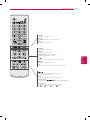
REMOTE CONTROL
FLASHBK
AUDIO
27
PICTURE
Changes the image mode.
INFO
Shows information on the current program.
SOUND
Changes the sound mode.
SETTINGS
Accesses the main menu.
Q.MENU
Accesses the quick menu.
OK
Selects menus or options and confirms your input.
BACK
Returns to the previous screen.
EXIT
Clears all on-screen displays and returns to TV viewing.
Accesses the AV devices connected to the TV;
Opens the SIMPLINK menu.
SLEEP
Sets the length of time until the TV to turns off.
,
)
Control buttons ( , , ,
Controls the SIMPLINK compatible devices (USB,SIMPLINK).
Color buttons
These access special functions in some menus.
: Red,
: Green,
: Yellow,
: Blue)
(
ENGLISH
Navigation buttons (up/down/left/right)
Scrolls through menus or options.