1
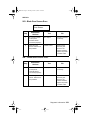
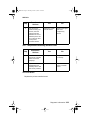
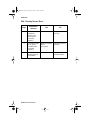
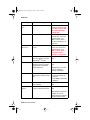
Service.bk Page i Thursday, October 4, 2001 12:20 PM
C910 Color Printer
5055-01X
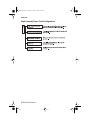
• Table of Contents
• Start Diagnostics
• Safety and Notices
• Trademarks
• Index
• Manuals Menu
Lexmark and Lexmark with diamond
design are trademarks of Lexmark
International, Inc., registered in the
United States and/or other countries.
Service.bk Page ii Thursday, October 4, 2001 12:20 PM
5055-01x
Edition: November 2001
The following paragraph does not apply to any country where such provisions are
inconsistent with local law: LEXMARK INTERNATIONAL, INC. PROVIDES THIS
PUBLICATION “AS IS” WITHOUT WARRANTY OF ANY KIND, EITHER EXPRESS OR
IMPLIED, INCLUDING, BUT NOT LIMITED TO, THE IMPLIED WARRANTIES OF
MERCHANTABILITY OR FITNESS FOR A PARTICULAR PURPOSE. Some states do
not allow disclaimer of express or implied warranties in certain transactions; therefore,
this statement may not apply to you.
This publication could include technical inaccuracies or typographical errors. Changes
are periodically made to the information herein; these changes will be incorporated in
later editions. Improvements or changes in the products or the programs described may
be made at any time.
Comments may be addressed to Lexmark International, Inc., Department D22A/032-2,
740 West New Circle Road, Lexington, Kentucky 40550, U.S.A or electronically mailed
(e-mail) to [email protected]. Lexmark may use or distribute any of
the information you supply in any way it believes appropriate without incurring any
obligation to you. You can purchase additional copies of publications related to this
product by calling 1-800-553-9727. In other countries, contact your point of purchase.
Lexmark and Lexmark with diamond design and OptraImage are trademarks of Lexmark
International, Inc., registered in the United States and/or other countries.
Other trademarks are the property of their respective owners.
© Copyright Lexmark International, Inc. 2001.
All rights reserved.
UNITED STATES GOVERNMENT RESTRICTED RIGHTS
This software and documentation are provided with RESTRICTED RIGHTS. Use,
duplication or disclosure by the Government is subject to restrictions as set forth in
subparagraph (c)(1)(ii) of the Rights in Technical Data and Computer Software clause at
DFARS 252.227-7013 and in applicable FAR provisions: Lexmark International, Inc.,
Lexington, KY 40550.
U.S.A. P/N 12G9081
Service.bk Page iii Thursday, October 4, 2001 12:20 PM
5055-01x
Contents
Safety Information. . . . . . . . . . . . . . . . . . . . . . . . . . . . . . . . . . . . . . . ix
Safety Notice . . . . . . . . . . . . . . . . . . . . . . . . . . . . . . . . . . . . . . . . . . . ix
General Information . . . . . . . . . . . . . . . . . . . . . . . . . . . . . . . . . . . . 1-1
Maintenance Approach . . . . . . . . . . . . . . . . . . . . . . . . . . . . . . . . 1-1
Standard Inspection and Cleaning Procedure . . . . . . . . . . . . . . . 1-1
Return Parts . . . . . . . . . . . . . . . . . . . . . . . . . . . . . . . . . . . . . . . . . 1-2
Recommendations For Service . . . . . . . . . . . . . . . . . . . . . . . . . . 1-2
Tools . . . . . . . . . . . . . . . . . . . . . . . . . . . . . . . . . . . . . . . . . . . . . . 1-2
Serial Number . . . . . . . . . . . . . . . . . . . . . . . . . . . . . . . . . . . . . . . 1-3
Abbreviations . . . . . . . . . . . . . . . . . . . . . . . . . . . . . . . . . . . . . . . 1-4
Processes and Configuration . . . . . . . . . . . . . . . . . . . . . . . . . . . . 1-5
Electrophotography Process . . . . . . . . . . . . . . . . . . . . . . . . . . . . 1-5
Development Unit. . . . . . . . . . . . . . . . . . . . . . . . . . . . . . . . . . . . . 1-6
Transfer Unit . . . . . . . . . . . . . . . . . . . . . . . . . . . . . . . . . . . . . . . . 1-6
Cleaning Unit . . . . . . . . . . . . . . . . . . . . . . . . . . . . . . . . . . . . . . . . 1-7
Paper Feeding / Fusing . . . . . . . . . . . . . . . . . . . . . . . . . . . . . . . . 1-7
Drive System . . . . . . . . . . . . . . . . . . . . . . . . . . . . . . . . . . . . . . . . 1-8
Paper Feeding . . . . . . . . . . . . . . . . . . . . . . . . . . . . . . . . . . . . . . . 1-9
Cassette Paper Feeder . . . . . . . . . . . . . . . . . . . . . . . . . . . . . . . . 1-9
Multi-Purpose Feeding . . . . . . . . . . . . . . . . . . . . . . . . . . . . . . . . 1-10
Registration Unit. . . . . . . . . . . . . . . . . . . . . . . . . . . . . . . . . . . . . 1-11
Separation Unit . . . . . . . . . . . . . . . . . . . . . . . . . . . . . . . . . . . . . 1-12
Fuser Unit. . . . . . . . . . . . . . . . . . . . . . . . . . . . . . . . . . . . . . . . . . 1-13
Delivery . . . . . . . . . . . . . . . . . . . . . . . . . . . . . . . . . . . . . . . . . . . 1-14
Belt Unit . . . . . . . . . . . . . . . . . . . . . . . . . . . . . . . . . . . . . . . . . . . 1-15
Belt Up/Down . . . . . . . . . . . . . . . . . . . . . . . . . . . . . . . . . . . . . . . 1-16
Expansion Paper Feeder . . . . . . . . . . . . . . . . . . . . . . . . . . . . . . 1-16
Duplex Unit. . . . . . . . . . . . . . . . . . . . . . . . . . . . . . . . . . . . . . . . . 1-17
Printing Mode . . . . . . . . . . . . . . . . . . . . . . . . . . . . . . . . . . . . . . . 1-18
OHP Mode . . . . . . . . . . . . . . . . . . . . . . . . . . . . . . . . . . . . . . . . . 1-18
Thick Paper Mode . . . . . . . . . . . . . . . . . . . . . . . . . . . . . . . . . . . 1-18
Envelope / Postcard Mode . . . . . . . . . . . . . . . . . . . . . . . . . . . . . 1-19
Operation Mode . . . . . . . . . . . . . . . . . . . . . . . . . . . . . . . . . . . . . 1-19
Clearing Paper Jams . . . . . . . . . . . . . . . . . . . . . . . . . . . . . . . . . 1-20
High Capacity Paper Feeder (HCPF). . . . . . . . . . . . . . . . . . . . . 1-25
Maintenance Mode. . . . . . . . . . . . . . . . . . . . . . . . . . . . . . . . . . . 1-33
High Capacity Paper Feed Sensor / Switch Test . . . . . . . . . . . . 1-35
iii
Service.bk Page iv Thursday, October 4, 2001 12:20 PM
5055-01x
Diagnostic Information . . . . . . . . . . . . . . . . . . . . . . . . . . . . . . . . . .2-1
Adjustments and Procedures Following Parts Replacement . . . .2-1
Start . . . . . . . . . . . . . . . . . . . . . . . . . . . . . . . . . . . . . . . . . . . . . . . . . .2-3
Initial Check . . . . . . . . . . . . . . . . . . . . . . . . . . . . . . . . . . . . . . . . . .2-3
Printer Messages . . . . . . . . . . . . . . . . . . . . . . . . . . . . . . . . . . . . . . . .2-4
Service Error Message Table . . . . . . . . . . . . . . . . . . . . . . . . . . . .2-4
Attendance Messages g . . . . . . . . . . . . . . . . . . . . . . . . . . . . . . .2-25
Maintenance Analysis Procedures (MAPS) . . . . . . . . . . . . . . . .2-43
Symptom Table . . . . . . . . . . . . . . . . . . . . . . . . . . . . . . . . . . . . .2-52
Service Checks . . . . . . . . . . . . . . . . . . . . . . . . . . . . . . . . . . . . . . . .2-55
Drive 1 DC Motor Service Check . . . . . . . . . . . . . . . . . . . . . . . .2-55
Drive 2 Stepper Motor Service Check . . . . . . . . . . . . . . . . . . . . .2-55
Duplex Service Check . . . . . . . . . . . . . . . . . . . . . . . . . . . . . . . . .2-56
Expansion Paper Feed Service Check . . . . . . . . . . . . . . . . . . . .2-56
Face-Down Stacker Full Service Check . . . . . . . . . . . . . . . . . . .2-57
High Capacity Paper Feed (HCPF) Service Check . . . . . . . . . . .2-57
Operator Panel Service Check . . . . . . . . . . . . . . . . . . . . . . . . . .2-58
Paper Carrying Service Check . . . . . . . . . . . . . . . . . . . . . . . . . .2-58
Paper Exit, FU/FD Service Check . . . . . . . . . . . . . . . . . . . . . . . .2-63
Paper Tray Missing Service Check . . . . . . . . . . . . . . . . . . . . . . .2-63
Photodeveloper Missing Service Check . . . . . . . . . . . . . . . . . . .2-64
Power Supply Service Check . . . . . . . . . . . . . . . . . . . . . . . . . . .2-65
Marks on Paper Service Check . . . . . . . . . . . . . . . . . . . . . . . . . .2-66
Transfer Belt Up/Down Service Check . . . . . . . . . . . . . . . . . . . .2-68
Image Quality Troubleshooting . . . . . . . . . . . . . . . . . . . . . . . . . . . .2-69
Print Quality Problems. . . . . . . . . . . . . . . . . . . . . . . . . . . . . . . . .2-69
Options Service Check . . . . . . . . . . . . . . . . . . . . . . . . . . . . . . . .2-77
Diagnostic Aids . . . . . . . . . . . . . . . . . . . . . . . . . . . . . . . . . . . . . . . .3-1
Power-On Self Test Sequence . . . . . . . . . . . . . . . . . . . . . . . . . . .3-1
Using the Operator Panel . . . . . . . . . . . . . . . . . . . . . . . . . . . . . . .3-2
Operator Panel Buttons . . . . . . . . . . . . . . . . . . . . . . . . . . . . . . . . .3-3
Printing the Menu Settings . . . . . . . . . . . . . . . . . . . . . . . . . . . . . .3-4
Operator Menu Disabled . . . . . . . . . . . . . . . . . . . . . . . . . . . . . . . .3-4
Menu Overview . . . . . . . . . . . . . . . . . . . . . . . . . . . . . . . . . . . . . . .3-4
Diagnostic Mode . . . . . . . . . . . . . . . . . . . . . . . . . . . . . . . . . . . . . .3-6
Print Tests . . . . . . . . . . . . . . . . . . . . . . . . . . . . . . . . . . . . . . . . . . .3-8
Hardware Tests . . . . . . . . . . . . . . . . . . . . . . . . . . . . . . . . . . . . . .3-10
Device Tests . . . . . . . . . . . . . . . . . . . . . . . . . . . . . . . . . . . . . . . .3-17
Diagnostics - Printer Setup . . . . . . . . . . . . . . . . . . . . . . . . . . . . .3-20
Defaults . . . . . . . . . . . . . . . . . . . . . . . . . . . . . . . . . . . . . . . . . . . .3-20
Viewing and Resetting the Drum Counters . . . . . . . . . . . . . . . .3-22
Diagnostics - Error Log . . . . . . . . . . . . . . . . . . . . . . . . . . . . . . . .3-25
iv Service Manual
Service.bk Page v Thursday, October 4, 2001 12:20 PM
5055-01x
Repair Information . . . . . . . . . . . . . . . . . . . . . . . . . . . . . . . . . . . . . 4-1
Service Precautions . . . . . . . . . . . . . . . . . . . . . . . . . . . . . . . . . . . 4-1
Handling Printed Circuit Boards . . . . . . . . . . . . . . . . . . . . . . . . . . 4-2
Adjustments . . . . . . . . . . . . . . . . . . . . . . . . . . . . . . . . . . . . . . . . . . . 4-3
High Capacity Paper Feed Timing Belt Adjustment . . . . . . . . . . . 4-3
Removals . . . . . . . . . . . . . . . . . . . . . . . . . . . . . . . . . . . . . . . . . . . . . 4-4
Cover, Top Removal . . . . . . . . . . . . . . . . . . . . . . . . . . . . . . . . . . 4-4
Operator Panel Removal . . . . . . . . . . . . . . . . . . . . . . . . . . . . . . . 4-4
Cover, Front Removal . . . . . . . . . . . . . . . . . . . . . . . . . . . . . . . . . 4-5
Cover, Front Left . . . . . . . . . . . . . . . . . . . . . . . . . . . . . . . . . . . . . 4-6
Cover, Rear Removal. . . . . . . . . . . . . . . . . . . . . . . . . . . . . . . . . . 4-6
Cover, Solenoid Removal . . . . . . . . . . . . . . . . . . . . . . . . . . . . . . 4-7
Cover, Left Side Removal . . . . . . . . . . . . . . . . . . . . . . . . . . . . . . 4-7
Cover, Right Side Removal . . . . . . . . . . . . . . . . . . . . . . . . . . . . . 4-8
Cover, RIP Board Removal . . . . . . . . . . . . . . . . . . . . . . . . . . . . . 4-9
Tray, Paper Exit Removal . . . . . . . . . . . . . . . . . . . . . . . . . . . . . 4-10
RIP Box Removal. . . . . . . . . . . . . . . . . . . . . . . . . . . . . . . . . . . . 4-11
Electronic Box Removal . . . . . . . . . . . . . . . . . . . . . . . . . . . . . . . 4-11
LED Printhead Removal. . . . . . . . . . . . . . . . . . . . . . . . . . . . . . . 4-12
Eraser Removal . . . . . . . . . . . . . . . . . . . . . . . . . . . . . . . . . . . . . 4-14
Printhead Controller Board Removal . . . . . . . . . . . . . . . . . . . . . 4-15
Upper Fan Removal . . . . . . . . . . . . . . . . . . . . . . . . . . . . . . . . . . 4-16
Multi-Purpose Feeder Tray Removal . . . . . . . . . . . . . . . . . . . . . 4-17
Paper Feed Roller Removal. . . . . . . . . . . . . . . . . . . . . . . . . . . . 4-18
Paper Carrying Roller Removal . . . . . . . . . . . . . . . . . . . . . . . . . 4-18
Paper Present Sensor Removal. . . . . . . . . . . . . . . . . . . . . . . . . 4-19
Paper Feed Frame Removal . . . . . . . . . . . . . . . . . . . . . . . . . . . 4-20
Cassette Guide Removal . . . . . . . . . . . . . . . . . . . . . . . . . . . . . . 4-21
Temperature/Humidity Sensor Removal . . . . . . . . . . . . . . . . . . 4-22
Paper Feed Solenoid Removal . . . . . . . . . . . . . . . . . . . . . . . . . 4-22
Paper Remaining Sensor Removal . . . . . . . . . . . . . . . . . . . . . . 4-22
Gear Cover Removal . . . . . . . . . . . . . . . . . . . . . . . . . . . . . . . . . 4-23
Multi-Purpose Feeder Roll Removal . . . . . . . . . . . . . . . . . . . . . 4-23
Multi-Purpose Feeder Clutch Removal . . . . . . . . . . . . . . . . . . . 4-23
OHP Detection Sensor (Upper) Removal . . . . . . . . . . . . . . . . . 4-23
Fanning Pad Removal . . . . . . . . . . . . . . . . . . . . . . . . . . . . . . . . 4-25
Registration Sensor Removal . . . . . . . . . . . . . . . . . . . . . . . . . . 4-26
Multi-Purpose Feeder Paper Present Sensor Removal . . . . . . . 4-27
Paper Carrying Frame Removal . . . . . . . . . . . . . . . . . . . . . . . . 4-28
Paper Carrying Roller (Upper) Removal . . . . . . . . . . . . . . . . . . 4-28
Paper Carrying Clutch Removal. . . . . . . . . . . . . . . . . . . . . . . . . 4-28
OHP Detection Sensor (Lower) Removal . . . . . . . . . . . . . . . . . 4-28
v
Service.bk Page vi Thursday, October 4, 2001 12:20 PM
5055-01x
Registration Frame, Registration Clutch Removal . . . . . . . . . . .4-29
Transfer Belt Removal. . . . . . . . . . . . . . . . . . . . . . . . . . . . . . . . .4-30
Belt Up/Down Detection Sensor Removal. . . . . . . . . . . . . . . . . .4-34
Sensor Board Removal . . . . . . . . . . . . . . . . . . . . . . . . . . . . . . . .4-35
Density Sensor Removal. . . . . . . . . . . . . . . . . . . . . . . . . . . . . . .4-36
Separation Fingers Removal . . . . . . . . . . . . . . . . . . . . . . . . . . . .4-36
Sensor Cleaner Removal . . . . . . . . . . . . . . . . . . . . . . . . . . . . . .4-36
Printer Controller Removal . . . . . . . . . . . . . . . . . . . . . . . . . . . . .4-37
High Voltage Power Supply Board (HVU) Removal . . . . . . . . . .4-38
R Sub Frame Removal . . . . . . . . . . . . . . . . . . . . . . . . . . . . . . . .4-39
Toner Remaining Sensor Removal . . . . . . . . . . . . . . . . . . . . . . .4-39
Drum Gear Sensor Removal . . . . . . . . . . . . . . . . . . . . . . . . . . . .4-39
Sub Frame F1, Sub Frame F2 Removal . . . . . . . . . . . . . . . . . . .4-40
Drive Gear Unit Sensor Assembly Removal . . . . . . . . . . . . . . . .4-41
Belt Up/Down Clutch Removal . . . . . . . . . . . . . . . . . . . . . . . . . .4-42
Power Supply 1 Removal . . . . . . . . . . . . . . . . . . . . . . . . . . . . . .4-43
Power Supply 2 Removal . . . . . . . . . . . . . . . . . . . . . . . . . . . . . .4-44
Drive Motor Assembly Removal . . . . . . . . . . . . . . . . . . . . . . . . .4-45
Motor Drive Board Removal . . . . . . . . . . . . . . . . . . . . . . . . . . . .4-45
Power Switch Removal . . . . . . . . . . . . . . . . . . . . . . . . . . . . . . . .4-46
Connector, Duplex Unit Removal . . . . . . . . . . . . . . . . . . . . . . . .4-47
Paper Size Sensor Board Assembly Removal . . . . . . . . . . . . . .4-48
Main Unit Fan Removal. . . . . . . . . . . . . . . . . . . . . . . . . . . . . . . .4-49
Main Drive Unit Removal. . . . . . . . . . . . . . . . . . . . . . . . . . . . . . .4-50
Face-Up Paper Exit Assembly Removal . . . . . . . . . . . . . . . . . . .4-54
Face-Up/Down (Flapper Detection) Sensor Removal . . . . . . . . .4-54
Face-Up/Down Solenoid Removal . . . . . . . . . . . . . . . . . . . . . . .4-54
Paper Delivery Sensor Removal . . . . . . . . . . . . . . . . . . . . . . . . .4-54
Paper Exit Tray Switch Removal. . . . . . . . . . . . . . . . . . . . . . . . .4-54
Face-Down Guide Assembly Removal . . . . . . . . . . . . . . . . . . . .4-55
Paper Exit Motor & Full Sensor Removal . . . . . . . . . . . . . . . . . .4-55
Turn Guide Cover Sensor Removal . . . . . . . . . . . . . . . . . . . . . .4-57
Right Slide Rail Removal. . . . . . . . . . . . . . . . . . . . . . . . . . . . . . .4-58
Front Cover Open Switch Actuator Removal . . . . . . . . . . . . . . .4-58
Lock Handle Assembly Removal. . . . . . . . . . . . . . . . . . . . . . . . .4-59
Top Unit Removal . . . . . . . . . . . . . . . . . . . . . . . . . . . . . . . . . . . .4-60
Stay Arm Removal . . . . . . . . . . . . . . . . . . . . . . . . . . . . . . . . . . .4-61
Fuser Removal . . . . . . . . . . . . . . . . . . . . . . . . . . . . . . . . . . . . . .4-62
Options Removals . . . . . . . . . . . . . . . . . . . . . . . . . . . . . . . . . . . . . .4-63
Expansion Paper Feeder Removal . . . . . . . . . . . . . . . . . . . . . . .4-63
Duplex Unit Separation Removal . . . . . . . . . . . . . . . . . . . . . . . .4-71
Duplex Unit Removal. . . . . . . . . . . . . . . . . . . . . . . . . . . . . . . . . .4-72
Duplex Timing Belt Removal . . . . . . . . . . . . . . . . . . . . . . . . . . . .4-72
vi Service Manual
Service.bk Page vii Thursday, October 4, 2001 12:20 PM
5055-01x
Duplex Pressure Roller and Solenoid Removal . . . . . . . . . . . . .
Duplex Feed Roller And Solenoid Removal. . . . . . . . . . . . . . . .
Duplex Side Fence Motor Assembly / Side Fence Removal . . .
Duplex Paper Carrying Motor Removal . . . . . . . . . . . . . . . . . . .
HCPF Covers Removal . . . . . . . . . . . . . . . . . . . . . . . . . . . . . . .
HCPF Call Roller, Paper Feed Roller, Reverse Roller Removal
HCPF Pickup Solenoid Removal . . . . . . . . . . . . . . . . . . . . . . . .
HCPF Paper End Sensor Removal . . . . . . . . . . . . . . . . . . . . . .
HCPF Paper Size Sensors (1, 2) Removal . . . . . . . . . . . . . . . .
HCPF Tray Motor Removal . . . . . . . . . . . . . . . . . . . . . . . . . . . .
HCPF Paper Level Sensor Removal . . . . . . . . . . . . . . . . . . . . .
HCPF Power Supply Removal . . . . . . . . . . . . . . . . . . . . . . . . . .
4-73
4-73
4-74
4-75
4-76
4-77
4-78
4-79
4-79
4-81
4-82
4-83
Locations . . . . . . . . . . . . . . . . . . . . . . . . . . . . . . . . . . . . . . . . . . . . 5-1
Covers Diagram . . . . . . . . . . . . . . . . . . . . . . . . . . . . . . . . . . . . . . 5-1
Major Parts Diagram . . . . . . . . . . . . . . . . . . . . . . . . . . . . . . . . . . 5-2
Printer Controller Board . . . . . . . . . . . . . . . . . . . . . . . . . . . . . . . . 5-4
Printhead Controller Board. . . . . . . . . . . . . . . . . . . . . . . . . . . . . . 5-5
RIP Board. . . . . . . . . . . . . . . . . . . . . . . . . . . . . . . . . . . . . . . . . . . 5-6
Power Source Unit 1 Board . . . . . . . . . . . . . . . . . . . . . . . . . . . . . 5-7
Power Source Unit 2 Board . . . . . . . . . . . . . . . . . . . . . . . . . . . . . 5-7
High Voltage Power Supply Board. . . . . . . . . . . . . . . . . . . . . . . . 5-8
Sensor Board . . . . . . . . . . . . . . . . . . . . . . . . . . . . . . . . . . . . . . . . 5-9
Expansion Paper Feeder Controller Board . . . . . . . . . . . . . . . . . 5-9
Duplex Unit Controller Board . . . . . . . . . . . . . . . . . . . . . . . . . . . 5-10
Motor Drive Board . . . . . . . . . . . . . . . . . . . . . . . . . . . . . . . . . . . 5-10
Size Sensor Board . . . . . . . . . . . . . . . . . . . . . . . . . . . . . . . . . . . 5-10
High Capacity Paper Feed (HCPF) . . . . . . . . . . . . . . . . . . . . . . 5-11
High Capacity Paper Feed Configuration. . . . . . . . . . . . . . . . . . 5-12
Electrical Parts Layout . . . . . . . . . . . . . . . . . . . . . . . . . . . . . . . . 5-13
Driving Parts Layout. . . . . . . . . . . . . . . . . . . . . . . . . . . . . . . . . . 5-14
Sensor and Switch Locations. . . . . . . . . . . . . . . . . . . . . . . . . . . 5-15
Component Locations . . . . . . . . . . . . . . . . . . . . . . . . . . . . . . . . 5-16
Preventive Maintenance . . . . . . . . . . . . . . . . . . . . . . . . . . . . . . . . 6-1
Maintenance Kit . . . . . . . . . . . . . . . . . . . . . . . . . . . . . . . . . . . . . 6-1
Periodic Maintenance . . . . . . . . . . . . . . . . . . . . . . . . . . . . . . . . . 6-2
Lubricants and Cleaners . . . . . . . . . . . . . . . . . . . . . . . . . . . . . . . 6-2
vii
Service.bk Page viii Thursday, October 4, 2001 12:20 PM
5055-01x
Parts Catalog . . . . . . . . . . . . . . . . . . . . . . . . . . . . . . . . . . . . . . . . . .7-1
How to Use This Parts Catalog . . . . . . . . . . . . . . . . . . . . . . . . . . . . .7-1
Assembly 1: Covers 1 . . . . . . . . . . . . . . . . . . . . . . . . . . . . . . . . . .7-2
Assembly 2: Covers 2 . . . . . . . . . . . . . . . . . . . . . . . . . . . . . . . . . .7-4
Assembly 3: Covers 3 . . . . . . . . . . . . . . . . . . . . . . . . . . . . . . . . . .7-6
Assembly 4: Covers 4 . . . . . . . . . . . . . . . . . . . . . . . . . . . . . . . . . .7-8
Assembly 5: Covers 5 . . . . . . . . . . . . . . . . . . . . . . . . . . . . . . . . .7-10
Assembly 6: Upper Unit. . . . . . . . . . . . . . . . . . . . . . . . . . . . . . . .7-12
Assembly 7: Base 1. . . . . . . . . . . . . . . . . . . . . . . . . . . . . . . . . . .7-16
Assembly 8: Base 2. . . . . . . . . . . . . . . . . . . . . . . . . . . . . . . . . . .7-20
Assembly 9: Base 3. . . . . . . . . . . . . . . . . . . . . . . . . . . . . . . . . . .7-22
Assembly 10: Electrical . . . . . . . . . . . . . . . . . . . . . . . . . . . . . . . .7-24
Assembly 11: I/F Controller . . . . . . . . . . . . . . . . . . . . . . . . . . . . .7-28
Assembly 11: I/F Controller (Continued) . . . . . . . . . . . . . . . . . . .7-30
Assembly 12: Fuser Unit . . . . . . . . . . . . . . . . . . . . . . . . . . . . . . .7-32
Assembly 13: Cassette . . . . . . . . . . . . . . . . . . . . . . . . . . . . . . . .7-34
Assembly 14: Expansion Feeder 1 . . . . . . . . . . . . . . . . . . . . . . .7-36
Assembly 15: Expansion Feeder 2 . . . . . . . . . . . . . . . . . . . . . . .7-38
Assembly 16: Duplex Unit 1 . . . . . . . . . . . . . . . . . . . . . . . . . . . .7-40
Assembly 17: Duplex Unit 2 . . . . . . . . . . . . . . . . . . . . . . . . . . . .7-42
Assembly 18: High Capacity Paper Feed 1. . . . . . . . . . . . . . . . .7-44
Assembly 19: High Capacity Paper Feed 2. . . . . . . . . . . . . . . . .7-46
Assembly 20: High Capacity Paper Feed 3. . . . . . . . . . . . . . . . .7-48
Assembly 21: High Capacity Paper Feed 4. . . . . . . . . . . . . . . . .7-50
Assembly 22: High Capacity Paper Feed 5. . . . . . . . . . . . . . . . .7-52
Assembly 23: High Capacity Paper Feed 6. . . . . . . . . . . . . . . . .7-54
Index . . . . . . . . . . . . . . . . . . . . . . . . . . . . . . . . . . . . . . . . . . . . . . . . .x-1
viii Service Manual
Service.bk Page ix Thursday, October 4, 2001 12:20 PM
5055-01x
Safety Information
Safety Notice
• This product is designed, tested and approved to meet strict
global safety standards with the use of specific Lexmark
components. The safety features of some parts may not
always be obvious. Lexmark is not responsible for the use of
other replacement parts.
• The maintenance information for this product has been
prepared for use by a professional service person and is not
intended to be used by others.
• There may be an increased risk of electric shock and
personal injury during disassembly and servicing of this
product. Professional service personnel should understand
this and take necessary precautions.
Consignes de Sécurité
• Ce produit a été conçu, testé et approuvé pour respecter les
normes strictes de sécurité globale lors de l'utilisation de
composants Lexmark spécifiques. Les caractéristiques de
sécurité de certains éléments ne sont pas toujours évidentes.
Lexmark ne peut être tenu responsable de l'utilisation
d'autres pièces de rechange.
• Les consignes d'entretien et de réparation de ce produit
s'adressent uniquement à un personnel de maintenance
qualifié.
• Le démontage et l'entretien de ce produit pouvant présenter
certains risques électriques, le personnel d'entretien qualifié
devra prendre toutes les précautions nécessaires.
Safety Information ix
Service.bk Page x Thursday, October 4, 2001 12:20 PM
5055-01x
Norme di sicurezza
• Il prodotto è stato progettato, testato e approvato in
conformità a severi standard di sicurezza e per l’utilizzo con
componenti Lexmark specifici. Le caratteristiche di sicurezza
di alcune parti non sempre sono di immediata comprensione.
Lexmark non è responsabile per l’utilizzo di parti di ricambio
di altri produttori.
• Le informazioni riguardanti la manutenzione di questo
prodotto sono indirizzate soltanto al personale di assistenza
autorizzato.
• Durante lo smontaggio e la manutenzione di questo prodotto,
il rischio di subire scosse elettriche e danni alla persona è più
elevato. Il personale di assistenza autorizzato, deve, quindi,
adottare le precauzioni necessarie.
Sicherheitshinweise
• Dieses Produkt und die zugehörigen Komponenten wurden
entworfen und getestet, um beim Einsatz die weltweit
gültigen Sicherheitsanforderungen zu erfüllen. Die
sicherheitsrelevanten Funktionen der Bauteile und Optionen
sind nicht immer offensichtlich. Sofern Teile eingesetzt
werden, die nicht von Lexmark sind, wird von Lexmark
keinerlei Verantwortung oder Haftung für dieses Produkt
übernommen.
• Die Wartungsinformationen für dieses Produkt sind
ausschließlich für die Verwendung durch einen
Wartungsfachmann bestimmt.
• Während des Auseinandernehmens und der Wartung des
Geräts besteht ein zusätzliches Risiko eines elektrischen
Schlags und körperlicher Verletzung. Das zuständige
Fachpersonal sollte entsprechende Vorsichtsmaßnahmen
treffen.
x Service Manual
Service.bk Page xi Thursday, October 4, 2001 12:20 PM
5055-01x
Pautas de Seguridad
• Este producto se ha diseñado, verificado y aprobado para
cumplir los más estrictos estándares de seguridad global
usando los componentes específicos de Lexmark. Puede
que las características de seguridad de algunas piezas no
sean siempre evidentes. Lexmark no se hace responsable
del uso de otras piezas de recambio.
• La información sobre el mantenimiento de este producto
está dirigida exclusivamente al personal cualificado de
mantenimiento.
• Existe mayor riesgo de descarga eléctrica y de daños
personales durante el desmontaje y la reparación de la
máquina. El personal cualificado debe ser consciente de este
peligro y tomar las precauciones necesarias.
Informações de Segurança
• Este produto foi concebido, testado e aprovado para
satisfazer os padrões globais de segurança na utilização de
componentes específicos da Lexmark. As funções de
segurança de alguns dos componentes podem não ser
sempre óbvias. A Lexmark não é responsável pela utilização
de outros componentes de substituição.
• As informações de segurança relativas a este produto
destinam-se a profissionais destes serviços e não devem ser
utilizadas por outras pessoas.
• Risco de choques eléctricos e ferimentos graves durante a
desmontagem e manutenção deste produto. Os profissionais
destes serviços devem estar avisados deste facto e tomar os
cuidados necessários.
Safety Information xi
Service.bk Page xii Thursday, October 4, 2001 12:20 PM
5055-01x
Informació de Seguretat
• Aquest producte està dissenyat, comprovat i aprovat per tal
d'acomplir les estrictes normes de seguretat globals amb la
utililització de components específics de Lexmark. Les
característiques de seguretat d'algunes peces pot ser que no
sempre siguin òbvies. Lexmark no es responsabilitza de l'us
d'altres peces de recanvi.
• La informació pel manteniment d’aquest producte està
orientada exclusivament a professionals i no està destinada
a ningú que no ho sigui.
• El risc de xoc elèctric i de danys personals pot augmentar
durant el procés de desmuntatge i de servei d’aquest
producte. El personal professional ha d’estar-ne assabentat i
prendre les mesures convenients.
xii Service Manual
Service.bk Page xiii Thursday, October 4, 2001 12:20 PM
5055-01x
Safety Information xiii
Service.bk Page xiv Thursday, October 4, 2001 12:20 PM
5055-01x
xiv Service Manual
Service.bk Page 1 Thursday, October 4, 2001 12:20 PM
5055-01x
1. General Information
Maintenance Approach
The diagnostic information in this manual leads you to the correct
field replaceable unit (FRU) or part. Use the error code charts,
symptom index, and service checks to determine the symptom and
repair the failure. The removals in the Repair Information chapter
may help you identify parts.
After you complete the repair, perform tests as needed to verify the
repair.
Standard Inspection and Cleaning Procedure
• Switch off Printer power, and disconnect the AC power cord
from the wall outlet.
• Remove and inspect the photodevelopers and toner cartridges,
•
•
•
•
•
•
•
shielding them from strong light.
Inspect the interior of the printer, removing foreign matter such
as paper clips, staples, pieces of paper/transparencies, paper
dust, hair, oil, grease or toner.
Clean the printer interior using a lint-free cloth, dampened
slightly with cold water. Do not use solvents or chemical
cleaners to clean the printer interior.
Use only the specified oil or lubricant on printer parts (some
service parts are pre-lubed from the factory).
Inspect and, if necessary, clean all rubber/plastic and D rollers
with A lint-free cloth, dampened slightly with cold water. Dry the
rollers with a lint-free cloth.
While cleaning, inspect the interior of the printer for damaged
wires, loose connections, toner leakage, loose springs, and
damaged or worn parts.
Be sure the printer is on a single, flat, strong table or desk top.
Inspect all supplies (OCR, Cartridges, photodeveloper/toner
cartridges, belts, fuser CRUs) and paper sources (cassettes,
trays, feeders, duplex drawers, finishers, mailbox trays) for
obvious damage and proper installation (paper under corner
bucklers, paper guides not too tight) Inspect for correct media
usage (paper, transparencies, labels).
General Information 1-1
Service.bk Page 2 Thursday, October 4, 2001 12:20 PM
5055-01x
• Print a Demo page.
• If additional paper sources are installed, print a Demo page
from each of these, (if possible).
Note: Failure to print from an additional tray or feeder may imply
one or more pins are bent in the mating connector.
Return Parts
Engineering periodically analyzes returned parts for failure modes.
Please Include a printed test (DEMO) page, before and after the
repair, and tag any returnable parts with a description of the failure.
Recommendations For Service
Before leaving the printer check the following:
• Be sure printer is on a single, flat, strong tabletop. This is very
•
•
important for color printers that use belts. Check and set
registration as necessary.
Shake all cartridges and be sure they are correctly installed and
fully seated.
While the cover is open, wipe any residual toner from the LEDs
using a lint free cloth.
Tools
The removal and adjustment procedures require the following tools
and equipment:
• Magnetic tip Phillips screwdrivers, large and small
• Flat-blade screwdrivers
• Analog volt ohmmeter (a digital volt ohmmeter may also be
•
•
•
•
used)
Needle nose pliers
Tweezers, C-ring pliers
Magnifier (10 times or equivalent)
6-angle wrench (1.5 mm)
When you make voltage readings, always use frame ground unless
another ground is specified.
1-2 Service Manual
Service.bk Page 3 Thursday, October 4, 2001 12:20 PM
5055-01x
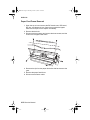
Serial Number
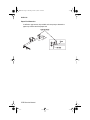
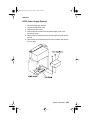
Open the front door, the serial number is located as shown. The
serial number is also on the menu settings page you can print from
the Tests Menu.
General Information 1-3
Service.bk Page 4 Thursday, October 4, 2001 12:20 PM
5055-01x
Abbreviations
ASIC
CSU
DRAM
EPROM
EP
ESD
FRU
HVPS
LAN
LASER
LCD
LED
LVPS
NVRAM
OEM
PICS
PIXEL
POR
POST
PQET
RIP
ROS
SRAM
UPR
V ac
V dc
Application-Specific Integrated Circuit
Customer Setup
Dynamic Random Access Memory
Erasable Programmable Read-Only Memory
Electrophotographic Process
Electrostatic Discharge
Field Replaceable Unit
High Voltage Power Supply
Local Area Network
Light Amplification by Stimulated Emission of
Radiation
Liquid Crystal Display
Light-Emitting Diode
Low Voltage Power Supply
Nonvolatile Random Access Memory
Original Equipment Manufacturer
Problem Isolation Charts
Picture Element
Power-On Reset
Power-On Self Test
Print Quality Enhancement Technology
Raster Image Processor
Read-Only Storage
Static Random Access Memory
Used Parts Replacement
Volts alternating current
Volts direct current
1-4 Service Manual
Service.bk Page 5 Thursday, October 4, 2001 12:20 PM
5055-01x
Processes and Configuration
In this printer, the toner of four colors (magenta, cyan, yellow and
black) melts and deposits on paper, dots which record color image
information. This printing process is called the electrophotography
process.
Electrophotography Process
In the electrophotography process, electrically charged toner,
exposes, develops, transfers, and is cleaned with an aluminum
photosensitive drum. A photoconductive layer forms on the surface
of the drum when the drum is exposed to light.
The surface of the photosensitive drum is negatively charged,
forming the electrostatic image on the surface of the photosensitive
drum. This charge is directed to the photosensitive medium at a low
voltage, reducing the generation of ozone to a very low level. When
the drum surface is charged, the image is recorded by irradiating
light from the LED printhead, forming the electrostatic image. The
LED printhead array along with the Selfoc lens array provide a
single-dot line of the image, in a one-to-one arrangement. The
image data from the printhead controller causes the LED to emit
light in black dots. These black dots form an image of dots on the
photosensitive drum.
The LED printhead minimizes the displacement of images during the
color print process, when images of multiple printheads overlap,
causing dot position accuracy to be much higher. Since light from
the volume of the LED array varies depending on the LED
printheads, the light emitting value is recorded in the EPROM of the
printer controller. When the LED printhead is replaced, the light
emitting value should be entered for each printhead while the printer
is in maintenance mode.
Since the LED printhead and EPROM on the printhead controller
board of this printer are paired, the EPROM on the printhead
controller board should also be replaced whenever the printhead is
replaced.
General Information 1-5
Service.bk Page 6 Thursday, October 4, 2001 12:20 PM
5055-01x
Development Unit
Toner forms the electrostatic image on the photosensitive drum
during exposure. The single component, non-magnetic toner and the
lusterless color toner are weather-resistant, and fade little under
ultraviolet rays. This is helpful in saving documents.
Toner in the hopper is agitated and supplied to the development roll
by the supply roll. A (conductive rubber) doctor blade is fitted to the
development roll. Toner enters between the development roll and
doctor blade by the rotating development roll and is negatively
charged, forming the electrostatic image on the photosensitive
drum. Toner attaches to the bright portion of the photosensitive drum
per the voltage of the development roll.
Transfer Unit
Paper feeds electrostatically by the transfer belt and is carried to the
transfer unit which turn at the speed of the photoconductor drum. A
charge roller applies a positive charge to the paper. The toner image
formed on the photoconductor drum is transferred to the paper from
the back side by the positive dc voltage applied to the transfer sheet,
which is in contact with the paper through the transfer belt.
1-6 Service Manual
Service.bk Page 7 Thursday, October 4, 2001 12:20 PM
5055-01x
Cleaning Unit
Toner remaining on the photosensitive drum following transfer, is
scraped away with the cleaning blade, and collected in the recovery
bag as waste toner. Residual toner on the photosensitive medium is
removed by the eraser.
Paper Feeding / Fusing
The main unit drive is composed of drives 1 and 2. Drive 1 feeds
paper, stands by, drives the belt unit, separates, fuses, feeds the
face-up delivery unit, and drives the photodeveloper and toner
cartridge by rotations of the dc motor. Drive 2 drives the face-down
delivery unit by rotations of the stepper motor.
The expansion paper feeder and the duplex unit use independent
motors to drive the paper delivery unit.
General Information 1-7
Service.bk Page 8 Thursday, October 4, 2001 12:20 PM
5055-01x
Drive System
Drive 1, composed of a 100 dc motor and gear unit, feeds the
registration paper from the paper feeder and drives the belt unit,
photodeveloper / toner cartridge, fusing unit, and face-up delivery
unit. The motor rotates by the ON signal from the printer controller/
motor drive unit and sends a rotation synchronization detection
signal to the motor drive unit.
Note: The gear unit of drive 1 is adjusted in phase and should not
be disassembled.
Drive 2, composed of a hybrid stepping motor and gear unit, drives
the face-down delivery unit.
1-8 Service Manual
Service.bk Page 9 Thursday, October 4, 2001 12:20 PM
5055-01x
Paper Feeding
The paper feeder is a two-way system composed of the multi-paper
feeder (100 sheets maximum) and an integrated 550 sheet tray).
Optionally, the expansion paper feeders (550 sheets) can be
increased to four layers. A high capacity paper feeding system
(3,000 sheets) may be used. Combining the multi-paper feeder,
expansion paper feeders, and high capacity paper feeding system
the printer has a maximum paper supply of up to 5,850 sheets.
Cassette Paper Feeder
The paper feeding solenoid turns on by the signal from the printer
controller. The paper feeding roller interconnected with drive 1,
rotates with the spring clutch and picks the paper in the paper
cassette.
General Information 1-9
Service.bk Page 10 Thursday, October 4, 2001 12:20 PM
5055-01x
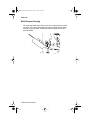
Multi-Purpose Feeding
The multi-paper feed solenoid turns on by the signal from the printer
controller. The multi-purpose feed roll interconnected with the drive 1
through the spring clutch, rotates and picks the paper in the multipurpose feeder.
1-10 Service Manual
Service.bk Page 11 Thursday, October 4, 2001 12:20 PM
5055-01x
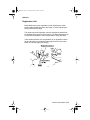
Registration Unit
Media temporarily stops (registration) when adjusting the paper
leading edge parallel with that of the image, or when adjusting the
timing with the black image.
The upper and lower registration rolls are arranged in parallel with
the photosensitive drum for black imaging. The lower registration roll
incorporates a registration clutch which feeds or stops the paper.
In the forward direction of the registration roll, a registration sensor
(photo interrupter) is provided to detect paper fed from the paper
feeder and to stop paper jam feeding.
General Information 1-11
Service.bk Page 12 Thursday, October 4, 2001 12:20 PM
5055-01x
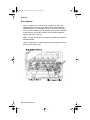
Separation Unit
The transfer belt and paper are separated with the belt drive roll by
separation fingers.
1-12 Service Manual
Service.bk Page 13 Thursday, October 4, 2001 12:20 PM
5055-01x
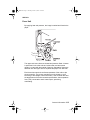
Fuser Unit
By applying heat and pressure, the image is melted and fused to the
paper.
The upper and lower rollers are heated and pressure-fitted. A heater
is positioned in the roller tube and a thermistor and thermostat
remain in contact with the outside of the tube. Separation fingers are
attached near the upper roller to separate the paper from the roller.
Each thermistor sends the surface temperature of the roller to the
printer controller. The printer controller turns the heater on or off
according to the voltage of each thermistor. If the controller fails and
the temperature of the roller exceeds specifications, the temperature
fuse (TCO) connected to each heater opens, preventing
overheating.
General Information 1-13
Service.bk Page 14 Thursday, October 4, 2001 12:20 PM
5055-01x
Delivery
After completing the fusing process, paper is discharged from the
printer. The delivery sensor detects the paper condition and the
FU/FD deflector switches between the face-up and face-down paper
delivery. The paper from the fuser pulls down the sensing lever
turning on the delivery sensor (photo interrupter). If the delivery unit
remains on longer than specified, the printer controller determines
that the printer is jammed, and the paper delivery flap lever switches
to either face-down or face-up.
1-14 Service Manual
Service.bk Page 15 Thursday, October 4, 2001 12:20 PM
5055-01x
Belt Unit
After passing through the registration unit, paper is electrostatically
fed by the transfer belt through the positively charged feed roll at the
inlet of the belt unit and fed by the running belt. The belt runs at the
same speed as the photosensitive drum causing the image on the
C, M, Y and K developer to transfer to paper.
Since the photosensitive drum has a small diameter and the paper is
electrostatically fed by the transfer belt, the paper is easily
separated, after toner image transfer, and fed to the next developer.
Excess toner is scraped from the drum with a cleaning blade and
recovered into the waste toner bottle.
Adjust the registration when the belt unit is replaced. The
registration is adjusted at the leading edge of the image or by
adjusting the color image. This should be adjusted in maintenance
mode, when the belt unit is replaced.
The transfer belt is conductive and seamless. If the transfer belt is
damaged, toner can cling to the belt and contaminate the paper.
When fingerprints or other stains appear on the belt, wipe them
away with a dry cloth or cloth moistened with alcohol.
A density sensor is positioned facing the belt drive roller for
automatic density adjustment and registration adjustment. A
mechanism is provided to clean the sensor surface, which is
interconnected with the opening and closing of the front cover.
General Information 1-15
Service.bk Page 16 Thursday, October 4, 2001 12:20 PM
5055-01x
Belt Up/Down
In monochrome printing, switching to color printing is not required.
To avoid unnecessary wear of the photosensitive drum by the
cleaning blade, this operation is stopped with the electromagnetic
clutch in drive 1. The transfer belt is lowered so as not to touch the
photosensitive drum during color printing.
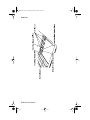
The transfer belt moves up and down with the switching shaft cam by
the electromagnetic clutch in drive 1. The belt position is used to
detect the cam position with the photo sensor, using the fan shaped
light blocking plate attached to the switching shaft. Printing with the
transfer belt lowered is called monochrome mode and color printing
is called color mode.
Expansion Paper Feeder
The optional expansion paper feeder can be installed at the lower
part of the main unit. Including the main unit, up to five layers of
cassettes can be used for cassette paper feeding.
1-16 Service Manual
Service.bk Page 17 Thursday, October 4, 2001 12:20 PM
5055-01x
Duplex Unit
A duplex unit can be optionally installed in the main unit, allowing
two-sided printing.
Selecting Paper feeding, Registration, Transfer, Separation,
Fusing, or Face-Down paper discharging with the pulse motor in
the duplex unit, feeding is stopped before the paper is delivered.
Paper delivery is then reversed and fed to the duplex unit.
Paper fed with the duplex unit stops once, and the center position is
corrected by the operation of the side guide plate. Paper is then refed by the printer controller signal to the main unit, and, following
printing on the back side, is delivered to the normal feeding path.
General Information 1-17
Service.bk Page 18 Thursday, October 4, 2001 12:20 PM
5055-01x
Printing Mode
Usually printing is performed in normal mode, OHP mode, thick
paper mode, and envelope/postcard mode. The mode is switched by
a command from the interface controller.
Mode
Paper/Media Weight
PPM (Color)
16 - 29 lb
28
Thick paper
32 lb (glossy)
22
Envelope/postcard
90 lb or more
10
OHP
Transparency
6
Normal
OHP Mode
OHP mode is used for improving color printing on transparencies.
With an overhead projector (OHP), light transmitted through OHP
paper (original document) projects an image on the lens. If the
smoothness of the surface of the toner image on the OHP paper is
too low, transmission is prevented due to the diffused reflection.
Images projected in color printing appear in monochrome.
When non-offset type color toner is used, the process speed in the
OHP mode is decreased, causing toner to melt sufficiently with the
fusing unit, while the fusing temperature is set higher than usual to
increase the smoothness on the surface of the toner image.
This mode restricts paper feeding to multi-paper feeding, not
cassette feeding.
Thick Paper Mode
Thick paper mode is used to improve print quality on thick paper.
(More than 105 g/m2 (90kg)).
1-18 Service Manual
Service.bk Page 19 Thursday, October 4, 2001 12:20 PM
5055-01x
Envelope / Postcard Mode
Envelope / postcard mode is used to improve printing quality on thick
paper of small width. In this mode, the fusing temperature is set
higher than usual and transfer voltage is switched according to the
temperature.
Operation Mode
Operation modes such as sleep mode and registration mode are
switched by command from the interface controller.
By carefully selecting print media and loading them properly, you
can avoid most paper jams. If jams do occur, follow the steps
outlined in this section.
To resolve the paper jam messages, you must clear the jammed
area and then press Go to clear the message and resume printing.
The printer prints a new copy of the page that jammed if Jam
Recovery is set to On or Auto; however, the Auto setting does not
guarantee the page will print.
General Information 1-19
Service.bk Page 20 Thursday, October 4, 2001 12:20 PM
5055-01x
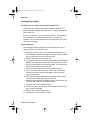
Clearing Paper Jams
200 Paper Jam <x> Pages Jammed (Check Areas A-F)
A 200 Paper Jam message indicates that paper is jammed. The
display alternates between 200 Paper Jam <x> Pages Jammed and
Check Areas A-F.
If there is a paper jam when you turn the printer on, the second line
of the 200 Paper Jam message will be blank. To resolve the
message, you must clear all paper from the paper path. Check and
clear areas A through F.
Check Areas A,B
This message indicates a paper jam in the transfer belt, fuser, or
output roller area. To clear areas A–B:
1. Open the top cover. Never touch the photodeveloper drum on
the underside of the toner cartridge. The paper may be covered
with un-fused toner, which can stain clothing.
2. Remove any paper on the transfer belt.
3. If the paper source was the multipurpose feeder, check the area
between the multipurpose feeder and the transfer belt. Do not
use any pointed objects to remove the paper. This could cause
permanent damage to the transfer belt.
4. Check the fuser area and top cover for additional jams.
5. If there is no jam in the fuser area or top cover, close the top
cover and front door, and then press Go. If a jam is present,
continue with step 4.
6. Lift the fuser pressure release lever and slowly pull the paper
out of the fuser toward the inside of the printer.
7. Rotate the fuser pressure release lever down.The top cover will
not close until the lever is in the down position.
8. Check the top cover for additional jams.
9. If there is no jam in the top cover, close the top cover and front
door, and then press Go.
10. Remove the jam from the top cover.
11. Close the top cover and the front door.
1-20 Service Manual
Service.bk Page 21 Thursday, October 4, 2001 12:20 PM
5055-01x
Check Area C
Jams that cause a Check Area C message require opening the
duplex jam access door. If you are printing on small paper, the
following steps may not clear the jam. See “Removing Small Size
Paper From the Duplex Unit” on page 1-22.
1. Open the duplex jam access door on the right side of the printer.
2. Remove the jam.
3. Press Go.
Note: If the paper jam message continues, check and clear all
paper from the paper path.
Check Area D
This message indicates a paper jam in the duplex unit area. To clear
area D:
1. Open the duplex jam access door on the right side of the printer.
2. Gently pull out the duplex unit.
3. Turn the paper forwarding dial counterclockwise. If the paper
advances out of the duplex unit, remove the jam and go to step
7. If the paper does not advance, go to step 4.
4. Open the duplex unit covers.
5. Remove the jam.
6. Close the duplex unit covers.
7. Push the duplex unit back into the printer.
8. Close the access door.
9. Press Go. If the paper jam message continues, check and clear
all paper from the paper path.
General Information 1-21
Service.bk Page 22 Thursday, October 4, 2001 12:20 PM
5055-01x
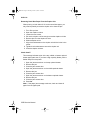
Removing Small Size Paper From the Duplex Unit
When printing on both sides of A5 or other small size paper, you
may need to partially remove the duplex unit to clear the jam.
1.
2.
3.
4.
5.
6.
7.
Turn off the printer.
Open the duplex unit door.
Loosen the two screws.
Pull out the duplex unit far enough to see the duplex unit inlet.
Remove jam from the duplex unit inlet.
Slide the duplex unit in.
Align the thumbscrews on the duplex unit with the holes in the
printer.
8. Tighten the thumbscrews to secure the duplex unit.
9. Close the duplex unit door.
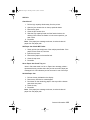
Check Area E
This message indicates a jam in the top, middle, or bottom optional
drawer paper path area. If you have a high capacity feeder, pull the
feeder away from the printer.
1. Open the jam access door on the top optional drawer.
2. Remove the jam.
3. Close the jam access door.
4. Open the jam access door on the middle optional drawer.
5. Remove the jam.
6. Close the jam access door.
7. Open the jam access door on the bottom optional drawer.
8. Remove the jam.
9. Close the jam access door.
10. Press Go.
Note: If the paper jam message continues, check and clear all
paper from the paper path.
1-22 Service Manual
Service.bk Page 23 Thursday, October 4, 2001 12:20 PM
5055-01x
Check Area F
1.
2.
3.
4.
5.
Pull the high capacity feeder away from the printer.
Open the jam access door on the top optional drawer.
Remove any jams.
Close the jam access door.
Slide the high capacity feeder until the feeder locks to the
docking frame. When the feeder is in the correct position, you
hear a click.
6. Press Go.
Note: If the paper jam message continues, check and clear all
paper from the paper path.
240 Paper Jam Check MP Feeder
1. Slowly pull the jam straight out of the multipurpose feeder. If the
paper will not come out, continue.
2. Open the top cover.
3. Remove the paper on the transfer belt.
4. Close the top cover.
5. Press Go.
24<x> Paper Jam Check Tray <x>
Jams in five areas result in a 24<x> Paper Jam message, where x
represents the tray number where the jam has occurred. Paper jam
messages 241–244 indicate a jam has occurred in one of the trays.
241-244 Paper Jam
1. Pull out the tray indicated on the display.
2. Remove any wrinkled or creased paper.
3. Push down on the remaining paper in the tray until the bottom
plate clicks into place.
4. Close the tray.
5. Press Go.
Note: If the paper jam message continues, check and clear all
paper from the paper path.
General Information 1-23
Service.bk Page 24 Thursday, October 4, 2001 12:20 PM
5055-01x
249 Paper Jam Check Tray <x>
A 249 Paper Jam Check Tray <x> message indicates a jam has
occurred in the high capacity feeder.
1.
2.
3.
4.
Open the top cover.
Remove the jam.
Close the top cover.
Press Go.
1-24 Service Manual
Service.bk Page 25 Thursday, October 4, 2001 12:20 PM
5055-01x
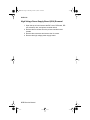
High Capacity Paper Feeder (HCPF)
Paper Feed and Separation Mechanism
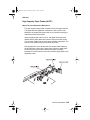
The high capacity paper feeder consists of a tray and paper transfer.
The paper feed and separation mechanism uses a friction roller
separation and paper feed system with a non-contact magnet type
maintenance-free torque limiter.
When the paper feed clutch turns on, the paper feed roller shaft
rotates and the paper feed roller is driven with the one-way clutch.
The call roller rotates with the relay gears to feed the top paper. The
reverse roller rotates along with the paper feed roller.
During paper feed, if two sheets feed, the reverse roller rotates by
the torque limiter, returning the lower sheet. When the paper feed
sensor (reflection type sensor) detects the paper, the pickup
solenoid turns off to raise the call roller, transferring the paper to the
registration roller.
General Information 1-25
Service.bk Page 26 Thursday, October 4, 2001 12:20 PM
5055-01x
Registration Operation
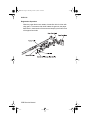
When the paper feed motor rotates, the transfer roller is driven with
relay gears. The reverse roller shaft rotates the gears on the paper
feed clutch in the direction of the arrow and stops by the friction force
of the paper feed roller.
1-26 Service Manual
Service.bk Page 27 Thursday, October 4, 2001 12:20 PM
5055-01x
Tray Up/Down Mechanism
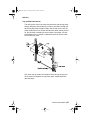
The driving force of the tray motor transmits to the tray driving pulley
through the gears. Moving the tray moves up and down through the
tray driving belt. After the paper loads, and the top cover is set, the
pickup solenoid turns on to lower the call roller. When the tray moves
up, the call roller is raised by the top surface of the paper, and the
shield plate on the up sensor is released from the up sensor which
turns off the tray motor.
Also, when the top surface of the paper lowers during printing and
the up sensor is shielded, the tray motor again rotates forward to
raise the paper.
General Information 1-27
Service.bk Page 28 Thursday, October 4, 2001 12:20 PM
5055-01x
When the down button is pressed, the tray motor reverses to move
the tray down. During the down motion of the tray, as the top surface
of paper passes the paper level sensor, the tray motor stops. The
tray moves down by about 500 sheets. The down sensor detects the
tray lower limit position.
1-28 Service Manual
Service.bk Page 29 Thursday, October 4, 2001 12:20 PM
5055-01x
Tray Up Condition
Tray up motion stops when the:
•
•
•
•
Up sensor is OFF (not shielded)
Power cord is connected and the joint SW is ON
Up sensor is ON (shielded) during printing
Top cover is closed, or when up sensor is ON
Tray Down Condition
Tray down motion stops when the:
• Paper level sensor is OFF
• Down button is pressed
• Paper end is detected
General Information 1-29
Service.bk Page 30 Thursday, October 4, 2001 12:20 PM
5055-01x
Size Detection Mechanism
The paper size can be switched between A4 and letter (11 inches)
by changing the side fence position.
The paper size sensor 2 detects the fixing screw 2 at the A4
position.
The paper size sensor 1 detects the fixing screw 1 at the letter
position. Tray up motion stops when the up sensor is OFF, not
shielded.
1-30 Service Manual
Service.bk Page 31 Thursday, October 4, 2001 12:20 PM
5055-01x
Residual Paper Detection Mechanism
The residual paper quantity in the tray is detected with four photo
interrupters. The quantity of pages remaining in the sheet feeder,
displays in the following increments:
•
•
•
•
Near end, about 80 sheets
About 300 sheets
About 1,000 sheets
About 2,000 sheets
General Information 1-31
Service.bk Page 32 Thursday, October 4, 2001 12:20 PM
5055-01x
Paper End Detection
A reflection type sensor is provided on the top stay to detect the
paper top surface and the paper end.
1-32 Service Manual
Service.bk Page 33 Thursday, October 4, 2001 12:20 PM
5055-01x
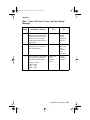
Maintenance Mode
DIP Switch Specifications
The DIP switches on the high capacity paper feed board have the
following functions:
• Function switching and initial setting of the standard machine or
optional machine.
Function Switch
Maintenance Switch
DIP
Switch
Description
4
3
2
1
OFF
1 Standard machine
initial setting
ON
X
OFF
X
ON
X
2 Optional machine
initial setting
X
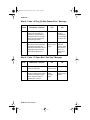
• Maintenance switch (test mode selection) is valid without
connecting to the printer controller board.
Function Switch
Maintenance Switch
DIP
Switch
4
3
2
1
OFF
Test OFF mode
ON
X
OFF
X
ON
OFF
X
X
X
OFF
Linear velocity 101
mm/s
Thick paper mode
X
Linear velocity 129
mm/s
Plain paper mode
X
Linear velocity 180
mm/s
ON
ON
Test paper feed
mode
(stand alone)
X
General Information 1-33
Service.bk Page 34 Thursday, October 4, 2001 12:20 PM
5055-01x
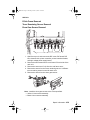
• Test paper feed operation.
1. Turn on the docking safety switch with a non-metallic object.
The interface cable with the printer controller board need not be
connected.
2. Close the top cover or manually activate the cover switch.
3. Load paper.
4. Wait until the paper tray stops and the pickup solenoid turns off
5. With the cover closed or with the cover switch activated, press
and hold the tray down button for more than 1/2 second. In
steps 1 and 2, paper feeding starts and is continuously fed until
the cover is opened. The test ends when the tray motor stops
and the paper ejects or the tray down button is released.
• Test Sequence
1. The tray motor moves the tray to the upper limit.
2. The pickup solenoid activates then de-activates.
3. When the tray down switch is pressed for longer than 1/2
second, the paper feed motor starts, the paper feed clutch
operates and feeding begins.
4. Feeding can be stopped by releasing the tray down button.
1-34 Service Manual
Service.bk Page 35 Thursday, October 4, 2001 12:20 PM
5055-01x
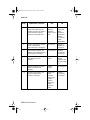
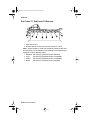
High Capacity Paper Feed Sensor / Switch Test
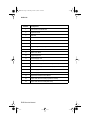
The condition of each sensor can be checked from the lighting of
LEDs on the high capacity paper feed board. When each sensor
operates with the power supplied, the associated LED lights.
To perform the test:
Interrupt the photointerrupter sensor signal or actuate the microswitch being tested while observing the associated LED on the high
capacity paper feed board.
LED
Sensor Name
1
Paper size sensor 1 switch (letter size 11 inches)
2
Paper size sensor 1 switch (A4 size)
3
Residual paper sensor 1 switch
4
Residual paper sensor 2 switch
5
Residual paper sensor 3 switch
6
Residual paper sensor 4 switch
7
Paper level sensor switch
8
Lower limit switch
9
Cover open sensor switch
10
Docking sensor switch
11
Upper limit switch
12
Paper sensor switch
13
Paper feed sensor switch
General Information 1-35
Service.bk Page 36 Thursday, October 4, 2001 12:20 PM
5055-01x
1-36 Service Manual
Service.bk Page 1 Thursday, October 4, 2001 12:20 PM
5055-01x
2. Diagnostic Information
The diagnostic information in this chapter leads you to the failing
part. Before you replace an entire assembly, determine if just the
defective part is available in the parts catalog. Use the error code
tables, symptom table, service checks and the diagnostic aids
chapter to determine the symptom and repair the failure. The
removal procedures in the Repair Information chapter may help you
identify parts. After you complete the repair, perform the appropriate
tests to verify the repair.
If an error is displayed, locate it in the “Service Error Message
Table” on page 2-4, the “Attendance Messages g” on page 2-25,
or the “Symptom Table” on page 2-52 and take the appropriate
action.
If an error message appears while you are working on the printer, go
to the error message table and take the indicated action.
Adjustments and Procedures Following Parts
Replacement
Note: When trouble shooting, or prior to making any adjustment to
print quality, always be sure:
• The printer is installed on a level rigid surface.
• The photodevelopers are never exchanged. Do not exchange a
•
black photodeveloper for a color photodeveloper, as they have
different surface phase counts.
The Alignment Page is used when adjusting print registration.
Whenever you replace any of the following parts be sure to perform
the required adjustments or procedures. The adjustments are in the
Repair Information and Diagnostic Aids chapters.
Diagnostic Information 2-1
Service.bk Page 2 Thursday, October 4, 2001 12:20 PM
5055-01x
Printer Controller Board/Printer Control EPROM (U5)
If you replace the printer controller board, remove EPROM (U5) and
install it on the new board. Also check the printhead alignment.
If you change the EPROM, the following items must be checked and
adjusted in the diagnostic mode.
•
•
•
•
LED Printhead Light Quantity
Printer Alignment (X, Y, and Theta)
Counters
Configuration ID
RIP Controller Board
If you replace the RIP controller board be sure to move the solid
state drive, memory, and option cards from the old card to the new
one.
Transfer Belt
If you replace the transfer belt, check the printer alignment (X, Y, and
Theta), adjusted in diagnostic mode.
LED Printhead Controller Board or LED Printhead
If you replace the LED printhead controller board or LED printhead,
the following items must be checked and adjusted in diagnostic
mode:
• LED printhead light quantity
• Printer alignment (X, Y, and Theta)
2-2 Service Manual
Service.bk Page 3 Thursday, October 4, 2001 12:20 PM
5055-01x
Start
Initial Check
Before you start troubleshooting, check the following:
Installation Environment
• The power supply line voltage is plus or minus 10% of the rated
line voltage.
• The machine is securely installed on a level surface in a well•
•
•
ventilated place.
The room temperature is between 10 and 32°C (50 and 90°F)
and the relative humidity between 20 and 80%.
Avoid sites generating ammonia gas, high temperature, high
humidity (near water faucets, kettles, humidifiers), cold spaces,
near open flames, and dusty areas.
Avoid sites exposed to direct sunlight.
Print Paper Checks
• Be sure to use the recommended paper for this printer.
• Check the paper for dampness. Make a trial print with paper
from a newly opened package, and check the result.
Diagnostic Information 2-3
Service.bk Page 4 Thursday, October 4, 2001 12:20 PM
5055-01x
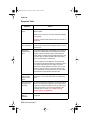
Printer Messages
The printer displays three types of messages: service messages,
status messages, and attendance messages. Service messages
indicate a problem that requires a service technician. Status
messages provide information about the current state of the printer,
requiring no action. Attendance messages alert the operator to
printer problems that require operator intervention.
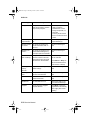
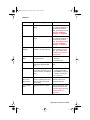
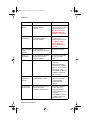
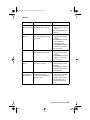
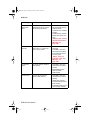
Service Error Message Table
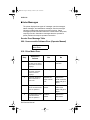
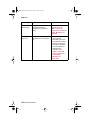
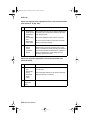
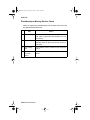
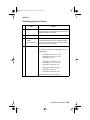
900 - Unrecoverable Software Error (Operator Manual)
910 Service
Motor Error
910 - Drive Motor Error
Step
Questions /
Actions
Yes
No
1
Are connectors CN1
and CN5 on the motor
drive board connected
properly?
Go to step 2.
Connect CN1
and CN5.
2
Is connector CN33 on
the printer controller
board connected
properly?
Go to step 3.
Connect CN33.
3
Is there an abnormal
load on the toner or
drum unit?
Replace the
toner or drum
unit.
Replace the
printer controller
board and go to
step 4.
4
Did replacement of the
printer controller board
solve the problem?
Problem
solved.
Replace the
motor drive
board and go to
step 5.
5
Did replacement of the
motor drive board
solve the problem?
Problem
solved.
Replace the
drive motor.
2-4 Service Manual
Service.bk Page 5 Thursday, October 4, 2001 12:20 PM
5055-01x
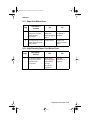
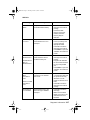
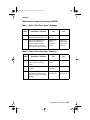
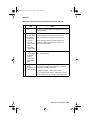
911 - Paper Exit Motor Error
Step
Questions /
Actions
Yes
No
1
Is connector CN4 on
the printer controller
board securely
connected?
Replace the
paper exit
motor and go to
step 2.
Plug the
connector in
securely.
2
Did replacement of the
paper exit motor solve
the problem?
Problem solved.
Replace the
printer controller
board.
912 - High Capacity Paper Feed Motor Error
Step
1
Questions /
Actions
Is connector CN40 on
the printer controller
board securely
connected?
Yes
No
Go to “High
Capacity Paper
Feed (HCPF)
Service
Check” on
page 2-57.
Plug the
connector in
securely.
Diagnostic Information 2-5
Service.bk Page 6 Thursday, October 4, 2001 12:20 PM
5055-01x
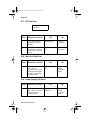
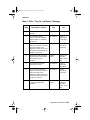
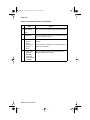
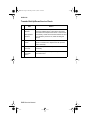
917 - RIP Fan Error
917 Service
Fan Error
Step
Questions / Actions
Yes
No
1
Is connector J5 on the
RIP board connected
properly?
Go to step 2.
Properly
connect J5.
2
Is 24 V dc present
between pins 1 and 3 of
connector J5 on the RIP
board?
Replace the RIP
fan.
Replace the
RIP board.
918 - Main Unit Fan Error
Step
Questions / Actions
1
Is +24 V present between
pins 1 and 3 on
connectors CN17 (upper
left fan) and CN5 (upper
right fan) on the printer
controller board?
Yes
Replace the failing
fan.
No
Replace the
printer
controller
board.
919 - Power Supply Fan Error
Step
Questions / Actions
1
Is +24 V present between
pins 1 and 3 of connector
CN6 on the printer
controller board?
2-6 Service Manual
Yes
Replace the power
supply fan.
No
Replace the
printer
controller
board.
Service.bk Page 7 Thursday, October 4, 2001 12:20 PM
5055-01x
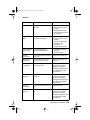
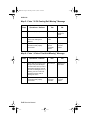
920 - Fuser Error - Fuser Heater Trouble
92x Service
Fuser Error
Step
Questions /
Actions
Yes
No
1
Replace the fuser.
Did this fix the
problem?
Problem solved.
Return the fuser,
replace the power
supply 2 and go to
step 2.
2
Did replacing
power supply 2 fix
the problem?
Problem solved.
Return power supply
2 and replace the
printer controller
board.
923 - Upper Fuser Thermistor Open Error
Step
Questions /
Actions
Yes
No
1
Is connector CN44
on the printer
controller board
connected
properly?
Disconnect CN44
and turn the printer
on.
Go to step 2.
Plug the connector in
securely.
2
Is error 923
displayed?
Power off and
reconnect CN44.
Go to step 3.
Replace the printer
controller board.
3
Power the printer
off and short pins
1 and 4 of CN44
and power on. Is
error 923
displayed?
Replace the fuser.
Replace the printer
controller board.
Diagnostic Information 2-7
Service.bk Page 8 Thursday, October 4, 2001 12:20 PM
5055-01x
924 - Lower Fuser Thermistor Open Error
Step
Questions /
Actions
Yes
No
1
Is connector CN44
on the printer
controller board
connected
properly?
Disconnect CN44
and turn the printer
on.
Go to step 2.
Plug the connector in
securely.
2
Is error 924
displayed?
Turn the printer off
and reconnect
CN44.
Go to step 3.
Replace the printer
controller board.
3
Power the printer
off and short pins
8 and 11 of CN44
and turn the
printer on.
Is error 924
displayed?
Replace the fuser.
Replace the printer
controller board.
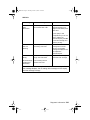
925 - High Pressure Controller Error
Step
Questions /
Actions
Yes
No
1
Is connector CN42
on the printer
controller board
connected
properly?
Replace the printer
controller board.
Go to step 2.
Plug the connector in
securely.
2
Did replacing the
printer controller
board fix the
problem?
Problem solved.
Replace the high
voltage power board
(HVU).
2-8 Service Manual
Service.bk Page 9 Thursday, October 4, 2001 12:20 PM
5055-01x
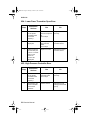
926(K), 927(C), 928(Y), 929(M) - Toner Sensor Error
92x Service
Toner Sensor
Step
Questions /
Actions
Yes
No
1
Is the toner cartridge
the correct type for
the printer?
Go to step 2.
Recommend the
customer replace
the cartridge with
the correct type.
2
Is the toner cartridge
encoder wheel dirty?
Clean the encoder
wheel and toner
sensor.
Go to step 3.
3
Replace the toner
cartridge for the
color with the error.
Did this fix the
problem?
Problem solved.
Go to step 4.
4
Test the sensors.
While actuating the
sensor, does the
voltage fluctuate
between
0 V and +5 V
between pins 1 and
2 on connectors
CN22(K), CN21(Y),
CN18(M), and
CN19(C) on the
printer controller
board?
Replace the printer
controller board.
Replace the
affected toner
sensor.
Diagnostic Information 2-9
Service.bk Page 10 Thursday, October 4, 2001 12:20 PM
5055-01x
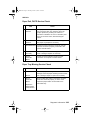
930 - Yellow Printhead Error
930 Service
Printhead Error
Step
1
Questions /
Actions
Is fuse 5 on the
printhead control
board open?
Yes
Replace the
printhead control
board, cables, and
LED printhead.
No
Replace the
printhead
controller board.
931 - Magenta Printhead Error
Step
1
Questions /
Actions
Is fuse 6 on the
printhead control
board open?
Yes
Replace the
printhead control
board, cables, and
LED printhead.
No
Replace the
printhead controller
board.
932 - Cyan Printhead Error
Step
1
Questions /
Actions
Is fuse 3 on the
printhead control
board open?
2-10 Service Manual
Yes
Replace the
printhead control
board, cables, and
LED printhead.
No
Replace the
printhead controller
board.
Service.bk Page 11 Thursday, October 4, 2001 12:20 PM
5055-01x
933 - Black Printhead Error
Step
1
Questions /
Actions
Is fuse 4 on the
printhead control
board open?
Yes
Replace the
printhead control
board, cables, and
LED printhead.
No
Replace the
printhead
controller board.
934 - Color Drum Sensor Error
934 Service
Drum Sensor
Step
Questions /
Actions
Yes
No
1
Is connector CN28
connected properly?
Go to step 2.
Plug the connector
in securely.
2
Clean the color drum
sensor LED. Did this
fix the problem?
Problem solved.
Replace the color
drum sensor.
Go to step 3.
3
Did replacing the
color drum sensor fix
the problem?
Problem solved.
Replace the
printer controller
board.
Diagnostic Information 2-11
Service.bk Page 12 Thursday, October 4, 2001 12:20 PM
5055-01x
935 - Black Drum Sensor Error
Step
Questions /
Actions
Yes
No
1
Is connector CN27
connected properly?
Go to step 2.
Plug the connector
in securely.
2
Clean the black
drum sensor LED.
Did this fix the
problem?
Problem solved.
Replace the black
drum sensor.
Go to step 3.
3
Did replacing the
black drum sensor
fix the problem?
Problem solved.
Replace the printer
controller board.
936 - 939 Cassette Error
936 Service
Paper Option
Step
1
Questions /
Actions
Are connectors
CN35 and CN36
on the printer
controller board
connected
properly?
2-12 Service Manual
Yes
No
Replace the printer
controller board.
Plug the connector in
securely.
Service.bk Page 13 Thursday, October 4, 2001 12:20 PM
5055-01x
940 - High Capacity Paper Feed Sensor Error
Step
1
Questions /
Actions
Is connector CN40
on the printer
controller board
connected properly?
Yes
No
Go to “High
Capacity Paper
Feed (HCPF)
Service Check” on
page 2-57.
Plug the connector
in securely.
941 - High Capacity Paper Feed Tray Error
Step
1
Questions /
Actions
Is connector CN40
on the printer
controller board
connected properly?
Yes
Go to “High
Capacity Paper
Feed (HCPF)
Service Check”
on page 2-57.
No
Plug the connector
in securely.
942 - Duplex Error
942 Service
Duplex
Step
1
Questions /
Actions
Is connector CN37
on the printer
controller board
connected properly?
Yes
No
Replace the printer
controller board.
Plug the connector
in securely.
Diagnostic Information 2-13
Service.bk Page 14 Thursday, October 4, 2001 12:20 PM
5055-01x
945 - Engine Flash Error
945 Service
Engine Flash
Reflash the engine code.
946 - Printer / Printhead Controller Board
Communication Error
946 Service
Communication
Step
1
Questions /
Actions
Replace the
printhead controller
board. Did this fix the
problem?
2-14 Service Manual
Yes
Problem solved.
No
Replace the
printer controller
board.
Service.bk Page 15 Thursday, October 4, 2001 12:20 PM
5055-01x
948 - Machine ID Error
948 Service
Machine ID
Step
Questions /
Actions
Yes
No
1
Turn the printer off
and wait 30 seconds.
Turn the printer on.
Did this fix the
problem?
Problem solved.
Verify proper
installation of the
EPROMs on both
the printer
controller board
and the printhead
controller board.
Go to step 2.
2
Are the EPROMs
installed correctly?
Replace the printer
controller board.
Go to step 3.
Install the
EPROMs
correctly.
3
Did replacing the
printer controller
board fix the
problem?
Problem solved.
Replace the
printhead
controller board.
952 - NVRAM Chip Failure
952 Service
NVRAM Failure
Replace the printer controller board.
954 - NVRAM CRC Failure
Replace the RIP board.
955 - Code CRC
955 Service
Code CRC <loc>
Replace the RIP board.
Diagnostic Information 2-15
Service.bk Page 16 Thursday, October 4, 2001 12:20 PM
5055-01x
956 - Processor Failure
956 Service
System Board
Replace the RIP board.
957 - ASIC Failure
Replace the RIP board.
958 - NAND Failure
958 Service
NAND Failure
Replace the RIP board.
960 - RAM Slot 1 Bad
960 Service
RAM Memory Error
Replace RAM Card or the RIP board.
961 - RAM Slot 2 Bad
Replace RAM Card or the RIP board.
962 - RAM Slot 3 Bad
Replace RAM Card or the RIP board.
964 - Emulation Error
964 Service
Emulation Error
Replace the DLE board. If this does not fix the problem, replace the
RIP board.
2-16 Service Manual
Service.bk Page 17 Thursday, October 4, 2001 12:20 PM
5055-01x
970 - Standard Network Error
970 Service
Standard Network
970 Service
Network Card X
975 - Unrecognizable Network Port
Software error.
976 - Unrecoverable Software Error in Network Port
Software error. To to the “Options Service Check” on page 2-77
and refer to the network card option section.
978 - Bad Checksum While Programming Network Card
Software error.
979 - Flash Parts Failed While Programming Network
Port
Reflash network port.
Diagnostic Information 2-17
Service.bk Page 18 Thursday, October 4, 2001 12:20 PM
5055-01x
980 - Face-Up/Down Switching Error
980 Service
Switch Error
Check Area
B
Step
Questions /
Actions
Yes
No
1
Is the linkage
between the
FU/FD deflector
and the FU
deflector solenoid
operating
properly?
Go to step 2.
Replace the face-up
exit assembly.
2
Is there continuity
on the FU
deflector solenoid
between pins 1
and 2 of CN14 on
the printer
controller board?
Go to step 3.
Replace the FU
deflector solenoid.
3
Test the sensor.
While actuating
the sensor, does
the voltage
fluctuate between
0V and +5 V
between pins 1
and 2 on
connector CN12
on the printer
controller board?
Replace the printer
controller board.
Replace the FU/FD
deflector sensor.
2-18 Service Manual
Service.bk Page 19 Thursday, October 4, 2001 12:20 PM
5055-01x
981 - Belt Up/Down Sensor Error
981 Service
Switch Error
Step
Questions /
Actions
Yes
No
1
Are connectors
CN409 and
CN407 on the
sensor board
connected
properly?
Go to step 2.
Plug the connectors
in securely.
2
Are connectors
CN26 and CN29
on the printer
controller board
connected
properly?
Go to step 3.
Plug the connector in
securely.
3
Verify the belt up/
down sensor
actuator is
properly blocking
the sensor by
manually
operating the belt
up/down shaft.
Is it properly
blocking the
sensor?
Go to step 4.
Replace the sensor
or actuator as
necessary.
4
Clean the belt up/
down sensor.
Does this fix the
problem?
Problem solved.
Go to step 5.
Diagnostic Information 2-19
Service.bk Page 20 Thursday, October 4, 2001 12:20 PM
5055-01x
Step
Questions /
Actions
Yes
No
5
Test the sensor.
While actuating
the sensor, does
the voltage
fluctuate between
0V and +5 V
between pins 8
and 10 of
connector CN29
on the printer
controller board?
Replace the belt up/
down clutch.
Go to step 6.
Replace the belt up/
down sensor.
6
Did replacing the
belt up/down
clutch fix the
problem?
Problem solved.
Replace the printer
controller board.
982 - Sensor Controller Error
982 Service
Sensor Control
Step
1
Questions /
Actions
Turn the printer off
and wait 30 seconds.
Turn the printer on.
Is error 982
displayed?
2-20 Service Manual
Yes
Replace the
printer controller
board.
No
Problem solved.
Service.bk Page 21 Thursday, October 4, 2001 12:20 PM
5055-01x
983 - Black Gear Sensor Error
983 Service
Gear Sensor
Step
Questions /
Actions
Yes
No
1
Is connector CN20
on the printer
controller board
connected properly?
Go to step 2.
Plug the connector
in securely.
2
Clean the gear
sensor. Does this fix
the problem?
Problem solved.
Replace the K
drive unit gear
sensor. If the
problem remains,
replace the printer
controller board.
984 - Yellow Gear Sensor Error
Step
Questions /
Actions
Yes
No
1
Is connector CN20
on the printer
controller board
connected properly?
Go to step 2.
Plug the connector
in securely.
2
Clean the gear
sensor. Does this fix
the problem?
Problem solved.
Replace the Y
drive unit gear
sensor. If the
problem remains,
replace the printer
controller board.
Diagnostic Information 2-21
Service.bk Page 22 Thursday, October 4, 2001 12:20 PM
5055-01x
985 - Transfer Belt Thermistor Error
985 Service
Thermistor Error
Step
Questions /
Actions
Yes
No
1
Are connectors
CN407 and CN408
on the sensor board
connected properly?
Go to step 2.
Plug the connector
in securely.
2
Is connector CN29
on the printer
controller board
connected properly?
Replace the transfer
belt unit. If the
problem remains,
replace the printer
controller board.
Plug the connector
in securely.
986 - Transparency (OHP) Sensor Error
986 Service
OHP Sensor
Step
1
Questions /
Actions
Are connectors
CN15 (light emitting)
and CN7 (light
receiving) on the
printer controller
board connected
properly?
2-22 Service Manual
Yes
Go to step 2.
No
Plug the connector
in securely.
Service.bk Page 23 Thursday, October 4, 2001 12:20 PM
5055-01x
Step
2
Questions /
Actions
Test the sensor.
While actuating the
sensor, does the
voltage fluctuate
between 0V and +5
between pins 2 and
3 of connector CN7
of the printer
controller board?
Yes
No
Replace the printer
controller board.
Replace the upper
and lower
transparency
sensor.
992 - Temperature/Humidity Sensor Error
Step
Questions /
Actions
Yes
No
1
Is connector CN3 on
the printer controller
board connected
properly?
Go to step 2.
Plug the connector
in securely.
2
Replace the
temperature and
humidity sensor. Did
this fix the problem?
Problem solved.
Replace the
printer controller
board.
993 CPU Error
Replace the printer controller board.
Diagnostic Information 2-23
Service.bk Page 24 Thursday, October 4, 2001 12:20 PM
5055-01x
994 - Density Sensor Error
Step
Questions /
Actions
Yes
No
1
Are connectors
CN406 and
CN407 on the
sensor board
connected
properly?
Go to step 2.
Plug the connector in
securely.
2
Is connector CN29
on the printer
controller board
connected
properly?
Replace the density
sensor.
Go to step 3.
Plug the connector in
securely.
3
Did replacing the
density sensor fix
the problem?
Problem solved.
Replace the printer
controller board.
2-24 Service Manual
Service.bk Page 25 Thursday, October 4, 2001 12:20 PM
5055-01x
Attendance Messages g
Message
Meaning
Action
Activating Menu
Changes
The printer is activating
changes made to the printer
settings.
Wait for the message to
clear.
Bin <x> Full
The specified bin is full.
Remove the paper from
the bin.
Busy
The printer is busy receiving,
processing or printing data.
Wait for the message to
clear or press Menu to
open the Job Menu and
cancel the current job.
Canceling Fax
The printer is processing a
request to cancel a fax job.
Wait for the message to
clear.
Canceling Job
The printer is processing a
request to cancel the current
print job.
Wait for the message to
clear.
Change <x>
The printer is requesting a
different type of paper.
Change paper.
Check <device>
connection
• The specified device is not
fully connected.
• Hardware failure.
• Reestablish
communication by
reattaching the device.
• Press Go to clear the
message.
• If a hardware failure,
turn the printer off and
back on. If the error
recurs, turn the printer
off, remove the specified
device and call for
service. If the error
cannot be reset,
go to “Map 10 Unrecoverable “Check
Tray (X) or Duplex
Connection”
Message” on
page 2-49.
Clearing Job
Accounting Stat
The printer is deleting all job
statistics stored on the hard
disk.
Wait for the message to
clear.
Diagnostic Information 2-25
Service.bk Page 26 Thursday, October 4, 2001 12:20 PM
5055-01x
Message
Meaning
Action
Close Side
Door
The printer side door is open.
Close the printer side door.
If the error cannot be reset,
go to “Map 1 - False “Side
Door Open” Message”
on page 2-43.
Close Top Door
The printer top door is open.
Close the printer top door
and front door. If the error
cannot be reset go to
“Map 2 - False “Close
Top Door” Message” on
page 2-43.
Close Tray <x>
Top Cover
The high capacity feeder door
is open.
Close the HCPF door and
the top cover. If the error
cannot be reset, go to
“Map 3 - False “Close
Tray (X) Top Cover”
Message” on page 2-44.
Copying
The printer is processing a
copy job originating from the
OptraImageTM scanner.
Wait for the message to
clear.
Defragmenting
The printer is defragmenting
the flash memory to reclaim
storage space occupied by
deleted resources.
Wait for the message to
clear.
Delete All Jobs
The printer is requesting
confirmation to delete all held
jobs.
• Press Go to continue.
The printer deletes all
held jobs.
• Press Stop to cancel the
operation.
Deleting Jobs
The printer is deleting one or
more held jobs.
Wait for the message to
clear.
Disabling
Menus
The printer is responding to a
request to disable the menus.
Wait for the message to
clear.
Warning: Do not turn the
printer off while this
message is displayed.
Note: While the menus are
disabled, you cannot
change the printer settings
from the operator panel.
2-26 Service Manual
Service.bk Page 27 Thursday, October 4, 2001 12:20 PM
5055-01x
Message
Meaning
Action
Disk Corrupted
Reformat?
The printer has attempted a
disk recovery process and
cannot repair the disk.
• Press Go to reformat the
disk and delete all files
currently stored on the
disk.
• Press Stop to clear the
message without
reformatting the disk.
Disk Recovery
x/5 yyy%
The printer is attempting to
recover the hard disk.
Wait for the message to
clear.
Warning: Do not turn the
printer off while this
message is displayed.
Enabling Menus The printer is responding to a
request to make the menus
available to all users.
Wait for the message to
clear and press Menu to
view the menus available.
Engine
Warming
The printer is warming the
fuser assembly.
Wait for the message to
clear.
Enter PIN:
=______
The printer is waiting for you
to enter your four-digit PIN
number.
Use the operator panel
buttons to enter the PIN.
Fax <x>
The printer is processing an
incoming fax.
Wait for the message to
clear.
Flushing Buffer
The printer is flushing
corrupted print data and
discarding the current print
job.
Wait for the message to
clear.
Formatting Disk
yyy%
The printer is formatting the
hard disk. The second line
shows percentage complete.
Wait for the message to
clear.
Formatting
Flash
The printer is formatting flash
memory.
Wait for the message to
clear.
Fuser
Maintenance
The counter that tracks wear
on the fuser has reached its
limit.
• Press Go to continue
printing.
• If print quality is
unacceptable, replace
the fuser.
Diagnostic Information 2-27
Service.bk Page 28 Thursday, October 4, 2001 12:20 PM
5055-01x
Message
Meaning
Action
Held Jobs May
be Lost
The printer memory is too full.
• Press Go to clear the
message. The printer
frees memory by
deleting the oldest job
and continues deleting
jobs until there is
enough memory.
• Press Stop to clear the
message without
deleting jobs.
• Press Menu to open the
Job Menu and cancel
the current job.
Infrared <x>
An infrared interface is the
active communication link.
Wait for the message to
clear.
Insert Tray <x>
The specified tray is either
missing or not fully inserted.
Insert the specified tray. If
the error cannot be reset,
go to “Paper Tray Missing
Service Check” on
page 2-63.
Install <device>
or Cancel Job
The printer is requesting a
specified device be installed
so it can print.
• Turn the printer off,
install the specified
device and restart the
printer
• Press Menu to open the
Job Menu and cancel
the current job.
Invalid Engine
Code
The printer engine code has
not been programmed or is
not valid.
Call for service.
Invalid Network
<x> Code
The code in an internal print
server is not valid. The printer
cannot receive and process
jobs until valid code is
programmed into the internal
print server.
Download valid code to the
printer internal print server.
2-28 Service Manual
Service.bk Page 29 Thursday, October 4, 2001 12:20 PM
5055-01x
Message
Load <x>
Meaning
Action
The printer is trying to feed
paper from a source it detects
is empty.
Load paper of the size and
type requested in the
second line of the display
in the specified tray. Press
Menu to open the Job
Menu and cancel the
current job.
• If Load (Tray) cannot be
reset, go to “Map 4 False “Tray (X) Low/
Empty” Message” on
page 2-45.
• If Load (MPF), check the
MPF paper present
sensor.
Load Manual
A request for a manual feed
job has been sent to the
printer. The printer is ready for
insertion of a single sheet into
the manual feed slot.
• Load a sheet of paper
specified in the second
line of the display in the
manual feed tray or
multipurpose feeder.
• Press Select or Go to
ignore the manual feed
request and print on
paper already in the
printer.
• Press Menu to open the
Job Menu and cancel
the current job.
LocalTalk <X>
A LocalTalk interface is the
active communication link.
Wait for the message to
clear.
Menus Disabled The printer menus are
disabled.
You can still open the Job
Menu to cancel a job that is
printing or to select a
confidential job or a held
job that you want to print.
Network Card
Busy
An internal print server is
being reset.
Wait for the message to
clear.
Network <x>
A network interface is the
active communication link.
Wait for the message to
clear.
Diagnostic Information 2-29
Service.bk Page 30 Thursday, October 4, 2001 12:20 PM
5055-01x
Message
Meaning
Action
Network
<x>, <y>
An network interface is the
active communication link,
where <x> represents the
active link and <y> represents
the channel.
Wait for the message to
clear.
No Jobs Found,
Retry?
The PIN number entered is
not associated with any
confidential job.
• Press Go to enter
another PIN.
• Press Stop to clear the
PIN entry prompt.
Not Ready
The printer is not ready to
receive or process data.
Press Go to make the
printer ready.
Parallel <x>
A parallel interface is the
active communication link.
Wait for the message to
clear.
Performing Self
Test
The printer is running the
series of start-up tests it
performs after it is turned on.
Wait for the message to
clear.
Power Saver
The printer is ready to receive
data. It is reducing electricity
consumption while idle.
• Send a job to the printer.
• Press Go to quickly
warm the printer to
normal operating
temperature and display
the Ready message.
Print Jobs on
Disk
Jobs spooled to the hard disk
before the printer was last
turned off have not yet
printed.
Press Go to print the jobs.
Press Return or Stop to
delete jobs.
Printer
Calibrating
The printer is adjusting the
color tables to correct
variations caused by
environmental conditions.
Wait for the message to
clear.
Printing
Alignment Page
The printer is processing or
printing a test page that
shows alignment values.
Wait for the message to
clear.
Printing
Directory List
The printer is processing or
printing a directory of all files
stored in flash memory or on
a hard disk.
Wait for the message to
clear.
2-30 Service Manual
Service.bk Page 31 Thursday, October 4, 2001 12:20 PM
5055-01x
Message
Meaning
Action
Printing Font
List
The printer is processing or
printing a list of all available
fonts for the specified printer
language.
Wait for the message to
clear.
Printing Job
Accounting Stat
The printer is processing or
printing all job accounting
statistics stored on the hard
disk.
Wait for the message to
clear.
Printing Menu
Settings
The printer is processing or
printing the menu settings
page.
Wait for the message to
clear.
Prog Engine
Code
The printer is programming
new code into flash memory.
Wait for the message to
clear.
Prog System
Code
The printer is programming
new system code.
Wait for the message to
clear.
Program Flash
The printer is storing
resources, such as fonts or
macros, in flash memory.
Wait for the message to
clear.
Programming
Disk
The printer is storing
resources, such as fonts or
macros, on hard disk.
Wait for the message to
clear.
Programming
Error <x>
An error occurred while the
printer was programming
code into memory.
Correct the problem
specified on the second
line of the display.
Queuing and
Deleting Jobs
The printer is deleting one or
more held jobs and sending
one or more jobs to print.
Wait for the message to
clear.
Queuing Jobs
The printer is sending one or
more held jobs to print.
Wait for the message to
clear.
Ready
The printer is ready to receive
and process print jobs
Send a job to print.
Diagnostic Information 2-31
Service.bk Page 32 Thursday, October 4, 2001 12:20 PM
5055-01x
Message
Meaning
Action
Ready Hex
The printer is in Hex Trace
mode and is ready to receive
and process print jobs
• Send a job to print. All
data is printed in
hexadecimal. Control
strings are printed, not
executed.
• Turn the printer off and
then on to exit Hex Trace
mode.
Remove Paper
<specified bin>
The specified output bin is
full.
Remove the paper from
the specified bin(s).
Resetting Maint
Cnt Value
The printer is resetting the
counter that tracks wear on
the fuser.
Wait for the message to
clear.
Resetting the
Printer
The printer is resetting to the Wait for the message to
clear.
current default settings. Any
active print jobs are canceled.
Restore Held
Jobs. Go/Stop?
The printer has been reset or
has been turned on and the
printer detects print and hold
jobs stored on the hard disk.
Press Go. All jobs on hard
disk are restored.
Restoring
Factory
Defaults
The printer is restoring factory
default settings.
Wait for the message to
clear.
Restoring Held
Jobs
The printer is restoring held
jobs from the hard disk.
Wait for the message to
clear.
Serial <x>
A serial interface is the active
communication link.
Wait for the message to
clear.
Std Bin Full
The standard bin is full.
Remove the paper in the
bin to clear the message.
Supplies
One of the printer supplies
requires attention.
Press Menu to open the
Supplies Menu and identify
which supply item needs
replacing.
2-32 Service Manual
Press Return or Stop. No
jobs are restored and the
printer returns to Ready.
Service.bk Page 33 Thursday, October 4, 2001 12:20 PM
5055-01x
Message
Meaning
Action
Tray <x> Empty
The specified tray is out of
paper.
Load paper in the tray and
try to clear the message. If
the message cannot be
reset, go to “Map 4 - False
“Tray (X) Low/Empty”
Message” on page 2-45.
Tray <x> Low
The specified tray is low of
paper.
Add paper in the tray and
try to clear the message. If
the message cannot be
reset, go to “Map 4 - False
“Tray (X) Low/Empty”
Message” on page 2-45.
Tray <x>
Missing
The specified tray is either
missing or not fully inserted.
Insert the tray completely.
If the message cannot be
reset, go to “Paper Tray
Missing Service Check”
on page 2-63.
Unsupported
Disk
The printer detects an
unsupported disk.
• Press Go to clear the
message.
• Format the disk.
USB <x>
The printer is processing data
through the specified USB
port.
Wait for the message to
clear.
Waiting
The printer is waiting for an
End of Job command, a Form
Feed Command, or additional
data.
• Press Go to print the
contents of the buffer.
• Press Menu to open the
Job Menu and cancel
the current job.
1565 Emul
Error Load
Emul Option
The download emulator
version on the firmware card
does not match the printer
code version.
Download the correct
emulator version from
Lexmark’s Web site.
2 <xx> Paper
Jam
The printer detects a paper
jam.
Clear the paper path. If the
message cannot be reset,
go to the “Paper Carrying
Service Check” on
page 2-58.
Diagnostic Information 2-33
Service.bk Page 34 Thursday, October 4, 2001 12:20 PM
5055-01x
Message
Meaning
Action
30 Coating Roll
Missing
The oil coating roll is either
missing or installed
incorrectly.
Correctly install the oil
coating roll. If the message
cannot be reset, go to
“Map 5 - False “30 Oil
Coating Roll Missing”
Message” on page 2-46.
30 <color> Print
Unit Missing
One or more of the color print
units is either missing or
incorrectly installed.
Correctly install the color
print unit(s). If the
message cannot be reset,
go to “Map 6 - False
“<Color> Print Unit
Missing” Message” on
page 2-46.
32 Unsupported
<color>
Cartridge
The printer detects an
unsupported toner cartridge.
Replace the cartridge.
33 Tray <x>
Config Error
The optional heavy media tray
is inserted into any tray
location except tray 1.
Remove the heavy media
tray from the invalid
location.
34 Short Paper
The paper is too short.
• Press Go to clear the
message.
• Make sure the paper
size setting in the Paper
Menu is correct for the
size you are using.
• Press Menu to open the
Job Menu and cancel
the current job.
35 Res Save
Off Deficient
Memory
The printer lacks the memory
to enable Resource Save.
• Press Go to disable
Resource Save and
continue printing.
• Install additional
memory.
37 Insufficient
Collation Area
The printer memory does not
have the free space
necessary to collate the job.
• Press Go to print the
portion of the job
already stored and
begin collating the rest
of the job.
• Press Menu to open the
Job Menu and cancel
the current job.
2-34 Service Manual
Service.bk Page 35 Thursday, October 4, 2001 12:20 PM
5055-01x
Message
Meaning
Action
37 Insufficient
Defrag Memory
The printer cannot
defragment flash memory.
• Delete fonts, macros,
and other data in printer
memory.
• Install additional printer
memory.
37 Insufficient
Memory
The printer memory is full and
cannot continue processing
current jobs.
• Press Go to clear the
message and continue
printing.
• Press Stop to clear the
message without
deleting print jobs.
• Press Menu to open the
Job Menu and cancel
the current job.
38 Memory Full
The printer is processing
data, but the memory is full.
• Press Go to clear the
message and continue
printing.
• Press Menu to open the
Job Menu and cancel
the current job.
39 Complex
Page
The print information on the
page is too complex.
• Press Go to clear the
message and continue
printing.
• Press Menu to open the
Job Menu and Cancel
the current job.
4 <x>
Unsupported
Firmware Card
The printer detects an
unsupported version of
firmware on the installed
firmware card.
• Turn the printer off and
then press and hold Go
while turning it on,
bypassing the code on
the firmware card.
• Remove the firmware
card.
Diagnostic Information 2-35
Service.bk Page 36 Thursday, October 4, 2001 12:20 PM
5055-01x
Message
Meaning
Action
40 Tray <x>
Size Sense
Error
The high capacity sheet
feeder detects an error in the
size sensing mechanism.
• Turn off the printer and
be sure that all the high
capacity feeder
connectors are installed
properly.
• Check the high capacity
feeder size sensor and
go to
“Map 8 - False “40 Tray
(X) Size Sensor Error”
Message” on
page 2-48.
41 Open Bin 1
Exit Tray
The printer wants to send
paper to the in 1 output tray,
but the tray is closed.
• Open bin 1 to clear the
message.
• Press Go to clear the
message and continue.
If the message cannot
be reset, go to
“Map 9 - False “41
Open Bin 1 Exit Tray”
Message” on
page 2-48.
51 Defective
Flash
The printer detects defective
flash memory.
• Press Go to clear the
message and continue
printing.
• Install different flash
memory before
downloading.
52 Flash Full
There is not enough free
space in flash memory.
• Press Go to clear the
message and continue
printing.
• Delete fonts, macros,
and other data stored on
flash memory.
• Install flash memory with
more storage capacity.
2-36 Service Manual
Service.bk Page 37 Thursday, October 4, 2001 12:20 PM
5055-01x
Message
Meaning
Action
53 Unformatted
Flash
The printer detects
unformatted flash memory.
• Press Go to clear the
message and continue
printing.
• Format the flash
memory. If the error
remains, the flash
memory may be
defective.
54 Serial Option
<x> Error
The printer has detected a
serial interface error on a
serial port.
• Make sure the serial link
is set up correctly and
you are using the
appropriate cable.
• Press Go to clear the
message and continue.
• Press Menu to open the
Job Menu and reset the
printer.
54 Network <x>
Software Error
The printer cannot establish
communications with an
installed network port.
• Press Go to clear the
message and continue
printing.
• Program new firmware
for the network interface
by way of the parallel
port.
• Press Menu to open the
Job Menu and reset the
printer.
The printer has lost the
connection to an external
print server.
• Make sure the cable
connecting the ENA and
the printer is securely
attached. Turn the
printer off and then on to
reset.
• Press Go to clear the
message and continue
printing.
Data has been sent to the
printer through a disabled
serial port.
• Press Go to clear the
message.
• Make sure the Serial
Buffer menu item in the
Serial Menu is set to
Disabled.
54 Standard or
Std <x>
Software Error
54 Std Par
ENA
Connection
Lost
54 Par <x> ENA
Connection
Lost
56 Serial Port
<x> Disabled
Diagnostic Information 2-37
Service.bk Page 38 Thursday, October 4, 2001 12:20 PM
5055-01x
Message
56 Parallel Port
<x> Disabled
Meaning
Data has been sent to the
printer through a disabled
parallel port.
• Press Go to clear the
message.
• Make sure the Parallel
Buffer menu item in the
Parallel Menu is set to
Disabled.
Data has been sent to the
printer through a disabled
USB port.
• Press Go to clear the
message.
• Make sure the USB
Buffer menu item in the
USB Menu is set to
Disabled.
Too many output bins are
installed.
Turn off and unplug the
printer. Remove or
reconfigure the output
bins. Plug the printer in
and turn it on.
56 Std Parallel
Port Disabled
56 USB Port
<x> Disabled
56 Std USB
Port Disabled
58 Too Many
Bins Attached
Action
Unsupported output bins are
installed.
58 Too Many
Disks Installed
Too many disks are installed.
Turn off and unplug the
printer. Remove the excess
hard disks. Plug the printer
in and turn it on.
58 Too Many
Flash Options
Too many flash options are
installed.
Turn off and unplug the
printer. Remove the excess
flash options. Plug the
printer in and turn it on.
58 Too Many
Trays Attached
Too many trays are installed.
Turn off and unplug the
printer. Remove the excess
trays. Plug the printer in
and turn it on.
61 Defective
Disk
The printer detects a
defective hard disk.
• Press Go to clear the
message and continue
printing.
• Install a different hard
disk before you perform
any operations that
require one.
2-38 Service Manual
Service.bk Page 39 Thursday, October 4, 2001 12:20 PM
5055-01x
Message
Meaning
Action
62 Disk Full
Insufficient memory on the
hard disk.
• Press Go to clear the
message and continue
printing.
• Delete fonts, macros,
and other data stored on
the hard disk.
63 Unformatted
Disk
The printer detects an
unformatted hard disk.
• Press Go to clear the
message and continue
printing.
• Format the disk before
performing disk
operations.
• Replace the hard disk.
64 Unsupported
Disk Format
The printer detects an
unsupported disk format.
• Press Go to clear the
message.
• Format the disk.
80 Belt
Exhausted
The transfer belt has reached
end of life.
Replace the transfer belt.
80 Belt/Fuser
Exhausted
The transfer belt and fuser
have reached end of life.
Replace the transfer belt
and fuser.
80 Belt/Fuser
Life Warning
The transfer belt and fuser are
nearing end of life.
Press Go to clear the
message and continue
printing. The supplies
message is displayed until
you replace the transfer
belt and fuser.
80 Belt Life
Warning
The transfer belt is nearing
end of life.
Press Go to clear the
message and continue
printing. The supplies
message is displayed until
you replace the transfer
belt and fuser.
80 Fuser
Exhausted
The fuser has reached end of
life.
Replace the fuser.
80 Fuser Life
Warning
The fuser is nearing end of
life.
Press Go to clear the
message and continue
printing. The supplies
message is displayed until
you replace the transfer
belt and fuser.
Diagnostic Information 2-39
Service.bk Page 40 Thursday, October 4, 2001 12:20 PM
5055-01x
Message
Meaning
Action
81 Engine Code
CRC Failure
Microcode in the engine flash
code module has failed a
system check.
Press Go to clear the
message and discard the
code. Retransmit the
microcode data from the
host computer.
84 All Photo
Devs
Exhausted
All of the photodevelopers
have reached end of life.
Replace all of the
photodevelopers. Make
sure you also install the
new fuser coating roll that
is included in each
photodeveloper kit.
84 Black Photo
Dev Abnormal
The printer has detected an
abnormal black
photodeveloper.
Install a new black
photodeveloper to clear the
message and continue
printing.
84 Black Photo
Dev Exhausted
The black photodeveloper has
reached end of life.
Replace the black
photodeveloper. Make sure
you also install the new
fuser coating roll that is
included in the kit.
If print quality is still
acceptable and you do not
want to replace the
photodeveloper, press Go
to clear the message and
continue printing.
84 Black Photo
Dev Life
Warning
The black photodeveloper is
nearing end of life.
Press Go to clear the
message and continue
printing. The supplies
message is displayed until
you replace the
photodeveloper.
84 Color Photo
Dev Abnormal
The printer has detected an
abnormal color
photodeveloper.
Install a new color
photodeveloper to clear the
message and continue
printing.
2-40 Service Manual
Service.bk Page 41 Thursday, October 4, 2001 12:20 PM
5055-01x
Message
84 Color Photo
Devs
Exhausted
Meaning
The color photodevelopers
have reached end of life.
Action
Replace the color
photodevelopers (Cyan,
Magenta and Yellow) at the
same time.
If print quality is still
acceptable and you do not
want to replace the
photodevelopers, press Go
to clear the message and
continue printing.
84 Color Photo
Dev Life
Warning
The color photodevelopers
are nearing end of life.
Press Go to clear the
message and continue
printing. The supplies
message is displayed until
you replace the
photodevelopers.
88 Black Toner
Empty
The black toner cartridge is
empty. See note below
Replace the oil coating roll.
and black toner cartridge.
85 Toner Empty
Coating Roll
Exhausted
The oil coating roll has
reached end of life.
Note: If the customer has replaced the black toner cartridge before
this message displays, the oil coating roller message will not display
until the cartridge is empty.
Diagnostic Information 2-41
Service.bk Page 42 Thursday, October 4, 2001 12:20 PM
5055-01x
Message
Meaning
Action
88 <color>
Toner Empty
The printer has ceased
operating because the
specified toner cartridge is
empty.
Install a new toner
cartridge and go to
“Map 7 - False “88
<Color> Toner Low/Toner
Empty” Message” on
page 2-47.
88 <color>
Toner Low
The printer has detected that
the specified toner cartridge is
low.
• Replace the specified
toner cartridge.
• Press Go to clear the
message and continue
printing. The supplies
message is displayed
until you replace the
specified toner
cartridge. Go to
“Map 7 - False “88
<Color> Toner Low/
Toner Empty”
Message” on
page 2-47.
2-42 Service Manual
Service.bk Page 43 Thursday, October 4, 2001 12:20 PM
5055-01x
Maintenance Analysis Procedures (MAPS)
Map 1 - False “Side Door Open” Message
Step
Questions / Actions
Yes
No
1
Close the side (turn guide)
door. Does the message reset?
Problem
solved.
Go to step 2.
2
Disconnect CN30 from the
printer controller board.
While activating the door
switch, is there continuity at
pins 1 and 2 of the connector?
Replace the
printer
controller
board.
Replace the
side door (turn
guide) sensor
assembly.
Map 2 - False “Close Top Door” Message
Step
Questions / Actions
Yes
No
1
Close the top unit and front
cover. Does the message
reset?
Problem
solved.
Go to step 2.
2
Is the interlock switch actuator
broken?
Replace the
front door.
Go to step 3.
3
Is the actuator rod that
activates the interlock switch
on power supply 2 damaged or
broken?
Replace the
actuator rod.
Replace the
power supply
2.
Diagnostic Information 2-43
Service.bk Page 44 Thursday, October 4, 2001 12:20 PM
5055-01x
Map 3 - False “Close Tray (X) Top Cover” Message
Step
1
Questions / Actions
Remove the rear cover on the
high capacity paper feeder and
observe LED 9 on the HCPF
card while actuating the cover
open micro-switch. Does the
LED go on and off, while
opening and closing the door?
2-44 Service Manual
Yes
Replace the
HCPF card.
No
Replace the
cover open
micro-switch.
Service.bk Page 45 Thursday, October 4, 2001 12:20 PM
5055-01x
Map 4 - False “Tray (X) Low/Empty” Message
Step
Questions / Actions
Yes
No
1
Is the “Tray X Low” message
present?
Go to step 2.
Go to step 5.
2
Is the paper remaining
actuator inside the cassette
drawer binding, or operating
incorrectly?
Go to step 3.
Repair or
replace parts
as necessary.
3
Are connectors CN35 and
CN36 on the printer controller
board, and CN10 on the
expansion feeder control card
associated with the failing tray
properly connected?
Go to step 4.
Properly
connect the
connectors.
4
Replace the paper remaining
sensor board for the problem
tray. Does this fix the
problem?
Problem
solved.
Replace the
expansion
feeder control
card.
5
Is the paper present flag
operating correctly?
Go to step 6.
Repair or
replace the
failing parts.
6
Are connectors CN35 and
CN36 on the printer controller
board, and CN6 on the
expansion feeder control card
associated with the failing tray
properly connected?
Go to step 7.
Properly
connect the
connectors.
7
Replace the paper present
sensor. Does this fix the
problem?
Problem
solved.
Replace the
associated
expansion
feeder control
card.
Diagnostic Information 2-45
Service.bk Page 46 Thursday, October 4, 2001 12:20 PM
5055-01x
Map 5 - False “30 Oil Coating Roll Missing” Message
Step
Questions / Actions
Yes
No
1
Is the OCR properly installed?
Go to step 2.
Properly
install the
OCR.
2
Is the OCR contact at the rear
of the fuser damaged or
broken?
Replace the
fuser.
Go to step 3.
3
Is CN44 on the printer
controller board properly
connected?
Replace the
printer
controller
board.
Properly
connect
CN44.
Map 6 - False “<Color> Print Unit Missing” Message
Step
Questions / Actions
1
Insure that all connectors that
the print unit photodeveloper
contacts when the top cover is
closed are operating correctly
and are not damaged, worn, or
missing. Are the connectors
operating properly with no
damage or wear?
Go to step 2.
Replace the
sub frame.
2
Is CN42 on the printer
controller board properly
connected?
Replace the
printhead
controller.
Properly
connect
CN42.
2-46 Service Manual
Yes
No
Service.bk Page 47 Thursday, October 4, 2001 12:20 PM
5055-01x
Map 7 - False “88 <Color> Toner Low/Toner Empty”
Message
Step
Questions / Actions
Yes
No
1
Ensure that the encoder
located at the rear of the toner
set is clean and free of dirt or
paper dust. Is the encoder
wheel clean and free of dirt or
paper dust?
Go to step 2.
Clean the
encoder
wheel or
replace the
toner set.
2
Is the toner remaining photo
interrupter sensor clean and
free of obstructions?
Go to step 3.
Clean or
replace the
toner
remaining
photo
interrupter.
3
Is the connector of the problem
color properly connected on
the printer controller board?
Replace the
printer
controller
board.
Properly
connect the
connector.
Magenta - CN18
Yellow - CN21
Cyan - CN19
Black - CN22
Diagnostic Information 2-47
Service.bk Page 48 Thursday, October 4, 2001 12:20 PM
5055-01x
Map 8 - False “40 Tray (X) Size Sensor Error” Message
Step
Questions / Actions
Yes
No
1
On the high capacity paper
feeder, are the paper size
adjusting screws present on
the upper portion of the side
fence and fully screwed into
the adjusting bracket?
Go to step 2.
Replace the
missing
thumbscrew
or screw them
in all the way.
2
Observe the LEDs 1 and 2 on
the HCPF control board while
unscrewing the paper size
adjusting thumbscrews. Do the
LEDs light when the screws
are loosened all the way?
Replace the
HCPF control
board.
Replace the
affected
sensor. Paper
size sensor 1
for 11” or
paper size 2
for A4.
Map 9 - False “41 Open Bin 1 Exit Tray” Message
Step
Questions / Actions
Yes
1
Is the exit tray switch actuator
broken or damaged?
Replace the
paper exit tray.
Go to step 2.
2
Disconnect CN31 from the
printer controller board. When
activating the paper exit tray
switch, is there continuity
between pins 1 and 2?
Replace the
printer
controller
board.
Replace the
paper exit tray
switch.
2-48 Service Manual
No
Service.bk Page 49 Thursday, October 4, 2001 12:20 PM
5055-01x
Map 10 - Unrecoverable “Check Tray (X) or Duplex
Connection” Message
Step
Questions / Actions
Yes
No
1
Is the problem with a specific
paper tray or the duplex unit?
Go to step 2.
Go to step 8.
2
Is the problem with tray 1?
Go to step 3.
Go to step 6.
3
Are connectors CN 35 and
CN36 on the printer controller
board properly connected?
Go to step 4.
Properly
connect the
connectors.
4
Are connectors CN3 and CN1
on the expansion paper feed
control card, for tray 1,
properly connected?
Go to step 5.
Properly
connect the
connectors.
5
Replace the tray 1 expansion
feeder control card. Does this
fix the problem?
Problem
solved.
Return the
tray 1
expansion
feeder control
card and
replace the
printer
controller
board. If the
problem
remains,
replace the
expansion
feeder cable
assembly.
6
Are connectors CN9, CN8,
CN7 and CN3 on the
expansion feeder control card
(for the problem tray and the
trays above and below)
properly connected?
Go to step 7.
Properly
connect the
connectors.
Diagnostic Information 2-49
Service.bk Page 50 Thursday, October 4, 2001 12:20 PM
5055-01x
Step
Questions / Actions
Yes
7
Exchange the expansion
feeder control board for the
problem tray with one above or
below. Does the symptom
follow the exchanged card?
Replace the
defective
expansion
feeder control
card.
Replace the
upper and
lower
expansion
paper feed
drawer
connecting
cable
assemblies.
8
Are any of the pins or contacts
on the duplex drawer
connectors bent or damaged?
Go to step 9.
Repair or
replace the
connector.
9
Are connectors CN101 and
CN102 on the duplex interface
card properly connected?
Go to step 10.
Properly
connect the
connectors.
10
Replace the duplex interface
card. Does this fix the
problem?
Problem
solved.
Return the
duplex
interface card
and go to step
11.
11
Replace the duplex interface
cable. Does this fix the
problem?
Problem
solved.
Go to step 12.
12
Are CN37 and CN38 on the
printer controller board
properly connected?
Replace the
printer
controller
board. If the
problem
remains,
replace the
duplex
connector
cable.
Properly
connect the
connectors.
2-50 Service Manual
No
Service.bk Page 51 Thursday, October 4, 2001 12:20 PM
5055-01x
Map 11 - Paper Size Map
Step
Questions / Actions
Yes
No
1
Do the paper size sensor
actuators on the paper
operation tray operate
correctly, as you slide the
paper location plate?
Go to step 2.
Replace parts
as necessary.
2
Do the size sensor levers
operate correctly?
Go to step 3.
Replace the
size sensor
levers.
3
Are the following connectors
properly connected:
Go to step 4.
Properly
connect the
connectors.
Problem
solved.
Replace the
printer
controller
board (tray 1.)
Replace the
expansion
feeder control
card
(trays 2-5).
CN2 (tray 1) on the printer
controller board.
CN4 on the expansion feeder
control card (trays 2-5).
4
Replace the paper size sensor
card. Does this fix the
problem?
Diagnostic Information 2-51
Service.bk Page 52 Thursday, October 4, 2001 12:20 PM
5055-01x
Symptom Table
Symptom
Action
You cannot print
color.
Make sure the Color Correction menu item is not set to
Black & White.
Make sure the color print units are completely installed
in the printer.
Go to the “Transfer Belt Up/Down Service Check” on
page 2-68.
Transparencies
curl excessively.
Make sure you’re using the recommended Lexmark
transparencies. Also be sure the paper delivery is set to
the rear exit.
The printer
seems slow to
print.
If you set the Paper Type to Transparency or Card Stock,
the printer increases the fuser temperature and slows
printing to improve the print quality. After printing on
these media, the printer requires additional time to cool
the fuser after you select another Paper Type setting
(such as Plain Paper or Letterhead).
If Printer Usage is set to Maximum Yield, the printer
must adjust the photodevelopers as it prepares to print a
color page after printing a mono page. The printer
performs this same calibration each time you turn the
printer on and each time you open and close the top
cover. Depending on the types of jobs you print, these
adjustments may significantly slow print time.
You cannot
remove paper
jammed in the
fuser.
Open the fuser rollers by operating the fuser pressure
relief lever. If you cannot remove the jam, replace the
fuser.
You cannot clear
the paper jam
message.
To clear the paper jam messages, you must remove all
paper from the printer’s paper path. Check both inside
the printer as well as the paper source you were using.
Open and close the front cover and press Go. If the
message does not clear, go to “Paper Carrying
Service Check” on page 2-58.
Paper jam in
pick-up
assembly.
Go to the “Paper Carrying Service Check” on
page 2-58.
2-52 Service Manual
Service.bk Page 53 Thursday, October 4, 2001 12:20 PM
5055-01x
Symptom
Action
Fuser failure.
Go to the “920 - Fuser Error - Fuser Heater Trouble”
on page 2-7.
No paper pick-up
from
multipurpose
tray.
Go to the “Paper Carrying Service Check” on
page 2-58.
No paper pick-up
from upper or
lower cassettes.
Go to the “Paper Carrying Service Check” on
page 2-58.
Registration
roller does not
rotate.
Go to the “Paper Carrying Service Check” on
page 2-58.
Operator panel
does not operate
properly.
Go to the Diagnostic Aids chapter and run the LCD and
Button tests. If the tests fail, replace the operator panel.
If you still have a problem, replace the RIP controller
board.
If your machine beeps 5 times and the screen is blank or
all diamonds, replace the operator panel.
•
•
•
•
•
•
•
•
•
Foggy print
Black pages
Blank print
White spots
Poor
reproduction
Incorrect color
image
registration
Dirt on back of
paper
Low image
density
White and
black lines and
bands
Go to “Print Quality Problems” on page 2-69.
Diagnostic Information 2-53
Service.bk Page 54 Thursday, October 4, 2001 12:20 PM
5055-01x
Symptom
Action
Evenly spaced
marks on the
paper, or a single
mark in the same
place on every
page.
Go to the “Marks on Paper Service Check” on
page 2-66.
Poor fusing.
Go to the “920 - Fuser Error - Fuser Heater Trouble”
on page 2-7.
Toner scatter on
front or back of
paper.
Check the following:
Paper will not
feed from MPF.
Be sure you have paper in the MPF.
• Excessive toner buildup on the transfer belt. Clean off
the toner and run a test print.
• Transfer belt assembly
• Transfer belt toner waste bottle
• Transfer belt separation fingers
• Fuser separation pawl
Be sure the MPF paper present sensor connector
(CN11) is connected to the printer controller board. If
the paper still does not feed, go to the “Paper Carrying
Service Check” on page 2-58.
2-54 Service Manual
Service.bk Page 55 Thursday, October 4, 2001 12:20 PM
5055-01x
Service Checks
Drive 1 DC Motor Service Check
FRU
1
• DC Motor
• Drive Unit 1
• Printer
Controller
Board
Action
If the motor does not attempt to turn and you receive
a 910 error code, replace the driver 1 dc motor.
Be sure the toner and photodeveloper units are not
causing an overload on the dc motor.
If the motor turns but the paper carrying section of
the machine does not rotate, check the drive 1 unit
gear train for damage. Be sure the clutch on the
gear train engages for color printing. Replace the
drive 1 unit if necessary.
If this does not correct the problem, replace the
printer controller board.
Drive 2 Stepper Motor Service Check
FRU
1
Drive 2 Stepper
Motor
Action
Be sure connector CN4 on the printer controller
board is firmly connected. If there still is a problem,
replace the drive 2 stepper motor.
Diagnostic Information 2-55
Service.bk Page 56 Thursday, October 4, 2001 12:20 PM
5055-01x
Duplex Service Check
FRU
Action
1
Feed Roller
Belts
Check for wear or damage to the feed roller belts.
Replace as necessary.
2
• Duplex
Stepper
Motor
• Side Fence
• Stepper
Motor Gears
Be sure the stepper motor turns freely with no
binding.
3
• Feed Roller
Solenoid
Assembly
• Paper Refeed Solenoid
Assembly
Check for proper operation of the solenoid and
linkage. Replace as necessary.
4
Photointerrupter
Assembly
Ensure that the photo-interrupter actuators are
operating correctly and are in the proper position.
Check for wear or damage to the associated gears.
Expansion Paper Feed Service Check
If you have a “200 Paper Jam Tray (X)” error code, check the option
connection cable for proper connection to the printer or other paper
feeder.
FRU
Action
1
Feeder Drive
Motor
If the feeder drive motor works, go to the “Paper
Carrying Service Check” on page 2-58.
2
• Gears
• Feeder
Solenoid
• Paper Feed
Clutch
• Expansion
Feeder
Control
Board
If the motor turns but the drive gears do not, replace
the gears as necessary. Check the feeder solenoid
and paper feed clutch for proper operation, and
replace as necessary. If this does not correct the
problem, replace the expansion feeder control
board.
2-56 Service Manual
Service.bk Page 57 Thursday, October 4, 2001 12:20 PM
5055-01x
Face-Down Stacker Full Service Check
FRU
Action
1
Stacker Full
Detection Lever
Check the stacker full detection lever for damage.
2
• Stacker Full
Detection
Sensor
• Printer
Controller
Board
Check for a voltage fluctuation between 0 V and +5
V between pins 2 and 3 of connector CN9 on the
printer controller board while actuating the sensor.
High Capacity Paper Feed (HCPF) Service Check
FRU
Action
1
•
•
•
•
•
•
•
•
•
Paper Size Sensors 1 & 2
Residual Paper Sensors 1 - 4
Paper Level Sensor
Lower Limit Switch
Docking Switch
Upper Limit
Paper Sensor Switch
Paper Sensor Switch
Paper Feed Sensor
Go to the “High Capacity
Paper Feed Sensor / Switch
Test” on page 1-35, and
perform the LED sensor test.
You can block each sensor to
verify if it is working properly.
Replace the failing sensor.
2
•
•
•
•
•
•
•
•
Tray Motor
Paper Feed Motor
HCPF Power Supply
Pickup Solenoid
Paperfeed Roller
Transfer Roller
Paper Feed Clutch
Tray Drive Belt
Be sure that all rollers, gears
and belts are in good working
order. Replace as necessary.
3
•
•
•
•
•
•
Paper Feed Clutch
Pickup Solenoid
HCPF Power Supply
Paper Feed Motor
Tray Motor
HCPF Board
Go to the “Maintenance
Mode” on page 1-33 and run
the tests.
Diagnostic Information 2-57
Service.bk Page 58 Thursday, October 4, 2001 12:20 PM
5055-01x
Operator Panel Service Check
When you replace the PC drum unit, all three color units must be
replaced at the same time.
FRU
1
• Operator
Panel
• Operator
Panel Cable
• RIP Board
Action
Run both the LCD Hardware Test and the Button
Test in Diagnostic Mode.
Be sure the operator panel cable connections are
securely connected on the RIP board and operator
panel.
Paper Carrying Service Check
Paper has not exited or is stopped in the high capacity paper
feeder (Area F, 249).
FRU
Action
1
• Paper Feed
Roller
• Transfer
Roller
Be sure the paper feed roller and transfer roller,
reverse roller and call roller are free of dirt and are
not damaged. Clean or replace parts as necessary.
2
• Paper Feed
Clutch
• Paper Feed
Motor
• Sensors
Set up and run a test in Maintenance Mode and go
to the “High Capacity Paper Feed (HCPF) Service
Check” on page 2-57.
3
• HCPF
Control Card
• HCPF Power
Supply
Ensure all motors, clutches, and sensors operate
correctly.
Set up and run a test in Maintenance Mode and go
to the “High Capacity Paper Feed (HCPF) Service
Check” on page 2-57.
If no LEDs light, check the power source. Replace
the HCPF control card. Replace the HCPF power
supply.
2-58 Service Manual
Service.bk Page 59 Thursday, October 4, 2001 12:20 PM
5055-01x
Paper is being picked up and carried to the registration roller
(Areas C, E, 240, 24x).
FRU
Action
• Paper Size
Guide
• Side Location
Plates
Be sure the paper cassette has the size guides and
the side locator locks are working properly.
• Paper Feed
Roller (MPF)
• Paper Feed
Rolls MPF
Tray 1, 2, 3,
4, 5
• Carrying
Roller Tray 1,
2, 3, 4, 5
• Fanning Pad
(MPF)
Be sure the paper feed rollers are free of dirt and not
damaged.
3
Gears
Be sure the paper feed gears are not damaged.
4
• Paper Feed
Solenoid
• Paper Feed
Clutch
• MPF Clutch
Be sure the paper feed solenoid activates the paper
feed clutch and the clutch engages properly.
• Registration
Sensor
• MPF Sensor
• Printer
Controller
Board
Check for a fluctuation between 0 and +5 V on the
printer controller board between the following pins,
when actuating the sensor:
1
2
5
Replace parts as necessary.
Be sure the fanning pad is free of dirt and not
damaged.
Replace parts as necessary.
Check the failing paper feed solenoid for continuity.
Also check connector CN24 (tray1) and CN16 (MPF)
on the printer controller board and CN5 on the
expansion feeder control card.
• Registration sensor - CN11 (pins 1 and 2)
• MPF sensor - (CN11 pins 4 and 5)
If the voltage fluctuates as stated above, replace the
printer controller board. If the voltage does not
fluctuate, replace the sensor.
Diagnostic Information 2-59
Service.bk Page 60 Thursday, October 4, 2001 12:20 PM
5055-01x
Paper has stopped at the registration roller or has not reached the
fuser (Areas C, E, 240, 24x).
1
2
FRU
Action
• Registration
Roller Clutch
• Registration
Roller
• Transfer Belt
Unit
• Rear Paper
Feed Guide
Check these parts for wear or damage. Replace as
necessary. Be sure all guide surfaces in the paper
path are free of dirt.
• Registration
Sensor
• Printer
Controller
Board
Check for a fluctuation of between 0V and +5 V
between pins 1 and 2 of connector CN11 on the
printer controller board while actuating the sensor. If
the voltage fluctuates as stated above, replace the
printer controller board. If the voltage does not
fluctuate, replace the sensor.
Check the registration roller clutch for continuity.
Be sure connector CN13 on the printer controller
board is connected properly.
Paper has exited the registration roller and entered the fuser
(Areas A and B).
1
2
FRU
Action
• Transfer Belt
Unit
• Rear Paper
Guide
• Discharge
Brush
• Fuser
Remove any buildup of toner. Replace any damaged
or worn parts.
Fuser
Separation
Pawl
Replace the fuser if paper jams cannot be removed.
2-60 Service Manual
Check the paper exit flag on the fuser for damage.
Replace the fuser if necessary.
Service.bk Page 61 Thursday, October 4, 2001 12:20 PM
5055-01x
Paper has entered the fuser and exited the printer (Area B).
FRU
Action
1
Fuser
Remove any toner buildup and replace any worn or
damaged parts.
2
• Fuser Exit
Lower Roller
• Exit Guide
• FU/FD Flap
Solenoid
• Exit Flap
Clutch Lever
• Gears
• Fuser Exit
Upper Roller
Be sure the exit FU/FD solenoid energizes in the
correct position for either face-down or face-up
delivery. Replace any damaged or worn parts.
3
• Paper Exit
Motor (Drive
2 Stepper
Motor)
• Face-Down
Feed Roller
Belt
Be sure that connector CN4 is properly connected to
the controller board.
4
• Paper Exit
Switch
• face-up/facedown Sensor
Check for a fluctuation of between 0V and +5 V on
the printer controller board between the following
pins, when actuating the sensor:
Do a continuity check of the solenoid. Be sure
connector CN122 is properly connected to the
printer controller board.
• Paper exit switch - CN12 (pins 4 and 5)
• face-up/face-down sensor - (CN12 pins 1and 2)
If the voltage does not fluctuate, replace the sensor.
Diagnostic Information 2-61
Service.bk Page 62 Thursday, October 4, 2001 12:20 PM
5055-01x
Paper has entered the duplex unit (Area D).
FRU
1
Feed Rollers
Action
Check for wear or damage to feed rollers and belts.
Belts
2
Duplex Unit
Be sure the duplex unit is properly installed and that
all connections are correct.
3
• Duplex
Stopper
Motor
• Side Fence
Stepper
Motor
Be sure the stepper motor turns freely with no
binding.
• Feed Roller
Solenoid
Assembly
• Paper Refeed Solenoid
Assembly
Check for proper operation of the solenoid and
linkage. Replace as necessary.
4
2-62 Service Manual
Check for wear or damage to the associated gears.
Replace as necessary.
Service.bk Page 63 Thursday, October 4, 2001 12:20 PM
5055-01x
Paper Exit, FU/FD Service Check
FRU
Action
1
FU/FD Sensor
Actuator
If the paper is not exiting to the back paper face-up
tray or the face-down tray, check the sensor for
proper operation by checking for Check for a
fluctuation of between 0V and +5 V between pins 1
and 2 of connector CN12, while actuating the
sensor.
2
FU/FD
Deflector
Check the FU/FD deflector that directs the paper to
the proper tray. Replace if necessary.
3
FU/FD Solenoid
Check the FU/FD solenoid for continuity. Also be
sure the connector is properly connected to the
printer controller board.
4
Face-Up Exit
Assembly
Check the gears and the actuating mechanism for
wear or damage. Replace as necessary.
5
Printer
Controller
Board
Check connectors CN2 and CN14 for proper
connection on the printer controller board.
Paper Tray Missing Service Check
FRU
1
Actuator
Sensor
2
Printer
Controller
Board
Action
Check the paper remaining sensor actuator for
damage. Check the paper remaining sensor for dust,
dirt or damage. Repair or replace as necessary.
Be sure CN35 and CN36 on the printer controller
board are connected properly, or CN10 on the
expansion paper feeder control board for the
associated tray.
Expansion
Paper Feeder
Control Board
Diagnostic Information 2-63
Service.bk Page 64 Thursday, October 4, 2001 12:20 PM
5055-01x
Photodeveloper Missing Service Check
When you replace the photodeveloper unit, all three color units must
be replaced at the same time.
FRU
Action
1
Photodeveloper
Check for dirt or damage to the sensing contacts on
rear. Clean or replace the photodeveloper drum unit
if necessary.
2
Sub-frame Unit
Check the sensing contacts on the sub-frame
assembly. Clean or replace the affected contacts or
sub-frame.
3
High Voltage
Unit
If the problem remains, replace the high voltage unit
(HVU).
4
Printer
Controller
Board
If the problem remains, replace the printer controller
board.
2-64 Service Manual
Service.bk Page 65 Thursday, October 4, 2001 12:20 PM
5055-01x
Power Supply Service Check
FRU
Action
1
Voltage
Be sure the switch is on and the power cord is
firmly plugged into the printer. Be sure the correct
voltage is present at the outlet.
2
Power Cord
Check the power cord for continuity.
3
• Fuse
• Switch
• Power Supply 1
The power supply fuses may be blown. Unplug the
machine and check fuse F2 on the power supply 1
for continuity. If the fuse is good, check the power
switch connector for continuity.
4
Power Supply 2
The power supply 2 may be defective.
Check the dc power of the power supply for the
following pins:
CN102 pins 8 and 11 for +3.3 V
CN103 pins 7 and 14 for +3.3 V
CN105 pin 5 +3.3 V
CN102 pins 12 and 14 for +5 V
CN103 pins 1, 3, 8, 9 for +5 V
CN104 pins 1 and 2 for +5 V
CN104 pins 7 and 8 for +24 V
CN105 pin 4 for +24 V
CN106 pins 5 and 6 for +24 V
Replace power supply 2 if necessary.
Diagnostic Information 2-65
Service.bk Page 66 Thursday, October 4, 2001 12:20 PM
5055-01x
Marks on Paper Service Check
If you have evenly spaced marks on the paper, measure the
distance between the marks and locate the symptom below. Check
the assembly for dirt or damage and clean as necessary. Run a test
print to verify the problem has been corrected. The indicated
assemblies are replaced by the customer at prescribed intervals.
If you remove the transfer belt, do not turn it upside down. Toner will
fall from the waste toner box onto the transfer sheets and roller(s)
inside the belt. This causes lower transfer efficiency and washed out
colors.
Distance between marks
27 mm
FRU / SUPPLY ITEM
Absorption/Charge Roller
139.2 mm
Fuser Upper Roller
140 mm
Fuser Lower Roller
824.5 mm
Transfer Belt
46.9 mm
Upper Registration Roller
46.9 mm
Lower Registration Roller
45.1 mm
Supply Roller (cartridge)
58.8 mm
Developer Roller (cartridge)
94.2 mm
Photodeveloper Drum
2-66 Service Manual
Service.bk Page 67 Thursday, October 4, 2001 12:20 PM
5055-01x
Fuser Part Locations
mm From Paper Center
Thermistor Hot Roll
-6
Thermistor BUR
0
TCO Hot Roll
66
TCO BUR
101
Detact Fingers Hot Roll
Detact Fingers BUR
113.5/75/37.5/0/-37.5/-75/-113.5
134/90/45/0/-45/-90/-134
Exit Rollers
96/37.5/-37.5/-96
Star Rollers
127/60/15/-15/-60/-127
Diagnostic Information 2-67
Service.bk Page 68 Thursday, October 4, 2001 12:20 PM
5055-01x
Transfer Belt Up/Down Service Check
FRU
1
Belt Up/Down
Sensors
Belt Up/Down
Actuator
Action
Check the transfer belt up/down sensor. Be sure that
connector CN29 is firmly connected to the printer
controller board. Replace the sensor or the actuator
if necessary. Check for a fluctuation between 0V and
+5 V between pins 8 and 10, while actuating the
sensor.
2
Belt Up/Down
Clutch
Be sure connector CN26 is firmly connected to the
printer controller board. Replace the belt up/down
unit if necessary.
3
Belt Up/Down
Lift Cams
Check and replace the belt up/down lift cam shaft if
necessary.
4
Printer
Controller
Board
If there still is a problem, replace the printer
controller board.
2-68 Service Manual
Service.bk Page 69 Thursday, October 4, 2001 12:20 PM
5055-01x
Image Quality Troubleshooting
Print Quality Problems
Problem
Print is too light, or printed
images or characters have voids
or dropouts.
Action
Be sure you’re using recommended
paper or other media. Use media from a
new package.
Be sure you have selected the correct
Paper Weight setting for the media you’re
using.
Be sure the affected print unit is
completely installed in the printer.
Set print darkness to 4 from the Color
Menu.
Clean the printhead LEDs.
If you suspect a toner cartridge is low on
toner, remove the appropriate toner
cartridge and gently shake it back and
forth to distribute the toner evenly.
Reinsert the print unit and try printing the
job again.
Replace the affected toner cartridge.
Replace the photodevelopers. If only
black print appears light, replace just the
black photoconductor. If one of the colors
prints too light, replace all three of the
color photodevelopers. If there is still a
problem, go to “Uneven Printing” on
page 2-76.
Diagnostic Information 2-69
Service.bk Page 70 Thursday, October 4, 2001 12:20 PM
5055-01x
Problem
Action
Colored lines, streaks, or
smudges appear on the printed
page, or print appears blurred or
unclear.
Replace the photodevelopers. If the
problem only occurs when printing black,
you can replace just the black
photoconductor and fuser coating roll. If
the problem occurs when printing one of
the colors, replace all three of the color
photodevelopers. If the problem remains,
go to “Black Line” on page 2-74.
Toner specks appear on the
page.
Replace the oil coating roll.
Toner colors the background of
the page.
Be sure the affected photodevelopers are
completely installed in the printer.
The page has 100% coverage of
one color.
Be sure the affected photodevelopers are
completely installed in the printer.
Replace the photodevelopers. If the page
is black, replace just the black
photoconductor. If the page is another
color, replace all three of the color
photodevelopers. If this does not fix the
problem, go to “Black Print” on
page 2-74.
2-70 Service Manual
Service.bk Page 71 Thursday, October 4, 2001 12:20 PM
5055-01x
Problem
Light lines or streaks appear on
the printed page.
Action
Clean the LEDs.
Make sure the affected photodeveloper is
completely installed in the printer.
Remove the affected photodeveloper and
gently shake it back and forth to distribute
the toner evenly. Reinsert the print unit
and try printing the job again.
Replace the affected toner cartridge.
Replace the photodevelopers. If the
problem only occurs when printing black,
replace just the black photoconductor. If
the problem occurs when printing one of
the colors, replace all three of the color
photodevelopers and the transfer belt. If
there still is a, go to “Uneven Printing”
on page 2-76.
The page is blank.
Be sure the affected print unit is
completely installed in the printer.
Replace the affected toner cartridge. If
there still is a, go to “No Image” on
page 2-73.
Toner smears or rubs off the
page.
Be sure you’re using recommended
paper or media.
Be sure you have selected the correct
Paper Weight setting for the media you’re
using.
Be sure the top cover is completely
closed and both sides are snapped shut.
You may need to replace the fuser.
Diagnostic Information 2-71
Service.bk Page 72 Thursday, October 4, 2001 12:20 PM
5055-01x
Problem
Action
Toner adheres to the back of the
page.
Remove the fuser oil roll and wipe it with
a dry, lint-free cloth, and clean the
transfer belt. If there still is a problem, go
to “Periodic Dirt” on page 2-76.
Quality of printed transparencies
is inadequate.
Be sure you’re using the recommended
Lexmark transparencies.
Be sure you’re loading transparencies
properly.
When printing transparencies, always set
the Paper Type to Transparency.
Avoid getting fingerprints on
transparencies before printing.
Print on the page is skewed.
Be sure the width guides in the paper tray
or the multipurpose feeder fit snugly
against the media you loaded.
Be sure the paper you load fits under the
two corner tabs at the front of the tray.
A white gap is noticeable
between color fills, due to poor
color registration.
2-72 Service Manual
Be sure all four corners of the printer are
resting on a level surface.
Turn the printer off and back on. The
printer calibrates the photodevelopers
and drive gears, which may improve
registration. Be sure that Auto
Registration, in the Service Menu, is On.
Service.bk Page 73 Thursday, October 4, 2001 12:20 PM
5055-01x
No Image
Possible Cause
Action
Moist Paper
Be sure the printer is not in a damp
environment and the paper is not
curled or wavy due to moisture. If
necessary inform the customer
about correct storage.
LED Printhead
Be sure the LED printhead cable is
securely connected to the printhead
controller board and LED printhead
assembly. If the problem remains,
replace the LED printhead.
High Voltage Unit (HVU)
Be sure all the connectors to the
high voltage unit are securely
connected. If the problem remains,
replace the high voltage unit.
Printer Controller Board
Be sure all connectors are securely
connected to the printer controller
board. If the problem remains,
replace the printer controller board.
Printhead Controller Board
If the problem remains, replace the
printhead controller board.
Diagnostic Information 2-73
Service.bk Page 74 Thursday, October 4, 2001 12:20 PM
5055-01x
Black Line
Possible Cause
Action
Photodeveloper Drum
Clean any dirt from the drum
surface. Replace it if it is scratched.
Fuser Detach Pawl
Fuser Roller Surface
Fuser Thermistor Surface
Remove any toner buildup. Replace
the fuser.
LED Printhead
Clean the LED printhead. Print a
blank document. Replace the LED
printhead if a black line appears on
the paper.
Black Print
Possible Cause
Action
High Voltage Unit (HVU)
The printed paper has black print. Be
sure the high voltage unit is properly
connected. If the problem remains,
replace the high voltage unit.
Sub-frame
If the problem remains, replace the
right sub-frame contacts.
Photodeveloper Drum Set
If the problem remains after
replacing the sub-frame, be sure the
drum has clean contacts. If
necessary, replace the drum set.
2-74 Service Manual
Service.bk Page 75 Thursday, October 4, 2001 12:20 PM
5055-01x
Missing Colors
Possible Cause
Toner Cartridge Unit
Action
Be sure the toner cartridge and the
PC drum unit are properly seated.
Be sure the contacts on the print unit
are clean. Be sure the print unit is
installed in the correct position. Run
a print test.
If the problem remains, switch the
print unit with another color and run
a test print. If the new color prints,
replace the failing toner cartridge.
High Voltage Unit
If the problem remains, check the
connector on the high voltage unit.
Replace the high voltage unit If the
problem remains.
LED Printhead Unit
Replace the printhead and EPROM
If the problem remains.
LED Printhead Controller Board
If the problem remains, replace the
printhead controller board.
High Voltage Unit (HVU)
If the problem remains, replace the
high voltage unit.
Transfer Belt Unit
If the problem remains, replace the
transfer belt unit.
Diagnostic Information 2-75
Service.bk Page 76 Thursday, October 4, 2001 12:20 PM
5055-01x
Uneven Printing
Possible Cause
Action
Photoconductor Drum
Check for condensation or dirt on the
photoconductor drum.
LED Printhead
Clean any dirt off the exposed
surface of the LED printhead. Also
check the locating pins of the
printhead.
Transfer Belt Unit
Be sure the transfer belt is clean and
not damaged. Replace parts as
necessary.
Top Cover
Be sure the top cover is fully locked.
Periodic Dirt
Possible Cause
Action
Fuser Heat Roll
Fuser Press Roll
Fuser Oil Roll
Check for dirt or damage to the fuser
heat, the fuser press roll, or the fuser
oil roll.
Photoconductor Drum
Check for scratches on the surface
and replace if necessary.
White Spots
Possible Cause
Action
LED Printhead
Photodeveloper
Toner Cartridge
Firmly install the PC drum unit into
the toner cartridge and the print unit
into the printer.
Belt Unit
Check the belt unit for scratches or
nicks. Be sure there is no toner
buildup on the belt. Replace the belt
unit if it is damaged.
2-76 Service Manual
Service.bk Page 77 Thursday, October 4, 2001 12:20 PM
5055-01x
Options Service Check
Service Tip: When you have a problem with any of the options
installed in the options slots on the interconnect board, switch the
non operating option to one of the other option slots to isolate the
failure.
Serial Port Service Check
Run the “Serial Wrap Tests” on page 3-15.
Note: The Serial Wrap Test is designed to check the serial port
hardware by using a wrap plug (P/N 1329048) and invoking the
Serial Post Diagnostic Test. The test helps isolate the printer from
the serial cable and host. The test provides failure information on the
display for approximately three seconds. If the test indicates a
problem, replace the RIP board.
Flash Memory Option(s)
Run a copy of the test page and check to see if the option you are
checking is listed. The printer does not recognize the option being
installed if the option is not listed. Be sure the memory card
assembly is installed correctly and is not broken or damaged. If the
Memory card assembly is correctly installed not broken or damaged
then run the “Flash Test” on page 3-19. If the test fails, replace the
Flash card assembly. If the problem continues, replace the RIP
board.
DRAM Memory Option(s)
This service check is the same as the flash memory option service
check with the following exception:
Run the “DRAM Memory Test” on page 3-11 from the menu if the
DRAM Memory card assembly is correctly installed and not broken
or damaged. If the test fails, replace the DRAM card assembly. If the
problem continues, replace the RIP board.
Diagnostic Information 2-77
Service.bk Page 78 Thursday, October 4, 2001 12:20 PM
5055-01x
Hard Disk Option
Service Tip: The 5055-01x printers support one hard disk option. Be
sure only one 3.2 GB or larger one hard disk option is installed. Be
sure the fixed disk and the fixed disk board are correctly installed.
Run the “Quick Disk Test” on page 3-17 from the Device Test on
the Diagnostic Menu when a problem is suspected either with the
hard disk system board or with the hard disk.
Note: The Quick Disk Test is a non-destructive test and indicates
Pass or Fail. If the test fails, replace the hard disk. If a problem still
exists, replace the hard disk board.
Use the “Disk Test/Clean” on page 3-18 to help restore the disk if
it contains bad data and is unusable. This test is divided into a
cleaning and a verifying or testing section.
WARNING: This can be a very lengthy test depending on the disk
size. This test leaves the hard disk unformatted. The servicer or user
must reformat the disk using the Format Disk Menu operation. This
is a destructive type of test. All the data on the disk is destroyed and
should not be performed on a known good disk.
Network Card Option
Note: The network is installed on the system board on network
model printers.
Error Code 976 - Network Card X (X=Network card 1, 2, or 3)
A 976 error code indicates an unrecoverable software error in
network card x. Verify that network card x is correctly installed in the
socket on the interconnect board and is properly grounded. If you
find no problem, contact your next level of support before replacing
the network card.
54 Network <X> Software Error
This error displays when the RIP software detects that a network
card is installed in slot x on the interconnect board but cannot
establish communications with the network card.
2-78 Service Manual
Service.bk Page 1 Thursday, October 4, 2001 12:20 PM
5055-01x
3. Diagnostic Aids
Note: When trouble shooting, or prior to making any adjustment to
print quality, always be sure of the following:
• The printer is installed on a level rigid surface.
• The OPCs are never exchanged. Do not exchange a black OPC
for a color OPC, as they have different surface phase counts.
• Radar Page is always used when adjusting print registration.
Power-On Self Test Sequence
1. Power on.
2. Printer and RIP controller check:
• ROM and RAM
• Fuser thermistor
3. Printer hardware check:
• Paper jam
• Printer cartridge unit
• Toner supply
• Paper cassette present
4. Fuser temperature check. Temperature regulated.
5. Ready:
• Printer controller
• RIP controller
• Printer condition
• Motor/Fan
• Heater
6. DC motor drive 1
7. Feeding paper
8. Print
9. Stepper motor drive 2
10. Paper exit
11. Stop
Diagnostic Aids 3-1
Service.bk Page 2 Thursday, October 4, 2001 12:20 PM
5055-01x
Using the Operator Panel
The operator panel on your printer has a 2-line by 16-character
liquid crystal display (LCD), five buttons, and one indicator light.
The light indicates whether the printer power is on and whether the
printer is idle or busy processing a job.
Indicator Light
State
Indicates
Off
Printer power is off.
On
Printer is on, but idle.
Flashing
Printer is busy processing a job.
Use the five operator panel buttons to open a menu, scroll through a
list of values, select printer settings, and clear error messages.
3-2 Service Manual
Service.bk Page 3 Thursday, October 4, 2001 12:20 PM
5055-01x
Operator Panel Buttons
Button
Function
Go
Press Go to:
• Exit printer menus and return the printer to the ready state.
• Clear certain messages from the display.
If you’ve changed printer settings from the operator panel
menus, press Go before you send a job to print.
Menu >
and
<Menu
Press Menu> or <Menu to:
Select
Press Select to:
• Enter the menus from the ready state.
• Scroll to the next (Menu>) or the previous (<Menu) menu,
menu item, or value.
• Increase or decrease a numerical value for a menu item
setting.
• Display the Job Menu or the Supplies Menu while the printer is
busy.
• Select the menu shown on the second line of the display and
view the available menu items.
• Select the menu item shown on the second line of the display
and view the available values and the current user default
setting for that menu item.
• Save the value displayed on the second line of the display as
the new user default setting.
• Clear certain messages from the display.
Return
Press Return to back up to the previous level of the menu
structure without selecting a new menu item or value.
Stop
Press Stop when the printer displays the Busy or Waiting
message to temporarily stop all activity. The message Not Ready
is then displayed until you press Go to continue printer activity.
For example, if you need to load paper in a tray while a job is
printing, press Stop and wait for the printer motors to idle before
removing the tray from the printer. Reinsert the loaded tray, and
then press Go.
Diagnostic Aids 3-3
Service.bk Page 4 Thursday, October 4, 2001 12:20 PM
5055-01x
Printing the Menu Settings
1. From the printer operator panel, press Menu to enter the menus.
2. Continue to press and release Menu until you see TESTS MENU.
3. Press Select. TESTS MENU is displayed on the first line, and
Print Menus is on the second line .
4. Press Select again to print the page. The message Printing
Menu Settings is displayed. The printer returns to Ready status
after the menu settings page prints.
Operator Menu Disabled
If the operator has disabled the menu and you want to run operator
print tests, turn the machine off, and then press Go and Stop as you
turn the machine on.
Menu Overview
SUPPLIES MENU
UTILITIES MENU
COLOR MENU
Belt
Block Photo Dev
Coating Roll
Color Photo Dev
<color> Toner
Fuser
Replace Supplies
Supplies Life
Color Samples
Print Alignment
Print Menus
Print Net <x> Setup
Print Fonts
Print Directory
Factory Defaults
Format Flash
Defragment Flash
Format Disk
Job Acct Stat
Hex Trace
Color Correction
Manual Color
Print Mode
Toner Darkness
PAPER MENU
FINISHING MENU
USB MENU
Paper Source
PAPER SIZE
PAPER TYPE
CUSTOM TYPES
Configure Bins
Assign Type/Bin
Substitute Size
Configure MP
Paper Weight
Paper Loading
Universal Setup
Duplex
Duplex Bind
Copies
Blank Pages
Collation
Separator Sheets
Separator Source
Multipage Print
Multipage Order
Multipage View
Multipage Border
PCL SmartSwitch
PS SmartSwitch
MAC Binary PS
NPA Mode
USB Buffer
Job Buffering
3-4 Service Manual
Service.bk Page 5 Thursday, October 4, 2001 12:20 PM
5055-01x
JOB MENU
SETUP MENU
PCL EMUL MENU
Reset Printer
Cancel Fax
Confidential Job
Held Job
Printer Language
Printer Usage
Power Saver
Resource Save
Download Target
Print Timeout
Auto Continue
Wait Timeout
Jam Recovery
Page Protect
Display Language
Alarm Control
Job Accounting
Job Acct Limit
Font Source
Font Name
Point Size
Pitch
Symbol Set
Orientation
Lines per Page
A4 Width
Auto CR after LF
Auto LF after CR
Tray Renumber
POSTSCRIPT MENU
PARALLEL MENU
SERIAL MENU
Print PS Error
Font Priority
Image Smoothing
PCL SmartSwitch
PS SmartSwitch
MAC Binary PS
NPA Mode
Parallel Buffer
Job Buffering
Advanced Status
Protocol
Honor Init
Parallel Mode 1
Parallel Mode 2
PCL SmartSwitch
PS SmartSwitch
NPA Mode
Serial Buffer
Job Buffering
RS-232/RS-422
RS-422 Polarity
Serial Protocol
Robust XON
Baud
Data Bits
Parity
Honor DSR
NETWORK MENU
INFRARED MENU
LOCALTALK MENU
PCL SmartSwitch
PS SmartSwitch
MAC Binary PS
NPA Mode
Network Buffer
Job Buffering
network <x> setup
Std Net Setup
Infrared Port
PCL SmartSwitch
PS SmartSwitch
NPA Mode
Infrared Buffer
Job Buffering
Window Size
Transmit Delay
Max Baud Rate
LocalTalk Port
PCL SmartSwitch
PS SmartSwitch
NPA Mode
LocalTalk Buffer
Job Buffering
NPA Hosts
LocalTalk Name
LocalTalk Addr
LocalTalk Zone
Diagnostic Aids 3-5
Service.bk Page 6 Thursday, October 4, 2001 12:20 PM
5055-01x
Diagnostic Mode
To access the diagnostics printer settings and operations:
1. Turn off the printer.
2. Press and hold Go and Return.
3. Turn on the printer. Release the buttons after the
Performing Self Test message displays.
Setting Printer Alignment
X= sxxx* Y= sxxx*
T= sxx*
The Alignment menu is formatted so that all menu items fit on a
single screen as shown below. This allows manufacturing to quickly
set and verify the registration setting. Terminology:
• X represents the X alignment horizontal, Y represents Y
•
•
•
alignment vertical, and T represents Theta alignment. (The
alignment of a curve of the horizontal position over the length of
the line).
s represents the sign for negative values. This space is blank for
positive values.
xx represents the margin value.
An asterisk (*) is displayed next to the default value.
Upon first entering the Alignment menu, the X alignment sign/value
pair will flash. This indicates it is the alignment value being changed.
To change the value, press Menu. Once the desired value is
displayed, press Select to save the value and move to the next
margin value. The margin values are traversed in this order: X
alignment, Y alignment, Theta alignment. If you need to skip an
alignment value, then just press Select. The default value will
remain the same.
If Return is pressed to exit the Alignment menu after a margin value
has been incremented or decremented, then the default value is not
changed. However, if the Alignment Test page is requested after a
margin value has been incremented or decremented, then the
default value is changed and then the Alignment Test page is printed
using the new value. To verify the margin values are correct, you
3-6 Service Manual
Service.bk Page 7 Thursday, October 4, 2001 12:20 PM
5055-01x
must print the Alignment Test page. From the Alignment screen
containing each of the alignment values, press Go. This button
serves as a hot key to the alignment (X= sxxx* Y= sxxx* T= sxxx*)
test page. While the page prints the Power indicator blinks and the
following message displays:
Alignment Test
Printing...
No buttons are active while the Alignment Test page is printing.
Once it is complete, the Alignment screen will be displayed again.
The previously active margin value flashes. The printer attempts to
print the Alignment Test page from the default paper source. If the
default source only supports envelopes, then the page prints from
Tray 1.
Note: The Alignment Test page should be printed on Letter or A4
paper only. To exit the Alignment menu, press Return.
Diagnostic Aids 3-7
Service.bk Page 8 Thursday, October 4, 2001 12:20 PM
5055-01x
Print Tests
Input Source Print Tests
The Diagnostic Input Source Print Tests may be used to verify that
the printer can print on media from the installed input sources, which
are available within the Print Tests menu. Chose from following:
• Single (prints the Print Test page once).
• Continuous (prints the Print Test page until Return or Stop is
pressed).
The content of the Print Test page varies depending on the media
installed in the selected input source. If a source is selected that
contains paper, then a page similar to the Quick Test page prints. If a
source is selected containing envelopes, the Envelope Print Test
pattern prints. This pattern contains text of each character in the
selected symbol set.
If Continuous is selected, all sources printing with paper sizes will
print the same page continuously until the test is stopped. If the
source contains envelopes, then the envelope print test pattern
prints on the first envelope and subsequent envelopes are blank.
Note: The Print Test page can be printed on any paper or envelope
size. More than one sheet of some media sizes may be required.
The Print Test page will always print in simplex.
While the page prints, the following message displays.
<Source>
Printing...
The Power indicator also blinks while the page prints. If Single is
selected, no buttons are active while the Print Test page prints. If
Continuous is selected, Return or Stop can be pressed to cancel
the test, producing the following message:
Cancelling...
3-8 Service Manual
Service.bk Page 9 Thursday, October 4, 2001 12:20 PM
5055-01x
Note: <input source> represents the input source selected for the
Print Test. One of the following sources is displayed: Tray 1, MP
Feeder, Standard Bin (Face-Down), or Output Bin 1. The value of the
<media width> field is displayed when the narrow media sensor
determines the media used for the Quick Test is narrow or wide, (N
for narrow, W for wide).
Print Quality Pages
Execution of this diagnostic function causes the printer to print the
Print Quality Test Pages. Since the printer is in diagnostics mode,
the toner cartridge lockout functionality is disabled. Print Quality
Pages can be printed from the Configuration Menu Group. When
printing using this method, the toner cartridge lockout functionality is
enabled. These pages cannot print unless a cartridge with a
Machine Class ID matching the Machine Class ID stored in NVRAM
is installed.
Note: Additional diagnostic information relating to print quality may
be printed on the Print Quality Pages when executing this diagnostic
function. This additional information is not printed when the
Configuration Menu Group method is used.
As the pages are printed, the printer posts:
Prt Quality Pgs
Printing...
Once started, this operation cannot be cancelled. All keys are
ignored while this message is posted.
Note: The <media width> field is displays once the printer’s narrow
media sensor determines the media used for the Quick Test is
narrow or wide (N for narrow, W for wide).
Diagnostic Aids 3-9
Service.bk Page 10 Thursday, October 4, 2001 12:20 PM
5055-01x
Hardware Tests
LCD Hardware Test
The LCD Hardware Test causes the printer to continually execute
the LCD display test. To cancel the test, press Return or Stop.
Button Test
The Button Test is used to verify the operation of each button on the
operator panel. When Button Test is selected, the following screen
displays:
OP OP OP OP
OP OP
When a button is depressed, CL (Closed) displays. When a button is
not depressed, OP (Open) displays. If the wrong message displays,
the button is malfunctioning. To exit the button test, press Return or
Stop.
3-10 Service Manual
Service.bk Page 11 Thursday, October 4, 2001 12:20 PM
5055-01x
DRAM Memory Test
The DRAM Memory Test is used to check the validity of DRAM (both
standard and optional). Patterns of data are written to DRAM
verifying each bit in memory can be set and read correctly. When
this test is selected from the operator panel, the printer begins
testing DRAM memory and the following screen displays.
DRAM Memory Test
P:##### F:#####
Terminology:
P:###### represents the number of times the memory test finishes
successfully. Initially 000000 displays for ######. The maximum
pass count is 999,999.
F:##### represents the number of times the memory test finishes
with errors. Initially 00000 displays for #####. The maximum fail
count is 99,999.
The power indicator blinks indicating the memory test is in process.
The printer runs this test continually. The test can be terminated by
powering off the printer. Each time the test finishes, the screen is
updated with the result. If the test is successful, the Pass Count
increments by 1. If the test fails, a failure message displays for
approximately three seconds and the Fail Count increments by 1.
Once the maximum pass count or fail count is reached, the test
stops and final test results display.
Diagnostic Aids 3-11
Service.bk Page 12 Thursday, October 4, 2001 12:20 PM
5055-01x
ROM Memory Test
The ROM Memory Test is used to check the validity of the RIP code
and fonts. When this test is selected from the operator panel, the
printer begins testing ROM memory and the following screen
displays.
ROM Memory Test
P:##### F:#####
Terminology:
P:###### represents the number of times the memory test finishes
successfully. Initially 000000 displays for ######. The maximum
pass count is 999,999.
F:##### represents the number of times the memory test finishes
with errors. Initially 00000 displays for #####. The maximum fail
count is 99,999.
The power indicator blinks indicating the memory test is in process.
The printer runs this test continually. The test can be terminated by
powering off the printer. Each time the test finishes, the screen is
updated with the result. If the test is successful, the Pass Count
increments by 1. If the test fails, a failure message displays for
approximately three seconds and the Fail Count increments by 1.
Once the maximum pass count or fail count is reached, the test
stops and final test results display.
• ROM Checksum Error
• ROM Burst Read Error
Once the maximum pass count or fail count is reached, the test
stops and the final test results display. Press Return or Stop to exit
the test.
3-12 Service Manual
Service.bk Page 13 Thursday, October 4, 2001 12:20 PM
5055-01x
Parallel Wrap Test
The Parallel Wrap Test checks the operation of each parallel signal,
using a wrap plug. To perform the wrap test, follow these steps:
• Disconnect the parallel interface cable, and install the parallel
wrap plug.
• Select HARDWARE TESTS from the Diagnostics Menu.
• Select Parallel Wrap to initiate the Parallel Wrap Test.
• Select the appropriate Parallel Wrap Test
(Parallel Wrap, Parallel 1 Wrap).
The printer begins testing the parallel hardware and the following
screen displays:
Parallel Wrap
P:##### F:#####
Terminology:
P:###### represents the number of times the memory test finishes
successfully. Initially 000000 displays for ######. The maximum
pass count is 999,999.
F:##### represents the number of times the memory test finishes
with errors. Initially 00000 displays for #####. The maximum fail
count is 99,999.
The power indicator blinks indicating the memory test is in process.
The printer continually runs the same test until cancelled from the
operator panel by pressing Return or Stop. Each time the test
finishes, the screen is updated with the result. If the test is
successful, the Pass Count increments by 1.
Diagnostic Aids 3-13
Service.bk Page 14 Thursday, October 4, 2001 12:20 PM
5055-01x
If the test fails, the Fail Count increments by one and one of the
following failure messages displays for approximately three seconds:
Sync Busy Error, Byte Interrupt Request Error, Strobe Interrupt
Request Error, Init Fall Error, Init Busy Error, Init Rise Error, Host
Busy Error, RAM Data FF Error, RAM Data AA Error, RAM Data 00
Error, RAM Data 55 Error, DMA Count Error, DMA Address Error,
DMA Interrupt Error, DMA Memory Error, DMA Background Error,
Clear Init Rise Error, False Init Rise Error, False Init Fall Error,
Autofeed Rising Interrupt Error, Clear Autofeed Rise Error, False
Autofeed Rise Error, Autofeed Falling Interrupt Error, Clear Autofeed
Fall Error.
Once the maximum pass count or fail count is reached, the test
stops and the final test results display. Press Return or Stop to exit
the test.
3-14 Service Manual
Service.bk Page 15 Thursday, October 4, 2001 12:20 PM
5055-01x
Serial Wrap Tests
The Serial Wrap Test is used to check the each signal of the serial
port hardware, using a wrap plug. To perform the wrap test, follow
these steps:
• Disconnect the serial interface cable, and install the serial wrap
plug.
• Select HARDWARE TESTS from the Diagnostics Menu.
• Select the appropriate Serial Wrap Test
(Serial Wrap, Serial 1 Wrap).
the printer begins testing the serial hardware and the following
screen displays:
Serial X Wrap
P:##### F:#####
Terminology:
x indicates which serial port is being tested
(blank=standard serial, 1=optional serial port #1).
P:###### represents the number of times the memory test finishes
successfully. Initially 000000 displays for ######. The maximum
pass count is 999,999.
F:##### represents the number of times the memory test finishes
with errors. Initially 00000 displays for #####. The maximum fail
count is 99,999.
The power indicator blinks indicating the memory test is in process.
The printer runs this test continually. The test can be terminated by
powering off the printer.
Each time the test finishes, the screen is updated with the result. If
the test is successful, the Pass Count increments by 1. If the test
fails, a failure message displays for approximately three seconds
and the Fail Count increments by 1.
Diagnostic Aids 3-15
Service.bk Page 16 Thursday, October 4, 2001 12:20 PM
5055-01x
Once the maximum pass count or fail count is reached, the test
stops and final test results display:
Receive Status Interrupt Error, Status Error, Receive Data Interrupt
Error, Transmit Data Interrupt Error, Transmit Empty Error, Threshold
Error, Receive Data Ready Error, Break Interrupt Error, Framing
Error, Parity Error, Overrun Error, Data Error, Data 232 Error, Data
422 Error, FIFO Error, DSR Error, DSR PIO Error, DSR Interrupt
Error, CTS Error, CTS PIO Error, CTS Interrupt Error.
Once the maximum pass count or fail count is reached, the test
stops and the final test results display. Press Return or Stop to exit
the test.
3-16 Service Manual
Service.bk Page 17 Thursday, October 4, 2001 12:20 PM
5055-01x
Device Tests
Quick Disk Test
The Quick Disk Test performs a non-destructive read/write on one
block per track on the disk. The following message displays while the
test is running:
Quick Disk Test
Testing...
The Power indicator blinks while the test is in progress. If the test is
successful, the following message displays.
Quick Disk Test
Test Passed...
Press Go, Return, or Stop to return to the DEVICE TESTS screen.
If the test fails, then the following message is displayed.
Quick Disk Test
Test Failed...
Press Go, Return, or Stop to return to the DEVICE TESTS screen.
Canceling this test is not allowed.
Diagnostic Aids 3-17
Service.bk Page 18 Thursday, October 4, 2001 12:20 PM
5055-01x
Disk Test/Clean
The Disk Test/Clean Test causes the disk to be formatted, destroying
all data on the disk and should not be attempted on a good disk.
This test should only be used when the disk contains unusable data.
Note: This can be an extremely lengthy test depending on the disk
size, and leaves the disk unformatted. See Formatting the Hard Disk
in the User’s Guide.
To run this test, select Disk Test/Clean from the DEVICE TESTS
menu. The following message displays to warn the customer that all
disk contents will be lost:
Files will be
lost Go/Stop?
To continue on with the test, press Go.
To exit the test immediately and return to the DEVICE TESTS
screen, press Return or Stop. The Power indicator blinks while the
test is in progress. Once Go is selected, the following screen
displays to indicate the operation has begun:
Disk Test/Clean
Testing...
If the test is successful, the following message is displays.
Disk Test Clean
Test Passed
Press Go, Return, or Stop to return to the DEVICE TESTS screen.
If the test fails, the following message displays.
Disk Test/Clean
Test Failed
Press Go, Return, or Stop to return to the DEVICE TESTS screen.
Because of the nature of this operation, canceling of this test is not
permitted.
3-18 Service Manual
Service.bk Page 19 Thursday, October 4, 2001 12:20 PM
5055-01x
Flash Test
The Flash Test writes and reads data to the flash device, destroying
all data, leaving the flash unformatted. The servicer must reformat
the flash using the Format Flash menu operation. To run this test,
select Flash Test from the DEVICE TESTS menu. The following
message displays warning the customer that all flash contents will
be lost:
Files Will be
Lost Go/Stop?
To continue the test, press Go. To exit the test immediately and
return to the DEVICE TESTS screen, press Return or Stop.
The following message displays while the test is running:
Flash Test
Testing
The Power indicator blinks while the test is in progress. If the test is
successful, the following message displays:
Flash Test
Test Passed
Press Go, Return, or Stop to return to the DEVICE TESTS screen.
The Power indicator turns on solid. If the test fails, the following
message displays.
Flash Test
Test Failed
Press Go, Return, or Stop to return to the DEVICE TESTS screen.
Diagnostic Aids 3-19
Service.bk Page 20 Thursday, October 4, 2001 12:20 PM
5055-01x
Diagnostics - Printer Setup
Defaults
The following printer settings are used to determine whether U.S or
non-U.S. factory defaults should be used:
• = U.S. *
• = Non U.S.
Light Quantity
•
•
•
•
Cyan
Magenta
Yellow
Black
Range = 0 to 45
If you replace one or more of the printheads, or the EEPROM for the
engine controller, the Light Quantity value must be set to the value
that is marked on the printhead. To set this value:
• Select Diagnostic Mode.
• Select Printer Setup.
• Select Light Quantity and enter the value from the label on the
printhead.
3-20 Service Manual
Service.bk Page 21 Thursday, October 4, 2001 12:20 PM
5055-01x
Par S Strobe Adj
Note: This message displays only if the printer is confused with the
standard parallel port.
Par 1 Strobe Adj
Note: This message displays only if a parallel port is available
through the PCL slot 1.
Auto Color Adj
• = On *
• = OFF
Reset Calibration
Press Select to reset.
Diagnostic Aids 3-21
Service.bk Page 22 Thursday, October 4, 2001 12:20 PM
5055-01x
Viewing and Resetting the Drum Counters
The drum counters increment when a page is printed. The drum
counter for a particular plane increments (if that color is printed), by
1 for Letter, A4, A5, B5 and envelopes, and by 1.2 for Legal and B4.
It increments by 2 for 11 x 17 and A3. The counters are used to track
printer usage.
The current value of the drum counter may be viewed in the
Diagnostic menus by selecting the Drum Count menu, but this value
is not viewable from the Ready menu.
The following screen illustrates the operator panel when the cyan
drum counter displays. The leftmost digit (‘1’ in this example) blinks,
indicating it is the first digit to be changed. To change the value,
press Menu until the desired value display. Press Select to move to
the next digit. The next digit (‘2’ in this example) blinks. Continue
modifying each digit using this method. To skip a digit (and keep its
current value), press Select.
When Select is pressed after the final digit (5 in this example), the
new page count is stored in NVRAM.
Cyan Drum Count
=12345
The drum counts can be reset by scrolling to the appropriate drum
color and pressing Select.
3-22 Service Manual
Service.bk Page 23 Thursday, October 4, 2001 12:20 PM
5055-01x
Setting the Page Count
The page count can be changed through the Diagnostic menus. This
menu is used by the servicer to reset the Page Count whenever the
engine board, containing NVRAM memory, is replaced. When Page
Count is selected from the PRINTER SETUP menu, the current
page count displays as follows:
Page Count
=1234567*
The left-most digit (‘1’ in this example) blinks, indicating it is the first
digit to be changed. To change the value, press Menu until the
desired value displays. Press Select to move to the next digit. The
next digit (‘2’ in this example) blinks. Continue modifying each digit
using this method. To skip a digit (i.e. and keep it’s current value),
press Select. When Select is pressed after the final digit (‘7’ in this
example), the new page count is stored in NVRAM.
Viewing the Permanent Page Count
The permanent page count setting cannot be modified through the
operator panel. It can only be viewed using the Diagnostics menus.
When Permanent Page Count is selected, the following screen
displays.
Perm Page Count
=1234567*
Serial Number
= XXXXXXX Printer Serial Number
This function displays the printer serial number.
Diagnostic Aids 3-23
Service.bk Page 24 Thursday, October 4, 2001 12:20 PM
5055-01x
Setting Configuration ID
The Configuration ID is used to communicate characteristics of the
printer that cannot be determined by the hardware sensors. The
Configuration ID is originally set when the printer is manufactured,
but must be reset whenever the engine board, containing NVRAM
memory, is replaced
The Configuration ID can be set through the Diagnostic menus.
When Configuration ID is selected from the PRINTER SETUP
menu, the current ID displays as follows:
Configuration ID
=123456
The left-most digit (‘1’ in this example) blinks, indicating it is the first
digit to be changed. To change the value, press Menu until the
desired value displays. Press Select to move to the next digit. The
next digit (‘2’ in this example) blinks. Continue modifying each digit
using this method. To skip a digit (i.e. and keep it’s current value),
press Select. When Select is pressed after the final digit (‘6’ in this
example), the Configuration ID is validated. If the ID is invalid, then
the Invalid ID displays momentarily on Line 2 before the ID
re-displays. If the ID is valid, it is stored in NVRAM and the printer
automatically activates the new setting, in normal mode.
If a Configuration ID has not been set, then upon entry into
diagnostics, the Configuration ID setup is the only Diagnostic
function displayed until a valid ID is entered.
3-24 Service Manual
Service.bk Page 25 Thursday, October 4, 2001 12:20 PM
5055-01x
Diagnostics - Error Log
Viewing the Error Log
The Error Log provides a history of printer errors, containing the 12
most recent errors that have occurred on the printer. The most
recent error displays in position 1, and the oldest error displays in
position 12. If fewer than 12 errors have occurred, the oldest error
displays in the position before the empty log entries begin. Empty
log entries are identified with an error number of 000. Occupied log
entries contain the error number for the message displayed on the
operator panel. For example, 925 is contained in the log when a 925
service error occurs.
If an error occurs after the log is full, the oldest error in the log is
discarded to make room for the new error. The printer stores
identical errors in consecutive positions in the log. The following
error messages are stored in the error log:
• All 2xx paper jam messages.
• All 9xx service messages
To view the error log, select the Display Log operation from the
Diagnostics ERROR LOG menu. The entire error log cannot display
on a single screen, four error log entries display per screen,
requiring three screens. To move forward in the log, press Menu>, to
move backward, press Menu<.The following are examples of the
error log screens:
1-200 2-290
3-928 4-922
5-250 6-990
7-230 8-230
9-953 10-000
11-000 12-000
To exit the error log, press Return or Stop.
Diagnostic Aids 3-25
Service.bk Page 26 Thursday, October 4, 2001 12:20 PM
5055-01x
Clearing the Error Log
To clear the error log, select Clear Log from the ERROR LOG
menu. The printer displays the following message:
Clear Log
= Yes
Select Yes to clear the log, as the empty log message displays as
follows:
1-000
3-000
2-000
4-000
Select No, Return or Stop to exit the Clear Log menu.
Maintenance Menu
80 Fuser Maint
= 0 to xxxxxxx
Reset 80 Fuser
=Yes
80 Belt Maint
= 0 to xxxxxxx
Reset Belt Maint
=Yes
Exiting Diagnostics Mode
To exit diagnostics mode and POR the printer into normal user
mode, press EXIT DIAGNOSTICS.
3-26 Service Manual
Service.bk Page 1 Thursday, October 4, 2001 12:20 PM
5055-01x
4. Repair Information
Service Precautions
Observe the following precautions whenever you service the printer:
• Be sure to unplug the printer from the outlet before attempting
•
•
•
•
•
•
to service the printer.
To reassemble the printer, reverse the order of disassembly
unless otherwise specified.
Do not operate the printer anytime during disassembly. If it is
absolutely necessary to run the printer with its covers removed,
use care not to allow your clothing to be caught in revolving
parts such as the gears, rollers, and fan motor.
Never touch the terminals of electrical parts or high-voltage
parts such as the high voltage power supply board.
Be sure to handle the fuser carefully as it remains hot for a while
after the printer stops running. Always unplug connectors by
holding the connector housing.
Be sure to use the fuse listed in the parts catalog.
Do not forget to install the ground wire or ground plate to ensure
positive conduction. Install the screw with a toothed washer in
the right position at reassembly.
Repair Information 4-1
Service.bk Page 2 Thursday, October 4, 2001 12:20 PM
5055-01x
Handling Printed Circuit Boards
The following precautions must be observed when handling circuit
boards with metal oxide semiconductor integrated circuits.
Transportation/Storage:
• During transportation or when in storage, new circuit boards
•
•
•
must not be indiscriminately removed from their protective
conductive bags.
Do not store or place circuit boards in a location exposed to
direct sunlight.
When it becomes absolutely necessary to remove a board from
its conductive bag or case, always place it on its conductive mat
in an area as free as possible from static electricity.
Do not touch pins of the integrated circuits with your bare
hands.
Replacement:
• Before you unplug connectors from the circuit boards, be sure
•
•
the power cord has been unplugged from the power outlet.
When you remove a board from its conductive bag or case, do
not touch the pins of the integrated circuits or the printed
pattern. Place it in position by holding only the edges of the
board.
Before you plug connectors into the board, be sure the power
cord has been unplugged from the power outlet.
Inspection:
• Avoid checking the IC directly with a multimeter; use connectors
•
•
on the board.
Never create a closed circuit across IC pins with a metal tool.
When it is absolutely necessary to touch the integrated circuits
and other electrical components on the board, be sure to
ground your body.
4-2 Service Manual
Service.bk Page 3 Thursday, October 4, 2001 12:20 PM
5055-01x
Adjustments
High Capacity Paper Feed Timing Belt Adjustment
1.
2.
3.
4.
5.
Secure the bracket with the screw, as shown.
Attach the spring and washer to the bracket with the screw.
Adjust the screw to 6mm +/- 1mm.
Tighten the screw completely.
Adjust the timing belt on the rear in the same manner.
Repair Information 4-3
Service.bk Page 4 Thursday, October 4, 2001 12:20 PM
5055-01x
Removals
Cover, Top Removal
1. Remove the operator panel.
2. Remove five screws from the bottom, the four screws from the
back side, and the screw from the left side.
Operator Panel Removal
1. Open the top unit and remove the toner cartridges and
photoconductor drum units.
2. Remove the operator panel.
3. Remove the two screws from the operator panel case, and
remove the case.
4. Remove the cable from the operator panel.
4-4 Service Manual
Service.bk Page 5 Thursday, October 4, 2001 12:20 PM
5055-01x
Cover, Front Removal
1. Remove the four hinge screws from the front cover.
2. Remove the front cover
Repair Information 4-5
Service.bk Page 6 Thursday, October 4, 2001 12:20 PM
5055-01x
Cover, Front Left
1. Open the front cover and remove the cassette.
2. Remove the left front cover by removing the three screws.
Cover, Rear Removal
1. Open the top unit.
2. Remove the three screws from the rear cover, and remove the
cover.
4-6 Service Manual
Service.bk Page 7 Thursday, October 4, 2001 12:20 PM
5055-01x
Cover, Solenoid Removal
1. Remove the screw from the solenoid cover.
2. Remove the solenoid cover.
Cover, Left Side Removal
1. Remove the upper cassette, front cover, paper exit tray, and
duplex unit.
2. Remove the five screws from the left side cover, and remove the
cover.
Repair Information 4-7
Service.bk Page 8 Thursday, October 4, 2001 12:20 PM
5055-01x
Cover, Right Side Removal
1. Open the top unit and remove the front cover and upper
cassette.
2. Remove the seven screws from the right side cover together
with the turn guide, and remove the cover.
3. When installing the right side cover, insert the turn guide shaft
into the bearing.
4-8 Service Manual
Service.bk Page 9 Thursday, October 4, 2001 12:20 PM
5055-01x
Cover, RIP Board Removal
1. Loosen the eight screws and remove the RIP cover by sliding
upward.
2. Remove the three harnesses and one flat cable of the RIP
board connector.
3. Remove the two screws from the parallel port connector and the
screw from the USB connector.
4. Remove the eight screws from the RIP board together with the
parallel connector, and remove the RIP board.
Repair Information 4-9
Service.bk Page 10 Thursday, October 4, 2001 12:20 PM
5055-01x
Tray, Paper Exit Removal
1. Unlatch the hinge at the back side, then unlatch the hinge on
the front side.
2. Remove the paper exit tray.
4-10 Service Manual
Service.bk Page 11 Thursday, October 4, 2001 12:20 PM
5055-01x
RIP Box Removal
1. Remove the five screws from the RIP box.
2. Slightly lift and remove the RIP box.
Electronic Box Removal
1. Open the top unit and remove the back cover, front cover,
cassette, turn guides and right side cover.
2. Remove the screws from the electronic box.
3. Disconnect the two cables from the rear of the electronic box
and remove the box.
Repair Information 4-11
Service.bk Page 12 Thursday, October 4, 2001 12:20 PM
5055-01x
LED Printhead Removal
1. Open the top unit, remove the top cover, toner cartridges and
photoconductor drum units.
Note: Remove the transfer belt, or spread a cloth or paper over the
transfer belt to protect it from damage.
2. Remove the screw from the printhead holder, and remove the
holder.
3. Remove the front and rear printhead springs.
4. Remove the two screws (front and rear) from the right slide rail,
and remove the rail.
4-12 Service Manual
Service.bk Page 13 Thursday, October 4, 2001 12:20 PM
5055-01x
5. Remove the four connectors from LED printhead.
6. Remove the two screws from the ground wires.
When replacing the LED printhead, replace the corresponding
EEPROM shipped with the printhead, on the printhead controller
board. Place the printer in Diagnostic Mode, input the printhead
light quantity value plus eight (refer to note below) from the
printhead label. Be sure to remove any fingerprints or stains from
the printhead lens. The positioning pins at the both ends of the
printhead are fixed with hexagon nuts. Do not loosen or remove
either nut, as the image will un-focus.
Note: Light intensity value = printhead label value plus eight.
Repair Information 4-13
Service.bk Page 14 Thursday, October 4, 2001 12:20 PM
5055-01x
Eraser Removal
1. Remove the appropriate printheads. Spread a cloth or paper
over the transfer belt to protect it from damage.
2. Remove the two screws from HSP holder, and remove the
holder.
3. Remove the top cover.
4. Disconnect the connector (see arrow).
5. Remove the eraser.
4-14 Service Manual
Service.bk Page 15 Thursday, October 4, 2001 12:20 PM
5055-01x
Printhead Controller Board Removal
1. Remove the top cover.
2. Remove the 20 printhead controller board connectors.
3. Remove the 10 screws from the printhead controller board, and
remove the board.
Note: When replacing the board, be sure to return the four
EEPROMs on the former board to the same positions on the new
board.
Repair Information 4-15
Service.bk Page 16 Thursday, October 4, 2001 12:20 PM
5055-01x
Upper Fan Removal
1. Open the top unit and remove the toner cartridges and
photoconductor drum units, top cover, and face-down guide
assembly.
2. Remove the four screws and the five screws from the upper
bracket, and remove the bracket.
3. Remove the two screws from the left fan, and remove the fan.
4. Remove the two screws from the right fan, and remove the fan.
4-16 Service Manual
Service.bk Page 17 Thursday, October 4, 2001 12:20 PM
5055-01x
Multi-Purpose Feeder Tray Removal
1. Open the top unit and remove the front cover, cassette feeder,
turn guides and right side cover.
2. Open the multi-purpose feeder and slide it toward the magnet in
the direction of the arrow, removing it from the printer.
Repair Information 4-17
Service.bk Page 18 Thursday, October 4, 2001 12:20 PM
5055-01x
Paper Feed Roller Removal
1.
2.
3.
4.
5.
Remove the front cover.
Remove the manual paper feed tray.
Remove the right side cover and turn guide.
Remove the upper cassette.
Release the clutch and until the paper feed roller screw is
visible. Turn the paper feed roller, and remove the screw from
the roller.
6. Remove the paper feed roller from the shaft.
Note: If the paper feed roller surface is stained with oil or other
contaminants, clean it with cloth moistened with alcohol.
Paper Carrying Roller Removal
1. Open the turn guide.
2. Remove the two screws from the paper carrying roller, and slide
the bearing forward.
4-18 Service Manual
Service.bk Page 19 Thursday, October 4, 2001 12:20 PM
5055-01x
Paper Present Sensor Removal
1. Open the paper feed cover and pull out the duplex unit halfway.
2. Unclip the paper present sensor from the mounting.
3. Disconnect the connector and remove the sensor.
Repair Information 4-19
Service.bk Page 20 Thursday, October 4, 2001 12:20 PM
5055-01x
Paper Feed Frame Removal
1. Open the top unit and remove the RIP board cover, RIP board,
RIP box, and electronic box. Open the turn guide and paper
feed cover and pull out the duplex unit halfway.
2. Remove the belt unit.
3. Disconnect the connector and remove the three screws, and the
screw from the paper feed frame.
4. Remove the clip from the paper feed roller shaft and remove the
gear.
5. Remove the paper feed frame.
6. Disconnect the sensor cable.
4-20 Service Manual
Service.bk Page 21 Thursday, October 4, 2001 12:20 PM
5055-01x
Cassette Guide Removal
1. Remove the paper feed frame.
2. Remove the front cover, cassette, turn guide, right side cover
and paper feed frame.
3. Remove the screws from the cassette guide, and remove the
guide.
Repair Information 4-21
Service.bk Page 22 Thursday, October 4, 2001 12:20 PM
5055-01x
Temperature/Humidity Sensor Removal
Paper Feed Solenoid Removal
1. Open the top unit and remove the RIP cover, RIP board, RIP
box, and electronic box.
2. Remove the screw from the temperature/humidity sensor, and
remove the sensor.
3. Remove the two screws from the paper feed solenoid bracket
and remove the solenoid.
4. Remove the spring from the solenoid plunger arm.
Note: Be sure to use the specific screws during installation. Long
screws will damage the solenoid.
Paper Remaining Sensor Removal
1. Remove the paper feed frame.
2. Remove the two screws from the paper remaining detection
sensor and remove the sensor.
4-22 Service Manual
Service.bk Page 23 Thursday, October 4, 2001 12:20 PM
5055-01x
Gear Cover Removal
Multi-Purpose Feeder Roll Removal
Multi-Purpose Feeder Clutch Removal
OHP Detection Sensor (Upper) Removal
1. Open the top unit, and remove the upper cassette, front cover,
multi-purpose feeder, right side cover, and turn guide.
2. Remove the two screws from the gear cover, and remove the
cover.
3. Remove the four screws from the multi-purpose feeder frame
and the ground board screw.
4. Disconnect the connector of the multi-purpose feeder paper
feed sensor.
5. Pull out the multi-purpose feeder frame slightly.
Repair Information 4-23
Service.bk Page 24 Thursday, October 4, 2001 12:20 PM
5055-01x
6. Remove the screw from the OHP detection sensor (upper).
7. Turn the bearing stopper of the multi-purpose feeder roll forward
1/4 turn and remove upward.
8. Remove the C-clip and remove the multi-purpose feeder clutch.
Note: After reassembling the components, coat the contact areas of
the multi-purpose feeder roll shaft and multi-purpose feeder ground
plate with conductive grease. If the paper feed roller surface is
stained by oil or other contaminant, clean with cloth moistened with
alcohol.
4-24 Service Manual
Service.bk Page 25 Thursday, October 4, 2001 12:20 PM
5055-01x
Fanning Pad Removal
1. Open the top unit and remove the upper cassette, front cover,
turn guide, multi-purpose feeder, right side cover, and multipurpose feeder roll.
2. Release clips at 4 positions and remove the fanning pad.
Repair Information 4-25
Service.bk Page 26 Thursday, October 4, 2001 12:20 PM
5055-01x
Registration Sensor Removal
1. Open the top unit and remove the upper cassette, front cover,
turn guide, multi-purpose feeder, right side cover, and multipurpose feeder frame.
2. Disconnect the connector of the registration sensor and remove
the sensor.
4-26 Service Manual
Service.bk Page 27 Thursday, October 4, 2001 12:20 PM
5055-01x
Multi-Purpose Feeder Paper Present Sensor Removal
1. Open the top unit and remove the upper cassette, front cover,
turn guide, multi-purpose feeder, right side cover, turn guide,
and multi-purpose feeder frame.
2. Disconnect the connector and remove the multi-purpose feeder
paper present sensor.
Repair Information 4-27
Service.bk Page 28 Thursday, October 4, 2001 12:20 PM
5055-01x
Paper Carrying Frame Removal
Paper Carrying Roller (Upper) Removal
Paper Carrying Clutch Removal
OHP Detection Sensor (Lower) Removal
1. Open the top unit and remove the upper cassette, front cover,
turn guide, multi-purpose feeder, right side cover, turn guide,
OHP detection sensor (upper), multi-purpose feeder frame,
back cover, RIP cover, RIP board, RIP box, and electronic box.
2. Remove the four screws from the paper carrying frame.
3. Remove the screw from the OHP sensor (lower).
4. Remove the paper carrying roller (upper).
5. Remove the paper carrying clutch.
Note: When installing, the clip of the paper carrying clutch should
be securely set to the stop, and the shaft of the paper carrying clutch
and spring should be securely in contact with each other.
4-28 Service Manual
Service.bk Page 29 Thursday, October 4, 2001 12:20 PM
5055-01x
Registration Frame, Registration Clutch Removal
1. Open the top unit, open the turn guide, open the paper feed
cover and pull out the duplex unit halfway.
2. Remove the two screws from the registration frame.
3. Remove the registration clutch.
Note: When installing, set the clip of the registration clutch to the
stopper.
Repair Information 4-29
Service.bk Page 30 Thursday, October 4, 2001 12:20 PM
5055-01x
Transfer Belt Removal
To replace the transfer belt before the Life Warning or Exhausted
messages appear, open the supplies menu on the operator panel
and select Replace Supplies, select Belt, and select Replace Now.
If the 80 Transfer Belt Life Warning or Exhausted message
appears on the display, press Select when the Select = Replace
message appears. The message Preparing for Maintenance
appears on the display, followed by Printer Ready for
Maintenance, then Power Off to Replace Items. If the operator
panel is inoperable or if you have an unrecoverable error code,
perform steps 1 through 4 and then:
•
•
•
•
•
•
Remove the transfer belt cover.
Override the front cover interlock switch.
Turn the printer on.
Look for the belt to lower during power on sequence.
Turn the printer off when the belt lowers.
Turn the printer off and proceed with step 5.
WARNING: Do not turn the printer off until the Power Off to Replace Items
message appears.
1. Turn the printer off along with any optional devices connected to
the printer.
2. Open the front cover and top unit.
WARNING: Do not touch, drop or place anything on the transfer belt.
Touching the surface of the transfer belt or placing items on the belt may
cause damage.
4-30 Service Manual
Service.bk Page 31 Thursday, October 4, 2001 12:20 PM
5055-01x
3. Loosen the thumbscrews as shown.
Repair Information 4-31
Service.bk Page 32 Thursday, October 4, 2001 12:20 PM
5055-01x
4. Lift and remove the transfer belt cover.
5. Loosen the thumbscrews as shown.
4-32 Service Manual
Service.bk Page 33 Thursday, October 4, 2001 12:20 PM
5055-01x
6. Pull the transfer belt out.
7. After replacing the transfer belt and removing the four shipping
spacers, tighten the transfer belt thumbscrews and reinstall the
transfer belt cover.
8. Close the top unit and rotate the locking lever to the right, close
the front cover.
9. Turn the printer on.
Note: If the message Did you Replace Belt? appears, wait for the
message Select = yes Stop = no and press Select.
If you replaced the belt before the Life Warning or Exhausted
message appeared, open the supplies menu on the operator panel
and select Replace Supplies, then select Belt, and select
Replaced. The message Printing Alignment Page appears and
the printer prints the alignment page.
Follow the instructions on the display to set the alignment values for
the new transfer belt.
Repair Information 4-33
Service.bk Page 34 Thursday, October 4, 2001 12:20 PM
5055-01x
Belt Up/Down Detection Sensor Removal
1. Open the top unit and remove the waste toner bottle and belt
unit.
2. Remove the belt up/down detection sensor from the mounting
board.
3. Remove the connector from the belt up/down detection sensor.
4-34 Service Manual
Service.bk Page 35 Thursday, October 4, 2001 12:20 PM
5055-01x
Sensor Board Removal
1. Remove the transfer belt unit.
2. Remove the four connectors.
3. Remove the three screws from the waste toner full sensor
board.
Repair Information 4-35
Service.bk Page 36 Thursday, October 4, 2001 12:20 PM
5055-01x
Density Sensor Removal
Separation Fingers Removal
Sensor Cleaner Removal
1. Open the top unit and remove the belt unit.
2. Remove the three screws from the sensor bracket.
3. Remove the harness band and remove the two screws from the
density sensor from the sensor bracket.
4. Remove the three set screws from the sensor cleaner assembly
from the sensor bracket.
5. Remove the four separating finger screws from the fuser
entrance guide.
4-36 Service Manual
Service.bk Page 37 Thursday, October 4, 2001 12:20 PM
5055-01x
Printer Controller Removal
1. Open the top unit and remove the RIP cover, RIP board, RIP
box, and electronic box.
2. Remove the connectors and the eight screws from the printer
controller.
Note: When replacing the board, install the EPROM (U5) of the
former board to the new board. Also, when replacing the EPROM,
set the light intensity in the diagnostic mode and set the counter and
printer alignment.
Repair Information 4-37
Service.bk Page 38 Thursday, October 4, 2001 12:20 PM
5055-01x
High Voltage Power Supply Board (HVU) Removal
1. Open the top unit and remove the RIP cover, RIP board, RIP
box, electronic box, and printer controller board.
2. Remove the five screws from the printer controller board
bracket.
3. Remove the connectors and remove the 12 screws.
4. Remove the high voltage power supply board.
4-38 Service Manual
Service.bk Page 39 Thursday, October 4, 2001 12:20 PM
5055-01x
R Sub Frame Removal
Toner Remaining Sensor Removal
Drum Gear Sensor Removal
1. Open the top unit, and remove the RIP cover, RIP board, RIP
box, electronic box, printer controller, printer controller bracket,
and high voltage power supply board.
2. Remove the two screws from the sub frame R from inside of the
main unit.
3. Remove the screw and C-clip from the sub frame cover.
4. Remove the screw from the toner remaining sensor. A different
toner remaining sensor is used for each color.
5. Remove the screw from the drum gear sensor.
Note: Install the drum gear sensor to the colors specified.
• Yellow: Y-drum sensor assembly
• Black: K-drum sensor assembly
Repair Information 4-39
Service.bk Page 40 Thursday, October 4, 2001 12:20 PM
5055-01x
Sub Frame F1, Sub Frame F2 Removal
1. Open the top unit.
2. Remove the two screws from the sub frames F1 and F2.
Note: Spread a paper or cloth over the belt to protect the belt. Set
the sub frame F to the position of the following colors depending on
presence of upper detection button.
• Magenta: Sub frame F1 (Detection button available)
• Cyan:
Sub frame F2 (Detection button unavailable)
• Yellow: Sub frame F2 (Detection button unavailable)
• Black:
Sub frame F1 (Detection button available)
4-40 Service Manual
Service.bk Page 41 Thursday, October 4, 2001 12:20 PM
5055-01x
Drive Gear Unit Sensor Assembly Removal
1. Open the top unit and remove the gear cover, RIP cover, RIP
board, RIP box, electronic box, printer controller, and high
voltage power supply board.
2. Remove the screw from the drive gear unit sensor assembly.
3. Remove the two screws of the drive gear unit sensor from the
drum drive gear sensor assembly.
Repair Information 4-41
Service.bk Page 42 Thursday, October 4, 2001 12:20 PM
5055-01x
Belt Up/Down Clutch Removal
1. Open the top unit and remove the RIP cover, RIP board, RIP
box, and electronic box. Remove the printer controller. Remove
the printer controller bracket and the high voltage power supply
board.
2. Remove the C-clip from the belt up/down clutch, and remove
the clutch.
4-42 Service Manual
Service.bk Page 43 Thursday, October 4, 2001 12:20 PM
5055-01x
Power Supply 1 Removal
1. Open the top unit and remove the RIP cover, RIP board, RIP
box, and electronic box. Remove the cassette, left front cover,
and back cover. Remove the left side cover.
2. Remove the insulation sheet connector, two ground wires, five
screws, two screws with washers, two screws with spring
washers and remove the power supply. (When installing, incline
the ground wire by 45 degrees.
Repair Information 4-43
Service.bk Page 44 Thursday, October 4, 2001 12:20 PM
5055-01x
Power Supply 2 Removal
1. Open the top unit and remove the RIP cover, RIP board, RIP
box, and electronic box.
2. Disconnect the connector and remove the seven screws from
Power Supply 2, and remove the power supply.
4-44 Service Manual
Service.bk Page 45 Thursday, October 4, 2001 12:20 PM
5055-01x
Drive Motor Assembly Removal
1. Open the top unit and remove the RIP cover, RIP board, RIP
box, and electronic box.
2. Remove the upper cassette, left front cover, and back cover.
3. Remove the turn guide.
4. Open the paper feed cover and remove the duplex unit.
5. Remove the side left cover. Remove the connector, two ground
wires, and power supply 1.
6. Remove the connector (CN2, CN4 and CN5) from the motor
drive board.
7. Remove the four screws with spring washers from the drive
motor.
Note: When installing, hold the motor securely and mount the
screws.
Motor Drive Board Removal
1. Remove the upper cassette, front cover B, paper feed cover,
and the left side cover.
2. Disconnect the five connectors and remove five screws, and two
screws from the motor drive board.
Repair Information 4-45
Service.bk Page 46 Thursday, October 4, 2001 12:20 PM
5055-01x
Power Switch Removal
1. Remove the upper cassette, left front cover, paper feed cover,
and left side cover.
2. Unlock the power switch and pull out the power switch.
3. Remove each terminal connected to the power switch.
Note: When connecting, be careful to connect the connectors
correctly. Insert the insulator cover completely covering the terminal.
4-46 Service Manual
Service.bk Page 47 Thursday, October 4, 2001 12:20 PM
5055-01x
Connector, Duplex Unit Removal
1. Open the top unit and remove the upper cassette, left front
cover, paper feed cover, left side cover, RIP cover, RIP board,
RIP box, and the electronic box. Remove the turn guide and
open the paper feed cover and remove the duplex unit. Remove
the left side cover and power supply A.
2. Disconnect the connector and remove the two screws from the
mounting plate.
3. Remove the two screws of the drawer connector from the
mounting plate drawer bracket.
Repair Information 4-47
Service.bk Page 48 Thursday, October 4, 2001 12:20 PM
5055-01x
Paper Size Sensor Board Assembly Removal
1. Open the top unit and remove the RIP cover, RIP board, RIP
box, and electronic box. Remove the upper cassette, front cover
B, and back cover. Open the turn guide and paper feed cover
and remove the duplex unit. Remove the left side cover and
power supply A.
2. Disconnect the connector and remove the two screws from the
paper size sensor board, removing the board.
3. Remove the screw from the size detection lever, and remove the
lever.
4-48 Service Manual
Service.bk Page 49 Thursday, October 4, 2001 12:20 PM
5055-01x
Main Unit Fan Removal
1. Remove the left side cover, the solenoid cover, and the rear
cover.
2. Remove the two screws from the main unit fan bracket.
3. Remove the fan.
Repair Information 4-49
Service.bk Page 50 Thursday, October 4, 2001 12:20 PM
5055-01x
Main Drive Unit Removal
1. Open the top unit and remove the gear cover, upper cassette,
left front cover, paper feed cover, RIP cover, RIP board, RIP
box, electronic box, and rear cover.
2. Open the turn guide and paper feed cover and remove the
duplex unit.
3. Remove the left side cover, power unit 1, and power unit 2.
4. Remove the printer controller board.
5. Remove the bracket, high voltage power supply board, and sub
frame R.
6. Remove the fuser unit, face-up paper delivery unit, belt up/down
clutch, and DC drive motor.
7. Remove the multi-purpose feeder roll, registration roll, and
paper carrying frame.
8. Remove the eight screws from the power supply 2 bracket.
9. Remove the two screws from the belt power supply 2.
10. Remove the two screws from the fan bracket.
11. Remove the three screws from the fuser connector plate.
4-50 Service Manual
Service.bk Page 51 Thursday, October 4, 2001 12:20 PM
5055-01x
12. Remove the two screws of the fuser connector cable assembly
from the fuser connector plate.
Note: Note the direction, when installing.
13. After removing the two screws on the bracket that attaches the
rear side and paper exit side of the machine, remove the five
screws, and four screws from the bracket as shown.
Repair Information 4-51
Service.bk Page 52 Thursday, October 4, 2001 12:20 PM
5055-01x
14. Remove the bearing from the belt up/down switching shaft and
remove the belt up/down switching shaft.
15. Remove the screw from the clutch stopper. The clutch stopper
is attached to the ground plate with two screws.
4-52 Service Manual
Service.bk Page 53 Thursday, October 4, 2001 12:20 PM
5055-01x
16. Remove the five screws on the right side.
17. Remove the screw and the screw from the drive unit, and
remove the unit.
18. Remove the two screws and the screw from the belt up/down
clutch box and remove the belt up/down clutch.
19. Remove the screw from the drum gear sensor and remove the
sensor.
Repair Information 4-53
Service.bk Page 54 Thursday, October 4, 2001 12:20 PM
5055-01x
Face-Up Paper Exit Assembly Removal
Face-Up/Down (Flapper Detection) Sensor Removal
Face-Up/Down Solenoid Removal
Paper Delivery Sensor Removal
Paper Exit Tray Switch Removal
1. Open the top unit and remove the upper cassette. Open the
duplex cover and remove the duplex unit.
2. Remove the left front cover, left side cover and rear cover.
3. Remove the three screws from the face-up delivery assembly
and remove the assembly.
4. Remove the paper delivery sensor from the face-up paper
delivery assembly.
5. Remove the face-up/down sensor from the face-up paper
delivery.
6. Remove the two screws from the face-up/down solenoid and the
face-up paper delivery assembly. Remove the assembly.
7. Remove the screw from the paper exit tray switch and the faceup paper delivery assembly. Remove the assembly.
4-54 Service Manual
Service.bk Page 55 Thursday, October 4, 2001 12:20 PM
5055-01x
Face-Down Guide Assembly Removal
Paper Exit Motor & Full Sensor Removal
1. Open the top unit and remove the toner cartridges,
photoconductor drum units, and upper cover.
2. Remove the top cover.
3. Disconnect the connector and remove the five screws and two
snap bands from the face-down guide assembly. Remove the
assembly.
4. Remove the four screws from the face-down cover and the facedown guide assembly, and remove the assembly.
Repair Information 4-55
Service.bk Page 56 Thursday, October 4, 2001 12:20 PM
5055-01x
5. Remove the two screws of the motor from the face-down guide
assembly. Remove the assembly.
Note: When the motor is installed, press the motor 45 degrees in an
upward direction when viewing from the rear.
6. Remove the face-down paper delivery full sensor from the facedown guide assembly.
4-56 Service Manual
Service.bk Page 57 Thursday, October 4, 2001 12:20 PM
5055-01x
Turn Guide Cover Sensor Removal
1. Open the top unit and remove the upper cassette, front cover,
multi-purpose feeder, right side cover, and turn guide.
2. Remove the two screws from turn guide sensor, and remove the
sensor.
3. Remove the terminal.
Repair Information 4-57
Service.bk Page 58 Thursday, October 4, 2001 12:20 PM
5055-01x
Right Slide Rail Removal
1. Remove the upper cassette.
2. Remove the screw from both left and right slide rails.
Front Cover Open Switch Actuator Removal
1. Open the front cover.
2. Remove the two screws from the front cover open switch
actuator.
4-58 Service Manual
Service.bk Page 59 Thursday, October 4, 2001 12:20 PM
5055-01x
Lock Handle Assembly Removal
1. Open the top unit.
2. Turn the plastic latch on the front and rear sides by 90 degrees.
3. Remove the lock handle assembly.
Repair Information 4-59
Service.bk Page 60 Thursday, October 4, 2001 12:20 PM
5055-01x
Top Unit Removal
1. Open the top unit and remove the top cover and face-down
guide assembly.
2. Remove the screws and remove the top unit.
4-60 Service Manual
Service.bk Page 61 Thursday, October 4, 2001 12:20 PM
5055-01x
Stay Arm Removal
1. Open the top unit and remove the face-down paper guide
assembly.
2. Remove the yellow and black sub frame.
3. Remove the screw and the screw from the right stopper, and
remove the stopper.
4. Remove the screw from the left stopper, and remove the
stopper.
5. Remove the clip from the lock shaft.
6. Remove the 17 screws from the stay arm, and remove the arm.
Repair Information 4-61
Service.bk Page 62 Thursday, October 4, 2001 12:20 PM
5055-01x
Fuser Removal
1. Open the top unit.
2. Pushing the front and back lock, hold the handle, raise and
remove the fuser.
4-62 Service Manual
Service.bk Page 63 Thursday, October 4, 2001 12:20 PM
5055-01x
Options Removals
Expansion Paper Feeder Removal
1. Remove the cassette.
2. Remove the two screws from the front cover, removing the
cover.
3. Remove the two screws from left side cover, and remove the
cover.
4. Remove the two screws from right side cover A, and remove the
cover.
5. Remove the two screws from right side cover B, and remove the
cover.
6. Remove the screw from right side cover C, and remove the
cover.
7. Remove the six screws from rear cover, and remove the cover.
8. Remove the turn guide. The cover is hinged in place.
Repair Information 4-63
Service.bk Page 64 Thursday, October 4, 2001 12:20 PM
5055-01x
9. Remove the screw from paper the detection cover, and remove
the cover.
10. Remove the paper detection sensor.
11. Remove the high capacity feeder guide. The cover is hinged in
place.
12. Remove the screw from the paper feed roller assembly N5 from
4 positions, and remove the roller.
4-64 Service Manual
Service.bk Page 65 Thursday, October 4, 2001 12:20 PM
5055-01x
13. Remove the screw from the gear cover, and remove the cover.
14. Remove the two screws from the paper carrying roller, and
remove the roller.
15. Remove the connector and remove the two screws from the
drive motor, and remove the motor.
Repair Information 4-65
Service.bk Page 66 Thursday, October 4, 2001 12:20 PM
5055-01x
16. Remove the six screws from the drive assembly, and remove
the assembly.
17. Remove the two screws from the paper remaining detection
board, and remove the board.
18. Remove the four screws from the solenoid assembly, and
remove the assembly.
4-66 Service Manual
Service.bk Page 67 Thursday, October 4, 2001 12:20 PM
5055-01x
19. Remove the two bearings from the turn guide. The cover is
hinged in place.
20. Remove the screw from the paper feed frame fuser plate, and
remove the plate.
Repair Information 4-67
Service.bk Page 68 Thursday, October 4, 2001 12:20 PM
5055-01x
21. Remove the two screws from the fuser frame assembly, and
remove the assembly.
22. Remove the three screws from the cassette guide assembly,
and remove the assembly.
4-68 Service Manual
Service.bk Page 69 Thursday, October 4, 2001 12:20 PM
5055-01x
23. Remove the six screws from the second drive board assembly,
and remove the assembly.
24. Remove the two screws from the paper size detection board,
and remove the board.
25. Remove the screw from the size detection lever spring, and
remove the spring.
26. Remove the two screws from the connector plate, and remove
the plate.
27. Remove the two screws from the upper drawer connector
(male), and remove the connector.
Repair Information 4-69
Service.bk Page 70 Thursday, October 4, 2001 12:20 PM
5055-01x
28. Remove the two screws from the lower drawer connector
(female), and remove the connector.
4-70 Service Manual
Service.bk Page 71 Thursday, October 4, 2001 12:20 PM
5055-01x
Duplex Unit Separation Removal
1. Remove the thumbscrews, C-clips, and screws as shown from
both sides.
2. Remove the connectors and separate the duplex frame from the
duplex unit.
Repair Information 4-71
Service.bk Page 72 Thursday, October 4, 2001 12:20 PM
5055-01x
Duplex Unit Removal
1. Remove the four screws from the interface board, and remove
the board.
2. Remove the two screws from the duplex connector, and remove
the connector.
Duplex Timing Belt Removal
1. Remove the three C-clips from the three timing gears and
remove the timing belts.
2. Remove the knob screw and remove the timing belt.
4-72 Service Manual
Service.bk Page 73 Thursday, October 4, 2001 12:20 PM
5055-01x
Duplex Pressure Roller and Solenoid Removal
1. Remove the two screws securing the pressure roll solenoid
assembly.
Duplex Feed Roller And Solenoid Removal
1. Remove the two screws securing the feed roll solenoid
assembly.
2. Remove the pressure roller and springs.
3. Remove the feed roller and springs.
Repair Information 4-73
Service.bk Page 74 Thursday, October 4, 2001 12:20 PM
5055-01x
Duplex Side Fence Motor Assembly / Side Fence
Removal
1. Remove the three screws and remove the side fence motor
assembly.
2. Remove the front and rear side fences.
Note: When installing, spread the front and rear side fences to the
sides and install.
4-74 Service Manual
Service.bk Page 75 Thursday, October 4, 2001 12:20 PM
5055-01x
Duplex Paper Carrying Motor Removal
1. Remove the gear cover.
2. Remove the screws from the duplex paper carrying motor and
remove the motor.
Repair Information 4-75
Service.bk Page 76 Thursday, October 4, 2001 12:20 PM
5055-01x
HCPF Covers Removal
1. Remove the two screws from the drive cover, and remove the
cover.
2. Remove the front cover.
3. Remove the two screws from the right cover, and remove the
cover.
4. Remove the top cover.
5. Remove the rear cover.
6. Remove the four screws from the transfer cover, and remove the
cover.
4-76 Service Manual
Service.bk Page 77 Thursday, October 4, 2001 12:20 PM
5055-01x
HCPF Call Roller, Paper Feed Roller, Reverse Roller
Removal
1. Open the top cover on the tray.
2. Remove the two screws from the transfer cover, and remove the
cover.
3. Remove the retaining rings on the rollers, and remove the
rollers.
Repair Information 4-77
Service.bk Page 78 Thursday, October 4, 2001 12:20 PM
5055-01x
HCPF Pickup Solenoid Removal
1. Remove the four screws from the transfer cover, and remove the
cover.
2. Remove the two screws from the drive cover, and remove the
cover.
3. Remove the screw from the clamp plate, and remove the plate.
4. Remove the connector and the two screws from the pickup
solenoid, and remove the solenoid.
4-78 Service Manual
Service.bk Page 79 Thursday, October 4, 2001 12:20 PM
5055-01x
HCPF Paper End Sensor Removal
HCPF Paper Size Sensors (1, 2) Removal
1. Cover the paper level sensor with your hand and press the
down button. The tray moves down. Lower the tray until the
down sensor turns on.
2. Remove the front cover and transfer cover.
3. Remove the two screws on the front and rear sides of the side
fence.
4. Mark the locking position of the side fence locking stay.
5. Remove the two screws on the side fence locking stay.
6. Remove the screw and connector from paper end sensor, and
remove the sensor.
7. Remove the screw and connector from the clamp plane and
remove the paper size sensors 1 and 2.
Repair Information 4-79
Service.bk Page 80 Thursday, October 4, 2001 12:20 PM
5055-01x
Notes:
• To prevent damage to the stay, hold the stay when removing the
•
sensors.
Be sure the side registration is not shifted, which may occur with
the dismounting and mounting of the locking stay. If it is shifted,
relocate the stay toward the front or rear to adjust.
8. Remove the top cover switches.
4-80 Service Manual
Service.bk Page 81 Thursday, October 4, 2001 12:20 PM
5055-01x
HCPF Tray Motor Removal
1. Remove the rear cover and the drive cover.
2. Remove the two screws of the tray motor, and remove the
motor.
Repair Information 4-81
Service.bk Page 82 Thursday, October 4, 2001 12:20 PM
5055-01x
HCPF Paper Level Sensor Removal
1. Remove the four screws from the transfer cover, and remove the
cover.
2. Remove the two screws from the sensor, and remove the cover.
3. Remove the connector and screw from paper level sensor, and
remove the sensor.
4-82 Service Manual
Service.bk Page 83 Thursday, October 4, 2001 12:20 PM
5055-01x
HCPF Power Supply Removal
1.
2.
3.
4.
Move the paper tray upward.
Disconnect the power cord.
Remove the front cover.
Remove the two screws from the power supply cover, and
remove the cover.
5. Remove the four screws from the power supply unit and remove
the unit.
6. Remove the two screws from the DC-DC converter, and remove
the converter.
Repair Information 4-83
Service.bk Page 84 Thursday, October 4, 2001 12:20 PM
5055-01x
4-84 Service Manual
Service.bk Page 1 Thursday, October 4, 2001 12:20 PM
5055-01x
5. Locations
Covers Diagram
Locations 5-1
Service.bk Page 2 Thursday, October 4, 2001 12:20 PM
5055-01x
Major Parts Diagram
5-2 Service Manual
Service.bk Page 3 Thursday, October 4, 2001 12:20 PM
5055-01x
Part
Part
1
Development Roll
16
Paper Out Detection Lever
2
Supply Roll
17
Paper Out Detection Sensor
3
Doctor Blade
18
Duplex Unit
4
Agitator
19
Transfer Sheet
5
Absorption Roll
20
Transfer Belt
6
Registration Upper Roll
21
Belt Drive Roller
7
Registration Lower Roll
22
Paper Delivery Detection
Lever
8
Registration Sensor
23
Press Roll
9
Registration Detection Lever
24
Heater
10
MPF Roll
25
Fuser Roller
11
MPF Unit
26
Oil Coating Roller
12
Fanning Pad
27
Cleaning Blade
13
Upper Feed Roll
28
Photosensitive Drum
14
Lower Feed Roll
29
Charged Roll
15
Paper Feed Roll
30
LED Head
Locations 5-3
Service.bk Page 4 Thursday, October 4, 2001 12:20 PM
5055-01x
Printer Controller Board
5-4 Service Manual
Service.bk Page 5 Thursday, October 4, 2001 12:20 PM
5055-01x
Printhead Controller Board
Locations 5-5
Service.bk Page 6 Thursday, October 4, 2001 12:20 PM
5055-01x
RIP Board
5-6 Service Manual
Service.bk Page 7 Thursday, October 4, 2001 12:20 PM
5055-01x
Power Source Unit 1 Board
Power Source Unit 2 Board
Locations 5-7
Service.bk Page 8 Thursday, October 4, 2001 12:20 PM
5055-01x
High Voltage Power Supply Board
5-8 Service Manual
Service.bk Page 9 Thursday, October 4, 2001 12:20 PM
5055-01x
Sensor Board
Expansion Paper Feeder Controller Board
Locations 5-9
Service.bk Page 10 Thursday, October 4, 2001 12:20 PM
5055-01x
Duplex Unit Controller Board
Motor Drive Board
Size Sensor Board
5-10 Service Manual
Service.bk Page 11 Thursday, October 4, 2001 12:20 PM
5055-01x
High Capacity Paper Feed (HCPF)
Locations 5-11
Service.bk Page 12 Thursday, October 4, 2001 12:20 PM
5055-01x
High Capacity Paper Feed Configuration
5-12 Service Manual
Service.bk Page 13 Thursday, October 4, 2001 12:20 PM
5055-01x
Electrical Parts Layout
Locations 5-13
Service.bk Page 14 Thursday, October 4, 2001 12:20 PM
5055-01x
Driving Parts Layout
5-14 Service Manual
Service.bk Page 15 Thursday, October 4, 2001 12:20 PM
5055-01x
Sensor and Switch Locations
Locations 5-15
Service.bk Page 16 Thursday, October 4, 2001 12:20 PM
5055-01x
5-16 Service Manual
Service.bk Page 17 Thursday, October 4, 2001 12:20 PM
5055-01x
Component Locations
Locations 5-17
Service.bk Page 18 Thursday, October 4, 2001 12:20 PM
5055-01x
Number
Component
1
Printhead Controller Board
2
Operator Panel
3
RIP Box
4
Motor Driver Board
5
Power Switch
6
Printer Controller Board
7
High Voltage Unit (HVU)
8
Upper Left Fan
9
Main Drive Motor
10
Upper Right Fan
11
Power Supply Fan
12
Temperature/Humidity Sensor
13
Paper Remaining Detection Sensor (Main Unit)
14
Paper Remaining Detection Sensor (Expansion Feeder)
15
Power Supply 2
16
Power Supply 1
17
Expansion Feeder Control Board
18
Paper Size Sensor Board (Expansion Feeder)
19
Paper Size Sensor Board (Main Unit)
5-18 Service Manual
Service.bk Page 1 Thursday, October 4, 2001 12:20 PM
5055-01x
6. Preventive Maintenance
Maintenance Kit
When nearing the end-of-life of the fuser or transfer belt, the following
message appears on the printer display, indicating that it’s time to
replace the fuser unit and/or transfer belt unit:
80 Belt Life Warning and/or 80 Fuser Life Warning
Routine replacement of these parts ensures peak printer
performance and helps prevent print quality problems and paper
feed problems resulting from worn parts. The parts are contained in
the maintenance kits listed below.
Maintenance Kit P/N
Unit
Printer Power Supply
56P9903
Transfer Belt
115 V - 230 V
56P9900
Fuser
115 V
56P9901
Fuser
230 V
The status message appears on the display until the appropriate
part(s) is replaced.
Preventive Maintenance 6-1
Service.bk Page 2 Thursday, October 4, 2001 12:20 PM
5055-01x
Periodic Maintenance
This table lists the parts to be periodically cleaned by the servicer.
Part Name
Method
Paper Feed Unit:
Remove any dust or dirt, and wipe
the surface lightly with a dry cloth. If
it is still dirty, clean with a soft cloth
and alcohol.
• Paper Feed Roller
• MPF Roll
Registration Unit:
Registration Roller, Upper and
Lower
Charge/Exposure Unit:
LED Head
Transfer Unit:
Transfer Belt
Fuser Unit:
Remove any dust or dirt, and wipe
the surface lightly with a dry cloth. If
it is still dirty, clean with a soft cloth
and alcohol.
Remove any dust or dirt, and wipe
the surface lightly with a dry cloth. If
it is still dirty, clean with a soft cloth
and alcohol.
Remove any dust or dirt, and wipe
the surface lightly with a dry cloth. If
it is still dirty, clean with a soft cloth
and alcohol.
Clean with a soft cloth, silicon oil, or
alcohol.
Heat Rollers
Outer Covers
Use a synthetic detergent and a
damp cloth.
Lubricants and Cleaners
Lubricating
• Oil - #10 Apply between gears
and shafts
• Grease - # 23 Apply to gears.
6-2 Service Manual
Cleaning
Alcohol or Isopropyl on plastic,
rubber, and external parts.
Service.bk Page 1 Thursday, October 4, 2001 12:20 PM
5055-01x
7. Parts Catalog
How to Use This Parts Catalog
•
•
SIMILAR ASSEMBLIES: If two assemblies contain a majority of
identical parts, they are shown on the same list. Common parts
are shown by one index number. Parts peculiar to one or the
other of the assemblies are listed separately and identified by
description.
NS: (Not Shown) in the Asm-Index column indicates that the
part is procurable but is not pictured in the illustration.
Parts Catalog 7-1
Service.bk Page 2 Thursday, October 4, 2001 12:20 PM
5055-01x
Assembly 1: Covers 1
7-2 Service Manual
Service.bk Page 3 Thursday, October 4, 2001 12:20 PM
5055-01x
AsmIndex
1-1
Part
Number
12G7360
Units
1
Description
Board, Operator Panel
2
56P9736
1
Cable, Operator Panel
3
56P9555
1
Housing, Upper Operator Panel
4
56P9556
1
Housing, Lower Operator Panel
5
56P9539
1
Cover, Top
6
56P9533
1
Cover Assembly, Right Side
7
56P9534
1
Magnet, Right Side Latch
8
56P9540
1
Cover, Waste Toner Bottle
9
56P9545
1
Label, Operator Guide
10
56P9549
1
Label, Model/Name
11
56P9532
1
Cover Assembly, Front
12
56P9548
1
Label, Jam Removal
13
56P9543
1
Magnet, Front Cover Latch
14
56P9542
1
Cover, Left Front
15
56P9550
1
Label, Consumable
16
56P9536
1
Cover, Left Side
17
56P9537
1
Cover, Paper Feed
18
56P9535
1
Cover, Solenoid
19
56P9531
1
Tray Assembly, Exit
20
56P9546
1
Label, Voltage 120
20
56P9547
1
Label, Voltage 230
21
56P9538
1
Cover, Rear
22
56P9551
1
Cover, Adjustment
NS
56P9544
1
Label, MPT
NS
56P9554
3
Core, Ferrite
NS
56P9905
1
Kit, Operator Panel Overlay
Parts Catalog 7-3
Service.bk Page 4 Thursday, October 4, 2001 12:20 PM
5055-01x
Assembly 2: Covers 2
7-4 Service Manual
Service.bk Page 5 Thursday, October 4, 2001 12:20 PM
5055-01x
AsmIndex
2-1
Part
Number
56P9557
Units
1
Description
Exit Assembly, Face-Up
2
56P9558
2
Screw, Stopper
3
11G0243
2
Interrupter, Photo
4
56P9564
1
Cable, Face-Up Sensor
5
56P9559
1
Roller, Paper Exit
6
56P9561
1
Deflector, Face-Up
7
56P9502
1
Switch, Paper Exit Tray
8
56P9565
1
Cable, Paper Exit Switch
9
56P9560
1
Brush, Face-Up Static Discharge
10
56P9563
1
Solenoid Assembly, Face-Up Deflector
11
56P9562
1
Spring, Face-Up Deflector
Parts Catalog 7-5
Service.bk Page 6 Thursday, October 4, 2001 12:20 PM
5055-01x
Assembly 3: Covers 3
7-6 Service Manual
Service.bk Page 7 Thursday, October 4, 2001 12:20 PM
5055-01x
AsmIndex
3-1
Part
Number
56P9566
Units
1
Description
Guide Assembly, Face-Down
2
56P9572
1
Spring, Face-Down Paper Full
3
56P9573
1
Lever, Face-Down Paper Full
4
56P9574
1
Roller, Face-Down Upper Feed
5
11G0135
8
Roller, Face-Down Pinch
6
56P9568
8
Spring, Face-Down Pinch Roller
7
56P9569
8
Arm, Face-Down Pinch Roller
8
56P9577
1
Roller, Face-Down Lower Feed
9
56P9571
4
Arm, Face-Down Lower Pinch Roller
10
56P9570
4
Spring, Face-Down Lower Pinch Roller
11
56P9583
1
Cover, Face-Down
12
56P9567
1
Door, Face-Down Jam Access
13
56P9575
4
Bushing, Face-Down Pinch Roller
14
56P9576
2
Pulley, Face-Down Feed Roller
15
56P9582
1
Brush, Face-Down Static Discharge
16
56P9578
1
Belt, Face-Down Roller
17
56P9579
1
Gear, Face-Down Roller Drive
18
56P9580
1
Motor, Paper Exit
19
11G0219
1
Interrupter, Photo
20
56P9581
1
Cable Assembly, Exit Sensor
Parts Catalog 7-7
Service.bk Page 8 Thursday, October 4, 2001 12:20 PM
5055-01x
Assembly 4: Covers 4
7-8 Service Manual
Service.bk Page 9 Thursday, October 4, 2001 12:20 PM
5055-01x
AsmIndex
4-1
Part
Number
56P9584
Units
1
Description
Guide Assembly, Turn
Parts Catalog 7-9
Service.bk Page 10 Thursday, October 4, 2001 12:20 PM
5055-01x
Assembly 5: Covers 5
7-10 Service Manual
Service.bk Page 11 Thursday, October 4, 2001 12:20 PM
5055-01x
AsmIndex
5-1
Part
Number
56P9587
Units
1
Description
Feeder Assembly, Multi-Purpose
2
56P9589
1
Extender, MPF
3
56P9588
1
Cover, MPF
4
56P9590
1
Spring, MPF
5
11G0118
1
Pinion, MPF
6
11G0117
1
Rack, MPF
7
11G0120
1
Spring, Feeder Lock
Parts Catalog 7-11
Service.bk Page 12 Thursday, October 4, 2001 12:20 PM
5055-01x
Assembly 6: Upper Unit
7-12 Service Manual
Service.bk Page 13 Thursday, October 4, 2001 12:20 PM
5055-01x
AsmIndex
Part
Number
Units
Description
6-1
56P9591
1
Frame, Upper
2
56P9620
1
Board, Printhead Controller
3
56P9638
6
Holder, Cable
4
56P9600
2
Cable Assembly, K13
5
56P9601
2
Cable Assembly, K24
6
56P9602
6
Cable Assembly, CL13
7
56P9603
6
Cable Assembly, CL24
8
56P9716
1
Cable Assembly, 8 Pin PH Controller
9
56P9718
1
Cable Assembly, 30 Pin PH Controller
10
56P9717
1
Cable Assembly, 18 Pin PH Controller
11
56P9720
1
Cable Assembly, PH Controller Power
12
56P9637
1
Frame, Printhead Controller
13
56P9625
1
Hook, Right Link
14
56P9626
2
Cover, Hook
15
56P9628
4
Pivot, Color Link
16
56P9614
1
Spring, Return
17
56P9618
1
Hook, Right
18
56P9615
1
Hook, Middle
19
56P9612
1
Bracket, Front Upper
20
56P9617
1
Hook, Left
21
56P9613
1
Rod, Interlocking
22
56P9624
1
Link, Frame
23
56P9627
2
Bearing, Roller
24
56P9616
2
Handle, Upper Opening
25
56P9630
1
Hook, Left Link
26
56P9611
4
Holder, Front Printhead
27
56P9608
4
Holder, Front HSP
28
56P9609
8
Spring, Printhead
29
56P9592
4
Rail, Left Side
30
56P9594
4
Cover, Eraser
31
56P9595
1
Lamp, M Erase
32
56P9596
1
Lamp, C Erase
33
56P9597
1
Lamp, Y Erase
34
56P9598
1
Lamp, K Erase
Parts Catalog 7-13
Service.bk Page 14 Thursday, October 4, 2001 12:20 PM
5055-01x
Assembly 6: Upper Unit (Continued)
7-14 Service Manual
Service.bk Page 15 Thursday, October 4, 2001 12:20 PM
5055-01x
AsmIndex
Part
Number
Units
Description
6 - 35
56P9599
4
Printhead, LED
36
56P9610
4
Rail, Right Side
37
56P9593
4
Holder, Rear Printhead
38
56P9619
1
Bracket, Rear Upper
39
56P9622
1
Fan, Upper Right
40
56P9623
1
Fan, Upper Left
41
56P9621
1
Bracket, Fan Holder
NS
56P9629
1
Frame, Link
NS
56P9639
4
Connector, Upper
NS
56P9604
8
Core, Ferrite
NS
56P9605
8
Cable Assembly, HDFG
NS
56P9606
4
Cable Assembly, RSPFG
NS
56P9607
2
Cable Assembly, LFG
Parts Catalog 7-15
Service.bk Page 16 Thursday, October 4, 2001 12:20 PM
5055-01x
Assembly 7: Base 1
7-16 Service Manual
Service.bk Page 17 Thursday, October 4, 2001 12:20 PM
5055-01x
AsmIndex
Part
Number
Units
Description
7-1
56P9664
1
Frame, Paper Feed
2
56P9503
4
Foot, Rubber
3
56P9512
1
Roller Assembly, Paper Carrying
4
56P9511
1
Roller Assembly, Paper Feed
5
11G0243
1
Interrupter, Photo
6
56P9665
1
Sensor, Paper Feed
7
56P9507
1
Actuator, Paper Feed Sensor
8
56P9520
1
Handle, Waste Bottle Cam
9
56P9517
1
Spring, Right Cassette Guide
10
56P9519
1
Guide, Lower Right Cassette
11
56P9516
1
Spring, Left Cassette Guide
12
56P9518
1
Guide, Lower Left Cassette
13
56P9515
1
Guide, Upper Cassette
14
56P9503
4
Foot, Rubber
15
56P9641
1
Actuator, Front Cover Open Switch
16
56P9505
1
Rail, Base Left Side
17
56P9504
1
Rail, Base Right Side
18
56P9521
1
Lever, Size Sensor
19
56P9522
1
Board, Size Sensor
20
56P9523
1
Cable Assembly, Size Sensor
21
56P9642
1
Unit, Drive
22
56P9643
1
Clutch, Drive Unit
23
56P9644
1
Cable Assembly, Drive Unit Sensor
24
56P9645
1
Sensor, Drive Unit Gear
25
56P9663
1
Clutch, Belt Up/Down
26
56P9659
1
Sensor Assembly, Y Drum Gear
27
56P9660
1
Sensor Assembly, K Drum Gear
28
56P9654
4
Sensor, Right Drum
29
56P9653
4
Sensor, Left Drum
30
56P9652
4
Power Supply (T)
31
56P9649
4
Power Supply (G)
32
56P9648
4
Power Supply (D)
33
56P9651
4
Power Supply (S)
34
56P9650
4
Power Supply (K)
Parts Catalog 7-17
Service.bk Page 18 Thursday, October 4, 2001 12:20 PM
5055-01x
Assembly 7: Base 1 (Continued)
7-18 Service Manual
Service.bk Page 19 Thursday, October 4, 2001 12:20 PM
5055-01x
AsmIndex
35
Part
Number
56P9658
Units
1
Description
Sensor Assembly, K Toner Remaining
36
56P9646
1
Frame, Sub
37
56P9657
1
Sensor Assembly, Y Toner Remaining
38
56P9656
1
Sensor Assembly, C Toner Remaining
39
56P9655
1
Sensor Assembly, M Toner Remaining
40
56P9661
1
Rod, Lock
41
56P9662
1
Shaft, Changing
NS
56P9524
2
Screw, Slide Rail
NS
11G0569
1
Parts Packet
NS
11G0579
1
Parts Packet
NS
11G0616
1
Parts Packet
NS
11G0572
1
Parts Packet
NS
11G0562
1
Parts Packet
NS
11G0577
1
Parts Packet
NS
11G0540
1
Parts Packet
NS
11G0617
1
Parts Packet
NS
11G0565
1
Parts Packet
NS
11G0566
1
Parts Packet
Parts Catalog 7-19
Service.bk Page 20 Thursday, October 4, 2001 12:20 PM
5055-01x
Assembly 8: Base 2
7-20 Service Manual
Service.bk Page 21 Thursday, October 4, 2001 12:20 PM
5055-01x
AsmIndex
Part
Number
Units
Description
8-1
56P9666
1
Support Assembly, Upper Unit
2
56P9667
4
Pin, Upper Unit Support
3
56P9668
1
Handle Assembly, Lock
4
56P9669
1
Handle, Lock
5
56P9673
1
Cover, Electronic
6
56P9670
1
Shroud, Cable
7
56P9672
1
Guide, Cable
8
56P9671
1
Guide, Cable
Parts Catalog 7-21
5055-01x
Assembly 9: Base 3
7-22 Service Manual
Service.bk Page 23 Thursday, October 4, 2001 12:20 PM
5055-01x
AsmIndex
Part
Number
Units
Description
9-1
56P9688
1
Frame Assembly, MPF
2
56P9689
1
Clutch, MPF
3
56P9690
1
Actuator, MPF
4
11G0243
1
Interrupter, Photo
5
56P9691
1
Actuator, Resist
6
11G0219
1
Interrupter, Photo
7
56P9899
1
Sensor, Upper Transparency
8
11G0283
1
Pad, Framing
9
56P9681
1
Clutch, Registration
10
56P9680
1
Frame Assembly, Registration
11
56P9898
1
Sensor, Lower Transparency
12
56P9683
1
Roller Assembly, Upper Carrying
13
56P9682
1
Frame Assembly, Carrying
14
56P9694
1
Unit, Transfer Belt
15
56P9696
1
Cable Assembly, Belt Thermistor
16
56P9502
1
Sensor, Turn Guide Door
17
56P9695
1
Cable, Turn Guide Door Sensor
18
56P9679
1
Rod Cleaner
19
56P9674
1
Guide Assembly, Fuser Entrance
20
56P9678
1
Sensor Cleaner
21
56P9676
1
Sensor, Density
22
56P9677
1
Cable, Density Sensor
23
56P9675
4
Pawl, Separation
24
56P9684
2
Frame Assembly, F1 Sub
25
56P9685
2
Frame Assembly, F2 Sub
26
56P9686
1
Rod, Lock
27
56P9687
1
Cover, Gear
28
56P9693
1
Stopper, Clutch
NS
56P9697
1
Bushing
NS
56P9692
1
Cable Assembly, Reg MPF Sensor
Parts Catalog 7-23
Service.bk Page 24 Thursday, October 4, 2001 12:20 PM
5055-01x
Assembly 10: Electrical
7-24 Service Manual
Service.bk Page 25 Thursday, October 4, 2001 12:20 PM
5055-01x
AsmIndex
10 - 1
Part
Number
56P9705
Units
1
Description
Cable Assembly, Feeder
2
56P9704
1
Cable Assembly, Paper Remaining Sensor
3
56P9700
1
Solenoid Assembly, Paper Feed
4
11G0243
1
Interrupter, Photo
5
56P9702
1
Cable, Belt Up/Down Sensor
6
56P9701
1
Board, Sensor
7
56P9703
1
Cable Assembly, Sensor Board
8
56P9707
1
Switch, Power
9
56P9706
1
Cable, Power Switch
10
56P9709
1
Board, 120 V Motor Driver
10
56P9710
1
Board, 230 V Motor Driver
11
56P9739
1
Cable Asm., Conditioning Printer Controller
12
56P9742
1
Board, Heater Drive
13
56P9741
1
Resistor, Conditioning
14
56P9738
1
Cable Assembly, Conditioning Joint
15
56P9698
1
Motor Assembly, 120 V
15
56P9699
1
Motor Assembly, 230 V
16
56P9740
1
Cable, Conditioning Resistor
17
56P9713
1
Fan, Power Supply
18
56P9708
1
Cable Assembly, Duplex Connector
19
56P9722
1
Power Supply, 120 V (1)
19
56P9723
1
Power Supply, 230 V (1)
20
56P9737
1
Insulator, Sheet
21
56P9711
1
Cable, THB Drawer
21
56P9712
1
Cable, THB Drawer (EMEA)
22
56P9728
1
Board, Printer Controller
23
56P9729
1
EPROM, Printer Controller
24
56P9732
1
Belt, Power Supply
25
56P9734
1
HCPF/Finisher D-sub Assembly
26
56P9731
1
Cable Assembly, Finisher
27
56P9730
1
Cable Assembly, HCPF
Parts Catalog 7-25
Service.bk Page 26 Thursday, October 4, 2001 12:20 PM
5055-01x
Assembly 10: Electrical (Continued)
7-26 Service Manual
Service.bk Page 27 Thursday, October 4, 2001 12:20 PM
5055-01x
AsmIndex
Part
Number
Units
Description
10 -28
56P9714
1
Board, High Voltage Power Supply
29
56P9727
1
Cable Assembly, Printer Controller Power 2
30
56P9726
1
Cable Assembly, Printer Controller Power 1
31
56P9724
1
Power Supply, 120 V (2)
31
56P9725
1
Power Supply, 230 V (2)
32
56P9715
1
Cable High Voltage Power Supply Board
NS
11D0328
1
Power Cord - USA, Canada, APG, LAD
NS
11D0329
1
Power Cord - Peru
NS
11D0330
1
Power Cord - Argentina
NS
11D0331
1
Power Cord - Brazil
NS
11D0332
1
Power Cord - Chile
NS
11D0333
1
Power Cord - Denmark
NS
11D0334
1
Power Cord - Belgium, Europe, England,
France, Germany, Spain
NS
11D0335
1
Power Cord - Italy
NS
11D0336
1
Power Cord - Swiss/French, German, Italian
NS
11D0337
1
Power Cord - UK, Israel, South Africa
Parts Catalog 7-27
Service.bk Page 28 Thursday, October 4, 2001 12:20 PM
5055-01x
Assembly 11: I/F Controller
7-28 Service Manual
Service.bk Page 29 Thursday, October 4, 2001 12:20 PM
5055-01x
AsmIndex
11 - 1
Part
Number
56P9749
Units
1
Description
Cable Assembly, Power RIP
2
56P9916
1
Card, Riser
3
56P9897
1
Board, RIP Controller
4
56P9750
1
Fan, RIP
5
56P9745
1
Box, RIP
6
56P9719
1
Cable Assembly, 80 Pin RIP Printer Controller
7
56P9736
1
Cable, Operator Panel
8
56P9746
1
Cover, RIP Box
NS
56P9747
1
Cable Assembly, Power MAC
NS
56P9748
1
Cable Assembly, MIF
NS
56P9904
1
Board, RIP Controller (Network)
NS
12G6509
1
Card, SDRAM DIMM
NS
56P9910
1
Card Assembly, 128MB SDRAM memory
NS
56P9911
1
Card Assembly, 256MB SDRAM memory
NS
56P9912
1
Card Assembly, 4MB Flash DIMM memory
NS
56P9913
1
Card Assembly, 8MB Flash DIMM memory
NS
56P9914
1
Card Assembly, 16MB Flash DIMM memory
NS
99A2489
1
Hard Disk, 5+ GB w/Mounting Kit (formatted)
NS
56P9933
1
Mounting Kit, Hard Drive
NS
56P9934
1
Card, Token Ring
NS
12G1695
1
Card, Ethernet 10/100Base-TX
NS
12G1696
1
Card, Ethernet 10BaseT/2
NS
56P0161
1
Card, RS-232C Serial/Parallel 1284 A-C
Interface
NS
99A0560
1
Card, Tri-Port Adapter
NS
99A0424
1
Card, Infrared Adapter
NS
99A0545
1
Card, External Serial Adapter
NS
99A0629
1
Card, Coax/Twinax Adapter for SCS
NS
56P0162
1
Adapter, Parallel 1284 C-B
NS
13A0296
1
Cable, Twinax
NS
13A0297
1
Cable, Coax
Parts Catalog 7-29
Service.bk Page 30 Thursday, October 4, 2001 12:20 PM
5055-01x
Assembly 11: I/F Controller (Continued)
7-30 Service Manual
Service.bk Page 31 Thursday, October 4, 2001 12:20 PM
5055-01x
AsmIndex
Part
Number
Units
Description
NS
56P9926
1
Software, Optra Forms
NS
56P9927
1
Software, Optra Forms Director
NS
56P9928
1
DIMM, Lexmark Forms 4MB Flash
NS
56P9929
1
DIMM, Lexmark Forms 8MB Flash
NS
56P9930
1
DIMM, Lexmark Forms 16MB Flash
NS
56P9932
1
Hard Disk, Lexmark Forms 5+ GB
Parts Catalog 7-31
Service.bk Page 32 Thursday, October 4, 2001 12:20 PM
5055-01x
Assembly 12: Fuser Unit
7-32 Service Manual
Service.bk Page 33 Thursday, October 4, 2001 12:20 PM
5055-01x
AsmIndex
Part
Number
Units
Description
12 - 1
56P9751
1
Fuser, 120 V
1
56P9752
1
Fuser, 230 V
Parts Catalog 7-33
Service.bk Page 34 Thursday, October 4, 2001 12:20 PM
5055-01x
Assembly 13: Cassette
7-34 Service Manual
Service.bk Page 35 Thursday, October 4, 2001 12:20 PM
5055-01x
AsmIndex
Part
Number
Units
Description
13 - 1
56P9500
1
Cassette, Paper Feed
2
56P9761
1
Pawl, Rear
3
56P9754
1
Plate, Right Rear Location
4
56P9755
1
Spring, Location Plate
5
56P9753
1
Plate, Left Rear Location
6
56P9763
2
Spring, A Push Up
7
56P9764
2
Spring, B Push Up
8
56P9757
1
Locator, Front Side
9
56P9758
1
Pawl, Front
10
56P9759
1
Lock, A Side
11
11G0284
1
Spring, Lock
12
56P9760
1
Lock, B Side
13
56P9756
2
Rack, PF Cassette
14
11G0118
1
Pinion, PF Cassette
15
56P9762
1
Plate, Lower
16
11G0385
3
Sensor, Actuator
17
11G0120
1
Spring, Tray Lock
Parts Catalog 7-35
Service.bk Page 36 Thursday, October 4, 2001 12:20 PM
5055-01x
Assembly 14: Expansion Feeder 1
7-36 Service Manual
Service.bk Page 37 Thursday, October 4, 2001 12:20 PM
5055-01x
AsmIndex
Part
Number
Units
Description
14 - 1
56P9780
4
Guide, Wire
2
56P9773
1
Gear, Feeder E
3
56P9771
1
Gear, Feeder C
4
11G0422
2
Gear, Feeder B
5
56P9772
1
Gear, Feeder D
6
11G0423
1
Gear, Feeder A
7
56P9770
1
Cover, Right Side C
8
56P9769
1
Cover, Right Side B
9
56P9767
1
Cover, Right Side A
10
56P9765
1
Cover, Front Feeder
11
56P9504
1
Rail, Left Side
12
56P9524
2
Screw, Slide Rail
13
56P9503
6
Foot, Rubber
14
56P9505
1
Rail, Right Side
15
11G0399
5
Plate, Ground
16
56P9766
1
Cover, Left Side
17
56P9522
1
Board, Size Sensor
18
56P9521
1
Lever, Size Sensor
19
56P9779
1
Board, Expansion Feeder Control
20
56P9768
1
Cover, Rear
21
56P9776
1
Board, Paper Remaining Sensor
22
56P9778
1
Cable Assembly, Lower Optional Drawer
23
56P9777
1
Cable Assembly, Upper Optional Drawer
24
56P9774
1
Motor, Feeder Drive
NS
56P9775
1
Cable Assembly, Size Sensor
Parts Catalog 7-37
Service.bk Page 38 Thursday, October 4, 2001 12:20 PM
5055-01x
Assembly 15: Expansion Feeder 2
7-38 Service Manual
Service.bk Page 39 Thursday, October 4, 2001 12:20 PM
5055-01x
AsmIndex
Part
Number
Units
Description
15 - 1
56P9796
1
Roller Assembly, Carrying
2
56P9514
2
Roller, Noise Reduction
3
56P9513
2
Bushing, Carrying
4
56P9509
2
Bushing, Metal
5
56P9790
4
Roller, Paper Carrying
6
56P9792
4
Holder, Roller
7
56P9791
4
Spring, Paper Carrying
8
56P9794
1
Spring, Right Turn Guide
9
56P9789
1
Guide, Turn
10
56P9517
1
Spring, Right Cassette Guide
11
56P9519
1
Guide, Lower Right Cassette
12
56P9516
1
Spring, Left Cassette Guide
13
56P9518
1
Guide, Lower Left Cassette
14
56P9515
1
Guide, Upper Cassette
15
11G0563
1
Interrupter, Photo
16
56P9786
1
Spring, Paper Detection Sensor
17
56P9784
1
Actuator, Paper Detection
18
56P9787
1
Cable, Paper Present Sensor
19
56P9785
1
Cover, Paper Present Sensor
20
56P9788
1
Guide, HCPF
21
56P9795
1
Cable, Paper Present Sensor
22
11G0219
1
Interrupter, Photo
23
56P9510
1
Shaft, Paper Feed
24
56P9782
1
Spring, Solenoid
25
56P9783
1
Solenoid, Feeder
26
56P9781
1
Lever, Clutch
27
56P9511
4
Roller Assembly, Paper Feed
28
56P9506
1
Frame, Paper Feed
29
56P9508
1
Bracket, Ground
30
11G0291
1
Clutch, Paper Feed
31
56P9797
1
Cover, Gear
32
11G0297
1
Gear, Paper Carrying
NS
56P9793
1
Spring, Left Turn Guide
NS
56P9507
1
Actuator, Paper Feed Sensor
Parts Catalog 7-39
Service.bk Page 40 Thursday, October 4, 2001 12:20 PM
5055-01x
Assembly 16: Duplex Unit 1
7-40 Service Manual
Service.bk Page 41 Thursday, October 4, 2001 12:20 PM
5055-01x
AsmIndex
Part
Number
Units
1
Description
16 - 1
56P9798
Duplex Assembly
2
56P9804
1
Board, Duplex Interface
3
56P9799
1
Frame, Duplex
4
56P9800
2
Screw, Duplex Mounting
5
56P9803
1
Motor, Duplex Stepping
6
56P9525
1
Interrupter, Photo
7
56P9806
1
Cable Assembly, Paper Detection
NS
56P9807
1
Cable Assembly, Duplex Interface
NS
56P9805
1
Cable Assembly, Duplex Connection
Parts Catalog 7-41
Service.bk Page 42 Thursday, October 4, 2001 12:20 PM
5055-01x
Assembly 17: Duplex Unit 2
7-42 Service Manual
Service.bk Page 43 Thursday, October 4, 2001 12:20 PM
5055-01x
AsmIndex
17 - 1
Part
Number
Units
Description
56P9825
1
Plate, Paper Re-Feed Drawer
2
56P9827
1
Guide, Rear Side
3
56P9826
1
Guide, Front Side
4
56P9830
1
Solenoid Assembly, Paper Re-feed
5
56P9814
8
Bearing, Release
6
56P9816
2
Spring, Re-feed Roller
7
56P9813
4
Roll, Release
8
56P9525
1
Interrupter Assembly, Photo
9
56P9828
1
Motor Assembly, Paper Guide
10
56P9808
1
Interrupter, Photo
11
56P9526
2
Spring, Feed Roller
12
56P9815
6
Spring, Feed Roller
13
56P9829
3
Solenoid Assembly, Feed Roller
14
56P9831
1
Cable Assembly, Duplex Drawer
15
56P9810
1
Roller, Follow-up Feed
16
56P9527
2
Gear, Idler
17
56P9817
1
Gear, Carrying Roller
18
56P9818
2
Pulley, Carrying Roller Timing
19
56P9819
1
Pulley, Feed Roller
20
56P9822
3
Belt, Timing
21
56P9823
1
Belt, Timing
22
56P9821
1
Knob, Paper Re-feed
23
56P9820
1
Pulley, Re-feed Roller
24
56P9809
1
Roller, Drive Feed
25
56P9824
3
Plate, Paper Carrying Drawer
26
56P9811
3
Roller, Middle Feed
27
56P9812
1
Roller, Re-feed
NS
56P9832
1
Parts Packet, Screw HCPF
Parts Catalog 7-43
Service.bk Page 44 Thursday, October 4, 2001 12:20 PM
5055-01x
Assembly 18: High Capacity Paper Feed 1
7-44 Service Manual
Service.bk Page 45 Thursday, October 4, 2001 12:20 PM
5055-01x
AsmIndex
Part
Number
Units
Description
1
Catch, Door
18 - 1
56P9838
2
56P9835
1
Magnet, Latch
3
56P9837
1
Cover, Upper
4
56P9834
1
Cover, Upper Rear
5
56P9843
1
Cover, Lower Rear
6
56P9839
1
Cover, Right
7
56P9833
1
Cover, Front
8
56P9836
1
Fence, End
9
56P9940
1
Ring, Snap
10
56P9841
1
Cover Assembly, Upper
11
56P9840
1
Lever, Vertical Transport
12
56P9842
1
Spring, Tension
Parts Catalog 7-45
Service.bk Page 46 Thursday, October 4, 2001 12:20 PM
5055-01x
Assembly 19: High Capacity Paper Feed 2
7-46 Service Manual
Service.bk Page 47 Thursday, October 4, 2001 12:20 PM
5055-01x
AsmIndex
Part
Number
Units
Description
19 - 1
56P9846
1
Solenoid Assembly, Paper Pickup
2
56P9848
1
Clutch, Paper Feed
3
56P9844
1
Motor Assembly, Transport
4
56P9941
1
Arm, Pick-up
5
56P9501
1
Spring, Pressure
6
56P9528
1
Interrupter, Photo
7
56P9849
1
Roller, Manual Feed Pickup
8
56P9850
1
Roller, Manual Feed
9
56P9852
1
Limiter, Torque
10
56P9851
1
Roller, Manual Feed Separate
11
56P9847
2
Spring, Compression
12
56P9845
1
Sensor Assembly, Paper Feed
Parts Catalog 7-47
Service.bk Page 48 Thursday, October 4, 2001 12:20 PM
5055-01x
Assembly 20: High Capacity Paper Feed 3
7-48 Service Manual
Service.bk Page 49 Thursday, October 4, 2001 12:20 PM
5055-01x
AsmIndex
Part
Number
Units
1
Description
20 - 1
56P9854
Sensor Assembly, Photo
2
56P9855
1
Interrupter, Photo
3
56P9529
1
Caster, HCPF
4
56P9856
1
Spring, Tension
5
56P9857
1
Switch, Micro
6
56P9530
1
Switch, Push
7
56P9859
1
Connector, Inlet
8
56P9858
1
Connector, I/F
9
56P9853
3
Screw, Shoulder
Parts Catalog 7-49
Service.bk Page 50 Thursday, October 4, 2001 12:20 PM
5055-01x
Assembly 21: High Capacity Paper Feed 4
7-50 Service Manual
Service.bk Page 51 Thursday, October 4, 2001 12:20 PM
5055-01x
AsmIndex
Part
Number
Units
1
Description
21 - 1
56P9541
Sensor, Resistor
2
56P9875
1
Cable Assembly, Safety Switch
3
56P9865
1
Cable Assembly, HCPF Motor
4
56P9871
1
Cable Assembly, I/F
5
56P9866
1
Cable Assembly, Paper Feed Sensor
6
56P9880
1
Cable, Up/Down Switch
7
56P9879
1
Cable, Paper Volume
8
56P9878
1
Cable Assembly, Sensor
9
56P9877
1
Cable Assembly, Paper Size Sensor
10
56P9876
1
Cable Assembly, Lift Motor
11
56P9868
1
Board, High Capacity Paper Feed
12
56P9873
1
Cable Assembly, Power Supply Out
13
56P9872
1
Cable Assembly, Power Supply In
14
56P9874
1
Cable Assembly, Power Supply
15
56P9870
1
Converter, DC/DC
16
56P9869
1
Power Supply, HCPF
17
56P9867
1
Cable Assembly, Drawer Ground
18
56P9861
4
Roller, Track
19
56P9864
1
Switch, Micro
20
56P9530
1
Switch, Push
21
56P9862
1
Spring, Pressure Pickup
22
56P9863
1
Switch, HCPF Push
Parts Catalog 7-51
Service.bk Page 52 Thursday, October 4, 2001 12:20 PM
5055-01x
Assembly 22: High Capacity Paper Feed 5
7-52 Service Manual
Service.bk Page 53 Thursday, October 4, 2001 12:20 PM
5055-01x
AsmIndex
Part
Number
Units
2
Description
22 - 1
56P9883
Spring, Pressure
2
56P9528
4
Interrupter, Photo
3
56P9888
1
Bracket, Rear Idler
4
56P9884
2
Belt, Timing
5
56P9886
1
Gear, Drive
6
56P9885
2
Pulley, Timing
7
56P9882
1
Motor, HCPF DC
8
56P9887
1
Bracket, Front Idler
Parts Catalog 7-53
Service.bk Page 54 Thursday, October 4, 2001 12:20 PM
5055-01x
Assembly 23: High Capacity Paper Feed 6
7-54 Service Manual
Service.bk Page 55 Thursday, October 4, 2001 12:20 PM
5055-01x
AsmIndex
Part
Number
Units
Description
23 - 1
56P9892
1
Plate, Upper Side Fence
2
56P9893
2
Knob
3
56P9891
2
Knob, Tray
4
56P9890
2
Plate, Paper Adhesion
5
56P9915
1
Fence Assembly, Front Side
6
56P9894
1
Fence Assembly, Rear Side
7
56P9528
2
Interrupter, Photo
8
56P9889
1
Pad, Friction
Parts Catalog 7-55
Service.bk Page 56 Thursday, October 4, 2001 12:20 PM
5055-01x
7-56 Service Manual
Service.bk Page 1 Thursday, October 4, 2001 12:20 PM
5055-01x
Index
A
H
Abbreviations 1-4
Adjustments 2-1
Attendance Messages 2-25
Handling Printed Circuit Boards 4-2
Hardware Tests 3-10
HCPF Sensor / Switch Test 1-35
High Capacity Paper Feed
Configuration 5-12
High Capacity Paper Feed Diagram
C
Clearing the Error Log 3-26
Component Locations 5-16
Connectors
covers diagram 5-1
duplex unit controller board 5-10
extension paper feeder controller
board 5-9
high voltage power supply board
5-8
major parts diagram 5-2
motor drive board 5-10
power source unit 1 board 5-7
power source unit 2 board 5-7
printer controller board 5-4
printhead controller board 5-5
RIP board 5-6
sensor board 5-9
size sensor board 5-10
D
Defaults 3-20
Device Tests 3-17
Diagnostic Aids 3-1
Diagnostic Information 2-1
Diagnostic Mode 3-6
Diagnostics - Printer Setup 3-20
Driving Parts Layout 5-14
E
Electrical Parts Layout 5-13
Error Log 3-25
Exiting Diagnostics Mode 3-26
G
General Information 1-1
5-11
I
Image Quality Troubleshooting 2-69
Index 1
Initial Check 2-3
L
LEDs
cleaning 2-71
Locations 5-1
Lubricants And Cleaners 6-2
M
Maintenance Analysis Procedures
2-43
Maintenance Approach 1-1
Maintenance Kit 6-1
Maps
1 - False "Side Door Open" Message
2-43
10 - Unrecoverable "Check Tray (X)
or Duplex Connection"
Message 2-49
11 - Paper size 2-51
2 - False "Close Top Door" Message
2-43
3 - False "Close Tray (X) Top Cover"
Message 2-44
4 - False "Tray (X) Low/empty"
Message 2-45
5 - False "30 Oil Coating Roll
Missing" Message 2-46
6 - False " Print Unit Missing"
Message 2-46
Index I-1
Service.bk Page 2 Thursday, October 4, 2001 12:20 PM
5055-01x
7 - False "88 Toner Low/toner
Empty" Message 2-47
8 - False "40 Tray (X) Size Sensor
Error" Message 2-48
9 - False "41 Open Bin 1 Exit Tray"
Message 2-48
Menu Overview 3-4
Menu Settings 3-4
O
Operator Menu Disabled 3-4
Operator Panel Buttons 3-3
P
Parts Catalog 7-1
base 1 7-16
base 2 7-20
base 3 7-22
cassette 7-34
covers 7-2
covers 2 7-4
covers 3 7-6
covers 4 7-8
covers 5 7-10
duplex unit 1 7-40
duplex unit 2 7-42
electrical 7-24
expansion feeder 1 7-36
expansion feeder 2 7-38
fuser unit 7-32
high capacity paper feed 1 7-44
high capacity paper feed 2 7-46
high capacity paper feed 3 7-48
high capacity paper feed 4 7-50
high capacity paper feed 5 7-52
high capacity paper feed 6 7-54
I/F controller 7-28
upper unit 7-12
Periodic Maintenance 6-2
POST 3-1
Power-On Self-Test Sequence 3-1
Preventive Maintenance 6-1
Print Quality Pages 3-9
Print Quality Problems 2-69
Printer Messages 2-4
Printing Menu Settings 3-4
I-2 Service Manual
R
Removals
belt up/down clutch 4-42
belt up/down detection sensor 4-34
cassette guide 4-21
connector, duplex unit 4-47
covers
front 4-5
front left 4-6
IF controller 4-9
left side 4-7
operator panel 4-4
rear 4-6
right side 4-8
RIP board 4-9
solenoid 4-7
top 4-4
density sensor 4-36
drive gear unit sensor assembly
4-41
drive motor assembly 4-45
drum gear sensor 4-39
duplex feed roller and solenoid
4-73
duplex paper carrying motor 4-75
duplex pressure roller and solenoid
4-73
duplex side fence motor / side fence
4-74
duplex timing belt 4-72
duplex unit 4-72
duplex unit separation 4-71
electronic box 4-11
eraser 4-14
expansion paper feeder 4-63
face-down guide assembly 4-55
face-up paper exit assembly 4-54
face-up/down (flapper detection)
sensor 4-54
face-up/down solenoid 4-54
fanning pad 4-25
front cover open switch actuator
4-58
full sensor 4-55
fuser 4-62
gear cover 4-23
Service.bk Page 3 Thursday, October 4, 2001 12:20 PM
5055-01x
HCPF
call roller, paper feed roller,
reverse roller 4-77
covers 4-76
paper end sensor 4-79
paper level sensor 4-82
paper size sensors (1, 2)
4-79
pickup solenoid 4-78
power supply 4-83
tray motor 4-81
high capacity paper feeder (HCPF)
4-76
high voltage power supply board
4-38
LED printhead 4-12
lock handle assembly 4-59
main drive unit 4-50
main unit fan 4-49
multi-purpose feeder clutch 4-23
multi-purpose feeder paper present
sensor 4-27
multi-purpose feeder roll 4-23
multi-purpose feeder tray 4-17
OHP detection sensor (lower) 4-28
OHP detection sensor (upper) 4-23
paper carrying clutch 4-28
paper carrying frame 4-28
paper carrying roller 4-18
paper carrying roller (upper) 4-28
paper delivery sensor 4-54
paper exit motor 4-55
paper exit tray 4-10
paper exit tray switch 4-54
paper feed frame 4-20
paper feed roller 4-18
paper feed solenoid 4-22
paper present sensor 4-19
paper remaining sensor 4-22
paper size sensor board assembly
4-48
power supply 1 4-43
power supply 2 4-44
power switch 4-46
printer controller 4-37
printhead controller board 4-15
R sub frame 4-39
registration clutch 4-29
registration frame 4-29
registration sensor 4-26
right slide rail 4-58
RIP box 4-11
sensor board 4-35
sensor cleaner 4-36
separation fingers 4-36
stay arm 4-61
sub frame F1, sub frame F2 4-40
temperature/humidity sensor 4-22
toner remaining sensor 4-39
top unit 4-60
transfer belt 4-30
turn guide cover sensor 4-57
upper fan 4-16
Repair Information 4-1
S
Safety Information ix
Sensor and Switch Locations 5-15
Serial Number 1-3, 3-23
Service Checks 2-55
drive 1 DC motor 2-55
drive 2 stepper motor 2-55
duplex 2-56
expansion paper feed 2-56
face-down stacker full 2-57
high capacity paper feed (HCPF)
2-57
marks on paper 2-66
operator panel 2-58
options 2-77
paper carrying 2-58
paper exit, FU/FD 2-63
paper tray missing 2-63
photodeveloper missing 2-64
power supply 2-65
serial port 2-77
Transfer Belt Up/Down 2-68
Service Error Message Table 2-4
Service Precautions 4-1
Setting Configuration ID 3-24
Setting the Page Count 3-23
Start 2-3
Symptom Table 2-52
Index I-3
Service.bk Page 4 Thursday, October 4, 2001 12:20 PM
5055-01x
T
Troubleshooting 2-69
Test 3-10
Tests
button 3-10
device 3-17
disk test/clean 3-18
DRAM memory 3-11
flash 3-19
hardware 3-10
input source print 3-8
LCD hardware 3-10
parallel wrap 3-13
print 3-8
print quality pages 3-9
quick disk 3-17
ROM memory 3-12
serial wrap 3-15
Theory
belt unit 1-15
belt up/down 1-16
cassette paper feeder 1-9
cleaning unit 1-7
clearing paper jams 1-20
delivery 1-14
development unit 1-6
drive system 1-8
duplex unit 1-17
electrophotography process 1-5
envelope / postcard mode 1-19
expansion paper feeder 1-16
fuser unit 1-13
high capacity paper feeder (HCPF)
U
1-25
maintenance mode 1-33
multi-purpose feeding 1-10
OHP mode 1-18
operation mode 1-19
paper feeding 1-9
paper feeding / fusing 1-7
printing mode 1-18
processes and configuration 1-5
registration unit 1-11
separation unit 1-12
thick paper mode 1-18
transfer unit 1-6
Tools 1-2
I-4 Service Manual
Using the Operator Panel 3-2
V
Viewing And Resetting The Drum
Counters 3-22
Viewing and Resetting the Drum
Counters 3-22
Viewing the Error Log 3-25
Viewing the Permanent Page Count
3-23
Service.bk Page 5 Thursday, October 4, 2001 12:20 PM
5055-01x
Part Numbers
11D0328
11D0329
11D0330
11D0331
11D0332
11D0333
11D0334
11D0335
11D0336
11D0337
11G0117
11G0118
11G0120
11G0135
11G0219
11G0243
11G0283
11G0284
11G0291
11G0297
11G0385
11G0399
11G0422
11G0423
11G0540
11G0562
11G0563
11G0565
11G0566
11G0569
11G0572
11G0577
11G0579
11G0616
11G0617
12G1695
12G1696
12G6509
12G7360
13A0296
13A0297
56P0161
56P0162
56P9500
56P9501
7-27
7-27
7-27
7-27
7-27
7-27
7-27
7-27
7-27
7-27
7-11
7-11, 7-35
7-11, 7-35
7-7
7-7, 7-23, 7-39
7-5, 7-17, 7-23, 7-25
7-23
7-35
7-39
7-39
7-35
7-37
7-37
7-37
7-19
7-19
7-39
7-19
7-19
7-19
7-19
7-19
7-19
7-19
7-19
7-29
7-29
7-29
7-3
7-29
7-29
7-29
7-29
7-35
7-47
56P9502
56P9503
56P9504
56P9505
56P9506
56P9507
56P9508
56P9509
56P9510
56P9511
56P9512
56P9513
56P9514
56P9515
56P9516
56P9517
56P9518
56P9519
56P9520
56P9521
56P9522
56P9523
56P9524
56P9525
56P9526
56P9527
56P9528
56P9529
56P9530
56P9531
56P9532
56P9533
56P9534
56P9535
56P9536
56P9537
56P9538
56P9539
56P9540
56P9541
56P9542
56P9543
56P9544
56P9545
56P9546
56P9547
56P9548
7-5, 7-23
7-17, 7-37
7-17, 7-37
7-17, 7-37
7-39
7-17, 7-39
7-39
7-39
7-39
7-17, 7-39
7-17
7-39
7-39
7-17, 7-39
7-17, 7-39
7-17, 7-39
7-17, 7-39
7-17, 7-39
7-17
7-17, 7-37
7-17, 7-37
7-17
7-19, 7-37
7-41, 7-43
7-43
7-43
7-47, 7-53, 7-55
7-49
7-49, 7-51
7-3
7-3
7-3
7-3
7-3
7-3
7-3
7-3
7-3
7-3
7-51
7-3
7-3
7-3
7-3
7-3
7-3
7-3
Index I-5
Service.bk Page 6 Thursday, October 4, 2001 12:20 PM
5055-01x
56P9549
56P9550
56P9551
56P9554
56P9555
56P9556
56P9557
56P9558
56P9559
56P9560
56P9561
56P9562
56P9563
56P9564
56P9565
56P9566
56P9567
56P9568
56P9569
56P9570
56P9571
56P9572
56P9573
56P9574
56P9575
56P9576
56P9577
56P9578
56P9579
56P9580
56P9581
56P9582
56P9583
56P9584
56P9587
56P9588
56P9589
56P9590
56P9591
56P9592
56P9593
56P9594
56P9595
56P9596
56P9597
56P9598
56P9599
7-3
7-3
7-3
7-3
7-3
7-3
7-5
7-5
7-5
7-5
7-5
7-5
7-5
7-5
7-5
7-7
7-7
7-7
7-7
7-7
7-7
7-7
7-7
7-7
7-7
7-7
7-7
7-7
7-7
7-7
7-7
7-7
7-7
7-9
7-11
7-11
7-11
7-11
7-13
7-13
7-15
7-13
7-13
7-13
7-13
7-13
7-15
I-6 Service Manual
56P9600
56P9601
56P9602
56P9603
56P9604
56P9605
56P9606
56P9607
56P9608
56P9609
56P9610
56P9611
56P9612
56P9613
56P9614
56P9615
56P9616
56P9617
56P9618
56P9619
56P9620
56P9621
56P9622
56P9623
56P9624
56P9625
56P9626
56P9627
56P9628
56P9629
56P9630
56P9637
56P9638
56P9639
56P9641
56P9642
56P9643
56P9644
56P9645
56P9646
56P9648
56P9649
56P9650
56P9651
56P9652
56P9653
56P9654
7-13
7-13
7-13
7-13
7-15
7-15
7-15
7-15
7-13
7-13
7-15
7-13
7-13
7-13
7-13
7-13
7-13
7-13
7-13
7-15
7-13
7-15
7-15
7-15
7-13
7-13
7-13
7-13
7-13
7-15
7-13
7-13
7-13
7-15
7-17
7-17
7-17
7-17
7-17
7-19
7-17
7-17
7-17
7-17
7-17
7-17
7-17
Service.bk Page 7 Thursday, October 4, 2001 12:20 PM
5055-01x
56P9655
56P9656
56P9657
56P9658
56P9659
56P9660
56P9661
56P9662
56P9663
56P9664
56P9665
56P9666
56P9667
56P9668
56P9669
56P9670
56P9671
56P9672
56P9673
56P9674
56P9675
56P9676
56P9677
56P9678
56P9679
56P9680
56P9681
56P9682
56P9683
56P9684
56P9685
56P9686
56P9687
56P9688
56P9689
56P9690
56P9691
56P9692
56P9693
56P9694
56P9695
56P9696
56P9697
56P9698
56P9699
56P9700
56P9701
7-19
7-19
7-19
7-19
7-17
7-17
7-19
7-19
7-17
7-17
7-17
7-21
7-21
7-21
7-21
7-21
7-21
7-21
7-21
7-23
7-23
7-23
7-23
7-23
7-23
7-23
7-23
7-23
7-23
7-23
7-23
7-23
7-23
7-23
7-23
7-23
7-23
7-23
7-23
7-23
7-23
7-23
7-23
7-25
7-25
7-25
7-25
56P9702
56P9703
56P9704
56P9705
56P9706
56P9707
56P9708
56P9709
56P9710
56P9711
56P9712
56P9713
56P9714
56P9715
56P9716
56P9717
56P9718
56P9719
56P9720
56P9722
56P9723
56P9724
56P9725
56P9726
56P9727
56P9728
56P9729
56P9730
56P9731
56P9732
56P9734
56P9736
56P9737
56P9738
56P9739
56P9740
56P9741
56P9742
56P9745
56P9746
56P9747
56P9748
56P9749
56P9750
56P9751
56P9752
56P9753
7-25
7-25
7-25
7-25
7-25
7-25
7-25
7-25
7-25
7-25
7-25
7-25
7-27
7-27
7-13
7-13
7-13
7-29
7-13
7-25
7-25
7-27
7-27
7-27
7-27
7-25
7-25
7-25
7-25
7-25
7-25
7-3, 7-29
7-25
7-25
7-25
7-25
7-25
7-25
7-29
7-29
7-29
7-29
7-29
7-29
7-33
7-33
7-35
Index I-7
Service.bk Page 8 Thursday, October 4, 2001 12:20 PM
5055-01x
56P9754
56P9755
56P9756
56P9757
56P9758
56P9759
56P9760
56P9761
56P9762
56P9763
56P9764
56P9765
56P9766
56P9767
56P9768
56P9769
56P9770
56P9771
56P9772
56P9773
56P9774
56P9775
56P9776
56P9777
56P9778
56P9779
56P9780
56P9781
56P9782
56P9783
56P9784
56P9785
56P9786
56P9787
56P9788
56P9789
56P9790
56P9791
56P9792
56P9793
56P9794
56P9795
56P9796
56P9797
56P9798
56P9799
56P9800
7-35
7-35
7-35
7-35
7-35
7-35
7-35
7-35
7-35
7-35
7-35
7-37
7-37
7-37
7-37
7-37
7-37
7-37
7-37
7-37
7-37
7-37
7-37
7-37
7-37
7-37
7-37
7-39
7-39
7-39
7-39
7-39
7-39
7-39
7-39
7-39
7-39
7-39
7-39
7-39
7-39
7-39
7-39
7-39
7-41
7-41
7-41
I-8 Service Manual
56P9803
56P9804
56P9805
56P9806
56P9807
56P9808
56P9809
56P9810
56P9811
56P9812
56P9813
56P9814
56P9815
56P9816
56P9817
56P9818
56P9819
56P9820
56P9821
56P9822
56P9823
56P9824
56P9825
56P9826
56P9827
56P9828
56P9829
56P9830
56P9831
56P9832
56P9833
56P9834
56P9835
56P9836
56P9837
56P9838
56P9839
56P9840
56P9841
56P9842
56P9843
56P9844
56P9845
56P9846
56P9847
56P9848
56P9849
7-41
7-41
7-41
7-41
7-41
7-43
7-43
7-43
7-43
7-43
7-43
7-43
7-43
7-43
7-43
7-43
7-43
7-43
7-43
7-43
7-43
7-43
7-43
7-43
7-43
7-43
7-43
7-43
7-43
7-43
7-45
7-45
7-45
7-45
7-45
7-45
7-45
7-45
7-45
7-45
7-45
7-47
7-47
7-47
7-47
7-47
7-47
Service.bk Page 9 Thursday, October 4, 2001 12:20 PM
5055-01x
56P9850
56P9851
56P9852
56P9853
56P9854
56P9855
56P9856
56P9857
56P9858
56P9859
56P9861
56P9862
56P9863
56P9864
56P9865
56P9866
56P9867
56P9868
56P9869
56P9870
56P9871
56P9872
56P9873
56P9874
56P9875
56P9876
56P9877
56P9878
56P9879
56P9880
56P9882
56P9883
56P9884
56P9885
56P9886
56P9887
56P9888
56P9889
56P9890
56P9891
56P9892
56P9893
56P9894
56P9897
56P9898
56P9899
56P9904
7-47
7-47
7-47
7-49
7-49
7-49
7-49
7-49
7-49
7-49
7-51
7-51
7-51
7-51
7-51
7-51
7-51
7-51
7-51
7-51
7-51
7-51
7-51
7-51
7-51
7-51
7-51
7-51
7-51
7-51
7-53
7-53
7-53
7-53
7-53
7-53
7-53
7-55
7-55
7-55
7-55
7-55
7-55
7-29
7-23
7-23
7-29
56P9905
56P9910
56P9911
56P9912
56P9913
56P9914
56P9915
56P9916
56P9926
56P9927
56P9928
56P9929
56P9930
56P9932
56P9933
56P9934
56P9940
56P9941
99A0424
99A0545
99A0560
99A0629
99A2489
7-3
7-29
7-29
7-29
7-29
7-29
7-55
7-29
7-31
7-31
7-31
7-31
7-31
7-31
7-29
7-29
7-45
7-47
7-29
7-29
7-29
7-29
7-29
Index I-9
Service.bk Page 10 Thursday, October 4, 2001 12:20 PM
5055-01x
I-10 Service Manual