1
USER’S GUIDE 2556
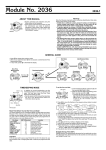
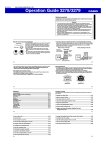
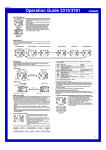
About This Manual
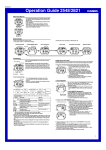
• Button operations are indicated using the letters shown
in the illustration.
• Each section of this manual provides you with the
information you need to perform operations in each
mode. Further details and technical information can be
found in the “Reference” section.
General Guide
Alarm Mode
• Press C to change from mode to mode.
• In any mode, press B to illuminate the display.
Date Alert Mode
▲
▲
World Time Mode
Timekeeping Mode
Stopwatch Mode
▲
▲
Time Recorder Mode
▲
▲
Press C.
Timekeeping
Use the Timekeeping Mode to set and view the current time and date.
• Pressing D displays the Last Signal screen (date and time the time calibration
signal was last received) in the Timekeeping Mode.
Month – Day
Hour : Minutes Seconds
Alternate at the
1 second interval
▲
▲
▲
▲
Press D.
Receive time
PM
indicator
Day of week
Receive date
Last Signal Screen
• If the watch is indoors, we recommend that you place the watch near a window to
allow better signal reception.
• After signal reception is complete, the display of the watch changes to the Last
Signal screen.
Time Calibration Signal Reception
This watch is designed to pick up a time calibration signal and update its time setting
in accordance with the signal. There are two different methods you can use to receive
the signal: Auto Receive and Manual Receive. With Auto Receive, the watch
automatically receives the calibration signal three times each day and makes
appropriate adjustments. With Manual Receive, you perform a specific button
operation to receive the calibration signal.
Before performing a signal receive operation, remove the watch from your wrist and
position it as shown in the illustrations below.
• If your watch has a resin band, pass the end of the band through the band loop and
place the watch on a stable surface.
Resin band
Metal band
Current Time Setting
This watch automatically adjusts its time setting in accordance with a time calibration
signal. You can also perform a manual procedure to set the time and date, when
necessary.
• Before using the watch in the Continental United States, first use the procedure
under “Setting Up the Watch for Use in the Continental United States” to set the time
in accordance with a time calibration signal.
• Note that after you set your Home City (the city where you normally use the watch)
code, you must also turn on the watch’s time calibration signal receiver if you want to
enable auto time calibration. See “About Auto Receive” for more information.
• See “Setting the Time and Date Manually” for information about manual settings.
Setting Up the Watch for Use in the Continental United States
You need to make the following three settings before using this watch in the
Continental United States. The following provides a general overview of the setting
procedure. For full details, see “Setting the Time and Date Manually” and “Time
Calibration Signal Reception”.
• Specify the city code for your Home City (the city where you will normally use the
watch).
• Select the auto summer time (DST) setting.
• Perform the manual time calibration signal receive operation to set the current time.
To set up the watch for use in the Continental United States
1. In the Timekeeping Mode, hold down A until the
current auto receive on/off setting to flash, which
indicates the setting screen.
2. Press C twice to move the flashing to the city code
setting.
3. Use D(+) and B(–) to select the city code you want to
use as your Home City.
• The following are the city codes for major cities in the
City code
Continental United States time zones.
LAX: Los Angeles, San Francisco, Las Vegas, Seattle
DEN: Denver, El Paso
CHI: Chicago, Houston, Dallas/Fort Worth, New Orleans
NYC: New York, Detroit, Miami, Boston
4. Press C to display the summer time (DST) setting
screen.
5. Use D to select A (auto DST).
• Auto DST specifies auto switching between Daylight
Saving Time and Standard Time.
Receive indicator
6. Press A to exit the setting screen.
7. Hold down D for about two seconds until the watch
beeps.
• Release D and the message RC! appears to indicate
that signal reception has started.
• Time calibration signal reception takes from two to six
minutes. Take care that you do not move the watch
during this time.
Pass through band loop.
Note
• If you are using the time calibration signal to set the time for this watch, be sure to
correctly set your Home City. Otherwise, there is the chance that the watch will not
set the correct time. See “Setting the Time and Date Manually” for details.
• Note that signal reception is possible only when the watch is within range of a time
calibration signal transmitter, and a city code that supports signal reception is
selected as the Home City code.
• The current time setting in accordance with the time calibration signal takes priority
over any time settings you make.
• Auto receive is turned on when the watch is shipped from the factory.
• See the information under “Time Calibration Signal Reception” if you experience
problems with time calibration signal reception.
To perform manual time calibration signal reception
1. Place the watch on a stable surface so its top (12 o'clock side) is facing in the
general direction of the signal transmitter.
• Note that signal reception is poor if the watch is on its back or side.
Receive indicator
2. In the Timekeeping Mode, hold down D for about two
seconds until the watch beeps.
• Release D and the message RC! appears to indicate
that signal reception has started.
• Time calibration signal reception takes from two to six
minutes. Take care that you do not move the watch
during this time.
• After signal reception is complete, the display of the
watch changes to the Last Signal screen.
• The receive indicator indicates that the time calibration
reception attempt was successful.
Note
• To interrupt a receive operation and return to the Timekeeping Mode, press D.
• If the receive operation is unsuccessful, the message ERR appears on the display
for about one or two minutes. After that, the watch returns to the Timekeeping Mode.
• You can also change from the Last Signal or ERR screen to the normal timekeeping
screen by pressing D.
1
USER’S GUIDE 2556
About the Receive Indicator
The receive indicator shows the strength of the calibration signal being received. For best
reception, be sure to keep the watch in a location where signal strength is strongest.
Setting
• Even in an area where signal strength is strong, it takes about 10 seconds for signal
reception to stabilize enough for the receive indicator to indicate signal strength.
• Use the receive indicator as a guide for checking signal strength and for finding the
best location for the watch during signal receive operations.
• The receive indicator remains on the display in all modes following reception of the
time calibration signal and calibration of the watch’s time setting. The receive
indicator does not appear if signal reception was unsuccessful or after manual
adjustment of the current time setting.
About Auto Receive
When auto receive is turned on, the watch automatically starts to receive the time
calibration signal when the time in the Timekeeping Mode reaches 2:00 AM, 4:00 AM
and 6:00 AM each day (calibration times).
Note
• The auto receive operation is performed only if the watch is in the Timekeeping or
World Time Mode when one of the calibration times is reached.
It is not performed if a calibration time is reached while you are making settings
(while settings are flashing on the display), while an alarm is sounding.
• Auto receipt of the calibration signal is designed to be performed early in the
morning, while you sleep (provided that the Timekeeping Mode time is set correctly).
Before going to bed for the night, remove the watch from your wrist, and put it in a
location where it can easily receive the signal.
• The receive indicator indicates that either the 2:00 AM, 4:00 AM, or 6:00 AM
calibration signal reception was successful. Note, however, that the receive indicator
is cleared from the display at 3:00 AM each day.
• If you do not see the receive indicator except for the above reason, it means there
was some problem with the calibration reception operation. Either perform reception
manually, or make sure the watch is set up properly to receive the time calibration
signal for the next automatic reception time.
• Though this watch is designed to receive both time data (hour, minutes, seconds)
and date data (year, month, day), certain signal conditions can limit reception to time
data only.
• The receive indicator ( ) appears only when the watch is able to successfully
receive both time and date data. It does not appear when only time data is received.
When time and date data is received: Receive indicator ( ) appears.
When time data only is received: Receive indicator ( ) does not appear.
• Normally, the signal reception date shown by the Last Signal screen is the date data
included in the received time calibration signal. When only time data is received,
however, the Last Signal screen shows date as kept in the Timekeeping Mode at the
time of signal reception.
• When auto receive is turned on, the watch receives the calibration signal for two to
six minutes each day when the Timekeeping Mode time reaches 2:00 AM, 4:00 AM
and 6:00 AM. Do not operate any of the watch’s buttons within six minutes prior to or
following the calibration times. Doing so can interfere with correct calibration.
• Remember that reception of the calibration signal depends on the time kept in the
Timekeeping Mode. The receive operation will be performed whenever the display
shows 2:00 AM, 4:00 AM and 6:00 AM, regardless of whether or not the
Timekeeping Mode time is actually the correct time.
• When two or three receptions are successful, the watch uses the data of the last
reception for calibration. When only one reception is successful, the watch uses the
data of the successful reception.
To turn auto receive on and off
1. In the Timekeeping Mode, hold down A until the
current auto receive on/off setting to flash, which
indicates the setting screen.
ON
OF
2. Press D to toggle auto receive on (ON
ON) and off (OF
OF).
3. Press A to exit the setting screen.
Button Operations
Press D to toggle between Daylight Saving
ON
OF
Time (ON
ON) and standard time (OF
OF).
• Pressing D performs a different operation
when NYC, CHI, DEN, LAX, ANC or HNL
is selected as Home City Code. See “Auto
Summer Time (DST) Switching”.
12/24-Hour format
Press D to toggle between 12-hour (12H)
and 24-hour (24H) timekeeping.
Hour, Minutes
Use D (+) and B (–) to change the
setting.
Seconds
Press D to reset the seconds to 00.
Year
Use D (+) and B (–) to change the
setting.
Strong
Weak
Screen
DST
Month, Day
4. Press A to exit the setting screen.
• The auto receive setting is used for time calibration signal reception only. See “About
Auto Receive” for details.
• See “City Code Table” for a complete list of available city codes.
• Resetting the seconds to 00 while the current count is in the range of 30 to 59
causes the minutes to be increased by 1. In the range of 00 to 29, the seconds are
reset to 00 without changing the minutes.
World Time
Home city time
DST indicator
City code
Current time in the
selected city code
(Hour : Minutes Seconds)
The World Time shows the current time in 30 cities (29
time zones) around the world.
• If the current time shown for a city is wrong, check your
Timekeeping Mode time and Home City settings and
make the necessary changes.
• You can change the DST (Daylight Saving Time)/
Standard Time settings for each city code in the
Timekeeping Mode.
• The watch will perform a signal receive operation even if
it is in the World Time Mode when a calibration time is
reached. If this happens, the World Time Mode time
settings will be adjusted in accordance with the
Timekeeping Mode’s Home City time.
• All of the operations in this section are performed in the
World Time Mode, which you enter by pressing C.
To view the time in another city code
In the World Time Mode, press D to scroll city codes (time zones) to the east or A to
scroll to the west.
• For full information on city codes, see the “City Code Table”.
Alarms
Home city time
Alarm number
Alarm time (Hour : Minutes)
Countdown
(Hours : Minutes Seconds)
The Alarm Mode gives you a choice of four one-time
alarms and one snooze alarm. One of the one-time
alarms functions as a “target alarm,” which counts the
time remaining from the current Timekeeping Mode time
to the target alarm time.
Also use the Alarm Mode to turn the Hourly Time Signal
(SIG) on and off.
• There are five alarms numbered AL1 through AL3,
TAL,and SNZ. You can configure SNZ as a
snooze alarm only. Alarms AL1 through TAL
(target alarm) can be used as one-time alarms only.
• Alarm settings (and Hourly Time Signal settings) are
available in the Alarm Mode, which you enter by
pressing C.
Target alarm screen
To set an alarm time
Setting the Time and Date Manually
Make sure you select your Home City code (the city code whose time and date you
are setting) before change the current time and date settings. World Time Mode times
are all displayed in accordance with the Timekeeping Mode settings. Because of this,
World Time Mode times will not be correct if you do not select the proper Home City
code before setting the time and date in the Timekeeping Mode.
To set the current time and date manually
1. In the Timekeeping Mode, hold down A until the
current auto receive on/off setting to flash, which
indicates the setting screen.
2. Press C to move the flashing in the sequence shown
below to select other settings.
Auto
Receive
Day
Frequency
Month
Year
City Code
Minutes
DST
12/24-Hour
Format
Hour
Screen
AL1
AL2
AL3
SIG
SNZ
TAL
2. After you select an alarm, hold down A until the hour
setting of the alarm time starts to flash, which indicates
the setting screen.
• This operation automatically turns on the alarm.
3. Use C to move the flashing in the sequence shown
below to select other settings.
Hour
Minutes
On/off status
Seconds
3. When the setting you want to change is flashing, use B and/or D to change it as
described below.
Setting
1. In the Alarm Mode, use D to scroll through the alarm
screens until the one whose time you want to set is
displayed.
Button Operations
Auto Receive
Press D to toggle auto receive on and off.
Frequency
When NYC, CHI, DEN, LAX, ANC, or HNL
is selected as Home City Code, USA
flashes. When one of the other city codes is
selected as Home City Code, --- flashes.
City code
Use D (+) and B (–) to change the
setting.
4. While a setting is flashing, use D and B to change it.
• While the hour or minute setting is flashing, use D
(+) and B (–) to change it.
• While a one-time alarm or the snooze on/off setting is
flashing, use D to toggle it on (ON) and off (OF).
5. Press A to exit the setting screen.
• When setting the alarm time using the 12-hour format,
take care to set the time correctly as a.m. (no
indicator) or p.m. (P indicator).
2
USER’S GUIDE 2556
Time Recorder
Alarm Operation
The alarm tone sounds at the preset time for 10 seconds, regardless of the mode the
watch is in. In the case of the snooze alarm, the alarm repeats up to seven times
every five minutes until you turn the alarm off.
• Pressing any button stops the alarm tone operation.
• If any alarm operation (one-time alarm, snooze) occurs while a signal receive
operation is in progress, the receive operation is canceled.
• Displaying the Timekeeping Mode setting screen during a 5-minute interval between
snooze alarms stops the current snooze alarm operation (but snooze alarm remains
as the alarm type setting).
• The snooze on indicator ( ) flashes during the 5-minute intervals between alarms.
• The alarm on indicator ( ), snooze on indicator ( ), and Hourly Time Signal on
indicator ( ) are displayed in all modes.
• In all modes, the alarm on indicator is shown for any alarm (AL1through AL3,
TAL, or SNZ) that is currently turned on.
• Alarm operations and the Hourly Time Signal operation are performed in all modes.
To test the alarm
• In the Alarm Mode, hold down D to sound the alarm.
To turn an alarm on and off
1. In the Alarm Mode, use D to scroll through the alarm
screens until the one whose time you want to set is
displayed.
2. After you select an alarm, hold down A until the hour
setting of the alarm time starts to flash, which indicates
the setting screen.
• This operation automatically turns on the alarm.
3. Press C twice to move the flashing to the alarm’s on/
off setting.
Press C
4. While the on/off setting is flashing, use D to toggle it
Alarm on
twice.
indicator
on (ON) and off (OF).
5. Press A to exit the setting screen.
The Time Recorder Mode lets you store up to 50 time entries (hour, minutes, seconds)
with the touch of a button. One way you can use the Time Recorder Mode is to record
the start time and the end time of a particular event.
To record a Time Recorder time
In the Time Recorder Mode, press D to record the Home
Home city Recorded time
City time (hour, minutes, seconds).
time
(Hour : Minutes
• The recorded time flashes for about two seconds, and
seconds)
then it is assigned a record number.
• Records are assigned numbers sequentially from T1
through T50.
• Storing a new time record when there are already 50
records stored in memory automatically deletes record
T1, shifts the remaining records upwards by 1, and
stores the new record as T50.
• The Time Recorder Mode always displays times using
Time record number
24-hour format, regardless of the 12-hour/24-hour
format setting in the Timekeeping Mode.
To recall Time Recorder times
In the Time Recorder Mode, press A to scroll through times stored in memory.
• Each press of A scrolls through time records from higher numbered (newer)
records to lower numbered records.
• Whenever you enter the Time Recorder Mode, the newest (highest numbered)
record appears first.
To delete all Time Recorder times
In the Time Recorder Mode, press A and D at the same time to delete all Time
Recorder times.
Stopwatch
▲
The stopwatch lets you measure elapsed time, split times,
and two finishes.
Home city time
Hours
Seconds • The display range of the stopwatch is 23 hours, 59
On/off status
To turn the Hourly Time Signal on and off
1. In the Alarm Mode, use D to scroll through the alarm
screens until the Hourly Time Signal screen is
Hourly Time signal
displayed.
on indicator
2. Hold down A until the Hourly Time signal on/off setting
starts to flash, which indicates the setting screen.
• This operation automatically turns on the Hourly Time
Signal.
3. While the on/off setting is flashing, use D to toggle it
on (ON) and off (OF).
4. Press A to exit the setting screen.
1/100 second
Minutes
To measure times with the stopwatch
Elapsed Time
➤D
Stop
D
Start
On/off status
minutes, 59.99 seconds.
• The stopwatch continues to run, restarting from zero
after it reaches its limit, until you stop it.
• Exiting the Stopwatch Mode while a split time is frozen
on the display clears the split time and returns to
elapsed time measurement.
• The stopwatch measurement operation continues even
if you exit the Stopwatch Mode.
• All of the operations in this section are performed in the
Stopwatch Mode, which you enter by pressing C.
➤D
Re-start
➤D
Stop
➤A
Clear
➤A
Split release
➤D
Stop
➤A
Clear
➤D
Stop
➤A
Split release
➤A
Clear
Split Time
➤A
Split
D
Date Alert
Date Alert helps you to remember an important date. After you set an alert date
(month and day), a date alert indicator (!) and the current date flash for 24 hours after
the alert date arrives in the Timekeeping Mode. You can set up to five different date
alerts.
Date alert on indicator
Home city time
Start
( and
flashes)
Two Finishes
➤A
Split
D
Start
First runner
finishes.
Display time of
first runner.
When the alert date
is reached in the
Timekeeping Mode
Second runner
finishes.
Display time of
second runner.
▲
Reference
Alert Date
(Month-Day)
Alert number
Current Date (Month-Day)
Timekeeping Mode display
This section contains more detailed and technical information about watch operation.
It also contains important precautions and notes about the various features and
functions of this watch.
Auto Return Features
To set the alert date
1. Use C to enter the Date Alert Mode.
2. Use D to scroll through the alert screens until the one
whose date you want to set is displayed.
DA1
DA2
DA5
DA3
DA4
3. After you select an alert, hold down A until the month
setting of the alert date starts to flash, which indicates
the setting screen.
• This operation automatically turns on the alert.
4. Press C to move the flashing in the sequence shown
below.
Alert date
Month
• If you leave the watch in the Alarm or Date Alert Mode for two or three minutes
without performing any operation, it automatically changes to the Timekeeping
Mode.
• If you leave a screen with flashing digits or a cursor on the display for two or three
minutes without performing any operation, the watch automatically saves anything
you have input up to that point and exits the setting screen.
Data and Setting Scrolling
The A, B, and D buttons are used in various modes and setting screens to scroll
through data on the display. In most cases, holding down these buttons during a scroll
operation scrolls through the data at high speed.
Initial Screens
When you enter the Alarm, Date Alert, or World Time Mode, the data you were
viewing when you last exited the mode appears first.
Time Calibration Signal Reception
Day
Alert on/off
2,000 miles
1,200 miles
5. While a setting is flashing, use D and B to change it.
• While the month or day setting is flashing, use D (+)
and B (–) to change it.
• While the date alert on/off setting is flashing, use D
to toggle it on (ON) and off (OF).
6. Press A to exit the setting screen.
• This watch is able to receive the time calibration signal
transmitted from Fort Collins, Colorado. Signal reception
is possible within a radius of about 2,000 miles (3,000
kilometers) from the Fort Collins transmitter.
Fort Collins
3
USER’S GUIDE 2556
General Precautions
• The watch is designed to automatically update the date and day of the week for the
period January 1, 2000 to December 31, 2039. Setting of the date by the time
calibration signal cannot be performed starting from January 1, 2040.
• This watch can receive signals that differentiate between leap years and non-leap
years.
• Even when the watch is within the reception range of the transmitter, signal
reception is impossible if the signal is blocked by mountains or other geological
formations between the watch and signal source.
• Signal reception is affected by weather, atmospheric conditions, and seasonal
changes.
• The time calibration signal is bounced off the ionosphere. Because of this, such
factors as changes in the reflectivity of the ionosphere, as well as movement of the
ionosphere to higher altitudes due to seasonal atmospheric changes or the time of
day may change the reception range of the signal and make reception temporarily
impossible.
• Reception is best when the antenna built into the 12 o'clock edge of the watch is
facing in the general direction of the signal transmitter. Note, however, that moving
the watch while the time calibration signal receive operation is taking place will make
stable reception impossible.
• Think of the watch as acting like a TV or radio when it is receiving the calibration
signal. When receiving indoors, move to a location as near as possible to a window.
• Proper signal reception can be difficult or even impossible under the conditions
listed below.
Near TVs, refrigerators, computers, or other household appliances
Far away from broadcasting stations among ferro-concrete structures or near
mountains
Underground, in tunnels or in ferro-concrete buildings
Near high-tension wires, neon signs, or radio stations with interfering frequencies
Near railroads, highways or airports
In trains or cars
• Radio interference can make signal reception impossible.
• Strong electrostatic charge can result in the wrong time being set.
Troubleshooting
Check the following points whenever you experience problems with your watch.
Problem
Probable Cause
Cannot perform • The watch is not in the Timekeeping Mode.
manual receive. • You do not select one of the following
City Codes as your Home City Code:
NYC, CHI, DEN, or LAX.
Auto receive is • You changed the time setting manually.
turned on, but
• The watch was not in the Timekeeping
the receive
or World Time Mode, or you were
indicator does
performing some button operation
not appear on
during the auto signal receive operation
the display.
was performed.
• Even if receive is successful, the receive
indicator disappears every day at 3am.
• Time data (hour, minutes, seconds) only
was received during the last receive
operation. The receive indicator appears
only when time data and date data
(year, month, day) are both received.
Time setting is
incorrect
following signal
reception.
What you should do
• Enter the Timekeeping Mode
and try again.
• Select the correct Home City
Code.
• Perform manual signal receive
or wait until the next auto
signal receive operation is
performed.
• Check to make sure the watch
is in a location where it can
receive the signal.
• Put the watch in a location
that is suitable for good
reception.
• If the time is one hour off, the DST
• Change the DST setting to
setting may be incorrect.
Auto DST.
• The Home City Code setting is not
• Select the correct Home City
correct for the area where you are using
Code.
the watch.
Auto Summer Time (DST) Switching
The time calibration signal transmitted from Fort Collins, Colorado includes both
standard time and summer time (Daylight Saving Time) data. When auto summer time
(DST) switching is turned on, the watch switches between standard time and summer
time (DST) automatically in accordance with the Fort Collins signal.
• Daylight Saving Time (DST) advances the time setting by one hour from Standard
Time. Remember that not all countries or even local areas use Daylight Saving Time.
• When using the watch in the Continental United States, select Auto DST for the auto
summer time setting.
• The default auto summer time settings is Auto DST whenever you select one of the
following city codes as your Home City code: NYC, CHI, DEN, LAX, ANC, or HNL.
• If you experience problems receiving the time calibration signal in your area, it is
probably best to turn off auto time switching.
12-hour/24-hour Timekeeping Formats
The 12-hour/24-hour timekeeping format you select in the Timekeeping Mode is also
applied in all other modes (except for the World Time Mode and Time Recorder
Mode).
• With the 12-hour format, the P (PM) indicator appears on the display for times in the
range of noon to 11:59 p.m. and the no indicator appears for times in the range of
midnight to 11:59 a.m.
• With the 24-hour format, times are displayed in the range of 0:00 to 23:59, with 24
indicator.
• The Word Time Mode and Time Recorder Mode always display times using 24-hour
format, regardless of the 12-hour/24-hour format setting in the Timekeeping Mode.
• In all modes besides the Timekeeping Mode, the current Home City time in the
upper left corner of the display is always displayed using 24-hour format.
Backlight Precautions
The backlight uses an EL (electro-luminescent) panel that causes the entire display to
glow for easy reading in the dark.
In any mode, press B to illuminate the display for about one second.
• The electro-luminescent panel that provides illumination loses power after very long
use.
• The illumination provided by the backlight may be hard to see when viewed under
direct sunlight.
• The watch may emit an audible sound whenever the display is illuminated. This is
due to vibration of the EL panel used for illumination, and does not indicate
malfunction.
• The backlight automatically turns off whenever an alarm sounds.
• Frequent use of the backlight shortens the battery life.
City Code Table
City
Code
–––
HNL
ANC
LAX
DEN
CHI
NYC
CCS
RIO
–––
–––
GMT
LON
PAR
BER
ATH
CAI
JRS
JED
THR
DXB
KBL
KHI
DEL
DAC
RGN
BKK
HKG
TYO
SEL
ADL
SYD
NOU
WLG
GMT
Other major cities in same time zone
Differential
–11
PAGO PAGO
HONOLULU
–10
PAPEETE
ANCHORAGE
–9
NOME
SAN FRANCISCO, LAS VEGAS, VANCOUVER,
LOS ANGELES
–8
SEATTLE, DAWSON CITY
DENVER
–7
EL PASO, EDMONTON
HOUSTON, DALLAS/FORT WORTH,
CHICAGO
–6
NEW ORLEANS, MEXICO CITY, WINNIPEG
MONTREAL, DETROIT, MIAMI, BOSTON,
NEW YORK
–5
PANAMA CITY, HAVANA, LIMA, BOGOTA
CARACAS
–4
LA PAZ, SANTIAGO, PORT OF SPAIN
SAO PAULO, BUENOS AIRES, BRASILIA,
RIO DE JANEIRO
–3
MONTEVIDEO
–2
–1
PRAIA
DUBLIN, LISBON, CASABLANCA, DAKAR,
+00
LONDON
ABIDJAN
PARIS
MILAN, ROME, MADRID, AMSTERDAM, ALGIERS,
+01
BERLIN
HAMBURG, FRANKFURT, VIENNA, STOCKHOLM
ATHENS
HELSINKI, ISTANBUL, BEIRUT, DAMASCUS,
+02
CAIRO
CAPE TOWN
JERUSALEM
KUWAIT, RIYADH, ADEN, ADDIS ABABA, NAIROBI,
JEDDAH
+03
MOSCOW
TEHRAN
+3.5
SHIRAZ
DUBAI
+04
ABU DHABI, MUSCAT
KABUL
+4.5
KARACHI
+05
MALE
DELHI
+5.5
MUMBAI, KOLKATA
DHAKA
+06
COLOMBO
YANGON
+6.5
BANGKOK
+07
JAKARTA, PHNOM PENH, HANOI, VIENTIANE
SINGAPORE, KUALA LUMPUR, BEIJING, TAIPEI,
HONG KONG
+08
MANILA, PERTH, ULAANBAATAR
TOKYO
PYONGYANG
+09
SEOUL
ADELAIDE
+9.5
DARWIN
SYDNEY
+10
MELBOURNE, GUAM, RABAUL
NOUMEA
+11
PORT VILA
WELLINGTON
+12
CHRISTCHURCH, NADI, NAURU ISLAND
City
• Based on data as of December 2001.
To select the auto summer time setting
1. In the Timekeeping Mode, hold down A until the current auto receive on/off setting
to flash, which indicates the setting screen.
2. Press C three times until the summer time (DST) setting screen appears.
3. Use D to cycle through the summer time settings in the sequence shown below.
Auto DST(
)
DST off(
)
DST on(
)
4. When the setting you want is selected, press A to exit the setting screen.
Timekeeping
• The day of the week is automatically displayed in accordance with the date (year,
month, and day) settings.
• The year can be set in the range of 2000 to 2039.
• The watch’s built-in full automatic calendar automatically makes allowances for
different month lengths and leap years. Once you set the date, there should be no
reason to change it except after you have the watch’s battery replaced.
• The current time for all city codes in the Timekeeping Mode and World Time Mode is
calculated in accordance with the Greenwich Mean Time (GMT) differential for each
city, based on the your Home City time setting.
• GMT differential is calculated by this watch based on Universal Time Coordinated
(UTC ) data.
*
letters “UTC” stands for “Universal Time Coordinated,” which is the world-wide
*The
scientific standard of timekeeping. It is based upon carefully maintained atomic
(cesium) clocks that keep accurate to within microseconds. Leap seconds are
added or subtracted as necessary to keep UTC in sync with the Earth’s rotation.
The reference point for UTC is Greenwich, England.
4