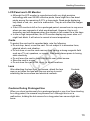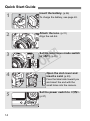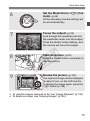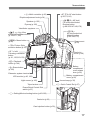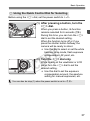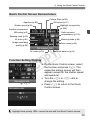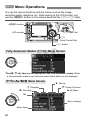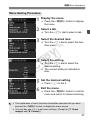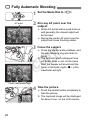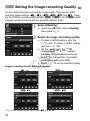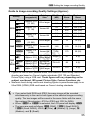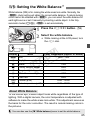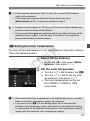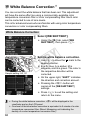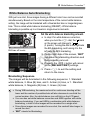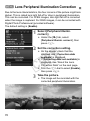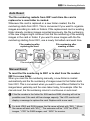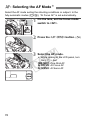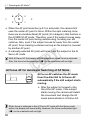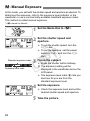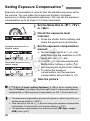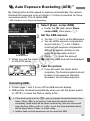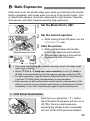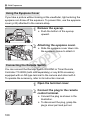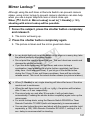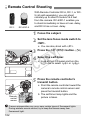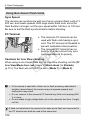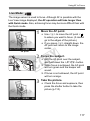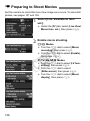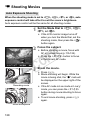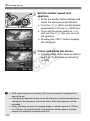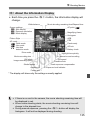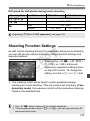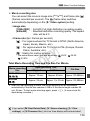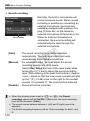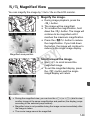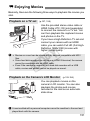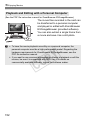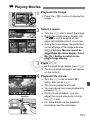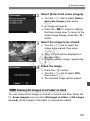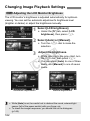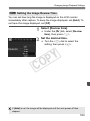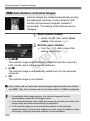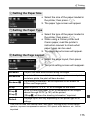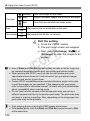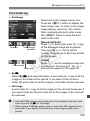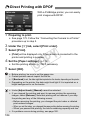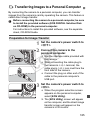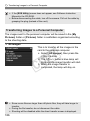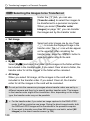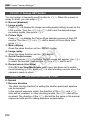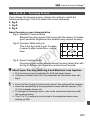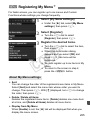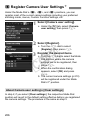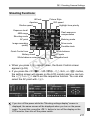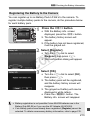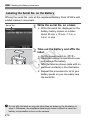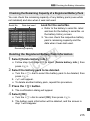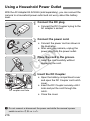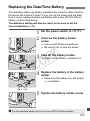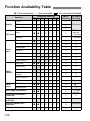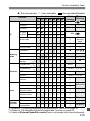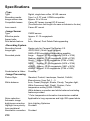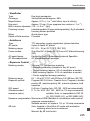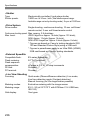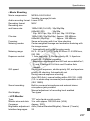
1
C Y P O INSTRUCTION MANUAL E This manual is for the EOS 5D Mark II installed with firmware Version 2.0.0 or later. E INSTRUCTION MANUAL Thank you for purchasing a Canon product. The EOS 5D Mark II is a high-performance, digital SLR camera with a full-frame (approx. 36mm x 24mm) CMOS sensor with 21.10 effective megapixels. Other features include DIGIC 4, high-precision and highspeed, 9-point AF (plus six Assist AF points); approx. 3.9 fps continuous shooting; Live View shooting; and Full HD (Full HighDefinition) movie shooting. The camera is highly responsive to any shooting situation at anytime, provides many features for demanding shoots, and expands shooting possibilities with system accessories. Take a Few Test Shots to Familiarize Yourself with the Camera With a digital camera, you can immediately view the image you have captured. While reading this manual, take a few test shots and see how they come out. You can then better understand the camera. To avoid botched pictures and accidents, read the Safety Warnings (p.242,243) and Handling Precautions (p.12,13). C Y P O Testing the Camera Before Using and Liability After shooting, playback and check whether the image has been properly recorded. If the camera or memory card is faulty and the images cannot be recorded or downloaded to a personal computer, Canon cannot be held liable for any loss or inconvenience caused. Copyrights Copyright laws in your country may prohibit the use of your recorded images of people and certain subjects for anything but private enjoyment. Also be aware that certain public performances, exhibitions, etc., may prohibit photography even for private enjoyment. CF Card In this manual, “card” refers to the CF card. The CF card (for recording images) is not included. Please purchase it separately. 2 Item Check List Before starting, check that all the following items have been included with your camera. If anything is missing, contact your dealer. Camera (with eyecup and body cap) Wide Strap EW-EOS5DMKII EOS DIGITAL Solution Disk (Software) Battery Pack LP-E6 (with protective cover) Y P O Interface Cable IFC-200U C Battery Charger LC-E6/LC-E6E* Stereo Video Cable STV-250N Software Instruction Manual (1) Instruction Manual (this booklet) (2) Pocket Guide Quick start guide to shooting. (3) CD-ROM Guide Guide to the bundled software (EOS DIGITAL Solution Disk) and Software Instruction Manuals. * Battery Charger LC-E6 or LC-E6E is provided. (The LC-E6E comes with a power cord.) If you purchased a Lens Kit, check that the lens is included. Depending on the Lens Kit type, the lens instruction manual might also be included. Be careful not to lose any of the above items. 3 Conventions Used in this Manual Icons in this Manual <6> <5> <9> <0> 0, 9, : Indicates the Main Dial. : Indicates the Quick Control Dial. : Indicates the Multi-controller. : Indicates the setting button. , 8: Indicates that the respective function remains active for 4 sec., 6 sec., 10 sec., or 16 sec. respectively after you let go of the button. * In this manual, the icons and markings indicating the camera’s buttons, dials, and settings correspond to the icons and markings on the camera and on the LCD monitor. 3 : Indicates a function which can be changed by pressing the Y P O <M> button and changing the setting. M : When shown on the right of the page, it indicates that the function is available only when the Mode Dial is set to d, s, f, a, or F. C * Function which cannot be used in the fully-automatic modes (1/C). (p.**) : Reference page numbers for more information. : Tip or advice for better shooting. : Problem-solving advice. : Warning to prevent shooting problems. : Supplemental information. Basic Assumptions All operations explained in this manual assume that the power switch is already set to <1> or <J> (p.27). <5> operations explained in this manual assume that the power switch is already set to <J>. It is assumed that all the menu settings and Custom Functions are set to the default. For explanatory purposes, the instructions show the camera attached with an EF50mm f/1.4 USM lens (or EF24-105mm f/4L IS USM). 4 Chapters For first-time DSLR users, chapters 1 and 2 explain the camera’s basic operations and shooting procedures. Introduction 2 Camera basics. 1 2 3 4 5 6 7 8 9 10 11 12 Getting Started 23 Basic Shooting Fully automatic shooting. Image Settings 47 53 Y P O Setting the AF and Drive Modes Advanced Operations Shooting features for specific types of subjects. C Live View Shooting Shoot still photos while viewing the LCD monitor. Shooting Movies Shoot movies while viewing the LCD monitor. 77 87 107 125 Image Playback 143 Sensor Cleaning 165 Printing Images and Transferring Images to a Computer 171 Customizing the Camera 189 Reference 209 5 Contents Introduction Item Check List.................................................................................................. 3 Conventions Used in this Manual ...................................................................... 4 Chapters ............................................................................................................ 5 Index to Features ............................................................................................ 10 Handling Precautions ...................................................................................... 12 Quick Start Guide ............................................................................................ 14 Nomenclature .................................................................................................. 16 1 Getting Started 23 Charging the Battery ....................................................................................... 24 Installing and Removing the Battery................................................................ 26 Turning on the Power ...................................................................................... 27 Installing and Removing the CF Card.............................................................. 29 Attaching and Detaching a Lens ..................................................................... 31 About the Lens Image Stabilizer...................................................................... 33 Basic Operation ............................................................................................... 34 9 Using the Quick Control Screen ................................................................ 38 3 Menu Operations ................................................................................... 40 Before You Start .............................................................................................. 42 Setting the Interface Language .................................................................... 42 Setting the Date and Time............................................................................ 42 Formatting the Card ..................................................................................... 43 Set the Power-off Time/Auto Power Off ....................................................... 44 Reverting the Camera to the Default Settings.............................................. 44 About Copyright Information......................................................................... 46 C 2 6 Basic Shooting Y P O 47 1 Fully Automatic Shooting .......................................................................... 48 1 Full Auto Techniques ................................................................................ 50 C Creative Auto Shooting ............................................................................. 51 Contents 3 Image Settings 53 4 Setting the AF and Drive Modes Setting the Image-recording Quality.................................................................54 i: Setting the ISO Speed..............................................................................57 A Selecting a Picture Style ..........................................................................59 A Customizing a Picture Style .....................................................................61 A Registering a Picture Style.......................................................................63 B: Setting the White Balance .......................................................................65 O Custom White Balance .........................................................................66 P Setting the Color Temperature ...............................................................67 u White Balance Correction ...........................................................................68 Lens Peripheral Illumination Correction ...........................................................70 Creating and Selecting a Folder.......................................................................72 File Numbering Methods ..................................................................................74 Setting the Color Space ...................................................................................76 C 5 Y P O 77 f: Selecting the AF Mode..............................................................................78 S Selecting the AF Point ...............................................................................81 When Autofocus Fails ......................................................................................84 MF: Manual Focusing ...................................................................................84 i Selecting the Drive Mode ...........................................................................85 j Self-timer Operation ....................................................................................86 Advanced Operations 87 d: Program AE ................................................................................................88 s: Shutter-Priority AE ...................................................................................90 f: Aperture-Priority AE .................................................................................92 Depth of Field Preview ..................................................................................93 a: Manual Exposure.......................................................................................94 q Selecting the Metering Mode .....................................................................95 Setting Exposure Compensation......................................................................96 h Auto Exposure Bracketing (AEB) ..............................................................97 A AE Lock ......................................................................................................98 F: Bulb Exposures ..........................................................................................99 Mirror Lockup .................................................................................................101 7 Contents R Remote Control Shooting ........................................................................... 102 D Flash Photography .................................................................................... 103 Setting the Flash ........................................................................................... 105 6 7 8 8 Live View Shooting (Still photo shooting with the LCD monitor) 107 A Preparing for Live View Shooting............................................................ 108 A Live View Shooting.................................................................................. 110 Shooting Function Settings ........................................................................... 112 Menu Function Settings................................................................................. 113 Using AF to Focus ......................................................................................... 115 Focusing Manually......................................................................................... 122 Shooting Movies 125 k Preparing to Shoot Movies ...................................................................... 126 k Shooting Movies...................................................................................... 128 Auto Exposure Shooting............................................................................. 128 Shutter-priority AE Shooting....................................................................... 129 Aperture-priority AE Shooting..................................................................... 130 Manual Exposure Shooting ........................................................................ 131 Shooting Function Settings ........................................................................... 137 Menu Function Settings................................................................................. 138 Image Playback C Y P O 143 x Image Playback....................................................................................... 144 B Shooting Information Display ............................................................. 145 HI Searching for Images Quickly ............................................................. 147 u/y Magnified View................................................................................... 149 b Rotating the Image ................................................................................... 150 k Enjoying Movies ...................................................................................... 151 k Playing Movies ........................................................................................ 153 Slide Show (Auto Playback) .......................................................................... 155 Viewing the Images on TV............................................................................. 157 K Protecting Images.................................................................................... 159 L Erasing Images......................................................................................... 160 Changing Image Playback Settings............................................................... 162 Adjusting the LCD Monitor Brightness ....................................................... 162 Setting the Image Review Time ................................................................. 163 Auto Rotation of Vertical Images ................................................................ 164 Contents 9 Sensor Cleaning 10 Printing Images and Transferring Images to a Computer 171 11 165 f Automatic Sensor Cleaning ....................................................................166 Appending Dust Delete Data..........................................................................167 Manual Sensor Cleaning................................................................................169 Preparing to Print ...........................................................................................172 wPrinting......................................................................................................174 Trimming the Image ....................................................................................179 W Digital Print Order Format (DPOF) ...........................................................181 Direct Printing with DPOF ..............................................................................184 d Transferring Images to a Personal Computer..........................................185 Customizing the Camera C 12 189 Y P O Setting Custom Functions ..............................................................................190 Custom Functions ..........................................................................................191 Custom Function Settings ..............................................................................193 C.Fn I : Exposure .....................................................................................193 C.Fn II : Image...........................................................................................195 C.Fn III : Autofocus/Drive ...........................................................................197 C.Fn IV : Operation/Others .........................................................................201 Registering My Menu .....................................................................................205 w Register Camera User Settings................................................................206 Reference 209 B Checking Camera Settings ....................................................................210 Checking the Battery Information...................................................................212 Using a Household Power Outlet ...................................................................216 Replacing the Date/Time Battery ...................................................................217 Function Availability Table .............................................................................218 Menu Settings ................................................................................................220 Troubleshooting Guide...................................................................................223 Error Codes....................................................................................................231 System Map ...................................................................................................232 Specifications .................................................................................................234 Index ..............................................................................................................254 9 Index to Features Power Battery • Charging Î p.24 • Battery check Î p.28 • Battery information check Î p.212 Power outlet Î p.216 Auto power off Î p.44 Lens Image improvement features • Auto Lighting Optimizer Î p.196 • Lens peripheral illumination correction Î p.70 • Noise reduction for long exposures Î p.195 • Noise reduction for high ISO speeds Î p.195 • Highlight tone priority Î p.196 White balance Attaching/Detaching Î p.31 Zoom Î p.32 White balance setting Î p.65 Image Stabilizer Î p.33 Custom WB Î p.66 Color temperature setting Î p.67 Basic Settings (Menu Functions) Language Î p.42 Date/Time Î p.42 LCD brightness adjustment Î p.162 Beeper Î p.220 Shoot w/o card Î p.29 C Recording Images Format Î p.43 Create/select a folder Î p.72 File No. Î p.74 WB bracketing Î p.69 AF AF mode Î p.78 AF point selection • Assist AF points • AF point expansion Î p.81 Î p.80 Î p.199 Manual focusing Î p.84 Metering Metering mode Î p.95 Drive Image Quality Image-recording quality Î p.54 ISO speed Î p.57 Picture Style Î p.59 Color space Î p.76 10 Y P O White balance correction Î p.68 Drive modes Î p.85 Maximum burst Î p.56 Shooting Creative Auto Î p.51 Program AE Î p.88 Shutter-priority AE Î p.90 Aperture-priority AE Î p.92 Index to Features Image playback Manual exposure Î p.94 Bulb Î p.99 Image review time Î p.163 Mirror lockup Î p.101 Î p.144 Quick Control screen Î p.38 Self-timer Î p.86 Single image display • Shooting information display Remote control Î p.102 Movie playback Î p.153 Index display Î p.147 Exposure compensation Î p.96 Image browsing (Jump display) Î p.148 AEB Î p.97 Magnified view Î p.149 AE lock Î p.98 Manual image rotation Î p.150 Auto image rotation Î p.164 Slide show Î p.155 Viewing the images on TV Î p.157 Protect Î p.159 Erase Î p.160 Exposure adjustment Exposure level increments Î p.193 Flash Y P O External flash Î p.103 Flash control Î p.105 Flash Custom Functions Î p.106 Live View shooting Still photo shooting • AF • Manual focusing • Exposure simulation • Grid display C Î p.107 Î p.115 Î p.122 Î p.109 Î p.113 Movie shooting Movie shooting • Auto exposure • Shutter-priority AE • Aperture-priority AE • Manual exposure • Recording size • Frame rate • Sound recording Î p.125 Î p.128 Î p.129 Î p.130 Î p.131 Î p.139 Î p.139 Î p.140 Î p.145 Customization Custom Function (C.Fn) Î p.189 My Menu Î p.205 Camera user setting registration Î p.206 Sensor cleaning/ Dust reduction Sensor cleaning Î p.165 Add Dust Delete Data Î p.167 Viewfinder Dioptric adjustment Î p.34 Changing the focusing screen Î p.203 11 Handling Precautions Camera Care This camera is a precision instrument. Do not drop it or subject it to physical shock. The camera is not waterproof and cannot be used underwater. If you accidentally drop the camera into water, promptly consult your nearest Canon Service Center. Wipe off any water droplets with a dry cloth. If the camera has been exposed to salty air, wipe it with a well-wrung wet cloth. Never leave the camera near anything having a strong magnetic field such as a magnet or electric motor. Also avoid using or leaving the camera near anything emitting strong radio waves such as a large antenna. Strong magnetic fields can cause camera misoperation or destroy image data. Do not leave the camera in excessive heat such as in a car in direct sunlight. High temperatures can cause the camera to malfunction. The camera contains precision electronic circuitry. Never attempt to disassemble the camera yourself. Use a blower to blow away dust on the lens, viewfinder, reflex mirror, and focusing screen. Do not use cleaners that contain organic solvents to clean the camera body or lens. For stubborn dirt, take the camera to the nearest Canon Service Center. Do not touch the camera’s electrical contacts with your fingers. This is to prevent the contacts from corroding. Corroded contacts can cause camera misoperation. If the camera is suddenly brought in from the cold into a warm room, condensation may form on the camera and internal parts. To prevent condensation, first put the camera in a sealed plastic bag and let it adjust to the warmer temperature before taking it out of the bag. If condensation forms on the camera, do not use the camera. This is to avoid damaging the camera. If there is condensation, remove the lens, card and battery from the camera, and wait until the condensation has evaporated before using the camera. If the camera will not be used for an extended period, remove the battery and store the camera in a cool, dry, well-ventilated location. Even while the camera is in storage, press the shutter button a few times once in a while to check that the camera is still working. Avoid storing the camera where there are corrosive chemicals such as a darkroom or chemical lab. If the camera has not been used for an extended period, test all its functions before using it. If you have not used the camera for some time or if there is an important shoot coming up, have the camera checked by your Canon dealer or check the camera yourself and make sure it is working properly. C 12 Y P O Handling Precautions LCD Panel and LCD Monitor Although the LCD monitor is manufactured with very high precision technology with over 99.99% effective pixels, there might be a few dead pixels among the remaining 0.01% or less pixels. Dead pixels displaying only black or red, etc., are not a malfunction. They do not affect the images recorded. If the LCD monitor is left on for a prolonged period, screen burn-in may occur where you see remnants of what was displayed. However, this is only temporary and will disappear when the camera is left unused for a few days. In low or high temperatures, the LCD monitor display may seem slow or it might look black. It will return to normal at room temperature. Cards To protect the card and its recorded data, note the following: Do not drop, bend, or wet the card. Do not subject it to excessive force, physical shock, and vibration. Do not store or use the card near anything having a strong magnetic field such as a TV set, speakers, or magnet. Also avoid places prone to having static electricity. Do not leave the card in direct sunlight or near a heat source. Store the card in a case. Do not store the card in hot, dusty, or humid locations. Lens C Y P O After detaching the lens from the camera, attach the lens caps or put down the lens with the rear end up to avoid scratching the lens surface and electrical contacts. Contacts Cautions During Prolonged Use When you shoot continuously for a prolonged period or use Live View shooting for a long period, the camera may become hot. Although this is not a malfunction, holding the hot camera for a long period can cause slight skin burns. 13 Quick Start Guide 1 Insert the battery. (p.26) 2 Attach the lens. (p.31) 3 Set the lens focus mode switch to <AF>. (p.31) To charge the battery, see page 24. Align the red dot. C Y P O 4 Open the slot cover and insert a card. (p.29) Face the label side toward you and insert the end with the small holes into the camera. 5 14 Set the power switch to <1>. (p.27) Quick Start Guide Set the Mode Dial to <1> (Full Auto). (p.48) 6 All the necessary camera settings will be set automatically. Focus the subject. (p.35) Look through the viewfinder and aim the viewfinder center over the subject. Press the shutter button halfway, and the camera will focus the subject. 7 C 9 Y P O Take the picture. (p.35) 8 Press the shutter button completely to take the picture. Review the picture. (p.163) The captured image will be displayed for about 2 sec. on the LCD monitor. To display the image again, press the <x> button (p.144). To view the images captured so far, see “Image Playback” (p.144). To delete an image, see “Erasing Images” (p.160). 15 Nomenclature For detailed information, reference page numbers are provided in parentheses (p.**). <o> AF mode selection/Drive mode selection button (p.78/85) <n> Metering mode selection/ White balance selection button (p.95/65) LCD panel (p.18) <m> ISO speed setting/Flash exposure compensation button (p.57/103) EF lens mount index (p.31) Flash-sync contacts (p.103) <U> LCD panel illumination button (p.99) Hot shoe (p.103) <V> Focal plane mark <6> Main Dial (p.36) Mode Dial (p.20) Shutter button (p.35) Remote control sensor (p.102) Self-timer lamp (p.86) C Grip (Battery compartment) Y P O Depth-of-field preview button (p.93) Mirror (p.101,169) Contacts (p.13) Lens mount Lens release button (p.32) Lens lock pin Audio/video OUT terminal (p.157) PC terminal (p.104) Digital terminal (p.172,185) Remote control terminal (N3 type) (p.100) HDMI mini OUT terminal (p.158) 16 Terminal cover Microphone (p.128) Date/time battery (p.217) DC coupler cord hole (p.216) Body cap (p.31) Strap mount (p.23) External microphone IN terminal (p.140) Nomenclature <p> AF start button (p.35,79,110) <9> Multi-controller (p.36) Dioptric adjustment knob (p.34) <A/I> AE lock/ FE lock button/Index/ Reduce button (p.98/103/147/149,179) Speaker (p.153) Eyecup (p.100) Viewfinder eyepiece <S/u> AF point selection/ Magnify button (p.81/149,179) <A/l> Live View shooting/Print/Share button (p.109/177,186) <M> Menu button (p.40) Strap mount (p.23) <A> Picture Style selection button (p.59) <B> Info/ Trimming orientation button (p.111,135,210/179) <x> Playback button (p.144) C <L> Erase button (p.160) Y P O Extension system terminal Card slot cover (p.29) Battery compartment cover release lever (p.26) Battery compartment cover (p.26) LCD monitor (p.40, 162) Light sensor (p.162) Tripod socket Access lamp (p.30) <5> Quick Control Dial (p.37) Power/Quick Control Dial switch (p.27) <0> Setting/Movie shooting button (p.40/128) Card slot (p.29) Card ejection button (p.30) 17 Nomenclature LCD Panel AF point selection ([ - -- --- -- - ]) Card full warning (FuLL CF) Card error warning (Err CF) No card warning (no CF) Error code (Err) Cleaning image sensor (CLn) Shutter speed Busy (buSY) Image-recording quality (p.54) 37 38 47 48 67 68 1 D Large/Fine Large/Normal Medium/Fine Medium/Normal Small/Fine Small/Normal RAW Small RAW White balance (p.65) Q Auto W Daylight E Shade R Cloudy Y Tungsten light U White fluorescent light I Flash O Custom P Color temperature Aperture Possible shots Possible shots during WB bracketing Self-timer countdown Bulb exposure time C Y P O Card writing status Metering mode (p.95) q Evaluative metering w Partial metering r Spot metering e Center-weighted average metering <h> AEB (p.97) Flash exposure compensation (p.103) ISO speed (p.57) <0> Monochrome shooting (p.60) <g> ISO speed (p.57) <A> Highlight tone priority (p.196) The display will show only the settings currently applied. 18 AF mode (p.78) X One-Shot AF 9 AI Focus AF Z AI Servo AF Drive mode (p.85) u Single shooting i Continuous shooting 10-sec. self-timer/ Remote control k 2-sec. self-timer/ Remote control Battery check (p.28) Exposure level indicator Exposure compensation amount (p.96) AEB range (p.97) Flash exposure compensation amount (p.103) White balance correction (p.68) Nomenclature Viewfinder Information Spot metering circle Focusing screen < > Battery check <A> AE lock/ AEB in-progress AF points (Superimposed display) C <D> Flash-ready Improper FE lock warning <e> High-speed sync (FP flash) <d> FE lock/ FEB in-progress <y> Flash exposure compensation Shutter speed FE lock (FEL) Busy (buSY) Y P O <g> ISO speed White balance correction <o> Focus confirmation light Max. burst <0> Monochrome shooting ISO speed <A> Highlight tone priority Exposure level indicator Exposure compensation amount Flash exposure compensation amount AEB range Card full warning (FuLL CF) Card error warning (Err CF) No card warning (no CF) Aperture The display will show only the settings currently applied. 19 Nomenclature Mode Dial Camera User Settings Most camera settings can be registered under w, x, or y (p.206). F : Bulb (p.99) a : Manual exposure (p.94) f : Aperture-priority AE (p.92) s : Shutter-priority AE (p.90) Y P O d : Program AE (p.88) Fully-Automatic Modes C All you do is press the shutter button. Fully-automatic shooting suitable for the subject. 1: Full Auto (p.48) C: Creative Auto (p.51) 20 Nomenclature EF24-105mm f/4L IS USM lens Focus mode switch (p.31) Distance scale Infrared index Hood mount (p.32) Zoom ring (p.32) Zoom position index (p.32) 77 mm filter thread (front of lens) Focusing ring (p.84,122) Image Stabilizer switch (p.33) Y P O Contacts (p.13) Lens mount index (p.31) C Use of genuine Canon accessories is recommended This product is designed to achieve excellent performance when used with genuine Canon accessories. Canon shall not be liable for any damage to this product and/or accidents such as fire, etc., caused by the malfunction of nongenuine Canon accessories (e.g., a leakage and/or explosion of a battery pack). Please note that this warranty does not apply to repairs arising out of the malfunction of non-genuine Canon accessories, although you may request such repairs on a chargeable basis. 21 Nomenclature Battery Charger LC-E6 Charger for Battery Pack LP-E6 (p.24). Power plug Battery pack slot Charge lamp This power unit is intended to be correctly orientated in a vertical or floor mount position. Y P O IMPORTANT SAFETY INSTRUCTIONS-SAVE THESE INSTRUCTIONS. DANGER-TO REDUCE THE RISK OF FIRE OR ELECTRIC SHOCK, CAREFULLY FOLLOW THESE INSTRUCTIONS. For connection to a supply not in the U.S.A., use an attachment plug adapter of the proper configuration for the power outlet. C Battery Charger LC-E6E Charger for Battery Pack LP-E6 (p.24). Power cord Charge lamp Battery pack slot Power cord socket 22 Getting Started Y P O This chapter explains preparatory steps and basic camera operations. C Attaching the Strap Pass the end of the strap through the camera’s strap mount eyelet from the bottom. Then pass it through the strap’s buckle as shown in the illustration. Pull the strap to take up any slack and make sure the strap will not loosen from the buckle. The eyepiece cover is also attached to the strap (p.100). Eyepiece cover 23 Charging the Battery 1 Remove the protective cover. the battery. 2 Attach As shown in the illustration, attach the battery securely. To detach the battery, follow the above procedure in reverse. LC-E6 the battery. 3 Recharge For LC-E6 As shown by the arrow, flip out the battery charger’s prongs and insert the prongs into a power outlet. Y P O For LC-E6E C LC-E6E Connect the power cord to the charger and insert the plug into the power outlet. X Recharging starts automatically and the charge lamp blinks in orange. Charge Level 0 - 50% 50 - 75% 75% or higher Fully charged Color Orange Green Charge Lamp Indicator Blinks once per second Blinks twice per second Blinks three times per second Lights on It takes about 2.5 hours to fully recharge a completely exhausted battery at 23°C / 73°F. The time required to recharge the battery depends on the ambient temperature and battery’s charge level. For safety reasons, recharging in low temperatures (5°C - 10°C / 41°F - 50°F) will take a longer time (up to 4 hours). 24 Charging the Battery Tips for Using the Battery and Charger Recharge the battery on the day before or on the day it is to be used. Even during non-use or storage, a charged battery will gradually discharge and lose its power. After recharging the battery, detach it and unplug the power cord or prongs from the power outlet. You can attach the cover in a different orientation to indicate whether the battery has been recharged or not. If the battery has been recharged, attach the cover so that the battery-shaped hole < > is aligned over the blue sticker on the battery. If the battery is exhausted, attach the cover in the opposite orientation. Y P O When not using the camera, remove the battery. If the battery is left in the camera for a prolonged period, a small amount of power current is released, resulting in excess discharge and shorter battery life. Store the battery with the protective cover attached. Storing the battery after it is fully charged can lower the battery’s performance. C The battery charger can also be used in foreign countries. The battery charger is compatible with a 100 V AC to 240 V AC 50/ 60 Hz power source. If necessary, attach a commercially-available plug adapter for the respective country or region. Do not attach any portable voltage transformer to the battery charger. Doing so can damage the battery charger. If the battery becomes exhausted quickly even after being fully charged, the battery has worn out. Purchase a new battery. The charger cannot charge any battery other than Battery Pack LP-E6. Battery Pack LP-E6 is dedicated to Canon products only. Using it with an incompatible battery charger or product may result in malfunction or accidents for which Canon cannot be held liable. 25 Installing and Removing the Battery Installing the Battery Load a fully charged Battery Pack LP-E6 into the camera. 1 Open the battery compartment cover. Slide the lever as shown by the arrow and open the cover. the battery. 2 Insert Insert the end with the battery contacts. Insert the battery until it locks in place. Y P O the cover. 3 Close Press the cover until it snaps shut. C Only the Battery Pack LP-E6 can be used. Removing the Battery Open the cover and remove the battery. Press the battery release lever as shown by the arrow and remove the battery. To prevent short circuiting, be sure to attach the protective cover to the battery. After opening the battery compartment cover, be careful not to swing it back further. Otherwise, the hinge might break. 26 Turning on the Power <2> : The camera is turned off and does not operate. Set to this position when not using the camera. <1> : The camera turns on. <J> : The camera and <5> operate (p.37). About the Automatic Self-Cleaning Sensor Whenever you set the power switch to <1/J> or <2>, the sensor cleaning will be executed automatically. During the sensor cleaning, the LCD monitor will display <f>. Even during the sensor cleaning, you can still shoot by pressing the shutter button halfway (p.35) to stop the sensor cleaning and take a picture. If you turn on/off the power switch <1/J>/<2> at a short interval, the <f> icon might not be displayed. This is normal and not a problem. C About Auto Power Off Y P O To save battery power, the camera turns off automatically after about 1 minute of non-operation. To turn on the camera again, just press the shutter button halfway (p.35). You can change the auto power-off time with the menu’s [5 Auto power off] setting (p.44). If you set the power switch to <2> while an image is being recorded to the card, [Recording ...] will be displayed and the power will turn off after the card finishes recording the image. 27 Turning on the Power Checking the Battery Level When the power switch is set to <1> or <J>, the battery level will be indicated in one of six levels: Icon Level (%) Indication 100 - 70 Sufficient battery level 69 - 50 Battery level exceeds 50% 49 - 20 Battery level below 50% 19 - 10 Battery level is low 9-1 Y P O 0 Battery Life Battery will be exhausted soon Recharge the battery Temperature At 23°C / 73°F At 0°C / 32°F Possible shots Approx. 850 Approx. 750 C The figures above are based on a fully-charged Battery Pack LP-E6, no Live View shooting, and CIPA (Camera & Imaging Products Association) testing standards. The actual number of shots may be fewer than indicated above depending on the shooting conditions. Pressing the shutter button halfway for long periods or operating only the autofocus can also reduce the number of possible shots. The number of possible shots will decrease with more frequent use of the LCD monitor. The lens operation is powered by the camera’s battery. Depending on the lens used, the number of possible shots may be lower. Using the Image Stabilizer of the lens will decrease the number of possible shots (shorter battery life). For battery life with Live View shooting, see page 112. See the [7 Battery info.] menu to further check the battery’s condition (p.212). If size-AA/LR6 batteries are used in Battery Grip BG-E6, a four-level indicator will be displayed. ([ / ] will not be displayed.) 28 Installing and Removing the CF Card Although the thickness is different between the two types of CF (CompactFlash) cards, either one can be inserted into the camera. Also, Ultra DMA (UDMA) cards and hard disk-type cards can be used. Installing the Card 1 Slide the cover as shown by the arrow to open it. the card. 2 Insert As shown in the illustration, face Label side Card ejection button Open the cover. the label side toward you and insert the end with the small holes into the camera. If the card is inserted in the wrong way, it may damage the camera. X The card ejection button will stick out. C3 Y P O Close the cover. Possible shots Close the cover and slide it in the direction shown by the arrow until it snaps shut. X When you set the power switch to <1> or <J>, the number of remaining shots will be displayed on the LCD panel. The number of possible shots depends on the remaining capacity of the card, image-recording quality, ISO speed, etc. Setting the [1 Shoot w/o card] menu option to [Off] will prevent you from forgetting to install a card (p.220). 29 Installing and Removing the CF Card Removing the Card 1 Open the cover. Set the power switch to <2>. Make sure the access lamp is off, then open the cover. Access lamp the card. 2 Remove Press the card ejection button. X The card will come out. Close the cover. Card ejection button Y P O The access lamp lights or blinks while the picture is taken, when data is being transferred to the card and when data is being recorded, read, or erased on the card. While the access lamp is lit or blinking, never do any of the following. Doing so may damage the image data. It may also damage the card or camera. • Opening the card slot cover. • Removing the battery. • Shaking or banging the camera around. If the card already contains recorded images, the image number might not start from 0001 (p.74). If a card-related error message is displayed on the LCD monitor, remove and reinstall the card. If the error persists, use a different card. If you can transfer all the images in the card to a personal computer, transfer all the images and then format the card. The card may then return to normal. When holding a hard disk-type card, always hold its sides. You may damage the card by holding its flat surfaces. Compared to CF cards, hard disk-type cards are more vulnerable to vibration and physical shock. If you use such a card, be careful not to subject the camera to vibration or physical shock especially while recording or displaying images. C 30 Attaching and Detaching a Lens Attaching a Lens 1 Remove the caps. Remove the rear lens cap and the body cap by turning them as shown by the arrow. the lens. 2 Attach Align the red dots on the lens and camera and turn the lens as shown by the arrow until it snaps in place. Y P O the lens, set the focus mode 3 On switch to <AF> (autofocus). C4 If it is set to <MF> (manual focus), autofocus will not operate. Remove the front lens cap. Do not look at the sun directly through any lens. Doing so may cause loss of vision. The camera cannot be used with EF-S lenses. Minimizing Dust When changing lenses, do it in a place with minimal dust. When storing the camera without a lens attached, be sure to attach the body cap to the camera. Remove dust on the body cap before attaching it. 31 Attaching and Detaching a Lens About Zooming To zoom, turn the zoom ring on the lens with your fingers. If you want to zoom, do it before focusing. Turning the zoom ring after achieving focus may throw off the focus slightly. Detaching the Lens While pressing the lens release button, turn the lens as shown by the arrow. Turn the lens until it stops, then detach it. Attach the dust cap to the detached lens. Attaching a Hood C Y P O When the dedicated EW-83H hood is attached to the EF24-105mm f/4L IS USM lens, it can block unwanted light and also protect the front of the lens from rain, snow, dust, etc. When storing the lens in a bag, etc., you can also attach the hood in reverse. the hood’s red mark with 1 Align the red index on the lens edge. the hood to the position 2 Turn shown in the illustration. Turn the hood clockwise to attach it securely. If the hood is not properly attached, the image periphery might look dark. When attaching or detaching the hood, grasp the hood toward the bottom to turn it. If you hold the front edge of the hood, it might get bent out of shape and become unable to turn. 32 About the Lens Image Stabilizer When you use the IS lens’ built-in Image Stabilizer, camera shake is corrected to obtain a less blurred shot. The procedure explained here is based on the EF24-105mm f/4L IS USM lens as an example. * IS stands for Image Stabilizer. 1 Set the IS switch to <1>. Set the camera’s power switch to <1>. the shutter button halfway. 2 Press X The Image Stabilizer will operate. the picture. 3 TakeWhen the picture looks steady in the Y P O viewfinder, press the shutter button completely to take the picture. C The Image Stabilizer is not effective for moving subjects. The Image Stabilizer may not be effective for excessive shaking such as on a rocking boat. If you use the EF24-105mm f/4L IS USM lens for panned shots, correction of camera shake might not be so effective. The Image Stabilizer can operate with the focus mode switch set to either <AF> or <MF>. If the camera is mounted on a tripod, you can save battery power by switching the IS switch to <2>. The Image Stabilizer is effective even when the camera is mounted on a monopod. 33 Basic Operation Adjusting the Viewfinder Clarity Turn the dioptric adjustment knob. Turn the knob left or right so that the nine AF points in the viewfinder look sharp. If the camera’s dioptric adjustment still cannot provide a sharp viewfinder image, using Dioptric Adjustment Lens E (10 types, sold separately) is recommended. Holding the Camera Y P O To obtain sharp images, hold the camera still to minimize camera shake. C Horizontal shooting Vertical shooting 1. Wrap your right hand around the camera grip firmly. 2. Hold the lens bottom with your left hand. 3. Press the shutter button lightly with your right hand’s index finger. 4. Press your arms and elbows lightly against the front of your body. 5. Press the camera against your face and look through the viewfinder. 6. To maintain a stable stance, place one foot in front of the other. 34 Basic Operation Shutter Button The shutter button has two steps. You can press the shutter button halfway. Then you can further press the shutter button completely. Pressing halfway This activates autofocusing and automatic exposure metering that sets the shutter speed and aperture. The exposure setting (shutter speed and aperture) is displayed on the LCD panel and in the viewfinder (0). Pressing completely This releases the shutter and takes the picture. C Y P O Preventing Camera Shake Camera movement during the moment of exposure is called camera shake. Camera shake can cause blurred pictures. To prevent camera shake, note the following: • Hold and steady the camera as shown on the previous page. • Press the shutter button halfway to autofocus, then press the shutter button completely. In the d/s/f/a/F modes, pressing the <p> button halfway will execute the same operation. If you press the shutter button completely without pressing it halfway first or if you press the shutter button halfway and then press it completely immediately, the camera will take a moment before it takes the picture. Even during the menu display, image playback, and image recording, you can instantly go back to shooting-ready by pressing the shutter button halfway. 35 Basic Operation 6 Using the Main Dial for Selecting (1) After pressing a button, turn the <6> dial. When you press a button, its function remains selected for 6 seconds (9). During this time, you can turn the <6> dial to set the desired setting. When the function turns off or if you press the shutter button halfway, the camera will be ready to shoot. Use this dial to select or set the metering mode, AF mode, ISO speed, AF point, etc. Y P O (2) Turn the <6> dial only. While looking at the viewfinder or LCD panel, turn the <6> dial to set the desired setting. Use this dial to set the shutter speed, aperture, etc. C 9 Operating the Multi-controller The <9> consists of a key with eight directions and a button at the center. Use it to select the AF point, correct the white balance, move the AF point or magnifying frame during Live View shooting, scroll the playback image during magnified view, operate the Quick Control screen, etc. You can also use it to select or set menu options (except [3 Erase images] and [5 Format]). 36 Basic Operation 5 Using the Quick Control Dial for Selecting Before using the <5> dial, set the power switch to <J>. (1) After pressing a button, turn the <5> dial. When you press a button, its function remains selected for 6 seconds (9). During this time, you can turn the <5> dial to set the desired setting. When the function turns off or if you press the shutter button halfway, the camera will be ready to shoot. Use this dial to select or set the white balance, drive mode, flash exposure compensation, AF point, etc. Y P O (2) Turn the <5> dial only. C While looking at the viewfinder or LCD panel, turn the <5> dial to set the desired setting. Use this dial to set the exposure compensation amount, the aperture setting for manual exposures, etc. You can also do step (1) when the power switch is set to <1>. 37 9 Using the Quick Control Screen The shooting settings are displayed on the LCD monitor where you can quickly select and set the functions. This is called the Quick Control screen. 1 Display the Quick Control screen. Press <9> straight down. X The Quick Control screen will appear. ( ) the desired setting. 2 SetUse <9> to select a function. 1 (Full Auto) In the <1> (Full Auto) mode, you can select certain drive modes (p.85) and the image-recording quality (p.54). X A brief description of the selected function is displayed on the screen’s bottom. Turn the <5> or <6> dial to change the setting. C Y P O d/s/f/a/F the picture. 3 TakePress the shutter button completely to take the picture. X The LCD monitor turns off and the captured image is displayed. If [8C.Fn III -3: AF point selection method] is set to [1: Multi-controller direct], the Quick Control screen cannot be displayed (p.198). Regarding the <C> (Creative Auto) mode, see page 51. 38 9 Using the Quick Control Screen Quick Control Screen Nomenclature Picture Style (p.59) Aperture (p.92) ISO speed (p.57) Highlight tone priority (p.196) Shutter speed (p.90) Exposure compensation/ AEB setting (p.97) Flash exposure compensation (p.103) Shooting mode (p.20) Metering mode (p.95) AF point (p.81) Image-recording quality (p.54) Drive mode (p.85) AF mode (p.78) Function Setting Display C Ð <0> White balance (p.65) Y P O On the Quick Control screen, select the function and press <0>. The respective setting screen will then appear (except for the shutter speed and aperture). Turn the <5> or <6> dial to change the setting. Press <0> to return to the Quick Control screen. Highlight tone priority <A> cannot be set with the Quick Control screen. 39 3 Menu Operations You can set various functions with the menus such as the imagerecording quality, date/time, etc. While looking at the LCD monitor, you use the <M> button on the camera back and the <6> <5> dials. <M> button LCD monitor <6> Main Dial <5> Quick Control Dial <0> button Fully-Automatic Modes (1/C) Menu Screen C Y P O *The [2/8/9] tabs are not displayed in the fully-automatic modes. When a fully-automatic mode is set, there are menu items which are not displayed. d/s/f/a/F Menu Screen 3 Playback 1 Shooting 5 Set-up 8 Custom Functions 9 My Menu Tab Menu settings Menu items 40 3 Menu Operations Menu Setting Procedure 1 Display the menu. Press the <M> button to display the menu. a tab. 2 Select Turn the <6> dial to select a tab. the desired item. 3 Select Turn the <5> dial to select the item, then press <0>. Y P O the setting. 4 Select Turn the <5> dial to select the C desired setting. The current setting is indicated in blue. the desired setting. 5 SetPress <0> to set it. the menu. 6 ExitPress the <M> button to exit the menu and return to camera shooting. The explanation of menu functions hereinafter assumes that you have pressed the <M> button to display the menu screen. You can also use <9> to set menu settings. (Except for [3 Erase images] and [5 Format].) 41 Before You Start 3 Setting the Interface Language 1 Select [Language]. Under the [6] tab, select [Language] (the third item from the top), then press <0>. the desired language. 2 SetTurn the <5> or <6> dial to select the language, then press <0>. X The language will change. Y P O 3 Setting the Date and Time Check if the camera’s date and time are set correctly. If necessary, set the correct date and time. C 1 Select [Date/Time]. Under the [6] tab, select [Date/ Time], then press <0>. the date, time and date display format. 2 SetTurn the <5> dial to select the number. Press <0> so is displayed. Turn the <5> dial to select the desired ). setting, then press <0> (Returns to 3 ExitTurnthethesetting. <5> dial to select [OK], then press <0>. X The date/time will be set and the menu will reappear. It is important to set the correct date/time because it will be recorded together with each captured image. 42 Before You Start 3 Formatting the Card If the card is new or was previously formatted by another camera or personal computer, formatting the card with the camera is recommended. When the card is formatted, all images and data in the card will be erased. Even protected images will be erased, so make sure there is nothing you need to keep. If necessary, transfer the images to a personal computer, etc., before formatting the card. 1 Select [Format]. Under the [5] tab, select [Format], then press <0>. Y P 2O C Select [OK]. Turn the <5> dial to select [OK], then press <0>. X The card will be formatted. X When the formatting is completed, the menu will reappear. When the card is formatted or data is erased, only the file management information is changed. The actual data is not completely erased. Be aware of this when selling or discarding the card. When discarding the card, destroy the card physically to prevent personal data from being leaked. The card capacity displayed on the card format screen might be smaller than the capacity indicated on the card. 43 Before You Start 3 Set the Power-off Time/Auto Power Off You can change the auto power-off time for the camera to turn off automatically after a certain period of non-operation. If you do not want the camera to turn off automatically, set this to [Off]. After the power turns off, you can turn on the camera again by pressing the shutter button or other button. 1 Select [Auto power off]. Under the [5] tab, select [Auto power off], then press <0>. the desired time. 2 SetTurn the <5> dial to select the setting, then press <0>. Y P O Even if [Off] has been set, the LCD monitor will turn off automatically after 30 min. to save power. (The camera’s power does not turn off.) 3 Reverting the Camera to the Default SettingsN C The camera’s shooting settings and menu settings can be reverted to the default. 1 Select [Clear settings]. Under the [7] tab, select [Clear settings], then press <0>. [Clear all camera settings]. 2 Select Turn the <5> dial to select [Clear all camera settings], then press <0>. [OK]. 3 Select Turn the <5> dial to select [OK], then press <0>. X Setting [Clear all camera settings] will reset the camera to the following default settings: 44 Before You Start Shooting Settings Image-Recording Settings AF mode One-Shot AF AF point selection Automatic selection Metering mode q (Evaluative metering) Drive mode u (Single shooting) Exposure compensation 0 (Zero) AEB Canceled Flash exposure compensation 0 (Zero) External No changes Speedlite control Camera Settings Auto power off Beep Shoot w/o card Review time Highlight alert AF point display Histogram C Quality ISO speed Picture Style Color space White balance WB correction WB-BKT 73 Auto Standard sRGB Q (Auto) Canceled Canceled Peripheral illumination correction Enable/ Correction data retained File numbering Copyright information Auto cleaning Dust Delete Data Continuous Information retained Enable Erased Y P O 1 min. On On 2 sec. Disable Disable Brightness 10 images Image jump w/6 Auto rotate OnzD LCD brightness Auto: Standard Date/Time No changes Language No changes Video system No changes Camera user settings No changes My Menu settings No changes Display from My Menu Disable Custom Functions No changes Live View/Movie Shooting Settings LV func. setting Grid display Silent shooting Metering timer AF mode Movie-recording size Sound recording Disable Off Mode 1 16 sec. Quick mode 1920x1080 Auto 45 Before You Start 3 About Copyright InformationN If you use EOS Utility (provided software) to set your copyright information, the copyright information will be added to the image’s Exif information. With the camera, the copyright information can only be viewed or deleted. If your copyright information has not been set, it will be grayed out on the screen and unusable. With the [Clear settings] screen displayed, press the <B> button to display the copyright information. Press the <M> button to return to the [Clear settings] screen. To delete the copyright information, select [Delete copyright information] on the [Clear settings] screen. C 46 Y P O Basic Shooting Y P O This chapter explains how to use the fully-automatic modes (1/C) on the Mode Dial for best results. With the fully-automatic modes (1/C), all you do is point and shoot and the camera sets everything automatically (p.218). Also, to prevent botched pictures due to mistaken operations, major shooting settings cannot be changed in the fully-automatic modes. C Fullyautomatic modes About the Auto Lighting Optimizer In the fully-automatic modes (1/C), the Auto Lighting Optimizer will adjust the image automatically to obtain the optimum brightness and contrast. In the d/s/f modes, the Auto Lighting Optimizer is enabled by default (p.196). 47 1 Fully Automatic Shooting 1 AF point Set the Mode Dial to <1>. any AF point over the 2 Aim subject. All the AF points will be used to focus, and generally the closest object will be focused. Aiming the center AF point over the subject will make focusing easier. the subject. 3 Focus Press the shutter button halfway, and Y P O the lens focusing ring will rotate to focus. X The AF point which achieves focus will briefly flash in red. At the same time, the beeper will sound and the focus confirmation light <o> in the viewfinder will light. C Focus confirmation light the picture. 4 TakePress the shutter button completely to take the picture. X The captured image will be displayed for about 2 sec. on the LCD monitor. 48 1 Fully Automatic Shooting FAQ The focus confirmation light <o> blinks and focus is not achieved. Aim the AF point over an area having good contrast between light and dark, then press the shutter button halfway (p.84). If you are too close to the subject, move away and try again. Sometimes multiple AF points flash simultaneously. This indicates that focus has been achieved at all those AF points. As long as the AF point covering the desired subject flashes, you can take the picture. The beeper continues to beep softly. (The focus confirmation light <o> also does not light.) It indicates that the camera is focusing continuously on a moving subject. (The focus confirmation light <o> does not light.) While the beeper is beeping, you can press the shutter button completely to shoot a moving subject in focus. C Y P O Pressing the shutter button halfway does not focus the subject. When the focus mode switch on the lens is set to <MF> (Manual Focus), the camera does not focus. Set the focus mode switch to <AF> (Auto Focus). The shutter speed display is blinking. Since it is too dark, taking the picture may result in a blurred shot due to camera shake. Either use a tripod or an external EX-series Speedlite (sold separately, p.103) when shooting. Although I used an external Speedlite, the bottom part of the photo came out dark. If the lens hood is attached, it will obstruct the flash. If the subject is near to the camera, detach the hood before shooting with flash. 49 1 Full Auto Techniques Recomposing the Shot Depending on the scene, position the subject toward the left or right to create a balanced background and good perspective. In the <1> (Full Auto) mode, while you press the shutter button halfway to focus a still subject, the focus will be locked. You can then recompose the shot and press the shutter button completely to take the picture. This is called “focus lock”. C Shooting a Moving Subject Y P O In the <1> (Full Auto) mode, if the subject moves (distance to camera changes) during or after you focus, AI Servo AF will take effect to focus the subject continuously. As long as you keep aiming the AF point on the subject while pressing the shutter button halfway, the focusing will be continuous. When you want to take the picture, press the shutter button completely. 50 C Creative Auto Shooting The <1> Full Auto mode takes care of everything, whereas the <C> Creative Auto mode enables you to easily change the picture’s brightness, depth of field, color tone (Picture Style), etc. The default settings are the same as the <1> (Full Auto) mode. * CA stands for Creative Auto. 1 Set the Mode Dial to <C>. X The Creative Auto screen appears on the LCD monitor. <9> straight down. 2 Press X You can use <9> to select a function. ( ) Functions (1) to (5) shown on the next page can be selected. Y P O the desired setting. 3 SetUse <9> to select the function. C X A brief description of the selected function is displayed on the screen’s bottom. Turn the <5> or <6> dial to change the setting. Press <9> straight down to return to step 2 screen. the picture. 4 TakeWhen the picture is taken, the LCD monitor turns off. If you change the shooting mode or turn off the power switch, the Creative Auto settings will revert to the default. However, the image-recording quality, self-timer and remote control settings will be retained. 51 C Creative Auto Shooting Shutter speed and aperture ISO speed (1) (2) (3) (5) (4) Possible shots Battery check Maximum burst (1) Blurring/sharpening the background If you move the index mark toward the left, the background will look more blurred. If you move it toward the right, the background will look more in focus. Y P O (2) Adjusting the picture brightness If you move the index mark toward the left, the picture will look darker. If you move it toward the right, the picture will look brighter. C (3) Picture Style You can select one of four Picture Styles (p.59, 60). (4) Single, continuous, self-timer, and remote control shooting If you select <i>, you can shoot continuously up to about 3.9 shots per sec. If you select <Q>, see the notes ( ) for “Self-timer Operation” on page 86 and for “Remote Control Shooting” on page 102. (5) Image-recording quality When you press <0>, the image-recording quality setting screen will appear. To set the image-recording quality, see “Setting the Image-recording Quality” on page 54. After adjusting all the desired settings, press <0> to return to the screen in step 2 on the previous page. When using an external flash, (1) cannot be set. 52 Image Settings Y P O This chapter explains image-related function settings: Image-recording quality, ISO speed, Picture Styles, white balance, color space, etc. C In the fully-automatic modes (1/C), only the imagerecording quality, lens peripheral illumination correction, and file numbering method can be set as explained in this chapter. Folders can also be created and selected. The M icon on the right of the page title indicates that the function can be used when the Mode Dial is set to <d/s/ f/a/F>. 53 3 Setting the Image-recording Quality You can select the pixel count and the image quality. There are six JPEG recording quality settings: 73, 83, 74, 84, 76, and 86. There are three RAW recording quality settings: 1, D1, and D2. RAW images must be processed with the provided software (p.56). 1 Select [Quality]. Under the [1] tab, select [Quality], then press <0>. the image-recording quality. 2 Select To select a RAW setting, turn the <6> dial. To select a JPEG setting, turn the <5> dial. On the upper right, the “***M (megapixels) **** x ****” number indicates the recorded pixel count, and [***] is the number of possible shots (displayed up to 999). Press <0> to set the selected quality. C Y P O Image-recording Quality Setting Examples 73 only 1+73 1 only D2+74 * If [–] is set for both RAW and JPEG, 73 will be set. 54 3 Setting the Image-recording Quality Guide to Image-recording Quality Settings (Approx.) Quality 73 83 JPEG 74 84 76 Pixels (megapixels) Printing Size Approx. 21.0 (21.0M) A2 or larger Approx. 11.1 (11.1M) Around A3 File Size (MB) Possible Shots Maximum Burst 6.1 310 78 (310) 3.0 610 610 (610) 3.6 510 330 (510) 1.9 990 990 (990) 2.1 910 910 (910) 1.0 1680 1680 (1680) Approx. 5.2 (5.2M) Around A4 Approx. 21.0 (21.0M) A2 or larger 25.8 72 13 (14) RAW D1 Approx. 10.0 (9.9M) Around A3 14.8 120 15 (15) D2 Approx. 5.2 (5.2M) Around A4 10.8 170 20 (20) 1 73 Approx. 21.0 Approx. 21.0 A2 or larger A2 or larger 25.8+6.1 57 8 (8) RAW D1 + 73 JPEG Approx. 10.0 Approx. 21.0 Around A3 A2 or larger 14.8+6.1 89 8 (8) D2 73 Approx. 5.2 Approx. 21.0 Around A4 A2 or larger 10.8+6.1 110 8 (8) 86 1 C Y P O Figures for the file size, possible shots, and maximum burst during continuous shooting are based on Canon’s testing standards (ISO 100 and Standard Picture Style) using a 2GB card. These figures will vary depending on the subject, card brand, ISO speed, Picture Style, Custom Functions, etc. Maximum burst during continuous shooting figures in parentheses apply to an Ultra DMA (UDMA) 2GB card based on Canon’s testing standards. If you select both RAW and JPEG, the same image will be recorded simultaneously to the card in both types at the selected image-recording quality. The two images will be saved in the same folder with the same file numbers (file extension .JPG for JPEG and .CR2 for RAW). When D1 or D2 is selected, the LCD panel will display D. The icons are read as follows: 1 (RAW), D1 (Small RAW1), D2 (Small RAW2), JPEG, 7 (Fine), 8 (Normal), 3 (Large), 4 (Medium), and 6 (Small). 55 3 Setting the Image-recording Quality About RAW The RAW image is the data output by the image sensor, converted to digital data and recorded on the card as is. You can select it from among 1, D1, or D2. “RAW” written in the text will refer to all three RAW settings: 1, D1, and D2. With RAW images, you can use the provided software to make various adjustments as needed. From the RAW image, the software can develop and produce the adjusted image in the desired type such as JPEG or TIFF. About [8C.Fn II -2: High ISO speed noise reduction] and RAW or RAW+JPEG images Although [8C.Fn II -2: High ISO speed noise reduction] (p.195) settings (Standard/Low/Strong/Disable) are applied to the recorded images, the images used for image playback (on the LCD monitor or TV screen) and direct printing (except RAW+73/83) are not applied with noise reduction (noise may be noticeable in the images). Confirm the noise reduction effects or print noise-reduced images with Digital Photo Professional (provided software). C Y P O Commercial software might not be able to display RAW images. Using the provided software is recommended. Maximum Burst During Continuous Shooting The maximum burst during continuous shooting indicated on the preceding page is the number of continuous shots that can be taken without stopping, based on a formatted 2GB card. The number is displayed in the viewfinder on the bottom right. If the maximum burst is 99 or higher, “99” will be displayed. 56 3 Setting the Image-recording Quality The maximum burst is displayed even when a card is not in the camera. Make sure that a card is loaded before taking a picture. If [8C.Fn II -2: High ISO speed noise reduction] is set to [2: Strong], the maximum burst will be greatly reduced (p.195). If the viewfinder displays “99” for the maximum burst, it means the maximum burst is 99 or higher. If 98 or lower is displayed, the maximum burst is 98 or lower. If you stop the continuous shooting, the maximum burst will increase. After all the captured images are written to the card, the maximum burst will be as listed on page 55. The maximum burst indicator in the viewfinder will not change even when you use a UDMA CF card. However, the maximum burst shown in parentheses on page 55 will apply. Y P O i: Setting the ISO SpeedN C Set the ISO speed (image sensor’s sensitivity to light) to suit the ambient light level. In the fully-automatic modes (1/C), the ISO speed is set automatically (p.58). 1 Press the <m> button. (9) the ISO speed. 2 SetWhile looking at the LCD panel or viewfinder, turn the <6> dial. It can be set within ISO 100-6400 in 1/3-stop increments. With “A” selected, the ISO speed will be set automatically (p.58). 57 i: Setting the ISO SpeedN ISO Speed Guide ISO Speed Shooting Situation (No flash) L, 100 - 200 Sunny outdoors 400 - 800 Overcast skies, evening 1600 - 6400, H1, H2 Dark indoors or night Flash Range The higher the ISO speed, the farther the flash range will be. If [8C.Fn II -3: Highlight tone priority] is set to [1: Enable], the settable ISO speed range will be ISO 200 - 6400 (p.196). Using a high ISO speed or shooting in high-temperature conditions may result in more grainy images. Long exposures can also cause irregular colors in the image. When you shoot at high ISO speeds, horizontal stripes may appear as noise. Y P O With [8C.Fn I -3: ISO expansion] set to [1: On], “L” (equivalent to ISO 50), “H1” (equivalent to ISO 12800), and “H2” (equivalent to ISO 25600) can also be set (p.193). C About “A” (Auto) ISO Speed If the ISO speed is set to “A”, the actual ISO speed to be set will be displayed when you press the shutter button halfway. As indicated below, the ISO speed will be set automatically to suit the shooting mode. Shooting Mode ISO Speed Setting 1/C/d/s/f ISO 100 - 3200 a/ F Fixed at ISO 400 With flash Fixed at ISO 400* * If fill flash results in overexposure, ISO 100 or a higher ISO will be set. 58 A Selecting a Picture StyleN By selecting a Picture Style, you can obtain image effects matching your photographic expression or the subject. In the <1> (Full Auto) mode, you cannot select the Picture Style. 1 Press the <A> button. When the camera is ready to shoot, press the <A> button. X The Picture Style screen will appear. a Picture Style. 2 Select Turn the <6> or <5> dial to select a Picture Style, then press <0>. X The Picture Style will take effect and the camera will be ready to shoot. Y P O You can also use the [2 Picture Style] menu to select the Picture Style. C Picture Style Effects P Standard (C: Standard) The image looks vivid, sharp, and crisp. This is a general-purpose Picture Style suitable for most scenes. This is set automatically in the <1> (Full Auto) mode. Q Portrait (C: Smooth skin tones) For nice skin tones. The image looks softer. Effective for close-ups of women or children. By changing the [Color tone] (p.61), you can adjust the skin tone. R Landscape (C: Vivid blues and greens) For vivid blues and greens, and very sharp and crisp images. Effective for impressive landscapes. 59 A Selecting a Picture StyleN S Neutral This Picture Style is for users who prefer to process images with their personal computer. For natural colors and subdued images. U Faithful This Picture Style is for users who prefer to process images with their personal computer. When the subject is captured under a color temperature of 5200K, the color is adjusted colorimetrically to match the subject’s color. The image is dull and subdued. V Monochrome (C: Monochrome image) For black-and-white images. Black-and-white images shot in JPEG cannot be reverted to color. If you want to later shoot pictures in color, make sure the [Monochrome] setting has been canceled. When [Monochrome] is selected, <0> will appear in the viewfinder and on the LCD panel. Y P O W User Def. 1-3 You can register your own Picture Style settings for [Portrait], [Landscape], etc (p.63). Any User Defined Picture Style which has not been set will have the same settings as the Standard Picture Style. About the Symbols C The symbols on the top of the Picture Style selection screen refer to parameters such as [Sharpness] and [Contrast]. The numerals indicate the parameter settings, such as [Sharpness] and [Contrast], for each Picture Style. Symbols 60 g Sharpness h Contrast i Saturation j Color tone k Filter effect (Monochrome) l Toning effect (Monochrome) A Customizing a Picture StyleN You can customize a Picture Style by adjusting individual parameters like [Sharpness] and [Contrast]. To see the resulting effects, take test shots. To customize [Monochrome], see the next page. 1 Press the <A> button. a Picture Style. 2 Select Turn the <6> or <5> dial to select a Picture Style, then press the <B> button. a parameter. 3 Select Turn the <5> dial to select a parameter, then press <0>. Y P C4 O Set the parameter. Turn the <5> dial to adjust the parameter as desired, then press <0>. Press the <M> button to save the adjusted parameter. The Picture Style selection screen will reappear. X Any settings different from the default will be displayed in blue. Parameter Settings and Effects g Sharpness 0: Less sharp outline +7: Sharp outline h Contrast -4: Low contrast +4: High contrast i Saturation -4: Low saturation +4: High saturation j Color tone -4: Reddish skin tone +4: Yellowish skin tone 61 A Customizing a Picture StyleN By selecting [Default set.] in step 3, you can revert the respective Picture Style to its default parameter settings. To shoot with the Picture Style you modified, follow step 2 on the preceding page to select the modified Picture Style and then shoot. Monochrome Adjustment For Monochrome, you can also set [Filter effect] and [Toning effect] in addition to [Sharpness] and [Contrast] explained on the preceding page. kFilter Effect With a filter effect applied to a monochrome image, you can make white clouds or green trees stand out more. C Filter Y P O Sample Effects N: None Normal black-and-white image with no filter effects. Ye:Yellow The blue sky will look more natural, and the white clouds will look crisper. Or:Orange The blue sky will look slightly darker. The sunset will look more brilliant. R: Red The blue sky will look quite dark. Fall leaves will look crisper and brighter. G: Green Skin tones and lips will look fine. Tree leaves will look crisper and brighter. Increasing the [Contrast] will make the filter effect more pronounced. lToning Effect By applying a toning effect, you can create a monochrome image in that color. It can make the image look more impressive. The following can be selected: [N:None] [S:Sepia] [B:Blue] [P:Purple] [G:Green]. 62 A Registering a Picture StyleN You can select a base Picture Style such as [Portrait] or [Landscape], adjust its parameters as desired and register it under [User Def. 1], [User Def. 2], or [User Def. 3]. You can create Picture Styles whose parameter settings such as for sharpness and contrast are different. You can also adjust the parameters of a Picture Style which has been registered to the camera with the provided software. 1 Press the <A> button. [User Def.]. 2 Select Turn the <6> or <5> dial to select [User Def. *], then press the <B> button. Y P O <0>. 3 Press With [Picture Style] selected, press C4 <0>. Select the base Picture Style. Turn the <5> dial to select the base Picture Style, then press <0>. To adjust the parameters of a Picture Style which has been registered to the camera with the provided software, select the Picture Style here. a parameter. 5 Select Select a parameter such as [Sharpness], then press <0>. 63 A Registering a Picture StyleN the parameter. 6 SetTurn the <5> dial to adjust the parameter as desired, then press <0>. For details, see “Customizing a Picture Style” on pages 61-62. Press the <M> button to register the new Picture Style. The Picture Style selection screen will then reappear. X The base Picture Style will be indicated on the right of [User Def. *]. C Y P O If a Picture Style has already been registered under [User Def. *], changing the base Picture Style in step 4 will nullify the parameter settings of the registered Picture Style. To shoot with the registered Picture Style, follow step 2 on the preceding page to select [User Def. *] and then shoot. 64 B: Setting the White BalanceN White balance (WB) is for making the white areas look white. Normally, the <Q> (Auto) setting will obtain the correct white balance. If natural-looking colors cannot be obtained with <Q>, you can select the white balance for each light source or set it manually by shooting a white object. In the fullyautomatic modes (1/C), <Q> is set automatically. 1 Press the <n> button. (9) the white balance. 2 Select While looking at the LCD panel, turn the <5> dial. Display Q Mode Y P O Color Temperature (Approx. K: Kelvin) Auto 3000 - 7000 W Daylight E Shade R Cloudy, twilight, sunset Y Tungsten light U White fluorescent light I Flash use C 5200 7000 6000 3200 4000 6000 O Custom (p.66) 2000 - 10000 P Color temperature (p.67) 2500 - 10000 About White Balance To the human eye, a white object looks white regardless of the type of lighting. With a digital camera, the color temperature is adjusted with software to make the white areas look white. This adjustment serves as the basis for the color correction. The result is natural-looking colors in the pictures. You can also use the [2 White balance] menu to set the white balance. 65 B: Setting the White BalanceN O Custom White Balance Custom white balance enables you to manually set the white balance for a specific light source for better accuracy. Do this procedure under the actual light source to be used. 1 Photograph a white object. The plain, white object should fill the spot metering circle. Focus manually and set the standard exposure for the white object. You can set any white balance. Spot metering circle Y P O [Custom WB]. 2 Select Under the [2] tab, select [Custom WB], then press <0>. X The custom white balance selection screen will appear. C the white balance data. 3 Import Turn the <6> or <5> dial to select the image captured in step 1, then press <0>. X On the dialog screen which appears, select [OK] and the data will be imported. the <n> button. (9) 4 Press After exiting the menu, press the <n> button. the custom white balance. 5 Select Look at the LCD panel and turn the <5> dial to select <O>. 66 B: Setting the White BalanceN If the exposure obtained in step 1 is way off, a correct white balance might not be obtained. If the image was captured while the Picture Style was set to [Monochrome] (p.60), it cannot be selected in step 3. Instead of a white object, an 18% gray card (commercially available) can produce a more accurate white balance. The personal white balance registered with the provided software will be registered under <O>. If you do step 3, the data for the registered personal white balance will be erased. P Setting the Color Temperature You can set the white balance’s color temperature numerically in Kelvin. This is for advanced users. 1 Y P O Select [White balance]. C2 Under the <2> tab, select [White balance], then press <0>. Set the color temperature. Turn the <5> dial to select the [P]. Turn the <6> dial to set the color temperature, then press <0>. The color temperature can be set from 2500K to 10000K in 100K increments. When setting the color temperature for an artificial light source, set white balance correction (magenta or green) as necessary. If you want to set <P> to the reading taken with a commerciallyavailable color temperature meter, take test shots and adjust the setting to compensate for the difference between the color temperature meter’s reading and the camera’s color temperature reading. 67 u White Balance CorrectionN You can correct the white balance that has been set. This adjustment will have the same effect as using a commercially-available color temperature conversion filter or color compensating filter. Each color can be corrected to one of nine levels. This is for advanced users who are familiar with using color temperature conversion or color compensating filters. White Balance Correction 1 Select [WB SHIFT/BKT]. Under the [2] tab, select [WB SHIFT/BKT], then press <0>. Y P O the white balance correction. 2 SetUse <9> to move the “ ” mark to the C Sample setting: A2, G1 desired position. B is for blue, A is amber, M is magenta, and G is green. The color in the respective direction will be corrected. On the upper right, “SHIFT” indicates the direction and correction amount. Pressing the <B> button will cancel all the [WB SHIFT/BKT] settings. Press <0> to exit the setting and return to the menu. During the white balance correction, <u> will be displayed in the viewfinder and on the LCD panel. One level of the blue/amber correction is equivalent to 5 mireds of a color temperature conversion filter. (Mired: Measuring unit indicating the density of a color temperature conversion filter.) 68 u White Balance CorrectionN White Balance Auto Bracketing With just one shot, three images having a different color tone can be recorded simultaneously. Based on the color temperature of the current white balance setting, the image will be bracketed with a blue/amber bias or magenta/green bias. This is called white balance bracketing (WB-BKT). White balance bracketing is possible up to ±3 levels in single-level increments. Set the white balance bracketing amount. B/A bias ±3 levels In step 2 for white balance correction, when you turn the <5> dial, the “ ” mark on the screen will change to “ ” (3 points). Turning the dial to the right sets the B/A bracketing, and turning it to the left sets the M/G bracketing. X On the right side of the screen, “BKT” indicates the bracketing direction and the bracketing amount. Pressing the <B> button will cancel all the [WB SHIFT/BKT] settings. C Y P O Press <0> to exit the setting and return to the menu. Bracketing Sequence The images will be bracketed in the following sequence: 1. Standard white balance, 2. Blue (B) bias, and 3. Amber (A) bias, or 1. Standard white balance, 2. Magenta (M) bias, 3. Green (G) bias. During WB bracketing, the maximum burst for continuous shooting will be lower and the number of possible shots will also decrease to one-third the normal number. Also, the white balance icon will blink on the LCD panel. You can also set white balance correction and AEB together with white balance bracketing. If you set AEB in combination with white balance bracketing, a total of nine images will be recorded for a single shot. Since three images are recorded for one shot, the card will take longer to record the shot. “BKT” stands for Bracketing. 69 3 Lens Peripheral Illumination Correction Due to the lens characteristics, the four corners of the picture might look darker. This is called lens light fall-off or drop in peripheral illumination. This can be corrected. For JPEG images, lens light fall-off is corrected when the image is captured. For RAW images, it can be corrected with Digital Photo Professional (provided software). The default setting is [Enable]. 1 Select [Peripheral illumin. correct.]. Under the [1] tab, select [Peripheral illumin. correct.], then press <0>. setting. 2 SetOnthethecorrection screen, check that the Y P O attached lens’ [Correction data available] is displayed. If [Correction data not available] is displayed, see “About the Lens Correction Data” on the next page. Turn the <5> dial to select [Enable], then press <0>. C picture. 3 TakeThetheimage will be recorded with the corrected peripheral illumination. Correction enabled 70 Correction disabled 3 Lens Peripheral Illumination Correction About the Lens Correction Data The camera already contains lens peripheral light correction data for about 25 lenses. In step 2, if you select [Enable], the peripheral light correction will be applied automatically for any lens whose correction data has been registered in the camera. With the EOS Utility (provided software), you can check which lenses have their correction data registered in the camera. You can also register the correction data for unregistered lenses. For details, see the Software Instruction Manual (CD-ROM) for EOS Utility. C Y P O For JPEG images already captured, lens peripheral light correction cannot be applied. Depending on shooting conditions, noise might appear on the image periphery. When using a third-party lens, setting the correction to [Disable] is recommended, even if [Correction data available] is displayed. Lens peripheral light correction is applied even when an Extender is attached. If the correction data for the attached lens has not been registered to the camera, the result will be the same as when the correction is set to [Disable]. The correction amount applied will be slightly lower than the maximum correction amount settable with Digital Photo Professional (provided software). If the lens does not have distance information, the correction amount will be lower. The higher the ISO speed, the lower the correction amount will be. 71 3 Creating and Selecting a Folder You can freely create and select the folder where the captured images are to be saved. This is optional since a folder will be created automatically for saving captured images. Create a Folder 1 Select [Select folder]. Under the [5] tab, select [Select folder], then press <0>. [Create folder]. 2 Select Turn the <5> dial to select [Create Y P O folder], then press <0>. C 3 Create a new folder. Turn the <5> dial to select [OK], then press <0>. X A new folder with a higher one-up folder number is created. 72 3 Creating and Selecting a Folder Selecting a Folder Lowest file number Quantity of images in folder With the Select folder screen displayed, turn the <5> dial to select the desired folder, then press <0>. X The folder where the captured images will be saved will be selected. Subsequent captured images will be recorded into the selected folder. Folder name Highest file number About Folders C Y P O As with “100EOS5D” for example, the folder name starts with three digits (folder number) followed by five alphanumeric characters. A folder can contain up to 9999 images (file No. 0001 - 9999). When a folder becomes full, a new folder with a higher one-up folder number is created automatically. Also, if manual reset (p.75) is executed, a new folder will be created automatically. Folders numbered from 100 to 999 can be created. Creating Folders with a Personal Computer With the card open on the screen, create a new folder named “DCIM”. Open the DCIM folder and create as many folders as necessary to save and organize your images. The folder name must follow the “100ABC_D” format where the first three digits is 100 - 999 followed by five alphanumeric characters. The five characters can be a combination of upper- or lower-case letters from A to Z, numerals, and an underscore “_”. There can be no space in the folder name. Also, folder names cannot have the same three-digit number such as “100ABC_D” and “100W_XYZ” even if the letters are different. 73 3 File Numbering Methods The file number is like the frame number on a roll of film. The captured images are assigned a sequential file number from 0001 to 9999 and saved in one folder. You can change how the file number is assigned. The file number will appear on a personal computer in this format: IMG_0001.JPG. 1 Select [File numbering]. Under the [5] tab, select [File numbering], then press <0>. the file numbering method. 2 Select Turn the <5> dial to select the desired method, then press <0>. Continuous Y P O Continues the file numbering sequence even after the card is replaced or a new folder is created. Even after you replace the card or create a new folder, the file numbering continues in sequence up to 9999. This is convenient when you want to save the images numbered anywhere between 0001 to 9999 in multiple cards or folders into one folder in your personal computer. If the replacement card or existing folder already contains images recorded previously, the file numbering of the new images might continue from the file numbering of the existing images in the card or folder. If you want to use continuous file numbering, you should use a newly-formatted card each time. C File numbering after replacing the card Card-1 Card-1 Card-2 XXX-0051 XXX-0052 Next sequential file 74 File numbering after creating a folder 100 101 XXX-0051 XXX-0052 3 File Numbering Methods Auto Reset The file numbering restarts from 0001 each time the card is replaced or a new folder is created. Whenever the card is replaced or a new folder created, the file numbering starts from 0001. This is convenient if you want to organize images according to cards or folders. If the replacement card or existing folder already contains images recorded previously, the file numbering of the new images might continue from the file numbering of the existing images in the card or folder. If you want to save images with the file numbering starting from 0001, use a newly formatted card each time. File numbering after creating a folder File numbering after replacing the card Card-1 XXX-0051 Card-2 Y P O 100-0001 Card-1 100 101 XXX-0051 XXX-0001 File numbering is reset Manual Reset C To reset the file numbering to 0001 or to start from file number 0001 in a new folder When you reset the file numbering manually, a new folder is created automatically and the file numbering of images saved to that folder starts from 0001. This is convenient when you want to use different folders for the images taken yesterday and the ones taken today, for example. After the manual reset, the file numbering returns to continuous or auto reset. If the file number in the folder No. 999 reaches 9999, shooting will not be possible even if the card still has storage capacity. The LCD monitor will display a message to replace the card. Replace with a new card. For both JPEG and RAW images, the file name will start with “IMG_”. Movie file names will start with “MVI_”. The extension will be “.JPG” for JPEG images, “.CR2” for RAW images, and “.MOV” for movies. 75 3 Setting the Color SpaceN The color space refers to the range of reproducible colors. With this camera, you can set the color space for captured images to sRGB or Adobe RGB. For normal shooting, sRGB is recommended. In the fully-automatic modes (1/C), sRGB is set automatically. 1 Select [Color space]. Under the [2] tab, select [Color space], then press <0>. the desired color space. 2 SetSelect [sRGB] or [Adobe RGB], then press <0>. About Adobe RGB C Y P O This color space is mainly used for commercial printing and other industrial uses. This setting is not recommended if you do not know about image processing, Adobe RGB, and Design rule for Camera File System 2.0 (Exif 2.21). The image will look very subdued in the sRGB personal computer environment and with printers not compatible with Design rule for Camera File System 2.0 (Exif 2.21). Post-processing of the image with software will therefore be required. If the image is captured with the color space set to Adobe RGB, the file name will start with “_MG_” (first character is an underscore). The ICC profile is not appended. The ICC profile is explained in the Software Instruction Manual in the CD-ROM. 76 Setting the AF and Drive Modes Y P O The viewfinder has 9 AF points. By selecting a suitable AF point, you can shoot with autofocus while framing the subject as desired. C You can also select the AF mode and drive mode best matching the shooting conditions and subject. The M icon on the right of the page title indicates that the function can be used when the Mode Dial is set to <d/s/ f/a/F>. In the fully-automatic modes (1/C), the AF mode, AF point selection, and drive mode are set automatically. <AF> stands for auto focus. <MF> stands for manual focus. 77 f: Selecting the AF ModeN Select the AF mode suiting the shooting conditions or subject. In the fully-automatic modes (1/C), “AI Focus AF” is set automatically. 1 On the lens, set the focus mode switch to <AF>. 2 Press the <o> button. (9) Y P O the AF mode. 3 Select While looking at the LCD panel, turn the <6> dial. X: One-Shot AF 9: AI Focus AF Z: AI Servo AF C 78 f: Selecting the AF ModeN One-Shot AF for Still Subjects Suited for still subjects. When you press the shutter button halfway, the camera will focus only once. When focus is achieved, the AF point which achieved focus will flash in red, and the focus confirmation light <o> in the viewfinder will also light. AF point Focus confirmation With evaluative metering, the light exposure setting will be set at the same time focus is achieved. While you hold down the shutter button halfway, the focus will be locked. You can then recompose the shot if desired. In the d/s/f/a/F shooting modes, AF is also possible by pressing the <p> button. C Y P O If focus cannot be achieved, the focus confirmation light <o> in the viewfinder will blink. If this occurs, a picture cannot be taken even if the shutter button is pressed completely. Recompose the picture and try to focus again. Or see “When Autofocus Fails” (p.84). If the [1 Beep] menu is set to [Off], the beeper will not sound when focus is achieved. AI Servo AF for Moving Subjects This AF mode is for moving subjects when the focusing distance keeps changing. While you hold down the shutter button halfway, the subject will be focused continuously. The exposure is set at the moment the picture is taken. In the d/s/f/a/F shooting modes, AF is also possible by pressing the <p> button. 79 f: Selecting the AF ModeN When the AF point selection (p.81) is automatic, the camera first uses the center AF point to focus. Within the spot metering circle, there are six invisible Assist AF points ( in diagram) that function in the AI SERVO AF mode. Therefore, even if the subject moves away from the center AF point during autofocusing, focusing can still continue. Also, even if the subject moves far away from the center AF point, focus tracking continues as long as the subject is covered by another AF point. A manually-selected AF point will focus track the subject in the AI Servo AF mode. Y P O With AI Servo AF, the beeper will not sound even when focus is achieved. Also, the focus confirmation light <o> in the viewfinder will not light. C AI Focus AF for Automatic Switching of AF Mode AI Focus AF switches the AF mode from One-Shot AF to AI Servo AF automatically if the still subject starts moving. After the subject is focused in the One-Shot AF mode, if the subject starts moving, the camera will detect the movement and change the AF mode automatically to AI Servo AF. When focus is achieved in the AI Focus AF mode with the Servo mode active, the beeper will sound softly. However, the focus confirmation light <o> in the viewfinder will not light. 80 S Selecting the AF PointN Select one of the nine AF points to autofocus. Manual selection enables you to select one of the nine AF points. And automatic selection has the camera automatically select one of the nine AF points. In the fully-automatic modes (1/C), automatic AF point selection will be set automatically. You cannot select the AF point. 1 Press the <S> button. (9) X The selected AF point will be displayed in the viewfinder and on the LCD panel. the AF point. 2 Select To select an AF point, you can either Y P O use <9> or turn the <6> or <5> dial. Selecting with the Multi-controller C The AF point selection will change in the direction you tilt the <9>. If you press <9> straight down, the center AF point will be selected. If you keep tilting it in the same direction, it will toggle between manual and automatic AF point selection. When all AF points light up, automatic AF point selection will be set. 81 S Selecting the AF PointN Selecting with the Dial When you turn the <6> or <5> dial, the AF point selection will change in the respective direction. When all AF points light up, automatic AF point selection will be set. C Y P O When looking at the LCD panel to select the AF point, note the following: Automatic selection , center , right , top If focus cannot be achieved with the external, EOS-dedicated Speedlite’s AF-assist beam, select the center AF point. 82 S Selecting the AF PointN Lens’ Maximum Aperture and AF Sensitivity With lenses whose maximum aperture is larger than f/5.6 With the center AF point, cross-type AF (sensitive to both vertical and horizontal lines) is possible. The remaining eight AF points are horizontal-line sensitive or vertical-line sensitive. With lenses whose maximum aperture is larger than f/2.8 With the center AF point, high-precision, cross-type AF sensitive to both vertical and horizontal lines is possible. The center AF point’s sensitivity to vertical and horizontal lines is about twice as sensitive as the other AF points. The remaining eight AF points are horizontal-line sensitive or vertical-line sensitive. * Except with the EF28-80mm f/2.8-4L USM and EF50mm f/2.5 Compact Macro lenses. C Y P O The Assist AF points used in the AI Servo AF mode are within the spot metering circle and not displayed like normal AF points. They function as follows: : Vertical-line sensitive with f/2.8 and f/5.6 lenses, as with the center AF point. : Horizontal-line sensitive with f/5.6 lenses. 83 When Autofocus Fails Autofocus can fail to achieve focus (the focus confirmation light <o> blinks) with certain subjects such as the following: Subjects difficult to focus Low-contrast subjects (Example: Blue sky, solid-color walls, etc.) Subjects in low light Extremely backlit or reflective subjects (Example: Car with a reflective body, etc.) Near and far subjects covered by an AF point (Example: Animal in a cage, etc.) Repetitive patterns (Example: Skyscraper windows, computer keyboards, etc.) In such cases, do one of the following: (1) With One-Shot AF, focus an object at the same distance as the subject and lock the focus before recomposing (p.50). (2) Set the lens focus mode switch to <MF> and focus manually. MF: Manual Focusing C Y P O the lens focus mode switch to 1 Set <MF>. the subject. 2 Focus Focus by turning the lens focusing ring until the subject looks sharp in the viewfinder. If you press the shutter button halfway during manual focusing, the active AF point and the focus confirmation light <o> in the viewfinder will light when focus is achieved. 84 i Selecting the Drive ModeN Single and continuous drive modes are provided. In the <1> (Full Auto) mode, single shooting is set automatically. 1 Press the <o> button. (9) the drive mode. 2 Select While looking at the LCD panel, turn the <5> dial. u : Single shooting When you press the shutter button completely, one shot will be taken. i : Continuous shooting (Max. 3.9 shots per sec.) While you press the shutter button completely, shots will be taken continuously. Q : 10-sec. self-timer/Remote control k: 2-sec. self-timer/Remote control For self-timer shooting, see the next page. For remote control shooting, see page 102. C Y P O When the internal buffer memory becomes full during continuous shooting, “buSY” will be displayed in the viewfinder and on the Maximum burst LCD panel and shooting will be disabled temporarily. As the captured images are recorded to the card, you will be able to shoot more images. Press the shutter button halfway to check in the viewfinder’s bottom right for the current maximum burst. This is the maximum number of shots that can be taken continuously. If “FuLL CF” is displayed in the viewfinder and on the LCD panel, wait until the access lamp stops blinking, then replace the card. When the battery level is low, the continuous shooting speed will be slightly slower. In the AI Servo AF mode, the continuous shooting speed may become slightly slower depending on the subject and the lens used. 85 j Self-timer Operation Use the self-timer when you want to be in the picture. The <Q> (10 sec. timer) can be used in all shooting modes. 1 Press the <o> button. (9) the self-timer. 2 Select Look at the LCD panel and turn the <5> dial. Q : 10-sec. self-timer k: 2-sec. self-timerN the picture. 3 TakeFocus the subject and press the Y P O shutter button completely. X You can check the self-timer operation with the self-timer lamp, beeper, and countdown display (in seconds) on the LCD panel. X Two seconds before the picture is taken, the self-timer lamp will stay on and the beeper will sound faster. C After taking self-timer shots, you should check the image for proper focus and exposure (p.144). If you will not look through the viewfinder when you press the shutter button, attach the eyepiece cover (p.100). If stray light enters the viewfinder when you press the shutter button, it may throw off the exposure. When using the self-timer to shoot only yourself, use focus lock (p.50) for an object at about the same distance as where you will be. To cancel the self-timer after it starts, press the <o> button. 86 Advanced Operations Y P O In the d/s/f/a/F shooting modes, you can select the shutter speed, aperture, and other camera settings to change the exposure and obtain various effects. C The M icon on the right of the page title indicates that the function can be used when the Mode Dial is set to <d/s/ f/a/F>. After you press the shutter button halfway and let go, the LCD panel and viewfinder information will remain displayed for about 4 sec. (0). Functions which can be set in the d/s/f/a/F shooting modes are listed in “Function Availability Table” (p.218) First set the power switch to <J>. 87 d: Program AE The camera automatically sets the shutter speed and aperture to suit the subject’s brightness. This is called Program AE. * <d> stands for Program. * AE stands for Auto Exposure. 1 Set the Mode Dial to <d>. the subject. 2 Focus Look through the viewfinder and aim the selected AF point over the subject. Then press the shutter button halfway. X The AF point which achieves focus flashes in red, and the focus confirmation light <o> in the viewfinder’s bottom right lights (with One Shot AF + automatic AF point selection). X The shutter speed and aperture will be set automatically and displayed in the viewfinder and on the LCD panel. C Y P O the shutter speed and 3 Check aperture display. A correct exposure will be obtained as long as the shutter speed and aperture display do not blink. the picture. 4 TakeCompose the shot and press the shutter button completely. 88 d: Program AE If the “30"” shutter speed and the maximum aperture blink, it indicates underexposure. Increase the ISO speed or use flash. If the “8000” shutter speed and the minimum aperture blink, it indicates overexposure. Lower the ISO speed or use an ND filter (sold separately) to reduce the amount of light entering the lens. Differences Between <d> and <1> (Full Auto) With <1>, many functions such the AF mode, drive mode, and metering mode are set automatically to prevent spoiled shots. The functions you can set are limited. With <d>, only the shutter speed and aperture are set automatically. You can freely set the AF mode, drive mode, and other functions. About Program Shift Y P O In the Program AE mode, you can freely change the shutter speed and aperture combination (Program) set by the camera while maintaining the same exposure. This is called Program shift. To do this, press the shutter button down halfway, then turn the <6> dial until the desired shutter speed or aperture value is displayed. Program shift is canceled automatically after the picture is taken. Program shift cannot be used with flash. C 89 s: Shutter-Priority AE In this mode, you set the shutter speed and the camera automatically sets the aperture to obtain the correct exposure matching the brightness of the subject. This is called shutter-priority AE. A faster shutter speed can freeze the action or moving subject. Or a slower shutter speed can create a blurred effect, giving the impression of motion. * <s> stands for Time value. Frozen action (Fast shutter speed) 1 Y P O Blurred motion (Slow shutter speed) Set the Mode Dial to <s>. C the desired shutter speed. 2 SetWhile looking at the LCD panel, turn the <6> dial. the subject. 3 Focus Press the shutter button halfway. X The aperture is set automatically. 4 Check the viewfinder display and shoot. As long as the aperture is not blinking, the exposure will be correct. 90 s: Shutter-Priority AE If the maximum aperture blinks, it indicates underexposure. Turn the <6> dial to set a slower shutter speed until the aperture stops blinking or set a higher ISO speed. If the minimum aperture blinks, it indicates overexposure. Turn the <6> dial to set a faster shutter speed until the aperture stops blinking or set a lower ISO speed. Shutter Speed Display The shutter speeds from “8000” to “4” indicate the denominator of the fractional shutter speed. For example, “125” indicates 1/125 sec. Also, “0"5” indicates 0.5 sec. and “15"” is 15 sec. C Y P O 91 f: Aperture-Priority AE In this mode, you set the desired aperture and the camera sets the shutter speed automatically to obtain the correct exposure suiting the subject brightness. This is called aperture-priority AE. A higher f/number (smaller aperture hole) will make more of the foreground and background fall within acceptable focus. On the other hand, a lower f/number (larger aperture hole) will make less of the foreground and background fall within acceptable focus. * <f> stands for Aperture value (aperture opening). Sharp foreground and background (With a small aperture opening) C 1 Y P O Blurred background (With a large aperture opening) Set the Mode Dial to <f>. the desired aperture. 2 SetWhile looking at the LCD panel, turn the <6> dial. the subject. 3 Focus Press the shutter button halfway. X The shutter speed is set automatically. the viewfinder display and 4 Check shoot. As long as the shutter speed is not blinking, the exposure will be correct. 92 f: Aperture-Priority AE If the “30"” shutter speed blinks, it indicates underexposure. Turn the <6> dial to set a larger aperture (smaller f/number) until the blinking stops or set a higher ISO speed. If the “8000” shutter speed blinks, it indicates overexposure. Turn the <6> dial to set a smaller aperture (larger f/number) until the blinking stops or set a lower ISO speed. Aperture Display The larger the f/number, the smaller the aperture opening will be. The apertures displayed will differ depending on the lens. If no lens is attached to the camera, “00” will be displayed for the aperture. Depth of Field PreviewN C Y P O Press the depth-of-field preview button to stop down the lens to the current aperture setting. You can check the depth of field (range of acceptable focus) through the viewfinder. A higher f/number will make more of the foreground and background fall within acceptable focus. However, the viewfinder will look darker. If the depth of field is difficult to discern, hold down the depth-of-field preview button while turning the <6> dial. The exposure will be locked (AE lock) while the depth-of-field preview button is pressed. 93 a: Manual Exposure In this mode, you set both the shutter speed and aperture as desired. To determine the exposure, refer to the exposure level indicator in the viewfinder or use a commercially-available handheld exposure meter. This method is called manual exposure. * <a> stands for Manual. 1 Set the Mode Dial to <a>. the shutter speed and 2 Set aperture. To set the shutter speed, turn the <6> dial. To set the aperture, set the power switch to <J>, and turn the <5> dial. Standard exposure index Exposure level mark Y P O the subject. 3 Focus Press the shutter button halfway. C X The exposure setting will be displayed in the viewfinder and on the LCD panel. The exposure level mark <s> lets you see how far you are from the standard exposure level. the exposure. 4 SetCheck the exposure level and set the desired shutter speed and aperture. 5 Take the picture. 94 q Selecting the Metering ModeN You can select one of four methods to measure the subject brightness. In the fully-automatic modes (1/C), evaluative metering is set automatically. 1 Press the <n> button. (9) the metering mode. 2 Select While looking at the LCD panel, turn the <6> dial. Y P O q Evaluative metering This is an all-around metering mode suited for portraits and even backlit subjects. The camera sets the exposure automatically to suit the scene. C w Partial metering Effective when the background is much brighter than the subject due to backlighting, etc. Partial metering covers about 8% of the viewfinder area at the center. r Spot metering This is for metering a specific part of the subject or scene. The metering is weighted at the center covering about 3.5% of the viewfinder area. e Center-weighted average metering The metering is weighted at the center and then averaged for the entire scene. 95 Setting Exposure CompensationN Exposure compensation is used to alter the standard exposure set by the camera. You can make the image look brighter (increased exposure) or darker (decreased exposure). You can set the exposure compensation up to ±2 stops in 1/3-stop increments. the Mode Dial to <d>, <s>, 1 Set or <f>. the exposure level 2 Check indicator. Press the shutter button halfway and check the exposure level indicator. Increased exposure for a brighter image Decreased exposure for a darker image the exposure compensation 3 Set amount. Y P O Set the power switch to <J>, and while looking at the viewfinder or LCD panel, turn the <5> dial. Turn the <5> dial while pressing the shutter button halfway or within (0) after pressing the shutter button halfway. To cancel the exposure compensation, set the exposure compensation amount back to <E>. C 4 Take the picture. If [8C.Fn II -4: Auto Lighting Optimizer] (p.196) is set to a setting other than [3: Disable], the image may look bright even if a decreased exposure compensation or flash exposure compensation (p.103, 105) has been set. The exposure compensation amount will remain in effect even after you set the power switch to <2>. Take care not to turn the <5> dial and change the exposure compensation inadvertently. To prevent this, set the power switch to <1>. The exposure compensation can also be set with [2 Expo. comp./ AEB] menu (p.97). 96 h Auto Exposure Bracketing (AEB)N By changing the shutter speed or aperture automatically, the camera brackets the exposure up to ±2 stops in 1/3-stop increments for three successive shots. This is called AEB. * AEB stands for Auto Exposure Bracketing. 1 Select [Expo. comp./AEB]. Under the [2] tab, select [Expo. comp./AEB], then press <0>. amount. 2 SetTurnthetheAEB <6> dial to set the AEB amount. You can set the exposure compensation amount with the <5> dial. If AEB is combined with exposure compensation, AEB will be applied centering on the exposure compensation amount. AEB amount Press <0> to set the amount. X When you exit the menu, <h> and the AEB level will be displayed on the LCD panel. C3 Y P O Take the picture. Focus and press the shutter button completely. The three bracketed shots will be taken in this sequence: Standard, decreased, and increased exposure. Canceling AEB Follow steps 1 and 2 to turn off the AEB amount display. AEB will be canceled automatically when you set the power switch to <2> or when the flash is ready to fire. If the drive mode is set to <u>, you must press the shutter button three times. When <i> is set and you hold down the shutter button completely, three shots will be taken continuously, then the camera will stop shooting. When <Q> or <k> is set, the three bracketed shots will be taken after a 10-sec. or 2-sec. delay. Neither flash nor bulb exposures can be used with AEB. 97 A AE LockN Use AE lock when the area of focus is to be different from the exposure metering area or when you want to take multiple shots at the same exposure setting. Press the <A> button to lock the exposure, then recompose and take the shot. This is called AE lock. It is effective for backlit subjects. 1 Focus the subject. Press the shutter button halfway. X The exposure setting will be displayed. the <A> button. (0) 2 Press X The <A> icon lights in the viewfinder to indicate that the exposure setting is locked (AE lock). Each time you press the <A> button, it locks the current auto exposure setting. C Y P O and take the picture. 3 Recompose If you want to maintain the AE lock while taking more shots, hold down the <A> button and press the shutter button to take another shot. AE Lock Effects Metering Mode (p.95) q* wre AF Point Selection Method (p.81) Automatic Selection Manual Selection AE lock is applied at the AF AE lock is applied at the point that achieved focus. selected AF point. AE lock is applied at the center AF point. * When the lens’ focus mode switch is set to <MF>, AE lock is applied at the center AF point. 98 F: Bulb Exposures When bulb is set, the shutter stays open while you hold down the shutter button completely, and closes when you let go of the shutter button. This is called bulb exposure. Use bulb exposures for night scenes, fireworks, the heavens, and other subjects requiring long exposures. 1 Set the Mode Dial to <F>. the desired aperture. 2 SetWhile looking at the LCD panel, turn the <6> or <5> dial. 3 TakeWhiletheyoupicture. hold down the shutter Elapsed exposure time Y P O button, the exposure will continue. X The elapsed exposure time will be displayed on the LCD panel. C Since bulb exposures produce more noise than usual, the image might look rough or grainy. When [8C.Fn II -1: Long exp. noise reduction] is set to [1: Auto] or [2: On], noise generated by the bulb exposure can be reduced (p.195). For bulb exposures, using the Remote Switch RS-80N3 or Timer Remote Controller TC-80N3 (both sold separately) is recommended. Bulb exposures can also be taken with a remote controller (sold separately, p.102). When you press the remote controller’s transmit button, the bulb exposure will start immediately or 2 sec. later. Press the button again to stop the bulb exposure. U LCD Panel Illumination Each time you press the <U> button, the LCD panel illumination will turn on or off (9). During a bulb exposure, pressing the shutter button completely will turn off the LCD panel illumination. 99 F: Bulb Exposures Using the Eyepiece Cover If you take a picture without looking at the viewfinder, light entering the eyepiece can throw off the exposure. To prevent this, use the eyepiece cover (p.23) attached to the camera strap. 1 Remove the eyecup. Push the bottom of the eyecup upward. the eyepiece cover. 2 Attaching Slide the eyepiece cover down into the eyepiece groove to attach it. C Y P O Connecting the Remote Switch You can connect the Remote Switch RS-80N3 or Timer Remote Controller TC-80N3 (both sold separately) or any EOS accessory equipped with an N3-type terminal to the camera and shoot with it. To operate the accessory, refer to its instruction manual. 1 Open the terminal cover. the plug to the remote 2 Connect control terminal. Connect the plug as shown in the illustration. To disconnect the plug, grasp the plug’s silver part and pull out. 100 Mirror LockupN Although using the self-timer or Remote Switch can prevent camera shake, using mirror lockup to prevent camera vibrations can also help when you use a super telephoto lens or shoot close ups. When [8C.Fn III -6: Mirror lockup] is set to [1: Enable] (p.199), shooting with mirror lockup will be possible. 1 Focus the subject, press the shutter button completely and release it. X The mirror will swing up. 2 Press the shutter button completely again. X The picture is taken and the mirror goes back down. Y P O In very bright light such as at the beach or ski slope on a sunny day, take the picture promptly after mirror lockup. Do not point the camera toward the sun. The sun’s heat can scorch and damage the shutter curtains. If you use bulb exposures, the self-timer, and mirror lockup in combination, keep pressing the shutter button completely (self-timer delay time + bulb exposure time). If you let go of the shutter button during the 10-sec./2-sec. self-timer countdown, there will be a shutterrelease sound. This is not the actual shutter release (no picture is taken). C When [1: Enable] is set, single shooting will take effect even if the drive mode is set to continuous. When the self-timer is set to <Q> or <k>, the picture will be taken after 10 sec. or 2 sec. respectively. The mirror locks up, and after 30 seconds, it will go back down automatically. Pressing the shutter button completely again locks up the mirror again. For mirror lockup shots, using the Remote Switch RS-80N3 or Timer Remote Controller TC-80N3 (both sold separately) is recommended. You can also lockup the mirror and shoot with the remote controller (sold separately, p.102). With Remote Controller RC-6/RC-1, setting it to a 2sec. delay is recommended for shooting. 101 R Remote Control Shooting RC-1 RC-6/RC-5 With Remote Controller RC-6, RC-1, or RC5 (all sold separately), you can shoot remotely up to about 5 meters/16.4 feet from the camera. RC-6/RC-1 enables you to shoot immediately or have a 2-sec. delay, and RC-5 has a 2-sec. delay. 1 Focus the subject. the lens focus mode switch to 2 Set <MF>. You can also shoot with <f>. 3 Press the <o> button. (9) the self-timer. 4 Select Look at the LCD panel and turn the C Y P O <5> dial to select <Q> or <k>. the remote controller’s 5 Press transmit button. Remote control sensor Point the remote controller toward the camera’s remote control sensor and press the transmit button. X The self-timer lamp lights and the picture is taken. Camera misoperation may occur near certain types of fluorescent lights. During wireless remote control, try to keep the camera away from fluorescent light. 102 D Flash Photography EOS-dedicated, EX-series Speedlites An EX-series Speedlite (sold separately) makes flash photography as easy as normal shooting without flash. For detailed instructions, see the EX-series Speedlite’s instruction manual. This camera is a Type-A camera that can use all the features of EX-series Speedlites. Shoe-mount Speedlites Macro Lites Y P O FE Lock This enables you to attain a proper flash exposure for a specific part of the subject. Aim the viewfinder center over the subject, then press the <A> button and take the picture. Flash Exposure Compensation In the same way as normal exposure compensation, you can set exposure compensation for flash. You can set the flash exposure compensation up to ±2 stops in 1/3-stop increments (with the camera). Press the camera’s <m> button, then turn the <5> dial while looking at the LCD panel or LCD monitor. C Using Non-EX-series Canon Speedlites With an EZ/E/EG/ML/TL-series Speedlite set in the TTL or A-TTL autoflash mode, the flash can be fired at full output only. Set the camera’s shooting mode to <a> (manual exposure) or <f> (aperture-priority AE) and adjust the aperture setting before shooting. When using a Speedlite which has manual flash mode, shoot in the manual flash mode. 103 D Flash Photography Using Non-Canon Flash Units Sync Speed The camera can synchronize with non-Canon compact flash units at 1/ 200 sec. and slower speeds. With large studio flash units, since the flash duration is longer, set the sync speed within 1/60 sec. to 1/30 sec. Be sure to test the flash synchronization before shooting. PC Terminal The camera’s PC terminal can be used with flash units having a sync cord. The PC terminal is threaded to prevent inadvertent disconnection. The camera’s PC terminal has no polarity. You can connect any sync cord regardless of its polarity. Y P O Cautions for Live View shooting When using a non-Canon flash unit for Live View shooting, set the [6 Live View/Movie func. set.] menu’s [Silent shoot.] to [Disable] (p.113). The flash will not fire if it is set to [Mode 1] or [Mode 2]. C If the camera is used with a flash unit or flash accessory dedicated to another camera brand, the camera may not operate properly and malfunction may result. Do not connect to the camera’s PC terminal any flash unit requiring 250 V or more. Do not attach a high-voltage flash unit on the camera’s hot shoe. It might not fire. A flash unit attached to the camera’s hot shoe and a flash unit connected to the PC terminal can both be used at the same time. 104 3 Setting the FlashN When an EX-series Speedlite (such as the 580EX II, 430EX II, and 270EX) settable by the camera is attached, you can use the camera’s menu screen to set the Speedlite’s flash function settings and Custom Functions. First attach the Speedlite to the camera and turn on the Speedlite. For details on Speedlite functions, refer to the Speedlite’s instruction manual. Flash Function Settings 1 Select [External Speedlite control]. Under the [7] tab, select [External Speedlite control], then press <0>. Y P O [Flash function settings]. 2 Select Turn the <5> dial to select [Flash C3 function settings], then press <0>. Set the flash function settings. Turn the <5> dial to select a flash function and set it as desired. The procedure is the same as setting a menu function. On the screen, the settable items and what’s displayed will differ depending on the current flash mode, flash Custom Function settings, etc. If you press the <B> button in step 3, you can revert the setting to the default. With an EX-series Speedlite not settable with the camera, only [Flash exp. comp], [E-TTL II], and [Flash firing] are settable for [Flash function settings]. (For some EX-series Speedlites, [Shutter sync.] is also settable.) 105 3 Setting the FlashN About E-TTL II For normal flash exposures, set it to [Evaluative]. If [Average] is set, the flash exposure will be averaged for the entire metered scene as with an external metering flash. Flash exposure compensation may be necessary depending on the scene, so this setting is for advanced users. Flash C.Fn Settings 1 Select [Flash C.Fn settings]. Turn the <5> dial to select [Flash C.Fn settings], then press <0>. Y P O the flash function settings. 2 SetTurn the <5> dial to select the C function number, then set the function. The procedure is the same as setting the camera’s Custom Functions (p.190). Canceling Speedlite Custom Function Settings In step 1, select [Clear all Speedlite C.Fn’s] to clear all the Speedlite’s Custom Function settings (except [C.Fn-0: Distance indicator display]). If you use an EX-series Speedlite and the Speedlite Custom Function’s [Flash metering mode] is set to [TTL (autoflash)], the flash will always be fired at full output. 106 Live View Shooting (Still photo shooting with the LCD monitor) Y P O You can shoot while viewing the image on the camera’s LCD monitor. This is called “Live View shooting”. Live View shooting is effective for still subjects which do not move. If you handhold the camera and shoot while viewing the LCD monitor, camera shake can cause blurred images. Using a tripod is recommended. C About Remote Live View Shooting With EOS Utility (provided software) installed in your computer, you can connect the camera to the computer and shoot remotely while viewing the computer screen. For details, see the Software Instruction Manual in the CD-ROM. 107 A Preparing for Live View ShootingN This sets the camera for Live View shooting of still photos. To shoot movies, see page 125. 1 Set the shooting mode. Select one of the following modes: d/ s/f/a/F. [Live View/Movie func. 2 Select set.]. Under the [6] tab, select [Live View/ Movie func. set.], then press <0>. Y P O [LV func. setting]. 3 Select Turn the <5> dial to select [LV func. setting], then press <0>. “LV” stands for Live View. C 4 Select [Stills only]. Turn the <5> dial to select [Stills only], then press <0>. For details on [Stills+movie], see page 126 and 136. the [Screen settings]. 5 SetTurn the <5> dial to select [Stills display] or [Exposure simulation], then press <0>. X The screen in step 3 will reappear. For details about [Screen settings], see the next page. 108 A Preparing for Live View ShootingN the Live View image. 6 Display Press the <A> button. X The Live View image will appear on the LCD monitor. Press the <A> button again to turn off the LCD monitor and end Live View shooting. About [Screen settings] You can select the LCD monitor’s image brightness. Stills displayh Geared for still photos, the image is displayed at the standard brightness to make it easy to see. Y P O Exposure simulationg Geared for still photos, the Live View image will closely reflect the brightness level of the image you capture. If you set exposure compensation, the image brightness will change accordingly. C Movie displaye Set this when shooting movies. See page 127. Still photo and movie shooting are possible even in the fully-automatic modes (1/C) (p.126, 136). 109 A Live View ShootingN 1 Focus the subject. Before shooting, focus with AF or manual focus (p.115-122). Press the <p> button to focus in the current AF mode. the picture. 2 TakePress the shutter button completely. X The picture will be taken and the captured image is displayed on the LCD monitor. X After the image review ends, the camera will return to Live View shooting automatically. Press the <A> button to end Live View shooting. C Y P O During Live View shooting, do not point the lens toward the sun. The sun’s heat can damage the camera’s internal components. Cautions for using Live View shooting are on pages 123-124. The image’s field of view is approx. 100%. When you press the shutter button completely, the shutter will sound like it took two shots. However, only one shot will be taken. 110 A Live View ShootingN B About the Information Display Each time you press the <B> button, the information display will change. White balance AF point ( Screen settings · h: Stills display · g: Exposure simulation · e: Movie display ) Magnifying frame Histogram Picture Style AEB AF mode · : Quick mode · : Live mode · : Live face detection mode FEB Flash-ready AE lock Drive mode Still photo image-recording quality Shutter speed C Aperture Y P O Exposure level indicator/AEB range Battery check Highlight tone priority ISO speed Possible shots Flash exposure compensation * The display will show only the settings currently applied. The histogram can be displayed when [Exposure simulation] has been set as explained in step 5 on page 108. When <g> is displayed in white, it indicates that the Live View image brightness is close to what the captured image will look like. If <g> is blinking, it indicates that the Live View image is not being displayed at the suitable brightness due to low or bright light conditions. However, the actual image recorded will reflect the exposure setting. If flash is used or bulb is set, the <g> icon and histogram will be grayed out (for your reference). The histogram might not be properly displayed in low light or bright light conditions. 111 Shooting Function SettingsN As with normal shooting through the viewfinder, while the Live View image is displayed, you can still use the camera buttons to change settings and playback images. Pressing the <m>, <o>, <n> or <A> button will display the respective setting screen on the LCD monitor. To change the setting, turn the <6> or <5> dial. The metering mode is fixed to evaluative metering for Live View shooting. Pressing the <A> button will lock the exposure for 16 sec. To check the depth of field, press the depth-of-field preview button. During continuous shooting, the exposure set for the first shot will also be applied to subsequent shots. C Y P O Battery Life with Live View Still Photo Shooting Temperature At 23°C / 73°F At 0°C / 32°F Possible shots Approx. 200 Approx. 180 The figures above are based on a fully-charged Battery Pack LP-E6 and CIPA (Camera & Imaging Products Association) testing standards. Continuous Live View shooting is possible for approx. 2 hr. at 23°C/73°F or 1 hr. 50 min. at 0°C/32°F (with fully-charged Battery Pack LP-E6). Even during the Live View image display, image playback is possible by pressing <x>. If the camera is not operated for a prolonged period, the power will turn off automatically as set with [5 Auto power off] (p.44). If [5 Auto power off] is set to [Off], the Live View shooting will be terminated automatically after approx. 30 min. (camera power remains on). With the stereo video cable (provided) or HDMI cable (sold separately), you can display the Live View image on a TV (p.157-158). 112 3 Menu Function SettingsN During the Live View display, you can still set the menu options. Live View functions are listed below. Under the [6] tab and [Live View/Movie func. set.] menu, you can set the following functions. The functions settable in this menu screen only apply during Live View shooting and Movie shooting. These functions do not take effect during viewfinder shooting. Grid display With [Grid 1 ] or [Grid 2 ], you can display grid lines. You can check the camera tilt before shooting. Y P O Silent shooting • Mode 1 The shooting operation noise is quieter than with normal shooting through the viewfinder. When you set the drive mode to <i>, you can shoot continuously at approx. 3 fps. C • Mode 2 When you press the shutter button completely, only one shot will be taken. While you keep holding down the shutter button, the camera operation will be suspended. Then when you return to the shutter button’s halfway position, the camera operation will resume. The shooting noise is thereby minimized. Even if the current drive mode is set to continuous, only a single shot will be taken. • Disable If you use a TS-E lens to make vertical shift movements or use an Extension Tube, be sure to set this to [Disable]. Setting it to [Mode 1] or [Mode 2] will result in incorrect or irregular exposures. When you press the shutter button completely, the shutter will sound like it took two shots. However, only one shot will be taken. 113 3 Menu Function SettingsN If you use flash, the same operation as the setting [Disable] will take effect even if you had set it to [Mode 1] or [Mode 2]. When using a non-Canon flash unit, set it to [Disable]. The flash will not fire if it is set to [Mode 1] or [Mode 2]. If [Mode 2] is set and you use a remote controller (p.102) to shoot, the operation will be the same as with [Mode 1]. Metering timer You can change how long the exposure setting is displayed (AE lock time). AF mode (p.115-121) You can select [Quick mode], [Live mode], or [Liveu mode]. Movie recording size Set when shooting a movie. See page 139. Y P O Sound recording Set when shooting a movie. See page 140. C If you select [2 Dust Delete Data], [6 Sensor cleaning], [7 Clear settings], or [7 Firmware Ver.], the Live View shooting will be terminated. 114 Using AF to Focus Selecting the AF Mode The AF modes available are [Quick mode], [Live mode] (p.117), and [Liveu mode] (face detection, p.118). If you want to achieve precise focus, set the lens focus mode switch to <MF>, magnify the image, and focus manually (p.122). Select the AF mode. While the Live View image is displayed, press the <o> button. (9) Turn the <6> dial to select the AF mode. : Quick mode : Live mode : Liveu mode Y P O This can also be set with the AF mode menu option explained on the preceding page. Quick Mode: C The dedicated AF sensor is used to focus in the One-Shot AF mode (p.79), using the same AF method as with viewfinder shooting. Although you can focus the target area quickly, the Live View image will be interrupted momentarily during the AF operation. 1 Select the AF point. Press the <o> button, then use <9> to select the AF point. The AF point selection will change in the direction you tilt the <9>. If you keep tilting <9> in the same direction, it will toggle between manual and automatic AF point selection. When all AF points light up, automatic AF point selection will be set. 115 Using AF to Focus the subject. 2 Focus Aim the AF point over the subject, AF point Magnifying frame and hold down the <p> button. X The Live View image will turn off, the reflex mirror will go back down, and AF will be executed. X When focus is achieved, the beeper will sound and the AF point will be displayed in red. (If automatic AF point selection has been set, the AF point which achieves focus will flash in red.) X The Live View image will automatically reappear. Y P O the picture. 3 TakeCheck the focus and exposure, then C press the shutter button to take the picture (p.110). You cannot take a picture during autofocusing. Take the picture while the Live View image is displayed. Autofocus will not work with the release button on Remote Switch RS80N3 nor Timer Remote Controller TC-80N3 (both sold separately). 116 Using AF to Focus Live Mode: The image sensor is used to focus. Although AF is possible with the Live View image displayed, the AF operation will take longer than with Quick mode. Also, achieving focus may be more difficult than with the Quick mode. 1 Move the AF point. Use <9> to move the AF point < > to where you want to focus. (It cannot go to the edges of the picture.) If you press <9> straight down, the AF point will return to the image center. AF point Y P O the subject. 2 Focus Aim the AF point over the subject, and hold down the <p> button. X When focus is achieved, the AF point will turn green and the beeper will sound. X If focus is not achieved, the AF point will turn orange. C the picture. 3 TakeCheck the focus and exposure, then press the shutter button to take the picture (p.110). 117 Using AF to Focus Liveu (Face Detection) Mode: With the same AF method as the Live mode, human faces are detected and focused. Have the target person face the camera. 1 Point the camera toward the subject. When a face is detected, a <p> frame will appear over the face to be focused. If multiple faces are detected, < > will be displayed. Use <9> to move the < > frame over the target face. the subject. 2 Focus Press the <p> button to focus Y P O the face covered by the <p> frame. X When focus is achieved, the AF point will turn green and the beeper will sound. X If focus is not achieved, the AF point will turn orange. If a face cannot be detected, the AF point < > will be displayed and AF will be executed at the center. C the picture. 3 TakeCheck the focus and exposure, then press the shutter button to take the picture (p.110). 118 Using AF to Focus If the focus is way off, face detection will not be possible. If the lens enables manual focusing even while the lens focus mode switch is set to <f>, turn the focusing ring to attain rough focus. The face will then be detected and <p> will be displayed. An object other than a human face might be detected as a face. Face detection will not work if the face is very small or large in the picture, too bright or too dark, titled horizontally or diagonally, or partially hidden. The <p> focusing frame might cover only part of the face. When you press <9> straight down, the AF mode will switch to the Live mode (p.117). You can tilt <9> to move the AF point. If you press <9> straight down again, it will switch back to Liveu (face detection) mode. Since AF is not possible with a face detected near the edge of the picture, the <p> will be grayed out. Then if you press the <p> button, the center AF point < > will be used to focus. C Y P O 119 Using AF to Focus Live Mode and Liveu (Face Detection) Mode Notes AF operation Focusing will take slightly longer. Even when focus has been achieved, pressing the <p> button will focus again. The image brightness may change during and after the AF operation. If the light source changes while the Live View image is displayed, the screen might flicker and focusing can be difficult. If this happens, stop the Live View shooting and autofocus under the actual light source first. If you press the <u> button in the Live mode, the image will be magnified at the AF point. If focusing is difficult in the magnified view, return to the normal view and autofocus. Note that the AF speed may differ between the normal and magnified views. If you autofocus in the Live mode’s normal view and then magnify the image, the focus might be off. If you shoot a peripheral subject and the target subject is slightly out of focus, aim the center AF point over the subject to focus, then take the picture. In the Liveu mode, pressing the <u> button will not magnify the image. The external Speedlite will not emit the AF-assist beam. C 120 Y P O Using AF to Focus Shooting conditions which can make focusing difficult: Low-contrast subjects such as the blue sky and solid-color, flat surfaces. Subjects in low light. Stripes and other patterns where there is contrast only in the horizontal direction. Under a light source whose brightness, color, or pattern keeps changing. Night scenes or points of light. Under fluorescent lighting or when the image flickers. Extremely small subjects. Subjects at the edge of the picture. Subjects strongly reflecting light. The AF point covers both a near and faraway subject (such as an animal in a cage). Subjects which keep moving within the AF point and cannot keep still due to camera shake or subject blur. A subject approaching or moving away from the camera. Autofocusing while the subject is way out of focus. Soft focus effect is applied with a soft focus lens. A special effects filter is used. C Y P O 121 Focusing Manually You can magnify the image and focus precisely manually. 1 Set the lens focus mode switch to <MF>. Turn the lens focusing ring to focus roughly. the magnifying frame. 2 Move Use <9> to move the magnifying Magnifying frame frame to the position where you want to focus. Pressing <9> straight down will return the magnifying frame to the image center. Y P O the image. 3 Magnify Press the <u> button. X The area within the magnifying frame will be magnified. Each time you press the <u> button, the view will change as follows: C 5x 10x Normal view manually. 4 Focus While looking at the magnified image, AE lock Magnified area position Magnification turn the lens focusing ring to focus. After achieving focus, press the <u> button to return to the normal view. the picture. 5 TakeCheck the focus and exposure, then press the shutter button to take the picture (p.110). 122 Live View Shooting Cautions Notes About the Live View Image Under low or bright light conditions, the Live View image might not reflect the brightness of the captured image. If the light source within the image changes, the screen might flicker. If this happens, stop and resume the Live View shooting under the actual light source to be used. If you point the camera in a different direction, it might throw off the Live View image’s correct brightness momentarily. Wait until the brightness level stabilizes before shooting. If there is a very bright light source in the picture, such as the sun, the bright area might appear black on the LCD monitor. However, the actual captured image will correctly show the bright area. In low light, if you set the [6 LCD brightness] to a bright setting, chrominance noise may appear in the Live View image. However, the chrominance noise will not be recorded in the captured image. When you magnify the image, the image sharpness may look more pronounced than it really is. Y P O About the <E> icon If the camera’s internal temperature becomes high, the <E> icon may appear on the screen. If you then continue with Live View shooting, the image quality might degrade. You should stop Live View shooting and allow the camera to rest. If Live View shooting continues while the <E> warning icon is displayed and the camera’s internal temperature increases further, the Live View shooting will be terminated automatically. Live View shooting will be disabled until the camera’s internal temperature decreases. C 123 Live View Shooting Cautions Notes About the Shooting Results When you shoot with the Live View function at high ISO speeds, noise (horizontal banding, dots of light, etc.) or irregular colors may appear. When you shoot continuously with the Live View function for a long period, the camera’s internal temperature may increase and it can degrade image quality. Terminate Live View shooting when not shooting images. Before taking a long exposure, stop Live View shooting temporarily and wait several minutes before shooting. This is to prevent image degradation. When you playback an image shot at high ISO speeds, noise or irregular colors may appear. If you take the picture during magnified view, the exposure might not come out as desired. Return to the normal view before taking the picture. During the magnified view, the shutter speed and aperture will be displayed in red. Even if you take the picture during magnified view, the image will be captured in the normal view. Y P O Custom Function Notes During Live View shooting, certain Custom Function settings will be disabled (p.191-192). If [8C.Fn II -4: Auto Lighting Optimizer] (p.196) is set to a setting other than [3: Disable], the image may still look bright even if exposure compensation or flash exposure compensation has been set to make the exposure darker. C Notes About Lenses and Flash The focus preset feature on super telephoto lenses cannot be used. FE lock and modeling flash will not work if an external Speedlite is used. 124 Shooting Movies Y P O The Live View image can be recorded to the card as a movie. You can shoot a movie with auto exposure, shutter-priority AE, aperture-priority AE, or manual exposure. The movie recording format will be MOV. C Cards which can record movies When shooting movies, use a large-capacity card having a read/write speed of at least 8 MB/sec. If you use a slow-writing card when shooting movies, the movie might not be recorded properly. And if you playback a movie on a card having a slow reading speed, the movie might not playback properly. To check the card’s read/write speed, refer to the card manufacturer’s Web site. About Full HD 1080 Full HD 1080 indicates compatibility with HighDefinition featuring 1080 vertical pixels (scanning lines). 125 k Preparing to Shoot Movies Set the camera to record the Live View image as a movie. To shoot still photos, see pages 107 and 136. 1 Select [Live View/Movie func. set.]. Under the [6] tab, select [Live View/ Movie func. set.], then press <0>. movie shooting. 2 Enable 1/C Modes Turn the <5> dial to select [Movie recording], then press <0>. Turn the <5> dial to select [Enable], then press <0>. Y P O d/s/f/a/F Modes Turn the <5> dial to select [LV func. setting], then press <0>. Turn the <5> dial to select [Stills+movie], then press <0>. Turn the <5> dial to select [Movie display], then press <0>. C 126 k Preparing to Shoot Movies movie recording size. 3 SetForthedetails on [Movie rec. size], see page 139. the Live View image. 4 Display Press the <A> button. X The Live View image will appear on the LCD monitor. Press the <A> button again to turn off the LCD monitor and end Live View display. About [Screen settings] C Y P O You can select the LCD monitor’s image brightness. Stills displayh / Exposure simulationg Set this for shooting still photos. See page 109. Movie displaye Geared for movies, the Live View image will closely reflect the brightness level of the image you capture. The shooting coverage will also correspond to the aspect ratio of the movie-recording size which was set. (The semi-transparent mask on the top, bottom, left, and right of the screen will not be included in the recorded movie.) Even when [Movie display] is set, you can take still photos by pressing the shutter button completely (p.136). When [Screen settings] is set to [Stills display] or [Exposure simulation], movie shooting with shutter-priority AE (p.129), aperturepriority AE (p.130), or manual exposure (p.131) is not possible. Movie shooting with auto exposure takes effect instead, regardless of the current shooting mode. 127 k Shooting Movies Auto Exposure Shooting When the shooting mode is set to <1>, <C>, <d>, or <F>, auto exposure control will take effect to suit the scene’s brightness. Auto exposure control will be the same for all shooting modes. 1 Set the Mode Dial to <1>, <C>, <d>, or <F>. If the LCD monitor image turns off when you turn the Mode Dial, set the shooting mode, then press the <A> button again. the subject. 2 Focus Before shooting a movie, focus with Y P O AF or manual focus (p.115-122). Press the <p> button to focus in the current AF mode. C the movie. 3 Shoot Press <0>. Recording movie Movie microphone 128 X Movie shooting will begin. While the movie is being shot, the “o” mark will be displayed on the upper right of the screen. If the AF mode is Live mode or Liveu mode, you can press the <p> button during movie shooting to focus again. To end movie shooting, press <0> again. k Shooting Movies Shutter-priority AE Shooting When the shooting mode is set to <s>, you can manually set the shutter speed for movie shooting. The ISO speed and aperture will be set automatically to obtain a correct exposure. 1 Set the Mode Dial to <s>. the desired shutter speed. 2 SetWhile looking at the LCD monitor, turn the <6> dial. The settable range is 1/30 sec. to 1/ 4000 sec. Shutter speed 3 C Y P O Focus and shoot the movie. The procedure is the same as steps 2 and 3 for “Auto Exposure Shooting” (p.128). When shooting a movie of a moving subject, a shutter speed of 1/30 sec. to 1/125 sec. is recommended. The faster the shutter speed, the less smooth the subject’s movement will look. 129 k Shooting Movies Aperture-priority AE Shooting When the shooting mode is set to <f>, you can manually set the aperture for movie shooting. The ISO speed and shutter speed will be set automatically to obtain a correct exposure. 1 Set the Mode Dial to <f>. the desired aperture. 2 SetWhile looking at the LCD monitor, turn the <6> dial. Aperture 3 Y P O Focus and shoot the movie. The procedure is the same as steps 2 and 3 for “Auto Exposure Shooting” (p.128). C Changing the aperture during movie shooting is not recommended since changes in the exposure, due to the drive of the lens aperture, will be recorded. 130 k Shooting Movies Notes for auto exposure, shutter-priority AE, and aperture-priority AE shooting During movie shooting, you can lock the exposure (AE lock) by pressing the <A> button (p.98). When applying AE lock during movie shooting, you can cancel it by pressing the <S> button (except in 1/C modes). You can set the exposure compensation by setting the power switch to <J> and turning the <5> dial (except in 1/C modes). The ISO speed will be set automatically within ISO 100-6400. If [8C.Fn I -3: ISO expansion] is set to [1: On] (p.193), the ISO speed will be set automatically within ISO 100-12800 (H1). (In Tv mode, the range will be ISO 100-6400.) If [8C.Fn II -3: Highlight tone priority] is set to [1: Enable] (p.196), the ISO speed will be set automatically within ISO 200-6400. The ISO speed and shutter speed displayed at the screen bottom when you press the shutter button halfway is the exposure setting for still photos (p.135). The exposure setting for movie shooting is not displayed. Note that the exposure setting for movie shooting may differ from that for still shooting. C Y P O Manual Exposure Shooting When the shooting mode is set to <a>, you can manually set the ISO speed, shutter speed, and aperture for movie shooting. 1 Set the Mode Dial to <a>. the ISO speed. 2 SetPress the <m> button and look at the screen while turning the <6> dial to set the ISO speed. For details on the ISO speed, see page 57. 131 k Shooting Movies the shutter speed and 3 Set aperture. Press the shutter button halfway and check the exposure level indicator. Turn the <6> dial to set the shutter speed within 1/30 sec. to 1/4000 sec. If you set the power switch to <J> and turn the <5> dial, you can set the aperture. Pressing the <B> button displays the histogram. and shoot the movie. 4 Focus The procedure is the same as steps 2 Y P O and 3 for “Auto Exposure Shooting” (p.128). C With manual exposure shooting, AE lock and exposure compensation cannot be set. Changing the aperture during movie shooting is not recommended since changes in the exposure, due to the drive of the lens aperture, will be recorded. When shooting a movie of a moving subject, a shutter speed of 1/30 sec. to 1/125 sec. is recommended. The faster the shutter speed, the less smooth the subject’s movement will look. 132 k Shooting Movies About the ISO speed during manual exposure The ISO speed can be set to [Auto] (A) or set within ISO 100-6400 in 1/3-stop increments. If the ISO speed is set to [Auto] (A), the ISO speed will be set automatically within ISO 100-6400. ([8C.Fn I -3: ISO expansion] (p.193) setting will not take effect.) With [8C.Fn I -3: ISO expansion] set to [1: On], you can manually set the ISO speed within ISO 100-12800 (H1). If [8C.Fn II -3: Highlight tone priority] (p.196) is set to [1: Enable], the settable ISO speed range will be ISO 200-6400. C Y P O Notes for movie shooting The camera cannot autofocus continuously like a camcorder. During movie shooting, do not point the lens toward the sun. The sun’s heat can damage the camera’s internal components. If <Q> is set and the ISO speed or aperture changes during movie shooting, the white balance may also change. If you shoot a movie under fluorescent lighting, the movie image might flicker. If you use a lens whose aperture changes during zooming, zooming during movie shooting is not recommended since changes in the exposure will also be recorded. Cautions for movie shooting are on pages 141 and 142. If necessary, also read the Live View shooting cautions on pages 123 and 124. 133 k Shooting Movies Notes for movie shooting A single movie file will be recorded for each movie shot. During movie shooting, the top, bottom, left, and right parts of the screen will have a semi-transparent mask. The image area surrounded by the mask is what will be recorded in the movie. The semi-transparent mask size will change depending on the [Movie rec. size] setting (p.139). Monaural sound is recorded by the camera’s built-in microphone (p.128). Stereo sound recording is possible by connecting an external microphone (commercially available) equipped with a stereo mini plug (3.5mm dia.) to the camera’s external microphone IN terminal (p.16). Do not connect the camera’s external microphone IN terminal to anything other than an external microphone. If [Screen settings] has been set to [Movie display], the depth-of-field preview button will not work. You can use the Remote Controller RC-6, RC-1, or RC-5 (sold separately, p.102) to start and stop the movie shooting. With RC-6 or RC-1, set the timing switch to <2> (2-sec. delay), then press the transmit button. If the switch is set to <o> (immediate shooting), still photo shooting will take effect. If you playback the movie with “Shooting information display” (p.135), the shooting mode, shutter speed, and aperture will not be displayed. The image information (Exif) will record the settings used at the start of the movie shooting. With a fully-charged Battery Pack LP-E6, the total movie recording time will be as follows: At 23°C/73°F: Approx. 1 hr. 30 min., At 0°C/32°F: Approx. 1 hr. 20 min. With ZoomBrowser EX/ImageBrowser (provided software), you can extract a still photo from the movie. The still photo quality will be as follows: Approx. 2.07 megapixels at [1920x1080] and approx. 310,000 pixels at [640x480]. C 134 Y P O k Shooting Movies B About the Information Display Each time you press the <B> button, the information display will change. White balance Movie shooting remaining time/Elapsed time Screen settings · h: Stills display · g: Exposure simulation · e: Movie display AF point ( Picture Style AEB AF mode · : Quick mode · : Live mode · : Live face detection mode FEB ) Magnifying frame Histogram Flash-ready AE lock Drive mode Movie-recording size Still photo image-recording quality Shutter speed Y P O Battery check Highlight tone priority Manual sound recording ISO speed C Aperture Possible shots Flash exposure compensation Exposure level indicator Frame rate * The display will show only the settings currently applied. If there is no card in the camera, the movie shooting remaining time will be displayed in red. When movie shooting starts, the movie shooting remaining time will change to the elapsed time. During manual exposure, pressing the <B> button will display the histogram. It will not be displayed during shooting. 135 k Shooting Movies Taking Still Photos During Movie Shooting You can take a still photo at anytime by pressing the shutter button completely, even during movie shooting. The still photo will record the entire screen including the semitransparent mask. The still photo will be taken at the exposure setting displayed when you press the shutter button halfway. If the still photo is shot during movie shooting in shutter-priority AE, aperture-priority AE, or manual exposure mode, the still photo will be taken with the exposure setting set for the movie. The still photo will be taken with the image-recording quality and Picture Style that have been set. If you take a still photo during movie shooting, the movie will record a still moment lasting approx. 1 sec. The still photo will be recorded to the card, and movie shooting will resume automatically when the Live View image is displayed. The movie and still photo will be recorded to the card as separate files. If you use continuous shooting, the captured still photos will be recorded to the card. C Y P O In <s> (Shutter-priority AE) mode, AEB is not possible. External Speedlites will not fire during movie shooting. Continuous still photo shooting is possible during movie shooting, but the captured images will not be displayed on the screen. Depending on the still photo’s image-recording quality, number of shots during continuous shooting, card performance, etc., movie shooting might stop automatically. For continuous shooting of still photos during movie shooting, using a high-speed CF card compatible with UDMA transfers is recommended. Setting a lower image-recording quality for still photos and shooting fewer continuous still photos can also resolve the problem. If the drive mode has been set to <Q> or <k> and you start shooting a movie, the drive mode will automatically change to <u> (single shooting). 136 k Shooting Movies ISO speed for still photos during movie shooting Shooting Mode ISO Speed With C.Fn I -3-0 With C.Fn I -3-1 1, C, d, F Auto 100 - 3200 s, f Auto 100 - 6400 a Auto 100 - 6400 Manual 100 - 6400 100 - 6400, H1 Regarding [8C.Fn I -3: ISO expansion], see page 193. Shooting Function Settings As with normal shooting through the viewfinder, during movie shooting, you can still use the camera buttons to change function settings and execute playback. C Y P O Pressing the <m>, <o >, <n> or <A> button will display the respective setting screen on the LCD monitor. To change the setting, turn the <6> or <5> dial. The metering mode will be fixed to center-weighted average metering for movie shooting. If the AF mode is set to [Liveu (Face detection) mode], the exposure control will be evaluative metering linked to the detected face. The <m> button works only for manual exposures. If the shooting mode is set to <1> or <C>, you can only select the AF mode and drive mode. 137 3 Menu Function Settings During movie shooting, you can still set the menu options. Movie shooting functions are listed below. Under the [6] tab with the [Live View/ Movie func. set.] screen, you can set the following functions. The functions settable in this menu screen only apply during Live View shooting and Movie shooting. These functions do not take effect during viewfinder shooting. Grid display With [Grid 1 ] or [Grid 2 ], you can display grid lines. You can check for any camera tilt before shooting. Y P O Silent shootingN Set when shooting a still photo. See page 113. This will also work with still photo shooting during movie shooting (p.136). C Metering timerN You can change how long the exposure setting is displayed (AE lock time). AF mode (p.115-121) You can select [Quick mode], [Live mode], or [Liveu mode]. Note that the camera cannot focus a moving subject continuously. 138 3 Menu Function Settings Movie recording size You can select the movie’s image size [****x****] and frame rate [ (frames recorded per second). The (frame rate) switches automatically depending on the [6 Video system] setting. ] • Image size [1920x1080] : Full HD (Full High-Definition) recording quality. [640x480] : Standard-definition recording quality. The aspect ratio will be 4:3. • Frame rate (fps: frames per second) [ ] : For regions where the TV format is NTSC (North America, Japan, Korea, Mexico, etc.). [ ] : For regions where the TV format is PAL (Europe, Russia, China, Australia, etc.). [ ] : Mainly for motion pictures. Y P O * The actual frame rates (fps) are as follows: :23.976 C :29.97, :25.00, Total Movie Recording Time and File Size Per Minute Movie-recording Size 1920x1080 640x480 Total Recording Time 4GB Card 16GB Card Approx. 12 min. Approx. 49 min. Approx. 24 min. File Size Approx. 330 MB/min. Approx. 1 hr. 39 min. Approx. 165 MB/min. After you start shooting a movie, the movie shooting will be terminated automatically if the file size reaches 4 GB or if the movie length reaches 29 min. 59 sec. To start movie shooting again, press <0>. (A new movie file starts being recorded.) If you select [2 Dust Delete Data], [6 Sensor cleaning], [7 Clear settings], or [7 Firmware Ver.], the Live View display will be terminated. 139 3 Menu Function Settings Sound recording Level meter Normally, the built-in microphone will record monaural sound. Stereo sound recording is possible by connecting an external microphone (commercially available) equipped with a stereo mini plug (3.5mm dia.) to the camera’s external microphone IN terminal (p.16). When an external microphone is connected, the sound recording will automatically be input through the external microphone. [Auto] Y P O : The sound recording level will be adjusted automatically. The auto level control will work automatically to suit the sound volume. [Manual] : For advanced users. You can adjust the sound recording level to one of 64 levels. Select [Rec. level] and look at the level meter while turning the <5> dial to adjust the sound recording level. While looking at the peak hold indicator (Approx. 3 sec.), adjust so that the level meter sometimes lights up the “12” (-12 dB) mark on the right for the loudest sounds. If it exceeds “0,” the sound will be distorted. [Disable] : Sound will not be recorded. C When the shooting mode is set to <1> or <C>, the [Sound recording] options will be [On/Off]. If [On] is set, the sound recording level will be automatic ([Auto]). The sound volume balance between L (left) and R (right) cannot be adjusted. The 48 kHz sampling frequency will be 16-bit recordings for both L and R. 140 Movie Shooting Cautions Recording and Image Quality When you shoot movies at high ISO speeds, noise (horizontal banding, dots of light, etc.) or irregular colors may appear. If the attached lens has an Image Stabilizer, the Image Stabilizer will operate at all times even if you do not press the shutter button halfway. The Image Stabilizer may cause the total movie shooting time or the number of possible shots to decrease. If you use a tripod or if the Image Stabilizer is not necessary, you should set the IS switch to <2>. The camera’s built-in microphone will also pick up camera operation noise. If you use a commercially-available external microphone, you can prevent (or reduce) these noises from being recorded. Autofocusing during movie shooting is not recommended since it might momentarily throw the focus way off or change the exposure. If the AF mode has been set to [Quick mode], AF is not possible even if you press the <p> button during movie shooting. If [Screen settings] has been set to [Stills display] or [Exposure simulation], the start of the movie shooting might momentarily record a substantial exposure change. If the card’s remaining capacity is not sufficient for movie shooting, the movie shooting remaining time (p.135) will be displayed in red. If you use a card having a slow writing speed, a five-level indicator might appear on the right of the screen during movie shooting. It indicates how much data has not yet been written to the card (remaining capacity of the internal buffer memory). The slower the card, the faster the indicator will climb upward. If the indicator becomes full, movie shooting will stop automatically. Indicator If the card has a fast writing speed, the indicator will either not appear or the level (if displayed) will hardly go upward. First, shoot a few test movies to see if the card can write fast enough. During movie shooting, certain Custom Function settings will be disabled (p.191-192). C Y P O 141 Movie Shooting Cautions Camera’s Internal Temperature Increase If the camera’s internal temperature becomes high, the <E> icon may appear on the screen. When not shooting, turn off the camera. If you take still photos while the <E> icon is displayed on the screen, the image quality may be degraded. The image quality of movies is not affected. If the <E> icon is displayed and you keep shooting movies until the camera’s internal temperature rises further, the movie shooting will be terminated automatically. Movie shooting will be disabled until the camera’s internal temperature decreases. Playback and TV Connection If the brightness changes greatly during movie shooting, that part might look momentarily still when you playback the movie. If you connect the camera to a TV set (p.157-158) and shoot a movie, the TV will not output any sound during the shooting. However, the sound will be properly recorded. If you connect the camera to a TV set with an HDMI cable (p.158) and shoot a movie in [1920x1080], the movie being shot will be displayed at a small size on the TV. However, the actual movie will be properly recorded at the movie recording size that was set. C 142 Y P O Image Playback Y P O This chapter explains how to playback and erase photos and movies, how to display images on a TV screen, and other playback-related functions. C About images taken with another camera: The camera might not be able to properly display images captured with a different camera or edited with a personal computer or whose file name was changed. 143 x Image Playback Single Image Display 1 Playback the image. Press the <x> button. X The last captured image or last image viewed will appear. the image. 2 Select To playback images starting with the last image, turn the <5> dial counterclockwise. To playback images starting with the first captured image, turn the dial clockwise. Press the <B> button to change the display format. C Single image display Histogram display Y P O Single image display + Image-recording quality Shooting information display the image playback. 3 ExitPress the <x> button to exit the image playback and return the camera to shooting ready. 144 x Image Playback B Shooting Information Display Protect Exposure compensation amount Flash exposure compensation amount Aperture AF Microadjustment Folder number - File number Card Histogram (Brightness/RGB) Shutter speed/ Recording time Picture Style and settings Metering mode Shooting mode/ Movie Color temperature if <P> is set Image-recording quality/ Movie-recording format Movie-recording size Frame rate Playback number/ Total images recorded White balance ISO speed Highlight tone priority C Y P O Color space Date and time Original decision (image verification) data appended File size White balance correction * When you shoot in the RAW+JPEG mode, the JPEG image file size will be displayed. * For movie files, the movie icon <k>, recording format < >, recording size < / >, and frame rate < / / > will be displayed. The shooting mode, shutter speed, and aperture will not be displayed. * For still photos taken during movie shooting display, < > will be displayed. About the Highlight Alert When the [4 Highlight alert] menu is set to [Enable], overexposed highlight areas will blink. To obtain more image detail in the overexposed areas, set the exposure compensation to a negative amount and shoot again. About the AF Point Display When the [4 AF point disp.] menu is set to [Enable], the AF point which achieved focus will be displayed in red. If automatic AF point selection was used, multiple AF points might be displayed in red. 145 x Image Playback About the Histogram The brightness histogram display shows the exposure level distribution and overall brightness. The RGB histogram display is for checking the color saturation and gradation. The display can be switched with the [4 Histogram] menu. [Brightness] Display Sample Histograms This histogram is a graph showing the distribution of the image’s brightness level. The horizontal axis indicates the brightness level Dark image (darker on the left and brighter on the right), while the vertical axis indicates how many pixels exist for each brightness level. The more pixels there are toward the left, the darker the Normal brightness image. And the more pixels there are toward the right, the brighter the image. If there are too many pixels on the left, the shadow detail will be Bright image lost. And if there are too many pixels on the right, the highlight detail will be lost. The gradation in-between will be reproduced. By checking the image and its brightness histogram, you can see the exposure level inclination and the overall tone reproduction. C Y P O [RGB] Display This histogram is a graph showing the distribution of each primary color’s brightness level in the image (RGB or red, green, and blue). The horizontal axis indicates the color’s brightness level (darker on the left and brighter on the right), while the vertical axis indicates how many pixels exist for each color brightness level. The more pixels there are toward the left, the darker and less prominent the color. And the more pixels there are toward the right, the brighter and denser the color. If there are too many pixels on the left, the respective color information will be lacking. And if there are too many pixels on the right, the color will be too saturated with no detail. By checking the image’s RGB histogram, you can see the color’s saturation and gradation condition and white balance inclination. 146 x Searching for Images Quickly H Display Multiple Images on One Screen (Index display) Search for images quickly with the index display showing four or nine images on one screen. 1 Turn on the index display. During image playback, press the <I> button. X The 4-image index display will appear. The currently-selected image will be highlighted in a blue frame. Press the <I> button again to switch to the 9-image index display. Î Y P O Î C2 Select the image. When you turn the <6> dial, you can browse the images as set with [4 Image jump w/6] (p.148). Turn the <5> dial to move the blue frame to select the image. Press the <u> button to display the selected image in the normal view. (9 images → 4 images → 1 image) 147 x Searching for Images Quickly I Jump through Images (Jump display) With the single image display, index display, and magnified view, you can turn the <6> dial to jump through the images. 1 Select the jump method. In the [4 Image jump w/6] menu, select the desired jump method from [1 image/10 images/100 images/ Screen/Date/Folder/Movies/Stills], then press <0>. With the index display, you can jump by a single screen by selecting [Screen]. If you want to jump by date, select [Date]. To jump by folder, select [Folder]. C Y P O by jumping. 2 Browse Press the <x> button to playback the image. Turn the <6> dial. X The jump display will proceed according to the selected jump method. X On the bottom right, the jump method and current image location are indicated. Jump method Image location 148 u/y Magnified View You can magnify the image by 1.5x to 10x on the LCD monitor. 1 Magnify the image. During image playback, press the <u> button. X The image will be magnified. To increase the magnification, hold down the <u> button. The image will continue to be magnified until it reaches the maximum magnification. Press the <I> button to reduce the magnification. If you hold down the button, the image will continue to reduce to the single image display. Magnified area position Y P O around the image. 2 Scroll Use <9> to scroll around the C magnified image. To exit the magnified display, press the <x> button and the singleimage display will return. During the magnified view, you can turn the <5> (or <6>) dial to view another image at the same magnification and position (the display jumps according to the selected jump method). Magnified view is not possible during the image review immediately after the image is taken. The movie image cannot be magnified. 149 b Rotating the Image You can rotate the displayed image to the desired orientation. 1 Select [Rotate]. Under the [3] tab, select [Rotate], then press <0>. the image. 2 Select Turn the <5> dial to select the image to be rotated. You can also select an image on the index display. Y P O the image. 3 Rotate Each time you press <0>, the C image will rotate clockwise as follows: 90° → 270° → 0° To rotate another image, repeat steps 2 and 3. To exit and return to the menu, press the <M> button. If you have set [5 Auto rotate] to [OnzD] (p.164) before taking vertical shots, you need not rotate the image as described above. If the rotated image is not displayed in the rotated orientation during image playback, set the [5 Auto rotate] menu to [OnzD]. A movie cannot be rotated. 150 k Enjoying Movies Basically, there are the following three ways to playback the movies you shot. Playback on a TV set (p.157, 158) Use the provided stereo video cable or HDMI Cable HTC-100 (sold separately) to connect the camera to a TV set. You can then playback the captured movies and photos on the TV. If you have a High-Definition TV set and connect your camera with an HDMI cable, you can watch Full HD (Full HighDefinition 1920x1080) movies with higher image quality. Y P O Movies on a card can be played only by devices compatible with MOV files. Since hard disk recorders do not have an HDMI IN terminal, the camera cannot be connected with an HDMI cable. Even if the camera is connected to a hard disk recorder with a USB cable, movies and photos cannot be played nor saved. C Playback on the Camera’s LCD Monitor (p.153-156) You can playback movies on the camera’s LCD monitor. You can also playback the photos and movies recorded in the card as an automatic slide show. A movie edited with a personal computer cannot be rewritten to the card and played back with the camera. 151 k Enjoying Movies Playback and Editing with a Personal Computer (See the PDF file instruction manual for ZoomBrowser EX/ImageBrowser) The movie files recorded in the card can be transferred to a personal computer and played or edited with ZoomBrowser EX/ImageBrowser (provided software). You can also extract a single frame from a movie and save it as a still photo. To have the movie playback smoothly on a personal computer, the personal computer must be a high-performance model. Regarding the hardware requirements for ZoomBrowser EX/ImageBrowser, see the PDF file instruction manual. If you want to use commercially-available software to playback or edit the movies, be sure it is compatible with MOV files. For details on commercially-available software, inquire the software maker. C 152 Y P O k Playing Movies 1 Playback the image. Press the <x> button to display the image. a movie. 2 Select Turn the <5> dial to select the image. During the single-image display, the <1s> icon displayed on the upper left indicates that it is a movie. During the index display, the perforation on the left edge of the image indicates that it is a movie. Movies cannot be played from the index display. Press the <u> button to switch to the single-image display. Y P 3 O C Press <0>. On the single-image display, press <0>. X The movie playback panel will appear on the bottom. the movie. 4 Playback Turn the <5> dial to select [7] Speaker (play), then press <0>. X The movie playback will start. You can pause the movie playback by pressing <0>. During movie playback, you can adjust the sound volume by turning the <6> dial. For more details on the playback procedure, see the next page. 153 k Playing Movies Item Playback Description 2 Exit 7 Play Returns to the single-image display. 8 Slow motion Adjust the slow motion speed by turning the <5> dial. The slow-motion speed is indicated on the upper right. 5 First frame Displays the movie’s first frame. 3 Previous frame Each time you press <0>, a single previous frame is displayed. If you hold down <0>, it will rewind the movie. 6 Next frame Each time you press <0>, the movie will play frame-byframe. If you hold down <0>, it will fast forward the movie. 4 Last frame Displays the movie’s last frame. Pressing <0> toggles between play and stop. Playback position mm’ SS” Volume Playback time Y P O Turn the <6> dial to adjust the volume of the camera’s built-in speaker (p.17). C Press the <B> button to switch the information display. If you took a still photo when you shot the movie, the still photo will be displayed for about 1 sec. during the movie playback. If you connect the camera to a TV set (p.157-158) to playback a movie, adjust the sound volume with the TV set. (Turning the <6> dial will not adjust the sound volume.) Movies cannot be edited with the camera. With ZoomBrowser EX/ ImageBrowser (provided software), you can edit out the unnecessary beginning or ending parts of the movie. 154 3 Slide Show (Auto Playback) You can playback the images in the card as an automatic slide show. 1 Quantity of images for playback Select [Slide show]. Under the [4] tab, select [Slide show], then press <0>. the images to be played 2 Select back. Turn the <5> dial to select the item, then press <0>. [All images/Movies/Stills] Turn the <5> dial to select one of the following: [jAll images/ kMovies/zStills]. Then press <0>. Y P O [Folder/Date] C Item Turn the <5> dial to select either [nFolder] or [iDate]. When <z > is displayed brightly, press the <B> button. Turn the <5> dial to select the folder or date, then press <0>. Playback Images jAll images All the still photos and movies in the card will be played back. nFolder Still photos and movies in the selected folder will be played back. iDate Still photos and movies taken on the selected shooting date will be played back. kMovies zStills Only the movies in the card will be played back. Only the still photos in the card will be played back. 155 3 Slide Show (Auto Playback) the playback time and repeat 3 Set option. Turn the <5> dial to select [Set up], then press <0>. For still photos, set the [Play time] and [Repeat] options, then press the <M> button. [Play time] [Repeat] Y P O show. 4 StartTurnthetheslide <5> dial to select [Start], then press <0>. X After [Loading image...] is displayed for a few seconds, the slide show will start. To pause the slide show, press <0>. During pause, [ ] will be displayed on the upper left of the image. Press <0> again to resume the slide show. C slide show. 5 QuitTo the quit the slide show and return to the setting screen, press the <M> button. During pause, you can turn the <5> or <6> dial to view another image. During the slide show, auto power off will not work. The display time may vary depending on the image. To view the slide show on a TV set, see page 157-158. 156 Viewing the Images on TV You can also view the still photos and movies on a TV set. Before connecting or disconnecting the cable between the camera and television, turn off the camera and television. * Adjust the movie’s sound volume with the TV set. * Depending on the TV set, part of the image displayed might be cut off. Viewing on Non-HD (High-Definition) TV Sets 1 Connect the provided stereo video cable to the camera. Connect the stereo video cable to the camera’s <q> terminal. Insert the cable plug all the way in. (Red) (White) the video cable to the TV 2 Connect set. (Yellow) C3 Y P O Connect the stereo video cable to the TV’s video IN terminal and to the audio IN terminal. Turn on the TV and switch the TV’s video input to select the connected terminal. the camera’s power switch to 4 Set <1>. the <x> button. 5 Press X The image will appear on the TV screen. (Nothing will be displayed on the camera’s LCD monitor.) To playback the movie, see page 153. If the video system format does not match the TV’s, the images will not be displayed properly. Set the proper video system format with [6 Video system]. Do not use any stereo video cable other than the one provided. Images might not be displayed if you use a different video cable. 157 Viewing the Images on TV Viewing on HD (High-Definition) TV Sets The HDMI Cable HTC-100 (sold separately) is required. 1 Connect the HDMI cable to the camera. Connect the HDMI cable to the camera’s <D> terminal. With the plug’s <dHDMI MINI> logo facing the front of the camera, insert it into the camera’s <D> terminal. the HDMI cable to the TV set. 2 Connect Connect the HDMI cable to the TV’s HDMI IN port. 3 Y P O Turn on the TV and switch the TV’s video input to select the connected port. C the camera’s power switch to 4 Set <1>. the <x> button. 5 Press X The image will appear on the TV * By pressing the <B> button, you can change the display format. screen. (Nothing will be displayed on the camera’s LCD monitor.) The images will be displayed automatically at the TV’s optimum resolution. To playback movies, see page 153. Do not connect any other device to the camera’s <D> terminal. Doing so may cause a malfunction. Some TVs might not be able to display the captured images. In such a case, use the provided stereo video cable to connect to the TV. The camera’s <q> terminal and <D> terminal cannot be used at the same time. 158 K Protecting Images Protecting the image prevents it from being erased accidentally. 1 Image protect icon Select [Protect images]. Under the [3] tab, select [Protect images], then press <0>. X The protect setting screen will appear. the image and protect it. 2 Select Turn the <5> dial to select the image to be protected, then press <0>. X When an image is protected, the <K> icon will appear on the screen. To cancel the image protection, press <0> again. The <K> icon will disappear. To protect another image, repeat step 2. C Y P O To exit the image protection, press the <M> button. The menu will reappear. If you format the card (p.43), the protected images will also be erased. Once an image is protected, it cannot be erased by the camera’s erase function. To erase a protected image, you must first cancel the protection. If you erase all the images (p.161), only the protected images will remain. This is convenient when you want to erase unnecessary images all at once. 159 L Erasing Images You can either select and erase images one by one or erase them in one batch. Protected images (p.159) will not be erased. Once an image is erased, it cannot be recovered. Make sure you no longer need the image before erasing it. To prevent important images from being erased accidentally, protect it. Erasing a Single Image 1 Playback the image to be erased. the <L> button. 2 Press X The erase menu will appear at the bottom of the screen. Y P O the image. 3 Erase Turn the <5> dial to select [Erase], C then press <0>. The image displayed will be erased. 3 Checkmarking <X> Images to be Erased in a Batch By checkmarking the images to be erased, you can erase multiple images at one time. 1 160 Select [Erase images]. Under the [3] tab, select [Erase images], then press <0>. L Erasing Images [Select and erase images]. 2 Select Turn the <5> dial to select [Select and erase images], then press <0>. X An image will appear. Press the <I> button to display the three-image view. To return to the single-image display, press the <u> button. the image to be erased. 3 Select Turn the <5> dial to select the image to be erased, then press <0>. X The <X> icon will be displayed on the upper left. To erase another image, repeat step 3. C4 Y P O Erase the image. Press the <L> button. Turn the <5> dial to select [OK], then press <0>. X The selected image will be erased. 3 Erasing All Images in a Folder or Card You can erase all the images in a folder or card at one time. When the [3 Erase images] menu is set to [All images in folder] or [All images on card], all the images in the folder or card will be erased. 161 Changing Image Playback Settings 3 Adjusting the LCD Monitor Brightness The LCD monitor’s brightness is adjusted automatically for optimum viewing. You can set the automatic adjustment’s brightness level (brighter or darker) or adjust the brightness manually. 1 Select [LCD brightness]. Under the [6] tab, select [LCD brightness], then press <0>. [Auto] or [Manual]. 2 Select Turn the <6> dial to make the selection. 3 While referring to the gray chart, turn the <5> dial, then press <0>. You can adjust [Auto] to one of three levels, and [Manual] to one of seven levels. C Automatic adjustment Y P O Adjust the brightness. Manual adjustment While [Auto] is set, be careful not to obstruct the round, external light sensor (left of the power switch) with your finger, etc. To check the image’s exposure, you should look at the histogram (p.146). 162 Changing Image Playback Settings 3 Setting the Image Review Time You can set how long the image is displayed on the LCD monitor immediately after capture. To keep the image displayed, set [Hold]. To not have the image displayed, set [Off]. 1 Select [Review time]. Under the [1] tab, select [Review time], then press <0>. the desired time. 2 SetTurn the <5> dial to select the setting, then press <0>. C Y P O If [Hold] is set, the image will be displayed until the auto power off time elapses. 163 Changing Image Playback Settings 3 Auto Rotation of Vertical Images Vertical images are rotated automatically so they are displayed vertically on the camera’s LCD monitor and personal computer instead of horizontally. The setting of this feature can be changed. 1 Select [Auto rotate]. Under the [5] tab, select [Auto rotate], then press <0>. the auto rotation. 2 SetTurn the <5> dial to select the setting, then press <0>. Y P O OnzD The vertical image is automatically rotated on both the camera’s LCD monitor and on the personal computer. OnD The vertical image is automatically rotated only on the personal computer. Off The vertical image is not rotated. C Auto rotation will not work with vertical images captured while auto rotation was [Off]. They will not rotate even if you later switch it to [On] for playback. Immediately after image capture, the vertical image will not be automatically rotated for the image review. If the vertical image is taken while the camera is pointed up or down, the image might not rotate automatically for playback. If the vertical image is not automatically rotated on the personal computer screen, it means the software you are using is unable to rotate the image. Using the provided software is recommended. 164 Sensor Cleaning Y P O The camera has a Self Cleaning Sensor Unit attached to the image sensor’s front layer (low-pass filter) to shake off dust automatically. The Dust Delete Data can also be appended to the image so that the dust spots remaining can be erased automatically by Digital Photo Professional (provided software). C About smear adhering to the front of the sensor Besides dust entering the camera from outside, in rare cases lubricant from the camera’s internal parts may adhere to the front of the sensor. In case visible spots still remain after the automatic sensor cleaning, having the sensor cleaned by a Canon Service Center is recommended. Even while the Self Cleaning Sensor Unit is operating, you can press the shutter button halfway to interrupt the cleaning and start shooting immediately. 165 f Automatic Sensor Cleaning Whenever you set the power switch to <1/J> or <2>, the Self Cleaning Sensor Unit operates to automatically shake off the dust on the front of the sensor. Normally, you need not be aware of this operation. However, you can execute the sensor cleaning at anytime as well as disable it. Cleaning the Sensor Now 1 Select [Sensor cleaning]. Under the [6] tab, select [Sensor cleaning], then press <0>. [Clean nowf]. 2 Select Turn the <5> dial to select [Clean Y P O nowf], then press <0>. Select [OK], then press <0>. X The screen will indicate that the sensor is being cleaned. Although there will be a shutter sound, a picture is not taken. C For best results, do the sensor cleaning while the camera bottom is placed on a table or other flat surface. Even if you repeat the sensor cleaning, the result will not improve that much. Right after the sensor cleaning is finished, the [Clean nowf] option will remain disabled temporarily. Disabling Automatic Sensor Cleaning In step 2, select [Auto cleaningf] and set it to [Disable]. X The sensor cleaning will no longer be executed when you set the power switch to <1/J> or <2>. 166 3 Appending Dust Delete DataN Normally, the Self Cleaning Sensor Unit will eliminate most of the dust that might be visible on captured images. However, in case visible dust still remains, you can append the Dust Delete Data to the image to later erase the dust spots. The Dust Delete Data is used by Digital Photo Professional (provided software) to erase the dust spots automatically. Preparation Get a solid-white object (paper, etc.). Set the lens focal length to 50mm or longer. Set the lens focus mode switch to <MF> and set the focus to infinity (∞). If the lens has no distance scale, look at the front of the lens and turn the focusing ring clockwise all the way. Y P O Obtain the Dust Delete Data 1 Select [Dust Delete Data]. C Under the [2] tab, select [Dust Delete Data], then press <0>. [OK]. 2 Select Turn the <5> dial to select [OK], then press <0>. After the automatic sensor cleaning ends, a message will appear. Although there will be a shutter sound, a picture is not taken. 167 3 Appending Dust Delete DataN a solid-white object. 3 Photograph At a distance of 20 cm - 30 cm / 0.7 ft. - 1.0 ft., fill the viewfinder with a patternless, solid-white object and take a picture. X The picture will be taken in the aperturepriority AE mode with an aperture of f/22. Since the image will not be saved, the data can still be obtained even if there is no card in the camera. X When the picture is taken, the camera will start obtaining the Dust Delete Data. When the Dust Delete Data is obtained, a message will appear. Select [OK], and the menu will reappear. Y P O If the data was not obtained successfully, a message to that effect will appear. Follow the “Preparation” procedure on the preceding page, then select [OK]. Take the picture again. C About the Dust Delete Data After the Dust Delete Data is obtained, it is appended to all the JPEG and RAW images captured thereafter. Before an important shoot, you should update the Dust Delete Data by obtaining it again. To erase dust spots automatically with the bundled software, see the Software Instruction Manual in the CD-ROM. The Dust Delete Data appended to the image is so small that it hardly affects the image file size. Be sure to use a solid-white object such as a new sheet of white paper. If the paper has any pattern or design, it may be recognized as dust data and affect the accuracy of the dust deletion with the software. 168 3 Manual Sensor CleaningN Dust which could not be removed by the automatic sensor cleaning can be removed manually with a blower, etc. The surface of the image sensor is extremely delicate. If the sensor needs to be cleaned directly, having it done by a Canon Service Center is recommended. Before cleaning the sensor, detach the lens from the camera. 1 Select [Sensor cleaning]. Under the [6] tab, select [Sensor cleaning], then press <0>. [Clean manually]. 2 Select Turn the <5> dial to select [Clean Y P O manually], then press <0>. C3 Select [OK]. Turn the <5> dial to select [OK], then press <0>. X In a moment, the mirror will lockup and the shutter will open. “CLn” will blink on the LCD panel. 4 EndSetthethecleaning. power switch to <2>. As power source, using the AC Adapter Kit ACK-E6 (sold separately) is recommended. If you use the battery, make sure it is fully recharged. If a battery grip with size-AA/LR6 batteries is attached, manual sensor cleaning will not be possible. 169 3 Manual Sensor CleaningN While cleaning the sensor, never do any of the following. Doing any of the following will cut off the power and close the shutter. The shutter curtains and image sensor might get damaged. • Setting the power switch to <2>. • Opening the battery compartment cover. • Opening the card slot cover. The surface of the image sensor is extremely delicate. Clean the sensor with care. Use a plain blower without any brush attached. A brush can scratch the sensor. Do not insert the blower tip inside the camera beyond the lens mount. If the power is turned off, the shutter will close and the shutter curtains or reflex mirror might get damaged. Never use canned air or gas to clean the sensor. The blowing force can damage the sensor or the spray gas can freeze on the sensor. If smear that cannot be removed with a blower remains, having the sensor cleaned by a Canon Service Center is recommended. C 170 Y P O Printing Images and Transferring Images to a Computer Y P O Printing (p.172) You can connect the camera directly to a printer and print out the images in the card. The camera is compatible with “wPictBridge” which is the standard for direct printing. C Digital Print Order Format (DPOF) (p.181) DPOF (Digital Print Order Format) enables you to print images recorded in the card according to your printing instructions such as the image selection, quantity to print, etc. You can print multiple images in one batch or give the print order to a photofinisher. Transferring Images to a Personal Computer (p.185) By connecting the camera to a personal computer, you can transfer images from the camera’s card by operating the camera. 171 Preparing to Print The direct printing procedure is done entirely with the camera while looking at the LCD monitor. Connecting the Camera to a Printer 1 Set the camera’s power switch to <2>. the printer. 2 SetForupdetails, see the printer’s instruction manual. Y P O the camera to the 3 Connect printer. Use the interface cable provided with the camera. When connecting the cable plug to the camera’s <D> terminal, the cable plug’s <D> icon must face the front side of the camera. To connect to the printer, refer to the printer’s instruction manual. C 4 Turn on the printer. the camera’s power switch to 5 Set <1>. X Some printers may make a beeping sound. 172 Preparing to Print wPictBridge the image. 6 Playback Press the <x> button. X The image will appear, and the <w> icon will appear on the upper left to indicate that the camera is connected to a printer. X The <l> button lamp will light in blue. C Y P O Movies cannot be printed. The camera cannot be used with printers compatible only with CP Direct or Bubble Jet Direct. Do not use any interface cable other than the one provided. If there is a long beeping sound in step 5, it indicates a problem with the printer. To find out what’s wrong, do the following: 1. Press the <x> button to playback the image. 2. Press <0>. 3. On the print setting screen, select [Print]. The error message will be displayed on the LCD monitor (p.180). You can also print RAW images taken by this camera. If you use the battery to power the camera, make sure it is fully charged. With a fully-charged battery, printing up to about 3.5 hours is possible. Before disconnecting the cable, turn off the camera and printer first. Hold the plug (not the cord) to pull out the cable. For direct printing, using the AC Adapter Kit ACK-E6 (sold separately) to power the camera is recommended. 173 wPrinting The screen display and setting options will differ depending on the printer. Some settings might not be available. For details, see the printer’s instruction manual. Printer-connected icon 1 Select the image to be printed. Check that the <w> icon is displayed on the upper left of the LCD monitor. Turn the <5> dial to select the image to be printed. <0>. 2 Press X The print setting screen will appear. Print setting screen Y P O Sets the printing effects (p.176). Sets the date or file number imprinting to on or off. Sets the quantity to be printed. C Sets the trimming (p.179). Sets the paper size, type, and layout. Returns to step 1. Starts the printing. The paper size, type, and layout you have set are displayed. * Depending on the printer, settings such as the date and file number imprinting and trimming might not be available. [Paper settings]. 3 Select Select [Paper settings], then press <0>. X The paper settings screen will appear. 174 wPrinting QSetting the Paper Size Select the size of the paper loaded in the printer, then press <0>. X The paper type screen will appear. YSetting the Paper Type Select the type of the paper loaded in the printer, then press <0>. When using a Canon printer and Canon paper, read the printer’s instruction manual to check what paper types can be used. X The page layout screen will appear. Y P O USetting the Page Layout Select the page layout, then press <0>. X The print setting screen will reappear. C Bordered The print will have white borders along the edges. Borderless The print will have no white borders. If your printer cannot print borderless prints, the print will have borders. Borderedc The shooting information* will be imprinted on the border on 9x13cm and larger prints. xx-up Option to print 2, 4, 8, 9, 16, or 20 images on one sheet. 20-upc 35-upp On A4 or Letter size paper, 20 or 35 thumbnails of the images ordered through DPOF (p.181) will be printed. • [20-upc] will have the shooting information* imprinted. Default The page layout will vary depending on the printer type or its settings. * From the Exif data, the camera name, lens name, shooting mode, shutter speed, aperture, exposure compensation amount, ISO speed, white balance, etc., will be imprinted. 175 wPrinting effects. 4 SetSettheasprinting necessary. If you need not set any printing effects, go to step 5. The screen display may differ depending on the printer. Select the option on the upper right, then press <0>. Select the desired printing effect with the dial, then press <0>. If the <e> icon is displayed next to <z>, you can also adjust the printing effect (p.178). Item Description Y P O EOn The image will be printed according to the printer’s standard colors. The image’s Exif data is used to make automatic corrections. EOff No automatic correction will be performed. EVivid The image will be printed with higher saturation to produce more vivid blues and greens. ENR The image noise is reduced before printing. 0 B/W Prints in black-and-white with true blacks. 0 Cool tone Prints in black-and-white with cool, bluish blacks. C 0 Warm tone Prints in black-and-white with warm, yellowish blacks. Prints the image in the actual colors and contrast. No zNatural automatic color adjustments will be applied. zNatural M The printing characteristics are the same as the “Natural” setting. However, this setting enables finer printing adjustments than with “Natural.” EDefault The printing will differ depending on the printer. For details, see the printer’s instruction manual. * When you change the printing effects, it is reflected in the image displayed on the upper left. Note that the printed image might look slightly different from the displayed image which is only an approximation. This also applies to [Brightness] and [Adjust levels] on page 178. 176 wPrinting the date and file number 5 Set imprinting. Set as necessary. Select <I>, then press <0>. Set as desired, then press <0>. of copies. 6 SetSettheasnumber necessary. Select <R>, then press <0>. Set the number of copies, then press <0>. Y P O printing. 7 StartSelect [Print], then press <0>. X The <l> button’s blue lamp will blink and the printing will start. C With Easy printing, you can print another image with the same settings. Just select the image and press the <l> button lit in blue. With Easy printing, the number of copies will always be 1. (You cannot set the number of copies.) Also, any trimming (p.179) will not be applied. The [Default] setting for printing effects and other options are the printer’s own default settings as set by the printer’s manufacturer. See the printer’s instruction manual to find out what the [Default] settings are. Depending on the image’s file size and image-recording quality, it may take some time for the printing to start after you select [Print]. If image tilt correction (p.179) has been applied, it will take longer to print the image. To stop the printing, press <0> while [Stop] is displayed, then select [OK]. 177 wPrinting e Adjustment of Printing Effects In step 4 on page 176, select the printing effect. When the <e> icon is displayed next to <z>, press the <B> button. You can then adjust the printing effect. What can be adjusted or what is displayed will depend on the selection made in step 4. Brightness The image brightness can be adjusted. Adjust levels When you select [Manual], you can change the histogram’s distribution and adjust the image’s brightness and contrast. With the Adjust levels screen displayed, press the <B> button to change the position of the <h>. Turn the <5> dial to freely adjust the shadow level (0 - 127) or highlight level (128 - 255). C Y P O kBrightener Effective in backlit conditions which can make the subject’s face look dark. When [On] is set, the face will be brightened for printing. Red-eye corr. Effective in flash images where the subject has red eye. When [On] is set, the red eye will be corrected for printing. The [kBrightener] and [Red-eye corr.] effects will not show up on the screen. When you select [Detail set.], you can adjust the [Contrast], [Saturation], [Color tone], and [Color balance]. To adjust the [Color balance], use <9>. B is for blue, A is amber, M is magenta, and G is green. The color in the respective direction will be corrected. If you select [Clear all], all the printing effect settings will be reverted to the default. 178 wPrinting Trimming the Image Tilt correction You can crop the image and print only the trimmed portion as if the image was recomposed. Do the trimming right before printing. If you set the trimming and then set the print settings, you may have to set the trimming again. 1 On the print setting screen, select [Trimming]. 2 Set the trimming frame size, position, and proportion. The image area within the trimming frame will be printed. The trimming frame’s vertical-to-horizontal proportion can be changed with [Paper settings]. Y P O Changing the trimming frame size When you press the <u> or <I> button, the size of the trimming frame will change. The smaller the trimming frame, the larger the image magnification will be for the printing. Moving the trimming frame Use <9> to move the frame over the image vertically or horizontally. Move the trimming frame until it covers the desired image area or composition. Rotating the frame Each time you press the <B> button, the trimming frame will toggle between the vertical and horizontal orientations. This enables you to create a vertical-oriented print from a horizontal image. Image tilt correction By turning the <5> dial, you can adjust the image tilt angle by ±10 degrees in 0.5-degree increments. When you adjust the image tilt, the <O> icon on the screen will turn blue. C 3 Press <0> to exit the trimming. X The print setting screen will reappear. You can check the trimmed image area on the upper left of the print setting screen. 179 wPrinting Depending on the printer, the trimmed image area might not be printed as you specified. The smaller you make the trimming frame, the grainier the picture will look on the print. While trimming the image, look at the camera’s LCD monitor. If you look at the image on a TV screen, the trimming frame might not be displayed accurately. Handling Printer Errors If you resolve a printer error (no ink, no paper, etc.) and select [Continue] to resume printing but it does not resume, operate the buttons on the printer to resume printing. For details, see the printer’s instruction manual. Error Messages If a problem occurs during printing, an error message will appear on the camera’s LCD monitor. Press <0> to stop printing. After fixing the problem, resume printing. For details on how to fix a printing problem, refer to the printer’s instruction manual. Y P O Paper Error Check whether the paper is properly loaded in the printer. Ink Error Check the printer’s ink level, and check the waste ink tank. Hardware Error Check for any printer problems other than paper and ink problems. File Error The selected image cannot be printed via PictBridge. Images taken with a different camera or images edited with a computer might not be printable. C 180 W Digital Print Order Format (DPOF) You can set the print type, date imprinting, and file No. imprinting. The print settings will be applied to all print-ordered images. (They cannot be set individually for each image.) Setting the Printing Options 1 Select [Print order]. X Under the [3] tab, select [Print order], then press <0>. [Set up]. 2 Select Select [Set up], then press <0>. C3 Y P O Set the option as desired. [Print type] Set the [Print type], [Date], and [File No.]. Select the option, then press <0>. Select the desired setting, then press <0>. [Date] [File No.] 181 W Digital Print Order Format (DPOF) Print type Date File number K L K L Standard Prints one image on one sheet. Index Multiple, thumbnail images are printed on one sheet. Both Prints both the standard and index prints. On Off On Off [On] imprints the recorded date on the print. [On] imprints the file No. on the print. 4 Exit the setting. Press the <7> button. X The print order screen will reappear. Y P O Next, select [Sel.Image], [Byn], or [All image] to order the images to be printed. C Even if [Date] and [File No.] are set to [On], the date or file No. might not be imprinted depending on the print type setting and printer model. When printing with DPOF, you must use the card whose print order specifications have been set. It will not work if you just extract images from the card and try to print them. Certain DPOF-compatible printers and photofinishers might not be able to print the images as you specified. If this happens with your printer, refer to the printer’s instruction manual. Or check with your photofinisher about compatibility when ordering prints. Do not insert into the camera a card whose print order was set by a different camera and then try to specify a print order. The print order may not work or may be overwritten. Also, depending on the image type, the print order may not be possible. Print ordering does not work with RAW images and movies. With [Index] prints, both the [Date] and [File No.] cannot be set to [On] at the same time. 182 W Digital Print Order Format (DPOF) Print Ordering Sel.Image Select and order images one by one. Press the <I> button to display the three-image view. To return to the singleimage display, press the <u> button. After completing the print order, press the <M> button to save the print order to the card. Quantity Total images selected Check mark Index icon [Standard] [Both] Press <0> and a print order for 1 copy of the displayed image will be placed. Then turn the <5> dial to set the number of copies (up to 99) to be printed for that image. Y P O [Index] Press <0>, and the displayed image will be included in the index print. The <X> icon will also appear on the upper left. C Byn Select [Byn] and select the folder. A print order for 1 copy of all the images in the folder will be placed. If you select Clear all and a folder, the print order for all the images in the folder will be canceled. All image A print order for 1 copy of all the images in the card will be placed. If you select Clear all, the print order for all the images in the card will be canceled. Note that RAW images and movies will not be included in the print order even if you set “Byn” or “All image.” When using a PictBridge printer, print no more than 400 images for one print order. If you specify more than this, all the images might not be printed. 183 WDirect Printing with DPOF With a PictBridge printer, you can easily print images with DPOF. 1 Preparing to print. See page 172. Follow the “Connecting the Camera to a Printer” procedure up to step 5. 2 Under the [3] tab, select [Print order]. 3 Select [Print]. Y P O [Print] will be displayed only if the camera is connected to the printer and printing is possible. 4 Set the [Paper settings]. (p.174) C Set the printing effects (p.176) if necessary. 5 Select [OK]. Before printing, be sure to set the paper size. Certain printers cannot imprint the file No. If [Bordered] is set, the date might be imprinted on the border, depending on the printer. Depending on the printer, the date might look light if it is imprinted on a bright background or on the border. Under [Adjust levels], [Manual] cannot be selected. If you stopped the printing and want to resume printing the remaining images, select [Resume]. Note that printing will not resume if you stop the printing and any of the following occurs: • Before resuming the printing, you changed the print order or deleted print-ordered images. • When you set the index, you changed the paper setting before resuming the printing. • When you paused the printing, the card’s remaining capacity was low. If a problem occurs during printing, see page 180. 184 d Transferring Images to a Personal Computer By connecting the camera to a personal computer, you can transfer images from the camera’s card by operating the camera. This feature is called direct image transfer. Before connecting the camera to a personal computer, be sure to install the provided software (EOS DIGITAL Solution Disk on CD-ROM) in the personal computer. For instructions to install the provided software, see the separate sheet, CD-ROM Guide. Preparation for Image Transfer the camera’s power switch to 1 Set <2>. the camera to the 2 Connect personal computer. C Y P O Use the interface cable provided with the camera. When connecting the cable plug to the camera’s <D> terminal, the cable plug’s <D> icon must face the front side of the camera. Connect the plug on other end of the cable to the personal computer’s USB port. the camera’s power switch to 3 Set <1>. When the program selection screen appears on the personal computer, select [EOS Utility]. X The [EOS Utility] screen will appear on the computer, and the direct image transfer screen will appear on the camera’s LCD monitor. 185 d Transferring Images to a Personal Computer If the [EOS Utility] screen does not appear, see Software Instruction Manual in the CD-ROM. Before disconnecting the cable, turn off the camera. Pull out the cable by grasping the plug (instead of the cord). Transferring Images to a Personal Computer The images sent to the personal computer will be saved in the [My Pictures] folder or [Pictures] folder in subfolders organized according to the shooting date. All images This is to transfer all the images in the card to the personal computer. Select [All images], then press the <l> button. X The <l> button’s blue lamp will blink and the image transfer will start. X When the image transfer is completed, the lamp will stay on. C Y P O Since movie files are larger than still photo files, they will take longer to transfer. During the file transfer, do not disconnect the cable. Shooting will be disabled while the direct transfer screen is displayed. 186 d Transferring Images to a Personal Computer Options other than [All images] are explained below. To start the image transfer, press the <l> button. New images Images which have not yet been transferred to the personal computer will be selected by the camera automatically and transferred. Transfer order images You select the images and they are transferred to the personal computer in a batch. To select the images, see page 188. Select & transfer You select the images individually to be transferred. To exit, press the <M> button. C Y P O Wallpaper The image you select and transfer will appear as the personal computer’s wallpaper. To exit, press the <M> button. If you press <0> instead of the <l> button, a confirmation dialog will appear. Select [OK], then press <0> to start the transfer. RAW images and movies cannot be transferred as wallpaper. 187 d Transferring Images to a Personal Computer 3 Selecting the Images to be Transferred Under the [3] tab, you can use [Transfer order] to select the images to be transferred to a personal computer. When you select [Transfer order images] on page 187, you can transfer the images set by the transfer order. Sel.Image Select and order images one by one. Press <0> to include the displayed image in the transfer order. The <X> icon will also appear on the upper left. After completing the transfer order, press the <M> button to save the transfer order to the card. Y P O Byn Select [Byn] and select the folder. All the images in the folder will then be included in the transfer order. If you select Clear all and a folder, the transfer order for all the images in the folder will be canceled. C All image When you select All image, all the images in the card will be included in the transfer order. If you select Clear all, the transfer order for all the images in the card will be canceled. Do not put into the camera any images whose transfer order was set by a different camera and then try to specify another transfer order. The images in the transfer order might all be overwritten. Also, depending on the image type, the transfer order may not be possible. For the transfer order, if you select an image captured in the RAW+JPEG mode, it will be counted as one image. During the direct image transfer, both the RAW and JPEG images will be transferred to the personal computer. If you want to transfer more than 999 images in one batch, select [All images] on the direct transfer screen (p.186). 188 Customizing the Camera Y P O With Custom Functions, you can change the camera functions according to your preference. Also, the current camera settings can be saved under the Mode Dial’s <w>, <x>, and <y> positions. The features explained in this chapter can be set and used in the following shooting modes: d, s, f, a, F. C 189 3 Setting Custom FunctionsN 1 Select [8]. Turn the <6> dial to select the [8] tab. the group. 2 Select Turn the <5> dial to select C.Fn I IV, then press <0>. Custom Function No. the Custom Function 3 Select number. Turn the <5> dial to select the Custom Function No., then press <0>. 4 Change the setting as desired. Y P O Turn the <5> dial to select the setting (number), then press <0>. Repeat steps 2 to 4 if you want to set other Custom Functions. At the bottom of the screen, the current Custom Function settings are indicated below the respective function numbers. C the setting. 5 ExitPress the <M> button. X The screen for step 2 will reappear. Clearing All Custom Functions In step 2, select [Clear all Custom Func. (C.Fn)] to clear all the Custom Function settings. Even after all the Custom Functions are cleared, the setting for [8C.Fn IV 5: Focusing Screen] will remain unchanged. 190 3 Custom FunctionsN k Movie shooting z LV shooting C.Fn I: Exposure 1 Exposure level increments 2 ISO speed setting increments 3 k k In M mode ISO expansion k In P, Av, or B mode In M mode, manually settable 4 Bracketing auto cancel k (Still photo) 5 Bracketing sequence k (Still photo) 6 Safety shift 7 Flash sync. speed in Av mode p.193 C.Fn II: Image 1 p.194 C Y P O Long exposure noise reduction 2 High ISO speed noise reduction 3 Highlight tone priority k k k p.195 k (Still photo) k p.196 4 Auto Lighting Optimizer Except M and B modes The [z LV shooting] column assumes that [Screen settings] has been set to [Stills display/Exposure simulation]. And the [k Movie shooting] column assumes that [Screen settings] has been set to [Movie display]. (Same for pages 218 and 219.) The shaded Custom Functions do not function during Live View (LV shooting) nor movie shooting. (Settings are disabled.) If the AF mode is [Quick mode] ( ), AF will not be possible during movie shooting. Therefore, the Custom Functions marked “With ”, do not function during movie shooting. (Operate only before movie shooting.) 191 3 Custom FunctionsN 1 k Movie shooting z LV shooting C.Fn III: Autofocus/Drive Lens drive when AF impossible With p.197 2 Lens AF stop button function 3 AF point selection method 4 Superimposed display 5 AF-assist beam firing 6 Mirror lockup 7 AF point area expansion 8 AF Microadjustment 2, 3, and 5 only (3 enabled only with ) With p.198 With p.199 C.Fn IV: Operation/Others 1 Y P O p.200 C Shutter button/AF-ON button 2 AF-ON/AE lock button switch 3 Assign SET button With With 3+P, Tv, or Av mode p.201 k 1 to 4 only 6 only k In Tv, Av, or M mode k (Still photo) p.202 4 Dial direction during Tv/Av 5 Focusing screen p.203 6 Add original decision data p.204 192 3 Custom Function SettingsN C.Fn I: Exposure C.Fn I -1 Exposure level increments 0: 1/3-stop 1: 1/2-stop Sets 1/2-stop increments for the shutter speed, aperture, exposure compensation, AEB, flash exposure compensation, etc. Effective when you prefer to control the exposure in less fine increments than 1/3-stop increments. The exposure level will be displayed in the viewfinder and on the LCD panel as shown below. C.Fn I -2 0: 1/3-stop 1: 1-stop C.Fn I -3 Y P O ISO speed setting increments C ISO expansion 0: Off 1: On Enables “L” (equivalent to ISO 50), “H1” (equivalent to ISO 12800), and “H2” (equivalent to ISO 25600) to be selectable for the ISO speed. C.Fn I -4 Bracketing auto cancel 0: On The AEB and WB-BKT settings will be canceled if you set the power switch to <2> or clear the camera settings. AEB will also be canceled when the flash is ready to fire. 1: Off The AEB and WB-BKT settings will be retained even when the power switch is set to <2>. (When the flash is ready, AEB will be canceled. However, the AEB amount will be retained in memory.) 193 3 Custom Function SettingsN C.Fn I -5 Bracketing sequence The AEB shooting sequence and white balance bracketing sequence can be changed. 0: 0, -, + 1: -, 0, + WB Bracketing B/A Direction M/G Direction 0 : Standard exposure 0 : Standard white balance 0 : Standard white balance - : Decreased exposure - : Blue bias - : Magenta bias + : Increased exposure + : Amber bias + : Green bias AEB C.Fn I -6 Safety shift 0: Disable 1: Enable (Tv/Av) This works in the shutter-priority AE (s) and aperture-priority AE (f) modes. When the subject’s brightness changes erratically and the correct auto exposure cannot be obtained, the camera will change the exposure setting automatically to obtain a correct exposure. C.Fn I -7 C Y P O Flash sync. speed in Av mode 0: Auto 1: 1/200-1/60 sec. auto When flash is used with aperture-priority AE (f), this prevents a slow flash-sync speed from being used in low-light conditions. Effective for preventing subject blur and camera shake. The only problem is that, while the subject will be properly exposed with the flash, the background will come out dark. 2: 1/200 sec. (fixed) The flash-sync speed is fixed to 1/200 sec. This better prevents subject blur and camera shake than with setting 1. However, the background will come out darker than with setting 1. 194 3 Custom Function SettingsN C.Fn II: Image C.Fn II -1 Long exposure noise reduction 0: Off 1: Auto For 1 sec. or longer exposures, noise reduction is performed automatically if noise typical of long exposures is detected. This [Auto] setting is effective in most cases. 2: On Noise reduction is performed for all exposures of 1 sec. or longer. The [On] setting may be effective for noise that cannot be detected or reduced with the [Auto] setting. With setting 1 and 2, after the picture is taken, the noise reduction process may take the same amount of time as the exposure. During the noise reduction, shooting is still possible as long as the maximum burst indicator in the viewfinder shows “1” or higher. With setting 2, if a long exposure is used during Live View shooting, “BUSY” will be displayed and the Live View display will not appear until the noise reduction process is completed. (You cannot take another picture.) C.Fn II -2 C Y P O High ISO speed noise reduction Reduces the noise generated in the image. Although noise reduction is applied at all ISO speeds, it is particularly effective at high ISO speeds. At low ISO speeds, the noise in the shadow areas is further reduced. Change the setting to suit the noise level. 0: Standard 1: Low 2: Strong 3: Disable With setting 2, the maximum burst for continuous shooting will greatly decrease. 195 3 Custom Function SettingsN C.Fn II -3 Highlight tone priority 0: Disable 1: Enable Improves the highlight detail. The dynamic range is expanded from the standard 18% gray to bright highlights. The gradation between the grays and highlights becomes smoother. With setting 1, noise in the shadow areas may be slightly more than usual. With setting 1, the settable ISO speed range will be 200 - 6400. Also, <A> (dynamic range) will be displayed on the LCD panel and in the viewfinder. C.Fn II -4 Auto Lighting Optimizer Y P O If the images comes out dark or the contrast is low, the brightness and contrast are corrected automatically. For RAW images, the content of the settings in the camera can be applied when processed with Digital Photo Professional (bundled software). 0: Standard 1: Low 2: Strong 3: Disable C Ð Depending on the shooting conditions, noise might increase. This function will not work if manual exposure or bulb exposure has been set. In fully-automatic modes (1/C), [Standard] will be set automatically. 196 3 Custom Function SettingsN C.Fn III: Autofocus/Drive C.Fn III -1 Lens drive when AF impossible If autofocus is executed, but focus cannot be achieved, the camera can either keep trying to focus or stop. 0: Focus search on 1: Focus search off Prevents the camera from becoming grossly out of focus as it attempts to focus again. Especially convenient with super telephoto lenses which can become extremely out of focus. C.Fn III -2 Lens AF stop button function * The AF stop button is provided only on super telephoto IS lenses. 0: AF stop 1: AF start AF operates only while the button is pressed. While the button is pressed, AF operation with the camera is disabled. 2: AE lock When the button is pressed, AE lock is applied. Convenient when you want to focus and meter at different parts of the picture. 3: AF point: M 9 Auto/Auto 9 center In the manual AF point selection mode, the button instantly switches to automatic AF point selection only while you hold it down. This is convenient in the AI Servo AF mode when you can no longer track the subject with the manually-selected AF point. In the automatic AF point selection mode, the button selects the center AF point only while you hold it down. 4: ONE SHOT z AI SERVO In the One-Shot AF mode, the camera switches to AI Servo AF mode only while you hold down the button. And in the AI Servo AF mode, the camera switches to One-Shot AF mode only while you hold down the button. Convenient when you need to keep switching between One-Shot AF and AI Servo AF for a subject which keeps moving and stopping. 5: IS start With the lens’ IS switch already <ON>, the Image Stabilizer operates when you press the button. With setting 5, the Image Stabilizer will not operate when you press the shutter button halfway. C Y P O 197 3 Custom Function SettingsN C.Fn III -3 AF point selection method 0: Normal Press the <S> button, then use <9> or <6/5> dial to select an AF point. 1: Multi-controller direct Without pressing the <S> button first, you can just use the <9> to select the desired AF point. Pressing the <S> button will set it to automatic AF point selection. 2: Quick Control Dial direct Without pressing the <S> button first, you can just use the <5> to select the desired AF point. By holding down the <S> button and turning the <6> dial, you can set the exposure compensation. C.Fn III -4 Superimposed display Y P O 0: On 1: Off When focus is achieved, the AF point will not flash in red in the viewfinder. Recommended when it is bothersome to see it light up. The AF point will still light when you select it. C.Fn III -5 C AF-assist beam firing Enables or disables the EOS-dedicated Speedlite’s AF-assist beam. 0: Enable 1: Disable The AF-assist beam is not emitted. If the external, EOS-dedicated Speedlite’s [AF-assist beam firing] Custom Function is set to [Disabled], the Speedlite will not emit the AF-assist beam even if the camera’s C.Fn III -5-0 is set. 198 3 Custom Function SettingsN C.Fn III -6 Mirror lockup 0: Disable 1: Enable Prevents camera vibrations caused by the reflex mirror action which can disturb shooting with super telephoto lenses or close-up (macro) shooting. See page 101 for the mirror lockup procedure. C.Fn III -7 AF point area expansion 0: Disable 1: Enable When you select AI Servo AF and the center AF point, the six Assist AF points (p.80) will also function. Seven AF points will track the subject. This is effective for subjects that move erratically, making it difficult for only the center AF point to track it. C Y P O 199 3 Custom Function SettingsN C.Fn III -8 AF Microadjustment Normally, this adjustment is not required. Do this adjustment only if necessary. Note that doing this adjustment may prevent correct focusing from being achieved. AF adjustment cannot be done during Live View shooting in Live and Liveu modes. You can make fine adjustments for the AF’s point of focus. It can be adjusted in ±20 steps (-: Forward / +: Backward). The adjustment amount of one step varies depending on the maximum aperture of the lens. Adjust, shoot (73), and check the focus. Repeat to adjust the AF’s point of focus. With setting 1 or 2 selected, press the <B> button to view the register screen. To cancel all the registered adjustments, press the <L> button. 0: Disable 1: Adjust all by same amount The same adjustment amount is applied to all lenses. C Y P O 2: Adjust by lens An adjustment can be set individually for any particular lens. Adjustments for up to 20 lenses can be registered in the camera. When a lens whose focus adjustment has been registered is attached to the camera, its point of focus will be shifted accordingly. If adjustments for 20 lenses have already been registered and you want to register an adjustment for another lens, select a lens whose adjustment can be overwritten or deleted. It is best to make the adjustment at the actual place to be photographed. This will make the adjustment more precise. With setting 2, if an Extender is used, the adjustment will be registered for the lens and Extender combination. The registered AF microadjustments will be retained even if you use the Custom Function to clear all settings (p.190). However, the setting itself will be [0: Disable]. 200 3 Custom Function SettingsN C.Fn IV: Operation/Others C.Fn IV -1 Shutter button/AF-ON button 0: Metering + AF start 1: Metering + AF start/AF stop During autofocusing, you can press the <p> button to stop the autofocusing. 2: Metering start/Metering + AF start This is useful for subjects which keep moving and stopping repeatedly. In the AI Servo AF mode, you can press the <p> button to start or stop the AI Servo AF operation. The exposure is set at the moment the picture is taken. Thus, the optimum focusing and exposure will always be achieved as you wait for the decisive moment. 3: AE lock/Metering + AF start Convenient when you want to focus and meter at different parts of the picture. Press the <p> button to meter and autofocus, and press the shutter button halfway to attain AE lock. 4: Metering + AF start/Disable The <p> button will not function. C.Fn IV -2 0: Disable C Y P O AF-ON/AE lock button switch 1: Enable The functions of the <p> and <A/y> buttons will be switched with each other’s function. When set to 1, press the <p> button to display the image index or to reduce the image display. 201 3 Custom Function SettingsN C.Fn IV -3 Assign SET button You can assign a frequently-used function to <0>. When the camera is ready to shoot, you can press <0>. 0: Normal (disabled) 1: Image quality Press <0> to display the image-recording quality setting screen on the LCD monitor. Turn the <6> or <5> dial to set the desired imagerecording quality, then press <0>. 2: Picture Style Press <0> to display the Picture Style selection screen on the LCD monitor. Turn the <6> or <5> dial to select a Picture Style, then press <0>. 3: Menu display Gives the same function as the <M> button. 4: Image replay Gives the same function as the <x> button. 5: Quick Control screen When you press <0>, the Quick Control screen will appear. Use <9> to select the function, then turn the <5> or <6> dial to set it. 6: Record movie (Live View) If the [6 Live View/Movie func. set.] menu has been set to enable movie shooting (p.126), press <0> to start shooting a movie when the camera is ready to shoot. C C.Fn IV -4 Y P O Dial direction during Tv/Av 0: Normal 1: Reverse direction The dial’s turning direction for setting the shutter speed and aperture can be reversed. In the manual exposure mode, the direction of the <6> and <5> dials will be reversed. In other shooting modes, the <6> dial will be reversed. The direction of the <5> dial will be the same in the manual exposure mode and for setting exposure compensation. 202 3 Custom Function SettingsN C.Fn IV -5 Focusing Screen If you change the focusing screen, change this setting to match the focusing screen type. This is to obtain the correct exposures. 0: Eg-A 1: Eg-D 2: Eg-S About focusing screen characteristics Eg-A: Standard Precision Matte Standard focusing screen that comes with the camera. Provides good viewfinder brightness and enables easy manual focusing. Eg-D: Precision Matte with grid This is the Eg-A with a grid. It makes it easier to align horizontal or vertical lines. Y P O Eg-S: Super Precision Matte Focusing screen which makes manual focusing easier than with the Eg-A. Effective for users who mainly focus manually. C About Super Precision Matte Eg-S and Maximum Lens Aperture This focusing screen is optimized for f/2.8 and faster lenses. If the lens is slower than f/2.8, the viewfinder will look darker than with Eg-A. Even if all the Custom Functions are cleared, this setting will be retained. Since the standard Eg-A focusing screen comes with the camera, C.Fn IV -5-0 is already factory set. To change the focusing screen, refer to the instructions that come with the focusing screen. The C.Fn IV -5 setting is not included in the registered camera user settings (p.206). 203 3 Custom Function SettingsN C.Fn IV -6 Add original decision data 0: Off 1: On Data for verifying whether the image is original or not is appended to the image automatically. When the shooting information of an image appended with the verification data is displayed (p.145), the <L> icon will appear. To verify whether the image is original, the Original Data Security Kit OSK-E3 (sold separately) is required. The images are not compatible with the image encryption/decryption features of Original Data Security Kit OSK-E3. C 204 Y P O 3 Registering My MenuN For faster access, you can register up to six menus and Custom Functions whose settings you change frequently. 1 Select [My Menu settings]. Under the [9] tab, select [My Menu settings], then press <0>. [Register]. 2 Select Turn the <5> dial to select [Register], then press <0>. the desired items. 3 Register Turn the <5> dial to select the item, C then press <0>. When the confirmation dialog appears and you select [OK] and press <0>, the menu will be registered. You can register up to six items in My Menu. To return to the screen in step 2, press the <M> button. Y P O About My Menu settings Sort You can change the order of the registered menu items in My Menu. Select [Sort] and select the menu item whose order you want to change. Then press <0>. With [z] displayed, turn <5> to change the order, then press <0>. Delete / Delete all items Deletes the registered menu items. [Delete] deletes one menu item at a time, and [Delete all items] deletes all menu items. Display from My Menu When [Enable] is set, the [9] tab will be displayed first when you display the menu screen. 205 w Register Camera User SettingsN Under the Mode Dial’s <w>, <x>, and <y> positions, you can register most of the current camera settings including your preferred shooting mode, menus, Custom Function settings, etc. 1 Select [Camera user setting]. Under the [7] tab, select [Camera user setting], then press <0>. [Register]. 2 Select Turn the <5> dial to select [Register], then press <0>. Y P O the desired items. 3 Register Turn the <5> dial to select the Mode Dial position where the camera settings are to be registered, then press <0>. When the confirmation dialog appears, select [OK] and press <0>. X The current camera settings (p.210) will be registered under the Mode Dial’s C* position. C About Camera user setting’s [Clear settings] In step 2, if you select [Clear settings], the respective Mode Dial position will revert to the default setting effective before you registered the camera settings. The procedure is the same as step 3. 206 w Register Camera User SettingsN Settings Registered Shooting functions Shooting mode + setting, ISO speed, AF mode, AF point, Metering mode, Drive mode, Exposure compensation amount, Flash exposure compensation amount Menu Functions [1] Quality, Beep, Shoot w/o card, Review time, Peripheral illumination correction [2] Exposure compensation/AEB, White balance, Custom WB, WB SHIFT/BKT, Color space, Picture Style [4] Highlight alert, AF point display, Histogram, Slide show, Image jump w/6 [5] Auto power off, Auto rotate, File numbering [6] LCD brightness, Sensor cleaning (Auto cleaning), Live View/ Movie function setting [7] INFO. button, External Speedlite control [8] Custom Functions C Y P O The My Menu settings will not be registered. When the Mode Dial is set to the <w>, <x>, or <y> position, the [7 Clear settings] and [8 Clear all Custom Func. (C.Fn)] menus will not work. Even when the Mode Dial is set to the <w>, <x>, or <y> position, you can still change the drive mode and menu settings. If you want to register those changes, follow the procedure on the preceding page. By pressing the <B> button, you can check which shooting mode is registered under the <w>, <x>, and <y> positions (p.210). 207 C Y P O Reference Y P O This chapter provides reference information for camera features, system accessories, etc. The back of this chapter also has an index to make it easier to look up needed information. C 209 B Checking Camera Settings When the camera is ready to shoot, press the <B> button and “Camera settings” and “Shooting functions” screens will appear. When “Shooting functions” is displayed, you can set the shooting functions while looking at the LCD monitor. Display “Camera set.” and “Shoot. func.” Press the <B> button. X The button toggles between the two screens. Display one of them. Under the [7] tab, select [INFO. button], then press <0>. Select [Camera set.] or [Shoot. func.], then press <0>. Camera Settings C Y P O Shooting mode registered under the Mode Dial’s w, x, and y positions (p.76) (p.68, 69) (p.67) Auto rotate display (p.164) Transfer of some images failed* (p.29, 55) Date/Time (p.42) Auto power off (p.44) * This icon is displayed only when the transfer of some images failed while using the Wireless File Transmitter WFT-E4 II A/B/C/D or WFT-E4/E4A. 210 B Checking Camera Settings Shooting Functions AE lock Aperture Picture Style ISO speed Highlight tone priority Shutter speed Exposure level/ AEB range Flash exposure compensation Shooting mode Metering mode AF point Drive mode Image-recording quality Possible shots White balance Quick Control icon Battery check Y P O AF mode White balance correction C Maximum burst When you press <9> straight down, the Quick Control screen appears (p.38). If you press the <m>, <o>, <n>, or <S> button, the setting screen will appear on the LCD monitor and you can turn the <6> or <5> dial to set the respective function. You can also select the AF point with <9>. If you turn off the power while the “Shooting settings display” screen is displayed, the same screen will be displayed when you turn on the power again. To avoid this, press the <B> button to turn off the display on the LCD monitor, then turn off the power switch. 211 3 Checking the Battery Information You can check the battery’s condition on the LCD monitor. The Battery Pack LP-E6 has a unique serial No., and you can register multiple battery packs to the camera. When you use this feature, you can check the registered battery pack’s remaining capacity and operation history. Select [Battery info.]. Under the [7] tab, select [Battery info.], then press <0>. X The battery info screen will appear. Battery position Model of the battery or household power source being used. Remaining battery capacity displayed by the battery check display (p.28) in 1% increments. Shutter count or shots taken with the current battery. The number is reset when the battery is recharged. Y P O Battery’s recharge performance level is displayed in one of three levels. (Green): Battery’s recharge performance is fine. (Green): Battery’s recharge performance is slightly degraded. (Red): Purchasing a new battery is recommended. C Do not use any battery other than the Battery Pack LP-E6. Otherwise, the camera’s full performance may not be attained or malfunction can result. If you use two LP-E6 battery packs in the Battery Grip BG-E6, battery information for the two battery packs will appear. When size-AA/LR6 batteries are used in the Battery Grip BG-E6, only the battery check display will be displayed. If for some reason, communication with the battery is not successful, the battery check display will show < > on the LCD panel and in the viewfinder. [Cannot communicate with battery] will be displayed. Just select [OK] and you can continue shooting. 212 3 Checking the Battery Information Registering the Battery to the Camera You can register up to six Battery Pack LP-E6’s to the camera. To register multiple battery packs to the camera, do the procedure below for each battery pack. 1 Press the <B> button. With the Battery info. screen displayed, press the <B> button. X The battery history screen will appear. X If the battery has not been registered, it will be grayed out. [Register]. 2 Select Turn the <5> dial to select Y P O [Register], then press <0>. X The confirmation dialog will appear. C3 Select [OK]. Turn the <5> dial to select [OK], then press <0>. X The battery pack will be registered, and the battery history screen will reappear. X The grayed out battery will now be displayed in white letters. Press the <M> button. The Battery info. screen will reappear. Battery registration is not possible if size-AA/LR6 batteries are in the Battery Grip BG-E6 or if you use the AC Adapter Kit ACK-E6. If six battery packs have already been registered, [Register] cannot be selected. To delete unnecessary battery information, refer to page 215. 213 3 Checking the Battery Information Labeling the Serial No. on the Battery Affixing the serial No. onto all the registered Battery Pack LP-E6’s with a label makes it convenient. 1 Serial No. a81a 5900 Write the serial No. on a label. Write the serial No. displayed on the battery history screen on a label about 25 mm x 15 mm / 1.0 in. x 0.6 in. in size. out the battery and affix the 2 Take label. Y P O Set the power switch to <2>. Open the battery compartment cover and remove the battery. Affix the label as shown (side with no electrical contacts) in the illustration. C Repeat this procedure for all of your battery packs so you can easily see the serial No. Do not affix the label on any part other than as shown in the illustration in step 2. Otherwise, the misplaced label might make it difficult to insert the battery or impossible to turn on the camera. 214 3 Checking the Battery Information Checking the Remaining Capacity of a Registered Battery Pack You can check the remaining capacity of any battery pack (even while not installed) and also when it was last used. Serial No. Date last used Look for the serial No. Refer to the battery’s serial No. label and look for the battery’s serial No. on the battery history screen. X You can check the respective battery pack’s remaining capacity and the date when it was last used. Remaining capacity Y P O Deleting the Registered Battery Pack Information 1 Select [Delete battery info.]. C Follow step 2 on page 213 to select [Delete battery info.], then press <0>. 2 Select the battery pack to be deleted. Turn the <5> dial to select the battery pack to be deleted, then press <0>. X <X> will appear. To delete another battery pack, repeat this procedure. 3 Press the <L> button. X The confirmation dialog will appear. 4 Select [OK]. Turn the <5> dial to select [OK], then press <0>. X The battery pack information will be deleted, and the screen in step 1 will reappear. 215 Using a Household Power Outlet With the AC Adapter Kit ACK-E6 (sold separately), you can connect the camera to a household power outlet and not worry about the battery level. 1 Connect the DC plug. Connect the DC Coupler’s plug to the AC adapter’s socket. the power cord. 2 Connect Connect the power cord as shown in the illustration. After using the camera, unplug the power plug from the power outlet. Y P O the cord in the groove. 3 Place Insert the cord carefully without C damaging the cord. the DC Coupler. 4 Insert Open the battery compartment cover DC coupler cord hole and open the DC Coupler cord notch cover. Insert the DC Coupler securely until it locks and put the cord through the notch. Close the cover. Do not connect or disconnect the power cord while the camera’s power switch is set to <1> or <J>. 216 Replacing the Date/Time Battery The date/time (back-up) battery maintains the camera’s date and time. Its service life is about 5 years. If you turn on the power and the date/ time is reset, replace the back-up battery with a new CR1616 lithium battery as described below. The date/time setting will also be reset, so be sure to set the correct date/time (p.42). 1 Set the power switch to <2>. the battery holder 2 Unscrew screw. Use a small Philips screwdriver. Be careful not to lose the screw. Y P O holder. 3 TakePushoffoutthethebattery battery in direction d. C4 Replace the battery in the battery holder. Make sure the battery is in the proper + – orientation. 5 Tighten the battery holder screw. For the date/time battery, be sure to use a CR1616 lithium battery. 217 Function Availability Table o: Set automatically k: User selectable Quality ISO speed z LV Shooting JPEG k k k k k k k k RAW k k k k k k k k RAW+JPEG k k k k k k k k Auto o o k k k k k k o (Other than M) k k k k k k k k Portrait k k k k k k k k Landscape k k k k k k k k Neutral k k k k k k k Faithful k k k k k k k Monochrome k k k k k k k k User Defined k k k k k k k o o k k k k k k k k k k k k k k k k k k k k k k k k k k k k WB correction k k k k k k k WB bracketing k k k k k k (Still photo) o o k k k k k k o*1 k k k k k k Auto WB Preset WB Color space (Still photo) o k k k k k k Standard White balance k Movie Shooting k (M only) k (M only) Manual Picture Style : Not selectable/Disabled Viewfinder Shooting 1 C d s f a F Function Custom WB Color temperature setting sRGB Adobe RGB C Y P O *1 k (Other Auto Lighting Optimizer o o k k k k Peripheral illumination correction k k k k k k k k Long exposure noise reduction k k k k k k High ISO speed noise reduction o o k k k k k k (Still photo) Highlight tone priority k k k k k *1: Still photos will be shot with the color space set. k k 218 than M) k Function Availability Table o: Set automatically k: User selectable Function AF k k k k k k k k k k AI Focus o o k k k k k AF point Auto selection Manual o o k k k k k k k k k k With With k Before shooting starts Live mode k k Live k mode o o k k k k k Partial AEB AE lock Depth-of-field preview Single shooting Continuous shooting 10 sec. self-timer/ Remote control 2 sec. self-timer/ Remote control Y P O Flash exposure compensation k With k k k k k C k k k k k k*2 k k*3 k k k k k k k k k k o With P With P, Tv, or Av Other than B (Still photo) With P, Tv, or Av k k k k k k k k k k k k k k k k k k k k k k k k k k k k k k k k k k k Silent shooting FE lock o k k k k k Spot Exposure compensation External Speedlite k Movie z LV Shooting Shooting Quick mode Program shift Drive F AI Servo Center-weighted average Exposure 1 C d s f a One-Shot Evaluative Metering mode : Not selectable/Disabled Viewfinder Shooting (Still photo) k (Still photo) k (Still photo)*4 k k k k k k*3 k k k k k *2: Refers to “(1) Blurring/sharpening the background” function on page 52. *3: Refers to “(2) Adjusting the picture brightness” function on page 52. *4: Settable in [External Speedlite control] screen, only operates before movie shooting starts. 219 Menu Settings 1 Shooting 1 (Red) Quality Page 73 / 83 / 74 / 84 / 76 / 86 1 / D1 / D2 54 Beep On / Off – Shoot w/o card On / Off 29 Review time Off / 2 sec. / 4 sec. / 8 sec. / Hold 163 Peripheral illumination Enable / Disable correction 70 2 Shooting 2 (Red) Exposure compensation/AEB 1/3-stop increments, ±2 stops 97 White balance Q/W/E/R/Y/U/I/O/P (2500 - 10000) 65 Custom WB Manual setting of white balance 66 WB SHIFT/BKT WB correction: White balance correction WB-BKT: White balance bracketing 68 69 Color space sRGB / Adobe RGB 76 Picture Style PStandard / QPortrait / RLandscape / SNeutral / UFaithful / VMonochrome / 59-64 WUser Def. 1, 2, 3 Dust Delete Data Obtains data to be used to erase dust spots 167 Protect images Erase-protect images 159 Rotate Rotate vertical images 150 Erase images Erase images 160 Print order Specifies images to be printed (DPOF) 181 Transfer order Select images to be transferred to a personal computer 188 External media backup Displayed when external media is used via WFT-E4 II A/B/C/D or WFT-E4/E4A (sold separately) C Y P O 3 Playback 1 (Blue) – The shaded menu items are not displayed in the fully-automatic modes (1/ C). 220 Menu Settings 4 Playback 2 (Blue) Page Highlight alert Disable / Enable 145 AF point display Disable / Enable 145 Histogram Brightness / RGB 146 Slide show Select the images, set the Play time and repeat settings for automatic playback 155 Image jump w/6 1 image / 10 images / 100 images / Screen / Date / Folder / Movies / Stills 148 Auto power off 1min. / 2 min. / 4 min. / 8 min. / 15 min. / 30 min. / Off 44 Auto rotate OnzD / OnD / Off 164 Format Initialize and erase data in the card 43 File numbering Continuous / Auto reset / Manual reset 74 Select folder Create and select a folder 72 WFT settings Displayed when WFT-E4 II A/B/C/D or WFTE4/E4A (sold separately) is attached – Recording function+ media select Displayed when external media is used via WFTE4 II A/B/C/D or WFT-E4/E4A (sold separately) – LCD brightness Auto: Adjustable to one of three brightness levels Manual: Adjustable to one of seven brightness levels 162 Date/Time Set the date (year, month, day) and time (hour, min., sec.) 42 Language 25 languages 42 Video system NTSC / PAL 157 5 Set-up 1 (Yellow) 6 Set-up 2 (Yellow) C Y P O Auto cleaning: Enable / Disable Sensor cleaning Clean now Clean manually Live View/Movie function settings 166 169 LV func. setting* / Silent shooting / Metering timer 108 Grid display / AF mode / Movie recording size / Sound recording 113 * In the <1/C> modes, the option will change to [Movie recording]. 221 Menu Settings 7 Set-up 3 (Yellow) Page Battery info. Type, Remaining capacity, Shutter count, Recharge performance, Battery registration, Battery history 212 INFO. button Normal display / Camera settings / Shooting function 210 External Speedlite control Flash function settings / Flash C.Fn settings / Clear all Speedlite C.Fn’s 105 Camera user setting Register current camera settings to the Mode Dial’s w, x, or y position 206 Clear settings Clear all camera settings / Delete copyright information 44 Firmware Ver. For updating the firmware – 8 Custom Functions (Orange) C.Fn I : Exposure C.Fn II : Image C.Fn III : Autofocus/ Drive C.Fn IV : Operation/ Others Clear all Custom Functions (C.Fn) C Y P O Customize the camera as desired 193 195 197 201 Clears all Custom Function settings 190 Register frequently-used menu items and Custom Functions 205 9 My Menu (Green) My Menu settings 222 Troubleshooting Guide If there is a problem, first refer to this Troubleshooting Guide. If this Troubleshooting Guide does not resolve the problem, contact your dealer or nearest Canon Service Center. Power-Related Problems The battery cannot be recharged with the battery charger provided. Do not recharge any battery pack other than genuine Canon Battery Pack LP-E6. The charger’s lamp blinks at high speed. If there is a problem with the battery charger or battery pack or if communication with the battery pack (non-Canon battery packs) is not possible, the protective circuit will terminate the charging and the orange lamp will blink quickly at a regular interval. If there is a problem with the battery charger or battery pack, unplug the charger’s power plug from the power outlet. Detach and reattach the battery pack to the charger. Wait 2 to 3 minutes, then reconnect the power plug to the power outlet. C Y P O The charger’s lamp does not blink. If the internal temperature of the battery pack attached to the charger is high, the charger will not charge the battery for safety reasons (lamp off). During the charging, if the battery’s temperature becomes high for any reason, the charging will stop automatically (lamp blinks). When the battery temperature goes down, the charging will resume automatically. The camera does not operate even when the power switch is set to <1>. The battery is not properly installed in the camera (p.26). Recharge the battery (p.24). Make sure the battery compartment cover is closed (p.26). Make sure the card slot cover is closed (p.29). 223 Troubleshooting Guide The access lamp still blinks even when the power switch is set to <2>. If the power is cut off while an image is being recorded to the card, the access lamp will light/blink for a few sec. When the image recording is completed, the power will turn off automatically. The battery becomes exhausted quickly. Use a fully-charged battery (p.24). The battery performance might be degraded. See the [7 Battery info.] menu to check the battery’s performance level (p.212). If the battery performance is poor, replace the battery with a new one. If you keep displaying the Quick Control screen (p.38) or shooting with Live View function (p.107) for a prolonged period, the number of possible shots will decrease. Y P O The camera turns off by itself. C Auto power off is in effect. If you do not want auto power off to take effect, set the [5 Auto power off] menu to [Off]. Shooting-Related Problems The lens cannot be attached. The camera cannot be used with EF-S lenses (p.31). The card cannot be used. If a card error message is displayed, see page 30 or 231. 224 Troubleshooting Guide No images can be shot or recorded. The card is not properly inserted (p.29). If the card is full, replace the card or delete unnecessary images to make room (p.29, 160). If you try to focus in One-Shot AF mode while the focus confirmation light <o> in the viewfinder blinks, a picture cannot be taken. Press the shutter button halfway again to focus, or focus manually (p.35, 84). The image is out of focus. Set the lens focus mode switch to <AF> (p.31). To prevent camera shake, hold the camera still and press the shutter button gently (p.34, 35). If the lens has an Image Stabilizer, set the IS switch to <1>. Y P O The maximum burst during continuous shooting is lower. Set [8C.Fn II -2: High ISO speed noise reduction] to one of the following settings: [Standard/Low/Disable]. If it is set to [Strong], the maximum burst will greatly decrease (p.195). If you shoot a subject which has minute details (field of grass, etc.), the file size will be larger and the maximum burst will be lower as mentioned on page 55. C ISO 100 cannot be set. If [8C.Fn II -3: Highlight tone priority] is set to [Enable], the settable ISO speed range will be ISO 200 - 6400. When [Disable] is set, you can set any ISO speed (p.196). 225 Troubleshooting Guide When I use the <f> mode with flash, the shutter speed becomes slow. If you shoot night scenes, the shutter speed becomes slow automatically (slow-sync shooting) so that both the subject and background are properly exposed. If you do not want a slow shutter speed to be set, set [8C.Fn I -7: Flash sync. speed in Av mode] to 1 or 2 (p.194). The flash does not fire. Make sure the flash (or PC sync cord) is securely attached to the camera. If you use a non-Canon flash with Live View shooting, set [Silent shoot.] to [Disable] (p.104). Y P O The flash always fires at full output. If you use a flash unit other than an EX-series Speedlite, the flash will always be fired at full output (p.103). When the [Flash metering mode] flash Custom Function is set to [TTL (autoflash)], the flash will always be fired at full output (p.106). C Flash exposure compensation cannot be set. If flash exposure compensation has already been set with the Speedlite, flash exposure compensation cannot be set with the camera. When the Speedlite’s flash exposure compensation is set to 0, flash exposure compensation can be set with the camera. High-speed sync cannot be set in the Av mode. Set [8C.Fn I -7: Flash sync. speed in Av mode] to [0: Auto] (p.194). 226 Troubleshooting Guide Live View shooting is not possible. For Live View shooting, use a memory card (a hard disk-type card is not recommended). A hard disk-type card requires a lower temperature range for operation than normal memory cards. If the temperature gets too high, the Live View shooting may stop temporarily to prevent damage to the card’s hard disk. When the camera’s internal temperature decreases, you can resume Live View shooting (p.123). I cannot take still photos at the shutter speed, aperture or ISO speed I set during Live View shooting. Set [Screen settings] to [Stills display] or [Exposure simulation] (p.109). Y P O Movie shooting terminates by itself. If the card’s writing speed is slow, movie shooting may stop automatically. Use a card with a read/write speed of at least 8 MB per sec. To find out the card’s read/write speed, see the card manufacturer’s Web site. If the movie file size reaches 4 GB or if the movie is shot for 29 min. 59 sec., the movie shooting will stop automatically. C Movies cannot be shot with manual exposure. Set [LV func. setting] to [Stills+movie], set [Screen settings] to [Movie display] (p.126), and set the Mode Dial to <a>. The ISO speed cannot be set when shooting movies. When the shooting mode is set to <1/C/d/s/f/F>, the ISO speed will be set automatically. You can set the ISO speed manually in the <a> mode (p.131). 227 Troubleshooting Guide During movie shooting, the exposure becomes bright momentarily. Changing the aperture during movie shooting is not recommended since changes in the exposure, due to the drive of the lens aperture, will be recorded. If you use a lens whose aperture changes while you zoom, you should not zoom while shooting a movie. Zooming while shooting a movie may record changes in the exposure. When the movie is played, the subject looks distorted. During movie shooting, if you quickly move the camera left or right (high-speed panning) or shoot a moving subject, the image might look distorted. Y P O When I shoot still photos during movie shooting, movie shooting terminates. C To shoot still photos during movie shooting, using a CF card compatible with UDMA transfer rates is recommended. Setting a lower image-recording quality for still photos and shooting fewer continuous still photos can also resolve the problem. The movie cannot play. Movies shot with another EOS camera might not play on this camera. Movies edited with a personal computer using the provided software, etc., cannot be played with the camera. When the movie is played, camera operation noise can be heard. If you operate the camera’s dials or lens during movie shooting, the operation noise will also be recorded. Using an external microphone (commercially available) (p.141) is recommended. 228 Troubleshooting Guide Display & Operation Problems The LCD monitor does not display a clear image. If dust is adhering to the LCD monitor, wipe its surface with a lens cloth or soft cloth. In low or high temperatures, the LCD monitor display may seem slow or might look black. It will return to normal at room temperature. Few tabs and options are displayed on the menu screen. In the fully-automatic modes (1/C), some tabs and options are not displayed. Set the shooting mode to <d/s/f/a/F> (p.40). Y P O Part of the image blinks in black. The [4 Highlight alert] option is set to [Enable] (p.145). A red box is displayed on the image. C The [4 AF point disp.] option is set to [Enable] (p.145). The image cannot be erased. If the image has been erase-protected, it cannot be erased (p.159). The file name’s first character is an underscore (“_MG_”). Set the color space to sRGB. If Adobe RGB is set, the first character will be an underscore (p.76). The file numbering does not start from 0001. If you use a card which already has images recorded, the file numbering might start from the last image in the card (p.74). The shooting date and time displayed is incorrect. The correct date and time has not been set (p.42). 229 Troubleshooting Guide No image appears on the TV screen. Make sure the stereo video cable or HDMI cable’s plug is connected all the way in (p.157,158). Set the video OUT format (NTSC/PAL) to the same video format as the TV (p.221). Use the stereo video cable that came with the camera (p.157). Sensor Cleaning Problems The shutter makes a noise during sensor cleaning. If you selected [Clean nowf], the shutter will make a shutter sound two times (p.166). Y P O Printing-Related Problems C There are fewer printing effects than listed in the instruction manual. The printing effects displayed may differ depending on the printer. The instruction manual lists all the printing effects available (p.176). 230 Error Codes Error No. Countermeasures If there is a problem with the camera, an error message appears. Follow the onscreen instructions. To recover from the error screen, turn the power switch <2> and <1>, or remove and reinstall the battery. If error 02 (Card problem) is displayed, remove and reinstall the card or format the card. This may resolve the problem. If the same error keeps appearing, there may be a problem. Write down the error code and consult your nearest Canon Service Center. No. 01 Error Message & Solution Y P O Communications between the camera and lens is faulty. Clean the lens contacts. Î Clean the electrical contacts on the camera and lens, use a Canon lens, or have the camera or lens checked or repaired. (p.13,16) C There is a problem with the card. Replace the card. 02 Î Remove and install the card again, replace the card, or format the card. (p.29, 43) Cannot save images because the card is full. Replace the card. 04 06 Î Replace the card, erase unnecessary images, or format the card. (p.29, 160, 43) Self Cleaning Sensor Unit malfunction. Consult with Canon Service Center. Î Operate the power switch or have the camera checked or repaired. (p.27) 10, 20, Shooting is not possible. Turn the power switch to <2> and 30, 40, <1> again or re-install the battery. 50, 60, Î Operate the power switch, remove and install the battery again, use 70, 80 a Canon lens, or have the camera checked or repaired. (p.27,26) 231 System Map Eyepiece Extender EP-EX15 ST-E2 270EX 430EX II 580EX II Macro Ring Lite MR-14EX Macro Twin Lite MT-24EX Rubber Frame Eb E-series Dioptric Adjustment Lenses Bundled Accessories Focusing Screen Eg-A Eyecup Eb C Wide Strap EW-EOS5DMKII Angle Finder C Battery Charger LC-E6 or LC-E6E Y P O Battery Pack LP-E6 Date / time CR1616 lithium battery Focusing Screen Eg-D Eg-S Battery Grip BG-E6 Car Battery Cable CB-570 Car Battery Charger CBC-E6 232 AC Adapter DC Coupler AC-E6 DR-E6 Battery Magazine BGM-E6 AC Adapter Kit ACK-E6 System Map Timer Remote Remote Switch Controller RS-80N3 TC-80N3 Wireless Controller LC-5 Remote Controller RC-6/RC-5 Remote Controller RC-1 EF lenses External microphone HDMI Cable HTC-100 Stereo Video Cable STV-250N C Y P O TV/Video USB external media Wireless File Transmitter WFT-E4 II A/B/C/D or WFT-E4/E4A EOS DIGITAL Software Instruction Solution Disk Manual Interface Cable IFC-200U Wireless LAN access point USB GPS unit Wireless LAN adapter Ethernet port Interface Cable IFC-500U Personal computer USB port Original Data Security Kit OSK-E3 Card reader Windows 7 Windows Vista Windows XP Mac OS X PC card slot PictBridge-compatible printer CF card PCMCIA adapter 233 Specifications • Type Type: Recording media: Image sensor size: Compatible lenses: Lens mount: Digital, single-lens reflex, AF/AE camera Type I or II CF card, UDMA-compatible Approx. 36 x 24 mm Canon EF lenses (except EF-S lenses) (The effective lens focal length is the same as indicated on the lens) Canon EF mount • Image Sensor Type: Effective pixels: Aspect ratio: Dust delete feature: CMOS sensor Approx. 21.10 megapixels 3:2 Auto, Manual, Dust Delete Data appending • Recording System Recording format: Image type: Recorded pixels: Create/select a folder: Design rule for Camera File System 2.0 JPEG, RAW (14-bit Canon original) RAW+JPEG simultaneous recording possible Large : Approx. 21.00 megapixels (5616 x 3744) Medium: Approx. 11.10 megapixels (4080 x 2720) Small : Approx. 5.20 megapixels (2784 x 1856) RAW : Approx. 21.00 megapixels (5616 x 3744) sRAW1 : Approx. 10.00 megapixels (3861 x 2574) sRAW2 : Approx. 5.20 megapixels (2784 x 1856) Possible C Y P O • Image Processing Picture Style: White balance: Noise reduction: Automatic image brightness correction: Highlight tone priority: Lens peripheral illumination correction: 234 Standard, Portrait, Landscape, Neutral, Faithful, Monochrome, User Def. 1 - 3 Auto, Preset (Daylight, Shade, Cloudy, Tungsten light, White fluorescent light, Flash), Custom, Color temperature setting (2500-10000K) White balance correction and white balance bracketing features provided * Color temperature information transmission enabled Applicable to long exposures and high ISO speed shots Auto Lighting Optimizer Provided Provided Specifications • Viewfinder Type: Eye-level pentaprism Coverage: Vertical/Horizontal approx. 98% Magnification: Approx. 0.71x (-1 m-1 with 50mm lens at infinity) Eye point: Approx. 21 mm (From eyepiece lens center at -1 m-1) Built-in dioptric adjustment: -3.0 - +1.0 m-1 (dpt) Focusing screen: Interchangeable (2 types sold separately), Eg-A standard focusing screen provided Mirror: Quick-return type Depth-of-field preview: Provided • Autofocus Type: AF points: Metering range: Focus modes: AF-assist beam: AF Microadjustment: • Exposure Control Metering modes: TTL secondary image-registration, phase detection 9 plus 6 Assist AF points EV -0.5 - 18 (at 23°C/73°F, ISO 100) One-Shot AF, AI Servo AF, AI Focus AF, Manual focusing (MF) Emitted by the EOS-dedicated external Speedlite AF Microadjustment possible C Y P O 35-zone TTL full-aperture metering • Evaluative metering (linkable to any AF point) • Partial metering (approx. 8% of viewfinder at center) • Spot metering (approx. 3.5% of viewfinder at center) • Center-weighted average metering EV 1 - 20 (at 23°C/73°F with EF50mm f/1.4 USM lens, ISO 100) Metering range: Exposure control: Program AE (Full Auto, Creative Auto, Program), shutterpriority AE, aperture-priority AE, manual exposure, bulb exposure Full Auto, Creative Auto: ISO 100 - 3200 set automatically ISO speed: (Recommended P, Tv, Av, M, B: ISO 100 - 6400 (in 1/3-stop increments) exposure index) settable, Auto, or expandable to ISO 50 (L), ISO 12800 (H1), or ISO 25600 (H2) Exposure compensation: Manual and AEB (Settable in combination with manual exposure compensation) Settable amount: ±2 stops in 1/3- or 1/2-stop increments AE lock: Auto: Applied in One-Shot AF mode with evaluative metering when focus is achieved Manual: By AE lock button 235 Specifications • Shutter Type: Shutter speeds: Electronically-controlled, focal-plane shutter 1/8000 sec. to 30 sec., bulb (Total shutter speed range. Available range varies by shooting mode.) X-sync at 1/200 sec. • Drive System Drive modes: Single shooting, continuous shooting, 10-sec. self-timer/ remote control, 2-sec. self-timer/remote control Continuous shooting speed: Max. approx. 3.9 shots/sec. JPEG Large/Fine: Approx. 78 shots (Approx. 310 shots), Max. burst: RAW: Approx. 13 shots (Approx. 14 shots), RAW+JPEG Large/Fine: Approx. 8 shots (Approx. 8 shots) * Figures are based on Canon’s testing standards (ISO 100 and Standard Picture Style) using a 2GB card. * Figures in parentheses apply to an Ultra DMA (UDMA) 2GB card based on Canon’s testing standards. • External Speedlite Compatible flash: Flash metering: Flash exposure compensation: FE lock: PC terminal: Y P O EX-series Speedlites E-TTL II autoflash C ±2 stops in 1/3- or 1/2-stop increments Provided Provided • Live View Shooting Focusing: Metering modes: Metering range: Grid display: 236 Quick mode (Phase-difference detection), Live mode, Live face detection mode (Contrast detection) Manual focusing (5x/10x magnification possible) Evaluative metering with the image sensor EV 0 - 20 (at 23°C/73°F with EF50mm f/1.4 USM lens, ISO 100) Two types Specifications • Movie Shooting Movie compression: MPEG-4 AVC/H.264 Variable (average) bit rate Audio recording format: Linear PCM Recording format: MOV Recording size and frame rate: 1920x1080 (Full HD) : 30p/25p/24p 640x480 (SD) : 30p/25p * 30p: 29.97 fps, 25p: 25.0 fps, 24p: 23.976 fps File size: 1920x1080 (30p/25p/24p): Approx. 330 MB/min. 640x480 (30p/25p) : Approx. 165 MB/min. Focusing: Same as focusing with Live View shooting Metering modes: Center-weighted average and evaluative metering with the image sensor * Automatically set by the focusing mode Metering range: EV 0 - 20 (at 23°C/73°F with EF50mm f/1.4 USM lens, ISO 100) Exposure control: 1. Auto exposure, 2. Shutter-priority AE, 3. Aperturepriority AE, 4. Manual exposure * Exposure compensation and AE lock are enabled for 1, 2, and 3 (except in Full Auto and Creative Auto modes). ISO speed: During auto exposure, shutter-priority AE, and aperturepriority AE shooting: Automatically set During manual exposure shooting: Auto (ISO Auto), manual setting within ISO 100 - 6400 (1/3- or whole-stop increments) and expandable to H1 (ISO 12800) Sound recording: Built-in monaural microphone and external stereo microphone jack provided Manual adjustment of recording level enabled Grid display: Two types C Y P O • LCD Monitor Type: Monitor size and dots: Coverage: Brightness adjustment: Interface languages: TFT color liquid-crystal monitor 3-in. with approx. 920,000 dots (VGA) Approx. 100% Auto (Darker/Standard/Brighter), Manual (7 levels) 25 237 Specifications • Image Playback Image display formats: Single, Single + Info (Image-recording quality, shooting information, histogram) 4-image index, 9-image index, image rotate possible Zoom magnification: Approx. 1.5x - 10x Image browsing methods: Single image, jump by 10 or 100 images, jump by screen, by shooting date, by folder, by movie, by stills Highlight alert: Overexposed highlights blink Movie playback: Enabled (LCD monitor, video/audio OUT, HDMI OUT) Built-in speaker • Direct Printing Compatible printers: Printable images: Print ordering: PictBridge-compatible printers JPEG and RAW images DPOF Version 1.1 compatible • Customization Custom Functions: Camera user settings: My Menu registration: • Interface Digital terminal: Audio/video output terminal: HDMI mini OUT terminal: External microphone input terminal: Remote control terminal: Wireless remote control: Extension system terminal: Y P O 25 Register under Mode Dial’s C1, C2, and C3 positions Provided C For personal computer communication and direct printing (Hi-Speed USB) 3.5mm dia. stereo mini jack (NTSC/PAL selectable) Type C (Auto switching of resolution) 3.5mm dia. stereo mini jack Compatible with remote control via N3 Type With Remote Controller RC-6/RC-1/RC-5 For connection to Wireless File Transmitter WFT-E4 II A/ B/C/D or WFT-E4/E4A • Power Source Battery: 238 Battery Pack LP-E6 (Qty. 1) * AC power can be supplied via AC Adapter Kit ACK-E6 * With Battery Grip BG-E6 attached, size-AA/LR6 batteries can be used Specifications Battery information: Battery life: (Based on CIPA testing standards) Maximum movie shooting time: Date/Time battery: Remaining capacity, Shutter count, and Recharge performance displayed With viewfinder shooting: At 23°C/73°F, approx. 850 shots. At 0°C/32°F, approx. 750 shots. With Live View shooting: At 23°C/73°F, approx. 200 shots. At 0°C/32°F, approx. 180 shots. Approx. 1 hr. 30 min. total at 23°C/73°F Approx. 1 hr. 20 min. total at 0°C/32°F * With fully-charged Battery Pack LP-E6 One CR1616 lithium battery • Dimensions and Weight Dimensions (W x H x D): 152 x 113.5 x 75 mm / 6.0 x 4.5 x 3.0 in. Weight: Approx. 810 g / 28.6 oz. (body only) • Operation Environment Y P O Working temperature range: 0°C - 40°C / 32°F - 104°F Working humidity: 85% or less • Battery Pack LP-E6 C Type: Rechargeable lithium-ion battery Rated voltage: 7.2 V DC Battery capacity: 1800 mAh Working temperature range: 0°C - 40°C / 32°F - 104°F Working humidity: 85% or less Dimensions (W x H x D): 38.4 x 21 x 56.8 mm / 1.5 x 0.8 x 2.2 in. Weight: Approx. 80 g / 2.8 oz. • Battery Charger LC-E6 Type: Charger dedicated to the Battery Pack LP-E6 Recharging time: Approx. 2 hours 30 min. Rated input: 100 - 240 V AC (50/60 Hz) Rated output: 8.4 V DC/1.2A Working temperature range: 5°C - 40°C / 41°F - 104°F Working humidity: 85% or less Dimensions (W x H x D): 69 x 33 x 93 mm / 2.7 x 1.3 x 3.7 in. (Plug collapsed) Weight: Approx. 130 g / 4.6 oz. 239 Specifications • Battery Charger LC-E6E Type: Charger dedicated to the Battery Pack LP-E6 Recharging time: Approx. 2 hours 30 min. Rated input: 100 - 240 V AC (50/60 Hz) Rated output: 8.4 V DC/1.2A Working temperature range: 5°C - 40°C / 41°F - 104°F Working humidity: 85% or less Dimensions (W x H x D): 69 x 33 x 93 mm / 2.7 x 1.3 x 3.7 in. Weight: Approx. 125 g / 4.4 oz. (excluding power cord) • EF24-105mm f/4L IS USM Angle of view: Lens construction: Minimum aperture: Closest focusing distance: Max. magnification: Field of view: Diagonal extent: 84° - 23°20' Horizontal extent: 74° - 19°20' Vertical extent: 53° - 13° 18 elements in 13 groups f/22 Y P O 0.45 m / 1.48 ft. (From image sensor plane) 0.23x (at 105 mm) 535 x 345 - 158 x 106 mm / 21.1 x 13.6 - 6.2 x 4.2 in. (at 0.45 m) Image Stabilizer: Lens shift type Filter size: 77 mm Lens cap: E-77U Max. diameter x length: 83.5 x 107 mm / 3.3 x 4.2 in. Weight: Approx. 670 g / 23.6 oz. Hood: EW-83H Case: LP1219 (sold separately) C All specifications above are based on Canon’s testing standards. The camera’s specifications and exterior are subject to change without notice. If a problem occurs with a non-Canon lens attached to the camera, consult the respective lens maker. 240 Trademarks Adobe is a trademark of Adobe Systems Incorporated. CompactFlash is a trademark of SanDisk Corporation. Windows is a trademark or registered trademark of Microsoft Corporation in the United States and other countries. Macintosh and Mac OS is a trademark or registered trademark of Apple Inc. in the United States and other countries. HDMI, HDMI logo, and High-Definition Multimedia Interface are a trademark or registered trademark of HDMI Licensing LLC. All other corporate and product names and trademarks mentioned in this manual are the property of their respective owners. * This digital camera supports Design rule for Camera File System 2.0 and Exif 2.21 (also called “Exif Print”). Exif Print is a standard that enhances compatibility between digital cameras and printers. By connecting the camera to an Exif Print-compliant printer, the shooting information is incorporated to optimize the print output. C About MPEG-4 Licensing Y P O “This product is licensed under AT&T patents for the MPEG-4 standard and may be used for encoding MPEG-4 compliant video and/or decoding MPEG-4 compliant video that was encoded only (1) for a personal and non-commercial purpose or (2) by a video provider licensed under the AT&T patents to provide MPEG-4 compliant video. No license is granted or implied for any other use for MPEG-4 standard.” * Notice displayed in English as required. 241 Safety Warnings Follow these safeguards and use the equipment properly to prevent injury, death, and material damage. Preventing Serious Injury or Death • To prevent fire, excessive heat, chemical leakage, and explosions, follow the safeguards below: - Do not use any batteries, power sources, and accessories not specified in this booklet. Do not use any home-made or modified batteries. - Do not short-circuit, disassemble, or modify the battery pack or back-up battery. Do not apply heat or apply solder to the battery pack or back-up battery. Do not expose the battery pack or back-up battery to fire or water. And do not subject the battery pack or back-up battery to strong physical shock. - Do not install the battery pack or back-up battery in reversed polarity (+ –). Do not mix new and old or different types of batteries. - Do not recharge the battery pack outside the allowable ambient temperature range of 0°C - 40°C (32°F - 104°F). Also, do not exceed the recharging time. - Do not insert any foreign metallic objects into the electrical contacts of the camera, accessories, connecting cables, etc. • Keep the back-up battery away from children. If a child swallows the battery, consult a physician immediately. (Battery chemicals may harm the stomach and intestines.) • When disposing of a battery pack or back-up battery, insulate the electrical contacts with tape to prevent contact with other metallic objects or batteries. This is to prevent fire or an explosion. • If excessive heat, smoke, or fumes are emitted during battery pack recharging, immediately unplug the battery charger from the power outlet to stop the recharging and prevent a fire. • If the battery pack or back-up battery leaks, changes color, deforms, or emits smoke or fumes, remove it immediately. Be careful not to get burned in the process. • Prevent any battery leakage from contacting your eyes, skin, and clothing. It can cause blindness or skin problems. If the battery leakage contacts your eyes, skin, or clothing, flush the affected area with lots of clean water without rubbing it. See a physician immediately. • During the recharging, keep the equipment away from the reach of children. The cord can accidentally choke the child or give an electrical shock. • Do not leave any cords near a heat source. It can deform the cord or melt the insulation and cause a fire or electrical shock. • Do not fire the flash at someone driving a car. It may cause an accident. • Do not fire the flash near a person’s eyes. It may impair the person’s vision. When using flash to photograph an infant, keep at least 1 meter away. • Before storing the camera or accessory when not in use, remove the battery pack and disconnect the power plug. This is to prevent electrical shock, heat generation, and fire. • Do not use the equipment where there is flammable gas. This is to prevent an explosion or fire. C 242 Y P O • If you drop the equipment and the casing breaks open to expose the internal parts, do not touch the internal parts due to the possibility of electrical shock. • Do not disassemble or modify the equipment. High-voltage internal parts can cause electrical shock. • Do not look at the sun or an extremely bright light source through the camera or lens. Doing so may damage your vision. • Keep the camera from the reach of small children. The neck strap can accidentally choke the child. • Do not store the equipment in dusty or humid places. This is to prevent fire and electrical shock. • Before using the camera inside an airplane or hospital, check if it is allowed. Electromagnetic waves emitted by the camera may interfere with the plane’s instruments or the hospital’s medical equipment. • To prevent fire and electrical shock, follow the safeguards below: - Always insert the power plug all the way in. - Do not handle a power plug with wet hands. - When unplugging a power plug, grasp and pull the plug instead of the cord. - Do not scratch, cut, or excessively bend the cord or put a heavy object on the cord. Also do not twist or tie the cords. - Do not connect too many power plugs to the same power outlet. - Do not use a cord whose insulation has been damaged. • Occasionally unplug the power plug and use a dry cloth to clean off the dust around the power outlet. If the surrounding is dusty, humid, or oily, the dust on the power outlet may become moist and short-circuit the outlet to cause a fire. C Y P O Preventing Injury or Equipment Damage • Do not leave equipment inside a car under the hot sun or near a heat source. The equipment may become hot and cause skin burns. • Do not carry the camera around while it is attached to a tripod. Doing so may cause injury. Also make sure the tripod is sturdy enough to support the camera and lens. • Do not leave a lens or lens-attached camera under the sun without the lens cap attached. Otherwise, the lens may concentrate the sun’s rays and cause a fire. • Do not cover or wrap the battery-recharging apparatus with a cloth. Doing so may trap heat within and cause the casing to deform or catch fire. • If you drop the camera in water or if water or metal fragments enter inside the camera, promptly remove the battery pack and back-up battery. This is to prevent fire and electrical shock. • Do not use or leave the battery pack or back-up battery in a hot environment. Doing so may cause battery leakage or a shorter battery life. The battery pack or back-up battery can also become hot and cause skin burns. • Do not use paint thinner, benzene, or other organic solvents to clean the equipment. Doing so may cause fire or a health hazard. If the product does not work properly or requires repair, contact your dealer or your nearest Canon Service Center. 243 Digital Camera Model DS126201 Systems This device complies with Part 15 of the FCC Rules. Operation is subject to the following two conditions: (1) This device may not cause harmful interference, and (2) this device must accept any interference received, including interference that may cause undesired operation. Note: This equipment has been tested and found to comply with the limits for class B digital devices, pursuant to Part 15 of the FCC Rules. These limits are designed to provide reasonable protection against harmful interference in a residential installation. This equipment generates, uses and can radiate radio frequency energy and, if not installed and used in accordance with the instructions, may cause harmful interference to radio communications. However, there is no guarantee that interference will not occur in a particular installation. If this equipment does cause harmful interference to radio or television reception, which can be determined by turning the equipment off and on, the user is encouraged to try to correct the interference by one or more of the following measures: — Reorient or relocate the receiving antenna. — Increase the separation between the equipment and receiver. — Connect the equipment into an outlet on a circuit different from that to which the receiver is connected. — Consult the dealer or an experienced radio/TV technician for help. The cable with the ferrite core provided with the digital camera must be used with this equipment in order to comply with Class B limits in Subpart B of Part 15 of the FCC rules. Do not make any changes or modifications to the equipment unless otherwise specified in the manual. If such changes or modifications should be made, you could be required to stop operation of the equipment. Canon U.S.A. Inc. One Canon Plaza, Lake Success, NY 11042, U.S.A. Tel No. (516)328-5600 C Y P O This Class B digital apparatus complies with Canadian ICES-003. When connecting to and using a household power outlet, use only AC Adapter Kit ACK-E6 (rated input: 100-240 V AC 50/60 Hz, rated output: 8.0 V DC). Using anything else can cause fire, overheating, or electrical shock. 244 IMPORTANT SAFETY INSTRUCTIONS 1. SAVE THESE INSTRUCTIONS — This manual contains important safety and operating instructions for Battery Charger LC-E6 & LC-E6E. 2. Before using the charger, read all instructions and cautionary remarks on (1) the charger, (2) the battery pack, and (3) the product using the battery pack. 3. CAUTION — To reduce risk of injury, charge only the Battery Pack LP-E6. Other types of batteries may burst, causing personal injury and other damage. 4. Do not expose the charger to rain or snow. 5. Use of an attachment not recommended or sold by Canon may result in fire, electric shock, or personal injury. 6. To reduce risk of damage to electric plug and cord, pull by plug rather than by cord when disconnecting charger. 7. Make sure cord is located so that it will not be stepped on, tripped over, or otherwise subjected to damage or stress. 8. Do not operate the charger with damaged cord or plug - replace them immediately. 9. Do not operate the charger if it has received a sharp blow, been dropped, or otherwise damaged in any way; take it to a qualified serviceman. 10. Do not disassemble the charger; take it to a qualified serviceman when service or repair is required. Incorrect reassembly may result in a risk of electric shock or fire. 11. To reduce risk of electric shock, unplug charger from outlet before attempting any maintenance or cleaning. C Y P O MAINTENANCE INSTRUCTION Unless otherwise stated in this manual, there are no user serviceable parts inside. Refer servicing to qualified serviceman. USA and Canada only: The Lithium ion/polymer battery that powers the product is recyclable. Please call 1-800-8-BATTERY for information on how to recycle this battery. For CA, USA only Included lithium battery contains Perchlorate Material – special handling may apply. See www.dtsc.ca.gov/hazardouswaste/perchlorate/ for details. 245 MEMO C 246 Y P O MEMO C Y P O 247 MEMO C 248 Y P O MEMO C Y P O 249 MEMO C 250 Y P O MEMO C Y P O 251 MEMO C 252 Y P O MEMO C Y P O 253 Index Index 10-sec. or 2-sec. delay ...................86 1920x1080 ....................................139 1st-curtain sync.............................105 , , ...................................139 4- or 9-image index display...........147 640x480 ........................................139 A AC Adapter Kit ..............................216 Access lamp ...................................30 Adobe RGB.....................................76 AE lock............................................98 AEB.................................97, 193, 194 AF J Focusing AF Microadjustment......................200 AF point expansion .......................199 AF stop button ..............................197 AF-ON (AF start) button..........35, 201 AI FOCUS (AI Focus AF)................80 AI SERVO (AI Servo AF) ................79 AI Servo AF ..............................50, 79 Aperture-priority AE ................92, 130 Assist AF points ..............................80 Auto ISO .........................................58 Auto Lighting Optimizer ..........47, 196 Auto playback ...............................155 Auto power off...........................27, 44 Auto reset .......................................75 Auto rotation of vertical images ....164 Autofocus J Focusing Automatic cleaning .......................166 Automatic selection (AF).................81 Av (Aperture-priority AE).........92, 130 C B B (Bulb)...........................................99 B/W ...........................................60, 62 Battery J Power 254 Battery check ................................. 28 Battery Grip .................................. 212 Beeper.............................. 48, 79, 220 Black-and-white (printing) ............ 176 Black-and-white image............. 60, 62 Borders (Yes/No).......................... 175 Bracketing ........................ 69, 97, 193 Bulb ................................................ 99 Noise reduction........................ 195 Bulb exposures .............................. 99 C w, x, y ............................. 20, 206 C (Creative Auto)......................... 51 Cable........................ 3, 151, 157, 158 Camera Camera shake ......................... 101 Clear camera settings................ 44 Holding the camera.................... 34 Setting description display ....... 210 Camera shake.......................... 33, 35 Camera user settings ............. 20, 206 Card ................................... 13, 29, 43 Card reminder............................ 29 Format ....................................... 43 Problem ..................................... 30 Center-weighted average metering ......................................... 95 CF card J Card Clean manually ............................ 169 Cleaning ....................................... 165 Clear camera settings .................... 44 Clock .............................................. 42 Color space .................................... 76 Color temperature .......................... 67 Color tone............................... 61, 178 Continuous ..................................... 74 Continuous shooting .............. 85, 211 Y P O Index Contrast ..................................61, 178 Cool tone (printing) .......................176 Copyright information......................46 Cord ..........................3, 151, 157, 158 Creative Auto ..................................51 M icon..............................................4 Cross-type focusing ........................83 Custom Functions .........................190 Clearing all................................190 Custom WB.....................................66 D Date/Time .......................................42 Date/time battery replacement....217 DC coupler ....................................216 Default (printing) ...........................176 Depth-of-field preview .....................93 Digital terminal ......................172, 185 Dioptric adjustment .........................34 Direct printing J Printing Direct selection .............................198 Direct transfer ...............................185 DPOF ............................................181 Drive mode..............................85, 211 Dust Delete Data...........................167 Dynamic range..............................196 C External media ............................. 221 External Speedlite J Flash Eyecup ......................................... 100 Eyepiece cover....................... 23, 100 F Faithful............................................ 60 FE lock ......................................... 103 FEB .............................................. 105 File name........................................ 74 File number .................................... 74 File size .......................... 55, 139, 145 Filter effect (Monochrome) ............. 62 Fine (Image-recording quality) ....... 55 Firmware Ver. ............................... 222 Flash Custom Functions .................... 106 External Speedlite ............ 103, 104 FE lock ..................................... 103 Flash control ............................ 105 Flash exposure compensation ... 103 Flash sync (1st/2nd curtain)..... 105 Flash-sync speed............. 104, 194 Non-Canon flash units ............. 104 Flash exposure compensation ............... 103, 193, 211 Flash mode................................... 105 Flash-sync contacts........................ 16 Focus confirmation light ................. 48 Focus lock ...................................... 50 Focus mode switch........... 31, 84, 122 Focus tracking ................................ 79 Y P O E Erase (image) ...............................160 Error codes ...................................231 E-TTL autoflash ............................106 Evaluative metering ........................95 Exposure compensation .........96, 193 Exposure level increments............193 Exposure simulation......................109 EX-series Speedlite ......................103 Extension ........................................75 Extension system terminal ..............17 255 Index Focusing AF mode.............................78, 211 AF point display........................145 AF point selection.......81, 198, 211 AF-assist beam ........................198 Beeper..........................48, 79, 220 Difficult-to-focus subjects....84, 121 Live View shooting ...........115, 122 Manual focusing .................84, 122 Out of focus ..................49, 84, 121 Recompose ................................50 Focusing screen ...........................203 Folder Create/Select.......................72 Format (CF card initialization).........43 Frame rate ....................................139 Full Auto..........................................48 Full HD..........................................125 Full High-Definition .......139, 151, 158 Function availability table..............218 G C Grid display...........................113, 138 Grid matte .....................................203 H HDMI.....................................151, 158 High ISO speed noise reduction ...195 High-Definition ..............139, 151, 158 Highlight alert................................145 Highlight detail loss.......................145 Highlight tone priority ....................196 Histogram (Brightness/RGB) ........146 Hot shoe .......................................104 Household power..........................216 I ICC profile.......................................76 Illumination (LCD panel) .................99 256 Image AF point display ....................... 145 Auto rotation ............................ 164 Erase ....................................... 160 Highlight alert........................... 145 Histogram ................................ 146 Index ........................................ 147 Jump display (Image browsing) ... 148 Magnified view ......................... 149 Manual rotate........................... 150 Playback .................................. 143 Protect ..................................... 159 Shooting information ... 111, 135, 145 Slide show ............................... 155 Transfer to personal computer ... 185 View on TV ...................... 151, 157 Image browsing (Jump display) ... 148 Image dust prevention.................. 165 Image review time ........................ 163 Image Stabilizer (lens).................... 33 Image transfer .............................. 185 Image-recording quality.................. 54 Index display ................................ 147 ISO speed .............. 57, 133, 193, 211 Automatic setting ....................... 58 ISO expansion ......................... 193 Y P O J JPEG.............................................. 54 Jump display ................................ 148 L Landscape...................................... 59 Language selection ........................ 42 Large (Image-recording quality) ..... 55 Index LCD monitor....................................13 Brightness adjustment ..............162 Image playback ........................143 Menu settings .....................40, 220 Shooting functions ....................211 LCD panel .......................................18 Illumination .................................99 Lens ..........................................21, 31 Attaching/Detaching .............31, 32 Lock release ...............................32 Peripheral illumination correction....................................70 Live View shooting ........................107 Grid display...............................113 Information display ...................111 Live face detection mode..........118 Live mode .................................117 Manual focusing .......................122 Possible shots ..........................112 Quick mode ..............................115 Screen settings.........................109 Silent shooting ..........................113 Long exposure noise reduction.....195 LV J Live View shooting LV func. setting .............................108 C Medium (Image-recording quality) .... 55 Memory card J Card Menu Menu settings........................... 220 My Menu .................................. 205 Setting operation........................ 40 3 icon......................................... 4 Metering mode ....................... 95, 211 Metering timer ...................... 114, 138 MF (Manual focusing)............. 84, 122 Microphone (Built-in/External).................. 128, 140 Mirror lockup......................... 101, 199 Mode Dial J Shooting mode Monochrome image.................. 60, 62 Movie............................................ 125 AE lock..................................... 131 Aperture-priority AE shooting... 130 Auto exposure shooting ........... 128 Enjoying ................................... 151 Exposure compensation .......... 131 File size.................................... 139 Focusing .................................. 128 Frame rate ............................... 139 Grid display .............................. 138 Information display................... 135 Manual exposure shooting....... 131 Metering timer .......................... 138 Playback .................................. 153 Recording size ......................... 139 Shooting preparation................ 126 Shutter-priority AE shooting ..... 129 Sound recording....................... 140 Still photo shooting................... 136 View on TV....................... 151, 157 Multi-controller.......................... 36, 81 My Menu....................................... 205 Y P O M M (Manual exposure) ..............94, 131 Magnified view ......................122, 149 Main Dial Main Dial.....................................36 Quick Control Dial.......................37 Malfunction....................................223 Manual AF point selection...............81 Manual exposure ....................94, 131 Manual focusing......................84, 122 Manual reset ...................................75 Maximum aperture f/stop (AF) ........83 Maximum burst .........................55, 56 257 Index N Natural/M (printing) .......................176 Neutral ............................................60 Noise reduction.............................195 Nomenclature .................................16 Non-Canon flash units ..................104 Normal (Image-recording quality) ...55 NR (printing) .................................176 NTSC ....................................139, 221 Number ...........................................74 O ONE SHOT (One-Shot AF).............79 One-Shot AF...................................79 Original decision (image verification) data ...............204 P P (Program AE) ..............................88 PAL .......................................139, 221 Paper settings (printing)................174 Partial metering...............................95 PC terminal .............................16, 104 Peripheral illumination correction....70 Personal computer Image transfer ..........................185 Wallpaper .................................187 Personal white balance...................67 PictBridge .....................................171 Picture Style..............................59, 64 Pixels ..............................................54 Playback J Image Portrait ............................................59 Possible shots...................28, 55, 112 C 258 Power Auto power off...................... 27, 44 Battery check ............................. 28 Battery info............................... 212 Household power..................... 216 Possible shots.............. 28, 55, 112 Recharge ................................... 24 Recharge performance ............ 212 Switch ........................................ 27 Precision matte ............................ 203 Pressing completely ....................... 35 Pressing halfway ............................ 35 Printing ......................................... 171 Page layout.............................. 175 Paper settings.......................... 174 PictBridge ................................ 171 Print Order (DPOF).................. 181 <l> button.......................... 177 Printing effects ......................... 178 Tilt correction ........................... 179 Trimming .................................. 179 Program AE.................................... 88 Program shift ............................. 89 Protect (image erase-protection) .... 159 Y P O Q Quick Control Dial .......................... 37 Quick Control screen...................... 38 Quick mode .................................. 115 R RAW ......................................... 54, 56 RAW+JPEG ................................... 54 Recharge........................................ 24 Recording func. ............................ 221 Remote control shooting ...... 100, 102 Remote Switch ............................. 100 Rotate (image) ............. 150, 164, 179 Index S System map ................................. 232 Safety shift ....................................194 Safety warnings ............................242 Saturation................................61, 178 Self-timer.........................................86 Sensor cleaning ............................165 Sepia (Monochrome) ......................62 SET button ......................................40 Sharpness.......................................61 Shoot w/o card ................................29 Shooting information display...........................111, 135, 145 Shooting mode................................20 Aperture-priority AE ............92, 130 Bulb ............................................99 Creative Auto..............................51 Full Auto .....................................48 Manual exposure ................94, 131 Program AE ................................88 Shutter-priority AE ..............90, 129 Shooting settings display ..............211 Shutter button .................................35 Shutter sync. .................................105 Shutter-priority AE...................90, 129 Single image display .....................144 Single shooting ...............................85 Slide show.....................................155 Small (Image-recording quality) ......54 Small RAW................................54, 56 Sound recording Sound recording level...............140 Specifications ................................234 Spot metering..................................95 sRAW (Small RAW) ..................54, 56 sRGB ..............................................76 Standard..........................................59 Strap ...............................................23 Superimposed display...................198 C T Toning effect (Monochrome)........... 62 Trademarks .................................. 241 Transfer order (image) ................. 188 Trimming (printing) ....................... 179 Tripod socket .................................. 17 Tv (Shutter-priority AE)........... 90, 129 U Ultra DMA (UDMA)........... 29, 55, 136 USB (Digital) terminal........... 172, 185 User defined ................................. 206 V Y P O Video system........................ 157, 221 View on TV ........................... 151, 157 Viewfinder....................................... 19 Dioptric adjustment .................... 34 Vivid.............................................. 176 Volume (Movie playback) ..... 140, 154 W Wallpaper ..................................... 187 Warm tone (printing)..................... 176 WB J White balance WFT.............................................. 221 White balance......................... 65, 211 Bracketing .................................. 69 Color temperature setting .......... 67 Correction .................................. 68 Custom....................................... 66 Personal..................................... 67 Wireless remote control................ 102 259 CANON INC. 30-2, Shimomaruko 3-chome, Ohta-ku, Tokyo 146-8501, Japan U.S.A. CANON U.S.A. INC. One Canon Plaza, Lake Success, NY 11042-1198, U.S.A. For all inquires concerning this product, call toll free in the U.S. 1-800-OK-CANON CANADA CANON CANADA INC. HEADQUARTERS 6390 Dixie Road, Mississauga, Ontario L5T 1P7, Canada CANON CANADA INC. MONTREAL BRANCH 5990, Côte-de-Liesse, Montréal Québec H4T 1V7, Canada CANON CANADA INC. CALGARY OFFICE 2828, 16th Street, N.E. Calgary, Alberta T2E 7K7, Canada For all inquiries concerning this product, call toll free in Canada 1-800-OK-CANON EUROPE, AFRICA & MIDDLE EAST CANON EUROPA N.V. Bovenkerkerweg 59-61, 1185 XB Amstelveen, The Netherlands CANON FRANCE S.A.S. 17,Quai du Président Paul Doumer, 92414 Courbevoie Cedex, France CANON UK LTD. Woodhatch Reigate,Surrey RH2 8BF, United Kingdom CANON DEUTSCHLAND GmbH Europark Fichtenhain A10, 47807 Krefeld, Germany CANON ITALIA S.p.A. Via Milano 8, 20097 San Donato Milanese, (MI), Italy CANON Schweiz A.G. Industriestrasse 12, 8305 Dietlikon, Switzerland Canon GmbH Zetschegasse 11, A-1230 Vienna, Austria CANON España,S.A. Av. De Europa,6 Alcobendas 28108 Madrid, Spain CANON Portugal S.A. Rua Alfredo da Silva,14 Alfragide 2610-016 Amadora, Portugal C Y P O CENTRAL & SOUTH AMERICA CANON LATIN AMERICA, INC. 703 Waterford Way, Suite 400 Miami, FL 33126,U.S.A. ASIA CANON (China) Co., LTD. 15F Jinbao Building No.89 Jinbao Street, Dongcheng District, Beijing 100005, China CANON HONGKONG CO., LTD. 19/F., The Metropolis Tower, 10 Metropolis Drive, Hunghom, Kowloon, Hong Kong CANON SINGAPORE PTE. LTD. 1 HarbourFront Avenue, #04-01 Keppel Bay Tower, Singapore 098632 CANON KOREA CONSUMER IMAGING INC. Gangnam Finance Center 17F, 737,Yeoksam-Dong, Gangnam-Gu, Seoul, 135-984, Korea OCEANIA CANON AUSTRALIA PTY. LTD. 1 Thomas Holt Drive, North Ryde, Sydney N.S.W. 2113, Australia CANON NEW ZEALAND LTD. Akoranga Business Park, Akoranga Drive, Northcote, Auckland, New Zealand JAPAN CANON MARKETING JAPAN INC. 16-6, Kohnan 2-chome, Minato-ku, Tokyo 108-8011, Japan This Instruction Manual booklet is current as of January 2010. For information on the camera’s compatibility with any accessories and lenses introduced after this date, contact any Canon Service Center. CT1-1028-002 © CANON INC. 2010 PRINTED IN JAPAN