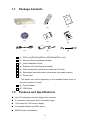
1
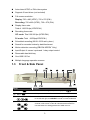
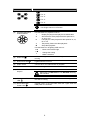
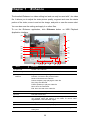
Auto-detect NTSC or PAL video system Supports 2 hard drives (not included) Full-screen resolution: Display: 720 x 480 (NTSC), 720 x 576 (PAL) Recording: 720 x 480 (NTSC), 720 x 576 (PAL) Display frame rate: Total of 120/100 fps (NTSC/PAL) Recording frame rate: CIF mode: Total 120/100 fps (NTSC/PAL) D1 mode: Total 60/50fps(NTSC/PAL) Scheduled recording (00:00~23:00 set by hour ) Search for recorded videos by date/time/event Motion detection recording (EB1504 MPEG4+ Only) Input/Output: 4 sensor inputs and 1 relay output control Removable hard disk bay One USB 2.0 Port Multiple language operation screens 1.3 Front & Side Panel Name Function (1) Record : Start video recording. To stop recording, press (2) Menu : Call up and exit the OSD main and sub menu (3) UP/DOWN/SELECT : Use the UP and DOWN buttons to change setting and move to the left and right, and SELECT to enter or make a selection (4) 1/2/3/4/Quad : Use these buttons in playback mode to switch to display each channel in full screen or view all channels at the same time Use the buttons in setting password of OSD menu to: 3