1
ConRoe865PE
User Manual
Version 3.2
Published October 2006
Copyright©2006 ASRock INC. All rights reserved.
1
Copyright Notice:
No part of this manual may be reproduced, transcribed, transmitted, or translated in
any language, in any form or by any means, except duplication of documentation by
the purchaser for backup purpose, without written consent of ASRock Inc.
Products and corporate names appearing in this manual may or may not be registered trademarks or copyrights of their respective companies, and are used only for
identification or explanation and to the owners’ benefit, without intent to infringe.
Disclaimer:
Specifications and information contained in this manual are furnished for informational use only and subject to change without notice, and should not be constructed
as a commitment by ASRock. ASRock assumes no responsibility for any errors or
omissions that may appear in this manual.
With respect to the contents of this manual, ASRock does not provide warranty of
any kind, either expressed or implied, including but not limited to the implied warranties or conditions of merchantability or fitness for a particular purpose.
In no event shall ASRock, its directors, officers, employees, or agents be liable for
any indirect, special, incidental, or consequential damages (including damages for
loss of profits, loss of business, loss of data, interruption of business and the like),
even if ASRock has been advised of the possibility of such damages arising from any
defect or error in the manual or product.
This device complies with Part 15 of the FCC Rules. Operation is subject to the
following two conditions:
(1) this device may not cause harmful interference, and
(2) this device must accept any interference received, including interference that
may cause undesired operation.
ASRock Website: http://www.asrock.com
2
Contents
1 Introduction ................................................... ... 5
1.1
1.2
1.3
1.4
Package Contents................................................................ 5
Specifications ..................................................................... 6
Motherboard Layout ........................................................... 9
ASRock 8CH I/O .................................................................. 10
2 Installation ............................................. 11
2.1 Screw Holes ...................................................................... 11
2.2 Pre-installation Precautions ................................................ 11
2.3 CPU Installation ................................................................... 12
2.4 Installation of CPU Fan and Heatsink .................................. 14
2.5 Installation of Memory Modules (DIMM) .............................. 15
2.6 Expansion Slots (PCI and AGP Slots) ................................. 17
2.7 Jumpers Setup ................................................................... 18
2.8 Onboard Headers and Connectors .................................... 19
2.9 Serial ATA (SATA) Hard Disks Installation ........................... 22
2.10 Driver Installation Guide .................................................... 22
2.11 Untied Overclocking Technology......................................... 22
3 BIOS SSETUP
ETUP UTILITY
...................................... 23
UTILITY......................................
3.1 Introduction ..........................................................................
3.1.1 BIOS Menu Bar .........................................................
3.1.2 Navigation Keys .......................................................
3.2 Main Screen ........................................................................
3.3 Advanced Screen ...............................................................
3.3.1 CPU Configuration ....................................................
3.3.2 Chipset Configuration ...............................................
3.3.3 ACPI Configuration ...................................................
3.3.4 IDE Configuration ......................................................
3.3.5 PCIPnP Configuration ................................................
3.3.6 Floppy Configuration ................................................
3.3.7 Super IO Configuration .............................................
3.3.8 USB Configuration ....................................................
3.4 Hardware Health Event Monitoring Screen ........................
3.5 Boot Screen ........................................................................
3.5.1 Boot Settings Configuration .....................................
3.5.2 Boot Device Priority ..................................................
3.6 Security Screen ..................................................................
3.7 Exit Screen ..........................................................................
23
23
24
24
24
25
27
28
29
31
32
32
34
35
36
36
37
37
38
3
4 Software Support ........................................... 39
4.1 Install Operating System ...............................................
4.2 Support CD Information .................................................
4.2.1 Running Support CD ............................................
4.2.2 Drivers Menu ........................................................
4.2.3 Utilities Menu ........................................................
4.2.4 “LGA 775 CPU Installation Live Demo” Program ..
39
39
39
39
39
39
4.2.5 Contact Information ............................................. 39
4
Chapter 1 Introduction
Thank you for purchasing ASRock ConRoe865PE motherboard, a reliable
motherboard produced under ASRock’s consistently stringent quality control. It delivers excellent performance with robust design conforming to ASRock’s commitment to quality and endurance.
In this manual, chapter 1 and 2 contain introduction of the motherboard and step-bystep guide to the hardware installation. Chapter 3 and 4 contain the configuration
guide to BIOS setup and information of the Support CD.
Because the motherboard specifications and the BIOS software might be
updated, the content of this manual will be subject to change without
notice. In case any modifications of this manual occur, the updated
version will be available on ASRock website without further notice. You
may find the latest VGA cards and CPU support lists on ASRock website
as well. ASRock website http://www.asrock.com
1.1 Package Contents
ASRock ConRoe865PE Motherboard
(ATX Form Factor: 12.0-in x 9.0-in, 30.5 cm x 22.9 cm)
ASRock ConRoe865PE Quick Installation Guide
ASRock ConRoe865PE Support CD
(including LGA 775 CPU Installation Live Demo)
One 80-conductor Ultra ATA 66/100 IDE Ribbon Cable
One Ribbon Cable for a 3.5-in Floppy Drive
One Serial ATA (SATA) Data Cable (Optional)
One Serial ATA (SATA) HDD Power Cable (Optional)
One ASRock 8CH I/O Shield
5
1.2
Specifications
Platform
CPU
Chipset
Memory
Hybrid Booster
Expansion Slot
Audio
LAN
Rear Panel I/O
6
- ATX Form Factor: 12.0-in x 9.0-in, 30.5 cm x 22.9 cm
- LGA 775 for Intel® Dual Core Pentium® XE and Pentium® D /
Pentium® 4 / Celeron® D, supporting CoreTM 2 Duo Desktop
(Conroe), Presler and Cedar Mill processors (in 775-land
LGA package)
- FSB 1066/800/533 MHz (see CAUTION 1)
- Supports Hyper-Threading Technology (see CAUTION 2)
- Supports Untied Overclocking Technology (see CAUTION 3)
- Supports EM64T CPU
- Northbridge: Intel® 865PE / 865G
- Southbridge: Intel® ICH5
- Dual Channel DDR Memory Technology (see CAUTION 4)
- 4 x DDR DIMM slots
- Support DDR400/333/266 (see CAUTION 5)
- Max. capacity: 4GB
- CPU Frequency Stepless Control (see CAUTION 6)
- ASRock U-COP (see CAUTION 7)
- Boot Failure Guard (B.F.G.)
- 5 x PCI slots
- 1 x AGP slot (see CAUTION 8)
- Realtek ALC850 7.1 channel audio CODEC
- Realtek PCI LAN 8101L
- Speed: 10/100 Ethernet
- Supports Wake-On-LAN
ASRock 8CH I/O
- 1 x PS/2 Mouse Port
- 1 x PS/2 Keyboard Port
- 1 x Serial Port: COM1
- 1 x Parallel Port (ECP/EPP Support)
- 4 x Ready-to-Use USB 2.0 Ports
- 1 x RJ-45 LAN Port
- Audio Jack: Side Speaker/Rear Speaker/Central/Bass/
Line in/Front Speaker/Microphone (see CAUTION 9)
Connector
BIOS Feature
Support CD
Hardware
Monitor
OS
Certifications
- 2 x Serial ATA 1.5Gb/s connectors
(No Support for RAID and “Hot Plug” functions)
- 2 x ATA100 IDE connectors (support 4 x IDE devices)
- 1 x Floppy connector
- 1 x IR header
- 1 x Game header
- CPU/Chassis FAN connector
- 20 pin ATX power connector
- 4 pin 12V power connector
- CD in header
- Front panel audio connector
- 2 x USB 2.0 headers (support 4 USB 2.0 ports)
(see CAUTION 10)
- 4Mb AMI BIOS
- AMI Legal BIOS
- Supports “Plug and Play”
- ACPI 1.1 Compliance Wake Up Events
- Supports jumperfree
- AMBIOS 2.3.1 Support
- Drivers, Utilities, AntiVirus Software (Trial Version)
- CPU Temperature Sensing
- Chassis Temperature Sensing
- CPU Fan Tachometer
- Chassis Fan Tachometer
- CPU Quiet Fan
- Voltage Monitoring: +12V, +5V, +3.3V, Vcore
- Microsoft® Windows® 98SE / ME / 2000 / XP / XP 64-bit
compliant
- FCC, CE, WHQL
7
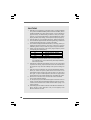
CAUTION!
1.
FSB1066 is only supported by overclocking mode. To support FSB1066
CPU, please use DDR400 DIMMs (Double Data Rate 400 MHz). Before
installing FSB1066 CPU, please make sure that you have adjusted the
jumpers correctly. The default setting of FSB1 is to short pin1 and pin2.
However, if you want this motherboard to support FSB1066 CPU, please
2.
adjust your FSB1 jumper setting, and short pin2 and pin3 (see page 18).
About the setting of “Hyper Threading Technology”, please check page 26.
3.
This motherboard supports Untied Overclocking Technology. Please read
“Untied Overclocking Technology” on page 22 for details.
4.
This motherboard supports Dual Channel Memory Technology. Before you
implement Dual Channel Memory Technology, make sure to read the
5.
installation guide of memory modules on page 15 for proper installation.
Please check the table below for the memory support frequency and its
corresponding CPU FSB frequency.
CPU FSB Frequency
Memory Support Frequency
800
533
DDR266, DDR333*, DDR400
DDR266, DDR333
1066
DDR400*
* When you use a FSB800-CPU on this motherboard, it will run at
DDR320 if you adopt a DDR333 memory module. Besides, if you
use a FSB1066-CPU on this motherboard, please adopt a DDR400
6.
CL2.5 memory module.
Although this motherboard offers stepless control, it is not recommended
to perform over-clocking. Frequencies other than the recommended CPU
bus frequencies may cause the instability of the system or damage the
7.
CPU.
While CPU overheat is detected, the system will automatically shutdown.
Before you resume the system, please check if the CPU fan on the
motherboard functions properly and unplug the power cord, then plug it
back again. To improve heat dissipation, remember to spray thermal
grease between the CPU and the heatsink when you install the PC system.
8.
Do NOT use a 3.3V AGP card on the AGP slot of this motherboard!
It may cause permanent damage!
9.
For microphone input, this motherboard supports both stereo and mono
modes. For audio output, this motherboard supports 2-channel, 4-channel,
6-channel, and 8-channel modes. Please check the table on page 10 for
proper connection.
10. Power Management for USB 2.0 works fine under Microsoft® Windows® XP
64-bit / XP SP1 or SP2 / 2000 SP4. It may not work properly under
Microsoft® Windows® 98 / ME.
8
1.3 Motherboard Layout
1 2
4
3
56
22.9cm (9.0 in)
1
PS2
Mouse
PS2_USB_PWR1
AGP 8X
27
FSB1
Intel
ICH5
PCI 2
ConRoe865PE
PCI
LAN
SATA
CMOS
Battery
CLRCMOS0
PCI 4
AUDIO
CODEC
1
USB67
USB45
PCI 5
JR1 JL1
30.5cm (12.0 in)
11
12
13
14
PANEL 1
PLED PWRBTN
1
AUDIO1
23
7
8
9
10
11
12
13
14
SATA1 SATA2
USB2.0
1
6
10
`
RoHS
PCI 3
25
1
2
3
4
5
IDE2
9
1
PCI 1
7.1CH
24
DDR3 (64/72 bit, 184-pin module)
8
1.5V_AGP1
4Mb
BIOS
CHA_FAN1
26
IDE1
Super
IO
Intel
865PE/865G
Chipset
FSB1066
Center:
FRONT
Top:
LINE IN
Bottom:
MIC IN
28
7
Dual Core CPU
Dual Channel
29
ATXPWR1
Center:
SIDE SPK
Bottom:
CTR BASS
Top:
REAR SPK
DDR400
Top:
RJ-45
CPU_FAN1
USB 2.0
T: USB0
B: USB1
DDR4 (64/72 bit, 184-pin module)
DDR1 (64/72 bit, 184-pin module)
USB 2.0
T: USB2
B: USB3
DDR2 (64/72 bit, 184-pin module)
Presler
Conroe
COM1
PARALLEL PORT
PS2
Keyboard
ATX12V1
CD1
1
GAME1
22
21
PS2_USB_PWR1 Jumper
ATX 12V Connector (ATX12V1)
775-Pin CPU Socket
North Bridge Controller
2 x 184-pin DDR DIMM Slots
(Dual Channel A: DDR1, DDR3; Blue)
2 x 184-pin DDR DIMM Slots
(Dual Channel B: DDR2, DDR4; Black)
Secondary IDE Connector (IDE2, Black)
Primary IDE Connector (IDE1, Blue)
FSB Select Jumper (FSB1)
South Bridge Controller
Primary Serial ATA Connector (SATA1)
Secondary Serial ATA Connector (SATA2)
Clear CMOS Jumper (CLRCMOS0)
Chassis Fan Connector (CHA_FAN1)
1
IR1
FLOPPY1
20
15
16
17
18
19
20
21
22
23
24
25
26
27
28
29
SPEAKER1
19 1817 16
1
HDLED RESET
15
System Panel Header (PANEL1)
Chassis Speaker Header (SPEAKER 1)
USB 2.0 Header (USB67, Blue)
Infrared Module Header (IR1)
USB 2.0 Header (USB45, Blue)
Floppy Connector (FLOPPY1)
Game Connector (GAME1)
Internal Audio Connector: CD1 (Black)
Front Panel Audio Header (AUDIO1)
JR1 / JL1 Jumpers
PCI Slots (PCI1- 5)
BIOS FWH Chip
AGP Slot (1.5V_AGP1)
ATX Power Connector (ATXPWR1)
CPU Fan Connector (CPU_FAN1)
9
1.4
ASRock 8CH I/O
1
13
1
2
3
4
5
6
*7
2
11
12
10
Parallel Port
RJ-45 Port
Side Speaker (Gray)
Rear Speaker (Black)
Central / Bass (Orange)
Line In (Light Blue)
8
9
10
11
12
13
3
6
4
7
5
8
9
Microphone (Pink)
USB 2.0 Ports (USB01)
USB 2.0 Ports (USB23)
Serial Port: COM1
PS/2 Keyboard Port (Purple)
PS/2 Mouse Port (Green)
Front Speaker (Lime)
* If you use 2-channel speaker, please connect the speaker’s plug into “Front Speaker Jack”. See
the table below for connection details in accordance with the type of speaker you use.
TABLE for Audio Output Connection
Audio Output Channels Front Speaker Rear Speaker
(No. 7)
(No. 4)
10
Central / Bass
(No. 5)
Side Speaker
(No. 3)
2
4
V
V
-V
---
---
6
8
V
V
V
V
V
V
-V
Chapter 2 Installation
ConRoe865PE is an ATX form factor (12.0" x 9.0", 30.5 x 22.9 cm) motherboard.
Before you install the motherboard, study the configuration of your chassis to
ensure that the motherboard fits into it.
Make sure to unplug the power cord before installing or removing the
motherboard. Failure to do so may cause physical injuries to you and
damages to motherboard components.
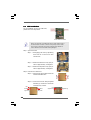
2.1 Screw Holes
Place screws into the holes indicated by circles to secure the motherboard to the
chassis.
Do not over-tighten the screws! Doing so may damage the motherboard.
2.2 Pre-installation Precautions
Take note of the following precautions before you install motherboard components
or change any motherboard settings.
1. Unplug the power cord from the wall socket before touching any component.
2. To avoid damaging the motherboard components due to static electricity, NEVER
place your motherboard directly on the carpet or the like. Also remember to use
a grounded wrist strap or touch a safety grounded object before you handle
components.
3. Hold components by the edges and do not touch the ICs.
4. Whenever you uninstall any component, place it on a grounded antistatic pad or
in the bag that comes with the component.
Before you install or remove any component, ensure that the power is
switched off or the power cord is detached from the power supply.
Failure to do so may cause severe damage to the motherboard, peripherals,
and/or components.
11
2.3 CPU Installation
For the installation of Intel 775-LAND CPU,
please follow the steps below.
775-Pin Socket Overview
Before you insert the 775-LAND CPU into the socket, please check if
the CPU surface is unclean or if there is any bent pin on the socket.
Do not force to insert the CPU into the socket if above situation is
found. Otherwise, the CPU will be seriously damaged.
CPU Marked Corner
Step 1. Open the socket:
Step 1-1. Disengaging
the lever by depressing
Lift Lever Up to 90°
Corner
down and out on the Socket
hookMarked
to clear
retention tab.
Step 1-2. Rotate the load lever to fully open position at approximately 135 degrees.
Step 1-3. Rotate the load plate to fully open position at approximately 100 degrees.
black line
black line
Step 2. Insert the 775-LAND CPU:
Step 2-1. Hold the CPU by the edges where are
marked with black lines.
Step 2-2. Orient the CPU with IHS (Integrated
Heat Sink) up. Locate Pin1 and the two
orientation key notches.
Pin1
orientation
key notch
orientation
key notch
Pin1
alignment key
alignment key
775-Pin Socket
775-LAND CPU
12
For proper inserting, please ensure to match the two orientation key
notches of the CPU with the two alignment keys of the socket.
Step 2-3. Carefully place the CPU into the socket
by using a purely vertical motion.
Step 2-4. Verify that the CPU is within the socket
and properly mated to the orient keys.
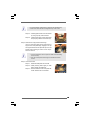
Step 3. Remove PnP Cap (Pick and Place Cap):
Use your left hand index finger and thumb to
support the load plate edge, engage PnP cap
with right hand thumb and peel the cap from the
socket while pressing on center of PnP cap to
assist in removal.
1. It is recommended to use the cap tab to handle and avoid kicking
off the PnP cap.
2. This cap must be placed if returning the motherboard for after
service.
Step 4. Close the socket:
Step 4-1. Rotate the load plate onto the IHS.
Step 4-2. While pressing down lightly on load
plate, engage the load lever.
Step 4-3. Secure load lever with load plate tab
under retention tab of load lever.
13
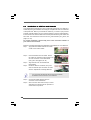
2.4
Installation of CPU Fan and Heatsink
This motherboard is equipped with 775-Pin socket that supports Intel 775-LAND CPU.
Please adopt the type of heatsink and cooling fan compliant with Intel 775-LAND CPU
to dissipate heat. Before you installed the heatsink, you need to spray thermal
interface material between the CPU and the heatsink to improve heat dissipation.
Ensure that the CPU and the heatsink are securely fastened and in good contact with
each other. Then connect the CPU fan to the CPU_FAN connector (CPU_FAN1, see
page 9, No. 29).
For proper installation, please kindly refer to the instruction manuals of
your CPU fan and heatsink.
Below is an example to illustrate the installation of the heatsink for 775-LAND CPU.
Step 1. Apply thermal interface material onto center
of IHS on the socket surface.
Step 2.
Step 3.
Step 4.
Place the heatsink onto the socket. Ensure
fan cables are oriented on side closest to the
CPU fan connector on the motherboard
(CPU_FAN1, see page 9, No. 29).
Align fasteners with the motherboard
throughholes.
Rotate the fastener clockwise, then press
down on fastener caps with thumb to install
and lock. Repeat with remaining fasteners.
If you press down the fasteners without rotating them clockwise,
the heatsink cannot be secured on the motherboard.
Step 5.
Step 6.
14
Connect fan header with the CPU fan
connector on the motherboard.
Secure excess cable with tie-wrap to ensure
cable does not interfere with fan operation or
contact other components.
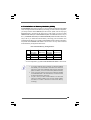
2.5 Installation of Memory Modules (DIMM)
ConRoe865PE motherboard provides four 184-pin DDR (Double Data Rate) DIMM
slots, and supports Dual Channel Memory Technology. For dual channel configuration,
you always need to install identical (the same brand, speed, size and chip-type)
DDR DIMM pair in the slots of the same color. In other words, you have to install
identical DDR DIMM pair in Dual Channel A (DDR1 and DDR3; Blue slots; see p.9
No. 5) or identical DDR DIMM pair in Dual Channel B (DDR2 and DDR4; Black slots;
see p.9 No. 6), so that Dual Channel Memory Technology can be activated. This
motherboard also allows you to install four DDR DIMMs for dual channel configuration,
and please install identical DDR DIMMs in all four slots. You may refer to the Dual
Channel Memory Configuration Table below.
Dual Channel Memory Configurations
DDR1
(Blue Slot)
Populated
Populated
(1)
(2)
(3)*
DDR2
(Black Slot)
Populated
Populated
DDR3
(Blue Slot)
Populated
Populated
DDR4
(Black Slot)
Populated
Populated
* For the configuration (3), please install identical DDR DIMMs in all four slots.
1.
If you want to install two memory modules, for optimal compatibility
and reliability, it is recommended to install them in the slots of the
same color. In other words, install them either in the set of blue slots
(DDR1 and DDR3), or in the set of black slots (DDR2 and DDR4).
2.
3.
If only one memory module or three memory modules are installed
in the DDR DIMM slots on this motherboard, it is unable to activate
the Dual Channel Memory Technology.
If a pair of memory modules is NOT installed in the same Dual
Channel, for example, installing a pair of memory modules in DDR1
and DDR2, it is unable to activate the Dual Channel Memory
Technology.
15
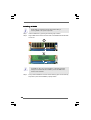
Installing a DIMM
Please make sure to disconnect power supply before adding or
removing DIMMs or the system components.
Step 1.
Step 2.
Unlock a DIMM slot by pressing the retaining clips outward.
Align a DIMM on the slot such that the notch on the DIMM matches the break
on the slot.
notch
break
notch
break
The DIMM only fits in one correct orientation. It will cause permanent
damage to the motherboard and the DIMM if you force the DIMM into the
slot at incorrect orientation.
Step 3.
16
Firmly insert the DIMM into the slot until the retaining clips at both ends fully
snap back in place and the DIMM is properly seated.
2.6 Expansion Slots (PCI and AGP Slots)
There are 5 PCI slots and 1 AGP slot on ConRoe865PE motherboard.
PCI slots: PCI slots are used to install expansion cards that have the 32-bit PCI
interface.
AGP slot: The AGP slot is used to install a graphics card. The AGP slot has a special
design of clasp that can securely fasten the inserted graphics
card.
Please do NOT use a 3.3V AGP card on the AGP slot of this
motherboard! It may cause permanent damage! For the voltage
information of your AGP card, please check with the AGP card
vendors.
Installing an expansion card
STEP 1: Before installing the expansion card, please make sure that the power
supply is switched off or the power cord is unplugged. Please read the
documentation of the expansion card and make necessary hardware
settings for the card before you start the installation.
STEP 2: Remove the system unit cover (if your motherboard is already installed in
a chasis).
STEP 3: Remove the bracket facing the slot that you intend to use. Keep the screws
for later use.
STEP 4: Align the card connector with the slot and press firmly until the card is
completely seated on the slot.
STEP 5: Fasten the card to the chassis with screws.
STEP 6: Replace the system cover.
17
2.7 Jumpers Setup
The illustration shows how jumpers are
setup. When the jumper cap is placed on
pins, the jumper is “Short”. If no jumper cap
is placed on pins, the jumper is “Open”. The
illustration shows a 3-pin jumper whose pin1
and pin2 are “Short” when jumper cap is
placed on these 2 pins.
Jumper
FSB1
Setting
(see p.9 item 9)
1_2
1_2
FSB 533MHz
FSB 800MHz
PS2_USB_PWR1
2_3
FSB 1066MHz
Description
“NORMAL” (short pin1, pin2)
is the default setting for the
FSB jumper. “1066” (short
pin2, pin3) is the setting for
the over clocking of CPU
frequency.
Short pin2, pin3 to enable
+5VSB (standby) for PS/2
+5V
+5VSB
or USB wake up events.
Note: To select +5VSB, it requires 2 Amp and higher standby current provided by
power supply.
1_2
2_3
(see p.9 No. 1)
JR1(see p.9 No. 24)
JL1(see p.9 No. 24)
JR1
JL1
Note: If the jumpers JL1 and JR1 are short, both the front panel and the rear panel
audio connectors can work.
Clear CMOS
(CLRCMOS0, 2-pin jumper)
(see p.9 No. 13)
2-pin jumper
Note: CLRCMOS0 allows you to clear the data in CMOS. The data in CMOS includes
system setup information such as system password, date, time, and system
setup parameters. To clear and reset the system parameters to default setup,
please turn off the computer and unplug the power cord from the power
supply. After waiting for 15 seconds, use a jumper cap to short 2 pins on
CLRCMOS0 for 5 seconds.
18
2.8 Onboard Headers and Connectors
Onboard headers and connectors are NOT jumpers. Do NOT place
jumper caps over these headers and connectors. Placing jumper caps
over the headers and connectors will cause permanent damage of the
motherboard!
FDD connector
(33-pin FLOPPY1)
Pin1
(see p.9 No. 20)
FLOPPY1
the red-striped side to Pin1
Note: Make sure the red-striped side of the cable is plugged into Pin1 side of the
connector.
Primary IDE connector (Blue)
Secondary IDE connector (Black)
(39-pin IDE1, see p.9 No. 8)
(39-pin IDE2, see p.9 No. 7)
PIN1
IDE1
PIN1
IDE2
connect the black end
connect the blue end
to the IDE devices
to the motherboard
80-conductor ATA 66/100 cable
Note: If you use only one IDE device on this motherboard, please set the IDE
device as “Master”. Please refer to the instruction of your IDE device vendor
for the details. Besides, to optimize compatibility and performance, please
connect your hard disk drive to the primary IDE connector (IDE1, blue) and
CD-ROM to the secondary IDE connector (IDE2, black).
Serial ATA Connectors
(SATA1: see p.9 No. 11)
(SATA2: see p.9 No. 12)
SATA1
Serial ATA (SATA)
Data Cable
SATA2
These two Serial ATA (SATA)
connectors support SATA data
cables for internal storage
devices. The current SATA
interface allows up to 1.5 Gb/s
data transfer rate.
Either end of the SATA data cable
can be connected to the SATA
hard disk or the SATA connector
on the motherboard.
19
Serial ATA (SATA)
Power Cable
(Optional)
connect to the
power supply
connect to the SATA HDD
power connector
USB_PWR
P-6
P+6
GND
DUMMY
USB 2.0 Header
(9-pin USB67)
(see p.9 No. 17)
1
GND
P+7
P-7
USB_PWR
USB 2.0 Header
USB_PWR
P-5
P+5
GND
DUMMY
(9-pin USB45)
(see p.9 No. 19)
1
GND
P+4
P-4
USB_PWR
IRTX
+5VSB
DUMMY
Infrared Module Header
(5-pin IR1)
(see p.9 No. 18)
1
GND
IRRX
Internal Audio Connectors
(4-pin CD1)
CD-L
GND
GND
CD-R
(CD1: see p.9 No. 22)
CD1
Front Panel Audio Header
GND
(8-pin AUDIO1)
BACKOUT-R
BACKOUT-L
(see p.9 No. 23)
1
AUD-OUT-L
GND
AUD-OUT-R
MIC-POWER
MIC
20
Please connect the black end of
SATA power cable to the power
connector on each drive. Then
connect the white end of SATA
power cable to the power
connector of the power supply.
ASRock 8CH I/O accommodates 4 default USB 2.0 ports. If
those USB 2.0 ports on the I/O
panel are not sufficient, this
USB 2.0 header is available to
support 2 additional USB 2.0
ports.
ASRock 8CH I/O accommodates 4 default USB 2.0 ports. If
those USB 2.0 ports on the I/O
panel are not sufficient, this
USB 2.0 header is available to
support 2 additional USB 2.0
ports.
This header supports an
optional wireless transmitting
and receiving infrared module.
This connector allows you
to receive stereo audio input
from sound sources such as
a CD-ROM, DVD-ROM, TV
tuner card, or MPEG card.
This is an interface for front
panel audio cable that allows
convenient connection and
control of audio devices.
PLED+
PLEDPWRBTN#
GND
System Panel Header
(9-pin PANEL1)
(see p.9 No. 15)
1
This header accommodates
several system front panel
functions.
DUMMY
RESET#
GND
HDLEDHDLED+
Chassis Speaker Header
1
SPEAKER
DUMMY
DUMMY
+5V
(4-pin SPEAKER 1)
(see p.9 No. 16)
Chassis Fan Connector
GND
+12V
CHA_FAN_SPEED
(3-pin CHA_FAN1)
(see p.9 No. 14)
CPU Fan Connector
GND
+12V
CPU_FAN_SPEED
FAN_SPEED_CONTROL
(4-pin CPU_FAN1)
(see p.9 No. 29)
ATX Power Connector
Please connect the chassis
speaker to this header.
Please connect a chassis fan
cable to this connector and
match the black wire to the
ground pin.
Please connect a CPU fan cable
to this connector and match
the black wire to the ground pin.
Please connect an ATX power
supply to this connector.
(20-pin ATXPWR1)
(see p.9 No. 28)
Game Port Connector
+5V
JBB1
JBX
MIDI_OUT
JBY
JBB2
MIDI_IN
(15-pin GAME1)
(see p.9 No. 21)
Connect a Game cable to this
connector if the Game port
bracket is installed.
1
+5V
JAB2
JAY
GND
GND
JAX
JAB1
+5V
ATX 12V Connector
(4-pin ATX12V1)
(see p.9, No. 2)
Please note that it is necessary
to connect a power supply with
ATX 12V plug to this connector
so that it can provides sufficient
power. Failing to do so will cause
the failure to power up.
21
2.9
Serial A
ATTA (SA
(SATTA) Hard Disks Installation
This motherboard adopts Intel® ICH5 south bridge chipset that supports Serial ATA
(SATA) hard disks. You may install SATA hard disks on this motherboard for
internal storage devices. This section will guide you to install the SATA hard disks.
STEP 1: Install the SATA hard disks into the drive bays of your chassis.
STEP 2: Connect the SATA power cable to the SATA hard disk.
STEP 3: Connect one end of the SATA data cable to the motherboard’s primary
SATA connector (SATA1).
STEP 4: Connect the other end of the SATA data cable to the primary SATA hard
disk. If you just want to install only one SATA HDD, the installation
process is complete at this step. If you want to install two SATA HDDs,
please continue to do the following steps.
STEP 5: Connect the SATA power cable to the SATA hard disk.
STEP 6: Connect one end of the second SATA data cable to the motherboard’s
secondary SATA connector (SATA2).
STEP 7: Connect the other end of the SATA data cable to the secondary SATA hard
disk.
Before you install OS into the SATA hard disk, you need to check and
ensure the configuration of the OnBoard IDE Operate Mode option in
BIOS setup is correct according to the condition of your system. For
the configuration details, please refer to the instruction on page 29.
2.10 Driver Installation Guide
To install the drivers to your system, please insert the support CD to your optical
drive first. Then, the drivers compatible to your system can be auto-detected and
listed on the support CD driver page. Please follow the order from up to bottom
side to install those required drivers. Therefore, the drivers you install can work
properly.
2.11 Untied Overclocking TTechnology
echnology
This motherboard supports Untied Overclocking Technology, which means during
overclocking, FSB enjoys better margin due to fixed AGP / PCI bus. You may set
“CPU Host Frequency” option of BIOS setup to [Auto], which will show you the
actual CPU host frequency in the following item. Therefore, CPU FSB is untied
during overclocking, but AGP / PCI bus is in the fixed mode so that FSB can
operate under a more stable overclocking environment.
22
Chapter 3 BIOS SETUP UTILITY
3.1
Introduction
This section explains how to use the BIOS SETUP UTILITY to configure your system.
The BIOS FWH chip on the motherboard stores the BIOS SETUP UTILITY. You may
run the BIOS SETUP UTILITY when you start up the computer. Please press <F2>
during the Power-On-Self-Test (POST) to enter the BIOS SETUP UTILITY, otherwise,
POST will continue with its test routines.
If you wish to enter the BIOS SETUP UTILITY after POST, restart the system by
pressing <Ctl> + <Alt> + <Delete>, or by pressing the reset button on the system
chassis. You may also restart by turning the system off and then back on.
Because the BIOS software is constantly being updated, the
following BIOS setup screens and descriptions are for reference purpose only, and they may not exactly match what you
see on your screen.
3.1.1 BIOS Menu Bar
The top of the
Main
Advanced
PCIPnP
Boot
screen has a menu bar with the following selections:
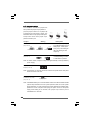
To set up the system time/date information
To set up the advanced BIOS features
To set up the PCI features
To set up the default system device to locate and load the
Operating System
Security
To set up the security features
Chipset
To set up the chipset features
Exit
To exit the current screen or the BIOS SETUP UTILITY
Use < > key or < > key to choose among the selections on the menu bar,
and then press <Enter> to get into the sub screen.
23
3.1.2 Navigation Keys
Please check the following table for the function description of each navigation
key.
Navigation Key(s)
/
/
+ / <Enter>
<F1>
<F9>
<F10>
<ESC>
3.2
Function Description
Moves cursor left or right to select Screens
Moves cursor up or down to select items
To change option for the selected items
To bring up the selected screen
To display the General Help Screen
To load optimal default values for all the settings
To save changes and exit the BIOS SETUP UTILITY
To jump to the Exit Screen or exit the current screen
Main Screen
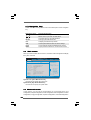
When you enter the BIOS SETUP UTILITY, the Main screen will appear and display
the system overview
Advanced
Main
BIOS SETUP UTILITY
H/W Monitor
Boot
System Overview
System Time
System Date
[14:00:09]
[Fri 05/19/2006]
: ConRoe865PE BIOS P1.00
: Intel (R) CPU 3.40 GHz
(64bit supported)
Processor Speed : 3400 MHz
: 1024KB
Cache Size
Microcode Update : 0F34/17
BIOS Version
Processor Type
Total Memory
DIMM
DIMM
DIMM
DIMM
1
2
3
4
: 512MB
Dual-Channel Memory Mode
: 256MB/166MHz (DDR333)
: None
: 256MB/166MHz (DDR333)
: None
Security
Exit
Use [Enter], [TAB]
or [SHIFT-TAB] to
select a field.
Use [+] or [-] to
configure system Time.
+Tab
F1
F9
F10
ESC
Select Screen
Select Item
Change Field
Select Field
General Help
Load Defaults
Save and Exit
Exit
v02.54 (C) Copyright 1985-2003, American Megatrends, Inc.
System Time [Hour:Minute:Second]
Use this item to specify the system time.
System Date [Day Month/Date/Year]
Use this item to specify the system date.
3.3 Advanced Screen
In this section, you may set the configurations for the following items: CPU
Configuration, Chipset Configuration, ACPI Configuration, IDE Configuration, PCIPnP
Configuration, Floppy Configuration, SuperIO Configuration, and USB Configuration.
24
Main
BIOS SETUP UTILITY
H/W Monitor
Boot
Advanced
Security
Exit
Configure CPU
Advanced Settings
WARNING : Setting wrong values in below sections
may cause system to malfunction.
CPU Configuration
Chipset Configuration
ACPI Configuration
IDE Configuration
PCIPnP Configuration
Floppy Configuration
SuperIO Configuration
USB Configuration
Enter
F1
F9
F10
ESC
Select Screen
Select Item
Go to Sub Screen
General Help
Load Defaults
Save and Exit
Exit
v02.54 (C) Copyright 1985-2003, American Megatrends, Inc.
Setting wrong values in this section may cause
the system to malfunction.
3.3.1 CPU Configuration
BIOS SETUP UTILITY
Advanced
Select how to set the
CPU host frequency.
CPU Configuration
CPU Host Frequency
Actual Frequency (MHz)
Boot Failure Guard
Spread Spectrum
[Auto]
[200]
[Enabled]
[Auto]
Ratio Status
Unlocked (Max :17, Min : 14)
Ratio Actual Value
17
[17]
Ratio CMOS Setting
Enhance Halt State
Max CPUID Value Limit
Intel (R) Virtualization tech.
CPU Thermal Throttling
No-Excute Memory Protection
Hyper Threading Technology
Intel (R) SpeedStep(tm) tech.
[Disabled]
[Disabled]
[Enabled]
[Enabled]
[Disabled]
[Enabled]
[Auto]
+F1
F9
F10
ESC
Select Screen
Select Item
Change Option
General Help
Load Defaults
Save and Exit
Exit
v02.54 (C) Copyright 1985-2003, American Megatrends, Inc.
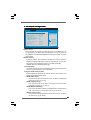
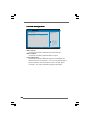
CPU Host Frequency
While entering setup, BIOS auto detects the present CPU host frequency of
this motherboard. The actual CPU host frequency will show in the following
item.
Boot Failure Guard
Enable or disable the feature of Boot Failure Guard.
Spread Spectrum
This item should always be [Auto] for better system stability.
Ratio Status
This is a read-only item, which displays whether the ratio status of this
motherboard is “Locked” or “Unlocked”. If it shows “Unlocked”, you will find
an item Ratio CMOS Setting appears to allow you changing the ratio value
of this motherboard. If it shows “Locked”, then the item Ratio CMOS Setting will be hidden. If you use the ratio value to time the CPU frequency, it will
be equal to the core speed of the installed processor.
25
Ratio Actual Value
This is a read-only item, which displays the ratio actual value of this
motherboard.
Ratio CMOS Setting
If the ratio status is unlocked, you will find this item appear to allow you
changing the ratio value of this motherboard.
Enhance Halt State
All processors support the Halt State (C1). The C1 state is supported
through the native processor instructions HLT and MWAIT and requires no
hardware support from the chipset. In the C1 power state, the processor
maintains the context of the system caches.
Max CPUID Value Limit
For Prescott CPU only, some OSes (ex. NT4.0) cannot handle the function
with disable. This should be enabled in order to boot legacy OSes that
cannot support CPUs with extended CPUID functions.
Intel (R) Virtualization tech.
When this option is set to [Enabled], a VMM (Virtual Machine Architecture)
can utilize the additional hardware capabilities provided by Vanderpool
Technology. This option will be hidden if the installed CPU does not support
Intel (R) Virtualization Technology.
CPU Thermal Throttling
You may select [Enabled] to enable P4 CPU internal thermal control mechanism to keep the CPU from overheated.
No-Excute Memory Protection
No-Execution (NX) Memory Protection Technology is an enhancement to the
IA-32 Intel Architecture. An IA-32 processor with “No Execute (NX) Memory
Protection” can prevent data pages from being used by malicious software
to execute code. This option will be hidden if the current CPU does not
support No-Excute Memory Protection.
Hyper Threading Technology
To enable this feature, it requires a computer system with an Intel Pentium®4
processor that supports Hyper-Threading technology and an operating system that includes optimization for this technology, such as Microsoft® Windows® XP. Set to [Enabled] if using Microsoft® Windows® XP, or Linux kernel
version 2.4.18 or higher. This option will be hidden if the installed CPU does
not support Hyper-Threading technology.
Intel (R) SpeedStep(tm) tech.
Intel (R) SpeedStep(tm) tech. is Intel’s new power saving technology. Processor can switch between multiple frequency and voltage points to enable
power savings. If you select [Auto], you need to set the “Power Schemes”
as “Portable/Laptop” to enable this function.
26
3.3.2 Chipset Configuration
BIOS SETUP UTILITY
Advanced
Chipset Configuration
Bypass Access
DRAM Frequency
Flexibility Option
Configure DRAM Timing by SPD
DRAM CAS# Latency
DRAM RAS# Precharge
DRAM RAS# to CAS# Delay
DRAM Precharge Delay
DRAM Burst Length
Options
[Off]
[Auto]
[Disabled]
[Disabled]
[Auto]
[4]
[4]
[8]
[4]
Init. Graphic Adapter Priority
Graphics Aperture Size
[PCI / AGP]
[64MB]
OnBoard LAN
OnBoard AC'97 Audio
[Enabled]
[Auto]
133MHz
166MHz
200MHz
Auto
+F1
F9
F10
ESC
(DDR266)
(DDR333)
(DDR400)
Select Screen
Select Item
Change Option
General Help
Load Defaults
Save and Exit
Exit
v02.54 (C) Copyright 1985-2003, American Megatrends, Inc.
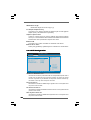
Bypass Access
This technology can provide users with the function of increasing the system performance. The default value is [Disabled]. It will only work when you
use FSB800 CPU and DDR400 DRAM at the same time; otherwise, this option
will be hidden.
DRAM Frequency
If [Auto] is selected, the motherboard will detect the memory module(s)
inserted and assigns appropriate frequency automatically. You may also
select other value as operating frequency: [133MHz (DDR 266)],
[166MHz (DDR 333)], [200MHz (DDR 400)].
Flexibility Option
The default value of this option is [Disabled]. It will allow better tolerance for
memory compatibility when it is set to [Enabled].
Configure DRAM Timing by SPD
Select [Enabled] will configure the following items by the contents in the
SPD (Serial Presence Detect) device.
DRAM CAS# Latency
Use this item to adjust the means of memory accessing. Configuration
options: [Auto], [2.5], [2], and [3].
DRAM RAS# Precharge
This controls the idle clocks after a precharge command is issued.
Configuration options: [4], [3], and [2].
DRAM RAS# to CAS# Delay
This controls the latency between the DRAM active command and the
read / write command. Configuration options: [4], [3], and [2].
DRAM Precharge Delay
This controls the number of DRAM clocks for RAS minimum. Configuration options: [8], [7], [6], and [5].
27
DRAM Burst Length
DRAM Burst length can be set as [8] or [4].
Init. Graphic Adapter Priority
This allows you to select [PCI/AGP] and [AGP/PCI] as the initial graphics
adapter priority. The default vaule is [PCI/AGP].
Graphics Aperture Size
It refers to a section of the PCI memory address range used for graphics
memory. It is recommended to leave this field at the default value unless the
installed AGP card’s specifications requires other sizes.
OnBoard LAN
This allows you to enable or disable the “OnBoard LAN” feature.
OnBoard AC’97 Audio
Select [Auto], [Enabled] or [Disabled] for the onboard AC’97 Audio feature.
3.3.3 ACPI Configuration
BIOS SETUP UTILITY
Advanced
ACPI Configuration
Suspend To RAM
[Disabled]
Restore on AC / Power Loss
Ring-In Power On
PCI Devices Power On
PS / 2 Keyboard Power On
RTC Alarm Power On
[Power Off]
[Disabled]
[Disabled]
[Disabled]
[Disabled]
Select auto-detect or
disable the STR
feature.
+F1
F9
F10
ESC
Select Screen
Select Item
Change Option
General Help
Load Defaults
Save and Exit
Exit
v02.54 (C) Copyright 1985-2003, American Megatrends, Inc.
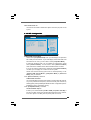
Restore on AC/Power Loss
Use this item to set the power state after an unexpected AC/power loss. If
[Power Off] is selected, the AC/power remains off when the power
recovers. If [Power On] is selected, the AC/power resumes and the system starts to boot up when the power recovers.
Ring-In Power On
Use this item to enable or disable Ring-In signals to turn on the system from
the power-soft-off mode.
PCI Devices Power On
Use this item to enable or disable PCI devices to turn on the system from the
power-soft-off mode.
PS/2 Keyboard Power On
Use this item to enable or disable PS/2 keyboard to turn on the system from
the power-soft-off mode.
28
RTC Alarm Power On
Use this item to enable or disable RTC (Real Time Clock) to power on the
system.
3.3.4 IDE Configuration
BIOS SETUP UTILITY
Advanced
IDE Configuration
OnBoard IDE Operate Mode
OnBoard IDE Controller
Primary IDE Master
Primary IDE Slave
Secondary IDE Master
Secondary IDE Slave
SATA1
SATA2
[Enhanced Mode]
[Both]
[Hard Disk]
[Not Detected]
[Not Detected]
[Not Detected]
[Not Detected]
[Not Detected]
Set [Compatible Mode]
when both Legacy OS
(MS-DOS, Win Me / 98SE)
and SATA device
are used.
Set [Enhanced Mode]
when Native OS
(Win 2000 / XP)
is used.
+F1
F9
F10
ESC
Select Screen
Select Item
Change Option
General Help
Load Defaults
Save and Exit
Exit
v02.54 (C) Copyright 1985-2003, American Megatrends, Inc.
OnBoard IDE Operate Mode
Please select [Compatible Mode] when you install legacy OS (Windows
ME / 98SE) into SATA device. If you install legacy OS into IDE HDD while
SATA devices are used, you also need to select [Compatible Mode].
If native OS (Windows 2000 / XP) is installed into SATA device, please
select [Enhanced Mode]. You also need to select [Enhanced Mode]
while native OS is installed into IDE HDD and SATA devices are used.
If you do not install any SATA device, please also select [Enhanced Mode]
no matter you use legacy OS or native OS for the system.
Please note that the following options will be varied depending on the
“OnBoard IDE Operate Mode” ([Compatible Mode] or [Enhanced
Mode]) that you selected.
When [Enhanced Mode] is selected:
OnBoard IDE Controller
You may enable either the primary IDE channel or the secondary IDE channel.
Or you may enable both the primary and the secondary IDE channels by
selecting [Both]. Set to [Disabled] will disable the both. Configuration options:
[Disabled], [Primary], [Secondary], [Both].
When [Compatible Mode] is selected
Combined Mode Option
It allows you to select between [Pri IDE + SATA] and [SATA + Sec IDE]. If
it is set to [Pri IDE + SATA], then the secondary IDE will not work. Likewise,
if it is set to [SATA + Sec IDE], then the primary IDE will not work.
29
Because Intel® ICH5 south bridge only supports four IDE devices
under legacy OS (Windows ME / 98SE), you have to choose either
[Pri IDE + SATA] or [SATA + Sec IDE] when the installed SATA device
is used with legacy OS.
IDE Device Configuration
You may set the IDE configuration for the device that you specify. We will
use the “Primary IDE Master” as the example in the following instruction,
which can be applied to the configurations of “Primary IDE Slave”, “Secondary IDE Master”, “Secondary IDE Slave”, “SATA1” and “SATA2” as
well.
BIOS SETUP UTILITY
Advanced
Primary IDE Master
Device
Vendor
Size
LBA Mode
Block Mode
PIO Mode
Async DMA
Ultra DMA
S.M.A.R.T.
:Hard Disk
:ST340014A
:40.0 GB
:Supported
:16Sectors
:4
:MultiWord DMA-2
:Ultra DMA-5
:Supported
Type
LBA/Large Mode
Block (Multi-Sector Transfer)
PIO Mode
DMA Mode
S.M.A.R.T.
32Bit Data Transfer
[Auto]
[Auto]
[Auto]
[Auto]
[Auto]
[Disabled]
[Disabled]
Select the type
of device connected
to the system.
+F1
F9
F10
ESC
Select Screen
Select Item
Change Option
General Help
Load Defaults
Save and Exit
Exit
v02.54 (C) Copyright 1985-2003, American Megatrends, Inc.
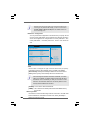
TYPE
Use this item to configure the type of the IDE device that you specify.
Configuration options: [Not Installed], [Auto], [CD/DVD], and [ARMD].
[Not Installed]: Select [Not Installed] to disable the use of IDE device.
[Auto]: Select [Auto] to automatically detect the hard disk drive.
After selecting the hard disk information into BIOS, use a disk
utility, such as FDISK, to partition and format the new IDE hard
disk drives. This is necessary so that you can write or read
data from the hard disk. Make sure to set the partition of the
Primary IDE hard disk drives to active.
30
[CD/DVD]: This is used for IDE CD/DVD drives.
[ARMD]: This is used for IDE ARMD (ATAPI Removable Media Device),
such as MO.
LBA/Large Mode
Use this item to select the LBA/Large mode for a hard disk > 512 MB under
DOS and Windows; for Netware and UNIX user, select [Disabled] to
disable the LBA/Large mode.
Block (Multi-Sector Transfer)
The default value of this item is [Auto]. If this feature is enabled, it will
enhance hard disk performance by reading or writing more data during
each transfer.
PIO Mode
Use this item to set the PIO mode to enhance hard disk performance by
optimizing the hard disk timing.
DMA Mode
DMA capability allows the improved transfer-speed and data-integrity for
compatible IDE devices.
S.M.A.R.T.
Use this item to enable or disable the S.M.A.R.T. (Self-Monitoring, Analysis,
and Reporting Technology) feature. Configuration options: [Disabled], [Auto],
[Enabled].
32-Bit Data Transfer
Use this item to enable 32-bit access to maximize the IDE hard disk data
transfer rate.
3.3.5 PCIPnP Configuration
BIOS SETUP UTILITY
Advanced
PCI / PnP Configuration
PCI Latency Timer
PCI IDE BusMaster
[32]
[Enabled]
Value in units of PCI
clocks for PCI device
latency timer
register.
+F1
F9
F10
ESC
Select Screen
Select Item
Change Option
General Help
Load Defaults
Save and Exit
Exit
v02.54 (C) Copyright 1985-2003, American Megatrends, Inc.
PCI Latency Timer
The default value is 32. It is recommended to keep the default value unless
the installed PCI expansion cards’ specifications require other settings.
PCI IDE BusMaster
Use this item to enable or disable the PCI IDE BusMaster feature.
31
3.3.6 Floppy Configuration
In this section, you may configure the type of your floppy drive.
BIOS SETUP UTILITY
Advanced
Floppy Configuration
[1.44 MB 31 2"]
Floppy A
Select the type of
floppy drive
connected to the
system.
+F1
F9
F10
ESC
Select Screen
Select Item
Change Option
General Help
Load Defaults
Save and Exit
Exit
v02.54 (C) Copyright 1985-2003, American Megatrends, Inc.
3.3.7 Super IO Configuration
BIOS SETUP UTILITY
Advanced
Configure Super IO Chipset
OnBoard Floppy Controller
Serial Port Address
Infrared Port Address
Parallel Port Address
Parallel Port Mode
EPP Version
ECP Mode DMA Channel
Parallel Port IRQ
Onboard Game Port
Onboard MIDI Port
[Enabled]
[3F8 / IRQ4]
[Disabled]
[378]
[ECP + EPP]
[1.9]
[DMA3]
[IRQ7]
[Enabled]
[Disabled]
Allow BIOS to Enable
or Disable Floppy
Controller.
+F1
F9
F10
ESC
Select Screen
Select Item
Change Option
General Help
Load Defaults
Save and Exit
Exit
v02.54 (C) Copyright 1985-2003, American Megatrends, Inc.
OnBoard Floppy Controller
Use this item to enable or disable floppy drive controller.
Serial Port Address
Use this item to set the address for the onboard serial port or disable it.
Configuration options: [Disabled], [3F8 / IRQ4], [2F8 / IRQ3], [3E8 / IRQ4],
[2E8 / IRQ3].
Infrared Port Address
Use this item to set the address for the onboard infrared port or disable it.
Configuration options: [Disabled], [2F8 / IRQ3], and [2E8 / IRQ3].
32
Parallel Port Address
Use this item to set the address for the onboard parallel port or disable it.
Configuration options: [Disabled], [378], and [278].
Parallel Port Mode
Use this item to set the operation mode of the parallel port. The default
value is [ECP+EPP]. If this option is set to [ECP+EPP], it will show the EPP
version in the following item, “EPP Version”. Configuration options:
[Normal], [Bi-Directional], and [ECP+EPP].
EPP Version
Use this item to set the EPP version. Configuration options: [1.9]
and [1.7].
ECP Mode DMA Channel
Use this item to set the ECP mode DMA channel. Configuration
options: [DMA0], [DMA1], and [DMA3].
Parallel Port IRQ
Use this item to set the IRQ for the parallel port. Configuration options:
[IRQ5] and [IRQ7].
OnBoard Game Port
Use this item to enable the Game Port or disable it.
OnBoard MIDI Port
Use this itme to select the address for the MIDI Port or disable it. Configuration options: [Disabled], [300], and [330].
33
3.3.8 USB Configuration
BIOS SETUP UTILITY
Advanced
USB Configuration
USB Controller
USB 2.0 Support
Legacy USB Support
[Enabled]
[Enabled]
[Disabled]
To enable or disable
the onboard USB
controllers.
+F1
F9
F10
ESC
Select Screen
Select Item
Change Option
General Help
Load Defaults
Save and Exit
Exit
v02.54 (C) Copyright 1985-2003, American Megatrends, Inc.
USB Controller
Use this item to enable or disable the use of USB controller.
USB 2.0 Support
Use this item to enable or disable the USB 2.0 support.
Legacy USB Support
Use this item to enable or disable the support to emulate legacy I/O
devices such as mouse, keyboard,... etc. Or you may select [Auto] so
that the system will start to auto-detect; if there is no USB device
connected, “Auto” option will disable the legacy USB support.
34
3.4 Hardware Health Event Monitoring Screen
In this section, it allows you to monitor the status of the hardware on your system,
including the parameters of the CPU temperature, motherboard temperature, CPU fan
speed, chassis fan speed, and the critical voltage.
Main
Advanced
BIOS SETUP UTILITY
Boot
H/W Monitor
Security
Exit
Hardware Health Event Monitoring
CPU Temperature
M / B Temperature
: 45 C / 98 F
: 31 C / 87 F
CPU Fan Speed
Chassis Fan Speed
: 2463 RPM
: N/A
Vcore
+ 3.30V
+ 5.00V
+ 12.00V
:
:
:
:
CPU Quiet Fan
Target CPU Temperature ( C)
Tolerance ( C)
Target Fan Speed
1.384V
3.306V
5.067V
11.890V
[Enabled]
[50]
[02]
[Fast]
F1
F9
F10
ESC
Select Screen
Select Item
General Help
Load Defaults
Save and Exit
Exit
v02.54 (C) Copyright 1985-2003, American Megatrends, Inc.
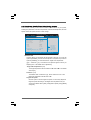
CPU Quiet Fan
This item allows you to identify the temperature of CPU fan. If you set this
option as [Disabled], the CPU fan will operate in full speed. If you set this
option as [Enabled], you will find the items “Target CPU Temperature
( C)”, “Tolerance ( C)”, and “Minimun Fan Speed” appear to allow you
adjusting them. The default value is [Disabled].
Target CPU Temperature ( C)
The target temperature will be between 45 C and 65 C. The default
value is [50].
Tolerance ( C)
The default value of tolerance is [2], which means the error of the
target CPU temperature will be within 2 C.
Target Fan Speed
Use this option to set the target fan speed. You can freely adjust the
target fan speed according to the target CPU temperature that you
choose. The default value is [Fast]. Configuration options: [Fast], [Middle]
and [Slow].
35
3.5 Boot Screen
In this section, it will display the available devices on your system for you to configure the boot settings and the boot priority.
Main
Advanced
BIOS SETUP UTILITY
H/W Monitor
Boot
Boot Settings
Security
Exit
Configure Settings
during System Boot.
Boot Settings Configuration
Boot Device Priority
Hard Disk Drives
Removable Drives
CD/DVD Drives
Enter
F1
F9
F10
ESC
Select Screen
Select Item
Go to Sub Screen
General Help
Load Defaults
Save and Exit
Exit
v02.54 (C) Copyright 1985-2003, American Megatrends, Inc.
3.5.1 Boot Settings Configuration
BIOS SETUP UTILITY
Boot
Boot Settings Configuration
Boot From Network
Bootup Num-Lock
[Disabled]
[On]
To enable or disable the
boot from network feature.
+F1
F9
F10
ESC
Select Screen
Select Item
Change Option
General Help
Load Defaults
Save and Exit
Exit
v02.54 (C) Copyright 1985-2003, American Megatrends, Inc.
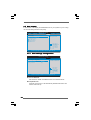
Boot From Network
Use this item to enable or disable the Boot From Network feature.
Boot Up Num-Lock
If this item is set to [On], it will automatically activate the Numeric Lock
function after boot-up.
36
3.5.2 Boot Device Priority
In this section, you may specify the boot sequence from the available devices
in your system.
BIOS SETUP UTILITY
Boot
Boot Device Priority
1st Boot Device
2nd Boot Device
3rd Boot Device
[1st FLOPPY DRIVE]
[HDD: PM-MAXTOR 6L08]
[CD / DVD]
Specifies the boot
sequence from the
available devices.
A device enclosed in
parenthesis has been
disabled in the
corresponding type
menu.
+F1
F9
F10
ESC
Select Screen
Select Item
Change Option
General Help
Load Defaults
Save and Exit
Exit
v02.54 (C) Copyright 1985-2003, American Megatrends, Inc.
Likewise, you may also specify the boot sequence from the available devices
for the hard disk drives, the removable drives, and the CD/DVD drives.
3.6 Security Screen
In this section, you may set or change the supervisor/user password for the system.
For the user password, you may also clear it.
Main
Advanced
BIOS SETUP UTILITY
H/W Monitor
Boot
Security Settings
Security
Exit
Install or Change the
password.
Supervisor Password : Not Installed
User Password
: Not Installed
Change Supervisor Password
Change User Password
Clear User Password
Enter
F1
F9
F10
ESC
Select Screen
Select Item
Change
General Help
Load Defaults
Save and Exit
Exit
v02.54 (C) Copyright 1985-2003, American Megatrends, Inc.
37
3.7 Exit Screen
Main
Advanced
Exit Options
Save Changes and Exit
Discard Changes and Exit
Discard Changes
BIOS SETUP UTILITY
H/W Monitro
Boot
Security
Exit
Exit system setup
after saving the
changes.
F10 key can be used
for this operation.
Load Optimal Defaults
Enter
F1
F9
F10
ESC
Select Screen
Select Item
Go to Sub Screen
General Help
Load Defaults
Save and Exit
Exit
v02.54 (C) Copyright 1985-2003, American Megatrends, Inc.
Save Changes and Exit
When you select this option, it will pop-out the following message, “Save
configuration changes and exit setup?” Select [OK] to save the changes
and exit the BIOS SETUP UTILITY.
Discard Changes and Exit
When you select this option, it will pop-out the following message, “Discard changes and exit setup?” Select [OK] to exit the BIOS SETUP UTILITY
without saving any changes.
Discard Changes
When you select this option, it will pop-out the following message, “Discard changes?” Select [OK] to discard all changes.
Load Optimal Defaults
When you select this option, it will pop-out the following message, “Load
optimal defaults?” Select [OK] to load the default values for all the setup
configurations.
38
Chapter 4 Software Suppor
Supportt
4 . 1 Install Operating System
This motherboard supports various Microsoft® Windows® operating systems: 98SE
/ ME / 2000 / XP / XP 64-bit. Because motherboard settings and hardware options
vary, use the setup procedures in this chapter for general reference only. Refer to
your OS documentation for more information.
4 . 2 Support CD Information
The Support CD that came with the motherboard contains necessary drivers and
useful utilities that enhance the motherboard features.
4 . 2 . 1 Running The Support CD
To begin using the support CD, insert the CD into your CD-ROM drive. The CD
automatically displays the Main Menu if “AUTORUN” is enabled in your computer.
If the Main Menu did not appear automatically, locate and double click on the
file “ASSETUP.EXE” from the BIN folder in the Support CD to display the menus.
4 . 2 . 2 Drivers Menu
The Drivers Menu shows the available devices drivers if the system detects
installed devices. Please install the necessary drivers to activate the devices.
4 . 2 . 3 Utilities Menu
The Utilities Menu shows the applications software that the motherboard
supports. Click on a specific item then follow the installation wizard to install it.
4 . 2 . 4 “LGA 775 CPU Installation Live Demo” Program
This motherboard is equipped with Intel LGA 775 socket, which is a new CPU
socket interface that Intel has released. Since it has several tiny pins, whcih
are easily to be damaged by improper handling, ASRock sincerely presents
you a clear installation guide through this “LGA 775 CPU Installation Live Demo”.
We hope you may check this live demo program before you start the installation of LGA 775 CPU in order to reduce the risks of CPU and motherboard
damages caused by any improper handling. To see this Live Demo, you can
run Microsoft® Media Player® to play the file. You may find this Live Demo in the
motherboard’s Support CD through the following path:
..\ Live Demo \ PC DIY \ LGA775INST_English.dat
4.2.5 Contact Information
If you need to contact ASRock or want to know more about ASRock, welcome
to visit ASRock’s website at http://www.asrock.com; or you may contact your
dealer for further information.
39