1
Veriton 2800 Series
User's Guide
Copyright © 2005. Acer Incorporated.
All Rights Reserved.
Veriton 2800 Series User's Guide
Original Issue: August 2005
Changes may be made periodically to the information in this publication without obligation
to notify any person of such revisions or changes. Such changes will be incorporated in new
editions of this manual or supplementary documents and publications. This company makes
no representations or warranties, either expressed or implied, with respect to the contents
hereof and specifically disclaims the implied warranties of merchantability or fitness for a
particular purpose.
Record the model number, serial number, purchase date, and place of purchase information in
the space provided below. The serial number and model number are recorded on the label
affixed to your computer. All correspondence concerning your unit should include the serial
number, model number, and purchase information.
No part of this publication may be reproduced, stored in a retrieval system, or transmitted, in
any form or by any means, electronically, mechanically, by photocopy, recording, or otherwise,
without the prior written permission of Acer Incorporated.
Veriton 2800 Series Desktop Computer
Model number: __________________________________
Serial number: ___________________________________
Purchase date: ___________________________________
Place of purchase: ________________________________
Acer and the Acer logo are registered trademarks of Acer Incorporated. Other companies'
product names or trademarks are used herein for identification purposes only and belong to
their respective companies.
Disposal instructions
Do not throw this electronic device into the trash when discarding. To minimize
pollution and ensure utmost protection of the global environment, please
recycle it.
USA
For electronic products containing an LCD/CRT monitor or display:
Lamp(s) inside this product contain mercury and must be recycled or disposed of
according to local, state or federal laws. For more information, contact the
Electronic Industries Alliance at www.eiae.org. For lamp-specific disposal
information, check www.lamprecycle.org.
Specifications
Package contents
Accessing the User's Guide
2 System tour
Features
Performance
Multimedia
Connectivity
Front and rear panels
Keyboard
Internet/Email/Search keys
Multimedia keys
Volume control/mute keys
Lock keys
Cursor keys
Windows keys
Function keys
Palm rest
Optical drive
Taking care of your CDs and DVDs
Hard disk
3 Setting up your computer
Arranging a comfortable work area
Adjusting your chair
Positioning your PC
Positioning your monitor
Positioning your keyboard
Positioning your mouse
Connecting peripherals
Connecting your mouse and keyboard
USB interface
PS/2 interface
Connecting a monitor
Connecting the power cable
Turning on your computer
Turning off your computer
Connecting options
Connecting your printer
Connecting the modem (optional)
Connecting to the network
1
3
5
5
7
9
9
9
9
10
12
13
13
14
14
15
15
16
16
17
18
18
19
21
21
21
22
22
22
23
23
23
23
24
25
26
26
27
27
28
28
Contents
1 First things first
Connecting multimedia devices
Connecting USB devices
4 Upgrading your computer
Installation precautions
ESD precautions
Preinstallation instructions
Post-installation instructions
Opening your Veriton 2800
To remove the computer cover
To replace the computer cover
System boards
Mainboard layout
Upgrading your computer
Installing additional memory
To remove a DDR2 DIMM
To install a DDR2 DIMM
To reconfigure your computer
Replacing the Veriton 2800's hard disk
Installing an expansion card
5 System utilities
29
31
33
35
35
35
36
37
37
37
38
38
39
39
39
40
41
41
41
43
Adobe Reader
45
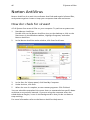
Norton AntiVirus
46
How do I check for viruses?
46
NTI CD&DVD-Maker (for models with CD or DVD Burner)47
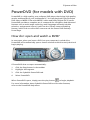
PowerDVD (for models with DVD)
48
How do I open and watch a DVD?
48
BIOS utility
49
Reinstalling programs
49
Recovering your system
49
Using backup (Windows XP only)
53
How do I back up files from my hard drive?
53
Disk defragmenter (Windows XP only)
54
How do I defragment my hard drive?
54
7 Frequently asked questions
Frequently asked questions
Appendix A: Notices
ENERGY STAR guidelines compliance
FCC notice
55
57
59
60
60
Notice: Canadian users
Declaration of Conformity for EU countries
Modem notices
Notice for USA
TBR 21
Notice for Australia
Important safety instructions
Macrovision copyright protection notice
Lithium battery statement
Laser compliance statement
Federal Communications Comission
Declaration of Conformity
Declaration of Conformity for CE marking
61
61
61
61
62
62
62
64
64
65
66
67
Appendix B: Taking care of your computer 69
Important tips
Cleaning and servicing
To clean your computer and keyboard
To clean your pointing device
To clean your monitor
When to contact a service technician
Asking for technical assistance
Index
70
70
70
71
71
71
71
73
1 First things
first
This chapter describes the system specifications
and contents of your computer package.
3
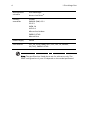
Specifications
Operating
system
Microsoft® Windows® XP Professional
Platform
Intel® Celeron® with 533 MHz FSB
Microsoft® Windows® XP Home Edition
Intel® Pentium® 4 with 800 MHz FSB
Intel® Pentium® D with 1066 MHz
Chipset
Intel® 945G Express
System memory
Supporting up to 2 GB of DDR2 667 RAM
Drives
Network
interface
I/O interface
•
One external 5.25" drive bay
•
One 3.5" drive bay
Marvell® 88E8052 with gigabit Ethernet
Optional PCI modem
Two PS/2 ports
9-pin serial port
25-pin parallel port
Eight USB 2.0 ports
Ethernet (RJ-45) port
VGA port
Six audio jacks
I/O expansion
One PCI slot
One PCIe slot
Graphics
Integrated graphics with DVMT 3.0
Audio
Realtek ALC880 with embedded Intel® HDA CODEC
Keyboard
PS/2 or USB multimedia keyboard
Monitor
Choice of Acer CRT or LCD monitors
Security
Acer eManager (eSecurity, eSettings, eRecovery)
Lock pad and intrusion alert
Housing
340 x 76 x 365 mm
4
1 First things first
Management
software
Acer eManager
Industry
standards
PC2001
Norton AntiVirus™
SMBIOS (DMI) 2.3.1
PCI 2.3
WFM 2.0
ACPI 2.0
Microsoft® OnNow
ENERGY STAR
MacroVision
Power supply
250 W
Certification
FCC, CE, C-tick, BSMI, VCCI, CCC, cUL, UL, Nemko,
GS (TUV), ENERGY STAR
Note: The specifications listed above are for reference only. The
exact configuration of your PC depends on the model purchased.
5
Package contents
Before you unpack your computer, make sure that you have enough space to
set up your computer.
Carefully unpack the carton and remove the contents. If any of the following
items are missing or damaged, contact your dealer immediately:
•
Veriton computer
•
Items contained in the accessory box
•
USB or PS/2 keyboard
•
USB or PS/2 mouse
•
User's Guide and installation poster
•
Other user documentation and third-party software
Accessing the User's Guide
This User's Guide is also available on your computer as an Adobe Acrobat
PDF file.
To access the User's Guide (for Windows XP)
1
On the Windows XP taskbar, click on the start button then select Help
and Support.
2
On the Help and Support Center home page, double-click the Veriton
Series Online icon.
6
1 First things first
7
2 System tour
This chapter discusses the features and
components of your computer.
9
Features
Here are just a few of your computer's many features:
Performance
•
Intel® Celeron® supporting 533 MHz FSB, or
Intel® Pentium® 4 supporting 800 MHz FSB, or
Intel® Pentium® D supporting 1066 MHz FSB
•
Intel® 945G Express chipset
•
DDR2 667, 2 DIMM slots, expandable to 2 GB
•
Power management function
•
CD-ROM, CD-RW, DVD-ROM, DVD/CD-RW combo, DVD-Dual or DVD-Super
multi drive
•
High-capacity SATA hard disk
Multimedia
•
Intel® high-definition audio
•
Supporting up to 7.1 surround sound, audio CODEC support for 192 KHz
quality, multiple streams.
•
3D-quality audio system via onboard audio controller
•
Audio-in/line-in, audio-out/line-out, headphone-out and microphone-in
interfaces
Connectivity
•
Two PS/2 interfaces for mouse and keyboard
•
One serial port
•
One parallel port
•
One VGA port
•
Eight Universal Serial Bus (USB) 2.0 ports (four on the front; four on the
rear panel)
•
High-speed V.92, 56K fax/modem (manufacturing option)
•
Gigabit Ethernet LAN support with remote wake-up function
10
2 System tour
Front and rear panels
Your computer's front and rear panels consist of the following:
Front panel
No.
Icon
Component
1
5.25" drive bay
2
3.5" drive bay
3
Microphone-in jack (front)
4
Speaker-out/line-out port
5
USB ports
6
Indicators
7
Power button
11
Rear panel
Your computer's rear panel consists of the following:
No.
Icon
Component
1
Power supply (with full range voltage)
2
Power cord socket
3
PS/2 mouse port
4
PS/2 keyboard port
5
Serial port
6
Parallel/printer port
7
CRT/LCD monitor port
8
USB ports
9
Network port
10
Audio jack
11
Expansion slot
12
Chassis lock pad
13
Hardware reset button
Audio jacks function table
Color/Use
Headphone
1.1 CH
3.1 CH
5.1 CH
7.1 CH
Blue
Line-in
Line-in
Line-in
Line-in
Line-in
Green
Headphone
Line-out
Front
Front
Front
Mic-in
Mic-in
Mic-in
Mic-in
Rear
Rear
Center &
woofer
Center &
woofer
Pink
Orange
Black
Gray
Center &
woofer
Side
Note: See "Connecting peripherals" on page 23 and "Connecting
options" on page 27 for more information.
12
2 System tour
Keyboard
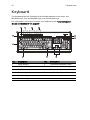
The keyboard has full-sized keys that include separate cursor keys, two
Windows keys, four multimedia keys, and 12 function keys.
For information on how to connect your keyboard, see "Connecting your
mouse and keyboard" on page 23.
No.
Description
No.
Description
1
Sleep button
2
Internet/Email/Search keys
3
Multimedia keys
4
Volume control/mute keys
5
Scroll Lock key
6
Num Lock key
7
Cursor keys
8
Application key
9
Windows logo key
10
Caps Lock key
11
Function keys
13
Internet/Email/Search keys
Icon
Key
Description
Web browser
Launches your current default browser.
Email
Launches your email application.
Search
Opens a search window.
Multimedia keys
Allow you to conveniently play, pause, stop, advance or rewind a song or movie
using your keyboard.
Icon
Key
Description
Backward
Press to skip backward to the previous track or
video file.
Play/pause
Press to start playing the audio track or video file.
Press again to pause.
Stop
Press to stop playing the audio track or video file.
Forward
Press to skip forward to the next track or video file.
14
2 System tour
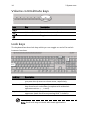
Volume control/mute keys
Icon
Key
Description
Volume up
Press to increase audio volume.
Volume down
Press to decrease audio volume.
Mute
Toggle sound on/off.
Lock keys
The keyboard has three lock keys which you can toggle on and off to switch
between functions.
Lock key
Description
Scroll Lock
When activated, the screen moves one line up or down when
you press the up arrow or down arrow, respectively.
Num Lock
When activated, the keypad is set to numeric mode, i.e., the
keys function as a calculator (complete with arithmetic
operators such as +, -, * and /).
Caps Lock
When activated, all alphabetic characters typed appear in
uppercase (same function as pressing Shift + <letter>).
Note: Scroll Lock may not work with some applications.
15
Cursor keys
The cursor keys, also called the arrow keys, let you move the cursor around the
screen. They serve the same function as the arrow keys on the numeric keypad
when the Num Lock is toggled off.
Windows keys
The keyboard has two keys that perform Windows-specific functions.
Key
Description
Windows
key
Pressed alone, this key has the same effect as clicking on the
Windows Start button; it launches the Start menu. It can also be
used with other keys to provide a variety of functions:
<
> + <Tab> Activates the next Taskbar button.
<
> + <E>
Opens the My Computer window.
<
> + <F1>
Opens Help and Support.
<
> + <F>
Opens the Find: All Files dialog box.
<
> + <R>
Opens the Run dialog box.
<
> + <M>
Minimizes all windows.
<Shift> + <
> + <M> Undoes the minimize all windows action.
Application This key has the same effect as clicking the right mouse button;
key
it opens the application's context menu.
16
2 System tour
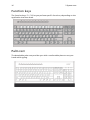
Function keys
The function keys, F1 - F12, let you perform specific functions, depending on the
application that uses them.
Palm rest
The detachable palm rest provides you with a comfortable place to rest your
hands while typing.
17
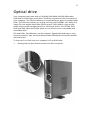
Optical drive
Your computer may come with a CD-ROM, DVD-ROM, DVD/CD-RW combo,
DVD-Dual or DVD-Super multi drive. This drive is located on the front panel of
your computer. The CD drive allows you to play different types of compact disks
(CDs). The DVD drive allows you to play not only old CD-ROMs, CD-I disks, and
video CDs, but digital video disks (DVDs) as well. DVD-ROM is a type of disk
media with enough storage space for a full-length movie. The CD-RW, DVDDual and DVD-super multi drive allow you to record or burn recordable and
rewritable disks.
CDs and DVDs, like diskettes, are also compact, lightweight and easy to carry
around. However, they are more delicate than diskettes and must be handled
with extra care.
To insert a CD or DVD into your computer's CD or DVD drive:
1.
Gently push the Eject button located on the front panel.
18
2 System tour
2.
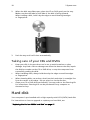
When the disk tray slides open, place the CD or DVD gently on the tray.
Make sure that the label or title side of the disk is facing upward.
When holding a disk, hold it by the edges to avoid leaving smudges
or fingerprints.
3.
Push the tray and it will close automatically.
Taking care of your CDs and DVDs
•
Keep your disk in its case when not in use to avoid scratches or other
damage. Any kind of dirt or damage can affect the data on the disk, impair
the disk lens reader on the CD or DVD drive, or stop the computer from
successfully reading the disk.
•
When handling disks, always hold them by the edges to avoid smudges
or fingerprints.
•
When cleaning disks, use a clean, dust-free cloth and wipe in a straight line
from the center to the edge. Do not wipe in a circular motion.
•
Clean your CD or DVD drive periodically. You may refer to the Cleaning Kit
for instructions. Cleaning kits can be purchased in any computer or
electronics shop.
Hard disk
Your computer is pre-installed with a high-capacity serial ATA (SATA) hard disk.
For instructions on how to upgrade or replace your hard disk, see:
"Replacing the Veriton 2800's hard disk" on page 41.
3 Setting up your
computer
This chapter contains step-by-step instructions
on how to set up your computer and connect
additional peripherals.
21
Arranging a comfortable work area
Working safely and comfortably begins with the arrangement of your work
space and the proper use of equipment. For this reason, it is very important to
take time and think about how you are going to arrange your work area. Refer
to the diagram on the following page as you set up your system.
Here are some points to consider:
Adjusting your chair
Having the right kind of chair does not necessarily mean you'll be properly
supported. It is necessary to adjust your chair to fit your body. Proper body
posture will make you more comfortable and productive.
•
Avoid tilting your chair. If you have a chair that tilts, lock the tilt knobs so
that your chair will not tilt forward or backward while you are using your
computer.
•
Adjust your chair height in such a way that you can sit on it with your
thighs parallel to the floor and your feet resting flat on the floor.
•
Rest your body on the chair back. Your torso works harder to maintain
balance if you do not rest your body on the chair back.
Positioning your PC
22
3 Setting up your computer
Take note of the following when selecting a location for your computer:
•
Do not put your computer near any equipment that might cause
electromagnetic or radio frequency interference, such as radio
transmitters, televisions, copy machines or heating and air-conditioning
equipment.
•
Avoid dusty areas and extremes of temperature and humidity.
•
You may place your computer beside your desk or under your table, as
long as it does not block the space you need for working and moving.
Positioning your monitor
Place your monitor at a comfortable viewing distance, usually 50 to 60 cm away.
Adjust the display in such a way that the top of the screen is at or slightly below
eye level.
Positioning your keyboard
The location of the keyboard is a very important factor for your posture.
Placing it too far away will make your body lean forward, forcing you to sit
in an unnatural position. Placing it too high will add tension to your
shoulder muscles.
•
The keyboard should be placed just above your lap. Adjust the keyboard
height by flipping the folding stands located under the keyboard.
•
Keep your lower arms parallel to the floor as you type. Your upper arms
and shoulders should be relaxed. Then try typing with a light touch. If you
feel any shoulder or neck strain, stop for a while and check your posture.
•
Position your keyboard in front of your monitor. Putting your keyboard
beside your monitor will make you turn your head while you type which
could add tension to your neck muscles.
Positioning your mouse
•
The mouse should be placed on the same surface as your keyboard so that
you can reach it with ease.
•
Adjust its position to allow enough space for movement without making
you stretch or lean over.
•
Use your arm to move the mouse. Do not rest your wrist on the table when
moving the mouse.
23
Connecting peripherals
Setting up your computer is easy. For the most part, you only have four things
to connect: the mouse, the keyboard, the monitor, and the power cable.
Note: The peripherals shown in the connections below are
for your reference only. Actual device models may vary in
select countries.
Connecting your mouse and keyboard
USB interface
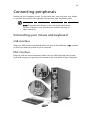
Plug your USB mouse or keyboard cable into any of the USB ports
on the front and rear panels of your computer.
located
PS/2 interface
Plug the PS/2 mouse and keyboard cable into the PS/2 keyboard port (purple
port) and mouse port (green port) located on the rear panel of your computer.
24
3 Setting up your computer
Connecting a monitor
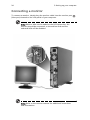
To connect a monitor, simply plug the monitor cable into the monitor port
(blue port) located on the rear panel of your computer .
Note: When a VGA card is added to the PCI Express slot, the
monitor should be connected to the add-on card and the
onboard VGA will be disabled.
Note: Refer to the monitor manual for additional instructions
and information.
25
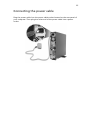
Connecting the power cable
Plug the power cable into the power cable socket located on the rear panel of
your computer. Then plug the other end of the power cable into a power
outlet.
26
3 Setting up your computer
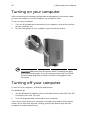
Turning on your computer
After connecting the necessary peripherals and plugging in the power cable,
you are now ready to turn the computer on and get to work.
To turn on your computer:
1
Turn on all peripherals connected to your computer, such as the monitor,
printer, speakers, etc.
2
On the front panel of your computer, press the Power button.
Important: Make sure that the power cable is properly plugged
into an electrical outlet. If you are using a power strip or an AVR
(Auto-Voltage Regulator), make sure that it is plugged in and
turned on.
Turning off your computer
To turn off your computer, follow the steps below.
For Windows XP:
1
On the Windows XP taskbar, click on the Start button, and click Turn Off
Computer, then click Turn Off.
2
Turn off all peripherals connected to your computer.
If you cannot shut down your computer normally, press and hold the power
button for at least four seconds. Quickly pressing the button may put the
computer in suspend mode only.
27
Connecting options
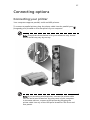
Connecting your printer
Your computer supports parallel, serial and USB printers.
To connect a parallel printer, plug the printer cable into the parallel port
(burgundy port) located on the rear panel of your computer.
Note: The printer shown below is for your reference only. Actual
device model may vary by country.
Note: If you are using a serial printer, connect the printer cable
into the serial port located on the rear panel of your computer.
In the same manner, connect a USB printer by plugging the
printer cable into any of the USB ports located on the front and
rear panels.
28
3 Setting up your computer
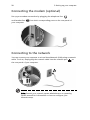
Connecting the modem (optional)
Set up your modem connection by plugging the telephone line
and handset line
your computer.
into their corresponding ports on the rear panel of
Connecting to the network
You can connect your computer to a Local Area Network (LAN) using a network
cable. To do so, simply plug the network cable into the network port
the rear panel of your computer.
Note: Consult your network system administrator or operating
system manual for information on how to configure your
network setup.
on
29
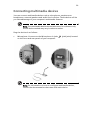
Connecting multimedia devices
You can connect multimedia devices such as microphones, earphones or
headphones, external speakers and audio line-in devices. These devices will let
you take advantage of your computer's multimedia features.
Note: The multimedia devices shown below are for reference only.
Actual device models may vary in select countries.
Plug the devices in as follows:
•
Microphone: Connects to the Microphone-in jacks
on the front and rear panels of your computer.
(pink jacks) located
Note: For information on how to configure multimedia devices,
consult the documentation that came with each device.
30
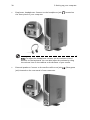
•
3 Setting up your computer
Earphones, headphones: Connect to the headphone jack
the front panel of your computer.
located on
Note: To adjust the headphone volume, use the volume control
buttons on the keyboard. You can also adjust the volume by using
the volume icon on the taskbar at the bottom of your screen.
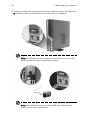
•
External speakers: Connect to the audio-out/line-out jack
jack) located on the rear panel of your computer.
(lime-green
31
•
Audio line-in device: Connects to the audio-in/line-in jack
(light blue
jack) located on the rear panel of your computer
Connecting USB devices
Universal Serial Bus (USB) is a serial bus design capable of cascading peripherals
such as a digital camera, keyboard, mouse, joystick, scanner, printer and
modem. With USB, complex cable connections can be eliminated.
Your computer comes with eight external USB ports: four on the front and four
on the rear panel. These ports support USB 2.0 high-performance external
devices such as webcams and digital still cameras. They also allow you to
connect additional USB devices to your computer without using up its resources.
32
3 Setting up your computer
To connect a USB device, simply plug the device cable into any of the USB ports
(black) located on the front and rear panels of your computer.
Note: The USB devices shown below are for reference only. Actual
device models may vary by geographic region.
Note: Some USB devices have a built-in USB port which permits
you to connect more USB devices.
4 Upgrading
your
computer
This chapter contains instructions on how to
upgrade your computer, and basic information
about your system boards that you will find
helpful when performing the upgrade process.
35
Installation precautions
Before you install any computer component, we recommend that you read the
following sections. These sections contain important ESD precautions along
with preinstallation and post-installation instructions.
ESD precautions
Electrostatic discharge (ESD) can damage your processor, disk drives, expansion
boards, and other components. Always observe the following precautions
before you install a computer component:
1
Do not remove a component from its protective packaging until you are
ready to install it.
2
Wear a wrist grounding strap and attach it to a metal part of the computer
before handling components. If a wrist strap is not available, maintain
contact with the computer throughout any procedure requiring ESD
protection.
Preinstallation instructions
Always observe the following before you install any component:
1
Turn off your computer and all the peripherals connected to it before
opening it. Then unplug all cables from the power outlets.
2
Open your computer according to the instructions on page 35.
3
Follow the ESD precautions described above before handling a
computer component.
4
Remove any expansion boards or peripherals that block access to the
DIMM sockets or component connectors.
5
See the following sections for specific instructions on the component you
wish to install.
Warning! Not turning off the computer properly before you start
installing the components may cause serious damage. Do not
attempt the procedures described in the following sections unless
you are a qualified service technician.
36
4 Upgrading your computer
Post-installation instructions
Observe the following after installing a computer component:
1
See to it that the components are installed according to the step-by-step
instructions in their respective sections.
2
Replace any expansion boards or peripherals that you removed earlier.
3
Replace the side panels.
4
Connect the necessary cables and turn on your computer.
37
Opening your Veriton 2800
Caution! Before you proceed, make sure that you have turned off
your computer and all peripherals connected to it. Read the
"Preinstallation instructions" on page 35.
You need to open your computer before you can install additional components.
See the following section for instructions:
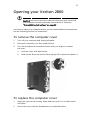
To remove the computer cover
1
Turn off your computer and unplug all cables.
2
Place your computer on a flat, steady surface.
3
Turn the thumbscrews counterclockwise with your fingers to release
the cover.
a
Hold the cover with both hands.
b
Slide it back about an inch and then gently lift it upward to detach it.
To replace the computer cover
1
Align the cover to the housing frame and then push it in to slide it back
into place.
2
Secure the cover with the thumbscrews you released earlier.
38
4 Upgrading your computer
System boards
Mainboard layout
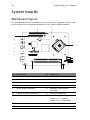
The mainboard becomes accessible once you open your computer. Refer to the
section below for the mainboard layout of your Veriton 2800 computer.
6
15
7
14
5
3
11
16
17
2
13
4
10
8
9
1
12
No. Component
No. Component
1
Two memory slots
2
CPU fan connectors
3
CPU socket
4
Chassis intrusion connector
5
USB connectors
6
PCI Express x16 connector
7
PCI connector
8
CD audio connector
9
S/PDIF audio connector
10
Hardware reset button
connector
11
2 serial ATA IDE connectors
12
Front LED connector
13
ATX 12V power connector
14
Clear CMOS jumper
Jumper 1-2 — normal
Jumper 3-4 — clear CMOS
15
Lithium battery
17
Main power connector
16
Parallel ATA IDE connector
39
Upgrading your computer
Certain components of your computer are upgradeable, such as the memory,
the hard disk, the CPU and the expansion cards. You need to observe the
"Installation precautions" on page 35 when installing or removing a computer
component. However, for safety purposes, we do not recommend that you
perform these upgrades yourself. If you want to replace or upgrade any of
these components, contact your dealer or a qualified service technician
for assistance.
Note: The mainboard model shown in the following figures may
not be exactly the same as the one found in your computer.
Installing additional memory
The two 240-pin sockets on the mainboard support Double Data Rate 2 (DDR2)
Synchronous Dynamic Random Access Memory (SDRAM)-type DIMMs. You may
install 128 MB, 256 MB, 512 MB or 1 GB DIMMs for a maximum memory capacity
of 2 GB.
The DDR2 DIMMs require 1.8 volts. You can install PC2 3200/DDR2 400, or PC2
4300/DDR2 533 modules in the DDR2 DIMM sockets. Contact your dealer for
qualified DIMM vendors.
Each DDR2 DIMM socket is independent from the other. This independence
allows you to install DDR2 DIMMs with different capacities to form
different configurations.
To remove a DDR2 DIMM
Note: The DDR2 DIMM has only one notch located toward the
center of the module.
1
Remove the side panel.
2
Locate the DDR2 DIMM socket on the mainboard.
40
3
4 Upgrading your computer
Press the holding clips on both sides of the DDR2 DIMM socket outward
to release the DDR2 DIMM (a). Gently pull the DDR2 DIMM out of the
socket (b).
To install a DDR2 DIMM
1
Locate the DDR2 DIMM socket on the mainboard.
2
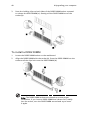
Align the DDR2 DIMM with the socket (a). Press the DDR2 DIMM into the
socket until the clips lock onto the DDR2 DIMM (b).
Note: The DDR2 DIMM sockets are slotted to ensure proper
installation. If you insert a DDR2 DIMM but it does not fit easily
into the socket, turn the DDR2 DIMM around and try to insert
it again.
41
To reconfigure your computer
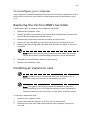
Your computer automatically detects the amount of memory installed. Run the
BIOS utility to view the new value for total system memory and make a note
of it.
Replacing the Veriton 2800's hard disk
Follow these steps to replace your computer's hard disk:
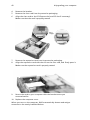
1
Remove the computer cover.
2
Detach all cables connected to the optical disk and hard disk. Remove the
optical disk and attached hard disk carrier.
3
Remove the screws that hold the hard disk into the carrier.
4
Insert the new hard disk into the carrier and secure it with the screws.
5
Replace the optical disk and hard disk, and reattach all cables to the new
hard disk.
Note: Make sure that the other ends of the disk cables are securely
connected to their corresponding connectors on the mainboard.
6
Reinstall the metal bracket frame to the housing.
7
Replace the computer cover.
Installing an expansion card
Note: To install a PCI or PCI Express card, you will need to use a
riser card. Only one card can be installed at any time.
Note: The type of riser card you need will depend on whether
you're installing a PCI or PCI Express expansion card. Standard PCI
cards will require a riser card that is in two parts, as shown below.
To install an expansion card:
1
Remove the computer cover.
2
Locate the empty PCI Express or PCI slot on the mainboard.
3
Remove the screw that holds the bracket to the computer, and put to
one side.
42
4 Upgrading your computer
4
Remove the bracket.
5
Remove the riser card from its protective packaging.
6
Align the riser card to the PCI Express slot (and PCI slot if necessary).
Make sure that the card is properly seated.
7
Remove the expansion card from its protective packaging.
8
Align the expansion card with the slot on the riser card, and firmly press it.
Make sure the expansion card is properly seated.
9
Secure the card to your computer with the bracket screw you
removed earlier.
10
Replace the computer cover.
When you turn on the computer, BIOS automatically detects and assigns
resources to the newly installed devices.
5 System
utilities
This chapter describes applications that are
preinstalled on your computer.
45
Depending on the hardware and optional features installed in your computer,
your system came bundled with several program utilities designed to streamline
your computer's operations. These utilities may include any of the following:
•
Adobe Reader
•
Norton AntiVirus
•
NTI CD-Maker
•
PowerDVD
•
BIOS utility
•
Acer eManager
If your computer is configured with Microsoft Windows XP, the following
utilities can be used to monitor and maintain system health:
•
Backup
•
Disk Defragmenter
All of the applications that came with your computer are very easy to use.
However, if you need more help or information, you may refer to the online
help documentation provided in each software application.
Adobe Reader
Adobe Reader is software that lets you view, navigate, browse and print Adobe
Portable Document Format (PDF) files on all major computer platforms.
To read a PDF document
•
you can:
Simply double click on any file with an icon like that shown above.
or
1
On the windows taskbar, click on the Start button, highlight Programs,
and select Adobe Reader.
2
Once the program is running, select Open from the File menu.
3
Select the file you wish to view in the Open file browser and click the
Open button.
For more information about Adobe Reader, you may refer to the Adobe Reader
Help menu.
46
5 System utilities
Norton AntiVirus
Norton AntiVirus is an anti-virus software that finds and repairs infected files,
and protects against viruses to keep your computer data safe and secure.
How do I check for viruses?
A Full System Scan scans all files on your computer. To perform a system scan:
1
Start Norton AntiVirus.
Double click on the Norton AntiVirus Icon on the desktop or click on the
Start menu in the Windows taskbar, highlight Programs, and select
Norton AntiVirus.
2
In the Norton AntiVirus main window, click Scan for Viruses.
3
In the Scan for Viruses panel, click Scan My Computer.
4
Under Actions, click Scan.
5
When the scan is complete, a scan summary appears. Click Finished.
You can schedule customized virus scans that run unattended on specific dates
and times or at periodic intervals. If you are using the computer when the
scheduled scan begins, it runs in the background so that you do not have to
stop working.
For more information refer to the Norton AntiVirus Help menu.
47
NTI CD&DVD-Maker (for models
with CD or DVD Burner)
The NTI CD&DVD-Maker is optical disk-recording software that allows you to
create and copy audio, data and videos to recordable or rewritable optical disks.
To copy an audio or data disk:
1
Click the Quick Burning icon
on the desktop.
2
Insert the CD you would like to copy into the source drive and a blank disk
into the target drive.
3
Choose the source and target drives from the pull-down lists.
4
Click the Start button to begin copying.
For more information about NTI CD&DVD-Maker and its other features, refer to
the NTl CD&DVD-Maker Help menu.
48
5 System utilities
PowerDVD (for models with DVD)
PowerDVD is a high-quality, pure software DVD player that brings high-quality
movies and karaoke to your multimedia PC. You can play back high-resolution
DVD titles or MPEG-2 files with MPEG-2 video and Dolby Digital (AC-3) audio.
PowerDVD provides a complete set of commands for navigation and advanced
features such as multi-angle switching, multi-language and multi-subtitle
selection, and parental control. It also has the i-Power Internet Enabling
feature, which links to online DVD resources via the Power DVD Desktop
Portal Page.
How do I open and watch a DVD?
In most cases, when you insert a DVD into your computer's optical drive,
PowerDVD will automatically open a viewer window and the control panel and
begin playing.
If PowerDVD does not open automatically:
1
Click the Start button in the taskbar.
2
Highlight All Programs.
3
Click the Cyberlink PowerDVD tab.
4
Select PowerDVD.
When PowerDVD opens, simply press the play button
to begin playback.
For more information about Cyberlink PowerDVD and its other features,
refer to the PowerDVD Help menu.
49
BIOS utility
The BIOS utility is a hardware configuration program built into your computer's
Basic Input/Output System (BIOS). Since most computers are already properly
configured and optimized, there is no need to run this utility. However, if you
encounter configuration problems and get the "Run Setup" message, you will
need to run this utility.
Note: Before you run BIOS, make sure that you have saved
all open files. The computer reboots immediately after you
exit Setup.
To run the BIOS utility, press the Del key on your keyboard during computer
boot up.
Reinstalling programs
If you uninstall one of the preinstalled programs and want to reinstall it,
do the following:
1
Make sure that the system is turned on.
2
Insert the System CD into the CD or DVD drive.
3
Select the application that you want to reinstall.
4
Follow all onscreen instructions until you finish the installation.
Recovering your system
If your operating system files are lost or damaged, the recovery process will
restore your system's original factory default settings or last system backup.
Your Acer Veriton series computer includes a one-button recovery feature that
makes restoring your system quick and easy.
Acer eRecovery Management works from a hidden partition on your hard drive
that contains all the information required to restore your system.
There are two modes to recover your system. One is from the system's original
settings and another is from system backup.
Warning: Initiating the recovery operation while the operating
system is running will result in abnormal shutdown and may make
your current OS unstable or unusable.
50
5 System utilities
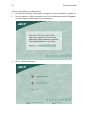
You can also follow the steps below:
1
Locate the hardware reset button. See "Front and rear panels" on page 10.
2
Press the button. After a moment, one of the following screens will appear
on your display. Please type in your password.
3
Select "System Recovery."
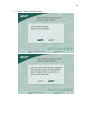
51
4
Select "Factory Default Image."
52
5
5 System utilities
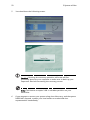
You should see the following screen:
Caution! Running the recovery operation will erase all files
previously saved on your computer so make sure to back up your
important files before starting the recovery process.
Note: This feature occupies 2 GB in a hidden partition on your
hard drive.
6
If you attempt to restore your system using Acer eRecovery, and the system
DOES NOT respond, contact your local vendor or authorised Acer
representative immediately.
53
Using backup (Windows XP only)
The Backup utility creates copies of information on your hard disk. In the event
that the original data on your hard disk is erased or overwritten, or becomes
inaccessible because of a hard disk malfunction, you can use the copy to restore
your lost or damaged data.
How do I back up files from my hard drive?
To run the Backup utility:
1
Click the Start button in the taskbar.
2
Highlight All Programs
3
Click Accessories
4
Select System Tools
5
Click Backup
When Backup starts, follow the onscreen instructions to set up your backup
profile and schedule.
For more information about Backup, refer to Windows XP help.
54
5 System utilities
Disk defragmenter (Windows XP
only)
The disk degfragmentation utility consolidates files and folders on your
computer's hard disk. This allows your computer to access files and folders and
save new data more efficiently. By consolidating your files and folders, the
defragmenter also consolidates the volume's free space, making it less likely
that new files will be fragmented.
How do I defragment my hard drive?
To run the Disk Defragmenter:
1
Click the Start button in the taskbar.
2
Highlight All Programs
3
Click Accessories
4
Select System Tools
5
Click Disk Defragmenter
When Disk Defragmenter opens, select a drive/volume and click Analyze. The
system will quickly examine the volume and determine whether or not it needs
to be defragmented.
For more information about Disk Defragmenter, refer to Windows XP help.
7 Frequently
asked
questions
This chapter tells you what to do in case your
computer is not working properly. However,
if a more serious problem arises, contact your
dealer or the technical support center
(www.acersupport.com) for assistance.
57
Frequently asked questions
The following questions indicate possible situations that may arise during the
use of your computer and each is followed by easy answers and solutions.
I pressed the power switch but the system did not boot up.
Check the LED located above the power switch.
If the LED is not lit, no power is being applied to the system. Try the following:
•
Check if the voltage selector switch located on the rear panel of the
computer is set to the correct voltage.
•
Check if you properly plugged the power cable into an electrical outlet.
•
If you are using a power strip or AVR, make sure it is plugged in and
turned on.
If the LED is lit, check the following:
•
Is a nonbootable (nonsystem) diskette in the floppy drive? If yes, remove or
replace it with a system diskette and press <Ctrl> + <Alt> + <Del> to restart
your computer.
•
The operating system files may be damaged or missing. Insert the startup
disk you created during Windows setup into the floppy drive and press
<Ctrl> + <Alt> + <Del> to restart your computer. This will automatically
diagnose your system and make necessary fixes. However, if the diagnostic
utility still reports a problem, then you may have to perform the recovery
process to restore your system to its original default factory settings.
Note: For more information about recovering your system,
see "Acer eRecovery Management" on page 7.
Nothing appears on the screen.
Your computer's power management function automatically blanks the screen
to save power. Just press any key to turn the display back on.
If pressing a key does not work, you can restart your computer. If restarting
your computer does not work, contact your dealer or technical support center
for assistance.
58
7 Frequently asked questions
The printer does not work.
Do the following:
•
Make sure the printer is connected to a power outlet and that it is
turned on.
•
Make sure the printer cable is connected securely to the system's parallel or
USB port and the corresponding port on the printer. See "Connecting your
printer" on page 27 for more information.
•
For additional information concerning the printer, refer to the printer's
documentation.
No sound comes out from the computer.
Check the following:
•
The volume may be muted. Look for the Volume icon on the taskbar. If it is
crossed-out, click on the icon and deselect the Mute option. You can also
press the volume control/mute knob on your USB keyboard to toggle from
mute to sound on.
•
If headphones, earphones or external speakers are connected to the lineout jack of your computer, the internal or built-in speakers are
automatically turned off.
System cannot read diskette, hard disk, CD or DVD information.
Check the following:
•
Make sure you are using the correct type of disk.
•
Make sure the CD or DVD is inserted into the drive correctly.
•
Check if the CD or DVD is clean and unscratched.
•
Check your drive by using a good (undamaged) disk. If your drive can not
read the information on the good disk there may be a problem with the
drive. Contact your dealer or technical support center for assistance.
System cannot write data on the hard disk or CD-R/CD-RW.
Check the following:
•
Make sure the diskette or hard disk is not write-protected.
•
Make sure you are using the correct type of disk or diskette.
Appendix A:
Notices
60
Appendix A: Notices
ENERGY STAR guidelines compliance
As an ENERGY STAR partner, Acer Inc. has determined that this product meets
the ENERGY STAR guidelines for energy efficiency.
FCC notice
This device has been tested and found to comply with the limits for a Class B
digital device pursuant to Part 15 of the FCC rules. These limits are designed to
provide reasonable protection against harmful interference in a residential
installation. This device generates, uses, and can radiate radio frequency energy
and, if not installed and used in accordance with the instructions, may cause
harmful interference to radio communications.
However, there is no guarantee that interference will not occur in a particular
installation. If this device does cause harmful interference to radio or television
reception, which can be determined by turning the device off and on, the user
is encouraged to try to correct the interference by one or more of the following
measures:
•
Reorient or relocate the receiving antenna.
•
Increase the separation between the device and receiver.
•
Connect the device into an outlet on a circuit different from that to which
the receiver is connected.
•
Consult the dealer or an experienced radio/television technician for help.
Notice: Shielded cables
All connections to other computing devices must be made using shielded cables
to maintain compliance with FCC regulations.
Notice: Peripheral devices
Only peripherals (input/output devices, terminals, printers, etc.) certified to
comply with the Class B limits may be attached to this equipment. Operation
with non-certified peripherals is likely to result in interference to radio and TV
reception.
Caution
Changes or modifications not expressly approved by the manufacturer could
void the user's authority, which is granted by the Federal Communications
Commission, to operate this computer.
61
Operation conditions
This device complies with Part 15 of the FCC Rules. Operation is subject to the
following two conditions: (1) this device may not cause harmful interference,
and (2) this device must accept any interference received, including interference
that may cause undesired operation.
Notice: Canadian users
This Class B digital apparatus complies with Canadian ICES-003.
Remarque à l'intention des utilisateurs canadiens
Cet appareil numérique de la classe B est conforme a la norme NMB-003 du
Canada.
Declaration of Conformity for EU countries
Acer hereby declares that this personal PC series is in compliance with the
essential requirements and other relevant provisions of Directive 1999/5/EC.
Modem notices
Notice for USA
This equipment complies with Part 68 of the FCC rules. Located on the modem is
a label that contains, among other information, the FCC Registration Number
and Ringer Equivalence Number (REN) for this equipment. Upon request, you
must provide this information to your telephone company.
If your telephone equipment causes harm to the telephone network, the
telephone company may discontinue your service temporarily. If possible, they
will notify you in advance. But, if advance notice is not practical, you will be
notified as soon as possible. You will also be informed of your right to file a
complaint with the FCC.
Your telephone company may make changes in its facilities, equipment,
operations, or procedures that could affect the proper functioning of your
equipment. If they do, you will be notified in advance to give you an
opportunity to maintain uninterrupted telephone service.
If this equipment should fail to operate properly, disconnect the equipment
from the phone line to determine if it is causing the problem. If the problem is
with the equipment, discontinue use and contact your dealer or vendor.
62
Appendix A: Notices
Caution: To reduce the risk of fire, use only No. 26 AWG or larger
UL Listed or CSA Certified Telecommunication Line Cord.
TBR 21
This equipment has been approved [Council Decision 98/482/EC — "TBR 21"] for
single terminal connection to the Public Switched Telephone Network (PSTN).
However, due to differences between the individual PSTNs provided in different
countries, the approval does not, of itself, give an unconditional assurance of
successful operation on every PSTN termination point. In the event of problems,
you should contact your equipment supplier in the first instance.
Notice for Australia
For safety reasons, only connect headsets with a telecommunications
compliance label. This includes customer equipment previously labelled
permitted or certified.
Important safety instructions
Read these instructions carefully. Save them for future reference.
1
Follow all warnings and instructions marked on the product.
2
Unplug this product from the wall outlet before cleaning. Do not
use liquid cleaners or aerosol cleaners. Use a water-moistened cloth
for cleaning.
3
Do not use this product near water.
4
Do not place this product on an unstable cart, stand or table. If the product
falls, it could be seriously damaged.
5
Slots and openings are provided for ventilation; to ensure reliable
operation of the product and to protect it from overheating. These
openings must not be blocked or covered. The openings should never be
blocked by placing the product on a bed, sofa, rug or other similar surface.
This product should never be placed near or over a radiator or heat
register, or in a built-in installation unless proper ventilation is provided.
6
This product should be operated from the type of power indicated on the
marking label. If you are not sure of the type of power available, consult
your dealer or local power company.
7
Do not allow anything to rest on the power cord. Do not locate this
product where people will walk on the cord.
63
8
If an extension cord is used with this product, make sure that the total
ampere rating of the equipment plugged into the extension cord does not
exceed the extension cord ampere rating. Also, make sure that the total
rating of all products plugged into the wall outlet does not exceed the
fuse rating.
9
Never push objects of any kind into this product through cabinet slots as
they may touch dangerous voltage points or short-out parts that could
result in a fire or electric shock. Never spill liquid of any kind onto or into
the product.
10
Do not attempt to service this product yourself, as opening or removing
covers may expose you to dangerous voltage points or other risks. Refer all
servicing to qualified service personnel.
11
Unplug this product from the wall outlet and refer servicing to qualified
service personnel under the following conditions:
a
When the power cord or plug is damaged or frayed.
b
If liquid has been spilled onto the product.
c
If the product has been exposed to rain or water.
d
If the product does not operate normally when the operating
instructions are followed. Adjust only those controls that are covered
by the operating instructions, since improper adjustment of other
controls may result in damage and will often require extensive work
by a qualified technician to restore the product to normal condition.
e
If the product has been dropped or the case has been damaged.
f
If the product exhibits a distinct change in performance, indicating a
need for service.
12
Use only the proper type of power supply cord set (provided in your
accessories box) for this unit. It should be a detachable type: UL listed/CSA
certified, type SPT-2, rated 7A 125V minimum, VDE approved or its
equivalent. Maximum length is 15 feet (4.6 meters).
13
Always disconnect all telephone lines from the wall outlet before servicing
or disassembling this equipment.
14
Avoid using a telephone line (other than the cordless type) during
an electrical storm. There may be a remote risk of electric shock
from lightning.
64
Appendix A: Notices
Macrovision copyright protection notice
This product incorporates copyright protection technology that is protected by
U.S. patents and other intellectual property rights. Use of this copyright
protection technology must be authorized by Macrovision, and is intended for
home and other limited viewing uses only unless otherwise authorized by
Macrovision. Reverse engineering or disassembly is prohibited.
U.S. Patent Nos. 4,631,603; 4,819,098; 4,907,093; 5,315,448; and 6,516,132.
Lithium battery statement
CAUTION
Danger of explosion if battery is incorrectly replaced. Replace only with the
same or equivalent type recommended by the manufacturer. Dispose of used
batteries according to local regulations. Recycle if possible.
ADVARSEL!
Lithiumbatteri - Eksplosionsfare ved fejlagtig håndtering. Udskiftning må kun
ske med batteri af samme fabrikat og type. Léver det brugte batteri tilbage til
leverandøren.
ADVARSEL
Eksplosjonsfare ved feilaktig skifte av batteri. Benytt samme batteritype eller en
tilsvarende type anbefalt av apparatfabrikanten. Brukte batterier kasseres i
henhold til fabrikantens instruksjoner.
VARNING
Explosionsfara vid felaktigt batteribyte. Anvãnd samma batterityp eller en
ekvivalent typ som rekommenderas av apparattillverkaren. Kassera anvãnt
batteri enligt fabrikantens instruktion.
VAROITUS
Päristo voi räjähtää, jos se on virheellisesti asennettu. Vaihda paristo ainoastaan
laitevalmistajan suosittelemaan tyyppiin. Hävitä käytetty paristo valmistajan
ohjeiden mukaisesti.
VORSICHT!
Explosionsgefahr bei unsachgemäßen Austausch der Batterie Ersatz nur durch
denselben oder einem vom Hersteller empfohlenem ähnlichen Typ. Entsorgung
gebrauchter Batterien nach Angaben des Herstellers.
65
Laser compliance statement
The CD or DVD drive used with this computer is a laser product. The CD or DVD
drive's classification label content (shown below) is located on the drive.
CLASS 1 LASER PRODUCT
CAUTION: INVISIBLE LASER RADIATION WHEN OPEN. AVOID EXPOSURE
TO BEAM.
APPAREIL A LASER DE CLASSE 1 PRODUIT
LASERATTENTION: RADIATION DU FAISCEAU LASER INVISIBLE EN CAS
D'OUVERTURE. EVITTER TOUTE EXPOSITION AUX RAYONS.
LUOKAN 1 LASERLAITE LASER KLASSE 1
VORSICHT: UNSICHTBARE LASERSTRAHLUNG, WENN ABDECKUNG GEÖFFNET
NICHT DEM STRAHLL AUSSETZEN
PRODUCTO LÁSER DE LA CLASE I
ADVERTENCIA: RADIACIÓN LÁSER INVISIBLE AL SER ABIERTO. EVITE EXPONERSE
A LOS RAYOS.
ADVARSEL: LASERSTRÅLING VEDÅBNING SE IKKE IND I STRÅLEN.
VARO! LAVATTAESSA OLET ALTTINA LASERSÅTEILYLLE.
VARNING: LASERSTRÅLNING NÅR DENNA DEL ÅR ÖPPNAD ÅLÅ TUIJOTA
SÅTEESEENSTIRRA EJ IN I STRÅLEN
VARNING: LASERSTRÅLNING NAR DENNA DEL ÅR ÖPPNADSTIRRA EJ IN I
STRÅLEN
ADVARSEL: LASERSTRÅLING NAR DEKSEL ÅPNESSTIRR IKKE INN I STRÅLEN
66
Appendix A: Notices
Federal Communications Comission
Declaration of Conformity
This device complies with Part 15 of the FCC Rules. Operation is subject to the
following two conditions: (1) This device may not cause harmful interference,
and (2) This device must accept any interference received, including
interference that may cause undesired operation.
The following local manufacturer/importer is responsible for this declaration:
Product name:
Personal computer
Model:
Veriton 2800
Name of responsible party:
Acer America Corporation
Address of responsible party:
2641 Orchard Parkway
San Jose, CA 95134
USA
Contact person:
Mr. Young Kim
Tel:
408-922-2909
Fax:
408-922-2606
67
Declaration of Conformity for CE marking
Name of manufacturer:
Acer Inc.
Address of manufacturer:
8F, 88, Sec. 1, Hsin Tai Wu Rd.
Hsichih, Taipei Hsien 221
Taiwan, ROC
Declares that product:
Personal computer
Model:
Veriton 2800
Conforms to the EMC Directive 89/336/EEC as attested by conformity with the
following harmonised standards:
EN55022:1994 /A2: 1997: Limits and Methods of Measurement of Radio
Interference characteristics of Information Technology Equipment
EN55024: 1998/A1: 2001: Information technology equipment — Immunity
characteristics — Limits and methods of measurement including:
EN61000-4-2: 1995/A1: 1998/A2: 2001
EN61000-4-6: 1996/A1: 2001
EN61000-4-3: 1996/A1: 1998
EN61000-4-8: 1993/A1: 2001
EN61000-4-4: 1995/A2: 2001
EN61000-4-11: 1994/A1: 2001
EN61000-4-5: 1995/A1: 2001
EN61000-3-2: 2000: Limits for harmonics current emissions
EN61000-3-3: 1995/A1: 2001: Limits for voltage fluctuations and flicker in
low-voltage supply systems
Conforms to the Low Voltage Directive 73/23/EEC as attested by conformity
with the following harmonised standard:
EN60950: 2000: Safety of Information Technology Equipment Including
electrical business equipment. This equipment has been approved to Council
Decision 98/482/EC (CTR21) for pan-European single terminal connection to the
Public Switched Telephone Network (PSTN).
We, Acer Inc., hereby declare that the equipment bearing the trade name and
model number specified above was tested conforming to the applicable Rules
under the most accurate measurement standards possible, and that all the
necessary steps have been taken and are in force to assure that production units
of the same equipment will continue to comply with the requirements.
08/01/2005
Easy Lai, Director
Qualification Center
Product Assurance
Date
68
Appendix A: Notices
Appendix B:
Taking care of
your computer
70
Appendix B: Taking care of your computer
Please read the important instructions listed in this section. Following these
instructions will help you maximize the durability of your computer.
Important tips
•
Do not expose the computer to direct sunlight. Do not place it near sources
of heat, such as a radiator.
•
Do not expose the computer to temperatures below 0 ºC (32 ºF), or above
35 ºC (95 ºF).
•
Do not subject the computer to magnetic fields.
•
Do not expose the computer to rain or moisture.
•
Do not spill water on the computer.
•
Do not subject the computer to heavy shock or vibration.
•
Do not expose the computer to dust or dirt.
•
Never place the system on uneven surfaces.
•
Do not step on the power cord or place heavy objects on top of it. Carefully
route the power cord and any cables away from foot traffic.
•
When unplugging the power cord, do not pull on the cord itself instead
pull on the plug.
•
The total ampere rating of the equipment plugged in should not exceed
the ampere rating of the cord if you are using an extension cord. Also, the
total current rating of all equipment plugged into a single wall outlet
should not exceed the fuse rating.
•
Check the documentation that came with your software programs to see if
you can select other combinations of resolution and color. These
adjustments could make viewing the screen more comfortable.
Cleaning and servicing
To clean your computer and keyboard
1
Turn off the computer and unplug the power cord.
2
Use a soft cloth moistened with water and gently wipe the exterior of the
computer and the keyboard. Do not use liquid or aerosol cleaners.
71
To clean your pointing device
To clean a regular mouse (with rubber ball)
1
Open the circular cover underneath the mouse.
2
Take out the rubber ball and wipe it with a soft, water-moistened cloth.
3
Put the ball back and close the cover.
To clean an optical mouse
For users of an optical mouse, refer to the documentation that came with your
mouse for maintenance instructions.
To clean your monitor
Make sure that you keep your screen clean. For cleaning instructions, refer to
the documentation that came with your monitor.
When to contact a service technician
•
If you dropped and damaged the computer.
•
If liquid has been spilled onto the computer.
•
If the computer is not operating normally.
•
If a computer problem persists even after you have checked and done the
troubleshooting tips discussed in the "Frequently asked questions" on
page 57.
•
If your problem is not listed in the "Frequently asked questions" on page
57.
•
If you want to replace or upgrade any of your computer's internal
components.
Asking for technical assistance
For technical assistance, contact your local dealer or distributor. You may also
access the Web site (www.acersupport.com) for information on how and where
to contact the service centers available in your area.
72
Appendix B: Taking care of your computer
73
I
A
accessing the online User’s Guide
applications 45
5
internet/suspend key
email 13
suspend 13
web browser 13
K
B
BIOS utility
57
49
C
computer cover
remove 37
replace 37
computer maintenance 70
cleaning 70
servicing 70
connecting options
multimedia devices 29
audio line-in device 31
earphones/headphones 30
external speakers 29
microphone 29
network 27, 28
printer 27
serial mouse 28
USB devices 31
D
disk drives
CD-ROM/DVD-ROM/CD-RW drive
inserting CDs/DVDs 17
taking care CDs/DVDs 18
hard disk 18
F
features 9
connectivity 9
multimedia 9
performance 9
Frequently-asked questions 57
blank screen 57
no audio 58
no sound 58
printer not working 58
system cannot read disk 58
system cannot write to disk 58
keyboard
12
L
lock keys
Caps Lock 14
Num Lock 14
Scroll Lock 14
M
mainboard
Veriton mainboard
multimedia key
forward 13
play/pause 13
stop 13
38
N
NTI
47
P
PowerDVD
48
R
rear panel 11
recovering your system
49
S
safety
CD-ROM 65
FCC notice 60
general instructions 62
modem notices 61
setting up computer 21, 23
area 21
chair 21
connecting peripherals
external monitor 24
power cable 25
keyboard 22
monitor 22
English
Index
system did not boot up
front panel 10
English
74
mouse 22
software 45
Norton AntiVirus 46
system boards 38
mainboard 38
system utilities
Acrobat Reader 45
Norton AntiVirus 46
NTI CD-Maker 47
PowerDVD 48
reinstalling programs 49
T
turning off computer 26
software shutdown 26
suspend mode 26
turning on computer 26
power button
26
U
upgrade
add memory 39
install DDR DIMM 40
reconfigure computer 41
computer 39
install an expansion card 41
installation precautions
post-installation 36
replace components
memory 39
V
Veriton mainboard layout
38