1
Cisco 7100 Series VPN
Configuration Guide
Corporate Headquarters
Cisco Systems, Inc.
170 West Tasman Drive
San Jose, CA 95134-1706
USA
http://www.cisco.com
Tel: 408 526-4000
800 553-NETS (6387)
Fax: 408 526-4100
Customer Order Number: DOC-786342=
Text Part Number: 78-6342-01
THE SPECIFICATIONS AND INFORMATION REGARDING THE PRODUCTS IN THIS MANUAL ARE SUBJECT TO CHANGE WITHOUT
NOTICE. ALL STATEMENTS, INFORMATION, AND RECOMMENDATIONS IN THIS MANUAL ARE BELIEVED TO BE ACCURATE BUT ARE
PRESENTED WITHOUT WARRANTY OF ANY KIND, EXPRESS OR IMPLIED. USERS MUST TAKE FULL RESPONSIBILITY FOR THEIR
APPLICATION OF ANY PRODUCTS.
THE SOFTWARE LICENSE AND LIMITED WARRANTY FOR THE ACCOMPANYING PRODUCT ARE SET FORTH IN THE INFORMATION
PACKET THAT SHIPPED WITH THE PRODUCT AND ARE INCORPORATED HEREIN BY THIS REFERENCE. IF YOU ARE UNABLE TO
LOCATE THE SOFTWARE LICENSE OR LIMITED WARRANTY, CONTACT YOUR CISCO REPRESENTATIVE FOR A COPY.
The following information is for FCC compliance of Class A devices: This equipment has been tested and found to comply with the limits for a Class A
digital device, pursuant to part 15 of the FCC rules. These limits are designed to provide reasonable protection against harmful interference when the
equipment is operated in a commercial environment. This equipment generates, uses, and can radiate radio-frequency energy and, if not installed and used
in accordance with the instruction manual, may cause harmful interference to radio communications. Operation of this equipment in a residential area is
likely to cause harmful interference, in which case users will be required to correct the interference at their own expense.
The following information is for FCC compliance of Class B devices: The equipment described in this manual generates and may radiate radio-frequency
energy. If it is not installed in accordance with Cisco’s installation instructions, it may cause interference with radio and television reception. This equipment
has been tested and found to comply with the limits for a Class B digital device in accordance with the specifications in part 15 of the FCC rules. These
specifications are designed to provide reasonable protection against such interference in a residential installation. However, there is no guarantee that
interference will not occur in a particular installation.
Modifying the equipment without Cisco’s written authorization may result in the equipment no longer complying with FCC requirements for Class A or
Class B digital devices. In that event, your right to use the equipment may be limited by FCC regulations, and you may be required to correct any interference
to radio or television communications at your own expense.
You can determine whether your equipment is causing interference by turning it off. If the interference stops, it was probably caused by the Cisco equipment
or one of its peripheral devices. If the equipment causes interference to radio or television reception, try to correct the interference by using one or more of
the following measures:
• Turn the television or radio antenna until the interference stops.
• Move the equipment to one side or the other of the television or radio.
• Move the equipment farther away from the television or radio.
• Plug the equipment into an outlet that is on a different circuit from the television or radio. (That is, make certain the equipment and the television or radio
are on circuits controlled by different circuit breakers or fuses.)
Modifications to this product not authorized by Cisco Systems, Inc. could void the FCC approval and negate your authority to operate the product.
The Cisco implementation of TCP header compression is an adaptation of a program developed by the University of California, Berkeley (UCB) as part of
UCB’s public domain version of the UNIX operating system. All rights reserved. Copyright © 1981, Regents of the University of California.
NOTWITHSTANDING ANY OTHER WARRANTY HEREIN, ALL DOCUMENT FILES AND SOFTWARE OF THESE SUPPLIERS ARE
PROVIDED “AS IS” WITH ALL FAULTS. CISCO AND THE ABOVE-NAMED SUPPLIERS DISCLAIM ALL WARRANTIES, EXPRESSED
OR IMPLIED, INCLUDING, WITHOUT LIMITATION, THOSE OF MERCHANTABILITY, FITNESS FOR A PARTICULAR PURPOSE AND
NONINFRINGEMENT OR ARISING FROM A COURSE OF DEALING, USAGE, OR TRADE PRACTICE.
IN NO EVENT SHALL CISCO OR ITS SUPPLIERS BE LIABLE FOR ANY INDIRECT, SPECIAL, CONSEQUENTIAL, OR INCIDENTAL
DAMAGES, INCLUDING, WITHOUT LIMITATION, LOST PROFITS OR LOSS OR DAMAGE TO DATA ARISING OUT OF THE USE OR
INABILITY TO USE THIS MANUAL, EVEN IF CISCO OR ITS SUPPLIERS HAVE BEEN ADVISED OF THE POSSIBILITY OF SUCH DAMAGES.
Access Registrar, AccessPath, Any to Any, AtmDirector, CCDA, CCDE, CCDP, CCIE, CCNA, CCNP, CCSI, CD-PAC, the Cisco logo, Cisco Certified
Internetwork Expert logo, CiscoLink, the Cisco Management Connection logo, the Cisco NetWorks logo, the Cisco Powered Network logo, Cisco Systems
Capital, the Cisco Systems Capital logo, Cisco Systems Networking Academy, the Cisco Technologies logo, ControlStream, Fast Step, FireRunner,
GigaStack, IGX, JumpStart, Kernel Proxy, MGX, Natural Network Viewer, NetSonar, Network Registrar, Packet, PIX, Point and Click Internetworking,
Policy Builder, Precept, RouteStream, Secure Script, ServiceWay, SlideCast, SMARTnet, StreamView, The Cell, TrafficDirector, TransPath, ViewRunner,
VirtualStream, VisionWay, VlanDirector, Workgroup Director, and Workgroup Stack are trademarks; Changing the Way We Work, Live, Play, and Learn,
Empowering the Internet Generation, The Internet Economy, and The New Internet Economy are service marks; and Asist, BPX, Catalyst, Cisco, Cisco
IOS, the Cisco IOS logo, Cisco Systems, the Cisco Systems logo, the Cisco Systems Cisco Press logo, Enterprise/Solver, EtherChannel, EtherSwitch,
FastHub, FastLink, FastPAD, FastSwitch, IOS, IP/TV, IPX, LightStream, LightSwitch, MICA, NetRanger, Registrar, StrataView Plus, Stratm, TeleRouter,
and VCO are registered trademarks of Cisco Systems, Inc. in the U.S. and certain other countries. All other trademarks mentioned in this document are the
property of their respective owners. (9904R)
Cisco 7100 Series VPN Configuration Guide
Copyright © 1999, Cisco Systems, Inc.
All rights reserved.
Preface
This preface describes the purpose, objectives, audience, organization, and conventions of
the Cisco 7100 Series VPN Configuration Guide.
Purpose
This software configuration guide explains the basic tasks necessary to configure IP-based,
multiservice intranet and extranet Virtual Private Networks (VPNs) on your Cisco 7100
series router that integrate security and quality of service (QoS) through network
technologies such as generic routing encapsulation (GRE) and IP Security Protocol (IPSec)
tunneling, and high-speed encryption to ensure private transactions over public data
networks. This guide does not cover every available feature; it is not intended to be a
comprehensive VPN configuration guide. Instead, this guide simply explains the basic
tasks necessary to configure an intranet and extranet VPN on your Cisco 7100 series router
based on the GRE and IPSec tunneling protocols.
Note Although supported by Cisco 7100 series routers, this guide does not explain how to
configure access VPNs using the Layer 2 Forwarding (L2F) or Layer 2 Tunnel Protocol
(L2TP) tunneling protocols. Configuring access VPNs using the L2TP tunneling protocol
will be covered in a later release of this guide. For detailed information on configuring
client-initiated and network access server (NAS)-initiated access VPNs using the L2F
tunneling protocol, refer to the Access VPN Solutions Using Tunneling Technology
publication.
Preface vii
Audience
The intranet and extranet business scenarios introduced in this guide include specific tasks
and configuration examples. The examples are the recommended methods for configuring
the specified tasks. Although they are typically the easiest or the most straightforward
method, they are not the only methods of configuring the tasks. If you know of another
configuration method not presented in this guide, you can use it.
Note Use this guide after you install, power up, and initially configure your Cisco 7100
series router for network connectivity. For instructions on how to install, power up, and
initially configure your Cisco 7100 series router, refer to the Cisco 7100 Series VPN Router
Installation and Configuration Guide that shipped with your Cisco 7100 series router.
Audience
This software configuration guide is intended primarily for the following audiences:
viii
•
System administrators who are responsible for installing and configuring
internetworking equipment, are familiar with the fundamentals of router-based
internetworking, and who are familiar with Cisco IOS software and Cisco products
•
System administrators who are familiar with the fundamentals of router-based
internetworking and who are responsible for installing and configuring internetworking
equipment, but who might not be familiar with the specifics of Cisco products or the
routing protocols supported by Cisco products
•
Customers with technical networking background and experience
Cisco 7100 Series VPN Configuration Guide
Organization
Organization
The major sections of this guide are as follows:
Chapter
Title
Description
1
Using Cisco IOS Software
Provides helpful tips for understanding
and configuring Cisco IOS software using
the command-line interface (CLI).
2
Before You Begin
Provides an overview of the business
scenarios covered in this guide, items you
should consider before configuring a VPN
on your Cisco 7100 series router, and the
assumptions this guide makes.
3
Intranet VPN Business Scenario
Explains the basic tasks for configuring an
intranet VPN on a Cisco 7100 series
router using GRE as the tunneling
protocol.
4
Extranet VPN Business Scenario
Explains the basic tasks for configuring an
extranet VPN on a Cisco 7100 series
router using IPSec as the tunneling
protocol.
Where to Get the Latest Version of This Guide
The hard copy of this guide is updated at major releases only and does not always contain
the latest material for enhancements occurring between major releases. You are shipped
separate release notes or configuration notes for spares, hardware, and software
enhancements occurring between major releases.
The online copy of this guide is always up-to-date and integrates the latest enhancements
to the product. You can also access Cisco documentation on the World Wide Web at
http://www.cisco.com, http://www-china.cisco.com, or http://www-europe.cisco.com.
Preface ix
Related Documentation
Related Documentation
Your Cisco 7100 series router and the Cisco IOS software running on it contain extensive
features and functionality, which are documented in the following resources:
•
For Cisco 7100 series hardware installation and initial software configuration
information, refer to the following publications:
— Cisco 7100 Series VPN Router Quick Start Guide
— Cisco 7100 Series VPN Router Installation and Configuration Guide
•
For international agency compliance, safety, and statutory information for WAN
interfaces for the Cisco 7100 series routers, refer to the Regulatory Compliance and
Safety Information for Cisco 7100 Series VPN Routers publication that shipped with
your router.
•
For information on installing and replacing Cisco 7100 series field-replaceable units
(FRUs), refer to the Installing Field-Replaceable Units in Cisco 7100 Series VPN
Routers publication that shipped with your router.
•
For information on using the Flash Disk, refer to the Using the Flash Disk publication
that shipped with your router.
•
For information on installing and replacing Integrated Service Module (ISM), refer to
the Integrated Service Adapter and Integrated Service Module Installation and
Configuration publication.
•
For information on the port adapter installed in the router, refer to the individual
installation and configuration notes that ships with each port adapter. For example, if
you ordered a PA-4E Ethernet port adapter, the PA-4E Ethernet 10BaseT Port Adapter
Installation and Configuration note is shipped with the router.
•
For additional Cisco IOS software configuration information and support, refer to the
modular configuration and modular command reference publications in the Cisco IOS
software configuration documentation set that corresponds to the software release
installed on your Cisco hardware. Specifically, you should refer to the following
publications:
— For detailed information on configuring access VPNs using the L2F tunneling
protocol, refer to the Access VPN Solutions Using Tunneling Technology
publication.
x
Cisco 7100 Series VPN Configuration Guide
Related Documentation
— For information on setting up quality of service (QoS), refer to the Quality of
Service Solutions Configuration Guide and Quality of Service Solutions Command
Reference publications.
— For information on encryption, refer to the Security Configuration Guide and the
Security Command Reference publications.
— For information on interfaces, refer to the Cisco IOS Interface Configuration
Guide and the Cisco IOS Interface Command Reference publications.
— For information on IP, refer to the Network Protocols Configuration Guide,
Part 1 and the Network Protocols Command Reference, Part 1 publications.
You can also refer to the Cisco IOS software release notes for the version of
software you are using on your hardware.
•
For information on network management applications, refer to the network
management product documentation on Cisco Connection Online (CCO) and the
Documentation CD-ROM.
On CCO, follow this path:
Service and Support: Technical Documents: Documentation Home Page: Cisco
Product Documentation: Network Management
On the Documentation CD-ROM, follow this path:
Documentation CD Home Page: Cisco Product Documentation: Network
Management
•
To view Cisco documentation or obtain general information about the documentation,
see the “Cisco Connection Online” section on page xiii and the “Documentation CDROM” section on page xiv, or call customer service at 800 553-6387 or 408 526-7208.
Customer service hours are 5:00 a.m. to 6:00 p.m. Pacific time, Monday through Friday
(excluding Cisco-observed holidays). You can also send e-mail to [email protected].
Preface xi
Conventions
Conventions
Command descriptions use the following conventions:
Convention
Description
boldface font
Commands and keywords are in boldface.
italic font
Arguments for which you supply values are in italics.
[ ]
Elements in square brackets are optional.
{x | y | z}
Alternative keywords are grouped in braces and separated by vertical
bars.
[x | y | z]
Optional alternative keywords are grouped in brackets and separated by
vertical bars.
string
A nonquoted set of characters. Do not use quotation marks around the
string or the string will include the quotation marks.
screen font
Terminal sessions and information the system displays are in screen
font.
boldface screen
Information you must enter is in boldface screen font.
font
italic screen font
Arguments for which you supply values are in italic screen font.
This pointer highlights an important line of text in
an example.
^
The symbol ^ represents the key labeled Control—for example, the key
combination ^D in a screen display means hold down the Control key
while you press the D key.
< >
Nonprinting characters, such as passwords, are in angle brackets.
[ ]
Default responses to system prompts are in square brackets.
!, #
An exclamation point ( ! ) or a pound sign ( # ) at the beginning of a
line of code indicates a comment line.
Note
Means reader take note. Notes contain helpful suggestions or
references to material not covered in the publication.
Tips Means the following are useful tips.
xii
Cisco 7100 Series VPN Configuration Guide
Cisco Connection Online
Convention
Description
Caution This symbol means reader be careful. In this situation, you
might do something that could result in equipment damage or loss of
data.
Cisco Connection Online
Cisco Connection Online (CCO) is Cisco Systems’ primary, real-time support channel.
Maintenance customers and partners can self-register on CCO to obtain additional
information and services.
Available 24 hours a day, 7 days a week, CCO provides a wealth of standard and valueadded services to Cisco’s customers and business partners. CCO services include product
information, product documentation, software updates, release notes, technical tips, the
Bug Navigator, configuration notes, brochures, descriptions of service offerings, and
download access to public and authorized files.
CCO serves a wide variety of users through two interfaces that are updated and enhanced
simultaneously: a character-based version and a multimedia version that resides on the
World Wide Web. The character-based CCO supports Zmodem, Kermit, Xmodem, FTP,
and Internet e-mail, and it is excellent for quick access to information over lower
bandwidths. The web version of CCO provides richly formatted documents with
photographs, figures, graphics, and video, as well as hyperlinks to related information.
You can access CCO in the following ways:
•
•
•
•
•
WWW: http://www.cisco.com
WWW: http://www-europe.cisco.com
WWW: http://www-china.cisco.com
Telnet: cco.cisco.com
Modem: From North America, 408 526-8070; from Europe, 33 1 64 46 40 82. Use the
following terminal settings: VT100 emulation; databits: 8; parity: none; stop bits: 1; and
connection rates up to 28.8 kbps.
For a copy of CCO’s Frequently Asked Questions (FAQ), contact [email protected]. For
additional information, contact [email protected].
Preface xiii
Documentation CD-ROM
Note If you are a network administrator and need personal technical assistance with a
Cisco product that is under warranty or covered by a maintenance contract, contact Cisco’s
Technical Assistance Center (TAC) at 800 553-2447, 408 526-7209, or [email protected]. To
obtain general information about Cisco Systems, Cisco products, or upgrades, contact
800 553-6387, 408 526-7208, or [email protected].
Documentation CD-ROM
Cisco documentation and additional literature are available in a CD-ROM package, which
ships with your product. The Documentation CD-ROM, a member of the Cisco Connection
Family, is updated monthly. Therefore, it might be more current than printed
documentation. To order additional copies of the Documentation CD-ROM, contact your
local sales representative or call customer service. The CD-ROM package is available as a
single package or as an annual subscription. You can also access Cisco documentation on
the World Wide Web at http://www.cisco.com, http://www-china.cisco.com, or
http://www-europe.cisco.com.
If you are reading Cisco product documentation on the World Wide Web, you can submit
comments electronically. Click Feedback in the toolbar and select Documentation. After
you complete the form, click Submit to send it to Cisco. We appreciate your comments.
xiv
Cisco 7100 Series VPN Configuration Guide
C H A PT E R
1
Using Cisco IOS Software
This chapter provides helpful tips for understanding and configuring Cisco IOS software
using the command-line interface (CLI) and contains the following sections:
•
•
•
•
Getting Help, page 1-2
Understanding Command Modes, page 1-8
Using the no and default Forms of Commands, page 1-11
Saving Configuration Changes, page 1-11
For an overview of Cisco IOS software configuration, refer to the Configuration
Fundamentals Configuration Guide.
For information on the conventions used in this guide, see the “Conventions” section on
page xii.
Using Cisco IOS Software 1-1
Getting Help
Getting Help
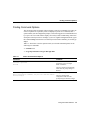
Entering a question mark (?) at the system prompt displays a list of commands available for
each command mode. You can also get a list of any command’s associated keywords and
arguments with the context-sensitive help feature.
To get help specific to a command mode, a command, a keyword, or an argument, use one
of the following commands:
Command
Purpose
help
Obtain a brief description of the help system in any command mode.
abbreviated-command-entry?
Obtain a list of commands that begin with a particular character string.
(No space between command and question mark.)
abbreviated-command-entry<Tab>
Complete a partial command name.
?
List all commands available for a particular command mode.
command ?
List a command’s associated keywords. (Space between command and
question mark.)
command keyword ?
List a keyword’s associated arguments. (Space between the keyword and
question mark.)
Note Press Ctrl-P or the up arrow key to recall commands in the history buffer, beginning
with the most recent command. Repeat the key sequence to recall successively older
commands. Press Ctrl-N or the down arrow key to return to more recent commands in the
history buffer after recalling commands with Ctrl-P or the up arrow key. Repeat the key
sequence to recall successively more recent commands.
The arrow keys function only on ANSI-compatible terminals such as VT100s.
1-2
Cisco 7100 Series VPN Configuration Guide
Finding Command Options
Finding Command Options
This section provides an example of how to display syntax for a command. The syntax can
consist of optional or required keywords. To display keywords for a command, enter a
question mark (?) at the configuration prompt, or after entering part of a command followed
by a space. The Cisco IOS software displays a list of keywords available along with a brief
description of the keywords. For example, if you were in global configuration mode, typed
the command arap, and wanted to see all the keywords for that command, you would type
arap ?.
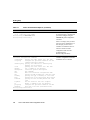
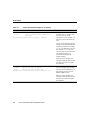
Table 1-1 shows how to use the question mark (?) to find the command options for the
following two commands:
•
•
Table 1-1
controller t1 1
cas-group 1 timeslots 1-24 type e&m-fgb dtmf
How to Find Command Options
Command
Comment
Router> enable
Password: <password>
Router#
Enter the enable command and
password to access privileged
EXEC commands.
You have entered privileged EXEC
mode when the prompt changes to
Router#.
Router# configure terminal
Enter configuration commands, one per line. End with CNTL/Z.
Router(config)#
Enter global configuration mode.
You have entered global
configuration mode when the
prompt changes to Router(config)#.
Using Cisco IOS Software 1-3
Getting Help
Table 1-1
How to Find Command Options (continued)
Command
Comment
Router(config)# controller t1 ?
<0-3> Controller unit number
Router(config)# controller t1 1
Router(config-controller)#
Enter controller configuration mode
by specifying the T1 controller that
you want to configure using the
controller t1 global configuration
command.
Enter a ? to display what you must
enter next on the command line. In
this example, you must enter a
controller unit number from 0 to 3.
You have entered controller
configuration mode when the
prompt changes to
Router(config-controller)#.
Router(config-controller)# ?
Controller configuration commands:
cablelength
Specify the cable length for a DS1 link
cas-group
Configure the specified timeslots for CAS
(Channel Associate Signals)
channel-group Specify the timeslots to channel-group
mapping for an interface
clock
Specify the clock source for a DS1 link
default
Set a command to its defaults
description
Controller specific description
ds0
ds0 commands
exit
Exit from controller configuration mode
fdl
Specify the FDL standard for a DS1 data link
framing
Specify the type of Framing on a DS1 link
help
Description of the interactive help system
linecode
Specify the line encoding method for a DS1
link
loopback
Put the entire T1 line into loopback
no
Negate a command or set its defaults
pri-group
Configure the specified timeslots for PRI
shutdown
Shut down a DS1 link (send Blue Alarm)
Router(config-controller)#
1-4
Cisco 7100 Series VPN Configuration Guide
Enter a ? to display a list of all the
controller configuration commands
available for the T1 controller.
Finding Command Options
Table 1-1
How to Find Command Options (continued)
Command
Comment
Router(config-controller)# cas-group ?
<0-23>
Channel number
Router(config-controller)# cas-group
Enter the command that you want to
configure for the controller. In this
example, the cas-group command
is used.
Enter a ? to display what you must
enter next on the command line. In
this example, you must enter a
channel number from 0 to 23.
When the system redisplays the
command, it indicates that you must
enter more keywords to complete
the command.
Router(config-controller)# cas-group 1 ?
timeslots
List of timeslots in the cas-group
Router(config-controller)# cas-group 1
After you enter the channel number,
enter a ? to display what you must
enter next on the command line. In
this example, you must enter the
timeslots keyword.
When the system redisplays the
command, it indicates that you must
enter more keywords to complete
the command.
Using Cisco IOS Software 1-5
Getting Help
Table 1-1
How to Find Command Options (continued)
Command
Comment
Router(config-controller)# cas-group 1 timeslots ?
<1-24>
List of timeslots which comprise the
cas-group
Router(config-controller)# cas-group 1 timeslots
After you enter the timeslots
keyword, enter a ? to display what
you must enter next on the
command line. In this example, you
must enter a list of timeslots from 1
to 24.
You can specify timeslot ranges (for
example, 1-24), individual timeslots
separated by commas (for example
1, 3, 5), or a combination of the two
(for example 1-3, 8, 17-24). The
16th time slot is not specified in the
command line, because it is
reserved for transmitting the
channel signaling.
When the system redisplays the
command, it indicates that you must
enter more keywords to complete
the command.
Router(config-controller)# cas-group 1 timeslots 1-24 ?
service
Specify the type of service
type
Specify the type of signaling
Router(config-controller)# cas-group 1 timeslots 1-24
After you enter the timeslot ranges,
enter a ? to display what you must
enter next on the command line. In
this example, you must enter the
service or type keyword.
When the system redisplays the
command, it indicates that you must
enter more keywords to complete
the command.
1-6
Cisco 7100 Series VPN Configuration Guide
Finding Command Options
Table 1-1
How to Find Command Options (continued)
Command
Comment
Router(config-controller)# cas-group 1 timeslots 1-24 type ?
e&m-fgb
E & M Type II FGB
e&m-fgd
E & M Type IIFGD
e&m-immediate-start E & M Immediate Start
fxs-ground-start
FXS Ground Start
fxs-loop-start
FXS Loop Start
sas-ground-start
SAS Ground Start
sas-loop-start
SAS Loop Start
Router(config-controller)# cas-group 1 timeslots 1-24 type
In this example, the type keyword is
entered. After you enter the type
keyword, enter a ? to display what
you must enter next on the
command line. In this example, you
must enter one of the signaling
types.
Router(config-controller)# cas-group 1 timeslots 1-24 type
e&m-fgb ?
dtmf
DTMF tone signaling
mf
MF tone signaling
service
Specify the type of service
<cr>
Router(config-controller)# cas-group 1 timeslots 1-24 type
e&m-fgb
In this example, the e&m-fgb
keyword is entered. After you enter
the e&m-fgb keyword, enter a ? to
display what you must enter next on
the command line. In this example,
you can enter the dtmf, mf, or
service keyword to indicate the type
of channel-associated signaling
available for the e&m-fgb signaling
type.
When the system redisplays the
command, it indicates that you must
enter more keywords to complete
the command.
When the system redisplays the
command, it indicates that you can
enter more keywords or press <cr>
to complete the command.
Using Cisco IOS Software 1-7
Understanding Command Modes
Table 1-1
How to Find Command Options (continued)
Command
Comment
Router(config-controller)# cas-group 1 timeslots 1-24 type
e&m-fgb dtmf ?
dnis
DNIS addr info provisioned
service
Specify the type of service
<cr>
Router(config-controller)# cas-group 1 timeslots 1-24 type
e&m-fgb dtmf
In this example, the dtmf keyword
is entered. After you enter the dtmf
keyword, enter a ? to display what
you must enter next on the
command line. In this example, you
can enter the dnis or service
keyword to indicate the options
available for dtmf tone signaling.
When the system redisplays the
command, it indicates that you can
enter more keywords or press <cr>
to complete the command.
Router(config-controller)# cas-group 1 timeslots 1-24 type
e&m-fgb dtmf
Router(config-controller)#
In this example, enter a <cr> to
complete the command.
Understanding Command Modes
The Cisco IOS user interface is divided into many different modes. The commands
available to you at any given time depend on which mode you are currently in. Entering a
question mark (?) at the system prompt allows you to obtain a list of commands available
for each command mode.
When you start a session on the router, you begin in user mode, often called EXEC mode.
Only a limited subset of the commands are available in EXEC mode. To have access to all
commands, you must enter privileged EXEC mode (also called enable mode). Normally,
you must enter a password to enter privileged EXEC mode. From privileged mode, you can
enter any EXEC command or enter global configuration mode. Most of the EXEC
commands are one-time commands, such as show commands, which show the current
status of something, and clear commands, which clear counters or interfaces. The EXEC
commands are not saved across reboots of the router.
1-8
Cisco 7100 Series VPN Configuration Guide
Summary of Main Command Modes
The configuration modes allow you to make changes to the running configuration. If you
later save the configuration, these commands are stored across router reboots. To get to the
various configuration modes, you must start at global configuration mode. From global
configuration mode, you can enter interface configuration mode, subinterface configuration
mode, and a variety of protocol-specific modes.
ROM monitor mode is a separate mode used when the router cannot boot properly. If your
router or access server does not find a valid system image when it is booting, or if its
configuration file is corrupted at startup, the system might enter ROM monitor mode.
Summary of Main Command Modes
Table 1-2 summarizes the main command modes of the Cisco IOS software.
Table 1-2
Summary of Main Command Modes
Command
Mode
Access Method
Prompt
Exit Method
User EXEC
Log in.
Router>
Use the logout command.
Privileged
EXEC
From user EXEC
mode, use the enable
EXEC command.
Router#
To exit back to user EXEC mode, use the
disable command.
From privileged
EXEC mode, use the
configure terminal
privileged EXEC
command.
Router(config)#
Global
configuration
To enter global configuration mode, use the
configure terminal privileged EXEC
command.
To exit to privileged EXEC mode, use the exit
or end command or press Ctrl-Z.
To enter interface configuration mode, enter an
interface configuration command.
Using Cisco IOS Software 1-9
Understanding Command Modes
Table 1-2
Command
Mode
Interface
configuration
Subinterface
configuration
ROM
monitor
Summary of Main Command Modes (continued)
Access Method
Prompt
Exit Method
From global
configuration mode,
enter by specifying
an interface with an
interface command.
Router(config-if)#
To exit to global configuration mode, use the
exit command.
From interface
configuration mode,
specify a
subinterface with an
interface command.
Router(config-subif)#
From privileged
EXEC mode, use the
reload EXEC
command. Press the
Break key during the
first 60 seconds
while the system is
booting.
>
To exit to privileged EXEC mode, use the exit
command or press Ctrl-Z.
To enter subinterface configuration mode,
specify a subinterface with the interface
command.
To exit to global configuration mode, use the
exit command.
To enter privileged EXEC mode, use the end
command or press Ctrl-Z.
To exit to user EXEC mode, type continue.
For more information regarding command modes, refer to the “Using the Command Line
Interface” chapter of the Configuration Fundamentals Configuration Guide.
1-10
Cisco 7100 Series VPN Configuration Guide
Using the no and default Forms of Commands
Using the no and default Forms of Commands
Almost every configuration command also has a no form. In general, use the no form to
disable a function. Use the command without the keyword no to reenable a disabled
function or to enable a function that is disabled by default. For example, IP routing is
enabled by default. To disable IP routing, specify the no ip routing command and specify
ip routing to reenable it. The Cisco IOS software command references provide the
complete syntax for the configuration commands and describes what the no form of a
command does.
Configuration commands can also have a default form. The default form of a command
returns the command setting to its default. Most commands are disabled by default, so the
default form is the same as the no form. However, some commands are enabled by default
and have variables set to certain default values. In these cases, the default command
enables the command and sets variables to their default values. The Cisco IOS software
command references describe what the default form of a command does if the command
is not the same as the no form.
Saving Configuration Changes
Enter the copy system:running-config nvram:startup-config command to save your
configuration changes to your startup configuration so that they will not be lost if there is a
system reload or power outage. For example:
Router# copy system:running-config nvram:startup-config
Building configuration...
It might take a minute or two to save the configuration. After the configuration has been
saved, the following output appears:
[OK]
Router#
On most platforms, this step saves the configuration to nonvolatile random-access memory
(NVRAM). On Class A Flash memory file systems, such as Cisco 7100 series routers, this
step saves the configuration to the location specified by the CONFIG_FILE environment
variable. The CONFIG_FILE variable defaults to NVRAM.
Using Cisco IOS Software 1-11
Saving Configuration Changes
1-12
Cisco 7100 Series VPN Configuration Guide
C H A PT E R
2
Before You Begin
This chapter provides an overview of the business scenarios covered in this guide, items
you should consider before attempting to configure a Virtual Private Network (VPN) on
your Cisco 7100 series router, and the assumptions this guide makes.
This chapter includes the following sections:
•
•
•
Overview of Business Scenarios, page 2-1
Considerations, page 2-3
Assumptions, page 2-7
Overview of Business Scenarios
The business scenarios explained in this guide provide a remote office and a business
partner access to a corporate headquarters network through secure generic routing
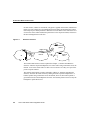
encapsulation (GRE) and IP Security Protocol (IPSec) tunnels. (See Figure 2-1.)
Note Although supported by Cisco 7100 series routers, this guide does not explain how to
configure access VPNs using the Layer 2 Forwarding (L2F) or Layer 2 Tunnel Protocol
(L2TP) tunneling protocols. Configuring access VPNs using the L2TP tunneling protocol
will be covered in a later release of this guide. For detailed information on configuring
client-initiated and network access server (NAS)-initiated access VPNs using the L2F
tunneling protocol, refer to the Access VPN Solutions Using Tunneling Technology
publication.
Before You Begin 2-1
Overview of Business Scenarios
In each scenario, a tunnel is constructed, encryption is applied on the tunnel, and different
traffic types (for example, IP, User Datagram Protocol [UDP], and Transmission Control
Protocol [TCP]) are either permitted or denied access to the tunnel. This controls the level
of access the remote office and business partner have to the corporate intranet, and secures
the data exchanged between the sites.
Figure 2-1
Business Scenarios
Business
partner
IPSec tunnel
Remote
office
Internet
Headquarters
23289
GRE tunnel
The intranet VPN business scenario explained in Chapter 3, “Intranet VPN Business
Scenario,” links the corporate headquarters to a remote office using connections across the
Internet. Users in the remote office are able to access resources as if they were part of the
private corporate intranet.
The extranet VPN business scenario explained in Chapter 4, “Extranet VPN Business
Scenario,” builds on the VPN scenario by linking the same corporate headquarters to a
business partner using connections across the Internet; however, the business partner is
given limited access to the headquarters network—the business partner can access only the
headquarters’ public Web server.
2-2
Cisco 7100 Series VPN Configuration Guide
Considerations
Considerations
The following are considerations to observe when configuring a VPN on your Cisco 7100
series router:
•
Syslog—Set up a syslog host, such as a CiscoWorks Essentials Workstation, and
configure all the routers in the network to use the syslog host. Logging all syslog
messages from the routers allows you to determine when significant events, like
configuration changes, occurred.
•
Telnet and Console Access—In client-initiated or network access server
(NAS)-initiated access VPN environments, implement Terminal Access Controller
Access Control System Plus (TACACS+) or Remote Access Dial-In User Service
(RADIUS) security for Telnet and console access to the router. Doing so logs all access
to the router. The addition of access lists to only allow Telnet access from particular
source IP addressees helps to secure the router.
•
Access Lists—Use access list numbers and names consistently to help manage and
troubleshoot configurations.
•
Template Configurations—Use a configuration template when deploying many routers
that require consistent configurations.
•
Tunneling—Observe the following when configuring tunneling:
— To avoid anomalies that occur on physical interfaces, configure each tunnel source
and destination on a loopback interface. A loopback interface is a virtual interface
that is always up and allows routing protocols to stay up even if the physical
interface is down.
— Process switching and fast switching of the GRE, IPSec, L2F, and L2TP tunneling
protocols, and Cisco Express Forwarding (CEF) of the IPSec tunneling protocol is
supported on Cisco 7100 series routers in Cisco IOS Release 12.0(4)XE or a later
12.0 XE software release, or Cisco IOS Release 12.0(6)T or a later 12.0 T software
release. CEF support of the L2F and L2TP tunneling protocols will be supported on
Cisco 7100 series routers in a future maintenance release of Cisco IOS software and
will be announced in the release notes that ship with the software.
Before You Begin 2-3
Considerations
— Be careful not to violate access control lists. You can configure a tunnel with a
source and destination that are not restricted by firewall routers.
— Routing protocols that make their decisions based solely on hop count will often
prefer a tunnel over a multipoint real link. A tunnel might appear to be a one-hop,
point-to-point link and have the lowest-cost path, but may actually cost more.
•
IPSec—Observe the following when configuring IPSec:
— IPSec works with the following serial encapsulations: High-Level Data Link
Control (HDLC), Point-to-Point Protocol (PPP), and Frame Relay. IPSec also
works with the GRE and IPinIP Layer 3, L2F, and L2TP tunneling protocols;
however, multipoint tunnels are not supported. Other Layer 3 tunneling protocols
(data-link switching [DLSW], source-route bridging [SRB], and so forth) are
currently not supported for use with IPSec.
— IPSec and Internet Key Exchange (IKE) must be configured on the router and a
crypto map assigned to all interfaces that require encryption services from the
Integrated Service Module (ISM) in slot 5 of Cisco 7100 series routers.
— IPSec can be applied to unicast IP datagrams only. Because the IPSec Working
Group has not yet addressed the issue of group key distribution, IPSec does not
currently work with multicasts or broadcast IP datagrams.
— If you use Network Address Translation (NAT), you should configure static NAT
redundant so that IPSec works properly. In general, NAT should occur before the
router performs IPSec encapsulation; in other words, IPSec should be working with
global addresses.
•
Firewall—Observe the following when configuring Cisco IOS Firewall features (when
configuring your Cisco 7100 series router as a firewall):
— When setting passwords for privileged access to the firewall, use the enable secret
command rather than the enable password command, which does not have as
strong an encryption algorithm.
— Configure a password on the console port. In authentication, authorization, and
accounting (AAA) environments, use the same authentication for the console as for
elsewhere. In a non-AAA environment, at a minimum, configure the login and
password password commands.
2-4
Cisco 7100 Series VPN Configuration Guide
Considerations
— Think about access control before you connect a console port to the network in any
way, including attaching a modem to the port. Be aware that a break on the console
port might give total control of the firewall, even with access control configured.
— Apply access lists and password protection to all virtual terminal ports. Use access
lists to limit who can Telnet into your router.
— Do not enable any local service (such as Simple Network Management Protocol
[SNMP] or Network Time Protocol [NTP]) that you do not plan to use. Cisco
Discovery Protocol (CDP) and NTP are on by default, and you should turn these off
if you do not need them.
To turn off CDP, enter the no cdp run global configuration command. To turn off
NTP, enter the ntp disable interface configuration command on each interface not
using NTP.
If you must run NTP, configure NTP only on required interfaces, and configure NTP
to listen only to certain peers.
Any enabled service could present a potential security risk. A determined, hostile
party might be able to find creative ways to misuse the enabled services to access
the firewall or the network.
For local services that are enabled, protect against misuse. Protect by configuring
the services to communicate only with specific peers, and protect by configuring
access lists to deny packets for the services at specific interfaces.
— Protect against spoofing: protect the networks on both sides of the firewall from
being spoofed from the other side. You could protect against spoofing by
configuring input access lists at all interfaces to pass only traffic from expected
source addresses, and to deny all other traffic.
You should also disable source routing. For IP, enter the no ip source-route global
configuration command. Disabling source routing at all routers can also help
prevent spoofing.
You should also disable minor services. For IP, enter the no service
tcp-small-servers and no service udp-small-servers global configuration
commands.
— Prevent the firewall from being used as a relay by configuring access lists on any
asynchronous Telnet ports.
Before You Begin 2-5
Considerations
— Normally, you should disable directed broadcasts for all applicable protocols on
your firewall and on all your other routers. For IP, use the no ip directed-broadcast
command. Rarely, some IP networks do require directed broadcasts; if this is the
case, do not disable directed broadcasts.
Directed broadcasts can be misused to multiply the power of denial-of-service
attacks, because every denial-of-service packet sent is broadcast to every host on a
subnet. Furthermore, some hosts have other intrinsic security risks present when
handling broadcasts.
— Configure the no proxy-arp command to prevent internal addresses from being
revealed. (This is important to do if you do not already have NAT configured to
prevent internal addresses from being revealed).
— Whenever possible, keep the firewall in a secured (locked) room.
•
VPN Management—Implement one or more of the following applications on your
Cisco 7100 series router for centralized, end-to-end management of both the services
(for example, QoS and security features) and hardware (for example, device
configuration and performance) across your VPN:
— CiscoWorks 2000 and CiscoView enable management of device security and
configuration, and performance monitoring.
— CiscoWorks 2000 Access Control List Manager enables management of access
control lists.
— Cisco QoS Policy Manager enables management of advanced bandwidth policies.
— Cisco Internetwork Performance Monitor 2.0 enables monitoring of service-level
agreements across the service provider network.
To access the documentation for the above applications on CCO, follow this path:
Service and Support: Technical Documents: Documentation Home Page: Cisco
Product Documentation: Network Management
To access the documentation for the above applications on the Documentation
CD-ROM, follow this path:
Documentation CD Home Page: Cisco Product Documentation: Network
Management
2-6
Cisco 7100 Series VPN Configuration Guide
Assumptions
Assumptions
This guide assumes the following:
•
You have successfully installed, powered on, and initially configured your Cisco 7100
series router for network connectivity based on the procedures explained in the
Cisco 7100 Series VPN Router Installation and Configuration Guide.
•
You are configuring a service provider transparent VPN, whereby the tunnel endpoints
are outside of the service provider network (on the headquarters and remote site
routers).
•
You are configuring your VPN based on IP and the Border Gateway Protocol (BGP)
routing protocol, and cryptography and tunneling technologies such as IPSec and GRE.
•
You have Certification Authority (CA) interoperability configured on your Cisco 7100
series router. CA interoperability is provided by the ISM in support of the IPSec
standard. It permits Cisco IOS devices and CAs to communicate so that your Cisco IOS
device can obtain and use digital certificates from the CA. Although IPSec can be
implemented in your network without the use of a CA, using a CA provides
manageability and scalability for IPSec.
Note The scenarios in this guide do not explain how to configure CA interoperability
on your Cisco 7100 series router. For detailed configuration information on CA
interoperability, refer to the “Configuring Certification Authority Interoperability”
chapter in the Security Configuration Guide.
•
You have a network management solution, such as CiscoWorks 2000, CiscoView,
CiscoWorks 2000 Access Control List Manager, Cisco QoS Policy Manager, or Cisco
Internetwork Performance Monitor 2.0, configured on your Cisco 7100 series router.
For information on network management applications, refer to the network
management product documentation on Cisco Connection Online (CCO) and the
Documentation CD-ROM.
Before You Begin 2-7
Assumptions
On CCO, follow this path:
Service and Support: Technical Documents: Documentation Home Page: Cisco
Product Documentation: Network Management
On the Documentation CD-ROM, follow this path:
Documentation CD Home Page: Cisco Product Documentation: Network
Management
•
You have identified the Cisco IOS Firewall features that you plan to configure on your
Cisco 7100 series router. The business scenarios in this guide explain how to configure
extended access lists, which are sequential collections of permit and deny conditions
that apply to an IP address.
Note For advanced firewall configuration information, refer to the “Traffic Filtering
and Firewalls” part of the Security Configuration Guide.
2-8
Cisco 7100 Series VPN Configuration Guide
C H A PT E R
3
Intranet VPN Business
Scenario
This chapter explains the basic tasks for configuring an IP-based, intranet Virtual Private
Network (VPN) on a Cisco 7100 series router using generic routing encapsulation (GRE)
as the tunneling protocol. Only basic security, Cisco IOS weighted fair queuing (WFQ),
and extended access lists for basic traffic filtering are configured.
This chapter includes the following sections:
•
•
•
•
•
•
Scenario Description, page 3-2
Step 1—Configuring the Tunnel, page 3-4
Step 2—Configuring Quality of Service, page 3-8
Step 3—Configuring Encryption, page 3-11
Step 4—Configuring Cisco IOS Firewall Features, page 3-32
Comprehensive Configuration Examples, page 3-37
Note Throughout this chapter, there are numerous configuration examples and sample
configuration outputs that include unusable IP addresses. Be sure to use your own IP
addresses when configuring your Cisco 7100 series router.
Intranet VPN Business Scenario 3-1
Scenario Description
Scenario Description
Figure 3-1 shows a headquarters network providing a remote office access to the corporate
intranet. In this scenario, the headquarters and remote office are connected through a secure
GRE tunnel that is established over an IP infrastructure (the Internet). Employees in the
remote office are able to access internal, private web pages and perform various IP-based
network tasks.
Figure 3-1
Intranet VPN Business Scenario
Headquarters
router (hq-sanjose)
Remote office
router (ro-rtp)
GRE tunnel
Internet
Serial line
Serial line
Remote
office
network
23244
Corporate
Intranet
Figure 3-2 shows the physical elements of the scenario. The Internet provides the core
interconnecting fabric between the headquarters and remote office routers. Both the
headquarters and remote office are using a Cisco 7140-2T3 as a gateway router. Both
routers have two high-speed synchronous serial T3 interfaces, two Fast Ethernet
10/100BaseT autosensing interfaces, and one Integrated Service Module (ISM) installed.
The ISM provides hardware-based encryption services for any interface installed in the
router.
The GRE tunnel is configured on the first serial interface in chassis slot 1 (serial 1/0) of the
headquarters and remote office routers. Fast Ethernet interface 0/0 of the headquarters
router is connected to a corporate server and Fast Ethernet interface 0/1 is connected to a
Web server. Fast Ethernet interface 0/0 of the remote office router is connected to a PC
client.
3-2
Cisco 7100 Series VPN Configuration Guide
Scenario Description
Figure 3-2
Intranet VPN Scenario Physical Elements
Headquarters
router (hq-sanjose)
Tunnel interface 0
172.17.3.3/24
Fast Ethernet
0/0
10.1.3.3/24
Remote office
router (ro-rtp)
GRE tunnel
Tunnel interface 1
172.17.3.6/24
Fast Ethernet
0/0
10.1.4.2/24
Internet
Private
corporate
server
10.1.3.6/24
Public
Web server
10.1.6.5/24
Serial 1/0
172.17.2.5/24
23245
Fast Ethernet
0/1
10.1.6.4/24
Serial 1/0
172.17.2.4/24
PC A
10.1.4.3/24
The configuration steps in the following sections are for the headquarters router, unless
noted otherwise. Comprehensive configuration examples for both the headquarters and
remote office routers are provided in the “Comprehensive Configuration Examples” section
on page 3-37.
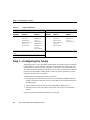
Table 3-1 lists the scenario’s physical elements.
Intranet VPN Business Scenario 3-3
Step 1—Configuring the Tunnel
Table 3-1
Physical Elements
Headquarters Network
Remote Office Network
Site
Hardware
WAN IP
Address
Ethernet IP
Address
Site
Hardware
WAN IP
Address
Ethernet IP
Address
hq-sanjose
Serial interface 1/0:
172.17.2.4
255.255.255.0
Fast Ethernet
Interface 0/0:
10.1.3.3
255.255.255.0
ro-rtp
Serial interface 1/0:
172.17.2.5
255.255.255.0
Fast Ethernet
Interface 0/0:
10.1.4.2
255.255.255.0
Tunnel interface 0:
172.17.3.3
255.255.255.0
Tunnel interface 1:
172.17.3.6
255.255.255.0
Fast Ethernet
Interface 0/1:
10.1.6.4
255.255.255.0
Corporate
server
–
10.1.3.6
Web server
–
10.1.6.5
PC A
–
10.1.4.3
Step 1—Configuring the Tunnel
Tunneling provides a way to encapsulate packets inside of a transport protocol. Tunneling
is implemented as a virtual interface to provide a simple interface for configuration. The
tunnel interface is not tied to specific “passenger” or “transport” protocols, but rather, it is
an architecture that is designed to provide the services necessary to implement any standard
point-to-point encapsulation scheme. Because tunnels are point-to-point links, you must
configure a separate tunnel for each link.
Tunneling has the following three primary components:
•
Passenger protocol, which is the protocol you are encapsulating (AppleTalk, Banyan
VINES, Connectionless Network Service [CLNS], DECnet, IP, or Internetwork Packet
Exchange [IPX])
•
•
Carrier protocol, such as the generic routing encapsulation (GRE) protocol
Transport protocol, such as IP, which is the protocol used to carry the encapsulated
protocol
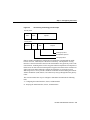
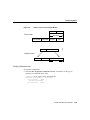
Figure 3-3 illustrates IP tunneling terminology and concepts.
3-4
Cisco 7100 Series VPN Configuration Guide
Step 1—Configuring the Tunnel
Figure 3-3
IP Tunneling Terminology and Concepts
Normal packet
802.3
802.2
Payload
Tunnel packet
IP
GRE
Payload
24217
Ethernet
Passenger protocol
Encapsulation protocol
Transport protocol
GRE is capable of handling the transportation of multiprotocol and IP multicast traffic
between two sites, which only have IP unicast connectivity. The importance of using
tunnels in a VPN environment is based on the fact that IPSec encryption only works on IP
unicast frames. Tunneling allows for the encryption and the transportation of multiprotocol
traffic across the VPN since the tunneled packets appear to the IP network as an IP unicast
frame between the tunnel endpoints. Tunnels also enable the use of private network
addressing across a service provider’s backbone without the need for running the Network
Address Translation (NAT) feature, if all connectivity must go through the home gateway
router.
This section contains basic steps to configure a GRE tunnel and includes the following
tasks:
1 Configuring the Tunnel Interface, Source, and Destination
2 Verifying the Tunnel Interface, Source, and Destination
Intranet VPN Business Scenario 3-5
Step 1—Configuring the Tunnel
Configuring the Tunnel Interface, Source, and Destination
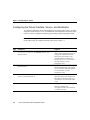
To configure a GRE tunnel between the headquarters and remote office routers, you must
configure a tunnel interface, source, and destination on the headquarters and remote office
routers. To do this, complete the following steps starting in global configuration mode.
Note The following procedure assumes the tunnel interface, source, and destination on the
remote office router are configured with the values listed in Table 3-1.
Step
Command
Purpose
1
hq-sanjose(config)# interface tunnel 0
hq-sanjose(config-if)# ip address 172.17.3.3
255.255.255.0
Specify a tunnel interface number,
enter interface configuration mode, and
configure an IP address and subnet
mask on the tunnel interface. This
example configures IP address and
subnet mask 172.17.3.3 255.255.255.0
for tunnel interface 0 on the
headquarters router.
2
hq-sanjose(config-if)# tunnel source 172.17.2.4
255.255.255.0
Specify the tunnel interface’s source
address and subnet mask. This example
uses the IP address and subnet mask of
T3 serial interface 1/0 of the
headquarters router.
3
hq-sanjose(config-if)# tunnel destination
172.17.2.5 255.255.255.0
Specify the tunnel interface’s
destination address. This example uses
the IP address and subnet mask of T3
serial interface 1/0 of the remote office
router.
4
hq-sanjose(config-if)# tunnel mode gre ip
Configure GRE as the tunnel mode.
GRE is the default tunnel
encapsulation mode, so this command
is considered optional.
3-6
Cisco 7100 Series VPN Configuration Guide
Verifying the Tunnel Interface, Source, and Destination
Step
Command
Purpose
5
hq-sanjose(config)# interface tunnel 0
hq-sanjose(config-if)# no shutdown
%LINK-3-UPDOWN: Interface Tunnel0, changed state
to up
Bring up the tunnel interface.1
6
hq-sanjose(config-if)# exit
hq-sanjose(config)# ip route 10.1.4.0
255.255.255.0 tunnel 0
Exit back to global configuration mode
and configure traffic from the remote
office’s network through the tunnel.
This example configures traffic from
the remote office’s Fast Ethernet
network (10.1.4.0 255.255.255.0)
through GRE tunnel 0.
1
This command changes the state of the tunnel interface from administratively down to up.
Note When configuring GRE, you must have only Cisco routers or access servers at both
ends of the tunnel connection.
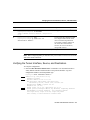
Verifying the Tunnel Interface, Source, and Destination
To verify the configuration:
•
Enter the show interfaces tunnel 0 EXEC command to view the tunnel interface’s
status (both the interface and the interface’s line protocol should be “up”) and
configured IP addresses and encapsulation type.
hq-sanjose# show interfaces tunnel 0
Tunnel0 is up, line protocol is up
Hardware is Tunnel
Internet address is 172.17.3.3/24
MTU 1514 bytes, BW 180 Kbit, DLY 500000 usec,
reliablility 255/255, txload 1/255, rxload 1/255
Encapsulation TUNNEL, loopback not set
Keepalive set (10 sec)
Tunnel source 172.17.2.4, destination 172.17.2.5
Tunnel protocol/transport GRE/IP, key disabled, sequencing disabled
Checksumming of packets disabled, fast tunneling enabled
Last input never, output 00:10:44, output hang never
Last clearing of "show interface" counters never
Intranet VPN Business Scenario 3-7
Step 2—Configuring Quality of Service
Queueing strategy:fifo
Output queue 0/0, 0 drops; input queue 0/75, 0 drops
5 minute input rate 0 bits/sec, 0 packets/sec
5 minute output rate 0 bits/sec, 0 packets/sec
0 packets input, 0 bytes, 0 no buffer
Received 0 broadcasts, 0 runts, 0 giants, 0 throttles
0 input errors, 0 CRC, 0 frame, 0 overrun, 0 ignored, 0 abort
29 packets output, 2348 bytes, 0 underruns
0 output errors, 0 collisions, 0 interface resets
0 output buffer failures, 0 output buffers swapped out
•
Try pinging the tunnel interface of the remote office router (this example uses the IP
address of tunnel interface 1 [172.17.3.6]):
hq-sanjose(config)# ping 172.17.3.6
Type escape sequence to abort.
Sending 5, 100-byte ICMP Echos to 172.17.3.6, timeout is 2 seconds:
!!!!!
Success rate is 100 percent (5/5), round-trip min/avg/max = 4/5/8 ms
Tips
If you have trouble, make sure you are using the correct IP address and that you enabled the
tunnel interface with the no shutdown command.
Step 2—Configuring Quality of Service
Cisco IOS quality of service (QoS) refers to the ability of a network to provide better
service to selected network traffic over various underlying technologies including Frame
Relay, Asynchronous Transfer Mode (ATM), Ethernet and 802.1 networks, SONET, and
IP-routed networks. In particular, QoS features provide better and more predictable
network service by:
•
•
•
•
•
3-8
Supporting dedicated bandwidth
Improving loss characteristics
Avoiding and managing network congestion
Shaping network traffic
Setting traffic priorities across the network
Cisco 7100 Series VPN Configuration Guide
Step 2—Configuring Quality of Service
You configure QoS features throughout a network to provide for end-to-end QoS delivery.
The following three components are necessary to deliver QoS across a heterogeneous
network:
•
QoS within a single network element, which includes queuing, scheduling, and traffic
shaping features.
•
QoS signaling techniques for coordinating QoS from end-to-end between network
elements.
•
QoS policing and management functions to control and administer end-to-end traffic
across a network.
Not all QoS techniques are appropriate for all network routers. Because edge routers and
backbone routers in a network do not necessarily perform the same operations, the QoS
tasks they perform might differ as well.
In general, edge routers perform the following QoS functions:
•
•
•
Packet classification and prioritization
Admission control, such as queuing and policing
Bandwidth management
In general, backbone routers perform the following QoS functions:
•
•
Congestion management
Congestion avoidance
Cisco IOS QoS service models, features, and sample configurations are explained in detail
in the Quality of Service Solutions Configuration Guide and the Quality of Service
Solutions Command Reference. Refer to these two publications as you plan and implement
a QoS strategy for your VPN, because there are various QoS service models and features
that you can implement on your VPN.
This section contains basic steps to configure QoS weighted fair queuing (WFQ), which
applies priority (or weights) to identified traffic, on the GRE tunnel you configured in the
“Step 1—Configuring the Tunnel” section on page 3-4 and includes the following tasks:
1 Configuring Weighted Fair Queuing
2 Verifying Weighted Fair Queuing
Intranet VPN Business Scenario 3-9
Step 2—Configuring Quality of Service
Configuring Weighted Fair Queuing
WFQ provides traffic priority management that automatically sorts among individual traffic
streams without requiring that you first define access lists. WFQ can also manage duplex
data streams such as those between pairs of applications, and simplex data streams such as
voice or video. There are two categories of WFQ sessions: high bandwidth and low
bandwidth. Low-bandwidth traffic has effective priority over high-bandwidth traffic, and
high-bandwidth traffic shares the transmission service proportionally according to assigned
weights.
When WFQ is enabled for an interface, new messages for high-bandwidth traffic streams
are discarded after the configured or default congestive messages threshold has been met.
However, low-bandwidth conversations, which include control message conversations,
continue to enqueue data. As a result, the fair queue may occasionally contain more
messages than its configured threshold number specifies.
With standard WFQ, packets are classified by flow. Packets with the same source IP
address, destination IP address, source Transmission Control Protocol (TCP) or User
Datagram Protocol (UDP) port, or destination TCP or UDP port belong to the same flow.
WFQ allocates an equal share of the bandwidth to each flow. Flow-based WFQ is also
called fair queuing because all flows are equally weighted.
To configure fair queuing on an interface, complete the following steps starting in global
configuration mode:
Step
Command
Purpose
1
hq-sanjose(config)# interface serial 1/0
Specify an interface and enter interface
configuration mode. This example specifies serial
interface 1/0 on the headquarters router.
2
hq-sanjose(config-if)# fair-queue
Configure fair queuing on the interface.
3
hq-sanjose(config-if)# exit
hq-sanjose(config)#
Exit back to global configuration mode.
3-10
Cisco 7100 Series VPN Configuration Guide
Verifying Weighted Fair Queuing
Verifying Weighted Fair Queuing
To verify the configuration:
•
Enter the show interfaces serial 1/0 fair-queue EXEC command to see information on
the interface that is configured for WFQ.
hq-sanjose# show interfaces serial 1/0 fair-queue
Serial1/0 queue size 0
packets output 35, drops 0
WFQ: global queue limit 401, local queue limit 200
•
Enter the show interfaces serial 1/0 EXEC command to verify the queuing for the
interface is WFQ.
hq-sanjose# show interfaces serial 1/0
Serial1/0 is up, line protocol is up
Hardware is M2T-T3 pa
-Display text omittedQueueing strategy:weighted fair
Output queue:0/1000/64/0 (size/max total/threshold/drops)
Conversations 0/0/256 (active/max active/max total)
Reserved Conversations 0/0 (allocated/max allocated)
-Display text omitted-
Step 3—Configuring Encryption
The most important part of building a VPN is maintaining security, while allowing
authorized users access. The Integrated Service Module (ISM) in slot 5 of Cisco 7100
series routers provides hardware-based data encryption services for Cisco 7100 series
routers. The hardware-based service provided by the ISM improves the overall
performance of Cisco 7100 series routers by off-loading data encryption processing from
the main system processor. The ISM supports IP Security Protocol (IPSec), Internet Key
Exchange (IKE), and Certification Authority (CA) interoperability features.
Intranet VPN Business Scenario 3-11
Step 3—Configuring Encryption
IPSec is a framework of open standards, developed by the Internet Engineering Task Force
(IETF), that provides data confidentiality, data integrity, and data authentication between
participating peers. IPSec provides these security services at the IP layer; it uses IKE to
handle negotiation of protocols and algorithms based on local policy, and to generate the
encryption and authentication keys to be used by IPSec. IPSec can be used to protect one
or more data flows between a pair of hosts, between a pair of security gateways, or between
a security gateway and a host.
IKE is a hybrid security protocol that implements Oakley and SKEME key exchanges
inside the Internet Security Association & Key Management Protocol (ISAKMP)
framework. While IKE can be used with other protocols, its initial implementation is with
the IPSec protocol. IKE provides authentication of the IPSec peers, negotiates IPSec
security associations, and establishes IPSec keys. IPSec can be configured without IKE, but
IKE enhances IPSec by providing additional features, flexibility, and ease of configuration
for the IPSec standard.
CA interoperability is provided by the ISM in support of the IPSec standard. It permits
Cisco IOS devices and CAs to communicate so that your Cisco IOS device can obtain and
use digital certificates from the CA. Although IPSec can be implemented in your network
without the use of a CA, using a CA provides manageability and scalability for IPSec.
For the ISM in slot 5 of Cisco 7100 series routers to provide encryption services on the
GRE tunnel configured in the “Step 1—Configuring the Tunnel” section on page 3-4, you
must complete the following steps:
1 Configuring IKE Policies (Creating policies)
2 Configuring IPSec (Creating access lists and transform sets)
3 Configuring Crypto Maps (Creating crypto maps and assigning maps to interfaces)
Optionally, you can configure CA interoperability. This guide does not explain how to
configure CA interoperability on your Cisco 7100 series router. Refer to the “IP Security
and Encryption” part of the Security Configuration Guide and the Security Command
Reference publications for detailed information on configuring CA interoperabilty.
3-12
Cisco 7100 Series VPN Configuration Guide
Configuring IKE Policies
Note This section only contains basic configuration information for enabling encryption
services on the GRE tunnel configured in the “Step 1—Configuring the Tunnel” section on
page 3-4. Refer to the “IP Security and Encryption” part of the Security Configuration
Guide and the Security Command Reference publications for detailed configuration
information on IPSec, IKE, and CA.
Refer to the Integrated Service Adapter and Integrated Service Module Installation and
Configuration publication for detailed configuration information on the ISM.
Configuring IKE Policies
IKE is enabled by default. IKE does not have to be enabled for individual interfaces, but is
enabled globally for all interfaces in the router. You must create IKE policies at each peer.
An IKE policy defines a combination of security parameters to be used during the IKE
negotiation.
You can create multiple IKE policies, each with a different combination of parameter
values. If you do not configure any IKE policies, the router uses the default policy, which
is always set to the lowest priority, and which contains each parameter’s default value.
For each policy that you create, you assign a unique priority (1 through 10,000, with 1 being
the highest priority). You can configure multiple policies on each peer—but at least one of
these policies must contain exactly the same encryption, hash, authentication, and
Diffie-Hellman parameter values as one of the policies on the remote peer. If you do not
specify a value for a parameter, the default value is assigned.
Note The default policy and the default values for configured policies do not show up in
the configuration when you issue a show running-config EXEC command. Instead, to see
the default policy and any default values within configured policies, use the show crypto
isakmp policy EXEC command.
This section contains basic steps to configure IKE policies and includes the following tasks:
1 Creating Policies
2 Additional Configuration Required for IKE Policies
3 Verifying IKE Policies
Intranet VPN Business Scenario 3-13
Step 3—Configuring Encryption
Creating Policies
To create an IKE policy, complete the following steps starting in global configuration mode:
Step
Command
Purpose
1
hq-sanjose(config)# crypto isakmp policy 1
Enter config-isakmp command mode and identify
the policy to create. (Each policy is uniquely
identified by the priority number you assign.) This
example configures policy 1.
2
hq-sanjose(config-isakmp)# encryption des
Specify the encryption algorithm—56-bit Data
Encryption Standard (DES [des]) or 168-bit
Triple DES (3des). This example configures the
DES algorithm, which is the default.
3
hq-sanjose(config-isakmp)# hash sha
Specify the hash algorithm—Message Digest 5
(MD5 [md5]) or Secure Hash Algorithm (SHA
[sha]). This example configures SHA, which is
the default.
4
hq-sanjose(config-isakmp)# authentication
pre-share
Specify the authentication method—preshared
keys (pre-share), RSA1 encrypted nonces
(rsa-encr), or RSA signatures (rsa-slg). This
example configures preshared keys. The default is
RSA signatures.
5
hq-sanjose(config-isakmp)# group 1
Specify the Diffie-Hellman group
identifier—768-bit Diffie-Hellman (1) or 1024-bit
Diffie-Hellman (2). This example configures
768-bit Diffie-Hellman, which is the default.
6
hq-sanjose(config-isakmp)# lifetime 86400
Specify the security association’s lifetime—in
seconds. This example configures 86400 seconds
(one day).
7
hq-sanjose(config-isakmp)# exit
hq-sanjose(config)#
Exit back to global configuration mode.
1
RSA = Rivest, Shamir, and Adelman.
3-14
Cisco 7100 Series VPN Configuration Guide
Configuring IKE Policies
Additional Configuration Required for IKE Policies
Depending on which authentication method you specify in your IKE policies, you need to
complete an additional companion configuration before IKE and IPSec can successfully
use the IKE policies.
Each authentication method requires an additional companion configuration as follows:
•
RSA signatures method:
If you specify RSA signatures as the authentication method in a policy, you must
configure the peers to obtain certificates from a Certification Authority (CA). (And, of
course, the CA must be properly configured to issue the certificates.) Configure this
certificate support as described in the “Configuring Certification Authority
Interoperability” chapter of the Security Configuration Guide.
The certificates are used by each peer to securely exchange public keys. (RSA
signatures requires that each peer has the remote peer’s public signature key.) When
both peers have valid certificates, they will automatically exchange public keys with
each other as part of any IKE negotiation in which RSA signatures are used.
•
RSA encrypted nonces method:
If you specify RSA encrypted nonces as the authentication method in a policy, you need
to ensure that each peer has the other peers’ public keys.
Unlike RSA signatures, the RSA encrypted nonces method does not use certificates to
exchange public keys. Instead, you ensure that each peer has the others’ public keys by
doing the following:
— Manually configure RSA keys as described in the “Configuring Internet Key
Exchange Security Protocol” chapter of the Security Configuration Guide.
— Ensure that an IKE exchange using RSA signatures has already occurred between
the peers. (The peers’ public keys are exchanged during the RSA-signatures-based
IKE negotiations.)
To make this happen, specify two policies: a higher-priority policy with RSA
encrypted nonces, and a lower-priority policy with RSA signatures. When IKE
negotiations occur, RSA signatures will be used the first time because the peers do
not yet have each others’ public keys. Then, future IKE negotiations will be able to
use RSA-encrypted nonces because the public keys will have been exchanged.
Of course, this alternative requires that you have CA support configured.
Intranet VPN Business Scenario 3-15
Step 3—Configuring Encryption
•
Preshared keys authentication method:
If you specify preshared keys as the authentication method in a policy, you must
configure these preshared keys as described in the following section “Configuring
Preshared Keys.”
If RSA encryption is configured and signature mode is negotiated, the peer will request
both signature and encryption keys. Basically, the router will request as many keys as the
configuration will support. If RSA encryption is not configured, it will just request a
signature key.
Configuring Preshared Keys
To configure preshared keys, perform these tasks at each peer that uses preshared keys in
an IKE policy:
1 Set each peer’s ISAKMP identity. Each peer’s identity should be set to either its host
name or by its IP address. By default, a peer’s identity is set to its IP address.
2 Specify the shared keys at each peer. Note that a given preshared key is shared between
two peers. At a given peer, you could specify the same key to share with multiple remote
peers; however, a more secure approach is to specify different keys to share between
different pairs of peers.
To specify preshared keys at a peer, complete the following steps in global configuration
mode:
Step
Command
Purpose
1
hq-sanjose(config)# crypto isakmp
identity address
At the local peer: Specify the ISAKMP identity
(address or hostname) the headquarters router will
use when communicating with the remote office
router during IKE negotiations. This example
specifies the address keyword, which uses IP
address 172.17.2.4 (serial interface 1/0 of the
headquarters router) as the identity for the
headquarters router.
3-16
Cisco 7100 Series VPN Configuration Guide
Configuring IKE Policies
Step
Command
Purpose
2
hq-sanjose(config)# crypto isakmp key
12345 address 172.17.2.5
At the local peer: Specify the shared key the
headquarters router will use with the remote office
router. This example configures the shared key
12345 to be used with the remote peer 172.17.2.5
(serial interface 1/0 on the remote office router).
3
ro-rtp(config)# crypto isakmp identity
address
At the remote peer: Specify the ISAKMP identity
(address or hostname) the remote office router will
use when communicating with the headquarters
router during IKE negotiations. Again, this example
specifies the address keyword, which uses IP
address 172.17.2.5 (serial interface 1/0 of the remote
office router) as the identity for the remote office
router.
4
ro-rtp(config)# crypto isakmp key 12345
address 172.17.2.4
At the remote peer: Specify the shared key to be
used with the local peer. This is the same key you
just specified at the local peer. This example
configures the shared key 12345 to be used with the
local peer 172.17.2.4 (serial interface 1/0 on the
headquarters router).
Note Set an ISAKMP identity whenever you specify preshared keys. The address
keyword is typically used when there is only one interface (and therefore only one IP
address) that will be used by the peer for IKE negotiations, and the IP address is known.
Use the hostname keyword if there is more than one interface on the peer that might be
used for IKE negotiations, or if the interface’s IP address is unknown (such as with
dynamically-assigned IP addresses).
Intranet VPN Business Scenario 3-17
Step 3—Configuring Encryption
Verifying IKE Policies
To verify the configuration:
•
Enter the show crypto isakmp policy EXEC command to see the default policy and any
default values within configured policies.
hq-sanjose# show crypto isakmp policy
Protection suite priority 1
encryption algorithm: DES - Data Encryption Standard (56 bit keys)
hash algorithm:
Secure Hash Standard
authentication method: Pre-Shared Key
Diffie-Hellman group: #1 (768 bit)
lifetime:
86400 seconds, no volume limit
Note Although the above output shows “no volume limit” for the lifetimes, you can
currently only configure a time lifetime (such as 86400 seconds); volume limit lifetimes are
not configurable.
Tips
If you have trouble, use the show version command to ensure your Cisco 7100 series router
is running a Cisco IOS software image that supports crypto.
hq-sanjose# show version
Cisco Internetwork Operating System Software
IOS (tm) EGR Software (c7100-JOS56I-M), Release Version 12.0(4)XE
Copyright (c) 1986-1999 by cisco Systems, Inc.
Compiled Mon 22-Mar-99 21:41 by biff
Image text-base:0x600088F8, data-base:0x611CE000
ROM:System Bootstrap, Version 12.0(4)XE RELEASE SOFTWARE
router uptime is 20 hours, 34 minutes
System restarted by reload at 22:36:57 PST Fri Dec 31 1999
System image file is "c7100-jos56i-mz"
cisco 7140 (EGR) processor with 188416K/139264K bytes of memory.
R7000 CPU at 262Mhz, Implementation 39, Rev 1.0, 256KB L2, 2048KB L3
Cache
Last reset from power-on
3-18
Cisco 7100 Series VPN Configuration Guide
Configuring IPSec
Bridging software.
X.25 software, Version 3.0.0.
SuperLAT software copyright 1990 by Meridian Technology Corp).
TN3270 Emulation software.
3 FastEthernet/IEEE 802.3 interface(s)
2 Serial network interface(s)
125K bytes of non-volatile configuration memory.
40960K bytes of ATA PCMCIA card at slot 0 (Sector size 512 bytes).
8192K bytes of Flash internal SIMM (Sector size 256K).
Configuration register is 0x0
Configuring IPSec
After you have completed IKE configuration, configure IPSec at each participating IPSec
peer. This section contains basic steps to configure IPSec and includes the following tasks:
1 Setting Global Lifetimes for IPSec Security Associations
2 Verifying Global Lifetimes for IPSec Security Associations
3 Creating Crypto Access Lists
4 Verifying Crypto Access Lists
5 Defining Transform Sets
6 Verifying Transform Sets
Note IKE uses UDP port 500. The IPSec encapsulating security payload (ESP) and
authentication header (AH) protocols use IP protocol numbers 50 and 51. Ensure that your
access lists are configured so that IP protocol 50, 51, and UDP port 500 traffic is not blocked
at interfaces used by IPSec. In some cases, you might need to add a statement to your access
lists to explicitly permit this traffic.
Intranet VPN Business Scenario 3-19
Step 3—Configuring Encryption
Setting Global Lifetimes for IPSec Security Associations
You can change the global lifetime values which are used when negotiating new IPSec SAs.
(These global lifetime values can be overridden for a particular crypto map entry). These
lifetimes only apply to security associations established using IKE. Manually established
security associations do not expire.
There are two lifetimes: a “timed” lifetime and a “traffic-volume” lifetime. An SA expires
after the first of these lifetimes is reached. The default lifetimes are 3600 seconds (one hour)
and 4,608,000 kilobytes (10 megabytes per second for one hour).
If you change a global lifetime, the new lifetime value will not be applied to currently
existing SAs, but will be used in the negotiation of subsequently established SAs. To use
the new values immediately, you can clear all or part of the SA database using the clear
crypto sa command.
IPSec SAs use one or more shared secret keys. These keys and their SAs time out together.
To change a global lifetime for IPSec SAs, enter one or more of the following commands
in global configuration mode:
Command
Purpose
hq-sanjose(config)# crypto ipsec
security-association lifetime seconds 3600
Change the global timed lifetime for IPSec SAs.
This example configures the SA to time out after
3600 seconds.
hq-sanjose(config)# crypto ipsec
security-association lifetime kilobytes 4608000
Change the global traffic-volume lifetime for IPSec
SAs. This example configures the SA to time out
after 4,608,000 kilobytes of traffic have passed
through the IPSec tunnel using the SA.
Verifying Global Lifetimes for IPSec Security Associations
To verify the configuration:
•
Enter the show crypto ipsec security-association-lifetime EXEC command to see
global security association lifetime values.
hq-sanjose# show crypto ipsec security-association-lifetime
Security association lifetime:4608000 kilobytes/3600 seconds
3-20
Cisco 7100 Series VPN Configuration Guide
Configuring IPSec
Creating Crypto Access Lists
Crypto access lists are used to define which IP traffic will be protected by crypto and which
traffic will not be protected by crypto. (These access lists are not the same as regular access
lists, which determine what traffic to forward or block at an interface.) For example, you
can create access lists to protect all IP traffic between the headquarters router and remote
office router or Telnet traffic between the headquarters router and remote office router.
The access lists themselves are not specific to IPSec. It is the crypto map entry referencing
the specific access list that defines whether IPSec processing is applied to the traffic
matching a permit in the access list.
To create a crypto access list, enter the following command in global configuration mode:
Command
Purpose
hq-sanjose(config)# access-list 101 permit
gre host 172.17.2.4 host 172.17.2.5
Specify conditions to determine which IP packets are
protected.1 (Enable or disable crypto for traffic that
matches these conditions.) This example configures
access list 101 to encrypt all GRE traffic between serial
interface 1/0 on the headquarters router (IP address
172.17.2.4) and serial interface 1/0 on the remote office
router (IP address 172.17.2.5).
1
You specify conditions using an IP access list designated by either a number or a name. The access-list command designates a
numbered extended access list; the ip access-list extended command designates a named access list.
Verifying Crypto Access Lists
To verify the configuration:
•
Enter the show access-lists 101 EXEC command to see the access list’s attributes.
hq-sanjose# show access-lists 101
Extended IP access list 101
permit gre host 172.17.2.4 host 172.17.2.5
Tips
If you have trouble, make sure you are specifying the correct access list number.
Intranet VPN Business Scenario 3-21
Step 3—Configuring Encryption
Defining Transform Sets
A transform set represents a certain combination of security protocols and algorithms.
During the IPSec SA negotiation, the peers agree to use a particular transform set for
protecting a particular data flow.
You can specify multiple transform sets, and then specify one or more of these transform
sets in a crypto map entry. The transform set defined in the crypto map entry will be used
in the IPSec SA negotiation to protect the data flows specified by that crypto map entry’s
access list.
During IPSec SA negotiations with IKE, the peers search for a transform set that is the same
at both peers. When such a transform set is found, it is selected and is applied to the
protected traffic as part of both peers’ IPSec SAs.
With manually established SAs, there is no negotiation with the peer, so both sides must
specify the same transform set.
If you change a transform set definition, the change is only applied to crypto map entries
that reference the transform set. The change will not be applied to existing SAs, but will be
used in subsequent negotiations to establish new SAs.
To define a transform set, complete the following steps starting in global configuration
mode:
Step
Command
Purpose
1
hq-sanjose(config)# crypto ipsec
transform-set proposal1 ah-sha-hmac
esp-des esp-sha-hmac
Define a transform set and enter crypto-transform
configuration mode. This example combines AH1
transform ah-sha-hmac, ESP2 encryption transform
esp-des, and ESP2 authentication transform
esp-sha-hmac in the transform set proposal1.
There are complex rules defining which entries you
can use for the transform arguments. These rules are
explained in the command description for the crypto
ipsec transform-set command. You can also use the
crypto ipsec transform-set? command, in global
configuration mode, to view the available transform
arguments.
3-22
Cisco 7100 Series VPN Configuration Guide
Configuring IPSec
Step
Command
Purpose
2
hq-sanjose(cfg-crypto-trans)# mode
transport
Change the mode associated with the transform set.
The mode setting is only applicable to traffic whose
source and destination addresses are the IPSec peer
addresses; it is ignored for all other traffic. (All other
traffic is in tunnel mode only.) This example
configures transport mode for the transport set
proposal1.
3
hq-sanjose(cfg-crypto-trans)# exit
hq-sanjose(config)#
Exit back to global configuration mode.
1
2
AH = authentication header. This header, when added to an IP datagram, ensures the integrity and authenticity of the data, including
the invariant fields in the outer IP header. It does not provide confidentiality protection. AH uses a keyed-hash function rather than
digital signatures.
ESP = encapsulating security payload. This header, when added to an IP datagram, protects the confidentiality, integrity, and
authenticity of the data. If ESP is used to validate data integrity, it does not include the invariant fields in the IP header.
Note AH and ESP can be used independently or together, although for most applications
just one of them is sufficient. For both of these protocols, IPSec does not define the specific
security algorithms to use, but rather, provides an open framework for implementing
industry-standard algorithms.
Intranet VPN Business Scenario 3-23
Step 3—Configuring Encryption
Note In IPSec transport mode, only the IP payload is encrypted, and the original IP
headers are left intact. (See Figure 3-4.) This mode has the advantage of adding only a few
bytes to each packet. It also allows devices on the public network to see the final source and
destination of the packet. This capability allows you to enable special processing (for
example, QoS) in the intermediate network based on the information in the IP header.
However, the Layer 4 header will be encrypted, limiting the examination of the packet.
Unfortunately, by passing the IP header in the clear, transport mode allows an attacker to
perform some traffic analysis.
In IPSec tunnel mode, the entire original IP datagram is encrypted, and it becomes the
payload in a new IP packet. This mode allows a network device, such as a router, to act as
an IPSec proxy. That is, the router performs encryption on behalf of the hosts. The source’s
router encrypts packets and forwards them along the IPSec tunnel. The destination’s router
decrypts the original IP datagram and forwards it on to the destination system. The major
advantage of tunnel mode is that the end systems do not need to be modified to receive the
benefits of IPSec. Tunnel mode also protects against traffic analysis; with tunnel mode an
attacker can only determine the tunnel endpoints and not the true source and destination of
the tunneled packets, even if they are the same as the tunnel endpoints. (See the “Defining
Transform Sets and Configuring IPSec Tunnel Mode” section on page 4-13 for an IPSec
tunnel configuration example.)
3-24
Cisco 7100 Series VPN Configuration Guide
Configuring IPSec
Figure 3-4
IPSec in Tunnel and Transport Modes
IP HDR
Tunnel mode
Data
Encrypted
IP HDR
IP HDR
Data
23246
New IP HDR IPSec HDR
Data
Transport mode
IP HDR
IPSec HDR
Data
Encrypted
Verifying Transform Sets
To verify the configuration:
•
Enter the show crypto ipsec transform-set EXEC command to see the type of
transform set configured on the router.
hq-sanjose# show crypto ipsec transform-set
Transform set proposal1: { ah-sha-hmac }
will negotiate = { Mode, },
{ esp-des esp-sha-hmac }
will negotiate = { Mode, },
Intranet VPN Business Scenario 3-25
Step 3—Configuring Encryption
Configuring Crypto Maps
Crypto map entries created for IPSec pull together the various parts used to set up IPSec
SAs, including:
•
•
•
•
Which traffic should be protected by IPSec (per a crypto access list).
•
What IPSec security should be applied to this traffic (selecting from a list of one or more
transform sets).
•
•
Whether SAs are manually established or are established via IKE.
The granularity of the flow to be protected by a set of SAs.
Where IPSec-protected traffic should be sent (who the remote IPSec peer is).
The local address to be used for the IPSec traffic. (See the “Applying Crypto Maps to
Interfaces” section on page 3-30 for more details.)
Other parameters that might be necessary to define an IPSec SA.
Crypto map entries with the same crypto map name (but different map sequence numbers)
are grouped into a crypto map set. Later, you will apply these crypto map sets to interfaces;
then, all IP traffic passing through the interface is evaluated against the applied crypto map
set. If a crypto map entry sees outbound IP traffic that should be protected and the crypto
map specifies the use of IKE, a security association is negotiated with the remote peer
according to the parameters included in the crypto map entry; otherwise, if the crypto map
entry specifies the use of manual security associations, a security association should have
already been established via configuration. (If a dynamic crypto map entry sees outbound
traffic that should be protected and no security association exists, the packet is dropped.)
The policy described in the crypto map entries is used during the negotiation of security
associations. If the local router initiates the negotiation, it will use the policy specified in
the static crypto map entries to create the offer to be sent to the specified IPSec peer. If the
IPSec peer initiates the negotiation, the local router will check the policy from the static
crypto map entries, as well as any referenced dynamic crypto map entries to decide whether
to accept or reject the peer’s request (offer).
For IPSec to succeed between two IPSec peers, both peers’ crypto map entries must contain
compatible configuration statements.
3-26
Cisco 7100 Series VPN Configuration Guide
Configuring Crypto Maps
When two peers try to establish a SA, they must each have at least one crypto map entry
that is compatible with one of the other peer’s crypto map entries. For two crypto map
entries to be compatible, they must at least meet the following criteria:
•
The crypto map entries must contain compatible crypto access lists (for example, mirror
image access lists). In the case where the responding peer is using dynamic crypto maps,
the entries in the local crypto access list must be “permitted” by the peer’s crypto access
list.
•
The crypto map entries must each identify the other peer (unless the responding peer is
using dynamic crypto maps).
•
The crypto map entries must have at least one transform set in common.
When IKE is used to establish SAs, the IPSec peers can negotiate the settings they will use
for the new SAs. This means that you can specify lists (such as lists of acceptable
transforms) within the crypto map entry.
After you have completed configuring IPSec at each participating IPSec peer, configure
crypto map entries and apply the crypto maps to interfaces. This section contains basic
steps to configure crypto maps and includes the following tasks:
1 Creating Crypto Map Entries
2 Verifying Crypto Map Entries
3 Applying Crypto Maps to Interfaces
4 Verifying Crypto Map Interface Associations
Intranet VPN Business Scenario 3-27
Step 3—Configuring Encryption
Creating Crypto Map Entries
To create a crypto map entry that will use IKE to establish the SAs, complete the following
steps starting in global configuration mode:
Step
Command
Purpose
1
hq-sanjose(config)# crypto map s1first
local-address serial 1/0
Create the crypto map and specify a
local address (physical interface) to be
used for the IPSec traffic. This example
creates crypto map s1first and specifies
serial interface 1/0 of the headquarters
router as the local address.
2
hq-sanjose(config)# crypto map s1first 1
ipsec-isakmp
Enter crypto map configuration mode,
specify a sequence number for the
crypto map you created in Step 1, and
configure the crypto map to use IKE to
establish SAs. This example configures
sequence number 1 and IKE for crypto
map s1first.
3
hq-sanjose(config-crypto-map)# match address 101
Specify an extended access list. This
access list determines which traffic is
protected by IPSec and which traffic is
not be protected by IPSec. This
example configures access list 101,
which was created in the “Creating
Crypto Access Lists” section on
page 3-21.
4
hq-sanjose(config-crypto-map)# set peer
172.17.2.5
Specify a remote IPSec peer (by host
name or IP address). This is the peer to
which IPSec protected traffic can be
forwarded. This example specifies
serial interface 1/0 (172.17.2.5) on the
remote office router.
3-28
Cisco 7100 Series VPN Configuration Guide
Configuring Crypto Maps
Step
Command
Purpose
5
hq-sanjose(config-crypto-map)# set transform-set
proposal1
Specify which transform sets are
allowed for this crypto map entry. List
multiple transform sets in order of
priority (highest priority first). This
example specifies transform set
proposal1, which was configured in the
“Defining Transform Sets” section on
page 3-22.
6
hq-sanjose(config-crypto-map)# exit
hq-sanjose(config)#
Exit back to global configuration mode.
Verifying Crypto Map Entries
To verify the configuration:
•
Enter the show crypto map EXEC command to see the crypto map entries configured
on the router.
In the following example, peer 172.17.2.5 is the IP address of the remote IPSec peer.
“Extended IP access list 101” lists the access list associated with the crypto map.
“Current peer” indicates the current IPSec peer. “Security-association lifetime”
indicates the lifetime of the SA. “PFS N” indicates that IPSec will not negotiate perfect
forward secrecy when establishing new SAs for this crypto map. “Transform sets”
indicates the name of the transform set that can be used with the crypto map.
hq-sanjose# show crypto map
Crypto Map: “s1first” idb: Serial1/0 local address: 172.17.2.4
Crypto Map “s1first” 1 ipsec-isakmp
Peer = 172.17.2.5
Extended IP access list 101
access-list 101 permit gre
source: addr = 172.17.2.4/255.255.255.0
dest:
addr = 172.17.2.5/255.255.255.0
Current peer: 172.17.2.5
Security-association lifetime: 4608000 kilobytes/3600 seconds
PFS (Y/N): N
Transform sets={proposal1,}
Intranet VPN Business Scenario 3-29
Step 3—Configuring Encryption
Tips
If you have trouble, make sure you are using the correct IP addresses.
Applying Crypto Maps to Interfaces
You need to apply a crypto map set to each interface through which IPSec traffic will flow.
Applying the crypto map set to an interface instructs the router to evaluate all the interface’s
traffic against the crypto map set and to use the specified policy during connection or SA
negotiation on behalf of traffic to be protected by crypto.
To apply a crypto map set to an interface, complete the following steps starting in global
configuration mode:
Step
Command
Purpose
1
hq-sanjose(config)# interface
serial 1/0
Specify a physical interface on which to apply the
crypto map and enter interface configuration
mode. This example specifies serial interface 1/0
on the headquarters router.
2
hq-sanjose(config-if)# crypto map
s1first
Apply the crypto map set to the physical interface.
This example configures crypto map s1first,
which was created in the “Creating Crypto Map
Entries” section on page 3-28.
3
hq-sanjose(config-if)# exit
hq-sanjose(config)#
Exit back to global configuration mode.
4
hq-sanjose(config)# interface
tunnel 0
Specify the tunnel interface on which to apply the
crypto map and enter interface configuration
mode. This example specifies tunnel interface 0
on the headquarters router.
5
hq-sanjose(config-if)# crypto map
s1first
Apply the crypto map set to the tunnel interface.
This example configures crypto map s1first on the
tunnel interface 0.
6
hq-sanjose(config-if)# exit
hq-sanjose(config)#
Exit back to global configuration mode.
3-30
Cisco 7100 Series VPN Configuration Guide
Configuring Crypto Maps
Step
Command
Purpose
7
hq-sanjose# clear crypto sa
In privileged EXEC mode, clear the existing
IPSec SAs so that any changes are used
immediately. (Manually established SAs are
reestablished immediately.)
Note Using the clear crypto sa command
without parameters clears out the full SA database,
which clears out active security sessions. You may
also specify the peer, map, or entry keywords to
clear out only a subset of the SA database.
For redundancy, you could apply the same crypto map set to more than one interface. The
default behavior is as follows:
•
•
Each interface will have its own piece of the SA database.
The IP address of the local interface will be used as the local address for IPSec traffic
originating from or destined to that interface.
If you apply the same crypto map set to multiple interfaces for redundancy purposes, you
need to specify an identifying interface. This has the following effects:
•
The per-interface portion of the IPSec SA database will be established one time and
shared for traffic through all the interfaces that share the same crypto map.
•
The IP address of the identifying interface will be used as the local address for IPSec
traffic originating from or destined to those interfaces sharing the same crypto map set.
One suggestion is to use a loopback interface as the identifying interface.
Use the crypto map map-name local-address interface-id command in global
configuration mode to specify redundant interfaces and name an identifying interface. This
command permits redundant interfaces to share the same crypto map, using the same local
identity.
Intranet VPN Business Scenario 3-31
Step 4—Configuring Cisco IOS Firewall Features
Verifying Crypto Map Interface Associations
To verify the configuration:
•
Enter the show crypto map interface serial 1/0 EXEC command to see the crypto
maps applied to the interface.
hq-sanjose# show crypto map interface serial 1/0
Crypto Map "s1first" 1 ipsec-isakmp
Peer = 172.17.2.5
Extended IP access list 101
access-list 101 permit gre host 172.17.2.4 host 172.17.2.5
Current peer:172.17.2.5
Security association lifetime:4608000 kilobytes/1000 seconds
PFS (Y/N):N
Transform sets={ proposal1, }
•
Enter the show crypto map interface tunnel 0 EXEC command to see the crypto maps
applied to the tunnel interface.
hq-sanjose# show crypto map interface tunnel 0
Crypto Map "s1first" 1 ipsec-isakmp
Peer = 172.17.2.5
Extended IP access list 101
access-list 101 permit gre host 172.17.2.4 host 172.17.2.5
Current peer:172.17.2.5
Security association lifetime:4608000 kilobytes/1000 seconds
PFS (Y/N):N
Transform sets={ proposal1, }
Step 4—Configuring Cisco IOS Firewall Features
Cisco IOS software provides an extensive set of security features that allow you to
configure a simple or elaborate firewall, according to your particular requirements. When
you configure Cisco IOS Firewall features on your Cisco router, you turn your router into
an effective, robust firewall.
Cisco IOS Firewall features are designed to prevent unauthorized, external individuals from
gaining access to your internal network, and to block attacks on your network, while at the
same time allowing authorized users to access network resources.
3-32
Cisco 7100 Series VPN Configuration Guide
Step 4—Configuring Cisco IOS Firewall Features
You can use Cisco IOS Firewall features to configure your Cisco IOS router as:
•
•
•
•
An Internet firewall or part of an Internet firewall
A firewall between groups in your internal network
A firewall providing secure connections to or from branch offices
A firewall between your company’s network and your company’s partners’ networks
Cisco IOS Firewall features provides the following benefits:
•
•
•
Protects internal networks from intrusion
Monitors traffic through network perimeters
Enables network commerce using the World Wide Web
At a minimum, you must configure basic traffic filtering to provide a basic firewall. You can
configure your Cisco 7100 series router to function as a firewall by using the following
Cisco IOS security features:
•
•
•
•
•
•
•
•
•
•
•
•
Static Access Lists and Static or Dynamic Extended Access Lists
Lock-and-Key (Dynamic Extended Access Lists)
Reflective Access Lists
TCP Intercept
Context-Based Access Control
Security Server Support
Network Address Translation
Cisco Encryption Technology
IPSec Network Security
Neighbor Router Authentication
Event Logging
User Authentication and Authorization
Intranet VPN Business Scenario 3-33
Step 4—Configuring Cisco IOS Firewall Features
Refer to the “Traffic Filtering and Firewalls” part of the Security Configuration
Guide and the Security Command Reference for advanced firewall configuration
information.
Note
This section explains how to configure an extended access list, which is a sequential
collection of permit and deny conditions that apply to an IP address, and includes the
following tasks:
1 Creating Extended Access Lists Using Access List Numbers
2 Verifying Extended Access Lists
3 Applying Access Lists to Interfaces
4 Verifying Extended Access Lists Are Applied Correctly
Note The extended access list configuration explained in this section is different from the
crypto access list configuration explained in the “Creating Crypto Access Lists” section on
page 3-21. Crypto access lists are used to define which IP traffic is or is not protected by
crypto, while an extended access list is used to determine which IP traffic to forward or
block at an interface.
The simplest connectivity to the Internet is to use a single device to provide the connectivity
and firewall function to the Internet. With everything being in a single device, it is easy to
address translation and termination of the VPN tunnels. Complexity arises when you need
to add extra VPN gateways to the network. This normally leads people into building a
network where the corporate network touches the Internet via a network called the DMZ,
or demilitarized zone.
3-34
Cisco 7100 Series VPN Configuration Guide
Creating Extended Access Lists Using Access List Numbers
Creating Extended Access Lists Using Access List Numbers
To create an extended access list that denies and permits certain types of traffic, complete
the following steps starting in global configuration mode:
Step
Command
Purpose
1
hq-sanjose(config)# access-list 102 deny tcp any any
Define access list 102 and
configure the access list to deny all
TCP traffic.
2
hq-sanjose(config)# access-list 102 deny udp any any
Configure access list 102 to deny
all UDP traffic.
3
hq-sanjose(config)# access-list 102 permit ip any any
Configure access list 102 to permit
all IP traffic.
Verifying Extended Access Lists
To verify the configuration:
•
Enter the show access-lists 102 EXEC command to display the contents of the access
list.
hq-sanjose# show access-list 102
Extended IP access list 102
deny
tcp any any
deny
udp any any
permit ip any any
Intranet VPN Business Scenario 3-35
Step 4—Configuring Cisco IOS Firewall Features
Applying Access Lists to Interfaces
After you create an access list, you can apply it to one or more interfaces. Access lists can
be applied on either outbound or inbound interfaces.
To apply an access list inbound and outbound on an interface, complete the following steps
starting in global configuration mode:
Step
Command
Purpose
1
hq-sanjose(config)# interface serial 1/0
Specify serial interface 1/0 on the
headquarters router and enter interface
configuration mode.
2
hq-sanjose(config-if)# ip access-group 102 in
Configure access list 102 inbound on
serial interface 1/0 on the headquarters
router.
3
hq-sanjose(config-if)# ip access-group 102 out
Configure access list 102 outbound on
serial interface 1/0 on the headquarters
router.
4
hq-sanjose(config-if)# exit
hq-sanjose(config)#
Exit back to global configuration mode.
For inbound access lists, after receiving a packet, the Cisco IOS software checks the source
address of the packet against the access list. If the access list permits the address, the
software continues to process the packet. If the access list rejects the address, the software
discards the packet and returns an “ICMP Host Unreachable” message.
For outbound access lists, after receiving and routing a packet to a controlled interface, the
software checks the destination address of the packet against the access list. If the access
list permits the address, the software transmits the packet. If the access list rejects the
address, the software discards the packet and returns an “ICMP Host Unreachable”
message.
When you apply an access list that has not yet been defined to an interface, the software
acts as if the access list has not been applied to the interface and will accept all packets. Be
aware of this behavior if you use undefined access lists as a means of security in your
network.
3-36
Cisco 7100 Series VPN Configuration Guide
Verifying Extended Access Lists Are Applied Correctly
Verifying Extended Access Lists Are Applied Correctly
To verify the configuration:
•
Enter the show ip interface serial 1/0 EXEC command to confirm the access list is
applied correctly (inbound and outbound) on the interface.
hq-sanjose# show ip interface serial 1/0
Serial1/0 is up, line protocol is up
Internet address is 172.17.2.4
Broadcast address is 255.255.255.255
Address determined by setup command
Peer address is 172.17.2.5
MTU is 1500 bytes
Helper address is not set
Directed broadcast forwarding is disabled
Outgoing access list is 102
Inbound access list is 102
-Display text omitted-
Tips
If you have trouble, ensure that you specified the correct interface when you applied the
access list.
Comprehensive Configuration Examples
Following are comprehensive sample configurations for the headquarters router and remote
office router.
Headquarters Router Configuration
hq-sanjose# show running-config
Building configuration...
Current configuration:
!
version 12.0
service timestamps debug uptime
service timestamps log uptime
no service password-encryption
Intranet VPN Business Scenario 3-37
Comprehensive Configuration Examples
!
hostname hq-sanjose
!
boot system flash bootflash:
boot bootldr bootflash:c7100-boot-mz.120-1.1.T
boot config slot0:hq-sanjose-cfg-small
no logging buffered
!
crypto isakmp policy 1
authentication pre-share
lifetime 84600
crypto isakmp key 12345 address 172.17.2.5
!
crypto ipsec transform-set proposal1 ah-sha-hmac esp-des esp-sha-hmac
mode transport
!
!
crypto map s1first local-address Serial1/0
crypto map s1first 1 ipsec-isakmp
set peer 172.17.2.5
set transform-set proposal1
match address 101
!
interface Tunnel0
bandwidth 180
ip address 172.17.3.3 255.255.255.0
no ip directed-broadcast
tunnel source 172.17.2.4
tunnel destination 172.17.2.5
crypto map s1first
!
interface FastEthernet0/0
ip address 10.1.3.3 255.255.255.0
no ip directed-broadcast
no keepalive
full-duplex
no cdp enable
!
interface FastEthernet0/1
ip address 10.1.6.4 255.255.255.0
no ip directed-broadcast
no keepalive
full-duplex
no cdp enable
!
3-38
Cisco 7100 Series VPN Configuration Guide
Headquarters Router Configuration
interface Serial1/0
ip address 172.17.2.4 255.255.255.0
no ip directed-broadcast
no ip mroute-cache
no keepalive
fair-queue 64 256 0
framing c-bit
cablelength 10
dsu bandwidth 44210
clock source internal
no cdp enable
crypto map s1first
!
ip route 10.1.4.0 255.255.255.0 Tunnel0
!
access-list 101 permit gre host 172.17.2.4 host 172.17.2.5
access-list 102 deny
tcp any any
access-list 102 deny
udp any any
access-list 102 permit ip any any
!
line con 0
transport input none
line aux 0
line vty 0 4
login
!
end
Intranet VPN Business Scenario 3-39
Comprehensive Configuration Examples
Remote Office Router Configuration
ro-rtp# show running-config
Building configuration...
Current configuration:
!
version 12.0
service timestamps debug uptime
service timestamps log uptime
no service password-encryption
!
hostname ro-rtp
!
boot system flash bootflash:
boot bootldr bootflash:c7100-boot-mz.120-1.1.T
boot config slot0:ro-rtp-cfg-small
no logging buffered
!
crypto isakmp policy 1
authentication pre-share
lifetime 84600
crypto isakmp key 12345 address 172.17.2.4
!
crypto ipsec transform-set proposal1 ah-sha-hmac esp-des esp-sha-hmac
mode transport
!
!
crypto map s1first local-address Serial1/0
crypto map s1first 1 ipsec-isakmp
set peer 172.17.2.4
set transform-set proposal1
match address 101
!
interface Tunnel1
bandwidth 180
ip address 172.17.3.6 255.255.255.0
no ip directed-broadcast
tunnel source 172.17.2.5
tunnel destination 172.17.2.4
crypto map s1first
!
3-40
Cisco 7100 Series VPN Configuration Guide
Remote Office Router Configuration
interface FastEthernet0/0
ip address 10.1.4.2 255.255.255.0
no ip directed-broadcast
no keepalive
full-duplex
no cdp enable
!
interface Serial1/0
ip address 172.17.2.5 255.255.255.0
no ip directed-broadcast
no ip mroute-cache
no keepalive
fair-queue 64 256 0
framing c-bit
cablelength 10
dsu bandwidth 44210
clock source internal
no cdp enable
crypto map s1first
!
ip route 10.1.3.0 255.255.255.0 Tunnel1
ip route 10.1.6.0 255.255.255.0 Tunnel1
!
access-list 101 permit gre host 172.17.2.5 host 172.17.2.4
access-list 102 deny
tcp any any
access-list 102 deny
udp any any
access-list 102 permit ip any any
!
line con 0
transport input none
line aux 0
line vty 0 4
login
!
end
Intranet VPN Business Scenario 3-41
Comprehensive Configuration Examples
3-42
Cisco 7100 Series VPN Configuration Guide
C H A PT E R
4
Extranet VPN Business
Scenario
This chapter explains the basic tasks for configuring an IP-based, extranet Virtual Private
Network (VPN) on a Cisco 7100 series router using IP Security Protocol (IPSec) as the
tunneling protocol. Only Network Address Translation (NAT), basic security, Cisco IOS
weighted fair queuing (WFQ), and extended access lists for basic traffic filtering are
configured.
This chapter includes the following sections:
•
•
•
•
•
•
Scenario Description, page 4-2
Step 1—Configuring Network Address Translation, page 4-4
Step 2—Configuring Encryption and an IPSec Tunnel, page 4-9
Step 3—Configuring Quality of Service, page 4-22
Step 4—Configuring Cisco IOS Firewall Features, page 4-23
Comprehensive Configuration Examples, page 4-27
Note Throughout this chapter, there are numerous configuration examples and sample
configuration outputs that include unusable IP addresses. Be sure to use your own IP
addresses when configuring your Cisco 7100 series router.
Extranet VPN Business Scenario 4-1
Scenario Description
Scenario Description
The extranet scenario introduced in Figure 4-1 builds on the intranet scenario introduced in
Chapter 3, “Intranet VPN Business Scenario,” by providing a business partner access to the
same headquarters network. In the extranet scenario, the headquarters and business partner
are connected through a secure IPSec tunnel and the business partner is given access only
to the headquarters public Web server to perform various IP-based network tasks, such as
placing and managing product orders.
Extranet VPN Business Scenario
Headquarters
router (hq-sanjose)
Remote office
router (ro-rtp)
GRE tunnel
Corporate
Intranet
Internet
Serial line
Serial line
Remote
office
network
24219
Figure 4-1
Serial line
Business partner
router (bus-ptnr)
IPSec tunnel
Serial line
Internet
Business
partner
network
Figure 4-2 shows the physical elements of the scenario. As in the intranet business scenario
explained in Chapter 3, “Intranet VPN Business Scenario,” the Internet provides the core
interconnecting fabric between the headquarters and business partner routers. Like the
headquarters office, the business partner is also using a Cisco 7140-2T3 as a gateway router,
which has two high-speed synchronous serial T3 interfaces, two Fast Ethernet
10/100BaseT autosensing interfaces, and one Integrated Service Module (ISM) installed.
The ISM provides hardware-based encryption for all interfaces installed in the router,
including the IP Security Protocol (IPSec) tunneling services for the serial connection
between the headquarters and business partner routers.
4-2
Cisco 7100 Series VPN Configuration Guide
Scenario Description
The IPSec tunnel between the two sites is configured on the second serial interface in
chassis slot 2 (serial 2/0) of the headquarters router and the first serial interface in chassis
slot 1 (serial 1/0) of the business partner router. Fast Ethernet interface 0/0 of the
headquarters router is still connected to a private corporate server and Fast Ethernet
interface 0/1 is connected to a public Web server. Fast Ethernet interface 0/0 of the business
partner router is connected to a PC client.
Figure 4-2
Extranet VPN Scenario Physical Elements
Headquarters
router (hq-sanjose)
Fast Ethernet
0/0
10.1.3.3/24
Remote office
router (ro-rtp)
GRE tunnel
Internet
Fast Ethernet
0/1
10.1.6.4/24
Serial 2/0
172.16.2.2/24
PC A
Public
Web server
10.1.6.5/24
IPSec tunnel
Business partner
router (bus-ptnr)
Internet
Serial 1/0
172.16.2.7/24
Fast Ethernet
0/0
10.1.5.2/24
24218
Private
corporate
server
10.1.3.6/24
PC B
10.1.5.3/24
The configuration steps in the following sections are for the headquarters router, unless
noted otherwise. Comprehensive configuration examples for both the headquarters and
business partner routers are provided in the “Comprehensive Configuration Examples”
section on page 4-27.
Extranet VPN Business Scenario 4-3
Step 1—Configuring Network Address Translation
Table 4-1 lists the scenario’s physical elements.
Table 4-1
Physical Elements
Headquarters Network
Business Partner Network
Site
Hardware
WAN IP
Address
Ethernet IP
Address
Site
Hardware
WAN IP
Address
Ethernet IP
Address
hq-sanjose
Serial interface 2/0:
172.16.2.2
255.255.255.0
Fast Ethernet
Interface 0/0:
10.1.3.3
255.255.255.0
bus-ptnr
Serial interface 1/0:
172.16.2.7
255.255.255.0
Fast Ethernet
Interface 0/0:
10.1.5.2
255.255.255.0
PC B
–
10.1.5.3
Fast Ethernet
Interface 0/1:
10.1.6.4
255.255.255.0
Corporate
server
–
10.1.3.6
Web server
–
10.1.6.51
1
The inside local IP address of the headquarters network’s public Web server (10.1.6.5) is translated to inside global IP address
10.2.2.2 in the “Step 1—Configuring Network Address Translation” section on page 4-4.
Step 1—Configuring Network Address Translation
Network Address Translation (NAT) enables private IP internetworks that use
nonregistered IP addresses to connect to the Internet. NAT is configured on the router at the
border of a stub domain (referred to as the inside network) and a public network such as the
Internet (referred to as the outside network). NAT translates the internal local addresses to
globally unique IP addresses before sending packets to the outside network. NAT also
allows a more graceful renumbering strategy for organizations that are changing service
providers or voluntarily renumbering into classless interdomain routing (CIDR) blocks.
This section only explains how to configure static translation to translate internal local IP
addresses into globally unique IP addresses before sending packets to an outside network,
which includes the following tasks:
1 Configuring Static Inside Source Address Translation
4-4
Cisco 7100 Series VPN Configuration Guide
Step 1—Configuring Network Address Translation
2 Verifying Static Inside Source Address Translation
Static translation establishes a one-to-one mapping between your internal local address and
an inside global address. Static translation is useful when a host on the inside must be
accessible by a fixed address from the outside.
Note For detailed, additional configuration information on NAT—for example,
instructions on how to configure dynamic translation—refer to the “Configuring IP
Addressing” chapter in the Network Protocols Configuration Guide, Part 1. NAT is also
described in RFC 1631.
NAT uses the following definitions:
•
Inside local address—The IP address that is assigned to a host on the inside network.
The address is probably not a legitimate IP address assigned by the Network
Information Center (NIC) or service provider.
•
Inside global address—A legitimate IP address (assigned by the NIC or service
provider) that represents one or more inside local IP addresses to the outside world.
•
Outside local address—The IP address of an outside host as it appears to the inside
network. Not necessarily a legitimate address, it was allocated from address space
routable on the inside.
•
Outside global address—The IP address assigned to a host on the outside network by
the host’s owner. The address was allocated from globally routable address or network
space.
Figure 4-3 illustrates a router that is translating a source address inside a network to a
source address outside the network.
Extranet VPN Business Scenario 4-5
Step 1—Configuring Network Address Translation
NAT Inside Source Translation
Inside
10.1.1.2
Outside
5
DA
10.1.1.1
Internet
SA
10.1.1.1
1
Inside
10.1.1.1
4
10.2.2.2
3
SA
10.2.2.2
24713
Figure 4-3
Outside
interface
interface
2
Host B
10.6.7.3
NAT table
Inside local
IP address
Inside global
IP address
10.1.1.2
10.1.1.1
10.2.2.3
10.2.2.2
The following process describes inside source address translation, as shown in Figure 4-3:
1 The user at Host 10.1.1.1 opens a connection to Host B.
2 The first packet that the router receives from Host 10.1.1.1 causes the router to check its
NAT table.
If a static translation entry was configured, the router goes to Step 3.
If no translation entry exists, the router determines that source address (SA) 10.1.1.1
must be translated dynamically, selects a legal, global address from the dynamic address
pool, and creates a translation entry. This type of entry is called a simple entry.
3 The router replaces the inside local source address of Host 10.1.1.1 with the translation
entry’s global address, and forwards the packet.
4 Host B receives the packet and responds to Host 10.1.1.1 by using the inside global IP
destination address (DA) 10.2.2.2.
4-6
Cisco 7100 Series VPN Configuration Guide
Configuring Static Inside Source Address Translation
5 When the router receives the packet with the inside global IP address, it performs a NAT
table lookup by using the inside global address as a key. It then translates the address to
the inside local address of Host 10.1.1.1 and forwards the packet to Host 10.1.1.1.
6 Host 10.1.1.1 receives the packet and continues the conversation. The router performs
Steps 2 through 5 for each packet.
Configuring Static Inside Source Address Translation
To configure static inside source address translation, complete the following steps starting
in global configuration mode:
Step
Command
Purpose
1
hq-sanjose(config)# ip nat inside source static
10.1.6.5 10.2.2.2
Establish static translation between an
inside local address and an inside
global address. This example translates
inside local address 10.1.6.5 (the Web
server) to inside global address
10.2.2.2.
2
hq-sanjose(config)# interface fastethernet 0/1
Specify the inside interface. This
example specifies Fast Ethernet
interface 0/1 on the headquarters router.
3
hq-sanjose(config-if)# ip nat inside
Mark the interface as connected to the
inside.
4
hq-sanjose(config-if)# interface serial 2/0
Specify the outside interface. This
example specifies serial interface 2/0
on the headquarters router.
5
hq-sanjose(config-if)# ip nat outside
Mark the interface as connected to the
outside.
6
hq-sanjose(config-if)# exit
hq-sanjose(config)#
Exit back to global configuration mode.
The previous steps are the minimum you must configure for static inside source address
translation. You could configure multiple inside and outside interfaces.
Extranet VPN Business Scenario 4-7
Step 1—Configuring Network Address Translation
Verifying Static Inside Source Address Translation
To verify the configuration:
•
Enter the show ip nat translations verbose EXEC command to see the global and local
address translations and to confirm static translation is configured.
hq-sanjose# show ip nat translations verbose
Pro Inside global
Inside local
Outside local
global
--- 10.2.2.2
10.1.6.5
--create 00:10:28, use 00:10:28, flags:
static
•
---
Enter the show running-config EXEC command to see the inside and outside
interfaces, global and local address translations, and to confirm static translation is
configured (display text has been omitted from the following sample output for clarity).
hq-sanjose# show running-config
interface FastEthernet0/1
ip address 10.1.6.5 255.255.255.0
no ip directed-broadcast
ip nat inside
interface serial2/0
ip address 172.16.2.2 255.255.255.0
ip nat outside
ip nat inside source static 10.1.6.5 10.2.2.2
4-8
Outside
Cisco 7100 Series VPN Configuration Guide
Step 2—Configuring Encryption and an IPSec Tunnel
Step 2—Configuring Encryption and an IPSec Tunnel
For the ISM in slot 5 of Cisco 7100 series routers to provide encryption and IPSec
tunneling services, you must complete the following steps:
1
Configuring a Different Shared Key
Note The headquarters router and business partner router configured in this chapter use
the same Internet Key Exchange (IKE) policy and priority number—policy 1— that was
configured in the “Configuring IKE Policies” section on page 3-13, but with a different
shared key. Only a different key for policy 1 is configured in this chapter. See the
“Configuring IKE Policies” section on page 3-13 for instructions on how to configure IKE
policies. If you choose to configure additional IKE policies, we recommend using a unique
hash algorithm and authentication method for each additional IKE policy.
2 Configuring IPSec and IPSec Tunnel Mode (Creating access lists and transform sets,
and configuring IPSec in tunnel mode)
3 Configuring Crypto Maps (Creating crypto maps and assigning maps to interfaces)
Optionally, you can configure Certification Authority (CA) interoperability. This guide
does not explain how to configure CA interoperability on your Cisco 7100 series router.
Refer to the “IP Security and Encryption” part of the Security Configuration Guide and the
Security Command Reference publications for detailed information on configuring CA
interoperabilty.
Note This section only contains basic configuration information for enabling
encryption and IPSec tunneling services. For overview information on the ISM and
configuring IKE policies, IPSec, and crypto maps, see the “Step 3—Configuring
Encryption” section on page 3-11. Refer to the “IP Security and Encryption” part of the
Security Configuration Guide and the Security Command Reference publications for
detailed configuration information on IPSec, IKE, and CA.
Refer to the Integrated Service Adapter and Integrated Service Module Installation and
Configuration publication for detailed configuration information on the ISM.
Extranet VPN Business Scenario 4-9
Step 2—Configuring Encryption and an IPSec Tunnel
Configuring a Different Shared Key
Because preshared keys were specified as the authentication method for policy 1 in the
“Configuring IKE Policies” section on page 3-13, (the policy that will also be used on the
business partner router) complete the following tasks at the headquarters router as well as
the business partner router:
1 Set each peer’s Internet Security Association & Key Management Protocol (ISAKMP)
identity. Each peer’s identity should be set to either its host name or by its IP address.
By default, a peer’s identity is set to its IP address. In this scenario, you only need to
complete this task at the business partner router.
2 Specify the shared keys at each peer. Note that a given preshared key is shared between
two peers. At a given peer, you could specify the same key to share with multiple remote
peers; however, a more secure approach is to specify different keys to share between
different pairs of peers.
To configure a different preshared key for use between the headquarters router and the
business partner router, complete the following steps in global configuration mode:
Step
Command
Purpose
1
hq-sanjose(config)# crypto isakmp key
67890 address 172.16.2.7
At the local peer: Specify the shared key the
headquarters router will use with the business
partner router. This example configures the shared
key 67890 to be used with the remote peer
172.16.2.7 (serial interface 1/0 on the business
partner router).
2
bus-ptnr(config)# crypto isakmp
identity address
At the remote peer: Specify the ISAKMP identity
(address or hostname) the business partner router
will use when communicating with the headquarters
router during IKE negotiations. (This task was
already completed on the headquarters router when
policy 1 was configured in the “Configuring IKE
Policies” section on page 3-13.) This example
specifies the address keyword, which uses IP
address 172.16.2.7 (serial interface 1/0 of the
business partner router) as the identity for the
business partner router.
4-10
Cisco 7100 Series VPN Configuration Guide
Configuring IPSec and IPSec Tunnel Mode
Step
Command
Purpose
3
bus-ptnr(config)# crypto isakmp key
67890 address 172.17.2.4
At the remote peer: Specify the shared key to be
used with the local peer. This is the same key you
just specified at the local peer. This example
configures the shared key 67890 to be used with the
local peer 172.16.2.2 (serial interface 2/0 on the
headquarters router).
Note Set an ISAKMP identity whenever you specify preshared keys. The address
keyword is typically used when there is only one interface (and therefore only one IP
address) that will be used by the peer for IKE negotiations, and the IP address is known.
Use the hostname keyword if there is more than one interface on the peer that might be
used for IKE negotiations, or if the interface’s IP address is unknown (such as with
dynamically-assigned IP addresses).
Configuring IPSec and IPSec Tunnel Mode
After you have configured a different shared key, configure IPSec at each participating
IPSec peer. This section contains basic steps to configure IPSec and includes the following
tasks:
1 Setting Global Lifetimes for IPSec Security Associations
2 Verifying Global Lifetimes for IPSec Security Associations
Note If you set global lifetimes for IPSec SAs while configuring IPSec in Chapter 3,
“Intranet VPN Business Scenario,” there is no need to set lifetimes again here. If you have
not configured global lifetimes for IPSec SAs on your Cisco 7100 series router, see the
“Setting Global Lifetimes for IPSec Security Associations” section on page 3-20 before
creating your crypto access lists.
3 Creating Crypto Access Lists
4 Verifying Crypto Access Lists
Extranet VPN Business Scenario 4-11
Step 2—Configuring Encryption and an IPSec Tunnel
5 Defining Transform Sets and Configuring IPSec Tunnel Mode
6 Verifying Transform Sets and IPSec Tunnel Mode
Note IKE uses User Datagram Protocol (UDP) port 500. The IPSec encapsulating
security payload (ESP) and authentication header (AH) protocols use IP protocol numbers
50 and 51. Ensure that your access lists are configured so that IP protocol 50, 51, and UDP
port 500 traffic is not blocked at interfaces used by IPSec. In some cases, you might need
to add a statement to your access lists to explicitly permit this traffic.
Creating Crypto Access Lists
Crypto access lists are used to define which IP traffic will be protected by crypto and which
traffic will not be protected by crypto. (These access lists are not the same as regular access
lists, which determine what traffic to forward or block at an interface.) For example, you
can create access lists to protect all IP traffic between the headquarters router and business
partner router.
The access lists themselves are not specific to IPSec. It is the crypto map entry referencing
the specific access list that defines whether IPSec processing is applied to the traffic
matching a permit in the access list.
To create crypto a access list, enter the following command in global configuration mode:
Command
Purpose
hq-sanjose(config)# access-list 111 permit
ip host 10.2.2.2 host 10.1.5.3
Specify conditions to determine which IP packets are
protected.1 (Enable or disable crypto for traffic that
matches these conditions.) This example configures
access list 111 to encrypt all IP traffic between the
headquarters Web server (translated inside global IP
address 10.2.2.2) and PC B (IP address 10.1.5.3) in the
business partner office.
We recommend that you configure “mirror image” crypto
access lists for use by IPSec and that you avoid using the
any keyword.
1
You specify conditions using an IP access list designated by either a number or a name. The access-list command designates a
numbered extended access list; the ip access-list extended command designates a named access list.
4-12
Cisco 7100 Series VPN Configuration Guide
Configuring IPSec and IPSec Tunnel Mode
Verifying Crypto Access Lists
To verify the configuration:
•
Enter the show access-lists 111 EXEC command to see access list’s attributes.
hq-sanjose# show access-lists 111
Extended IP access list 111
permit ip host 10.2.2.2 host 10.1.5.3
Tips
If you have trouble, make sure you are specifying the correct access list number.
Defining Transform Sets and Configuring IPSec Tunnel Mode
To define a transform set and configure IPSec tunnel mode, complete the following steps
starting in global configuration mode:
Step
Command
Purpose
1
hq-sanjose(config)# crypto ipsec
transform-set proposal4 ah-sha-hmac
esp-des esp-sha-hmac
Define a transform set and enter crypto-transform
configuration mode. This example combines AH1
transform ah-sha-hmac, ESP2 encryption transform
esp-des, and ESP2 authentication transform
esp-sha-hmac in the transform set proposal4.
There are complex rules defining which entries you
can use for the transform arguments. These rules are
explained in the command description for the crypto
ipsec transform-set command. You can also use the
crypto ipsec transform-set? command, in global
configuration mode, to view the available transform
arguments.
Extranet VPN Business Scenario 4-13
Step 2—Configuring Encryption and an IPSec Tunnel
Step
Command
Purpose
2
hq-sanjose(cfg-crypto-trans)# mode
tunnel
Change the mode associated with the transform set.
The mode setting is only applicable to traffic whose
source and destination addresses are the IPSec peer
addresses; it is ignored for all other traffic. (All other
traffic is in tunnel mode only.) This example
configures tunnel mode for the transport set proposal4,
which creates an IPSec tunnel between the IPSec peer
addresses.
3
hq-sanjose(cfg-crypto-trans)# exit
hq-sanjose(config)#
Exit back to global configuration mode.
1
2
AH = authentication header. This header, when added to an IP datagram, ensures the integrity and authenticity of the data, including
the invariant fields in the outer IP header. It does not provide confidentiality protection. AH uses a keyed-hash function rather than
digital signatures.
ESP = encapsulating security payload. This header, when added to an IP datagram, protects the confidentiality, integrity, and
authenticity of the data. If ESP is used to validate data integrity, it does not include the invariant fields in the IP header.
Note AH and ESP can be used independently or together, although for most applications
just one of them is sufficient. For both of these protocols, IPSec does not define the specific
security algorithms to use, but rather, provides an open framework for implementing
industry-standard algorithms.
4-14
Cisco 7100 Series VPN Configuration Guide
Configuring IPSec and IPSec Tunnel Mode
Note In IPSec tunnel mode, the entire original IP datagram is encrypted, and it becomes
the payload in a new IP packet. This mode allows a network device, such as a router, to act
as an IPSec proxy. That is, the router performs encryption on behalf of the hosts. The
source’s router encrypts packets and forwards them along the IPSec tunnel. The
destination’s router decrypts the original IP datagram and forwards it on to the destination
system. The major advantage of tunnel mode is that the end systems do not need to be
modified to receive the benefits of IPSec. Tunnel mode also protects against traffic analysis;
with tunnel mode an attacker can only determine the tunnel endpoints and not the true
source and destination of the tunneled packets, even if they are the same as the tunnel
endpoints.
In IPSec transport mode, only the IP payload is encrypted, and the original IP headers are
left intact. (See Figure 4-4.) This mode has the advantage of adding only a few bytes to each
packet. It also allows devices on the public network to see the final source and destination
of the packet. This capability allows you to enable special processing (for example, QoS)
in the intermediate network based on the information in the IP header. However, the Layer 4
header will be encrypted, limiting the examination of the packet. Unfortunately, by passing
the IP header in the clear, transport mode allows an attacker to perform some traffic
analysis. (See the “Defining Transform Sets” section on page 3-22 for an IPSec transport
mode configuration example.)
Extranet VPN Business Scenario 4-15
Step 2—Configuring Encryption and an IPSec Tunnel
Figure 4-4
IPSec in Tunnel and Transport Modes
IP HDR
Tunnel mode
Data
Encrypted
IP HDR
IP HDR
Data
23246
New IP HDR IPSec HDR
Data
Transport mode
IP HDR
IPSec HDR
Data
Encrypted
Verifying Transform Sets and IPSec Tunnel Mode
To verify the configuration:
•
Enter the show crypto ipsec transform-set EXEC command to see the type of
transform set configured on the router.
hq-sanjose# show crypto ipsec transform-set
Transform set proposal4: { ah-sha-hmac }
will negotiate = { Tunnel, },
{ esp-des esp-sha-hmac }
will negotiate = { Tunnel, },
-Display text omitted-
4-16
Cisco 7100 Series VPN Configuration Guide
Configuring Crypto Maps
Configuring Crypto Maps
For IPSec to succeed between two IPSec peers, both peers’ crypto map entries must contain
compatible configuration statements.
When two peers try to establish a security association (SA), they must each have at least
one crypto map entry that is compatible with one of the other peer’s crypto map entries. For
two crypto map entries to be compatible, they must at least meet the following criteria:
•
The crypto map entries must contain compatible crypto access lists (for example, mirror
image access lists). In the case where the responding peer is using dynamic crypto maps,
the entries in the local crypto access list must be “permitted” by the peer’s crypto access
list.
•
The crypto map entries must each identify the other peer (unless the responding peer is
using dynamic crypto maps).
•
The crypto map entries must have at least one transform set in common.
When IKE is used to establish SAs, the IPSec peers can negotiate the settings they will use
for the new SAs. This means that you can specify lists (such as lists of acceptable
transforms) within the crypto map entry.
After you have completed configuring IPSec at each participating IPSec peer, configure
crypto map entries and apply the crypto maps to interfaces. This section contains basic
steps to configure crypto maps and includes the following tasks:
1 Creating Crypto Map Entries
2 Verifying Crypto Map Entries
3 Applying Crypto Maps to Interfaces
4 Verifying Crypto Map Interface Associations
Extranet VPN Business Scenario 4-17
Step 2—Configuring Encryption and an IPSec Tunnel
Creating Crypto Map Entries
To create crypto map entries that will use IKE to establish the SAs, complete the following
steps starting in global configuration mode:
Step
Command
Purpose
1
hq-sanjose(config)# crypto map s4second
local-address serial 2/0
Create the crypto map and specify a
local address (physical interface) to be
used for the IPSec traffic. This example
creates crypto map s4second and
specifies serial interface 2/0 of the
headquarters router as the local address.
2
hq-sanjose(config)# crypto map s4second 2
ipsec-isakmp
Enter crypto map configuration mode,
specify a sequence number for the
crypto map you created in Step 1, and
configure the crypto map to use IKE to
establish SAs. This example configures
sequence number 2 and IKE for crypto
map s4second.
3
hq-sanjose(config-crypto-map)# match address 111
Specify an extended access list. This
access list determines which traffic is
protected by IPSec and which traffic is
not be protected by IPSec. This
example configures access list 111,
which was created in the “Creating
Crypto Access Lists” section on
page 4-12.
4
hq-sanjose(config-crypto-map)# set peer
172.16.2.7
Specify a remote IPSec peer (by host
name or IP address). This is the peer to
which IPSec protected traffic can be
forwarded. This example specifies
serial interface 1/0 (172.16.2.7) on the
business partner router.
4-18
Cisco 7100 Series VPN Configuration Guide
Configuring Crypto Maps
Step
Command
Purpose
5
hq-sanjose(config-crypto-map)# set transform-set
proposal4
Specify which transform sets are
allowed for this crypto map entry. List
multiple transform sets in order of
priority (highest priority first). This
example specifies transform set
proposal4, which was configured in the
“Defining Transform Sets and
Configuring IPSec Tunnel Mode”
section on page 4-13.
6
hq-sanjose(config-crypto-map)# exit
hq-sanjose(config)#
Exit back to global configuration mode.
Verifying Crypto Map Entries
To verify the configuration:
•
Enter the show crypto map EXEC command to see the crypto map entries configured
on the router.
In the following example, peer 172.16.2.7 is the IP address of the remote IPSec peer.
“Extended IP access list 111” lists the access list associated with the crypto map.
“Current peer” indicates the current IPSec peer. “Security-association lifetime”
indicates the lifetime of the SA. “PFS N” indicates that IPSec will not negotiate perfect
forward secrecy when establishing new SAs for this crypto map. “Transform sets”
indicates the name of the transform set that can be used with the crypto map.
hq-sanjose# show crypto map
Crypto Map: “s4second” idb: Serial2/0 local address: 172.16.2.2
Crypto Map “s4second” 2 ipsec-isakmp
Peer = 172.16.2.7
Extended IP access list 111
access-list 111 permit ip
source: addr = 10.2.2.2/255.255.255.0
dest:
addr = 10.1.5.3/255.255.255.0S
Current peer: 172.16.2.7
Security-association lifetime: 4608000 kilobytes/3600 seconds
PFS (Y/N): N
Transform sets={proposal4,}
-Display text omitted-
Extranet VPN Business Scenario 4-19
Step 2—Configuring Encryption and an IPSec Tunnel
Tips
If you have trouble, make sure you are using the correct IP addresses.
Applying Crypto Maps to Interfaces
You need to apply a crypto map set to each interface through which IPSec traffic will flow.
Applying the crypto map set to an interface instructs the router to evaluate all the interface’s
traffic against the crypto map set and to use the specified policy during connection or SA
negotiation on behalf of traffic to be protected by crypto.
To apply a crypto map set to an interface, complete the following steps starting in global
configuration mode:
Step
Command
Purpose
1
hq-sanjose(config)# interface
serial 2/0
Specify a physical interface on which to apply the
crypto map and enter interface configuration
mode. This example specifies serial interface 2/0
on the headquarters router.
2
hq-sanjose(config-if)# crypto map
s4second
Apply the crypto map set to the physical interface.
This example configures crypto map s4second,
which was created in the “Creating Crypto Map
Entries” section on page 4-18.
3
hq-sanjose(config-if)# exit
hq-sanjose(config)#
Exit back to global configuration mode.
4
hq-sanjose# clear crypto sa
In privileged EXEC mode, clear the existing
IPSec SAs so that any changes are used
immediately. (Manually established SAs are
reestablished immediately.)
Note Using the clear crypto sa command
without parameters clears out the full SA database,
which clears out active security sessions. You may
also specify the peer, map, or entry keywords to
clear out only a subset of the SA database.
4-20
Cisco 7100 Series VPN Configuration Guide
Configuring Crypto Maps
For redundancy, you could apply the same crypto map set to more than one interface. The
default behavior is as follows:
•
•
Each interface will have its own piece of the SA database.
The IP address of the local interface will be used as the local address for IPSec traffic
originating from or destined to that interface.
If you apply the same crypto map set to multiple interfaces for redundancy purposes, you
need to specify an identifying interface. This has the following effects:
•
The per-interface portion of the IPSec SA database will be established one time and
shared for traffic through all the interfaces that share the same crypto map.
•
The IP address of the identifying interface will be used as the local address for IPSec
traffic originating from or destined to those interfaces sharing the same crypto map set.
One suggestion is to use a loopback interface as the identifying interface.
Use the crypto map map-name local-address interface-id command in global
configuration mode to specify redundant interfaces and name an identifying interface. This
command permits redundant interfaces to share the same crypto map, using the same local
identity.
Verifying Crypto Map Interface Associations
To verify the configuration:
•
Enter the show crypto map interface serial 2/0 EXEC command to see the crypto
maps applied to a specific interface.
hq-sanjose# show crypto map interface serial 2/0
Crypto Map "s4second" 2 ipsec-isakmp
Peer = 172.16.2.7
Extended IP access list 111
access-list 111 permit ip host 10.2.2.2 host 10.1.5.3
Current peer:172.16.2.7
Security association lifetime:4608000 kilobytes/1000 seconds
PFS (Y/N):N
Transform sets={ proposal4, }
Extranet VPN Business Scenario 4-21
Step 3—Configuring Quality of Service
Step 3—Configuring Quality of Service
Cisco IOS QoS service models, features, and sample configurations are explained in detail
in the Quality of Service Solutions Configuration Guide and the Quality of Service
Solutions Command Reference. Refer to these two publications as you plan and implement
a QoS strategy for your VPN, because there are various QoS service models and features
that you can implement on your VPN.
This section just contains basic steps to configure QoS weighted fair queuing (WFQ),
which applies priority (or weights) to identified traffic, on the IPSec tunnel you configured
in the “Step 2—Configuring Encryption and an IPSec Tunnel” section on page 4-9 and
includes the following tasks:
1 Configuring Weighted Fair Queuing
2 Verifying Weighted Fair Queuing
Note For overview information on WFQ, see the “Step 2—Configuring Quality of
Service” section on page 3-8.
Configuring Weighted Fair Queuing
To configure fair queuing on an interface, complete the following steps starting in global
configuration mode:
Step
Command
Purpose
1
hq-sanjose(config)# interface serial 2/0
Specify an interface and enter interface
configuration mode. This example specifies serial
interface 2/0 on the headquarters router.
2
hq-sanjose(config-if)# fair-queue
Configure fair queuing on the interface.
3
hq-sanjose(config-if)# exit
hq-sanjose(config)#
Exit back to global configuration mode.
4-22
Cisco 7100 Series VPN Configuration Guide
Verifying Weighted Fair Queuing
Verifying Weighted Fair Queuing
To verify the configuration:
•
Enter the show interfaces serial 2/0 fair-queue EXEC command to see information on
the interface that is configured for WFQ.
hq-sanjose# show interfaces serial 2/0 fair-queue
Serial2/0 queue size 0
packets output 35, drops 0
WFQ: global queue limit 401, local queue limit 200
•
Enter the show interfaces serial 2/0 EXEC command to verify the queuing for the
interface is WFQ.
hq-sanjose# show interfaces serial 2/0
Serial2/0 is up, line protocol is up
Hardware is M2T-T3 pa
-Display text omittedQueueing strategy:weighted fair
Output queue:0/1000/64/0 (size/max total/threshold/drops)
Conversations 0/0/256 (active/max active/max total)
Reserved Conversations 0/0 (allocated/max allocated)
-Display text omitted-
Step 4—Configuring Cisco IOS Firewall Features
As discussed in Chapter 3, “Intranet VPN Business Scenario,” Cisco IOS software provides
an extensive set of security features that allow you to configure a simple or elaborate
firewall, according to your particular requirements. An extended access list was configured
in Chapter 3 to provide basic traffic filtering between the headquarters and remote office
networks and to provide users in the remote office access to private and public resources on
the headquarters network. The following section explains how to configure another
extended access list for basic traffic filtering between the headquarters and business partner;
however, the access list configured in this section provides users in the business partner
office access only to the headquarters public Web server.
Extranet VPN Business Scenario 4-23
Step 4—Configuring Cisco IOS Firewall Features
Refer to the “Traffic Filtering and Firewalls” part of the Security Configuration
Guide and the Security Command Reference for advanced firewall configuration
information.
Note
This section explains how to configure an extended access list, which is a sequential
collection of permit and deny conditions that apply to an IP address, and includes the
following tasks:
1 Creating Extended Access Lists Using Access List Numbers
2 Verifying Extended Access Lists
3 Applying Access Lists to Interfaces
4 Verifying Extended Access Lists Are Applied Correctly
The above tasks give the PC client in the business partner office access only to the public
Web server in the headquarters office. First, an extended access list is created with the
appropriate deny and permit statements, then the access list is applied to the serial interface
that connects the headquarters and business partner routers.
Creating Extended Access Lists Using Access List Numbers
To create an extended access list that denies and permits certain types of traffic, complete
the following steps starting in global configuration mode:
Step
Command
Purpose
1
hq-sanjose(config)# access-list 112 deny tcp any any
Define access list 112 and
configure the access list to deny all
TCP traffic.
2
hq-sanjose(config)# access-list 112 deny udp any any
Configure access list 112 to deny
all UDP traffic.
3
hq-sanjose(config)# access-list 112 permit ip host
10.2.2.2 host 10.1.5.3
Configure access list 112 to permit
IP traffic between the headquarters
Web server (translated inside
global IP address 10.2.2.2) and
PC B (IP address 10.1.5.3) in the
business partner office.
4-24
Cisco 7100 Series VPN Configuration Guide
Step 4—Configuring Cisco IOS Firewall Features
Verifying Extended Access Lists
To verify the configuration:
•
Enter the show access-lists 112 EXEC command to display the contents of the access
list.
hq-sanjose# show access-list 112
Extended IP access list 112
deny
tcp any any
deny
udp any any
permit ip host 10.2.2.2 host 10.1.5.3
Applying Access Lists to Interfaces
After you create an access list, you can apply it to one or more interfaces. Access lists can
be applied on either outbound or inbound interfaces.
To apply an access list inbound and outbound on an interface, complete the following steps
starting in global configuration mode:
Step
Command
Purpose
1
hq-sanjose(config)# interface fastethernet 0/1
Specify Fast Ethernet interface 0/1 on the
headquarters router and enter interface
configuration mode.
2
hq-sanjose(config-if)# ip access-group 112 in
Configure access list 112 inbound on Fast
Ethernet interface 0/1 on the headquarters
router.
3
hq-sanjose(config-if)# interface serial 2/0
Specify serial interface 2/0 on the
headquarters router and enter interface
configuration mode.
4
hq-sanjose(config-if)# ip access-group 112 out
Configure access list 112 outbound on
serial interface 2/0 on the headquarters
router.
5
hq-sanjose(config-if)# exit
hq-sanjose(config)#
Exit back to global configuration mode.
Extranet VPN Business Scenario 4-25
Step 4—Configuring Cisco IOS Firewall Features
For inbound access lists, after receiving a packet, the Cisco IOS software checks the source
address of the packet against the access list. If the access list permits the address, the
software continues to process the packet. If the access list rejects the address, the software
discards the packet and returns an “ICMP Host Unreachable” message.
For outbound access lists, after receiving and routing a packet to a controlled interface, the
software checks the destination address of the packet against the access list. If the access
list permits the address, the software transmits the packet. If the access list rejects the
address, the software discards the packet and returns an “ICMP Host Unreachable”
message.
When you apply an access list that has not yet been defined to an interface, the software
acts as if the access list has not been applied to the interface and will accept all packets. Be
aware of this behavior if you use undefined access lists as a means of security in your
network.
Verifying Extended Access Lists Are Applied Correctly
To verify the configuration:
•
Enter the show ip interface EXEC command to confirm the access list is applied
correctly (inbound and outbound) on the interfaces.
hq-sanjose# show ip interface
FastEthernet0/1 is up, line protocol is up
Internet address is 10.2.2.2
Inbound
access list is 112
-Display text omittedSerial2/0 is up, line protocol is up
Internet address is 172.16.2.2
Outgoing access list is 112
-Display text omitted-
Tips
If you have trouble, ensure that you specified the correct interface when you applied the
access list.
4-26
Cisco 7100 Series VPN Configuration Guide
Comprehensive Configuration Examples
Comprehensive Configuration Examples
Following are comprehensive sample configurations for the headquarters router and remote
business partner router.
Headquarters Router Configuration
hq-sanjose# show running-config
Building configuration...
Current configuration:
!
version 12.0
service timestamps debug uptime
service timestamps log uptime
no service password-encryption
!
hostname hq-sanjose
!
boot system flash bootflash:
boot bootldr bootflash:c7100-boot-mz.120-1.1.T
boot config slot0:hq-sanjose-cfg-small
no logging buffered
!
crypto isakmp policy 1
authentication pre-share
lifetime 84600
crypto isakmp key 12345 address 172.17.2.5
crypto isakmp key 67890 address 172.16.2.7
!
crypto ipsec transform-set proposal1 ah-sha-hmac esp-des esp-sha-hmac
mode transport
!
crypto ipsec transform-set proposal4 ah-sha-hmac esp-des esp-sha-hmac
!
!
crypto map s1first local-address Serial1/0
crypto map s1first 1 ipsec-isakmp
set peer 172.17.2.5
set transform-set proposal1
match address 101
!
crypto map s4second local-address Serial2/0
crypto map s4second 2 ipsec-isakmp
Extranet VPN Business Scenario 4-27
Comprehensive Configuration Examples
set peer 172.16.2.7
set transform-set proposal4
match address 111
!
interface Tunnel0
bandwidth 180
ip address 172.17.3.3 255.255.255.0
no ip directed-broadcast
tunnel source 172.17.2.4
tunnel destination 172.17.2.5
crypto map s1first
!
interface FastEthernet0/0
ip address 10.1.3.3 255.255.255.0
no ip directed-broadcast
no keepalive
full-duplex
no cdp enable
!
interface FastEthernet0/1
ip address 10.1.6.4 255.255.255.0
no ip directed-broadcast
ip nat inside
no keepalive
full-duplex
no cdp enable
!
interface Serial1/0
ip address 172.17.2.4 255.255.255.0
no ip directed-broadcast
no ip mroute-cache
no keepalive
fair-queue 64 256 0
framing c-bit
cablelength 10
dsu bandwidth 44210
clock source internal
no cdp enable
crypto map s1first
!
interface Serial2/0
ip address 172.16.2.2 255.255.255.0
no ip directed-broadcast
ip nat outside
no ip mroute-cache
4-28
Cisco 7100 Series VPN Configuration Guide
Headquarters Router Configuration
no keepalive
fair-queue 64 256 0
framing c-bit
cablelength 10
dsu bandwidth 44210
clock source internal
no cdp enable
crypto map s4second
!
router bgp 10
network 10.2.2.2 mask 255.255.255.0
network 172.16.2.0 mask 255.255.255.0
!
ip route 10.1.4.0 255.255.255.0 Tunnel0
!
ip nat inside source static 10.1.6.5 10.2.2.2
!
access-list 101 permit gre host 172.17.2.4 host 172.17.2.5
access-list 102 deny
tcp any any
access-list 102 deny
udp any any
access-list 102 permit ip any any
access-list 111 permit ip host 10.2.2.2 host 10.1.5.3
access-list 112 deny
tcp any any
access-list 112 deny
udp any any
access-list 112 permit ip host 10.2.2.2 host 10.1.5.3
!
line con 0
transport input none
line aux 0
line vty 0 4
login
!
end
Extranet VPN Business Scenario 4-29
Comprehensive Configuration Examples
Business Partner Router Configuration
bus-ptnr# show running-config
Building configuration...
Current configuration:
!
version 12.0
service timestamps debug uptime
service timestamps log uptime
no service password-encryption
!
hostname bus-ptnr
!
boot system flash bootflash:
boot bootldr bootflash:c7100-boot-mz.120-1.1.T
boot config slot0:bus-ptnr-cfg-small
no logging buffered
!
crypto isakmp policy 1
authentication pre-share
lifetime 84600
crypto isakmp key 67890 address 172.16.2.2
!
crypto ipsec transform-set proposal4 ah-sha-hmac esp-des esp-sha-hmac
!
!
crypto map s4second local-address Serial1/0
crypto map s4second 2 ipsec-isakmp
set peer 172.16.2.2
set transform-set proposal4
match address 111
!
interface FastEthernet0/0
ip address 10.1.5.2 255.255.255.0
no ip directed-broadcast
no keepalive
full-duplex
no cdp enable
!
interface Serial1/0
ip address 172.16.2.7 255.255.255.0
no ip directed-broadcast
no ip mroute-cache
no keepalive
4-30
Cisco 7100 Series VPN Configuration Guide
Business Partner Router Configuration
fair-queue 64 256 0
framing c-bit
cablelength 10
dsu bandwidth 44210
clock source internal
no cdp enable
crypto map s4second
!
router bgp 10
network 10.1.5.0 mask 255.255.255.0
network 172.16.2.0 mask 255.255.255.0
!
access-list 111 permit ip host 10.1.5.3 host 10.2.2.2
access-list 112 deny
tcp any any
access-list 112 deny
udp any any
access-list 112 permit ip host 10.1.5.3 host 10.2.2.2
!
line con 0
transport input none
line aux 0
line vty 0 4
login
!
end
Extranet VPN Business Scenario 4-31
Comprehensive Configuration Examples
4-32
Cisco 7100 Series VPN Configuration Guide
I N D E X
Symbols
? command
B
1-2
A
abbreviating commands, context-sensitive help 1-2
access control
planning 2-5
undefined packets and 3-36, 4-26
access groups, IP 4-26
access list numbers, using 4-24
access lists
protecting from spoofing 2-5
special considerations 2-3
violating 2-4
WFQ and 3-10
See also crypto access lists
See also extended access lists
See also IP access lists
access-list (encryption) command 3-21, 4-12
access-list (IP extended) command 4-24
access-list command 3-35
access-list permit ip host command 3-21, 4-12
address keyword, using (note) 3-17, 4-11
AH
description 3-23
ESP and (note) 4-14
IP numbers 3-19, 4-12
arrow keys, on ANSI-compatible terminals (note) 1-2
authentication command 3-14
authentication header
See AH
backbone routers, QoS functions 3-9
broadcasts, disabling directed 2-6
business scenarios
figure 2-2
overview 2-1
C
CA interoperability
description 3-12
features 2-7
carrier protocols (tunneling) 3-4
CDP, turning off 2-5
CEF support 2-3
Certification Authority interoperability
See CA interoperability
changes, saving 1-11
Cisco 7100 series routers
installation assumptions 2-7
ISM features 3-11
Cisco Connection Online xiii
Cisco Discovery Protocol
See CDP
Cisco Express Forwarding
See CEF support
Cisco IOS firewalls
See firewalls
clear crypto sa command 3-20, 3-31, 4-20
command modes
command options 1-3
online help 1-2
summary (table) 1-9
understanding 1-8
configuration examples
extranet
Index 1
business partner router 4-30 to 4-31
headquarters router 4-27 to 4-29
intranet
headquarters router 3-37 to 3-39
remote office router 3-40 to 3-41
configuration files
corrupted 1-9
saving changes 1-11
saving to NVRAM 1-11
configuration modes, using 1-9
configuring
authentication methods with IKE policies
crypto maps 3-26, 4-17
encryption 3-11, 3-19, 4-11
extended access lists 4-24
fair queuing 3-10, 4-22
firewalls 3-32, 4-23
GRE
tunnel destinations 3-6
tunnel interfaces 3-6
tunnel modes 3-6
tunnel sources 3-6
tunnel traffic 3-7
tunnels 3-2, 3-6
IKE policies 3-14
IPSec tunnel mode 4-13
ISM 3-12
NAT 4-4
preshared keys 3-16, 4-10
QoS 3-8, 4-22
console access considerations 2-3
console ports
breaks on 2-5
configuring passwords on 2-4
crypto access lists
commands (table) 4-12
compatibility 3-27, 4-17
creating 3-21, 4-12
extended access lists versus 3-34
verifying 3-21, 4-13
Index 2
3-15
crypto ipsec security-association lifetime
command 3-20
crypto ipsec transform-set command 3-22, 4-13
crypto isakmp enable command 3-14
crypto isakmp identity address command 3-16, 3-17
crypto isakmp key address command 3-17
crypto isakmp key command 3-17, 4-10
crypto map command 3-28, 4-18
crypto map entries
actions of 3-21
changing transform sets 3-22
commands for creating (table) 3-28
compatibility of 3-27
configuring 4-17
creating 3-28, 4-18
defining IPSec processing 4-12
dynamic 3-26
in sets 3-26
purpose 3-26
specifying transform sets in 3-22
transform sets and 3-27
verifying 3-29, 4-19
crypto map local-address command 3-31, 4-21
crypto map s1first command 3-30
crypto map s4second command 4-20
crypto maps
applying 3-30
applying to interfaces 3-31, 4-20
verifying interface associations 3-32, 4-21
customer service and support xiii
D
default commands, using 1-11
denial-of-service attacks, directed broadcasts and 2-6
Diffie-Hellman group identifier, specifying 3-14
directed broadcasts
See broadcasts
DMZ network description 3-34
Cisco 7100 Series VPN Configuration Guide
documentation
audience viii
CD-ROM xiv
conventions xii
feedback xiv
latest version ix
organization ix
purpose vii
related x
E
edge routers, QoS functions 3-9
enable password command 2-4
enable secret command 2-4
encapsulating security payload
See ESP
encryption
configuring 4-9
description 3-11
tunnels and 3-5
encryption command 3-14
error messages
ICMP Host Unreachable 3-36, 4-26
ESP
AH and (note) 4-14
description 3-23
IP numbers 3-19, 4-12
extended access lists
creating 3-35, 4-24
description 3-33
verifying 3-35, 3-37, 4-25, 4-26
See also IP access lists
extranet VPN scenario
description 2-2, 4-2
figure 4-2
physical elements 4-2
physical elements (figure) 4-3
physical elements (table) 4-4
F
fair queuing
configuring 3-10, 4-22
flow-based WFQ 3-10
fair-queue command 3-10, 4-22
fast switching support 2-3
firewalls
basic traffic filtering configurations
benefits 3-33
configuring 3-32, 4-23
special considerations 2-4
flow classification of packets 3-10
3-33
G
global configuration mode, summary 1-9
GRE tunnels
Cisco routers or access servers (note) 3-7
configuring 3-2
protocol 3-4
troubleshooting configurations 3-8
verifying 3-7
See also intranet VPN scenario
group command 3-14
H
hash command 3-14
headquarters network scenario
See intranet VPN scenario
help
command-line interface 1-2
finding command options 1-3
technical support xiii
help command 1-2
hostname keyword, using (note) 3-17, 4-11
Index 3
I
ICMP Host Unreachable message 3-36, 4-26
IKE
description 3-12
keys
See keys, preshared 3-16, 4-10
policies
configuration, required 3-15
configuring 3-14
default values (note) 3-13
defaults, viewing 3-7
enabling by default 3-13
identifying 3-14
requirements 3-15
requirements, RSA signatures method 3-15
troubleshooting 3-18
verifying 3-18
viewing 3-18
SAs and 4-17
UDP port 3-19, 4-12
inside global address 4-5
inside local address 4-5
inside network 4-4
Integrated Service Module
See ISM
interface configuration mode, summary 1-10
interface fastethernet command 4-7
interface serial command 3-10, 3-30
interface tunnel command 3-6, 3-30
interfaces
applying crypto maps 3-30, 4-20
applying crypto maps to multiple 3-31, 4-21
applying IP access lists 3-36
loopback 3-31, 4-21
verifying crypto map associations 4-21
Internet Key Exchange
See IKE
Internet Security Association & Key Management
Protocol
Index 4
See ISAKMP identities
intranet VPN scenario
configuring 3-6
description 2-2, 3-2
figure 3-2
physical elements 3-2
physical elements (figure) 3-3
physical elements (table) 3-4
IP access lists
applying to interface 3-36, 4-25
for security 2-3
inbound or outbound 3-36, 4-25
software checking of 3-36
undefined 3-36, 4-26
See also extended access lists 3-35
ip access-group command 3-36, 4-25
ip access-list extended command 4-12
IP addresses
NAT definitions 4-5
nonregistered 4-4
protecting internal 2-6
renumbering 4-4
static translation 4-5
IP datagrams
in IPSec transport mode 3-24
in IPSec tunnel mode 3-24, 4-15
ip nat inside command 4-7
ip nat inside source command 4-7
ip nat outside command 4-7
ip route command 3-7
IP tunneling concepts and terminology (figure)
IP unicast frames, IPSec and 3-5
IPSec
configuring 3-19, 4-11
description 3-12
proxies 3-24, 4-15
SAs
clearing 4-20
IKE negotiations 3-27
See also SAs
special considerations 2-4
Cisco 7100 Series VPN Configuration Guide
3-5
tunnels
configuring 4-9
verifying SA global lifetimes 3-20
IPSec access lists
explicitly permitting traffic (note) 4-12
requirements 3-19, 4-12
IPSec tunnel mode
configuring 4-13
IPSec, IP unicast frames and 3-5
ISAKMP identities, setting 3-17, 4-10
ISM
configuring encryption services 3-12
in Cisco 7100 series routers 3-11
services 3-2
K
keys
preshared
configuring 3-16, 4-10
specifying 3-16, 4-10
secret 3-20
L
lifetime command 3-14
lifetime values
changing 3-20
default 3-20
verifying 3-20
loopback interfaces
emulating an interface 2-3
using 3-31, 4-21
M
match address command 3-28, 4-18
mode transport command 3-23
mode tunnel command 4-14
modes
See command modes
N
NAT
address definitions 4-5
configuring 4-4
inside source translation (figure) 4-6
source address translation process 4-6
static translation process 4-7
tunnels and 3-5
verifying static inside source address translation
Network Address Translation
See NAT
network management applications
assumptions 2-7
special considerations 2-6
Network Time Protocol
See NTP
no cdp run command 2-5
no commands, using 1-11
no ip directed-broadcast command 2-6
no ip source-route command 2-5
no proxy-arp command 2-6
no service tcp-small-servers command 2-5
no service udp-small-servers command 2-5
no shutdown command 3-7
ntp disable command 2-5
NTP, turning off 2-5
NVRAM, saving configuration to 1-11
4-8
Index 5
O
See RADIUS
RFC 1631, IP Network Address Translator (NAT)
ROM monitor mode
description 1-9
summary 1-10
RSA encrypted nonces method 3-15
RSA signatures, configuration requirements for
IKE 3-15
outside global address 4-5
outside local address 4-5
outside network 4-4
P
packets, flow classification 3-10
passenger protocols (tunneling) 3-4
passwords
commands for setting 2-4
port for configuring 2-4
ping command 3-8
policies
See IKE policies
priority traffic
See WFQ
privileged EXEC mode, summary 1-9
process switching support 2-3
prompts, system 1-9
protocols, tunneling 3-4
S
Q
QoS
characteristics 3-8
configuring 3-8, 4-22
R
RADIUS, implementing 2-3
redundancy
crypto map sets 3-31
crypto map sets to multiple interfaces
Remote Access Dial-In User Service
Index 6
4-5
4-21
SAs
clearing 3-31
compatible crypto map entries 3-27
crypto map entries and 3-26
expiring 3-20
IKE established
crypto map entries, creating 3-27, 4-17
lifetimes
global values, configuring 3-20
global values, default 3-20
transform sets in 3-22
saving, configuration changes 1-11
security associations
See SAs
service and support xiii
set peer command 3-28, 4-18
set transform-set command 3-29, 4-19
show access-lists command 3-21, 3-35, 4-13, 4-25
show crypto ipsec security-association-lifetime
command 3-20
show crypto ipsec transform-set command 3-25, 4-16
show crypto isakmp policy command 3-13, 3-18
show crypto map command 3-29, 4-19
show crypto map interface command 3-32, 4-21
show interface fair-queue command 4-23
show interfaces fair-queue command 3-11
show interfaces ip command 3-37
show interfaces serial command 3-11
Cisco 7100 Series VPN Configuration Guide
show interfaces tunnel command 3-7
show ip nat translations verbose command
show version command 3-18
source routing, disabling 2-5
spoofing, protecting against 2-5
startup configuration, saving 1-11
static translation, IP addresses 4-5
stub domain, NAT configured on 4-4
subinterface configuration mode, summary
syslog, special considerations 2-3
4-8
1-10
T
Tab key, command completion 1-2
TACACS+, implementing 2-3
technical support xiii
Telnet access considerations 2-3
template configurations, special considerations 2-3
Terminal Access Controller Access Control System Plus
See TACACS+
traffic priority management
See WFQ
transform sets
changing 3-22
commands (table) 3-22
crypto map entries and 3-27, 4-17
defining 4-13
description 3-22
verifying 3-25, 4-16
transport mode
description 3-24, 4-15
IPSec (figure) 3-25, 4-16
transport protocols (tunneling) 3-4
troubleshooting
crypto access lists (tips) 3-21
entering ROM monitor mode at startup 1-9
extended access lists 3-37, 4-26
GRE tunnels 3-8
IKE policy verification 3-18
syslog message logs for 2-3
tunnel destination command 3-6
tunnel mode
configuring 4-11
description 3-24, 4-15
IPSec (figure) 3-25, 4-16
tunnel mode gre ip command 3-6
tunnel source command 3-6
tunneling
components 3-4
description 3-4
encryption in 3-5
special considerations 2-3
U
user EXEC mode, summary
1-9
V
verifying
crypto access lists 3-21, 4-13
crypto map entries 3-29, 4-19
crypto map interface associations 3-32, 4-21
extended access lists 3-35, 3-37, 4-25, 4-26
GRE tunnel configuration 3-7
IKE policies 3-18
IPSec SAs global lifetimes 3-20
IPSec tunnel mode 4-16
static inside source address translation 4-8
transform sets 3-25, 4-16
WFQ configuration 3-11
Virtual Private Networks
See VPNs
virtual terminal ports, protecting 2-5
VPNs
configuration assumptions 2-7
See also extranet VPN scenario
Index 7
See also intranet VPN scenario
W
weighted fair queuing
See WFQ
WFQ
configuring fair queuing 3-10
traffic priority management 3-10
verifying configuration 3-11
Index 8
Cisco 7100 Series VPN Configuration Guide