1
D1812PK
PORTABLE 8" LCD MONITOR AND DVD PLAYER IN A BAG
PDF created with FinePrint pdfFactory Pro trial version http://www.fineprint.com
An LCD panel and/or video monitor may be installed in a motor vehicle
and visible to the driver if the LCD panel or video monitor is used for
vehicle information, system control, rear or side observation or
navigation. If the LCD panel or video monitor is used for television
reception, video or DVD play, the LCD panel or video monitor must be
installed so that these features will only function when the vehicle is in
“park” or when the vehicle’s parking brake is applied.
An LCD panel or video monitor used for television reception, video or
DVD play that operates when the vehicle is in gear or when the parking
brake is not applied must be installed to the rear of the driver’s seat
where it will not be visible, directly or indirectly, to the operator of the
motor vehicle.
Notice:
This Product incorporates copyright protection technology that is protected by method claims of certain U.S. Patents and other intellectual
property rights owned by Macrovision Corporation and other rights owners. Use of this copyright protection technology must be authorized by
Macrovision Corporation, and is intended for home and other limited viewing uses only unless otherwise authorized by Macrovision Corporation.
Reverse engineering or disassembly is prohibited.
PDF created with FinePrint pdfFactory Pro trial version http://www.fineprint.com
Content
A. Introduction .......................................................................... 4
B. Cautions and Warnings ...................................................... 4
C. Contents ............................................................................. 6
D. Powering and Installation .................................................... 7
E. Vehicle Installation..........................................................7
F. Controls, Indicators, and Connectors ................................. 9
G. Loading and Playing a Disc ................................................ 10
H. Setup.................................................................................... 11
I. Basic Operation ................................................................ 20
J. Menu ................................................................................. 21
K. Display............................................................................... 21
L. Playing Audio CDS ............................................................. 27
M. Playing MP3 Discs ............................................................ 29
N. Playing JPEG files ............................................................... 31
O. Connecting to a TV or another monitor ............................ 33
P. Specifications ................................................................ 34
Q. Rechargeable Battery Installation and Use ...................... 35
R. Troubleshooting ................................................................ 37
PDF created with FinePrint pdfFactory Pro trial version http://www.fineprint.com
A. Introduction
Thank you for choosing the D1812PK. The main features include a
8" Wide Screen (16:9 Aspect Ratio) Liquid Crystal Display (LCD)
monitor, a DVD player and a game controller with 30 built-in games.
The unit applies the latest state of the art electronics and is designed for use in hotels, offices, vehicles or your home. The unit is
constructed to provide years of reliable, trouble-free service, and is
compact so that you can take it with you anywhere and is designed
for quick and easy installation. Please read the entire instruction
manual supplied with this product prior to use. The documentation
will assist you in installing the system properly to obtain the best equipment performance. Please save this manual for later use.
B. Cautions and Warnings
1. Placement
To prevent fire or electric shock, do not expose this appliance to
rain or moisture. Do not place the set on an unstable cart, stand,
tripod, bracket or table to prevent it from falling. Keep the unit away
from strong magnets, heat sources, direct sunlight, excessive dust.
If the unit is brought directly from a cold to a warm location, moisture may condense inside the unit. When you move it from a cold
to a warm location, wait for about one hour before operating the
unit, or remove the disc and leave the unit turned on until the moisture evaporates.
2. Installation
Ensure that the D1812PK is installed in accordance with the instructions and illustrations provided in this manual.
3. Caution
Do not push objects of any kind into the unit through openings; do
not spill or spray liquid of any kind on or in the system (this may
result in a fire or electric shock). Do not place anything heavy on
the unit. To ensure proper ventilation and proper operation, never
cover or block the slots and openings with a cloth or other material.
4
PDF created with FinePrint pdfFactory Pro trial version http://www.fineprint.com
Keep the unit away from an open flame such as,.fire, candle etc,. It
is hazardous to replace the battery incorrectly. Replace the battery
only with the same or equivalent type. In order to protect the
enviromnent please dispose of the battery properly. Do not use the
unit in temperatures higher than 104 degrees Fahrenheit or 40 degrees Celsius.
4.Disassemble
Do not attempt to disassemble the cabinet. There is a risk of electric shock and/or exposure to Laser Radiation. Contact qualified
service personnel if your system needs repair.
5. Cleaning Unit
When cleaning, make sure the system is unplugged from the power
source. Do not use liquid cleaners or aerosol cleaners. Use a cloth
lightly dampened with water for cleaning the exterior of the system
only.
6. Disc
Do not use irregularly shaped discs such as heart or star-shaped
discs as they may cause the unit to malfunction. Do not stick paper,
tape or glue on the disc. Do not expose the disc to direct sunlight
or heat sources. Do not touch the surface of disc. Handle the disc
by its edge. Clean the disc by wiping the disc from the center out
with a cleaning cloth. Remove the disc from the unit and store it in
its case after playing. Some playback operations of discs may be
intentionally fixed by software producers. Since this unit plays discs
according to the disc contents the software producers designed,
some playback features may not be available. Also refer to the instructions supplied with the discs.
7. Regional Coding
Both the DVD player and disc are coded by region. These
regional codes must match in order for the disc to play. If the
codes don’t match, the disc won’t play. This unit’s code is region
1. DVD’s with other regional codes cannot be played in this unit.
5
PDF created with FinePrint pdfFactory Pro trial version http://www.fineprint.com
C. Contents
1. 1 x 8’’ LCD Monitor & DVD Player
2. 1 x AC to DC Adapter
3. 1 x Remote Control with battery (CR2025)
4. 1 x Instruction Manual
5. 1 x Audio/Video Adapter Cable
6. 1 x DC Power Adapter
7. 1 x Rechargeable Battery
8. 1 x Y Connector (for headphones)
9. 2 x Wired headphones
10. 1 x Bag W/ Straps
D. Powering and installation
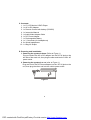
1. Powering the system indoors (Refer to Figure 1)
Plug one end of the AC to DC adapter into the DC 9V jack on the
left side of the main unit, then plug the other end into the 120V AC
power outlet.
2. Powering the system in a car (refer to Figure 1)
Plug one end of the DC Power adapter into the DC 9V jack on the
unit, then plug the other end into the vehicle power outlet.
Figure 1
6
PDF created with FinePrint pdfFactory Pro trial version http://www.fineprint.com
E. Vehicle Installation
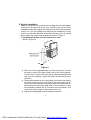
Make sure that the unit is placed into the bag with the clear plastic
covering on the right side of the unit. Load the disc into the DVD
compartment and then adjust the retaining cord across the top portion
of the unit. If you are installing the bag onto the seatback you may
need to use the Seat Standoff attached to the back of the mounting
bag to obtain the proper viewing angle as shown in Figure 2
1. Installing the System onto the seat back in a car
(Refer to Figure 2)
Figure 2
1). Take one of the supplied straps from the carrier bag. Connect
the latch to one of the upper metal rings on the mounting bag.
Connect the “S” hook to the other upper metal ring and place the
loop over the headrest. Adjust the strap until the bag is firmly
secured.
2). Take another strap from the carrier bag, and connect the latch to
the lower metal ring on the left side of the bag. Attach the “S”
hook to the same ring after looping the strap around the seat rail.
Repeat this process for the right side. In some vehicles, it may
be necessary to attach the “S” connector to the rail directly, as it
may not be long enough to reach back to the ring.
3). Adjust the straps tightly so that the bag is secured.
7
PDF created with FinePrint pdfFactory Pro trial version http://www.fineprint.com
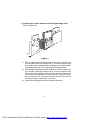
2. Installing the system between the driver/passenger seat
(Refer to Figure 3)
Figure 3
1). Take one strap and connect the latch to the upper metal ring on
the left side of the bag. Attach the “S” hook to the same ring
after looping the strap around the headrest of the driver’s seat.
Repeat this process for the right side (Passenger Seat).
2). Take another strap and connect the latch to lower metal ring on
the left side of the bag. Attach the “S” hook to the same ring
after looping the strap around the driver’s seat rail. Repeat this
process for the right side. In some vehicles, it may be necessary to attach the “S” connector directly to the rail, as it may not
be long enough to reach back to the ring.
3). Adjust the straps tightly so that the bag is secured.
8
PDF created with FinePrint pdfFactory Pro trial version http://www.fineprint.com
F. Controls, Indicators, and Connectors
1. Unit View (Refer to Figure 4)
Figure 4
13) AV IN/OUT Switch
14) Audio Jack
15) Video Jack
16) Headphone Jack
17) Volume Up/Down Control
18) Brightness Up/Down Control
19) Power On/Off Switch
20) Power LED
21) Remote Control Sensor
22) Open Button
23) Charge LED
24) DC 9V Input Jack
25) E Port
1) LCD Panel Shut Off Switch
2) Wide Button
3) Stop Button
4) Previous Button
5) Next Button
6) Play Button
7) Menu
8) Up Button
9) Right Button
10) OK/Enter Button
11) Down Button
12) Left Button
9
PDF created with FinePrint pdfFactory Pro trial version http://www.fineprint.com
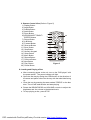
2. Remote Control View (Refer to Figure 5)
1) Display Button
2) Angle Button
3) Subtitle Button
4) Audio Button
5) Zoom Button
6) UP/DOWN/LEFT/RIGHT/
ENTER Buttons
7) Return Button
8) A-B Button
9) Forward Button
10) Reverse Button
11) Slow Button
12) Stop Button
13) Numeric Keypad
14) Setup Button
15) Menu Button
16) Repeat Button
17) Previous Button
18) Next Button
19) Play Button
Figure 5
20) Pause Button
G. Loading and Playing a Disc
a. After connecting power to the unit, turn on the “DVD player” with
the power switch. The power indicator will light.
b. Open the disc tray by sliding the OPEN button in the direction of
the arrow and place a disc into the tray with the label side facing
up.
c. Close the tray by pressing the area marked “PRESS” on the disc
door. The unit will read the disc and start playing.
d. Rotate the BRIGHTNESS and VOLUME controls to adjust the
brightness and the volume to the desired levels.
e. To stop playing a disc, press STOP.
10
PDF created with FinePrint pdfFactory Pro trial version http://www.fineprint.com
H. Setup
Press ‘SETUP’ to display the Main screen of the Setup Menu on the
screen. Press ‘SETUP’ again to exit the Setup Menu and the unit will
resume it’s last playback mode.
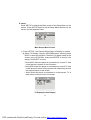
Main Setup Menu Screen
1) Press “SETUP”, the ‘General Setup Page’ will display on screen.
a).Select ‘TV Display’ using the UP/DOWN button, and then press
RIGHT to enter the submenu. Select the TV display mode on the
screen using UP/DOWN, and press ENTER to confirm the
setting. Press LEFT to return.
* Normal/PS: When the player is connected to a normal TV, and
a wide picture is shown on the full screen.
* Normal/LB: When the player is connected to a normal TV, and
a wide picture is shown on the screen with a black strip at both
the top and bottom of the screen.
* Wide: When the player is connected to a wide screen TV, a
wide picture is shown on the full screen.
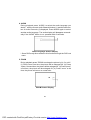
TV Display Screen Display
11
PDF created with FinePrint pdfFactory Pro trial version http://www.fineprint.com
b).Select ‘TV Type’ using the UP/DOWN button, and then press the
RIGHT button to enter the submenu. Choose TV Type using the UP/
DOWN button and then press ENTER to confirm the setting. Press
the LEFT button to return.
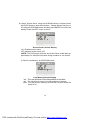
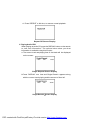
TV Type Screen Display
c).Select ‘Angle Mark’ using the UP/DOWN buttton, and then press the
RIGHT button to enter the submenu. Choose Angle Mark on or off
using the UP/DOWN button and then press ENTER to confirm the
setting. Press the LEFT button to return.
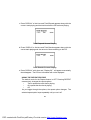
Angle Mark Screen Display
* On: The screen will show the angle mark icon. (*If an angle option is
available).
* Off: The screen will not display the Angle Mark
NOTE: Not all discs contain above features. The above features are
disc dependent.
12
PDF created with FinePrint pdfFactory Pro trial version http://www.fineprint.com
d). Select ‘Screen Saver’ using the UP/DOWN button, and then press
the RIGHT button to enter the submenu. Choose Screen Saver on or
off using the UP/DOWN button and then press ENTER to confirm the
setting. Press the LEFT button to return.
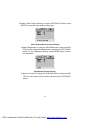
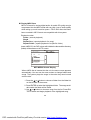
Screen Saver Screen Display
*On: Enables screen saver
*Off: Disables screen saver (off)
*NOTE: The DVD player will enter the Screen Saver mode after approximately five minutes if the same image remains on the screen.
e). Select ‘Last Memory’ by UP/DOWN button.
Last Memory Screen Display
*on: The unit will return to the last position on the disc.
*off: The unit will not return to the last position on the disc.
Note: The Last position memory function will only work when the
power is on.
13
PDF created with FinePrint pdfFactory Pro trial version http://www.fineprint.com
2) Select “Video Quality Setup”by using the LEFT/RIGHT button, press
ENTER to enter the video quality setup page.
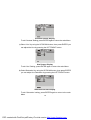
Video Quality Setup Screen Display
a).Select ‘Brightness’ by using the UP/DOWN button, then press ENTER you can change the Brightness by pressing the LEFT/RIGHT
button. To exit ‘Brightness’ setting, press ENTER again to return
the main Menu.
Brightness Screen Display
b).Select ‘Contrast’ by using the UP/DOWN button, then press ENTER you can adjust the Contrast by pressing the LEFT/RIGHT
button.
14
PDF created with FinePrint pdfFactory Pro trial version http://www.fineprint.com
Contrast Screen Display
To exit ‘Contrast’ Setting, press ENTER again to return the main Menu.
c).Select ‘Hue’ by using the UP/DOWN button, then press ENTER you
can adjust the Hue by pressing the LEFT/RIGHT button.
Hue Screen Display
To exit ‘Hue’ Setting, press ENTER again to return the main Menu.
d).Select ‘Saturation’ by using the UP/DOWN button, then press ENTER
you can adjust the Saturation by pressing the LEFT/RIGHT button.
Saturation Screen Display
To exit ‘Saturation’ setting, press ENTER again to return to the main
Menu.
15
PDF created with FinePrint pdfFactory Pro trial version http://www.fineprint.com
3).Select “Password” using the LEFT/RIGHT button, then press the
RIGHT button to enter the submenu.
Password Setup Page Screen Display
Press ENTER to enter the Password Change Page. Input the Old
Password or the Default Password, the New Password, and the Confirmed New Password. Press ENTER to confirm the change.
PASSWORD VERIFY Input Screen Display
NOTE: The Default Password is 3308. This password is always
effective even after you have selected your own password and
changed it. To avoid the possibility of others using the default
password to set the parental level and change the password, you
can record this default password in another area and delete it from
this manual. Some discs can be limited depending on the age of
users while some discs cannot.
16
PDF created with FinePrint pdfFactory Pro trial version http://www.fineprint.com
4).With no disc inside the player select ‘Preference Page’ using the LEFT /
RIGHT buttons, then press ENTER to enter the preference page.
a. Select ‘Audio’ using the UP/DOWN button, then press RIGHT to
enter the submenu. Select the audio language you desire using the
UP/DOWN button, then press ENTER to confirm the setting. Press
LEFT to return.
Preference Audio Language
b. Select ‘Subtitle’ the using UP/DOWN button, then press RIGHT to
enter the submenu. Select the desired subtitle language or Subtitle
Off using the UP/DOWN button, then press ENTER to confirm the
setting. Press LEFT to return.
Preference Subtitle Language
17
PDF created with FinePrint pdfFactory Pro trial version http://www.fineprint.com
Note: Language and subtitle selection is only available for discs that are
recorded in the above listed languages. If the selected, language is
not available, the player will play and display on the screen the original
recorded language contained in the disc.
c. Select ‘Disc Menu’ using the UP/DOWN button, then press RIGHT to
enter the submenu. Select the Disc Menu Language you desire using
the UP/DOWN button, then press ENTER to confirm the setting. Press
LEFT to return.
Preference Disc Menu Language
Note: Language and subtitle selection is only available for discs that
are recorded in the above listed languages. If the selected, language
is not available, the player will play and display on the screen the original recorded language contained in the disc.
d. Select ‘Parental’ using the UP/DOWN button, then press RIGHT to
enter the submenu.
Parental Preference Screen Display
Select the parental level you desire using the UP/DOWN button for
discs with lock-out function or multiple rating levels. These are listed
from the lowest level (1 Kid Safe) to the highest level (8 Adult). Enter a
4 digit password, then press ENTER to confirm the parental level
setting.
NOTE: The level of 8 Adult is the factory default.
18
PDF created with FinePrint pdfFactory Pro trial version http://www.fineprint.com
e. Select ‘Default’ using the UP/DOWN button, then press RIGHT to enter the submenu. Press ENTER to make the setting return to the factory-set mode.
NOTE: The parental setting is not affected by the default reset
function.
Loading Factory Setting
NOTE: The Default Password is 3308. This password is always effective even after you have selected your own password and changed
it. To avoid the possibility of others using the default password to set
the parental level and change the password, you can record this
default password in another area and delete it from this manual. Some
discs can be limited depending on the age of users while some discs
cannot.
19
PDF created with FinePrint pdfFactory Pro trial version http://www.fineprint.com
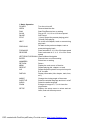
I. Basic Operation
Turn the unit on/off
Remove/load the disc
Start Play/Execute item or setting
Play at 1/2, 1/4, 1/8 or 1/16 times speed
Still Picture
(1 time) Stop at the present playing point /
(2 times) Stop playing
Go to the next chapter, track or scene during
NEXT
play back
Go back to the previous chapter, track or
PREVIOUS
scene during play back
Scan forward at 2, 4, 8,16 or 32x times speed
FORWARD
Scan backward at 2, 4, 8, 16 or 32x times
REVERSE
speed
LEFT/RIGHT/UP/DOWN Used for Menu Navigation
Execute item or confirm setting
ENTER
Select item or setting
NUMBERS
Return
RETURN
Display the main menu of the disc
MENU
Repeat playing title, chapter, or track
REPEAT
Repeat a specific portion from point A to point
A-B
B of the disc
Display information (title, chapter, track, time,
DISPLAY
etc.).
Change the viewing angle of the scene
ANGLE
Select the subtitle language and turn it on/off
SUBTITLE
Select the audio language
AUDIO
Enlarge an image to 2, 3, or 4 times the
ZOOM
original size.
Display the setup menu to select and set
SETUP
items, and exit the setup menu.
POWER
OPEN
PLAY
SLOW
PAUSE
STOP
20
PDF created with FinePrint pdfFactory Pro trial version http://www.fineprint.com
J. Menu
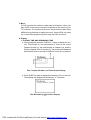
A DVD is divided into sections called titles and chapters. When you
play a DVD, a root menu of the disc will appear on the screen of your
TV or Monitor. The contents of the menu vary from disc to disc. Press
MENU during playback to display the menu. Some DVDs only allow
you to select disc playback options using the DVD root menu.
K. Display
1. PLAYING TIME AND REMAINING TIME
a. During playback press the ‘DISPLAY’ button to display the current Title Number (1), the total Number of Titles (2), the current
Chapter Number (3), the total Number of Chapters (4), and the
Playing elapsed Time for the title (5). The heading will disappear
automatically after 3 seconds if DISPLAY button is not pressed.
Title, Chapter Number, and Time Screen Display
b. Press ‘DISPLAY’ again to display the Remaining Time of the title.
The heading will disappear automatically in 3 seconds.
Title Remaining Time Screen Display
21
PDF created with FinePrint pdfFactory Pro trial version http://www.fineprint.com
c. Press ‘DISPLAY’ a 3rd time to display the Elapsed Time for the
chapter. The heading will disappear automatically in 3 seconds.
Chapter Elapsed Time Screen Display
d. Press ‘DISPLAY’ a 4th time to display the Remaining Time for the
chapter. The heading will disappear automatically in 3 seconds.
Chapter Remaining Time Screen Display
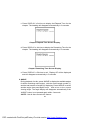
e. Press ‘DISPLAY’ a 5th time to exit, ‘Display Off’ will be displayed
and will disappear automatically in 3 seconds.
2. ANGLE
During playback of a disc, press ‘ANGLE’ to display the available angles
for discs containing multi-angles*, with the current angle number (1)
and the total number of angles (2) displaying. Press ‘ANGLE’ to select
another angle, then press again to exit and return to the normal
viewing angle. The angle display will disappear automatically if the
‘ANGLE’ button is not pressed again within 3 seconds.
*NOTE: Not all discs contain this feature.
22
PDF created with FinePrint pdfFactory Pro trial version http://www.fineprint.com
Angle Screen Display
3. SUBTITLE
During disc playback press ‘SUBTITLE’ to select the subtitle language
you desire*, with the current Subtitle Language Number (1) and the
total Number of Subtitle Languages (2) displayed. If there are multiple languages press ‘SUBTITLE’ again to select another subtitle language. To turn subtitles OFF, press the ‘SUBTITLE’ button until ‘Subtitle Off’ is displayed. The Subtitle display will disappear automatically
if the ‘SUBTITLE’ button is not pressed again within 3 seconds.
Subtitle Screen Display
* Some DVDs only allow access to this function through the DVD menu.
23
PDF created with FinePrint pdfFactory Pro trial version http://www.fineprint.com
4. AUDIO
During playback press ‘AUDIO’ to select the audio language you
desire*, with the current Audio Channel Number (1) and the total number of Audio Channels (2) displayed. Press AUDIO again to select
another audio language. The audio display will disappear automatically if the ‘AUDIO’ button is not pressed within 3 seconds.
Audio Language Screen Display
* Some DVDs only allow access to this function through the DVD root
menu.
5. ZOOM
During playback press ‘ZOOM’ to enlarge the picture by 2x, 3x or 4X.
(1) Press “zoom”one time, the picture will be enlarged 2X. (2) Press
“zoom a ”second time, the picture will be enlarged 3X. (3) Press “zoom”
a 3rd time, the picture will be enlarged 4X. (4) Press “zoom” a 4th
time, the picture will return to normal size.
ZOOM Screen Display
24
PDF created with FinePrint pdfFactory Pro trial version http://www.fineprint.com
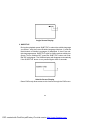
6. A-B REPEAT
a. During playback press ‘A-B’ once to set the Starting Point A.
A-B Repeat Starting Point Screen Display
b. Press ‘A-B’ a second time to set the Ending Point B and the player
will repeatedly play the part between Point A and Point B.
A-B Repeat Ending Point Screen Display
c. Press A-B a third time to cancel A-B repeat and resume normal
playback.
A-B Repeat Off Screen Display
25
PDF created with FinePrint pdfFactory Pro trial version http://www.fineprint.com
7. REPEAT
a. During playback press ‘REPEAT’ once to repeatedly play the current chapter.
Chapter Repeat Screen Display
b. During playback press ‘REPEAT’ twice to repeatedly play the current
title.
Title Repeat Screen Display
c. During playback press ‘REPEAT’ three times to repeat All Chapters
and Titles.
All Repeat Screen Display
26
PDF created with FinePrint pdfFactory Pro trial version http://www.fineprint.com
d. Press ‘REPEAT’ a 4th time, to resume normal playback.
Repeat Off Screen Display
L. Playing Audio CDS
When playing an audio CD press the DISPLAY button on the remote
to view time information. The options below show you what
information is available using this function.
a. The current track and playing time of that track will be displayed
on the screen.
Single Elapsed Screen Display
b.Press ‘DISPLAY’ one time and Single Remain appears along
with the current track playing and the amount of time left.
Single Remain Screen Display
27
PDF created with FinePrint pdfFactory Pro trial version http://www.fineprint.com
c. Press ‘DISPLAY’ a 2nd time and Total Elapsed appears along with the
current track playing and the total time that the CD has been playing.
Total Elapsed Screen Display
d. Press ‘DISPLAY’ a 3rd time and Total Remain appears along with the
current track playing and the amount of time remaining on the CD.
Total Remain Screen Display
e. Press ‘DISPLAY’ a 4th time and “ Display Off ” will appear momentarily
then disappear. The CD time Information will not be displayed.
USING THE REPEAT FEATURE
The default mode for the Repeat feature is OFF. Pressing REPEAT
consecutively changes the repeat options:
•
Track- repeats the track that is playing.
•
All- repeats the disc that is playing.
•
Off
As you toggle through the options, the repeat option changes. The
selected repeat option loops repeatedly until you turn it off.
28
PDF created with FinePrint pdfFactory Pro trial version http://www.fineprint.com
M. Playing MP3 Discs
MP3 is a format for storing digital audio. An audio CD-quality song is
compressed into the MP3 format with very little loss of audio quality
while taking up much less disc space. CD-R /RW discs that have
been encoded in MP3 format are compatible with this system.
Playback modes:
Folder (normal playback)
Single
Repeat One (repeat playback of a song)
Repeat Folder (repeat playback of a specific folder)
Insert a MP3 CD, the DVD player will initialize the disc and the directory
(folder) will be shown on the TV screen.
MP3 MENU Screen Display
When a MP3 disc is inserted into the unit, the menu screen appears
automatically. You can use the menu screen to change folders and
songs. The system plays the songs in the order they were burned
onto the disc.
1. Press the or button to choose a folder from the folder list
on the left side of the screen.
2. Press ENTER to select the highlighted folder. The songs available under the folder will be listed.
3. Use or button to choose a song from the list. Press ENTER to select and begin playback of the highlighted song.
29
PDF created with FinePrint pdfFactory Pro trial version http://www.fineprint.com
Use the
( NEXT ) button to move to the next song. Press the
(PREVIOUS) button to move to the beginning of the previous song.
USING THE REPEAT FEATURE
The default mode for the Repeat feature is OFF. Pressing REPEAT
consecutively changes the repeat options:
• Single
• Repeat One
• Repeat Folder
• Folder
As you toggle through the options, the repeat option changes. The
selected repeat option loops repeatedly until you turn it off.
NOTICE
“
” icon in front of a file name indicates that this is a folder, not an
MP3 file.
“MP3” icon in front of a file name indicates that this is a MP3 file.
30
PDF created with FinePrint pdfFactory Pro trial version http://www.fineprint.com
N. Playing JPG file
1) Load the JPG Disc into tray.
2) Select JPG file by pressing “UP/DOWN” button.
3) You can preview the JPG file by pressing “Play” or “ENTER”.
4) Pressing the “Left Key“ will rotate the picture 90 degrees
counterclockwise. Pressing the “Right Key“ will rotate the picture
clockwise.
5) When browsing the photos, you can reverse the photo horizontally
by pressing “Up” key,or you can reverse the photos vertically by
pressing “Down” key.
6) When you browse the JPG file, press “display”, there will be different
refresh mode below.
a. Press “display” first time, “WIPE TOP” display on the screen, the
picture will refresh from top to bottom.
b. Press “display” 2nd time, “WIPE BOTTOM” will display on the
screen, the picture will refresh from bottom to top.
c. Press “display” 3rd time, “WIPE LEFT” will display on the screen,
the picture will refresh from left side to right side.
d. Press “display” 4th time, “WIPE RIGHT” will display on the screen,
the picture will refresh from right side to left side.
e. Press “display” 5th time, “DIAGONAL WIPE LEFT TOP” will display on the screen, the picture will refresh from left top to right
bottom.
f. Press “ display ” 6th time, “DIAGONAL WIPE RIGHT TOP” will
display on the screen, the picture will refresh from right top to left
bottom.
g. Press “display” 7th time, “DIAGONAL WIPE LEFT BOTTOM” will
display on the screen, the picture will refresh from left bottom to
right top.
h. Press “display ” 8th time, “DIAGONAL WIPE RIGHT BOTTOM”
will display on the screen, the picture will refresh from right bottom to left top.
31
PDF created with FinePrint pdfFactory Pro trial version http://www.fineprint.com
i. Press “display” 9th time, “EXTEND FROM CENTER H” will display on the screen, the picture will refresh from horizontal center
to both sides.
j. Press “display” 10th time, “EXTEND FROM CENTER V” will
display on the screen, the picture will refresh from vertical center to both sides.
k. Press “display” 11th time, “COMPRESS TO CENTER H” will
display on the screen, the picture will refresh from top and bottom to center.
l. Press “display” 12th time, “COMPRESS TO CENTER V” will
display on the screen, the picture will refresh from right and left
to center.
m.Press “display” 13th time, “WINDOW H” will display on the
screen, the picture will refresh from four window’s top side to
bottom side.
n. Press “display” 14th time, “WINDOW V” will display on the screen,
the picture will refresh from four window’s left side to right side.
o. Press “display” 15th time, “WIPE FROM EDGE TO CENTER”
will display on the screen, the picture will refresh from 4 edges to
center.
7) When previewing the file, pressing “ANGLE, SUBTITLE, AUDIO,
NUMBER, AB, RETURN, REW/FF, SLOW” a hand icon will appear
on the display meaning that these options are not available.
8) Press “Stop” to browse the JPG file, “SLIDE SHOW” “MENU” will
display on the screen.
9) When browsing the picture, press “Stop” and thumbnail size picture
will be displayed. You can select the picture you desire by using
the UP/DOWN/LEFT/RIGHT/ENTER key.
10) Press “Play” or “OK”, to preview the left top picture.
32
PDF created with FinePrint pdfFactory Pro trial version http://www.fineprint.com
O. Connecting to a TV or another monitor ( Refer to Figure 6)
You can also connect the DVD player to a TV to enjoy high quality
stereo audio and video on another monitor. To connect the DVD player
to a monitor requires the purchase of an audio/video cable. The cable
is readily available at most electronic retailers. The cable consists of
three RCA jacks with the colors red and white corresponding to right
and left audio channels and the yellow RCA connector is the video
signal. The purchased cable can then be connected to the supplied
AV adapter cable which then interfaces to the DVD player.
1. Connect one end of the audio/video adapter cable’s black (1/8” stereo
plug) plug into the unit’s DVD AUDIO OUT jack, and connect the other
end to the AUDIO INPUT jacks on your TV or Monitor (white = left channel,
red = right channel).
2. Connect the audio/video adapter cable’s yellow plug into the DVD VIDEO
OUT jack on the back of the unit, and the other yellow plug to the VIDEO
INPUT jack on your TV or Monitor.
Cable Purchased
Separatly
Figure 6
* Optional wired headphones may be used with the unit. Simply plug in
the headset to headphone jack.
33
PDF created with FinePrint pdfFactory Pro trial version http://www.fineprint.com
P. Specifications
Compatible DISC: DVD/CD/MP3
Signal system: NTSC/PAL
Panel size: 8 inch
Frequency response: 20 Hz to 20 kHz
Video output: 1 Vp-p/75 Ohm, unbalanced
Audio output: 1.4Vrms/10kOhm
Audio S/N: Better than 60 dB
Dynamic range : Better than 85 dB
Laser: Semiconductor Laser, Wave Length: 650 nm/795 nm
Power source: DC 9V
Power consumption: 12 W
Operating temperature: 5~35°C
Weight : 0.91 kg
Dimensions (W x D x H): 8.07 X 5.98 X1.57inches
205 x 152 x 40mm
Battery Type: Ni-Mh
34
PDF created with FinePrint pdfFactory Pro trial version http://www.fineprint.com
Q. Rechargeable Battery Installation and Use
The player utilizes a set of long-life Ni-Mh batteries for a portable
power supply. Ni-MH batteries feature high storage capacity and low
level of degradation. This means the Ni-MH batteries do not have
“Memory Effect” and thus can be recharged safely regardless of
whether the battery is fully or only partially discharged. The battery
must be charged at least 8 hours prior to first use.
NOTE: If you plan not to use the battery for an extended period of time
(one week or longer), we recommend that you first fully charge the
battery and store it away properly. For longer periods of storage,
please recharge the battery at least once every two months to maintain the battery in optimum condition. Under no circumstances short
the battery terminals, store the battery in a metal container, or leave
the battery in a humid or damp environment. Ideally, store the battery
in an airtight container with desiccant or other dehumidifying agent.
Each full recharge takes approximately five-hours and one full charge
can provide power to the player for approximately 3 hours.
During recharge, the red indicator will stay on. Once fully recharged,
the red light will turn off. At this point you may remove the wall plug and
stop charging.
Precautions related to Battery Recharge:
1. Once the battery is fully discharged, immediately recharge (regardless of whether you plan to use battery or not) in order to maximize battery life.
2. To charge the battery, please connect the power jack directly into
the DVD player and leave the POWER switch in the off position.
Using and Maintaining your Rechargeable Batteries
1. Please make sure you always use only the AC adapter included
with the player to recharge your batteries.
35
PDF created with FinePrint pdfFactory Pro trial version http://www.fineprint.com
2.Recharge efficiency will degrade when environmental temperatures
drop below 50oF (10oC) or exceed 95oF (35oC).
3. Please remove the battery from the player and store it properly if
the player is not to be used for long time. During this period , please
recharge the battery at least once every two months to maintain
the battery in optimum codition.
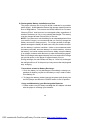
Installing the Battery Pack:
1. First, make sure the player is in “Stop” mode and that the AC power
supply has been disconnected.
2. Close the player cover.
3. Align the guide pins on the battery with the holes on the back of the
unit. Then push the battery towards the rear of the player until it locks
into position. The lock position is indicated by a click. The battery will
fit snugly to the player.
Figure 7. Installing the DVD Player Battery
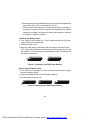
Removing the Battery Pack:
1. First, make sure the player is in “Stop” mode and the AC power supply
has been disconnected.
2. Press the release button on the left side of battery.
3. Pull the battery from the unit.
PRESS
Figure 8. Removing the DVD Player Battery
36
PDF created with FinePrint pdfFactory Pro trial version http://www.fineprint.com
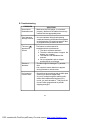
R. Troubleshooting
PROBLEM
SOLUTION
No sound or
distorted sound
• Make sure the DVD player is connected
properly. Make sure all cables are securely
inserted into the appropriate jacks.
Can’t advance
through a movie
• You can’t advance through the opening
credits and warning information that appears
at the beginning of movies because the disc
is programmed to prohibit that action.
)
The icon (
appears on
screen
The feature or action cannot be
completed at this time because:
1. The disc’s software restricts it.
2. The disc’s software doesn’t support the
feature (e.g., angles)
3. The feature is not available at the
moment.
4. You’ve requested a title or chapter
number that is out of range.
Picture is
distorted
• The disc might be damaged. Try another
disc.
• It is normal for some distortion to appear
during forward or reverse scan.
No forward or
reverse scan
• Some discs have sections that prohibit rapid
scanning or title and chapter skip.
• If you try to skip through the warning information and credits at the beginning of a
movie, you won’t be able to. This part of the
movie is often programmed to prohibit
skipping through it.
37
PDF created with FinePrint pdfFactory Pro trial version http://www.fineprint.com
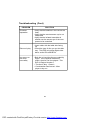
Troubleshooting (Cont)
PROBLEM
IR sensor
inoperative
Disc won’t play
Play starts, but
then stops
immediately
SOLUTION
• Verify that the batteries in the remote are
fresh.
• Verify that the remote sensor eye is not
obstructed.
• Verify that the infrared transmitter is
affixed over the sensor eye of the component to be controlled.
• Insert a disc with the label side facing
up.
• Check the type of disc you put into disc
tray. This DVD only plays digital video
discs, audio CDs and MP3s.
• Both the unit and the disc are coded by
region. If the regional codes don’t
match, the disc can’t be played. This
DVD is Region Number 1.
• The disc is dirty. Clean it.
• Condensation has formed. Allow
player to dry out.
38
PDF created with FinePrint pdfFactory Pro trial version http://www.fineprint.com
90 DAY LIMITED WARRANTY
Applies to Audiovox Video Products
AUDIOVOX ELECTRONICS CORP. (the Company) warrants to the original retail purchaser of
this product that should this product or any part thereof, under normal use and conditions,
be proven defective in material or workmanship within 90 days from the date of original
purchase, such defect(s) will be repaired or replaced with reconditioned product (at the
Company's option) without charge for parts and repair labor.
To obtain repair or replacement within the terms of this Warranty, the product is to be delivered
with proof of warranty coverage (e.g. dated bill of sale), specification of defect(s),
transportation prepaid, to the Company at the address shown below.
This Warranty does not extend to the elimination of externally generated static or noise, to
correction of antenna problems, to costs incurred for installation, removal or reinstallation of
the product, or to damage to tapes, discs, speakers, accessories, or electrical systems.
This Warranty does not apply to any product or part thereof which, in the opinion of the
Company, has suffered or been damaged through alteration, improper installation, mishandling, misuse, neglect, accident, or by removal or defacement of the factory serial number/
bar code label(s). THE EXTENT OF THE COMPANY'S LIABILITY UNDER THIS WARRANTY IS
LIMITED TO THE REPAIR OR REPLACEMENT PROVIDED ABOVE AND, IN NO EVENT, SHALL
THE COMPANY'S LIABILITY EXCEED THE PURCHASE PRICE PAID BY PURCHASER FOR THE
PRODUCT.
This Warranty is in lieu of all other express warranties or liabilities. ANY IMPLIED WARRANTIES, INCLUDING ANY IMPLIED WARRANTY OF MERCHANTABILITY, SHALL BE LIMITED TO
THE DURATION OF THIS WRITTEN WARRANTY. ANY ACTION FOR BREACH OF ANY
WARRANTY HEREUNDER INCLUDING ANY IMPLIED WARRANTY OF MERCHANTABILITY
MUST BE BROUGHT WITHIN A PERIOD OF 30 MONTHS FROM DATE OF ORIGINAL
PURCHASE. IN NO CASE SHALL THE COMPANY BE LIABLE FOR ANY CONSEQUENTIAL OR
INCIDENTAL DAMAGES FOR BREACH OF THIS OR ANY OTHER WARRANTY, EXPRESS OR
IMPLIED, WHATSOEVER. No person or representative is authorized to assume for the
Company any liability other than expressed herein in connection with the sale of this product.
Some states do not allow limitations on how long an implied warranty lasts or the exclusion
or limitation of incidental or consequential damage so the above limitations or exclusions may
not apply to you. This Warranty gives you specific legal rights and you may also have other
rights which vary from state to state.
U.S.A. : AUDIOVOX ELECTRONICS CORPORATION, 150 MARCUS BLVD.
HAUPPAUGE, NEW YORK 11788 l 1-800-645-4994
CANADA : CALL 1-800-645-4994 FOR LOCATION OF WARRANTY STATION SERVING YOUR AREA
© 2005 Audiovox Electronics Corporation
39
128-5556C
128-7125A
PDF created with FinePrint pdfFactory Pro trial version http://www.fineprint.com