1
MC2662E
User Manual
Microwave Oven
PERFEKT IN FORM UND FUNKTION
Downloaded From Microwave-Manual.com Manuals
2
Dear Customer
Thank you for choosing one of our high-quality products.
With this appliance you will experience the perfect combination of functional
design and cutting edge technology.
Convince yourself that our appliances are engineered to deliver the best
performance and control - indeed we are setting the highest standards of
excellence.
In addition to this you find environmental and energy saving aspects as an
integral part of our products.
To ensure optimal and regular performance of your appliance please read this
instruction manual carefully. It will enable you to navigate all processes
perfectly and most efficiently.
To refer to this manual any time you need to, we recommend you to keep it in
a safe place. And please pass it to any future owner of the appliance.
We wish you much joy with your new appliance.
Symbol
Description
Important information concerning your safety or the operation of your appliance is noted by
this symbol and/or mentions words such as «Warning», «Take care». Be sure to follow all
instructions carefully.
This symbol indicates further information concerning the use of the appliance.
The clover indicates energy-saving tips and hints for environmentally friendly use of your
appliance.
In the event of malfunctioning, please follow the instructions given in the section «What to do
if...»
Downloaded From Microwave-Manual.com Manuals
Contents
3
Contents
Important safety instructions
4
Appliance overview
Microwave oven & accessories
Control panel
8
8
9
Before first use
Econ mode
Setting the clock
Adjusting the time when the clock is set
Using the STOP button
Child safety lock
10
10
10
11
11
11
Microwave cooking advice
Food characteristics
Cooking techniques
Microwave safe cookware
12
12
12
13
Microwave operation
Microwave cooking
Manual defrosting
Microwave power levels
Kitchen timer
Add 30 seconds
Plus & minus
Multiple sequence cooking
Auto cook & auto defrost operation
14
14
14
14
15
16
16
17
18
Programme charts
Auto cook & auto defrost charts
Recipes for auto cook
Cooking charts
20
20
22
23
Recipes
25
Care & cleaning
29
What to do if . . .
30
Specifications
30
Installation
31
Environmental information
34
Service & spare parts
35
Guarantee information
36
Downloaded From Microwave-Manual.com Manuals
4
Important safety instructions
Important safety instructions
Important safety instructions: Read carefully and
keep for future reference
To avoid the danger of fire
The microwave oven should not be left unattended during operation.
Power levels that are too high or cooking times that are too long may overheat
foods resulting in a fire.
The electrical outlet must be readily accessible so that the unit can be unplugged
easily in an emergency.
Do not store or use the oven outdoors.
If food being heated begins to smoke, DO NOT OPEN THE DOOR. Turn off and
unplug the oven and wait until the food has stopped smoking. Opening the door
while food is smoking may cause a fire.
Only use microwave-safe containers and utensils.
Do not leave the oven unattended when using disposable plastic, paper or other
combustible food containers.
Clean the waveguide cover, the oven cavity, the turntable and turntable support
after use. These must be dry and free from grease. Built-up grease may overheat
and begin to smoke or catch fire.
Do not place flammable materials near the oven or ventilation openings. Do not
block the ventilation openings.
Remove all metallic seals, wire twists, etc., from food and food packages. Arcing on
metallic surfaces may cause a fire.
Do not use the microwave oven to heat oil for deep frying. The temperature cannot
be controlled and the oil may catch fire.
To make popcorn, only use special microwave popcorn makers.
Do not store food or any other items inside the oven.
Check the settings after you start the oven to ensure the oven is operating as desired.
See the corresponding hints in this operation manual.
To avoid the possibility of injury
Warning!
Do not operate the oven if it is damaged or malfunctioning. Check the following
before use:
a) The door; make sure the door closes properly and ensure it is not misaligned or
warped.
b) The hinges and door safety latches; check to make sure they are not broken or loose.
c) The door seals and sealing surfaces; ensure that they have not been damaged.
d) Inside the oven cavity or on the door; make sure there are no dents.
Downloaded e)
From
Manuals
TheMicrowave-Manual.com
power supply cord and plug;
ensure that they are not damaged.
Important safety instructions
5
Never adjust, repair or modify the oven yourself. It is hazardous for anyone other
than a competent person to carry out any service or repair operation which
involves the removal of a cover which gives protection against exposure to
microwave energy.
Do not operate the oven with the door open or alter the door safety latches in any
way.
Do not operate the oven if there is an object between the door seals and sealing
surfaces.
Do not allow grease or dirt to build up on the door seals and adjacent parts.
Follow instructions for “Care & Cleaning”. Failure to maintain the oven in a clean
condition could lead to a deterioration of the surface that could adversely affect
the life of the appliance and possibly result in a hazardous situation.
Individuals with PACEMAKERS should check with their doctor or the manufacturer
of the pacemaker for precautions regarding microwave ovens.
To avoid the possibility of electric shock
Under no circumstances should you remove the outer cabinet.
Never spill or insert any objects into the door lock openings or ventilation openings.
In the event of a spill, turn off and unplug the oven immediately and call your local
Service Force Centre.
Do not immerse the power supply cord or plug in water or any other liquid.
Do not allow the power supply cord to run over any hot or sharp surfaces, such as
the hot air vent area at the top rear of the oven.
Do not attempt to replace the oven lamp yourself or allow anyone who is not
authorised by Service Force to do so. If the oven lamp fails, please consult your
dealer or contact your local Service Force Centre.
If the power supply cord of this appliance is damaged, it must be replaced with a special
cord. The exchange must be made by an authorised Service Force technician.
To avoid the possibility of explosion and sudden boiling
Warning!
Liquids and other foods must not be heated in sealed containers since they are
liable to explode.
Never use sealed containers. Remove seals and lids before use. Sealed containers
can explode due to a build up of pressure even after the oven has been turned off.
Take care when microwaving liquids. Use a wide-mouthed container to allow
bubbles to escape.
Microwave heating of beverages can result in delayed eruptive boiling, therefore
care has to be taken when handling the container.
To prevent sudden eruption of boiling liquid and possible scalding:
1. Stir liquid prior to heating/reheating.
Downloaded From Microwave-Manual.com Manuals
6
Important safety instructions
2. It is advisable to insert a glass rod or similar utensil into the liquid whilst reheating.
3. Let liquid stand for at least 20 seconds in the oven at the end of cooking time to
prevent delayed eruptive boiling.
Do not cook eggs in their shells, and whole hard boiled eggs should not be heated
in microwave ovens since they may explode even after microwave cooking has
ended. To cook or reheat eggs which have not been scrambled or mixed, pierce
the yolks and the whites, or the eggs may explode. Shell and slice hard boiled
eggs before reheating them in the microwave oven.
Pierce the skin of such foods as potatoes, sausages and fruit before cooking, or they
may explode.
To avoid the possibility of burns
Use pot holders or oven gloves when removing food from the oven to prevent burns.
Always open containers, popcorn makers, oven cooking bags, etc., away from the
face and hands to avoid steam burns.
To avoid burns, always test food temperature and stir before serving and pay
special attention to the temperature of food and drink given to babies, children or
the elderly.
Temperature of the container is not a true indication of the temperature of the food
or drink; always check the food temperature.
Always stand back from the oven door when opening to avoid burns from escaping
steam and heat.
Slice stuffed baked foods after heating to release steam and avoid burns.
Keep children away from the door to prevent them burning themselves.
To avoid misuse by children
Warning!
Only allow children to use the oven without supervision when adequate
instructions have been given so that the child is able to use the oven in a safe
way and understands the hazards of improper use.
This appliance is not intended for use by persons (including children) with reduced
physical, sensory or mental capabilities, or lack of experience and knowledge, unless
they have been given supervision or instruction concerning use of the appliance by
a person responsible for their safety.
Children should be supervised to ensure that they do not play with the appliance.
Do not lean or swing on the oven door. Do not play with the oven or use it as a toy.
Children should be taught all important safety instructions: use of pot holders,
careful removal of food coverings; paying special attention to packaging (e.g. selfheating materials) designed to make food crisp, as they may be extra hot.
Downloaded From Microwave-Manual.com Manuals
Important safety instructions
7
Other warnings
Never modify the oven in any way.
This oven is for home food preparation only and may only be used for cooking
food. It is not suitable for commercial or laboratory use.
To promote trouble-free use of your oven and avoid damage
Never operate the oven when it is empty.
When using a browning dish or self-heating material, always place a heat-resistant
insulator such as a porcelain plate under it to prevent damage to the turntable and
turntable support due to heat stress. The preheating time specified in the dish’s
instructions must not be exceeded.
Do not use metal utensils, which reflect microwaves and may cause electrical
arcing. Do not put cans in the oven.
Only use the turntable and the turntable support designed for this oven. Do not
operate the oven without the turntable.
To prevent the turntable from breaking:
a) Before cleaning the turntable with water, leave the turntable to cool.
b) Do not put hot foods or hot utensils on a cold turntable.
c) Do not put cold foods or cold utensils on a hot turntable.
Do not place anything on the outer cabinet during operation.
Important:
If you are unsure how to connect your oven, please consult an authorised, qualified
electrician.
Neither the manufacturer nor the dealer can accept any liability for damage to the
oven or personal injury resulting from failure to observe the correct electrical
connection procedure.
Water vapour or drops may occasionally form on the oven walls or around the door
seals and sealing surfaces. This is a normal occurrence and is not an indication of
microwave leakage or a malfunction.
Downloaded From Microwave-Manual.com Manuals
8
Appliance overview
Appliance overview
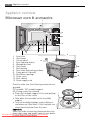
Microwave oven & accessories
1
2
3
4
8
1.
2.
3.
4.
5.
6.
7.
8.
9.
10.
11.
12.
13.
7
6
5
Front trim
Oven lamp
Control panel
13
Door opening button
Waveguide cover
Oven cavity
Seal packing
Door seals and sealing surfaces
Fixing points (4 points)
Ventilation openings
Outer cover
Rear cabinet
Power supply cord
Check to make sure the following accessories are
provided:
(1) Turntable (2) Turntable support
(3) 4 fixing screws (not shown)
• Place the turntable support in the seal packing
on the floor of the cavity.
• Then place the turntable on the turntable
support.
• To avoid turntable damage, ensure dishes or
containers are lifted clear of the turntable rim
when removing them from the oven.
Important:
When you order accessories, please mention two
items: part name and model name to your dealer
DownloadedorFrom
localMicrowave-Manual.com
Service Force centre. Manuals
9
10
11
12
1
2
Appliance overview
9
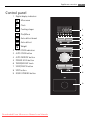
Control panel
1 Digital display indicators
Microwave
Clock
Cooking stages
Plus/Minus
Auto defrost bread
Auto defrost
Weight
2
3
4
5
6
7
8
9
AUTO COOK indicators
AUTO COOK button
AUTO DEFROST button
POWER LEVEL button
TIMER/WEIGHT knob
START/QUICK button
STOP button
DOOR OPENING button
1
2
3
4
5
6
7
8
9
Downloaded From Microwave-Manual.com Manuals
10
Before first use
Before first use
Econ mode
The oven is set in ‘ENERGY SAVE’ mode (‘Econ’).
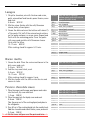
1. Plug in the oven.
2. The display will be blank.
3. Open the door and the power comes on.
4. Close the door and ‘Econ’ will be displayed.
5. The display will count down from 3:00 to zero.
6. When zero is reached, the oven goes into ‘Econ’ mode and the display goes
blank.
7. To cancel ‘Econ’ mode, set the clock.
8. To set ‘Econ’ mode when the clock is set, open the door, press start for 5 seconds,
press stop then close the door.
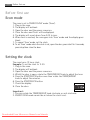
Setting the clock
The oven has a 12 hour clock.
Example: To set the clock to 11:30.
1. Plug in the oven.
2. The display will be blank.
3. Open the door and the power comes on.
4. Whilst the door is open, rotate the TIMER/WEIGHT knob to adjust the hour.
5. Press the START/QUICK button once then rotate the TIMER/WEIGHT
knob to adjust the minutes.
6. Press the START/QUICK button.
7. Check the display:
8. Close the door.
Important:
1. You can rotate the TIMER/WEIGHT knob clockwise or anti-clockwise.
2. ENERGY SAVE mode cannot be set when the clock is set.
Downloaded From Microwave-Manual.com Manuals
Before first use
11
Adjusting the time when the clock is set or oven is
in ‘Econ’ mode
Example: To set the clock to 12:45.
1. Open the door.
2. Press and hold the START/QUICK button for 5 seconds. The oven will beep.
Rotate the TIMER/WEIGHT knob to adjust the hour.
3. Press the START/QUICK button once then rotate the TIMER/WEIGHT knob to
adjust the minutes.
4. Press the START/QUICK button once.
5. Check the display:
Using the STOP button
Use the STOP button to:
1. Erase a mistake during programming.
2. Stop the oven temporarily during cooking, press once.
3. Cancel a programme during cooking, touch twice.
Child safety lock
The oven has a safety feature which prevents the accidental running of the oven by
a child. When the lock has been set, no part of the microwave will operate until the
lock feature has been cancelled.
Example: To set the child safety lock.
1. Press and hold the stop button for 5 seconds.
The oven will beep twice and ‘LOC’ will be displayed:
Note:
• To cancel the child safety lock, press and hold the stop button for 5
seconds, the oven will beep twice and the time of day will be displayed.
• Child safety lock cannot be set if the clock is not set.
Downloaded From Microwave-Manual.com Manuals
12
Microwave cooking advice
Microwave cooking advice
Microwave cooking
To cook/defrost food in a microwave oven, the microwave energy must be able to
pass through the container to penetrate the food. Therefore it is important to
choose suitable cookware.
Round/oval dishes are preferable to square/oblong ones as the food in the corners
tends to overcook.
It is important to turn, rearrange or stir food to ensure even heating.
Standing time is necessary after cooking as it enables the heat to disperse equally
throughout the food.
Food characteristics
Composition Foods high in fat or sugar (e.g. Christmas pudding, mince pies) require less heating time. Care
should be taken as overheating can lead to fire.
Density
Food density will affect the amount of cooking time needed. Light porous foods, such as
cakes or bread, cook more quickly than heavy, dense foods, such as roasts and casseroles.
Quantity
The cooking time must be increased as the amount of food placed in the oven increases.
E.g. four potatoes will take longer to cook than two.
Size
Small foods and small pieces cook faster than large ones, as microwaves can penetrate from
all sides to the centre. For even cooking make all the pieces the same size.
Shape
Foods which are irregular in shape, such as chicken breasts or drumsticks, take longer to cook
in the thicker parts. Round shapes cook more evenly than square shapes when microwave
cooking.
Temperature The initial temperature of food affects the amount of cooking time needed. Chilled foods will
of food
take longer to cook than food at room temperature. Cut into foods with fillings, e.g. jam
doughnuts, to release heat or steam.
Cooking techniques
Arrange
Cover
Pierce
Place the thickest parts of food towards the outside of the dish. E.g. Chicken drumsticks.
Use vented microwave cling film or a suitable lid.
Foods with a shell, skin or membrane must be pierced in several places before cooking or
reheating as steam will build up and may cause food to explode, e.g. Potatoes, Fish, Chicken,
Sausages.
Important: Eggs should not be heated using microwave power as they may explode, even
after cooking has ended, e.g. poached, hard boiled.
Stir, turn and For even cooking it is essential to stir, turn and rearrange food during cooking. Always stir and
rearrange
rearrange from the outside towards the centre.
Stand
Standing time is necessary after cooking to enable the heat to disperse equally throughout
the food.
Shield
Some areas of food being defrosted may become warm. Warm areas can be shielded with
small pieces of foil, which reflect microwaves, e.g. legs and wings on a chicken.
Downloaded From Microwave-Manual.com Manuals
Microwave cooking advice
13
Microwave safe cookware
Cookware
Microwave
Comments
safe
Aluminium foil /
/
Small pieces of aluminium foil can be used to shield food from
foil containers
overheating. Keep foil at least 2 cm from the oven walls, as arcing
may occur. Foil containers are not recommended unless specified by
the manufacturer, e.g. Microfoil ®, follow instructions carefully.
Browning dishes
Always follow the manufacturers instructions. Do not exceed
heating times given. Be very careful as these dishes become very hot.
Porcelain, pottery, glazed earthenware and bone china are usually
China and ceramics
/
suitable, except for those with metallic decoration.
Glassware e.g. Pyrex ®
Care should be taken if using fine glassware as it can break or crack if
heated suddenly.
Metal
It is not recommended to use metal cookware when using microwave power as it will arc, which can lead to fire.
Plastic / polystyrene
Care must be taken as some containers warp, melt or discolour at
e.g. fast food containers
high temperatures.
Cling film
Should not touch the food and must be pierced to let the steam
escape.
Freezer / roasting bags
Must be pierced to let steam escape. Ensure bags are suitable for
microwave use. Do not use plastic or metal ties, as they may melt or
catch fire due to the metal arcing.
Paper - plates cups
and kitchen paper
Straw and wooden
containers
Recycled paper
and newspaper
Only use for warming or to absorb moisture. Care must be taken as
overheating may cause fire.
Always attend the oven when using these materials as overheating
may cause fire.
May contain extracts of metal which will cause ‘arcing’ and may lead
to fire.
Downloaded From Microwave-Manual.com Manuals
14
Microwave operation
Microwave operation
Microwave cooking
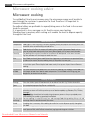
Your oven can be programmed for up to 90 minutes. The input unit of cooking
time varies from 10 seconds to five minutes. It depends on the total length of
the cooking time as shown in the table.
Cooking time
0-5 minutes
5-10 minutes
10-30 minutes
30-90 minutes
Increasing unit
10 seconds
30 seconds
1 minute
5 minutes
Manual defrosting
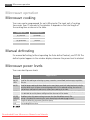
For manual defrosting (without operating the Auto defrost feature), use 270 W. The
defrost symbol appears in the window display whenever the power level is selected.
Microwave power levels
Your oven has 6 power levels:
Power
setting
Suggested use
900 W/
HIGH
630 W
Used for fast cooking or reheating e.g. soup, casseroles, canned food, hot beverages, vegetables,
fish, etc.
Used for longer cooking of dense foods such as roast joints, meat loaf and plated meals, also for
sensitive dishes such as cheese sauce and sponge cakes. At this reduced setting, the sauce will
not boil over and food will cook evenly without over cooking at the sides.
450 W
For dense foods which require a long cooking time when cooked conventionally, eg. beef dishes,
it is advisable to use this power setting to ensure the meat will be tender.
270 W/ To defrost, select this power setting, to ensure that the dish defrosts evenly. This
DEFROST setting is also ideal for simmering rice, pasta, dumplings and cooking egg custard.
90 W
For gentle defrosting, eg. cream gateaux or pastry.
0W
For standing/kitchen timer.
W = WATT
Downloaded From Microwave-Manual.com Manuals
Microwave operation
15
Example: To heat soup for 2 minutes and 30 seconds on 630 W microwave power.
1. Press the power level button twice.
x2
2. Enter the time by rotating the TIMER/WEIGHT knob
clockwise/anti-clockwise until 2:30 is displayed.
3. Press the START/QUICK button.
x1
4. Check the display:
Important:
If the power level is not selected, HIGH/900 W is automatically set.
Note:
• When the door is opened during the cooking process, the cooking time on the
digital display stops automatically. The cooking time starts to count down again
when the door is closed and the START/QUICK button is pressed.
• If you wish to know the power level during cooking, press the POWER button once.
• You can increase or decrease the cooking time during cooking by rotating the
TIMER/WEIGHT knob.
• You can change the power level during cooking by pressing the POWER button.
• To cancel a programme during cooking, touch the STOP button twice.
Kitchen timer
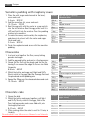
Example: To set the kitchen timer for 7 minutes.
1. Press the power level button 7 times.
x7
2. Enter the time by rotating the TIMER/WEIGHT knob clockwise/
anti-clockwise until 7:00 is displayed.
3. Press the START/QUICK button.
x1
4. Check the display:
Note:
To pause the timer, press the STOP button. To resume the timer, press
DownloadedSTART/QUICK,
From Microwave-Manual.com
to exit press STOP Manuals
again.
16
Microwave operation
Add 30 seconds
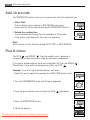
The START/QUICK button allows you to operate the two following functions:
1. Direct Start
You can directly start cooking on 900 W/HIGH microwave
power level for 30 seconds by pressing the START/QUICK button.
2. Extend the cooking time
You can extend the cooking time for multiples of 30 seconds
if the button is pressed while the oven is in operation.
x1
x1
Note:
• You cannot use this function during AUTO COOK or AUTO DEFROST.
Plus & minus
The PLUS
and MINUS
function enables you to decrease or
increase the cooking time when using the automatic programmes.
If you prefer boiled potatoes which are cooked but still firm, use MINUS
Alternatively, if you prefer boiled potatoes softer, use PLUS
.
.
Example: To cook 0.3 kg of boiled potatoes, well done.
1. Select the menu required by pressing the AUTO COOK button twice.
x2
2. Turn the TIMER/WEIGHT knob until 0.3 kg is displayed.
3. Press the power button once to select the PLUS
adjustment.
x1
4. Press the START/QUICK button.
x1
5. Check the display:
Downloaded From Microwave-Manual.com Manuals
Microwave operation
Note:
To cancel PLUS/MINUS, press the power level key 3 times.
If you select PLUS the display will show
.
If you select MINUS, the display will show .
Multiple sequence cooking
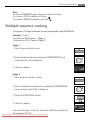
A sequence of 3 stages (maximum) can be programmed using MICROWAVE.
Example: To cook:
5 minutes on 900 W power (Stage 1)
16 minutes on 270 W power (Stage 2)
Stage 1
1. Press the power button once.
x1
2. Enter the desired time by rotating the TIMER/WEIGHT knob
clockwise until 5:00 is displayed.
3. Check the display:
Stage 2
1. Press the power button 4 times.
x4
2. Enter the desired cooking time by rotating the TIMER/WEIGHT
knob clockwise until 16:00 is displayed.
3. Press the START/QUICK button.
x1
4. Check the display:
The oven will begin to cook for 5 minutes at 900 W, and then for
16 minutes at 270 W.
Downloaded From Microwave-Manual.com Manuals
17
18
Microwave operation
Auto cook & auto defrost operation
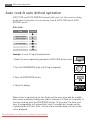
AUTO COOK and AUTO DEFROST automatically work out the correct cooking
mode and cooking time. You can choose from 6 AUTO COOK and 2 AUTO
DEFROST menus.
Auto Cook
Food
Beverage
Boiled Potatoes/
Jacket Potatoes
Frozen Vegetables
Fresh Vegetables
Frozen Ready Meals
Fish Fillet with Sauce
Symbol
Example: To cook 0.3 kg of boiled potatoes.
1. Select the menu required by pressing the AUTO COOK button twice.
x2
2. Turn the TIMER/WEIGHT knob until 0.3 kg is displayed.
3. Press the START/QUICK button.
x1
4. Check the display:
When action is required (e.g. to turn food over) the oven stops and the audible
bell sounds, remaining cooking time and the indicator will flash on the display. To
continue cooking, press the START/QUICK button. At the end of the Auto cook
time, the programme will automatically stop. The audible bell sounds and the
cooking symbol will flash. After 1 minute and a reminder beep, the time of day
will be displayed.
Downloaded From Microwave-Manual.com Manuals
Microwave operation
19
Auto Defrost
Food
Meat/Fish/Poultry
Bread
Symbol
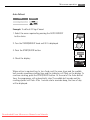
Example: To defrost 0.2 kg of bread.
1. Select the menu required by pressing the AUTO DEFROST
button twice.
x2
2. Turn the TIMER/WEIGHT knob until 0.2 is displayed.
3. Press the START/QUICK button.
x1
4. Check the display:
When action is required (e.g. to turn food over) the oven stops and the audible
bell sounds, remaining cooking time and the indicator will flash on the display. To
continue cooking, press the START/QUICK button. At the end of the Auto defrost
time, the programme will automatically stop. The audible bell sounds and the
cooking symbol will flash. After 1 minute and a reminder beep, the time of day
will be displayed.
Downloaded From Microwave-Manual.com Manuals
20
Programme charts
Programme charts
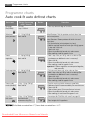
Auto cook & auto defrost charts
Auto cook
Beverage
(Tea/Coffee)
Weight (increasing
unit) / Utensils
Button
Procedure
1-6 cups
1 cup = 200 ml
• Place cup towards edge of turntable.
x1
Boiled and
jacket potatoes
0,2 - 1,0 kg (100 g)
Bowl and lid
Boiled Potatoes: Peel the potatoes and cut them into
similar sized pieces.
x2 Jacket Potatoes: Choose potatoes of similar size and
wash them.
• Put the boiled or jacket potatoes in a bowl.
• Add the required amount of water (per 100 g), approx
2 tbsp and a little salt.
• Cover with a lid.
• When the audible bell sounds, stir and re-cover.
• After cooking, stand for approx. 2 min.
Frozen
vegetables
0,1 - 0,8 kg (100 g)
Bowl and lid
• Add 1 tbsp water per 100 g and salt as desired. (For
mushrooms no additional water is necessary.)
x3 • Cover with lid.
• When the audible bell sounds, stir and re-cover.
• After cooking, stand for approx. 2 min.
Important: If frozen vegetables are compacted together,
cook manually.
• Cut into small pieces, e.g. strips, cubes or slices.
• Add 1 tbsp water per 100 g and salt as desired. (For
mushrooms no additional water is necessary.)
x4
• Cover with a lid.
• When the audible bell sounds, stir and re-cover.
• After cooking, stand for approx. 2 min.
Fresh vegetables 0,1 - 0,8 kg (100 g)
Bowl and lid
Frozen ready
meals (stirrable)
0,3 kg - 1,0 kg (100 g)
Bowl and lid
Fish fillet
with sauce
0,5 kg - 1,5 kg* (100 g)
Gratin dish and
microwave cling film
•
•
x5 •
•
•
•
Transfer meal to suitable microwave-proof dish.
Add some liquid if recommended by the manufacturer.
Cover with lid.
Cook without cover if the manufacturer instructs.
When the audible bell sounds, stir and re-cover.
After cooking, stir and stand for approx. 2 min.
• See recipes for “Fish fillet with sauce” on page 22.
x6
* Total weight of all ingredients.
Important: Chilled foods are cooked from 5 oC, frozen foods are cooked from -18 oC.
Downloaded From Microwave-Manual.com Manuals
Programme charts
Auto defrost
Weight (increasing
unit) / Utensils
Meat, fish
poultry
0,2 - 1,0 kg (100 g)
Flan dish
Button
Procedure
x1
(Whole fish, fish
steaks, fish fillets,
chicken legs,
chicken breast,
minced meat,
steak, chops,
burgers, sausages)
Bread
21
0,1 - 1,0 kg (100 g)
Flan dish
x2
• Place the food in a flan dish in the centre of the
turntable.
• When the audible bell sounds, turn the food over,
rearrange and separate. Shield thin parts and warm
spots with aluminium foil.
• After defrosting, wrap in aluminium foil for 15-45
min, until thoroughly defrosted.
Note: Not suitable for whole poultry.
• Minced meat: When the audible bell sounds, turn
the food over. Remove the defrosted parts if possible.
• Distribute in a flan dish in the centre of the turntable.
For 1,0 kg distribute directly on the turntable.
• When the audible bell sounds, turn over, rearrange
and remove defrosted slices.
• After defrosting cover in aluminium foil and stand for
5-15 min, until thoroughly defrosted.
Important: Chilled foods are cooked from 5 oC, frozen foods are cooked from -18 oC.
Note:
• Enter the weight of the food only. Do not include the weight of the container.
• For food weighing more or less than weights/quantities given in the Auto cook
& defrost charts, use manual operation.
• The final temperature will vary according to the initial temperature. Check food
is piping hot after cooking.
• When action is required (e.g. to turn food over) the oven stops and the audible
bell sounds, remaining cooking time and the indicator will flash on the
display. To continue cooking, press the START/QUICK button.
• After microwave mode the cooling fan may come on.
• If the clock is not set the ‘Econ’ mode will come on approx 3 minutes after
cooking is finished.
Important: Auto defrost
1. Steaks and Chops should be frozen in one layer.
2. Minced meat should be frozen in a thin shape.
3. After turning over, shield the defrosted portions with small, flat pieces of
aluminium foil.
4. The poultry should be processed immediately after defrosting.
Downloaded From Microwave-Manual.com Manuals
22
Programme charts
Recipes for auto cook
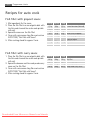
Fish fillet with piquant sauce
1. Mix ingredients for the sauce.
2. Place the fish fillet in a round gratin dish with
the thin ends toward the centre and sprinkle
with salt.
3. Spread the sauce on the fish fillet.
4. Cover with microwave cling film and cook on
AUTO COOK, “Fish Fillet with Sauce”.
5. After cooking, stand for approx. 2 min.
0,5 kg 1,0 kg 1,5 kg
175 g 350 g 525 g
50 g
100 g 150 g
5g
10 g
15 g
15 g
30 g
45 g
1 tbsp 1-2 tbsp 2-3 tbsp
250 g
500 g
750 g
canned tomatoes (drained)
corn
chilli sauce
onion (finely chopped)
red wine vinegar
mustard, thyme and
cayenne pepper
fish fillet
salt
Fish fillet with curry sauce
1. Place the fish fillet in a round gratin dish with
the thin ends toward the centre and sprinkle
with salt.
2. Spread the banana and the ready made curry
sauce on the fish fillet.
3. Cover with microwave cling film and cook on
AUTO COOK, “Fish Fillet with Sauce”.
4. After cooking, stand for approx. 2 min.
0,5 kg 1,0 kg 1,5 kg
250 g 500 g 750 g fish fillet
salt
50 g
100 g 150 g banana (sliced)
200 g 400 g 600 g ready made curry sauce
Downloaded From Microwave-Manual.com Manuals
Programme charts
23
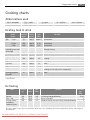
Cooking charts
Abbreviations used
tbsp = tablespoon
tsp = teaspoon
Cup = cupful
KG = kilogram
g = gram
l = litre
ml = millilitre
cm = centimetre
min = minutes
Heating food & drink
Food/
Drink
Quantity Power
-g/ml- -Level-
Milk
1 cup
Water 1 cup
6 cups
1 dish
One plate meal
(vegetables, meat and
trimmings)
Soup / stew
Vegetables
Meat, 1 slice*
Fish fillet*
Cake, 1 slice
Baby food, 1 jar
Melting margarine
or butter*
Melting chocolate
Time
-Min-
Method
150
150
900
1000
400
900 W
900 W
900 W
900 W
900 W
approx. 1
approx. 2
8-10
9-11
4-6
do not cover
do not cover
do not cover
do not cover
sprinkle some water onto the sauce, cover, stir halfway
through heating
200
200
500
200
200
150
190
900 W
900 W
900 W
900 W
900 W
450 W
450 W
1-2
2-3
3-5
approx. 3
3-5
1/2-1
1/2-1
50
900 W
1/2
cover, stir after heating
if necessary add some water, cover, stir halfway through
heating
thinly spread sauce over the top, cover
cover
place in a flan dish
transfer into a suitable microwaveable container, after
heating stir well and test the temperature
cover
100
450 W
3-4
stir occasionally
* from chilled
Defrosting
Food
Goulash
Cake, 1 slice
Fruit e.g. cherries
strawberries,
raspberries, plums
Quantity Power Time
-g-Level- -Min500
150
250
270 W
270 W
270 W
8-9
1-3
3-5
Method
Standing
time
-Minstir halfway through defrosting
10-30
place in a flan dish
5
spread out evenly, turn over halfway through defrosting
5
The times shown in the table are guidelines which may vary according to freezing temperature, quality and weight of
the foodstuffs.
Downloaded From Microwave-Manual.com Manuals
24
Programme charts
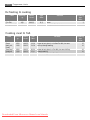
Defrosting & cooking
Food
Quantity
-g-
Power
-Level-
Time
-Min-
300
400
900 W
900 W
9-11
8-10
Fish fillet
One plate meal
Method
cover
cover, stir after 6 minutes
Standing
time
-Min2
2
Cooking meat & fish
Food
Roasts
(pork, veal,
lamb)
Roast beef
(medium)
Fish fillet
Quantity Power
-g-Level-
Time
-Min-
Method
Standing
time
-Min-
1000
1500
630 W
630 W
34-38
53-58
season to taste, place in a shallow flan dish, turn over
halfway through cooking
10
10
1000
1500
200
630 W
630 W
900 W
20-24
27-31
4-6
season to taste, place in a flan dish, turn over halfway
through cooking
season to taste, place in a flan dish, cover
10
10
3
Downloaded From Microwave-Manual.com Manuals
Recipes
25
Recipes
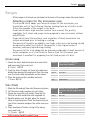
All the recipes in this book are calculated on the basis of 4 servings unless otherwise stated.
Adapting recipes for the microwave oven
If you would like to adapt your favourite recipes for the microwave, you
should take note of the following: Shorten cooking times by a third to a half.
Follow the example of the recipes in this book.
Foods which have a high moisture content such as meat, fish, poultry,
vegetables, fruit, stews and soups can be prepared in your microwave without
any difficulty.
Foods which have little moisture, such as platters of food, should have the
surface moistened prior to heating or cooking.
The amount of liquid to be added to raw foods, which are to be braised, should
be reduced to about two thirds of the quantity in the original recipe. If
necessary, add more liquid during cooking.
The amount of fat to be added can be reduced considerably. A small amount of
butter, margarine or oil is sufficient to flavour food. For this reason your
microwave is excellent for preparing low-fat foods as part of a diet.
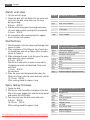
Onion soup
1. Grease the bowl, add the sliced onion, meat stock
and seasoning. Cover and cook.
9-11 min. 900 W
2. Toast the slices of bread, cut them into cubes and
divide them among the soup bowls. Pour the soup
over the toast cubes and sprinkle on the cheese.
3. Place the bowls on the turntable and cook.
1-3 min. 900 W
Utensils Bowl with lid (2 l capacity)
4 soup bowls (200 ml)
10 g
100 g
800 ml
2 slices
40 g
butter or margarine
onions, sliced
meat stock
salt and pepper
bread
grated cheese
Sole fillets
1. Wash the fish and pat them dry. Remove any bones.
2. Cut the lemon and tomatoes into thin slices.
3. Grease the oven dish with butter. Place the fish
fillets in the dish and drizzle with vegetable oil.
4. Sprinkle parsley over the dish, place the tomato
slices on top and season. Place the lemon slices on
top of the tomatoes and pour the white wine over
them.
5. Place small pats of butter on top of the lemon,
cover and cook.
11-13 min. 630 W
Downloaded
From Microwave-Manual.com
After cooking,
stand for approx. 2 min. Manuals
Utensils Shallow oval oven dish with
microwave cling film (approx. 26 cm
long)
400 g
sole fillets
1
lemon, whole
150 g
tomatoes
10 g
butter
1 tbsp vegetable oil
1 tbsp parsley, chopped
salt and pepper
4 tbsp white wine
20 g
butter or margarine
26
Recipes
Zürich veal stew
1. Cut the veal into strips.
2. Grease the dish with the butter. Put the meat and
onion into the dish, cover and cook. Stir once
during cooking.
6-9 min. 900 W
3. Add the white wine, gravy browning and cream,
stir, cover and continue cooking. Stir occasionally.
3-5 min. 900 W
4. Stir the mixture after cooking, stand for approx.
5 min. Garnish with parsley.
Utensils
600 g
10 g
50 g
100 ml
300 ml
1 tbsp
Dish with lid (2 l capacity)
veal fillet
butter or margarine
onion, finely chopped
white wine
seasoned gravy browning, for approx.
1/2 litre gravy
cream
parsley, chopped
Stuffed ham
1. Mix the spinach with the cheese and fromage frais,
season to taste.
2. Place a teaspoon of the filling on top of each slice
of cooked ham, and roll up. Spear with a wooden
skewer to fasten it.
3. Make a béchamel sauce: to do this, pour the water
and cream into a bowl and heat.
2-4 min. 900 W
Mix the flour and butter to make a roux, add to
the liquid, and whisk until dissolved. Cover, cook
until thick.
1-2 min. 900 W
Stir and taste.
4. Place the sauce into the greased dish, place the
filled rolls of ham onto the sauce and cook with lid.
12-14 min. 630 W
After cooking, stand for approx. 5 min.
Utensils Bowl with lid (2 l capacity)
Oval gratin dish (approx. 26 cm long)
150 g
150 g
50 g
8 slices
125 ml
125 ml
20 g
20 g
10 g
leaf spinach, chopped
fromage frais, 20 % fat content
Emmental cheese, grated
pepper and paprika
cooked ham (400 g)
water
cream
flour
butter or margarine
butter or margarine to grease the dish
Spicy turkey fricassee
1. Grease the dish.
2. Mix the rice with the saffron and place in the dish.
Mix in the onion, pepper, leek and the turkey breast
and season. Dot with butter.
3. Pour the stock over the dish, cover and cook.
4-6 min. 900 W
16-19 min. 270 W
After cooking, stand for approx. 5 min.
Downloaded From Microwave-Manual.com Manuals
Utensils Oval dish with lid (approx. 26 cm
long)
120 g
long grain rice
1 pack saffron
10 g
butter or margarine
50 g
onion, sliced
100 g
red pepper, sliced
100 g
leek, sliced
300 g
turkey breast, diced
pepper and paprika
20 g
butter or margarine
300 ml meat stock
Recipes
27
Lasagne
1. Chop the tomatoes, mix with the ham and onion,
garlic, minced beef and tomato puree. Season, cover
and cook.
5-8 min. 900 W
2. Mix the crème fraiche with the milk, Parmesan
cheese, herbs, oil and spices.
3. Grease the dish and cover the bottom with about 1/3
of the pasta. Put half of the minced meat mixture
on the pasta and pour on some sauce. Repeat and
finish with the remaining pasta. Cover the pasta
with sauce and sprinkle with Parmesan cheese.
Cook with the lid on.
13-17 min. 630 W
After cooking, stand for approx. 5-10 min.
Utensils Bowl with lid (2 l capacity)
Shallow square gratin dish with lid
(approx. 20 x 20 x 6 cm)
300 g
tinned tomatoes
50 g
ham, chopped
50 g
onion, finely chopped
1
clove of garlic, crushed
250 g
minced beef
2 tbsp tomato puree
salt and pepper
150 ml crème fraiche
100 ml milk
50 g
Parmesan cheese, grated
1 tsp
mixed chopped herbs
1 tsp
olive oil
1 tsp
vegetable oil to grease the dish
125 g
lasagne verde
1 tbsp Parmesan cheese, grated
Bacon risotto
1. Grease the dish. Place the onions and bacon in the
dish, cover, and cook.
2-3 min. 900 W
2. Add the rice, meat stock, cook.
3-5 min. 900 W
15-17 min. 270 W
After cooking, stand for approx. 5 min.
3. Mix the cheese with the saffron into the rice and
season to taste.
Utensils Bowl with lid (2 l capacity)
50 g
20 g
50 g
200 g
400 ml
70 g
pinch
streaky bacon, chopped
butter or margarine
onion, finely chopped
rissotto rice (Arboris)
meat stock
Emmental cheese
saffron
salt and pepper
Pears in chocolate sauce
1. Place the sugar, vanilla sugar, pear liqueur and water
into the bowl, stir, cover and cook.
1-2 min. 900 W
2. Place the pears into the liquid, cover and cook.
5-8 min. 900 W
Take the pears out of the cooking liquid, and place in
the refrigerator.
3. Pour 50 ml of the cooking liquid into the smaller bowl.
Add the chocolate and crème fraiche, cover, and cook.
2-3 min. 900 W
4. Stir theFrom
sauce well,
pour over the pears and serve.
Downloaded
Microwave-Manual.com
Manuals
Utensils Bowl with lid (2 l capacity)
Bowl with lid (1 l capacity)
4
whole pears, peeled (600 g)
60 g
sugar
10 g
vanilla sugar
1 tbsp pear liqueur
150 ml water
130 g
dark chocolate, chopped
100 g
crème fraiche
28
Recipes
Semolina pudding with raspberry sauce
1. Place the milk, sugar and almonds in the bowl,
cover and cook.
3-5 min. 900 W
2. Add the semolina, stir, cover and cook.
10-12 min. 270 W
3. Beat the egg yolk with the water in a cup and stir
into the hot mixture. Beat the egg white until it is
stiff and fold it into the mixture. Pour the pudding
mixture into ramekins.
4. To make the sauce, wash and dry the raspberries,
and place into a bowl with the water and sugar.
Cover and heat.
2-3 min. 900 W
5. Purée the raspberries and serve with the semolina
pudding.
Utensils Bowl with lid (2 l capacity)
4 Ramekin dishes
500 ml milk
40 g
sugar
15 g
chopped almonds
50 g
semolina
1
egg yolk
1 tbsp water
1
egg white
250 g
raspberries
50 ml
water
40 g
sugar
Cheesecake
1. In a bowl, mix together the flour, cocoa, baking
powder and sugar.
2. Add the egg and butter and mix in a food processor.
3. Grease the tin. Roll out the dough and line the tin,
leaving 2 cm around the edges to form a rim. Bake
the pastry.
6-8 min. 630 W
4. Whisk the butter and sugar until light and fluffy.
Slowly whisk in the eggs. Add the fromage frais and
the powdered vanilla pudding mix.
5. Spread the filling over the cheesecake base and cook.
15-19 min. 630 W
Utensils Spring form tin (approx. 26 cm
diameter)
Base:
300 g
flour
1 tbsp cocoa
10 g
baking powder
150 g
sugar
1
egg
10 g
butter or margarine to grease the tin
Filling:
150 g
butter or margarine
100 g
sugar
10 g
vanilla sugar
3
eggs
400 g
fromage frais, 20 % fat content
40 g
powdered vanilla pudding mix
Chocolate cake
1. Grease the dish.
2. Whisk the butter and sugar together until light
and fluffy. Slowly whisk in the eggs, fold in the
flour, baking powder and cocoa. Add milk, mix
thoroughly and cook.
8-10 min. 630 W
3 After cooking, allow the cake to cool for 10 min, in
the dish.
Downloaded From Microwave-Manual.com Manuals
Utensils Round cake dish (diameter 21 cm
height 10 cm)
175 g
butter or margarine
175 g
sugar
3
eggs
175 g
flour
1 tsp
baking powder
20 g
cocoa
50 ml
milk
Care & cleaning
29
Care & cleaning
CAUTION!
DO NOT USE COMMERCIAL OVEN CLEANERS, STEAM CLEANERS, ABRASIVE, HARSH
CLEANERS, ANY THAT CONTAIN SODIUM HYDROXIDE OR SCOURING PADS ON ANY
PART OF YOUR MICROWAVE OVEN.
CLEAN THE OVEN AT REGULAR INTERVALS AND REMOVE ANY FOOD DEPOSITS.
Failure to maintain the oven in a clean condition could lead to a deterioration of
the surface that could adversely affect the life of the appliance and possibly result
in a hazardous situation.
Oven exterior
The outside of your oven can be cleaned easily with mild soap and water. Make sure the soap is
wiped off with a moist cloth, and dry the exterior with a soft towel.
Control panel
Open the door before cleaning to de-activate the control panel. Care should be taken when
cleaning the control panel. Using a cloth dampened with water only, gently wipe the panel until
it becomes clean. Avoid using excessive amounts of water. Do not use any sort of chemical or
abrasive cleaner.
Oven interior
1. For cleaning, wipe any splatters or spills with a soft damp cloth or sponge after each
use while the oven is still warm. For heavier spills, use a mild soap and wipe several
times with a damp cloth until all residues are removed. Do not remove the
waveguide cover.
2. Make sure that mild soap or water does not penetrate the small vents in the walls
which may cause damage to the oven.
3. Do not use spray type cleaners on the oven interior.
Turntable & turntable support
Remove the turntable and turntable support from the oven. Wash the turntable and turntable
support in mild soapy water. Dry with a soft cloth. Both the turntable and the turntable support
are dishwasher safe.
Door
To remove all trace of dirt, regularly clean both sides of the door, the door seals and sealing
surfaces with a soft, damp cloth. Do not use harsh abrasive cleaners or sharp metal scrapers to
clean the oven door glass since they can scratch the surface, which may result in shattering of the
glass.
Important: A steam cleaner should not be used.
Reduced power level
Important:
If you cook the food over the standard time with only 900 W, the power of
the oven will lower automatically to avoid overheating. (The microwave power
level will be reduced to 630 W.) After pausing for 90 seconds, 900 W power
can be reset.
Cooking mode
Microwave 900 W
Standard time
20 minutes
Downloaded From Microwave-Manual.com Manuals
Reduced power level
Microwave - 630 W
30
What to do if . . . & Specifications
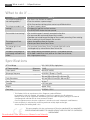
What to do if . . .
Problem
The microwave appliance is
not working properly ?
Check if . . .
• The fuses in the fuse box are working.
• There has not been a power outage.
• If the fuses continue to blow, please contact a qualified electrician.
The microwave mode is not
• The door is properly closed.
working ?
• The door seals and their surfaces are clean.
• The START/QUICK-button has been pressed.
The turntable is not turning ? • The turntable support is correctly connected to the drive.
• The ovenware does not extend beyond the turntable.
• Food does not extend beyond the edge of the turntable preventing it from rotating.
• There is nothing in the well beneath the turntable.
The microwave will not
• Isolate the appliance from the fuse box.
switch off ?
• Contact your local Service Force Centre.
The interior light is not
• Call your local Service Force Centre. The interior light bulb can be
working ?
exchanged only by trained Service Force Technicians.
The food is taking longer to
• Set a longer cooking time (double quantity = nearly double time) or,
heat through and cook than • If the food is colder than usual, rotate or turn from time to time or,
before ?
• Set a higher power setting.
Specifications
AC Line Voltage
AC Power required:
Output power:
Microwave Frequency
Outside Dimensions:
Cavity Dimensions
Oven Capacity
Turntable
Weight
Oven lamp
230 - 240 V, 50 Hz, single phase
Microwave 1.3 kW
Microwave 900 W (IEC 60705)
2450 MHz * (Group 2 / Class B)
MC2662E 594 mm (W) x 459 mm (H) x 404 mm (D)
342 mm (W) x 207 mm (H) x 368 mm (D) **
26 litres **
ø 325 mm, glass
approx. 19 kg
25 W/240 - 250 V
* This Product fulfils the requirement of the European standard EN55011.
In conformity with this standard, this product is classified as group 2 class B equipment.
Group 2 means that the equipment intentionally generates radio-frequency energy in the form of
electromagnetic radiation for the heat treatment of food.
Class B equipment means that the equipment is suitable to be used in domestic establishments.
** Internal capacity is calculated by measuring maximum width, depth and height.
Actual capacity for holding food is less.
This oven complies with the requirements of Directives 2004/108/EC and 2006/95/EC.
SPECIFICATIONS ARE SUBJECT TO CHANGE WITHOUT NOTICE AS PART OF CONTINUOUS
IMPROVEMENT
Downloaded From Microwave-Manual.com Manuals
Installation
31
Installation
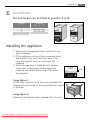
The microwave can be fitted in position A or B:
Position
Niche size
W D H
A
B
560 x 550 x 450
560 x 500 x 450
Position A
Position B
Measurements in (mm)
Conventional
oven
Installing the appliance
1. Remove all packaging and check carefully for any
signs of damage.
2. Fit the appliance into the kitchen cupboard slowly,
and without force, until the front frame of the
oven seals against the front opening of the
cupboard.
3. Ensure the appliance is stable and not leaning.
Ensure that a 4 mm gap is kept between the
cupboard door above and the top of the frame
(see diagram).
Fixing Option 1:
Fix the oven in position with the screws provided. The
fixing points are located on the top and bottom corners
of the oven.
Fixing Option 2:
Please see the template sheet supplied with this oven.
Downloaded From Microwave-Manual.com Manuals
4 mm
32
Installation
Connecting the appliance to the power supply
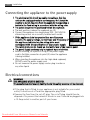
• The electrical outlet should be readily accessible so that the
unit can be unplugged easily in an emergency. Or it should be
possible to isolate the oven from the supply by incorporating a
switch in the fixed wiring in accordance with the wiring rules.
• The socket should not be positioned behind the cupboard.
• The best position is above the cupboard, see (A).
(A)
• Connect the appliance to a single phase 230 - 240 V/50 Hz
alternating current via a correctly installed earth socket.
• If the appliance is to be operated in a non-European
country, the supply voltage, current type and frequency of
the appliance indicated on the rating plate must
correspond with the specification of your power supply.
The rating plate can be found on the inside face of the control panel.
• The power supply cord may only be replaced by an electrician.
• Before installing, tie a piece of string to the power supply
cord to facilitate connection to point (A) when the appliance
is being installed.
• When inserting the appliance into the high-sided cupboard,
DO NOT crush the power supply cord.
• Do not immerse the power supply cord or plug in water or
any other liquid.
Electrical connections
WARNING!
THIS APPLIANCE MUST BE EARTHED
The manufacturer declines any liability should this safety measure not be observed.
• If the plug that is fitted to your appliance is not suitable for your socket
outlet, it must be cut off and the appropriate plug fitted.
• Remove the fuse from the cut off plug. The cut off plug should then be
disposed of to prevent the hazard of shocks in case it should be plugged into
a 13 Amp socket in another part of your home.
Downloaded From Microwave-Manual.com Manuals
Installation
33
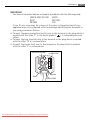
IMPORTANT
The wires in the mains lead are coloured in accordance with the following code:
GREEN AND YELLOW EARTH
BLUE
NEUTRAL
BROWN
LIVE
If you fit your own plug, the colours of the wires in the mains lead of your
appliance may not correspond with the markings identifying the terminals in
your plug, proceed as follows:
• Connect the green and yellow (earth) wire to the terminal in the plug which is
marked with the letter ”E” or the earth symbol (
) or coloured green and
yellow.
• Connect the blue (neutral) wire to the terminal in the plug which is marked
with the letter ”N” or coloured black.
• Connect the brown (live) wire to the terminal in the plug which is marked
with the letter ”L” or coloured red.
GREEN & YELLOW
13 AMP
13 AMP FUSE
BROWN
BLUE
CORD CLAMP
Downloaded From Microwave-Manual.com Manuals
34
Environmental information
Environmental information
Ecologically responsible disposal of packaging
materials and old appliances
Packaging materials
AEG-Electrolux microwave ovens require effective packaging to protect them
during transportation. Only the minimum packaging necessary is used.
Packaging materials (e.g. foil or styrofoam) can place children at risk.
Danger of suffocation. Keep packaging material away from children.
All packaging materials used are environment friendly and can be recycled. The
cardboard is made from recycled paper and the wooden parts are untreated.
Plastic items are marked as follows:
«PE» polyethylene eg packaging film
«PS» polystyrene eg packaging (CFC-free)
«PP» polypropylene eg packaging straps
By using and re-using the packaging, raw materials are saved and waste
volume is reduced. Packaging should be taken to your nearest recycling centre.
Contact your local council for information.
Disposal of old appliances
Old appliances should be made safe before disposal by removing the plug, and
cutting off and disposing of the power cable.
It should then be taken to the nearest recycling centre. Check with your local
Council or Environmental Health Office to see if there are facilities in your area
for recycling the appliance.
The symbol
on the product or on its packaging indicates that this product
may not be treated as household waste. Instead it should be taken to the
appropriate collection point for the recycling of electrical and electronic
equipment. By ensuring this product is disposed of correctly, you will help
prevent potential negative consequences for the environment and human
health, which could otherwise be caused by inappropriate waste handling of
this product. For more detailed information about recycling of this product,
please contact your local council, your household waste disposal service or the
shop where you purchased the product.
Downloaded From Microwave-Manual.com Manuals
Service & spare parts
35
Service & spare parts
If you wish to purchase spare parts or require an engineer, contact your local AEGElectrolux Service Force Centre by telephoning:
08705 929 929
Your telephone call will be automatically routed to the Service Force Centre covering
your post code area.
For the address of your local Service Force Centre and further information about
Service Force, please visit the website at:
www.serviceforce.co.uk
When you contact the Service Force Centre they will need the following information:
1. Your name & address, including post code.
2. Your telephone number
3. Clear and concise details of the fault.
4. The model and serial number of the appliance (found on the rating plate).
5. The purchase date:
Please note that a valid purchase receipt or guarantee documentation is
required for in-guarantee service calls.
Customer care
For general enquiries concerning your AEG-Electrolux appliance or for further
information on AEG-Electrolux products please contact our Customer Care
Department by letter or telephone at the address below or visit our website at:
www.aeg.co.uk
Customer Care Department
Major Appliances
Addington Way
Luton
Bedfordshire
LU4 9QQ
Tel. 08705 350350 (*)
(*) Calls may be recorded for training purposes.
Downloaded From Microwave-Manual.com Manuals
For Customer Service in Ireland please
contact us at the address below:
AEG-Electrolux
Electrolux Group (Irl) Ltd
Long Mile Road
Dublin 12
Republic of Ireland
Tel: + 353 (0)1 4090754
Email: [email protected]
36
Guarantee information
Guarantee conditions
Standard guarantee conditions
•
•
•
•
•
•
We, AEG-Electrolux, undertake that if within 12 months of the date of the
purchase this AEG-Electrolux appliance or any part thereof is proved to be
defective by reason only of faulty workmanship or materials, we will, at our
discretion repair or replace the same FREE OF CHARGE for labour, materials or
carriage on condition that:
The appliance has been correctly installed and used only on the electricity or
gas supply stated on the rating plate.
The appliance has been used for normal domestic purposes only, and in
accordance with the manufacturer's operating and maintenance instructions.
The appliance has not been serviced, maintained, repaired, taken apart or
tampered with by any person not authorised by us.
All service work under this guarantee must be undertaken by a Service Force
Centre. Any appliance or defective part replaced shall become the Company's
property.
This guarantee is in addition to your statutory and other legal rights.
Home visits are made between 8.30am and 5.30pm Monday to Friday.
Visits may be available outside these hours in which case a premium will be
charged.
Exclusions
This guarantee does not cover:
• Damage or calls resulting from transportation, improper use or neglect, the
replacement of any light bulbs or removable parts of glass or plastic.
• Costs incurred for calls to put right an appliance which is improperly installed
or calls to appliances outside the United Kingdom.
• Appliances found to be in use within a commercial environment, plus those
which are subject to rental agreements.
• Products of AEG-Electrolux manufacture which are not marketed by AEGElectrolux.
Downloaded From Microwave-Manual.com Manuals
Guarantee information
37
European Guarantee
If you should move to another country within Europe then your guarantee moves
with you to your new home subject to the following qualifications:
• The guarantee starts from the date you first purchased your product.
• The guarantee is for the same period and to the same extent for labour and parts
as exists in the new country of use for this brand or range of products.
• This guarantee relates to you and cannot be transferred to another user.
• Your new home is within the European Community (EC) or European Free Trade
Area.
• The product is installed and used in accordance with our instructions and is only
used domestically, i.e. a normal household.
• The product is installed taking into account regulations in your new country.
Before you move please contact your nearest Customer Care centre, listed below, to
give them details of your new home. They will then ensure that the local Service
Organisation is aware of your move and able to look after you and your appliances.
France
Senlis
+33 (0) 3 44 62 29 29
Germany
Nürnberg
+49 (0) 800 234 7378
Italy
Pordenone
+39 (0) 800 117511
Sweden
Stockholm
+46 (0) 8 672 5360
UK
Luton
+44 (0) 8705 350 350
Downloaded From Microwave-Manual.com Manuals
38
www.electrolux.com
u
Albania
Belgique/België/
Belgien
˘
Ceská
republika
Danmark
Deutschland
Eesti
España
+35 5 4 261 450
+32 2 363 04 44
Rr. Pjeter Bogdani Nr. 7 Tirane
Bergensesteenweg 719, 1502 Lembeek
+420 2 61 12 61 12
+45 70 11 74 00
+49 180 32 26 622
+37 2 66 50 030
+34 902 11 63 88
˘
Budejovická
3, Praha 4, 140 21
Sjællandsgade 2, 7000 Fredericia
Muggenhofer Str. 135, 90429 Nürnberg
Mustamäe tee 24, 10621 Tallinn
Carretera M-300, Km. 29,900 Alcalá de
Henares Madrid
France
Great Britain
Hellas
Hrvatska
Ireland
Italia
Latvija
Lituania
Luxembourg
Magyarország
Nederland
Norge
Österreich
Polska
Portugal
www.electrolux.fr
+44 8705 929 929
+30 23 10 56 19 70
+385 1 63 23 338
+353 1 40 90 753
+39 (0) 434 558500
+37 17 84 59 34
+370 5 27 80 609
+35 2 42 43 13 01
+36 1 252 1773
+31 17 24 68 300
+47 81 5 30 222
+43 18 66 400
+48 22 43 47 300
+35 12 14 40 39 39
Romania
Schweiz - Suisse Svizzera
Slovenija
Slovensko
+40 21 44 42 581
+41 62 88 99 111
Suomi
Sverige
www.electrolux.fi
+46 (0)771 76 76 76
Türkiye
+90 21 22 93 10 25
Pоссия
+7 095 937 7837
+38 61 24 25 731
+421 2 43 33 43 22
Addington Way, Luton, Bedfordshire LU4 9QQ
4, Limnou Str., 54627 Thessaloniki
Slavonska avenija 3, 10000 Zagreb
Longmile Road Dublin 12
C.so Lino Zanussi, 26 - 33080 Porcia (PN)
Kr. Barona iela 130/2, LV-1012, Riga
Verkiu 29, 09108 Vilnius, Lithuania
Rue de Bitbourg, 7, L-1273 Hamm
H-1142 Budapest XIV, Erzsébet királyné útja 87
Vennootsweg 1, 2404 CG - Alphen aan den Rijn
Risløkkvn. 2 , 0508 Oslo
Herziggasse 9, 1230 Wien
ul. Kolejowa 5/7, Warsaw
Quinta da Fonte - Edificio Gonçalves Zarco Q 35 -2774-518 Paço de Arcos
B-dul Timisoara 90, S6, Bucharest
Industriestrasse 10, CH-5506 Mägenwil
Trzaska
˘ ˘ 132, 1000 Ljubljana
Electrolux Slovakia s.r.o., Electrolux Domáce
˘ SK, Seberíniho 1, 821 03 Bratislava
spotrebice
Electrolux Service, S:t Göransgatan 143, S-105
45 Stockholm
Tarlabaşı Caddesi No: 35 Taksim İstanbul
129090 Mосква, Oлимпийский проспект, 16, Бц
"Oлимпик"
Downloaded From Microwave-Manual.com Manuals
Downloaded From Microwave-Manual.com Manuals
TINS-A505URR0
1
Subject to change without notice
www.electrolux.com
PERFEKT IN FORM UND FUNKTION
Downloaded From Microwave-Manual.com Manuals