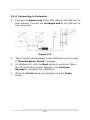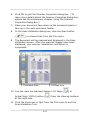
1
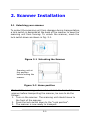
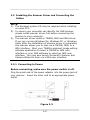
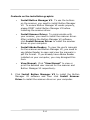
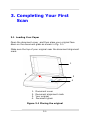
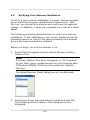
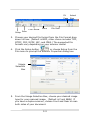
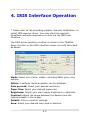
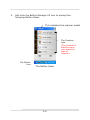
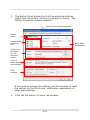
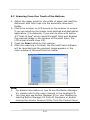
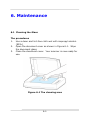
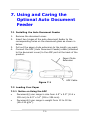
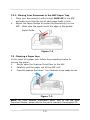
English Bookedge Scanner Getting Started Regulatory model: DF-1002S Avision Inc. Trademarks Microsoft is a U.S. registered trademark of Microsoft Corporation. Windows, Windows Vista, Windows 7 and Windows 8 are either registered trademarks or trademarks of Microsoft Corporation in the United States and/or other countries. IBM, IBM PC are registered trademarks of International Business Machines Corp. Other brands and product names herein are trademarks or registered trademarks of their respective holders. Copyright All rights reserved. No part of this publication may be reproduced, transmitted, transcribed, stored in a retrieval system, or translated into any language or computer language, in any form or by any means, electronic, mechanical, magnetic, optical, chemical, manual, or otherwise, without the prior written permission of Avision Inc. Material scanned by this product may be protected by governmental laws and other regulations, such as copyright laws, the customer is solely responsible for complying with all such laws and regulations. Warranty The information contained in this document is subject to change without notice. Avision makes no warranty of any kind with regard to this material, including, but not limited to, the implied warranties of fitness for a particular purpose. Avision shall not be liable for errors contained herein or for incidental or consequential damages in connection with the furnishing, performance, or use of this material. ii Table of Contents 1. Introduction .............................................. 1-1 2. Scanner Installation .................................. 2-1 2.1 2.2 3. Unlocking your scanner ............................... 2-1 Installing the Scanner Driver and Connecting the Cables ................................ 2-2 Completing Your First Scan ....................... 3-1 3.1 3.2 3.3 Loading Your Paper ..................................... 3-1 Verifying Your Scanner Installation ............... 3-2 A Glance of the Scanner Properties Dialog Box... 3-5 4. ISIS Interface Operation ........................... 4-1 5. Using the Buttons ..................................... 5-1 5.1 5.2 5.3 6. Maintenance .............................................. 6-1 6.1 7. Installing Button Manager V2 ....................... 5-1 Checking the Button Configurations before Scanning ................................................... 5-1 Scanning From One Touch of the Buttons ...... 5-4 Cleaning the Glass ...................................... 6-1 Using and Caring the Optional Auto Document Feeder ...................................... 7-1 7.1 7.2 7.3 Installing the Auto Document Feeder ............ 7-1 Loading Your Paper ..................................... 7-1 Clearing a Paper Jam .................................. 7-2 iii 1. Introduction Congratulations on your purchase of the Avision’s bookedge scanner. Avision is one of the leading companies to make high quality color image scanner. Before you install and operate the new scanner, please take a few minutes to read through this manual. It provides proper instructions for you to unpack, install, operate and maintain the scanner. The following figure indicates the package contents. Please check all the items against your checklist. If you do not receive all the items, please contact your authorized local dealer immediately. 1 3 1. 2. 3. 4. 2 4 Scanner Main Unit Software CD/Quick Guide USB Cable Power Adapter & Power Cord Note: Only use the AC adapter included in the machine. Using other AC adapters may damage the machine and void the warranty. 1-1 2. Scanner Installation 2.1 Unlocking your scanner To protect the scanning unit from damage during transportation, a lock switch is designed at the back of the scanner to keep the scanning unit from moving. To unlock the scanner, move the lock switch down as shown in Fig. 2-1. Figure 2-1 Unlocking the Scanner Scanning unit at this position before locking the scanner Figure 2-2 Home position Note: If the scanning unit is not located at the front of the scanner before transporting the scanner, be sure to do the follows: 1. Turn on the scanner. The scanning unit should move to the front of the scanner. 2. Press the lock switch down to the “Lock position”. 3. The scanner is now ready to transport. 2-1 2.2 Installing the Scanner Driver and Connecting the Cables NOTE: 1). The Windows system CD may be required when installing on some PC’s. 2). To ensure your computer can identify the USB scanner, please install scanner driver first before connecting the scanner to your computer. 3). The scanner driver contains TWAIN, ISIS and WIA driver. If you are running Windows Me, Windows XP, or Windows Vista, after the installation of scanner driver is completed, this scanner allows you to scan via a TWAIN, ISIS, or a WIA interface. Start your TWAIN-compliant image editing software application to select a TWAIN or WIA user interface or your ISIS software to select an ISIS user interface. You may also launch Microsoft’s Scanner and Camera Wizard to scan via a WIA user interface. 2.2.1 Connecting to Power Before connecting, make sure the power switch is off. Plug the small end of the power adaptor into the power jack of your scanner. Insert the other end to an appropriate power outlet. Figure 2-3 2-2 2.2.2 Turning on the Power Press the Power Switch button on the front panel, the Power LED will be lit. To turn off the scanner, press the Power Switch button for about 3 seconds, the Power LED will be off. Figure 2-4 2.2.3 Installing the Scanner Driver 1. Place the supplied CD-ROM onto your CD-ROM drive. 2. The software installation graphic appears. If not, run “setup.exe”. 2-3 Contents on the installation graphic: 3. Install Button Manager V2: To use the buttons on the scanner, you need to install Button Manager V2. To ensure Button Manager V2 works properly, please FIRST install Button Manager V2 before installing the scanner driver. Install Scanner Driver: To communicate with your scanner, you need to install the scanner driver. After installing the Button Manager V2 software, click Install Scanner Driver to install the scanner driver on your computer. Install Adobe Reader: To view the user’s manuals for the scanner and Button Manager V2, you need to use Adobe Reader to open and view the manuals in pdf file format. If you already have Adobe Reader installed on your computer, you may disregard this item. View Manual: Click “View Manual” to view or print the detailed user manual for the scanner and Button Manager V2 respectively. Click Install Button Manager V2 to install the Button Manager V2 software and then click Install Scanner Driver to install the scanner driver on your computer. 2-4 2.2.4 Connecting to Computer 1. Connect the square end of the USB cable to the USB port of your scanner. Connect the rectangle end to the USB port of your computer. Figure 2-5 2. The computer should detect a new USB device and prompt a “New Hardware Found” message. 3. In Windows XP, click the Next button to continue. When the XP certification screen appears, click Continue Anyway to complete the installation. 4. When the Finish dialog is prompted, click the Finish button. 2-5 3. Completing Your First Scan 3.1 Loading Your Paper Open the document cover ,and then place your original face down on the document glass as shown in Fig. 3-1. Make sure the top of your original near the document alignment mark. 1 2 3 4 1. 2. 3. 4. Document cover Document alignment mark Your original Document glass Figure 3-1 Placing the original 3-1 3.2 Verifying Your Scanner Installation To verify if your scanner installation is correct, Avision provides you a useful test program called Avision Capture Tool. With this tool, you can perform simple scans and view the captured images. In addition, it helps you complete your scan at a rated speed. The following procedure describes how to verify your scanner installation. If the installation is not correct, please review the preceding section to check if the cable connection and scanner driver have been successfully installed. Before you begin, be sure the scanner is on. 1. Select Start>Programs>Avision AVxxx Scanner>Avision Capture Tool. Note: If Avision Capture Tool does not appear on “All Programs” of your Start menu, please access from the following path: C\Windows\TWAIN_32\Avision\Avxxx\Avision Capture Tool.exe The Select Scanner Model dialog box will be displayed. 2. Select your driver type and scanner model and click OK. The following Avision Capture Tool dialog box will be displayed. 3-2 Fit Actual Page Size Setup Scan File Format Save File Path 3. Choose your desired file format from the File Format drop down list box. (Default is BMP, other choice includes TIFF, MTIFF, PDF, MPDF, GIF, and JPEG.) The supported file formats vary depending on your scanner model. 4. Click the Setup button ( ) or choose Setup from the File menu to prompt the Scanner Properties dialog box. Image Selection Box 5. From the Image Selection Box, choose your desired image type for your scanned image. (Default is Front B&W) If you have a duplex scanner, choose Front and Rear to scan both sides of your document. 3-3 6. Click OK to quit the Scanner Properties dialog box. (To learn more details about the Scanner Properties dialog box, please see the subsequent chapter, Using the Scanner Properties Dialog Box.) 7. Place your document face down on the document glass or face up in the auto document feeder. 8. In the Scan Validation dialog box, click the Scan button ( 9. ) or choose Scan from the File menu. The document will be scanned and displayed in the Scan Validation screen. After the scanned images have been displayed, your scanner installation verification is completed. Thumbnail View Fit Page View 10. You can view the scanned image in Fit Page ( Actual Size (100%) button ( at the right side. ) or ) from the Viewing toolbars 11. Click the Close box or Quit from the File menu to exit the Scan Validation Tool. 3-4 3.3 A Glance of the Scanner Properties Dialog Box 1 2 3 4 5 6 7 8 1. Tab Options Choice: Image, Compression, Color Dropout, Paper, Multi-Feed Detection, Preview, Options, Settings, Information. 2. Image Choose your image type and the side of Selection Box document you wish to scan. Options vary based on type of scanner. 3. Brightness Adjust the brightness level from –100 to +100. 4. Contrast Adjust the contrast level from –100 to +100. Determine the quality of the scanned image. 5. Resolution The industry standard is 200 dpi. 6. Invert Reverse the color of your scanned image. 7. Scan Source Choice: Auto Document Feeder, Flatbed, Flatbed (Book), Automatic (varies due to different scanner model) 8. Defaults Reset all values on the tabs to the factory default settings. Note: For more detailed information about how to use the TWAIN interface, please refer to the user’s manual in the supplied CD. 3-5 4. ISIS Interface Operation * Please refer to the preceding chapter, Scanner Installation, to install ISIS scanner driver. You may start the supplied QuickScan software application to scan via the ISIS user interface. The ISIS driver operation method is similar to the TWAIN’s. Every function on the ISIS interface screen is briefly described as below: Mode: Select one of scan modes, including B&W, gray, color options. Dither: 5 halftone levels available, can be disabled. Dots per inch: Select your desired resolution. Paper Size: Select your desired paper size. Brightness: Adjust your scan image brightness or darkness. Contrast: Adjust the range between the darkest and the lightest shades in the image. Default: Click to reset all settings. Area: Select your desired scan area or position. 4-1 5. Using the Buttons 5.1 Installing Button Manager V2 Button Manager V2 provides you an easy way to scan your document and then link the scanned image to your designated software application. All this can be done by a simple touch of the button on the scanner. Yet, before you scan, it is recommended to check the button configurations first to ensure a proper file format and a destination application. 5.2 Checking the Button Configurations before Scanning 1. Button Manager V2 runs from the system tray. After Button Manager V2 and the scanner driver are properly installed, Button Manager V2 is started and the Button icon will be displayed on the system tray at the bottom right corner of your computer screen. 5-1 2. Left-click the Button Manager V2 icon to prompt the following Button Panel. This indicates the scanner model The Function Icon (The number of function icons vary based on type of scanner.) The Button Icon The Button Panel 5-2 3. The Button Panel shows the first five scanning buttons. Right-click the button (function) you wish to check. The Button Properties window appears. Name of the Selected Button Button Name Image Mode Selection Box Basic Scan Parameters Folder and file name for the scanned image Scan To destination and settings OCR settings If you wish to change the setting, use this window to reset the setting for the file format, destination application, or other scan settings. 4. Click the OK button to leave the window. 5-3 5.3 Scanning From One Touch of the Buttons 1. Adjust the paper guide for the width of paper and load the document with their tops into the automatic document feeder. 2. Check the number on LCD screen on the scanner to ensure if you are selecting the proper scan settings and destination application. (For example, if you wish to scan with button #3 “Scan to App” which opens Microsoft Paint and displays the scanned image in the window of Microsoft Paint, the LCD screen should show #3). 3. Press the Scan button on the scanner. 4. After the scanning is finished, the Microsoft Paint software will be launched and the scanned image appears in the main window of Microsoft Paint as below. Note: 1. For details information on how to use the Button Manager V2, please refer to the user’s manual in the supplied CD. 2. You may also use Button Manager V2 on your desktop by starting Button Manager V2 from All Programs or double clicking the Avision Scanner Utility from the Control Panel. 5-4 6. Maintenance 6.1 Cleaning the Glass The procedures 1. 2. 3. Use a clean and lint-free cloth wet with isopropyl alcohol. (95%) Open the document cover as shown in Figure 6-1. Wipe the document glass. Close the document cover. Your scanner is now ready for use. Figure 6-1 The cleaning area 6-1 7. Using and Caring the Optional Auto Document Feeder 7.1 Installing the Auto Document Feeder 1. 2. 3. 4. Remove the document cover. Insert two hinges of the auto document feeder to the corresponding holes on the document glass as shown in below. Pull out the paper chute extension to the length you want. Connect the ADF (Auto Document Feeder) cable (attached to the document cover) to the ADF port at the back of the product. Paper Chute Extension Figure 7-1 ADF Cable 7.2 Loading Your Paper 7.2.1 Notice on Using the ADF Document(s) can range in size from 4.5” x 5.5” (114 x 139 mm) to 8.5” x 14” (216 x 356 mm). Document(s) can range in weight from 13 to 32 lbs (49~120 g/m2). 7-1 7.2.2 Placing Your Document in the ADF Paper Tray 1. 2. Place your document(s) with the text FACE UP in the ADF and make sure that the top of each page feeds in first. Adjust the Paper Guides to center the document(s) in the ADF. Make sure the paper touch the edge of the guides. Paper Guide Figure 7-2 7.3 Clearing a Paper Jam In the event of a paper jam, follow the procedures below to remove the paper: 1. Gently open the Scanner Front Door to the left. 2. Carefully pull the paper out of the ADF unit. 3. Close the scanner front door. Your Scanner is now ready to use. Figure 7-3 Note: For more detailed information about how to use the Auto Document Feeder, please refer to the user’s manual in the supplied CD. 7-2