1
MD-SR50H/50W/60E/60W
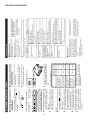
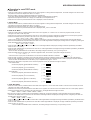
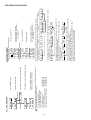
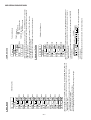
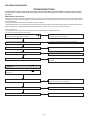
5. NORMAL Mode
• When the STOP button is pressed while the NORMAL menu appears, the mode changes to the TEST mode stop state.
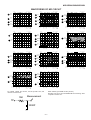
• Indication during operation
Indication of memory capacity on main unit LCD [
] + Level meter
: Internal mode
: Address (Cluster section)
: Address (Sector section)
• Selection of sound volume, BASS, etc. is possible (without indication)
• Recording is also possible.
• If the STOP button is pressed during operation in the NORMAL mode, the NORMAL mode is canceled, and the power is turned off.
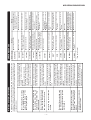
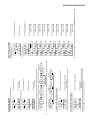
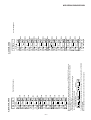
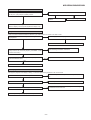
6. Error data display Mode
• Reversing when SKIP DOWN button is pressed
• When the STOP button is pressed while the error data indication menu appears or during error data indication, the mode changes to the
TEST mode stop state.
• Error data 0 is the latest error.
• Error which occurred in the TEST mode is also stored in the memory.
• When the DISP button is pressed while the error data indication menu appears, the error data is initialized. [ C L E A R _ ]
•
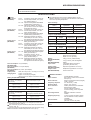
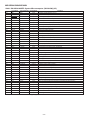
: Error Code
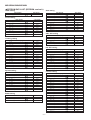
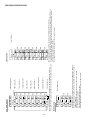
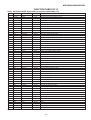
Explanation of error history code
12h : RF side FG, TG, and TCRS adjustment termination failure
13h : Adjustment servo retraction excessive retrial
16h : C. IN detection time-over
17h : A, B, E, F, and TCRSO offset measurement value out of
tolerable range
21h : Focus retraction completion allowable time-over
23h : Track search completion allowable time-over
24h : Disc linear speed measurement failure
32h : P-TOC read failure
42h : U-TOC read failure
44h : U-TOC write data write disabled/read check error
52h : SD write data write disabled
71h : Pickup position initialization time-over
72h : EEPROM data read check sum error
73h : Record head drive disabled (by EJECT lever)
82h : Power overvoltage detection
91h : Ambient temperature is higher that the allowable temperature.
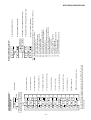
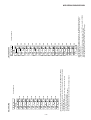
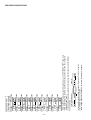
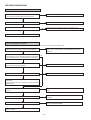
7. INNER Mode
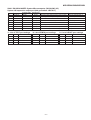
• when the STOP button is pressed on the INNER menu (SQ______ ), the state is changed to the TEST mode STOP state.
•
: Address
– 12 –