1
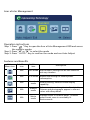
Acer eColor Management Operation instructions Step 1: Press “ ” Key to open the Acer eColor Management OSD and access the scenario modes Step 2: Press ““ or “” to select the mode Step 3: Press “ AUTO “ Key to confirm the mode and run Auto Adjust. Features and Benefits Main Menu icon Sub Menu icon Sub Menu item Description N/A User mode User defined. Settings can be fine-tuned to suit any situation N/A ECO mode Adjusts the settings to reduce power consumption. N/A Standard mode N/A Grahpic mode N/A Movie mode Default Setting. Reflects native display capability Enhances colors and emphasize fine detail. Pictures and photographs appear in vibrant colors with sharp detail. Displays scenes in clearest detail. Presents great visuals, even in unsuitably-lit environments.