1
■
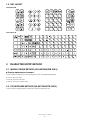
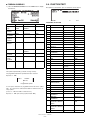
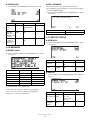
CHK/CG (CHECK CHANGE)
■
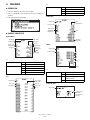
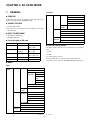
1) Select “7 CHK/CG” from the FUNCTIONS menu to display the items
list.
CASH
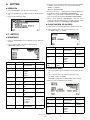
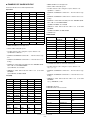
1) Select “1 CASH” from the MEDIA menu to display the items list.
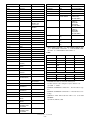
Item
Text
Range/Detail
Default
Text
TEXT
12 character
CASH
HALO
HALO
8 digits
(0 to 99999999)
999999999
HALO
HALO
8 digits
(0 to 99999999)
99999999
Text
TEXT
12 character
CHK/CG
Footer print on F O O T E R
receipt
PRINT
YES
NO
NO
Entry of
amount tended
COMPULSORY
NON-COMPUL.
NONCOMPUL.
Item
■
Text
Detail
Default
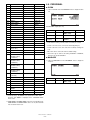
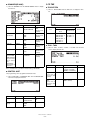
CA/CHK (CASH CHECK, CHECK CASHING)
This programming can not be performed in Sweden fiscal mode.
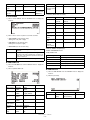
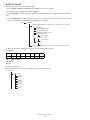
1) Select “8 CA/CHK” from the FUNCTIONS menu to display the items
list.
■
TEND.
CHECK1, CHECK2
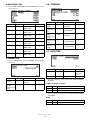
1) Select “2 CHECK1” or “3 CHECK2” from the MEDIA menu to display the items list.
Item
HALO
Text
HALO
Text
TEXT
Detail
8 digits
(0 to 99999999)
12 character
Default
999999999
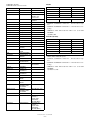
Item
CA/CHK
Text
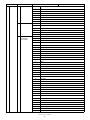
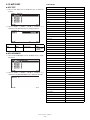
FUNCTION LIST
Function
Default Text
Default
TEXT
12 character
CHECK1 or
CHECK2
HALO
HALO
8 digits
(0 to 99999999)
99999999
Footer print on F O O T E R
receipt
PRINT
YES
NO
NO
Entry of
amount tended
COMPULSORY
NON-COMPUL.
NONCOMPUL.
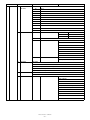
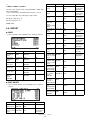
5-3. MEDIA
■
Range/Detail
Text
TEND.
CASH
CASH
CHECK1
CHECK1
■
CHECK2
CHECK2
CREDIT1
CREDIT1
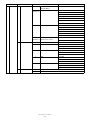
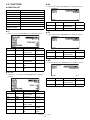
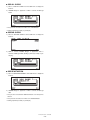
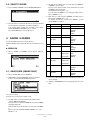
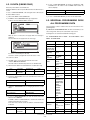
1) Select “4 CREDIT1” or “5 CREDIT2” from the MEDIA menu to display the items list.
CREDIT2
CREDIT2
CREDIT1, CREDIT2
FOREIGN CURRENCY EXCH1
PRESET
FOREIGN CURRENCY EXCH2
OPEN
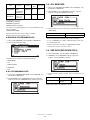
Item
XE-A207/A217/A307
– 21 –
Text
Range/Detail
Default
Text
TEXT
12 character
CREDIT1 or
CREDIT2
HALO
HALO
8 digits
(0 to 99999999)
99999999
Footer print on F O O T E R
receipt
PRINT
YES
NO
NO
Entry of
amount tended
COMPULSORY
INHIBITED
INHIBITED
PGM MODE
TEND.