1
Adjusting the Screen Image
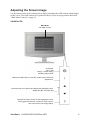
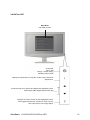
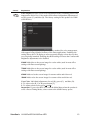
Use the buttons on the front control panel to display and adjust the OSD controls which display
on the screen. The OSD controls are explained at the top of the next page and are defined in
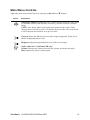
“Main Menu Controls” on page 12.
VA1947a-LED
Main Menu
with OSD controls
Power light
Blue = ON
Orange = Power Saving
Standby Power On/Off
Displays the Main Menu or exits the control screen and saves
adjustments.
Scrolls through menu options and adjusts the displayed control.
Brightness (T) / Contrast (S)
Displays the control screen for the highlighted control.
Also toggles between two controls on some screens.
Also a shortcut to Auto Image Adjust.
ViewSonic VA1947a-LED/VA1947ma-LED
9