1
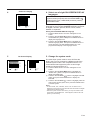
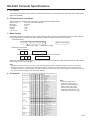
Example of a high-mount setup
• A high-mount setup makes projection from an elevated location possible, without ceiling modifications.
TOP VIEW
SIDE VIEW
Lens center
Lens center
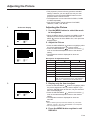
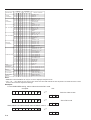
Example of a ceiling-mount setup
Before mounting the projector, be sure to contact your nearest Authorized Sharp Industrial LCD Products Dealer to
obtain the manufacturer recommended ceiling mount bracket (sold separately). (AN-XGCM20 Ceiling Mount
Bracket, AN-EP101AP Extension Tube).
TOP VIEW
SIDE VIEW
90˚
Lens center
Lens center
• If the relative positions of the projector and the screen are not properly adjusted, the picture will be distorted.
Note:
• A polarizing screen cannot be used with this projector.
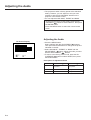
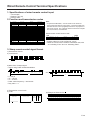
Inverted Labeling for Ceiling Mount
• When ceiling mounting the projector, attach the supplied inverted label as shown.
Front
OFF
LAMP
ON
TEMP.
➡
TEMP.
➡
LAMP
POWER
OFF
ON
TEMP.
POWER
LAMP
POWER
ON/OFF
ON/OFF
ON/OFF
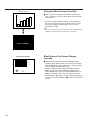
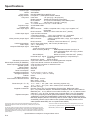
Terminal Cover
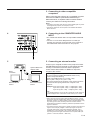
• When the projector is ceiling mounted, attach the terminal cover
(supplied) to hide the connecting cables.
• Use the terminal cover to hide the connecting cables when the
projector is used on a desktop or high mounted.
E-13