1
PPrreeffaaccee
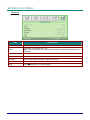
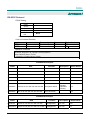
LED Error Messages
POWER LED
BLINK
READY LED
BLINK
TEMP LED
BLINK
OFF
OFF
ON
G794 fail
4
4
OFF
T1 fail
4
5
OFF
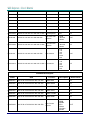
Lamp error
5
OFF
OFF
Fan1 error (Burner Fan)
6
1
OFF
Fan2 error (Lamp Fan)
6
2
OFF
Fan3 error (Power Fan)
6
3
OFF
Fan4 error (DMD Fan)
6
4
OFF
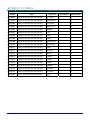
Lamp door open
7
OFF
OFF
DMD error
8
OFF
OFF
Color wheel error
9
OFF
OFF
Ballast error
10
OFF
OFF
Ballast communication error
10
1
OFF
ERROR CODE MESSAGES
Over temperature
In the event of an error, please disconnect the AC power cord and wait for one (1) minute before restarting the projector. If the POWER or RESDY LEDs are still blinking or the TEMP LED is lit, contact
your service center.
Image Problems
Problem: No image appears on the screen
1. Verify the settings on your notebook or desktop PC.
2. Turn off all equipment and power up again in the correct order.
Problem: The image is blurred
1. Adjust the Focus on the projector.
2. Press the Auto button on the remote control or projector.
3. Ensure the projector-to-screen distance is within the 10-meter (33-feet) specified range.
4. Check that the projector lens is clean.
Problem: The image is wider at the top or bottom (trapezoid effect)
1. Position the projector so it is as perpendicular to the screen as possible.
2. Use the Keystone button on the remote control or projector to correct the problem.
Problem: The image is reversed
Check the Projection setting on the Installation I menu of the OSD.
Problem: The image is streaked
1. Set the Frequency and Tracking settings on the Computer menu of the OSD to the default settings.
2. To ensure the problem is not caused by a connected PC’s video card, connect to another
computer.
Problem: The image is flat with no contrast
Adjust the Contrast setting on the Image menu of the OSD.
– 51 –