1
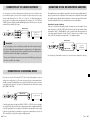
CONNECTION OF ONE OR MORE POWER AMPLIFIERS
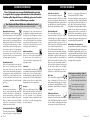
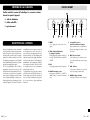
Connection of two pairs of speakers:
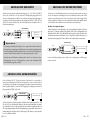
Four main amplifier channels are required in this case, e.g. two stereo main amplifiers. Connect both sokkets named “1” in the field “OUTPUT” with the RCA input sockets of the main amplifier channels for the
first pair of speakers. Additionally connect the two sockets of the RCA combination marked with “2” within the SA-31 “OUTPUT” terminal area with the RCA input jacks of the main amplifier channels for the
second pair of speakers. The input jacks of preamplifiers are often marked as “INPUT” or “POWER AMP
IN”. Please pay attention not to interchange right with left channels. The letters “R” and “L” indicate the
correct correlation. Your specialist dealer will advise you of this on request.
OPERATING THE APPLIANCE
Operation
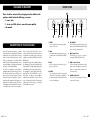
Switch on and off
Select an input
RCA connection
INPUT
e.g. Stereo
main amplifier
SA-31
INPUT
RCA connection
Change the volume
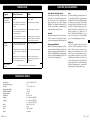
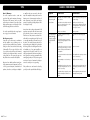
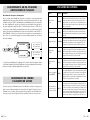
Button(s)
Description
POWER (4)
The preamplifier is switched on and off using this button at the front panel. It
has no standby option. When switched off the device is internally separated
from the AC power. As a precaution, after switching on, the volume setting
of the preamplifier should be reduced. After switching on, the LED above
the POWER switch flashes and the device needs a few seconds before it is
ready to operate. This is the case if the volume LED is constantly lit.
INPUT (6)
Turn the knob “VOLUME” clockwise to turn up the volume and counterVOLUME (8) clockwise to turn it down. The volume setting does never influence the signal
at the output “REC OUT” (10). This preamplifier has no Mute option.
TREBLE (1)
With the “TREBLE” control dial on the front of the device you affect the proportion of higher frequencies in the sound. Turning it in clockwise direction
increases the treble intensity and moving it in anticlockwise direction reduces
it. In the middle setting the treble proportions of the input signals remain unchanged. The adjustment of the treble control only has an effect if the button
“TONE” (2) has been pressed. The signal of the output “REC OUT” (10) is
independent of this.
BASS (3)
With the “BASS” control dial on the front of the device you affect the proportion of lower frequencies in the sound. Turning it in clockwise direction increases the bass intensity and moving it in anticlockwise direction reduces it. In
the middle setting the bass proportions of the input signals remain unchanged. The adjustment of the bass control only has an effect if the button
“TONE” (2) has been pressed. The signal of the output “REC OUT” (10) is
independent of this.
TONE (2)
If the sound is not to be changed, it is recommended that you switch off the
sound control (BASS, TREBLE) with this button on the front of the device.
When this button is pressed, the sound processing settings in the tone controllers (1)(3) come into play. If the button is not pressed, the two sound
controllers in the preamplifier are bypassed and the signals from the source
are not changed in terms of their frequency levels.
LOUD (7)
This function is operated from the front panel. It is a feature of audio amplifiers that permits the user to strengthen low and high frequencies compared
with middle frequencies at the touch of a button. It thereby corrects the
impression of volume at low volume. In an audio system, when the volume is
small, low and high frequency ranges are insufficient because of the characteristic of human auditory sensation. This function should only be used at
low volume. It has no effect on the signal of the output “REC OUT” (10).
e.g. Stereo
main amplifier
Change the treble proportions of the sound
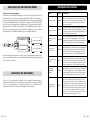
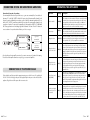
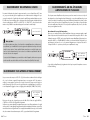
Also select this type of main amplifier connection if you want to connect a pair of speakers for bi-amping.
Therefore four main amplifier channels are required, e.g. two stereo main amplifiers.
Change the bass proportions of the sound
CONNECTION OF THE POWER CABLE
Check whether the wall socket provides the appropriate mains power, which is the case if it is supplied with
230 V AC 50 Hz. Push the plug on the power cable supplied firmly into the power socket on the back of the
appliance. Plug the other end of the power cable into a mains socket.
Switch off tone control
(BASS/TREBLE)
Switch the audio signal
correction for low volume on and off
26
Vincent
If you turn the dial “INPUT”, you select one of the devices connected to the
inputs on the back of the SA-31 (9) for playback. Before switching over the
input channel, the volume (8) should be turned down as a precaution!
Vincent
27