1
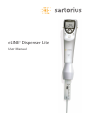
eLINE® Dispenser Lite
User Manual
Contents
1. Intended use........................................................................................................................2
2. Product description...........................................................................................................2
3. Quick start............................................................................................................................3
3.1.
Unpacking..............................................................................................................3
3.2.
Charging the Dispenser before first use....................................................4
3.3.
Operating Instructions......................................................................................5
3.3.1. Display.....................................................................................................................6
3.3.2. Operating modes.................................................................................................6
3.3.3. Keyboard and operation buttons..................................................................6
3.3.4. Reset button.........................................................................................................7
3.3.5. Start button..........................................................................................................7
3.3.6. Tip attachment and ejection .........................................................................7
4. Charging of the Dispenser..............................................................................................7
4.1.
Charging with the Sartorius Charging Stand and Charging
Carousel..................................................................................................................8
4.2.
Charging through direct charging system................................................9
4.3.
Charging recommentations......................................................................... 10
4.4.
Electrical specifications................................................................................. 10
5. Programming principles................................................................................................11
5.1.
Programming Map........................................................................................... 12
5.2.
Programming of the multiple dispensing mode using the
TipGuide.............................................................................................................. 13
6. Maintenance..................................................................................................................... 15
6.1.
Cleaning the dispenser................................................................................... 15
6.2.
Battery replacement....................................................................................... 15
7. Troubleshooting............................................................................................................... 16
8. Warranty information................................................................................................... 18
9. Performance specifications........................................................................................ 18
10. Recycling instruction (WEEE)..................................................................................... 20
1
1.
Intended use
eLINE Dispenser Lite is intended to be used in liquid
handling applications for dispensing liquids in volume
range of 1 µl to 50 ml. It is recommended to use
Dispenser Tips to ensure the best compatibility and
performance with eLINE Dispenser Lite.
This liquid handling device is designed and manufactured
to be used as general purpose laboratory equipment.
Before operating it is recommended to read the user
manual, which contains useful information e.g. for
good pipetting practice.
2.
Product description
The eLINE Dispenser Lite is an electronic dispenser for
the multiple dispensing of the liquids. The dispenser
offers you the specialised technology and innovations
in the field of the hand held liquid handling devices.
The attractive and ergonomic design of the Dispenser
Lite together with an unique electronic tip ejection
operation take the effort out of multiple dispensing
and reduce the risk of repetitive strain injuries (RSI)
that are common in mechanical pipetting.
The microprocessor controlled system and the superior
construction of the Dispenser Lite enable maximum
liquid handling performance with high levels of
accuracy and precision.
The Dispenser Lite uses positive displacement principle,
and is thereby an ideal tool for
- Long pipetting series
- Viscous, infectuous and high vapour pressure
liquids
- Radioactive and toxic liquids
eLINE Dispenser Lite
Cat. No.
73080X
X: 0=Without adaptor; 1= With universal AC-adaptor (Euro,
USA/JPN, UK, AUS, KOR and China plugs)
2
Dispenser Tips
Cat. No. Tip
volume
(ml)
Type
792017
792026
0.1
792018
792027
Volume
min/max(µl)
Increment
(µl)
Number of
dispensings
min/max
Qty/
Unit
Non Sterile
1/100
Pre-sterilised
0.2
1/100
100
0.2
Non Sterile
2/200
Pre-sterilised
0.4
1/100
100
792019
792028
0.5
Non Sterile
5/500
Pre-sterilised
1
1/100
100
792020
792029
1.0
Non Sterile
10/1000
Pre-sterilised
2
1/100
100
792021
792030
2.5
Non Sterile
25/2500
Pre-sterilised
5
1/100
100
792022
792031
5.0
Non Sterile
50/5000
Pre-sterilised
10
1/100
100
792023
792032
10.0
Non Sterile
100/10 000
Pre-sterilised
20
1/100
100
792024
792033
25.0
Non Sterile*
Presterilised*
500/25 000
50
1/50
25
792025
792034
50.0
Non Sterile*
Presterilised*
1000/50 000 100
1/50
25
792038
Dispenser Tips Starter Kit includes:
- 0.5 ml/20 pcs
- 1,0 ml/20 pcs
- 2.5 ml/20 pcs
- 5.0 ml/20 pcs
- 10.0 ml/20 pcs
* 1 adapter included
NOTE: The tips are disposable, do not reuse them!
3.
3.1.
Quick start
Unpacking
The eLINE Dispenser Lite package contains:
-
eLINE Dispenser Lite
Tilting piece
Instruction manual
3
-
Performance certificate in accordance with ISO
8655-5
Demo package of the Tips
- 0.1 ml, 1 pc
- 0.2 ml, 1 pc
- 0.5 ml, 5 pcs
- 1.0 ml, 5 pcs
- 2.5 ml, 5 pcs
- 10.0 ml, 5 pcs
- 25.0 ml, 1 pc
- Adapter for 25 ml tip, 1 pc
- AC-adaptor (if ordered)
Please check that all items are included and no damage
has occurred during shipment.
3.2. Charging the Dispenser before
first use
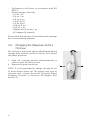
The battery is protected against discharging during
storage with a plastic protector. Before use remove
the plastic protector.
1. Push the charging buttons simultaneuously in
order to open the battery cover
2. Remove the plastic protector
NOTE: It is recommended to charge the pipette for
12 hours before initial use. The pipette may only be
charged with original Sartorius Charging Stand,
Charging Carousel or Sartorius AC-adaptor (See
Section 3.)
4
2.
1.
1.
3.3. Operating Instructions
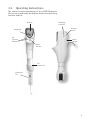
The control and programming of the eLINE Dispenser
Lite is performed using the display, keyboard, operating
buttons and tip.
Display
Charging
contacts
Battery
cover
Keyboard
Tip
ejection
buttons
Reset
button
Start
button
Tip
connector
Dispenser
Tip
5
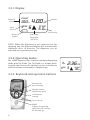
3.3.1. Display
Aliquots/
counter
Speed
in/out
4.00 µl
COUNT
100 x
SPEED
IN
+ –
5
Volume
TIP SIZE
5.0ml
Selected tip
Battery
symbol
Aspirating/
Dispensing
direction
NOTE: When the dispenser is not connected to the
charging unit the dispenser/display will automatically
hibernate after 10 minutes. The dispenser can be
switched on by pressing any key.
3.3.2. Operating modes
The eLINE Dispenser Lite features multiple dispensing
mode with Tip Guide. The Tip Guide is a unique builtin guide that selects the optimal tip size according to
selected volume and number of dispensings.
3.3.3. Keyboard and operation buttons
Activates the
speed function
Changes volume,
aliquots and speed
Confirms the
settings
Ejects the tip
START:
Triggers the pipetting
operations and confirms
the selected tip
6
3x
SPEED
IN
2.36 ml
3
TIP SIZE
10ml
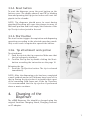
3.3.4. Reset button
1
To reset the dispenser, press the reset button on the
battery cover. The display shows E and TIP in blinking
form and pressing the tip ejector button will reset the
pipette to the d-mode.
NOTE: The dispenser should never be reset during
pipetting! Resetting will cause the plunger to move to
the home position and it will empty the contents of the
tip. The tip is also ejected in the end.
3.3.5. Start button
2
The start button triggers the aspiration and dispensing
operations according to the selected operating mode.
Only a soft touch is required to operate the button.
1
3.3.6. Tip attachment and ejection
Tip attachment
1. Push the tip into the tip connector. Make sure that
the tip is properly attached.
2. Confirm the tip size by double clicking the Startbutton according the instruction on the page 15.
Releasing the tip:
1. Press the Tip Ejection button. The tip is released
immediately.
NOTE: After the dispensing cycle has been completed
a small residual amount of fluid may have been left in
the tip. During the tip ejection it is possible that a part
of the remaining fluid comes out of the tip. Therefore
it is recommended that the tip ejection is performed
above a waste container.
4.
Charging of the
Dispenser
The eLINE Dispenser Lite should be charged using the
original Sartorius Charging Stand, Charging Carousel
or AC-adaptor.
7
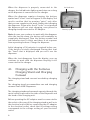
When the dispenser is properly connected to the
charger, the led indicator lights up and stays on as long
as the dispenser is connected to the charger.
When the dispenser requires charging, the battery
symbol and “lo bat”-text will appear in the display. You
need to confirm that by pressing “enter”, only after
that you can complete your work, and/or start charging
the dispenser. Please note that if “enter” is not pressed
the dispenser will not start charging, even placed in
charging stand/connected to AC-adaptor.
Note: In case you continue to work with the dispenser
after the low bat-alarm, the battery will eventually be
completely discharged. Then the battery-symbol and
led indicator start to blink, and there is no response
from operating buttons. Charge the dispenser.
Initial charging of 30 minutes is required before use,
if the battery is totally discharged. During that time
the “Load”-text is displayed and you can’t use the
dispenser.
When the text disappears from the display, you can
continue to work with the dispenser keeping it still
connected to the charger.
4.1.
Charging with the Sartorius
Charging Stand and Charging
Carousel
The charging stand and carousel are desktop charging
units.
The charging stand accommodates one and charging
carousel four eLINE Dispensers.
The charging stands and carousels operate through the
metal contacts placed in the sides of the Dispenser and
the head of the charging unit.
Before operating the AC-adaptor must be connected to
the socket at the rear of the charging stand as well as to
the electrical outlet. Before connecting the AC-adaptor
to the electrical outlet, check that its voltage setting
corresponds to the voltage setting of your electrical
outlet.
8
Led indicator
Battery symbol
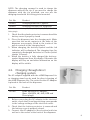
NOTE: The charging carousel is used to charge the
dispenser without the tip. If you need to charge the
dispenser with the tip attached, you can use the
charging stand with the tilting piece mounted.
Cat. No.
Product
730981
Charging Stand for 1 pipette
730991
Charging Carousel for 4 pipettes
With universal AC-adaptor (Euro, USA/JPN, UK, AUS, KOR and
China plugs)
1. Check that the plastic protector is removed and the
battery cover is properly closed
2. Place the dispenser into the charging unit. Make
sure that the metal contacts at the sides of the
dispenser are properly fitted to the tracks of the
metal contacts in the charging head.
3. When charging, the battery-symbol and the led
indicator will be displayed. The charging time for
completely discharged batteries is 6 hours (initial
charge 12 hours).
4. When the battery is fully charged the batterysymbol disappears from the display. Otherwise the
display will stay on and other information on the
display will be visible.
4.2. Charging through direct
charging system
The AC-adaptor supplied with the eLINE Dispenser Lite
or charging stand can be used for direct charging of
the eLINE Dispenser Lite. The socket for the AC-adaptor
is placed at the back of the dispenser.
Cat. No.
Product
731108
eLINE universal AC-adaptor,
(Euro, USA/JPN, UK, AUS, KOR and
China plugs)
1. Before connecting the AC-adaptor to the electrical
outlet, check that its voltage settings corresponds
to the voltage settings of the electrical outlet.
2. Check that the battery protector is removed and
the battery cover is properly closed.
3. Connect the AC-adaptor to the electrical outlet as
well as to the socket at the back of the dispenser
9
4. The charging time is 6 hours for the completely
discharged battery.
5. When the battery is fully charged the batterysymbol disappears from the display. Otherwise the
display will stay on and other information on the
display will be visible.
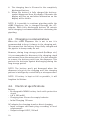
NOTE: It is possible to continue pipetting while the
eLINE Dispenser Lite is charged through the ACadaptor. With fully discharged battery 30 minute
initial charging is recommended before continuing the
pipetting.
4.3. Charging recommentations
When the eLINE Dispenser Lite is not in use it is
recommended to keep it always in the charging unit.
This ensures that the battery is kept fully charged and
the pipette is always ready for use.
However, during long storage periods (holidays etc.)
it is recommended to disconnect the charging stand
and carousel from the mains outlet. It is also advisable
to remove the battery pack from the dispenser. This
protects the batteries against discharging during the
long storage period.
NOTE: The battery won’t get damaged when the
dispenser is kept on the charging unit: the charging
process is intelligently controlled by a microprocessor.
NOTE: If battery is kept as full as possible, it will
lengthen its lifetime.
4.4. Electrical specifications
Battery
- Rechargeable NiMH battery back with protection
circuit
- 4.8 V, 500 mAH
- Charging time 6 hours for empty batteries
- Initial Charging 12 hours
AC-adaptor for charging stand or direct charging
- Input voltages and main plug according to local
requirements
- Output voltage 8 VDC, 740 mA
10
AC-adaptor for charging carousel
- Input voltages and main plug according to local
requirements
- Output voltage 10,5 VDC, 1600 mA
5.
Programming principles
Multiple dispensing
The eLINE Dispenser Lite features multiple dispensing
mode with unique built in Tip Guide that selects the
optimal tip size for you.
In this mode the Dispenser performs repetitive
dispensing of a selected volume. The sum of the
dispensing aliquots and an automatically selected
excess volume is aspirated into the tip. The excess
volume is needed to ensure equal operating conditions
for each dispensing step.
11
5.1.
Programming Map
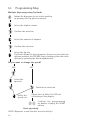
Multiple dispensing using Tip Guide
Adjust the dispenser to the initial position
by pressing the Tip Ejection-button
Select the aliquot volume
Confirm the selection
Select the number of aliquots
Confirm the selection
Select the tip size
Tip Guide: Shows the best tip option. If there are also other tip
options available the TIP SIZE-text is blinking. View the other
options by pressing the Arrow up/down key.
Do you want to change the speed?
YES
NO
Select the
speed in
Confirm the selection
Select the
speed out
Attach the tip. Note! The TIP text
is blinking on the display.
Confirm the programming
by double clicking the START
button
Start pipetting!
NOTE! Dispenser is now fixed to the selected tip!
12
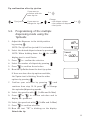
Tip confirmation after tip ejection
if you want to
continue with the
same tip size
Tip ejection
2x
Change
- the aliquot volume
- the number of aliquots
- the tip size
If you want to
change the tip size
2x
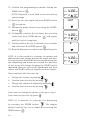
5.2. Programming of the multiple
dispensing mode using the
TipGuide
1. Adjust the Dispenser to the initial position
by pressing
tIP ml
.
TIP SIZE
NOTE: The tip will be ejected if it is attached!
10ml
2. Select the desired aliquot volume by pressing
NOTE: When holding down the
the volume
display start to scroll faster
3. Press
count
2x
4.00 ml
to confirm the selection
4. Select the number of aliquots by pressing
5. Press
to confirm the selection
6. Now the TipGuide shows the best tip option.
If there are also other tip options available,
TIP SIZE
the Tipsize-text is blinking. View the other
options by pressing
7.
10ml
Confirm your selection by pressing
continue from step 12. Or press
and
to change
the aspiration/dispensing speeds.
8. Select the speed in with
9. Press
or
(1=Min and 5=Max)
to confirm selection and to
display the speed out
10. Select the speed out with
11. Press
(1=Min and 5=Max)
to confirm selection
12. Now the text “TIP” is blinking on the display.
Attach the tip
13
13. Confirm the programming by double clicking the
START-button
NOTE: Dispenser is now fixed to the selected tip
2x
4.00 ml
SPEED
IN
3
TIP SIZE
10ml
volume range
OUT
14. Place tip into the liquid and press START-button
to aspirate
15. Discard the prime excess by pressing the STARTbutton
16. To dispense, position the tip above the receiving
vessel and press START-button
and repeat
until the cycle is completed
2x
4.00 ml
SPEED
OUT
3
TIP SIZE
10ml
E
17. Finally position the tip to discard excess volume
and click twice the START-button
18. Now the Dispenser is ready for next pipetting cycle
NOTE: It is also possible to continue to aspirate and
dispense the same volume without the empty function.
To continue, keep the START-button pressed during the
last dispensing and within one second the direction
of the arrow will change. Keeping the START button
depressed, place the tip into the liquid again and then
release the START button to aspirate the next sample.
If you continue with the same tip
a. Change the volume by pressing
b. Confirm your selection by pressing
c.
Change the number of aliquots by pressing
d. Confirm your selection by pressing
If you want to change the tip size or tip, go to step 1.
If you want to eject the tip, press
NOTE: It is possible to interrupt the dispensing
by pressing the ENTER button
. The display
shows E and the tip can be emptied by pressing the
START button
14
.
2x
4.00 ml
SPEED
IN
3
TIP SIZE
10ml
NOTE: When aspirating the liquid using the 25 or 50 ml
tip, let the tip stay in the liquid a few seconds after the
plunger has stopped moving. This way you will ensure
that all liquid has been aspirated into the tip.
NOTE: It is possible to work with aqueous liquids
and liquids with higher viscosity. However, it is
recommended always to choose the tip with the
smallest applicable volume in conjunction with high
viscosity liquids. Please note, the specifications are
given in accordance with ISO8655-5.
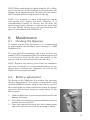
6.
6.1.
Maintenance
Cleaning the dispenser
To ensure trouble-free operation it is recommended
to apply regular maintenance and cleaning to eLINE
Dispenser Lite.
To clean and decontaminate the outer surface use
ethanol (70%), isopropanol (60%) or mild detergent and
a soft lint-free cloth. Gently clean the surface of the
pipette with the moistened cloth and wipe dry.
NOTE: Remove the battery pack from the dispenser
prior the cleaning! It is recommended always to use
gloves when cleaning the dispenser. Do not let the
liquid enter the pipette handle!
6.2. Battery replacement
The design of the Dispenser Lite enables fast and easy
battery replacement. The battery replacement pack
includes 4 NiMH batteries fixed to the battery cover. If
the batteries do not hold a sufficient charge for proper
operation follow these steps for replacement of the
battery pack.
1. Hold the dispenser in a horizontal position with the
display facing up.
2. Press the two charging contacts simultaneously to
release the battery pack.
3. Place the new battery pack into the compartment
and close the battery cover by pressing it lightly.
15
NOTE: The battery cover pack fits in to the
compartment one way only. If the pack is inserted
incorrectly the battery cover will not close properly.
NOTE: Only use battery packs supplied by the
manufacturer. The use of any other type of battery will
immediately void the warranty!
7.
Troubleshooting
The eLINE Dispenser Lite have a onboard monitoring
program to control the performance of each pipetting
action. If any error message appears to the display it
means that the Dispenser has been unable to perform
the attempted action properly. In case of an error the
display will show ER and PRSS ENT. message. To clear
the message please follow these steps:
1. Clear the error message by pressing
display will show E and
2. Press the
. The
.
and the blunger moves to the home-
position. The display will show E and TIP.
3. Remove the tip by pressing the tip ejection button
NOTE: Repeated occurrence of error messages
indicates an internal error causing failure of the
Dispenser to complete the execution of the pipetting.
The Dispenser therefore needs to be returned to the
nearest Sartorius Service Centre or your local Sartorius
service representative for repair.
16
Symptom
Possible cause
Solution
Display is blank and
there is no response
when pressing the
buttons
Battery is fully
discharged
Recharge the battery
Leakage or pipetted
volume too small
Tip incorrectly attached
Attached new tip
Unsuitable tip
Attach firmly
Use original Sartorius tips
Foreign particles
between the tip and tip
connector
Clean the tip connector
and attach new tip
Dispenser out of
the established
specifications
Unsuitable tip
Use original Sartorius tips
Instrument damaged
Return to your service
representative for
servicing
Tip ejector jammed or
moves erratically
Tip connector has been
contaminated
Clean the Tip connector
Tip connector mechanism Return to your Sartorius
damaged
service representative for
servicing
Continuous error
message
Instrument damaged
Return to your Sartorius
service representative for
servicing
17
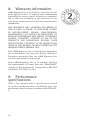
8.
Warranty information
eLINE Dipenser Lite is covered by a warranty for two
years against defects in material and workmanship
(excluding the battery pack). Should your dispenser
fail to function according to specifications at any
time, please contact your local Sartorius representative
immediately.
ANY WARRANTY WILL, HOWEVER, BE DEEMED AS
VOID IF FAULT IS FOUND TO HAVE BEEN CAUSED
BY MALTREATMENT, MISUSE, UNAUTHORIZED
MAINTENANCE A OF SERVICE OR NEGLIGENCE OF
REGULAR MAINTENANCE AND SERVICE, ACCIDENTAL
DAMAGE, INCORRECT STORAGE OS USE OF THE
PRODUCTS FOR OPERATIONS OUTSIDE THEIR
SPECIFICATIONS, CONTRARY TO THE INSTRUCTIONS
GIVEN IN THIS MANUAL OR WITH OTHERTHAN THE
MANUFACTURER’S ORIGINAL TIPS.
Each eLINE Dispenser Lite is tested before shipping by
the manufacturer. The Sartorius Quality Assurance
Procedure guarantees that the eLINE Dispenser Lite
you have purchased is ready for use.
Each eLINE Dispenser Lite is CE marked, fulfilling
the requirements of Council Directive 2004/108/EC,
relating to Electromagnetic Compatibility, EN61326
and Safety IEC 61010-1 ed 3.0
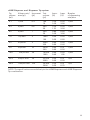
9. Performance
specifications
NOTE: The manufacturer’s specifications should
be used as guidelines when establishing your own
performance specifications accordance with ISO 86555.
18
eLINE Dispenser and Dispenser Tip system
Tip
volume
(ml)
Volume min/
max (µl)
Increment Test
(µl)
volume
(µl)
Inacc.
(%)
Impr.
(%)
Number
of dispensing
min/max
0.1
1/100
0.2
100
10
1.00
1.00
0.50
2.00
1/100
0.2
2/200
0.4
200
20
1.00
1.70
0.50
2.50
1/100
0.5
5/500
1
500
50
0.80
1.00
0.60
3.00
1/100
1.0
10/1000
2
1000
100
0.50
0.50
0.20
0.60
1/100
2.5
25/2500
5
2500
250
0.60
0.60
0.20
0.40
1/100
5.0
50/5000
10
5000
500
0.60
0.90
0.15
0.50
1/100
10.0
100/10 000
20
10 000
1000
0.40
0.40
0.20
1.00
1/100
25.0
500/25 000
50
25 000
2500
0.50
0.50
0.15
0.50
1/50
50.0
1000/50 000 100
50 000
5000
0.30
0.30
0.15
0.70
1/50
NOTE: The specifications are valid only to the eLINE Dispenser and eLINE Dispenser
Tip combination.
19
10. Recycling instruction
(WEEE)
In compliance with European Directive, WEEE
(2002/96EC) on waste and reducing of hazardous
substances in electrical and electronic equipments,
this device must not be recycled as unsorted municipal
waste. Instead this device must be collected separately
in accordance the local recycling regulations. The solid
bar used in conjunction with the crossed-out wheeled
bin indicates that the product was put on the European
market after 13 August 2005.
20
Sartorius Biohit Liquid Handling Oy
Laippatie 1
FI-00880 Helsinki
Finland
Phone +358.755.951
[email protected]
www.sartorius.com
Headquarter
Sartorius Corporate
Administration GmbH
Weender Landstrasse 94-108
37075 Goettingen, Germany
Phone +49.551.308.0
Fax +49.551.308.3289
www.sartorius.com
All rights reserved. No part of this
publication may be reprinted or translated
in any form or by any means without the
prior written permission of Sartorius.
The status of the information, specifications
and illustrations in this manual is indicated
by the date given aside.
Sartorius reserves the right to make
changes to the technology, features,
specifications and design of the equipment
without notice.
All trademarks are Sartorius property
unless otherwise stated. Patents granted or
pending.
4001890 • 04/2013 • © Sartorius Biohit Liquid Handling Oy
Copyright by Sartorius, Helsinki, Finland.