1
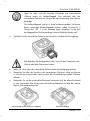
SilverCrest SCAA 5.00 A1 Software The software supplied allows you to edit and play your recordings. For more information about using the software you can also use the software help function. Please note that programme updates may incur extra costs to you. System Requirements Operating system: Windows® XP, Windows Vista®, Windows® 7 or Windows® 8 CPU: Intel/AMD Dual-Core processor or higher RAM: At least 1GB Graphics adapter: DirectX 9 or DirectX 10-compatible (recommended) Interface: USB 1.1 or higher Memory: At least 2GB free hard disk space Installing the software The software provided is on the CD-ROM supplied. To install the software, you first need to connect the camcorder to the computer using the USB cable. Use the USB cable to connect the camcorder to your computer. Then switch the camcorder on. Insert the CD-ROM supplied into the CD or DVD drive of your computer. The CD will launch automatically. Then follow the on-screen instructions to install. If the setup programme does not start automatically or you have cancelled it accidentally, you can launch the file “Start HDCam.exe” manually. Uninstalling the software To uninstall the software, please use the Uninstall Wizard found in the Control Panel of your operating system. English - 51