1
LAVAMAT 86810
Washing machine
User information
Downloaded From WashingMachine-Manual.com Manuals
Dear customer,
Please read this User Information carefully and keep it to refer to at a
later date.
Pass this User Information on to any subsequent owner of the appliance.
1
3
2
The following symbols are used in the text:
Safety instructions
Warning: Notes that concern your personal safety.
Attention: Notes that show how to avoid damage to the appliance.
Useful tips and hints
Environmental information
Downloaded From WashingMachine-Manual.com Manuals
2
Contents
Operating Instructions . . . . . . . . . . . . . . . . . . . . . . . . . . . . . . . . . . . . .
5
Safety . . . . . . . . . . . . . . . . . . . . . . . . . . . . . . . . . . . . . . . . . . . . . . . . . . . . . . . . .
5
Description of the appliance . . . . . . . . . . . . . . . . . . . . . . . . . . . . . . . . . . . .
Control panel . . . . . . . . . . . . . . . . . . . . . . . . . . . . . . . . . . . . . . . . . . . . . . . . . . .
What is shown in the display . . . . . . . . . . . . . . . . . . . . . . . . . . . . . . . . . . . . .
7
7
7
Program overview . . . . . . . . . . . . . . . . . . . . . . . . . . . . . . . . . . . . . . . . . . . . . .
8
Prior to using for the first time . . . . . . . . . . . . . . . . . . . . . . . . . . . . . . . . . .
Switching on the appliance for the first time - setting the language. . . . .
Setting the time. . . . . . . . . . . . . . . . . . . . . . . . . . . . . . . . . . . . . . . . . . . . . . . . .
Carrying out a wash program prior to first use . . . . . . . . . . . . . . . . . . . . . . .
10
10
11
11
Preparing and sorting washing . . . . . . . . . . . . . . . . . . . . . . . . . . . . . . . . . . . 11
Running a washing cycle . . . . . . . . . . . . . . . . . . . . . . . . . . . . . . . . . . . . . . . .
Opening the door/loading washing . . . . . . . . . . . . . . . . . . . . . . . . . . . . . . . . .
Adding detergent/additives . . . . . . . . . . . . . . . . . . . . . . . . . . . . . . . . . . . . . . .
Switching on the appliance/selecting a program. . . . . . . . . . . . . . . . . . . . . .
Changing the temperature . . . . . . . . . . . . . . . . . . . . . . . . . . . . . . . . . . . . . . . .
Changing spin speed/selecting rinse hold . . . . . . . . . . . . . . . . . . . . . . . . . . . .
Setting options. . . . . . . . . . . . . . . . . . . . . . . . . . . . . . . . . . . . . . . . . . . . . . . . . .
Prewash, Sensitive, Stain, Night Cycle . . . . . . . . . . . . . . . . . . . . . . . . . . . .
Setting times . . . . . . . . . . . . . . . . . . . . . . . . . . . . . . . . . . . . . . . . . . . . . . . . . . .
Time Saving: SHORT or VERY SHORT . . . . . . . . . . . . . . . . . . . . . . . . . . . . .
Delay Start . . . . . . . . . . . . . . . . . . . . . . . . . . . . . . . . . . . . . . . . . . . . . . . . . .
Starting a program . . . . . . . . . . . . . . . . . . . . . . . . . . . . . . . . . . . . . . . . . . . . . .
Program progress . . . . . . . . . . . . . . . . . . . . . . . . . . . . . . . . . . . . . . . . . . . . . . . .
Washing cycle complete/Removing the washing . . . . . . . . . . . . . . . . . . . . .
12
12
12
13
14
14
14
15
16
16
17
18
18
18
Setup . . . . . . . . . . . . . . . . . . . . . . . . . . . . . . . . . . . . . . . . . . . . . . . . . . . . . . . . .
Memory 1, 2, 3 . . . . . . . . . . . . . . . . . . . . . . . . . . . . . . . . . . . . . . . . . . . . . . . . . .
Volume . . . . . . . . . . . . . . . . . . . . . . . . . . . . . . . . . . . . . . . . . . . . . . . . . . . . . . . .
Extra Rinse . . . . . . . . . . . . . . . . . . . . . . . . . . . . . . . . . . . . . . . . . . . . . . . . . . . . .
Language . . . . . . . . . . . . . . . . . . . . . . . . . . . . . . . . . . . . . . . . . . . . . . . . . . . . . .
Clock . . . . . . . . . . . . . . . . . . . . . . . . . . . . . . . . . . . . . . . . . . . . . . . . . . . . . . . . . .
Contrast and brightness . . . . . . . . . . . . . . . . . . . . . . . . . . . . . . . . . . . . . . . . . .
19
19
20
21
21
22
22
Child safety device. . . . . . . . . . . . . . . . . . . . . . . . . . . . . . . . . . . . . . . . . . . . . . 23
Cleaning and maintenance . . . . . . . . . . . . . . . . . . . . . . . . . . . . . . . . . . . . . . 23
What to do if... . . . . . . . . . . . . . . . . . . . . . . . . . . . . . . . . . . . . . . . . . . . . . . . . . 25
Remedying small malfunctions yourself . . . . . . . . . . . . . . . . . . . . . . . . . . . . . 25
Downloaded From WashingMachine-Manual.com Manuals
3
If the wash results are not satisfactory . . . . . . . . . . . . . . . . . . . . . . . . . . . . . . 27
Carrying out an emergency drain . . . . . . . . . . . . . . . . . . . . . . . . . . . . . . . . . . 28
Drain pump. . . . . . . . . . . . . . . . . . . . . . . . . . . . . . . . . . . . . . . . . . . . . . . . . . . . . 29
Disposal . . . . . . . . . . . . . . . . . . . . . . . . . . . . . . . . . . . . . . . . . . . . . . . . . . . . . . . 30
Technical data. . . . . . . . . . . . . . . . . . . . . . . . . . . . . . . . . . . . . . . . . . . . . . . . . . 31
Consumption values. . . . . . . . . . . . . . . . . . . . . . . . . . . . . . . . . . . . . . . . . . . . . 31
Installation and connection instructions. . . . . . . . . . . . . . . . .
32
Safety information for the installation. . . . . . . . . . . . . . . . . . . . . . . . . . . . 32
Installing the appliance . . . . . . . . . . . . . . . . . . . . . . . . . . . . . . . . . . . . . . . . .
Transporting the appliance . . . . . . . . . . . . . . . . . . . . . . . . . . . . . . . . . . . . . . . .
Unpacking. . . . . . . . . . . . . . . . . . . . . . . . . . . . . . . . . . . . . . . . . . . . . . . . . . . . . .
Where to install . . . . . . . . . . . . . . . . . . . . . . . . . . . . . . . . . . . . . . . . . . . . . . . . .
Making the appliance level. . . . . . . . . . . . . . . . . . . . . . . . . . . . . . . . . . . . . . . .
33
33
33
36
36
Electrical connection. . . . . . . . . . . . . . . . . . . . . . . . . . . . . . . . . . . . . . . . . . . . 36
Connecting to the water supply . . . . . . . . . . . . . . . . . . . . . . . . . . . . . . . . . . 37
Water inlet . . . . . . . . . . . . . . . . . . . . . . . . . . . . . . . . . . . . . . . . . . . . . . . . . . . . . 37
Water drainage. . . . . . . . . . . . . . . . . . . . . . . . . . . . . . . . . . . . . . . . . . . . . . . . . . 39
Guarantee/Customer Service . . . . . . . . . . . . . . . . . . . . . . . . . . . . . .
Service
. . . . . . . . . . . . . . . . . . . . . . . . . . . . . . . . . . . . . . . . . . . . . . . . . . . . . . 43
Downloaded From WashingMachine-Manual.com Manuals
4
40
Operating Instructions
1 Safety
Prior to using for the first time
• Follow the ”Instructions for installation and connection”.
• If the appliance is delivered in the winter months when there are minus temperatures: Store the washing machine at room temperature
for 24 hours before using for the first time.
Correct use
• The washing machine is only designed for the washing of normal domestic laundry at home.
• Additions or modifications to the washing machine are not permitted.
• Use only detergents and additives that are suitable for use in domestic washing machines.
• The washing must not contain any inflammable solutions. Danger of
explosion!
• Do not use the washing machine for dry cleaning.
• Dyes/colour removers may only be used in the washing machine, if
the manufacturer of these products expressly permits this. We cannot
be held responsible for any damage arising.
Child safety
• Keep packaging away from children. There is a risk of suffocation.
• Children often do not recognise the hazards associated with electrical
appliances. Do not allow children to use the washing machine unsupervised.
• Make sure that children and pets don’t climb into the drum of the
washing machine. Could endanger life!
Downloaded From WashingMachine-Manual.com Manuals
5
General safety
• Repairs to the washing machine must only be carried out by qualified
service engineers.
• Never use the washing machine if the mains cable is damaged; or if
the control panel, work top or plinth area is damaged such that the
inside of the appliance is freely accessible.
• Switch off the washing machine before cleaning, maintenance and
servicing. In addition, pull the mains plug out of the socket or – in
the case of a permanent connection – switch off the cut-out in the
fuse box or remove the screw fuse completely.
• If operation is stopped, disconnect the appliance from the mains supply and shut off the water tap.
• Never unplug the appliance by pulling on the cable. Always pull the
plug.
• Multi-way plugs, connectors and extension cables must not be used.
This could constitute a fire hazard through overheating.
• Never wash the washing machine down with a water jet. Danger of
electric shock!
• In washing programmes with high temperatures the glass in the door
gets hot. Do not touch it.
• Before emergency emptying of the appliance, before cleaning the
drain pump or opening the door in an emergency, let the water cool
down.
• Small animals can nibble at the cables and water hoses. Danger of
electric shock and danger of water damage! Keep small animals away
from the washing machine.
Downloaded From WashingMachine-Manual.com Manuals
6
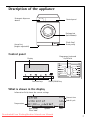
Description of the appliance
Detergent dispenser
drawer
Control panel
Rating plate
(behind door)
Plinth flap/
Drain pump
Screw feet
(height adjustable)
Control panel
Programme knob and
On/Off dial
Display
Function keys
START/PAUSE key
What is shown in the display
Information field, shows the current settings
COTTON
Cycle end at
Temperature
12.45
Current time
15.05
End of cycle
95C1000 NýýýýýVýSýFýLýBýaýaýKýT
Spin speed/
Rinse hold
Options
Downloaded From WashingMachine-Manual.com Manuals
Times
7
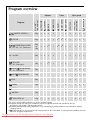
Program overview
•
6kg
•
•
•
•
LINEN/EASY-CARES
60°, 50°, 40°, 30°, Cold cycle
6kg
or
3kg
•
•
•4)
•
40 - 60 MIX
6kg
•
•
•
•
DELICATE
40°, 30°, Cold cycle
3kg
•
•4)
•
WOOL/ (HANDWASH)
40°, 30°, Cold cycle
COTTON
SILK/
(HANDWASH)
SPIN
RINSE
RINSE HOLD
•
•
•
•
•
•
•3) •3)
•
•
•
•
•
•3) •3)
•
•
•
•
•
•
•
•
•
•
•
•
•
•
2kg
•
•
•
•
1kg
•
•
•
•
SHORT
0
•
1200/1000/
800/600/400
NIGHT CYCLE
•
1600/1400
STAIN
6kg
Spin speed
DELAY START
SENSITIVE
ENERGY SAVING 2)
VERY SHORT
Program
PREWASH
Times
max. load1)
(dry washing)
Options
•
6kg
•
•
3kg
•
•
•
•
3kg
•
•
•
•
•
•
•
•
DRAIN
REFRESH
EASY IRON 40
1kg
•
•
•
•
•
1) A 10 litre bucket holds around 2.5 kg of dry washing (cotton)
2) Program settings for testing in accordance with or in support of EN 60 456 and IEC 60 456 are
described in the Chapter “Consumption Values”.
3) Recommended load for short progammes is 3kg; full loading is possible however with somewhat reduced
cleaning results.
4) STAIN can only be selected with wash temperatures of 40°C and above, as stain treatment products are only
effective at higher temperatures.
Downloaded From WashingMachine-Manual.com Manuals
8
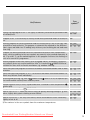
Care
symbols1)
Use/Features
Energy-saving program at 60 °C for lightly to normally soiled whites/coloureds made
of cotton/linen.
MO
Program at 95 °C for normally to heavily soiled whites/coloureds made of cotton/linen.
O
General program for whites/coloureds made of cotton/linen as well as for easy-care
mixed fibres and synthetics. The program is automatically adjusted to the different
fabric types and load sizes. If loading only with easy-care washing, do not load more
than 3kg.
JM
IKN
Program for whites/coloureds which are labelled for different wash temperatures.
Items, which according to the care symbols are normally to be washed separately at
40 °C or at 60 °C, can be washed together in this program. Achieves the washing results of a normal 60° programme.
JM
Gentle program for delicate fabrics such as bonded fabrics, microfibres, synthetics,
net curtains (max. net curtain load 20 to 25m2). If used with
RINSE HOLD also
suitable for items with a climatic membrane, e.g. outdoor clothing.
IK
Particularly delicate program for machine washable and hand washable wool or wool
mixtures.
QLH
Particularly delicate program at 30 °C, for machine washable and hand washable silk.
Wash very delicate items individually.
QLH
Draining and spinning, e.g. after a
RINSE HOLD/
for hand-washed cottons/linens and easy-cares.
NIGHT CYCLE, or separate spin
Separate gentle rinse (3 rinses, liquid conditioner is washed in from compartment
gentle spin).
Pumps water away after a
,
JMO
IKN
JMO
RINSE HOLD.
Special cycle at 30 °C, about 20 minutes long, for quickly washing through e. g. once
worn, slightly dirty sports clothing or new clothes.
Special cycle at 40 °C for easy-care fabrics, which afterwards are to be ironed only
lightly or not at all.
JMO
IKN
KN
1) The numbers in the care symbols show the maximum temperatures.
Downloaded From WashingMachine-Manual.com Manuals
9
Prior to using for the first time
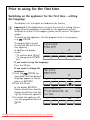
Switching on the appliance for the first time - setting
the language
3
The display is set to English as standard in the factory.
Important: If the display does not show the menu for setting the language when the appliance is switched on, the appliance has been
switched on before. If this happens, please see the section “Setup/Language”.
To switch on the appliance, turn the program knob to any program,
e. g.
COTTON.
The display lights up and
should look like the illustra- Language:
ENGLISH
tion opposite.
aýýýýýaýaýaýaýBýaýaýaýa
In addition the display
shows:
t
u
o
O
z
– “To confirm push OK key”
– “To change push OPTION
key”
If you want to keep the language:
Press the OK key.
If you want to change the
Sprache
language:
DEUTSCH
1. Press the
OPTION key
aýýýýýaýaýaýaýBýaýaýaýa
repeatedly, until the desired
language appears in the dist
u
o
O
z
play, e. g. DEUTSCH.
2. Press the OK key.
In the display DEUTSCH
flashes several times and the
display should then look like
e.g. the illustration opposite.
3. To switch the appliance off,
turn the programme knob to
OFF.
15.05
95C1600 aýýýýýaýaýaýaýaýaýaýaýa
t
Downloaded From WashingMachine-Manual.com Manuals
10
12.45
KOCHWÄSCHE
Programmende um
u
o
O
z
Setting the time
So that the time and the end of the program are correctly displayed,
please check the display and set the current time if necessary. To do
this, please see the section “Setup/Clock”.
Carrying out a wash program prior to first use
In order to remove any residues from the drum and water container
which may have been left during manufacturing, perform the first
wash cycle without any washing in the machine. Program: LINEN/EASYCARES 60 °C, option TIME SAVING: VERY SHORT, use approx. 1/4 measuring cup of detergent.
Preparing and sorting washing
Preparing washing
• Empty pockets. Remove foreign bodies (e. g. coins, paper clips, nails,
etc.).
• Do up zips, button up covers to prevent damage to washing.
• Remove the runners from net curtains or cover them with a net or a
bag.
• Wash sensitive and small items in a net or a pillow case, e.g. net curtains, tights, socks, handkerchiefs, bras.
Important! Bras and other items containing wires should NOT be
washed in this washing machine.
Sorting washing
• By colour: Wash white and coloured washing separately. Washing can
run.
• By temperature, type of washing and care symbol.
Important! Do not wash fabrics with care symbol G (= do not wash!)
in the washing machine.
Downloaded From WashingMachine-Manual.com Manuals
11
Running a washing cycle
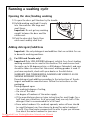
Opening the door/loading washing
1. To open the door: pull the door by the handle.
2. Unfold washing and load it loosely
into the machine. Mix large and
small items.
Important: Do not get any washing
caught between the door and the
rubber seal.
3. Push the door shut firmly. Door
catch must audibly click shut.
Adding detergent/additives
Important: Use only detergents and additives that are suitable for use
in domestic washing machines.
1
For USA and Canada only!
Important! Only LOW-SUDSING detergent suitable for a front-loading
washing machine can be used in this machine. This machine can heat
the water up to 95 degrees celsius, or 200 degrees fahrenheit, and care
should be taken to ensure that the correct washing powder is used. If
you have any doubt, check with your dealer or the distributor.
WARRANTY AND CONSEQUENTIAL DAMAGES ARE VOIDED IF A LOW
SUDSING DETERGENT IS NOT USED.
Dose detergent and additives according to the instructions of the detergent and additive manufacturers. Follow the instructions on the
packaging.
Dosing depends upon:
– the washing’s degree of soiling,
– the size of the load
– the degree of hardness of the water supply.
• If the manufacturer does not give instructions for small loads: for a
half load, use a third less, for a very small load, use only half of the
detergent that is recommended for a full load.
• From water hardness 2 (= medium) upwards, water softener should
be used. Detergent can then always be dosed for water hardness 1
(= soft). Your local water company will be able to give you information about the water hardness in your area.
Downloaded From WashingMachine-Manual.com Manuals
12
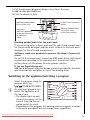
1. Pull the detergent dispenser drawer out as far as the stop.
2. Add the detergent/additives.
3. Push the drawer in fully.
Washing powder/tablets
for the main wash
Softeners/
wash-care products
to preserve the shape
of garments/
starch
In-wash stain treatment/
tablets
Washing powder/tablets
for the pre-wash
or for water softener
Washing powder/tablets for the main wash
If you are using water softener and need the right-hand compartment
for the pre-wash detergent, add the water softener to the main wash
detergent in the left-hand compartment.
Softeners, wash-care products to preserve the shape of garments,
starch
Do not fill the compartment beyond the MAX mark. Dilute thick liquid
concentrates according to the manufacturer’s instructions before
putting them into the drawer. Dissolve powder starches.
If you use liquid detergents:
Add liquid detergent using the dosage container provided by the detergent manufacturer and place on top of the washing drum.
Switching on the appliance/selecting a program
3
Select the program using the
program knob, e.g.,
LINEN/EASY-CARES.
By selecting a program, you
switch the appliance on at
the same time.
– The display lights up and
shows the program set, the
current time and the estimated end of the cycle.
– Depending on the program, the washing machine suggests a temperature and a spin speed. You can change these suggestions.
Downloaded From WashingMachine-Manual.com Manuals
13
– The lighting for the display switches itself off at the end of the cycle
or, if the appliance is not started after the program is set, after
10 minutes. To switch the light on again, press any key or turn the
program knob.
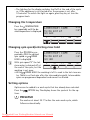
Changing the temperature
Press the TEMPERATURE
key repeatedly until the desired temperature is displayed.
12.45
LINEN/EASY CARE
Cycle end at
14.37
50C1600 aýýýýýaýaýaýaýaýaýaýaýa
t
u
o
O
z
Changing spin speed/selecting rinse hold
3
Press the
RPM key repeatedly, until the desired
spin speed or
RINSE
HOLD is displayed.
LINEN/EASY CARE
Cycle end at
12.45
14.37
50C 800 aýýýýýaýaýaýaýaýaýaýaýa
With spin speed “0” the last
t
u
o
O
z
rinse water is drained off at
the end of the cycle, but the
washing is not spun.
• With
RINSE HOLD the washing is left to soak in the last rinse water. There is no final spin after the intermediate spin(s). Intermediate
spins are programme-dependent and cannot be altered.
Setting options
Options can be added to a wash cycle that has already been selected.
Press the
OPTION key. The display shows the symbols for the options.
PREWASH
Pre-washes at about 30 °C before the main wash cycle, which
follows automatically.
Downloaded From WashingMachine-Manual.com Manuals
14
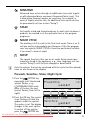
SENSITIVE
Enhanced rinse action through an additional rinse cycle together with decreased drum movement (improved fabric care). This
is ideal when frequent washes are necessary, for example, in
cases of highly sensitive skin. An additional rinse cycle can also
be permanently set (see section “Setup”).
STAIN
For heavily soiled and stained washing. In-wash stain treatment
products are washed in at the optimum time as the program
progresses.
NIGHT CYCLE
The washing is left to soak in the final rinse water. There is no final spin and no intermediate spin. Because of this the program
runs very quietly. NIGHT CYCLE is therefore particularly suitable
if you want to wash at night.
SETUP
3
The special functions that can be set under Setup remain permanently stored in the appliance, e. g., time, language, etc. (see
section “Setup”) until they are changed or deactivated.
Only the options that can be combined with the cycle that has already
been set are shown in the display.
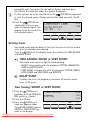
Prewash, Sensitive, Stain, Night Cycle
1. Press the
OPTION key
repeatedly until the desired
symbol flashes, e. g.,
PREWASH (With each
press of the key, the next
symbol flashes, from left to
right.)
LINEN/EASY CARE
Prewashing
2. Press the OK key. The symbol
stops flashing. A black bar
appears under the symbol.
The option is set. The display
changes to the next option.
To switch off the option,
press the
OPTION key
LINEN/EASY CARE
Sensitive
12.45
14.37
aýýýýýVýSýFýLýBýaýaýaýa
t
u
o
O
z
12.45
14.56
aýýýýýV_ýSýFýLýBýaýaýaýa
t
Downloaded From WashingMachine-Manual.com Manuals
u
o
O
z
15
3
repeatedly until the symbol for the option flashes and then press
the OK key. The black bar under the symbol disappears.
If other options are to be selected: Press the
OPTION key repeatedly until the desired symbol flashes and confirm each one with the OK
key.
3. Press the
OPTION key
12.45
LINEN/EASY CARE
repeatedly, until your pro14.56
Cycle end at
gram set appears again. The
display shows the symbol for 50C 800 aýýýýýVýaýaýaýaýaýaýaýa
the selected option.
t
u
o
O
z
Setting times
Shortened cycles and the delay of the start time can be set for a wash
cycle that has already been selected.
Press the TIME key. The display shows the symbols for TIME SAVING
and DELAY START.
TIME SAVING: SHORT or VERY SHORT
Shortened wash cycle for lightly soiled washing.
– SHORT: only possible with the programs COTTON, LINEN/EASYCARES and EASY IRON
– VERY SHORT: only possible with the programs COTTON, LINEN/
EASY-CARES and EASY IRON and DELICATE.
DELAY START
To delay the start of a program by between 30 minutes and a
max. of 20 hours.
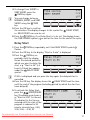
Time Saving: SHORT or VERY SHORT
1. Press the TIME key repeatedly, until the TIME SAVING symbol
flashes.
2. Press the OK key.
3. Press the TIME key. A
black bar appears under
the
TIME SAVING symbol,
SHORT or VERY SHORT appears in the display.
aýýýýýaýaýaýaýaýaýaýKýT
t
Downloaded From WashingMachine-Manual.com Manuals
16
12.45
14.37
Time saving
NORMAL
u
o
O
z
3
4. To change from SHORT to
VERY SHORT, press the
TIME key again.
12.45
14.12
Time saving
VERY SHORT
aýýýýýaýaýaýaýaýaýaýK_ýT
You can change between
t
u
o
O
z
NORMAL, SHORT, and VERY
SHORT using the TIME
key.
5. Press the OK key to confirm
the selection. The display changes to the symbol for DELAY START,
i.e. DELAY START can now be set.
6. Press the TIME key, if no Delay Start is to be set. The display shows
the TIME SAVING symbol
as well as the time for the end of the cycle.
Delay Start
1. Press the TIME key repeatedly, until the DELAY START symbol
flashes.
2. Press the OK key. In the display, “Start in 0 min” is displayed.
3
3. Press the TIME key repeatedly, until the display
shows the desired period by
which you want to delay the
start, e. g. “Start in 4h” (=4
hours). A black bar appears
under the DELAY START
symbol.
12.45
18.37
Delay Start
Start in 4h
aýýýýýaýaýaýaýaýaýaýKýT_
t
u
o
O
z
If 20 h is displayed and you press the key again, the delayed start is
cancelled.
4. Press the OK key. The display shows the DELAY START and the time
until the end of the program (including period by which the start has
been delayed).
5. To activate the Delay Start,
press the
START/PAUSE
key. The display now shows e.
g., “Start in 4.00” (=4 hours).
The display for the time remaining until the start of the
program is reduced in 30
minute intervals (e.g., 4.00,
3.30, 3.00, ... 0.30, 0).
12.45
LINEN/EASY CARE
Start in
4.00
50C 800 aýýýýýaýaýaýaýaýaýaýaýT
t
Downloaded From WashingMachine-Manual.com Manuals
u
o
O
z
17
Starting a program
3
1. Check that the water tap is open.
2. Press the
START/PAUSE key.
The program is started or it starts after the time delay set has elapsed.
If after pressing the
START/PAUSE key the display shows “Door
not Closed”, the door has not been shut properly. Push the door firmly
closed and press the
START/PAUSE key again.
Program progress
3
The display indicates the
stage of the program that is
currently being performed as
well as the time of the end
of the program.
12.45
14.37
LINEN/EASY CARE
Washing
50C 800 aýýýýýaýaýaýaýaýaýaýaýa
t
u
o
O
z
During the washing cycle the
time of the end of the program may change as the
program adjusts itself to different conditions (e. g., type and quantity
of laundry, out of balance spin detection, special rinses, etc.).
Washing cycle complete/Removing the washing
At the end of the cycle a long acoustic signal sounds 3 times (when the
SOUND setting is NORMAL or LOW) and the messages “Cycle ended”
and “Door openable” appear alternately in the display.
1. Open the door and remove the washing.
2. Turn the programme knob to OFF.
3. After the wash, pull out the detergent dispenser drawer slightly to allow it to dry. Leave the door slightly open to air the inside of the washing machine.
If RINSE HOLD
or NIGHT CYCLE
was selected:
After a RINSE HOLD or when a program with NIGHT CYCLE has ended,
the
START/PAUSE indicator flashes. “Cycle ended” and “Door
locked” appear alternately in the display.
The water must first be drained:
– Turn the programme knob to OFF, then to
DRAIN and press the
START/PAUSE key (the water is drained without spinning),
or
Downloaded From WashingMachine-Manual.com Manuals
18
– or turn the programme knob to OFF and then to SPIN. Change
the spin speed if necessary and press the
START/PAUSE key (the
water is drained and the washing spun).
Setup
The special functions that can be set under Setup remain permanently
stored independent of each washing cycle – even after the appliance
has been switched off or the mains plug has been removed from the
socket.
Memory 1, 2, 3
Program combinations can be stored at program knob positions MEMORY 1, 2, 3 and can then be selected directly using the program knob.
To do this the desired program combination is first put together and
then stored.
Setting the Memory
Example: Program position
12.45
LINEN/EASY CARE
MEMORY 1 is to be given the
14.37
following program combina- Cycle end at
40C 800 aýýýýýVýaýaýaýaýaýaýaýa
tion: LINEN/EASYCARES 40 °C, 800 rpm, with
t
u
o
O
z
PREWASH.
1. Turn the program knob to LINEN/EASY-CARES.
2. Press the TEMPERATURE key repeatedly, until 40 °C appears in the display.
3. Press the
RPM key repeatedly, until 800 appears in the display.
4. Using the OPTION key set
PREWASH and press the OK key. A black
bar appears under the PREWASH symbol
.
5. Press the
OPTION key repeatedly, until the SETUP symbol flashes.
3
6. Press the OK key. The display
changes to the Special Functions level. Program memory
position MEMORY 1 is offered first.
Memory 1
Store program
aýýýýýaýaýaýaýBýaýaýaýa
t
u
o
O
z
To change to another memory position, press the
OPTION key.
Downloaded From WashingMachine-Manual.com Manuals
19
3
7. Press the OK key.
The program combination is now stored to program knob position MEMORY 1 and in the future can be selected directly using the program
knob.
The Memory can be overwritten at any time with a new program combination (see “Changing the Memory”) but cannot be deleted.
Changing the Memory
1. Put together the new program combination as required (for an example, see “Setting the Memory”, steps 1 to 4).
2. Press the
OPTION key repeatedly, until the SETUP symbol flashes.
3. Press the OK key.
4. Using the
OPTION key select the memory position to be changed,
e. g. MEMORY 1.
5. Store the new program combination using the OK key.
Volume
The volume of the acoustic signal can be selected.
1. Turn the program knob to any program and press the
OPTION key
repeatedly until the SETUP symbol flashes.
2. Press the OK key.
3. Press the
OPTION key repeatedly, until VOLUME is shown in the
display.
4. Press the OK key.
5. Press the
OPTION key
Sound
repeatedly until the desired
NORMAL
volume (NORMAL, LOW, NO
aýýýýýaýaýaýaýBýaýaýaýa
SOUND) is shown in the display.
t
u
o
O
z
6. Press the OK key to confirm
the setting. The icon changes
to the next special function.
7. Press the
OPTION key repeatedly until your program set appears
again.
Downloaded From WashingMachine-Manual.com Manuals
20
Extra Rinse
1. Turn the program knob to any program and press the
repeatedly until the SETUP symbol flashes.
2. Press the OK key.
OPTION key
3. Press the
OPTION key
Rinse+
repeatedly until
RINSE+ is shown in the NO
aýýýýýaýaýaýaýBýaýaýaýa
display.
4. Press the OK key. The RINSE+
t
o
O
z
u
symbol
appears. The
display changes to the next
special function.
5. Press the
OPTION key repeatedly, until your program set appears
again.
Language
1. Turn the program knob to any program and press the
OPTION key
repeatedly until the SETUP symbol flashes.
2. Press the OK key.
3. Press the
OPTION key repeatedly, until the display shows LANGUAGE.
4. Press the OK key.
5. Press the
OPTION key
Sprache
repeatedly, until the desired
language appears in the dis- DEUTSCH
aýýýýýaýaýaýaýBýaýaýaýa
play, e. g. DEUTSCH.
6. Press the OK key. The display
t
u
o
O
z
changes to the next special
function.
7. Press the
OPTION key
repeatedly, until your program set appears again.
Downloaded From WashingMachine-Manual.com Manuals
21
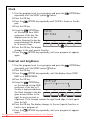
Clock
1. Turn the program knob to any program and press the
OPTION key
repeatedly until the SETUP symbol flashes.
2. Press the OK key.
3. Press the
OPTION key repeatedly until CLOCK is shown in the display.
4. Press the OK key.
5. Using the
OPTION key
11.17
Clock
set the desired time. With
Set time
each press of the key, the
aýýýýýaýaýaýaýBýaýaýaýa
display moves on by one
minute. Keeping the key det
u
o
O
z
pressed changes the display
in 10 minute steps.
6. Press the OK key. The display
changes to the next special function.
7. Press the
OPTION key repeatedly, until your program set appears
again.
Contrast and brightness
1. Turn the program knob to any program and press the
OPTION key
repeatedly until the SETUP symbol flashes.
2. Press the OK key.
3. Press the
OPTION key repeatedly, until the display shows CONTRAST or or BRIGHTNESS.
4. Press the OK key.
Contrast
5. Using the
OPTION key
set the desired setting. With ƒ………………™………………‡
aýýýýýaýaýaýaýBýaýaýaýa
each press of the key or if
the key is kept pressed down,
t
u
o
O
z
the black triangle in the diagram moves further to the
right for more contrast or
brightness. If the triangle reaches the right hand edge, it starts again
from the left.
6. Press the OK key. The display changes to the next special function or
back to your program set.
7. Press the
OPTION key repeatedly, until your program set appears
again.
Downloaded From WashingMachine-Manual.com Manuals
22
Child safety device
When the child safety device is set, the door can no longer be closed.
Setting the child safety device:
Use a coin to turn the knob (on the
inside of the door) in a clockwise direction as far as it will go.
1
Warning! The knob must not be
sunk-in after being set, otherwise
the child safety device is not active.
The knob must stand out as shown
in the illustration.
Releasing the child safety device:
Turn the knob anti-clockwise as far
as it will go.
Cleaning and maintenance
Important! Do not use furniture care products or aggressive cleaners to
clean the appliance.
Wipe control panel and body with a damp cloth.
Cleaning procedure
If you plan to wash mainly at low temperature, you should run a hot
programme from time to time. This will reduce any deposits and clean
the appliance from the inside.
Downloaded From WashingMachine-Manual.com Manuals
23
Detergent dispenser drawer
The detergent dispenser drawer should be cleaned regularly.
1. Remove the detergent dispenser drawer by pulling it firmly.
2. Remove the conditioner insert from
the middle compartment.
3. Clean all parts with water.
4. Put the conditioner insert in as far as
it will go, so that it is firmly in place.
5. Clean all parts of the washing machine, especially the nozzles in the
top of the washing-in chamber, with
a brush.
6. Insert the detergent dispenser drawer in the guide rails and push it in.
Washing drum
Rust deposits in the drum may occur due to rusting foreign bodies in
the washing or tap water containing iron.
Important! Do not clean the drum with acidic descaling agents, scouring agents containing chlorine or iron or steel wool.
1. Remove any rust deposits on the drum with a cleaning agent for stainless steel.
2. Run a washing cycle without any washing to clean off any cleaning
agent residues. Program: LINEN/EASY-CARES 60°, option
TIME SAVING: VERY SHORT, add approx. 1/4 of a measuring cup of washing
powder.
Door and rubber collar
Regularly check whether deposits or foreign bodies are present in the
folds of the rubber collar or on the inside of the glass door.
Clean the glass in the door and the rubber collar regularly.
Downloaded From WashingMachine-Manual.com Manuals
24
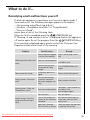
What to do if...
Remedying small malfunctions yourself
If while the appliance is operating a short acoustic signal sounds 3
times and one of the following messages appears in the display:
– „No incoming water/Check tap & Hose“,
– „No drain - check/drain hose/filter” or “Pump Blocked”,
– “Door not Closed”,
please have a look at the following table.
When the fault is remedied, press the
START/PAUSE key.
If “Warning : E and number or letter” is displayed: Switch the appliance
off and on again. Re-set the program. Press the
START/PAUSE key.
If the warning is displayed again, please contact the Customer Care
Department and inform them of the warning.
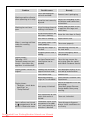
Problem
Possible cause
Mains plug not plugged
in or fuse not working.
Remedy
Plug in mains plug. Check
fuse.
Close door - there should be
Washing machine does not Door not closed properly.
an audible click.
work.
START/PAUSE key was
Press START/PAUSEkey for
not pressed for long
longer.
enough.
Door cannot be closed.
Child safety device engaged.
Display shows: ”Selection
error”.
The selected function
cannot be combined
Make another selection.
with other program settings.
Display shows: “Door not
Closed/Please check”
Close door - there should be
Door not closed properly. an audible click.
Start program again.
Tap turned off.
Display shows: “No incoming water/Check tap &
Hose”
Release child safety device.
Turn the tap on.
Filter in the screw con- Turn off the water tap. Unnection of the inlet hose screw hose, take out filter
is blocked.
and clean it.
Water tap is blocked
with limescale or faulty.
Downloaded From WashingMachine-Manual.com Manuals
Check the water tap and have
it repaired if necessary.
25
Problem
Possible cause
Transit packaging has
not been removed.
Washing machine vibrates
when operating or is noisy. Screw feet not correctly
adjusted.
Washing has not been
spun.
Remedy
Remove transit packaging.
Adjust feet according to the
Installation and Connection
instructions.
Always load the drum as full
Only a few large items of
as possible. Mix large and
washing in the drum.
small items.
Screw connection on the
Screw the inlet hose in firmly.
inlet hose is leaking.
Drain hose is leaking.
Replace drain hose.
Drain pump cover is not
closed properly.
Close cover properly.
Washing was caught in
the door.
Load washing carefully for
the next wash.
Emergency drain hose is
leaking.
Close off emergency drain
hose properly.
Display shows:
“Warning : EF3”.
The drain pump runs constantly - even when the
appliance is switched off.
The Aqua Control antiflood system has responded.
Close the tap, remove the
mains plug from the socket
and inform Customer Service.
Display shows: “Excess Detergent”
Probably too much detergent has been used.
Dose detergent exactly as instructed by manufacturer.
Kink in drain hose.
Remove kink.
Maximum pumping
height of 1m exceeded.
Please contact Customer Care
Department.
Drain pump is blocked.
Switch off appliance. Pull out
mains plug.
Clean drain pump. Remove
foreign bodies from pump
housing.
With connection to sink
outlet: Sink outlet is
blocked.
Clean out sink outlet.
Water is running out from
under the washing
machine.
Display shows:
– “No drain - check drain
hose/filter” or
– “Pump Blocked”
Conditioner insert in the
Fabric softener not rinsed
Clean detergent dispenser
compartment for addiin, compartment for addrawer, insert conditioner intives is not correctly atditives is filled with water.
sert firmly.
tached or is blocked.
Downloaded From WashingMachine-Manual.com Manuals
26
Problem
Possible cause
Door locked.
Door cannot be opened
when appliance is switched Power cut. (All displays
are off.)
on.
For safety reasons, the
door remains locked for
approx. 4 to 10 minutes.
Washing is heavily creased.
Remedy
Wait until the display shows
“Door openable” and “Cycle
ended” alternately.
Program continues, when
power cut is over.
To remove washing:
If water can be seen in the
appliance, before opening the
door, first perform an emergency drain.
Possibly too much washObserve maximum loads.
ing was loaded.
If the wash results are not satisfactory
Washing is grey and scale is being deposited in the drum
• Too little detergent is being used.
• The right detergent was not used.
• Special soiling was not pre-treated.
• Programme or temperature was not correctly set.
There are grey stains on the washing.
• Washing soiled with ointment, grease or oil was washed with too little detergent.
• It was washed at too low a temperature.
• A common cause is that fabric conditioner – especially a concentrate
– has got onto the washing. Such stains should be washed out as
quickly as possible and make sure that you are careful when using
fabric conditioner.
After the last rinse foam can still be seen.
• Modern detergents may create foam even in the last rinse cycle. The
washing is however sufficiently rinsed.
There are white residues on the washing.
• This is due to the insoluble ingredients in modern detergents.
They are not caused by insufficient rinsing.
Shake or brush the washing. If possible turn the washing inside out
before washing. Check your choice of detergent. Especially with dark
colours it is advisable to use liquid detergents.
Downloaded From WashingMachine-Manual.com Manuals
27
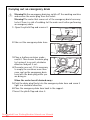
Carrying out an emergency drain
1
Warning! Before emergency draining, switch off the washing machine
and remove the mains plug from the socket.
Warning! The water that comes out of the emergency drain hose may
be hot. There is a risk of scalding. Let the water cool before performing
an emergency drain.
1. Open the plinth flap and remove it.
2. Take out the emergency drain hose.
3. Place a shallow container underneath it. Then loosen the drain plug
by turning it in an anti-clockwise
direction and pull it out.
4. The water runs out. If it is necessary
to empty the container more than
once, seal up the emergency drain
hose with the drain plug while you
are doing so.
When the water has all drained away:
5. Push the drain plug firmly into the emergency drain hose and screw it
tight in a clockwise direction.
6. Place the emergency drain hose back in the support.
7. Insert the plinth flap and close it.
Downloaded From WashingMachine-Manual.com Manuals
28
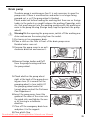
Drain pump
1
The drain pump is maintenance-free. It is only necessary to open the
pump cover if there is a malfunction and water is no longer being
pumped out, e. g. if the pump wheel is blocked.
Please make sure before loading the washing that there are no foreign
bodies in the pockets or caught between the washing. Paperclips, nails,
etc. that may have got into the washing machine with the washing remain in the pump housing (foreign body trap that protects the pump
wheel).
Warning! Before opening the pump cover, switch off the washing machine and remove the mains plug from the socket.
1. First carry out an emergency drain.
2. Place a cloth on the floor in front of the drain pump cover.
Residual water runs out.
3. Unscrew the pump cover in an anticlockwise direction and remove it.
4. Remove foreign bodies and fluff
from the pump housing and from
the pump wheel.
5. Check whether the pump wheel
right at the back of the pump housing can turn. (It is normal for the
pumping wheel to turn jerkily.) If
the pumping wheel cannot be
turned, please contact the Customer
Care Department.
6. Insert the pump cover. Insert the
guides at the sides of the cover into
the guide slots and tighten the cover by turning in a clockwise
direction.
7. Close off the emergency drain hose
and place it in the support.
8. Close plinth flap.
Downloaded From WashingMachine-Manual.com Manuals
29
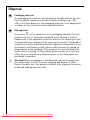
Disposal
2
2
Packaging material
The packaging materials are environmentally friendly and can be recycled. The plastic components are identified by markings, e.g. >PE<,
>PS<, etc. Please dispose of the packaging materials in the appropriate
container at the community waste disposal facilities.
Old appliance
W
1
The symbol
on the product or on its packaging indicates that this
product may not be treated as household waste. Instead it shall be
handed over to the applicable collection point for the recycling of electrical and electronic equipment. By ensuring this product is disposed of
correctly, you will help prevent potential negative consequences for the
environment and human health, which could otherwise be caused by
inappropriate waste handling of this product. For more detailed information about recycling of this product, please contact your local city
office, your household waste disposal service or the shop where you
purchased the product.
Warning! When an appliance is finished with, remove the plug from
the mains socket. Cut off the cable and plug and dispose of them.
Destroy the door lock. This prevents children from trapping themselves
inside and endangering their lives.
Downloaded From WashingMachine-Manual.com Manuals
30
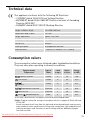
Technical data
5
This appliance conforms with the following EU Directives:
– 73/23/EEC dated 19.02.1973 Low Voltage Directive
– 89/336/EEC dated 03.05.1989 EMC Directive inclusive of Amending
Directive 92/31/EEC
– 93/68/EEC dated 22.07.1993 CE Marking Directive
Height x Width x Depth
850 x 598 x 640 mm
Depth when door is open
1017 mm
Height adjustment
approx. +10/-5mm
Load (depending on programme)
Max. 6kg
Area of use
Domestic
Drum spin speed
see programme overview
Water pressure
1-10bar (=10–100N/cm2=0.1–1.0MPa)
Consumption values
The consumption values were obtained under standardised conditions.
They may vary when operating in domestic conditions.
Program knob/
Temperature
Type of
fabric
Load
in kg1)
Water
in litres
Energy
in kWh
ENERGY SAVING 2)
Cotton
6
39
1,02
Cotton
6
54
2,10
Cotton
6
52
0,75
Synthetics
3
52
0,52
Synthetics
3
56
0,40
Wool
2
50
0,35
COTTON 95
LINEN/EASY-CARES 40
STAIN 2)
LINEN/EASY-CARES 40 2)
DELICATE 30
WOOL
(HANDWASH) 30
1) The load is determined in accordance with EN 60456 Standard Loads.
2) Note: Program setting for testing in accordance with or in support of EN 60 456 and
IEC 60 456.
Actual consumption will vary from the indicated values depending on water pressure,
water hardness, water temperature at filling, room temperature, type and quantity of
washing, detergent used, variations in mains voltage and any additional program
functions selected.
Downloaded From WashingMachine-Manual.com Manuals
31
Installation and connection instructions
1 Safety information for the installation
• This washing machine cannot be built-in.
• Before using for the first time, check the appliance for damage sustained while it was being transported. Do not under any circumstances connect an appliance that is damaged. In the case of damage,
please contact your supplier.
• Before using for the first time, all parts of the transport lock must be
removed. Otherwise when spinning damage may be caused to the appliance or to neighbouring units or furniture.
• Before using the appliance for the first time, splash protection must
be completed. (See “Removing the transit packaging”.)
• Always plug the mains plug into a correctly installed shockproof
socket.
• Permanent connection: a permanent connection must only be installed by a trained electrician.
• Prior to using the appliance for the first time, ensure that the rated
voltage and type of supply on the rating plate match that of the supply where the appliance is to be installed. The fuse rating is also to be
found on the rating plate.
• If work on the plumbing is required for the proper connection of the
washing machine to the water supply, this must be undertaken by a
competent person.
• If work on the electricity supply system is required for the proper
connection of the washing machine to the electricity supply, this
must be undertaken by a registered electrician.
• The washing machine’s cable must only be replaced by the Customer
Care Department or a registered electrician.
Downloaded From WashingMachine-Manual.com Manuals
32
Installing the appliance
Transporting the appliance
1
Warning! The washing machine is very heavy. Risk of injury. Be careful
when lifting.
• Do not lay the appliance on its front nor on its right side (as seen
from the front). Electrical components may get wet.
• Never transport the appliance without its transport lock. Only remove
the transport lock when the appliance is in its place of installation.
Transporting the appliance without its transport lock can lead to
damage to the appliance.
• Never lift the appliance by the door when it is open nor by the plinth.
When moving using a sack trolley:
• Only use the sack trolley on the side of the appliance. The sack trolley’s base plate must not be longer than 24 cm, otherwise parts of the
anti-flood system may be damaged.
Unpacking
1
The transport safeguard must be removed before putting the appliance
into operation.
Important!
You are advised to keep all the packaging for re-use in case the
machine is to be transported again.
1. After removing all the packaging,
with assistance carefully lay machine on it’s back to remove the polystyrene base from the bottom.
Downloaded From WashingMachine-Manual.com Manuals
33
2. Remove the power supply cable and
the draining hose from the hose
holders on the rear of the appliance.
3. With a suitable spanner unscrew and
remove the central rear bolt A. Slide
out the relevant plastic spacer.
4. Unscrew and remove the two large
rear bolts B and the six smaller bolts
C.
Downloaded From WashingMachine-Manual.com Manuals
34
5. Remove the bracket D.
6. Refit the six smaller bolts C.
7. Open the porthole and remove the
polystyrene block fitted with the adhesive tape on the door seal.
8. Fill the smaller upper hole and the
two large ones with the corresponding plastic plug caps supplied in the
bag containing the instruction
booklet.
Important!
All the different plug caps are supplied with the appliance in the plastic bag containing the instruction
booklet.
Downloaded From WashingMachine-Manual.com Manuals
35
Connect the water inlet hose as described under the paragraph “Water
inlet”.
Where to install
Important! The appliance must not be used in a room where there is a
danger of frost. Frost damage or impaired operation! Frost damage is
not covered by the warranty.
• The surface on which the appliance is to be installed must be firm
and level. Do not install the appliance on carpets or on soft floor coverings.
• The surface on which the appliance is to be installed must be clean
and dry and free from coverings that move, so that the appliance
does not slide.
• If the location in which the appliance is to be installed is fitted with
small-format tiles, put a rubber mat (available in the shops) under
the appliance.
Making the appliance level
The four feet of the appliance are
pre-adjusted.
Large degrees of unevenness can be
compensated for by individually adjusting the height adjustable screw
feet.
Use the special spanner supplied to
do this.
Important! Do not use pieces of
wood, cardboard or such like to level out unevenness in the floor, but
adjust the height adjustable screw
feet instead.
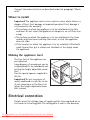
Electrical connection
Details about the voltage, type of supply and the fuses required are to
be found on the rating plate. The rating plate is next to the doorway.
Downloaded From WashingMachine-Manual.com Manuals
36
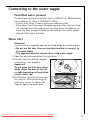
Connecting to the water supply
Permitted water pressure
The water pressure must be at least 1bar (=10N/cm2 =0.1MPa) and may
be a maximum of 10bar (=100N/cm2 =1MPa).
– If more than 10bar: Connect a pressure reduction valve.
– If less than 1bar: Disconnect the appliance end of the inlet hose from
the solenoid inlet valve and remove the flow meter. (In addition remove the filter using pointed pliers and take out the rubber gasket
behind it.) Re-insert the filter.
Water inlet
Attention!
• An inlet hose is supplied and can be found inside the machine drum.
• Do not use the hose from your previous machine to connect to
the water supply.
• This appliance must be connected to a cold water supply.
1. Open the porthole and extract the inlet hose.
2. Connect the hose with the angled
connection to the machine.
Important!
Do not place the inlet hose downwards. Angle the hose to the left
or right depending on the position
of your water tap.
3. Set the hose correctly by loosening
the ring nut. After positioning the
inlet hose, be sure to tighten the
ring nut again to prevent leaks.
Downloaded From WashingMachine-Manual.com Manuals
37
4. Connect the hose to a tap with a
3/4” thread.
Always use the hose supplied with
the appliance.
Installation should comply with local
water authority and building regulations’ requirements.
A minimum water pressure of 0.05
MPa (0.5 bar) is required for safe operation of the appliance.
If you cannot make the cold water
connection direct from the rising mains, you may be able to operate
the appliance from your cold water storage system.
There should be a minimum distance of 5.02m (16.5 ft) between the
appliance’s inlet and the bottom of the water storage tank.
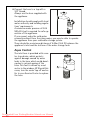
Aqua Control
The inlet hose is provided with a water stop device, which protects
against damage caused by water
leaks in the hose which could develop due to natural ageing of the
hose. This fault is shown by a red
sector in the window „A”. Should this
occur, turn the water tap off and refer to your Service Centre to replace
the hose.
Downloaded From WashingMachine-Manual.com Manuals
38
Water drainage
The maximum permitted difference between the height of the surface
on which the appliance is installed and the water outlet is 1 metre.
Only original hoses may be used to extend hoses. (A maximum of 3 m
laid on the floor and then 80 cm vertically). The Customer Care Department stocks outlet hoses of different lengths.
Draining water into a sink outlet
Secure the outlet/sink outlet joint
with a hose band clip (available from
your dealer).
1
Draining water into a wash basin/bath
Important!
– Small basins are not suitable. Water may overflow.
– The end of the drain hose must
not be in the water that has been
pumped out. Otherwise water
could be sucked back into the appliance.
– When draining into a wash basin
or a bath, secure the drain hose
with the supplied elbow to stop it
slipping. Otherwise the water running out can force the hose out of
the basin.
– When pumping the water out,
check that the water is running
away fast enough.
Pumping heights over 1 m
The washing machine’s drain pump is able to pump water to a height of
1meter, calculated from the surface on which the appliance is installed.
Warning! If pumping height is over 1 metre, malfunctions and damage
to the appliance may arise.
For pumping heights over 1metre a conversion kit can be obtained.
Please contact the Customer Care Department.
Downloaded From WashingMachine-Manual.com Manuals
39
Guarantee/Customer Service
European Guarantee
This appliance is guaranteed by Electrolux in each of the countries listed at the back of this user
manual, for the period specified in the appliance guarantee or otherwise by law. If you move
from one of these countries to another of the countries listed below the appliance guarantee
will move with you subject to the following qualifications:
• The appliance guarantee starts from the date you first purchased the appliance which will be
evidenced by production of a valid purchase document issued by the seller of the appliance.
• The appliance guarantee is for the same period and to the same extent for labour and parts as
exists in your new country of residence for this particular model or range of appliances.
• The appliance guarantee is personal to the original purchaser of the appliance and cannot be
transferred to another user.
• The appliance is installed and used in accordance with instructions issued by Electrolux and is
only used within the home, i.e. is not used for commercial purposes.
• The appliance is installed in accordance with all relevant regulations in force within your new
country of residence.
The provisions of this European Guarantee do not affect any of the rights granted to you by law.
Downloaded From WashingMachine-Manual.com Manuals
40
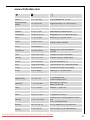
www.electrolux.com
p
t
b
Albania
+35 5 4 261 450
Rr. Pjeter Bogdani Nr. 7 Tirane
Belgique/België/
Belgien
+32 2 363 04 44
Bergensesteenweg 719, 1502 Lembeek
Èeská republika
+420 2 61 12 61 12
Budìjovická 3, Praha 4, 140 21
Danmark
+45 70 11 74 00
Sjællandsgade 2, 7000 Fredericia
Deutschland
+49 180 32 26 622
Muggenhofer Str. 135, 90429 Nürnberg
Eesti
+37 2 66 50 030
Mustamäe tee 24, 10621 Tallinn
España
+34 902 11 63 88
Carretera M-300, Km. 29,900
Alcalá de Henares Madrid
France
www.electrolux.fr
Great Britain
+44 8705 929 929
Addington Way, Luton, Bedfordshire
LU4 9QQ
Hellas
+30 23 10 56 19 70
4 Limnou Str., 54627 Thessaloniki
Hrvatska
+385 1 63 23 338
Slavonska avenija 3, 10000 Zagreb
Ireland
+353 1 40 90 753
Long Mile Road Dublin 12
Italia
+39 (0) 434 558500
C.so Lino Zanussi, 26 - 33080 Porcia (PN)
Latvija
+37 17 84 59 34
Kr. Barona iela 130/2, LV-1012, Riga
Lietuva
+370 5 2780609
Verkių 29, LT09108 Vilnius
Luxembourg
+352 42 431 301
Rue de Bitbourg, 7, L-1273 Hamm
Magyarország
+36 1 252 1773
H-1142 Budapest XIV,
Erzsébet királyné útja 87
Nederland
+31 17 24 68 300
Vennootsweg 1, 2404 CG Alphen aan den Rijn
Norge
+47 81 5 30 222
Risløkkvn. 2 , 0508 Oslo
Österreich
+43 18 66 400
Herziggasse 9, 1230 Wien
Polska
+48 22 43 47 300
ul. Kolejowa 5/7, Warsaw
Portugal
+35 12 14 40 39 39
Quinta da Fonte - Edificio Gonçalves Zarco Q 35
2774 - 518 Paço de Arcos
Romania
+40 21 451 20 30
Str. Garii Progresului 2, S4, 040671 RO
Schweiz/Suisse/
Svizzera
+41 62 88 99 111
Industriestrasse 10, CH-5506 Mägenwil
Downloaded From WashingMachine-Manual.com Manuals
41
p
t
b
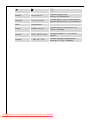
Slovenija
+38 61 24 25 731
Electrolux Ljubljana d.o.o.
Gerbiceva 98, 1000 Ljubljana
Slovensko
+421 2 43 33 43 22
Electrolux Slovakia s.r.o., Electrolux Domáce
spotrebièe SK, Seberíniho 1, 821 03 Bratislava
Suomi
www.electrolux.fi
Sverige
+46 (0)771 76 76 76
Electrolux Service, S:t Göransgatan 143,
S-105 45 Stockholm
Türkiye
+90 21 22 93 10 25
Tarlabaþý caddesi no : 35 Taksim
Istanbul
Ðîññèÿ
+7 095 937 7837
129090 Ìîñêâà, Îëèìïèéñêèé
ïðîñïåêò, 16, ÁÖ „Îëèìïèê“
Downloaded From WashingMachine-Manual.com Manuals
42
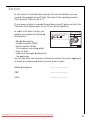
Service
In the event of technical faults, please first check whether you can
remedy the problem yourself with the help of the operating instructions (section “What to do if…”).
If you were not able to remedy the problem yourself, please contact the
Customer Care Department or one of our service partners.
In order to be able to assist you
quickly, we require the following
information:
– Model description
– Product number (PNC)
– Serial number (S No.)
(for numbers see rating plate)
– Type of fault
– Any error messages displayed by
the appliance
So that you have the necessary reference numbers from your appliance
at hand, we recommend that you write them in here:
Model description:
.....................................
PNC:
.....................................
S No:
.....................................
Downloaded From WashingMachine-Manual.com Manuals
43
www.electrolux.com
132 974 990-00-120207-01
Subject to change without notice
Downloaded From WashingMachine-Manual.com Manuals