1
Camera User Guide
Quick Guide
Using the Various Shooting
and Playback Functions
Changing Camera
Settings
Installing Software
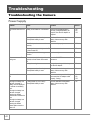
Troubleshooting
The serial number of this product is given
on the bottom face of the camera.
Caution!
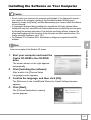
Do not connect the USB cable yet!
If you connect the camera to a computer through the
USB cable before installing the provided software on the
computer, the software required for connection between
camera and computer may not be installed correctly.
Be sure to connect the camera to your computer after
installing the provided software.
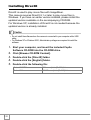
For how to install the software, see P.135.
About other documentation
Detailed explanations on how to use the provided
software can be found in “Software User Guide” (PDF
format file) included on the supplied CD-ROM.
For how to display the PDF file, see P.139.
The CD-ROM also contains English version of “Camera
User Guide” and “Software User Guide” in PDF format.
Preface
This manual provides information on how to use the shooting and playback functions of this product, as well as
warnings on its use. To make the best use of this product’s functions, read this manual thoroughly before use.
Please keep this manual handy for ease of reference.
Ricoh Co., Ltd.
Safety Precautions
For the safe use of your camera, be sure to read the
safety precautions thoroughly.
Test shooting
Please be sure to do some test shooting to make sure it
is recording properly before normal use.
Copyright
Reproduction or alteration of copyrighted documents,
magazines, music and other materials, other than for
personal, home or similarly limited purposes, without the
consent of the copyright holder is prohibited.
Exemption from
Liability
Ricoh Co., Ltd. assumes no liability for failure to record or
play back images caused by malfunction of this product.
Warranty
This product is manufactured to local specifications and
the warranty is valid within the country of purchase.
Should the product fail or malfunction while you are
abroad, the manufacturer assumes no responsibility for
servicing the product locally or bearing the expenditure
incurred thereof.
Radio Interference
Operating this product in the vicinity of other electronic
equipment may adversely affect the performance of both
devices. In particular, operating the camera close to a
radio or television may lead to interference. If
interference occurs, follow the procedures below.
• Move the camera as far away as possible from the TV, radio or other
device.
• Reorient the TV or radio antenna.
• Plug the devices into separate electrical outlets.
This publication may not be reproduced in whole or in part without the express written permission of Ricoh.
© 2006 RICOH CO.,LTD. All rights reserved.
The contents of this document may be changed in the future, without prior notice.
This booklet was created with thorough attention to its content. If, however, you have a question, spot an error,
or find a description lacking, please refer to the end of this booklet for information on how to contact us.
Microsoft, MS, Windows and DirectX are registered trademarks of Microsoft Corporation in the United States of
America and other countries.
Macintosh, Power Macintosh, and Mac OS are registered trademarks of Apple Computer, Inc. in the United
States of America and other countries.
Adobe and Adobe Acrobat are trademarks of Adobe Systems Incorporated.
All trademarked company and product names mentioned in this manual are the property of their respective
owners.
Key Features
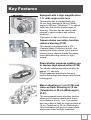
Equipped with a high magnification
7.1× wide angle zoom lens
This camera has a compact body only
26 mm thick, featuring a 28-mm (Wideangle) to 200-mm (Telephoto)* 7.1× optical
zoom lens that covers a wide range of
shooting. This lens can be used to take
pictures in various indoor and outdoor
situations.
*Equivalent to that on a 35mm camera
Camera shake correction function
reduces blurring (P.29)
This camera is equipped with a E
(Camera Shake Correction) button. Just
pressing the button allows you to prevent
blurring due to camera shakes that easily
occur when shooting indoors or night
scenes.
Rapid shutter response enables you
to capture high-speed action (P.30)
The shutter release time lag is as short as
approx. 0.1 seconds.
Ricoh’s patented hybrid auto focusing
system technology even keeps action shots
looking good.
Macro shooting at 1 cm (P.36) and
close-up flash shooting at 14 cm
(Telephoto) or 20 cm (Wide-angle)
(P.37)
The unsurpassed macro shooting function
allows you to capture details from a very
close distance at only 1 cm. The camera
also has a built-in flash for close-up shots at
14 cm (Telephoto) or 20 cm (Wide-angle).
This combination will give you clear macro
shots even under low light conditions.
1
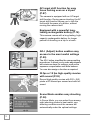
AF target shift function for easy
focus locking even on a tripod
(P.87)
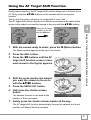
The camera is equipped with an AF target
shift function. During macro shooting, the AF
target shift function allows you to lock the
focus with the press of a button, without
moving the camera itself.
Equipped with a powerful longlasting rechargeable battery (P.16)
This camera comes with a long-lasting, highcapacity rechargeable battery for longer
periods of shooting on a trip or at work.
ADJ. (Adjust) button enables easy
access to the most useful settings
(P.59)
The ADJ. button simplifies the camera setting
procedures. It allows you to make adjustments
with minimum steps for settings, such as the
exposure compensation and white balance.
You can also assign a function as required.
30 fps or 15 fps high-quality movies
with sound (P.93)
Record high-quality movies with 320 × 240
pixels at 30 frames per second and with full
sound.
Scene Mode enables easy shooting
(P.38)
In Scene Mode, you can select from among
eight shooting modes to best match your
shooting conditions and the camera will
automatically make the optimal settings.
2
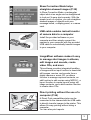
Skew Correction Mode helps
straighten skewed images (P.38)
In Skew Correction Mode, a rectangular
object shot at an angle can be straightened
to look as if it were shot squarely. With the
simple touch of a button, you can straighten
skewed images of objects such as a
message board, a display panel, or a name
card.
USB cable enables instant transfer
of camera data to a computer
Install the provided software on your
computer and then simply connect the
camera to your computer with the provided
USB cable to automatically transfer images
to your computer.
ImageMixer software makes it easy
to manage shot images in albums,
edit images and sounds, create
video CDs, and more
This software provides integrated handling
of images with an input function to download
still images, movies, and sounds from a
digital camera or music CD, an album
function to manage captured contents, an
edit function to edit movies using MPEG-1, a
layout function to create layouts using still
image contents, and a disk creation function
to create video CDs.
Direct printing without the use of a
computer (P.54)
A Direct Print-compatible printer can be
connected to the camera with the USB cable
to directly transfer images to the printer. This
allows for easy printing without using a
computer.
You can also print reports.
3
Contents
Chapter 1
Quick Guide
Before Shooting .......................................................................................... 10
Packing List .................................................................................................................. 10
Names of Parts............................................................................................................. 12
LCD Monitor Display .................................................................................................... 14
Getting Ready to Shoot .............................................................................. 16
About the Battery..........................................................................................................
Battery Level Indication ................................................................................................
SD Memory Card (available in stores) .........................................................................
Charging the Rechargeable Battery .............................................................................
Loading the Rechargeable Battery and SD Memory Card ...........................................
Turning the Power On/Off ............................................................................................
Setting the Language ...................................................................................................
Setting the Date and Time............................................................................................
Changing the Display ...................................................................................................
Maximizing the LCD Monitor Brightness ......................................................................
Histogram .....................................................................................................................
16
17
18
19
20
22
23
24
25
25
26
Basic Shooting............................................................................................ 27
Holding the Camera .....................................................................................................
Preventing Camera Shake ...........................................................................................
Quickly Shooting Pictures (Full-press) .........................................................................
Checking the Focus and Shooting (Half-press)............................................................
When the Subject is Not Centered (Shooting with Focus Lock)...................................
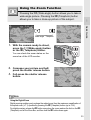
Using the Zoom Function .............................................................................................
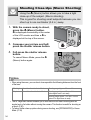
Shooting Close-Ups (Macro Shooting).........................................................................
Using the Flash ............................................................................................................
Shooting with Optimal Settings According to Shooting Conditions ..............................
27
28
30
31
33
35
36
37
38
Playing Back Images .................................................................................. 42
Reviewing the Image You Just Took (Quick Review) ..................................................
Viewing Your Images ...................................................................................................
Playing Back Images in the Three-frame View ............................................................
Thumbnail Display........................................................................................................
Magnifying Images .......................................................................................................
42
43
44
46
47
Viewing on a Television ............................................................................. 48
Deleting Files............................................................................................... 50
Deleting Unwanted Files (Still Images/Movies/Sounds)............................................... 50
Deleting Multiple Files at One Time ............................................................................. 51
Chapter 2
Using the Various Shooting and
Playback Functions
Direct Printing ............................................................................................. 54
Direct Print Function..................................................................................................... 54
Connecting the Camera to a Printer............................................................................. 54
Printing Still Images...................................................................................................... 55
4
Various Shooting Functions ...................................................................... 59
Using the ADJ. (Adjust) Button.....................................................................................
Shooting Setting Menu .................................................................................................
Using the Shooting Setting Menu.................................................................................
Choosing Picture Quality Mode/Image Size (PIC QUALITY/SIZE) ..............................
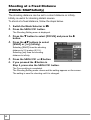
Changing the Focusing Mode (FOCUS: MULTI AF/SPOT AF)....................................
Manual Focus Shooting (FOCUS: MF) ........................................................................
Shooting at a Fixed Distance (FOCUS: SNAP/Infinity) ................................................
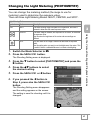
Changing the Light Metering (PHOTOMETRY) ...........................................................
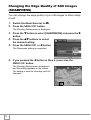
Changing the Edge Quality of Still Images (SHARPNESS) .........................................
Setting the Color Depth (COLOR DEPTH)...................................................................
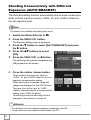
Shooting Consecutively with Different Exposures (AUTO BRACKET) ........................
Shooting Consecutively with Different White Balance (WB-BKT) ................................
Using Long Time Exposure (TIME EXPOSURE) .........................................................
Shooting Pictures Automatically at Set Intervals (INTERVAL).....................................
2 Shooting a Still Image with Sound (IMAGE WITH SOUND) .....................................
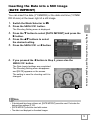
Inserting the Date into a Still Image (DATE IMPRINT).................................................
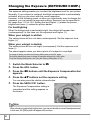
Changing the Exposure (EXPOSURE COMP.)............................................................
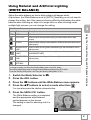
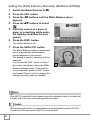
Using Natural and Artificial Lighting (WHITE BALANCE).............................................
Changing the Sensitivity (ISO SETTING).....................................................................
Limiting the Shutter Speed (SLOW SHUTTER LMT) ...................................................
Returning the Shooting Setting Menu Settings to their Defaults
(RESTORE DEFAULTS)..............................................................................................
Changing Shading for Shooting Text (DENSITY) ........................................................
Using the AF Target Shift Function ..............................................................................
t Using the Self-Timer ................................................................................................
59
60
61
62
64
66
68
69
70
71
72
73
75
76
78
79
80
81
83
84
85
86
87
88
Shooting with Multi-Shot (CONT. MODE) ................................................. 89
CONT. ..........................................................................................................................
S-CONT (S Multi-Shot).................................................................................................
M-CONT (M Multi-Shot) ...............................................................................................
Viewing an S-CONT or M-CONT Still Image in Enlarged Display Mode......................
91
91
91
92
Shooting/Playing Back Movies.................................................................. 93
3 Shooting Movies ..................................................................................................... 93
Setting the Frame Rate ................................................................................................ 95
Playing Back Movies .................................................................................................... 96
Recording/Playing Back Sound................................................................. 97
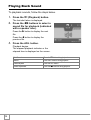
2 Recording Sound ...................................................................................................... 97
Playing Back Sound ..................................................................................................... 98
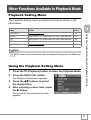
Other Functions Available in Playback Mode .......................................... 99
Playback Setting Menu................................................................................................. 99
Using the Playback Setting Menu ................................................................................ 99
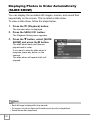
Displaying Photos in Order Automatically (SLIDE SHOW) ........................................ 100
Write-protecting Files (PROTECT) ............................................................................. 101
Using a Printing Service (DPOF)................................................................................ 104
Changing the Image Size (RESIZE)........................................................................... 107
Copying the Contents of the Internal Memory to an SD Memory Card
(COPY TO CARD)...................................................................................................... 108
Chapter 3
Changing Camera Settings
Changing Camera Settings ...................................................................... 110
SETUP Menu ............................................................................................................. 110
Using the SETUP Menu ............................................................................................. 111
Formatting the SD Memory Card (FORMAT [CARD])................................................ 112
5
Formatting the Internal Memory (FORMAT [INT. MEM.]) ..........................................
Adjusting the Brightness of the LCD Monitor (LCD BRIGHTNESS) ..........................
Assigning a Function to the ADJ. Button (ADJ BTN. SET.1/2) ..................................
Changing the Auto Power Off Setting (AUTO POWER OFF) ....................................
Changing the Beep Sound Setting (BEEP SOUND) ..................................................
Changing the Beep Sound Volume (VOL. SETTINGS) .............................................
Changing Image Confirmation Time (LCD CONFIRM.) .............................................
Changing File Name Settings (SEQUENTIAL NO.) ...................................................
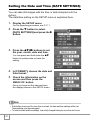
Setting the Date and Time (DATE SETTINGS)..........................................................
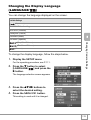
Changing the Display Language (LANGUAGE/
) ...............................................
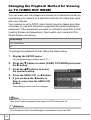
Changing the Playback Method for Viewing on TV (VIDEO OUT MODE) .................
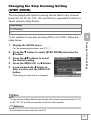
Changing the Step Zooming Setting (STEP ZOOM) ..................................................
Displaying a Settings Change Warning (SHTG STGS WARNG.) ..............................
Changing the USB Setting (USB CONNECTION) .....................................................
Enlarging Icon Display (ENLGE PHOTO ICON) ........................................................
Registering the Power-on Settings (REG. MY SETTINGS) .......................................
Changing the Startup Settings (START SETTINGS) .................................................
Chapter 4
113
114
115
116
117
118
119
120
122
123
124
125
126
127
131
132
133
Installing Software (Downloading
Images to Your Computer)
Installing the Provided Software (For Windows) ................................... 136
System Requirements for Using the Provided Software ............................................
Installing the Software on Your Computer..................................................................
Installing the DeskTopBinder Lite...............................................................................
Connecting the Camera to Your Computer ................................................................
Downloading Images from an SD Memory Card........................................................
Installing Acrobat Reader ...........................................................................................
Installing DirectX ........................................................................................................
Uninstalling the Software............................................................................................
Uninstalling ImageMixer .............................................................................................
140
141
143
145
150
151
152
153
154
Installing the Provided Software (For Macintosh) ................................. 155
System Requirements for Using the Provided Software ............................................ 157
Installing the Software on Your Computer (Mac OS 8.6 to 9.2.2) .............................. 158
Installing the Software on Your Computer (Mac OS X 10.1.2 to 10.4) ....................... 159
Chapter 5
Troubleshooting
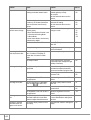
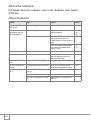
Troubleshooting........................................................................................ 162
Troubleshooting the Camera ...................................................................................... 162
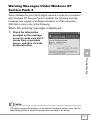
Warning Messages Under Windows XP Service Pack 2 ........................................... 167
Appendices................................................................................................ 169
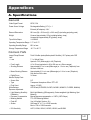
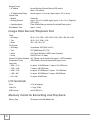
A. Specifications.........................................................................................................
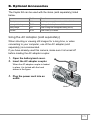
B. Optional Accessories .............................................................................................
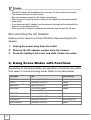
C. Using Scene Modes with Functions.......................................................................
D. Available Menu Items By Mode .............................................................................
E. Functions Whose Defaults are Restored When Camera is Turned Off .................
F. Number of Images That Can be Stored in Internal Memory/SD Memory Card......
G. Using Your Camera Abroad ..................................................................................
H. Cautions on Use ....................................................................................................
I. Care and Storage ....................................................................................................
J. Error Messages ......................................................................................................
K. Warranty and Servicing..........................................................................................
Index...........................................................................................................................
6
169
171
172
173
174
175
176
177
178
179
180
182
Using the Manuals
The following two manuals are included with your Caplio R4.
“Camera User Guide” (This booklet)
This guide explains the usage and functions of the
camera. It also explains how to install the provided
software on your computer.
* The “Camera User Guide” (English edition) is available
from the provided CD-ROM as a PDF file.
“Software User Guide” (PDF file)
This guide explains how to download images from the
camera to your computer and display and edit them on
your computer.
* The “Software User Guide” is available in the following
folders on the provided CD-ROM.
Each language has its own “Software
User Guide” in the respective folder.
“Camera User Guide” (English edition)
(PDF file)
To copy the Software User Guide onto your hard disk
Copy the PDF file from the above folder directly to your hard disk.
7
Reference
The camera is provided with the ImageMixer software that allows you to display and edit
images on your computer. For details on how to use ImageMixer, click the [?] button on the
ImageMixer window and see the displayed manual.
For more information on ImageMixer, contact the Customer Support Center below.
North America (Los Angeles)
Europe (U.K.)
Asia (Philippines)
China
TEL: +1-213-341-0163
TEL: +44-1489-564-764
TEL: +63-2-438-0090
TEL: +86-21-5450-0391
Business hours: 9:00 AM to 5:00 PM
How to Use This Guide
Chapter 1 explains the basic operations of this camera.
If you are using the camera for the first time, read from this chapter.
The following symbols are also used in this guide:
Caution
Note
Term
Reference
This indicates important notices and restrictions for using this camera.
This indicates supplementary explanations and useful tips about camera
operations.
This indicates terms that are useful for understanding the explanations.
This indicates page(s) relevant to a particular function.
The LCD monitor display examples may be different from actual
display screens.
8
Chapter
1
Quick Guide
If you are using the camera for the first time,
read from this chapter.
Before Shooting ............................................... 10
Getting Ready to Shoot................................... 16
Basic Shooting................................................. 27
Playing Back Images ....................................... 42
Viewing on a Television .................................. 48
Deleting Files ................................................... 50
Before Shooting
Packing List
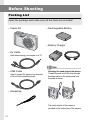
Open the package and make sure all the items are included.
• Caplio R4
• Rechargeable Battery
• Battery Charger
• AV Cable
Used when viewing your images on a TV.
Note
• USB Cable
Used to connect the camera to a computer
or Direct Print-compatible printer.
Attaching the hand strap to the camera
Thread the small end of the strap through
the strap eyelet on the camera and loop
the ends as shown.
• Handstrap
The serial number of the camera is
provided on the bottom face of the camera.
10
• Camera User Guide (This
booklet)
Optional Accessories
• AC Adapter (AC-4c)
Used for power supply from a household
outlet to the camera. Use this adapter for
long periods of playback or when
transferring images to a computer.
Quick Guide
• Warranty
• Rechargeable Battery (DB-60)
• Safety Precautions
• Battery Charger (BJ-6)
• Caplio Software CD-ROM
The provided software and the “Software
User Guide” are included on this CD-ROM.
• Soft Case (SC-60)
• SD Memory Card (available in
stores)
Reference
• For the latest information about accessories, visit the Ricoh website at
http://www.ricohpmmc.com.
11
Names of Parts
Camera
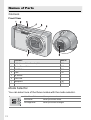
Front View
Item Name
Refer to
1
E (Camera Shake Correction) Button
P.29
2
Shutter Release Button
P.27
3
POWER Button
P.22
4
Flash
P.37
5
AF Window
-
6
Lens Cover
-
7
Microphone
P.97
8
Lens
P.27
Mode Selector
You can select one of the three modes with the mode selector.
12
Voice Memo Mode
Allows you to record sounds.
Movie Mode
Allows you to shoot movies.
Still Image Mode
Allows you to shoot still images.
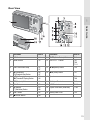
Rear View
Quick Guide
Item Name
Refer to
Item Name
Refer to
1
LCD Monitor
P.14
11
$/Q (Quick Review) Button
P.42
2
Mode Selector
P.12
12
M/O Button
P.61
P.99
P.111
3
Auto Focus/Flash Lamp
P.31
P.37
13
"/N (Macro) Button
P.36
4
z (Telephoto)/
8 (Enlarged View) Button
P.35
P.47
14
#/F (Flash) Button
P.37
5
Z (Wide-angle)/
9 (Thumbnail Display) Button
P.35
P.46
15
Speaker
P.96
P.98
6
6 (Playback) Button
P.43
16
AV Output Terminal
P.48
7
ADJ. Button
P.59
17
USB Terminal
P.145
8
D (Delete)/
t (Self-timer) Button
P.50
P.88
18
Tripod Screw Hole (underside)
P.169
9
DISP. Button
P.25
19
Battery/Card Cover
P.20
10
!/SCENE Button
P.38
13
LCD Monitor Display
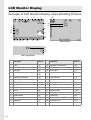
Example of LCD Monitor Display when Shooting Pictures
1
2
3
4
5
6
7
8
27
19
9
28
29
20
10
11
21
22
23
12 13 14 15
16
17
18
Movie Mode
24
25
26
Still Image Mode
Item Name
1
2
3
4
5
6
7
8
9
10
11
12
13
14
15
14
Flash
Macro Shooting
Self-timer
Mode Types
Refer to
P.37
P.36
P.88
P.12
P.38
Recording Destination
P.18
Remaining Number of Still Images P.175
Picture Quality
P.62
Image Size
P.62
Zoom Bar
P.35
Focus
P.66
Auto Bracket
P.72
White Balance
P.81
Photometry
P.69
Sharpness
P.70
Color Depth
P.71
Item Name
Refer to
16
17
18
19
Exposure Compensation
ISO Setting
Date Imprint
Interval
P.80
P.83
P.79
P.76
20
21
22
23
24
25
26
27
28
29
Time Exposure
Histogram
Camera Shake Correction
Battery Mark
Camera Shake Warning Mark
Aperture Value
Shutter Speed
Frame Rate
Remaining Recording Time
Recording Time
P.75
P.26
P.29
P.17
P.28
P.169
P.84
P.95
P.176
P.176
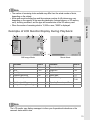
Note
Quick Guide
• The number of remaining shots available may differ from the actual number of shots,
depending on the subject.
• Movie and sound recording time and the maximum number of still pictures may vary
depending on the capacity of the recording destination (internal memory or SD memory
card), shooting conditions, and the type and manufacturer of the SD memory card.
• When the number of remaining shots is 10,000 or more, “9999” is displayed.
Example of LCD Monitor Display During Playback
1
2
3
4
5 6
13
8, 9
10
7
11
12 14
Still Image Mode
Movie Mode
Item Name
Refer to
Item Name
Refer to
1
Protect
P.101
8
Picture Quality
P.62
2
3
4
5
DPOF
Mode Types
Playback Data Source
Number of Playback Files
P.104
P.43
-
9
10
11
12
Image Size
File No.
Battery Mark
Date at Shooting
-
13
14
Recording Time or Lapsed Time
Indicator
P.62
P.17
P.79
P.122
-
6
7
Total Number of Files
Setting at Shooting (Recording)
Note
The LCD monitor may display messages to inform you of operational instructions or the
camera’s status while in use.
15
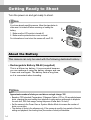
Getting Ready to Shoot
Turn the power on and get ready to shoot.
Note
If you have already used this camera, follow the steps below to
make sure it is turned off before removing or loading the
battery.
1. Make sure the LCD monitor is turned off.
2. Make sure the protective lens cover is closed.
For information on how to turn the camera off, see P.22.
About the Battery
This camera can only be used with the following dedicated battery:
• Rechargeable Battery DB-60 (supplied)
This is a lithium-ion battery. It is economical because
you can recharge it using the battery charger and use
it over and over again. The battery lasts a long time,
so it is convenient when traveling.
Note
Approximate number of shots you can take on a single charge: 300
• Based on CIPA standard (Temperature: 23 degrees Celsius, LCD on, 30 seconds between
shots, changing the zoom setting from telephoto to wide-angle or wide-angle to telephoto
for each shot, 50% flash usage, turning the power off after each 10 shots).
• Set the camera to the Power-Save or Synchro-Monitor Mode to increase the number of
shots you can take.
• The number of shots is for reference only. If the camera is used for long periods of time for
setting and playback, the shooting time (the number of shots) will decrease.
16
Reference
• For information on how to insert the Rechargeable Battery, see P.20.
• For information on how to use the AC adapter, see P.171.
Caution
Quick Guide
• Remove the battery if you are not going to use the camera for a long period of time.
• The battery may be very hot immediately after operation. Turn the camera off and let it cool
down sufficiently before removing the battery.
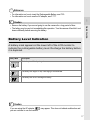
Battery Level Indication
A battery mark appears at the lower left of the LCD monitor to
indicate the rechargeable battery level. Recharge the battery before
it is depleted.
Battery Mark
Description
The battery is sufficiently charged.
Green
The battery level begins to drop. Recharging is recommended.
The battery level is low. Recharge the battery.
Caution
If you are using the AC adapter,
you can continue to use the camera.
may appear. This does not indicate malfunction and
17
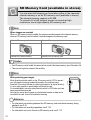
SD Memory Card (available in stores)
You can store still images you have taken either in the camera’s
internal memory or on an SD memory card (available in stores).
The internal memory capacity is 26 MB.
To record a lot of still images, movies or sounds at high
resolutions, use a high-capacity SD memory card.
Note
Where images are recorded
When no SD memory card is loaded, the camera records images to the internal memory;
when an SD memory card is loaded, it records images to the memory card.
When no SD memory card is loaded
When an SD memory card is loaded
Records to the internal memory
Records to the SD memory card
Caution
• If an SD memory card is loaded, the camera will not record to the internal memory, even if the card is full.
• Take care not to get the contacts of the card dirty.
Note
Write-protecting your images
Move the write-protection switch on the SD memory card to LOCK to prevent
your still images from being accidentally erased or the card from being
formatted. If you unlock the card (by returning the switch to its original position),
it is once again possible to erase images and format the card.
It is recommended to move the write-protection switch to LOCK when you have
some important data recorded.
Note that you cannot shoot images on a locked card because no data can be
recorded to the card. Unlock the card before shooting.
Reference
• For information on switching between the SD memory card and internal memory during
playback, see P.43.
• For information on recording capacities, see P.175.
• For information on how to format an SD memory card, see P.112.
18
Charging the Rechargeable Battery
The rechargeable battery needs to be charged before use.
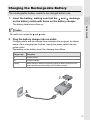
1.
Insert the battery, making sure that the
and
markings
on the battery match with those on the battery charger.
The battery label should face up.
Quick Guide
Caution
Be careful not to reverse the
2.
and
sides.
Plug the battery charger into an outlet.
Charging starts and the charger lamp indicates the progress, as shown
below. Once charging has finished, unplug the power cable from the
power outlet.
Depending on the battery level, the charging time differs.
Charger Lamp
Description
Lit
Charging started
Off
Charging complete
Flashing
Battery charger or battery may be faulty (unplug the battery charger from the
power outlet and remove the battery from the battery charger).
19
Loading the Rechargeable Battery and SD
Memory Card
The rechargeable battery (DB-60) can be used to power this
camera. This battery is convenient because the battery power lasts
long and it can be used over and over again by recharging. If you
have already used this camera, make sure it is turned off before
loading the battery and card.
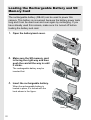
1.
Open the battery/card cover.
2.
Make sure the SD memory card
is facing the right way and then
push the card all the way in until
it clicks.
The rechargeable battery may be
inserted first.
3.
Insert the rechargeable battery.
When the rechargeable battery is
loaded in place, it is locked with the
hook shown in the figure.
Hook
20
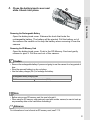
4.
Close the battery/card cover and
slide it back into place.
Quick Guide
Removing the Rechargeable Battery
Open the battery/card cover. Release the hook that locks the
rechargeable battery. The battery will be ejected. Pull the battery out of
the camera. Be careful not to drop the battery when removing it from the
camera.
Removing the SD Memory Card
Open the battery/card cover. Push in the SD Memory Card and gently
release to eject it. Pull the card out of the camera.
Caution
• Remove the rechargeable battery if you are not going to use the camera for a long period of
time.
• Store the removed battery in a dry cool place.
• Use the battery charger (BJ-6) to recharge the battery.
Rechargeable battery charging time
DB-60
About two hours (25qC)
Note
• Before using a new SD memory card, be sure to format it.
• When using an SD memory card previously used with another camera, be sure to back up
any necessary data on the card before formatting it.
Reference
For information on how to format an SD memory card, see P.112.
21
Turning the Power On/Off
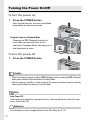
To turn the power on:
1.
Press the POWER button.
After the start sound, the auto focus/flash
lamp blinks for several seconds.
Using the Camera in Playback Mode
Pressing the 6 (Playback) button for
more than one second turns on the
camera in Playback Mode, allowing you to
start playback at once.
To turn the power off:
1.
Press the POWER button.
Caution
• When the camera is turned on with the 6 (Playback) button, pressing the 6 (Playback)
button again switches Playback Mode to Shooting Mode.
• After the camera is turned on, it takes longer for the camera to become ready for shooting
when using the flash than when not using the flash.
Note
Auto Power Off
If the camera goes unused for a set period of time, it will automatically turn itself off to save
power. (Auto Power Off)
Reference
For information on how to change the Auto Power Off setting, see P.116.
22
Setting the Language
1.
Quick Guide
When the power is turned on for the first time, the language setting
screen appears (for the LCD monitor display language). After setting
the language, go on to the date/time setting (for printing the date and
time on your photos).
You can shoot without these settings. However, be sure to set the
language, and the date/time later. Use the SETUP screen for these
settings.
Turn the power on for the first time after purchase.
The language selection screen appears.
To skip language setting, press the M/O button.
When the M/O button is pressed, the language setting is cancelled
and the video signal format-setting screen appears.
2.
3.
Press the !"#$ buttons to select a language.
Press the C/D button.
The display language is set, and the date/
time setting screen appears.
Reference
For how to set the display language and date/time on the SETUP screen, see “Changing the
Display Language (LANGUAGE/
)” (P.123) and “Setting the Date and Time (DATE
SETTINGS)” (P.122) in this guide.
23
Setting the Date and Time
When the power is turned on for the first time, the date/
time setting screen appears.
1.
Press the !"#$ buttons to set
the year, month, date and time.
Change the value with !" and move
the frame with #$.
Setting at shipping
2.
In [FORMAT], choose the date and
time format.
Select the date and time format with
!".
3.
Check the display and then press
the C/D button.
The date is set.
Pressing the DISP. button on this screen
allows you to cancel the setting.
Note
• If the battery is removed for more than one week, the date and time settings will be lost.
These settings must be made again.
• To retain the date and time settings, load a fully charged battery for more than two hours.
Reference
• For information on how to set the date and time, see P.122.
• For information on how to put a date stamp on each frame, see P.79.
24
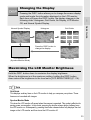
Changing the Display
Pressing the DISP. button allows you to change the screen display
mode and toggle the information displayed on the LCD monitor.
Each time you press the DISP. button, the display changes in the
following order: Histogram, Grid Guide, No Display, LCD Monitor
Off, and Normal Symbol Display.
Histogram
Quick Guide
Normal Symbol Display
Grid Guide
Press the DISP. button to
change the display.
LCD Monitor Off
(Synchro-Monitor Mode)
No Display
Maximizing the LCD Monitor Brightness
Hold the DISP. button down to maximize the display brightness.
When the brightness is at the maximum setting, holding the DISP. button
down returns the brightness to the level set in [LCD BRIGHTNESS] (P.114).
Term
Grid Guide
This displays auxiliary lines on the LCD monitor to help you compose your picture. These
lines are not recorded with images.
Synchro-Monitor Mode
This turns the LCD monitor off except when the camera is operated. This mode is effective for
saving power consumption. In this mode, pressing the shutter release button halfway turns
the LCD monitor on. Subsequently, pressing the shutter release button fully displays the shot
image on the LCD monitor and then turns the LCD monitor off.
25
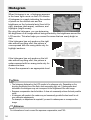
Histogram
When Histogram is on, a histogram appears
in the lower right corner on the LCD monitor.
A histogram is a graph indicating the number
of pixels on the vertical axis and the
brightness on the horizontal axis (from left to
right, shadows (dark areas), midtones, and
highlights (bright areas)).
By using the histogram, you can determine
the brightness of an image without being affected by the brightness around the
LCD monitor. This also helps you correct for areas that are overly bright or
dark.
If the histogram has only peaks on the right
side without anything else, this picture is
over-exposed with too many pixels only for
highlight sections.
If the histogram has only peaks on the left
side without anything else, this picture is
under-exposed with too many pixels only for
shadow sections.
Correct the exposure to an appropriate level.
Note
• The histogram displayed on the LCD monitor is for reference only. Depending on the
shooting conditions (use of the flash, dark surrounding light, etc.), the exposure level
indicated in the histogram may not correspond to the brightness of the shot image.
• Exposure compensation has its limitation. It does not necessarily achieve the best possible
result.
• A histogram with peaks in the center may not necessarily provide the best result to suit
your particular requirements.
For example, an adjustment is required if you want to underexpose or overexpose the
image.
Reference
For information on how to correct the exposure compensation, see P.80.
26
Basic Shooting
Now you are ready.
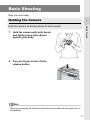
Holding the Camera
1.
Hold the camera with both hands
and lightly press both elbows
against your body.
2.
Put your finger on the shutter
release button.
Quick Guide
Hold the camera as shown below for best results.
Note
When you are shooting, be careful not to obstruct the lens or flash with your fingers, hair, or
the handstrap.
27
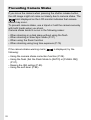
Preventing Camera Shake
If you move the camera when pressing the shutter release button,
the still image might not come out clearly due to camera shake. The
mark displayed on the LCD monitor indicates that camera
shake may occur.
To prevent camera shake, use a tripod or hold the camera securely
with both hands when you shoot.
Camera shake tends to occur in the following cases:
•
•
•
•
When shooting in a dark place without using the flash
When shooting in Slow Sync Mode (P.37)
When using the Zoom function
When shooting using long time exposure (P.75)
If the camera shake warning mark (
following:
) is displayed, try the
• Using the camera shake correction function (P.29).
• Using the flash (Set the Flash Mode to [AUTO] or [FLASH ON])
(P.37).
• Raising the ISO setting (P.83).
• Using the self-timer (P.88).
28
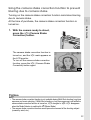
Using the camera shake correction function to prevent
blurring due to camera shake
Turning on the camera shake correction function minimizes blurring
due to camera shake.
At the time of purchase, the camera shake correction function is
turned on.
Quick Guide
1.
With the camera ready to shoot,
press the E (Camera Shake
Correction) button.
The camera shake correction function is
turned on, and the E mark appears on
the LCD monitor.
To turn off the camera shake correction
function, press the E (Camera Shake
Correction) button again.
Note
• The camera shake correction function is not available during Multi-Shot shooting, long time
exposure and movie shooting. If Multi-Shot shooting or long time exposure is set while the
camera shake correction function is turned on, E changes to F. E disappears
when the Mode Selector is switched to 3 (Movie Mode).
• The camera shake correction function cannot prevent movement of the shooting subject
(caused by wind, etc.).
29
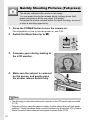
Quickly Shooting Pictures (Full-press)
The shutter release button works in two steps.
You can press the shutter release button halfway down (halfpress) and press it all the way down (full-press).
Full-press the shutter release button for quick focusing, so as not
to miss a shooting opportunity.
1.
Press the POWER button to turn the camera on.
For information on how to turn the power on, see P.22.
2.
Switch the Mode Selector to 5.
3.
Compose your shot by looking at
the LCD monitor.
4.
Make sure the subject is centered
on the screen, and gently press
the shutter release button fully.
Note
• The still image you have taken freezes for a moment on the LCD monitor and is recorded.
(P.119)
• Full-press is likely to cause the camera to shake. Hold the camera firmly with both hands
and shoot. Turning the camera shake correction function on by pressing the E (Camera
Shake Correction) button minimizes blurring due to camera shake. (P.29)
30
Checking the Focus and Shooting
(Half-press)
1.
Quick Guide
When you press the shutter release button halfway (half-press),
the auto-focus function is triggered to determine the focal
distance. Next, press it all the way down (full-press) to shoot.
This is useful when the subject is not in the center of the screen
(P.33).
Press the POWER button to turn the camera on.
For information on how to turn the power on, see P.22.
2.
3.
Switch the Mode Selector to 5.
4.
Since the focus is adjusted at the
center of the screen, position the
subject at the center of the screen
and half-press the shutter release
button.
Compose your shot by looking at
the LCD monitor.
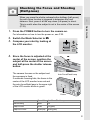
The camera focuses on the subject and
the exposure is fixed.
If automatic focusing fails, the frame in the
center of the LCD monitor turns red and
the auto focus/flash lamp in the upper right
of the LCD monitor blinks in green.
Auto Focus/Flash Lamp
Frame
Frame Color Auto Focus/Flash Lamp
Before focusing
White
Off
Subject in focus
Green
On (green)
Subject not in focus
Blinks (red)
Blinks (green)
31
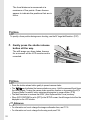
The focal distance is measured at a
maximum of five points. Green frames
appear to indicate the positions that are in
focus.
Note
To specify a focus position during macro shooting, use the AF target shift function. (P.87)
5.
Gently press the shutter release
button all the way.
The still image you have taken freezes
for a moment on the LCD monitor and is
recorded.
Note
• Press the shutter release button gently to prevent camera shake.
• The
mark indicates that camera shake may occur. Hold the camera still and focus
the camera again. Turning the camera shake correction function on by pressing the E
(Camera Shake Correction) button minimizes blurring due to camera shake. (P.29)
• The flash fires twice to increase the AE/AF (Auto Exposure/Auto Focus) accuracy.
• When [LCD CONFIRM.] is set to [OFF] in the SETUP screen, the still image shot will not be
displayed on the LCD monitor.
Reference
• For information on how to change the image confirmation time, see P.119.
• For information on how to change the focusing mode, see P.64.
32
When the Subject is Not Centered
(Shooting with Focus Lock)
When your subject is not in the center of your
composition, compose your photo after focusing. (Focus
Lock)
Shooting range
Quick Guide
Example: Taking a photograph of the castle in the background with
the camera focused on a person in foreground.
Subject to be focused on
Final still image
1.
Press the POWER button to turn the camera on.
For information on how to turn the power on, see P.22.
2.
Switch the Mode Selector to 5.
3.
Put the subject of your photo in the center of the screen and
press the shutter release button halfway.
33
4.
With the shutter half-pressed,
move the camera to compose your
shot.
5.
Gently press the shutter release
button all the way.
Note
During macro shooting, the AF target shift function allows you to lock the focus without
moving the camera. This function is useful when using a tripod.
Reference
• For information about macro shooting, see P.36.
• For information about the AF target shift function, see P.87.
34
Using the Zoom Function
Pressing the Z (Wide-angle) button allows you to take a
wide-angle picture. Pressing the z (Telephoto) button
allows you to take a close-up picture of the subject.
Quick Guide
Wide-angle Telephoto
1.
With the camera ready to shoot,
press the Z (Wide-angle) button
or the z (Telephoto) button.
You can check the zoom status on the
zoom bar of the LCD monitor.
2.
Compose your picture and halfpress the shutter release button.
3.
Full-press the shutter release
button.
Note
Using the Digital Zoom
Digital zooming enables you to enlarge the subject more than the maximum magnification of
the optical zoom (×7.1) specified by pressing the z (Telephoto) button (up to ×3.6).
For digital zooming, release the z button once when the zoom reaches the limit on the z
(Telephoto) end on the Zoom Bar, and then hold the z button down again.
35
Shooting Close-Ups (Macro Shooting)
Using the N (Macro) button allows you to take a tight
close-up of the subject. (Macro shooting)
This is good for shooting small subjects because you can
shoot up to one centimeter (0.4 in.) away.
1.
With the camera ready to shoot,
press the N (Macro) button.
N is displayed momentarily at the center
of the LCD monitor and then a N is
displayed at the top of the screen.
2.
Compose your picture and halfpress the shutter release button.
3.
Full-press the shutter release
button.
To cancel Macro Mode, press the N
(Macro) button again.
Note
• When using the zoom, you can shoot close-ups within the following distances from the front
of the lens:
Wide-Angle
About 1 cm from the front of the lens
Shooting range: Approx. 28 mm × 21 mm
Telephoto
About 14 cm from the front of the lens Shooting range: Approx. 45 mm × 34 mm
(when digital zoom is not used)
Shooting range: Approx. 12.5 mm × 9.4 mm
(when 3.6× digital zoom is used)
• The AF target shift function enables you to lock the focus for macro shooting with the
simple touch of a button without moving the camera. This function is useful for shooting on
a tripod. (P.87)
• To take a further close-up picture during macro shooting, use [ZOOM MACRO] in Scene
Mode. (P.39)
36
Using the Flash
Quick Guide
Press the F (Flash) button to change the flash mode. At
the time of purchase, the camera is set to [FLASH OFF].
From the front edge of the lens, the flash light reaches
about 0.2 to 2.4 m (7.9 in. to 7.9 ft.) (Wide-angle) or about
0.14 to 1.8 m (5.5 in. to 5.9 ft.) (Telephoto) when the ISO
setting is set to [AUTO].
Flash Modes
1.
2.
FLASH OFF
The flash will not fire.
AUTO
The flash fires automatically when the subject is poorly lit or backlit.
RED-EYE FLASH
Reduces the red-eye phenomenon, in which people’s eyes appear red in
pictures.
FLASH ON
The flash fires regardless of the lighting conditions.
FLASH SYNCHRO.
The flash fires with the shutter speed slowed. This is useful when taking
portrait pictures in a nightscape. The use of a tripod is recommended.
Switch the Mode Selector to 5.
Press the F (Flash) button to
change the Flash Mode.
The flash mode mark is displayed
momentarily at the center of the LCD
monitor and then a smaller mark is
displayed at the upper left of the screen.
The Auto Focus/Flash Lamp blinks while
the flash charges. Once the flash is
charged, the lamp turns off and the
camera is ready to shoot.
Note
• The setting is saved until you press the F (Flash) button again.
• The flash does not fire when shooting movies or in Multi-Shot mode.
• The flash fires twice to increase the AE/AF (Auto Exposure/Auto Focus) accuracy.
37
Shooting with Optimal Settings
According to Shooting Conditions
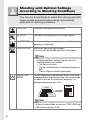
You can use Scene Mode to select from among eight still
image modes and shoot with settings automatically
optimized for shooting conditions.
PORTRAIT
Use when taking portrait pictures.
SPORTS
Use when taking pictures of moving objects.
LANDSCAPE
Use when taking scenery pictures with abundant
greenery or blue sky.
NIGHTSCAPE
Use when shooting night scenes.
You can also shoot with persons in the frame.
Note
• In Nightscape Mode, the flash fires when all of the
following conditions are satisfied:
• The flash is set to Auto.
• The flash is determined to be necessary because it is
dark.
• There is a figure or another object nearby.
SKEW COR
MODE
Use to straighten a rectangular object, such as a
message board or business card, shot at an angle
to make it look as if it were shot squarely. For
detailed operations, see P.41.
Note
In Skew Correction Mode, choose from F1280, N1280, and
N640 for the image size. (P.62)
38
TEXT MODE
Use when capturing text images, for example
notes written on a whiteboard at a meeting.
Reference
To change the shading of the text, see P.86.
ZOOM MACRO
Quick Guide
Use when taking a further close-up picture during
macro shooting. Using the digital zoom allows you
to take a larger close-up than with normal macro
shooting. For detailed operations, see P.40.
Note
• The optical zoom cannot be used in this mode.
• You can shoot close-ups within the following distances
from the front of the lens.
When digital zoom is not used:
About 1 cm from the front of the lens
Shooting range: 23 mm × 17 mm
When 3.6× digital zoom is used:
About 1 cm from the front of the lens
Shooting range: 6.4 mm × 4.7 mm
Reference
• For information on Macro Mode, see P.36.
• For information about zoom operation and digital zoom,
see P.35.
HIGH SENS
Use when taking pictures in dimly lit places. The
LCD monitor also becomes brighter.
Reference
• For information about changing the picture quality and image size, see P.62.
• For the list of Shooting Setting menu items in Scene Mode, see P.173.
• For the combination of Scene Mode functions, see P.172.
1.
2.
Switch the Mode Selector to 5.
Press the SCENE button.
The Scene Mode selection screen
appears.
4
39
3.
Press the !" buttons to select
the Scene Mode.
4.
Press the C/D button.
The Scene Mode type is displayed at the
top of the LCD monitor.
5.
Press the shutter release button.
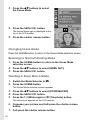
Changing Scene Mode
Press the SCENE button to return to the Scene Mode selection screen.
Returning to Normal Shooting Mode
1.
Press the SCENE button to return to the Scene Mode
selection screen.
2.
3.
Press the !" buttons to select [NRML SHT].
Press the C/D button.
Shooting in Zoom Macro Mode
1.
2.
Switch the Mode Selector to 5.
Press the SCENE button.
The Scene Mode selection screen appears.
3.
4.
5.
Press the !" buttons to select [ZOOM MACRO].
Press the C/D button.
Press the Z (Wide-angle) or z (Telephoto) button.
The zoom level appears on the LCD monitor.
40
6.
Compose your picture and half-press the shutter release
button.
7.
Full-press the shutter release button.
Using the Skew Correction Mode
1.
2.
Switch the Mode Selector to 5.
Press the SCENE button.
The Scene Mode selection screen appears.
Press the !" buttons to select [SKEW COR MODE].
Press the C/D button.
Quick Guide
3.
4.
5.
Press the shutter release button to shoot the subject.
Immediately after shooting, the area recognized as the correction range is
displayed with an orange frame.
Up to five areas can be recognized.
To select another correction area, move the orange frame to the target
area by pressing the $ button.
6.
Press the C/D button.
The corrected image is recorded. The image before correction is also
recorded.
If the target area cannot be detected, an error message appears.
To cancel skew correction, press the ! button.
Even if you cancel skew correction, the image before skew correction
remains recorded.
Note
When [SKEW COR MODE] is selected, note the following:
• To shoot the subject as large as possible, position it so that the entire portion of the subject
is visible on the LCD monitor.
• The camera may fail to recognize the subject in the following cases:
• When the image is out of focus
• When four edges of the subject are not clearly visible
• When it is hard to distinguish between the subject and background
• When the background is complicated
• Two images, one before correction and the other after correction, are recorded. If the
number of remaining shots is less than two, you cannot shoot the subject.
• If the camera is unable to detect a correction area, the image before correction remains
recorded.
41
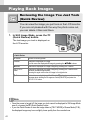
Playing Back Images
Reviewing the Image You Just Took
(Quick Review)
You can view the image you just took on the LCD monitor.
If you are not pleased with the way the photo came out,
you can delete it then and there.
1.
In Still Image Mode, press the Q
(Quick Review) button.
The last image you took is displayed on
the LCD monitor.
In Quick Review
Q Button
Returns to Shooting Mode.
8 Button
Enlarges the displayed still image.
You can move the displayed still image by pressing the !"#$ buttons.
9 Button
Reduces the displayed still image enlarged by pressing the 8 button.
M/O
Button
Enlarges the displayed still image enlarged by pressing the 8 button to the
maximum available magnification.
Pressing this again returns the still image to its original size.
D Button
Deletes the currently displayed file. When the D button is pressed, a warning
message about deleting the file appears. Select [DELETE] and press the
M/O button.
Note
• Once the power is turned off, the image you took cannot be displayed in Still Image Mode
even if you press the Q (Quick Review) button.
• If you use Quick Review to view the image taken in [TEXT MODE] of Scene Mode (P.39),
the displayed image may have a slightly lower quality than the recorded one.
42
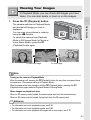
Viewing Your Images
In Playback Mode, you can check still images you have
taken. You can also delete or zoom in on the images.
1.
Press the 6 (Playback) button.
To previous image
Quick Guide
The camera switches to Playback Mode
and the last still image you took is
displayed.
You can view your pictures in order by
using the #$ buttons.
To switch the camera from Playback
Mode to Still Image Mode (or Movie or
Voice Memo Mode), press the 6
(Playback) button again.
To next image
Note
Turning on the camera in Playback Mode
When the camera is off, pressing the 6 (Playback) button for more than one second turns
the camera on. (The camera starts up in Playback Mode.)
When the camera has been turned on with the 6 (Playback) button, pressing the 6
(Playback) button again switches Playback Mode to Shooting Mode.
Where images are played back from
When no SD memory card is loaded, the camera plays back from the internal memory.
When an SD memory card is loaded, it plays back from the SD memory card.
Reference
• For information on how to playback movies, see P.96.
• For information on how to playback sounds, see P.98.
• For information on how to playback still images with a voice memo, see P.78.
43
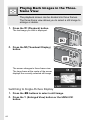
Playing Back Images in the Threeframe View
The playback screen can be divided into three frames.
The three-frame view allows you to select a still image to
enlarge or delete.
1.
Press the 6 (Playback) button.
The last image you took is displayed.
2.
Press the 9 (Thumbnail Display)
button.
The screen changes to three-frame view.
The large frame at the center of the screen
displays the currently selected still image.
Switching to Single-Picture Display
1.
2.
44
Press the #$ buttons to select a still image.
Press the 8 (Enlarged View) button or the C/D
button.
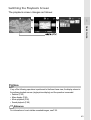
Switching the Playback Screen
The playback screen changes as follows:
Quick Guide
Note
If any of the following operations is performed in the three-frame view, the display returns to
the ordinary playback screen (single-picture display) and the operation is executed.
• Deletion (P.50)
• Menu display (P.99)
• Movie playback (P.96)
• Sound playback (P.98)
Reference
For information on how to delete unwanted images, see P.50.
45
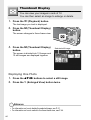
Thumbnail Display
You can view your images in sets of 12.
You can then select an image to enlarge or delete.
1.
Press the 6 (Playback) button.
The last image you took is displayed.
2.
Press the 9 (Thumbnail Display)
button.
The screen changes to three-frame view.
3.
Press the 9 (Thumbnail Display)
button.
Selected still image
The screen is divided into 12 frames and
12 still images are displayed together.
Displaying One Photo
1.
2.
Press the !"#$ buttons to select a still image.
Press the 8 (Enlarged View) button twice.
Reference
• For information on how to delete the selected image, see P.51.
• For information on how to switch to the three-frame view, see P.44.
46
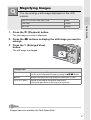
Magnifying Images
You can enlarge a still image displayed on the LCD
monitor.
8 times
1280 × 960
6.7 times
640 × 480
3.4 times
Quick Guide
1.
2816 × 2112, 2784 × 1856, 2048 × 1536
Press the 6 (Playback) button.
The last image you took is displayed.
2.
Press the #$ buttons to display the still image you want to
enlarge.
3.
Press the 8 (Enlarged View)
button.
The still image is enlarged.
In Enlarged View
8 Button
Enlarges the displayed still image.
You can move the displayed still image by pressing the !"#$ buttons.
9 Button
Reduces the displayed still image enlarged by pressing the 8 button.
M/O Button
Displays the still image at the maximum magnification.
Pressing this again returns the still image to its original size.
Note
Enlarged view is also available in the Quick Review Mode.
47
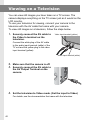
Viewing on a Television
You can view still images you have taken on a TV screen. The
camera displays everything on the TV screen just as it would on the
LCD monitor.
To use your television for viewing, connect your camera to the
television with the AV cable that came with your camera.
To view still images on a television, follow the steps below.
1.
Securely connect the AV cable to
the Video In terminal on the
television.
Video input terminal (yellow)
Connect the white plug of the AV cable
to the audio input terminal (white) of the
TV unit and the yellow plug to the video
input terminal (yellow).
Audio input terminal (white)
2.
3.
Make sure that the camera is off.
4.
Set the television to Video mode. (Set the input to Video)
Securely connect the AV cable to
the AV Output Terminal on the
camera.
For details, see the documentation that came with the television.
48
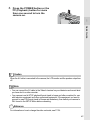
5.
Press the POWER button or the
6 (Playback) button for more
than one second to turn the
camera on.
Quick Guide
Caution
When the AV cable is connected to the camera, the LCD monitor and the speaker output turn
off.
Note
• You can connect the AV cable to the Video In terminal on your television and record what
you have shot to a video recorder.
• Your camera is set to NTSC playback format (used in Japan and other countries) for use
with television equipment and other audiovisual equipment. If the equipment you want to
connect to uses PAL format (used in Europe and elsewhere), then switch your camera to
PAL format in the SETUP Menu before connecting.
Reference
For information on how to change the video out mode, see P.124.
49
Deleting Files
Deleting Unwanted Files (Still Images/
Movies/Sounds)
You can delete unwanted or failed files from the SD memory card
or internal memory.
You can delete them in the following three ways:
• Delete one file at a time
• Delete all files at once
• Select multiple frames and delete together
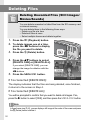
1.
2.
Press the 6 (Playback) button.
3.
Press the D (Delete) button.
4.
Press the !" buttons to select
[DELETE ONE] or [DELETE ALL].
To delete images one at a time,
press the #$ buttons to display
the file you want to delete.
If you select [DELETE ONE], you can
change the image for deletion with the
#$ buttons.
5.
Press the C/D button.
If You Selected [DELETE ONE]:
The display indicates that the files are being deleted; once finished,
it returns to the screen in Step 4.
If You Selected [DELETE ALL]:
You will be prompted to confirm that you want to delete all images. If so,
press the $ button to select [YES], and then press the M/O button.
Note
In three-frame view (P.44), you can display a still image at the center of the screen and press
the D (Delete) button to delete it.
50
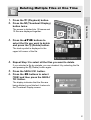
Deleting Multiple Files at One Time
1.
2.
Press the 6 (Playback) button.
Quick Guide
Press the 9 (Thumbnail Display)
button twice.
The screen is divided into 12 frames and
12 files are displayed together.
3.
Press the !"#$ buttons to
select the file you want to delete
and press the D (Delete) button.
The trash symbol is displayed in the
upper left corner of the file.
4.
Repeat Step 3 to select all the files you want to delete.
If you selected a file by mistake, you can deselect it by selecting the file
and pressing the D (Delete) button again.
5.
6.
Press the C/D button.
Press the #$ buttons to select
[YES] and then press the C/
D button.
The display indicates that the files are
being deleted; once finished, it returns to
the Thumbnail Display screen.
51
52
Chapter
2
Using the Various
Shooting and
Playback Functions
Direct Printing .................................................. 54
Various Shooting Functions ........................... 59
Shooting with Multi-Shot (CONT. MODE) ...... 89
Shooting/Playing Back Movies....................... 93
Recording/Playing Back Sound ..................... 97
Other Functions Available in Playback Mode..... 99
Direct Printing
Direct Print Function
The Direct Print standard enables direct printing from a camera to a
printer by connecting them via a USB cable. Photos can be printed
quickly and easily from your digital camera without using a
computer.
Caution
• You cannot print movies (AVI files) with this function. For still images with sounds (JPG files
with WAV files), only the still images (JPG files) are printed.
• Some printers do not support images taken in Text mode (TIFF files) (P.39). Even when
TIFF images are printed, their printed contents cannot be guaranteed.
Note
• This camera uses PictBridge, an industry standard for Direct Printing.
• Your printer must be compatible with PictBridge to use the Direct Print function. For support
information, see the documentation that came with the printer.
• For some printers, Direct Print may not be available when [MASS STR] is selected for [USB
CONNECTION] (P.127) in the SETUP menu of the camera. In such cases, select
[ORIGINAL] instead.
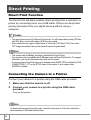
Connecting the Camera to a Printer
Connect your camera to a printer using the USB cable provided.
1.
2.
Make sure that the camera is off.
Connect your camera to a printer using the USB cable
provided.
Turn on the printer.
Note
To disconnect the camera from the printer, check that the power is off on both units before
disconnecting the USB cable between them.
54
Printing Still Images
You can send still images from the camera to a PictBridgecompatible printer to print them.
Still images are sent from the internal memory when no SD memory
card is loaded or from an SD memory card when one is loaded.
Caution
Do not disconnect the USB cable during printing.
Using the Various Shooting and Playback Functions
Note
If a [PRINTER ERROR] message appears during image transfer, check the printer status and
take the appropriate action.
Printing One or All Still Images
1.
Check that the printer is ready to print.
The [CONNECTING...] screen appears.
2.
Press the ADJ. button.
The Direct Print playback mode screen
appears.
3.
Press the #$ buttons to select an
image for printing.
4.
5.
Press the ADJ. button.
6.
Press the C/D button.
Press the !" buttons to select
[1 FILE] or [ALL FILES].
The Direct Print menu appears.
55
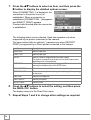
7.
Press the !" buttons to select an item, and then press the
$ button to display the detailed options screen.
When [CONNECTING...] is displayed, the
connection to the printer is not yet
established. When a connection is
established, [CONNECTING...] disappears
and [DIRECT PRINT] appears.
Proceed with this step after the connection
is established.
The following items can be selected. Each item appears only when
supported by the printer connected to the camera.
The item marked with an asterisk (*) appears only when [REPORT
PRINT] is supported by a Ricoh printer connected to the camera.
8.
Item Name
Description
PAPER SIZE
Sets the paper size.
PAPER TYPE
Sets the paper type.
LAYOUT
Sets the number of images printed on a sheet of paper.
The number of images that can be laid out on a sheet of paper varies
depending on the connected printer.
DATE PRINT
Selects whether to print the date (shooting date). The date format can be
set using the date/time option in the SETUP menu.
FILE NAME PRINT
Selects whether to print the file name.
OPTIMIZE IMAGE
Selects whether to optimize the image data (still image) prior to printing
on the printer.
PRINT SIZE
Sets the print image size.
PRINT QUALITY
Sets the print quality.
REPORT PRINT*
Prints on forms.
Press the !" buttons to select the setting, and then press
the C/D button.
The display returns to the Direct Print menu.
9.
56
Repeat Steps 7 and 8 to change other settings as required.
Note
To specify the setting as the default setting next time
the camera is connected to the printer, press the ADJ.
button when the screen in Step 7 is displayed. When
the screen at the right appears, press the #$ buttons
to select [SET] and press the M/O button.
Select [CANCEL] to return the print settings to their
defaults.
10.Press the C/D button.
Using the Various Shooting and Playback Functions
The selected still images are sent to the printer and the [SENDING...]
screen appears.
Pressing the DISP. button cancels the operation.
When the images have been sent to the printer, the display returns to the
Direct Print playback mode screen and printing starts.
Printing Several Still Images
1.
Check that the printer is ready to print.
The [CONNECTING...] screen appears.
2.
Press the ADJ. button.
The Direct Print playback mode screen
appears.
3.
Press the 9 (Thumbnail Display)
button.
The screen is divided into 12 frames and
12 still images are displayed together.
4.
Press the !"#$ buttons to select
an image for printing.
5.
6.
Press the C/D button.
Press the !" buttons to set the
number of copies to print.
Press the ! button to increase the
number of copies, or press the " button
to decrease the number of copies.
7.
Press the #$ buttons to select the
next image for printing.
57
8.
9.
Press the !" buttons to set the number of copies to print.
Repeat Steps 7 and 8 to select all the still images to be
printed and the number of copies for each.
10.Press the C/D button.
The Direct Print menu appears.
11.Press the !" buttons to select an
item, and then press the $ button
to display the detailed options
screen.
When [CONNECTING...] is displayed,
the connection to the printer is not yet
established.
When a connection is established,
[CONNECTING...] disappears and
[DIRECT PRINT] appears.
Proceed with this step after the
connection is established.
For available settings, see P.56.
12.Press the !" buttons to select the setting, and then press
the C/D button.
The display returns to the Direct Print menu.
13.Repeat Steps 11 and 12 to change other settings as
required.
14.Press the C/D button.
The selected still images are sent to the printer and the [SENDING...]
screen appears.
Pressing the DISP. button cancels the operation.
When all the selected still images have been sent from the camera to the
printer, the camera display returns to the Direct Print playback mode
screen.
Note
• Only images with a printer mark (
) are printed. If you cancel printing and then try to
print again, make sure that the printer mark is on the images you want to print.
• The same still image can also be printed several times on a single sheet.
• The available items vary depending on the functions of the printer.
• To print images using the printer’s default settings, select [PRINTER SELECT] on the
detailed options screen.
58
Various Shooting Functions
Using the ADJ. (Adjust) Button
You can use the ADJ. button to adjust the exposure compensation,
white balance, and ISO setting with fewer operations. Two functions
other than exposure compensation and white balance can also be
assigned to the ADJ. button. By assigning a frequently used function
to the ADJ. button, you can more easily set that function with fewer
button operations.
Using the Various Shooting and Playback Functions
Use the SETUP menu to assign a function to the ADJ. button (P.115).
Settings Using the ADJ. Button
The settings that can be made with the ADJ. button differ between Scene Mode
and Movie Mode.
Still Image Mode
ISO setting, picture quality, multi AF/spot AF/MF (focus),
sharpness, photometry, auto bracket shooting, multi-shot
shooting, image with sound
Movie Mode
White balance
Scene Mode ([TEXT MODE])
Text density
Scene Mode (other than [TEXT MODE])
Exposure compensation, white balance
Reference
•
•
•
•
For information about exposure compensation, see P.80.
For information about white balance, see P.81.
For information about text density, see P.86.
For information about how to assign a function to the ADJ. button, see P.115.
59
Shooting Setting Menu
The Shooting Setting menu enables you to shoot pictures by setting
the items listed in the table below.
* The default values are enclosed in brackets [ ].
Setting
Options
Refer to
PIC QUALITY/SIZE
F2816(6M), N2816(6M), F3:2(6M), F2048(3M), N2048(3M),
F1280(1M), [N1280(1M)], N640(VGA)
P.62
FOCUS
[MULTI AF], SPOT AF, MF, SNAP, A
P.66
PHOTOMETRY
[MULTI], CENTER, SPOT
P.69
SHARPNESS
SHARP, [NORMAL], SOFT
P.70
CONT. MODE
[OFF], CONT., S-CONT, M-CONT
P.89
COLOR DEPTH
[NORMAL], VIVID, NEUTRAL, B&W
P.71
AUTO BRACKET
[OFF], ON, WB-BKT
P.72
TIME EXPOSURE
[OFF], 1 SEC., 2 SEC., 4 SEC., 8 SEC.
P.75
INTERVAL
[0 s], 5 seconds to 3 hours
P.76
IMAGE WITH SOUND
[OFF], ON
P.78
DATE IMPRINT
[OFF], DATE, TIME
P.79
EXPOSURE COMP.
-2.0 to +2.0
P.80
WHITE BALANCE
[AUTO],
(OUTDOORS),
(INCANDESCENT LAMP),
(FLUORESCENT LAMP),
(CLOUDY),
(INCANDESCENT LAMP2),
P.81
(MANUAL SETTINGS)
ISO SETTING
[AUTO], ISO 64, ISO 100, ISO 200, ISO 400, ISO 800
P.83
SLOW SHUTTER LMT
OFF, 1/2, 1/4, [1/8]
P.84
RESTORE DEFAULTS
P.85
Note
The SETUP menu can be accessed from within the Shooting Setting menu. For details, see
P.110.
Reference
For the list of Shooting Setting menu items in Movie and Scene Modes, see P.173.
60
Using the Shooting Setting Menu
1.
With the camera ready to shoot, press the C/D
button.
The Shooting Setting menu is displayed.
2.
Press the !" buttons to select the desired menu item.
The menu items are provided on four screens.
Using the Various Shooting and Playback Functions
Press the " button at the bottom
item to display the next screen.
To select a screen by screen number:
1. Press the # button to select a screen number on
the left of the screen.
2. With the screen number selected, press the !"
buttons to change screens.
3. After selecting a screen, press the $ button to
return to the menu item selection step.
3.
After selecting a menu item, press the $ button.
The menu item settings are displayed.
4.
5.
6.
Press the !" buttons to select the setting.
Press the C/D or # button.
If you pressed the # button in Step 5, press also the
C/D button.
The Shooting Setting menu disappears and the camera is ready to shoot.
61
Choosing Picture Quality Mode/Image Size
(PIC QUALITY/SIZE)
The size of a stored still image depends on the Picture Quality Mode
and image size settings.
There are two Picture Quality Modes: N (Normal) and F (Fine).
Picture Quality Modes
Symbol
Mode
Description
Normal
The compression ratio is high, resulting in a small file. Normally,
shooting is done in this mode.
Fine
The compression ratio is low, resulting in a large file, but the picture
quality is better than in Normal.
Combining Picture Quality Mode and Image Size
Size
Mode
2816 × 2112 2784 × 1856 2048 × 1536
1280 × 960
640 × 480
F (Fine)
F2816 (6M)
F2048 (3M)
F1280 (1M)
-
N (Normal)
N2816 (6M) -
N2048 (3M)
N1280 (1M)
N640 (VGA)
Uses
F3:2 (6M)
Suitable for downloading
Suitable for
images to your computer
printing images
and editing the images or
in large sizes.
printing them in large sizes.
Suitable for
Capable of
shooting many recording the
pictures.
greatest number
of pictures on a
single SD memory
card. Suitable for
attaching images
to e-mail
messages or
using them on
Web pages.
Figures inside the bold frame indicate those shown on the screen.
In Movie Mode, you can select 320 × 240 or 160 × 120.
When Scene Mode is set to [TEXT MODE], you can select 2816 × 2112 or
2048 × 1536.
Reference
For internal memory/SD memory card recording capacities, see P.175.
62
1.
2.
Turn the Mode Selector to 5.
Press the C/D button.
The Shooting Setting menu is displayed.
3.
Press the " button to select [PIC QUALITY/SIZE] and press
the $ button.
4.
Press the !" buttons to select a
picture quality/image size.
Using the Various Shooting and Playback Functions
Still Image Mode
Movie Mode
5.
Press the C/D or # button.
The Picture Quality/Image Size settings are completed.
6.
If you pressed the # button in Step 5, press also the
C/D button.
The Shooting Setting menu closes and the setting appears on the screen.
The setting is used for shooting until it is changed.
63
Changing the Focusing Mode
(FOCUS: MULTI AF/SPOT AF)
If you shoot the subject in the default focusing mode, the camera
focuses automatically with Auto Focus (AF).
The camera automatically measures the distances to a maximum of
five AF areas from among 17 AF areas and focuses to the nearest
AF area (MULTI AF). This prevents the center of the LCD monitor
from becoming out of focus and enables you to shoot with a
minimum number of out-of-focus pictures.
You can also select one AF area at the center of the picture to allow
the camera to focus on this area automatically (SPOT AF).
Choose from the following five Focusing Modes.
Focusing Modes
64
Symbol
Mode
Description
None
MULTI AF
Automatically measures the distances to multiple
areas to adjust the focus.
None
SPOT AF
Measures the distance to the center of the picture to
adjust the focus automatically.
MF (Manual Focus)
Enables you to adjust the focus manually.
SNAP
Fixes the shooting distance to a short distance (about
2.5 m (8.2 ft.)).
A (Infinity)
Fixes the shooting distance to infinity.
Changing the Auto Focus Mode (MULTI AF/SPOT AF)
1.
2.
Switch the Mode Selector to 5.
Press the C/D button.
The Shooting Setting menu is displayed.
Press the " button to select [FOCUS] and press the $
button.
4.
Press the !" buttons to select
[MULTI AF] or [SPOT AF].
5.
6.
Press the C/D or # button.
Using the Various Shooting and Playback Functions
3.
If you pressed the # button in
Step 5, press also the C/D
button.
The Focus setting is completed.
The Shooting Setting menu closes.
Reference
• For information about fixing the shooting distance to [SNAP] or [A] (Infinity), see P.68.
• For information about manual focusing, see P.67.
65
Manual Focus Shooting (FOCUS: MF)
If the camera fails to focus automatically, you can focus manually
(Manual Focus: MF).
Manual focus enables shooting at a fixed distance.
Note
• In Scene Mode, Manual Focus can be used only when [ZOOM MACRO] or [SKEW COR
MODE] is selected.
• You can also use Manual Focus to focus on objects within the macro shooting range.
Setting Manual Focus
1.
2.
Switch the Mode Selector to 5.
Press the C/D button.
The Shooting Setting menu is displayed.
3.
Press the " button to select [FOCUS] and press the $
button.
4.
Press the !" buttons to select
[MF].
5.
6.
Press the C/D or # button.
If you pressed the # button in Step
5, press also the C/D
button.
The Focus setting is completed.
The Menu closes and [MF] is displayed on
the screen.
66
Shooting with Manual Focus
1.
Press the " button as required.
Pressing the " button enlarges the
display for easy focusing.
2.
Press the $ button to display the
focus bar.
Each time the $ button is pressed, the
focus bar and zoom bar appear
alternately.
Press the z (Telephoto) button or the Z (Wide-angle)
button to adjust the focus.
Using the Various Shooting and Playback Functions
3.
Pressing the z (Telephoto) button adjusts the focus to farther objects.
Pressing the Z (Wide-angle) button adjusts the focus to closer objects.
The manual focusing setting is used for shooting until it is changed.
4.
Press the shutter release button to shoot the picture.
Note
When the zoom bar is displayed, you can operate the zoom bar with the z (Telephoto)
button or the Z (Wide-angle) button.
Reference
• For information about setting Auto Focus (MULTI AF/SPOT AF), see P.65.
• For information about fixing the shooting distance to [SNAP] or [A] (Infinity), see P.68.
67
Shooting at a Fixed Distance
(FOCUS: SNAP/Infinity)
The shooting distance can be set to a short distance or infinity.
Infinity is useful for shooting distant scenes.
To shoot at a fixed distance, follow the steps below.
1.
2.
Switch the Mode Selector to 5.
Press the C/D button.
The Shooting Setting menu is displayed.
3.
Press the " button to select [FOCUS] and press the $
button.
4.
Press the !" buttons to select
[SNAP] or [A] (Infinity).
Selecting [SNAP] fixes the shooting
distance to 2.5 meters (8.2 ft.).
Selecting [A] fixes the shooting
distance to infinity.
5.
6.
Press the C/D or # button.
If you pressed the # button in
Step 5, press also the C/D button.
The Focus setting is completed.
The Shooting Setting menu closes and the setting appears on the screen.
The setting is used for shooting until it is changed.
68
Changing the Light Metering (PHOTOMETRY)
You can change the metering method (the range to use for
metering) used to determine the exposure value.
There are three Light Metering Modes: MULTI, CENTER, and SPOT.
Light Metering Modes
Mode
Description
None
MULTI
The entire shooting range is divided into 256 partitions, and each is
metered to determine the overall exposure value.
CENTER
The entire image is metered, with emphasis on the center, to determine
the exposure value.
Use this when the brightness of the center and surroundings are
different.
SPOT
Only the center of the image is metered to determine the exposure
value.
Use this setting when you want to use the brightness at the center. This
is useful if there is a marked difference in contrast or backlighting.
1.
2.
Using the Various Shooting and Playback Functions
Symbol
Switch the Mode Selector to 5.
Press the C/D button.
The Shooting Setting menu is displayed.
3.
Press the " button to select [PHOTOMETRY] and press the
$ button.
4.
Press the !" buttons to select
the desired setting.
5.
Press the C/D or # button.
6.
If you pressed the # button in
Step 5, press also the C/D
button.
The Shooting Setting menu disappears
and the setting appears on the screen.
The setting is used for shooting until it is
changed.
69
Changing the Edge Quality of Still Images
(SHARPNESS)
You can change the edge quality of your still images to either sharp
or soft.
1.
2.
Switch the Mode Selector to 5.
Press the C/D button.
The Shooting Setting menu is displayed.
3.
Press the " button to select [SHARPNESS] and press the $
button.
4.
Press the !" buttons to select
the desired setting.
5.
Press the C/D or # button.
The Sharpness setting is completed.
6.
If you pressed the # button in Step 5, press also the
C/D button.
The Shooting Setting menu disappears
and the setting appears on the screen.
The setting is used for shooting until it is
changed.
70
Setting the Color Depth (COLOR DEPTH)
You can set the color depth of still images to [NORMAL], [VIVID],
[NEUTRAL], or [B&W].
1.
2.
Switch the Mode Selector to 5.
Press the C/D button.
The Shooting Setting menu is displayed.
Press the " button to select [COLOR DEPTH] and press the
$ button.
4.
Press the !" buttons to select
the color depth.
5.
Press the C/D or # button.
Using the Various Shooting and Playback Functions
3.
The color depth setting is completed.
6.
If you pressed the # button in Step 5, press also the
C/D button.
The Shooting Setting menu disappears. If
you selected a setting other than
[NORMAL], the setting appears on the
screen.
The setting is used for shooting until it is
changed. The setting is also reflected on
the LCD monitor.
71
Shooting Consecutively with Different
Exposures (AUTO BRACKET)
The Auto Bracketing function automatically shoots three consecutive
shots at three exposure levels (-0.5EV, ±0, and +0.5EV) based on
the set exposure level.
Note
This function is not available when shooting with sound.
1.
2.
Switch the Mode Selector to 5.
Press the C/D button.
The Shooting Setting menu is displayed.
3.
Press the " button to select [AUTO BRACKET] and press
the $ button.
4.
Press the !" buttons to select
[ON].
5.
Press the C/D or # button.
The shooting setting menu disappears and
[AB] appears on the screen.
6.
Press the shutter release button.
Three consecutive shots are taken at
-0.5EV, ±0, and +0.5EV based on the set
exposure compensation setting.
When shooting is completed, three still
images are displayed on the LCD Monitor.
They are, from left to right, at -0.5EV
(darker), standard exposure compensation
setting, and +0.5EV (brighter).
This setting is used for shooting until it is
changed or the camera is turned off.
Reference
• For information on how to change the exposure compensation, see P.80.
• For information on how to change the white balance, see P.81.
72
Shooting Consecutively with Different White
Balance (WB-BKT)
The White Balance Bracket function automatically records three
images - a reddish image, a bluish image, and an image of the
current white balance.
This is useful if you cannot determine the appropriate white balance.
Switch the Mode Selector to 5.
Press the C/D button.
Using the Various Shooting and Playback Functions
1.
2.
The Shooting Setting menu is displayed.
3.
Press the " button to select [AUTO BRACKET] and press
the $ button.
4.
Press the !" buttons to select
[WB-BKT].
5.
6.
Press the C/D or # button.
If you pressed the # button in
Step 5, press also the C/D
button.
The White Balance Bracket setting is
completed.
The Shooting Setting menu disappears
and [WB BKT] appears on the screen.
7.
Press the shutter release button.
Three images (a reddish image, a bluish
image, and an image equal to the current
white balance) are automatically recorded.
This setting is used for shooting until it is
changed or the camera is turned off.
73
Note
•
•
•
•
This function is not available for Multi-Shot (P.89) or Auto Bracket shooting (P.72).
The flash cannot be used.
Time Exposure (P.75) is set to [OFF].
If [COLOR DEPTH] is set to [B&W], the White Balance Bracket function can be set but it
does not operate.
Reference
For information on how to change the white balance, see P.81.
74
Using Long Time Exposure (TIME EXPOSURE)
You can select 1, 2, 4, or 8 seconds for time exposure.
By using long time exposure, you can capture the movement of
moving subjects such as the trail of fireworks and car lights when
shooting a night scene.
1.
2.
Switch the Mode Selector to 5.
Press the C/D button.
The Shooting Setting menu is displayed.
Press the " button to select [TIME EXPOSURE] and press
the $ button.
4.
Press the !" buttons to select
the exposure time.
5.
6.
Press the C/D or # button.
Using the Various Shooting and Playback Functions
3.
If you pressed the # button in
Step 5, press also the C/D
button.
The Time Exposure setting is
completed.
The Shooting Setting menu disappears
and the setting appears on the screen.
The setting is used for shooting until it is
changed.
Note
• When using long time exposure, the shutter speed may slow down and images may be
blurred. Hold the camera steady by using a tripod when shooting.
• The camera shake correction function cannot be used when using long time exposure. If
long time exposure is set while the camera shake correction function is turned on, E
changes to F.
• While shooting with long time exposure, the LCD monitor turns off.
75
Shooting Pictures Automatically at Set
Intervals (INTERVAL)
You can set the camera to automatically take pictures at fixed intervals.
You can set the shooting interval from 5 seconds to 3 hours in
increments of 5 seconds.
1.
2.
Switch the Mode Selector to 5.
Press the C/D button.
The Shooting Setting menu is displayed.
3.
Press the " button to select
[INTERVAL] and press the $
button.
4.
Press the !" buttons to set the
hours.
Press the $ button to move to the
minutes setting, then use the !"
buttons to set the minutes.
Press the $ button to move to the
seconds setting, then use the !"
buttons to set the seconds.
Press the C/D button.
5.
6.
7.
8.
9.
The Interval Shooting setting is completed
and [INTERVAL] appears on the screen.
Press the shutter release button.
A picture is taken every time the fixed
interval elapses.
To stop shooting, press the
C/D button.
The Interval Shooting setting is cleared when the camera is turned off.
Caution
The time until the next picture can be taken according to the shooting menu setting may be
longer than the time set for Interval Shooting. In this case, the shooting interval becomes
longer than the set time.
76
Note
• In Step 5, you can press and hold either the !" buttons to quickly raise or lower the
minute setting.
• If the battery is not charged sufficiently, it may run down during camera operation. Use of
the AC Adapter (sold separately) is recommended.
• If you press the shutter release button during Interval Shooting, the camera will shoot as
usual. However, the Interval Shooting setting is unaffected. After shooting, once the time
specified in Interval Shooting elapses, the next shot is taken.
• When Interval Shooting is on, consecutive shooting is automatically switched off even
when Multi-Shot is set to [CONT.] or [M-CONT].
Using the Various Shooting and Playback Functions
77
2 Shooting a Still Image with Sound
(IMAGE WITH SOUND)
You can shoot a still image with a voice memo of up to eight
seconds.
1.
2.
Switch the Mode Selector to 5.
Press the C/D button.
The Shooting Setting menu is displayed.
3.
Press the " button to select [IMAGE WITH SOUND] and
press the $ button.
4.
Press the !" buttons to select
[ON].
5.
6.
Press the C/D or # button.
If you pressed the # button in Step
5, press also the C/D
button.
The Shooting Setting menu disappears.
7.
Press the shutter release button
to shoot the picture.
After shooting, voice recording begins.
8.
Press the shutter release button
to finish recording.
Note
When playing back a still image with sound, display the image in the same way as an ordinary
image without sound. Pressing the ADJ. button plays back the sound.
Press the !" buttons to display the volume adjustment bar. You can adjust the volume with
the !" buttons.
Reference
For information on how to display still images, see P.43.
78
Inserting the Date into a Still Image
(DATE IMPRINT)
You can insert the date (YY/MM/DD) or the date and time (YY/MM/
DD hh:mm) at the lower right of a still image.
1.
2.
Switch the Mode Selector to 5.
Press the C/D button.
The Shooting Setting menu is displayed.
Press the " button to select [DATE IMPRINT] and press the
$ button.
4.
Press the !" buttons to select
the desired setting.
5.
Press the C/D or # button.
6.
If you pressed the # button in Step 5, press also the
C/D button.
Using the Various Shooting and Playback Functions
3.
The Date Imprint settings are completed.
The Shooting Setting menu disappears
and [DATE] appears on the screen.
The setting is used for shooting until it is
changed.
Note
• If the date and time have not been set, [DATE IMPRINT] cannot be used. First make the
date and time settings (P.122).
• [DATE IMPRINT] cannot be used with movies.
• The date is not displayed on thumbnail images.
79
Changing the Exposure (EXPOSURE COMP.)
The exposure setting enables you to select the brightness level for your picture.
Normally, if your subject is centered, backlight compensation is automatically
activated, and you can shoot with the correct exposure.
However, in the following cases, or when you intentionally want to change the
exposure, you can adjust the exposure setting. Exposure can be specified in
the range from -2.0 to +2.0. Setting the level higher (+) makes the picture
brighter and lower (-) makes the picture darker.
For backlighting
When the background is particularly bright, the subject will appear dark
(underexposed). In this case, set the exposure level higher (+).
When your subject is whitish
The entire picture will turn out dark (underexposed). Set the exposure level
higher (+).
When your subject is darkish
The entire picture will turn out bright (overexposed). Set the exposure level
lower (-).
The same happens when you take a photo of a subject in a spotlight.
To change the setting, use either the Shooting Setting menu or the ADJ. button.
This section explains easy ways to change the exposure setting with the ADJ. button.
To use the Shooting Setting menu, see “Using the Shooting Setting Menu” (P.61).
1.
2.
3.
Switch the Mode Selector to 5.
4.
Press the !" buttons set the exposure setting.
Press the ADJ. button.
Press the #$ buttons until the Exposure Compensation bar
appears.
You can also press the shutter release button.
5.
Press the C/D button.
The Exposure Compensation setting is
completed and the setting appears on
the screen.
Note
When shooting in particularly bright places, you may not be able to correct the exposure level.
In that case, the [!AE] symbol will appear on the screen.
80
Using Natural and Artificial Lighting
(WHITE BALANCE)
Adjust the white balance so that a white subject will appear white.
At purchase, the White Balance is set to [AUTO]. Normally you do not need to
change the setting, but if the camera is having difficulty determining the white
balance when shooting an object of a single color or when shooting under
multiple light sources, you can change the setting.
White Balance Modes
Description
AUTO
AUTO
Adjusts the white balance automatically.
OUTDOORS
Select this when shooting outdoors (sunny) and white balance fails to adjust
properly.
CLOUDY
Select this when shooting in cloudy weather or shade and the white balance fails to
adjust properly.
Using the Various Shooting and Playback Functions
Symbol Mode
INCANDESCENT Select this when shooting under incandescent light and white balance fails to
LAMP
adjust properly.
INCANDESCENT Select this when shooting under incandescent light (more reddish, compared with
[INCANDESCENT LAMP])
LAMP2
FLUORESCENT
LAMP.
Select this when shooting under fluorescent light and white balance fails to
adjust properly.
MANUAL
SETTINGS
Adjust the white balance manually.
To change the setting, use either the Shooting Setting menu or the ADJ. button.
This section explains easy ways to change the white balance setting with the ADJ. button.
To use the Shooting Setting menu, see “Using the Shooting Setting Menu” (P.61).
1.
2.
3.
4.
Switch the Mode Selector to 5.
Press the ADJ. button.
Press the #$ buttons until the White Balance menu appears.
Press the !" buttons to select a mode other than
.
You can also press the shutter release button.
5.
Press the C/D button.
The White Balance setting is completed
and the appropriate white balance
symbol appears on the screen.
The setting is used for shooting until it is
changed.
81
Setting the White Balance Manually (MANUAL SETTING)
1.
2.
3.
Switch the Mode Selector to 5.
Press the ADJ. button.
Press the #$ buttons until the White Balance menu
appears.
4.
Press the !" buttons to select
.
5.
Point the camera at a piece of
paper or something white under
the lighting conditions for your
picture.
6.
Press the DISP. button.
The white balance is set.
7.
Press the C/D button.
The White Balance setting is completed
and the appropriate white balance
symbol appears on the screen.
The setting is used for shooting until it is
changed.
If you press the DISP. button in Step 6,
the screen refreshes to show the White
Balance settings made. If the result is
not as expected, press the ADJ. button
and repeat Steps 5 and 6 to change the
settings as many times as required.
Note
When [AUTO] is selected, the white balance may not be adjusted correctly for a subject that
is mostly dark. In this case, add something white to the subject.
Caution
When shooting with the flash, the white balance may not be adjusted correctly if [AUTO] is
not selected. In this case, switch to [AUTO] to shoot with flash.
82
Changing the Sensitivity (ISO SETTING)
ISO sensitivity indicates how sensitive film is to light. A greater value
means higher sensitivity. High sensitivity is suitable for shooting an
object in a dark place or a fast-moving object while minimizing
blurring. However, the images become grainy.
You can choose from the following six ISO settings:
AUTO, ISO 64, ISO 100, ISO 200, ISO 400, and ISO 800.
1.
2.
Using the Various Shooting and Playback Functions
When ISO setting is set to [AUTO], the camera automatically changes the
sensitivity according to the distance, brightness, zoom, and macro settings.
Usually, use the camera in the [AUTO] mode.
If you do not want to allow the camera to change the ISO sensitivity,
select an ISO setting other than [AUTO].
Switch the Mode Selector to 5.
Press the C/D button.
The Shooting Setting menu is displayed.
3.
Press the " button to select [ISO
SETTING] and press the $ button.
4.
Press the !" buttons to select an
ISO setting.
5.
Press the C/D or # button.
6.
If you pressed the # button in Step
5, press also the C/D
button.
The ISO setting is completed.
The Shooting Setting menu closes and the
setting appears on the screen.
The setting is used for shooting until it is
changed.
Note
At the Wide-angle zoom setting, when the ISO setting is set to [AUTO], the sensitivity is
equivalent to ISO 160 with flash or ISO 100 without flash.
83
Limiting the Shutter Speed
(SLOW SHUTTER LMT)
The maximum shutter speed can be limited to the following:
1/8 second, 1/4 second, and 1/2 second.
When this function is set to [OFF], the maximum shutter speed
varies depending on the ISO setting.
1.
2.
Switch the Mode Selector to 5.
Press the C/D button.
The Shooting Setting menu is displayed.
3.
Press the " button to select [SLOW SHUTTER LMT] and
press the $ button.
4.
Press the !" buttons to select
the maximum shutter speed.
5.
6.
Press the C/D or # button.
If you pressed the # button in
Step 5, press also the C/D
button.
The Slow Shutter Limit setting is
completed.
The Shooting Setting menu closes and the setting appears on the screen.
The setting is used for shooting until it is changed.
Note
• When Time Exposure is set to [ON], priority is given to Time Exposure.
• When Scene Mode is set to [NIGHTSCAPE], priority is given to the maximum shutter
speed in [NIGHTSCAPE].
• When the flash is set to [FLASH SYNCHRO.], the longest shutter speed is one second.
• When using the slow shutter limit, the light quantity may be insufficient depending on the
brightness of the subject, resulting in a dark image. In this case, try the following:
• Selecting a greater slow shutter limit.
• Raising the ISO setting (P.83).
• Using the flash. (P.37)
84
Returning the Shooting Setting Menu
Settings to their Defaults
(RESTORE DEFAULTS)
To return the Shooting Setting menu settings to their defaults, follow
the steps below.
1.
2.
Switch the Mode Selector to 5.
Press the C/D button.
3.
Press the !" buttons to select
[RESTORE DEFAULTS] and press
the $ button.
4.
Make sure that [YES] is selected,
and then press the C/D
button.
Using the Various Shooting and Playback Functions
The Shooting Setting menu is displayed.
The display indicates the camera is
restoring the initial settings. Once it is
finished, the display returns to the shooting
mode screen.
Reference
For a list of functions whose settings are not reset when the camera is turned off, see P.174.
85
Changing Shading for Shooting Text
(DENSITY)
You can change the shading of text for shooting with [TEXT MODE]
in Scene Mode.
You can select from [DEEP], [NORMAL] and [LIGHT].
To change the setting, use either the Shooting Setting menu or the ADJ. button.
This section explains easy ways to change the shading setting with the ADJ. button.
To use the Shooting Setting menu, see “Using the Shooting Setting Menu” (P.61) and “D. Available Menu
Items By Mode” (P.173).
1.
2.
Switch the Mode Selector to 5.
Press the SCENE button.
The Scene Mode selection screen
appears.
3.
Press the !" buttons to select
[TEXT MODE] and then press the
C/D button.
4.
Press the ADJ. button.
The text density menu appears.
5.
Press the !" buttons to select
the desired density setting.
You can also press the shutter release
button.
6.
Press the C/D button.
The text density setting is completed.
The text density setting does not appear on the screen. The setting is
used for shooting until it is changed.
Reference
For information on how to shoot text, see P.39.
86
Using the AF Target Shift Function
During macro shooting, the AF target shift function allows you to lock the focus
(P.33) by using the !"#$ buttons on the camera without moving the
camera.
This is useful for macro shooting on a tripod with Focus Lock.
The AF target shift function allows you to shift the cross-mark at the center of the
screen to the subject you want the camera to focus on with the !"#$ buttons.
When the AF target
is shifted to the left
with the # button
Using the Various Shooting and Playback Functions
1.
With the camera ready to shoot, press the N (Macro) button.
The Macro symbol appears at the top of the screen.
2.
3.
Press the ADJ. button.
Press the #$ buttons until the AF
target shift function screen (crossmark shown in the figure) appears.
4.
Shift the cross-mark to the subject
you want the camera to focus on
with the !"#$ buttons.
5.
6.
Press the C/D button.
Half-press the shutter release
button.
The camera focuses on the area at the
position of the cross-mark.
7.
Gently press the shutter release button all the way.
The AF target shift function automatically focuses the camera on the set
position until Macro Mode is canceled.
87
t Using the Self-Timer
You can set the Self-timer to shoot after either two or ten seconds.
A setting of two seconds is useful for preventing camera shake.
1.
2.
Switch the Mode Selector to 5.
Press the t (Self-timer) button.
The Self-timer symbol appears on the
screen.
The [10] to the right of the symbol
indicates the number of seconds. In this
case, if you press the shutter release
button, the camera will shoot after 10
seconds.
Each press of the t (Self-timer) button
changes the self-timer setting in the
following order: 10 sec, 2 sec, and Selftimer Off.
3.
Press the shutter release button.
The focus is locked, and the flash blinks when the self-timer starts.
Once the picture is taken, the self-timer turns off.
Note
• The self-timer setting is canceled when the camera is turned off.
• When the self-timer is set to 2 seconds, the flash does not blink.
88
Shooting with Multi-Shot (CONT. MODE)
With Multi-Shot, you can shoot consecutive images.
Multi-shot has the following three modes:
Using the Various Shooting and Playback Functions
CONT.
Pictures continue to be taken for as long
as you hold down the shutter release
button.
Still images are recorded one at a time,
just as in normal shooting.
S (Stream)-CONT
With just one full-press of the shutter
release button, you can take 16
consecutive shots at intervals of 1/7.5
seconds in about 2.2 seconds. The 16
still images are grouped together as a set
and are recorded as one image file
(2816 × 2112 pixels).
M (Memory-reversal)-CONT
The camera memorizes the scene while you hold down the shutter
release button, and once you release it, the previous 2.2 seconds of
shots are recorded.
The 16 still images are grouped together as a set and are recorded
as one image file (2816 × 2112 pixels).
(2) The camera records for about 2.2 seconds ahead
(1) If you release the shutter release button here...
89
Note
• When shooting with S-CONT or M-CONT, the ISO setting is fixed at [AUTO] even if it is set
to [ISO 64] or [ISO 100].
• The maximum number of images that can be shot in the Multi-Shot Mode depends on the
image size setting, as shown in the table below.
• The numbers of images that can be shot in the Multi-Shot Mode with the internal memory
are as shown in the table below.
F2816
N2816
F3:2
F2048
N2048
F1280
N1280
N640
Digital Zoom: Off
5
5
5
5
5
13
13
13
Digital Zoom: On
5
5
5
5
5
13
13
13
• The shot images can be recorded normally until the SD memory card becomes full. Once
the number of consecutively shot images exceeds the number of images shown in the table
above, however, the image recording speed becomes slow. (This depends on the image
size setting.)
1.
2.
Switch the Mode Selector to 5.
Press the C/D button.
The Shooting Setting menu is displayed.
3.
Press the " button to select [CONT. MODE] and press
the $ button.
4.
Press the !" buttons to select
[CONT.], [S-CONT], or [M-CONT].
5.
Press the C/D or # button.
6.
If you pressed the # button in Step 5, press also the
C/D button.
The Shooting Setting menu closes and
the Multi-Shot symbol appears on the
screen.
90
CONT.
7.
Compose your picture and then press and hold the shutter
release button.
Pictures continue to be taken for as long as you hold down the shutter
release button.
8.
Release your finger from the shutter release button to stop
taking pictures.
Using the Various Shooting and Playback Functions
To playback consecutive images shot in Multi-Shot mode, switch the
camera to Playback Mode (P.43) and select the still image you want to
play back with the #$ buttons.
S-CONT (S Multi-Shot)
7.
Compose your picture and then press the shutter release
button.
16 pictures are taken automatically.
M-CONT (M Multi-Shot)
7.
Compose your picture and then press and hold the shutter
release button.
The camera memorizes the scene while you hold down the shutter
release button.
8.
Release your finger from the shutter release button.
The camera stops shooting and the 16 still images (in the previous 2.2
seconds) are recorded as one still image.
Note
• To return to normal single-image shooting, follow Steps 1 to 3, select [OFF] in Step 4, and
press the M/O button.
• In M-CONT Mode, if you release the shutter release button within 2.2 seconds from the
time you first pressed it, the shots from the time you pressed the shutter until you released
it will be recorded (the number of consecutive shots will be less than 16).
• The flash is turned off.
• During Multi-Shot Mode, the LCD monitor is turned off.
• The camera shake correction function cannot be used during Multi-Shot shooting. If MultiShot shooting is set while the camera shake correction function is turned on, E changes
to F.
91
Viewing an S-CONT or M-CONT Still Image
in Enlarged Display Mode
While a still image (16 frames in an image file) taken with S-CONT
or M-CONT is displayed, you can enlarge any one of the 16 frames.
You can also switch between frames while viewing the image in
Enlarged Display Mode.
To view a frame from an S-CONT or M-CONT still image in Enlarged
Display Mode, follow the steps below.
1.
Press the 6 (Playback) button.
The last shot taken is displayed.
2.
Press the #$ buttons to display
an S-CONT or M-CONT still image.
3.
Press the 8 (Enlarged View)
button.
The first frame of the consecutive
images is displayed in Enlarged Display
Mode.
The frame position bar appears at the
bottom of the screen.
Press the #$ buttons to switch frames.
To return to the 16-frame display, press
the M/O button.
Note
Press the DISP. button to switch between displaying the bar at the bottom of the screen,
displaying the grid guide, and hiding the display.
Reference
For information on how to shoot images in S-CONT or M-CONT Mode, see P.89.
92
Shooting/Playing Back Movies
3 Shooting Movies
You can shoot movies with sound.
You can set the image size to either 320 × 240 or 160 × 120 pixels.
You can set the number of frames shot per second (frame rate) to
either 30 or 15.
Each movie you shoot is recorded as an AVI file.
Switch the Mode Selector to 3
(Movie Mode).
2.
Press the shutter release button.
Using the Various Shooting and Playback Functions
1.
The camera starts recording.
Recording continues until you press the
shutter release button again.
3.
Press the shutter release button to
finish recording the movie.
.
93
Caution
• While shooting movies, operation sounds may be recorded.
• The maximum recording time per shooting depends on the size of your SD memory card. (P.95)
Even if you are within the maximum recording time, recording may end depending on your card.
• The camera shake correction function is not available during 3 (Movie Mode).
Note
•
•
•
•
The flash cannot be used.
While shooting movies, only Digital Zoom can be used.
When the shutter release button is pressed in Step 2, the camera focuses on the subject.
The remaining recording time may not change uniformly because it is recalculated from the
remaining memory capacity during movie recording.
Reference
•
•
•
•
94
For information on how to change the image size for movies, see P.62.
For information on how to change the frame rate, see P.95.
For information on how to use the Digital Zoom, see P.35.
For the list of Shooting Setting menu items in Movie Mode, see P.173.
Setting the Frame Rate
You can select 30 fps or 15 fps for the number of shot frames per
second (frame rate) in Movie Mode.
1.
2.
Switch the Mode Selector to 3.
Press the C/D button.
The Shooting Setting menu is displayed.
Press the " button to select [FRAME RATE] and press the
$ button.
4.
Press the !" button to select
[30FPS] or [15FPS].
5.
6.
Press the C/D or # button.
Using the Various Shooting and Playback Functions
3.
If you pressed the # button in
Step 5, press also the C/D
button.
The Frame Rate setting is completed.
The Shooting Setting menu closes and the
setting appears on the screen.
The setting is used for shooting until it is changed.
Note
The movie recording time depends on the capacity of the SD memory card.
The table below shows the available recording time.
Internal
Memory
32 MB
64 MB
128 MB
256 MB
512 MB
1 GB
320×240
(15FPS)
1 min
17 s
1 min
27 s
2 min
59 s
6 min
3s
12 min
4s
24 min
19 s
46 min
47 s
320×240
(30FPS)
39 s
44 s
1 min
31 s
3 min
4s
6 min
7s
12 min
19 s
23 min
42 s
160×120
(15FPS)
4 min
38 s
5 min
16 s
10 min
47 s
21 min
49 s
43 min
29 s
87 min
37 s
168 min
30 s
160×120
(30FPS)
2 min
26 s
2 min
46 s
5 min
40 s
11 min
27 s
22 min
50 s
46 min
1s
88 min
31 s
95
Playing Back Movies
To playback movies, follow the steps below.
1.
Press the 6 (Playback) button.
The last shot taken is displayed.
The first frame of the movie is displayed as a still image.
2.
Select to the movie you want to
view using the #$ buttons.
Press the $ button to display the next
file.
Press the # button to display the
previous file.
3.
Press the ADJ. button.
Playback begins.
The elapsed playback indicator or the
elapsed time is displayed on the screen.
Fast Forward
Press the z button during playback.
Rewind
Press the Z button during playback.
Pause/Playback
Press the ADJ. button.
Slow Playback
Press and hold down the z button during pause.
Slow Rewind
Press and hold down the Z button during pause.
Next Frame
Press the z button during pause.
Previous Frame
Press the Z button during pause.
Volume Adjustment
Press the !" buttons during playback.
Term
Movie Frames
Movies consist of many frames whose images appear to be moving when displayed at high
speed.
96
Recording/Playing Back Sound
2 Recording Sound
You can record sound.
Recorded data is stored as a WAV file.
Switch the Mode Selector to 2
(Voice Memo Mode).
2.
Press the shutter release button.
Using the Various Shooting and Playback Functions
1.
Sound recording starts.
3.
Press the shutter release button to
stop recording.
Note
The voice recording time depends on the capacity of the SD memory card.
The table below shows the available recording time.
Internal
Memory
32 MB
64 MB
128 MB
256 MB
512 MB
1 GB
56 min
45 s
64 min
36 s
132 min
11 s
267 min
15 s
532 min
36 s
1073 min
00 s
2063 min
25 s
Caution
When recording sound for a long time, use of the AC adapter (AC-4c) is recommended.
97
Playing Back Sound
To playback sounds, follow the steps below.
1.
Press the 6 (Playback) button.
The last shot taken is displayed.
2.
Press the #$ buttons to select a
sound file for playback (indicated
with a speaker icon).
Press the $ button to display the next
file.
Press the # button to display the
previous file.
3.
Press the ADJ. button.
Playback begins.
The elapsed playback indicator or the
elapsed time is displayed on the screen.
98
Fast Forward
Press the z button during playback.
Rewind
Press the Z button during playback.
Pause/Playback
Press the ADJ. button.
Volume Adjustment
Press the !" buttons during playback.
Other Functions Available in Playback Mode
Playback Setting Menu
The Playback Setting menu provides the functions shown in the
table below:
Setting
Options
P.100
PROTECT
Select/Cancel 1 FILE, Select/Cancel ALL FILES, Select Multi-files
P.101
DPOF
Select/Cancel 1 FILE, Select/Cancel ALL FILES, Select Multi-files
P.104
RESIZE
1280, 640
P.107
COPY TO CARD
Using the Various Shooting and Playback Functions
SLIDE SHOW
Refer to
P.108
Note
The SETUP menu can be accessed from within the Playback Setting menu. For details, see
P.110.
Using the Playback Setting Menu
1.
2.
Press the 6 (Playback) button to select the Playback Mode.
Press the C/D button.
The Playback Setting menu appears.
3.
Press the !" buttons to select
the desired item.
4.
After selecting a menu item, press
the $ button.
The screen for the selected menu item
appears.
99
Displaying Photos in Order Automatically
(SLIDE SHOW)
You can display the recorded still images, movies, and sound files
sequentially on the screen. This is called a slide show.
To view a slide show, follow the steps below.
1.
Press the 6 (Playback) button.
The last shot taken is displayed.
2.
Press the C/D button.
The Playback Setting menu appears.
3.
Press the " button, select [SLIDE
SHOW] and press the $ button.
The slide show starts and files are
played back in order.
If you want to stop the slide show in
progress, press any button on the
camera.
The slide show will repeat itself until
stopped.
Note
• Each still image is displayed for three seconds.
• For movies, not just one frame, but the entire movie you shot is played back.
• Sound files are also played back.
100
Write-protecting Files (PROTECT)
You can protect files from being accidentally deleted.
Caution
Protected files cannot be deleted normally. However, they will be deleted if you format the
memory where the files are stored.
Protecting Files
Press the 6 (Playback) button.
The last shot taken is displayed.
2.
Press the #$ buttons to display the file you want to
protect.
3.
Press the C/D button.
The Playback Setting menu appears.
4.
Press the " button to select
[PROTECT] and press the $
button.
5.
Make sure that [1 FILE] is selected,
and then press the C/D
button.
Using the Various Shooting and Playback Functions
1.
101
The selected file is protected and the
Protect symbol appears in the upper-left
corner of the screen.
Note
To unprotect a file, display the file you want to
unprotect and perform Steps 3 to 5.
Protecting All Files
To protect all your files, follow the steps below.
1.
2.
Press the 6 (Playback) button.
Press the C/D button.
The Playback Setting menu appears.
3.
Press the " button to select
[PROTECT] and press the $
button.
4.
Press the !" buttons to select
[ALL FILES].
5.
Make sure that [SELECT] is
selected, and then press the
C/D button.
All files are protected and the Protect
symbol appears in the upper-left corner of
the screen.
Note
To cancel protection for all protected files, select [CANCEL] in Step 5.
102
Protecting Multiple Files at Once
To protect selected files all at once, follow the steps below.
1.
2.
Press the 6 (Playback) button.
Press the 9 (Thumbnail Display) button twice.
The screen is divided into 12 frames and 12 still images are displayed
together.
Press the !"#$ buttons to select the first file you want to
protect.
4.
Press the C/D button.
The Playback Setting menu appears.
5.
Press the " button to select
[PROTECT] and press the $
button.
6.
Press the !"#$ buttons to select
the next file you want to protect,
and then press the C/D
button.
The Protect symbol appears in the upperright corner of the file.
7.
Repeat Step 6 to select all the files you want to protect.
If you selected a file by mistake, you can deselect by selecting the file and
pressing the M/O button again.
8.
Press the DISP. button.
The display indicates that the selected images are being processed; once
finished, the display returns to the Thumbnail Display screen.
Using the Various Shooting and Playback Functions
3.
Note
To unprotect multiple files, follow the same steps described above to select the files to
unprotect, and then press the DISP. button.
Reference
• For information on canceling protection for all protected files at once, see P.102.
• For information on thumbnail display, see P.46.
103
Using a Printing Service (DPOF)
The still images recorded on an SD memory card can be printed out
if you take them to a store that offers a digital camera print service.
To use a print service, you must make print settings on your camera.
These settings are called Digital Print Order Format (DPOF)
settings.
The DPOF setting specifies one print per still image.
However, if multiple images are selected for the DPOF setting, you
can specify the number of copies to print.
Setting DPOF for the Displayed Still Image
1.
2.
Press the 6 (Playback) button.
3.
Press the C/D button.
Display the still image for which you want to make the
DPOF setting.
The Playback Setting menu appears.
4.
Press the " button to select
[DPOF] and press the $ button.
5.
Make sure that [1 FILE] is selected,
and then press the C/D
button.
Once the DPOF setting is made, the
DPOF symbol appears in the upper-left
corner of the screen.
Note
To remove the DPOF setting, display the still image with the DPOF setting and perform Steps
3 to 5.
104
Setting DPOF for All Still Images
To apply DPOF settings to all your still images, follow the steps
below.
1.
2.
Press the 6 (Playback) button.
Press the C/D button.
The Playback Setting menu appears.
Press the " button to select
[DPOF] and press the $ button.
4.
Press the !" button to select
[ALL FILES].
5.
Make sure that [SELECT] is
selected, and then press the
C/D button.
Once the DPOF setting is made, the
DPOF symbol appears in the upper-left
corner of the screen.
Using the Various Shooting and Playback Functions
3.
Note
To cancel the DPOF settings for all still images with DPOF settings, select [CANCEL] in Step
5.
105
Setting DPOF for Multiple Still Images
To make the DPOF settings for selected still images all at once,
follow the steps below.
1.
2.
Press the 6 (Playback) button.
Press the 9 (Thumbnail Display) button twice.
The screen is partitioned into 12 segments to display the thumbnails of
files.
3.
Press the !"#$ buttons to select the first still image for
which you want to make the DPOF setting.
4.
Press the C/D button.
The Playback Setting menu appears.
5.
Press the " button to select
[DPOF] and press the $ button.
6.
Press the !" buttons to set the
number of copies to print.
Press the ! button to increase the number
of copies, or press the " button to
decrease the number of copies.
7.
Press the #$ buttons to select the
next still image for which you want to make the DPOF
setting.
8.
Press the !" buttons to set the number of copies to print.
Press the ! button to increase the number of copies, or press the "
button to decrease the number of copies.
9.
Repeat Steps 7 and 8 to select all the still images for which
you want to make the DPOF setting.
10.Press the C/D button.
The display indicates that the selected images are being processed; once
finished, the display returns to the Thumbnail Display screen.
Note
To remove the DPOF settings for multiple still images, follow the same steps described above to
set the number of copies to print to [0] for each image, and then press the M/O button.
Reference
For information on canceling the DPOF settings for all still images with DPOF settings at
once, see P.105.
106
Changing the Image Size (RESIZE)
You can reduce the image size of a shot still image to create a new file with a
different image size.
Caution
You can resize only still images and still images with voice memos. Movies cannot be
resized.
Note
Original
Resized
F2816/N2816/F3:2/F2048/N2048
N1280
F1280/N1280
N640
N640
• The ratio of width to height of [F3:2] images is 3:2. When an image of this type is resized, it
is reduced to a 4:3 image with black borders at the top and bottom.
To change the image size, follow the steps below.
1.
2.
Press the 6 (Playback) button.
Press the C/D button.
The Playback Setting menu appears.
3.
Press the " button to select
[RESIZE] and press the $ button.
4.
Press the !" buttons to select
[1280] or [640].
5.
Press the C/D button.
Using the Various Shooting and Playback Functions
• The following image sizes can be resized as shown in the table below:
The image size is changed and the resized
still image is displayed.
Reference
For information on how to change the image size for movies, see P.62.
107
Copying the Contents of the Internal
Memory to an SD Memory Card
(COPY TO CARD)
You can copy all movies, still images, and sound data stored in the
internal memory onto an SD memory card at once.
1.
2.
3.
4.
5.
Turn the camera off.
Insert an SD memory card.
Turn the camera on.
Press the 6 (Playback) button.
Press the C/D button.
The Playback Setting menu appears.
6.
Press the " button to select
[COPY TO CARD] and press the
$ button.
The display indicates copying is in
progress; once finished, the display
returns to the playback screen.
Note
• If the capacity of the SD memory card to which you are copying is insufficient, a message
will be displayed indicating there is not enough capacity. To copy only the number of shots
that will fit into the available capacity, select [YES] and then press the M/O
button. To cancel copying, select [NO] and then press the M/O button.
• It is not possible to copy the contents of an SD memory card to the internal memory.
108
Chapter
3
Changing Camera
Settings
Changing Camera Settings........................... 110
Changing Camera Settings
SETUP Menu
You can change the camera settings by displaying the SETUP menu
from the Shooting Setting menu (P.60) or Playback Setting menu
(P.99).
The SETUP menu enables you to set the items listed in the table
below.
The default values are enclosed in brackets [ ].
Setting
Options
FORMAT [CARD]
P.112
FORMAT [INT. MEM.]
P.113
LCD BRIGHTNESS
P.114
ADJ BTN. SET.1*1
ADJ BTN. SET.2*2
[OFF]*2, [ISO]*1, QUALITY, FOCUS, SHARP, METERING, CONT MDE, P.115
AUTO BKT, WITH SND
AUTO POWER OFF
OFF, [1 MIN.], 5 MIN., 30MIN.
P.116
BEEP SOUND
[ALL], SHUTTER
P.117
VOL. SETTINGS
F F F (OFF), J F F (Small), [J J F] (Medium), J J J (Large)
P.118
LCD CONFIRM.
OFF, [0.5SEC.], 1 SEC., 2 SEC., 3 SEC.
P.119
SEQUENTIAL NO.
ON, [OFF]
P.120
DATE SETTINGS
110
Refer to
P.122
LANGUAGE/
, [ENGLISH], DEUTSCH, FRANÇAIS,
ITALIANO, ESPAÑOL,
,
,
P.123
VIDEO OUT MODE
[NTSC], PAL
P.124
STEP ZOOM
ON, [OFF]
P.125
SHTG STGS WARNG.
[ON], OFF
P.126
USB CONNECTION
MASS STR, [ORIGINAL]
P.127
ENLGE PHOTO ICON
[OFF], ON
P.131
REG. MY SETTINGS
SETTING1, SETTING2
P.132
START SETTINGS
[OFF], SETTING1, SETTING2
P.133
Using the SETUP Menu
To display and use the SETUP menu, follow the steps below.
Note
For some functions, the setting selection method may differ from what is explained here. For
detailed operation, see the explanation of each function.
1.
Press the C/D button.
The Shooting Setting menu (or the Playback Setting menu) appears.
2.
Press the $ button.
The SETUP menu appears.
Press the !" buttons to select the desired item.
The menu items are provided on four screens.
Press the " button at the bottom
item to display the next screen.
To select a screen by screen number:
1. Press the # button to select a screen number on
the left of the screen.
2. With the screen number selected, press the !"
buttons to change screens.
3. After selecting a screen, press the $ button to
return to the menu item selection step.
4.
Changing Camera Settings
3.
After selecting a menu item, press the $ button.
The menu item settings are displayed.
5.
6.
7.
Press the !" buttons to select the setting.
Press the C/D or # button.
If you pressed the # button in Step 6, press also the
C/D button.
The menu disappears and the camera is ready for shooting or playback.
111
Formatting the SD Memory Card
(FORMAT [CARD])
If the error message [CARD ERROR] is displayed when an SD memory card is
loaded into the camera or if you formatted the card with a computer or other
device, you must format the SD memory card prior to use with this camera.
Formatting is the process of preparing a card so image data can be written on it.
Caution
If you format a card that still has images stored on it, the images will be lost.
Reference
For information on how to format the internal memory, see P.113.
To format a card, follow the steps below.
1.
Display the SETUP menu.
For the operating procedure, see P.111.
2.
Press the " button to select
[FORMAT [CARD]] and press the
$ button.
A screen appears to confirm formatting.
3.
Press the #$ buttons to select
[YES] and then press the C/
D button.
Formatting starts. When it is done, the
display returns to the SETUP menu.
If no SD memory card is loaded, a message will be displayed.
After turning the power off, load an SD memory card and repeat the
formatting process again.
Note
Protecting your images from being deleted
Move the write-protection switch on the SD memory card to “LOCK” to prevent your still
images from being accidentally erased or the card from being formatted. (P.18)
If you unlock the card (by returning the switch to its original position), it is once again possible
to erase images and format the card.
112
Formatting the Internal Memory
(FORMAT [INT. MEM.])
If the error message [FORMAT INTERNAL MEMORY] is displayed,
you must format the internal memory prior to use.
Caution
Formatting the internal memory deletes all of the images recorded in the memory. If you have
images in the internal memory that you do not want to delete, copy the images to the SD
memory card before formatting the internal memory. (P.108)
1.
Display the SETUP menu.
For the operating procedure, see P.111.
2.
Press the " button to select
[FORMAT [INT. MEM.]] and press
the $ button.
A screen appears to confirm formatting.
3.
Changing Camera Settings
To format the internal memory, follow the steps below.
Press the #$ button to select
[YES] and then press the C/
D button.
Formatting starts. When it is done, the
display returns to the SETUP menu.
113
Adjusting the Brightness of the LCD Monitor
(LCD BRIGHTNESS)
To adjust the brightness of the LCD monitor, follow the steps below.
1.
Display the SETUP menu.
For the operating procedure, see P.111.
2.
Press the " button to select [LCD
BRIGHTNESS] and press the $
button.
The LCD Brightness Adjustment bar
appears.
3.
Press the !" buttons to adjust
the brightness.
Moving it toward
makes it darker.
Moving it toward
makes it brighter. The
brightness of the screen behind the bar
changes as you adjust the setting.
4.
When you reach the desired
brightness, press the C/D
button.
The display returns to the SETUP screen.
This setting is used until it is changed.
Note
When shooting, press and hold down the DISP. button to maximize the LCD brightness.
When the brightness is at the maximum setting, holding the DISP. button down returns the
brightness to the level set in [LCD BRIGHTNESS]
114
Assigning a Function to the ADJ. Button
(ADJ BTN. SET.1/2)
Pressing the ADJ. button enables you to display the screens for
setting the exposure and white balance with fewer button
operations.
You can also use [ADJ BTN. SET.1] and [ADJ BTN. SET.2] to add a
camera function that can be activated by pressing the ADJ. button.
Refer to
OFF *Default setting for [ADJ BTN. SET.2]
-
ISO (ISO SETTING) *Default setting for [ADJ BTN. SET.1]
P.83
QUALITY (PIC QUALITY/SIZE)
P.62
FOCUS
P.66
SHARP (SHARPNESS)
P.70
METERING (PHOTOMETRY)
P.69
AUTO BKT (AUTO BRACKET)
P.72
CONT MDE (CONT. MODE)
P.89
WITH SND (IMAGE WITH SOUND)
P.78
To assign a function to either [ADJ BTN. SET.1] or [ADJ BTN. SET.2],
follow the steps below.
1.
Display the SETUP menu.
Changing Camera Settings
Available Settings
For the operating procedure, see P.111.
2.
Press the " button to select [ADJ BTN. SET.1] or [ADJ BTN.
SET.2], and then press the $ button.
3.
Press the !" buttons to select
the desired setting.
4.
5.
Press the C/D or # button.
If you pressed the # button in
Step 4, press also the
C/D button.
This setting is used until it is changed.
Reference
For information on how to use the ADJ. button, see P.59.
115
Changing the Auto Power Off Setting
(AUTO POWER OFF)
If you do not operate the camera for a set period of time, it will shut
off automatically to conserve battery power (Auto Power Off).
By default, Auto Power Off is set to one minute, but you can change
this setting.
Available Settings
OFF (Auto Power Off is turned off)
1 MIN. *Default setting
5 MIN.
30MIN.
To change the Auto Power Off setting, follow the steps below.
1.
Display the SETUP menu.
For the operating procedure, see P.111.
2.
Press the " button to select [AUTO POWER OFF] and press
the $ button.
3.
Press the !" buttons to select
the desired setting.
4.
5.
Press the C/D or # button.
If you pressed the # button in
Step 4, press also the C/D
button.
This setting is used until it is changed.
Note
• To continue using the camera after Auto Power Off turned the camera off, press the
POWER button to turn the camera on again. You can also press and hold the 6
(Playback) button for more than one second to turn on the camera in Playback Mode.
• Auto Power Off does not work when the camera is connected to a computer.
• When using Interval Shooting, the settings made here are not valid and Auto Power Off
does not work.
116
Changing the Beep Sound Setting
(BEEP SOUND)
During operation, the camera generates four types of sounds: start
sound, shutter release sound, focus sound, and beep sound.
Start sound:
Sound when the camera is turned on.
Shutter release sound:
Sound when the shutter release button is pressed.
Focus sound:
Sound when the shutter release button is half-pressed and the camera focuses
on the subject.
Beep Sound:
Error sound indicating an operation that cannot be performed.
Available Settings
SHUTTER (Shutter release sound, Beep Sound)
To change the beep sound settings, follow the steps below:
1.
Display the SETUP menu.
For the operating procedure, see P.111.
2.
Press the " button to select [BEEP SOUND] and press the
$ button.
3.
Press the !" buttons to select
the desired setting.
4.
5.
Press the C/D or # button.
Changing Camera Settings
ALL (all sounds on) *Default setting
If you pressed the # button in
Step 4, press also the C/D
button.
This setting is used until it is changed.
Reference
For information on how to adjust the volume, see P.118
117
Changing the Beep Sound Volume
(VOL. SETTINGS)
The beep sound volume can be changed.
Available Settings
FFF
(Mute)
JFF
(Small)
JJF
(Medium) *Default setting
JJJ
(Large)
To change the beep sound volume, follow the steps below:
1.
Display the SETUP menu.
For the operating procedure, see P.111.
2.
Press the " button to select [VOL. SETTINGS] and press
the $ button.
3.
Press the !" buttons to select
the desired setting.
4.
5.
Press the C/D or # button.
If you pressed the # button in
Step 4, press also the C/D
button.
This setting is used until it is changed.
118
Changing Image Confirmation Time
(LCD CONFIRM.)
Immediately after you press the shutter release button, the still
image taken is displayed on the screen for a moment so you can
check it.
By default, the image confirmation time is set to 0.5 seconds, but this
can be changed.
Available Settings
OFF (Image not displayed for confirmation)
0.5SEC. *Default setting
1 SEC.
3 SEC.
To change the image confirmation time, follow the steps below.
1.
Display the SETUP menu.
For the operating procedure, see P.111.
2.
Press the " button to select [LCD CONFIRM.] and press the
$ button.
3.
Press the !" buttons to select
the desired setting.
4.
5.
Press the C/D or # button.
Changing Camera Settings
2 SEC.
If you pressed the # button in
Step 4, press also the C/D
button.
This setting is used until it is changed.
Caution
When [LCD CONFIRM.] is set to 0.5 seconds, symbols such as the zoom bar may remain on
the monitor while the image is displayed.
119
Changing File Name Settings
(SEQUENTIAL NO.)
When you shoot a still image, it is stored on an SD memory card or in the
internal memory with a consecutively numbered file name that is automatically
assigned.
When you switch SD memory cards, you can set your camera to continue
consecutive numbering from the previously loaded card.
Available Settings
ON (Continue numbering)
File names are automatically assigned to still images you take, in the format of “R”
followed by seven digits, from R0010001.jpg to R9999999.jpg.
With this setting, file numbering is continued from one card to the next.
OFF (Do not continue
numbering) *Default setting
File numbering is assigned, from RIMG0001.jpg to RIMG9999.jpg, for each SD memory
card.
When file name RIMG9999 is reached, no more data can be recorded to that card.
To change the file name setting, follow the steps below.
1.
Display the SETUP menu.
For the operating procedure, see P.111.
2.
Press the " button to select [SEQUENTIAL NO.] and press
the $ button.
3.
Press the !" buttons to select
the desired setting.
4.
5.
Press the C/D or # button.
If you pressed the # button in
Step 4, press also the C/D
button.
This setting is used until it is changed.
120
Note
• When recording data to the internal memory, files are assigned consecutively numbered file
names, just as if [SEQUENTIAL NO.] is set to [OFF].
• When transferring images to a computer using RICOH Gate La (P.145), if a file with the same
name already exists in the destination folder of the computer, the file being transferred is renamed
and saved to prevent overwriting the existing file.
• When an image has been transferred to a computer using a mass storage device (P.148), it is
saved with the file name “RIMG****.jpg” (where **** indicates the number of the image) even if
[SEQUENTIAL NO.] is set to [ON].
• When RIMG9999 is reached, no more files can be saved. In this case, move image data from the
SD memory card to the memory of the computer or a storage medium, and then format the SD
memory card.
Changing Camera Settings
121
Setting the Date and Time (DATE SETTINGS)
You can take still images with the time or date stamped onto the
picture.
The date/time setting on the SETUP menu is explained here.
1.
Display the SETUP menu.
For the operating procedure, see P.111.
2.
Press the " button to select
[DATE SETTINGS] and press the $
button.
3.
Press the !"#$ buttons to set
the year, month, date and time.
You can press and hold down the !"
button to quickly raise or lower the
setting.
4.
In [FORMAT], choose the date and
time format.
5.
Check the information on the
screen and then press the
C/D button.
Once you have set the date and time,
the display returns to the SETUP menu.
Note
• If the battery is removed for more than one week, the date and time settings will be lost.
These settings must be made again.
• To retain the date and time settings, load a fully charged battery for more than two hours.
122
Changing the Display Language
(LANGUAGE/
)
You can change the language displayed on the screen.
Available Settings
(Japanese)
ENGLISH *Default setting
DEUTSCH (German)
FRANÇAIS (French)
ITALIANO (Italian)
ESPAÑOL (Spanish)
(Traditional Chinese)
(Korean)
To change the display language, follow the steps below.
1.
Display the SETUP menu.
For the operating procedure, see P.111.
2.
Press the " button to select
[LANGUAGE/
] and press the
$ button.
Changing Camera Settings
(Simplified Chinese)
The language selection screen appears.
3.
Press the !"#$ buttons to
select the desired setting.
4.
Press the C/D button.
This setting is used until it is changed.
123
Changing the Playback Method for Viewing
on TV (VIDEO OUT MODE)
You can view your still images and movies on a television screen by
connecting your camera to a television with the AV cable that came
with your camera.
Your camera is set to NTSC video format (used in Japan and other
countries) for use with television equipment and other audiovisual
equipment. If the equipment you want to connect to uses PAL format
(used in Europe and elsewhere), then switch your camera to PAL
format before connecting.
Available Settings
NTSC *Default setting
PAL
To change the playback format, follow the steps below.
1.
Display the SETUP menu.
For the operating procedure, see P.111.
2.
Press the " button to select [VIDEO OUT MODE] and press
the $ button.
3.
Press the !" buttons to select
the desired setting.
4.
5.
Press the C/D or # button.
If you pressed the # button in
Step 4, press also the C/D
button.
This setting is used until it is changed.
Note
When the AV cable is connected to the camera, the LCD monitor turns off.
Reference
For information on how to view still images on your television screen, see P.48.
124
Changing the Step Zooming Setting
(STEP ZOOM)
The focal length with optical zooming can be fixed to any of seven
levels (28, 35, 50, 85, 105, 135, and 200 mm, equivalent to that on a
35mm camera) (Step Zoom).
Available Settings
OFF *Default setting
ON
To set whether to use step zooming (ON) or not (OFF), follow the
steps below.
Display the SETUP menu.
For the operating procedure, see P.111.
2.
Press the " button to select [STEP ZOOM] and press the
$ button.
3.
Press the !" buttons to select
the desired setting.
4.
5.
Press the C/D or # button.
If you pressed the # button in
Step 4, press also the C/D
button.
Changing Camera Settings
1.
This setting is used until it is changed.
Note
For step zooming in Macro Mode, the focal length can be fixed to any of seven levels (31, 35,
50, 85, 105, 135, and 200 mm, equivalent to that on a 35mm camera).
Reference
For information on how to use zoom, see P.35.
125
Displaying a Settings Change Warning
(SHTG STGS WARNG.)
If the initial settings are changed for the following functions, you can
set the camera to have the icon of that function blink and to display a
warning message about the function with the changed setting for
about 5 seconds when the camera is turned on.
• White balance
• Focus
• ISO setting
• Exposure compensation
• Time exposure
If you operate a camera button while an icon is blinking, the icon
stops blinking and lights steadily.
If you operate a camera button while the warning message is
displayed, the message disappears.
Available Settings
OFF
ON *Default setting
To set whether to enable (ON) or disable (OFF) the settings change
warning, follow the steps below.
1.
Display the SETUP menu.
For the operating procedure, see P.111.
2.
Press the " button to select [SHTG STGS WARNG.] and
press the $ button.
3.
Press the !" buttons to select
the desired setting.
4.
5.
Press the C/D or # button.
If you pressed the # button in
Step 4, press also the C/D
button.
This setting is used until it is changed.
126
Changing the USB Setting
(USB CONNECTION)
By setting [USB CONNECTION] to [MASS STR] on the SETUP
menu, you can view files in the camera and transfer files from the
camera to your computer using the USB cable without installing the
supplied software or USB driver.
Usually, set [USB CONNECTION] to [ORIGINAL]. When set to
[ORIGINAL], you can transfer images to your computer using the
supplied RICOH Gate La software.
MASS STR
ORIGINAL
Downloading data
The SD memory card or internal
memory of the camera can be
operated directly as an external drive
for file processing.
RICOH Gate La allows automatic
transfer of camera data to your
computer.
Use the Caplio Mounter to transfer
camera data to your computer. (Mac OS)
Installation from Caplio
Software CD-ROM
Not required
Required
Supported Operating Systems
Windows 98/98 SE
×
O
Windows 2000 Professional
O
O
Windows Me
O
O
Windows XP Home Edition
O
O
Windows XP Professional
O
O
Mac OS 8.6
×
O
Mac OS 9.0 to 9.2.2
O
O
Mac OS X 10.1.2 to 10.4
O
O
For those:
Familiar with OS file operations
Not willing to install a USB driver or
other programs
Changing Camera Settings
USB CONNECTION Mode
Willing to automate downloading to a
computer
Using Windows 98/98 SE
Using Mac OS 8.6
Caution
• When [USB CONNECTION] is set to [MASS STR], you cannot use RICOH Gate La to
transfer camera data.
• When [USB CONNECTION] is set to [MASS STR], files can only be read from the camera
and cannot be written to or deleted from the camera.
• For some printers, Direct Print may not be available when [MASS STR] is selected for [USB
CONNECTION] in the SETUP menu of the camera. In such cases, select [ORIGINAL]
instead.
127
To change the USB setting, follow the steps below:
1.
Display the SETUP menu.
For the operating procedure, see P.111.
2.
Press the " button to select [USB CONNECTION] and press
the $ button.
3.
Press the !" buttons to select
the desired setting.
4.
5.
Press the C/D or # button.
If you pressed the # button in
Step 4, press also the C/D
button.
This setting is used until it is changed.
Reference
For information on how to transfer images using RICOH Gate La, see P.145.
128
To transfer images in Mass Storage Mode, follow the
steps below:
1.
Set [USB CONNECTION] to [MASS STR] on the SETUP
menu.
2.
3.
Make sure that the camera is off.
4.
Connect the USB cable to the USB
terminal on your camera.
Connect the supplied USB cable to a USB port on your
computer.
5.
From the displayed drive,
copy the file to the desired
location.
The figure at right shows the folder
configuration in the drive.
The contents of the internal memory
are displayed under the drive name
[RICOHDCI].
Changing Camera Settings
Your camera turns on.
Your computer automatically reads the file
Example of the display in
necessary for recognizing the camera as a
Windows XP
drive.
After this preparation, the camera is displayed as a drive in [My
Computer] (Windows) or Desktop (Macintosh).
Caution
• Do not disconnect the USB cable during data transfer.
• If a file with the same name already exists at the destination, it is overwritten. If you do not
want the file to be overwritten, rename the file or transfer data to another folder.
Note
When an SD memory card is loaded, its files are displayed. Otherwise, files in the internal
memory are displayed.
129
Disconnecting the Camera from Your Computer
(Windows)
The display is an example of Windows XP. The terms are different
for other operating systems but the operations are the same.
1.
Double-click the [Safely Remove
Hardware] icon at the right end of the
task bar.
2.
3.
Select [USB Mass Storage Device] and click [Stop].
4.
5.
Click [Close].
Check that [USB Mass Storage Device] is selected and click
[OK].
Disconnect the USB cable.
Disconnecting the Camera from Your Computer
(Macintosh)
1.
2.
130
Drag the displayed drive to the “Trash”.
Disconnect the USB cable.
Enlarging Icon Display (ENLGE PHOTO ICON)
You can enlarge the icons displayed on the screen during shooting.
The following icons are enlarged:
• Flash
• Macro Shooting
• Self-timer
• White balance
• Focus
• Exposure compensation
• ISO setting
To enlarge the icons on the screen, follow the steps below:
1.
Display the SETUP menu.
For the operating procedure, see P.111.
2.
Press the " button to select [ENLGE PHOTO ICON] and
press the $ button.
3.
Press the !" buttons to select
[ON].
4.
5.
Press the C/D or # button.
Changing Camera Settings
When the icons are enlarged, the following items are not displayed:
• Zoom Bar/Focus Bar
• Date/Time
• Sharpness
• Color Depth
If you pressed the # button in
Step 4, press also the C/D
button.
The Enlarging Icon Display setting is
completed.
This setting is used until it is changed.
131
Registering the Power-on Settings
(REG. MY SETTINGS)
The My Setting function allows you to make your desired settings to
be used at power-on. For example, when a digital camera is used in
common by multiple persons, each person can use the camera
without regard to the settings made by the person who used the
camera previously because the camera settings are restored to the
administrator settings each time the camera is turned on.
Two types of my settings can be registered.
Registering My Settings
To register the current camera settings as my settings, follow the
steps below.
1.
Change the camera settings to the settings to be registered
as my settings.
2.
Display the SETUP menu.
For the operating procedure, see P.111.
3.
Press the " button to select [REG.
MY SETTINGS] and press the $
button.
A confirmation message appears.
4.
Select [SETTING1] or [SETTING2]
and press the C/D button.
The current camera settings will be
registered.
If you do not want to register them, press
the DISP. button.
5.
132
Press the C/D button.
Changing the Startup Settings
(START SETTINGS)
To change the startup settings, use one of the settings registered in
[REG. MY SETTINGS].
1.
Display the SETUP menu.
For the operating procedure, see P.111.
2.
Press the " button to select [START SETTINGS] and press
the $ button.
3.
Select [SETTING1] or [SETTING2]
and press the C/D or #
button.
4.
If the # button was pressed in
Step 3, press the C/D
button.
5.
Turn your camera off.
The settings to be used at the next power-on will be changed.
Note
• When [START SETTINGS] is set to [OFF], settings are retained as usual.
• When [START SETTINGS] is set to [SETTING1] or [SETTING2], the camera settings
made with [REG. MY SETTINGS] are used at power-on even if [RESTORE DEFAULTS] is
selected.
Changing Camera Settings
If you do not use the My Setting function,
select [OFF] in Step 3.
Settings Retained by My Setting Function
PIC QUALITY
WHITE BALANCE
FOCUS
ISO SETTING
Focal distance used in Manual Focus mode
SLOW SHUTTER LMT
PHOTOMETRY
ENLGE PHOTO ICON
CONT. MODE
FLASH
COLOR DEPTH
Scene Mode
IMAGE WITH SOUND
Macro
DATE IMPRINT
DENSITY
EXPOSURE COMP.
DISP. Mode
133
134
Chapter
4
Installing Software
(Downloading Images to
Your Computer)
Installing the Provided Software
(For Windows)................................................ 136
Installing the Provided Software
(For Macintosh) .............................................. 155
Caution
The screen images shown here may differ from the images
displayed on your computer depending on your computer
OS.
Installing the Provided Software (For Windows)
You need to install software for transferring images to your computer
before you can download images from the camera.
Software installation is necessary for automatic image downloading
from the camera to your computer.
Note
• If a file with the same name already exists at the destination, it is overwritten. If you do not
want the file to be overwritten, rename the file or transfer images to another folder.
• To download images from the camera to your computer without having to install the
software, change [USB CONNECTION] to [MASS STR] on the camera (P.127).
Reference
For how to download images from the camera to your computer, see the “Software User
Guide” available from the Caplio Software CD-ROM. For how to display the “Software User
Guide”, see P.139.
Caution
• Be sure to install the software before you connect the
camera to your computer. (P.141)
• When [MASS STR] is selected on the SETUP menu of
the camera, you can view the files in the camera
without installing the supplied software or USB driver.
At the time of purchase, [ORIGINAL] is selected.
136
Software that can be installed from the Caplio Software
CD-ROM
Once you insert the Caplio Software
CD-ROM in the CD-ROM drive, the
following screen appears
automatically:
Item Name
Description
Refer to
Installing the Software
Use this button to install software required for handling the
camera and images.
P.141
Browse User’s Manual
(Software Version)
Click this to display the “Software User Guide” (PDF).
P.139
Browse CD-ROM Content
Click this to display the list of files contained on the CD-ROM.
P.139
Installing DeskTopBinder Lite
P.143
The following software will be installed:
Software
Windows
XP
Description
98
RICOH Gate La
O
O
Downloads images collectively.
ImageMixer
O
O
Shot images can be displayed or edited and video CDs can be created.
DirectX (P.152) is necessary for handling movies.
USB Driver
O
O
Used to connect the camera to the computer.
WIA Driver
O
-
XP: Windows XP
Installing Software
When [Installing the software] is clicked: (P.141)
Used to download images.
98: Windows 98/98SE/Me/2000
137
Reference
The camera is provided with ImageMixer software that allows you to display and edit images
from your computer. For how to use ImageMixer, click the [?] button on the ImageMixer
window and see the displayed manual.
For the latest information about ImageMixer, access the Web page of Pixela Co., Ltd.
(http://www.imagemixer.com).
Note
The WinASPI installer starts during installation of ImageMixer.
WinASPI is required when creating a Video CD using ImageMixer.
When [Installing DeskTopBinder Lite] is clicked: (P.143)
The following software will be installed:
Software
Windows
XP
Description
98
DeskTopBinder Lite
O
O
Software used to manage business documents.
Images in the camera can be downloaded to Ridoc using the Auto
Document link that monitors document updating.
USB Driver
O
O
Used to connect the camera to the computer.
WIA Driver
O
-
XP: Windows XP
Used to download images.
98: Windows 98/98SE/Me/2000
Caution
DeskTopBinder Lite is compatible with Windows 98 SE but not Windows 98.
Reference
• For details about the DeskTopBinder Lite, refer to the Read This First (PDF file), Setup
Guide (PDF file), Ridoc Auto Document Link Guide (PDF file), and Help supplied with the
DeskTopBinder Lite.
• For details about the Auto Document link, refer to the Ridoc Auto Document Link Guide
(PDF file).
138
When [Browse User’s Manual (Software Version)] is clicked:
The “Software User Guide” (PDF file) on the Caplio Software CD-ROM can be
displayed on your computer screen. If you are a Windows user and have
Acrobat Reader installed on your computer, simply click [Browse User’s
Manual (Software Version)].
Acrobat Reader must be installed to view the PDF file (P.151).
When [Browse CD-ROM Content] is clicked:
You can check folders and files on the CD-ROM.
The CD-ROM contains not only the Caplio software but also the following
software. These software products run on Windows.
For the installation of each software product, see the reference page in the
table below.
Software
Description
Refer to
Acrobat Reader
Required for viewing the “Software User Guide”.
P.151
DirectX
Necessary for playing movies by the ImageMixer.
P.152
Installing Software
Reference
• For details about Acrobat Reader, see Help for Acrobat Reader.
• To install ImageMixer alone, double-click setup.exe in the ImageMixer folder.
139
System Requirements for Using the
Provided Software
The following environments are necessary for using the provided software.
Please check your computer, or the computer’s user manual.
Operating Systems Supported Windows 98/98 Second Edition
Windows 2000 Professional
Windows Me
Windows XP Home Edition/Professional
CPU
Pentium lll: 500MHz or faster
Memory
Windows 98/98SE: 128 MB or more
Windows 2000: 128 MB or more
Windows Me: 128 MB or more
Windows XP: 256 MB or more
Hard drive space required for
installation
Windows 98/98SE: 500 MB or more
Windows 2000: 500 MB or more
Windows Me: 500 MB or more
Windows XP: 500 MB or more
Display resolution
800 × 600 pixels or greater
Display colors
65,000 colors or greater
CD-ROM drive
A CD-ROM drive compatible with the above-mentioned computer
USB port
A USB port compatible with the above-mentioned computer
Caution
• If your computer has an upgraded OS, the USB function may not work normally, so it
cannot be supported.
• The provided software may not operate properly if changes are made to the operating
system, such as with patches and service package releases.
• The camera does not support connection to a USB port added by using an extension
function (PCI bus or other).
• If used in conjunction with a hub or other USB devices, the software may not work properly.
• When dealing with movies and other large files, a larger memory environment is
recommended.
Reference
For how to download images to your computer using an SD memory card, see P.150.
140
Installing the Software on Your Computer
Caution
• Do not connect your camera to the computer until indicated. If you happened to connect
your camera to the computer (resulting in the [Add New Hardware Wizard] screen
appearing), simply click [Cancel], and after disconnecting your camera, install the software
on your computer.
• If a message is displayed during installation to uninstall the old Caplio software before
installing the new one, uninstall the old Caplio software once and install the new one again
by following the message instructions. Even with the new Caplio software, however, the
image downloading and other functions of the old model can still be used as before. (For
how to uninstall the software, see P.153.)
• For Windows XP or Windows 2000, Administrator privileges are required to install the
software.
Note
1.
Start your computer and insert the
Caplio CD-ROM in the CD-ROM
drive.
The screen shown on the right appears
automatically.
2.
Click [Installing the software].
Installing Software
Here is an example of the Windows XP screen.
After a while, the [Choose Setup
Language] screen appears.
3.
Confirm the language, and then click [OK].
The [Welcome to the InstallShield Wizard for Caplio Software] screen
appears.
4.
Click [Next].
The [Choose Destination Location]
screen appears.
141
5.
Confirm where you want to install
and then click [Next].
The [Select Program Folder] screen
appears.
6.
Confirm where you want to install
and then click [Next].
The ImageMixer installer starts.
Install ImageMixer following the messages
displayed on the screen.
When installation of ImageMixer is
completed, a dialog box appears,
indicating that all software applications
have been installed.
7.
8.
Click [Finish].
Restart your computer.
Reference
For how to remove (uninstall) the software, see P.153.
142
Installing the DeskTopBinder Lite
Reference
For how to use DeskTopBinder Lite, refer to the Beginner’s Guide, the Setup Guide, and the
DeskTopBinder Lite - Auto Document Link Guide (all PDF files) that are installed with
DeskTopBinder Lite.
Caution
• Do not connect your camera to the computer until indicated. If you happened to connect
your camera to the computer (resulting in the [Add New Hardware Wizard] screen
appearing), simply click [Cancel], and after disconnecting your camera, install the software
on your computer.
• For Windows XP or Windows 2000, Administrator privileges are required to install the
software.
Note
1.
Start your computer and insert the
Caplio CD-ROM in the CD-ROM
drive.
The screen shown on the right appears
automatically.
2.
Installing Software
Here is an example of the Windows XP screen.
Click [Installing DeskTopBinder
Lite].
After a few moments, the [Welcome to the
InstallShield Wizard for Caplio Software S] screen appears.
3.
Click [Next].
After a few moments, the [Choose Destination Location] screen appears.
4.
Confirm where you want to install
and then click [Next].
The [Select Program Folder] screen
appears.
5.
Confirm where you want to install
and then click [Next].
143
6.
7.
Click [OK].
Click [DeskTopBinder Lite].
The DeskTopBinder Lite installer starts.
Install DeskTopBinder Lite following the messages displayed on the
screen.
When the screen where you verify digital ID is displayed, click [OK].
Caution
• When capturing images from the camera using the Auto Document link of the
DeskTopBinder Lite, deselect the [Saves automatically when connected to USB] check box
in the [Option settings] dialog box displayed by selecting [Option settings] on the [RICOH
Gate La Settings] menu. (Refer to the “Software User Guide”.) Before capturing images
from the camera, set the date and time using the [DATE SETTINGS] option of the camera.
(P.122)
• If you turned the camera off and then on again while connected to the computer with
DeskTopBinder Lite open, reboot the computer with the camera connected.
144
Connecting the Camera to Your Computer
Downloading Images Using RICOH Gate La
After installing the software on your computer, connect your camera
to the computer.
The following explanation is provided assuming that [ORIGINAL]
(default) is selected at [USB CONNECTION] of the camera’s
SETUP menu (P.127). If [MASS STR] is selected, change it to
[ORIGINAL].
1.
2.
Make sure the camera power is off.
3.
Connect the USB cable to the
USB terminal of your camera.
Connect the USB cable to the
USB port of your computer.
Installing Software
Your camera turns on.
145
For Windows XP
The first time you connect your camera to the computer using a USB
cable, the [Found New Hardware Wizard] screen will appear.
1.
Select [Install the software
automatically (Recommended)].
2.
Insert the Caplio Software CD-ROM into the CD-ROM drive
on your computer.
Installation of the WIA Driver automatically starts. If the CD-ROM is
already on your computer when the [Found New Hardware Wizard]
screen is displayed, simply click [Next] to start installation.
Reference
For how to turn the camera on/off, see P.22.
Note
By default, the WIA driver is installed in the following location:
Specify the folder if the CD-ROM is not available.
My Computer
Local Disk
Program Files
Caplio Software
WIA Driver
146
3.
Select [RICOH Gate La], check
[Always use this program for this
action] check box, and then click
[OK].
To load images from the camera with
assistance from the Windows XP “Scanner and Camera Wizard”, select
[Microsoft Scanner and Camera Wizard].
Leaving the [Always use this program for this action] check box
unchecked will cause the [Caplio R4] screen to be displayed each time
you transfer images from the camera, thereby allowing you to choose
whether to use [RICOH Gate La] or the [Microsoft Scanner and Camera
Wizard] for image transfers.
If your PC is installed with Windows XP Service Pack 2 and a warning
message is displayed, see P.167.
1.
2.
Turn your camera off by pressing the POWER button.
Unplug the USB cable.
Installing Software
Disconnecting the Camera from Your Computer:
Note
• If the computer does not recognize the camera, uninstall the software (P.153) and install it
again.
• When downloading images from the camera, use of the AC adapter (sold separately) is
recommended.
Reference
• For how to turn the camera on/off, see P.22.
• For details about [USB CONNECTION] (MASS STR/ORIGINAL), see P.127.
147
Transferring Images in Mass Storage Mode
Caution
Windows 98/98 SE and Mac OS 8.6 are not compatible with Mass Storage Mode.
1.
Change [USB CONNECTION] to [MASS STR] on the Setup
menu.
For more details, see P.127. At the time of purchase, [ORIGINAL] is
selected.
2.
3.
Make sure that the camera power is off.
4.
Connect the USB cable to the USB
terminal of your camera.
Connect the accessory USB cable to a USB port of your
computer.
Your camera turns on.
Your computer automatically reads a file
necessary for recognizing the camera as a
drive.
After this preparation, the camera is
displayed as a drive at [My Computer]
(Windows) or Desktop (Macintosh).
5.
Example of the display in
Windows XP
From the displayed drive,
copy a file to the desired
location.
The figure at right shows the folder
configuration in the drive.
When the contents of the internal
memory are displayed, the drive
name is [RICOHDCI].
Caution
During transfer, do not disconnect the USB cable.
Note
When an SD memory card is loaded, its files are displayed. Otherwise, files in the internal
memory are displayed.
148
Disconnecting the Camera from Your Computer
(Windows)
The display is an example of Windows XP. The terms are different
for other operating systems but the operations are the same.
1.
Double-click the [Safely Remove Hardware] icon at the right
end of the task bar.
2.
3.
Select [USB Mass Storage Device] and click [Stop].
4.
Click [Close].
Check that [USB Mass Storage Device] is selected and click
[OK].
Disconnecting the Camera from Your Computer
(Macintosh)
Drag the displayed drive to the “Trash”.
Installing Software
1.
149
Downloading Images from an SD Memory Card
It is possible to download images from an SD memory card to the
computer via a PC card slot or card reader.
To load an SD memory Card into a PC card slot or card reader, use
a PC card adapter.
Images in an SD Memory Card
Images are stored in an SD memory card in a hierarchy shown
below.
Image files
Note
If the card reader is SD memory card compatible (directly loadable), no PC card adapter is
required.
Term
Card Reader
This is a device connected to a computer to read the contents of cards. In addition to the
memory card adapter-type, there are card readers compatible with various types of cards,
into which you can directly load an SD memory card.
150
Installing Acrobat Reader
Acrobat Reader is required to display the operation manual (PDF
file).
If the computer is running under Windows, Acrobat Reader can be
installed.
Acrobat Reader need not be installed if already installed on your
computer.
Caution
• Do not install the software when the camera is connected to your computer with a USB
cable.
• For Windows XP or Windows 2000, Administrator privileges are required to install the
software.
1.
The following screen appears
automatically.
2.
Click [Browse CD-ROM Content].
The files on the CD-ROM are listed.
3.
4.
5.
6.
Double-click the [Acrobat] folder.
Installing Software
Start your computer, and insert
the included Caplio Software CDROM into the CD-ROM drive.
Double-click the [English] folder.
Double-click [ar500enu] (ar500enu.exe).
Install Acrobat Reader by following the messages
displayed.
151
Installing DirectX
DirectX is used to play movie files with ImageMixer.
This camera requires DirectX 8.1 or later to play movie files in
Windows. If you have an earlier version installed, please install the
updated version available on the accompanying CD-ROM.
For Windows XP, installation of DirectX is not needed because the
updated version is already installed.
Caution
• Do not install the software when the camera is connected to your computer with a USB
cable.
• For Windows XP or Windows 2000, Administrator privileges are required to install the
software.
152
1.
Start your computer, and insert the included Caplio
Software CD-ROM into the CD-ROM drive.
2.
3.
4.
5.
Click [Browse CD-ROM Content].
Double-click the [DirectX] folder.
Double-click the [English] folder.
Double-click the following file:
Windows98/98SE/Me
[DX81xxx.exe] in the [Win98Me] folder
Windows2000
[DX81NTxxx.exe] in the [Win2000] folder
Uninstalling the Software
Caution
• For Windows 2000/XP, Administrator privileges are required to uninstall the software.
• If any other program is active or unsaved data remains, save the data and terminate the
program before uninstalling.
• If you install both ImageMixer and the DeskTopBinder Lite and then uninstall either one,
camera connection to the computer may fail. In this case, uninstall both [Caplio Software]
and [Caplio Software S] and then install only the required one.
1.
2.
3.
Click [Start] on the Windows task bar.
4.
Select [Caplio Software] (select [Caplio Software S] if you
have installed the DeskTopBinder Lite), and then click the
[Change/Remove] button.
5.
Confirm file deletion and click [OK].
Select [Settings]-[Control Panel] ([Control Panel] for XP).
Double-click the [Add/Remove Programs] icon (or the [Add
or Remove Programs] icon in Windows XP).
6.
Select the [Don’t display this message again.] check box,
and then click [Yes].
The uninstallation process begins. When it is finished, close the displayed
window.
Installing Software
The [Shared File Detected] dialog box appears.
153
Uninstalling ImageMixer
Caution
• For Windows 2000/XP, Administrator privileges are required to uninstall the software.
• If any other program is active or unsaved data remains, save the data and terminate the
program before uninstalling.
1.
2.
3.
Click [Start] on the Windows task bar.
4.
5.
Select [ImageMixer] and then click [Change/Remove].
Select [Settings]-[Control Panel] ([Control Panel] for XP).
Double-click the [Add/Remove Programs] icon (or the [Add
or Remove Programs] icon in Windows XP).
Confirm file deletion and click [OK].
The uninstallation process begins. When it is finished, close the displayed
window.
6.
154
Restart your computer.
Installing the Provided Software (For Macintosh)
You need to install software for transferring images to your computer
before you can download images from the camera.
Reference
For how to download images from the camera into your computer, see the “Software User
Guide” available from the Caplio Software CD-ROM. For how to display the “Software User
Guide”, see P.156.
Caution
Be sure to install the software before you connect the
camera to your computer with the cable.
Software
Mac
9
Installing Software
Software that can be installed from the Caplio Software
CD-ROM
Description
X
RICOH Gate La
O
-
USB Driver
O
O
Connects the camera to your computer.
Caplio Mounter
O
O
Connects the camera to your computer.
9: Mac OS 8.6 to Mac OS 9.2.2
Downloads images collectively.
X: Mac OS X 10.1.2 to 10.4
155
For Mac OS 8.6 to 9.2.2, double-clicking
the [Installer] icon displays the screen
on the right.
Item Name
Description
Installing the Software
Use this button to install software required for handling the camera and
images.
Browse User’s Manual
(Software Version)
Use this button to display the “Software User Guide” (PDF).
When [Installing the software] is clicked:
The software will be installed.
When [Browse User’s Manual (Software Version)] is clicked:
The “Software User Guide” (PDF file) on the Caplio Software CDROM can be displayed on your computer screen.
Acrobat Reader must be installed to view the PDF file.
156
System Requirements for Using the
Provided Software
The following environments are necessary for using the provided
software.
Please check your computer, or the computer’s user manual.
Operating System
Mac OS 8.6 to 9.2.2/Mac OS X 10.1.2 to 10.4
Macintosh
A USB port standard-equipped Apple Macintosh Series
Internal Memory
Mac OS 8.6 to 9.2.2
96 MB or more (128 MB or more recommended)
Mac OS X 10.1.2 to 10.4
128 MB or more (256 MB or more recommended)
Application Allocated Memory
(For Mac OS 8.6 to 9.2.2)
Without using the compression utility, 16 MB or more (24 MB or more is recommended) as
Application Memory
Hard Disc Drive Capacity
Mac OS 8.6 to 9.2.2
10 MB or more (at installation)
Mac OS X 10.1.2 to 10.4
100 MB or more (at installation)
100 MB or more (at operation)
640 × 480 pixels or greater (800 × 600 pixels or greater recommended)
Display colors
256 colors or greater (32,000 or greater recommended)
CD-ROM drive
A CD-ROM drive compatible with the above-mentioned Macintosh machine
USB port
A USB port compatible with the above-mentioned computer body
Installing Software
Display resolution
Caution
• The provided software may not operate properly if changes are made to the operating
system.
• Connection to a USB port retrofitted using an extended function (PCI bus, etc.) cannot be
supported.
• If used in conjunction with a hub or other USB devices, the software may not work properly.
Note
• When dealing with movies and other large files, a larger memory environment is
recommended.
• For Mac OS 8.6 to 9.2.2, use a larger memory environment, as well as allocating extra
application memory.
• While the software can be operated at 256 colors or more for the Display Color, it is
strongly recommended that 32,000 or more be used.
157
Installing the Software on Your Computer
(Mac OS 8.6 to 9.2.2)
1.
Turn on your Macintosh and insert the Caplio Software CDROM in the CD-ROM drive.
2.
3.
Double-click the [Caplio Software] icon.
Double-click the [MacOS9] folder.
The [Installer] icon appears.
4.
Double-click [Installer].
The “Digital camera software installer”
window opens.
5.
6.
7.
Click [Installing the software].
Click [OK] to update.
Click [Install].
When installation finishes, a message
appears to inform you that it is
necessary to restart your Macintosh.
8.
Click [Continue].
The software is installed and after a while the Installation Complete
message appears.
9.
Click [Restart].
Your Macintosh restarts.
Note
To remove (uninstall) the software:
To remove (uninstall) the software from your Macintosh, drag the following files to the Trash.
158
File Name
Folder Name
RICOH Gate La
Control Panels
RICOH Gate La Prefs
Preferences
Caplio Mounter
Extensions
Caplio Mounter Prefs
Preferences
Caplio USB Driver
Extensions
Caplio LIB
Extensions
Installing the Software on Your Computer
(Mac OS X 10.1.2 to 10.4)
1.
Turn on your Macintosh and insert the Caplio CD-ROM in
the CD-ROM drive.
2.
3.
Double-click the [Caplio Software] icon.
Open the Mac OS X folder.
The [Caplio Mounter] icon appears.
4.
Double-click [Caplio Mounter].
The Installer starts. A screen appears
prompting you to enter the
administrator’s password.
5.
Click the key icon.
An authentication window appears.
Enter the administrator’s name
and password, and then click [OK].
7.
Click [Continue].
Installing Software
6.
The installation Readme file appears.
Click [Continue]. The screen to select
the destination disk appears.
159
8.
Click the destination disk you want,
and then click [Continue].
9.
Click [Install].
When installation finishes, a message
appears to inform you that it is
necessary to restart your Macintosh.
10.Click [Continue Installation].
The software is installed, and after a
while an Installation Complete message
appears.
11.Click [Restart].
Your Macintosh restarts.
Note
To remove (uninstall) the software:
1. Start [Caplio Mounter] in [Applications] folder.
2. Select [Uninstall] in [File] menu.
The uninstallation process begins.
160
Chapter
5
Troubleshooting
Troubleshooting ............................................ 162
Appendices .................................................... 169
Caution
Never use any battery other than the specified one.
Reference
For the applicable battery, see P.16.
Troubleshooting
Troubleshooting the Camera
Power Supply
Problem
Cause
Solution
Refer to
Load the rechargeable battery
correctly. Charge the battery as
required. Use the AC adapter as
required.
P.19
P.20
P.171
A (manganese dry cell or other)
unacceptable battery is used.
Use the dedicated rechargeable
battery. Never use any other
batteries.
P.16
The AC adapter is not connected
correctly.
Reconnect it properly.
P.171
The camera does not turn Battery is not loaded or is exhausted.
on.
The camera turns off
during use.
162
The camera is automatically turned off Turn the camera back on.
by Auto Power Off.
P.22
The battery is loaded in wrong
direction.
Load correctly.
P.20
The camera was left unattended and
unused, so Auto Power Off turned it
off.
Press the POWER button to turn the
camera on.
P.22
Battery is running low.
Charge the rechargeable battery or
use the AC adapter.
P.16
A (manganese dry cell or other)
unacceptable battery is used.
Use the dedicated rechargeable
battery. Never use any other
batteries.
P.16
The camera does not turn Camera malfunction.
off.
Remove the battery and load it again. P.19
Reconnect the AC adapter cable
P.20
properly, if using.
P.171
Although the battery has A (manganese dry cell or other)
unacceptable battery is used.
just been charged, a
battery mark is displayed
to indicate a low battery
level.
Although the battery has
just been charged,
pressing the shutter
release button retracts the
lens.
Although the battery has
just been charged,
pressing the shutter
release button turns the
power off.
Use the dedicated rechargeable
battery. Never use any other
batteries.
P.16
Problem
Cause
Solution
Refer to
Cannot charge the
battery.
Battery has reached the end of its
useful life.
Replace with a new rechargeable
battery.
P.16
Battery runs out quickly.
It is being used at extreme high or low temperatures.
-
Many shots are being taken in dark
places or other location requiring
extensive use of flash.
-
-
Cause
Solution
Refer to
Shooting
Problem
The camera does not
Battery is not loaded or is exhausted. Charge the rechargeable battery or
shoot even if you press
use the AC adapter.
the shutter release button.
P.16
P.20
P.171
Press the POWER button to turn the
camera on.
P.22
The camera is in Playback Mode.
Press the 6 (Playback) button.
P.43
The shutter release button is not
pressed all the way.
Press the shutter release button all
the way.
P.30
P.31
The SD memory card is not
formatted.
Format the card.
P.112
The SD memory card is full.
Load a new card, or delete unwanted
files.
P.20
P.50
The SD memory card has reached
the end of its useful life.
Load a new memory card.
P.20
The flash is charging.
Wait until the auto focus/flash lamp
stops blinking.
P.37
The SD memory card is locked.
Unlock the card.
P.18
The contact surface of the SD
memory card is dirty.
Wipe with a soft, dry cloth.
-
Unable to view the shot
image.
The image confirmation time is too
short.
Lengthen the image confirmation
time.
P.119
Images do not appear on
the LCD Monitor.
The camera is not on or the LCD
monitor is dark.
Turn the camera on or adjust the
brightness of the LCD monitor.
P.22
P.114
The VIDEO/AV cable is connected.
Disconnect the VIDEO/AV cable.
P.48
The screen display is in
Synchro-Monitor Mode.
Press the DISP. button to change the
display.
P.25
The lens or AF Window is dirty.
Wipe clean with a soft, dry cloth.
P.12
The subject is not in the center of the
shooting range.
Shoot with Focus Lock.
P.33
It is a hard-to-focus subject.
Shoot with Focus Lock or Manual
Focus.
P.33
P.66
Although the camera is
set to Auto Focus, it is
unable to focus.
Troubleshooting
The camera is not on.
163
Problem
Cause
Solution
Refer to
The picture is blurred.
You moved the camera when
pressing the shutter release button.
Hold the camera with your elbows
pressed against your body.
Use a tripod.
Use the camera shake correction
function.
P.27
P.29
When shooting in a dark place (such
as indoors), the shutter speed slows
down and pictures become easily
blurred.
Use the flash.
Raise the ISO setting.
Use the camera shake correction
function.
P.37
P.83
P.29
The flash does not fire or
the flash cannot charge.
P.12
P.73
P.89
P.93
P.172
The flash is set to Flash Off.
Use the F (Flash) button to cancel
Flash Off.
P.37
Battery is running low.
Charge the rechargeable battery or
use the AC adapter.
P.16
The distance to the subject is greater
than 1.8 meters in Telephoto or
greater than 2.4 meters in Wideangle.
Get closer to your subject and shoot.
P.37
The subject is dark.
Correct the exposure. (Exposure
compensation also changes the light
intensity of the flash.)
P.80
The light intensity of the flash is not
appropriate.
Move a little away from the subject or P.37
illuminate the subject with another
light source instead of using the flash.
Subject is overexposed.
Correct the exposure. Cancel
Exposure Time.
P.75
P.80
The brightness of the LCD monitor is
not appropriate.
Adjust the brightness of the LCD
monitor.
P.114
The shot was taken in a dark place
while set to
(FLASH OFF).
Use the F (Flash) button to cancel
Flash Off.
P.37
The subject is underexposed.
Correct the exposure. Set to long
exposure time.
P.75
P.80
The brightness of the LCD monitor is
not appropriate.
Adjust the brightness of the LCD
monitor.
P.114
The image lacks natural
color.
The picture was shot in conditions
that made it difficult for Auto White
Balance to adjust the white balance.
Add a white object to the composition P.81
or use a White Balance setting other
that Auto.
The date or recording
information does not
appear on the screen.
The screen display function is set to
No Display.
Press the DISP. button to change the
display.
Even though the flash
fired, the picture is dark.
The image is too bright.
The image is too dark.
164
To shoot with the flash, change the
The flash cannot be used in the
settings or mode.
following cases:
• When White Balance Bracket is set
• In Continuous Shooting Mode
• In Movie Mode
In some Scene Modes, the flash may
be disabled by default.
P.25
Problem
Cause
Solution
Refer to
The brightness of the LCD You are using AF in a dark place or
monitor changes during
when the Auto Focus range and
AF.
surrounding brightness are different.
This is normal.
-
There is a vertical smear
on the image.
This is normal.
-
Solution
Refer to
This is a phenomenon that occurs
when a bright subject is shot. It is
called the smear phenomenon.
Playback/Deleting
Problem
Cause
Cannot play back, or the The camera is not in Playback Mode. Press the 6 (Playback) button.
Playback screen does not
The VIDEO/AV cable is not
Reconnect it properly.
appear.
connected properly.
The contents of the SD
memory card cannot be
played back, or the
Playback screen does not
appear.
A file cannot be deleted.
Cannot format the SD
memory card.
P.48
The VIDEO OUT MODE setting is
incorrect.
Set it to the correct format.
P.124
No SD memory card is loaded, or an
SD memory card with no stored
images is loaded.
Load a card with stored images.
P.20
You played back an SD memory card Load a card that was formatted and
that was not formatted with this
recorded with this device.
device.
P.20
P.112
You played back an SD memory card Load a normally recorded card.
that was not recorded normally.
-
The contact surface of the SD
memory card is dirty.
-
Wipe with a soft, dry cloth.
There is something wrong with the SD Play back images from another card
memory card.
and if there is nothing wrong with the
card, the camera is okay. There may
be something wrong with the card, so
do not use it.
-
Battery is running low.
Charge the rechargeable battery or
use the AC adapter.
P.16
The camera was left unattended and
unused, so Auto Power Off turned it
off.
Turn the camera back on.
P.22
The file is protected.
Unprotect the file.
P.101
The SD memory card is locked.
Unlock the card.
P.18
The SD memory card is locked.
Unlock the card.
P.18
Troubleshooting
The LCD monitor turned
off.
P.43
165
About the Software
For details about the software, refer to the “Software User Guide”
(PDF file).
Other Problems
Problem
Cause
Solution
Refer to
Cannot load the SD
memory card.
The card is facing the wrong way.
Load correctly.
P.20
The camera does not
operate even when the
buttons are pressed.
Battery is running low.
Charge the rechargeable battery or
use the AC adapter.
P.16
P.19
P.171
Camera malfunction.
Press the POWER button to turn the P.22
camera off, and then press the
POWER button to turn the camera on
again.
Remove the battery and load it again. P.20
P.171
Reconnect the AC adapter cable
properly, if using.
The date is incorrect.
166
The correct date/time are not set.
Set the correct date/time.
P.122
The set date disappeared. The battery was removed.
If the battery is removed for about one P.122
week, the date setting will be lost.
Make the settings again.
Auto Power Off does not
work.
Auto Power Off is set to [OFF].
Set the time for Auto Power Off.
The beep sound cannot
be heard.
The beep sound volume is turned off. Use [VOL. SETTINGS] to set the
volume to a setting other than mute.
P.118
Images do not appear on
the TV.
The VIDEO OUT MODE setting is
incorrect.
Set it to the correct format.
P.124
The AV cable is not connected.
Connect the AV cable properly.
P.48
The TV is not correctly set to VIDEO
IN.
Check that the TV is correctly set to
VIDEO IN.
-
P.116
Warning Messages Under Windows XP
Service Pack 2
When software for your Ricoh digital camera is used on a computer
with Windows XP Service Pack 2 installed, the following warning
message may appear at software activation or USB connection.
With this in mind, refer to the following:
When this warning message is displayed:
1.
Check the information
provided on the message
screen to make sure that it
comes from a reputable
source, and then click the
[Unblock] button.
Troubleshooting
Caution
If you do not recognize the program, you should block it because it may be a virus. Click the
[Keep Blocking] button to prevent the program from connecting to the Internet.
167
If you clicked the [Keep Blocking] button:
Follow the steps below to check the Windows Firewall settings.
1.
2.
Click [Start] and then [Control Panel].
Double-click [Windows
Firewall].
If [Windows Firewall] is not displayed,
click [Switch to Classic View] at the top
left of the window.
3.
4.
Click the [Exceptions] tab.
5.
Click the [Add Program] button
to add software that uses the
network.
Check that the software is in
[Programs and Services].
If you clicked the [Ask Me Later] button:
Each time the program is activated, the [Windows Security Alert]
dialog box appears.
168
Appendices
A. Specifications
General
Video Signal Format
NTSC, PAL
Power Source Voltage
Rechargeable Battery (3.7 V) × 1
External (AC adapter): 3.8 V
External Dimensions
95.0 mm (W) × 53.0 mm (H) × 26.0 mm (D) (excluding projecting parts)
Weight
Camera: Approximately 135 g (excluding battery, strap)
Accessories: Approximately 30 g (battery, strap)
Tripod Hole Shape
1/4-20UNC
Operating Temperature Range 0 qC to 40 qC
Operating Humidity Range
85% or less
Storage Temperature Range
-20 qC to 60 qC
Camera Parts
Image Pickup Element
Lens
• Lens
• Focal Length
• Shooting Distance
• Macro Shooting Distance
• Digital Zoom
Monitor Display Parts
• Screen Size
• Type
• Pixel Count
White Balance
Exposure Adjustment
• Light Metering Sensitivity
Distribution
• Exposure Compensation
• Metering Method
• Flash AE
• Shutter
• ISO Sensitivity
Total 6.18 million pixels (effective pixels 6.04 million), 1/2.5" primary-color CCD
7.1 × Optical Zoom
Aperture: F3.3 (Wide-angle) to 4.8 (Telephoto)
4.6 to 33 mm (equivalent to 28 to 200 mm on a 35mm camera)
Approximately 0.3 m to A (Wide-angle) or 1.0 m to A (Telephoto) from
the front of the lens
Approximately 0.01 m to A (Wide-angle) or 0.14 m to A (Telephoto)
from the front of the lens
3.6 times
2.5"
Transparent Amorphous Silicon TFT LCD
Approx. 153,000
AUTO/Fixed (OUTDOORS, CLOUDY, INCAND., INCAND.2, FLUORES., MANUAL)
Multi Light Metering (256 segments), Center-weighted Light Metering, Spot
Metering
Manual exposure compensation +/-2.0EV (1/3EV Steps)
TTL-CCD Metering Method
Yes (In Daylight Synchro: On)
Still image: 8, 4, 2, 1 to 1/2000 seconds;
Movie: 1/30 to 1/2000 seconds
AUTO, ISO64, ISO100, ISO200, ISO400, and ISO800
169
Distance Control
• AF Method
• AF Measurement Range
Internal Flash
• Method
• Shooting Distance
• Operating Modes
Date Maintain Time
Normal Shooting: External Passive/CCD method
Macro: CCD method
Normal: approx. 0.3 m to A, Macro: approx. 0.01 m to A
Flashmatic
Approx. 0.2 to 2.4 m (Wide-angle), Approx. 0.14 to 1.8 m (Telephoto)
(ISO: AUTO)
Flash Off/Auto/Red-eye reduction/Forced flash/Flash synchro
Approx. 1 week
Image Data Record/Playback Part
Pixels
• Still Image
• Text
• Movie
File Formats
• Still Image
• Text
• Movie
2816 × 2112, 2784 × 1856, 2048 × 1536, 1280 × 960, 640 × 480
2816 × 2112, 2048 × 1536
320 × 240, 160 × 120
Compressed: JPEG (Exif Ver.2.21)
TIFF (MMR Method ITU-T.6)
AVI (Open DML Motion JPEG Format Compliant)
• Sound
WAV (Exif Ver.2.21 P law)
Camera File System Standard DCF (“Design rule for Camera File system”, a JEITA standard)
Compression Format
JPEG Baseline Format Compliant (Still image, movie)
Image Size
•
•
•
•
•
2816 × 2112
2784 × 1856
2048 × 1536
1280 × 960
640 × 480
N: approx. 1246 KB/Screen, F: approx. 2161 KB/Screen
F: approx. 1881 KB/Screen
N: approx. 672 KB/Screen, F: approx. 1317 KB/Screen
N: approx. 356 KB/Screen, F: approx. 686 KB/Screen
N: approx. 83 KB/Screen
I/O Terminals
DC In
3.8 V (AC adapter)
Video Out
1.0 Vp-p (75:)
USB Terminal
mini-B USB Ver.1.1
Memory Cards for Recording and Playback
Memory Type
170
SD memory card, Multi Media Card
B. Optional Accessories
The Caplio R4 can be used with the items (sold separately) listed
below.
Item
Model
Remarks
AC adapter
AC-4c
Used for power supply from a household outlet to the camera.
Rechargeable battery
DB-60
Rechargeable battery for use with this camera.
Battery charger
BJ-6
Used to charge the rechargeable battery (DB-60).
Soft case
SC-60
Used to store your camera.
Using the AC Adapter (sold separately)
When shooting or viewing still images for a long time, or when
connecting to your computer, use of the AC adapter (sold
separately) is recommended.
If you have already used this camera, make sure it is turned off
before loading the AC adapter coupler.
1.
2.
Open the battery/card cover.
Insert the AC adapter coupler.
When the AC adapter coupler is loaded
in place, it is locked with the hook
shown in the figure.
3.
Plug the power cord into an
outlet.
Hook
171
Caution
Use the AC adapter with the battery/card cover open. Do not close the cover forcibly.
The camera cannot be used with a tripod.
Be sure to securely connect the AC adapter cord and plug.
When you are not using the camera, unplug the AC adapter from the camera and the
power outlet.
• If you disconnect the AC adapter from the camera or the plug from the outlet while the
camera is in use, data may be lost.
• When using the AC adapter, the battery level indication may not reach the full area.
•
•
•
•
Disconnecting the AC Adapter
Make sure the camera is turned off before disconnecting the AC
adapter.
1.
2.
3.
Unplug the power plug from the outlet.
Remove the AC adapter coupler from the camera.
Close the battery/card cover and slide it back into place.
C. Using Scene Modes with Functions
Depending on the Scene Mode, the operation of functions may differ
from when in normal shooting mode. Refer to the table below.
Scene Mode
Flash
Macro Shooting
PORTRAIT
Initial setting: FLASH OFF
Disabled
SPORTS
Initial setting: FLASH OFF
Disabled
LANDSCAPE
Fixed to [FLASH OFF]
Disabled
NIGHTSCAPE
[FLASH ON] is disabled
Disabled
Initial setting: AUTO
172
TEXT MODE
Initial setting: FLASH OFF
Enabled
HIGH SENS
Initial setting: FLASH OFF
Enabled
ZOOM MACRO
Initial setting: FLASH OFF
Macro shooting only
SKEW COR MODE
Initial setting: FLASH OFF
Enabled
D. Available Menu Items By Mode
Movie Mode
Setting
Options
Refer to
MOVIE SIZE
[320], 160
P.62
FRAME RATE
15FPS, [30FPS]
P.95
FOCUS
[MULTI AF], SPOT AF, MF, SNAP, A
P.66
WHITE BALANCE
[AUTO],
P.81
(OUTDOORS),
(CLOUDY),
(INCANDESCENT LAMP),
(FLUORESCENT LAMP),
(INCANDESCENT LAMP2),
(MANUAL SETTINGS)
Setting
PORTRAIT
SPORTS
LANDSCAPE
NIGHTSCAPE
SKEW COR MODE
TEXT MODE
ZOOM MACRO
HIGH SENSITIVITY
Scene Mode
Refer to
PIC QUALITY/SIZE
O
O
O
O
O
-
O
O
P.62
SIZE
-
-
-
-
-
O
-
-
P.62
DENSITY
-
-
-
-
-
O
-
-
P.86
O
O
-
O
O
-
O
O
P.64
PHOTOMETRY
-
-
-
-
O
-
O
-
P.69
SHARPNESS
-
-
-
-
O
-
O
-
P.69
CONT. MODE
-
-
-
-
-
-
O
-
P.89
COLOR DEPTH
-
-
-
-
O
-
O
-
P.71
AUTO BRACKET
-
-
-
-
-
-
O
-
P.72
TIME EXPOSURE
-
-
-
-
-
-
O
-
P.75
IMAGE WITH SOUND
O
O
O
O
O
O
O
O
P.78
DATE IMPRINT
O
O
O
O
O
O
O
O
P.79
EXPOSURE COMP.
O
O
O
O
O
-
O
O
P.80
WHITE BALANCE
O
O
O
O
O
-
O
O
P.81
-
-
-
-
O
-
O
-
P.83
O
O
O
O
O
O
O
O
P.84
FOCUS
ISO SETTING
SLOW SHUTTER LMT
For details about options, see P.60.
173
E. Functions Whose Defaults are Restored
When Camera is Turned Off
Turning the camera off may reset some function settings to their
defaults.
The table below indicates whether or not the function is reset to its
default when the camera is turned off.
Menu
Function
O: setting is saved, ×: setting is restored
SETUP
DATE SETTINGS
O
AUTO POWER OFF
O
BEEP SOUND
O
SEQUENTIAL NO.
O
LCD CONFIRM.
O
VOL. SETTINGS
O
LCD BRIGHTNESS
O
LANGUAGE/
O
VIDEO OUT MODE
O
ADJ BTN. SET.1
ADJ BTN. SET.2
O
STEP ZOOM
O
USB CONNECTION
O
ENLGE PHOTO ICON
O
SHTG STGS WARNG.
O
REG. MY SETTINGS
O
START SETTINGS
O
CONT. MODE
×
EXPOSURE COMP.
O
WHITE BALANCE
O
COLOR DEPTH
O
PIC QUALITY/SIZE
O
FOCUS
O
PHOTOMETRY
O
ISO SETTING
O
SHARPNESS
O
AUTO BRACKET
×
TIME EXPOSURE
O
INTERVAL
×
DATE IMPRINT
O
Shooting
174
Menu
Playback
Function
O: setting is saved, ×: setting is restored
IMAGE WITH SOUND
×
Self-timer
×
Flash
O
Macro shooting
×
DENSITY (TEXT MODE)
O
SLOW SHUTTER LMT
O
MOVIE SIZE (Movie Mode)
O
FRAME RATE
O
SIZE (TEXT MODE)
O
Maximum brightness
O
Camera shake correction
O
VOL. SETTINGS
O
F. Number of Images That Can be Stored in
Internal Memory/SD Memory Card
The following table shows the approximate number of images that
can be recorded in the internal memory and onto an SD memory
card at various image size and picture quality settings.
Mode
Still
Image
Picture
Quality
Image Size
Internal
32 MB
Memory
64 MB
128 MB
256 MB
512 MB
1 GB
F
2816 × 2112
11
12
26
52
105
212
408
N
2816 × 2112
19
22
45
91
181
365
702
F
2784 × 1856
12
14
30
60
120
243
468
F
2048 × 1536
18
21
43
87
173
349
671
N
2048 × 1536
36
41
84
170
339
683
1314
F
1280 × 960
33
38
79
159
318
641
1233
N
1280 × 960
63
72
148
301
600
1209
2324
N
640 × 480
277
315
645
1304
2599
5237
10072
2816 × 2112
59
67
138
279
557
1122
2158
2048 × 1536
87
99
203
412
821
1654
3181
TEXT MODE
175
Mode
Picture
Quality
Internal
32 MB
Memory
64 MB
128 MB
256 MB
512 MB
1 GB
Movie
15FPS 320 × 240
1 min
17 s
1 min
27 s
2 min
59 s
6 min
3s
12 min
4s
24 min
19 s
46 min
47 s
30FPS 320 × 240
39 s
44 s
1 min
31 s
3 min
4s
6 min
7s
12 min
19 s
23 min
42 s
15FPS 160 × 120
4 min
38 s
5 min
16 s
10 min
47 s
21 min
49 s
43 min
29 s
87 min
37 s
168 min
30 s
30FPS 160 × 120
2 min
26 s
2 min
46 s
5 min
40 s
11 min
27 s
22 min
50 s
46 min
1s
88 min
31 s
56 min
45 s
64 min
36 s
132 min 267 min 532 min 1073 min
0s
11 s
15 s
36 s
2063 min
25 s
Image Size
Sound
Note
• The number of remaining shots displayed on the LCD monitor may differ from the actual
number of shots, depending on the subject.
• Movie and sound recording time and the maximum number of still pictures may vary
depending on the capacity of the recording destination (internal memory or SD memory
card), shooting conditions, and the type and manufacturer of the SD memory card.
G. Using Your Camera Abroad
AC Adapter (Model AC-4c)
This AC adapter can be used in regions with a current of 100-240V, 50Hz/60Hz.
If you are going to travel to a country that uses a different shaped wall outlet/plug, please consult your travel
agent on a plug adapter suitable for wall outlets in your country of destination.
Warranty
This product was manufactured for use in the country in which it was purchased. The warranty is only valid in
the country in which the camera was purchased.
Should the product fail or malfunction while you are abroad, the manufacturer assumes no responsibility for
servicing the product locally or bearing the expenditure incurred therefore.
Playback on Television in Other Regions
Playback is possible on televisions (or monitors) equipped with a video input terminal. Please use the AV
cable provided.
This camera is compatible with both NTSC and PAL television formats. Set the video format on the camera to
match that of the television you are using.
When you go abroad, set your camera to the local video format.
176
H. Cautions on Use
• This product was manufactured for use in the country in which it was
purchased. The warranty is only valid in the country in which the camera was
purchased.
• Should the product fail or malfunction while you are abroad, the
manufacturer assumes no responsibility for servicing the product locally or
bearing the expenditure incurred therefore.
• Be sure not to drop or apply any sudden force to the camera.
• Firing the flash consecutively may heat the firing unit. Do not fire it
consecutively more than necessary.
• Do not fire the flash near eyes. It could cause visual impairment (particularly
for infants).
• Do not fire the flash near the driver of a vehicle to avoid causing accidents.
• The batteries may become hot after extended use. Touching the batteries
immediately after use could result in burns to your fingers.
• If the LCD monitor or panel is exposed to sunlight, they may become
washed out and images may become hard to view.
• The LCD monitor and panel may contain some pixels that do not remain lit
up continually in part or at all. Also, the brightness may become uneven
because of the characteristics of LCDs. These are not failures.
• While you are carrying the camera, be careful not to hit it against other
objects.
• In an environment where the temperature changes suddenly, condensation
may occur in the camera, resulting in troubles such as fogging of the glass
surface or malfunctions of the camera. If this occurs, place the camera in a
bag to slow the temperature change as much as possible. Take it out of the
bag after the temperature difference from the atmosphere has decreased to
a fairly small amount.
• To avoid damaging the connectors, do not put any objects into the camera’s
microphone or speaker holes.
Note
Conditions in which condensation may easily occur:
• When the camera is moved to an environment where the temperature differs greatly.
• In humid places
• In a room immediately after being heated, or when the camera is exposed directly to cooled
air from an air-conditioner or another similar appliance
177
I. Care and Storage
Care
• Please note that if fingerprints, dirt, etc. get onto the lens, picture quality will
suffer.
• When dust or dirt does get on the lens, do not touch it directly with your
fingers, and either use a blower (available in stores) to blow it off, or a soft
cloth to gently dust it off.
• After use at the beach or around chemicals, wipe it off particularly carefully.
• In the unlikely event that your camera fails to work properly, please consult
your Ricoh Repair Center.
There are high voltage circuits in this camera. As this is dangerous, do not
dismantle this camera under any circumstances.
• Do not get volatile substances, such as thinner, benzene, or pesticides on
your camera. This may cause a change in quality, paint to peel, etc.
• As the surface of the LCD Monitor is easily scratched, do not rub hard
objects against it.
• Please clean the surface of the LCD Monitor with solvents available on the
market specially for cleaning LCD display surfaces. Gently wipe with a soft
cloth dampened with a little cleaner.
Use and Storage
• Please avoid using or storing your camera in the following kinds of places,
as this may damage the camera.
In high heat and humidity, or where there is severe change in temperature
or humidity.
Places with a lot of dust, dirt or sand.
Places with severe vibration.
Places where it is in direct contact with vinyl or rubber products or
chemicals, including mothballs or other insect repellent, for long periods
of time.
Places with strong magnetic fields (monitors, next to strong magnets,
etc.).
• If you are using a battery or batteries, remove them if you are not going to
use the camera for a long period of time.
Precautions regarding care of your camera
1. Be sure to turn the power off.
2. Remove the batteries or AC Adapter before caring for your camera.
178
J. Error Messages
If an error message is displayed on the screen, take the
corresponding action.
Error Message
Cause and Action
Page
INSERT CARD
No card is loaded. Insert a card.
P.20
SET DATE.
The date is not set. Set the date.
P.122
FILE NUMBER OVER LIMIT
The file number limit has been exceeded. Use another card
or delete unwanted files.
P.120
UNMATCHED FILE
The camera cannot display this file. Check the file contents on your computer, and then delete the file.
INSUFFICIENT MEMORY.
CONTINUE?
Because there is not sufficient capacity on the card, all the
files cannot be copied. Use another card.
P.18
PROTECTED
You are trying to delete a protected file.
P.101
CARD IS WRITE-PROTECTED.
The card is “Locked (write-protected)”. Unlock the card.
P.18
PRINT SETTINGS CANNOT BE
SET FOR THIS FILE.
This file (movie or other file) cannot be selected for printing.
-
INSUFFICIENT MEMORY
Files cannot be stored. Make sure there is enough free
space or delete unwanted files.
P.50
P.112
P.113
The image print number limit has been exceeded. Select an image and set the number to 0.
FORMAT INTERNAL MEMORY
You must format the internal memory.
P.113
FORMAT CARD
The card is not formatted. Format the card.
P.112
CARD ERROR
Reformat the card. If, after doing so, the error message still
appears, the card may be faulty. Do not use the card.
P.112
WRITING TO CARD
Writing file to memory. Wait until writing finishes.
-
NO FILE
There are no files that can be played back.
-
CANNOT RECORD
The number of remaining shots is 0. Switch to another card
or the internal memory.
-
179
K. Warranty and Servicing
1. This product is backed by a limited warranty. During the warranty period mentioned in the Warranty
supplied with your camera, any defective parts will be repaired free of charge. In the event of a camera
malfunction, contact the dealer from which you purchased the camera or your nearest Ricoh service
office. Please note that you will be not be reimbursed for the cost of bringing the camera to the Ricoh
service office.
2. This warranty does not cover any damage resulting from:
1) failure to follow the instructions in the instruction manual;
2) repair, modification or overhaul not conducted by an authorized service center listed in the instruction
manual;
3) fire or natural disaster;
4) Improper storage, such as exposing the camera to high temperatures, humidity, or moth-balls; storing it
with a leaking battery; storing the camera in a dirty condition so that it becomes moldy; or otherwise
insufficiently caring for the camera;
5) Submergence; exposure to floods or spilled alcohol or other beverages; allowing sand or mud to enter
the camera; exposure to physical shocks; or dropping the camera.
3. After the warranty period has passed, you will be liable for all repair fees, including those incurred at an
authorized service center.
4. You will be liable for all repair fees, even within the warranty period, if the warranty card is not attached or
if the distributor’s name or the purchase date have been changed or are not indicated on the card.
5. Expenses for overhaul and thorough inspection by special request of the customer will be charged to the
customer, whether or not they are incurred during the warranty period.
6. This warranty only applies to the camera and not to the accessories, such as the case and strap, nor does
it apply to the battery and other consumables provided.
7. Any consequential damages arising from failure of the camera, such as expenses incurred in taking
pictures or loss of expected profit, will not be reimbursed whether they occur during the warranty period or
not.
8. The warranty is only valid in the country in which the camera was purchased.
* The above provisions refer to repairs offered free of charge, and do not limit your legal rights.
* The intention of the above provisions is also described in the warranty card provided with this camera.
9. Parts essential to the servicing of the camera (that is, components required to maintain the functions and
quality of the camera) will be available for a period of five years after the camera is discontinued.
10. Please note that if the camera is seriously damaged by flooding, submergence, infiltration of sand or mud,
violent shocks or dropping, it may not be repairable, and restoration to its original condition may be
impossible.
Note
• Before sending the camera in for repair, check the battery and read the instruction manual again to ensure proper
operation.
• Some repairs require a significant amount of time to be completed.
• When sending the camera to a service center, please include a note which describes the defective part and the
problem as precisely as possible.
• Remove all accessories not related to the problem before sending the camera to the service center.
• Before taking any important pictures (such as at weddings, on trips abroad, etc.), test the camera to check operation
and ensure proper functioning. We recommend that you keep this manual and spare battery on hand.
• This warranty does not apply to data stored on an SD Memory Card or in internal memory.
180
INFORMATION TO THE USER
USA FCC Part15 Class B
The equipment has been tested and found to comply with the limits for a Class B digital
device, pursuant to part 15 of the FCC Rules. These limits are designed to provide
reasonable protection against harmful interference in a residential installation. This
equipment generates, uses, and can radiate radio frequency energy and if not installed and
used in accordance with the instructions, may cause harmful interference to radio
communications. However, there is no guarantee that interference will not occur in a
particular installation. If this equipment does cause harmful interference to radio or
television reception, which can be determined by turning the equipment off and on, then
user is encouraged to try to correct the interference by one or more of the following
measures:
• Reorient or relocate the receiving antenna.
• Increase the separation between the equipment and receiver.
• Connect the equipment to an outlet on a circuit different from that to which the receiver is
connected.
• Consult the dealer or an experienced radio/TV technician for help. (FCC 15.105B)
Changes or modifications not expressly approved by the party responsible for compliance
could void the user’s authority to operate the equipment. (FCC 15.21)
Properly shielded and grounded cables and connectors must be used for connection to a
host computer in order to comply with FCC emission limits. (FCC 15.27)
An AC adapter with a ferrite core must be used for RF interference suppression.
COMPLIANCE INFORMATION STATEMENT
Product Name: DIGITAL CAMERA
Model Number: Caplio R4
This device complies with Part 15 of the FCC Rules.
Operation is subject to the following two conditions:
(1) This device may cause harmful interference, and
(2) This device must accept any interference received, including interference that may
cause undesired operation.
RICOH CORPORATION
5 Dedrick Place, West Caldwell NJ, 07006 Tel.: 1-800-225-1899
Note to Users in Canada
Note: This Class B digital apparatus complies with Canadian ICES-003
Remarque Concernant les Utilisateurs au Canada
Avertissement: Cet appareil numerique de la classe Best conforme a la norme NMB-003 du
Canada
IMPORTANT SAFETY INSTRUCTIONS-SAVE THESE INSTRUCTIONS
DANGER-TO REDUCE THE RISK OF FIRE OR ELECTRIC SHOCK, CAREFULLY
FOLLOW THESE INSTRUCTIONS.
Declaration of Conformity
“The Product complies with the requirements of the EMC Directive
89/336/EEC.”
181
Index
A
AC Adapter .......................................... 11, 171
Acrobat Reader.......................................... 139
ADJ BTN. SET.1/2 ..................................... 115
ADJ. Button...................................... 13, 59, 96
AF target shift............................................... 87
AF Window................................................... 12
AUTO BRACKET ......................................... 72
Auto Focus (AF)........................................... 64
Auto Focus/Flash Lamp ................... 13, 31, 37
AUTO POWER OFF .................................. 116
AV Cable................................................ 10, 48
AV Output Terminal ............................... 13, 48
B
Backlighting.................................................. 80
Battery.......................................................... 16
Battery Charger...................................... 10, 19
Battery Level Indication................................ 17
Battery/Card Cover ................................ 13, 20
BEEP SOUND ........................................... 117
C
Camera shake.............................................. 28
Camera Shake Correction Button .......... 12, 29
Caplio Mounter........................................... 155
Caplio Software CD-ROM............ 11, 137, 155
Card Reader .............................................. 150
Charging ...................................................... 19
COLOR DEPTH ........................................... 71
CONT........................................................... 89
COPY TO CARD........................................ 108
D
DATE IMPRINT............................................ 79
DATE SETTINGS ................................ 24, 122
Delete........................................................... 50
Delete/Self-timer Button................... 13, 50, 88
DENSITY ..................................................... 86
DeskTopBinder Lite ................................... 138
Digital Zoom................................................. 35
Direct Print ................................................... 54
DirectX ....................................................... 139
DISP. Button .......................................... 13, 25
DPOF ......................................................... 104
E
Enlarged View.............................................. 47
ENLGE PHOTO ICON ............................... 131
Error Messages.......................................... 179
EXPOSURE COMP. .................................... 80
F
Flash ................................................ 12, 37, 88
Flash Button........................................... 13, 37
FOCUS ........................................................ 66
Focus Lock................................................... 33
182
FORMAT [CARD] ....................................... 112
FORMAT [INT. MEM.] ................................ 113
FRAME RATE .............................................. 95
Full-press...................................................... 30
G
Grid Guide .................................................... 25
H
Half-press ..................................................... 31
Handstrap..................................................... 10
HIGH SENS.................................................. 39
Histogram ..................................................... 26
I
IMAGE WITH SOUND.................................. 78
ImageMixer................................. 137, 139, 154
Internal Memory ..................................... 18, 43
INTERVAL.................................................... 76
ISO SETTING............................................... 83
L
LANDSCAPE................................................ 38
LANGUAGE/
...................................... 123
LCD BRIGHTNESS.................................... 114
LCD CONFIRM. ......................................... 119
LCD Monitor ........................................... 13, 14
Lens.............................................................. 12
Lens Cover ................................................... 12
M
M (Memory-reversal)-CONT......................... 89
Macro Button .......................................... 13, 36
Manual Focus (MF) ...................................... 66
MENU/OK Button ..................... 13, 61, 99, 111
Microphone................................................... 12
Mode Selector ........................................ 12, 13
Movie Mode............................................ 12, 93
MOVIE SIZE................................................. 62
N
NIGHTSCAPE .............................................. 38
Number of images that can be stored ........ 175
Number of shots you can take...................... 16
P
PHOTOMETRY ............................................ 69
PIC QUALITY/SIZE ...................................... 62
PictBridge ..................................................... 54
Playback Button ..................................... 13, 43
Playback Mode................................. 22, 43, 99
Playback Setting menu................................. 99
PORTRAIT ................................................... 38
POWER Button ............................................ 12
Printing ......................................................... 54
PROTECT .................................................. 101
Q
Quick Review Button .............................. 13, 42
R
Rechargeable Battery....................... 10, 19, 20
REG. MY SETTINGS ................................. 132
REPORT PRINT........................................... 56
RESIZE ...................................................... 107
RESTORE DEFAULTS................................ 85
RICOH Gate La.................................. 137, 155
S
S (Stream)-CONT ........................................ 89
SCENE Button ....................................... 13, 39
Scene Mode................................................. 38
SD Memory Card ............................. 18, 20, 43
Self-Timer .................................................... 88
SEQUENTIAL NO...................................... 120
SETUP menu ............................................. 110
SHARPNESS............................................... 70
Shooting Setting Menu................................. 60
SHTG STGS WARNG. .............................. 126
Shutter Release Button.......................... 12, 27
SKEW COR MODE................................ 38, 41
SLIDE SHOW ............................................ 100
SLOW SHUTTER LMT ................................ 84
Speaker........................................................ 13
SPORTS ...................................................... 38
START SETTINGS .................................... 133
STEP ZOOM .............................................. 125
Still Image Mode .......................................... 12
Synchro-Monitor Mode................................. 25
T
Telephoto/Enlarged View
Button............................................... 13, 35, 46
TEXT MODE ................................................ 39
Three-frame View ........................................ 44
Thumbnail Display ....................................... 46
TIME EXPOSURE ....................................... 75
Tripod Screw Hole ....................................... 13
U
USB Cable ............................................. 10, 54
USB CONNECTION .................................. 127
USB Driver ................................. 137, 138, 155
USB Terminal....................................... 13, 145
V
VIDEO OUT MODE ................................... 124
Voice Memo Mode ................................. 12, 97
VOL. SETTINGS........................................ 118
W
WAV file ....................................................... 97
WHITE BALANCE........................................ 81
White Balance Bracket................................. 73
WIA Driver.......................................... 137, 138
Wide-angle/Thumbnail Display
Button............................................... 13, 35, 46
Z
Zoom............................................................ 35
ZOOM MACRO...................................... 39, 40
183
184
Telephone Support Numbers in Europe
UK
(from within the UK)
(from outside of the UK)
Deutschland
(innerhalb Deutschlands)
06331 268 438
(außerhalb Deutschlands) +49 6331 268 438
France
(à partir de la France)
0800 91 4897
(en dehors de la France) +49 6331 268 409
Italia
(dall’Italia)
(dall’estero)
España
(desde España)
(desde fuera de España)
http://www.service.ricohpmmc.com/
02073 656 580
+44 2073 656 580
02 696 33 451
+39 02 696 33 451
91 406 9148
+34 91 406 9148
From environmental friendliness to environmental
conservation and to environmental management
Ricoh is aggressively promoting environmentfriendly activities and also environment
conservation activities to solve the great subject
of management as one of the citizens on our
precious earth.
To reduce the environmental loads of digital
cameras, Ricoh is also trying to solve the great subjects of “Saving energy by reducing power
consumption” and “Reducing environment-affecting chemical substances contained in products”.
If a problem arises
First of all, see “Troubleshooting” (P.161) in this manual. If the issues still persist, please contact a Ricoh office.
Ricoh Offices
Ricoh Company, Ltd.
Ricoh Corporation
RICOH EUROPE B.V. (EPMMC)
RICOH UK LTD. (PMMC UK)
RICOH FRANCE S.A. (PMMC FRANCE)
RICOH ESPANA, S.A. (PMMC SPAIN)
Ricoh Italia S.p.A. (PMMC ITALY)
RICOH HONG KONG LIMITED
Personal Multimedia Products Center
Ricoh Australia Pty. Ltd.
3-2-3, Shin-Yokohama Kouhoku-ku, Yokohama City, Kanagawa 222-8530, Japan
http://www.ricoh.co.jp/r_dc
5 Dedrick Place, West Caldwell, New Jersey 07006, U.S.A.
1-800-22RICOH
http://www.ricoh-usa.com
(innerhalb Deutschlands)
06331 268 438
(außerhalb Deutschlands) +49 6331 268 438
http://www.ricohpmmc.com
(from within the UK)
02073 656 580
(from outside of the UK) +44 2073 656 580
(à partir de la France)
0800 91 4897
(en dehors de la France) +49 6331 268 409
(desde España)
91 406 9148
(desde fuera de España) +34 91 406 9148
(dall’Italia)
02 696 33 451
(dall’estero)
+39 02 696 33 451
21/F., Tai Yau Building, 181 Johnston Road, Wan Chai, Hong Kong
8 Rodborough Road, Frenchs Forest, NSW 2086, Australia
http://www.ricoh.com.au
North America (Los Angeles): TEL: +1-213-341-0163
Europe (U.K.): TEL: +44-1489-564-764
Asia (Philippines): TEL: +63-2-438-0090
China: TEL: +86-21-5450-0391
Business hours: 9:00 AM to 5:00 PM
About ImageMixer
Ricoh Company, Ltd.
Ricoh Building, 8-13-1, Ginza, Chuo-ku, Tokyo
104-8222, Japan
2006 March
EN USA
Printed in China
GB
GB
AE AE
*L732 2971B*