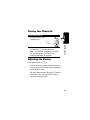
1
START HERE >
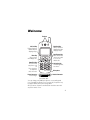
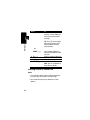
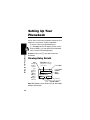
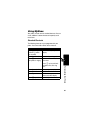
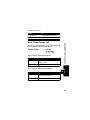
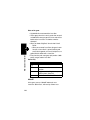
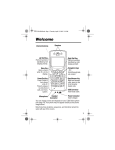
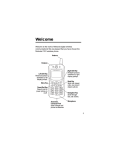
Welcome
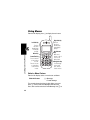
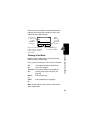
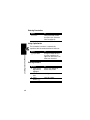
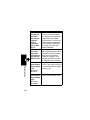
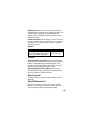
Earpiece
Left Soft Key
Perform functions
identified by left
display prompt.
Right Soft Key
Perform functions
identified by right
display prompt.
Menu Key
Open a menu
when G appears.
Send/Answer Key
Make and answer
calls; press in idle
to see recent
dialed calls.
Power/End Key
Press & hold to
turn phone on &
off.
Press & release
to end phone
calls, exit menu.
Power Connector
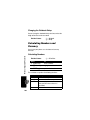
Insert charger.
Navigation Key
Scroll through lists,
set volume.
Microphone
Headset Connector
USB Connector
Insert data cable.
You can change your C330 Series phone’s covers and keypads
(see “Changing Your Phone’s Cover” on page 18). Your phone may
not appear exactly as the phone image above.
All key locations, sequences and functions remain the same with
any of the various covers.
1
Personal Communications Sector
600 North U.S. Highway 45
Libertyville, Illinois 60048
1-800-331-6456 (United States)
1-888-390-6456 (TTY/TDD United States)
1-800-461-4575 (Canada)
www.motorola.com (United States)
www.motorola.ca (Canada)
MOTOROLA and the Stylized M Logo are registered in the US Patent &
Trademark Office. All other product or service names are the property of
their respective owners. TrueSync, Sidekick, Starfish and the Stylized
Starfish Logo are registered trademarks of Starfish Software, Inc., a
wholly owned independent subsidiary of Motorola, Inc.
© Motorola, Inc. 2002.
Software Copyright Notice
The Motorola products described in this manual may include copyrighted
Motorola and third party software stored in semiconductor memories or
other media. Laws in the United States and other countries preserve for
Motorola and third party software providers certain exclusive rights for
copyrighted software, such as the exclusive rights to distribute or
reproduce the copyrighted software. Accordingly, any copyrighted
software contained in the Motorola products may not be modified,
reverse-engineered, distributed, or reproduced in any manner to the
extent allowed by law. Furthermore, the purchase of the Motorola
products shall not be deemed to grant either directly or by implication,
estoppel, or otherwise, any license under the copyrights, patents, or
patent applications of Motorola or any third party software provider,
except for the normal, non-exclusive, royalty-free license to use that
arises by operation of law in the sale of a product.
Manual number: 6809451A61-A
Cover number: 8988485L61-O
2
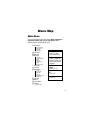
Menu Map
Main Menu
This is the standard main menu layout. Menu organization
and feature names may vary on your phone. Not all
features may be available for all users.
z
Recent Calls
• Received Calls
• Dialed Calls
• Notepad
• Call Times
à Phonebook
g Datebook
U Messages
•
•
•
•
•
•
•
Voicemail
Create Message
Inbox
Outbox
Quick Notes
Drafts
Browser Alerts
s Ring Styles
: Shortcuts
L Web Browser
•
•
•
•
•
•
Home
Go To URL
Mark Site
Reload
About Openwave
Advanced
a Calculator
- Games
v Picture Viewer
/ Settings
Shortcuts
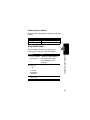
Change display zoom:
Press M, then
press and hold M
Change ringer alert:
Press S down to
switch to silent alert.
Press up to reset to
ring alert.
Display my phone
number:
Press M #
Display dialed calls
list:
Press N
Exit menu system:
Press O
(see next page)
3
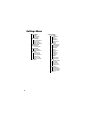
Settings Menu
• Ring Styles
• Style
• Style Detail
• My Tones
• Phone Status
• My Tel. Numbers
• Active Line
• Battery Meter
• Other Information
• Browser Setup
• Connection
• Incoming Call
• In-Call Setup
• In-Call Timer
• Answer Options
• Security
• Phone Lock
• Lock Keypad
• Lock Application
• Talk Secure
• Restrict Calls
• New Passwords
• Location
4
• Other Settings
• Personalize
• Main Menu
• Keys
• Greeting
• Wallpaper
• Screen Saver
• Banner
• Initial Setup
• Time and Date
• Auto PIN Dial
• Auto Redial
• Backlight
• Zoom
• TTY Setup
• Scroll
• Animation
• Language
• Contrast
• DTMF
• Master Reset
• Master Clear
• Network
• Current Network
• Set Mode
• Srvc Status
• Service Tone
• Call Drop Tone
• Car Settings
• Auto Answer
• Auto Handsfree
• Power-Off Delay
• Charger Time
• Headset
Contents
Menu Map . . . . . . . . . . . . . . . . . . . . . . . . . . . . . . . . . . . . . 3
Getting Started . . . . . . . . . . . . . . . . . . . . . . . . . . . . . . . . 15
What’s in the Box?. . . . . . . . . . . . . . . . . . . . . . . . . . . . . 15
About this Guide . . . . . . . . . . . . . . . . . . . . . . . . . . . . . . 15
Installing the Battery . . . . . . . . . . . . . . . . . . . . . . . . . . . 15
Charging the Battery . . . . . . . . . . . . . . . . . . . . . . . . . . . 16
Battery Use . . . . . . . . . . . . . . . . . . . . . . . . . . . . . . . . . . 17
Changing Your Phone’s Cover. . . . . . . . . . . . . . . . . . . . 18
Turning Your Phone On . . . . . . . . . . . . . . . . . . . . . . . . . 21
Adjusting the Volume. . . . . . . . . . . . . . . . . . . . . . . . . . . 21
Making a Call. . . . . . . . . . . . . . . . . . . . . . . . . . . . . . . . . 22
Answering a Call . . . . . . . . . . . . . . . . . . . . . . . . . . . . . . 22
Viewing Your Phone Number . . . . . . . . . . . . . . . . . . . . 22
Learning to Use Your Phone . . . . . . . . . . . . . . . . . . . . . 23
Using the Display . . . . . . . . . . . . . . . . . . . . . . . . . . . . . 23
Using the 4-Way Navigation Key . . . . . . . . . . . . . . . . . . 25
Using Menus . . . . . . . . . . . . . . . . . . . . . . . . . . . . . . . . . 26
Entering Text . . . . . . . . . . . . . . . . . . . . . . . . . . . . . . . . . 28
Locking and Unlocking Your Phone. . . . . . . . . . . . . . . . 36
Changing a Code or Password . . . . . . . . . . . . . . . . . . . 38
If You Forget a Code or Password. . . . . . . . . . . . . . . . . 38
Locking and Unlocking the Keypad . . . . . . . . . . . . . . . . 39
Setting Up Your Phone . . . . . . . . . . . . . . . . . . . . . . . . . . 40
Storing Your Name and Phone Number . . . . . . . . . . . . 40
Setting the Time and Date. . . . . . . . . . . . . . . . . . . . . . . 40
Setting a Ring Style. . . . . . . . . . . . . . . . . . . . . . . . . . . . 40
Setting Answer Options. . . . . . . . . . . . . . . . . . . . . . . . . 41
Setting a Wallpaper Image . . . . . . . . . . . . . . . . . . . . . . 41
5
Setting a Screen Saver Image . . . . . . . . . . . . . . . . . . . . 42
Zooming In and Out . . . . . . . . . . . . . . . . . . . . . . . . . . . . 43
Setting Display Contrast . . . . . . . . . . . . . . . . . . . . . . . . . 43
Adjusting the Backlight . . . . . . . . . . . . . . . . . . . . . . . . . . 43
Calling Features . . . . . . . . . . . . . . . . . . . . . . . . . . . . . . . . 44
Changing the Active Line . . . . . . . . . . . . . . . . . . . . . . . . 44
Redialing a Number . . . . . . . . . . . . . . . . . . . . . . . . . . . . 44
Using Automatic Redial. . . . . . . . . . . . . . . . . . . . . . . . . . 44
Using Caller ID . . . . . . . . . . . . . . . . . . . . . . . . . . . . . . . . 45
Canceling an Incoming Call . . . . . . . . . . . . . . . . . . . . . . 45
Turning Off a Call Alert . . . . . . . . . . . . . . . . . . . . . . . . . . 46
Calling an Emergency Number . . . . . . . . . . . . . . . . . . . . 46
Viewing Recent Calls . . . . . . . . . . . . . . . . . . . . . . . . . . . 46
Returning an Unanswered Call . . . . . . . . . . . . . . . . . . . . 48
Using the Notepad . . . . . . . . . . . . . . . . . . . . . . . . . . . . . 49
Attaching a Number . . . . . . . . . . . . . . . . . . . . . . . . . . . . 50
Calling With Speed Dial . . . . . . . . . . . . . . . . . . . . . . . . . 50
Calling With One-Touch Dial . . . . . . . . . . . . . . . . . . . . . . 50
Using Voicemail . . . . . . . . . . . . . . . . . . . . . . . . . . . . . . . 51
Muting the Phone . . . . . . . . . . . . . . . . . . . . . . . . . . . . . . 52
Using Call Waiting. . . . . . . . . . . . . . . . . . . . . . . . . . . . . . 53
Messages . . . . . . . . . . . . . . . . . . . . . . . . . . . . . . . . . . . . . 54
Setting Up the Text Message Inbox . . . . . . . . . . . . . . . . 54
Sending Messages, Pictures, and Sounds . . . . . . . . . . . 54
Sending a Quick Note Text Message . . . . . . . . . . . . . . . 58
Viewing the Status of Sent Text Messages . . . . . . . . . . . 59
Receiving Messages, Pictures, and Sounds. . . . . . . . . . 59
Reading, Locking, or Deleting a Text Message. . . . . . . . 61
Reading Browser Alerts . . . . . . . . . . . . . . . . . . . . . . . . . 64
Reading Information Service Messages . . . . . . . . . . . . . 64
Setting Up Your Phonebook . . . . . . . . . . . . . . . . . . . . . . 68
Viewing Entry Details . . . . . . . . . . . . . . . . . . . . . . . . . . . 68
6
Creating a Phonebook Entry . . . . . . . . . . . . . . . . . . . . .
Storing a PIN Code With a Phone Number. . . . . . . . . .
Recording a Voice Name For a Phonebook Entry. . . . .
Dialing a Phonebook Entry . . . . . . . . . . . . . . . . . . . . . .
Editing a Phonebook Entry . . . . . . . . . . . . . . . . . . . . . .
Deleting a Phonebook Entry . . . . . . . . . . . . . . . . . . . . .
Sorting Phonebook Entries . . . . . . . . . . . . . . . . . . . . . .
Personalizing Your Phone . . . . . . . . . . . . . . . . . . . . . . .
Personalizing a Ring Style. . . . . . . . . . . . . . . . . . . . . . .
Activating Ringer IDs. . . . . . . . . . . . . . . . . . . . . . . . . . .
Setting Ringer or Keypad Volume . . . . . . . . . . . . . . . . .
Setting Reminders. . . . . . . . . . . . . . . . . . . . . . . . . . . . .
Creating Alert Tones . . . . . . . . . . . . . . . . . . . . . . . . . . .
Personalizing Display Text. . . . . . . . . . . . . . . . . . . . . . .
Personalizing the Menu . . . . . . . . . . . . . . . . . . . . . . . . .
Personalizing Soft Keys. . . . . . . . . . . . . . . . . . . . . . . . .
Setting the Menu Language . . . . . . . . . . . . . . . . . . . . .
Setting Menu Scroll Behavior . . . . . . . . . . . . . . . . . . . .
Setting Menu Animation . . . . . . . . . . . . . . . . . . . . . . . .
Resetting All Options. . . . . . . . . . . . . . . . . . . . . . . . . . .
Clearing All Information. . . . . . . . . . . . . . . . . . . . . . . . .
Using MyMenu . . . . . . . . . . . . . . . . . . . . . . . . . . . . . . .
Getting More Out of Your Phone . . . . . . . . . . . . . . . . . .
Making a Three-Way Call . . . . . . . . . . . . . . . . . . . . . . .
Restricting Calls . . . . . . . . . . . . . . . . . . . . . . . . . . . . . .
Using TTY Mode . . . . . . . . . . . . . . . . . . . . . . . . . . . . . .
Setting Auto PIN Dial. . . . . . . . . . . . . . . . . . . . . . . . . . .
Using DTMF Tones . . . . . . . . . . . . . . . . . . . . . . . . . . . .
Monitoring Phone Use. . . . . . . . . . . . . . . . . . . . . . . . . .
Using Hands-Free Features . . . . . . . . . . . . . . . . . . . . .
Making Data and Fax Calls . . . . . . . . . . . . . . . . . . . . . .
Adjusting Network Settings . . . . . . . . . . . . . . . . . . . . . .
69
70
72
73
74
74
74
76
76
76
77
77
77
79
79
80
81
81
81
82
82
83
86
86
86
87
90
90
91
94
96
99
7
Monitoring Battery Charge . . . . . . . . . . . . . . . . . . . . . . 102
Viewing Phone Specifications. . . . . . . . . . . . . . . . . . . . 102
Personal Organizer Features. . . . . . . . . . . . . . . . . . . . . 103
Using the Datebook . . . . . . . . . . . . . . . . . . . . . . . . . . . 103
Calculating Numbers and Currency . . . . . . . . . . . . . . . 108
Security . . . . . . . . . . . . . . . . . . . . . . . . . . . . . . . . . . . . . . 110
Locking and Unlocking Applications . . . . . . . . . . . . . . . 110
News and Entertainment . . . . . . . . . . . . . . . . . . . . . . . . 111
Using the Micro-Browser. . . . . . . . . . . . . . . . . . . . . . . . 111
Playing Games . . . . . . . . . . . . . . . . . . . . . . . . . . . . . . . 114
Picture Viewer. . . . . . . . . . . . . . . . . . . . . . . . . . . . . . . . 119
Creating Alert Tones . . . . . . . . . . . . . . . . . . . . . . . . . . . 120
Radio. . . . . . . . . . . . . . . . . . . . . . . . . . . . . . . . . . . . . . . 122
Troubleshooting . . . . . . . . . . . . . . . . . . . . . . . . . . . . . . . 125
Specific Absorption Rate Data . . . . . . . . . . . . . . . . . . . 133
Additional Health and Safety Information . . . . . . . . . . 135
Warranty . . . . . . . . . . . . . . . . . . . . . . . . . . . . . . . . . . . . . 143
Product Registration . . . . . . . . . . . . . . . . . . . . . . . . . . . 148
Export Law Assurances. . . . . . . . . . . . . . . . . . . . . . . . . 148
RF Energy Interference . . . . . . . . . . . . . . . . . . . . . . . . . 148
Index . . . . . . . . . . . . . . . . . . . . . . . . . . . . . . . . . . . . . . . . 149
Wireless Phone Safety Tips. . . . . . . . . . . . . . . . . . . . . . 159
8
Safety and General Information
IMPORTANT INFORMATION ON SAFE AND EFFICIENT OPERATION.
READ THIS INFORMATION BEFORE USING YOUR PHONE.
The information provided in this document supersedes the general safety
information in user guides published prior to December 1, 2002.
Exposure To Radio Frequency (RF) Energy
Your phone contains a transmitter and a receiver. When it is ON, it
receives and transmits RF energy. When you communicate with your
phone, the system handling your call controls the power level at which
your phone transmits.
Your Motorola phone is designed to comply with local regulatory
requirements in your country concerning exposure of human beings to RF
energy.
Operational Precautions
To assure optimal phone performance and make sure human exposure to
RF energy is within the guidelines set forth in the relevant standards,
always adhere to the following procedures.
External Antenna Care
Use only the supplied or Motorola-approved replacement antenna.
Unauthorized antennas, modifications, or attachments could damage the
phone.
Do NOT hold the external antenna when the phone is IN USE. Holding
the external antenna affects call quality and may cause the phone to
operate at a higher power level than needed. In addition, use of
unauthorized antennas may result in non-compliance with the local
regulatory requirements in your country.
9
Phone Operation
When placing or receiving a phone call, hold your phone as you would a
wireline telephone.
Body-Worn Operation
To maintain compliance with RF energy exposure guidelines, if you wear a
phone on your body when transmitting, always place the phone in a
Motorola-supplied or approved clip, holder, holster, case, or body harness
for this phone, where available. Use of accessories not approved by
Motorola may exceed RF energy exposure guidelines. If you do not use
one of the body-worn accessories approved or supplied by Motorola, and
are not using the phone held in the normal use position, ensure the phone
and its antenna are at least 1 inch (2.5 centimeters) from your body when
transmitting.
Data Operation
When using any data feature of the phone, with or without an accessory
cable, position the phone and its antenna at least 1 inch (2.5 centimeters)
from your body.
Approved Accessories
Use of accessories not approved by Motorola, including but not limited to
batteries and antenna, may cause your phone to exceed RF energy
exposure guidelines. For a list of approved Motorola accessories, visit our
website at www.Motorola.com.
RF Energy Interference/Compatibility
Note: Nearly every electronic device is susceptible to RF energy
interference from external sources if inadequately shielded, designed, or
otherwise configured for RF energy compatibility. In some circumstances
your phone may cause interference.
Facilities
Turn off your phone in any facility where posted notices instruct you to do
so. These facilities may include hospitals or health care facilities that may
be using equipment that is sensitive to external RF energy.
10
Aircraft
When instructed to do so, turn off your phone when on board an aircraft.
Any use of a phone must be in accordance with applicable regulations per
airline crew instructions.
Medical Devices
Pacemakers
Pacemaker manufacturers recommend that a minimum separation of
6 inches (15 centimeters) be maintained between a handheld wireless
phone and a pacemaker.
Persons with pacemakers should:
• ALWAYS keep the phone more than 6 inches (15 centimeters) from
your pacemaker when the phone is turned ON.
• NOT carry the phone in the breast pocket.
• Use the ear opposite the pacemaker to minimize the potential for
interference.
• Turn OFF the phone immediately if you have any reason to suspect
that interference is taking place.
Hearing Aids
Some digital wireless phones may interfere with some hearing aids. In the
event of such interference, you may want to consult your hearing aid
manufacturer to discuss alternatives.
Other Medical Devices
If you use any other personal medical device, consult the manufacturer of
your device to determine if it is adequately shielded from RF energy. Your
physician may be able to assist you in obtaining this information.
Use While Driving
Check the laws and regulations on the use of phones in the area where
you drive. Always obey them.
11
When using your phone while driving, please:
• Give full attention to driving and to the road.
• Use hands-free operation, if available.
• Pull off the road and park before making or answering a call if driving
conditions so require.
Responsible driving best practices may be found in the “Wireless Phone
Safety Tips” at the end of this manual and at the Motorola website:
www.Motorola.com/callsmart.
Operational Warnings
For Vehicles With an Air Bag
Do not place a phone in the area over an air bag or in the air bag
deployment area. Air bags inflate with great force. If a phone is placed in
the air bag deployment area and the air bag inflates, the phone may be
propelled with great force and cause serious injury to occupants of the
vehicle.
Potentially Explosive Atmospheres
Turn off your phone prior to entering any area with a potentially explosive
atmosphere, unless it is a phone type especially qualified for use in such
areas and certified as “Intrinsically Safe.” Do not remove, install, or
charge batteries in such areas. Sparks in a potentially explosive
atmosphere can cause an explosion or fire resulting in bodily injury or
even death.
Note: The areas with potentially explosive atmospheres referred to above
include fueling areas such as below decks on boats, fuel or chemical
transfer or storage facilities, areas where the air contains chemicals or
particles, such as grain, dust, or metal powders. Areas with potentially
explosive atmospheres are often but not always posted.
12
Blasting Caps and Areas
To avoid possible interference with blasting operations, turn OFF your
phone when you are near electrical blasting caps, in a blasting area, or in
areas posted “Turn off electronic devices.” Obey all signs and instructions.
Batteries
Batteries can cause property damage and/or bodily injury such as burns if
a conductive material such as jewelry, keys, or beaded chains touch
exposed terminals. The conductive material may complete an electrical
circuit (short circuit) and become quite hot. Exercise care in handling any
charged battery, particularly when placing it inside a pocket, purse, or
other container with metal objects. Use only Motorola original batteries
and chargers.
Your battery or phone may contain symbols, defined as follows:
Symbol
LiIon BATT
Definition
Important safety information will follow.
Your battery or phone should not be disposed of in a
fire.
Your battery or phone may require recycling in
accordance with local laws. Contact your local
regulatory authorities for more information.
Your battery or phone should not be thrown in the
trash.
Your phone contains an internal lithium ion battery.
Seizures/Blackouts
Some people may be susceptible to epileptic seizures or blackouts when
exposed to blinking lights, such as when watching television or playing
video games. These seizures or blackouts may occur even if a person
never had a previous seizure or blackout.
13
If you have experienced seizures or blackouts, or if you have a family
history of such occurrences, please consult with your doctor before
playing video games on your phone or enabling a blinking-lights feature
on your phone. (The blinking-light feature is not available on all products.)
Parents should monitor their children's use of video game or other
features that incorporate blinking lights on the phones. All persons should
discontinue use and consult a doctor if any of the following symptoms
occur: convulsion, eye or muscle twitching, loss of awareness, involuntary
movements, or disorientation.
To limit the likelihood of such symptoms, please take the following safety
precautions:
• Do not play or use a blinking-lights feature if you are tired or need
sleep.
• Take a minimum of a 15-minute break hourly.
• Play in a room in which all lights are on.
• Play at the farthest distance possible from the screen.
Repetitive Motion Injuries
When you play games on your phone, you may experience occasional
discomfort in your hands, arms, shoulders, neck, or other parts of your
body. Follow these instructions to avoid problems such as tendonitis,
carpal tunnel syndrome, or other musculoskeletal disorders:
• Take a minimum 15-minute break every hour of game playing.
• If your hands, wrists, or arms become tired or sore while playing,
stop and rest for several hours before playing again.
• If you continue to have sore hands, wrists, or arms during or after
play, stop playing and see a doctor.
14
Getting Started
What’s in the Box?
To purchase Motorola Original™ accessories, call the
Motorola Customer Call Center at 1-800-331-6456 in the
United States or 1-800-461-4575 in Canada.
About this Guide
Getting Started
Your wireless phone typically comes with a battery and
a charger. Optional accessories can customize your phone
for maximum performance and portability.
Optional Features
This label identifies an optional network or
subscription-dependent feature that may not be
offered by all service providers in all
geographical areas. Contact your service
provider for more information.
Optional Accessories
This label identifies a feature that requires an
optional Motorola Original™ accessory.
Installing the Battery
Install and charge the battery before you use your phone.
15
Getting Started
Your phone is designed to be used only with
Motorola Original batteries and accessories. We
recommend that you store batteries in their
protective cases when not in use.
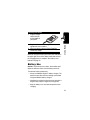
To Install the Battery
1 Remove the phone’s back cover as described in
“Changing Your Phone’s Cover” on page 18.
2 Remove the battery from its protective clear
plastic case.
3 Insert the battery,
printed arrow first,
under the tabs at
the bottom of the
battery
compartment and
push down.
4 Replace the phone’s cover.
Charging the Battery
Before you can use your phone, fully charge the battery as
follows. Some batteries perform best after several full
charge/discharge cycles.
16
To Charge the Battery
1 Plug the charger
into the left jack
on the bottom of
your phone.
When you charge the battery, the battery level indicator in
the upper right corner of the display shows how much of
the charging process is complete. See “Battery Level
Indicator” on page 23.
Getting Started
2 Plug the other end of the charger into the
appropriate electrical outlet.
3 When your phone indicates Charge Complete,
remove the charger.
Battery Use
Caution: To prevent injuries or burns, do not allow metal
objects to contact or short-circuit the battery terminals.
To maximize battery performance:
• Always use Motorola Original™ battery chargers. The
phone warranty does not cover damage caused from
using non-Motorola battery chargers.
• New batteries or batteries that have been stored for a
long time may require a longer initial charge time.
• Keep the battery at or near room temperature when
charging.
17
• Do not expose batteries to temperatures below -10° C
(14° F) or above 45° C (113° F). Always take your
phone with you when you leave your vehicle.
Getting Started
• When you do not intend to use a battery for a
while, store it uncharged in a cool, dark, dry place,
such as a refrigerator.
• Over time, batteries gradually wear down and require
longer charging times. This is normal. If you charge
your battery regularly and notice a decrease in talk
time or an increase in charging time, then it is
probably time to buy a new battery.
The rechargeable batteries that power this
product must be disposed of properly and may
need to be recycled. Refer to your battery’s label
for battery type. Contact your local recycling center for
proper disposal methods. Never dispose of batteries in a
fire because they may explode.
Changing Your Phone’s Cover
Note: Since you can change your C330 Series phone’s
covers and keypads, it may not appear exactly as the
phone pictured. All key locations, sequences, and
functions remain the same with any of the covers.
18
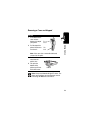
Removing a Cover and Keypad
Release
button
2 Pull the top of the
phone’s back cover
to release it.
Side
band
Note: If the cover has a removable side band,
remove it at this point.
3 Pull the side tabs
away from the
phone, then
4 Lift up on the
bottom of the
phone to pull it out
of the front cover.
Getting Started
Do This
1 Press down on the
cover release
button at the top of
your phone.
Side tabs
Note: Always use Motorola Original™ covers. The
phone warranty does not cover damage caused
from using non-Motorola accessories.
19
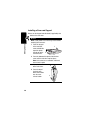
Installing a Cover and Keypad
Always use the keypad and side band (if applicable) that
matches the new cover.
Getting Started
Do This
Note: If your phone has an end cap, install it before
attaching the front cover.
1 Place the keypad
in the new front
cover and slide the
top of the phone
into the top of the
new front cover.
1
2
2 Press the bottom of the phone into the front
cover until the side tabs snap into place.
Note: If the cover has a removable side band,
attach it at this point.
3 Insert the bottom
4
of the back cover.
4 Press the top of
the back cover
down until it hooks
over the cover
release button.
20
3
Turning Your Phone On
To Turn Your Phone On
1 Press and hold O (the
End/Power key)
End/
Power Key
Note: The unlock code is originally set to 1234.
(For more information, see “Locking and
Unlocking Your Phone” on page 36.)
Getting Started
2 If necessary, enter your four-digit unlock code
and press OK (+) to unlock your phone
Adjusting the Volume
Press right and left on the S to:
• increase or decrease earpiece volume during a call
• increase or decrease the ringer volume setting when
the idle display is visible
Tip: At the lowest volume setting, press S down to
activate silent alert. Press up to reset ring alert.
• Turn off an incoming call alert
21
Making a Call
Do not block the antenna while you are on a call.
Getting Started
Press
1 keypad keys
2 N
3 O
To
dial the phone number
Tip: If you make a mistake,
press DELETE (-) to delete
the last digit. Holding
DELETE (-) clears all digits.
make the call
end the call and “hang up” the
phone when you are finished
Answering a Call
When you receive a call, your phone rings and/or vibrates
and displays an incoming call message.
Press
1 N or
ANSWER (+)
2 O
To
answer the call
end the call and “hang up” the
phone when you are finished
Note: If the phone is locked, unlock it to answer the call.
Viewing Your Phone Number
Press M # to view your number from idle. While you are
on a call, press M > My Tel. Numbers.
22
Learning to Use Your
Phone
See page 1 for a basic phone diagram.
Using the Display
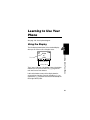
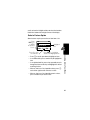
The idle display (shown below) is the standard display
when you are not on a call or using the menu.
5
Y
ã9
12:00pm
1/1/04
PH.BOOK G MESSAGE
Menu Indicator
Soft Key Labels
The G (menu) indicator at the bottom center of the display
indicates you can press the menu key (M) to go to the
main menu to see more features.
Labels at the bottom corners of the display show the
current soft key functions. Press the left soft key (-) or
right soft key (+) to perform the function indicated by the
left or right soft key label.
Learning to Use Your Phone
E
Clock
23
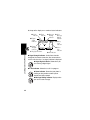
At the top of the display are a number of status indicators:
➌ In Use
Indicator
➋ Digital
Signal
Indicator
➊ Signal
Strength
Indicator
➍ Roam
Indicator
5 U; gf ã9
Y
J
12:00pm
E
PH.BOOK G
➓ Ring Style Indicator
Learning to Use Your Phone
➎ Message ➏ Voice
Waiting
Message
Indicator
Waiting
Indicator
➐ Battery
Level
Indicator
➑ Active
Line
Indicator
➒ ALI Indicator
MESSAGE
➊ Signal Strength Indicator Vertical bars show the
strength of the network connection. You cannot make or
receive calls when the 0 (no signal) indicator is displayed.
➋ Digital Signal Indicator Shows when you
are receiving a digital signal.
➌ In Use Indicator Shows that a call is in progress.
➍ Roam Indicator Shows that your phone is
seeking or using another network system
outside your home network.
➎ Message Waiting Indicator Displays when
you receive a text message.
24
➏ Voice Message Waiting Indicator Appears
when you receive a voicemail message.
➒ ALI Indicator Shows the status of the automatic
location information feature:
ä = ALI on
ã = ALI off
➐ Battery Level Indicator Vertical bars show the
battery charge level. Recharge the battery when you
see Low Battery and hear the low battery alert.
➑ Active Line Indicator Shows the current
active phone line.
Y = loud
W = vibrate
a = silent
X = soft
Z = vibrate and ring
Using the 4-Way
Navigation Key
Use the 4-way navigation key
like a joystick to navigate the
menu system, change feature
settings, and play games.
Learning to Use Your Phone
➓ Ring Style Indicator Shows the ring style setting.
4-way
navigation
key
Tip: Down and up are the primary movements within
menus. Move left and right to change feature settings,
navigate the datebook, and edit text.
25
Using Menus
From the idle display, press M to display the main menu.
Right Soft Key
Perform
functions
identified by
right display
prompt.
Send/Answer
Key
Make and
answer calls &
view recent
dialed calls.
Navigation Key
Scroll through
menus and
lists, and set
feature values.
Left Soft Key
Perform
functions
identified by
left display
prompt.
Learning to Use Your Phone
Menu Key
Power/End Key
Press & hold to
power phone
on & off.
Press & release
to end phone
calls and exit
menus.
Select a Menu Feature
From the idle display, select a menu feature as follows:
Find the Feature
M > Messages
> Create Message
This example shows that from the idle display, you must
press M, scroll to and select Messages from the main
menu, then scroll to and select Create Message. Use S to
26
scroll, and use the left/right soft keys to select the functions
listed in the bottom left and right corners of the display.
Select a Feature Option
Some features require you to select an item from a list:
Press
BACK (-)
to display
the previous
screen.
5
9
Dialed Calls
10)John Smith
9)Mary Smith
G VIEW
BACK
Press M to open
the sub-menu.
Highlighted
item
Press VIEW (+) to display
details for the highlighted item
• In a numbered list, press a number key to highlight the
item.
• In an alphabetized list, press a key repeatedly to cycle
through the letters on the key and highlight the closest
matching list item.
• When an item has a list of possible values, press S
to the left or right to scroll and select a value.
• When an item has a list of possible numeric values,
press a number key to set the value.
Learning to Use Your Phone
• Press S to scroll up or down to highlight an item.
27
Entering Text
Some features require you to enter information:
5
Press S to
scroll down.
9
Entry Details
Name:_____________
No.:_______________
CANCEL G
CHANGE
Learning to Use Your Phone
Press CANCEL (-) to exit
without making changes.
DONE (-) displays when
you enter or edit information.
28
Highlighted
item
Press
CHANGE (+)
to edit the
information.
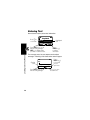
The message center lets you compose and send text
messages. A flashing cursor shows where text will appear:
5
Flashing
cursor
9
Msg:
CANCEL
G
Press CANCEL (-) to exit
without making changes.
INSERT
Press
INSERT (+)
to view and
insert a
quick note.
Press M to open
the sub-menu.
When you enter text using the standard tap method (see
page 30), the flashing cursor changes to a block cursor,
and the soft key functions change:
Block cursor
indicates
current
highlighted
character.
5
9
Msg:
T
DELETE
G
After 2 seconds, the block
cursor reverts to a flashing
cursor and moves to the
next position.
OK
Press
OK (+)
to accept
and store
the text.
Press DELETE (-)
to clear the last letter.
Multiple text entry modes make it easy for you to enter
names, numbers, and messages.
Press M from any text entry screen to select a text mode:
iTAP
(é)
Let the phone predict each word as you
enter it (see page 31).
Tap Method Enter letters, numbers, and symbols by
(t)
pressing a key one or more times (see
page 30).
Numeric
Learning to Use Your Phone
Choosing a Text Mode
Enter numbers only.
(è)
Symbol
Enter symbols only (see page 35).
(ê)
Note: The text mode you select remains active until you
select another mode.
29
Using Tap Method
This is the standard mode for entering text on your phone.
Press M from a text entry screen and select Tap Method.
Press
1 A number key 1
or more times
2 Number keys
Learning to Use Your Phone
3 OK (+)
To
select a letter, number, or
symbol shown in the
“Character Chart” on page 31
enter the remaining
characters
store the text
Tap Method Text Entry Rules
• Press a number key repeatedly to cycle through its
characters. See “Character Chart” on page 31.
• If you do not press a key for 2 seconds, the character
in the block cursor is accepted, and the cursor moves
to the next position.
• Press S left or right to move the flashing cursor to
the left or right in a text message.
• The first character of every sentence is capitalized.
Press S down to force the character to lowercase
while it is highlighted by the block cursor.
• Your phone may support multiple languages. The
current language setting determines whether a new
message begins on the left or right side of the display.
You can switch languages within a message. Press M
to select the text mode and language you want to use.
30
• If you enter or edit information and do not want to save
your changes, press O to exit without saving.
• Press and hold a number key to cycle between tap
method and numeric text entry mode.
Character Chart
Use this chart as a guide for entering characters with the
tap method.
1
space . 1 ? ! , @ _ & ~ : ; " ( ) ' ¿ ¡ % £ $ ¥
2
a b c 2 ä å á à â ã
3
6
d e f 3 δ ë é è ê ε φ
g h i 4 ï í î γ η ι
j k l 5 κ λ
m n o 6 ñ ö ø ó ò ô õ µ υ ω
7
p q r s 7 π ß σ
8
t u v 8 θ ü ú ù û τ
9
w x y z 9 ξ ψ
+ - 0 x * / \ [ ] = > < # §
5
0
Note: This chart may not reflect the exact character set
available on your phone.
Learning to Use Your Phone
4
α β ç
Using iTAP™ Software Text Entry Method
iTAP™ software is a predictive text entry method that lets
you enter a word using one keypress per letter.
Press M from any text entry screen and select iTAP.
31
Note: You can switch languages within a message in iTAP
text mode. Press M to select the language.
Entering Words
Do This
1 Press a number
key one time
Learning to Use Your Phone
2 Press number
keys (one per
letter)
32
To
enter the first letter of the
word
The letters associated with
the key are shown at the
bottom of the display.
enter the rest of the word
3 Press S
Alternative words and letter
combinations are shown at
the bottom of the display. The
word choices are updated
with each keypress.
highlight the word you want
4 Press
SELECT (+)
enter the word at the flashing
cursor
A space is automatically
inserted after the word.
For example, to spell the word “art,” press 2 7 8.
The display shows:
Flashing
cursor
indicates
insertion
point.
5
9
Press S to
see additional
word choices.
Art Apt Cpu Cst Cru c
DELETE G SELECT
Press DELETE (-)
to clear the last letter.
Press SELECT (+) to
insert the highlighted word.
Entering Novel Words
If the word you want is not displayed by the iTAP software:
To
delete letters until you
see a letter combination
that matches the start of
the word
highlight
the letter or
2 Press S left or right
letter combination
3 Press SELECT (+),
shift the cursor to the left
then press S to the and “lock” the selected
word portion
left
4 Continue to enter
letters and highlight
letter combinations
Learning to Use Your Phone
Do This
1 Press DELETE (-)
one or more times
spell the word
33
Entering Punctuation
Press
0 or 1
To
enter punctuation or other
characters (see “Character
Chart” on page 31).
Using Capitalization
The first word of a sentence is automatically
capitalized, with the words that follow in lowercase.
Learning to Use Your Phone
Press
S up or down
34
To
change the words to initial
character capitalized, all
uppercase characters, or all
lowercase characters
Entering Numbers
Do This
1 Enter the first
digit and then
highlight it
2 Press number
keys
3 Press
SELECT (+)
To
put the iTAP software in
number entry mode
add digits to the number
enter the number
Deleting Letters and Words
Place the cursor to the right of the text you want to delete,
and then:
Do This
Press DELETE (-)
Hold DELETE (-)
To
delete one letter at a time
delete the entire message
Using Symbol Mode
To enter symbol characters in a message, press
Mfrom any text entry screen and select Symbol.
To
display its symbol options at
the bottom of the display
2 Press S
See “Symbol Chart” on
page 36.
highlight the symbol you want
or
Press the
number key
repeatedly
3 Press
SELECT (+)
Learning to Use Your Phone
Do This
1 Press a number
key one time
enter the symbol
35
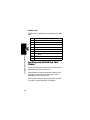
Symbol Chart
Use this chart as a guide for entering characters in symbol
mode.
1 space . ? ! , @ _ & ~ : ; " - ( ) ' ¿ ¡ % £ $ ¥
2 @_\
3 /:;
4 "&'
5 ()[]{}
6 ¿¡~
7 <>=
Learning to Use Your Phone
8 $£¥
9 #%*
0 +-x*/=><#§
Locking and Unlocking Your
Phone
You can lock your phone manually or set the phone to lock
automatically whenever you turn it off.
A locked phone still rings or vibrates for incoming calls or
messages, but you must unlock it to answer. To use a
locked phone, enter the unlock code.
You can make emergency calls on your phone even when
it is locked. For more information, see page 46.
36
Lock Your Phone Manually
M > Settings > Security
Find the Feature
> Phone Lock
> Lock Now
Press
1 keypad keys
2 OK (+)
To
enter your unlock code
lock the phone
Unlock Your Phone
At the Enter Unlock Code prompt:
Press
1 keypad keys
2 OK (+)
To
enter your unlock code
unlock your phone
Set Your Phone to Lock Automatically
You can set your phone to lock every time you turn it off.
Find the Feature
Learning to Use Your Phone
Tip: Your phone’s unlock code is set to 1234 at the
factory. Many service providers reset the unlock code to
the last four digits of your phone number.
M > Settings > Security
> Phone Lock
> Automatic Lock > On
Press
1 keypad keys
2 OK (+)
To
enter your unlock code
activate automatic lock
37
Changing a Code or Password
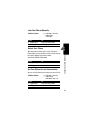
Your phone’s four-digit unlock code is set to 1234, and the
six-digit security code is set to 000000 at the factory. Your
service provider may reset these numbers before you
receive your phone.
If your service provider has not reset these numbers, we
recommend that you change them to prevent others from
accessing your personal information. The unlock code
must contain four digits, and the security code must
contain six digits.
To change a code or password:
Learning to Use Your Phone
Find the Feature
> New Passwords
If You Forget a Code or
Password
If you forget your security code, contact your service
provider.
If you forget your unlock code, try entering 1234 or the last
four digits of your phone number. If that does not work, at
the Enter Unlock Code prompt:
Press
1 M
2 keypad keys
3 OK (+)
38
M > Settings > Security
To
display the unlock code
bypass screen
enter your security code
submit your security code
Locking and Unlocking the
Keypad
You can lock the keypad to prevent accidental keypresses
(for example, when carrying your phone in a purse or
pocket).
Press
M*
To
lock or unlock your keypad
Note: Incoming calls and messages unlock the keypad.
Learning to Use Your Phone
39
Setting Up Your Phone
Storing Your Name and Phone
Number
To store or edit the name and phone number
information on your phone:
Find the Feature
M > Settings
> Phone Status
> My Tel. Numbers
Setting the Time and Date
To use the datebook, you must set the time and date.
Setting Up Your Phone
Find the Feature
> Other Settings
> Initial Setup
> Time and Date
Setting a Ring Style
Your phone rings or vibrates to notify you of an incoming
call or other event. This ring or vibration is called an alert.
You can select one of five different ring styles:
Y= loud
X=soft
W=vibrate
Z=vibrate and ring
aA=silent
40
M > Settings
The ring style indicator in the display shows the current
ring style (see page 24).
To set a ring style:
Find the Feature
M > Ring Styles > Style
Press
1 S
To
scroll to the ring style
2 SELECT (+)
select the ring style
Each ring style contains settings for specific event alerts,
ringer ID, and ringer and keypad volume.
To change these settings:
Find the Feature
M > Ring Styles
> Style Detail
Setting Answer Options
You can use different methods to answer an incoming call.
M > Settings
> In-Call Setup
> Answer Options
The Answer Options menu includes:
Multi-Key
answer by pressing any key
Setting a Wallpaper Image
Setting Up Your Phone
Find the Feature
You can set a picture or an animation as a wallpaper
(background) image in your phone’s idle display.
41
Note: When you set an animation as a wallpaper image,
only the first frame of the animation is displayed.
Find the Feature
M > Settings
> Other Settings
> Personalize
> Wallpaper
Setting
Picture
Layout
Description
select the picture or animation for the
background image in your idle display
select Center or Tile
Setting a Screen Saver Image
Setting Up Your Phone
You can set a picture or an animation as a screen saver
image. The image displays when the phone detects no
activity for a specified time.
The screen saver image fills the display. An animation
repeats for one minute, then the first frame of the
animation displays.
Find the Feature
> Other Settings
> Personalize
> Screen Saver
Setting
Picture
Delay
42
M > Settings
Description
select the picture that appears when
your phone is idle
select how long your phone must be
idle before the screen saver picture
appears
Zooming In and Out
Press and release M, then press and hold M to zoom in
and out on the display. Zoom in to increase text size, zoom
out to display more information.
You can also zoom in and out from the menu:
Find the Feature
M > Settings
> Other Settings
> Initial Setup > Zoom
Setting Display Contrast
Find the Feature
M > Settings
> Other Settings
> Initial Setup
> Contrast
Adjusting the Backlight
Find the Feature
M > Settings
> Other Settings
> Initial Setup
> Backlight
Setting Up Your Phone
You can set the amount of time that the display backlight
remains on, or turn off the backlight to conserve battery
power.
43
Calling Features
For basic instructions on how to make and answer calls,
see page 22.
Changing the Active Line
Calling Features
Change the active phone line to make and
receive calls from your other phone number.
Find the Feature
M > Settings
> Phone Status
> Active Line
The active line indicator in the display shows the current
active phone line (see page 24).
Redialing a Number
If you hear an ordinary busy signal:
Press
1 O
2 N
To
hang up
redial the busy number
Using Automatic Redial
If the network is busy, you hear a fast busy signal, and your
phone displays Call Failed.
44
With automatic redial, your phone automatically redials the
number for four minutes. When the call goes through, your
phone rings or vibrates one time, displays
Redial Successful, and then connects the call.
You must turn on automatic redial to use the feature. To
turn automatic redial on or off:
Find the Feature
M > Settings
> Other Settings
> Initial Setup
> Auto Redial
Press
N or RETRY (+)
To
activate automatic redial
Using Caller ID
Calling Features
When automatic redial is turned off, you can manually
activate the feature to redial a phone number. When you
hear a fast busy signal and see Call Failed:
Calling line identification (caller ID) displays
the phone number for incoming calls.
The phone displays the caller’s name when
the name is stored in your phonebook, or
Incoming Call when caller ID information is not available.
Canceling an Incoming Call
While the phone is ringing or vibrating:
Press
O or IGNORE (-)
To
cancel the incoming call
45
Depending on your phone settings and/or
service subscription, the call may be forwarded
to another number, or the caller may hear a
busy signal.
Turning Off a Call Alert
You can turn off your phone’s incoming call alert before
answering the call.
Calling Features
Press
S up or down
To
turn off the alert
Calling an Emergency Number
Your service provider programs one or more emergency
phone numbers, such as 911, that you can call under any
circumstances, even when your phone is locked.
Note: Emergency numbers vary by country. Your phone’s
preprogrammed emergency number(s) may not work in all
locations, and sometimes an emergency call cannot be
placed due to network, environmental, or interference
issues.
Press
1 keypad keys
2 N
To
dial the emergency number
call the emergency number
Viewing Recent Calls
Your phone keeps a list of the calls you recently received
and dialed, even if the calls did not connect. The lists are
46
sorted from newest to oldest, and contain up to 10 entries.
The oldest entries are deleted as new ones are added.
Shortcut: From the idle display, press N to display the
dialed calls list.
Find the Feature
Press
1 S
2 SELECT (+)
3
S
To
scroll to Received Calls or
Dialed Calls
select the list
scroll to an entry
Note: \ means the call
connected.
call the entry’s number
Tip: Press and hold N for 2
seconds to send the number
as DTMF tones during a call.
or
Calling Features
4 N
M > Recent Calls
view entry details
VIEW (+)
or
M
open the Last Calls menu to
display other options as
described in the following list
47
The Last Calls menu can include the following options:
Option
Store
Delete
Delete All
Send Message
Add Digits
Calling Features
Attach Number
Send Tones
Description
Create a phonebook entry with
the number in the No. field.
Delete the entry.
Delete all entries in the list.
Open a new text message with the
number in the To field.
Add digits after the number.
Attach a number from the
phonebook or recent call lists,
after the highlighted number.
Send the number to the network
as DTMF tones.
This option is only available during
a call.
Returning an Unanswered
Call
Your phone keeps a record of your unanswered calls,
and displays:
• the N (missed call) indicator
48
• X Missed Calls Y Unknown, where X is the total
number of missed calls and Y is the number of missed
calls with no caller ID information
Press
1 VIEW (+)
S
2
3 N
To
see the received calls list
select a call to return
make the call
Using the Notepad
M > Recent Calls
Find the Feature
> Notepad
Press
To
N
call the number
Calling Features
Your phone stores the most recent number entered on the
keypad in a temporary notepad. This can be a phone
number that you called, or a number that you entered but
did not call. To retrieve the number stored in the notepad:
or
M
open the Dialing Menu to
attach a number or insert a
special character
or
STORE (+)
create a phonebook entry
with the number in the No.
field
49
Attaching a Number
While dialing (with digits visible in the display):
Press
To
M > Attach Number attach a number from the
phonebook or recent call lists
Calling With Speed Dial
Calling Features
Each entry you store in your phonebook is assigned a
unique speed dial number. To speed dial a phonebook
entry:
Press
1 keypad keys
2 #
To
enter the speed dial number
for the entry you want to call
submit the number
3 N
Note: Some
networks let you
skip this step for
speed dial
numbers 1 through 99.
call the entry
Calling With One-Touch Dial
To call phonebook entries 1 through 9, just press and hold
the one-digit speed dial number for 1 second.
We recommend that you reserve phonebook entry 1
(speed dial number 1) for storing and dialing your
50
voicemail number. Your service provider may have already
done this for you.
Using Voicemail
You can listen to your voicemail messages by
calling your network voicemail phone number.
Voicemail messages are stored on the
network—not on your phone.
Storing Your Voicemail Number
Find the Feature
Press
1 keypad keys
2 OK (+)
M > Messages
M > VoiceMail Setup
To
enter your voicemail number
store the number
Calling Features
Storing your voicemail number on your phone makes it
easy for you to listen to new voicemail messages. Usually,
your service provider has already done this for you.
Note: You cannot store Pause, Wait, or n characters in
this number. If you want to store your voicemail number
with these characters, create a phonebook entry for it.
Then, you can use the entry to call your voicemail. For
more about these characters, see page 70.
51
Receiving a Voicemail Message
When you receive a voicemail message, your phone
displays the f (voice message waiting) indicator and a
New VoiceMail notification.
Press
CALL (+)
To
listen to the message(s)
Listening to a Voicemail Message
Calling Features
Find the Feature
M > Messages > VoiceMail
The phone calls your voicemail number. If no voicemail
number is stored, your phone prompts you to store one.
Shortcut: If your voicemail number is also stored as
phonebook entry number 1, you can press and hold 1 to
listen to your voicemail message(s).
Turning Off the Voice Message Waiting
Indicator
To clear the f (voice message waiting) indicator:
Find the Feature
M > Messages
M > Clear Count
Muting the Phone
To mute your phone during a call, press MUTE (+) (if
available) or M > Mute.
52
Using Call Waiting
When you are on a call, an alert tone sounds to
indicate that you have received a second call.
Press
1 N
2 N
To
answer the new call
switch back to the first call
Calling Features
53
Messages
Messages
You can send and receive text messages,
pictures, and ring tones with your wireless
phone. Text messages that you receive can
contain ring tones that you can store on your
phone.
Setting Up the Text Message
Inbox
Your message inbox must be set up before you can send
and receive messages.
Note: Your service provider may have already set up the
message inbox for you.
Find the Feature
Setting
Cleanup
M > Messages
M > Inbox Setup
Description
number of days you want to
keep messages in the
inbox, or number of
messages you want to keep
Sending Messages, Pictures,
and Sounds
Note: Your message inbox must be set up before you can
send and receive messages (see page 54).
54
You can send text messages and pictures or sounds to
one or more recipients. You can manually enter each
recipient’s phone number or email address, or select
numbers/addresses from the phonebook or recent calls
lists.
Shortcut: Enter a phone number in the idle display, then
press M > Send Message to create a text message
addressed to the number entered.
Find the Feature
Press
1 keypad keys
Messages
When you manually enter multiple numbers/addresses,
you must insert a space between each entry. Press S to
the right to insert a space.
M > Messages
M > Create Message
To
enter the text message (see
page 28)
To insert a picture, animation,
or sound file in the message,
press:
M > Insert > object type
> object
(see page 56)
2 OK (+)
store the message contents
and open the address editor
55
Press
3 keypad keys
To
enter one or more phone
numbers or email addresses
where you want to send the
message
Messages
Tip: Press S to the right to
add a space between each
number/address that you
enter manually.
or
BROWSE (+)
4 OK (+)
5 DONE (-)
6 SELECT (+)
select numbers/addresses
from the phonebook or recent
calls lists
store the numbers/addresses
finish the message
select Send Message
Note: You can scroll down to
select Save to Drafts
Inserting Picture or Sound Files
Notes:
• The recipient’s phone may be unable to display the
pictures or play the sounds in your message.
• You cannot send pictures or sounds to an email
address.
56
Enter your message as usual. When you want to insert a
picture or sound:
Press
1 M
2
S
3 SELECT (+)
S
5 SELECT (+)
6
S
7 VIEW (+) or
PLAY (+)
8 INSERT (+)
display a list of items you can
insert
scroll to Picture, Animation, or
Sound
select the file type
highlight the file you want
Messages
4
To
open the Message Menu
scroll to Insert
preview the file
insert the file
Inserted pictures and animations appear in the message,
while ring tones are represented by a p (sound file)
indicator.
Note: You cannot send or forward some downloaded
objects (such as those you pay for). These objects do not
appear in the selection lists for attachments.
Viewing or Deleting an Inserted File
To view or delete an image or sound file in a message you
are typing:
Press
1
S
To
place the cursor to the right of
the file type indicator
57
Press
2 S to the left
To
highlight the file type indicator
3 SELECT (+)
view or play the inserted file
oror
Messages
DELETE (-)
delete the inserted file
Sending a Quick Note Text
Message
Quick notes are pre-written text messages that you can
insert into a message and send quickly (for example,
Call me at ...). You can also create new quick notes.
Find the Feature
M > Messages
> Quick Notes
Press
1 S
To
scroll to the quick note
2 READ (+)
or
read the quick note
M
open the Quick Note Menu to
perform other procedures as
described in the following list
The Quick Note Menu can include the following options:
Option
New
Edit
58
Description
Create a new quick note.
Edit the quick note.
Option
Delete
Send
Description
Delete the quick note.
Open a new message with the quick note
in the Msg field.
Text messages that you send are stored in the outbox.
M > Messages > Outbox
Find the Feature
Messages
Viewing the Status of Sent
Text Messages
Messages in the outbox are sorted from newest to oldest.
The following indicators show message status:
< = sending in progress
> = sending failed
h = delivered
Receiving Messages, Pictures,
and Sounds
Note: Your message inbox must be set up before you can
send and receive messages. See page 54.
When you receive a new message, your phone displays
the g (message waiting) indicator and New Message, and
gives an alert.
Press
1 READ (+)
To
open the message (or your
text message inbox if there
are multiple messages)
59
If reminders are turned on, your phone sends a reminder
at regular intervals until you close the new message
notification, read the message, or turn off your phone.
Messages
When your phone displays Memory is Full!, you must
delete some existing messages from your inbox,
outbox, or drafts folder to receive new messages.
Storing Picture or Sound Files
Text messages that you receive can contain pictures,
animations, and ring tones. Pictures and animations are
displayed as you read the message. A ring tone begins
playing when you scroll to or select the p (sound file)
indicator.
You can store these embedded object files on your phone,
and use them as screen saver images, wallpaper images,
and event alerts. While reading the message:
Press
1 S up or down
2 M
3
S
4 SELECT (+)
5
S
6 SELECT (+)
7 STORE (+)
60
To
highlight the file in the
message
open the Text Msg Menu
scroll to Store
display a list of items you can
store
scroll to File Attachment
display the file name
view storage options
Press
8
S
9 SELECT (+)
If you select Set As Ring
Tone, your phone displays
Set As Which?
Messages
To
scroll to Store Only,
Set as Screen Saver,
Set as Wallpaper, or
Set as Ring Tone
store the file and, optionally,
set it as your screen saver,
wallpaper image, or ring tone
Select the event for the ring
tone, and enter a name for
the tone.
Note: When you set an animation as a wallpaper image,
only the first frame of the animation displays.
For more information about using pictures and animations,
see page 119. For more information about using ring
tones, see page 76.
Reading, Locking, or Deleting a
Text Message
Messages in the text message inbox are sorted from
newest to oldest.
Find the Feature
M > Messages > Inbox
61
Press
1 S
To
scroll to the message
(i = unread,
j = read, { = read and
locked)
Messages
The following indicators show
message status:
2 READ (+)
3 BACK (-)
or
REPLY (+)
i unread
n unread (with
attachment)
j read
l read (with attachment)
{ read and locked
o read and locked (with
attachment)
open the message
close the message
open a new message, with
the sender’s Reply To number
or email address in the To
field.
or
M
62
open the Inbox Menu to
perform other procedures as
described in the following list
The Inbox Menu can include the following options:
Option
Delete
Call Back
Forward
Chat
Lock
Store
Delete All
Cleanup
New Message
Setup
Messages
Reply
Description
Delete the message.
Call the number in the message
header or embedded in the
message.
Open a new text message, with
the sender’s Reply To number or
email address in the To field.
Open a copy of the text
message, with an empty To field.
Open a chat session with the
message sender
Lock the message so that
cleanup does not delete it.
Display a list of items that can
be stored, including the sender’s
number or email address, and a
selected image or sound file.
See page 60.
Delete all inbox messages.
Delete all unlocked messages,
or all unlocked and read
messages.
Open a new text message.
Open the text message inbox
setup menu.
63
Reading Browser Alerts
Your network’s Web server can send you browser
alerts that you can read in your micro-browser.
Messages
When you receive a browser alert message, your
phone displays the g (message waiting) indicator and
a New Browser Message notification, and sounds an alert.
Press
GO TO (+)
To
launch the micro-browser and
view the message
or
EXIT (-)
close the new message
notification
To view your browser alert messages at any time:
Find the Feature
M > Messages
> Browser Alerts
Press
1 S
2 SELECT (+)
To
scroll to a message
open the message
Reading Information Service
Messages
Information service messages are broadcast
messages that you can receive, such as stock
updates or news headlines.
64
Your information services message inbox must be set up
before you can receive information services messages.
The number of messages the inbox can hold depends
on the length of the messages, and the number of
other messages and drafts stored on your phone.
Setting Up the Information Services
Message Inbox
Note: Your service provider may have already set up the
information services inbox for you.
Find the Feature
Messages
You must set up your information services message inbox
before you can receive information services messages.
M > Messages
M > Info Srvc Setup
To set up the information services inbox, you must
configure the following settings. Contact your service
provider to obtain the following information, if necessary.
Actual field names and values may vary depending on the
technologies available to your service provider. Some
settings may not be available for all phone models.
Setting
Service
Active Channels
Quick View
Description
select Yes or No to turn
broadcasts on or off
set the subscription
channels
enter or edit the quick view
channel number
65
Setting
Save Q. View
Messages
Language
Cleanup
Description
select whether to save
single-line quick view
messages in the inbox
select the language(s) in
which you want to accept
broadcasts
select the number of days
to keep messages in the
inbox, or the number of
messages to keep
Receiving an Information Services
Message
Note: Your information services message inbox must be
set up before you can receive information services
messages. See page 65.
Receiving Long Messages
If the new message is a long information services
message, your phone displays the g (message waiting
indicator) and New Message, and gives an alert. To view
the new message, see page 59. To read, lock, or delete an
existing message, see page 61.
66
Receiving Quick View Messages
If the new message is a short quick view message, it
appears directly in your display.
Do This
Read the message
and press O
To
read and delete the quick
view message
Messages
If the message is more than two lines, you can press
SAVE (-) to save it in your information services inbox. To
automatically save quick view messages, or change the
channels that send messages, change your information
services setup on page 65.
67
Setting Up Your
Phonebook
You can store a list of names and phone numbers or email
addresses in your phone’s electronic phonebook.
Setting Up Your Phonebook
To see the names in your phonebook, press
M > Phonebook from the idle display. Scroll to a name
and press VIEW (+) to view details of the phonebook
entry as shown in the following display.
Shortcut: In idle, press S up or down to open the
Phonebook.
Viewing Entry Details
Type
indicator
identifies
number
type:
TWork
PHome
OMain
QMobile
SFax
RPager
hEmail
Voice Name indicator
indicates a recorded
voice name
5
9
TVCarlo Emrys
5551212
Speed No.15#(P)
G EDIT
BACK
Entry’s Name
Entry’s phone
number or
email
address.
Edit entry
Return Press M to open the
to list Phonebook Menu
Note: Email Address entries do not have Type, Voice Name,
or Ringer ID information.
68
Creating a Phonebook Entry
Entering Information
To create or edit a phonebook entry:
Find the Feature
M > Phonebook
M > New
> Phone Number or
Email Address
Shortcut: Enter a phone number in the idle display,
then press STORE (+) to create a phonebook entry
with the number in the No. field.
Phonebook item
Name
No. or Email
Type
Voice Name
Description
entry name
Tip: Press M to select a text
entry mode. See page 28.
entry’s phone number or
email address (maximum 32
characters)
entry type
Setting Up Your Phonebook
A phone number or email address is required for a
phonebook entry. All other information is optional. You can
enter the following information for a phonebook entry
Note: This option is not
available for email entries.
record a voice name for the
entry.
69
Phonebook item
Speed No.
Ringer ID
More
Description
entry’s default speed dial
number (select to change)
the alert your phone should
use when you receive calls or
messages from this entry
create another entry with the
same Name
You must use a different Type
identifier for each number.
Setting Up Your Phonebook
Completing a Phonebook Entry
70
When you are finished entering information for a
phonebook entry:
Press
DONE (-)
To
store the entry
Storing a PIN Code With a
Phone Number
You can store a PIN code with the phone number for calls
that require additional digits (for example, to make a
calling card call, or to retrieve voicemail or answering
machine messages). Insert one or more of the following
characters in the dialing sequence to ensure that the
number dials and connects properly:
Press
M > Insert Pause
To
inserts a p (pause) character
Your phone dials the
preceding digits, waits for the
call to connect, then sends
the remaining digit(s).
M > Insert Wait
Your phone dials the
preceding digits, waits for the
call to connect, then prompts
you for confirmation before it
sends the remaining digit(s).
inserts an n (number)
character
Your phone prompts you for a
number before dialing the
call. The number you enter is
inserted into the dialing
sequence in place of the n
character
Setting Up Your Phonebook
M > Insert 'n'
Note: If your network does
not recognize the first pause
character, try two (pp).
inserts a w (wait) character
Note: You can store a maximum of 32 digits per number
for a phonebook entry stored on the phone. Each
character counts as one digit.
71
Recording a Voice Name For a
Phonebook Entry
You can record a voice name for a new or existing
phonebook entry. A voice name lets you call the
phonebook entry using voice dial (see page 73).
Tip: Make your voice recording in a quiet location. Hold
the phone about four inches (10 centimeters) from your
mouth, and speak directly into the phone in a normal
tone of voice.
Setting Up Your Phonebook
Find the Feature
72
M > Phonebook
Press
1 S
To
scroll to the entry
2 VIEW (+)
3 EDIT (+)
view entry details
edit the entry
scroll to Voice Name
4
S
5 RECORD (+)
6 RECORD (+) and
release, then
say the entry’s
name (in two
seconds)
7 RECORD (+) and
release, then
repeat the name
8 Press DONE (+)
begin recording
record the voice name
confirm the voice name
store the voice name
Dialing a Phonebook Entry
Use one of the following procedures to call a number (or
send a text message to an email address) stored in your
phonebook.
Note: You can also use speed dial or 1-touch dial. See
page 50.
Using the Phonebook List
Find the Feature
2
S
3 N
To
jump to entries that begin
with that letter (optional)
scroll to the entry you want
call the entry
Using Voice Dial
Find the Feature
M > Voice Dial
Say the pre-recorded phonebook entry name.
Setting Up Your Phonebook
Press
1 keypad key
letters
M > Phonebook
73
Editing a Phonebook Entry
Find the Feature
M > Phonebook
Press
1 S
To
scroll to the entry
2 VIEW (+)
3 EDIT (+)
view entry details
edit the entry
Edit the entry as described on page 69.
Setting Up Your Phonebook
Tip: Press M to open the Phonebook Menu to perform
various operations on the selected entry.
Deleting a Phonebook Entry
Find the Feature
M > Phonebook
Press
1 S
To
scroll to the entry
2 M
open the Phonebook Menu
scroll to Delete
3
S
4 SELECT (+)
delete the entry
Sorting Phonebook Entries
You can sort your phonebook list by speed dial number
(the standard), name, email address, or voice name.
74
Note: The voice name sort is identical to the name sort,
except that the entries with voice name tags appear first.
Find the Feature
Press
1 M
2
S
3 SELECT (+)
4
S
5 CHANGE (+)
6
S
7 SELECT (+)
M > Phonebook
To
open the Phonebook Menu
scroll to Setup
select Setup
scroll to Sort by
select Sort by
scroll to the sort order
select the sort order
Setting Up Your Phonebook
75
Personalizing Your
Phone
Personalizing a Ring Style
You can change the alerts that notify you of events such as
incoming calls, text messages, etc. Any changes you make
are saved to the current ring style.
Find the Feature
M > Ring Styles
> Alert Detail
Note: Alert represents the current alert style.
Press
1 S
To
scroll to the event
2 CHANGE (+)
select the event
scroll to the alert you want
Personalizing Your Phone
3
S
4 SELECT (+)
select the alert
To create new alert tones, see page 77.
Activating Ringer IDs
When ringer IDs are turned on, your phone uses distinctive
ringer alerts to notify you of incoming calls or messages
from specific entries stored in your phonebook.
Find the Feature
M > Ring Styles
> Alert Detail
> Ringer IDs > On or Off
76
Note: Alert represents the current ring style.
To assign a ringer ID to a new or existing phonebook entry,
see page 69.
Setting Ringer or Keypad
Volume
Find the Feature
M > Ring Styles
> Alert Detail
> Ring Volume or
Key Volume
Note: Alert represents the current ring style.
Setting Reminders
A reminder is an alert that rings or vibrates at regular
intervals to notify you about a voicemail, text, email, or
chat message that you have received.
Find the Feature
> Alert Detail
> Reminders
> Beep, Vibrate, or Off
Note: Alert represents the current ring style.
Creating Alert Tones
You can create and store custom alert tones on your
phone. The tones appear in the list of available alerts.
Personalizing Your Phone
M > Ring Styles
77
Creating a Tone
Find the Feature
M > Ring Styles
> My Tones
> [New Tone]
Press
1 CHANGE (+)
2
S
3
4
5
6
7
OK (+)
CHANGE (+)
keypad keys
OK (+)
DONE (-)
To
select Notes
enter notes for the tone
store the notes
select Name
enter the name for the tone
store the name
store the tone
Personalizing Your Phone
Editing a Tone
You cannot edit the standard alert tones included with your
phone. To edit a custom tone that you created:
Find the Feature
> My Tones
Press
1 S
To
scroll to the tone
2 EDIT (+)
open the tone details
scroll to Name or Notes
3
S
4 CHANGE (+)
5 keypad keys
78
M > Ring Styles
select the details
enter new text or notes
Press
6 OK (+)
To
store the details
Deleting a Tone
You cannot delete the standard alert tones included with
your phone. To delete a custom tone that you created:
Find the Feature
M > Ring Styles
> My Tones
Press
1 S
To
scroll to the tone
2 M
open the My Tones Menu
scroll to Delete
3
S
4 SELECT (+)
delete the tone
Personalizing Display Text
Find the Feature
M > Settings
> Other Settings
> Personalize
> Greeting
Personalizing the Menu
Personalizing Your Phone
To change the text displayed when you turn on
your phone:
You can reorder the items in your phone’s main menu.
79
Note: You cannot alter the location of the More (>)
graphic icon. This icon remains in the introductory menu
display to provide access to additional menu features.
Find the Feature
M > Settings
> Other Settings
> Personalize
> Main Menu
Press
1 S
To
scroll to a menu item
2 GRAB (-)
grab the menu item
move the item to a new
location in the menu
insert the menu item
3
S
4 INSERT (-)
Personalizing Soft Keys
Personalizing Your Phone
You can relabel the soft keys (left - and right +) to
access different main menu items from the idle display.
80
Find the Feature
M > Settings
> Other Settings
> Personalize > Keys
Press
1 S
To
scroll to Left or Right
2 CHANGE (-)
select the key
scroll to a menu feature
3
S
4 SELECT (-)
confirm the menu feature
Setting the Menu Language
Set the language in which menu features and options are
displayed.
Find the Feature
M > Settings
> Other Settings
> Initial Setup
> Language
Setting Menu Scroll Behavior
Set the highlight bar to stop or wrap around when you
reach the top or bottom of a menu list.
Find the Feature
M > Settings
> Other Settings
> Initial Setup
> Scroll
Setting Menu Animation
Find the Feature
M > Settings
> Other Settings
> Initial Setup
> Animation
Personalizing Your Phone
Menu animation provides smooth scrolling of the highlight
bar and menu items as you scroll through a menu list. Turn
off menu animation to extend battery life.
81
Resetting All Options
You can reset all options back to their factory settings
except for the unlock code, security code, and lifetime
timer.
Find the Feature
M > Settings
> Other Settings
> Initial Setup
> Master Reset
Clearing All Information
Personalizing Your Phone
You can reset all options back to their factory settings
except for the unlock code, security code, and lifetime
timer and clear all user entries (such as Phonebook
entries and downloaded wallpapers, screen savers,
and sounds).
82
Caution: Master clear erases all user-downloaded
content and user-entered information stored in your
phone’s memory, including phonebook and datebook
entries. Once you erase the information, it cannot be
recovered. Master clear does not delete any information
stored on the SIM card.
Find the Feature
M > Settings
> Other Settings
> Initial Setup
> Master Clear
Using MyMenu
Your phone includes several standard shortcuts. You can
create additional custom shortcuts to frequently used
menu items.
Standard Shortcuts
The following shortcuts are pre-programmed in your
phone. You cannot edit or delete these shortcuts.
Do This
Press M, then press
and hold M (within
two seconds)
Press M * in idle
Press S down when
your phone is ringing
Press S up or down
lock/unlock your keypad
switch to vibrate alert, then
silent alert
Press S up to cycle back
to vibrate alert, then ring
alert.
see your phone number
go to the dialed calls list
exit the menu system and
return to the idle display
open the phonebook
Personalizing Your Phone
Press M # in idle
Press N in idle
Press O
To
zoom in/out on your phone
display
83
Creating a MyMenu Shortcut
To add a menu item to the MyMenu list, just select the
menu item and hold M until the phone asks you for a
confirmation.
Using a MyMenu Shortcut
You can use MyMenu from the idle display, while on a call,
or while scrolling through a menu. Just press M and then
the MyMenu key number (1 through 99).
To select a feature from the MyMenu list:
Find the Feature
M > MyMenu > the feature
Note: To edit or delete a MyMenu feature, highlight it in the
list and press M to open a menu of options for the
feature.
Personalizing Your Phone
Editing or Deleting a Shortcut
84
The shortcut list is sorted by key. If you change a shortcut’s
key, you change its place in the list.
Find the Feature
Press
1
S
2 M
M > Shortcuts
To
scroll to the shortcut
open the Shortcut Menu to
perform procedures as
described in the following list
The Shortcut Menu can include the following options:
Option
Edit
Description
Edit the shortcut.
Reorder List
Tip: Use this option to delete the
associated voice shortcut.
Change the shortcut list order.
Delete the shortcut.
Delete all shortcuts.
Delete
Delete All
Personalizing Your Phone
85
Getting More Out of
Your Phone
Getting More Out of Your Phone
Making a Three-Way Call
During a call, you can call and connect a third
party for a three-way call. You cannot do this if
you already have a call on hold.
Press
1 keypad keys
To
dial the third party’s number
2 N
3 N
4 O
Note: Some networks might
require you to press N first.
call the number
connect the two calls
end the entire call
Restricting Calls
You can stop all incoming and/or outgoing calls, or you
can restrict outgoing calls to the numbers stored in your
phonebook.
Notes:
• You can make emergency calls when outgoing calls
are restricted.
86
• Your phone still receives incoming text messages
when incoming calls are restricted.
Find the Feature
M > Settings > Security
> Restrict Calls
Press
1 keypad keys
3
S
scroll to Outgoing Calls or
Incoming Calls
4 CHANGE (+)
select the option
5 CHANGE (+)
change the Allow setting
6
S
7 SELECT (+)
scroll to All, None, or
Phonebook
select the allowed calls
Tip: The phonebook is not locked when you restrict
outgoing calls to numbers stored in the phonebook. To
prevent a user from adding (and then calling) a new
phonebook entry, you may want to lock the phonebook.
See page 110.
Getting More Out of Your Phone
2 OK (+)
To
enter your unlock code
open the restrict calls menu
Using TTY Mode
You can use an optional TTY device with your
phone to send and receive calls. You must plug the
TTY device into the phone’s headset jack and set
the phone to operate in one of three TTY modes.
87
Notes:
Getting More Out of Your Phone
• Use a TSB-121 compliant cable (provided by the TTY
manufacturer) to connect the TTY device to your
phone.
• Set the phone volume to level 4 (middle setting) for
proper operation. If you experience a high number of
incorrect characters, adjust the volume as necessary
to minimize the error rate.
• For optimal performance, your phone should be at
least 12 inches (30 centimeters) away from the TTY
device. Placing the phone too close to the TTY device
may cause high error rates.
Setting TTY Mode
When you set your phone to a TTY mode, it operates in
that mode whenever the TTY device is connected.
Find the Feature
M > Settings
> Other Settings
> Initial Setup
> TTY Setup
Press
1 S
2 CHANGE (+)
3 S
4 SELECT (+)
To
scroll to TTY Setup
change the TTY mode
scroll to the TTY mode
select the TTY mode
The TTY Setup menu includes the following options:
TTY
88
Transmit and receive TTY characters
VCO
HCO
Voice
Receive TTY characters but transmit
by speaking into the microphone
Transmit TTY characters but receive
by listening to the earpiece
Return to normal voice mode
Switching to TTY Mode During a Voice Call
Press
1 M
2 S
3 SELECT (+)
4 S
5 SELECT (+)
To
open the Call menu
scroll to TTY Setup
display the TTY Setup menu
scroll to the TTY mode
select the TTY mode
Getting More Out of Your Phone
When your phone is in a TTY mode, the international
TTY symbol and the mode setting are shown in the
display during an active digital TTY call. You can press
TTYMODE (-) to change the mode setting.
v
Returning to Voice Mode
To return to normal voice mode, select Voice from the
TTY Setup menu.
89
Setting Auto PIN Dial
Some networks require an authenticating PIN code to
allow outgoing calls. Use this feature to automatically dial
your PIN.
Getting More Out of Your Phone
Find the Feature
M > Settings
> Other Settings
> Initial Setup
> Auto PIN Dial
Using DTMF Tones
You can send numbers to the network as dual tone
multi-frequency (DTMF) tones during a call. Use DTMF
tones to communicate with automated systems that
require you to submit a PIN code or credit card number.
Press
M > Send Tones
To
send a number to the
network as DTMF tones, for
credit card calling or
password entry
To set DTMF tones to be long, short, or off:
Find the Feature
M > Settings
> Other Settings
> Initial Setup > DTMF
Short sends a short fixed-duration tone for each keypress.
Long sends each tone for as long as you depress the key.
Short DTMF tones work with most automated systems.
90
Some systems (such as home answering machines) may
require long tones for proper activation.
Sending DTMF Tones
Using the Keypad
To send numbers as long tones, make sure that DTMF is
set to Long. During a call, enter any single short keypress
to put the phone in DTMF mode, then send the required
numbers by pressing and holding each key in turn.
Sending Stored Numbers
During a call, highlight a number in the phonebook or
recent call lists, then:
Press
1 M
2
S
3 SELECT (+)
To
open the sub-menu
scroll to Send Tones
Getting More Out of Your Phone
Press the number keys to send the numbers as DTMF
tones during a call.
send number as DTMF tones
Monitoring Phone Use
Viewing and Resetting Call Timers
Network connection time is the elapsed time
from the moment you connect to your service
provider’s network to the moment you end the
call by pressing O. This time includes busy
signals and ringing.
91
The amount of network connection time you track on
your resettable timer may not equal the amount of time
for which you are billed by your service provider. For
billing information, please contact your service
provider directly.
Getting More Out of Your Phone
To view a call timer:
Find the Feature
> Call Times
Select one of the following options:
Timer
Last Call
Dialed Calls
Received Calls
All Calls
Lifetime
92
M > Recent Calls
Description
Approximate spent on the last call
dialed or received. You cannot
reset this timer.
Approximate time spent on dialed
calls since the last time you reset
this timer.
Approximate time spent on calls
received since the last time you
reset this timer.
Approximate time spent on dialed
and received calls since the last
time you reset this timer.
Approximate time spent on all
calls on this phone. You cannot
reset this timer.
To reset the call timer:
Press
1 RESET (+)
2 YES (-)
To
reset the time (if available)
confirm the reset
You can set a timer to beep at selected intervals during a
call, and display elapsed time during a call.
Find the Feature
M > Settings
> In-Call Setup
> In-Call Timer
Select one of the following Beep options:
Option
60 Seconds
Off
Description
Beep at one-minute intervals
during a call.
No in-call beep.
Getting More Out of Your Phone
Using Timers During a Call
Select one of the following Display options:
Option
Time
Off
Description
Display the approximate elapsed
time for the current call.
No in-call timer display.
93
Using Hands-Free Features
Getting More Out of Your Phone
You can purchase an optional Motorola Original™
Easy-Install Hands-Free Kit for your car. This
accessory provides an alternative way for you to
use your phone without using your handset.
Note: The use of wireless devices and their accessories
may be prohibited or restricted in certain areas. Always
obey the laws and regulations on the use of these
products.
Activating a Connected Speakerphone
To use an external speakerphone with your phone,
connect the speakerphone and, during an active call:
Press
SPEAKER (+) (if
available) or
M > Spkrphone On
To
activate the connected
speakerphone
Setting Automatic Answer
You can set your phone to automatically answer calls
after 2 rings (4 seconds) when connected to the
Easy-Install Hands-Free Kit or a phone headset.
Find the Feature
M > Settings
> Other Settings
> Car Settings or
Headset
> Auto Answer
94
Setting Automatic Hands-Free
You can set up your phone to automatically route calls to
the Easy-Install Hands-Free Kit when it detects a
connection.
Find the Feature
M > Settings
Setting Power-Off Delay
When your phone is connected to a car kit, you can set it to
stay on for a period of time after you switch off the ignition.
This prevents the phone from draining your vehicle battery,
but leaves the phone on long enough that you do not have
to re-enter your unlock code when making short stops.
Note: This feature may not work with all car ignition
switches.
Getting More Out of Your Phone
> Other Settings
> Car Settings
> Auto Handsfree
> On or Off
Caution: If you select Continuous, the phone does not
power off when you turn off the ignition. Be careful not
to drain your vehicle battery if you select this option.
Find the Feature
M > Settings
> Other Settings
> Car Settings
> Power-Off Delay
> time delay
Setting Charger Time
When your phone is connected to a car kit, you can set it to
charge itself for a specified time period after you switch off
95
the ignition. This helps ensure that the phone battery gets
fully charged while the vehicle is parked.
Note: This feature may not work with all car ignition
switches.
Getting More Out of Your Phone
Find the Feature
M > Settings
> Other Settings
> Car Settings
> Charger Time
> charge time
Making Data and Fax Calls
An optional Motorola Original™ data kit lets you
transfer data between your phone and a computer
or other external device. You can:
• Synchronize phonebook and datebook information
between your phone and a computer or PDA.
• Use your phone as a modem to connect to the
Internet
• Use your phone to make and answer data and fax
calls on your computer or hand-held device.
Making a Cable Connection
Installing the Software
To transfer data between your phone and computer, you
must install the software included with the Motorola
Original data kit. See the data kit’s user guide for more
information.
96
Attaching the Cable
Use a Motorola Original USB cable to connect your phone
to the external device.
Note: Your phone requires a mini-USB connector. Check
your computer or hand-held device to determine the type
of cable you need.
You can synchronize phonebook and datebook information
between your phone, computer, and PDA with Starfish
TrueSync® software, a Motorola accessory product. See
the TrueSync user guide for more information.
Note: TrueSync software is designed to synchronize with
basic features of many popular Personal Information
Management (PIM) software and hardware products.
Making a Data or Fax Call
Getting More Out of Your Phone
Synchronizing Data
Use this procedure to transfer data or a fax from a
connected device.
Connect your phone to the device and do the following:
Do This
To
1 Check the phone make sure that the phone is
connected and powered on
97
Getting More Out of Your Phone
Do This
2 Open the
application on
your computer
To
place the call through the
application (such as
dial-up-networking or fax)
Note: You cannot dial data or
fax numbers through your
phone’s keypad. You must
dial them through your
computer.
3 End the call from close the call and connection
the connected
when the transfer is complete
device
Receiving a Data or Fax Call
Use this procedure to transfer data or a fax to a connected
computer or hand-held device.
Setting Up Your Phone
Find the Feature
M > Settings
> Connection
> Incoming Call
> Next Call
> Data In Only or
Fax In Only
Connect your phone to the device as described on
page 96.
Note: You cannot answer incoming voice calls when your
phone is in data or fax mode. Any voice calls you receive
are treated as unanswered calls. To return a voice call,
98
reset your phone to normal voice operation as described
below.
Transferring the Data or Fax
Your phone notifies you when the call arrives, and transfers
the call to the connected device. Use the application
running on the device to answer the call.
When the data or fax transfer is complete, end the call
from the connected device to close the connection.
Resetting Normal Voice Operation
After making a data or fax call, you must reset your phone
to resume normal voice operation.
Find the Feature
M > Settings
> Connection
> Incoming Call
> Next Call > Normal
Getting More Out of Your Phone
Ending the Data/Fax Connection
Your phone also reverts to normal voice operation when
you turn it off and then turn it back on.
Adjusting Network Settings
Your service provider registers your phone to a
network. In some situations, such as using the
phone as a modem or connecting it to a TTY
device, you may need to change the network
registration.
Note: Some settings and/or options described in this
section may not be available for all phone models.
99
Viewing Current Registered Network
M > Settings
Find the Feature
> Other Settings
> Network
> Current Network
Getting More Out of Your Phone
Your phone displays the network ID.
Setting Network Search Mode
Set how your phone searches for a network connection.
M > Settings
Find the Feature
> Other Settings
> Network > Set Mode
> search mode
Network search mode options:
Setting
Home Only
Standard
Description
match the Home SID
search automatically based
on priority
Setting Service Status
When this feature is set to automatic, the network
automatically transmits service updates to your phone.
100
When set to manual, you must select the Update Service
feature to initiate a service update (if available).
Find the Feature
M > Settings
> Other Settings
> Network
> Srvc Status
> Automatic or Manual
You can set your phone to beep each time the network
registration status changes.
Find the Feature
M > Settings
> Other Settings
> Network
> Service Tone
> On or Off
Setting Call Drop Alert
Getting More Out of Your Phone
Setting Service Tones
You can set your phone to emit an alert tone whenever the
network drops a call. Because digital networks are so
quiet, the call drop alert may be your only indication
that a call has been dropped.
Find the Feature
M > Settings
> Other Settings
> Network
> Call Drop Tone
> On or Off
101
Monitoring Battery Charge
To view a detailed battery charge meter:
Find the Feature
M > Settings
Getting More Out of Your Phone
> Phone Status
> Battery Meter
102
Viewing Phone Specifications
To view your phone’s feature specifications:
Find the Feature
M > Settings
> Phone Status
> Other Information
Personal Organizer
Features
Using the Datebook
The datebook is a calendar that lets you schedule and
organize events such as appointments and meetings. You
can set the datebook to send a reminder alarm for specific
events.
Note: You must set the correct time and date on your
phone to use the datebook (see page 40).
Find the Feature
M > Datebook
Week View
The datebook initially displays a calendar for the week.
Untimed
Days of week
9
event 5
(press S to
b
9 JAN-15 JAN c
select)
S M T W T F S
12 hour
window
One-hour event
G VIEW
EXIT
Go to selected
Exit the
day
datebook
Press M to open the
Full day (12-hour)
Datebook Menu
event scheduled
Personal Organizer Features
To schedule or review events in the datebook:
103
Day View
Select a day and press VIEW (+) to see the day’s events.
Untimed
Day of week
5
9
event
b THU 13-JAN c
Alarm
y Joes B-day
Down
9:00xMarie,...
scroll
Event
G VIEW
BACK
Return to
Press M to open
previous
Show event
the Datebook Menu
details
screen
Personal Organizer Features
Event View
Select an event and press VIEW (+) to see event details.
Day and time
Alarm
5
Down
scroll
Return to
previous
screen
9
x THU 9:00am
Marie, meeting about
new product
G EDIT
BACK
Event details
Edit event
Press M to open
the Datebook Menu
Adding a Datebook Event
A title is required for a datebook event. All other
information is optional.
Notes:
• You must create an event to use the reminder
alarm.
104
• Your phone must be turned on for the reminder alarm
to sound.
Find the Feature
Press
1 CHANGE (+)
2 keypad keys
3 OK (+)
4
S
To
select Title
enter a title for the event
store the event title
scroll to other fields and enter
information as necessary
You can enter start time,
duration, date, repeating
events, and reminder alarm.
store the event
Changing Event Information
Find the Feature
M > Datebook
Press
1 S left or right
To
scroll to the day
2 VIEW (+)
display the day view
scroll to the event
3
S
4 VIEW (+)
5 EDIT (+)
6
S
Personal Organizer Features
5 DONE (-)
M > Datebook > day
M > New
display the event view
edit the event
scroll to the information you
want to change
105
Press
7 CHANGE (+)
8 keypad keys
9 DONE (-)
To
edit the information
enter the new information
store the information
Copying an Event
Personal Organizer Features
Find the Feature
Press
1 S
To
scroll to the day
2 VIEW (+)
display the day view
scroll to the event to copy
3
S
4 M
5
S
open the Datebook Menu
scroll to Copy
6 SELECT (+)
7 YES (+)
copy the event
confirm the copy
8 keypad keys
9 } (+)
10 DONE (-)
Your phone assumes that
you want to change the date,
and displays the Date field.
enter the date information
move to day, month, and year
save the copy of the event
scroll to and edit event
information, if necessary
store the information
11
S
12 DONE (-)
106
M > Datebook
Deleting an Event
Find the Feature
M > Datebook
Press
1 S
To
scroll to the day
2 VIEW (+)
display the day view
scroll to the event to delete
3
S
4 M
5
S
6 SELECT (+)
open the Datebook Menu
scroll to Delete
select Delete
When you set a reminder alarm for an event, the phone
displays an event reminder and sounds a reminder alarm.
To view or dismiss an event reminder:
Press
VIEW (+)
To
view the event
Press S to scroll through
the event details.
or
EXIT (-)
Personal Organizer Features
Viewing and Dismissing an Event Reminder
dismiss the reminder
If you have more than one event set up for the same
time, the phone displays each event in sequence. As
you view and dismiss each event reminder, the next one is
displayed.
107
Changing the Datebook Setup
You can change the datebook’s daily start time, and set the
length of time that events are stored
M > Datebook
M > Setup
Find the Feature
Calculating Numbers and
Currency
You can use your phone as a calculator and currency
converter.
Personal Organizer Features
Calculating Numbers
Find the Feature
Press
1 number keys
2
S left or right
3 SELECT (+)
To
enter a number
highlight a calculator function
perform the function
The calculator can perform the following functions:
Function
.
C
CE
+
108
M > Calculator
Description
Insert a decimal point
Clear the calculation
Clear entry (replaces the C function
when you enter more values in a
calculation)
Add
Function
x
÷
%
$
±
MR
MS
MC
Description
Subtract
Multiply
Divide
Divide the displayed value by 100
Calculate the exchange rate
Change the entry’s sign (positive/
negative)
Recall the value stored in memory
Store the displayed number in memory
Clear memory
The currency converter works just like the calculator, but
uses the $ (currency) function:
Find the Feature
Press
1 number keys
2 OK (+)
3 number keys
4 S (left or right)
5 SELECT (+)
M > Calculator
M > Exchange Rate
To
enter the exchange rate
store the exchange rate
enter the amount to convert
(amount to multiply by the
exchange rate)
highlight the $ function
perform the conversion
Personal Organizer Features
Converting Currency
109
Security
Security
Locking and Unlocking
Applications
You can lock specific phone applications (such as the
phonebook) so that users must enter the unlock code to
use them.
Find the Feature
M > Settings > Security
> Lock Application
Press
1 keypad keys
2 OK (+)
3
S
4 CHANGE (+)
5
S
6 SELECT (+)
110
To
enter your unlock code
open the lock application
menu
scroll to the application
select the application
scroll to Locked or Unlocked
select Locked or Unlocked
News and
Entertainment
Using the Micro-Browser
The micro-browser lets you access Web pages
and Web-based applications on your phone.
Contact your service provider to set up
access, if necessary.
Starting a Micro-Browser Session
Press
1 S
2 SELECT (+)
M > Browser
To
scroll to a bookmark or
service, or application
select the item
Shortcut: If you open a text message with a Web address
(URL) in it, you can press M > Go To to launch the microbrowser and go directly to the URL.
News and Entertainment
Find the Feature
If you are unable to establish a network connection with
the micro-browser, contact your service provider.
111
Interacting With Web Pages
Press
S up or down
M
To
scroll through text, or
highlight a selectable item
open the Browser Menu
News and Entertainment
Downloading Pictures, Games, and
Sounds
112
You can download a picture, animation, sound, or
game upgrade from a Web page by selecting its link. A
picture or animation is displayed when downloading is
complete. A sound begins to play when downloading is
complete.
You can store these object files on your phone, and use
them as screen saver images, wallpaper images, and ring
tones.
To download files with the browser on a desktop computer
or your phone:
Downloading a File Using a Web Browser
1 In the browser, go to the Web site and find the
file you want.
2 Follow the directions on the site to purchase the
file (payment details vary). The site sends a text
message to your phone, containing the attached
file or a URL link to the file.
3 Open the message and store the file (see
page 59).
Notes:
• Call charges apply during download sessions.
• When your phone runs out of memory for downloaded
files, new files overwrite the old ones. Downloaded
files share your phone’s memory, so you can make
room for a picture, for example, by deleting ring tones.
Selecting or Creating a Web Session
Use this feature to select or create a Web session, or
network connection profile. You can use different Web
sessions to connect to the Internet in different ways.
Find the Feature
M > Web Sessions
To create a Web session, you must configure the following
settings. Contact your service provider to obtain the
following information, if necessary. Actual field names and
values may vary depending on the technologies available
to your service provider. Some settings may not be
available for all phone models.
Setting
Name
Homepage
WAP IP 1
WAP Port 1
WAP IP 2
WAP Port 2
Description
Web session name
default home page
primary WAP gateway IP address
primary WAP port number
secondary WAP gateway IP
address
secondary WAP port number
News and Entertainment
> [New Entry]
113
Setting
Timeout
CSD No. 1
User Name 1
Password 1
News and Entertainment
Speed (Bps) 1
Line Type 1
CSD No. 2
User Name 2
Password 2
Speed (Bps) 2
Line Type 2
Description
time at which the phone exits the
micro-browser application when
no keypress activity is detected
primary phone number to use to
set up a CSD connection
user name for primary CSD
number
password for primary CSD
number
connection speed for primary
CSD number
line type (modem or ISDN) for
primary CSD number
secondary CSD dial-up phone
number
user name for secondary CSD
number
password for secondary CSD
number
connection speed for secondary
CSD number
line type (modem or ISDN) for
secondary CSD number
Playing Games
You can play games on your phone between phone calls.
An incoming call, message, alarm, or alert automatically
ends the game.
114
Playing a Game
M > Games
Find the Feature
Press
1
S
2 SELECT (+)
To
scroll to a game
start the game
When the game is over:
To
start another session of the
same game
end the game session
Astrosmash
In Astrosmash, your job as Commander is to repel an
attack of meteors and spinning bombs. You try to shoot as
many meteors, bombs, missiles, and flying saucers as
possible without getting hit.
Level One: 1500 point limit
Item
Big Rock
Small Rock
Big Spinner
Points Item
10
Guided Missile
20
Small Spinner
40
News and Entertainment
Press
NEW (+) or
YES (+)
BACK (-) or
NO (-)
Points
50
80
Game upgrades remove point limits and add UFOs (100
points) and Hyperspace.
115
Rules of the game
• Guided Missiles move toward the Laser Gun.
• UFOs appear when the score is greater than or equal
to 5,000. UFOs sweep across the screen and release
bombs at the Laser Gun. The bombs cannot be
destroyed
• When you shoot a Big Rock, it breaks into 2 Small
Rocks.
News and Entertainment
• When you are out of Laser Guns, the game is over.
You lose a Laser Gun if a spinner (both big and
small) hits the ground, or if a rock, rock pieces, or a
guided missile collides with a Laser Gun.
• Every time the peak score goes up by another 1,000
points, you get another Laser Gun.
How to Play
Press
S
8
2
5
To
move the Laser Gun
move the Laser Gun to a random
position
toggle control for firing between you
and the phone (Auto-Fire)
fire the Laser Gun, if Auto-Fire is off
MotoGP
In this game, you are a MotoGP motorcycle racer.
Level One: “Quick Race”, with one lap and one racer
116
Game upgrades include other racers and tracks, with
“Time Attack” (a time trial with yourself only), and “Grand
Prix” (a series of 3 races with other competitors). You can
choose a team and a track.
How to Play
Press
S
To
accelerate, brake, and turn your
motorcycle
Snood 21
Level One: 32 cards, with a one-minute time limit
If you finish the first level in one minute, you can move on
to the next one. Game upgrades allow more time.
Rules of the game
• Aces are worth either 1 or 11, Jacks, Queens, and
Kings are worth 10, and all other cards are worth the
amount written on their faces.
News and Entertainment
In this solitaire game, you try to use all the cards in a deck
by making combinations of 21 on any of four columns.
When a combination of 21 is created, the cards are
discarded, letting you start another combination of 21.
• You can place a wild card in any non-frozen column
for an automatic 21.
• When the countdown timer reaches 20 seconds, the
word HURRY blinks twice in place of the cards left field.
If the timer reaches zero and there is a card still on the
deck, OUT OF TIME appears in place of the cards left
field for 2 seconds and the game is over.
117
• The number of cards in a deck depends on the current
level: the first level contains 32 cards (two complete
suits plus six wild cards), the second level contains 45
cards (three complete suits plus six wild cards), the
third and fourth levels contain 58 cards (all four
complete suits plus six wild cards)
• When there are no more cards in the deck, you score
200 times the number of cards left in all the columns.
News and Entertainment
• Every time you place a card, you score 50 points.
• Whenever the total of all the cards placed on a
column is equal to 21, you score 100 times the
column’s position (21 on the first column scores 100
points, while 21 on the third column scores 300). 5
cards totalling less than 21 in a column is treated as
21.
• If the value of the cards in a column is greater than 21,
the column is frozen and marked with an X (the
column’s total displays BUST).
• If all the columns become frozen, NO MORE MOVES
appears in place of the cards left field for 2 seconds,
and the game is over.
How to Play
Press
1
2
3
4
118
To
place a card on the first column
place a card on the second column
place a card on the third column
place a card on the fourth column
Picture Viewer
Your phone contains pictures and animations
that you can insert into text messages, and use
as wallpaper and screen saver images.
Note: Your phone may include predefined images. These
images are identified by a ë (predefined object) indicator.
You cannot rename, delete, or view details about
predefined images.
Find the Feature
M > Media Center
> Picture Viewer
Press
S
3
S up or down
view the picture
view the previous/next picture
or
DETAILS (+)
view picture information
or
M
open the Picture Viewer
menu to perform other
procedures
News and Entertainment
1
2 SELECT (+)
To
scroll to the picture
The Picture Viewer menu can include the following
options:
Option
Details
Description
View picture information.
119
Option
Set as Wallpaper
Set as Screen Saver
Rename
Delete
Description
Set the picture as your
phone’s wallpaper image.
Set the picture as your
phone’s screen saver
image.
Rename the picture.
Delete the picture.
Creating Alert Tones
News and Entertainment
You can create and store custom alert tones on your
phone. The tones appear in the list of available alerts.
120
Creating a Tone
Find the Feature
M > Ring Styles
> My Tones
> [New Tone]
Press
1 CHANGE (+)
2
S
3
4
5
6
7
OK (+)
CHANGE (+)
keypad keys
OK (+)
DONE (-)
To
select Notes
enter notes for the tone
store the notes
select Name
enter the name for the tone
store the name
store the tone
Editing a Tone
You cannot edit the standard alert tones included with your
phone. To edit a custom tone that you created:
Find the Feature
M > Ring Styles
> My Tones
Press
1 S
To
scroll to the tone
2 EDIT (+)
open the tone details
scroll to Name or Notes
3
S
select the details
enter new text or notes
store the details
Deleting a Tone
You cannot delete the standard alert tones included with
your phone. To delete a custom tone that you created:
Find the Feature
M > Ring Styles
> My Tones
Press
1 S
To
scroll to the tone
2 M
open the My Tones Menu
scroll to Delete
3
S
4 SELECT (+)
News and Entertainment
4 CHANGE (+)
5 keypad keys
6 OK (+)
delete the tone
121
Downloading a Ring Tone
You can download custom ring tones from the
micro-browser application, or from a text
message. To download tones from the
micro-browser, see page 112. To download ring
tones from a text message, see page 60.
Sending Ring Tones
News and Entertainment
You can send ring tones to other wireless
phone users. To insert a ring tone in a text
message, see page 56.
Radio
You can use your phone to listen to FM radio
stations when the optional Motorola Original™ FM
Stereo Radio Headset accessory is plugged into
the phone’s accessory connector port.
Turning the Radio On and Off
Press
Radio (+)
To
turn the radio on and off
Alternatively, you can use the following procedure:
Find the Feature
Press
On (+) or Off (+)
122
M > Radio
To
turn the radio on or off
Note: The Radio menu feature and soft key options appear
only when the FM Stereo Radio Headset is plugged into
the accessory connector port.
Tuning a Station
Action
Press S to scroll to the next frequency
or
Press and hold S to scroll to the next available
stereo station
Action
Press and hold a number key (1 to 9) to assign
its preset number to the tuned station
Selecting a Preset
Press
a number key
(1 to 9)
To
tune the station stored at the
preset location
News and Entertainment
Storing a Preset
123
Sending and Receiving Calls With the
Radio On
Your phone rings or vibrates as usual to notify you of an
incoming call, message, or other event.
News and Entertainment
Action
Press IGNORE (-) to ignore the call
Press ANSWER (+), or press the button on the FM
Stereo Radio Headset microphone, to answer the
call
Note: You can use the FM Stereo Radio Headset
microphone to converse with the other party during a
call
To end the call and resume the FM broadcast:
Action
Press O, or press and hold the button on the FM
Stereo Radio Headset microphone, to end the call
Turn the radio off before dialing outgoing calls from the
phone keypad. You do not have to turn off the radio to dial
emergency numbers, or numbers selected from your
phonebook or recent call lists.
To dial a recently called number, press N or the button on
the FM Stereo Radio Headset microphone to go to the
dialed calls list. For information on how to use the dialed
calls list, see page 46.
124
Troubleshooting
Check these questions first if you have problems with your
phone. If you need additional help, contact the Motorola
Customer Call Center at 1-800-331-6456 (United States)
or 1-800-461-4575 (Canada).
Question
Is your phone
set up
correctly?
Is your battery
charged? Do
you see 6 in
the display?
Troubleshooting
Does the
handset have
a signal? Do
you see 0 in
the display?
Is the earpiece
volume too
low?
Answer
Press M #. If you do not see
your phone number, contact your
service provider.
The battery level indicator should
have at least one segment
showing (7). If it does not,
recharge your battery. See
page 16.
The signal strength indicator
should have at least one segment
showing (1). If it does not, move
to an area with a stronger signal
to use your phone.
While on a call, press right on the
S key.
125
Question
Is the other
party unable to
hear you?
Has the phone
been
damaged,
dropped, or
gotten wet?
Was a
non-Motorola
battery
charger used?
Answer
Your phone may be muted. Press
UNMUTE (+) if necessary to
unmute the phone.
Also, make sure that your phone’s
microphone is not blocked by its
carrying case or a sticker.
Dropping your phone, getting it
wet, or using a non-Motorola
battery charger can damage the
phone. The phone’s limited
warranty does not cover liquid
damage or damage caused from
using non-Motorola accessories.
Troubleshooting
The following refer to specific problems:
126
Problem
My phone was
stolen. To
whom should I
report this?
I forgot my
password.
Solution
Report a stolen phone to the
police and to your service provider
(the company that sends you your
monthly wireless service bill).
See page 38.
Problem
I pressed the
End/Power
key, but
nothing
happened.
Also, the ring tone may be set to
Silent even though your phone is
set to a ring alert profile. Be sure
to listen to your ring tone before
setting it to make sure it is
effective in the environment where
you use your phone.
Troubleshooting
Solution
Be sure to press and hold O (the
End/Power key) until the display
appears and you hear an audible
alert (this could take a couple of
seconds). If nothing happens,
check that the battery is charged.
See page 16.
Enter the factory-preset unlock
The display
code (1234), or the last four digits
says: Enter
of your phone number. See
Unlock Code.
page 36. If this fails, call your
How do I
service provider (the company
unlock my
that sends you your monthly
phone?
wireless service bill).
My phone asks The application you want is
locked. If you own the phone but
for an unlock
do not know the unlock code, see
code when I
page 38.
try to open a
feature.
My phone
If you see W or a in the display,
does not ring. then the ring tone is turned off. To
turn a ring tone on, see page 40.
127
Solution
Your call did not reach the
wireless system. You may have
dialed the number too soon after
turning the phone on. Wait until
the display shows the name of
your service provider before
making a call.
I cannot make/ Make sure that you have a phone
answer calls.
signal (see the “Signal Strength
Indicator” item on page 24). Avoid
electrical or radio interference,
and obstructions such as bridges,
parking garages, or tall buildings.
Troubleshooting
Problem
I tried to place
a call and
heard an
alternating
high/low tone.
Your phone also may have the
Call Barring feature turned on. If
you know the unlock code, you
can change this setting in the
security menu
(M > Settings > Security). Also,
check to be sure your SIM card is
installed and working.
My phone has Make sure that your antenna is
poor reception not bent or damaged.
and drops
Also, make sure you have a
calls.
phone signal (see the “Signal
Strength Indicator” item on
page 24). Stay clear of any
obstructions such as bridges,
parking garages, or tall buildings.
128
Problem
I cannot hear
others on my
phone.
I cannot open
my inbox.
How do I see
the calls I sent
or received?
Solution
While on a call, press the volume
key on the left side of your phone.
Your phone display should show
the volume increasing.
Also, make sure that your phone’s
earpiece is not blocked by its
carrying case.
Before you can use text or
information services messages,
you must set up the appropriate
inbox. See page 54.
To see the most recent calls you
dialed or received, open the
“Recent Calls” lists:
M > Recent Calls
> Received Calls or
Dialed Calls
Troubleshooting
129
Problem
My phone will
not dial
voicemail
commands,
passwords, or
other codes.
Solution
Your phone sends commands and
passwords as DTMF tones. You
can set your phone’s DTMF tones
to be Long, Short, or Off. If you
have trouble sending numbers,
check your DTMF setting.
From the idle display, press:
M > Settings > Other Settings
> Initial Setup > DTMF
> Long or Short
Troubleshooting
My phone’s
display is too
dark.
What can I do
to extend
battery life?
I can’t find a
file I
downloaded.
130
Note: Some analog networks may
not recognize short tones.
Use the Contrast feature to
change the level of contrast in
your display. See page 43.
You can also use the Backlight
feature to change the length of
time that the display backlight
stays on. See page 43.
Your battery’s performance is
affected by charge time, feature
use, temperature changes, and
other factors. For tips on
extending your battery life, see
page 17.
When your phone memory is full,
it writes new downloaded files
over the old ones.
Problem
I plugged the
data cable into
my phone but
my phone did
not beep. How
do I know if
the data cable
is ready to go?
Finally, your computer may have
deactivated the port to save
power. Try opening an application
that uses the port, like a fax or
dial-up application, and your
computer will automatically
activate the port.
Some wireless networks may not
support data or fax transmission.
If you are roaming on an
unfamiliar network, this may be
the case.
Also, remember that data and fax
transmission usually requires a
subscription. Call your service
provider for more information.
Troubleshooting
My phone
beeped when I
attached the
data cable, but
my fax and
data
applications
don’t work.
Solution
The beep indicates that you are
set up correctly. If you did not
hear a beep, make sure that both
ends of the data cable are
connected—the smaller end to
your phone and the larger end to
your computer.
131
Troubleshooting
Problem
When sending
data with the
data cable,
why does the
computer
show a
connection
rate of 19200
Kbps?
I can’t end my
data call by
closing the
application on
my computer.
What can I do?
132
Solution
19200 Kbps is the data transfer
rate of the connection between
your computer and the phone in a
standard CSD (Circuit Switch
Data) connection. The rate of the
connection between your phone
and the network is displayed on
your phone, and will be either
14400 or 9600 Kbps.
Try pressing O on your phone.
Also try disconnecting the cable or
turning off the phone. If possible,
always close the connection
through your computer. These
alternative methods may disrupt
the application on your computer.
I launched the You may be in an area without
micro-browser service, or you may be connected
but the display to a network that does not support
says:
Internet access.
Service Not
Available.
I launched the Try again in a few minutes. The
micro-browser servers may be temporarily busy.
but the display
says:
Data Server
Unavailable.
Specific
Absorption
Rate Data
Specific
Rate
Data
Absorption
This model wireless phone meets the government’s requirements
for exposure to radio waves.
Your wireless phone is a radio transmitter and receiver. It is designed and
manufactured not to exceed limits for exposure to radio frequency (RF)
energy set by the Federal Communications Commission (FCC) of the U.S.
Government and by the Canadian regulatory authorities. These limits are
part of comprehensive guidelines and establish permitted levels of RF
energy for the general population. The guidelines are based on standards
that were developed by independent scientific organizations through
periodic and thorough evaluation of scientific studies. The standards
include a substantial safety margin designed to assure the safety of all
persons, regardless of age or health.
The exposure standard for wireless mobile phones employs a unit of
measurement known as the Specific Absorption Rate, or SAR. The SAR
limit set by the FCC and by the Canadian regulatory authorities is 1.6 W/
kg.1 Tests for SAR are conducted using standard operating positions
accepted by the FCC and by Industry Canada with the phone transmitting
at its highest certified power level in all tested frequency bands. Although
the SAR is determined at the highest certified power level, the actual SAR
level of the phone while operating can be well below the maximum value.
This is because the phone is designed to operate at multiple power levels
so as to use only the power required to reach the network. In general, the
closer you are to a wireless base station, the lower the power output.
Before a phone model is available for sale to the public in the U.S. and
Canada, it must be tested and certified to the FCC and Industry Canada
that it does not exceed the limit established by each government for safe
exposure. The tests are performed in positions and locations (e.g., at the
ear and worn on the body) reported to the FCC and available for review by
Industry Canada. The highest SAR value for this model phone when
tested for use at the ear is 1.33 W/kg, and when worn on the body, as
described in this user guide, is 0.53 W/kg. (Body-worn measurements
133
differ among phone models, depending upon available accessories and
regulatory requirements).2
While there may be differences between the SAR levels of various phones
and at various positions, they all meet the governmental requirements for
safe exposure. Please note that improvements to this product model
could cause differences in the SAR value for later products; in all cases,
products are designed to be within the guidelines.
Additional information on Specific Absorption Rates (SAR) can be found
on the Cellular Telecommunications & Internet Association (CTIA) Web
site:
http://phonefacts.net
or the Canadian Wireless Telecommunications Association (CWTA) Web
site:
http://www.cwta.ca
1. In the United States and Canada, the SAR limit for mobile phones used by
the public is 1.6 watts/kg (W/kg) averaged over one gram of tissue. The
standard incorporates a substantial margin of safety to give additional
protection for the public and to account for any variations in measurements.
2. The SAR information includes the Motorola testing protocol, assessment
procedure, and measurement uncertainty range for this product.
134
The U.S. Food and Drug
Administration's Center
for Devices and Radiological
Health Consumer Update on
Mobile Phones
Additional
Safety
Information
Health and
FDA has been receiving inquiries about the safety of mobile phones,
including cellular phones and PCS phones. The following summarizes
what is known—and what remains unknown—about whether these
products can pose a hazard to health, and what can be done to minimize
any potential risk. This information may be used to respond to questions.
Why the concern?
Mobile phones emit low levels of radio frequency energy (i.e., radio
frequency radiation) in the microwave range while being used. They also
emit very low levels of radio frequency energy (RF), considered nonsignificant, when in the stand-by mode. It is well known that high levels of
RF can produce biological damage through heating effects (this is how
your microwave oven is able to cook food). However, it is not known
whether, to what extent, or through what mechanism, lower levels of RF
might cause adverse health effects as well. Although some research has
been done to address these questions, no clear picture of the biological
effects of this type of radiation has emerged to date. Thus, the available
science does not allow us to conclude that mobile phones are absolutely
safe, or that they are unsafe. However, the available scientific evidence
does not demonstrate any adverse health effects associated with the use
of mobile phones.
What kinds of phones are in question?
Questions have been raised about hand-held mobile phones, the kind that
have a built-in antenna that is positioned close to the user's head during
normal telephone conversation. These types of mobile phones are of
135
concern because of the short distance between the phone's antenna—
the primary source of the RF—and the person's head. The exposure to
RF from mobile phones in which the antenna is located at greater
distances from the user (on the outside of a car, for example) is drastically
lower than that from hand-held phones, because a person's RF exposure
decreases rapidly with distance from the source. The safety of so-called
“cordless phones,” which have a base unit connected to the telephone
wiring in a house and which operate at far lower power levels and
frequencies, has not been questioned.
How much evidence is there that hand-held
mobile phones might be harmful?
Briefly, there is not enough evidence to know for sure, either way;
however, research efforts are on-going. The existing scientific evidence is
conflicting and many of the studies that have been done to date have
suffered from flaws in their research methods. Animal experiments
investigating the effects of RF exposures characteristic of mobile phones
have yielded conflicting results. A few animal studies, however, have
suggested that low levels of RF could accelerate the development of
cancer in laboratory animals. In one study, mice genetically altered to be
predisposed to developing one type of cancer developed more than twice
as many such cancers when they were exposed to RF energy compared
to controls. There is much uncertainty among scientists about whether
results obtained from animal studies apply to the use of mobile phones.
First, it is uncertain how to apply the results obtained in rats and mice to
humans. Second, many of the studies that showed increased tumor
development used animals that had already been treated with cancercausing chemicals, and other studies exposed the animals to the RF
virtually continuously—up to 22 hours per day.
For the past five years in the United States, the mobile phone industry has
supported research into the safety of mobile phones. This research has
resulted in two findings in particular that merit additional study:
1
136
In a hospital-based, case-control study, researchers looked for an
association between mobile phone use and either glioma (a type of
brain cancer) or acoustic neuroma (a benign tumor of the nerve
sheath). No statistically significant association was found between
mobile phone use and acoustic neuroma. There was also no
association between mobile phone use and gliomas when all types of
types of gliomas were considered together. It should be noted that
the average length of mobile phone exposure in this study was less
than three years.
When 20 types of glioma were considered separately, however, an
association was found between mobile phone use and one rare type
of glioma, neuroepithelliomatous tumors. It is possible with multiple
comparisons of the same sample that this association occurred by
chance. Moreover, the risk did not increase with how often the mobile
phone was used, or the length of the calls. In fact, the risk actually
decreased with cumulative hours of mobile phone use. Most cancer
causing agents increase risk with increased exposure. An ongoing
study of brain cancers by the National Cancer Institute is expected to
bear on the accuracy and repeatability of these results.1
2
Researchers conducted a large battery of laboratory tests to assess
the effects of exposure to mobile phone RF on genetic material.
These included tests for several kinds of abnormalities, including
mutations, chromosomal aberrations, DNA strand breaks, and
structural changes in the genetic material of blood cells called
lymphocytes. None of the tests showed any effect of the RF except
for the micronucleus assay, which detects structural effects on the
genetic material. The cells in this assay showed changes after
exposure to simulated cell phone radiation, but only after 24 hours of
exposure. It is possible that exposing the test cells to radiation for this
long resulted in heating. Since this assay is known to be sensitive to
heating, heat alone could have caused the abnormalities to occur.
The data already in the literature on the response of the micronucleus
assay to RF are conflicting. Thus, follow-up research is necessary.2
FDA is currently working with government, industry, and academic groups
to ensure the proper follow-up to these industry-funded research findings.
Collaboration with the Cellular Telecommunications Industry Association
137
(CTIA) in particular is expected to lead to FDA providing research
recommendations and scientific oversight of new CTIA-funded research
based on such recommendations.
Two other studies of interest have been reported recently in the literature:
1
Two groups of 18 people were exposed to simulated mobile phone
signals under laboratory conditions while they performed cognitive
function tests. There were no changes in the subjects' ability to recall
words, numbers, or pictures, or in their spatial memory, but they were
able to make choices more quickly in one visual test when they were
exposed to simulated mobile phone signals. This was the only
change noted among more than 20 variables compared.3
2
In a study of 209 brain tumor cases and 425 matched controls, there
was no increased risk of brain tumors associated with mobile phone
use. When tumors did exist in certain locations, however, they were
more likely to be on the side of the head where the mobile phone was
used.
Because this occurred in only a small number of cases, the increased
likelihood was too small to be statistically significant.4
In summary, we do not have enough information at this point to assure the
public that there are, or are not, any low incident health problems
associated with use of mobile phones. FDA continues to work with all
parties, including other federal agencies and industry, to assure that
research is undertaken to provide the necessary answers to the
outstanding questions about the safety of mobile phones.
What is known about cases of human cancer
that have been reported in users of hand-held
mobile phones?
Some people who have used mobile phones have been diagnosed with
brain cancer. But it is important to understand that this type of cancer also
occurs among people who have not used mobile phones. In fact, brain
cancer occurs in the U.S. population at a rate of about 6 new cases per
138
100,000 people each year. At that rate, assuming 80 million users of
mobile phones (a number increasing at a rate of about 1 million per
month), about 4800 cases of brain cancer would be expected each year
among those 80 million people, whether or not they used their phones.
Thus it is not possible to tell whether any individual's cancer arose
because of the phone, or whether it would have happened anyway. A key
question is whether the risk of getting a particular form of cancer is
greater among people who use mobile phones than among the rest of the
population. One way to answer that question is to compare the usage of
mobile phones among people with brain cancer with the use of mobile
phones among appropriately matched people without brain cancer. This
is called a case-control study. The current case-control study of brain
cancers by the National Cancer Institute, as well as the follow-up research
to be sponsored by industry, will begin to generate this type of
information.
What is FDA's role concerning the safety of
mobile phones?
Under the law, FDA does not review the safety of radiation-emitting
consumer products such as mobile phones before marketing, as it does
with new drugs or medical devices. However, the agency has authority to
take action if mobile phones are shown to emit radiation at a level that is
hazardous to the user. In such a case, FDA could require the
manufacturers of mobile phones to notify users of the health hazard and
to repair, replace or recall the phones so that the hazard no longer exists.
Although the existing scientific data do not justify FDA regulatory actions
at this time, FDA has urged the mobile phone industry to take a number of
steps to assure public safety. The agency has recommended that the
industry:
• support needed research into possible biological effects of RF of the
type emitted by mobile phones
• design mobile phones in a way that minimizes any RF exposure to
the user that is not necessary for device function
139
• cooperate in providing mobile phone users with the best possible
information on what is known about possible effects of mobile phone
use on human health
At the same time, FDA belongs to an interagency working group of the
federal agencies that have responsibility for different aspects of mobile
phone safety to ensure a coordinated effort at the federal level. These
agencies are:
• National Institute for Occupational Safety and Health
• Environmental Protection Agency
• Federal Communications Commission
• Occupational Health and Safety Administration
• National Telecommunications and Information Administration
The National Institutes of Health also participates in this group.
In the absence of conclusive information about
any possible risk, what can concerned
individuals do?
If there is a risk from these products—and at this point we do not know
that there is—it is probably very small. But if people are concerned about
avoiding even potential risks, there are simple steps they can take to do
so. For example, time is a key factor in how much exposure a person
receives. Those persons who spend long periods of time on their handheld mobile phones could consider holding lengthy conversations on
conventional phones and reserving the hand-held models for shorter
conversations or for situations when other types of phones are not
available.
People who must conduct extended conversations in their cars every day
could switch to a type of mobile phone that places more distance between
their bodies and the source of the RF, since the exposure level drops off
dramatically with distance. For example, they could switch to:
• a mobile phone in which the antenna is located outside the vehicle
140
• a hand-held phone with a built-in antenna connected to a different
antenna mounted on the outside of the car or built into a separate
package
• a headset with a remote antenna to a mobile phone carried at the
waist
Again, the scientific data do not demonstrate that mobile phones are
harmful. But if people are concerned about the radio frequency energy
from these products, taking the simple precautions outlined above can
reduce any possible risk.
Where can I find additional information?
For additional information, see the following Web sites:
Federal Communications Commission (FCC) RF Safety Program
(select “Information on Human Exposure to RF Fields from Cellular and
PCS Radio Transmitters”):
http://www.fcc.gov/oet/rfsafety
World Health Organization (WHO) International Commission on
Non-Ionizing Radiation Protection (select Qs & As): http://
www.who.int/emf
United Kingdom, National Radiological Protection Board:
http://www.nrpb.org.uk
Cellular Telecommunications Industry Association (CTIA):
http://www.wow-com.com
U.S. Food and Drug Administration (FDA) Center for Devices and
Radiological Health:
http://www.fda.gov/cdrh/consumer/
1. Muscat et al. Epidemiological Study of Cellular Telephone Use and Malignant
Brain Tumors. In: State of the Science Symposium;1999 June 20; Long
Beach, California.
2. Tice et al. Tests of mobile phone signals for activity in genotoxicity and other
laboratory assays. In: Annual Meeting of the Environmental Mutagen Society;
141
March 29, 1999, Washington, D.C.; and personal communication,
unpublished results.
3. Preece, AW, Iwi, G, Davies-Smith, A, Wesnes, K, Butler, S, Lim, E, and Varey,
A. Effect of a 915-MHz simulated mobile phone signal on cognitive function
in man. Int. J. Radiat. Biol., April 8, 1999.
4. Hardell, L, Nasman, A, Pahlson, A, Hallquist, A and Mild, KH. Use of cellular
telephones and the risk for brain tumors: a case-control study. Int. J. Oncol.,
15: 113-116, 1999.
142
Motorola
Limited Warranty for
Warranty
the United States and Canada
What Does this Warranty Cover?
Subject to the exclusions contained below, Motorola, Inc. warrants its
telephones, pagers, messaging devices, and consumer and professional
two-way radios (excluding commercial, government or industrial radios)
that operate via Family Radio Service or General Mobile Radio Service,
Motorola-branded or certified accessories sold for use with these
Products (“Accessories”) and Motorola software contained on CD-ROMs
or other tangible media and sold for use with these Products (“Software”)
to be free from defects in materials and workmanship under normal
consumer usage for the period(s) outlined below. This limited warranty is
a consumer's exclusive remedy, and applies as follows to new Motorola
Products, Accessories and Software purchased by consumers in the
United States or Canada, which are accompanied by this written
warranty:
Products and Accessories
Products Covered
Products and Accessories as
defined above, unless otherwise
provided for below.
Length of Coverage
One (1) year from the date of
purchase by the first consumer
purchaser of the product unless
otherwise provided for below.
Decorative Accessories and
Limited lifetime warranty for the
Cases. Decorative covers,
lifetime of ownership by the first
bezels, PhoneWrap™ covers and consumer purchaser of the
product.
cases.
Monaural Headsets. Ear buds
Limited lifetime warranty for the
and boom headsets that transmit lifetime of ownership by the first
mono sound through a wired
consumer purchaser of the
connection.
product.
143
Products Covered
Consumer and Professional
Two-Way Radio Accessories.
Length of Coverage
Ninety (90) days from the date of
purchase by the first consumer
purchaser of the product.
Products and Accessories that The balance of the original
are Repaired or Replaced.
warranty or for ninety (90) days
from the date returned to the
consumer, whichever is longer.
Exclusions
Normal Wear and Tear. Periodic maintenance, repair and replacement of
parts due to normal wear and tear are excluded from coverage.
Batteries. Only batteries whose fully charged capacity falls below 80% of
their rated capacity and batteries that leak are covered by this limited
warranty.
Abuse & Misuse. Defects or damage that result from: (a) improper
operation, storage, misuse or abuse, accident or neglect, such as physical
damage (cracks, scratches, etc.) to the surface of the product resulting
from misuse; (b) contact with liquid, water, rain, extreme humidity or
heavy perspiration, sand, dirt or the like, extreme heat, or food; (c) use of
the Products or Accessories for commercial purposes or subjecting the
Product or Accessory to abnormal usage or conditions; or (d) other acts
which are not the fault of Motorola, are excluded from coverage.
Use of Non-Motorola Products and Accessories. Defects or damage
that result from the use of Non-Motorola branded or certified Products,
Accessories, Software or other peripheral equipment are excluded from
coverage.
Unauthorized Service or Modification. Defects or damages resulting
from service, testing, adjustment, installation, maintenance, alteration, or
modification in any way by someone other than Motorola, or its authorized
service centers, are excluded from coverage.
144
Altered Products. Products or Accessories with (a) serial numbers or
date tags that have been removed, altered or obliterated; (b) broken seals
or that show evidence of tampering; (c) mismatched board serial
numbers; or (d) nonconforming or non-Motorola housings, or parts, are
excluded from coverage.
Communication Services. Defects, damages, or the failure of Products,
Accessories or Software due to any communication service or signal you
may subscribe to or use with the Products Accessories or Software is
excluded from coverage.
Software
Products Covered
Software. Applies only to physical defects
in the media that embodies the copy of the
software (e.g. CD-ROM, or floppy disk).
Length of Coverage
Ninety (90) days from
the date of purchase.
Exclusions
Software Embodied in Physical Media. No warranty is made that the
software will meet your requirements or will work in combination with any
hardware or software applications provided by third parties, that the
operation of the software products will be uninterrupted or error free, or
that all defects in the software products will be corrected.
Software NOT Embodied in Physical Media. Software that is not
embodied in physical media (e.g. software that is downloaded from the
internet), is provided “as is” and without warranty.
Who is Covered?
This warranty extends only to the first consumer purchaser, and is not
transferable.
What Will Motorola Do?
Motorola, at its option, will at no charge repair, replace or refund the
purchase price of any Products, Accessories or Software that does not
conform to this warranty. We may use functionally equivalent
145
reconditioned/refurbished/pre-owned or new Products, Accessories or
parts. No data, software or applications added to your Product, Accessory
or Software, including but not limited to personal contacts, games and
ringer tones, will be reinstalled. To avoid losing such data, software and
applications please create a back up prior to requesting service.
How to Obtain Warranty Service or Other
Information
USA
Phones 1-800-331-6456
Pagers 1-800-548-9954
Two-Way Radios
and Messaging Devices 1-800-353-2729
Canada
All Products 1-800-461-4575
TTY
1-888-390-6456
For Accessories and Software, please call the telephone number
designated above for the product with which they are used.
You will receive instructions on how to ship the Products, Accessories or
Software, at your expense, to a Motorola Authorized Repair Center. To
obtain service, you must include: (a) a copy of your receipt, bill of sale or
other comparable proof of purchase; (b) a written description of the
problem; (c) the name of your service provider, if applicable; (d) the name
and location of the installation facility (if applicable) and, most importantly;
(e) your address and telephone number.
What Other Limitations Are There?
ANY IMPLIED WARRANTIES, INCLUDING WITHOUT LIMITATION THE
IMPLIED WARRANTIES OF MERCHANTABILITY AND FITNESS FOR A
PARTICULAR PURPOSE, SHALL BE LIMITED TO THE DURATION OF
THIS LIMITED WARRANTY, OTHERWISE THE REPAIR,
REPLACEMENT, OR REFUND AS PROVIDED UNDER THIS EXPRESS
LIMITED WARRANTY IS THE EXCLUSIVE REMEDY OF THE
CONSUMER, AND IS PROVIDED IN LIEU OF ALL OTHER
146
WARRANTIES, EXPRESS OR IMPLIED. IN NO EVENT SHALL
MOTOROLA BE LIABLE, WHETHER IN CONTRACT OR TORT
(INCLUDING NEGLIGENCE) FOR DAMAGES IN EXCESS OF THE
PURCHASE PRICE OF THE PRODUCT, ACCESSORY OR SOFTWARE,
OR FOR ANY INDIRECT, INCIDENTAL, SPECIAL OR
CONSEQUENTIAL DAMAGES OF ANY KIND, OR LOSS OF REVENUE
OR PROFITS, LOSS OF BUSINESS, LOSS OF INFORMATION OR
DATA, SOFTWARE OR APPLICATIONS OR OTHER FINANCIAL LOSS
ARISING OUT OF OR IN CONNECTION WITH THE ABILITY OR
INABILITY TO USE THE PRODUCTS, ACCESSORIES OR SOFTWARE
TO THE FULL EXTENT THESE DAMAGES MAY BE DISCLAIMED BY
LAW.
Some states and jurisdictions do not allow the limitation or
exclusion of incidental or consequential damages, or limitation on
the length of an implied warranty, so the above limitations or
exclusions may not apply to you. This warranty gives you specific
legal rights, and you may also have other rights that vary from state
to state or from one jurisdiction to another.
Laws in the United States and other countries preserve for Motorola
certain exclusive rights for copyrighted Motorola software such as the
exclusive rights to reproduce and distribute copies of the Motorola
software. Motorola software may only be copied into, used in, and
redistributed with, the Products associated with such Motorola software.
No other use, including without limitation disassembly of such Motorola
software or exercise of the exclusive rights reserved for Motorola, is
permitted.
147
Product
Registration
Product
Registration
Online Product Registration:
http://www.motorola.com/warranty
Product registration is an important step toward enjoying your new
Motorola product. Registering helps us facilitate warranty service, and
permits us to contact you should your product require an update or
other service. Registration is for U.S. residents only and is not required
for warranty coverage.
Please retain your original dated sales receipt for your records. For
warranty service of your Motorola Personal Communications Product
you will need to provide a copy of your dated sales receipt to confirm
warranty status.
Thank you for choosing a Motorola product.
Export
Law
Assurances
Export
Assurances
Law
This product is controlled under the export regulations of the United
States of America and Canada. The Governments of the United States
of America and Canada may restrict the exportation or re-exportation
of this product to certain destinations. For further information contact
the U.S. Department of Commerce or the Canadian Department of
Foreign Affairs and International Trade.
RF
Interference
RFEnergy
Interference
Energy
This device complies with Part 15 of the FCC Rules. Operation is
subject to the following two conditions: (1) this device may not cause
harmful interference, and (2) this device must accept any interference
received, including interference that may cause undesired operation.
148
Index
A
accessories 122
connector ports 1
optional 15, 87, 94, 96
standard 15
active line indicator
defined 25
illustration 24
Add Digits feature 48
alert
creating 77, 120
defined 40
downloading 60
reminders 77
setting 60
turning off 21, 46
type, selecting 76
alert profile 76
ALI indicator 25
animation 81, 112
downloading 60
inserting in message 56
managing 119
screen saver 42, 120
wallpaper 41, 42, 60, 120
answering a call 22
application, locking and
unlocking 110
appointments. See
datebook
Astrosmash 115
Attach Number feature 48
auto PIN dial 90
automatic location
information
indicators 25
automatic redial 44
B
battery
car kit charger time 95
charging 16
extending battery life 17,
81, 130
installing 15
level indicator 17, 24, 25
block cursor, defined 29
browser alerts 64
browser. See micro-browser
C
calculator 108
calendar. See datebook
149
call
adding digits after phone
number 48
alert 21
alert type, selecting 76
alert, creating 77, 120
alert, turning off 46
answer options 41
answering 22
call waiting 53
calling card 70
canceling 45
costs 93
deleting 46
dialed calls list 46
dialing 22
dialing a recent call 46
emergency number 46
ending 22
making 22
muting 52
placing
received calls list 46
receiving 22
recent calls 46
restricting 86
speakerphone 94
storing 46
timing 91
unanswered call 48
call cost information 93
Call Failed message 44
150
call timers 91
call waiting 53
caller ID 45, 49
calling card call 70
calling line identification.
See caller ID
car kit
automatic answer 94
automatic hands-free 95
charger time 95
power-off delay 95
clock
illustration 23
codes
changing 38
default 37, 38
if you forget a
code/password 38
computer
connecting to phone 96
synchronizing data 97
conference call 86
contrast, display 43
currency converter 109
cursor 28
customizing the menu 79
D
data call
connecting to external
device 96
receiving 98
data call (continued)
sending 97
date, setting 40
datebook
adding an event 104
alarm 105
calendar 103
changing event
information 105
copying an event 106
day view 104
deleting an event 107
event view 104
reminders 77, 104, 105,
107
synchronizing 97
week view 103
Datebook Menu 103, 104
deleting a call 46
dialed calls list 46
dialing a number 22
digital signal indicator
defined 24
illustration 24
display
animation 81
contrast 43
description 23
greeting 79
idle display 23
illustration 23
language 81
zooming in/out 43
DTMF tones 47, 90, 130
defined 90
sending 48, 91
E
earpiece
illustration 1
volume, adjusting 21
email
reminders, turning on/off
77
email address, storing in
phonebook 69
emergency number 46
end key
functions 1, 21, 26
ending a call 22
Enter Unlock Code message
37, 38
event alert 76
exchange rate, calculating
109
external device
connecting to phone 96
synchronizing data 97
F
factory settings, resetting
82
151
fax call
connecting to external
device 96
receiving 98
sending 97
fixed dial
editing an entry 74
storing an entry 69, 70
flashing cursor, defined 28
FM Stereo Radio Headset
122
4-way navigation key 25
frequency, changing 99
G
games 114
greeting, display 79
H
hands-free mode
automatic answer 94
automatic call routing 95
charger time 95
defined 94
power-off delay 95
headset
automatic answer 94
FM Stereo Radio Headset
122
152
I
idle display, defined 23
in use indicator
defined 24
illustration 24
inbox, text message 54
incoming call
canceling 45
Incoming Call message 45
indicators
active line 24, 25
ALI 25
battery level 17, 24, 25
digital signal 24
in use 24
loud ring style 25, 40
menu 23
message waiting 24, 64
missed call 48
ring style 24, 25, 41
roam 24
signal strength 24
silent ring style 25, 40
soft ring style 25, 40
vibrate and ring style 25,
40
vibrate style 25, 40
voice message waiting
24, 25, 52
voice name 68
information services 64
iTAP software 31
K
M
key
end 1, 21, 26
4-way navigation 25
left soft key 1, 23, 26, 80
lock 39
menu 1, 26
navigation 1
right soft key 1, 23, 26,
80
send 1, 22, 26, 47
voice 72
volume control 21
keypad
answering calls 41
locking and unlocking 39
making a call 22
master clear 82
master reset 82
menu
Browser Menu 112
customizing 79
Datebook Menu 103, 104
Dialing Menu 49
entering text 28
features 86
language, setting 81
Last Calls Menu 48
lists 27
My Tones Menu 79, 121
MyMenu 83
navigating 26
Phonebook Menu 68
rearranging features 79
scroll feature 81
using features 27
menu indicator 23
menu key 1, 26
message
animation 56, 60
browser alerts 64
deleting 61
inbox setup 54
information services 64
locking 61
outbox 59
picture 56, 60
L
language, setting 81
left soft key
customizing 80
functions 1, 23, 26
lock
application 110
keypad 39
phone 36
loud ring style indicator 25,
40
Low Battery message 25
153
message (continued)
quick note 58
quick view 67
reading 61
receiving 59
reminders, text message
60, 77
reminders, turning on/off
77
reminders, voicemail 77
ring tone 56, 60
sending 54, 55
status 59
message waiting indicator
64
defined 24
illustration 24
micro-browser
animation 112
browser alerts 64
Browser Menu 112
defined 111
functions 112
picture 112
sound 112
starting 111
microphone 1
missed call indicator 48
Missed Call message 49
Moto GP 116
muting a call 52
154
My Menu
creating 84
using 84
my telephone number 3,
22, 40
my tones 77, 120
My Tones Menu 79, 121
N
navigation key 1
network settings 99
notepad
defined 49
entering digits 49
retrieving digits 49
number
storing your number 40
viewing your number 3,
22
numeric text mode 29
O
one-touch dial
defined 50
using 50
voicemail number 50
optional accessory, defined
15
optional feature, defined 15
outbox 59
P
passwords. See codes
phone
active line indicator 25
active phone line,
changing 44
alert, turning off 21, 46
answer options 41
codes 38
connecting to external
device 96
date, setting 40
erase user-entered
information 82
frequency, changing 99
keypad, answering calls
41
keypad, locking and
unlocking 39
language, setting 81
locking 36, 37
network settings 99
reset all options 82
security code 38
startup greeting 79
time, setting 40
turning on/off 21
unlock code 37, 38
unlocking 21, 36, 37
phone number
active line indicator 25
active phone line,
changing 44
adding digits after 48
attaching two numbers
48, 50
redialing 44
sending text message to
55
storing in phonebook 69,
70
storing your number 40
viewing your number 3,
22
phonebook
attaching two numbers
48, 50
deleting an entry 74
dialing a number 73
editing an entry 74
email address 68
entry name 68
fields 68
number type indicator 68
one-touch dial 50
phone number 68
sorting entries 74
speed dial number 70
speed dial number,
defined 50
speed dial, using 50
155
phonebook (continued)
storing an entry 69, 70
synchronizing 97
voice name entry 72
voice name indicator 68
Phonebook Menu 68
picture
downloading 60
inserting in message 56
managing 119
screen saver 42, 120
storing 112
wallpaper 41, 42, 60, 120
PIN code
dialing automatically 90
predictive text entry 31
profile
customizing 76
Q
quick note 58
quick view message 67
R
radio 122
received calls list 46
recent calls 46
redial
automatic redial 44
busy number 44
156
reminders
datebook 104, 105, 107
setting 77
text message 60, 77
turning on/off 77
voicemail message 77
restricting calls 86
right soft key
customizing 80
functions 1, 23, 26
ring alert
creating 77, 120
setting 60
turning off 21, 46
type, selecting 76
ring style
defined 41
indicators 25, 40
personalizing 41
setting 40
ring style indicator
defined 25, 41
illustration 24
ring tone
downloading 60
inserting in message 56
setting as event alert 60
ringer
volume, adjusting 21
roam indicator
defined 24
illustration 24
S
screen saver 42, 120
scroll feature 81
security code
changing 38
default 38
send key 1, 22, 26, 47
sending a call. See making
a call
short message service. See
text message
shortcuts
standard 3
signal strength indicator
defined 24
illustration 24
silent ring style indicator 25,
40
SMS. See text message
Snood 21 117
soft keys
customizing 80
functions 23
illustration 1, 26
labels 23
soft ring style indicator 25,
40
sound
downloading 60
inserting in message 56
storing 112
speakerphone 94
speed dial
changing number 70
number, defined 50
sorting phonebook entries
by 74
using 50
storing a call 46
symbol text entry 35, 36
synchronizing data 97
T
tap method text entry 30,
31
telephone number
storing your number 40
viewing your number 3,
22
text
block cursor 29
character chart 31
entering from keypad 28
entry mode, changing 29
flashing cursor 28
iTAP software predictive
text entry 31
numeric mode 29
symbol chart 36
symbol mode 35, 36
tap method 30, 31
157
text message
deleting 61
inbox setup 54
locking 61
reading 61
receiving 59
reminders 60, 77
sending 54, 55
status 59
text mode, changing 29
Text Msg Menu 63
time, setting 40
timers 91
travel charger, using 17
TrueSync 97
TTY device 87, 89
U
unlock
application 110
keypad 39
phone 36
unlock code
bypassing 38
changing 38
default 37, 38
entering 37
indicator 25, 40
setting 40
voice dial
dialing a number 73
recording voice name 72
voice message waiting
indicator 24, 25, 52
voice name
defined 72
phonebook indicator 68
recording 72
voicemail
checking 52
dialing with one-touch dial
50
setup 51
volume
earpiece 21
ringer 21
W
wallpaper 41, 42, 60, 120
warranty 143
Web pages 111, 112
Z
zooming in/out 43
V
vibrate alert
turning off 21, 46
type, selecting 76
158
U.S. patent Re. 34,976
art# 020827-O.eps
✂
Wireless Phone Safety
Tips
“Safety is your most important call!”
Your Motorola wireless telephone gives you
the powerful ability to communicate by voice—
almost anywhere, anytime, wherever wireless
phone service is available and safe conditions allow.
But an important responsibility accompanies the
benefits of wireless phones, one that every user
must uphold.
When driving a car, driving is your first
responsibility. If you find it necessary to use your
wireless phone while behind the wheel of a car,
practice good common sense and remember the
following tips:
1 Get to know your Motorola wireless phone and its
features such as speed dial and redial. If available,
these features help you to place your call without taking
your attention off the road.
2 When available, use a hands-free device. If possible,
add an additional layer of convenience to your wireless
159
3 Position your wireless phone within easy reach. Be
able to access your wireless phone without removing
your eyes from the road. If you receive an incoming call
at an inconvenient time, if possible, let your voice mail
answer it for you.
4 Let the person you are speaking with know you are
driving; if necessary, suspend the call in heavy
traffic or hazardous weather conditions. Rain, sleet,
snow, ice, and even heavy traffic can be hazardous.
5 If you receive an incoming call at an inconvenient
time do not take notes or look up phone numbers
while driving. Jotting down a “to do” list or going
through your address book takes attention away from
your primary responsibility—driving safely.
6 Dial sensibly and assess the traffic; if possible,
place calls when you are not moving or before
pulling into traffic. Try to plan calls when your car will
be stationary. If you need to make a call while moving,
dial only a few numbers, check the road and your
mirrors, then continue.
7 Do not engage in stressful or emotional
conversations that may be distracting. Make people
you are talking with aware you are driving and suspend
conversations which have the potential to divert your
attention away from the road.
8 Use your wireless phone to call for help. Dial 9-1-1 or
other local emergency number in the case of fire, traffic
accident or medical emergencies.*
160
✂
phone with one of the many Motorola Original™ handsfree accessories available today.
✂
9 Use your wireless phone to help others in
emergencies. If you see an auto accident, crime in
progress or other serious emergency where lives are in
danger, call 9-1-1 or other local emergency number, as
you would want others to do for you.*
10 Call roadside assistance or a special
non-emergency wireless assistance number when
necessary. If you see a broken-down vehicle posing no
serious hazard, a broken traffic signal, a minor traffic
accident where no one appears injured, or a vehicle you
know to be stolen, call roadside assistance or other
special non-emergency wireless number.*
* Wherever wireless phone service is available.
161
For more information,
please call
1-888-901-SAFE
or visit the
CTIA Web site at
www.wow-com.com™
162
✂
Check the laws and regulations on the use of
wireless telephones and their accessories in the
areas where you drive. Always obey them. The
use of these devices may be prohibited or
restricted in certain areas.
motorola.com
8988485L61-0