1
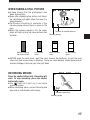
DIGITAL CAMERA/APPAREIL PHOTO NUMÉRIQUE
DIGITAL-KAMERA/CAMARA DIGITAL
C-2100 Ultra Zoom
INSTRUCTIONS/MODE D’EMPLOI
BEDIENUNGSANLEITUNG/INSTRUCCIONES
ENGLISH
FRANÇAIS
DEUTSCH
ESPAÑOL
nBefore using your camera, read this manual carefully to ensure correct use.
nWe recommend that you take test shots to get accustomed to your camera before taking
important photographs.
nThese instructions are only a concise version. For more details on the functions described here,
refer to the software CD’s instructions on CD-ROM.
nAvant d’utiliser votre appareil photo, veuillez lire attentivement ce mode d’emploi, de manière à
obtenir les meilleurs résultats possibles.
nAvant d’effectuer des prises de vues importantes, nous vous conseillons par ailleurs de faire
quelques essais afin de vous familiariser avec le maniement de l’appareil photo.
nCes instructions ne sont qu’une version concise. Pour plus de détails sur les fonctions décrites
ici, se référer aux instructions du CD logiciel sur le CD-ROM.
nBitte lesen Sie vor Gebrauch dieser Kamera sorgfältig diese Bedienungsanleitung, um optimale
Ergebnisse beim Fotografieren zu erzielen.
nWir empfehlen, vor wichtigen Aufnahmen Probeaufnahmen durchzuführen, um sich mit der
Bedienung und den Funktionen der Kamera vertraut zu machen.
nDies ist eine Kurzanleitung. Falls Sie ausführlichere Angaben zu den hier beschriebenen
Funktionen benötigen, steht Ihnen die Bedienungsanleitung auf der CD-ROM zur Verfügung.
nAntes de usar su cámara lea este manual detalladamente para asegurar el uso correcto.
nNosotros le recomendamos que tome fotografías de prueba para familiarizarse con su cámara
antes de tomar fotografías importantes.
nEstas instrucciones son sólo una versión concisa. Para más detalles de las funciones descritas
aquí, refiérase a las instrucciones del software CD en el CD-ROM.
These instructions are only a concise version. For more details on the functions
described here, refer to the software CD’s instructions on CD-ROM.
GETTING STARTED
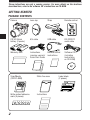
PACKAGE CONTENTS
2
Camera
Lens cap
Strap
Remote control
CR-V3 lithium
battery (2 packs)
A/V cable
USB cable
RS-232C PC
serial cable
Warranty card
Instructions
(concise version)/
Quick Start Guide
Remote control
instructions
Software CD’s
(including
instructions
on CD-ROM)
SmartMedia
(SSFDC-8MB)
Static-free case
Write-protect adhesive
seals (4 pieces)
Instructions
Index labels
(2 pieces)
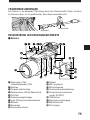
ATTACHING THE STRAP
Thread the strap through the strap eyelet as shown in the illustration. Pull on it to make
sure it is securely fastened to the stopper.
Stopper
Camera strap eyelet
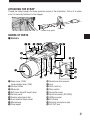
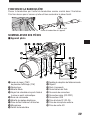
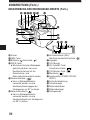
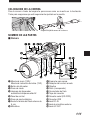
NAMES OF PARTS
m Camera
1 2 3 45
67
9
0
8
%^
!
#
9 $
@
1 Zoom lever (T/W)/
Index-display lever (T/W)
2 Shutter button
3 Mode dial
4 Self-timer lamp/AF assist lamp
5 Control panel
6 Diopter adjustment dial
7 5-pin external flash socket
8 Microphone
9 Strap eyelet
&
*
(
0 Remote control receiver
! Lens
@ Flash (built-in)
# Flash switch
$ Connector cover
% Serial connector (RS-232C)
^ USB connector
& DC-IN jack
* External microphone jack
( A/V OUT jack
3
GETTING STARTED (Cont.)
NAMES OF PARTS (Cont.)
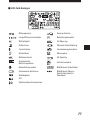
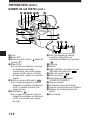
) q we r t
W
u
i
o
E
R
TY U
p
Q
) Viewfinder
q INFO button
w Flash mode button (
Erase button (
y AE lock button (AEL)/Multi-metering
button/Print button(
)/
)
e DRIVE button
● Returns vertically-oriented pictures
rotated using the Macro button or
Metering mode button to their
original position during display
mode.
r Metering mode button (
)
● Rotates the vertically-oriented
pictures 90° counterclockwise
during display mode.
t Macro button ( )
● Rotates the vertically-oriented
pictures 90° clockwise during
display mode.
4
y
)
u Arrow pad
i Monitor
o OK button/Manual focus button
(MF)/Protect button (
)
p Monitor button (
)
Q Menu button (
)
W Power switch
(POWER OFF/ON/ RESET)
E Card cover
R Card access lamp
T Battery compartment cover
Y Battery compartment lock
U Tripod socket
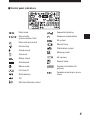
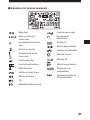
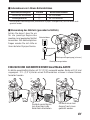
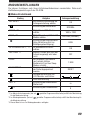
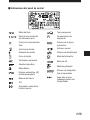
m Control panel indications
Flash mode
Sequential shooting
Slow shutter
synchronization flash
Exposure compensation
Flash intensity control
Card writing
Sound record
AF system
Manual focus
Stabilization system
Metering mode
Card error
Battery check
AE memory
Auto bracket
Record mode
Macro mode
Number of storable still
pictures
Full-time AF
White balance
Seconds remaining in movie
mode
ISO
Self-timer/Remote control
5
GETTING STARTED (Cont.)
NAMES OF PARTS (Cont.)
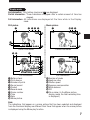
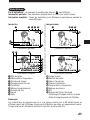
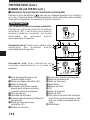
m Viewfinder/Monitor indications (Picture information)
Press the Monitor button (
) to select whether images appear on the Monitor or in
the viewfinder. Press the INFO button to select how much information is displayed. The
following 3 types of display are available.
Record mode
Only the AF target mark: Warnings (AF correct
mark and battery check) appear when required.
Settings that are changed are displayed for approx.
2 seconds.
Partial information: When using the camera, these
indications are displayed for approx. 2 seconds.
2
4
5
3
6
7
P F2.8 1/800 +2.0
1
8
9
0
Full information: These indications are displayed
constantly in the Record mode.
P F2.8 1/800 +2.0
&
*
(
1 Flash stand-by/Jitter warning/flash
charge
2 AF confirmation mark
3 Shooting mode
4 Battery check (displayed after the
camera is turned on and when
warnings appear)
5 Aperture value
6 Shutter speed
7 Exposure compensation/ Exposure
differential
8 AF target mark
9 Memory gauge
6
SLOW1
!
@
#
$
ISO100 %
SQ ^
0 Number of storable pictures
! Drive mode
@ Metering mode
# Macro mode
$ White balance
% ISO
^ Record mode
& Flash mode
* Slow shutter synchronization flash
(not displayed when the flash is in the
flash override mode)
( Stabilization system
Display mode
No information: Only battery check and
are displayed.
Partial information: These indications disappear after a certain amount of time has
elapsed.
Full information: All indications are displayed all the time while in the Display
mode.
Still picture
Movie picture
1
1
2 3 4 5
04 5
x10
8
9
HQ
6
23.12.,00 21:56 3456
7
Partial information
9 @
HQ
6
3456
7
Partial information
#
x10
HQ
SIZE: 1600x1200
F2.8 1/800 2.0
!
$
%
ISO400 ^
,
23.12. 00 21:56 8
FILE:123-3456 &
Full information
1 Battery check
2 Print reserve
3 Number of prints
4 Sound record
5 Protect
6 Record mode
7 Frame number
8 Time
9 Date
0 Movie picture
HQ
SIZE: 320x240
!
FILE: 123-3456
&
Full information
! Number of pixels
@ Aperture value
# Shutter speed
$ Exposure compensation
% White balance
^ ISO
& File number (In the Movie picture
display mode, the total recording time
is displayed.)
Note:
The indications that appear on a movie picture that has been selected and displayed
from the thumbnail display are different from those that appear when the movie picture
is displayed using the Movie play function.
7
GETTING STARTED (Cont.)
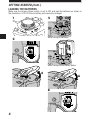
LOADING THE BATTERIES
Make sure the camera Power switch is set to OFF and load the batteries as shown in
the illustration. A CR-V3 lithium battery pack cannot be charged.
1
5
When using AA batteries
2
When using lithium battery packs
4
6
3
7
8
8
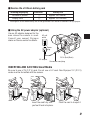
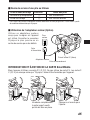
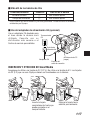
m Service life of lithium battery pack
Shooting/Displaying
Number of photos
Display time
Condition
Battery life
Approx. 200 frames
Approx. 330 minutes
1
2
* These figures are for reference only and are not guaranteed.Tests based on conditions set by Olympus.
m Using the AC power adapter (optional)
Use an AC adapter designed for the
area where the camera is used.
Consult your nearest Olympus
dealer or Service center for details.
AC wall
outlet
Power
plug
DC-In jack (Black)
AC adapter
Connection cord plug
INSERTING AND EJECTING SmartMedia
Be sure to use a 3V (3.3 V) card. Do not use a 5 V card. Non-Olympus 3 V (3.3 V)
cards must be formatted with the camera.
Insert the card fully until
you feel it lock into place.
Push the card in to eject it.
9
GETTING STARTED (Cont.)
SETTING THE MODE DIAL
You can change modes by turning the mode dial on the top righthand side of the
camera.
D E DIA
MO
g
P
L
Pr
S-
M
S
A
P (Program mode):
In program mode, you can take a properly exposed photograph by simply aiming the
camera and pressing the shutter button. Aperture and shutter speed are set
automatically by the camera.
A (Aperture priority mode):
Aperture can be set manually in the aperture priority mode. This is useful when you
want to have more control over image exposure. Shutter speed is set automatically by
the camera.
S (Shutter priority mode):
Shutter speed can be set manually in the shutter priority mode. Set it to a high speed
for a still picture of a moving object. Set it to a low speed to show motion. Aperture is
set automatically by the camera.
M (Manual mode):
You can set both aperture and shutter speed independently in the manual mode.
S-Prg (Scene program mode):
The camera will automatically optimize the combination of aperture and shutter speed
according to the type of subject. You can select from Portrait, Sports, Landscape and
Night Scene. Selections are displayed in the menu.
(Movie mode):
You can shoot motion pictures in the movie mode. Aperture and shutter speed are set
automatically by the camera.
(Display mode):
Allows you to view a display of your photographs.
10
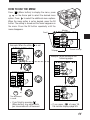
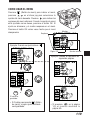
HOW TO USE THE MENU
Press
(Menu button) to display the menu, press
on the Arrow pad to select the desired menu
option. Press
to select the additional menu options.
When the menu option is set as desired, press the OK
button. The setting is stored and the frame reappears on
the menu. Press the OK button repeatedly until the
menu disappears.
Scroll
Monitor
P F2.8 1/800 0.0
ON
DIGITAL
ZOOM
WB
Example: When the white
is set
P F2.8 1/800 0.0
ISO
OFF
AUTO
AUTO
[1/5]
Current settings
1/5 page
ON
DIGITAL
ZOOM
WB
ISO
OFF
AUTO
AUTO
[1/5]
Example: When moving to the
following pages
P F2.8 1/800 0.0
ON
DIGITAL
ZOOM
P F2.8 1/800 0.0
AUTO
WB
ISO
OFF
AUTO
AUTO
[1/5]
DIGITAL
ZOOM
WB
ISO
[1/5]
To set up
P F2.8 1/800 0.0
or
SLOW
The adjustment
is saved.
MULTI
METERING
OK
• If you finish by pressing
(Menu button), any adjustments
you have made will not be saved.
BKT
O
OFF
1.0 x3
OFF
[2/5]
• If you press
at page 1/5,
the monitor displays page 5/5.
11
GETTING STARTED (Cont.)
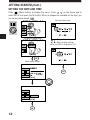
SETTING THE DATE AND TIME
Press
(Menu button) to display the menu. Press
on the Arrow pad to
select SETUP and press the OK button. When no images are recorded on the card, you
can set any mode except
.
P F2.8 1/800 0.0
Date and time screen
ON
DIGITAL
ZOOM
WB
OFF
AUTO
AUTO
ISO
[1/5]
Still picture record menu
A F2.8 1/800 0.0
MODE
SETUP
SETUP
: Changes the setting.
: Moves to other settings.
●The year 2000 is displayed as ’00.
S-Prg
[5/5]
OK
Mode setting screen
FILE NAME
RESET
OK
m/ f t
23.12.’00
12:34
m
[3/3]
FILE NAME
SETUP
m/ f t
[3/3]
OK
12
BASIC FUNCTIONS
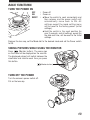
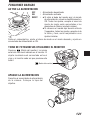
TURN THE POWER ON
OFF
ON
RESET
: Power off
: Power on
: ● Move the switch to reset momentarily and
then release, and the power switch will
automatically move back to ON. All
settings except the mode setting menu
will be reset to the factory-preset (initial
settings).
● Hold the switch in the reset position for
over 3 seconds, and all settings, except for
the date and time, will be reset to the initial
settings.
Remove the lens cap, set the Mode dial to the desired mode and set the Power switch
to ON.
TAKING PICTURES WHILE USING THE MONITOR
Press
(Moniter button). The same sign
on the finder will be displayed on the monitor.
The displayed subject will switch between the
viewfinder and monitor each time you press
this button.
(Monitor button)
TURN OFF THE POWER
Turn the camera's power switch off.
Put on the lens cap.
13
BASIC FUNCTIONS (Cont.)
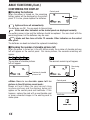
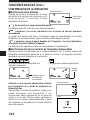
CONFIRMING THE DISPLAY
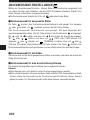
m Checking the batteries
Control panel
When the power is turned on, the remaining
battery power will be displayed on the control
panel. If it is low, please replace the batteries.
Battery
check
lights and turns off automatically.
The batteries are OK. You are ready to take pictures.
blinks and other indicators on the control panel are displayed normally.
The battery power is low and the batteries should be replaced. You can shoot with the
remaining power, but the batteries may die soon.
blinks and then turns off after 12 seconds. Other indicators on the control
also go out.
The batteries are dead and should be replaced immediately.
m Checking the number of storable pictures left
When the power is turned on in the still picture mode, the number of storable pictures
left will appear on the control panel. For movie pictures, the seconds remaining will
appear.
The number of storable pictures
left will appear.
The seconds remaining will appear.
Remaining
time
Number of storable
pictures left
● When there is no storable space left for
pictures in the still picture record mode :
Beeps will emit when the card cannot store
anymore pictures and the displays below will
appear on the control panel and viewfinder. If this
happens, replace the card with a new/storable card
or erase unwanted images in the existing card to
make space.
Control panel
Viewfinder
CARD FULL
14
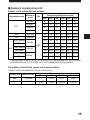
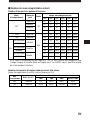
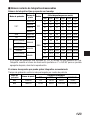
m Number of storable pictures left
Number of still pictures that can be taken
Recording mode
Number of
pixels
2MB
4MB
8MB
16MB
32MB
64MB
1600x1200
0/–
0/–
1/–
2/–
5/–
11/–
1280x960
0/–
1/–
2/–
4/–
8/–
17/–
0/–
1/–
3/–
6/–
13/–
27/–
640x480
2/–
4/–
8/–
17/–
34/–
68/–
SHQ
1600x1200
1/1
2/2
5/5
11/11
22/22
45/44
HQ
1600x1200
4/3
8/7
16/15
31/30
64/60 128/120
2/2
4/4
8/8
17/16
34/33
6/5
12/11
24/22
49/45
99/90 199/181
3/3
6/6
13/12
26/25
53/51 107/102
9/8
18/16
38/32
76/66 153/132 306/265
8/7
16/14
32/29
66/58 132/117 265/234
21/15
40/30
82/61 165/123 331/248 664/498
TIFF*
1024x768
TIFF
HIGH (quality)
NORMAL
1280x960
JPEG
HIGH (quality)
SQ
Memory capacity
(Image only/Image with sound)
File
NORMAL
1024x768
HIGH (quality)
640x480
NORMAL
69/67
* If the recording mode is set to TIFF, sound will not be recorded with a picture when
the Mode dial is set to P or A/S/M, but it can be added later during playback.
The number of seconds that you can record movie pictures:
Longest continuous recording time per movie frame
Memory capacity
4MB
8MB
Recording mode
Number of pixels
HQ
320x240
7/6
14/13
28/27
43/42
SQ
160x120
31/26
62/53
126/109
174/158
2MB
16MB OVER
15
BASIC FUNCTIONS (Cont.)
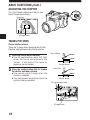
ADJUSTING THE DIOPTER
Turn the Diopter adjustment dial to see
the AF target mark clearly.
Viewfinder
P F2.8 1/30
0.0
AF target mark
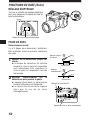
TAKING PICTURES
Proper shutter release
There are 2 steps when releasing the shutter.
Practice well before actually taking photos.
the shutter button halfway.
1 Press
● The AF confirmation mark will light
when the focus and exposure are
locked. It will blink if the focus or
exposure are not locked.
the shutter button fully to release
2 Press
the shutter and take a picture.
● The camera emits a beep when the
shutter is released.
● The card access lamp blinks while the
picture is being recorded.
Press halfway
Shutter button
Press fully
Shutter button
AF confirmation mark
P F2.8 1/30
AF target mark
16
0.0
WHEN TAKING A STILL PICTURE
●A beep means that the photograph was
taken successfully.
●Soon after displaying the picture just taken,
the viewfinder will again show the area it is
being aimed at.
●Continuous shooting is available if the
memory gauge shows there is space in the
card.
●When the memory gauge is full, the upper
block will light up and no more pictures can
be taken.
Before shooting/
No picture taken
One picture
taken
P F2.8 1/30
0.0
Number of storable pictures
Memory gauge
More than one
taken
No recordable
space
● NEVER open the card cover, eject the card, remove the batteries, or pull the plug
when the card access lamp is blinking. Doing so could destroy stored pictures and
prevent storage of pictures you have just taken.
RECORDING MOVIES
F2.8 1/30
0.0
Press the shutter button fully. Recording will
start. To stop recording, press the shutter
button fully again.
●The
mark will light up in red while
shooting movies.
●When recording starts, correct focusing and
exposure is maintained continuously.
Seconds remaining
Memory gauge
17
BASIC FUNCTIONS (Cont.)
m Focus lock
When your main subject is not within the AF target marks , follow the procedure below.
AF confirmation mark
1
P F2.8 1/800
Compose your shot.
0.0
2
P F2.8 1/800
0.0
AF target mark
m Displaying pictures
All stored pictures in the card can be displayed by pressing the Arrow pad.
: Displays the next picture.
: Displays the previous picture.
: Jumps to the picture 10 frames ahead.
: Jumps to the picture 10 frames behind.
●If
(Monitor button) is pressed twice quickly in the record mode or if the Mode
dial is set to
, the camera enters the Display mode and pictures are displayed.
m Displaying movies
Select images with the
mark using the Arrow pad. Press
(Menu button).
Select MOVIE PLAY, then press
to select START. Press the OK button to read the
data from the card. When the card access lamp stops blinking, the movie display
starts. To pause, press the OK button while displaying movies. Use the Arrow pad to
display the previous/next frame. To end the movie display, press
(Menu button).
The menu display is restored.
m Close-up display
By moving the zoom lever to the T side, images can be enlarged 1.5x, 2x, 2.5x, or 3x.
To see a different area of the picture enlarged, press the Arrow pad ( / / / )
to slide the enlarged picture and view in the directions § / ©/¶/Ä on the screen.
m Index display
Turning the zoom lever to W displays multiple pictures simultaneously. You can select
the desired picture with the Arrow pad. To view it separately, turn the zoom lever to T.
You can change the number of pictures displayed by accessing the appropriate menu
setting.
18
RECORDING FUNCTIONS
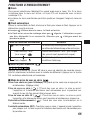
m Zoom
You can select telephoto or wide-angle with the 10x zoom. When the digital zoom in
the menu is turned on, 27x zoom is available with the 2.7x digital zoom.
●The speed of the zoom-in/out can be adjusted by changing the angle of the zoom
lever.
m Auto flash
Slide the flash switch located under the flash to raise the flash. Press the shutter button
halfway.
●When
lights on the viewfinder, the flash is activated.
●The flash charges while
is blinking. The shutter cannot be released at
this time. Wait until
turns off before taking pictures.
Flash mode/Control panel
Use
Auto-Flash
Automatically fires in low-light and
backlight conditions.
Red-Eye Reduction
Flash
Significantly reduces the
phenomenon of “red-eye”
(subject’s eyes appearing red).
Fill-In Flash
Fires regardless of available light.
m Manual focus
Press the OK button. Select MF in the focus mode selection menu and select the focal
length with the Arrow pad. Press the OK button. The selected focal length is stored.
m Sequential mode
Single-picture Shooting (no display): Takes only one picture when you press the
shutter button. (Initial setting)
Sequential Shooting (
): Takes pictures in sequence. Focus, brightness
(exposure), and white balance are locked at the first frame. Up to 5 frames can be
taken in sequence at once.
AF sequential Shooting (
): Takes pictures in sequence. Focus, brightness
(exposure), and white balance are metered and adjusted in each frame.
Self-timer/remote-control (
): Takes pictures with the self-timer/remote-control.
Auto bracket (BKT): Takes pictures in sequence. The camera will adjust the brightness
(exposure) in each frame. Focus and white balance are locked at the first frame.
19
RECORDING FUNCTIONS (Cont.)
m Exposure compensation
You can adjust exposure manually by +/– 2 (in increments of approx. 1/3). If you want
a white object to appear as white as possible, adjust + to increase the exposure. If you
want a black object to appear as black as possible, adjust – to decrease the exposure.
m AE Lock
By pressing the AEL button, you can lock the exposure at the setting you prefer. This is
useful when you want to set an exposure that is different from what the camera would
normally choose.
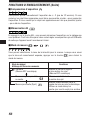
m Metering mode
You can select the area of the brightness for metering. When you know the area is
properly exposed, press the
to choose the metering mode.
Setting mode/Control panel display
Standard
(digital ESP metering)
Center-weighted
averaging metering
Spot metering
20
Functions
Meters the center of the subject
and the area around the subject
(digital ESP metering)
Meters the center of the subject
primarily.
Meters within the AF target mark
primarily. Use this mode when
backlight is making the subject darker.
USING MENUS FOR DETAILED ADJUSTMENTS
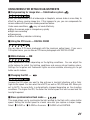
m Compensating for image blur — Stabilization system
When you take pictures with at wide-angle or telephoto, camera shake is more likely to
affect the picture, causing image blur. If this happens to you, you can compensate for
camera shake with the camera shake prevention feature.
Under some conditions,
may not work effectively.
●When the camera angle is changed very quickly
●Night-view recording
●Overexposure
●When the battery indicator is blinking
m Using the 27X zoom — DIGITAL ZOOM
You can take a 2.7X zoom photograph with the maximum optical zoom. If you use a
10X optical zoom, you can take an 27X zoom photograph with DIGITAL ZOOM.
m White Balance — WB
Color reproduction differs depending on the lighting conditions. You can adjust the
white balance to match the lighting conditions and assure natural looking colors.
Settings for tungsten and fluorescent lights are also available, allowing you to get
better results indoors.
m Changing the ISO —
Increase the ISO when you want to take pictures in low-light situations with a fairly
high shutter speed. You can select from AUTO, as well as 100, 200 and 400. When you
set to AUTO, the sensitivity is automatically changed depending on the shooting
conditions. The higher the ISO, the faster the shutter speed that can be used and the
less light required.
m Slow synchronization flash mode —
This mode allows you to synchronize the light emitted by the flash with a slow shutter
speed. Setting the shutter speed to a lower value lets you capture a sharper image.
Select SLOW1 or SLOW2 on the menu. SLOW2 is 2nd-CURTAIN.
21
RECORDING FUNCTIONS (Cont.)
m Auto bracket — BKT
Use this mode to record images with different exposures. Focus and white balance will
be measured first and fixed during sequential shooting. You can select the number of
pictures to take sequentially. Before taking a picture, press
until
disappears from the control panel.
m Multi-Metering — MULTI METERING
Meters the brightness of the subject at up to 8 different points to set the correct
exposure based on the average brightnes.
m AF MODE
You can select the focus range of your subject.
iESP
: Focus selection is based on the entire image on the screen (factory preset).
SPOT
: Focus selection is based on the image within the AF target mark.
m FULL – TIME AF
With FULL TIME AF, focusing time may be shorter. FULL TIME AF keeps the image on
the LCD monitor/viewfinder in focus at all times. To select/cancel FULL TIME AF, set it
to ON or OFF in the Menu.
m Sound record
Still Picture Recording: 4-second sound recording is possible.
Movie Recording: Simultaneous sound recording is possible.
m Function Card
The Olympus SmartMedia card has a Panorama Mode that allows you to take extrawide panoramic shots.
You can use CAMEDIA Master to connect several images end to end to create a single
panorama picture.
22
m Function Shooting — FUNCTION
“BLACK & WHITE” lets you shoot in black and white picture, while “SEPIA” adds a
sepia (brownish tint) to your image. “WHITE BOARD” lets you take a picture and
superimpose letters on a white board, while “BLACK BOARD” does the same with a
black board. When the Mode dial is set to
, only “BLACK & WHITE” and “SEPIA”
are available.
m CARD SETUP
Initialization is performed to format the card so that it allows devices to write data on it.
Olympus-formatted cards are highly recommended. When using non-Olympus cards
or cards formatted by a PC, be sure to format them with the camera before use.
m Scene program mode — S-Prg
Select the mode according to the subject:
: Portrait pictures.
: Pictures of moving subjects.
: Pictures focusing on both the subject and background.
: Night scenes.
m Setting the record mode — TIFF SHQ HQ SQ
Select the desired record mode.
● With the mode dial set to P, A, S, M or S-Prg (for still pictures)
You can select from TIFF, SHQ, HQ and SQ. Image quality increases in the order of
SQ[HQ[SHQ[TIFF. TIFF is the highest quality image format. The higher the
quality, the better the printed images will look. Pictures shot in the SHQ or TIFF mode
take longer to record and play back than picture shot in SQ and HQ.
● With the mode dial set to
(for motion picture recording)
You can select from HQ and SQ. The image quality increases in the order of SQ[HQ.
23
RECORDING FUNCTIONS (Cont.)
USING THE FLASH
m Flash intensity control
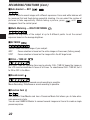
You can adjust the amount of light emitted by the flash to correspond with your
shooting requirements.
Press
(Menu button) to display the menu. Select
and adjust the flash
intensify.
m Using an external flash
The FL-40 external flash (optional) can be used when taking flash pictures, either by
itself or together with the main flash. To connect the FL-40 to the camera, the
exclusive FL-BK01 flash bracket (optional) and FL-CB01 bracket cable (optional) are
required. Without these options, the FL-40 will not perform differently from nonOlympus external flashes.
24
DISPLAY FUNCTIONS
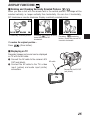
m Rotating and Checking Vertically Oriented Pictures
/
When you take a shot with the camera held in the vertical position, the image will be
oriented vertically, ie. longer vertically than horizontally. You can turn it horizontally,
90° clockwise or counter-clockwise. Display a vertically oriented picture.
SQ
SQ
SQ
23.12.’00 21:56 10
23.12.’00 21:56 10
23.12.’00 21:56 10
A vertically oriented picture
Pressing
(macro button)
turns the picture 90˚
clockwise.
Pressing
(metering
button) turns the picture 90˚
counter-clockwise.
To restore the original position...
Press
(Drive button).
m Displaying on TV
Recorded images and sound can be displayed
on TV with the AV cable.
1 Connect the AV cable to the camera's A/V
AV cable
OUT jack (black).
2 Connect the AV cable to the TV's video
input (yellow) and audio input (white)
connectors.
Connect to the A/V OUT
jack (black).
TV
25
DISPLAY FUNCTIONS (Cont.)
m Single frame erasure
Switch the mode dial to
.Select the images you want to erase using the Arrow pad.
Press
(Erase button). A message asking you to confirm the erasure will appear.
Make sure that YES is selected, then press the OK button.
m All-frame erasure
Set the mode dial to
. Press
(Menu button). Select CARD SETUP, then
Press the OK button. Make sure that OK is selected and press the OK button.
.
m Protection
Set the mode dial to
. Display the picture you want to protect. Press the OK button.
The displayed picture will then be protected.
will appear on the monitor.
USING MENUS FOR DETAILED ADJUSTMENTS
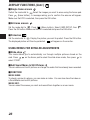
m Slide-show
This mode allows you to automatically run through multiple pictures stored on the
card. Press
on the Arrow pad to select the slide-show mode, then press
to
select START.
m Add Sound Memo to Still Pictures
You can add sound to still pictures or change the audio that has already been recorded.
m FUNCTION
MOVIE INDEX:
To check a movie at a glance, you can make an index. You can also store the index on
a SmartMedia card as still pictures.
MOVIE EDIT:
You can select the scenes you want and record them together as a new movie.
26
MODE SETUP
Change the camera to your desired setting. For more details, refer to the software CD’s
instructions on CD-ROM.
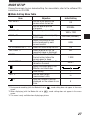
m Mode Setting Menu Table
Item
ALL RESET
TIFF *1, *2
SQ *1, *2
AF ILLUMINATOR*1, *2
REC VIEW *2
SLEEP
FILE NAME*2
m/ft *2
*3
Objection
Set the initial state of the
camera when turned on.
Set the level of picture
sharpness
Select image size in TIFF.
Select image size and quality
in SQ mode.
Adjust the volume of the
sound produced by each
camera control.
Select AF assist lamp ON/OFF.
Select whether or not the
recorded image is displayed.
Set the duration of time after
the last action before the
camera goes to sleep.
Specify how to memorize file
names on the card.
Adjust the brightness of the
Monitor and viewfinder.
Date setting
Set the focal length
measurement units.
Sets the number of picture
displayed on the screen at one
time.
Initial Setting
ON
NORMAL
1600 x 1200
640 x 480 (NORMAL)
HIGH
ON
OFF
1 MIN
RESET
–
m
9
*1 During movie recording (with the Mode dial set to
), mode setting does not appear in the menu
screen.
*2 When displaying (with the Mode dial set to
), mode setting does not appear in the menu
screen.
*3 This menu is only available when displaying a picture.
27
PRINTING PICTURES
Selected images can be reserved in a SmartMedia card for printing on a printer or at a
photo lab that supports the DPOF (Digital Print Order Format) system.
●Print reserve cannot be performed for a picture displayed with
.
m Single-frame print reserve
Press
. The Print reserve setting screen is displayed. Press
on the Arrow pad
to select
, then press the OK button. The print reserve selection screen is displayed.
Press the Arrow pad to select the picture you wish to print. Press the OK button. The
setting menu is displayed. Press
to select
x, then press
to enter
the number. Press
to select ( ), then press
to select DATE or TIME.
Press
to select (
TRIMMING), then press
to select YES or NO. Press
the OK button to complete the setting. Press
. The screen exits the Print reserve
mode and returns to the Display mode.
m All-frame print reserve
Allows you to store print data for all the pictures on the card, as well as allowing you to
choose how many prints you want.
m Trimming print reserve
You can print an enlarged part of a recorded picture.
Note:
●This camera cannot be directly connected to printers.
●If a card contains DPOF reservations set by another device, entering reservations
using this camera may overwrite the previous reservations. Be sure to use this
camera for reservations.
28
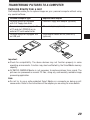
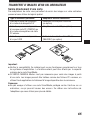
TRANSFERRING PICTURES TO A COMPUTER
Capturing directly from a card
Card adapters enable you to capture images on your personal computer without using
any special software.
Personal computer type
Required card adapter
Personal computer equipped
with 3.5" floppy disk-drive
FlashPath floppy disk adapter (optional)
Personal computer equipped with
a PC card slot (PCMCIA) or an
external PC card reader/writer
PC card adapter (optional)
Personal computer equipped with
an USB port
SmartMedia Reader/Writer (MAUSB-2)
(optional)
Important:
● Check for compatibility. The above devices may not function properly in some
operating environments. Function may also be affected by the SmartMedia memory
capacity.
● OLYMPUS CAMEDIA Master is not necessary to capture pictures from a card. The
pictures can processed as normal PC files, using any commercially available image
processing application.
Note:
● Do not try to use a write-protected Smart Media on a computer as doing so will
cause errors. Refer to the instructions of the adapter you are using for more details.
29
TRANSFERRING PICTURES TO A COMPUTER (Cont.)
Cable connection
Connect the camera to a personal computer (IBM PC/AT compatible, Apple Macintosh).
This camera is equipped with 2 transfer connectors.
If your computer is equipped with a USB interface and is running either are Windows
98/98 Second Edition/2000 Professional or Macintosh OS, you can transfer picture
data via a USB cable.
If your personal computer is not equipped with a USB interface or is running Windows
95/NT4.0 or Macintosh OS, you can transfer data via a serial cable.
To connect this camera directly to a personal computer, it must have either a serial
port or USB port.
Note:
● It is not possible to transfer data to a personal computer via a cable unless you use
CAMEDIA Master 2.0 to capture pictures.
For more details, refer to the software CD’s instructions on CD-ROM.
30
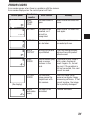
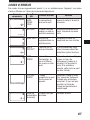
ERROR CODES
Error codes appear when there is a problem with the camera.
Error codes displayed on the control panel will flash.
Control panel
Viewfinder/
monitor
Error content
Remedy
CARD
COVER
OPEN
The card cover is
open.
Insert a card and close the
cover.
NO CARD
The card is not
inserted, or it
cannot be
recognized.
Insert a card. Or insert the
card again.
CARD FULL
No more pictures
can be taken.
Replace the card or erase
unneeded pictures.
WRITE
PROTECT
Writing to the card
is prohibited.
If you are taking pictures,
remove the write-protect
adhesive seal.
CARD
ERROR
Cannot record, play
back or erase
pictures in this
card.
If the card is dirty, wipe it
with a clean tissue and
insert it again. Or, format
the card. If the problem is
still not corrected, this card
cannot be used.
PICTURE
ERROR
The recorded
image cannot be
played back with
this camera.
Load the image using
personal computer image
processing software. If that
cannot be done, the image
file is partially damaged.
(Format
confirmation
screen)
The card is not
formatted.
Format the card.
(No display)
31
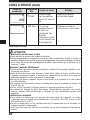
ERROR CODES (Cont.)
Control panel
Viewfinder/
monitor
Error content
Remedy
NO
PICTURE
There are no
picutures in the
card, so there is
nothing to play
back.
Insert a card which contains
images.
CARD FULL
There is no empty
space in the card,
so print data or
sound cannot be
recorded.
Replace the card or erase
unneeded picrures.
PRECAUTIONS
CAUTION
Caution concerning the flash
● Be careful when taking pictures at close range.
● Do not take pictures of people’s faces (babies in particular) at close range. If the flash goes
off too close to someone’s eyes it may cause a loss of vision. In particular, when taking
pictures of babies, be sure that the distance is at least 1 m.
Be careful when handling the unit
● Do not use in an unstable position. If you lose your balance, you might get hurt.
● Be careful that no foreign substance (dirt, rain, sand) can enter the unit, particularly
when the battery cover or lens barrier is open, as it may cause damage.
● To prevent damage, do not drop the camera or subject it to severe shock or vibration.
● This camera is not water-resistant. Do not put it in water, and be careful to protect it
from rain, sea water, etc.
● Do not use the camera outside during a storm or when there is lightning.
● When replacing the batteries, make sure the power is OFF. If it is left ON, it may damage
the internal circuits.
Storage environment
● To avoid damage or mis-operation of the camera, only store it where the temperature is
–20 ~ 60°C and the humidity 10 ~ 90%.
● Do not store in humid places, as condensation may form and cause damage.
● To prevent injuries or accidents, keep the camera out of the reach of children.
32
Usage environment
● Do not use where there may be a large concentration of flammable or explosive gases, as
it may cause a fire or explosion.
● To avoid damage or mis-operation of the camera, use it only if the temperature is 0 ~
40°C and the humidity 30 ~ 90%.
● Do not move the camera suddenly from a hot to cold place, or vice versa. It may cause
the formation of condensation inside the unit that may damage it. To prevent the
formation of condensation, put the camera in a plastic bag, etc. to protect it and wait
until the camera has reached the ambient temperature before taking it out.
● If used in low temperatures, the batteries will have a shorter life span than normal.
Precautions when handling the batteries
To prevent leakage, fire, or damage, please read the instructions carefully and observe the
following points:
● Do not heat or throw the batteries into a fire.
● Do not disassemble, modify or solder.
● Do not install with inverted polarity (+, –).
● Do not let metal objects touch the contacts. Do not store or carry loosely with necklaces
or hairpins.
● Do not use old batteries together with new ones, and do not use different types of
batteries at the same time.
● Do not store them in humid places as they may corrode.
● Do not use if something seems to be wrong.
● Do not use if there is leaking, swelling, a rise in temperature, or any other abnormal
condition.
● When using them for the first time, if there are signs of corrosion or if they are warm,
please take them back to where they were bought.
● NEVER use any battery whose body is not fully covered by the insulating sheet or the
sheet is torn as it may cause leak, fire or injury. Some commercially available batteries
are also partially covered, or not covered at all by the insulating sheet. Never use these
batteries.
If there is a leak
● If the liquid gets into your eyes, do not rub them. Rinse with clean water, then seek
medical attention immediately.
● If the liquid gets in contact with your skin or clothing, rinse with clean water.
● If the liquid has leaked inside the battery compartment, clean it carefully with a wet rag
before inserting new batteries.
When the batteries are dead, take them out of the camera
● If old batteries are left inside the camera they may leak. If the camera is going into
storage or if you intend not to use the camera for a long period of time, remove the
batteries.
Do not use in an airtight device
● If may cause the batteries to leak and/or the camera to be damaged.
Do not recharge alkaline or lithium batteries
● If you try to recharge them, it may cause the batteries to leak and/or the camera to be
damaged.
33
PRECAUTIONS (Cont.)
CAUTION
Keep out of the reach of children
● Make sure children do not take the batteries out when using the camera. If a child is
going to use the camera, be sure to teach the child proper usage according to this
manual.
● When disposing of old batteries, be sure to do so in accordance with all applicable
regulations in your area.
Precautions on using accessories
● Be sure to use only the supplied accessories, or accessories recommended by the
manufacturer, otherwise fire, electric shock or damage may result. For more information,
please consult the dealer where the unit was purchased.
● Do not keep the AC adaptor connected when not using the camera, otherwise fire,
electric shock or damage may result.
● To prevent electric shock and damage, do not plug, connect or handle the AC adaptor
with wet hands.
● Do not modify, bend forcibly, pull strongly, scratch, etc., or otherwise alter the AC
adaptor power cord. Also, do not put heavy objects on the power cord, or place it close
to a heat source as it may result in a fire or electric shock.
Points to verify before using the camera
● If taking particularly important pictures or if you have not used the camera for a long
period, first confirm that it functions properly, or consult an Authorized Service Centre.
● We decline all responsibility concerning the loss of data, down time, loss of revenue or
any other direct or indirect damage or claims caused by this camera.
Do not use or store in a hot place (e.g. inside a closed car on a hot and sunny
day)
● If may shorten their service life. Store in a dry cool place protected from direct sunlight.
Notes on display and backlight
●The Control panel and the fluorescent lamps used in the LCD monitor have a limited
service life. If they begin to darken or flicker, contact your nearest service center.
●In cold conditions, the display backlight may be slow to come on or may change
color suddenly. To avoid this, keep the camera warm when using in cold
temperatures. Backlight performance will return to normal under normal temperature
conditions.
●When the color LCD monitor shows different pictures, some pixels may not change
color and remain on or off. This phenomenon may be due to a lag in some circuits,
but is considered to be within the normal operating tolerances of the LCD monitor. In
addition, the brightness of the color LCD monitor may vary between pictures.
34
IMPORTANT NOTICE
Disclaimer of Warranty
Olympus makes no representations or warranties, either expressed or implied, by or
concerning any content of these written materials or software, and in no event shall be
liable for any implied warranty of merchantability or fitness for any particular purpose
or for any consequential, incidental or indirect damages (including but not limited to
damages for loss of business profits, business interruption and loss of business
information) arising from the use or inability to use these written materials or software.
Some states do not allow the exclusion or limitation of liability for consequential or
incidental damages, so the above limitations may not apply to you.
Copyright Notice
All rights reserved. No part of these written materials or software may be reproduced
or used in any form or by any means, electronic or mechanical, including photocopying
and recording and the use of any kind of information storage and retrieval system,
without prior permission in writing from Olympus. No liability is assumed with respect
to the use of the information contained in these written materials or software, or for
damages resulting from the use of the information contained in these written materials
or of the software. Olympus reserves the right to alter the features and contents of this
publication or software without obligation or advance notice.
WARNING:
Unauthorized photographing or use of copyrighted material may violate applicable
copyright laws. Olympus assumes no responsibility for unauthorized photographing,
use or other acts that infringe upon the rights of copyright owners.
• IBM is a registered trademark of International Business Machines Corporation.
• Microsoft and Windows are registered trademarks of Microsoft Corporation.
• Macintosh is a trademark of Apple Computer Inc.
• All other company and product names are registered trademarks and/or trademarks
of their respective owners.
35
SPECIFICATIONS
Product type
Recording System
Still
Sound with
still images
Movie
Memory
No. of storable pictures
(When an 8 MB card is used)
Erase
Image pickup element
Recording image
White balance
Lens
Photometric system
Exposure control
Aperture
Shutter speed
Still
Movie
Working range
36
; Digital camera (for shooting and displaying)
: Digital recording, JPEG (in accordance with Design
rule for Camera File system (DCF)), TIFF (noncompression), Digital Print Order Format (DPOF)
: Wave format
: QuickTime Motion JPEG support
: 3V (3.3V) SmartMedia 2MB, 4MB, 8MB, 16MB,
32MB, 64MB
: Record without sound
Approx. 1 frame (TIFF: 1600 x 1200)
Approx. 5 frames (SHQ)
Approx. 16 frames (HQ)
Approx. 38 frames (SQ: 1024 x 768 NORMAL)
Approx. 82 frames (SQ: 640 x 480 NORMAL)
: One-Frame erase / All-Frames erase
: 1/2 inch CCD solid-state image pickup
2,110,000 pixels (gross)
: 1600 x 1200 pixels (TIFF/SHQ/HQ)
1280 x 960 pixels (TIFF/SQ)
1024 x 768 pixels (TIFF/SQ)
640 x 480 pixels (TIFF/SQ)
: Full Auto TTL (iESP auto), Preset (Daylight, Overcast,
Tungsten light, Fluorescent)
: Olympus lens 7.0 mm to 70.0 mm, F2.8 to F3.5, 13
elements in 10 groups (equivalent to 38 mm to 380
mm lens on 35 mm camera), aspherical glass
: Digital ESP metering, Center-weighted averaging
metering, Spot metering system
: Program auto exposure, Aperture priority auto
exposure, Shutter priority auto exposure, Manual
exposure, Scene program exposure
: W : F2.8 to F8.0
T : F3.5 to F8.0
: Used with mechanical shutter
: 1/2 to 1/800 sec. (16 to 1/800 sec. with manual
setting)
: 1/30 to 1/10000 sec.
: W : 0.6 m to ∞ (No Macro mode)
0.1 m to 0.6 m (Macro mode)
: T : 2.0 m to ∞ (No Macro mode)
1.0 m to 2.0 m (Macro mode)
Viewfinder
Monitor
No. of monitor pixels
On-screen display
Battery charging time
for flash
Flash working range
Flash modes
Autofocus
Focusing range
Effective range of the
AF assist lamp
Selftimer
Outer connector
Date and time
Automatic calendar system
Power supply for calendar
Operating environment
Temperature
Humidity
Power supply
Dimensions
Weight
: 0.55" TFT color LCD display,
approx. 114000 pixels
: 1.8" TFT color LCD display
: Approx. 114,000 pixels
: Date/Time, Frame number, Protect, Recording mode,
Battery check, Picture information, Print-reserve,
Menu, AF correct mark, Flash stand-by mark, AF
target mark, etc.
: Approx. 6 sec. (at normal temperature with new
batteries)
: W : Approx. 0.3 m to 4.0 m
T : Approx. 1.0 m to 3.2 m
: Auto-Flash (automatic flash activation in low light and
backlight), Red-Eye Reducing Flash, Fill-In Flash
(forced activation), Off (no flash)
: TTL system iESP autofocus, Spot autofocus, Contrast
detection system
: 0.1 m to ∞
: 0.3 m to 3.0 m
: Electronic Selftimer with 12-sec. delay
: DC-IN jack, Serial connector (RS-232C), A/V OUT
jack, USB connector (USB 1.0 compatible), 5-pin
external flash socket, External microphone jack
: Recorded with picture data simultaneously
: Up to 2030
: Built-in lithium battery
: 0°C to 40°C (operation)
– 20°C to 60°C (storage)
: 30% to 90% (operation)
10% to 90% (storage)
: For batteries, use 2 CR-V3 lithium battery packs, or 4
AA (R6) NiMH batteries, NiCd batteries, alkaline
batteries or lithium batteries. AC adapter (optional)
Zinc-carbon batteries cannot be used.
: 112.5 mm (W) x 77.5 mm (H) x 141 mm (D)
: 540g (without batteries/card)
SPECIFICATIONS ARE SUBJECT TO CHANGE WITHOUT ANY NOTICE OR OBLIGATION ON THE PART
OF THE MANUFACTURER.
37
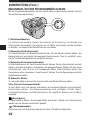
Ces instructions ne sont qu’une version concise. Pour plus de détails sur les
fonctions décrites ici, se référer aux instructions du CD logiciel sur le CD-ROM.
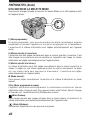
PRÉPARATIFS
CONTENU
Appareil photo
Bouchon d’objectif Bandoulière
Télécommande
Piles au lithium CR-V3 Câble A/V
(ensemble de 2)
Câble USB
Câble de connexion
série RS-232C pour
PC (IBM)
Carte de garantie
Mode d’emploi
de la
télécommande
CD logiciels
(comprenant le
mode d’emploi sur
CD-ROM)
Mode d’emploi/
Guide rapide
de démarrage
SmartMedia
(SSFDC-8MB)
Étui antistatique
4 autocollants
verrouillagedes
images en mémoire
Mode d’emploi
38
2 autocollants pour
disquettes
FIXATION DE LA BANDOULIÈRE
Passer la bandoulière par l’oeillet de bandoulière comme montré dans l’illustration.
Puis tirer dessus pour s’assurer qu’elle est bien serrée dans la pièce d’arrêt.
Pièce d’arrêt
Oeillet de bandoulière de l’appareil
NOMENCLATURE DES PIÈCES
m Appareil photo
1 2 3 45
67
9
0
8
!
#
@
1 Levier de zoom (T/W)/
de planche d’affichage (T/W)
2 Déclencheur
3 Molette Mode
4 Voyant de retardateur/voyant d’aide à
la mise au point automatique
5 Écran de commande
6 Molette de réglage dioptrique
7 Prise de flash externe à 5 broches
8 Microphone
9 Oeillet de bandoulière
9 $
%^
&
*
(
0 Fenêtre de réception de télécommande
! Objectif
@ Flash (incorporé)
# Commutateur de flash
$ Couvercle de connecteur
% Connecteur série (RS-232C)
^ Connecteur USB
& Prise d’entrée CC (DC-IN)
* Prise de microphone externe
( Prise de sortie A/V
39
PRÉPARATIFS (Suite)
NOMENCLATURE DES PIÈCES (Suite)
) q we r t
W
u
i
o
E
R
TY U
p
Q
) Viseur
q Touche INFO
w Touche de mode de flash (
d’effacement (
y Touche de mémorisation AE (AEL)
)/touche
)
e Touche DRIVE
● Fait revenir dans leur position
originale pendant le mode
d’affichage des vues en format
vertical tournées en utilisant la
touche Gros plan ou de mode de
mesure.
r Touche de mode de mesure (
)
● Fait tourner pendant le mode
d’affichage des vues en format
vertical de 90˚ dans le sens inverse
des aiguilles d’une montre.
t Touche Gros plan macro ( )
● Fait tourner pendant le mode
d’affichage des vues en format
vertical de 90˚ dans le sens des
aiguilles d’une montre.
40
y
/touche de mesure multiple/touche
d’impression ( )
u Molette de défilement
i Écran ACL
o Touche OK/touche de mise au point
manuelle (MF)/touche de protection
(
)
p Touche de l’écran ACL (
)
Q Touche Menu (
)
W Interrupteur d’alimentation (POWER
OFF/ON/RESET)
E Couvercle du logement de carte
R Voyant d’accès de carte
T Couvercle du compartiment des piles
Y Verrou du compartiment des piles
U Embase filetée de trépied
m Indications de l’écran de commande
Mode flash
Prise de vues en série
Flash synchronisé à
vitesse lente
Compensation
d’exposition
Commande d’intensité du
flash
Système AF
Écriture sur la carte
Enregistrement du son
Mise au point manuelle
Système de stabilisation
Mode de mesure
Erreur carte
Contrôle des piles
Mémoire AE
Fourchette automatique
Mode d’enregistrement
Mode Gros plan
Nombre de vues
enregistrables
Autofocus à plein temps
Balance des blancs
Secondes restantes de
film enregistrable
ISO
Retardateur/télécommande
41
PRÉPARATIFS (Suite)
NOMENCLATURE DES PIÈCES (Suite)
m Indications dans le viseur/sur l’écran ACL (Informations d’image)
Appuyer sur la touche de l’écran ACL (
) pour sélectionner si les images
apparaissent sur l’écran ACL ou dans le viseur. Appuyer sur la touche INFO pour
sélectionner comment les informations sont affichées. Les 3 types suivants d’affichage
sont disponibles.
Mode Enregistrement
Uniquement les repères de mise au point
automatique: Des avertissements (voyant de mise
au point correcte et contrôle des piles)
apparaissent quand c’est nécessaire. Les réglages
qui sont changés sont affichés pendant 2 secondes
environ.
4
5
3
Information partielle: En utilisant l’appareil, ces 2
1
indications sont affichées pendant 2 secondes
environ.
6
7
P F2.8 1/800 +2.0
8
9
0
Information complète: Ces indications sont
affichées en permanence en mode Enregistrement.
P F2.8 1/800 +2.0
&
*
(
1 Attente flash/avertissement d’instabilité/
recharge du flash
2 Marque de correction AF
3 Mode Photo
4 Contrôle des piles (affiché après la
mise de l’alimentation de l’appareil et
quand des avertissements
apparaissent)
5 Valeur de l’ouverture
6 Vitesse d’obturation
7 Compensation d’exposition/ exposition
différentielle
8 Repères de mise au point automatique
42
SLOW1
!
@
#
$
ISO100 %
SQ ^
9 Bloc mémoire d’image
0 Nombre de vues enregistrables
! Mode Drive
@ Mode de mesure
# Mode Gros plan
$ Balance des blancs
% ISO
^ Mode Enregistrement
& Mode Flash
* Flash synchronisé à vitesse lente (non
affiché quand le flash est dans un
autre mode de flash)
( Stabilisateur
Mode Affichage
Pas d’indications: Uniquement le contrôle des piles et
sont affichés.
Information partielle: Ces indications disparaissent au bout d’un certain temps.
Information complète: Toutes les indications sont affichées en permanence pendant le
mode Affichage.
Image fixe
1
Image cinéma
1
2 3 4 5
04 5
x10
8
9
HQ
6
23.12.,00 21:56 3456
7
Information partielle
9 @
HQ
6
3456
7
Information partielle
#
x10
HQ
SIZE: 1600x1200
F2.8 1/800 2.0
!
$
%
ISO400 ^
23.12.,00 21:56 8
FILE:123-3456 &
Information complète
1 État des piles
2 Réservation d’impression
3 Nombre de tirages
4 Enregistrement du son
5 Protection
6 Mode d’enregistrement
7 Numéro de vue
8 Heure
9 Date
HQ
SIZE: 320x240
!
FILE: 123-3456
&
Information complète
0 Image cinéma
! Nombre de pixels
@ Valeur d’ouverture
# Vitesse d’obturation
$ Compensation d’exposition
% Balance des blancs
^ ISO
& Numéro de fichier (En mode
d’affichage d’images cinéma, la durée
totale d’enregistrement est affichée.)
Remarque:
Les indications qui apparaissent sur une image cinéma qui a été sélectionnée et
affichée à partir de l’affichage d’index sont différentes de celles qui apparaissent quand
l’image cinéma est affichée en utilisant la fonction de lecture de film.
43
PRÉPARATIFS (Suite)
MISE EN PLACE DES PILES
S’assurer que l’interrupteur d’alimentation de l’appareil est réglé sur OFF et introduire
les piles comme montré dans l’illustration. Les piles au lithium CR-V3 ne peuvent pas
être rechargées.
1
5
En utilisant des piles AA
2
En utilisant des piles au lithium
4
6
3
7
8
44
m Durée de service d’une pile au lithium
Prise de vues/Affichage
Nombre de photographies
Durée d’affichage
Condition
1
2
Durée des piles
200 vues environ
330 minutes environ
* Ces chiffres sont donnés uniquement comme référence et ne sont pas garantis. Essais établis à partir
de conditions déterminées par Olympus.
m Utilisation de l’adaptateur secteur (Option)
Utiliser un adaptateur secteur
conçu pour la région où l’appareil
est utilisé. Consulter le revendeur
Olympus le plus proche ou un
centre de service pour des détails.
Prise
secteur
Fiche
d’alimentation
Prise d’entrée CC (Noire)
Adaptateur secteur
Fiche de raccordement
INTRODUCTION ET ÉJECTION DE LA CARTE SmartMedia
Bien s’assurer d’utiliser une carte 3 V (3,3 V). Ne pas utiliser de carte 5 V. Les cartes 3
V (3,3 V) de marque autre que “Olympus” doivent être formatées par l’appareil.
Introduire complètement
la carte jusqu’à sentir
qu’elle est bien en place.
Pousser sur la carte pour
l’éjecter.
45
PRÉPARATIFS (Suite)
UTILISATION DE LA MOLETTE MODE
Vous pouvez changer le mode en tournant la molette Mode sur le côté supérieur droit
de l’appareil photo.
D E DIA
MO
g
P
L
Pr
S-
M
S
A
P (Mode programmé):
En mode programmé, vous pouvez prendre une photo correctement exposée
simplement en pointant l’appareil sur le sujet et en appuyant sur le déclencheur.
L’ouverture et la vitesse d’obturation sont réglées automatiquement par l’appareil
photo.
A (Mode à priorité à l’ouverture):
L’ouverture peut être réglée manuellement dans le mode à priorité à l’ouverture. C’est
utile lorsque vous voulez avoir plus de contrôle sur l’exposition de l’image. La vitesse
d’obturation est réglée automatiquement par l’appareil photo.
S (Mode à priorité à la vitesse):
La vitesse d’obturation peut être réglée manuellement dans le mode à priorité à la
vitesse. La régler sur une vitesse rapide pour saisir un sujet en mouvement. La régler
sur une vitesse lente pour exprimer le mouvement. L’ouverture est réglée
automatiquement par l’appareil photo.
M (Mode manuel):
Vous pouvez régler manuellement l’ouverture et la vitesse d’obturation en mode
manuel.
S-Prg (Mode programmé de scène):
L’appareil optimisera automatiquement la combinaison ouverture et vitesse
d’obturation selon le type de sujet. Vous pouvez choisir entre Portrait, Sports, Paysage
et Scène de nuit. Les sélections sont affichées dans le menu.
(Mode Cinéma):
Vous pouvez prendre des images animées dans le mode cinéma. L’ouverture et la
vitesse d’obturation sont réglées automatiquement par l’appareil photo.
(Mode Affichage):
Vous permet d’examiner les vues que vous avez prises.
46
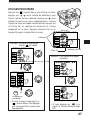
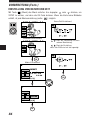
UTILISATION DU MENU
Appuyer sur
(touche Menu) pour afficher le menu,
appuyer sur
de la molette de défilement pour
choisir l’option de menu désirée. Appuyer sur
pour
afficher les options de menu supplémentaires. Lorsque
l’option de menu est réglée comme désirée, appuyer sur
la touche OK. Le réglage est mémorisé et l’image
réapparaît sur le menu. Appuyer plusieurs fois sur la
Écran ACL
touche OK jusqu’à la disparition du menu.
P F2.8 1/800 0.0
ON
Défilement
DIGITAL
ZOOM
Exemple: Lorsque la balance des
blancs
est réglée
P F2.8 1/800 0.0
WB
ISO
OFF
AUTO
AUTO
[1/5]
Réglages courants
Page 1/5
ON
DIGITAL
ZOOM
WB
ISO
OFF
AUTO
AUTO
[1/5]
Exemple: Pour passer aux pages
suivantes
P F2.8 1/800 0.0
ON
DIGITAL
ZOOM
P F2.8 1/800 0.0
AUTO
WB
ISO
OFF
AUTO
AUTO
[1/5]
DIGITAL
ZOOM
WB
ISO
[1/5]
Pour régler
P F2.8 1/800 0.0
ou
SLOW
Le réglage est
sauvegardé.
MULTI
METERING
OK
• Si vous finissez en appuyant sur
(touche Menu), les réglages
que vous avez faits ne seront pas
sauvegardés.
BKT
O
OFF
1.0 x3
OFF
[2/5]
• Si vous appuyez sur
à la
page 1/5, l’écran affiche la page
5/5.
47
PRÉPARATIFS (Suite)
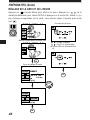
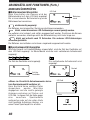
RÉGLAGE DE LA DATE ET DE L’HEURE
Appuyer sur
(touche Menu) pour afficher le menu. Appuyer sur
de la
molette de défilement pour choisir SETUP et appuyer sur la touche OK. Quand il n’y a
pas d’images enregistrées sur la carte, vous pouvez régler n’importe quel mode
sauf
.
P F2.8 1/800 0.0
Écran de date et heure
ON
DIGITAL
ZOOM
WB
ISO
OFF
AUTO
AUTO
[1/5]
Menu d’enregistrement d’images fixes
A F2.8 1/800 0.0
MODE
SETUP
SETUP
: Change le réglage.
: Passe à un autre réglage.
● L’année 2000 est affichée comme
‘00.
S-Prg
[5/5]
OK
Écran de réglage de mode
FILE NAME
RESET
m/ ft
m
23.12.’00
12:34
[3/3]
FILE NAME
SETUP
m/ f t
[3/3]
OK
48
OK
FONCTIONS DE BASE
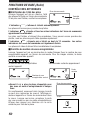
MISE EN MARCHE DE L’APPAREIL
OFF
ON
RESET
: Alimentation coupée
: Alimentation en marche
: ● Déplacer momentanément l’interrupteur sur
RESET et relâcher, et l’interrupteur
reviendra automatiquement sur ON. Tous
les réglages sauf le menu de réglage de
mode seront remis aux réglages en usine
(réglages initiaux).
● Maintenir l’interrupteur dans la position
RESET pendant plus de 3 secondes, et tous
les réglages, sauf pour la date et l’heure,
seront remis aux valeurs initiales.
Retirer le bouchon d’objectif, régler la molette Mode sur le mode désiré et régler
l’interrupteur d’alimentation sur ON.
PRISE DE VUES À L’AIDE DE L’ÉCRAN ACL
Appuyer sur
(Touche de l’écran ACL). Le
même signe dans le viseur sera affiché sur
l’écran ACL. Le sujet affiché sera commuté
entre le viseur et l’écran ACL chaque fois que
cette touche est pressée.
(Touche de l’écran ACL)
COUPURE DE L’ALIMENTATION
Tourner l’interrupteur d’alimentation de
l’appareil sur l’arrêt. Mettre le bouchon sur
l’objectif.
49
FONCTIONS DE BASE (Suite)
CONTRÔLE DES AFFICHAGES
m Vérification de l’état des piles
Écran de commande
Lorsque l’appareil est mis en marche, l’état
des piles est affiché sur l’écran de commande.
Si les piles sont faibles, veuillez les remplacer.
Contrôle
des piles
L’indicateur
s’allume et s’éteint automatiquement.
Les piles sont bonnes pour prendre des photos.
L’indicateur
clignote et tous les autres indicateurs de l’écran de commande
apparaissent normalement.
Les piles sont faibles et doivent être remplacées. Vous pouvez encore prendre des
photos, mais les piles risquent d’être épuisées rapidement.
L’indicateur
clignote puis s’éteint au bout de 12 secondes. Les autres
indicateurs de l’écran de commande sont également éteints.
Les piles sont vides et doivent être immédiatement remplacées.
m Contrôle du nombre de vues enregistrables
Lorsque l’appareil est mis en marche dans le mode d’images fixes, le nombre de vues
enregistrables apparaît sur l’écran de commande. Pour les images cinéma, la durée
restante en secondes apparaît.
Le nombre de vues enregistrables
restant apparaît.
Les secondes restantes apparaissent.
Durée
restante
Nombre de vues
enregistrables restant
● Quand il n’y a plus de place disponible pour
des vues en mode d’enregistrement d’images
fixes:
Un avertissement sonore est émis lorsque la carte
ne peut plus mémoriser de vues et l’affichage cidessous apparaît sur l’écran de commande et dans
le viseur. Lorsque ceci arrive, remplacer la carte
par une nouvelle ou par une carte enregistrable ou
effacer des images non désirées sur la carte
existante pour faire de la place.
Écran de commande
Viseur
CARD FULL
50
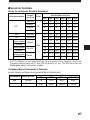
m Nombre de vues enregistrables restant
Nombre d’images fixes pouvant être prises
Mode
d’enregistrement
Nombre de
pixels
2Mo
4Mo
8Mo
16Mo
32Mo
64Mo
1600x1200
0/–
0/–
1/–
2/–
5/–
11/–
1280x960
0/–
1/–
2/–
4/–
8/–
17/–
0/–
1/–
3/–
6/–
13/–
27/–
640x480
2/–
4/–
8/–
17/–
34/–
68/–
SHQ
1600x1200
1/1
2/2
5/5
11/11
22/22
45/44
HQ
1600x1200
4/3
8/7
16/15
31/30
64/60 128/120
2/2
4/4
8/8
17/16
34/33
6/5
12/11
24/22
49/45
99/90 199/181
3/3
6/6
13/12
26/25
53/51 107/102
9/8
18/16
38/32
76/66 153/132 306/265
8/7
16/14
32/29
66/58 132/117 265/234
21/15
40/30
82/61 165/123 331/248 664/498
TIFF*
1024x768
TIFF
HIGH (Haute qualité)
1280x960
NORMAL
JPEG
HIGH (Haute qualité)
SQ
Capacité de mémoire
(Image seule/Image avec son)
Fichier
1024x768
NORMAL
HIGH (Haute qualité)
NORMAL
640x480
69/67
* Si le mode d’enregistrement est réglé sur TIFF, le son ne sera pas enregistré avec
l’image lorsque la molette Mode est réglée sur P ou A/S/M, mais il peut être ajouté
plus tard pendant la lecture.
Nombre de secondes d’images cinéma pouvant être prises:
Durée d’enregistrement continu la plus longue par film
Mode
d’enregistrement
Nombre de pixels
2Mo
Capacité de mémoire
4Mo
8Mo
Supérieure à 16Mo
HQ
320x240
7/6
14/13
28/27
43/42
SQ
160x120
31/26
62/53
126/109
174/158
51
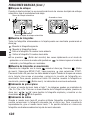
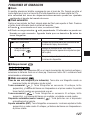
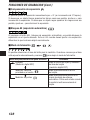
FONCTIONS DE BASE (Suite)
RÉGLAGE DIOPTRIQUE
Tourner la molette de réglage dioptrique
pour voir clairement le repère de mise au
point automatique.
Viseur
P F2.8 1/30
0.0
Repère de mise au point automatique
PRISE DE VUES
Déclenchement correct
Il y a 2 étapes pour déclencher l’obturateur.
Bien pratiquer avant de prendre réellement
des vues.
1
Appuyer sur le déclencheur jusqu’à micourse.
● La marque de correction AF s’allume
lorsque la mise au point et l’exposition
sont mémorisées. Elle clignote si la
mise au point ou l’exposition n’est pas
mémorisée.
complètement sur
2 Appuyer
déclencheur pour prendre la photo.
Appuyer jusqu’à
mi-course
Déclencheur
Appuyer
complètement
le
● L’appareil photo émet un signal sonore
lorsque l’obturateur est déclenché.
● Le voyant d’accès de carte clignote
alors que la vue est en cours
d’enregistrement.
Déclencheur
Marque de correction AF
P F2.8 1/30
0.0
Repère de mise au point automatique
52
PRISE D’UNE VUE FIXE
●Un signal sonore signifie que la photo a été
prise correctement.
●Juste après l’affichage de la vue prise,
l’appareil est prêt pour prendre la vue
suivante.
●La prise de vues en série est disponible si le
bloc mémoire montre qu’il y a de la place
sur la carte.
●Si la mémoire tampon est pleine, le bloc
supérieur s’allumera et aucune autre vue ne
pourra être prise.
Avant la prise de vues/
Aucune vue n’est prise
Une vue prise
P F2.8 1/30
0.0
Nombre de vues enregistrables
Bloc mémoire
Plus d’une vue prise
Pas de place
d’enregistrement
● NE JAMAIS ouvrir le couvercle du logement de carte, éjecter la carte, retirer les piles
ni tirer la fiche lorsque le voyant d’accès de carte clignote. Faire ainsi pourrait
détruire des vues enregistrées et empêcher la mémorisation de vues que vous venez
juste de prendre.
ENREGISTREMENT DE FILMS
Appuyer complètement sur le déclencheur.
L’enregistrement commence. Pour l’arrêter,
appuyer de nouveau complètement sur le
déclencheur.
●Le symbole
s’allume en rouge pendant
l’enregistrement de films.
●Lorsque l’enregistrement commence, la
mise au point et l’exposition correctes sont
maintenues en permanence.
F2.8 1/30
0.0
Secondes restantes
Bloc mémoire
53
FONCTIONS DE BASE (Suite)
m Mémorisation de la mise au point
Suivre la procédure ci-dessous si votre sujet principal n’est pas dans le repère de mise
au point automatique.
Marque de correction AF
1
P F2.8 1/800
0.0
Recadrer l’image
2
P F2.8 1/800
0.0
Repère de mise au point automatique
m Affichage de vues
Toutes les vues enregistrées sur la carte peuvent être affichées en appuyant sur la
molette de défilement.
: Affiche la vue suivante.
: Affiche la vue précédente.
: Saute à la vue 10 images en avant.
: Saute à la vue 10 images en arrière.
●Si
Touche de l’écran ACL) est pressée rapidement deux fois dans le mode
d’enregistrement ou si la molette Mode est réglée sur
, l’appareil passe en mode
d’affichage et des vues sont affichées.
m Affichage de films
Sélectionner des images avec le symbole
en utilisant la molette de défilement.
Appuyer sur
(touche Menu). Sélectionner MOVIE PLAY, puis appuyer surs
pour choisir START. Appuyer sur la touche OK pour lire les données de la carte.
Lorsque le voyant d’accès de carte s’arrête de clignoter, la lecture du film commence.
Pour faire une pause, appuyer sur la touche OK pendant l’affichage de films. Utiliser la
molette de défilement pour afficher l’image précédente/suivante. Pour terminer
l’affichage du film, appuyer sur
(touche Menu). L’affichage du menu revient.
m Affichage gros plan
En déplaçant le levier de zoom vers T, des images peuvent être agrandies de 1,5x, 2x,
2,5x ou 3x. Pour voir une partie différente de l’image agrandie, appuyer sur la molette
de défilement ( / / / ) tpour décaler l’image agrandie et visionner dans les
sens § / ©/¶/Ä sur l’écran.
m Affichage d’index
Si vous tournez le levier de zoom vers W, vous pouvez afficher plusieurs vues à la fois.
Vous pouvez sélectionner la vue que vous voulez voir en utilisant la molette de
défilement. Pour la visionner seule, tourner le levier de zoom vers T. Vous pouvez
changer le nombre de vues affichées en accédant au réglage de menu approprié.
54
FONCTIONS D’ENREGISTREMENT
m Zoom
Vous pouvez sélectionner téléobjectif ou grand angle avec le zoom 10x. Si le zoom
numérique dans le menu est activé, un zoom 27x est disponible avec le zoom
numérique 2,7x.
●La vitesse du zoom avant/arrière peut être ajustée en changeant l’angle du levier de
zoom.
m Flash automatique
Glisser le commutateur de flash situé sous le flash pour relever le flash. Appuyer sur le
déclencheur jusqu’à micourse.
●Lorsque
s’allume dans le viseur, le flash est activé.
●Le flash est en cours de recharge alors que
clignote. L’obturateur ne peut
pas être déclenché à ce moment-là. Attendre que
s’éteigne avant de
prendre la photo.
Mode de flash/Écran de commande
Utilisation
Flash automatique
Se déclenche automatiquement dans des
conditions de faible éclairage et de contre-jour.
Flash atténuant l’effet
“yeux rouges”
Atténue sensiblement l’effet “yeux rouges”
(les yeux du sujet apparaissant rouges).
Flash d’appoint
Se déclenche quelles que soient les
conditions d’éclairage.
m Mise au point manuelle
Appuyer sur la touche OK. Choisir MF dans le menu de sélection de mode de mise au
point et sélectionner la distance avec la molette de défilement. Appuyer sur la touche
OK. La distance sélectionnée est mémorisée.
m Mode de prise de vues en série
Prise d’une seule vue (pas d’affichage): Ne prend qu’une seule vue en appuyant sur
le déclencheur. (Réglage initial)
Prise de vues en série (
): TPrend des vues en série. La mise au point,
l’exposition et la balance des blancs sont mémorisées pour la première vue.
Jusqu’à 5 vues à la fois peuvent être prises en série.
Prise de vues en série AF (
): Prend des vues en série. La mise au point,
l’exposition et la balance des blancs sont mesurées et ajustées pour chaque vue.
Retardateur/télécommande (
): Prend des vues avec le retardateur ou la
télécommande.
Fourchette automatique (BKT): Prend des vues en série. L’appareil ajuste l’exposition
pour chaque vue. La mise au point et la balance des blancs sont mémorisées pour
la première vue.
55
FONCTIONS D’ENREGISTREMENT (Suite)
m Compensation d’exposition
Vous pouvez ajuster manuellement l’exposition de +/– 2 (pas de 1/3 environ). Si vous
voulez qu’un objet blanc apparaisse aussi blanc que possible, ajuster + pour augmenter
l’exposition. Si vous voulez qu’un objet noir apparaisse aussi noir que possible, ajuster
– pour réduire l’exposition.
m Mémorisation AE
En appuyant sur la touche AEL, vous pouvez mémoriser l’exposition sur le réglage que
vous préférez. C’est très utile quand vous voulez régler une exposition qui est différente
de celle que l’appareil aurait normalement choisi.
m Mode de mesure
Vous pouvez sélectionner la zone de luminosité pour la mesure. Lorsque vous savez
que la zone est correctement exposée, appuyer sur la touche
pour choisir le
mode de mesure.
Mode de réglage/
Affichage de l’écran de commande
Standard
(Mesure ESP numérique)
Mesure moyenne pondérée
au centre
Mesure ponctuelle (Spot)
56
Fonctions
Mesure le centre du sujet et
a zone autour du sujet
(Mesure ESP numérique)
Mesure essentiellement
le centre du sujet.
Mesure essentiellement dans le
repère de mise au point automatique.
Utiliser ce mode lorsqu’un
contre-jour rend le sujet plus sombre.
UTILISATION DE MENUS POUR DES AJUSTEMENTS DÉTAILLÉS
m Compensation de flou d’image — Système de stabilisation
En prenant des vues en position téléobjectif, le tremblement de l’appareil risque
d’affecter davantage l’image en causant une image floue. Si cela vous arrive, vous
pouvez compenser le tremblement de l’appareil avec la fonction de correction de
tremblement de l’appareil.
Sous certaines conditions, la fonction risque de ne pas être efficace.
●Si l’angle de l’appareil est changé très rapidement
●En enregistrement des scènes de nuit
●Avec une longue durée d’exposition
●Si l’indicateur des piles clignote.
m Utilisation du zoom 27X — ZOOM NUMÉRIQUE
Vous pouvez obtenir une photographie agrandie de 2,7X avec le zoom numérique. Si
vous utilisez en même temps un zoom optique 10X, vous pouvez prendre une
photographie zoom 27X.
m Balance des blancs — WB
La reproduction des couleurs diffère en fonction des conditions d’éclairage. Vous
pouvez ajuster la balance des blancs pour s’adapter aux conditions d’éclairage et
assurer des couleurs semblant naturelles. Des réglages pour des éclairages au
tungstène et fluorescent sont également disponibles, vous permettant d’obtenir les
meilleurs résultats en intérieur.
m Changement de la sensibilité (ISO) —
Augmenter la sensibilité lorsque vous voulez prendre des vues sous faible éclairage
avec une vitesse d’obturation assez élevée. Vous pouvez choisir entre AUTO, 100, 200
ou 400. Si vous réglez sur AUTO, la sensibilité est changée automatiquement en
fonction des conditions de prise de vues. Plus la valeur ISO est élevée, plus la vitesse
d’obturation utilisable peut être élevée et moins de lumière est nécessaire.
m Mode flash synchronisé à vitesse lente —
Ce mode vous permet de synchroniser la lumière émise par le flash avec une vitesse
d’obturation lente. Régler la vitesse d’obturation sur une valeur plus faible vous permet
de saisir une image plus claire. Sélectionner
SLOW1 ou
SLOW2 sur le menu,
SLOW2 est le second rideau.
57
FONCTIONS D’ENREGISTREMENT (Suite)
m Fourchette automatique — BKT
Utiliser ce mode pour enregistrer des images avec des expositions différentes. La mise
au point et la balance des blancs seront d’abord mesurées et fixes pendant la prise de
vues en série. Vous pouvez sélectionner le nombre de vues à prendre en série. Avant
de prendre une vue, appuyer sur
jusqu’à la disparition de
e l’écran de
commande.
m Mesure multiple — MULTI METERING
Mesure la luminosité du sujet sur jusqu’à 8 points différents pour régler l’exposition
correcte basée sur la luminosité moyenne.
m AF MODE
Vous pouvez sélectionner la plage de mise au point de votre sujet.
iESP
: La sélection de mise au point est déterminée sur l’image entière sur l’écran
(réglage en usine).
SPOT
: La sélection de mise au point est déterminée sur la partie de l’image dans
le repère de mise au point automatique.
m FULL – TIME AF
Avec l’autofocus à plein temps, la durée de mise au point peut être plus courte.
L’autofocus à plein temps garde l’image au point sur l’écran ACL/dans le viseur à tout
moment. Pour sélectionner/annuler l’autofocus à plein temps, régler le paramètre sur
ON ou OFF dans le menu.
m Enregistrement du son
Enregistrement d’images fixes: L’enregistrement de 4 secondes de son est possible.
Enregistrement de films: L’enregistrement simultané du son est possible.
m Carte de fonction
La carte SmartMedia Olympus a un mode Panorama qui vous permet de faire des
prises de vues panoramiques extra larges.
Vous pouvez utiliser le logiciel CAMEDIA Master pour raccorder plusieurs images bout
à bout pour créer une seule image panoramique.
58
m Fonction en prise de vues — FUNCTION
“BLACK & WHITE” vous permet de prendre des vues en noir et blanc, alors que
“SEPIA” ajoute une teinte sépia (brunâtre) à votre image. “WHITE BOARD” vous
permet de prendre une vue et de superposer des lettres sur un tableau blanc, alors que
“BLACK BOARD” fait la même chose avec un tableau noir. Lorsque la molette Mode est
réglée sur
, uniquement “BLACK & WHITE” et “SEPIA” sont disponibles.
m CARD SETUP
L’initialisation est effectuée pour formater la carte pour permettre l’écriture de données
sur celle-ci. Les cartes formatées Olympus sont vivement recommandées. En utilisant
des cartes d’une autre marque ou des cartes formatées par un PC, bien s’assurer de les
formater avec l’appareil avant utilisation.
m Mode programmé de scène — S-Prg
Sélectionner le mode en fonction du sujet:
: Vues de portrait.
: Vues de sujets en mouvement.
: Vues avec à la fois le sujet et l’arrière-plan nets.
: Scènes de nuit.
m Réglage du mode d’enregistrement — TIFF SHQ HQ SQ
Sélectionner le mode d’enregistrement désiré.
● Avec la molette Mode réglée sur P, A, S, M ou S-Prg (pour des images fixes)
Vous pouvez sélectionner entre TIFF, SHQ, HQ et SQ. La qualité d’image augmente
dans l’ordre SQ[HQ[SHQ[TIFF. TIFF est le format d'image de la plus haute
qualité. Plus la qualité est élevée, meilleures seront les images imprimées. Pour des
images prises dans le mode SHQ ou TIFF, la durée d’enregistrement et de lecture est
plus longue qu’en SQ ou HQ.
● Avec la molette Mode réglée sur
(pour l’enregistrement d’images cinéma)
Vous pouvez sélectionner entre HQ et SQ. La qualité d’image augmente dans l’ordre SQ
[HQ.
59
FONCTIONS D’ENREGISTREMENT (Suite)
UTILISATION DU FLASH
m Commande d’intensité du flash
Vous pouvez ajuster la quantité de lumière émise par le flash pour répondre à vos
besoins de prise de vues.
Appuyer sur
(touche Menu) pour afficher le menu. Choisir
et ajuster
l’intensité du flash.
m Utilisation d’un flash externe
Le flash externe FL-40 (en option) peut être utilisé pour prendre des photographies au
flash, soit seul ou avec le flash principal. Pour raccorder le FL-40 à l’appareil, le
support de flash FL-BK01 exclusif (en option) et le cordon de support FL-CB01 (en
option) sont nécessaires. Sans ces options, le FL-40 ne fonctionnera pas différemment
des flashes externes d’autres marques.
60
FONCTIONS D’AFFICHAGE
m Rotation et contrôle de vues en format vertical
/
Lorsque vous prenez une vue avec l’appareil tenu en position verticale, l’image obtenue
est en format vertical, la hauteur est plus grande que la largeur. Vous pouvez la tourner
en format horizontal, de 90˚ dans le sens des aiguilles d’une montre ou le contraire.
Afficher une vue en format vertical.
23.12.’00 21:56 10
Une vue en format vertical
SQ
SQ
SQ
23.12.’00 21:56 10
23.12.’00 21:56 10
Une pression sur
(touche Gros plan macro)
tourne la vue de 90˚ dans le
sens des aiguilles d’une
montre.
Une pression sur
(touche de mode de
mesure) tourne la vue de
90˚ dans le sens inverse
des aiguilles d’une montre.
Pour restituer la position originale…
Appuyer sur
.
m Affichage sur un téléviseur
Les images et le son enregistrés peuvent être
sortis sur un téléviseur avec un câble AV.
1 Raccorder le câble AV à la prise de sortie
Câble AV
A/V (noire) de l’appareil photo.
2 Raccorder le câble AV aux connecteurs
d’entrée vidéo (jaune) et audio (blanc) du
téléviseur.
Raccorder à la prise de
sortie A/V (noire)
TV
Téléviseur
61
FONCTIONS D’AFFICHAGE (Suite)
m Effacement d’une seule vue
Régler la molette Mode sur
. Sélectionner l’image que vous voulez effacer en
utilisant la molette de défilement. Appuyer sur
(Touche d’effacement). Un message
vous demandant de confirmer l’effacement apparaît. S’assurer que YES est sélectionné,
puis appuyer sur la touche OK.
m Effacement de toutes les vues
Régler la molette Mode sur
. Appuyer sur
(Touche Menu). Sélectionner CARD
SETUP, puis
. Appuyer sur la touche OK. S’assurer que OK est sélectionné et
appuyer sur la touche OK.
m Protection
Régler la molette Mode sur
. Afficher la vue que vous voulez protéger. Appuyer sur
la touche OK. La vue affichée sera alors protégée.
apparaît sur l’écran ACL.
UTILISATION DE MENUS POUR DES AJUSTEMENTS DÉTAILLÉS
m Diaporama
Ce mode vous permet de faire défiler automatiquement les vues enregistrées sur la
carte. Appuyer sur
de la molette de défilement pour choisir le mode diaporama,
puis appuyer sur
pour sélectionner START.
m Ajouter du son à des images fixes
Vous pouvez ajouter du son à des images fixes ou changer l’audio qui a déjà été
enregistré.
m FUNCTION
MOVIE INDEX:
Pour contrôler rapidement un film, vous pouvez créer un index. Vous pouvez
également enregistrer l’index sur une carte SmartMedia comme des images fixes.
MOVIE EDIT:
Vous pouvez sélectionner les scènes que vous voulez et les enregistrer ensemble
comme un nouveau film.
62
MODE SETUP
Changer l’appareil sur votre réglage désiré. Pour des détails, se référer aux instructions
du CD logiciel sur le CD-ROM.
m Tableau du menu de réglage de mode
Poste
ALL RESET
TIFF *1, *2
SQ *1, *2
AF ILLUMINATOR*1, *2
REC VIEW *2
SLEEP
FILE NAME*2
m/ft *2
*3
Description
Remet l’appareil à l’état initial
quand il est mis en marche.
Règle le niveau de netteté de
l’image
Sélectionne la résolution de
l’image en mode TIFF.
Sélectionne la résolution et la
qualité d’image en mode SQ.
Ajuste le volume du son
produit par les signaux
sonores de l’appareil.
Sélectionne la marche ou
l’arrêt du voyant d’aide à la
mise au point automatique.
Sélectionne si l’image
enregistrée est affichée ou non.
Règle la durée après la
dernière action avant de faire
passer l’appareil en mode
d’attente.
Spécifie comment mémoriser
des noms de fichier sur la
carte.
Ajuste la luminosité de l’écran
ACL et du viseur.
Réglage de date
Règle les unités de mesure de
longueur focale.
Règle le nombre d’images à
afficher en même temps sur
l’écran.
Réglage initial
ON
NORMAL
1600 x 1200
640 x 480 (NORMAL)
HIGH
ON
OFF
1 MIN
RESET
–
m
9
*1 Pendant l’enregistrement cinéma (avec la molette Mode réglée sur
), le réglage de mode
n’apparaît pas sur l’écran de menu.
*2 En affichage (avec la molette Mode réglée sur
), le réglage de mode n’apparaît pas sur l’écran
de menu.
*3 Ce menu n’est disponible qu’en affichant une image.
63
IMPRESSION DES IMAGES
Des images sélectionnées peuvent être réservées sur une carte SmartMedia pour
l’impression sur une imprimante ou dans un laboratoire photo qui supporte le système
DPOF (Digital Print Ordre Format).
●La réservation d’impression ne peut pas être effectuée pour une image affichée avec
.
m Réservation d’impression d’une seule image
Appuyer sur
. L’écran de réglage de réservation d’impression est affiché. Appuyer
sur
de la molette de défilement pour sélectionner
, puis appuyer sur la
touche OK. L’écran de sélection de réservation d’impression est affiché. Appuyer sur la
molette de défilement pour sélectionner l’image que vous voulez imprimer. Appuyer
sur la touche OK. Le menu de réglage
est affiché. Appuyer sur
pour
sélectionner
x, puis appuyer sur
pour entrer le nombre de tirages. Appuyer
sur
pour sélectionner ( ), puis appuyer sur
pour sélectionner DATE ou
TIME. Appuyer sur
pour sélectionner (
TRIMMING), puis appuyer sur
sur YES ou NO. Appuyer sur la touche OK pour terminer le réglage. Appuyer sur
.
L’écran sort le mode de réservation d’impression et revient au mode Affichage.
m Réservation d’impression de toutes les images
Vous permet de mémoriser des données pour imprimer toutes les images sur la carte
et de choisir également le nombre de tirages que vous voulez.
m Réservation d’impression avec rognage
Vous pouvez imprimer une partie agrandie d’une image enregistrée.
Remarque:
●Cet appareil photo ne peut pas être raccordé directement à des imprimantes.
●Si une carte contient des réservations DPOF réglées à partir d’un autre matériel,
entrer des réservations en utilisant cet appareil peut détruire les réservations
précédentes. Bien utiliser cet appareil pour des réservations.
64
TRANSFERT D’IMAGES VERS UN ORDINATEUR
Saisie directement d’une carte
Des adaptateurs de carte vous permettent de saisir des images sur votre ordinateur
personnel sans utiliser de logiciel spécial.
Type d’ordinateur personnel
Adaptateur de carte nécessaire
Ordinateur personnel disposant
d’un lecteur de disquette 3.5”
Adaptateur de disquette FlashPath
(en option)
Ordinateur personnel disposant
d’une case carte PC (PCMCIA) ou
d’un lecteur/enregistreur de carte
PC externe
Adaptateur de carte PC (en option)
Ordinateur personnel disposant
d’un port USB
Unité de lecture/écriture SmartMedia
(MAUSB-2) (en option)
Important:
● Vérifier la compatibilité. Ce matériel peut ne pas fonctionner correctement sur tous
les systèmes d’exploitation. Le fonctionnement peut être affecté par la capacité
mémoire de la carte SmartMedia.
● OLYMPUS CAMEDIA Master n’est pas nécessaire pour saisir des images à partir
d’une carte. Les images peuvent être traitées comme des fichiers PC normaux, en
utilisant toute application de traitement d’image disponible dans le commerce.
Remarque:
● Ne pas essayer d’utiliser une carte SmartMedia protégée contre l’écriture sur un
ordinateur, ce qui pourrait causer des erreurs. Se référer aux instructions de
l’adaptateur que vous utilisez pour plus de détails.
65
TRANSFERT D’IMAGES VERS UN ORDINATEUR (Suite)
Raccordement par câble
Raccorder l’appareil photo à un ordinateur personnel (compatible IBM PC/AT, Apple
Macintosh).
Cet appareil photo dispose de 2 connecteurs de transfert.
Si votre ordinateur dispose d’une interface USB et fonctionne soit sous Windows 98/98
Second Edition/2000 Professional ou sous Macintosh OS, vous pouvez transférer des
données d’image via un câble USB.
Si votre ordinateur personnel ne dispose pas d’une interface USB ou fonctionne sous
Windows 95/NT4.0 ou sous Macintosh OS, vous pouvez transférer les données via un
câble série.
Pour raccorder directement cet appareil photo à un ordinateur personnel, il doit
disposer d’un port série ou d’un port USB.
Remarque:
● Il n’est pas possible de transférer des données vers un ordinateur personnel via un
câble si vous n’utilisez pas CAMEDIA Master 2.0 pour saisir les images.
Pour plus de détails, se référer aux instructions du CD logiciel sur le CD-ROM.
66
CODES D’ERREUR
Des codes d’erreur apparaissent quand il y a un problème avec l’appareil. Les codes
d’erreur affichés sur l’écran de commande clignoteront.
Écran de
commande
Viseur/Écran
ACL
Contenu d’erreur
Solution
CARD
COVER
OPEN
Le couvercle de
carte est ouvert.
NO CARD
La carte n'est pas
Introduire correctement la
insérée, ou elle ne carte. Introduire une autre
peut être reconnue. carte.
CARD FULL
Aucune vue
supplémentaire ne
peut être prise.
Remplacez la carte ou
supprimez les vues inutiles.
WRITE
PROTECT
L’écriture sur la
carte est interdite.
Si vous prenez des vues,
retirez le sceau adhésif de
protection contre l’écriture.
CARD
ERROR
Impossible
d’enregistrer, de
lire ou d’effacer
des vues sur cette
carte.
Si la carte est sale, nettoyezla avec un tissu de
nettoyage et insérez-la à
nouveau. Ou formatez la
carte. Si le problème
persiste, cette carte ne peut
pas être utilisée.
PICTURE
ERROR
L’image
enregistrée ne peut
être lue avec cet
appareil.
Visualisez l'image à l'aide
d'un logiciel de traitement
d'image pour ordinateur
personnel. Si ce n'est pas
possible, le fichier de
l'image est partiellement
endommagé.
(Aucun affichage)
(Écran de
La carte n’est pas
confirmation formatée.
de format)
Insérez la carte et fermez le
couvercle.
Formatez la carte.
67
CODES D’ERREUR (Suite)
Écran de
commande
Viseur/Écran
Contenu d’erreur
ACL
Aucune image
NO
n’est enregistrée,
PICTURE
alors il n’y a rien à
lire.
CARD FULL
Solution
Insérez une carte qui
contient des images.
Il n’y a plus
Remplacez la carte ou
d’espace libre sur
supprimez les vues inutiles.
la carte, par
conséquent, des
données
d’impression ou du
son ne peuvent pas
être enregistrés.
PRÉCAUTIONS
ATTENTION
Précautions à prendre avec le flash
● Faire attention en prenant des photos de très près.
● Ne pas photographier les visages de très près (les bébés en particulier). En effet, si le flash se
déclenche trop près des yeux de la personne photographiée, ceci peut lui provoquer une perte
de la vision. En prenant des photographies de bébés, bien s’assurer que la distance est au
moins de 1 mètre.
Manipuler l’appareil délicatement
● Ne pas utiliser l’appareil en prenant une posture instable. Si vous perdez l’équilibre, vous
risquez de vous blesser.
● Faire en sorte qu’aucun corps étranger (saleté, pluie, sable) ne puisse s’infiltrer dans
l’appareil, notamment lorsque le couvercle du compartiment des piles ou le capot de
protection d’objectif est retiré, au risque de l’endommager.
● Afin de ne pas abîmer l’appareil, ne pas le faire tomber ni le soumettre à un choc violent
ou à des vibrations.
● Cet appareil n’est pas étanche. Ne pas le plonger dans l’eau et le protéger de la pluie, de
l’eau de mer, etc.
● Ne pas utiliser l’appareil à l’extérieur pendant un orage ou en présence d’éclairs.
● Au moment de changer les piles, bien couper l’alimentation au préalable. Les circuits
internes risquent d’être endommagés si l’appareil est sous alimentation pendant cette
opération.
Conditions de rangement
● Pour éviter des dommages ou mauvais fonctionnement de l’appareil, le ranger
uniquement dans un endroit où la température se situe entre –20 et 60° C avec un taux
d’humidité entre 10 et 90 %.
● Ne pas le ranger dans un lieu humide parce que la condensation qui se formerait sur
l’appareil pourrait l’endommager.
● Pour éviter tout risque de blessure ou d’accident, ne pas laisser l’appareil à la portée des
enfants.
68
Environnement d’utilisation
● Ne pas utiliser l’appareil en présence d’une forte concentration de gaz inflammables
ou explosifs, ce qui pourrait provoquer un incendie ou une explosion.
● Pour éviter des dommages ou un mauvais fonctionnement de l’appareil, ne l’utiliser que
si la température est comprise entre 0 et 40° C avec un taux d’humidité de 30 à 90 %.
● Ne pas apporter soudainement l’appareil d’un endroit chaud à un endroit froid ou
l’inverse. Ce qui pourrait favoriser la formation de condensation à l’intérieur de l’appareil
et l’endommager. Pour empêcher la formation de condensation, placer l’appareil dans un
sac en plastique ou tout autre type d’enveloppe pour le protéger et attendre que l’appareil
ait atteint la température ambiante de la pièce où il a été amené avant de le sortir.
● Si l’appareil est utilisé à basse température, les piles auront une durée d’utilisation plus
courte que d’habitude.
Précautions à prendre pendant la manipulation des piles
Pour éviter tout risque de fuite, incendie ou endommagement, veuillez lire attentivement les
indications et respecter les points suivants.
● Ne pas chauffer ni jeter les piles au feu.
● Ne pas démonter, modifier ou souder.
● Ne pas mettre en place avec la polarité inversée (signes (+), (–)).
● Ne pas laisser d’objets métalliques toucher les contacts. Ne pas ranger ni transporter
sans protection avec des colliers ou des pinces à cheveux.
● Ne pas utiliser des piles usées avec des piles neuves et ne pas mélanger différents types
de piles.
● Ne pas ranger dans un endroit humide parce qu’il y a risque de corrosion.
● Ne pas utiliser si quelque chose d’anormal est constaté.
● Ne pas utiliser si elles fuient, si elles sont gonflées, si un accroissement de leur
température est constaté ou si tout autre phénomène anormal est relevé.
● Lorsque les piles sont utilisées pour la première fois, si des signes de corrosion sont
relevés ou si elles sont chaudes, les rapporter au magasin où vous les avez achetées.
● NE JAMAIS utiliser de pile ou batterie dont le corps n’est pas complètement couvert par
une feuille isolante ou la feuille est retirée, ce qui pourrait causer une fuite, un incendie
ou des blessures. Certaines piles disponibles dans le commerce sont également
partiellement recouvertes ou pas du tout recouvertes par une feuille isolante. Ne jamais
utiliser ces piles.
Si les piles fuient
● Si le liquide est rentré dans vos yeux, ne pas les frotter. Rincer à grande eau et se faire
soigner immédiatement par un spécialiste.
● Si le liquide est venu en contact avec la peau ou les vêtements, rincer à grande eau.
● Si le liquide s’est écoulé dans le compartiment des piles, essuyer soigneusement les
traces avec un chiffon humide avant de remettre des piles neuves en place.
Retirer les piles de l’appareil quand elles sont usées
● Si des piles usées restent dans l’appareil, elle risquent de fuir. Retirer les piles de
l’appareil si celui-ci est rangé pendant une longue période ou s’il n’est pas prévu de
l’utiliser avant longtemps.
Ne pas utiliser dans un dispositif étanche
● Ceci risque de favoriser un suintement des piles ou d’endommager les piles et/ou
l’appareil.
69
PRÉCAUTIONS (Suite)
ATTENTION
Ne pas recharger des piles alcalines ou au lithium
● Elles risquent de suinter et de provoquer des dommages si on essaie de les recharger.
Ne pas laisser à la portée des enfants
● Faire en sorte que les enfants ne sortent pas les piles de l’appareil au moment de s’en
servir. Si un enfant doit utiliser l’appareil, lui indiquer très précisément la façon exacte de
s’en servir conformément aux instructions de ce mode d’emploi.
● Quand les piles usées doivent être jetées, faire en sorte que cela soit effectué
conformément aux lois en vigueur dans votre pays.
Précautions à prendre avec les accessoires
● N’utiliser que les accessoires fournis ou des accessoires recommandés par le fabricant.
Prenez conseil auprès du magasin qui vous a vendu l’appareil. En procédant autrement, il
y a risque d’incendie, de décharge électrique ou endommagement.
● Ne pas brancher l’adaptateur d’alimentation secteur si l’appareil ne sert pas. Débrancher
le cordon de l’adaptateur d’alimentation secteur si l’appareil n’est pas utilisé. Autrement,
il y a risque d’accident ou d’endommagement.
● Pour éviter tout risque de décharge électrique ou d’endommagement, ne pas débrancher,
brancher ni manipuler l’adaptateur d’alimentation secteur les mains mouillées.
● Ne pas modifier, plier par la force, tirer fortement, gratter ou bricoler le cordon
d’alimentation de l’adaptateur secteur d’une façon ou d’une autre. Ne poser aucun objet
lourd sur le cordon d’alimentation ni le faire passer près d’une source de chaleur qui
pourrait causer un incendie ou provoquer des décharges électriques.
Points à vérifier avant d’utiliser l’appareil
● Si vous êtes sur le point de prendre des photos importantes ou si l’appareil n’a pas été
utilisé depuis longtemps, vérifier tout d’abord qu’il fonctionne normalement ou demander
conseil à un centre de dépannage autorisé au préalable.
● Nous déclinons toute responsabilité pour la perte de données, perte de temps de loisirs,
manque à gagner ou tout autre dommage direct ou indirect ou réclamation provoqués
par cet appareil photo.
Ne pas utiliser des piles ni les ranger dans un endroit chaud (par exemple, à
l’intérieur d’une voiture toutes glaces relevées par une journée d’été
ensoleillée).
● Ceci risque d’écourter la durée d’utilisation prévue à l’origine. Les conserver dans un
endroit frais et à l’abri d’une exposition directe au soleil.
Remarques sur le rétro-éclairage de l’écran ACL
●L’écran de commande et les lampes fluorescentes utilisées dans l’écran ACL ont une durée
de vie limitée. Si l’un ou l’autre de ces écrans s’assombrit ou scintille, veuillez vous mettre
en rapport avec le service de dépannage le plus proche.
●Lorsque la température est très basse, le rétro-éclairage de l’écran peut mettre un certain temps à
réagir ou provoquer de brusques variations de couleurs. Pour prévenir ce phénomène, préserver
l’appareil du froid quand on l’utilise à basse température. Le rétro-éclairage de l’écran
recommence à fonctionner correctement dès que la température ambiante redevient normale.
● Lorsque l’écran à cristaux liquides affiche des images différentes, il peut arriver que certains
pixels ne changent pas de couleur ou n’apparaissent pas du tout. Si ce phénomène est
éventuellement dû à un dysfonctionnement des circuits, il demeure toutefois dans les limites
de tolérance de fonctionnement d’un écran couleur ACL. La luminosité de l’écran ACL
couleur peut en outre varier d’une image à l’autre.
70
REMARQUE IMPORTANTE
Refus de responsabilité relatif à la garantie
La firme Olympus décline toutes autres représentations ou garanties, expresses ou
implicites, pour ou relatives au contenu de la documentation écrite ou du logiciel et ne
pourra en aucun cas être tenue pour responsable de toute autre garantie implicite de
commercialisation ou d’adaptation à des fins particuliers ou pour les dommages
encourus de quelque nature que ce soit, qu’ils soient indirects, imprévus ou issus
d’une autre cause (y compris et sans limitation aux dommages entraînés par la perte
de bénéfices financiers, l’interruption de travail et la perte d’informations
professionnelles) qui proviendraient d’une utilisation ou de l’impossibilité d’utiliser
cette documentation écrite ou du logiciel. Certains Etats n’autorisent pas l’exclusion ni
la limitation de la responsabilité des dommages indirects ou imprévus, de sorte que les
limitations ci-dessus peuvent ne pas vous concerner directement.
Note relative aux droits d’auteur
Tous droits réservés. Toute reproduction partielle ou intégrale de cette documentation
écrite ou du logiciel, par quelque procédé que ce soit ou sous quelque forme que ce
soit, électronique ou mécanique, y compris par reproduction photographique ou
enregistrement et par l’usage de quelque moyen de stockage et de récupération des
renseignements que ce soit, n’est permise sans autorisation écrite et préalable de la
firme Olympus. Aucune responsabilité ne sera assumée quant à l’utilisation des
renseignements contenus dans la documentation écrite ou du logiciel ou pour les
dommages résultant de l’utilisation des renseignements contenus dans la
documentation écrite ou du logiciel. La firme Olympus se réserve le droit d’apporter
toute modification nécessaire aux caractéristiques et au contenu de cette publication et
du logiciel sans obligation quelconque ni préavis
AVERTISSEMENT:
Toute reproduction photographique ou tout usage illicite de matériel protégé par les
droits d’auteur peuvent constituer une contrefaçon entraînant des poursuites judiciaires
conformément aux lois sur les droits d’auteur. Olympus n’assume aucune responsabilité
quant à la reproduction photographique illicite, l’usage ou tout autre acte interdit portant
atteinte aux droits des auteurs.
• IBM est une marque déposée de la firme International Business Machines
Corporation.
• Microsoft et Windows sont des marques déposées de la firme Microsoft.
• Macintosh est une marque de Apple Computer Inc.
• Tous les autres noms de sociétés et appellations de produits sont des marques
déposées et/ou des marques de fabrique des propriétaires respectifs.
71
FICHE TECHNIQUE
Type d’appareil
Système d’enregistrement
Photo
Son avec
images photo
Cinéma
Mémoire
Capacité d’enregistrement
de vues (Lorsqu'une carte
8 Mo est utilisée.)
Effacement
Capteur d’image
Résolution d’image
Balance des blancs
Objectif
Posemètre
Commande d’exposition
Ouverture
Vitesse d’obturation
Photo
Cinéma
Limites de prise de vues
Viseur
72
: Appareil photo numérique (prise de vues et affichage)
: Enregistrement numérique, JPEG (conformément au
système DCF (Design rule for Camera File), TIFF
(sans compression), support pour système Digital
Print Order Format (DPOF))
: Format Wave
: Support QuickTime Motion JPEG
: Carte SmartMedia 3 (3,3) volts, 2Mo, 4Mo, 8Mo,
16Mo, 32Mo, 64Mo
: 1 vue (TIFF: 1600 x 1200)
5 vues environ(SHQ)
16 vues environ (HQ)
38 vues environ (SQ: 1024 x 768 NORMAL)
82 vues environ (SQ: 640 x 480 NORMAL)
: Effacement d’une vue / Effacement de toutes les vues
: Capteur CCD de 1/2 pouce
2.110.000 pixels (brut)
: 1600 x 1200 pixels (TIFF/SHQ/HQ)
1280 x 960 pixels (TIFF/SQ)
1024 x 768 pixels (TIFF/SQ)
640 x 480 pixels (TIFF/SQ)
: TTL entièrement automatique(iESP auto), Préréglage
(lumière du jour, ciel couvert, tungstène, fluorescent)
: Objectif Olympus de 7,0 mm à 70,0 mm, F2.8 à F3.5,
13 éléments en 10 groupes (équivalant à un objectif
de 38 mm à 380 mm sur un appareil de 35 mm),
lentille asphérique.
: Système de mesure ESP numérique, système de
mesure pondérée au centre, Système de mesure
ponctuelle
: Automatique programmée, priorité à l’ouverture,
priorité à la vitesse, manuelle, programmée de scène
: W : F2.0 à F8.0
T : F3.5 à F8.0
: Utilisée avec un obturateur mécanique
: 1/2 à 1/800 s (16 à 1/800 s avec réglage manuel)
: 1/30 à 1/10000 s
: W : 60 cm à ∞ (mode Normal)
10 cm à 60 cm (mode Gros plan)
T : 2 m à ∞ (mode Normal)
1 m à 2 m (mode Gros plan)
: Écran d’affichage couleur à cristaux liquides TFT de
0,55”, 114.000 pixels environ
Écran ACL
Nombre de pixels de l’écran
ACL
Affichage sur écran
Temps de charge du flash
Portée du flash
Modes flash
Autofocus
Plage de mise au point
Portée de du voyant
d’aide à la mise au point
automatique
Retardateur
Connecteurs externes
Date et heure
Calendrier automatique
Alimentation pour calendrier
Conditions de fonctionnement
Température
: Ecran d’affichage couleur à cristaux liquides TFT de
4,5 cm
: 114.000 pixels environ
: Date et heure, numéro de vue, repère de protection,
mode d’enregistrement, état des piles, informations
d’image, réservation présélection d’impression,
menu, mise au point automatique correcte, symbole
de flash, repères de mise au point automatique etc.
: 6 s environ (à température ambiante avec des piles
neuves)
: W : 0,3 m à 4,0 m environ
T : 1,0 m à 3,2 m environ
: Mode automatique (déclenchement automatique du
flash en faible éclairage et en contre-jour), réduction
de l’effet “yeux rouges”, flash d’appoint
(déclenchement forcé), arrêt (flash débrayé)
: Système de mise au point automatique à travers
l’objectif iESP, mise au point spot, système de
détection des contrastes
: 0,1 m à l’infini.
: 30 cm à 3 m
: Electronique, temps de retardement: 12 secondes.
: Prise d’entrée CC (DC-IN), connecteur série
(RS-232C), prise de sortie A/V, connecteur USB
(compatible USB 1.0), prise de flash externe à 5
broches, prise de microphone externe
: Enregistrement simultané avec les données d’images.
: Jusqu’à l’an 2030.
: Pile au lithium incorporée
: 0 °C à 40 °C (fonctionnement)
–20 °C à 60 °C (stockage)
Humidité
: 30 % à 90 % (fonctionnement)
10 % à 90 % (stockage)
Alimentation
: Pour les piles, utilisez 2 piles au lithium
CR-V3, ou 4 piles AA au NiMH, au NiCd, alcalines ou
au lithium, Adaptateur d’alimentation secteur (option)
Les piles zinc-carbone ne peuvent pas être utilisées.
Dimensions
: 112,5 (L) x 77,5 (H) x 141 (P) mm
Poids
: 540 g (sans piles ni carte)
CARACTÉRISTIQUES MODIFIABLES SANS PRÉAVIS NI OBLIGATIONS DE LA PART DU
FABRICANT.
73
Dies ist eine Kurzanleitung. Falls Sie ausführlichere Angaben zu den hier
beschriebenen Funktionen benötigen, steht Ihnen die Bedienungsanleitung auf der
CD-ROM zur Verfügung.
VORBEREITUNG
LIEFERUMFANG
Kamera
Objektivdeckel
Tragriemen
Fernauslöser
CR-V3 LithiumBatterieblock
(2 Stück)
AV-Kabel
USB-Kabel
Serielles (RS-232C)
Anschlußkabel
für PC
Garantiekarte
Bedienungsanleitung Gebrauchsanleitung Software-CD-ROM
Kurzfassung/Quick für Fernauslöser
(Einschließlich
Start-Kurzanleitung
BildschirmBedienungsanleitung)
SmartMedia
(SSFDC-8MB)
Antistatische Hülle
Schreibschutzaufkleber
(4 Stück)
Bedienungsanleitung
74
Etikettaufkleber
(2 Stück)
TRAGRIEMEN ANBRINGEN
Den Riemen in der gezeigten Pfeilrichtung durch den Riemenstraffer führen und dann
am Riemen ziehen, um zu gewährleisten, dass dieser einwandfrei sitzt.
Riemenstraffer
Riemenöse
BESCHREIBUNG DER BEDIENUNGSELEMENTE
m Kamera
1 2 3 45
67
9
0
8
%^
!
#
9 $
(
@
1 Zoomregler (T/W)/
Indexanzeigeregler (T/W)
2 Auslöser
3 Programmwählscheibe
4 Selbstauslöser-LED/AF-Messleuchte
5 LCD-Feld
6 Dioptrienausgleichsregler
7 5-pol. Blitzsynchronisationsbuchse
8 Mikrofon
9 Riemenöse
0 Fernauslöser-Sensor
&
*
! Objektiv
@ Blitz (eingebaut)
# Blitzentriegelung
$ Anschlussbuchsenabdeckung
% Computeranschlussbuchse
(seriell, RS-232C)
^ USB-Buchse
& Gleichspannungseingang
* Mikrofonbuchse
( AV-Ausgang
75
VORBEREITUNG (Forts.)
BESCHREIBUNG DER BEDIENUNGSELEMENTE (Forts.)
) q we r t
y
W
u
i
o
E
R
TY U
p
Q
) Sucher
q INFO-Taste
w Blitztaste ( )/Löschtaste (
e DRIVE-Taste
y AE-Speichertaste (AEL)/
Mehrfachmesstaste/Drucktaste (
)
● Wird diese Taste bei Wiedergabe
gedrückt gehalten, kann eine
Hochkantaufnahme mit der
Nahaufnahme- oder
Messmodustaste gedreht werden.
r Messmodustaste (
)
● Kann im Wiedergabemodus
verwendet werden, um eine
Hochkantaufnahme gegen den
Uhrzeigersinn um 90° zu drehen.
t Nahaufnahmetaste ( )
● Kann im Wiedergabemodus
verwendet werden, um eine
Hochkantaufnahme im Uhrzeigersinn
um 90° zu drehen.
76
u Jogregler
i LCD-Monitor
o OK-Taste/MF-Taste/
Schreibschutztaste (
)
p LCD-Monitor-Taste (
)
Q Menütaste (
)
W Hauptschalter (POWER OFF/ON/
RESET)
E Kartenfachabdeckung
R Schreibanzeige
T Batteriefachdeckel
Y Batteriefachriegel
U Stativgewinde
)
m LCD-Feld-Anzeigen
Blitzprogramm
Serienaufnahme
Lange Blitzsynchronisation
Belichtungskorrektur
Blitzhelligkeit
AF-Messung
Aufzeichnen
Manuelle Scharfstellung
Tonaufnahme
Verwackelungskorrektur
Kartenfehler
Messmodus
Batteriezustand
AE-Speicher
Automatische
Belichtungsreihen
Aufnahmemodus
Nahaufnahmemodus
Bildzählwerk (Restbilder)
Permanenter Autofocus
Bildzählwerk (MovieRestaufnahmezeit in
Sekunden)
Weißabgleich
ISO
Selbstauslöser/Fernauslöser
77
VORBEREITUNG (Forts.)
BESCHREIBUNG DER BEDIENUNGSELEMENTE (Forts.)
m Sucher-/LCD-Monitor-Anzeigen (Bildinformationen)
Mit der Monitortaste (
) kann bestimmt werden, ob die Bildwiedergabe auf dem
LCD-Monitor oder dem Sucher erfolgt. Mit der INFO-Taste kann der
Bildinformationsumfang gewählt werden. Die folgenden drei Modi sind wählbar:
Aufnahmemodus
Es wird nur die AF-Markierung gezeigt:
Warnanzeigen
(AF-Abweichung
und
Batteriezustand) werden im erforderlichen Fall
eingeblendet. Bei einer Modus-/FunktionsNeueinstellung erscheint die zugehörige Anzeige
für ca. 2 Sekunden.
Kurzanzeige: Diese Anzeigen werden bei
Kameragebrauch jeweils für ca. 2 Sekunden
2
eingeblendet.
1
4
5
3
6
7
P F2.8 1/800 +2.0
8
9
0
Ständdige Anzeige: Diese Anzeigen werden im
Aufnahmemodus permanent eingeblendet.
P F2.8 1/800 +2.0
&
*
(
1 Blitzbereitschaft/
Verwackelungswarnung/
Blitzladebetrieb
2 AF-Einstellstatus
3 Einzelbild-Modus
4 Batteriezustand (erscheint nach der
Kameraeinschaltung und als
Warnanzeige)
5 Blendenwert
6 Verschlusszeit
7 Belichtungskorrektur/
Belichtungsabweichung
8 AF-Markierung
9 Speicherblocksymbol
78
SLOW1
!
@
#
$
ISO100 %
SQ ^
0 Restbilder
! Serienaufnahmemodus
@ Messmodus
# Nahaufnahmemodus
$ Weißabgleich
% ISO-Empfindlichkeit
^ Aufnahmemodus
& Blitzprogramm
* Lange Blitzsynchronisation (wird nicht
angezeigt, wenn der Blitz deaktiviert
ist)
( Verwackelungskorrektur
Wiedergabemodus
Keine Anzeigen: Es werden nur der Batteriezstand und das Symbol
gezeigt.
Kurzanzeige: Diese Anzeigen werden nach einer bestimmten Zeitspanne eingeblendet.
Ständige Anzeige: Diese Anzeigen werden im Wiedergabemodus permanent
eingeblendet.
Einzelbild-Modus
1
Movie-Modus
1
2 3 4 5
04 5
x10
8
9
HQ
6
23.12.,00 21:56 3456
7
9 @
Kurzanzeige
#
HQ
6
3456
7
HQ
SIZE: 320x240
!
FILE: 123-3456
&
Kurzanzeige
x10
HQ
SIZE: 1600x1200
F2.8 1/800 2.0
!
$
%
ISO400 ^
23.12.,00 21:56 8
FILE:123-3456 &
Ständige Auzeige
1 Batteriezustand
2 Druckvorauswahl
3 Anzahl der Ausdrucke
4 Tonaufnahme
5 Schreibschutz
6 Aufnahmemodus
7 Bildnummer
8 Uhrzeit
9 Datum
Ständige Auzeige
0 Movie-Bild
! Pixelanzahl
@ Blendenwert
# Verschlusszeit
$ Belichtungskorrektur
% Weißabgleich
^ ISO-Empfindlichkeit
& Dateinummer Im MovieWiedergabemodus wird hier die
Gesamtaufnahmezeit angezeigt.
Hinweis:
Der Anzeigeumfang bei der Darstellung eines Movie-Bildes hängt von der MovieWiedergabebildwahl (Indexbild oder Movie-Wiedergabemodus) ab.
79
VORBEREITUNG (Forts.)
EINLEGEN DER BATTERIEN
Vergewissern Sie sich, dass die Kamera ausgeschaltet (OFF) ist. Dann die Batterien wie
in der Abbildung gezeigt einlegen. Die Batterieblöcke CR-V3 können nicht
wiederaufgeladen werden.
1
5
Bei Verwendung von Batterien (AA)
2
Bei Verwendung der Lithium-Batterieblöcke
4
6
3
7
8
80
m Lebensdauer von Lithium-Batterieblöcken
Aufnahme/Wiedergabe
Anzahl der Aufnahmen
Wiedergabedauer
Zustand
1
2
Batterielebensdauer
Ca. 200 Bilder
Ca. 330 Minuten
* Diese Angaben stellen Bezugswerte (basierend auf Olympus Testergebnissen) dar und können nicht
garantiert werden.
m Verwendung des Netzteils (gesondert erhältlich)
Achten Sie darauf, dass Sie ein
für die jeweilige Region/das
jeweilige Land geeignetes Netzteil
verwenden. Bei diesbezüglichen
Fragen wenden Sie sich bitte an
Ihren nächsten Olympus Service.
Netzsteckdose
Netzstecker
Gleichspannungseingang (schwarz)
Netzteil
Gleichspannungsstecker
EINLEGEN UND AUSWERFEN EINER SmartMedia-KARTE
Es dürfen ausschließlich Karten mit 3 V (3,3 V) verwendet werden. Karten mit 5 V sind
ungeeignet. 3 V- (3,3 V)-Karten eines Drittherstellers müssen in dieser Kamera
formatiert werden.
Die Karte vorsichtig bis
zum Anschlag in das
Kartenfach einschieben.
Die Karte muss zum
Auswurf nach innen
gedrückt werden.
81
VORBEREITUNG (Forts.)
MODUSWAHL MIT DER PROGRAMMWÄHLSCHEIBE
Mit der Programmwählscheibe, die sich rechts oben auf der Kamera befindet, können
Sie alle Kameramodi aufrufen.
D E DIA
MO
g
P
L
Pr
S-
M
S
A
P (Vollautomatikmodus):
Im Vollautomatikmodus steuert die Kamera die Einstellung von Blende und
Verschlusszeit automatisch. Sie brauchen nur Ihr Motiv anzuvisieren und den Auslöser
zu drücken, um korrekt belichtete Aufnahmen zu erhalten.
A (Automatik mit Blendenvorwahl):
Im Automatikmodus mit Blendenvorwahl können Sie die Blende manuell wählen, die
Kamera bestimmt automatisch die geeignete Verschlusszeit. Dies ist vorteilhaft, wenn
Sie die Schärfentiefe gestalterisch einsetzen möchten.
S (Automatik mit Verschlusszeitvorwahl):
Im Automatikmodus mit Verschlusszeitvorwahl können Sie die Verschlusszeit manuell
wählen, die Kamera bestimmt automatisch die geeignete Blende. Wählen Sie eine kurze
Verschlusszeit, wenn Sie ein sich bewegendes Motiv scharf abbilden wollen. Bei
Verwendung einer langsamen Verschlusszeit können Sie die Bewegungsunschärfe
gestalterisch einsetzen.
M (Manueller Modus):
Im manuellen Modus können Sie Verschlusszeit und Blendenöffnung wählen.
S-Prg (Szenen-Programmautomatik):
Je nach Motiv kann die Kamera automatisch eine optimale Blenden-/VerschlusszeitKombination wählen. Als Szenenprogramme sind verfügbar: Porträt, Sport,
Landschaftsaufnahme und Nachtaufnahme. Der gewählte Modus wird im Menü
angezeigt.
(Movie-Modus):
Im Movie-Modus können Sie bewegte Bilder aufnehmen. Blende und Verschlusszeit
werden von der Kamera automatisch gewählt.
(Wiedergabemodus):
Sie können sich Ihre Aufnahmen bequem auf dem LCD-Monitor betrachten.
82
SO VERWENDEN SIE DAS MENÜ
Mit Taste
(Menü) das Menü aufrufen. Am Jogregler
oder
drücken, um einen Menüeintrag zu
wählen. Mit
weitere Menüoptionen aufrufen. Wenn
der gewünschte Menüeinstellstatus vorliegt, die OKTaste drücken, um die Einstellung zu speichern. Der
Suchrahmen wird erneut gezeigt. Die OK-Taste
wiederholt antippen, bis das Menü geschlossen wird.
Scrollfunktion
LCD-Monitor
P F2.8 1/800 0.0
ON
DIGITAL
ZOOM
WB
Beispiel: Weißabgleich
P F2.8 1/800 0.0
ISO
OFF
AUTO
AUTO
[1/5]
Gültige Einstellung
Seite 1/5
ON
DIGITAL
ZOOM
WB
ISO
OFF
AUTO
AUTO
[1/5]
Beispiel: Umblättern auf die
folgenden Seiten
P F2.8 1/800 0.0
ON
DIGITAL
ZOOM
P F2.8 1/800 0.0
AUTO
WB
ISO
OFF
AUTO
AUTO
[1/5]
DIGITAL
ZOOM
WB
ISO
[1/5]
Einstellschritte
P F2.8 1/800 0.0
oder
SLOW
Die Einstellung
wird gespeichert.
MULTI
METERING
OK
• Wird abschließend die Taste
(Menü) gedrückt, werden die
vorgenommenen Einstellungen
nicht gespeichert.
BKT
O
OFF
1.0 x3
OFF
[2/5]
• Wird
bei Seite 1/5
gedrückt, zeigt der LCD-Monitor
Seite 5/5.
83
VORBEREITUNG (Forts.)
EINSTELLUNG VON DATUM UND ZEIT
Mit Taste
(Menü) das Menü aufrufen. Am Jogregler
oder
drücken, um
SETUP zu wählen, und dann die OK-Taste drücken. Wenn die Karte keine Bilddaten
enthält, ist jede Moduseinstellung (außer
) möglich.
P F2.8 1/800 0.0
Datum/Zeit-Einstellmenü
ON
DIGITAL
ZOOM
OFF
WB
AUTO
AUTO
ISO
[1/5]
Einzelbild-Aufnahmemenü
A F2.8 1/800 0.0
MODE
SETUP
: Dient der Versetzung auf einen
anderen Menüeintrag.
: Dient der Einstellung
●Das Jahr 2000 wird mit ´oo angezeigt.
SETUP
S-Prg
[5/5]
OK
Modus-Einstellmenü
FILE NAME
RESET
m/ f t
m
23.12.’00
12:34
[3/3]
FILE NAME
SETUP
m/ f t
[3/3]
OK
84
OK
GRUNDSÄTZLICHE FUNKTIONEN
KAMERA EINSCHALTEN
OFF
ON
RESET
: Kamera ausgeschaltet
: Kamera eingeschaltet
: ● Wenn Sie den Finger von diesem Schalter
nehmen, wechselt der Hauptschalter
automatisch zurück auf ON. Alle
Einstellungen, mit Ausnahme des ModusEinstellmenüs,
werden
auf
die
Anfangseinstellung (Einstellung ab Werk)
zurückgestellt.
● Wird dieser Schalter für länger als 3
Sekunden betätigt, werden alle
Einstellungen mit Ausnahme von Datum
und Zeit auf die Anfangseinstellung
zurückgestellt.
Den Objektivdeckel abnehmen, die Programmwählscheibe auf die gewünschte Position
und den Hauptschalter auf ON stellen.
FOTOGRAFIEREN BEI VERWENDUNG DES LCD-MONITORS
Die Taste
(LCD-Monitor) drücken. Das
Bildsignal wechselt vom Sucher auf den LCDMonitor.
Diese Taste antippen, um das Bildsignal
zwischen LCD-Monitor und Sucher
abwechselnd umzuschalten.
(LCD-Monitor-Taste)
KAMERA AUSSCHALTEN
Den Hauptschalter auf OFF stellen.
Den Objektivdeckel anbringen.
85
GRUNDSÄTZLICHE FUNKTIONEN (Forts.)
ANZEIGEN ÜBERPRÜFEN
m Batteriezustand überprüfen
LCD-Feld
Beim Einschalten der Kamera wird der
Batteriezustand auf dem LCD-Feld angezeigt.
Bei unzureichender Batterieleistung einen
Batteriewechsel vornehmen.
Batteriezustand
wird kurzzeitig angezeigt.
Die Batterien sind einwandfrei, Sie können die Kamera verwenden.
blinkt, wobei die anderen LCD-Feldanzeigen normal gezeigt werden.
Die Batterien sind schwach und sollten ausgewechselt werden. Sie können die Kamera
weiterhin verwenden, allerdings reicht die Batterieleistung nicht mehr lange aus.
blinkt und erlischt nach 12 Sekunden. Die anderen LCD-Feldanzeigen
erlöschen gleichfalls.
Die Batterien sind entladen und müssen umgehend ausgewechselt werden.
m Speicherkapazität überprüfen
Wird die Kamera im Einzelbild-Modus eingeschaltet, wird die Zahl der Restbilder auf
dem LCD-Feld angezeigt. Im Movie-Modus wird die noch verbleibende Aufnahmezeit
angezeigt.
Die Zahl der Restbilder wird angezeigt.
Die verbleibende Aufnahmezeit wird
angezeigt.
Restzeit
Zahl der
Restbilder
● Wenn im Einzelbild-Aufnahmemodus keine
freie Speicherkapazität verfügbar ist:
Kann die Karte keine weiteren Daten
abspeichern, werden Warntöne
abgegeben und die rechts gezeigte
Anzeigen erscheinen auf Sucher und
LCD-Feld. In diesem Fall die Karte gegen
eine
neue/freie
Speicherkarte
austauschen oder auf der vollen Karte
nicht benötigte Aufnahmen löschen, um
erneut freien Speicherplatz zu erhalten.
86
LCD-Feld
Sucher
CARD FULL
m Anzahl der Restbilder
Anzahl der verfügbaren Einzelbild-Aufnahmen
Aufnahmemodus
Anzahl
der Pixel
2MB
Speicherkapazität
(Nur Bild/Bild mit Ton)
4MB
8MB 16MB 32MB
64MB
1600x1200
0/–
0/–
1/–
2/–
5/–
11/–
1280x960
0/–
1/–
2/–
4/–
8/–
17/–
0/–
1/–
3/–
6/–
13/–
27/–
640x480
2/–
4/–
8/–
17/–
34/–
68/–
SHQ
1600x1200
1/1
2/2
5/5
11/11
22/22
45/44
HQ
1600x1200
4/3
8/7
16/15
31/30
64/60 128/120
2/2
4/4
8/8
17/16
34/33
6/5
12/11
24/22
49/45
99/90 199/181
3/3
6/6
13/12
26/25
53/51 107/102
9/8
18/16
38/32
76/66 153/132 306/265
8/7
16/14
32/29
66/58 132/117 265/234
21/15
40/30
82/61 165/123 331/248 664/498
TIFF*
HIGH
(Hohe Qualität)
1024x768
HIGH
(Hohe Qualität)
TIFF
1280x960
NORMAL
SQ
Datei
JPEG
1024x768
NORMAL
HIGH
(Hohe Qualität)
640x480
NORMAL
69/67
* Im TIFF-Modus ist die gleichzeitige Tonaufnahme nicht möglich, wenn die
Programmwählscheibe auf P oder A/S/M gestellt ist. Ein TIFF-Bild kann bei der
Wiedergabe jedoch nachvertont werden.
Verfügbare Movie-Aufnahmezeit in Sekunden:
Jeweils längste verfügbare durchgehende Movie-Aufnahmezeit.
Aufnahmemodus Anzahl der Pixel
2MB
Speicherkapazität
4MB
8MB
16MB OVER
HQ
320x240
7/6
14/13
28/27
43/42
SQ
160x120
31/26
62/53
126/109
174/158
87
GRUNDSÄTZLICHE FUNKTIONEN (Forts.)
DIOPTRIENEINSTELLUNG
Den Dioptrienausgleichsregler drehen,
bis die AF-Markierung einwandfrei scharf
erkennbar ist.
Sucher
P F2.8 1/30
0.0
AF-Markierung
FOTOGRAFIEREN
Richtiges Auslösen
Der Auslöser arbeitet mit zwei Druckpunkten.
Sie sollten die Auslöserbedienung vor dem
Fotografieren zunächst einmal üben.
Halb
hinunterdrücken
Auslöser halb hinunterdrücken.
1 Den
● Das AF-Einstellsymbol leuchtet, wenn
Entfernung und Belichtung eingestellt
sind. Die Symbolanzeige blinkt, wenn
Entfernung und/oder Belichtung noch
nicht eingestellt sind.
Aufnehmen den
2 Zum
vollständig hinunterdrücken.
Auslöser
Vollständig
hinunterdrücken
Auslöser
● Beim Auslösen gibt die Kamera einen
Warnton ab.
● Beim Abspeichern der Bilddaten blinkt
die Schreibanzeige.
Auslöser
AF-Einstellsymbol
P F2.8 1/30
AF-Markierung
88
0.0
EINZELBILDAUFNAHME
●Ein Warnton bestätigt, dass die Aufnahme
einwandfrei durchgeführt wurde.
● Nach der Abbildung der hergestellten
Aufnahme zeigt der Sucher erneut den
Motivbereich, auf den die Kamera gerade
ausgerichtet ist.
●Weiter Aufnahmen sind möglich, wenn die
Speicherblocksymbole anzeigen, dass die
Karte ausreichende Speicherkapazität
vorweist.
●Wenn der Zwischenspeicher voll ist, leuchtet
das obere Speicherblocksymbol. In diesem
Fall ist keine weitere Aufnahme möglich.
Vor der Aufnahme/Noch Eine Aufnahme
hergestellt
keine Aufnahme
P F2.8 1/30
0.0
Anzahl der speicherbaren Aufnahmen.
Speicherblock
Mehr als eine
Aufnahme
hergestellt.
Keine
Speicherkapazität
● NIEMALS die Kartenfachabdeckung öffnen, die Karte auswerfen, die Batterien
entnehmen oder das Kabel abziehen, wenn die Schreibanzeige blinkt. Andernfalls
können alle auf der Karte gespeicherten Daten beschädigt werden und/oder neue
Bilddaten können nicht auf die Karte geschrieben werden.
MOVIE-AUFNAHME
Zum Aufnahmestart den Auslöser
vollständig hinunterdrücken. Nochmals
vollständig drücken, um die Aufnahme zu
stoppen.
●Bei aktivierter Movie-Aufnahme leuchtet
in Rot.
●Beim Aufnahmestart werden Schärfe- und
Belichtungseinstellung beibehalten.
F2.8 1/30
0.0
Restzeit in Sekunden
Speicherblock
89
GRUNDSÄTZLICHE FUNKTIONEN (Forts.)
m Schärfespeicher
Wenn sich das bildwichtige Motiv nicht innerhalb der AF-Markierung befindet, wie folgt
vorgehen:
AF-Einstellsymbol
1
P F2.8 1/800
Die Bildkomposition bestimmen
0.0
2
P F2.8 1/800
0.0
AF-Markierung
m Wiedergabe von Einzelbildern
Alle auf der Speicherkarte enthaltenen Bilder können mit dem Jogregler zur Wiedergabe
aufgerufen werden.
: Wiedergabe des nächsten Bildes.
: Wiedergabe des vorherigen Bildes.
: Wiedergabesprung um 10 Bilder vorwärts.
: Wiedergabesprung um 10 Bilder rückwärts.
●Wenn Sie im Aufnahmemodus die Taste
(LCD-Monitor) zweimal kurz drücken
oder bei auf
gestellter Programmwählscheibe schaltet die Kamera auf den
Wiedergabemodus.
m Movie-Wiedergabe
Ein Bild, das mit
gekennzeichnet ist, mit dem Jogregler anwählen.
Die Taste
(Menü) drücken. Im Menü MOVIE PLAY wählen und dann
drücken,
um START zu wählen. Die OK-Taste drücken, um die Movie-Bilddaten von der Kamera
zu lesen. Die Movie-Wiedergabe startet, sobald die Schreibanzeige nicht mehr blinkt.
Während der Wiedergabe kann mit der OK-Taste auf Pause geschaltet werden. Mit dem
Jogregler können Einzelbilder in Vorwärts- oder Rückwärtsrichtung aufgerufen werden.
Die Taste
(Menü) drücken, um die Movie-Wiedergabe zu beenden. Es wird erneut
das Menü gezeigt.
m Wiedergabe mit Ausschnittsvergrößerung
Bei Wiedergabe den Zoomregler in Richtung T drücken, um das Bild um den Faktor 1,5,
2, 2,5 oder 3 zu vergrößern. Mit dem Jogregler ( / / / ) können andere
Bildausschnitte in Richtung § / ©/¶/Ä zur vergrößernden Darstellung gewählt
werden.
m Indexbild-Wiedergabe
Bei Wiedergabe den Zoomregler in Richtung W drücken, um gleichzeitig mehrere
Indexbilder auf dem Bildschirm aufzurufen. Zur Bildwahl dient der Jogregler. Soll das
gewählte Bild in Normalgröße gezeigt werden, den Zoomregler in Richtung T drücken.
Die Zahl der gleichzeitig gezeigten Indexbilder kann mittels Menüeinstellung vorgewählt
werden.
90
AUFNAHMEFUNKTIONEN
m Zoomen
Mit dem 10x Zoom kann die Brennweite stufenlos zwischen Weitwinkel- und
Telebereich geändert werden. Wenn die Digitalzoomfunktion per Menü aktiviert wird,
kann mit dem 2,7x Digitalzoom die Wirkung eines 27x Zooms erzielt werden.
●Die Zoomgeschwindigkeit (Ein- und Auszoomen) kann durch Veränderung des
Zoomreglerwinkels beschleunigt oder verlangsamt werden.
m Automatische Blitzabgabe
Den Blitz mit der Blitzentriegelung, die sich neben dem Blitz befindet, ausklappen. Den
Auslöser halb hinunterdrücken.
●Wenn das Symbol
im Sucher leuchtet, ist die Kamera blitzbereit.
●Wenn das Symbol
blinkt, wird der Blitz geladen. In diesem Fall arbeitet
der Auslöser nicht. Zur Aufnahme warten, bis
erlischt.
Blitzprogramm/LCD-Feld
Anwendung
Automatische
Blitzabgabe
Bei schwacher Umgebungshelligkeit oder bei
Gegenlicht wird der Blitz automatisch
gezündet.
Blitz mit Vorblitz zur
Unterdrückung des
”Rote-Augen-Effektes”
Verringert deutlich den ”Rote-Augen-Effekt”
bei Blitzaufnahmen.
Aufhellblitz
Wird ungeachtet der Umgebungshelligkeit
stets gezündet.
m Manuelle Scharfeinstellung
Die OK-Taste drücken. Im Modusmenü für Scharfstellung mit dem Jogregler MF
wählen. Die OK-Taste drücken. Der gewählte Entfernungsbereich wird gespeichert.
m Serienaufnahmen
Einzelbildaufnahmemodus (ohne Anzeigesymbol): Beim Drücken des Auslösers wird
nur eine Aufnahme hergestellt. (Anfangseinstellung)
Serienaufnahmen (
): Es wird eine Bildfolge aufgenommen. Schärfe, Helligkeit
(Belichtung) und Weißabgleich werden für die erste Aufnahme gespeichert. In
einem Serienaufnahmevorgang können bis zu 5 Bilder aufgenommen werden.
AF-Serienaufnahmen (
): Es wird eine Bildfolge aufgenommen. Schärfe,
Helligkeit (Belichtung) und Weißabgleich werden für die jede Aufnahme neu
gespeichert.
Selbstauslöser/Fernauslöser (
): Die Aufnahme wird verzögert ausgelöst.
Automatische Belichtungsreihen (BKT): Es wird eine Bildfolge aufgenommen. Schärfe
und Weißabgleich werden für die erste Aufnahme gespeichert. Die Kamera
verändert die Belichtung bei jeder Aufnahme.
91
GRUNDSÄTZLICHE FUNKTIONEN (Forts.)
m Belichtungskorrektur
Die Belichtungseinstellung kann manuell im Bereich von ± Belichtungsstufen 2 (in 1/3Schritten) korrigiert werden. Zur Motivaufhellung in Richtung + korrigieren. Zur
Motivabdunkelung in Richtung – korrigieren.
m AE-Speicher
Mit der AEL-Taste kann die Belichtung in der bevorzugten Einstellung gespeichert
werden. Dementsprechend können Sie einen anderen als den von der Kamera
ermittelten Belichtungswert wählen.
m Belichtungsmessung
Sie können bestimmen, welcher Motivbereich zur Belichtungsmessung verwendet wird.
Der Messmodus kann mit der Taste
gewählt werden.
Einstellmodus/LCD-Feld
Standard
(digitale ESP-Messung)
Mittengewichtete
Messung
Spotmessung
92
Funktionen
Integrierte Messung mit
Mittengewichtung
(digitale ESP-Messung).
Mittengewichtete Messung
Spotmessung (Bereich innerhalb
der AF-Markierung). Empfiehlt sich
bei Gegenlichtaufnahmen.
MENÜBEZOGENE EINSTELLUNGEN
m Verwackelungsfreies Fotografieren — Bildstabilisierung
Insbesonders beim Fotografieren im Weitwinkel- oder Telebereich können leicht
Verwackelungen auftreten, wenn die Kamera nicht ruhig gehalten wird. Wenn Sie
Verwackelungen vermeiden möchten, können Sie die Bildstabilisierfunktion der Kamera
verwenden.
Unter bestimmten Aufnahmebedingungen kann
ggf. nicht einwandfrei arbeiten.
●Wenn die Kameraausrichtung schnell gewechselt wird.
●Bei Nachtaufnahmen
●Bei Überbelichtung
●Bei blinkender Batteriezustandsanzeige
m Verwendung der 27X Zoomfunktion — DIGITAL ZOOM
Bei Verwendung der optischen Zoomfunktion wird das Bild bis zu 2,7fach vergrößert.
Bei Verwendung der DIGITAL-ZOOM-Funktion kann das Bild bis zu 27fach vergrößert
werden.
m Weißabgleich — WB
Die Farbreproduktion hängt von der bei der Aufnahme vorherrschenden Farbtemperatur
ab. Der Weißabgleich dient der Ermittlung der Farbtemperatur und trägt zu einer
natürlichen Farbreproduktion bei. Festwerte für Glühlicht und Fluoreszenzlicht sind
gleichfalls verfügbar, um farbechte Aufnahmen bei Kunstlicht zu ermöglichen.
m Einstellung der Empfindlichkeit (ISO) —
Sie können die Empfindlichkeit anheben, wenn bei dunklen Lichtverhältnissen eine
relativ kurze Verschlusszeit verwendet werden soll. Die folgende
Empfindlichkeitseinstellungen können gewählt werden: AUTO, sowie 100, 200 und 400.
Im Einstellstatus AUTO wird die Empfindlichkeit den Aufnahmebedingungen angepasst.
Je höher der ISO-Wert, desto kürzer kann die Verschlusszeit gewählt werden und desto
weniger Licht wird zur Aufnahme benötigt.
m Blitzaufnahmen mit langer Synchronisationszeit —
Wenn eine lange Verschlusszeit gewählt wurde, kann der Zeitpunkt der Blitzabgabe,
d.h. die Blitzsynchronisation, vorgewählt werden. Das durch den Blitz aufgehellte
Motiv wird schärfer abgebildet. Im Menü
SLOW1 oder
SLOW2 wählen.
SLOW2 ist die Blitzabgabe am Ende der Belichtung.
93
AUFNAHMEFUNKTIONEN (Forts.)
m Automatische Belichtungsreihen — BKT
Bei der automatischen Belichtungsreihe wird das gleiche Motiv mehrmals
aufgenommen, wobei jedesmal eine andere Belichtung gewählt wird. Entfernung,
Weißabgleich werden nur für das erste Bild gemessen. Die Anzahl der
Belichtungsreihen-Bilder kann vorgewählt werden.
Vor der Aufnahme die Taste
drücken, bis die LCD-Feld-Anzeige
erlischt.
m Mehrfachmessung — MULTI METERING
Die Messwerte von bis zu 8 Motivbereichen können bei der Belichtungsmessung zur
Berechnung des Durchschnittswertes addiert werden.
m AF MODE
Der zur Entfernungsmessung verwendete Bildbereich kann vorgewählt werden.
iESP
: Die Messung erfasst den gesamten Bildbereich (Einstellung ab Werk).
SPOT
: Die Messung erfasst das in der AF-Markierung abgebildete Motiv.
m FULL – TIME AF
Bei aktiviertem FULL TIME AF-Modus kann die gewünschte Scharfstellung schneller
erzielt werden. Bei aktiviertem FULL TIME AF-Modus wird das Motiv ständig
scharfgestellt und auf dem LCD-Monitor oder Sucher gezeigt.
Um den FULL TIME AF-Modus zu aktivieren/deaktivieren, im Menü den Status ON oder
OFF wählen.
m Tonaufnahme
Einzelbildaufnahme: Die Tonaufnahme ist bis zu 4 Sekunden lang möglich.
Movie-Aufnahme: Die gleichzeitige Tonaufnahme ist möglich.
m Funktionskarte
Die Olympus Smartmedia-Karten bieten eine Panorama-Funktion. PanoramaAufnahmen können mittels CAMEDIA Master-Software nahtlos aneinandergefügt
werden.
94
m Spezialeffekte — FUNCTION
Im BLACK & WHITE-Modus erfolgen Aufnahmen in Schwarzweiß, im SEPIA-Modus
sind die Aufnahmen sepiabraun eingefärbt. Im WHITE BOARD- und BLACK BOARDModus können Titel und Kommentare auf einem weißen bzw. schwarzen Hintergrund
abgebildet werden. Bei auf
gestellter Programmwählscheibe sind nur der BLACK &
WHITE- und der SEPIA-Bildeffekt verfügbar.
m CARD SETUP
Für diese Kamera verwendete Speicherkarten müssen eine geeignete Formatierung
vorweisen. Bereits formatierte Olympus-Karten werden empfohlen. DrittherstellerKarten müssen vor Gebrauch in dieser Kamera formatiert werden.
m Szenen-Programm-Modus — S-Prg
Für die folgenden Motive kann ein besonders geeigneter Programm-Modus gewählt
werden:
: Porträtaufnahmen
: Sich bewegende Motive
: Aufnahmen mit scharfer Abbildung von Vorder- und Hintergrund
: Nachtaufnahmen
m Aufnahmemodus wählen — TIFF SHQ HQ SQ
Den gewünschten Aufnahmemodus wählen.
● Bei auf P, A, S, M oder S-Prg gestellter Programmwählscheibe (EinzelbildAufnahmen)
Die Aufnahmemodi TIFF, SHQ, HQ und SQ sind verfügbar. Die Bildqualität nimmt in der
Folge SQ[HQ[SHQ[TIFF zu. Im TIFF-Format liegt die höchste Bildqualität vor. Je
höher die Bildqualität, desto besser das Druckresultat. Bilder im SHQ- or TIFF-Modus
benötigen mehr Zeit zum Abspeichern und Bildaufbau bei Wiedergabe als Bilder im SQund HQ-Modus.
● Bei auf
gestellter Programmwählscheibe (Movie-Aufnahmen)
Die Aufnahmemodi HQ und SQ sind verfügbar. Die Bildqualität nimmt in der Folge SQ
[HQ zu.
95
AUFNAHMEFUNKTIONEN (Forts.)
FOTOGRAFIEREN MIT BLITZ
m Blitzhelligkeit einstellen
Die Blitzhelligkeit kann den Aufnahmeerfordernissen entsprechend eingestellt werden.
Mit der Taste
(Menü) das Menü aufrufen.
wählen und die Blitzhelligkeit
einstellen.
m Zusatzblitz
Zusatzblitz FL-40 (gesondert erhältlich) kann zusammen mit dem eingebauten Blitz
oder alleine verwendet werden. Zum Anschluss von FL-40 an die Kamera sind die
Blitzhalterung FL-BK01 und das Blitzsynchronisationskabel FL-CB01 (beide gesondert
erhältlich) erforderlich. Bei Anschluss ohne diese Zubehörkomponenten arbeitet FL-40
wie das Zusatzblitzgerät eines Drittherstellers.
96
WIEDERGABEFUNKTIONEN
m Bilddrehung und Darstellung von Hochformat-Aufnahmen
/
Eine im Hochformat hergestellte Aufnahme wird bei Wiedergabe im Hochformat
gezeigt. Das Bild kann im oder gegen den Uhrzeigersinn um 90° gedreht werden. Eine
Hochformat-Aufnahma wiedergeben.
23.12.’00 21:56 10
Hochformat-Aufnahme
SQ
SQ
SQ
23.12.’00 21:56 10
23.12.’00 21:56 10
Mit der Taste
(Nahaufnahme) kann das
Bild im Uhrzeigersinn um
90° gedreht werden.
Mit der Taste
(Messmodus) kann das Bild
gegen den Uhrzeigersinn
um 90° gedreht werden.
Zur Wiedergabe im ursprünglichen Format:
Die Taste
(Serienaufnahme) drücken.
m Wiedergabe auf einem Fernsehgerät
Bild- und Tonsignale können bei AVKabelanschluss über ein Fernsehgerät
wiedergegeben werden.
1 Das AV-Kabel an der AV OUT-Buchse AV-Kabel
(schwarz) der Kamera anschließen.
2 Das AV-Kabel an der VideoEingangsbuchse (gelb) und AudioEingangsbuchse (weiß) des Fernsehgeräts
anschließen.
An die AV OUT-Buchse
(schwarz)
Fernsehgerät
97
WIEDERGABEFUNKTIONEN (Forts.)
m Löschen von einzelnen Aufnahmen
Die Programmwählscheibe auf
stellen. Die zu löschenden Bilder mit dem
Jogregler wählen. Die Taste
(Löschen) drücken. Eine Rückfragemeldung, ob die
Löschung gewünscht wird, erscheint. Sicherstellen, dass YES gewählt wurde, und
dann die OK-Taste drücken.
m Gesamtlöschung
Die Programmwählscheibe auf
stellen. Die Taste
(Menü) drücken. Zuerst
CARD SETUP und dann
wählen. Die OK-Taste drücken. Sicherstellen, dass YES
gewählt wurde, und dann die OK-Taste drücken.
m Löschschutz
Die Programmwählscheibe auf
stellen. Das zu schützende Bild aufrufen. Die OKTaste drücken. Das gezeigte Bild wird gegen Löschung geschützt.
wird auf dem
LCD-Monitor gezeigt.
MENÜBEZOGENE EINSTELLUNGEN
m Dia-Show
Auf der eingelegten Karte gespeicherte Bilder können automatisch wie bei einer DiaShow nacheinander wiedergegeben werden. Am Jogregler
oder
drücken, um
den Dia-Show-Modus zu wählen. Zum Dia-Show-Start mit
START wählen.
m Nachvertonung von Einzelbildern
Eine bereits hergestellte Aufnahme kann nachvertont bzw. neu vertont werden.
m FUNCTION
MOVIE INDEX:
Wenn die Karte mehrere Movie-Aufnahmen enthält, können Sie ein Movie-Verzeichnis
in Form von Indexbildern anlegen. Dieses Movie-Indexbildverzeichnis kann gleichfalls
auf der Karte gespeichert werden.
MOVIE EDIT:
Movie-Aufnahmeabschnitte könne ausgewählt und zu einer neuen Movie-Aufnahme
zusammengefügt werden.
98
MODUSEINSTELLUNGEN
Sie können Funktionen nach Ihren Aufnahmeerfordernissen voreinstellen. Siehe auch
die Bedienungsanleitung auf der CD-ROM.
m Modus-Einstellmenü
Eintrag
Aufgabe
ALL RESET
Bei Kamera-Einschaltung die
Anfangseinstellung wählen.
Einstellung der Bildschärfe.
TIFF *1, *2
Bildgröße im TIFF-Modus
wählen.
Bildgröße und -qualität im SQModus wählen.
Einstellung der Warntonlautstärke (Warnton ertönt zur
Betätigungsbestätigung).
AF-Messleuchte ON/OFF
wählen.
Wählen, ob das Bild nach der
Aufnahme gezeigt wird oder
nicht.
Zeit eingeben, bis Kamera
nach jeweils letztem
Bedienschritt auf den SleepModus schaltet.
Eingeben, wie Dateinamen auf
der Karte abgespeichert
werden.
Helligkeitseinstellung von
LCD-Monitor und Sucher.
Datumseinstellung
Einstellung der BrennweitenMaßeinheit.
Einstellung der Indexbildzahl.
SQ *1, *2
AF ILLUMINATOR*1, *2
REC VIEW *2
SLEEP
FILE NAME*2
m/ft *2
*3
Anfangseinstellung
ON
NORMAL
1600 x 1200
640 x 480 (NORMAL)
HIGH
ON
OFF
1 MIN
RESET
–
m
9
*1 Im Movie-Aufnahmemodus (bei auf
gestellter Programmwählscheibe) entfällt der Menüeintrag
für die Moduseinstellung.
*2 Im Wiedergabemodus (bei auf
gestellter Programmwählscheibe) entfällt der Menüeintrag für
die Moduseinstellung.
*3 Dieses Menü ist nur im Wiedergabemodus verfügbar.
99
DRUCKBEZOGENE EINSTELLUNGEN
Mittels der Druckvorauswahlfunktion können Bilder zum Ausdrucken vorgemerkt und
von jedem Drucker oder Fotolabor, die den DPOF-Druckdaten-Standard (Digital Print
Order Format) unterstützen, ausgedruckt werden.
●Die Druckvorauswahl arbeitet nicht für mit
gekennzeichnete Bilder.
m Druckvorauswahl für ausgesuchte Bilder
Die Taste
drücken. Das Druckvorauswahleinstellmenü wird gezeigt. Am Jogregler
oder
drücken, um
zu wählen und dann die OK-Taste drücken.
Das Druckvorauswahl-Vormerkmenü wird gezeigt. Mit dem Jogregler das
auszudruckende Bild wählen. Die OK-Taste drücken. Das Einstellmenü
wird gezeigt.
Mit
oder
x wählen und dann mit
die Anzahl der Ausdrucke eingeben.
Mit
oder
wählen und dann mit
DATE oder TIME wählen. Am
Jogregler
oder
drücken, um
TRIMMING zu wählen. Dann mit
oder
YES oder NO wählen. Abschließend die OK-Taste drücken. Die Taste
drücken. Der
Druckvorauswahlmodus wird geschlossen und es erfolgt erneut die normale Anzeige.
m Druckvorauswahl für alle Bilder
Sie können alle auf der Karte gespeicherten Bilder ausdrucken und dabei die Anzahl der
Fotoprints bestimmen.
m Druckvorauswahl für eine Ausschnittsvergrößerung
Die Ausschnittsvergrößerung eines Bildes kann ausgedruckt werden.
Hinweis:
●Diese Kamera kann nicht direkt an einen Drucker angeschlossen werden.
●Wenn die Karte bereits mit einem anderen Gerät erstellte DPOF-Vormerkdaten enthält,
können diese bei Verwendung der Druckvorauswahlfunktionen dieser Kamera
gelöscht werden. Zur Druckvorauswahl sollte diese Kamera verwendet werden.
100
BILDÜBERTRAGUNG AUF EINEN COMPUTER
Direkte Bilddatenübertragung von der Karte zum Computer.
Mittels Kabeladapter können Bilddaten direkt auf einen Computer übertragen werden,
ohne dass Sie eine spezifische Anwendungssoftware benötigen.
Personal Computer-Ausführung
Erforderlicher Kartenadapter
Personal Computer mit 3,5"
Diskettenlaufwerk
FlashPath-Diskettenadapter (gesondert
erhältlich)
Personal Computer mit PC-KartenSteckplatz (PCMCIA) oder
externes PC-Karten-Schreib/Lesegerät
PC-Kartenadapter (gesondert erhältlich)
Personal Computer mit USBAnschluss
SmartMedia Lese-/Schreibgerät (MAUSB-2)
(gesondert erhältlich)
Wichtig:
● Überprüfen Sie die Kompatibilität. Die oben genannten Vorrichtungen können ggf. je
nach Systemkonfiguration nicht einwandfrei arbeiten. Die Ausführung der Funktionen
kann auch durch die SmartMedia-Speicherkapazität eingeschränkt werden.
● OLYMPUS CAMEDIA Master ist nicht erforderlich, um Bilddaten von der Karte auf
den Computer zu übertragen. Bilddaten können als herkömmliche PC-Dateien mit
einer geeigneten Bildnachbearbeitungssoftware nachbearbeitet werden.
Hinweis:
● Niemals eine schreibgeschützte SmartMedia-Karte bei Computeranschluss
verwenden! Andernfalls treten Betriebsstörungen auf. Beachten Sie auch die zum
verwendeten Adapter zugehörige Anleitung.
101
BILDÜBERTRAGUNG AUF EINEN COMPUTER (Forts.)
Kabelanschluss
Die Kamera an einen Personal Computer (IBM PC/AT und Kompatible oder Apple
Macintosh anschließen. Die Kamera hat 2 Schnittstellen für die Bilddatenübertragung.
Wenn Ihr Computer eine USB-Schnittstelle besitzt und mit Betriebssystem Windows
98/98 Zweite Ausgabe/2000 Professional oder Macintosh OS arbeitet, kann die
Datenübertragung mittels USB-Kabel erfolgen.
Wenn Ihr Computer keine USB-Schnittstelle besitzt oder mit Betriebssystem Windows
(IBM PC/AT) arbeitet, kann die Datenübertragung über ein serielles Kabel erfolgen.
Zum Kabelanschluss muss der Computer mit einer seriellen oder USB-Schnittstelle
ausgerüstet sein.
Hinweis:
● Die Bilddatenübertragung mittels Kabel auf einen Computer ist nur möglich, wenn die
CAMEDIA Master-Software, Version 2.0, verwendet wird.
Ausführlichere Angaben hierzu siehe die Bedienungsanleitung auf der CD-ROM.
102
SUCHER/LCD-MONITOR
Bei auftretenden Kartenfehlern blinken die zugehörigen Fehleranzeigen auf dem LCDFeld.
LCD-Feld
(Keine Anzeige)
Sucher/
LCD-Monitor
Fehler
Abhilfe
CARD
COVER
OPEN
Geöffnete
Kartenfachabdeckung.
Eine Karte einlegen und die
Kartenfachabdeckung
schließen.
NO CARD
Keine oder nicht
identifizerbare
Karte eingelegt.
Die Karte einwandfrei
einsetzen.
Eine andere Karte
verwenden.
CARD
FULL
Keine weitere
Die Karte auswechseln oder
Aufnahme möglich. nicht benötigte Aufnahmen
löschen.
WRITE
PROTECT
Schreibgeschütz-te Zur Aufnahme das
Karte.
Schreibschutzsiegel
entfernen.
CARD
ERROR
Aufnahme,
Wiedergabe oder
Löschung für die
eingelegte Karte ist
nicht möglich.
Bei Verschmutzung die
Karte mit einem sauberen
fusselfreien Tuch reinigen
und erneut einlegen. Oder
die Karte formatieren. Falls
dies keine Abhilfe bringt, ist
die Karte ungeeignet.\
PICTURE
ERROR
Die Aufnahme kann
mit dieser Kamera
nicht
wiedergegeben
werden.
Das Bild mittels ComputerSoftware laden. Falls dies
nicht möglich ist, ist die
Bilddatei teilweise
beschädigt.
(FormatieDie Karte ist nicht
rungs-Rück- formatiert.
fragean-zeige)
Die Karte formatieren.
103
SUCHER/LCD-MONITOR (Forts.)
LCD-Feld
Sucher/
LCD-Monitor
Fehler
Abhilfe
NO
PICTURE
Die Karte ist leer.
Es kann keine
Wiedergabe
erfolgen.
CARD FULL
Keine freie SpeiDie Karte auswechseln oder
cherkapazität auf
nicht benötigte Aufnahmen
der Karte,
löschen.
um Druckvormerk- oder Tonaufnahmedaten
abzuspeichern.
Eine Karte, die Bilddaten
enthält, einlegen.
VORSICHTSMASSREGELN
VORSICHT
Warnhinweise für den Blitzbetrieb
● Bei Nahaufnahmen mit Blitzlicht die folgenden Vorsichtsmaßregeln beachten.
● Bei Porträt-Blitzaufnahmen stets auf ausreichenden Abstand achten (insbesondere bei
Kleinkindern). Wird der Blitz bei einem zu geringen Abstand ausgelöst, können Schäden
an den Augen verursacht werden.
Insbesondere beim Fotografieren von Kleinkindern einen Mindestabstand von 1 m
einhalten!
Vorsichtsmaßregeln beim Fotografieren
● Beim Fotografieren Körperhaltung und Ort so wählen, daß Sie nicht aus dem
Gleichgewicht geraten. Andernfalls besteht Verletzungsgefahr.
● Darauf achten, daß keine Fremdkörper oder Flüssigkeit (Sand, Regen etc.) in das
Geräteinnere gelangen. Dies gilt insbesondere, wenn der Batteriefachdeckel oder der
Objektivschutzschieber geöffnet ist. Andernfalls können Schäden auftreten.
● Die Kamera niemals fallenlassen oder sonstigen heftigen Erschütterungen bzw.
Vibrationen aussetzen.
● Diese Kamera ist nicht wasserfest! Die Kamera niemals in Wasser eintauchen oder
Spritzwasser (Regen, Meerwasser etc.) aussetzen.
● Die Kamera niemals bei Gewitter benutzen!
● Bei Batteriewechsel muß die Kamera ausgeschaltet sein. Wenn der Batteriewechsel bei
eingeschalteter Kamera erfolgt, können interne Schaltkreise beschädigt werden.
Lagerungsbedingungen
● Zur Vermeidung von Schäden bei der Lagerung der Kamera eine Umgebungstemperatur
zwischen –20° C und 60° C und eine Umgebungsluftfeuchtigkeit zwischen 10 % und 90
% einhalten.
● Nicht an Orten mit hoher Luftfeuchtigkeit aufbewahren, da sich sonst durch die
Kondensation Niederschlag bilden kann, der Schäden an der Kamera verursachen kann.
● Die Kamera so aufbewahren, dass Kindern der Zugriff nicht möglich ist.
104
Umgebungsbedingungen für den Gebrauch
● Die Kamera niemals in der Nähe von entflammbaren Dämpfen oder Gasen verwenden.
Andernfalls besteht Explosionsgefahr.
● Bei Gebrauch sollte die Umgebungstemperatur im Bereich zwischen 0° C und 40° C, die
Umgebungsluftfeuchtigkeit im Bereich zwischen 30 % und 90 % liegen.
● Die Kamera niemals einem heftigen Temperaturwechsel aussetzen. Andernfalls kann sich im
Inneren des Gerätes Kondenswasser bilden, das zu Schäden führen kann. Zur Vermeidung
von Kondenswasserbildung die Kamera in einem wasserdichten Beutel etc. aufbewahren und
vor der Entnahme warten, bis sich die Kamera der Umgebungstemperatur angeglichen hat.
● Bei niedrigen Umgebungstemperaturen verkürzt sich die Batterie-Nutzungsdauer.
Sicherheitshinweise bei der Batterie-Handhabung
Die folgenden Angaben sorgfältig beachten, um ein Auslaufen, Feuergefahr oder
sonstige Schäden zu vermeiden.
● Batterien niemals erhitzen oder verbrennen.
● Batterien niemals zerlegen, umbauen oder an etwas anlöten.
● Batterien niemals mit umgekehrter Polarität (+/–) einlegen.
● Die Batteriepole niemals mit Metallteilen in Berührung bringen. Batterien
niemals lose zusammen mit metallischen Gegenständen (z.B. Haarspangen,
Schmuck etc.) aufbewahren oder befördern.
● Niemals gleichzeitig neue und gebrauchte Batterien oder Batterien
unterschiedlicher Ausführung verwenden.
● Batterien stets an einem trockenen Ort aufbewahren. Andernfalls können die
Batterien oxidieren.
● Batterien niemals bei Betriebsstörungen verwenden.
● Batterien niemals verwenden, wenn ausgelaufene Batterieflüssigkeit,
Ausbeulungen, Erhitzungen oder sonstige Abnormalitäten festgestellt werden.
● Wenn neue Batterien beim ersten Gebrauch Anzeichen von Rost oder
übermäßiger Erwärmung aufweisen, sollten diese Batterien ausgetauscht
werden.
● NIEMALS Batterien verwenden, die keinen oder einen beschädigten
Schutzmantel vorweisen. Andernfalls kann Batterieflüssigkeit austreten und es
besteht Feuer- und Verletzungsgefahr. Im Fachhandel erhältliche Batterien
können ggf. keine oder eine ungeeignete Schutzummantelung vorweisen.
Solche Batterien dürfen in keinem Fall verwendet werden!
Bei ausgelaufener Batterieflüssigkeit
● Falls Batterieflüssigkeit in die Augen gelangt, niemals die Augen reiben. Die
Augen mit klarem Wasser ausspülen, und umgehend einen Facharzt
aufsuchen.
● Ist Batterieflüssigkeit mit der Haut oder Bekleidung in Berührung gekommen,
die betreffende Stelle mit klarem Wasser abspülen.
● Ist Batterieflüssigkeit in das Batteriefach gelangt, dieses vor dem Einlegen
neuer Batterien mit einem feuchten Tuch sauberwischen.
Leere Batterien aus der Kamera herausnehmen
● Alte bzw. verbrauchte Batterien, die in der Kamera verbleiben, können
auslaufen. Soll die Kamera für längere Zeit gelagert bzw. nicht benutzt
werden, die Batterien herausnehmen.
Nicht in einem Vakuumbehälter verwenden
● Andernfalls können die Batterien auslaufen und evtl. die Kamera beschädigen.
105
VORSICHTSMAßREGELN (Forts.)
VORSICHT
Alkali- oder Lithium-Batterien niemals aufladen
● Batterien dieses Typs sind nicht aufladbar. Der Versuch, sie aufzuladen, kann zum
Auslaufen bzw. zu Beschädigungen an der Kamera führen.
Außerhalb der Reichweite von Kindern aufbewahren
● Sicherstellen, daß Kinder die Batterien beim Gebrauch der Kamera nicht herausnehmen.
Kinder sollten, wenn sie diese Kamera benutzen, in ihre Bedienung entsprechend dieser
Anleitung eingewiesen werden.
● Beim Entsorgen verbrauchter Batterien bitte unbedingt die örtlich geltenden Abfall- und
Umweltvorschriften beachten.
Sicherheitshinweise zum Gebrauch von Zubehör
● Ausschließlich das mitgelieferte oder vom Hersteller empfohlene Zubehör verwenden.
Falls Fragen zur Eignung und Anwendung bestehen, wenden Sie sich bitte an Ihren
Fachhändler. Andernfalls besteht die Gefahr von schweren Schäden (mit Feuergefahr)
und Verletzungen.
● Das Netzteil nur bei Kameragebrauch anschließen und nach dem Kameragebrauch stets
wieder abtrennen. Andernfalls können Fehlfunktionen, Schäden und Unfälle verursacht
werden.
● Aus Sicherheitsgründen das Netzteil niemals mit nassen Händen bedienen.
● Niemals das Netzteil-Netzkabel knicken, dehnen, verdrehen oder anderweitigen
mechanischen Belastungen sowie hohen Temperaturen aussetzen. Niemals ein
beschädigtes Netzkabel verwenden und keinerlei Umbauten am Netzteil/Netzkabel
vornehmen. Andernfalls besteht Stromschlag- und Feuergefahr.
Vor dem Kameragebrauch bitte beachten
● Vor der Herstellung wichtiger Aufnahmen und/oder nach längerem
Nichtgebrauch der Kamera sollten Sie eine vollständige Überprüfung auf
einwandfreie Funktion vornehmen oder von Ihrem autorisierten Service Center
durchführen lassen.
● Wir können keinerlei Verantwortung für Datenverlust, Ausfallzeiten,
Einkommenseinbußen oder sonstige direkte oder indirekte Schäden und
Ansprüche übernehmen, die aus dem Gebrauch dieser Kamera herrühren.
Batterien nicht bei hohen Temperaturen aufbewahren (z.B. im Inneren eines
Fahrzeugs bei starker Sonneneinstrahlung)
● Die Nutzungsdauer der Batterien kann dadurch merklich herabgesetzt werden. Batterien
an einem kühlen, trockenen Ort aufbewahren und vor direktem Sonnenlicht schützen.
Hinweise zum LCD-Feld/LCD-Monitor
●Das für das LCD-Feld und den LCD-Monitor eingesetzte Display hat eine begrenzte
Lebensdauer. Beim Auftreten von Abdunkelungen oder Flackereffekten ein Servicecenter zu
Rate ziehen.
●Bei niedrigen Umgebungstemperaturen kann sich das Display ggf. verzögert einschalten
und/oder plötzliche Farbverschiebungen aufweisen. Diese Beeinträchtigungen entfallen, sobald
wieder normale Umgebungstemperaturen vorherrschen.
●Bei Wechsel der LCD-Bildinformation können vereinzelt Bildpunkte infolge von
Bildpunktumschaltfehlern ausfallen. Bildbeeinträchtigungen dieser Art fallen innerhalb der
Fertigungstoleranzen eines LCD-Farbmonitors. Zudem kann die LCD-Bildschirmhelligkeit je
nach Bild unterschiedlich ausfallen. Dies ist konstruktionsbedingt und keine Fehlfunktion.
106
WICHTIGE HINWEISE
Garantieausschluß
Olympus gibt keinerlei Versicherung oder Garantie ab, weder ausdrücklich noch
einbegriffen, mit dem oder unter Bezug auf den Inhalt dieser schriftlichen Angaben oder
der Software, und ist in keiner Weise verantwortlich für jedwede stillschweigend
angenommene Garantie der Marktfähigkeit oder Eignung für jedweden Zweck sowie
jedweden nachfolgenden, zugehörigen oder indirekten Schaden (einschließlich doch
nicht begrenzt auf Gewinnverlust, Geschäftsausfall und Verlust von
Geschäftsinformationen), der aus dem Gebrauch oder der Unfähigkeit zum Gebrauch
dieser schriftlichen Angaben oder der Software herrührt. In einigen
Ländern/Bundesländern ist dieser Garantieausschluß für nachfolgende und zugehörige
Schäden nicht zulässig. In diesem Fall trifft dieser Garantieausschluß nicht zu.
Urheberrechtshinweis
Alle Rechte vorbehalten. Die schriftlichen Angaben und Software-Inhalte dürfen, auch
auszugsweise, ohne ausdrückliche schriftliche Genehmigung der Firma Olympus in
keiner Form vervielfältigt oder verwendet werden. Dies gilt für alle Verfahren,
mechanisch oder elektronisch, einschließlich Fotokopien und magnetischer
Aufzeichnung, sowie jede Art von Informationsspeicherung und -abruf. Olympus
übernimmt keinerlei Verantwortung für den Gebrauch dieser schriftlichen
Informationen und Software-Inhalte oder für Schäden, die aus dem Gebrauch dieser
schriftlichen Informationen und Software-Inhalte herrühren. Olympus behält sich das
Recht vor, die Ausführung und Inhalte dieser Anleitung und der Software jederzeit ohne
Vorankündigung zu ändern.
ACHTUNG:
Fotografieren ohne Ermächtigung oder die Verwendung von urhebergeschütztem
Material kann gegen das Urheberrecht verstoßen. Olympus übernimmt keinerlei
Verantwortung für Aufnahmen, die ohne Ermächtigung hergestellt werden, oder
sonstige Handlungen, die zu Urheberrechtsverletzungen führen können.
• IBM ist ein eingetragenes Warenzeichen der International Business Machines
Corporation.
• Microsoft und Windows sind eingetragene Warenzeichen der Microsoft Corporation.
• Macintosh ist ein Warenzeichen der Apple Computer Inc.
• Alle weiteren Firmen- und Produkteigennamen sind eingetragene
Warenzeichen/Warenzeichen der Warenzeicheninhaber.
107
TECHNISCHE DATEN
Typ
Aufnahmesystem
Fotobild
Tonaufnahme
für Fotobilder
Movie-Bild
Speicher
Bildspeicherkapazität
Aufnahme ohne Tonsignal
(mit 8 MB-Karte)
Löschfunktion
Bildwandler
Bildauflösung bei Aufnahme
Weißabgleich
Objektiv
Belichtungsmessung
Belichtungssteuerung
Blende
Verschlußzeiten
Fotobild
Movie-Bild
Aufnahmebereich
108
: Digital-Kamera (Bildaufzeichnung und-wiedergabe)
: Digitale Aufnahme, JPEG (mit DCF-Unterstützung
(Design rule for Camera File system)),
TIFF (ohne Datenkompression),
DPOF (Digital Print Order Format)
: Wave-Format
: QuickTime Motion JPEG-Unterstützung
: 3 (3,3)-Volt-SmartMedia 2MB, 4MB, 8MB, 16MB,
32MB, 64MB
: Ca.1 Bild (TIFF: 1600 x 1200)
Ca. 5 Bilder (SHQ)
Ca. 16 Bilder (HQ)
Ca. 38 Bilder (SQ: 1024 x 768 NORMAL)
Ca. 82 Bilder (SQ: 640 x 480 NORMAL)
: Einzelne Aufnahmen/Gesamtspeicher
: 1/2-Zoll-CCD-Chip
2,110,000 Pixel (brutto)
: 1600 x 1200 Bildpunkte (TIFF/SHQ/HQ)
1280 x 960 Bildpunkte (TIFF/SQ)
1024 x 768 Bildpunkte (TIFF/SQ)
640 x 480 Bildpunkte (TIFF/SQ)
: Vollautomatisch (iESP Automatik) TTL, Manuell
(Tageslicht (sonnig), Tageslicht (bewölkt)),
Wolframlicht, Fluoreszenzlicht)
: Olympus Objektiv 7,0 mm bis 70,0 mm, F2,8 bis F3,5,
13 Elemente in 10 Gruppen (entspricht einem 38 mm
~ 380-mm-Objektiv bei einer Kleinbild-kamera), mit
asphärischer Glaslinse.
: Digitale ESP-Messung, Spotmessung,
Mittengewichtete Belichtungsmessung
: Porgrammautomatik, Programmautomatik mit
Blendenvorwahl, Programmautomatik mit
Verschlusszeitvorwahl, manuelle Belichtung,
Szenenprogramm-Vorwahl
: W : F2,8 bis F8,0
T : F3,5 bis F8,0
: Verwendung für mechanischen Verschluß
: 1/2 bis 1/800 Sek. (16 ~ 1/800 Sek. bei manueller
Einstellung)
: 1/30 bis 1/10000 Sek.
: W : 0,6 m bis ∞ (Normaler Aufnahmebereich)
0,1 m bis 0,6 m (Nahaufnahmebereich)
T : 2,0 m bis ∞ (Normaler Aufnahmebereich)
1,0 m bis 2,0 m (Nahaufnahmebereich)
Sucher
Monitor
Anzahl der LCD-Monitor-Pixel
LCD-Anzeigen
:
:
:
:
Blitzladezeit
:
Blitzreichweite
:
Blitzprogramme
:
Autofocus
:
Scharfstellbereich
Effektiver Arbeitsbereich
der AF-Messleuchte
Selbstauslöserr
Äußere Buchsen
:
Datum und Zeit
Automatischer Kalender
Spannungsversorgung für
Kalenderfunktion
Umgebungsbedingungen
Temperatur
Luftfeuchtigkeit
Spannungsversorgung
Abmessungen
Gewicht
0,55" TFT-Farb-LCD-Monitor, ca. 114000 Pixel
4,5-cm-TFT-LCD-Farbmonitor
Ca. 114.000 Pixel
Datum und Uhrzeit , Bildnummer,
Schreibschutzzeichen, Aufnahmemodus,
Batteriezustand, Information, Menü, Vorauswahl zum
Drucken, AF-Anzeige, Blitzbereitschaftsanzeige, AFMarkierung etc.
Ca. 6 Sek. (bei normaler Umgebungs-temperatur mit
neuen Batterien).
W : Ca. 0,3 m – 4,0 m
T : Ca. 1,0 m – 3,2 m
Automatik (automatische Zuschaltung bei
schwachem Licht und Gegenlicht), Reduktion des
“Rote-Augen-Effekts”, Aufhellblitz (Blitz wird immer
zugeschaltet), ohne Blitz
TTL-System iESP Autofocus, Spot-Autofocus,
Kontrastvergleichssystem
Von 0,1 m bis ∞
: 0,3 m bis 3,0 m
: Elektronisch mit 12 Sek. Auslöseverzögerung
: Gleichspannungseingang, serielle Schnittstelle (RS232C), AV-Ausgang, USB-Buchse (unterstützt USB
1,0), Blitzsynchronisationsbuchse, Mikrofonbuchse
: Aufzeichnung zusammen mit Bilddaten
; Bis zum Jahre 2030
: Eingebaute Lithiumbatterie
: 0°C — 40°C (Betrieb)
– 20°C — 60°C (Lagerung)
: 30 % — 90 % (Betrieb)
10% — 90 % (Lagerung)
: 2 CR-V3 Lithium-Batterieblöcke oder vier AA (R6)(Mignon)-Batterien, Nickel-Metallhydrid-, Lithium-,
Alkali- oder Nickel-Cadmium-Batterien.
Netzteil (Sonderzubehör)
Zink-Kohle-Batterien dürfen nicht verwendet werden.
: 112,5 (B) x 77,5 (H) x 141 (T) mm
: 540 g (ohne Batterien/ohne Karte)
ÄNDERUNGEN DER TECHNISCHEN DATEN UND DER
AUSFÜHRUNG OHNE VORANKÜNDIGUNG VORBEHALTEN.
109
Estas instrucciones son sólo una versión concisa. Para más detalles de las
funciones descritas aquí, refiérase a las instrucciones del software CD en el CDROM.
PREPARATIVOS
CONTENIDO DEL PAQUETE
Cámara
Tapa del Objetivo
Correa
Control remoto
Paquete de Pila de
Litio de CR-V3
(2 paquetes)
Cable de A/V
Cable USB
Cable en serie
de PC RS-232C
Tarjeta de garantía
Instrucciones/
Instrucciones
del control remoto
Instrucciones
CD con software
del control remoto (contiene software)
SmartMedia
(SSFDC-8MB)
Caja antiestática
Sellos adhesivos para
protección de escritura
de disco (4 piezas)
Instrucciones
110
Rótulos de índice
(2 piezas)
COLOCACION DE LA CORREA
Pase la correa a través del enganche para correa como se muestra en la ilustración.
Tírelo para asegurarse que esté seguramente ajustado en la presilla.
Presilla
Enganche para correa de la cámara
NOMBRE DE LAS PARTES
m Cámara
1 2 3 45
67
9
0
8
%^
!
#
9 $
@
1 Mando de zoom (T/W)/
Mando de indicación de índice (T/W)
2 Botón del obturador
3 Disco de modo
4 Lámpara del disparador
automático/Lámpara auxiliar AF
5 Panel de control
6 Disco de ajuste dióptrico
7 Enchufe hembra del flash externo de
5 -pin
8 Micrófono
&
*
(
9 Enganche para correa
0 Receptor del control remoto
! Objetivo
@ Flash (incorporado)
# Conmutador de flash
$ Tapa del conector
% Conector serial (RS-232C)
^ Conector USB
& Jack DC-IN
* Jack de micrófono externo
( Jack A/V OUT
111
PREPARATIVOS (Cont.)
NOMBRE DE LAS PARTES (cont.)
) q we r t
W
u
i
o
E
R
TY U
p
Q
) Visor
q Botón INFO
w Botón de modo de flash ( )/Botón de
borrado (
)
e Botón DRIVE
● En el modo de indicación, hace que
las fotografías orientadas
verticalmente, que fueron giradas
usando el botón macro o el botón
de fotometría, vuelvan a su posición
original.
r Botón de modo de fotometría (
)
● En el modo de indicación, gira las
fotografías orientadas verticalmente
en 90˚ en sentido contrario a las
agujas del reloj.
t Botón Macro ( )
● En el modo de indicación, gira las
fotografías orientadas verticalmente
en 90˚ en el sentido de las agujas
del reloj.
112
y
y Botón de bloqueo del enfoque
automático (AEL)/Botón de
multifotometría/Botón de impresión
( )
u Disco jog
i Monitor
o Botón OK/Botón de enfoque manual
(MF)/Botón de protección (
)
p Botón del monitor (
)
Q Botón de menú (
)
W Conmutador de alimentación
(POWER OFF/ON/RESET)
E Tapa de la tarjeta
R Lámpara de acceso de la tarjeta
T Tapa del compartimiento de la batería
Y Bloqueo del compartimiento de la
batería
U Rosca trípode
m Indicaciones del panel de control
Modo de flash
Toma secuencial
Flash de sincronización
del obturador lento
Compensación de
exposición
Control de intensidad del
flash
Sistema de enfoque
automático
Escritura de tarjeta
Enfoque manual
Grabación de sonido
Sistema de estabilizador
Error de tarjeta
Modo de fotometría
Verificación de batería
Memoria AE
Soporte automático
Modo de grabación
Modo Macro
Enfoque automático (AF)
de tiempo completo
Balance del blanco
ISO
Número de fotografías
fijas almacenables
Segundos que las
imágenes pueden ser
fotografiadas
Disparador automático/
Control remoto
113
PREPARATIVOS (Cont.)
NOMBRE DE LAS PARTES (cont.)
m Indicaciones del visor/monitor (información de la fotografía)
Presione el botón del Monitor (
) para que las imágenes aparezcan en el monitor o
en el visor. Presione el botón INFO para seleccionar cuanta información será mostrada.
Se encuentran disponibles los siguientes 3 tipos de indicación.
Modo de grabación
Sólo la marca de objeto de enfoque automático:
Advertencias (marca de corrección de enfoque
automático (AF) y verificación de la batería)
aparecen cuando son requeridas. Los ajustes
modificados
son
mostrados
durante
aproximadamente 2 segundos.
4
5
3
Información parcial: Cuando usa la cámara, estas 2
indicaciones
son
mostradas
durante 1
aproximadamente 2 segundos.
6
7
P F2.8 1/800 +2.0
8
9
0
P F2.8 1/800 +2.0
Información total: Estas indicaciones son
mostradas constantemente en el modo de &
*
grabación.
(
1 Flash de espera/Advertencia de
vibración/Carga de flash
2 Marca de enfoque automático (AF)
3 Modo de fotografía
4 Verificación de la batería (indicada
después que la cámara es activada y
cuando las advertencias aparecen)
5 Valor de apertura
6 Velocidad del obturador
7 Compensación de exposición/diferencial
de exposición
8 Marca de objeto de enfoque
automático (AF)
9 Medidor de memoria
114
SLOW1
!
@
#
$
ISO100 %
SQ ^
0 Número de fotografías almacenables
! Modo de accionamiento
@ Modo de fotometría
# Modo Macro
$ Balance del blanc
% ISO
^ Modo de grabación
& Modo de flash
* Flash de sincronización del obturador
lento (No es mostrado cuando el flash
está en el modo de sobreposición de
flash)
( Estabilizador
Modo de indicación
Sin indicaciones: Sólo son indicadas la verificación de las baterías
.
Información parcial: Estas indicaciones desaparecen después de transcurrir un cierto
tiempo.
Información total: son mostradas permanentemente mientras esté en el modo de
indicación.
Fotografía fija
Fotografía en movimiento
1
04 5
1
2 3 4 5
x10
8
9
HQ
6
23.12.,00 21:56 3456
7
Información parcial
9 @
HQ
6
3456
7
Información parcial
#
x10
HQ
SIZE: 1600x1200
F2.8 1/800 2.0
!
$
%
ISO400 ^
23.12.,00 21:56 8
FILE:123-3456 &
Información total
1 Carga restante de la batería
2 Reserva de impresión
3 Número de impresiones
4 Grabación de sonido
5 Protección
6 Modo de grabación
7 Número de cuadros
8 Hora
9 Fecha
0 Fotografía en movimiento
HQ
SIZE: 320x240
!
FILE: 123-3456
&
Información total
! Número de pixels
@ Valor de apertura
# Velocidad del obturador
$ Compensación de exposición
% Balance del blanco
^ ISO
& Número de archivo (El tiempo total de
grabación es mostrado en el modo de
indicación de fotografías en movimiento)
Nota:
Las indicaciones que aparecen en una fotografía en movimiento que haya sido
seleccionada y mostrada desde una indicación miniatura, son diferentes de aquellas
que aparecen cuando la fotografía en movimiento es mostrada utilizando la función de
reproducción de fotografía en movimiento.
115
PREPARATIVOS (Cont.)
COLOCACION DE LAS BATERIAS
Asegúrese de que el conmutador de alimentación de la cámara esté ajustado en OFF y
coloque las baterías como se muestra en la ilustración. Las baterías de litio CR-V3 no
pueden ser cargadas.
1
5
Cuando utilice baterías AA
2
Cuando utilice baterías de litio
4
6
3
7
8
116
m Vida útil de las baterías de litio
Filmación/Indicación
Número de fotos
Tiempo de indicación
Condición
1
2
Vida útil de la batería
200 cuadros aprox.
330 cuadros aprox
* Estos números son sólo de referencia y no están garantizados. Pruebas basadas en condiciones
establecidas por Olympus.
m Uso del adaptador de alimentación CA (opcional)
Use un adaptador CA diseñado para
el área donde la cámara será
utilizada. Consulte con su
distribuidor más cercano o el
Centro de servicio para detalles.
Tomacorriente
CA
Enchufe de
alimentación
Adaptador CA
Jack de entrada CC
(negro)
Enchufe del
cable de conexión
INSERCION Y EYECCION DE SmartMedia
Asegúrese de utilizar una tarjeta de 3V (3.3 V). No utilice una tarjeta de 5 V. Las tarjetas
de 3V (3.3) que no sean Olympus deben ser formateadas con la cámara.
Inserte la tarjeta
completamente hasta que
quede encajado en el
compartimiento.
Empuje la tarjeta hacia
adentro para extraerla.
117
PREPARATIVOS (Cont.)
AJUSTE DEL DISCO DE MODO
Es posible cambiar los modos girando el disco de modo del lado superior derecho de
la cámara.
D E DIA
MO
g
P
L
Pr
S-
M
S
A
P (Modo de programa):
En el modo de programa, es posible tomar una fotografía expuesta correctamente
simplemente apuntando la cámara y presionando el botón de disparo del obturador. La
abertura y la velocidad del obturador son ajustadas automáticamente por la cámara.
A (Modo de prioridad de abertura):
La abertura puede ser ajustada manualmente en el modo de prioridad de abertura. Esto
es conveniente cuando se desea tener mayor control sobre la exposición de la imagen.
La velocidad del obturador es ajustada automáticamente por la cámara.
S (Modo de prioridad del obturador):
La velocidad del obturador puede ser ajustada manualmente en el modo de prioridad
del obturador. Ajústela a una alta velocidad para una fotografía fija de un objeto en
movimiento. Ajústela a una baja velocidad para mostrar movimiento. La abertura es
ajustada automáticamente por la cámara.
M (Modo manual):
Es posible ajustar tanto la abertura como la velocidad del obturador manualmente en el
modo manual.
S-Prg (Modo de programa de escenas):
La cámara optimizará automáticamente la combinación de abertura y velocidad del
obturador de acuerdo con el tipo de sujeto. Es posible seleccionar desde Retrato,
Deportes, Paisaje y Escena Nocturna. Las selecciones son mostradas en el menú.
(Modo cine):
Es posible filmar fotografías en movimiento en el modo de cine. La abertura y la
velocidad del obturador son ajustadas automáticamente por la cámara.
(Modo de indicación):
Le permite mirar una indicación de sus fotografías.
118
COMO USAR EL MENU
Presione
(Botón de menú) para indicar el menú,
presione
en el disco jog para seleccionar la
opción del menú deseado. Presione
para indicar las
opciones del menú adicional. Cuando la opción de menú
está ajustado como desea, presione el botón OK. El
ajuste se almacena y el cuadro reaparece en el menú.
Presione el botón OK varias veces hasta que el menú
desaparezca.
Desplazar
Monitor
P F2.8 1/800 0.0
ON
DIGITAL
ZOOM
WB
Ejemplo: Cuando se ajusta blanco
ISO
WB
Ajustes actuales
Página 1/5
ON
ISO
AUTO
AUTO
[1/5]
P F2.8 1/800 0.0
DIGITAL
ZOOM
OFF
OFF
AUTO
AUTO
[1/5]
Ejemplo: Cuando se traslade a las
siguientes páginas
P F2.8 1/800 0.0
ON
DIGITAL
ZOOM
P F2.8 1/800 0.0
AUTO
WB
ISO
OFF
AUTO
AUTO
[1/5]
DIGITAL
ZOOM
WB
ISO
[1/5]
Para ejecutar
OK
o
El ajuste es
guardado.
• Si finaliza presionando
(Botón
de menú), ningún ajuste realizado
será guardado.
P F2.8 1/800 0.0
SLOW
BKT
MULTI
METERING
O
OFF
1.0 x3
OFF
[2/5]
• Si presiona
en la página
1/5, el monitor mostrará la
página 5/5.
119
PREPARATIVOS (Cont.)
AJUSTE DE LA FECHA Y HORA
Presione
(Botón de menú) para mostrar el menú. Presione
en el disco jog
para seleccionar SETUP y presione el botón OK. Cuando no hay imágenes grabadas en
la tarjeta, es posible ajustar cualquier modo excepto
.
P F2.8 1/800 0.0
Pantalla de fecha y hora
ON
DIGITAL
ZOOM
WB
ISO
OFF
AUTO
AUTO
[1/5]
Menú de grabación de fotografías fijas
A F2.8 1/800 0.0
MODE
SETUP
SETUP
: Cambia el ajuste
: Se mueve a otros ajustes
●El año 2000 es indicado como '00.
S-Prg
[5/5]
OK
Pantalla de ajuste de modo
FILE NAME
RESET
OK
m/ f t
23.12.’00
12:34
m
[3/3]
FILE NAME
SETUP
m/ f t
[3/3]
OK
120
FUNCIONES BASICAS
ACTIVE LA ALIMENTACION
OFF
ON
RESET
: Alimentación desactivada
: Alimentación activada
: ● Si retira el dedo del mando aquí, el mando
de alimentación volverá automáticamente a
ON. Todos los ajustes, excepto el menú de
ajuste de modo serán reajustados a los
preajustes de fábrica (ajustes iniciales).
● Si conserva el mando aquí durante más de
3 segundos, todos los ajustes, excepto el de
la fecha y hora, serán reajustados a sus
ajustes iniciales.
Retire el cubreobjetivo, ajuste el disco de modo en el modo deseado y ajuste en
conmutador de alimentación en ON.
TOMA DE FOTOGRAFIAS UTILIZANDO EL MONITOR
Presione
(Botón del monitor). La misma
señal del visor será indicada en el monitor. El
objeto mostrado será conmutado entre el
visor y el monitor cada vez que presione este
botón.
(Botón del monitor)
APAGUE LA ALIMENTACION
Desactive el conmutador de alimentación
de la cámara. Coloque la tapa del
objetivo.
121
FUNCIONES BASICAS (Cont.)
CONFIRMACION DE LA INDICACION
m Verificación de las baterías
Panel de control
Cuando se activa la alimentación, la carga
restante de la batería será mostrada en el
panel de control. Si está baja, sírvase
reemplazar las baterías.
Verificación
de batería
Se enciende y se apaga automáticamente.
Las baterías están OK. Está listo para tomar fotografías.
parpadea y los otros indicadores en el panel de control aparecen
normalmente.
La carga de la batería está baja y las baterias deben ser reemplazadas. Es posible
fotografiar con la carga restante, pero la baterías pueden agotarse pronto.
parpadea y luego se apaga después de 12 segundos. Los otros indicadores
en el panel de control también se apagan.
Las baterías están agotadas y deben ser reemplazadas inmediatamente.
m Verificación del número restante de fotografías almacenables
Cuando se activa la alimentación en el modo de fotografía fija, el número restante de
fotografías almacenables aparecerá en el panel de control. Los segundos restantes
aparecerán para las fotografías en movimiento.
El número restante de fotografías alm
acenables aparecerá.
Los segundos restantes aparecerán.
Tiempo
restante
Número restante
de fotografías
almacenables
● Cuando no hay espacio almacenable restante
para fotografías en el modo de grabación de
fotografías fijas:
Será emitido un sonido bip cuando la tarjeta ya no
pueda almacenar más fotografías y las
indicaciones abajo aparecerán en el panel de
control y en el visor. Si ésto sucede, reemplace la
tarjeta con una tarjeta nueva/almacenable o borre
las imágenes no deseadas de la tarjeta existente
para crear espacio.
Panel de control
Visor
CARD FULL
122
m Número restante de fotografías almacenables
Número de fotografías fijas que pueden ser tomadas
Modo de grabación
Número de
Archivo
pixels
Capacidad de memoria
(Sólo imagen/imagen con sonido)
2MB
4MB
8MB
16MB
32MB
64MB
1600x1200
0/–
0/–
1/–
2/–
5/–
11/–
1280x960
0/–
1/–
2/–
4/–
8/–
17/–
0/–
1/–
3/–
6/–
13/–
27/–
640x480
2/–
4/–
8/–
17/–
34/–
68/–
SHQ
1600x1200
1/1
2/2
5/5
11/11
22/22
45/44
HQ
1600x1200
4/3
8/7
16/15
31/30
64/60 128/120
2/2
4/4
8/8
17/16
34/33
6/5
12/11
24/22
49/45
99/90 199/181
3/3
6/6
13/12
26/25
53/51 107/102
9/8
18/16
38/32
76/66 153/132 306/265
8/7
16/14
32/29
66/58 132/117 265/234
21/15
40/30
82/61 165/123 331/248 664/498
TIFF*
1024x768
TIFF
HIGH (calidad)
NORMAL
1280x960
JPEG
HIGH (calidad)
SQ
NORMAL
1024x768
HIGH (calidad)
NORMAL
640x480
69/67
* Si el modo de grabación está ajustado en TIFF, el sonido no será grabado con una
fotografía cuando el disco de modo está ajustado en P o A/S/M, pero es posible
agregarlo después, durante la reproducción.
El número de segundos que puede grabar fotografías en movimiento:
Tiempo de grabación continúo más prolongado por cuadro de película
Capacidad de memoria
4MB
8MB
Modo de
grabación
Número de pixels
HQ
320x240
7/6
14/13
28/27
43/42
SQ
160x120
31/26
62/53
126/109
174/158
2MB
MAS DE16 MB
123
FUNCIONES BASICAS (Cont.)
AJUSTE DE LA DIOPTRIA
Gire el disco de ajuste de dioptría para
visualizar la marca de objeto de enfoque
automático claramente.
Visor
P F2.8 1/30
0.0
Marca de objeto de enfoque
automático
TOMA DE FOTOGRAFIAS
Disparo correcto del obturador
Existen 2 pasos cuando efectúe el disparo del obturador.
Practique bien antes de tomar realmente las fotos.
el botón del obturador hasta la
1 Presione
mitad del recorrido.
● La marca de enfoque automático se
iluminará cuando el enfoque y la
exposición son bloqueados. Esta
parpadeará si el enfoque o la exposición
no está bloqueado.
Presione hasta
la mitad del
recorrido
Botón del obturador
Presione
completamente
el botón del obturador
2 Presione
completamente para disparar el
obturador y tomar una fotografía.
● La cámara emite un sonido bip cuando
se dispara el obturador.
● La lámpara de acceso de la tarjeta
parpadea mientras la fotografía está
siendo grabada.
Botón del obturador
Marca de enfoque automático
P F2.8 1/30
0.0
Marca de objeto de enfoque automático
124
CUANDO TOME UNA FOTOGRAFIA FIJA
●Un sonido bip significa que la fotografía fue
tomada con éxito.
●Luego después de mostrar la fotografía
recién tomada, el visor mostrará
nuevamente el área que se está apuntando.
●El fotografiado continuo estará disponible si
el bloque de memoria muestra que hay
espacio en la tarjeta.
●Cuando el bloque de memoria está lleno, la
parte superior del bloque se iluminará y no
será posible tomar más fotografías.
Antes de la toma/ninguna
fotografía tomada
Una fotografía
tomada
P F2.8 1/30
0.0
Número de fotografías almacenables
Bloque de memoria
Más de una
fotografía tomada
Sin espacio
grabable
● NUNCA abra la cubierta de la tarjeta, eyecte la tarjeta, retire las baterías, ni retire el
enchufe cuando la lámpara de acceso de la tarjeta está parpadeando. El hacerlo
podría destruir las fotografías almacenadas e impedir el almacenamiento de las
fotografías recién tomadas.
GRABACION DE PELICULAS
Presione a fondo el botón del obturador. La
grabación comenzará. Para interrumpir la
grabación, presione a fondo el botón del
obturador nuevamente.
●La marca
se encenderá en rojo mientras
filme películas.
●Cuando la grabación comienza, la corrección
de enfoque y exposición son mantenidas
continuamente.
F2.8 1/30
0.0
Segundos restantes
Bloque de memoria
125
FUNCIONES BASICAS (Cont.)
m Bloqueo de enfoque
Cuando el objeto principal no se encuentra dentro de las marcas de objeto de enfoque
automático, siga el procedimiento de abajo.
Marca de enfoque automático
1
P F2.8 1/800
0.0
Acomode su toma.
2
P F2.8 1/800
0.0
Marca de objeto de enfoque automático
m Muestra de fotografías
Todas las fotografías almacenadas en la tarjeta pueden ser mostradas presionando el
disco jog.
: Muestra la fotografía siguiente
: Muestra la fotografía anterior
: Salta a la fotografía 10 cuadros hacia adelante
: Salta a la fotografía 10 cuadros hacia atrás
●Si se presiona
(Botón del monitor) dos veces rápidamente en el modo de
grabación o si el disco de modo está ajustado en
, la cámara ingresa al modo de
indicación y las fotografías son mostradas.
m Muestra de fotografías en movimiento
Selecciona las imágenes con la marca
usando el disco jog. Presione
(Botón
de menú). Seleccione MOVIE PLAY, luego presione
para seleccionar START.
Presione el botón OK para leer los datos desde la tarjeta. Cuando la lámpara de acceso
de la tarjeta interrumpe el parpadeo, comienza la muestra de fotografías en
movimiento. Para pausar, presione el botón OK mientras muestra la fotografía en
movimiento, presione
(Botón menú). La indicación de menú será restaurada.
m Indicación de primer plano
Al mover el mando de zoom hacia el lado T, las imágenes pueden ser ampliadas de
1,5x, 2x, 2,5x, ó 3x. Para ver un área diferente de la fotografía ampliada, presione el
disco jog ( / / / ) para deslizar la fotografía ampliada y visualizar en las
direcciones § / ©/¶/Ä de la pantalla.
m Indicación de índice
Girando el mando zoom hacia W muestra múltiples fotografías simultáneamente. Es
posible seleccionar la fotografía deseada con el disco jog. Para visualizarla
separadamente, gire el mando zoom hacia T. Es posible cambiar el número de
fotografías mostradas accediendo al ajuste de menú adecuado.
126
FUNCIONES DE GRABACION
m Zoom
Es posible seleccionar telefoto o granangular con el zoom de 10x. Cuando se activa el
zoom digital en el menú, el zoom de 27x está disponible con el zoom digital de 2.7x.
●La velocidad del zoom de alejamiento/acercamiento puede ser ajustada
cambiando el ángulo del mando de zoom.
m Flash automático
Deslice el conmutador del flash ubicado abajo del flash para eyectar el flash. Presione
el botón de del obturador hasta la mitad del recorrido.
●Cuando
se enciende en el visor, se activa el flash.
●El flash se carga mientras
está parpadeando. El obturador no puede ser
liberado en este momento. Aguarde hasta que se desactive
antes de
tomar fotografías.
Modo de flash/Panel de control
Uso
Flash automático
Dispara automáticamente en condiciones de
iluminación baja y de contraluz.
Flash de reducción
de ojos rojos
Reduce el fenómeno de "ojos rojos"
significantemente (apariencia roja de los ojos
del sujeto)
Flash de relleno
Dispara independientemente de la
iluminación disponible.
m Enfoque manual
Presione el botón OK. Seleccione MF en el menú de selección del modo de enfoque y
seleccione la distancia focal con el disco jog. Presione el botón OK. La distancia focal
seleccionada es almacenada.
m Modo secuencial
Toma de una sola fotografía (sin indicación): Toma sólo una fotografía cuando se
presiona el botón del obturador (ajuste inicial).
Toma secuencial (
): Toma fotografías en secuencia. El enfoque, brillo
(exposición), y balance del blanco son bloqueados en el primer cuadro. Es posible
tomar hasta 5 cuadros en secuencia de una vez.
Toma secuencial (
): Toma fotografías en secuencia. El enfoque, brillo
(exposición), y el balance del blanco son medidos y ajustados en cada cuadro.
Disparador automático/control remoto (
): Toma películas con el disparador
automático/control remoto.
Soporte automático (BKT): Toma fotografías en secuencia. La cámara ajustará el brillo
(exposición) en cada cuadro. El enfoque y el balance de blanco son bloqueados en
el primer cuadro.
127
FUNCIONES DE GRABACION (Cont.)
m Compensación de exposición
Es posible ajustar la exposición manualmente por +/–2 (en incrementos de 1/3 aprox.).
Si desea que un objeto blanco aparezca tan blanco como sea posible, ajuste en + para
incrementar la exposición. Si desea que un objeto negro aparezca tan negro como sea
posible, ajuste en – para disminuir la exposición.
m Bloqueo AE (exposición automática)
Al presionar el botón AEL (bloqueo de exposición automática), es posible bloquear la
exposición en el ajuste deseado. Esto es útil cuando desee ajustar una exposición
diferente a la que la cámara eligiría normalmente.
m Modo de fotometría
Es posible seleccionar el área del brillo para la medición. Cuando se conoce que el área
está expuesto adecuadamente, presione
para elegir el modo de fotometría.
Modo de ajuste/Indicación del panel de control
Estándar
(Medición digital ESP)
Medición media de
prioridad en el centro
Medición de puntos
128
Funciones
Mide el centro del sujeto y alrededor
del área del sujeto
(medición digital ESP)
Mide prioritariamente el centro
del sujeto.
Mide prioritariamente dentro de la
marca de objeto de enfoque
automático. Utilice este modo cuando
la contraluz está oscureciendo al
sujeto.
USO DE LOS MENUS PARA AJUSTES MINUCIOSOS
m Compensación de borrosidad de la imagen
— Sistema de estabilización
Cuando toma fotografías en granangular o telefoto, es muy probable que el movimiento
de la cámara afecte la fotografía, causando borrosidad de la imagen. Si ésto le sucede,
es posible compensar el movimiento de la cámara con la función de prevención de
movimiento de la cámara.
Bajo algunas condiciones,
puede no funcionar satisfactoriamente.
●Cuando el ángulo de la cámara es cambiado rápidamente.
●Grabación de vistas nocturnas
●Sobreexposición
●Cuando el indicador de batería está parpadeando
m Uso del zoom de 27x — DIGITAL ZOOM
Es posible tomar una fotografía de zoom de 2,7x con el zoom óptico máximo. Si usa un
zoom óptico de 10x, será posible tomar una fotografía de zoom de 27x con DIGITAL
ZOOM.
m Balance del blanco — WB
La reproducción de color difiere dependiendo de las condiciones de iluminación. Es
posible ajustar el balance de blanco para combinar las condiciones de iluminación y
asegurar colores de aspecto natural.
También están disponibles los ajustes para lámparas de tungsteno y fluorescente,
permitiendole obtener mejores resultados en interiores.
m Cambio del ISO —
Aumente el ISO cuando desee tomar fotografías en situaciones de iluminación baja con
una velocidad de obturación bastante alta. Es posible seleccionar desde AUTO, así
como también 100, 200 y 400. Si ajusta en AUTO, la sensibilidad es cambiada
automáticamente dependiendo de las condiciones del fotografiado. Cuanto mayor es el
ISO, mayor será la velocidad de obturación que podrá ser usada y menor será la
iluminación requerida.
m Modo de flash de sincronización lenta —
Este modo permite sincronizar la iluminación emitida por el flash con una velocidad de
obturación lenta. El ajuste de la velocidad de obturación en un valor menor le permite
capturar una imagen con mayor nitidez. Seleccione
SLOW1 o
SLOW2 en el
menú.
SLOW2 es 2nd-CURTAIN (2da. cortina).
129
FUNCIONES DE GRABACION (Cont.)
m Soporte automático — BKT
Use este modo para grabar imágenes con diferentes exposiciones. El enfoque y el
balance del blanco serán medidos primero y fijados durante la toma secuencial. Es
posible seleccionar el número de fotografías tomadas secuencialmente. Antes de tomar
una fotografía, presione
hasta que
desaparezca del panel de control.
m Multifotometría — MULTI METERING
Mide el brillo del sujeto en hasta 8 diferentes puntos para ajustar la exposición correcta
basada en la media del brillo.
m AF MODE
Es posible seleccionar la gama de enfoque del sujeto.
iESP
: La selección de enfoque se basa en la imagen entera de la pantalla
(preajuste de fábrica).
SPOT
: La selección de enfoque se basa en la imagen dentro de la marca de objeto
de enfoque automático.
m FULL – TIME AF
Con FULL TIME AF, el tiempo de enfoque puede ser más corto. FULL TIME AF
mantiene la imagen en el monitor visor enfocada todo el tiempo. Para
seleccionar/cancelar FULL TIME AF, ajústelo en ON u OFF en el menú.
m Grabación de sonido
Grabación de fotografía fija: es posible grabar 4 segundos de sonido.
Grabación de fotografía en movimiento: es posible grabar el sonido simultáneamente.
m Tarjeta de función
La tarjeta SmartMedia de Olympus tiene un modo panorámico que le permite tomar
fotos panorámicas extra anchas.
Es posible usar CAMEDIA Master para conectar los extremos de varias imágenes entre
sí para crear una sola fotografía panorámica.
130
m Fotografiado de función — FUNCTION
"BLACK & WHITE" le permite tomar en fotografía blanco y negro, mientras "SEPIA"
agrega un sepia (tintura marrón) a su imagen. "WHITE BOARD" le permite tomar una
fotografía y sobreponer letras en un tablero blanco, mientras "BLACK BOARD" efectúa
lo mismo con un tablero negro. Cuando el disco de modo está ajustado en
, sólo
están disponibles "BLACK & WHITE" y "SEPIA".
m CARD SETUP
Se ejecuta la inicialización para formatear la tarjeta de manera que permite a los
dispositivos escribir datos en la tarjeta. Son altamente recomendadas las tarjetas
formateadas de Olympus. Cuando use tarjetas que no sean Olympus o tarjetas
formateadas por un PC, asegúrese de formatearlas con la cámara antes de usarlas.
m Modo de programa de escena — S-Prg
Seleccione el modo de acuerdo al sujeto:
: Fotografías de retrato.
: Fotografías de sujetos en movimiento.
: Fotografías de enfoque tanto en el sujeto como en el escenario de fondo.
: Escenas nocturnas.
m Modo de grabación de ajuste — TIFF SHQ HQ SQ
Seleccione el modo de grabación deseado.
● Cuando se ajusta el disco de modo en P, A, S, M o S-Prg (para fotografías fijas)
Es posible seleccionar entre TIFF, SHQ, HQ y SQ. La calidad de imagen aumenta en el
orden de SQ[HQ[SHQ[TIFF. TIFF es el formato de imagen de mejor calidad.
Cuanto mejor es la calidad, mejor será la apariencia de las imágenes impresas. Las
fotografías tomadas en el modo SHQ o TIFF llevan más tiempo para grabar y
reproducir que las fotografías tomadas en el modo SQ y HQ.
● Cuando se ajusta el disco de modo en
(para la grabación de imágenes en
movimiento)
Es posible seleccionar entre HQ y SQ. La calidad de imagen aumenta en el orden de
SQ[HQ.
131
FUNCIONES DE GRABACION (Cont.)
USO DEL FLASH
m Control de intensidad del flash
Es posible ajustar la cantidad de luz emitida por el flash para corresponder con los
requerimientos de su fotografiado.
Presione
(Botón de menú) para mostrar el menú. Seleccione
y ajuste la
intensidad del flash.
m Uso de un flash externo
El flash externo FL-40 (opcional) puede ser usado solo o junto con el flash principal
cuando tome fotografías con flash. Para conectar el FL-40 en la cámara, se requieren
del soporte de flash exclusivo FL-BK01 (opcional) y del cable de soporte FL-CB01
(opcional). Sin estas opciones, el FL-40 no funcionará diferente de los flashes externos
no Olympus.
132
FUNCIONES DE INDICACION
m Rotación y verificación de las fotografías orientadas verticalmente
/
Cuando toma un fotografía con la cámara mantenida en posición vertical, la imagen
será orientada verticalmente, es decir, será más larga verticalmente que
horizontalmente. Es posible girarla horizontalmente, 90˚ en el sentido de las agujas del
reloj o en el sentido contrario. Muestre una fotografía orientada verticalmente.
SQ
SQ
SQ
23.12.’00 21:56 10
23.12.’00 21:56 10
23.12.’00 21:56 10
Una fotografía orientada
verticalmente
Presionando
(Botón
macro), gira la fotografía 90˚
en el sentido de las agujas
del reloj.
Presionando
(Botón
de fotometría), gira la
fotografía 90˚ en el sentido
contrario a las agujas del
reloj.
Para restaurar la posición original...
Presione
(Botón de accionamiento).
m Muestra en TV
Las imágenes y sonidos grabados pueden ser
mostrados en TV con el cable AV.
1 Conecte el cable AV al conector de salida
Cable AV
A/V OUT de la cámara (negro).
2 Conecte el cable AV a los conectores de
entrada de video (amarillo) y la entrada de
audio (blanco) del televisor.
Conecte al conector de
salida A/V OUT (negro).
TV
133
FUNCIONES DE INDICACION (Cont.)
m Borrado de un solo cuadro
Conmute el disco de modo en
. Seleccione las imágenes que desea para borrar
usando el disco jog. Presione
(Botón de borrado). Aparecerá un mensaje
solicitando la confirmación del borrado. Asegúrese que esté seleccionado YES, luego
presione el botón OK.
m Borrado de todos los cuadros
Ajuste el disco de modo en
. Presione
(Botón de menú). Seleccione CARD
SETUP, luego
. Presione el botón OK.
Asegúrese que esté seleccionado OK y presione el botón OK.
m Protección
Ajuste el disco de modo en
. Muestre la fotografía que desea proteger. Presione el
botón OK. La fotografía mostrada será entonces protegida.
aparecerá en el
monitor.
USO DE MENUS PARA AJUSTES MINUCIOSOS
m Proyección de diapositivas
Este modo le permite recorrer automáticamente a través de múltiples fotografías
almacenadas en la tarjeta. Presione
en el disco jog para seleccionar el modo de
proyección de diapositivas, luego presione
para seleccionar START.
m Sonorizar memos en fotografías fijas
Es posible sonorizar fotografías fijas o cambiar el audio que ya tiene grabado.
m FUNCTION
MOVIE INDEX:
Para verificar una película de un vistazo, es posible crear un índice. También es posible
almacenar el índex en una tarjeta SmartMedia como fotografías fijas.
MOVIE EDIT:
Es posible seleccionar las escenas que desee y grabarlas juntas como una nueva
película.
134
MODO DE AJUSTE
Cambie la cámara al ajuste deseado. Para más detalles, refiérase a las instrucciones del
software CD en el CD-ROM.
m Tabla de menú de ajuste de modo
Item
ALL RESET
TIFF *1, *2
SQ *1, *2
AF ILLUMINATOR*1, *2
REC VIEW *2
SLEEP
FILE NAME*2
m/ft *2
*3
Objetivo
Ajusta el estado inicial de la
cámara cuabdi es activado.
Ajusta el nivel de nitidez de la
fotografía.
Selecciona el tamaño de
imagen en el modo TIFF.
Selecciona el tamaño y calidad
de imagen en el modo SQ.
Ajusta el volumen del sonido
producido por cada control de
la cámara.
Selecciona ON/OFF
(encender/apagar) la lámpara
auxiliar de enfoque automático
(AF).
Selecciona si muestra o no la
imagen grabada.
Ajusta la duración de tiempo
después de la última acción
antes que la cámara entre en
reposo.
Especifica cómo memorizar
nombres de archivos en la
tarjeta.
Ajusta el brillo del monitor y
del visor.
Ajusta la fecha.
Ajusta las unidades de medida
de distancia focal.
Ajusta el número de
fotografías mostradas en la
pantalla en una vez.
Ajuste inicial
ON
NORMAL
1600 x 1200
640 x 480 (NORMAL)
HIGH
ON
OFF
1 MIN
RESET
–
m
9
*1 Durante la grabación de fotografías en movimiento (con el disco de modo ajustado en
), el
ajuste de modo no aparece en la pantalla de menú
*2 Durante la muestra (con el disco de modo ajustado en
), el ajuste de modo no aparece en la
pantalla de menú.
*3 Este menú está disponible sólo cuando muestra una fotografía.
135
IMPRESIÓN DE FOTOGRAFIAS
Las imágenes seleccionadas pueden ser reservadas en una tarjeta SmartMedia para ser
impresas en una impresora o en un laboratorio de fotografías que soporta el sistema
DPOF (Formato de orden de impresión digital).
●La reserva de impresión no puede ser ejecutada para una fotografía mostrada con
.
m Reserva de impresión de un sólo cuadro
Presione
. La pantalla de ajuste de reserva de impresión es mostrada. Presione
en el disco jog para seleccionar
, luego presione el botón OK. La pantalla de
selección de reserva de impresión es mostrada. Presione el disco jog para seleccionar
la fotografía que desea imprimir. Presione el botón OK. El menú de ajuste
es
mostrado. Presione
para seleccionar
x, luego presione
para ingresar
el número. Presione
para seleccionar ( ), luego presione
para
seleccionar DATE o TIME. Presione
para seleccionar (
TRIMMING), luego
presione
en YES o NO. Presione el botón OK para completar el ajuste. Presione
. La pantalla sale del modo de reserva de impresión y retorna al modo de
indicación.
m Reserva de impresión de todos los cuadros
Le permite almacenar datos de impresión para todas las fotografías de la tarjeta, así
como también permite elegir la cantidad de impresiones que desea.
m Reserva de impresión de recortes
Es posible imprimir una parte ampliada de una fotografía grabada.
Notas:
●Esta cámara no puede ser conectada directamente a las impresoras.
●Si una tarjeta contiene reservas DPOF ajustadas por otro dispositivo, el ingreso de
reservas usando esta cámara puede sobreescribir las reservaciones anteriores,
anulandolas. Asegúrese de usar esta cámara para las reservas.
136
TRANSFERENCIA DE FOTOGRAFIAS A UNA COMPUTADORA
Captura directa desde una tarjeta
Los adaptadores de tarjeta le permiten capturar imágenes en su computadora personal
sin utilizar ningún software especial.
Tipo de computadora personal
Adaptador de tarjeta requerido
Computadora personal equipada
con un drive de disquete flexible
de 3,5"
Adaptador de disquete flexible FlashPath
(opcional)
Computadora personal equipada
con una ranura de tarjeta para PC
(PCMCIA) o con una unidad
lectora/escritora de tarjeta para PC
externa
Adaptador de tarjeta para PC (opcional)
Computadora personal equipada
con un puerto USB
Unidad lectora/escritora SmartMedia
(MAUSB-2)(opcional)
Importante:
● Verifique la compatibilidad. Los dispositivos arriba mencionados pueden no
funcionar adecuadamente en algunos ambientes operativos. La función también
puede ser afectada por la capacidad de memoria de SmartMedia.
● OLYMPUS CAMEDIA Master no es necesario para capturar fotografías desde una
tarjeta. Las fotografías pueden ser procesadas como archivos de PC normales,
usando cualquier aplicación de procesado de imagen disponible comercialmente.
Nota:
● No intente usar una SmartMedia protegida contra escritura en una computadora, el
hacerlo podrá causar errores. Refiérase a la instrucciones del adaptador que está
utilizando para mayor información.
137
TRANSFERENCIA DE FOTOGRAFIAS A UNA COMPUTADORA (Cont.)
Conexión de cable
Conecte la cámara a una computadora personal (IBM PC-AT compatible, Apple
Macintosh). Esta cámara está equipada con 2 conectores de transferencia.
Si la computadora está equipada con una interface USB y funciona con Windows 98/98
Segunda edición/Profesional 2000 o Macintosh OS, es posible transferir datos de
fotografías a través de un cable USB.
Si la computadora no está equipada con una interface USB o está funcionando con
Windows 95/NT4.0 o Macintosh OS, es posible transferir datos a través un cable serial.
Para conectar esta cámara directamente a una computadora personal, deberá poseer
un puerto serial o puerto USB.
Nota:
● No es possible transferir datos a una computadora personal a través de un cable a
menos que utilice CAMEDIA Master 2.0 para capturar fotografías.
Para más detalles, refiérase a las instrucciones del software CD en el CDROM.
138
CODIGOS DE ERROR
Los códigos de error aparecen cuando hay un problema en la cámara.
Los códigos de error mostrados en el panel de control parpadearán.
Panel de control
Visor/Monitor Contenido de error
Remedio
CARD
COVER
OPEN
La tapa de la tarjeta Inserte la tarjeta y cierre la
está abierta.
tapa.
NO CARD
La tarjeta no está
insertada o no
puede ser
reconocida.
Inserte una tarjeta. O inserte
la tarjeta otra vez.
CARD
FULL
No pueden
tomarse más
fotografías.
Reemplace la tarjeta o borre
las fotografías que no se
necesiten.
WRITE
PROTECT
Está prohibido
escribir en la
tarjeta.
Si está tomando fotografías,
quite la etiqueta adhesiva de
protección contra escritura.
CARD
ERROR
No se puede
grabar, reproducir
ni borrar las
fotografías de esta
tarjeta.
Si la tarjeta está sucia,
límpiela con papel de
limpieza e insértela otra vez.
O formatee la tarjeta. Si el
problema no se resuelve
aún, no puede utilizarse esta
tarjeta.
PICTURE
ERROR
La imagen grabada
no puede ser
reproducida con
esta cámara.
Cargue la imagen utilizando
el software de
procesamiento de la imagen
utilizando una computadora
personal. Si eso no puede
hacerse, el archivo de
imagen está parcialmente
dañado.
(Pantalla de
cofirmación
de formato)
La tarjeta no está
formateada.
Formatee la tarjeta.
(No visualiza)
139
CODIGOS DE ERROR (cont.)
Panel de control
Visor/Monitor Contenido de error
Remedio
NO
PICTURE
No hay imagen
grabada en la
tarjeta, de modo
que no se puede
reproducir la
imagen.
Inserte una tarjeta que
contenga imágenes.
CARD FULL
No hay espacio
vacío en la tarjeta,
de modo que no
puede grabarse
ningún sonido o
dato impreso.
Reemplace la tarjeta o borre
las fotografías que no se
necesiten.
PRECAUCIONES
ADVERTENCIA
Advertencias sobre el flash
● Tenga cuidado al tomar fotografías en distancias cortas.
● No tome fotografías de caras de personas (bebés en particular) a corta distancia. Si el flash se
dispara cerca de los ojos de alguna persona puede causarle una pérdida de vision. En
particular, cuando tome fotografías de bebés, asegúrese que la distancia sea por lo menos de
1 m.
Tenga cuidado cuando manipule la unidad
● No la use en una posición inestable. Si usted pierde el equilibrio, podría herirse.
● No permita que sustancias extrañas penetren en la unidad (suciedad, lluvia, arena),
especialmente cuando la tapa de la batería o el cubreobjetivo esté abierta(o), ya que puede
causar daños.
● Para prevenir daños, no deje la cámara caer ni la someta a golpes fuertes o vibraciones.
● Esta cámara no es resistente al agua. No la ponga en el agua, y tenga cuidado de
protegerla de la lluvia, agua de mar, etc.
● No use la cámara en exteriores durante tormentas o cuando haya relámpagos.
● Cuando reemplace las baterías, asegúrese de que la alimentación esté en OFF
(desactivada), Si es dejada en ON (activada), pueden dañarse los circuitos internos.
Ambiente de almacenamiento
● Para evitar daños o mal funcionamiento de la cámara, sólo almacénela en lugares donde
la temperatura es de –20 ~ 60˚C y la humedad es de 10 ~ 90%.
● No almacene en lugares húmedos, ya que puede ocurrir formación de condensación y
causar daños.
● Para prevenir lesiones o accidentes, mantenga la cámara fuero del alcance de los niños.
140
Ambiente de uso
● No use la cámara en lugares donde pueda haber gran concentración de gases
inflamables o explosivos, ya que puede ocasionar un incendio o explosión.
● Para evitar daños o mal funcionamiento de la cámara, sólo utilícela si la temperatura es
de 0 ~ 40˚C y la humedad es de 30 ~ 90%.
● No traslade la cámara repentinamente de un lugar caliente a frío, o viceversa. Puede
causar la formación de condensación en el interior de la unidad que puede dañarla. Para
prevenir la formación de condensación, coloque la cámara en una bolsa plástica, etc.,
para protegerla y aguarde hasta que la cámara haya alcanzado la temperatura ambiente
antes de retirarla de la bolsa.
● Si se usa en temperaturas bajas, las baterías tendrán una vida útil más reducida que lo
normal.
Precauciones cuando manipule las baterías
Para prevenir pérdida de fluído, incendio o daños, sírvase leer las instrucciones
cuidadosamente y observe los siguientes puntos:
● No caliente ni tire las baterías en el fuego.
● No desarme, no modifique ni suelde las baterías.
● No las coloque con los polos invertidos (+, –).
● No permita que objetos metálicos toquen los contactos. No almacene las baterías ni las
lleve libremente junto con collares o horquillas de cabello.
● No use baterías usadas junto con nuevas, y no use diferentes tipos de baterías al mismo
tiempo.
● No las almacene en lugares húmedos ya que se pueden corroer.
● No las use si pareciera estar algo equivocado.
● No las use si hay pérdida de fluído, hinchazón, un aumento de temperatura, o alguna otra
condición anormal.
● Cuando las use for primera vez, si hay señales de corrosion o si están calientes, sírvase
llevarlas de vuelta al lugar donde las adquirió.
● NUNCA use ninguna batería si el cuerpo no está completamente cubierto por la lámina
aisladora o si la lámina está rasgada ya que puede causar pérdida de fluído, incendio o
lesiones. Algunas baterías disponibles comercialmente también están parcialmente
cubiertas, o no están cubiertas completamente por la lámina aisladora. Nunca use estas
baterías.
Si hay una pérdida de fluído
● Si el liquido penetra en sus ojos, no se frote. Enjuáguese con agua limpia, luego procure
atención médica inmediatamente.
● Si el líquido entra en contacto con la piel o ropas, enjuáguese con agua limpia.
● Si el líquido penetra en el compartimiento de baterías, límpielo cuidadosamente con un
paño húmedo antes de insertar baterías nuevas.
Cuando las baterías estén agotadas, retírelas de la cámara
● Si son dejadas las baterías usadas en el interior de la cámara, éstas pueden perder fluído.
Si la cámara va a ser almacenada o si no va a hacer uso de ella por un periodo largo,
retire las baterías.
No las use en dispositivos herméticos
● Puede provocar que las baterías tengan pérdida de fluído y/o la cámara sea dañada.
No recargue baterías alcalinas o de litio
● Si intenta recargarlas, puede provocar que las baterías tengan pérdida de fluído y/o la
cámara sea dañada
141
PRECAUCIONES (CONT.)
ADVERTENCIA
Mantenga las baterías fuera del alcance de los niños
● Asegúrese de que los niños no retiren las baterías cuando utilicen la cámara. Si un niño
va a utilizar la cámara, asegúrese de enseñarle el uso apropiado de acuerdo con este
manual.
● Cuando deseche las baterías usadas, asegúrese de hacerlo cumpliendo con todas las
regulaciones aplicables en su área.
Precausiones acerca del uso de accesorios
● Asegúrese de utilizar sólo los accesorios suministrados, o accesorios recomendados por
el fabricante, de lo contrario puede resultar en incendio, choques eléctricos o daños.
Para más información, sírvase consultar al distribuidor donde adquirió esta unidad.
● No mantenga el adaptador CA conectado cuando la cámara no esté en uso, de lo
contrario, puede resultar en incendio, choques eléctricos o daños.
● Para prevenir choques eléctricos y daños, no enchufe, conecte ni manipule el adaptador
CA con las manos húmedas.
● No haga modificaciones, doble forzadamente, tire fuertemente, rasguñe, etc., y ni altere
el cable de alimentación del adaptador CA. Tampoco, coloque objetos pesados sobre el
cable de alimentación, ni coloque el cable de alimentación cerca de una fuente de calor,
ya que puede resultar en incendio o choques eléctricos.
Puntos para verificar antes de usar la cámara
● Si toma particularmente fotografías importantes o si no ha usado la cámara por un
periodo largo, primero confirme que esté funcionando adecuadamente, o consulte a un
centro de servicio autorizado.
● Nos rehusamos a toda responsabilidad concerniente a la pérdida de datos, tiempo de no
funcionamiento, pérdida de rentas o algún otro daño directo o indirecto o reclamos
causados por esta cámara.
No las use ni almacene en lugares calurosos (por ejem., en el interior de un auto
cerrado en un día caluroso y soleado)
● Puede acortar su vida útil. Almacénela en un lugar fresco y seco protegido de los rayos
solares directos.
Notas sobre el mostrador y la luz de fondo
●El panel de control y las lámparas fluorecentes usadas en el monitor LCD tienen una vida útil
limitada. Si comienzan a oscurecerse o parpadear, contáctese con su centro de servicio más
cercano.
●En condiciones frías, la luz de fondo del mostrador puede tardar para aparecer o puede cambiar de
color repentinamente. Para evitar ésto, mantenga la cámara tibia cuando la utilice en temperaturas
frías. El rendimiento de la luz de fondo retornará a la normalidad bajo condiciones de temperatura
normal.
● Cuando el monitor a color LCD muestra fotografías diferentes, algunos pixels pueden no
cambiar de color y permanecer encendidos o apagados. Este fenómeno puede ser debido a
un retardo en algunos circuitos, pero se considera que está dentro de la tolerancia de
funcionamiento normal del monitor LCD. Además, el brillo del monitor LCD a color, puede
variar entre fotografías.
142
AVISO IMPORTANTE
Descargo de Responsabilidad de Garantías
Olympus no se hace responsable ni da garantías, ni expresas ni implícitas, con
respecto a ninguna parte de estos materiales escritos ni del software, y en ningún caso
será responsable por ninguna garantía de comerciabilidad ni conveniencia para ningún
propósito en particular, ni por ningún perjuicio indirecto, incidental o directo
(incluyendo, aunque no limitándose a los perjuicios por pérdida de beneficios de
explotación, interrupción de negocios y pérdidas de información de negocios) que
pudiera surgir del uso o de la incapacidad de usar estos materiales escritos o el
software. Algunos estados no permiten la exclusión o la limitación de responsabilidad
por perjuicios indirectos o incidentales, por eso es posible que las limitaciones antes
mencionadas no sean de aplicación para Ud.
Aviso sobre el Copyright
Todos los derechos reservados. Ninguna parte de estos materiales escritos ni del
software podrá ser reproducida ni utilizada en ninguna forma ni bajo ningún medio,
electrónico o mecánico, incluyendo el fotocopiado, la grabación y el uso de cualquier
tipo de sistema de almacenamiento y recuperación de información sin la autorización
previa y por escrito de Olympus. No se asume ninguna responsabilidad con respecto
al uso de la información contenida en estos materiales escritos o en el software, ni por
perjuicios resultantes del uso de la información contenida en estos materiales escritos
o en el software. Olympus se reserva el derecho de alterar las características y el
contenido de esta publicación o del software sin aviso previo ni obligación alguna.
ADVERTENCIA
El fotografiado no autorizado o el uso de material con derechos de autor puede violar las
leyes aplicables al Copywright. Olympus no asume ninguna responsabilidad por el
fotografiado no autorizado, el uso, u otros actos que infrinjan los derechos de los
propietarios de tales derechos de autor.
• IBM es una marca registrada de International Business Machines Corporation.
• Microsoft y Windows son marcas registradas de Microsoft Corporation.
• Macintosh es una marca comercial de Apple Computer Inc.
• Todos los demás nombres de compañías y productos son marcas registradas y/o
marcas comerciales de sus respectivos propietarios.
143
ESPECIFICACIONES
Tipo de producto
Sistema de grabación
Imagen fija
Sonido con
imágenes fijas
Película
Memoria
No. de fotografías
almacenables
(cuando se utiliza una
tarjeta de 8 MB)
Borrado
Elemento captor de imagen
Imagen de grabación
Balance del blanco
Objetivo
Sistema fotométrico
Control de exposición
Abertura
Velocidad del obturador
Imagen fija
Película
Límite de alcance
144
: Cámara digital (para fotografiado e indicación de
imágenes)
: Grabación digital, JPEG (de acuerdo con la Norma de
Diseño para Sistema de Archivo de Cámara (DCF)),
TIFF (sin compresión), Formato de Orden de
Impresión Digital (DPOF)
: Formato de onda
: Soporte QuickTime Motion JPEG
: SmartMedia 3V (3,3V) 2MB, 4MB, 8MB, 16MB,
32MB, 64MB
: Grabación sin sonido
1 cuadro aprox. (TIFF: 1600 x 1200)
5 cuadros aprox. (SHQ)
16 cuadros aprox. (HQ)
38 cuadros aprox. (SQ: 1024 x 768 NORMAL)
82 cuadros aprox. (SQ: 640 x 480 NORMAL)
: Borrado de una fotografía / Borrado de todas las
fotografías
: CCD de 1/2 pulgada, captor de imagen estado sólido
2.110.000 pixels (aprox.)
: 1600 x 1200 pixels (TIFF/SHQ/HQ)
1280 x 960 pixels (TIFF/SQ)
1024 x 768 pixels (TIFF/SQ)
640 x 480 pixels (TIFF/SQ)
: Completamente automático TTL (automático iESP),
Preajuste (Luz del día, Nublado, Luz de tungsteno,
Fluorescente)
: Objetivo Olympus de 7.0 mm a 70.0 mm, F2.8 a F3.5,
13 elementos en 10 grupos (equivalente a un objetivo
de 38 mm – 380 mm en una cámara de 35 mm),
vidrio esférico
: Medición ESP digital, Fotometría media de prioridad
en el centro, Medición de punto
: Exposición automática programada, exposición
automática de prioridad de abertura, exposición
automática de prioridad del obturador, exposición
manual, exposición programada de escenas
: W : F2,8 ~ F8,0
: T : F3,5 ~ F8,0
: Usando con el obturador mecánico
: 1/2 ~ 1/800 seg. (16 ~ 1/800 seg. con ajuste manual)
: 1/30 ~ 1/10000 seg.
: W : 0,6 m a ∞ (Modo no macro)
0,1 m a 0,6 m (Modo macro)
: T : 2,0 m a ∞ (Modo no macro)
1,0 m a 2,0 m (Modo macro)
Visor
Monitor
Número de pixels del monitor
Indicación en pantalla
Tiempo de carga de
las pilas del flash
Límite de alcance del flash
Modos de flash
Enfoque automático
Límite de enfoque
Alcance efectivo del
iluminador de enfoque
automático (AF)
Autodisparador
Conectores externos
Fecha y hora
Sistema de calendario
automático
Fuente de alimentación
del calendario
Ambiente de funcionamiento
Temperatura
: Monitor LCD a color TFT de 0,55", aprox. 114.000
pixels
: Indicación LCD a color TFT de 4,5 cm
: 114.000 pixeles aprox.
: Fecha/hora, número de cuadro, protección, modo de
grabación, comprobación de pilas, datos de
fotografia, reserva de impresión, Menú, Marca de
corrección de enfoque automático (AF), marca de
espera de flash, marca de punto focal de enfoque
automático (AF), etc.
: 6 seg. aprox. (a temperatura normal con pilas nuevas)
: W : 0,3 m a 4,0 m aprox.
T : 1,0 m a 3,2 m aprox.
: Flash automático (activación automática con poca
iluminación e iluminación por detrás), flash reductor
de ojos rojos, flash de relleno (activación forzada),
desactivado (sin flash)
: Enfoque automático iESP de sistema TTL, enfoque
automático de punto, sistema de detección de contraste
: 0,1 m - ∞
: 0,3 m a 3,0 m
: Autodisparador electrónico con retardo de 12 seg.
: Jack DC-IN, conector serial (RS-232C), jack A/V OUT,
conector USB (USB 1.0 compatible), jack de flash
externo, jack de micrófono externo
: Grabadas con datos de imagen simultáneamente
: Hasta el 2030
: Batería de lítio incorporada
: 0°C — 40°C (funcionamiento)
– 20°C — 60°C (almacenamiento)
: 30 % — 90 % (funcionamiento)
10% — 90 % (almacenamiento)
Alimentación
: Para pilas, utilice 2 paquetes de pilas de litio CR-V3, o
4 pilas de NiMH tamaño AA, pilas de NiCd, pilas
alcalinas o pilas de litio.
Adaptador de CA (opcional)
No pueden ser usadas baterías de zinc-carbón.
Dimensiones
: 112,5 (An.) x 77,5 (Alt.) x 141 (P) mm
Peso
: 540 gr. (sin pilas ni tarjeta)
LAS ESPECIFICACIONES ESTAN SUJETAS A CAMBIO SIN AVISO U OBLIGACION DE
PARTE DEL FABRICANTE.
Humedad
145
OLYMPUS OPTICAL CO., LTD.
San-Ei Building, 22-2, Nishi Shinjuku 1-chome, Shinjuku-ku, Tokyo, Japan.
(Customer support) Tel. 0426-42-7499 Tokyo
http://www.olympus.co.jp
OLYMPUS AMERICA INC.
Two Corporate Center Drive, Melville, NY 11747-3157, U.S.A. Tel. 631-844-5000
(Customer support) Tel. 1-888-553-4448
http://www.olympus.com
OLYMPUS OPTICAL CO. (EUROPA) GMBH.
(Premises/Goods delivery) Wendenstraße 14-18, 20097 Hamburg, Germany. Tel. 040-237730
(Letters) Postfach 10 49 08, 20034 Hamburg, Germany.
http://www.olympus-europa.com
(Hotline Numbers)
Tel. 01805-67 10 83
Tel. 00800-67 10 83 00
Tel. +49 180 5-67 10 83
Tel. +49 40-237 73 899
for Germany
for Austria, Belgium, Denmark, France, Netherlands,
Norway, Sweden, Switzerland, United Kingdom
for Finland, Italy, Luxemburg, Portugal, Spain,
Czech Republic
for Greece, Croatia, Hungaria and the Rest of Europe
Our Hotline is available from 9 am to 6 pm (Monday to Friday)
(E-Mail) [email protected]
● “CE” mark indicates that this product complies with the European requirements
for safety, health, environment and customer protection.
● La marque “CE” indique que ce produit est conforme avec les exigences
européennes en matière de sécurité, santé, environnement et protection du
consommateur.
● Das CE-Zeichen bestätigt, daß dieses Produkt mit den europäischen
Bestimmungen für Sicherheit, Gesundheit, Umweltschutz und Personenschutz
übereinstimmt.
● La marca “CE” indica que este producto está en conformidad con los requerimientos europeos de seguridad, salud, medio ambiente y protección al usuario.
Printed in Japan
1AG6P1P0820– –
VT1515-02