1
Compaq Server Console Switch
User Guide
Part Number 141555-003
October 2002 (Third Edition)
COMPAQ CONFIDENTIAL
Writer: Amy L. Laffitte File Name: a-frnt
Codename: Hoosier Part Number: 141555-003 Last Saved On: 8/26/02 1:26 PM
© 2002 Compaq Information Technologies Group, L.P.
Compaq and the Compaq logo are trademarks of Compaq Information Technologies Group,
L.P. in the U.S. and/or other countries.
All other product names mentioned herein may be trademarks of their respective companies.
Compaq shall not be liable for technical or editorial errors or omissions contained herein. The
information in this document is provided “as is” without warranty of any kind and is subject to
change without notice. The warranties for Compaq products are set forth in the express limited
warranty statements accompanying such products. Nothing herein should be construed as
constituting an additional warranty.
Compaq Server Console Switch User Guide
October 2002 (Third Edition)
Part Number 141555-003
COMPAQ CONFIDENTIAL
Writer: Amy L. Laffitte File Name: a-frnt
Codename: Hoosier Part Number: 141555-003 Last Saved On: 8/26/02 1:26 PM
Contents
About This Guide
Important Safety Information ............................................................................................ ix
Symbols on Equipment...................................................................................................... ix
Rack Stability..................................................................................................................... xi
Symbols in Text................................................................................................................. xi
Text Conventions.............................................................................................................. xii
Getting Help...................................................................................................................... xii
Compaq Technical Support........................................................................................ xii
Compaq Website .......................................................................................................xiii
Compaq Authorized Reseller ....................................................................................xiii
Reader’s Comments.........................................................................................................xiii
Chapter 1
Introduction
Product Overview ............................................................................................................1-1
Features............................................................................................................................1-2
Configurations .................................................................................................................1-4
Available Models.............................................................................................................1-7
Chapter 2
Hardware Installation
Installation Checklist .......................................................................................................2-1
Kit Contents ..............................................................................................................2-1
Required Tools ..........................................................................................................2-2
Compaq Server Console Switch User Guide
COMPAQ CONFIDENTIAL
Writer: Amy L. Laffitte File Name: a-frnt
Codename: Hoosier Part Number: 141555-003 Last Saved On: 8/26/02 1:26 PM
iii
Contents
Installing the Hardware ................................................................................................... 2-2
2-Port Side-Mount 0U Installation ........................................................................... 2-2
Side-Mount 0U Installation ...................................................................................... 2-5
Rear Rack Installation............................................................................................... 2-9
Standard 1U Installation ......................................................................................... 2-11
Completing the Installation ........................................................................................... 2-15
Chapter 3
Cabling
Cable Information ........................................................................................................... 3-1
Cable Locking Mechanism ....................................................................................... 3-2
Connecting the Cables..................................................................................................... 3-3
Connecting the Power Cable to the Dual Console 8-Port DC Switch Box .................... 3-6
Switch Box Startup Behavior.......................................................................................... 3-8
Computer Startup Behavior............................................................................................. 3-9
Configuring the Console Switch ..................................................................................... 3-9
Unattended Reboot.......................................................................................................... 3-9
Resetting the Unit............................................................................................................ 3-9
Making Connections Under Power ............................................................................... 3-10
Alternate Configurations ............................................................................................... 3-10
Tiered Switch Configurations................................................................................. 3-11
Connecting Tiers while the System is Powered Up................................................ 3-12
Dual Console Configuration.......................................................................................... 3-13
Chapter 4
Using the OSD
On-Screen Display .......................................................................................................... 4-1
Alternate Languages ................................................................................................. 4-1
Functions ......................................................................................................................... 4-1
iv
Compaq Server Console Switch User Guide
COMPAQ CONFIDENTIAL
Writer: Amy L. Laffitte File Name: a-frnt
Codename: Hoosier Part Number: 141555-003 Last Saved On: 8/26/02 1:26 PM
Contents
Navigation........................................................................................................................4-2
Menu Overview.........................................................................................................4-4
OSD Main Screen......................................................................................................4-5
Setup Screen..............................................................................................................4-7
Commands Screen.....................................................................................................4-8
Version Screen ........................................................................................................4-10
Reset Command ......................................................................................................4-11
Devices Screen ........................................................................................................4-11
Device Modify Screen.............................................................................................4-13
Names Screen..........................................................................................................4-15
Menu Screen............................................................................................................4-17
Scan Screen .............................................................................................................4-18
Flag Screen..............................................................................................................4-22
Security Screen........................................................................................................4-24
Broadcast Screen.....................................................................................................4-27
Accessing the OSD at a Secondary Console Switch .....................................................4-30
Switching Between Computers......................................................................................4-31
Performing a Soft Switch ........................................................................................4-32
Performing a Screen Capture.........................................................................................4-32
Chapter 5
Using the Simplified OSD
Launching the OSD .........................................................................................................5-1
Printing a Screen Capture..........................................................................................5-1
Simplified OSD Selection Screen....................................................................................5-2
Opening the Simplified OSD or
Accessing the Simplified OSD Selection Screen on a Primary Console Switch ......5-2
Simplified OSD Status Port Symbols ..............................................................................5-3
Simplified OSD Advanced Menus Screen.......................................................................5-3
Opening the Simplified OSD Advanced Menus .......................................................5-3
Exiting the Simplified OSD ......................................................................................5-4
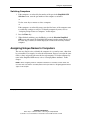
Selecting Computers ........................................................................................................5-4
Switching Computers ................................................................................................5-5
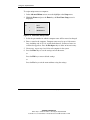
Assigning Unique Names to Computers..........................................................................5-5
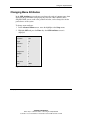
Changing Menu Attributes...............................................................................................5-7
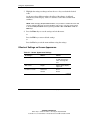
Effects of Settings on Screen Appearance ................................................................5-8
Compaq Server Console Switch User Guide
COMPAQ CONFIDENTIAL
Writer: Amy L. Laffitte File Name: a-frnt
Codename: Hoosier Part Number: 141555-003 Last Saved On: 8/26/02 1:26 PM
v
Contents
Changing Status Flag Attributes ................................................................................... 5-10
Values and Effects of Settings on Flag Appearance............................................... 5-11
Scanning the Computers ......................................................................................... 5-12
Placing the Switch in Scan Mode ........................................................................... 5-12
Canceling Scan Mode............................................................................................. 5-12
Setting a Custom Scan Pattern................................................................................ 5-12
Removing a Computer from the Scan List ............................................................. 5-13
Securing Server Access................................................................................................. 5-14
Locking the Screen and Keyboard.......................................................................... 5-15
Turning off the Screen Saver.................................................................................. 5-17
Blanking the Monitor without Locking the Console .............................................. 5-17
Displaying Version Information.................................................................................... 5-18
Saving the Hardware Settings ....................................................................................... 5-19
Resetting the Mouse and Keyboard .............................................................................. 5-19
Assigning Specific Device Types ................................................................................. 5-20
Switching Tiered Systems............................................................................................. 5-21
Appendix A
Regulatory Compliance Notices
Regulatory Compliance Identification Numbers.............................................................A-1
Federal Communications Commission Notice................................................................A-2
Class A Equipment ...................................................................................................A-2
Class B Equipment ...................................................................................................A-3
Declaration of Conformity for Products Marked with the FCC Logo,
United States Only....................................................................................................A-3
Modifications............................................................................................................A-4
Cables .......................................................................................................................A-4
Canadian Notice (Avis Canadien)...................................................................................A-4
Class A Equipment ...................................................................................................A-4
Class B Equipment ...................................................................................................A-5
European Union Notice...................................................................................................A-5
Japanese Notice...............................................................................................................A-6
Taiwanese Notice ............................................................................................................A-6
vi
Compaq Server Console Switch User Guide
COMPAQ CONFIDENTIAL
Writer: Amy L. Laffitte File Name: a-frnt
Codename: Hoosier Part Number: 141555-003 Last Saved On: 8/26/02 1:26 PM
Contents
Appendix B
Electrostatic Discharge
Grounding Methods ........................................................................................................ B-2
Appendix C
Power Cord Set Requirements
General Requirements..................................................................................................... C-1
Country-Specific Requirements...................................................................................... C-2
Appendix D
Specifications
Appendix E
Troubleshooting
Appendix F
Updating Firmware
Index
Compaq Server Console Switch User Guide
COMPAQ CONFIDENTIAL
Writer: Amy L. Laffitte File Name: a-frnt
Codename: Hoosier Part Number: 141555-003 Last Saved On: 8/26/02 1:26 PM
vii
About This Guide
This guide provides step-by-step instructions for installation and reference
information for operation, troubleshooting, and future upgrades for the Compaq
Server Console Switch.
Important Safety Information
Before installing this product, read the Important Safety Information document
provided.
Symbols on Equipment
The following symbols may be placed on equipment to indicate the presence of
potentially hazardous conditions:
WARNING: This symbol, in conjunction with any of the following symbols,
indicates the presence of a potential hazard. The potential for injury exists if
warnings are not observed. Consult your documentation for specific details.
This symbol indicates the presence of hazardous energy circuits or electric
shock hazards. Refer all servicing to qualified personnel.
WARNING: To reduce the risk of injury from electric shock hazards, do not
open this enclosure. Refer all maintenance, upgrades, and servicing to
qualified personnel.
Compaq Server Console Switch User Guide
COMPAQ CONFIDENTIAL
Writer: Amy L. Laffitte File Name: a-frnt
Codename: Hoosier Part Number: 141555-003 Last Saved On: 8/26/02 1:26 PM
ix
About This Guide
This symbol indicates the presence of electric shock hazards. The area
contains no user or field serviceable parts. Do not open for any reason.
WARNING: To reduce the risk of injury from electric shock hazards, do not
open this enclosure.
This symbol on an RJ-45 receptacle indicates a network interface connection.
WARNING: To reduce the risk of electric shock, fire, or damage to the
equipment, do not plug telephone or telecommunications connectors into this
receptacle.
This symbol indicates the presence of a hot surface or hot component. If this
surface is contacted, the potential for injury exists.
WARNING: To reduce the risk of injury from a hot component, allow the
surface to cool before touching.
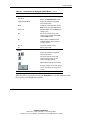
These symbols, on power supplies or systems, indicate that the
equipment is supplied by multiple sources of power.
WARNING: To reduce the risk of injury from electric shock,
remove all power cords to completely disconnect power from the
system.
This symbol indicates that the component exceeds the recommended
weight for one individual to handle safely.
Weight in kg
Weight in lb
x
WARNING: To reduce the risk of personal injury or damage to the
equipment, observe local occupational health and safety requirements
and guidelines for manual material handling.
Compaq Server Console Switch User Guide
COMPAQ CONFIDENTIAL
Writer: Amy L. Laffitte File Name: a-frnt
Codename: Hoosier Part Number: 141555-003 Last Saved On: 8/26/02 1:26 PM
About This Guide
Rack Stability
WARNING: To reduce the risk of personal injury or damage to the equipment,
be sure that:
•
The leveling jacks are extended to the floor.
•
The full weight of the rack rests on the leveling jacks.
•
The stabilizing feet are attached to the rack if it is a single-rack installation.
•
The racks are coupled together in multiple-rack installations.
•
Only one component is extended at a time. A rack may become unstable if
more than one component is extended for any reason.
Symbols in Text
These symbols may be found in the text of this guide. They have the following
meanings.
WARNING: Text set off in this manner indicates that failure to follow directions
in the warning could result in bodily harm or loss of life.
CAUTION: Text set off in this manner indicates that failure to follow directions could
result in damage to equipment or loss of information.
IMPORTANT: Text set off in this manner presents clarifying information or specific
instructions.
NOTE: Text set off in this manner presents commentary, sidelights, or interesting points of
information.
Compaq Server Console Switch User Guide
COMPAQ CONFIDENTIAL
Writer: Amy L. Laffitte File Name: a-frnt
Codename: Hoosier Part Number: 141555-003 Last Saved On: 8/26/02 1:26 PM
xi
About This Guide
Text Conventions
This document uses the following conventions:
•
Italic type is used for complete titles of published guides or variables. Variables
include information that varies in system output, in command lines, and in
command parameters in text.
•
Bold type is used for emphasis, for onscreen interface components (window
titles, menu names and selections, button and icon names, and so on), and for
keyboard keys.
•
Monospace typeface is used for command lines, code examples, screen
displays, error messages, and user input.
•
Sans serif typeface is used for uniform resource locators (URLs).
Getting Help
If you have a problem and have exhausted the information in this guide, you can get
further information and other help in the following locations.
Compaq Technical Support
In North America, call the Compaq Technical Support Phone Center at
1-800-OK-COMPAQ. This service is available 24 hours a day, 7 days a week. For
continuous quality improvement, calls may be recorded or monitored. Outside North
America, call the nearest Compaq Technical Support Phone Center. Telephone
numbers for worldwide Technical Support Centers are listed on the Compaq website,
www.compaq.com.
Be sure to have the following information available before you call Compaq:
xii
•
Technical support registration number (if applicable)
•
Product serial number
•
Product model name and number
•
Applicable error messages
Compaq Server Console Switch User Guide
COMPAQ CONFIDENTIAL
Writer: Amy L. Laffitte File Name: a-frnt
Codename: Hoosier Part Number: 141555-003 Last Saved On: 8/26/02 1:26 PM
About This Guide
•
Add-on boards or hardware
•
Third-party hardware or software
•
Operating system type and revision level
Compaq Website
The Compaq website has information on this product as well as the latest drivers and
flash ROM images. You can access the Compaq website at www.compaq.com.
Compaq Authorized Reseller
For the name of your nearest Compaq authorized reseller:
•
In the United States, call 1-800-345-1518.
•
In Canada, call 1-800-263-5868.
•
Elsewhere, see the Compaq website for locations and telephone numbers.
Reader’s Comments
Compaq welcomes your comments on this guide. Please send your comments and
suggestions by email to [email protected].
Compaq Server Console Switch User Guide
COMPAQ CONFIDENTIAL
Writer: Amy L. Laffitte File Name: a-frnt
Codename: Hoosier Part Number: 141555-003 Last Saved On: 8/26/02 1:26 PM
xiii
1
Introduction
Product Overview
The Compaq Server Console Switch enables the user to control large computer
networks using a single keyboard, video, and mouse (KVM). With a single video
screen, the user can select as many as 64 computers running different operating
systems.
The 4-Port and 8-Port console switches use an On-Screen Display (OSD) interface,
which has menus for accessing each attached computer. Computers can be identified
by name or number, enabling the user to view and select server names.
NOTE: The 2-Port console switch uses a simplified OSD.
A typical Compaq Server Console Switch, also known as a KVM configuration,
consists of the console, the switch unit, and the attached computers. The user can
choose from a single-user system, multiple user system, or a tiered system. Tiering
increases computer access from 4 to 8 computers to as many as 64 by adding
additional Server Console Switches to the primary console switch, allowing the user
to modify the system, as network system needs change.
Two 8-Port console switch units offer dual console capabilities, allowing console
switch configurations to be controlled from more than one location or by more than
one user.
Compaq Server Console Switch User Guide
COMPAQ CONFIDENTIAL
Writer: Amy L. Laffitte File Name: b-ch1 Introduction
Codename: Hoosier Part Number: 142555-003 Last Saved On: 8/21/02 3:04 PM
1-1
Introduction
To switch between computers, simply enter a command at the keyboard. The selected
computer receives characters entered at the keyboard and displays its video output on
the monitor. The user can also use the mouse to interact with the graphic interface of
the selected computer.
The Compaq Server Console Switch family of products is available in 2-, 4-, and
8-Port versions and can be used in various configurations to accommodate large or
small systems. All versions are packaged in space-efficient 1U height (1.71-inch)
cases.
This chapter provides an overview of the Server Console Switch features,
functionality, and sample configurations.
Features
Use the Server Console Switch in various configurations to connect from 2 to 64
servers.
The features of the Server Console Switch include:
1-2
•
On-Screen Display (OSD)—Displays system-related information on the
monitor, such as power-up test data and configuration menus.
•
Programmable Scanning—Evaluates system performance by sequentially
scanning any or all of the computers in the system. Programmable scanning
allows you to determine which computers to include as well as the duration of the
connection.
•
Configuration NVRAM—Makes it easy to set configuration information using
commands entered from the keyboard. The non-volatile RAM (NVRAM) stores
the resulting configuration until you decide to change the information, even if the
unit loses power.
•
Hardware Reset Switch—Resets the unit without interrupting power to the
system if the keyboard or mouse communication is disrupted.
•
Password Protection—Protects against unauthorized users by providing a
password option for security purposes.
Compaq Server Console Switch User Guide
COMPAQ CONFIDENTIAL
Writer: Amy L. Laffitte File Name: b-ch1 Introduction
Codename: Hoosier Part Number: 142555-003 Last Saved On: 8/21/02 3:04 PM
Introduction
•
Switch Firmware Update—Allows quick and easy update since the application
code of the switch resides in FLASH. The port communications settings are
automatically configured to allow direct downloading from the connected
computer.
•
Alternate Language Selection—Provides alternate languages, available on the
Compaq Server Console Switch Software Utility CD. (Not available for use with
the 2-Port switch.) See this CD for additional information.
•
Support for Optional Switch Box Connector Kit—Provides frontal access to
the 4- and 8-Port console switches for a keyboard, monitor, mouse, and power
cord.
Compaq Server Console Switch User Guide
COMPAQ CONFIDENTIAL
Writer: Amy L. Laffitte File Name: b-ch1 Introduction
Codename: Hoosier Part Number: 142555-003 Last Saved On: 8/21/02 3:04 PM
1-3
Introduction
Configurations
There are many ways to configure the Server Console Switch to meet specific
organizational needs. Additional information on configuring multiple Server Console
Switches can be found in Chapter 3.
•
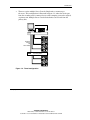
A single console switch box is used to connect four or eight servers. In this
configuration, the KVM are connected directly to the unit by their respective
cables. The user can connect the Server Console Switch to servers located in the
same or adjoining racks.
Keyboard,
Mouse,
and
Video Cables
HYDR-001.EPS
Figure 1-1: Single 4-Port unit
1-4
Compaq Server Console Switch User Guide
COMPAQ CONFIDENTIAL
Writer: Amy L. Laffitte File Name: b-ch1 Introduction
Codename: Hoosier Part Number: 142555-003 Last Saved On: 8/21/02 3:04 PM
Introduction
•
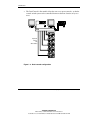
The user can tier multiple Server Console Switch units to connect up to
64 servers. This configuration is illustrated in Figure 1-3, where the device port
from the secondary unit is connected to one of the computer ports on the original,
or primary unit. Multiple Server Console Switch units can be tiered from the
primary unit.
Primary Switch
Keyboard,
Mouse,
and
Video Cables
HYDR-002.EPS
Secondary Switch
Figure 1-2: Tiered configuration
Compaq Server Console Switch User Guide
COMPAQ CONFIDENTIAL
Writer: Amy L. Laffitte File Name: b-ch1 Introduction
Codename: Hoosier Part Number: 142555-003 Last Saved On: 8/21/02 3:04 PM
1-5
Introduction
•
The Dual Console 8-Port models allow the user to set up two consoles, so that the
console switch system can be controlled from more than one location, or by two
users.
Keyboard,
Mouse,
and
Video Cables
Figure 1-3: Dual console configuration
1-6
Compaq Server Console Switch User Guide
COMPAQ CONFIDENTIAL
Writer: Amy L. Laffitte File Name: b-ch1 Introduction
Codename: Hoosier Part Number: 142555-003 Last Saved On: 8/21/02 3:04 PM
Introduction
Available Models
The Server Console Switch is available in 2-, 4-, and 8-Port versions.
Table 1-1: Model Comparison Chart
2-Port
4-Port
8-Port
Dual
Console
8-Port
Dual
Console
8-Port
DC
Number of
computer
ports
2
4
8
8
8
Number of
consoles
(monitor,
keyboard,
mouse)
1
1
1
2
2
Number of
tiered
computers
N/A
32
64
64
64
Switch
connection
mode
control
No
No
No
Yes
Yes
Power
Supply
110/22
0VAC
110/220V
AC
110/220V
AC
110/220V
AC
48V DC
Compaq Server Console Switch User Guide
COMPAQ CONFIDENTIAL
Writer: Amy L. Laffitte File Name: b-ch1 Introduction
Codename: Hoosier Part Number: 142555-003 Last Saved On: 8/26/02 4:33 PM
1-7
2
Hardware Installation
The following section outlines the procedures for installing the Server Console
Switch hardware.
Installation Checklist
Before installing the Server Console Switch, refer to the following list to be sure that
all of the listed components were received.
Kit Contents
•
Compaq Server Console Switch Rack Option Kit
•
Main console switch
•
Power cord (except Dual Console 8-Port DC model)
•
Rails with hardware
•
Compaq Server Console Switch User Guide
•
Serial cable
•
Warranty card
You must supply:
•
Interconnecting cables for KVM (included in 2-Port Rack Option Kit)
•
KVM for each user console
Compaq Server Console Switch User Guide
COMPAQ CONFIDENTIAL
Writer: Amy L. Laffitte File Name: c-ch2 Hardware Installation
Codename: Hoosier Part Number: 141555-03 Last Saved On: 8/26/02 3:33 PM
2-1
Hardware Installation
Required Tools
You need a Phillips screwdriver.
Installing the Hardware
2-Port Side-Mount 0U Installation
NOTE: The 2-Port unit should only be installed using the following side-mount procedure.
To side-mount the 2-Port unit:
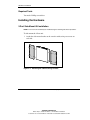
1. Attach the side-mount brackets to the console switch, using two screws on
each side.
Figure 2-1: Attaching the side-mounting brackets
2-2
Compaq Server Console Switch User Guide
COMPAQ CONFIDENTIAL
Writer: Amy L. Laffitte File Name: c-ch2 Hardware Installation
Codename: Hoosier Part Number: 141555-03 Last Saved On: 8/26/02 3:33 PM
Hardware Installation
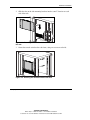
2. Slide the tabs on the side-mounting brackets into the same U location on each
side of the rack.
Figure 2-2: Mounting the console switch to the side of
the rack
3. Secure the console switch to the rack frame, using one screw on each side.
Figure 2-3: Securing the console switch to the rack
Compaq Server Console Switch User Guide
COMPAQ CONFIDENTIAL
Writer: Amy L. Laffitte File Name: c-ch2 Hardware Installation
Codename: Hoosier Part Number: 141555-03 Last Saved On: 8/26/02 3:33 PM
2-3
Hardware Installation
Connecting 2-Port KVM Cables
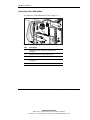
To connect the 2-Port KVM cables refer to Figure 2-4.
1
2
3
4
5
Figure 2-4: Connecting the 2-Port KVM cable
Item
2-4
Description
1
Keyboard, monitor, and mouse connectors to
computer 1
2
Monitor connector to switch box console
3
Keyboard and mouse connectors to the console switch
4
Keyboard, monitor, and mouse connectors to
computer 2
5
Power cord
Compaq Server Console Switch User Guide
COMPAQ CONFIDENTIAL
Writer: Amy L. Laffitte File Name: c-ch2 Hardware Installation
Codename: Hoosier Part Number: 141555-03 Last Saved On: 8/26/02 3:33 PM
Hardware Installation
Side-Mount 0U Installation
Use the following procedure to install the 4-Port, 8-Port, or Dual Console 8-Port unit
on the side of a rack.
Type A
To side-mount the console switch:
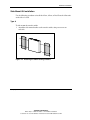
1. Attach the side-mount brackets to the console switch, using two screws on
each side.
Figure 2-5: Attaching the side-mounting brackets
Compaq Server Console Switch User Guide
COMPAQ CONFIDENTIAL
Writer: Amy L. Laffitte File Name: c-ch2 Hardware Installation
Codename: Hoosier Part Number: 141555-03 Last Saved On: 8/26/02 3:33 PM
2-5
Hardware Installation
2. Slide the tabs on the side-mounting brackets into the same U location on each
side of the rack.
Figure 2-6: Mounting the console switch to the side of
the rack
3. Secure the console switch to the rack frame, using two screws on each side.
Figure 2-7: Securing the console switch to the rack
2-6
Compaq Server Console Switch User Guide
COMPAQ CONFIDENTIAL
Writer: Amy L. Laffitte File Name: c-ch2 Hardware Installation
Codename: Hoosier Part Number: 141555-03 Last Saved On: 8/26/02 3:33 PM
Hardware Installation
Type B
1. Attach the side-mounting brackets to the console switch, using two screws on
each side.
2. Slide the tabs on the side-mounting brackets into the same U location on each
side of the rack.
Figure 2-8: Mounting the console switch to the side of
the rack
Compaq Server Console Switch User Guide
COMPAQ CONFIDENTIAL
Writer: Amy L. Laffitte File Name: c-ch2 Hardware Installation
Codename: Hoosier Part Number: 141555-03 Last Saved On: 8/26/02 3:33 PM
2-7
Hardware Installation
1
2
3
4
5
6
7
8
9
10
11
12
13
14
15
16
3. Insert four cage nuts into the rack frame where the side-mounting bracket holes
are located.
Figure 2-9: Inserting cage nuts
4. Secure the console switch to the rack frame, using two screws on each side.
2-8
Compaq Server Console Switch User Guide
COMPAQ CONFIDENTIAL
Writer: Amy L. Laffitte File Name: c-ch2 Hardware Installation
Codename: Hoosier Part Number: 141555-03 Last Saved On: 8/26/02 3:33 PM
Hardware Installation
Rear Rack Installation
IMPORTANT: If you are installing a console switch with a 1U component, such as the 1U
Keyboard Drawer Rack Option Kit, additional rack space is not required, making it a 0U
installation.
To install the console switch in the rear of the rack:
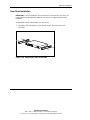
1. Attach the slide rail brackets to the console switch, using two screws on
each slide.
Figure 2-10: Attaching the slide rail brackets
Compaq Server Console Switch User Guide
COMPAQ CONFIDENTIAL
Writer: Amy L. Laffitte File Name: c-ch2 Hardware Installation
Codename: Hoosier Part Number: 141555-03 Last Saved On: 8/26/02 3:33 PM
2-9
Hardware Installation
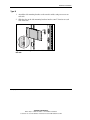
2. Be sure that a cage nut has been installed behind the rear rail.
3. Slide the console switch with the slide rail brackets into the rail-mounting
brackets already installed in the rack.
Figure 2-11: Sliding the console switch into the rack
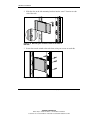
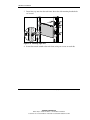
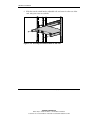
4. Secure the slide rail brackets to the rear of the rack, using one screw on each side.
Figure 2-12: Securing the slide rail brackets to the rack
2-10
Compaq Server Console Switch User Guide
COMPAQ CONFIDENTIAL
Writer: Amy L. Laffitte File Name: c-ch2 Hardware Installation
Codename: Hoosier Part Number: 141555-03 Last Saved On: 8/26/02 3:33 PM
Hardware Installation
Standard 1U Installation
To install the console switch:
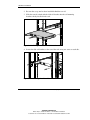
1. Attach the slide rail brackets to the console switch, using the two screws on each
side.
2. Use the template that was shipped with the component to mark the location of the
mounting hardware.
a. Push back the tabs (marked ) on the top of the template and place them in
the correct holes in the mounting rails.
b. Match up the hole pattern indicated on the sides of the template with the hole
pattern on the mounting rails.
c. Measuring from the top of the component immediately below the new
component, place the template against the front and rear of the rack frame to
mark the attachment points for the mounting rails and rear cage nuts.
Figure 2-13: Measuring with the rack template
Compaq Server Console Switch User Guide
COMPAQ CONFIDENTIAL
Writer: Amy L. Laffitte File Name: c-ch2 Hardware Installation
Codename: Hoosier Part Number: 141555-03 Last Saved On: 8/26/02 3:33 PM
2-11
Hardware Installation
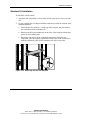
3. Install two cage nuts into the holes marked by the template at the rear of the rack.
Figure 2-14: Installing cage nuts
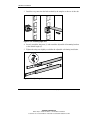
4. Loosely attach the wing nuts (1) and extend the adjustable rail-mounting brackets
to the desired length (2).
5. Tighten the wing nuts slightly to stabilize the adjustable rails during installation.
1
2
Figure 2-15: Adjusting rails
2-12
Compaq Server Console Switch User Guide
COMPAQ CONFIDENTIAL
Writer: Amy L. Laffitte File Name: c-ch2 Hardware Installation
Codename: Hoosier Part Number: 141555-03 Last Saved On: 8/26/02 3:33 PM
Hardware Installation
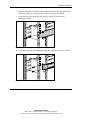
6. Insert an adjustable rail into the rack and hook the tabs into the appropriate holes
at the rear of the rack, aligning the screws holes at the front of the rack.
7. Secure the rear of the adjustable rail, using one screw for each cage nut
previously installed.
Figure 2-16: Securing the adjustable rail
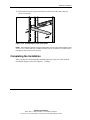
8. Secure the front of the adjustable rail to the rack, using two screws for each rail.
Figure 2-17: Securing the adjustable rail
Compaq Server Console Switch User Guide
COMPAQ CONFIDENTIAL
Writer: Amy L. Laffitte File Name: c-ch2 Hardware Installation
Codename: Hoosier Part Number: 141555-03 Last Saved On: 8/26/02 3:33 PM
2-13
Hardware Installation
9. Slide the console switch into the adjustable rails and secure it to the rear of the
rack, using one screw on each side.
Figure 2-18: Securing the console switch to the rack
2-14
Compaq Server Console Switch User Guide
COMPAQ CONFIDENTIAL
Writer: Amy L. Laffitte File Name: c-ch2 Hardware Installation
Codename: Hoosier Part Number: 141555-03 Last Saved On: 8/26/02 3:33 PM
Hardware Installation
10. Position the front cover panel and secure it to the front of the rack, using one
screw on each side.
Figure 2-19: Positioning the front cover panel
NOTE: This installation supports the optional Switch Box Connector Kit, which provides frontal
access to a 4- or 8-Port switch for a keyboard, monitor, mouse, and power cord. If desired, use
this option in place of the front cover panel.
Completing the Installation
After your Server Console Switch is installed in the rack using one of the methods
listed in this chapter, proceed to Chapter 3, “Cabling.”
Compaq Server Console Switch User Guide
COMPAQ CONFIDENTIAL
Writer: Amy L. Laffitte File Name: c-ch2 Hardware Installation
Codename: Hoosier Part Number: 141555-03 Last Saved On: 8/26/02 3:33 PM
2-15
3
Cabling
Cable Information
Cable length affects video quality as well as keyboard and mouse data timing. The
maximum cable length is determined in part by the computer and peripherals used.
Not all systems give satisfactory results at the maximum length.
Compaq Server Console Switch User Guide
COMPAQ CONFIDENTIAL
Writer: Amy L. Laffitte File Name: d-ch3 Cabiling
Codename: Hoosier Part Number: 141555-003 Last Saved On: 8/21/02 3:03 PM
3-1
Cabling
Cable Locking Mechanism
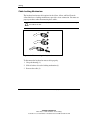
The keyboard and mouse cable options for the 4-Port, 8-Port, and Dual Console
8-Port units have a locking mechanism to provide a secure connection. You must use
proper procedures when disconnecting these cables.
CAUTION: Failure to follow proper disconnect procedures could result in damage to
the cable or the unit.
1
2
3
Figure 3-1: Disconnecting the keyboard or mouse cable
To disconnect the keyboard or mouse cable properly:
1. Grasp the housing (1).
2. Slide it back to release the locking mechanism (2).
3. Remove the cable (3).
3-2
Compaq Server Console Switch User Guide
COMPAQ CONFIDENTIAL
Writer: Amy L. Laffitte File Name: d-ch3 Cabiling
Codename: Hoosier Part Number: 141555-003 Last Saved On: 8/21/02 3:03 PM
Cabling
To insert the cable, plug it into the appropriate connector. The locking mechanism
automatically locks the cable in place.
Connect the cables to the switch in this order:
1. Mouse
2. Monitor
3. Keyboard
This cable connection sequence is particularly important later when installing new
devices to the system. The user can connect a mouse and/or keyboard to the switch
when the system is running. When connecting the new device, the console switch
recognizes the device and configures it to the settings of the currently selected
computer. This allows the user to replace failed devices without having to restart the
system.
When making changes to the switch system, the user should save the hardware
configuration settings. If the settings are not saved, they are lost when power is lost
or turned off. To re-establish keyboard and mouse communication to the switch, the
user might have to reboot each computer. To save the hardware settings, click
Snapshot on the Commands screen. Refer to Chapter 4 for additional information
on using the OSD.
Connecting the Cables
WARNING: To reduce the risk of electric shock or damage to your equipment:
•
Do not disable the power cord grounding plug. The grounding plug is an
important safety feature.
•
Plug the power cord into a grounded (earthed) outlet that is easily
accessible at all times.
•
Disconnect the power from the unit by unplugging the power cord from
either the electrical outlet or the unit.
Compaq Server Console Switch User Guide
COMPAQ CONFIDENTIAL
Writer: Amy L. Laffitte File Name: d-ch3 Cabiling
Codename: Hoosier Part Number: 141555-003 Last Saved On: 8/21/02 3:03 PM
3-3
Cabling
To connect the cables:
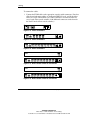
1. Connect the KVM cables to the appropriate console switch connectors. Note that
all keyboard and mouse cables are 6-pin mini-DIN PS/2 style, and all the video
cables are 15-pin VGA/SVGA style. (These connectors are located on the left
rear of each of the console switches, with additional connectors on the front for
the Dual Console 8-Port console switches.)
Figure 3-2: 2-Port connectors
Figure 3-3: 4-Port connectors
Figure 3-4: 8-Port connectors
Figure 3-5: Dual Console 8-Port AC connectors
Figure 3-6: Dual Console 8-Port DC connectors
3-4
Compaq Server Console Switch User Guide
COMPAQ CONFIDENTIAL
Writer: Amy L. Laffitte File Name: d-ch3 Cabiling
Codename: Hoosier Part Number: 141555-003 Last Saved On: 8/21/02 3:03 PM
Cabling
2. Decide which computer is to be connected to port 1.
a. Connect the appropriate connector beneath the port labeled 1 to the mouse.
b. Connect the 15-pin VGA connector to the monitor.
c. Connect the appropriate connector to the keyboard.
d. Bundle and label the cables for easy identification.
3. Repeat step 2 for all remaining computers to be connected to the switch box.
WARNING: To reduce the risk of electric shock or damage to the
equipment, do not disable the power cord grounding feature. This
equipment is designed to be connected to a grounded (earthed) power
outlet that is easily accessible to the operator. The grounding plug is an
important safety feature.
4. Connect the power cord to the console switch.
Compaq Server Console Switch User Guide
COMPAQ CONFIDENTIAL
Writer: Amy L. Laffitte File Name: d-ch3 Cabiling
Codename: Hoosier Part Number: 141555-003 Last Saved On: 8/21/02 3:03 PM
3-5
Cabling
Connecting the Power Cable to the Dual Console
8-Port DC Switch Box
Use only #18 AWG stranded wire UL 1007 or UL 1015 (not included with the
console switch). The maximum length should not exceed 10 meters (32.8 feet).
WARNING: Always disconnect power before changing any wiring.
WARNING: To reduce the risk of electric shock or damage to the equipment
this product must be installed in accordance with the following guidelines:
3-6
•
This product is intended to be connected to a DC power source that can
be classified as a secondary circuit in accordance with applicable national
requirements for Information Technology Equipment. Generally, these
requirements are based on the International Standard for Safety for
Information Technology Equipment, IEC 950. The source must have one
pole (Neutral/Return) referenced to earth ground in accordance with
local/regional electric codes and/or regulations.
•
This product is intended to be installed only in areas that comply with
ETSI-300-132-2.
•
This product must be connected to a power distribution device that
provides a means for disconnecting power from the branch supply circuit.
The power distribution device must be provided with an overcurrent
protective device suitable for interrupting fault currents available from the
main source, and rated no more than 0.3 A at the distribution device. The
green/yellow lead of the power cable assembly must be connected to a
suitable ground/earth terminal on the power distribution unit. Do not rely
on the rack or cabinet chassis to provide adequate ground/earth
continuity.
Compaq Server Console Switch User Guide
COMPAQ CONFIDENTIAL
Writer: Amy L. Laffitte File Name: d-ch3 Cabiling
Codename: Hoosier Part Number: 141555-003 Last Saved On: 8/21/02 3:03 PM
Cabling
+
1
+ 48VDC -
+
4
+
2
-
3
Figure 3-7: Wiring diagram
Item
Description
1
Red wire
2
Black wire
3
Green/Yellow striped wire*
4
48 V DC (to external fused 48 V DC supply)
* Use chassis ground connection only.
Compaq Server Console Switch User Guide
COMPAQ CONFIDENTIAL
Writer: Amy L. Laffitte File Name: d-ch3 Cabiling
Codename: Hoosier Part Number: 141555-003 Last Saved On: 8/21/02 3:03 PM
3-7
Cabling
1. Plug connector (1) into receptacle. Do not use ground connection through
connector.
2. Insert stripped wires (2) and tighten screws (3).
+
3
-
1
2
Figure 3-8: Connecting the wires
Switch Box Startup Behavior
It is important to turn on the console switch before turning on the computers because
when the servers boot up, their drivers send device settings to the console switch.
During startup, the console switch does the following:
3-8
•
Identifies the mouse and keyboard and puts them into default states.
•
Switches to port 1 by default, and displays the number “1” in the status flag
displayed on the monitor. If the status flag default setting has been changed to
Names mode, the status flag displays the port name instead of the port number. If
a status flag is not shown on the monitor, make sure the computer is connected
and powered up.
Compaq Server Console Switch User Guide
COMPAQ CONFIDENTIAL
Writer: Amy L. Laffitte File Name: d-ch3 Cabiling
Codename: Hoosier Part Number: 141555-003 Last Saved On: 8/21/02 3:03 PM
Cabling
Power up the system as follows:
1. Press the power switch located on the rear panel of the console switch to the on
position.
2. Power on the computers.
Computer Startup Behavior
During startup, the computers send device settings to the console switch. The unit
then generates standard responses to these commands and allows the computers to
boot successfully without being physically connected to the keyboard, monitor, or
mouse. After the console switch is installed, the user can save these settings to nonvolatile RAM (NVRAM). Refer to Chapter 4 for additional information.
Configuring the Console Switch
When the user first turns on the switch box, no configuration is needed for basic
switching operation. To configure the unit to meet specific needs, such as assigning
unique names for the computers or displaying the computers by their assigned names
or port numbers, refer to Chapter 4.
Unattended Reboot
After a power outage, each server connected to the console switch reboots (if
configured to do so) without operator intervention, when power returns. The console
switch generates responses to ensure that the reboot is successful and that it is ready
to switch between computers.
Resetting the Unit
If the keyboard or mouse locks up, press the Reset button on the back panel to reset
the console switch. Pressing the Reset button allows the user to recover the device
settings without power cycling the computers.
Compaq Server Console Switch User Guide
COMPAQ CONFIDENTIAL
Writer: Amy L. Laffitte File Name: d-ch3 Cabiling
Codename: Hoosier Part Number: 141555-003 Last Saved On: 8/21/02 3:03 PM
3-9
Cabling
Making Connections Under Power
The user can connect additional computers to the console switch while it is powered
up. When powering the newly connected computers, the console switch recognizes
them, and the user can switch to the new computers without taking any additional
steps.
The user can also connect the mouse and/or keyboard to the console switch while the
system is powered up. When connecting a new device, the console switch recognizes
it and configures it to the settings of the currently selected computer. This technique
allows failed devices to be replaced without having to restart the system.
NOTE: When new computers are added to the console switch, or when existing connections
are changed, the new configurations should be saved in NVRAM by using the Snapshot option
from the OSD.
Alternate Configurations
There are other ways to configure the system, including tiered console switch
configurations and dual console configurations.
3-10
Compaq Server Console Switch User Guide
COMPAQ CONFIDENTIAL
Writer: Amy L. Laffitte File Name: d-ch3 Cabiling
Codename: Hoosier Part Number: 141555-003 Last Saved On: 8/21/02 3:03 PM
Cabling
Tiered Switch Configurations
In tiered systems, the user can connect additional console switches to ports on a
primary unit. That is, console switches can be tiered in primary/secondary
configurations to allow one primary console switch to switch between computers or
other console switch units. Tiering involves linking the physical keyboard, mouse,
and monitor of the secondary units to computer ports on the primary unit. For
example, one 8-Port primary unit can accommodate eight secondary console switch
units. A system with eight servers connected to each of the eight secondary console
switches would provide a 1x64 concentration.
Figure 3-9: Tiered configuration
When connecting a secondary unit to one of the ports of the master unit, the user
must indicate this connection to the primary unit by performing the “Assigning
Specific Device Types” procedure described in Chapter 5. This involves entering a
secondary unit designation for the associated port number instead of a monitor type.
Use the designation 4-Port for a 4-port secondary and 8-Port for an 8-port
secondary.
The OSD allows secondary ports to be treated much like ports on the primary console
switch. It may be helpful to name each secondary unit as described in “Assigning
Unique Names to Computers” in Chapter 5.
Compaq Server Console Switch User Guide
COMPAQ CONFIDENTIAL
Writer: Amy L. Laffitte File Name: d-ch3 Cabiling
Codename: Hoosier Part Number: 141555-003 Last Saved On: 8/21/02 3:03 PM
3-11
Cabling
Connecting Tiers while the System is Powered Up
If necessary, you can connect a primary unit to a secondary unit while the system is
powered up. This technique can be used to isolate any problems with minimum
disruption to the system. When plugging a primary console switch into a secondary
unit, first connect the mouse and video cables, and then connect the keyboard cable.
This is important because the primary unit interprets the keyboard connection as the
secondary unit’s power up. At this point, the primary unit sends initialization codes to
the secondary unit, triggering device configuration.
Refer to Chapter 4 for information on switching tiered systems.
3-12
Compaq Server Console Switch User Guide
COMPAQ CONFIDENTIAL
Writer: Amy L. Laffitte File Name: d-ch3 Cabiling
Codename: Hoosier Part Number: 141555-003 Last Saved On: 8/21/02 3:03 PM
Cabling
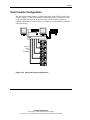
Dual Console Configuration
The dual console configuration is available using either of the Dual Console 8-Port
console switches. Use the same methods described previously to connect the cables
to the unit. Then use the ports on the front of the console switch to connect an
additional KVM. Refer to “Menu Screen” in Chapter 4 for information on switching
connection modes.
Keyboard,
Mouse,
and
Video Cables
Figure 3-10: 8-Port dual console configuration
Compaq Server Console Switch User Guide
COMPAQ CONFIDENTIAL
Writer: Amy L. Laffitte File Name: d-ch3 Cabiling
Codename: Hoosier Part Number: 141555-003 Last Saved On: 8/21/02 3:03 PM
3-13
4
Using the OSD
On-Screen Display
The On-Screen Display (OSD) is used with the 4-Port, 8-Port, and Dual Console
8-Port units. If a 2-Port console switch is being used, refer to Chapter 5, “Using the
Simplified OSD.”
Alternate Languages
The Compaq Server Console Switch Software Utility CD contains an update to the
OSD for languages other than English. Refer to the CD for information on using this
utility.
NOTE: Language selection is not available on the 2-Port console switch.
Functions
Use the OSD to perform the following basic functions:
•
Assign device types if secondary console switches are attached to a primary
console switch (tiering)
•
Assign unique names to computers
•
Choose switch connection mode if using the Dual Console 8-Port console switch
Compaq Server Console Switch User Guide
COMPAQ CONFIDENTIAL
Writer: Amy L. Laffitte File Name: e-ch4 Using the OSD
Codename: Hoosier Part Number: 141555-003 Last Saved On: 8/22/02 12:19 PM
4-1
Using the OSD
•
Save the hardware settings
•
View information about the console switch system
Additional functionality is described in this chapter under each of the screen
headings.
NOTE: The OSD operates independently of the computer operating system.
Navigation
The user can navigate the OSD menus and enter commands using the mouse and
keyboard; however, because the console switch operates independently of the
computer operating systems, OSD keyboard and mouse conventions may differ from
those used when controlling the selected computer. Table 4-1 lists the special
conventions used while navigating the OSD.
Table 4-1: Conventions for Navigating OSD Menus
Item
Function
Mouse
Left mouse button
Activates commands, highlights line
items, and repositions OSD menus
on the desktop (click and drag the
title bar).
Right mouse button
Closes the current screen and
returns to the previous. Exits OSD
from the Main screen.
continued
4-2
Compaq Server Console Switch User Guide
COMPAQ CONFIDENTIAL
Writer: Amy L. Laffitte File Name: e-ch4 Using the OSD
Codename: Hoosier Part Number: 141555-003 Last Saved On: 8/22/02 12:19 PM
Using the OSD
Table 4-1: Conventions for Navigating OSD Menus continued
Item
Function
Keyboard
Print Scrn
Opens the OSD Selection screen.*
Page Up/Page Down
Pages up and down through the
name and port lists.
Enter
Completes switch operation on the
Main screen and exits OSD menus.
Caps Lock
Disables OSD. (Use the Shift key to
change case.)
Esc
Closes the current screen and
returns to the previous. Exits OSD
from the Main screen.
Alt
When used in combination with
underlined letter, opens menus or
executes actions.
Alt + X
Closes the current screen.
F1
Opens online help.
Screen
Pages up and down through the
name and port lists.
Closes the current screen and
returns to the previous screen
without changing settings.
Opens Online Help for each screen.
Accepts changes, closes the current
screen, and returns to the previous
screen.
* To print a screen, refer to “Performing a Screen Capture” in this chapter.
When the OSD is activated by pressing the Print Scrn key, use the mouse instead of
the arrow keys to highlight menu options.
Compaq Server Console Switch User Guide
COMPAQ CONFIDENTIAL
Writer: Amy L. Laffitte File Name: e-ch4 Using the OSD
Codename: Hoosier Part Number: 141555-003 Last Saved On: 8/22/02 12:19 PM
4-3
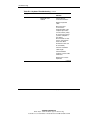
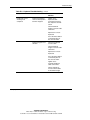
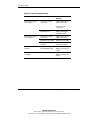
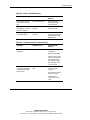
Using the OSD
Menu Overview
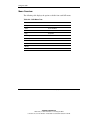
The following table displays the options available from each OSD menu.
Table 4-2: OSD Menu Tree
Main Menu
Setup
Commands
Scan
Scan Enabled
Menu
Broadcast Active
Flag
Snapshot
Set Flag Position
Reset
Security
Version
Broadcast
Devices
Modify
Names
4-4
Compaq Server Console Switch User Guide
COMPAQ CONFIDENTIAL
Writer: Amy L. Laffitte File Name: e-ch4 Using the OSD
Codename: Hoosier Part Number: 141555-003 Last Saved On: 8/22/02 12:19 PM
Using the OSD
OSD Main Screen
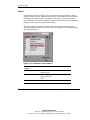
Press the Print Scrn key to open the OSD menus. The OSD Main screen is
displayed first.
The Main screen lists all of the ports in the system, the associated computer names,
and the status of each port. If a Dual Console 8-Port console switch is being used, an
A or B next to the status symbol identifies the console switch.
Figure 4-1: Main Screen Functions
Button
Function
Alternate Method
Names
Sorts alphabetically by
names
Press the Alt + N key.
Port
Sorts by port numbers
Press the Alt + P key.
Setup
Displays Setup screen
Press the Alt + S key.
Commands
Displays Commands
screen
Press the Alt + C key.
NOTE: Highlighted port indicates selected device.
Compaq Server Console Switch User Guide
COMPAQ CONFIDENTIAL
Writer: Amy L. Laffitte File Name: e-ch4 Using the OSD
Codename: Hoosier Part Number: 141555-003 Last Saved On: 8/22/02 12:19 PM
4-5
Using the OSD
Primary ports have a single port number. Secondary ports have the port number of
the primary console switch they are attached to followed by a dash, and then the
number of the secondary port.
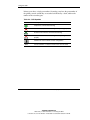
Table 4-3: OSD Symbols
Symbol
Description
Computer is connected and running
Connected computer is not running or not operating properly
Tiered console switch is connected and running
Tiered console switch is not running or not operating
properly
Identifies the user in a Dual Console configuration
A, B
4-6
Console identifier in a Dual Console 8-Port console switch
Compaq Server Console Switch User Guide
COMPAQ CONFIDENTIAL
Writer: Amy L. Laffitte File Name: e-ch4 Using the OSD
Codename: Hoosier Part Number: 141555-003 Last Saved On: 8/22/02 12:19 PM
Using the OSD
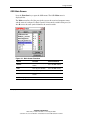
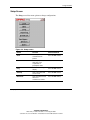
Setup Screen
The Setup screen lists menu options to change configurations.
Figure 4-2: Setup screen
Button
Function
Alternate Method
Scan
Sets sequential or
customized scan
pattern
Press the Alt + S key.
Menu
Sets display order,
delay time, and
cooperative or
preemptive mode
Press the Alt + M key.
Flag
Customizes the flag
display
Press the Alt + F key.
Security
Sets a password and
screen saver
Press the Alt + C key.
Broadcast
Sets the keyboard and
mouse for
simultaneous control
Press the Alt + B key.
continued
Compaq Server Console Switch User Guide
COMPAQ CONFIDENTIAL
Writer: Amy L. Laffitte File Name: e-ch4 Using the OSD
Codename: Hoosier Part Number: 141555-003 Last Saved On: 8/22/02 12:19 PM
4-7
Using the OSD
Figure 4-2: Setup screen continued
Button
Function
Alternate Method
Devices
Establishes monitor
and port settings
Press the Alt + D key.
Names
Assigns names to
computers
Press the Alt + N key.
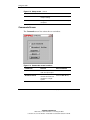
Commands Screen
The Commands screen lists actions the user can initiate.
Figure 4-3: Commands screen functions
Field/Button
Function
Alternate Method
Scan Enabled
Automatically switches
video from port to port
Press the Alt + S key.
*Broadcast Active
Simultaneously
controls more than one
computer in a single
system
Press the Alt + B key.
continued
4-8
Compaq Server Console Switch User Guide
COMPAQ CONFIDENTIAL
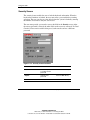
Writer: Amy L. Laffitte File Name: e-ch4 Using the OSD
Codename: Hoosier Part Number: 141555-003 Last Saved On: 8/22/02 12:19 PM
Using the OSD
Figure 4-3: Commands screen functions continued
Field/Button
Function
Alternate Method
**Snapshot
Records current
keyboard and mouse
settings
Press the Alt + N key.
Reset
Returns to mouse and
keyboard default
settings
Press the Alt + R key.
Version
Views firmware
version information
Press the Alt + V key.
* Only one user may select Broadcast Active at a time.
** Snapshot saves the mouse and keyboard information the console switch
uses to boot up the computers. If the user does not save the hardware
settings when installing a console switch system, add or remove computers
from the system, or change the mouse, keyboard, or monitor, they are lost
when power to the console switch is lost or turned off and each computer
must be rebooted.
Compaq Server Console Switch User Guide
COMPAQ CONFIDENTIAL
Writer: Amy L. Laffitte File Name: e-ch4 Using the OSD
Codename: Hoosier Part Number: 141555-003 Last Saved On: 8/22/02 12:19 PM
4-9
Using the OSD
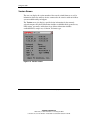
Version Screen
The user can display the version number of the console switch firmware as well as
information about any auxiliary devices connected to the console switch to facilitate
system troubleshooting and support.
The Version screen also displays specific device information for the currently
selected computer. Keyboard information includes enabled/disabled, typematic rate,
LED settings, port mode, and keyboard type. Mouse information includes
enabled/disabled, sample rate, resolution, and mouse type.
Figure 4-4: Version screen
4-10
Compaq Server Console Switch User Guide
COMPAQ CONFIDENTIAL
Writer: Amy L. Laffitte File Name: e-ch4 Using the OSD
Codename: Hoosier Part Number: 141555-003 Last Saved On: 8/22/02 12:19 PM
Using the OSD
Reset Command
The console switch stores mouse and keyboard connection and rate data and uses this
information to emulate the physical mouse and keyboard. If communication between
the console switch and mouse and keyboard fails, the selected server may not
function. The Reset command takes the mouse and keyboard information that was
saved in Snapshot and sends it to the server to re-establish connection with the mouse
and keyboard. Resetting the mouse and keyboard attempts to restore the correct
settings for the selected computer.
Because the console switch emulates the physical mouse and keyboard, it allows a
computer without an attached keyboard or mouse to operate as though there were a
physical device attached to it.
To reset the mouse and keyboard values, click Reset.
NOTE: If this does not correct the problem, press the Reset button on the back panel of the
console switch.
Devices Screen
If the system includes one or more secondary console switches in a tiered
configuration, the user must make the primary console switch aware of the secondary
console switch by assigning a specific device type. In addition, if one or more of the
computers in the console switch system have a special type of monitor, it may be
necessary to assign that monitor type to the port associated with that computer.
Compaq Server Console Switch User Guide
COMPAQ CONFIDENTIAL
Writer: Amy L. Laffitte File Name: e-ch4 Using the OSD
Codename: Hoosier Part Number: 141555-003 Last Saved On: 8/22/02 12:19 PM
4-11
Using the OSD
To modify a device, double-click it or highlight it and then click Modify.
Figure 4-5: Devices screen functions
Button
Function
Alternate Method
Modify
Displays Device
Modify screen to
modify port settings
Press Alt + M key.
Defaults
Uses the default
device type and port
settings
Press Alt + D key.
OK
Accepts changes,
closes the current
screen, and returns to
the previous screen
Press Alt + O key.
Note: Highlighted port indicates selected device.
4-12
Compaq Server Console Switch User Guide
COMPAQ CONFIDENTIAL
Writer: Amy L. Laffitte File Name: e-ch4 Using the OSD
Codename: Hoosier Part Number: 141555-003 Last Saved On: 8/22/02 12:19 PM
Using the OSD
Device Modify Screen
Figure 4-6: Device Modify screen functions
Field/
Button
Function
Alternate Method
Standard
Uses basic computer
connection
Press the Alt + S key.
No Device
Deletes this number or
name from the list of
computers on the
Main screen if a
console switch or
computer is not
connected to it
Press the Alt + N key.
continued
Compaq Server Console Switch User Guide
COMPAQ CONFIDENTIAL
Writer: Amy L. Laffitte File Name: e-ch4 Using the OSD
Codename: Hoosier Part Number: 141555-003 Last Saved On: 8/22/02 12:19 PM
4-13
Using the OSD
Figure 4-6: Device Modify screen functions continued
4-14
Field/
Button
Function
Alternate Method
2 Port
Assigns a 2-Port
console switch as the
secondary system
Press the Alt + 2 key.
4 Port
Assigns a 4-Port
console switch as the
secondary system
Press the Alt + 4 key.
8 Port
Assigns an 8-Port
console switch as the
secondary system
Press the Alt + 8 key.
OK
Accept changes,
closes the current
screen, and returns to
the previous screen
Press the Alt + O key.
Compaq Server Console Switch User Guide
COMPAQ CONFIDENTIAL
Writer: Amy L. Laffitte File Name: e-ch4 Using the OSD
Codename: Hoosier Part Number: 141555-003 Last Saved On: 8/22/02 12:19 PM
Using the OSD
Names Screen
Use this screen to identify a computer by name rather than port number.
NOTE: Before assigning names to computers attached to secondary console switches, the
user must first associate the secondary device with a port. After this is done, the port
numbering structure is reorganized so that the secondary ports are visible to the user. Refer to
the “Devices Screen” and “Device Modify Screen” sections previously in this chapter.
Figure 4-7: Names menu functions
Button
Function
Alternate Method
Defaults
Restores default
settings
Press the Alt + D key.
OK
Accepts changes,
closes the current
screen, and returns to
the previous screen
Press the Alt + O key.
Note: Highlighted port indicates selected device.
Compaq Server Console Switch User Guide
COMPAQ CONFIDENTIAL
Writer: Amy L. Laffitte File Name: e-ch4 Using the OSD
Codename: Hoosier Part Number: 141555-003 Last Saved On: 8/22/02 12:19 PM
4-15
Using the OSD
To assign a unique name to a computer:
1. Click the port number of the computer.
2. Enter the device name in the Names field.
Computer names can be up to 15 characters long, including only A–Z upper and
lower case, 0–9, and the dash character. Press the Backspace key or the Delete
key to delete an incorrect entry. Click the cursor anywhere on the line to
overtype.
3. Repeat steps 1 and 2 for each computer to be named.
4. Click OK.
To edit an existing port or name double-click it, make any changes, then click OK.
4-16
Compaq Server Console Switch User Guide
COMPAQ CONFIDENTIAL
Writer: Amy L. Laffitte File Name: e-ch4 Using the OSD
Codename: Hoosier Part Number: 141555-003 Last Saved On: 8/22/02 12:19 PM
Using the OSD
Menu Screen
Use this screen to set the display order of the computers on the Main screen. If a
Dual Console 8-Port console switch is being used, use this screen to select a console
switch connection mode.
NOTE: Switch Mode is grayed out in single-user console switches, and Cooperative and
Preemptive are not selectable.
Figure 4-8: Menu screen functions
Field/
Button
Function
Alternate Method
Name
Sorts computer display
order by name
Press the Alt + N key.
Port
Sorts computer display
order by port number
Press the Alt + P key.
continued
Compaq Server Console Switch User Guide
COMPAQ CONFIDENTIAL
Writer: Amy L. Laffitte File Name: e-ch4 Using the OSD
Codename: Hoosier Part Number: 141555-003 Last Saved On: 8/22/02 12:19 PM
4-17
Using the OSD
Figure 4-8: Menu screen functions continued
Field/
Button
Function
Alternate Method
Delay Time
Enters the number of
seconds to delay
display to allow soft
switch*
Press the Alt + D key.
Cooperative
Has the console switch
maintain the current
user connection; this
user will not be
disconnected if
another user console
requests connection
(default setting)
Press the Alt + C key.
Preemptive
Has the console switch
allow any user console
to select any computer
at any time
Press the Alt + R key.
OK
Accepts changes,
closes the current
screen, and returns to
the previous screen
Press the Alt + O key.
* Delay Time allows the user to complete a soft switch without the OSD
menus displaying. Refer to “Performing a Soft Switch” in this chapter.
Scan Screen
In scan mode, the console switch automatically switches from port to port (computer
to computer). The user can scan the entire system sequentially or designate a custom
scan pattern by specifying computers and durations.
If the user has a Dual Console 8-Port console switch, scan behavior is influenced by
multiple users and tiered console switches. A multiuser console switch in the primary
position and any single-user console switch in the secondary position can create
situations that change the scan pattern.
4-18
Compaq Server Console Switch User Guide
COMPAQ CONFIDENTIAL
Writer: Amy L. Laffitte File Name: e-ch4 Using the OSD
Codename: Hoosier Part Number: 141555-003 Last Saved On: 8/22/02 12:19 PM
Using the OSD
Example 1—User A is accessing computer 2-4 attached to the secondary console
switch at Port 2 on the primary console switch while user B scans computers attached
to the secondary console switch at Port 1 on the primary console switch.
Behavior—Console switch at Port 1 is available to scan; no user is accessing it. Any
key pressed at the keyboard or a mouse click stops the scanning and passes the
keystrokes or mouse movements to the currently selected computer.
Example 2—User A is accessing computer 2-4 while user B scans computer 2-4.
Behavior — WATCH, monitor activities of user A. Cannot use the keyboard or
mouse to pass the keystrokes or mouse movements to the currently selected
computer.
Example 3—User A is accessing computer 2-4 while user B wants to scan computer
2-6.
Behavior—SKIP, because user A occupies the primary port connection at Port 2,
making 2-6 unavailable to user B.
Example 4—User A is accessing computer 2-4 while user B scans computer 3-2.
Behavior—Console switch at port 3 is available to scan; no user is accessing it. Any
key pressed at the keyboard or a mouse click stops the scanning and passes the
keystrokes or mouse movements to the currently selected computer.
Compaq Server Console Switch User Guide
COMPAQ CONFIDENTIAL
Writer: Amy L. Laffitte File Name: e-ch4 Using the OSD
Codename: Hoosier Part Number: 141555-003 Last Saved On: 8/22/02 12:19 PM
4-19
Using the OSD
Figure 4-9: Scan screen function
Field/
Button
Function
Alternate Method
Names
Sorts computers
alphabetically by name
Press the Alt + N key.
Port
Sorts computers by
port number
Press the Alt + P key.
Sec
Enters the length of
time a computer is
selected before the
scan console switches
to the next computer
Press the Alt + S key.
Defaults
Returns to default
settings
Press the Alt + D key.
OK
Saves changes and
returns to the previous
menu
Press the Alt + O key.
Note: Highlighted port indicates selected device.
4-20
Compaq Server Console Switch User Guide
COMPAQ CONFIDENTIAL
Writer: Amy L. Laffitte File Name: e-ch4 Using the OSD
Codename: Hoosier Part Number: 141555-003 Last Saved On: 8/22/02 12:19 PM
Using the OSD
To set a custom scan pattern:
1. Enter the name or port number of the computer in the Name and Port boxes for
the computer to be included in the scan.
2. In the Sec column, enter the number of seconds, from 1 to 255, that this computer
will be selected before switching to the next computer in the sequence.
3. Repeat for each of the remaining computers to be included in the scan.
4. Click OK. The new scan pattern replaces the standard or previous custom scan
pattern.
To start the scan mode, select Scan Enabled from the Commands screen.
To cancel scan mode, deselect Scan Enabled from the Commands screen.
To remove a computer from the scan list:
1. Click the computer to be removed from the scan list.
2. Press the Delete key.
or
Press the Shift + Delete keys to delete the current computer and all computers
below it.
3. Click OK.
Compaq Server Console Switch User Guide
COMPAQ CONFIDENTIAL
Writer: Amy L. Laffitte File Name: e-ch4 Using the OSD
Codename: Hoosier Part Number: 141555-003 Last Saved On: 8/22/02 12:19 PM
4-21
Using the OSD
Flag Screen
The status flag indicates the name or port number of the currently selected computer.
If a Dual Console 8-Port console switch is being used, each console can have
different flag attributes.
Figure 4-10: Flag screen
Figure 4-11: Status flag showing the user is connected
to a computer sorted by name order
Figure 4-12: Status flag showing that broadcasting is
enabled and the user is connected to a tiered computer
sorted by port order
4-22
Compaq Server Console Switch User Guide
COMPAQ CONFIDENTIAL
Writer: Amy L. Laffitte File Name: e-ch4 Using the OSD
Codename: Hoosier Part Number: 141555-003 Last Saved On: 8/22/02 12:19 PM
Using the OSD
Table 4-4: Flag Screen Functions
Field/Button
Function
Alternate Method
Name
Identifies computers
by name
Press the Alt + N key.
Port
Identifies computers
by port
Press the Alt + P key.
Displayed
Shows flag at all times
Press the Alt + D key.
Timed
Displays flag for only
5 seconds after
switching
Press the Alt + T key.
Flag 1, 2, 3, 4
Selects a color palette
Press the Alt + 1, 2, 3,
or 4 key.
Opaque
Has the flag cover the
desktop image
Press the Alt + A key.
Transparent
Has the desktop image
seen through the flag
Press the Alt + R key.
Set Position
Positions flag on the
screen
Press the Alt + S key.
OK
Saves current settings
and returns to the
previous screen
Press the Alt + O key.
To position the status flag on the desktop:
1. Click Set Position.
2. Click and drag the title bar to where the status flag will be displayed on the
desktop.
3. Click X to exit the dialog box. The setting is saved.
Compaq Server Console Switch User Guide
COMPAQ CONFIDENTIAL
Writer: Amy L. Laffitte File Name: e-ch4 Using the OSD
Codename: Hoosier Part Number: 141555-003 Last Saved On: 8/22/02 12:19 PM
4-23
Using the OSD
Security Screen
The security feature enables the user to lock the keyboard and monitor. When the
keyboard and monitor are locked, the user must enter a password before resuming
operation. The user can also set a time delay before the system is locked by entering
the number of seconds to delay the screen saver.
The user must provide a password to access the fields in the Security screen. After
the correct password is entered, the other fields on the screen are activated. If a Dual
Console 8-Port console switch is being used, each console can have a different
password.
Figure 4-13: Security screen functions
Field/Button
Function
Alternate Method
New
Enters new password
or confirm current
password
Press the Alt + N key.
Repeat
Confirms new
password
Press the Alt + R key.
Enable Screen Saver
Enables screen saver
Press the Alt + C key.
continued
4-24
Compaq Server Console Switch User Guide
COMPAQ CONFIDENTIAL
Writer: Amy L. Laffitte File Name: e-ch4 Using the OSD
Codename: Hoosier Part Number: 141555-003 Last Saved On: 8/22/02 12:19 PM
Using the OSD
Figure 4-13: Security screen functions continued
Field/Button
Function
Alternate Method
Time Delay
Enters the number of
minutes before the
keyboard and monitor
are locked
Press the Alt + D key.
Energy
Sets the energy saver
feature if the monitor is
Energy Star compliant
(see Caution)
Press the Alt + E key.
Screen
Operates monitor in
normal mode
Press the Alt + S key.
Test
Immediately starts
screen saver mode
Press the Alt + T key.
OK
Saves settings and
returns to the previous
menu
Press the Alt + O key.
CAUTION: Monitor damage can result from use of Energy Mode with monitors that
are not Energy Star compliant. Do not use this mode if the monitor is not Energy
Star compliant.
To change the password:
1. Enter the new password in the New field. Passwords can be up to eight characters
in length. Passwords are case-sensitive and may contain both alphanumeric.
2. Enter the new password in the Repeat field to confirm the new password.
3. Click OK.
To lock the keyboard and monitor:
1. Enter the password in the New field.
2. Select Enable Screen Saver.
3. In the Time Delay field, enter the number of minutes (from 1 to 254) to delay
activation of the screen saver.
Compaq Server Console Switch User Guide
COMPAQ CONFIDENTIAL
Writer: Amy L. Laffitte File Name: e-ch4 Using the OSD
Codename: Hoosier Part Number: 141555-003 Last Saved On: 8/22/02 12:19 PM
4-25
Using the OSD
4. Choose Energy if the monitor is Energy Star compliant, or Screen if it is not.
CAUTION: Monitor damage can result from use of Energy Mode with monitors
that are not Energy Star compliant. Do not use this mode if the monitor is not
Energy Star compliant.
5. Click Test to view the screen saver.
6. Click OK.
To blank the monitor without locking the console:
1. Delete the text in the New field and leave the box blank.
2. Select Enable Screen Saver.
3. In the Time Delay field, enter the number of minutes (from 1 to 254) to delay
activation of the screen saver.
4. Choose Energy if the monitor is Energy Star compliant, or Screen if it is not.
CAUTION: Monitor damage can result from use of Energy Mode with monitors
that are not Energy Star compliant. Do not use this mode if the monitor is not
Energy Star compliant.
5. Click Test to view the screen saver.
6. Click OK.
IMPORTANT: This action overrides the use of a password. Pressing any key on the
keyboard unlocks the console. The system is not secure.
To disable the screen saver:
1. In screen saver mode, press any key on the keyboard then enter the password if
the console switch is password protected.
2. Press the Print Scrn key to display the Main screen.
3. Click Setup, Security.
4. Enter the password in the New field.
5. Deselect Enable Screen Saver.
6. Click OK.
4-26
Compaq Server Console Switch User Guide
COMPAQ CONFIDENTIAL
Writer: Amy L. Laffitte File Name: e-ch4 Using the OSD
Codename: Hoosier Part Number: 141555-003 Last Saved On: 8/22/02 12:19 PM
Using the OSD
Screen Saver Test
Click OK to activate the Screen Saver Test. After 10 seconds the user is returned to
the Security screen.
Figure 4-14: Screen Saver Test
Broadcast Screen
The broadcast feature enables the user to simultaneously control more than one
computer in a system. This feature is useful when the user wants to ensure that all
selected computers receive identical input. In a tiered system, the user can broadcast
to any combination of computers on the entire system.
Keyboard
The keyboard state must be identical for all computers receiving a broadcast to
interpret keystrokes identically. Specifically, the Caps Lock and Num Lock modes
should be the same on all keyboards.
Compaq Server Console Switch User Guide
COMPAQ CONFIDENTIAL
Writer: Amy L. Laffitte File Name: e-ch4 Using the OSD
Codename: Hoosier Part Number: 141555-003 Last Saved On: 8/22/02 12:19 PM
4-27
Using the OSD
Mouse
For the mouse to work accurately, all systems must have identical mouse drivers,
identical desktops (that is, identically placed icons), and identical video resolutions.
In addition, the mouse must be in exactly the same place on all screens. Because
these conditions are extremely difficult to achieve, broadcasting mouse movement to
multiple systems may have unpredictable results.
The console switch attempts to send keystrokes and mouse movements to the
selected computers simultaneously; however, some computers may inhibit and thus
delay the transmission.
Figure 4-15: Broadcast screen functions
Field/
Button
Function
Alternate Method
Defaults
Returns to default
settings (all off)
Press the Alt + D key.
OK
Saves changes and
returns to previous
menu
Press the Alt + O key.
Note: Highlighted port indicates selected device.
4-28
Compaq Server Console Switch User Guide
COMPAQ CONFIDENTIAL
Writer: Amy L. Laffitte File Name: e-ch4 Using the OSD
Codename: Hoosier Part Number: 141555-003 Last Saved On: 8/22/02 12:19 PM
Using the OSD
To broadcast to selected computers:
1. Select the keyboard and/or mouse box to receive keystrokes and/or mouse
movements.
2. Click OK.
3. Select Broadcast Active from the Commands screen to start broadcasting.
To turn off broadcast mode, deselect Broadcast Active from the Commands screen.
Broadcasting to Tiered Configurations
In a tiered system, the user can broadcast to any combination of computers on the
entire system.
To broadcast to tiered configurations:
Setting Up Computers Attached to Secondary Console Switches
1. From the Main screen, double-click the computer name or port number of the
secondary console switch to which to broadcast; press the Print Scrn key twice;
the Main screen for the secondary console switch is displayed.
2. Click Setup, Broadcast.
3. Select the keyboard and mouse box for each computer that receives keystrokes
and/or mouse movements, then click OK.
4. From the Commands screen, select Broadcast Active to turn on the broadcast
mode for the secondary console switch.
5. Press the Print Scrn key to open the Main menu on the primary console switch.
6. Repeat steps 1 through 5 to send broadcast commands to computers attached to
additional secondary console switches.
Compaq Server Console Switch User Guide
COMPAQ CONFIDENTIAL
Writer: Amy L. Laffitte File Name: e-ch4 Using the OSD
Codename: Hoosier Part Number: 141555-003 Last Saved On: 8/22/02 12:19 PM
4-29
Using the OSD
Setting Up Computers Attached to Primary Console Switches
1. From the Main menu on the primary console switch, click Setup, Broadcast.
2. Check the keyboard and mouse for each computer that receives keystrokes and/or
mouse movements, then click OK.
3. From the Commands screen, select Broadcast Active to turn on the broadcast
mode for the primary console switch.
4. From a user console attached to the primary console switch and connected to the
secondary console switch, enter information and/or make mouse movements the
user wants to broadcast.
NOTE: Only broadcast to systems directly connected to a primary console switch or only
to secondary console switches connected to a primary console switch.
To turn off broadcast mode for a tiered configuration:
1. From the Commands screen at the primary console switch, deselect
Broadcast Active.
2. From the Main screen, double-click the port number or name of the secondary
console switch for which the user wants to stop broadcasting commands; press
the Print Scrn twice; the Main screen at the secondary console switch displays.
3. Click Commands.
4. Deselect Broadcast Active.
Accessing the OSD at a Secondary Console Switch
Configuration of the console switch system is accomplished at the primary console
switch. All naming, scanning, status flag attributes, menu attributes, device settings,
passwords, and so on must be set at the primary console switch. The factory defaults
for the OSD should not be changed in a secondary console switch because
adjustments can cause conflicts between the secondary and primary console switches.
Access OSD menus at the secondary console switch to:
4-30
•
Check version information of the firmware
•
Set up broadcasting
Compaq Server Console Switch User Guide
COMPAQ CONFIDENTIAL
Writer: Amy L. Laffitte File Name: e-ch4 Using the OSD
Codename: Hoosier Part Number: 141555-003 Last Saved On: 8/22/02 12:19 PM
Using the OSD
•
Add another level of security in tiered configurations
•
Use Snapshot to save the hardware settings at the secondary console switch
•
Reset mouse and keyboard information at the secondary console switch
To open the Main screen at a secondary console switch:
1. Press the Print Scrn key to open the Main screen at the primary console switch.
2. Double-click the number of the tiered port the user wants to access, or highlight
the tiered port and press the Print Scrn key; the Main screen at the secondary
console switch is displayed.
Switching Between Computers
Switching from one computer to another is a simple process with the Server Console
Switch. Switching disconnects the keyboard, mouse, and monitor from one computer
and connects them to another.
Whenever the user switches between two computers, the Server Console Switch
reconfigures the keyboard and mouse using the settings stored in its memory. For
example, if the current computer selected has the Caps Lock feature turned on, but
the user is switching to a second computer that has the Caps Lock feature turned off,
then the unit turns the Caps Lock feature off to match the setting for the second
computer.
To switch computers:
1. Press the Print Scrn key to display the Main menu screen.
2. Double-click the computer name or port.
or
Highlight the port and press the Enter key.
or
Enter the port number or first few letters of the computer name to establish it as
unique, and then press the Enter key.
Compaq Server Console Switch User Guide
COMPAQ CONFIDENTIAL
Writer: Amy L. Laffitte File Name: e-ch4 Using the OSD
Codename: Hoosier Part Number: 141555-003 Last Saved On: 8/22/02 12:19 PM
4-31
Using the OSD
Performing a Soft Switch
After opening the OSD menus, the user can switch between computers without
having the OSD menus display.
To perform a soft switch:
1. Click Setup, Menu.
2. Enter in a time to delay displaying the Main OSD menu after the Print Scrn key
is pressed.
3. Click OK.
4. At the Main menu screen, enter the port number or first few letters of the
computer name to establish it as unique and press the Enter key.
5. To switch to another computer, press the Print Scrn key and enter the port
number or first few letters of the computer name. If the switch is performed
before the delay time has expired, the OSD menus do not display.
Performing a Screen Capture
In the Server Console Switch system, pressing the Print Scrn key opens the OSD
menus. To print a screen capture displayed by a computer, use the following
procedures:
4-32
•
On a computer connected to a primary console switch, press the Print Scrn key
twice. The first keystroke opens OSD menus in the primary console switch. The
second keystroke clears the screen, sends the keystrokes through to the other
device, then captures or prints the screen.
•
On a computer connected to a secondary console switch in a tiered configuration,
press the Print Scrn key four times. The first keystroke brings up the OSD in the
primary console switch. The second keystroke brings up the OSD in the
secondary console switch. The third keystroke brings up both OSDs. The fourth
keystroke clears the screen, then captures or prints the screen.
Compaq Server Console Switch User Guide
COMPAQ CONFIDENTIAL
Writer: Amy L. Laffitte File Name: e-ch4 Using the OSD
Codename: Hoosier Part Number: 141555-003 Last Saved On: 8/22/02 12:19 PM
5
Using the Simplified OSD
The Simplified OSD is used only with the 2-Port console switch.
Launching the OSD
Press the Print Scrn key to access the KVM OSD menus. To print a screen capture
displayed by a computer, use the following procedure.
Printing a Screen Capture
•
On a computer connected to a primary console switch, press the Print Scrn key
twice.
The first keystroke opens Simplified OSD menus in the primary console switch.
The second keystroke clears the screen, then captures or prints the screen.
•
On a computer connected to a secondary console switch in a tiered
configuration, press the Print Scrn key four times.
The first keystroke displays the Simplified OSD in the primary console switch.
The second keystroke displays the Simplified OSD in the secondary console
switch. The third keystroke displays both Simplified OSDs. The fourth keystroke
clears the screen, then captures or prints the screen.
Compaq Server Console Switch User Guide
COMPAQ CONFIDENTIAL
Writer: Amy L. Laffitte File Name: f-ch5 Using the Simplified OSD
Codename: Hoosier Part Number: 141555-003 Last Saved On: 8/21/02 3:12 PM
5-1
Using the Simplified OSD
Simplified OSD Selection Screen
When the Print Scrn key is pressed to open the Simplified OSD menus, the first
screen that is displayed is called the Simplified OSD Selection screen. Basic
functions such as selecting computers and checking port/computer status are
performed from this screen.
The Simplified OSD Selection screen lists all the ports in the system, the associated
computer names, and the status of each port. It can be organized either by port
number or by computer name. To identify the computers by name, refer to
“Assigning Unique Names to Computers” in this chapter. To change the order in
which computers are listed, refer to the section “Changing Menu Attributes.” On
large systems, the user may need to use the arrow keys or the Page Down key to
scroll through the list of ports.
Opening the Simplified OSD or Accessing the Simplified OSD
Selection Screen on a Primary Console Switch
1. Press the Print Scrn key to access the Simplified OSD Selection screen at the
primary console switch.
2. Highlight the number of the port to be accessed. Press the Print Scrn key; the
Simplified OSD Selection screen at the secondary console switch is displayed.
SELECTION SCREEN
Port
Name
1
COMPUTER 1
2
COMPUTER 2
F1 Help
F2 Advanced
+
Figure 5-1: Selection Screen
The factory defaults for the Simplified OSD should not be changed in a secondary
console switch because adjustments can cause conflicts between the secondary and
the primary console switches.
5-2
Compaq Server Console Switch User Guide
COMPAQ CONFIDENTIAL
Writer: Amy L. Laffitte File Name: f-ch5 Using the Simplified OSD
Codename: Hoosier Part Number: 141555-003 Last Saved On: 8/21/02 3:12 PM
Using the Simplified OSD
Simplified OSD Status Port Symbols
+—Computer is connected and running
x—Secondary console switch is connected and running
NOTE: The Simplified OSD screens in this document are examples. The screens may vary
depending on the configuration.
Simplified OSD Advanced Menus Screen
All commands, other than selecting computers, are performed from the Simplified
OSD Advanced menus. The Advanced Menus screen contains two menus. The
Commands menu displays the commands that cause an action to take place; the
Setup menu displays menu screens to set configurations.
Opening the Simplified OSD Advanced Menus
1. Press the Print Scrn key to open Simplified OSD Selection.
2. Press the F2 key.
ADVANCED MENUS
COMMANDS
SETUP
Scan
Version
Snapshot
Reset
Broadcast
Figure 5-2: Advanced Menus, Commands
Compaq Server Console Switch User Guide
COMPAQ CONFIDENTIAL
Writer: Amy L. Laffitte File Name: f-ch5 Using the Simplified OSD
Codename: Hoosier Part Number: 141555-003 Last Saved On: 8/21/02 3:12 PM
5-3
Using the Simplified OSD
ADVANCED MENUS
COMMANDS
SETUP
Scan
Names
OSD
Flag
Devices
Security
Broadcast
Figure 5-3: Advanced Menus, Setup
The Simplified OSD Advanced Menus screen is displayed showing the commands
listed under the Commands menu. Highlighting Setup shows screen selections
available for configuring the console switch. Moving the highlight with the arrow
keys or mouse in either menu selects a specific command or menu screen.
NOTE: Broadcast is not an available option for the 2-Port console switch.
Exiting the Simplified OSD
To exit the Simplified OSD, press the Esc key.
Selecting Computers
Use the Simplified OSD menus to switch computers, that is, to select which computer
receives commands from and displays output to the console. When the user selects a
computer, the console switch reconfigures the keyboard and mouse for the selected
computer using the settings stored in its memory. The current information (for
example, the state of the Caps Lock key) is maintained for each computer in the
system. When configuration is complete, the video output of the selected computer
passes to the monitor.
5-4
Compaq Server Console Switch User Guide
COMPAQ CONFIDENTIAL
Writer: Amy L. Laffitte File Name: f-ch5 Using the Simplified OSD
Codename: Hoosier Part Number: 141555-003 Last Saved On: 8/21/02 3:12 PM
Using the Simplified OSD
Switching Computers
1. If the computers are ordered by the number of the port in the Simplified OSD
Selection screen, enter the port number of the computer to switch to.
or
Use the arrow keys or mouse to select a computer.
or
If the computers are ordered by name, enter the first letters of the computer name
to establish it as unique to select it. To identify computers by name, refer to
“Assigning Unique Names to Computers” in this chapter.
2. Press the Enter key.
3. When finished switching, press the Esc key to exit the Selection Simplified
OSD screen and remove the Simplified OSD menus from the monitor display. If
the status flag is enabled, it remains displayed to indicate the currently selected
computer.
Assigning Unique Names to Computers
The user may find it easier to identify the computers in a system by name, rather than
by port number. For example, in a network environment, the user can assign the same
names as those assigned by the network for each computer. To list the computers by
name in the Simplified OSD menus, refer to “Changing Menu Attributes” in this
chapter.
NOTE: Before assigning names to computers attached to a secondary console switch, the
user must first associate the secondary device with a port. Refer to “Assigning Specific Device
Types” in this chapter.
Compaq Server Console Switch User Guide
COMPAQ CONFIDENTIAL
Writer: Amy L. Laffitte File Name: f-ch5 Using the Simplified OSD
Codename: Hoosier Part Number: 141555-003 Last Saved On: 8/21/02 3:12 PM
5-5
Using the Simplified OSD
To assign unique names to computers:
1. In the Advanced Menus screen, move the highlight to the Setup menu.
2. Highlight Names and press the Enter key; the Port Name Setup screen is
displayed.
PORT NAME SETUP
Port
Name
1
COMPUTER 1
2
COMPUTER 2
Figure 5-4: Port Name Setup screen
3. Select the port number for which a computer name will be entered or changed.
4. Enter a name for the computer. Computer names may be up to 12 characters
long, including only A–Z, 0–9, and the dash character. Lowercase letters are
converted to uppercase. Press the Backspace key to delete an incorrect entry.
5. If necessary, repeat steps 3 and 4 for each computer in the system.
6. Press the Enter key to save the settings and exit the menu.
or
Press the F10 key to restore default settings.
or
Press the Esc key to exit the menu without saving the settings.
5-6
Compaq Server Console Switch User Guide
COMPAQ CONFIDENTIAL
Writer: Amy L. Laffitte File Name: f-ch5 Using the Simplified OSD
Codename: Hoosier Part Number: 141555-003 Last Saved On: 8/21/02 3:12 PM
Using the Simplified OSD
Changing Menu Attributes
In the OSD Attributes screen the user can change the order of computer ports from
displaying the port number to displaying the port name. Other attributes of the
Simplified OSD screens, such as the position and color, can be changed to suit the
particular use of the system.
To change menu attributes:
1. In the Advanced Menus screen, move the highlight to the Setup menu.
2. Highlight OSD and press the Enter key; the OSD Attributes screen is
displayed.
OSD ATTRIBUTES
Resolution
320
Height
56
Horizontal
3
Vertical
4
Background
7
Highlight
6
Text
0
Delay Time
0
Order
PORT
Figure 5-5: OSD Attributes screen
Compaq Server Console Switch User Guide
COMPAQ CONFIDENTIAL
Writer: Amy L. Laffitte File Name: f-ch5 Using the Simplified OSD
Codename: Hoosier Part Number: 141555-003 Last Saved On: 8/21/02 3:12 PM
5-7
Using the Simplified OSD
3. Highlight the settings to change and use the + or – keys to obtain the desired
value.
As the user selects different values, the effect of the changes is reflected
immediately on the display. Table 5-1 describes each of the available menu
attributes.
NOTE: While changing Simplified OSD attributes, it is possible to scramble the menu and
screens, making it difficult to correct the problem. If this occurs, reset the console switch
to its default Simplified OSD values by pressing the Esc + Esc + Print Scrn + F10 + Y +
Enter keys.
4. Press the Enter key to save the settings and exit the menu.
or
Press the F10 key to restore default settings.
or
Press the Esc key to exit the menu without saving the settings.
Effects of Settings on Screen Appearance
Table 5-1: Screen Appearance Settings
To change…
Select…
Values
Size of screen
Resolution
Select either 320, 480,
or 640; the lower the
value, the larger the
size.
Size of text
Height
Higher values display
larger text.
Location of screen
Horizontal
0–127
Vertical
0–255
continued
5-8
Compaq Server Console Switch User Guide
COMPAQ CONFIDENTIAL
Writer: Amy L. Laffitte File Name: f-ch5 Using the Simplified OSD
Codename: Hoosier Part Number: 141555-003 Last Saved On: 9/25/02 3:36 PM
Using the Simplified OSD
Table 5-1: Screen Appearance Settings continued
To change…
Select…
Values
Color of screen and
text
Background
0–7
Highlight
0–7
Text
0–7
Timing of Simplified
OSD
Delay Time
Time in seconds the
Selection screen is
delayed before
appearing after the
Print Scrn key is
pressed. Increasing
delay can prevent the
screen from being a
distraction when
performing simple
computer switching
operations.
Order of computers
Order
Choose to list
computers by port
number or
alphabetically by
name.
Compaq Server Console Switch User Guide
COMPAQ CONFIDENTIAL
Writer: Amy L. Laffitte File Name: f-ch5 Using the Simplified OSD
Codename: Hoosier Part Number: 141555-003 Last Saved On: 8/21/02 3:12 PM
5-9
Using the Simplified OSD
Changing Status Flag Attributes
The status flag indicates the name or port number of the currently selected computer.
The user can choose to display the status flag at all times, for a few seconds after
switching, or not at all. The user can also change the color of the status flag and its
location on the screen.
To change status flag attributes:
1. In the Advanced Menus screen, move the highlight to the Setup menu.
2. Highlight Flag and press the Enter key; the Flag Configuration screen is
displayed.
FLAG CONFIGURATION
Enabled
PORTS ON
Row
14
Column
1
Color
2
Text
0
Mode
OPAQUE
Figure 5-6: Flag Configuration screen
3. Highlight the settings to change and use the + or – keys to adjust the values.
Table 5-2 describes each of the available menu attributes.
4. Press the Enter key to save the settings and exit the menu.
or
Press the F10 key to restore default settings.
or
Press the Esc key to exit the menu without saving the settings.
5-10
Compaq Server Console Switch User Guide
COMPAQ CONFIDENTIAL
Writer: Amy L. Laffitte File Name: f-ch5 Using the Simplified OSD
Codename: Hoosier Part Number: 141555-003 Last Saved On: 9/25/02 3:36 PM
Using the Simplified OSD
Values and Effects of Settings on Flag Appearance
Table 5-2: Flag Appearance Settings
Setting
Values
Effect
Enabled
Flag Off
Flag does not appear.
Ports On
Indicates selected port
number.
Names On
Indicates selected
computer by name.
Ports Timed
Port number displays
for 5 seconds after
switching.
Names Timed
Name displays for
5 seconds after
switching.
Row
0–14
Positions the flag
vertically on the
screen.
Column
0–25
Positions the flag
horizontally on the
screen.
Color
0–7
Sets the flag color.
Text
0–7
Sets the flag text color.
Mode
Opaque
Makes the flag
opaque.
Transparent
Makes the flag
transparent.
Compaq Server Console Switch User Guide
COMPAQ CONFIDENTIAL
Writer: Amy L. Laffitte File Name: f-ch5 Using the Simplified OSD
Codename: Hoosier Part Number: 141555-003 Last Saved On: 8/21/02 3:12 PM
5-11
Using the Simplified OSD
Scanning the Computers
In scan mode, the console switch automatically switches from port to port (computer
to computer). The user can scan the entire system sequentially or designate a custom
scan pattern by specifying computers and durations.
Placing the Switch in Scan Mode
To place the switch in scanning mode:
1. From the Commands menu in the Advanced Menus screen, move the highlight
to Scan.
2. Press the Enter key.
Canceling Scan Mode
Press any key (except the Print Scrn key) or move the mouse; the scan stops at the
currently selected computer.
Setting a Custom Scan Pattern
To set a custom scan pattern:
1. In the Advanced Menus screen, move the highlight to the Setup menu.
2. Highlight Scan and press the Enter key; the Scan Pattern Setup screen displays
with the first port position (or computer name) highlighted.
SCAN PATTERN SETUP
Port
Sec
Name
1
20
Computer 1
2
20
Computer 2
F2 for defaults
Figure 5-7: Scan Pattern Setup screen
5-12
Compaq Server Console Switch User Guide
COMPAQ CONFIDENTIAL
Writer: Amy L. Laffitte File Name: f-ch5 Using the Simplified OSD
Codename: Hoosier Part Number: 141555-003 Last Saved On: 8/21/02 3:12 PM
Using the Simplified OSD
3. Enter the port number of the first computer to be included in the scan.
or
If the computers are listed by name, enter the first few letters of the name of the
first computer to be included in the scan.
4. Move the highlight to the Sec column, and enter the number of seconds this
computer is to be selected before switching to the next computer in the sequence.
5. Move the highlight to the next line and repeat steps 3 and 4 for each of the
remaining computers.
6. Press the Enter key to save the settings and exit the menu; the new scan pattern
replaces the standard or previous custom scan pattern.
or
Press the F10 key to restore default settings.
or
Press the Esc key to exit the menu without saving the settings.
Removing a Computer from the Scan List
To remove a computer from the scan list:
1. In the Scan Pattern Setup screen, enter the port number of the computer to be
removed.
or
If the computers are listed by name, enter the first few letters of the name of the
computer.
2. Move the highlight to the Sec column.
Compaq Server Console Switch User Guide
COMPAQ CONFIDENTIAL
Writer: Amy L. Laffitte File Name: f-ch5 Using the Simplified OSD
Codename: Hoosier Part Number: 141555-003 Last Saved On: 8/21/02 3:12 PM
5-13
Using the Simplified OSD
3. Enter 0 for the number of seconds.
4. Press the Delete key while in the Scan Pattern Setup screen to delete the
highlighted computer and all entries below it.
5. Press the Enter key to save the settings and exit the menu; the new scan pattern
replaces the standard or previous custom scan pattern.
or
Press the F10 key to restore default settings.
or
Press the Esc key to exit the menu without saving the settings.
Securing Server Access
Advanced server applications should be protected against unauthorized users. The
console switch security feature enables the user to lock the keyboard and monitor,
requiring the user to enter a password before resuming operation. The user can also
set a time delay before the system is locked.
The user must always provide a password to access the fields in the Security
Configuration screen. After entering the correct password, the other fields on the
screen are activated.
5-14
Compaq Server Console Switch User Guide
COMPAQ CONFIDENTIAL
Writer: Amy L. Laffitte File Name: f-ch5 Using the Simplified OSD
Codename: Hoosier Part Number: 141555-003 Last Saved On: 8/21/02 3:12 PM
Using the Simplified OSD
Locking the Screen and Keyboard
To lock the screen and keyboard:
1. In the Advanced Menus screen, move the highlight to the Setup menu.
2. Highlight Security and press the Enter key; the Security Configuration screen
is displayed.
SECURITY CONFIGURATION
Password
––––––––
New password
––––––––
Repeat new
––––––––
Time Delay
OFF
Mode
SCREEN
Test
Figure 5-8: Security Configuration screen
3. Enter the password and press the Enter key.
Passwords can be up to eight characters (case sensitive). Enter the new password
twice for confirmation.
NOTE: The factory default password is OSCAR. Because the Caps Lock key is disabled
by default, the user must hold down the Shift key when entering each letter.
4. Highlight Time Delay and select the number of minutes from 1 to 254 before the
screen saver turns on.
5. Highlight Mode and select Energy if using an Energy Star-compliant monitor or
Screen if the monitor is not of that type.
CAUTION: Monitor damage can result from use of Energy Mode with monitors
that are not Energy Star compliant.
Compaq Server Console Switch User Guide
COMPAQ CONFIDENTIAL
Writer: Amy L. Laffitte File Name: f-ch5 Using the Simplified OSD
Codename: Hoosier Part Number: 141555-003 Last Saved On: 8/21/02 3:12 PM
5-15
Using the Simplified OSD
6. To enable the screen saver mode press the Enter key either in the Time Delay or
Mode fields.
or
Highlight Test and press the Enter key to start the screen saver mode
immediately. Table 5-3 describes the possible settings.
Table 5-3: Security Configuration Settings
Setting
Action
Password
Enter current password to activate
other fields.
New Password
Enter new password.
Repeat new
Re-enter new password to confirm.
Time Delay
Set a value from 1 to 254 minutes or
select OFF.
Mode
Energy—Turns off monitor. Use
only with Energy Star-compliant
monitors that go into low-power
mode when time delay has elapsed.
Screen—Turns off video when time
delay has elapsed. Use with nonEnergy Star-compliant monitors.
Test
5-16
Immediately activates selected
mode.
Compaq Server Console Switch User Guide
COMPAQ CONFIDENTIAL
Writer: Amy L. Laffitte File Name: f-ch5 Using the Simplified OSD
Codename: Hoosier Part Number: 141555-003 Last Saved On: 8/21/02 3:12 PM
Using the Simplified OSD
Turning off the Screen Saver
To turn off the screen saver:
1. If in screen saver mode, press any key on the keyboard and then enter the
password if the console is password protected.
2. In the Advanced Menus screen, move the highlight to the Setup menu.
3. Highlight Security and press the Enter key; the Security Configuration screen
appears.
4. Highlight Time Delay and select OFF. Press the Enter key.
Blanking the Monitor without Locking the Console
To blank the monitor without locking the console:
1. If in screen saver mode, press any key on the keyboard and then enter the
password if the console is password protected.
2. In the Advanced Menus screen, move the highlight to the Setup menu.
3. Highlight Security and press the Enter key; the Security Configuration screen
displays.
4. In the Security Configuration screen, press the Enter key twice with the New
Password and Repeat New fields empty.
5. Highlight the settings to change and use the + or – keys to adjust values.
6. Highlight Test and press the Enter key to immediately start screen saver mode.
This action overrides the use of a password. Pressing any key on the keyboard
unlocks the console. The computer will not be protected against unauthorized users.
Compaq Server Console Switch User Guide
COMPAQ CONFIDENTIAL
Writer: Amy L. Laffitte File Name: f-ch5 Using the Simplified OSD
Codename: Hoosier Part Number: 141555-003 Last Saved On: 8/21/02 3:12 PM
5-17
Using the Simplified OSD
Displaying Version Information
To facilitate system troubleshooting and support, the user can display the version
number of the switch firmware as well as information about any auxiliary devices
connected to the switch.
The Version screen also displays specific device information for the currently
selected computer, including enabled/disabled, typematic rate, LED settings, port
mode, and keyboard type for the keyboard and enabled/disabled, sample rate,
resolution, and mouse type for the mouse.
To display version information and device settings:
1. From the Commands menu in the Advanced Menus screen, move the highlight
to Version and press the Enter key; the Version screen is displayed.
VERSION
Firmware
x.x.x
Hardware
xxx
Dip Switch F
Port 1
COMPUTER 1
Keyboard
Mouse
ENABLED
DISABLED
Rate
2C
Rate
100
LEDs
2
Res
2
Mode
2
Type 101
Type Gen
Figure 5-9: Version screen
2. To display version information for an auxiliary device, press the F2 key.
3. Press the Esc key to close the Version screen.
5-18
Compaq Server Console Switch User Guide
COMPAQ CONFIDENTIAL
Writer: Amy L. Laffitte File Name: f-ch5 Using the Simplified OSD
Codename: Hoosier Part Number: 141555-003 Last Saved On: 8/21/02 3:12 PM
Using the Simplified OSD
Saving the Hardware Settings
Whenever computers are added or removed, to or from the system, or whenever the
mouse or monitor is changed, save the hardware settings. If the settings are not saved,
they are lost when power is lost or turned off, and it might be necessary to reboot
each computer to re-establish keyboard and mouse communication.
To save the hardware settings:
1. From the Commands menu in the Advanced Menus screen, highlight
Snapshot.
2. Press the Enter key.
Resetting the Mouse and Keyboard
If the keyboard or mouse locks up, the user may be able to recover the device settings
by resetting the console switch. Resetting the mouse and keyboard attempts to restore
the correct settings for the selected computer.
To reset the mouse and keyboard values:
1. From the Commands menu in the Advanced Menus screen, highlight Reset and
press the Enter key.
2. If step 1 does not correct the problem, press the Reset button on the back panel of
the console switch.
Compaq Server Console Switch User Guide
COMPAQ CONFIDENTIAL
Writer: Amy L. Laffitte File Name: f-ch5 Using the Simplified OSD
Codename: Hoosier Part Number: 141555-003 Last Saved On: 8/21/02 3:12 PM
5-19
Using the Simplified OSD
Assigning Specific Device Types
If the system includes one or more secondary console switches in a tiered
configuration, the user must make the primary console switch aware of the secondary
console switches by assigning a specific device type. In addition, if one or more of
the computers in the system need a special type of monitor or other device, it may be
necessary to assign that device type to the port associated with that computer.
To assign a device type:
1. In the Advanced Menus screen, move the highlight to the Setup menu.
2. Highlight Devices and press the Enter key; the Device Settings screen is
displayed.
DEVICE SETTINGS
Port
Monitor
1
SVGA
2
SVGA
Figure 5-10: Device Settings screen
3. To assign a secondary switch to a port, highlight the port and use the + or – keys
to obtain the appropriate values.
or
To assign a monitor type, highlight the port and use the + or – keys to obtain the
value that corresponds to the particular monitor.
4. Press the Enter key to save the settings and exit the menu.
or
Press the F10 key to restore default settings.
or
Press the Esc key to exit the menu without saving the settings.
5-20
Compaq Server Console Switch User Guide
COMPAQ CONFIDENTIAL
Writer: Amy L. Laffitte File Name: f-ch5 Using the Simplified OSD
Codename: Hoosier Part Number: 141555-003 Last Saved On: 8/21/02 3:12 PM
Using the Simplified OSD
Switching Tiered Systems
To switch the Keyboard/Monitor/Mouse Switch Box to a computer that is connected
to the primary through a secondary unit:
1. Press the Print Scrn key. The OSD Selection window is displayed on the
monitor.
2. Enter the number of the port to which the slave unit is connected followed by a
dash and the number of the port (on the secondary unit) to which the computer is
connected. For example, to switch to the computer connected to port 3 of a
secondary unit connected to port 1 of the primary, press the Print Scrn, 1, -, 3
keys.
3. If the computer/secondaries are listed in the window by name, then enter the
assigned name of the computer. If no secondary unit is connected to the selected
primary port, the command is canceled when the secondary number is entered.
4. Press the Enter key.
Compaq Server Console Switch User Guide
COMPAQ CONFIDENTIAL
Writer: Amy L. Laffitte File Name: f-ch5 Using the Simplified OSD
Codename: Hoosier Part Number: 141555-003 Last Saved On: 8/21/02 3:12 PM
5-21
A
Regulatory Compliance Notices
Regulatory Compliance Identification Numbers
For the purpose of regulatory compliance certifications and identification, this
product has been assigned a unique Compaq series number. The series number can be
found on the product nameplate label, along with all required approval markings and
information. When requesting compliance information for this product, always refer
to this series number. The series number should not be confused with the marketing
name or model number of the product. The Compaq Series numbers for this product
are:
•
2-Port—EO1002
•
4-Port—EO1004A
•
8-Port—EO1004B
•
Dual Console 8-Port—EO1004C
•
Dual Console 8-Port DC—EO1003
Compaq Server Console Switch User Guide
COMPAQ CONFIDENTIAL
Writer: Amy L. Laffitte File Name: g-appa Regulatory Compliance Notices
Codename: Hoosier Part Number: 141555-003 Last Saved On: 8/16/02 3:57 PM
A-1
Regulatory Compliance Notices
Federal Communications Commission Notice
Part 15 of the Federal Communications Commission (FCC) Rules and Regulations
has established radio frequency (RF) emission limits to provide an interference-free
radio frequency spectrum. Many electronic devices, including computers, generate
RF energy incidental to their intended function and are, therefore, covered by these
rules. These rules place computers and related peripheral devices into two classes, A
and B, depending upon their intended installation. Class A devices are those that may
reasonably be expected to be installed in a business or commercial environment.
Class B devices are those that may reasonably be expected to be installed in a
residential environment (for example, personal computers). The FCC requires
devices in both classes to bear a label indicating the interference potential of the
device as well as additional operating instructions for the user.
The rating label on the device shows the classification (A or B) of the equipment.
Class B devices have an FCC logo or FCC ID on the label. Class A devices do not
have an FCC logo or FCC ID on the label. After the class of the device is determined,
refer to the corresponding statement in the following sections.
Class A Equipment
This equipment has been tested and found to comply with the limits for a Class A
digital device, pursuant to Part 15 of the FCC Rules. These limits are designed to
provide reasonable protection against harmful interference when the equipment is
operated in a commercial environment. This equipment generates, uses, and can
radiate radio frequency energy and, if not installed and used in accordance with the
instructions, may cause harmful interference to radio communications. Operation of
this equipment in a residential area is likely to cause harmful interference, in which
case the user will be required to correct the interference at personal expense.
A-2
Compaq Server Console Switch User Guide
COMPAQ CONFIDENTIAL
Writer: Amy L. Laffitte File Name: g-appa Regulatory Compliance Notices
Codename: Hoosier Part Number: 141555-003 Last Saved On: 8/16/02 3:57 PM
Regulatory Compliance Notices
Class B Equipment
This equipment has been tested and found to comply with the limits for a Class B
digital device, pursuant to Part 15 of the FCC Rules. These limits are designed to
provide reasonable protection against harmful interference in a residential
installation. This equipment generates, uses, and can radiate radio frequency energy
and, if not installed and used in accordance with the instructions, may cause harmful
interference to radio communications. However, there is no guarantee that
interference will not occur in a particular installation. If this equipment does cause
harmful interference to radio or television reception, which can be determined by
turning the equipment off and on, the user is encouraged to try to correct the
interference by one or more of the following measures:
•
Reorient or relocate the receiving antenna
•
Increase the separation between the equipment and receiver
•
Connect the equipment into an outlet on a circuit that is different from that to
which the receiver is connected
•
Consult the dealer or an experienced radio or television technician for help
Declaration of Conformity for Products Marked with the FCC Logo,
United States Only
This device complies with Part 15 of the FCC Rules. Operation is subject to the
following two conditions: (1) this device may not cause harmful interference, and
(2) this device must accept any interference received, including interference that may
cause undesired operation.
For questions regarding your product, contact us by mail or telephone:
•
Compaq Computer Corporation
P. O. Box 692000, Mail Stop 530113
Houston, Texas 77269-2000
•
1-800-652-6672 (1-800-OK COMPAQ) (For continuous quality improvement,
calls may be recorded or monitored.)
Compaq Server Console Switch User Guide
COMPAQ CONFIDENTIAL
Writer: Amy L. Laffitte File Name: g-appa Regulatory Compliance Notices
Codename: Hoosier Part Number: 141555-003 Last Saved On: 8/16/02 3:57 PM
A-3
Regulatory Compliance Notices
For questions regarding this FCC declaration, contact us by mail or telephone:
•
Compaq Computer Corporation
P. O. Box 692000, Mail Stop 510101
Houston, Texas 77269-2000
•
1-281-514-3333
To identify this product, refer to the part, series, or model number found on the
product.
Modifications
The FCC requires the user to be notified that any changes or modifications made to
this device that are not expressly approved by Compaq Computer Corporation may
void the user’s authority to operate the equipment.
Cables
Connections to this device must be made with shielded cables with metallic RFI/EMI
connector hoods in order to maintain compliance with FCC Rules and Regulations.
Canadian Notice (Avis Canadien)
Class A Equipment
This Class A digital apparatus meets all requirements of the Canadian
Interference-Causing Equipment Regulations.
Cet appareil numérique de la classe A respecte toutes les exigences du Règlement sur
le matériel brouilleur du Canada.
A-4
Compaq Server Console Switch User Guide
COMPAQ CONFIDENTIAL
Writer: Amy L. Laffitte File Name: g-appa Regulatory Compliance Notices
Codename: Hoosier Part Number: 141555-003 Last Saved On: 8/16/02 3:57 PM
Regulatory Compliance Notices
Class B Equipment
This Class B digital apparatus meets all requirements of the Canadian
Interference-Causing Equipment Regulations.
Cet appareil numérique de la classe B respecte toutes les exigences du Règlement sur
le matériel brouilleur du Canada.
European Union Notice
Products with the CE Marking comply with both the EMC Directive (89/336/EEC)
and the Low Voltage Directive (73/23/EEC) issued by the Commission of the
European Community.
Compliance with these directives implies conformity to the following European
Norms (the equivalent international standards are in parentheses):
•
EN55022 (CISPR 22) – Electromagnetic Interference
•
EN55024 (IEC61000-4-2, 3, 4, 5, 6, 8, 11) – Electromagnetic Immunity
•
EN61000-3-2 (IEC61000-3-2) – Power Line Harmonics
•
EN61000-3-3 (IEC61000-3-3) – Power Line Flicker
•
EN60950 (IEC950) – Product Safety
Compaq Server Console Switch User Guide
COMPAQ CONFIDENTIAL
Writer: Amy L. Laffitte File Name: g-appa Regulatory Compliance Notices
Codename: Hoosier Part Number: 141555-003 Last Saved On: 8/16/02 3:57 PM
A-5
Regulatory Compliance Notices
Japanese Notice
Taiwanese Notice
A-6
Compaq Server Console Switch User Guide
COMPAQ CONFIDENTIAL
Writer: Amy L. Laffitte File Name: g-appa Regulatory Compliance Notices
Codename: Hoosier Part Number: 141555-003 Last Saved On: 8/16/02 3:57 PM
B
Electrostatic Discharge
To prevent damaging the system, be aware of the precautions you need to follow
when setting up the system or handling parts. A discharge of static electricity from a
finger or other conductor may damage system boards or other static-sensitive
devices. This type of damage may reduce the life expectancy of the device.
To prevent electrostatic damage, observe the following precautions:
•
Avoid hand contact by transporting and storing products in static-safe containers.
•
Keep electrostatic-sensitive parts in their containers until they arrive at static-free
workstations.
•
Place parts on a grounded surface before removing them from their containers.
•
Avoid touching pins, leads, or circuitry.
•
Always be properly grounded when touching a static-sensitive component or
assembly.
Compaq Server Console Switch User Guide
COMPAQ CONFIDENTIAL
Writer: Amy L. Laffitte File Name: h-appb Electrostatic Discharge
Codename: Hoosier Part Number: 141555-003 Last Saved On: 8/16/02 3:58 PM
B-1
Electrostatic Discharge
Grounding Methods
There are several methods for grounding. Use one or more of the following methods
when handling or installing electrostatic-sensitive parts:
•
Use a wrist strap connected by a ground cord to a grounded workstation or
computer chassis. Wrist straps are flexible straps with a minimum of 1 megohm
± 10 percent resistance in the ground cords. To provide proper ground, wear the
strap snug against the skin.
•
Use heel straps, toe straps, or boot straps at standing workstations. Wear the
straps on both feet when standing on conductive floors or dissipating floor mats.
•
Use conductive field service tools.
•
Use a portable field service kit with a folding static-dissipating work mat.
If you do not have any of the suggested equipment for proper grounding, have a
Compaq authorized reseller install the part.
NOTE: For more information on static electricity, or assistance with product installation,
contact your Compaq authorized reseller.
B-2
Compaq Server Console Switch User Guide
COMPAQ CONFIDENTIAL
Writer: Amy L. Laffitte File Name: h-appb Electrostatic Discharge
Codename: Hoosier Part Number: 141555-003 Last Saved On: 8/16/02 3:58 PM
C
Power Cord Set Requirements
The power cord set meets the requirements for use in the country where you
purchased your equipment. The voltage selection switch allows you to select the
appropriate line voltage for the server.
Power cord sets for use in other countries must meet the requirements of the country
where you use the server. For more information on power cord set requirements,
contact your Authorized Compaq Dealer.
General Requirements
The following requirements are applicable to all countries:
•
The length of the power cord must be at least 1.8 m (6.0 ft) and a maximum of
3.7 m (12 ft).
•
The power cord set must be approved by an acceptable accredited agency
responsible for evaluation in the country where the power cord will be used.
•
The power cord set must have a minimum current capacity and nominal voltage
rating of 10 A/125 VAC, or 10A/250 VAC, as required by the power system of
each country.
•
The appliance coupler must meet the mechanical configuration of an
EN60320/IEC 320 Standard Sheet C13 Connector, for mating with the appliance
outlet on the computer.
Compaq Server Console Switch User Guide
COMPAQ CONFIDENTIAL
Writer: Amy L. Laffitte File Name: i-appc Power Cord Set Requirements
Codename: Hoosier Part Number: 141555-003 Last Saved On: 8/21/02 3:12 PM
C-1
Power Cord Set Requirements
Country-Specific Requirements
Use Table C-1 to identify the appropriate accredited agency in your country.
Table C-1: Power Cord Set Requirements By Country
Country
Accredited Agency
Applicable Note Numbers
Australia
EANSW
1
Austria
OVE
1
Belgium
CEBC
1
Canada
CSA
2
Denmark
DEMKO
1
Finland
SETI
1
France
UTE
1
Germany
VDE
1
Italy
IMQ
1
Japan
JIS
3
Norway
NEMKO
1
Sweden
SEMKO
1
Switzerland
SEV
1
United Kingdom
BSI
1
United States
UL
2
2
1.
Flexible cord must be <HAR> Type HO5VV-F, 3-conductor, 1.0 mm conductor size. Power
cord set fittings (appliance coupler and wall plug) must bear the certification mark of the agency
responsible for evaluation in the country where it will be used.
2.
Flexible cord must be Type SVT or equivalent, No. 18 AWG, 3-conductor. Wall plug must be a
two-pole grounding type with a NEMA 5-15P (15 A, 125 V).
3.
Appliance coupler, flexible cord, and wall plug must bear a “T” mark and registration number in
accordance with the Japanese Dentori Law. Flexible cord must be Type VCT or VCTF,
2
3-conductor, 1.0 mm conductor size. Wall plug must be a two-pole grounding type with a
Japanese Industrial Standard C8303 (7A, 125V) configuration.
C-2
Compaq Server Console Switch User Guide
COMPAQ CONFIDENTIAL
Writer: Amy L. Laffitte File Name: i-appc Power Cord Set Requirements
Codename: Hoosier Part Number: 141555-003 Last Saved On: 8/21/02 3:12 PM
D
Specifications
Table D-1: Compaq Server Console Switch 2-Port Specifications
Dimensions
Height
4.34 cm (1.71 inches)
Depth
17.8 cm (7.0 inches)
Width
25.4 cm (10 inches)
Weight
1.47 kg (3.25 lb)
Input Power Requirements
Rated Voltage
100–240VAC
Rated Frequency
50–60 Hz
Rated Input Current
.5–.25A
Temperature Range
o
o
o
o
Maximum Ambient Operating
Temperature
10 –40 C (50 –104 F)
Ambient Storage and Shipping
Temperature
-40 –85 C (-40 –185 F)
Maximum Internal Rack
Temperature for the Switch Box
50 C (122 F)
o
o
o
o
o
o
continued
Compaq Server Console Switch User Guide
COMPAQ CONFIDENTIAL
Writer: Amy L. Laffitte File Name: j-appd Specifications
Codename: Hoosier Part Number: 141555-003 Last Saved On: 8/28/02 10:53 AM
D-1
Specifications
Table D-1: Compaq Server Console Switch 2-Port Specifications continued
Dimensions
Relative Humidity
(noncondensing)
Operating
20%–80%
Nonoperating
5%–90%
Video Modes Supported
VGA, SVGA, XGA
Table D-2: Compaq Server Console Switch 4-Port, 8-Port, and
Dual Console 8 Port Specifications
Dimensions
Height
4.5 cm (1.75 inches)
Depth
20.3 cm (8.0 inches)
Width
43.2 cm (17 inches)
Weight
4-Port
8-Port
Dual Console 8-Port
2.38 kg (5.25 lb)
2.38 kg (5.25 lb)
2.59 kg (5.70 lb)
Input Power Requirements
Rated Voltage
4-Port, 8-Port, Dual Console
8-Port AC
Dual Console 8-Port DC
100–240V AC
36–2V DC
Rated Frequency
4-Port, 8-Port, Dual Console
8-Port AC
Dual Console 8-Port DC
50–60 Hz
N/A
Rated Input Current
4-Port, 8-Port
Dual Console 8-Port AC
1–.5A
120mA
continued
D-2
Compaq Server Console Switch User Guide
COMPAQ CONFIDENTIAL
Writer: Amy L. Laffitte File Name: j-appd Specifications
Codename: Hoosier Part Number: 141555-003 Last Saved On: 8/28/02 10:53 AM
Specifications
Table D-2: Compaq Server Console Switch 4-Port, 8-Port, and Dual
Console 8 Port Specifications continued
Dimensions
Temperature Range
o
o
o
o
Maximum Ambient Operating
Temperature
10 –50 C (50 –104 F)
Ambient Storage and Shipping
Temperature
-40 –85 C (-40 –185 F)
Maximum Internal Rack
Temperature for the Switch Box
50 C (122 F)
o
o
o
o
o
o
Relative Humidity
(noncondensing)
Operating
20%–80%
Nonoperating
5%–90%
Video Modes Supported
VGA, SVGA, XGA
Compaq Server Console Switch User Guide
COMPAQ CONFIDENTIAL
Writer: Amy L. Laffitte File Name: j-appd Specifications
Codename: Hoosier Part Number: 141555-003 Last Saved On: 8/28/02 10:53 AM
D-3
E
Troubleshooting
Table E-1: Video Troubleshooting
Symptom
Probable Cause
Recommended
Solution
No video on any
computer
Loose video
connection
Reconnect video
cable.
Defective video cable
Replace video cable.
No power to switch or
monitor
Check the power
switch.
Reconnect the power
cable.
Check AC outlet for
power.
No video on one
computer
Video cable problem
Tighten loose video
cable connections.
Replace video cable.
Turn on the computer
connected to that port.
continued
Compaq Server Console Switch User Guide
COMPAQ CONFIDENTIAL
Writer: Amy L. Laffitte File Name: -appe Troubleshooting
Codename: Hoosier Part Number: 141555-003 Last Saved On: 8/16/02 3:58 PM
E-1
Troubleshooting
Table E-1: Video Troubleshooting continued
Symptom
Probable Cause
Recommended
Solution
OSD colors or setup
incompatible
Incorrect settings in
Names, Flag, or
Device dialog boxes
Confirm that settings in
these menus are
properly defined (for
2-Port also check OSD
menu).
In the Commands
screen, click Reset (all
models except 2-Port).
or
Reset settings to
default if necessary by
pressing the F10 +
Enter keys (for 2-Port
console switch only).
E-2
Compaq Server Console Switch User Guide
COMPAQ CONFIDENTIAL
Writer: Amy L. Laffitte File Name: -appe Troubleshooting
Codename: Hoosier Part Number: 141555-003 Last Saved On: 8/16/02 3:58 PM
Troubleshooting
Table E-2: Status Symbol Troubleshooting
Symptom
No
or
shows
next to computer
number or name
(all models except
2-Port)
Probable Cause
Recommended
Solution
No live keyboard
signal
Tighten loose
keyboard cable
connections between
the computer and the
console switch.
No + shows next to
computer
number or name
(2-Port only)
or
Disconnect and
reconnect the
keyboard cable at the
computer port on the
console switch. (It may
be necessary to power
cycle the computer if
the cable is
disconnected. For this
reason, only perform
these tests when
maintenance time can
be scheduled.)
Then at the console
switch press the Esc +
Print Scrn keys.
continued
Compaq Server Console Switch User Guide
COMPAQ CONFIDENTIAL
Writer: Amy L. Laffitte File Name: -appe Troubleshooting
Codename: Hoosier Part Number: 141555-003 Last Saved On: 8/16/02 3:58 PM
E-3
Troubleshooting
Table E-2: Status Symbol Troubleshooting continued
Symptom
shows up on
tiered port
(all models except
2-Port)
Probable Cause
Recommended
Solution
Loose keyboard
connection
Disconnect and
reconnect the
keyboard cable at the
computer port on the
console switch. (It may
be necessary to power
cycle the computer if
the cable is
disconnected. For this
reason, only perform
these tests when
maintenance time can
be scheduled.)
Replace the keyboard
cable.
shows next to
computer number or
name when you
expected it to be a
An interconnecting
cable (m–m) from
another switch
connected to port in
error
Disconnect the
console switch and
connect the computer
to the port.
Incorrect settings in
Device dialog box for
primary console switch
Verify the selection of
the correct number of
ports (4 or 8) for a
secondary console
switch.
(all models except
2-Port)
Primary computer
shows
when
is expected
(all models except
2-Port)
E-4
Verify that all port
settings are set to
Default if not
connected to a
secondary console
switch.
Compaq Server Console Switch User Guide
COMPAQ CONFIDENTIAL
Writer: Amy L. Laffitte File Name: -appe Troubleshooting
Codename: Hoosier Part Number: 141555-003 Last Saved On: 8/16/02 3:58 PM
Troubleshooting
Table E-3: Keyboard Troubleshooting
Symptom
Probable Cause
Recommended
Solution
Keyboard is not
working
OSD Delay Time in
effect
Turn off Delay Time as
follows:
All models except
2-Port: Press the
Print Scrn + Alt + S +
Alt + M keys. Enter
0 secs for Delay Time.
2-Port only: Press the
Print Scrn + F2 keys.
Select OSD. Enter
0 secs for Delay Time.
Keyboard is not
working on one
computer
Keyboard worked, but
then stopped working
Tighten loose
keyboard cable
connection between
the computer and the
console switch.
Replace keyboard
cable.
Check maximum cable
length.
Press the Reset button
on the back panel of
the console switch.
Check maximum
length of console cable
extensions.
continued
Compaq Server Console Switch User Guide
COMPAQ CONFIDENTIAL
Writer: Amy L. Laffitte File Name: -appe Troubleshooting
Codename: Hoosier Part Number: 141555-003 Last Saved On: 8/16/02 3:58 PM
E-5
Troubleshooting
Table E-3: Keyboard Troubleshooting continued
Symptom
Probable Cause
Recommended
Solution
Keyboard never
worked
Check cable for
crossed connections.
Replace keyboard
cable.
Disconnect and
reconnect the
keyboard cable at the
computer port on the
console switch. (It may
be necessary to power
cycle the computer if
the cable is
disconnected. For this
reason, only perform
these tests when
maintenance time can
be scheduled.)
Check for maximum
cable length.
Check maximum
length of console cable
extensions.
Replace the console
keyboard.
continued
E-6
Compaq Server Console Switch User Guide
COMPAQ CONFIDENTIAL
Writer: Amy L. Laffitte File Name: -appe Troubleshooting
Codename: Hoosier Part Number: 141555-003 Last Saved On: 8/16/02 3:58 PM
Troubleshooting
Table E-3: Keyboard Troubleshooting continued
Symptom
Probable Cause
Recommended
Solution
Keyboards are not
working on all
computers
Keyboard signal did
work on all computers
but then stopped
Tighten loose
keyboard cable
connections between
the computers and the
switch.
Check maximum
length of console cable
extensions.
Replace the console
keyboard.
Press the Reset button
on the back panel of
the console switch.
Keyboard signal never
did work
Check the keyboard
console cable.
Check maximum
length of console cable
extensions.
Replace the console
keyboard.
Press the Reset button
on the back panel of
the console switch.
Tighten loose
computer keyboard
cable connections.
Check computer to
console switch cables
for maximum length.
Compaq Server Console Switch User Guide
COMPAQ CONFIDENTIAL
Writer: Amy L. Laffitte File Name: -appe Troubleshooting
Codename: Hoosier Part Number: 141555-003 Last Saved On: 8/16/02 3:58 PM
E-7
Troubleshooting
Table E-4: Mouse Troubleshooting
Symptom
Probable Cause
Recommended
Solution
Mouse error on boot,
all computers
Loose mouse cable
connection
Tighten loose mouse
cable connections.
Check for crossconnections.
Incompatible or
defective mouse
Replace mouse with
PS/2 or mouse-port
compatible mouse.
Loose mouse cable
connection
Tighten loose mouse
cable connections.
Defective mouse cable
Replace mouse cable.
Using serial port on
computer
Install PS/2-to-serial
protocol converter.
Mouse displays erratic
behavior
Computer left mouse
in indeterminate state
Reset mouse through
OSD or reset console
switch.
Mouse pointer frozen
on display
Mouse not initialized
Reset mouse through
OSD or reset console
switch.
Mouse error on boot,
one computer
E-8
Compaq Server Console Switch User Guide
COMPAQ CONFIDENTIAL
Writer: Amy L. Laffitte File Name: -appe Troubleshooting
Codename: Hoosier Part Number: 141555-003 Last Saved On: 8/16/02 3:58 PM
Troubleshooting
Table E-5: Switch Troubleshooting
Symptom
Probable Cause
Recommended
Solution
Unit switches from one
system to the next at
will
Scan mode initiated
Halt scanning by
pressing any key or
moving mouse.
Keyboard or mouse
input appears on more
than one computer
Broadcast mode
initiated
Use OSD to exit
broadcast mode.
Broadcasting grayed
out in OSD menus
In use by another user
console
Request other user
console to deactivate
Broadcasting in their
OSD Menus.
Table E-6: Firmware Update Troubleshooting
Symptom
Probable Cause
Recommended
Solution
Firmware does not
download
Cable problems
Tighten loose cable
connections.
Replace serial cable.
Check that the serial
cable is connected to
the com port on the
PC computer and to
the serial port on the
console switch.
File Not Found or
Can’t Open messages
received after typing
the file name
Incorrect file name or
path
Verify that the file
name was typed
correctly.
Verify that the path to
the file is correct.
Check that file
extension is correct
(.bin)
continued
Compaq Server Console Switch User Guide
COMPAQ CONFIDENTIAL
Writer: Amy L. Laffitte File Name: -appe Troubleshooting
Codename: Hoosier Part Number: 141555-003 Last Saved On: 8/16/02 3:58 PM
E-9
Troubleshooting
Table E-6: Firmware Update Troubleshooting continued
Symptom
Probable Cause
Recommended
Solution
Invalid Port Number
message received
after typing number
Incorrect com port
Check that the com
port number is a
numeric entry not
greater than 4.
Download timed out
when updating
firmware
Cannot access port
Verify that the correct
port was selected.
If another program is
using the same port,
quit the program.
If a serial cable is not
installed or is
defective, install a new
cable.
E-10
Compaq Server Console Switch User Guide
COMPAQ CONFIDENTIAL
Writer: Amy L. Laffitte File Name: -appe Troubleshooting
Codename: Hoosier Part Number: 141555-003 Last Saved On: 8/16/02 3:58 PM
F
Updating Firmware
The firmware for the console switch can be updated. The application code of the
console switch resides in FLASH, and therefore can be quickly and easily updated.
The port communication settings are automatically configured to allow direct
downloading from the connected computer.
Compaq Server Console Switch User Guide
COMPAQ CONFIDENTIAL
Writer: Amy L. Laffitte File Name: l-appf Updating Firmware
Codename: Hoosier Part Number: 141555-003 Last Saved On: 8/16/02 3:57 PM
F-1
Updating Firmware
To update the firmware you need the following:
•
Computer running MS-DOS or Microsoft Windows 3.1 or Windows 95/98
•
Available serial communications port on the computer
•
Standard serial cable (DB9-male) that connects between the switch and the PC
computer
•
Firmware update
To update the firmware:
1. Connect the standard serial cable to the serial jack on the PC computer and to the
serial jack on the back panel of the switch.
2. Press the Print Scrn key to open the OSD menus.
3. Follow steps 4 through 6 if using the prompted input mode. Go to step 7 if using
the single entry mode.
Prompted Input
4. If C is the drive to which the file is saved, at the DOS prompt enter:
C:\Update.exe
then press the Enter key.
5. At the prompt type the file name. The file name has a .bin extension. Press the
Enter key.
6. At the prompt enter the serial port number of the computer to which the console
switch is attached. Press the Enter key.
If the data was entered correctly, a message is displayed on the computer
notifying the user that the update for the console switch is in process. Go to
step 8.
F-2
Compaq Server Console Switch User Guide
COMPAQ CONFIDENTIAL
Writer: Amy L. Laffitte File Name: l-appf Updating Firmware
Codename: Hoosier Part Number: 141555-003 Last Saved On: 8/16/02 3:57 PM
Updating Firmware
Single Entry
7. If C is the drive to which the file is saved, at the DOS prompt enter:
C:\UPDATE.EXE filename port number
then press the Enter key.
If data was entered correctly, a message appears on the computer notifying the
user that the update is in process.
8. When the firmware is updated, a message displays:
100% Complete. Download completed successfully. Thank you
for using COMPAQ products.
The switch automatically reboots after the update is completed.
NOTE: If the update was unsuccessful (because of a power outage, for example), repeat
the process.
Compaq Server Console Switch User Guide
COMPAQ CONFIDENTIAL
Writer: Amy L. Laffitte File Name: l-appf Updating Firmware
Codename: Hoosier Part Number: 141555-003 Last Saved On: 8/16/02 3:57 PM
F-3
Index
Symbols and Numbers
C
2-Port unit, 0U installation 2-2, 2-5
4-Port unit, 0U rear rack installation 2-9
8-Port Dual Console unit, 0U rear rack
installation 2-9
8-Port unit, 0U rear rack installation 2-9
cables
connection sequence 3-3
FCC compliance statement A-4
information 3-1
length, affects quality 3-1
locking, disconnecting 3-2
cage nut, installation in rear of rack 2-10
cautions
disconnecting locking cable 3-2
possible monitor damage 4-26, 5-21
Commands
button 4-5
screen 4-5, 4-8
Compaq authorized reseller xiii
Compaq series number A-1
Compaq Server Console Switch
features 1-2
rack option kit, contents 2-1
Compaq website xiii
A
advanced menus, Simplified OSD 5-3
alternate configurations 3-10
B
boot straps, using B-2
Broadcast
button 4-7
screen 4-27
broadcast, active function 4-8
broadcasting
in tiered configurations 4-29
to selected computers 4-29
turning off 4-30
Compaq Server Console Switch User Guide
COMPAQ CONFIDENTIAL
Writer: Amy L. Laffitte File Name: x-index
Codename: Hoosier Part Number: 141555-003 Last Saved On: 8/22/02 1:22 PM
Index-1
Index
computers
assigning names to 4-8
connecting additional 3-10
identify by name 4-32
names, assigning on 2-Port unit 5-6
removing 2-Port units from scan
list 5-13
scanning on 2-Port 5-12
selecting on 2-Port unit 5-4
simultaneously controlling 4-8
startup behavior 3-9
switching between 4-31
switching on 2-Port 5-6
configurations
alternate 3-10
sample 1-4
tiered switch 3-10, 3-11
tiered, figure 3-11
connecting tiers while the system is powered
up 3-12
connections, making while under
power 3-10
cooperative mode, setting 4-7
D
Declaration of Conformity A-3
Default button 4-12
default settings 4-9, 4-13
delay time, setting 4-7
depth
2-Port unit D-1
4- and 8-Port units D-2
device
auxillary, viewing information 4-10
modifying 4-11
type, assigning 4-11
Device Modify screen 4-13
Devices button 4-8
Devices screen 4-11
disconnect, locking cable mechanism 3-2
display order, setting 4-7
dual console, configuration, figure 1-6
Index-2
E
electrostatic discharge See ESD
ESD (electrostatic discharge)
obtaining additional information B-2
precautions B-1
preventing B-1
storing products B-1
transporting products B-1
types of damage from B-1
F
failure, communication 4-11
FCC notices
Class A Equipment A-2
Class B Equipment A-3
classification label A-2
Declaration of Conformity A-3
device modifications A-4
mouse A-5
features, Compaq Server Console
Switch 1-2
Federal Communications Commission
notices See FCC notices
firmware
updating 1-3, F-1
version, viewing information 4-9
Flag button 4-7
flag display, customizing 4-7
G
grounding methods B-2
grounding straps
specifications B-2
wearing B-2
grounding, suggested equipment for B-2
Compaq Server Console Switch User Guide
COMPAQ CONFIDENTIAL
Writer: Amy L. Laffitte File Name: x-index
Codename: Hoosier Part Number: 141555-003 Last Saved On: 8/22/02 1:22 PM
Index
H
L
hardware
installation 2-1
reset switch 1-2
settings, saving on 2-Port 5-19
heel straps, using B-2
height
2-Port unit D-1
4- and 8-Port units D-2
help resources xii
help, opening online 4-3
language selection 4-1
left mouse button, function 4-2
I
installation
2-Port 0U 2-2, 2-5
4-Port and 8-Port side-mount 0U 2-5
cage nut in rear of rack 2-10
checklist 2-1
hardware 2-1
side-mount, securing 2-8
K
keyboard
conventions, OSD 4-3
enabled/disabled 4-32
LED settings, viewing 4-32
locking 4-25
locking on 2-Port unit 5-15
port mode, viewing 4-32
resetting 4-11
resetting on 2-Port unit 5-19
set for simultaneous control See
broadcast
settings, saving See Snapshot button
type, viewing 4-32
typematic rate, viewing 4-32
kit, Compaq Server Console Switch,
contents 2-1
M
Main screen
description 4-5
functions 4-5
making connections under power 3-10
master/remote 3-11
menu attributes, changing on 2-Port
unit 5-7
Menu button 4-7
menu option, selecting 4-3
menu overview 4-4
Modify button 4-12
monitor
blanking 4-26
blanking on 2-Port unit 5-17
settings, establishing 4-8
type, modifying 4-12
type, using default 4-12
mouse
conventions, OSD 4-2
enabled/disabled 4-32
locking 4-25
resetting 4-11
resetting on 2-Port unit 5-19
resolution, viewing 4-32
sample rate, viewing 4-32
set for simultaneous control See
broadcast
settings, saving See Snapshot button
type, viewing 4-32
mouse button
left, function 4-2
right, function 4-2
mouse compliance statement A-5
Compaq Server Console Switch User Guide
COMPAQ CONFIDENTIAL
Writer: Amy L. Laffitte File Name: x-index
Codename: Hoosier Part Number: 141555-003 Last Saved On: 8/22/02 1:22 PM
Index-3
Index
N
names
assigning to computers 4-8
delete from list 4-13
sorting alphabetically 4-5
Names
button 4-5, 4-8
screen 4-15
No Device selection 4-13
NVRAM 1-2, 3-9, 3-10
O
online help, opening 4-3
OSD 4-1
accessing at a secondary switch 4-30
activating 4-3
functions 4-1
keyboard conventions 4-3
Main screen 4-5
mouse conventions 4-2
navigating 4-2
screen conventions 4-3
selection screen, opening 4-3
P
parts
proper handling B-1
storing B-1
transporting B-1
password 1-2
changing 4-25
setting 4-7
Index-4
port
4-port
assign secondary switch to 4-14
selection 4-14
8-port
assign secondary switch to 4-14
selection 4-14
delete from list 4-13
numbers, sorting by 4-5
settings 4-8, 4-12
Port button 4-5
power
outage 3-9
requirements D-1, D-2
switch 3-9
power cord set, requirements C-1
power-up sequence 3-9
preemptive mode, setting 4-7
primary switch 4-11
programmable scanning 1-2
R
rack, standard 1U installation 2-11
rails
securing 2-10
sliding, attaching to the switch box 2-9
reboot, unattended 3-9
regulatory compliance notices A-2
reset
button (OSD) 4-9
button, hardware 3-9
command 4-11
switch 1-2
right mouse button, function 4-2
Compaq Server Console Switch User Guide
COMPAQ CONFIDENTIAL
Writer: Amy L. Laffitte File Name: x-index
Codename: Hoosier Part Number: 141555-003 Last Saved On: 8/22/02 1:22 PM
Index
S
Scan
button 4-7
screen 4-18
Scan Enabled function 4-8
scan mode, cancelling on 2-Port unit 5-12
scan pattern, setting 4-21, 5-12
screen
capture, conducting 4-32, 5-1
conventions, OSD 4-3
locking on 2-Port unit 5-15
saver, setting 4-7
saver, turning off on 2-Port unit 5-17
secondary switch 4-11
assign 8-port system to 4-14
assign to 4-port system 4-14
Security button 4-7
selection screen, accessing 5-2
series number for regulatory
compliance A-1
server access, securing 5-14
settings
default 4-13
return to default 4-9
Setup
button 4-5
screen 4-5, 4-32
Simplified OSD
exiting 5-4
opening 5-1
Snapshot button 4-9
standard 1U installation 2-11
Standard selection 4-13
static-safe containers
storing products in B-1
transporting products in B-1
status flag 3-8
changing attributes on 2-Port unit 5-10
positioning 4-23
status port, symbols (Simplified OSD) 5-3
switch
hardware reset 1-2
primary 4-11
secondary 4-11
sliding into the rack 2-10
startup behavior 3-8
switching between computers 4-31
switching tiered systems 5-21
symbols in text xi
symbols on equipment ix
system, preventing electrostatic damage
to B-1
T
technical support xii
telephone numbers xii, xiii
temperature range
2-Port unit D-1
4- and 8-Port units D-2
text conventions xii
tiered configuration
connecting while system is powered
up 3-12
figure 3-11
tiered switch configurations 3-10, 3-11
tools, conductive field service type B-2
U
unattended reboot 3-9
Compaq Server Console Switch User Guide
COMPAQ CONFIDENTIAL
Writer: Amy L. Laffitte File Name: x-index
Codename: Hoosier Part Number: 141555-003 Last Saved On: 8/22/02 1:22 PM
Index-5
Index
V
W
Version
button 4-9
screen 4-10, 4-32
version information, displaying on 2-Port
unit 5-18
video
modes supported, 2-Port unit D-2
supported modes, 4- and 8-port
units D-3
switch from port to port 4-8
wall plug specifications C-2
warnings
disconnect power cord before connecting
cables 3-4
do not disable power cord grounding
feature 3-5
rack preinstallation 2-1
website, Compaq xiii
weight
2-Port unit D-1
4- and 8-Port units D-2
width
2-Port unit D-1
4- and 8-Port units D-2
wires, connecting to DC unit 3-8
wrist straps
specifications B-2
using B-2
Index-6
Compaq Server Console Switch User Guide
COMPAQ CONFIDENTIAL
Writer: Amy L. Laffitte File Name: x-index
Codename: Hoosier Part Number: 141555-003 Last Saved On: 8/28/02 10:25 AM