1
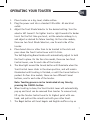
OPERATING YOUR TOASTER
EN
1. Place toaster on a dry, level, stable surface.
2. Plug the power cord into a standard 120v 60hz AC electrical
outlet.
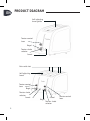
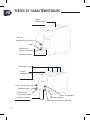
3. Adjust the Toast Shade Selector to the desired setting. Turn the selector left toward 1 for lighter toast or right toward 6 for darker toast. For the first time you toast, set the selector midway to 4, and adjust as desired for future toasting. On four slice models, there are two Toast Shade Selectors, one for each side of the toaster.
4. Place bread slices or other item to be toasted in the slots and press down the Toast Control Lever until it clicks.
The Self-Adjusting Bread Guides will automatically adjust to hold the food in place. On the four slice model, there are two Toast Control Levers, one for each side of the toaster.
5. The blue light around the Cancel button will illuminate when the Toast Control Lever clicks in the down position, and will remain illuminated until toasting is finished, or until the Cancel button is pushed. On four slice models, there are two different Cancel
buttons, one for each side of the toaster.
Note: Toasting process can be terminated at any time by
pressing t he CANCEL button.
6. When toasting is done, the Toast Control Lever will automatically pop up and toast can be removed from toaster. To remove toast, lift up the Toaster Control Level to its highest point with one hand, and pull out the raised toast with your other hand.
7. The Bagel button will toast bagels and English muffins crisp on 7