1
Models C709/C717
Heat Treatment
Soft Serve Freezers
Original Operating Instructions
062080--M
2/4/05 (Original Publication)
(Updated 5/14/12
Complete this page for quick reference when service is required:
Taylor Distributor:
Address:
Phone:
Fax:
E-mail:
Service:
Parts:
Date of Installation:
Information found on the data label:
Model Number:
Serial Number:
Electrical Specs:
Voltage
Cycle
Phase
Maximum Fuse Size:
A
Minimum Wire Ampacity:
A
EFebruary, 2005 Taylor
All rights reserved.
062080-M
The word Taylor and the Crown design
are registered trademarks in the United States
of America and certain other countries.
Taylor Company
750 N. Blackhawk Blvd.
Rockton, IL 61072
Table of Contents
Section 1
To the Installer . . . . . . . . . . . . . . . . . . . . . . . . . . . . . . . . . . . . . . . . . . . .
1
Installer Safety . . . . . . . . . . . . . . . . . . . . . . . . . . . . . . . . . . . . . . . . . . . . . . . . . . . . . . . .
Site Preparation . . . . . . . . . . . . . . . . . . . . . . . . . . . . . . . . . . . . . . . . . . . . . . . . . . . . . . .
Air Cooled Units . . . . . . . . . . . . . . . . . . . . . . . . . . . . . . . . . . . . . . . . . . . . . . . . . . . . . . .
Water Connections (Water Cooled Units Only) . . . . . . . . . . . . . . . . . . . . . . . . . . . .
Electrical Connections . . . . . . . . . . . . . . . . . . . . . . . . . . . . . . . . . . . . . . . . . . . . . . . . .
Beater Rotation . . . . . . . . . . . . . . . . . . . . . . . . . . . . . . . . . . . . . . . . . . . . . . . . . . . . . . .
Refrigerant . . . . . . . . . . . . . . . . . . . . . . . . . . . . . . . . . . . . . . . . . . . . . . . . . . . . . . . . . . .
1
1
1
2
2
3
3
Section 2
To the Operator . . . . . . . . . . . . . . . . . . . . . . . . . . . . . . . . . . . . . . . . . . .
4
Compressor Warranty Disclaimer . . . . . . . . . . . . . . . . . . . . . . . . . . . . . . . . . . . . . . .
4
Section 3
Safety . . . . . . . . . . . . . . . . . . . . . . . . . . . . . . . . . . . . . . . . . . . . . . . . . . . .
5
Section 4
Operator Parts Identification . . . . . . . . . . . . . . . . . . . . . . . . . . . . . . .
7
Model C709 . . . . . . . . . . . . . . . . . . . . . . . . . . . . . . . . . . . . . . . . . . . . . . . . . . . . . . . . . .
Model C709 Single Spout Door and Beater Assembly . . . . . . . . . . . . . . . . . . . . . .
Model C717 . . . . . . . . . . . . . . . . . . . . . . . . . . . . . . . . . . . . . . . . . . . . . . . . . . . . . . . . . .
Model C717 Three Spout Door and Beater Assembly . . . . . . . . . . . . . . . . . . . . . .
Feed Tube Assembly . . . . . . . . . . . . . . . . . . . . . . . . . . . . . . . . . . . . . . . . . . . . . . . . . .
Accessories . . . . . . . . . . . . . . . . . . . . . . . . . . . . . . . . . . . . . . . . . . . . . . . . . . . . . . . . . .
Brushes . . . . . . . . . . . . . . . . . . . . . . . . . . . . . . . . . . . . . . . . . . . . . . . . . . . . . . . . . . . . . .
7
8
9
11
12
13
14
Section 5
Important: To the Operator . . . . . . . . . . . . . . . . . . . . . . . . . . . . . . . . .
15
Symbol Definitions . . . . . . . . . . . . . . . . . . . . . . . . . . . . . . . . . . . . . . . . . . . . . . . . . . . .
Operating Screen Descriptions . . . . . . . . . . . . . . . . . . . . . . . . . . . . . . . . . . . . . . . . . .
Manager's Menu . . . . . . . . . . . . . . . . . . . . . . . . . . . . . . . . . . . . . . . . . . . . . . . . . . . . . .
16
18
22
Section 6
Operating Procedures . . . . . . . . . . . . . . . . . . . . . . . . . . . . . . . . . . . . .
29
Assembly . . . . . . . . . . . . . . . . . . . . . . . . . . . . . . . . . . . . . . . . . . . . . . . . . . . . . . . . . . . .
Freezer Door Assembly . . . . . . . . . . . . . . . . . . . . . . . . . . . . . . . . . . . . . . . . . . . . . . . .
Sanitizing . . . . . . . . . . . . . . . . . . . . . . . . . . . . . . . . . . . . . . . . . . . . . . . . . . . . . . . . . . . .
Priming . . . . . . . . . . . . . . . . . . . . . . . . . . . . . . . . . . . . . . . . . . . . . . . . . . . . . . . . . . . . . .
29
30
35
37
Table of Contents
Models C709 & C717
Table of Contents - Page 2
Daily Closing Procedures . . . . . . . . . . . . . . . . . . . . . . . . . . . . . . . . . . . . . . . . . . . . . .
Daily Opening Procedures . . . . . . . . . . . . . . . . . . . . . . . . . . . . . . . . . . . . . . . . . . . . . .
Manual Brush Cleaning . . . . . . . . . . . . . . . . . . . . . . . . . . . . . . . . . . . . . . . . . . . . . . . .
Draining Product From The Freezing Cylinder . . . . . . . . . . . . . . . . . . . . . . . . . . . .
Rinsing . . . . . . . . . . . . . . . . . . . . . . . . . . . . . . . . . . . . . . . . . . . . . . . . . . . . . . . . . . . . . .
Hopper Cleaning . . . . . . . . . . . . . . . . . . . . . . . . . . . . . . . . . . . . . . . . . . . . . . . . . . . . . .
Disassembly . . . . . . . . . . . . . . . . . . . . . . . . . . . . . . . . . . . . . . . . . . . . . . . . . . . . . . . . . .
Brush Cleaning . . . . . . . . . . . . . . . . . . . . . . . . . . . . . . . . . . . . . . . . . . . . . . . . . . . . . . .
Section 7
38
39
40
41
41
42
42
43
Important: Operator Checklist . . . . . . . . . . . . . . . . . . . . . . . . . . . . . .
44
During Brush Cleaning and Sanitizing . . . . . . . . . . . . . . . . . . . . . . . . . . . . . . . . . . . .
Troubleshooting Bacterial Count . . . . . . . . . . . . . . . . . . . . . . . . . . . . . . . . . . . . . . . .
Regular Maintenance Checks . . . . . . . . . . . . . . . . . . . . . . . . . . . . . . . . . . . . . . . . . . .
Winter Storage . . . . . . . . . . . . . . . . . . . . . . . . . . . . . . . . . . . . . . . . . . . . . . . . . . . . . . . .
44
44
44
45
Section 8
Troubleshooting Guide . . . . . . . . . . . . . . . . . . . . . . . . . . . . . . . . . . . .
46
Section 9
Parts Replacement Schedule . . . . . . . . . . . . . . . . . . . . . . . . . . . . . . .
50
Section 10
Warranty Explanation . . . . . . . . . . . . . . . . . . . . . . . . . . . . . . . . . . . . . .
51
Section 11
Parts List . . . . . . . . . . . . . . . . . . . . . . . . . . . . . . . . . . . . . . . . . . . . . . . . .
52
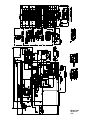
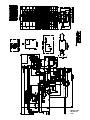
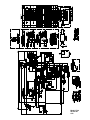
Wiring Diagrams . . . . . . . . . . . . . . . . . . . . . . . . . . . . . . . . . . . . . . . . . . . . . . . . . . . . . .
66
Note: Continuing research results in steady improvements; therefore, information
in this manual is subject to change without notice.
Note: Only instructions originating from the factory or its authorized translation
representative(s) are considered to be the original set of instructions.
EFebruary, 2005 Taylor (Original Publication)
(Updated May, 2012)
All rights reserved.
062080-M
The word Taylor and the Crown design
are registered trademarks in the United States
of America and certain other countries.
Models C709 & C717
Taylor Company
750 N. Blackhawk Blvd.
Rockton, IL 61072
Table of Contents
Section 1
To the Installer
The following are general installation instructions.
For complete installation details, please see the
checkout card.
Site Preparation
Review the area where the unit will be installed
before uncrating the unit. Make sure all possible
hazards to the user or equipment have been
addressed.
Installer Safety
For Indoor Use Only: This unit is designed to
operate indoors, under normal ambient
temperatures of 70_-75_F (21_-24_C). The freezer
has successfully performed in high ambient
temperatures of 104_(40_C) at reduced capacities.
In all areas of the world, equipment should
be installed in accordance with existing local codes.
Please contact your local authorities if you have any
questions.
Care should be taken to ensure that all basic safety
practices are followed during the installation and
servicing activities related to the installation and
service of Taylor equipment.
S
S
S
S
This unit must NOT be installed in an area
where a water jet or hose can be used. NEVER use
a water jet or hose to rinse or clean the unit. Failure
to follow this instruction may result in electrocution.
Only authorized Taylor service personnel
should perform installation and repairs on
the equipment.
Authorized service personnel should consult
OSHA Standard 29CFRI910.147 or the
applicable code of the local area for the
industry standards on lockout/tagout
procedures before beginning any installation
or repairs.
Authorized service personnel must ensure
that the proper PPE is available and worn
when required during installation and
service.
Authorized service personnel must remove
all metal jewelry, rings, and watches before
working on electrical equipment.
This unit must be installed on a level surface
to avoid the hazard of tipping. Extreme care should
be taken in moving this equipment for any reason.
Two or more persons are required to safely move
this unit. Failure to comply may result in personal
injury or equipment damage.
Uncrate the unit and inspect it for damage. Report
any damage to your Taylor Distributor.
This piece of equipment is made in the USA and has
USA sizes of hardware. All metric conversions are
approximate and vary in size.
Air Cooled Units
The main power supply(s) to the freezer
must be disconnected prior to performing any
repairs. Failure to follow this instruction may result in
personal injury or death from electrical shock or
hazardous moving parts as well as poor
performance or damage to the equipment.
DO NOT obstruct air intake and discharge openings:
C709: A minimum of 6” (152 mm) air space is required
on both sides and 0” on the rear.
C717: A minimum of 3” (76 mm) air space is required
around all sides. Install the deflector provided to
prevent recirculation of warm air.
Note: All repairs must be performed by an
authorized Taylor Service Technician.
This will allow for adequate air flow across the
condenser. Failure to allow adequate clearance can
reduce the refrigeration capacity of the freezer and
possibly cause permanent damage to the
compressor.
This unit has many sharp edges that can
cause severe injuries.
081208
Models C709 & C717
1
To the Installer
inside of the electrical box for proper power
connections.
Water Connections
(Water Cooled Units Only)
An adequate cold water supply must be provided
with a hand shut-off valve. On the underside of the
base pan or on the right side, two 3/8” I.P.S. water
connections for inlet and outlet are provided for easy
hook-up. 1/2” inside diameter water lines should be
connected to the machine. (Flexible lines are
recommended, if local codes permit.) Depending on
local water conditions, it may be advisable to install
a water strainer to prevent foreign substances from
clogging the automatic water valve. There will be
only one water “in” and one water “out” connection.
DO NOT install a hand shut-off valve on the water
“out” line! Water should always flow in this order:
first, through the automatic water valve; second,
through the condenser; and third, through the outlet
fitting to an open trap drain.
CAUTION: THIS EQUIPMENT MUST BE
PROPERLY GROUNDED! FAILURE TO DO SO
CAN RESULT IN SEVERE PERSONAL INJURY
FROM ELECTRICAL SHOCK!
This unit is provided with an equipotential
grounding lug that is to be properly attached to the
rear of the frame by the authorized installer. The
installation location is marked by the equipotential
bonding symbol (5021 of IEC 60417-1) on both the
removable panel and the equipment's frame.
A back flow prevention device is
required on the incoming water connection side.
Please refer to the applicable National, State, and
local codes for determining the proper configuration.
S
Stationary appliances which are not
equipped with a power cord and a plug or
another device to disconnect the appliance
from the power source must have an all-pole
disconnecting device with a contact gap of
at least 3 mm installed in the external
installation.
S
Appliances that are permanently connected
to fixed wiring and for which leakage
currents may exceed 10 mA, particularly
when disconnected or not used for long
periods, or during initial installation, shall
have protective devices such as a GFI, to
protect against the leakage of current,
installed by the authorized personnel to the
local codes.
S
Supply cords used with this unit shall be
oil-resistant, sheathed flexible cable not
lighter than ordinary polychloroprene or
other equivalent synthetic
elastomer-sheathed cord (Code designation
60245 IEC 57) installed with the proper cord
anchorage to relieve conductors from strain,
including twisting, at the terminals and
protect the insulation of the conductors from
abrasion.
Electrical Connections
In the United States, this equipment is intended to
be installed in accordance with the National
Electrical Code (NEC), ANSI/NFPA 70-1987. The
purpose of the NEC code is the practical
safeguarding of persons and property from hazards
arising from the use of electricity. This code contains
provisions considered necessary for safety.
Compliance therewith and proper maintenance will
result in an installation essentially free from hazard!
In all other areas of the world, equipment should be
installed in accordance with the existing local codes.
Please contact your local authorities.
FOLLOW YOUR LOCAL ELECTRICAL CODES!
Each unit requires one power supply for each data
label on the unit. Check the data label(s) on the
freezer for branch circuit overcurrent protection or
fuse, circuit ampacity, and other electrical
specifications. Refer to the wiring diagram provided
110316
To the Installer
2
Models C709 & C717
Beater Rotation
Refrigerant liquid sprayed onto the skin may
cause serious damage to tissue. Keep eyes and skin
protected. If refrigerant burns should occur, flush
immediately with cold water. If burns are severe,
apply ice packs and contact a physician
immediately.
Beater rotation must be clockwise as viewed
looking into the freezing cylinder.
Note: The following procedures should be
performed by a trained service technician.
To correct rotation on a three-phase unit,
interchange any two incoming power supply lines at
freezer main terminal block only.
Taylor reminds technicians to be cautious of
government laws regarding refrigerant recovery,
recycling, and reclaiming systems. If you have any
questions regarding these laws, please contact the
factory Service Department.
To correct rotation on a single-phase unit, change
the leads inside the beater motor. (Follow diagram
printed on motor.)
Electrical connections are made directly to the
terminal block provided behind the lower front panel.
WARNING: R404A refrigerant used in
conjunction with polyolester oils is extremely
moisture absorbent. When opening a refrigeration
system, the maximum time the system is open must
not exceed 15 minutes. Cap all open tubing to
prevent humid air or water from being absorbed by
the oil.
Refrigerant
In consideration of our environment, Taylor
proudly uses only earth friendly HFC refrigerants.
The HFC refrigerant used in this unit is R404A. This
refrigerant is generally considered non-toxic and
non-flammable, with an Ozone Depleting Potential
(ODP) of zero (0).
However, any gas under pressure is potentially
hazardous and must be handled with caution.
NEVER fill any refrigerant cylinder completely with
liquid. Filling the cylinder to approximately 80% will
allow for normal expansion.
Use only R134a refrigerant that conforms to
the AHI standard 700 specification. The use of any
other refrigerant may expose users and operators to
unexpected safety hazards.
120514
Models C709 & C717
3
To the Installer
Section 2
To the Operator
Your freezer has been carefully engineered and
manufactured to give you dependable operation.
When properly operated and cared for, it will
produce a consistent, quality product. Like all
mechanical products, cleaning and maintenance will
be required. A minimum amount of care and
attention is necessary if the operating procedures
outlined in this manual are followed closely.
The user is responsible for returning the product to
the appropriate collection facility, as specified by
your local code.
For additional information regarding applicable local
laws, please contact the municipal facility and/or
local distributor.
This Operator's Manual should be read before
operating or performing any maintenance on your
equipment.
Compressor Warranty Disclaimer
The refrigeration compressors on this machine are
warranted for the term indicated on the warranty
card accompanying this machine. However, due to
the Montreal Protocol and the U.S. Clean Air Act
Amendments of 1990, many new refrigerants are
being tested and developed, thus seeking their way
into the service industry. Some of these new
refrigerants are being advertised as drop-in
replacements for numerous applications. It should
be noted that, in the event of ordinary service to this
machine's refrigeration system, only the refrigerant
specified on the affixed data label should be
used. The unauthorized use of alternate refrigerants
will void your compressor warranty. It will be the
owner's responsibility to make this fact known to any
technician he employs.
Your Taylor freezer will NOT eventually compensate
for and correct any errors during the set-up or filling
operations. Thus, the initial assembly and priming
procedures are of extreme importance. It is strongly
recommended that personnel responsible for the
equipment's operation, both assembly and
disassembly, go through these procedures together
in order to be properly trained and to make sure that
no confusion exists.
In the event you should require technical assistance,
please contact your local authorized Taylor
Distributor.
Note: Warranty is valid only if the parts are
authorized Taylor parts, purchased from an
authorized Taylor Distributor, and the required
service work is provided by an authorized Taylor
service technician. Taylor reserves the right to deny
warranty claims on equipment or parts if
non-approved parts or refrigerant were installed in
the machine, system modifications were performed
beyond factory recommendations, or it is determined
that the failure was caused by neglect or abuse.
It should also be noted that Taylor does not warrant
the refrigerant used in its equipment. For example, if
the refrigerant is lost during the course of ordinary
service to this machine, Taylor has no obligation to
either supply or provide its replacement either at
billable or unbillable terms. Taylor does have the
obligation to recommend a suitable replacement if
the original refrigerant is banned, obsoleted, or no
longer available during the five year warranty of the
compressor.
Note: Constant research results in steady
improvements; therefore, information in this
manual is subject to change without notice.
Taylor will continue to monitor the industry and test
new alternates as they are being developed. Should
a new alternate prove, through our testing, that it
would be accepted as a drop-in replacement, then
the above disclaimer would become null and void.
To find out the current status of an alternate
refrigerant as it relates to your compressor warranty,
call the local Taylor Distributor or the Taylor Factory.
Be prepared to provide the Model/Serial Number of
the unit in question.
If the crossed out wheeled bin symbol is
affixed to this product, it signifies that this product is
compliant with the EU Directive as well as other
similar legislation in effect after August 13, 2005.
Therefore, it must be collected separately after its
use is completed, and cannot be disposed as
unsorted municipal waste.
080912
To the Operator
4
Models C709 & C717
Section 3
Safety
We at Taylor Company are concerned about the
safety of the operator when he or she comes in
contact with the freezer and its parts. Taylor has
gone to extreme efforts to design and manufacture
built-in safety features to protect both you and the
service technician. As an example, warning labels
have been attached to the freezer to further point
out safety precautions to the operator.
IMPORTANT - Failure to adhere to the
following safety precautions may result in
severe personal injury or death. Failure to
comply with these warnings may damage the
machine and its components. Component
damage will result in part replacement expense
and service repair expense.
S
DO NOT operate the freezer unless it is
properly grounded.
S
DO NOT operate the freezer with larger
fuses than specified on the freezer data
label.
S
All repairs must be performed by an
authorized Taylor service technician. The
main power supplies to the machine must
be disconnected prior to performing any
repairs.
S
Cord Connected Units: Only Taylor
authorized service technicians may install a
plug on this unit.
S
Stationary appliances which are not
equipped with a power cord and a plug or
another device to disconnect the appliance
from the power source must have an all-pole
disconnecting device with a contact gap of
at least 3mm installed in the external
installation.
S
Appliances that are permanently connected
to fixed wiring and for which leakage
currents may exceed 10 mA, particularly
when disconnected or not used for long
periods, or during initial installation, shall
have protective devices such as a GFI, to
protect against the leakage of current,
installed by the authorized personnel to the
local codes.
S
Supply cords used with this unit shall be
oil-resistant, sheathed flexible cable not
lighter than ordinary polychloroprene or
other equivalent synthetic
elastomer-sheathed cord (Code designation
60245 IEC 57) installed with the proper cord
anchorage to relieve conductors from strain,
including twisting, at the terminals and
protect the insulation of the conductors from
abrasion.
DO NOT operate the freezer without
reading this Operator Manual. Failure to follow this
instruction may result in equipment damage, poor
freezer performance, health hazards, or personal
injury.
Per IEC 60335-1 and its part 2 standards, “This
appliance is to be used only by trained personnel. It
is not intended for use by children or people with
reduced physical, sensory, or mental capabilities, or
lack of experience and knowledge, unless given
supervision or instruction concerning the use of the
appliance by a person responsible for their safety.”
This unit is provided with an equipotential
grounding lug that is to be properly attached to the
rear of the frame by the authorized installer. The
installation location is marked by the equipotential
bonding symbol (5021 of IEC 60417-1) on both the
removable panel and the equipment's frame.
DO NOT use a water jet to clean or rinse
the freezer. Failure to follow these instructions may
result in serious electrical shock.
Failure to follow these instructions may result in
electrocution. Contact your local authorized Taylor
Distributor for service.
110316
Models C709 & C717
5
Safety
S
S
S
This freezer must be placed on a level
surface. Failure to comply may result in personal
injury or equipment damage.
DO NOT allow untrained personnel to
operate this machine.
DO NOT operate the freezer unless all
service panels and access doors are
restrained with screws.
DO NOT remove any internal operating
parts (example: freezer door, beater,
scraper blades, etc.) unless all control
switches are in the OFF position.
Cleaning and sanitizing schedules are
governed by your state or local regulatory agencies
and must be followed accordingly. Please refer to
the cleaning section of this manual for the proper
procedure to clean this unit.
Failure to follow these instructions may result in
severe personal injury from hazardous moving parts.
DO NOT obstruct air intake and discharge openings:
This unit has many sharp edges that can
cause severe injuries.
C717: A minimum of 3” (76 mm) air space is
required around all sides. Install the deflector
provided to prevent recirculation of warm air.
S
S
S
C709: A minimum of 6” (152 mm) air space is
required on both sides and 0” on the rear.
DO NOT put objects or fingers in the door
spout. This may contaminate the product
and cause severe personal injury from blade
contact.
USE EXTREME CAUTION when removing
the beater asssembly. The scraper blades
are very sharp.
CAUTION-SHARP EDGES: Two people are
required to handle the cup/cone dispenser.
Protective gloves must be worn and the
mounting holes must NOT be used to lift or
hold the dispenser. Failure to follow this
instruction can result in personal injury to
fingers or equipment damage.
Failure to follow these instructions may cause poor
freezer performance and damage to the machine.
For Indoor Use Only: This unit is designed to
operate indoors, under normal ambient
temperatures of 70_ - 75_F (21_ - 24_C). The
freezer has successfully performed in high ambient
temperatures of 104_(40_C) at reduced capacities.
NOISE LEVEL: Airborne noise emission does not
exceed 78 dB(A) when measured at a distance of
1.0 meter from the surface of the machine and at a
height of 1.6 meters from the floor.
080912
Safety
6
Models C709 & C717
Section 4
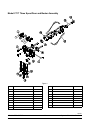
Operator Parts Identification
Model C709
Figure 1
ITEM
DESCRIPTION
PART NO.
ITEM
DESCRIPTION
PART NO.
10
PANEL A-SIDE-RIGHT
X57871
1
PANEL-SIDE-LEFT
056963-SP1
2
PAN-DRIP 11-5/8 LONG
027503
11
PANEL A.-FRONT-UPPER
X59423
3
PIN-RETAINING-HOPPER CVR
043934
12
PANEL A.-FRONT-LOWER
X58955
4
KIT A.-COVER-HOPPER
X65368
13
STUD-NOSE CONE
055987
5
BLADE A.-AGITATOR
X56591
14
SHELF-TRAY-DRIP
056076
6
TUBE A.-FEED-OUTER-HT
X34641
15
TRAY-DRIP
056858
7
PANEL-REAR
056077-SP1
16
SHIELD-SPLASH
049203
8
ORIFICE
022465-100
17
TUBE A.-FEED-SC-INNER
X32824-2
9
SCREW-1/4-20X3/8 RHM-SS
011694
100324
Models C709 & C717
7
Operator Parts Identification
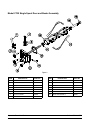
Model C709 Single Spout Door and Beater Assembly
Figure 2
ITEM
DESCRIPTION
PART NO.
ITEM
1
HANDLE A.-DRAW-WELDED
X56246
9
2
O-RING-1/4 OD X .070W 50
015872
3
SCREW-ADJUSTMT-5/16-24
4
NUT-STUD BLACK 3.250”
5
DESCRIPTION
PART NO.
PIN-HANDLE-SS
055819
10
GASKET-DOOR HT 4”-DBL
048926
056332
11
BEARING-FRONT
050216
058765
12
BEATER A.-3.4 QT HELICORE
X31761
NUT-STUD BLACK 2.563“
058764
13
BLADE-SCRAPER-PLASTIC
035174
6
DOOR A.-W/BAFFLE
X57332-SER
14
SHAFT-BEATER
056078
7
VALVE A.-DRAW
X55820
15
SEAL-DRIVE SHAFT
032560
8
O-RING-DRAW VALVE-S.S.
014402
Operator Parts Identification
8
Models C709 & C717
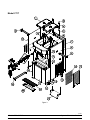
Model C717
Figure 3
111129
Models C709 & C717
9
Operator Parts Identification
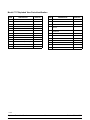
Model C717 Exploded View Parts Identification
ITEM
DESCRIPTION
PART NO.
ITEM
DESCRIPTION
PART NO.
1
COVER-HOPPER
053809-1
14
PANEL A.-FILTER-LOUVERED
X59928
2
BLADE A.-AGITATOR
X56591
15
CASTER-4” SWV 3/4-10 STEM
044106
3
ORIFICE
022465-100
16
SCREW-1/4-20 X 3/8 RHM-SS
011694
4
TUBE A.-FEED-SC-INNER-3/16
X32824-3
17
TUBE A.-FEED-OUTER-HT
X34641
PANEL-CORNER-FRONT
RIGHT
063087
5
6
O-RING-.643 OD X .077 W
018572
18
CASTER-4” SWV 3/4-10 STEM
W/BRAKE
046437
7
PANEL-REAR
059917
19
DEFLECTOR-BLOWER
059929
8
PANEL-SIDE*RIGHT
059907
9
PAN-DRIP 12.5
059736
10
PANEL A.-FRONT (MIDDLE)
X63879
11
PANEL A.-FRONT (UPPER)
X59836
12
STUD-NOSE CONE
055987
13
FILTER-AIR-POLY-FLO
052779-11
20
SHIELD-SPLASH-WIRE-19-3/4 L 033813
21
PANEL A.-FRONT LOWER
X59854-SER
22
TRAY-DRIP-19-5/8 L X 4-7/8
033812
23
PAN-DRIP 19-1/2 LONG
035034
24
PANEL-CORNER-FRONT-LEFT
063088
25
PANEL-SIDE-LEFT
059906
111129
Operator Parts Identification
10
Models C709 & C717
Model C717 Three Spout Door and Beater Assembly
Figure 4
ITEM
DESCRIPTION
PART NO.
1
HANDLE A.-DRAW-WELDED
X56421-1
2
O-RING-1/4 OD X .070W 50
3
SCREW-ADJUSTMENT-5/16-24
4
ITEM
DESCRIPTION
PART NO.
10
BEATER A.-3.4QT-HELICORE
X31761
015872
11
BLADE-SCRAPER-PLASTIC 17
035174
056332
12
SHAFT-BEATER
032564
NUT-STUD BLACK 3.250 LONG
058765
13
SEAL-DRIVE SHAFT
032560
5
NUT-STUD BLACK 2.563 LONG
058764
14
VALVE A.-DRAW-L&R
X59888
6
DOOR A.-*LG BAF*W/O PRG
X59924-SER
15
VALVE A.-DRAW-CENTER
X59890
7
PIN-HANDLE-TWIN
059894
16
SEAL-DRAW VALVE
034698
8
GASKET-DOOR HT 4”-DOUBLE
048926-1
17
O-RING-7/8 OD X .103W
014402
9
BEARING-FRONT
050216
060308
Models C709 & C717
11
Operator Parts Identification
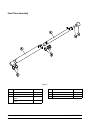
Feed Tube Assembly
Figure 5
ITEM
DESCRIPTION
PART NO.
ITEM
DESCRIPTION
PART NO.
1
AIR ORIFICE
022465-100
3
O-RING - .291 ID x .080 W
018550
1a
O-RING
016137
4
TUBE A.-FEED-OUTER-HT
X34641
2
TUBE A.-FEED-SC-INNER
(C709)
X32824-2
5
O-RING- .643 OD x .077 W
018572
TUBE A.-FEED-SC-INNER
(C717)
X32824-3
Operator Parts Identification
12
Models C709 & C717
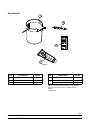
Accessories
Figure 6
ITEM
DESCRIPTION
PART NO.
1
PAIL-MIX 10 QT.
013163
2
TOOL-O-RING REMOVAL
048260-WHT
3
LUBRICANT-TAYLOR HI-PERF
048232
ITEM
*4
**5
DESCRIPTION
PART NO.
SANITIZER KAY-5 25 PACKS
SEE NOTE
KIT A.-TUNE-UP (C709)
X49463-58
KIT A.-TUNE-UP (C717)
X49463-79
*Note: A sample container of sanitizer is sent with the
unit. For reorders, order Kay-5 part no. 041082 (200
packs) or Stera Sheen part no. 055492 (100 2 oz.
packs).
**Not Shown
110531
Models C709 & C717
13
Operator Parts Identification
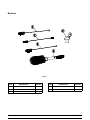
Brushes
Figure 7
ITEM
DESCRIPTION
PART NO.
ITEM
DESCRIPTION
PART NO.
1
BRUSH-REAR BRG 1” D X 2” L
013071
4
BRUSH-MIX PUMP BODY 3” X 7”
023316
2
BRUSH-DOUBLE ENDED
013072
5
BRUSH-END-DOOR-SPOUT-SS
039719
3
BRUSH-DRAW VALVE 1”OD X 2
013073
Operator Parts Identification
14
Models C709 & C717
Section 5
Important: To the Operator
Figure 8
ITEM
1
2
3
4
5
6
7
8
9
10
11
DESCRIPTION
POWER SWITCH
LIQUID CRYSTAL DISPLAY
KEYPADS
MIX OUT INDICATOR
STANDBY KEY
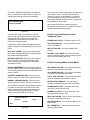
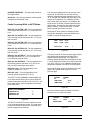
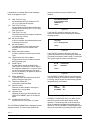
MIX LOW INDICATOR
SELECT KEY
SERVICE MENU KEY
BRUSH CLEAN COUNTER
ARROW KEYS
TOPPING HEATER KEY
050321
Models C709 & C717
15
Important: To the Operator
Power Switch
Symbol Definitions
When placed in the ON position, the power switch
allows control panel operation.
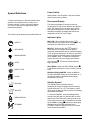
To better communicate in the International arena,
symbols have replaced words on many of our
operator switches, function, and fault indicators.
Your Taylor equipment is designed with these
International symbols.
Fluorescent Display
The fluorescent display is located on the front
control panel. During normal operation the display is
blank. The display is used to show menu options
and notifies the operator if a fault is detected. On
International models, the display will indicate the
temperature of the mix in the hopper.
The following chart identifies the symbol definitions.
Indicator Lights
MIX LOW - When the MIX LOW symbol
is
illuminated, the mix hopper has a low supply of mix
and should be refilled as soon as possible.
= SELECT
symbol is
MIX OUT - When the MIX OUT
illuminated, the mix hopper has been almost
completely exhausted and has an insufficient supply
of mix to operate the freezer. At this time, the AUTO
mode is locked out and the freezer will be placed in
the STANDBY mode. To initiate the refrigeration
system, add mix to the mix hopper and touch the
= UP ARROW
= DOWN ARROW
= AUTO
AUTO symbol . The freezer will automatically
begin operation.
= HEAT CYCLE
HEAT MODE - When the HEAT MODE symbol
is illuminated, the freezer is in the process of a heat
cycle.
BRUSH CLEAN COUNTER - When the BRUSH
CLEAN COUNTER display has counted down to “1”,
the machine must be disassembled and brush
cleaned within 24 hours.
= WASH
Standby Symbol
= MIX LOW
The Standby feature maintains product
temperatures in both the hopper and the freezing
cylinder below 40°F (4.4°C). This feature is useful
during long “No Sale” periods to prevent overbeating
and product breakdown.
= MIX OUT
To activate STANDBY, enter the Manager Menu
access code (see page 22.) Remove the air orifice
and turn the inner feed tube so the pin rests on top
of the outer feed tube. When STANDBY is selected,
= MENU DISPLAY
illuminates, indicating the
the STANDBY symbol
Standby feature has been activated. In the
STANDBY mode, the WASH and AUTO functions
are automatically cancelled.
= STANDBY
Important: To the Operator
16
Models C709 & C717
To resume normal operation, press the AUTO
symbol . When the unit cycles off, the product in
the freezing cylinder will be at serving viscosity. At
this time, turn the inner feed tube so the pin fits into
the groove of the outer feed tube. Install the air
orifice.
WARNING: Do not use metal objects to
press the reset button. Failure to comply may
result in severe personal injury or death.
If the beater motor is turning properly, touch the
Wash Symbol
WASH symbol
to cancel the cycle. Touch the
AUTO symbol
to resume normal operation. If the
freezer shuts down again, contact your authorized
service technician.
The WASH symbol
will illuminate when it is
touched. This indicates beater motor operation. The
STANDBY or AUTO modes must be cancelled first
to activate the WASH mode.
Adjustable Draw Handle
Auto Symbol
These units feature an adjustable draw handle(s) to
provide the best portion control, giving a better,
consistent quality to your product and controlling
costs. The draw handle(s) should be adjusted to
provide a flow rate of 5 to 7-1/2 oz. (142 to 213 g.)
of product by weight per 10 seconds. To INCREASE
the flow rate, turn the screw CLOCKWISE, and
COUNTERCLOCKWISE to DECREASE the flow
rate.
The AUTO symbol
will illuminate when it is
touched. This indicates that the refrigeration system
has been activated. In the AUTO mode, the WASH
or STANDBY functions are automatically cancelled.
Note: An indicating light and an audible tone will
sound whenever a mode of operation has been
selected. To cancel any function, touch the key
again. The light and the mode of operation will shut
off.
Reset Mechanism
The C709 reset button is located in the service panel
on the left side of the machine. The C717 reset
buttons are located in the rear panel of the machine.
Reset button(s) protect the beater motor(s) from an
overload condition. Should an overload occur, the
reset mechanism will trip. To properly reset the
freezer, place the power switch in the OFF position.
Press the reset button firmly. Turn the power switch
to the ON position. Touch the WASH symbol
observe the freezer's performance.
and
Note: To clear the fault, refer to page 22.
Models C709 & C717
Figure 9
17
Important: To the Operator
The SAFETY TIMEOUT screen will be displayed
with the alarm on, for 60 seconds or until any control
symbol is selected.
Operating Screen Descriptions
The fluorescent display located in the center of the
control panel is normally blank during the daily
operation of the machine. The display is activated
when the SEL symbol or the Manager's Menu is
selected. The display screen will also alert the
operator of specific faults detected by the control.
After the safety timeout has been completed and the
power switch is OFF, the following screen is
displayed.
POWER SWITCH OFF
-=-=-=-=-=UNIT CLEANED
Note: The following operating screen examples will
be displayed as they appear on a C709. The C717
will display information for the second freezing
cylinder.
Figure 12
Power Up
When the machine is powered the control system
will initialize to perform a system check. The screen
will display “INITIALIZING”. There will be four types
of data the system will check: LANGUAGE,
SYSTEM DATA, CONFIG DATA, and LOCKOUT
DATA.
Power Switch ON
When the power switch is placed in the ON position,
the control panel touch keys become operative. The
fluorescent display will be either blank or indicate
that the unit has been cleaned.
During the INITIALIZING... LANGUAGE screen, the
alarm will be on. If the system detects corrupt data
during INITIALIZING, the following display will alert
the operator that the control settings may have been
changed.
UNIT CLEANED
NVRAM FAULT
RESET TO DEFAULTS
PRESS SEL KEY
Figure 13
Figure 10
Heat Cycle
See “NVRAM FAULT” for instructions if the above
message appears on the screen.
The HEAT symbol
on the control panel is
illuminated throughout the heat treatment cycle. Two
warning messages will be displayed on the screen.
“DO NOT DRAW” will be displayed when the mix
temperature is below 130°F (54.4°C).
Once the system has initialized, the number of days
remaining before the next required brush cleaning is
indicated on the control panel and the SAFETY
TIMEOUT screen is displayed with the alarm turned
on.
SAFETY TIMEOUT
ANY KEY ABORTS
DO NOT DRAW
Figure 11
Important: To the Operator
Figure 14
18
Models C709 & C717
When the temperature of the mix is above 130°F
(54.4°C) the screen will display a message
indicating that HOT PRODUCT is in the machine.
International Models Only:
Some International models will continuously display
the temperature of each mix hopper when the power
switch is in the ON position. (See Figure 16.)
HOPPER
3.8
HOT PRODUCT
UNIT CLEANED
Figure 16
Figure 15
If the control is set for international configuration, the
following screen will appear when the heat symbol is
touched and the machine is in the AUTO or STANDBY
mode. (See Figure 17.)
DO NOT attempt to draw product or
disassemble the unit during the HEAT cycle. The
product is hot and under extreme pressure.
In the HEAT cycle, the mix temperature in the
hopper and freezing cylinder must be raised to
151°F (66.1°C) within 90 minutes.
>
HEAT TREAT CYCLE
ARE YOU SURE?
YES
NO
Figure 17
When the heating phase is complete, the freezer
goes into the holding phase of the cycle. The holding
phase will keep the temperature above 151°F
(66.1°C) for a minimum of 35 minutes.
Use the up or down arrow symbol to move the cursor
to “YES”. Press the SEL symbol to immediately start
a heat cycle.
If the control is set for international configuration, it is
possible to select STANDBY by pressing the
STANDBY symbol without entering the Manager’s
Menu.
The final phase of the heat treatment cycle is the
cooling phase. The freezer must cool the mix below
41°F (5°C) within 90 minutes.
Freezer Locks
When the entire heat cycle has been completed, the
will no longer be illuminated. The
HEAT symbol
machine will enter the STANDBY mode (STANDBY
There are two types of freezer lock conditions that
can occur: Hard Lock or Soft Lock. A Hard Lock
requires the machine be disassembled and brush
cleaned. A Soft Lock can be corrected by either
disassembling and brush cleaning the machine, or
by starting another heat treatment cycle.
illuminates). The machine can be placed
symbol
in AUTO or left in STANDBY.
To comply with health codes, heat treatment system
freezers must complete a heat treatment cycle
daily, and must be disassembled and brush cleaned
a minimum of every 14 days. Brush cleaning is the
normal disassembly and cleaning procedure found in
this manual. Failure to follow these guidelines will
cause the control to lock the freezer out of the
AUTO mode.
Hard Lock: There are two causes of a hard lock
failure:
1.
BRUSH CLEAN TIMEOUT
FREEZER LOCKED
CLEANING REQ'D
WASH TO BRUSH CLEAN
Always comply with local guidelines for the
maximum number of days allowed between brush
clean cycles. (See the Manager's Menu for setting
the Brush Clean interval, on page 25.)
Models C709 & C717
The brush clean timer has elapsed
(maximum setting of 14 days).
Figure 18
19
Important: To the Operator
Selecting the WASH symbol
following screen.
To restore the message that identified the
reason for the hard lock, turn the power switch
OFF for five seconds and then return the power
switch to the ON position. The original message
with the reason for the Hard Lock will be
displayed. The FAULT DESCRIPTION can also
be found in the Manager's Menu (See page 26.)
will display the
FREEZER LOCKED
The FREEZER LOCKED message will remain
on the display until the brush clean
requirements are fulfilled. The freezer must be
disassembled in order to activate the five
minute timer on the display screen. Once the
timer counts down to zero, the lockout is
cleared.
Figure 19
2.
There has been a thermistor failure
(freezing cylinder or hopper) during the
heat treatment process.
SYSTEM FAULT
FREEZER LOCKED
SERVICE REQ'D
PRESS SEL KEY
Soft Lock: If a heat treatment cycle has not been
initiated within the last 24 hours, a soft lock failure
will occur. A soft lock allows the operator to correct
the cause of the soft lock. The operator has the
option of either starting another heat cycle or brush
cleaning the machine. When a soft lock occurs, the
machine will go into the STANDBY mode. The
following message is displayed on the screen. The
reason for the soft lock is indicated on the second
line.
Figure 20
Selecting the SEL symbol will indicate which
thermistor caused the Hard Lock.
HOPPER THERM BAD
FREEZER LOCKED
HEAT TREAT FAILURE
REASON
HEAT FOR HEAT CYCLE
WASH TO BRUSH CLEAN
Figure 21
If the machine has hard locked and an attempt
is made to enter AUTO, the machine will enter
the STANDBY mode and display the following
message.
Figure 23
If the reason for the soft lock has been corrected,
selecting the HEAT symbol
FREEZER LOCKED
immediately. Selecting the WASH symbol
when
the above message is displayed will hard lock the
machine and brush cleaning will be necessary.
Figure 22
Important: To the Operator
initiates a Heat Cycle
20
Models C709 & C717
When one of these messages appears, automatic
freezer operation cannot take place until the freezer
is disassembled and brush cleaned, or has
completed a heat treatment cycle. Select the HEAT
Following are the variable messages for soft lock
failures that appear on the second line of the screen.
POWER SWITCH OFF
Power switch was in the
OFF position.
MIX OUT PRESENT
There was a mix out
condition present.
AUTO OR STANDBY
OFF
The machine was not in
the AUTO or STANDBY
mode.
NO HEAT CYCLE
TRIED
A heat treatment cycle
was not attempted in
the last 24 hours.
(AUTO HEAT TIME
was advanced,a power
loss was experienced at
the time the cycle was
to occur, or a heat cycle
failure not due to a
thermistor failure.)
symbol
to start a heat cycle, or select the WASH
symbol
to disassemble and brush clean the
machine.
Once the freezer is unlocked by starting a heat
will illuminate
treatment cycle the HEAT symbol
and the following message will be displayed on the
screen.
DO NOT DRAW
Figure 26
is selected to clear the
If the WASH symbol
lockout by brush cleaning the machine, the
FREEZER LOCKED message will remain on the
display until the brush clean requirements are
fulfilled. The freezer must be disassembled in order
to activate the five minute timer on the display
screen. Once the timer counts down to zero, the
lockout is cleared.
If the following screen appears, a soft lock has
occurred during the heat treatment cycle.
HEAT TREAT FAILURE
FREEZER LOCKED
HEAT FOR HEAT CYCLE
WASH TO BRUSH CLEAN
Figure 24
FREEZER LOCKED
A soft lock can also occur any time during operation
when the hopper or freezing cylinder temperature
rises above 59°F (15°C), if the temperature rises
and remains above 45°F(7°C) for one hour, or rises
and remains above 41°F(5°C) for more than four
hours. If a PRODUCT OVER TEMPERATURE
condition occurs during operation, the following
screen will appear.
Figure 27
To restore the message that identified the reason for
the soft lock, turn the power switch OFF for five
seconds, and then return the power switch to the
ON position. The original message with the reason
for the soft lock will be displayed.
PRODUCT OVER TEMP
HEAT TREAT FAILURE
REASON
HEAT FOR HEAT CYCLE
WASH TO BRUSH CLEAN
HEAT FOR HEAT CYCLE
WASH TO BRUSH CLEAN
Figure 25
Models C709 & C717
Figure 28
21
Important: To the Operator
The FAULT DESCRIPTION can also be found in the
Manager's Menu.
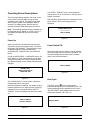
Entering Access Code
Note: A record of Heat Cycle Data and Lock Out
History can be found in the Manager's Menu.
(See page 27.)
With the ACCESS CODE screen on the display use
the SEL symbol to set the first code number in the
cursor position. When the correct number is
selected, touch the SEL symbol to move the cursor
to the next number position.
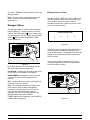
Manager's Menu
The Manager's Menu is used to enter the operator
function displays. To access the Menu, touch the
ENTER ACCESS CODE
on the control panel.
center of the CONE symbol
The arrow symbols, the SEL symbol and the CONE
8
__
will be lit when the ACCESS CODE
symbol
screen is displayed.
3
0
9
Figure 30
Continue to enter the proper access code numbers
(8309) until all four numbers are displayed, then
touch the SEL symbol . The Manager's menu list will
display on the screen provided the correct access
code is entered.
If an incorrect number is entered for the access
code, the display will exit the Menu program when
the SEL symbol is selected.
Figure 29
In the Menu program, the arrow symbols and the
SEL symbol will function as menu keys.
UP ARROW - increases the value above the cursor
and is used to scroll upward in text displays.
DOWN ARROW - decreases the value above the
cursor and is used to scroll downward in text
displays.
SEL - advances the cursor position to the right and
is used to select menu options.
Note: The machine will continue operation in the
mode it was in when the Menu was selected.
However, the control keys will not be lit and are
non-functional when the Manager's Menu is
displayed. The control keys are functional in the
Manager's Menu when the CURRENT
CONDITIONS screen is displayed. (See CURRENT
CONDITIONS on page 28.)
Important: To the Operator
Figure 31
22
Models C709 & C717
Reset the SERVING COUNTER by selecting the
SEL symbol to advance to the next screen. Select
the UP arrow symbol to move the arrow (>) to YES
and select the SEL symbol. The servings counter
will reset to zero and exit back to the Manager's
Menu.
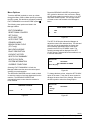
Menu Options
Touch the ARROW symbols to move up or down
through the Menu. Select a Menu option by touching
the SEL symbol. Exit the Menu program by selecting
EXIT FROM MENU or touch the CONE symbol
.
The following menu options are listed in the
Manager's Menu.
RESET DRAW COUNTER
EXIT FROM MENU
RESET DRAW COUNTER
SET CLOCK
AUTO HEAT TIME
AUTO START TIME
STANDBY MODE
BRUSH CLEAN CYCLE
(C717 only)
MIX LEVEL AUDIBLE
FAULT DESCRIPTION
LOCKOUT HISTORY
HEAT CYCLE SUMMARY
HEAT CYCLE DATA
SYSTEM INFORMATION
CURRENT CONDITIONS
>
YES
NO
Figure 33
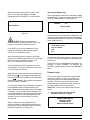
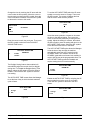
The SET CLOCK option allows the Manager to
adjust the control clock date and time. The date and
time may only be changed after the freezer has
been manually cleaned but before it has been
placed in the AUTO or STANDBY mode. The
following message will be displayed if the SET
CLOCK option is selected when the machine is not
in a brush clean state.
SET CLOCK
12:01
08/15/2004
NO CHANGES ALLOWED
Press Any Key
Selecting “EXIT FROM MENU” will exit the
Manager's Menu and the return the control panel
symbols to normal operation.
Figure 34
To change the date or time, select the SET CLOCK
option in the menu. Touch the UP arrow symbol to
advance the arrow from Exit to Change, then touch
the SEL symbol to select the Change option.
The SERVING COUNTER screen is used to check
or reset the number of servings dispensed from the
machine. The SERVING COUNTER will
automatically reset to zero when the machine is
brush cleaned.
SET CLOCK
12:01
Change
> Exit
SERVINGS COUNTER
0
0
> Next
Figure 32
08/15/2004
Figure 35
080222
Models C709 & C717
23
Important: To the Operator
Change the time by touching the UP arrow with the
cursor under the hour position. Move the cursor to
the minutes by touching the SEL symbol. Once the
correct minutes are entered, touch the SEL symbol
to advance the cursor to the month.
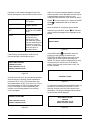
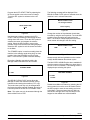
To set the AUTO HEAT TIME select the UP arrow
symbol to move the arrow to Change. Then touch
the SEL symbol. The screen will display the time
with the cursor under the hour position.
AUTO HEAT TIME
00:00
SET CLOCK
12:01
08/15/2004
> Exit
Figure 39
Select the arrow symbols to increase or decrease
the hour to the desired setting. Then move the
cursor to the minutes position by touching the SEL
symbol. Adjust the setting for minutes, then select
the SEL symbol to save the setting and return to the
AUTO HEAT TIME screen. Select the SEL symbol
to exit the screen and return to the Menu.
Figure 36
Enter the correct month, day, and year. Then touch
the SEL symbol to advance to the DAYLIGHT
SAVING TIME screen.
>
The AUTO START TIME option allows the Manager
to set the time of day at which the machine
automatically enters the AUTO mode from the
STANDBY mode. The machine must be in the
STANDBY mode without a freezer lock condition in
order to AUTO start at the programmable time. The
AUTO START TIME can also be Disabled and
require starting the AUTO mode manually.
DAYLIGHT SAVING TIME
ENABLED
Enable
Disable
Figure 37
The Daylight Saving feature when enabled, will
automatically adjust the control clock for daylight
saving time. To Disable the Daylight Saving Time
feature, select the UP arrow to move the arrow to
Disable. Then touch the SEL symbol to save the
new setting.
AUTO START TIME
DISABLED
Enable
> Disable
Figure 40
The AUTO HEAT TIME screen allows the Manager
to set the time of day in which the heat treatment
cycle will start.
Enable the AUTO START TIME by selecting the UP
arrow symbol to move the arrow up to Enable.
Touch the SEL symbol to advance to the next
screen.
AUTO HEAT TIME
00:00
AUTO START TIME
00:00
Change
> Exit
Change
> Exit
Figure 38
Important: To the Operator
Figure 41
24
Models C709 & C717
Program the AUTO START TIME by selecting the
UP arrow symbol to move the arrow to Change.
Touch the SEL symbol to advance to the next
screen.
The following message will be displayed if the
BRUSH CLEAN CYCLE option is selected when the
machine is not in a brush clean state.
BRUSH CLEAN CYCLE
No Changes Allowed
AUTO START TIME
00:00
Press Any Key
Figure 44
Figure 42
Change the number of days between brush clean
intervals by using the arrow symbols. Touch the SEL
symbol to save the setting and exit back to the
Menu. The number of days displayed on the brush
clean counter will change to the new setting.
Use the arrow symbols to program the AUTO
START TIME by increasing or decreasing the hour
setting above the cursor. Touch the SEL symbol to
advance the cursor and program the minutes
setting. Select the SEL symbol to return to the
previous screen with the new time setting displayed.
Select the SEL symbol to exit the screen and return
to the Menu.
TIME
The STANDBY option is used to manually place the
machine in the standby mode during long, no draw
periods. Select the STANDBY screen from the
Menu. Touch the SEL symbol to activate Standby.
BRUSH CLEAN CYCLE
14
DAYS
Figure 45
Always comply with local guidelines on the number
of days allowed between brush clean cycles.
Discontinue Standby operation by exiting the
Manager's Menu and select the AUTO mode.
The MIX LEVEL AUDIBLE option when enabled will
alert the operator with an audible tone when there is
mix low or mix out condition. The following screen is
displayed upon selecting this option.
STANDBY MODE
> EXIT
MIX LEVEL AUDIBLE
> Enable
Disable
Figure 43
The BRUSH CLEAN CYCLE option allows the
Manager to select the maximum number of days
between brush cleaning the machine (C717 only).
The brush clean cycle may only be changed after
the freezer has been manually cleaned, but before it
has been placed in the AUTO or STANDBY mode.
Figure 46
Disable the audible tone feature by selecting the UP
arrow symbol to move the arrow to Disable. Select
the SEL symbol to save the new setting and return
to the Menu. The control panel icons for Mix Low
and Mix Out will light as the mix level drops in the
hopper but the audible tone will be disabled.
Note: This option can only be accessed through the
Service Menu for the C709.
080222
Models C709 & C717
25
Important: To the Operator
The second line of the screen displays the date and
time a failure occurs. The third line indicates the
reason for a failure, or will indicate if a successful
brush cleaning has occurred. Some failures occur
with multiple reasons. When this occurs, a page will
be generated for each reason.
The FAULT DESCRIPTION display will indicate if
there is a fault with the freezer. When no faults are
detected the following screen will be displayed.
FAULT DESCRIPTION
NO FAULT FOUND
Use the arrow symbols to advance forward or
backward to view each screen. Listed below are the
variable messages that may appear.
Figure 47
Faults Occurring Entering a Heat
Treatment Cycle:
Touch the SEL symbol to display the next fault
found or return to the Menu if no other faults exist.
Touching the SEL symbol any time faults are
displayed will clear the faults if corrected, upon
returning to the Menu screen.
POWER SWITCH OFF - The power switch is OFF.
AUTO OR STBY OFF - The control was not in the
AUTO or STANDBY.
Listed below are the variable messages which will
appear, along with an explanation for the corrective
action.
MIX OUT FAILURE - A mix out condition was
present.
NO FAULT FOUND - There was no fault found in
the freezer. Nothing will appear on the screen after
this variable message appears.
NO HEAT CYCLE TRIED - The Auto Heat Time
was set to attempt a heat cycle more than 24 hours
after the last successful heat cycle.
BEATER OVERLOAD - Place the power switch in
the OFF position. Press the beater reset button
firmly. Place the power switch in the ON position
and restart in AUTO.
Faults Occurring While in Heat Mode:
HPCO COMPRESSOR - Place the power switch in
the OFF position. Wait 5 minutes for the machine to
cool. Place the power switch in the ON position and
restart in AUTO.
HEAT MODE FAILURE - The maximum allowable
heat mode time exceeded 90 minutes.
COOL MODE FAILURE - The maximum allowable
cool mode time exceeded 90 minutes.
HOPPER THERMISTOR BAD - Place the power
switch in the OFF position. Call service technician.
TOTAL TIME FAILURE - The maximum allowable
total heat treatment time exceeded 4 hours.
BARREL THERMISTOR BAD - Place the power
switch in the OFF position. Call service technician.
BRUSH CLEAN TIMEOUT - The total days in
operation exceeded the brush clean cycle setting.
The LOCKOUT HISTORY screen displays a history
of the last 40 soft locks, hard locks, brush clean
dates, or aborted heat cycles. Page numbers are
indicated in the upper right hand corner. Page 1
always contains the most recent failure.
LOCKOUT HISTORY
00/00/00
Reason
POWER SWITCH OFF - The power switch was
turned OFF during the heat cycle.
POWER FAIL IN H/C - A power failure occurred
during the heat treatment cycle.
MIX LOW FAILURE - The mix level in the Hopper is
too low for a successful heat cycle.
1
00:00
BEATER OVLD H/C - The overload tripped for the
beater motor.
> Exit
BRL THERM FAIL - The thermistor sensor for the
freezing cylinder failed.
Figure 48
Important: To the Operator
26
Models C709 & C717
HOPPER THERM FAIL - The thermistor sensor for
the hopper failed.
The first screen displays the month and day of the
heat cycle, and the start time and end time the
machine underwent the heat treatment cycle. The
“B” on the right side indicates that both sides of the
freezer are in operation. Line 3 displays the total
time in each heat cycle phase. Line 4 displays the
length of time of the last successful phase and the
page number. Normally this time will be the COOL
phase. However, it could be the HEAT or HOLD
phase if a heat cycle failure occurred.
HPCO H/C - The side high pressure switch opened
during the heat treatment cycle.
Faults Occurring While in AUTO Mode:
HPR>45F (7C) AFTER 1 HR - The mix temperature
in the hopper was above 45°F (7°C) more than one
hour.
Select the UP arrow symbol to advance forward
through the data pages. Select the DOWN arrow
symbol to reverse the page direction.
BRL>45F (7C) AFTER 1 HR - The mix temperature
in the freezing cylinder was above 45°F (7°C) more
than one hour.
00/00
HEAT
HPR>41F (5C) AFTER 4 HR - The mix temperature
in the hopper was above 41°F (5°C) more than four
hours.
00:00
OVER
Phase Time:
BRL>41F (5C) AFTER 4 HR - The mix temperature
in the freezing cylinder was above 41°F (5°C) more
than four hours.
00:00
COOL
00:00
1
Figure 50
The second screen will have the same page number
and displays the temperatures recorded in the
hopper and freezing cylinder. The hopper and
freezing cylinder temperatures are displayed on line
2. Line 3 displays the length of time the product was
over 150°F (65.6°C). Line 4 displays the maximum
temperature reached in the HEAT or HOLD phase.
HPR>41F (5C) AFTER PF - The mix temperature in
the hopper was above 41°F (5°C) more than four
hours following a power failure.
BRL>41F (5C) AFTER PF - The mix temperature in
the freezing cylinder was above 41°F (5°C) more
than four hours following a power failure.
Select the UP arrow symbol to advance to the next
page or the DOWN arrow symbol to view the
previous page.
HPR>59F (15C) - The mix temperature in the
hopper exceeded 59°F (15°C).
BRL>59F (15C) - The mix temperature in the
freezing cylinder exceeded 59°F (15°C).
HOPPER
BARREL
0.0
0.0
TIME OVER:
00:00
TEMP OVER:
0.0
The HEAT CYCLE SUMMARY screen displays the
hours since the last heat cycle, the hours since the
product temperature was above 150°F (65.6°C), and
the number of heat cycles completed since the last
brush clean date.
1
Figure 51
HEAT CYCLE SUMMARY
HRS SINCE HC
HRS SINCE 150
HRS SINCE BC
Heat Cycle Failure codes will display on the first
screen on line 2 if a failure occurred.
0
0
0
HOPPER
000.0
PHASE TIME:
Figure 49
The HEAT CYCLE DATA screen contains a record
of up to 366 heat treatment cycles. The most recent
heat cycle data will be shown first. Each heat cycle
record or page has two screens.
Models C709 & C717
BARREL
000.0
HT
00:00
1
Figure 52
27
Important: To the Operator
control and software version installed in the
machine.
Listed below are variable failure code messages
which could appear on line 2.
HT
Heat Time Too Long
Mix temperature did not rise above 151°F
(66.1°C) in less than 90 minutes.
CL
Cool Time Too Long
Mix temperature in the hopper and freezing
cylinder did not fall below 41°F (5°C) in less
than 120 minutes.
TT
SOFTWARE VERSION
C709 CONTROL UVC3
VERSION 1.07
> Next
Figure 53
Touch the SEL symbol to advance to the next
system information screen containing the software
language version.
Total Time Too Long
The heat treatment cycle must be completed
in no more than 4 hours.
MO Mix Out Condition
A mix out condition was detected at the start
or during the heat cycle.
ML
Mix Low Condition
The Heat Phase or Cool Phase time was
exceeded and a mix low condition was
present.
BO
Beater Overload Condition
A beater overload occurred during the heat
cycle.
HO
High Pressure Cut-Out Condition
A high pressure cut-out condition occurred
during the heat cycle.
PF
Power Failure
A power failure caused the Heat Phase,
Cool Phase, or Total Cycle Time to exceed
the maximum allowed time. If a power failure
occurs, but the heat treatment cycle does
not fail, an asterisk(*) will appear on the third
line of the display.
PS
Power Switch OFF
The power switch was placed into the OFF
position during the heat cycle.
TH
Thermistor Switch OFF
A thermistor probe has failed.
RC
Record Cleared
Data has not been written to the page or
cleared due to corrupt data.
OP
Operator Abort
Indicates the heat cycle was aborted in the
OPERATOR ABORT option in the Service
Menu.
PD
Language
V1.11 r 00 English 515
> Next
Figure 54
Touch the SEL symbol to advance to the third
system information screen containing the model bill
of material and machine serial number. Touching the
SEL symbol again will return to the Menu list.
B.O.M.
S/N
C70927C000
K0000000
> Next
Figure 55
The CURRENT CONDITIONS screen provides the
viscosity readings for the product when the machine
is running, and the hopper and the freezing cylinder
temperatures for the machine.
VISC
HOPPER
CYLINDER
0.0
41.0
41.0
Figure 56
CURRENT CONDITIONS is the only Menu screen
that will return the control panel keys to normal
operation. The Menu keys will not be lit when this
option is selected so all panel touch keys are fully
functional. Exit the CURRENT CONDITIONS screen
and return to the Menu by touching the SEL symbol.
Product Door Not in Place
A product door is not in place or is loose.
The SYSTEM INFORMATION is displayed on three
separate screens. The first screen contains the
081111
Important: To the Operator
28
Models C709 & C717
Section 6
Operating Procedures
The C709 machine stores mix in a hopper. It has a
3.4 quart (3.2 liter) capacity freezing cylinder with a
single spout door.
The C717 machine stores mix in two hoppers. It has
two 3.4 quart (3.2 liter) capacity freezing cylinders
with a three spout door.
We begin our instructions at the point where we
enter the store in the morning and find the parts
disassembled and laid out to air dry from the
previous night's cleaning.
These opening procedures will show you how to
assemble these parts into the freezer, sanitize them,
and prime the freezer with fresh mix in preparation
to serve your first portion.
Figure 57
If you are disassembling the machine for the first
time or need information to get to this starting point
in our instructions, turn to page 42, “Disassembly”,
and start there.
Note: To ensure the mix does not leak out of the
back of the freezing cylinder, the middle section of
the boot seal should be convex or extend out from
the seal. If the middle section of the boot seal is
concave or extending into the middle of the seal,
turn the seal inside out.
Assembly
Step 2
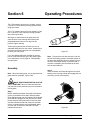
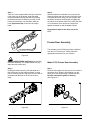
Insert the beater drive shaft through the rear shell
bearing in the freezing cylinder and engage the hex
end firmly into the drive coupling.
Note: When lubricating parts, use an approved food
grade lubricant (example: Taylor Lube).
MAKE SURE POWER SWITCH IS IN THE
“OFF” POSITION! Failure to follow this instruction
may result in severe personal injury from hazardous
moving parts.
Step 1
Before installing the beater drive shaft, lubricate the
groove on the beater drive shaft. Slide the beater
drive shaft boot seal over the small end of the beater
drive shaft and engage into the groove on the shaft.
Heavily lubricate the inside portion of the boot seal
and also lubricate the flat end of the boot seal that
comes in contact with the rear shell bearing. Apply
an even coat of lubricant to the shaft. DO NOT
lubricate the hex end.
Models C709 & C717
Figure 58
29
Operating Procedures
Step 5
Slide the beater the remainder of the way into the
freezing cylinder and over the end of the drive shaft.
The beater should fit snugly, but not so tightly that
the beater cannot be turned slightly to engage the
drive shaft. If the beater slides in too easily with little
or no resistance, there will not be enough force
against the beater to hold the blades in place.
Step 3
Take one of the scraper blades and slip it under the
hook at the front of the beater. Wrap the blade
around the beater following the helix and pushing
the blade down onto the helix as you wrap. At the
back end of the beater, slip the blade under the
hook. Repeat this step for the second scraper
blade.
Repeat these steps for the other side of the
C717.
Freezer Door Assembly
The assembly of the C709 freezer door is different
from the C717 freezer door. Please follow the
appropriate instructions for your machine.
Figure 59
USE EXTREME CAUTION when handling
the beater assembly. The scraper blades are very
sharp and may cause injury.
Model C709 Freezer Door Assembly
Step 4
Holding the beater securely, slide the beater one
third of the way into the freezing cylinder. Looking
into the freezing cylinder, align the hole at the rear of
the beater with the flats on the end of the drive
shaft.
Step 1
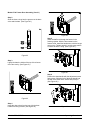
Place the door gasket into the groove on the back of
the freezer door. Slide the front bearing over the
baffle rod so the flanged edge is against the door.
DO NOT lubricate the gasket or bearing.
(See Figure 61.)
Figure 60
Figure 61
Operating Procedures
30
Models C709 & C717
Model C709 Freezer Door Assembly (Cont'd.)
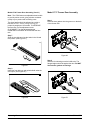
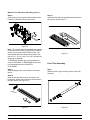
Step 2
Slide the three o-rings into the grooves on the draw
valve and lubricate. (See Figure 62.)
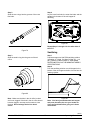
Figure 64
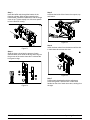
Step 5
Insert the baffle rod through the beater in the
freezing cylinder. With the door seated on the
freezer studs, install the handscrews, with the longer
ones on top. Tighten equally in a criss-cross pattern
to insure the door is snug. (See Figure 65.)
Figure 62
Step 3
Lightly lubricate the inside of the top of the freezer
door valve cavity. (See Figure 63.)
Figure 65
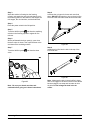
Step 6
Position the draw handle with the adjustment screw
facing down. Slide the fork of the draw handle into
the slot of the draw valve. Secure with pivot pin.
(See Figure 66.)
Figure 63
Step 4
Insert the draw valve from the top, with the draw
handle slot facing forward. (See Figure 64.)
Models C709 & C717
Figure 66
31
Operating Procedures
Model C709 Freezer Door Assembly (Cont'd.)
Model C717 Freezer Door Assembly
Note: The C709 features an adjustable draw handle
to provide portion control, giving a better consistent
quality to your product and controlling costs.
Step 1
Place the door gaskets into the grooves on the back
of the freezer door.
The draw handle should be adjusted to provide a
flow rate of 5 to 7-1/2 oz. (142 g. to 213 g.) of
product by weight per 10 seconds. To INCREASE
the flow rate, turn the adjustment screw
CLOCKWISE. Turn the adjustment screw
COUNTER-CLOCKWISE to DECREASE the flow
rate.
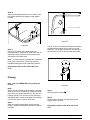
Step 7
Slide the two drip pans into the holes in the left and
rear panels. (See Figure 67.)
Figure 69
Step 2
Slide the front bearings over the baffle rods. The
flanged edges should be against the door. DO NOT
lubricate the gaskets or bearings.
Figure 67
Step 8
Install the front drip tray and splash shield under the
door spout. (See Figure 68.)
Figure 68
Operating Procedures
Figure 70
32
Models C709 & C717
Step 3
Insert the baffle rods through the beaters in the
freezing cylinders. With the door seated on the
freezer studs, install the handscrews, with the longer
ones on top. Tighten equally in a criss-cross pattern
to insure the door is snug.
Step 5
Lubricate the inside of the freezer door spouts, top
and bottom.
Figure 73
Step 6
Insert the draw valves from the bottom until the slot
in each draw valve comes into view.
Figure 71
Step 4
Slide the three o-rings into the grooves of each
standard draw valve. Slide the H-ring and o-ring into
the grooves of the center draw valve. Lubricate the
H-ring and o-rings.
Figure 74
Step 7
Position each draw handle with the adjustment
screw facing down. Slide the fork of each draw
handle into the slot of each draw valve, starting from
the right.
Figure 72
Models C709 & C717
33
Operating Procedures
Model C717 Freezer Door Assembly (Cont'd.)
Step 8
Slide the pivot pin through the draw handles as the
handles are inserted into the draw valves.
Step 11
Install the front drip tray and splash shield under the
door spouts. (See Figure 77.)
Figure 75
Note: This freezer features adjustable draw handles
to provide portion control, giving a better consistent
quality to your product and controlling costs. The
draw handles should be adjusted to provide a flow
rate of 5 to 7-1/2 oz. (142 g. to 213 g.) of product by
weight per 10 seconds.
Figure 77
To INCREASE the flow rate, turn the adjustment
screw CLOCKWISE. To DECREASE the flow rate,
turn the adjustment screw COUNTERCLOCKWISE.
Feed Tube Assembly
Step 9
Snap the design caps over the bottom of the door
spouts.
Step 1
Slide the three o-rings into the grooves of the inner
feed tube.
Step 10
Slide the two rear drip trays into the holes in the
back panel. Slide the two drip pans into the holes in
the side panels. (See Figure 76.)
Figure 76
Operating Procedures
Figure 78
34
Models C709 & C717
Step 2
Slide the two o-rings into the grooves of the outer
feed tube.
Step 4
Lay the inner feed tube, the outer feed tube, and the
agitator in the bottom of the mix hopper for
sanitizing.
Figure 81
Repeat Steps 1 through 4 for the other side of
the C717.
Figure 79
Sanitizing
Step 1
Prepare an approved 100 PPM sanitizing solution
(examples: 2--1/2 gal. [9.5 liters] of Kay--5R or 2
gal. [7.6 liters] of Stera--SheenR). USE WARM
WATER AND FOLLOW THE MANUFACTURER’S
SPECIFICATIONS.
Step 3
Slide the small o-ring into the groove of the air
orifice.
Step 2
Pour the sanitizing solution over all the parts in the
bottom of the mix hopper and allow it to flow into the
freezing cylinder.
Figure 80
Figure 82
Note: Make sure the hole in the air orifice is clean
and is not clogged. If the hole in the air orifice should
become clogged, use soap and hot water to clear
the hole. Do not enlarge the hole in the air
orifice.
Note: You have just sanitized the mix hopper
and parts; therefore, be sure your hands are
clean and sanitized before going on in these
instructions.
080227
Models C709 & C717
35
Operating Procedures
Step 3
While the solution is flowing into the freezing
cylinder, take particular care to brush-clean the mix
level sensing probe on the bottom of the hopper, the
mix hopper, the mix inlet hole, and the feed tubes.
Step 8
Lubricate the o-rings on the inner and outer feed
tubes. DO NOT lubricate the o-ring on the air orifice.
Place the inner feed tube inside the outer feed tube.
Step 4
Place the power switch in the ON position.
Step 5
and allow the sanitizing
Touch the WASH symbol
solution in the freezing cylinder to agitate for five
minutes.
Step 6
With a pail beneath the door spout(s), open close
the draw valve six times. Then open the draw valve
and draw off the sanitizing solution.
Figure 84
Step 9
Install the air orifice into the hole in the top of the
inner feed tube.
Step 7
Touch the WASH symbol
valve.
and close the draw
Figure 85
Note: Make sure the hole in the air orifice is clean
and is not clogged. If the hole in the air orifice should
become clogged, use soap and hot water to clear
the hole. Do not enlarge the hole in the air
orifice.
Figure 83
Note: Be sure your hands are clean and
sanitized before going on in these instructions.
Operating Procedures
36
Models C709 & C717
Step 10
Stand the assembled feed tube in the corner of the
mix hopper and place the agitator on the agitator
housing.
Figure 87
Figure 86
The pin on the inner feed tube should be turned and
positioned at the bottom of the notch in the outer
feed tube. This will align the holes in the feed tubes
and allow mix and air to enter the freezing cylinder.
Step 11
Return to the freezer with a small amount of
sanitizing solution. Dip the door spout brush into the
sanitizing solution and brush clean the door spout
and bottom of the draw valve.
Note: To assure sanitary conditions are maintained,
brush clean each item for a total of 60 seconds,
repeatedly dipping the brush in sanitizing solution.
Repeat these steps for the other side of the
C717.
Priming
Note: Use only FRESH MIX when priming the
freezer.
Figure 88
Step 1
With a mix pail beneath the door spout(s), open the
draw valve. Pour 2-1/2 gallons (9.5 liters) of FRESH
mix into the mix hopper and allow it to flow into the
freezing cylinder. This will force out any remaining
sanitizing solution. When full strength mix is flowing
from the door spout, close the draw valve.
Step 3
Select the AUTO symbol
Step 4
Fill the hopper with fresh mix and place the mix
hopper cover in position.
Step 2
When mix stops bubbling down into the freezing
cylinder, install the assembled feed tubes in the mix
inlet hole.
Models C709 & C717
.
Repeat these steps for the other side of the
C717.
37
Operating Procedures
Step 4
Prepare a small amount of an approved 100 PPM
cleaning/sanitizing solution (examples: Kay-5® or
Stera-Sheen®). USE WARM WATER AND
FOLLOW THE MANUFACTURER'S
SPECIFICATIONS. Brush clean the parts.
Daily Closing Procedures
This procedure must be performed once
daily!
Step 5
Place the front drip tray, splash shield, and air
orifice(s) on a clean, dry surface to air-dry overnight
or until the heating cycle is complete.
The function of the Heat Treatment Cycle is to
destroy bacteria by raising the temperature of the
mix in the freezing cylinder and the hopper to a
specified temperature for a specified period of time,
and then bringing the temperature back down low
enough to retard spoilage.
Step 6
Prepare a small amount of an approved 100 PPM
cleaning/sanitizing solution (examples: Kay-5® or
Stera-Sheen®). USE WARM WATER AND
FOLLOW THE MANUFACTURER'S
SPECIFICATIONS. Sanitize the drip pans, feed tube
assembly(ies), agitator(s) and hopper cover(s).
The Heat Treatment Cycle will start at the time
designated in the Auto Heat Time.
IMPORTANT: The level of mix in the mix
hopper(s) must be up to the fill line on the
agitator paddle(s). (The mix low light must not be
on.) Note: If the BRUSH CLEAN COUNTER display
has counted down to one day, do not add mix. The
machine must be disassembled and brush cleaned
within 24 hours.
Step 7
Install the agitator(s) back onto the agitator drive
shaft housing(s).
IMPORTANT: If you do not install the agitator(s)
correctly, the machine will fail the heat cycle and
lock out in the morning.
The freezer must be in the AUTO (AUTO symbol
illuminated) or in the STANDBY mode (STANDBY
Step 8
Install the feed tube assembly(ies). Lift and turn the
inner feed tube of each assembled feed tube so the
pin rests on top of the outer feed tube. This will
close the hole in the assembled feed tubes,
preventing mix in the hopper(s) from entering the
freezing cylinder(s) during the Heating and Standby
process.
symbol
illuminated) before the HEAT cycle may
be started.
Step 1
Remove the hopper cover(s), drip pan(s), front drip
tray, and the splash shield. Take them to the sink for
cleaning and sanitizing.
MAKE SURE YOUR HANDS ARE CLEAN AND
SANITIZED BEFORE PERFORMING THESE NEXT
STEPS.
Step 2
Remove the air orifice(s), the feed tube
assembly(lies), and the agitator(s) from the mix
hopper(s). Take these parts to the sink for cleaning
and sanitizing.
Step 3
Rinse these parts in cool, clean water.
Figure 89
080227
Operating Procedures
38
Models C709 & C717
Step 9
Replace the hopper cover(s) and install the drip
pans.
A failure message will appear on the fluorescent
display to inform the operator that the machine did
not successfully complete the heat treatment cycle.
The product may not be safe to serve. The freezer
will be locked out (softlock) of the AUTO mode. The
operator will be given the option of selecting the
Step 10
Return to the freezer with a small amount of
cleaning solution. Dip the door spout brush into the
cleaning solution and brush clean the door spout(s)
and bottom of the draw valve(s).
HEAT symbol
which will begin a new heat cycle,
or touching the WASH symbol
which will place
the freezer into the OFF mode to allow a brush
clean of the machine.
Note: To assure sanitary conditions are maintained,
brush each item for a total of 60 seconds, repeatedly
dipping the brush in cleaning solution.
Note: Once the heating cycle has started, it cannot
be interrupted. The heating cycle will take a
maximum of 4 hours to complete with full hoppers.
DO NOT attempt to draw product or
disassemble the machine during the HEAT cycle.
The product is hot and under extreme pressure.
When the heating cycle is complete, the control will
return to the STANDBY mode. The STANDBY
symbol(s)
will be illuminated.
Daily Opening Procedures
Before performing the opening procedures, check
the display panel for any error messages. Normally
the display is blank unless an operational fault has
occurred. If a fault has been detected, investigate
the cause and follow the instructions on the display
before proceeding with the opening procedures.
(See Failure Messages, starting on page 26.)
Figure 90
Step 11
Using a clean, sanitized towel, wipe down the
freezer door, front panel, the area around the bottom
of the freezer door, and any other areas that
demonstrate a build-up of either moisture or food
substance.
Set-Up - Complete The Following
Make sure your hands are clean and sanitized
before performing these next steps.
The heat cycle will start when the clock on the
machine reaches the AUTO HEAT TIME set in the
Manager's Menu (see page 24).
Step 1
Prepare a small amount of an approved 100 PPM
sanitizing solution (examples: Kay-5® or
Stera-Sheen®). USE WARM WATER AND
FOLLOW THE MANUFACTURER'S
SPECIFICATIONS.
There are 3 phases of the heat cycle: Heating,
Holding and Cooling. Each phase has a time limit. If
any one of the three phases fail to reach the proper
temperatures within the time limit, the cycle will
automatically abort and return to the STANDBY
mode.
Step 2
Sanitize the air orifice(s), front drip tray and splash
shield in this solution.
080227
Models C709 & C717
39
Operating Procedures
Step 6
Lift the hopper cover(s). Turn the inner feed tube of
each assembled feed tube so the pin rests at the
bottom of the notch of the outer feed tube. Install the
air orifice(s).
Step 3
Return to the freezer with a small amount of
sanitizing solution. Dip the door spout brush into the
sanitizing solution and brush clean the door spout(s)
and bottom of the draw valve(s).
Figure 91
Figure 93
Note: To assure sanitary conditions are maintained,
brush clean each item for a total of 60 seconds,
repeatedly dipping the brush in sanitizing solution.
The control has a feature in the Manager's Menu to
enable or disable the AUTO START feature. When
AUTO START in enabled, the machine will
automatically exit the STANDBY mode and start the
machine in the AUTO mode at a designated time
each day. (See page 24.)
Step 4
Using a clean, sanitized towel, wipe down the
freezer door, front panel, the area around the bottom
of the freezer door, and any other areas that
demonstrate a build-up of either moisture or food
substance. Install the front drip tray and the splash
shield.
Note: This procedure should be performed 15
minutes prior to serving product.
Step 5
When ready to resume normal operation, touch the
Manual Brush Cleaning
AUTO symbol . When the unit cycles off, the
product in the freezing cylinder will be at serving
viscosity.
This Procedure Must Be Completed Every Two
Weeks!
ALWAYS FOLLOW LOCAL HEALTH CODES.
To disassemble the machines, the following items
will be needed:
S
S
S
S
Figure 92
Two cleaning and sanitizing pails
Sanitizer/Cleaner
Necessary brushes (provided with freezer)
Single service towels
070213
Operating Procedures
40
Models C709 & C717
Draining Product From The
Freezing Cylinder
Rinsing
Step 1
Pour two gallons (7.6 liters) of cool, clean water into
the mix hopper. With the white hopper brush, scrub
the mix hopper, mix level sensing probes and the
outside of the agitator drive shaft housing. Using the
double ended brush, brush clean the mix inlet hole.
Step 1
Press the AUTO symbol , cancelling compressor
and beater motor operation.
Step 2
Remove the hopper cover, the agitator paddle, and
the assembled feed tube. Take these parts to the
sink for cleaning.
Step 3
With a pail beneath the door spout(s), touch the
WASH symbol
and open the draw valve.
Figure 95
Note: Do not brush clean the mix inlet hole while
the machine is in the WASH mode.
Step 2
With a mix pail beneath the door spout(s), touch the
WASH symbol
.
Figure 94
Drain the product from the freezing cylinder and the
mix hopper and properly dispose of the mix.
Step 4
When the flow of product stops, touch the WASH
symbol , cancelling the WASH mode. Close the
draw valve.
Repeat these steps for the other side of the
C717.
Models C709 & C717
Figure 96
41
Operating Procedures
Step 3
Open the draw valve on the freezer door. Drain all
the rinse water from the door spout, close the draw
valve and touch the WASH symbol,
wash mode.
Disassembly
Note: Failure to remove the parts specified below
for brush cleaning and lubrication will result in
damage to the machine. These parts must be
removed every 14 days or the machine will lock out
and will not operate.
cancelling the
Step 4
Repeat this procedure using clean, warm water, until
the water being discharged is clear.
Step 1
Be sure the power switch is in the OFF position.
Repeat these steps for the other side of the
C717.
Step 2
Remove the handscrews, freezer door, beater and
scraper blades, and drive shaft with drive shaft seal
from the freezing cylinder.
Hopper Cleaning
Step 3
Remove the scraper blades.
Step 1
Prepare an approved 100 PPM cleaning solution
(examples: 2-1/2 gal. [9.5 liters] of Kay-5R or 2
gal. [7.6 liters] of Stera-SheenR). USE WARM
WATER AND FOLLOW THE MANUFACTURER'S
SPECIFICATIONS.
Step 4
Remove the drive shaft seal from the drive shaft.
Step 5
Remove the freezer door gasket, front bearing, pivot
pin, draw handle, and draw valve. Remove the three
o-rings from the draw valve.
Step 2
Pour the solution into the hopper and allow it to flow
into the freezing cylinder.
Step 6
Remove the front drip tray and splash shield.
Step 3
Using the white hopper brush, clean the mix hopper,
mix level sensing probes and the outside of the
agitator drive shaft housing. Using the double ended
brush, clean the mix inlet hole. (Note: Do not brush
clean the mix inlet hole while the machine is in the
WASH mode.)
Step 7
Remove all drip pans and take them to the sink for
cleaning.
Step 4
Touch the WASH symbol . This will cause the
cleaning solution in the freezing cylinder to come in
contact with all areas of the freezing cylinder.
Step 5
Place an empty pail beneath the door spout(s).
Step 6
Open the draw valve on the freezer door and draw
off all the solution.
Figure 97
Step 7
Once the cleaning solution stops flowing from the
door spout, close the draw valve and touch the
WASH symbol
Note: If the drip pans are filled with an excessive
amount of mix, it is an indication that the drive shaft
seal(s), or o-ring(s) should be replaced or properly
lubricated.
, cancelling the Wash mode.
Repeat these steps for the other side of the
C717.
Repeat these steps for the other side of the
C717.
080227
Operating Procedures
42
Models C709 & C717
Step 5
Return to the freezer with a small amount of
cleaning solution. Using the black brush, clean the
rear shell bearing at the back of the freezing
cylinder.
Brush Cleaning
Step 1
Prepare an approved 100 PPM cleaning solution
(examples: 2-1/2 gal. [9.5 liters] of Kay-5R or 2
gal. [7.6 liters] of Stera-SheenR). USE WARM
WATER AND FOLLOW THE MANUFACTURER'S
SPECIFICATIONS. Make sure all brushes provided
with the freezer are available for brush cleaning.
Step 2
Remove all o-rings.
Step 3
Thoroughly brush clean all disassembled parts in the
cleaning solution, making sure all lubricant and mix
film is removed. Be sure to brush all surfaces and
holes, especially the draw valve hole in the freezer
door.
Figure 98
Repeat these steps for the other side of the
C717.
Step 6
Wipe all exterior surfaces of the freezer with a clean,
sanitized towel.
Step 4
Rinse all parts with clean, warm water. Place the
parts on a clean, dry surface to air dry overnight.
080227
Models C709 & C717
43
Operating Procedures
Section 7
Important: Operator Checklist
During Brush Cleaning and
Sanitizing
Regular Maintenance Checks
j 1. Replace scraper blades that are nicked or
damaged. Before installing the beater
assembly, be certain that scraper blades are
properly attached to the helix.
ALWAYS FOLLOW LOCAL HEALTH CODES.
Cleaning and sanitizing schedules are governed by
your State or local regulatory agencies and must be
followed accordingly. The following check points
should be stressed during the cleaning and
sanitizing operations.
j 2. Check the rear shell bearing for signs of wear
(excessive mix leakage in rear drip pan) and
be certain it is properly cleaned.
CLEANING AND SANITIZING MUST BE
PERFORMED EVERY TWO WEEKS.
j 3. Using a screwdriver and cloth towel, keep the
rear shell bearing and the female hex drive
socket clean and free of lubricant and mix
deposits.
Troubleshooting Bacterial Count
j 1. Thoroughly clean and sanitize the machine
regularly, including complete disassembly and
brush cleaning.
j 4. Dispose of o-rings and seals if they are worn,
torn, or fit too loosely, and replace with new
ones.
j 2. Use all brushes supplied for thorough
cleaning. The brushes are specially designed
to reach all mix passageways.
j 5. Follow all lubricating procedures as outlined in
“Assembly”.
j 3. Use the white bristle brush to clean the mix
inlet hole which extends from the mix hopper
down to the rear of the freezing cylinder.
j 6. If your machine is air cooled, check the
condensers for an accumulation of dirt and
lint. Dirty condensers will reduce the efficiency
and capacity of the machine. Condensers
should be cleaned monthly with a soft brush.
Never use screwdrivers or other metal probes
to clean between the fins.
Note: For machines equipped with an air
filter, it will be necessary to vacuum clean the
filters on a monthly schedule.
j 4. Use the black bristle brush to thoroughly
clean the rear shell bearing located at the rear
of the freezing cylinder. Be sure there is a
generous amount of cleaning solution on the
brush.
j 5. Properly prepare the cleaning and sanitizing
solutions. Read and follow the label directions
carefully. Too strong of a solution may
damage the parts and too weak of a solution
will not do an adequate job of cleaning or
sanitizing.
WARNING! Always disconnect
electrical power prior to cleaning the
condenser. Failure to follow this instruction
may result in electrocution.
j 6. The temperature of the mix in the mix hopper
and walk-in cooler should be below 40_F
(4.4_C).
060113
Important: Operator Checklist
44
Models C709 & C717
j 7. If your machine is equipped with an auxiliary
refrigeration system, check the auxiliary
condenser for accumulation of dirt and lint.
Dirty condensers will reduce the refrigeration
capacity of the mix hopper. Condensers must
be cleaned monthly with a soft brush. Never
use screwdrivers or other metal probes to
clean between the fins.
Winter Storage
If the place of business is to be closed during the
winter months, it is important to protect the freezer
by following certain precautions, particularly if the
building is subject to freezing conditions.
Disconnect the freezer from the main power source
to prevent possible electrical damage.
On water cooled freezers, disconnect the water
supply. Relieve pressure on the spring in the water
valve. Use air pressure on the outlet side to blow out
any water remaining in the condenser. This is
extremely important. Failure to follow this
procedure may cause severe and costly damage to
the refrigeration system.
WARNING! Always disconnect
electrical power prior to cleaning the
condenser. Failure to follow this instruction
may result in electrocution.
j 8. If your machine is water cooled, check the
water lines for kinks or leaks. Kinks can occur
when the machine is moved back and forth for
cleaning or maintenance purposes.
Deteriorated or cracked water lines should be
replaced only by an authorized Taylor
distributor.
Your local Taylor Distributor can perform this winter
storage service for you.
Wrap detachable parts of the freezer such as
beater, blades, drive shaft, and freezer door, and
place them in a protected dry place. Rubber trim
parts and gaskets can be protected by wrapping
them with moisture-proof paper. All parts should be
thoroughly cleaned of dried mix or lubrication which
attract mice and other vermin.
It is recommended that an authorized service
technician perform winter storage draining, to insure
all water has been removed. This will guard against
freezing and rupturing of the components.
080128
Models C709 & C717
45
Important: Operator Checklist
Section 8
PROBLEM
1. Soft lock message
appears on display.
2. Hard lock message
appears on display.
Troubleshooting Guide
PROBABLE CAUSE
REMEDY
PAGE
REF.
a. An equipment fault has
occurred.
a. Determine reason the failure
occurred. Correct cause for
failure, then select HEAT
symbol to start a heat cycle or
WASH to disassemble and
brush clean the machine.
20
b. More than 24 hours since
the last HEAT cycle.
b. The freezer must go through a
HEAT cycle every 24 hours.
The freezer must now be
disassembled and brush
cleaned or placed in a heat
cycle.
20
c. The power switch is in the
OFF position.
c. The power switch must be in
the ON position. The freezer
must now be disassembled
and brush cleaned or placed
in a heat cycle.
20
d. The freezer is not in the
AUTO or STANDBY mode
when the heat cycle was
programmed to start.
d. The freezer must be in the
AUTO or STANDBY mode.
The freezer must now be
disassembled and brush
cleaned or placed in a heat
cycle.
20
e. Mix out condition.
e. Level of mix in hopper must
be up to fill line on agitator
paddle. The freezer must now
be disassembled and brush
cleaned or placed in a heat
cycle.
20
f. The agitator is not
installed.
f. The agitator must be cleaned
and installed before starting
the HEAT cycle. The freezer
must now be disassembled
and brush cleaned or placed
in a heat cycle.
38
a. Brush clean interval
exceeded.
a. The freezer must be
disassembled and brush
cleaned within 24 hours when
the counter indicates one day
remaining.
20
b. A barrel or hopper
thermistor is faulty.
b. Call an authorized service
technician.
---
061204
Troubleshooting Guide
46
Models C709 & C717
PROBLEM
3. No product is being
dispensed.
4. The product is too soft.
Models C709 & C717
PROBABLE CAUSE
REMEDY
PAGE
REF.
a. Low on mix. The MIX
OUT light is on.
a. Add mix to the mix hopper.
Return to AUTO mode.
37
b. The power switch is in the
OFF position.
b. Place the power switch to ON
and select AUTO.
36
c. The circuit breaker is off
or the fuse is blown.
c. Turn the breaker on, or
replace the fuse.
-- -- --
d. Beater motor is out on
reset, BEATER
OVERLOAD message
displayed.
d. Turn the machine off. Press
the reset button. Restart the
machine in AUTO.
---
e. Machine not in AUTO
mode.
e. Select AUTO and allow
machine to cycle off before
drawing product.
40
f. Feed tube not properly
installed.
f. Make sure feed tube is
properly installed.
37
g. Freeze-up in mix inlet
hole.
g. Call an authorized service
technician.
---
h. The beater is rotating
counterclockwise when
observed from the
operator end.
h. Contact service technician to
correct rotation.
-- -- --
a. Draw rate is set too fast.
a. Adjust draw rate of 5 to 7 1/2
oz. (142 g. to 213 g.) of
product by weight in 10
seconds.
31
b. Not enough air space
around unit. (Air cooled
units)
b. Allow for adequate air flow
across the condenser.
1
c. Worn scraper blades.
c. Replace regularly.
50
d. Dirty condenser (A/C)
d. Clean monthly.
44
e. Mix is out of date.
e. Use only fresh mix.
f. Loss of water. (W/C)
f. Locate cause of water loss
and correct.
45
g. Viscosity needs
adjustment.
a. Contact service technician.
-- -- --
47
---
Troubleshooting Guide
PROBLEM
REMEDY
PAGE
REF.
a. Freezing cylinder not
primed correctly.
a. Drain the freezing cylinder and
reprime the machine.
37
b. The viscosity control is set
too cold.
b. Call an authorized service
technician.
---
c. Freeze-up in mix inlet
hole.
c. Call an authorized service
technician.
---
a. Hopper cover is not in
position.
a. Clean and sanitize hopper
cover and place in position.
37
b. The agitator is not
installed.
b. Clean and sanitize the agitator
and install.
38
c. The hopper temperature is
out of adjustment.
c. Call an authorized service
technician.
---
7. The mix in the hopper is
too cold.
a. The hopper temperature is
out of adjustment.
a. Call an authorized service
technician.
---
8. Mix Low and Mix Out
probes are not
functioning.
a. Milkstone build-up in the
hopper.
a. Clean hopper(s) thoroughly.
36
9. Product is collecting on
top of the freezer door.
a. The top o-ring on draw
valve is improperly
lubricated or worn.
a. Lubricate properly or replace
the o-ring.
33
10. Excessive mix leakage
from door spout.
a. Missing or worn draw
valve o-rings.
a. Install or replace regularly.
33/ 50
b. Inadequate lubrication of
draw valve o-rings.
b. Lubricate properly.
31/ 33
c. Wrong type of lubricant is
being used (example:
petroleum base lubricant).
c. Use the proper lubricant
(example: Taylor Lube).
a. Missing or worn seal on
drive shaft.
a. Install or replace regularly.
b. The drive shaft seal is
installed inside-out.
b. Install correctly.
29
c. Improper lubrication of
drive shaft and/or seal.
a. Lubricate properly.
29
d. The drive shaft and beater
assembly work forward.
b. Call authorized service
technician.
---
e. Worn rear shell bearing.
c. Call authorized service
technician.
-- -- --
f. Gear box out of alignment.
d. Call authorized service
technician.
---
5. The product is too thick.
6. The mix in the hopper is
too warm.
11. Excessive mix leakage
into the rear drip pan.
.
Troubleshooting Guide
PROBABLE CAUSE
48
29
29/ 50
Models C709 & C717
PROBLEM
PROBABLE CAUSE
12. The drive shaft is stuck in
the drive coupling.
a. Mix and lubricant collected
in drive coupling.
a. Brush clean the rear shell
bearing area regularly.
43
b. Rounded corners of drive
shaft, drive coupling, or
both.
b. Call an authorized service
technician.
---
c. Gear box is out of
alignment.
c. Call an authorized service
technician.
---
a. Missing or worn front
bearing and scraper
blades.
a. Install or replace the front
bearing and scraper blades.
30
b. The baffle rod on the
freezer door is broken.
b. Replace freezer door.
30
c. Beater assembly is bent.
c. Replace beater assembly.
30
d. Gear box is out of
alignment.
d. Call an authorized service
technician.
---
a. Draw rate is set too fast.
a. Adjust draw rate of 5 to 7 1/2
oz. (142 g. to 213 g.) of
product by weight in 10
seconds.
31
b. Freezing cylinder not
primed correctly.
b. Drain the freezing cylinder and
reprime the machine.
37
a. Machine is unplugged.
a. Plug into wall receptacle.
---
b. Circuit breaker OFF or
blown fuse.
b. Turn the breaker ON or
replace the fuse.
---
a. Unit is unplugged.
a. Plug into wall receptacle.
-- -- --
b. The circuit breaker is off
or the fuse is blown.
b. Turn the breaker on, or
replace the fuse.
-- -- --
c. The beater motor is out on
reset.
c. Reset the freezer.
17
a. Inadequate level of mix in
the mix hopper.
a. Fill the mix hopper with mix.
37
b. The mix inlet hole is
frozen up.
b. The mix hopper temperature
needs adjustment. Call
service technician.
-- -- --
13. The freezing cylinder walls
are scored.
14. The product makes a
popping sound when
drawn.
15. No control panel functions
with power switch ON.
16. No freezer operation after
pressing the AUTO key.
17. Product is not feeding into
the freezing cylinder.
Models C709 & C717
49
REMEDY
PAGE
REF.
Troubleshooting Guide
Section 9
PART DESCRIPTION
Parts Replacement Schedule
EVERY 3 MONTHS
EVERY 6 MONTHS
ANNUALLY
White Bristle Brush, 3” x 7”
Inspect & Replace
if Necessary
Minimum
White Bristle Brush, 1” x 2”
Inspect & Replace
if Necessary
Minimum
Black Bristle Brush, 1” x 2”
Inspect & Replace
if Necessary
Minimum
Double-Ended Brush
Inspect & Replace
if Necessary
Minimum
Yellow Bristle Brush
Inspect & Replace
if Necessary
Minimum
Scraper Blades
X
Drive Shaft Seal
X
Freezer Door Gasket
X
Front Bearing
X
Draw Valve O-Ring
X
Mix Feed Tube O-Ring
X
Air Orifice O-Ring
X
060515
Parts Replacement Schedule
50
Models C709 & C717
Section 10
Warranty Explanation
Class 103 Parts
Class 512 Parts
The warranty for new equipment Class 512 parts is
five years from the original date of unit installation,
with a replacement parts warranty of twelve months.
The warranty for new equipment Class 103 parts is
one year from the original date of unit installation,
with a replacement parts warranty of three months.
Class 000 Parts
Class 000 parts are considered wear items - no
warranty.
Class 212 Parts
Class *** Parts
The warranty for new equipment Class 212 parts is
two years from the original date of unit installation,
with a replacement parts warranty of twelve months.
See warranty explanation on the back of the
check-out card.
CAUTION: Warranty is valid only if the parts are authorized Taylor parts, purchased from an authorized
Taylor Distributor, and the required service work is provided by an authorized Taylor service technician.
Taylor reserves the right to deny warranty claims on equipment or parts if non-approved parts or refrigerant
were installed in the machine, system modifications were performed beyond factory recommendations, or
it is determined that the failure was caused by neglect or abuse.
080912
Models C709 & C717
51
Warranty Explanation
Parts List
52
028992
028991
012864
+WASHER-BEARING LOCK
031324
BEARING-REAR SHELL-NICKEL
+GUIDE-DRIP SEAL
+NUT-BRASS BEARING
050216
BEARING-FRONT
045141
028889
SCREW-4-40X1" TAPTITE PAN HD
SWITCH-LEVER-SPDT-10A-125
038924
X69838
SPRING-RETURN-RIGHT-TWIN TWIST
+SWITCH A.-DUAL LEVER
069839
038923
SPRING-RETURN-LEFT-TWIN TWIST
062408
067352
SPRING-EXTENSION.500X.054X1.00
BRACKET-SWITCH
038484
038254
PIN-PIVOT-DRAW SWITCH
ROD-SPRING RETAINER
ACTUATOR-TANDEM LEAF
032190
038924
SPRING-RETURN-RIGHT-TWIN TWIST
X38257
069392
038923
SPRING-EXTENSION.467X.062
SPRING-RETURN-LEFT-TWIN TWIST
E-RING 1/4
069374
SCREW-ADJUSTMENT-DRAW PAD
BRACKET A.-SPRING RETURN
038254-SP
ROD-SPRING RETAINER
038649
038650
032190
038484
E-RING 1/4
PIN-PIVOT-DRAW SWITCH
ARM-SWITCH-DRAW-L
ARM-SWITCH-DRAW-R
X69836
BRACKET A.-SWITCH C71X
X62401
X69481
BRACKET A.-SPRING-RETURN
ACTUATOR A.-DRAW SWITCH
069166
069167
X69835
PART
NUMBER
ARM-DRAW SWITCH-LEFT
ARM-DRAW SWITCH-RIGHT
ACTUATOR A.-DRAW SWITCH
DESCRIPTION
1
1
1
1
1
C709
QTY.
2
2
2
2
2
4
4
1
2
1
1
1
2
1
1
4
1
1
1
1
1
2
1
2
1
4
1
1
1
1
1
1
C717
QTY.
000
000
000
000
000
103
103
103
103
103
103
103
103
103
103
000
103
103
103
103
103
103
000
103
000
103
103
103
103
103
103
WARR.
CLASS
S/N M1104867 & UP
REPLACES 038922
S/N M1104866 & PRIOR DRAW SW LESS SW-LEVER
S/N M1104867 & UP
REMARKS
Section 11
Parts List
111028
+ Available Separately
Models C709 & C717
+ Available Separately
Models C709 & C717
53
Parts List
040040-013
040040-042
CABLE-RIBBON-20C-17"L-DIL/DIL
CABLE-RIBBON-20C-18"L-DIL/DILR
040040-058
056864
040040-040
CABLE-RIBBON-14C-3"L-SIL/SIL
CABLE-RIBBON-20C-14"L-DIL/DIL
CABLE-RIBBON-50C-10"L-DIL/DIL
040040-015
CABLE-RIBBON-14C-14"L SIP/SIP
040040-049
040040-010
040040-025
CABLE-RIBBON-50C-25"L.DIL/DIL
CABLE-RIBBON-20C-16"L-DIL/DIL
CABLE-RIBBON-50C- 5"L-DIL/DI
039719
051696-18
BRUSH-END-DOOR-SPOUT-SS-HT
CABLE-2 COND-#22 UNSHIELDED
024156
062351
BLOCK-TERMINAL 7P GREEN
BLOCK-TERMINAL & FUSE
023316
051331
BLOCK-TERMINAL 3P 20A, 300V
013073
039421
BLOCK-TERMINAL 2P-L1,N
BRUSH-MIX PUMP BODY-3" X 7"
068277
039423
BLOCK-TERMINAL-PLUG 2P .2 SIP
BLOCK-TERMINAL 3P-L1,L2,L3
BRUSH-DRAW VALVE 1"OD X 2"X1
039422
BLOCK-TERMINAL 2P-L1,L2
013071
013072
051644
BLOCK-TERMINAL 2P .25 SPADE
044818
X56591
062351
BLADE A.-AGITATOR C708
BLOCK-TERMINAL & FUSE
BRUSH-REAR BRG 1"D X 2"LG
BRUSH-DBL END
052191
BELT-AX30
BOTTLE-WASH-PLASTIC
023875
BELT-AX40
012796-27
035174
023874
BLOWER-100 CFM
X31761
+BLADE-SCRAPER-PLASTIC 17L
BELT-AX39
PART
NUMBER
BEATER A.-3.4QT-HELICORE
DESCRIPTION
1
1
1
1
1
1
1
1
1
1
1
1
1
1
1
1
1
1
2
2
2
1
C709
QTY.
1
1
1
1
1
1
1
2
1
1
1
1
1
2
4
2
2
2
4
4
2
C717
QTY.
103
103
103
103
103
103
103
103
103
000
103
000
000
000
000
000
103
103
103
103
103
103
103
103
103
103
103
000
000
000
000
103
WARR.
CLASS
J7C TO J9IF
DEC PLATE C717
J2C TO J12IF
PCB TOUCH PAD DISPLAY-DEC PLATE
208-230V 60HZ 1PH
220-240V 50HZ 1PH
208-230V 60HZ 1PH
208-230V 60HZ 1PH
220-240V 50HZ 1PH
208-230V 60HZ 1PH
208-230V 60HZ 3PH
208-230V 60HZ 1PH
220-240V 50HZ 1PH
208-230V 60HZ 1PH
REMARKS
+ Available Separately
Parts List
54
Models C709 & C717
048259-27E
033044-1
COMPRESSOR L64A113BBCA
+CAPACITOR-START 189-227UF/33
055813-2
X69354-SER
X68114-SER
CONDENSER-AC 12LX18HX3.12T-5RW
PCB A.-CONTROL *C716-C717 UVC4
CONTROL-UVC4
057010-58
059901-27
059901-33
059901-40
059901-58
DIAGRAM-WIRING *C708/C709*
DIAGRAM-WIRING *C717*
DIAGRAM-WIRING *C717*
DIAGRAM-WIRING *C717*
DIAGRAM-WIRING *C717*
057010-27
057010-33
057010-40
038374
DIAGRAM-WIRING *C708/C709*
DIAGRAM-WIRING *C708/C709*
DIAGRAM-WIRING *C708/C709*
019029
DECAL-TROUBLESHOOT
1
1
1
1
1
4
1
1
+PIN-RETAINING-HOPPER COVER
DECAL-INST-CLN HPR
012721
COUPLING-DRIVE 3/4 HEX X 1-7/8
1
062529-SER
X40820-SER
CONTROL-UVC3 SURFACE MOUNT-PWM
CHIP-SOFTWARE UVC3 CS
1
1
1
1
1
1
1
1
C709
QTY.
COVER-HOPPER *BLACK*
X69356SER1
PCB A.-CONTROL *C716* UVC4 CONV KIT
X40625
055813-1
CONDENSER-AC 12LX18HX3.12T-5RW
+MODULE-PROGRAM C708/C709 UVC4
048259-33
056944
COMPRESSOR L63A113DBLA
CONDENSER-AC 16X16 3 ROW 14FPI
062363
046437
CASTER-4" SWV 3/4-10 STEM W/BRAKE
037431
044106
CASTER-4" SWV 3/4-10 STEM
+RELAY-START-COMPRESSOR
069023
056785
+CAPACITOR-RUN 25UF/440V
040040-011
CABLE-CONTROL/INTERFACE
CABLE-USB
PART
NUMBER
CABLE-RIBBON-50C-20"L-DIL/DIL
DESCRIPTION
1
1
1
1
1
1
2
2
2
1
1
1
1
1
1
1
1
2
2
2
2
2
2
2
1
1
C717
QTY.
000
000
000
000
000
000
000
000
000
103
000
103
103
212
103
103
103
512
103
103
103
512
103
103
103
103
103
103
WARR.
CLASS
380-415 50HZ 3N~
208-230V 60HZ 3PH
220-240V 50HZ 1PH
208-230V 60HZ 1PH
380-415 50HZ 3N~
208-230V 60HZ 3PH
220-240V 50HZ 1PH
208-230V 60HZ 1PH
**SEE KIT A.-COVER HOPPER
C717 S/N M1066351 & PRIOR USE X69356SER1 PCB
S/N M1066351 & PRIOR
USB
C717 S/N M1066352 & UP
208-230V 60HZ 3PH
208-230V 60HZ 1PH - BRISTOL
7-15-10
UVC4
UVC3 - PCB TOUCH PAD DISPLAY DEC PLATE
J10C TO J2IF DEC PLATE
REMARKS
+ Available Separately
Models C709 & C717
55
Parts List
X56421-1
015872
+HANDLE A.-DRAW *C602*
+O-RING-1/4 OD X .070W
030788
052779-9
FASTENER-DOOR STRIKE
FILTER-AIR-21.688X15.813HX.70W
056934
013739
030787
EYELET-RESET BUTTON
FASTENER-DOOR LATCH
GASKET-BASE PAN
066247-DVD
DVD-OPS TRAIN VIDEO *C709*
052779-11
040140-001
049154
DRYER-FILTER 3/8 X 3/8SOL HP
FILTER-AIR-POLY-FLO
FILTER-CORCOM 6EH1
034698
048901
+SEAL-DRAW VALVE
DRYER-FILTER-HP62-3/8 X 1/4S
X59890
+VALVE A.-DRAW-CENTER
014402
X59888
014402
+VALVE A.-DRAW-L & R
+O-RING-7/8 OD X .103W
+O-RING-7/8 OD X .103W
059894
+PIN-HANDLE-TWIN
056332
048926
+SCREW-ADJUSTMENT-5/16-24
062239
+GASKET-DOOR-4"-DART
X59923-SER
050216
+DECAL-DOOR-3 SPOUT-TWIN TWIST
DOOR A.-3SPT*HT*LG BAF*W/O PRG
+BEARING-FRONT
014402
X55820
+VALVE A.-DRAW
+O-RING-7/8 OD X .103W
056332
055819
+SCREW-ADJUSTMENT-5/16-24
+PIN-HANDLE-SS
015872
X56246
+HANDLE A.-DRAW
+O-RING-1/4 OD X .070W
050216
048926
X57332-SER
PART
NUMBER
+BEARING-FRONT
+GASKET-DOOR-4"-DART
DOOR A.-W/BAFFLE
DESCRIPTION
1
1
1
2
1
2
1
1
3
1
1
1
1
1
1
1
1
C709
QTY.
2
1
4
4
4
1
2
1
6
1
2
6
1
3
3
3
2
1
1
2
C717
QTY.
000
000
103
000
000
103
000
000
000
000
000
000
103
103
000
103
103
103
000
000
000
103
000
000
103
103
103
000
103
000
000
103
WARR.
CLASS
REMARKS
+ Available Separately
Parts List
56
Models C709 & C717
057723-SP
057728
068351
062050
066440-27G
067822
HARNESS-WIRE-MX PRB-CONT SW
HARNESS-WIRE-THERMISTOR PROBES
HARNESS-WIRE-SOL VLV/FAN MTR
HARNESS-WIRE-LW V-MIX HOPPER
HARNESS-WIRE-BEATER MTR
HARNESS-WIRE-LW V-CNTRL
050216
045191
X49463-92
LABEL-CAUTION-AGITATOR
KIT A.-TUNE UP *1SPOUT* *C709*
BEARING-FRONT
X67061
KIT A.-COVER-HOPPER*DUAL*BLK
600165
SCREW-4-40X1/4 SOC SS
045191
017395
O-RING-1-3/8 OD X .070W
LABEL-CAUTION-AGITATOR
057525
006812
+CAPACITOR-MOTOR-AGITATOR
SCREW-8-32X3/16 ALLEN SET
X56353
X65368
050535-03
MOTOR-AGITATOR-24VAC 50/60
JACK A.-FLAVORBURST
KIT A.-COVER-HOPPER*SINGLE*BLK
X57341
MAGNET A.-AGITATOR
X56586-03
056589-J
057725-27G
HARNESS-WIRE-BEATER MOTOR
066107
058285-27G
HARNESS-WIRE-MAIN POWER
HOUSING A.-AGITATOR
CAPACITOR-MOTOR-AGITATOR
X59910
X59911
GUIDE A.-DRIP PAN-LEFT
GUIDE A.-DRIP PAN-RIGHT
HARNESS-WIRE-SOLENOID
X59913
GUIDE A.-DRIP PAN-CENTER
062051
X28863
GUIDE A.-DRIP PAN
HARNESS-WIRE-POWER SWITCH
021286-SER
034830
066234
PART
NUMBER
GEAR A.*REDUCER 4.21:1
GUARD-POWER SWITCH
+SCREW-10X7/16 UNSLOTTED
DESCRIPTION
1
1
1
1
1
8
1
1
1
1
1
1
1
1
1
1
1
1
1
1
1
10
C709
QTY.
2
1
2
8
2
2
2
2
2
2
2
2
1
2
1
1
1
1
1
2
1
C717
QTY.
000
000
000
103
000
103
103
000
000
103
000
103
103
103
103
103
103
103
103
103
103
103
103
103
103
103
103
103
103
212
103
000
WARR.
CLASS
COMPLETE WITH HOUSING
REMARKS
+ Available Separately
Models C709 & C717
57
Parts List
016137
018550
018572
032560
048260-WHT
O-RING-3/8 OD X .070W
O-RING-.291 ID X .080W
O-RING-.643 OD X .077W
SEAL-DRIVE SHAFT
TOOL-O-RING REMOVAL-FREEZER
032717
051433
057870
036435
048232
062080-M
LABEL-WARN-ELEC-SGL-SMALL
LABEL-WARN-COVER
LIP-DRIP
LIP-DRIP-NOSE CONE
LUBRICANT-TAYLOR HI PERF-4 OZ
MAN-OPER C709/C717
021522-33
032749
052632
LABEL-DOOR-MOVE PART
LABEL-SW-POWER-OFF/ON-SYMBOLS
MOTOR-1.5 HP
045191
LABEL-CAUTION-AGITATOR
056865-27
021522-27
039897
LABEL-CAUTION-BTR STRT G3
MOTOR-1.5 HP CAPS@8&10 O'CLOCK
MOTOR-1.5 HP CAPS@10&2 O'CLOCK
048260-WHT
032164
TOOL-O-RING REMOVAL-FREEZER
LABEL-CAUTION-GRD-PERM-ENG/SPAN
034698
018550
018572
O-RING-.291 ID X .080W
O-RING-.643 OD X .077W
SEAL-DRAW VALVE
014402
O-RING-7/8 OD X .103W
032560
048926
GASKET-DOOR-4"-DART
SEAL-DRIVE SHAFT
050216
014218
BEARING-FRONT
CAP-DESIGN 1.010"ID-6 POINT
X49463-79
014402
015872
KIT A.-TUNE UP-3 SPT C717
048926
O-RING-7/8 OD X .103W
O-RING-1/4 OD X .070W
PART
NUMBER
GASKET-DOOR HT 4"-DOUBLE
DESCRIPTION
1
1
1
1
1
4
1
1
1
1
1
1
2
1
3
1
3
1
1
C709
QTY.
2
2
1
1
1
5
1
1
1
2
1
1
1
1
2
6
4
7
2
2
3
1
C717
QTY.
212
212
212
000
000
000
000
000
000
000
000
000
000
000
000
000
000
000
000
000
000
000
000
000
000
000
000
000
000
000
000
000
WARR.
CLASS
208-230V 60HZ 3PH
208-230V 60HZ 1PH
208-230V 60HZ 1PH
REMARKS
+ Available Separately
Parts List
58
Models C709 & C717
X40828-SER
X58505-SER
X46904-SER
PCB A.-PERSONALITY-HT-SS
062529-SER
CHIP-SOFTWARE C708 UVC3SM
PCB A.-INTERFACE-HT-SS-UK
CONTROL-UVC3 SURFACE MNT-PWM
X59209-SER
PCB A.-CONTROL *C708* UVC3SM
X68114-SER
CONTROL-UVC4
X40625
X69354SER1
X69354-SER
PCB A.-CONTROL UVC4
+MODULE-PROGRAM C708/C709 UVC4
PCB A.-CONTROL *C708* UVC4 CONV KIT
059907
059917
PANEL-SIDE-RIGHT *C712/C717*
PANEL-REAR *C713/C717*
X57871
056963-SP1
PANEL A.-SIDE-RIGHT
PANEL-SIDE-LEFT
059906
X59423
PANEL A.-FRONT-UPPER
X59928
X58955
PANEL A.-FRONT-LOWER
PANEL-SIDE-LEFT *C712/C717*
035034
059736
PAN-DRIP 19-1/2 LONG
PAN-DRIP 12.5
PANEL A.-FILTER-LOUVERED
027503
PAN-DRIP 11-5/8 LONG
X59836
X59854-SER
013163
PAIL-MIX 10 QT.
X63879
022465-100
016137
ORIFICE
+O-RING-3/8 OD X .070W
PANEL A.-FRONT
PANEL A.-FRONT LOWER
058765
NUT-STUD-BLACK 3.250 LONG
PANEL A.-FRONT
058764
NUT-STUD-BLACK 2.563 LONG
056077-SP1
500302-27
500311
PANEL-REAR C707 C709
050535-03
MOTOR-FAN W/4 BLADE 185W
+CAPACITOR-RUN 4.0UF/400V
PART
NUMBER
MOTOR-AGITATOR-24VAC 50/60
DESCRIPTION
1
1
1
1
1
1
1
1
1
1
1
1
1
1
1
1
1
2
2
1
1
1
C709
QTY.
1
1
1
2
1
1
1
1
2
1
2
2
2
2
2
C717
QTY.
212
103
212
212
212
212
212
103
103
103
103
103
103
103
103
103
103
103
103
103
103
103
000
103
000
103
103
103
103
103
WARR.
CLASS
C709 S/N M1084625 & PRIOR USE X69354SER1
USB
C709 S/N M1084625 & PRIOR
C709 S/N M1084626 & UP
TOP OF UNIT - NOSE CONE
S/N K6021998 & UP
N/A MUST USE 063877 & X59836 PANEL
SEE HOUSING ASSEMBLY
REMARKS
+ Available Separately
Models C709 & C717
59
Parts List
062124
029595
X56912
056908
PLATE-DEC *C717* SYRUP RAIL
PLUG-DRIP TRAY HOLE
PROBE A.-MIX
PROBE-MIX OUT *C708*
052111-03
027822
PULLEY-2AK74-5/8
RELAY-DPDT 100UA TO 7A 1/8HP
016403
PULLEY-2AK22 X .625-.6265
039695
066795-33
039470-BLK
066099
PROBE-THERMISTOR-HOPPER-2% TOL
+CLIP-RETAINING THERMISTOR
PULLEY-2AK64-5/8 BORE
RELAY-3 POLE-20A-208/240 50/60
038061-BLK
PROBE-THERMISTOR-BARREL-2% TOL
017395
007017
023546
+SCREW-6-32X7/8 RHM
+ WASHER-#6 FLAT STNLS
+O-RING-1-3/8 OD X .070W
056991
+GASKET-DEC PLATE
058859
X40799-SER
X63925-SER
CHIP-SOFTWARE MIX LEVEL
PCB A.-INTERFACE*C712-C717*ROHS
PLATE-DEC *C709*
X59485-SER
X40820-SER
X59435-SER
CHIP-SOFTWARE UVC3 CS
PCB A.-INTERFACE
X46904-SER
062529-SER
CONTROL-UVC3 SURFACE MOUNT-PWM
PCB A.-INTERFACE-HOT GAS
X69356SER1
PCB A.-CONTROL *C716* UVC4 CONV KIT
PCB A.-PERSONALITY-HT-SS
X68114-SER
X40625
X69354-SER
X40821-SER
X40799-SER
X63929-SER
X58482-SER
PART
NUMBER
CONTROL-UVC4
+MODULE-PROGRAM C708/C709 UVC4
PCB A.-CONTROL *C716-C717 UVC4
CHIP-SOFTWARE
CHIP-SOFTWARE MIX LEVEL
PCB A.-INTERFACE *C708/C709* ROHS
PCB A.-HT INTERFACE BASE
DESCRIPTION
1
1
1
1
1
1
1
3
1
1
1
4
4
1
1
1
1
1
1
C709
QTY.
2
2
2
2
2
2
6
2
2
1
1
1
1
1
1
1
1
1
1
1
1
C717
QTY.
103
103
103
103
103
103
000
103
000
103
103
103
103
000
000
000
103
103
212
212
212
103
212
212
103
212
103
212
WARR.
CLASS
6"PROBE W/96"LEADS BLACK/YELLO
MIX OUT
MIX LOW
DEC PLATE
C717 S/N M1066351 & PRIOR USE X69356SER1 PCB
S/N M1066351 & PRIOR
USB
C717 S/N M1066352 & UP
DEC PLATE *REPLACES X57177-SER
REMARKS
+ Available Separately
Parts List
60
Models C709 & C717
062299
X56147
X56253
STRAINER-CONE MESH 1/2 ODF
SWITCH A.-DRAW
ARM A.-DRAW
041660
041661
028889
SPRING-RETURN-LEFT-SELF CLOSE
SPRING-RETURN-RIGHT-SELF CLOSE
SWITCH-LEVER-SPDT-10A-125-250V
X69838
028890
SCREW-4-40X1 RD HD STEEL-ZP
SWITCH A.-DUAL LEVER *C71
038623
015478
NUT-4-40 HEX -PLATEDPIN-PIVOT
029099
062298
STRAINER-CONE MESH-1/4 ODF
049178
066794-33H
066794-33G
STARTER-3 PHASE 2.5 TO 4 AMP
STARTER-3 PHASE 1.6 TO 2.5 AMP
INSULATOR-SWITCH 1/64 ARMITE
066794-33J
STARTER-3 PHASE 4 TO 6.5 AMP
E-RING 3/16 .335 O.D.
066794-27K
STARTER-1 PHASE 6.3 TO 10 AMP
033813
X56922
SHIELD-SPLASH-WIRE-19-3/4 L
SHROUD A.-CONDENSER *C708/C709
055987
X63819
STUD-NOSE CONE
SHELL A.-INSULATED *C717*
049203
X58858-SER
SHELL A.-INSULATED *C709*
SHIELD-SPLASH *RD30*
063877
SHELF-TRAY-DRIP-SHELF
055987
032560
056076
+SEAL-DRIVE SHAFT
SHELF-TRAY-DRIP
+STUD-NOSE CONE
032564
SHAFT-BEATER
032560
055492
056078
+SEAL-DRIVE SHAFT
054703-03
SANITIZER-STERA SHEEN -GREEN
SHAFT-BEATER
PART
NUMBER
RELAY-DPDT-24VAC-30A@277V
DESCRIPTION
1
2
1
2
2
1
2
1
1
1
2
3
1
1
1
1
1
1
4
1
1
1
1
1
2
C709
QTY.
1
4
6
2
2
2
2
1
4
1
1
2
2
1
C717
QTY.
103
103
103
103
000
000
103
000
000
103
103
000
000
103
103
103
103
103
103
103
103
103
512
512
103
000
103
103
000
000
103
103
WARR.
CLASS
S/N M1104867 & UP
380-415V 50HZ 3N~ (4WIRE)
460V 60HZ 3PH
208-230V 60HZ 3PH - 3 WIRE & 220-240V 50HZ 3PH
208-230V 60HZ 1PH & 220-240V 50HZ 1PH
REMARKS
+ Available Separately
Models C709 & C717
61
Parts List
028889
SWITCH-LEVER-SPDT-10A-125-25
056965
059896
059897
X32824-2
018550
X34641
TRIM-CORNER-REAR-RIGHT *C708*
TRIM-CORNER-REAR-L
TRIM-CORNER-REAR-R
TUBE A.-FEED-SC-INNER-5/3
+O-RING-.291 ID X .080W
TUBE A.-FEED-OUTER-HT
018550
053565
046365
VALVE-EXP-AUTO-1/4S X1/4 FPT
X32824-3
+O-RING-.291 ID X .080W
VALVE-ACCESS-1/4MFL X 3/8OD SOLDER
TUBE A.-FEED-SC-INNER-5/3
018572
056964
TRIM-CORNER-REAR-LEFT *C708*
+O-RING-.643 OD X .077W
063877
TRAY-DRIP-SHELF *C716*
054809
068221
SWITCH-TOGGLE-DPDT*VDE APPROVED
SWITCH-TOGGLE-3PDT*ON-NONE-ON
056858
033812
056771
SWITCH-REED*DOOR INTERLOCK*68"
054834
048231
SWITCH-PRESSURE 350 PSI-SOLDER
TRAY-DRIP *C706/C707*BLACK
TRAY-DRIP-19-5/8 L X 4-7/8
048230
064282
SWITCH-PRESSURE 440 PSI-SOLDER
SWITCH-PRESS 220 CO/270 CI
TRANS.-CONT.-32VA 120/200/240V
028889
SWITCH-LEVER-SPDT-10A-125-25
051660
045141
SCREW-4-40X1" TAPTITE PAN HD
TRANS.-120/208/240V PRI 24VSEC
062408
062394
ACTUATOR-TANDEM LEAF
BRACKET-SWITCH
X62400
069839
045141
SWITCH A.-DUAL LEVER
062408
BRACKET-SWITCH
SCREW-4-40X1" TAPTITE PAN HD
PART
NUMBER
ACTUATOR-TANDEM LEAF
DESCRIPTION
1
2
2
3
1
1
1
1
1
1
1
1
1
1
1
C709
QTY.
2
4
4
2
4
2
1
1
1
1
1
1
1
1
2
4
4
2
1
1
4
1
4
2
C717
QTY.
103
000
103
103
000
000
103
103
103
103
103
103
103
103
103
103
103
103
103
103
103
103
103
103
103
103
103
103
103
103
103
103
WARR.
CLASS
S/N K6021998 & UP
S/N M1104866 & PRIOR
REMARKS
+ Available Separately
Parts List
62
Models C709 & C717
053511-27
048626-27
043449-27C
043449-27
VALVE-SOL 1/8ORF 1/4 IN X 3/8 OUT
VALVE-SOLENOID 7/16 ORF 5/8 ODF
COIL-SOLENOID VALVE ARMS
VALVE-SOLENOID 7/64ORF X 1/4S
059929
016289
022505
R50200
X59307-27
DEFLECTOR-BLOWER-EXHAUST
FAN-5 BLADE 7 " PUSH 30 DEG CW
GUARD-BLOWER
HOSE-RUBBER 1/2 ID X 7/8 OD
MOTOR A.-FAN WC
X25900
058932
062160
062161
062043
X58935
048231
032953
OUTLET A.-TEE
PANEL-SIDE-RIGHT-WC
PANEL-SIDE-L. W/C
PANEL-SIDE-R. W/C
PLATE-CONDENSER W/C
PLATE A.-MOUNTING-COUPLING
SWITCH-PRESSURE 350 PSI-SOLDER
TEE-3/8" PIPE WATER VALVE
038641
046137
047540-1
047540
CONDENSER-WC-COAX
CONDENSER-WC-COAX
BRACKET-FAN
SCREW-8-36X3/8 SLOT HEX WASH
058440
BRACKET-VALVE-W/C
012768-27
X58931
MOTOR-FAN 9 WATT 1550 RPM
X62380-27G
BRACKET A.-MOUNTING CONDENSER
057002
BLOWER A.
WATER COOLED
VALVE-THERMOSTATIC
043449-27C
064347-1
VALVE-OUTLET PRESS.REG
COIL-SOLENOID VALVE ARMS
065371-1
057075-1
027137
PART
NUMBER
VALVE-INLET PRESS.REG
VALVE-LIQUID INJ-HT GAS
+BOOT-VALVE-EXPANSION
DESCRIPTION
1
1
1
1
5
1
1
5
1
1
1
1
1
4
4
1
1
1
1
1
1
2
C709
QTY.
1
1
1
1
1
1
1
10
1
2
1
2
8
8
2
2
2
2
2
2
4
C717
QTY.
103
103
103
103
103
103
000
103
103
000
103
000
103
000
103
103
103
103
103
000
103
103
103
103
103
103
103
103
103
103
000
WARR.
CLASS
HOPPER
HOPPER
REPLACES 057008 OPR VALVE
REPLSCES 057009 EPR VALVE
CRANK CASE PRESSURE REGULATOR
REMARKS
+ Available Separately
Models C709 & C717
63
Parts List
048259-33
048259-40
023739
COMPRESSOR L63A113DBLA
COMPRESSOR L63A113BBKA
+CAPACITOR-RUN 25UF/370VAC
+RELAY-START-COMPRESSOR
057010-39
057010-40
057010-58
059901-35
059901-40
059901-58
065436-58
06543640SP
057725-33G
066440-33G
058864-G
059245-G
DIAGRAM-WIRING *C708/C709
DIAGRAM-WIRING *C708/C709
DIAGRAM-WIRING *C717*
DIAGRAM-WIRING *C717*
DIAGRAM-WIRING *C717*
HARNESS-WIRE
HARNESS-WIRE
HARNESS-WIRE-BEATER MOTOR
HARNESS-WIRE-BEATER MTR
HARNESS-WIRE-CAP/RELAY
HARNESS-WIRE-COMPRESSOR
X63922-SER
048259-58
X63967-SER
DIAGRAM-WIRING *C708/C709
PCB A.-ROHS-PERSONALITY-HT-SS
COMPRESSOR L63A113DBEA
CONTROL-INTERF-HT-SS-C712-ROHS
1
1
1
1
1
1
1
1
1
1
1
1
X58666
CAPACITOR A.-RF
1
2
1
038146
039423
039424
BLOCK-TERMINAL 3P L1,L2,L
BLOCK-TERMINAL 4P L1,L2,L3,N
1
039421
BLOCK-TERMINAL 2P L1,N
1
1
1
C709
QTY.
031790
024156
BLOCK-TERMINAL 7P GREEN
+CAPACITOR-START 161-193UF
X57869-SER
041575
046686
PART
NUMBER
PANEL A.-SIDE-RIGHT
BELT-AX31
TOP AIR DISCHARGE
VALVE-WATER 3/8 REG/HEAD PRESSURE
DESCRIPTION
2
1
1
1
1
2
2
2
2
2
2
4
2
C717
QTY.
103
103
103
103
103
000
103
000
000
000
000
000
212
512
212
103
103
512
103
512
000
103
103
103
103
103
000
103
WARR.
CLASS
200V 50/60HZ 3PH / 380-415V 50HZ 3N~4WIRE
220-240V 50HZ 3PH / 380-415V 50HZ 3N
220-240V 50HZ 1PH
200V 50/60HZ 3PH / 380-415V 50HZ 3N~4WIRE
220-240V 50HZ 1PH
380-415V 50HZ 3N~ (4WIRE)
380-415V 50HZ 3N~ (4WIRE)
220-240V 50HZ 1PH
220-240V 50HZ 3PH
220-240V 50HZ 1PH
380-415V 50HZ 3N~ (4WIRE)
200V 50/60HZ 3PH
380-415V 50HZ 3N~ (4WIRE)
220-240V 50HZ 1PH/200V 50/60HZ 3PH/380-415V
50HZ 3N ~4WIRE
220-240V 50HZ 1PH
220-240V 50HZ 1PH
220-240V 50HZ 1PH
220-240V 50HZ 1PH
220-240V 50HZ 3PH
220-240V 50HZ 1PH
200V 50/60HZ 3PH
380-415V 50HZ 3N~ (4WIRE)
220-240V 50HZ 1PH
220-240V 50HZ 1PH/200V 50/60HZ 3PH/380-415V
50HZ 3N ~4WIRE
220-240V 50HZ 1PH/200V 50/60HZ 3PH/380-415V
50HZ 3N ~4WIRE
REMARKS
+ Available Separately
Parts List
64
Models C709 & C717
058285-58
068351-G
066107-G
020090
025949
021522-33
021522-34
056865-34
021522-35
X63966-SER
HARNESS-WIRE-MAIN POWER
HARNESS-WIRE-SOL VLV/FAN
HARNESS-WIRE-SOLENOID
LABEL-CK MOTOR ROTATE
LABEL-3PH MOTOR PROT/1PH
MOTOR-1.5 HP
MOTOR-1.5 HP CAPS@10&2 O'CLOCK
MOTOR-1.5 HP CAPS@8&10 O'CLOCK
MOTOR-1.5 HP
PCB A.-INTERFACE-HT-SS-UK ROHS
011545
066794-33H
066794-33J
032967
PULLEY-2AK27 X .625-.6265
STARTER-3 PHASE 2.5 TO 4
STARTER-3 PHASE 4 TO 6.5
SPRING-COMP.970X.113X1.5
X63922-SER
X63928-SER
058285-33G
058285-40
PCB A.-ROHS-PERSON-HT-SS
PCB A.-ROHS-INTF BASE
066436-33G
HARNESS-WIRE-MAIN POWER
HARNESS-WIRE-MAIN POWER
PART
NUMBER
HARNESS-WIRE-COMPRESSOR
DESCRIPTION
1
1
1
1
1
1
1
1
1
1
1
1
1
1
1
C709
QTY.
4
2
2
2
2
1
1
2
2
C717
QTY.
103
103
103
103
212
212
212
212
212
212
212
000
000
103
103
103
103
103
103
WARR.
CLASS
200V 50/60HZ 3PH / 220-240V 50HZ 1PH
220-240V 50HZ 1PH/200V 50/60HZ 3PH/380-415V
50HZ 3N ~4WIRE
220-24V 50HZ 3PH/380-415V 50HZ 3N~ (4WIRE)
220-240V 50HZ 1PH/380-415V 50HZ 3N~4WIRE
220-240V 50HZ 1PH/200V 50/60HZ 3PH/380-415V
50HZ 3N ~4WIRE
220-240V 50HZ 3PH/380-415V 50HZ 3N~
220-240V 50HZ 1PH
220-240V 50HZ 1PH
200V 50/60HZ 3PH
200V 50/60HZ 3PH / 380-415V 50HZ 3N~4WIRE
200V 50/60HZ 3PH / 380-415V 50HZ 3N~4WIRE
220-240V 50HZ 1PH/200V 50/60HZ 3PH/380-415V
50HZ 3N ~4WIRE
220-240V 50HZ 1PH/200V 50/60HZ 3PH/380-415V
50HZ 3N ~4WIRE
380-415V 50HZ 3N~ (4WIRE)
200V 50/60HZ 3PH
220-240V 50HZ 1PH
220-240V 50HZ 3PH / 380-415V 50HZ 3N
REMARKS
+ Available Separately
Models C709 & C717
65
Parts List
X59423-SP1
X62383-27
C20100-000
C20100-AFA
X48464
X41141
X59229-1
X59229-2
X57847
X62568
X48014-12H
X48014-27H
X59454
X58699-27
X48014-12
X48014-27
036397
X62282
X62383-27
059234
CART FOR *C706/C707/C708/
CART FOR *C706/C707/C708/
KIT A.-CONE DISPENSER-2/D
KIT A.-CONE DISPENSER-4 T
KIT A.-DECAL-FLAVORBURST
KIT A.-DECAL-VANILLA C708
KIT A.-HOPPER LOCK SINGLE
KIT A.-LOCK-DRAW VALVE-SINGLE
KIT A.-SYR RAIL-SD MT-DUAL
KIT A.-SYR RAIL-SD MT-DUAL
KIT A.-SYRUP RAIL *C708*F
KIT A.-SYRUP RAIL
KIT A.-SYRUP RAIL-SIDE MO
KIT A.-SYRUP RAIL-SIDE
LEG-4" 3/8-16 STUD
PANEL A.-FRONT-LOWER
SPINNER A.-PANEL
TOOL-APPLICATION-ROLLER
DISTRIBUTOR INSTALLED OPTIONS
X57869-SER
PANEL A.-FRONT-UPPER
SPINNER A.-PANEL
PART
NUMBER
PANEL A.-SIDE-RIGHT
BK SPINNER - TOP AIR DISCHARGE
(C70927FBK1)
DESCRIPTION
1
1
1
C709
QTY.
C717
QTY.
103
103
103
WARR.
CLASS
REMARKS
Model C709
057010-27
4/12
Model C709
057010-33
4/12
Model C709
057010-40
4/12
Model C709
057010-58
4/12
Model C717
059901-27
4/12
Model C717
059901-33
4/12
Model C717
059901-40
4/12
Model C717
059901-58
4/12