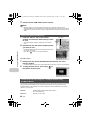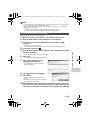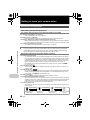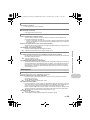
1
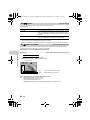
d4355_e_unified_forU-Print_00_bookfile.book Page 1 Thursday, July 12, 2007 11:01 AM
DIGITAL CAMERA
SP-560UZ
Instruction
Manual
Quick Start Guide
This manual will help you
get started using your
camera right away.
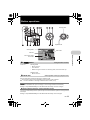
Button operations
Menu operations
Printing pictures
Using OLYMPUS Master
Getting to know your
camera better
Appendix
Thank you for purchasing an Olympus digital camera. Before you start to use your new camera, please
read these instructions carefully to enjoy optimum performance and a longer service life. Keep this manual
in a safe place for future reference.
We recommend that you take test shots to get accustomed to your camera before taking important photographs.
In the interest of continually improving products, Olympus reserves the right to update or modify information
contained in this manual.
The screen and camera illustrations shown in this manual were produced during the development
stages and may differ from the actual product.
d4355_e_unified_forU-Print_00_bookfile.book Page 2 Thursday, July 12, 2007 11:01 AM
Contents
Quick Start Guide
P.3
Button operations
P.11
Menu operations
P.21
Printing pictures
P.48
Using OLYMPUS Master
P.55
Getting to know your camera better P.62
Appendix
2
EN
P.77
Test out the functions of the camera
buttons by following the illustrations
and trying them out on the camera.
Learn everything about the menus,
from basic operations to the functions
of each menu and their various
settings.
Learn how to print pictures you have
taken.
Learn how to transfer pictures to a
computer and save them.
Find out more about your camera and
learn what to do when you have a
question regarding operations.
Read about convenient functions and
safety precautions on how to use your
camera more effectively.
d4355_e_unified_forU-Print_00_bookfile.book Page 3 Thursday, July 12, 2007 11:01 AM
Quick Start Guide
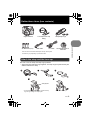
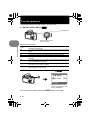
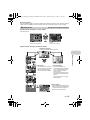
Gather these items (box contents)
Digital Camera
USB cable
AV Cable
Strap/Strap rings
OLYMPUS Master 2
CD-ROM
Items not shown: Instruction Manual (this manual), warranty card.
Contents may vary depending on purchase location.
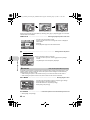
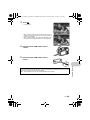
Attach the strap and the lens cap
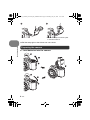
Be sure to use the strap and strap rings provided.
• Attach the strap and strap rings together. The strap rings may fall off if they are
attached without the strap.
Strap Eyelet
• Tilt the strap rings in such a way so that the strap
rings can go through the strap eyelet.
• Insert it all the way in.
EN
3
Quick Start Guide
AA Batteries (four)
Lens Cap/Lens Cap
String
d4355_e_unified_forU-Print_00_bookfile.book Page 4 Thursday, July 12, 2007 11:01 AM
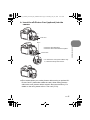
• Attach the strap to the other eyelet
in the same manner.
Quick Start Guide
Pull the strap tight so that it does not come loose.
Preparing the camera
a. Load batteries into the camera
4
EN
d4355_e_unified_forU-Print_00_bookfile.book Page 5 Thursday, July 12, 2007 11:01 AM
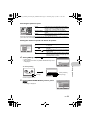
b. Insert the xD-Picture Card (optional) into the
camera
1
Card cover
Notch
Quick Start Guide
• Insert the card straight in.
• Insert the card until it clicks into place.
2
Contact area
• To remove the card, push it all the way
in, release it slowly and remove.
3
This camera allows you to take pictures without using an optional xDPicture Card™ (hereinafter called the card). When taking pictures
without the card, pictures will be stored in the internal memory. For
details on the card, please refer to “The card” (P.78).
EN
5
d4355_e_unified_forU-Print_00_bookfile.book Page 6 Thursday, July 12, 2007 11:01 AM
Turn the camera on
This explains how to turn on the camera in shooting mode.
a. Set the mode dial to h.
Shooting Mode
When shooting movies
(shooting mode)
Quick Start Guide
Still picture shooting modes
h
P
A
S
M
r
s
g
The camera determines the optimum settings for the shooting
conditions automatically.
The camera automatically sets the optimum aperture value and shutter
speed.
This function allows you to change the aperture manually.
This function changes the shutter speed for shooting pictures.
This function allows you to change the aperture and shutter speed
manually.
This function allows you to set each shooting function manually and use
as your original shooting mode.
This function allows you to shoot pictures by selecting a scene
according to the shooting condition.
This function allows you to set the target items by following the shooting
guide displayed on the screen.
b. Remove the lens cap and press the o button.
X
Y
M
D TIME
----.--.-- --:--
CANCEL
Y/M/D
MENU
• When the date and time
have not yet been set, this
screen will appear.
To turn off the camera, press the o button once again.
6
EN
d4355_e_unified_forU-Print_00_bookfile.book Page 7 Thursday, July 12, 2007 11:01 AM
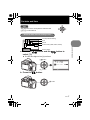
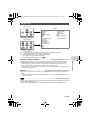
Set date and time
Tips
The directions of the arrow pad are indicated with
124 3 in this manual.
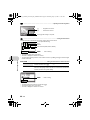
About the date and time setting screen
Y-M-D (Year-Month-Day)
X
Hour
Y
M
D TIME
----.--.-- --:--
MENU
Minute
Date formats (Y/M/D, M/D/Y, D/M/Y)
Quick Start Guide
CANCEL
Y/M/D
Exits a setting.
a. Press the 1 F button and the 2Y button to
select [Y].
The first two digits of the [Y] are fixed.
1 F button
X
Y
M
D TIME
2007.--.-2007
.--.-- --:--
2Y button
CANCEL
Y/M/D
MENU
b. Press the 3# button.
3# button
EN
7
d4355_e_unified_forU-Print_00_bookfile.book Page 8 Thursday, July 12, 2007 11:01 AM
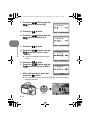
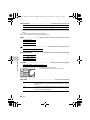
c. Press the 1 F button and the
2Y button to select [M].
X
Y
M
D TIME
2007.12
2007
12.-.-- --:--
d. Press the 3# button.
CANCEL
e. Press the 1 F button and the
2Y button to select [D].
X
Y
M
MENU
D TIME
Quick Start Guide
2007.12
2007
12.26
26 --:--
f. Press the 3# button.
g. Press the 1 F button and the
2Y button to select “hour”,
“minute”.
CANCEL
Y/M/D
Y/M/D
MENU
X
Y
M
D TIME
2007.12
2007
12.26
26 12
12:30
30
Y/M/D
The time is displayed in the 24-hour
format.
CANCEL
h. Press the 3# button.
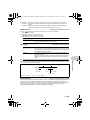
i. Press the 1 F button and the
2Y button to select [Y/M/D].
MENU
X
Y
M
D TIME
2007.12
2007
12.26
26 12
12:30
30
j. After all items have been set,
press the o button.
SET OK
CANCEL
MENU
Y/M/D
SET OK
For precise time setting, press the o button as the time signal
strikes 00 seconds.
o button
8
EN
d4355_e_unified_forU-Print_00_bookfile.book Page 9 Thursday, July 12, 2007 11:01 AM
Take a picture
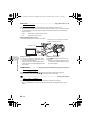
a. Hold the camera
Horizontal grip
Vertical grip
b. Focus
Place this mark over
your subject.
Quick Start Guide
The green lamp
indicates the focus and
exposure are locked.
Shutter button
(Pressed Halfway)
The number of remaining
still pictures is displayed.
c. Shoot
Shutter button
(Pressed Completely)
The card access lamp blinks.
Adjusting the viewfinder’s focus using the diopter
a. Press the u button.
b. While looking through the
viewfinder, rotate the diopter
adjustment dial little by little.
Diopter adjustment dial
u button
When you can see [ ] (AF target mark)
clearly, adjustment is complete.
EN
9
d4355_e_unified_forU-Print_00_bookfile.book Page 10 Thursday, July 12, 2007 11:01 AM
View pictures
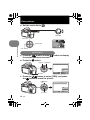
a. Set the mode dial to q.
Mode Dial
Arrow pad
Quick Start Guide
Next Picture
Prev. Picture
Erase pictures
a. Press the 4& button and the 3# button to display
the picture you want to erase.
b. Press the S button.
4& button 3# button
ERASE
[IN]
YES
NO
S button
BACK
MENU
SET OK
c. Press the 1 F button to select [YES], and press
the o button to erase the picture.
1 F button
ERASE
YES
NO
o button
10
EN
BACK
MENU
SET OK
d4355_e_unified_forU-Print_00_bookfile.book Page 11 Thursday, July 12, 2007 11:01 AM
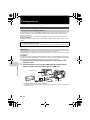
Button operations
Shooting Mode
Playback mode
Shooting Mode
Flash mode
Self-timer
on and off
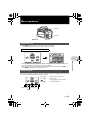
1 o button
Power on:
Turning the camera on and off
Shooting Mode
• Monitor turns on
• Lens extends
• Before turning the camera on in shooting mode, remove the lens cap.
shooting and playback modes
Playback mode
• Monitor turns on
2 Mode dial
Switching between shooting and playback modes
Set the mode dial to the desired shooting or playback mode.
• Some functions cannot be set depending on the position of the mode dial.
g “Functions available in shooting modes and scene modes” (P.73)
h Shooting pictures with full automatic settings
The camera determines the optimum settings for the shooting conditions automatically.
Settings in the [CAMERA MENU] such as WB and ISO Sensitivity cannot be changed.
P Set the optimum aperture value and shutter speed
The camera automatically sets the optimum aperture value and shutter speed for the brightness of
the subject.
Settings in the [CAMERA MENU] such as WB and ISO Sensitivity can be changed.
EN
11
Button operations
Macro mode/ Super
macro mode
d4355_e_unified_forU-Print_00_bookfile.book Page 12 Thursday, July 12, 2007 11:01 AM
A Changing the aperture value for shooting pictures
A
1/1000
F4.0
0.0
Press 12 after pressing 1 F. The camera automatically sets
the shutter speed.
Aperture value
[
]
SET OK
Adjustment range
W : F2.8 to F8.0
T : F4.5 to F8.0
1
:
Increases the aperture value.
2
:
Decreases the aperture value.
When the correct exposure cannot be obtained, the aperture value
is displayed in red.
o
:
Sets the settings.
S Changing the shutter speed for shooting pictures
S
1/100
F2.8
0.0
Press 12 after pressing 1 F. The camera automatically sets
the aperture value.
Shutter speed
Button operations
[
]
SET OK
Shutter speed range:
1/2 to 1/1000
(When [NOISE REDUCT.]
is set to [ON]: up to 4 sec.)
1
:
Sets the shutter speed faster.
2
:
Sets the shutter speed slower.
When the correct exposure cannot be obtained, the shutter speed
is displayed in red.
o
:
Sets the settings.
M Changing the aperture value and shutter speed for shooting pictures
Press 124 3 after pressing 1 F.
M
1/1000
F2.8 +2.0
Exposure differential
When this range has been exceeded ±3.0EV, the exposure
differential is displayed in red.
Aperture value
[
]
SET OK
4
:
Increases the aperture value.
3
:
Decreases the aperture value.
Shutter speed
1
:
2
Setting range:
Aperture value F2.8 to F8.0
o
(The aperture value varies
depending on the zoom position.)
Shutter speed: 15" to 1/2000
(The shutter speed varies
depending on the aperture value.)
:
Sets the shutter speed slower.
:
Sets the settings.
To take long exposure (bulb) shots
Sets the shutter speed faster.
Press 2 to set shutter speed to BULB. The shutter remains open as long as the shutter button is
pressed. (The maximum time that it can remain open is 8 minutes, however, this is possible only
when [ISO] is set to [50], [100] or [200].)
12
EN
d4355_e_unified_forU-Print_00_bookfile.book Page 13 Thursday, July 12, 2007 11:01 AM
rSetting your own original mode for shooting pictures
This mode allows you to set functions and save up to 4 shooting modes manually, and use them as
your original shooting mode.
g “MY MODE SETUP Setting and saving shooting-related functions” (P.47)
Use the function menu to switch the registered My Mode.
g “The functions you can set with the function menu” (P.20)
s Shoot pictures by selecting a scene according to the situation
You can shoot pictures by selecting a scene mode according to the situation.
Select a scene mode/change the scene mode to another one
• Press m and select [SCN] from the top menu. Use the 12 to select a scene and press o.
• By switching to the other scene mode, most settings will be changed to the default settings of
each scene mode.
g “s (Scene) Shooting pictures by selecting a scene according to the situation” (P.24)
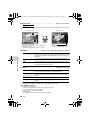
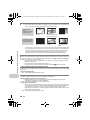
g Follow the shooting guide for setting
S H O O T IN G G U ID E
1/4
1 Shoot w/ effects preview.
2
Brightening subject.
3
Shooting into backlight.
4
Set particular lighting.
5
Blurring background.
Shooting pictures while comparing previews of different effects
When [Exposure effects.] is
selected
Exposure effects.
0.0
+0.3
+0.7
+1.0
When an item is selected from [1 Shoot w/ effects preview.] using
the shooting guide menu, the screen splits into 4 frames and
pictures of subjects taken according to the individual settings will
be displayed. You can then compare the shooting effects on the
screen.
• Use the arrow pad to select the frame with the settings you
want, and press o. The camera automatically switches to
shooting mode and allows you to shoot with the selected effect.
Use 4 3 to change the display.
nRecording movies
When [R] (movies) is set to [ON], audio is recorded with the movie.
• When [R] (movies) is set to [ON], optical zoom cannot be used during the shooting.
g “R (movies) Recording sound with movies” (P.33)
• To zoom in when [R] (movies) is set to [ON], set [DIGITAL ZOOM] to [ON].
g “DIGITAL ZOOM Zooming in on your subject” (P.28)
EN
13
Button operations
SET OK
This function allows you to set the target items by following the
shooting guide displayed on the screen.
• Press m to display the shooting guide again.
• To change the setting without using the shooting guide, set the
shooting mode to another one.
• Functions set using the Shooting Guide will revert to the default
settings when m is pressed or when the shooting mode is
changed.
d4355_e_unified_forU-Print_00_bookfile.book Page 14 Thursday, July 12, 2007 11:01 AM
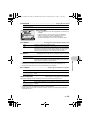
This icon lights red during movie recording.
The remaining recording time is displayed.
When the remaining recording time reaches 0, recording stops.
• When [IMAGE STABILIZER] is set to [ON], continuous movie recording for a long period will
cause the camera’s internal temperature to rise and the camera may stop operation
automatically. Remove the battery and allow the camera to cool down for some time before you
begin shooting again. Or you can set [IMAGE STABILIZER] to [OFF].
In addition, the temperature of the camera’s exterior also rises during usage. This is not a
malfunction.
qSelecting playback mode
The last picture taken is displayed.
• Press the arrow pad to view other pictures.
• Use the zoom lever to switch among close-up playback, index display and calendar display.
g “MOVIE PLAY Playing back movies” (P.35)
Button operations
Displaying pictures that have been shot continuously in index view (Sequential
Playback) / Auto playing back of pictures that have been shot continuously
(Sequential Pictures Auto Playback)
Only the first frame will be displayed for pictures that have been shot continuously using the next
option.
[j] [c] [d] [i] [BKT] [TIMELAPSE] [AUCTION] [SHOOT & SELECT1]
[SHOOT & SELECT2] [SMILE SHOT]
• Select the pictures the have the s displayed and press m to play back in index view
(Sequential Playback). Press the m again to return to the first frame.
• Select the pictures the have the s displayed and press o, to play back automatically
(Sequential Pictures Auto Playback).
• This function is only available for pictures taken with this model.
• When the first frame is displayed, perform the next operation to configure the settings to all the
sequential pictures.
0/y/PRINT ORDER/ERASE
To configure settings to individual pictures, press m to display the pictures in index view first
before configuring.
3 Shutter button
Shooting pictures
Shooting still pictures
Set the mode dial to h, P, A, S, M, r, g or s, and lightly press the shutter button
(halfway). The green lamp lights when the focus and exposure are locked (focus lock). Now press
the shutter button all the way (completely) to shoot a picture.
Green lamp
14
EN
Locking the focus and then composing the shot
(focus lock)
Compose your picture with the focus locked, and then fully
press the shutter button to shoot a picture.
• When the green lamp blinks, the focus is not adjusted
properly. Try locking the focus again.
oting/close-up playback
d4355_e_unified_forU-Print_00_bookfile.book Page 15 Thursday, July 12, 2007 11:01 AM
Recording movies
Set the mode dial to n, and press the shutter button halfway to lock the focus, and then press the
shutter button completely to start recording. Press the shutter button again to stop recording.
4 Zoom Lever
Zooming while shooting/close-up playback
Shooting mode: Zooming in on your subject
Optical zoom: 18×
Zoom out:
Push the lever toward W.
Zoom in:
Pull the lever toward T.
Playback mode: Changing the picture display
Single-frame playback
• Use the arrow pad to browse pictures.
Calendar display
• Use the arrow pad to select the date,
and press o or pull the lever toward
T on the zoom lever to display the
pictures on the date selected.
EN
15
Button operations
Index display
Close-up playback
• Use the arrow pad to select a • Pull the lever toward T to
picture for playback, and press
incrementally enlarge the picture
o to play back the singleup to 10 times the original size.
frame of the picture selected.
Push the lever toward W to
reduce the size.
• Use the arrow pad during closeup playback to scroll around the
picture.
• Press o to return to the singleframe playback.
d4355_e_unified_forU-Print_00_bookfile.book Page 16 Thursday, July 12, 2007 11:01 AM
5 h /mbutton
button as custom button/Playing back
Shooting with digital image stabilization/Using this button as custom
button/Playing back continuously shot pictures in index display
Shooting mode: Shooting with digital image stabilization
Press h in shooting mode to select [hON].
Press o to set.
g “IMAGE STABILIZER Shooting pictures using digital image stabilization” (P.29)
Shooting mode: Using this button as custom button
h allows you to register frequently used functions when the Mode Dial is P, A, S, M, r or s.
(custom button)
You can then set the settings directly with the button instead of displaying the screen from the menu.
(Example) When [FINE ZOOM] is registered in [CUSTOM BUTTON]
FINE ZOOM
Press h n
OFF
ON
A direct setting screen is displayed.
SET OK
g “CUSTOM BUTTON Assigning functions to the custom buttons” (P.47)
“Functions that can be assigned to My Mode/custom button” (P.72)
Button operations
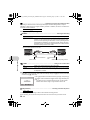
AF lock mark
z Locking the focus position (AF Lock)
• Assign the AF lock function to h so that the focus is
locked by pressing h, and V (AF lock mark) is
displayed on the monitor. AF Lock will be kept after
shooting. To cancel the AF Lock, either press h
again, or change the exposure/shooting settings or the
shooting mode. Each time you press the button, focus
is locked and canceled alternately.
• If the zoom is operated after engaging the AF lock, the
picture may be out of focus. Engage the AF lock after
operating the zoom.
z Locking the exposure (AE lock)
• Assign the AE lock function to h so that the meter
reading is saved by pressing h and the exposure is
locked. B (AE lock mark) is displayed on the monitor.
AE Lock will be kept after shooting. To cancel the AE
Lock, either press h again, or change the exposure/
shooting settings or the shooting mode.Each time you
press the button, focus is locked and canceled
alternately.
B is displayed while in AE lock.
z Locking the focus positions and exposure (AF
LOCK + AE LOCK)
• Register the AF lock + AE lock functions to h so that
the meter reading is saved by pressing h and the
focus and exposure is locked.V(AF lock mark) and
B(AE lock mark) are displayed on the monitor. Press
h again to cancel the AF lock + AE lock. Each time
you press the button, focus and exposure are locked
and canceled alternately.
16
EN
mation on display/Display the menu
time
d4355_e_unified_forU-Print_00_bookfile.book Page 17 Thursday, July 12, 2007 11:01 AM
Playback mode: Playing back continuously shot pictures in index display
Only the first frame will be displayed for pictures that have been shot continuously.
Press m in the playback mode to display pictures in index view.
g “Displaying pictures that have been shot continuously in index view (Sequential Playback) /
Auto playing back of pictures that have been shot continuously (Sequential Pictures Auto
Playback)” (P.14)
6 # button
Flash pop-up
Opens the flash.
Press this button to take a picture with flash.
g “3# button Flash shooting” (P.19)
7 u button
Monitor/Viewfinder
Toggles between the monitor and viewfinder.
8 m button (MENU)
Displays the top menu.
9 DISP./E button
Changing the information on display/Display the menu guide/Checking the time
Changing the information displays
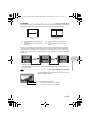
Press DISP./E to change the display in the following order.
• It cannot be switched when the mode dial is set to g.
Playback mode
Normal display
Normal display
Simple display*1
Detailed display
FRAME ASSIST
(Horizontal and
vertical lines or
diagonal lines)*1*2
No information
display
Histogram
display*1*2
Histogram
display*1
*1
Not displayed in case of n.
*2
Not displayed if it is set to [OFF] in the menu.
g “u Displaying the histogram” (P.46)
“FRAME ASSIST Displaying the frame assist/Determining the type of frame assist” (P.46)
EN
17
Button operations
Shooting Mode
d4355_e_unified_forU-Print_00_bookfile.book Page 18 Thursday, July 12, 2007 11:01 AM
Displaying the menu guide
ESP/
METERING
Sets picture brightness
for taking pictures.
Checking the time
ht / Erasing pictures
nting pictures
With menu items selected, hold down DISP./E to display the
menu guide. Release DISP./E to close the menu guide.
While the camera is off, press DISP./E to display the set alarm time (when [ALARM CLOCK] is
set) and the current time for 3 seconds.
0 f/S button
Brightening the subject against backlight / Erasing pictures
Shooting mode: Brightening the subject against backlight
Press f in shooting mode to turn on or off Shadow Adjustment Technology. Press o to set. A
frame is displayed at the detected position (except for n). This function makes the face of the
subject appear brighter even against backlight.
Button operations
SHADOW ADJ. OFF
SHADOW ADJ. ON
Shadow Adjustment Technology is deactivated.
Shadow Adjustment Technology is activated.
• The face may not be detected for some subjects.
• It may take some time for the frame to appear.
• When [SHADOW ADJ. ON] is selected, the following setting restrictions apply.
• [METERING] is fixed at [ESP].
• [AF MODE] is fixed at [FACE DETECT].
• This function is applicable only for the first frame when [DRIVE] is not set to [o].
• This function is applicable only for the first picture in [PANORAMA].
Playback mode: Erasing pictures
Display a picture to erase in playback mode, and press the S.
• Once erased, pictures cannot be restored. Check each picture before erasing to avoid
accidentally erasing pictures you want to keep.
g “0 Protecting pictures” (P.39)
a Arrow pad (124 3)
Use the arrow pad to select scenes, playback picture, and the items on the menus.
b q /P button
Viewing pictures/Printing pictures
Shooting mode: Viewing pictures
The last picture taken is displayed on the monitor. Press q in shooting mode.
Press q again or press the shutter button halfway to return to shooting mode.
Playback mode: Printing pictures
When the printer is connected to the camera, display a picture to be printed out in playback mode,
and press P .
g“Easy print” (P.48)
18
EN
ose to the subject (Macro)
ightness(Exposure compensation)
d4355_e_unified_forU-Print_00_bookfile.book Page 19 Thursday, July 12, 2007 11:01 AM
c 4& button
Shooting pictures close to the subject (Macro)
Press 4& in shooting mode to select the macro mode.
Press o to set.
OFF
& (Macro mode)
% (Super macro mode)
Macro mode is deactivated.
Allows you to shoot from as close as 10 cm/3.94 in. (when the zoom
is set for the zoom-out angle) to your subject.
Allows you to shoot from as close as 1 cm/0.39 in. to your subject.
• Some items cannot be set depending on the position of the mode dial.
g “Functions available in shooting modes and scene modes” (P.73)
d 1 F button
P
1/1
/10
00
00 F8
8..0 +2.0
[
]
SET OK
Changing picture brightness(Exposure compensation)
Press 1 F in shooting mode, set using 4 3 then press o.
• Adjustable from -2.0 EV to +2.0 EV.
3
:
Brighten.
4
:
Darken.
Activate the setting contents.
• Some items cannot be set depending on the position of the mode dial.
g “Functions available in shooting modes and scene modes” (P.73)
Flash shooting
Press # (Flash pop-up) in shooting mode to open the flash. Then press 3# to select the flash
mode. The settings cannot be made if the flash is not popped up.
g“# button Flash pop-up” (P.17)
Press o to set.
AUTO (Auto-flash)
!(Red-eye reduction flash)
#(Fill-in flash)
H(Red-eye fill-in flash)
#SLOW
$(Flash off)
The flash fires automatically in low light or backlight conditions.
This emits pre-flashes to reduce the occurrence of red-eye in
your pictures.
The flash fires regardless of the available light.
The flash always fires after pre-flashes for red-eye reduction are
emitted.
The flash fires with slow shutter speed. Set the flash timing in
[#SYNCRO]. g“#SYNCRO Selecting the flash timing” (P.30)
The flash does not fire.
• Some items cannot be set depending on the position of the mode dial.
g “Functions available in shooting modes and scene modes” (P.73)
EN
19
Button operations
e 3# button
d4355_e_unified_forU-Print_00_bookfile.book Page 20 Thursday, July 12, 2007 11:01 AM
f 2Y button
Self-timer shooting
Press 2Y in shooting mode to select on and off of the self-timer.
Press o to set.
YOFF
Y12 SEC
Y2 SEC
Cancel the self-timer.
After the setting, press the shutter button completely. The selftimer lamp lights for approximately 10 seconds, then starts
blinking. After blinking for approximately 2 seconds, the picture
is taken.
After the setting, press the shutter button completely. The selftimer lamp flashes for 2 seconds, the picture is taken.
• To cancel the self-timer, press 2Y.
• Self-timer shooting is automatically canceled after one shot.
• When [AF PREDICT] or [PRE-CAPTURE] is set to [ON], self-timer settings cannot be made.
nction menu
g o button (OK/FUNC)
Setting using the function menu
Displays the function menu which contains the functions and settings frequently used during
shooting. This button is also used to confirm your selection.
ered original shooting mode
The functions you can set with the function menu
Button operations
My 1/2/3/4 .................................................. Switching the registered original shooting mode
s/E/c/d
• Displayed when the mode dial is set to r.
• Settings are registered on s as a factory default.
Function menu
43
:
Select a setting, and press o.
12
:
Select the function to be set.
Other functions you can set with the function menu
g “WB Adjusting the color of a picture” (P.25)
“ISO Changing the ISO sensitivity” (P.26)
“DRIVE Continuous shooting” (P.27)
“METERING Changing the area for measuring the brightness of a subject” (P.28)
20
EN
d4355_e_unified_forU-Print_00_bookfile.book Page 21 Thursday, July 12, 2007 11:01 AM
Menu operations
Mode Dial
o button
m button
Arrow pad
About the menus
Pressing m displays the top menu on the monitor or viewfinder.
• The items displayed on the top menu differ according to the mode.
Top menu (When Mode Dial is set to P)
IMAGE
QUALITY
RESET
CAMERA
MENU
SETUP
EXIT
SET OK
C A ME R A ME N U
WB
AUTO
2
ISO
AUTO
3
DRIVE
o
4
FINE ZOOM
OFF
5
DIGITAL ZOOM
OFF
BACK
MENU
SET OK
• When [CAMERA MENU], [PLAYBACK MENU], [EDIT], [ERASE] or [SETUP] is selected, the
menu corresponding to the respective functions is displayed.
• When your camera is set according to the shooting guide with the mode dial set at g,
press m to display the shooting guide screen.
Operation guide
During menu operations, the buttons and their respective functions are displayed at the bottom of
the monitor. Follow these guides to navigate the menus.
IMAGE
QUALITY
RESET
CAMERA
MENU
SCN
EXIT
MENU
Operation guide
m
BACKa
:
Returns to the previous menu.
EXITa
:
Exits the menu.
SETUP
SILENT
MODE
SETf
:
Press 124 3 to select a setting.
:
Sets the selected item.
SET OK
Arrow pad
o
EN
21
Menu operations
SILENT
MODE
SCN
MENU
1
d4355_e_unified_forU-Print_00_bookfile.book Page 22 Thursday, July 12, 2007 11:01 AM
Using the menus
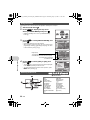
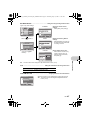
This explains how to use the menus with [DIGITAL ZOOM] as an example.
1
2
Set the mode dial to P.
Press m to display the top menu.
Select [CAMERA MENU] and press o.
IMAGE
QUALITY
• [DIGITAL ZOOM] is on a menu in [CAMERA MENU].
Press o.
RESET
CAMERA
MENU
SCN
EXIT
3
Press 12 to select [DIGITAL ZOOM], and
press o.
• Unavailable settings cannot be selected.
• When pressing 4 on this screen, the cursor moves to the
page display. Pressing 12 changes the page. To return
to item selection, press 3 or o.
Menu operations
The selected item is displayed
in a different color.
4
Press 12 to select [OFF] or [ON], and
press o.
• The menu item is set and the previous menu is displayed.
Press m repeatedly to exit the menu.
• To cancel changes and continue menu operation, press
m before pressing o.
C A ME R A M E N U
WB
AUTO
2
ISO
AUTO
3
DRIVE
o
4
FINE ZOOM
OFF
5
DIGITAL ZOOM
OFF
C A ME R A ME N U
WB
AUTO
2
ISO
AUTO
3
DRIVE
o
4
FINE ZOOM
OFF
5
DIGITAL ZOOM
OFF
BACK
IMAGE
QUALITY
SCN
EXIT
SETUP
SILENT
MODE
SET OK
MENU
3
4
5
WB
ISO
DRIVE
FINE ZOOM
DIGITAL ZOOM
METERING
AF MODE
FOCUS MODE
FULLTIME AF
AF PREDICT
AF ILLUMINAT.
IMAGE STABILIZER
w
*1
22
EN
MENU
SET OK
1
C A ME RA M E N U
WB
2
ISO
3
DRIVE
4
FINE ZOOM
OFF
5
DIGITAL ZOOM
ON
MENU
SET OK
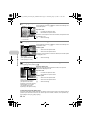
4CAMERA MENU
1
CAMERA
MENU
SET OK
hPASMrsn
Shooting mode menu
RESET
MENU
1
BACK
2
SET OK
1
BACK
Page display:
The page display mark is displayed when there
are additional menu items on the next page.
MENU
SETUP
SILENT
MODE
#SYNCRO
QFLASH
R (still pictures)
PANORAMA*1
>
SHARPNESS
CONTRAST
SATURATION
NOISE REDUCT.
TIMELAPSE
1 (conversion lens)
R (movies)
An OLYMPUS xD-Picture Card is required.
e quality
d4355_e_unified_forU-Print_00_bookfile.book Page 23 Thursday, July 12, 2007 11:01 AM
• Some menu items are not available depending on the position of the mode dial.
g “Functions available in shooting modes and scene modes” (P.73)
g “SETUP menus” (P.41)
• The factory default settings are displayed in gray (
).
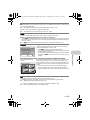
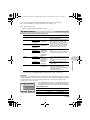
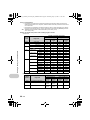
1 IMAGE QUALITY
Changing the image quality
Still picture image quality and their applications
Image quality
Image size
Compression
RAW*1
3264x2448
—
• Raw uncompressed data.
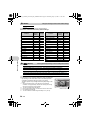
• Data is in ORF format.
SHQ
3264x2448
Low
compression
• This is useful for printing large images on
full-size paper. (For [3264x2448].)
• This is useful for ordering prints from a
photo store. (For [3 : 2 3264x2176].)
• This is useful for performing computer
image processing, such as contrast
adjustment and red-eye correction.
3:2
3264x2176
HQ
3264x2448
3:2
3264x2176
SQ1*2
2560x1920
2304x1728
2048x1536
SQ2*2
1600x1200
1280x960
640x480
16 : 9
*1
*2
1920x1080
Low
compression
(High quality) /
Standard
compression
(Standard)
• This is useful for printing on full-size
paper.
• This is useful for computer editing such
as rotating or adding text to a picture.
Low
compression
(High quality) /
Standard
compression
(Standard)
• This is useful for printing on A5 paper and
below.
• This is useful for viewing pictures on a
computer.
Standard
compression
• This is useful for expressing the
broadness of a subject such as
landscapes and for viewing pictures on a
wide-screen television.
• [PANORAMA] cannot be set.
• This is useful for sending as e-mail
attachments.
Not displayed when set to h or s.
If you select [SQ1] or [SQ2], select [HIGH] or [NORMAL] after selecting the image size.
JPEG copy
Pictures taken in the [RAW] data format can be stored in JPEG format at the same time as they are
recorded in raw data. To record pictures in JPEG format you can select [SHQ], [HQ], [SQ1] or [SQ2]
for the record mode, but you cannot select the image size. Pictures are recorded in the size
currently set for each record mode.
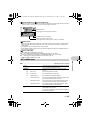
JPEG DUPLICATE SETTING
[IN]
OFF
Movie image quality
SHQ
HQ
SQ1
BACK
MENU
• In the [IMAGE QUALITY] screen, select [RAW], and press 3.
• Select a JPEG duplicate setting from [OFF], [SHQ], [HQ], [SQ1]
and [SQ2] and press o. (Select [OFF] to save raw data only.)
SET OK
Image quality
Image size
Number of frames
SHQ
640x480
30 frames/sec.
HQ
320x240
15 frames/sec.
SQ
160x120
15 frames/sec.
EN
23
Menu operations
1024x768
Standard
compression
Application
d4355_e_unified_forU-Print_00_bookfile.book Page 24 Thursday, July 12, 2007 11:01 AM
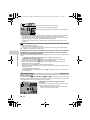
2 RESET
g functions back to default settings
/ YES
It restores shooting functions back to default settings.
Functions restored to the factory default settings
Factory
default
setting
Function
Menu operations
y selecting a scene according to the
NO
Change the shooting functions back to default settings
Factory
default
setting
Function
Ref. Page
Ref. Page
Flash
AUTO
P.19
AF ILLUMINAT.
ON
P.29
&
OFF
P.19
IMAGE STABILIZER
ON
P.29
Y
YOFF
P.20
w
± 0.0
P.30
F
0.0
P.19
#SYNCRO
#SYNC1
P.30
IMAGE QUALITY
HQ
P.23
QFLASH
IN
P.30
WB
AUTO
P.25
R (still pictures)
OFF
P.30
ISO
AUTO
P.26
>
±0
P.31
DRIVE
o
P.27
SHARPNESS
±0
P.32
P.32
FINE ZOOM
OFF
P.27
CONTRAST
±0
DIGITAL ZOOM
OFF
P.28
SATURATION
±0
P.32
METERING
ESP
P.28
NOISE REDUCT.
ON
P.32
AF MODE
iESP
P.28
TIMELAPSE
OFF
P.33
FOCUS MODE
AF
P.29
1 (conversion lens)
OFF
P.33
OFF
FULLTIME AF
OFF
P.29
R (movies)
AF PREDICT
OFF
P.29
Monitor/Viewfinder (u) Monitor
s
3 s (Scene)
PORTRAIT
P.33
P.17
PORTRAIT P.24
Shooting pictures by selecting a scene according to the situation
/LANDSCAPE/LANDSCAPE+PORTRAIT/SPORT/
NIGHT SCENE*1/NIGHT+PORTRAIT*1/INDOOR/CANDLE/SELF PORTRAIT/
AVAILABLE LIGHT/SUNSET/FIREWORKS*1/CUISINE/BEHIND GLASS/
DOCUMENTS/AUCTION*2/SHOOT & SELECT1*2/SHOOT & SELECT2*3/
SMILE SHOT/BEACH/SNOW/UNDER WATER WIDE1*4/UNDER WATER WIDE2*4*5/
UNDER WATER MACRO*4/QUICK SHUTTER
The scene mode selection screen displays sample images as well
as a description of the shooting situation for which it is designed.
• By switching to the other scene mode, most settings will be
changed to the default settings of each scene mode.
The zoom position may change automaticaly depending on the
scene.
*1
*2
*3
*4
*5
24
When the subject is dark, noise reduction is automaticaly
activated. This approximately doubles the shooting time, during
which the next picture cannot be taken.
The focus is locked at the first frame.
During sequential shooting, the camera focuses for each frame.
Use a waterproof protector.
The focus distance is fixed at approximately 5.0 m (16.4 ft).
EN
Scene mode selection screen
B
F
D
j
G
1
PORTRAIT
BACK
MENU
SET OK
Set the scene mode.
of a picture
d4355_e_unified_forU-Print_00_bookfile.book Page 25 Thursday, July 12, 2007 11:01 AM
[eSHOOT & SELECT1] [fSHOOT & SELECT2]
• Press and hold the shutter button to shoot sequential pictures. After shooting pictures, select the
ones you want to erase, put R to them, and press S to erase them.
e
Selected picture.
Press 4 3 to scroll through the pictures.
BACK
OK
MENU
GO S
Pictures with R are erased.
Select the pictures to be erased.
Press o to add or erase R to a picture to be deleted.
[lSMILE SHOT]
• When the camera detects a smiling face in shooting standby mode, 3 frames are automatically
taken in high speed sequential shooting mode. You can also shoot a picture by pressing the
shutter button.
• A smiling face may not be detected for some subjects.
• When [SMILE SHOT] is selected, the self-timer lamp lights. Shooting is not available while the
self-timer lamp is blinking.
[rQUICK SHUTTER]
• [FULLTIME AF]is automatically set to [ON].
g “FULLTIME AF Shooting pictures while keeping the subject in focus” (P.29)
• When [FULLTIME AF] is set to [OFF], [CUSTOM BUTTON] is set to [AF LOCK].
g “Shooting mode: Using this button as custom button” (P.16)
• [c] and [d] in [DRIVE] can be set.
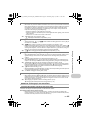
WB .................................................................................... Adjusting the color of a picture
AUTO
The white balance is adjusted automatically for natural
color, regardless of the light source.
PRESET
Selects the white balance according to the light
source.
V
5
Sunny day
For shooting under a clear sky.
3
Cloudy day
For shooting under a cloudy sky.
1
Tungsten light
For shooting under tungsten lighting.
w
Fluorescent lamp 1
For shooting under daylight fluorescent lighting. (This
type of lamp is mainly used in homes.)
x
Fluorescent lamp 2
For shooting under a neutral white fluorescent lamp.
(This type of lamp is mainly used in desk lamps.)
y
Fluorescent lamp 3
For shooting under a white fluorescent lamp. (This
type of lamp is mainly used in offices.)
One-touch WB
For setting a more precise white balance than preset
white balance can provide.
You can set and save the optimum white balance for
the shooting conditions.
EN
25
Menu operations
4 CAMERA MENU
d4355_e_unified_forU-Print_00_bookfile.book Page 26 Thursday, July 12, 2007 11:01 AM
When [PRESET] is selected
Press 12 to select a white balance setting, then press o.
PRESET WB
5
3
1
w
BACK
MENU
SET OK
When [V] is selected
o
• With the [ONE TOUCH WB] screen displayed, point the camera at a sheet of white paper.
Position the paper so that it fills the screen, making sure there are no shadows.
• Press o. The new white balance is set.
ensitivity
Menu operations
ISO ....................................................................................... Changing the ISO sensitivity
AUTO
Sensitivity is automatically adjusted according to the conditions of the
subject.
HIGH ISO AUTO
This function has a higher sensitivity compared to [AUTO] and
stabilizes the blur caused by a moving subject or camera movement
when taking pictures.
50/100/200/400/
800/1600/3200/
6400
A low value lowers the sensitivity for daylight shooting of clear, sharp
pictures. The higher the value, the better the camera’s light sensitivity
and ability to shoot with a fast shutter speed and in low light conditions.
However, high sensitivity introduces noise into the resulting picture,
which may give it a grainy appearance.
• If set to [6400], [IMAGE QUALITY] is limited to below [2048x1536].
• If [FINE ZOOM] or [DIGITAL ZOOM] is set to [ON], [6400] cannot be set.
26
EN
g
d4355_e_unified_forU-Print_00_bookfile.book Page 27 Thursday, July 12, 2007 11:01 AM
DRIVE ............................................................................................ Continuous shooting
o
Shoots 1 frame at a time when the shutter button is pressed.
j
Focus and exposure are locked at the first frame. The sequential
shooting speed varies depending on the setting of image quality.
c
Pictures can be taken at a faster speed than normal sequential
shooting.
d
Sequential shooting at a speed of 15 frames/sec.
i
Adjusts the focus 1 frame at a time. The shooting speed is slower than
for normal sequential shooting.
BKT
Takes pictures sequentially while changing the exposure for each
frame (Bracket shooting). Focus and white balance are locked at the
first frame.
You can take a sequence of pictures at one time by holding down the shutter button. The camera
will take pictures continuously until you release the shutter button.
• Only [o] is available when record mode is set to [RAW].
• Flash cannot be used when [c] or [d] is set.
• When [c] is set, [IMAGE QUALITY] is limited to below [2048x1536] and the maximum number
of pictures that can be taken for sequential shooting is approximately less than 23.
• When [d] is set, [IMAGE QUALITY] is limited to below [1280x960] and the maximum number
of pictures that can be taken for sequential shooting is approximately less than 40. (This includes
the 10 pictures stored shortly before shooting if [PRE-CAPTURE] is set to [ON].)
• When [c]or [d] is selected, [ISO]cannot be set to [HIGH ISO AUTO], [50], [100] or [200].
When [d] is selected
PRE-CAPTURE
OFF /ON
When [BKT] is selected
BKT
0.3
×3
0.7
×5
1.0
or
measuring
the
brightness
of a
subject
without
reducing
image
BACK
MENU
SET OK
Exposure differential
± 0.3 / ± 0.7 / ± 1.0
Number of frames
x3 / x5
• Press the shutter button completely and keep it pressed to shoot the
preset number of pictures. You can stop shooting at any time by
releasing the shutter button.
FINE ZOOM ................................. Zooming in on your subject without reducing image quality
OFF /ON
This function allows you to zoom up to 27x by combining the optical zoom and image cropping.
As data with few pixels are not converted to multiple pixels, there is no loss of image quality.
• [IMAGE QUALITY] is limited to below [2048x1536].
EN
27
Menu operations
• When [PRE-CAPTURE] is set to [ON], pressing the shutter button halfway stores 10 frames of
a picture shortly before shooting.
d4355_e_unified_forU-Print_00_bookfile.book Page 28 Thursday, July 12, 2007 11:01 AM
DIGITAL ZOOM .................................................................... Zooming in on your subject
subject
OFF /ON
The digital zoom can be used to take close-up pictures with stronger magnification than the optical
zoom.
Optical zoom
Digital zoom
Maximum magnification:
Still picture shooting modes
Optical zoom × digital zoom: Approx. 100x (max.)
Movie shooting mode
Optical zoom × digital zoom: Approx. 54x (max.)
Zoom bar
White area: The optical zoom area
Red area: The digital zoom area
ng area
Menu operations
METERING ................................ Changing the area for measuring the brightness of a subject
ESP
Meters the brightness at the center of the monitor and the surrounding
area separately to capture an image with balanced brightness. When
taking pictures against strong backlight, the center of the picture may
appear dark.
n
The AF target mark area is metered. Recommended for taking a
picture against strong backlight.
4
Meters the brightness over a wide area with emphasis on the center of
the screen. This method is used when you do not want to allow
surrounding light to affect the picture.
AF MODE .............................................................................. Changing the focusing area
FACE DETECT
When a face is being detected in the screen, the camera will focus on
the face. A frame is displayed at the detected position.
iESP
The camera determines which subject within the screen to focus on.
Even when the subject is not in the center of the screen, focusing is
possible.
SPOT
Focus selection is based on the subject within the AF target mark.
AREA
Move the AF target mark to select the area you want to focus on to take
a picture.
• The [FACE DETECT] may not be able to detect the face for some subjects.
• If [FINE ZOOM] or [DIGITAL ZOOM] is set to [ON], [AREA] cannot be set.
When [AREA] is selected
• To move the AF target mark
Press the arrow pad (the AF target mark is displayed in green).
You can take pictures while in this status.
• To set the position of the AF target mark
Hold down o.
To change the position of the mark, hold down o again.
28
EN
d4355_e_unified_forU-Print_00_bookfile.book Page 29 Thursday, July 12, 2007 11:01 AM
method
FOCUS MODE ...................................................................... Changing the focus method
AF
Press the shutter button halfway. The camera automatically focuses.
MF
Adjust the focus manually.
When set to [MF]
• Press 12 to set the focus. During operation, the focus area is
enlarged.
• Hold down o to fix the focus. The focus is locked at the
distance you have set, and MF is displayed in red on the
monitor. To adjust the focus, hold down o again.
• The distance displayed on the screen is a reference figure.
hile keeping the subject in focus
FULLTIME AF ...................................... Shooting pictures while keeping the subject in focus
OFF
Press the shutter button halfway to focus.
ON
Fulltime AF keeps the subject in front of the lens in focus at all times,
without having to press the shutter button halfway. The focusing time
is reduced, so you will not miss snapshot opportunities. Also, the
subject is automatically kept in focus during movie recording.
th the focus on subjects moving back
sing digital image stabilization
OFF
AF predict is deactivated.
ON
When activated, position the AF target mark on the subject and press
the shutter button halfway to engage the AF predict. Then, press the
shutter button completely to take the picture.
• { blinks and AF predict continues to operate while the shutter button is pressed halfway.
• Depending on the subject, the picture may be out of focus even if [AF PREDICT] is set.
• During macro and super macro mode, [AF PREDICT] is not available.
AF ILLUMINAT. ............................................. Setting to light the illuminator in a dark place
OFF
AF illuminator does not light.
ON
Press the shutter button halfway. The AF illuminator automatically
lights.
IMAGE STABILIZER .............................. Shooting pictures using digital image stabilization
This function stabilizes the blur caused by camera movement when taking pictures.
OFF
ON
Digital image stabilization is deactivated.
Digital image stabilization is activated after pressing the shutter button
halfway.
• When taking pictures with the camera stabilized (using a tripod), set to [OFF].
• Images may not be correctable if the camera is severely shaken.
• During night shooting or when the shutter speed is very slow, the Digital image stabilization
mode may not work.
EN
29
Menu operations
luminator in a dark place
AF PREDICT .................... Shooting pictures with the focus on subjects moving back and forth
d4355_e_unified_forU-Print_00_bookfile.book Page 30 Thursday, July 12, 2007 11:01 AM
w ............................................................ Adjusting the amount of light emitted by the flash
nt of light emitted by the flash
Depending on situations such as shooting small subjects or distant backgrounds, it may be
advisable to adjust the amount of light emitted by the flash. In addition, this function is useful when
increased contrast is desired.
iming
+2.0EV to
#SYNCRO .............................................................................. Selecting the flash timing
#SYNC1
The flash fires right after the shutter fully opens (front curtain).
#SYNC2
With the rear curtain, the flash fires just before the shutter closes (rear
curtain). You can use this setting to create interesting effects in your
picture, such as expressing the movement of a car by showing the taillights streaming backwards. The slower the shutter speed, the better
the effects turn out. If the shutter speed is faster than 1/200, the flash
fires automatically with the front curtain.
When the shutter speed is set to 4 sec.
4 sec.
Rear curtain
4 sec.
Rear curtain flash fires
xternal flash
th still pictures
0.0 to -2.0EV
Press 12 to adjust, and press o.
Menu operations
Shutter closes
0
Front curtain
Front curtain flash
fires
Shutter button completely pressed
QFLASH ........................................................................ Setting to use an external flash
IN
Allows you to take pictures using the built-in flash.
SLAVE
When using a commercially available slave flash that is synchronized
with the camera flash, the amount of the light emitted by the flash can
be adjusted in 10 levels.
Selecting an emission level
• When flash is set to [SLAVE], flash mode automatically changes to [#] (Fill-in flash) for all flash
modes except [$] (Flash off).
Press 12 to select an emission level from [1] to [10], then press o.
The bigger number indicates the bigger amount of light emitted by the
flash.
• The flash can fire in sequential shooting mode, but the interval
between shots will be longer if a high emission level is set.
SLAVE FLASH
1
BACK
MENU
SET OK
R (still pictures) ......................................................... Recording sound with still pictures
OFF /ON
It automatically starts recording for about 4 seconds after shooting pictures.
When recording, aim the camera microphone at the source of the sound you want to record.
30
EN
d4355_e_unified_forU-Print_00_bookfile.book Page 31 Thursday, July 12, 2007 11:01 AM
ic picture
Panorama shooting lets you create a panoramic picture, using the OLYMPUS Master software from
the provided CD-ROM. An Olympus xD-Picture Card is required for panorama shooting.
Connects pictures from left to
right
3:
4:
Connects pictures from
bottom to top
The next picture is connected at the
right edge.
The next picture is connected at the
left edge.
1:
2:
The next picture is connected at the
top.
The next picture is connected at the
bottom.
Use the arrow pad to specify at which edge you want to connect the pictures, and then compose
your shots so that the edges of the pictures overlap. The part of the previous picture that will be
combined will not remain in the frame. Remember the frame displayed on the monitor as a rough
indication, then compose the shot so that the edges of the previous picture in the frame overlap with
the next shot.
• Press o to exit panorama shooting.
• Panorama shooting is possible for up to 10 pictures. A warning mark g is displayed after 10
pictures are taken.
> .................................................................. Adjusting the white balance compensation
• The white balance can be adjusted in 7 increments in both the
[BLUE] and [RED] directions.
>
BLUE
RED
BACK
MENU
SET OK
Press o after setting is complete.
1
:
Each press makes the color more blue.
2
:
Each press makes the color more red.
EN
31
Menu operations
balance compensation
PANORAMA ....................................................................... Creating a panoramic picture
d4355_e_unified_forU-Print_00_bookfile.book Page 32 Thursday, July 12, 2007 11:01 AM
SHARPNESS ........................................................... Adjusting the sharpness of the image
ness of the image
CAMERA MENU
1
R
2
PANORAMA
3
>
4
SHARPNESS
5
CONTRAST
BACK
MENU
1 (Toward +)
:
The image contours are emphasized,
making the image appear sharper and
more vivid. Use this setting when you
want to print pictures. If you adjust the
sharpness too far toward +, noise may
become conspicuous in the picture.
2 (Toward –)
:
The image contours are softened. Use
this setting when you want to edit
images on a computer.
0
SET OK
st of the image
CONTRAST ................................................................ Adjusting the contrast of the image
CAMERA MENU
tion of the image
1
R
2
PANORAMA
3
>
4
SHARPNESS
5
CONTRAST
BACK
MENU
1 (Toward +)
:
The light and dark areas are defined
more clearly, making the image look
crisper.
2 (Toward –)
:
The light and dark areas become less
defined, giving the image a softer
impression. Use this setting when you
want to edit images on a computer.
0
SET OK
SATURATION ........................................................... Adjusting the saturation of the image
2
CAMERA MENU
SATURATION
0
NOISE REDUCT.
3
TIMELAPSE
during long exposures
Menu operations
1
1 (Toward +)
:
Colors become stronger.
2 (Toward –)
:
Colors become weaker.
4
5
BACK
MENU
SET OK
NOISE REDUCT. .............................................. Reducing the noise during long exposures
OFF
Noise is not reduced. Noise may be conspicuous at slow shutter speeds.
ON
Noise is reduced. Shooting time takes twice as long as usual. Shooting
is not available during noise reduction. Noise reduction can only be used
when the shutter speed is slower than 1/2 sec.
• This function may not work effectively with some shooting conditions or subjects.
32
EN
utomatically as defined by set
ith conversion lens
perational sounds
TIMELAPSE .............................. Shooting pictures automatically as defined by set conditions
OFF
Timelapse shooting is deactivated.
ON
Timelapse shooting is activated.
When setting the timelapse shooting
TIMELAPSE
PICTURES
02
BACK
INTERVAL
01 MIN
SET OK
MENU
Number of shots: 2 to 99
Shooting interval: 1 to 99
minutes in 1 minute intervals
Press 4 3 to select [PICTURES] and [INTERVAL].
Press 12 to set the value.
Press o to set.
The first picture is taken when the shutter button is pressed, and
the pictures thereafter are automatically taken.
• During timelapse, the L mark lights on the monitor.
• When recording to either the internal memory or the card, and
after the first picture is taken, the camera enters sleep mode. The
camera automatically reactivates from sleep mode 4 seconds
prior to taking the next picture.
• When the preset number of pictures is taken, the camera
automatically turns off.
•
•
•
•
• If you will be taking pictures over a long period, make sure to use fully charged batteries or the
AC adapter.
• If any of the following operations occur during sleep mode, the camera cancels the timelapse
mode and returns to normal shooting.
Opening the battery compartment cover, opening the card cover, connecting the camera to a
computer, operating the shutter button, arrow pad or other button.
• From 4 seconds prior to taking a picture until the time the picture has been taken, all operation
buttons, the mode dial and zoom lever do not function.
• If the internal memory/card becomes full or the battery power runs out during timelapse shooting,
a warning is displayed, timelapse stops and the camera automatically turns off.
1 ........................................................................... Shooting pictures with conversion lens
OFF /ON
Set this function when shooting with the camera using a conversion lens (option) specified by
Olympus.
• Using the built-in flash with the conversion lens attached can cause vignetting. Use an external
flash if required.
• When the conversion lens is attached, the camera may take some time to focus.
R (movies) ......................................................................... Recording sound with movies
OFF
/ON
• If the camera is more than 1 m (3.3 ft.) away from the source of the sound, sound may not be
recorded clearly.
• When [R] (movies) is set to [ON], [IMAGE STABILIZER] is not available.
• If [FULLTIME AF] is set to [ON] when [R] (movies) is set to [ON], the sound of operating lens
may be recorded.
5 SILENT MODE
Setting to turn off operational sounds
OFF /ON
This function allows you to turn off operational sounds that occur during shooting and playback,
warning beeps, shutter sounds, etc.
EN
33
Menu operations
th movies
d4355_e_unified_forU-Print_00_bookfile.book Page 33 Thursday, July 12, 2007 11:01 AM
Playback mode menu
q
When the still picture is selected
5EDIT
RAW DATA EDIT
Q
P
COLOR EDIT
FRAME
LABEL
CALENDAR
LAYOUT
EXPRESSION EDIT
FACE FOCUS
INDEX
EDIT
MOVIE INDEX
6
PRINT
ORDER
0
y*3
INDEX PLAY*4
R*3
P
1
3
SLIDESHOW
EDIT
PERFECT
FIX
PLAYBACK
MENU
SETUP
4
CALENDAR
ERASE
SILENT
MODE
EXIT
7PLAYBACK MENU
*1*2
5
*1
*2
SET OK
MENU
87
*3
*4
When the move is selected
A card is required.
This is not selected when the
movie is selected.
This is not displayed when a
movie is selected.
This is not displayed when the
still picture is selected.
5
2
4
P
PRINT
P
T
ORDER
RDER
D R
MOVIE
PL AY
EDIT
PERFEC
PERFECT
C
CT
FIX
X
PLAYBACK
MENU
SETUP
CALENDAR
ERASE
SILENT
MODE
EXIT
MENU
SET OK
87
Menu operations
es automatically
d4355_e_unified_forU-Print_00_bookfile.book Page 34 Thursday, July 12, 2007 11:01 AM
g “SETUP menus” (P.41)
“SILENT MODE Setting to turn off operational sounds” (P.33)
• The factory default settings are displayed in gray (
).
1 SLIDESHOW
SLIDESHOW
[IN]
BGM
OFF
TYPE
ON
BACK
MENU
SET OK
Playing back pictures automatically
• Set music [BGM] to [ON] or [OFF].
• Select the transition effect between pictures from [TYPE].
BGM
ON
/OFF
TYPE
NORMAL
/SCROLL/FADER/
SLIDE/ZOOM DOWN/ZOOM UP/CHECKER
BOARD/BLINDS/SWIVEL/RANDOM
• Only the first frame of each movie is displayed.
• After setting music [BGM] and [TYPE], press o to start the slideshow.
• Press o or m to cancel the slideshow.
34
EN
s
d4355_e_unified_forU-Print_00_bookfile.book Page 35 Thursday, July 12, 2007 11:01 AM
2 MOVIE PLAY
[IN
IN]
Playing back movies
Select [MOVIE PLAY] from the top menu, and press o to play
back the movie.
• Another option is to select a picture with the movie icon (A)
in the playback mode, and press o to play back the movie.
'07.12.26 12:30
100-0004
MOVIEPLAY OK
4
Operations during movie playback
Playing time/Total recording time
1
:
Increases the volume.
2
:
Reduces the volume.
3
:
Each time you press the button, the playback speed
changes in the following order: 2×; 20× and 1×.
4
:
Plays the movie in reverse. Each time you press the
button, the playback speed changes in the following
order: 1×; 2×; 20×; and back to 1×.
• Press o to pause the playback.
1
:
2
:
Displays the last frame.
3
:
Displays the next frame.
4
:
Displays the previous frame.
Menu operations
Operations during pause
Displays the first frame.
• To resume the movie, press o.
• To cancel the playback of the movie in the middle of it or during pause, press m.
EN
35
d4355_e_unified_forU-Print_00_bookfile.book Page 36 Thursday, July 12, 2007 11:01 AM
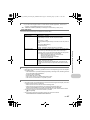
3 PERFECT FIX
This function allows you to correct the taken picture and save it as a new picture.
• Select the item to be corrected with 12 and press o.
• Select the picture with 4 3 and press o.
PERFECT FIX
ALL
LIGHTING FIX
REDEYE FIX
MENU
OK
BACK MENU
SET OK
ALL
Lighting fix and red-eye fix are activated together.
LIGHTING FIX
Only the dark areas of an image are corrected. Underexposed areas
caused by taking pictures against backlight or insufficient lighting are
brightened.
REDEYE FIX
Only redeye fix is activated.
• When red eye is not detected with [REDEYE FIX], press 4 to cancel the correction.
• Movies, pictures shot by another camera, and previously fixed or edited pictures cannot be
corrected.
• Pictures that have been corrected cannot be corrected when they are displayed.
• Some pictures may not be corrected completely.
• Editing an image may cause it to suffer a minor loss in quality.
ctures in a calendar format
4 CALENDAR
Menu operations
recorded in raw data format
Continuous shooting
Playing back the pictures in a calendar format
This function lets you playback the pictures in a calendar format, organized by the date the images
were recorded.
5 EDIT
This function lets you edit still pictures saved on a card and store them as new pictures.
RAW DATA EDIT ....................................... Editing the pictures recorded in raw data format
Adjusts the pictures recorded in raw data format and stores them as new pictures in JPEG format.
Items that can be set with [RAW DATA EDIT].
Item
Settings
IMAGE QUALITY
SHQ/HQ/SQ1/SQ2/16 : 9
Ref. Page
P.23
WB
AUTO/PRESET/V*
P.25
>
RED7 - BLUE7
P.31
SHARPNESS
-5 - + 5
P.32
CONTRAST
-5 - + 5
P.32
SATURATION
-5 - + 5
P.32
*
Available only when the picture is taken with [WB] set to [V].
36
EN
d4355_e_unified_forU-Print_00_bookfile.book Page 37 Thursday, July 12, 2007 11:01 AM
f pictures
ictures
of a picture
Q ...................................................................................... Changing the size of pictures
640x480
P .......................................................................................... Cropping a part of pictures
Designates and crops part of a still picture and saves it as a new file.
• Press 4 3 to select the image to crop, and press o.
• Use the arrow pad and the zoom lever to set the position and size
of the picture, and press o.
O WT
SET OK
COLOR EDIT .................................................................... Changing the color of a picture
This function lets you change the color of a picture and save it as a new picture.
• Select the picture with 4 3 and press o.
• Select your desired color with the arrow pad, and press o.
COLOR EDIT
1 BLACK & WHITE This changes the picture to black and
white.
1
3
2
4
2 SEPIA
This changes the pictures to sepia.
3 SATURATION
(HARD)
This increases the saturation of the
picture.
4 SATURATION
(SOFT)
This slightly increases the saturation of the
picture.
FRAME .................................................................................. Add a frame to your picture
This function lets you select a frame, integrate the frame with an image, and save it as a new picture.
FRAME
O W T MOVE
SET OK
• Select a frame with 4 3 and press o.
• Select the picture to be synthesized with the frame with 4 3, and
press o.
(Press 12 to turn the picture 90 degrees clockwise or 90 degrees
counterclockwise.)
• Use the arrow pad and the zoom lever to adjust the position and
size of the picture, and press o.
LABEL .................................................................................... Add a label to your picture
This function lets you select a label, integrate the label with an image, and save it as a new picture.
• Select the picture with 4 3 and press o.
• Select the label with 4 3, and press o. (Press 12 to rotate the
picture 90° clockwise or counterclockwise.)
• Use the arrow pad and the zoom lever to adjust the position and
size of the label, and press o.
• Set the color of the label with the arrow pad, and press o.
L A BE L
SET OK
EN
37
Menu operations
opicture
black and white
picture
/ 320x240
This changes the image size of a picture and saves it as a new file.
d4355_e_unified_forU-Print_00_bookfile.book Page 38 Thursday, July 12, 2007 11:01 AM
CALENDAR ......................................................... Create a calendar print with your picture
rint with your picture
This function lets you select a calendar format, integrate the calendar with a picture, and save it as
a new file.
ayout of pictures
SET OK
LAYOUT ..................................................................... Creating an index layout of pictures
cture from a movie
ALL IMAGES
All pictures in the internal memory or the card are added to the layout.
CALENDAR
A monthly calendar appears and the pictures you want to make layout
are selected by the date.
SEL. IMAGE
Pictures that you want to make layout are specified one by one.
• Press 4 3 to select a layout, and press o.
• Select the type of layout picture, and press o.
• Select the pictures and press o. (When [SEL. IMAGE] is selected
in [LAYOUT] screen, press 12 to rotate the picture 90°
clockwise or counterclockwise.)
LAYOUT
ALL IMAGES
CALENDER
SEL.IMAGE
e in the picture
BACK
Menu operations
n the picture
• Select the picture with 4 3 and press o.
• Select the calendar with 4 3, and press o. (Press 12 to rotate
the picture 90° clockwise or counterclockwise.)
• Set the date of the calendar, and press o.
CALENDAR
SET OK
MENU
EXPRESSION EDIT ...................................................... Transforming a face in the picture
This function lets you transform a face that is largest and facing front in the picture, and save it as
a new picture.
• Select your desired effect with 4 3 and press o.
• Use 4 3 to select the desired effect, and press o.
• The face may not be detected correctly for some subjects.
FACE FOCUS ................................................................. Showing up a face in the picture
This function allows you to change the largest face that is facing the front and save it as a new
picture.
• Select the picture with 4 3 and press o.
• The face may not be detected correctly for some subjects.
INDEX ...................................................................... Making an index picture from a movie
This function extracts 9 frames from a movie and saves them as a new picture (INDEX) containing
thumbnails of each frame.
00:00 / 00:36
SET OK
38
EN
• Use 4 3 to select a movie and press o.
• Use the arrow pad to select the first frame of the part you want to
keep, and press o.
In the same manner, select the last frame of the part you want to
keep and press o.
the movie
d4355_e_unified_forU-Print_00_bookfile.book Page 39 Thursday, July 12, 2007 11:01 AM
EDIT ................................................................................... Extracting a part of the movie
Allows you to specify a part of the movie and overwrite it, or save it as a new movie.
00:00 / 00:36
• Select [NEW FILE] or [OVERWRITE], and press o.
• Use the arrow pad to select the first frame of the part you want to
keep, and press o. In the same manner, select the last frame of
the part you want to keep and press o.
ge from the movie
ations (DPOF)
SET OK
MOVIE INDEX ......................................................... Capturing a still image from the movie
Allows you to capture a still image from the movie, which is taken and record in JPEG format.
M OVIE INDE X
BACK
[xD]
• Use 4 3 to select a movie and press o.
• Use the arrow pad to select the frame to capture, and press o.
SET OK
MENU
6 PRINT ORDER
Making print reservations (DPOF)
This function allows you to save printing data (the number of prints and the date and time
information) with the pictures stored on the card.
g“Print settings (DPOF)” (P.52)
0 ................................................................................................... Protecting pictures
OFF
/ON
0
[IN]
OFF
ON
Protected pictures cannot be erased with [ERASE]/[SEL. IMAGE]/
[ALL ERASE], but they are all erased by formatting.
• Select the picture with 4 3, and protect it by selecting [ON] with
12. You can protect several frames in succession. When a
picture is protected, 9 is displayed on the monitor.
EXIT OK
y ........................................................................................................ Rotating pictures
+90°/ 0° /–90°
Pictures taken with the camera held vertically are displayed horizontally during playback. This
function allows you to turn such pictures so that they are displayed vertically. New picture
orientations are saved even when the power is turned off.
EN
39
Menu operations
7 PLAYBACK MENU
d4355_e_unified_forU-Print_00_bookfile.book Page 40 Thursday, July 12, 2007 11:01 AM
y
[IN]
[IN]
EXIT OK
EXIT OK
y
[IN]
EXIT OK
+90°
0°
–90°
Select the picture with 4 3, and rotate it by selecting [+90°], [0°] or [–90°] with 12. You can rotate
several frames in succession.
ack position of the movie
INDEX PLAY ................................................... Selecting the playback position of the movie
• Use the arrow pad to select a frame.
Push or pull the zoom lever to change the number of displayed
index frames.
• Press o.
Movie playback begins from the selected frame.
l pictures
R ........................................................................................ Adding sound to still pictures
YES / NO
ures/Erase all pictures
Menu operations
R
erase
[IN]
YES
Sound is recorded for about 4 seconds.
• Use 4 3 to select a picture, and use 12 to select [YES] to
record.
• The [BUSY] bar will be temporarily displayed.
NO
BACK
SET OK
MENU
8 ERASE
Erase selected pictures/Erase all pictures
Protected pictures cannot be erased. Cancel protection before erasing protected pictures. Once
erased, pictures cannot be restored. Check each picture before erasing to avoid accidentally
erasing pictures you want to keep.
• When erasing the picture in the internal memory, do not insert the card into the camera.
• When erasing the picture from the card, insert a card into the camera in advance.
SEL. IMAGE ............................................................................ Selecting images to erase
SEL. IMAGE
[IN]
•
•
•
•
Use the arrow pad to select a picture, and press o to add R.
Press o again to cancel the selection.
When the selection is completed, press S.
Select [YES], and press o.
s in the internal memory and the card
BACK
MENU
OK
GO S
ALL ERASE ................................... Erase all the pictures in the internal memory and the card
• Select [YES], and press o.
40
EN
d4355_e_unified_forU-Print_00_bookfile.book Page 41 Thursday, July 12, 2007 11:01 AM
SETUP menus
Shooting mode
SETUP
IMAGE
QUALITY
RESET
CAMERA
MENU
SCN
EXIT
SETUP
SILENT
MODE
SET OK
MENU
Playback mode
EDIT
PLAYBACK
MENU
SETUP
ERASE
SILENT
MODE
CALENDAR
EXIT
nal memory or card
P
PRINT
ORDER
SLIDESHOW
PERFECT
FIX
*1
*2
g
*3
*4
*5
MENU
MEMORY FORMAT
(FORMAT*1)
BACKUP*1
W
PW ON SETUP*2
BEEP*2
8*2
SHUTTER SOUND*2
VOLUME*2
REC VIEW*3
MENU DISPLAY
FILE NAME
PIXEL MAPPING
s
X
DUALTIME
ALARM CLOCK
VIDEO OUT
FRAME ASSIST*4
u*4
MY MODE SETUP*4*5
m/ft
CUSTOM BUTTON*4*5
SET OK
A card is required.
The sound is turned off regardless the setting when [SILENT MODE] is set to [ON].
“SILENT MODE Setting to turn off operational sounds” (P.33)
Not available when SCN is set to [UNDER WATER WIDE2].
Not available when the mode dial is set to n.
Not available when the mode dial is set to h.
MEMORY FORMAT (FORMAT) .............................. Formatting the internal memory or card
BACKUP ............................................... Copying pictures in the internal memory to the card
anguage
Insert the optional card into the camera. Copying data does not erase the picture in the internal
memory.
• It takes some time to back up data. Check if the battery is not empty before starting the copy, or
use the AC adapter.
W .................................................................................... Selecting a display language
You can select a language for on-screen display. Available languages vary depending on the area
where you purchased this camera.
You can add other languages to your camera with the provided OLYMPUS Master software.
EN
41
Menu operations
the internal memory to the card
All existing data, including protected pictures, are erased when the internal memory or card is
formatted. Make sure that you save or transfer important data to a computer before formatting.
• Make sure there is no card inserted in the camera when formatting the internal memory.
• Be sure that the card is inserted in the camera when formatting the card.
• Before using non-Olympus cards or cards which have been formatted on a computer, you must
format them with this camera.
d4355_e_unified_forU-Print_00_bookfile.book Page 42 Thursday, July 12, 2007 11:01 AM
PW ON SETUP ........................................................ Setting the startup screen and sound
screen and sound
SCREEN
OFF (No picture is displayed.)
/
1 / 2
SOUND
OFF (No sound)
/
1 / 2
You can select the types of the sound and the picture displayed when the camera is turned on.
• Select [2] and press 3 to set the still picture saved in the internal memory or card as the startup
screen.
• The volume turns to the value set in [VOLUME].
g “VOLUME Adjusting the volume during playback” (P.42)
sound and volume when button is
BEEP ........................................ Adjusting the beep sound and volume when button is pressed
OFF (No sound)
f camera warning sound
LOW / HIGH
LOW / HIGH
8 ................................................................... Adjust the volume of camera warning sound
and volume of the shutter button
OFF (No sound) /
LOW / HIGH
SHUTTER SOUND ............................. Selecting the sound and volume of the shutter button
OFF (No sound)
Menu operations
e during playback
mediately
1
2
1
LOW / HIGH
2
LOW / HIGH
VOLUME ................................................................. Adjusting the volume during playback
OFF (No sound)
• Press 12 to adjust the volume.
• You can select [OFF] or adjust in 5 steps from 1-5.
SETUP
1
8
2
SHUTTER SOUND
3
VOLUME
4
REC VIEW
5
MENU DISPLAY
BACK MENU
/1/2/ 3 / 4/5
7
6
SET OK
REC VIEW ........................................................................... Viewing pictures immediately
42
OFF
The picture being recorded is not displayed. This is useful when you
want to prepare for your next shot while the previous picture is being
recorded.
ON
The picture being recorded is displayed. This is useful when you want
to quickly review the last picture taken. You can resume shooting while
the picture is still being displayed.
EN
d4355_e_unified_forU-Print_00_bookfile.book Page 43 Thursday, July 12, 2007 11:01 AM
splay on the monitor
Select [ON] to set whether to display the image on the monitor or viewfinder during recording.
LCD ONLY : Pictures that are being recorded will always be displayed on the menu on the
monitor.
CURRENT : Pictures that are being recorded will be displayed on the viewfinder when the
viewfinder is used and on the monitor when the monitor is used.
MENU DISPLAY ................................................... Displaying menu display on the monitor
Perform next operation to set whether to display on the monitor or viewfinder.
• When m is pressed
• When S is pressed in the playback mode
• When q is pressed in the shooting mode
• When the camera is connected to the printer
mes of pictures
LCD ONLY
This always displays the menu on the monitor.
CURRENT
This displays the menu on the viewfinder when the viewfinder is used
and on the monitor when the monitor is used.
FILE NAME ................................................................. Resetting the file names of pictures
RESET
This method is useful when grouping files on separate cards.
The file number and folder number are reset every time a new card is
inserted in the camera. The folder number returns to [No. 100] and the
file number returns to [No. 0001].
AUTO
This method is useful when you want to manage all your files with
sequential numbers.
Even if a new card is inserted, the folder number and file number are
retained from the previous card. This helps you to manage multiple
cards.
Folder name
File name
\DCIM\* **OLYMP\Pmdd****.jpg
Folder No.
(100 - 999)
Month
(1 - C)
File No.
(0001 - 9999)
Day (01 - 31)
processing function
Month: Jan. - Sep. = 1 - 9, Oct. = A, Nov. = B, Dec. = C
PIXEL MAPPING ................................................. Adjusting the image processing function
The pixel mapping feature allows the camera to check and adjust the CCD and image processing
functions. It is not necessary to operate this function frequently. Approximately once a year is
recommended. Wait at least one minute after taking or viewing pictures to allow the pixel mapping
function to perform properly. If you turn the camera off during pixel mapping, start again.
Select [PIXEL MAPPING]. When [START] is displayed, press o.
EN
43
Menu operations
File names and their folder names for recorded pictures are automatically generated by the camera.
File names and folder names respectively include file numbers (0001 to 9999) and folder names
(100 to 999), and are named as follows.
d4355_e_unified_forU-Print_00_bookfile.book Page 44 Thursday, July 12, 2007 11:01 AM
s ................................................................................. Adjusting the monitor brightness
or brightness
s
d time
BACK
:
Brightens the monitor.
2
:
Darkens the monitor.
Press o after setting is complete.
SET OK
MENU
1
X ............................................................................................ Setting the date and time
The date and time is saved with each image, and is used in the file name.
Y-M-D (Year-Month-Day)
X
Y
M
----.--.-- --:--
CANCEL
d time in another time zone
Hour
Minute
D TIME
MENU
Y/M/D
Date formats (Y/M/D, M/D/Y, D/M/Y)
m
:
Exits a setting.
Menu operations
• The first two digits of the [Y] are fixed.
• The time is displayed in the 24-hour format.
• To set the time precisely, with the cursor at either “minute” or [Y/M/D], press o as the time signal
strikes 00 seconds.
DUALTIME .................................................... Setting the date and time in another time zone
OFF
Switches to the date and time set in [X]. Pictures are recorded with
the date and time set in [X].
ON
Switches to the date and time set in [DUALTIME]. When setting the
dual time, select [ON], and then set the time. Pictures are recorded with
the date and time set in [DUALTIME].
DUA LT IM E
Y
M
D TIME
2007.12
2007
12.26
26 12
12:30
30
CANCEL
m
:
Exits a setting.
MENU
• The date format is the same as that set with [X].
• The first two digits of the [Y] are fixed.
• The time is displayed in the 24-hour format.
44
EN
d4355_e_unified_forU-Print_00_bookfile.book Page 45 Thursday, July 12, 2007 11:01 AM
ALARM CLOCK ..................................................................................... Setting alarms
OFF
No alarm is set or alarm is canceled.
ONE TIME
Alarm is activated once. After the alarm goes off, the setting is
canceled.
DAILY
Alarm is activated daily at the set time.
• When [X] has not been set, [ALARM CLOCK] is not available.
• When [DUALTIME] is set to [ON], the alarm sounds according to the dual time date and time
setting.
Setting an alarm
• Select [ONE TIME] or [DAILY], and set the alarm time.
• You can set snooze or alarm sounds and volume.
ALARM CLOCK
TIME
09:00
SNOOZE
ALARM SOUND
MOVE
SET OK
TIME
Sets the alarm time.
SNOOZE
OFF
No snooze is set.
ON
Alarm is activated every 5 minutes,
up to 7 times.
ALARM SOUND
1 LOW/MID/HIGH
2 LOW/MID/HIGH
Operating, shutting off and checking the alarm
• Operating the alarm:
Turn off the camera. The alarm only operates when the camera is off.
• Shutting off the alarm:
While the alarm is sounding, press any button to shut off the alarm and turn off the camera. Note
that pressing o will turn the camera on.
After 1 minute of no operation, the alarm stops automatically and the camera turns off when
[SNOOZE] is set to [OFF].
• Checking the alarm settings:
While the camera is off, press DISP./E to display the set alarm time and the current time for 3
seconds.
EN
45
Menu operations
3 LOW/MID/HIGH
d4355_e_unified_forU-Print_00_bookfile.book Page 46 Thursday, July 12, 2007 11:01 AM
VIDEO OUT ........................................................................ Playing back pictures on a TV
es on a TV
NTSC
NTSC
:
North America, Taiwan, Korea, Japan
PAL
:
European countries, China
Playing back pictures on a TV
Turn off the camera and the TV before connecting.
Connect to the TV’s video input (yellow) and
audio input (white) terminals.
Connector cover
Menu operations
AV cable (provided)
e assist/Determining the type of frame
gram
/ PAL
The factory default settings differ according to the region where the camera is sold.
To play back camera images on a TV, set the video output according to your TV’s video signal type.
• TV video signal types by country/region. Check the video signal type before connecting the
camera to the TV.
Settings on the TV
Turn the TV on, and set it to video input mode.
• For details of switching to video input, refer to
your TV’s instruction manual.
• Images and the information displayed on the
screen may become cropped depending on the
TV’s settings.
Multi-connector
Settings on the camera
Press o in playback mode to turn the
camera on.
• The last picture taken is displayed on the
TV. Use the arrow pad to select the picture
you want to display.
FRAME ASSIST .................... Displaying the frame assist/Determining the type of frame assist
OFF /
w
/ x
PressDISP./E in shooting mode to determine the type of frame assist to be displayed.
Selecting [OFF] or when pressing DISP./E will not display the frame assist.
u ............................................................................................ Displaying the histogram
OFF /
ON
/ DIRECT
Press DISP./E in shooting mode to determine whether to display the histogram.
• When set to [DIRECT], the black (blue) and white (red) areas are displayed directly on the
picture.
46
EN
d4355_e_unified_forU-Print_00_bookfile.book Page 47 Thursday, July 12, 2007 11:01 AM
shooting-related functions
MY MODE SETUP ........................................ Setting and saving shooting-related functions
Types of my mode settings
CURRENT
1
SETUP
ALARM CLOCK
2
VIDEO OUT
3
FRAME ASSIST
MY MODE SETUP
CURRENT
SET CURRENT SETTING
RESET
4
u
5
MY MODE SETUP CUSTOM
BACK MENU
SET OK
SET
CANCEL
SET OK
BACK MENU
Select a MY MODE to
save.
RESET
MY MODE SETUP
My1/2/3/4
RESET CURRENT SETTING
r1 MY MODE1
r2 MY MODE2
BACK
*
MENU
Restores the factory default
settings.
• Select [RESET], and press o.
• My mode cannot be selected if
no setting is saved.
RESET
r3 MY MODE3
r4 MY MODE4
Saves the current camera
settings.
• Select [SET], and press o.
CANCEL
SET OK
BACK MENU
SET OK
Default settings are
saved only in [sMY
MODE 1].
CUSTOM
MY MODE SETUP
P/A/S/M/SCENE
F
0.0
Saves settings one by one.
• Select the item to save in my
mode, and press 3 or o.
• Change setting of the item,
and press o.
FNo.
SHUTTER
FLASH MODE
g “Functions that can be assigned to My Mode/custom button” (P.72)
m/ft ......................................................... Setting the measurement unit during manual focus
to the custom buttons
m
Displays in meters and centimeters.
ft
Displays in feet and inches.
CUSTOM BUTTON ........................................... Assigning functions to the custom buttons
Select the function to be registered with 12, and press o.
g “Functions that can be assigned to My Mode/custom
button” (P.72)
CUSTOM BUTTON
IMAGE QUALITY
FINE ZOOM
DIGITAL ZOOM
AF MODE
MENU
BACK MENU
SET OK
EN
47
Menu operations
ement unit during manual focus
d4355_e_unified_forU-Print_00_bookfile.book Page 48 Thursday, July 12, 2007 11:01 AM
Printing pictures
Direct printing (PictBridge)
Using the direct printing function
By connecting the camera to a PictBridge-compatible printer, you can print pictures directly - no
computer necessary. Select the pictures you want to print and the number of prints using the
camera’s print menus.
To find out if your printer is compatible with PictBridge, refer to the printer’s instruction manual.
What is PictBridge?
A standard for connecting digital cameras and printers of different makers and printing out pictures
directly.
• Available printing modes, paper sizes etc., vary depending on the printer you use. Refer to the
instruction manual for your printer.
• For details of printing paper types, ink cassettes, etc., refer to the printer’s instruction manual.
Easy print
[EASY PRINT] can be used to print out the picture displayed on the monitor.
The selected picture is printed using the standard settings of your printer. The date and file name
are not printed.
STANDARD
All printers that support PictBridge have standard print settings. If [STANDARD] is selected on the
settings screens (P.50 - P.51), pictures are printed according to these settings. Refer to the printer’s
instruction manual for its standard settings or contact the printer manufacturer.
Display the picture you want to print out on the monitor in the
playback mode.
2
Turn the printer on and plug the USB cable (provided) into the
camera’s multi-connector and the printer’s USB port.
Printing pictures
1
Connector cover
USB cable
Multi-connector
• The [EASY PRINT START] screen is displayed.
• For details of how to turn the printer on and the position of the USB port, refer to the printer’s
instruction manual.
48
EN
d4355_e_unified_forU-Print_00_bookfile.book Page 49 Thursday, July 12, 2007 11:01 AM
3
Press P .
• Printing starts.
EASY PRINT START
PC / CUSTOM PRINT OK
• When printing is finished, the picture selection screen is
displayed. To print another picture, press 4 3 to select a
picture, and press P .
• When you are finished, disconnect the USB cable from
the camera with the picture selection screen displayed.
EXIT
4
Disconnect the USB cable from the
camera.
5
Disconnect the USB cable from the
printer.
PRINT
EN
49
Printing pictures
You can use [EASY PRINT] even when the camera is turned off or in shooting mode. With the
camera turned off or in shooting mode, connect the USB cable. The selection screen for the USB
connection is displayed. Select [EASY PRINT].
g “EASY PRINT” Step 3(P.49), “CUSTOM PRINT” Step 2(P.50)
d4355_e_unified_forU-Print_00_bookfile.book Page 50 Thursday, July 12, 2007 11:01 AM
Other print modes and print settings (CUSTOM PRINT)
1
2
Display the screen being indicated on the right according to the
procedure 1 and 2 in P.48, and press o.
Select [CUSTOM PRINT] and press o.
USB
[IN]
PC
EASY PRINT
CUSTOM PRINT
EXIT
Operation guide
SET OK
3
Follow the operation guide to adjust print
settings.
Selecting a print mode
PRINT MODE SELECT [ I N ]
PRINT
PRINT
ALL PRINT
ALL PRINT
MULTI PRINT
ALL INDEX
EXIT
MENU
SET OK
MULTI PRINT
ALL INDEX
Printing pictures
PRINT ORDER
Prints the selected picture.
Prints all the pictures stored in the internal
memory or the card.
Prints one picture in multiple layout format.
Prints an index of all the pictures stored in the
internal memory or the card.
Prints the pictures according to the print
reservation data on the card. If no print
reservations have been made, this option is not
available.
g“Print settings (DPOF)” (P.52)
Setting the print paper
P R I N T PA P E R
S
IZE
SIZE
[IN]
SIZE
BORDERLESS
BORDERLESS
STANDARD
BACK
MENU
STANDARD
SET OK
OFF (
)
ON (
)
PICS/SHEET
Choose from the available paper sizes on your
printer.
Select with or without borders. In [MULTI PRINT]
mode, you cannot print with a border.
The picture is printed inside a blank frame.
The picture is printed filling the entire page.
Available in [MULTI PRINT] mode only. The
number of prints that can be printed vary
depending on the printer.
Note
• If the [PRINTPAPER] screen is not displayed, [SIZE], [BORDERLESS] and [PICS/SHEET]
are set to the standard.
50
EN
d4355_e_unified_forU-Print_00_bookfile.book Page 51 Thursday, July 12, 2007 11:01 AM
Selecting the picture to print
PRINT
[IN
IN]
100-0004
PRINT OK
MORE
SINGLEPRINT
Prints one copy of the selected picture. When
[SINGLE PRINT] or [MORE] has been selected,
a single copy or more copies are printed.
Makes a print reservation for the displayed
picture.
Sets the number of prints and data to be printed
for the displayed picture.
SINGLE PRINT
MORE
Press 4 3 to select the picture you want to print. You can also use the zoom lever and select a
picture from the index display.
Setting the number of prints and data to be printed
[IN]
PRINT INFO
<x
1
DATE
WITHOUT
FILE NAME
WITHOUT
<x
DATE(
)
P
BACK
MENU
SET OK
FILE NAME(
P
4
)
Sets the number of prints. You can select up
to 10 prints.
If you select [WITH], pictures are printed with
the date.
If you select [WITH], pictures are printed with
the file name.
Use the arrow pad or the zoom lever to adjust
trimming size and position, and press o. The
trimmed picture is printed.
Select [PRINT] and press o.
PRINT
• Printing starts.
• When printing is finished, the [PRINT MODE SELECT] screen
is displayed.
[IN]
PRINT
CANCEL
BACK
MENU
SET OK
PRINT
[IN]
CONTINUE
CANCEL OK
Select [CANCEL],
and press o.
CANCEL
TRANSFERRING
Press o.
SET OK
Screen during data transfer
5
In the [PRINT MODE SELECT] screen, press
m.
PRINT MODE SELECT [ I N ]
PRINT
• A message is displayed.
ALL PRINT
MULTI PRINT
ALL INDEX
EXIT
MENU
SET OK
EN
51
Printing pictures
To cancel printing
d4355_e_unified_forU-Print_00_bookfile.book Page 52 Thursday, July 12, 2007 11:01 AM
6
Disconnect the USB cable from the
camera.
7
Disconnect the USB cable from the
printer.
Print settings (DPOF)
How to make print reservations
Print reservation allows you to save printing data (the number of prints and the date and time
information) with the pictures stored on the card.
With print reservation, you can print out pictures easily either at home using a personal DPOFcompatible printer or at a photo store that supports DPOF. DPOF is a standard format used to
record automatic print information from digital cameras.
Printing pictures
Only the images stored on the card can be reserved to print. Insert a card with recorded pictures
into the camera before making print reservations.
Pictures with print reservations can be printed using the following procedures.
Printing using a DPOF-compatible photo store.
You can print the pictures using the print reservation data.
Printing using a DPOF-compatible printer.
Printing is possible directly from a card containing print reservation data, without using a
computer. For more details, refer to the printer’s instruction manual. A PC card adapter may
also be necessary.
Note
• DPOF reservations set by another device cannot be changed by this camera. Make changes
using the original device. If a card contains DPOF reservations set by another device,
entering reservations using this camera may overwrite the previous reservations.
• You can make DPOF print reservations for up to 999 images per card.
• Not all functions may be available on all printers, or at all photo stores.
To use print services without using DPOF
• Pictures stored in the internal memory cannot be printed at a photo store. The pictures need
to be copied to a card before taking them.
g “BACKUP Copying pictures in the internal memory to the card” (P.41)
52
EN
d4355_e_unified_forU-Print_00_bookfile.book Page 53 Thursday, July 12, 2007 11:01 AM
Single-frame reservation
Follow the operation guide to make a print reservation for a selected picture.
1
2
Press m in the playback mode and display the top menu.
Select [PRINT ORDER][<], and press o.
PRINT ORDER
<
U
Operation guide
3
BACK
SET OK
MENU
Press 4 3 to select the frames for print
reservations, and then press 12 to set the
number of prints.
[xD
xD]
4
5
WT
To trim the picture
• Use the zoom lever to display the trimming line.
• Use the arrow pad or the zoom lever to adjust trimming size and position, and press o.
When you finish making print reservations, press o.
Select the date and time print setting, and
press o.
NO
The pictures are printed without the date and time.
DATE
The selected pictures are printed with the shooting date.
TIME
The selected pictures are printed with the shooting time.
Select [SET] and press o.
X
NO
DATE
TIME
BACK
MENU
SET OK
PRINT ORDER
1(
1)
SET
CANCEL
BACK
MENU
SET OK
EN
53
Printing pictures
6
HQ
'07.12.26 12:30
100-0004
4
SET OK
• You cannot make print reservations for pictures with n.
• Repeat Step 3 to make print reservations for other pictures.
O
× 0
d4355_e_unified_forU-Print_00_bookfile.book Page 54 Thursday, July 12, 2007 11:01 AM
All-frame reservation
Reserves all the pictures stored on the card. The number of prints is set at one print per picture.
1
2
3
4
Press m in the playback mode and display the top menu.
Select [PRINT ORDER][U], and press o.
Select the date and time setting, and press o.
NO
The pictures are printed without the date and time.
DATE
All pictures are printed with the shooting date.
TIME
All pictures are printed with the shooting time.
Select [SET], and press o.
Resetting print reservation data
You can reset all the print reservation data or just for selected pictures.
1
Select top menu [PRINT ORDER], and press o.
To reset the print reservation data for all the pictures
2
3
Select [<] or [U], and press o.
Select [RESET] and press o.
PRINT ORDER SETTING
PRINT ORDERED
To reset the print reservation data for a selected picture
Printing pictures
2
3
4
RESET
Select [<], and press o.
Select [KEEP], and press o.
KEEP
BACK
MENU
SET OK
Press 4 3 to select the picture with the print reservations you want
to cancel, and press 2 to decrease the number of prints to 0.
• Repeat Step 4 to cancel print reservations for other pictures.
5
6
When you are finished canceling print reservations, press o.
Select the date and time setting, and press o.
• The setting is applied to the remaining pictures with print reservations.
7
54
Select [SET], and press o.
EN
d4355_e_unified_forU-Print_00_bookfile.book Page 55 Thursday, July 12, 2007 11:01 AM
Using OLYMPUS Master
Overview
Using the USB cable provided with your camera, you can connect the camera and computer and
download (transfer) the images to your computer using the OLYMPUS Master software, also
provided with the camera.
Prepare the following items before
starting.
OLYMPUS Master 2
CD-ROM
USB cable
gP.56
Connect the camera to the computer
using the USB cable
gP.58
Start up the OLYMPUS Master software
gP.58
Download image files to the computer
gP.59
Disconnect the camera from the
computer
gP.59
Using OLYMPUS Master
What is OLYMPUS Master?
OLYMPUS Master is a software application for managing your digital images on your computer.
Installing it on your computer lets you do the following:
( Download images from the camera or
other media
( View images and movies
• You can run a slideshow and play back sound.
( Manage images
• Manage images in an album or folder.
Downloaded images are automatically sorted
by date, allowing you to search for images
quickly.
( Edit images
• You can rotate images, trim them and change
the size.
( Edit images with the filter and correction
functions
( Print images
• You can easily print images.
( Make panoramic images
• You can make panoramic images using
pictures taken in panorama mode.
( Update the version of your camera’s
firmware.
For details of other functions and operations, refer
to the “Help” guide in the OLYMPUS Master
reference manual.
EN
55
Using OLYMPUS Master
PC satisfying the operating
environment (P.56)
Install the OLYMPUS Master software
d4355_e_unified_forU-Print_00_bookfile.book Page 56 Thursday, July 12, 2007 11:01 AM
Install the OLYMPUS Master software
Before installing the OLYMPUS Master software, please confirm that your computer is compatible
with the following system requirements.
For newer operating systems, please refer to the Olympus web site as shown on the back cover of
this manual.
Operating environment
Using OLYMPUS Master
Windows
OS
Windows 2000 Professional/XP Home Edition/
XP Professional/Vista
CPU
Pentium III 500 MHz or later
RAM
256 MB or more
Hard disk capacity
500 MB or more
Monitor
1,024 × 768 pixels or more
65,536 colors or more (16.77 million colors or more recommended)
Other
USB port or IEEE 1394 port
Internet Explorer 6 or later
QuickTime 7 or later recommended
DirectX 9 or later recommended
Note
• Windows 98/98SE/Me are not supported.
• Use a computer with a pre-installed operating system. Operations are not guaranteed on
home-built computers or computers with an updated operating system.
• Operations are not guaranteed when using an added USB port or IEEE 1394 port.
• To install the software, you must log on as a user with administrators’ privileges.
Macintosh
OS
Mac OS X v10.3 or later
CPU
Power PC G3 500 MHz or later
Intel Core Solo/Duo 1.5 GHz or later
RAM
256 MB or more
Hard disk capacity
500 MB or more
Monitor
1,024 × 768 pixels or more
32,000 colors or more (16.77 million colors or more recommended)
Other
USB port or IEEE 1394 port (FireWire)
Safari 1.0 or later (1.3 or later recommended)
QuickTime 6 or later
Note
•
•
•
•
56
Mac versions earlier than OS X 10.3 are not supported.
Operations are not guaranteed when using an added USB or IEEE 1394 (FireWire) port.
To install the software, you must log on as a user with administrators’ privileges.
Be sure to remove the media (drag & drop onto the trash icon) before performing the
following operations. Failure to do so could result in unstable computer operation and the
need to reboot.
- Disconnect the cable connecting the camera to the computer
- Turn off the camera
- Open the camera’s battery compartment cover/card cover
EN
d4355_e_unified_forU-Print_00_bookfile.book Page 57 Thursday, July 12, 2007 11:01 AM
Windows
1
Insert the CD-ROM into the CD-ROM
drive.
• The OLYMPUS Master setup screen is displayed.
• If the screen is not displayed, double-click the “My
Computer” icon and click the CD-ROM icon.
2
Select the display language and click
the “OLYMPUS Master 2” button.
• When the component installation screen is displayed,
click “OK”.
3
Click “Next” and follow the on-screen
instructions.
• When the OLYMPUS Master licensing agreement is
displayed, read the agreement and click “Yes” to
proceed with the installation.
When the user information screen is
displayed, enter your “Name”, select
your “Region” and click “Next”.
5
When the setup type selection screen is
displayed, click “Install”.
• To select the components to install, select “Custom”.
• The installation begins. The screen confirming that
setup is completed is displayed. Click “Close”.
• Next, the screen confirming whether to install OLYMPUS muvee theaterPack Trial Version
is displayed. To install this software, click “Install”.
Macintosh
1
Insert the CD-ROM into the CD-ROM drive.
• The CD-ROM window is displayed.
• If the CD-ROM window is not displayed, double-click the CD-ROM
icon on the desktop.
2
Double-click the “Setup” icon on the desktop.
• The OLYMPUS Master installation screen is displayed.
• Follow the on-screen instructions.
• When the OLYMPUS Master licensing agreement is displayed,
read the agreement and click “Continue” and then “Continue” to
proceed with the installation.
• The screen confirming that installation is completed is displayed.
• You must restart your computer before using OLYMPUS Master.
EN
57
Using OLYMPUS Master
4
d4355_e_unified_forU-Print_00_bookfile.book Page 58 Thursday, July 12, 2007 11:01 AM
Connecting the camera to a computer
1
Make sure the camera is turned off.
• The monitor is off.
• The lens is retracted.
2
Connector cover
Connect the multi-connector on the camera to
the USB port on the computer using the
provided USB cable.
• Refer to your computer’s instruction manual to locate the
position of the USB port.
• The camera turns on automatically.
• The monitor turns on and the selection screen for the USB
connection is displayed.
Multi-connector
Using OLYMPUS Master
3
4
Select [PC] and press o.
USB
[IN]
PC
The camera is recognized by the computer.
EASY PRINT
CUSTOM PRINT
EXIT
• Windows
SET OK
When you connect the camera to your computer for the first
time, the computer attempts to recognize the camera. Click
“OK” to exit the message that is displayed. The camera is recognized as a “Removable Disk”.
• Macintosh
The iPhoto program is the default application for managing digital images. When you
connect your digital camera for the first time, the iPhoto application starts automatically, so
close this application and start OLYMPUS Master.
Note
• The camera functions are disabled while the camera is connected to a computer.
• Connecting the camera to a computer via a USB hub may cause unstable operation. In this
case, do not use a hub, but connect the camera directly to the computer.
• Images cannot be transferred to your computer with OLYMPUS Master if [PC] is selected in
Step 3, 3 is pressed and [MTP] is selected.
Start up the OLYMPUS Master software
Windows
1
Double-click the “OLYMPUS Master 2” icon
on the desktop.
Macintosh
1
Double-click the “OLYMPUS Master 2” icon
Master 2” folder.
in the “OLYMPUS
• The browse window is displayed.
• When OLYMPUS Master is started up for the first time after installation, the OLYMPUS
Master initial setting screen and user registration screen are displayed before the browse
window. Follow the on-screen instructions.
58
EN
d4355_e_unified_forU-Print_00_bookfile.book Page 59 Thursday, July 12, 2007 11:01 AM
To exit OLYMPUS Master
1
Click “Exit”
on any window.
• OLYMPUS Master is exited.
Displaying camera images on a computer
Downloading and saving images
1
Click “Transfer Images”
on the browse
window, and then click “From Camera”
.
• The window for selecting the pictures you want to transfer
from the camera is displayed. All the images in the camera
are displayed.
2
Select “New Album” and enter an album
name.
3
Select the image files and click “Transfer
Images”.
4
Using OLYMPUS Master
• A window indicating that the download is complete is
displayed.
Click “Browse images now”.
• The downloaded images are displayed in the browse
window.
To disconnect the camera
1
Make sure that the card access lamp has
stopped blinking.
2
Make the following preparations for
disconnecting the USB cable.
Card access lamp
Windows
1 Click the “Unplug or Eject Hardware” icon
in the
system tray.
2 Click the message that is displayed.
3 When a message is displayed saying that the hardware
can be ejected safely, click “OK”.
Macintosh
1 The trash icon changes to the eject icon when the
“Untitled” or “NO_NAME” icon on the desktop is
dragged. Drag and drop it on the eject icon.
EN
59
d4355_e_unified_forU-Print_00_bookfile.book Page 60 Thursday, July 12, 2007 11:01 AM
3
Disconnect the USB cable from the camera.
Note
• Windows: When you click “Unplug or Eject Hardware”, a warning message may be
displayed. Make sure that image data is not being downloaded from the camera and that all
applications are closed. Click the “Unplug or Eject Hardware” icon again and disconnect the
cable.
Viewing still pictures and movies
1
Click the “Album” tab on the browse
window and select the album that you want
to view.
Thumbnail
• The selected album image is displayed in the thumbnail
area.
Using OLYMPUS Master
2
Double-click the still picture thumbnail that
you want to view.
• OLYMPUS Master switches to the image edit window and
the picture is enlarged.
• Click “Back”
to return to the browse window.
To view a movie
1
Double-click the movie thumbnail that you want to see in the
browse window.
• OLYMPUS Master switches to the edit window and the first frame of the movie is displayed.
2
To play back the movie, click “Play”
the bottom of the screen.
at
To download and save images to a computer without using
OLYMPUS Master
This camera is compatible with USB mass storage. You can connect the camera to your computer
using the USB cable provided with the camera to download and save images without using
OLYMPUS Master. The following environment is required to use the USB cable to connect the
camera to your computer.
Windows
:
Windows 2000 Professional/XP Home Edition/
XP Professional/Vista
Macintosh
:
Mac OS X v10.3 or later
60
EN
d4355_e_unified_forU-Print_00_bookfile.book Page 61 Thursday, July 12, 2007 11:01 AM
Note
• If your computer is running Windows Vista, you can select [PC] in Step 3 on page 58, press
3, and select [MTP] to use Windows Photo Gallery.
• Data transfer is not guaranteed in the following environments, even if your computer is
equipped with a USB port.
- Computers with a USB port added by means of an extension card, etc.
- Computers without a factory-installed OS and home-built computers
To increase the number of languages
Please take care that your battery is fully charged!
1
2
3
Make sure that your computer is connected to the Internet.
Plug the USB cable into the USB port on the computer.
Plug the other end of the USB cable into the camera’s USB
connector.
• The camera turns on automatically.
• The monitor turns on and the selection screen for the USB connection is displayed.
Select [PC], and press o.
In the browse window, select “Camera”, then “Update Camera/Add
Display Language”.
• The confirmation window for updating is displayed.
6
Click “OK”.
• The updating the camera window is displayed.
7
Click “Add Language” in the
updating camera display.
• The “Add Display Language of Camera”
window is displayed.
8
9
Click
and select a language.
Click “Add”.
• The new language is downloaded to your
camera.
Please do not remove any cable or the battery
while the camera is processing.
10 After the download procedure the camera display will show “OK”.
You can remove the cables and turn power off. After restarting the
camera you will be able to choose the new language from [SETUP].
EN
61
Using OLYMPUS Master
4
5
d4355_e_unified_forU-Print_00_bookfile.book Page 62 Thursday, July 12, 2007 11:01 AM
Getting to know your camera better
Shooting tips and information
Tips before you start taking pictures
The camera does not turn on even when the batteries are loaded
The direction of the batteries is incorrect.
• Insert the batteries in the correct direction.
The battery power is exhausted
• Insert new batteries. When using rechargable batteries, charge the batteries.
The battery is temporarily unable to function because of the cold
• Battery performance declines in low temperatures, and the charge may not be sufficient to
turn on the camera. Remove the battery and warm it by putting it in your pocket for a while.
The camera is connected to a computer
• The camera will not operate while it is connected to a computer.
Getting to know your camera better
The card cannot be used
• If the contact area of the card is contaminated, data in the card cannot be read and the
[CARD SETUP] screen may appear. In this case, select [xD CARD CLEAN], press o,
remove the card, and then wipe the contact area with a soft dry cloth.
No picture is taken when the shutter button is pressed
The camera is in sleep mode
• To save battery power, the camera automatically goes into sleep mode and the monitor
turns off if there is no operation for 3 minutes when the camera is turned on (when the lens
is extended and the monitor is on). No picture is taken even if the shutter button is fully
pressed in this mode. Operate the zoom lever or other buttons to restore the camera from
sleep mode before taking a picture. If the camera is further left for 12 minutes, it
automatically turns off (the lens retracts and the monitor turns off). Press the o to
turn the camera on.
The mode dial is set to q
• This is the playback mode for displaying pictures on the monitor. Set the mode dial to a
shooting mode.
The mode dial is set to g
• No pictures can be taken when the shooting guide is being displayed. Take a picture after
making the settings following the shooting guide, or turn the mode dial and set it to the
position other than g in the shooting mode.
The flash is charging
• Wait until # (flash charge) stops blinking before taking the picture.
The camera's internal temperature increases
• With prolonged camera use, the internal temperature may increase, resulting in automatic
shutdown. If this occurs, remove the battery from the camera and wait until the camera has
sufficiently cooled. The camerafs external temperature may also increase during use,
however this is normal and does not indicate malfunction.
The memory gauge is full
• No pictures can be taken when the memory gauge is full. Wait until there is space in the
memory gauge.
a
Take a picture
Before taking any
pictures (Off)
62
EN
b
Take a picture
After taking one
picture (Lit)
c
Take a picture
After taking several
pictures (Lit)
Wait
d
Maximum reached
(All lit)
d4355_e_unified_forU-Print_00_bookfile.book Page 63 Thursday, July 12, 2007 11:01 AM
The viewfinder does not turn on
The monitor is turned on
• Press u to switch to the viewfinder.
The monitor does not turn on
The viewfinder is turned on
• Press u to switch to the monitor.
The viewfinder or monitor is hard to see
There is condensation* inside the camera
• Turn the camera off. Before turning it on again, wait until the camera adjusts to the
surrounding temperature and dries out.
* When it is cold outside, the water vapor in the air is rapidly cooled and turns to droplets
of water. Condensation occurs when the camera is suddenly taken from a cold place
into a warm room.
Vertical lines appear on the monitor screen during shooting
• Aiming the camera at a bright subject in sunlight may cause vertical lines to appear on the
screen. This is not a malfunction.
The viewfinder is not properly adjusted
• Rotate the dioptre adjustment dial slightly and adjust.
g “Adjusting the viewfinder’s focus using the diopter” (P.9)
Shooting tips
Focusing on the subject
There are several ways to focus, depending on the subject.
When the subject is not in the center of the frame
• Place the subject in the center of the frame, lock the focus on the subject, and then
recompose your picture.
• Set [AF MODE] to [AREA].
g “AF MODE Changing the focusing area” (P.28)
The subject is moving quickly
• Focus the camera on a point roughly the same distance away as the subject you want to
shoot and lock the focus (by pressing the shutter button halfway). Then recompose your
picture and press the shutter button completely as the subject enters the frame.
• Set the mode dial to S to set the shutter speed, and then take the picture. Setting a fast
shutter speed lets you capture fast-moving subjects as though they were standing still.
g “S Changing the shutter speed for shooting pictures” (P.12)
The subject is dark.
• Set [AF ILLUMINAT.] to [ON].
g “AF ILLUMINAT. Setting to light the illuminator in a dark place” (P.29)
EN
63
Getting to know your camera better
The date and time have not been set
The camera has been used in the same conditions from the time of purchase
• No date and time have been set for the camera at the time of purchase. Set the date and
time before using the camera.
g “Turn the camera on” (P.6)
“X Setting the date and time” (P.44)
The battery has been pulled out of the camera.
• The date and time settings will be returned to the factory default settings if the camera is
left without batteries for approximately 3 days. In addition, if the batteries are inserted in
the camera for a short period, the date and time settings will be returned to the factory
default settings more quickly. Before taking important pictures, check that the date and
time settings are correct.
d4355_e_unified_forU-Print_00_bookfile.book Page 64 Thursday, July 12, 2007 11:01 AM
Subjects that are difficult to focus on
• Under certain types of conditions, it is difficult to focus using auto focus. The green lamp
on the monitor lights, allowing you to check if the focus is locked.
The green lamp
blinks.
The subject cannot be
brought into focus.
Subject with low
contrast
Subject with an
extremely bright area in
the center of the frame
Subject without
vertical lines
The green lamp lights,
but the subject cannot
be brought into focus.
Getting to know your camera better
Subjects at
different distances
Fast-moving
subject
The subject is not
in the center of the
frame
In these cases, focus (focus lock) on an object with high contrast at the same distance as
the intended subject, recompose your shot and then take the picture. If the subject has
no vertical lines, hold the camera vertically and focus the camera using the focus lock
function by pressing the shutter button halfway, and then return the camera to the
horizontal position while keeping the button pressed halfway and take the picture.
Prevent blur by using image stabilization
Be sure to hold the camera firmly with both hands and press the shutter button slowly so as to avoid
moving the camera. To correct the digital image, take pictures with h pressed and set [hON].
Pictures are more likely to be blurry when:
• images are shot at a high-magnification zoom setting, i.e. using both optical zoom and
digital zoom functions,
• the object is dark and the shutter speed is slow, or
• the flash cannot be used or when a low shutter speed set s mode is selected.
Taking stabilized pictures without the flash
To take pictures in low light places without flash, set the following after setting the flash mode to [$]
(Flash off).
Increase the [ISO] setting
g “ISO Changing the ISO sensitivity” (P.26)
The picture is too grainy
There are several factors that can cause the picture to appear grainy.
Using the digital zoom to take close-up pictures
• With the digital zoom, part of the image is cropped and enlarged. The greater the
magnification, the grainier the picture appears.
g “DIGITAL ZOOM Zooming in on your subject” (P.28)
Increasing the ISO sensitivity
• When you increase the [ISO] setting, “noise”, which appears as spots of unwanted color
or unevenness in the color, can be introduced and give the picture a grainy appearance.
This camera is equipped with a function to allow shooting at high sensitivity while
suppressing noise; however, increasing the ISO sensitivity creates grainier pictures than
when using a lower sensitivity.
g “ISO Changing the ISO sensitivity” (P.26)
64
EN
d4355_e_unified_forU-Print_00_bookfile.book Page 65 Thursday, July 12, 2007 11:01 AM
Taking pictures with the correct color
• The reason why there are differences between the colors in a picture and the actual colors
taken and the actual color is the light source illuminating the subject. [WB] is the function
that allows the camera to determine the correct colors. Normally, the [AUTO] setting
provides the optimal white balance, but depending on the subject, it may be better to
experiment with changing the [WB] setting.
• When the subject is in the shade on a sunny day
• When the subject is illuminated by both natural light and indoor lighting, such as when
near a window
• When there is no white in the center of the frame
g “WB Adjusting the color of a picture” (P.25)
“> Adjusting the white balance compensation” (P.31)
Taking pictures of a white beach or snow scene
Taking pictures of a subject against backlight
• When [SHADOW ADJ. ON] is selected, the face of the subject will appear brighter even
against backlight. This function is also effective when shooting indoor pictures from
outdoor.
g “Shooting mode: Brightening the subject against backlight” (P.18)
• With [METERING] set to [n], the picture can be taken based on the brightness of the
subject in the AF target mark area without being affected by the light in the background.
g “METERING Changing the area for measuring the brightness of a subject” (P.28)
• Set the flash to [#] (Fill-in flash) to activate fill-in-flash. You can shoot a subject against
backlight without the face of the subject appearing dark. [#] (Fill-in flash) is effective for
shooting against backlight and under fluorescent and other artificial lighting.
g “3# button Flash shooting” (P.19)
• With [AF MODE] set to [FACE DETECT], the face of the subject will be given due exposure
even against backlight and it will appear brighter.
g “AF MODE Changing the focusing area” (P.28)
When the subject is too bright or too dark
• When taking pictures in S mode or A mode, the shutter speed or aperture setting may be
displayed in red. A red display means that the correct exposure cannot be obtained. If you
take the picture as is, the picture will appear too bright or too dark. In this case, use the
arrow pad to change the settings.
g “A Changing the aperture value for shooting pictures” (P.12)
“S Changing the shutter speed for shooting pictures” (P.12)
Additional shooting tips and information
Increasing the number of pictures that can be taken
There are two ways to record the pictures you take with this camera.
Recording pictures to the internal memory
• Pictures are recorded to the internal memory, and when the number of storable still
pictures reaches 0, you must connect the camera to a computer to download the pictures,
and then erase the pictures from the internal memory.
EN
65
Getting to know your camera better
• Take pictures with Z or a in s mode. Suitable for taking pictures on a sunny day at
the beach or in the snow.
g “s Shoot pictures by selecting a scene according to the situation” (P.13)
• Often, bright subjects (such as snow) turn out darker than their natural colors. Adjust 1 F
toward [+] to make these subjects closer to their real shades. Conversely, when you are
shooting dark subjects, it can be effective to adjust toward the [–]. Sometimes, using the
flash may not produce the brightness (exposure) that was intended.
g “1 F button Changing picture brightness(Exposure compensation)” (P.19)
d4355_e_unified_forU-Print_00_bookfile.book Page 66 Thursday, July 12, 2007 11:01 AM
Using a card (optional)
• Pictures are recorded to the card when inserted in the camera. When the card is full,
download the pictures to a computer, and then either erase the pictures from the card or
use a new card.
• Pictures are not recorded to the internal memory when a card is inserted in the camera.
Pictures in the internal memory can be copied to the card using the [BACKUP] function.
g “BACKUP Copying pictures in the internal memory to the card” (P.41)
“The card” (P.78)
Number of storable still pictures and recording length of movies
Still pictures
Number of storable still pictures
Record
mode
Image size
RAW
3264x2448
4
4
85
86
SHQ
3264x2448
12
12
253
255
3:2 3264x2176
13
13
284
286
3264x2448
23
23
492
499
3:2 3264x2176
26
26
551
561
HQ
Getting to know your camera better
SQ1
With sound
2560x1920
2304x1728
2048x1536
SQ2
1600x1200
1280x960
1024x768
640x480
16 : 9
Internal memory
1920x1080
Without
sound
Using a 1GB card
With sound
Without
sound
HIGH
19
19
404
410
NORMAL
36
37
770
789
HIGH
23
23
492
499
NORMAL
43
45
927
954
HIGH
29
29
615
627
NORMAL
54
56
1142
1184
HIGH
45
46
954
984
NORMAL
82
86
1728
1827
1453
HIGH
65
68
1390
NORMAL
112
121
2369
2558
HIGH
94
101
1998
2132
NORMAL
151
168
3198
3553
HIGH
233
275
4920
5814
NORMAL
379
505
7995
10660
NORMAL
60
63
1279
1332
Movie
Sequential recording length
66
IMAGE
QUALITY
Image size
SHQ
HQ
SQ
EN
Internal memory
Using a 1GB card
With
sound
Without
sound
With
sound
Without
sound
640x480 (30 frames/sec.)
26 sec.
26 sec.
40 sec.
40 sec.
320x240 (15 frames/sec.)
2 min.
22 sec.
2 min.
26 sec.
29 min.
29 min.
160x120 (15 frames/sec.)
9 min.
28 sec.
10 min.
44 sec.
29 min.
29 min.
d4355_e_unified_forU-Print_00_bookfile.book Page 67 Thursday, July 12, 2007 11:01 AM
Using a new card
• If you use a non-Olympus card or a card used for another application, such as for a
computer, use [FORMAT] function to format the card.
g “MEMORY FORMAT (FORMAT) Formatting the internal memory or card” (P.41)
Lamp indicators
This camera uses several lamps to indicate the camera status.
Lamp
Self-timer lamp
Status
When set to [Y12 SEC]
The lamp lights for approximately 10 seconds, blinks for
approximately 2 seconds, and then the picture is taken.
When set to [Y2 SEC]
The lamp blinks for approximately 2 seconds, and then the picture is
taken.
Extending the useful life of the battery
• Performing any of the following operations when not actually taking pictures can deplete
the battery power.
• The shutter button is pressed halfway repeatedly in shooting mode, activating the auto
focus and digital image stabilization.
• Using the zoom repeatedly.
• [FULLTIME AF] is set to [ON].
• The monitor is left on for an extended period of time.
• The camera is connected to a computer or printer.
Functions that cannot be selected from menus/buttons
• Some items may not be selectable from the menus when using the arrow pad. (The menu
is grayed out and cannot be selected)
• Items that cannot be set with the current shooting mode
• Items that cannot be set because of an item that has already been set:
When [FOCUS MODE] is set to [MF], [AF MODE] cannot be selected.
• Items that cannot be set because the pictures taken by other camera will be edited.
• Some items cannot be set when the button is pressed.
[%] and [FLASH].
• Some functions cannot be used when there is no card in the camera.
PANORAMA/PRINT ORDER/FORMAT/BACKUP
EN
67
Getting to know your camera better
When set to [SMILE SHOT]
Lit: Camera is ready
Blinking: The flash is charging (shooting not available)
Card access lamp
Blinking: An image or movie is being recorded or downloaded (when
connected to a computer).
• Do not do any of the following while the card access lamp is
blinking. Doing so may prevent the image data from being saved
and render the internal memory or card unusable.
• Open the battery compartment cover/card cover.
• Removing the battery and card.
• Connect or disconnect the AC adapter.
• Disconnect the USB cable
Green lamp of the monitor Lit: The focus and exposure are locked.
Blinking: The focus is not locked.
• Release your finger from the shutter button, re-position the AF
target mark on the subject and press the shutter button halfway
again.
d4355_e_unified_forU-Print_00_bookfile.book Page 68 Thursday, July 12, 2007 11:01 AM
Selecting the appropriate image quality
Image quality is a combination of desired image size and compression level. Use the following
examples to help determine the optimal record mode when shooting.
To edit and process images on a computer
• [RAW]
To make high quality prints on full-size paper such as A3 (16.5 × 11.7 in.)/To edit and process
images on a computer
• [SHQ] [HQ]
To print on full-size paper
• [SQ1]
To print on A5 (8.3 × 5.8 in.) paper and below/ To send as an e-mail attachment or post on a
web site
• [SQ2]
To express the broadness of a subject such as landscapes/To view pictures on a widescreen television.
• [16 : 9]
g “IMAGE QUALITY Changing the image quality” (P.23)
Getting to know your camera better
Restoring default settings
• This camera retains a part of the settings even after the power is turned off. To return the
settings to default settings, execute [RESET].
When the mode dial is set to P, A, S, M or n: the settings are retained even after the
power is turned off (except for the settings of Y, PANORAMA and TIMELAPSE
shootings).
When the mode dial is set to h or s: the settings return to default (except for
IMAGE QUALITY and IMAGE STABILIZER).
g “RESET Change the shooting functions back to default settings” (P.24)
Confirming the exposure when the monitor is difficult to see outdoors
The monitor may be difficult to see (and the exposure difficult to confirm) when shooting under bright
light.
Press DISP./E repeatedly to display the histogram
• Set the exposure so that the graph is concentrated on the outer edges and the graph is
balanced on both sides.
How to read the histogram
1 If the peak fills too much of the frame, the image will appear
mostly black.
2 If the peak fills too much of the frame, the image will appear
mostly white.
3 The part indicated in green in the histogram shows the
luminance distribution within the AF target mark.
g “DISP./E button Changing the information on display/Display the
menu guide/Checking the time” (P.17)
Using the viewfinder
g “u button Monitor/Viewfinder” (P.17)
68
EN
d4355_e_unified_forU-Print_00_bookfile.book Page 69 Thursday, July 12, 2007 11:01 AM
Playback help and troubleshooting tips
The red-eye cannot be fixed.
• Depending on the picture, certain red-eyes may not be correctable. Also, areas other than
the eyes may be wrongly corrected.
Playback tips
Playing back the picture in the internal memory
• When a card has been inserted in the camera, the picture in the internal memory cannot
be played back. Turn off the camera and remove the card to playback pictures stored in
the camera’s internal memory.
Understanding the settings and other information of pictures taken
• Play back a picture, and press DISP./E. Press DISP./E repeatedly to change the
amount of information displayed.
g “DISP./E button Changing the information on display/Display the menu guide/Checking the time”
(P.17)
• Push the lever toward W to view the pictures as thumbnails (index display) or in a calendar
format (calendar display).
g “Zoom Lever Zooming while shooting/close-up playback” (P.15)
Erasing sound recorded to still pictures
• Once sound is added to a picture, it is not possible to erase the sound. In this case, make
a re-recording with silence. Sound recording is not possible if there is insufficient space in
the internal memory or on the card.
g “R Adding sound to still pictures” (P.40)
Viewing pictures on a computer
Viewing the entire picture on a computer screen
The size of the picture displayed on a computer screen changes depending on the computer
settings. When the monitor setting is 1024x768 and you are using Internet Explorer to view a picture
with an image size of 2048x1536 at 100 %, the entire picture cannot be viewed without scrolling.
There are several ways you can view the entire picture on the computer screen.
View the picture using image browsing software
• Install the OLYMPUS Master 2 software from the provided CD-ROM.
Change the monitor setting
• The icons on the computer desktop may be rearranged. For details of changing the
settings on your computer, refer to the computer’s instruction manual.
EN
69
Getting to know your camera better
Quickly displaying a desired picture
d4355_e_unified_forU-Print_00_bookfile.book Page 70 Thursday, July 12, 2007 11:01 AM
When you get an error message on the camera
Monitor indication
Possible cause
q
There is a problem with the
card.
This card cannot be used. Insert a new
card.
Writing to the card is
prohibited.
The recorded image has been protected
(read-only) on a computer. Download the
image to a computer and cancel the readonly setting.
The internal memory has no
available memory and
cannot store any new data.
Insert a card or erase unwanted data.
Before erasing, backup the data of
important pictures onto the card, or
download such pictures to a computer.
The card has no available
memory and cannot store
any new data.
Replace the card or erase unwanted data.
Before erasing, download important
pictures to a computer.
There are no pictures in the
internal memory or on the
card.
The internal memory or the card contains
no pictures.
Record pictures.
There is a problem with the
selected picture and it
cannot be played back on
this camera.
Use image processing software to view the
picture on a computer. If that cannot be
done, the image file is damaged.
If pictures taken by other
cameras are selected, they
cannot be edited.
Use image processing software to edit the
pictures.
The card cover is open.
Close the card cover.
The battery is empty.
Insert new batteries. When using
rechargable batteries, charge the
batteries.
When [IMAGE STABILIZER]
is set to [ON], the camera's
internal temperature rises
due to continuous movie
recording for a long period,
thereby causing shooting to
stop.
Allow the camera to cool down for some
time before you begin shooting again. Or
you can shoot with [IMAGE STABILIZER]
set to [OFF].
Data in the card cannot be
read. Or, the card is not
formatted.
• Select [xD CARD CLEAN], and press
o. Remove the card and wipe the
contact area with a soft dry cloth.
• Select [FORMAT][YES] and press
o. All data on the card is erased.
CARD ERROR
q
WRITE PROTECT
>
MEMORY FULL
q
CARD FULL
L
Getting to know your camera better
NO PICTURE
r
PICTURE ERROR
r
THE IMAGE CANNOT
BE EDITED
Corrective action
CARD-COVER OPEN
g
BATTERY EMPTY
Recording has
stopped to allow
camera to cool.
Please wait a
moment.
Camera is cooling.
Please wait a
moment.
C A RD S E T U P
[xD]
xD CARD CLEAN
FORMAT
SET
70
EN
OK
d4355_e_unified_forU-Print_00_bookfile.book Page 71 Thursday, July 12, 2007 11:01 AM
Monitor indication
M E MORY S E T U P
[IN]
Possible cause
Corrective action
There is an error in the
internal memory.
Select [MEMORY FORMAT][YES] and
press o. All data in the internal memory is
erased.
The camera is not
connected to the computer
or printer correctly.
Disconnect the camera and connect it
again correctly.
There is no paper in the
printer.
Load some paper in the printer.
The printer has run out of
ink.
Replace the ink cartridge in the printer.
The paper is jammed.
Remove the jammed paper.
The printer’s paper tray has
been removed or the printer
has been operated while
changing settings on the
camera.
Do not operate the printer while changing
settings on the camera.
There is a problem with the
printer and/or camera.
Turn off the camera and printer. Check the
printer and remedy any problems before
turning the power on again.
Pictures recorded on other
cameras may not be printed
on this camera.
Use a computer to print.
POWER OFF
MEMORY FORMAT
SET
OK
NO CONNECTION
NO PAPER
NO INK
JAMMED
PRINT ERROR
r
CANNOT PRINT
EN
71
Getting to know your camera better
SETTINGS
CHANGED
d4355_e_unified_forU-Print_00_bookfile.book Page 72 Thursday, July 12, 2007 11:01 AM
Functions that can be assigned to My Mode/custom button
Function
Getting to know your camera better
MY MODE SETUP
CUSTOM BUTTON
P/A/S/M/f
9
—
Ref. Page
P.6
F
9
—
P.19
FNo.
9
—
P.12
SHUTTER
9
—
P.12
FLASH MODE
9
—
P.19
&
9
—
P.19
Y
9
—
P.20
f
9
—
P.18
MONITOR (u)*1
9
—
P.17
ZOOM*2
9
—
—
IMAGE STABILIZER
9
9 (default)
P.16
AE LOCK
—
9
P.16
AF LOCK
—
9
P.16
AF LOCK + AE LOCK
—
9
P.16
IMAGE QUALITY
9
9
P.23
WB
9
—
P.25
ISO
9
—
P.26
DRIVE
9
—
P.27
FINE ZOOM
9
9
P.27
DIGITAL ZOOM
9
9
P.28
METERING
9
—
P.28
AF MODE
9
9
P.28
FOCUS MODE
9
9
P.29
FULLTIME AF
9
9
P.29
AF PREDICT
9
9
P.29
AF ILLUMINAT.
9
—
P.29
w
9
—
P.30
#SYNCRO
9
9
P.30
QFLASH
9
9
P.30
R (still pictures)
9
9
P.30
PANORAMA
9
—
P.31
>
9
—
P.31
SHARPNESS
9
—
P.32
CONTRAST
9
—
P.32
SATURATION
9
—
P.32
NOISE REDUCT.
9
9
P.32
TIMELAPSE
9
—
P.33
1 (conversion lens)
9
—
P.33
INFO
9
—
P.17
FRAME ASSIST
9
—
P.46
u
9
—
P.46
*1
*2
72
Set whether to use the monitor or viewfinder.
For [ZOOM], select from 27 mm, 50 mm, 150 mm, 300 mm or 486 mm. (These numbers are based on
the focal length of a 35 mm camera.)
EN
d4355_e_unified_forU-Print_00_bookfile.book Page 73 Tuesday, July 17, 2007 10:40 AM
Functions available in shooting modes and scene modes
Some functions cannot be set in certain shooting modes. For more details, refer to the table below.
In r mode, available functions vary depending on the modes set in the [MY MODE SETUP] menu.
In s mode, in order to produce specialized effects, some scenes limit control of certain
functions. Those functions are indicated with an
. For details, refer to “Functions with
restrictions in shooting scenes” (P.74).
( Modes and shooting functions
Shooting mode
Ref.
Page
—
—
P.19
—
—
P.19
9
9
—
P.19
9
9
9
—
P.19
9
9
—
—
—
P.19
9
9
9
9
9
—
P.19
F
9
9
9
9
—
9
9
P.19
Aperture value
—
—
9
—
9
—
—
P.11
—
P
A
S
M
Flash mode
AUTO
9
9
9
—
!
9
9
9
—
#
9
9
9
H
9
9
#SLOW
9
$
s
Shutter speed
—
—
—
9
9
—
P.12
&
9
9
9
9
9
9
P.19
%
9
9
9
9
9
9
P.19
Y
9
9
9
9
9
9
P.20
INFO
9
9
9
9
9
—
P.17
Optical zoom
9
9
9
9
9
9*1
P.28
IMAGE STABILIZER
9
9
9
9
9
9
P.16
AE LOCK
—
9
9
9
—
—
P.16
AF LOCK
—
9
9
9
9
—
P.16
AF LOCK + AE LOCK
—
9
9
9
—
—
P.16
f
9
9
9
9
9
9
P.18
IMAGE QUALITY
9*2
9
9
9
9
9
P.23
WB
—
9
9
9
9
9
P.25
ISO
—
9
9
9
9*3
—
P.26
DRIVE
—
9
9
9
9*4
—
P.27
FINE ZOOM
—
9
9
9
9
—
P.27
DIGITAL ZOOM
—
9
9
9
9
9
P.28
*1
*2
*3
*4
9
9
9
When [R] (movies) is set to [ON], optical zoom cannot be used during the shooting. To zoom in when
[R] (movies) is set to [ON], set [DIGITAL ZOOM] to [ON].
[RAW] is not available.
[AUTO] and [HIGH ISO AUTO] are not available.
[BKT] is not available.
EN
73
Getting to know your camera better
n
h
Function
d4355_e_unified_forU-Print_00_bookfile.book Page 74 Tuesday, July 17, 2007 10:40 AM
Shooting mode
Function
METERING
P
A
S
M
s
9
n
Ref.
Page
—
9
9
9
9
9
P.28
—*5
9
9
9
9
—
P.28
FOCUS MODE
—
9
9
9
9
—
P.29
FULLTIME AF
—
9
9
9
9
9
P.29
AF PREDICT
—
9
9
9
9
—
P.29
AF ILLUMINAT.
—
9
9
9
9
—
P.29
w
—
9
9
9
9
—
P.30
#SYNCRO
—
9
9
9
9
—
P.30
QFLASH
—
9
9
9
9
—
P.30
R (still pictures)
—
9
9
9
9
—
P.30
PANORAMA
—
9
—
—
—
—
P.31
>
—
9
9
9
9
9
9
P.31
SHARPNESS
—
9
9
9
9
9
9
P.32
AF MODE
Getting to know your camera better
h
CONTRAST
—
9
9
9
9
9
9
P.32
SATURATION
—
9
9
9
9
9
9
P.32
NOISE REDUCT.
—
9
9
9
9*6
—
P.32
TIMELAPSE
—
9
9
9
9
—
P.33
1 (conversion lens)
—
9
9
9
9
9
P.33
R (movies)
—
—
—
—
—
—
9
P.33
W
c
R
S
X
P
Ref.
Page
P.20
*5
*6
This is fixed at [iESP].
This is fixed at [ON] during bulb shooting.
( Functions with restrictions in shooting scenes
Scene
Function
i
j
N
V
Z
a
F
D
G
U
Y
9
9
9
9
9
9
9
9
Flash mode
9
9
9
—
9
—
—
—
P.19
&
9
—
—
9
—
—
—
9
P.19
%
9
—
—
9
—
—
—
9
P.19
Optical zoom
9
9
9
9
—
9
9
9
—
AE LOCK
9
9
9
9
9
9
9
9
P.16
AF LOCK
9
9
9
9
9
9
—
9
P.16
AF LOCK + AE LOCK
9
9
9
9
9
9
—
9
P.16
f
9
9
—
—
9
9
—
9
P.18
IMAGE QUALITY
9*1
9*1
9*1
9*2
9*1
9*1
9*1
9*1
P.23
ISO
—
—
—
—
—
—
—
—
P.26
DRIVE
9*3
9*3
—
—
9*3
—
—
9*3
P.27
74
EN
d4355_e_unified_forU-Print_00_bookfile.book Page 75 Tuesday, July 17, 2007 1:03 PM
Scene
Function
i
j
N
V
Z
a
F
D
G
U
W
c
R
S
X
P
Ref.
Page
FINE ZOOM
9
9
9
—
—
9
9
9
P.27
DIGITAL ZOOM
9
9
9
—
—
9
9
9
P.28
AF MODE
9
9
9
9
—*4
9
—
9
P.28
FOCUS MODE
9
9
9
9
9
9
—
9
P.29
FULLTIME AF
9
9
9
9
9
9
—
9
P.29
AF PREDICT
9
9
9
9
9
9
—
9
P.29
AF ILLUMINAT.
9
9
9
9
9
9
—
—
P.29
w
9
9
9
—
9
—
—
—
P.30
#SYNCRO
9
9
9
—
9
—
—
—
P.30
QFLASH
9
9
9
—
9
—
—
—
P.30
R (still pictures)
9
9
9
9
9
9
9
9
P.30
9
9
9
9
9
9
9
9
P.31
NOISE REDUCT.
—
—
—*5
—
—
—
—*5
—
P.32
TIMELAPSE
9
9
9
9
9
9
9
9
P.33
1 (conversion lens)
9
9
9
9
9
9
9
9
P.33
e
f
k
l
H
l
r
Ref.
Page
Scene
d
i
Function
Y
9
9
9
9
9
9
9
—
9
P.20
Flash mode
—
—
—
9*6
9
9*7
9*8
9*8
9*7
P.19
&
9
—*9
9
9
9
—
—*9
9
9
P.19
%
9
—
9
9
9
—
—
—
—
P.19
Optical zoom
9
9
9
9
9
—
9
9
9
—
AE LOCK
9
9
9
9
9
9
9
9
—
P.16
AF LOCK
9
9
9
9
9
—
9
—
—*10
P.16
AF LOCK + AE LOCK
9
9
9
9
9
—
9
—
—*10
P.16
f
9
9
9
9
9
9
9
9
9
P.18
*1
*2
*3
*4
*5
*6
*7
*8
*9
*10
[RAW] is not available.
[IMAGE QUALITY] is limited to below [2048x1536].
[c] and [d] are not available.
This is fixed at [iESP].
This is fixed at [ON].
[!] (Red-eye reduction flash) and [H] (Red-eye fill-in flash) are not available.
Setting is disabled when using [c]or [d].
Only [#] (Fill-in flash) or [$] (Flash off) is available.
This is fixed at [&] (Macro mode).
Setting is enabled [FULLTIME AF] is [OFF].
EN
75
Getting to know your camera better
PANORAMA
d4355_e_unified_forU-Print_00_bookfile.book Page 76 Tuesday, July 17, 2007 10:40 AM
Scene
l
r
Getting to know your camera better
Ref.
Page
d
i
e
f
k
l
H
IMAGE QUALITY
9*1
—*10
9*2
9*1
9*1
9*1
9*1
ISO
—
—
—
—
9
9
9
—
—
P.26
DRIVE
9*7
—*13
—*14
—*15
9*16
9*16
9*16
9*17
9
P.27
FINE ZOOM
9
9
—
9
9
—
9
—
9*7
P.27
DIGITAL ZOOM
9
9
—
9
9
—
9
—
9*7
P.28
AF MODE
9
9
9
9*18
9
—
9*18
9*19
9
P.28
FOCUS MODE
9
—
9
—
9
—
—
—
—
P.29
FULLTIME AF
9
9
9
9
9
—
9
—*5
9
P.29
AF PREDICT
9
—
9
9
9
—
—
—
—
P.29
AF ILLUMINAT.
9
9
9
9
—
—
—
9
9
P.29
Function
9*11 9*11*12 P.23
w
—
—
—
9
9
9
9
9
9
P.30
#SYNCRO
—
—
—
9
9
9
9
9
9
P.30
QFLASH
—
—
—
9
9
9
9
9
9
P.30
R (still pictures)
9
—
—
—
—
—
—
—
9
P.30
PANORAMA
9
—
—
—
9
9
9
—
9
P.31
NOISE REDUCT.
—
—
—
—
—
—
—
—
9
P.32
TIMELAPSE
9
—
—
—
9
9
9
—
9
P.33
1 (conversion lens)
9
—
9
9
9
9
—
9
9
P.33
*1
*2
*5
*6
*7
*10
*11
*12
*13
*14
*15
*16
*17
*18
*19
76
[RAW] is not available.
[IMAGE QUALITY] is limited to below [2048x1536].
This is fixed at [ON].
[!] (Red-eye reduction flash) and [H] (Red-eye fill-in flash) are not available.
Setting is disabled when using [c]or [d].
[IMAGE QUALITY] is fixed at [640x480] in [SQ2].
[IMAGE QUALITY] is limited to below [1280x960].
[IMAGE QUALITY] is limited to below [2048x1536] when [c] is set, and below [1280x960] when
[d] is set.
This is fixed at [BKT].
This is fixed at [c].
This is fixed at [i].
[c] and [d] are not available.
This is fixed at [d].
[FACE DETECT] is not available.
This is fixed at [FACE DETECT].
EN
d4355_e_unified_forU-Print_00_bookfile.book Page 77 Thursday, July 12, 2007 11:01 AM
Appendix
Camera care
Cleaning the camera
Exterior:
• Wipe gently with a soft cloth. If the camera is very dirty, soak the cloth in mild soapy water and
wring well. Wipe the camera with the damp cloth and then dry it with a dry cloth. If you have used
the camera at the beach, use a cloth soaked in clean water and wrung well.
Monitor and viewfinder:
• Wipe gently with a soft cloth.
Lens
• Blow dust off the lens with a commercial blower, then wipe gently with a lens cleaner.
Note
• Do not use strong solvents such as benzene or alcohol, or chemically treated cloth.
• Mold may form on the lens surface if the lens is left dirty.
Storage
• When storing the camera for extended periods, remove the battery, AC adapter and card, and
keep in a cool, dry place that is well ventilated.
• Periodically insert the battery and test the camera functions.
Note
• Avoid leaving the camera in places where chemical products are handled since this may
result in corrosion.
Appendix
EN
77
d4355_e_unified_forU-Print_00_bookfile.book Page 78 Thursday, July 12, 2007 11:01 AM
Battery Handling Precautions
( In addition to the batteries provided with the camera, the following types of battery can be used.
Choose the power source best suited to the situation.
AA alkaline batteries
The number of pictures that you can take may vary considerably depending on the battery
manufacturer and shooting conditions.
AA NiMH batteries (rechargeable batteries)
Olympus NiMH batteries are rechargeable and economical. For details, refer to the instruction
manual for your charger.
( Lithium battery pack (CR-V3) and manganese (zinc-carbon) batteries cannot be used.
( Power consumption by the camera varies depending on which functions are used.
( Power is consumed continuously during the conditions described below causing batteries to
become exhausted quickly.
• The zoom is used repeatedly.
• The shutter button is pressed halfway repeatedly in shooting mode, activating the auto focus
and digital image stabilization.
• Set [FULLTIME AF] to [ON].
• The monitor is left on for an extended period of time.
• The camera is connected to a computer or printer.
( Battery life varies depending on the type of battery, manufacturer, shooting conditions, etc.
Similarly, the camera may turn off without displaying the battery level warning or may display the
battery level warning more quickly.
Useful use of the accessories
The card
Pictures can be recorded on the optional card.
The internal memory and card are the camera’s media for recording pictures, similar to film in a film
camera.
Pictures recorded to the internal memory or card can be easily erased on the camera or processed
using a computer.
Unlike portable storage media, the internal memory cannot be removed or exchanged.
The number of recordable pictures can be increased by using a card with a larger capacity.
Appendix
1 Index area
You can use this space to note down the contents of the card.
2 Contact area
The part where the data transferred from the camera enters the
card. Do not touch this part with your hands.
Compatible cards
xD-Picture Card (16 MB - 2 GB) (TypeH/M, Standard)
78
EN
d4355_e_unified_forU-Print_00_bookfile.book Page 79 Thursday, July 12, 2007 11:01 AM
Using the internal memory or card
You can confirm on the monitor whether the internal memory or card is being used during shooting
and playback operations.
Shooting Mode
Playback mode
Memory indicator
[IN] : When internal memory is used.
[xD] : When the card is used.
Note
• Do not open the battery compartment cover and card cover while the card access lamp is
blinking as data reading and writing is in progress. Doing so may damage the data in the
internal memory or the card and render the internal memory or card unusable.
AC adapter
An AC adapter is useful for time-consuming tasks such as image downloads to a computer or when
running a slideshow for a long period of time.
Do not use any other AC adapter with this camera.
Note
• Do not remove or load the battery or connect or disconnect the AC adapter or the multiadapter while the camera is turned on. Doing so could affect the camera’s internal settings
or functions.
• Be sure to read the instruction manual for the AC adapter.
Using your AC adapter abroad
EN
79
Appendix
• The AC adapter can be used in most home electrical sources within the range of 100 V to 240 V
AC (50/60Hz) around the world. However, depending on the country or area you are in, the AC
wall outlet may be shaped differently and the AC adapter may require a plug adapter to match
the wall outlet. For details, ask at your local electrical shop or travel agent.
• Do not use travel voltage converters as they could damage your AC adapter.
d4355_e_unified_forU-Print_00_bookfile.book Page 80 Thursday, July 12, 2007 11:01 AM
SAFETY PRECAUTIONS
CAUTION
RISK OF ELECTRIC SHOCK
DO NOT OPEN
CAUTION: TO REDUCE THE RISK OF ELECTRICAL SHOCK, DO NOT
REMOVE COVER (OR BACK). NO USER-SERVICEABLE PARTS INSIDE.
REFER SERVICING TO QUALIFIED OLYMPUS SERVICE PERSONNEL.
An exclamation mark enclosed in a triangle alerts you to important
operating and maintenance instructions in the documentation provided with
the product.
DANGER
If the product is used without observing the information given under this
symbol, serious injury or death may result.
WARNING
If the product is used without observing the information given under this
symbol, injury or death may result.
CAUTION
If the product is used without observing the information given under this
symbol, minor personal injury, damage to the equipment, or loss of
valuable data may result.
WARNING!
TO AVOID THE RISK OF FIRE OR ELECTRICAL SHOCK, NEVER DISASSEMBLE, EXPOSE
THIS PRODUCT TO WATER OR OPERATE IN A HIGH HUMIDITY ENVIRONMENT.
Appendix
General Precautions
Read All Instructions — Before you use the product, read all operating instructions. Save all
manuals and documentation for future reference.
Cleaning — Always unplug this product from the wall outlet before cleaning. Use only a damp cloth
for cleaning. Never use any type of liquid or aerosol cleaner, or any type of organic solvent to
clean this product.
Attachments — For your safety, and to avoid damaging the product, use only accessories
recommended by Olympus.
Water and Moisture — For precautions on products with weatherproof designs, read the
weatherproofing sections.
Location — To avoid damage to the product, mount the product securely on a stable tripod, stand,
or bracket.
Power Source — Connect this product only to the power source described on the product label.
Lightning — If a lightning storm occurs while using an AC adapter, remove it from the wall outlet
immediately.
Foreign Objects — To avoid personal injury, never insert a metal object into the product.
Heat — Never use or store this product near any heat source such as a radiator, heat register,
stove, or any type of equipment or appliance that generates heat, including stereo amplifiers.
Handling the Camera
WARNING
Do not use the camera near flammable or explosive gases.
Do not use the flash and LED on people (infants, small children, etc.) at close range.
• You must be at least 1 m (3 ft.) away from the faces of your subjects. Firing the flash too close
to the subject’s eyes could cause a momentary loss of vision.
80
EN
d4355_e_unified_forU-Print_00_bookfile.book Page 81 Thursday, July 12, 2007 11:01 AM
Keep young children and infants away from the camera.
• Always use and store the camera out of the reach of young children and infants to prevent the
following dangerous situations which could cause serious injury:
• Becoming entangled in the camera strap, causing strangulation.
• Accidentally swallowing the battery, cards or other small parts.
• Accidentally firing the flash into their own eyes or those of another child.
• Accidentally being injured by the moving parts of the camera.
Do not look at the sun or strong lights with the camera.
Do not use or store the camera in dusty or humid places.
Do not cover the flash with a hand while firing.
CAUTION
Stop using the camera immediately if you notice any unusual odors, noise, or smoke
around it.
• Never remove the batteries with bare hands, which may cause a fire or burn your hands.
Never hold or operate the camera with wet hands.
Do not leave the camera in places where it may be subject to extremely high temperatures.
• Doing so may cause parts to deteriorate and, in some circumstances, cause the camera to
catch fire. Do not use the charger or AC adapter if it is covered (such as a blanket). This could
cause overheating, resulting in fire.
Handle the camera with care to avoid getting a low-temperature burn.
• When the camera contains metal parts, overheating can result in a low-temperature burn. Pay
attention to the following:
• When used for a long period, the camera will get hot. If you hold on to the camera in this
state, a low-temperature burn may be caused.
• In places subject to extremely cold temperatures, the temperature of the camera’s body may
be lower than the environmental temperature. If possible, wear gloves when handling the
camera in cold temperatures.
Be careful with the strap.
• Be careful with the strap when you carry the camera. It could easily catch on stray objects - and
cause serious damage.
Battery Handling Precautions
Follow these important guidelines to prevent batteries from leaking,
overheating, burning, exploding, or causing electrical shocks or burns.
DANGER
WARNING
• Keep batteries dry at all times.
• To prevent batteries from leaking, overheating, or causing a fire or explosion, use only batteries
recommended for use with this product.
• Never mix batteries (old and new batteries, charged and uncharged batteries, batteries of different
manufacture or capacity, etc.).
• Never attempt to charge alkaline, lithium or CR-V3 lithium battery packs.
• Insert the battery carefully as described in the operating instructions.
• Do not use batteries if their body is not covered by the insulating sheet or if the sheet is torn, as this
may cause fluid leaks, fire, or injury.
EN
81
Appendix
• Use only the Olympus brand NiMH batteries and proper fitting charger.
• Never heat or incinerate batteries.
• Take precautions when carrying or storing batteries to prevent them from coming into contact with
any metal objects such as jewelry, pins, fasteners, etc.
• Never store batteries where they will be exposed to direct sunlight, or subjected to high
temperatures in a hot vehicle, near a heat source, etc.
• To prevent causing battery leaks or damaging their terminals, carefully follow all instructions
regarding the use of batteries. Never attempt to disassemble a battery or modify it in any way,
solder, etc.
• If battery fluid gets into your eyes, flush your eyes immediately with clear, cold running water and
seek medical attention immediately.
• Always store batteries out of the reach of small children. If a child accidentally swallows a battery,
seek medical attention immediately.
d4355_e_unified_forU-Print_00_bookfile.book Page 82 Thursday, July 12, 2007 11:01 AM
CAUTION
• Do not remove batteries immediately after using the camera. Batteries may become hot during
prolonged use.
• Always unload the battery from the camera before storing the camera for a long period.
• The following AA (R6) batteries cannot be used.
Batteries whose bodies are only
partially or not at all covered by
an insulating sheet.
Batteries whose - terminals are
raised, but not covered by an
insulating sheet.
Batteries whose terminals are
flat and not completely covered
by an insulating sheet. (Such
batteries cannot be used even if
the - terminals are partially
covered.)
• If NiMH batteries are not charged within the specified time, stop charging them and do not use them.
• Do not use a battery if it is cracked or broken.
• If a battery leaks, becomes discolored or deformed, or becomes abnormal in any other way during
operation, stop using the camera.
• If a battery leaks fluid onto your clothing or skin, remove the clothing and flush the affected area with
clean, running cold water immediately. If the fluid burns your skin, seek medical attention
immediately.
• Never subject batteries to strong shocks or continuous vibration.
Appendix
Caution for Usage Environment
• To protect the high-precision technology contained in this product, never leave the camera in the
places listed below, no matter if in use or storage:
• Places where temperatures and/or humidity are high or go through extreme changes. Direct
sunlight, beaches, locked cars, or near other heat sources (stove, radiator, etc.) or humidifiers.
• In sandy or dusty environments.
• Near flammable items or explosives.
• In wet places, such as bathrooms or in the rain. When using products with weatherproof
designs, read their manuals as well.
• In places prone to strong vibrations.
• Never drop the camera or subject it to severe shocks or vibrations.
• When mounted on a tripod, adjust the position of the camera with the tripod head. Do not twist the
camera.
• Do not touch electric contacts on cameras.
• Do not leave the camera pointed directly at the sun. This may cause lens or shutter curtain
damage, color failure, ghosting on the CCD, or may possibly cause fires.
• Do not push or pull severely on the lens.
• Before storing the camera for a long period, remove the batteries. Select a cool, dry location for
storage to prevent condensation or mold from forming inside the camera. After storage, test the
camera by turning it on and pressing the shutter button to make sure that it is operating normally.
• Always observe the operating environment restrictions described in the camera’s manual.
Battery Handling Precautions
• Olympus NiMH batteries (included in some areas) are intended for use only with Olympus digital
cameras. Never use these batteries with any other device.
• Always charge NiMH batteries (included in some areas) before using them for the first time, or if
they have not been used for a long period.
• Always charge sets of batteries (included in some areas) (2 or 4) together.
82
EN
d4355_e_unified_forU-Print_00_bookfile.book Page 83 Thursday, July 12, 2007 11:01 AM
• Do not use alkaline batteries unless it is absolutely necessary. In some cases, alkaline batteries
may have a shorter service life than NiMH. Alkaline battery performance is limited, especially at
low temperatures. The use of NiMH batteries is recommended.
• AA manganese (Zinc-Carbon) batteries cannot be used with this camera.
• When operating the camera with battery power at low temperatures, try to keep the camera and
spare batteries as warm as possible. Batteries which run down at low temperatures may be
restored after they are warmed at room temperature.
• Recommended temperature ranges for NiMH batteries:
Operation .................0°C to 40°C (32°F to 104°F)
Charge .....................0°C to 40°C (32°F to 104°F)
Storage.....................-20°C to 30°C (-4°F to 86°F)
• Using, charging, or storing the batteries outside these ranges could shorten battery life or affect
battery performance. Always unload the batteries from the camera before storing the camera for
a long period.
• Before using NiMH or NiCd batteries, always read the provided instructions.
• The number of pictures you can take may vary depending on the shooting conditions or batteries.
• Before going on a long trip, and especially before traveling abroad, purchase an ample supply of
extra batteries. The recommended batteries may be difficult to obtain while traveling.
• Please recycle batteries to help save our planet’s resources. When you throw away dead
batteries, be sure to cover their terminals and always observe local laws and regulations.
LCD Monitor
• Do not push the monitor forcibly; otherwise the image may become vague, resulting in a playback
mode failure or damage to the monitor.
• A strip of light may appear on the top/bottom of the monitor, but this is not a malfunction.
• When a subject is viewed diagonally in the camera, the edges may appear zigzagged on the
monitor. This is not a malfunction; it will be less noticeable in playback mode.
• In places subject to low temperatures, the LCD monitor may take a long time to turn on or its color
may change temporarily. When using the camera in extremely cold places, it is a good idea to
occasionally place it in a warm place. An LCD monitor exhibiting poor performance due to low
temperatures will recover in normal temperatures.
• The LCD used for the monitor is made with high-precision technology. However, black spots or
bright spots of light may appear constantly on the LCD Monitor. Due to its characteristics or the
angle at which you are viewing the monitor, the spot may not be uniform in color and brightness.
This is not a malfunction.
Legal and Other Notices
• Olympus makes no representations or warranties regarding any damages, or benefit expected by
using this unit lawfully, or any request from a third person, which are caused by the inappropriate
use of this product.
• Olympus makes no representations or warranties regarding any damages or any benefit expected
by using this unit lawfully which are caused by erasing picture data.
• Olympus makes no representations or warranties, either expressed or implied, by or concerning
any content of these written materials or software, and in no event shall be liable for any implied
warranty of merchantability or fitness for any particular purpose or for any consequential,
incidental or indirect damages (including but not limited to damages for loss of business profits,
business interruption and loss of business information) arising from the use or inability to use
these written materials or software or equipment. Some countries do not allow the exclusion or
limitation of liability for consequential or incidental damages, so the above limitations may not
apply to you.
• Olympus reserves all rights to this manual.
Warning
Unauthorized photographing or use of copyrighted material may violate applicable copyright laws.
Olympus assumes no responsibility for unauthorized photographing, use or other acts that infringe
upon the rights of copyright owners.
EN
83
Appendix
Disclaimer of Warranty
d4355_e_unified_forU-Print_00_bookfile.book Page 84 Thursday, July 12, 2007 11:01 AM
Copyright Notice
All rights reserved. No part of these written materials or this software may be reproduced or used
in any form or by any means, electronic or mechanical, including photocopying and recording or the
use of any type of information storage and retrieval system, without the prior written permission of
Olympus. No liability is assumed with respect to the use of the information contained in these written
materials or software, or for damages resulting from the use of the information contained therein.
Olympus reserves the right to alter the features and contents of this publication or software without
obligation or advance notice.
FCC Notice
• Radio and Television Interference
Changes or modifications not expressly approved by the manufacturer may void the user’s
authority to operate this equipment. This equipment has been tested and found to comply with the
limits for a Class B digital device, pursuant to Part 15 of the FCC Rules. These limits are designed
to provide reasonable protection against harmful interference in a residential installation. This
equipment generates, uses, and can radiate radio frequency energy and, if not installed and used
in accordance with the instructions, may cause harmful interference to radio communications.
However, there is no guarantee that interference will not occur in a particular installation. If this
equipment does cause harmful interference to radio or television reception, which can be
determined by turning the equipment off and on, the user is encouraged to try to correct the
interference by one or more of the following measures:
- Adjust or relocate the receiving antenna.
- Increase the distance between the camera and receiver.
- Connect the equipment to an outlet on a circuit different from that to which the receiver is
connected.
- Consult your dealer or an experienced radio/TV technician for help. Only the OLYMPUS
supplied USB cable should be used to connect the camera to USB enabled personal computers
(PC).
Any unauthorized changes or modifications to this equipment would void the user’s authority to
operate.
For customers in North and South America
Appendix
For customers in USA
Declaration of Conformity
Model Number
: SP-560UZ
Trade Name
: OLYMPUS
Responsible Party :
Address
: 3500 Corporate Parkway, P.O. Box 610, Center Valley,
PA 18034-0610, U.S.A.
Telephone Number: 484-896-5000
Tested To Comply With FCC Standards
FOR HOME OR OFFICE USE
This device complies with Part 15 of the FCC rules. Operation is subject to the following
two conditions:
(1)This device may not cause harmful interference.
(2)This device must accept any interference received, including interference that may
cause undesired operation.
For customers in Canada
This Class B digital apparatus meets all requirements of the Canadian InterferenceCausing Equipment Regulations.
84
EN
d4355_e_unified_forU-Print_00_bookfile.book Page 85 Thursday, July 12, 2007 11:01 AM
Trademarks
•
•
•
•
•
IBM is a registered trademark of International Business Machines Corporation.
Microsoft and Windows are registered trademarks of Microsoft Corporation.
Macintosh is a trademark of Apple Inc.
xD-Picture Card™ is a trademark.
All other company and product names are registered trademarks and/or trademarks of their
respective owners.
• The standards for camera file systems referred to in this manual are the “Design Rule for Camera
File System/DCF” standards stipulated by the Japan Electronics and Information Technology
Industries Association (JEITA).
Appendix
EN
85
d4355_e_unified_forU-Print_00_bookfile.book Page 86 Thursday, July 12, 2007 11:01 AM
SPECIFICATIONS
( Camera
Product type
Recording system
Still pictures
Applicable standards
Sound with still pictures
Movie
Memory
No. of effective pixels
Image pickup device
Lens
Photometric system
Shutter speed
Aperture
Shooting range
Monitor
Flash charge time
Connector
Appendix
Automatic calendar system
Operating environment
Temperature
Humidity
Power supply
Dimensions
Weight
: Digital camera (for shooting and displaying)
: Digital recording, JPEG (in accordance with Design rule for
Camera File system (DCF)), RAW data
: Exif 2.2, Digital Print Order Format (DPOF),
PRINT Image Matching III, PictBridge
: Wave format
: AVI Motion JPEG
: Internal memory
xD-Picture Card (16 MB - 2 GB)
(TypeH/M, Standard)
: 8,000,000 pixels
: 1/2.35" CCD (primary color filter), 8,500,000 pixels (gross)
: Olympus lens 4.7 to 84.2 mm, f2.8 to 4.5
(equivalent to 27 to 486 mm on a 35 mm camera)
: Digital ESP metering, spot metering,
center weighted metering
: 15 to 1/2000 sec. (During bulb: Max. 8 minutes)
: F2.8 to F8.0
: 0.1 m (3.94 in.) to ∞ (W) 1.2 m (47.24 in.) to ∞ (T)
(normal/macro mode)
0.01 m (0.39 in.) to ∞ (super macro mode)
: 2.5" TFT color LCD display, 230,000 pixels
: Approx. 7 sec. (for full flash discharge at room temperature
using a new fully charged battery)
: DC-IN jack
USB connector, A/V OUT jack (multi-connector)
: 2000 up to 2099
: 0 °C to 40 °C (32 °F to 104 °F) (operation)/
-20 °C to 60 °C (-4 °F to 140 °F) (storage)
: 30 % to 90 % (operation)/10 % to 90 % (storage)
: AA alkaline / NiMH battery (four) or Olympus AC adapter
: 116.0 mm (W) × 78.5 mm (H) × 78.0 mm (D)
(4.57 × 3.09 × 3.07 in.)
(excluding protrusions)
: 365 g (12.9 oz) without batteries and card
Design and specifications subject to change without notice.
86
EN
d4355_e_unified_forU-Print_00_bookfile.book Page 87 Thursday, July 12, 2007 11:01 AM
CAMERA DIAGRAM
Camera
Shutter button (P.9, P.14)
Flash (P.17)
Strap Eyelet (P.3)
Card Slot (P.5)
Strap Eyelet
Lens
Card Cover (P.5)
# button (Flash Popup) (P.17)
Microphone
Self-Timer Lamp/AF Illuminator
(P.20, P.29, P.67)
DC-IN jack
(P.79)
Connector Cover
(P.46, P.48, P.58)
Multi-connector
(P.46, P.48, P.58)
Zoom Lever (P.15)
Viewfinder (P.9)
Diopter adjustment dial (P.9)
DISP./E button (P.17)
u button (Monitor/
Viewfinder) (P.17)
q/P button (Playback/Print)
(P.18 , P.49)
o button (OK/FUNC) (P.20)
f/S button
(Shadow Adjustment
Technology/Erase) (P.18)
Arrow Pad (P.18)
Speaker
Battery Compartment Lock
(P.4)
Tripod Socket
Battery Compartment Cover
(P.4)
EN
87
Appendix
m button (P.17)
Monitor
(P.44, P.88)
Card access lamp
(P.9, P.59, P.67)
h/m button
(Digital Image Stabilization/
Custom button/Sequential
playback) (P.16)
o button (P.6, P.11)
Mode Dial (P.6, P.11)
d4355_e_unified_forU-Print_00_bookfile.book Page 88 Thursday, July 12, 2007 11:01 AM
Monitor Symbols & Icons
( Shooting Mode
Still pictures
Movie
Appendix
Item
Indications
Ref. Page
1 Battery check
e= full power, f= low power
P.70
2 Green lamp
O= Auto Focus Lock
P.9, P.14,
P.67
3 Flash standby
Camera movement warning/Flash
charge
# (Lit)
# (Blinks)
P.62
4 Digital image stabilization
h
P.16
5 Silent mode
j
P.33
6 White balance
5, 3, 1, w - y, V
P.25
7 White balance compensation
B1 - B7, R1 - R7
P.31
8 ISO
ISO 100, ISO 800, ISO 3200 etc.
P.26
9 Macro mode
Super macro mode
Manual focus
AF predict
&
%
MF
{
P.19
10 Drive
j, c, d, g, i, 7
P.27
11 Spot metering
n, 4
P.28
12 AE lock
B
P.16
13 Flash mode
!, #, H, $ etc.
P.19
14 Flash intensity control
w-2.0 - +2.0
P.30
15 Saturation
6 -5 - + 5
P.32
16 Contrast
J -5 - + 5
P.32
17 Sharpness
N -5 - + 5
P.32
18 Sound record
R
P.40
19 Dual time
l
P.44
20 Memory gauge
a, b, c, d (Maximum reached)
P.62
21 Shooting Mode
h, P, A, S, M, s to d, A etc.
P.6, P.11,
P.24
88
EN
P.29
P.29
d4355_e_unified_forU-Print_00_bookfile.book Page 89 Thursday, July 12, 2007 11:01 AM
Item
Indications
Ref. Page
22 Shadow Adjustment Technology
f
23 Self-timer
k, h
P.20
24 Shutter speed
15", 1/2, 1/60, 1/2000, BULB etc.
P.12
P.18
25 Noise reduction
O
P.32
26 Aperture value
F2.8 to F8.0
P.12
27 Exposure compensation
-2.0 - +2.0
P.19
28 Record mode
RAW, SHQ, HQ, SQ1, SQ2, 16 : 9
P.23
29 AF target mark
[ ]
P.9,
P.28
30 Image size
3264x2448, 2560x1920, 640x480 etc.
P.23
31 Conversion lens
1
P.33
32 Alarm
k
P.45
33 Number of storable still pictures
Recording length
4
00:36
P.66
34 Current memory
[IN] : Pictures are recorded to the internal
memory
[xD]: Pictures are recorded to the card
P.79
Appendix
EN
89
d4355_e_unified_forU-Print_00_bookfile.book Page 90 Thursday, July 12, 2007 11:01 AM
( Playback mode
Still pictures
Movie
Appendix
Item
Indications
Ref. Page
1 Battery check
e= full power, f= low power
2 Current memory
[IN] : Playing back the picture in the internal P.79
memory
[xD]: Playing back the picture in the card
3 Print reservation/Number of prints
Movie
Sequential Playback / Sequential
Pictures Auto Playback
<x10
n
s
P.53
P.35
P.14
P.40
P.70
4 Sound record
H
5 Protect
9
P.39
6 Silent mode
j
P.33
7 Aperture value
F2.8 to F8.0
P.12
8 Shutter speed
15", 1/2, 1/60, 1/2000, etc.
P.12
9 Record mode
RAW, SHQ, HQ, SQ1, SQ2, 16 : 9
P.23
10 Image size
3264x2448, 2560x1920, 640x480 etc.
P.23
11 Exposure compensation
-2.0 - +2.0
P.19
12 White balance
WB AUTO, 5, 3, 1, w - y, V
P.25
13 ISO
ISO 100, ISO 800, ISO 3200 etc.
P.26
14 Date and time
’07.12. 26 12:30
P.7, P.44
15 File number
M100-0004
P.52
16 Frame number
Playing time/Total recording time
4
00:00/00:36
P.43, P.35
90
EN
d4355_e_unified_forU-Print_00_bookfile.book Page 91 Thursday, July 12, 2007 11:01 AM
Index
s (Scene) . . . . . . . . . . . . 6, 13, 24
AUTO (white balance) WB AUTO . 25
hm button. . . . . . . . . . . . . . . . . . 16
Auto bracketing BKT . . . . . . . . . . . 27
qP button . . . . . . . . . . . . . . . . . . 18
Auto focus . . . . . . . . . . . . . . . . . . . . 64
1 F button
Auto-flash. . . . . . . . . . . . . . . . . . . . . 19
(exposure compensation) . . . . . . 19
AV cable . . . . . . . . . . . . . . . . . . . 3, 46
3# button (flash mode) . . . . . . . . . 19
AVAILABLE LIGHT c . . . . . . . . . . 24
# button (flash pop-up). . . . . . . . . . 17
4& button (macro). . . . . . . . . . . . . 19
u button (Monitor/Viewfinder) . 9, 17
o button (OK/FUNC) . . . . . . . . 20, 21
2Y button (self-timer). . . . . . . . . . 20
16:9 . . . . . . . . . . . . . . . . . . . 23, 66, 68
3:2 . . . . . . . . . . . . . . . . . . . . . . . 23, 66
A
AC adapter . . . . . . . . . . . . . . . . . . . 79
Adding sound to still pictures R. . . . 40
AE lock B . . . . . . . . . . . . . . . . . . 16
AF . . . . . . . . . . . . . . . . . . . . . . . . . . 29
AF ILLUMINAT. . . . . . . . . . . . . . . . . 29
AF MODE . . . . . . . . . . . . . . . . . . . . 28
AF PREDICT { . . . . . . . . . . . . . . 29
AF sequential shooting i . . . . . . . 27
AF target mark. . . . . . . . . . . . . . . 9, 89
ALARM CLOCK k . . . . . . . . . . . . . 45
ALL ERASE. . . . . . . . . . . . . . . . . . . 40
ALL INDEX . . . . . . . . . . . . . . . . . . . 50
ALL PRINT . . . . . . . . . . . . . . . . . . . 50
All-frame reservation U . . . . . . . . . 54
Aperture priority mode A . . . . . . 6, 12
AREA. . . . . . . . . . . . . . . . . . . . . . . . 28
Arrow pad . . . . . . . . . . . . . . . . . . . . 18
AUCTION i . . . . . . . . . . . . . . . . . 24
AUTO (full automatic) h . . . . 6, 11
AUTO (ISO). . . . . . . . . . . . . . . . . . . 26
AUTO (shooting mode) h . . . . . 11
B
BACKUP . . . . . . . . . . . . . . . . . . . . . 41
Batteries. . . . . . . . . . . . . . . . . . . . . . 78
BEACH Z . . . . . . . . . . . . . . . . . . . 24
BEEP . . . . . . . . . . . . . . . . . . . . . . . . 42
BEHIND GLASS P. . . . . . . . . . . . . 24
BKT . . . . . . . . . . . . . . . . . . . . . . . . . 27
Bracket shooting . . . . . . . . . . . . . . . 27
C
CALENDAR . . . . . . . . . . . . . . . . . . . 36
CALENDAR (edit) . . . . . . . . . . . . . . 38
CALENDAR (playback) . . . . . . . 15, 36
CAMERA MENU . . . . . . . . . . . . 22, 25
CANDLE W. . . . . . . . . . . . . . . . . . . 24
Card . . . . . . . . . . . . . . . . . . . . . . . . . 78
Card access lamp . . . . . . . . . 9, 59, 67
Center-weighted metering 4 . . . . . 28
Close-up playback U . . . . . . . . . . . 15
Cloudy day 3 . . . . . . . . . . . . . . . . 25
COLOR EDIT . . . . . . . . . . . . . . . . . . 37
Compression . . . . . . . . . . . . . . . . . . 23
Connector cover . . . . . . . . . 46, 48, 58
CONTRAST J . . . . . . . . . . . . . . . . 32
Conversion lens 1 . . . . . . . . . . . . . 33
Cropping (DPOF). . . . . . . . . . . . . . . 53
Cropping (PictBridge) . . . . . . . . . . . 51
Cropping P . . . . . . . . . . . . . . . . . . 37
CUISINE V . . . . . . . . . . . . . . . . . . . 24
EN
91
d4355_e_unified_forU-Print_00_bookfile.book Page 92 Thursday, July 12, 2007 11:01 AM
CURRENT (MY MODE SETUP) . . . 47
Flash mode # . . . . . . . . . . . . . . . . . 19
CUSTOM (MY MODE SETUP) . . . . 47
Flash off $ . . . . . . . . . . . . . . . . . . . 19
CUSTOM BUTTON . . . . . . . . . . 47, 72
FLASH Q. . . . . . . . . . . . . . . . . . . . 30
CUSTOM PRINT . . . . . . . . . . . . . . . 50
Fluorescent lamp 1/2/3 w, x, y
D
Focus . . . . . . . . . . . . . . . . . . . 9, 14, 64
. . . . . . . . . . . . . . . . . . . . . . . . . . . 25
Date and time X . . . . . . . . . . . . 7, 44
DC-IN jack . . . . . . . . . . . . . . . . . . . . 79
DIGITAL ZOOM. . . . . . . . . . . . . . . . 28
Diopter adjustment dial . . . . . . . . . . . 9
DIRECT (Histogram) . . . . . . . . . . . . 46
Direct printing . . . . . . . . . . . . . . . . . 48
DISP./E button . . . . . . . . . . . . . . . 17
DOCUMENTS d . . . . . . . . . . . . . . 24
Focus lock . . . . . . . . . . . . . . . . . . . . 14
FOCUS MODE . . . . . . . . . . . . . . . . 29
FORMAT . . . . . . . . . . . . . . . . . . . . . 41
FRAME . . . . . . . . . . . . . . . . . . . . . . 37
FRAME ASSIST w, x . . . . . . . 46
Front curtain #SYNC1 . . . . . . . . . . 30
FULLTIME AF . . . . . . . . . . . . . . . . . 29
DPOF . . . . . . . . . . . . . . . . . . . . . . . 52
G
DRIVE . . . . . . . . . . . . . . . . . . . . . . . 27
Green lamp . . . . . . . . . . . . . . 9, 14, 67
DUALTIME l. . . . . . . . . . . . . . . . . 44
g . . . . . . . . . . . . . . . . . . . . 6, 13
E
H
EASY PRINT . . . . . . . . . . . . . . . . . . 48
HIGH ISO AUTO . . . . . . . . . . . . . . . 26
EDIT . . . . . . . . . . . . . . . . . . . . . . . . 39
High speed sequential shooting1 c
ERASE . . . . . . . . . . . . . . . . . . . . . . 40
Error messages . . . . . . . . . . . . . . . . 70
. . . . . . . . . . . . . . . . . . . . . . . . . . . 27
High speed sequential shooting2 d
ESP . . . . . . . . . . . . . . . . . . . . . . . . . 28
. . . . . . . . . . . . . . . . . . . . . . . . . . . 27
EV . . . . . . . . . . . . . . . . . . . . . . . . . . 19
Histogram u . . . . . . . . . . . 17, 46, 68
Exposure . . . . . . . . . . . . . . . . . . . . . 19
HQ . . . . . . . . . . . . . . . . . . . . 23, 66, 68
Exposure compensation F. . . . . . . 19
EXPRESSION EDIT . . . . . . . . . . . . 38
I
F
IMAGE QUALITY. . . . . . . . . . . . . . . 23
FACE DETECT . . . . . . . . . . . . . . . . 28
Image size . . . . . . . . . . . . . . . . . . . . 23
FACE FOCUS . . . . . . . . . . . . . . . . . 38
IMAGE STABILIZER h. . . . . . 16, 29
FILE NAME . . . . . . . . . . . . . . . . 43, 51
IN . . . . . . . . . . . . . . . . . . . . . . . . . . . 79
Fill-in flash #. . . . . . . . . . . . . . . . . . 19
IN (QFLASH). . . . . . . . . . . . . . . . . 30
FINE ZOOM . . . . . . . . . . . . . . . . . . 27
INDEX . . . . . . . . . . . . . . . . . . . . . . . 38
FIREWORKS X . . . . . . . . . . . . . . . 24
Index display . . . . . . . . . . . . . . . . . . 15
Flash . . . . . . . . . . . . . . . . . . . . . . . . 19
INDEX PLAY . . . . . . . . . . . . . . . . . . 40
Flash intensity control w . . . . . . . . 30
INDOOR N. . . . . . . . . . . . . . . . . . . 24
92
EN
iESP. . . . . . . . . . . . . . . . . . . . . . . . . 28
d4355_e_unified_forU-Print_00_bookfile.book Page 93 Thursday, July 12, 2007 11:01 AM
Information displays DISP./E . . . . . 17
NIGHT+PORTRAIT U . . . . . . . . . . 24
Internal memory . . . . . . . . . . . . . . . 79
Noise reduction O . . . . . . . . . . . . . 32
ISO . . . . . . . . . . . . . . . . . . . . . . . . . 26
NTSC . . . . . . . . . . . . . . . . . . . . . . . . 46
J
JPEG . . . . . . . . . . . . . . . . . . . . . . . . 23
L
LABEL . . . . . . . . . . . . . . . . . . . . . . . 37
LANDSCAPE F . . . . . . . . . . . . . . 24
LANDSCAPE+PORTRAIT D. . . . . 24
LAYOUT . . . . . . . . . . . . . . . . . . . . . 38
M
m/ft . . . . . . . . . . . . . . . . . . . . . . . . . 47
Macro mode & . . . . . . . . . . . . . . . . 19
Manual focus MF. . . . . . . . . . . . . . . 29
Manual mode M . . . . . . . . . . . . . 6, 12
MEMORY FORMAT . . . . . . . . . . . . 41
Memory gauge . . . . . . . . . . . . . . . . 62
Memory indicator. . . . . . . . . . . . . . . 79
mbutton . . . . . . . . . . . . . . . 17, 21
MENU DISPLAY . . . . . . . . . . . . . . . 43
Menu guide . . . . . . . . . . . . . . . . . . . 18
METERING . . . . . . . . . . . . . . . . . . . 28
Microphone . . . . . . . . . . . . . . . . . . . 30
Mode dial. . . . . . . . . . . . . . . . . . . 6, 11
Monitor . . . . . . . . . . . . . . . . 17, 44, 88
Monitor brightness adjustment s . 44
MOVIE INDEX. . . . . . . . . . . . . . . . . 39
MOVIE PLAY. . . . . . . . . . . . . . . . . . 35
Movie recording n . . . . . . . . . . . . . 13
MULTI PRINT . . . . . . . . . . . . . . . . . 50
Multi-connector . . . . . . . . . . . . . 46, 58
MY MODE r . . . . . . . . . . . . . . . . . 13
MY MODE SETUP My1/2/3/4 . . . . . 47
N
Number of prints <x . . . . . . . . . . . . 51
Number of storage still picture . . . . . 66
O
OLYMPUS Master . . . . . . . . . . . . . . 55
One-touch WB V . . . . . . . . . . . . . 25
Optical zoom . . . . . . . . . . . . . . . . . . 15
P
PAL . . . . . . . . . . . . . . . . . . . . . . . . . 46
PANORAMA . . . . . . . . . . . . . . . . . . 31
PC . . . . . . . . . . . . . . . . . . . . . . . . . . 58
PERFECT FIX . . . . . . . . . . . . . . . . . 36
PictBridge . . . . . . . . . . . . . . . . . . . . 48
Picture rotation y . . . . . . . . . . . . . . 39
PIXEL MAPPING . . . . . . . . . . . . . . . 43
PLAYBACK MENU . . . . . . . . . . 34, 39
Playback mode . . . . . . . . . . 11, 14, 17
Playback on a TV. . . . . . . . . . . . . . . 46
Playing time . . . . . . . . . . . . . . . . . . . 35
PORTRAIT B . . . . . . . . . . . . . . . . . 24
o button . . . . . . . . . . . . . . . 6, 11
PRE-CAPTURE g . . . . . . . . . . . . 27
PRESET (WB) . . . . . . . . . . . . . . . . . 25
Press completely . . . . . . . . . . . . . . . . 9
Press halfway . . . . . . . . . . . . . . . . . . 9
PRINT ORDER . . . . . . . . . . . . . . . . 50
Print settings < . . . . . . . . . . . . . . . . 52
Program mode P . . . . . . . . . . . . . 6, 11
Protect 0 . . . . . . . . . . . . . . . . . . . 39
PW ON SETUP . . . . . . . . . . . . . . . . 42
Q
QUICK SHUTTERr. . . . . . . . . 24, 25
NIGHT SCENE G . . . . . . . . . . . . . 24
EN
93
d4355_e_unified_forU-Print_00_bookfile.book Page 94 Thursday, July 12, 2007 11:01 AM
R
SMILE SHOTl . . . . . . . . . . . . 24, 25
RAW . . . . . . . . . . . . . . . . . . 23, 66, 68
SNOW a . . . . . . . . . . . . . . . . . . . . . 24
RAW DATA EDIT . . . . . . . . . . . . . . 36
SPORT C . . . . . . . . . . . . . . . . . . . 24
Rear curtain #SYNC2 . . . . . . . . . . 30
SPOT (AF MODE) . . . . . . . . . . . . . . 28
REC VIEW. . . . . . . . . . . . . . . . . . . . 42
Spot metering 5 . . . . . . . . . . . . . . 28
Recording length of movies. . . . . . . 66
SQ1 . . . . . . . . . . . . . . . . . . . 23, 66, 68
Recording sound with movies R . . . 33
SQ2 . . . . . . . . . . . . . . . . . . . 23, 66, 68
Recording sound with still picture R 30
STANDARD . . . . . . . . . . . . . . . . . . . 48
Red-eye fill-in flash !#. . . . . . . . 19
Sunny day 5 . . . . . . . . . . . . . . . . . 25
Red-eye reduction flash !. . . . . . 19
SUNSET S . . . . . . . . . . . . . . . . . . 24
RESET . . . . . . . . . . . . . . . . . . . . . . 24
Super macro mode %. . . . . . . . . . . 19
RESET (MY MODE SETUP). . . . . . 47
SYNCRO # . . . . . . . . . . . . . . . . . . . 30
Resizing Q . . . . . . . . . . . . . . . . . . 37
T
S
TIMELAPSE L . . . . . . . . . . . . . . . . 33
SATURATION T . . . . . . . . . . . . . . 32
Top menu. . . . . . . . . . . . . . . . . . . . . 21
SEL. IMAGE . . . . . . . . . . . . . . . . . . 40
Total recording time . . . . . . . . . . . . . 35
Selecting a language W. . . . . . . 41
Tungsten light 1 . . . . . . . . . . . . . . . 25
SELF PORTRAIT R . . . . . . . . . . . 24
Self-timer lamp . . . . . . . . . . . . . 20, 67
Self-timer Y . . . . . . . . . . . . . . . . . . 20
Sequential shooting j . . . . . . . . . 27
Shadow Adjustment Technologyf 18
SHARPNESS N . . . . . . . . . . . . . . . 32
SHOOT & SELECT1/2 e, f . . . . 24
Shooting guide g . . . . . . . 6, 13
Shooting mode . . . . . . . . . . . 6, 11, 18
U
UNDER WATER MACRO H . . . . . 24
UNDER WATER WIDE1/2 kl . . 24
USB cable . . . . . . . . . 3, 48, 49, 55, 58
V
VIDEO OUT . . . . . . . . . . . . . . . . . . . 46
Viewfinder . . . . . . . . . . . . . . . . . . . . 17
VOLUME . . . . . . . . . . . . . . . . . . . . . 42
SHQ. . . . . . . . . . . . . . . . . . . 23, 66, 68
Shutter button . . . . . . . . . . . . . . . 9, 14
W
Shutter priority mode S . . . . . . . . 6, 12
WB . . . . . . . . . . . . . . . . . . . . . . . . . . 25
SHUTTER SOUND . . . . . . . . . . . . . 42
White balance compensation > . 31
Shutter speed . . . . . . . . . . . . . . . . . 12
SILENT MODE j . . . . . . . . . . . . . . 33
Single-frame reservation < . . . . . . 53
Single-frame shooting o . . . . . . . . 27
X
xD . . . . . . . . . . . . . . . . . . . . . . . . . . 79
xD-Picture Card . . . . . . . . . . . . . . . . 78
SLAVE. . . . . . . . . . . . . . . . . . . . . . . 30
Z
SLIDESHOW. . . . . . . . . . . . . . . . . . 34
Zoom . . . . . . . . . . . . . . . . . . . . . . . . 15
94
EN
d4355_e_unified_forU-Print_00_bookfile.book Page 95 Thursday, July 12, 2007 11:01 AM
Zoom lever . . . . . . . . . . . . . . . . . . . 15
EN
95
d4355_e_unified_forU-Print_00_bookfile.book Page 96 Friday, July 13, 2007 10:09 AM
Memo
96
EN
d4355_e_unified_forU-Print_00_bookfile.book Page 97 Friday, July 13, 2007 10:09 AM
Memo
EN
97
d4355_e_unified_forU-Print_00_bookfile.book Page 98 Friday, July 13, 2007 10:09 AM
Memo
98
EN
d4355_e_unified_forU-Print_00_bookfile.book Page 99 Friday, July 13, 2007 10:09 AM
Memo
EN
99
d4355_e_unified_forU-Print_00_bookfile.book Page 96 Tuesday, July 17, 2007 10:40 AM
Printed in Japan
1AG6P1P3694--
VS264801