1
Connecting to a Computer
Playing Sound from the Computer
The projector has a single built-in speaker with a maximum output of 5W. You
can use this built-in speaker to output the audio signals from a computer by
using any one of the following three connection methods, depending on the
shape of the computer's audio output port and the type of cable you have.
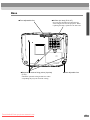
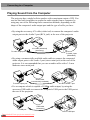
• By using the accessory A/V cable (white/red) to connect the computer's audio
output ports to the Audio 2 port (RCA jack) at the rear of the projector
A/V cable (white/red)
(accessory)
To audio output port
To Audio 2 port
(White/Red)
• By using a commercially-available audio cable to connect the computer's
audio output ports to the Audio 1 port (stereo mini jack) at the rear of the
projector. It is recommended that you use an audio cable with a 3.5 mm
diameter stereo mini jack.
Audio cable
(commercially-available)
To audio output port
To Audio 1 port
• For a computer which is capable of USB audio output, by using the
accessory USB cable to connect the computer's USB port to the USB port at
the rear of the projector.
USB cable
(accessory)
To USB port
To USB port
Downloaded
From projector-manual.com
24