1
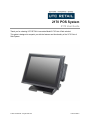
2170 POS System
2170 User Guide
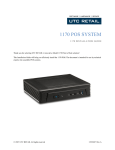
Thank you for selecting UTC RETAIL’s innovative Model 2170 Point of Sale solution!
This guide is designed to acquaint you with the features and functionality of the 2170 Point of
Sale System.
© 2013 UTC RETAIL. All rights reserved.
11921015 Rev A
2170 POS System User Guide
All rights reserved. No part of this document may be reproduced, stored in a retrieval
system, or transmitted in any form or by any means, electronic or mechanical, including
photocopying, recording, or otherwise, without the prior written permission of UTC RETAIL.
This User Guide was prepared by UTC RETAIL for use by Qualified Service Personnel only.
All attempts have been made to ensure that the information presented in this manual is
correct. No liability, expressed or implied, will be assumed by UTC, its dealers, or affiliates,
for damage resulting from the use of this information.
If a unit needs to be shipped to UTC RETAIL for repairs, please return it in the original
packaging material and shipping container. If you purchased the 2170 POS System through
a dealer, and the dealer is unable to answer your questions, please call UTC RETAIL
Technical Support at 1.800.349.0546.
This equipment has been tested and found to comply with the limits for a Class “A” digital
device, pursuant to Part 15 of the FCC Rules. These limits are designed to provide
reasonable protection against harmful interference when the equipment is operated in a
commercial environment. This equipment generates, uses, and can radiate radio frequency
energy and, if not installed and used in accordance with the instruction manual, may cause
harmful interference to radio communications. Operation of this equipment in a residential
area is likely to cause harmful interference, in which case the user will be required to correct
the interference at his/her own expense.
WARNING: CMOS Battery Damage
Replace your system’s CMOS RAM battery only with identical CR-2032 3V Lithium-Ion
coin cell (or equivalent) battery type to avoid risk of personal injury or physical damage to
your equipment. Always dispose of used batteries according to the manufacturer’s
instructions, or as required by the local ordinance (where applicable). The damage due to
not following this warning will void your motherboard’s manufacture warrantee.
All access to internal components is restricted to Authorized Service personnel only.
11921015 Rev A
2
© 2013 UTC RETAIL.
All rights reserved.
Contents
2170 POS System User Guide................................................................................................... 2
Product Information .................................................................................................................... 4
2170 POS System Components .......................................................................... 4
Peripheral Support............................................................................................... 4
2170 POS System Specifications ........................................................................ 5
I/O Panel ............................................................................................................. 5
Connector Panel View ................................................................................ 5
COM Ports .................................................................................................. 6
Cash Drawer Interface ................................................................................ 7
Supported Peripheral Options Details .................................................................. 7
Power Requirements ........................................................................................... 7
Connect Power Cable ................................................................................. 8
Expansion Options .............................................................................................. 8
Hard Drive Removal ................................................................................................................... 8
System Installation Guide .......................................................................................................... 9
© 2013 UTC RETAIL.
All rights reserved.
3
11921015A Rev A
Product Information
The 2170 Touch Screen POS Workstation is designed for use in restaurants, convenience
stores, cafeterias and other specialty retail establishments. It is highly configurable, has easy
access to connectors, and includes a large selection of interface ports for connectivity to
printers, cash drawers, scanners, keyboards, and other peripherals.
2170 POS System Components
You will find the following components inside the 2170 POS System box:
•
•
•
•
2170 POS
Safety Sheet
A/C power cord
Two (2) RJ-45 to DB-9 serial port adapter dongles
Note: Options that were purchased from UTC RETAIL such as a keyboard, customer
display and printer may be shipped in separate boxes.
Depending on the configuration you have purchased, the following optional items may also be
installed onto the 2170 POS:
•
•
•
Magnetic Stripe Reader (MSR) unit
Rear Customer Display (RCD) unit
8.4” Rear LCD Display
Peripheral Support
•
•
•
The 2170 POS System accepts a standard PC keyboard with a USB interface. UTC
RETAIL P/N 10718020 contains both a USB keyboard and USB mouse.
The 2170 POS System was designed to coordinate with the UTC RETAIL PD1200 Pole
Display option.
The 2170 POS System supports many different printers, such as the Epson H6000 or
TM-T88.
11921015 Rev A
4
© 2013 UTC RETAIL.
All rights reserved.
2170 POS System Specifications
2170
Processor
System Memory
Hard Drive
Front Side Bus
Graphics
SVGA
RS-232
USB Interface Ports
Network Port
Customer Displays (optional)
MSR (optional)
Keyboard options
Cash Drawer
Dimensions (W x D x H)
Operating Systems
®
Intel Atom™ D2550 (1.86 GHz)
2GB DDR3-1066 (up to 4 GB)
320GB (min), 60GB (min) SSD optional
800 MHz
®
Intel Integrated
Yes
4
4
10 / 100 / 1000 Realtek LAN
1. 2-line x 20 character PD1200 VFD – free standing
2. 2-line x 20 character VFD – integrated
3. 8.4” LCD
ID Tech 3 Track
Standard PC with USB interface
Optional
12.75” x 11.75” x 4.25”
Windows POSReady 2009, POSReady 7, Windows 7
Professional
I/O Panel
Connector Panel View
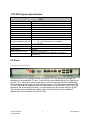
The photo above is of the panel below the touchscreen LCD. The labeled I/O ports are selfexplanatory to an experience PC user. To the left of the locking power port (to your right as you
face the 2170) is the system power on/off switch (circled in red above) which was deliberately
chosen for its small size to prevent accidental power downs. The USB ports are standard USB
2.0, the COM ports are explained below. The cash drawer port accepts a RJ12 jack; your POS
application can access this port directly. This cash drawer port has a power setting of 19VDC.
The LAN jack is for standard RJ45 network cables, DC IN is the port for the supplied AC
adapter and VGA is a standard 15-pin SVGA port.
© 2013 UTC RETAIL.
All rights reserved.
5
11921015A Rev A
COM Ports
There are 4 COM ports on the 2170; they are standard RS-232.The COM3 and COM4 ports
have been configured to supply +5VDC power to pin 9 of their DB9 connector. COM3 and
COM4 may supply up to 0.5A of current; do not exceed this limit.
Note: COM3 and COM4 may also be configured for pin 9 to be RI (ring indicator) or to
supply +12V 0.5A. This configuration must be performed at the UTC RETAIL facility.
The table below summarizes the RS232 DB9 pin definitions:
PIN NO.
Signal
1
CD
2
RX
3
TX
4
DTR
5
GND
6
DSR
7
RTS
8
9
CTS
RI or 5V/12V
output (as
explained
above)
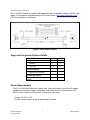
Use the supplied RJ48 – DB9 adapter cables to connect to the COM ports. Additional cables
are available as P/N 11801015. See the drawing below for the adapter’s pinout.
Figure 1, Serial Port Adapter Pinout
11921015 Rev A
6
© 2013 UTC RETAIL.
All rights reserved.
Cash Drawer Interface
The 2170 POS I/O panel as a single cash drawer port which is capable of driving a 24VDC cash
drawer. The interface is compatible with the APG Cash Drawer (http://www.cashdrawer.com/ )
CD-005A specification, seen below.
Figure 2, Cash Drawer Interface
Supported Peripheral Options Details
USB
Serial
Printer Options
H6000IV
TM-T88V
Keyboard Options
Standard PC keyboard
Pole Display Options
PD1200 with external power
adapter
Power Requirements
The 2170 POS System has one AC power cord. Connect the power cord to the AC adapter
installed into the system’s base. A dedicated, clean power source is recommended. UTC
RETAIL offers a variety of UPS options. Contact your sales agent.
Voltage: 120 VAC ± 10%
Current: 5 Amps maximum, with all peripherals connected
© 2013 UTC RETAIL.
All rights reserved.
7
11921015A Rev A
Connect Power Cable
Place the 2170 POS face down on a clean, soft surface, ensuring you do not scratch the front
bezel or the touchscreen.
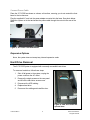
Plug the supplied AC cord into the power adapter mounted into the base. See photo below.
Stand the system on its feet and snake the power cable through the cutout in the rear of the
base.
Figure 3, AC Power Cord Attachment
Expansion Options
None, the system does not accept any internal expansion cards.
Hard Drive Removal
The 2170 POS System is equipped with one easily accessible hard drives.
To remove a hard drive, follow these steps:
1.
Shut off all power to the system, unplug the
power cord from the AC outlet.
2.
Remove the single screws on the rear panel
and lift off the hard drive access cover.
3.
Disconnect the HDD cabling.
4.
Replace hard drive.
5.
Reconnect the cabling and install the door.
Figure 4, HDD seen under the
opened door
11921015 Rev A
8
© 2013 UTC RETAIL.
All rights reserved.
System Installation Guide
Please refer to the 2170 POS System Installation Guide, which may be downloaded from the
UTC RETAIL’s website at www.utcretail.com.
Note: Consideration should be taken to ensure that none of the unit vents are blocked. Blocking
the vents may cause damage to the unit. The 2170 POS has no internal cooling fans and relies
on ambient air to provide system cooling.
Please call UTC RETAIL’s Technical Support at 800.349.0546 if you have any problems not
addressed in this manual or have questions about sections of this documentation.
© 2013 UTC RETAIL.
All rights reserved.
9
11921015A Rev A