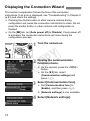
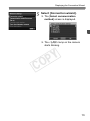
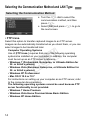
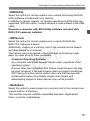
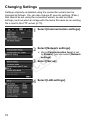
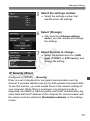
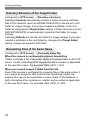
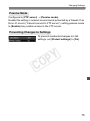
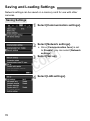
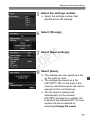
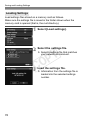
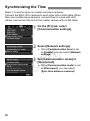
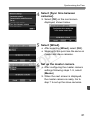
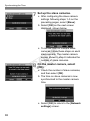
1
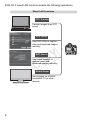
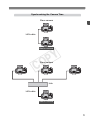
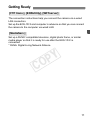
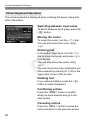
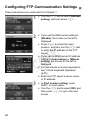
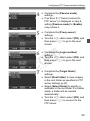
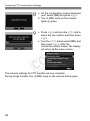
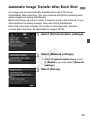
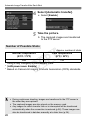
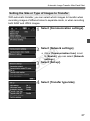
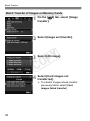
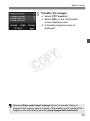
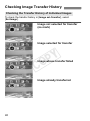
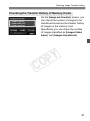
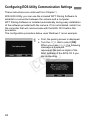
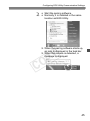
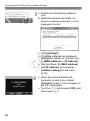
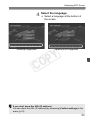
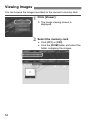
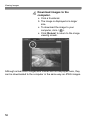
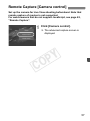
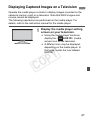
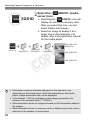
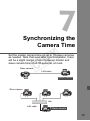
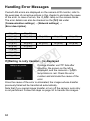
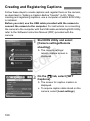
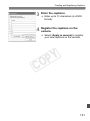
CANON INC. 30-2, Shimomaruko 3-chome, Ohta-ku, Tokyo 146-8501, Japan U.S.A. CANON U.S.A. INC. One Canon Plaza, Lake Success, NY 11042-1198, U.S.A. For all inquires concerning this product, call toll free in the U.S. 1-800-OK-CANON CANADA CANON CANADA INC. HEADQUARTERS 6390 Dixie Road, Mississauga, Ontario L5T 1P7, Canada CANON CANADA INC. MONTREAL BRANCH 5990, Côte-de-Liesse, Montréal Québec H4T 1V7, Canada CANON CANADA INC. CALGARY OFFICE 2828, 16th Street, N.E. Calgary, Alberta T2E 7K7, Canada For all inquiries concerning this product, call toll free in Canada 1-800-OK-CANON EUROPE, AFRICA & MIDDLE EAST CANON EUROPA N.V. Bovenkerkerweg 59-61, 1185 XB Amstelveen, The Netherlands CANON FRANCE S.A.S. 17,Quai du Président Paul Doumer, 92414 Courbevoie Cedex, France CANON UK LTD. Woodhatch Reigate,Surrey RH2 8BF, United Kingdom CANON DEUTSCHLAND GmbH Europark Fichtenhain A10, 47807 Krefeld, Germany CANON ITALIA S.p.A. Via Milano 8, 20097 San Donato Milanese, (MI), Italy CANON Schweiz A.G. Industriestrasse 12, 8305 Dietlikon, Switzerland Canon GmbH Zetschegasse 11, A-1230 Vienna, Austria CANON España,S.A. Av. De Europa,6 Alcobendas 28108 Madrid, Spain CANON Portugal S.A. Rua Alfredo da Silva,14 Alfragide 2610-016 Amadora, Portugal CENTRAL & SOUTH AMERICA CANON LATIN AMERICA, INC. 703 Waterford Way, Suite 400 Miami, FL 33126,U.S.A. ASIA CANON (China) Co., LTD. 15F Jinbao Building No.89 Jinbao Street, Dongcheng District, Beijing 100005, China CANON HONGKONG CO., LTD. 19/F., The Metropolis Tower, 10 Metropolis Drive, Hunghom, Kowloon, Hong Kong CANON SINGAPORE PTE. LTD. 1 HarbourFront Avenue, #04-01 Keppel Bay Tower, Singapore 098632 CANON KOREA CONSUMER IMAGING INC. Canon BS Tower 5F, #168-12 Samseong-dong, Gangnam-gu, Seoul, Korea OCEANIA CANON AUSTRALIA PTY. LTD. 1 Thomas Holt Drive, North Ryde, Sydney N.S.W. 2113, Australia CANON NEW ZEALAND LTD. Akoranga Business Park, Akoranga Drive, Northcote, Auckland, New Zealand JAPAN CANON MARKETING JAPAN INC. 16-6, Kohnan 2-chome, Minato-ku, Tokyo 108-8011, Japan This Instruction Manual booklet is current as of February 2012. For information on the camera’s compatibility with any accessories and lenses introduced after this date, contact any Canon Service Center. CPX-E011-001 © CANON INC. 2012 Wired LAN Instruction Manual C Y P O E INSTRUCTION MANUAL EOS-1D X wired LAN functions enable the following operations. Wired LAN Functions FTP Transfer Transfer images to an FTP server EOS Utility Use EOS Utility to capture, view, and download images remotely Y P O WFT Server Use a web browser to capture, view, and download images remotely C Media Server View images on a DLNAcompatible TV or other devices 2 Synchronizing the Camera Time Slave camera LAN cable Master camera Y P O Slave camera C Hub LAN cable Master camera 3 Conventions Used in this Manual These instructions assume that your wired LAN and FTP server settings are complete. For details on configuring these settings, refer to the documentation provided with the respective equipment. Terms in brackets [ ] indicate button or icon names or other software elements. Brackets also denote camera menu items. Page numbers in parentheses indicate where you can find additional information. These instructions assume that you have read the Camera Instruction Manual and are familiar with operating the camera. Sections of this manual labeled with the following symbols contain information of the corresponding nature. : Warnings to avoid potential problems are labeled with a caution symbol. Y P O : Supplemental information is labeled with a note symbol. C Windows is a trademark or registered trademark of Microsoft Corporation in the United States and other countries. Macintosh is a registered trademark of Apple Corporation in the United States and other countries. UPnP is a trademark of the UPnP Implementers Corporation. All other corporate and brand names in this manual are trademarks or registered trademarks of their respective owners. Using the camera for remote image transfer, capture, or viewing requires adequate knowledge of configuring your wired LAN and FTP server. Canon cannot provide support for configuring wired LANs or FTP servers. Note that Canon cannot be held liable for any loss or damage to the camera from erroneous network or FTP server settings. In addition, Canon cannot be held liable for any other loss or damage caused by use of the camera. 4 Chapter List Introduction 2 1 Basic Network Settings 9 2 Transferring Images to an FTP Server 21 3 Remote Capture Using EOS Utility 43 4 Remote Capture Using WFT Server 49 5 Using the Camera as a Media Server 65 6 Managing Settings Information 69 7 Synchronizing the Camera Time 79 8 Troubleshooting 83 9 Reference 99 C Y P O 5 Contents Introduction Conventions Used in this Manual ..................................................................... 4 Chapter List ...................................................................................................... 5 Contents ........................................................................................................... 6 1 Basic Network Settings LAN Cable Connection ................................................................................... Getting Ready ................................................................................................ Displaying the Connection Wizard.................................................................. Selecting the Communication Method and LAN Type.................................... Configuring Network Settings ......................................................................... 10 11 12 14 17 2 Transferring Images to an FTP Server 21 Configuring FTP Communication Settings ..................................................... Automatic Image Transfer After Each Shot .................................................... Transferring Images Individually..................................................................... Batch Transfer ................................................................................................ Checking Image Transfer History ................................................................... Viewing Transferred Images........................................................................... 22 25 30 34 40 42 3 Remote Capture Using EOS Utility 43 4 Remote Capture Using WFT Server 49 Configuring WFT Server Communication Settings......................................... Displaying WFT Server................................................................................... Viewing Images .............................................................................................. Remote Capture [Camera control].................................................................. Remote Capture [Simple control] ................................................................... Remote Capture ............................................................................................. 50 52 54 57 61 63 Using the Camera as a Media Server 65 5 6 C 9 Y P O Configuring EOS Utility Communication Settings........................................... 44 Using EOS Utility ............................................................................................ 48 Configuring Media Server Communication Settings....................................... 66 Displaying Captured Images on a Television ................................................. 67 Contents 6 Managing Settings Information 7 Synchronizing the Camera Time 8 Troubleshooting 9 Reference 69 Checking Settings ........................................................................................... 70 Changing Settings........................................................................................... 72 Saving and Loading Settings .......................................................................... 76 79 Synchronizing the Time................................................................................... 80 83 Handling Error Messages................................................................................ 84 Checking Network Settings ............................................................................. 97 99 Creating and Registering Captions ............................................................... 100 Index ............................................................................................................. 114 C Y P O 7 C 8 Y P O 1 Basic Network Settings Y P O Complete the basic network settings by following connection instructions on the camera menu screen. C 9 LAN Cable Connection Connecting a LAN Cable Open the Ethernet RJ-45 terminal cover and connect the LAN cable. LAN Cable Use a highly shielded Category 5e or higher STP (Shielded Twisted Pair) Gigabit Ethernet cable. C 10 Y P O Getting Ready [FTP trans.], [EOSUtility], [WFTserver] The connection instructions help you connect the camera via a wired LAN connection. Set up the EOS-1D X and computer in advance so that you can connect the camera to the computer via wired LAN. [MediaServ.] Set up a DLNA*-compatible television, digital photo frame, or similar media player so that it is ready for use after the EOS-1D X is connected. * DLNA: Digital Living Network Alliance C Y P O 11 Displaying the Connection Wizard This section’s explanation follows the flow of the connection instructions. If an error is displayed, see “Troubleshooting” in Chapter 8 (p.83) and check the settings. Pressing the shutter button or other camera controls during configuration will cause the connection instructions to close. Do not press the shutter button or other controls until configuration is finished. On the [52] tab, set [Auto power off] to [Disable]. If auto power off is activated, the connection instructions will close during the configuration process. 1 Turn the camera on. Y P O the communication 2 Display functions menu. C On the camera, press the <7> button. On the [53] tab, select [Communication settings] and press <0>. [Communication func]. 3 Select Set [Communication func] to [Enable], and then press <0>. X [Network settings] is now available. 4 12 Select [Network settings]. Displaying the Connection Wizard [Connection wizard]. 5 Select X The [Select communication method] screen is displayed. X The <Y> lamp on the camera starts blinking. C Y P O 13 Selecting the Communication Method and LAN Type Selecting the Communication Method Turn the <5> dial to select the communication method, and then press <0>. Select [OK] and press <0> to go to the next screen. • FTP trans. Select this option to transfer captured images to an FTP server. Images can be automatically transferred as you shoot them, or you can select images to be transferred later. Computer Operating Systems Use of [FTP trans.] requires that one of the following operating systems be installed on your computer. In addition, the computer must be set up as an FTP server in advance. • Windows 7 (Professional, Enterprise, or Ultimate Edition for 32- or 64-bit systems) • Windows Vista (Business, Enterprise, or Ultimate Edition for 32- or 64-bit systems) • Windows XP Professional • Mac OS X 10.6 or 10.7 For instructions on setting up your computer as an FTP server, refer to the computer documentation. The following operating systems cannot be used because FTP server functionality is not provided. • Windows 7 Home Premium • Windows Vista Home Premium/Home Basic Edition • Windows XP Home Edition C 14 Y P O Selecting the Communication Method and LAN Type • EOSUtility Select this option for remote capture over a wired LAN using the EOS Utility software included with your camera. In addition to remote capture, all camera operations in EOS Utility are supported. With this option, a wired network is used instead of the USB cable. Requires a computer with EOS Utility (software included with EOS-1D X cameras) installed. • WFTserver Select this option for remote capture over a wired LAN with the EOS-1D X acting as a server. Additionally, images on a memory card in the camera can be viewed and downloaded to a computer. The camera can be accessed in the same way as browsing a web page, by users at up to three computers. Y P O Computer Operating Systems Any computer with a web browser can be used, regardless of the operating system. Devices other than computers that feature a web browser can also be used. However, if the web browser does not support JavaScript, WFT Server functions will be limited. Also note that devices with limited performance may display images more slowly, and downloading images to these devices may not be possible. C • MediaServ. Select this option to view images on a memory card in the camera over a wired LAN on a television. This function requires a DLNA-compatible television, digital photo frame, or similar media player. 15 Selecting the Communication Method and LAN Type Selecting the LAN Type Make sure [Wired] is selected, and then press <0>. Select [OK] and press <0> to go to the next screen. C 16 Y P O Configuring Network Settings Turn the <5> dial to select a configuration method for the network settings, and then press <0>. Select [OK] and press <0> to go to the next screen. [Auto setting] Settings otherwise configured with [Manual setting] can be configured automatically. However, in environments using DHCP servers or routers supporting DHCP server functions, the IP address and similar settings must be assigned and configured automatically. If an error is displayed, select [Manual setting] regardless of whether the IP address and similar settings are automatically assigned and configured. [Manual setting] Y P O The [IP address set.] screen is displayed after you select [Manual setting]. If [Auto setting] results in an error, select [Manual setting]. The IP address you enter must be the IP address assigned to the camera. Enter the [IP address], [Subnet mask], [Gateway], and [DNS address] on each screen as they are displayed. If you are not sure what to enter, see page 97, “Checking Network Settings,” or ask the network administrator or another person knowledgeable about the network. C When entering numbers for the IP address, subnet mask, and so on, press <0> to move the input position and turn the <5> dial to enter the number. 17 Configuring Network Settings Completing Settings for the Communication Method The following instructions are for setting screens that vary depending on the communication method (FTP Transfer, EOS Utility, WFT Server, or Media Server), as shown below. Read the page that describes the selected communication method. FTP trans. Chapter 2 (p.21) EOSUtility Y P O Chapter 3 (p.43) C Windows 7 and Windows Vista Users Before performing the operations described from page 43, perform the operations below. If these operations are not performed, the WFT Pairing Software described on page 44 may not start. Open the [C Drive] [Program Files] [Canon] [EOS Utility] [WFTPairing] folder (in this order), and then double-click the [WFT FirewallSettings] icon. After performing this operation, perform the operations described from page 43. 18 Configuring Network Settings WFTserver Chapter 4 (p.49) MediaServ. Chapter 5 (p.65) C Y P O 19 Configuring Network Settings Virtual Keyboard Operation The virtual keyboard is displayed when entering the server name and other information. Switching between input areas To switch between input areas, press the <Q> button. Moving the cursor To move the cursor, turn the <5> dial. You can also move the cursor using <9>. Entering text Y P O In the bottom input area, turn the <5> dial to move the cursor and press <0> to enter text. You can also move the cursor using <9>. You can check how many characters you have entered by referring to [*/32] in the upper-right corner of the screen. C Deleting text If you make a mistake, press the <L> button to erase characters. Confirming entries Press the <7> button to confirm what you have entered and go to the next screen. Canceling entries Press the <6> button to erase the entry and return to the previous screen. 20 2 Transferring Images to an FTP Server Y P O With FTP transfer, you can automatically transfer each image to the FTP server as you shoot or transfer images in batches after shooting. C 21 Configuring FTP Communication Settings These instructions are continued from Chapter 1. 1 Turn the <5> dial to select [Address setting], and then press <0>. 2 If you set the DNS server setting to [Disable], the screen on the left is displayed. Press <0> to select the input position, and then turn the <5> dial to enter the IP address of the FTP server. If you set the DNS server IP address setting to [Auto assign] or [Manual setting], the screen on the left is displayed. For instructions on screen operations, see “Virtual Keyboard Operation” (p.20). Enter the FTP server’s server name or IP address. C 3 22 Y P O In [Port number setting], enter 00021, in most cases. Turn the <5> dial to select [OK], and then press <0> to go to the next screen. Configuring FTP Communication Settings 4 Complete the [Passive mode] settings. If an Error 41 (“Cannot connect to FTP server”) is displayed in step 8, setting [Passive mode] to [Enable] may resolve it. 5 Complete the [Proxy server] settings. Turn the <5> dial to select [OK], and then press <0> to go to the next screen. 6 C7 Y P O Complete the [Login method] settings. Turn the <5> dial to select [OK], and then press <0> to go to the next screen. Complete the [Target folder] settings. Select [Root folder] to save images in the root folder as specified in FTP server settings (p.42). Select [Select folder] to specify a subfolder in the root folder. If no folder exists, a folder will be created automatically. Turn the <5> dial to select [OK], and then press <0> to connect to the FTP server. 23 Configuring FTP Communication Settings 8 On the confirmation screen displayed next, select [OK] and press <0>. X The <Y> lamp on the camera lights up green. 9 Press <0> and turn the <5> dial to select the set number, and then press <0>. Turn the <5> dial to select [OK], and then press <0>. After the connection wizard closes, the display will return to the menu screen. C Y P O The network settings for FTP transfer are now complete. During image transfer, the <Y> lamp on the camera blinks green. 24 Automatic Image Transfer After Each Shot An image can be automatically transferred to the FTP server immediately after shooting. You can continue still photo shooting even while images are being transferred. Before shooting, be sure to insert a memory card in the camera. If you shoot without recording images, they will not be transferred. Note that automatic transfer of movies is not supported. Transfer movies after shooting, as described on pages 30-38. 1 Select [Communication settings]. Y P O 2 Select [Network settings]. C3 Once [Communication func] is set to [Enable], you can select [Network settings]. Select [Set up]. 25 Automatic Image Transfer After Each Shot [Automatic transfer]. 4 Select Select [Enable]. the picture. 5 Take X The captured images are transferred to the FTP server. Number of Possible Shots Approx. number of shots Normal Temperature (23°C / 73°F) 950 C Y P O Low Temperature (0°C / 32°F) 740 * Using a fully charged LP-E4N Battery Pack. * [LAN power save: Enable] * Based on Camera & Imaging Products Association (CIPA) standards. During continuous shooting, images are transferred to the FTP server in the order they are captured. The captured images are also stored on the memory card. Any images for which transfer fails or is interrupted will be transferred automatically when the connection is restored (p.28). These images can also be transferred in batches manually at a later time (p.34). 26 Automatic Image Transfer After Each Shot Setting the Size or Type of Images to Transfer With automatic transfer, you can select which images to transfer when recording images of different sizes to separate cards, or when recording both RAW and JPEG images. 1 Select [Communication settings]. 2 Select [Network settings]. Y P 3 O C Once [Communication func] is set to [Enable], you can select [Network settings]. Select [Set up]. 4 Select [Transfer type/size]. 27 Automatic Image Transfer After Each Shot the size and type of images 5 Select to transfer. To transfer smaller JPEGs when the camera is set up to record larger JPEGs to one card and smaller JPEGs to the other, set [JPEG size to trans.] to [Smaller JPEG]. To transfer either RAW or JPEG images when the camera is set up to record RAW images to one card and JPEGs to the other, specify which images to transfer in the [RAW+JPEG transfer] setting. Similarly, complete the same setting when RAW+JPEG images are recorded simultaneously to a single memory card. Y P O When images of the same size are recorded to both cards simultaneously, images recorded to card 1 are transferred, regardless of image quality (compression). C Auto Retry if Transfer Fails If transfer fails, the <Y> lamp on the camera blinks in red. In this case, press the <7> button, select [Communication settings] on the [53] tab, and press <0>. When the screen shown on the left is displayed, check the error number and see page 84 to eliminate the cause of the error. Once the cause of the error is eliminated, the images whose transfer previously failed will be transferred automatically. With this option activated, transfer is attempted again automatically after failure, both when automatic transfer is used and when transferring captured images via FTP. Note that when you cancel image transfer, or turn off the camera, the image will not be re-transferred automatically. See page 34 and transfer the image manually. 28 Automatic Image Transfer After Each Shot Enabling LAN Power Management In the menu, select [Communication settings] [Network settings] [Set up] [LAN power save]. When this option is set to [Enable], the camera will log off from the FTP server after transfer and switch to standby mode. Wired connectivity will be restored automatically when you attempt to transfer images, and the camera will reconnect to the FTP server. C Y P O 29 Transferring Images Individually Simply select an image and press <0> to transfer it. You can add a caption before transferring the image. You can continue still photo shooting even while images are being transferred. Transferring the Current Image 1 Select [Communication settings]. [Network settings]. 2 Select Once [Communication func] is set Y P O to [Enable], you can select [Network settings]. 3 Select [Set up]. C 30 Transferring Images Individually [Transfer with SET]. 4 Select Select [Enable]. the image. 5 Select Press the <x> button on the C camera. Select the image to transfer, and then press <0> to transfer the image. Movies cannot be transferred with this function. If you select a movie and press <0>, the movie playback panel will be displayed. Y P O 31 Transferring Images Individually Adding a Caption Before Transfer You can add a registered caption to each image before transfer. This is convenient if you want to inform the recipient of the quantity to print, for example. The caption is also added to images stored on the camera. For instructions on creating and registering captions, see page 100. You can check the captions added to images in the user comments included in the Exif information. 1 Take the picture. 2 Select [Communication settings]. C Y P O [Network settings]. 3 Select Once [Communication func] is set to [Enable], you can select [Network settings]. 32 Transferring Images Individually [Transfer with caption]. 4 Select X The last captured image is displayed. It is not possible to select other images on the [Transfer with caption] screen. To select another image for transfer with a caption, play back that image before following these steps. a caption. 5 Select Turn the <5> dial to select the C6 Y P O [Caption] box, and then press <0>. Turn the <5> dial to select the caption content, and then press <0>. Transfer the image. Turn the <5> dial to select [Transfer], and then press <0>. 33 Batch Transfer After shooting, you can select multiple images as desired and transfer them all at once. You can transfer unsent images or images whose transfer failed previously. You can continue still photo shooting even while images are being transferred. Selecting Images to Transfer 1 On the [32] tab, select [Image transfer]. Y P O 2 Select [Image sel./transfer]. C 3 Select [Sel.Image]. X An image is displayed. 34 Batch Transfer images to transfer. 4 Select Press <0> and turn the <5> dial to display <X> in the upper left corner of the images to transfer. Press <0> to confirm your selection. You can select up to 9,999 images. To display three images per screen, hold the <u> button and turn the <6> dial left. To display one image per screen, hold the <u> button and turn the <6> dial right. C5 Y P O After selecting images to transfer, press the <7> button. Transfer the images. Select [FTP transfer]. Select [OK] on the confirmation screen displayed next. X A transfer progress screen is displayed. 35 Batch Transfer [RAW+JPEG transfer] Options Selecting [RAW+JPEG transfer] in step 2 on page 34 will give you the option of transferring RAW images, JPEG images, or both types of images. The options will be the same whether you specify [Sel. Image], [Sel. n], or [All image] as the image selection method. Menu Operation During Image Transfer You can use the menu even during image transfer. However, to prevent transfer problems, some menu items are unavailable during transfer, such as [Communication settings], [Protect images], [Erase images], [Format card], and [Record func+card/folder sel.]. C Y P O If you shoot a movie during the image transfer of captured images, the image transfer will be temporary cancelled during movie shooting. Batch Transfer of Images in a Folder 1 On the [32] tab, select [Image transfer]. 2 Select [Image sel./transfer]. 36 Batch Transfer 3 Select [Sel.n]. [Folder images not 4 Select transfer’d]. To transfer images whose transfer previously failed, select [Folder images failed transf.]. Y P O 5 Select a folder. C6 Transfer the images. Select [FTP transfer]. Select [OK] on the confirmation screen displayed next. X A transfer progress screen is displayed. Selecting [Clear folder transf. history] will set the transfer history of images in the selected folder to “unsent.” This enables you to resend all the images in the folder later by selecting [Folder images not transfer’d]. 37 Batch Transfer Batch Transfer of Images on Memory Cards 1 On the [32] tab, select [Image transfer]. 2 Select [Image sel./transfer]. Y P O 3 Select [All image]. C [Card images not 4 Select transferred]. To transfer images whose transfer previously failed, select [Card images failed transfer]. 38 Batch Transfer the images. 5 Transfer Select [FTP transfer]. Select [OK] on the confirmation screen displayed next. X A transfer progress screen is displayed. C Y P O Selecting [Clear card’s transf. history] will set the transfer history of images on the memory card to “unsent.” This enables you to resend all the images on the card later by selecting [Card images not transferred]. 39 Checking Image Transfer History Checking the Transfer History of Individual Images To check the transfer history in [Image sel./transfer], select [Sel.Image]. Image not selected for transfer (no mark) Image selected for transfer Y P O Image whose transfer failed C Image already transferred 40 Checking Image Transfer History Checking the Transfer History of Memory Cards On the [Image sel./transfer] screen, you can check the number of images to be transferred as well as the transfer history of images in the memory card. Specifically, you can check the number of images classified as [Images failed trans.] and [Images transferred]. C Y P O 41 Viewing Transferred Images Images transferred to the FTP server are stored in the following folder as specified in the FTP server settings. Windows Under the default settings of the FTP server, images are stored in [C drive] [Inetpub] folder [ftproot] folder, or in a subfolder of this folder. If the root folder of the transfer destination has been changed in the FTP server settings, ask the FTP server administrator where images are transferred. Macintosh Open the [Macintosh HD] [Users] folder. The folder where images are stored is located in the folder of the user currently logged in, or in a subfolder of this folder. Folders for Image Storage C Y P O Under default settings, transferred images will be stored in the root folder specified in the FTP server settings, in a folder structure such as A/DCIM/100EOS1D that is automatically created. Additionally, when you have selected card 1 for recording and playback, a folder structure such as “A/DCIM/100EOS1D” is automatically created for image storage. For card 2, the folder structure is “B/DCIM/ 100EOS1D”. (Images are stored separately, with card 1 images in folder A and card 2 images in folder B.) 42 3 Remote Capture Using EOS Utility Y P O You can use EOS Utility to shoot remotely over a wired LAN. As a wired network is used instead of the USB cable, all camera operations (except firmware updates) in EOS Utility are supported, in addition to remote capture. C The wired LAN functions cannot be used with the Mac version of EOS Utility (as of November 2011). Check the Canon website for the latest system requirements, including supported OS versions. 43 Configuring EOS Utility Communication Settings These instructions are continued from Chapter 1. With EOS Utility, you can use the included WFT Pairing Software to establish a connection between the camera and a computer. WFT Pairing Software is installed automatically during easy installation of the software provided with the camera. If it is not installed, install it on the computer that will communicate with the EOS-1D X before this procedure. The configuration procedure below uses Windows 7 as an example. 1 First, the pairing screen is displayed. Turn the <5> dial to select [OK]. When you press <0>, the following message is displayed. ****** represents the last six digits of the MAC address of the EOS-1D X you are connecting. C 44 Y P O Configuring EOS Utility Communication Settings Start the pairing software. Normally, it is installed in the same location as EOS Utility. 2 X When the pairing software starts up, an icon is displayed in the task bar. X When the camera is detected, a message is displayed. C Y P O 45 Configuring EOS Utility Communication Settings 3 Double-click the pairing software icon. X Detected cameras are listed. If a camera is already connected, it is not displayed in the list. Y P O Click [Connect]. If multiple cameras are displayed, identify the camera to connect to by its [MAC address] or [IP address]. You can check the [MAC address] and [IP address] by accessing [Confirm settings] in the menu (p.70). C 4 46 When the camera detects the computer on which you clicked [Connect] in step 3, the message on the left is displayed. Turn the <5> dial to select [OK], and then press <0>. Configuring EOS Utility Communication Settings 5 Press <0> and turn the <5> dial to select the set number, and then press <0>. After you turn the <5> dial to select [OK] and press <0>, the connection wizard closes and EOS Utility starts up. X The <Y> lamp on the camera lights up green. The EOS Utility network settings are now complete. There is no need to complete pairing again if you continue using a particular camera and computer together after pairing without changing the settings. When using this function the next time, simply turn on the camera and start the pairing software. The connection between the camera and computer will be established automatically. You can add the pairing software to the software launched at startup of your computer. In the [Preferences] [Basic Settings] tab in EOS Utility, select [ Add WFT Pairing Software to the Startup folder]. C Y P O 47 Using EOS Utility For EOS Utility instructions, refer to the Software Instruction Manual (PDF). You can take full advantage of EOS Utility via the camera just as via a USB connection, without restrictions. C Y P O The motion of moving subjects may not be displayed smoothly depending on the image transmission speed of the wired LAN. 48 4 Remote Capture Using WFT Server Y P O Using a web browser, you can view images recorded on a memory card in the camera and download them to a computer. Additionally, you can shoot remotely over a wired LAN. Note that bulb, mirror lockup, and movie shooting are not supported. C 49 Configuring WFT Server Communication Settings These instructions are continued from Chapter 1. Press <0> and turn the <5> dial to select the set number, and then press <0>. Press <0> again. After the connection wizard closes, the display will return to the menu screen. X The <Y> lamp on the camera lights up green. Setting up an Account C Y P O Enter a login name and password to access the camera from a computer. The login name and password you specify here are used on the computer when connecting to the camera. 1 50 Turn the <5> dial to select [Set up], and then press <0>. Configuring WFT Server Communication Settings 2 Turn the <5> dial to select [WFT server settings], and then press <0>. 3 Turn the <5> dial to select [WFT account], and then press <0>. When changing the port number, turn the <5> dial to select [Port number] and press <0>. Note that there is normally no need to change the port number (80). 4 C 5 Y P O Select a user number. With WFT Server, you can connect the camera to up to three computers. Select a user number to prevent conflicts when users at other computers are connected to the camera simultaneously. Turn the <5> dial to select [User *], and then press <0>. After you select [Login name] and [Password], the following input screen is displayed. For instructions on input screen operations, see “Virtual Keyboard Operation” (p.20). The WFT Server network settings are now complete. 51 Displaying WFT Server In the web browser, display the WFT Server screen for EOS-1D X operations. Make sure you have already established a connection between the camera and computer. 1 Start the web browser. First, start Internet Explorer or another web browser. the URL. 2 Enter In the address bar, enter the IP address assigned to the camera. Press the <Enter> key. the [Login name] and 3 Enter [Password] settings. Y P O Enter the login name and password as specified in the procedure on page 51. Click [OK] to display the WFT Server screen. Web browsers that support JavaScript will display the screen on the lower left in step 4. Otherwise, a message is displayed when JavaScript is not supported. Choosing not to use JavaScript will display the screen on the lower right in step 4, with limited functions. C 52 Displaying WFT Server the language. 4 Select Select a language at the bottom of the screen. JavaScript supported C JavaScript not supported Y P O If you don’t know the URL (IP address) You can check the URL (IP address) by accessing [Confirm settings] in the menu (p.70). 53 Viewing Images You can browse the images recorded on the camera’s memory card. 1 Click [Viewer]. X The image viewing screen is displayed. the memory card. 2 Select Click [CF1] or [CF2]. Click the [DCIM] folder and select the folder containing the images. C 54 Y P O Viewing Images an image. 3 Select To view another image, click the < > buttons or jump to other pages. In JavaScript-compatible web browsers, you can specify how many thumbnails are shown per screen by clicking the pull-down list in the upper-right corner of the screen. C Y P O 55 Viewing Images images to the 4 Download computer. Click a thumbnail. X The image is displayed at a larger size. To download the image to your computer, click < >. Click [Return] to return to the image viewing screen. C Y P O Although actual RAW images and movies are not displayed here, they can be downloaded to the computer in the same way as JPEG images. 56 Remote Capture [Camera control] Set up the camera for Live View shooting beforehand. Note that remote capture of movies is not supported. For web browsers that do not support JavaScript, see page 63, “Remote Capture”. 1 Click [Camera control]. X The advanced capture screen is displayed. C Y P O 57 Remote Capture [Camera control] ① ② ③④ ⑤ ⑥ ⑫ ⑬ ⑲ ⑭ ⑦ ⑧ ⑨ ⑩ ⑪ ⑮ ⑯ ⑰ ① Battery check ② Drive mode ③ Number of possible shots ④ AF mode ⑤ Release button ⑥ AF/MF switch ⑦ Shutter speed ⑧ Aperture ⑨ ISO speed ⑩ Exposure compensation ⑱ C Y P O ⑪ Quality ⑫ Shooting mode ⑬ White balance ⑭ Metering mode ⑮ Menu ⑯ Live View shooting button ⑰ Manual focus button Live View image size switching ⑱ button ⑲ Live View image screen * Items that cannot be set via WFT Server are shaded on the screen. 58 Remote Capture [Camera control] the lens focus mode switch to 2 Set <f>. Click the release button (⑤). When you let go of the button, the camera autofocuses and the picture is taken. With One-Shot AF, the picture is not taken if focus is not achieved. Display the Live View image and focus manually as described in the next steps. the Live View image. 3 Display Click the Live View shooting button ⑯ ⑱ (⑯). X The AF/MF switch (⑥) is set to <g>, and the Live View image is displayed. If the Live View image is not displayed, enable Live View shooting in the menu (⑮). To make the Live View image display more responsive, click the Live View image size switching button (⑱). The Live View image will be displayed at a smaller size, improving responsiveness. To restore the original size, click this button again. C Y P O 59 Remote Capture [Camera control] adjust the focus. 4 Manually Click the buttons < >, < >, < >, < >, < >, and < > to adjust the focus. Note that autofocus is not supported during the Live View image display. To focus closer, click < >, < >, or < >. To focus farther away, click < >, < >, or < >. Three levels of focus adjustment are available. < >< > : Largest increment < >< > : Intermediate increment < >< > : Smallest increment Y P O the shooting functions. 5 Configure Click items such as quality to view and configure their settings. Complete the settings as needed. C 6 TakeClickthethepicture. release button (⑤). When you let go of the button, the picture is taken. X The captured image will be displayed. Captured images are stored on the camera’s memory card. To download images to your computer, see page 54, and use the [Viewer] function. The Live View image may freeze when shooting if the camera is accessed by multiple computers. 60 Remote Capture [Simple control] Set up the camera for Live View shooting beforehand. Note that remote capture of movies is not supported. For web browsers that do not support JavaScript, see page 63, “Remote Capture.” 1 Click [Simple control]. X The basic capture screen and the Live View image are displayed. Y P O Live View image screen C Manual focus button < >< >< >: Focuses closer < >< >< >: Focuses farther away Release button Levels of focus adjustment < >< < >< < >< > : Largest increment > : Intermediate increment > : Smallest increment 61 Remote Capture [Simple control] adjust the focus. 2 Manually Set the lens focus mode switch to <f>. Click the buttons < < >, < >, < to adjust the focus. >, < >, >, and < > 3 TakeClickthethepicture. release button. When you let go of the button, the picture is taken. X The captured image is now displayed. Captured images are stored on the camera’s memory card. To download images to your computer, see page 54, and use the [Viewer] function. C 62 Y P O Remote Capture The following instructions are for remote capture with web browsers that do not support JavaScript. Set up the camera for Live View shooting beforehand. Note that remote capture of movies is not supported. 1 Screen Release button Click [Capture]. X The capture screen is displayed. The Live View image is not displayed. picture. 2 TakeSetthe the lens focus mode switch to Y P O <g>. Adjust the focus on the camera. Click the release button. When you let go of the button, the picture is taken. X The captured image will be displayed. Captured images are stored on the camera’s memory card. C 63 Remote Capture images to the 3 Download computer. Click the image. X The image is displayed at a larger size. To download the image to your computer, click < >. Click [Return] to return to the capture screen. C Y P O Although actual RAW images are not displayed here, they can be downloaded to the computer in the same way as JPEG images. 64 5 Using the Camera as a Media Server Y P O Images on a memory card in the camera can be viewed over a wired LAN on a television. This function requires a DLNA*-compatible television, digital photo frame, or similar media player. (Subsequently, this equipment is collectively referred to as the media player.) C * DLNA: Digital Living Network Alliance 65 Configuring Media Server Communication Settings These instructions are continued from Chapter 1. Press <0> and turn the <5> dial to select the set number, and then press <0>. Press <0> again. After the connection wizard closes, the display will return to the menu screen. Y P O The media server network settings are now complete. C 66 Displaying Captured Images on a Television Operate the media player controls to display images recorded on the camera’s memory card on a television. Note that RAW images and movies cannot be displayed. The following operations are performed on the media player. For details, refer to the instruction manual for the media player. 1 Display the media player setting screen on your television. Using the media player functions, display the < EOS1D> (media server) icon on the television. A different icon may be displayed, depending on the media player. In that case, locate the icon labeled EOS1D. C Y P O 67 Displaying Captured Images on a Television EOS1D the < 2 Select server) icon. EOS1D> (media Selecting the < EOS1D> icon will display an icon of the memory card. After you select this icon, you can select folders and images. Select an image to display it at a larger size on the television. For details, refer to the instruction manual for the media player. IMG_0001.JPG 02/28/2012 EOS 1D CF 02/28/2012 100EOS1D 02/28/2012 C 1-100 02/28/2012 Y P O IMG_0002.JPG IMG_0003.JPG Information overlay and details displayed on the television vary depending on the media player. Note that depending on the media player, image information may not be displayed. Icons labeled 1-100 (for example) contain images grouped by file number in the selected folder (***EOS1D). Date information shown for images is based on Exif information added to the images. Date information shown for memory cards or folders may be the current date set on the camera, in some cases. 68 6 Managing Settings Information C Y P O 69 Checking Settings Check the network settings as follows. 1 Select [Communication settings]. [Network settings]. 2 Select Once [Communication func] is set to [Enable], you can select [Network settings]. 3 Select [Set up]. C 4 70 Y P O Select [Confirm settings]. X The settings are displayed. Checking Settings Example of FTP transfer and wired LAN settings C Y P O 71 Changing Settings Settings originally completed using the connection wizard can be changed as follows. You can also change IP security settings (IPsec) that cannot be set using the connection wizard, as well as other settings, such as when an image with the same file name as an existing file is sent to the FTP server (p.73). 1 Select [Communication settings]. [Network settings]. 2 Select Once [Communication func] is set Y P O to [Enable], you can select [Network settings]. 3 Select [Set up]. C 4 Select [LAN settings]. 72 Changing Settings the settings number. 5 Select Select the settings number that identifies the LAN settings. [Change]. 6 Select After selecting [Change settings name], you can rename and change the settings. Y P O the item to change. 7 Select Select the desired item from [LAN C type], [TCP/IP], or [FTP server], and change the setting. IP Security (IPsec) Configured in [TCP/IP] [Security]. IPsec is a set of standards for encrypted communication over the Internet. It provides effective security for both wireless and wired LANs. To use this function, you must enable IPsec in the network settings of your computer. When IPsec is employed, only transport mode is supported, and 3DES or AES encryption and SHA1 authentication are used. Note that the IP address of the computer for communication with the camera must be entered in [Destination address] on the settings screen. 73 Changing Settings Directory Structure of the Target Folder Configured in [FTP server] [Directory structure]. Selecting [Camera] automatically creates a folder structure matching that of the camera’s (such as A/DCIM/100EOS1D) in the server’s root folder for image storage. If you have created a subfolder in the root folder by changing the [Target folder] setting, a folder structure such as A/DCIM/100EOS1D is automatically created in that folder for image storage. Selecting [Default] will use the root folder for image storage. If you have created a subfolder in the root folder by changing the [Target folder] setting, images are saved in that folder. Overwriting Files of the Same Name Y P O Configured in [FTP server] [Overwrite same file]. When the camera is configured to prevent overwriting If there is already a file of the same name in the target folder on the FTP server, a suffix consisting of an underscore and a number is appended to the new file’s name. For example: IMG_0003_1.JPG. C When you resend images if initial transfer fails Even if the camera is configured to overwrite files of the same name, if you resend an image file that could not be transferred initially, the existing file may not be overwritten in some cases. If this happens, a suffix consisting of an underscore, a letter, and a number is appended to the new file’s name. For example: IMG_0003_a1.JPG. 74 Changing Settings Passive Mode Configured in [FTP server] [Passive mode]. Enable this setting in network environments protected by a firewall. If an Error 41 occurs (“Cannot connect to FTP server”), setting passive mode to [Enable] may enable access to the FTP server. Preventing Changes to Settings To prevent accidental changes to LAN settings, set [Protect settings] to [On]. C Y P O 75 Saving and Loading Settings Network settings can be saved on a memory card for use with other cameras. Saving Settings 1 Select [Communication settings]. [Network settings]. 2 Select Once [Communication func] is set to [Enable], you can select [Network settings]. Y P O 3 Select [Set up]. C 4 Select [LAN settings]. 76 Saving and Loading Settings the settings number. 5 Select Select the settings number that identifies the LAN settings. 6 Select [Change]. Y P O 7 Select [Save settings]. C8 Select [Save]. X The settings are now saved as a file on the memory card. The settings are saved as a file (WFTNPF**.NIF) in the area of the memory card shown when the card is opened (in the root directory). The file name is determined automatically by the camera: WFTNPF, followed by a number (01 to 99) and the extension NIF. You can rename the file as desired by selecting [Change file name]. 77 Saving and Loading Settings Loading Settings Load settings files stored on a memory card as follows. Make sure the settings file is saved in the folder shown when the memory card is opened (that is, the root directory). 1 Select [Load settings]. the settings file. 2 Select X Select a settings file that matches Y P O your network environment. C the settings file. 3 Load X Information from the settings file is loaded into the selected settings number. 78 7 Synchronizing the Camera Time Y P O Set the master camera time on up to 10 slave cameras, as needed. Note that even after synchronization, there will be a slight margin of error between master and slave camera time of ±0.05 seconds, at most. Slave camera C LAN cable Master camera Slave camera Hub LAN cable Master camera 79 Synchronizing the Time Steps 1–5 are the same on master and slave cameras. Connect the EOS-1D X cameras to each other with a LAN cable. When there are multiple slave cameras, connect them to a hub with LAN cables, and connect the hub to the master camera with a LAN cable. 1 On the [53] tab, select [Communication settings]. [Network settings]. 2 Select Once [Communication func] is set Y P O to [Enable], you can select [Network settings]. [Communication mode] to 3 Set [Disconnect]. C Once [Communication mode] is set to [Disconnect], you can select [Sync time between cameras]. 80 Synchronizing the Time [Sync time between 4 Select cameras]. X Select [OK] on the next screen displayed, shown below. [Wired]. 5 Select After selecting [Wired], select [OK]. Steps up to this point are the same on master and slave cameras. Y P C6 O Set up the master camera. After configuring the master camera settings following steps 1–5, select [Master]. X When the next screen is displayed, the master camera is ready. Go to step 7 to set up the slave cameras. 81 Synchronizing the Time up the slave cameras. 7 SetAfter configuring the slave camera settings following steps 1–5 on the preceding pages, select [Slave]. X Select [OK] on the next screen displayed, shown below. To set the time on multiple slave cameras, follow these steps on each slave camera. The master camera screen shown in step 8 indicates the number of slave cameras. C Y P O the master camera, select 8 On [OK]. Check the number of slave cameras, and then select [OK]. X The time on slave cameras is now synchronized to the master camera time. Select [OK] to return to the [Network settings] screen. 82 8 Troubleshooting C Y P O 83 Handling Error Messages If wired LAN errors are displayed on the camera LCD monitor, refer to the examples of corrective actions in this chapter to eliminate the cause of the error. In case of errors, the <Y> lamp on the camera blinks. The error details can also be checked on the [53] tab under [Communication settings] [Network settings] [Error description]. 11 (p.85) 12 (p.85) 21 (p.85) 22 (p.86) 23 (p.87) 24 (p.88) 25 (p.89) 41 (p.91) 42 (p.93) 43 (p.93) 44 (p.94) 45 (p.94) 46 (p.95) 47 (p.95) 26 (p.89) 73 (p.96) 81 (p.96) 91 (p.96) Y P O If [Waiting to retry transfer…] is displayed C If image transfer via FTP fails after shooting, the screen on the left is displayed, and the camera’s <Y> lamp blinks in red. Check the error number and eliminate the cause of the error. Once the cause of the error is eliminated, the images whose transfer previously failed will be transferred automatically. Note that if you cancel image transfer or turn off the camera, auto retry is not performed. Follow the steps on page 34 to transfer the images. 84 Handling Error Messages 11: Connection target not found Is the pairing software running? X Start the pairing software and follow the instructions to re-establish the connection (p.44). 12: Connection target not found Is the target computer on? X Turn on the target computer. 21: No address assigned by DHCP server What to check on the camera Is the camera’s network setting set to [Auto setting], or its IP address setting set to [Auto assign]? X If you are not using a DHCP server, set the camera’s network setting to [Manual setting] and IP address setting to [Manual setting] (p.17). C Y P O What to check on the DHCP server Is the DHCP server on? X Turn the DHCP server on. Are there enough addresses for assignment by the DHCP server? X Increase the number of addresses assigned by the DHCP server. X Remove devices assigned addresses by the DHCP server from the network to reduce the number of addresses in use. 85 Handling Error Messages Is the DHCP server functioning correctly? X Check the DHCP server settings to make sure it is functioning correctly as a DHCP server. X If applicable, ask your network administrator to ensure that the DHCP server can be used. 22: No response from DNS server What to check on the camera Is the camera’s network setting set to [Auto setting], or its IP address setting set to [Auto assign]? X If you are not using a DNS server, set the camera’s DNS address setting to [Disable] (p.17). On the camera, does the DNS server’s IP address setting match the server’s actual address? X Configure the IP address on the camera to match the actual DNS server address (p.17, 97). C Y P O What to check on the DNS server Is the DNS server on? X Turn the DNS server on. Are the DNS server settings for IP addresses and the corresponding names correct? X On the DNS server, make sure IP addresses and the corresponding names are entered correctly. 86 Handling Error Messages Is the DNS server functioning correctly? X Check the DNS server settings to make sure the server is functioning correctly as a DNS server. X If applicable, ask your network administrator to ensure that the DNS server can be used. What to check on the network as a whole Does your network include a router or similar device that serves as a gateway? X If applicable, ask your network administrator for the network gateway address and enter it on the camera (p.17, 97). X Make sure the gateway address setting is correctly entered on all network devices, including the camera. Y P O 23: Duplicate IP address What to check on the camera Is another device on the camera network using the same IP address as the camera? X Change the camera’s IP address to avoid using the same address as another device on the network. Otherwise, change the IP address of the device that has a redundant address. X In network environments with a DHCP server, if the camera’s IP address setting is [Manual setting], change it to [Auto assign] (p.17). C 87 Handling Error Messages 24: No response from proxy server What to check on the camera The camera’s proxy server setting is [Enable]. Does the error occur under this setting? X If you are not using a proxy server, set the camera’s proxy server setting to [Disable] (p.23). Do the camera’s [Address setting] and [Port No.] settings match those of the proxy server? X Configure the camera’s proxy server address and port number to match those of the proxy server (p.22). In the camera’s [Proxy server] settings, have you only entered [Server name]? X If the proxy server’s [Address] setting is not configured on the camera, enter it along with the DNS server address (p.17). Make sure the server name and port number for the proxy server are entered correctly (p.22). C Y P O What to check on the proxy server Is the proxy server on? X Turn the proxy server on. Is the proxy server functioning correctly? X Check the proxy server settings to make sure the server is functioning correctly as a proxy server. X If applicable, ask your network administrator for the proxy server address or server name and port number, and then enter them on the camera. 88 Handling Error Messages What to check on the network as a whole Does your network include a router or similar device that serves as a gateway? X If applicable, ask your network administrator for the network gateway address and enter it on the camera. X Make sure the gateway address setting is correctly entered on all network devices, including the camera. 25: Another terminal has set the same IP address Is another device on the camera network using the same IP address as the camera? X This error occurs if the camera is connected to a network where another device subsequently connects with the same IP address. Change the camera’s IP address to avoid using the same address as another device on the network. Otherwise, change the IP address of the device that has a redundant address. C Y P O 26: No response from DHCP server What to check on the camera On the camera, the network setting is [Auto setting]. Does the error occur under this setting? X If you are not using a DHCP server, set the camera’s network setting to [Manual setting] (p.17). 89 Handling Error Messages What to check on the DHCP server Is the DHCP server on? X Turn the DHCP server on. Are the DHCP server settings for IP addresses and the corresponding names correct? X On the DHCP server, make sure IP addresses and the corresponding names are entered correctly. Is the DHCP server functioning correctly? X Check the DHCP server settings to make sure it is functioning correctly as a DHCP server. X If applicable, ask your network administrator to ensure that the DHCP server can be used. Y P O What to check on the network as a whole Does your network include a router or similar device that serves as a gateway? X If applicable, ask your network administrator for the network gateway address and enter it on the camera (p.17). X Make sure the gateway address setting is correctly entered on all network devices, including the camera. C 90 Handling Error Messages 41: Cannot connect to FTP server What to check on the camera On the camera, does the FTP server’s IP address setting match the server’s actual address? X Configure the IP address on the camera to match the actual FTP server address (p.22). On the camera, does the [Port number setting] for the FTP server match the actual port number of the FTP server? X Configure the same port number (usually 21) on the camera and FTP server. Configure the port number on the camera to match the actual FTP server port number (p.22). If only the FTP server’s [Server name] is configured on the camera, are the DNS server settings complete? X If the FTP server’s [Address] setting is not configured on the camera, enable use of the DNS server on the camera and enter its address (p.17). Make sure the FTP server name is entered correctly (p.22). C Y P O What to check on the FTP server Is the FTP server functioning correctly? X Configure the computer correctly to function as an FTP server. X If applicable, ask your network administrator for the FTP server address and port number, and then enter them on the camera. 91 Handling Error Messages Is the FTP server on? X Turn the FTP server on. The server may have been turned off because of an energy-saving mode. On the camera, does the FTP server’s IP address setting (in [Address]) match the server’s actual address? X Configure the IP address on the camera to match the actual FTP server address (p.22). Is a firewall or other security software enabled? X Some security software uses a firewall to restrict access to the FTP server. Change the firewall settings to allow access to the FTP server. X You may be able to access the FTP server by setting [Passive mode] to [Enable] on the camera (p.75). Are you connecting to the FTP server via a broadband router? X Some broadband routers use a firewall to restrict access to the FTP server. Change the firewall settings to allow access to the FTP server. X You may be able to access the FTP server by setting [Passive mode] to [Enable] on the camera (p.75). C 92 Y P O Handling Error Messages If you are using Windows XP Service Pack 2 or later, is access to the FTP server blocked by [Windows Firewall]? X Change the Windows Firewall settings to allow access to the FTP server. What to check on the network as a whole Does your network include a router or similar device that serves as a gateway? X If applicable, ask your network administrator for the network gateway address and enter it on the camera (p.17). X Make sure the gateway address setting is correctly entered on all network devices, including the camera. 42: FTP server rejected connection What to check on the FTP server Y P O Is the FTP server configured to restrict access to only some IP addresses? X Change the FTP server settings to allow access from the [IP address] configured on the camera in the TCP/IP settings. C 43: Cannot connect to FTP server. Error code received from server. What to check on the FTP server Have you exceeded the maximum number of FTP server connections? X Disconnect some network devices from the FTP server or increase the maximum number of connections. 93 Handling Error Messages 44: Cannot disconnect FTP server. Error code received from server. This error occurs if the camera fails to disconnect from the FTP server for some reason. X Turn the FTP server and camera off and on. 45: Cannot login to FTP server. Error code received from server. What to check on the camera On the camera, is the [Login name] entered correctly? X Check the login name for accessing the FTP server. The setting is case-sensitive, so check upper- and lower-case characters. Make sure the correct login name is entered on the camera (p.23). Y P O On the camera, is the [Login password] entered correctly? X If a login password is configured on the FTP server, check the upperand lower-case characters to make sure the password on the camera matches it (p.23). C What to check on the FTP server Do the user rights for the FTP server allow reading, writing, and log access? X Configure the FTP server’s user rights to allow reading, writing, and log access. Is the folder specified as the transfer destination on the FTP server named with ASCII characters (p.20)? X Use ASCII characters for the folder name. 94 Handling Error Messages 46: For the data session, error code received from FTP server What to check on the FTP server The connection was terminated by the FTP server. X Restart the FTP server. Do the user rights for the FTP server allow reading, writing, and log access? X Configure the FTP server’s user rights to allow reading, writing, and log access. Do user rights allow access to the target folder on the FTP server? X Configure the user rights for access to the target folder on the FTP server to allow saving images from the camera. Y P O Is the FTP server on? X Turn the FTP server on. The server may have been turned off because of an energy-saving mode. C Is the hard disk of the FTP server full? X Increase available space on the hard disk. 47: Image file transfer completion not confirmed by FTP server This error occurs if, for some reason, the camera fails to receive confirmation from the FTP server that image file transfer is complete. X Turn the FTP server and camera off and on and transfer the images again. 95 Handling Error Messages 73: Could not synchronize the time Are you following the correct procedure to establish a connection between the master and slave cameras? X Operate the master and slave cameras by following the correct instructions (p.80-82). 81: Wired LAN connection lost Is the LAN cable securely connected? X Reconnect the LAN cable between the camera and server. Because the cable may be severed, try using another cable to connect the devices. Is the hub or router on? X Turn on the hub or router. Y P O Is the server on? X Turn the server on. The server may have been turned off because of an energy-saving mode. 91: Other error C An error other than error number 11 to 81 has occurred. X Turn the camera’s power switch off and on. . 96 Checking Network Settings Windows Click the Windows [Start] button [All Programs] [Accessories] [Command Prompt]. Type ipconfig/all and press the <Enter> key. The IP address assigned to the computer is displayed, as well as the subnet mask, gateway, and DNS server information. To avoid using the same IP address for the computer and other devices on the network when configuring the IP address assigned to the camera (page 17), change the rightmost numbers here. Macintosh In Mac OS X, open the [Terminal] application, type ifconfig -a, and press the <Return> key. The IP address assigned to the computer is indicated in the [en0] item by [inet], in the format ***.***.***.***. To avoid using the same IP address for the computer and other devices on the network when configuring the IP address assigned to the camera (page 17), change the rightmost numbers here. * For information on the [Terminal] application, refer to the Mac OS X help. C Y P O 97 C 98 Y P O 9 Reference C Y P O 99 Creating and Registering Captions Follow these steps to create captions and register them on the camera, as described in “Adding a Caption Before Transfer” (p.32). When creating and registering captions, use a computer on which EOS Utility is installed. Before you start, use the USB cable provided with the camera to connect the camera to the computer. For instructions on connecting the camera to the computer with the USB cable and starting EOS Utility, refer to the Software Instruction Manual (PDF) provided with the camera. 1 Start EOS Utility and select [Camera settings/Remote shooting]. X The camera settings/ remote capture screen is displayed. C Y P O the [ ] tab, select [WFT 2 On Captions]. X The screen for caption creation is displayed. To acquire caption data stored on the camera, select [Load settings]. 100 Creating and Registering Captions the captions. 3 Enter Enter up to 31 characters (in ASCII format). the captions on the 4 Register camera. Select [Apply to camera] to register your new captions on the camera. C Y P O 101 MEMO C 102 Y P O MEMO C Y P O 103 MEMO C 104 Y P O MEMO C Y P O 105 MEMO C 106 Y P O MEMO C Y P O 107 MEMO C 108 Y P O MEMO C Y P O 109 MEMO C 110 Y P O MEMO C Y P O 111 MEMO C 112 Y P O MEMO C Y P O 113 Index A J Account...........................................50 Authentication .................................73 Auto power off.................................12 B Batch transfer .....................34, 36, 38 Browser...........................................52 C Camera control ...............................57 Caption ...........................................32 Connection......................................12 D DHCP server...................................17 Digital photo frame..........................65 DLNA ..............................................65 DNS address ..................................17 DNS server .....................................22 E C Encryption.......................................73 EOS Utility ................................43, 48 EOSUtility .......................................15 Error................................................84 F File of same name ..........................74 Folder........................................23, 42 FTP server ......................................21 FTP trans. .......................................14 G Gateway..........................................17 I Image transfer.................................21 IP address.................................17, 22 IPsec...............................................73 114 JPEG.............................................. 27 K Keyboard........................................ 20 L Login .............................................. 23 Login name .................................... 50 M MAC address ................................. 44 Master camera ............................... 81 Media player................................... 65 Media Server.................................. 65 MediaServ. ..................................... 15 Movie.................................. 25, 56, 57 Y P O N Network ............................................ 9 Number of possible shots............... 26 P Pairing ...................................... 18, 44 Passive mode................................. 75 Password ....................................... 50 Port number ................................... 22 Protect settings .............................. 75 Proxy .............................................. 23 R RAW ............................................... 27 RAW+JPEG ................................... 28 Remote capture...... 43, 49, 57, 61, 63 Router ............................................ 17 S Select folder ................................... 23 Settings information ....................... 69 Simple control ................................ 61 Slave camera ................................. 82 Index Storage ...........................................42 Subnet mask ...................................17 Synchronizing camera time.............79 T Target ..............................................23 Target folder ....................................74 Television ..................................65, 67 Transfer after shooting ....................34 Transfer history ...............................40 Transfer with SET ...........................31 Transferred images .........................42 Transferring images, automatic ......25 Transferring images, individual images ............................................30 Troubleshooting ..............................83 U Y P O URL.................................................52 V C Viewing images...............................54 W Web.................................................52 WFT Server.....................................49 WFTserver.......................................15 Wired LAN.......................................16 Wizard.............................................12 115 CANON INC. 30-2, Shimomaruko 3-chome, Ohta-ku, Tokyo 146-8501, Japan U.S.A. CANON U.S.A. INC. One Canon Plaza, Lake Success, NY 11042-1198, U.S.A. For all inquires concerning this product, call toll free in the U.S. 1-800-OK-CANON CANADA CANON CANADA INC. HEADQUARTERS 6390 Dixie Road, Mississauga, Ontario L5T 1P7, Canada CANON CANADA INC. MONTREAL BRANCH 5990, Côte-de-Liesse, Montréal Québec H4T 1V7, Canada CANON CANADA INC. CALGARY OFFICE 2828, 16th Street, N.E. Calgary, Alberta T2E 7K7, Canada For all inquiries concerning this product, call toll free in Canada 1-800-OK-CANON EUROPE, AFRICA & MIDDLE EAST CANON EUROPA N.V. Bovenkerkerweg 59-61, 1185 XB Amstelveen, The Netherlands CANON FRANCE S.A.S. 17,Quai du Président Paul Doumer, 92414 Courbevoie Cedex, France CANON UK LTD. Woodhatch Reigate,Surrey RH2 8BF, United Kingdom CANON DEUTSCHLAND GmbH Europark Fichtenhain A10, 47807 Krefeld, Germany CANON ITALIA S.p.A. Via Milano 8, 20097 San Donato Milanese, (MI), Italy CANON Schweiz A.G. Industriestrasse 12, 8305 Dietlikon, Switzerland Canon GmbH Zetschegasse 11, A-1230 Vienna, Austria CANON España,S.A. Av. De Europa,6 Alcobendas 28108 Madrid, Spain CANON Portugal S.A. Rua Alfredo da Silva,14 Alfragide 2610-016 Amadora, Portugal C Y P O CENTRAL & SOUTH AMERICA CANON LATIN AMERICA, INC. 703 Waterford Way, Suite 400 Miami, FL 33126,U.S.A. ASIA CANON (China) Co., LTD. 15F Jinbao Building No.89 Jinbao Street, Dongcheng District, Beijing 100005, China CANON HONGKONG CO., LTD. 19/F., The Metropolis Tower, 10 Metropolis Drive, Hunghom, Kowloon, Hong Kong CANON SINGAPORE PTE. LTD. 1 HarbourFront Avenue, #04-01 Keppel Bay Tower, Singapore 098632 CANON KOREA CONSUMER IMAGING INC. Canon BS Tower 5F, #168-12 Samseong-dong, Gangnam-gu, Seoul, Korea OCEANIA CANON AUSTRALIA PTY. LTD. 1 Thomas Holt Drive, North Ryde, Sydney N.S.W. 2113, Australia CANON NEW ZEALAND LTD. Akoranga Business Park, Akoranga Drive, Northcote, Auckland, New Zealand JAPAN CANON MARKETING JAPAN INC. 16-6, Kohnan 2-chome, Minato-ku, Tokyo 108-8011, Japan This Instruction Manual booklet is current as of February 2012. For information on the camera’s compatibility with any accessories and lenses introduced after this date, contact any Canon Service Center. CPX-E011-001 © CANON INC. 2012 Wired LAN Instruction Manual E INSTRUCTION MANUAL































![3 Sélectionnez [Réglages].](http://vs1.manualzilla.com/store/data/006502646_1-716314e518c265d6faa81347dd31fca9-150x150.png)


![1 Sélectionnez [Fonction Wi-Fi].](http://vs1.manualzilla.com/store/data/006486173_1-47d0e1d0b9d2024351ca31e242a67422-150x150.png)