1
Samsung Plasma Display | 3 + 1
VMBL0609CA02HQ-WW
Distributed by
Design and Specifications are subject to change without notice.
Trademarks of other companies mentioned in these publications are hereby recognized and acknowledged.
imagine collective impact
Enter the pathway to success guided by Samsung LCD Monitor
LCD Display 200609
Business Display
All the visions are focused on the display
and the world come together before you
Samsung LCD Display
Large displays have become a necessity in public places like airports, train stations and shopping malls for
quick and correct information delivery. Samsung has taken notice of such demands, and is planning to take
the lead in the global large display market with its new multi-functional LCD display featuring the world's best
picture quality of 1200:1 contrast ratio, 500 cd/m2 brightness and fast response time of 8 ms (400PXn).
By providing an internal network solution without additional options, Samsung's new display (400PXn,
460PXn, 400TXn) with MagicNet X gives you convenience and cost reduction.
Public Display
Prestigious Display
Samsung LCD Display | 4 + 5
Picture Quality
Digital Natural Image engine, DNIeTM
The Ultimate Visual Journey through Samsung Technologies
Samsung's dream is to fulfill the demand for lifelike picture quality by creating natural images with vivid
color, and optimal detail and contrast. Our proprietary DNIeTM technology, developed through aggressive
research & development and 30 years of experience, achieves this dream by taking any signal from a
conventional broadcast source and turning it into a stunning picture on any screen.
Ever since the invention of the display device, people have wanted to see a bigger and better picture. Digital displays
allowed for larger screens, but demand for higher picture quality remained unfulfilled. Samsung, not only provides bigger
size display, but also provides best picture quality at the same time.
Motion Optimizer eliminates noise
Motion Optimizer takes visual data and automatically breaks them into
signal and noise, eliminating noise and blur without the slightest damage
to the original signal. This guarantees a picture of astounding sharpness,
whether the scene is still or moving.
Conventional
DNIe™
Color Optimizer shows natural hues
For each scene, Color Optimizer calculates the saturation of red,
green, and blue in the input signal and adjusts it to shades that the
human eye accepts as natural. Even white tone enhancement produces more striking results when used with DNIeTM Color Optimizer.
Conventional
DNIe™
Contrast Enhancer boosts light and shade
Conventional
DNIe™
Conventional contrast enhancers produce noise boosts and flickers. DNIeTM
has solved these problems by developing an epoch-making algorithm
called Contrast Enhancer that recognizes over 1 million criteria for applying
contrast, and automatically analyzes up to 70,000 local images within a
frame - producing a picture rich in contrast, even in the tiniest details.
Detail Enhancer sharpens the edges
Detail Enhancer eliminates unnatural effects by automatically analyzing
the portion of the signal to be amplified and detecting disturbances to
bring the viewer a startlingly sharp and lifelike image.
Conventional
DNIe™
Highest Contrast Ratio
SyncMaster 320PX / 400PX / 400PXn / 460PX / 460PXn
each boast contrast ratio of 1000/1200:1 surpassing the
contrast ratio of regular TVs. They’re capable of delivering a clear image
even in brightly-lit settings, ensuring that your customers will be able to
get the information they want at a glance.
Conventional
SyncMaster 1200:1
Matrix Display for
Video Wall
Highest Brightness
Samsung LCD Monitors produce remarkably bright pictures
- the industry's highest brightness level at 500 cd/m2. You
will not believe your eyes.
5x5
Conventional
SyncMaster 500cd/m2
Samsung LCD Display | 6 + 7
Fast Response Time
The fast response time of 8 ms ensures stable viewing of
DVDs and streaming video.
Ideal for multimedia-driven applications, gaming, animation or for viewing video over the world wide web.
Conventional
8 ms
Advanced Wide Viewing Angle
Conventional
S-PVA
Left side, right side or upside-down, whatever your monitor's location, Samsung's solution allows you to see any display clearly due to the wide viewing angle. Your Monitor will always be
well placed to enjoy the entertainment no matter what your angle of
view is.
Anti-Glare Coating
Special anti-glare coating technology is applied to the
screen surface, so the reflection is maximally diffused to
ease eyestrain.
Conventional LCD Display
Samsung LCD Display
HD Ready
The first thing you'll notice about Samsung HD Ready feature is the exceptional clarity on a wide screen. With
Samsung's cutting-edge technologies HD Ready feature realizes razorsharp images as vivid as reality itself.
Conventional
HD
Support HDCP
Samsung Monitors are equipped with DVI-D, which allows for the 100% transmission of visual digital signals when connecting to a PC, STB, DVD, or DTV with visual digital signals. The ability to reproduce sources without any signal loss means
perfect image recreation that captures every subtle nuance and exquisite detail that digital technology permits. DVI-D guarantees interface with the digital devices of the future.
Low Power
SyncMaster 320PX/400PX/400PXn/400TXn/460PX/460PXn operate with a low power supply, and a Digital Power
Management System DPMS) is applied to utilize minimal power (under 1W/5W depending on model) when the unit is in
standby mode.
Advanced Panel
Lamp Control
The Highest Brightness and Contrast Ratio
A higher brightness ratio brings brilliance to your screen and a higher contrast ratio guarantees an abundance of colors. Typically, brightness and contrast are inversely related.
In other words, if brightness goes up, contrast goes down, and vice versa. However,
Samsung’s LCD Monitor has achieved a flawless balance that no longer has to sacrifice
brightness or contrast to achieve the perfect picture. Every scene is always clear and
vivid, delivering the details even in bright light. See the Samsung difference.
Matrix Display for
Video Wall
Used to adjust Backlight in order to reduce energy consumption.
• Auto Lamp Control (by MDC Program)
- 320PX/400PX/400PXn/400TXn/460PX/460PXn : 450 cd/m2~500 cd/m2
Signal Balance
3x3
Used to make up for the weak RGB signal which has been transmitted by a long signal cable.
Samsung LCD Display | 8 + 9
Multi Display Control (MDC)
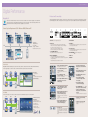
More control is always good. Especially when it’s easy. The built-in RS232C interface lets you control up to 10
units as a single display from your PC. Just open the supplied MDC software, list the units to be controlled, and
click on the functions to display. It’s that simple.
MDC Software Screen Shot
1. Main Icons : Use the main icons to switch to each screen.
2. Select Button : Click Select all or Clear to select or clear all displays.
3. Display Selection : Select a display from Display Selection.
4. Info Grid : Use Grid to view brief information on selected display.
5. Control Tools : Use Control Tools to control displays.
6. Remocon : Allows you to enable or disable the remote control signal receiving function of the display unit.
7. Title : The current title to be controlled is displayed.
8. Comm. Status : Indicates the communication status between the MDC and the display.
Matrix Display for Video Wall
Built-In Image Enlarging Processor supports various video wall formats - 2x2, 3x3, 4x4, 5x5, 1x2, 2x1, 1x5, 5x1. To install Video Wall with these
formats, you don't need any other Video Controller Device. Also to use video & PC Interface, additional Input Signal Distributor is not necessary.
Innovative Features
Versatile Convenience
A higher brightness ratio brings brilliance to your screen and a higher contrast level. Samsung
LCD Monitor supports versatile connectivity for professional convenience. PC and video can
be connected and RS-232C loop out function are supported. In addition, 10 units can be
connected as one unit and displayed from a PC without additional devices.
Matrix Display for
Video Wall
1x5
Business Display / Department Store
Public Display / Airport
Samsung LCD Display | 10 + 11
Digital Performance
Professional Connectivity
VESA Standard Supported
Samsung LCD Monitor supports extended connectivity PC, Video, RS-232C Loop Out function are supported. If
you want to install multi display video wall connected by Video & PC signal, you don't need an additional device like Input Signal
Distributor.
For video wall convenience, Samsung's New LCD Monitor supports VESA wall
mounting standards. 320PX/400PX/400PXn/400TXn/460PX/460PXn have
mounting holes at 200 mm x 200 mm. This offers customers various installation solutions
including wall mount, vertical mount and ceiling mount.
2 Way Multi Display Format
In the case of Multi Display video wall, a major
issue is how to display naturally without picture
distortion. So Samsung's New LCD Monitor supports two types of
video wall formats. The first is Full mode which displays the picture
regardless of cabinet bezel. The second, Natural Mode, considers
bezel’s depth when displaying picture.
Full Mode
Natural Mode
Vertical Image Capability
SyncMaster 320PX / 400PX / 400PXn / 460PX / 460PXn /
400TXn have a pivot function that freely rotates around 90o
degrees, allowing you to easily view a vertical image or text.
Horizontal View
Vertical View
4 Way PIP Function
For your convenience, SyncMaster 320P/400P/400Pn/460P/460Pn/400Txn have added a Picture in Picture display function. This way
you can watch a movie, play a game and still carry out business in a third on-screen window. Work & play at the same time!
Small PIP
Matrix Display for
Video Wall
5x1
Large PIP
Double Window 1
Double Window 2
No Noise & Heat
Certified Crestron
SyncMaster 320P/400P/400Pn/460P/460Pn stand out from other regular monitors, not just for how they look but also for how quiet they are.
Because SyncMaster 320P/400P/400Pn/460P/460Pn generate significantly lower heat than comparable units.
We established relationships with the key players
needed to deliver display solutions. Crestron
Electronics, Inc. has been the leader in the systems
integration market. We provide seamless display with Crestron’s various
integrated solutions.
Vertical Input
Landscape idea or portrait idea? You’re not limited with Samsung. Our
LCD Monitor can be Mounted either horizontally or vertically.
Samsung LCD Display | 12 + 13
Digital Performance
Professional Connectivity
MagicNet X
There are two transmission methods. The first is where the server sends files to the clients after registering to the schedule. In the
other, the client searches for the files registered in the library of the server, selects the files to be received, and plays them after receiving them via the network. Each client, by itself, has the capability to access the Internet.
Samsung LCD Monitor supports extended connectivity - PC, Video, RS-232C Loop Out function are supported. If you wantsto
install multi display video wall connected by Video & PC signal, you don't need an additional device like Input Signal Distributor.
Server System Requirements OS : Windows 2000, Windows XP
MUSIC
PHOTO
MOVIE
• General Spec.
(MagicNet Board)
• OS : WinXPe
• Storage : 1 GB FDM
• Connector : USB 2.0 3 Ports
LAN
a RS232C Connect the supplied power cord.
e ANT in/FM Ant
b DVI/PC IN
f AV AUDIO In
- DVI : Connect to the video output jack for device with DVI output.
- AUDIO : Connect to the audio output jack for devices with DVI output.
- IN : Connect to the video output jack on your PC.
- AUDIO : Connect to the audio output jack on your PC.
> AUDIO in an audio input jack for PC1 and PC2 Modes.
c COMPONENT AUDIO In
Video (Y/Pb/Pr) and audio (L/R) inputs for component.
HTML, XML, Flash, JAVA
- Connect for RGB (Y/Pb/Pr) HV video signal input from the PC.
> ”PC Mode” from this page onward means PC1/PC2 mode using RGB1
(PC1) and RGB2 (PC2)
- Video (Y/Pb/Pr) and audio (L/R) inputs for component.
PC
Push Mode
MagicNet transmits media files (photo, audio and movie files) and office files (PowerPoint, Excel, Word, HTML and PDF files:
viewer only) existing on a server to clients on an Ethernet network using the server/client architecture.
Client1
Client2
LAN
Client5
b
c
Client3
2
e
f
Several clients can be connected to a server and any file can be transmitted to any client over the network.
Client3
LAN
Local Device Connectivity
through USB 2.0
- Portable Storage Devices
(Multimedia Card, Memory Stick,
Smart Media, etc.)
- Removable Hard Disk
- Digital video camera
(Only Mass Storage Class)
USB 2.0
Client4
Client5
128
PC
MDC (Multiple Display Control) Program Port
b DVI / PC IN [DVI(HDCP)] (PC Video
Connection Terminal)
i
j
l
n
k m
o
i
AV AUDIO IN [L-AUDIO-R] (LCD
Display Audio Connection Terminal
(Input))
j
AV OUT [VIDEO] (VIDEO Connection
Terminal): AV mode (Output)
k AV IN [VIDEO] (VIDEO Connection
Terminal (Input))
l
d DVI / PC IN [PC/DVI/BNC AUDIO IN]
(PC/DVI/BNC Audio Connection
Terminal (Input))
g
Client2
a RS232C OUT/IN (RS232C Serial PORT)
j LAN/USB
(15 pin D-Sub) - PC mode (Analog PC)
Pull Mode
Client1
h EXT SPEAKER(8 ) Connect external speakers.
c DVI / PC IN [RGB] (PC Video
Connection Terminal Using a D-Sub Cable
3
PC
d
- IN : Video and audio inputs for external devices, such as a camcorder or VCR.
- OUT : Outputs for external devices.
Using a DVI Cable (DVI-D to DVI-D) - DVI mode
(Digital PC)
(1) Scheduling
- Digital Contents
(2) MDC
- Asset Management through LAN
(3) Instant Messaging
1
Client4
a
g AV Out/In (Video)
i AUDIO Out
d BNC/COMPONENT In
MS-Word, PowerPoint, Excel,
Acrobat Viewer, HTML Viewer
- IN : Video and audio inputs for external devices, such as a camcorder or VCR.
- OUT : Outputs for external devices.
m AV IN [S-VIDEO] (S-VIDEO
Connection Terminal (Input))
n EXT SPEAKER(8 )[- - L - +, - - R - +]
(EXT Speaker Connection Terminal)
e COMPONENT AUDIO IN [L-AUDIOR] (Component Audio Connection
Terminal (Input))
o AUDIO OUT [L-AUDIO-R] (LCD
Display Audio Connection Terminal
(Output))
f BNC/COMPONENT OUT [R/PR, G/Y,
B/PB, H, V] (BNC/Component
Connection Terminal (Output))
AUDIO OUT is the terminal for the PC sound output.
BNC (Analog PC) Connection: connecting the R, G,
B, H, V ports
Component Connection: connecting the PR, Y, PB
ports
g BNC/COMPONENT IN [R/PR, G/Y,
B/PB, H, V] (BNC/Component
Connection Terminal (Input))
h
h Kensington Lock
The Kensington lock is a device used to physically fix
the system to something when using it in a public
place. (The locking device has to be purchased separately.)
To use a locking device, contact the place of purchase.
AV OUT [S-VIDEO] (S-VIDEO
Connection Terminal): S-VIDEO
mode (Output)
p LAN (LAN Connection Terminal)
p
q
MS Internet Explorer
q USB (USB Connection Terminal)
Keyboard / Mouse, Mass Storage Device
Compatible.
Samsung LCD Display | 14 + 15
Accessories
Samsung Plasma Display | 3 + 15
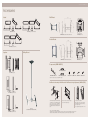
Wall Mount
Stand
236.0
699.2
85.0
85.0
35.0
2-99.2
22.2
2-55.2
974.0
222.8
520.3
100.0
124.4
400.0
197.5
61.5
188.1
51.8
631.6
240.0
100.0
18.0˚
295.0
100.0
STN-L320PB (320PX)
STN-323TB (400PX/400PXn/400TXn)
50.3
100.0
240.0
WMB-4050PS (400PX/400PXn/460PX/460PXn)
WML4001D (320PX)
Vertical Mount
61.5
974.0
230.0
25.5
197.5
499.2
2-99.2
21.4
295.0
85.0
85.0
234.0
2-55.2
45.0 45.0
14.5˚
45.0 45.0 45.0
180.0
270.0
120.0
232.0
Ceiling Mount
720.0
Speaker
600.0
STN-L403TB (460PX/460PXn)
27.5
282.0
330.0
47.9
300.0
482.0
VMN4240D (400PX/400PXn/460PX/460PXn)
WML4001D (320PX)
Components (WMB-4050PS)
100.0
49.5
78.0
ASSY -HINGE (LEFT): 1 EA
124.1
SP-L320PB/S (320PX)
WALL BRKT-PLATE: 1 EA
ASSY -HINGE (RIGHT): 1 EA
PLASTIC: 4 EA
SCREW: 11 EA
SCREW: 4 EA
SCREW: 11 EA
Wall Bracket Assembly & Wall Bracket & Wall Bracket Angle Adjustment (WMB-4050PS)
300.0
582.0
Only use the components and accessories shipped with the product.
15.0˚
53.8
-2.0˚
104.0
136.6
80.0
Check the installation diagram and mark the drill points
on the wall. Use the 5.0 mm bit to drill holes deeper than
35 mm. Fix each anchor in the corresponding hole.
Match each of the brackets and hinge holes to the corresponding anchor holes and insert and tighten the 11 A
screws.
53.8
300.0
582.0
SP-L400PB/S (400PX/400PXn)
104.0
136.6
80.0
SP-L460PB/S (460PX/460PXn)
Remove the 4 screws on the back of the product.
Insert screw B into the plastic hanger.
1. Fix the product to the wall bracket.
2. Hold the product at the top in the center and pull it
forward (direction of the arrow) to adjust the angle.
(See the figure to the right)
3. You can adjust the bracket angle between -2˚ and 15˚.
CML 500D
(400PX/400PXn/400TXn/460PX/460PXn)
• Contact a technician for installing the wall bracket.
• Samsung Electronics is not responsible for any damages to the product or harm to customers when the installation is done by the customer.
• This product is intended for installation on cement walls. The product may not be secure when installed on plaster or wood walls.
Samsung LCD Display | 16 + 17
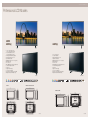
Professional LCD Models
320PX
400PX(n)
460PX(n)
• 1000:1 Contrast Ratio (320PX)
1200:1 Contrast Raito (400PX(n))
• 450 cd/m2 Brightness (320PX)
500 cd/m2 Brightness (400P(n))
• DNIeTM (Digital Natural Image engine)
• Wide Viewing Angle 178˚ / 178˚
• High Native Resolution
• Multimedia Speakers 10 W x 2 ch (option)
• Matrix Video Wall
• PIP / PBP / POP
• MDC (Multi Display Control) through RS232C
• Powerful Anti Image Retention
• Safety Lock
• Support Portrait Display
• Low Power Consumption
• Innovative Power Saving System (DPMS)
• Magicnetwork (Network Model Only)
• 1000:1 Contrast Ratio
• 500 cd/m2 Brightness
• Wide Viewing Angle 178˚ / 178˚
• High Native Resolution
• Multimedia Speakers 10 W x 2 ch (option)
• Matrix Video Wall
• PIP / PBP / POP
• MDC (Multi Display Control) through RS232C
• Powerful Anti Image Retention
• Safety Lock
• Support Portrait Display
• Low Power Consumption
• Innovative Power Saving System (DPMS)
• Magicnetwork (Network Model Only)
(Black)
320PX
(Dark Silver)
400PX / 400PXn / 400TXn
982.0
1312.0
780.0
1102.0
107.0
126.6
58.0
39
61.0
39
460PX / 460PXn
1181.0
973.0
971.0
920.4(Wall Mount)
658.0
715.0
530.1
482.0
1181.0
971.0
118.0
60.5
200.0
41
41
1312.0
1104.0
1102.0
600.0(Wall Mount)
982.0
782.0
780.0
714.0
200.0
629.5
582.0
41
67.5
200.0
200.0
582.0
41
400.0(Wall Mount)
39
760.2
939.4
658.0
200.0
41
105.4
400.0(Wall Mount)
352.0
458.0
106.0
200.0
41
607.2
947.2
752.0
1070.4
unit (mm)
unit (mm)
Samsung LCD Display | 18 + 19
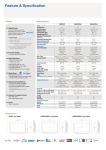
Specifications
Model Name
Display
Frequency
320PX
400PX(n)
460PX(n)
400Txn
32”
40”
46”
40”
Pixel Pitch (mm)
0.511 x 0.511
0.648 x 0.648
0.7455 x 0.7455
0.648 x 0.648
Brightness (typ.)
450 cd/m2
500 cd/m2
500 cd/m2
500 cd/m2
Contrast Ratio (typ.)
1000 : 1
1200 : 1
1000 : 1
1200 : 1
Viewing Angle (H/V)
178˚ / 178˚
178˚ / 178˚
178˚ / 178˚
178˚ / 178˚
Response Time (ms) (typ.)
8
8
8
8
Horizontal Frequency (kHz)
30-70
30-70
30-70
30-70
Vertical Frequency (Hz)
50-85
50-85
50-85
50-85
1366 x 768
1366 x 768
1366 x 768
1366 x 768
16.7 Mil.
16.7 Mil.
16.7 Mil.
16.7 Mil.
Analog RGB,
Analog RGB,
Analog RGB,
Analog RGB,
BNC, DVI-D,
BNC, DVI-D,
BNC, DVI-D,
BNC, DVI-D,
CVBS Video
CVBS video
CVBS Video
DVI-D,
S-Video
S-Video
S-Video
S-Video
Component Video
Component Video
Component Video
Component Video
Diagonal Size
Maximum Resolution
Color Supported
Signal Input
Input Video Signal
Sync. Type
Input Connectors
Cabinet Color
Separate H/V, Composite, SOG Separate H/V, Composite, SOG Separate H/V, Composite, SOG Separate H/V, Composite, SOG
D-Sub, DVI-D, S-Video
D-Sub, DVI-D, S-Video
D-Sub, DVI-D, S-Video
D-Sub, DVI-D, S-Video
Video (CVBS)
Video (CVBS)
Video (CVBS)
Video (CVBS)
BNC (Component/PC)
BNC (Component/PC)
BNC (Component/PC)
BNC (Component/PC)
DDC 2B
DDC 2B
DDC 2B
DDC 2B
On Mode
160 W
230 W
280 W
230 W
DPMS Mode
<1 W
<1 W
<1 W
<1 W
Front Cabinet
Black / Dark Silver
Black / Dark Silver
Black / Dark Silver
Dark Silver
Black
Black
Black
Black
Plug & Play-DDC
Power
Memo
Back
Kor / Jap / Chi / Fren / Ita / Swe / Ger / Eng / Spa / Por / Rus
OSD-Digital Display DirectorTM
Supplied Accessories
Dimension
Weight
Optional Accessories
Set (W x H x D) mm (with stand)
MDC Program, User Manual,
MDC Program, User Manual,
MDC Program, User Manual,
MDC Program, User Manual,
Tablefoot 2 pcs,
Tablefoot 2 pcs,
Tablefoot 2 pcs,
Tablefoot 2 pcs,
RCA Adapter 4 pcs,
RCA Adapter 4 pcs,
RCA Adapter 4 pcs,
RCA Adapter 4 pcs,
Power Cable,
Power Cable,
Power Cable,
Power Cable,
Audio Cable, D-sub Cable
Audio Cable, D-sub Cable
Audio Cable, D-sub Cable
Audio Cable, D-sub Cable
1102 x 715 x 293 (option stand)
971 x 629.5 x 223 (option stand)
780 x 529 x 223 (option stand) 971 x 629.5 x 223 (option stand)
Set (W x H x D) mm (w/o stand)
780 x 482 x 107
971 x 582 x 118
1102 x 658 x 126.5
971 x 582 x 118
Packing (W x H x D) mm
898 x 600 x 262
1108 x 700 x 280
1248 x 824 x 304
1108 x 700 x 280
Net (kg)
17
23.5
33
23.5
Gross (kg)
20
29.5
38
29.5
SP-L320PB/S
SP-L400PB/S
SP-L460PB/S
SP-L400PS
WMTL4001
WMB-4050PS
WMB-4050PS
WMB-4050PS
VMN4240D
VMN4240D
VMN4240D
STN-L323TB
STN-L403TB
STN-L323TB
400PXn
460PXn
400TXn
Speaker
Wall Mount
Vertical Mount
Stand
STN-L320PB
Network Model
• Specifications mentioned above are subject to change without notice.