1
Copyright
Information in this document is subject to change without notice.
©2010 Dell Inc. All rights reserved.
Reproduction of these materials in any manner whatsoever without the written permission of Dell Inc. is strictly
forbidden.
Trademarks used in this text: Dell, the DELL logo, and Dell Toner Management System are trademarks of Dell Inc.;
Microsoft, Windows, Windows Vista, and Windows Server are registered trademarks of Microsoft Corporation in the
United States and/or other countries; Adobe and Acrobat Reader are either registered trademarks or trademarks of
Adobe Systems Incorporated in the United States and/or other countries.
Other trademarks and trade names may be used in this document to refer to the entities claiming the marks and names
of their products.
Dell Inc. disclaims any proprietary interest in trademarks and trade names other than its own.
Refer to the 'LICENSE.txt' file in the provided CD-ROM for the open source license information.
REV. 1.02
Downloaded from ManualsPrinter.com Manuals
Multi-Functional Printer
User’s Guide
www.dell.com | support.dell.com?
Downloaded from ManualsPrinter.com Manuals
Safety information
These warnings and precautions are included in order to prevent injury to you and others, as well as preventing any
potential damage to your machine. Be sure to read and understand all of these instructions before using the machine.
Use common sense for operating any electrical appliance and whenever using your machine. Also, follow all warnings
and instructions marked on the machine and in the accompanying literature. After reading this section, keep it in a safe
place for future reference.
Important safety symbols
This section explains the meanings of all icons and signs in the user's guide. These safety symbols are in order,
according to the degree of danger.
Explanation of all icons and signs used in the user’s guide:
Warning Hazards or unsafe practices that may result in severe personal injury or death.
Caution Hazards or unsafe practices that may result in minor personal injury or property damage.
Do not attempt.
Do not disassemble.
Do not touch.
Unplug the power cord from the wall socket.
Make sure the machine is grounded to prevent electric shock.
Call the service center for help.
Follow directions explicitly.
Operating environment
Warning
Do not use if the power cord is damaged or if the
electrical outlet is not grounded.
This could result in electric shock or fire.
Do not bend, or place heavy
objects on the power cord.
Stepping on or allowing the
power cord to be crushed by a
heavy object could result in electric shock
or fire.
Do not place anything on top of the machine (water, small
metal or heavy objects, candles, lit cigarettes, etc.).
This could result in electric shock or fire.
Do not remove the plug by
pulling on the cord; do not
handle the plug with wet
hands.
This could result in electric shock or fire.
If the machine gets overheated, it releases smoke, makes
strange noises, or generates an odd odor, immediately
turn off the power switch and unplug the machine.
This could result in electric shock or fire.
Caution
During an electrical storm or for a period
If the plug does not easily enter the electrical outlet, do
of non-operation, remove the power plug not attempt to force it in.
from the electrical outlet.
Call an electrician to change the electrical outlet, or this
This could result in electric shock or fire. could result in electric shock.
Be careful, the paper output area is hot.
Burns could occur.
Downloaded from ManualsPrinter.com Manuals
Do not allow pets to chew on the AC power, telephone or
PC interface cords.
This could result in electric shock or fire and/or injury to
your pet.
If the machine has been dropped, or if the cabinet
appears damaged, unplug the machine from all
interface connections and request assistance from
qualified service personnel.
Otherwise, this could result in electric shock or fire.
If the machine does not operate properly after these
instructions have been followed, unplug the machine from
all interface connections and request assistance from
qualified service personnel.
Otherwise, this could result in electric shock or fire.
If the machine exhibits a sudden and distinct
change in performance, unplug the machine from all
interface connections and request assistance from
qualified service personnel.
Otherwise, this could result in electric shock or fire.
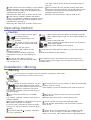
Operating method
Caution
Do not forcefully pull the paper
out during printing.
It can cause damage to the
machine.
When printing large quantities, the bottom part of the
paper output area may get hot. Do not allow children to
touch.
Children may be burned.
Be careful not to put your hand
between the machine and paper
tray.
You may get injured.
When removing jammed paper, do not use tweezers or
sharp metal objects.
It can cause damage to the machine.
Do not block or push objects into the
ventilation opening.
This could result in elevated component
temperatures which can cause damage or
fire.
Do not allow too many papers to stack up in the paper output
tray.
It could cause damage to the machine.
Use care to avoid paper cuts when
replacing paper or removing jammed paper.
You may get hurt.
This machine's power interception device is the power cord.
To switch off the power supply, remove the power cord from the
electrical outlet.
Installation / Moving
Warning
Do not place the machine in an area with dust, humidity or water leaks.
This could result in electric shock or fire.
Caution
When moving the machine, turn the
Do not put a cover over the machine or place it in an airtight
power off and disconnect all cords;
location, such as a closet.
then lift the machine with at least two If the machine is not well-ventilated, this could result in fire.
people are required to lift printer.
The machine could fall, causing human injury or
machine damage.
Do not place the machine on an unstable
surface.
The machine could fall, causing human injury or
machine damage.
Make sure you plug the power cord into a grounded
electrical outlet.
Otherwise, this could result in electric shock or fire.
The machine should be connected to the power
level which is specified on the label.
If you are unsure and want to check the power
level you are using, contact the electrical utility
company.
Do not overload wall outlets and extension cords.
This can diminish performance, and could result in electric
shock or fire.
Use only No.26 AWG [a] or larger, telephone
line cord, if necessary.
Use the power cord supplied with your machine for safe
operation. If you are using a cord which is longer than 2
meters (79”) with a 140V machine, then the gauge should be
Downloaded from ManualsPrinter.com Manuals
Otherwise, it can cause damage to the machine.
[a]
16 AWG or larger.
Otherwise, it can cause damage to the machine, and could
result in electric shock or fire.
AWG: American Wire Gauge
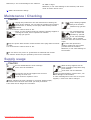
Maintenance / Checking
Caution
Unplug this product from the wall outlet before cleaning the
inside of the machine. Do not clean the machine with benzene,
paint thinner or alcohol; do not spray water directly into the
machine.
This could result in electric shock or fire.
Keep cleaning supplies
away from children.
Children may get hurt.
When you are working inside the machine replacing supplies or
cleaning the inside, do not operate the machine.
You may get injured.
Do not disassemble,
repair or rebuild the
machine by yourself.
It can cause damage
to the machine. Call a certified
technician when the machine needs
repair.
Keep the power cable and the contact surface of the plug clean from dust
or water.
This could result in electric shock or fire.
To clean and operate the
machine, follow the user's guide
provided with the machine.
Otherwise, it can cause damage to
the machine.
Do not remove any covers or guards that are fastened with screws.
The machine should only be repaired by Dell service technician.
Supply usage
Caution
Do not disassemble the toner cartridge.
Toner dust can hazardous.
Do not burn any of the supplies such as toner
cartridge or fuser unit.
It can cause an explosion or fire.
When changing the toner cartridge or removing jammed paper,
be careful not to let toner dust touch your body or clothes.
Toner dust can be dangerous to humans.
Downloaded from ManualsPrinter.com Manuals
When storing supplies such as
toner cartridges, keep them away
from children.
Toner dust can be hazardous.
Using recycled supplies, such as toner, can
cause damage to the machine.
In case of damage due to the use of recycled
supplies, a service fee will be charged.
Introduction
This chapter gives you an overview of your machine:
This chapter includes:
Machine overview
Control panel overview
Understanding the Status LED
Introducing the useful buttons
Turning on the machine
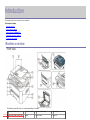
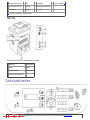
Machine overview
Front view
This illustration may differ from your machine depending on its model.
1 Document feeder cover
6
Front door handle 11 Document output tray
Downloaded
from ManualsPrinter.com
Manuals7 Handle
feeder width guides
2 Document
12 Control panel
16 Scanner glass
17 Scan unit
3 Document feeder input tray
8
Tray 1
13 Toner cartridge
4 Document feeder output tray
9
Manual tray
14 Manual tray paper width guides
5 Output support
[a]
10 Front door
18 Scan unit close button [a]
15 Scanner lid
This button is used when you close the scan unit.
Rear view
This illustration may differ from your machine depending on its model.
1 Network port
5 Power receptacle
2 USB port
6 Rear door
3 Telephone line socket
7 Rear door handle
4 Extension telephone socket (EXT)
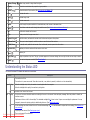
Control panel overview
Downloaded
from ManualsPrinter.comYou
Manuals
can copy both sides of an ID Card, such as a driver’s license, to a single side of paper (See ID card copying).
1 ID Copy (
)
) Makes a copy smaller or larger than the original.
2
Reduce/Enlarge (
3
Display
4
Status (
5
Fax (
6
Copy (
)
Activates copy mode.
7
Scan (
)
Activates scan mode.
8
Arrow
9
Menu (
Shows the current status and prompts during an operation.
Shows the status of your machine (See Understanding the Status LED).
)
)
Activates fax mode.
Scroll through the options available in the selected menu, and increase or decrease values.
Enters Menu mode and scrolls through the available menus (See Machine status and advanced feature).
)
10 OK
Confirms the selection on the screen.
11 Back
Sends you back to the upper menu level.
12
Dials fax number, and enters the number value for document copies or other options.
Numeric keypad
13 Address Book ( )
Allows you to store frequently used fax numbers or search for stored fax numbers.
14 Redial/Pause ( )
In standby mode, redials the last number. Also in edit mode, inserts a pause into a fax number.
15 On Hook Dial (
Enables you to dial a number with the receiver on the hook.
16 Start (
)
Starts a job.
)
17 Stop/Clear (
18 Power (
)
)
Stops an operation at any time. The pop-up window appears on the screen showing the current job that the user can stop or resume.
You can turn the power on and off (See Power button).
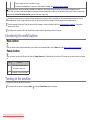
Understanding the Status LED
The color of the status LED indicates the machine's current status.
Status
Off
Description
The machine is off-line.
The machine is in power saver mode. When data is received, or any button is pressed, it switches to on-line automatically.
Green Blinking
When the backlight slowly blinks, the machine is receiving data from the computer.
When the backlight blinks rapidly, the machine is printing data.
On
Red
Blinking
The machine is on-line and can be used.
A minor error has occurred and the machine is waiting for the error to be cleared. Check the display message. When the problem is cleared, the
machine resumes.
Small amount of toner is left in the cartridge. The estimated cartridge life[a] of toner is close. Prepare a new cartridge for replacement. You may
temporarily increase the printing quality by redistributing the toner. (See Redistributing toner.)
On
A toner cartridge has almost reached the end of its estimated cartridge life[a] . It is recommended to replace the toner cartridge (See Replacing the
toner cartridge).
A paper jam has occurred (See Clearing paper jams).
The cover is opened. Close the cover.
Downloaded from ManualsPrinter.com Manuals
There is no paper in the tray. Load paper in the tray.
The machine has stopped due to a major error. Check the display message (See Understanding display messages).
[a]
Estimated cartridge life means the expected or estimated toner cartridge life, which indicates the average capacity of print-outs and is designed pursuant to
ISO/IEC 19752. The number of pages may be affected by operating environment, printing interval, media type, and media size. Some amount of toner may remain in the
cartridge even when End of life Replace new cart appears and the printer stops printing.
Dell does not recommend using a non-genuine Dell toner cartridge such as one that is refilled or remanufactured. Dell cannot guarantee a non-genuine Dell toner
cartridge's quality. Service or repair required as a result of using non-genuine Dell toner cartridges will not be covered under the machine warranty.
Check the message on the display. Follow the instructions in the message or refer to troubleshooting part (See Understanding display messages). If the problem
persists, call for service.
All printing errors will appear in the Printer Status Monitor program window. If the problem persists, call for service.
Introducing the useful buttons
Menu button
When you want to know the machine status and set your machine to use an advanced feature, click the Menu button (See Machine status and advanced feature).
Power button
When you want to turn the power off, press this button until Power Down appear. Choose Yes, to turn the power off. This button can also be used to turn the machine
on.
Status
Off
Description
The machine is in ready mode.
The machine’s power is off.
On
The machine is in power save mode.
Turning on the machine
Plug in the power cord, the machine will be turned on.
If you want to turn the power off, press the Power (
Downloaded from ManualsPrinter.com Manuals
) button until Power Down appear on the display.
About this user’s guide
This user’s guide provides information about how to use the machine.
Read the safety information before using the machine.
If you have a problem using the machine, refer to the troubleshooting chapter (See Troubleshooting).
Terms used in this user’s guide are explained in the glossary chapter (See Glossary).
Illustrations in this user’s guide may differ from your machine depending on its options or models.
The procedures in this user’s guide are mainly based on Windows XP.
Convention
Some terms in this guide are used interchangeably, as below:
Document is synonymous with original.
Paper is synonymous with media, or print media.
Machine refers to printer or MFP.
The following table offers the conventions of this guide:
Convention
Description
Example
Bold
For texts on the display or button names on the machine.
Start
Note
Provides additional information or detailed specification of the
machine function and feature.
Caution
Gives users information to protect the machine from possible
mechanical damage or malfunction.
Footnote
Provides additional more detailed information on certain words
or a phrase.
a. pages per minute
(“Crossreference”)
Guides users to a reference page for the additional detailed
information.
(See Finding more information).
The date format may differ from
country to country.
Do not touch the green underside
of the toner cartridge.
Finding more information
You can find information for setting up and using your machine from the following resources: either as a print-out or
on screen.
Material
name
Description
Quick
Install
Guide
This guide provides basic information on setting up your machine.
User’s
Guide
This guide provides you with step-by-step instructions for using your machine’s full features, and
contains information for maintaining your machine, troubleshooting, and replacing supplies.
Machine
Driver
Help
This help provides you with help information on printer driver and instructions for setting up the options
for printing (See Using help).
Dell
website
If you have Internet access, you can get help, support, machine drivers, manuals, and order information
from the Dell website, www.dell.com or support.dell.com.
Downloaded from ManualsPrinter.com Manuals
Downloaded from ManualsPrinter.com Manuals
Features of your new product
Your new machine is equipped with a number of special features that improve the quality of the documents you print.
Special Features
Print with excellent quality and speed
You can print with a resolution of up to 1200 x 1200 dpi effective output.
Your machine prints A4-sized paper at up to 22 ppm and letter-sized paper at up to 23 ppm.
Handle many different types of printable material
Manual tray supports plain paper in various sizes, letterhead, envelopes, labels, custom-sized
media, postcards, and heavy paper.
The 250-sheet tray supports plain paper.
Create professional documents
Print Watermarks. You can customize your documents with words, such as “Confidential” (See
Using watermarks).
Print Posters. The text and pictures of each page of your document are magnified and printed
across the sheet of paper and can then be taped together to form a poster (See Printing posters).
You can use preprinted forms with plain paper (SeeUsing overlay).
Save time and money
To save paper, you can print multiple pages on one single sheet of paper (See Printing multiple
pages on one sheet of paper).
This machine automatically conserves electricity by substantially reducing power consumption when
not in use.
To save paper, you can print on both sides of the paper (manual) (See Printing on both sides of
paper (Manual)).
Print in various environments
You can print with various operating system such as Windows, Linux, and Macintosh systems (See
System requirements).
Your machine is equipped with a USB interface and a network interface.
Copy originals in several formats
Your machine can copy multiple image copies from the original document on a single page (See 2up or 4-up copying (N-up)).
The print quality and image size may be adjusted and enhanced at the same time.
Scan the originals and send it right away
Downloaded from ManualsPrinter.com Manuals
Scan in color and use the precise compressions of JPEG, TIFF, and PDF formats.
Quickly scan and send files to multiple destinations using Networks scanning (See For network
connected machine).
Set a specific time to transmit a Fax
You can specify a certain time to transmit the fax and also send the fax to several stored
destinations.
After the transmission, the machine may print out the fax reports according to the setting.
IPv6
This machine supports IPv6.
Features by Model
The machine is designed to support all of your document needs from printing and copying to more advanced
networking solutions for your business.
Some features and optional goods may not be available depending on models or countries.
Features by model include:
FEATURES
Dell 1135n
Print
?
Duplex (2-sided) printing (manual)
?
Copy
?
FAX
?
Network PC fax
?
Fax to PC (Dell Scan and Fax Manager)
?
On hook dial
?
USB 2.0
?
Network Interface Ethernet 10/100 Base TX wired LAN
?
IPv6
?
Embedded Web Service
?
Document Feeder
?
( ?: Included)
Downloaded from ManualsPrinter.com Manuals
Getting started
This chapter gives you step-by-step instructions for setting up the USB connected machine and software.
This chapter includes:
Setting up the hardware
Supplied software
System requirements
Installing USB connected machine’s driver
Sharing your machine locally
Supported optional devices and features may differ according to your model. Please check your model name.
(See Features by Model).
Setting up the hardware
This section shows the steps to set up the hardware, as explained in the Quick Install Guide. Make sure you read the
Quick Install Guide first and follow the steps below:
1.
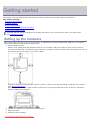
Select a stable location.
Select a level, stable place with adequate space for air circulation. Allow extra space to open covers and trays.
The area should be well ventilated and away from direct sunlight or sources of heat, cold, and humidity. Do not set
the machine close to the edge of your desk or table.
Printing is suitable for altitudes under 1,000 m (3,281 ft.). Refer to the altitude setting to optimize your printing
(See Altitude adjustment).
Place the machine on a flat, stable surface so that there is no incline greater than 2 mm (0.08 inch). Otherwise,
printing quality may be affected.
2.
3.
4.
Unpack the machine and check all the enclosed items.
Remove all tape.
Install the toner cartridge.
Downloaded from ManualsPrinter.com Manuals
5.
6.
7.
Load paper (See Loading paper in the tray).
Make sure that all cables are connected to the machine.
Turn the machine on.
This equipment will be inoperable when mains power fails.
Supplied software
After you have set up your machine and connected it to your computer, you must install the printer software using the
supplied CD. The software CD provides you with the following software.
OS
Windows
Contents
Printer driver: Use this driver to take full advantage of your machine’s features.
Scanner driver: TWAIN and Windows Image Acquisition (WIA) drivers are available for scanning
documents on your machine.
Printer Settings Utility: This program allows you to set up printer’s other options from your
computer desktop.
Printer Status Monitor: This program allows you to monitor the machine’s status and alerts you
when an error occurs during printing.
SmarThru [a] : This program is the accompanying Windows-based software for your multifunctional
machine.
Dell Scan and Fax Manager: You can find out about Dell Scan and Fax Manager program information
and installed scan driver's condition.
Dell 1135n Laser MFP Toner Reorder: The Dell 1133 Laser MFP Toner Reorder window also displays
the level of toner remaining and allows you to order replacement toner cartridge.
Firmware Update Utility: This program helps you to update printer’s firmware.
SetIP: Use this program to set your machine’s TCP/IP addresses.
Macintosh
Printer driver: Use this driver to take full advantage of your machine’s features.
Scanner driver: TWAIN driver is available for scanning documents on your machine.
SetIP: Use this program to set your machine’s TCP/IP addresses.
Linux
Unified Linux Driver: Use this driver to take full advantage of your machine’s features.
SANE: Use this driver to scan documents.
SetIP: Use this program to set your machine’s TCP/IP addresses.
[a] Allows you to edit a scanned image in various ways using a powerful image editor and to send the image by
email. You can also open another image editor program, such as Adobe Photoshop, from SmarThru. For details, refer
to the on screen help supplied on the SmarThru program (See Smarthru).
System requirements
Before you begin, ensure that your system meets the following requirements:
Microsoft® Windows®
Your machine supports the following Windows operating systems.
Requirement (recommended)
OPERATING
SYSTEM
CPU
RAM
free HDD
space
Windows® 2000
Intel® Pentium® II 400 MHz (Pentium III 933 MHz)
64 MB (128
MB)
600 MB
Windows® XP
Intel® Pentium® III 933 MHz (Pentium IV 1 GHz)
128 MB (256
MB)
1.5 GB
Windows Server®
2003
Intel® Pentium® III 933 MHz (Pentium IV 1 GHz)
128 MB (512
MB)
1.25 GB to 2
GB
Windows Server®
2008
Intel® Pentium® IV 1 GHz (Pentium IV 2 GHz)
512 MB (2048 10 GB
MB)
Windows Vista®
Intel® Pentium® IV 3 GHz
512 MB (1024 15 GB
MB)
Downloaded from ManualsPrinter.com Manuals
Windows® 7
Intel® Pentium® IV 1 GHz 32-bit or 64-bit processor or
higher
1 GB (2 GB)
16 GB
Support for Direct® 9 graphics with 128 MB memory (to enable the Aero theme).
DVD-R/W Drive
Windows Server®
2008 R2
Intel® Pentium® IV 1 GHz (x86) or 1.4 GHz (x64) processors
(2 GHz or faster)
512 MB (2048 10 GB
MB)
Internet Explorer® 5.0 or higher is the minimum requirement for all Windows operating systems.
Administrator rights are required to install the software.
Windows Terminal Services is compatible with this machine.
Macintosh
Requirements (recommended)
OPERATING
SYSTEM
Mac OS X 10.3 ~
10.4
CPU
Intel® Processors
PowerPC G4/ G5
RAM
128 MB for a PowerPC based Mac
(512 MB)
free HDD
space
1 GB
512 MB for a Intel-based Mac (1 GB)
Mac OS X 10.5
Intel® Processors
512 MB (1 GB)
1 GB
1 GB (2 GB)
1 GB
867 MHz or faster Power PC
G4/ G5
Mac OS X 10.6
Intel® Processors
Linux
Item
Requirement (recommended)
Operating system RedHat® Enterprise Linux WS 4, 5 (32/64 bit)
Fedora Core 2~10 (32/64 bit)
SuSE Linux 9.1 (32 bit)
OpenSuSE® 9.2, 9.3, 10.0, 10.1, 10.2, 10.3, 11.0, 11.1 (32/64 bit)
Mandrake 10.0, 10.1 (32/64 bit)
Mandriva 2005, 2006, 2007, 2008, 2009 (32/64 bit)
Ubuntu 6.06, 6.10, 7.04, 7.10, 8.04, 8.10 (32/64 bit)
SuSE Linux Enterprise Desktop 9, 10 (32/64 bit)
Debian 3.1, 4.0, 5.0 (32/64 bit)
CPU
Pentium® IV 2.4 GHz (Intel Core™2)
RAM
512 MB (1024 MB)
Free HDD space
1 GB (2 GB)
It is necessary to claim swap partition of 300 MB or larger for working with large scanned images.
The Linux scanner driver supports the optical resolution at maximum.
Installing USB connected machine’s driver
A locally connected machine is a machine directly attached to your computer using the USB cable. )
Only use an USB cable shorter than 3 m (118 in. ).
Windows
You can install the machine software using the typical or custom method.
The following steps below are recommended for most users who use a machine directly connected to your computer.
All components necessary for machine operations will be installed.
1.
Make sure that the machine is connected to the computer and powered on.
If the “Found New Hardware Wizard” window appears during the installation procedure, click Cancel in
close the window.
2.
Insert the supplied software CD into your CD/DVD drive.
Downloaded from ManualsPrinter.com Manuals
The software CD should automatically run and an installation window should appear.
If the installation window does not appear, click Start and then Run. Type X:\Setup.exe, replacing “X”
with the letter which represents your CD/DVD drive. Click OK.
If you use Windows Vista, Windows 7, or Windows 2008 Server R2 click Start > All programs >
Accessories > Run.
Type X:\Setup.exe replacing “X” with the letter which represents your CD/DVD drive and click OK.
If the AutoPlay window appears in Windows Vista, Windows 7, or Windows 2008 Server R2, click Run
Setup.exe in Install or run program field, and click Continue or Yes in the User Account Control
windows.
3.
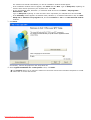
Click Next.
If necessary, select a language from the drop-down list.
4.
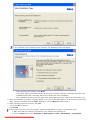
Select Typical installation for a local printer. Then, click Next.
The Custom allows you to select the machine’s connection and choose individual component to install.
Follow the on-screen instructions.
Downloaded from ManualsPrinter.com Manuals
If your machine is not connected to the computer, the following window will appear.
After connecting the machine, click Next.
If you don’t want to connect the printer at this time, click Next, and No on the following screen. The
installation starts and a test page will not print at the end of the installation.
The installation window in this user guide may differ depending on the machine and interface in use.
5.
After the installation is finished, a window asking you to print a test page appears. If you choose to print a test
page, select the checkbox and click Next. Otherwise, just click Next and skip to step 7.
6.
If the test page prints out correctly, click Yes.
If not, click No to reprint it.
7.
Click Finish.
If the printer driver does not work properly, follow the steps below to repair or reinstall the driver.
1. Make sure that the machine is connected to your machine and powered on.
2. From the Start menu, select Programs or All Programs > Dell > Dell Printers > your printer
Downloaded from ManualsPrinter.com Manuals
3.
driver name > Maintenance.
Select the option as you wish, follow the instruction on the window.
Macintosh
The software CD provides the driver files that allow you to use the CUPS driver for printing on a Macintosh
computer.
Also, it provides you with the TWAIN driver for scanning on a Macintosh computer.
1.
2.
3.
4.
5.
6.
7.
8.
9.
10.
Make sure that the machine is connected to your computer and powered on.
11.
12.
When the message which warns that all applications will close on your computer appears, click Continue.
13.
Open the Applications folder > Utilities > Print Setup Utility.
Insert the supplied software CD into your CD/DVD drive.
Double-click the CD-ROM icon that appears on your Macintosh desktop.
Double-click the MAC_Installer folder.
Double-click the Installer OS X icon.
Enter the password and click OK.
The Dell Installer window opens. Click Continue.
Read the license agreement and click Continue.
Click Agree to agree to the license agreement.
Select Easy Install and click Install. Easy Install is recommended for most users. All components necessary
for machine operations will be installed.
If you select Custom Install, you can choose individual components to install.
After the installation is finished, click Quit.
If you have installed scanner driver, click Restart.
For Mac OS X 10.5 ~ 10.6, open the Applications folder > System Preferences and click Print & Fax.
14.
Click Add on the Printer List.
For Mac OS X 10.5 ~ 10.6, press the “+” icon; a display window will pop up.
15.
For Mac OS X 10.3, select the USB tab.
For Mac OS X10.4, click Default Browser and find the USB connection.
For Mac OS X 10.5 ~ 10.6, click Default and find the USB connection.
16.
For Mac OS X 10.3, if Auto Select does not work properly, select Dell in Printer Model and your machine name
in Model Name.
For Mac OS X 10.4, if Auto Select does not work properly, select Dell in Print Using and your machine
name in Model.
For Mac OS X 10.5 ~ 10.6, if Auto Select does not work properly, select Select a driver to use... and your
machine name in Print Using.
Your machine appears on the Printer List, and is set as the default machine.
17.
Click Add.
If the printer driver does not work properly, uninstall the driver and reinstall it.
Follow steps below to uninstall the driver for Macintosh.
1. Make sure that the machine is connected to your computer and powered on.
2. Insert the supplied software CD into your CD/DVD drive.
3.
4.
5.
6.
7.
8.
9.
10.
Double-click CD-ROM icon that appears on your Macintosh desktop.
Double-click the MAC_Installer folder.
Double-click the Installer OS X icon.
Enter the password and click OK.
The Dell Installer window opens. Click Continue.
Select Uninstall and click Uninstall.
When the message which warns that all applications will close on your computer appears, click
Continue.
When the uninstall is done, click Quit.
Linux
Follow the steps below to install the driver for Linux. While installing the driver, the Unified Linux Driver package will
automatically be installed as well.
The supplied software CD provides you with the Unified Linux Driver package for using your machine with a
Downloaded from ManualsPrinter.com Manuals
Linux computer easily in UI based management tool.
1.
2.
Make sure that the machine is connected to your computer and powered on.
When the Administrator Login window appears, type in root in the Login field and enter the system password.
You must log in as a super user (root) to install the machine software. If you are not a super user, ask your
system administrator.
3.
Insert the supplied software CD into your CD/DVD drive.
The software CD will run automatically.
If the software CD does not run automatically, click the
screen appears, type in the following:
icon at the bottom of the desktop. When the Terminal
If the software CD is secondary master and the location to mount is /mnt/cdrom,
[root@localhost root]#mount -t iso9660 /dev/hdc /mnt/cdrom
[root@localhost root]#cd /mnt/cdrom/Linux
[root@localhost Linux]#./install.sh
If you still failed to run the software CD type the followings in sequence:
[root@localhost root]#umount /dev/hdc
[root@localhost root]#mount -t iso9660 /dev/hdc /mnt/cdrom
The installation program runs automatically if you have an autorun software package installed and
configured.
4.
When the welcome screen appears, click Next.
5. When the installation is complete, click Finish.
The installation program has added the Unified Driver Configurator desktop icon and the Unified Driver group to the
system menu for your convenience. If you have any difficulties, consult the on screen help that is available through
your system menu or can otherwise be called from the driver package Windows applications, such as Unified Driver
Configurator or Image Manager.
Installing the driver in the text mode:
If you do not use the graphical interface or have been unable to install the driver, you have to use the driver
in the text mode.
Follow the steps 1 to 3, then type [root@localhost Linux]# ./install.sh. Follow the instructions on the
terminal screen. The installation is completed.
When you want to uninstall the driver, follow the installation instructions above, but type [root@localhost
Linux]# ./uninstall.sh on the terminal screen.
If the printer driver does not work properly, uninstall the driver and reinstall it.
Follow the steps below steps to uninstall the driver for Linux.
1. Make sure that the machine is connected to your computer and powered on.
2. When the Administrator Login window appears, type in “root” in the Login field and enter the system
password.
You must log in as a super user (root) to uninstall the printer driver. If you are not a super user, ask
your system administrator.
3. Insert the supplied software CD into your CD/DVD drive.
The software CD will run automatically.
If the software CD does not run automatically, click the
icon at the bottom of the desktop. When the
Terminal screen appears, type in:
If the software CD is secondary master and the location to mount is /mnt/cdrom,
[root@localhost root]#mount -t iso9660 /dev/hdc /mnt/cdrom
[root@localhost root]#cd /mnt/cdrom/Linux
Downloaded from ManualsPrinter.com Manuals
4.
5.
6.
[root@localhost Linux]#./uninstall.sh
The installation program runs automatically if you have an autorun software package installed and
configured.
Click Uninstall.
Click Next.
Click Finish.
Sharing your machine locally
Follow the steps below to set up the computers to share your machine locally.
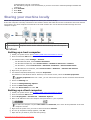
If the host computer is directly connected to the machine with a USB cable and is also connected to the local network
environment, the client computers connected to the local network can use the shared machine through the host
computer to print.
1 Host computer
A computer which is directly connected to the machine by USB cable.
2 Client computers Computers which use the machine shared through the host computer.
Windows
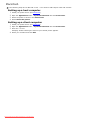
Setting up a host computer
1.
2.
3.
Install your printer driver (See Installing USB connected machine’s driver).
Click the Windows Start menu.
For Windows 2000, select Settings > Printers.
For Windows XP/2003, select Printers and Faxes.
For Windows 2008/Vista, select Control Panel > Hardware and Sound > Printers.
For Windows 7, select Control Panel > Hardware and Sound > Devices and Printers.
For Windows Server 2008 R2, select Control Panel > Hardware > Devices and Printers.
4.
5.
Right click your printer icon.
For Windows XP/2003/2008/Vista, selet/click Properties.
For Windows 7 and Windows Server 2008 R2, from context menus, select the Printer properties.
If Printer properties item has ? mark, you can select other printer drivers connected with selected
printer.
6.
7.
8.
9.
Select the Sharing tab.
Check the Change Sharing Options.
Check the Share this printer.
Fill in the Share Name field. Click OK.
Setting up a client computer
1.
2.
3.
4.
Install your printer driver (See Installing USB connected machine’s driver).
Click the Windows Start menu.
Select All programs > Accessories > Windows Explorer.
Enter in IP address of the host computer and press Enter in your keyboard.
In case host computer requires User name and Password, fill in User ID and password of the host
computer account.
5.
6.
7.
Right click the printer icon you want to share and select Connect.
If a set up complete message appears, click OK.
Open the file you want to print and start printing.
Downloaded from ManualsPrinter.com Manuals
Macintosh
The following steps are for Mac OS X 10.5 ~ 10.6. Refer to Mac Help for other OS versions.
Setting up a host computer
1.
2.
3.
4.
Install your printer driver (See Macintosh).
Open the Applications folder > System Preferences and click Print & Fax.
Select the printer to share in the Printers list.
Select Share this printer.
Setting up a client computer
1.
2.
3.
Install your printer driver (See Macintosh).
Open the Applications folder > System Preferences and click Print & Fax.
Press the “+” icon.
A display window showing the name of your shared printer appears.
4.
Select your machine and click Add.
Downloaded from ManualsPrinter.com Manuals
Basic setup
After installation is complete, you may want to set the machine’s default settings. Refer to the next section if you would
like to set or change values. This chapter gives you step-by-step instructions for setting up the machine.
This chapter includes:
Altitude adjustment
Changing the display language
Setting the date and time
Changing the clock mode
Changing the default mode
Setting sounds
Entering characters using the number keypad
Using the save modes
Setting the default tray and paper
Setting job timeout
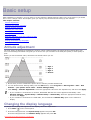
Altitude adjustment
The print quality is affected by atmospheric pressure, which is determined by the height of the machine above sea
level. The following information will guide you on how to set your machine to the best print quality or best quality of
print.
Before you set the altitude value, determine the altitude where you are.
1.
2.
3.
4.
1.
2.
3.
High 1
High 2
High 3
Normal
Ensure that you have installed the printer driver with the provided software CD.
You can launch Printer Settings Utility from the Start menu, select Programs or All Programs > Dell > Dell
Printers > your printer driver name > Printer Settings Utility.
Click Setting > Altitude Adjustment. Select the appropriate value from the dropdown list, and then click Apply.
If your machine is connected to a network, Embedded Web Service screen appears automatically. Click
Machine Settings > System Setup > Machine Setup > Altitude Adj. Select the appropriate altitude value,
and then click Apply.
If your machine is connected via a USB cable, set the altitude in Altitude Adj. option on the machine’s
display.
Changing the display language
To change the language that appears on the display, follow the steps below:
1. Press Menu ( ) on the control panel.
2.
Press the left/right arrow until System Setup appears and press OK.
Press the left/right arrow until Machine Setup appears and press OK.
Downloaded from ManualsPrinter.com Manuals
3.
4.
5.
6.
7.
Press the left/right arrow until Language appears and press OK.
Press the left/right arrow to display the language you want.
Press OK to save the selection.
Press Stop/Clear (
) to return to ready mode.
Setting the date and time
When you set the time and date, they are used in delay fax and delay print. They are printed on reports. If, however,
they are not correct, you need to change it for the correct time being.
If the machine’s power is cut off, you need to reset the correct time and date once the power has been restored.
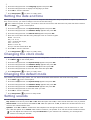
1.
Press Menu (
) on the control panel.
2.
3.
4.
5.
Press the left/right arrow until System Setup appears and press OK.
Press the left/right arrow until Machine Setup appears and press OK.
Press the left/right arrow until Date & Time appears and press OK.
Enter the correct time and date using left/right arrow or numeric keypad.
Month = 01 to 12,
Day = 01 to 31,
Year = requires four digits,
Hour = 01 to 12,
Minute = 00 to 59,
and you can also select AM or PM.
6.
7.
Press OK to save the selection.
Press Stop/Clear (
) to return to ready mode.
Changing the clock mode
You can set your machine to display the current time using either a 12-hour or 24-hour format.
1.
PressMenu (
) on the control panel.
2.
3.
4.
5.
6.
Press the left/right arrow until System Setup appears and press OK.
Press the left/right arrow until Machine Setup appears and press OK.
Press the left/right arrow until Clock Mode appears and press OK.
Press the left/right arrow to select the other mode and press OK.
Press Stop/Clear (
) to return to ready mode.
Changing the default mode
Your machine is preset to Copy mode. You can switch this default mode between Fax mode and Copy mode.
1. Press Menu ( ) on the control panel.
2.
3.
4.
5.
6.
7.
Press the left/right arrow until System Setup appears and press OK.
Press the left/right arrow until Machine Setup appears and press OK.
Press the left/right arrow until Default Mode appears and press OK.
Press the left/right arrow to select the mode you want.
Press OK to save the selection.
Press Stop/Clear (
to return to ready mode.
Setting sounds
You can control the following sounds:
Key sound: Turns the key sound On or Off. With this option set to On, a tone sounds each time a key is pressed.
Alarm Sound: Turns the alarm sound On or Off. With this option set to On, an alarm tone sounds when an error
occurs or fax communication ends.
Speaker: Turns On or Off the sounds from the telephone line through the speaker, such as a dial tone or a fax
tone. With this option set to Comm. which means “Common”, the speaker is on until the remote machine answers.
You can adjust the volume level using On Hook Dial. If your machine has a handset, you can adjust the
volume level using the handset.
Downloaded from ManualsPrinter.com Manuals
Ringer: Adjusts the ringer volume. For the ringer volume, you can select Off, Low, Mid, and High.
Speaker, ringer, key sound, and alarm sound
1.
Press Menu (
) on the control panel.
2.
3.
4.
5.
Press the left/right arrow until System Setup appears and press OK.
6.
7.
If necessary, repeat steps 4 through 5 to set other sounds.
Press the left/right arrow until Sound/Volume appears and press OK.
Press the left/right arrow until the sound option you want appear and press OK.
Press the left/right arrow until the desired status or volume for the sound you have selected appears and press
OK.
Press Stop/Clear (
) to return to ready mode.
Speaker volume
To adjust the volume using On Hook Dial:
1. Press Fax ( ) on the control panel.
2.
3.
4.
Press On Hook Dial. A dial tone sounds from the speaker.
2.
3.
Press the left/right arrow until you hear the volume you want.
Press the left/right arrow until you hear the volume you want.
Press On Hook Dial to save the change and return to ready mode.
If your machine has a handset:
1. Pick up the handset. A dial tone sounds from the earpiece.
Press OK to save the change and replace the handset.
You can adjust the speaker volume only when the telephone line is connected.
Entering characters using the number keypad
As you perform various tasks, you may need to enter names and numbers. For example, when you set up your
machine, you enter your name or your company’s name, and the fax number.
Entering alphanumeric characters
1.
When you are prompted to enter a letter, locate the button labeled with the character you want. Press the button
until the correct letter appears on the display.
For example, to enter the letter O, press 6, labeled with MNO.
Each time you press 6, the display shows a different letter, M, N, O, m, n, o and finally 6.
You can enter special characters, such as space, plus sign, and etc. For details, see the below section.
2.
To enter additional letters, repeat step 1.
If the next letter is printed on the same button, move the cursor by pressing the left/right arrow button and then
press the button labeled with the letter you want. The cursor will move to the right and the next letter will
appear on the display.
You can enter a space by pressing 1 twice.
3.
When you have finished entering letters, press OK.
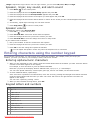
Keypad letters and numbers
Key Assigned numbers, letters, or characters
1
@/.‘1
2
ABCabc2
3
DEFde f3
4
GH I ghi4
5
JKLj k l5
6
M NOmno6
7
PQRSpqr s7
8
TUVtuv 8
9
WXYZwx y z9
0
&+-,0
*
*
Downloaded from ManualsPrinter.com Manuals
#
#
Correcting numbers or names
If you make a mistake while entering a number or name, press the left/right arrow button to delete the last digit or
character. Then enter the correct number or character.
Inserting a pause
With some telephone systems, you must dial an access code (9, for example) and listen for a second dial tone. In
such cases, you must insert a pause in the telephone number. You can insert a pause while you are setting up speed
dial numbers.To insert a pause, press Redial/Pause at the appropriate place while entering the telephone number.
A - appears on the display at the corresponding location.
Using the save modes
Using the toner saving feature
Toner save mode allows your machine to use less toner on each page. Activating this mode extends the life of the
toner cartridge beyond what one would experience in the normal mode, but it reduces print quality.
1.
Press Menu (
) on the control panel.
2.
3.
4.
5.
6.
Press the left/right arrow until System Setup appears and press OK.
Press the left/right arrow until Machine Setup appears and press OK.
Press the left/right arrow until Toner Save appears and press OK.
Press the left/right arrow until On appears and press OK.
Press Stop/Clear (
) to return to ready mode.
When PC-printing, you can also turn on or off toner save mode in the printer properties.
Using the power saving feature
When you are not using the machine for a while, use this feature to save power.
1.
Press Menu (
) on the control panel.
2.
3.
4.
5.
6.
7.
Press the left/right arrow until System Setup appears and press OK.
Press the left/right arrow until Machine Setup appears and press OK.
Press the left/right arrow until Power Save appears and press OK.
Press the left/right arrow to select the time you want.
Press OK to save the selection.
Press Stop/Clear (
) to return to ready mode.
Available settings range from 1-120 minutes. The factory default setting is 1 minute.
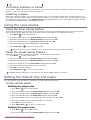
Setting the default tray and paper
You can select the tray and paper you would like to keep using for printing job.
In the control panel
Setting the paper size
1.
Press Menu (
) on the control panel.
2.
3.
4.
5.
6.
7.
8.
Press the left/right arrow until System Setup appears and press OK.
Press the left/right arrow until Paper Setup appears and press OK.
Press the left/right arrow until Paper Size appears and press OK.
Press the left/right arrow to select the paper tray you want and press OK.
Press the left/right arrow to select the paper size you want.
Press OK to save the selection.
Press Stop/Clear (
) to return to ready mode.
Setting the paper type
1.
Press Menu (
) on the control panel.
2.
Press the left/right arrow until System Setup appears and press OK.
Downloaded from ManualsPrinter.com Manuals
Press the left/right arrow until Paper Setup appears and press OK.
3.
4.
5.
6.
7.
8.
Press the left/right arrow until Paper Type appears and press OK.
Press the left/right arrow to select the paper tray you want and press OK.
Press the left/right arrow to select the paper type you want.
Press OK to save the selection.
Press Stop/Clear (
) to return to ready mode.
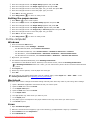
Setting the paper source
1.
Press Menu (
) on the control panel.
2.
3.
4.
5.
6.
7.
Press the left/right arrow until System Setup appears and press OK.
8.
Press Stop/Clear (
Press the left/right arrow until Paper Setup appears and press OK.
Press the left/right arrow until Paper Source appears and press OK.
Press the left/right arrow until Copy Tray or Fax Tray appears and press OK.
Press the left/right arrow to select the paper tray you want.
Press OK to save the selection.
) to return to ready mode.
In the computer
Windows
Click the Windows Start menu.
1.
2.
For Windows 2000, select Settings > Printers.
For Windows XP/2003, select Printers and Faxes.
For Windows 2008/Vista, select Control Panel > Hardware and Sound > Printers.
For Windows 7, select Control Panel > Hardware and Sound > Devices and Printers.
For Windows Server 2008 R2, select Control Panel > Hardware > Devices and Printers.
Right-click your machine.
3.
4.
For Windows XP/2003/2008/Vista, press Printing Preferences.
For Windows 7 and Windows Server 2008 R2, from context menus, select the Printing Preferences.
If Printing Preferences item has ? mark, you can select other printer drivers connected with selected
printer.
Click Paper tab.
5.
6.
7.
Select tray and its options, such as paper size and type.
Press OK.
If you want to use special-sized paper such as a billing paper, select Paper tab > Size > Edit... in the
Printing Preferences (See Opening printing preferences).
Macintosh
Macintosh users need to change the default setting manually each time they want to print using other settings.
1.
2.
3.
4.
5.
6.
7.
8.
9.
Open a Macintosh application and select the file you want to print.
Open the File menu and click Print.
Go to Paper Feed pane.
Open the File menu and click Print.
Go to Paper Feed.
Set appropriate tray from which you want to print.
Go to Paper pane.
Set paper type to correspond to the paper loaded in the tray from which you want to print.
Click Print to print.
Linux
1.
2.
3.
4.
Open Terminal Program
When the Terminal screen appears, type in the following: [root@localhost root]# lpr <FileName>
Select Printer and click Properties…
Click Advanced tab.
Downloaded from ManualsPrinter.com Manuals
5.
6.
Select tray (source) and its options, such as paper size and type.
Press OK.
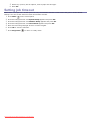
Setting job timeout
When there is no input for a certain period of time, the machine exits the current menu and goes in to the default
settings. You can set the amount of time the machine will wait.
1.
Press Menu (
) on the control panel.
2.
3.
4.
5.
6.
7.
Press the left/right arrow until System Setup appears and press OK.
Press the left/right arrow until Machine Setup appears and press OK.
Press the left/right arrow until Job Timeout appears and press OK.
Enter the time using left/right arrow or numeric keypad.
Press OK to save the selection.
Press Stop/Clear (
) to return to ready mode.
Downloaded from ManualsPrinter.com Manuals
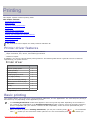
Printing
This chapter explains common printing tasks.
This chapter includes:
Printer driver features
Basic printing
Opening printing preferences
Using help
Using special print features
Changing the default print settings
Setting your machine as a default machine
Printing to a file (PRN)
Macintosh printing
Linux printing
The procedures in this chapter are mainly based on Windows XP.
Printer driver features
Your printer drivers support the following standard features:
Paper orientation, size, source, and media type selection
Number of copies
In addition, you can use various special printing features. The following table shows a general overview of features
supported by your printer drivers:
Printer driver
Feature
Windows
Machine quality option
?
Booklet printing
?
Poster printing
?
Multiple pages per sheet
?
Fit to page printing
?
Reduce and enlarge printing
?
Different source for first page
?
Watermark
?
Overlay
?
Double-sided printing (manual)
?
(?: supported)
Basic printing
Your machine allows you to print from various Windows, Macintosh, or Linux applications. The exact steps for printing a
document may vary depending on the application you use.
Your Printing Preferences window that appears in this user’s guide may differ depending on the machine in
use. However, the composition of the Printing Preferences window is similar. Check the operating system(s)
that are compatible with your machine. Refer to the OS compatibility section of Printer Specifications (See
System requirements).
When you select an option in Printing Preferences, you may see a warning mark,
, or
. An exclamation
mark (
) means you can select that certain option but it is not recommended, and (
Downloaded from ManualsPrinter.com Manuals
) mark means you
cannot select that option due to the machine’s setting or environment.
The following procedure describes the general steps required for printing from various Windows applications.
Macintosh basic printing (See Macintosh printing).
Linux basic printing (See Linux printing).
The following Printing Preferences window is for Notepad in Windows XP. Your Printing Preferences window may
differ, depending on your operating system or the application you are using.
1.
2.
3.
Open the document you want to print.
Select Print from the File menu. The Print window appears.
Select your machine from the Select Printer list.
The basic print settings including the number of copies and print range are selected within the Print window.
To take advantage of the printer features provided by your printer driver, click Properties or Preferences in
the application’s Print window to change the print setting (See Opening printing preferences).
4.
To start the print job, click OK or Print in the Print window.
If you are using Windows Internet Explorer, the Dell AnyWeb Print too will save your time for screen-captured
images or printing the image. Click Start > All programs > Dell Printers > Dell AnyWeb Print > Download
the latest version to link the website where the tool is available for the download.
Canceling a print job
If the print job is waiting in a print queue or print spooler, cancel the job as follows:
1. Click the Windows Start menu.
2.
For Windows 2000, select Settings > Printers.
For Windows XP/2003, select Printer and Faxes.
For Windows 2008/Vista, select Control Panel > Hardware and Sound > Printers.
For Windows 7, select Control Panel > Hardware and Sound > Devices and Printers.
For Windows Server 2008 R2, select Control Panel > Hardware > Devices and Printers.
3.
For Windows 2000, XP, Server 2003, Vista, or Server 2008, double-click your machine.
For Windows 7, or Windows Server 2008 R2, right click your printer icon > context menus > See what’s
printing.
If See what’s printing item has ? mark, you can select other printer drivers connected with selected
printer.
4.
From the Document menu, select Cancel.
You can also access this window by simply double-clicking the machine icon (
You can also cancel the current job by pressing Stop/Clear (
Downloaded from ManualsPrinter.com Manuals
) in the Windows task bar.
) on the control panel.
Opening printing preferences
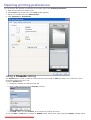
You can preview the settings you selected on the upper right of the Printing Preferences.
1.
2.
3.
4.
Open the document you want to print.
Select Print from the file menu. The Print window appears.
Select your machine from the Select Printer.
Click Properties or Preferences.
Using a Presets setting
The Presets option, which is visible on each preferences tab except for Dell tab, allows you to save the current
preferences settings for future use.
To save a Presets item:
1.
2.
Change the settings as needed on each tab.
Enter a name for the item in the Presets input box.
3. Click Add. When you save Presets, all current driver settings are saved.
If you click Add, the Add button changes to Update button. Select more options and click Update, settings will be
Downloaded from ManualsPrinter.com Manuals
added to the Presets you made.
To use a saved setting, select it from the Presets drop down list. The machine is now set to print according to the
setting you selected.
To delete saved setting, select it from the Presets drop down list and click Delete.
You can also restore the printer driver’s default settings by selecting Default Preset from the Presets drop down
list.
Using help
Click the question mark from the upper-right corner of the window and click on any option you want to know about.
Then a pop up window appears with information about that option's feature which is provided from the driver.
If you want to search information via a keyword, click the Dell tab in the Printing Preferences window, and enter a
keyword in the input line of the Help option.
Using special print features
Special print features include:
Printing multiple pages on one sheet of paper.
Printing posters.
Printing booklets (Manual).
Printing on both sides of paper (Manual).
Change percentage of your document.
Fitting your document to a selected paper size.
Using watermarks.
Using overlay.
Advanced Options.
Printing multiple pages on one sheet of paper
You can select the number of pages to print on a single sheet of paper. To print more than one page per sheet, the
pages will be reduced in size and arranged in the order you specify. You can print up to 16 pages on one sheet.
1.
To change the print settings from your software application, access Printing Preferences (See Opening printing
preferences).
2.
3.
4.
5.
6.
7.
Click the Basic tab, select Multiple Pages per Side in the Type drop-down list.
Select the number of pages you want to print per sheet (2, 4, 6, 9, or 16) in the Pages per Side drop-down list.
Select the page order from the Page Order drop-down list, if necessary.
Check Print Page Border to print a border around each page on the sheet.
Click the Paper tab, select the Size, Source, and Type.
Click OK or Print until you exit the Print window.
Printing posters
This feature allows you to print a single-page document onto 4, 9, or 16 sheets of paper, for the purpose of pasting
the sheets together to form one poster-size document.
1.
To change the print settings from your software application, access Printing Preferences (See Opening printing
preferences).
2.
3.
Click the Basic tab, select Poster Printing in the Type drop-down list.
Select the page layout you want.
Specification of the page layout:
Poster 2x2: Document will be enlarged and be divided into 4 pages.
Downloaded from ManualsPrinter.com Manuals
Poster 3x3: Document will be enlarged and be divided into 9 pages.
Poster 4x4: Document will be enlarged and be divided into 16 pages.
4.
Select the Poster Overlap value. Specify Poster Overlap in millimeters or inches by selecting the radio button
on the upper right of Basic tab to make it easier to paste the sheets together.
5.
6.
7.
Click the Paper tab, select the Size, Source, and Type.
Click OK or Print until you exit the Print window.
You can complete the poster by pasting the sheets together.
Printing booklets (Manual)
This feature prints your document on both sides of a paper and arranges the pages so that the paper can be folded
in half after printing to produce a booklet.
If you want to make a booklet, you need to print on Letter, Legal, A4, Us Folio, or Oficio sized print media.
1.
To change the print settings from your software application, access the Printing Preferences (See Opening
printing preferences).
2.
3.
Click the Basic tab, select Booklet Printing from the Type drop-down list.
Click the Paper tab, select the Size, Source, and Type.
The Booklet Printing option is not available for all paper sizes. In order to find out the available paper size
for this feature, select the available paper size in the Size option on the Paper tab.
If you select an unavailable paper size, this option can be automatically canceled. Select only available paper
(paper without
or
mark).
4.
5.
Click OK or Print until you exit the Print window.
After printing, fold and staple the pages.
Printing on both sides of paper (Manual)
You can print on both sides of a paper; duplex. Before printing, decide how you want your document oriented. You
can use this feature with Letter, Legal, A4, US Folio, or Oficio sized paper (See Print media specifications ).
It is recommended not to print on both sides of a special media, such as labels, envelopes, or thick paper. It
may cause a paper jam or damage the machine.
1.
To change the print settings from your software application, access Printing Preferences (See Opening printing
preferences).
2.
3.
Click the Advance tab.
From the Double-Sided Printing (Manual) section, select the binding option you want.
None
Long Edge: This option is the conventional layout used in bookbinding.
Short Edge: This option is the conventional layout used in calendars.
4.
Click the Paper tab, select the Size, Source, and Type.
Downloaded from ManualsPrinter.com Manuals
5.
Click OK or Print until you exit the Print window.
If your machine does not have a duplex unit, you should complete the printing job manually. The machine
prints every alternate page of the document first. After that, an instruction message appears on your computer.
Follow the on-screen instructions to complete the printing job.
Change percentage of your document
You can change the size of a document to appear larger or smaller on the printed page by typing in a percentage
you want.
1.
To change the print settings from your software application, access Printing Preferences (See Opening printing
preferences).
2.
3.
Click the Paper tab.
Enter the scaling rate in the Percentage input box.
You can also click the up/down arrows to select the scaling rate.
4.
5.
Select the Size, Source, and Type in Paper Options.
Click OK or Print until you exit the Print window.
Fitting your document to a selected paper size
This printer feature allows you to scale your print job to any selected paper size regardless of the document size.
This can be useful when you want to check fine details on a small document.
1.
To change the print settings from your software application, access Printing Preferences (See Opening printing
preferences).
2.
3.
4.
5.
Click the Paper tab.
Select the paper size you want from the Fit to page.
Select the Size, Source, and Type in Paper Options.
Click OK or Print until you exit the Print window.
Using watermarks
The watermark option allows you to print text over an existing document. For example, you use it when you want to
have large gray letters reading “DRAFT” or “CONFIDENTIAL” printed diagonally across the first page or all pages of a
document.
There are several predefined watermarks that come with the machine. They can be modified, or you can add new
ones to the list.
Using an existing watermark
1.
To change the print settings from your software application, access Printing Preferences (See Opening
printing preferences).
2.
Click the Advanced tab, and select the desired watermark from the Watermark drop-down list. You will see
the selected watermark in the preview image.
3.
Click OK or Print until you exit the print window.
Creating a watermark
1.
To change the print settings from your software application, access Printing Preferences (See Opening
printing preferences).
Downloaded from ManualsPrinter.com Manuals
2.
From the Advanced tab, select Edit from the Watermark drop-down list. The Edit Watermarks window
appears.
3.
Enter a text message in the Watermark Message box. You can enter up to 256 characters. The message
displays in the preview window.
When the First Page Only box is checked, the watermark prints on the first page only.
4.
Select watermark options.
You can select the font name, style, size, and shade from the Font Attributes section, as well as set the
angle of the watermark from the Message Angle section.
5.
6.
Click Add to add a new watermark to the Current Watermarks list.
When you have finished editing, click OK or Print until you exit the Print window.
To stop printing the watermark, select None from the Watermark drop-down list.
Editing a watermark
1.
To change the print settings from your software application, access Printing Preferences (See Opening
printing preferences).
2.
Click the Advanced tab, select Edit from the Watermark drop-down list. The Edit Watermarks window
appears.
3.
Select the watermark you want to edit from the Current Watermarks list and change the watermark
message and options.
4.
5.
Click Update to save the changes.
Click OK or Print until you exit the Print window.
Deleting a watermark
1.
To change the print settings from your software application, access Printing Preferences (See Opening
printing preferences).
2.
Click the Advanced tab, select Edit from the Watermark drop-down list. The Edit Watermarks window
appears.
3.
4.
Select the watermark you want to delete from the Current Watermarks list and click Delete.
Click OK or Print until you exit the Print window.
Using overlay
An overlay is text and/or images stored in the computer hard disk drive (HDD) as a special file format that can be
printed on any document. Overlays are often used to take the place of letterhead paper. Rather than using
preprinted letterhead, you can create an overlay containing exactly the same information that is currently on your
letterhead. To print a letter with your company’s letterhead, you do not need to load preprinted letterhead paper in
the machine just print the letterhead overlay on your document.
Creating a new page overlay
To use a page overlay, you must create a new page overlay containing your logo or image.
1.
Create or open a document containing text or an image for use in a new page overlay. Position the items
exactly as you wish them to appear when printed as an overlay.
2.
3.
4.
5.
To save the document as an overlay, access Printing Preferences (See Opening printing preferences).
6.
7.
8.
Click Save. The name appears on the Overlay List.
Click the Advanced tab, and select Edit from the Text drop-down list. Edit Overlay window appears.
In the Edit Overlay window, click Create.
In the Save As window, type a name of up to eight characters in the File name box. Select the destination
path, if necessary (The default is C:\Formover).
Click OK or Print until you exit the Print window.
The file is not printed. Instead, it is stored on your computer hard disk drive.
The overlay document size must be the same as the document you print with the overlay. Do not create an
overlay with a watermark.
Using a page overlay
After an overlay has been created, it is ready to be printed with your document. To print an overlay with a
Downloaded from ManualsPrinter.com Manuals
document:
1.
2.
Create or open the document you want to print.
3.
4.
5.
Click the Advanced tab.
To change the print settings from your software application, access Printing Preferences (See Opening
printing preferences).
Select the desired overlay from the Text drop-down list.
If the overlay file you want does not appear in the Text drop-down list, select Edit from the list and click
Load. Select the overlay file you want to use.
If you have stored the overlay file you want to use in an external source, you can also load the file when you
access the Open window.
After you select the file, click Open. The file appears in the Overlay List box and is available for printing.
Select the overlay from the Overlay List box.
6.
If necessary, check Confirm Page Overlay When Printing box. If this box is checked, a message window
appears each time you submit a document for printing, asking you to confirm your wish to print an overlay on
your document.
If this box is not checked and an overlay has been selected, the overlay automatically prints with your
document.
7.
Click OK or Print until you exit the Print window.
The selected overlay prints on your document.
The resolution of the overlay document must be the same as that of the document you will print with the
overlay.
Deleting a page overlay
You can delete page overlays that you no longer use.
1. In the Printing Preferences window, click the Advanced tab.
2.
3.
4.
5.
6.
Select Edit in the Overlay drop down list.
Select the overlay you want to delete from the Overlay List box.
Click Delete.
When a confirming message window appears, click Yes.
Click OK or Print until you exit the Print window.
Advanced Options
Use the following Graphics options to adjust the print quality for your specific printing needs.
If the option is grayed out or not shown, that option is not applicable with the printer language you are using.
1.
To change the print settings from your software application, access Printing Preferences (See Opening printing
preferences).
2.
Click the Graphics tab.
Refer to the online help for each option’s information provided from the Printing Preferences.
Font/Text: Select Darken Text to print texts darker than on a normal document. Use All Text Black to
prints solid black, regardless of the color it appears on the screen.
Graphic Controller: Fine Edge allows user to emphasize edges of texts and fine lines for improving
readability.
Toner Save: Selecting this option extends the life of your toner cartridge and reduces your cost per page
without a significant reduction in print quality.
On: Select this option to allow the printer to use less toner on each page.
Off: If you do not need to save toner when printing a document, select this option.
3.
Click OK or Print until you exit the Print window.
Changing the default print settings
1.
2.
Click the Windows Start menu.
For Windows 2000, select Settings > Printers.
For Windows XP/2003, select Printer and Faxes.
For Windows 2008/Vista, select Control Panel > Hardware and Sound > Printers.
For Windows 7, select Control Panel > Hardware and Sound > Devices and Printers.
For Windows Server 2008 R2, select Control Panel > Hardware > Devices and Printers.
3.
Right-click your machine.
Downloaded from ManualsPrinter.com Manuals
4.
For Windows XP/2003/2008/Vista, press Printing Preferences.
For Windows 7 and Windows Server 2008 R2, from context menus, select the Printing preferences.
If Printing preferences item has ? mark, you can select other printer drivers connected with selected printer.
5.
6.
Change the settings on each tab.
Click OK.
If you want to change the settings for each print job, change it in Printing Preferences.
Setting your machine as a default machine
1.
2.
Click the Windows Start menu.
For Windows 2000, select Settings > Printers.
For Windows XP/2003, select Printer and Faxes.
For Windows 2008/Vista, select Control Panel > Hardware and Sound > Printers.
For Windows 7, select Control Panel > Hardware and Sound > Devices and Printers.
For Windows Server 2008 R2, select Control Panel > Hardware > Devices and Printers.
3.
4.
Select your machine.
Right-click your machine and select Set as Default Printer.
For Windows 7 and Windows Server 2008 R2.
If Set as default printer item has ? mark, you can select other printer drivers connected with selected
printer.
Printing to a file (PRN)
You will sometimes need to save the print data as a file.
To create a file:
1.
Check the Print to file box at the Print window.
2.
3.
Click Print.
Type in the destination path and the file name, and then click OK. For example c:\Temp\file name.
If you type in only the file name, the file is automatically saved in My Documents. The saved folder may
differ, depending on your operating system.
Macintosh printing
This section explains how to print using Macintosh. You need to set the print environment before printing.
USB connected (See Macintosh).
Network connected (See Macintosh).
Downloaded from ManualsPrinter.com Manuals
Printing a document
When you print with a Macintosh, you need to check the printer driver setting in each application you use. Follow the
steps below to print from a Macintosh:
1.
2.
3.
Open the document you want to print.
4.
5.
6.
Open the File menu and click Print.
Open the File menu and click Page Setup.
Choose your paper size, orientation, scaling, other options, and make sure that your machine is selected. Click
OK.
Choose the number of copies you want and indicate which pages you want to print.
Click Print.
Changing printer settings
You can use advanced printing features provided by your machine.
Open an application and select Print from the File menu. The machine name, which appears in the printer
properties pane may differ depending on the machine in use. Except for the name, the composition of the printer
properties pane is similar to the following.
The setting options may differ depending on printers and Mac OS version.
The following pane may differ, depending on your operating system or the application you are using.
The following pane is the first pane you will see when you open the printer properties pane. Select other advanced
features from the drop down list.
Layout
The Layout tab provides options to adjust how the document appears on the printed page. You can print multiple
Downloaded from ManualsPrinter.com Manuals
pages on one sheet of paper. Select Layout from the drop-down list under Orientation to access the following
features.
Pages per Sheet: This option determines how many pages to be printed on one page (See Printing multiple
pages on one sheet of paper).
Layout Direction: This option allows you to select the printing direction on a page similar to the examples on
UI.
Border: This option allows you to print a border around each page on the sheet.
Reverse Page Orientation: This option allows you to rotate paper 180 degrees.
Graphics
The Graphics tab provides options for selecting Resolution. Select Graphics from the drop-down list under
Orientation to access the graphic features.
Resolution (Quality): This option allows you to select the printing resolution. The higher the setting, the
sharper the clarity of printed characters and graphics. The higher setting also may increase the time it takes
to print a document.
Paper
Set Paper Type to correspond to the paper loaded in the tray from which you want to print. This will let you get
the best quality printout. If you load a different type of print material, select the corresponding paper type.
Printer Settings
Printer Settings tab provides Toner Save options. Select Printer Settings from the drop-down list under
Orientation to access the following features:
Toner Save: Selecting this option extends the life of your toner cartridge and reduces your cost per page
without a significant reduction in print quality.
On: Select this option to allow the printer to use less toner on each page.
Off: If you do not need to save toner when printing a document, select this option.
Printing multiple pages on one sheet of paper
You can print more than one page on a single sheet of paper. This feature provides a cost-effective way to print
draft pages.
1.
2.
Open an application, and select Print from the File menu.
3.
4.
Select the other options you want to use.
Select Layout from the drop-down list under Orientation. In the Pages per Sheet drop-down list, select the
number of pages you want to print on one sheet of paper.
Click Print, then the machine prints the selected number of pages you want to print on one sheet of paper.
Linux printing
Printing from applications
There are a lot of Linux applications that allow you to print using Common UNIX Printing System (CUPS). You can
print on your machine from any such application.
1.
2.
Open an application, and select Print from the File menu.
Select Print directly using lpr.
Downloaded from ManualsPrinter.com Manuals
3.
In the LPR GUI window, select the model name of your machine from the printer list and click Properties.
4.
Change the print job properties using the following four tabs displayed at the top of the window.
General: This option allows you to change the paper size, the paper type, and the orientation of the
documents. It enables the duplex feature, adds start and end banners, and changes the number of pages
per sheet.
Text: This option allows you to specify the page margins and set the text options, such as spacing or
columns.
Graphics: This option allows you to set image options that are used when printing image files, such as color
options, image size, or image position.
Advanced: This option allows you to set the print resolution, paper, source and special print features.
If an option is grayed out, it means that the grayed out option is not supported.
5.
6.
7.
Click Apply to apply the changes and close the Properties window.
Click OK in the LPR GUI window to start printing.
The Printing window appears, allowing you to monitor the status of your print job.
To abort the current job, click Cancel.
Printing files
You can print many different types of files on your machine using the standard CUPS way, directly from the
command line interface. The CUPS lpr utility allows you to do that. But the drivers package replaces the standard lpr
tool by a much more user-friendly LPR GUI program.
To print any document file:
1.
Type lpr <file_name> from the Linux shell command line and press Enter. The LPR GUI window appears.
When you type only lpr and press Enter, the Select file(s) to print window appears first. Just select any files
you want to print and click Open.
2.
3.
In the LPR GUI window, select your machine from the list, and change the print job properties.
Click OK to start printing.
Configuring Printer Properties
Using the Printer Properties window provided by the Printers configuration, you can change the various
properties for your machine as a printer.
1.
Open the Unified Driver Configurator.
If necessary, switch to Printers configuration.
2.
3.
Select your machine on the available printers list and click Properties.
The Printer Properties window opens.
Downloaded from ManualsPrinter.com Manuals
The following five tabs display at the top of the window:
General: This option allows you to change the printer location and name. The name entered in this tab
displays on the printer list in Printers configuration.
Connection: This option allows you to view or select another port. If you change the machine port from USB
to parallel or vice versa while in use, you must re-configure the machine port in this tab.
Driver: This option allows you to view or select another machine driver. By clicking Options, you can set
the default device options.
Jobs: This option shows the list of print jobs. Click Cancel job to cancel the selected job and select the
Show completed jobs check box to see previous jobs on the job list.
Classes: This option shows the class that your machine is in. Click Add to Class to add your machine to a
specific class or click Remove from Class to remove the machine from the selected class.
4.
Click OK to apply the changes and close the Printer Properties window.
Downloaded from ManualsPrinter.com Manuals
Copying
This chapter gives you step-by-step instructions for copying documents.
This chapter includes:
Basic copy
Changing the settings for each copy
Changing the default copy settings
Using special copy features
Deciding the form of copy output
Setting copy timeout
Supported optional devices and features may differ according to your printer model.
(See Features by Model).
Basic copy
This is the normal and usual procedure for copying your originals.
1. Press Copy ( ) on the control panel.
2.
Load originals face up into the document feeder, or place a single original face down on the scanner glass.
(See On the scanner glass or In the document feeder).
3.
If necessary, adjust the settings for each copy such as Reduce/Enlarge, Darkness, Original Type and more
(See Changing the settings for each copy).
4.
5.
Enter the number of copies using the arrow or number keypad, if necessary.
Press Start(
) on the control panel to begin copying.
To cancel the current copy job, press Stop/Clear (
) on the control panel.
Changing the settings for each copy
Your machine provides default settings for copying so that you can quickly and easily make a copy. However, if you
want to change the options for each copy, use the copy function buttons on the control panel.
If you press Stop/Clear (
) while setting the copy options, all of the options you have set for the current copy
job will be canceled and return to their default status after the machine completes the copy in progress.
Changing the darkness
If you have an original containing faint marking and dark images, you can adjust the brightness to make a copy that
is easier to read.
1. Press Copy ( ) on the control panel.
2.
Press Menu (
) on the control panel.
3.
4.
5.
Press the left/right arrow until Copy Feature appears and press OK.
Press the left/right arrow until Darkness appears and press OK.
Press the left/right arrow until the contrast mode you want appears and press OK.
Light: Works well with dark print.
Lightest: Works well with darker print.
Normal: Works well with standard typed or printed originals.
Dark: Works well with light print.
Darkest: Works well with lighter print or faint pencil markings.
6.
Press Stop/Clear (
) to return to ready mode.
Selecting the type of originals
The original type setting is used to improve the copy quality by selecting the document type for the current copy
Downloaded from ManualsPrinter.com Manuals
job.
1.
2.
Press Copy (
) on the control panel.
Press Menu (
) on the control panel.
3.
4.
5.
Press the left/right arrow until Copy Feature appears and press OK.
Press the left/right arrow until Original Type appears and press OK.
Press the left/right arrow until the image mode you want appears and press OK.
Text: Use for originals containing mostly text.
Text/Photo: Use for originals with mixed text and photographs.
Photo: Use when the originals are photographs.
6.
Press Stop/Clear (
) to return to ready mode.
Reducing or enlarging copies
You can reduce or enlarge the size of a copied image from 25% to 400% when you copy original documents from
the scanner glass, or from 25% to 100% from the ADF.
To select from the predefined copy sizes:
1.
2.
Press Copy (
) on the control panel.
Press Menu (
) on the control panel.
3.
4.
5.
6.
Press the left/right arrow until Copy Feature appears and press OK.
Press the left/right arrow until Reduce/Enlarge appears and press OK.
Press the left/right arrow until the size setting you want appears and press OK.
Press Stop/Clear (
) to return to ready mode.
To scale the copy by directly entering the scale rate:
1.
2.
Press Copy (
) on the control panel.
Press Menu (
) on the control panel.
3.
4.
5.
6.
Press the left/right arrow until Copy Feature appears and press OK.
7.
8.
Press OK to save the selection.
Press the left/right arrow until Reduce/Enlarge appears and press OK.
Press the left/right arrow until Custom appears and press OK.
Press the left/right arrow or numeric keypad to enter the copy size you want. Pressing and holding the
left/right arrow allows you to quickly scroll to the number you want.
Press Stop/Clear (
) to return to ready mode.
When you make a reduced copy, black lines may appear at the bottom of your copy.
Changing the default copy settings
The copy options, including darkness, original type, copy size, collation, and number of copies, can be set to those
most frequently used. When you copy a document, the default settings are used unless they have been changed by
using the corresponding buttons on the control panel.
1.
2.
Press Copy (
) on the control panel.
Press Menu (
) on the control panel.
3.
4.
5.
6.
7.
8.
Press the left/right arrow until Copy Setup appears and press OK.
Press the left/right arrow until Change Default appears and press OK.
Press the left/right arrow until the setup option you want appears and press OK.
Press the left/right arrow until the setting you want appears and press OK.
Repeat steps 5 through 6, as needed.
PressStop/Clear (
) to return to ready mode.
While you are setting copy options, pressing Stop/Clear (
defaults.
Using special copy features
Downloaded from ManualsPrinter.com Manuals
) cancels the changed settings and restores the
You can use the following copy features:
ID card copying
Your machine can print 2-sided originals on one sheet of A4-, Letter-, Legal-, Folio-, Executive-, B5, A5, or A6-sized
paper.
The machine prints one side of the original on the upper half of the paper and the other side on the lower half
without reducing the size of the original. This feature is helpful for copying a small-sized item, such as a business
card.
This copy feature is available only when you place originals on the scanner glass.
The size of the 2-sided originals should be smaller than A5, if not, some of it won’t be copied.
1.
2.
3.
Press ID Copy on the control panel.
4.
Press OK on the control panel.
Place Front Side and Press [Start] appears on the display.
Place the front side of an original facing down on the scanner glass where arrows indicate as shown, and close
the scanner lid.
Your machine begins scanning the front side and shows Place Back Side and Press [Start].
5.
Turn the original over and place it on the scanner glass, where arrows indicate as shown then, close the scanner
lid.
6.
Press OK on the control panel to begin copying.
If the original is larger than the printable area, some portions may not be printed.
If you don’t press the OK button, only the front side will be copied.
If you press Stop/Clear ( ), the machine cancles the copy job and returns to ready mode.
2-up or 4-up copying (N-up)
The machine reduces the size of the original images and prints 2 or 4 pages onto one sheet of paper.
1.
2.
Press Copy (
) on the control panel.
Press Menu (
) on the control panel.
3.
4.
5.
6.
7.
Press the left/right arrow until Copy Feature appears and press OK.
Press the left/right arrow until Layout appears and press OK.
Press the left/right arrow until 2-Up or 4-Up appears and press OK.
When Yes appears, press OK.
Press Start (
) on the control panel to begin copying.
Downloaded from ManualsPrinter.com Manuals
You cannot adjust the copy size using Reduce/Enlarge for the N-Up feature.
Poster copying
Your original will be divided into 9 portions. You can paste the printed pages together to make one poster-sized
document.
This copy feature is available only when you place originals on the scanner glass.
1.
2.
Press Copy (
) on the control panel.
Press Menu (
) on the control panel.
3.
4.
5.
6.
7.
Press the left/right arrow until Copy Feature appears and press OK.
Press the left/right arrow until Layout appears and press OK.
Press the left/right arrow until Poster Copy appears and press OK.
Press Stop/Clear (
Press Start (
) to return to ready mode.
) on the control panel to begin copying.
Your original is divided into 9 portions. Each portion is scanned and printed one by one in the following order:
Clone copying
The machine prints multiple original images on a single page. The number of images is automatically determined by
the original image and the paper size.
This copy feature is available only when you place originals on the scanner glass.
1.
2.
Press Copy (
) on the control panel.
Press Menu (
) on the control panel.
3.
4.
5.
6.
7.
Press the left/right arrow until Copy Feature appears and press OK.
Press the left/right arrow until Layout appears and press OK.
Press the left/right arrow until Clone Copy appears and press OK.
When Yes appears, press OK.
Press Start (
) on the control panel to begin copying.
You cannot adjust the copy size using Reduce/Enlarge for the Clone Copy feature.
Erasing background images
This feature is helpful when copying originals containing color in the background, as in newspapers or catalogs.
1. Press Copy ( ) on the control panel.
2.
Press Menu (
) on the control panel.
3.
4.
5.
Press the left/right arrow until Copy Feature appears and press OK.
Press the left/right arrow until Adjust Bkgd. appears and press OK.
Press the left/right arrow until the binding option you want appears.
Off: Disables this feature.
Auto: Optimizes the background.
Downloaded from ManualsPrinter.com Manuals
Enhance Lev.1~2: The higher the number is, the more vivid the background is.
Erase Lev.1~4: The higher the number is, the lighter the background is.
6.
Press OK to save the selection.
7.
Press Stop/Clear (
) to return to ready mode.
Deciding the form of copy output
You can set the machine to sort the copy job. For example, if you make 2 copies of a 3 page original, one complete 3
page document will print followed by a second complete document.
1. Press Copy ( ) on the control panel.
2.
Place originals, face up, in the document feeder. Or you can use the scanner glass with a single original document
face down and closed the scanner lid.
3.
4.
Press OK and enter the number of copies using the left/right arrow or numeric keypad.
5.
6.
7.
8.
Press the left/right arrow until Copy Setup appears and press OK.
Press Menu (
) on the control panel.
Press the left/right arrow until Change Default appears and press OK.
Press the left/right arrow until Copy Collation appears and press OK.
Press the left/right arrow until On appears and press OK.
On: Prints output in sets to match the sequence of originals.
Off: Prints output sorted into stacks of individual pages.
9.
10.
Press Stop/Clear (
) to return to ready mode.
Press Start to begin copying.
One complete document will print followed by the second complete document.
Setting copy timeout
You can set the time the machine waits before it restores the default copy settings, if you do not start copying after
changing them on the control panel.
1.
Press Menu (
) on the control panel.
2.
3.
4.
5.
Press the left/right arrow until System Setup appears and press OK.
Press the left/right arrow until Machine Setup appears and press OK.
Press the left/right arrow until Timeout appears and press OK.
Press the left/right arrow until the time setting you want appears.
Selecting Off means that the machine does not restore the default settings until you press Start to begin copying,
or Stop/Clear (
6.
7.
) to cancel.
Press OK to save the selection.
Press Stop/Clear (
) to return to ready mode.
Downloaded from ManualsPrinter.com Manuals
Scanning
Scanning with your machine lets you turn pictures and text into digital files that can be stored on your computer.
This chapter includes:
Basic scanning method
Scanning originals and sending to your computer (Scan to PC)
Using Dell Scan and Fax Manager
Scanning with TWAIN-enabled software
Scanning using the WIA driver
Macintosh scanning
Linux Scanning
The maximum resolution that can be achieved depends upon various factors, including computer speed, available
disk space, memory, the size of the image being scanned, and bit depth settings. Thus, depending on your system
and what you are scanning, you may not be able to scan at certain resolutions, especially using enhanced
resolution.
Basic scanning method
You can scan the originals with your machine via an USB cable or the network.
Dell Scan and Fax Manager: Scan the originals from the control panel. Then, the scanned data will be stored in
the connected computers My Documents folder. When you install all the software in the supplied CD, the Dell Scan
and Fax Manager is also automatically installed on your computer. This feature can be used via the local connection
or the network connection (See Using Dell Scan and Fax Manager).
TWAIN: TWAIN is the one of a preset imaging applications. Scanning an image launches the selected application,
enabling you to control the scanning process. This feature can be used via the local connection or the network
connection (See Scanning with TWAIN-enabled software).
SmarThru: This program is the accompanying software for your machine. You can use this program to scan
images or documents. This feature can be used via the local connection or the network connection (See Smarthru).
WIA: WIA stands for Windows Images Acquisition. To use this feature, your computer must be connected directly
with the machine via an USB cable (See Scanning using the WIA driver).
Scanning originals and sending to your computer
(Scan to PC)
You can scan an image on the machine via the Dell Scan and Fax Manager program that is installed in your networked
computer.
For USB connected machine
This is a basic scanning method for USB connected machine.
1.
2.
Make sure that the machine is connected to your computer and powered on.
Load originals face up into the document feeder, or place a single original face down on the scanner glass.
(See Loading originals).
3.
Press Scan (
) on the control panel.
4.
5.
Press the left/right arrow until Scan To PC appears and press OK.
Press the left/right arrow until Local PC appears and press OK.
If you see Not Available message, check the port connection.
6.
Press the left/right arrow until the application program you want appears and press OK.
Default setting is My Documents.
To add or delete the folder where the scanned file is saved, add or delete the application program in Dell
Scan and Fax Manager > Properties > Set Scan Button.
Downloaded from ManualsPrinter.com Manuals
7.
Press the left/right arrow until the setting you want appears and press OK.
Resolution: Sets the image resolution.
Scan Color: Sets the color mode.
Scan Format: Sets the file format in which the image is to be saved.
Scan Size: Sets the image size.
Scan Format appears only when you selected the Scan destination to My Documents.
If you want to scan from the default setting, press Start.
8.
Scanning begins.
Scanned image is saved in computer’s My Documents > My Pictures > Dell folder.
You can use Twain driver to scan quickly in Dell Scan and Fax Manager program.
You can also scan by pressing Window’s Start > Control Panel > Dell Scan and Fax Manager >
Quick Scan.
For network connected machine
Make sure the printer driver is installed on your computer using the software CD, since the printer driver includes
the scan program (See Installing network connected machine’s driver).
1.
Make sure that your machine and the computer are connected to a network and Dell Scan and Fax Manager is
installed on the computer.
2.
3.
Load originals face up into the document feeder, or place a single original face down on the scanner glass.
4.
5.
Press the left/right arrow until Scan To PC appears and press OK.
Press Scan (
) on the control panel.
Press the left/right arrow until Network PC appears and press OK.
If you see Not Available message, check the port connection.
6.
Select your registered computer ID, and enter the Password if necessary.
ID is the same ID as the registered Computer ID for Dell Scan and Fax Manager.
Password is the 4 digit number registered Password for Dell Scan and Fax Manager.
7.
Press the left/right arrow until the application program you want appears and press OK.
Default setting is My Documents.
To add or delete the folder where the scanned file is saved, add or delete the application program in Dell
Scan and Fax Manager > Properties > Set Scan Button.
8.
Press the left/right arrow until the setting you want appears and press OK.
Resolution: Sets the image resolution.
Scan Color: Sets the color mode.
Scan Format: Sets the file format in which the image is to be saved.
Scan Size: Sets the image size.
Scan Format appears only when you selected the Scan destination to My Documents.
If you want to scan from the default setting, press Start.
9.
Scanning begins.
Scanned image is saved in computer’s My Documents > My Pictures > Dell folder.
You can use Twain driver to scan quickly in Dell Scan and Fax Manager program.
You can also scan by pressing Window’s Start > Control Panel > Dell Scan and Fax Manager >
Quick Scan.
Using Dell Scan and Fax Manager
If you have installed the printer driver, the Dell Scan and Fax Manager program is installed too. Start Dell Scan and
Fax Manager program to find out about this program information and the installed scan driver's condition. Through this
program, you can change scan settings and add or delete the folders where scanned documents are saved in your
computer.
The Dell Scan and Fax Manager program can only be used in the Windows.
1.
2.
3.
From the Start menu, click Control Panel > Dell Scan and Fax Manager.
Select the appropriate machine from the Dell Scan and Fax Manager window.
Press Properties.
Downloaded from ManualsPrinter.com Manuals
4.
The Set Scan Button tab allows you to change the saving destination and scan settings, add or delete application
program, and format files.
You can change the scanning machine by using the Change Port tab (Local or Network).
5.
When setting is done, press OK.
Set Scan Button tab
Scan Destination
Available Destination List: Shows the list of applications currently linked to scanned images in the PC’s
registry. Select the program you want to use and click the right arrow and add to Front Panel Destination
List.
Front Panel Destination List: Shows the list of applications to open scanned image.
Add Application: Allows you to add application you want to use to Available Destination List,
Remove Application: Allows you to remove an item added by the user in the Available Destination List.
File Format: Allows you to select the form of scanned data to be saved. You can choose among BMP, JPEG,
PDF, and TIFF.
Scan Property
Computer ID: Shows the ID of your computer.
Save Location: Allows you to choose the location of the default saving folder.
Resolution: Allows you to choose the scan resolution.
Scan Color: Allows you to choose the scan color.
Scan Size: Allows you to choose the scan size.
ADF Duplex: Automatically scans both sides. If your model does not support this option, it will be grayed out.
Show Preview: Checking this box allows you to preview applied scan options. You can modify the options
before scanning.
Default: Allows you to go back to default options.
Change Port tab
Local Scanner
Select when your machine is connected via USB or LPT port.
Network Scanner
Select when your machine is connected via network port.
Auto detection on the network: Automatically detects your machine.
IP address: Enter in your machine’s IP address to detect your machine.
Scanning with TWAIN-enabled software
If you want to scan documents using other software, you will need to use TWAIN-compliant software, such as Adobe
Photoshop.
Follow the steps below to scan with TWAIN-compliant software:
1. Make sure that the machine is connected to your computer and powered on.
2.
Load originals face up into the document feeder, or place a single original face down on the scanner glass.
(See Loading originals).
3.
4.
5.
Open an application, such as Adobe Photoshop.
Open the TWAIN window and set the scan options.
Scan and save your scanned image.
Scanning using the WIA driver
Your machine also supports the Windows Image Acquisition (WIA) driver for scanning images. WIA is one of the
standard components provided by Microsoft Windows XP and works with digital cameras and scanners. Unlike the
TWAIN driver, the WIA driver allows you to scan and easily adjust images without using additional software.
The WIA driver works only on Windows XP/Vista with a USB port.
Windows XP
1.
Make sure that the machine is connected to your computer and powered on.
Downloaded from ManualsPrinter.com Manuals
2.
Load originals face up into the document feeder, or place a single original face down on the scanner glass.
(See Loading originals).
3.
4.
5.
6.
7.
8.
9.
10.
11.
From the Start menu, select Control Panel, > Scanners and Cameras.
Double click your scanner driver icon. The Scanner and Camera wizard appears.
Click Next.
Set the option in Choose scanning preferences window and click Preview to see how your options affect the
picture.
Click Next.
Enter a picture name, and select a file format and destination to save the picture.
Your picture has been successfully copied to your computer. Choose one of the options on screen.
Click Next.
Click Finish.
Windows Vista
1.
2.
Make sure that the machine is connected to your computer and powered on.
Load originals face up into the document feeder, or place a single original face down on the scanner glass.
(See Loading originals).
3.
4.
From the Start menu select Control Panel > Hardware and Sound > Scanners and Cameras.
Double click Scan a document or picture. Windows Fax and Scan application appears.
You can click on View scanners and cameras to view scanners,
If there is no Scan a document or picture, open the MS paint program and from the File click From
Scanner or Camera...
5.
6.
7.
Click New Scan. Scan driver appears.
Choose your scanning preferences and click Preview to see your preferences affect the picture.
Click Scan.
If you want to cancel the scan job, press the Cancel button on the Scanner and Camera wizard.
Windows 7
1.
2.
Make sure that the machine is connected to your computer and powered on.
Load originals face up into the document feeder, or place a single original face down on the scanner glass
(See Loading originals).
3.
4.
From the Start menu select Control Panel > Hardware and Sound > Devices and Printers.
5.
6.
Choose your scanning preferences and click Preview to see your preferences affect the picture.
Click right button of mouse on device driver icon in Printers and Faxes > Start Scan. New Scan application
appears.
Click Scan.
Macintosh scanning
Scanning with Image Capture
You can scan documents using Image Capture program. Macintosh OS offers Image Capture program.
1. Make sure that your machine and computer are turned on and properly connected to each other.
2.
Load originals face up into the document feeder, or place a single original face down on the scanner glass.
(See Loading originals).
3.
Start Applications and click Image Capture.
If No Image Capture device connected message appears, disconnect the USB cable and reconnect it. If
the problem continues, refer to the Image Capture’s help.
4.
5.
Set the scan options on this program.
Scan and save your scanned image.
For more information about using Image Capture, refer to the Image Capture’s help.
Scan process differ according to TWAIN-compliant software. Please refer to the user’s guide of the software.
When scanning does not operate, update Mac OS to the latest version. Scanning operates properly in Mac
OS 10.4.7 or higher.
Use TWAIN-compliant softwares to apply more scan options.
Downloaded from ManualsPrinter.com Manuals
You can also scan using TWAIN-compliant softwares, such as Adobe Photoshop.
Scanning using network can be performed via only TWAIN UI.
Scanning with Twain-Enabled softwore
If you want to scan documents using other software, you will need to use TWAIN-compliant software, such as Adobe
Photoshop. Follow the steps below to scan with TWAIN-compliant software:
1. Make sure that your machine and computer are turned on and properly connected to each other.
2.
Load originals face up into the document feeder, or place a single original face down on the scanner glass.
(See Loading originals).
3.
4.
5.
Open an application, such as Adobe Photoshop.
Open the TWAIN window and set the scan options.
Scan and save your scanned image.
For scanning with network:
If a warning message appears, click Change Port.. to select port.
If TWAIN UI appears, from the Preference tab, click Change Port.. to select port.
You can change the scanning machine by using the Change Port.. (Local or Network).
Linux Scanning
You can scan a document using the Unified Driver Configurator window.
Scanning
1.
2.
Double-click the Unified Driver Configurator on your desktop.
3.
Select the scanner on the list.
Click the
button to switch to Scanners configuration.
If you use only one machine device and it is connected to the computer and turned on, your scanner appears on
the list and is automatically selected.
If you have two or more scanners connected to your computer, you can select any scanner to work at any time.
For example, while acquisition is in progress on the first scanner, you may select the second scanner, set the
device options and start the image acquisition simultaneously.
Downloaded from ManualsPrinter.com Manuals
4.
5.
Click Properties.
Load originals face up into the document feeder, or place a single original face down on the scanner glass.
(See Loading originals).
6.
From the Scanner Properties window, click Preview.
The document is scanned and the image preview appears in the Preview Pane.
7.
8.
Drag the pointer to set the image area to be scanned in the Preview Pane.
Change the scan options in the Image Quality and Scan Area sections.
Image Quality: This option allows you to select the color composition and the scan resolution for the
image.
Scan Area: This option allows you to select the page size. The Advanced button enables you to set the
page size manually.
If you want to use one of the preset scan option settings, select the option from the Job Type drop-down list
(See Adding Job Type Settings).
Click Default to restore the default setting for the scan options.
9.
When you have finished, click Scan to start scanning.
The status bar appears on the bottom left of the window to show you the progress of the scan. To cancel
scanning, click Cancel.
10.
The scanned image appears.
If you want to edit the scanned image, use the toolbar (See Using the Image Manager).
11.
12.
13.
When you are finished, click Save on the toolbar.
Select the file directory where you want to save the image and enter the file name.
Click Save.
Adding Job Type Settings
You can save your scan option settings for later use.
To save a new Job Type setting:
1.
2.
3.
Change the options from the Scanner Properties window.
Click Save As.
Enter the name for your setting.
Downloaded from ManualsPrinter.com Manuals
4.
Click OK.
Your setting is added to the Saved Settings drop-down list.
To save a Job Type setting for the next scan job:
1.
2.
Select the setting you want to use from the Job Type drop-down list.
The next time you open the Scanner Properties window, the saved setting is automatically selected for the
scan job.
To delete a Job Type setting
1.
2.
Select the setting you want to delete from the Job Type drop-down list.
Click Delete.
The setting is deleted from the list.
Using the Image Manager
The Image Manager application provides you with menu commands and tools to edit your scanned image.
Use the following tools to edit the image:
Tools
Name
Function
Save
Saves the image.
Undo
Cancels your last action.
Redo
Restores the action you canceled.
Scroll
Allows you to scroll through the image.
Crop
Crops the selected image area.
Zoom Out
Zooms the image out.
Zoom In
Zooms the image in.
Scale
Allows you to scale the image size; you can enter the size manually, or set the rate to scale
proportionally, vertically, or horizontally.
Rotate
Allows you to rotate the image; you can select the number of degrees from the drop-down
list.
Flip
Allows you to flip the image vertically or horizontally.
Brightness Allows you to adjust the brightness or contrast of the image, or to invert the image.
Downloaded from ManualsPrinter.com Manuals
Properties Shows the properties of the image.
For further details about the Image Manager application, refer to the on screen help.
Downloaded from ManualsPrinter.com Manuals
Faxing
This chapter gives you information about using your machine as a fax machine.
This chapter includes:
Preparing to fax
Using a fax in your computer
Sending a fax in your machine
Receiving a fax in your machine
Adjusting the document settings
Forwarding a fax to another destination
Setting up address book
Printing sent fax report automatically
You cannot use this machine as a fax via the internet phone. For more information ask your internet service
provider.
We recommend using traditional analog phone services (PSTN: public switched telephone network) when
connecting telephone lines to use the Fax. If you use other Internet services (DSL, ISDN, VolP), you can improve
the connection quality by using the Micro-filter. The Micro-filter eliminates unnecessary noise signals and
improves connection quality or Internet quality. Since the DSL Micro-filter is not provided with the machine,
contact your Internet Service provider for use on DSL Micro-filter.
1.
2.
3.
Line port
Micro filter
DSL modem / Telephone line
Supported optional devices and features may differ according to your model. Please check your model name.
(See Features by Model).
Preparing to fax
Before you send or receive a fax, you need to connect the supplied line cord to the wall jack. Refer to the Quick Install
Guide how to make a connection. The method of making a telephone connection is varies from one country to another.
Using a fax in your computer
You can receive a fax from your computer without going to the machine.
Receiving a fax
If you have installed the printer driver, the Dell Scan and Fax Manager program is also installed. Start Dell Scan and
Fax Manager program to find out about this program information and the installed driver's condition. Through this
program, you can change fax settings and add or delete the folders where faxed documents are saved in your
computer.
Dell Scan and Fax Manager program can only be used with the Windows systems. Check if the forwarding a fax
to PC is set to On:
1. Press Fax ( ) on the control panel.
2.
3.
4.
5.
Press Menu (
) on the control panel.
Press the left/right arrow until Fax Feature appears and press OK.
Press the left/right arrow until Forward appears and press OK.
Press the left/right arrow until PC appears and press OK.
Downloaded from ManualsPrinter.com Manuals
1.
2.
Make sure that the machine is connected to your computer and powered on.
Open Dell Scan and Fax Manager.
From the Start menu, click Control Panel > Dell Scan and Fax Manager.
3.
4.
Select the appropriate machine from Dell Scan and Fax Manager and click Properties.
Move to the Set Fax Receiving tab and activate Enable Fax Receiving.
This feature can be used by only one user at a time because the fax may have confidential or private
information. If fax receiving is set to another user and you attempt to enable it, a pop-up window will
appear. Try again when fax receiving is not being used by another user. You can set the following options
through the Set Fax Receiving tab:
Enable Fax Receiving: You can select whether to use or not.
File Format: You can convert the received faxes to PDF or TIFF.
Save Location: Selects location to save the converted faxes.
Prefix: Selects file or folder scheme as prefix.
Notify me when fax received: Shows popup window to notify receiving a fax.
Print received fax: After receiving the fax, set prints information for the received fax.
5.
When setting is done, press OK.
Sending a fax in your machine
This part explains how to send a fax and the special methods of transmission.
When you place the originals, you can use either the document feeder or the scanner glass (See Loading
originals). If the originals are placed on both the document feeder and the scanner glass, the machine will read
the originals on the document feeder first, which has higher priority in scanning.
Setting the fax header
In some countries, you are required by law to indicate your fax number on any fax you send.
1. Press Menu ( ) on the control panel.
2.
3.
4.
5.
Press the left/right arrow until System Setup appears and press OK.
6.
7.
8.
9.
Press OK to save the ID.
Press the left/right arrow until Machine Setup appears and press OK.
Press the left/right arrow until Machine ID appears and press OK.
Enter your name or the company name using the number keypad. You can enter alphanumeric characters using
the number keypad, and include special symbols by pressing the 1 button. For details on how to enter
alphanumeric characters, see Entering characters using the number keypad.
Press the left/right arrow until Machine Fax No. appears and press OK.
Enter your fax number using the number keypad and press OK.
Press Stop/Clear (
) to return to ready mode.
Sending a fax
1.
2.
Press Fax (
) on the control panel.
Load originals face up into the document feeder, or place a single original face down on the scanner glass.
(See On the scanner glass or In the document feeder).
3.
4.
Adjust the resolution and the darkness to suit your fax needs (See Adjusting the document settings).
Enter the receiving fax machine’s number.
You can use speed dial numbers, or group dial numbers. For details about storing and searching for a number,
see Setting up address book.
5.
Press Start (
) on the control panel. The machine starts to scan and send a fax to destinations.
When you want to cancel a fax job, press Stop/Clear (
) before the machine start transmission.
If you used the scanner glass, the machine shows the message asking to place another page.
Sending a fax manually
This method is sending a fax using On Hook Dial on the control panel.
1. Press Fax ( ) on the control panel.
2.
3.
Load originals face up into the document feeder, or place a single original face down on the scanner glass.
Adjust the resolution and the darkness to suit your fax needs (See Adjusting the document settings).
Downloaded from ManualsPrinter.com Manuals
4.
Press On Hook Dial (
) on the control panel or lift the handset.
5.
6.
Enter a fax number using the number keypad on the control panel.
Press Start when you hear a high-pitched fax signal from the remote fax machine.
When you want to cancel a fax job, press Stop/Clear (
) at any time while sending.
Confirming a transmission
When the last page of your original has been sent successfully, the machine beeps and returns to ready mode.
When something goes wrong while sending your fax, an error message appears on the display. For a list of error
messages and their meanings, see Understanding display messages. If you receive an error message, press
Stop/Clear ( ) to clear the message and try to send the fax again.
You can set your machine to print a confirmation report automatically each time sending a fax is completed. For
further details, see Printing sent fax report automatically.
Automatic redialing
When the number you have dialed is busy or there is no answer when you send a fax, the machine automatically
redials the number every three minutes, up to seven times according to the factory default settings.
When the display shows Retry Redial?, press OK to redial the number without waiting. To cancel the automatic
redialing, press Stop/Clear ( ).
To change the time interval between redials and the number of redial attempts (See Changing the fax setup
options).
Redialing the last number
To redial the number you called last:
1. Press Redial/Pause ( ) on the control panel.
2.
When an original is loaded in the document feeder, the machine automatically begins to send.
If an original is placed on the scanner glass, select Yes to add another page. Load another original and press OK.
When you have finished, select No at the Another Page? prompt.
Sending a fax to multiple destinations
You can use the Multiple Send feature, which allows you to send a fax to multiple locations. Originals are
automatically stored in memory and sent to a remote station. After transmission, the originals are automatically
erased from memory. You cannot send a color fax using this feature.
1.
2.
3.
4.
Press Fax (
) on the control panel.
5.
6.
7.
Press the left/right arrow until Fax Feature appears and press OK.
Load originals face up into the document feeder, or place a single original face down on the scanner glass.
Adjust the resolution and the darkness to suit your fax needs (See Adjusting the document settings).
Press Menu (
) on the control panel.
Press the left/right arrow until Multi Send appears and press OK.
Enter the number of the first receiving fax machine and press OK.
You can press speed dial numbers or select group dial number using Address book button. For details, see
Setting up address book.
8.
Enter the second fax number and press OK.
The display asks you to enter another fax number to send the document.
9.
To enter more fax numbers, press OK when Yes appears and repeat steps 7 and 8. You can add up to 10
destinations.
10.
Press OK to start storing the scanned original data into memory.
11.
When you have finished entering fax numbers, press the left/right arrow to select No at the Another No.?
prompt and press OK.
12.
If an original is placed on the scanner glass, select Yes to add another pages. Load another original and press
OK.
When you have finished, select No at the Another Page? prompt.
The machine begins sending the fax to the numbers you entered in the order in which you entered them.
Once you entered a group dial number, you cannot enter another group dial numbers anymore.
Delaying a fax transmission
You can set your machine to send a fax at a later time when you will not be present. You cannot send a color fax
using this feature.
1.
Press Fax (
) on the control panel.
Downloaded from ManualsPrinter.com Manuals
2.
3.
4.
Load originals face up into the document feeder, or place a single original face down on the scanner glass.
5.
6.
7.
Press the left/right arrow until Fax Feature appears and press OK.
Adjust the resolution and the darkness to suit your fax needs (See Adjusting the document settings).
Press Menu (
) on the control panel.
Press the left/right arrow until Delay Send appears and press OK.
Enter the number of the receiving fax machine and press OK.
You can press speed dial numbers or select group dial number using Address book button. For details, see
Setting up address book.
8.
9.
The display asks you to enter another fax number to send the document.
To enter more fax numbers, press OK when Yes appears and repeat steps 7. You can add up to 10 destinations.
Once you entered a group dial number, you cannot enter another group dial numbers anymore.
10.
When you have finished entering fax numbers, press the left/right arrow to select No at the Another No.?
prompt and press OK.
11.
Enter the job name you want and press OK.
For details on how to enter alphanumeric characters, see Entering characters using the number keypad.
If you do not want to assign a name, skip this step.
12.
Enter the time using the number keypad and press OK.
If you set a time earlier than the current time, the fax will be sent at that time on the following day.
The original is scanned into memory before transmission.
13.
If an original is placed on the scanner glass, select Yes to add another pages. Load another original and press
OK.
When you have finished, select No at the Another Page? prompt.
The machine returns to ready mode. The display reminds you that you are in ready mode and that a delayed fax
is set.
Adding documents to a reserved delay fax job
You can add additional documents to the delayed fax job which is saved in memory.
1. Load the originals to be added and adjust document settings.
2.
Press Menu (
)on the control panel.
3.
4.
5.
Press the left/right arrow until Fax Feature appears and press OK.
Press the left/right arrow until Add pages appears and press OK.
Press the left/right arrow until the fax job you want appears and press OK.
When you have finished, select No at the Another Page? prompt. The machine scans the original into
memory.
6.
Press Stop/Clear (
) to return to ready mode.
Canceling a reserved delay fax job
You can cancel the delayed fax job which is saved in memory.
1. Press Menu ( ) on the control panel.
2.
3.
4.
5.
Press the left/right arrow until Fax Feature appears and press OK.
Press the left/right arrow until Cancel Job appears and press OK.
Press the left/right arrow until the fax job you want appears and press OK.
Press OK when Yes appears.
The selected fax is deleted from memory.
6.
Press Stop/Clear (
) to return to ready mode.
Sending a priority fax
This function is used when a high priority fax need to be sent ahead of reserved operations. The original is scanned
into memory and immediately transmitted when the current operation is finished. In addition, priority transmission
will interrupt a sending to multiple destinations between stations (example, when the transmission to station A ends,
before transmission to station B begins) or between redial attempts.
1.
2.
3.
4.
Press Fax (
) on the control panel.
Load originals face up into the document feeder, or place a single original face down on the scanner glass.
Adjust the resolution and the darkness to suit your fax needs (See Adjusting the document settings).
Press Menu (
)on the control panel.
Downloaded from ManualsPrinter.com Manuals
5.
6.
7.
Press the left/right arrow until Fax Feature appears and press OK.
Press the left/right arrow until Priority Send appears and press OK.
Enter the number of the receiving fax machine and press OK.
You can press speed dial numbers or select group dial number using Address book button. For details, see
Setting up address book.
8.
Enter the job name you want and press OK.
The original is scanned into memory before transmission.
9.
If an original is placed on the scanner glass, select Yes to add another pages. Load another original and press
OK.
When you have finished, select No at the Another Page? prompt.
The machine starts to scan and send a fax to destinations.
Receiving a fax in your machine
This part explains how to receive a fax, and the special receiving methods available.
Changing the receive modes
Your machine is preset to Fax mode at the factory. When you receive a fax, the machine answers the call on a
specified number of rings and automatically receives the fax. But if you want to change the Fax mode to another
mode, follow the steps below:
1. Press Fax ( ) on the control panel.
2.
Press Menu (
) on the control panel.
3.
4.
5.
6.
Press the left/right arrow until Fax Setup appears and press OK.
Press the left/right arrow until Receiving appears and press OK.
Press the left/right arrow until Receive Mode appears and press OK.
Press the left/right arrow until the fax reception mode you want appears.
Fax: Answers an incoming fax call and immediately goes into the fax reception mode.
Tel: Receives a fax by pressing On Hook Dial and then Start. If your machine has a handset, you can
receive a fax by picking up the handset.
Ans/Fax: Is for when an answering machine attached to your machine. Your machine answers an incoming
call, and the caller can leave a message on the answering machine. If the fax machine senses a fax tone on
the line, the machine automatically switches to Fax mode to receive the fax.
DRPD: you can receive a call using the Distinctive Ring Pattern Detection (DRPD) feature. Distinctive Ring is
a telephone company service which enables an user to use a single telephone line to answer several
different telephone numbers. For further details, see Receiving faxes using DRPD mode.
7.
8.
Press OK to save your selection.
Press Stop/Clear (
) to return to ready mode.
To use the Ans/Fax mode, attach an answering machine to the EXT socket on the back of your
machine.
If you do not want other people to view your received documents, you can use secure receiving mode.
In this mode, all of the received faxes are stored in memory. For further details, see Receiving in secure
receiving mode.
Receiving manually in Tel mode
You can receive a fax call by pressing On Hook Dial and then pressing Start when you hear a fax tone from the
remote machine. The machine begins receiving a fax. If your machine has a handset, you can answer calls using the
handset.
To change the number of rings, see Changing the fax setup options.
Receiving automatically in Answering Machine/Fax mode
To use this mode, you must attach an answering machine to the EXT socket on the back of your machine (See Rear
view).
If the caller leaves a message, the answering machine stores the message as it would normally. If your machine
detects a fax tone on the line, it automatically starts to receive the fax.
If you have set your machine to this mode and your answering machine is switched off, or no answering
machine is connected to EXT socket, your machine automatically goes into Fax mode after a predefined
number of rings.
If your answering machine has a user-selectable ring counter, set the machine to answer incoming calls
within 1 ring.
Downloaded from ManualsPrinter.com Manuals
If you are in Tel mode when the answering machine is connected to your machine, you must switch off the
answering machine. otherwise, the outgoing message from the answering machine will interrupt your phone
conversation.
Receiving faxes manually using an extension telephone
This feature works best when you are using an extension telephone connected to the EXT socket on the back of your
machine. You can receive a fax from someone you are talking to on the extension telephone, without going to the
fax machine.
When you receive a call on the extension phone and hear fax tones, press the keys *9* on the extension phone.
The machine receives the fax.
Press the buttons slowly in sequence. If you still hear the fax tone from the remote machine, try pressing *9* once
again.
*9* is the remote receive code preset at the factory. The first and the last asterisks are fixed, but you can change
the middle number to whatever you wish. For details about changing the code, see Changing the fax setup options
Receiving faxes using DRPD mode
Distinctive Ring is a telephone company service which enables an user to use a single telephone line to answer
several different telephone numbers. The particular number someone uses to call you is identified by different
ringing patterns, which consist of various combinations of long and short ringing sounds. This feature is often used
by answering services who answer telephones for many different clients and need to know which number someone is
calling in on to properly answer the phone.
Using the Distinctive Ring Pattern Detection (DRPD) feature, your fax machine can learn the ring pattern you
designate to be answered. Unless you change it, this ringing pattern will continue to be recognized and answered as
a fax call, and all other ringing patterns will be forwarded to the extension telephone or answering machine plugged
into the EXT socket. You can easily suspend or change DRPD at any time.
Before using the DRPD option, Distinctive Ring service must be installed on your telephone line by the telephone
company. To set up DRPD, you will need another telephone line at your location, or someone available to dial your
fax number from outside.
To set up the DRPD mode:
1.
Press Fax (
) on the control panel.
2.
Press Menu (
3.
4.
5.
6.
Press the left/right arrow until Fax Setup appears and press OK.
) on the control panel.
Press the left/right arrow until Receiving appears and press OK.
Press the left/right arrow until Receive Mode appears and press OK.
Press the left/right arrow until DRPD appears and press OK.
Waiting Ring appears on the display.
7.
8.
Call your fax number from another telephone. It is not necessary to place the call from a fax machine.
When your machine begins to ring, do not answer the call. The machine requires several rings to learn the
pattern.
When the machine completes learning, the display shows Completed DRPD Setup. If the DRPD setup fails,
Error DRPD Ring appears.
Press OK when DRPD appears and start over from step 6.
DRPD must be set up again if you re-assign your fax number, or connect the machine to another
telephone line.
After DRPD has been set up, call your fax number again to verify that the machine answers with a fax
tone. Then have a call placed to a different number assigned to that same line to be sure the call is
forwarded to the extension telephone or answering machine plugged into the EXT socket.
Receiving in secure receiving mode
You may need to prevent your received faxes from being accessed by unauthorized people. You can turn on secure
receiving mode to restrict printing of received faxes when the machine is unattended. In secure receiving mode, all
incoming faxes go into memory. When the mode is deactivated, any stored faxes are printed.
Activating secure receiving mode
1.
2.
Press Fax (
3.
4.
5.
6.
Press the left/right arrow until Fax Feature appears and press OK.
Press Menu (
) on the control panel.
) on the control panel.
Press the left/right arrow until Secure Receive appears and press OK.
Press the left/right arrow until On appears and press OK.
Enter a four-digit password you want to use and press OK.
Downloaded from ManualsPrinter.com Manuals
You can activate secure receiving mode without setting a password, but cannot protect your faxes.
7.
Re-enter the password to confirm it and press OK.
8. Press Stop/Clear ( ) to return to ready mode.
When a fax is received in secure receiving mode, your machine stores it in memory and shows Secure Receive to
let you know that there is a fax received.
Printing received faxes
1.
2.
3.
Access the Secure Receive menu by following steps 1 through 4 in “Activating secure receiving mode.”
Press the left/right arrow until Print appears and press OK.
Enter the four-digit password and press OK.
The machine prints all of the faxes stored in memory.
Deactivating secure receiving mode
1.
2.
3.
Access the Secure Receive menu by following steps 1 through 4 in “Activating secure receiving mode.”
Press the left/right arrow until Off appears and press OK.
Enter the four-digit password and press OK.
The mode is deactivated and the machine prints all faxes stored in memory.
4.
Press Stop/Clear (
) to return to ready mode.
Receiving faxes in memory
Since your machine is a multi-tasking device, it can receive faxes while you are making copies or printing. If you
receive a fax while you are copying or printing, your machine stores incoming faxes in its memory. Then, as soon as
you finish copying or printing, the machine automatically prints the fax.
Adjusting the document settings
Before starting a fax, change the following settings according to your original’s status to get the best quality.
Resolution
The default document settings produces good results when using typical text-based originals. However, if you send
originals that are of poor quality, or contain photographs, you can adjust the resolution to produce a higher quality
fax.
1.
2.
Press Fax (
3.
4.
5.
6.
Press the left/right arrow until Fax Feature appears and press OK.
Press Menu (
) on the control panel.
) on the control panel.
Press the left/right arrow until Resolution appears and press OK.
Press the left/right arrow until the option you want appears and press OK.
Press Stop/Clear ( ) to return to ready mode.
Recommended resolution settings for different original document types are described in the table below:
mode
recommended for:
Standard Originals with normal sized characters.
Fine
Super
Fine
Originals containing small characters or thin lines or originals printed using a dot-matrix printer.
Originals containing extremely fine detail. Super Fine mode is enabled only if the machine with which
you are communicating also supports the Super Fine resolution.
For memory transmission, Super Fine mode is not available. The resolution setting is
automatically changed to Fine
When your machine is set to Super Fine resolution and the fax machine with which you are
communicating does not support Super Fine resolution, the machine transmits using the
highest resolution mode supported by the other fax machine.
Photo
Fax
Color
Fax
Originals containing shades of gray or photographs.
Originals with colors. Sending a color fax is enabled only if the machine with which you are
communicating supports color fax reception and you send the fax manually. In this mode, memory
transmission is not available.
The resolution setting is applied to the current fax job. To change the default setting, see Change Default.
Downloaded from ManualsPrinter.com Manuals
Darkness
You can select the degree of darkness of the original document.
1.
2.
Press Fax (
3.
4.
5.
6.
Press the left/right arrow until Fax Feature appears and press OK.
Press Menu (
) on the control panel.
) on the control panel.
Press the left/right arrow until Darkness appears and press OK.
Press the left/right arrow until the option you want appears and press OK.
Press Stop/Clear (
) to return to ready mode.
The darkness setting is applied to the current fax job. To change the default setting, see Change Default.
Forwarding a fax to another destination
You can set the machine to forward the received or sent fax to other destination by a fax. If you are out of office but
have to receive the fax, this feature may be useful.
Forwarding a sent fax to another destination
You can set the machine to forward every fax you sent to another destination.
1.
2.
Press Fax (
3.
4.
5.
6.
7.
8.
9.
Press the left/right arrow until Fax Feature appears and press OK.
Press Menu (
) on the control panel.
) on the control panel.
Press the left/right arrow until Forward appears and press OK.
Press the left/right arrow until Fax appears and press OK.
Press the left/right arrow until Send Forward appears and press OK.
Press the left/right arrow until On appears and press OK.
Enter the number of the fax machine to which faxes are to be sent and press OK.
Press Stop/Clear (
) to return to ready mode.
Subsequent sent faxes will be forwarded to the specified fax machine.
Forwarding a received fax to another destination
With this feature, you can forward every fax you received to another destination. When the machine receives a fax,
a fax is stored in the memory then, the machine sends it to the destination you have set.
1.
2.
Press Fax (
3.
4.
5.
6.
7.
Press the left/right arrow until Fax Feature appears and press OK.
Press Menu (
) on the control panel.
) on the control panel.
Press the left/right arrow until Forward appears and press OK.
Press the left/right arrow until Fax appears and press OK.
Press the left/right arrow until Rcv. Forward appears and press OK.
Press the left/right arrow until Forward appears and press OK.
To set the machine to print out a fax when fax forwarding has been completed, select Forward & Print.
8.
9.
10.
11.
Enter the number of the fax machine to which faxes are to be sent and press OK.
Enter the starting time using left/right arrow or numeric keypad and press OK.
Enter the ending time using left/right arrow or numeric keypad and press OK.
Press Stop/Clear (
) to return to ready mode.
Subsequent received faxes will be forwarded to the specified fax machine.
Setting up address book
You can set up Address Book with the fax numbers you use most frequently. Your machine provides you with the
following features for setting up Address Book:
Before beginning to store fax numbers, make sure that your machine is in Fax mode.
Speed dial numbers
You can store up to 200 frequently-used fax numbers in speed dial numbers.
Downloaded from ManualsPrinter.com Manuals
Registering a speed dial number
1.
Press Fax (
) on the control panel.
2.
3.
4.
5.
Press Address Book ( ) on the control panel.
Press the left/right arrow until New & Edit appears and press OK.
Press the left/right arrow until Speed Dial appears and press OK.
Enter a speed dial number between 0 and 199 and press OK.
If an entry is already stored in the number you choose, the display shows the message to allow you to change
it. To start over with another speed dial number, press Back.
6.
Enter the name you want and press OK.
For details on how to enter alphanumeric characters (See Entering characters using the number keypad).
7.
8.
Enter the fax number you want and press OK.
Press Stop/Clear (
) to return to ready mode.
Editing speed dial numbers
1.
2.
3.
4.
5.
6.
7.
8.
Press Fax (
) on the control panel.
Press Address Book ( ) on the control panel.
Press the left/right arrow until New & Edit appears and press OK.
Press the left/right arrow until Speed Dial appears and press OK.
Enter the speed dial number you want to edit and press OK.
Change the name and press OK.
Change the fax number and press OK.
Press Stop/Clear (
) to return to ready mode.
Using speed dial numbers
When you are prompted to enter a destination number while sending a fax, enter the speed dial number at which
you stored the number you want.
For a one-digit (0-9) speed dial number, press and hold the corresponding digit button on the number
keypad.
For a two- or three-digit speed dial number, press the first digit button(s) and then hold down the last digit
button.
You can also search through memory for an entry by pressing Address Book (See Searching Address Book for an
entry).
Group dial numbers
If you frequently send the same document to several destinations, you can group these destinations and set them
under a group dial number. You can then use a group dial number to send a document to all of the destinations
within the group. You can set up to 100 (0 through 99) group dial numbers using the destination’s existing speed
dial numbers.
Registering a group dial number
1.
2.
3.
4.
5.
Press Fax (
) on the control panel.
Press Address Book ( ) on the control panel.
Press the left/right arrow until New & Edit appears and press OK.
Press the left/right arrow until Group Dial appears and press OK.
Enter a group dial number between 0 and 99 and press OK.
If an entry is already stored in the number you choose, the display shows the message to allow you to change
it.
6.
Enter the name you want and press OK.
For details on how to enter alphanumeric characters (See Entering characters using the number keypad).
7.
8.
9.
Enter the first few letters of the speed dial’s name you want.
Press the left/right arrow until the name and number you want appears and press OK.
Press OK when Yes appears at the Another No.? prompt.
Repeat step 7 to include other speed dial numbers into the group.
10.
11.
When you have finished, press the left/right arrow to select No at the Another No.? prompt and press OK.
Press Stop/Clear (
) to return to ready mode.
Downloaded from ManualsPrinter.com Manuals
Editing a group dial number
1.
Press Fax (
) on the control panel.
2.
3.
4.
5.
6.
7.
8.
Press Address Book ( ) on the control panel.
Press the left/right arrow until New & Edit appears and press OK.
Press the left/right arrow until Group Dial appears and press OK.
Enter the group dial number you want to edit and press OK.
Enter the name you want to edit and press OK.
Enter the first few letters of the speed dial’s name you want to add or delete.
Press the left/right arrow until the name and number you want appears and press OK.
If you entered a new speed dial number, Add? appears.
If you enter a speed dial number stored in the group, Delete? appears.
9.
10.
11.
Press OK to add or delete the number.
12.
Press Stop/Clear (
Press OK when Yes appears to add or delete more numbers and repeat steps 7 and 8.
When you have finished, press the left/right arrow to select No at the Another No.? and press OK.
) to return to ready mode.
Using group dial numbers
To use a group dial entry, you need to search for and select it from memory.
When you are prompted to enter a fax number while sending a fax, press Address Book. See below.
Searching Address Book for an entry
There are two ways to search for a number in memory. You can either scan from A to Z sequentially, or you can
search by entering the first letters of the name associated with the number.
Searching sequentially through the memory
1.
2.
3.
4.
5.
6.
Press Fax (
) on the control panel.
Press Address Book ( ) on the control panel.
Press the left/right arrow until Search & Dial appears and press OK.
Press the left/right arrow until Group Dial appears and press OK.
Press the left/right arrow until All appears and press OK.
Press the left/right arrow until the name and number you want appears. You can search upwards or
downwards through the entire memory in alphabetical order.
Searching sequentially through the memory
1.
2.
3.
4.
5.
6.
7.
Press Fax (
) on the control panel.
Press Address Book ( ) on the control panel.
Press the left/right arrow until Search & Dial appears and press OK.
Press the left/right arrow until Group Dial appears and press OK.
Press the left/right arrow until ID appears and press OK.
Enter the first few letters of the name you want.
Press the left/right arrow until the group dial’s name and number you want appears.
Deleting a Address Book for entry
1.
2.
3.
4.
5.
Press Fax (
) on the control panel.
Press Address Book ( ) on the control panel.
Press the left/right arrow until Delete appears and press OK.
Press the left/right arrow until the deleting option you want appears and press OK.
Press the left/right arrow until the searching method you want appears and press OK.
Select Search All to search for an entry by scanning through all entries in Address Book.
Select Search ID to search for an entry by the first few letters of the name.
6.
Press the left/right arrow until the name you want appears and press OK.
Or, enter the first letters. Press the left/right arrow until the name you want appears and press OK.
7.
8.
Press OK when Yes appears to confirm the deletion.
Press Stop/Clear (
) to return to ready mode.
Downloaded from ManualsPrinter.com Manuals
Printing Address Book
You can check your Address Book settings by printing a list.
1. Press Fax ( ) on the control panel.
2.
3.
Press Address Book ( ) on the control panel.
Press the left/right arrow until Print appears and press OK.
The machine begins printing.
Printing sent fax report automatically
You can set the machine to print a report with detailed information about the previous 50 communication operations,
including time and dates.
1.
2.
Press Fax (
3.
4.
5.
6.
Press the left/right arrow until Fax Setup appears and press OK.
Press Menu (
) on the control panel.
) on the control panel.
Press the left/right arrow until Auto Report appears and press OK.
Press the left/right arrow until On appears and press OK.
Press Stop/Clear (
) to return to ready mode.
Downloaded from ManualsPrinter.com Manuals
Machine status and advanced
feature
This chapter explains how to browse the current status of your machine, and the method of setting for the advanced
machine setup. Read this chapter carefully in order to use your machine's diverse features.
This chapter includes:
Fax setup
Copy setup
Printing a report
Clearing memory
Network
Menu overview
Fax setup
Changing the fax setup options
Your machine provides you with various user-selectable options for setting up the fax system. You can change the
default settings for your preferences and needs.
To change the fax setup options:
1.
2.
Press Fax (
3.
4.
5.
6.
Press the left/right arrow until Fax Setup appears and press OK.
7.
If necessary, repeat steps 4 through 6.
8.
Press Stop/Clear (
Press Menu (
) on the control panel.
) on the control panel.
Press the left/right arrow until the fax setup item you want appears and press OK.
Press the left/right arrow until the option you want appears and press OK.
Press the left/right arrow until the desired status appears or enter the value for the option you have selected, and
press OK.
) to return to ready mode.
Sending
Option
Description
Redial You can specify the number of redial attempts. If you enter 0, the machine will not redial.
Times
Redial
Term
Prefix
Dial
ECM
Mode
Send
Report
Your machine can automatically redial a remote fax machine if it was busy. You can set an interval
between attempts.
You can set a prefix of up to five digits. This number dials before any automatic dial number is started. It
is useful for accessing a PABX exchange.
This mode helps with poor line quality and makes sure any faxes you send are sent smoothly to any other
ECM-equipped fax machine. Sending a fax using ECM may take more time.
You can set your machine to print a confirmation report showing whether a transmission was successful,
how many pages were sent, and more. The available options are On, Off, and On-Error, which prints
only when a transmission is not successful.
Image
TCR
This function allows users to know what fax messages have been sent by showing sent messages in the
transmission report.
The first page of the message is turned into an image file than is printed on the transmission report so the
users can see what messages have been sent.
However, you can not use this function when sending fax without saving the data in the memory.
Dial
This setting may not be available depending on your country. If you cannot reach this option, your
Downloaded from ManualsPrinter.com Manuals
Mode
machine does not support this feature.
You can set the dial mode for your machine to either tone dialling or pulse dialling. If you have a public
telephone system or a private branch exchange (PBX) system, you may need to select Pulse. Contact
your local telephone company if you are not sure which dial mode to use.
If you select Pulse, some phone system features might not be available. It can also take longer to dial a
fax or phone number.
Receiving
Option
Receive
Mode
Description
You can select the default fax receiving mode. For details on receiving faxes in each mode, see
Changing the receive modes.
Ring To You can specify the number of times the machine rings before answering an incoming call.
Answer
This option allows the machine to automatically print the page number, and the date and time of
Stamp
reception at the bottom of each page of a received fax.
RCV
Name
This code allows you to initiate fax reception from an extension phone plugged into the EXT socket on
RCV
the back of the machine. If you pick up the extension phone and hear fax tones, enter the code. It is
Start
preset to *9* at the factory.
Code
When receiving a fax containing pages as long as or longer than the paper loaded in the paper tray,
Auto
Reduction the machine can reduce the size of the original to fit the size of the paper loaded in the machine.
Turn on this feature if you want to automatically reduce an incoming page.
With this feature set to Off, the machine cannot reduce the original to fit onto one page. The original
will be divided and printed in actual size on two or more pages.
Discard
Size
When receiving a fax containing pages as long as or longer than the paper in your machine, you can
set the machine to discard a specific length from the end of the received fax. The machine will print
the received fax on one or more sheets of paper, minus the data that would have been on the specified
discard segment.
When the received fax contains pages larger than the paper in your machine, and Auto Reduction
has been turned on, the machine will reduce the fax to fit on the existing paper, and nothing will be
discarded.
Junk Fax
Setup
This setting may not be available depending on your country. Using this feature, the system will not
accept faxes sent from remote stations whose numbers are stored in the memory as junk fax numbers.
This feature is useful for blocking any unwanted faxes.
When you turn on this feature, you can access the following options to set junk fax numbers.
Add: Allows you to set up to 10 fax numbers.
Delete: Allows you to delete the desired junk fax number. If you select Delete All, Allows you to
delete all junk fax numbers.
DRPD
Mode
This mode enables a user to use a single telephone line to answer several different telephone
numbers. In this menu, you can set the machine to recognize which ring patterns to answer. For
details about this feature, see Receiving faxes using DRPD mode.
Change Default
Option
Description
Resolution Changing the resolution setting affects the appearance of the received document.
Standard: Originals with normal sized characters.
Fine: Originals containing small characters or thin lines or originals printed using a dot-matrix
printer.
Super Fine: Originals containing extremely fine detail. Super Fine mode is enabled only if the
machine with which you are communicating also supports the Super Fine resolution.
For memory transmission, Super Fine mode is not available. The resolution setting is
automatically changed to Fine.
When your machine is set to Super Fine resolution and the fax machine with which you
are communicating does not support Super Fine resolution, the machine transmits using
the highest resolution mode supported by the other fax machine.
Photo Fax: Originals containing shades of gray or photographs.
Color Fax: Originals with colors. Sending a color fax is enabled only if the machine with which you
are communicating supports color fax reception and you send the fax manually. In this mode,
Downloaded from ManualsPrinter.com Manuals
memory transmission is not available.
Darkness
You can select the default contrast mode to fax your originals lighter or darker.
Auto Report
You can set the machine to print a report with detailed information about the previous 50 communication
operations, including time and dates.
For further details, see Printing sent fax report automatically.
Copy setup
Changing the copy setup options
For copy output, you can set up several options in advance.
1.
2.
Press Copy (
) on the control panel.
Press Menu (
) on the control panel.
3.
4.
5.
6.
7.
Press the left/right arrow until Copy Setup appears and press OK.
8.
Press Stop/Clear (
Press the left/right arrow until the copy setup item you want appears and press OK.
Press the left/right arrow until the setup option you want appears and press OK.
Press the left/right arrow until the setting you want appears and press OK.
Repeat steps 4 through 6, as needed.
) to return to ready mode.
Change Default
Option
Description
Copies
You can enter the number of copies using the number keypad.
Copy Collation
You can set the machine to sort the copy job.
For further details, see Deciding the form of copy output .
Reduce/Enlarge Reduces or enlarges the size of a copied image.
Adjusts the brightness level to make a copy that is easier
Darkness
to read, when the original contains
faint markings and dark images.
Original Type
Improves the copy quality by selecting the document type for the current copy job.
Printing a report
You can print a report on the machine's configuration or font list, etc.
1.
Press Menu (
) on the control panel.
2.
3.
4.
Press the left/right arrow until System Setup appears and press OK.
5.
Press OK when Yes appears to confirm printing.
Press the left/right arrow until Report appears and press OK.
Press the left/right arrow until the report or list you want to print appears and press OK.
To print all reports and lists, select All Report.
The selected information prints out.
Option
Description
Configuration This list shows the status of the user-selectable options. You may print this list to
confirm your
changes after changing settings.
Phone Book
Send Report
This list shows all of the fax numbers currently stored in the machine’s memory.
Sent Report
This report shows information on the faxes you have recently sent.
You can set the machine to automatically print this report every 50 communications (See Sending).
Fax RCV
Report
This report shows information on the faxes you have recently received.
Schedule
This list shows the documents currently stored for delayed faxes along with the starting time and
This report shows the fax number, the number of pages, the elapsed time of the job, the
communication mode, and the communication results for a particular fax job.
You can set up your machine to automatically print a transmission confirmation report after each fax
job (See Sending).
Downloaded from ManualsPrinter.com Manuals
Jobs
type of each operation.
JunkFax
Report
This list shows the fax numbers specified as junk fax numbers. To add or delete numbers to or from
this list, access the Junk Fax Setup menu (See Receiving).
Network
Info.
This list shows information on your machine’s network connection and configuration.
You can also print the machine's status information and browse status with Embedded Web Service. Open the
Web browser on your networked computer and type the IP address of your machine. When Embedded Web
Service opens, click Information > Print information.
Clearing memory
You can selectively clear information stored in your machine’s memory.
1.
Press Menu (
) on the control panel.
2.
3.
4.
5.
6.
7.
Press the left/right arrow until System Setup appears and press OK.
Press the left/right arrow until Clear Setting appears and press OK.
Press the left/right arrow until the item you want to clear appears and press OK.
Press OK when Yes appears to confirm clearing.
Repeat steps 4 through 5 to clear another item.
Press Stop/Clear (
) to return to ready mode.
Some menus may not appear in the display depending on options or models. If so, it is not applicable to your
machine.
Option
Description
All settings
Fax Setup
Copy Setup
Scan Setup
Clears all of the data stored in memory and resets all of your settings to the factory default.
System Setup
Restores all of the system options to the factory default.
Restores all of the fax options to the factory default.
Restores all of the copy options to the factory default.
Restores all of the scan options to the factory default.
Network Setup Restores all of the network options to the factory default.
Phone Book
Clears all of the fax numbers entries stored in memory.
Sent Report
Clears all records of sent faxes.
RCV Report
Clears all records of received faxes.
Network
You may set up the network with the machine's display screen. Before doing that, you must have the relevant
information concerning the type of network protocols and computer system you use. If you are not sure which setting
to use, contact your network administrator to configure this machine to the network.
1.
Press Menu (
) on the control panel.
2.
3.
4.
5.
6.
Press the left/right arrow until Network appears and press OK.
Press the left/right arrow until the setup option you want appears and press OK.
Press the left/right arrow until the setting you want appears and press OK.
Repeat steps 3 through 4, as needed.
Press Stop/Clear (
) to return to ready mode.
Option
Description
TCP/IP
(IPv4)
Select appropriate protocol and configure parameters to use the network environment.
TCP/IP
(IPv6)
Selects this option to use the network environment through IPv6 (See IPv6 Configuration).
Ethernet
Speed
Clear
Configure the network transmission speed.
There are lots of parameters to be set; therefore, if you are not sure, leave as is, or consult the
network administrator.
Reverts the network settings to the default values.
Downloaded from ManualsPrinter.com Manuals
Setting
Network
Info
This list shows information on your machine’s network connection and configuration.
Menu overview
The control panel provides access to various menus to set up the machine or use the machine’s functions. These
menus can be accessed by pressing Menu ( ).
Some menus may not appear in the display depending on options or models. If so, it is not applicable to your
machine.
Items
Fax Feature
Option
Darkness
Resolution
Multi Send
Delay Send
Priority Send
Forward
Secure Receive
Add Page
Cancel Job
Fax Setup
Sending
Redial Times
Redial Term
Prefix Dial
ECM Mode
Send Report
Image TCR
Dial Mode
Receiving
Receive Mode
Ring To Answer
Stamp RCV Name
RCV Start Code
Auto Reduction
Discard Size
Junk Fax Setup
DRPD Mode
Change Default
Resolution
Darkness
Auto Report
Copy Feature Reduce/Enlarge
Darkness
Original Type
Layout
Adjust Bkgd.
Copy Setup
Scan Size
Change Default
Copies
Copy Collation
Reduce/Enlarge
Darkness
Original Type
System Setup Machine Setup
Machine ID
Machine Fax No
Downloaded from ManualsPrinter.com Manuals
Date & Time
Clock Mode
Language
Default Mode
Power Save
Timeout
Job Timeout
Altitude Adj.
Toner Save
Paper Setup
Paper Size
Paper Type
Paper Source
Sound/Volume
Key Sound
Alarm Sound
Speaker
Ringer
Report
All Report
Configuration
Phone Book
Send Report
Sent Report
Fax RCV Report
Schedule Jobs
JunkFax Report
Network Info.
Maintenance
CLR Empty Msg
Supplies Life
TonerLow Alert
Serial Number
Paper Stacking
Clear Setting
All Settings
Fax Setup
Copy Setup
Scan Setup
System Setup
Network Setup
Phone Book
Sent Report
RCV Report
Network
TCP/IP (IPv4)
DHCP
BOOTP
Static
TCP/IP (IPv6)
IPv6 Activate
DHCPv6 Config
Ethernet Speed
Clear Setting
Network Info.
Downloaded from ManualsPrinter.com Manuals
Maintenance
This chapter provides information for maintaining your machine and the toner cartridge.
This chapter includes:
Printing a machine report
Monitoring the supplies life
Using toner low alert
Finding the serial number
Cleaning the machine
Storing the Toner cartridge
Tips for moving & storing your machine
Printing a machine report
You can print the machine's information and job report.
1.
PressMenu (
) on the control panel.
2.
3.
4.
Press the left/right arrow until System Setup appears and press OK.
Press the left/right arrow until Report appears and press OK.
Press the left/right arrow until the report or list you want to print appears and press OK.
To print and lists, select All Reports.
5.
Press the left/right arrow until Yes appears at the Print? prompt and press OK.
You can use SyncThru™ Web Service to print the machine's configuration or browse the status. Open the web
browser in the networked computer and type the machine's IP address. When Embedded Web Service opens, click
Information > Print information.
Monitoring the supplies life
If you experience frequent paper jams or printing problems, check the number of pages the machine has printed.
Replace the corresponding parts, if necessary.
1.
Press Menu (
) on the control panel.
2.
3.
4.
5.
Press the left/right arrow until System Setup appears and press OK.
Press the left/right arrow until Maintenance appears and press OK.
Press the left/right arrow until Supplies Life appears and press OK.
Press the left/right arrow until the item you want appears and press OK.
Supplies Info: Prints the supply information page.
Total: Displays the total number of pages printed.
ADF Scan: Displays the number of pages scanned using the ADF.
Platen Scan: Displays the number of pages scanned using the scanner glass.
6.
Press Stop/Clear (
) to return to ready mode.
Using toner low alert
If the amount of toner in the cartridge is low, a message informing user to change the toner cartridge appears. You
can set the option for this message to appear or not.
In the control panel
1.
Press Menu (
) on the control panel.
2.
3.
4.
Press the left/right arrow until System Setup appears and press OK.
Press the left/right arrow until Maintenance appears and press OK.
Press the left/right arrow until TonerLow Alert appears and press OK.
Downloaded from ManualsPrinter.com Manuals
5.
6.
Select the appropriate setting and then click OK.
Press Stop/Clear (
) to return to ready mode.
In the computer
1.
2.
3.
4.
Ensure that you have installed the printer driver with the provided software CD.
You can launch Printer Settings Utility from the Start menu, select Programs or All Programs > Dell > Dell
Printers > your printer driver name > Printer Settings Utility.
Click Printer Setting.
Click Setting > Toner Low Alert. Select the appropriate setting and then click Apply.
Finding the serial number
When you call for service or register as a user on the Dell website, the machine’s serial number by taking the following
steps:
1.
Press Menu (
) on the control panel.
2.
3.
4.
5.
6.
Press the left/right arrow until System Setup appears and press OK.
Press the left/right arrow until Maintenance appears and press OK.
Press the left/right arrow until Serial Number appears and press OK.
Check your machine’s serial number.
Press Stop/Clear (
) to return to ready mode.
Cleaning the machine
If printing quality problems occur or if you use your machine in a dusty environment, you need to clean your machine
regularly to keep the best printing condition and use your machine longer.
Cleaning the cabinet of the machine with cleaning materials containing large amounts of alcohol, solvent, or
other strong substances can discolor or distort the cabinet.
If your machine or the surrounding area is contaminated with toner, use a cloth or tissue dampened with
water to clean it. If you use a vacuum cleaner, toner blows in the air and might be harmful.
Cleaning the outside
Clean the machine cabinet with a soft, lint-free cloth. Dampen the cloth slightly with water, but be careful not to let
any water drip onto or into the machine.
Cleaning the inside
During the printing process, paper, toner, and dust particles can accumulate inside the machine. This buildup can
cause print quality problems, such as toner specks or smearing. Cleaning the inside of the machine clears and
reduces these problems.
1.
2.
Turn the machine off and unplug the power cord. Wait for the machine to cool down.
Open the front door and pull the toner cartridge out. Set it on a clean flat surface
To prevent damage to the toner cartridge, do not expose it to light for more than a few minutes. Cover
it with a piece of paper, if necessary.
Do not touch the green surface underside of the toner cartridge. Use the handle on the cartridge to
avoid touching this area.
3.
With a dry, lint-free cloth, wipe away any dust and spilt toner from the toner cartridge area.
Downloaded from ManualsPrinter.com Manuals
While cleaning the inside of the machine, be careful not to damage the transfer roller or any other inside
parts. Do not use solvents such as benzene or thinner to clean. Printing quality problems can occur and
cause damage to the machine.
4.
Locate the long strip of glass (LSU) inside the top of the cartridge compartment and gently clean the glass with a
swab.
5.
6.
Reinsert the toner cartridge and close the front door.
Plug in the power cord and turn the machine on.
Cleaning the scan unit
Keeping the scan unit clean helps ensure the best possible copies. We suggest that you clean the scan unit at the
start of each day and during the day, as needed.
1.
2.
3.
Slightly dampen a soft, lint-free cloth or paper towel with water.
Open the scanner lid.
Wipe the surface of the scanner glass and the document feeder glass until it is clean and dry.
1.
2.
3.
4.
Downloaded from ManualsPrinter.com Manuals
Scanner lid
Scanner glass
Document feeder glass
White bar
4.
5.
Wipe the underside of the scanner lid and white bar until it is clean and dry.
Close the scanner lid.
Storing the Toner cartridge
Toner cartridges are sensitive to light, temperature, and humidity. It is recommended that users follow the these
recommendations to ensure optimum performance, highest quality, and longest life from your new Dell toner cartridge.
Store this cartridge in the same environment as the printer it will be used in; this should be in controlled office
temperature and humidity conditions. The toner cartridge should remain in its original, unopened package until
installation – If original packaging is not available, cover the top opening of the cartridge with paper and store in a dark
cabinet.
Opening the cartridge package prior to use significantly shortens its useful shelf and operating life. Do not store on the
floor. If the toner cartridge is removed from the printer, always store the cartridge:
Inside the protective bag from the original package.
Store lying flat (not standing on end) with the same side facing up as if they were installed in the machine.
Do not store the toner in
Temperature greater than 40 °C (104 °F).
Humidity range less than 20% and not greater than 80%.
An environment with extreme changes in humidity or temperature.
Direct sunlight or room light.
Dusty places.
A car for a long period of time.
An environment where corrosive gases are present.
An environment with salty air.
Handling instructions
Do not touch the surface of the photosensitive drum in the cartridge.
Do not expose the cartridge to unnecessary vibrations or shock.
Never manually rotate the drum, especially in the reverse direction; this can cause internal damage and toner
spillage.
Use of non-Dell and refilled toner cartridge
Dell does not recommend or approve the use of non-Dell brand toner cartridges in your printer including generic,
store brand, refilled, or remanufactured toner cartridges.
Dell’s printer warranty does not cover damage to the machine caused by the use of a refilled, remanufactured,
or non-Dell brand toner cartridge.
Estimated cartridge life
Estimated cartridge life (the life of the toner cartridge yield) depends on the amount of toner that print jobs require.
The actual print-out number may vary depending on the print density of the pages you print on, operating
environment, printing interval, media type, and/or media size. For example, if you print a lot of graphics, the
consumption of the toner is high and you may need to change the cartridge more often.
Tips for moving & storing your machine
When moving the machine, do not tilt or turn it upside down. Otherwise, the insides of the machine may be
contaminated by toner, which can cause damage to the machine or bad print quality.
You requre at least two people to move the machine.
Downloaded from ManualsPrinter.com Manuals
Management tools
This chapter introduces the different management tools provided.
This chapter includes:
Introducing useful management tools
Using Embedded Web Service
Using the Printer Status Monitor
Smarthru
Using the Linux Unified Driver Configurator
Introducing useful management tools
The programs below help you to use your machine conveniently.
Using Embedded Web Service.
Using the Printer Status Monitor.
Smarthru.
Using the Linux Unified Driver Configurator.
Using Embedded Web Service
Your Embedded Web Service window that appears in this user’s guide may differ depending on the machine in use.
If you have connected your machine to a network and set up TCP/IP network parameters correctly, you can manage
the machine via Embedded Web Service, an Embedded web server. Use Embedded Web Service to:
View the machine’s device information and check its current status.
Change TCP/IP parameters and set up other network parameters.
Change printer preference.
Set the email notifications advising of the machine’s status.
Get support for using the machine.
To access Embedded Web Service:
1.
Access a web browser, such as Internet Explorer, from Windows.
Enter the machine IP address (http://xxx.xxx.xxx.xxx) in the address field and press the Enter key or click Go.
2.
Your machine’s Embedded website opens.
Embedded Web Service overview
Information tab: This tab gives you general information about your machine. You can check things, such as the
machine’s IP address, remaining amount of toner, ethernet information, firmware version, and so on. You can
also print reports such as an error report and so on.
Machine Settings tab: This tab allows you to set options provided by your machine.
Network Settings tab: This tab allows you to view and change the network environment. You can set things,
such as TCP/IP, enabling Ether Talk and so on.
Maintenance tab: This tab allows you to maintain your machine by upgrading firmware and setting security
information.
Support tab: This tab allows you to set contact information for sending email. You can also connect to SEC
website or download drivers by selecting Link.
Setting the contact information
Set the machine administrator information and this setting is necessary to use E-mail notification option.
1. Start a web browser, such as Internet Explorer, from Windows.
Enter the machine IP address (http://xxx.xxx.xxx.xxx) in the address field and press the Enter key or click Go.
2.
Your machine’s Embedded website opens.
Select Support.
Downloaded from ManualsPrinter.com Manuals
3.
4.
5.
Enter the name of machine administrator, phone number, location or E-mail address.
Click Apply.
If the firewall is activated, the E-mail may not be sent successfully. In that case, contact the a network
administrator.
Using the Printer Status Monitor
The Printer Status Monitor program can only be used on computers running Microsoft Windows operating system. The
Printer Status Monitor program can only be used on computers running Microsoft Window operating system.
Printer Status Monitor is installed automatically when you install the machine software.
To use this program, you need the following system requirements:
Windows. Check for windows operating system(s) compatible with your machine. (See System requirements.)
Understanding Printer Status Monitor
If an error occurs while printing, you can check the error from the Printer Status Monitor.
You can launch Printer Status Monitor from the Start menu, select Programs or All Programs > Dell > Dell
Printers > your printer driver name > Printer Status Monitor.
The Printer Status Monitor program displays the current status of the machine, the estimated level of toner
remaining in the toner cartridge(s), and various other types of information.
Printing
1 Status
The Printer Status Monitor displays the current status of the printer.
2 Toner Level
View the level of toner remaining in the toner cartridge(s).
Order
3 Supplies
Order replacement toner cartridge(s) online.
4
Help me
When error occurs, Help me button appears. You can directly open troubleshooting section in
the user’s guide.
5 User’s Guide View User’s Guide.
Changing the Printer Status Monitor Program Settings
Right-click the Printer Status Monitor icon and select Options. Select the settings you want from the Options
window.
Using the Dell 1135n Laser MFP Toner Reorder
The Dell 1135n Laser MFP Toner Reorder window also displays the level of toner remaining and allows you to order
replacement toner cartridge.
Using the Printer Settings Utility
When you install the Dell software, the Printer Settings Utility is automatically installed.
To open the Printer Settings Utility.
If you are a Windows user, you can launch Printer Settings Utility from the Start menu, select Programs or All
Programs > Dell > Dell Printers > your printer driver name > Printer Settings Utility.
The Printer Settings Utility window provides several features.
Downloaded from ManualsPrinter.com Manuals
For more information, click the help icon button.
Firmware update utility
Firmware Update Utility allows you to maintain your machine by upgrading firmware.
If you are a Windows user, you can launch Firmware Update Utility from the Start menu, select Programs or All
Programs > Dell > Dell Printers > your printer driver name > Firmware Update Utility.
Smarthru
The supplied software CD provides you with SmarThru. SmarThru offers you convenient features to use with your
machine.
Starting SmarThru
Follow the steps below to start SmarThru:
1.
2.
3.
Make sure that your machine and computer are turned on and properly connected to each other.
4.
The SmarThru appears.
Once you have installed SmarThru, you will see the SmarThru icon on your desktop.
Double-click the SmarThru icon.
Scan To: Allows you to scan an image and save it to an application or folder, email it, or publish it on a web
site.
Image: Allows you to edit an image you have saved as a graphic file and send it to a selected application or
folder, email it, or publish it on a web site.
Print: Allows you to print images you have saved. You can print images in black and white or color mode if
your machine supports it.
For more information about SmarThru, click
at the top right corner of the window. The SmarThru help window
appears; you can view on screen help supplied on the SmarThru program.
Follow the steps below to uninstall SmarThru. Before you begin the uninstall, ensure that all applications are
closed on your computer.
1. From the Start menu, select Programs or All Programs.
2.
3.
4.
Select Dell Printers > SmarThru 4 > Uninstall SmarThru 4.
When your computer asks you to confirm your selection, read the statement and click OK.
Click Finish.
Using SmarThru
Scanning
1.
Click Scan To.
Downloaded from ManualsPrinter.com Manuals
Application: Scanning an image and placing it in an image editor application, such as Paint or Adobe
Photoshop.
E-mail: Scanning an image and emailing it. Allows you to scan an image, preview it, and email it.
To send an image by e-mail, you must have a mail client program, like Outlook Express, which has
been set up with your e-mail account.
Folder: Scanning an image and saving it to a folder. Allows you to scan an image, preview it, and save it
to the folder of your choice.
OCR: Scanning an image and performing text recognition. Allows you to scan an image, preview it, and
send it to the OCR program for text recognition.
Recommended scan option for OCR.
Resolution: 200 or 300 dpi.
Image type: grayscale or black & white.
Web: Scanning an image, previewing it, and publishing it on a web site, using the specified file format
for the image you want to publish.
Settings: Customizing settings of Scan To basic functions. Allows you to customize settings for
Application, E-mail, OCR, and Web functions.
2.
Set scan settings and click Scan.
Printing
1.
2.
3.
4.
Click Print.
Select the file you want to print.
Select the machine you want to use for printing.
Click Print to start the job.
Using the Linux Unified Driver Configurator
Unified Driver Configurator is a tool primarily intended for configuring machine devices.
Opening the Unified Driver Configurator
Downloaded from ManualsPrinter.com Manuals
1.
Double-click the Unified Driver Configurator on the desktop.
You can also click the Startup Menu icon and select Dell Unified Driver > Unified Driver Configurator.
2.
Click each button on the left to switch to the corresponding configuration window.
1.
2.
3.
Printers Configuration
Scanners Configuration
Ports Configuration
To use the on screen help, click Help.
3.
After changing the configurations, click Exit to close the Unified Driver Configurator.
Printers configuration
Printers configuration has the two tabs: Printers and Classes.
Printers tab
View the current system’s printer configuration by clicking on the machine icon button on the left side of the
Unified Driver Configurator window.
Downloaded from ManualsPrinter.com Manuals
1 Switches to Printers configuration.
2 Shows all of the installed machine.
3 Shows the status, model name and URI of your machine.
The printer control buttons are, as follows:
Refresh: Renews the available machines list.
Add Printer: Allows you to add a new machines.
Remove Printer: Removes the selected machine.
Set as Default: Sets the current selected machine as a default machine.
Stop/Start: Stops/starts the machine.
Test: Allows you to print a test page to ensure the machine is working properly.
Properties: Allows you to view and change the printer properties.
Classes tab
The Classes tab shows a list of available machine classes.
Downloaded from ManualsPrinter.com Manuals
1 Shows all of the machine classes.
2 Shows the status of the class and the number of machines in the class.
Refresh: Renews the classes list.
Add Class: Allows you to add a new machine class.
Remove Class: Removes the selected machine class.
Scanners configuration
In this window, you can monitor the activity of scanner devices, view a list of installed Dell machine devices, change
device properties, and scan images.
Downloaded from ManualsPrinter.com Manuals
1 Switches to Scanners configuration.
2 Shows all of the installed scanners.
3 Shows the vendor, model name and type of your scanner.
Properties: Allows you to change the scan properties and scan a document.
Ports configuration
In this window, you can view the list of available ports, check the status of each port and release a port that is
stalled in a busy state when its users has terminated the job for any reason.
Downloaded from ManualsPrinter.com Manuals
1 Switches to Ports configuration.
2 Shows all of the available ports.
3 Shows the port type, device connected to the port, and status.
Refresh: Renews the available ports list.
Release port: Releases the selected port.
Sharing Ports Between Printers and Scanners
Your machine may be connected to a host computer via a parallel port or USB port. Since the printer contains
more than one device (printer and scanner), it is necessary to organize proper access of user-installed
applications to these devices via the single I/O port.
The Unified Linux Driver package provides an appropriate port sharing mechanism that is used by Dell printer and
scanner drivers. The drivers talk to their devices via so-called machine ports. The current status of any machine
port can be viewed via the Ports configuration. The port sharing prevents you from accessing one functional
block of the machine device, while another block is in use.
When you install a new machine device onto your system, it is strongly recommended you do this with the
assistance of an Unified Driver Configurator. In this case you will be asked to choose I/O port for the new device.
This choice will provide the most suitable configuration for machine’s functionality. For machine scanners, I/O
ports are being chosen by scanner drivers automatically, so proper settings are applied by default.
Downloaded from ManualsPrinter.com Manuals
Media and tray
This chapter provides information on how to load originals and print media into your machine.
This chapter includes:
Preparing originals
Loading originals
Selecting print media
Changing the tray size
Loading paper in the tray
Printing on special media
Setting the paper size and type
Using the output support
Supported optional devices and features may differ according to your model. Please check your model name.
(See Features by Model).
Preparing originals
Do not load paper smaller than 142 x 148 mm (5.6 x 5.8 inches) or larger than 216 x 356 mm (8.5 x 14 inches).
Do not attempt to load the following types of paper, in order to prevent paper jam, low print quality, and machine
damage.
Carbon-paper or carbon-backed paper
Coated paper
Onion skin or thin paper
Wrinkled or creased paper
Curled or rolled paper
Torn paper
Remove all staples and paper clips before loading.
Make sure any glue, ink, or correction fluid on the paper is completely dry before loading.
Do not load originals that include different sizes or weights of paper.
Do not load booklets, pamphlets, transparencies, or documents with other unusual characteristics.
Loading originals
You can use the scanner glass or the automatic document feeder to load an original for copying, scanning, and sending
a fax.
On the scanner glass
Make sure that no originals are in the document feeder. If an original is detected in the document feeder, the
machine gives it priority over the original on the scanner glass. To get the best scan quality, especially for colored or
gray-scaled images, use the scanner glass.
1.
Lift and open the scanner lid.
Downloaded from ManualsPrinter.com Manuals
2.
Place the original face down on the scanner glass. And align it with the registration guide at the top left corner of
the glass.
3.
Close the scanner lid.
Leaving the scanner lid open while copying may affect copy quality and toner consumption.
Dust on the scanner glass may cause black spots on the printout. Always keep it clean (See Cleaning
the scan unit).
If you are copying a page from a book or magazine, lift the scanner lid until its hinges are caught by
the stopper and then close the lid. If the book or magazine is thicker than 30 mm, start copying with
the lid open.
Be careful not to damage the scanner glass. You may get hurt.
Do not put your hands on the scanner unit while closing the scanner lid. The scanner lid may fall on
your hands andcause injury.
Do not look the light from inside of the scanner while copying or scanning. It is harmful to eyes.
In the document feeder
Using the document feeder, you can load up to 40 sheets of paper (75 g/m 2 , 20 lb bond) for one job.
1. Flex or fan the edge of the paper stack to separate the pages before loading originals.
2.
Load the original face up into the document feeder. Make sure that the bottom of the original stack matches the
paper size marked on the document input tray.
Downloaded from ManualsPrinter.com Manuals
3.
Adjust the document feeder width guides to the paper size.
Dust on the document feeder glass may cause black lines on the printout. Always keep the glass clean (See
Cleaning the scan unit).
Selecting print media
You can print on a variety of print media, such as plain paper, envelopes, labels, and transparencies. Always use print
media that meet the guidelines for use with your machine.
Guidelines to select the print media
Print media that does not meet the guidelines outlined in this user’s guide may cause the following problems:
Poor print quality
Increased paper jams
Premature wear on the machine.
Properties, such as weight, composition, grain, and moisture content, are important factors that affect the machine’s
performance and the output quality. When you choose print materials, consider the following:
The type, size, and weight of the print media for your machine are described in print media specifications (See
Print media specifications ).
Desired outcome: The print media you choose should be appropriate for your project.
Brightness: Some print media are whiter than others and produce sharper, more vibrant images.
Surface smoothness: The smoothness of the print media affects how crisp the printing looks on the paper.
Some print media may meet all of the guidelines in this section and still not produce satisfactory results. This
may be the result of improper handling, unacceptable temperature, and humidity levels, or other variables
over which cannot be controlled.
Before purchasing large quantities of print media, ensure that it meets the requirements specified in this
user’s guide.
Using print media that does not meet these specifications may cause problems, requiring repairs. Such repairs
are not covered by the warranty or service agreements.
The amount of paper put into the tray may differ according to media type used (See Print media specifications
).
Media sizes supported in each mode
Mode
Downloaded from ManualsPrinter.com Manuals
Size
Source
Copy mode Letter, A4, Legal, Oficio, Folio, Executive, ISO B5, JIS B5, A5, A6
Tray 1
Manual tray
Print mode All sizes supported by the machine.
Tray 1
Manual tray
Fax mode
Letter, A4, Legal
Tray 1
Changing the tray size
The tray is preset to Letter or A4 size, depending on your country. To change the size, you need to adjust the paper
guides.
1.
2.
3.
4.
Support guide
Paper length guide
Guide lock
Paper width guide
1.
With one hand press and hold the guide lock, and with the other hand, hold the paper length guide and support
guide together. Slide the paper length guide and support guide to locate them in the correct paper size slot.
2.
Flex or fan the edge of the paper stack to separate the pages before loading papers. Insert the paper into the tray.
3.
After inserting paper into the tray, adjust the support guide so that it lightly touches the paper stack.
4.
Squeeze the paper width guides and slide them to the desired paper size marked at the bottom of the tray.
Downloaded from ManualsPrinter.com Manuals
Do not push the paper width guide too far causing the media to warp.
If you do not adjust the paper width guide, it may cause paper jams.
Do not use paper with more than 6 mm curl.
Loading paper in the tray
Tray 1
1.
2.
Pull out the paper tray. And adjust the tray size to the media size you are loading (See Changing the tray size).
3.
And place paper with the side you want to print facing down.
4.
5.
Insert the tray back into the machine.
Flex or fan the edge of the paper stack to separate the pages before loading paper.
When you print a document, set the paper type and size for the tray.
For information about setting the paper type and size (See Setting the default tray and paper).
If you experience problems with paper feeding, check whether the paper meets the media specification. Then
try placing one sheet at a time in the manual tray (See Print media specifications ).
Manual tray
The manual tray can hold special sizes and types of print material, such as postcards, note cards, and envelopes. It
is useful for single page printing on letterhead or colored paper.
Tips on using the manual tray
Downloaded from ManualsPrinter.com Manuals
If you select Manual Feeder for Source from your software application, you need to press OK each time you
print a page and load only one type, size and weight of print media at a time in the manual tray.
To prevent paper jams, do not add paper while printing when there is still paper in the manual tray. This also
applies to other types of print media.
Print media should be loaded face up with the top edge going into the manual tray first and be placed in the
center of the tray.
Always load the specified print media only to avoid paper jams and print quality problems (See Print media
specifications ).
Flatten any curl on postcards, envelopes, and labels before loading them into the manual tray.
1.
Load the paper in the manual tray.
Do not force the paper beyond the surface with
mark when loading.
When printing the special media, you must follow the loading guideline (See Printing on special
media).
When papers overlap when printing using manual tray, open tray 1 and remove overlapping papers
then try printing again.
When paper does not feed well while printing, push the paper in manually until it starts feeding
automatically.
2.
Squeeze the manual tray paper width guides and adjust them to the width of the paper. Do not force them
too much, or the paper will bent resulting in a paper jam or skew.
3.
4.
5.
To print in application, open an application and start the print menu.
6.
7.
Select Manual Feeder in paper source, then press OK.
Open Printing Preferences (See Opening printing preferences).
Press the Paper tab in Printing Preferences, and select an appropriate paper type.
For example, if you want to use a label, set the paper type to Label.
Start printing in application.
If you are printing multiple pages, load the next sheet after the first page prints out, and press the OK.
Repeat this step for every page to be printed.
Printing on special media
The table below shows the available special media for each tray.
When using special media, feed one paper at a time. Check the maximum input number of media for each tray
(See Print media specifications ).
Types
Tray 1 Manual tray
Plain
?
?
Thick
?
?
Thin
?
?
Bond
?
Color
?
CardStock
?
Labels
?
Downloaded from ManualsPrinter.com Manuals
Transparency
?
Envelope
?
Preprinted
?
Cotton
?
Recycled
?
?
Archive
?
?
(?: supported, Blank: not supported)
The media types are shown in the Printing Preferences. This paper type option allows you to set the type of paper to
be loaded in the tray. This setting appears in the list, so that you can select it. This will let you get the best quality
printout. If not, the desired print quality may not be achieved.
Plain: Normal plain paper. Select this type if your machine is monochrome and printing on the 60 to 90 g/m 2 (16
to 24 lb).
Thick: 90 to 105 g/m 2 (24 to 28 lb) thick paper.
Thin: 60 to 70 g/m 2 (16 to 19 lb) thin paper.
Bond: 105 to 120 g/m 2 (28 to 32 lb) bond.
Color: 75 to 90 g/m 2 (20 to 24 lb) color-backgrounded paper.
CardStock: 90 to 163 g/m 2 (24 to 43 lb) cardstock.
Labels: 120 to 150 g/m 2 (32 to 40 lb) labels.
Transparency: 138 to 146 g/m 2 (37 to 39 lb) transparency paper.
Envelope: 75 to 90 g/m 2 (20 to 24 lb) envelope.
Preprinted: 75 to 90 g/m 2 (20 to 24 lb) preprinted/letterhead paper.
Cotton: 75 to 90 g/m 2 (20 to 24 lb) cotton paper.
Recycled: 75 to 90 g/m 2 (20 to 24 lb) recycled paper.
When you use recycled paper as a used paper, printouts might be wrinkled.
Archive: 70 to 90 g/m 2 (19 to 24 lb). If you need to keep the print-out for a long period time, such as archives,
select this option.
Envelope
Successful printing on envelopes depends upon the quality of the envelopes.
To print an envelope, the stamp area is on the left side and the end of the envelope with the stamp area enters the
printer first and the envelope in the center of the manual tray with the stamp area entering the printer first and
keeping the stamp on the left.
If envelopes are printed out with wrinkles, crease or black bold lines, open the rear cover and pull down the pressure
lever and try printing again. Keep the rear cover opened during printing.
1.
Pressure lever
When selecting envelopes, consider the following factors:
Downloaded from ManualsPrinter.com Manuals
Weight: The weight of the envelope paper should not exceed 90 g/m 2 otherwise, jam may occur.
Construction: Prior to printing, envelopes should lie flat with less than 6 mm curl, and should not contain air.
Condition: Envelopes should not be wrinkled, nicked, nor damaged.
Temperature: Use envelopes that are compatible with the heat and pressure of the machine during
operation.
Use only well-constructed envelopes with sharp-and well-creased folds.
Do not use stamped envelopes.
Do not use envelopes with clasps, snaps, windows, coated lining, self-adhesive seals, or other synthetic
materials.
Do not use damaged or poorly made envelopes.
Be sure the seam at both ends of the envelope extends all the way to the corner of the envelope.
1.
2.
Acceptable
Unacceptable
Envelopes with a peel-off adhesive strip or with more than one flap that folds over to seal, must use adhesives
compatible with the machine’s fusing temperature of about 170 °C (338 °F) for 0.1 second. The extra flaps and
strips might cause wrinkling, creasing, or jams, and may even damage the fuser.
For the best print quality, position margins no closer than 15 mm (0.59 inches) from the edges of the envelope.
Avoid printing over the area where the envelope’s seams meet.
Transparency
To avoid damaging the machine, use only transparencies designed for use in laser printers.
Transparencies used in the machine must be able to withstand machine’s fusing temperature.
Place them on a flat surface after removing them from the machine.
Do not leave unused transparencies in the paper tray for long periods of time. Dust and dirt may accumulate on
them, resulting in spotty printing.
To avoid smudging caused by fingerprints, handle them carefully.
To avoid fading, do not expose printed transparencies to prolonged sunlight.
Ensure that transparencies are not wrinkled, curled, or have any torn edges.
Do not use transparencies that separates from the backing sheet.
To prevent transparencies from sticking to each other, do not let the printed sheets stack up as they are being
printed out.
Labels
To avoid damaging the machine, use only labels designed for use in laser machines.
When selecting labels, consider the following factors:
Adhesives: The adhesive material should be stable at your machine’s fusing temperature about 170 °C (338
Downloaded from ManualsPrinter.com Manuals
°F).
Arrangement: Only use labels with no exposed backing between them. Labels can peel off sheets that have
spaces between the labels, causing serious jams.
Curl: Prior to printing, labels must lie flat with no more than 13 mm of curl in any direction.
Condition: Do not use labels with wrinkles, bubbles, or other indications of separation.
Make sure that there is no exposed adhesive material between labels. Exposed areas can cause labels to peel off
during printing, which can cause paper jams. Exposed adhesive can also cause damage to machine components.
Do not run a sheet of labels through the machine more than once. The adhesive backing is designed for only a
single pass through the machine.
Do not use labels that are separating from the backing sheet or are wrinkled, bubbled, or otherwise damaged.
Card stock/Custom-sized paper
Postcards, cards, and other custom-sized materials can be printed with this machine.
Do not print on media smaller than 76 mm (3.00 inches) wide or 127 mm (5.00 inches) long.
In the software application, set margins at least 6.4 mm (0.25 inches) away from the edges of the material.
If media weight is over 160 g/m 2 (43 lb), try printing in the rear cover (face up).
Letterhead/ Preprinted paper
Single-sided
Tray1
Manual tray
Face down
Double-sided
Face up
Face up
Face down
Letterhead/ Preprinted paper must be printed with heat-resistant ink that will not melt, vaporize, or release
hazardous emissions when subjected to the machine’s fusing temperature for 0.1 second. Check your machine’s
specification to view the fusing temperature about 170°C(338 °F).
Letterhead/ Preprinted paper ink must be non-flammable and should not adversely affect machine rollers.
Forms and letterhead should be sealed in a moisture-proof wrapping to prevent changes during storage.
Before you load letterhead/preprinted paper, verify that the ink on the paper is dry. During the fusing process,
wet ink can come off preprinted paper, reducing print quality.
Photo
Make sure not to use the inkjet photo paper with this machine. It could cause damage to the machine.
Glossy
Load one paper to the manual tray at a time, glossy side facing up.
Downloaded from ManualsPrinter.com Manuals
Setting the paper size and type
After loading paper in the paper tray, set the paper size and type using the control panel. These settings will apply to
copy and fax modes. For computer printing, select the paper size and type in the application program you use on your
computer (See Opening printing preferences).
The settings made from the machine driver override the settings on the control panel.
Setting the paper size
1.
Press Menu (
) on the control panel.
2.
3.
4.
5.
6.
7.
8.
Press the left/right arrow until System Setup appears and press OK.
Press the left/right arrow until Paper Setup appears and press OK.
Press the left/right arrow until Paper Size appears and press OK.
Press the left/right arrow to select the paper tray you want and press OK.
Press the left/right arrow to select the paper size you want.
Press OK to save the selection.
Press Stop/Clear (
) to return to ready mode.
If you want to use special-sized paper, such as a billing paper, select Edit... in the Paper tab in the Printing
Preferences (See Opening printing preferences).
Setting the paper type
1.
Press Menu (
) on the control panel.
2.
3.
4.
5.
6.
7.
8.
Press the left/right arrow until System Setup appears and press OK.
Press the left/right arrow until Paper Setup appears and press OK.
Press the left/right arrow until Paper Type appears and press OK.
Press the left/right arrow to select the paper tray you want and press OK.
Press the left/right arrow to select the paper type you want.
Press OK to save the selection.
Press Stop/Clear (
) to return to ready mode.
Setting the paper source
1.
Press Menu (
) on the control panel.
2.
3.
4.
5.
6.
7.
8.
Press the left/right arrow until System Setup appears and press OK.
Press the left/right arrow until Paper Setup appears and press OK.
Press the left/right arrow until Paper Source appears and press OK.
Press the left/right arrow until Copy Tray or Fax Tray appears and press OK.
Press the left/right arrow to select the paper tray you want.
Press OK to save the selection.
Press Stop/Clear (
) to return to ready mode.
Using the output support
The surface of the output tray may become hot if you print a large number of pages at once. Make sure that you
do not touch the surface, and do not allow children near it.
The printed pages stack on the output support, and the output support will help the printed pages to align. The printer
sends output to the output tray by default. To use the output tray, make sure that the rear cover is closed.
Downloaded from ManualsPrinter.com Manuals
If you are using A5 paper, fold the output tray. Otherwise, printed pages might be mis-aligned or jammed.
Stacking papers firmly
If you use the machine in a humid area, or you are using the damp print media caused by a use a print media that is
damp because of high humidity, the print-outs on the output tray may be curled and may not be stacked properly.
In this case, you can set the machine to use the Paper Stacking function to let print-outs be stacked firmly. But,
using this function will make the print speed slow.
1.
Press Menu (
) on the control panel.
2.
3.
4.
5.
6.
Press the left/right arrow until System Setup appears and press OK.
Press the left/right arrow until Maintenance appears and press OK.
Press the left/right arrow until Paper Stacking appears and press OK.
Press the left/right arrow until On appears and press OK.
Press Stop/Clear (
) to return to ready mode.
Getting a small-sized printout
When you have printed a small sized printout like an envelope or a custom sized printout, it may not be placed on
the output support, due to its small size.
In this case, get the printout pull up the scan unit, get the printout, and close the scan unit again for future use.
Downloaded from ManualsPrinter.com Manuals
Network setup
This chapter gives you step-by-step instructions for setting up the network connected machine and software.
This chapter includes:
Network environment
Introducing useful network programs
Using a wired network
Installing network connected machine’s driver
IPv6 Configuration
Network environment
You need to set up the network protocols on the machine to use it as your network machine. You can set up the basic
network settings through the machine's control panel.
The following table shows the network environments supported by the machine:
Item
Requirements
Network interface
Ethernet 10/100 Base-TX
Network operating system
Windows 2000/XP/2003/2008/Vista/7/2008 Server R2
Various Linux OS
Mac OS X 10.3 ~ 10.6
Network protocols
TCP/IPv4
DHCP, BOOTP
DNS, WINS, Bonjour, SLP, UPnP
Standard TCP/IP Printing(RAW), LPR, IPP
SNMPv 1/2/3, HTTP(S), IPSec
TCP/IPv6 (DHCP, DNS, RAW, LPR, SNMPv 1/2/3, HTTP(S), IPSec)
(See IPv6 Configuration).
Introducing useful network programs
There are several programs available to setup the network settings easily in network environment. For the network
administrator especially, managing several machines on the network is possible.
Before using the programs below, set the IP address first.
Embedded Web Service
Web server Embedded on your network machine, which allows you to:
Configure the network parameters necessary for the machine to connect to various network environments.
Customize machine settings.
(See Using Embedded Web Service).
SetIP
This utility program allows you to select a network interface and manually configure the IP addresses for use with
the TCP/IP protocol (See IP setting using SetIP Program (Windows) or IP setting using SetIP Program (Macintosh)).
TCP/IPv6 is not supported by this program.
Using a wired network
You must set up the network protocols on your machine to use it on your network. This chapter will show you how this
is easily accomplished.
You can use network after connecting network cable to a corresponding port on your machine.
Downloaded from ManualsPrinter.com Manuals
Printing Network Configuration report
You can print a Network Configuration Report from the machine’s control panel that will show the current
machine’s network settings. This will help you to set up a network and troubleshoot problems.
1.
Press Menu (
) on the control panel.
2.
3.
4.
Press the left/right arrow until Network appears and press OK.
Press the left/right arrow until Network Info. appears and press OK.
Press the left/right arrow until Yes appears and press OK.
Using this Network Configuration Report, you can find your machine MAC address and IP address.
For example:
MAC Address:00:15:99:41:A2:78
IP Address:192.0.0.192
Setting IP address
First, you have to set up an IP address for network printing and managements. In most cases a new IP address will
be automatically assigned by a DHCP (Dynamic Host Configuration Protocol) server located on the network.
In a few situations the IP address must be set manually. This is called a static IP and is often required in corporate
Intranets for security reasons.
DHCP IP assignment: Connect your machine to the network, and wait a few minutes for the DHCP server to
assign an IP address to the machine. Then, print the Network Configuration Report as explained above. If the
report shows that the IP address has changed, the assignment was successful. You will see the new IP address in
the report.
Static IP assignment: Use SetIP program to change the IP address from your computer. If your machine has a
control panel, you can also change IP address using the machine's control panel.
In an office environment, we recommend that you contact a network administrator to set this address for you.
IP setting using control panel
1.
2.
3.
Connect your machine to the network with a network cable.
4.
5.
6.
7.
8.
Press the left/right arrow until Network appears and press OK.
Turn on the machine.
Press Menu(
) on the control panel.
Press the left/right arrow until TCP/IP (IPv4) appears and press OK.
Press the left/right arrow until Static appears and press OK.
Press the left/right arrow until IP Address appears and press OK.
Enter the IP address using numeric keypad and press OK.
Enter a byte between 0 and 255 using the number keypad and press the left/right arrow to move
between bytes.
Repeat this to complete the address from the 1st byte to the 4th byte.
9.
10.
Enter other parameters, such as the Subnet Mask and Gateway appears and press OK.
After entering all parameters, press Stop/Clear to return to ready mode.
Now go to Installing network connected machine’s driver.
IP setting using SetIP Program (Windows)
This program is for manually setting the network IP address of your machine using its MAC address to
communicate with the machine. A MAC address is the hardware serial number of the network interface and can
be found in the Network Configuration Report.
For using SetIP program, disable the computer firewall before continuing by performing the following:
1.
2.
3.
4.
Open Control Panel.
Double click Security Center.
Click Windows Firewall.
Disable the firewall.
Installing the program
Downloaded from ManualsPrinter.com Manuals
1.
Insert the Printer Software CD-ROM provided with your machine. When the driver CD runs automatically,
close that window.
2.
3.
4.
5.
6.
Start Windows Explorer and open the X drive (X represents your CD-ROM drive).
Double-click Application > SetIP.
Double-click Setup.exe to install this program.
Select a language, then click Next.
Follow the instructions in the window and complete the installation.
Starting the program
1.
2.
3.
Connect your machine to the network with a network cable.
4.
5.
Click on the
Turn on the machine.
From the Windows Start menu, select All Programs > Dell Printers > SetIP > SetIP.
icon (third from left) in the SetIP window to open the TCP/IP configuration window.
Enter the machine’s new information into the configuration window as follows. In a corporate intranet, you
may need to have this information assigned by a network manager before proceeding.
MAC Address: Find the machine’s MAC address from the Network Configuration Report and enter it
without the colons. For example, 00:15:99:29:51:A8 becomes 0015992951A8.
IP Address: Enter a new IP address for your printer.
For example, if your computer’s IP address is 192.168.1.150, enter 192.168.1.X (X is number between 1
and 254 other than the computer’s address).
Subnet Mask: Enter a Subnet Mask.
Default Gateway: Enter a Default Gateway.
6.
Click Apply, and then click OK. The machine will automatically print the Network Configuration Report.
Confirm that all the settings are correct.
7.
8.
Click Exit to close the SetIP program.
If necessary, restart the computer’s firewall.
IP setting using SetIP Program (Macintosh)
For using SetIP program, disable the computer firewall before continuing by performing the following:
1. Open System Preferences.
2.
3.
4.
Click Security.
Click the Firewall menu.
Turn firewall off.
Downloaded from ManualsPrinter.com Manuals
The following instructions may vary for your model.
1.
2.
Connect your machine to the network with a network cable.
3.
Double click the file and Safari will automatically open, then select Trust. The browser will open the
SetIPapplet.html page that shows the printer’s name and IP address information.
4.
Highlight the printer information row and select the Setup icon, which is the second icon from the left in the
application menu bar. A TCP/IP Configuration window will open.
Insert the Installation CD-ROM, and open the disk window, select MAC_Installer > MAC_Printer > SetIP >
SetIPapplet.html.
If the printer was not shown in the information row, select the Manual Setting icon (third from left) to
open the TCP/IP Configuration window.
5.
Enter the machine’s new information into the configuration window as follows. In a corporate intranet, you
may need to have this information assigned by a network manager before proceeding.
MAC Address: Find the machine’s MAC address from the Network Configuration Report and enter it
without the colons. For example, 00:15:99:29:51:A8 becomes 0015992951A8.
IP Address: Enter a new IP address for your printer.
For example, if your computer’s IP address is 192.168.1.150, enter 192.168.1.X (X is number between 1
and 254 other than the computer’s address).
Subnet Mask: Enter a Subnet Mask.
Default Gateway: Enter a Default Gateway.
6.
Select Apply, then OK, and OK again. The printer will automatically print the configuration report. Confirm
that all the settings are correct. Quit Safari. You may close and eject the installation CD-ROM. If necessary,
restart the computer’s firewall. You have successfully changed the IP address, subnet mask, and gateway.
IP setting using SetIP Program (Linux)
SetIP program should be automatically installed during the printer driver installation.
1.
2.
3.
4.
5.
Print the machine’s network configuration report to find your machine’s MAC address.
Open the /opt/Dell/mfp/share/utils/.
Double click the SetIPApplet.html file.
Click to open the TCP/IP configuration window.
Enter the network card’s MAC address, IP address, subnet mask, default gateway, and then click Apply.
When you enter the MAC address, enter it without a colon(:).
6.
7.
The machine prints the network information. Confirm all the settings are correct.
Close the SetIP program.
Network parameter setting
You can also set up the various network settings through the network administration programs such as Embedded
Web Service.
Restoring factory default settings
You may need to reset the machine to the factory default settings when machine that you are using is connected to
new network environment.
Restoring factory default settings using control panel
1.
Press Menu (
) on the control panel.
2.
3.
4.
Press the left/right arrow until Network appears and press OK.
Press the left/right arrow until Clear Settings appears and press OK.
Turn off and restart machine to apply settings.
Restoring factory default settings using Embedded Web Service
1.
Start a web browser such as Internet Explorer, Safari or Firefox and enter your machine’s new IP address in
the browser window.
For example,
2.
3.
4.
When the Embedded Web Service window opens, click Network Settings.
Click Reset. Then, click Clear for network.
Turn off and restart machine to apply settings.
Downloaded from ManualsPrinter.com Manuals
Installing network connected machine’s driver
Windows
You can set up the machine driver, follow the steps below.
This is recommended for most users. All components necessary for machine operations will be installed.
1.
2.
Make sure that the machine is connected to the network and powered on.
Insert the supplied software CD into your CD/DVD drive.
The software CD should automatically run and an installation window appear.
If the installation window does not appear, click Start and then Run. Type X:\Setup.exe, replacing “X”
with the letter which represents your drive. Click OK.
If you use Windows Vista, Windows 7 and Windows 2008 Server R2 click Start > All programs >
Accessories > Run.
Type X:\Setup.exe replacing “X” with the letter which represents your drive and click OK.
If the AutoPlay window appears in Windows Vista, Windows 7 and Windows 2008 Server R2, click Run
Setup.exe in Install or run program field, and click Continue or Yes in the User Account Control
windows.
3.
Click Next.
If necessary, select a language from the drop-down list.
4.
Select Typical installation for a network printer. Then, click Next.
The Custom Installation allows you to select the machine’s connection and choose individual component to
install. Follow the guide on the window.
Downloaded from ManualsPrinter.com Manuals
5.
The list of printers available on the network appears. Select the printer you want to install from the list and then
click Next.
If you do not see your printer on the list, click Update to refresh the list, or select Add TCP/IP Port to add
your printer to the network. To add the printer to the network, enter the port name and the IP address for
the printer.
To verify your printer’s IP address, print a Network Configuration page. (By pressing the Stop/Clear (
for about 5 seconds, then release. (Example IP Address is 13.121.52.104)
)
To find a shared network printer (UNC Path), select Shared Printer [UNC] and enter the shared name
manually or find a shared printer by clicking the Browse button.
If you cannot find your machine in network, please turn off the firewall and click Update.
For Windows operating system, Start > Control Panel and start windows firewall, and deactivate this
option. For other operating system, refer to its on-line guide.
6.
After the installation is finished, a window asking you to print a test page appears. If you choose to print a test
page, select the checkbox and click Next. Otherwise, just click Next and skip to step 8.
Downloaded from ManualsPrinter.com Manuals
7.
If the test page prints out correctly, click Yes.
If not, click No to reprint it.
8.
Click Finish.
After the driver setup, you may enable firewall.
If the printer driver does not work properly, follow the steps below to repair or reinstall the driver.
1.
2.
3.
Make sure that the machine is connected to your machine and powered on.
From the Start menu, select Programs or All Programs > Dell > Dell Printers > your printer
driver name > Maintenance.
Select the option as you wish, follow the instruction on the window.
Macintosh
1.
Make sure that the machine is connected to your network and powered on. Also, your machine’s IP address
should have been set.
2.
3.
4.
5.
6.
7.
8.
Insert the supplied software CD into your CD/DVD drive.
Double-click the CD-ROM icon that appears on your Macintosh desktop.
Double-click the MAC_Installer folder.
Double-click the Installer OS X icon.
Enter the password and click OK.
The Dell Installer window opens. Click Continue.
Select Easy Install and click Install. Easy Install is recommended for most users. All components necessary
for machine operations will be installed.
If you select Custom Install, you can choose individual components to install.
9.
10.
11.
The message which warns that all applications will close on your computer appears. Click Continue.
After the installation is finished, click Quit.
Open the Applications folder > Utilities > Print Setup Utility.
For Mac OS X 10.5~10.6, open the Applications folder > System Preferences and click Print & Fax.
12.
Click Add on the Printer List.
For Mac OS X 10.5~10.6, click the “+” icon; a display window will pop up.
13.
For Mac OS X 10.3, select the IP Printing tab.
For Mac OS X10.4, click IP Printer.
For Mac OS X 10.5~10.6, click IP.
14.
Select Socket/HP Jet Direct in Printer Type.
When printing a document containing many pages, printing performance may be enhanced by choosing
Socket for Printer Type option.
15.
16.
Enter the machine’s IP address in the Printer Address field.
17.
For Mac OS X 10.3, if Auto Select does not work properly, select Dell in Printer Model and your machine name
in Model Name.
Enter the queue name in the Queue Name field. If you cannot determine the queue name for your machine
server, try using the default queue first.
For Mac OS X 10.4, if Auto Select does not work properly, select Dell in Print Using and your machine
name in Model.
For Mac OS X 10.5~10.6, if Auto Select does not work properly, select Select a driver to use... and your
machine name in Print Using.
Your machine appears on the Printer List, and is set as the default machine.
18.
Click Add.
If the printer driver does not work properly, uninstall the driver and reinstall it.
Follow steps below to uninstall the driver for Macintosh.
1. Make sure that the machine is connected to your computer and powered on.
2. Insert the supplied software CD into your CD/DVD drive.
3. Double-click CD-ROM icon that appears on your Macintosh desktop.
4.
5.
6.
7.
Double-click the MAC_Installer folder.
Double-click the Installer OS X icon.
Enter the password and click OK.
The Dell Installer window opens. Click Continue.
Downloaded from ManualsPrinter.com Manuals
8.
9.
10.
Select Uninstall and click Uninstall.
When the message which warns that all applications will close on your computer appears, Click
Continue.
When the uninstall is done, click Quit.
Linux
Install Linux Driver
1.
2.
3.
4.
5.
6.
7.
8.
9.
10.
Make sure that the machine is connected to your network and powered on. Also, your machine’s IP address
should have been set.
Insert the supplied software CD into your CD/DVD drive.
Double-click CD-ROM icon that appears on your Linux desktop.
Double-click the Linux folder.
Double-click the install.sh icon.
The Dell Installer window opens. Click Continue.
The Add printer wizard window opens. Click Next.
Select Network printer and click Search button.
The Printer’s IP address and model name appears on list field.
Select your machine and click Next.
Add network Printer
1.
2.
3.
4.
5.
6.
7.
8.
Double-click the Unified Driver Configurator.
Click Add Printer…
The Add printer wizard window opens. Click Next.
Select Network printer and click the Search button.
The printer’s IP address and model name appears on list field.
Select your machine and click Next.
Input the printer description and Next
When the add printer is done, click Finish.
IPv6 Configuration
TCP/IPv6 is supported properly only in Windows Vista or higher.
If the IPv6 network seems to not be working, set all the network setting to the factory defaults and try again (See
Restoring factory default settings).
To use the IPv6 network environment, follow the next procedure to use the IPv6 address:
1.
2.
3.
Connect your machine to the network with a network cable.
Turn on the machine.
Print a Network Configuration Report from the machine’s control panel that will check IPv6 addresses.
1.
2.
3.
4.
4.
5.
6.
Press Menu (
) on the control panel.
Press the left/right arrow until Network appears and press OK.
Press the left/right arrow until Network Info. appears and press OK.
Press the left/right arrow until Yes appears and press OK.
Select Start > Control Panel > Hardware and Sound > Printers > Add Printer.
Click Add a local printer on the Add Printer windows.
Follow the instruction on the window.
If the machine does not work in the network environment, activate IPv6. Refer to the next section followed by.
Activating IPv6
The machine is provided with IPv6 feature on.
1.
Press Menu (
) on the control panel.
2.
3.
4.
Press the left/right arrow until Network appears and press OK.
Press the left/right arrow until TCP/IP (IPv6) appears and press OK.
Press the left/right arrow until IPv6 Activate appears and press OK.
Press the left/right arrow until On appears and press OK.
Downloaded from ManualsPrinter.com Manuals
5.
6.
7.
Turn the machine off and turn it on again.
Reinstall your printer driver.
Setting IPv6 addresses
Machine supports following IPv6 addresses for network printing and managements.
Link-local Address: Self-configured local IPv6 address (Address starts with FE80).
Stateless Address: Automatically configured IPv6 address by a network router.
Stateful Address: IPv6 address configured by a DHCPv6 server.
Manual Address: Manually configured IPv6 address by a user.
DHCPv6 address configuration (Stateful)
If you have a DHCPv6 server on your network, you can set one of the following option for default dynamic host
configuration:
1.
Press Menu (
) on the control panel.
2.
3.
4.
5.
Press the left/right arrow until Network appears and press OK.
Press the left/right arrow until TCP/IP (IPv6) appears and press OK.
Press the left/right arrow until DHCPv6 Config appears and press OK.
Press the left/right arrow to access the required value.
Router: Use DHCPv6 only when requested by a router.
DHCPv6 Addr.: Always use DHCPv6 regardless of router request.
DHCPv6 Off: Never use DHCPv6 regardless of router request.
6.
Press OK.
Manual address configuration
1.
Start a web browser such as Internet Explorer that supports IPv6 addressing as a URL (See Connecting
Embedded Web Service).
For IPv4, enter the IPv4 address (http://xxx.xxx.xxx.xxx) in the address field and press the Enter key or
click Go.
2.
3.
4.
5.
When the Embedded Web Service window opens, click Network Settings.
6.
Click the Apply button.
Click TCP/IP.
Enable the Manual Address In the TCP/IPv6 section.
Select the Router Prefix and click the Add button, then the router prefix will automatically be entered into
the address field.
Enter the rest of address (ex:3FFE:10:88:194::AAAA. “A” is the hexadecimal 0 through 9, A through F).
Connecting Embedded Web Service
1.
2.
Start a web browser such as Internet Explorer that supports IPv6 addressing as a URL.
3.
Enter the IPv6 addresses (ex: http://[FE80::215:99FF:FE66:7701]).
Select one of the IPv6 addresses (Link-local Address, Stateless Address, Stateful Address, Manual
Address) from Network Configuration Report.
Address must be enclosed in '[ ]' brackets.
Downloaded from ManualsPrinter.com Manuals
Specifications
This chapter include:
Hardware specifications
Environmental specifications
Electrical specifications
Print media specifications
The specification values are listed below, specification are subject to change without notice. See www.dell.com or
support.dell.com/manuals for possible changes in information.
Hardware specifications
Item
Dimensions
Weight
Description
Height
318.9 mm (12.6 inches)
Depth
415.4 mm (16.4 inches)
Width
416 mm (16.4 inches)
Machine with consumables 11.55 Kg (25.46 lbs)
Package weight Paper
2.29 Kg (5.05 lbs)
Plastic
0.49 Kg (1.07 lbs)
Environmental specifications
Item
Noise Level [a]
Temperature
Humidity
[a]
Description
Ready mode
26 dB(A)
Printing mode
50 dB(A)
Copying mode (scanner glass)
50 dB(A)
Copying mode (document feeder)
52 dB(A)
Operation
10 to 32 °C (50 to 90 °F)
Storage (unpacked)
0 to 40 °C (32 to 104 °F)
Operation
20 to 80% RH
Storage (unpacked)
10 to 80% RH
Sound Pressure Level, ISO 7779. Configuration tested: machine basic installation, A4 paper, simplex printing.
Electrical specifications
Power requirements are based on the country/region where the device is sold.
Do not convert operating voltages. Doing so might damage the device and void the product warranty.
Item
Description
Power rating
110 volt models
AC 110 - 127 V
[a]
220 volt models
AC 220 - 240 V
Power consumption
Average operating mode
Less than 370 W
Ready mode
Less than 45 W
Power save mode
Less than 10 W
Power off mode
Less than 1 W
[a]
See the rating label on the machine for the correct voltage, frequency (hertz) and type of current for your
machine.
Downloaded from ManualsPrinter.com Manuals
Print media specifications
Type
Size
Dimensions
Print media weight [a] /Capacity[b]
Tray1
Plain paper
Manual tray
Letter
216 x 279 mm
(8.50 x 11.00
inches)
Legal
216 x 356 mm
(8.50 x 14.00
inches)
US Folio
216 x 330 mm
(8.50 x 13.00
inches)
A4
210 x 297 mm
(8.27 x 11.69
inches)
Oficio
216 x 343 mm
(8.50 x 13.50
inches)
JIS B5
182 x 257 mm
(7.17 x 10.12
inches)
60 to 90 g/m 2 (16
to 24 lb bond)
ISO B5
176 x 250 mm
(6.93 x 9.84
inches)
80 g/m 2 (20 lb
bond)
Executive
184 x 267 mm
(7.25 x 10.50
inches)
A5
148 x 210 mm
(5.83 x 8.27
inches)
A6
105 x 148 mm
(4.13 x 5.83
inches)
Envelope Monarch
98 x 191 mm
(3.87 x 7.50
inches)
Envelope No. 10
105 x 241 mm
(4.12 x 9.50
inches)
Envelope DL
110 x 220 mm
(4.33 x 8.66
inches)
Envelope C5
162 x 229 mm
(6.38 x 9.02
inches)
Envelope C6
114 x 162 mm
(4.49 x 6.38
inches)
Thick paper
Refer to the Plain paper section
Refer to the Plain 90 g/m 2 (24 lb
paper section
bond)
Thin paper
Refer to the Plain paper section
Refer to the Plain 60 to 70
(16 60 to 70 g/m 2 (16
paper section
to 19 lb bond)
to 19 lb bond)
Envelope
60 to 120 g/m 2
60 to 163 g/m 2 (16
(16 to 32 lb bond) to 43 lb bond)
250 sheets of
1 sheet stacking
2
80g/m (20 lb
bond)
150 sheets of
Not available in
tray1
75 to 90 g/m 2 (20
to 24 lb bond)
1 sheet stacking
90 g/m 2 (24 lb
bond)
1 sheet stacking
g/m 2
1 sheet stacking
Transparency Refer to the Plain paper section
Downloaded from ManualsPrinter.com Manuals
Refer to the Plain Not available in
paper section
tray1
138 to 146 g/m 2
(36.81 to 38.91 lb
bond)
1 sheet stacking
Labels [c]
Letter, Legal, US Folio, A4, JIS B5, ISO
B5, Executive, A5, Statement
Refer to the Plain Not available in
paper section
tray1
120 to 150 g/m 2
(32 to 40 lb bond)
1 sheet stacking
Card stock
Letter, Legal, US Folio, A4, JIS B5, ISO
B5, Executive, A5, Statement, PostCard
4x6
Refer to the Plain Not available in
paper section
tray1
105 to 163 g/m 2
(28 to 43 lb bond)
1 sheet stacking
Minimum size (custom)
76 x 127 mm
(3.00 x 5.00
inches)
Maximum size (custom)
216 x 356 mm
(8.50 x 14.02
inches)
60 to 163 g/m 2
(16 to 43 lb bond)
[a]
If media weight is over 120 g/m 2 (32 lb), load a paper into the tray one by one.
[b]
Maximum capacity may differ depending on media weight, thickness, and environmental conditions.
[c]
Smoothness: 100 to 250 (sheffield).
Downloaded from ManualsPrinter.com Manuals
Supplies and accessories
This chapter provides information on purchasing supplies, accessories and maintenance parts available for your machine.
This chapter includes:
How to purchase
Available supplies
Replacing the toner cartridge
Checking replaceable’s lifespan
Available accessories may differ from country to country. Contact your sales representatives to obtain the list of
available accessories.
How to purchase
To order Dell-authorized supplies and accessories visit www.dell.com/supplies, or contact your local Dell dealer or
the retailer where you purchased your machine. You can also visit www.dell.com or support.dell.com, select your
country/region, and obtain information on calling for service.
Available supplies
When supplies reach their lifespan, you can order the following types of supplies for your machine:
Type
Average yield [a]
Part number
Standard capacity toner cartridge Approx. 1,500 pages 3J11D
High capacity toner cartridge
Approx. 2,500 pages 2MMJP
[a] Declared yield value in accordance with ISO/IEC 19752.
To replace a toner cartridge see Replacing the toner cartridge.
Depending on the options and job mode used, the toner cartridge’s lifespan may differ.
You must purchase supplies, including toner cartridges, in the same country where you purchased your machine.
Otherwise, it will be incompatible with your machine since the system configuration of these vary from country to
country.
Dell does not recommend using non-genuine Dell toner cartridge such as refilled or remanufactured toners. Dell
cannot guarantee non-genuine Dell toner cartridge's quality. Service or repair required as a result of using nongenuine Dell toner cartridges will not be covered under the machine warranty.
Replacing the toner cartridge
When a toner cartridge has reached its estimated cartridge life:
End of life Replace new cart message appears on the display.
The machine stops printing. Incoming faxes are saved in memory.
At this stage, the toner cartridge needs to be replaced. Check the type of the toner cartridge for your machine (See
Available supplies).
1.
2.
Open the front door.
Pull the toner cartridge out.
Downloaded from ManualsPrinter.com Manuals
3.
4.
Take a new toner cartridge out of its package.
5.
Locate the sealing tape at the end of the toner cartridge. Carefully pull the tape completely out of the cartridge and
discard it.
Remove the paper protecting the toner cartridge by pulling the packing tape.
The sealing tape should be longer than 60 cm (23.6 inches) when correctly removed.
Holding the toner cartridge, pull the sealing tape straight to remove it from the cartridge. Be careful not
to cut the tape. If this happens, you cannot use the toner cartridge.
Refer to the pictures on the cartridge wrapping paper.
6.
Slowly shake the cartridge five or six times to distribute the toner evenly inside the cartridge. It will assure
maximum copies per cartridge.
If toner gets on your clothing, wipe it off with a dry cloth and wash clothing in cold water. Hot water sets toner
into fabric.
Do not touch the green underside of the toner cartridge. Use the handle on the cartridge to avoid touching this
area.
7.
Hold the toner cartridge by the handle and slowly insert the cartridge into the opening in the machine.
Tabs on the sides of the cartridge and corresponding grooves within the machine will guide the cartridge into the
correct position until it locks into place completely.
Downloaded from ManualsPrinter.com Manuals
8.
Close the front door. Make sure that the cover is securely closed.
Checking replaceable’s lifespan
If you experience frequent paper jams or printing problems, check the number of pages the machine has printed.
Replace the corresponding parts, if necessary.
1. Press Menu ( ) on the control panel.
2.
3.
4.
5.
Press the left/right arrow until System Setup appears and press OK.
Press the left/right arrow until Maintenance appears and press OK.
Press the left/right arrow until Supplies Life appears and press OK.
Press the left/right arrow until the item you want appears and press OK.
Supplies Info: Prints the supply information page.
Total: Displays the total number of pages printed.
ADF Scan: Displays the number of pages scanned using the ADF.
Platen Scan: Displays the number of pages scanned using the scanner glass.
6.
Press Stop/Clear (
) to return to ready mode.
Downloaded from ManualsPrinter.com Manuals
Troubleshooting
This chapter gives you different troubleshooting steps.
This chapter includes:
Redistributing toner
Clearing original document jams
Tips for avoiding paper curls
Tips for avoiding paper jams
Clearing paper jams
Understanding display messages
Solving other problems
Redistributing toner
When the toner cartridge is near the end of its life:
White streaks or light printing occurs.
Prepare new cartridge appears on the display.
The Status LED blinks red.
If this happens, you can temporarily improve print quality by redistributing the remaining toner in the cartridge. In
some cases, white streaks or light printing will still occur even after you have redistributed the toner.
1.
2.
Open the front door.
3.
Thoroughly roll the cartridge five or six times to distribute the toner evenly inside the cartridge.
Pull the toner cartridge out.
If toner gets on your clothing, wipe it off with a dry cloth and wash clothing in cold water. Hot water sets toner
into fabric.
Do not touch the green underside of the toner cartridge. Use the handle on the cartridge to avoid touching this
area.
4.
Hold the toner cartridge by the handle and slowly insert the cartridge into the opening in the machine.
Tabs on the sides of the cartridge and corresponding grooves within the machine will guide the cartridge into the
correct position until it locks into place completely.
Downloaded from ManualsPrinter.com Manuals
5.
Close the front door. Ensure that the cover is securely closed.
Clearing original document jams
When an original jams while passing through the document feeder, a warning message appears on the display screen.
To avoid tearing the document, remove the jammed document slowly and gently.
To prevent document jams, use the scanner glass for thick, thin, or mixed paper-type originals.
1.
2.
Remove any remaining pages from the document feeder.
3.
Gently remove the jammed paper from the document feeder.
4.
Close the document feeder cover. Reload the pages you removed, if any, in the document feeder.
Open the document feeder cover.
If you see no paper in this area, go to step 5.
Downloaded from ManualsPrinter.com Manuals
5.
6.
Open the scanner lid.
Seize the misfeed paper, and remove the paper from the feed area by carefully pulling it to the right using both
hands.
1.
7.
scanner lid
Close the scanner lid. Load the removed pages back into the document feeder.
Tips for avoiding paper curls
1.
2.
Open the rear door.
Pull down the pressure lever on each side.
1.
Keep the rear cover opened during printing.
Only use when the printout has more than 20 mm curl.
Downloaded from ManualsPrinter.com Manuals
Pressure lever
Tips for avoiding paper jams
By selecting the correct media types, most paper jams can be avoided. When a paper jam occurs, refer to the next
guidelines.
Ensure that the adjustable guides are positioned correctly (See Loading paper in the tray).
Do not overload the tray. Ensure that the paper level is below the paper capacity mark on the inside of the tray.
Do not remove paper from the tray while your machine is printing.
Flex, fan, and straighten paper before loading.
Do not use creased, damp, or highly curled paper.
Do not mix paper types in a tray.
Use only recommended print media (See Setting the paper size and type).
Ensure that the recommended side of the print media is facing down in the tray, or facing up in the manual tray.
Clearing paper jams
When a paper jam occurs, a warning message appears on the display.
To resume printing after clearing paper jams, you must open and close the front door.
To avoid tearing the paper, pull the jammed paper out slowly and gently. Follow the instructions in the following
sections to clear the jam.
In tray 1
1.
Open and close the front door. The jammed paper is automatically ejected from the machine.
If the paper does not exit, go to the next step.
2.
Pull out tray 1 .
3.
Remove the jammed paper by gently pulling it straight out.
Downloaded from ManualsPrinter.com Manuals
If the paper does not move when you pull, or if you do not see the paper in this area, check the fuser area
around the toner cartridge (See Inside the machine).
4.
Insert tray 1 back into the machine until it snaps into place. Printing automatically resumes.
In the manual tray
1.
If the paper is not feeding properly, pull the paper out of the machine.
2.
Open and close the front door to resume printing.
Inside the machine
The fuser area is hot. Take care when removing paper from the machine.
1.
Open the front door and pull the toner cartridge out, lightly pushing it down.
2.
Remove the jammed paper by gently pulling it straight out.
Downloaded from ManualsPrinter.com Manuals
3.
Replace the toner cartridge and close the front door. Printing automatically resumes.
In exit area
1.
Open and close the front door. The jammed paper is automatically ejected from the machine.
If you do not see the jammed paper, go to next step.
2.
Gently pull the paper out of the output tray.
If you do not see the jammed paper or if there is any resistance when you pull, stop and go to the next step.
3.
4.
Open the rear door.
Pull the pressure levers down and remove the paper.
1.
If you do not see the jammed paper, go to next step.
5.
Pull the fuser cover levers down and remove the paper.
Return the fuser cover levers to their original position.
Downloaded from ManualsPrinter.com Manuals
Pressure lever
The fuser area is hot. Take care when removing paper from the machine.
6.
7.
8.
Return the pressure levers to their original position.
Close the rear door.
Open and close front door, printing automatically resumes.
Understanding display messages
Messages appear on the control panel display to indicate the machine’s status or errors. Refer to the tables below to
understand the messages’ and their meaning, and correct the problem, if necessary.
Checking display messages
If a message is not in the table, reboot the power and try the printing job again. If the problem persists, call
for service.
When you call for service, provide the service representative with the contents of display message.
Some messages may not appear in the display depending on the options or models.
[error number] indicates the error number.
[tray type] indicates the tray number.
[media type] indicates the media type.
[media size] indicates the media size.
[color] indicates the color of toner or imaging unit.
Message
Meaning
Suggested solutions
[COMM. Error]
The machine has a communication
problem.
Ask the sender to try again.
[Incompatible]
The machine has received a fax from
which is registered as a junk fax.
The received fax data will be deleted. Reconfirm
junk fax setup. See page 50
[Line Busy]
The receiving fax machine did not
answer or the line is already engaged.
Try again after a few minutes.
[Line Error]
Try again. If the problem persists, wait an hour
Your machine cannot connect with the
receiving fax machine or has lost contact or so for the line to clear and try again. Or, turn
because of a problem with the phone
the ECM mode on. See page 50.
line.
[Stop Pressed]
Stop/Clear has been pressed during an
operation.
BOOTP
problemAuto IP
Run
The IP address assignment is failed. This Change the IP address assignment method to
happens, when Auto IP for BOOTP is set DHCP or Static. If you do not change this option,
in Embedded Web Service.
the BOOTP server continually asks to assign the
IP Address.
Try again.
BOOTP
The IP address assignment is failed. This Change the IP address assignment method to
problemReconfigure happens, when Auto IP for BOOTP is not DHCP or Static. If you do not change this option,
DHCP
set in Embedded Web Service.
the BOOTP server continually asks to assign the
IP Address.
DHCP problem:
Auto IP Run
The IP address assignment is failed. This Change the IP address assignment method to
happens, when Auto IP for DHCP is set
BOOTP or Static. If you do not change this
in Embedded Web Service.
option, the DHCP server continually asks to
assign the IP Address.
Downloaded from ManualsPrinter.com Manuals
DHCP
The IP address assignment is failed. This Change the IP address assignment method to
problemReconfigure happens, when Auto IP for DHCP is not
BOOTP or Static. If you do not change this
BOOTP
set in Embedded Web Service.
option, the DHCP server continually asks to
assign the IP Address.
Document Jam.
Remove Jam
The loaded original has jammed in the
ADF.
Clear the jam (See Clearing original document
jams).
Door Open.
The front cover is not securely latched.
Close the cover until it locks into place.
The indicated toner cartridge has
reached its estimated cartridge life. The
printer stops printing.
Replace the toner cartridge (See Replacing the
toner cartridge).
Close it
End of lifeReplace
new cart
Estimated cartridge life means the
expected or estimated toner
cartridge life, which indicates the
average capacity of print-outs and is
designed pursuant to ISO/IEC 19752
(See Available supplies).
The number of pages may be
affected by operating environment,
printing interval, media type, and
media size. Some amount of toner
may remain in the cartridge even
when End of life Replace new
cart appears and the printer stops
printing.
Error [error number]
Turn off then on
A systematic error has occurred
Reboot the power and try the printing job again.
If the problem persists, call for service.
Install Toner
The toner cartridge is installed
improperly, or not installed.
Reinstall the toner cartridge two or three times
to confirm it is seated properly. If the problem
persists, the toner cartridge is not being
detected. Contact the service representatives.
Load [media size] in
[tray number]
There is no corresponding paper in the
corresponding tray.
Load corresponding paper in the corresponding
tray (See Loading paper in the tray).
Memory Full
Remove Job
The memory is full.
Press the left/right arrow to highlight Cancel or
Start, then press OK. If you select Cancel, the
machine stops the fax job. If you select Start,
the machine only sends scanned documents of
the fax job.
Network Problem:
IP Conflict
The IP address is used elsewhere.
Check the IP address or obtain a new IP address.
No Answer
The receiving fax machine has not
answered after several redial attempts.
Try again. Make sure that the receiving machine
is operational.
Not Compatible
toner cartridge
The toner cartridge is not suitable for
your machine.
Install the corresponding toner cartridge with a
Dell-genuine cartridge (See Replacing the toner
cartridge).
Output bin Full
Remove paper
The output tray is full. Or the sensor is
not facing down.
Remove papers from the output tray, the
machine resumes printing. Or make sure the
sensor is facing down. If the problem persists,
call for service.
Paper Empty
in [tray number]
There is no paper in the indicated tray.
Load paper in the tray (See Loading paper in the
tray).
Pulled Out
[tray number]
Cassette
The indicated tray cassette is not
inserted, or not properly closed.
To close the tray, lower the rear edge, align it
with the slot, and slide it into the printer.
Paper Jam
in MP Tray
Paper has jammed in the manual tray
area.
Clear the jam (See In the manual tray).
Paper Jam
in Tray 1
Paper has jammed in the tray1 area.
Clear the jam (See In tray 1).
Paper Jam
inside machine
Paper has jammed inside the machine.
Clear the jam (See Inside the machine).
Downloaded from ManualsPrinter.com Manuals
Paper Jam
in exit area
Special print media has jammed in the
paper exit area.
Clear the jam.
See In exit area.
See In the manual tray)
Prepare new
cartridge
Small amount of toner is left in the
indicated cartridge. The estimated
cartridge life of toner is close.
Prepare a new cartridge for a replacement. You
may temporarily increase the printing quality by
redistributing the toner (See Redistributing
toner).
Remove seal tape
&Install Toner
The machine cannot detect a toner
cartridge.
Remove the sealing tape from the toner
cartridge.
Refer to Quick Install Guide.
Replace Toner
The toner cartridge has almost reached
its estimated cartridge life.
You can choose between Stop or Continue as
shown on the control panel. If you select Stop,
the printer stops printing and you cannot print
any more without changing the cartridge. If you
select Continue, the printer keeps printing but
the printing quality cannot be guaranteed.
Replace the toner cartridge for the best print
quality when this message appears. Using a
cartridge beyond this stage can result in printing
quality issues (See Replacing the toner
cartridge).
Dell does not recommend using non-genuine
Dell toner cartridge such as refilled or
remanufactured. Dell cannot guarantee nongenuine Dell toner cartridge's quality. Service
or repair required as a result of using nongenuine Dell toner cartridges will not be
covered under the machine warranty.
Replace new
Fuser unit
The life of the fuser unit has expired.
Replace the fuser unit with a new one. Contact
the service representatives.
Self Diagnostics
Please wait
The engine in your printer is checking
some problems detected.
Please wait a few minutes.
Too many Faxes
Remove Job
Too many faxes are received.
Remove received fax.
Solving other problems
The following chart lists some conditions that may occur and the recommended solutions. Follow the suggested
solutions until the problem is corrected. If the problem persists, call for service.
Other problems include:
See System problems.
See Power problems.
See Paper feeding problems.
See Printing problems.
See Printing quality problems.
See Copying problems.
See Scanning problems.
See Fax problems.
See Dell Scan and Fax Manager Problem.
See Common Windows problems.
See Common Linux problems.
See Common Macintosh problems.
System problems
Condition
The red error light is
on.
Suggested solutions
Turn the machine on/off. If the problem persists, contact a service representative (See
Contacting Dell”).
Downloaded from ManualsPrinter.com Manuals
The machine is experiencing problems that require service such as LSU error or fuser
error.
Power problems
Click this link to open an animation about solving power problems.
Condition
The machine is not receiving power,
or the connection cable between the computer and the
machine is not connected properly.
Suggested solutions
Plug in the power cord and press Power (
the control panel.
) on
Disconnect the machine cable and reconnect it.
For Local Printing
For Network Printing (network model only)
Paper feeding problems
Condition
Suggested solutions
Paper jams during printing. Clear the paper jam (See Clearing paper jams).
Paper sticks together.
Check the maximum paper capacity of the tray (See Print media specifications ).
Make sure that you are using the correct type of paper (See Print media
specifications ).
Remove paper from the tray and flex or fan the paper.
Humid conditions may cause some paper to stick together.
Multiple sheets of paper do Different types of paper may be stacked in the tray. Load paper of only one type, size,
not feed.
and weight.
Paper does not feed into
the machine.
Remove any obstructions from inside the machine.
Paper has not been loaded correctly. Remove paper from the tray and reload it
correctly.
There is too much paper in the tray. Remove excess paper from the tray.
The paper is too thick. Use only paper that meets the specifications required by the
machine (See Print media specifications ).
If an original does not feed into the machine, the document feeder rubber pad may
Downloaded from ManualsPrinter.com Manuals
require to be replaced. Contact a service representative.
The paper keeps jamming.
There is too much paper in the tray. Remove excess paper from the tray. If you
are printing on special materials, use the manual tray.
An incorrect type of paper is being used. Use only paper that meets the
specifications required by the machine (See Print media specifications ).
There may be debris inside the machine. Open the front door and remove any
debris.
If an original does not feed into the machine, the document feeder rubber pad may
need to be replaced. Contact a service representative.
Transparencies stick
together in the paper exit.
Use only transparencies specifically designed for laser printers. Remove each
transparency as it exits from the machine.
Envelopes skew or fail to
feed correctly.
Ensure that the paper guides are against both sides of the envelopes.
Printing problems
Condition
The machine does not
print.
Possible cause
Suggested solutions
The machine is not
receiving power.
Check the power cord connections.
The machine is not
selected as the default
machine.
Select your machine as your default machine in your
Windows.
Check the machine for the following:
The front door is not closed. Close the front door.
Paper is jammed. Clear the paper jam (See Clearing paper jams).
No paper is loaded. Load paper (See Loading paper in the tray).
The toner cartridge is not installed. Install the toner cartridge.
If a system error occurs, contact your service representative.
The connection cable
between the computer
and the machine is not
connected properly.
Disconnect the machine cable and reconnect it.
The connection cable
between the computer
and the machine is
defective.
If possible, attach the cable to another computer that is
working properly and print a job. You can also try using a
different cable.
The port setting is
incorrect.
Check the Windows printer setting to make sure that the
print job is sent to the correct port. If the computer has
more than one port, make sure that the machine is attached
to the correct one.
The machine may be
configured incorrectly.
Check the Printing Preferences to ensure that all of the
print settings are correct (See Opening printing preferences).
The printer driver may be Repair the machine software (See Installing USB connected
incorrectly installed.
machine’s driver, Installing network connected machine’s
driver).
The machine is
malfunctioning.
Check the display message on the control panel to see if the
machine is indicating a system error. Contact a service
representative.
The document size is so
big that the hard disk
space of the computer is
insufficient to access the
print job.
Get more hard disk space and print the document again.
The output tray is full.
Once the paper is removed from the output tray, the
machine resumes printing.
The machine selects
print materials from the
wrong paper source.
The paper option that
was selected in the
Printing Preferences
may be incorrect.
For many software applications, the paper source selection is
found under the Paper tab within the Printing Preferences.
Select the correct paper source. See the printer driver help
screen (See Opening printing preferences).
A print job is extremely
The job may be very
Reduce the complexity of the page or try adjusting the print
The machine does not
print.
Downloaded from ManualsPrinter.com Manuals
slow.
complex.
quality settings.
Half the page is blank.
The page orientation
setting may be incorrect.
Change the page orientation in your application. See the
printer driver help screen.
The paper size and the
Ensure that the paper size in the printer driver settings
paper size settings do not matches the paper in the tray.Or, ensure that the paper size
match.
in the printer driver settings matches the paper selection in
the software application settings you use.
The machine prints, but
the text is wrong,
garbled, or incomplete.
The machine cable is
loose or defective.
Disconnect the machine cable and reconnect. Try a print job
that you have already printed successfully. If possible, attach
the cable and the machine to another computer that you
know works and try a print job. Finally, try a new machine
cable.
The wrong printer driver
was selected.
Check the application’s printer selection menu to ensure that
your machine is selected.
The software application
is malfunctioning.
Try printing a job from another application.
The operating system is
malfunctioning.
Exit Windows and reboot the computer. Turn the machine off
and back on again.
Pages print, but they are The toner cartridge is
blank.
defective or out of toner.
Redistribute the toner, if necessary. If necessary, replace the
toner cartridge.
The file may have blank
pages.
Check the file to ensure that it does not contain blank pages.
Some parts, such as the
controller or the board,
may be defective.
Contact a service representative.
The machine does not
print PDF file correctly.
Some parts of graphics,
text, or illustrations are
missing.
Incompatibility between
the PDF file and the
Acrobat products.
Printing the PDF file as an image may enable the file to print.
Turn on Print As Image from the Acrobat printing options.
The print quality of
photos is not good.
Images are not clear.
The resolution of the
photo is very low.
Reduce the photo size. If you increase the photo size in the
software application, the resolution will be reduced.
Before printing, the
machine emits vapor
near the output tray.
Using damp paper can
cause vapor during
printing.
This is not a problem. Just keep printing.
The machine does not
print special- sized
paper, such as billing
paper.
Paper size and paper size
setting do not match.
Set the correct paper size in the Custom Paper Size
Settings in the Paper tab in the Printing Preferences (See
Opening printing preferences).
It will take longer to print when you print a PDF file as an
image.
Printing quality problems
If the inside of the machine is dirty or paper has been loaded improperly, there might be a reduction in print quality.
See the table below to clear the problem.
Condition
Light or faded print
Suggested Solutions
If a vertical white streak or faded area appears on the page, the toner
supply is low. You may be able to temporarily extend the toner cartridge life
(See Redistributing toner). If this does not improve the print quality, install
a new toner cartridge.
The paper may not meet paper specifications; for example, the paper may
be too moist or rough (See Print media specifications ).
If the entire page is light, the print resolution setting is too low or the toner
save mode is on. Adjust the print resolution and turn the toner save mode
off. See the help screen of the printer driver.
A combination of faded or smeared defects may indicate that the toner
cartridge needs cleaning (See Cleaning the inside).
The surface of the LSU part inside the machine may be dirty (See Cleaning
the inside).
Toner specks
The paper may not meet specifications; for example, the paper may be too
moist or rough (See Print media specifications ).
Downloaded from ManualsPrinter.com Manuals
The transfer roller may be dirty. Clean the inside of your machine. Contact a
service representative.
The paper path may need cleaning. Contact a service representative.
Dropouts
If faded areas, generally rounded, occur randomly on the page:
A single sheet of paper may be defective. Try reprinting the job.
The moisture content of the paper is uneven or the paper has moist spots
on its surface. Try a different brand of paper (See Print media specifications
).
The paper lot is bad. The manufacturing processes can cause some areas to
reject toner. Try a different kind or brand of paper.
Change the printer option and try again. Go to Printing Preferences, click
Paper tab, and set type to Thick (See Opening printing preferences).
If these steps do not correct the problem, contact a service representative.
White Spots
If white spots appear on the page:
The paper is too rough and a lot of dirt from a paper falls to the inner
devices within the machine, so the transfer roller may be dirty. Clean the
inside of your machine (See Cleaning the inside).
The paper path may need cleaning (See Cleaning the inside).
Vertical lines
If black vertical streaks appear on the page:
The surface (drum part) of the toner cartridge inside the machine has
probably been scratched. Remove the toner cartridge and install a new one
(See Replacing the toner cartridge).
If white vertical streaks appear on the page:
The surface of the LSU part inside the machine may be dirty (See Cleaning
the inside).
Black background
If the amount of background shading becomes unacceptable:
Change to a lighter weight paper (See Print media specifications ).
Check the environmental conditions: very dry conditions or a high level of
humidity (higher than 80% RH) can increase the amount of background
shading.
Remove the old toner cartridge and, install a new one (See Replacing the
toner cartridge).
Toner smear
If toner smears on the page:
Clean the inside of the machine (See Cleaning the inside).
Check the paper type and quality (See Print media specifications ).
Remove the toner cartridge and then, install a new one (See Replacing the
toner cartridge).
Vertical repetitive defects
If marks repeatedly appear on the printed side of the page at even intervals:
The toner cartridge may be damaged. If you still have the same problem,
remove the toner cartridge and, install a new one (See Replacing the toner
cartridge).
Parts of the machine may have toner on them. If the defects occur on the
back of the page, the problem will likely correct itself after a few more
pages.
The fusing assembly may be damaged. Contact a service representative.
Background scatter
Background scatter results from bits of toner randomly distributed on the
printed page.
The paper may be too damp. Try printing with a different batch of paper. Do
not open packages of paper until necessary so that the paper does not
absorb too much moisture.
If background scatter occurs on an envelope, change the printing layout to
avoid printing over areas that have overlapping seams on the reverse side.
Printing on seams can cause problems.
Downloaded from ManualsPrinter.com Manuals
If background scatter covers the entire surface area of a printed page,
adjust the print resolution through your software application or in Printing
Preferences (See Opening printing preferences).
Misformed characters
If characters are improperly formed and producing hollow images, the paper
stock may be too slick. Try different paper (See Print media specifications ).
If characters are improperly formed and producing a wavy effect, the
scanner unit may need service (See Cleaning the scan unit).
Page skew
Ensure that the paper is loaded properly.
Check the paper type and quality (See Print media specifications ).
Ensure that the guides are not too tight or too loose against the paper stack.
Curl or wave
Ensure that the paper is loaded properly.
Check the paper type and quality. Both high temperature and humidity can
cause paper curl (See Print media specifications ).
Turn the stack of paper over in the tray. Also try rotating the paper 180° in
the tray.
Wrinkles or creases
Ensure that the paper is loaded properly.
Check the paper type and quality (See Print media specifications ).
Turn the stack of paper over in the tray. Also try rotating the paper 180° in
the tray.
Back of printouts are dirty
Solid Color or Black pages
Check for leaking toner. Clean the inside of the machine (See Cleaning the
inside).
The toner cartridge may not be installed properly. Remove the cartridge and
reinsert it.
The toner cartridge may be defective. Remove the toner cartridge and install
a new one (See Replacing the toner cartridge).
The machine may require repair. Contact a service representative.
Loose toner
Clean the inside of the machine (See Cleaning the inside).
Check the paper type and quality (See Print media specifications ).
Remove the toner cartridge and then, install a new one (See Replacing the
toner cartridge).
If the problem persists, the machine may require repair. Contact a service
representative.
Character Voids
Character voids are white areas within parts of characters that should be solid
black:
If you are using transparencies, try another type of transparency. Because of
the composition of transparencies, some character voids are normal.
You may be printing on the wrong surface of the paper. Remove the paper
and turn it around.
The paper may not meet paper specifications (See Print media specifications
).
Horizontal stripes
If horizontally aligned black streaks or smears appear:
The toner cartridge may be installed improperly. Remove the cartridge and
Downloaded from ManualsPrinter.com Manuals
reinsert it.
The toner cartridge may be defective. Remove the toner cartridge and install
a new one (See Replacing the toner cartridge).
If the problem persists, the machine may require repair. Contact a service
representative.
Curl
If the printed paper is curled or paper does not feed into the machine:
Turn the stack of paper over in the tray. Also try rotating the paper 180° in
the tray.
Change the printer option and try again. Go to Printing Preferences, click
Paper tab, and set type to Thin (See Opening printing preferences).
An unknown image repetitively
appears on a few sheets or loose
toner, light print, or
contamination occurs.
Your machine is probably being used at an altitude of 1,000 m (3,281 ft.) or
above.The high altitude may affect the print quality, such as loose toner or light
imaging. Change the correct altitude setting to your machine (See Altitude
adjustment).
Copying problems
Condition
Suggested solution
Copies are too light or too dark.
Use Darkness in Copy feature to lighten or darken the backgrounds of
copies (See Changing the darkness).
Smears, lines, marks, or spots
appear on copies.
If the defects are on the original, use Darkness in Copy feature to
lighten the background of your copies (See Changing the darkness).
If there are no defects on the original, clean the scan unit (See Cleaning
the scan unit).
Copy image is skewed.
Ensure that the original is face down on the scanner glass or face up in
the document feeder.
Check that the copy paper is loaded correctly.
Blank copies print out.
Ensure that the original is face down on the scanner glass or face up in the
document feeder.
Image rubs off the copy easily.
Replace the paper in the tray with paper from a new package.
In high humidity areas, do not leave paper in the machine for extended
periods of time.
Frequent copy paper jams occur.
Fan the stack of paper, then turn it over in the tray. Replace the paper in
the tray with a fresh supply. Check/adjust the paper guides, if necessary.
Ensure that the paper is the proper paper weight.
Check for copy paper or pieces of copy paper remaining in the machine
after a paper jam has been cleared.
Toner cartridge produces fewer
copies than expected before running
out of toner.
Your originals may contain pictures, solids, or heavy lines. For example,
your originals may be forms, newsletters, books, or other documents that
use more toner.
The scanner lid may be left open while copies are being made.
Turn the machine off and back on.
Scanning problems
Condition
The scanner does not
work.
Suggested solutions
Make sure that you place the original to be scanned face down on the scanner
glass, or face up in the document feeder.
There may not be enough available memory to hold the document you want to
scan. Try the Prescan function to see if that works. Try lowering the scan
resolution rate.
Check that the machine cable is connected properly.
Downloaded from ManualsPrinter.com Manuals
Make sure that the machine cable is not defective. Switch the cable with a known
good cable. If necessary, replace the cable.
Check that the scanner is configured correctly. Check scan setting in the SmarThru
or the application you want to use to make certain that the scanner job is being
sent to the correct port (for example, USB001).
The unit scans very slowly.
Check if the machine is printing received data. If so, scan the document after the
received data has been printed.
Graphics are scanned more slowly than text.
Communication speed slows in scan mode because of the large amount of memory
required to analyze and reproduce the scanned image. Set your computer to the
ECP printer mode through BIOS setting. It will help to increase the speed. For
details about how to set BIOS, refer to your computer user’s guide.
Message appears on your
computer screen:
Device can’t be set to
the H/W mode you
want.
Port is being used by
another program.
Port is Disabled.
Scanner is busy
receiving or printing
data. When the
current job is
completed., try again.
There may be a copying or printing job in progress. Try your job again when that
job is finished.
The selected port is currently being used. Restart your computer and try again.
The machine cable may be improperly connected or the power may be off.
The scanner driver is not installed or the operating environment is not set up
properly.
Ensure that the machine is properly connected and the power is on, then restart
your computer.
The USB cable may be improperly connected or the power may be off.
Invalid handle.
Scanning has failed.
Fax problems
condition
suggested solutions
The machine is not working, there
is no display, or the buttons are not
working.
Unplug the power cord and plug it in again.
No dial tone.
Check that the phone line is properly connected.
Ensure that there is power being supplied to the electrical outlet.
Check that the phone socket on the wall is working by plugging in another
phone.
The numbers stored in memory do
not dial correctly.
Make sure that the numbers are stored in memory correctly. Print an
Address Book list (See Setting up address book).
The original does not feed into the
machine.
Make sure that the paper is not wrinkled and you are inserting it in
correctly. Check that the original is the right size, not too thick or thin.
Make sure that the document feeder is firmly closed.
The document feeder rubber pad may need to be replaced. Contact a
service representative.
Faxes are not received
automatically.
The receiving mode should be set to fax.
Make sure that there is paper in the tray.
Check to see if the display shows any error message. If it does, clear the
problem.
The machine does not send.
Make sure that the original is loaded in the document feeder or on the
scanner glass.
Check the fax machine you are sending to, to see if it can receive your
fax.
The incoming fax has blank spaces
or is of poor-quality.
The fax machine sending you the fax may be faulty.
A noisy phone line can cause line errors.
Check your machine by making a copy.
A toner cartridge has reached its estimated cartridge life. Replace the
toner cartridge (See Replacing the toner cartridge).
Downloaded from ManualsPrinter.com Manuals
Some of the words on an incoming
fax are stretched.
The fax machine sending the fax had a temporary document jam.
There are lines on the originals you
sent.
Check your scan unit for marks and clean it (See Cleaning the scan unit).
The machine dials a number, but
the connection with the other fax
machine fails.
The other fax machine may be turned off, out of paper, or cannot answer
incoming calls. Speak with the other machine operator and ask her/him to
solve out the problem.
Faxes do not store in memory.
There may not be enough memory space to store the fax. If the display
indicating the memory status shows, delete any faxes you no longer need
from the memory, and then try to store the fax again. Call for service.
Blank areas appear at the bottom of You may have chosen the wrong paper settings in the user option setting. For
each page or on other pages, with a details about paper settings, see Setting the paper size and type.
small strip of text at the top
Dell Scan and Fax Manager Problem
Condition
Dell Scan and Fax Manager
does not work.
suggested solution
Check your system requirements. Dell Scan and Fax Manager works in Windows
(See System requirements).
Common Windows problems
Condition
Suggested solutions
“File in Use” message appears
during installation.
Exit all software applications. Remove all software from the printer’s startup
group, then restart Windows. Reinstall the printer driver.
“General Protection Fault”,
“Exception OE”, “Spool 32”, or
“Illegal Operation” messages
appear.
Close all other applications, reboot Windows and try printing again.
“Fail To Print”, “A printer timeout These messages may appear during printing. Just keep waiting until the
error occurred” messages appear. machine finishes printing. If the message appears in standby mode or after
printing has been completed, check the connection and/or whether an error has
occurred.
Refer to Microsoft Windows User’s Guide that came with your computer for further information on Windows
error messages.
Common Linux problems
condition
The
machine
does not
print.
Suggested solutions
Check if the printer driver is installed in your system. Open Unified Driver Configurator and switch
to the Printers tab in Printers configuration window to look at the list of available machines.
Make sure that your machine is displayed on the list. If not, open Add new printer wizard to set
up your device.
Check if the machine is started. Open Printers configuration and select your machine on the
printers list. Look at the description in the Selected printer pane. If its status contains Stopped
string, press the Start button. After that normal operation of the machine should be restored. The
“stopped” status might be activated when some problems in printing occurred. For instance, this
could be an attempt to print a document when the port is claimed by a scanning application.
Ensure the port is not busy. Since functional components of machine (printer and scanner) share
the same I/O interface (port), the situation of simultaneous access of different user applications to
the same port is possible. To avoid possible conflicts, only one of them at a time is allowed to gain
control over the device. The other user will encounter “device busy” response. You should open
ports configuration and select the port assigned to your machine. In the Selected port pane you
can see if the port is occupied by some other application. If this is the case, you should either wait
for completion of the current job or press the Release port button, if you are sure that the present
application is not functioning properly.
Check if your application has special print option such as “-oraw”. If “-oraw” is specified in the
command line parameter, then remove it to print properly. For Gimp front-end, select “print” ->
“Setup printer” and edit command line parameter in the command item.
The CUPS (Common Unix Printing System) version distributed with SuSE Linux 9.2 (cups-1.1.21)
has a problem with IPP (Internet Printing Protocol) printing. Use the socket printing instead of ipp or
install a later version of CUPS (cups-1.1.22 or higher).
Downloaded from ManualsPrinter.com Manuals
The
machine
does not
print
whole
pages,
and
output is
printed on
half the
page.
It is a known problem that occurs when a color machine is used on version 8.51 or earlier of
Ghostscript, 64-bit Linux OS, and has been reported to bugs.ghostscript.com as Ghostscript Bug
688252.The problem is solved in AFPL Ghostscript v. 8.52 or above. Download the latest version of
AFPL Ghostscript from http://sourceforge.net/projects/ghostscript/ and install it to solve this problem.
I cannot
scan via
Gimp
Front-end.
Check if Gimp Front-end has Xsane: Device dialog. on the Acquire menu. If not, you should install
Xsane plug-in for Gimp on the your computer. You can find Xsane plug-in package for Gimp on Linux
distribution CD or Gimp home page. For the detailed information, refer to the Help for Linux distribution
CD or Gimp Front-end application.
If you wish to use another kind of scan application, refer to application’s Help.
I
encounter
error
“Cannot
open port
device
file” when
printing a
document.
Avoid changing print job parameters (via LPR GUI, for example) while a print job is in progress. Known
versions of CUPS server break the print job whenever print options are changed and then try to restart
the job from the beginning. Since Unified Linux Driver locks the port while printing, the abrupt
termination of the driver keeps the port locked and unavailable for subsequent print jobs. If this
situation occurs, try to release the port by selecting Release port in Port configuration window.
The
machine
does not
appear on
the
scanners
list.
Ensure your machine is attached to your computer, connected properly via the USB port, and is
turned on.
The
machine
does not
scan.
Ensure the scanner driver for your machine is installed in your system. Open Unified Linux Driver
configurator, switch to Scanners configuration, then press Drivers. Make sure that driver with a
name corresponding to your machine's name is listed in the window.
Ensure the port is not busy. Since functional components of machine (printer and scanner) share
the same I/O interface (port), the situation of simultaneous access of different user applications to
the same port is possible. To avoid possible conflicts, only one of them at a time is allowed to gain
control over the device. The other user will encounter “device busy” response. This usually happens
when starting a scan procedure. An appropriate message box appears.
To identify the source of the problem, open the Ports configuration and select the port assigned
to your scanner, port's symbol /dev/mfp0 corresponds to LP:0 designation displayed in the
scanners’ options, /dev/mfp1 relates to LP:1, and so on. USB ports start at /dev/mfp4, so scanner
on USB:0 relates to /dev/mfp4 respectively and so forth sequentially. In the Selected port pane,
you can see if the port is occupied by another application. If this is the case, you should either wait
for completion of the current job or press the Release port button, if you are sure that the present
port application is not functioning properly.
Ensure a document is loaded into the machine, ensure your machine is connected to the computer.
If there is an I/O error while scanning.
Refer to Linux User’s Guide that came with your computer for further information on Linux error messages.
Common Macintosh problems
condition
The machine does not print PDF files correctly.
Some parts of graphics, text, or illustrations are
missing.
Suggested solutions
Printing the PDF file as an image may enable the file to print.
Turn on Print As Image from the Acrobat printing options.
It will take longer to print when you print a PDF file as an
image.
The document has printed, but the print job has Update your Mac OS to Mac OS X 10.3.3. or higher.
not disappeared from the spooler in Mac OS X
10.3.2.
Some letters are not displayed normally during
the cover page printing.
Mac OS cannot create the font during the cover page printing.
The English alphabet and numbers are displayed normally on the
cover page.
When printing a document in Mac OS with
Acrobat Reader 6.0 or higher, colors print
Make sure that the resolution setting in your machine driver
matches the one in Acrobat Reader.
Downloaded from ManualsPrinter.com Manuals
incorrectly.
Refer to Macintosh User’s Guide that came with your computer for further information on Macintosh error
messages.
Downloaded from ManualsPrinter.com Manuals
Appendix
Dell technical support policy
Technician-assisted technical support requires the cooperation and participation of the customer in the troubleshooting
process and provides for restoration of the Operating System, application software, and hardware drivers to the
original default configuration as shipped from Dell, as well as the verification of appropriate functionality of the printer
and all Dell-installed hardware. In addition to this technician assisted technical support, online technical support is
available at Dell Support. Additional technical support options may be available for purchase.
Dell provides limited technical support for the printer and any Dell-installed software and peripherals. Support for
third-party software and peripherals is provided by the original manufacturer, including those purchased and/or
installed through Software & Peripherals (DellWare), ReadyWare, and Custom Factory Integration (CFI/DellPlus).
Contacting Dell
You can access Dell Support at support.dell.com. Select your region on the WELCOME TO DELL SUPPORT page, and
fill in the requested details to access help tools and information.
You can contact Dell electronically using the following addresses:
World Wide Web
www.dell.com/
www.dell.com/ap/ (Asian/Pacific countries only)
www.dell.com/jp/ (Japan only)
www.euro.dell.com (Europe only)
www.dell.com/la/ (Latin American and Caribbean countries)
www.dell.ca (Canada only)
Anonymous file transfer protocol (FTP)
ftp.dell.com
Log in as user: anonymous, and use your email address as your password.
Electronic Support Service
[email protected]
[email protected]
[email protected] (Latin America and Caribbean countries only)
[email protected] (Asian/Pacific countries only)
support.jp.dell.com (Japan only)
support.euro.dell.com (Europe only)
Electronic Quote Service
[email protected] (Asian/Pacific countries only)
[email protected] (Canada only)
Warranty and return policy
Dell Inc. (“Dell”) manufactures its hardware products from parts and components that are new or equivalent to new in
accordance with industry-standard practices. For information about the Dell warranty for your printer, refer to the
Product Information Guide.
Downloaded from ManualsPrinter.com Manuals
Glossary
The following glossary helps you get familiar with the product by understanding the terminologies commonly used
with printing as well as mentioned in this user’s guide.
802.11
802.11 is a set of standards for wireless local area network (WLAN) communication, developed by the IEEE
LAN/MAN Standards Committee (IEEE 802).
802.11b/g
802.11b/g can share the same hardware and use the 2.4 GHz band. 802.11b supports bandwidth up to 11 Mbps;
802.11g up to 54 Mbps. 802.11b/g devices may occasionally suffer interference from microwave ovens, cordless
telephones, and Bluetooth devices.
Access point
Access Point or Wireless Access Point (AP or WAP) is a device that connects wireless communication devices
together on wireless local area networks (WLAN), and acts as a central transmitter and receiver of WLAN radio
signals.
ADF
An Automatic Document Feeder (ADF) is a mechanism that will automatically feed an original sheet of paper so
that the machine can scan some amount of the paper at once.
AppleTalk
AppleTalk is a proprietary suite of protocols developed by Apple, Inc for computer networking. It was included in
the original Macintosh (1984) and is now deprecated by Apple in favor of TCP/IP networking.
BIT Depth
A computer graphics term describing the number of bits used to represent the color of a single pixel in a
bitmapped image. Higher color depth gives a broader range of distinct colors. As the number of bits increases, the
number of possible colors becomes impractically large for a color map. 1-bit color is commonly called as
monochrome or black and white.
BMP
A bitmapped graphics format used internally by the Microsoft Windows graphics subsystem (GDI), and used
commonly as a simple graphics file format on that platform.
BOOTP
Bootstrap Protocol. A network protocol used by a network client to obtain its IP address automatically. This is
usually done in the bootstrap process of computers or operating systems running on them. The BOOTP servers
assign the IP address from a pool of addresses to each client. BOOTP enables 'diskless workstation' computers to
obtain an IP address prior to loading any advanced operating system.
CCD
Charge Coupled Device (CCD) is a hardware which enables the scan job. CCD Locking mechanism is also used to
hold the CCD module to prevent any damage when you move the machine.
Collation
Collation is a process of printing a multiple-copy job in sets. When collation is selected, the device prints an entire
set before printing additional copies.
Control Panel
A control panel is a flat, typically vertical, area where control or monitoring instruments are displayed. They are
typically found in front of the machine.
Downloaded from ManualsPrinter.com Manuals
Coverage
It is the printing term used for a toner usage measurement on printing. For example, 5% coverage means that an
A4 sided paper has about 5% image or text on it. So, if the paper or original has complicated images or lots of
text on it, the coverage will be higher and at the same time, a toner usage will be as much as the coverage.
CSV
Comma Separated Values (CSV). A type of file format, CSV is used to exchange data between disparate
applications. The file format, as it is used in Microsoft Excel, has become a pseudo standard throughout the
industry, even among non-Microsoft platforms.
DADF
A Duplex Automatic Document Feeder (DADF) is a mechanism that will automatically feed and flip over an original
sheet of paper so that the machine can scan on both sides of the paper.
Default
The value or setting that is in effect when taking a printer out of its box state, reset, or initialized.
DHCP
A Dynamic Host Configuration Protocol (DHCP) is a client-server networking protocol. A DHCP server provides
configuration parameters specific to the DHCP client host requesting, generally, information required by the client
host to participate on an IP network. DHCP also provides a mechanism for allocation of IP addresses to client
hosts.
DIMM
Dual Inline Memory Module (DIMM), a small circuit board that holds memory. DIMM stores all the data within the
machine like printing data, received fax data.
DNS
The Domain Name Server (DNS) is a system that stores information associated with domain names in a
distributed database on networks, such as the Internet.
Dot Matrix Printer
A dot matrix printer refers to a type of computer printer with a print head that runs back and forth on the page
and prints by impact, striking an ink-soaked cloth ribbon against the paper, much like a typewriter.
DPI
Dots Per Inch (DPI) is a measurement of resolution that is used for scanning and printing. Generally, higher DPI
results in a higher resolution, more visible detail in the image, and a larger file size.
DRPD
Distinctive Ring Pattern Detection. Distinctive Ring is a telephone company service which enables a user to use a
single telephone line to answer several different telephone numbers.
Duplex
A mechanism that will automatically flip over a sheet of paper so that the machine can print (or scan) on both
sides of the paper. A printer equipped with a Duplex can print double-sided of paper.
Duty Cycle
Duty cycle is the page quantity which does not affect printer performance for a month. Generally the printer has
the lifespan limitation such as pages per year. The lifespan means the average capacity of print-outs, usually
within the warranty period. For example, if the duty cycle is 48,000 pages per month assuming 20 working days,
a printer limits 2,400 pages a day.
ECM
Error Correction Mode (ECM) is an optional transmission mode built into Class 1 fax machines or fax modems. It
automatically detects and corrects errors in the fax transmission process that are sometimes caused by telephone
line noise.
Downloaded from ManualsPrinter.com Manuals
Emulation
Emulation is a technique of one machine obtaining the same results as another.
An emulator duplicates the functions of one system with a different system, so that the second system behaves
like the first system. Emulation focuses on exact reproduction of external behavior, which is in contrast to
simulation, which concerns an abstract model of the system being simulated, often considering its internal state.
Ethernet
Ethernet is a frame-based computer networking technology for local area networks (LANs). It defines wiring and
signaling for the physical layer, and frame formats and protocols for the media access control (MAC)/data link
layer of the OSI model. Ethernet is mostly standardized as IEEE 802.3. It has become the most widespread LAN
technology in use.
EtherTalk
A suite of protocols developed by Apple Computer for computer networking. It was included in the original
Macintosh (1984) and is now deprecated by Apple in favor of TCP/IP networking.
FDI
Foreign Device Interface (FDI) is a card installed inside the machine to allow a third party device such as a coin
operated device or a card reader, those devices allow enabling the pay-for-print service on your machine.
FTP
A File Transfer Protocol (FTP) is a commonly used protocol for exchanging files over any network that supports the
TCP/IP protocol (such as the Internet or an intranet).
Fuser Unit
The part of a laser printer that melts the toner onto the print media. It consists of a hot roller and a back-up
roller. After toner is transferred onto the paper, the fuser unit applies heat and pressure to ensure that the toner
stays on the paper permanently, which is why paper is warm when it comes out of a laser printer.
Gateway
A connection between computer networks, or between a computer network and a telephone line. It is very
popular, as it is a computer or a network that allows access to another computer or network.
Grayscale
Shades of gray that represent light and dark portions of an image when color images are converted to grayscale;
colors are represented by various shades of gray.
Halftone
An image type that simulates grayscale by varying the number of dots. Highly colored areas consist of a large
number of dots, while lighter areas consist of a smaller number of dots.
HDD
Hard Disk Drive (HDD), commonly referred to as a hard drive or hard disk, is a non-volatile storage device which
stores digitally-encoded data on rapidly rotating platters with magnetic surfaces.
IEEE
The Institute of Electrical and Electronics Engineers (IEEE) is an international non-profit, professional organization
for the advancement of technology related to electricity.
IEEE 1284
The 1284 parallel port standard was developed by the Institute of Electrical and Electronics Engineers (IEEE). The
term "1284-B" refers to a specific connector type on the end of the parallel cable that attaches to the peripheral
(for example, a printer).
Intranet
A private network that uses Internet Protocols, network connectivity, and possibly the public telecommunication
Downloaded from ManualsPrinter.com Manuals
system to securely share part of an organization's information or operations with its employees. Sometimes the
term refers only to the most visible service, the internal website.
IP address
An Internet Protocol (IP) address is a unique number that devices use in order to identify and communicate with
each other on a network utilizing the Internet Protocol standard.
IPM
The Images Per Minute (IPM) is a way of measuring the speed of a printer. An IPM rate indicates the number of
single-sided sheets a printer can complete within one minute.
IPP
The Internet Printing Protocol (IPP) defines a standard protocol for printing as well as managing print jobs, media
size, resolution, and so forth. IPP can be used locally or over the Internet to hundreds of printers, and also
supports access control, authentication, and encryption, making it a much more capable and secure printing
solution than older ones.
IPX/SPX
IPX/SPX stands for Internet Packet Exchange/Sequenced Packet Exchange. It is a networking protocol used by the
Novell NetWare operating systems. IPX and SPX both provide connection services similar to TCP/IP, with the IPX
protocol having similarities to IP, and SPX having similarities to TCP. IPX/SPX was primarily designed for local area
networks (LANs), and is a very efficient protocol for this purpose (typically its performance exceeds that of TCP/IP
on a LAN).
ISO
The International Organization for Standardization (ISO) is an international standard-setting body composed of
representatives from national standards bodies. It produces world-wide industrial and commercial standards.
ITU-T
The International Telecommunication Union is an international organization established to standardize and
regulate international radio and telecommunications. Its main tasks include standardization, allocation of the radio
spectrum, and organizing interconnection arrangements between different countries to allow international phone
calls. A -T out of ITU-T indicates telecommunication.
ITU-T No. 1 chart
Standardized test chart published by ITU-T for document facsimile transmissions.
JBIG
Joint Bi-level Image Experts Group (JBIG) is an image compression standard with no loss of accuracy or quality,
which was designed for compression of binary images, particularly for faxes, but can also be used on other
images.
JPEG
Joint Photographic Experts Group (JPEG) is a most commonly used standard method of lossy compression for
photographic images. It is the format used for storing and transmitting photographs on the World Wide Web.
LDAP
The Lightweight Directory Access Protocol (LDAP) is a networking protocol for querying and modifying directory
services running over TCP/IP.
LED
A Light-Emitting Diode (LED) is a semiconductor device that indicates the status of a machine.
MAC address
Media Access Control (MAC) address is a unique identifier associated with a network adapter. MAC address is a
unique 48-bit identifier usually written as 12 hexadecimal characters grouped in pairs (e. g., 00-00-0c-34-114e). This address is usually hard-coded into a Network Interface Card (NIC) by its manufacturer, and used as an
aid for routers trying to locate machines on large networks.
Downloaded from ManualsPrinter.com Manuals
MFP
Multi Function Peripheral (MFP) is an office machine that includes the following functionality in one physical body,
so as to have a printer, a copier, a fax, a scanner and etc.
MH
Modified Huffman (MH) is a compression method for decreasing the amount of data that needs to be transmitted
between the fax machines to transfer the image recommended by ITU-T T.4. MH is a codebook-based run-length
encoding scheme optimized to efficiently compress white space. As most faxes consist mostly of white space, this
minimizes the transmission time of most faxes.
MMR
Modified Modified READ (MMR) is a compression method recommended by ITU-T T.6.
Modem
A device that modulates a carrier signal to encode digital information, and also demodulates such a carrier signal
to decode transmitted information.
MR
Modified Read (MR) is a compression method recommended by ITU-T T.4. MR encodes the first scanned line using
MH. The next line is compared to the first, the differences determined, and then the differences are encoded and
transmitted.
NetWare
A network operating system developed by Novell, Inc. It initially used cooperative multitasking to run various
services on a PC, and the network protocols were based on the archetypal Xerox XNS stack. Today NetWare
supports TCP/IP as well as IPX/SPX.
OPC
Organic Photo Conductor (OPC) is a mechanism that makes a virtual image for print using a laser beam emitted
from a laser printer, and it is usually green or gray colored and a cylinder shaped.
An exposing unit of a drum is slowly worn away by its usage of the printer, and it should be replaced
appropriately since it gets scratches from grits of a paper.
Originals
The first example of something, such as a document, photograph or text, etc, which is copied, reproduced or
translated to produce others, but which is not itself copied or derived from something else.
OSI
Open Systems Interconnection (OSI) is a model developed by the International Organization for Standardization
(ISO) for communications. OSI offers a standard, modular approach to network design that divides the required
set of complex functions into manageable, self-contained, functional layers. The layers are, from top to bottom,
Application, Presentation, Session, Transport, Network, Data Link and Physical.
PABX
A private automatic branch exchange (PABX) is an automatic telephone switching system within a private
enterprise.
PCL
Printer Command Language (PCL) is a Page Description Language (PDL) developed by HP as a printer protocol
and has become an industry standard. Originally developed for early inkjet printers, PCL has been released in
varying levels for thermal, matrix printer, and page printers.
PDF
Portable Document Format (PDF) is a proprietary file format developed by Adobe Systems for representing two
dimensional documents in a device independent and resolution independent format.
Downloaded from ManualsPrinter.com Manuals
PostScript
PostScript (PS) is a page description language and programming language used primarily in the electronic and
desktop publishing areas. - that is run in an interpreter to generate an image.
Printer Driver
A program used to send commands and transfer data from the computer to the printer.
Print Media
The media like paper, envelopes, labels, and transparencies which can be used on a printer, a scanner, a fax or, a
copier.
PPM
Pages Per Minute (PPM) is a method of measurement for determining how fast a printer works, i.e. the number of
pages a printer can produce in one minute.
PRN file
An interface for a device driver, this allows software to interact with the device driver using standard input/output
system calls, simplifying many tasks.
Protocol
A convention or standard that controls or enables the connection, communication, and data transfer between two
computing endpoints.
PS
See PostScript.
PSTN
The Public-Switched Telephone Network (PSTN) is the network of the world's public circuit-switched telephone
networks which, on industrial premises, is usually routed through the switchboard.
RADIUS
Remote Authentication Dial In User Service (RADIUS) is a protocol for remote user authentication and accounting.
RADIUS enables centralized management of authentication data such as usernames and passwords using an AAA
(authentication, authorization, and accounting) concept to manage network access.
Resolution
The sharpness of an image, measured in Dots Per Inch (DPI). The higher the dpi, the greater the resolution.
SMB
Server Message Block (SMB) is a network protocol mainly applied to share files, printers, serial ports, and
miscellaneous communications between nodes on a network. It also provides an authenticated Inter-process
communication mechanism.
SMTP
Simple Mail Transfer Protocol (SMTP) is the standard for e-mail transmissions across the Internet. SMTP is a
relatively simple, text-based protocol, where one or more recipients of a message are specified, and then the
message text is transferred. It is a client-server protocol, where the client transmits an email message to the
server.
SSID
Service Set Identifier (SSID) is a name of a wireless local area network (WLAN). All wireless devices in a WLAN
use the same SSID in order to communicate with each other. The SSIDs are case-sensitive and have a maximum
length of 32 characters.
Subnet Mask
The subnet mask is used in conjunction with the network address to determine which part of the address is the
Downloaded from ManualsPrinter.com Manuals
network address and which part is the host address.
TCP/IP
The Transmission Control Protocol (TCP) and the Internet Protocol (IP); the set of communications protocols that
implement the protocol stack on which the Internet and most commercial networks run.
TCR
Transmission Confirmation Report (TCR) provides details of each transmission such as job status, transmission
result and number of pages sent. This report can be set to print after each job or only after failed transmissions.
TIFF
Tagged Image File Format (TIFF) is a variable-resolution bitmapped image format. TIFF describes image data that
typically come from scanners. TIFF images make use of tags, keywords defining the characteristics of the image
that is included in the file. This flexible and platform-independent format can be used for pictures that have been
made by various image processing applications.
Toner Cartridge
A container for the toner.
Toner
Toner is a powder used in laser printers and photocopiers, which forms the text and images on the printed paper.
Toner can be melted by the heat of the fuser, causing it to bind to the fibers in the paper.
TWAIN
An industry standard for scanners and scanner software. By using a TWAIN-compliant scanner with a TWAINcompliant software program, a scan can be initiated from within the program.; an image capture API for Microsoft
Windows and Apple Macintosh operating systems.
UNC Path
Uniform Naming Convention (UNC) is a standard way to access network shares in Windows NT and other Microsoft
products. The format of a UNC path is: \\<servername>\<sharename>\<Additional directory>
URL
Uniform Resource Locator (URL) is the global address of documents and resources on the Internet. The first part
of the address indicates what protocol to use, the second part specifies the IP address or the domain name where
the resource is located.
USB
Universal Serial Bus (USB) is a standard that was developed by the USB Implementers Forum, Inc. to connect
computers and peripherals. Unlike the parallel port, USB is designed to concurrently connect a single computer
USB port to multiple peripherals.
Watermark
A watermark is a recognizable background image or pattern that is lighter than the printed text.
WEP
Wired Equivalent Privacy (WEP) is a security protocol specified in IEEE 802.11 to provide the same level of
security as that of a wired LAN. WEP provides security by encrypting data over radio so that it is protected as it is
transmitted from one end point to another.
WIA
Windows Imaging Architecture (WIA) is an imaging architecture that was originally introduced in Windows XP. A
scan can be initiated from within these operating systems by using a WIA-compliant scanner.
WPA
Wi-Fi Protected Access (WPA) is a class of systems to secure wireless (Wi-Fi) computer networks, which was
created to improve upon the security features of WEP.
Downloaded from ManualsPrinter.com Manuals
WPA-PSK
WPA-PSK (WPA Pre-Shared Key) is special mode of WPA for small business or home users. A shared key, or
password, is configured in the wireless access point (WAP) and any wireless laptop or desktop devices. WPA-PSK
generates a unique key for each session between a wireless client and the associated WAP for more advanced
security.
Downloaded from ManualsPrinter.com Manuals