1
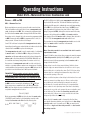
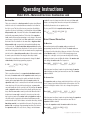
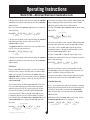
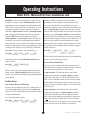
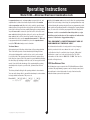
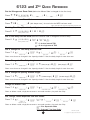
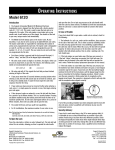
Operating Instructions Model 6123—Motorized Electronic Combination Lock If the long error tone (brap) sounds at any time during the supervisor code deletion procedure, you have made an error. The old supervisor code is retained. If the long error tone (brap) sounds at any time during the user code setting or changing procedure, you have made an error. If a user code already existed in this position, it will be retained. Here is the sequence the supervisor code holder uses to change his own six-digit code: The holder of the master code or supervisor code can delete a user code as follows: Press SG (___) # 2 * (7 4) existing supervisor code * (___) # new supervisor code (___) # user code position number new supervisor code Press SG (___) # 3 * (7 4) existing master code or supervisor code If the long error tone (brap) sounds at any time during the supervisor code changing procedure, you have made an error. The old supervisor code is retained. If the long error tone (brap) sounds at any time during the user code deletion procedure, you’ve made an error. The user code is retained. The supervisor code holder can delete his code completely from the lock. This is the procedure he would use: Press SG (___) # 2 (7 4) * existing supervisor code To set, change, or delete any user code, follow the two previous programming sequences, changing the position number to point to the particular user code you want to affect. * # # The holder of a user code can change his own six-digit code to a new number. He cannot delete his own code, leaving his user position empty. To make the change: If the long error tone (brap) sounds at any time during the supervisor code deletion procedure, you have made an error. The old supervisor code is retained. Press 3 3 * (___) # existing user code The User Codes The Time Delay Override Code This is a code we learned about earlier in the manual. It circumvents any time delay period programmed into the lock. A time delay period of at least one minute must be used for the time delay override code to be valid. If there is no time delay in the lock, the override code will not work. Only the holder of the lock’s master code can set, change, or delete the time delay override code. To set or change it: Press SG (___) # 9 * user code position number (7 4) existing master code * * (___) # © Copyright 2011, Sargent & Greenleaf, Inc. new user code new user code If the long error tone (brap) sounds at any time during the changing procedure, you’ve made an error. The old user code is retained. There are provisions for five different user codes in the 6123. Each one is associated with a storage position number. The first user code is stored in position #3, the second in position #4, the third in position #5, the fourth in position #6, and the fifth user code is stored in position #7. When we program a user code, we have to identify the particular code by its position number. For instance, here’s how the holder of the master code or supervisor code (except in dual control mode) sets or changes the user code found in the #3 position. (7 4) existing master code or supervisor code (___) # (___) # new user code Notice that you don’t have to put in a position number to identify which user code position you’re changing. That’s because the lock figures it out from the existing code that you enter. Holders of user codes can do two things—open the safe within the restrictions of the lock mode, and change their code numbers. User codes do not exist until set by the holder of the master code or the supervisor code. As we discovered earlier, however, the supervisor code holder cannot set, change, or delete any codes when the lock is in dual control mode. Press SG (___) # 3 * # # (___) # new user code 17 * (___) # new TDO code (___) # new TDO code