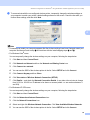
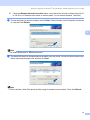
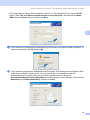
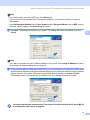
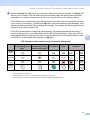
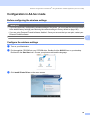
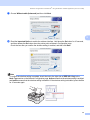
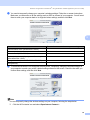
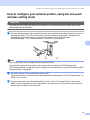
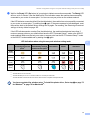
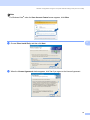
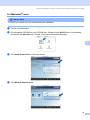
1
Multi-Protocol On-board Ethernet Print Server and Wireless (IEEE 802.11b/g) Ethernet Print Server NETWORK USER’S GUIDE HL-2150N HL-2170W Please read this manual thoroughly before using the printer. Keep the CD-ROM in a convenient place so you can use it quickly if you need to. Please visit us at http://solutions.brother.com where you can get product support, the latest driver updates and utilities, and answers to frequently asked questions (FAQs) and technical questions. Note: Not all models are available in all countries. Version A ENG Definitions of warnings, cautions and notes We use the following icons throughout this User’s Guide: Notes tell you how you should respond to a situation that may arise or give tips about how the operation works with other features. Improper Setup icons alert you to devices and operations that are not compatible with the printer. Trademarks Brother and the Brother logo are registered trademarks and BRAdmin Light and BRAdmin Professional are trademarks of Brother Industries, Ltd. UNIX is a registered trademark of The Open Group. Apple and Macintosh are registered trademarks and Safari is a trademark of Apple Inc. HP, Hewlett-Packard, Jetdirect and PCL are registered trademarks of Hewlett-Packard Company. Microsoft, Windows and Windows Server are registered trademarks of Microsoft Corporation in the United States and/or other countries. Windows Vista is either a registered trademark or a trademark of Microsoft Corporation in the United States and other countries. Java and all Java-based trademarks and logos are trademarks or registered trademarks of Sun Microsystems, Inc. in the United States and other countries. Firefox is a registered trademark of the Mozilla Foundation. BROADCOM, SecureEasySetup and the SecureEasySetup logo are trademarks or registered trademarks of Broadcom Corporation. AOSS is a trademark of Buffalo Inc. Cisco is a registered trademark of Cisco Systems, Inc. Wi-Fi, WPA and WPA2 are registered trademarks and Wi-Fi Protected Setup is a trademark of Wi-Fi Alliance. All other terms, brand and product names mentioned in this User’s Guide are registered trademarks or trademarks of their respective companies. Compilation and publication notice Under the supervision of Brother Industries Ltd., this manual has been compiled and published, covering the latest product’s descriptions and specifications. The contents of this manual and the specifications of this product are subject to change without notice. Brother reserves the right to make changes without notice in the specifications and materials contained herein and shall not be responsible for any damages (including consequential) caused by reliance on the materials presented, including but not limited to typographical and other errors relating to the publication. ©2007 Brother Industries Ltd. i IMPORTANT NOTE: This product is approved for use in the country of purchase only. Do not use this product outside the country of purchase as it may violate the wireless telecommunication and power regulations of that country. Windows® XP in this document represents Windows® XP Professional, Windows® XP Professional x64 Edition and Windows® XP Home Edition. Windows Server® 2003 in this document represents Windows Server® 2003 and Windows Server® 2003 x64 Edition. Windows Vista® in this document represents all editions of Windows Vista®. Brother Numbers For technical and operational assistance, you must call the country where you purchased the printer. Calls must be made from within that country. In USA 1-800-276-7746 In Canada 1-877-BROTHER In Europe Visit http://www.brother.com for contact information on your local Brother office. If you have any comments or suggestions, please write to us at: In USA Printer Customer Support Brother International Corporation 26250 Enterprise Ct. # 250 Lake Forest, CA 92630 In Canada Brother International Corporation (Canada), Ltd. - Marketing Dept. 1, rue Hôtel de Ville Dollard-des-Ormeaux, PQ, Canada H9B 3H6 In Europe European Product & Service Support 1 Tame Street, Audenshaw, Manchester M34 5JE, UK Service center locator (USA) For the location of a Brother authorized service center, call 1-800-284-4357. Service center locations (Canada) For the location of a Brother authorized service center, call 1-877-BROTHER. Internet addresses Brother Global Web Site: http://www.brother.com For Frequently Asked Questions (FAQs), Product Support and Technical Questions, and Driver Updates and Utilities: http://solutions.brother.com (In USA Only) For Brother Accessories & Supplies: http://www.brothermall.com ii Table of Contents 1 Introduction 1 Overview....................................................................................................................................................1 Network features........................................................................................................................................2 Network printing...................................................................................................................................2 Management utilities............................................................................................................................2 Types of network connections ...................................................................................................................3 Network connection example ..............................................................................................................3 Wireless network connection examples (HL-2170W)..........................................................................5 Protocols....................................................................................................................................................6 TCP/IP protocols and functionalities....................................................................................................6 2 Configuring your printer for a network 8 Overview....................................................................................................................................................8 IP addresses, subnet masks and gateways ........................................................................................8 Step by Step chart ...............................................................................................................................9 Setting the IP address and subnet mask .................................................................................................10 Using the BRAdmin Light utility to configure your network printer.....................................................10 Using other methods to configure your printer for a network.............................................................11 Changing the print server settings ...........................................................................................................12 Using the BRAdmin Light utility to change the print server settings .................................................12 Using the BRAdmin Professional utility to change print server settings (for Windows®)...................13 Using Web Based Management (web browser) to change the print server settings.........................14 Using other methods to change print server settings ........................................................................14 3 Configuring the wireless network settings (For HL-2170W) 15 Overview..................................................................................................................................................15 Wireless network terms and concepts...............................................................................................15 Step by step chart..............................................................................................................................18 1. Confirm your network environment......................................................................................................20 Connected to a computer with an access point in the network (Infrastructure mode).......................20 Connected to a wireless capable computer without an access point in the network (Ad-hoc mode) 20 2. Confirm your wireless network setup method in infrastructure mode ..................................................21 Configuration using the Brother installer application on the CD-ROM to configure your wireless network printer...............................................................................................................................21 Configuration using the one-push wireless setting mode ..................................................................22 Configuration using the PIN Method of Wi-Fi Protected Setup™......................................................22 3. Configure your printer for a wireless network ......................................................................................23 Using the Brother installer application on the CD-ROM to configure your wireless network printer (Recommended)............................................................................................................................23 Using the one-push wireless setting mode to configure your printer for a wireless network .............23 Using the PIN Method of Wi-Fi Protected Setup™............................................................................23 iii 4 Wireless configuration for Windows® using the Brother installer application (For HL-2170W) 24 Configuration in Infrastructure mode .......................................................................................................24 Before configuring the wireless settings ............................................................................................24 Configure the wireless settings..........................................................................................................24 Configuration using the automatic wireless (one-push) method..............................................................31 Configuration in Ad-hoc mode .................................................................................................................36 Before configuring the wireless settings ............................................................................................36 Configure the wireless settings..........................................................................................................36 Installing the printer driver .......................................................................................................................44 5 Wireless configuration for Macintosh® using the Brother installer application (For HL-2170W) 47 Configuration in Infrastructure mode .......................................................................................................47 Before configuring the wireless settings ............................................................................................47 Configure the wireless settings..........................................................................................................47 Configuration using the automatic wireless (one-push) method..............................................................54 Configuration in Ad-hoc mode .................................................................................................................59 Before configuring the wireless settings ............................................................................................59 Configure the wireless settings..........................................................................................................59 Installing the printer driver .......................................................................................................................66 6 Wireless configuration using the one-push wireless setting mode (For HL-2170W) 69 Overview..................................................................................................................................................69 How to configure your wireless printer, using the one-push wireless setting mode ................................70 For Windows® users..........................................................................................................................72 For Macintosh® users ........................................................................................................................76 7 Wireless configuration using the PIN Method of Wi-Fi Protected Setup™ (For HL-2170W) 80 Overview..................................................................................................................................................80 How to configure your wireless printer, using the PIN Method of Wi-Fi Protected Setup™ ....................80 For Windows® users..........................................................................................................................83 For Macintosh® users ........................................................................................................................87 8 Network printing from Windows®: basic TCP/IP Peer-to-Peer printing 91 Overview..................................................................................................................................................91 Configuring the standard TCP/IP port......................................................................................................91 Printer driver not yet installed ............................................................................................................91 Printer driver already installed ...........................................................................................................93 Other sources of information ...................................................................................................................93 iv 9 Internet printing for Windows® 94 Overview..................................................................................................................................................94 IPP printing for Windows® 2000/XP, Windows Vista® and Windows Server® 2003 ...............................94 For Windows Vista® ..........................................................................................................................94 For Windows® 2000/XP and Windows Server® 2003 .......................................................................96 Specifying a different URL.................................................................................................................97 Other sources of information ...................................................................................................................97 10 Network printing from Macintosh® 98 Overview..................................................................................................................................................98 Printing from a Macintosh® using the Simple Network Configuration capabilities...................................98 How to select the printer driver..........................................................................................................98 Other sources of information .............................................................................................................99 11 Control panel features 100 Overview................................................................................................................................................100 Printing the Printer Settings Page..........................................................................................................100 Restoring the network settings to factory default...................................................................................100 Enabling or disabling the wireless network (For HL-2170W).................................................................101 12 Security methods 102 Overview................................................................................................................................................102 Security methods for E-mail notification ..........................................................................................102 Using E-mail notification with user authentication .................................................................................103 Managing your network printer securely using BRAdmin Professional (for Windows®)........................105 13 Web Based Management 106 Overview................................................................................................................................................106 How to configure the print server settings using Web Based Management (web browser) ..................107 14 Driver Deployment Wizard (Windows® only) 108 Overview................................................................................................................................................108 Connection methods..............................................................................................................................108 Peer-to-peer ....................................................................................................................................108 Network Shared...............................................................................................................................109 Local Printer (USB)..........................................................................................................................109 How to install the Driver Deployment Wizard software..........................................................................110 Using the Driver Deployment Wizard software ......................................................................................110 v 15 Troubleshooting 113 Overview................................................................................................................................................113 General problems ..................................................................................................................................113 Network print software installation problems .........................................................................................114 Printing problems...................................................................................................................................116 Protocol-specific troubleshooting...........................................................................................................117 Windows® 2000/XP, Windows Vista® and Windows Server® 2003 IPP troubleshooting................117 Web Based Management (web browser) troubleshooting (TCP/IP)................................................117 Wireless network troubleshooting..........................................................................................................118 Wireless setup problems .................................................................................................................118 Wireless connection problem ..........................................................................................................119 A Appendix A 120 Using services .......................................................................................................................................120 Other ways to set the IP address (for advanced users and administrators) ..........................................120 Using DHCP to configure the IP address ........................................................................................120 Using BOOTP to configure the IP address......................................................................................120 Using RARP to configure the IP address .......................................................................................121 Using APIPA to configure the IP address........................................................................................122 Using ARP to configure the IP address ...........................................................................................122 Using the TELNET console to configure the IP address .................................................................123 Using the Brother Web BRAdmin server software for IIS* to configure the IP address ..................124 Installation when using Web Services (For Windows Vista® users) ...............................................................................................................124 Installation when using a Network Print Queue or Share ......................................................................125 B Appendix B 126 Print server specifications......................................................................................................................126 Ethernet wired network....................................................................................................................126 Ethernet wireless network ...............................................................................................................127 Computer requirements...................................................................................................................128 Management utilities........................................................................................................................128 C Index 129 vi 1 Introduction 1 1 Overview 1 The Brother printer can be shared on a 10/100Mb wired or IEEE 802.11b/802.11g wireless (HL-2170W only) Ethernet network using the internal network print server. The print server provides printing services for Windows® 2000/XP/XP Professional x64 Edition, Windows Vista®, Windows Server® 2003/ 2003 x64 Edition supporting the TCP/IP protocols and Macintosh OS® X 10.2.4 or greater supporting TCP/IP. The following chart shows what network features and connections are supported by each operating system. Operating Systems Windows® 2000/XP Windows® XP Professional x64 Edition Mac OS® X 10.2.4 or greater Mac OS® X 10.3 or greater Windows Vista® Windows Server® 2003 Windows Server® 2003 x64 Edition 10/100 BASE-TX Wired Ethernet (TCP/IP) r r r IEEE 802.11b/g Wireless Ethernet (TCP/IP) 1 r r r Printing r r r BRAdmin Light r r r BRAdmin Professional 2 r Web BRAdmin 2 r Internet Printing (IPP) r Status Monitor r Driver Deployment Wizard r 1 IEEE 802.11b/g Wireless Ethernet (TCP/IP) is available HL-2170W only. 2 BRAdmin Professional and Web BRAdmin are available as a download from http://solutions.brother.com r To use the Brother printer on a network, you need to configure the print server in the machine, and set up the computers you use. 1 Introduction Network features 1 1 The Brother HL-2100 series have the following basic network features. Network printing 1 The print server provides printing services for Windows® 2000/XP, Windows Vista® and Windows Server® 2003 supporting the TCP/IP protocols and Macintosh supporting TCP/IP (Mac OS® X 10.2.4 or greater). Management utilities 1 BRAdmin Light 1 BRAdmin Light is a utility for initial setup of Brother network connected devices. This utility can search for Brother products on your network, view the status and configure basic network settings, such as IP address. The BRAdmin Light utility is available for Windows® 2000/XP, Windows Vista® and Windows Server® 2003 and Mac OS® X 10.2.4 or greater computers. For installing BRAdmin Light, please see the Quick Setup Guide provided with the printer. For Macintosh® users, BRAdmin Light will be installed automatically when you install the printer driver. If you have already installed the printer driver, you do not have to install it again. For more information on BRAdmin Light, visit us at http://solutions.brother.com BRAdmin Professional (for Windows®) 1 BRAdmin Professional is a utility for more advanced management of network connected Brother devices. This utility can search for Brother products on your network, view the status and configure the network settings from a computer running Windows®. BRAdmin Professional has additional features from BRAdmin Light. For more information and to download the software, visit us at http://solutions.brother.com Web BRAdmin (For Windows®) 1 Web BRAdmin is a utility for managing network connected Brother devices. This utility can search for Brother products on your network, view the status and configure the network settings. Unlike BRAdmin Professional, which is designed for Windows® only, the Web BRAdmin is a server based utility that can be accessed from any client PC with a web browser that supports JRE (Java Runtime Environment). By installing the Web BRAdmin server utility on a computer running IIS 1, administrators can connect to the Web BRAdmin server, using a web browser which then communicates with the device itself. For more information and to download the software, visit us at http://solutions.brother.com 1 Internet Information Server 4.0 or Internet Information Services 5.0 / 5.1 / 6.0 / 7.0 2 Introduction Web Based Management (web browser) 1 1 Web Based Management (web browser) is a utility for managing network connected Brother devices, using the HTTP (Hyper Text Transfer Protocol). This utility can view the status of Brother products on your network and configure the machine or network settings using a standard web browser that is installed on your computer. For more information, see Chapter 13: Web Based Management. Types of network connections 1 Network connection example 1 Generally there are two types of network connections: Peer-to-Peer and Network Shared environment. Peer-to-Peer printing using TCP/IP 1 In a Peer-to-Peer environment, each computer directly sends and receives data to each device. There is no central server controlling file access or printer sharing. Windows R Windows R R Macintosh 2 1 TCP/IP TCP/IP 1 Router 2 Network printer In a smaller network of 2 or 3 computers, we recommend the Peer-to-Peer printing method as it is easier to configure than the Network Shared printing method described on the following page. See Network Shared printing on page 4. Each computer must use the TCP/IP Protocol. The Brother printer needs to have an appropriate IP address configuration. If you are using routers, the Gateway address must be configured on the computers and the Brother printer. The Brother printer can also communicate with Macintosh®. (TCP/IP compatible operating systems) 3 Introduction Network Shared printing 1 In a Network Shared environment, each computer sends data via a centrally controlled computer. This type of computer is often called a “Server” or a “Print Server”. Its job is to control the printing of all print jobs. Windows R Windows R Windows R 4 TCP/IP Windows 3 R 2 1 1 Network Shared 2 Also known as “Server” or “Print server” 3 Printer 4 TCP/IP or USB In a larger network, we recommend a Network Shared printing environment. The “server” or the “print server” must use the TCP/IP print protocol. The Brother printer needs to have an appropriate IP address configuration unless the printer is connected via the USB interface at the server. 4 1 Introduction Wireless network connection examples (HL-2170W) 1 1 Connected to a computer with an access point in the network (Infrastructure mode) 1 This type of network has a central access point at the heart of the network. The access point can also act as a bridge or a gateway to a wired network. When the Brother wireless printer (your printer) is part of this network, it receives all print jobs via an access point. 1 4 2 3 1 Access Point 2 Wireless Network printer (your machine) 3 Wireless capable computer connected to the access point 4 Wired computer which is not wireless capable connected to the access point with the Ethernet cable Connected to a wireless capable computer without an access point in the network (Ad-hoc mode) 1 This type of network does not have a central access point. Each wireless client communicates directly with each other. When the Brother wireless printer (your printer) is part of this network, it receives all print jobs directly from the computer sending the print data. 2 1 2 1 Wireless Network printer (your machine) 2 Wireless capable computer 5 Introduction Protocols 1 1 TCP/IP protocols and functionalities 1 Protocols are the standardized sets of rules for transmitting data on a network. Protocols allow users to gain access to network connected resources. The print server used on this Brother product supports the TCP/IP (Transmission Control Protocol/Internet Protocol) protocol. TCP/IP is the most popular set of protocols used for communication such as Internet and E-mail. This protocol can be used in almost all operating systems such as Windows®, Macintosh® and Linux. The following TCP/IP protocols are available on this Brother product. Note • You can configure the protocol settings by using the HTTP (web browser). See How to configure the print server settings using Web Based Management (web browser) on page 107. • For security features, see Security methods for E-mail notification on page 102. DHCP/BOOTP/RARP 1 By using the DHCP/BOOTP/RARP protocols, the IP address can be automatically configured. Note To use the DHCP/BOOTP/RARP protocols, please contact your network administrator. APIPA 1 If you do not assign an IP address manually (using the BRAdmin applications) or automatically (using a DHCP/BOOTP/RARP server), the Automatic Private IP Addressing (APIPA) protocol will automatically assign an IP address from the range 169.254.1.0 to 169.254.254.255. DNS client 1 The Brother print server supports the Domain Name System (DNS) client function. This function allows the print server to communicate with other devices by using its DNS name. LPR/LPD 1 Commonly used printing protocols on a TCP/IP network. Port9100 1 Another commonly used printing protocol on a TCP/IP network. SMTP client 1 Simple Mail Transfer Protocol (SMTP) client is used to send E-mails via Internet or Intranet. 6 Introduction IPP 1 1 Internet Printing Protocol (IPP Version 1.0) allows you to print documents directly to any accessible printer via the internet. mDNS 1 mDNS allows the Brother print server to automatically configure itself to work in a Mac OS® X Simple Network Configured system. (Mac OS® X 10.2.4 or greater). TELNET 1 The Brother print server supports TELNET server for command line configuration. SNMP 1 The Simple Network Management Protocol (SNMP) is used to manage network devices including computers, printers and terminals in a TCP/IP network. Web server (HTTP) 1 The Brother print server is equipped with a web server that allows you to monitor its status or change some of its configuration settings. Note We recommend Microsoft Internet Explorer 6.0® (or greater) or Firefox® 1.0 (or greater) for Windows® and Safari™ 1.0 for Macintosh®. Please also make sure that JavaScript and Cookies are always enabled in whichever browser you use. We recommend you upgrade to Safari™ 1.2 or greater to enable JavaScript. If a different web browser is used, make sure it is compatible with HTTP 1.0 and HTTP 1.1. LLTD 1 The Link Layer Topology Discovery protocol (LLTD) lets you locate the Brother machine easily on the Windows Vista® Network Map. Your Brother machine will be shown with a distinctive icon and the node name. The default setting for this protocol is Off. LLMNR 1 The Link-Local Multicast Name Resolution protocol (LLMNR) resolves the names of neighboring computers, if the network does not have a Domain Name System (DNS) server. The LLMNR Responder function works in both the IPv4 or IPv6 environment when using a computer that has the LLMNR Sender function such as Windows Vista®. Web Services 1 The Web Services protocol enables Windows Vista® users to install the Brother printer driver by right clicking the machine icon from the Start / Network selection. (See Installation when using Web Services (For Windows Vista® users) on page 124). The Web Services also lets you check the current status of the machine from your computer. 7 2 Configuring your printer for a network 2 Overview 2 2 Before using your Brother printer in a network environment, you must configure the TCP/IP settings. In this chapter, you will learn the basic steps required to print over the network using the TCP/IP protocol. We recommend that you use the Brother installer application on the CD-ROM we have provided with the printer. By using this application, you can easily connect your printer to your network and install the network software and printer driver which you need to complete the network configuration. You will be guided by the on-screen instructions until you are able to use your Brother network printer. Please follow the instructions in the supplied Quick Setup Guide. IP addresses, subnet masks and gateways 2 To use the printer in a networked TCP/IP environment, you need to configure the IP address and subnet mask. The IP address you assign to the print server must be on the same logical network as your host computers. If it is not, you must properly configure the subnet mask and the gateway address. IP address 2 An IP address is a series of numbers that identifies each computer connected to a network. An IP address consists of four numbers separated by dots. Each number is between 0 and 255. Example: In a small network, you would normally change the final numbers. • 192.168.1.1 • 192.168.1.2 • 192.168.1.3 How the IP address is assigned to your print server: 2 If you have a DHCP/BOOTP/RARP server in your network (typically a UNIX®/Linux, Windows® 2000/XP, Windows Vista®, or Windows Server® 2003 network) the print server will automatically obtain its IP address from the server and register its name with any RFC 1001 and 1002-compliant dynamic name services. Note On smaller networks, the DHCP server may be the router. For more information on DHCP, BOOTP and RARP, see Using DHCP to configure the IP address on page 120, Using BOOTP to configure the IP address on page 120 and Using RARP to configure the IP address on page 121. If you do not have a DHCP/BOOTP/RARP server, the Automatic Private IP Addressing (APIPA) protocol will automatically assign an IP address from the range 169.254.1.0 to 169.254.254.255. For more information on APIPA, see Using APIPA to configure the IP address on page 122. If the APIPA protocol is disabled, the IP address of a Brother print server is 192.0.0.192. However, you can easily change this IP address number to match with the IP address details of your network. For information on how to change the IP address, see Setting the IP address and subnet mask on page 10. 8 Configuring your printer for a network Subnet mask 2 Subnet masks restrict network communication. Example: Computer 1 can talk to Computer 2 2 • Computer 1 IP Address:192.168.1.2 Subnet Mask:255.255.255.0 • Computer 2 IP Address:192.168.1.3 Subnet Mask:255.255.255.0 Note 0 denotes that there is no limit to communication at this part of the address. In the above example, we can communicate with anything that has an IP address that begins with 192.168.1.X. Gateway (and router) 2 A gateway is a network point that acts as an entrance to another network and sends data transmitted via the network to an exact destination. The router knows where to direct data that arrives at the gateway. If a destination is located at an external network, the router transmits data to the external network. If your network communicates with other networks, you may need to configure the Gateway IP address. If you do not know the Gateway IP address then contact your Network Administrator. Step by Step chart a 2 Configure the TCP/IP settings. Configure the IP address i See page 10 Configure the subnet mask i See page 10 Configure the gateway i See page 10 Using the BRAdmin Light utility i See page 12 Using the BRAdmin Professional utility i See page 13 Using the Web Based Management (web browser) i See page 14 i See page 14 b Change the print server settings. Using other methods 9 Configuring your printer for a network Setting the IP address and subnet mask 2 Using the BRAdmin Light utility to configure your network printer 2 BRAdmin Light 2 The BRAdmin Light utility is designed for initial setup of Brother network connected devices. It can also search for Brother products in a TCP/IP environment, view the status and configure basic network settings, such as IP address. The BRAdmin Light utility is available for Windows® 2000/XP, Windows Vista®, Windows Server® 2003 and Mac OS® X 10.2.4 or greater. Note • Please use the BRAdmin Light utility version that was supplied on the CD-ROM with your Brother product. You can also download the latest version of BRAdmin Light utility from http://solutions.brother.com • If you require more advanced printer management, use the latest version of BRAdmin Professional utility that is available as a download from http://solutions.brother.com This utility is only available for Windows® users. • If you are using Personal Firewall software (e.g. Windows Firewall), disable it. Once you are sure that you can print, re-start your Personal Firewall software. • Node name: The Node name for each Brother device on the network appears in BRAdmin Light. The default Node name of the network card in the printer is “BRNxxxxxxxxxxxx” for a wired network or “BRWxxxxxxxxxxxx” for a wireless network. • The default password for Brother print servers is access. a Start the BRAdmin Light utility. For Windows® 2000/XP, Windows Vista® and Windows Server® 2003 users Click Start / All Programs 1 / Brother / BRAdmin Light / BRAdmin Light. 1 Programs for Windows® 2000 users For Mac OS® X 10.2.4 or greater users Double-click Macintosh HD (Startup Disk) / Library / Printers / Brother / Utilities / BRAdmin Light.jar file. b BRAdmin Light will search for new devices automatically. 10 2 Configuring your printer for a network c Double-click the unconfigured device. Windows® Macintosh® 2 Note • If the print server is set to its factory default settings without using a DHCP/BOOTP/RARP server, the device will appear as Unconfigured in the BRAdmin Light utility screen. • You can find the node name and Ethernet address by printing out the Printer Settings Page. See Printing the Printer Settings Page on page 100. d Choose STATIC from Boot Method. Enter the IP Address, Subnet Mask and Gateway (if needed) of your print server. Windows® e f Macintosh® Click OK. With the correctly programmed IP address, you will see the Brother print server in the device list. Using other methods to configure your printer for a network 2 You can configure your network printer using other methods. See Other ways to set the IP address (for advanced users and administrators) on page 120. 11 Configuring your printer for a network Changing the print server settings 2 Note For the wireless network users, you need to configure the wireless settings to change the printer settings. See Configuring the wireless network settings (For HL-2170W) on page 15. Using the BRAdmin Light utility to change the print server settings a 2 2 Start the BRAdmin Light utility. For Windows® 2000/XP, Windows Vista® and Windows Server® 2003 users Click Start / All Programs 1 / Brother / BRAdmin Light / BRAdmin Light. 1 Programs for Windows® 2000 users For Mac OS® X 10.2.4 or greater users Double-click Macintosh HD (Startup Disk) / Library / Printers / Brother / Utilities / BRAdmin Light.jar file. b c d e Select the print server which you want to change the settings. Select Network Configuration from the Control menu. Enter a password. The default Password is access. You can now change the print server settings. Note If you want to change more advanced settings, use the BRAdmin Professional utility that is available as a download from http://solutions.brother.com 12 Configuring your printer for a network Using the BRAdmin Professional utility to change print server settings (for Windows®) 2 Note • Please use the latest version of the BRAdmin Professional utility that is available as a download from http://solutions.brother.com This utility is only available for Windows® users. 2 • Node name: The Node name for each Brother device on the network appears in BRAdmin Professional. The default Node name is “BRNxxxxxxxxxxxx” for a wired network or “BRWxxxxxxxxxxxx” for a wireless network. a Start the BRAdmin Professional utility (from Windows® 2000/XP, Windows Vista® and Windows Server® 2003), by clicking Start / All Programs 1 / Brother Administrator Utilities / Brother BRAdmin Professional 3 / BRAdmin Professional 3. 1 b c d e Programs for Windows® 98/Me, Windows NT® 4.0, and Windows® 2000 users Select the print server which you want to configure. Select Configure Device from the Control menu. Enter a password. The default Password is access. You can now change the print server settings. Note • If the print server is set to its factory default settings without using a DHCP/BOOTP/RARP server, the device will appear as APIPA in the BRAdmin Professional utility screen. • You can find the node name and Ethernet address (Node Address) by printing out the Network Configuration List. See Printing the Printer Settings Page on page 100 for information on how to print the Network Configuration List on your print server. 13 Configuring your printer for a network Using Web Based Management (web browser) to change the print server settings 2 A standard web browser can be used to change your print server settings using the HTTP (Hyper Text Transfer Protocol). See How to configure the print server settings using Web Based Management (web browser) on page 107. Using other methods to change print server settings 2 2 You can configure your network printer using other methods. See Other ways to set the IP address (for advanced users and administrators) on page 120. 14 3 Configuring the wireless network settings (For HL-2170W) Overview 3 3 To connect your printer to your wireless network, you need to follow the steps in the Quick Setup Guide or the Network User’s Guide. We recommend that you use the Brother installer application on the CD-ROM which we have provided with the printer. By using this application, you can easily connect your printer to your wireless network and install the network software and printer driver which you need to complete the configuration of your printer for a wireless network. You will be guided by the on-screen instructions until you are able to use your Brother wireless network printer. 3 If you want to configure your printer without using the Brother installer application, please read this chapter for more details on how to configure the wireless network settings. For information on TCP/IP settings, see Setting the IP address and subnet mask on page 10. For Wireless configuration using the one-push wireless setting mode (For HL-2170W), see Chapter 6. For Wireless configuration using the PIN Method of Wi-Fi Protected Setup™ (For HL-2170W), see Chapter 7. Note • To achieve optimum results with normal everyday document printing, place the Brother printer as close to the network access point (router) as possible with minimal obstructions. Large objects and walls between the two devices as well as interference from other electronic devices can affect the data transfer speed of your documents. Due to these factors, wireless may not be the best method of connection for all types of documents and applications. If you are printing large files, such as multi-page documents with mixed text and large graphics, you may want to consider choosing wired Ethernet for a faster data transfer, or USB for the fastest throughput speed. • Although Brother HL-2170W can be used in a both wired and wireless network, only one of the connection methods can be used at a time. Wireless network terms and concepts 3 When you configure the wireless network printer, you must ensure that your wireless network printer is configured to match the settings of the existing wireless network. This section provides some of the main terms and concepts of these settings, which may be helpful when you configure the wireless network printer. SSID (Service Set Identifier) and channels 3 You need to configure the SSID and a channel to specify the wireless network you want to connect to. SSID Each wireless network has its own unique network name and it is technically referred to as SSID or ESSID (Extended Service Set Identifier). The SSID is a 32-byte or less value and is assigned to the access point. The wireless network devices you want to associate to the wireless network should match the access point. The access point and wireless network devices regularly send wireless packets (referred to as a beacon) which has the SSID information. When your wireless network device receives a beacon, you can identify the wireless network that is close enough for the radio waves to reach your device. 15 Configuring the wireless network settings (For HL-2170W) Channels Wireless networks use channels. Each wireless channel is on a different frequency. There are up to 14 different channels that can be used when using a wireless network. However, in many countries the number of channels available are restricted. For further information, see Ethernet wireless network on page 127. Authentication and encryption 3 Most wireless networks use some kind of security settings. These security settings define the authentication (how the device identifies itself to the network) and encryption (how the data is encrypted as it is sent on the network). If you do not correctly specify these options when you are configuring your Brother wireless device, it will not be able to connect to the wireless network. Therefore care must be taken when configuring these options. Please refer to the information below to see which authentication and encryption methods your Brother wireless device supports. Authentication methods The Brother printer supports the following methods: • Open system Wireless devices are allowed access the network without any authentication. • Shared key A secret pre-determined key is shared by all devices that will access the wireless network. The Brother printer uses the WEP keys as the pre-determined key. • WPA-PSK/WPA2-PSK Enables a Wi-Fi® Protected Access Pre-shared key (WPA-PSK/WPA2-PSK), which enables the Brother wireless printer to associate with access points using TKIP for WPA-PSK or AES for WPA-PSK and WPA2-PSK (WPA-Personal). • LEAP Cisco®LEAP (Light Extensible Authentication Protocol) has been developed by Cisco Systems, Inc. which uses user ID and password for authentication. Encryption methods Encryption is used to secure the data that is sent over the wireless network. The Brother printer supports the following encryption methods: • None No encryption method is used. • WEP By using WEP (Wired Equivalent Privacy), the data is transmitted and received with a secure key. • TKIP TKIP (Temporal Key Integrity Protocol) provides per-packet key mixing a message integrity check and rekeying mechanism. • AES AES (Advanced Encryption Standard) is Wi-Fi® authorized strong encryption standard. 16 3 Configuring the wireless network settings (For HL-2170W) • CKIP The original Key Integrity Protocol for LEAP by Cisco Systems, Inc. Network Key There are some rules for each security method: • Open system/Shared key with WEP 3 This key is a 64-bit or 128-bit value that must be entered in an ASCII or hexadecimal format. 64 (40) bit ASCII: Uses 5 text characters. e.g. “WLLAN” (this is case sensitive). 64 (40) bit hexadecimal: Uses 10 digits of hexadecimal data. e.g. “71f2234aba” 128 (104) bit ASCII: Uses 13 text characters. e.g. “Wirelesscomms” (this is case sensitive) 128 (104) bit hexadecimal: Uses 26 digits of hexadecimal data. e.g. “71f2234ab56cd709e5412aa2ba” • WPA-PSK/WPA2-PSK and TKIP or AES Uses a Pre-Shared Key (PSK) that is more than 8 and less than 63 characters in length. • LEAP Uses User ID and Password. • User ID: less than 64 characters in length. • Password: less than 32 characters in length. 17 Configuring the wireless network settings (For HL-2170W) Step by step chart 3 For Infrastructure mode a 3 Confirm your network environment. See page 20 Infrastructure mode Ad-hoc mode Connected to a computer with an access point b Connected to a wireless capable computer without an access point Confirm your wireless network setup method. See page 21 Using the Brother installer application (Recommended) Temporarily using a network cable c or 3 See page 19 Using the one-push wireless setting mode Using the PIN Method of Wi-Fi Protected Setup™ Using automatic wireless (one-push) method Configure your printer for a wireless network. See page 23 Configuring your printer for a wireless network ® (For Windows ) See page 24 (For Macintosh®) See page 47 (For Windows®) See page 31 (For Macintosh®) See page 54 See page 69 See page 80 Installing the printer driver (For Windows®) See page 44 (For Macintosh®) See page 66 (For Windows®) See page 72 (For Macintosh®) See page 76 (For Windows®) See page 83 (For Macintosh®) See page 87 Wireless configuration and installing printer driver have been completed. 18 Configuring the wireless network settings (For HL-2170W) For Ad-hoc mode a 3 Confirm your network environment. See page 20 Ad-hoc mode Infrastructure mode Connected to a wireless capable computer without an access point b or See page 18 Connected to a computer with an access point You need to configure the wireless network settings by using the Brother installer application. Using the Brother installer application c Configure your printer for a wireless network. See page 23 Configuring your printer for a wireless network (For Windows®) See page 36 (For Macintosh®) See page 59 Installing the printer driver (For Windows®) See page 44 (For Macintosh®) See page 66 Wireless configuration and installing printer driver have been completed. 19 3 Configuring the wireless network settings (For HL-2170W) 1. Confirm your network environment 3 Connected to a computer with an access point in the network (Infrastructure mode) 3 This type of network has a central access point at the heart of the network. The access point can also act as a bridge or a gateway to a wired network. When your Brother wireless printer is part of this network, it receives all print jobs via the access point. 3 1 4 2 3 1 Access Point 2 Wireless Network printer (your machine) 3 Wireless capable computer connected to the access point 4 Wired computer which is not wireless capable connected to the access point with an Ethernet cable Connected to a wireless capable computer without an access point in the network (Ad-hoc mode) 3 This type of network does not have a central access point. Each wireless client communicates directly with each other. When the Brother wireless printer (your printer) is part of this network, it receives all print jobs directly from the computer sending the print data. 2 1 2 1 Wireless Network printer (your machine) 2 Wireless capable computer 20 Configuring the wireless network settings (For HL-2170W) 2. Confirm your wireless network setup method in infrastructure mode 3 There are three methods to configure your wireless network printer; by using the Brother installer application on the CD-ROM (recommended), using the one-push wireless setting mode and using the PIN Method of Wi-Fi Protected Setup™. The setup process will be different depending on your network environment. 3 Note If you configure the wireless network settings in Ad-hoc mode, use the Brother installer application on the CD-ROM we have provided with the printer. Configuration using the Brother installer application on the CD-ROM to configure your wireless network printer 3 We recommend that you use the Brother installer application on the CD-ROM we have provided with the printer. By using this application, you can easily connect your printer to your wireless network and install the network software and printer driver which you need to complete the configuration of your printer for a wireless network. You will be guided by the on-screen instructions until you are able to use your Brother wireless network printer. You must know your wireless network settings before you proceed with this installation. Configuration temporarily using a network cable 3 If there is an Ethernet Hub or Router in the same network as the wireless access point (A) of your printer, you can temporarily connect the Hub or Router to the printer using an Ethernet cable (B), this is an easy way to configure the printer. You can then remotely configure the printer from a computer on the network. A B 21 Configuring the wireless network settings (For HL-2170W) Configuration using the one-push wireless setting mode 3 If your wireless access point (A) supports either SecureEasySetup™, Wi-Fi Protected Setup™ (PBC 1) or AOSS™, you can configure the machine without a computer. A 1 3 Push Button Configuration Configuration using the PIN Method of Wi-Fi Protected Setup™ 3 If your wireless access point (A) supports Wi-Fi Protected Setup™, you can also configure using the PIN Method of Wi-Fi Protected Setup™. Connection when the wireless access point (router) (A) doubles with a Registrar 1. A Connection when another device (C), such as a computer is used as a Registrar 1. A C 1 The Registrar is a device that manages the wireless LAN. 22 Configuring the wireless network settings (For HL-2170W) 3. Configure your printer for a wireless network 3 Using the Brother installer application on the CD-ROM to configure your wireless network printer (Recommended) 3 For installation, see Wireless configuration for Windows® using the Brother installer application (For HL-2170W) in Chapter 4 or Wireless configuration for Macintosh® using the Brother installer application (For HL-2170W) in Chapter 5. Using the one-push wireless setting mode to configure your printer for a wireless network 3 3 For installation, see Wireless configuration using the one-push wireless setting mode (For HL-2170W) in Chapter 6. Using the PIN Method of Wi-Fi Protected Setup™ 3 For installation, see Wireless configuration using the PIN Method of Wi-Fi Protected Setup™ (For HL-2170W) in Chapter 7. 23 4 Wireless configuration for Windows® using the Brother installer application (For HL-2170W) 4 Configuration in Infrastructure mode 4 Before configuring the wireless settings 4 4 IMPORTANT • If you are going to connect the printer to your network, we recommend that you contact your system administrator prior to installation. You must know your wireless network settings before you proceed with this installation. • If you have previously configured the wireless settings of the printer, you must reset the print server back to the default factory settings (see Restoring the network settings to factory default on page 100). • If you are using Personal Firewall software (e.g. Windows Firewall), disable it. Once you are sure that you can print, restart your Personal Firewall software. • You need to temporarily use an Ethernet cable during configuration. Configure the wireless settings a Turn on your computer. (You must be logged on with Administrator rights.) Close any applications running before configuration. b Put the supplied CD-ROM into your CD-ROM drive. The opening screen will appear automatically. Choose your printer model and the language. c Click Install Printer Driver on the menu screen. 4 Note Choose the Install Printer Driver icon for your region. 24 Wireless configuration for Windows® using the Brother installer application (For HL-2170W) d Click Wireless Network users. 4 Note For Windows Vista®, when the User Account Control screen appears, click Allow. e Choose Wireless Setup and Driver Install (Recommended) or Wireless Setup Only, and then click Next. 25 Wireless configuration for Windows® using the Brother installer application (For HL-2170W) f Choose Step by Step install (Recommended) and then click Next. 4 g Choose With cable (Recommended) and then click Next. h Connect the Brother wireless device to your access point using a network cable and click Next. 26 Wireless configuration for Windows® using the Brother installer application (For HL-2170W) i Choose the printer you wish to configure, and click Next. If the list is blank, check if the access point and the printer are powered on, and then click Refresh. 4 Note The default Node name is “BRNxxxxxxxxxxxx”. j The wizard will search for wireless networks available from your printer. Choose the access point you wish to associate the printer with, and then click Next. Note • "SETUP" is the default SSID of the printer. Do not choose this SSID. • If the list is blank, check that the access point has power and is broadcasting the SSID, and then see if the printer and the access point are within range for wireless communication. Then, click Refresh. 27 Wireless configuration for Windows® using the Brother installer application (For HL-2170W) • If your access point is set to not broadcast the SSID you can manually add it by clicking the Add button. Follow the on-screen instructions for entering the Name (SSID), and then click Next. 4 k If your network is not configured for Authentication and Encryption, the following screen will appear. To continue configuration, click OK and go to m. 28 Wireless configuration for Windows® using the Brother installer application (For HL-2170W) l If your network is configured for Authentication and Encryption, the following screen will appear. When configuring your Brother wireless printer, you must ensure that it is configured to match the Authentication and Encryption settings of your existing wireless network. Choose the Authentication Method and Encryption Mode from the pull-downs in each setting box. Then enter the Network key and Confirm Network Key, and then click Next. 4 Note • If you want to setup more than WEP key1, click Advanced. • If you do not know the Authentication or Encryption settings for your network, contact your network administrator. • If the Authentication Method is set to Open System and the Encryption Mode is set to WEP, an error indication will NOT appear if the Network key is incorrect. m Click Next. The settings will be sent to your printer. The settings will remain unchanged if you click Cancel. Note If you want to manually enter the IP address settings of your printer, click Change IP Address and enter the necessary IP address settings for your network. 29 Wireless configuration for Windows® using the Brother installer application (For HL-2170W) n Disconnect the network cable between your access point (hub or router) and the printer, and click Next. 4 You have completed the wireless setup. If you chose to install the printer driver in step e, Go to Installing the printer driver on page 44. 30 Wireless configuration for Windows® using the Brother installer application (For HL-2170W) Configuration using the automatic wireless (one-push) method 4 IMPORTANT If you are going to connect the printer to your network, we recommend that you contact your system administrator prior to installation. a b c Make sure that the power cord is plugged in. d Put the supplied CD-ROM into your CD-ROM drive. The opening screen will appear automatically. Choose your printer model and the language. e Click Install Printer Driver on the menu screen. 4 Turn on your printer and wait until the printer is in the Ready state. Turn on your computer. (You must be logged on with Administrator rights.) Close any applications running before configuration. Note Choose the Install Printer Driver icon for your region. 31 Wireless configuration for Windows® using the Brother installer application (For HL-2170W) f Click Wireless Network users. 4 Note For Windows Vista®, when the User Account Control screen appears, click Allow. g Choose Wireless Setup and Driver Install (Recommended) or Wireless Setup Only, and then click Next. 32 Wireless configuration for Windows® using the Brother installer application (For HL-2170W) h Choose Automatic install (Advanced) and click Next. 4 i Confirm the on-screen message and click Next. j Press the wireless setup button located at the back of the machine for less than 2 seconds as show in the illustration below. This will put the printer in one-push wireless setting mode. This feature will automatically detect which mode your access point uses for one-push configuration (SecureEasySetup™, Wi-Fi Protected Setup™ or AOSS™) of your printer. Note • Use a pointy object such as a ballpoint pen to press the button. • If you press the button for 3 seconds or more, the printer will change to the PIN Method of the Wi-Fi Protected Setup™ mode. See How to configure your wireless printer, using the PIN Method of Wi-Fi Protected Setup™ on page 80. 33 Wireless configuration for Windows® using the Brother installer application (For HL-2170W) k The printer starts the one-push wireless setting mode. The printer searches for an access point that supports SecureEasySetup™, Wi-Fi Protected Setup™ or AOSS™ for 2 minutes. l Put your access point in the SecureEasySetup™ mode, the Wi-Fi Protected Setup™ mode or the AOSS™ mode, depending on what is supported by your access point. Please refer to the instruction manual that came with your access point. m Wait for the Ready LED (Go button) of your printer indicates connection succeeded. The Ready LED will turn on for 5 minutes. (See the table below) This indication means the machine has successfully connected to your router or access point. You can now use your printer in a wireless network. If the LED indicates connection failed (See the table below), the machine has not successfully connected to your router or access point. Try starting from j again. If the same message is indicated again, reset the machine back to the default factory settings and try again. For resetting, see Restoring the network settings to factory default on page 100. If the LED indicates session overlap (See the table below), the machine has detected more than 2 routers or access points on your network that have the Wi-Fi Protected Setup™ mode or the AOSS™ mode enabled. Make sure that only one router or access point has the Wi-Fi Protected Setup™ mode or the AOSS™ mode enabled and try starting from j again. LED indications when using the one-push wireless setting mode LEDs Searching or accessing the access point 1 Connecting and downloading settings from the access point 1 Connection succeeded 2 Connection failed 3 Session overlap is detected 4 Toner (Yellow) Drum (Yellow) Error (Red) Ready (Blue) 1 The LED will blink (turn on for 0.2 seconds and off for 0.1 second). 2 The LED will turn on for 5 minutes. 3 The LED will blink (turn on for 0.1 second and off for 0.1 second) for 30 seconds. 4 The LED will flash 10 times and then turn OFF for half a second. This pattern will repeat 20 times. 34 4 Wireless configuration for Windows® using the Brother installer application (For HL-2170W) n Click Next or Finish. 4 You have completed the wireless setup. If you chose to install the printer driver in step g, Go to the next step. o Check the box after you confirm that you have completed the wireless settings, and then click Next. Go to Installing the printer driver on page 44. 35 Wireless configuration for Windows® using the Brother installer application (For HL-2170W) Configuration in Ad-hoc mode 4 Before configuring the wireless settings 4 IMPORTANT • If you have previously configured the wireless settings of the printer, you must reset the print server back to the default factory settings (see Restoring the network settings to factory default on page 100). 4 • If you are using Personal Firewall software (e.g. Windows Firewall), disable it. Once you are sure that you can print, restart your Personal Firewall software. Configure the wireless settings a Turn on your computer. (You must be logged on with Administrator rights.) Close any applications running before configuration. b Put the supplied CD-ROM into your CD-ROM drive. The opening screen will appear automatically. Choose your printer model and the language. c Click Install Printer Driver on the menu screen. 4 Note Choose the Install Printer Driver icon for your region. 36 Wireless configuration for Windows® using the Brother installer application (For HL-2170W) d Click Wireless Network users. 4 Note For Windows Vista®, when the User Account Control screen appears, click Allow. e Choose Wireless Setup and Driver Install (Recommended) or Wireless Setup Only, and then click Next. 37 Wireless configuration for Windows® using the Brother installer application (For HL-2170W) f Choose Step by Step install (Recommended) and then click Next. 4 g Choose Without cable (Advanced) and then click Next. h Read the Important Notice to enable the wireless interface. Hold down the Go button for 10 seconds, and then release the Go button when the printer prints a Network Configuration page. Check the box after you confirm the wireless setting is enabled, and then click Next. 38 Wireless configuration for Windows® using the Brother installer application (For HL-2170W) Note To confirm the wireless setting is enabled, check the text to the right side of IEEE 802.11b/g in the Node Type section on the Network Configuration page. Active means that the wireless setting is enabled and Inactive means that the wireless setting is disabled. If the wireless setting is disabled, press the Go for 10 seconds again. 4 i You need to temporarily change your computer’s wireless settings. Follow the on-screen instructions. Make sure you take notes on all the settings such as SSID or channel of your computer. You will need them to return your computer back to its original wireless settings, and then click Next. Item Record the current wireless computer settings Communication mode: (Infrastructure / Ad-hoc) Channel: (1-14) Network name: (SSID / ESSID) Authentication method: (Open system / Shared key / WPA/WPA2-PSK / LEAP) Encryption mode: (None / WEP / TKIP / AES/ CKIP) Encryption key: 39 Wireless configuration for Windows® using the Brother installer application (For HL-2170W) j To communicate with the un-configured wireless printer, temporarily change the wireless settings on your computer to match your printer’s default settings shown on this screen. Check the box after you confirm these settings, and then click Next. 4 Note • If a message to restart your computer appears after the wireless settings have been changed, restart your computer and then go back to step b and continue with the install skipping steps i and j. • For Windows Vista® users: You can temporarily change the wireless settings on your computer, following the steps below: 1 Click Start and then Control Panel. 2 Click Network and Internet and then the Network and Sharing Center icon. 3 Click Connect to a network. 4 You can see the SSID of the wireless printer in the list. Select SETUP and click Connect. 5 Click Connect Anyway and then Close. 6 Click View status of Wireless Network Connection (SETUP). 7 Click Details.... and check the Network Connection Details. It may take a few minutes to change from 0.0.0.0 to 169.254.x.x IP address to be shown on screen (where x.x. are numbers between 1 and 254). • For Windows® XP SP2 users: You can temporarily change the wireless settings on your computer, following the steps below: 1 Click Start and then Control Panel. 2 Click the Network and Internet Connections icon. 3 Click the Network Connections icon. 4 Select and right click Wireless Network Connection. Click View Available Wireless Networks. 5 You can see the SSID of the wireless printer in the list. Select SETUP and click Connect. 40 Wireless configuration for Windows® using the Brother installer application (For HL-2170W) 6 k Check the Wireless Network Connection status. It may take a few minutes to change from 0.0.0.0 to 169.254.x.x IP address to be shown on screen (where x.x. are numbers between 1 and 254). Choose the printer you wish to configure, and click Next. If the list is blank, check if the printer is powered on, and then click Refresh. 4 Note The default Node name is “BRWxxxxxxxxxxxx”. l The wizard will search for wireless networks available from your printer. Choose the Ad-hoc network you wish to associate the printer with, and then click Next. Note • If the list is blank, check if the printer is within range for wireless communication. Then, click Refresh. 41 Wireless configuration for Windows® using the Brother installer application (For HL-2170W) • If your target Ad-hoc network does not appear on the list, you can manually add it by clicking the Add button. Check This is an Ad-hoc network and there is no access point., and then enter the Name (SSID) and the Channel number, and then click Next. 4 m If your network is not configured for Authentication and Encryption, the following screen will appear. To continue configuration, click OK and go to o. n If your network is configured for Authentication and Encryption, the following screen will appear. When configuring your Brother wireless printer, you must ensure that it is configured to match the Authentication and Encryption settings of your existing wireless network. Choose the Authentication Method and Encryption Mode from the pull-downs in each setting box. Then enter the Network key and Confirm Network Key, and then click Next. 42 Wireless configuration for Windows® using the Brother installer application (For HL-2170W) Note • If you want to setup more than WEP key1, click Advanced. • If you do not know the Authentication or Encryption settings for your network, contact your network administrator. • If the Authentication Method is set to Open System and the Encryption Mode is set to WEP, an error indication will NOT appear if the Network key is incorrect. o Click Next. The settings will be sent to your printer. The settings will remain unchanged if you click Cancel. 4 Note If you want to manually enter the IP address settings of your printer, click Change IP Address and enter the necessary IP address settings for your network. p To communicate with the configured wireless device, you must configure your computer to use the same wireless settings. Manually change the wireless settings on your computer to match the printer’s wireless settings shown on this screen. Check the box after these settings, and then click Next or Finish. (The settings shown on this screen are for example only. Your settings will not be the same.) You have completed the wireless setup. If you chose to install the printer driver in step e, Go to Installing the printer driver on page 44. 43 Wireless configuration for Windows® using the Brother installer application (For HL-2170W) Installing the printer driver 4 Improper Setup DO NOT try to cancel any of the screens during this installation. If your wireless settings fail, an error message will appear during the installation of the printer driver and the installation will be terminated. If you encounter this failure, please go back to step 1 and setup the wireless connection again. a The driver installation starts. When the License Agreement window appears, click Yes if you agree to the License Agreement. b Choose Standard Installation, and then click Next. 44 4 Wireless configuration for Windows® using the Brother installer application (For HL-2170W) c Choose Search the network for devices and choose from a list of discovered devices (Recommended). Or enter your printer's IP address or its node name. Click Next. 4 Note You can find your printer’s IP address and the node name by printing out the Printer Settings Page. See Printing the Printer Settings Page on page 100. d Choose your printer, and then click Next. Note If your printer takes a long time to appear on the list, 1 minute or more, then click Refresh. If your printer still fails to appear, reset the print server back to the default factory settings (see Restoring the network settings to factory default on page 100) and try the wireless setup again. 45 Wireless configuration for Windows® using the Brother installer application (For HL-2170W) e Click Finish. 4 Note • If you want to register your product on-line, check On-Line Registration. • If you do not want to set your printer as Default printer, uncheck Set as Default Printer. • If you disable the Personal Firewall software (e.g. Windows Firewall), Turn it back on. Setup is now complete. 46 5 Wireless configuration for Macintosh® using the Brother installer application (For HL-2170W) 5 Configuration in Infrastructure mode 5 Before configuring the wireless settings 5 IMPORTANT • If you are going to connect the printer to your network, we recommend that you contact your system administrator prior to installation. You must know your wireless network settings before you proceed with this installation. 5 • If you have previously configured the wireless settings of the printer, you must reset the print server back to the default factory settings (see Restoring the network settings to factory default on page 100). • If you are using Personal Firewall software, disable it. Once you are sure that you can print, restart your Personal Firewall software. • You need to temporarily use an Ethernet cable during configuration. Configure the wireless settings a b 5 Turn on your Macintosh®. Put the supplied CD-ROM into your CD-ROM drive. Double-click the HL2100 icon on your desktop. Double-click the Start Here icon. Choose your printer model and the language. 47 Wireless configuration for Macintosh® using the Brother installer application (For HL-2170W) c Click Install Printer Driver on the menu screen. 5 d Click Wireless Network users. e Choose Wireless Setup and Driver Install (Recommended) or Wireless Setup Only, and then click Next. 48 Wireless configuration for Macintosh® using the Brother installer application (For HL-2170W) f Choose Step by Step install (Recommended) and then click Next. 5 g Choose With cable (Recommended) and then click Next. h Connect the Brother wireless device to your access point using a network cable and click Next. 49 Wireless configuration for Macintosh® using the Brother installer application (For HL-2170W) i Choose the printer you wish to configure, and click Next. If the list is blank, check if the access point and the printer are powered on, and then click Refresh. 5 Note The default Node name is “BRNxxxxxxxxxxxx”. j The wizard will search for wireless networks available from your printer. Choose the access point you wish to associate the printer with, and then click Next. Note • "SETUP" is the default SSID of the printer. Do not choose this SSID. • If the list is blank, check that the access point has power and is broadcasting the SSID, and then see if the printer and the access point are within range for wireless communication. Then, click Refresh. 50 Wireless configuration for Macintosh® using the Brother installer application (For HL-2170W) • If your access point is set to not broadcast the SSID you can manually add it by clicking the Add button. Follow the on-screen instructions for entering the Name (SSID), and then click Next. 5 k If your network is not configured for Authentication and Encryption, the following screen will appear. To continue configuration, click OK and go to m. 51 Wireless configuration for Macintosh® using the Brother installer application (For HL-2170W) l If your network is configured for Authentication and Encryption, the following screen will appear. When configuring your Brother wireless printer, you must ensure that it is configured to match the Authentication and Encryption settings of your existing wireless network. Choose the Authentication Method and Encryption Mode from the pull-downs in each setting box. Then enter the Network key and Confirm Network Key, and then click Next. 5 Note • If you want to setup more than WEP key1, click Advanced. • If you do not know the Authentication or Encryption settings for your network, contact your network administrator. • If the Authentication Method is set to Open System and the Encryption Mode is set to WEP, an error indication will NOT appear if the Network key is incorrect. m Click Next. The settings will be sent to your printer. The settings will remain unchanged if you click Cancel. Note If you want to manually enter the IP address settings of your printer, click Change IP Address and enter the necessary IP address settings for your network. 52 Wireless configuration for Macintosh® using the Brother installer application (For HL-2170W) n Disconnect the network cable between your access point (hub or router) and the printer, and click Next. 5 You have completed the wireless setup. If you chose to install the printer driver in step e, Go to Installing the printer driver on page 66. 53 Wireless configuration for Macintosh® using the Brother installer application (For HL-2170W) Configuration using the automatic wireless (one-push) method 5 IMPORTANT If you are going to connect the printer to your network, we recommend that you contact your system administrator prior to installation. a b c d Make sure that the power cord is plugged in. e Click Install Printer Driver on the menu screen. Turn on your printer and wait until the printer is in the Ready state. 5 ® Turn on your Macintosh . Put the supplied CD-ROM into your CD-ROM drive. Double-click the HL2100 icon on your desktop. Double-click the Start Here icon. Choose your printer model and the language. 54 Wireless configuration for Macintosh® using the Brother installer application (For HL-2170W) f Click Wireless Network users. 5 g Choose Wireless Setup and Driver Install (Recommended) or Wireless Setup Only, and then click Next. h Choose Automatic install (Advanced) and click Next. 55 Wireless configuration for Macintosh® using the Brother installer application (For HL-2170W) i Confirm the on-screen message and click Next. 5 j Press the wireless setup button located at the back of the machine for less than 2 seconds as show in the illustration below. This will put the printer in one-push wireless setting mode. This feature will automatically detect which mode your access point uses for one-push configuration (SecureEasySetup™, Wi-Fi Protected Setup™ or AOSS™) of your printer. Note • Use a pointy object such as a ballpoint pen to press the button. • If you press the button for 3 seconds or more, the printer will change to the PIN Method of the Wi-Fi Protected Setup™ mode. See How to configure your wireless printer, using the PIN Method of Wi-Fi Protected Setup™ on page 80. k The printer starts the one-push wireless setting mode. The printer searches for an access point that supports SecureEasySetup™, Wi-Fi Protected Setup™ or AOSS™ for 2 minutes. l Put your access point in the SecureEasySetup™ mode, the Wi-Fi Protected Setup™ mode or the AOSS™ mode, depending on what is supported by your access point. Please refer to the instruction manual that came with your access point. 56 Wireless configuration for Macintosh® using the Brother installer application (For HL-2170W) m Wait for the Ready LED (Go button) of your printer to indicate connection succeeded. The Ready LED will turn on for 5 minutes. (See the table below) This indication means the machine has successfully connected to your router or access point. You can now use your printer on the wireless network. If the LED indicates connection failed (See the table below), the machine has not successfully connected to your router or access point. Try starting from j again. If the same message is indicated again, reset the machine back to the default factory settings and try again. For resetting, see Restoring the network settings to factory default on page 100. If the LED indicates session overlap (See the table below), the machine has detected more than 2 routers or access points on your network that have the Wi-Fi Protected Setup™ mode or the AOSS™ mode enabled. Make sure that only one router or access point has the Wi-Fi Protected Setup™ mode or the AOSS™ mode enabled and try starting from j again. LED indications when using the one-push wireless setting mode LEDs Searching or accessing the access point 1 Connecting and downloading settings from the access point 1 Connection succeeded 2 Connection failed 3 Session overlap is detected 4 Toner (Yellow) Drum (Yellow) Error (Red) Ready (Blue) 1 The LED will blink (turn on for 0.2 seconds and off for 0.1 second). 2 The LED will turn on for 5 minutes. 3 The LED will blink (turn on for 0.1 second and off for 0.1 second) for 30 seconds. 4 The LED will flash 10 times and then turn OFF for half a second. This pattern will repeat 20 times. 57 5 Wireless configuration for Macintosh® using the Brother installer application (For HL-2170W) n Click Next or Finish. 5 You have completed the wireless setup. If you chose to install the printer driver in step g, Go to the next step. o Check the box after you confirm that you have completed the wireless settings, and then click Next. Go to Installing the printer driver on page 66. 58 Wireless configuration for Macintosh® using the Brother installer application (For HL-2170W) Configuration in Ad-hoc mode 5 Before configuring the wireless settings 5 IMPORTANT • If you have previously configured the wireless settings of the printer, you must reset the print server back to the default factory settings (see Restoring the network settings to factory default on page 100). • If you are using Personal Firewall software, disable it. Once you are sure that you can print, restart your Personal Firewall software. 5 Configure the wireless settings a b Turn on your Macintosh®. c Click Install Printer Driver on the menu screen. 5 Put the supplied CD-ROM into your CD-ROM drive. Double-click the HL2100 icon on your desktop. Double-click the Start Here icon. Choose your printer model and the language. 59 Wireless configuration for Macintosh® using the Brother installer application (For HL-2170W) d Click Wireless Network users. 5 e Choose Wireless Setup and Driver Install (Recommended) or Wireless Setup Only, and then click Next. f Choose Step by Step install (Recommended) and then click Next. 60 Wireless configuration for Macintosh® using the Brother installer application (For HL-2170W) g Choose Without cable (Advanced) and then click Next. 5 h Read the Important Notice to enable the wireless interface. Hold down the Go button for 10 seconds, and then release the Go button when the printer prints a Network Configuration page. Check the box after you confirm the wireless setting is enabled, and then click Next. Note To confirm the wireless setting is enabled, check the text to the right side of IEEE 802.11b/g in the Node Type section on the Network Configuration page. Active means that the wireless setting is enabled and Inactive means that the wireless setting is disabled. If the wireless setting is disabled, press the Go for 10 seconds again. 61 Wireless configuration for Macintosh® using the Brother installer application (For HL-2170W) i You need to temporarily change your computer’s wireless settings. Follow the on-screen instructions. Make sure you take notes on all the settings such as SSID or channel of your computer. You will need them to return your computer back to its original wireless settings, and then click Next. 5 Item Record the current wireless computer settings Communication mode: (Infrastructure / Ad-hoc) Channel: (1-14) Network name: (SSID / ESSID) Authentication method: (Open system / Shared key / WPA/WPA2-PSK / LEAP) Encryption mode: (None / WEP / TKIP / AES/ CKIP) Encryption key: j To communicate with the un-configured wireless printer, temporarily change the wireless settings on your computer to match your printer’s default settings shown on this screen. Check the box after you confirm these settings, and then click Next. Note You can temporarily change the wireless settings on your computer, following the steps below: 1 Click the AirPort status icon and select Open Internet Connect.... 62 Wireless configuration for Macintosh® using the Brother installer application (For HL-2170W) 2 Click the Network tab to see the available wireless devices. You can see the Brother wireless print server in the Network option. Select SETUP. 3 Your wireless network is connected successfully. k Choose the printer you wish to configure, and click Next. If the list is blank, check if the printer is powered on, and then click Refresh. 5 Note The default Node name is “BRWxxxxxxxxxxxx”. l The wizard will search for wireless networks available from your printer. Choose the Ad-hoc network you wish to associate the printer with, and then click Next. Note • If the list is blank, check if the printer is within range for wireless communication. Then, click Refresh. 63 Wireless configuration for Macintosh® using the Brother installer application (For HL-2170W) • If your target Ad-hoc network does not appear on the list, you can manually add it by clicking the Add button. Check This is an Ad-hoc network and there is no access point., and then enter the Name (SSID) and the Channel number, and then click Next. 5 m If your network is not configured for Authentication and Encryption, the following screen will appear. To continue configuration, click OK and go to o. n If your network is configured for Authentication and Encryption, the following screen will appear. When configuring your Brother wireless printer, you must ensure that it is configured to match the Authentication and Encryption settings of your existing wireless network. Choose the Authentication Method and Encryption Mode from the pull-downs in each setting box. Then enter the Network key and Confirm Network Key, and then click Next. 64 Wireless configuration for Macintosh® using the Brother installer application (For HL-2170W) Note • If you want to setup more than WEP key1, click Advanced. • If you do not know the Authentication or Encryption settings for your network, contact your network administrator. • If the Authentication Method is set to Open System and the Encryption Mode is set to WEP, an error indication will NOT appear if the Network key is incorrect. o Click Next. The settings will be sent to your printer. The settings will remain unchanged if you click Cancel. 5 Note If you want to manually enter the IP address settings of your printer, click Change IP Address and enter the necessary IP address settings for your network. p To communicate with the configured wireless device, you must configure your computer to use the same wireless settings. Manually change the wireless settings on your computer to match the printer’s wireless settings shown on this screen. Check the box after these settings, and then click Next or Finish. (The settings shown on this screen are for example only. Your settings will not be the same.) You have completed the wireless setup. If you chose to install the printer driver in step e, Go to Installing the printer driver on page 66. 65 Wireless configuration for Macintosh® using the Brother installer application (For HL-2170W) Installing the printer driver 5 Improper Setup DO NOT try to cancel any of the screens during this installation. If your wireless settings fail, an error message will appear during the installation of the printer driver and the installation will be terminated. If you encounter this failure, please go back to step 1 and setup the wireless connection again. a 5 The driver installation starts. Follow the on-screen instructions. Then, restart your Macintosh®. For Mac OS® X 10.2.4 to 10.2.8 users: Go to step d. For Mac OS® X 10.3 or greater users: Go to step b. b The Brother software will search for the Brother printer. During this time the following screen will appear. Note • If more than one printer is available, the following list appears. Choose the printer you wish to connect, and then click OK. • If there is more than one of the same printer model connected on your network, the Ethernet address (MAC address) will be displayed after the model name. • You can find your printer’s Ethernet address (MAC address) by printing out the Printer Settings Page. See Printing the Printer Settings Page on page 100. 66 Wireless configuration for Macintosh® using the Brother installer application (For HL-2170W) • If your printer fails to appear on the list, reset the print server back to the default factory settings (see Restoring the network settings to factory default on page 100) and try the wireless setup again. c When this screen appears, click OK. 5 For Mac OS® X 10.3 or greater users: Setup is now complete. d When this screen appears, click Add. e Make the following selection. 67 Wireless configuration for Macintosh® using the Brother installer application (For HL-2170W) f Choose your printer, and then click Add. 5 Note • If there is more than one of the same printer model connected on your network, the Ethernet address (MAC address) will be displayed after the model name. • You can find your printer’s Ethernet address (MAC address) by printing out the Printer Settings Page. See Printing the Printer Settings Page on page 100. • If your printer fails to appear on the list, reset the print server back to the default factory settings (see Restoring the network settings to factory default on page 100) and try the wireless setup again. g Click Print Center, then Quit Print Center. For Mac OS® X 10.2.4 to 10.2.8 users: Setup is now complete. 68 6 Wireless configuration using the one-push wireless setting mode (For HL-2170W) 6 Overview 6 If your wireless access point supports either SecureEasySetup™, Wi-Fi Protected Setup™ (PBC 1) or AOSS™, you can configure the machine easily without a computer. Your Brother printer has one-push wireless setting mode. This feature automatically detects which mode your access point uses for one-push configuration (SecureEasySetup™, Wi-Fi Protected Setup™ or AOSS™). By pushing a button on the wireless LAN router / access point and the machine, you can setup the wireless network and security settings. See the user’s guide for your wireless LAN router / access point for instructions on how to access one-push mode. 1 Push Button Configuration 6 Note Routers or access points that support SecureEasySetup™, Wi-Fi Protected Setup™ or AOSS™ have the symbols shown below. 69 Wireless configuration using the one-push wireless setting mode (For HL-2170W) How to configure your wireless printer, using the one-push wireless setting mode 6 IMPORTANT If you are going to connect the printer to your network, we recommend that you contact your system administrator prior to installation. a Press the wireless setup button located at the back of the machine for less than 2 seconds as show in the illustration below. This will put the printer in one-push wireless setting mode. This feature will automatically detect which mode your access point uses for one-push configuration (SecureEasySetup™, Wi-Fi Protected Setup™ or AOSS™) of your printer. 6 Note • Use a pointy object such as a ballpoint pen to press the button. • If you press the button for 3 seconds or more, the printer will change to the PIN Method of the Wi-Fi Protected Setup™ mode. See How to configure your wireless printer, using the PIN Method of Wi-Fi Protected Setup™ on page 80. b The printer starts the one-push wireless setting mode. The printer searches for an access point that supports SecureEasySetup™, Wi-Fi Protected Setup™ or AOSS™ for 2 minutes. c Put your access point in the SecureEasySetup™ mode, the Wi-Fi Protected Setup™ mode or the AOSS™ mode, depending on what is supported by your access point. Please refer to the instruction manual that came with your access point. 70 Wireless configuration using the one-push wireless setting mode (For HL-2170W) d Wait for the Ready LED (Go button) of your printer to indicate connection succeeded. The Ready LED will turn on for 5 minutes. (See the table below) This indication means the machine has successfully connected to your router or access point. You can now use your printer on the wireless network. If the LED indicates connection failed (See the table below), the machine has not successfully connected to your router or access point. Try starting from a again. If the same message is indicated again, reset the machine back to the default factory settings and try again. For resetting, see Restoring the network settings to factory default on page 100. If the LED indicates session overlap (See the table below), the machine has detected more than 2 routers or access points on your network that have the Wi-Fi Protected Setup™ mode or the AOSS™ mode enabled. Make sure that only one router or access point has the Wi-Fi Protected Setup™ mode or the AOSS™ mode enabled and try starting from a again. LED indications when using the one-push wireless setting mode LEDs Searching or accessing the access point 1 Connecting and downloading settings from the access point 1 Connection succeeded 2 Connection failed 3 6 Session overlap is detected 4 Toner (Yellow) Drum (Yellow) Error (Red) Ready (Blue) 1 The LED will blink (turn on for 0.2 seconds and off for 0.1 second). 2 The LED will turn on for 5 minutes. 3 The LED will blink (turn on for 0.1 second and off for 0.1 second) for 30 seconds. 4 The LED will flash 10 times and then turn OFF for half a second. This pattern will repeat 20 times. You have completed the wireless setup. To install the printer driver, Go to step a on page 72 for Windows® or page 76 for Macintosh®. 71 Wireless configuration using the one-push wireless setting mode (For HL-2170W) For Windows® users 6 Improper Setup DO NOT try to cancel any of the screens during this installation. a Turn on your computer. (You must be logged on with Administrator rights.) Close any applications running before configuration. b Put the supplied CD-ROM into your CD-ROM drive. The opening screen will appear automatically. Choose your printer model and the language. c Click Install Printer Driver on the menu screen. 6 Note Choose the Install Printer Driver icon for your region. d Click Wireless Network users. 72 Wireless configuration using the one-push wireless setting mode (For HL-2170W) Note For Windows Vista®, when the User Account Control screen appears, click Allow. e Choose Driver Install Only, and then click Next. f When the License Agreement window appears, click Yes if you agree to the License Agreement. 6 73 Wireless configuration using the one-push wireless setting mode (For HL-2170W) g Choose Standard Installation, and then click Next. h Choose Search the network for devices and choose from a list of discovered devices (Recommended). Or enter your printer's IP address or its node name. Click Next. 6 Note You can find your printer’s IP address and the node name by printing out the Printer Settings Page. See Printing the Printer Settings Page on page 100. 74 Wireless configuration using the one-push wireless setting mode (For HL-2170W) i Choose your printer, and then click Next. Note If your printer takes a long time (about 1 minute) to appear on the list, click Refresh. j 6 Click Finish. Note • If you want to register your product on-line, check On-Line Registration. • If you do not want to set your printer as Default printer, uncheck Set as Default Printer. Setup is now complete. 75 Wireless configuration using the one-push wireless setting mode (For HL-2170W) For Macintosh® users 6 Improper Setup DO NOT try to cancel any of the screens during this installation. a b Turn on your Macintosh®. Put the supplied CD-ROM into your CD-ROM drive. Double-click the HL2100 icon on your desktop. Double-click the Start Here icon. Choose your printer model and the language. 6 c Click Install Printer Driver on the menu screen. d Click Wireless Network users. 76 Wireless configuration using the one-push wireless setting mode (For HL-2170W) e Choose Driver Install Only, and then click Next. Follow the on-screen instructions. Then, restart your Macintosh®. 6 For Mac OS® X 10.2.4 to 10.2.8 users: Go to step h. For Mac OS® X 10.3 or greater users: Go to step f. f The Brother software will search for the Brother printer. During this time the following screen will appear. Note • If more than one printer is available, the following list appears. Choose the printer you wish to connect, and then click OK. • If there is more than one of the same printer model connected on your network, the Ethernet address (MAC address) will be displayed after the model name. • You can find your printer’s Ethernet address (MAC address) by printing out the Printer Settings Page. See Printing the Printer Settings Page on page 100. 77 Wireless configuration using the one-push wireless setting mode (For HL-2170W) g When this screen appears, click OK. For Mac OS® X 10.3 or greater users: Setup is now complete. h When this screen appears, click Add. 6 i Make the following selection. 78 Wireless configuration using the one-push wireless setting mode (For HL-2170W) j Choose your printer, and then click Add. Note • If there is more than one of the same printer model connected on your network, the Ethernet address (MAC address) will be displayed after the model name. 6 • You can find your printer’s Ethernet address (MAC address) by printing out the Printer Settings Page. See Printing the Printer Settings Page on page 100. k Click Print Center, then Quit Print Center. For Mac OS® X 10.2.4 to 10.2.8 users: Setup is now complete. 79 7 Wireless configuration using the PIN Method of Wi-Fi Protected Setup™ (For HL-2170W) 7 Overview 7 If your wireless access point supports Wi-Fi Protected Setup™ (PIN Method), you can configure the machine easily without a computer. The PIN (Personal Identification Number) Method is one of the connection methods developed by the Wi-Fi Alliance. By inputting a PIN which is created by an Enrollee (your machine) to the Registrar (a device that manages the wireless LAN), you can setup the wireless network and security settings. See the user’s guide for your wireless LAN router / access point for instructions on how to access the Wi-Fi Protected Setup™ mode. Note Routers or access points that support Wi-Fi Protected Setup™ have a symbol as shown below. 7 How to configure your wireless printer, using the PIN Method of Wi-Fi Protected Setup™ 7 IMPORTANT If you are going to connect the printer to your network, we recommend that you contact your system administrator prior to installation. a Press the wireless setup button located at the back of the machine for 3 seconds or more as show in the illustration below. Note Use a pointy object such as a ballpoint pen to press the button. 80 Wireless configuration using the PIN Method of Wi-Fi Protected Setup™ (For HL-2170W) b The printer will print a piece of paper that shows an 8 digit PIN and starts searching for an access point for 5 minutes. c Using a computer that is on the network, type http://access_point_ip_address/ into your browser. (Where access_point_ip_address is the IP address of the device that is used as the Registrar 1) Go to the WPS (Wi-Fi Protected Setup) setting page and input the PIN from the printed page to the Registrar and follow the on-screen instruction. 1 The Registrar is normally the access point / router. Note The setting page is different, depending on the brand of access point / router. See the instruction manual that came with your access point / router. If you are using your Windows Vista® computer as a Registrar, follow the instructions below. Note To use a Windows Vista® computer as a Registrar, you need to register it to your network in advance. See the instruction manual that came with your access point / router. 1 Click Start and then Network. 2 Click Add a wireless device. 3 Choose your printer and click Next. 4 Input the PIN from the printed page and then click Next. 5 Choose your network that you want to connect to, and then click Next. 6 Click Close. 81 7 Wireless configuration using the PIN Method of Wi-Fi Protected Setup™ (For HL-2170W) d Wait for the Ready LED (Go button) of your printer to indicate connection succeeded. (See the table below) This indication means the machine has successfully connected to your access point / router. You can now use your printer on the wireless network. If the LED indicates connection failed (See the table below), the machine has not successfully connected to your router or access point. Try starting from a again. If the same message is indicated again, reset the machine back to the default factory settings and try again. For resetting, see Restoring the network settings to factory default on page 100. LED indications when using the one-push wireless setting mode LEDs Searching or accessing the access point 1 Connecting and downloading the settings from the access point 1 Connection succeeded 2 Connection failed 3 Toner (Yellow) Drum (Yellow) 7 Error (Red) Ready (Blue) 1 The LED will blink (turn on for 0.2 seconds and off for 0.1 second). 2 The LED will turn on for 5 minutes. 3 The LED will blink (turn on for 0.1 second and off for 0.1 second) for 30 seconds. You have completed the wireless setup. To install the printer driver, Go to step a on page 83 for Windows® or page 87 for Macintosh®. 82 Wireless configuration using the PIN Method of Wi-Fi Protected Setup™ (For HL-2170W) For Windows® users 7 Improper Setup DO NOT try to cancel any of the screens during this installation. a Turn on your computer. (You must be logged on with Administrator rights.) Close any applications running before configuration. b Put the supplied CD-ROM into your CD-ROM drive. The opening screen will appear automatically. Choose your printer model and the language. c Click Install Printer Driver on the menu screen. 7 Note Choose the Install Printer Driver icon for your region. d Click Wireless Network users. 83 Wireless configuration using the PIN Method of Wi-Fi Protected Setup™ (For HL-2170W) Note For Windows Vista®, when the User Account Control screen appears, click Allow. e Choose Driver Install Only, and then click Next. 7 f When the License Agreement window appears, click Yes if you agree to the License Agreement. 84 Wireless configuration using the PIN Method of Wi-Fi Protected Setup™ (For HL-2170W) g Choose Standard Installation, and then click Next. h Choose Search the network for devices and choose from a list of discovered devices (Recommended). Or enter your printer's IP address or its node name. Click Next. 7 Note You can find your printer’s IP address and the node name by printing out the Printer Settings Page. See Printing the Printer Settings Page on page 100. 85 Wireless configuration using the PIN Method of Wi-Fi Protected Setup™ (For HL-2170W) i Choose your printer, and then click Next. Note If your printer takes a long time (about 1 minute) to appear on the list, click Refresh. j 7 Click Finish. Note • If you want to register your product on-line, check On-Line Registration. • If you do not want to set your printer as Default printer, uncheck Set as Default Printer. Setup is now complete. 86 Wireless configuration using the PIN Method of Wi-Fi Protected Setup™ (For HL-2170W) For Macintosh® users 7 Improper Setup DO NOT try to cancel any of the screens during this installation. a b Turn on your Macintosh®. Put the supplied CD-ROM into your CD-ROM drive. Double-click the HL2100 icon on your desktop. Double-click the Start Here icon. Choose your printer model and the language. 7 c Click Install Printer Driver on the menu screen. d Click Wireless Network users. 87 Wireless configuration using the PIN Method of Wi-Fi Protected Setup™ (For HL-2170W) e Choose Driver Install Only, and then click Next. Follow the on-screen instructions. Then, restart your Macintosh®. For Mac OS® X 10.2.4 to 10.2.8 users: Go to step h. For Mac OS® X 10.3 or greater users: Go to step f. f The Brother software will search for the Brother printer. During this time the following screen will appear. Note • If more than one printer is available, the following list appears. Choose the printer you wish to connect, and then click OK. • If there is more than one of the same printer model connected on your network, the Ethernet address (MAC address) will be displayed after the model name. • You can find your printer’s Ethernet address (MAC address) by printing out the Printer Settings Page. See Printing the Printer Settings Page on page 100. 88 7 Wireless configuration using the PIN Method of Wi-Fi Protected Setup™ (For HL-2170W) g When this screen appears, click OK. For Mac OS® X 10.3 or greater users: Setup is now complete. h When this screen appears, click Add. 7 i Make the following selection. 89 Wireless configuration using the PIN Method of Wi-Fi Protected Setup™ (For HL-2170W) j Choose your printer, and then click Add. Note • If there is more than one of the same printer model connected on your network, the Ethernet address (MAC address) will be displayed after the model name. • You can find your printer’s Ethernet address (MAC address) by printing out the Printer Settings Page. See Printing the Printer Settings Page on page 100. k Click Print Center, then Quit Print Center. For Mac OS® X 10.2.4 to 10.2.8 users: Setup is now complete. 90 7 8 Network printing from Windows®: basic TCP/IP Peer-to-Peer printing 8 Overview 8 To connect your printer to your network, you need to follow the steps in the Quick Setup Guide. We recommend that you use the Brother installer application on the CD-ROM which we have provided with the printer. By using this application, you can easily connect your printer to your network and install the network software and printer driver which you need to complete the configuration of your printer for a network. You will be guided by the on-screen instructions until you are able to use your Brother network printer. If you are a Windows® user and want to configure your printer without using the Brother installer application, use the TCP/IP protocol in a Peer-to-Peer environment. Please follow the instructions in this chapter. This chapter explains how to install the network software and the printer driver which you will need in order to use your network printer. Note • You must configure the IP address on your printer before you proceed with this chapter. If you need to configure the IP address, see Chapter 2 first. • Verify the host computer and the machine are either on the same subnet, or that the router is properly configured to pass data between the two devices. 8 • The default password for Brother print servers is access. Configuring the standard TCP/IP port 8 Printer driver not yet installed 8 For Windows Vista® 8 a b c d Click the Start button, Control Panel, Hardware and Sound, and then Printers. e Select TCP/IP Device from the pull-down window of Device type. Enter the IP address, or the node name you wish to configure. The Wizard will automatically enter the Port name information for you, then click Next. f Windows Vista® will now contact the printer that you specified. If you did not specify the correct IP address or name then an error dialog will appear. Click Add a printer. Select Add a local printer. You must now select the correct Network printing port. Select Create a new port and select Standard TCP/IP Port from the pull-down window, then click Next. 91 Network printing from Windows®: basic TCP/IP Peer-to-Peer printing g Now that you have configured the port, you must specify which printer driver you wish to use. Select the appropriate driver from the list of supported printers. If you are using a driver supplied with the printer on the CD-ROM then select the Have Disk option to browse to the CD-ROM. h For example, select the “X:\\install\your language\PCL\win2kxpvista 1” folder (where X is your drive letter). Click Open. 1 i “winxpx64vista64” folder for 64-bit OS users Specify a name and click Next. Note • When the User Account Control screen appears, click Continue. • If the printer driver that you are installing does not have a Digital Certificate you will see a warning message. Click Install this driver software anyway to continue with the installation. j Continue through the Wizard clicking Finish when complete. For Windows® 2000/XP and Windows Server® 2003 8 a For Windows® XP and Windows Server® 2003: Click the Start button and select Printers and Faxes. For Windows® 2000: Click the Start button, select Settings and then Printers. b For Windows® XP and Windows Server® 2003: Click Add a printer to start the Add Printer Wizard. For Windows® 2000: Double click the Add Printer icon to start the Add Printer Wizard. c d Click Next when you see the Welcome to the Add Printer Wizard screen. e You must now select the correct Network printing port. Select Create a new port and select Standard TCP/IP Port from the pull-down window, then click Next. f g The Add Standard TCP/IP Printer Port Wizard will now appear. Click Next. h Windows® 2000/XP and Windows Server® 2003 will now contact the printer that you specified. If you did not specify the correct IP address or name then an error dialog will appear. i j Click Finish to complete the Wizard. k For example, select the “X:\\install\your language\PCL\win2kxpvista 1” folder (where X is your drive letter). Click Open. Select Local printer and deselect the Automatically detect and install my Plug and Play printer option, then click Next. Enter the IP address, or the node name you wish to configure. The Wizard will automatically enter the Port name information for you, then click Next. Now that you have configured the port, you must specify which printer driver you wish to use. Select the appropriate driver from the list of supported printers. If you are using a driver supplied with the printer on the CD-ROM then select the Have Disk option to browse to the CD-ROM. 1 “winxpx64vista64” folder for 64-bit OS users 92 8 Network printing from Windows®: basic TCP/IP Peer-to-Peer printing l m Specify a name and click Next. Continue through the Wizard clicking Finish when complete. Printer driver already installed 8 If you have already installed the printer driver and wish to configure it for network printing, follow these steps: a For Windows Vista®: Click the Start button, Control Panel, Hardware and Sound, and then Printers. For Windows® XP and Windows Server® 2003: Click the Start button and select Printers and Faxes. For Windows® 2000: Click the Start button and select Settings and then Printers. b c d Right click on the printer driver you wish to configure, and then select Properties. e f g h Click the Ports tab and click Add Port. Select the port that you wish to use. Typically this would be Standard TCP/IP Port. Then click the New Port... button. 8 The Standard TCP/IP Port Wizard will start. Enter the IP address of your network printer. Click Next. Click Finish. Close Printer Ports and Properties dialog box. Other sources of information 8 How to configure the IP address of the printer, see Configuring your printer for a network on page 8. 93 9 Internet printing for Windows® 9 Overview 9 Windows® 2000/XP, Windows Vista® and Windows Server® 2003 users can print using TCP/IP and the standard Network Printing IPP protocol software built into Windows® 2000/XP, Windows Vista® and Windows Server® 2003. Note • You must configure the IP address on your printer before you proceed with this chapter. If you need to configure the IP address, see Chapter 2 first. • Verify the host computer and the machine are either on the same subnet, or that the router is properly configured to pass data between the two devices. • The default password for Brother print servers is access. IPP printing for Windows® 2000/XP, Windows Vista® and Windows Server® 2003 9 Use the following instructions if you wish to use the IPP printing capabilities of Windows® 2000/XP, Windows Vista® and Windows Server® 2003. 9 For Windows Vista® a b c d e 9 Click the Start button, Control Panel, Hardware and Sound, and then Printers. Click Add a printer. Select Add a network, wireless or Bluetooth printer. Click The printer that I want isn’t listed. Select Select a shared printer by name and then enter the following in the URL field: http://printer_ip_address:631/ipp (Where printer_ip_address is the IP address or the node name). Note If you have edited the hosts file on your computer or are using a Domain Name System, you can also enter the DNS name of the print server. As the print server supports TCP/IP and NetBIOS, you can also enter the NetBIOS name of the print server. The NetBIOS name can be seen in the printer settings page. The NetBIOS name assigned is the first 15 characters of the node name and by default it will appear as “BRNxxxxxxxxxxxx” for a wired network or “BRWxxxxxxxxxxxx” for a wireless network. 94 Internet printing for Windows® f When you click Next, Windows Vista® will make a connection with the URL that you specified. If the printer driver has already been installed: 1 You will see the printer selection screen in the Add Printer wizard. Click OK. If the appropriate printer driver is already installed on your computer, Windows Vista® will automatically use that driver. In this case, you will simply be asked if you wish to make the driver the default printer, after which the Driver installation wizard will complete. You are now ready to print. 2 Go to k. If the printer driver has NOT been installed: One of the benefits of the IPP printing protocol is that it establishes the model name of the printer when you communicate with it. After successful communication you will see the model name of the printer automatically. This means that you do not need to inform Windows Vista® about the type of printer driver to be used. Go to g. g If your printer is not in the list of supported printers, click Have Disk. You will then be asked to insert the driver disk. h Click Browse and select the appropriate Brother printer driver that is contained in the CD-ROM or in the network share. For example, select the “X:\\install\your language\PCL\win2kxpvista 1” folder (where X is your drive letter). Click Open. 1 i j “winxpx64vista64” folder for 64-bit OS users Click OK. Specify the model name of the printer. Click OK. Note • When the User Account Control screen appears, click Continue. • If the printer driver that you are installing does not have a Digital Certificate you will see a warning message. Click Install this driver software anyway to continue with the installation. The Add Printer wizard will then complete. k You will see the Type a printer name screen in the Add Printer wizard. Check the Set as the default printer check box if you want to use this printer as the default printer, and then click Next. l To test the printer connection, click Print a test page, and then click Finish and the printer is now configured and ready to print. 95 9 Internet printing for Windows® For Windows® 2000/XP and Windows Server® 2003 9 a For Windows® XP and Windows Server® 2003: Click the Start button and select Printers and Faxes. For Windows® 2000: Click the Start button, select Settings and then Printers. b For Windows® XP and Windows Server® 2003: Click Add a printer to start the Add Printer Wizard. For Windows® 2000: Double click the Add Printer icon to start the Add Printer Wizard. c d Click Next when you see the Welcome to the Add Printer Wizard screen. e f Select Network printer. For Windows® XP and Windows Server® 2003: Make sure that you select A network printer, or a printer attached to another computer. For Windows® 2000: Make sure that you select Network Printer. Click Next. For Windows® XP and Windows Server® 2003: Select Connect to a printer on the Internet or on a home or office network and then enter the following in the URL field: http://printer_ip_address:631/ipp (Where printer_ip_address is the IP address or the node name). For Windows® 2000: Select Connect to a printer on the Internet or on your intranet and then enter the following in the URL field: http://printer_ip_address:631/ipp (Where printer_ip_address is the IP address or the node name). Note If you have edited the hosts file on your computer or are using a Domain Name System, you can also enter the DNS name of the print server. As the print server supports TCP/IP and NetBIOS, you can also enter the NetBIOS name of the print server. The NetBIOS name can be seen in the printer settings page. The NetBIOS name assigned is the first 15 characters of the node name and by default it will appear as “BRNxxxxxxxxxxxx” for a wired network or “BRWxxxxxxxxxxxx” for a wireless network. g When you click Next, Windows® 2000/XP and Windows Server® 2003 will make a connection with the URL that you specified. If the printer driver has already been installed: 1 You will see the printer selection screen in the Add Printer Wizard. If the appropriate printer driver is already installed on your computer, Windows® 2000/XP and Windows Server® 2003 will automatically use that driver. In this case, you will simply be asked if you wish to make the driver the default printer, after which the Driver installation wizard will complete. You are now ready to print. 2 Go to l. If the printer driver has NOT been installed: One of the benefits of the IPP printing protocol is that it establishes the model name of the printer when you communicate with it. After successful communication you will see the model name of the 96 9 Internet printing for Windows® printer automatically. This means that you do not need to inform Windows® 2000 about the type of printer driver to be used. Go to h. h The driver installation starts automatically. Note If the printer driver that you are installing does not have a Digital Certificate you will see a warning message. Click Continue Anyway 1 to continue with the installation. 1 Yes for Windows® 2000 users i For Windows® XP and Windows Server® 2003: Click Have Disk. You will then be asked to insert the driver disk. For Windows® 2000: Click OK when you see the Insert Disk screen. j Click Browse and select the appropriate Brother printer driver that is contained in the CD-ROM or in the network share. For example, select the “X:\\install\your language\PCL\win2kxpvista 1” folder (where X is your drive letter). Click Open. 1 k l m “winxpx64vista64” folder for 64-bit OS users Click OK. 9 Check Yes if you want to use this printer as the default printer. Click Next. Click Finish and the printer is now configured and ready to print. To test the printer connection, print a test page. Specifying a different URL 9 Please note that there are several possible entries that you can enter for the URL field. http://printer_ip_address:631/ipp This is the default URL and we recommend that you use this URL. http://printer_ip_address:631/ipp/port1 This is for HP® Jetdirect® compatibility. http://printer_ip_address:631/ If you forget the URL details, you can simply enter the above text (http://printer_ip_address/) and the printer will still receive and process data. Where printer_ip_address is the IP address or the node name. Other sources of information 9 How to configure the IP address of the printer, see Configuring your printer for a network on page 8. 97 10 Network printing from Macintosh® 10 Overview 10 This chapter explains how to print from a Macintosh® on a Network using the Simple Network Configuration capabilities on Mac OS® X 10.2.4 or greater. Printing from a Macintosh® using the Simple Network Configuration capabilities 10 With the release of Mac OS® X 10.2, Apple® introduced Simple Network Configuration capabilities. The Simple Network Configuration capabilities of Mac OS® X lets you create an instant network of computers and smart devices by connecting them to each other. The smart devices automatically configure themselves to be compatible with your network. Before using the Simple Network Configuration capabilities, you must install the printer driver. For installing the printer driver, see the Quick Setup Guide we provided with the printer. You do not need to manually configure any IP address or network strings within the printer as the printer will automatically configure itself. How to select the printer driver a b c d From the Go menu, select Applications. e Make the following selection. 10 10 Open the Utilities folder. Double click the Printer Setup Utility icon. (Mac OS® X 10.2.x users, click the Print Center icon.) Click Add. For Mac OS® X 10.2.4 to 10.3.x users, Go to the next step. For Mac OS® X 10.4 users, Go to step f. 98 Network printing from Macintosh® f Choose your printer and then click Add. The printer is now ready to print. (Mac OS® X 10.2.x) (Mac OS® X 10.3.x) (Mac OS® X 10.4.x) 10 Other sources of information 10 How to configure the IP address of the printer, see Configuring your printer for a network on page 8. 99 11 Control panel features 11 Overview 11 With the Go button on the control panel you can do the following: Print the Printer Settings Page 11 See Printing the Printer Settings Page on page 100 for information on how to print the Printer Settings Page. Restore the network settings to factory default 11 See Restoring the network settings to factory default on page 100 for information on how to restore the network settings to factory default. Enable or Disable the wireless network (For HL-2170W) 11 See Enabling or disabling the wireless network (For HL-2170W) on page 101 for information on how to enable/disable the wireless network. Printing the Printer Settings Page 11 Note Node name: Node name appears in the Printer Settings Page. The default Node name of the network card in the printer is “BRNxxxxxxxxxxxx” for a wired network or “BRWxxxxxxxxxxxx” for a wireless network. The Printer Settings Page prints a report listing all the current printer settings including the network print server settings. You can print the Printer Settings Page using the Go button of the printer. a b c 11 Make sure that the front cover is closed and the power cord is plugged in. Turn on the printer and wait until the printer is in the Ready state. Press Go three times within 2 seconds. The printer will print the current printer settings page. Restoring the network settings to factory default 11 If you want to reset the print server back to its default factory settings (resetting all information such as the password and IP address information), please follow these steps: a b c Turn off the printer. Make sure that the front cover is closed and the power cord is plugged in. Hold down the Go button as you turn on the power switch. Keep the Go button pressed down until the Toner, Drum and Error LEDs light up. Release the Go button. Make sure that all the LEDs turn off. 100 Control panel features d Press the Go button seven times. Make sure that all the LEDs light up to indicate the print server has been reset to its default settings. Note You can reset the print server back to its default factory settings using the BRAdmin applications or Web Based Management (web browser). For more information, see Changing the print server settings on page 12. Enabling or disabling the wireless network (For HL-2170W) 11 If you want to switch the wireless network to enabled/disabled, please follow these steps: a b c Make sure that the power cord is plugged in. Turn on the printer and wait until the printer is in the Ready state. Hold down the Go button for 10 seconds. Release the Go button when the printer prints a Network Configuration page that indicates the current network settings. Note If you release the Go button in less than 10 seconds, the printer will change to the reprint mode. d Check the text to the right side of IEEE 802.11b/g in the Node Type section. Active means that the wireless setting is enabled and Inactive means that the wireless setting is disabled. 11 Note You can switch the wireless network to enabled/disabled, using the BRAdmin applications or Web Based Management (web browser). For more information, see Changing the print server settings on page 12. 101 12 Security methods 12 Overview 12 This chapter explains the security methods supported by your printer and how to configure them. You can also learn how to manage your network printer securely. Security methods for E-mail notification 12 The Brother machine supports the following security methods for E-mail notification. POP before SMTP (PbS) 12 A user authentication method for sending E-mail from a client. The client is given permission to use the SMTP server by accessing the POP3 server before sending the E-mail. SMTP-AUTH (SMTP Authentication) 12 SMTP-AUTH expands SMTP (the Internet E-mail sending protocol) to include an authentication method that ensures the true identity of the sender is known. APOP (Authenticated Post Office Protocol) 12 APOP expands POP3 (the Internet receiving protocol) to include an authentication method that encrypts the password when the client receives E-mail. 12 102 Security methods Using E-mail notification with user authentication 12 To use the E-mail notification function via a secure SMTP server that requires a user authentication, you need to use POP before SMTP or SMTP-AUTH method. These methods prevent an unauthorized user from accessing the mail server. You can use Web Based Management (web browser), BRAdmin Professional and Web BRAdmin to configure these settings. Note You need to match the settings of POP3/SMTP authentication with one of the E-mail servers. Contact your network administrator or your internet service provider about the configuration before using. How to configure the POP3/SMTP settings using Web Based Management (web browser). a b Start your web browser. Type http://printer_ip_address/ into your browser. (Where printer_ip_address is the IP address or the node name) For example: http://192.168.1.2/ (if the printer’s IP address is 192.168.1.2.) Note If you have edited the hosts file on your computer or are using a Domain Name System, you can also enter the DNS name of the print server. As the print server supports TCP/IP and NetBIOS, you can also enter the NetBIOS name of the print server. The NetBIOS name can be seen on the printer settings page. The NetBIOS name assigned is the first 15 characters of the node name and by default it will appear as “BRNxxxxxxxxxxxx” for a wired network or “BRWxxxxxxxxxxxx” for a wireless network. c d Click Network Configuration. Enter a user name and a password. 12 Note The login name for the Administrator is “admin” (case sensitive) and the default password is “access”. e f Click Configure Protocol. Make sure that the POP3/SMTP setting is Enable, and then click Advanced Setting of POP3/SMTP. 103 Security methods g You can configure the POP3/SMTP settings on this page. Note • You can also change the SMTP port number using Web Based Management. This is useful if your ISP (Internet Service Provider) implements the “Outbound Port 25 Blocking (OP25B)” service, and you are not using the ISP’s SMTP server. By changing the SMTP port number to a specific number which your SMTP server decide (for example, port 587), you can still send an E-mail via the SMTP server you currently use. You will also need to check SMTP-AUTH of SMTP Server Authentication Method to enable the SMTP server authentication. • If you can use both POP before SMTP and SMTP-AUTH, we recommend choosing SMTP-AUTH. • If you choose POP before SMTP for the SMTP Server Authentication Method, you need to configure POP3 settings. You can also use the APOP method. • For more information, see the Help text in Web Based Management. • You can also confirm whether the E-mail settings are correct after configuration by sending a test E-mail. h i After configuring, click Submit. The Test E-mail Send/Receive Configuration dialog appears. Follow the instructions on-screen if you want to test with the current settings. 104 12 Security methods Managing your network printer securely using BRAdmin Professional (for Windows®) 12 To use the BRAdmin Professional utility securely, you need to follow the points below. We strongly recommend to use the latest version of the BRAdmin Professional utility or Web BRAdmin that are available as a download from http://solutions.brother.com If you use an older version of BRAdmin 1 to manage your brother devices the user authentication will not be secure. If you want to avoid access to your printer from older versions of BRAdmin 1, you need to disable the access from older versions of BRAdmin 1 from the Advanced Setting of SNMP on the Configure Protocol page using Web Based Management (web browser). See How to configure the print server settings using Web Based Management (web browser) on page 107. Disable the TELNET, FTP and TFTP protocols. Accessing the machine using these protocols is not secure. For how to configure the protocol settings, see How to configure the print server settings using Web Based Management (web browser) on page 107. If you are managing a mixed group of older print servers 2 and the new NC-6600h or NC-7400w print server with BRAdmin Professional, we recommend using a different password in each group. 1 BRAdmin Professional older than Ver. 2.80, Web BRAdmin older than Ver. 1.40, BRAdmin Light for Macintosh® older than Ver. 1.10 2 NC-2000 series, NC-2100p, NC-3100h, NC-3100s, NC-4100h, NC-5100h, NC-5200h, NC-6100h, NC-6200h, NC-6300h, NC-6400h, NC-8000, NC-100h, NC-110h, NC-120w, NC-130h, NC-140w, NC-8100h, NC-9100h, NC-7100w, NC-7200w, NC-2200w 12 105 13 Web Based Management 13 Overview 13 A standard Web Browser can be used to manage your printer using the HTTP (Hyper Text Transfer Protocol). You can get the following information from a printer on your network using a web browser. View the printer status, configuration and maintenance information details View the software version information of the printer and print server Change the printer setting Change the print server settings Print the test page, the printer settings page and the network configuration page Restoring the printer settings to its factory reset Restoring the network settings to its factory reset You must use the TCP/IP protocol on your network and have a valid IP address programmed into the print server and your computer. Note • To learn how to configure the IP address on your printer, see Setting the IP address and subnet mask on page 10. • You can use a web browser on most computing platforms, for example, Macintosh® and UNIX® users are also able to connect to the machine and manage it. • You can also use the BRAdmin applications to manage the printer and its network configuration. 13 106 Web Based Management How to configure the print server settings using Web Based Management (web browser) 13 A standard web browser can be used to change your print server settings using the HTTP (Hyper Text Transfer Protocol). Note We recommend Microsoft Internet Explorer 6.0® (or greater) or Firefox® 1.0 (or greater) for Windows® and Safari™ 1.0 for Macintosh®. Please also make sure that JavaScript and Cookies are always enabled in whichever browser you use. We recommend you upgrade to Safari™ 1.2 or greater to enable JavaScript. To use a web browser, you will need to know the IP address of the print server. a b Start your web browser. Type http://printer_ip_address/ into your browser. (Where printer_ip_address is the IP address or the node name) For example: http://192.168.1.2/ (if the printer’s IP address is 192.168.1.2.) Note • If you have edited the hosts file on your computer or are using a Domain Name System, you can also enter the DNS name of the print server. As the print server supports TCP/IP and NetBIOS, you can also enter the NetBIOS name of the print server. The NetBIOS name can be seen on the printer settings page. The NetBIOS name assigned is the first 15 characters of the node name and by default it will appear as “BRNxxxxxxxxxxxx” for a wired network or “BRWxxxxxxxxxxxx” for a wireless network. • For Macintosh® users, you can also have easy access to Web Based Management by clicking the machine icon on Status Monitor screen. c d Click Network Configuration. Enter a user name and a password. 13 Note Web Based Management offers two levels of password access. Users are able to access to Printer Settings. The default user name for User is “user” (case sensitive) and the default password is “access”. Administrators are able to access all settings. The login name for the Administrator is “admin” (case sensitive) and the default password is “access”. e f Click OK. You can now change the print server settings. 107 14 Driver Deployment Wizard (Windows® only) 14 Overview 14 The Driver Deployment Wizard software can be used to ease the installation or even automate the installation of a locally connected or network connected printer. The Driver Deployment Wizard can also be used to create self running executable files which when run on a remote PC, completely automates the installation of a printer driver. The remote PC does not have to be connected to a network. Connection methods 14 The Driver Deployment Wizard supports the three connection methods. Peer-to-peer 14 The device is connected to the network but each user prints directly to the printer WITHOUT printing through a central queue. 1 Windows R 1 Windows R 1 Windows R 2 TCP/IP 1 Client Computer 2 Network printer 14 108 Driver Deployment Wizard (Windows® only) Network Shared 14 The device is connected to a network and a central print queue is used to manage all print jobs. 5 Windows R Windows R 5 Windows R 4 TCP/IP 5 Windows R 3 2 1 1 Network Shared 2 Print server 3 Network printer 4 TCP/IP or USB 5 Client Computer Local Printer (USB) 14 The device is connected to the computer using an USB cable. Windows R 3 14 1 2 1 Client Computer 2 Printer 3 USB 109 Driver Deployment Wizard (Windows® only) How to install the Driver Deployment Wizard software a b c 14 Put the supplied CD-ROM into your CD-ROM drive. The opening screen will appear automatically. Select your model and the language. Then click Install Other Drivers or Utilities. Select the Driver Deployment Wizard installation program. Note For Windows Vista®, when the User Account Control screen appears, click Continue. d e f Click Next in response to the Welcome message. Read the license agreement carefully. Then follow the on-screen instructions. Click Finish. Now the Driver Deployment Wizard software has been installed. Using the Driver Deployment Wizard software a b c d 14 When you run the Wizard for the first time you will see a welcome screen. Click Next. Choose Printer, and then click Next. Choose your connection type to the printer that you want to print to. Choose the option you require, and follow the on-screen instructions. If you choose Brother Peer-to-Peer Network Printer, the following screen is displayed. 14 110 Driver Deployment Wizard (Windows® only) Setting the IP Address If the printer does not have an IP address, the Wizard will allow you to change the IP address by selecting the printer from the list and by selecting the Configure IP option. A dialogue box then appears which allows you to specify information such as the IP address, subnet mask and also the gateway address. e Choose the printer driver if you wish to install. If the printer driver you wish to use is installed on your computer: Check the box of Currently installed drivers and choose the printer you wish to install, and then click Next. If the driver you wish to use is not installed on your computer: Click Have Disk and then specify the path of the printer driver. f g Click Next after you choose the correct driver. Check Yes if you want to install the Interactive Help feature and then click Next. 14 111 Driver Deployment Wizard (Windows® only) h A summary screen will appear. Confirm the settings of the driver. Creating an executable file The Driver Deployment Wizard software can also be used to create self running .EXE files. These self-running .EXE files can be saved to the network, copied to a CD-ROM, USB memory or even E-mailed to another user. Once run, the driver and its settings are automatically installed without any user intervention. • Copy the Driver files to this PC and create an installation program for other users. Select this option if you wish to install the driver onto your computer and also create a self-running executable file for use with another computer using the same operating system as your own. • Only Create an Installation Program for other users. Select this option if the driver is already installed on your computer and you wish to create a self-running executable file without again installing the driver on your own computer. Note • If you work in a "queue" based network and you create an executable file for another user who does not have access to the same printer queue that you define into the executable file, the driver when installed on the remote computer will default to LPT1 printing. • If you check the box of Currently installed drivers in e, you can change the default settings of the printer driver, such as paper size by clicking Custom.... i Click Finish. The driver is automatically installed to your computer. 14 112 15 Troubleshooting 15 Overview 15 This chapter explains how to resolve typical network problems you may encounter when using the Brother network printer. If, after reading this chapter, you are unable to resolve your problem, please visit the Brother Solutions Center at: http://solutions.brother.com This chapter is divided into the following sections: General problems Network print software installation problems Printing problems Protocol-specific troubleshooting General problems 15 CD-ROM is inserted, but does not start automatically 15 If your computer does not support Autorun, the menu will not start automatically after inserting the CD-ROM. In this case, execute Start.exe in the root directory of the CD-ROM. My computer cannot find the printer/print server I cannot make a necessary connection to the printer/print server. My printer/print server does not appear in the window of BRAdmin Light or BRAdmin Professional 15 For Windows® The Firewall setting on your computer may be rejecting the necessary network connection. In this case, you will need to disable the Firewall on your computer and re-install the drivers. Windows Vista® users: a Click the Start button, Control Panel, Network and Internet, Windows Firewall and click Change settings. b When the User Account Control screen appears, do the following. 15 Users who have administrator rights: Click Continue. 15 For users who do not have administrator rights: Enter the administrator password and click OK. c d Click the General tab. Make sure that Off (not recommended) is selected. Click OK. Note After the Brother software is installed, restart your Firewall. 113 Troubleshooting Windows® XP SP2 users: a b c d 15 Click the Start button, Settings, and then Control Panel. Double click Windows Firewall. Click the General tab. Verify that Off (not recommended) is selected. Click OK. Note After the Brother software is installed, restart your Firewall. For Macintosh® Re-select your printer in the DeviceSelector application located in the Macintosh Macintosh HD (Startup Disk) / Library / Printers / Brother / Utilities. Network print software installation problems 15 The Brother print server is not found during the setup of the network print software or from the installation of the Brother printer driver. 15 Make sure you have completed the IP address setting of the Brother print server according to Chapter 2 of this User’s Guide before installing the network print software or printer driver. Check the following: a b 15 Make sure that the printer is powered on, is on-line and ready to print. For wired network users: Check to see if there is any LED activity. Brother print servers have two LEDs on the back panel of the printer. The lower green LED shows Link/Activity (Received/Transmit) status. The upper orange LED shows Speed status. No light: If the lower LED is off, then the print server is not connected to the network. The lower LED is green: The Link/Activity LED will be green if the print server is connected to a Ethernet network. The upper LED is orange: The Speed LED will be orange if the print server is connected to a 100BASE-TX Fast Ethernet network. 15 The upper LED is off: The Speed LED will be off if the print server is connected to a 10BASE-T Ethernet network. c Print the Printer Settings Page and check if the settings such as IP address settings are correct for your network. The problem may be the result of a mismatched or duplicate IP address. Verify that the IP address is correctly loaded into the print server, and make sure that no other nodes on the network have this IP address. For information on how to print the Printer Settings Page, see Printing the Printer Settings Page on page 100. 114 Troubleshooting d Verify that the print server is on your network as follows: For Windows® Try pinging the print server from the host operating system command prompt with the command: ping ipaddress Where ipaddress is the print server IP address (note that in some instances it can take up to two minutes for the print server to load its IP address after setting the IP address). For Macintosh® 1 From the Go menu, select Applications. 2 Open the Utilities folder. 3 Double click the Terminal icon. 4 Try pinging the print server from the Terminal window: ping ipaddress Where ipaddress is the print server IP address (note that in some instances it can take up to two minutes for the print server to load its IP address after setting the IP address). e If you have tried a to d above and it does not work, then reset the print server back to the default factory settings and try from the initial setup again. For information on how to reset to the default factory settings, see Restoring the network settings to factory default on page 100. f (For Windows®) If the installation failed, the Firewall on your computer may be blocking the necessary network connection to the printer. In this case, you will need to disable the Firewall on your computer and re-install the drivers. After you re-install the drivers verify you can print and then turn your Firewall back on. For information on how to disable the Firewall, see For Windows® on page 113. 15 115 Troubleshooting Printing problems 15 Print job is not printed 15 Make sure the status and configuration of the print server. Check following: a b c Make sure that the printer is powered on, is on-line and ready to print. Print the Printer Settings Page of the printer and check if the settings such as IP address settings are correct for your network. The problem may be the result of a mismatched or duplicate IP address. Verify that the IP address is correctly loaded into the print server, and make sure that no other nodes on the network have this IP address. Verify that the print server is on your network as follows: For Windows® 1 Try pinging the print server from the host operating system command prompt with the command: ping ipaddress Where ipaddress is the print server IP address (note that in some instances it can take up to two minutes for the print server to load its IP address after setting the IP address). 2 If a successful response is received, then proceed to Windows® 2000/XP, Windows Vista® and Windows Server® 2003 IPP troubleshooting. Otherwise, proceed to d. For Macintosh® d 1 From the Go menu, select Applications. 2 Open the Utilities folder. 3 Double click the Terminal icon. 4 Try pinging the print server from the Terminal window: ping ipaddress Where ipaddress is the print server IP address (note that in some instances it can take up to two minutes for the print server to load its IP address after setting the IP address). If you have tried a to c above and it does not work, then reset the print server back to the default factory settings and try from the initial setup again. For information on how to reset to the default factory settings, see Restoring the network settings to factory default on page 100. Error during printing 15 15 If you try to print while other users are printing large amounts of data (e.g. many pages or pages with a large amount of graphics at high resolution), the printer is unable to accept your print job until the ongoing printing is finished. If the waiting time of your print job exceeds a certain limit, a time out situation occurs, which causes the error message. In such situations, execute the print job again after the other jobs are completed. 116 Troubleshooting Protocol-specific troubleshooting 15 Windows® 2000/XP, Windows Vista® and Windows Server® 2003 IPP troubleshooting 15 I want to use a different Port number other than 631. 15 If you are using Port 631 for IPP printing, you may find that your firewall may not let the print data through. If this is the case, use a different port number (port 80), or configure your Firewall to allow Port 631 data through. To send a print job using IPP to a printer using Port 80 (the standard HTTP port) enter the following when configuring your Windows® 2000/XP, Windows Vista® and Windows Server® 2003 system. http://ip_address/ipp The Get More Info option in Windows® 2000 is not working 15 If you are using a URL of: http://ip_address:631/ipp, the Get More Info option in Windows® 2000 will not function. If you wish to use the Get More Info option, use the following URL: http://ip_address This will then force Windows® 2000/XP, Windows Vista® and Windows Server® 2003 to use Port 80 to communicate with the Brother print server. Web Based Management (web browser) troubleshooting (TCP/IP) 15 a If you cannot connect to the print server using your web browser it may be worth checking the Proxy Settings of your browser. Look in the Exceptions setting and if necessary, type in the IP address of the print server. This will stop your computer from trying to connect to your ISP or proxy server every time you wish to look at the print server. b Make sure that you are using the correct web browser, we recommend Microsoft Internet Explorer 6.0® (or greater) or Firefox® 1.0 (or greater) for Windows® and Safari™ 1.0 for Macintosh®. Please also make sure that JavaScript and Cookies are always enabled in whichever browser you use. We recommend you upgrade to Safari™ 1.2 or greater to enable JavaScript. 117 15 Troubleshooting Wireless network troubleshooting 15 Wireless setup problems 15 The Brother print server is not found during setup using the Brother installer application on the CDROM. 15 a b c Make sure that the printer is powered on, is on-line and ready to print. Move your machine closer to the wireless access point / router and try again. Reset the print server back to its default factory settings and try again. For the information how to reset to the factory default settings, see Restoring the network settings to factory default on page 100. Why do I have to change my printer’s network setting to “Wired LAN” during setup although I am trying to setup Wireless LAN? 15 If you are using Windows® 2000, Mac OS® X 10.2.4 or greater or your computer is connected to the wireless network using a network cable, it is recommended you temporarily connect the printer to your access point / router, hub or router using a network cable. You will also need to change your printer’s network setting to wired LAN temporarily. Your printer’s network setting will be changed to wireless LAN automatically or during the course of the setup. For Windows®: 15 Configuration in Infrastructure mode on page 24 Configuration using the automatic wireless (one-push) method on page 31 Configuration in Ad-hoc mode on page 36 For Macintosh®: 15 Configuration in Infrastructure mode on page 47 Configuration using the automatic wireless (one-push) method on page 54 Configuration in Ad-hoc mode on page 59 15 118 Troubleshooting Wireless connection problem 15 The wireless network connection is sometimes disabled. 15 The wireless network connection status is affected by the environment where the Brother printer and other wireless devices are located. The following conditions may cause connection problems: A concrete or metal framed wall is installed between the Brother machine and the access point / router. Electric appliances such as televisions, computer appliances, microwave ovens, intercoms, mobile/cellular phones and the battery chargers and AC power adapters are installed close to your network. A broadcast station or high-tension wire is located close to your network. A fluorescent light is being switching ON or OFF. 15 119 A Appendix A A A Using services A A service is a resource that can be accessed by computers that wish to print to the Brother print server. The Brother print server provides the following predefined services (do a SHOW SERVICE command in the Brother print server remote console to see a list of available services): Enter HELP at the command prompt for a list of supported commands. Service (Example) Definition BINARY_P1 TCP/IP binary, NetBIOS service TEXT_P1 TCP/IP text service (adds carriage return after each line feed) PCL_P1 PCL® service (switches PJL-compatible printer to PCL® mode) Other ways to set the IP address (for advanced users and administrators) A For information on how to configure your network printer using the BRAdmin Light utility or Web Based Management (web browser), see Setting the IP address and subnet mask on page 10. Using DHCP to configure the IP address A The Dynamic Host Configuration Protocol (DHCP) is one of several automated mechanisms for IP address allocation. If you have a DHCP server in your network, the print server will automatically obtain its IP address from the DHCP server and register its name with any RFC 1001 and 1002-compliant dynamic name services. Note If you do not want your print server configured via DHCP, BOOTP or RARP, you must set the boot method to static so that the print server has a static IP address. This will prevent the print server from trying to obtain an IP address from any of these systems. To change the boot method, use the BRAdmin applications or Web Based Management (web browser). Using BOOTP to configure the IP address A BOOTP is an alternative to rarp that has the advantage of allowing configuration of the subnet mask and gateway. In order to use BOOTP to configure the IP address make sure that BOOTP is installed and running on your host computer (it should appear in the /etc/services file on your host as a real service; type man bootpd or refer to your system documentation for information). BOOTP is usually started up via the /etc/inetd.conf file, so you may need to enable it by removing the “#” in front of the bootp entry in that file. For example, a typical bootp entry in the /etc/inetd.conf file would be: #bootp dgram udp wait /usr/etc/bootpd bootpd -i Depending on the system, this entry might be called “bootps” instead of “bootp”. 120 Appendix A Note In order to enable BOOTP, simply use an editor to delete the“#” (if there is no “#”, then BOOTP is already enabled). Then edit the BOOTP configuration file (usually /etc/bootptab) and enter the name, network type (1 for Ethernet), Ethernet address and the IP address, subnet mask and gateway of the print server. Unfortunately, the exact format for doing this is not standardized, so you will need to refer to your system documentation to determine how to enter this information (many UNIX® systems also have template examples in the bootptab file that you can use for reference). Some examples of typical /etc/bootptab entries include: A BRN008077310107 1 00:80:77:31:01:07 192.168.1.2 and: BRN008077310107:ht=ethernet:ha=008077310107:\ ip=192.168.1.2: Certain BOOTP host software implementations will not respond to BOOTP requests if you have not included a download filename in the configuration file. If this is the case, simply create a null file on the host and specify the name of this file and its path in the configuration file. As with rarp, the print server will load its IP address from the BOOTP server when the printer is powered on. Using RARP to configure the IP address A The Brother print server’s IP address can be configured using the Reverse ARP (RARP) facility on your host computer. This is done by editing the /etc/ethers file (if this file does not exist, you can create it) with an entry similar to the following: 00:80:77:31:01:07 BRN008077310107 Where the first entry is the Ethernet address of the print server and the second entry is the name of the print server (the name must be the same as the one you put in the /etc/hosts file). If the rarp daemon is not already running, start it (depending on the system the command can be rarpd, rarpd -a, in.rarpd -a or something else; type man rarpd or refer to your system documentation for additional information). To verify that the rarp daemon is running on a Berkeley UNIX®-based system, type the following command: ps -ax | grep -v grep | grep rarpd For AT&T UNIX®-based systems, type: ps -ef | grep -v grep | grep rarpd The Brother print server will get the IP address from the rarp daemon when the printer is powered on. 121 Appendix A Using APIPA to configure the IP address A A The Brother print server supports the Automatic Private IP Addressing (APIPA) protocol. With APIPA, clients automatically configure an IP address and subnet mask when a DHCP server is not available. The device chooses it's own IP address in the range 169.254.1.0 through to 169.254.254.255. The subnet mask is automatically set to 255.255.0.0 and the gateway address is set to 0.0.0.0. By default, the APIPA protocol is enabled. If you want to disable the APIPA protocol, you can disable it using the BRAdmin applications or Web Based Management (web browser). For more information, see Changing the print server settings on page 12. If the APIPA protocol is disabled, the IP address of a Brother print server is 192.0.0.192. However, you can easily change this IP address number to match with the IP address details of your network. Using ARP to configure the IP address A If you are unable to use the BRAdmin applications and your network does not use a DHCP server, you can also use the ARP command. The ARP command is available on Windows® systems that have TCP/IP installed as well as UNIX® systems. To use arp enter the following command at the command prompt: arp -s ipaddress ethernetaddress ping ipaddress Where ethernetaddress is the Ethernet address (MAC address) of the print server and ipaddress is the IP address of the print server. For example: Windows® systems A Windows® systems require the dash “-” character between each digit of the Ethernet address. arp -s 192.168.1.2 00-80-77-31-01-07 ping 192.168.1.2 UNIX®/Linux systems A Typically, UNIX® and Linux systems require the colon “:” character between each digit of the Ethernet address. arp -s 192.168.1.2 00:80:77:31:01:07 ping 192.168.1.2 Note You must be on the same Ethernet segment (that is, there cannot be a router between the print server and operating system) to use the arp -s command. If there is a router, you may use BOOTP or other methods described in this chapter to enter the IP address. If your administrator has configured the system to deliver IP addresses using BOOTP, DHCP or RARP your Brother print server can receive an IP address from any one of these IP address allocation systems. In which case, you will not need to use the ARP command. The ARP command only works once. For security reasons, once you have successfully configured the IP address of a Brother print server using the ARP command, you cannot use the ARP command again to change the address. The print server will 122 Appendix A ignore any attempts to do this. If you wish to change the IP address again, use Web Based Management (web browser), TELNET (using the SET IP ADDRESS command) or factory reset the print server (which will then allow you to use the ARP command again). Using the TELNET console to configure the IP address A A You can also use the TELNET command to change the IP address. TELNET is an effective method to change the printer’s IP address. But a valid IP address must already be programmed into the print server. Type TELNET ipaddress at the command prompt of the system prompt, where ipaddress is the IP address of the print server. When you are connected, push the Return or Enter key to get the “#” prompt, enter the password access (the password will not appear on the screen). You will be prompted for a user name. Enter anything in response to this prompt. You will then get the Local> prompt. Type SET IP ADDRESS ipaddress, where ipaddress is the desired IP address you wish to assign to the print server (check with your network administrator for the IP address to use). For example: Local> SET IP ADDRESS 192.168.1.3 You will now need to set the subnet mask by typing SET IP SUBNET subnet mask, where subnet mask is the desired subnet mask you wish to assign to the print server (check with your network administrator for the subnet mask to use). For example: Local> SET IP SUBNET 255.255.255.0 If you do not have any subnets, use one of the following default subnet masks: 255.0.0.0 for class A networks 255.255.0.0 for class B networks 255.255.255.0 for class C networks The leftmost group of digits in your IP address can identify the type of network you have. The value of this group ranges from 1 through 127 for Class A networks (e.g., 13.27.7.1), 128 through 191 for Class B networks (e.g.,128.10.1.30), and 192 through 255 for Class C networks (e.g., 192.168.1.4). If you have a gateway (router), enter its address with the command SET IP ROUTER routeraddress, where routeraddress is the desired IP address of the gateway you wish to assign to the print server. For example: Local> SET IP ROUTER 192.168.1.4 Type SET IP METHOD STATIC to set the method of IP access configuration to static. To verify that you have entered the IP information correctly, type SHOW IP. Type EXIT or CTR-D (i.e., hold down the control key and type “D”) to end the remote console session. 123 Appendix A Using the Brother Web BRAdmin server software for IIS* to configure the IP address A The Web BRAdmin server software is designed to manage all LAN/WAN Brother network connected devices. By installing the Web BRAdmin server software on a computer running IIS 1, Administrators with a web browser can connect to the Web BRAdmin server, which then communicates with the device itself. Unlike the BRAdmin Professional utility - which is designed for Windows® systems only - the Web BRAdmin server software can be accessed from any client computer with a web browser that supports Java. Please note this software is not included on the CD-ROM that was supplied with your Brother product. Please visit http://solutions.brother.com to learn more about this software and to download it. 1 Internet Information Server 4.0 or Internet Information Services 5.0 / 5.1 / 6.0 / 7.0 Installation when using Web Services (For Windows Vista® users) A Note Verify the host computer and print server are either on the same subnet, or that the router is properly configured to pass data between the two devices. a b Click Start, then choose Network. The machine’s Web Services Name will be shown with the printer icon. Right click the machine you want to install. Note The Web Services Name for the Brother machine is your model name and the Ethernet address of your machine (e.g. Brother HL-XXXX series [XXXXXXXXXXXX]). c d From the pull down menu, click Install. When the User Account Control screen appears, do the following. Users who have administrator rights: Click Continue. For users who do not have administrator rights: Enter the administrator password and click OK. e f g h i Select Locate and install driver software. Insert Brother CD-ROM. Select Don’t search online and then Browse my computer for driver software on your computer. Select your CD-ROM drive, and then select the install \ your language \ PCL \ win2kxpvista folder. Click Next to begin installation. 124 A Appendix A Installation when using a Network Print Queue or Share A A Note If you are going to connect to a shared printer on your network, we recommend that you ask your system administrator about the queue or share name for the printer prior to installation. Installing the driver and choosing the correct printer queue or share name a Turn on your computer. (You must be logged on with Administrator rights.) Close any applications running before configuration. b Put the supplied CD-ROM into your CD-ROM drive. The opening screen will appear automatically. Choose your printer model and the language. c Click Install Printer Driver on the menu screen. A Note Choose the Install Printer Driver icon for your region. d Click Network cable users. Note For Windows Vista®, when the User Account Control screen appears, click Continue. e f g When the License Agreement window appears, click Yes if you agree to the License Agreement. Choose Network Shared Printer, and then click Next. Choose your printer's queue, and then click OK. Note Contact your administrator if you do not know the location or the name of the printer in the network. h Click Finish. Note • If you want to register your product on-line, check On-Line Registration. • If you do not want to set your printer as Default printer, uncheck Set as Default Printer. Setup is now complete. 125 B Appendix B B Print server specifications B B Ethernet wired network B Network node type NC-6600h Operating system support Windows® 2000/XP, Windows® XP Professional x64 Edition, Windows Vista®, Windows Server® 2003, 2003 x64 Edition, Mac OS® X 10.2.4 or greater Protocol support TCP/IP: IPv4 ARP, RARP, BOOTP, DHCP, APIPA (Auto IP), WINS, NetBIOS name resolution, DNS resolver, mDNS, LPR/LPD, Custom Raw Port/Port9100, IPP, FTP Server, POP before SMTP, SMTP-AUTH, TELNET, SNMPv1, HTTP Server, TFTP client and server, SMTP Client, APOP, ICMP, LLTD responder, LLMNR responder, Web Services TCP/IP: IPv6 1 NDP, RA, DNS resolver, mDNS, LPR/LPD, Custom Raw Port/Port9100, IPP, FTP Server, POP before SMTP, SMTP-AUTH, TELNET, SNMPv1, HTTP Server, TFTP client and server, SMTP Client, APOP, ICMPv6, LLTD responder, LLMNR responder, Web Services Network type 10/100BASE-TX Ethernet network Network printing Windows® 2000/XP, Windows Vista® and Windows Server® 2003 TCP/IP printing Mac OS® X 10.2.4 or greater printing 1 If you want to use the IPv6 protocol, visit http://solutions.brother.com for more information. 126 Appendix B Ethernet wireless network B Network node type NC-7400w Operating system support Windows® 2000/XP, Windows® XP Professional x64 Edition, Windows Vista®, Windows Server® 2003, 2003 x64 Edition, Mac OS® X 10.2.4 or greater Protocol support TCP/IP: IPv4 ARP, RARP, BOOTP, DHCP, APIPA (Auto IP), WINS, NetBIOS name resolution, DNS resolver, mDNS, LPR/LPD, Custom Raw Port/Port9100, IPP, FTP Server, POP before SMTP, SMTP-AUTH, TELNET, SNMPv1, HTTP Server, TFTP client and server, SMTP Client, APOP, ICMP, LLTD responder, LLMNR responder, Web Services TCP/IP: IPv6 1 NDP, RA, DNS resolver, mDNS, LPR/LPD, Custom Raw Port/Port9100, IPP, FTP Server, POP before SMTP, SMTP-AUTH, TELNET, SNMPv1, HTTP Server, TFTP client and server, SMTP Client, APOP, ICMPv6, LLTD responder, LLMNR responder, Web Services Network type IEEE 802.11b/g wireless Frequency 2412-2472 MHz RF channels US/Canada 1-11 Europe/Oceania 1-13 Japan 802.11b: 1-14, 802.11g: 1-13 Communication mode Infrastructure, Ad-hoc (802.11b only) Data rates 802.11b 11/5.5/2/1 Mbps 802.11g 54/48/36/24/18/12/11/9/6/5.5/2/1 Mbps Link distance 70 m (233 ft.) at lowest data rate (The distance rate will vary upon environment and other equipment location.) Network security SSID/ESSID, 128 (104) / 64 (40) bit WEP, WPA/WPA2-PSK (TKIP/AES), LEAP (CKIP) Network printing Windows® 2000/XP, Windows Vista® and Windows Server® 2003 TCP/IP printing Mac OS® X 10.2.4 or greater printing 1 If you want to use the IPv6 protocol, visit http://solutions.brother.com for more information. 127 B Appendix B Computer requirements Computer Platform & Operating System Version Windows® Operating System B Processor Minimum Speed Minimum Recomm RAM ended RAM Hard Disk Space to install Windows® 2000 Professional Intel® Pentium® II or equivalent 64 MB 50 MB Windows® XP Home Edition 128 MB Windows® XP Professional Windows® XP Professional x64 Edition 64-bit (Intel®64 or AMD64) supported CPU 256 MB 512 MB Windows Vista® Intel® Pentium® 4 or equivalent 64-bit (Intel®64 or AMD64) supported CPU 512 MB 1 GB Windows Server® 2003 Intel® Pentium® III or equivalent 256 MB 512 MB Windows Server® 2003 x64 Edition 64-bit (Intel®64 or AMD64) supported CPU 128 MB 256 MB 512 MB 1 GB PowerPC G4/G5 Macintosh® Mac OS® X 10.2.4 PowerPC G3 350MHz Operating - 10.4.3 1 System Mac OS® X 10.4.4 or greater PowerPC G4/G5 Intel® Core™ Processor 1 256 MB B 80 MB Third party USB ports are not supported. Management utilities BRAdmin Light B Windows® 2000/XP/XP Professional x64 Edition, Windows Vista®, Windows Server® 2003/2003 x64 Edition Mac OS® X 10.2.4 or greater 1 BRAdmin Professional 1 Windows® 2000/XP/XP Professional x64 Edition, Windows Vista®, Windows Server® 2003/2003 x64 Edition Web BRAdmin 1 Windows NT® 4.0, Windows® 2000 Professional / Server / Advanced Server, Windows® XP Professional/XP Professional x64 Edition, Windows Vista®, Windows Server® 2003/2003 x64 Edition BRAdmin Professional and Web BRAdmin are available as a download from http://solutions.brother.com 128 C Index A I Ad-hoc mode ............................................ 5, 20, 36, 59 AES ........................................................................... 16 AOSS ..................................................... 22, 31, 54, 69 APIPA .................................................................6, 122 APOP ...................................................................... 102 ARP ......................................................................... 122 Authentication ........................................................... 16 Automatic wireless (one-push) method ...............31, 54 IIS ............................................................................ 124 Infrastructure mode .................................. 5, 20, 24, 47 Internet Printing ......................................................... 94 IP Address .................................................................. 8 IPP ............................................................... 7, 94, 117 B BINARY_P1 ............................................................ 120 BOOTP ...............................................................6, 120 BRAdmin Light ....................................... 2, 10, 12, 128 BRAdmin Professional ......................... 2, 13, 105, 128 Brother installer application ....................................... 21 Brother Solutions Center .....................................10, 13 C L LEAP ......................................................................... 16 LED (Print Server) ................................................... 114 LLMNR ........................................................................ 7 LLTD ........................................................................... 7 LPR/LPD ..................................................................... 6 M Macintosh Printing .................................................... 98 mDNS ......................................................................... 7 N Channels ................................................................... 16 CKIP .......................................................................... 17 Computer requirements .......................................... 128 Control panel ........................................................... 100 Network Key .............................................................. 17 Network Printing ................................................91, 106 Network Shared Printing .....................................4, 125 D O DHCP ..................................................................6, 120 DNS Client .................................................................. 6 Domain ............................................... 94, 96, 103, 107 Driver Deployment Wizard ...................................... 108 Older version of BRAdmin ...................................... 105 One-push wireless setting mode .........................22, 69 Open system ............................................................. 16 E Encryption ................................................................. 16 F Factory Default ........................................................ 100 G Gateway ...................................................................... 9 H HTTP ...................................................................7, 106 Hyper Text Transfer Protocol ............................14, 107 P Password ............................................................91, 94 PBC .....................................................................22, 69 PCL_P1 ................................................................... 120 Peer-to-Peer ............................................................... 3 PIN Method .........................................................22, 80 Ping .................................................................115, 116 POP before SMTP ..........................................102, 103 Port9100 ..................................................................... 6 Print Server Setting ................................................... 12 Printer Settings Page .............................................. 100 Protocol ....................................................................... 6 R RARP ..................................................................6, 121 RFC 1001 ............................................................8, 120 129 C Index Router ......................................................................... 9 S SecureEasySetup .................................. 22, 31, 54, 69 Security method ...................................................... 102 Service .................................................................... 120 Shared key ................................................................ 16 SMTP Client ................................................................ 6 SMTP-AUTH ...................................................102, 103 SNMP .......................................................................... 7 Specifications .......................................................... 126 SSID .......................................................................... 15 Subnet Mask ............................................................... 9 C T TCP/IP ........................................................................ 6 TCP/IP Printing ......................................................... 91 TELNET ..............................................................7, 123 TEXT_P1 ................................................................ 120 TKIP .......................................................................... 16 Trademarks .................................................................. i Troubleshooting ...................................................... 113 W Web Based Management (web browser) ..... 3, 14, 106 Web BRAdmin ........................................... 2, 124, 128 Web Server ................................................................. 7 Web Services ......................................................7, 124 WEP .......................................................................... 16 Wi-Fi Protected Setup ......................22, 31, 54, 69, 80 Wireless network ...................................... 20, 101, 118 WPA-PSK/WPA2-PSK .............................................. 16 X x64 Edition .............................................................. ii, 1 130