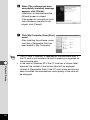
1
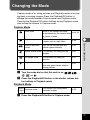
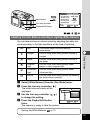
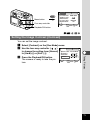
Digital Camera
Operating Manual
To ensure the best performance
from your camera, please read
the Operating Manual before
using the camera.
Thank you for buying the Pentax Digital Camera. Please read this
manual before using the camera in order to get the most out of
all the features and functions. Keep this manual safe, as it can be
a valuable tool in helping you to understand the camera’s capabilities.
Regarding copyrights
Images taken using the Optio 430RS/330RS that are for anything other
than personal enjoyment cannot be used without permission according to
the rights as specified in the Copyright Act. Please take care, as there are
even cases where limitations are placed on taking pictures even for personal enjoyment during demonstrations, industrial enterprise or as items
for display. Images taken with the purpose of obtaining copyrights also
cannot be used outside the scope of use of the copyright as laid out in the
Copyright Act, and care should be taken here also.
Regarding trademarks
•
•
•
•
CompactFlash and CF are trademarks of SanDisk Corporation.
PENTAX is a trademark of Asahi Optical Co., Ltd.
Optio is a trademark of Asahi Optical Co., Ltd.
All other brands or product names are trademarks or registered trademarks of their respective companies.
• The USB driver uses software developed by inSilicon Corporation.
• This product supports PRINT Image Matching II. When used in combination, PRINT Image Matching II enabled printers and software, help photographers to produce images more faithful to their intentions.
PRINT Image Matching is a trademark of Seiko Epson Corporation.
This manual is common to Optio 430RS and Optio 330RS. In this
manual the features specific to Optio 430RS and Opio 330RS are
indicated as “430RS” and “330RS” respectively.
The illustrations and the display screen of the LCD monitor in this manual
may be different from the actual product.
To customers who already have Optio 430/330
Please read page 87 before connecting the Optio 430RS/330RS to
your PC.
FOR SAFE USE OF YOUR CAMERA
Sufficient attention has been paid to the safety of this product but please
pay particular attention to the warnings indicated by the following symbols
during use.
Warning
These symbols indicate that it is possible that the
user may experience serious difficulties if the warnings are not heeded.
Caution
These symbols indicate that it is possible that the
user may experience minor or middling difficulties or
physical difficulties if the warnings are not heeded.
Warning:
• Do not attempt to take the camera apart or remodel the camera. High voltages are
present within the camera, and there is therefore a danger of electric shocks.
• If the inside of the camera should become exposed as a result of, for example, the
camera being dropped, please do not under any circumstances touch such exposed
portions, as there is a danger of receiving an electric shock.
• Wrapping the strap of the camera around your neck is also dangerous, please take
care that small children do not hang the strap around their necks.
• Use an AC adapter that are of the power and voltage specified for exclusive use with
this product. The use of an AC adapter other than that specified exclusively for use
with this product may cause fire or electric shocks.
• If the camera emits smoke or a strange smell, or in the event of any other irregularity,
stop using the camera immediately, remove the battery or disconnect the AC adapter
and contact your nearest Pentax service center. Continued use of the camera may
result in fire or electric shock.
• Discontinue use of the AC adapter during thunderstorms. This can cause a fire or
electrical shock.
Caution:
• Never try to disassemble, short or recharge the battery. Also, do not dispose of the
battery in fire, as it may explode.
• Remove the battery from the camera immediately if it becomes hot or begin to
smoke. Be careful not to burn yourself during removal.
• Some portions of the camera heat up during use, so please take care, as there is a
risk of low temperature burns if such portions are held for long periods of time.
• If the batteries become old and begin to leak, handle with extreme care.
• If any of the battery leakage should come in contact with your eyes, do not rub them.
Flush your eyes with clean water and get medical attention immediately.
• If any of the battery leakage should come in contact with skin or clothes, wash the
affected areas throughly with water.
1
Care to be Taken During Handling
• Do not clean the product with organic solvents such as thinner or alcohol benzene.
• Places of high temperature and humidity should be avoided. Particular care should
be taken regarding vehicles, which can become very hot inside.
• Storing the camera where pesticides and chemicals are handled should be avoided.
Remove from case and store in a well-ventilated place to prevent the camera from
becoming moldy during storage.
• Do not use the camera where it may come in contact with rain, water or any other liquid, because the camera is not weather, water, or liquid resistant. Should the camera
get wet from rain, splashing water, or any other liquid, wipe it off immediately with a
dry soft cloth.
• Ensure that the camera is not subjected to substantial vibrations, shocks or pressure.
Place the camera on a cushion for protection when the camera is subjected to the
vibrations of a motorbike, car, or ship, etc.
• The liquid crystal display will become black at temperatures of approximately 60°C
(140°F) but will return to normal when normal temperatures are returned to.
• The response speed of the liquid crystal display becomes slow at low temperatures.
This is due to the properties of the liquid crystal and is not a fault.
• Remove dust from the lens and viewfinder using a blower or clean off dust using a lens brush.
• Periodic checks are recommended every 1 to 2 years in order to maintain high-performance.
• When the camera has not been used for a long time, confirm that it is still working
properly, particularly prior to taking important pictures (such as at a wedding or during travelling). Pentax is not responsible for consequential damages (costs incurred
as a result of taking pictures, loss of benefits that were to be obtained through taking
pictures) arising from failure of this product.
• If the camera is subjected to rapid temperature changes, condensation may form on
the inside and outside of the camera. Therefore put the camera in a bag or plastic
bag, and take the camera out when the difference in temperature has subsided.
• The temperature range in which the camera can be used is 0°C to 40°C (32°F to
104°F).
• Avoid contact with garbage, dirt, sand, dust, water, toxic gases, salt, etc. as this may
cause damage to the camera. If rain or drops of water get onto the camera, please
wipe dry.
• Please refer to “Precautions When Using a CF Card” (p.15) regarding the
CompactFlash (CF) card.
• Be sure to use the D-LI2 rechargeable lithium ion battery provided for this camera. If
you use any other battery the camera may be damaged or malfunction.
To users of this camera
2
• There is a possibility that recorded data may be erased or that the camera may not
function correctly when used in surroundings such as installations generating strong
electromagnetic radiation or magnetic fields.
• The liquid crystal panel used in the LCD display is manufactured using extremely
high precision technology. Although the level of functioning pixels is 99.99% or better, you should be aware that 0.01% or fewer of the pixels may not illuminate or may
illuminate when they should not. However, this has no effect on the recorded image.
Contents
FOR SAFE USE OF YOUR CAMERA ···········································1
Care to be Taken During Handling ················································2
Contents·························································································3
Contents of the Operating Manual·················································5
Checking the Contents of the Package ·········································6
Names of Parts ··············································································7
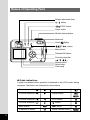
Names of Operating Parts ·····························································8
Getting Started ·······························································································9
Attaching the Strap·················································································9
Powering the Camera···········································································10
Charging the Battery····································································10
Installing the Battery ····································································11
Using the AC Adapter (optional)··················································13
Installing or removing the CF Card ······················································14
Initial Settings ·······················································································16
Setting the Display Language······················································16
Setting the Home Town································································17
Setting the D.S.T. Mode ·······························································17
Setting the Date and Time ···························································18
Quick Start ····································································································20
Taking Still Pictures ··············································································20
Playing Back Still Pictures····································································22
Playing Back Images ···································································22
Playing Back Previous or Next Images········································23
How to Use the CF Card······································································24
Common Operations ····················································································26
Turning the Camera On and Off···························································26
Changing the Mode··············································································27
Using the Button Functions ··································································28
Capture Mode ··············································································28
Playback Mode ············································································29
Using the Menus ··················································································30
How to Use the Menus ································································30
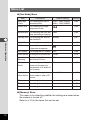
Menu List ·····················································································32
Taking Pictures ·····························································································34
Displaying Shooting Information (Display Mode) ·································34
Taking Pictures ·····················································································35
Taking Still Pictures in Auto Mode (Auto Mode) ··························35
Taking Pictures Manually (Manual Exposure Mode) ···················36
Taking Dark Scenes (Night-Scene Mode) ···································38
Continuous Shooting ···································································39
Using the Remote Control Unit (optional)····································40
Taking Movie Pictures (Movie Picture Mode) ······························42
Using the Zoom ···········································································44
Using the Self-Timer ····································································46
Taking Stereo Pictures (3D Image Mode) ···································47
Taking Pictures with Digital Filters (Digital Filter Mode) ··············52
Taking Pictures at a Specified Interval (Interval Shooting)··········54
Shooting Time-lapse Movies (Time-lapse Movie)························56
Setting the Shooting Functions ····························································57
Adjusting the Viewfinder ·····························································57
Selecting a Focus Mode ······························································58
EV Compensation········································································61
Changing the Shutter Speed/Aperture Setting ····························61
Selecting the Flash Mode ····························································62
Selecting the Recorded Pixels·····················································63
Selecting the Quality Levels ························································64
3
4
Adjusting the Color Balance according to Lighting (White Balance)······65
Changing the AF Area (Focusing Area) ······································67
Setting the Light Metering Range to Determine the Exposure (AE Metering) ····68
Setting the ISO Speed (ISO Speed)············································69
Setting the Instant Review Time (Instant Review) ·······················70
Setting the Image Sharpness (Sharpness) ·································71
Setting the Color Saturation (Saturation)·····································72
Setting the Image Contrast (Contrast)·········································73
Saving the Settings (Memory)······························································74
Saving the Menu Items (Mode Memory) ·····································74
Playback/Erasing ··························································································76
Playing Back Images············································································76
Playing Back Still Pictures ···························································76
Zoom Display ···············································································76
Playing Back Movie Pictures ·······················································78
Displaying Shooting Information (Display Mode)·························79
Nine-image Display······································································80
Erasing Images ····················································································81
Erasing a Single Image ·······························································81
Erasing All Images·······································································82
Protecting Images from Deletion (Protect) ··································83
Setting the Printing Service··································································84
Printing Single Image ··································································84
Printing All Images·······································································86
Viewing Images with Windows PC ·······················································87
About the included software ························································87
System environment ····································································87
Installing the software ··································································88
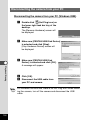
Connecting the camera and PC ··················································98
Viewing images on your PC ························································99
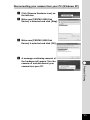
Disconnecting the camera from your PC···································100
Viewing Images with Macintosh ·························································102
About the included software ······················································102
System environment ··································································102
Installing the software ································································103
Connecting the camera and your Macintosh ·····························104
Viewing images on your Macintosh ···········································105
Disconnecting the camera from your Macintosh ·······················105
Editing Images/Settings·············································································106
Editing Images····················································································106
Copying the Image·····································································106
Trimming Images ·······································································108
Changing the Image Size (Resize)············································110
Camera Settings·················································································112
Formatting··················································································112
Sounding the Alarm at a Set Time ············································113
Setting the Beep ········································································115
Changing the Start-up Screen ···················································116
Setting the Date Style································································117
Changing the Date/Time····························································117
Setting the World Time ······························································118
Changing the Display Language················································119
Powersaving Function (Sleep Timeout) ·····································120
Auto Power Off Function····························································120
Quick Delete ··············································································121
Quick Enlargement ····································································121
Resetting to Default Settings (Reset) ········································122
Appendix ·····································································································124
List of City Names ··············································································124
Messages ···························································································125
Troubleshooting ··················································································127
Main Specifications ············································································130
Optional Accessories ·········································································132
WARRANTY POLICY·········································································133
Contents of the Operating Manual
This Operating manual contains the following chapters.
● Getting Started
This chapter explains what you need to do after purchasing the camera and
before you start taking pictures. Be sure to read it and follow the instructions.
● Quick Start
This chapter explains the simplest way to take pictures and play back images.
Use it if you want to start taking pictures straightaway. It also tells you how to
use the CF card.
● Common Operations
This chapter explains common operations such as the functions of the mode
dial and buttons, and how to use the menus. For more details, refer to the
respective [Taking Pictures], [Playback/Erasing] and [Editing Images/Settings]
chapters.
● Taking Pictures
This chapter explains the various ways of capturing images and
how to set the relevant functions.
● Playback/Erasing
This chapter explains how to play back images and how to delete
images.
● Editing Images/Settings
This chapter explains how to edit captured images and how to set
the camera-related functions.
● Appendix
This tells you about the messages displayed on the LCD monitor
and what to do in the event of trouble.
The meanings of the symbols used in this Operating manual are
explained below.
indicates the reference page number for an explanation of the
related operation.
memo
Caution
indicates information that is useful to know.
indicates precautions to be taken when operating the camera.
5
Checking the Contents of the Package
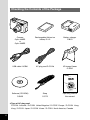
Camera
Optio 430RS
or
Optio 330RS
Rechargeable lithium-ion
battery D-LI2
Battery charger
D-BC2
USB cable I-USB6
AC plug cord D-CO2✽
3D Image Viewer
O-3DV1
Digital Camera
Operating Manual
To ensure the best performance
from your camera, please read
the Operating Manual before
using the camera.
Software (CD-ROM)
S-SW5
Strap
O-ST5
Operating Manual
this manual
✽ Type of AC plug cord
D-CO2A Australia / D-CO2B United Kingdom / D-CO2E Europe / D-CO2H Hong
Kong / D-CO2J Japan / D-CO2K Korea / D-CO2U North America, Canada
6
Names of Parts
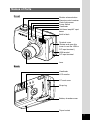
Front
Shutter release button
Remote control receiver
Flash light sensor
Power switch
Viewfinder
Self-timer lamp/AF spotbeam
Built-in flash
Terminal cover
(Rotate and open this
cover to use the USB or
DC input terminal.)
USB terminal
DC input terminal
Lens
Back
Viewfinder
LCD monitor
CF card cover
Strap lug
Battery chamber cover
Tripod socket
7
Names of Operating Parts
Diopter adjustment lever
/
button
/DPOF button
Power switch
Shutter release button
Mode dial
Zoom/
button
/
button
Menu button
Playback/OK button
Four-way controller
(
)
Display button
Status lamp
Flash lamp
● Guide indications
A guide to available button operation is displayed on the LCD monitor during
operation. The buttons are indicated as shown below.
Four-way controller (
)
Zoom button
Four-way controller (
)
Display button
Four-way controller (
)
DPOF button
Four-way controller (
)
Menu button
Playback/OK button
8
button
button
Shutter release button
Getting Started
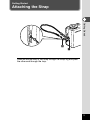
Attaching the Strap
Getting Started
x
z
Pass the narrow end of the strap through the strap lug and pass
the other end through the loop.
9
Powering the Camera
Battery
c
To power outlet
Getting Started
AC plug cord
Battery
charger
Charging
indicator
z
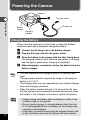
Charging the Battery
When using the camera for the first time or when the [Battery
depleted.] message is displayed, charge the battery.
z
x
c
v
memo
Caution
10
Connect the AC plug cord to the battery charger.
Plug the AC plug cord into the power outlet.
Place the battery in the charger with the label facing down.
The charging indicator lights red while the battery is charging
and changes to green when charging is completed.
When charging is completed, remove the battery from the
battery charger.
• The time required for full charge is about 120 minutes maximum.
The appropriate ambient temperature range for charging the
battery is 0°C-40°C.
• The charging time may vary depending on the ambient temperature and charging conditions.
• When the battery reaches the end of its service life, the time
that the camera can be operated becomes shorter even when
the battery is fully charged. In this event, replace the battery.
• Always charge the battery after purchasing or when it has
not been used for a long time.
• Do not use the charger to charge batteries other than the
D-LI2 rechargeable lithium ion battery as the charger may
overheat or be damaged.
• If the battery is inserted correctly but the charging indicator fails
to light, the battery may be faulty. Replace with a new battery.
Battery
Battery chamber
cover
Installing the Battery
Getting Started
Battery chamber
cover release
lever
Install the battery provided. When using the camera for the first
time, charge the battery before installing.
z
x
c
memo
Caution
Slide the battery chamber cover release lever in the
direction indicated by the arrow to open the battery
chamber cover.
Insert the battery with the label towards back of camera .
Close the battery chamber cover.
If you intend to use the camera continuously for a long period, use
of the AC adapter D-AC2 (optional) is recommended. (
p.13)
• Be sure to use the D-LI2 rechargeable lithium ion battery
provided for this camera. If you use any other battery the
camera may be damaged or malfunction.
• Do not open the battery chamber cover or remove the battery when the camera is turned on.
• If you do not intend to use the camera for a long time,
remove the battery.
• If the camera is left without the battery for a long time, the
date setting will be reset.
• Insert the battery correctly. If the battery is incorrectly oriented, it may cause malfunction.
11
● Approximate Operating Time (when fully charged)
Number of recordable images : Approx. 250 (with the flash fired for
50% of the shots. LCD monitor ON)
Playback time
: Approx. 150 min.
* The above table is based on Pentax measuring conditions and may vary
depending on capture mode and shooting conditions.
Getting Started
Caution
Performance of the battery may deteriorate in low temperatures.
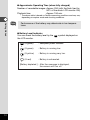
● Battery Level Indicator
You can check the battery level by the
the LCD monitor.
symbol displayed on
(lit green)
: Adequate power remains.
(lit green)
: Battery is running low.
(lit yellow)
: Battery is running very low.
↓
↓
↓
(lit red)
: Battery is exhausted.
↓
[Battery depleted.] : After the message is displayed,
the camera will turn off.
12
z
Terminal cover
AC adapter
c
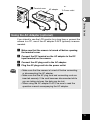
Using the AC Adapter (optional)
Getting Started
x
To Power outlet
If you intend to use the LCD monitor for a long time or connect the
camera to a PC, use of the AC adapter D-AC2 (optional) is recommended.
z
x
c
v
Caution
Make sure that the camera is turned off before opening
the terminal cover.
Connect the DC terminal on the AC adapter to the DC
input terminal on the camera.
Connect the AC plug cord to the AC adapter.
Plug the AC plug cord into the power outlet.
• Make sure that the camera is turned off before connecting
or disconnecting the AC adapter.
• Make sure that the AC plug cord and connecting cord are
inserted securely. If the cord becomes disconnected while
you are taking pictures, the data may be lost.
• When using the AC adapter D-AC2, be sure to read the
operation manual accompanying the AC adapter.
13
Installing or removing the CF Card
CF card cover
Getting Started
CF card
CF card eject button
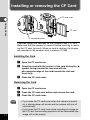
Captured images are recorded on the CompactFlash (CF) card.
Make sure that the camera is turned off before inserting or removing the CF card (optional). When no card is inserted, the images
are recorded in the camera’s built-in memory (11MB).
Installing the Card
z
x
c
Open the CF card cover.
Orient the card with the surface of the card having the
symbol facing towards the lens and with the
pin-connector edge of the card towards the slot and
insert fully.
Close the CF card cover.
Removing the Card
z
x
c
Caution
14
Open the CF card cover.
Press the CF card eject button and remove the card.
Close the CF card cover.
• If you open the CF card cover when the camera is turned
on, a warning beep will sound and the camera will turn off
automatically.
• If you open the CF card cover while recording an image on
the CF card, the recording operation will be terminated (the
image will not be saved).
Precautions When Using a CF Card
Getting Started
• Make sure that the camera is turned off before opening the CF card cover.
• Care should be taken if you remove the CF card immediately after using the
camera, as the card may be hot.
• Do not open the CF card cover or turn the camera off while data is being
recorded on the card or transferred to another device as this may cause the
data to be lost or the card to be damaged.
• Do not bend the CF card or subject it to violent impact. Keep it away from water
and store away from high temperature.
• Be sure to format unused CF cards or CF cards that have been used on another
camera. Refer to “Formatting” (p.112) for instructions on formatting.
• Never open the CF card cover during formatting as this may cause the card to
be damaged and become unusable.
• Data recorded on a CF card with the Optio 430RS/330RS cannot be played back
accurately on the Optio 430/330/230. Similarly, data recorded with the Optio 230
cannot be played back accurately on the Optio 430RS/330RS.
• The data on the CF card may be erased in the following circumstances. Pentax
does not accept any liability for data that is erased
• when the CF card is mishandled by the user.
• when the CF card is exposed to static electricity or electrical interference.
• when the card has not been used for a long time.
• when the card is ejected, the AC adapter is disconnected or the battery is
removed while the data on the card is being accessed (when the status lamp
and flash lamp are blinking green and red).
• The CF card has a limited service life. If it is not used for a long time, the data
on the card may become unreadable. Be sure to make a backup of important
data on a PC.
• Avoid using or storing the card where it may be exposed to static electricity or
electrical interference.
• Avoid using or storing the card in direct sunlight or where it may be exposed to
rapid changes in temperature or to condensation.
15
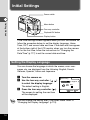
Initial Settings
Power switch
Getting Started
Menu button
Four-way controller
Playback/OK button
Display button
If the initial settings screen appears when you turn the camera on,
follow the procedure below to set the display language, Home
Town, DST, and current date and time. If the date and time appear
at the bottom right of the LCD monitor when you turn the camera
on for the first time, follow the instructions for “Changing the
Date/Time” (p.117) to set the correct date and time.
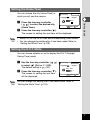
Setting the Display Language
You can choose the language in which the menus, error messages, etc. are displayed from the following: English, French,
German, Spanish, Italian and Japanese.
z
x
c
memo
16
Turn the camera on.
Use the four-way controller (
to select the display language.
The default setting is English.
Press the four-way controller ( ).
The screen for setting the next item
will be displayed.
Initial setting
)
Language/
English
City
DST
MENU
NYC
Exit
You can change the setting after it has been made. Refer to
“Changing the Display Language” (p.119).
OK
Ok
Setting the Home Town
You can choose the city (Home Town) in
which you will use the camera.
x
memo
Language/
English
City
DST
Press the four-way controller
(
) to select the desired city
(Home Town).
MENU
NYC
Exit
OK
Ok
Press the four-way controller ( ).
The screen for setting the next item will be displayed.
Getting Started
z
Initial setting
• See p.124 for the list of cities and corresponding code names.
• You can change the setting after it has been made. Refer to
“Setting the World Time” (p.118).
Setting the D.S.T. Mode
You can choose whether or not to display the D.S.T (Daylight
Saving Time) mode.
z
x
memo
Use the four-way controller (
to select
(On) or
(Off).
The default setting is
(Off).
Press the four-way controller ( ).
The screen for setting the next item
will be displayed.
)
Initial setting
Language/
English
City
DST
MENU
NYC
Exit
OK
Ok
You can change the setting after it has been made. Refer to
“Setting the World Time” (p.118).
17
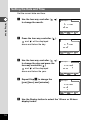
Setting the Date and Time
Set the current date and time.
z
Getting Started
Use the four-way controller (
to change the month.
)
Date Adjust
1 /
1 / 2002
00 : 00
DISP
x
Press the four-way controller (
and
will be displayed
above and below the day.
).
12/24 MENU Exit
OK
Ok
OK
Ok
OK
Ok
OK
Ok
Date Adjust
6 /
1 / 2002
00 : 00
DISP
c
Use the four-way controller (
to change the day and press the
four-way controller ( ).
and
will be displayed
above and below the year.
)
Date Adjust
6 / 10 / 2002
00 : 00
DISP
v
Repeat Step c to change the
[year] [hour] and [minutes].
12/24 MENU Exit
12/24 MENU Exit
Date Adjust
6 / 10 / 2002
10 : 30
DISP
b
18
12/24 MENU Exit
Use the Display button to select the 12-hour or 24-hour
display format.
n
memo
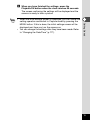
When you have finished the settings, press the
Playback/OK button when the clock reaches 00 seconds.
The screen confirming the settings will be displayed and the
camera is ready to take a picture.
Getting Started
• When the initial settings screen is displayed, you can cancel the
setting operation and switch to Capture mode by pressing the
MENU button. If this is done, the initial settings screen will be
displayed next time you turn the camera on.
• You can change the settings after they have been made. Refer
to “Changing the Date/Time” (p.117).
19
Quick Start
Taking Still Pictures
Shutter release button
Mode dial
Power switch
Zoom button
Quick Start
Viewfinder
LCD monitor
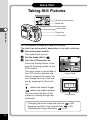
For the simplest procedure to take still pictures:
The flash fires automatically depending on the light conditions.
z
x
c
Press the power switch.
The camera will turn on.
Set the mode dial to
200
.
Turn the LCD monitor on.
Press the Display button to display the shooting screen on the
LCD monitor.
The focus frame in the middle of
the LCD monitor indicates the
zone of automatic focusing. You
can change the size of the subject by pressing the Zoom button.
6/10/2002
11:19
Focus frame
makes the subject bigger.
makes the subject smaller.
You can check the size of the
subject by looking through the
viewfinder.
Focus frame
Changing the focus range and position
p.58
Stopping the flash firing automatically
p.62
Displaying shooting information
p.34
20
v
Press the shutter release button.
The image will be displayed on the LCD monitor for 0.5
seconds (Instant Review) and recorded on the CF card or
in the built-in memory when no card is inserted. (The
green and red lamps on the right of the viewfinder blink
alternately while the image is being recorded.)
Using the Shutter Release Button
Quick Start
The shutter release button works in a two-step action.
● Press halfway
When the shutter release button is pressed lightly (halfway),
the focus, exposure and white balance are locked. The shutter speed and aperture settings are only displayed when the
shutter release button is pressed lightly (halfway).
You can find the following information on the LCD monitor,
the status lamp and the flash lamp.
q Focusing area
If the subject is in focus, the frame will light green. If the
subject is not in focus, the frame will not appear.
w Flash symbol
The flash symbol indicates the status of the flash when the
shutter release button is pressed.
Status lamp & Flash lamp (on the right of the viewfinder)
status Status lamp (green)
Flash lamp (red)
lit
Subject is in focus
Flash is charged
blink
Subject is not in focus
Flash is charging
● Pressed down fully
The picture is taken.
Instant Review
The Instant Review default setting is 0.5 seconds. During this
time you can delete the image by pressing the
button (The
Delete screen will be displayed.), and selecting [Delete].
Setting the Instant Review Time
p.70
21
Quick Start
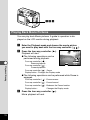
Playing Back Still Pictures
LCD monitor
Quick Start
Playback/OK button
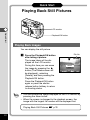
Playing Back Images
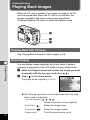
You can display the still picture.
z
memo
Press the Playback/OK button
after taking a picture.
The image taken will be displayed on the LCD monitor.
During this time you can erase
the image by pressing the
button (The Delete screen will
be displayed.), selecting
[Delete], and then pressing the
Playback/OK button.
Press the Playback/OK button
again or press the shutter
release button halfway to return
to shooting status.
Delete
Stop
All Images
MENU
Exit
OK
Ok
• You can enlarge the image displayed on the LCD monitor by
pressing the zoom button.
• When the screen is changed to the playback screen, the
image with the largest file number will be displayed first.
Playing Back Still Pictures
22
File No.
100-0020
p.76
LCD monitor
Playback/OK button
Quick Start
Four-way controller
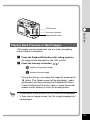
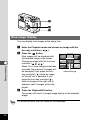
Playing Back Previous or Next Images
Still images can be played back one at a time, proceeding
either forward or backward.
z
x
Press the Playback/OK button after taking a picture.
An image will be displayed on the LCD monitor.
Press the four-way controller (
).
displays the previous image.
displays the next image.
During this time you can erase the image by pressing the
button (The Delete screen will be displayed.), selecting [Delete], and then pressing the Playback/OK button.
Press the Playback/OK button again or press the shutter
release button halfway to return to shooting status.
memo
• In the case of movie pictures, the first frame will be displayed.
• If there are no images stored, the [No image] message will
be displayed.
23
Quick Start
How to Use the CF Card
When the CF card is inserted into the camera, images taken
are recorded on the card. You can view the images recorded
on the card on the camera itself, transfer them to your PC and
print them out.
Quick Start
Viewing images on the camera
One of the advantages of a digital camera is that it enables
you to view your pictures immediately after you have taken
them. You can check the composition and brightness and take
the picture again if you are not satisfied.
Playing Back Still Pictures
24
p.76
Viewing images on a PC
Viewing Images with Windows PC
Viewing Images with Macintosh
p.87
Quick Start
You only need to install the USB driver the first time. After that,
you can view recorded images and edit them on the PC just by
connecting the camera to the PC with the USB cable and
downloading the images. Or you can remove the CF card from
the camera and transfer the data to your PC using a card
reader. If you use a laptop computer, you can transfer the
image data by fitting the CF card into the card adapter and
inserting the card adapter into the card slot.
p.102
Printing images by a printing service
Prints of images recorded on the CF card can be ordered in
the same way as with conventional photographs by taking the
CF card to a store that performs printing.
The number of prints can be specified and dates can be included in the prints if DPOF (Digital Print Order Format) is set before
taking the CF card to a store that performs DPOF printing.
Setting the Printing Service
p.84
25
Common Operations
Turning the Camera On and Off
Power switch
Common Operations
26
Use the power switch to turn the camera on and off.
z
Press the power switch.
The camera will turn on.
When the camera is turned on, the lens cover opens and the
lens extends.
Press the power switch again to turn the camera off.
Changing the Mode
Capture mode is for taking pictures and Playback mode is for playing back or erasing images. Press the Playback/OK button to
change the mode between Capture mode and Playback mode.
Pressing the Playback/OK button halfway during Playback mode
also moves the camera to Capture mode.
Capture Mode
x
Most of the settings are made
p.20, 35
automatically by the camera when
a picture is taken.
Night-scene mode
This mode is for taking dark
scenes such as night views.
p.38
Manual exposure
mode
You can set the aperture and
shutter speed manually.
p.36
Movie picture mode
This mode is for taking moving
images.
p.42
3D image mode
This mode is for taking 3D
pictures.
p.47
Digital filter mode
Various color filters including red,
blue and green can be used for
taking pictures.
p.52
Common Operations
z
Auto mode
Turn the mode dial so that the mark is on
or
.
Press the Playback/OK button or the shutter release button halfway in Playback mode.
Playback Mode
Playback/
Playback mode
OK button
z
This mode is for playing back
recorded images.
p.76
Press the Playback/OK button in Capture mode.
27
Using the Button Functions
q wer
t
y
u i
o
!0
Capture Mode
Common Operations
28
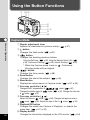
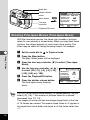
q Diopter adjustment lever
Adjusts the viewfinder for optimum clarity. (
p.57)
w button
Changes the flash mode. (
p.62)
e
button
Changes the shooting mode as follows.
Using the Self-timer (
p.46), Using the Remote Control Unit (
p.40), Continuous Shooting (
p.39), Interval Shooting (
p.54)
* When the Capture mode is set on
, Continuous
Shooting mode will be skipped.
r
button
Changes the focus mode. (
p.58)
t Zoom button
Changes the size of the subject. (
p.44)
y Menu button
Displays the active menus in Capture mode. (
p.32, p.33)
u Four-way controller (
)
Changes the EV compensation in
mode. (
p.61),
Changes the shutter speed in
mode. (
p.36), Changes the slim rate
in
mode. (
p.52)
i Four-way controller (
)
Adjusts the focus in
mode. (
p.59), Changes the aperture value in
mode. (
p.36), Selects the type of filter in
mode (
p. 52).
o Playback/OK button
Changes the mode from Capture to Playback, or selects the
menu item. (
p.27, p.30)
!0 Display button
Changes the information displayed on the LCD monitor. (
p.34)
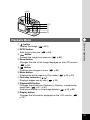
qwe
rt
y
u
i
o
Playback Mode
button
Deletes the image. (
p.81)
w DPOF button
Sets the print service. (
p.84)
e
button
Protects the image from erasure. (
p.83)
r Zoom button
Changes the size of the image displayed on the LCD monitor.
(
p.76)
t
button
Displays nine images at once. (
p.80)
y Menu button
Displays the active menus in Play mode. (
p.32, p.33)
u Four-way controller (
)
Displays images one by one. (
p.23)
i Playback/OK button
Changes the mode from Playback to Capture, or selects the
menu item. (
p.27, p.30)
Ends zoom display or nine-image display. (
p.76, p.80)
o Display button
Changes the information displayed on the LCD monitor. (
p.79)
Common Operations
q
29
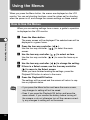
Using the Menus
When you press the Menu button, the menus are displayed on the LCD
monitor. You can set shooting functions, save the values set for shooting
when the power is off, and change the camera settings on these menus.
How to Use the Menus
When you are making settings from a menu, a guide to operation
is displayed on the LCD monitor.
z
Common Operations
x
c
v
v’
b
Caution
30
Press the Menu button.
The menu screen will be displayed. The selected area will be
displayed in a green frame.
Press the four-way controller (
).
Use the four-way controller (
) to select the menu
screen.
Use the four-way controller (
Use the four-way controller (
down.
Use the four-way controller (
) to select an item.
) to move the frame up or
) to change the setting.
If there is a Select screen, use the four-way controller
( ) to move to the Select screen.
When you have finished making the settings, press the
Playback/OK button to return to the menu.
Press the Playback/OK button.
The settings will be saved and the screen will return to capture or playback status.
• If you press the Menu button and leave the menu screen,
any changes to setting will not be saved.
• Even if you press the Playback/OK button and leave the
menu screen, if you remove the battery before turning off
the camera or do not otherwise turn off the camera correctly, any changes to setting will not be saved.
Example of menu operation
z
Menu button
[Rec.Mode] menu
Rec.Mode
Memory
Recorded Pixels
Quality Level
White Balance
Focusing Area
Digital Zoom
(1/3)
MENU
x
Set-up
[Memory] menu
Rec.Mode
2048×1536
Memory
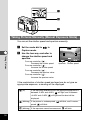
Set-up
(1/3)
Exit OK Ok
MENU
Rec.Mode
Memory
Format
Copy Image
Resize
Trimming
Alarm
Beep
Flash
White Balance
EV Compensation
Digital Zoom
AE Metering
AWB
Multiple
On
[Set-up] menu
Exit OK Ok
(1/3)
MENU
Set-up
Off
On
Exit OK Ok
c
Rec.Mode
Memory
(1/3)
MENU
Set-up
2048×1536
AWB
Multiple
On
Exit OK Ok
c
Rec.Mode
v
Memory
Recorded Pixels
Quality Level
White Balance
Focusing Area
Digital Zoom
(1/3)
MENU
Set-up
v’
AE Metering
ISO Speed
Instant Review
Interval Shooting
Time-lapse Movie
(2/3)
(1/3)
Exit OK Ok
Memory
MENU
Set-up
Memory
Recorded Pixels
Quality Level
White Balance
Focusing Area
Digital Zoom
AWB
Multiple
On
c
Rec.Mode
Rec.Mode
2048×1536
MENU
Off
Exit OK Ok
2048×1536
AWB
Multiple
Off
Exit OK Ok
Select screen
Interval Shooting
Interval
Auto
0.5sec
Set-up
Common Operations
Recorded Pixels
Quality Level
White Balance
Focusing Area
Digital Zoom
01min00sec
Number of shot
Start Time
MENU
99
00hour(s)00min
Exit OK Ok
c
To the next screen
memo
If you press the shutter release button halfway to leave the menu
screen and move the camera to Capture mode, any changes to
the setting will not be saved.
31
Menu List
● [Rec.Mode] Menu
Item
Description
Recorded
Pixels
For selecting the size of
recorded pixels.
Quality Level
For selecting the image
compression rate.
Default Setting
2240 × 1680 (430RS)
2048 × 1536 (330RS)
Reference
p.63
p.64
White Balance For adjusting the color bal- AWB
ance according to lighting.
p.65
Focusing Area For changing the Area of
the autofocus.
p.67
Multiple
Common Operations
Digital Zoom For taking digital zoom pictures. On
p.45
AE Metering For setting the metering method
to determine the exposure.
p.68
ISO Speed
For setting the ISO speed.
Instant Review For setting the instant review time.
Auto
p.69
0.5sec
p.70
Interval
Shooting
For shooting at the specified interval of time.
Off
p.54
Time-lapse
Movie
For shooting at a delayed
frame rate (images are
played back in an effect of
fast forward).
Off
p.56
Parallel Mode
p.47
p.71
For setting the applied
Applied
Photo Mode photo mode to take a 3D
picture.
Sharpness
For setting the sharpness.
Normal
Saturation
For setting the saturation.
Normal
p.72
Contrast
For setting the contrast.
Normal
p.73
● [Memory] Menu
This menu is for selecting whether the settings are saved when
the camera is turned off.
Refer to p.74 for the items that can be set.
32
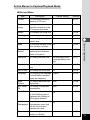
Active Menus in Capture/Playback Mode
● [Set-up] Menu
Item
Description
Default Setting
Reference
For formatting the built-in
memory or CF card
–
p.112
Copy
Image
For copying images from
the built-in memory to the
CF card and vice versa.
–
p.106
Resize
For changing the image size. –
p.110
Trimming
For trimming the image.
–
p.108
Alarm
For sounding an alarm at a Off
specific time.
p.113
Beep
For adjusting the beep sound On
when a button is pressed
p.115
Start-up
Screen
For setting the screen
appearing first when the
power is turned on.
On
p.116
Date Style
For setting the date style
Set according to the
Language default setting
p.117
Date Adjust
For adjusting the date and
time
01/01/2002
p.117
Off
p.118
World Time
For setting the world time
Language
For changing the language English
in which menus and messages are displayed
p.119
Sleep
Timeout
For setting the power-saving function
1min
p.120
Auto Power
Off
For turning off the power
automatically.
3min
p.120
Off
p.121
Quick
For playing back images at Off
Enlargement the maximum zoom size
with the Zoom button
pressed only once.
p.121
Reset
p.122
Quick Delete When this option is turned
on, the Delete screen is
displayed with [Delete] or
[All Images] selected.
For returning the camera
settings to defaults
–
Common Operations
Format
33
Taking Pictures
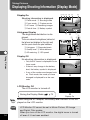
Displaying Shooting Information (Display Mode)
Display On
Shooting information is displayed.
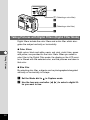
q
e
t
u
123 4 5
Flash mode w Shooting mode
Focus mode r Capture mode
AF frame y Remaining images
Date & time i Battery symbol
6/10/2002
11:19
8
1
198
2048
AWB
q Histogram w Recorded pixels
e Quality level r White balance
t AE metering y ISO speed
65
➞
• Only the AF frame is displayed in auto
focus mode.
• If there is any change in the battery
level, the battery symbol is displayed.
• If any of the modes are changed such
as Flash mode, the mode you have
changed is displayed for a few seconds.
6/10/2002
11:19
➞
Taking Pictures
Display Off
No shooting information is displayed.
7
3
24
➞
Histogram Display
The brightness distribution is displayed.
The x-axis shows the brightness (darkest at
the left end and brightest at the right end)
and the y-axis shows the pixel numbers.
6
198
LCD Monitor Off
The LCD monitor is turned off.
p.74
➞
Saving the Display Mode
Display On
memo
Caution
34
When using the AC adapter, the battery level indicator is not displayed on the LCD monitor.
LCD Monitor Off cannot be set in Movie Picture, 3D Image
and Digital Filter modes.
When you turn off the LCD monitor, the digital zoom is turned
off even if it has been enabled.
Taking Pictures
When the CF card is installed, all images will be recorded on the
CF card. When the CF card is not installed, the images will be
recorded in the camera’s built-in memory.
z
x
Taking Still Pictures in Auto Mode (Auto Mode)
z
x
Set the mode dial to
in Capture mode.
Press the shutter release button.
The picture will be taken.
Using the Shutter Release Button
Taking Pictures
By setting the mode dial to
, most of the settings will be made
automatically by the camera when a picture is taken.
p.21
35
z
c
x
Taking Pictures Manually (Manual Exposure Mode)
You can set the shutter speed and aperture manually.
z
x
Set the mode dial to
Capture mode.
in
198
Taking Pictures
Use the four-way controller to
change the shutter speed and
aperture.
Four-way controller (
):
Decrease the shutter speed
Four-way controller (
):
Increase the shutter speed
Four-way controller (
):
Decrease the aperture value
Four-way controller (
):
Increase the aperture value
1/250
F2.6
6/10/2002
11:19
Aperture Shutter speed
If the combination of shutter speed and aperture do not give an
appropriate exposure, a warning will be displayed.
(lit)
If the exposure difference from the appropriate exposure is
between -2.0EV and -0.3EV,
+0.3EV and +2.0EV,
will light, and if between
will light and the level will be
displayed.
(blinking) If the picture is underexposed,
posed,
will blink, and if overex-
will blink.
(blinking) If the exposure cannot be measured,
36
will blink.
c
Press the shutter release button.
The picture will be taken at the set shutter speed and
aperture settings.
Playing Back Images
memo
Caution
p.76
The shutter speed and aperture settings will be saved when the
camera is turned off.
• Exposure compensation is not available in this mode.
• When the focus mode is set to manual, the four-way
controller (
) becomes the manual focus button and
the aperture setting cannot be changed.
• You cannot select [Auto] or [Auto + Red-eye reduction]
flash mode.
Taking Pictures
37
z
x
Taking Dark Scenes (Night-Scene Mode)
The appropriate settings are made automatically for taking dark
scenes such as night views.
Taking Pictures
z
x
in Capture mode.
Press the shutter release button.
The picture will be taken.
Using the Shutter Release Button
Playing Back Images
p.22
Caution
38
Set the mode dial to
p.21
As the shutter speed becomes slow in night-scene mode,
camera shake should be avoided.
x
c
z(
)
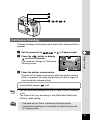
Continuous Shooting
Pictures are taken continuously while the shutter release button is
pressed.
Set the mode dial to
or
Press the
button to display
on the LCD monitor.
The mode will change to Continuous
Shooting mode.
in Capture mode.
198
6/10/2002
11:19
c
Press the shutter release button.
Pictures will be taken continuously while the shutter release
button is pressed. Shooting stops when you take a finger off
from the shutter release button.
Playing Back Images
memo
Caution
Taking Pictures
z
x
p.22
• You can continue shooting until the CF card or built-in memory
is full.
• The interval will vary according to the [Recorded Pixels] and
[Quality Level] setting.
• The flash will not fire in Continuous Shooting mode.
• Continuous shooting is not available for Movie Picture and
3D Image modes.
39
x
z(
)
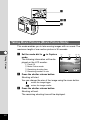
Using the Remote Control Unit (optional)
You can take pictures using the remote control F (optional).
z
x
Taking Pictures
c
or
Press the
button to display
on the LCD monitor.
The self-timer lamp will blink and the
camera is ready to take pictures.
in Capture mode.
198
Press the shutter release button on
6/10/2002
11:19
the remote control unit.
The self-timer lamp will blink rapidly and the picture will be
taken after approximately three seconds.
Playing Back Images
memo
40
Set the mode dial to
p.76
• The buttons on the camera can be used in the same way.
• Please ensure that the remote control unit is no more than 5
meters away from the front of the camera.
• To take a picture immediately after pressing the shutter release
button on the remote control unit, press the
button in step
x to display
on the LCD monitor.
• When the digital zoom function is enabled, the digital zoom can
not be operated with the remote control unit, but the digital
zoom can be operated by pressing the Zoom button on the
camera. However, the camera will revert to optical zoom mode
by pressing the Zoom button on the remote control unit.
• The powersaving function can be operated (the self-timer lamp
will also go off).
● Remote control unit battery service life
Up to approximately 30,000 signals can be sent to the camera
from the remote control unit. Contact your nearest Pentax service
center when battery replacement becomes necessary.
Zoom on the remote controller
The zoom can be changed using the
remote control E (optional).
If you press the Zoom button on the
remote control unit, the zoom will switch
from [Wide] to [Tele] to [Middle].
198
[Wide] edge
[Tele] edge
Taking Pictures
41
z
xc
x
Taking Movie Pictures (Movie Picture Mode)
This mode enables you to take moving images with no sound. The
maximum length of one motion picture is 30 seconds.
Taking Pictures
z
Set the mode dial to
in Capture
mode.
The following information will be displayed on the LCD monitor.
q
w
e
r
x
1
Flash Off
Movie Picture mode
Remaining shooting time
Remaining number of sets
42
34
5
•12SEC
6/10/2002
11:19
Press the shutter release button.
Shooting will start.
You can change the size of the image using the zoom button.
makes the image bigger
makes the image smaller
c
2
Press the shutter release button.
Shooting will end.
The remaining shooting time will be displayed.
Keeping the shutter release button pressed
If you keep the shutter release button pressed for more than one
second, pictures will be taken for as long as you keep the button
pressed. Shooting stops when you take a finger off from the shutter release button.
Playing Back Movie Pictures
Caution
p.78
• The flash will not fire in Movie Picture mode.
• Continuous shooting is not possible in Movie Picture mode.
• The LCD monitor cannot be turned off in Movie Picture
mode.
Taking Pictures
43
z
Using the Zoom
You can use the zoom to take pictures in Tele or Wide mode.
z
Press the Zoom button in Capture
mode.
Digital zoom symbol
198
makes the subject larger
Taking Pictures
makes the subject smaller
When the digital zoom function is
disabled, you can take pictures at
up to 3x magnification using the
optical zoom.
When the digital zoom is enabled,
you can enlarge the subject to a
maximum magnification equivalent
to 6x.
Saving the zoom position
Caution
44
Zoom bar
p.74
When you turn off the LCD monitor, the digital zoom is
turned off even if it has been enabled.
Enabling/Disabling the Digital Zoom Function
z
x
c
v
Caution
Press the Menu button.
The [Rec.Mode] menu will be displayed.
Press the four-way controller (
to select [Digital Zoom].
Use the four-way controller (
to select [On] or [Off].
)
Rec.Mode
)
Press the Playback/OK button.
The camera is ready to take a picture.
Memory
Recorded Pixels
Quality Level
White Balance
Focusing Area
Digital Zoom
(1/3)
MENU
Set-up
2048×1536
AWB
Multiple
Off
Exit
OK
Ok
When you turn off the LCD monitor, the digital zoom is
turned off even if it has been enabled.
Saving the Digital Zoom Function Setting
p.74
Taking Pictures
45
x
c
z(
)
Using the Self-Timer
The picture will be taken ten seconds after the shutter release button is pressed.
z
Taking Pictures
x
c
memo
Set the mode dial to
mode.
Press the
button to display
in Capture
on the LCD monitor.
Press the shutter release button.
The self-timer is started and the self-timer lamp lights. The
picture will be taken approximately three seconds after the
self-timer lamp starts to blink.
If you turn the LCD monitor on, the second count will be displayed.
Playing Back Images
46
or
p.22
z
n.
x
cv
bm
Taking Stereo Pictures (3D Image Mode)
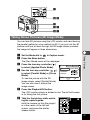
You can take 3D pictures using the LCD monitor and view them by
the parallel method or cross method (p.49). If you print out the 3D
pictures and look at them through the 3D image viewer provided,
the image will appear in three dimensions.
c
v
b
n
Set the Mode dial to
in Capture mode.
Press the Menu button.
The [Rec. Mode] menu will be displayed.
Press the four-way controller ( )
to select [Applied Photo Mode].
Use the four-way controller (
)
to select [Parallel Mode] or [Cross
Mode].
To view the picture with the 3D
image viewer, select [Parallel Mode].
You can also view it without the
image viewer.
Rec.Mode
Memory
Set-up
Applied Photo Mode Parallel Mode
Sharpness
Saturation
Contrast
(3/3)
MENU
Exit
OK
Taking Pictures
z
x
Ok
Press the Playback/OK button.
The LCD monitor screen is divided in two. The left half screen
is for taking the first picture.
Take the first picture while watching the capture guide.
Hold the camera so that the subject
is in the center of the left half
screen, and press the shutter
release button.
31
6/10/2002
11:19
47
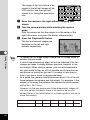
The image of the first picture is displayed to the left half screen of the
LCD monitor, and the right half
screen is for taking the second picture.
m
,
.
Taking Pictures
memo
Move the camera to the right without changing your
stance.
Take the second picture while watching the capture
guide.
Hold the camera so that the subject is in the center of the
right half screen, and press the shutter release button.
Press the Playback/OK button.
The first and second images are
displayed to the left and right
screens respectively.
• To cancel the 3D Image mode, change the 3D Image mode to
another Capture mode.
• A clear three-dimensional effect will not be achieved if the two
images are taken in widely different positions (heights) or are
not straight. When taking a person, you are recommended to
ask your model to stay as still as possible and to take the second picture as quickly as you can. It is easier to take the pictures if you use a tripod or appropriate base.
• As a guide, the camera should be moved about 1/40 of the distance between the camera and the subject. For example, if the
subject is 3m away, the distance the camera should be moved
will be 3m ÷ 40=7.5cm.
However, as the way people see three-dimensional images differs from person to person, there is no need to be too concerned. Refer to the table below for a simple guide to how far to
move the camera.
Distance to subject
48
31
0.1 m
0.3 m
0.5 m
1m
3m
5m
Camera movement 0.5 cm
1 cm
1.5 cm
2.5 cm
7.5 cm
13 cm
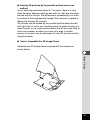
● Viewing 3D pictures by the parallel method and cross
method
As our eyes are positioned about 6~7cm apart, there is a very
slight deviation between what we see with our right eye and what
we see with our left eye. The difference is processed by our brain
to produce a three-dimensional image. This principle is applied to
taking and viewing 3D pictures.
3D pictures can be viewed by the parallel method where the left
and right lines of vision are virtually parallel, as when looking at a
distant scene, or the cross method where the left and right lines of
vision are crossed, as when you cross your eyes. A certain
amount of practice may be necessary to view 3D pictures without
using the viewer.
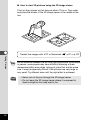
● How to Assemble the 3D Image Viewer
Assemble the 3D image viewer supplied with the camera as
shown below.
Taking Pictures
49
● How to view 3D pictures using the 3D image viewer
Print out the pictures so that they are about 11cm or 12cm wide
and place the divider of the 3D image viewer in the middle of the
two.
Transfer the images with a PC or Macintosh
Taking Pictures
memo
Caution
50
p.87 or p.102
As the distance between the left and right eyes differs from person
to person, some people may have difficulty obtaining a threedimensional effect even when looking at prints that are the same
size. It may be especially difficult if the pictures are very large or
very small. Try different sizes until the right effect is achieved.
• Never look at the sun through the 3D image viewer.
• Do not leave the 3D image viewer where it is exposed to
direct sunlight as this may lead to fire.
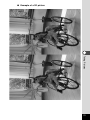
● Example of a 3D picture
Taking Pictures
51
z
c
b
x
c
(Selecting a color filter)
(Selecting a slim filter)
v
Taking Pictures with Digital Filters (Digital Filter Mode)
Digital filters include the color filters and a slim filter which elongates the subject vertically or horizontally.
Taking Pictures
● Color filters
Eight colors, black and white, sepia, red, pink, violet, blue, green
and yellow, are provided for the color filters. When you select a
color filter in the Digital Filter mode, the display on the LCD monitor is filtered with the selected color, and the pictures are taken in
that color.
● Slim filter
By selecting slim filter, subjects can be photographed elongated
vertically or horizontally in 8 steps.
z
x
52
Set the Mode dial to
in Capture mode.
Use the four-way controller (
ter you want to use.
) to select a digital fil-
When you selected a color filter:
c
Press the shutter release button.
The picture will be taken.
When you selected the slim filter:
c
Use the four-way controller (
to set the slim rate.
Four-way controller (
):
Elongates the subject vertically
Four-way controller (
):
Elongates the subject horizontally
memo
OK
Ok
Press the Playback/OK button.
Press the shutter release button.
The picture will be taken.
• Digital Zoom cannot be used while the slim filter is selected.
• To change the slim rate, select another filter once, and then
select the slim filter again and set the slim rate.
• If you set a slim rate other than zero (0), only the picture zone
displayed on the LCD monitor is recorded as an image.
Taking Pictures
v
b
)
53
button
Mode dial
Shutter release
button
Rec.Mode
Memory
Recorded Pixels
Quality Level
White Balance
Focusing Area
Digital Zoom
Menu button
Four-way
controller
(1/3)
MENU
Set-up
2048×1536
AWB
Multiple
On
Exit
OK
Ok
Playback/OK button
Taking Pictures at a Specified Interval (Interval Shooting)
Still pictures can be taken automatically at a specified interval.
z
x
Taking Pictures
c
v
b
Set the Mode dial to
or
in Capture mode.
Press the Menu button.
The [Rec. Mode] menu will be displayed.
Press the four-way controller (
Shooting].
) to select [Interval
Press the four-way controller ( ).
The [Interval Shooting] menu will be
displayed.
Interval Shooting
Interval
Number of shot
01min00sec
99
Set the shooting interval.
00hour(s)00min
Start Time
1. Press the four-way controller
MENU Exit OK Ok
( ).
and
will be displayed above and below the minute.
2. Use the four-way controller (
) to set the minute
and press the four-way controller ( ).
and
will be displayed above and below the second.
3. Use the four-way controller (
) to set the second
and press the four-way controller ( ).
n
54
4. Press the four-way controller ( ).
The frame will move to [Number of shot]..
Use the four-way controller (
) to set the number of
shot and press the four-way controller ( ).
The frame will move to [Start Time].
m
Set the start time.
1. Press the four-way controller ( ).
and
will be displayed above and below the hour.
2. Use the four-way controller (
) to set the hour
and press the four-way controller ( ).
and
will be displayed above and below the minute.
3. Use the four-way controller (
,
.
⁄0
memo
) to set the minute.
Press the Playback/OK button twice.
Press the
button to display
on the LCD monitor.
Press the shutter release button.
The interval shooting starts.
Taking Pictures
• The shooting interval can be set by one second for an interval
between 30 seconds and 4 minutes, and by one minute for an
interval between 4 minutes and 99 minutes.
• The number of pictures can be set between 2 and 99.
• The shooting start time can be set by one minute between 0
and 3 hours 59 seconds.
• When “0” second is set for the shooting start time, the first picture is taken immediately after you press the shutter release
button.
• When the CF card or built-in memory space becomes insufficient, the interval shooting ends and the power of the camera is
turned off automatically.
55
Mode dial
Shutter release
button
Rec.Mode
Memory
Recorded Pixels
Quality Level
White Balance
Focusing Area
Digital Zoom
Menu button
Four-way
controller
(1/3)
MENU
Set-up
2048×1536
AWB
Multiple
On
Exit
Ok
OK
Playback/OK button
Shooting Time-lapse Movies (Time-lapse Movie)
With the time-lapse movies, the frame rate (number of pictures
taken for one second) is slowed down. When you play back these
pictures, the subject appears to move much more quickly. This
effect may be useful for taking blooming flowers, for example.
Taking Pictures
z
x
c
v
b
n
memo
56
Set the mode dial to
in Capture mode.
Press the Menu button.
The [Rec. Mode] menu will be displayed.
Press the four-way controller (
Movie].
) to select [Time-lapse
Use the four-way controller (
)
to select [Off (×1)], [×2], [×5], [×10],
[×20], [×50], or [×100].
Press the Playback/OK button.
Press the shutter release button.
The time-lapse movie shooting
starts.
Rec.Mode
Memory
AE Metering
ISO Speed
Instant Review
Interval Shooting
Time-lapse Movie
(2/3)
MENU
Set-up
Auto
0.5sec
×5
Exit
OK
Ok
[Off (×1)] is the typical movie setting (15 frames/second). As you
select [×2], [×5]..., the number of pictures taken for a second
decreases from 1/2, 1/5...
The images of movie pictures are always played back at the rate
of 15 frames per second. This means those taken at ×2 appear to
be played back twice faster and those at ×5 five times faster than
×1.
Setting the Shooting Functions
z
Viewfinder
Adjusting the Viewfinder
If the indicators in the viewfinder are hard to see, you can adjust
the diopter in the range of -3m-1+1m-1 (per meter).
Aim the camera towards the light
and move the diopter adjustment
lever to the left or right while looking through the viewfinder.
Adjust the focus frame in the middle
of the viewfinder to the optimum
position.
Taking Pictures
z
Focus frame
57
z
Selecting a Focus Mode
● Focus Mode
None
Auto
Macro Mode
The camera is focused on the subject in the focusing
area when the shutter release button is pressed halfway.
This mode is used when the distance to the subject is
approx. 10cm-50cm (0.33ft-1.64ft). The camera is
focused on the subject in the focusing area when the
shutter release button is pressed halfway.
Taking Pictures
Infinity-landscape mode This mode is used for taking distant objects.
Manual Focus Mode The subject is brought into focus manually.
AF area move mode This mode is for changing the position of the autofocus
(AF) area.
z
Press the
button in Capture mode.
The focus mode changes each time the button is pressed and
the setting is displayed on the LCD monitor.
The camera is ready to take the picture in the set focus mode.
Saving the Focus Mode
memo
58
p.74
• When [Focus Mode] in the [Memory] menu (p.74) is not turned
on, the focus mode goes back to [Auto] when you turn off the
power.
• The default setting of the focus mode is [Auto]. When the focus
mode is [Auto], no icon is displayed on the LCD monitor.
Caution
If you take a picture while looking through the viewfinder when
the focus mode is set on Macro, the range of the resulting picture may differ from what was seen in the viewfinder.
Manual Focus
When the mode is set on
, the center of the picture is enlarged
to full screen on the LCD monitor. Adjust the focus with the fourway controller while looking at the image on the monitor.
increases the distance to the focusing position
decreases the distance to the focusing position
When you release the four-way controller, the focus position is set,
and the screen returns to the normal display two seconds later.
Saving the Manual Focus Position
When it is difficult to obtain the correct focus in Manual Focus
mode for taking pictures in dark places, press the shutter release
button halfway in Auto mode, and the AF spotbeam will be emitted, enabling the camera to focus more easily on the subject.
Taking Pictures
memo
p.74
59
Setting the position of the autofocus (AF) area
When the mode is set on
area can be changed.
, the position of the autofocus (AF)
The AF area moves upward.
The AF area moves downward.
The AF area moves to the left.
The AF area moves to the right.
Press the Playback/OK button to determine the position of the AF
area.
memo
Taking Pictures
60
When the mode is set on
, the AF area is automatically set on
spot. In this case, the AF spotbeam will not be emitted.
Changing the AF Area (Focusing Area)
p.67
z
EV Compensation
You can take pictures that are intentionally overexposed or underexposed.
z
Press the four-way controller
(
) in Capture mode.
198
–1.0
6/10/2002
11:19
EV compensation level
The set level is displayed on the
LCD monitor.
memo
• If you set to ± 0, the set level displayed on the LCD monitor will
go off after three seconds.
• When [EV Compensation] on the [Memory] menu (p.74) is not
turned on, the set value goes back to ±0 when you turn off the
power.
Saving the EV Compensation
Caution
Taking Pictures
Four-way controller (
)
increases the EV compensation to a positive (+) level
Four-way controller (
)
decreases the EV compensation to a negative (–) level
p.74
This function cannot be used in Manual Exposure mode.
Changing the Shutter Speed/Aperture Setting
See “Taking Pictures Manually (Manual Exposure Mode)” (p.36).
61
z
Selecting the Flash Mode
None
Auto
The flash discharges automatically depending on the
light conditions.
Flash Off
The flash will not discharge.
Flash On
The flash discharges regardless of the brightness.
Auto +
Red-eye
Reduction
This mode reduces the phenomenon of red eyes
caused by the light from the flash being reflected in
the subject’s eyes. The flash discharges automatically.
Taking Pictures
Flash On + This mode reduces the phenomenon of red eyes
caused by the light from the flash being reflected in
Red-eye
Reduction the subject’s eyes. The flash will discharge regardless
of lighting conditions.
memo
• The flash is off when the Capture mode is set to
, continuous shooting, or infinity-landscape mode.
• [Auto] and [Auto + Red-eye Reduction] modes cannot be selected when the Capture mode is set to
.
• In [Auto + Red-eye Reduction] and [Flash On + Red-eye
Reduction] modes, the flash discharges once to make subject’s
pupil smaller. The picture will then be taken in the flash mode
after a brief interval.
z
Press the
button in Capture mode.
The flash mode changes each time the button is pressed and
the set mode is displayed on the LCD monitor.
The flash lamp blinks red while the flash is charging. If the
flash lamp lights red when you press the shutter release button halfway after charging is completed, the camera is ready
to take the picture in the set flash mode.
Saving the Flash Mode
62
p.74
Rec.Mode
Memory
Recorded Pixels
Quality Level
White Balance
Focusing Area
Digital Zoom
Menu button
Four-way controller
(1/3)
Playback/OK button
MENU
Set-up
2048×1536
AWB
Multiple
On
Exit
OK
Ok
Selecting the Recorded Pixels
You can choose the number of recorded pixels. These choices are
for Optio 430RS and Optio 330RS respectively.
z
x
c
Select [Recorded Pixels] from the [Rec.Mode] menu.
Use the four-way controller (
to change the size.
Press the Playback/OK button.
The camera is ready to take the picture.
)
Rec.Mode
Memory
Recorded Pixels
Quality Level
White Balance
Focusing Area
Digital Zoom
(1/3)
MENU
Set-up
Taking Pictures
Optio 430RS [2304 × 1712], [2240 × 1680], [1600 × 1200],
[1024 × 768], or [640 × 480]
Optio 330RS [2048 × 1536], [1600 × 1200], [1024 × 768],
or [640 × 480].
1600×1200
AWB
Multiple
On
Exit
OK
Ok
63
Rec.Mode
Memory
Recorded Pixels
Quality Level
White Balance
Focusing Area
Digital Zoom
Menu button
Four-way controller
(1/3)
MENU
Playback/OK button
Set-up
2048×1536
AWB
Multiple
On
Exit
OK
Ok
Selecting the Quality Levels
You can choose the image compression rate.
Taking Pictures
z
x
c
64
BEST
The quality is better and there is a high volume of
image data.
BETTER
Standard level
GOOD
The quality is good and there is a low volume
of image data.
Select [Quality Level] from the [Rec.Mode] menu.
Use the four-way controller (
to change the image quality.
Press the Playback/OK button.
The camera is ready to take the picture.
)
Rec.Mode
Memory
Recorded Pixels
Quality Level
White Balance
Focusing Area
Digital Zoom
(1/3)
MENU
Set-up
2048×1536
AWB
Multiple
On
Exit
OK
Ok
Rec.Mode
Memory
Recorded Pixels
Quality Level
White Balance
Focusing Area
Digital Zoom
Menu button
Four-way controller
(1/3)
Playback/OK button
MENU
Set-up
2048×1536
AWB
Multiple
On
Exit
OK
Ok
Adjusting the Color Balance according to Lighting (White Balance)
You can take pictures in natural colors by adjusting the white balance according to the light conditions at the time of shooting.
AWB
c
v
The camera adjusts the white balance
automatically.
Daylight
Use this mode when taking pictures outside in
sunlight.
Shade
Use this mode when taking pictures outside in
the shade.
Tungsten
Light
Use this mode when taking pictures under
electric or other tungsten light.
Fluorescent
Light
Use this mode when taking pictures under
fluorescent light.
Manual
Use this mode when taking pictures by adjusting
the white balance manually.
Taking Pictures
z
x
Auto
Select [White Balance] from the [Rec.Mode] menu.
Press the four-way controller (
The white balance screen will be
displayed.
).
Use the four-way controller (
to change the setting.
White Balance
AWB
)
Press the Playback/OK button
twice.
The camera is ready to take the picture.
Saving the White Balance
MENU
Exit
OK
Ok
p.74
65
Manual Setting
z
x
c
v
memo
Taking Pictures
66
Select [ ] (manual) on the white
balance screen.
Point your camera at a blank sheet
of paper so that it fills the screen.
White Balance
AWB
DISPLAY
Adjust
Press the Display button.
MENU Exit OK Ok
Adjustment will start and [Adjusting]
will appear on the LCD monitor. When adjustment has been
completed, [Complete] will appear on the LCD monitor and
the screen will return to the menu screen.
Press the Playback/OK button.
The camera is ready to take the picture.
If the Display button is again pressed while [Adjusting] is displayed
on the LCD monitor, the white balance adjustment will be repeated, starting from the beginning. Press the Playback/OK button to
cancel adjustment while in progress.
Rec.Mode
Menu button
Four-way controller
Memory
Recorded Pixels
Quality Level
White Balance
Focusing Area
Digital Zoom
(1/3)
Playback/OK button
MENU
Set-up
2048×1536
AWB
Multiple
On
Exit
OK
Ok
Changing the AF Area (Focusing Area)
You can change the range of the autofocus area.
Multiple
Spot
c
The area becomes narrower.
Select [Focusing Area] on the [Rec.Mode] menu.
Rec.Mode Memory
Set-up
Use the four-way controller (
)
to change the setting.
Recorded Pixels 2048×1536
Quality Level
Press the Playback/OK button.
AWB
White Balance
The camera is ready to take the picSpot
Focusing Area
On
Digital Zoom
ture.
(1/3)
memo
MENU
Exit
OK
Ok
Taking Pictures
z
x
Normal area
The AF area does not appear in the viewfinder. Always check the
focusing area on the LCD monitor.
67
Rec.Mode
Memory
Recorded Pixels
Quality Level
White Balance
Focusing Area
Digital Zoom
Menu button
Four-way controller
(1/3)
MENU
Playback/OK button
Set-up
2048×1536
AWB
Multiple
On
Exit
OK
Ok
Setting the Light Metering Range to Determine the Exposure (AE Metering)
You can choose which part of the screen to use to measure the
brightness and determine the exposure.
Multi segment
The exposure is determined by the entire screen.
Center-weighted The exposure is determined mainly by the center of the screen.
Spot
Taking Pictures
z
x
c
The exposure is determined by the middle of the screen only.
Select [AE Metering] on the [Rec.Mode] menu.
Use the four-way controller (
to change the metering mode.
)
Press the Playback/OK button.
The camera is ready to take the picture.
Rec.Mode
(2/3)
Saving the AE Metering Method
68
p.74
Memory
AE Metering
ISO Speed
Instant Review
Interval Shooting
Time-lapse Movie
MENU
Set-up
Auto
0.5sec
Off
Exit
OK
Ok
Rec.Mode
Memory
Recorded Pixels
Quality Level
White Balance
Focusing Area
Digital Zoom
Menu button
Set-up
2048×1536
AWB
Multiple
On
Four-way controller
(1/3)
MENU
Exit
OK
Ok
Playback/OK button
Setting the ISO Speed (ISO Speed)
You can select the ISO speed to suit the brightness of the surroundings.
● ISO Speed
Auto
The camera sets the speed automatically.
200 (430RS) Increases the shutter speed in low light conditions but there is
250 (330RS) more risk of noise.
z
x
c
Select [ISO Speed] on the [Rec.Mode] menu.
Use the four-way controller (
to change the ISO speed.
Press the Playback/OK button.
The camera is ready to take the picture.
)
Rec.Mode
(2/3)
Saving the ISO Speed
Memory
AE Metering
ISO Speed
Instant Review
Interval Shooting
Time-lapse Movie
MENU
Taking Pictures
100 (430RS) Produces sharp images with little or no noise. Decreases the
125 (330RS) shutter speed in low light conditions.
Set-up
100
0.5sec
Off
Exit
OK
Ok
p.74
69
Rec.Mode
Memory
Recorded Pixels
Quality Level
White Balance
Focusing Area
Digital Zoom
Menu button
Four-way controller
(1/3)
MENU
Set-up
2048×1536
AWB
Multiple
On
Exit
OK
Ok
Playback/OK button
Setting the Instant Review Time (Instant Review)
You can choose the Instant Review time from 0.5sec, 1sec, 2sec,
3sec, 4sec, 5sec or Off (no display).
z
x
Taking Pictures
c
memo
70
Select [Instant Review] on the [Rec.Mode] menu.
Use the four-way controller (
to change the display time.
Press the Playback/OK button.
The camera is ready to take the picture.
)
Rec.Mode
Memory
AE Metering
ISO Speed
Instant Review
Interval Shooting
Time-lapse Movie
(2/3)
MENU
Set-up
Auto
2sec
Off
Exit
OK
Ok
The Instant Review display setting is saved when the camera is
turned off.
Rec.Mode
Menu button
Four-way controller
Memory
Recorded Pixels
Quality Level
White Balance
Focusing Area
Digital Zoom
(1/3)
MENU
Set-up
2048×1536
AWB
Multiple
On
Exit
OK
Ok
Playback/OK button
Setting the Image Sharpness (Sharpness)
You can choose whether you want the image to have sharp or soft
outlines.
z
x
Use the four-way controller (
)
to change the setting from [Normal]
to [Hard (+)] or [Soft (–)].
Press the Playback/OK button.
The camera is ready to take the picture.
Rec.Mode
Memory
Set-up
Applied Photo Mode Parallel Mode
Sharpness
Saturation
Contrast
(3/3)
MENU
Exit
OK
Ok
Taking Pictures
c
Select [Sharpness] on the [Rec.Mode] menu.
71
Rec.Mode
Menu button
Four-way controller
Memory
Recorded Pixels
Quality Level
White Balance
Focusing Area
Digital Zoom
(1/3)
MENU
Set-up
2048×1536
AWB
Multiple
On
Exit
OK
Ok
Playback/OK button
Setting the Color Saturation (Saturation)
You can set the color saturation.
z
x
Taking Pictures
72
c
Select [Saturation] on the [Rec.Mode] menu.
Use the four-way controller (
)
to change the setting from [Normal]
to [Hard (+)] or [Soft (–)].
Press the Playback/OK button.
The camera is ready to take the picture.
Rec.Mode
Memory
Set-up
Applied Photo Mode Parallel Mode
Sharpness
Saturation
Contrast
(3/3)
MENU
Exit
OK
Ok
Rec.Mode
Menu button
Four-way controller
Memory
Recorded Pixels
Quality Level
White Balance
Focusing Area
Digital Zoom
(1/3)
MENU
Set-up
2048×1536
AWB
Multiple
On
Exit
OK
Ok
Playback/OK button
Setting the Image Contrast (Contrast)
You can set the image contrast.
z
x
Use the four-way controller (
)
to change the setting from [Normal]
to [Hard (+)] or [Soft (–)].
Press the Playback/OK button.
The camera is ready to take the picture.
Rec.Mode
Memory
Set-up
Applied Photo Mode Parallel Mode
Sharpness
Saturation
Contrast
(3/3)
MENU
Exit
OK
Ok
Taking Pictures
c
Select [Contrast] on the [Rec.Mode] menu.
73
Saving the Settings (Memory)
Saving the Menu Items (Mode Memory)
You can choose whether you want the set values to be saved when the
camera is turned off. If you select
(On), the settings will be saved in
the status they were in immediately before the camera was turned off. If
you select
(Off), the settings will be reset to the defaults when the camera is turned off.
Item
Description
The setting on the
Flash
Default Setting
button is saved.
White Balance The [White Balance] setting on the [Rec.Mode] menu is
saved.
EV Compensation The set EV compensation value is saved.
Taking Pictures
Digital Zoom
The [Digital Zoom] setting on the [Rec.Mode] menu is
saved.
AE Metering
The [AE Metering] setting on the [Rec.Mode] menu is
saved.
ISO Speed
The [ISO Speed] setting on the [Rec.Mode] menu is
saved.
Focus Mode
The focus mode setting is saved.
Zoom Position
The zoom position setting is saved.
MF
The manual focus position is saved.
DISPLAY
The LCD monitor display mode is saved.
File #
The file number is saved. If a new CF card is inserted,
the sequential file number is assigned.
memo
74
Menu items not included in [Memory] will also be saved in the settings selected on the menus for each function when the camera is
turned off.
z
x
Press the Menu button in Capture
mode.
Rec.Mode
Press the four-way controller ( ).
[Memory] menu will be displayed.
(1/3)
c
v
b
Use the four-way controller (
to select the item.
)
Use the four-way controller (
to switch
(On) and
(Off).
)
Press the Playback/OK button.
The camera is ready to take the picture.
Memory
Recorded Pixels
Quality Level
White Balance
Focusing Area
Digital Zoom
Rec.Mode
MENU
Set-up
2048×1536
AWB
Multiple
On
Exit
Memory
OK
Ok
Set-up
Flash
White Balance
EV Compensation
Digital Zoom
AE Metering
(1/3)
MENU
Exit
OK
Ok
Taking Pictures
75
Playback/Erasing
Playing Back Images
When the CF card is installed, the images recorded on the CF
card are played back. When the CF card is not installed, the
images recorded in the built-in memory are played back.
Press the Playback/OK button to enter the playback mode.
x
z
c
Playing Back Still Pictures
See “Playing Back Previous or Next Images” (p.23).
Zoom Display
Playback/Erasing
You can display images magnified up to four times. A guide to
operation is displayed on the LCD monitor during magnification.
z
x
Enter the Playback mode and choose the image you want
to magnify with the four-way controller (
).
Press
on the Zoom button.
The image will be magnified (1× to 4×).
● The following operations can be performed while the magnified image is displayed.
Four-way controller (
)
Moves the position to be magnified
Zoom button (
Zoom button (
Display button
76
Makes the image larger
)
)
Makes the image smaller
Turns the guide marks on/off
c
memo
Caution
Press the Playback/OK button.
Zoom playback will end.
When the [Quick Enlargement] on the [Set-up] menu is turned on,
the images is displayed four times larger when you press
on
the zoom button in step x.
Movie pictures cannot be magnified.
Playback/Erasing
77
zxc
Playing Back Movie Pictures
You can play back Movie pictures. A guide to operation is displayed on the LCD monitor during playback.
z
x
Enter the Playback mode and choose the movie picture
you want to play back with the four-way controller (
).
Press the four-way controller ( ).
Playback will start.
● The following operations can be
performed during playback.
Playback/Erasing
Four-way controller (
):
Reverse playback
Four-way controller (
):
Forward playback
Four-way controller (
) : Pause
Display button : Changes the Display mode
6/10/2002
11:19
● The following operations can be performed while Pause is
engaged.
Four-way controller (
) : Frame reverse
Four-way controller (
) : Frame forward
Four-way controller (
) : Releases the Pause function
Display button :
c
78
100-0019
Changes the Display mode
Press the four-way controller (
Movie playback will end.
).
Displaying Shooting Information (Display Mode)
You can display information on the LCD monitor when shooting.
The information displayed can be changed by pressing the Display
button.
1 23
Display On
Information is displayed when
shooting.
q Folder name w File name
e Protect symbol
r Shooting date
t Battery symbol
100-0019
100-0020
6/10/2002
11:19
5
4
➞
1
2 3 4
100-0021
2048
AWB
AUTO
6/10/2002
11:19
5
Playback/Erasing
6
➞
Histogram Display
The brightness distribution of the
image is displayed.
The x-axis shows the brightness
(darkest at the left end and brightest
at the right end) and the y-axis
1/125
F2.6
shows the pixel numbers.
q Histogram
87
w Recorded pixels
e Quality level
r White balance
t AE metering y ISO speed
u Aperture i Shutter speed
Display Off
No information is displayed when
shooting.
➞
Display On
79
x
z
c
Nine-image Display
You can display nine images at the same time.
z
x
Playback/Erasing
c
memo
80
Enter the Playback mode and choose an image with the
four-way controller (
).
Press the
button.
Nine images will be displayed with
the selected image in the center.
Choose an image with the four-way
controller (
).
When 10 or more images have been
recorded, the previous 9 images will
be displayed if you press the fourway controller ( ) while an image
on the left row is selected. If you
press the four-way controller( )
while an image on the right row is
selected, next 9 images will be displayed.
Selected image
Press the Playback/OK button.
The screen will return to single-image display of the selected
image.
For movie pictures, the first frame will be displayed.
Erasing Images
x
zc
v
Erasing a Single Image
z
x
c
memo
Press the
button.
The Delete screen will be displayed.
100-0020
Select [Delete] with the four-way
controller ( ).
Press the Playback/OK button.
Delete
Stop
All Images
MENU
Exit
OK
Ok
• You can also delete images from Instant Review (p.21).
• You cannot erase protected images (with the
symbol).
• Step c can be omitted if you turn on the [Quick Delete] on the
[Set-up] menu.
Playback/Erasing
v
Enter the Playback mode and choose the image you want
to erase with the four-way controller (
).
81
z
x
c
Erasing All Images
You can erase all the images at once.
• Once erased, images cannot be restored.
• Protected images cannot be erased.
• If the CF card is installed, only the images recorded on the
CF card will be deleted.
Caution
z
Playback/Erasing
x
c
memo
82
Enter the Playback mode and press
the
button twice.
The Delete (All) screen will be displayed.
Select [All Images] with the fourway controller ( ).
100-0020
Delete all images
on the memory card?
All Images
Stop
MENU
Exit
OK
Ok
Press the Playback/OK button.
Step x can be omitted if you turn on the [Quick Delete] on the
[Set-up] menu.
x
zc
v
Protecting Images from Deletion (Protect)
You can protect images from being accidentally erased.
z
x
c
v
Press the
button.
The Protect screen will be displayed.
Select [Protect] with the four-way
controller ( ).
Press the Playback/OK button.
100-0020
Protect
Unprotect
All Images
MENU
Exit
OK
Ok
• Select [Unprotect] in step c above to release the Protect setting.
• If the image is protected, the
symbol is displayed when the
image is played back.
Protecting All Images
Playback/Erasing
memo
Enter the Playback mode and choose the image you want
to protect with the four-way controller (
).
You can protect all the images.
z
x
c
v
Caution
Enter the Playback mode.
Press the
button twice.
The Protect (All) screen will be displayed.
Select [Protect] with the four-way controller (
).
Press the Playback/OK button.
• Even protected images will be erased by formatting the CF
card or the built-in memory.
• If the CF card is installed, only the images recorded on the
CF card will be protected.
83
Setting the Printing Service
You can print the images on the CF card using a DPOF (Digital Print
Order Format) compatible printer or at a printing service.
x
zcv
b
Printing Single Image
Playback/Erasing
Set the following items for each image.
● Copies
Set the number of prints up to a maximum of 99.
● Date
Specify whether you want the date imprinted on the picture or not.
z
x
Enter the Playback mode and choose the image for which
you want to specify the number of prints with the fourway controller (
).
Press the DPOF button.
The DPOF screen will be displayed.
100-0020
Copies
Date
All Images
84
MENU
1
Exit
OK
Ok
c
v
Use the four-way controller (
)
to select the number of prints and
press the four-way controller ( ).
The frame will move to [Date].
Use the four-way controller (
to select
(On) and
(Off).
)
100-0020
Copies
Date
All Images
MENU
3
Exit
OK
Ok
: The date will be imprinted
: The date will not be imprinted
b
memo
Caution
Press the Playback/OK button.
Prints can be made according to the settings.
If DPOF settings have already been made for an image, the previously set number of prints and On/Off date setting will be displayed.
• DPOF settings cannot be made on the images and movie
pictures saved in the built-in memory. Copy them to the CF
card (p.106) and make DPOF settings.
• Depending on the printer or printing equipment at the
photo tab, the date may not be imprinted on the pictures
even if the DPOF setting was made.
Playback/Erasing
85
z
xcv
b
Printing All Images
z
x
Playback/Erasing
c
v
DPOF setting for all images.
Use the four-way controller (
to select the number of prints.
You can specify up to 99 prints.
)
Press the four-way controller (
The frame will move to [Date].
).
Use the four-way controller (
to select
(On) and
(Off).
)
Copies
Date
MENU
1
Exit
OK
Ok
: The date will be imprinted
: The date will not be imprinted
b
memo
Caution
86
Enter the Playback mode and press the DPOF button
twice.
The DPOF (ALL) screen will be dis100-0020
played.
Press the Playback/OK button.
Prints can be made according to the settings.
• The setting for a single image will be cancelled.
• When you specify the number of prints in the DPOF setting, the
number applies to all the images. Before printing, check that the
number is correct.
DPOF settings cannot be made on the images and movie
pictures saved in the built-in memory. Copy them to the CF
card (p.106) and make DPOF settings.
Viewing Images with Windows PC
By using the provided USB cable (I-USB6) or card reader and
image-browser software, you can transfer images recorded with
the camera to a PC and edit them or print them out.
This section explains how to view images on a PC using the provided USB driver and software.
About the included software
The included CD-ROM (S-SW5) contains the following software:
- USB driver
- Image viewing software (ACDSee™ 3.1)
System environment
OS:
Windows 98/98SE/2000/Me
Windows XP Home Edition/Professional
CPU:
Pentium or later recommended
Memory: 64MB or more
Hard disk space: 15MB or more
Standard equipped USB port
Caution
• Not compatible with Windows 95.
• When you connect the camera to your PC, you are recommended to use the AC adapter. If the battery power runs
out while image data is being transferred, the data may be
lost.
Playback/Erasing
To view movie pictures on your PC, Direct X 8.0 and Media Player
pre-installed on system, or QuickTime 3.0 or later are required.
For Windows Me/XP, Media Player pre-installed on system,
QuickTime 3.0 or later is required.
To customers who have already purchased Optio 430/330
If you have already installed the driver for Optio 430/330 on your PC
Windows 98/98SE or Windows Me, do not connect the Optio
430RS/330RS to your PC. Otherwise your PC may freeze up. This phenomenon can be resolved by updating the driver installed on your PC.
For more information, please refer to our web site.
http://www.digital.pentax.co.jp/
87
Installing the software
The procedures for installing the necessary software are
explained.
• The installation procedure varies depending on the version
of Windows (98/98SE/Me/2000). Before starting installation, check which version of Windows you have on your
PC. If you are using Windows XP, see “Installing the USB
Driver (Windows XP)” (p.95) for installation instructions.
• If you are using Windows 2000 or Windows XP
(Professional), log in by the administrator before starting
installation. Refer to your PC’s operation manual for
instructions on how to log in.
• Either “430RS” or “330RS” will be displayed in the installation screen area where “xxxxx” is displayed.
Caution
Installing the USB driver (Windows 98/98SE/Me/2000)
Playback/Erasing
z
x
c
v
88
Turn on your PC.
Set the included CD-ROM (S-SW5) in the CD-ROM drive.
Turn the camera off, and connect the PC and camera
using an USB cable.
Turn the camera on.
The PC recognizes the camera and the [Add New Hardware
Wizard] screen is displayed.
If you are using Windows 98/98SE, follow the procedure
below to install the software. For Windows Me, see p.91, and
for Windows 2000, see p.93.
● Windows 98/98SE
b
n
,
Select [Search for the
best driver for your
device (Recommended)],
and then click [Next].
Select [Specify a location], and then click
[Browse].
If any other item has been
selected, click the check
box to unselect it.
Playback/Erasing
m
Click [Next].
Specify the [Win] folder
in the CD-ROM drive and
click [OK].
If you click the [+] symbol,
the folder will open and display the files inside.
89
.
⁄0
⁄1
Playback/Erasing
⁄2
⁄3
memo
90
Make sure that the [Win]
folder is selected and
click [Next].
Make sure that
[penusbp.inf] is selected,
then click [Next].
Installation starts.
Click [Finish].
Installation is completed
and the [Wizard] screen is
closed.
Turn the camera off and restart your PC.
When Windows is up and running, turn the camera on.
Double-click the [My
Computer] icon on the
desktop.
When the camera is turned
on, the Removable Disk
icon appears in the window.
The CF card, if installed, is regarded as the removable disk. If the
CF card is not installed, the built-in memory is regarded as the
removable disk.
● Windows Me
b
n
m
.
Select [Specify a location], and
then click [Browse].
If [Removable Media] has been
selected, click the check box to
unselect it.
Specify the [Win] folder in the
CD-ROM drive and click [OK].
If you click the [+] symbol, the
folder will open and display the
files inside.
Make sure that the [Win] folder
is selected and click [Next].
Playback/Erasing
,
Select [Specify the location of
the driver (Advanced)], and
then click [Next].
Make sure that [penusbp.inf] is
selected, then click [Next].
Installation starts.
91
⁄0
⁄1
⁄2
memo
Playback/Erasing
92
Click [Finish].
Installation is completed and the
[Wizard] screen is closed.
Turn the camera off and restart your PC.
When Windows is up and running, turn the camera on.
Double-click the [My Computer]
icon on the desktop.
When the camera is turned on,
the Removable Disk icon appears
in the window.
The CF card, if installed, is regarded as the removable disk. If the
CF card is not installed, the built-in memory is regarded as the
removable disk.
● Windows 2000
b
n
m
.
Select [Search for the best driver for your device], and then
click [Next].
Select [Specify a location], and
then click [Next].
If any other item has been selected, click the check box to unselect
it.
Click [Browse].
The [Files] screen is displayed.
Playback/Erasing
,
Click [Next].
Select the [Win] folder in the
CD-ROM drive and make sure
that [penusbp.inf] is displayed.
And then click [Open].
93
⁄0
⁄1
⁄2
⁄3
Playback/Erasing
memo
94
Make sure that the [Win] folder
containing the files to be copied
is selected, and click [OK].
Make sure that [penusbp.inf] is
selected, then click [Next].
Installation starts.
Click [Finish].
Installation is completed and the
[Wizard] screen is closed.
Double-click the [My Computer]
icon on the desktop.
When the camera is turned on,
the Removable Disk icon appears
in the window.
The CF card, if installed, is regarded as the removable disk. If the
CF card is not installed, the built-in memory is regarded as the
removable disk.
Installing the USB driver (Windows XP)
z
x
c
v
Set the CD-ROM (S-SW5) supplied with the camera in the
CD-ROM drive.
Turn the camera off and connect the PC and camera
using the USB cable.
Turn the camera on.
[New hardware has been located]
will appear on the task bar and
the [New Hardware Search
Wizard] screen will be displayed.
Select [Install the software automatically (Recommended)] and
click [Next].
Playback/Erasing
b
Turn on your PC.
95
n
m
memo
Playback/Erasing
96
When [The software has been
successfully installed] message
appears, click [Finish].
Installation is completed and the
[Wizard] screen is closed.
If the screen for choosing an automatic Windows operation is displayed, click [Cancel].
Click [My Computer] from [Start]
menu.
After installing the software, make
sure that a Removable Disk has
been added to [My Computer].
• The CF card, if installed, is regarded as the removable disk. If
the CF card is not installed, the built-in memory is regarded as
the removable disk.
• In the case of Windows XP, if the CF card has a volume label
attached, the content of the volume label will be displayed
instead of [Removable Disk]. If the CF card is new and has not
been formatted, the manufacturer and capacity of the card will
be displayed.
Installing ACDSee™
When installing ACDSee™, recorded images can be viewed on
your PC.
z
x
c
v
b
n
m
Turn on your PC.
Set the CD-ROM (S-SW5) in the CD-ROM drive.
Double click [My Computer].
Double click the [CD-ROM drive] icon.
Double click your language choice.
You can choose the language from the following: English,
French, German, Spanish, Italian and Japanese.
Double click [setup.exe].
The Setup screen will appear. Follow the on-screen guidance
and enter the registration information.
When the installation is completed, restart Windows.
Playback/Erasing
97
Connecting the camera and PC
z
x
c
Playback/Erasing
98
memo
Turn on your PC.
Turn the camera off and connect the PC and camera
using an USB cable.
Turn on the camera.
The camera will be
detected as
[Removable Disk] in
[My Computer].
• The CF card, if installed, is regarded as the removable disk. If
the CF card is not installed, the built-in memory is regarded as
the removable disk.
• Although images can be viewed and printed, image data is in
the built-in memory or on the CF card in the camera. To save
the image data in the built-in memory or on the CF card to
another medium, refer to the instruction manual of your PC and
move or copy files using Explorer, etc. You can edit images on
your PC after moving or copying files there.
• In the case of Windows XP, if the CF card has a volume label
attached, the content of the volume label will be displayed
instead of [Removable Disk]. If the CF card is new and has not
been formatted, the manufacturer and capacity of the card will
be displayed.
Viewing images on your PC
z
x
memo
Double click the [ACDSeeTM] icon on the desktop.
Select the image to view.
Camera images can be found in [My Computer] ➝
[Removable Disk (or the name on the volume label on the CF
card, if there is one)] ➝ [DCIM] ➝ [xxxPENTX] (xxx is a 3digit numeral) folder.
You can also view movie pictures operating the above procedures.
Playback/Erasing
99
Disconnecting the camera from your PC
Disconnecting the camera from your PC (Windows 2000)
z
x
c
Playback/Erasing
v
b
memo
100
Double click
(Hot Plug icon) on
the lower right task bar tray of the
desktop.
The [Remove Hardware] screen will
be displayed.
Make sure [PENTAX USB Disk Device]
is selected and click [Stop].
[Stop Hardware Device] screen will
be displayed.
Make sure [PENTAX USB Disk
Device] is selected and click [OK].
A message will appear.
Click [OK].
Disconnect the USB cable from
your PC and camera.
For Windows 98/98SE/Me, there is no Hot Plug icon. When removing the camera, turn off the camera and disconnect the USB
cable.
Disconnecting your camera from your PC (Windows XP)
z
x
c
v
Click [Remove Hardware icon] on
the task bar.
Make sure [PENTAX USB Disk
Device] is selected and click [Stop].
Make sure [PENTAX USB Disk
Device] is selected and click [OK].
Playback/Erasing
A message confirming removal of
the hardware will appear. Turn the
camera off and disconnect your
camera from your PC.
101
Viewing Images with Macintosh
By using the provided USB cable (I-USB6) or card reader and
image-browser software, you can transfer images recorded with
the camera to a PC and edit them or print them out.
This section explains how to view images on a PC using the provided USB driver and software.
About the included software
The included CD-ROM (S-SW5) contains the following software:
- USB driver
- Image viewing software (ACDSee™)
System environment
OS:
Mac OS 8.6 or later (QuickTime 4.0 or later required)
CPU:
Power PC 266MHz or higher
Memory: 8MB or more
Hard disk space: 6MB or more
Standard equipped USB port
Playback/Erasing
102
memo
Caution
To view movie pictures on your Macintosh, QuickTime 4.0 or later
pre-installed on system is required.
When you connect the camera to your PC, you are recommended to use the AC adapter. If the battery power runs out
while image data is being transferred, the data may be lost.
Installing the software
The procedures for installing the necessary software are
explained.
Installing the USB driver (Only for Mac OS 8.6)
z
x
c
v
memo
Turn on your Macintosh.
Set the included CD-ROM (S-SW5) in the CD-ROM drive
of your Macintosh.
Copy the following 2 files to the [Extensions] folder
within the System folder.
PENTAX-USB Storage Driver
PENTAX-USB Storage Shim (E)
Restart your Macintosh.
For MacOS 9.x or later, there is no need to install the USB driver.
Installing ACDSeeTM
z
x
c
v
Turn on your Macintosh.
Set the included CD-ROM (S-SW5) in the CD-ROM drive
of your Macintosh.
Playback/Erasing
When installing ACDSeeTM, recorded images can be viewed on
your Macintosh.
Double click your language choice.
You can choose the language from the following: English,
French, German, Spanish, Italian and Japanese.
Follow the on-screen guidance and enter the registration
information and proceed with the installation.
103
Connecting the camera and your Macintosh
z
x
c
Playback/Erasing
104
memo
Turn on your Macintosh.
Turn off the camera and connect your Macintosh and
camera using an USB cable.
Turn on the camera.
The camera will be detected as [untitled] on the desktop. The
folder name can be changed as desired.
• The CF card, if installed, is regarded as “untitled.” If the CF
card is not installed, the built-in memory is regarded as “untitled.”
• Although images can be viewed and printed, image data is in
the built-in memory or on the CF card in the camera. To save
the image data in the built-in memory or on the CF card to
another medium, refer to the instruction manual of your
Macintosh and move or copy files. You can edit images on your
Macintosh after moving or copying files there.
• If the CF card has a volume label attached, the content of the
volume label will be displayed instead of [Removable Disk]. If
the CF card is new and has not been formatted, the manufacturer and capacity of the card will be displayed.
Viewing images on your Macintosh
z
x
c
memo
Double click the [ACDSee™] folder on the hard drive.
Double click the [ACDSee™] program icon.
Choose an image you wish to view.
Camera images can be found in the [untitled] ➝ [DCIM] ➝
[xxxPENTX] (xxx is a 3-digit numeral) folder on the desktop.
• You can also view movie pictures operating the above procedures.
• If the CF card has a volume label attached, the content of the
volume label will be displayed instead of [Removable Disk]. If
the CF card is new and has not been formatted, the manufacturer and capacity of the card will be displayed.
Disconnecting the camera from your Macintosh
z
Remove the USB cable from your Macintosh and camera.
Playback/Erasing
x
Drag the [untitled (or the name on the volume label on
the CF card, if there is one)] folder on the desktop to
Trash.
105
Editing Images/Settings
Editing Images
How to recall the [Set-up] menu
Rec.Mode
Menu button
Four-way controller
Playback/OK button
Memory
Recorded Pixels
Quality Level
White Balance
Focusing Area
Digital Zoom
(1/3)
MENU
Set-up
2048×1536
AWB
Multiple
On
Exit
OK
Ok
Copying the Image
Images can be copied between the built-in memory and the CF
card and vice versa.
Copying from built-in memory to CF card
All images saved in the built-in memory are copied to the CF card.
Editing Images/Settings
z
x
c
Caution
106
Select [Copy Image] on the [Set-up] menu.
Press the four-way controller ( ).
The Copy Image screen will be displayed.
Press the Playback/OK button.
Copying of images starts. When it is
finished the Capture or Playback
mode is enabled.
Copy Image
Cancel
MENU
Exit
OK
Ok
If the CF card memory is insufficient [Memory card full.
Cannot Copy] appears on the LCD monitor. Replace the CF
card with new one, or erase unnecessary images.
Rec.Mode
Twice
Memory
Format
Copy Image
Resize
Trimming
Alarm
Beep
(1/3)
MENU
Set-up
Off
On
Exit
OK
Ok
Copying from CF card to built-in memory
The images saved in the CF card are copied to the built-in memory one image at a time.
z
x
c
v
n
memo
Press the four-way controller ( ).
The Copy Image screen will be displayed.
Press the four-way controller (
) to select [
Press the Playback/OK button.
The image that can be copied will be
displayed.
Use the four-way controller (
to select the image to copy.
].
100-0020
Copy This Image
Copy
Ima
)
MENU
Exit
OK
Ok
Press the Playback/OK button.
Copy of the image starts. When it is finished, the screen will
return to the previous screen.
Editing Images/Settings
b
Select [Copy Image] on the [Set-up] menu.
When you want to copy images continuously, repeat steps b and
n. To go back to the Capture mode, press the shutter release button half-way (or fully).
107
How to recall the [Set-up] menu
Rec.Mode
Memory
Recorded Pixels
Quality Level
White Balance
Focusing Area
Digital Zoom
Menu button
Four-way controller
(1/3)
Playback/OK button
MENU
Set-up
2048×1536
AWB
Multiple
On
Exit
OK
Ok
If the built-in memory space is insufficient, [Built-in Memory
Full. Cannot Copy] appears on the LCD monitor. Format the
built-in memory, or erase unnecessary images.
Caution
Trimming Images
Part of the image can be trimmed and saved as another image.
z
x
c
Editing Images/Settings
108
v
b
Select [Trimming] on the [Set-up] menu.
Press the four-way controller ( ).
The image that can be trimmed will be displayed.
Use the four-way controller (
you want to trim.
) to choose the image
Press the Playback/OK button.
The Trimming screen will be displayed.
Trim the image.
Size
Siz
MENU
Exit
OK
Ok
● Operations available on the Trimming screen
Zoom button
Changes the size of image.
Four-way controller
Moves the trimming location up, down,
right, or left.
Menu button
Returns to the Menu screen.
Rec.Mode
Twice
(1/3)
n
m
,
.
⁄0
Memory
Format
Copy Image
Resize
Trimming
Alarm
Beep
MENU
Set-up
Off
On
Exit
OK
Ok
Press the Playback/OK button.
Use the four-way controller (
to choose the size.
100-0020
)
Press the four-way controller ( ).
The frame will move to [Quality Level].
Select resolution and quality.
Recorded Pixels
Quality Level
MENU
640×480
Exit
OK
Ok
Use the four-way controller (
)
to choose the image quality.
Press the Playback/OK button.
The trimmed image will be saved as another image.
Editing Images/Settings
109
How to recall the [Set-up] menu
Rec.Mode
Memory
Recorded Pixels
Quality Level
White Balance
Focusing Area
Digital Zoom
Menu button
Four-way controller
(1/3)
Playback/OK button
MENU
Set-up
2048×1536
AWB
Multiple
On
Exit
OK
Ok
Changing the Image Size (Resize)
The recorded pixels and quality of the selected image can be
altered to change the file to a smaller size. The image whose size
is changed can be overwritten on the original image, or saved as
another image.
z
x
Select [Resize] on the [Set-up] menu.
Press the four-way controller ( ).
The Resize screen will be displayed.
100-0020
Resize This Image
Resize
Ima
MENU
Editing Images/Settings
c
v
OK
Ok
) to select the image to
Press the Playback/OK button.
100-0020
Select resolution and quality.
Recorded Pixels
Quality Level
MENU
b
n
110
Use the four-way controller (
resize.
Exit
Use the four-way controller (
Pixels].
640×480
Exit
OK
Ok
) to select [Recorded
Press the four-way controller ( ).
The frame will move to [Quality Level].
Rec.Mode
Twice
(1/3)
m
,
.
⁄0
memo
Memory
Format
Copy Image
Resize
Trimming
Alarm
Beep
MENU
Set-up
Off
On
Exit
OK
Use the four-way controller (
Level].
Ok
) to select [Quality
Press the Playback/OK button.
Use the four-way controller (
or [Save as].
Press the Playback/OK button.
The image will be resized.
) to select [Overwrite]
• The size of a movie picture cannot be changed.
• In Optio 430RS, part of the image is cut when the size of a still
picture of 2304 × 1712 is resized.
Editing Images/Settings
111
Camera Settings
How to recall the [Set-up] menu
Rec.Mode
Memory
Recorded Pixels
Quality Level
White Balance
Focusing Area
Digital Zoom
Menu button
Four-way controller
(1/3)
Playback/OK button
MENU
Set-up
2048×1536
AWB
Multiple
On
Exit
OK
Ok
Formatting
If the CF card is installed, all data stored on the CF card will be
deleted and the CF card will be formatted. If the CF card is not
installed, all data stored in the camera’s built-in memory will be
deleted and the built-in memory will be formatted.
• Do not open the CF card cover while the card is being formatted. The card may be damaged and become unusable.
• Formatting will delete protected data too.
Caution
Editing Images/Settings
112
z
x
c
v
Select [Format] on the [Set-up] menu.
Press the four-way controller (
The Format screen will be displayed.
).
Select [Format] with the four-way
controller ( ).
Format
Formatting will delete everything
in the memory card.
Format
Cancel
MENU
Exit
OK
Ok
Press the Playback/OK button.
Formatting will start. When formatting is completed, the camera is ready to capture or play back images.
Rec.Mode
Twice
Memory
Format
Copy Image
Resize
Trimming
Alarm
Beep
(1/3)
MENU
Set-up
Off
On
Exit
OK
Ok
Sounding the Alarm at a Set Time
You can sound the alarm at a specified time and display a selected image.
Checking the Alarm
z
x
Select [Alarm] on the [Set-up] menu.
Press the four-way controller ( ).
The alarm list will be displayed.
The alarms that are enabled will be
indicated by
.
Alarm
1
Everyday 18:00
2
Once
11:00
3
Off
00:00
Press the Playback/OK button three times.
If any alarms are enabled, the camera will be turned off and the alarms
will be set.
Exit
OK
Ok
Editing Images/Settings
MENU
c
113
How to recall the [Set-up] menu
Rec.Mode
Memory
Recorded Pixels
Quality Level
White Balance
Focusing Area
Digital Zoom
Menu button
Four-way controller
(1/3)
Playback/OK button
MENU
Set-up
2048×1536
AWB
Multiple
On
Exit
OK
Ok
Setting the Alarm
z
x
Select [Alarm] on the [Set-up] menu.
Press the four-way controller (
The alarm list will be displayed.
).
Alarm
1
Everyday 18:00
2
Once
11:00
3
Off
00:00
MENU
c
v
Editing Images/Settings
114
Use the four-way controller (
Press the four-way controller ( ).
The screen for setting the operating
mode and time will be displayed.
Four-way controller (
):
Selects the item
Four-way controller (
):
Changes the settings
b
n
m
,
Exit
OK
Ok
) to select 1-3.
Alarm
1
Image
Everyday 18:00
MENU
Exit
OK
Ok
Press the DPOF button.
Select the image to be displayed when the alarm sounds
with the four-way controller (
).
Press the Playback/OK button.
Press the Playback/OK button 3 times.
Setting is completed and the camera is turned off.
Rec.Mode
Twice
Memory
Format
Copy Image
Resize
Trimming
Alarm
Beep
(1/3)
MENU
Set-up
Off
On
Exit
OK
Ok
Turning the Alarm Off
When the camera is turned off and the set time is reached, the
alarm sounds for one minute.
When it finishes sounding, the power is automatically turned off.
memo
You can turn the alarm off by pressing any button (except the
Zoom button).
Caution
The alarm does not sound when the camera is turned on.
Setting the Beep
z
x
c
Select [Beep] on the [Set-up] menu.
Use the four-way controller (
) to select [On] or [Off].
Press the Playback/OK button.
The camera is ready to capture or play back images.
Editing Images/Settings
The beep sound can be turned on and off.
115
How to recall the [Set-up] menu
Rec.Mode
Memory
Recorded Pixels
Quality Level
White Balance
Focusing Area
Digital Zoom
Menu button
Four-way controller
(1/3)
Playback/OK button
MENU
Set-up
2048×1536
AWB
Multiple
On
Exit
OK
Ok
Changing the Start-up Screen
Images recorded with the Optio 430RS/330RS can be displayed
as the start-up screen when the camera is turned on.
z
x
c
v
b
n
Editing Images/Settings
116
m
memo
Select [Start-up Screen] on the [Set-up] menu.
Press the four-way controller (
).
Press the DPOF button.
Use the four-way controller (
) to select the image
you want to use as the start-up screen.
Press the Playback/OK button.
Use the four-way controller (
(Off).
) to select
(On) or
Press the Playback/OK button twice.
The camera is ready to capture or play back images.
Once set, the start-up screen is not deleted even if you erase the
original image, or the format of the built-in memory or CF card.
Rec.Mode
Twice
Memory
(1/3)
MENU
Set-up
Rec.Mode
Seven
times
Format
Copy Image
Resize
Trimming
Alarm
Beep
Off
On
Exit
OK
Ok
Memory
Start-up Screen
Date Style
Date Adjust
World Time
(2/3)
MENU
Set-up
On
mm/dd/yy
1/ 1/2002
Off
English
Exit
OK
Ok
Setting the Date Style
You can set the style in which the date is displayed on the camera.
Choose [mm/dd/yy], [dd/mm/yy] or [yy/mm/dd].
z
x
c
Select [Date Style] on the [Set-up] menu.
Use the four-way controller (
style.
) to change the date
Press the Playback/OK button.
The camera is ready to capture or play back images with the
selected date style.
Changing the Date/Time
z
x
Select [Date Adjust] on the [Set-up] menu.
Press the four-way controller ( ).
The date screen will be displayed.
See “Initial Settings” (p.16) for the setting procedure.
Editing Images/Settings
You can change the initial date and time settings.
117
How to recall the [Set-up] menu
Rec.Mode
Menu button
Four-way controller
Playback/OK button
Memory
Recorded Pixels
Quality Level
White Balance
Focusing Area
Digital Zoom
(1/3)
MENU
Set-up
2048×1536
AWB
Multiple
On
Exit
OK
Ok
Setting the World Time
The city and time selected in “Initial Settings” (p.16) serve as the
World Time setting.
You can display the time in a city other than the Home Time city
(World Time) when shooting or playing back.
z
x
c
Select [World Time] on the [Set-up] menu.
Press the four-way controller ( ).
The World Time screen will be displayed.
Switch
(On) and
(Off) with
the four-way controller (
).
World Time
NYC
TYO
4 18AM
9 18AM
MENU
Exit
OK
Ok
: The time in the country selected
Editing Images/Settings
118
in World Time will be displayed.
: The time in the country selected in Home Time will be displayed.
v
b
Press the four-way controller ( ).
The frame will move to [ ] (world time city).
Use the four-way controller (
) to select the World
Time city and press the four-way controller ( ).
Rec.Mode
Twice
(1/3)
n
m
memo
Memory
Format
Copy Image
Resize
Trimming
Alarm
Beep
MENU
Set-up
Seven
times
Off
On
Exit
OK
Ok
Rec.Mode
Memory
Start-up Screen
Date Style
Date Adjust
World Time
(2/3)
MENU
Set-up
On
mm/dd/yy
1/ 1/2002
Off
English
Exit
OK
Ok
Select [DST] On ( ) or Off (no display) with the four-way
controller
(
) and press the four-way controller ( ).
The frame will move to [
] (home time city).
Use the four-way controller (
) to change the Home
Time city and DST setting.
Press the Playback/OK button.
The camera is ready to capture or play back images with the
time in the selected city.
See p.124 for the list of cities and code names.
You can change the language in which the menus, error messages, etc. are displayed.
z
x
c
Select [Language] on the [Set-up] menu.
Use the four-way controller (
guage.
) to select the lan-
Press the Playback/OK button.
The camera is ready to capture or play back images.
Editing Images/Settings
Changing the Display Language
119
How to recall the [Set-up] menu
Rec.Mode
Menu button
Four-way controller
Memory
Recorded Pixels
Quality Level
White Balance
Focusing Area
Digital Zoom
(1/3)
MENU
Playback/OK button
Set-up
2048×1536
AWB
Multiple
On
Exit
OK
Ok
Powersaving Function (Sleep Timeout)
You can set the LCD monitor to turn off automatically when no
operation is performed for a fixed time.
z
x
c
Select [Sleep Timeout] on the [Set-up] menu.
Use the four-way controller (
[1min], [2min] or [Off].
) to select [30sec],
Press the Playback/OK button.
The camera is ready to capture or play back images.
Auto Power Off Function
Editing Images/Settings
120
You can set the camera to turn off automatically when no operation is performed for a fixed time.
z
x
c
memo
Select [Auto Power Off] on the [Set-up] menu.
Use the four-way controller (
[5min] or [Off].
) to select [3min],
Press the Playback/OK button.
The camera is ready to capture or play back images.
If you do not perform any operation for one minute after the menu
is displayed, the menu will be closed.
Rec.Mode
Twice
Memory
Format
Copy Image
Resize
Trimming
Alarm
Beep
(1/3)
MENU
Set-up
Rec.Mode
Once
Off
On
Exit
OK
Ok
Memory
Sleep Timeout
Auto Power Off
Quick Delete
Quick Enlargement
Reset
(3/3)
MENU
Set-up
1min
3min
Off
Off
Exit
OK
Ok
Quick Delete
When you turn on the quick delete, the Delete screen is displayed
with [Delete] and [All Images] selected.
z
x
c
Select [Quick Delete] on the [Set-up] menu.
Use the four-way controller (
) to select [On] or [Off].
Press the Playback/OK button.
The camera is ready to capture or play back images.
Quick Enlargement
z
x
c
Select [Quick Enlargement] on the [Set-up] menu.
Use the four-way controller (
) to select [Off] or [On].
Press the Playback/OK button.
The camera is ready to capture or play back images.
Editing Images/Settings
You can play back the image in the maximum enlargement only by
pressing the Zoom button once.
121
How to recall the [Set-up] menu
Rec.Mode
Memory
Recorded Pixels
Quality Level
White Balance
Focusing Area
Digital Zoom
Menu button
Four-way controller
(1/3)
MENU
Playback/OK button
Set-up
2048×1536
AWB
Multiple
On
Exit
OK
Ok
Resetting to Default Settings (Reset)
You can reset all the settings other than the date and time, language, Home Time, alarm and date style.
z
x
c
v
Editing Images/Settings
122
Select [Reset] on the [Set-up] menu.
Press the four-way controller button
( ).
The Reset screen will be displayed.
Use the four-way controller (
select [Reset].
) to
Reset
Reset all camera settings
to defaults?
Reset
Cancel
MENU
Exit
Press the Playback/OK button.
The camera is ready to capture or play back images.
OK
Ok
Rec.Mode
Twice
Memory
Format
Copy Image
Resize
Trimming
Alarm
Beep
(1/3)
MENU
Set-up
Rec.Mode
Once
Off
On
Exit
OK
Ok
Memory
Sleep Timeout
Auto Power Off
Quick Delete
Quick Enlargement
Reset
(3/3)
MENU
Set-up
1min
3min
Off
Off
Exit
OK
Ok
Editing Images/Settings
123
Appendix
List of City Names
Refer to the following list of city and code names for setting the world time.
Appendix
124
Code
City Names
Code
City Names
PPG
Pagopago
THR
Tehran
HNL
Honolulu
DXB
Dubai
ANC
Anchorage
KHI
Karachi
YVR
Vancouver
KBL
Kabul
SFO
San Francisco
MLE
Male
LAX
Los Angeles
DEL
Delhi
YYC
Calgary
CMB
Colombo
DEN
Denver
KTM
Kathmandu
MEX
Mexico City
DAC
Dacca
Rangoon
CHI
Chicago
RGN
MIA
Miami
BKK
Bangkok
YTO
Toronto
KUL
Kuala Lumpur
NYC
New York
VTE
Vientiane
SCL
San Diego
SIN
Singapore
CCS
Caracas
PNH
Phnom Penh
YHZ
Halifax
SGN
Ho Chi Minh
Jakarta
BUE
Buenos Aires
JKT
SAO
Sao Paulo
HKG
Hong Kong
RIO
Rio de Janeiro
PER
Perth
MAD
Madrid
BJS
Beijing
LON
London
SHA
Shanghai
PAR
Paris
MNL
Manila
MIL
Milan
TPE
Taipei
ROM
Rome
SEL
Seoul
BER
Berlin
ADL
Adelaide
JNB
Johannesburg
TYO
Tokyo
IST
Istanbul
GUM
Guam
Sydney
CAI
Cairo
SYD
JRS
Jerusalem
NOU
Noumea
MOW
Moscow
WLG
Wellington
JED
Jeddah
AKL
Auckland
Messages
Messages such as the following may be displayed on the LCD monitor
during camera operation.
Compression error
Compression of the image you captured
has failed. Change the recorded pixels or
quality levels, and take a picture again.
Memory card full
The memory card is full and no more
images can be saved. Insert a new CF card
or delete unwanted images. (p.14, p.81)
Change the quality/size and try again.
(p.63, p.64)
Built-in Memory Full
The built-in memory is full and no more
images can be saved. Delete unwanted
images. (p.81)
Change the quality/size and try again.
(p.63, p.64)
No image
There are no images in the camera.
Camera can not display this You are trying to play back an image in a
format not supported by this camera. You
image.
may be able to display it on another brand
of camera or PC.
The image you are trying to delete is a protected image. (p.83)
Battery depleted.
The battery is exhausted. Charge the battery
or replace with a charged battery. (p.10, p.11)
Battery depleted, the image
is not stored.
The battery is exhausted. The image you just
captured has not been saved. Charge the battery or replace with a charged battery. (p.10,
p.11)
Memory card error.
Shooting and playback are impossible due
to a problem with the CF card. Try displaying on a PC.
Appendix
This image is protected.
125
Appendix
126
This card is not formatted.
The card you have inserted is unformatted
or has been formatted on a PC or other
device. (p.112)
Image recording...
The image is being recorded.
DPOF settings recording
The DPOF settings are being recorded on
the CF card.
Movie recording...
The movie picture is being recorded.
(Un)Protecting...
The image is being protected or unprotected.
Formatting...
The built-in memory or CF card is being formatted.
Deleting
The image is being deleted.
Alarm was set.
The alarm has been enabled.
Image folder could not be
created.
The largest file number is assigned to an
image and no more images can be saved.
Insert a new CF card or format the CF
card. (p.112)
Memory card full. Cannot
Copy.
The CF card memory is full. No more
images can be copied. Set a new CF card,
or delete unnecessary images (p.14, p.81).
More images may be saved if you change
the quality or record size (p.63, p.64).
Built-in Memory Full.
Cannot Copy.
The built-in memory is full. No more images
can be copied. Delete unnecessary images
(p.81).
More images may be saved if you change
the quality or record size (p.63, p.64).
Troubleshooting
Problem
Power will not
come on
Cause
Battery is not installed
Check battery is installed. If
not, install battery.
CF card cover is open
Close CF card cover.
Battery is installed
incorrectly
Check orientation of battery.
Reinsert the battery with the
label towards back of camera.
(p.11)
Battery power is low
Insert charged battery or use
the AC adapter.
LCD monitor is set to
No image on
the LCD monitor OFF
Shutter will not
release
Remedy
Press Display button to turn
LCD monitor on. (p.34, p.79)
Image on LCD monitor may
be hard to see when taking
pictures outside in sunlight.
Camera is set to
Playback mode
Press the Playback/OK button
or the shutter release button
halfway to set the camera to
Capture mode.
Flash is charging
When flash lamp blinks red,
flash is charging and no pictures can be taken. Lamp
lights red when charging is
completed.
No available space in
built-in memory or on
CF card
Insert CF card with available
space or delete unwanted
images. (p.14, p.81)
Recording
Wait until recording is finished.
Appendix
Image is displayed but
is hard to see
127
Problem
Cause
Remedy
Subject is not in Subject difficult to focus Subjects difficult to focus on
on
focus
using autofocus: objects with
little contrast (blue sky, white
walls, etc.), dark objects, finely patterned objects, fastmoving objects, scenery
through window or net, etc.
Lock focus on another object
located at same distance
(press shutter release button
halfway), then aim at target
and press shutter release
button fully.
Appendix
Subject is not
clear in
viewfinder
128
Subject is not in focusing area
Position subject in square
frame (focusing area) in middle of LCD monitor. If the
subject is outside the focusing area, aim the camera at
the subject and lock focus
(press shutter release button
halfway), then compose picture and press the shutter
release button fully.
Subject is too close
Set focus mode on
Focus mode is set on
Normal pictures will be out of
focus if taken with focus
mode set on
.
Focus mode is set on
manual
If using manual focus, adjust
focus using four-way controller (
). (p.59).
Diopter is not correctly
adjusted
Camera viewfinder is not correctly adjusted for optimum
clarity. Adjust with diopter
adjustment lever. (p.57).
. (p.58)
Problem
Picture is dark
Flash does not
fire
Cause
Remedy
Subject is too far away
Picture becomes dark if subject is too far away. Take picture within range of flash.
Background is dark
When taking a picture of a
person against dark background, such as night scene,
the person may appear dark if
the flash does not reach
background even with correct
exposure. Set to
mode to
ensure both person and background are clear. (p.38)
Flash mode is set to
Off
Set to Auto or
The Capture mode is
set to
, continuous
shooting, or Infinitylandscape mode.
Flash will not fire in these
modes.
The CF card is
Images cannot
installed.
be recorded in
the built-in
memory, or
images recorded in the built-in
memory cannot
be played back.
. (p.35, p.62)
Appendix
If the CF card is installed, all
images will be recorded on
the CF card. Also, in the
Playback mode, only images
recorded on the CF card can
be played back.
To record images in the builtin memory or to playback
images recorded in the built-in
memory, the CF card must
first be removed.
129
Main Specifications
Type
Compact-type digital still camera with built-in zoom lens,
autofocus, auto exposure and auto flash.
Effective pixels
4.0 megapixel (430RS), 3.2 megapixel (330RS)
Sensor
Total pixels – 4.13 megapixel (Optio 430RS), 3.34 megapixel
(Optio 330RS)
1/1.8 inch interline transfer CCD with a primary color filter.
Color Depth
10 bit × 3 colors.
Recorded Pixels
Still –
Sensitivity
Auto, fixed (equivalent to ISO 100, 200 (430RS); ISO 125,
250 (330RS)).
File Formats
Still – JPEG (Exif 2.2), DCF, DPOF.
Movie – AVI (Open DML Motion JPEG), 15fps.
Quality Levels
“Good”, “Better”, “Best”.
Storage Media
Built-in memory (approx. 11MB),
CompactFlash (CF) card Type I
Lens
Pentax power zoom 7.6 mm - 22.8 mm (Equivalent to
37.5mm - 112.5 mm in 35 mm format) F2.6 - F4.8,
7 elements in 6 groups (2 dual-sided aspherical elements).
Digital Zoom
1× – 2×.
Focusing System
Type
Appendix
130
2304 × 1712 pixels (430RS), 2240 × 1680 pixels (430RS),
2048 × 1536 pixels (330RS), 1600 × 1200 pixels,
1024 × 768 pixels, 640 × 4800 pixels
Movie – 320 × 240 pixels.
TTL contrast detection autofocus system.
Manual focus / Infinity-landscape mode available.
Focusing Areas
7-point autofocus and spot.
Focusing Range
Autofocus:
Normal 0.4 m (1.31 ft) to infinity.
Macro 0.14 m (0.46 ft) to 0.5 m (1.64 ft).
Manual focus: 0.14 m (0.46 ft) to infinity.
Exposure Control
Metering System
Exposure Modes
TTL metering. Choice of Multi-segment metering, Centerweighted metering and Spot metering.
Standard, Night Scene, Metered Manual, Movie, Multiple
Exposure.
Exposure Compensation ±2 EV (1/3 steps).
Movie
Shooting time: approx. 1 sec. - 30 sec.
Shutter
Programmed AE electronic lens shutter with CCD electronic
shutter.
Shutter speed: approx. 1/2000 sec. to 4 sec.
Drive Modes
One shot, Continuous, Self-timer, Remote control and
Interval.
Flash
Built-in series-control auto flash.
Automatic discharge under low lighting condition in auto modes.
Flash-on and flash-off modes. “Red-eye” reduction function
employs a single discharge.
White Balance
Auto, Daylight, Shade, Tungsten Light, Fluorescent Light and
Manual setting.
Optical Viewfinder
Actual-image zoom viewfinder with diopter adjustment from 3 m-1 to +1 m-1.
LCD Monitor
1.6 inch. TFT color LCD. Field of view: 100%
LCD Functions
Nine-image and 1x – 4x magnification available in Playback
mode.
Number of recordable images Approx. 250 (with the flash fired for 50 % of the shots. LCD
monitor ON)
*In accordance with Pentax photographic conditions.
USB terminal and DC input terminal.
Power Sources
Lithium-ion (rechargeable) battery allows approx. 250 shots
(with the flash fired for 50% of the shots and LCD monitor
ON) to be taken with one charge*.
Optional AC adapter is also available.
*According to tests conducted in-house by Pentax.
Maximum charge takes approximately 120 minutes.
Dimensions
92 (W) × 59 (H) × 32 (D) mm (D: max 34.5 mm)
(3.6 × 2.3 × 1.3/1.4 inches).
Weight
200 g (7.1 oz.) without battery and CF card.
235 g (8.3 oz.) including battery and CF card.
Appendix
Interfaces
131
Optional Accessories
A number of dedicated accessories are available for this camera.
• AC adapter (D-AC2)
• Battery Charger (D-BC2)
• AC Plug Cord
D-CO2A Australia
D-CO2B United Kingdom
D-CO2E Europe
D-CO2H Hong Kong
D-CO2J Japan
D-CO2K Korea
D-CO2U North America, Canada
• Rechargeable lithium ion battery D-LI2
• Remote control F
• Remote control E
• USB Cable (I-USB6)
• Strap (O-ST5)
• Camera case (O-CC2)
• Waterproof case (O-WP1)
Appendix
132
WARRANTY POLICY
All Pentax cameras purchased through authorized bona fide photographic
distribution channels are guaranteed against defects of material or workmanship for a period of twelve months from date of purchase. Service will be rendered, and defective parts will be replaced without cost to you within that
period, provided the equipment does not show evidence of impact, sand or
liquid damage, mishandling, tampering, battery or chemical corrosion, operation contrary to operating instructions, or modification by an unauthorized
repair shop. The manufacturer or its authorized representatives shall not be
liable for any repair or alterations except those made with its written consent
and shall not be liable for damages from delay or loss of use or from other
indirect or consequential damages of any kind, whether caused by defective
material or workmanship or otherwise; and it is expressly agreed that the liability of the manufacturer or its representatives under all guarantees or warranties, whether expressed or implied, is strictly limited to the replacement of
parts as hereinbefore provided. No refunds will be made on repairs by nonauthorized Pentax service facilities.
Appendix
Procedure During 12-month Warranty Period
Any Pentax which proves defective during the 12-month warranty period
should be returned to the dealer from whom you purchased the equipment or
to the manufacturer. If there is no representatives of the manufacturer in your
country, send the equipment to the manufacturer, with postage prepaid. In
this case, it will take a considerable length of time before the equipment can
be returned to you owing to the complicated customs procedures required. If
the equipment is covered by warranty, repairs will be made and parts
replaced free of charge, and the equipment will be returned to you upon completion of servicing. If the equipment is not covered by warranty, regular
charges of the manufacturer or of its representatives will apply. Shipping
charges are to be borne by the owner. If your Pentax was purchased outside
of the country where you wish to have it serviced during the warranty period,
regular handling and servicing fees may be charged by the manufacturer’s
representatives in that country. Notwithstanding this, your Pentax returned to
the manufacturer will be serviced free of charge according to this procedure
and warranty policy. In any case, however, shipping charges and customs
clearance fees to be borne by the sender. To prove the date of your purchase
when required, please keep the receipt or bills covering the purchase of your
equipment for at least a year. Before sending your equipment for servicing,
please make sure that you are sending it to the manufacturer’s authorized
representatives or their approved repair shops, unless you are sending it
directly to the manufacturer. Always obtain a quotation for the service charge,
and only after you accept the quoted service charge, instruct the service station to proceed with the servicing.
• This warranty policy does not affect the customer’s statutory rights.
• The local warranty policies available from Pentax distributors in some
countries can supersede this warranty policy. Therefore, we recommend
that you review the warranty card supplied with your product at the time
of purchase, or contact the PENTAX distributor in your country for more
information and to receive a copy of the warranty policy.
133
For customers in the USA
STATEMENT OF FCC COMPLIANCE
This device complies with Part 15 of the FCC Rules. Operation is subject
to the following two conditions: (1) This device may not cause harmful
interference, and (2) this device must accept any interference received,
including interference that may cause undesired operation.
Changes or modifications not approved by the party responsible for compliance could void the user’s authority to operate the equipment.
This equipment has been tested and found comply with the limits for a
Class B digital device, pursuant to part 15 of the FCC Rules. These limits
are designed to provide reasonable protection against harmful interference
in a residential installation. This equipment generates, uses and can radiate frequency energy and, if not installed and used in accordance with the
instructions, may cause harmful interference to radio communications.
However, there is no guarantee that interference will occur in a particular
installation. If this equipment does cause harmful interference to radio or
television reception, which can be determined by turning the equipment off
and on, the user is encouraged to try to correct the interference by one or
more of the following measures:
• Reorient or relocate the receiving antenna.
Increase the separation between the equipment and receiver.
Connect the equipment into an outlet on a circuit different from that to
which the receiver is connected.
* Consult the dealer or an experienced radio/TV technician for help.
For customers in Canada
This Class B digital apparatus meets all requirements of
the Canadian Interference - Causing Equipment Regulations.
Appendix
Pour les utilisateurs au Canada
Cet appareil numérique de la classe B respecte toutes les exigences du
Règlement sur le matériel brouilleur du Canada.
The CE Mark is a Directive conformity mark of the European
Community.
134
Declaration of Conformity
According to 47CFR, Parts 2 and 15 for
Class B Personal Computers and Peripherals
We:
Pentax Corporation
Located at: 35 Inverness Drive East
Englewood, Colorado 80112 USA
Phone: 303-799-8000 Fax: 303-790-1131
Declare under sole responsibility that the product identified herein, complies with 47CFR Parts 2 and 15 of
the FCC rules as a Class B digital device. Each product marketed, is identical to the representative unit
tested and found to be compliant with the standards.
Records maintained continue to reflect the equipment
being produced can be expected to be within the variation accepted, due to quantity production and testing
on the statistical basis as required by 47CFR §2.909.
Operation is subject to the following two conditions: (1)
This device may not cause harmful interference, and
(2) This device must accept any interference received,
including interference that may cause undesired operation. The above named party is responsible for ensuring that the equipment complies with the standards of
47CFR §15.101 to §15.109.
Product Name: PENTAX Digital Still Camera
Model Number: Optio 430RS/330RS
Contact person: Customer Service Manager
Date and Place: June, 2002, Colorado
Asahi Optical Co., Ltd. 2-36-9, Maeno-cho, Itabashi-ku, Tokyo 174-8639,
JAPAN
(http://www.pentax.co.jp)
Pentax GmbH (European Headquarters)
Julius-Vosseler-Strasse 104, 22527 Hamburg,
GERMANY
(HQ - http://www.pentaxeurope.com)
(Germany - http://www.pentax.de)
Pentax U.K. Limited Pentax House, Heron drive, Langley, Slough, Berks
SL3 8PN, U.K.
(http://www.pentax.co.uk)
Pentax France S.A.
12/14, rue Jean Poulmarch, 95106 Argenteuil Cedex,
FRANCE
Pentax Benelux B.V.
(for Netherlands)
Spinveld 25, 4815 HR Breda, NETHERLANDS
(http://www.pentax.nl)
(for Belgium & Luxembourg)
Weiveldlaan 3-5, 1930 Zaventem, BELGIUM
(http://www.pentax.be)
Pentax (Schweiz) AG Widenholzstrasse 1 Postfach 367 8305 Dietlikon,
SWITZERLAND (http://www.pentax.ch)
Pentax Scandinavia AB P.O. Box 650, 75127 Uppsala, SWEDEN
(http://www.pentax.se)
Pentax Corporation
35 Inverness Drive East, Englewood, Colorado 80112,
U.S.A.
(http://www.pentax.com)
Pentax Canada Inc.
3131 Universal Drive, Mississauga, Ontario L4X 2E5,
CANADA
(http://www.pentaxcanada.ca)
http://www.digital.pentax.co.jp
• Printed on recycled paper
• Specifications and external dimensions are subject to change without notice.
Copyright © Asahi Optical Co.Ltd. 2002
57219
01-200204 Printed in Japan