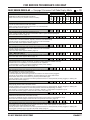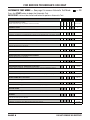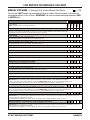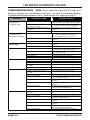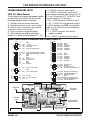
1
FOR SERVICE TECHNICIAN’S USE ONLY Voltage Measurement Safety Information When performing live voltage measurements, you must do the following: Verify the controls are in the off position so that the appliance does not start when energized. Allow enough space to perform the voltage measurements without obstructions. Keep other people a safe distance away from the appliance to prevent potential injury. Always use the proper testing equipment. After voltage measurements, always disconnect power before servicing. IMPORTANT: Electrostatic Discharge (ESD) Sensitive Electronics ESD problems are present everywhere. Most people begin to feel an ESD discharge at approximately 3000V. It takes as little as 10V to destroy, damage, or weaken the main control assembly. The new main control assembly may appear to work well after repair is finished, but a malfunction may occur at a later date due to ESD stress. Use an anti-static wrist strap. Connect wrist strap to green ground connection point or unpainted metal in the appliance -OR Touch your finger repeatedly to a green ground connection point or unpainted metal in the appliance. Before removing the part from its package, touch the anti-static bag to a green ground connection point or unpainted metal in the appliance. Avoid touching electronic parts or terminal contacts; handle electronic control assembly by edges only. When repackaging main control assembly in anti-static bag, observe above instructions. IMPORTANT SAFETY NOTICE — “For Technicians only” This service data sheet is intended for use by persons having electrical, electronic, and mechanical experience and knowledge at a level generally considered acceptable in the appliance repair trade. Any attempt to repair a major appliance may result in personal injury and property damage. The manufacturer or seller cannot be responsible, nor assume any liability for injury or damage of any kind arising from the use of this data sheet. Contents Diagnostic Guide................................................... 2 Activating Service Diagnostic Test Modes.............. 2 Diagnostic Test Modes...................................... 3–5 Customer Viewable Fault Codes............................. 5 Service Fault / Error Codes................................ 6, 7 Automatic Tests.................................................... 8 PART NO.REMOVE W10280489D DO NOT OR DESTROY Manual Tests......................................................... 9 Troubleshooting Guide................................... 10, 11 Troubleshooting Tests................................... 12–18 Main Control Connectors & Pinouts..................... 12 Component Locations & Washer Specs............... 19 Wiring Diagrams........................................... 20, 21 PAGE 1 FOR SERVICE TECHNICIAN’S USE ONLY DIAGNOSTIC GUIDE Before servicing, check the following: Make sure there is power at the wall outlet. Has a household fuse blown or circuit breaker tripped? Was a regular fuse used? Inform customer that a time-delay fuse is required. Are both hot and cold water faucets open and water supply hoses unobstructed? All tests/checks should be made with a VOM (volt-ohm-milliammeter) or DVM (digital-voltmeter) having a sensitivity of 20,000 Ω per volt DC or greater. Resistance checks must be made with washer unplugged or power disconnected. IMPORTANT: Avoid using large diameter probes when checking harness connectors as the probes may damage the connectors upon insertion. Check all harnesses and connections before replacing components. Look for connectors not fully seated, broken or loose wires and terminals, or wires not pressed into connectors far enough to engage metal barbs. A potential cause of a control not functioning is corrosion or contamination on connections. Use an ohmmeter to check for continuity across suspected connections. DIAGNOSTIC LED – MAIN CONTROL A troubleshooting tool has been implemented onto the main control board—a diagnostic LED. LED ON – The Control is detecting correct incoming line voltage and the processor is functioning. LED OFF – Control malfunction. Perform TEST #1: Main Control, page 12, to verify main control functionality. ACTIVATING THE SERVICE DIAGNOSTIC TEST MODES 1. Be sure the washer is in standby mode (plugged in with all indicators off). 2. Perform the following sequence of movement using the cycle selector knob. NOTE: AFTER RESET, sequence “a” through “e” must be completed within 6 seconds. RESET - Rotate cycle selector knob counterclockwise one or more clicks to clear sequence. R a. Rotate cycle selector knob clockwise one click and wait ½ second. R b. Rotate cycle selector knob clockwise one click and wait ½ second. R c. Rotate cycle selector knob clockwise one click and wait ½ second. L d. Rotate cycle selector knob counterclockwise one click and wait ½ second. e. Rotate cycle selector knob clockwise one click. L R Successful activation of Diagnostic Test Modes will be indicated by all status LEDs (except for Lid Locked) flashing ON and OFF in half-second intervals. NOTE: LED names may vary between makes and models. Legend: = ON = OFF 0.5 Seconds ON Fill WashRinse Spin Done LED Location Figure 1 0.5 Seconds OFF SERVICE DIAGNOSTIC TEST MODES If the status LEDs do not display as described above, the sequence may not have been completed within 6 seconds. Repeat step 2 to ensure this was not the cause. If still unsuccessful, see Unsuccessful Entry, page 3. These tests allow factory or service personnel to test and verify all inputs to the main control board. You may want to do a quick and overall checkup of the washer with these tests before going to specific troubleshooting tests. PAGE 2 Figure 2 - Status LEDs flashing ON and OFF DO NOT REMOVE OR DESTROY FOR SERVICE TECHNICIAN’S USE ONLY *Press and hold the START key for 3 seconds to exit. Unsuccessful Entry If entry into diagnostic test mode is unsuccessful, refer to the following indication and action: Indication: None of the LEDs turn on. Action: Press START button to enter setting mode. If indicators come on, repeat steps 1 through 4 of Activating the Service Diagnostic Modes. NOTE: Rotating the dial too fast or too slow will affect entry. If no indicators come on after pressing the START button, go to TEST #1, page 12. EXITING THE SERVICE DIAGNOSTIC TEST MODES Press and hold the START button for 3 seconds at any time to exit diagnostic test modes. Washer will exit diagnostic test modes after 5 minutes of inactivity or unplugging the power cord. DO NOT REMOVE OR DESTROY Fault/Error Code Display Method Fault/error codes are displayed by alternating the state of the Status LEDs in one second intervals. All fault/error codes have an F# and an E#. The F# indicates the suspect System/Category and the E# indicates the suspect Component system. If the Fill or Sensing LED is ON, the Fault Number is represented; if OFF, the Error Number is represented (see example below). The remaining LEDs (Wash, Rinse, Spin, and Done) represent the fault and error code in binary. (See Fault/Error Code Charts on pages 6 & 7 for more information.) = ON. STATUS LEDs 1 Frame Timing (sec.) 1 4. Press the START button to enter desired mode of operation. Refer to the following pages for detailed information on each mode of operation: FAULT CODE DISPLAY MODE: Page 3 AUTOMATIC TEST MODE: Page 4 MANUAL TEST MODE: Page 4 CALIBRATION MODE: Page 4 SALES DEMO MODE: NOT FOR SERVICE USE* UI TEST MODE: Page 4 SW VERSION DISPLAY MODE: Page 5 FACTORY DIAGNOSTICS: If accessed, washer must be recalibrated (see Calibration Mode) TACHOMETER VERIFICATION MODE: Page 5 Fault / Error Code 1 DONE 1 2 2 Press the START button to enter Fault Code Display Mode. The status LEDs flash on and off. 1. To view last 4 fault codes: Turn cycle selector knob clockwise to view fault codes in the order of most recent to oldest. (Refer to Fault/Error Code charts on pages 6 & 7.) NOTE: A fault/error code will be removed from memory if it does not reoccur after 10 consecutive wash cycles. 2. To clear fault codes: Turn cycle selector knob until the status LEDs flash ON and OFF (see figure 2, page 2). Press and hold the START button for 3 seconds to clear all fault codes and exit Fault Code Display Mode. SPIN 8 8 1 RINSE 4 4 4 4 Fill WashRinse Spin Done WASH 2 2 “Done” LED On F 8 4 2 1 F2 0.5 E 8 4 2 1 E3 0.5 SENSING DONE 1 To access fault/error codes, perform steps 1 and 2 of Activating the Service Diagnostic Test Modes. Turn the cycle selector knob until the status LEDs correspond as follows: FILL Fault Code Display Mode Automatic Test Mode Manual Test Mode Calibration Mode Sales Demo Mode UI Test Mode SW Version Display Mode Factory Diagnostics Mode Tachometer Verification Mode SPIN (Status LED names may vary between makes and models) RINSE DIAGNOSTIC TEST MODES STATUS LEDs WASH MODE FAULT CODE DISPLAY MODE (Pgs 6–7) Frame Number 3. There are several accessible Diagnostic Test Modes shown in the chart below. To select the desired Mode of Operation, turn the cycle selector knob until the status LEDs match the mode desired to enter. 2 3 0.5 4 1.0 Repeat… LED names may vary between makes and models. PAGE 3 FOR SERVICE TECHNICIAN’S USE ONLY AUTOMATIC TEST MODE (Page 8) CALIBRATION MODE To access Automatic Test Mode, perform steps 1 and 2 of Activating the Service Diagnostic Test Modes. Turn the cycle selector knob until the status LEDs correspond as follows: IMPORTANT: Calibration must be performed when any of the following components have been replaced: Main Control, Basket, Drive Assembly, Suspension, Motor, and Capacitor. Not performing calibration will result in poor wash performance. To access Calibration Mode, perform steps 1 and 2 of Activating the Service Diagnostic Test Modes. Turn the cycle selector knob until the status LEDs correspond as follows: “Spin” LED On Fill WashRinse Spin Done NOTE: Status LED names may vary between makes and models. Press the START button to begin the automatic test. See page 8 for order of automatic test. Upon entering the automatic test mode, the washer will perform an automatic test with water cycles to check major washer functions. Pressing the START button will manually advance to the next step. Press and hold the START button for 3 seconds at any time to exit Automatic Test mode. IMPORTANT: Lid must be closed with lid lock enabled to perform test. “Rinse” LED On Fill WashRinse Spin Done To access Manual Test Mode, perform steps 1 and 2 of Activating the Service Diagnostic Test Modes. Turn the cycle selector knob until the status LEDs correspond as follows: NOTE: Status LED names may vary between makes and models. Press the START button to begin washer calibration. All status LEDs will turn on. Do NOT interrupt calibration, disturb washer, or remove power; otherwise, calibration must be repeated. Lid must be down to perform test. Basket must be empty to perform test (no water or clothes). Calibration cycle runs for approximately 2–4 minutes. Cycle completes when door unlocks and washer enters standby mode. “Spin & Done” LEDs On UI TEST MODE MANUAL TEST MODE (Page 9) Fill WashRinse Spin Done Press the START button to enter Manual Test Mode. See page 9 for manual test mode. Upon entering the manual test mode, the washer will have all outputs OFF. The cycle selector knob is used to select the output to be tested. The START button will activate/deactivate the selected output. When the selected output is activated, the corresponding status LEDs flash ON & OFF. Press and hold the START button for 3 seconds at any time to exit Manual test mode. IMPORTANT: As a safety feature, the lid must be closed with lid lock enabled to activate either Agitate or Spin Test. NOTE: Multiple outputs may be activated simultaneously. NOTE: Outputs left on will time-out after 5 minutes. PAGE 4 To access UI (User Interface) Test Mode, perform steps 1 and 2 of Activating the Service Diagnostic Test Modes. Turn the cycle selector knob until the status LEDs correspond as follows: “Rinse & Spin” LEDs On (1)Fill (2)Wash (3)Rinse (4)Spin (5)Done NOTE: Status LED names may vary between makes and models. Use LED # identifications. Press the START button to begin the UI test. Upon entering the UI test mode, all status LEDs will be turned ON. Pressing the START button will turn on and off all status LEDs, or toggle the state of each status LED independently. (Example: if 2 are on, and 3 are off, then 2 will be turned off and 3 turned on.) When rotating the cycle selector knob, each click “indent” toggles the “Done” (5) LED. DO NOT REMOVE OR DESTROY FOR SERVICE TECHNICIAN’S USE ONLY Turning the rotary switches will toggle the following status LEDs on and off. • Rotary Switch #1 - toggles (1) Fill LED • Rotary Switch #2 - toggles (2) Wash LED • Rotary Switch #3 - toggles (3) Rinse LED • Rotary Switch #4 - toggles (4) Spin LED NOTE: The number and location of rotary switches varies between makes and models. Switches are read from left to right (not counting the pressure switch), the left-most switch being #1. Press and hold the START button for 3 seconds at any time to exit UI test mode. Washer will exit UI test mode after 5 minutes of inactivity or unplugging the power cord. SOFTWARE VERSION DISPLAY MODE To access Software Version Display Mode, perform steps 1 and 2 of Activating the Service Diagnostic Test Modes. Turn the cycle selector knob until the status LEDs correspond as follows: “Rinse, Spin, and Done” LEDs On Fill WashRinse Spin Done NOTE: Status LED names may vary between makes and models. Press the START button to begin software display mode. Upon entering the software version display mode, the Major, Minor, and Test version numbers for the software are displayed by alternating the state of the Status LEDs in one second intervals; the process repeats following a pause. For example, if the s/w version is 02.01.07, the following sequence would be displayed: 16 8 4 2 1 02 01 Fill WashRinse Spin Done TACHOMETER VERIFICATION MODE To access Tachometer Verification Mode, perform steps 1 and 2 of Activating the Service Diagnostic Modes. Turn the cycle selector knob until the status LEDs correspond as follows: “Wash and Done” LEDs On Fill WashRinse Spin Done NOTE: Status LED names may vary between makes and models. Press the START button to begin tachometer verification mode. Tachometer verification uses the status LEDs to represent the tachometer frequency (basket RPM). For example, slowly turn the basket by hand; as the basket turns, the DONE, SPIN, RINSE, and WASH status LEDs will illuminate one at a time in a visually repeating cycle. The LED timing is derived from the tachometer signal itself. Press and hold the START button for 3 seconds at any time to exit tachometer verification mode. CUSTOMER VIEWABLE FAULT CODES There are 3 fault codes that may be visible to the customer indicated by the following Status LEDs: WASH LED ON (Long Fill Fault) – Refer to “No Fill, Long Fill” on page 7 for information. SPIN LED ON (Long Drain Fault) – Refer to “Long Drain” on page 7 for information. LID LOCK LED FLASHING CONTINUOUSLY (Lid Lock Fault) – Refer to “Lid Lock Fault” on page 6 for information. FOR SERVICE FAULT AND ERROR CODES, CONTINUE TO PAGES 6 AND 7 07 Press and hold the START button for 3 seconds at any time to exit software version display mode. DO NOT REMOVE OR DESTROY PAGE 5 FOR SERVICE TECHNICIAN’S USE ONLY FAULT/ERROR CODES #1 — See page 3 to access Fault Code Display Mode. F0E2 – OVER SUDS CONDITION DETECTED DONE Off SPIN 1 RINSE 2 WASH 4 FILL* 8 F SENSING DONE On SPIN F0E0 – NO FAULT RINSE (Status LED names may vary between makes and models) FILL* Explanation & Recommended Procedure = ON ERROR NUMBER Status LEDs WASH FAULT NUMBER Status LEDs SENSING FAULT/ERROR CODE – DESCRIPTION 8 4 2 1 E 2 Fault is displayed when Suds prevent the basket from spinning up to speed or the pressure sensor detects rising suds level. The main control will flush water in attempt to clear Suds. If the water flush is unable to correct the problem, this may indicate: • Not using HE detergent. • Excessive detergent usage. • Check pressure hose connection from tub to pressure sensor. Is hose pinched, kinked, plugged, or leaking air? • Mechanical friction on drive mechanism or basket. (Clothing between basket and tub.) F0E4 – HIGH WATER TEMPERATURE – RINSE CYCLE F E 4 E 4 Fault is displayed when washer detects water temperature 105° or higher during rinse cycle. • Hot water getting in. Make sure inlet hoses are connected correctly. • If hoses are installed properly, temperature thermistor may be stuck in low resistance range. • See TEST #5: Temperature Thermistor, page 16. F0E5 – OFF BALANCE LOAD DETECTED F 1 Fault is displayed when an off balance condition is detected. • Check for weak suspension. Basket should not bounce up and down more than once when pushed. • Clothing should be distributed evenly when loading. F1E1 – MAIN CONTROL FAULT F 1 E F 1 E 1 Indicates a main control fault. • See TEST #1: Main Control, page 12. F1E2 – MOTOR CONTROL FAULT 2 Indicates a fault of the motor control section of the main control. • See TEST #3b: Drive System – Motor, page 14. F2E1 – STUCK KEY F 2 E 2 E 1 One or more keys on the User Interface were actuated for 15 consecutive seconds. • Fault occurs during Diagnostic Test Mode if a stuck key is detected. • See TEST #4: Consoles and Indicators, page 16. F2E3 – MISMATCH OF MAIN CONTROL & UI F 2 1 The User Interface identification does not match the expected value in the Main Control Board. • Fault occurs during Diagnostic Test Mode if a mismatch of main control and UI is identified. • See TEST #4: Consoles and Indicators, page 16. F3E1 – PRESSURE SENSOR FAULT F 2 1 E 1 Fault is displayed when the Main Control detects an out of range pressure signal. • Check pressure hose connection from tub to pressure sensor. Is hose pinched, kinked, plugged, or leaking air? • See TEST #6: Water Level, page 17. F3E2 – INLET WATER TEMPERATURE FAULT F 1 E 4 1 E 4 1 E 2 2 Fault is displayed when the Inlet Thermistor is detected to be open or shorted. • See TEST #5: Temperature Thermistor, page 16. F5E1 – LID SWITCH FAULT F 1 Fault is displayed if lid is in locked state, but lid switch is open. • User presses START with lid open. • The main control cannot detect the lid switch opening and closing properly. • See TEST #8: Lid Lock, page 18. F5E2 – LID LOCK FAULT F 2 Fault is displayed if Lid Lock has not moved into locked position or motor cannot be powered. • Lid is not closed completely due to interference. • Check for lock interference with lock striker. • Wash media buildup (detergent, lint, etc.) is preventing the lock mechanism from sliding. • Main control detects open lid switch when attempting to lock. • Main control cannot determine if lid lock is in a locked state. • See TEST #8: Lid Lock, page 18. * If the Fill or Sensing LED is ON, the fault code is represented; if OFF, the error code is represented. PAGE 6 DO NOT REMOVE OR DESTROY FOR SERVICE TECHNICIAN’S USE ONLY FAULT/ERROR CODES #2 — See page 3 to access Fault Code Display Mode. E DONE 1 SPIN 2 RINSE 4 WASH DONE 8 FILL* SPIN F RINSE F5E3 – LID UNLOCK FAULT = ON ERROR NUMBER Status LEDs WASH FILL* Explanation & Recommended Procedure (Status LED names may vary between makes and models) SENSING FAULT NUMBER Status LEDs SENSING FAULT/ERROR CODE – DESCRIPTION 8 4 2 1 Fault is displayed if Lid Lock has not moved into unlocked position or motor cannot be powered. • Check for lock interference with lock striker. • Main control cannot determine if lid lock is in an unlocked state. • See TEST #8: Lid Lock, page 18. F5E4 – LID NOT OPENED BETWEEN CYCLES F 4 1 E 1 E 4 Fault is displayed if the following conditions occur: • User presses START after several consecutive washer cycles without opening lid. • See TEST #8: Lid Lock, page 18. F7E1 – BASKET SPEED SENSOR FAULT 4 F 2 1 Fault is displayed when the main control cannot determine speed of basket, or speed changes too quickly. • Locked rotor—check that basket, impeller, and motor can rotate freely. • Check harness connections from main control to motor and shifter. • See TEST #3a: Drive System–Shifter, page 13. F7E5 – SHIFTER FAULT 4 2 1 E 4 F 4 2 1 E 4 2 F 4 2 1 E 4 2 F 1 Fault is displayed when the main control cannot determine position of shifter. • Check harness connections from main control to motor and shifter. • Observe shifter operation. • See TEST #3a: Drive System–Shifter, page 13. F7E6 – MOTOR FAULT Indicates an open clockwise or counterclockwise circuit of the motor. • See TEST #3b: Drive System–Motor, page 14. F7E7 – MOTOR UNABLE TO REACH TARGET RPM 1 Fault is displayed when basket speed sensor detects that target RPM was not reached. • Mechanical friction on drive mechanism or basket (clothing between basket and tub). • Weak motor or run capacitor, or no connection to run capacitor. • Load off balance. Clothing should be distributed evenly when loading. • See TEST #3b: Drive System–Motor, page 14. F8E1 – NO FILL, LONG FILL F E 8 1 Fault is displayed when the water level does not change for a period of time OR water is present but main control does not detect the water level changing. • Is water supply connected and turned on? • Low water pressure; fill times longer than six minutes. Are hose screens plugged? • Check for proper drain hose installation. Is water siphoning out of the drain hose? • Drain hose must not be more than 4.5" (113mm) into the drain pipe. • Check pressure hose connection from tub to pressure sensor. Is hose pinched, kinked, plugged, or leaking air? • See TEST #2: Valves, page 13. F8E3 – OVERFLOW CONDITION F E 8 2 1 Fault is displayed when main control senses water level that exceeds the washer’s capacity. • May signify problem with inlet water valves. • Check pressure hose connection from tub to pressure sensor. Is hose pinched, kinked, plugged, or leaking air? • Onboard pressure transducer or off-board pressure switch fault (depending on model). • Not pumping—pressure switch closed or shorted in standby, or after washer completes a cycle. • See TEST #2: Valves, page 13 and TEST #6: Water Level, page 17. F8E5 – HOT, COLD REVERSED F 8 E 4 1 Fault is displayed when the hot and cold inlet hoses are reversed. • Make sure inlet hoses are connected correctly. • If hoses are installed properly, temperature thermistor may be stuck in low resistance range. • See TEST #2: Valves, page 13 and TEST #5: Temperature Thermistor, page 16. F9E1 – LONG DRAIN F 8 1 1 E Fault is displayed when the water level does not change after the drain pump is on for 10 minutes. • Is the drain hose or the drain pump clogged? Check tub sump under impeller for obstructions. • Is the drain hose height greater than 96"? • Check pressure hose connection from tub to pressure sensor. Is hose pinched, kinked, plugged, or leaking air? • Is the pump running? If not, see TEST #7: Drain Pump, page 17. * If the Fill or Sensing LED is ON, the fault code is represented; if OFF, the error code is represented. DO NOT REMOVE OR DESTROY PAGE 7 FOR SERVICE TECHNICIAN’S USE ONLY AUTOMATIC TEST MODE — See page 4 to access Automatic Test Mode. = ON Press the START button to begin the Automatic Test. IMPORTANT: Lid must be closed and locked to perform Automatic Test. LID LOCK LID WILL LOCK Est. TIME DONE (Status LED names may vary between makes and models) SPIN WASH Recommended Procedure RINSE STATUS LEDs FUNCTION In Seconds 1 On 1 On 5 On 5 On 5 On 5 On 5 On 45 On ~5-15 On 10 On ~30-40 On ~5-15 On 10 On ~30-45 Motor must be at “0” RPM. If lid does not lock, go to Manual Test: Lid Lock, page 9. 2 COLD VALVE WILL ACTUATE If water is not present, or temperature is wrong, go to Manual Test: Cold Valve, page 9. 2 HOT VALVE WILL ACTUATE 1 If water is not present, or temperature is wrong, go to Manual Test: Hot Valve, page 9. 4 RESERVED FOR FUTURE DEVELOPMENT Washer will pause for 5 seconds. 4 RESERVED FOR FUTURE DEVELOPMENT 1 Washer will pause for 5 seconds. RESERVED FOR FUTURE DEVELOPMENT 4 2 4 2 Washer will pause for 5 seconds. HOT & COLD VALVE WILL ACTUATE 1 Hot & cold water valves will actuate for the specified time period. SHIFTER MOVES TO AGITATION POSITION 8 If motor does not agitate, go to Manual Test: Gentle or Heavy Agitation, page 9. MOTOR AGITATES 8 1 If motor does not agitate, go to Manual Test: Gentle or Heavy Agitation, page 9. DRAIN PUMP WILL ACTUATE 8 2 8 2 If water is not draining, go to Manual Test: Drain, page 9. SHIFTER MOVES TO SPIN POSITION 1 If basket is not turning, go to Manual Test: Low or High Spin, page 9. 8 4 LID REMAINS LOCKED UNTIL WASHER SENSES A STOPPED BASKET 8 4 LID WILL UNLOCK AND CYCLE COMPLETES 8 MOTOR SPINS If basket is not turning, go to Manual Test: Low or High Spin, page 9. 1 Basket must stop spinning (0 RPM) before test continues to next phase. Time for basket to stop spinning may vary from 30 seconds up to 2 minutes. If lid does not unlock, go to Manual Test: Lid Lock, page 9. PAGE 8 4 2 1 ~3 min DO NOT REMOVE OR DESTROY FOR SERVICE TECHNICIAN’S USE ONLY MANUAL TEST MODE — See page 4 to access Manual Test Mode. = ON Pressing the START button will activate/deactivate each output. When the output is activated, the corresponding Status LEDs will flash. IMPORTANT: Lid must be closed and locked to perform SPIN & AGITATE tests. LID LOCK DONE SPIN RINSE Output Details NOTE: Outputs will time-out after 5 minutes. STATUS LEDs WASH OUTPUT LID LOCK Lock and unlock the lid. NOTES: When lock is enabled, the “Lid Lock” LED will turn ON. Will only lock when lid is closed. Will only unlock when basket RPM is 0. If lid is not closed, washer will flash status LEDs on and off. • If lid does not lock or unlock, go to TEST #8: Lid Lock, page 18. 1 COLD VALVE Turns ON and turns OFF cold water valve. • If valve does not turn on, go to TEST #2: Valves, page 13. 2 HOT VALVE Turns ON and turns OFF hot water valve. • If valve does not turn on, go to TEST #2: Valves, page 13. 2 RESERVED FOR FUTURE DEVELOPMENT 1 If selected, status LEDs will flash on and off. 4 RESERVED FOR FUTURE DEVELOPMENT If selected, status LEDs will flash on and off. 1 4 RESERVED FOR FUTURE DEVELOPMENT If selected, status LEDs will flash on and off. RESERVED FOR FUTURE DEVELOPMENT 4 2 4 2 If selected, status LEDs will flash on and off. DRAIN 1 Turns ON and turns OFF the drain pump. • If pump does not turn on, go to TEST #7: Drain Pump, page 17. RESERVED FOR FUTURE DEVELOPMENT If selected, status LEDs will flash on and off. 8 LOW SPIN – To perform test, lid must be closed and locked. 8 1 On Spins basket from 0 to 500 RPM. NOTE: Allow up to 15 seconds for shifter to reposition. IMPORTANT: To activate Low Spin, RPM must read “0” and lid must be closed with lid lock enabled. If lid is not closed, status LEDs will flash on and off. IMPORTANT: Water in tub must be drained before test. • If motor does not spin, go to TEST #3a & 3b: Drive System (Shifter & Motor), pages 13 & 14. HIGH SPIN – To perform test, lid must be closed and locked. 8 2 On Spins basket from 0 to maximum RPM. NOTE: Allow up to 15 seconds for shifter to reposition. IMPORTANT: To activate High Spin, RPM must read “0” and lid must be closed with lid lock enabled. If lid is not closed, status LEDs will flash on and off. IMPORTANT: Water in tub must be drained before test. • If motor does not spin, go to TEST #3a & 3b: Drive System (Shifter & Motor), pages 13 & 14. GENTLE AGITATION – To perform test, lid must be closed and locked. 8 2 1 On Shifts from idle motor to gentle CW/CCW agitation. NOTE: Allow up to 15 seconds for shifter to reposition. IMPORTANT: To activate Gentle Agitation, RPM must read “0” and lid must be closed with lid lock enabled. If lid is not closed, status LEDs will flash on and off. • If motor does not agitate, go to TEST #3a & 3b: Drive System (Shifter & Motor), pages 13 & 14. On 8 4 HEAVY AGITATION – To perform test, lid must be closed and locked. Shifts from idle motor to heavy CW/CCW agitation. NOTE: Allow up to 15 seconds for shifter to reposition. IMPORTANT: To activate Heavy Agitation, RPM must read “0” and lid must be closed with lid lock enabled. If lid is not closed, status LEDs will flash on and off. • If motor does not agitate, go to TEST #3a & 3b: Drive System (Shifter & Motor), pages 13 & 14. DO NOT REMOVE OR DESTROY PAGE 9 FOR SERVICE TECHNICIAN’S USE ONLY TROUBLESHOOTING GUIDE NOTE: Always check for error codes first (pgs. 6–7). Some tests will require accessing components. See Figures 7 & 8, page 19, for component locations. For detailed troubleshooting procedures, refer to “Troubleshooting Tests” beginning on page 12. PROBLEM WON’T POWER UP • No operation • No Status LEDs WON’T START CYCLE No response when Start Button is pressed. POSSIBLE CAUSE Check power at outlet, check circuit breakers, fuses, or junction box connections. Connection problem between AC plug and main control. Main control not properly installed in console. Main control problem. Check the AC power cord for continuity. Lid lock mechanism not functioning. 1. Lid not closed due to interference. 2. Lock not closed due to interference. 3. See TEST #8: Lid Lock, page 18. See TEST #4: Console and Indicators, page 16. See TEST #1: Main Control, page 12. See TEST #4: Console and Indicators, page 16. See TEST #1: Main Control, page 12. 1. Check water connections to washer. 2. Verify hot and cold water supply is on. Check for plugged filter or screen in the water valve or hoses. Check for proper drain hose installation. See TEST #2: Valves, page 13. See TEST #1: Main Control, page 12. User Interface problem. UI WON’T ACCEPT SELECTIONS WON’T FILL Main control problem. User Interface problem. Main control problem. No water supplied to washer. Plugged filter/screen. Drain hose installation. Valve problem. Main control problem. OVERFILLS WON’T AGITATE Pressure hose. Valve problem. Washer requires calibration. Pressure switch or onboard transducer. Main control problem. Water covering impeller? Is lid lock showing open during the cycle? Drive belt. Harness connections. Shifter problem. Motor problem. Tachometer problem. WON’T SPIN Main control problem. Is lid lock showing open during the cycle? Drive belt. Harness connections. Shifter problem. Motor problem. Tachometer problem. Main control problem. PAGE 10 CHECKS & TESTS No power to washer. See TEST #4: Console and Indicators, page 16. See TEST #1: Main Control, page 12. See TEST #6: Water Level, page 17. See TEST #2: Valves, page 13. Perform washer calibration on page 4. See TEST #6: Water Level, page 17. See TEST #1: Main Control, page 12. See TEST #6: Water Level, page 17. See TEST #8: Lid Lock, page 18. Verify that drive belt is not damaged. Check harness connections between main control and drive system. See TEST #3a: Drive System–Shifter, page 13. See TEST #3b: Drive System–Motor, page 14. No tub movement or tub speed out of normal range (obstruction/belt/motor). See TEST #1: Main Control, page 12. See TEST #8: Lid Lock, page 18. Verify that drive belt is not damaged. Check harness connections between main control and drive system. See TEST #3a: Drive System–Shifter, page 13. See TEST #3b: Drive System–Motor, page 14. No tub movement or tub speed out of normal range (obstruction/belt/motor). See TEST #1: Main Control, page 12. DO NOT REMOVE OR DESTROY FOR SERVICE TECHNICIAN’S USE ONLY TROUBLESHOOTING GUIDE (continued) Some tests will require accessing components. See Figures 7 & 8, page 19, for component locations. For detailed troubleshooting procedures, refer to “Troubleshooting Tests” beginning on page 12. PROBLEM INCORRECT WATER TEMPERATURE POSSIBLE CAUSE Water hose installation. Temperature thermistor. Valve problem. Main control problem. WON’T DRAIN Drain hose installation. Plugged drain hose. Obstructions to drain pump. Harness connections. CYCLE TIME LONGER THAN EXPECTED POOR WASH PERFORMANCE Please reference Use & Care Guide CHECKS & TESTS Make sure inlet hoses are connected properly. See TEST #5: Temperature Thermistor, page 16. See TEST #2: Valves, page 13. See TEST #1: Main Control, page 12. Check for proper drain hose installation. Make sure it is not inserted more than 4.5" (113mm). Check drain hose for obstructions. Check tub sump under agitator plate & basket for obstructions. Check harness connections between main control and drain pump. See TEST #7: Drain Pump, page 17. See TEST #1: Main Control, page 12. 1. Verify use of HE detergent. 2. Excessive detergent usage. Off balance. 1. Load is off balance. 2. Balance ring water leak. Draining slowly. Check for pump or drain hose obstructions. Water pressure drop. Results in longer Fill time. Friction or drag on drive. Check motor and bearings; check for clothes between tub and basket. Weak suspension. Basket should not bounce up and down more than once when pushed. 1. Verify use of HE detergent. Oversuds. 2. Excessive detergent usage. 1. Washer not loaded properly. Load is tangling. 2. Perform washer calibration on page 4. 1. Perform washer calibration on page 4. Incorrect water level. 2. See TEST #2: Valves, page 13. 3. See TEST #6: Water Level, page 17. 1. Overloaded washer. Clothes wet after cycle is complete (not water saturated, but very damp). 2. Oversuds (see above). 3. Items caught in tub sump. 4. Weak suspension. 5. Shifter not moving into position (see TEST #3a). 6. Cold/Rinse water > 105°F. 7. See TEST #7: Drain Pump, page 17. 1. Check proper water supply. Load not rinsed. 2. Not using HE detergent. 3. Washer not loaded properly. 4. Shifter not moving into position (see TEST #3a). 5. See TEST #2: Valves, page 13. 1. Washer not loaded properly. Not cleaning clothes. 2. Not using HE detergent. 3. Not using correct cycle. 4. Shifter not moving into position (see TEST #3a). 1. Washer overloaded. Fabric damage. 2. Bleach added incorrectly. 3. Sharp items in tub. Refer customer to “Use & Care Guide”. Wrong option or cycle selection. Drain pump. Main control problem. Oversuds. DO NOT REMOVE OR DESTROY PAGE 11 FOR SERVICE TECHNICIAN’S USE ONLY If 120VAC is present, go to step 6. If 120VAC is not present, check the AC power cord for continuity (See Figures 9 or 10). 6. Is the “Diagnostic LED” ON or OFF? (See Figure 3 below for LED location.) ON: (+5VDC present) continue to step 7. OFF: (+5VDC missing) proceed to step 8. 7. With a voltmeter set to DC, connect black probe to J2-3 (Circuit Gnd) and red probe to J2-4 (+13VDC). If +13VDC is present, main control supplies are good. If +13VDC is not present, go to step 8. TROUBLESHOOTING TESTS TEST #1: Main Control This test checks for incoming and outgoing supplies to and from the main control. This test assumes that proper voltage is present at the outlet. 1. Unplug washer or disconnect power. 2. Remove console to access main control. 3. Verify that ALL connectors are inserted all the way into the main control. 4. Plug in washer or reconnect power. 5. With a voltmeter set to AC, connect black probe to J7-3 (Neutral) and red probe to J7-1 (L1). Main Control Board Connectors and Pinouts (Figure 3) ROTARY ENCODERS J2-5 OPEN J2-4BLK +13VDC J2-3 GRY -5VDC (CIRCUIT GND) J2-2 PNK RPM INPUT J2-1 BLU SHIFTER POSITION INPUT J3-10 BLK TEMP THERMISTOR INPUT (HYBRID) J3-9 BLK TEMP THERMISTOR GND (HYBRID) J3-8 OPEN J3-7 OPEN J3-6 OPEN J3-5 BLU COLD VALVE (L1) J3-4 RED HOT VALVE (L1) J3-3 OPEN J3-2 OPEN J3-1 WHTNEUTRAL ROTARY ENCODERS OPEN ROW 2 ROW 3 COLUMN 0 COLUMN 1 COLUMN 2 COLUMN 3 J15-4 RED J15-3WHT J15-2 BLU J15-1 YEL LOCK SWITCH NEUTRAL LID SWITCH INPUT LOCK SWITCH SOLENOID (L1) J16-7 ORN MOTOR CCW WINDING (L1) J16-6 RED MOTOR CW WINDING (L1) J16-5 WHT MOTOR (NEUTRAL) J16-4 OPEN J16-3 LT BLUDRAIN PUMP MOTOR (L1) J16-2 W/ BLUSHIFTER MOTOR (NEUTRAL) J16-1 BRN SHIFTER MOTOR (L1) J16 J4-1 BLU -5VDC (CIRCUIT GND) J7 DRAIN J7-3BLK NEUTRAL J7-2 GRN CHASSIS GROUND J7-1BLK L1 J2-Shifter Diagnostic LED J4 J11-Rotary Encoders J4-Pressure Switch * POWER CORD J11-6 BLK J11-5 BLK J11-4 BLK J11-3 BLK J11-2 BLK J11-1 BLK MOTOR PRESS SW J4-3 BLU PRESS SWITCH INPUT ROW 4 ROW 5 COLUMN 0 COLUMN 1 COLUMN 2 COLUMN 3 J15 J4 J4-2 J10-6 RED J10-5 RED J10-4 RED J10-3 RED J10-2 RED J10-1 RED J11 LID LOCK VALVES TEMP J3 J10 J2 SHIFTER J2 J11 J10-Rotary Encoders * J10 J7-Power Cord = represents pin-1 PAGE 12 J16-PSC Motor/Drain J15 J16 J7 J3-Temperature Sensor/Valves J3 J15-Lid Lock * Not available on all models DO NOT REMOVE OR DESTROY FOR SERVICE TECHNICIAN’S USE ONLY 8. Check if shifter assembly is affecting the main control DC supplies. a. Unplug washer or disconnect power. b. Remove connector J2 from main control. c. Plug in washer or reconnect power. d. Repeat steps 6 and 7. Perform the +13VDC check inside header J2 on the board – do not short pins together. If one or more DC voltages are still missing, go to step 9. If the DC voltages return, check for short in harness between main control and shifter assy. If harness and connections are good, replace shifter assembly. 9. Main Control has malfunctioned. a. Unplug washer or disconnect power. b. Replace the main control. c. Reassemble all parts and panels. d. Plug in washer or reconnect power. Calibrate washer and perform Automatic Test to verify repair. TEST #2: Valves This test checks the electrical connections to the valves, and the valves themselves. 1. Check the relays and electrical connections to the valves by performing the Cold and Hot Valve tests under Manual Test Mode on page 9. Each test activates and deactivates the selected valve. The following steps assume one (or more) valve(s) did not turn on. 2. For the valve(s) in question check the individual solenoid valves: a. Unplug washer or disconnect power. b. Remove console to access main control. c. Remove connector J3 from main control. Refer to main control diagram on page 12. d. Check harness connection to solenoid valves. 3. Check resistance of the valve coils across the following J3 connector pinouts: Valve Hot Valve Cold Valve Pinout J3, 1 & 4 J3, 1 & 5 Resistance should be 890–1.3k Ω. If resistance readings are tens of ohms outside of range, replace the valve assembly. If resistance readings are within range, replace main control and calibrate washer. Perform Automatic Test to verify repair. DO NOT REMOVE OR DESTROY TEST #3a: Drive System – Shifter This test checks connections, shifter motor, switch, and optical sensor. NOTE: Refer to Figure 4, “Shifter Assembly Strip Circuit” on page 14 for tests and measurements. IMPORTANT: Drain water from tub before accessing bottom of washer. Functional Check: 1. Check the shifter and electrical connections by performing both the Spin AND Agitate test under Manual Test Mode on page 9. The following steps assume that this step was unsuccessful. 2. Unplug washer or disconnect power. 3. Check to see if basket will turn freely. If basket turns freely, go to step 4. If basket does not turn freely, determine what is causing the mechanical friction or lockup. 4. Remove console to access main control. 5. Visually check that the J2 and J16 connectors are inserted all the way into the main control. If visual checks pass, go to step 6. If connectors are not inserted properly, reconnect J2 and J16 and repeat step 1. Shifter Motor: 6. Remove connector J16 from main control. With an ohmmeter, verify resistance of the shifter motor across the following J16 connector pinouts: Component Shifter Motor J16 Connector Pinout J16, 1 & 2 Resistance should be 2k to 3.5k Ω. If values are correct, reconnect J16 and proceed to step 7. If values are open or out of range, go to step 13. 7. Plug in washer or reconnect power. 8. With a voltmeter set to AC, connect the black probe to J16-2 (N) and red probe to J16-1 (L1). Activate shifter motor by switching between Spin and Agitate modes. Energize outputs using Manual Test Mode on page 9. IMPORTANT: Lid must be closed with Lid Lock enabled to run the SPIN and AGITATE tests. NOTE: It will take 4–15 seconds for the shifter to change states. If 120VAC is present, go to step 9. If 120VAC is not present, go to step 17. PAGE 13 FOR SERVICE TECHNICIAN’S USE ONLY Shifter Switch: 9. With a voltmeter set to DC, connect the black probe to J2-3 (Circuit Gnd) and red probe to J2-1 (Shifter Switch). In manual test mode, switch between Spin and Agitate modes. Voltage should toggle between 0 and +5VDC. SPIN = +5 VDC AGITATE = 0 VDC If voltage corresponds to setting, go to step 10. If voltage does not switch, go to step 12. Optical Sensor: 10. With a voltmeter set to DC, connect the black probe to J2-3 (Circuit Gnd) and red probe to J2-4 (+13VDC). If +13VDC is present, go to step 11. If +13VDC is not present, go to step 17. 11. Activate Tachometer Verification Mode from the Service Diagnostic Test Modes (see page 5). Slowly turn the basket by hand. The 4 status LEDs should illuminate one at a time to represent basket RPM. If the tachometer is not verified, go to step 12. If the tachometer is verified, go to step 17. 12. Unplug washer or disconnect power. 13. Tilt washer back to access the bottom of the washer and the drive motor area. 14. Visually check the electrical connections to the shifter. If visual check passes, go to step 15. If connections are loose, reconnect the electrical connections and repeat step 1. 15. With an ohmmeter, check the harness for continuity between the shifter and main control using the pinouts in the following chart. If there is continuity, go to step 16. If there is no continuity, replace the lower washer harness and repeat step 1. L1 Shifter to Main Control & Drain Pump Shifter Connector Pin-2 to Main Control J16-2 Shifter Connector Pin-3 to Main Control J16-1 Shifter Connector Pin-4 to Main Control J2-4 Shifter Connector Pin-5 to Main Control J2-3 Shifter Connector Pin-6 to Main Control J2-2 Shifter Connector Pin-7 to Main Control J2-1 16. Replace the shifter assembly. a. Unplug washer or disconnect power. b. Replace shifter assembly. c. Reassemble all parts and panels. d. Plug in washer or reconnect power. Calibrate washer and perform Automatic Test to verify repair. 17. If the preceding steps did not correct the problem, replace the main control. a. Unplug washer or disconnect power. b. Replace the main control. c. Reassemble all parts and panels. d. Plug in washer or reconnect power. Calibrate washer and perform Automatic Test to verify repair. TEST #3b: Drive System – Motor This test checks the motor, motor windings, wiring, and start capacitor. NOTE: Refer to Figure 5, “PSC Motor Strip Circuit” on page 15 for tests and measurements. IMPORTANT: Drain water from tub before accessing bottom of washer. 1. Check the motor and electrical connections by performing the Gentle or Heavy Agitation test under Manual Test Mode on page 9. The following steps assume that this step was unsuccessful. 2. Unplug washer or disconnect power. 3. Check to see if basket will turn freely. If basket turns freely, go to step 4. If basket does not turn freely, determine what is causing the mechanical friction or lockup. 4. Remove console to access main control. 5. Visually check that the J2 and J16 connectors are inserted all the way into the main control. Shifter Assy Main Control N Main Control Motor Resistance 2k to 3.5k ohms K8 J7-1 J16-1 Pin 3 Shifter Motor Relay 120VAC Motor Shifter Switch Circuit Ground +13VDC J2-3 Pin 5 J2-4 Pin 4 Optical Sensor Pin 2 J16-2 Pin 7 J2-1 Pin 6 J2-2 J7-3 Shifter Position Input RPM Input Figure 4 - Shifter Assembly Strip Circuit (Shifter Switch: Open = SPIN, Closed = AGITATE) PAGE 14 DO NOT REMOVE OR DESTROY FOR SERVICE TECHNICIAN’S USE ONLY If visual checks pass, go to step 6. If connectors are not inserted properly, reconnect J2 and J16 and repeat step 1. 6. Plug in washer or reconnect power. Run the Gentle Agitation test under Manual Test Mode on page 9. 7. With a voltmeter set to AC, connect black probe to J16-5 (N) and red probe to J16-6 (CW Winding). If 120VAC is cycling ON during CW rotation, go to step 8. If 120VAC is not present, go to Test #1: Main Control, page 12. 8. With a voltmeter set to AC, connect black probe to J16-5 (N), red probe to J16-7 (CCW Winding). If 120VAC is cycling ON during CCW rotation, go to step 9. If 120VAC is not present, go to Test #1: Main Control, page 12. 9. Unplug washer or disconnect power. 10. Remove connector J16 from main control. With an ohmmeter, check resistance of motor windings across the following J16 connector pinouts: NOTE: If the console has a cycle selector knob and 4 rotary switches, the motor size is 1/3 HP. Size Motor Winding CW Winding CCW Winding CW Winding CCW Winding 1/4 HP 1/3 HP J16 Pinout J16, 5 & 6 J16, 5 & 7 J16, 5 & 6 J16, 5 & 7 Resistance 5 to 9.5 Ω 5 to 9.5 Ω 3.5 to 6 Ω 3.5 to 6 Ω If values are open or out of range, go to step 11. If values are correct, go to step 15. 11. Tilt washer back to access drive system. 12. Visually check the mounting bracket and electrical connections to the motor and shifter. L1 Main Control CW TRIAC CCW TRIAC Motor Harness Check Motor Connector Pin-1 to Chassis Ground Motor Connector Pin-3 to Main Control J16-7 Motor Connector Pin-3 to Run Capacitor Pin-3 Motor Connector Pin-6 to Main Control J16-6 Motor Connector Pin-6 to Run Capacitor Pin-1 Motor Connector Pin-9 to Main Control J16-5 If there is continuity, go to step 14. If there is no continuity, replace the lower machine harness and repeat step 1. 14. With an ohmmeter, check resistance of motor windings at the following motor connections. NOTE: If the console has a cycle selector knob and 4 rotary switches, the motor size is 1/3 HP. Size 1/4 HP 1/3 HP Motor Winding CW Winding CCW Winding CW Winding CCW Winding Motor Pinout Pins 6 & 9 Pins 3 & 9 Pins 6 & 9 Pins 3 & 9 Resistance 5 to 9.5 Ω 5 to 9.5 Ω 3.5 to 6 Ω 3.5 to 6 Ω If values are open or out of range, replace motor. If values are correct, go to step 15. 15. Test Motor Run Capacitor. NOTE: A faulty capacitor may cause the motor to “hum”, not start, or turn slowly. a. Discharge the capacitor by touching the leads of a 20,000 Ω resistor to the two terminals. b. Disconnect the wires from the capacitor terminals. c. With an ohmmeter, measure across the terminals and note reading. If a steady increase in resistance is noted, continue to step 16. PSC Motor Run Cap Main Control Pin 6 J16-6 J7-1 If visual check passes, go to step 13. If connections are loose, reconnect the electrical connections, reassemble motor cover, and repeat step 1. 13. With an ohmmeter, check the harness for continuity between the main control, motor, and run capacitor using the following test points. 1 3 Inductive Wire Loop J16-7 Pin 3 CW Winding* CCW Winding* Pin 9 Pin 1 J16-5 Main Control J15-4 J15-3 N J7-3 Lock Switch * 1/3 HP Motor – Each Winding 3.5 to 6 ohms/ * 1/4 HP Motor – Each Winding 5 to 9.5 ohms Figure 5 - PSC Motor Strip Circuit (shown in ON position) DO NOT REMOVE OR DESTROY PAGE 15 FOR SERVICE TECHNICIAN’S USE ONLY If the capacitor is either shorted or open, replace capacitor, calibrate, and repeat step 1. 16. If the preceding steps did not correct the motor problem, replace the main control. a. Unplug washer or disconnect power. b. Replace the main control. c. Reassemble all parts and panels. d. Plug in washer or reconnect power. Calibrate washer and perform Automatic Test to verify repair. TEST #4: Console and Indicators Console and Indicators Check: This test is performed when any of the following situations occurs during “UI Test Mode” on page 4. 3None of the LEDs light up 3One or more Status LEDs are flashing 3Turning rotary switch does not toggle LED None of the LEDs light up: 1. Unplug washer or disconnect power. 2. Access the main control and visually check that ALL connectors are inserted all the way into their respective headers. 3. Visually check that the main control assembly is properly inserted in the console. 4. If both visual checks pass, follow procedure under TEST #1, “Main Control” on page 12 to verify supply voltages. 5. To verify repair, activate the Service Diagnostic Mode, and then perform UI Test Mode on page 4. One or more Status LEDs are flashing: If one or more of the status LEDs are flashing (on and off in 0.5 second intervals), refer to the following notes to identify the switch(es) in question. Reference the appropriate wiring diagrams on pages 20-21 when performing the following procedures. a. Verify the switch connector is inserted all the way into the main control. b. Check the harness between the switch and main control for continuity. Check for shorts. c. Replace the switch. d. Replace the main control. NOTE 1: The number and location of rotary switches varies between makes and models. NOTE 2: Regardless of location, switches are read from left to right (not counting the pressure switch), the left-most switch being #1. PAGE 16 NOTE 3: Each rotary switch and the cycle selector knob is represented by the following status LEDs: • Rotary Switch #1 - toggles (1) Fill LED • Rotary Switch #2 - toggles (2) Wash LED • Rotary Switch #3 - toggles (3) Rinse LED • Rotary Switch #4 - toggles (4) Spin LED • Cycle Select Knob - toggles (5) Done LED NOTE 4: Status LED names may vary between makes and models. Use LED # identification. (1)Fill (2)Wash (3)Rinse (4)Spin (5)Done Turning rotary switch does not toggle LED: Perform the procedures under “One or more Status LEDs are flashing.” TEST #5: Temperature Thermistor This test checks valves, main control, temperature thermistor, and wiring. 1. Check the cold valve by performing Cold Valve test under Manual Test Mode on page 9. If cold water is being dispensed, proceed to step 2. If hot water is being dispensed, verify proper hose connection. 2. Check the hot valve by performing Hot Valve test under Manual Test Mode on page 9. If hot water is being dispensed, proceed to step 3. If cold water is being dispensed, ensure that household hot water is present. 3. Unplug washer or disconnect power. 4. Remove console to access main control. 5. Remove connector J3 from the main control. With an ohmmeter, measure the resistance of the temperature thermistor between pins J3-9 and J3-10. Verify that the approximate resistance, shown in the following table, is within ambient temperature range. DO NOT REMOVE OR DESTROY FOR SERVICE TECHNICIAN’S USE ONLY 4. Remove console to access controls. 5. Check hose connection between the pressure transducer or switch and the pressure dome attached to the tub. 6. Check to ensure hose is routed correctly in the lower cabinet and not pinched or crimped by the back panel. 7. Verify there is no water, suds, or debris in the hose or dome. Disconnect hose from main control or pressure switch and blow into hose to clear water, suds, or debris. 8. Check hose for leaks. Replace if needed. 9. If the preceding steps did not correct the problem, go to step 10 if troubleshooting a If the resistance is within the range shown pressure switch, or step 11 if troubleshooting in the table, go to step 6. an onboard pressure transducer. If the resistance is infinite or close to zero, replace the temperature thermistor assembly. 10. Pressure Switch Only: a. Remove the pressure hose from the switch. NOTE: Most thermistor errors are a result of the resistor being out of range. If the b. Place the leads of an ohmmeter across temperature thermistor malfunctions, the connector J4, pins 1 & 3 of the main control. washer will default to pre-programmed Blow into the pressure switch inlet. The wash settings. pressure switch contact should close and show continuity. 6. If the thermistor is good, replace main If there is no continuity, check the harness control and calibrate washer. Perform Automatic and connections between the pressure Test to verify repair. switch and J4 on the main control. If OK, replace the pressure switch. TEST #6: Water Level If there is continuity, reconnect hose to This test checks the water level sensing pressure switch and continue to step 11. components. Depending on the model, the 11. Replace the main control and calibrate washer will have either an on-board pressure washer. Perform Automatic Test to verify repair. transducer or a separate pressure switch. NOTE: Usually, if the pressure transducer or TEST #7: Drain Pump pressure switch malfunctions, the washer will generate a long fill, or long drain error. Perform the following checks if washer does not drain. 1. Check the functionality of the pressure transducer or pressure switch by running a NOTE: Refer to Figure 6, “Drain Pump Strip small load cycle. The valves should turn off Circuit” for tests and measurements. automatically after sensing the correct water level IMPORTANT: Drain water from tub before in the tub. The following steps assume that this accessing bottom of washer. step was unsuccessful. 1. Check for obstructions in the usual areas. 2. Drain the tub until all water has been removed. Clean and then perform step 2. 3. Unplug washer or disconnect power. THERMISTOR RESISTANCE Approx. Temperature Approx. Resistance F° C° (K ) 32 0 163 41 5 127 50 10 100 59 15 79 68 20 62 77 25 50 86 30 40 95 35 33 104 40 27 113 45 22 122 50 18 131 55 15 140 60 12 149 65 10 L1 N Main Control J7-1 K7 J16-3 Drain Pump Motor Relay Drain Pump Motor Pin 1 120VAC Motor Pin 2 Shifter Assy Pin 1 Pin 2 Main Control J16-2 J7-3 Motor Resistance 14 to 25 ohms Figure 6 - Drain Pump Strip Circuit DO NOT REMOVE OR DESTROY PAGE 17 FOR SERVICE TECHNICIAN’S USE ONLY 2. Check the drain pump and electrical connections by performing the Drain Test under Manual Test Mode on page 9. The following steps assume that this step was unsuccessful. 3. Unplug washer or disconnect power. 4. Remove console to access main control. 5. Visually check that the J16 connector is inserted all the way into the main control. If visual check passes, go to step 6. If connector is not inserted properly, reconnect J16 and repeat step 2. 6. Remove connector J16 from main control. With an ohmmeter, verify resistance values shown below across the following J16 connector pinouts: Component Drain Pump J16 Connector Pinout J16, 2 & 3 Resistance should be 14 –25 Ω. If values are open or out of range, go to step 7. If values are correct, go to step 11. 7. Tilt washer back to access drain pump. Verify pump is free from obstructions. 8. Visually check the electrical connections at the drain pump. If visual check passes, go to step 9. If connections are loose, reconnect the electrical connections and repeat step 2. 9. With an ohmmeter, check harness for continuity between the drain pump and main control. See chart below. Main Control to Drain Pump Drain Pump Pin-1 to Main Control J16-3 Drain Pump Pin-2 to Main Control J16-2 c. Reassemble all parts and panels. d. Plug in washer or reconnect power. Calibrate washer and perform Automatic Test to verify repair. TEST #8: Lid Lock Perform the following checks if the washer does not lock (or unlock). 1. Perform the Lid Lock test under Manual Test Mode on page 9. The following steps assume that this step was unsuccessful. 2. Check lid lock mechanism for obstruction or binding. Repair as necessary. 3. Unplug washer or disconnect power. 4. Remove console to access main control. 5. Visually check that the J15 connector is inserted all the way into the main control. If visual check passes, go to step 6. If connector is not inserted properly, reconnect J15 and repeat step 1. 6. Remove connector J15 from main control. With an ohmmeter, verify lid lock resistance values shown below across the following J15 connector pinouts: LID LOCK RESISTANCE Contacts Measured Component Resistance Lock Switch Solenoid 85 to 155 ohms J15-1 J15-3 Lock Switch Locked = 0 ohms Unlocked = Open Circuit J15-3 J15-4 Lid Switch Lid Closed = 0 ohms Lid Open = Open Circuit J15-3 J15-2 If resistance values are good, go to step 7. If switch measurements do not match the values shown in the table for unlocked (or If there is continuity, go to step 10. locked) condition, a problem exists in the If there is no continuity, replace the lower lid lock. Replace the lid lock mechanism. machine harness and repeat step 2. 7. If the preceding steps did not correct the 10. With an ohmmeter, measure the resistance lock problem, replace the main control. across the two pump terminals. Resistance a. Unplug washer or disconnect power. should be 14 –25 Ω. b. Replace the main control. If values are open or out of range, replace c. Reassemble all parts and panels. the pump motor. d. Plug in washer or reconnect power. Calibrate If the resistance at the pump motor is washer and perform Automatic Test to verify repair. correct, go to step 11. 11. If the preceding steps did not correct the drain problem, replace the main control. a. Unplug washer or disconnect power. b. Replace the main control. PAGE 18 DO NOT REMOVE OR DESTROY FOR SERVICE TECHNICIAN’S USE ONLY Component Locations – Console & Valves (Figure 7) Cold Water Valve AC Cord Hot Water Valve Pressure Switch (select models) Dispenser Pressure Hose Temperature Thermistor Main Control Board Rotary Switches Component Locations – Drive System & Drain Pump (Figure 8) Coil Induction Loop Shifter Assy PSC Motor Connector Shifter Assy Connector PSC Motor Counterweight (not on all models) Motor Pulley Drain Pump Drive Belt Drain Hose Shaft Pulley Run Capacitor Specifications Voltage: Frequency: Max. Amps: Circuit Protection: Water Pressure: Drain Height: Operating Temperature Range: DO NOT REMOVE OR DESTROY WASHER SPECIFICATIONS 100-135 VAC 57-63 Hz 12 Amps 15 Amp Instantaneous Type Fuse (Main Control) 15-125 PSI 34 in. to 8 ft. (86 cm to 244 cm) 40 - 115° F (4.5 - 46° C) PAGE 19 FOR SERVICE TECHNICIAN’S USE ONLY Wiring Diagram #1 (1/4 HP motor, separate pressure switch, 1 or 2 rotary switches) IMPORTANT: Electrostatic discharge may cause damage to machine control electronics. See page 1 for ESD information. NOTE: Schematic shows shifter in SPIN position, lock switch open, and motor off. Main Control Power Cord Red Cold Blue 1 Blue 2 Pink +13vdc 4 Spin 7 6 Gray 3 3 Black 4 5 Brown 3 White/Blue 2 Tan 1 6 Water Temp Thermistor 9 Encoder positions viewed from front of washer. Some models feature E2 only. 2 1 3 1 4 Pressure Switch Input 3 1 2 3 4 5 6 Motor Resistance 2k to 3.5k ohms Motor Resistance 14 to 25 ohms 2 J4 Rotary Encoder E1 Lt Blue J16 1 Temperature Input 10 3 120Vac Motor 120Vac Motor 8 1 Optical Sensor Circuit Drain Pump 7 Black Agitate 5 4 5 10C (50F) 97k to 102k 25C (77F) 49k to 51k 40C (104F) 26k to 27.2k Black Pressure switch contact closes when water reaches set level. RPM input 2 Water Valves 890 to 1.3k ohms Hot Shifter Position input J3 1 White Pressure Switch J2 1 2 3 L1 GND N Left Rotary Encoder E2 Shifter J7 A J11 B 5 White 6 Red 7 Motor Run Capacitor 1 9 6 Yellow CW winding Each Winding 5 to 9.5 ohms Inductive wire loop 3 1/4 HP PSC Motor 3 CCW winding 1 Motor Frame Orange Green / Yellow Encoder Switch Inputs Lid Lock J15 4 3 Lid Switch input 2 1 Red Lock Switch White Blue Lid Switch Yellow Open when lid is open 120Vac Lock Switch Solenoid 85 to 155 ohms Figure 9 - Wiring Diagram #1 Legend PAGE 20 DO NOT REMOVE OR DESTROY FOR SERVICE TECHNICIAN’S USE ONLY Wiring Diagram #2 (1/3 or 1/4 HP motor, onboard pressure transducer, 3 or 4 rotary switches) IMPORTANT: Electrostatic discharge may cause damage to machine control electronics. See page 1 for ESD information. NOTE: Schematic shows shifter in SPIN position, lock switch open, and motor off. Main Control Power Cord White Water Valves 890 to 1.3k ohms Cold J2 1 2 3 L1 GND N Hot Shifter J7 Red Blue Shifter Position input RPM input J3 1 1 Blue 2 Pink +13vdc 3 4 6 Gray 3 2 Spin 7 4 5 Brown 3 White/Blue 2 Tan 1 6 Water Temp Thermistor 10C (50F) 97k to 102k 25C (77F) 49k to 51k 40C (104F) 26k to 27.2k Black Black Lt Blue J16 1 9 2 1 OPTIONAL 1 2 3 4 5 6 Rotary Encoder 4th from Right E4 Rotary Encoder 3rd from Right E3 Encoder positions viewed from front of washer. 4 On Board Pressure Transducer Rotary Encoder Right Most E1 White 5 A J10 Red 6 Motor Run Capacitor B 9 1 7 3 6 Inductive wire loop Yellow 1/3 or 1/4 HP PSC Motor CW winding Each Winding 3.5 to 6 ohms 3 CCW winding 1 Motor Frame Orange Row 5 Green / Yellow Row 4 J11 1 2 3 4 5 6 Motor Resistance 14 to 25 ohms 2 Temperature input 3 Rotary Encoder 2nd from right E2 Motor Resistance 2k to 3.5k ohms 120Vac Motor 8 Pressure Hose to TUB 120Vac Motor Drain Pump 7 10 Optical Sensor Circuit 5 4 Black 5 Agitate Encoder Switch Inputs Lid Lock J15 4 3 Row 3 Row 2 Lid Switch input 2 1 Figure 10 - Wiring Diagram #2 Red Lock Switch White Blue Lid Switch Yellow Open when lid is open 120Vac Lock Switch Solenoid 85 to 155 ohms Legend DO NOT REMOVE OR DESTROY PAGE 21 FOR SERVICE TECHNICIAN’S USE ONLY PAGE 22 DO NOT REMOVE OR DESTROY FOR SERVICE TECHNICIAN’S USE ONLY DO NOT REMOVE OR DESTROY PAGE 23 FOR SERVICE TECHNICIAN’S USE ONLY PAGE 24 DO NOT REMOVE OR DESTROY 05/11 POUR LE TECHNICIEN SEULEMENT Informations de sécurité concernant la mesure de la tension La mesure de la tension doit être effectuée de la manière suivante : Vérifier que les commandes sont à la position OFF (Arrêt) pour que l’appareil ne démarre pas lorsqu’il est mis sous tension. Laisser suffisamment d’espace pour pouvoir faire les mesures de tension sans qu’il y ait d’obstacle. Éloigner toutes les autres personnes présentes suffisamment loin de l’appareil pour éviter les risques de blessure. Toujours utiliser l’équipement de test approprié. Après les mesures de tension, toujours déconnecter la source de courant électrique avant de procéder au service. IMPORTANT : Circuits électroniques sensibles aux décharges électrostatiques Les problèmes d’ESD sont présents partout. La plupart des gens commencent à sentir une décharge ESD à environ 3000V. Il suffit de 10V pour détruire, endommager ou affaiblir l’assemblage de la commande principale. Le nouvel assemblage peut sembler bien fonctionner après la fin de la réparation, mais il peut très bien mal fonctionner par la suite à cause de contraintes dues au phénomène ESD. Utiliser un bracelet de décharge électrostatique. Connecter le bracelet à la vis verte de liaison à la terre ou sur une surface métallique non peinte de l’appareil -OU Toucher plusieurs fois du doigt la vis verte de liaison à la terre ou une surface métallique non peinte de l’appareil. Avant de retirer la pièce de son sachet, placer le sachet antistatique en contact avec la vis verte de liaison à la terre ou une surface métallique non peinte de l’appareil. Éviter de toucher les composants électroniques ou les broches de contact; tenir les circuits électroniques de la machine par les bords seulement lors des manipulations. Pour réemballer l’assemblage de la commande principale dans le sachet antistatique, appliquer les instructions ci-dessus. IMPORTANTE NOTE DE SÉCURITÉ — “Pour les techniciens uniquement” Cette fiche de données de service est conçue pour être utilisée par des personnes ayant une expérience en électricité, en électronique et en mécanique d’un niveau généralement considéré comme acceptable dans le secteur de la réparation d’appareils électriques. Toute tentative de réparation d’un appareil important peut causer des blessures corporelles et des dégâts matériels. Le fabricant ou le vendeur ne peut être tenu pour responsable et ne prend aucune responsabilité quant aux blessures ou aux dégâts matériels causés par l’utilisation de cette fiche de données. Table des matières Guide de diagnostic...................................................26 Activation des modes de test de diagnostic de service...26 Modes de test de diagnostic...............................27–29 Codes d’anomalie que le client peut voir...................29 Codes d’anomalie/d’erreur de service.................30, 31 Tests automatiques...................................................32 NE PAS ENLEVER NI DÉTRUIRE Tests manuels..................................................... 33 Guide de dépannage...................................... 34, 35 Tests de dépannage...................................... 36–44 Connecteurs et brochage de la commande principale.... 36 Emplacements des composants et spécs de la laveuse... 45 Schémas de câblage..................................... 46, 47 PAGE 25 POUR LE TECHNICIEN SEULEMENT GUIDE DE DIAGNOSTIC Avant d’entreprendre une réparation, contrôler ce qui suit : Vérifier que la prise de courant est alimentée. Fusible grillé ou disjoncteur ouvert? A-t-on utilisé un fusible ordinaire? Informer le client qu’il faut utiliser un fusible temporisé. Robinets d’eau chaude et d’eau froide ouverts et tuyaux d’arrivée d’eau exempts d’obstruction? Utiliser pour tous les contrôles/tests un multimètre (VOM) ou un voltmètre numérique (DVM) dont la résistance interne est de 20 000 Ω par volt CC ou plus. Lors de toute mesure de résistance, vérifier que la laveuse est débranchée de la prise de courant, ou que la source de courant électrique est déconnectée. IMPORTANT : Éviter d’utiliser des capteurs de grand diamètre lors de la vérification des connexions du câblage car ils pourraient endommager les connecteurs lors de l’insertion. Vérifier tous les harnais et connexions avant de remplacer des composants. Faire attention aux connecteurs mal calés, aux fils ou bornes brisés ou de surplus, ou encore aux fils pas suffisamment enfoncés dans les connecteurs pour être engagés dans les crochets métalliques. La corrosion ou la contamination des pièces de connexion est une cause potentielle d’anomalie de fonctionnement des organes de commande. Inspecter les connexions et vérifier la continuité à l’aide d’un ohmmètre. DEL DIAGNOSTIC – COMMANDE PRINCIPALE Un outil de dépannage a été mis en place dans la commande principale - un DEL de diagnostic. DEL ALLUMÉ – La commande détecte une tension normale à l’alimentation et le processeur fonctionne. DEL ÉTEINT – Mauvais fonctionnement de la commande. Effectuer TEST no 1, page 36, pour vérifier l’état de fonctionnement de la commande principale. Emplacement de DEL - Figure 1 MODES DE TEST DE DIAGNOSTIC DE SERVICE Ces tests permettent à l’usine ou au technicien de contrôler tous les signaux d’entrée parvenant a la carte du système de commande principale. Ces tests permettent l’exécution d’un contrôle global et rapide de la laveuse avant le passage à des tests de dépannage spécifiques. PAGE 26 ACTIVATION DES MODES DE TEST DE DIAGNOSTIC DE SERVICE 1. Vérifier que la laveuse est en mode d’attente (branchée; tous les témoins éteints). 2. Effectuer la séquence de manipulations suivante en utilisant le bouton sélecteur de programme. NOTE : APRÈS RÉINITIALISATION, la séquence de “a” à “e” doit être accomplie en moins de 6 secondes. RÉINITIALISATION - Tourner le bouton sélecteur de programme d’un ou plusieurs crans dans le sens antihoraire pour effacer la séquence. a. Tourner le bouton sélecteur de D programme d’un cran dans le sens horaire et attendre ½ seconde. b. Tourner le bouton sélecteur de D programme d’un cran dans le sens horaire et attendre ½ seconde. c. Tourner le bouton sélecteur de D programme d’un cran dans le sens horaire et attendre ½ seconde. d. Tourner le bouton sélecteur de G programme d’un cran dans le sens antihoraire et attendre ½ seconde. e. Tourner le bouton sélecteur de D programme d’un cran dans le sens horaire. Si l’activation des modes de test de diagnostic a réussi, tous les témoins DEL (sauf Lid Locked) clignotent d’allumé à éteint à intervalles d’une demie seconde. NOTE : Les noms des témoins DEL peuvent varier entre les marques et les modèles. G Légende : = Allumé = Éteint Allumé 0,5 secondes Fill WashRinse Spin Done Éteint 0,5 secondes Figure 2 - L es témoins DEL clignotent d’allumé à éteint Si l’affichage des témoins DEL n’est pas tel que décrit ci-dessus, la séquence n’a peut être pas été effectuée dans les 6 secondes imparties. Répéter alors l’étape 2 pour être sûr que ce n’en est pas la cause. Si cela ne fonctionne toujours pas, voir Échec de l’accès au mode test de diagnostic, page 27. NE PAS ENLEVER NI DÉTRUIRE POUR LE TECHNICIEN SEULEMENT 3. Il y a plusieurs modes de test de diagnostic auxquels on peut accéder et qui figurent dans le tableau ci-dessous. Pour choisir le mode opératoire désiré, tourner le bouton sélecteur de programme jusqu’à ce que le témoin DEL indique le mode désiré. Mode d’affichage des codes d’anomalie Mode de test automatique Mode de test manuel Mode d’étalonnage Mode démo commerciale Mode de test de l’interface utilisateur Mode d’affichage de version du logiciel Mode de diagnostic d’usine Mode de vérification tachymétrique DONE DEL d’état SPIN (Les noms des témoins DELs d’état peuvent varier entre les marques et les modèles) RINSE Modes de test de diagnostic WASH Mode 1 2 2 MODE D’AFFICHAGE DE CODE D’ANOMALIE (Pages 30 et 31) Pour accéder aux codes d’anomalie/d’erreur, effectuer les étapes 1 et 2 d’Activation des modes de test de diagnostic de service. Tourner le bouton sélecteur de programme jusqu’à ce que les témoins DEL soient le suivant : DEL Done allumé Fill WashRinse Spin Done 1 Appuyer sur le bouton START pour entrer 1 2 dans le mode Affichage de code d’anomalie. 2 1 Les témoins DEL clignotent d’allumé à éteint. 8 8 1 1. Pour voir les 4 derniers codes d’anomalie : Tourner le bouton sélecteur de programme 4. Appuyer sur le bouton START pour entrer dans le sens horaire pour voir les codes le mode opératoire désiré. d’anomalie dans l’ordre, du plus récent au Pour plus de détails sur chaque mode plus ancien. (Voir les tableaux de codes opératoire, consulter les pages suivantes : d’anomalie/d’erreur aux pages 30 et 31). MODE D’AFFICHAGE DE CODE D’ANOMALIE : Page 27 NOTE : Si un code d’anomalie/d’erreur MODE DE TEST AUTOMATIQUE : Page 28 ne se reproduit pas après 10 lavages MODE DE TEST MANUEL : Page 28 consécutifs, il est effacé de la mémoire. MODE D’ÉTALONNAGE : Page 28 2. Pour effacer les codes d’anomalie : MODE DÉMO COMMERCIALE : Ne pas Tourner le bouton sélecteur de programme utiliser en service* jusqu’à ce que les témoins DEL clignotent MODE DE TEST IU : Page 28 d’allumé à éteint (voir figure 2, page 26). MODE D’AFFICHAGE DE VERSION DU LOGICIEL : Page 29 Appuyer et maintenir le bouton START DIAGNOSTICS D’USINE : La laveuse doit être recalibrée pendant 3 secondes pour effacer tous si l’on accède à ce mode (voir Mode d’étalonnage) les codes anomalie et pour quitter le MODE DE VÉRIFICATION TACHYMÉTRIQUE : mode d’affichage de code d’anomalie. Page 29 Méthode d’affichage du code d’anomalie/d’erreur *Pour quitter, appuyer pendant 3 secondes sur le bouton START. Les codes d’anomalie/d’erreur sont affichés en Échec de l’accès au mode test de diagnostic alternant l’état des témoins DEL à intervalles d’une seconde. Tous les codes d’anomalie/d’erreur ont En cas d’échec de l’accès au mode test de #F et un #E. Le #F indique le système/la catégorie diagnostic, tenir compte l’indication ci-dessous potentiellement défaillant(e) et le #E indique le et agir en conséquence : système du composant potentiellement défaillant. Indication : Pas d’illumination des témoins. Si le témoin DEL de Fill ou de Sensing est allumé, Action : Appuyer sur le bouton START pour le numéro de l’anomalie est représenté; s’il est accéder au mode de paramétrage. éteint, le numéro de l’erreur est représenté (voyez Si les témoins s’allument, répéter les étapes l’exemple ci-dessous). Les autres témoins DEL : 1 à 4 de l’activation des modes de diagnostic Wash, Rinse, Spin et Done représentent le code de service. NOTE : Le fait de tourner le cadran binaire d’anomalie/d’erreur. (Pour plus de trop rapidement ou trop lentement affecte l’entrée. renseignements, consulter les tableaux de codes = Allumé. Si aucun témoin ne s’illumine après la pression d’anomalie/d’erreur, pages 30 et 31.) DELs d’état sur le bouton START, passer à TEST nº 1, page 36. NE PAS ENLEVER NI DÉTRUIRE SPIN DONE Code d’anomalie/ d’erreur Durée de l’affichage du cadre (sec.) F 8 4 2 1 F2 0,5 E 8 4 2 1 E3 0,5 SENSING RINSE 1 WASH Pour quitter n’importe quand les modes de test diagnostic, appuyer pendant 3 secondes sur le bouton START. La laveuse quitte les modes de test de diagnostic après 5 minutes d’inactivité ou lorsque le cordon d’alimentation est débranché. FILL QUITTER LES MODES DE TEST DE DIAGNOSTIC DE SERVICE Numéro de cadre 4 4 4 4 2 3 0,5 4 1,0 Répéter… Les noms des témoins DEL peuvent varier entre les marques et les modèles. PAGE 27 POUR LE TECHNICIEN SEULEMENT MODE DE TEST AUTOMATIQUE (Page 32) MODE D’ÉTALONNAGE Pour accéder au mode de test automatique, effectuer les étapes 1 et 2 de l’activation des modes de test de diagnostic de service. Tourner le bouton sélecteur de programme jusqu’à ce que les témoins DEL indiquent la chose suivante : IMPORTANT : L’étalonnage doit être effectué après remplacement de n’importe laquelle de ces pièces : commande principale, panier, mécanisme d’entraînement, suspension, moteur et condensateur. Si l’étalonnage n’est pas effectué le lavage est médiocre. Pour accéder au mode d’étalonnage, effectuer les étapes 1 et 2 de l’Activation des modes de diagnostic de service. Tourner le bouton sélecteur de programme jusqu’à ce que les témoins DEL indiquent ce qui suit : DEL Spin allumé Fill WashRinse Spin Done NOTE : Les noms des témoins DEL peuvent varier entre les marques et les modèles. Appuyer sur le bouton START pour commencer le test automatique. Consulter la page 32 pour ce qui est de l’ordre du test automatique. En entrant dans le mode de test automatique, la laveuse effectue un test automatique avec les programmes d’eau pour vérifier les fonctions principales de la laveuse. En appuyant sur le bouton START on avance manuellement à l’étape suivante. Pour quitter n’importe quand le mode de test automatique, appuyer pendant 3 secondes sur le bouton START. IMPORTANT : Le couvercle doit être fermé et le verrouillage enclenché pour effectuer le test. MODE DE TEST MANUEL (Page 33) Pour accéder au mode de test manuel, effectuer les étapes 1 et 2 de l’Activation des modes de diagnostic de service. Tourner le bouton sélecteur de programme jusqu’à ce que les témoins DEL soient le suivant : Les DELs Spin et Done allumé Fill WashRinse Spin Done Appuyer sur le bouton START pour entrer dans le Mode de test manuel. Consulter la page 33 pour ce qui est du mode de test manuel. En entrant dans le mode de test manuel, toutes les sorties de la laveuse seront sur OFF (Arrêt). On utilise le bouton sélecteur de programme pour choisir la sortie à tester. Le bouton START active/désactive la sortie choisie. Quand la sortie choisie est activée, les témoins DEL correspondants clignotent de allumé à éteint. Pour quitter n’importe quand le mode de test manuel, appuyer pendant 3 secondes sur le bouton START. IMPORTANT : par mesure de sécurité, le couvercle doit être fermé et le système de verrouillage enclenché pour activer le test d’agitation ou d’essorage. NOTE : Plusieurs sorties peuvent être activées simultanément. NOTE : Les sorties qui restent actives se désactivent au bout de 5 minutes. PAGE 28 DEL Rinse allumé Fill WashRinse Spin Done NOTE : Les noms des témoins DEL peuvent varier entre les marques et les modèles. Appuyer sur le bouton START pour commencer l’étalonnage de la laveuse. Tous les témoins DEL s’allument. NE PAS interrompre l’étalonnage, interférer avec la laveuse ou couper l’alimentation; sinon il faut recommencer l’étalonnage. Le couvercle doit être fermé pour effectuer le test. Le panier doit être vide pour effectuer le test (pas de linge ni d’eau). Le programme d’étalonnage dure environ de 2 à 4 minutes. Le programme se termine lorsque la porte se déverrouille et la laveuse entre en mode d’attente. MODE DE TEST DE L’IU Pour accéder au mode de test IU (interface utilisateur), effectuer les étapes 1 et 2 de l’Activation des modes de test de diagnostic de service. Tourner le bouton sélecteur de programme jusqu’à ce que les témoins DEL indiquent la chose suivante : Les DELs Rinse et Spin allumés (1)Fill (2)Wash (3)Rinse (4)Spin (5)Done NOTE : Les noms des témoins DEL peuvent varier entre les marques et les modèles. Utiliser le numéro d’identification du témoin DEL. Appuyer sur le bouton START pour commencer le test IU. En entrant dans le mode de test IU, tous les témoins DEL sont allumés. S’il y a pression sur le bouton START, les témoins DEL s’allument et s’éteignent tous ensemble ou séparément. (Exemple : si 2 sont allumés, et 3 sont éteints, alors 2 seront éteints et 3 seront allumés.) En tournant le bouton sélecteur de programme, chaque “clic” change les états du témoin DEL “Done” (5) (terminé). NE PAS ENLEVER NI DÉTRUIRE POUR LE TECHNICIEN SEULEMENT Les témoins DEL suivants s’allument et s’éteignent si on fait tourner les contacteurs rotatifs. • Cont. rotatif nº 1 - fait basculer la DEL (1) Fill • Cont. rotatif nº 2 - fait basculer la DEL (2) Wash • Cont. rotatif nº 3 - fait basculer la DEL (3) Rinse • Cont. rotatif nº 4 - fait basculer la DEL (4) Spin NOTE : Le nombre et l’emplacement des contacteurs rotatifs peuvent varier d’une marque ou d’un modèle à l’autre. Les contacteurs se lisent de la gauche vers la droite (sauf pour le contacteur de pression). Le contacteur nº 1 est celui qui se trouve à l’extrême gauche. Pour quitter n’importe quand le mode de test de l’IU, appuyer pendant 3 secondes sur le bouton START. La laveuse quitte le mode de test de l’IU après 5 minutes d’inactivité ou lorsque le cordon d’alimentation est débranché. MODE D’AFFICHAGE DE VERSION DU LOGICIEL Pour accéder au mode d’affichage de version du logiciel, effectuer les étapes 1 et 2 de l’Activation des modes de test de diagnostic de service. Tourner le bouton sélecteur de programme jusqu’à ce que les témoins DEL indiquent la chose suivante : Les DELs Rinse, Spin et Done allumés Fill WashRinse Spin Done NOTE : Les noms des témoins DEL peuvent varier entre les marques et les modèles. Appuyer sur le bouton START pour commencer le mode d’affichage de version du logiciel. En entrant dans le mode d’affichage de version du logiciel, les numéros de version majeure, mineure et de test du logiciel sont indiqués en alternant l’état des témoins DEL par intervalles d’une seconde; le processus se répète après une pause. Par exemple, si la version du logiciel est 02.01.07, la séquence suivante est affichée : 16 8 4 2 1 02 01 Fill WashRinse Spin Done NE PAS ENLEVER NI DÉTRUIRE 07 Pour quitter n’importe quand le mode d’affichage de version du logiciel, appuyer pendant 3 secondes sur le bouton START. MODE DE VÉRIFICATION TACHYMÉTRIQUE Pour accéder au mode de vérification tachymétrique, effectuer les étapes 1 et 2 de l’Activation des modes de diagnostic de service. Tourner le bouton sélecteur de programme jusqu’à ce que les témoins DEL indiquent la chose suivante : Les DELs Wash et Done allumés Fill WashRinse Spin Done NOTE : Les noms des témoins DEL peuvent varier entre les marques et les modèles. Appuyer sur le bouton START pour commencer le mode de vérification tachymétrique. Le vérification tachymétrique utilise les témoins DEL pour représenter la fréquence tachymétrique (vitesse de rotation du panier). Par exemple, faire tourner le panier lentement à la main; pendant que le panier tourne, les témoins DEL DONE, SPIN, RINSE et WASH s’illuminent, une seul à la fois, dans un programme visuel répétitif. Le minutage des DELs est dérivé du signal du tachymètre. Pour quitter n’importe quand le mode de vérification tachymétrique, appuyer pendant 3 secondes sur le bouton START. CODES D’ANOMALIE QUE LE CLIENT PEUT VOIR Il y a 3 codes d’anomalie que le client peut voir et qui sont indiqués par les témoins lumineux DEL suivants : DEL WASH (lavage) ALLUMÉ (anomalie de remplissage long) – Pour information se référer à “Absence de remplissage, remplissage long” à la page 31. DEL SPIN (essorage) ALLUMÉ (anomalie de vidange longue) – Pour information se référer à “Vidange longue” à la page 31. DEL DE VERROUILLAGE DU COUVERCLE CLIGNOTANT DE FAÇON CONTINUE (anomalie du verrou du couvercle) – Pour information se référer à “anomalie du verrou du couvercle” à la page 30. POUR CONSULTER LES CODES D’ERREUR ET D’ANOMALIE DE SERVICE, PASSER AUX PAGES 30 ET 31 PAGE 29 POUR LE TECHNICIEN SEULEMENT CODES D’ANOMALIE/D’ERREUR Nº 1 — Voir page 27 pour accéder au mode d’affichage de code d’anomalie. = Allumé DONE Éteint SPIN 1 RINSE 2 WASH DONE 4 FILL* SPIN 8 Numéro d’erreur DEL d’état SENSING RINSE Allumé WASH F0E0 – Absence d’anomalie FILL* Explications et opérations recommandées (Les noms des témoins DEL peuvent varier entre les marques et les modèles) Numéro d’anomalie DEL d’état SENSING Description de code d’anomalie/d’erreur 8 4 2 1 F0E2 – Excès de mousse détecté F E 2 L’anomalie est affichée lorsque l’excès de mousse empêche la cuve d’atteindre sa vitesse de rotation normale ou lorsque le capteur de pression détecte une hausse du niveau de mousse. Le module de commande principal vidange l’eau en tentant d’éliminer la mousse. Si la vidange de l’eau ne peut pas résoudre le problème, il peut s’agir d’une des raisons suivantes : • Utilisation d’un détergent non HE. • Utilisation excessive de détergent. • Vérifier le raccordement du tuyau sous pression de la cuve au capteur de pression. Le tuyau est-il pincé, tordu, bouché ou percé? • Frottement mécanique sur le mécanisme d’entraînement ou le panier (vêtements entre le panier et la cuve). F0E4 – Température d’eau élevée - programme de rinçage F E 4 L’anomalie est affichée lorsque la laveuse détecte une température d’eau de 40°C (105°F) ou plus pendant le programme de rinçage. • Entrée d’eau chaude. Vérifier que les tuyaux d’arrivée sont correctement raccordés. • Si les tuyaux sont correctement installés, il se peut que la thermistance soit bloquée dans une plage de résistance faible. • Voir TEST n° 5 : Thermistance de température, page 40. F0E5 – Détection d’une charge déséquilibrée 4 1 F E L’anomalie est affichée lorsqu’un déséquilibre est détecté. • Vérifier l’éventuelle faiblesse de la suspension. Le panier ne doit pas rebondir plus d’une fois lorsqu’il est poussé. • Le linge doit être uniformément réparti lors du chargement. F1E1 – Anomalie de commande principale Indique une anomalie de commande principale. • Voir TEST n° 1 : Commande principale, page 36. F F1E2 – Anomalie de la commande du moteur F Indique une anomalie de la partie commande du moteur sur la commande principale. • Voir TEST n° 3b : Système d’entraînement – Moteur, page 39. 1 E 1 E 1 2 F2E1 – Touche coincée 2 F E Une ou plusieurs touches de l’interface utilisateur ont été actionnées pendant 15 secondes consécutives. • L’anomalie se produit dans le mode de test de diagnostic lorsqu’une touche coincée est détectée. • Voir TEST n° 4 : Consoles et témoins, page 41. 1 F2E3 – Différence entre commande principale et IU F 2 E 2 1 L’identifiant de l’interface utilisateur ne correspond pas à la valeur attendue dans le module de commande principal. • Une anomalie se produit en mode de test de diagnostic en cas de différence entre le module de commande principal et l’IU. • Voir TEST n° 4 : Consoles et témoins, page 41. F3E1 – Anomalie du capteur de pression F 2 1 E 1 L’anomalie est affichée lorsque le module de commande principal détecte un signal de pression hors plage. • Vérifier le raccordement du tuyau sous pression de la cuve au capteur de pression. Le tuyau est-il pincé, tordu, bouché ou percé? • Voir TEST n° 6 : Niveau d’eau, page 42. F3E2 – Anomalie de température de l’arrivée d’eau 2 1 F E L’anomalie est affichée lorsque la thermistance d’entrée est détectée de valeur nulle ou infinie. • Voir TEST n° 5 : Thermistance de température, page 42. 2 F5E1 – Anomalie du contacteur du couvercle F E 1 4 1 L’anomalie est affichée si le couvercle est dans l’état verrouillé, mais le contacteur du couvercle est ouvert. • L’utilisateur appuie sur START (mise en marche) alors que le couvercle est ouvert. • Le module de commande principal ne peut pas détecter l’ouverture et la fermeture correctes du contacteur du couvercle. • Voir TEST n° 8 : Verrou du couvercle, page 44. F5E2 – Anomalie du verrou du couvercle 4 2 1 F E L’anomalie est affichée si le verrou du couvercle n’est pas passé en position verrouillée ou si le moteur ne peut pas être mis en marche. • Le couvercle n’est pas complètement fermé car sa fermeture est gênée. • Rechercher un éventuel blocage du verrou avec le loquet du verrou. • L’accumulation de débris de lavage (détergents, peluches, etc.) empêche le glissement du mécanisme du verrou. • Le module de commande principal détecte que le contacteur du couvercle est ouvert en tentant le verrouillage. • Le module de commande principal ne peut pas déterminer si le verrou du couvercle est dans l’état verrouillé. • Voir TEST n° 8 : Verrou du couvercle, page 44. * Si le témoin DEL d’état Fill ou Sensing est allumé, le code de l’anomalie est représenté; s’il est éteint, le code de l’erreur est représenté. PAGE 30 NE PAS ENLEVER NI DÉTRUIRE POUR LE TECHNICIEN SEULEMENT CODES D’ANOMALIE/D’ERREUR Nº 2 — Voir page 27 pour accéder au mode d’affichage de code d’anomalie. = Allumé DONE E SPIN 1 RINSE 2 WASH 4 SENSING DONE 8 Numéro d’erreur DEL d’état FILL* SPIN F RINSE F5E3 – Anomalie du position non verrouillée du couvercle WASH (Les noms des témoins DEL peuvent varier entre les marques et les modèles) FILL* Explications et opérations recommandées Numéro d’anomalie DEL d’état SENSING Description de code d’anomalie/d’erreur 8 4 2 1 L’anomalie est affichée si le verrou du couvercle n’est pas passé en position non verrouillée ou si le moteur ne peut pas être mis en marche. • Rechercher un éventuel blocage du verrou avec le loquet du verrou. • Le module de commande principal ne peut pas déterminer si le verrou du couvercle est dans l’état non verrouillé. • Voir TEST n° 8 : Verrou du couvercle, page 44. F5E4 – Le couvercle n’a pas été ouvert entre les programmes F 4 1 E 4 L’anomalie est affichée si l’une des situations suivantes se produit : • L’utilisateur appuie sur START après plusieurs programmes de lavage consécutifs sans ouvrir le couvercle. • Voir TEST n° 8 : Verrou du couvercle, page 44. F7E1 – Anomalie du capteur de vitesse du panier F E 4 2 1 L’anomalie est affichée lorsque le module de commande principal ne peut pas déterminer la vitesse du panier, ou la vitesse change trop rapidement. • Rotor verrouillé : vérifier que le panier, la roue et le moteur tournent librement. • Vérifier les connexions du faisceau entre le module de commande principal et le moteur et le changeur de vitesse. • Voir TEST n° 3a : Système d’entraînement–changeur de vitesse, page 38. F7E5 – Anomalie du changeur de vitesse F 4 2 1 E 4 1 1 L’anomalie est affichée lorsque le module de commande principal ne peut pas déterminer la position du changeur de vitesse. • Vérifier les connexions du faisceau entre le module de commande principal et le moteur et le changeur de vitesse. • Observer le fonctionnement du changeur de vitesse. • Voir TEST n° 3a : Système d’entraînement–changeur de vitesse, page 38. F7E6 – Anomalie du moteur F 4 2 1 E 4 2 F 4 2 1 E 4 2 Indique qu’un circuit horaire ou antihoraire du moteur est ouvert. • Voir TEST n° 3b : Système d’entraînement–moteur, page 39. F7E7 – Vitesse de consigne du moteur impossible à atteindre 1 L’anomalie est affichée lorsque le capteur de vitesse du panier détecte que la vitesse de consigne n’a pas été atteinte. • Frottement mécanique sur le mécanisme d’entraînement ou le panier (vêtements entre le panier et la cuve). • Faiblesse du moteur ou du condensateur de marche, ou il n’y a aucun raccordement au condensateur de marche. • Charge de linge déséquilibrée. Le linge doit être uniformément réparti lors du chargement. • Voir TEST n° 3b : Système d’entraînement–moteur, page 39. F8E1 – Absence de remplissage, remplissage long F 8 1 E L’anomalie est affichée lorsque le niveau d’eau ne change pas pendant une certaine période OU lorsque de l’eau est présente mais le module de commande principal ne détecte pas de changement de niveau. • L’alimentation en eau est-elle raccordée et ouverte? • Pression d’eau faible, durée de remplissage supérieure à six minutes; les tamis du tuyau sont-ils colmatés? • Vérifier l’installation correcte du tuyau de vidange. L’eau siphonne-t-elle à l’extérieur du tuyau de vidange? • Le tuyau ne doit pas pénétrer plus de 113 mm (4,5") dans la conduite d’eaux usées. • Vérifier le raccordement du tuyau sous pression de la cuve au capteur de pression. Le tuyau est-il pincé, tordu, bouché ou percé? • Voir TEST n° 2 : Vannes, page 37. F8E3 – Situation de débordement F 8 2 E 1 L’anomalie est affichée lorsque le module de commande principal détecte un niveau d’eau qui dépasse la capacité de la laveuse. • Cette situation peut être due à un problème avec les vannes d’arrivée d’eau. • Vérifier le raccordement du tuyau sous pression de la cuve au capteur de pression. Le tuyau est-il pincé, tordu, bouché ou percé? • Anomalie du transducteur de pression sur le module de commande principal ou de contacteur de pression hors de module de commande principal (selon le modèle). • La pompe de vidange ne fonctionne pas. Le contacteur de pression est fermé ou court-circuité pendant le mode d’attente, ou après la fin d’un programme. • Voir TEST n° 2 : Vannes, page 37 et TEST n° 6 : Niveau d’eau, page 42. F8E5 – Chaud et froid inversé F 8 E 4 1 L’anomalie est affichée lorsque les tuyaux d’arrivée d’eau chaude et froide sont inversés. • Vérifier que les tuyaux d’arrivée sont correctement raccordés. • Si les tuyaux sont correctement installés, il se peut que la thermistance soit bloquée dans une plage de résistance faible. • Voir TEST n° 2 : Vannes, page 37 et TEST n° 5 : Thermistance de température, page 42. F9E1 – Vidange longue F 8 1 1 E L’anomalie est affichée lorsque le niveau d’eau ne change pas après 10 minutes de service de la pompe de vidange. • Le tuyau ou la pompe de vidange est-il obstrué? Rechercher d’éventuelles obstructions dans le carter de la cuve sous la roue. • La hauteur du tuyau de vidange est-elle supérieure à 2,4 m (96")? • Vérifier le raccordement du tuyau sous pression de la cuve au capteur de pression. Le tuyau est-il pincé, tordu, bouché ou percé? • La pompe tourne-t-elle? Si tel n’est pas le cas, voir TEST n° 7 : Pompe de vidange, page 43. * Si le témoin DEL d’état Fill ou Sensing est allumé, le code de l’anomalie est représenté; s’il est éteint, le code de l’erreur est représenté. NE PAS ENLEVER NI DÉTRUIRE PAGE 31 POUR LE TECHNICIEN SEULEMENT MODE DE TEST AUTOMATIQUE — Voir page 28 pour accéder au mode de test automatique. = Allumé Appuyer sur le bouton START pour commencer le test automatique. IMPORTANT : Le couvercle doit être fermé et verrouillé pour effectuer le test automatique. Temps estimé LID LOCK DONE (Les noms des témoins DEL peuvent varier entre les marques et les modèles) SPIN WASH Opération recommandée RINSE DEL d’état Fonction 1 Allumé Verrouillage du couvercle En secondes 1 Le moteur doit être à “0” RPM (tours/min). Si le couvercle ne se verrouille pas, voir Test manuel : Verrou du couvercle, page 33. 2 Activation de la vanne d’eau froide Allumé 5 Si l’eau n’est pas présente ou si la température est incorrecte, voir Test manuel : Vanne d’eau froide, page 33. Activation de la vanne d’eau chaude 2 1 Allumé 5 Si l’eau n’est pas présente ou si la température est incorrecte, voir Test manuel : Vanne d’eau chaude, page 33. Réservé à une utilisation future 4 Allumé 5 4 1 Allumé 5 La laveuse s’interrompt pendant 5 secondes. Réservé à une utilisation future La laveuse s’interrompt pendant 5 secondes. Réservé à une utilisation future 4 2 Allumé 5 4 2 1 Allumé 45 La laveuse s’interrompt pendant 5 secondes. Activation de la vanne d’eau chaude et d’eau froide Les vannes d’eau chaude et froide sont actionnées pendant la durée spécifiée. Passage du changeur de vitesse en position agitation 8 Allumé 8 1 Allumé ~5-15 Si le moteur n’agite pas, voir Test manuel : Agitation douce ou intense, page 33. Agitation du moteur 10 Si le moteur n’agite pas, voir Test manuel : Agitation douce ou intense, page 33. Activation de la pompe de vidange 8 2 Allumé ~30-40 8 2 1 Allumé ~5-15 Si l’eau ne se vidange pas, voir Test manuel : Vidange, page 33. Passage du changeur de vitesse en position essorage Si le panier ne tourne pas, voir Test manuel : Essorage lent ou rapide, page 33. 8 Rotation du moteur 4 Allumé 10 Si le panier ne tourne pas, voir Test manuel : Essorage lent ou rapide, page 33. Le couvercle reste verrouillé tant que la laveuse ne détecte pas 8 4 1 Allumé ~30-45 l’arrêt du panier Le panier doit arrêter de tourner (0 RPM) pour que le test passe à la phase suivante. La durée avant l’arrêt du panier peut varier de 30 secondes à 2 minutes. Déverrouillage du couvercle et fin du programme 8 Si le couvercle ne se déverrouille pas, voir Test manuel : Verrou du couvercle, page 33. PAGE 32 4 2 1 ~3 min NE PAS ENLEVER NI DÉTRUIRE POUR LE TECHNICIEN SEULEMENT MODE DE TEST MANUEL — Voir page 28 pour accéder au mode de test manuel. = Allumé En appuyant sur le bouton START on active/désactive chaque sortie. Quand la sortie est activée, le témoin lumineux DEL correspondant clignote. IMPORTANT : le couvercle doit être fermé et verrouillé pour effectuer les tests d’essorage et d’agitation. LID LOCK DONE SPIN WASH Détails de la sortie NOTE : Les sorties expirent après 5 minutes. RINSE DEL d’état Sortie Verrou du couvercle Verrouiller et déverrouiller le couvercle. NOTES : Lorsque le verrou est activé, le témoin DEL “Lid Lock” (couvercle verrouillé) s’allume. Se verrouille uniquement à la fermeture du couvercle. Se déverrouille uniquement lorsque la rotation du panier vaut 0. Si le couvercle n’est pas fermé, les témoins DEL de la laveuse clignotent. • Si le couvercle ne se verrouille ou déverrouille pas, voir TEST n° 8 : Verrou du couvercle, page 44. 1 Vanne d’eau froide Ouvre et ferme la vanne d’eau froide. • Si la vanne ne s’ouvre pas, voir TEST n° 2 : Vannes, page 37. Vanne d’eau chaude Ouvre et ferme la vanne d’eau chaude. • Si la vanne ne s’ouvre pas, voir TEST n° 2 : Vannes, page 37. 2 Réservé à une utilisation future Si cette sortie est sélectionnée, les témoins DEL clignotent. 2 Réservé à une utilisation future Si cette sortie est sélectionnée, les témoins DEL clignotent. 4 Réservé à une utilisation future Si cette sortie est sélectionnée, les témoins DEL clignotent. 4 Réservé à une utilisation future Si cette sortie est sélectionnée, les témoins DEL clignotent. 4 2 Vidange Met sous tension et hors tension la pompe de vidange. • Si la pompe ne se met pas en marche, voir TEST n° 7 : Pompe de vidange, page 43. 4 2 Réservé à une utilisation future Si cette sortie est sélectionnée, les témoins DEL clignotent. 1 1 1 8 Essorage lent — le couvercle doit être fermé et vérrouillé pour effectuer le test. 8 1 Allumé Fait tourner le panier de 0 à 500 t/min. NOTE : Patienter jusqu’à 15 secondes pour que le changeur de vitesse se repositionne. IMPORTANT : Pour activer l’essorage lent, RPM (tours/min) doit afficher “0” et le couvercle doit être fermé, verrou du couvercle activé. Si le couvercle n’est pas fermé, les témoins DEL clignotent. IMPORTANT : L’eau de la cuve doit être vidangée avant le test. • Si le moteur ne tourne pas, voir TEST n° 3a et 3b : Système d’entraînement (changeur de vitesse et moteur), pages 38 et 39. Essorage rapide — le couvercle doit être fermé et vérrouille pour effectuer le test. 8 2 Allumé Fait tourner le panier de 0 à la vitesse de rotation maximale. NOTE : Patienter jusqu’à 15 secondes pour que le changeur de vitesse se repositionne. IMPORTANT : Pour activer l’essorage rapide, RPM (tours/min) doit afficher “0” et le couvercle doit être fermé, verrou du couvercle activé. Si le couvercle n’est pas fermé, les témoins DEL clignotent. IMPORTANT : L’eau de la cuve doit être vidangée avant le test. • Si le moteur ne tourne pas, voir TEST n° 3a et 3b : Système d’entraînement (changeur de vitesse et moteur), pages 38 et 39. Agitation douce — le couvercle doit être fermé et vérrouillé pour effectuer le test. 8 2 1 Allumé Bascule de l’état inactif à une agitation douce horaire/antihoraire. NOTE : Patienter jusqu’à 15 secondes pour que le changeur de vitesse se repositionne. IMPORTANT : Pour activer l’agitation douce, RPM (tours/min) doit afficher “0” et le couvercle doit être fermé, verrou du couvercle activé. Si le couvercle n’est pas fermé, les témoins DEL clignotent. • Si le moteur n’agite pas, voir TEST n° 3a et 3b : Système d’entraînement (changeur de vitesse et moteur), pages 38 et 39. Agitation intense — le couvercle doit être fermé et vérrouillé pour effectuer le test. 8 4 Allumé Bascule de l’état inactif à une agitation intense horaire/antihoraire. NOTE : Patienter jusqu’à 15 secondes pour que le changeur de vitesse se repositionne. IMPORTANT : Pour activer l’agitation intense, RPM (tours/min) doit afficher “0” et le couvercle doit être fermé, verrou du couvercle activé. Si le couvercle n’est pas fermé, les témoins DEL clignotent. • Si le moteur n’agite pas, voir TEST n° 3a et 3b : Système d’entraînement (changeur de vitesse et moteur), pages 38 et 39. NE PAS ENLEVER NI DÉTRUIRE PAGE 33 POUR LE TECHNICIEN SEULEMENT GUIDE DE DÉPANNAGE NOTE : Toujours vérifier en premier les codes d’erreur (p. 30–31). Certains tests nécessitent l’accès aux composantes. Consulter les figures 7 et 8 à la page 45, pour connaître l’emplacement des composants. Pour les procédures détaillées de dépannage, se référer à “Tests de dépannage” qui commencent à la page 36. Problème Pas de mise en marche • Non fonctionnel • Témoins DEL éteint Cause possible La laveuse n’a pas d’alimentation électrique. Problème de connexion entre la prise secteur et le module de commande principal. Le module de commande principal n’est pas installé correctement dans la console. Problème avec le module de commande principal. Le programme ne démarre pas Aucune réponse lorsqu’on appuie sur le bouton Start (mise en marche) L’IU n’accepte pas les sélections Pas de remplissage Le mécanisme de verrouillage du couvercle ne fonctionne pas. Problème avec l’interface utilisateur. Problème avec le module de commande principal. Problème avec l’interface utilisateur. Problème avec le module de commande principal. La laveuse n’est pas alimentée en eau. Filtre/tamis obstrué. Installation du tuyau de vidange. Problème de vanne. Problème avec le module de commande principal. Débordement Pas d’agitation Tuyau sous pression. Problème de vanne. La laveuse doit être étalonnée. Transducteur de pression sur le module de commande principal ou contacteur de pression. Problème avec le module de commande principal. L’eau recouvre-t-elle la roue? Le verrou du couvercle annonce-t-il qu’il est ouvert pendant le programme? Courroie d’entraînement. Connexions du faisceau. Problème de changeur de vitesse. Problème sur le moteur. Problème de tachymètre. Pas d’essorage Problème avec le module de commande principal. Le verrou du couvercle annonce-t-il qu’il est ouvert pendant le programme? Courroie d’entraînement. Connexions du faisceau. Problème de changeur de vitesse. Problème sur le moteur. Problème de tachymètre. Problème avec le module de commande principal. PAGE 34 Contrôles et tests Vérifier l’alimentation électrique à la prise murale, vérifier les disjoncteurs, les fusibles ou les raccordements à la boîte de jonction. Vérifier la continuité du cordon d’alimentation secteur. Voir TEST n° 4 : Console et témoins, page 41. Voir TEST n° 1 : Module de commande principal, page 36. 1. Le couvercle n’est pas fermé car sa fermeture est gênée. 2. Le verrou n’est pas fermé car sa fermeture est gênée. 3. Voir TEST n° 8 : Verrou du couvercle, page 44. Voir TEST n° 4 : Console et témoins, page 41. Voir TEST n° 1 : Module de commande principal, page 36. Voir TEST n° 4 : Console et témoins, page 41. Voir TEST n° 1 : Module de commande principal, page 36. 1. Vérifier les raccordements d’eau à la laveuse. 2. Vérifier que l’arrivée d’eau chaude et froide est ouverte. Vérifier si le filtre ou tamis est obstrué dans la vanne d’eau ou les tuyaux. Vérifier que l’installation du tuyau de vidange est correcte. Voir TEST n° 2 : Vannes, page 37. Voir TEST n° 1 : Module de commande principal, page 36. Voir TEST n° 6 : Niveau d’eau, page 42. Voir TEST n° 2 : Vannes, page 37. Effectuer l’étalonnage de la laveuse, page 28. Voir TEST n° 6 : Niveau d’eau, page 42. Voir TEST n° 1 : Module de commande principal, page 36. Voir TEST n° 6 : Niveau d’eau, page 42. Voir TEST n° 8 : Verrou du couvercle, page 44. Vérifier que la courroie d’entraînement n’est pas endommagée. Vérifier les connexions du faisceau entre le module de commande principal et le système d’entraînement. Voir Test n° 3a : Système d’entraînement– changeur de vitesse, page 38. Voir Test n° 3b : Système d’entraînement– moteur, page 39. Aucun mouvement de la cuve, ou vitesse de la cuve hors plage normale (obstacle/ courroie/moteur). Voir TEST n° 1 : Module de commande principal, page 36. Voir TEST n° 8 : Verrou du couvercle, page 44. Vérifier que la courroie d’entraînement n’est pas endommagée. Vérifier les connexions du faisceau entre le module de commande principal et le système d’entraînement. Voir TEST n° 3a : Système d’entraînement– changeur de vitesse, page 38. Voir Test n° 3b : Système d’entraînement– moteur, page 39. Aucun mouvement de la cuve, ou vitesse de la cuve hors plage normale (obstacle/ courroie/moteur). Voir TEST n° 1 : Module de commande principal, page 36. NE PAS ENLEVER NI DÉTRUIRE POUR LE TECHNICIEN SEULEMENT GUIDE DE DÉPANNAGE (suite) Certains tests nécessitent l’accès aux composantes. Consulter les figures 7 et 8 à la page 45, pour connaître l’emplacement des composants. Pour les procédures détaillées de dépannage, se référer à “Tests de dépannage” qui commencent à la page 36. Problème Cause possible Température d’eau incorrecte Installation du tuyau d’arrivée d’eau. Pas de vidange Thermistance. Problème de vanne. Problème avec le module de commande principal. Installation du tuyau de vidange. Tuyau d’évacuation bouché. Obstructions dans la pompe de vidange. Connexions du faisceau. Pompe de vidange. Problème avec le module de commande principal. Durée du programme plus longue que prévu Excès de mousse. Déséquilibre. Vidange lente. Pression d’eau faible. Friction mécanique sur le système d’entraînement. Suspension faible. Qualité de lavage médiocre Se reporter au Guide d’utilisation et d’entretien Excès de mousse. Charge de vêtements enchevêtrée. Niveau d’eau incorrect. Vêtements mouillés après la fin du programme (non imbibés mais très humides). Charge non rincée. Vêtements non lavés. Tissus endommagés. Sélection incorrecte de l’option ou du programme. NE PAS ENLEVER NI DÉTRUIRE Contrôles et tests Vérifier que les tuyaux d’arrivée sont correctement raccordés. Voir TEST n° 5 : Thermistance, page 42. Voir TEST n° 2 : Vannes, page 37. Voir TEST n° 1 : Module de commande principal, page 36. Vérifier que l’installation du tuyau de vidange est correcte. Vérifier qu’il n’est pas inséré plus de 113 mm (4,5"). Vérifier que le tuyau de vidange n’est pas obstrué. Rechercher d’éventuelles obstructions dans le carter de la cuve sous la plaque d’agitation et dans le panier. Vérifier les connexions du faisceau entre le module de commande principal et la pompe de vidange. Voir TEST n° 7 : Pompe de vidange, page 43. Voir TEST n° 1 : Module de commande principal, page 36. 1. Vérifier que du détergent HE est utilisé. 2. Utilisation excessive de détergent. 1. La charge de vêtements est déséquilibrée. 2. Fuite d’eau de l’anneau d’équilibrage. Vérifier qu’il n’y a pas d’obstructions dans la pompe ou le tuyau de vidange. Durée de remplissage plus longue. Vérifier l’état du moteur et les paliers; vérifier si un vêtement est coincé entre la cuve et le panier. Le panier ne doit pas rebondir plus d’une fois après l’avoir poussé. 1. Vérifier que du détergent HE est utilisé. 2. Utilisation excessive de détergent. 1. La laveuse n’est pas chargée correctement. 2. Effectuer l’étalonnage de la laveuse, page 28. 1. Effectuer l’étalonnage de la laveuse, page 28. 2. Voir TEST n° 2 : Vannes, page 37. 3. Voir TEST n° 6 : Niveau d’eau, page 42. 1. La laveuse est trop chargée. 2. Excès de mousse (voir ci-dessus). 3. Articles pris dans le carter de la cuve. 4. Suspension faible. 5. Aucun mouvement du changeur de vitesse dans la position correcte (voir TEST n° 3a). 6. Eau froide/de rinçage > 105°F (41°C). 7. Voir TEST n° 7 : Pompe de vidange, page 43. 1. Vérifier l’arrivée d’eau. 2. Utilisation d’un détergent non HE. 3. La laveuse n’est pas chargée correctement. 4. Aucun mouvement du changeur de vitesse dans la position correcte (voir TEST n° 3a). 5. Voir TEST n° 2 : Vannes, page 37. 1. La laveuse n’est pas chargée correctement. 2. Utilisation d’un détergent non HE. 3. Utilisation du programme incorrect. 4. Aucun mouvement du changeur de vitesse dans la position correcte (voir TEST n° 3a). 1. La laveuse est trop chargée. 2. Agent de blanchiment ajouté par erreur. 3. Éléments pointus dans la cuve. Orienter le client vers le Guide d’utilisation et d’entretien. PAGE 35 POUR LE TECHNICIEN SEULEMENT J7-3 (neutre) et l’antenne de couplage rouge avec J7-1 (L1). S’il y a 120 VAC, passer à l’étape 6. S’il n’y a pas 120 VAC, vérifier la continuité du cordon d’alimentation (Voir Figs. 9 ou 10). 6. Est-ce que le témoin DEL de diagnostic est allumé ou éteint? (voir la figure 3 ci-dessous pour connaître l’emplacement du témoin DEL) Allumé : (il y a +5VDC) passer à l’étape 7. Éteint : (il n’y a pas +5VDC) passer à l’étape 8. 7. Prendre un voltmètre réglé sur DC et connecter l’antenne de couplage noire avec J2-3 (circuit de mise à la terre) et l’antenne de couplage rouge avec J2-4 (+13 VDC). S’il y a +13 VDC, l’alimentation du module de commande principal est en bon état. S’il n’y a pas +13 VDC, passer à l’étape 8. TESTS DE DÉPANNAGE TEST No 1 : Commande principale Ce test vérifie le courant à l’alimentation et à la sortie de la commande principale. On assume dans ce test que le courant d’alimentation est à la tension requise à la prise murale. 1. Débrancher la laveuse ou déconnecter la source de courant électrique. 2. Enlever la console pour accéder à la commande principale. 3. Vérifier que TOUS les connecteurs sont bien complètement insérés dans la commande principale. 4. Brancher la laveuse ou reconnecter la source de courant électrique. 5. Prendre un voltmètre réglé sur AC et connecter l’antenne de couplage noire avec Connecteurs et brochage de la commande principale (Figure 3) J3-10 NOIR ENTRÉE THERMISTANCE (HYBRIDE) J3-9 NOIR TERRE THERMISTANCE (HYBRIDE) J3-8 OUVERT J3-7 OUVERT J3-6 OUVERT J3-5 BLEU VANNE FROIDE (L1) J3-4 ROUGE VANNE CHAUDE (L1) J3-3 OUVERT J3-2 OUVERT J3-1 BLANCNEUTRE VERROU DU COUVERCLE J3 J4 J4-3 BLEU ENTRÉE CONTACTEUR DE PRESSION J4-2 J10 J10-6 ROUGE RANG 4 J10-5 ROUGE RANG 5 J10-4 ROUGE COLONNE 0 J10-3 ROUGE COLONNE 1 J10-2 ROUGE COLONNE 2 J10-1 ROUGE COLONNE 3 J11 J11-6 NOIR J11-5 NOIR J11-4 NOIR J11-3 NOIR J11-2 NOIR J11-1 NOIR J15-4 ROUGE CONTACTEUR VERROU J15-3 BLANCNEUTRE J15-2BLEU ENTRÉE CONTACTEUR COUVERCLE J15-1 JAUNE BOBINE CONTACTEUR VERROU (L1) J16-7ORN BOBINAGE MOTEUR ANTI-HORAIRE (L1) J16-6 ROUGE BOBINAGE MOTEUR HORAIRE (L1) J16-5 BLANC MOTEUR (NEUTRE) J16-4 OUVERT J16-3 BU CL MOTEUR POMPE VIDANGE (L1) J16-2 BL/BU MOTEUR CHANGEUR VITESSE (NEUTRE) J16-1MAR MOTEUR CHANGEUR VITESSE (L1) J16 J4-1 BLEU -5VDC (TERRE CIRCUIT) J7 J7-3 NOIRNEUTRE J7-2 VERT TERRE CHÂSSIS J7-1 NOIRL1 J2-Changeur de vitesse J4 J2 DEL de diagnostic J11-Encodeurs rotatifs J4-Contacteur de pression * J11 J10-Encodeurs rotatifs * J10 J7-Cordon d’alimentation J3-Capteur de température/vannes = indique la broche 1 PAGE 36 J15 J16-Moteur à condensateur permanent/vidange J16 J7 RANG 2 RANG 3 COLONNE 0 COLONNE 1 COLONNE 2 COLONNE 3 J15 VIDANGE MOTEUR OUVERT CORDON CONTACTEUR D’ALIMENTATION DE PRESSION ENCODEURS ROTATIFS ENCODEURS ROTATIFS J2-5 OUVERT J2-4 NOIR+13VDC J2-3 GRIS -5VDC (TERRE CIRCUIT) J2-2 ROSE ENTRÉE TR/MIN J2-1 BLEU ENTRÉE POSITION CHANGEUR VITESSE VANNES TEMP CHGR VITESSE J2 J3 J15-Verrou du couvercle * Non disponible sur tous les modèles. NE PAS ENLEVER NI DÉTRUIRE POUR LE TECHNICIEN SEULEMENT 8. Vérifier si le changeur de vitesse affecte les alimentations DC de la commande principale. a. Débrancher la laveuse ou déconnecter la source de courant électrique. b. Enlever le connecteur J2 de la commande principale. c. Brancher la laveuse ou reconnecter la source de courant électrique. d. Répéter les étapes 6 et 7. Procéder à des vérifications de +13 VDC dans l’embase J2 sur le panneau – ne pas mettre les broches en court-circuit. Si une tension ou plus des tensions n’est toujours pas présente, aller à l’étape 9. Si les tensions DC reviennent, vérifier un court-circuit en le harnais entre la commande principale et le changeur de vitesse. Si le harnais et les raccordements sont en bon état, remplacer le changeur de vitesse. 9. La commande principale a mal fonctionné. a. Débrancher la laveuse ou déconnecter la source de courant électrique. b. Remplacer la commande principale. c. Réassembler tous les pièces et panneaux. d. Brancher la laveuse ou reconnecter la source de courant électrique. Étalonner la laveuse et effectuer le test automatique pour vérifier la réparation. c. Débrancher le connecteur J3 de la commande principale. Consulter le schéma de la commande principale à la page 36. d. Vérifier la connexion du harnais avec la vanne à solénoïde. 3. Vérifier la résistance des bobines de la vanne entre les broches de connexion J3 suivantes : Vanne Vanne d’eau chaude Vanne d’eau froide Brochage J3, 1 et 4 J3, 1 et 5 La résistance devrait se situer entre 890 et 1,3 kΩ. Si les mesures de la résistance sont en dehors de la fourchette par des dizaines d’ohms remplacer l’ensemble vanne. Si les mesures de la résistance sont dans la fourchette, remplacer la commande principale et étalonner la laveuse. Effectuer le test automatique pour vérifier la réparation. TEST No 2 : Vannes Ce test vérifie les connexions électriques des vannes ainsi que les vannes proprement dites. 1. Vérifier les relais et les connexions électriques des vannes en effectuant les tests des vannes d’eau chaude et d’eau froide en mode de test manuel à la page 33. Chaque test active et désactive la vanne choisie. Les étapes suivantes présupposent qu’une (ou plusieurs) vanne(s) ne se sont pas ouvertes. 2. Pour la (les) vanne(s) concernée(s), vérifier individuellement les vannes à solénoïde : a. Débrancher la laveuse ou déconnecter la source de courant électrique. b. Enlever la console pour accéder à la commande principale. NE PAS ENLEVER NI DÉTRUIRE PAGE 37 POUR LE TECHNICIEN SEULEMENT TEST No 3a : Système d’entraînement – changeur de vitesse Ce test vérifie les connexions, le moteur du changeur de vitesse, l’interrupteur et le capteur optique. NOTE : Consulter la figure 4, “Schema de circuit du changeur de vitesse” à la page 39 pour ce qui est des tests et mesures. IMPORTANT : Vidanger l’eau de la cuve avant d’accéder au fond de la laveuse. Vérification fonctionnelle : 1. Vérifier le changeur de vitesse et les connexions électriques en effectuant à la fois le test d’essorage ET le test d’agitation en mode de test manuel à la page 33. Les étapes suivantes présupposent que ces tests n’ont pas fonctionné. 2. Débrancher la laveuse ou déconnecter la source de courant électrique. 3. Vérifier que le panier tourne librement. S’il tourne librement, aller à l’étape 4. Si le panier ne tourne pas librement, déterminer la cause de la friction mécanique ou du blocage. 4. Enlever la console pour accéder à la commande principale. 5. Vérifier visuellement que les connecteurs J2 et J16 sont insérés complètement dans la commande principale. Si cette vérification visuelle est positive, aller à l’étape 6. Si les connecteurs ne sont pas correctement insérés, reconnecter J2 et J16 et répéter l’étape 1. Moteur de changeur de vitesse : 6. Débrancher le connecteur J16 de la commande principale. Vérifier les mesures de résistance du moteur de changeur de vitesse ci-dessous entre les broches suivantes du connecteur J16 : Composant Brochage sur connecteur J16 Moteur de changeur de vitesse J16, 1 et 2 PAGE 38 La résistance devrait se situer entre 2k et 3,5kΩ. Si les valeurs sont correctes, reconnecter J16 et aller à l’étape 7. Si les valeurs sont ouvertes ou en dehors de la fourchette, aller à l’étape 13. 7. Brancher la laveuse ou reconnecter la source de courant électrique. 8. Prendre un voltmètre réglé sur AC et connecter l’antenne de couplage noire avec J16-2 (N) et l’antenne de couplage rouge avec J16-1 (L1). Activer le moteur du changeur de vitesse en changeant les modes d’essorage à agitation. Mettre les sorties sous tension en utilisant le mode de test manuel à la page 33. IMPORTANT : Le couvercle doit être fermé et le système de verrouillage enclenché pour effectuer les tests d’essorage et d’agitation. NOTE : Il faut de 4 à 15 secondes pour que le changeur de vitesse passe d’un état à l’autre. S’il y a 120 VAC, passer à l’étape 9. S’il n’y a pas 120 VAC, passer à l’étape 17. Contacteur du changeur de vitesse : 9. Prendre un voltmètre réglé sur DC et connecter l’antenne de couplage noire avec J2-3 (circuit de mise à la terre) et l’antenne de couplage rouge avec J2-1 (contacteur du changeur de vitesse.) En mode de test manuel, changer de mode essorage à mode agitation. La tension devrait basculer de 0 à +5VDC. ESSORAGE = +5 VDC AGITATION = 0 VDC Si la tension correspond au réglage, passer à l’étape 10. Si la tension ne change pas, passer à l’étape 12. Capteur optique : 10. Prendre un voltmètre réglé sur DC et connecter l’antenne de couplage noire avec J2-3 (circuit de mise à la terre) et l’antenne de couplage rouge avec J2-4 (+13 VDC). S’il y a +13VDC, passer à l’étape 11. S’il n’y a pas +13VDC, passer à l’étape 17. NE PAS ENLEVER NI DÉTRUIRE POUR LE TECHNICIEN SEULEMENT 11. Activer le mode de vérification tachymétrique à partir des modes de test du programme de diagnostic de service (voir page 29). Faire tourner le panier lentement à la main. Les 4 témoins DEL devraient s’illuminer une seul à la fois pour représenter la vitesse de rotation du panier. Si la vitesse de rotation n’est pas vérifiée, passer à l’étape 12. Si la vitesse de rotation est vérifiée, passer à l’étape 17. 12. Débrancher la laveuse ou déconnecter la source de courant électrique. 13. Incliner la laveuse vers l’arrière pour avoir accès au fond de la laveuse et au moteur d’entraînement. 14. Vérifier visuellement les connections sur le changeur de vitesse. Si la vérification est positive, passer à l’étape 15. Si les connections sont mauvaises, reconnecter les branchements électriques et répéter l’étape 1. 15. Vérifier la continuité du harnais entre le changeur de vitesse et la commande principale à l’aide d’un ohmmètre en suivant le brochage ci-dessous : S’il y a continuité, passer à l’étape 16. S’il n’y a pas continuité, remplacer le harnais inférieur de la laveuse et répéter l’étape 1. Changeur de vitesse – Commande principale et pompe de vidange Connecteur de changeur de vitesse broche 2 à commande principale J16-2 Connecteur de changeur de vitesse broche 3 à commande principale J16-1 Connecteur de changeur de vitesse broche 4 à commande principale J2-4 Connecteur de changeur de vitesse broche 5 à commande principale J2-3 Connecteur de changeur de vitesse broche 6 à commande principale J2-2 Connecteur de changeur de vitesse broche 7 à commande principale J2-1 16. Remplacer l’assemblage de changeur de vitesse. a. Débrancher la laveuse ou déconnecter la source de courant électrique. L1 Module de commande principal K8 J7-1 Masse de circuit +13VDC TEST no 3b : Système d’entraînement – Moteur Ce test vérifie le moteur, les bobinages du moteur, le câblage et le condensateur de démarrage. NOTE : Consulter la figure 5 à la page 40 pour ce qui est des tests et mesures. IMPORTANT : Vidanger l’eau de la cuve avant d’accéder au fond de la laveuse. 1. Vérifier le moteur et les connexions électriques en effectuant le test d’agitation douce ou d’agitation intense en mode de test manuel comme indiqué à la page 33. Les étapes suivantes présupposent que le résultat de ce test n’est pas conclusif. 2. Débrancher la laveuse ou déconnecter la source de courant électrique. 3. Vérifier que le panier tourne librement. S’il tourne librement, aller à l’étape 4. Si le panier ne tourne pas librement, déterminer la cause de la friction mécanique ou du blocage. 4. Enlever la console pour accéder à la commande principale. Changeur de vitesse Résistance de moteur 2k ohms à 3,5k ohms J16-1 Relais du moteur du changeur de vitesse b. Remplacer l’assemblage de changeur de vitesse. c. Réassembler tous les pièces et panneaux. d. Brancher la laveuse ou reconnecter la source de courant électrique. Étalonner la laveuse et effectuer le test automatique pour vérifier la réparation. 17. Si les étapes précédentes n’ont pas corrigé le problème, remplacer la commande principale. a. Débrancher la laveuse ou déconnecter la source de courant électrique. b. Remplacer la commande principale. c. Réassembler tous les pièces et panneaux. d. Brancher la laveuse ou reconnecter la source de courant électrique. Étalonner la laveuse et effectuer le test automatique pour vérifier la réparation. Broche 3 Contacteur du changeur de vitesse J2-3 Broche 5 J2-4 Broche 4 Moteur 120 Vca Capteur optique Broche 2 Module de commande principal J16-2 Broche 7 J2-1 Broche 6 J2-2 N J7-3 Position d’entrée, changeur de vitesse Entrée t/min Figure 4 - Schéma de circuit du changeur de vitesse (contacteur du changeur de vitesse : Ouvert=SPIN [essorage], Fermé=AGITATE [agitation]) NE PAS ENLEVER NI DÉTRUIRE PAGE 39 POUR LE TECHNICIEN SEULEMENT 5. Vérifier visuellement que les connecteurs J2 et J16 sont insérés complètement dans la commande principale. Si cette vérification visuelle est positive, aller à l’étape 6. Si les connecteurs ne sont pas correctement insérés, reconnecter J2 et J16 et répéter l’étape 1. 6. Brancher la laveuse ou reconnecter la source de courant électrique. Effectuer le test d’agitation douce en mode de test manuel, page 33. 7. Prendre un voltmètre réglé sur AC; connecter l’antenne de couplage noire avec J16-5 (N) et l’antenne de couplage rouge avec J16-6 (bobinage CW.) S’il y a 120VAC pendant la rotation de CW, passer à l’étape 8. S’il n’y a pas 120VAC, passer au test N° 1 : commande principale, page 36. 8. Prendre un voltmètre réglé sur AC; connecter l’antenne de couplage noire avec J16-5 (N) et l’antenne de couplage rouge avec J16-7 (bobinage CCW). S’il y a 120VAC pendant la rotation de CCW, passer à l’étape 9. S’il n’y a pas 120VAC, passer au test N° 1 : commande principale, page 36. 9. Débrancher la laveuse ou déconnecter la source de courant électrique. 10. Débrancher le connecteur J16 de la commande principale. À l’aide d’un ohmmètre, vérifier les mesures de résistance des bobinages du moteur telles qu’indiquées dans le tableau entre les brochages de sortie J16 ci-dessous : NOTE : Si la console possède un bouton de sélection de programme et 4 contacteurs rotatifs, la puissance du moteur est 1/3 CV. Puissance Bobinage du moteur Brochage J16 Bobinage horaire J16, 5 et 6 1/4 CV Bobinage anti-horaire J16, 5 et 7 Bobinage horaire J16, 5 et 6 1/3 CV Bobinage anti-horaire J16, 5 et 7 L1 Module de commande principal TRIAC Bobinage horaire Cond. TRIAC Bobinage de marche anti-horaire J16-7 Contrôle du faisceau du moteur Connecteur du moteur broche 1 à masse de châssis Connecteur du moteur broche 3 à commande principale J16-7 Connecteur du moteur broche 3 à condensateur de marche broche 3 Connecteur du moteur broche 6 à commande principale J16-6 Connecteur du moteur broche 6 à condensateur de marche broche 1 Connecteur du moteur broche 9 à commande principale J16-5 S’il y a continuité, passer à l’étape 14. S’il n’y a pas continuité, remplacer le harnais inférieur de la laveuse et répéter l’étape 1. 14. À l’aide d’un ohmmètre, vérifier les mesures de résistance des bobinages du moteur aux connexions suivantes : NOTE : Si la console possède un bouton de sélection de programme et 4 contacteurs rotatifs, la puissance du moteur est 1/3 CV. Puissance Bobinage du moteur Brochage du moteur Bobinage horaire Broches 6 et 9 1/4 CV Bobinage anti-horaire Broches 3 et 9 Bobinage horaire Broches 6 et 9 1/3 CV Bobinage anti-horaire Broches 3 et 9 Br. 6 1 3 Bobinage d’induction Bobinage horaire Bobinage anti-horaire Br. 3 Résistance 5 à 9,5 Ω 5 à 9,5 Ω 3,5 à 6 Ω 3,5 à 6 Ω Si les valeurs sont ouvertes ou en dehors de la fourchette, remplacer le moteur. Si les valeurs sont correctes, passer à l’étape 15. Moteur à condensateur permanent J16-6 J7-1 Résistance 5 à 9.5 Ω 5 à 9.5 Ω 3,5 à 6 Ω 3,5 à 6 Ω Si les valeurs sont ouvertes ou en dehors de la fourchette, passer à l’étape 11. Si les valeurs sont correctes, passer à l’étape 15. 11. Incliner la laveuse vers l’arrière pour avoir accès au moteur d’entraînement. 12. Vérifier visuellement le support et les connexions électriques sur le moteur et le changeur de vitesse. Si la vérification visuelle est bonne, passer à l’étape 13. S’il y a des mauvais contacts, refaire les connexions électriques, remettre le couvercle du moteur et répéter l’étape 1. 13. À l’aide d’un ohmmètre, vérifier la continuité du harnais entre la commande principale, le moteur et le condensateur en utilisant les points de test suivants. Br. 9 Br. 1 Module de commande principal J16-5 Module de commande principal J15-4 J15-3 N J7-3 Contacteur de verrouillage * Moteur de 1/3 CV – Chaque bobinage 3,5 à 6 ohms/ * Moteur de 1/4 CV – Chaque bobinage 5 à 9,5 ohms Figure 5 - Schéma de circuit du moteur à condensateur permanent (illustré en position de marche) PAGE 40 NE PAS ENLEVER NI DÉTRUIRE POUR LE TECHNICIEN SEULEMENT 15. Tester le condensateur de marche du moteur. NOTE : un condensateur en mauvais état peut causer le moteur “bourdonner” sans démarrer ou tourner lentement. a. Décharger le condensateur en branchant les conducteurs d’une résistance de 20 000 Ω sur ses deux bornes. b. Déconnecter les conducteurs des bornes du condensateur. c. À l’aide d’un ohmmètre, mesurer entre les terminaux et marquer la valeur. S’il y a une augmentation régulière de la résistance, passer à l’étape 16. Si le condensateur est en court-circuit ou ouvert, le remplacer, étalonner et répéter l’étape 1. 16. Si les étapes précédentes n’ont pas corrigé le problème du moteur, remplacer la commande principale. a. Débrancher la laveuse ou déconnecter la source de courant électrique. b. Remplacer la commande principale. c. Réassembler tous les pièces et panneaux. d. Brancher la laveuse ou reconnecter la source de courant électrique. Étalonner la laveuse et effectuer le test automatique pour vérifier la réparation. TEST No 4 : Console et témoins Vérification de la console et des témoins : On exécute ce test lorsqu’une des situations suivantes survient durant le “Mode de test de l’IU” (voir page 28). 3Aucun des témoins DEL ne s’illuminent 3Un ou plusieurs témoins DEL clignotent 3La rotation du contacteur rotatif ne fait pas basculer le témoin DEL Aucun des témoins DEL ne s’illuminent : 1. Débrancher la laveuse ou déconnecter la source de courant électrique. 2. Accéder au module de commande principal et vérifier visuellement que TOUS les connecteurs sont complètement insérés dans leurs embases. 3. Vérifier visuellement que le module de commande principal est correctement inséré dans la console. 4. Si les deux vérifications visuelles sont positives, suivre la procédure du TEST nº 1, “Commande principale”, page 36 pour vérifier les tensions d’alimentation. 5. Pour vérifier la réparation, activer le mode de diagnostic de service, et exécuter ensuite le mode de test de l’IU décrit en page 28. NE PAS ENLEVER NI DÉTRUIRE Un ou plusieurs témoins DEL clignotent : Si un ou plusieurs témoins DEL clignotent (s’allument et s’éteignent avec des intervalles de 0,5 seconde), consulter les notes suivantes pour identifier le(s) contacteur(s) concerné(s). Référencer les schémas de câblages appropriés sur les pages 46 et 47 lors de l’exécution des procédures suivantes. a. Vérifier visuellement que le connecteur du contacteur est inséré complètement dans le module de commande principal. b. Contrôler la continuité du harnais entre le contacteur et le module de commande principal. Vérifier qu’il n’y a pas de courtscircuits. c. Remplacer le contacteur. d. Remplacer le module de commande principal. NOTE 1 : Le nombre et l’emplacement des contacteurs rotatifs peuvent varier d’une marque ou d’un modèle à l’autre. NOTE 2 : Les contacteurs se lisent de la gauche vers la droite (sauf pour le contacteur de pression), quel que soit leur emplacement. Le contacteur nº 1 est celui qui se trouve à l’extrême gauche. NOTE 3 : Les témoins DEL suivants représentent respectivement, les contacteurs rotatifs et le bouton de sélection de programme : • Cont. rotatif nº 1 - fait basculer la DEL (1) Fill • Cont. rotatif nº 2 - fait basculer la DEL (2) Wash • Cont. rotatif nº 3 - fait basculer la DEL (3) Rinse • Cont. rotatif nº 4 - fait basculer la DEL (4) Spin • Bouton de sélection de programme - fait basculer la DEL (5) Done NOTE 4 : Les noms des témoins DEL peuvent varier d’une marque ou d’un modèle à l’autre. Utiliser les numéros d’identification des DEL. (1)Fill (2)Wash (3)Rinse (4)Spin (5)Done La rotation du contacteur rotatif ne fait pas basculer le témoin DEL : Exécuter la procédure “Un ou plusieurs témoins DEL clignotent”. PAGE 41 POUR LE TECHNICIEN SEULEMENT TEST No 5 : Thermistance de température Ce test vérifie la thermistance de température, les vannes, la commande principale et le câblage. 1. Vérifier la vanne d’eau froide en effectuant le test de la vanne d’eau froide en mode de test manuel à la page 33. S’il y a de l’eau froide, passer à l’étape 2. Si c’est de l’eau chaude, vérifier les raccordements des tuyaux d’eau. 2. Vérifier la vanne d’eau chaude en effectuant le test de la vanne d’eau chaude en mode de test manuel à la page 33. S’il y a de l’eau chaude, passer à l’étape 3. Si c’est de l’eau froide, vérifier qu’il y a une source d’eau chaude dans la maison. 3. Débrancher la laveuse ou déconnecter la source de courant électrique. 4. Enlever la console pour avoir accès à la commande principale. 5. Débrancher le connecteur J3 de la commande principale. À l’aide d’un ohmmètre, mesurer la résistance de la thermistance de température entre les broches J3-9 et J3-10. Vérifier que la résistance approximative, indiquée sur le tableau ci-dessous est dans la fourchette de températures ambiantes. Résistance de la thermistance Température approx. Résistance approx. F° C° (K ) 32 0 163 41 5 127 50 10 100 59 15 79 68 20 62 77 25 50 86 30 40 95 35 33 104 40 27 113 45 22 122 50 18 131 55 15 140 60 12 149 65 10 Si la résistance est dans la fourchette indiquée sur le tableau, passer à l’étape 6. Si la résistance est infinie ou proche de zéro, remplacer l’assemblage thermistance de température. PAGE 42 NOTE : La plupart des erreurs de thermistance ont lieu d’une résistance hors plage. Si la thermistance de température mal fonctionne, la laveuse retourne aux réglages pré-programmés par défaut. 6. Si la thermistance est bonne, remettre la commande principale et étalonner la laveuse. Effectuer le test automatique pour vérifier la réparation. TEST No 6 : Niveau d’eau Ce test vérifie les composants du système de détection du niveau d’eau. Selon le modèle, la laveuse est équipée d’un transducteur de pression embarqué ou d’un contacteur de pression séparé. NOTE : habituellement, si le transducteur de pression mal fonctionne, la laveuse génère une erreur de remplissage long ou de vidange longue. 1. Vérifier la fonctionnalité du transducteur de pression ou contacteur de pression en effectuant un programme de lavage avec une charge faible. Les vannes devraient se fermer automatiquement après avoir détecté le niveau d’eau correct dans la cuve. Les étapes suivantes présupposent que ce programme n’a pas fonctionné. 2. Vidanger la cuve jusqu’à ce que toute l’eau ait disparu. 3. Débrancher la laveuse ou déconnecter la source de courant électrique. 4. Enlever la console pour avoir accès à la commande principale. 5. Vérifier les raccords de tuyaux entre le transducteur de pression ou contacteur de pression et le dôme de pression joint à la cuve. 6. Vérifier que le tuyau n’est pas pincé ou gêné par le panneau arrière dans son passage dans le boîtier inférieur. 7. Vérifier qu’il n’y a pas d’eau, de mousse ou de débris dans le tuyau ou le dôme. Débrancher le tuyau de la commande principale ou de la contacteur de pression et souffler dedans pour évacuer l’eau, la mousse et les débris. 8. Vérifier qu’il n’y a pas de fuite dans le tuyau et le remplacer le cas échéant. NE PAS ENLEVER NI DÉTRUIRE POUR LE TECHNICIEN SEULEMENT 9. Si les étapes précédentes n’ont pas résolu le problème, passer à l’étape 10 s’il s’agit du dépannage d’un contacteur de pression, ou à l’étape 11 s’il s’agit du dépannage d’un transducteur de pression embarqué. 10. Contacteur de pression seulement : a. Retirer le tuyau sous pression du contacteur de pression. b. Brancher les conducteurs d’un ohmmètre sur le connecteur J4 (broches 1 et 3) du module de commande principal. Souffler dans l’entrée du contacteur de pression. Le contact du contacteur de pression doit se fermer et s’afficher la continuité. S’il n’y a pas de continuité, contrôler le harnais et les connexions entre le contacteur de pression et le connecteur J4 du module de commande principal. Si tout est bon, remplacer le contacteur de pression. S’il y a continuité, reconnecter le tuyau au contacteur de pression et passer à l’étape 11. 11. Remplacer le module de commande principal et étalonner la laveuse. Exécuter le test automatique pour vérifier la réparation. TEST No 7 : Pompe de vidange Effectuer les tests suivants si la laveuse ne se vidange pas. NOTE : Consulter la figure 6 “Schema de circuit de la pompe de vidange” pour ce qui est des tests et mesures. IMPORTANT : Vidanger l’eau de la cuve avant d’accéder au fond de la laveuse. 1. Vérifier qu’il n’y a pas d’obstruction dans les endroits habituels. Nettoyer puis passer à l’étape 2. 2. Vérifier la pompe de vidange et les connections électriques en effectuant le test de vidange en mode de test manuel à la page 33. Les étapes suivantes présupposent que la vérification n’a rien donné. 3. Débrancher la laveuse ou déconnecter la source de courant électrique. L1 Module de commande principal J7-1 K7 J16-3 Relais du moteur de pompe de vidange 4. Enlever la console pour avoir accès à la commande principale. 5. Vérifier visuellement que le connecteur J16 est complètement inséré dans la commande principale. Si la vérification visuelle est bonne, passer à l’étape 6. Si le connecteur n’est pas inséré correctement, reconnecter J16 et répéter l’étape 2. 6. Débrancher le connecteur J16 de la commande principale. À l’aide d’un ohmmètre, vérifier les mesures de résistance telles qu’indiquées dans le tableau entre les brochages de sortie du connecteur J16 ci-dessous : Composant Pompe de vidange La résistance devrait se situer entre 14 et 25 Ω. Si les valeurs sont ouvertes ou en dehors de la fourchette, passer à l’étape 7. Si les valeurs sont correctes, passer à l’étape 11. 7. Incliner la laveuse vers l’arrière pour avoir accès à la pompe de drainage. Vérifier qu’il n’y a pas d’obstacles à la pompe. 8. Vérifier visuellement les connexions électriques à la pompe de vidange. Si l’inspection visuelle est bonne, passer à l’étape 9. Si les contacts sont mauvais, refaire les connexions électriques et répéter l’étape 2. 9. À l’aide d’un ohmmètre, vérifier la continuité du harnais entre la pompe de vidange et la commande principale. Voir le tableau. Commande principale à pompe de vidange Pompe de vidange broche 1 à commande principale J16-3 Pompe de vidange broche 2 à commande principale J16-2 S’il y a continuité, passer à l’étape 10. S’il n’y a pas continuité, remplacer le harnais inférieur de la laveuse et répéter l’étape 2. Moteur de pompe de vidange Broche 1 Moteur 120 Vca Broche 2 Brochage sur connecteur J16 J16, 2 et 3 Changeur de vitesse Broche 1 Broche 2 Module de commande principal J16-2 N J7-3 Résistance du moteur 14 à 25 ohms Figure 6 - Schéma de circuit de la pompe de vidange NE PAS ENLEVER NI DÉTRUIRE PAGE 43 POUR LE TECHNICIEN SEULEMENT 10. À l’aide d’un ohmmètre, vérifier la résistance entre les deux bornes de la pompe. La résistance devrait se situer entre14 et 25 Ω. Si les valeurs sont ouvertes ou en dehors de la fourchette, remplacer le moteur de la pompe. Si la résistance au moteur de la pompe est bonne, passer à l’étape 11. 11. Si les mesures précédentes n’ont pas corrigé le problème de drainage, remplacer la commande principale. a. Débrancher la laveuse ou déconnecter la source de courant électrique. b. Remplacer la commande principale. c. Réassembler tous les pièces et panneaux. d. Brancher la laveuse ou reconnecter la source de courant électrique. Étalonner la laveuse et effectuer le test automatique pour vérifier la réparation. TEST No 8 : Verrou du couvercle Si le couvercle de la laveuse ne se verrouille pas (ou se déverrouille), effectuer les tests suivants. 1. Effectuer le test du verrou du couvercle en mode de test manuel à la page 29. Les étapes suivantes présupposent que ce test s’est avéré sans succès. 2. Vérifier qu’il n’y a pas d’obstacle ou d’élément d’accrochage dans le mécanisme de verrouillage. Réparer en conséquence. 3. Débrancher la laveuse ou déconnecter la source de courant électrique. 4. Enlever la console pour avoir accès à la commande principale. 5. Vérifier visuellement que le connecteur J15 est complètement inséré dans la commande principale. Si la vérification visuelle est bonne, passer à l’étape 6. Si le connecteur n’est pas inséré correctement, le reconnecter et répéter l’étape 1. PAGE 44 6. Débrancher le connecteur J15 de la commande principale. À l’aide d’un ohmmètre, vérifier les mesures de résistance telles qu’indiquées dans le tableau entre les brochages de sortie du connecteur J15 ci-dessous : Résistance du verrou du couvercle Composant Résistance Contacts mesurés Bobine du contacteur de verrouillage 85 à 155 ohms J15-1 J15-3 Contacteur de verrouillage Verrouillé = 0 ohm Déverrouillé = circuit ouvert J15-3 J15-4 Couvercle fermé = 0 ohm J15-3 Couvercle ouvert = circuit ouvert J15-2 Contacteur du couvercle Si les valeurs de la résistance sont bonnes, passer à l’étape 7. Si les mesures relevées à la commande ne correspondent pas aux valeurs indiquées sur le tableau en position non verrouillée (ou verrouillée), il y a un problème dans le système de verrouillage du couvercle. Remplacer le système de verrouillage. 7. Si les mesures précédentes n’ont pas corrigé le problème, remplacer la commande principale. a. Débrancher la laveuse ou déconnecter la source de courant électrique. b. Remplacer la commande principale. c. Réassembler tous les pièces et panneaux. d. Brancher la laveuse ou reconnecter la source de courant électrique. Étalonner la laveuse et effectuer le test automatique pour vérifier la réparation. NE PAS ENLEVER NI DÉTRUIRE POUR LE TECHNICIEN SEULEMENT Emplacements du composants – console et vannes (Figure 7) Cordon d’alimentation Vanne d’eau froide Vanne d’eau chaude Contacteur de pression (sur certains modèles) Thermistance de température Distributeur Tuyau sous pression Carte du module de commande principal Contacteurs rotatifs Emplacements du composants – système d’entraînement et pompe de vidange (Figure 8) Bobinage d’induction Changeur de vitesse Connecteur du moteur à condensateur permanent Connecteur du changeur de vitesse Moteur à condensateur permanent Contrepoids (pas sur tous les modèles) Poulie du moteur Pompe de vidange Tuyau de vidange Courroie d’entraînement Poulie d’arbre Condensateur de marche Spécifications Tension : Fréquence : Intensité max. : Protection du circuit : Pression d’eau : Hauteur de vidange : Température de fonctionnement : NE PAS ENLEVER NI DÉTRUIRE Spécifications de la laveuse 100 à 135 Vca 57 à 63 Hz 12,0 A Fusible instantané 15 A (commande principale) 15 à 125 PSI 86 à 244 cm (34 po à 8 pi) 4,5 à 46°C (40 à 115°F) PAGE 45 POUR LE TECHNICIEN SEULEMENT Schéma de câblage Nº 1 (moteur de 1/4 CV, contacteur de pression séparé, 1 ou 2 contacteurs rotatifs) IMPORTANT : Les décharges électrostatiques (ESD) peuvent endommager les commandes électroniques de la laveuse. Pour plus de détails sur les ESD, voir page 25. NOTE : Le schéma montre le changeur de vitesse en position SPIN (ESSORAGE), contacteur de verrou ouvert et moteur arrêté. Cordon d’alimentation J7 Blanc Chaude Rouge Froide Bleu 4 Essorage 1 Bleu 2 Rose 3 Gris 5 4 Noir 4 5 Marron 3 Blanc/Bleu 2 7 6 Tan 5 1 6 9 3 Encodeur rotatif E1 1 2 3 4 5 6 Moteur de 120 Vca Résistance du moteur 2k à 3,5k ohms 2 1 3 4 Entrée du contacteur de pression A J11 Les positions des encodeurs vues de l’avant de la laveuse. Certains modèles comportent l’encodeur E2 seulement. Résistance du moteur 14 à 25 ohms 2 J4 3 Bleu Cl J16 1 Entrée de température 10 1 Circuit du capteur optique Moteur de 120 Vca 8 1 Agitation Pompe de vidange 7 Noir Encodeur rotatif gauche E2 +13vdc 3 Thermistance pour température d’eau Contact du contacteur de pression se ferme quand l’eau atteint le niveau réglé. Entrée tr/min 2 10C (50F) 97k à 102k 25C (77F) 49k à 51k 40C (104F) 26k à 27,2k Noir Entrée de position du changeur de vitesse J3 1 Vannes d’eau 890 à 1,3k ohms Changeur de vitesse J2 1 2 3 L1 Masse N Contacteur de pression Module de commande principal B 5 Blanc 6 Rouge Condensateur de marche 1 Bobinage du moteur d’induction 7 9 Jaune 3 Moteur à condensateur permanent de 1/4 CV 6 Bobinage horaire 3 Chaque bobinage 5 à 9,5 ohms Bobinage anti-horaire Orange Vert / Jaune Entrées des contacteurs d’encodeurs Châssis du moteur Verrou du couvercle J15 Rouge 4 Contacteur de verrouillage Blanc 3 Entrée de contacteur du couvercle 1 2 Bleu 1 Jaune Contacteur du couvercle Ouvert quand le couvercle est ouvert 120 Vca Bobine de contacteur de verrouillage 85 à 155 ohms Figure 9 - Schéma de câblage nº 1 Légende Bornes de composants PAGE 46 Connexion (jonction) Pas de connexion Triac du moteur Relais Contacteur Thermistance Masse de circuit Masse de châssis NE PAS ENLEVER NI DÉTRUIRE POUR LE TECHNICIEN SEULEMENT Schéma de câblage Nº 2 (moteur de 1/3 ou 1/4 CV, transducteur de pression embarqué, 3 ou 4 contacteurs rotatifs) IMPORTANT : Les décharges électrostatiques (ESD) peuvent endommager les commandes électroniques de la laveuse. Pour plus de détails sur les ESD, voir page 25. NOTE : Le schéma montre le changeur de vitesse en position SPIN (ESSORAGE), contacteur de verrou ouvert et moteur arrêté. Cordon d’alimentation L1 Masse N J7 Blanc Chaude Rouge 4 6 Noir Facultatif Encodeur rotatif troisième de la droite E3 Les positions des encodeurs vues de l’avant de la laveuse. 7 2 Rose 6 3 Gris 5 4 Noir 4 5 Marron 3 Tan Bleu Cl J16 1 Moteur de 120 Vca Résistance du moteur 2k à 3,5k ohms 1 Moteur de 120 Vca Résistance du moteur 14 à 25 ohms 2 Entrée de température 10 3 4 Transducteur de pression embarqué A J10 B 5 Blanc 6 Rouge 7 Condensateur de marche du moteur 1 3 9 6 Bobinage horaire 3 Chaque bobinage 3,5 à 6 ohms Bobinage anti-horaire Bobinage d’induction Jaune Moteur à condensateur permanent de 1/3 ou 1/4 CV Orange Rang 5 Vert / Jaune Rang 4 J11 1 2 3 4 5 6 1 2 9 1 2 3 4 5 6 2 Agitation Circuit du capteur optique Pompe de vidange Entrées des contacteurs d’encodeurs 3 Entrée de contacteur du couvercle Rang 3 Rang 2 1 Châssis du moteur Verrou du couvercle J15 4 Rouge Contacteur de verrouillage Blanc 2 Bleu 1 Jaune Contacteur du couvercle Ouvert quand le couvercle est ouvert 120 Vca Bobine de contacteur de verrouillage 85 à 155 ohms Figure 10 - Schéma de câblage nº 2 Légende Bornes de composants Bleu Blanc/Bleu 8 Encodeur rotatif le plus loin du côté droit E1 Encodeur rotatif quatrième de la droite E4 Essorage 1 7 Tuyau sous pression vers la cuve Encodeur rotatif en second lieu de la droite E2 +13vdc 3 Thermistance pour température d’eau Noir Entrée tr/min 2 5 10C (50F) 97k à 102k 25C (77F) 49k à 51k 40C (104F) 26k à 27,2k Entrée de position du changeur de vitesse J3 1 Bleu Changeur de vitesse J2 1 2 3 Vannes d’eau 890 à 1,3k ohms Froide Module de commande principal Connexion (jonction) Pas de connexion NE PAS ENLEVER NI DÉTRUIRE Triac du moteur Relais Contacteur Thermistance Masse de circuit Masse de châssis PAGE 47 POUR LE TECHNICIEN SEULEMENT Notes PAGE 48 NE PAS ENLEVER NI DÉTRUIRE 05/11