1
User Manual –LS-Krypton Laser
152.742UK
15. Disposal :
Please disposal of the unserviceable device according to the current
statutory requirements.
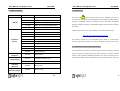
16. Specification :
Voltage : 100/240Vac, 50/60Hz
DMX Channels : 8
Fuse : 2A Slow blow
Dimensions : 256 x 180 x 99mm
Power Consumption : 20W
Laser Class : 3B
Laser Power : 40mW Green, 100mW Red
Weight : 3.0kg
Note: Conforms to Laser and LED Safety standard BSEN60825-1 2007
incorporating corrigendum 2008
LS-Krypton Laser
User manual
Manual copyright protected by QTX Light
152.742UK
Version 1.0
16
User Manual –LS-Krypton Laser
152.742UK
User Manual –LS-Krypton Laser
000-036
Laser Blackout
037-072
Red
073-108
Green
000-255
Alternately Strobe Red & Green
000-056
Red On, Strobe Green
Please read this manual fully before installing or
057-112
Green On, Strobe Red
operating this product as it contains important
113-168
Both Red and Green Strobe
000-009
No strobe
010-255
Slow to Fast
CAUTION
7 (Rotation
Direction)
•
safety information relating to its installation and
11 (Strobe)
operation.
•
152.742UK
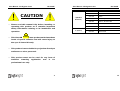
This Class 3B
laser product emits hazardous
levels of optical radiation and will cause injury to
the eyes if viewed directly.
•
This product is not suitable for projection directly at
audiences or other personnel.
•
This product must not be used for any form of
audience
scanning
application
and
is
for
professional use only.
2
15
User Manual –LS-Krypton Laser
152.742UK
14. DMX controlling :
DMX CHANNEL
User Manual –LS-Krypton Laser
152.742UK
1. Introduction:
DMX VALUE
DESCRIPTION
000-009
Laser Block Out
000-060
ARA, Auto Running Random Effect
061-110
ASR, Auto Running Slow Random Effect
111-160
SRA, Sound Activated Random Effect
161-255
DMX MODE (Other channels active)
000-025
Grating Effect 1
026-050
Grating Effect 2
051-075
Grating Effect 3
076-100
Grating Effect 4
2 (Rotation
101-125
Grating Effect 5
This product contains no user-serviceable parts. Under no circumstances
Speed)
126-150
Grating Effect 6
should any attempt be made by the user to dismantle or modify it in any way.
151-175
Grating Effect 7
176-200
Grating Effect 8
201-225
Grating Effect 9
226-255
Grating Effect 10
000-255
Slow to Fast
000-127
The Second Grating = Off
128-255
The Second Grating = On
000-255
Slow to Fast
000-255
Short to Long
1 (Mode)
3 (Grating
Vibration)
4 (2nd Grating)
5 (Grating
Vibration)
6 (2nd Grating
Vibration Range)
This Class 3B
laser product should only be installed and used by
personal who are trained in the management of laser radiation and are able to
operate in accordance within the guidance given by the Health and Safety
Executive (HSE) in HS(G)95: “The Radiation Safety of Lasers used for Display
purposes”.
Copies of this guide can be downloaded from the HSE website below:
www.hse.gov.uk/pubns/priced/hsg95.pdf
2. Installation and mounting instructions:
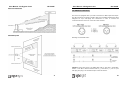
This product must be securely mounted so that its emission is always directed
away from people and objects that are able to reflect the emission towards
people. In this regard the separation distances of 3 metres vertically and 2.5
metres horizontally, cited in HS(G)95 and shown overleaf must be observed.
14
3
User Manual –LS-Krypton Laser
152.742UK
User Manual –LS-Krypton Laser
152.742UK
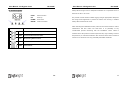
13. DMX-512 connection :
The fixture is equipped with 3-pin XLR connectors for DMX input and output.
The SE connectors are wired in parallel. Only use a shielded twisted-pair cable
designed for 3-pin XLR-plugs and connectors in order to connect the
controller with the fixture or one fixture with another.
Building a serial DMX-chain:
Caution: At the last fixture, the DMX-cable has to end with a terminator.
Solder a 120 Ohm resistor between PIN 2 (-) and PIN 3 (+) into a 3-pin
XLR-plug and plug it in the DMX-output of the last fixture.
4
13
User Manual –LS-Krypton Laser
152.742UK
User Manual –LS-Krypton Laser
152.742UK
Always allow enough room for adequate ventilation. It is important never to
12. Functions guide:
obstruct the fan or air-vents
FUNC:
Select Function
UP:
Scroll up
The product must be fixed to suitable rigging using an appropriate clamp and
DOWN:
Scroll down
the fixing screws tightened to prevent the fixture from moving. A suitable
ENTER:
Confirm selection
safety cable should also be used.
When selecting the installation location, take into account the need for routine
DISPLAY
STAND ALONE MODE PREPROGRAM EFFECT
ARA
maintenance and also make sure that there is no possibility of any
unauthorized persons interfering with the installation. Never install in
Auto Running Random Effect
locations where the product could be exposed to rain, high humidity, extreme
SRS
Sound Activated Random Effect
SLP
Slow Moving Patterns Effect
SLA
SLAve mode
DMX
DMX Address
temperatures, or restricted ventilation. Also ensure that the laser is located a
minimum of 0.5metres from any potentially flammable materials
12
5
User Manual –LS-Krypton Laser
152.742UK
LS-KRYPTON LASER: For indoor use only
User Manual –LS-Krypton Laser
152.742UK
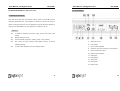
11. Rear display:
3. General introduction:
This dual colour laser has two stepper motors, which in combination with a
multipoint diffraction lens, work together to produce a whole new range of
effects covering a wide area. It is competitively priced for what it is capable of,
making it an ideal addition to any nightclub or mobile DJ set-up.
Features :
3 modes of operation (Sound to light, auto & auto mode slow
effect)
Master and slave mode
8 channel DMX (Programs, Grating, Laser colour, Strobe)
Key control for laser emission with added security of remote
5.
IEC Power input
switching facility
6.
Fuse Holder
2 motors and diffraction lens for multiple effects
7.
Power switch ON/OFF
8.
Interlock input (For emergency stop button)
9.
Sound sensitivity control
10. Digital control display
11. DMX Input
12. DMX Output
13. Safety Key
14. Microphone
15. Earth Screw
6
11
User Manual –LS-Krypton Laser
152.742UK
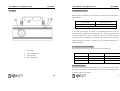
10. Layout:
User Manual –LS-Krypton Laser
152.742UK
4. Packaging contents:
Please check the contents to ensure that the product has been received in
good condition.
Laser x 1unit
User’s Guide x 1pc
IEC Power Lead x 1pc
Interlock Connector x 1pcs
Safety Keys x 2pcs
If you find any accessory is missing or the lighting has arrived with any
problems, please contact your local dealer at once.
This product contains no
user-serviceable parts so make no attempt to try to fix or modify this item
yourself as this will invalidate the warranty. We recommend you keep the
original package and proof of purchase for any possible replacement or
returned demand.
5.
Connect with power supply:
Use the plug to connect to the main power supply as following.
1.
Power LED
2.
Music Detection LED
3.
Laser Aperture
4.
Mounting Bracket
6.
Line
Connection
International signal
Brown
Live
L
Blue
Neutral
N
Yellow /Green
Earth
E
Replacing fuse :
Disconnect from the main power supply first, then remove the fuse from the
IEC Socket or fuse holder . Replace with a fuse of the correct rating as stated
on product label or user guide.
10
7
User Manual –LS-Krypton Laser
152.742UK
User Manual –LS-Krypton Laser
152.742UK
7. Caution:
8.
General maintenance:
For your safety, please kindly pay attention to all of the warnings below:
Be sure to power off the fixture before conducting maintenance.
To maintain optimum performance and minimize wear, fixtures should be
Always plug in the power plug last and disconnect from the mains when
cleaned frequently. Usage and environment are contributing factors in
the device is not in use or before cleaning.
determining frequency. As a general rule, fixtures should be cleaned at least
Do not install and operate the device in rain or extreme heat, moisture
twice a month. Dust build-up reduces can reduce light output & performance
or dusty environments.
as well as overheating. This can lead to reduced life and increased mechanical
This device is for indoor use only and in a dry environment.
wear.
Do not switch on immediately. Wait until the unit reaches room
Unplug fixture from power. Use a vacuum or air compressor and a soft brush
temperature.
to remove dust collected on external vents and internal components. Clean all
Do not shake the device and avoid brute force when installing or
glass when fixture is cold with a mild solution to the cloth or tissue, and drag
operating
dirt and grime to the outside of the lens. Gently polish optical surfaces until
Do not use the device during thunderstorms and please disconnect the
they are free of haze and lint.
power.
The cleaning of internal and external optical lenses and/or mirrors must be
Do not use solvents or aggressive detergent to clean the device. Use a
carried out periodically to optimize light output. Cleaning frequently depends
soft and clean cloth.
on the environment in which the fixture operates: damp, smoky or
Do not modify the device or the connected power cord without
particularly dirty surroundings can require cleaning fluid. Always dry the parts
authorization.
carefully. Clean the external optics at least every 20 days.
Do not stare into the aperture. This product emits hazardous levels of
optical radiation and will cause serious injury to the eyes if viewed at
9.
Quick trouble shooting :
close range.
This product should be securely mounted so that its output emission is
7.1 If the unit does not function – Check that the main power is on and the
always directed away from people and at objects that are able to reflect
fuse is intact.
emission towards people. In this regard, the separation distances cited
7.2 If the unit is not reacting to music – check the unit is in “sound to light”
in HS(G)95 should be observed.
mode and that the sensitivity control is fully clockwise.
The symbol
determines the minimum distance from lighted
objects. The minimum distance between light-output and the
7.3 If the product is not reacting to DMX signals, check the cables and
illuminated surface must be more than 0.5m.
connections
8
9