1
LCD Projector
X500U / X490U / S490U
Control projector by using a personal computer
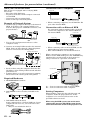
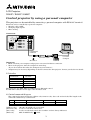
This projector can be controlled by connecting a personal computer with RS-232C terminal.
Functions can be controlled by a personal computer:
• Turn the ON or OFF
• Changing input signals
• Menu setting
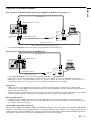
Connection
REMOTE
INPUT SELECT
COMPUTER 1 IN
VIDEO 1 IN
COMPUTER 2 IN
AUDIO 2 IN
COMPUTER OUT
AUDIO OUT
VIDEO 2 IN
S-VIDEO
VIDEO
MAIN
O
USB
RS-232C
AUDIO 1 IN
DIGITAL
ANALOG
I
AC IN
L
AUDIO
R
to RS-232C
terminal
to Com1
Comport
RS-232C cable
Mini DIN 8P
D-SUB 9P
Important:
• Make sure that your computer and projector are turned off before connection.
• Turn on the projector after the computer is started up.
(If you do not follow this order, the Comport may not function.)
• Adapters may be necessary depending on the PC connected to this projector. Contact your dealer for details.
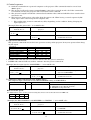
1) Interface
PROTOCOL
RS-232C
BAUD RATE
9600 [bps]
DATA LENGTH
8 [bits]
PARITY BIT
STOP BIT
NONE
1 [bit]
FLOW CONTROL
NONE
This projector uses RXD, TXD and GND lines for RS-232C control.
For RS-232C cable,the reverse type cable should be used.
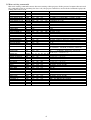
2) Control command diagram
The command is structured by the address code, function code, data code and end code. The length of the
command is different by each function.
HEX
Address code
30h 30h
Function code
Function
Data code
Data
'0' '0'
Function
Data
ASCII
[Address code]
[Function code]
[Data code]
[End code]
End code
0Dh
30h 30h (In ASCII code, '0' '0') fixed.
A code of each fixed control move.
A code of each fixed control data (number) and not always indicated.
0Dh (In ASCII code, ' ') fixed.
1