1
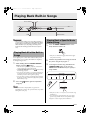
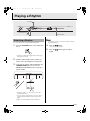
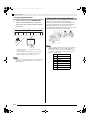
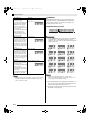
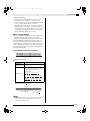
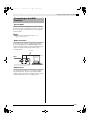
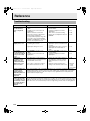
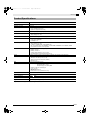
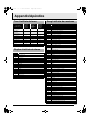
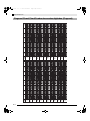
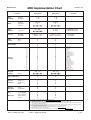
ES USER’S GUIDE GUÍA DEL USUARIO Please keep all information for future reference. Guarde toda información para tener como referencia futura. Safety Precautions Before trying to use the piano, be sure to read the separate “Safety Precautions”. Precauciones de seguridad Antes de intentar usar el piano, asegúrese de leer las “Precauciones de seguridad” separadas. PX120ES1A TO REDUCE THE RISK OF FIRE OR ELECTRIC SHOCK, REFER SERVICING TO QUALIFIED SERVICE PERSONNEL. IMPORTANT SAFETY INSTRUCTIONS 1. 2. 3. 4. 5. 6. 7. 8. 9. Read these instructions. Keep these instructions. Heed all warnings. Follow all instructions. Do not use this apparatus near water. Clean only with dry cloth. Do not block any ventilation openings. Install in accordance with the manufacturer’s instructions. Do not install near any heat sources such as radiators, heat registers, stoves, or other apparatus (including amplifiers) that produce heat. Do not defeat the safety purpose of the polarized or grounding-type plug. A polarized plug has two blades with one wider than the other. A grounding type plug has two blades and a third grounding prong. The wide blade or the third prong are provided for your safety. If the provided plug does not fit into your outlet, consult an electrician for replacement of the obsolete outlet. 10. Protect the power cord from being walked on or pinched particularly at plugs, convenience receptacles, and the point where they exit from the apparatus. 11. Only use attachments/accessories specified by the manufacturer. 12. Use only with the cart, stand, tripod, bracket, or table specified by the manufacturer, or sold with the apparatus. When a cart is used, use caution when moving the cart/apparatus combination to avoid injury from tip-over. 13. Unplug this apparatus during lightning storms or when unused for long periods of time. 14. Refer all servicing to qualified service personnel. Servicing is required when the apparatus has been damaged in any way, such as power-supply cord or plug is damaged, liquid has been spilled or objects have fallen into the apparatus, the apparatus has been exposed to rain or moisture, does not operate normally, or has been dropped. The apparatus shall not be exposed to dripping or splashing and that no objects filled with liquids, such as vases, shall be placed on the apparatus. The power indicator being unlit does not mean the apparatus is completely disconnected from the MAINS. When you need to have the apparatus completely disconnected from the MAINS, you must unplug the power cord. For that purpose, locate the apparatus in a way that secures easy access to the power cord. NOTICE This equipment has been tested and found to comply with the limits for a Class B digital device, pursuant to Part 15 of the FCC Rules. These limits are designed to provide reasonable protection against harmful interference in a residential installation. This equipment generates, uses and can radiate radio frequency energy and, if not installed and used in accordance with the instructions, may cause harmful interference to radio communications. However, there is no guarantee that interference will not occur in a particular installation. If this equipment does cause harmful interference to radio or television reception, which can be determined by turning the equipment off and on, the user is encouraged to try to correct the interference by one or more of the following measures: • Reorient or relocate the receiving antenna. • Increase the separation between the equipment and receiver. • Connect the equipment into an outlet on a circuit different from that to which the receiver is connected. • Consult the dealer or an experienced radio/TV technician for help. FCC WARNING Changes or modifications not expressly approved by the party responsible for compliance could void the userís authority to operate the equipment. Important! Please note the following important information before using this product. • Before using the AD-12 Adaptor to power the unit, be sure to check the AC Adaptor for any damage first. Carefully check the power cord for breakage, cuts, exposed wire and other serious damage. Never let children use an AC adaptor that is seriously damaged. • The product is not intended for children under 3 years. • Use only CASIO AD-12 adaptor. • The AC adaptor is not a toy. • Be sure to disconnect the AC adaptor before cleaning the product. This mark applies in EU countries only. CASIO Europe GmbH Bornbarch 10, 22848 Norderstedt, Germany PX120_e.book 1 ページ 2007年6月26日 火曜日 午前11時36分 Contents General Guide ................................... E-2 Installing the Music Stand........................................... E-2 Configuring Settings with the Keyboard ......................................... E-24 TONE/SETTING Button.............................................. E-3 To configure settings with the keyboard.................... E-24 Saving Settings and Using Operation Lock ................ E-3 Keyboard Keys Used for Configuring Settings.......... E-25 Power Outlet...................................... E-4 Using an AC Adaptor .................................................. E-4 Connections ...................................... E-5 Connecting Headphones ............................................ E-5 Connecting Audio Equipment or an Amplifier ............. E-5 Connecting a Pedal .................................................... E-6 Bundled and Optional Accessories............................. E-6 Playing with Different Tones ........... E-7 Selecting and Playing a Tone ..................................... E-7 Adjusting the Brilliance of a Tone ............................... E-9 Layering Two Tones ................................................... E-9 Using Effects............................................................. E-10 Using the Metronome ............................................... E-10 Playing a Piano Duet ................................................ E-11 Playing Back Built-in Songs .......... E-13 Parameter List........................................................... E-26 Tone selection ....................................................... E-26 Brilliance (BRILLIANCE)........................................ E-26 Reverb (REVERB) ................................................. E-26 Chorus (CHORUS) ................................................ E-26 Song/Rhythm Select (SONG/RHYTHM SELECT)..... E-26 Tempo (TEMPO) ................................................... E-26 Metronome Beat (METRONOME BEAT)............... E-26 Song, Auto Accompaniment volume...................... E-26 Metronome Volume ............................................... E-26 Auto Accompaniment mode (MODE) .................... E-26 Touch Response (TOUCH RESPONSE) .............. E-27 Keyboard Key (TRANSPOSE)............................... E-27 Keyboard tuning (TUNING) ................................... E-27 Send Channel ........................................................ E-28 Local Control.......................................................... E-28 Operation Tone...................................................... E-28 Back Up ................................................................. E-28 Operation Lock ...................................................... E-28 Connecting to the MIDI Terminal .............................. E-29 Playing Back All of the Built-in Songs....................... E-13 Playing Back a Specific Music Library Song............. E-13 Reference......................................... E-30 Practicing with a Music Library Song........................ E-14 Troubleshooting ........................................................ E-30 Playing a Rhythm............................ E-15 Product Specifications............................................... E-31 Operating Precautions .............................................. E-32 Selecting a Rhythm................................................... E-15 Using Auto Accompaniment ..................................... E-16 Appendix............................................ A-1 Tone List ..................................................................... A-1 Recording and Play Back............... E-20 Rhythm List ................................................................. A-1 Tracks ....................................................................... E-20 Song List ..................................................................... A-1 Recording Your Keyboard Play ................................ E-21 Fingered Chord Chart ................................................. A-2 Playing Back from Digital Piano Memory.................. E-22 Deleting Recorded Data ........................................... E-23 MIDI Implementation Chart Company and product names used in this manual may be registered trademarks of others. E-1 PX120_e.book 2 ページ 2007年6月26日 火曜日 午前11時36分 General Guide 1 2 ∗1 3 4 ∗2 5 6 7 8 9 bk ∗4 ∗3 *1 Bottom bl *2 Back bm bn bo *4 Installing the Music Stand Insert the bottom of the music stand into the groove on the top of the digital piano’s console. E-2 *3 Left Side bp bq PX120_e.book 3 ページ 2007年6月26日 火曜日 午前11時36分 General Guide NOTE • The names shown here are always indicated in bold when they appear within the text of this manual. 1 VOLUME controller 9 GRAND PIANO (CLASSIC) button 2 SYNCHRO/FILL-IN button bk TONE/SETTING button 3 X/ button bl Pedal connector 4 MUSIC LIBRARY, RHYTHM button bm DC 12V terminal 5 LR button bn DAMPER PEDAL jack 6 RECORDER button bo MIDI OUT/IN terminals 7 METRONOME button bp POWER button 8 GRAND PIANO (MODERN) button bq PHONES jack TONE/SETTING Button The TONE/SETTING button is used when configuring a variety of different digital piano settings. The following are TONE/SETTING button basics. z To change a setting, hold down the TONE/SETTING button as you press the keyboard key that is assigned the setting you want to select. An operation confirmation tone will sound whenever you press a keyboard key to configure a setting. Example: “Selecting a Tone Using the Keyboard Keys” on page E-8. z For details about operations and settings, see “Configuring Settings with the Keyboard” on page E-24. Saving Settings and Using Operation Lock Your digital piano lets you save its current settings, and lock its buttons to protect against operation errors. For details, see “Parameter List” on page E-26. E-3 PX120_e.book 4 ページ 2007年6月26日 火曜日 午前11時36分 Power Outlet Your digital piano runs on standard household power. Be sure to turn off power whenever you are not using the digital piano. Using an AC Adaptor Use only the AC adaptor that is specified for use with this digital piano. Specified AC Adaptor: AD-12 Back DC 12V terminal AC adaptor AD-12 Household power Note the following important precautions to avoid damage to the power cord. During Use • Never pull on the cord with excessive force. • Never repeatedly pull on the cord. • Never twist the cord at the base of the plug or connector. • The power cord should not be stretched tight while it is in use. During Movement • Before moving the digital piano, be sure to unplug the AC adaptor from the power outlet. During Storage • Loop and bundle the power cord, but never wind it around the AC adaptor. IMPORTANT! • Make sure the digital piano is turned off before plugging in or unplugging the AC adaptor. • The AC adaptor will become warm to the touch after very long use. This is normal and does not indicate malfunction. E-4 PX120_e.book 5 ページ 2007年6月26日 火曜日 午前11時36分 Connections IMPORTANT! • Whenever connecting something to the digital piano, first use the VOLUME controller to set the volume to a low level. After connecting, you can adjust the volume to the level you want. Connecting Headphones Connecting Audio Equipment or an Amplifier You can connect audio equipment or a music amplifier to the digital piano and then play through external speakers for more powerful volume and better sound quality. Pin plug Left Side Commercially available headphones PHONES jack Audio amplifier AUX IN jack, etc. RIGHT (Red) LEFT (White) Stereo mini plug To digital piano’s PHONES jack Pin jack Pin plug (red) Guitar amplifier Keyboard amplifier, etc. INPUT 1 INPUT 2 Mini plug Connect commercially available headphones to the PHONES jack. Connecting headphones to the PHONES jack cuts off output to the speakers, which means you can practice even late at night without bothering others. To protect your hearing, make sure that you do not set the volume level too high when using headphones. NOTE • Be sure to push the headphones plug into the PHONES jack as far as it will go. If you don’t, you may hear sound from only one side of the headphones. Pin plug (white) Standard plug Connecting Audio Equipment (Figure 1) Use commercially available connecting cords (mini Plug × 1, Pin Plugs × 2) to connect as shown in Figure 1. Make sure that the end of the cord that you connect to the digital piano is a stereo mini plug. A monaural mini plug will result in output of only one of the two stereo channels. Normally, you should set the input selector of the audio equipment to the terminal where the digital piano is connected (AUX IN, etc.) Adjust volume using the digital piano’s VOLUME controller. Connecting a Music Amplifier (Figure 2) Connect the connecting cord* to one of the types of amplifiers shown in Figure 2. Adjust volume using the digital piano’s VOLUME controller. * Digital Piano: Stereo mini plug Amplifier: Inputs signals for the left and right channels. Not connecting either plug will result in output of only one of the two stereo channels. E-5 PX120_e.book 6 ページ 2007年6月26日 火曜日 午前11時36分 Connections SP-30 Pedal Functions Connecting a Pedal DAMPER PEDAL jack Connecting the supplied pedal (SP-3) to the DAMPER PEDAL jack makes it possible to use the pedal as a damper pedal. Pressing the damper pedal while playing will cause the notes you play to reverberate for a very long time. • When a GRAND PIANO tone (MODERN, CLASSIC, VARIATION) is selected as the tone, pressing this pedal will cause notes to reverberate just like the damper pedal on an acoustic grand piano. Back z Damper Pedal In addition to the damper pedal functions described in the column to the left, the SP-30 pedal also supports half-pedal operation, so pressing the pedal part way applies only a partial damper effect. z Soft Pedal Pressing this pedal suppresses notes played on the keyboard after the pedal was pressed, and makes them sound softer. z Sostenuto Pedal Only the notes that are played while this pedal are depressed are sustained until the pedal is released. DAMPER PEDAL jack Soft pedal Damper pedal Sostenuto pedal NOTE • The optional CS-65P or CS-66P stand is required in order to use the SP-30 Pedal Unit. SP-3 Bundled and Optional Accessories Pedal Connector You can connect the optionally available 3-Pedal Unit (SP-30) to the pedal connector on the bottom of the digital piano. You can then use the pedals for expression that is similar to that available on an acoustic piano. Bottom Pedal connector E-6 Use only accessories that are specified for use with this digital piano. Use of unauthorized accessories creates the risk of fire, electric shock, and personal injury. PX120_e.book 7 ページ 2007年6月26日 火曜日 午前11時36分 Playing with Different Tones / METRONOME TONE/SETTING POWER VOLUME Selecting and Playing a Tone This digital piano has 11 built-in tones. * You can select these tones using keyboard keys. The name of the tones assigned to each keyboard key is marked above the keys. For details about selecting these tones, see “Selecting a Tone Using the Keyboard Keys” on page E-8. 1. Press the POWER button to turn on the digital piano. GRAND PIANO NOTE • Grand Piano Tones (MODERN, CLASSIC) Your digital piano has a total of 11 built-in tones. The MODERN and CLASSIC tones are stereo sampled tones that can be selected using the GRAND PIANO buttons. Try using the GRAND PIANO tones to familiarize yourself with their distinctive sounds and characteristics. Tone Name Characteristics MODERN This tone provides a bright and hard grand piano sound. The volume and timbre of this tone is quick to respond to different keyboard pressures, and it has relatively strong reverb. This tone is a good choice for dynamic and lively performances. CLASSIC This is a natural piano tone that closely resembles the sound of an acoustic grand piano. Though reverb and other effects are kept to a minimum, doing so enhances the impact of operating the piano pedals (acoustic resonance), for musically delicate expressions. This tone is a good choice for lesson and practice sessions. POWER button IMPORTANT! • When you turn on the piano, it performs a power up operation in order to initialize its system. During system initialization, the LR button lamps flash for about six seconds to let you know that system initialization is in progress. 2. Select the tone you want. • Press one of the GRAND PIANO buttons to select either a modern sound (MODERN) or a classic sound (CLASSIC). • A lamp will light above the currently selected button. • See “Selecting a Tone Using the Keyboard Keys” on page E-8 for information about selected other tones. 3. Use the VOLUME controller to adjust the volume level. 4. Try playing something on the digital piano. E-7 PX120_e.book 8 ページ 2007年6月26日 火曜日 午前11時36分 Playing with Different Tones Selecting a Tone Using the Keyboard Keys ʬʊʽ ɹʳʁʍɹ MODERN CLASSIC ʚʴɲ˂ʁʱʽ VARIATION GRAND PIANO ɺʳʽʓʞɬʘ 1± ² 2 ʝʠʳʟɳʽ VIBRAPHONE ʝʠʳʟɳʽ STRINGS ± 1 ² 2 BASS (LOWER) ʣ˂ʃ ᴥͲᬩᴦ ELEC PIANO ɲʶɹʒʴʍɹʞɬʘ HARPSICHORD ʃʒʴʽɺʃ PIPE ORGAN ʃʒʴʽɺʃ Tone Setting Keys 1. While holding down the TONE/SETTING button, press the keyboard key that corresponds to the tone you want to select. TONE/SETTING button Example: Pipe Organ Bass Tones (BASS 1, BASS 2) Selecting either of the two bass tones (BASS 1, BASS 2) on the right side of the tone setting keys in step 1 of the above procedure will assign the selected bass tone to the low range (left side) of the keyboard. The high range (right side) will be assigned the tone that was selected when you pressed the BASS 1 or BASS 2 key. • The BASS 1 and BASS 2 keys let you effectively split the keyboard between two different tones. Split Point Low Range High Range BASS 1 PIPE ORGAN (Currently selected tone.) NOTE • To return the keyboard to a single tone, select any tone other than BASS 1 or BASS 2. • You cannot select BASS 1 or BASS 2 when recording to Track 2. E-8 PX120_e.book 9 ページ 2007年6月26日 火曜日 午前11時36分 Playing with Different Tones Adjusting the Brilliance of a Tone 1. While holding down the TONE/SETTING button, use the BRILLIANCE keys to specify a brilliance value in the range of –3 to 3. Layering Two Tones Use the following procedure to layer two tones, so they sound at the same time. 1. While holding down the TONE/SETTING button, simultaneously press the keyboard keys that correspond to the two tones that you want to layer. Example: To layer HARPSICHORD and STRINGS. For this type of sound: Press this keyboard key: Mellower and softer T Brighter and harder S HARPSICHORD NOTE • To return a tone to its initial default setting, press T and S at the same time. STRINGS 2. To unlayer the keyboard, select another tone by pressing the GRAND PIANO button or by using the procedure under “Selecting a Tone Using the Keyboard Keys” (page E-8). NOTE • You cannot layer the BASS 1 or BASS 2 tone with another tone. • You cannot perform the layer operation when recording to Track 2. E-9 PX120_e.book 10 ページ 2007年6月26日 火曜日 午前11時36分 Playing with Different Tones Using Effects Using the Metronome Reverb . . . . Makes your notes resonate. Chorus . . . Adds more breadth to your notes. To configure reverb and chorus effect settings 1. 1. • This starts the metronome. • The lamp above the X/ button flash in time with the metronome beat. 2. While holding down the TONE/SETTING button, press the REVERB or CHORUS keyboard key. • Reverb Value Select this setting: Turn off reverb OFF Turn on reverb 1: Room 2: Small Hall 3: Large Hall 4: Stadium To change the beat, hold down the TONE/ SETTING button as you press one of the METRONOME BEAT keys to select a beat setting. • You can specify a beat value of 0, 2, 3, 4, or 6 as the beat. Specifying 0 as the setting plays a straight click, without any chime. This setting lets you practice with a steady beat. Example: Selecting Reverb 4 To do this: Press the METRONOME button. 3. While holding down the TONE/SETTING button, use the TEMPO keys to specify a tempo value in the range of 20 to 255 beats per minute. • Chorus Value To do this: Select this setting: Turn off chorus OFF Turn on chorus 1: Light Chorus 2: Medium Chorus 3: Deep Chorus 4: Flanger (Whooshing effect) • Each press of the + or – key raises or lowers the tempo value by 1. • You can use the value input keys (0 to 9) to enter a specific value. Be sure to input all three digits. Example: To enter “96”, press keys 0, 9, 6. E-10 PX120_e.book 11 ページ 2007年6月26日 火曜日 午前11時36分 Playing with Different Tones 4. Press the METRONOME button or X/ button to turn off the metronome. Playing a Piano Duet NOTE You can use the Duet Mode to split the piano’s keyboard in the center so two people can play a duet. The left and right side keyboards have virtually the same range. If you have the optionally available SP-30 Pedal Unit installed, the left pedal operates as the left side damper pedal, while the right pedal is the right side damper pedal. The Duet Mode is the perfect way to conduct lessons, with the teacher playing on the left side as the student playing the same song on the right side. • You can perform the following procedure at any time, regardless of whether or not the metronome is sounding. Keyboard NOTE • To return the tempo setting to the default tempo of the currently selected Music Library tune or the tempo recommended for the rhythm you are using, press the + and – keys at the same time in step 3. To adjust the metronome volume 1. Split point While holding down the TONE/SETTING button, use the METRONOME VOLUME keys to specify a volume value in the range of 0 to 42. • For details about using the keyboard keys for settings, see “Keyboard Keys Used for Configuring Settings” on page E-25. • Each press of the T orS key raises or lowers the metronome volume value by 1. Left keyboard C3 C4 C5 Right keyboard C6 C3 (middle C) C4 C5 C6 (middle C) Pedals z Using the Optional SP-30 Pedal Unit NOTE Right side damper pedal Left side damper pedal • To return to the initial default setting, press T and S at the same time. Left and right side damper pedal NOTE • Only the right-side damper pedal supports half-pedal operation. z Using the Optional SP-3 Pedal Unit Right side damper pedal NOTE • Does not support half-pedal operation. • Cannot be used for left-side damper pedal operation. 1. Press one of the GRAND PIANO buttons (MODERN or CLASSIC) to select the piano tone you want to use for the duet. NOTE • You can use only the MODERN or CLASSIC tone for a duet. 2. Press the MODERN and CLASSIC GRAND PIANO buttons at the same time. • This will enter the Duet Mode and split the keyboard. The GRAND PIANO lamp will flash momentarily to let you know when the Duet Mode is entered. E-11 PX120_e.book 12 ページ 2007年6月26日 火曜日 午前11時36分 Playing with Different Tones 3. To exit the Duet Mode, press either the MODERN or CLASSIC GRAND PIANO button. IMPORTANT! • The digital piano also will exit the Duet Mode if you use the TONE/SETTING button and tone setting keyboard keys to select a tone in step 3. • You cannot use the Duet Mode while using Auto Accompaniment or while recording. Changing the Octaves of the Keyboards You can change the ranges of the left and right keyboards in octave units from their initial default settings. This comes in handy, for example, if the initial default range is not enough when one person is playing the left hand part and another person is playing the right hand part. 1. While holding down the MODERN and CLASSIC GRAND PIANO buttons, press the keyboard key of C that you want located at C4 (middle C) of the left keyboard. Example: Press the keyboard key of the leftmost C will assign the range shown below. Left keyboard C4 C5 C6 Right keyboard C7 C3 C4 C5 C6 (Pressed key) 1 octave higher than initial setting 2. Unchanged While holding down the MODERN and CLASSIC GRAND PIANO buttons, press the keyboard key of C that you want located at C4 (middle C) of the right keyboard. NOTE • You can return the keyboards to their initial default ranges by exiting and then re-entering the Duet Mode. E-12 PX120_02_e.fm 13 ページ 2007年6月28日 木曜日 午後1時54分 Playing Back Built-in Songs MUSIC LIBRARY LR / IMPORTANT! • After you select a built-in song, it can take a number of seconds for the song data to be loaded. While the data is being loaded, the keyboard keys and button operations will be disabled. If you are playing something on the keyboard, the following operation will cause output to stop. TONE/SETTING Playing Back a Specific Music Library Song 1. Playing Back All of the Built-in Songs Your digital piano comes with a Music Library of 60 built-in tunes. You can play all 60 tunes in sequence, from beginning to end. 1. While holding down the MUSIC LIBRARY button, press the X/ button. • This will start repeat demo playback of the built-in songs in sequence, from 01 through 60. • The MUSIC LIBRARY button and X/ button lamps flash during playback. • You can play along with a song on the keyboard as it is playing. The tone assigned to the keyboard is the one that is preset for the song that is playing. • You can select a specific song during demo playback. For details, see step 2 under “Playing Back a Specific Music Library Song”. 2. Press the MUSIC LIBRARY button so the lamp above the button is lit. • Each press of the button toggles between the upper lamp and lower lamp. 2. Find the song number of the song you want to play in the song list on page A-1. 3. To change to another song, hold down the TONE/SETTING button as you use the SONG/RHYTHM SELECT keys to specify a song number. Press the X/ button again to stop built-in song play. NOTE • The tune selection and playback stop operations described above are the only operations that are possible during demo tune play. • Each press of the + or – key raises or lowers the song number by 1. • You can use the value input keys (0 to 9) to enter a specific song number. Be sure to input both digits. Example: To select song 08, enter 0 and then 8. E-13 PX120_02_e.fm 14 ページ 2007年6月28日 木曜日 午後1時54分 Playing Back Built-in Songs IMPORTANT! • Be sure to allow a bit of time between + and – key operations. Performing a series of + and – key operations too quickly can cause some of the operations to be skipped. When selecting a song, use the number input keys instead of the + and – keys if the song number you want to select is far from the current selected song number. 4. Press the X/ button. • This starts the playback of the song. 5. To stop playback, press the X/ button again. • Playback will stop automatically when the end of the song is reached. NOTE • Pressing the + and – keys at the same time will select song number 01. • You also can adjust the playback tempo and volume of the song. See “Configuring Settings with the Keyboard” on page E-24 for more information. Practicing with a Music Library Song You can turn off the left hand part or right hand part of a song and play along on the piano. NOTE • The Music Library includes duet tunes (song numbers 12, 37, and 45). While a duet is selected, you can turn off the first piano <Primo> or second piano <Secondo> tone and play along with the song. • A number of tunes have tempo changes part way through in order to produce specific musical effects. PREPARATION • Select the song you want to practice and adjust the tempo. See “Configuring Settings with the Keyboard” on page E-24. 1. Use the LR button to turn off a part. • Each press of the LR button cycles through the part settings as shown below. The indicator lamps above the button show which part is turned off. Left hand Right hand Both parts on 2. Right hand part off Left hand part off Press the X/ button. • This starts playback, without the part you turned off in step 1. 3. 4. E-14 Play the missing part on the keyboard. To stop playback, press the X/ button again. PX120_e.book 15 ページ 2007年6月26日 火曜日 午前11時36分 Playing a Rhythm RHYTHM SYNCHRO/FILL-IN / Selecting a Rhythm You can select from among 20 built-in rhythms. 1. Press the RHYTHM button so the lamp below it is lit. TONE/SETTING NOTE • Pressing the + and – keys at the same time will select rhythm number 01. 4. Press the X/ button. • This will start the rhythm. 5. Press the X/ button again to stop the rhythm. • Each press of the button toggles between the upper lamp and lower lamp. 2. Find the rhythm number of the rhythm you want to use in the Rhythm List on page A-1. 3. To change to another rhythm, hold down the TONE/SETTING button as you use the SONG/RHYTHM SELECT keys to specify a rhythm number. • Each press of the + or – key raises or lowers the rhythm number by 1. • You can use the value input keys (0 to 9) to enter a specific rhythm number. Be sure to input all twodigits. Example: To select rhythm 03, enter 0 and then 3. E-15 PX120_e.book 16 ページ 2007年6月26日 火曜日 午前11時36分 Playing a Rhythm To adjust playback tempo 1. While holding down the TONE/SETTING button, use the TEMPO keys to specify a tempo value in the range of 20 to 255 beats per minute. Using Auto Accompaniment With Auto Accompaniment, the digital piano automatically plays rhythm, bass, and chord parts in accordance with chords you select using simplified keyboard fingerings, or chords you play. Auto Accompaniment makes it feel like you have your own private backup group with you all the time. NOTE • Each press of the + or – key raises or lowers the tempo value by 1. • You can use the value input keys (0 to 9) to enter a specific value. Be sure to input all three digits. Example: To enter “96”, press keys 0, 9, 6. NOTE • Pressing the + and – keyboard keys at the same time will return to the recommended tempo for the currently selected rhythm. E-16 • With the rhythms listed below, make sure that CASIO CHORD, FINGERED, or FULL RANGE CHORD is selected before you try playing chords. The percussion sounds will sound at lower volume while no chord is fingered on the keyboard. 10 ROCK’N’ROLL 14 ARPEGGIO 1 15 ARPEGGIO 2 16 MARCH 1 17 MARCH 2 18 STRIDE PIANO 19 WALTZ 1 20 WALTZ 2 PX120_e.book 17 ページ 2007年6月26日 火曜日 午前11時36分 Playing a Rhythm To play with Auto Accompaniment PREPARATION • Use the procedures under “Selecting a Rhythm” to select the rhythm you want to use and adjust the tempo. 1. While holding down the TONE/SETTING button, press a MODE keyboard key to select a chord mode. Example: Fingered NOTE • See “Configuring Settings with the Keyboard” on page E-24 for information about adjusting accompaniment volume. How to Play Chords The way you finger chords depends on the current Auto Accompaniment mode. If you want to play without Auto Accompaniment, use the NORMAL mode. CASIO CHORD CASIO CHORD NORMAL FULL RANGE CHORD Even if you do not know how to play chords normally, this mode lets you play four different types of chords using simplified fingerings in the accompaniment keyboard range of the keyboard. The following shows where the accompaniment keyboard range is located, and explains how to finger chords in the CASIO CHORD mode. FINGERED MODE CASIO CHORD Mode Keyboard Accompaniment keyboard range • See “How to Play Chords” on page E-17 for details about Auto Accompaniment modes and their chord fingerings. 2. Melody keyboard range IMPORTANT! • In the CASIO CHORD mode, the keys in the accompaniment keyboard range of the keyboard operate as “chord switches” only. You cannot use the keys in this keyboard range to play notes. Press the SYNCHRO/FILL-IN button. • This configures the digital piano so rhythm and chord accompaniment will start automatically when you press any keys within the accompaniment keyboard range. • This will cause the lamp above the X/ button to light. 3. Finger the first chord within the accompaniment keyboard range. • The rhythm pattern starts to play automatically. 4. Finger other chords on the keyboard. • See “How to Play Chords” on page E-17 for information about how to finger chords within the different Auto Accompaniment modes. • The lamp above the X/ button will flash along with the beat. 5. To stop accompaniment, press the X/ button. E-17 PX120_e.book 18 ページ 2007年6月26日 火曜日 午前11時36分 Playing a Rhythm FINGERED Chord Types Example: Major Chords Pressing a single accompaniment keyboard range key in the CASIO CHORD mode will play the major chord whose name is marked above the key. All of the accompaniment keyboard range keys that are marked with the same chord name play exactly the same chord. C (C Major) Minor Chords To play a minor chord, press the accompaniment keyboard range key that corresponds to the major chord, while also pressing one other accompaniment keyboard range key to the right. Cm (C Minor) Seventh Chords To play a seventh chord, press the accompaniment keyboard range key that corresponds to the major chord, while also pressing two other accompaniment keyboard range keys to the right. C7 (C Seventh) Minor Seventh Chords To play a minor seventh chord, press the accompaniment keyboard range key that corresponds to the major chord, while also pressing three other accompaniment keyboard range keys to the right. Cm7 (C Minor Seventh) Note names J C C#DE b E F F#GAb A Bb B C C#DE b E F In the FINGERED mode, you play standard chord fingerings in the accompaniment keyboard range to play chords. To finger a C chord, for example, you would press the C-E-G keys. FINGERED Mode Keyboard Accompaniment keyboard range C C#DE b E F F#GAb A Bb B C C#DE b E F C C#DE b E F F#GAb A Bb B C C#DE b E F C C#DE b E F F#GAb A Bb B C C#DE b E F Melody keyboard range IMPORTANT! • In the FINGERED mode, the keys in the accompaniment keyboard range of the keyboard operate as “chord switches” only. You cannot use the keys in this keyboard range to play notes. C Cm Cdim Caug *1 Csus4 C7 *2 Cm7 *2 CM7 *2 Cm7b5 C7b5 *1 C7sus4 Cadd9 Cm add9 CmM7 *2 Cdim7 *1 NOTE NOTE • When playing a minor, seventh, or minor seventh chord, it makes no different whether the additional keys you press are black or white. • See the “Fingered Chord Chart” on page A-2 for information about fingering chords with other roots in the accompaniment keyboard range. *1 Inverted fingerings (see “Fingered Chord Notes” on page E-19) are not supported for these chords. The lowest note fingered is used as the root. *2 For these chords, the same chord is specified even if the G fifth is not fingered E-18 PX120_e.book 19 ページ 2007年6月26日 火曜日 午前11時36分 Playing a Rhythm Fingered Chord Notes • Except for the chords whose names have *1 after them in the above examples, you also can use inverted fingerings. This means that fingering either E-G-C or G-C-E will produces a C chord. • Except for the chords whose names have *2 after them in the above examples, you need to press all of the indicated keys in order to finger a chord. Failure to include even a single note may produce a chord that is different from the one you want. FULL RANGE CHORD The FULL RANGE CHORD mode lets you play a total of 38 different types of chords (the same chords available in the FINGERED mode plus 23 more). FULL RANGE CHORD recognizes the pressing of three or more keyboard keys anywhere on the keyboard as a chord fingering. Anything else (pressing one or two keys, or playing any group of notes that does not form a chord fingering that is recognized by the keyboard) is treated as melody notes. FULL RANGE CHORD Mode Keyboard Accompaniment Keyboard/Melody Keyboard z Recognized Chords Type Chord Types FINGERED Mode Chords 15 (See “FINGERED” on page E-18.) 23 For example, the following are chords that have C as the bass note. Other Chords C6, Cm6, C69 Db D E F G Ab Bb C, C, C, C, C, C, C, B Dbm Dm Fm Gm Am Bbm C, C, C, C, C, C, C, Ddim Ab7 F7 Fm7 Gm7 Abadd9 C, C, C, C, C, C Example: C Major or C chord E 1 E E G C G C 2 1.... 2.... Chord C Chord C E NOTE • When there are at least six semitones between the lowest note and the next note to the right, the lowest note is assumed to be the bass note. E-19 PX120_e.book 20 ページ 2007年6月26日 火曜日 午前11時36分 Recording and Play Back LR RECORDER / You can store the notes you play in digital piano memory for later playback. Tracks A track is a container of recorded data, and a song consists of two tracks: Track 1 and Track 2. You can record each track separately and then combine them so they play back together as a single song. Track 1 Record While playing back. . . Song Track 2 Record Recording Data Storage • Starting a new recording deletes any data that was previously recorded in memory. • Should power fail during recording, all of the data in the track you are recording will be deleted. IMPORTANT! • CASIO COMPUTER CO., LTD. takes no responsibility for any damages, lost profits, or claims by third parties arising from the deletion of recorded data due to malfunction, repair, or for any other reason. Using the RECORDER Button Each press of the RECORDER button cycles through the recording options in the sequence shown below. Playback Standby Record Standby Normal Memory Capacity • You can record approximately 5,000 notes in digital piano memory. • The RECORDER lamp will flash at high speed when memory runs low. • Recording stops automatically if the number of notes in memory exceeds the maximum. Recorded Data • Keyboard play • Tone used • Pedal operations • Effect setting* • Tempo setting* • Layer setting* • Rhythm Patterns* • Chord fingering* • Fill-in operations* * Track 1 only E-20 Lit Flashing Off PX120_e.book 21 ページ 2007年6月26日 火曜日 午前11時36分 Recording and Play Back Recording Your Keyboard Play After recording to either of the tracks of a song, you can record to the other track while listening to playback what you recorded in the first track. To record to a specific track of a song 1. Press the RECORDER button twice so its lamp is flashing. • At this time the L lamp will flash to indicate that the digital piano is standing by for recording to Track 1. 2. 4. Start playing something on the keyboard. • Recording will start automatically. NOTE • When recording to Track 1 with rhythm or Auto Accompaniment: Press the X/ button to start recording. You also can start recording by pressing the SYNCHRO/ FILL-IN button, and then play a chord. • When recording to Track 1 without rhythm or Auto Accompaniment: Recording will start as soon as you play anything on the keyboard. 5. To stop recording, press the X/ button again. • This will cause the RECORDER button and LR button lamps to change from flashing to lit. • To play back the track you just recorded, press the X/ button. 6. After you are finished recording or playing back, press the RECORDER button so its lamp goes out. Use the LR button to select the track to which you want to record. • Make sure that the indicator lamp for the record track is flashing. Track 1: L lamp Track 2: R lamp Example: Track 1 Selected 3. Select the tone and effects (Track 1 only) you want to use in your recording, and set the tempo you want. If you are recording to Track 1, you also can select a rhythm and accompaniment mode. • Tone (page E-7) z Track 1 only • Effect (page E-10) • Tempo (page E-16) • Rhythm (page E-15) • Mode (page E-16) NOTE • If you want the metronome to sound while you are recording, configure the beat and tempo settings, and then press the METRONOME button. See “Using the Metronome” on page E-10 for more information. E-21 PX120_e.book 22 ページ 2007年6月26日 火曜日 午前11時36分 Recording and Play Back To record to one track of a song while listening to the playback of the other track 1. Press the RECORDER button so its lamp is lit. 2. Press the LR button until the lamp of only the track to which you want to play back is lit. 3. Press the RECORDER button so its lamp is flashing. • This will cause the L lamp to flash. 4. Use the LR button to select the track to which you want to record. Press the RECORDER button so its lamp is lit. NOTE • When a song has something recorded in both tracks, you can turn off one track and play back just the other track, if you want. Whether a track is on or off is indicated by the lamps above the LR button. Each press of the LR button cycles through the different possible track on/off settings. 2. Press the X/ button. • This starts playback of the song and/or track you selected. NOTE Example: To listen to playback of Track 1 as you record to Track 2 • You can change the tempo setting as a track is playing. • Press the X/ button again to stop playback. Flashing (Record Standby) 5. Select the tone and effects (Track 1 only) you want to use for your recording. 6. Press the X/ button or play something on the keyboard. • This will start both playback of the recorded track and recording to the other track. E-22 1. • Make sure that the indicator lamp for the record track is flashing. Lit (Play) 7. Playing Back from Digital Piano Memory To stop recording, press the X/ button. PX120_e.book 23 ページ 2007年6月26日 火曜日 午前11時36分 Recording and Play Back Deleting Recorded Data The following procedure deletes a specific track of a song. IMPORTANT! • The procedure below deletes all of the data of the selected track. Note that the delete operation cannot be undone. Check to make sure you really do not need the data in digital piano memory before you perform the following steps. 1. Press the RECORDER button so its lamp is lit. 2. Press the RECORDER button again so its lamp is flashing. 3. Use the LR button to select the track you want to delete. • This causes the lamp of the selected track to flash. 4. Keep the RECORDER button depressed until its lamp changes from flashing to lit. Example: To delete Track 2 5. Press the LR button. • This deletes the selected track and enters playback standby. • To cancel the delete operation, press the RECORDER button in place of the LR button. NOTE • Only the digital piano’s LR button and RECORDER button are operational from step 4 until you actually perform the delete operation in step 5. No other button operation can be performed. E-23 PX120_03_e.fm 24 ページ 2007年7月2日 月曜日 午前10時32分 Configuring Settings with the Keyboard TONE/SETTING In addition to selecting tones and Music Library tunes, you also can use the TONE/SETTING button in combination with the keyboard keys to configure effect, keyboard touch, and other settings. To configure settings with the keyboard 4. Release the TONE/SETTING button to complete the setting procedure. NOTE • You can configure the digital piano so no operation tone sounds in step 3. For details, see “bq Operation Tone” under “Parameter List” on pages E-26 – E-28. Keyboard Setting Operation Types 1. Use the “Parameter List” on page E-26 to find the setting you want to configure, and note its details. 2. Use “Keyboard Keys Used for Configuring Settings” on page E-25 to find the location on the keyboard for configuring the setting you want. 3. While holding down the TONE/SETTING button, press the keyboard key for the setting you want to configure. • The digital piano will sound an operation tone after it configures the setting. Example: To lower the transpose setting by one semitone by pressing the T keyboard key once There are three types of operations that you can perform while configuring settings with the keyboard keys: Type A, Type B, and Type C. Type A: Direct input Example: Pressing the STRINGS keyboard key to select the STRINGS tone Type B: Raising or lowering a setting using the + and – or T and S keyboard keys • Holding down a key raises or lowers the setting at high speed. • To return to the initial default setting, press both keys at the same time. Type C: Value input using the numeric keys (0 to 9) Example: To enter “120”, press keys 1, 2, 0. NOTE • You can find out what operation type applies to each setting by checking the “Operation Type” in the “Parameter List” on page E-26. E-24 PX120_e.book 25 ページ 2007年6月26日 火曜日 午前11時36分 Configuring Settings with the Keyboard Keyboard Keys Used for Configuring Settings • The numbers 1 through bs correspond to the same numbers in the “Parameter List” on page E-26. [Left keyboard] 7Metronome Beat 6Tempo 9Metronome Volume 8Song, Auto Accompaniment volume bkAuto Accompaniment mode [Overall] [Center keyboard] 5Song/Rhythm Select 1Tone selection blTouch Response [Right keyboard] 3Reverb 4Chorus − + OFF ON OFF ON OFF ON OFF ON 2Brilliance bmKeyboard Key (Transpose) bnKeyboard tuning (Tuning) boSend Channel bpLocal Control bqOperation tone brBack Up bsOperation lock E-25 PX120_03_e.fm 26 ページ 2007年7月2日 月曜日 午前10時33分 Configuring Settings with the Keyboard Parameter List ■ Tones Parameter Settings Operation Type (page E-24) Description 1 Tone selection See page E-7. Default: GRAND PIANO (MODERN) A Assigns a tone to the keyboard. (page E-7) 2 Brilliance (BRILLIANCE) –3 to 0 to 3 Default: 0 B Specifies the brilliance of notes. (page E-9) 3 Reverb (REVERB) Off (OFF), 1 to 4 Default: 2 A Specifies the reverb of notes. (page E-10) 4 Chorus (CHORUS) Off (OFF), 1 to 4 Default: Off A Controls the breadth of notes. (page E-10) Remarks • Chorus is not available in the Duet Mode. • When tones are layered, Chorus is applied only to the second tone you select for layering. • Turning on Chorus while a bass tone is selected will apply the effect to the bass tone only. Chorus will not be applied to the high-range tone. ■ Song/Rhythm/Metronome Parameter Settings Operation Type (page E-24) Description Remarks 5 Song/Rhythm Select (SONG/ RHYTHM SELECT) 01 to 60 (Tunes) B (+/–) 01 to 20 (Rhythms) C (0 to 9) Default: 01 Selects a Music Library tune or rhythm. (page E-13) 6 Tempo (TEMPO) 020 to 255 Default: 120 B (+/–) C (0 to 9) Specifies the tempo of • Always enter three digits when using the Music Library songs, the number keys (0 to 9) to input a value. metronome, recording and Example: To input 90, enter 0, 9, 0 playback, etc. (leading zero required). (page E-10) A Turns the metronome on or • The metronome beat setting cannot be off. changed while playback of a Music (page E-10) Library tune is in progress. 7 Metronome Beat 0, 2, 3, 4, 6 (METRONOME Default: 4 BEAT) 8 Song, Auto 00 to 42 B Accompaniment Defaults: volume 42 (Tunes) 38 (Accompaniments) Specifies the volume of rhythm and chord accompaniment and builtin songs, independent of overall volume control. 9 Metronome Volume Specifies the metronome volume. (page E-10) 00 to 42 Default: 36 B bk Auto NORMAL, CASIO A Accompaniment CHORD, mode (MODE) FINGERED, FULL RANGE CHORD Default: NORMAL E-26 Specifies the Auto Accompaniment mode. (page E-17) • Always enter two-digits when using the number keys (0 to 9) to input a value. Example: To input 8, enter 0, 8 (leading zero required). PX120_e.book 27 ページ 2007年6月26日 火曜日 午前11時36分 Configuring Settings with the Keyboard ■ Keyboard Parameter Settings Operation Type (page E-24) Description Remarks bl Touch Response Off (OFF), 1 to 3 (TOUCH Default: 2 RESPONSE) A Specifies the relative touch of the keyboard keys. Setting a smaller value causes lighter touch to produce more powerful sound. bm Keyboard Key (TRANSPOSE) –12 to 0 to 12 Default: 0 B Raises or lowers the tuning • The transpose setting cannot be of the digital piano in configured while Music Library playback semitone steps. is in progress and in the Duet Mode. • Raising the key of the digital piano can cause notes the highest notes in the range of a tone to become distorted. bn Keyboard tuning –99 to 0 to 99 (TUNING) Default: 0 B Raises or lowers the overall pitch of the digital piano in • The pitch setting cannot be changed while 1-cent steps (100 cents = playback of a Music Library tune is in 1 semitone) from the progress. standard pitch of A4 = 440 Hz. E-27 PX120_e.book 28 ページ 2007年6月26日 火曜日 午前11時36分 Configuring Settings with the Keyboard ■ MIDI and Other Settings Parameter Settings Operation Type (page E-24) Description Remarks bo Send Channel 01 to 16 Default: 01 B Specifies one of the MIDI channels (1 through 16) as the Send Channel, which is used for sending MIDI messages to an external device. bp Local Control Off, On Default: On A Selecting “Off” for Local Control cuts off the digital piano’s sound source, so no sound is produced by the • The Local Control setting cannot be digital piano when keys are changed while playback of a Music Library tune is in progress. pressed. Turn off local control when you want to sound only the connected MIDI device. bq Operation Tone Off, On Default: On A Selecting “Off” disables • This setting is retained even when the digital piano is turned off. sounding of the operation tone whenever a keyboard • The operation tone setting cannot be key is pressed while the changed while Music Library playback is TONE/SETTING is in progress, while a rhythm or the depressed. metronome is sounding, and during recording. br Back Up A When “On” is selected for this setting, the digital piano will remember its current settings*1, and restore them when it is turned on again. When “Off” is selected, settings*2 are reset to their initial defaults whenever the digital piano is turned on. bs Operation Lock E-28 Off, On Default: Off Off, On Default: Off A • The back up setting cannot be changed while Music Library playback is in progress, while a rhythm or the metronome is sounding, in the Duet Mode, and during recording. *1 The following settings are not remembered. • Duet Mode • Tune LR (part) setting • Local Control *2 Except for the operation tone on/off setting. Selecting “On” for this setting locks the digital piano’s buttons (except for the power button and the • The operation lock setting cannot be buttons required for changed while Music Library playback is unlock), so no operation in progress, while a rhythm or the can be performed. metronome is sounding, and during Turn on operation lock recording. when you want to protect against unintentional button operations. PX120_e.book 29 ページ 2007年6月26日 火曜日 午前11時36分 Configuring Settings with the Keyboard Connecting to the MIDI Terminal What is MIDI? MIDI is a standard for digital signals and connectors that allows musical instruments, computers, and other devices, regardless of manufacturer, to exchange data with each other. NOTE • For details about MIDI implementation, visit: http://world.casio.com/ MIDI Connections Connecting your computer or other external MIDI device to the digital piano’s MIDI OUT/IN terminals makes it possible for them to exchange MIDI messages and record and playback keyboard notes on the connected device. MIDI Cable Rear MIDI OUT MIDI IN MIDI Settings You can use the procedure in “Configuring Settings with the Keyboard” (page E-24) to configure MIDI settings. See page E-28 for a description of the settings and information about how to configure them. E-29 PX120_03_e.fm 30 ページ 2007年7月2日 月曜日 午前10時34分 Reference Troubleshooting Problem No sound is produced when I press a keyboard key. The pitch of the digital piano is off. Cause Action 1. The VOLUME controller is set to “MIN”. 2. Headphones are connected to the digital piano. 3. MIDI Local Control is turned off. 4. Check the current accompaniment mode setting. Normally, the accompaniment keyboard range will not produce any note while CASIO CHORD or FINGERED is selected as the Auto Accompaniment mode. 1. Rotate the VOLUME controller more towards “MAX”. 2. Unplug the headphones from the digital piano. 3. Turn on the Local Control setting. 4. Change the accompaniment mode to NORMAL. ) E-7 1. The digital piano’s key setting is something other than “0”. 1. Change the key setting to “0”, or turn digital piano power off and then back on again. 2. Adjust digital piano tuning, or turn the digital piano off and then back on again. ) E-27 2. Digital piano tuning is incorrect. See Page ) E-5 ) E-28 ) E-17 ) E-27 No sound is produced when I try to play back a built-in song or a recorded song. 1. The VOLUME controller is set to “MIN”. 2. Headphones are connected to the digital piano. 1. Rotate the VOLUME controller more towards “MAX”. 2. Unplug the headphones from the digital piano. ) E-7 When I play something on the digital piano, my connected external MIDI sound source does not sound. 1. The digital piano’s send channel is different from the send channel of the external MIDI sound source. 1. Change the send channel settings of the digital piano and/or the external MIDI sound source so they are the same. 2. Adjust the volume and expression settings of the external sound source. ) E-28 A tone’s quality and volume sounds slightly different depending where it is played on the keyboard. This is an unavoidable result of the digital sampling process,* and does not indicate malfunction. * Multiple digital samples are taken for the low range, middle range, and high range of the original musical instrument. Because of this, there may be a very slight difference in tonal quality and volume between sample ranges. When I press a button, the note that is sounding cuts out momentarily or there is a slight change in how effects are applied. This happens when the sounds of multiple parts are sounding at the same time while using layer, using the Duet Mode, playing back a built-in tune, recording, etc. Pressing a button when one of these conditions exists will cause the effect setting that is built into the tone to change automatically, which causes the notes to cut out momentarily or causes a slight change in how effects are being applied. E-30 2. The volume or expression setting of the external sound source is “0”. ) E-5 ) External sound source user’s guide PX120_03_e.fm 31 ページ 2007年7月2日 月曜日 午後3時57分 Reference Product Specifications Model PX-120 Keyboard 88-key piano keyboard, with Touch Response Maximum Polyphony 128 notes Tones 11 • Layer (excluding bass tones) • Split (Low-range bass tones only) Effects Brilliance (–3 to 3), Reverb (4 types), chorus (4 types), Acoustic Resonance Metronome • Beats: 0, 2, 3, 4, 6 • Tempo Range: 20 to 255 Duet Adjustable tone range (–1 to 2 octaves) Music Library • Number of Songs: 60 • Song volume: Adjustable • Part On/Off: L, R Auto Accompaniment • • • • • Number of Rhythms: 20 Tempo Range: 20 to 255 Controllers: START/STOP, SYNCHRO/FILL-IN Auto Accompaniment modes: NORMAL, CASIO CHORD, FINGERED, FULL RANGE CHORD Accompaniment Volume Level: Adjustable Recorder • • • • • Functions: Real-time recording, playback Number of Song: 1 Number of Tracks: 2 Capacity: Approximately 5,000 notes total Recorded Data Protection: Built-in flash memory Pedals Damper (Soft and sostenuto pedal operations enabled by the optional SP-30 Pedal Unit.) Other Functions • • • • MIDI 16-channel multi-timbre receive Inputs/Outputs • PHONES jack: Stereo mini jacks × 2 Output impedance: 170Ω Output Voltage: 5.5V (RMS) MAX • Damper Pedal Jack: Standard jack • Power: 12V DC • MIDI OUT/IN terminals • Pedal connector (for optional SP-30 only) Speakers (12cm × 6cm oval) × 2 (Output: 8.0W + 8.0W) Power Requirements AC Adaptor: AD-12 Power Consumption 12V Dimensions 132.2 (W) × 27.8 (D) × 13.4 (H) cm (52 1/16 × 10 15/16 × 5 1/4 inch) Weight Approximately 11.4 kg (25.1 lbs) Touch Select: 3 types, Off Transpose: ±1 octave (–12 to 0 to 12) Tuning: A4 = 440.0 Hz ±99 cents (variable) Operation Lock 18W • Specifications and designs are subject to change without notice. E-31 PX120_e.book 32 ページ 2007年6月26日 火曜日 午前11時36分 Reference Operating Precautions Be sure to read and observe the following operating precautions. ■ Location Avoid the following locations for this product. • Areas exposed to direct sunlight and high humidity • Areas subjected to temperature extremes • Near a radio, TV, video deck, or tuner The above devices will not cause malfunction of the product, but interference from the product can cause audio or video interference of a nearby device. ■ User Maintenance • Never use benzene, alcohol, thinner, or other chemical agents to clean the product. • To clean the product or its keyboard, wipe with a soft cloth moistened in a weak solution of water and a mild neutral detergent. Wring all excess moisture from the cloth before wiping. ■ Included and Optional Accessories Use only accessories that are specified for use with this product. Use of unauthorized accessories creates the risk of fire, electric shock, and personal injury. ■ Weld Lines Lines may be visible on the exterior of the product. These are “weld lines” that result from the plastic molding process. They are not cracks or scratches. ■ Musical Instrument Etiquette Always be aware of others around you whenever using this product. Be especially careful when playing late at night to keep the volume at levels that do not disturb others. Other steps you can take when playing late at night are closing the window and using headphones. E-32 • Any reproduction of the contents of this manual, either in part or its entirety, is prohibited. Except for your own, personal use, any other use of the contents of this manual without the consent of CASIO is prohibited under copyright laws. • IN NO EVENT SHALL CASIO BE LIABLE FOR ANY DAMAGES WHATSOEVER (INCLUDING, WITHOUT LIMITATION, DAMAGES FOR LOSS OF PROFITS, BUSINESS INTERRUPTION, LOSS OF INFORMATION) ARISING OUT OF THE USE OF OR INABILITY TO USE THIS MANUAL OR PRODUCT, EVEN IF CASIO HAS BEEN ADVISED OF THE POSSIBILITY OF SUCH DAMAGES. • The contents of this manual are subject to change without notice. PX120_e.book 1 ページ 2007年6月26日 火曜日 午前11時36分 Appendix/Apéndice Tone List/Lista de tonos Song List/Lista de canciones Program Change/ Cambio de programa Bank Select MSB/ MSB de selección de banco Maximum Polyphony/ Polifonía máxima GRAND PIANO (MODERN) 0 48 GRAND PIANO (CLASSIC) 0 GRAND PIANO (VARIATION) 0 ELEC PIANO 1 ELEC PIANO 2 Tone Name/ Nombre de tonos No./Nº Song Name/Nombre de canciones 01 Nocturne Op.9-2 02 Fantaisie-Impromptu Op.66 03 Étude Op.10-3 “Chanson de l’adieu” 64 04 Étude Op.10-5 “Black Keys” 05 Étude Op.10-12 “Revolutionary” 49 64 06 Étude Op.25-9 “Butterflies” 07 Prélude Op.28-7 50 128 08 Valse Op.64-1 “Petit Chien” 4 48 128 09 Valse Op.64-2 5 48 64 10 Moments Musicaux 3 HARPSICHORD 6 48 128 11 Impromptu Op.90-2 VIBRAPHONE 11 48 128 12 Marche Militaire 1 (Duet) PIPE ORGAN 19 48 128 13 Frühlingslied [Lieder Ohne Worte Heft 5] STRINGS 49 48 128 14 Fröhlicher Landmann [Album für die Jugend] BASS 1 32 48 128 15 Von fremden Ländern und Menschen [Kinderszenen] BASS 2 32 49 64 16 Träumerei [Kinderszenen] 17 Tambourin 18 Menuet BWV Anh.114 [Clavierbüchlein der Anna Magdalena Bach] Rhythm List/Lista de ritmos No./Nº Rhythm Name/Nombre de ritmo 19 Inventio 1 BWV 772 20 Inventio 8 BWV 779 21 Inventio 13 BWV 784 22 Praeludium 1 BWV 846 [Das Wohltemperierte Klavier 1] 01 02 8 BEAT PIANO BALLAD 1 03 PIANO BALLAD 2 04 EP BALLAD 1 25 Sonatina Op.36-1 1st Mov. 05 EP BALLAD 2 26 Sonatine Op.20-1 1st Mov. 06 07 BLUES BALLAD JAZZ COMBO 1 27 Sonate K.545 1st Mov. 28 Sonate K.331 3rd Mov. “Turkish March” 08 09 JAZZ COMBO 2 RAGTIME 29 Rondo K.485 30 Für Elise 10 11 ROCK’N’ROLL BOOGIE WOOGIE 31 Marcia alla Turca 32 Sonate Op.13 “Pathétique” 1st Mov. 12 13 BOSSA NOVA GOSPEL 33 Sonate Op.13 “Pathétique” 2nd Mov. 34 Sonate Op.13 “Pathétique” 3rd Mov. 14 15 ARPEGGIO 1 ARPEGGIO 2 35 Sonate Op.27-2 “Moonlight” 1st Mov. 36 Rhapsodie 2 16 17 MARCH 1 MARCH 2 18 19 STRIDE PIANO WALTZ 1 20 WALTZ 2 23 Le Coucou 24 Gavotte 37 Waltz Op.39-15 (Duet) 38 Liebesträume 3 39 Blumenlied 40 La Prière d’une Vierge 41 Csikos Post 42 Humoresque Op.101-7 43 Melodie [Lyrische Stücke Heft 2] 44 Sicilienne Op.78 45 Berceuse [Dolly] (Duet) 46 Arabesque 1 47 La Fille aux Cheveux de Lin [Préludes] 48 Passepied [Suite bergamasque] 49 Gymnopédie 1 50 Je Te Veux 51 Salut d’Amour 52 The Entertainer 53 Maple Leaf Rag 54 L’arabesque [25 Etüden Op.100] 55 La Styrienne [25 Etüden Op.100] 56 Ave Maria [25 Etüden Op.100] 57 Le retour [25 Etüden Op.100] 58 La chevaleresque [25 Etüden Op.100] 59 No.13 [Études de Mécanisme Op.849] 60 No.26 [Études de Mécanisme Op.849] A-1 A-2 F # F /(Gb ) G # (G )/Ab A # (A )/B b B # F /(Gb ) G # (G )/Ab A # (A )/B b B Chord Type F Root E m7 b 5 E dim # (D )/E b M7 # (D )/E b dim7 D m7 D 7 # C /(D b) m # C /(D b) M C Chord Type aug sus4 7sus4 m add9 mM7 7b5 add9 2 ページ C Root PX120_e.book 2007年6月26日 火曜日 午前11時36分 Appendix/Apéndice Fingered Chord Chart/Cuadro de acordes digitados (Fingered) MIDI Implementation Chart Model PX-120 Function... Transmitted Recognized Basic Channel Default Changed 1 - 16 1 - 16 1 - 16 1 - 16 Mode Default Messages Altered Mode 3 X Mode 3 X 21 - 108 0 - 127 0 - 127*1 O 9nH v = 1 - 127 X 8nH v = 64 O 9nH v = 1 - 127 X 9nH v = 0.8nH V =** X X X O X O O X O X X X X X X X O O O X X X X X X X X O X X O O O O O O O O O O O O O O O O O O O O O O O O O O O 0 - 127 O 0 - 127 System Exclusive O O System Common : Song Pos : Song Sel : Tune X X X X X X System Real Time : Clock : Commands O O X X Aux : Local ON/OFF : All notes OFF : Active Sense : Reset X O X X X O O X Note Number True voice Velocity Note ON Note OFF After Touch Key’s Ch’s Pitch Bender 0,32 1 6, 38 7 10 11 16 17 18 19 64 66 67 76 77 78 80 81 82 83 91 93 100, 101 120 121 Control Change Program Change Messages Version : 1.0 Remarks *1: Depends on tone *1: Depende del tono. **: no relation **: sin relación Bank select Modulation Data entry Volume Pan Expression DSP Parameter0*2 DSP Parameter1*2 DSP Parameter2*2 DSP Parameter3*2 Damper Sostenuto Soft pedal Vibrato rate Vibrato depth Vibrato delay DSP Parameter4*2 DSP Parameter5*2 DSP Parameter6*2 DSP Parameter7*2 Reverb send Chorus send RPN LSB, MSB*3 All sound off Reset all controller :True # Remarks Mode 1 : OMNI ON, POLY Mode 3 : OMNI OFF, POLY *2 *2 *3 *3 *4 *4, *5 : : : : : For details, see MIDI Implementation at http://world.casio.com/. Si desea más información, vea Implementación MIDI en http://world.casio.com/. Pitch Bend Sensitivity, Fine Tune, Coarse Tune, Modulation Depth, Null Sensibilidad de inflexión de tono, afinación precisa, afinación poco precisa, profundidad de modulación, nulo Universal Real-time Exclusive Messages: Master Volume, Master Balance, Master Fine Tuning, Master Coarse Tuning, Reverb Parameter, Chorus Parameter, GM System Message *4 : Mensajes exclusivos de sistemas universales en tiempo real: Volumen maestro, balance maestro, afinación precisa maestra, afinación poco precisa maestra, parámetro de reverberación, parámetro de coro, mensaje de sistema GM *5 : This model’s System Exclusive Message • For details about footnotes 3 through 5, see MIDI Implementation at http://world.casio.com/. *5 : Mensaje exclusivo del sistema de este modelo • Si desea más información sobre los pies de página 3 a 5, vea Implementación MIDI en http://world.casio.com/. Mode 2 : OMNI ON, MONO Mode 4 : OMNI OFF, MONO O : Yes X : No This recycle mark indicates that the packaging conforms to the environmental protection legislation in Germany. Esta marca de reciclaje indica que el empaquetado se ajusta a la legislación de protección ambiental en Alemania. C MA0707-A Printed in China PX120ES1A