1
Wrist Digital Blood Pressure Monitor
Model UB-543
Instruction Manual
Original
Manuel d’instructions
Traduction
Manual de Instrucciones
Traducción
Manuale di Istruzioni
Traduzione
使用手冊
1WMPD4002838A
翻譯
Contents
Dear Customers................................................................................................................................................... 2
Preliminary Remarks ........................................................................................................................................... 2
Precautions.......................................................................................................................................................... 2
Parts Identification ............................................................................................................................................... 4
Symbols ............................................................................................................................................................... 5
Using the Monitor................................................................................................................................................. 7
1. Installing / Changing the Batteries.............................................................................................................. 7
2. Selecting a User......................................................................................................................................... 8
3. Adjusting the Built-in Clock Before Use...................................................................................................... 8
4. Applying the Cuff ........................................................................................................................................ 9
5. How to Take Proper Measurements........................................................................................................... 9
6. The C.P.G. Function Switch ...................................................................................................................... 10
7. Selecting the C.P.G. and my C.P.G. ........................................................................................................... 10
8. Measurement ........................................................................................................................................... 11
9. After Measurement................................................................................................................................... 11
Measurements ................................................................................................................................................... 12
Recalling the Memory Data ............................................................................................................................... 13
Deleting Data Stored in Memory........................................................................................................................ 14
What is an Irregular Heartbeat?......................................................................................................................... 15
Pressure Bar Indicator ....................................................................................................................................... 15
WHO Classification Indicator ............................................................................................................................. 15
The C.P.G. Indicator .......................................................................................................................................... 16
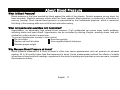
About Blood Pressure........................................................................................................................................ 17
What is Blood Pressure?.............................................................................................................................. 17
What is Hypertension and How is it Controlled? .......................................................................................... 17
Why Measure Blood Pressure at Home? ..................................................................................................... 17
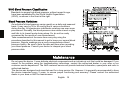
WHO Blood Pressure Classification............................................................................................................. 18
Blood Pressure Variations............................................................................................................................ 18
Maintenance ...................................................................................................................................................... 18
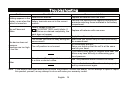
Troubleshooting ................................................................................................................................................. 19
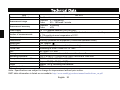
Technical Data................................................................................................................................................... 20
English 1
Dear Customers
Congratulations on purchasing a state-of-the-art A&D blood pressure monitor, one of the most advanced monitors
available today. Designed for ease of use and accuracy, this device will facilitate your daily blood pressure regimen.
We recommend that you read through this manual carefully before using the device for the first time.
Preliminary Remarks
This device conforms to the European Directive 93/42 EEC for Medical Products. This is made evident by the
mark of conformity. (0123: The reference number to the involved notified body)
The device is designed for use on adults only, not newborns or infants.
Environment for use. The device is for use in the home healthcare environment.
This device is designed to measure blood pressure and pulse rate of people for diagnosis.
Precautions
Precision components are used in the construction of this device. Extremes in temperature, humidity, direct
sunlight, shock or dust should be avoided.
Clean the device with a dry, soft cloth or a cloth dampened with water and a neutral detergent. Never use alcohol,
benzene, thinner or other harsh chemicals to clean the device.
Avoid tightly folding the cuff for long periods, as such treatment may shorten the life of the components.
The device is not water resistant. Prevent rain, sweat and water from soiling the device.
Measurements may be distorted if the device is used close to televisions, microwave ovens, cellular telephones,
X-ray or other devices with strong electrical fields.
Used equipment, parts and batteries are not treated as ordinary household waste, and must be disposed of
according to the applicable local regulations.
When reusing the device, confirm that the device is clean.
English 2
Do not modify the device. It may cause accidents or damage to the device.
To measure blood pressure, the wrist must be squeezed by the cuff hard enough to temporarily stop blood flow
through the artery. This may cause pain, numbness or a temporary red mark to the wrist. This condition will appear
especially when measurement is repeated successively. Any pain, numbness, or red marks will disappear with time.
Contraindications
The following are precautions for proper use of the device.
Do not apply the device to a wrist with other medical electrical equipment attached. The equipment may not
function properly.
People who have a severe circulatory deficit in the arm must consult a doctor before using the device to avoid
medical problems.
Do not self-diagnose the measurement results and start treatment by yourself. Always consult your doctor for evaluation of
the results and treatment.
Do not apply the device on a wrist with an unhealed wound.
Do not apply the device on an arm receiving an intravenous drip or blood transfusion. It may cause injury or
accidents.
Do not use the device where flammable gases such as anesthetic gases are present. It may cause an explosion.
Do not use the device in highly concentrated oxygen environments, such as a high-pressure oxygen chamber or an oxygen tent.
It may cause a fire or explosion.
English 3
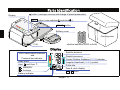
Parts Identification
button ( average, memory and change of preset parameters)
Display
SET
button ( user selection
and clock
START
)
button
Battery cover
Carrying case
Cuff
Alkaline batteries (LR03 or AAA)
Display
WHO classification indicator
and
Pressure bar indicator
Heart mark
User
and User
MEMORY
Average
Battery indicator
Systolic pressure
Diastolic pressure
Correct Position Guidance (C.P.G.) indicator
Irregular Heartbeat (I.H.B.) symbol
Pulse rate
Date & clock display
AM / PM mark
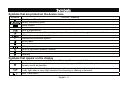
English 4
Symbols
Symbols that are printed on the device case
Symbols
SN
IP
Function / Meaning
Standby and Turn the device on
Battery installation guide
Direct current
Serial number
Date of manufacture
Type BF: Device and cuff are designed to provide special protection against electrical shocks.
EC directive medical device label
International protection symbol
WEEE label
Manufacturer
EU-representative
Refer to instruction manual / booklet
User selection
Keep dry
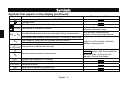
Symbols that appear on the display
Symbols
Function / Meaning / Recommended Action
The heart mark appears while measurement is in progress. It blinks when the pulse is detected.
Remain as still as possible.
Irregular Heartbeat (I.H.B.) symbol appears when an irregular heartbeat is detected.
It may light when a very slight vibration like shivering or shaking is detected.
User 1 and user 2
English 5
Symbols
Symbols that appear on the display (continued)
Symbols
Function / Meaning
Previous measurements stored in MEMORY
Average data
Full Battery The battery power indicator during measurement
Low Battery The battery is low when it blinks
or
Unstable blood pressure due to movement during measurement
Recommended Action
Replace all batteries with new ones
when the indicator blinks.
Take another measurement.
Remain still during measurement.
The systolic and diastolic values are within 10 mmHg of each other.
The pressure value did not increase during inflation.
Apply the cuff correctly, and take
The cuff is not applied correctly.
another measurement.
PUL. DISPLAY ERROR The pulse is not detected correctly.
Remove the batteries and press the
START button, and then install the
Blood pressure monitor internal error
batteries again. If the error still
appears, contact the dealer.
Systolic blood pressure in mmHg
SYS.
Diastolic blood pressure in mmHg
DIA.
PUL./min. Pulse per minute
Data taken between 4:00 and 9:59
AM
Data taken between 18:00 and 1:59
PM
English 6
Using the Monitor
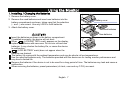
1. Installing / Changing the Batteries
1. Remove the battery cover.
2. Remove the used batteries and insert new batteries into the
battery compartment as shown, taking care that the polarities
(+ and -) are correct. Use only LR03 or AAA batteries.
Battery cover
3. Attach the battery cover.
Used batteries
New batteries
Insert the batteries as shown in the battery compartment.
If installed incorrectly, the device will not work.
When
(LOW BATTERY mark) appears on the display,
replace all batteries with new ones. Do not mix old and new
batteries. It may shorten the battery life, or cause the device
to malfunction.
(LOW BATTERY mark) does not appear when the
batteries are drained.
The battery life varies with the ambient temperature and may be shorter at low temperatures.
Use the specified batteries only. The batteries provided with the device are for testing monitor performance and
may have a limited life.
Remove the batteries if the device is not to be used for a long period of time. The batteries may leak and cause a
malfunction.
When removing the batteries, preset parameters (of clock, user and my C.P.G.) are reset.
English 7
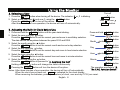
2. Selecting a User
1. Press the
Using the Monitor
SET button when turning off the device. The indicator
or
Turn off
is blinking.
SET button
SET button.
2. Select a user from user and user using the
Press the START button to turn off the device.
After three minutes of non-operation, the device will turn off automatically.
User
or user
START button
3. Adjusting the Built-in Clock Before Use
1. Press and hold the
SET button until the year starts blinking.
2. Select the year using the
button.
SET
button to set the current year and move to month/day selection.
Press the
The date can be set anywhere between the years 2010 and 2059.
button.
3. Select the month using the
SET button to set the current month and move to day selection.
Press the
Press and hold
Year
Month
4. Select the day using the
button.
SET
button to set the current day and move to hour/minute selection.
Press the
Day
5. Select the hour using the
button.
SET button to set the current hour and move to minute selection.
Press the
Hour
6. Select the minute using the
button.
SET
button to proceed to "4. Applying the Cuff".
Press the
Minute
Holding down the
button will change the value continuously.
Pressing the START button will turn the device off anytime.
SET button
button
SET button
button
SET button
button
button
SET button
SET button
button
SET button
The operation proceeds to "6.
The C.P.G. Function Switch".
Notes: After three minutes of non-operation, the device will turn off automatically.
is indicated for the clock display.
When the clock has not been set,
When removing the batteries, preset parameters (of clock, user and my C.P.G.) are reset.
English 8
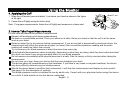
4. Applying the Cuff
Using the Monitor
1. Wrap the cuff around your wrist about 1 cm above your hand as shown in the figure
at the right.
About 1 cm
2. Fasten the cuff tightly using the Velcro strip.
Note: For proper measurements, fasten the cuff tightly and measure on a bare wrist.
5. How to Take Proper Measurements
For the most accurate blood pressure measurement:
Remain still and keep quiet during measurement.
Sit down in a comfortable position. Place your elbow on a table. Raise your hand so that the cuff is at the same
level as your heart.
Relax for about five to ten minutes before measurement. If you are excited or depressed by emotional stress, the
measurement will reflect this stress as a higher (or lower) than normal blood pressure reading and the pulse
reading will usually be faster than normal.
Try to measure your blood pressure at about the same time every day.
An individual's blood pressure varies constantly, depending on what they are doing, what they have eaten and what
they drink can have a very strong and rapid effect on your blood pressure.
Do not measure immediately after physical exercise or a bath. Rest for twenty or thirty minutes before taking the
measurement.
Do not cross your legs. Keep your feet on the floor and straighten your back.
This device bases its measurements on the heartbeat. If you have a very weak or irregular heartbeat, the device
may have difficulty determining your blood pressure.
Should the device detect a condition that is abnormal, it will stop the measurement and display an error symbol.
See page 6 for the description of symbols.
This blood pressure monitor is intended for use by adults only. Consult with your physician before using this device
on a child. A child should not use this device unattended.
English 9
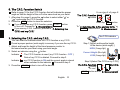
6. The C.P.G. Function Switch
Refer to page 16 for the C.P.G. function that will indicate the proper
angle so that the height of the cuff is the same level as your heart.
1. After step 6 in page 8, press the
button to select either " " or
" " concerning the C.P.G. function.
2. Press the SET button to store the selection.
3.
If you do not use my C.P.G. function, press START button
to turn off. Proceed to "8. Measurement".
If you use my C.P.G. function, proceed to "7. Selecting the
C.P.G. and my C.P.G.".
The C.P.G. function
button
Press the SET button
To "7. Selecting the C.P.G. and my C.P.G." or
START button and to "8. Measurement"
The C.P.G. indicator
7. Selecting the C.P.G. and my C.P.G.
You can select an indicator either the C.P.G. function or my C.P.G. .
Preset a proper posture (wrist angle) in memory if you use the my C.P.G. .
1. Adjust and keep the height of the blood pressure monitor to
the same level as your heart using your wrist angle.
2. Select an indicator using the
Indicator
.....The
Indicator
.....my
From step 6 of page 8
button.
Step 1 [Adjust and keep the height
of the device (wrist angle) ]
HIGH (Orange light)
Correct Height (Blue light)
C.P.G. function is used. (my C.P.G. function : OFF )
Data of my C.P.G. is deleted. Proceed to step 3.
C.P.G. function is ON and the current angle is stored
when switched to the indicator . Proceed to step 3.
3. Press the START button to turn off the device.
English 10
LOW (Orange light)
Step 2 [Select The C.P.G. or my C.P.G.]
The C.P.G. function
My C.P.G.
button
Ex.: user 1
START button and to "8. Measurement"
Note:
When removing the batteries, preset parameters (of clock, user and my C.P.G.) are reset.
SET button.
Select a user from user and user using the
8. Measurement
During measurement, it is normal for the cuff to feel very tight.
9. After Measurement
While readings are displayed, if you press the START button to turn the device off, new readings are stored in
memory.
button to turn the device off, new readings are not stored.
While readings are displayed, if you press the
Remove the cuff and record your data.
Notes: The device is provided with an automatic power shut-off function which stores the current data in the memory
and turns the device off automatically one minute after measurement. Allow at least three minutes between
measurements on the same person.
English 11
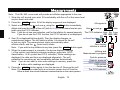
Measurements
Note: The UB-543, once used, will provide an inflation appropriate to the user.
1. Wrap the cuff around your wrist. Sit comfortably with the cuff at the same level
as your heart and relax.
2. Press the START button. All of the display segments are displayed.
3. Select a user from user and user using the
Adjust and keep the height of the cuff (with blue light) to the same level as your
heart using the C.P.G. indicator.
Note: If you do not use user selection, wait for the inflation for several seconds.
If you do not use the C.P.G. function, the C.P.G. indicator is not displayed.
All segments
SET button immediately.
User
or user
:
The C.P.G. indicator: Orange Blue Orange
LOW LEVEL HIGH
4. Zero (0) is displayed blinking briefly. Then the display changes, as
At heart level
measurement begins. The cuff starts to inflate. It is normal for the cuff
to feel very tight. The measurement starts automatically when
Zero display
(heart mark) blinks.
inflation starts, and the
Inflation is started
Note: If you wish to stop inflation at any time, press the START button again.
5. When the measurement is complete, the device displays readings
( of the systolic and diastolic pressure readings, pulse rate, WHO
classification, I.H.B. symbol and C.P.G. indicator). While readings are
displayed, the date and time are displayed alternately. The cuff
exhausts the remaining air and completely deflates automatically.
Note: If you do not want to store new readings in memory, press the
button while readings are displayed.
6. Press the START button again to turn the device off. Remove the cuff.
Notes: The device is provided with an automatic power shut-off function.
Allow at least one minute between measurements on the same person.
English 12
SET button
Inflating and
Measurement in progress
Systolic pressure
Diastolic pressure
WHO classification
I.H.B. symbol
Pulse rate
The C.P.G. indicator
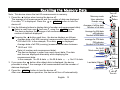
Recalling the Memory Data
Turn off
Note: This device stores the last 60 measurements in memory.
1. Press the
button when turning the device off.
The average of all measurements and the number of data are displayed.
or START button to turn the
If no data, “0” is displayed. Press the
device off.
2. Use the following buttons to display data (of number and measurement data).
SET button.
Select a user from user and user using the
The device displays the average of all measurements and the
number of data are displayed.
Pressing the
button each time , the device displays as follows:
Average data of all AM (morning) measurements taken between
is displayed.
4:00 and 9:59. In the example, If no data,
Average data of all PM (evening) measurements taken between
18:00 and 1:59.
Data (of number and measurement data).
The device displays in order from most recent data. The date
and time are displayed alternately while displaying the
measurement data.
No.29 & data
No.01 & data.
In the example: No.30 & data
3. If you press the
button after oldest data is displayed, the device
proceeds to step 1, the average of all measurements and the number of
data are displayed.
4. Press the START button to turn the device off.
After one minute of non-operation, the device will turn off automatically.
English 13
Memory mode
User selection
Example: user
button
button
Average of all the data
Number of all data
Average for AM data
AM indicator
Number of AM data
Average for PM data
PM indicator
Number of PM data
Ex.: No.30
Most recent data
Date
Time
3 seconds
Last data (Oldest)
Date
Time
3 seconds
button
button
button
button
button
button
Turn off
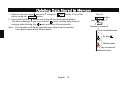
Deleting Data Stored in Memory
1. Select a user from user and user
device using the START button.
using the
SET button. Turn off the
2. Press and hold the
button until truing off the device automatically.
mark, deletes data stored in
The device displays a user icon and the
mark and turns off automatically.
memory while blinking the
Note: This operation will delete specified user data stored in memory.
You cannot select which data to delete.
Turn off
SET button
User
or user
Display is turned off
Press and hold button
Ex.: User
Deleting data
Display is turned off
Release button
English 14
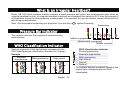
What is an Irregular Heartbeat?
Model UB-543 blood pressure monitor provides a blood pressure and pulse rate measurement even when an
irregular heartbeat occurs. An irregular heartbeat is defined as a heartbeat that varies by 25% from the average of
all heartbeats during the blood pressure measurement. It is important that you be relaxed, remain still and do not
talk during measurements.
symbol frequently.
Note: We recommend contacting your physician if you see this
Pressurizing
Pressure Bar Indicator
The indicator monitors the progress of pressure during
measurement.
WHO Classification Indicator
Each six segments of the bar indicator correspond to the
WHO blood pressure classification described on 18 page.
Example
Moderate
hypertension
Mild hypertension
High normal
Inflation in progress
Measurement in progress
Inflation complete
WHO Classification Indicator
Severe hypertension
Moderate hypertension
Mild hypertension
High normal
Normal
Optimal
: The indicator displays a segment, based on the
current data, corresponding to the WHO
classification.
English 15
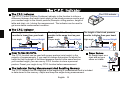
The C.P.G. Indicator
The C.P.G. Indicator
The C.P.G. indicator
The C.P.G. (Correct Position Guidance) indicator is the function to inform a
difference between the height (wrist angle) of the blood pressure monitor and
your cardiac height in the correct posture (Example: sitting posture, height of
table and chair, etc.) during the measurement. The indicator can be used to
get more stable measurement condition.
The C.P.G. Indicator
The height of the blood pressure
monitor is lower than your heart.
Low angle
Incorrect Height
The C.P.G. indicator : LOW
The height of the blood pressure
monitor is the same level as your
heart.
Correct Height
Proper angle
The C.P.G. indicator : LEVEL
How To Use My C.P.G.
The C.P.G. function can be used with proper posture (wrist angle) in the
majority of measurements. If you need to change the posture to adjust the
height so that the height of the blood pressure monitor is the same level as
your cardiac height, you can use my C.P.G. function to store a personal
posture. Preset your angle to my C.P.G. function before measurement.
The Indicator During Measurement And Recalling Memory
The height of the blood pressure
monitor is higher than your heart.
High angle
The C.P.G. indicator : HIGH
Proper Posture
Sit straight back on a
chair and put your
elbow on a table.
The C.P.G. indicator can be displayed at the beginning of measurement and is included
in data stored in the memory. Adjust and keep the angle during measurement.
English 16
Incorrect Height
Table
Chair
What is Blood Pressure?
About Blood Pressure
Blood pressure is the force exerted by blood against the walls of the arteries. Systolic pressure occurs when the
heart contracts. Diastolic pressure occurs when the heart expands. Blood pressure is measured in millimeters of
mercury (mmHg). One's natural blood pressure is represented by the fundamental pressure, which is measured
first thing in the morning while one is still at rest and before eating.
What is Hypertension and How is it Controlled?
Hypertension, an abnormally high arterial blood pressure, if left unattended can cause many health problems
including stroke and heart attack. Hypertension can be controlled by altering lifestyle, avoiding stress, and with
medication under a doctor’s supervision.
To prevent hypertension or keep it under control:
Do not smoke
Exercise regularly
Reduce salt and fat intake
Have regular physical checkups
Maintain proper weight
Why Measure Blood Pressure at Home?
Blood pressure measured at a clinic or doctor's office may cause apprehension and can produce an elevated
reading, 25 to 30 mmHg higher than that measured at home. Home measurement reduces the effects of outside
influences on blood pressure readings, supplements the doctor's readings and provides a more accurate, complete
blood pressure history.
English 17
WHO Blood Pressure Classification
Standards to assess high blood pressure, without regard to age,
have been established by the World Health Organization
(WHO), as shown in the chart at the right.
Blood Pressure Variations
An individual’s blood pressure varies greatly on a daily and seasonal
basis. It may vary by 30 to 50 mmHg due to various conditions
during the day. In hypertensive individuals variations are even more
pronounced. Normally, the blood pressure rises while at work or play
and falls to its lowest levels during sleep. So, do not be overly
concerned by the results of one measurement.
Take measurements at the same time every day using the
procedure described in this manual to get to know your normal blood
pressure. Regular readings give a more comprehensive blood
pressure history. Be sure to note the date and time when recording
your blood pressure. Consult your doctor to interpret your blood
pressure data.
Maintenance
Do not open the device. It uses delicate electrical components and an intricate air unit that could be damaged. If you
cannot fix the problem using the troubleshooting instructions, contact the authorized dealer in your area or our
customer service department. The A&D customer service will provide technical information, spare parts and units to
authorized dealers.
The device was designed and manufactured for a long service life. However it is generally recommended to have
the device inspected every 2 years, to ensure proper functioning and accuracy. Please contact the authorized
dealer in your area or A&D for maintenance.
English 18
Troubleshooting
Problem
Possible Reason
Batteries are drained.
Nothing appears in the
display, even when the Battery terminals are not in the correct
device is turned on.
position.
The cuff does not
inflate.
Battery voltage is too low.
(LOW BATTERY mark) blinks. If
the batteries are drained completely, the
mark does not appear.
The cuff is not applied properly.
You moved your wrist or body during the
measurement.
The device does not
measure.
Readings are too high The cuff position is not correct.
or too low.
Other
Recommended Action
Replace all batteries with new ones.
Reinstall the batteries with negative and positive
terminals matching those indicated in the battery
compartment.
Replace all batteries with new ones.
Apply the cuff correctly.
Make sure you remain very still and quiet during
the measurement.
Sit comfortably and still.
Raise your hand so that the cuff is at the same
level as your heart.
If you have a very weak or irregular heat beat, the
device may have difficulty in determining your
blood pressure.
The value is different from that measured
See “Why Measure Blood Pressure at Home?”.
at a clinic or doctor’s office.
Remove the batteries. Place them back properly
and try measurement again.
Note: If the actions described above do not solve the problem, contact the dealer. Do not attempt to open or repair
this product yourself, as any attempt to do so will make your warranty invalid.
English 19
Technical Data
Type
Measurement method
Measurement range
Measurement accuracy
Power supply
Number of measurements
Wrist circumference
Classification
Applied part
Useful life
Clinical test
EMC
Memory
Operating conditions
Transport / storage conditions
Dimensions
Weight
Ingress protection
UB-543
Oscillometric measurement
Pressure: 0 – 299 mmHg
Pulse:
40 – 180 beats / minute
Pressure: ±3 mmHg
Pulse:
±5%
2 x 1.5V alkaline batteries (LR03 or AAA)
Approx. 180 measurements, when AAA alkaline batteries are used, with pressure value
of 170 mmHg at room temperature of 23°C.
13.5 – 21.5 cm
Internally powered ME equipment (Continuous operation mode)
Cuff Type BF
Device: 5 years (when used six times a day)
According to ANSI / AAMI SP-10 1992
IEC 60601-1-2: 2007
Last 60 measurements each for user 1 and user 2.
+10°C to +40°C / 15%RH to 85 %RH / 800 hPa to 1060 hPa
-20°C to +60°C / 10%RH to 95 %RH
Approx. 56 [W] x 88 [H] x 18 [D] mm
Approx. 104 g, excluding the batteries
IP20
Note: Specifications are subject to change for improvement without prior notice.
EMC table information is listed on our website: http://www.aandd.jp/products/manual/medical/emc_en.pdf
English 20
1-243 Asahi, Kitamoto-shi, Saitama 364-8585 JAPAN
Telephone: [81] (48) 593-1111
Fax: [81] (48) 593-1119
A&D INSTRUMENTS LIMITED
Unit 24/26 Blacklands Way, Abingdon Business Park, Abingdon, Oxfordshire OX14 1DY United Kingdom
Telephone: [44] (1235) 550420
Fax: [44] (1235) 550485
A&D ENGINEERING, INC.
1756 Automation Parkway, San Jose, California 95131 U.S.A.
Telephone: [1] (408) 263-5333
Fax: [1] (408)263-0119
A&D Australasia PTY LTD
32 Dew Street, Thebarton, South Australia 5031 AUSTRALIA
Telephone: [61] (8) 8301-8100
Fax: [61] (8) 8352-7409