1
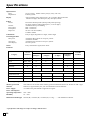
ELECTRONIC CASH REGISTER
PCR-T2000
U
O
Y
NK
THA
T
P
I
E
C
E
R
YOUR
!
N
I
A
G
A
CALL
Y
R
E
C
GRO
Y
R
I
A
D
.
A
.
B
H.
N
E
Z
O
FR
FOOD
N
E
S
S
E
T
A
C
DELI
CI
Canada
USER'S MANUAL
Safety Precautions
• To use this product safely and correctly, read this manual thoroughly and operate as
instructed.
After reading this guide, keep it close at hand for easy reference.
Please keep all informations for future reference.
• Always observe the warnings and cautions indicated on the product.
About the icons
In this guide various icons are used to highlight safe operation of this product and to prevent
injury to the operator and other personnel and also to prevent damage to property and this
product. The icons and definitions are given below.
Indicates that there is a risk of severe injury or death if used incorrectly.
Indicates that injury or damage may result if used incorrectly.
Icon examples
To bring attention to risks and possible damage, the following types of icons are used.
The symbol indicates that it includes some symbol for attracting attention (including
warning). In this triangle the actual type of precautions to be taken (electric shock, in this
case) is indicated.
The symbol indicates a prohibited action. In this symbol the actual type of prohibited
actions (disassembly, in this case) will be indicated.
The symbol indicates a restriction. In this symbol the type of actual restriction (removal of
the power plug from an outlet, in this case) is indicated.
Warning!
Handling the register
Should the register malfunction, start to emit smoke or a strange odor, or
otherwise behave abnormally, immediately shut down the power and unplug
the AC plug from the power outlet. Continued use creates the danger of fire and
electric shock.
• Contact CASIO service representative.
Do not place containers of liquids near the register and do not allow any
foreign matter to get into it. Should water or other foreign matter get into the
register, immediately shut down the power and unplug the AC plug from the
power outlet. Continued use creates the danger of shorting, fire and electric
shock.
• Contact CASIO service representative.
Should you drop the register and damage it, immediately shut down the power
and unplug the AC plug from the power outlet. Continued use creates the
danger of shorting, fire and electric shock.
• Attempting to repair the register yourself is extremely dangerous. Contact CASIO service
representative.
E
2
Warning!
Never try to take the register apart or modify it in any way. High-voltage
components inside the register create the danger of fire and electric shock.
• Contact CASIO service representative for all repair and maintenance.
Power plug and AC outlet
Use only a proper AC electric outlet (100V~240V) . Use of an outlet with a
different voltage from the rating creates the danger of malfunction, fire, and
electric shock. Overloading an electric outlet creates the danger of overheating
and fire.
Make sure the power plug is inserted as far as it will go. Loose plugs create the
danger of electric shock, overheating, and fire.
• Do not use the register if the plug is damaged. Never connect to a power outlet that is loose.
Use a dry cloth to periodically wipe off any dust built up on the prongs of the
plug. Humidity can cause poor insulation and create the danger of electric
shock and fire if dust stays on the prongs.
Do not allow the power cord or plug to become damaged, and never try to
modify them in any way. Continued use of a damaged power cord can cause
deterioration of the insulation, exposure of internal wiring, and shorting, which
creates the danger of electric shock and fire.
• Contact CASIO service representative whenever the power cord or plug requires repair or
maintenance.
Caution!
Do not place the register on an unstable or uneven surface. Doing so can
cause the register — especially when the drawer is open — to fall, creating the
danger of malfunction, fire, and electric shock.
Do not place the register in the following areas.
• Areas where the register will be subject to large amounts of humidity or dust, or directly
exposed to hot or cold air.
• Areas exposed to direct sunlight, in a close motor vehicle, or any other area subject to very
high temperatures.
The above conditions can cause malfunction, which creates the danger of fire.
Do not overlay bend the power cord, do not allow it to be caught between
desks or other furniture, and never place heavy objects on top of the power
cord. Doing so can cause shorting or breaking of the power cord, creating the
danger of fire and electric shock.
Be sure to grasp the plug when unplugging the power cord from the wall outlet.
Pulling on the cord can damage it, break the wiring, or cause short, creating the
danger of fire and electric shock.
Never touch the plug while your hands are wet. Doing so creates the danger of
electric shock. Pulling on the cord can damage it, break the wiring, or cause
short, creating the danger of fire and electric shock.
Never touch the printer head and the platen.
3
E
Introduction & Contents
Introduction & Contents ...................................................................................... 4
Getting Started ..................................................................................................... 7
Remove the cash register from its box. ............................................................................ 7
Remove the tape holding parts of the cash register in place. ........................................... 7
Install the three memory backup batteries. ....................................................................... 7
Install receipt/journal paper. .............................................................................................. 9
Plug the cash register into a wall outlet. ......................................................................... 11
Insert the mode key marked “PGM” into the mode switch. ............................................. 11
Turn the mode key to the “REG” position. ....................................................................... 11
Set the date. ................................................................................................................... 12
Set the time. .................................................................................................................... 12
Tax table programming................................................................................................... 13
Programming for the U.S. tax tables procedure .................................................................................... 13
Programming for Canadian tax tables procedure .................................................................................. 14
Introducing PCR-T2000...................................................................................... 16
General guide ................................................................................................................. 16
Roll paper, Receipt On/Off key, Mode key, Drawer, Drawer lock ........................................................... 16
Mode switch .......................................................................................................................................... 17
Lock/unlock the multipurpose tray ......................................................................................................... 18
Displays .......................................................................................................................... 19
Keyboard ......................................................................................................................... 20
Basic Operations and Setups ........................................................................... 22
How to read the printouts ....................................................................................................
How to use your cash register .............................................................................................
Displaying the time and date ..........................................................................................
Preparing coins for change .............................................................................................
Preparing and using department keys .................................................................................
Registering department keys ..........................................................................................
Programming department keys .......................................................................................
Registering department keys by programming data .......................................................
Preparing and using PLUs ..................................................................................................
Programming PLUs ........................................................................................................
Registering PLUs ............................................................................................................
Preparing and using discounts/premiums ...........................................................................
Programming discounts/premiums .................................................................................
Registering discounts/premiums.....................................................................................
Preparing and using reductions ...........................................................................................
Programming for reductions ............................................................................................
Registering reductions ....................................................................................................
Calculating the merchandise subtotal .................................................................................
Registering charge and check payments ............................................................................
Registering returned goods in the REG mode ....................................................................
Registering returned goods in the RF mode .......................................................................
Registering money received on account .............................................................................
Registering money paid out .................................................................................................
Making corrections in a registration .....................................................................................
No sale registration .............................................................................................................
Printing the daily sales reset report .....................................................................................
22
23
24
24
25
25
27
28
29
29
30
31
31
32
33
33
34
35
36
37
38
39
39
40
42
43
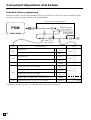
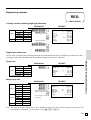
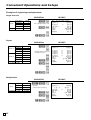
Convenient Operations and Setups ................................................................. 44
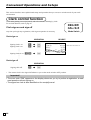
Clerk control function ........................................................................................................... 44
Clerk sign on and sign off ............................................................................................... 44
E
4
45
45
46
47
48
48
49
49
49
50
Introduction & Contents
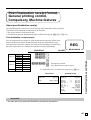
Post-finalization receipt format, General printing control, Compulsory, Machine features ..
About post-finalization receipt .........................................................................................
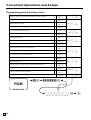
Programming general printing control .............................................................................
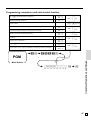
Programming compulsory and clerk control function ......................................................
Programming read/reset report printing control ..............................................................
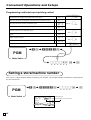
Setting a store/machine number .........................................................................................
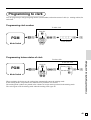
Programming to clerk ..........................................................................................................
Programming clerk number ............................................................................................
Programming trainee status of clerk ...............................................................................
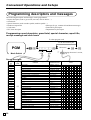
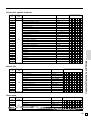
Programming descriptors and messages ............................................................................
Programming report descriptor, grand total, special character,
report title, receipt message and clerk name .................................................................
50
Report descriptor .................................................................................................................................. 50
Clerk name, Grand total, special character, Report title ....................................................................... 51
Receipt message .................................................................................................................................. 52
Programming department key descriptor ........................................................................
Programming PLU descriptor .........................................................................................
Programming function key descriptor .............................................................................
Programming receipt message/logo stamp control function ...........................................
Entering characters .............................................................................................................
Using character keyboard ...............................................................................................
Entering characters by code ...........................................................................................
Department key feature programming .................................................................................
Batch feature programming ............................................................................................
Individual feature programming ......................................................................................
PLU feature programming ...................................................................................................
Batch feature programming ............................................................................................
Individual feature programming ......................................................................................
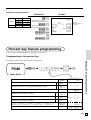
Percent key feature programming........................................................................................
Registering manual tax ...................................................................................................
Currency exchange programming .......................................................................................
Currency exchange rate programming ...........................................................................
Currency exchange feature programming ......................................................................
Other function key feature programming .............................................................................
Cash, Charge, Check key ...............................................................................................
Minus key, Received on account, Paidout key, #/No sale key, No sale key ....................
Calculator functions .............................................................................................................
About the daylight saving time .............................................................................................
Printing read/reset reports ...................................................................................................
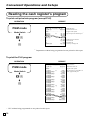
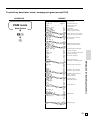
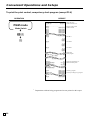
Reading the cash register's program ...................................................................................
52
53
54
54
55
55
56
57
57
58
59
59
60
63
64
65
65
65
68
68
69
70
71
72
78
Troubleshooting ................................................................................................. 81
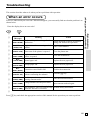
When an error occurs ..........................................................................................................
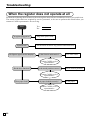
When the register does not operate at all ...........................................................................
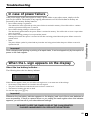
In case of power failure .......................................................................................................
When the L sign appears on the display .............................................................................
81
82
83
83
User Maintenance and Options ........................................................................ 84
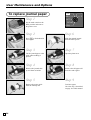
To replace journal paper ...................................................................................................... 84
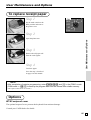
To replace receipt paper ...................................................................................................... 85
Options ................................................................................................................................ 85
Specifications ..................................................................................................... 86
Index .................................................................................................................... 87
5
E
Introduction & Contents
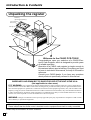
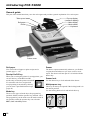
Unpacking the register
Mode key
(Operator/Program key)
User's manual/
Drawer key
Us
er'
sM
an
ua
l
Take-up reel
Roll paper
Memory backup
batteries
Welcome to the CASIO PCR-T2000!
Congratulations upon your selection of a CASIO Electronic Cash Register, which is designed to provide years
of reliable operation.
Operation of a CASIO cash register is simple enough to
be mastered without special training. Everything you need
to know is included in this manual, so keep it on hand for
reference.
Consult your CASIO dealer if you have any questions
about points not specifically covered in this manual.
GUIDELINES LAID DOWN BY FCC RULES FOR USE OF THE UNIT IN THE U.S.A.
(Not applicable to other areas)
FCC WARNING: This equipment has been tested and found to comply with the limits for a Class A digital device,
pursuant to Part 15 of the FCC Rules. These limits are designed to provide reasonable protection against harmful interference when the equipment is operated in a commercial environment. This equipment generates, uses, and can radiate radio
frequency energy and, if not installed and used in accordance with the instruction manual, may cause harmful interference
to radio communications. Operation of this equipment in a residential area is likely to cause harmful interference in which
case the user will be required to correct the interference at his own expense.
WARNING: Changes or modifications not expressly approved by the party responsible for compliance could void the
user’s authority to operate the equipment.
The main plug on this equipment must be used to disconnect main power.
Please ensure that the socket outlet is installed near the equipment and shall be easily accessible.
Please keep all information for future reference.
E
6
Getting Started
This section outlines how to unpack the cash register and get it ready to operate. You should read this part of
the manual even if you have used a cash register before. The following is the basic set up procedure, along
with page references where you should look for more details.
Us
er'
sM
an
ua
l
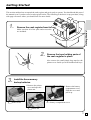
Remove the cash register from its box.
Make sure that all of the parts and accessories
are included.
2.
Getting Started
1.
Remove the tape holding parts of
the cash register in place.
Also remove the small plastic bag taped to the
printer cover. Inside you will find the mode keys.
3.
Install the three memory
backup batteries.
1. Remove the printer
cover and open the
platen arm.
2. Remove the battery
compartment cover.
Slide the cover and
pull it up.
battery compartment cover
printer cover
platen arm
7
E
Getting Started
3.
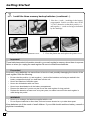
Install the three memory backup batteries. (continued…)
3. Note the (+) and (–) markings in the battery
compartment. Load a set of three new SUM3 (UM-3) batteries so that their positive (+)
and negative (–) ends are facing as indicated
by the markings.
4. Replace the battery compartment cover.
5. Close the platen arm and replace the printer cover.
Important!
These batteries protect information stored in your cash register's memory when there is a power
failure or when you unplug the cash register. Be sure to install these batteries.
Precaution!
Incorrectly using batteries can cause them to burst or leak, possibly damaging the interior of the
cash register. Note the following.
• Be sure that the positive (+) and negative (–) ends of the batteries are facing as marked in the
battery compartment when you load them into the unit.
• Never mix batteries of different types.
• Never mix old batteries with new ones.
• Never leave dead batteries in the battery compartment.
• Remove the batteries if you do not plan to use the cash register for long periods.
• Replace the batteries at least once every two years, no matter how much the cash register is
used during the period.
WARNING!
• Never try to recharge the batteries supplied with the unit.
• Do not expose batteries to direct heat, let them become shorted or try to take them apart.
Keep batteries out of the reach of small children. If your child should swallow a battery, consult a
physician immediately.
E
8
4.
Platen arm
Install receipt/journal paper.
Platen
Printer
Getting Started
Important!
Take away the head protection sheet from the printer and close the platen arm.
Caution! (in handling the thermal paper)
• Never touch the printer head and the platen.
• Unpack the thermal paper just before your use.
• Avoid heat/direct sunlight.
• Avoid dusty and humid places for storage.
• Do not scratch the paper.
• Do not keep the printed paper under the following circumstances:
High humidity and temperature/direct sunlight/contact with glue, thinner or a rubber eraser.
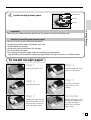
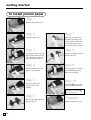
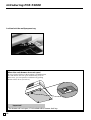
To install receipt paper
Step 1
Step 4
Remove the printer cover.
Put the leading end of the
paper over the printer.
Step 2
Step 5
Open the platen arm.
Close the platen arm
slowly until it locks
steadily.
Step 3
Complete
Ensuring the paper is being
fed from the bottom of the
roll, lower the roll into the
space behind the printer.
Replace the printer cover,
passing the leading end of
the paper through the
cutter slot. Tear off the
excess paper.
9
E
Getting Started
To install journal paper
Step 1
Remove the printer cover.
Step 2
Step 7
Open the platen arm.
Slide the leading end of
the paper into the groove
on the spindle of the takeup reel and wind it onto
the reel two or three turns.
Step 3
Step 8
Ensuring the paper is being
fed from the bottom of the
roll, lower the roll into the
space behind the printer.
Replace the paper guide of
the take-up reel.
Step 4
Step 9
Put the leading end of the
paper over the printer.
Place the take-up reel into
place behind the printer,
above the roll paper.
Step 5
Step 10
Close the platen arm
slowly until it locks
steadily.
Press the | key to take
up any slack in the paper.
During machine
installation, press the |
key after power on.
Step 6
Remove the paper guide of
the take-up reel.
E
10
Complete
Replace the printer cover.
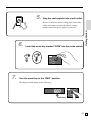
5.
Plug the cash register into a wall outlet.
6.
Insert the mode key marked “PGM” into the mode switch.
OP
C-A02
PGM
C-A32
Getting Started
Be sure to check the sticker (rating plate) on the side
of the cash register to make sure that its voltage
matches that of the power supply in your area.
CAL
REG
OFF
RF
PGM
7.
Turn the mode key to the “REG” position.
The display should change to the following.
CAL
X
REG
Z
OFF
RF
PGM
11
E
Getting Started
8.
Set the date.
CAL
X
REG
Z
61s 6 :: :: :: 6 x 6 C
OFF
Year
C-A32
PGM
PGM
RF
Mode Switch
9.
CAL
X
REG
Z
Current date
Example:
June 15, 2002 2 020615
6 1s 6 : : : : 6 x 6 C
C-A32
PGM
Current time
PGM
RF
Mode Switch
12
Day
Set the time.
OFF
E
Month
Example:
08:20 AM 2 0820
09:45 PM 2 2145
10.
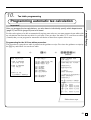
Tax table programming
Programming automatic tax calculation
After you program the tax calculations, you also have to individually specify which departments
(page 27) and PLUs (page 29) are to be taxed.
For this cash register to be able to automatically register state sales tax, you must program its tax tables with
tax calculation data from the tax table for your state. There are three tax tables (U. S.) and four tax tables
(Canada) that you can program for automatic calculation of three/four separate sales taxes.
Programming for the U.S. tax tables procedure
The procedure to setup the tax table is printed on the guidance receipt. First issue the guidance receitpt by
the / key and follow it to set the tax table.
/
2
2/
2
Getting Started
Important!
0101/
(Alabama)
ENTER NUMBER THEN
PRESS <HELP> KEY.
02:HOW TO PROGRAM
TAX TABLE?
01:HOW TO PROGRAM
DATE AND TIME?
•SELECT YOUR STATE AND
ENTER NUMBER THEN
PRESS <HELP> KEY.
02:HOW TO PROGRAM
TAX TABLE?
:
:
07:WHAT IS THE
ELECTRONIC JOURNAL?
PLEASE SELECT YOUR
DISTRICT NUMBER FROM
BELOW TABLE.
1)TURN MODE KEY TO PGM.
2)3<SUBTOTAL>
0101:ALABAMA
0201:ALASKA
0301:ARIZONA
0401:ARKANSAS
0501:CALIFORNIA
:
:
5001:WISCONSIN
5101:WYOMING
3)025<SUBTOTAL>
SET TABLE1
4)XXXX <CASH>KEY.
SET TABLE2(IF NECESSARY)
5)XXXX <CASH>KEY.
6)<SUBTOTAL>
XXXX IS DISTRICT NUMBER
ALABAMA
0101: 4%
0102: 4.5%
0103: 5%
0104: 5.5%
:
:
0111: 9 %
State
State & Local
State & Local
State & Local
State & Local
Follow these steps.
13
E
Getting Started
10.
Tax table programming (continued)
Programming for Canadian tax tables procedure
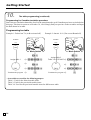
State sales tax calculation data tables for all of the states that make up all Canadian provinces are included on
this page. This data is current as of October 30, 1994. Simply find your province in the tax tables and input
the data shown in its table.
Programming tax table
Example 1: Federal tax 7% (Add-on/round-off)
ONTARIO
7%
CAL
X
REG
Z
ONTARIO
10%
OFF
7
2
5002
2
Terminate the program
2
E
14
REG
Z
OFF
RF
PGM
Assign table 2
Table 3/4: 0325/0425 2
10
2
5004
2
Terminate the program 2
• 4 tax tables are used for the following purpose
Table 1: Used for the federal taxable items.
Table 2: Used for the provincial taxable items.
Table 3/4: Used for the provincial taxable items for different tax table.
X
C-A32
2
Mode Switch
4
3s
4
0125s
4
7a
4
5002a
4
s
10
5004
CAL
PGM
Assign table 1
C-A32
PGM
PGM
RF
7
5002
Example 2: Ontario 10 % (Tax-on-tax/Round-off)
Mode Switch
4
3s
4
0225s
4
10a
4
5004a
4
s
*
*
*
*
*
*
*
NOVA ONTARIO QUEBEC
NEW
ONTARIO
BRITISH
MANITOBA/ ONTARIO N.B. & QUEBEC
SCOTIA
COLUMBIA SASKATCHEWAN
FOUNDLAND
P.E.I
10%
10%
10%
12%
12%
6%
6%
7%
8%
9%
* Must be programmed into Tax
table 2 ~ 4.
10
5004
10
5004
10
5004
12
5004
0
1
4
25
25
25
29
37
45
54
0
1
2
14
24
41
58
74
6
5002
7
5002
0
1
3
25
25
31
43
56
9
9002
Important!
Be sure you use the federal sales tax data with your provincial sales tax data. Even if your
province use the same tax rate as another province, inputting the wrong data will result incorrect
tax calculations.
15
Getting Started
CANADIAN TAX TABLES
E
Introducing PCR-T2000
General guide
This part of the manual introduces you to the cash register and provides a general explanation of its various parts.
display drawer keyboard pop-up display printer cover take-up reel main operator customer
Take-up reel
Pop-up display
(customer display)
Main display
Roll paper
Mode switch
Printer
Keyboard
Multipurpose tray
Drawer
Drawer lock
Printer cover
Roll paper
Drawer
You can use the roll paper to print receipts and a
journal (page 9 ~ 10).
The drawer opens automatically whenever you finalize
a registration and whenever you issue a read or reset
report. The drawer will not open if it is locked with the
drawer key.
Receipt On/Off key
When you are using the printer for receipt printer, you
can use this key (in the REG and RF
modes only) to turn the printer on and off.
If a customer asks for a receipt while
RECEIPT
ON/OFF
receipt printing is turned off by this key,
you can issue a post-finalization receipt
(page 45).
Drawer lock
Use the drawer key to lock and unlock the drawer.
Multipurpose tray
This tray can always be opened if the locking knob is in
the unlock position.
Use the locking knob to lock and unlock this tray.
Mode key
There are two types of mode keys: the program key
(marked “PGM”) and the operator key (marked “OP”).
The program key can be used to set the mode switch to
any position, while the operator key can select the
REG, CAL and OFF position.
PGM
C-A32
Program
key
E
16
OP
C-A02
Operator
key
Mode switch
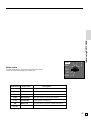
Use the mode keys to change the position of the mode
switch and select the mode you want to use.
X
REG
Z
Introducing PCR-T2000
CAL
OFF
RF
PGM
Mode Switch
Mode Name
Description
Z
RESET
Reads sales data in memory and clears the data.
X
READ
Reads sales data in memory without clearing the data.
CAL
CALCULATOR
Use this mode for calculator.
REG
REGISTER
Use this mode for normal registration.
OFF
STAND-BY
Cash register standing by.
REFUND
Use this mode to register refund transaction.
PROGRAM
Use this mode for cash register programming.
RF
PGM
17
E
Introducing PCR-T2000
Lock/unlock the multipurpose tray
Lock (Red)
Unlock
(Green)
When the cash drawer does not open!
In case of power failure or the machine is in malfunction,
the cash drawer does not open automatically. Even in
these cases, you can open the cash drawer by pulling
drawer release lever (see below).
Important!
The drawer will not open, if it is locked with a drawer lock key.
E
18
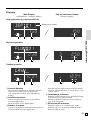
Displays
Main Display
(alphanumeric + numeric display)
Pop-up (customer) display
(numeric display)
Item registration (by department/PLU)
alphanumeric display
AMOUNT
!50
RECEIPT
ON
TOTAL
5
2
CHANGE
1
1
Introducing PCR-T2000
RPT
!50
Repeat registration
AMOUNT
3
RPT
"50
3
"50
RECEIPT
ON
TOTAL
3
2
1
3
CHANGE
1
Totalize operation
AMOUNT
_
RPT
1"34
_
1"34
RECEIPT
ON
5
TOTAL
2
1
1 Amount/Quantity
This part of the display shows monetary amounts.
It also can be used to show the current time.
(The current date is shown in the alphanumeric
display.)
2 Item/Key descriptor
When you register an item or key, the item/key
descriptor appears here.
Mode descriptor is also displayed here.
3 Number of repeats
Anytime you perform a repeat registration (page 26,
30), the number of repeats appears here.
5
CHANGE
4
Note that only one digit is displayed for the number
of repeats. This means that a “5” could mean 5, 15 or
even 25 repeats.
4 Total/Change indicators
When the TOTAL indicator is lit, the displayed value
is monetary total or subtotal amount.
When the CHANGE indicator is lit, the displayed
value is the change due.
5 Receipt on/off indicators
When the register is in “issuing receipt” mode,
under-bar sign is lit on this digit. (REG/RF mode,
during standing-by only)
19
E
Introducing PCR-T2000
Keyboard
I
1
RECEIPT
JOURNAL
FEED
FEED
3
OPEN
6
4
%+
B
POST
RECEIPT
F
CLK#
G
T/S1
T/S2
H
PLU/
PRICE
S.DEPT
#
NS
0
7
8
9
C
4
5
6
1
2
3
A
X/FOR
DATE
TIME
RF
D
ERR.CORR
CANCEL
C
C/AC
60/84
36
66/90
42
72/96
48
6
12
18
24
53/77
29
59/83
35
65/89
41
71/95
47
5
11
17
23
52/76
28
58/82
34
64/88
40
70/94
46
4
10
16
22
51/75
27
57/81
33
63/87
39
69/93
45
3
9
15
21
50/74
26
56/80
32
62/86
38
68/92
44
2
8
14
20
49/73
25
55/79
31
61/85
37
67/91
43
1
7
13
19
V
8
—
%–
9
RECEIPT
ON/OFF
5
7
E
2
54/78
30
0
00
•
J
K
DEPT
SHIFT
HELP
N
O
RC
PD
P
Q
CHK
CH
R
S
MD
ST
CE
T
SUBTOTAL
U CA
AMT
TEND
for the U.S.
• Register Mode
1 Paper feed key {,|
Hold this key down to feed paper from the printer.
2 Receipt on/off key D
Use this key twice to change the status “receipt issue” or
“no receipt.” In case of “receipt issue”, the “RECEIPT
ON” indicator is lit.
3 Open key j
Use this key to temporarily release a limitation on the
number of digits that can be input for a unit price.
4 Price key :
Use this key to register unit prices for subdepartment.
5 PLU/Subdepartment key *
Use this key to input PLU (subdepartment) numbers.
6 Discount key \
Use this key to register discounts.
7 Minus key m
Use this key to input values for subtraction.
8 Non-add/No sale key B
Non-add key: Use this key to print reference number (to
identify a personal check, credit card, etc.) during a
transaction, use this key after some numerical entries.
No sale key: Use this key to open the drawer without
registering anything.
9 Premium key ]
Use this key to register premiums.
0 Refund key R
Use this key to input refund amounts and void certain
entries.
E
20
A Multiplication/For/Date/Time key x
Use this key to input a quantity for a multiplication and
registration of split sales of packaged items. Between
transactions, this key displays the current time and date.
B Post receipt key <
Use this key to produce a post-finalization receipt (page
45).
C Error correct/Cancel key e
Use this key to correct registration errors and to cancel
registration of entire transactions.
D Clear key C
Use this key to clear an entry that has not yet been
registered.
E Clerk number key S
Use this key to sign clerk on and off the register.
F Tax shift 1 key t
Use this key without a numeric entry to change the
Taxable 1 status of the next item.
G Tax shift 2 key T
Use this key without a numeric entry to change the
Taxable 2 status of the next item.
H Ten key pad 0, 1, ~ 9, -, ^
Use these keys to input numbers.
I Department keys !, ~ % (&, ~ .)
Use these keys to register items to departments.
I
L
6
RECEIPT
JOURNAL
2RECEIPT
FEED
FEED
ON/OFF
3
OPEN
6
4
%+
B
POST
RECEIPT
CLK#
N
T/S2
V
8
9
5
11
17
10
16
4
RF
C
AX/FOR
5
1
DATE
TIME
2
6
3
3
9
15
22
C
C/AC
0
00
•
Q
MD
ST
22
CHK
S
CE
T
2
8
14
SUBTOTAL
21
D
ERR.CORR
CANCEL
PD
CH
R
—
O
P
4
NS
RC
23
S.DEPT
0
#
24
G
T/S1
7
PLU/
7
F
H
PRICE
%–
9
5
E
18
U
1
7
13
19
CA AMT
TEND
for Canada
J Department shift key d
Use this key to shift the department key number from 1
through 24 to 25 through 48, 49 to 72, 73 to 96.
! 2 Dept 01
dd! 2 Dept 49
" 2 Dept 02
dd" 2 Dept 50
:
% 2 Dept 24
d! 2 Dept 25
:
dd% 2 Dept 72
ddd! 2 Dept 73
:
d% 2 Dept 48
:
ddd% 2 Dept 96
K Help key /
Use this key to look up the procedures to set date/time,
tax table etc.
L Non-add key b
Use this key to print reference number (to identify a
personal check, credit card, etc.) during a transaction, use
this key after some numerical entries.
M No sale key V
Use this key to open the drawer without registering
anything.
N Received on account key r
Use this key following a numeric entry to register money
received for non-sale transactions.
O Paid out key P
Use this key following a numeric entry to register money
paid out from the drawer.
P Charge key h
Q Check key k
Use this key to register a check tender.
R Merchandise subtotal key M
Use this key to display and print the current subtotal
(excludes add-on tax) amount.
Introducing PCR-T2000
1
12
M
S Currency exchange key Z
Use this key for calculating subtotal amounts or paying
amount due in foreign currency (page 65).
T Subtotal key s
Use this key to display and print the current subtotal
(includes add-on tax) amount.
U Cash amount tendered key a
Use this key to register a cash sale.
• Calculator Mode
6 Percent key \
D Clear/All clear key C
H Ten key pad 0, 1, ~ 9, -, ^
8, M Drawer open key B, V
N Memory recall key r
U Equal key a
V Arithmetic operation key !, ", # and $
&, ', ( and )
Use this key to register a charge sale.
21
E
Basic Operations and Setups
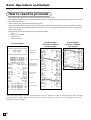
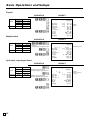
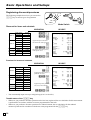
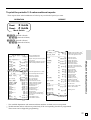
How to read the printouts
• The journal and receipts are records of all transactions and operations.
• The contents printed on receipts and journal are identical, except the date printing line. (The date line is printed
on receipts and reports.)
• You can choose the journal skip function (page 46).
If the journal skip function is selected, the cash register will print the total amount of each transaction, and the
details of premium, discount and reduction operations only, without printing department and PLU item registrations on the journal.
• The following items can be skipped on receipts and journal.
• Time
• Consecutive number
• Taxable status
• Taxable amount
Receipt Sample
************************
*
*
*
* THANK YOU *
*— Logo message
**
CALL AGAIN
** or graphic logo
*
*
************************
* COMMERCIAL MESSAGE *
* COMMERCIAL MESSAGE *
* COMMERCIAL MESSAGE *— Commercial message
* COMMERCIAL MESSAGE *
* COMMERCIAL MESSAGE *
— Mode/Date/Time
REG 06-15-2002 12:34
CLERK 01
0001-000123— Clerk/Machine No.
-Consecutive No.
DEPT01
T1
$1.00
DEPT02
T1
$2.00
5 X
@1.00
DEPT03
T2
$5.00
TAX-AMT 1
$3.00— Taxable amount
TAX 1
5%
$0.15 with tax rate
TAX-AMT 2
$5.00
TAX 2
4%
$0.20
TAX
$0.35— Tax total
TOTAL
$8.35
CASH
$10.00
CHANGE
$1.65
— Item counter
7 No
*** BOTTOM MESSAGE ***
*** BOTTOM MESSAGE ***
— Bottom message
*** BOTTOM MESSAGE ***
*** BOTTOM MESSAGE ***
*** BOTTOM MESSAGE ***
Journal Sample
(Item lines Included)
(normal height)
REG
CLERK 01
DEPT01
DEPT02
TAX-AMT 1
TAX 1
TAX
CASH
12:33
0001-000122
T1
$1.00
T1
$2.00
$3.00
$0.15
$0.15
$3.15
2 No
REG
12:34
CLERK 01
0001-000123
DEPT01
T1
$1.00
DEPT02
T1
$2.00
5 X
@1.00
DEPT03
T2
$5.00
TAX-AMT 1
$3.00
TAX 1
5%
$0.15
TAX-AMT 2
$5.00
TAX 2
4%
$0.20
TAX
$0.35
TOTAL
$8.35
CASH
$10.00
CHANGE
$1.65
7 No
REG
12:35
CLERK 01
0001-000124
DEPT01
T1
$1.00
DEPT02
T1
$2.00
5 X
@1.00
DEPT03
T2
$5.00
Journal Sample
(Item lines Skipped)
(half height)
REG
06-15-2002 12:32
CLERK 01
0001-000121
TAX-AMT 1
$3.00
TAX 1
5%
$0.15
TAX
$0.15
$3.15
CASH
2 No
REG
06-15-2002 12:33
CLERK 01
0001-000122
TAX-AMT 1
5%
$3.00
TAX 1
$0.15
TAX
$0.15
CASH
$3.15
2 No
REG
06-15-2002 12:34
CLERK 01
0001-000123
TAX-AMT 1
$3.00
TAX 1
5%
$0.15
TAX-AMT 2
$5.00
TAX 2
4%
$0.20
TAX
$0.35
$8.35
TOTAL
CASH
$10.00
CHANGE
$1.65
7 No
REG
06-15-2002 12:35
CLERK 01
0001-000124
TAX-AMT 1
$3.00
TAX 1
5%
$0.15
TAX-AMT 2
$5.00
TAX 2
4%
$0.20
In the operation examples contained in this manual, the print samples are what would be produced if the roll paper
is being used for receipts. They are not actual size. Actual receipts are 58 mm wide. Also, all sample receipts and
journals are printout images.
E
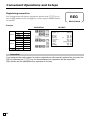
22
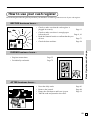
How to use your cash register
The following describes the general procedure you should use in order to get the most out of your cash register.
BEFORE business hours…
Basic Operations and Setups
• Check to make sure that the cash register is
plugged in securely.
Page 11
• Check to make sure there is enough paper
left on the roll.
Page 9, 10
• Read the financial totals to confirm that they are
all zero.
Page 73
• Check the date and time.
Page 24
DURING business hours…
• Register transactions.
• Periodically read totals.
Page 25
Page 72
AFTER business hours…
•
•
•
•
Reset the daily totals.
Remove the journal.
Empty the cash drawer and leave it open.
Take the cash and journal to the office.
Page 43
Page 84
Page 18
23
E
Basic Operations and Setups
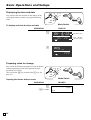
Displaying the time and date
REG
Z
C-A02
X
OP
C-A32
OFF
RF
PGM
You can show the time and date on the display of the
cash register whenever there is no registration being
made.
CAL
PGM
Mode Switch
To display and clear the time and date
OPERATION
DISPLAY
x
Month Day Year
AMOUNT
08-3~
Hour Minutes.
(24-hour system)
RPT RECEIPT
ON
C
AMOUNT
~00
RPT RECEIPT
ON
Preparing coins for change
X
REG
Z
C-A02
CAL
OP
C-A32
OFF
RF
PGM
Mode Switch
Opening the drawer without a sale
OPERATION
RECEIPT
B
(V: Canada)
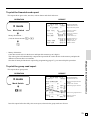
E
24
REG
#/NS
06-15-2002 08:35
000001
••••••••••••
PGM
You can use the following procedure to open the drawer
without registering an item. This operation must be
performed out of a sale.
(You can use the r key instead of the B key. See
page 39.)
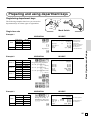
Preparing and using department keys
Registering department keys
X
REG
Z
C-A02
CAL
OP
The following examples show how you can use the
department keys in various types of registrations.
C-A32
RF
PGM
OFF
PGM
Mode Switch
Single item sale
Example 1
OPERATION
Unit price
Quantity
Item
Dept.
Taxable
Payment Cash
$1.00
1
1
(1)
$1.05
RECEIPT
1Unit price
&
Department
REG
06-15-2002 08:40
— Mode/date/time
000002— Consecutive No.
Department
DEPT01
T1
$1.00— descriptor/unit price
TAX-AMT 1
$1.00— Taxable amount 1
TAX 1
$0.05— Tax amount 1
CASH
$1.05— Cash total amount
Example 2
Unit price
Quantity
Dept.
Unit price
Item 2 Quantity
Dept.
Unit price
Item 3 Quantity
Dept.
Payment
Cash
Item 1
OPERATION
$1.00
1
25
$2.00
1
49
$3.00
1
73
$10.00
Example 3
Unit price
$1.00
Quantity
1
Item
Dept.
3
Tax status (1/2)→2
Payment
Cash
$1.00
Basic Operations and Setups
a
RECEIPT
1-d!
Designating from department
25 to 48, press d once
(-2- shows),
49 to 72, press d twice,
(-3- shows),
73 to 96, press d three times
(-4- shows).
REG
06-15-2002 08:40
000003
DEPT25
DEPT49
DEPT73
TOTAL
CASH
CHANGE
$1.00
$2.00
$3.00
$6.00
$10.00
$4.00
2dd!
3ddd!
10-a
OPERATION
RECEIPT
t3-(
Shifting taxable dept. to
nontaxable by depressing
t, T before numeric.
a
REG
06-15-2002 08:40
000004
DEPT03
TAX-AMT 2
TAX 2
CASH
T2
Tax status symbol
$3.00
$3.00— Taxable amount 2
$0.30— Tax amount 2
$3.30
25
E
Basic Operations and Setups
Repeat
OPERATION
Unit price
Quantity
Item
Dept.
Taxable
Payment
Cash
$1.50
3
3
(1/2)
$10.00
150(
(
(
s
10-a
Multiplication
RECEIPT
REG
06-15-2002 08:45
000003
DEPT03
DEPT03
DEPT03
TAX-AMT 1
TAX 1
TAX-AMT 2
TAX 2
TOTAL
CASH
CHANGE
OPERATION
Unit price
Quantity
Item
Dept.
Taxable
Payment Cash
$1.00
12.5
3
(1/2)
$20.00
12^5x
Quantity
(4-digit integer/2-digit decimal)
1-(
s
20-a
T1T2
T1T2
T1T2
$1.50
$1.50— Repeat
$1.50— Repeat
$4.50
$0.23
$4.50
$0.45
$5.18
$10.00
$4.82
RECEIPT
REG
06-15-2002 08:50
000004
12.5 X
DEPT03
TAX-AMT 1
TAX 1
TAX-AMT 2
TAX 2
TOTAL
CASH
CHANGE
— Quantity/unit price
@1.00
$12.50
$12.50
$0.63
$12.50
$1.25
$14.38
$20.00
$5.62
T1T2
Split sales of packaged items
OPERATION
Unit price
Quantity
Item
Dept.
Taxable
Payment
Cash
$10.00
3/4
3
(1/2)
$20.00
3x
Quantity being purchased
(4-digit integer/2-digit decimal)
4x
Quantity being purchased
(4-digit integer/2-digit decimal)
10-(
Package price
s
10-a
E
26
RECEIPT
REG
06-15-2002 08:55
000007
3
X
@4
DEPT03
TAX-AMT 1
TAX 1
TAX-AMT 2
TAX 2
TOTAL
CASH
CHANGE
— Quantity
10.00 — Package quantity/
unit price
$7.50
$7.50
$0.38
$7.50
$0.75
$8.63
$10.00
$1.37
/
T1T2
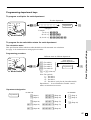
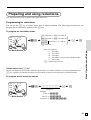
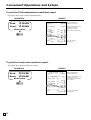
Programming department keys
To program a unit price for each department
To other department
CAL
X
REG
Z
61s6 : : : : : : 6
OFF
C-A32
PGM
6s
Unit price
Example:
$1.00 2 100
$10.25 2 1025
PGM
RF
Department
Mode Switch
$1,234.56 2 123456
To program the tax calculation status for each department
Programming procedure
Different status to different department
CAL
X
REG
Z
OFF
C-A32
PGM
PGM
RF
Mode Switch
t (Tax table 1)
T (Tax table 2)
61s 6 k (Tax table 3)
6
e (Tax table 4)*
B or V (Non tax)
{
}
Same status to
different department
Department
6s
Note: Tax symbols
T1: Tax table 1
T2: Tax table 2
T3: Tax table 3
T4: Tax table 4 *(only for the Canadian model)
Department 1 ~ 12 are initialized as Taxable 1 and 2,
others are initialized as non-tax.
Basic Operations and Setups
Tax calculation status
This specification defines which tax table should be used for automatic tax calculation.
See page 13 for information on setting up the tax tables.
Department designation
for the U.S.
Department
! (Dept.1)
" (Dept.2)
:
% (Dept.24)
d! (Dept.25)
:
d% (Dept.48)
for Canada
dd! (Dept.49)
dd" (Dept.50)
:
dd% (Dept.72)
ddd! (Dept.73)
:
ddd% (Dept.96)
& (Dept.1)
' (Dept.2)
:
. (Dept.24)
27
E
Basic Operations and Setups
X
REG
Z
C-A02
CAL
OP
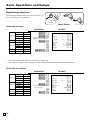
Registering department keys by
programming data
C-A32
RF
PGM
OFF
PGM
Preset price
Mode Switch
OPERATION
Unit price
Quantity
Item
Dept.
Taxable
Payment
Cash
( ): Preset value
($1.00)
1
1
(No)
$1.00
RECEIPT
!
a
REG
06-15-2002 08:55
000005
$1.00 — Department
$1.00 descriptor/unit price
DEPT01
CASH
Preset tax status (Add-on tax)
OPERATION
Unit price
Quantity
Item 1
Dept.
Taxable
Unit price
Quantity
Item 2
Dept.
Taxable
Payment
Cash
( ): Preset value
E
28
($2.00)
5
2
(1)
($2.00)
1
4
(2)
$20.00
5x
"
$
s
20-a
RECEIPT
REG
06-15-2002 09:00
000006
Tax status symbols
5
DEPT02
DEPT04
TAX-AMT 1
TAX 1
TAX-AMT 2
TAX 2
TOTAL
CASH
CHANGE
X
@2.00
T1
$10.00
T2
$2.00
$10.00 —
$0.50 —
$2.00 —
$0.12 —
$12.62
$20.00
$7.38
Taxable Amount 1
Tax 1
Taxable Amount 2
Tax 2
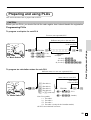
Preparing and using PLUs
This section describes how to prepare and use PLUs.
CAUTION:
Before you use PLUs, you should first tell the cash register how it should handle the registration.
Programming PLUs
To program a unit price for each PLU
To a new (not sequential) PLU
Different unit price to the next PLU
X
Z
OFF
C-A32
PGM
PGM
RF
Mode Switch
6 1s 6 PLU No. *6 : : : : : : 6 a 6 s
(1 to 16-; U.S.)
(1 to 800; Canada)
Unit price
Example:
$1.00 2 100
$10.25 2 1025
$1,234.56 2 123456
To program tax calculation status for each PLU
Different status to a new (not sequential) PLU
Same status to a new PLU
CAL
X
REG
Z
Same status
to the next PLU
OFF
C-A32
PGM
PGM
RF
Basic Operations and Setups
CAL
REG
Same unit price
to the next PLU
Mode Switch
t (Tax table 1)
T (Tax table 2)
61s 6 k (Tax table 3)
6 PLU No.
6 * 6s
e (Tax table 4)*
(1 to 16-; U.S.)
B or V (Non tax)
{
}
(1 to 800; Canada)
Note: Tax symbols
T1: Tax table 1
T2: Tax table 2
T3: Tax table 3
T4: Tax table 4 *(only for the Canadian model)
All PLUs are initialized as non-tax.
29
E
Basic Operations and Setups
Registering PLUs
REG
Z
C-A32
RF
PGM
Mode Switch
OPERATION
($2.50)
1
14
(2)
$3.00
14
RECEIPT
REG
PLU code
*
s
3-a
06-15-2002 09:10
000008
PLU0014
TAX-AMT 2
TAX 2
TOTAL
CASH
CHANGE
T2
$2.50— PLU descriptor/
unit price
$2.50
$0.25
$2.75
$3.00
$0.25
PLU repeat
OPERATION
Unit price
Quantity
Item
PLU
Taxable
Payment
Cash
( ): Preset value
($2.50)
3
14
(2)
$10.00
14*
*
*
s
10-a
RECEIPT
REG
06-15-2002 09:15
000009
PLU0014
PLU0014
PLU0014
TAX-AMT 2
TAX 2
TOTAL
CASH
CHANGE
T2
T2
T2
$2.50
$2.50
$2.50
$7.50
$0,75
$8.25
$10.00
$1.75
PLU multiplication
OPERATION
Unit price
Quantity
Item
PLU
Taxable
Payment
Cash
( ): Preset value
E
30
PGM
OFF
PLU single item sale
Unit price
Quantity
Item
PLU
Taxable
Payment
Cash
( ): Preset value
C-A02
X
OP
The following examples show how you can use PLUs in
various types of registrations.
Registering by subdepartment, see the “Convenient
Operations and Setups” on page 62.
CAL
($1.20)
15
2
(2)
$20.00
15x
Quantity
(4-digit integer/2-digit decimal)
2*
s
20-a
RECEIPT
REG
06-15-2002 09:20
000010
15 X
PLU0002
TAX-AMT 2
TAX 2
TOTAL
CASH
CHANGE
T2
@1.20
$18.00
$18.00
$1.80
$19.80
$20.00
$0.20
PLU split sales of packaged item
OPERATION
Unit price ($20.00)
Quantity
3/5
Item
PLU
28
Taxable
(2)
Payment
Cash
$15.00
( ): Preset value
3x
RECEIPT
REG
06-15-2002 09:35
000013
Quantity
(4-digit integer/2-digit decimal)
5x
28*
s
15-a
3
X
@5
PLU0028
TAX-AMT 2
TAX 2
TOTAL
CASH
CHANGE
/
T2
20.00
$12.00
$12.00
$1.20
$13.20
$15.00
$1.80
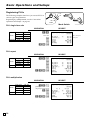
Preparing and using discounts/premiums
This section describes how to prepare and register discount and premium.
Basic Operations and Setups
Programming discounts/premiums
You can use the \ key to register discounts (percentage decreases) and the ] key to register premiums
(percentage increases).
To program a rate to the \/] key
CAL
X
REG
Z
6 1s 6 : : : : 6
OFF
C-A32
PGM
PGM
RF
Mode Switch
\
{ }
]
6s
Preset rate
Example:
10% 2 10
5.5% 2 5^5
12.34% 2 12^34
To program tax status to the \/] key
CAL
X
REG
Z
6 1s 6
OFF
C-A32
PGM
PGM
RF
Mode Switch
t (Tax table 1) T (Tax table 2)
k (Tax table 3) e (Tax table 4)†
\
tT
6
6s
(Tax table 1, 2, 3 and 4†)
ke
]
B or V (Non tax)
{
}{
}
Note: Tax symbols
\/] are initialized as all taxable.
T1: Tax table 1
T2: Tax table 2
T3: Tax table 3
T4: Tax table 4 †(only for the Canadian model)
*:
All taxable
31
E
Basic Operations and Setups
Registering discounts/premiums
REG
Z
C-A02
X
OP
C-A32
OFF
RF
PGM
The following example shows how you can use the
\/] key in various types of registration.
CAL
PGM
Mode Switch
Discount for items and subtotals
OPERATION
Unit price
$5.00
Quantity
1
Item 1
Dept.
2
Taxable
(1)
Unit price ($10.00)
Quantity
1
Item 2
PLU
16
Taxable
(2)
Discount
Rate
(5%)
Rate
3.5%
Subtotal
Discount Taxable
(All)
Payment
Cash
$16.00
( ): Preset value
5-'
16*
\
Applies the preset discount
rate to the last item registered.
M
3^5\
The input value takes priority
of the preset value.
s
16-a
RECEIPT
REG
06-15-2002 10:30
000013
DEPT02
PLU0016
5%
%ST
3.5%
%TAX-AMT 1
TAX 1
TAX-AMT 2
TAX 2
TOTAL
CASH
CHANGE
T1
T2
$5.00
$10.00
T2
-0.50
$14.50
*
-0.51
$4.82
$0.24
$9.17
$0.92
$15.15
$16.00
$0.85
Premium for items and subtotals
OPERATION
Unit price ($10.00)
Quantity
1
Item 1
Dept.
4
Taxable
(2)
Premium
Rate
7%
Unit price ($5.00)
Quantity
1
Item 2
PLU
32
Taxable
(2)
Rate
(5%)
Subtotal
Premium Taxable
(1/2)
Payment
Cash
$20.00
( ): Preset value
)
7]
Applies the input value as a
premium rate (7%).
32*
M
]
Applies the preset premium
rate (5%) to the subtotal.
RECEIPT
REG
06-15-2002 13:15
000037
DEPT04
7%
%+
PLU0032
ST
5%
%+
TAX-AMT 2
TAX 2
TOTAL
CASH
CHANGE
T2
$10.00
T2
T2
$0.70
$5.00
$15.70
T1T2
$0.79
$16.49
$1.65
$18.14
$20.00
$1.86
s
20-a
• You can manually input rates up to 4 digits long (0.01% to 99.99%).
Taxable status of the \/] key
• Whenever you perform a discount operation on the last item registered, the tax calculation for discount amount
is performed in accordance with the tax status programmed for that item.
• Whenever you perform a discount operation on a subtotal amount, the tax calculation for the subtotal
amount is performed in accordance with the tax status programmed for the \/] key.
E
32
Preparing and using reductions
This section describes how to prepare and register reductions.
Programming for reductions
You can use the m key to reduce single item or subtotal amounts. The following procedure lets you
program the tax calculation method for the m key.
To program tax calculation status
X
REG
Z
OFF
C-A32
PGM
PGM
RF
t (Tax table 1) T (Tax table 2)
k (Tax table 3) e (Tax table 4)†
61s 6 tT (Tax table 1, 2, 3 and 4†) 6 m 6 s
ke
B (Non tax)
{
}
Note: Tax symbols
T1: Tax table 1
T2: Tax table 2
T3: Tax table 3
T4: Tax table 4 †(only for the Canadian model)
*:
All taxable
m is initialized as non-tax.
Mode Switch
Basic Operations and Setups
CAL
Taxable status of the m key
The tax calculation for the reduction amount is performed in accordance with the tax status programmed for the
m key, regardless of whether the reduction is performed on the last item registered or a subtotal amount.
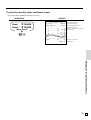
To program preset reduction amount
CAL
X
REG
Z
6 1s 6 : : : : : : 6m 6 s
OFF
C-A32
PGM
PGM
RF
Mode Switch
Unit price
Example:
$1.00 2 100
$10.25 2 1025
$1,234.56 2 123456
33
E
Basic Operations and Setups
Registering reductions
REG
Z
C-A02
X
OP
C-A32
OFF
RF
PGM
Mode Switch
Reduction for items
OPERATION
Unit price
Quantity
Item 1
Dept.
Taxable
Reduction Amount
Unit price
Quantity
Item 2
PLU
Taxable
Reduction Amount
Payment
Cash
( ): Preset value
$5.00
1
2
(1)
$0.25
($6.00)
1
45
(1)
($0.50)
$15.00
5-'
25m
Reduces the last amount
registered by the value input.
45*
m
s
15-a
RECEIPT
REG
06-15-2002 10:35
000014
DEPT02
PLU0045
TAX-AMT 1
TAX 1
TOTAL
CASH
CHANGE
T1
$5.00
-0.25
T1
$6.00
-0.50
$11.00
$0.55
$10.80
$15.00
$4.20
• You can manually input reduction values up to 7 digits long.
• The amount you input for the reduction is neither subtracted from the department nor PLU totalizer.
Reduction for subtotal
OPERATION
Unit price
Quantity
Item 1
Dept.
Taxable
Unit price
Quantity
Item 2
Dept.
Taxable
Subtotal Amount
Reduction Taxable
Payment
Cash
( ): Preset value
E
34
$3.00
1
2
(1)
$4.00
1
4
(2)
$0.75
(No)
$7.00
3-'
4-)
s
75m
Reduces the subtotal by the
value input here.
s
7-a
RECEIPT
REG
06-15-2002 10:40
000015
DEPT02
DEPT04
TAX-AMT 1
TAX 1
TAX-AMT 2
TAX 2
TOTAL
CASH
CHANGE
T1
T2
$3.00
$4.00
-0.75
$3.00
$0.15
$3.00
$0.30
$6.80
$7.00
$0.20
PGM
The following examples show how you can use the m
key in various types of registration.
CAL
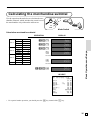
Calculating the merchandise subtotal
X
REG
Z
C-A02
CAL
OP
Use the operation shown below to calculate the merchandise subtotal, which includes the actual cost of
the merchandise only without the add-on tax.
C-A32
RF
PGM
OFF
PGM
Mode Switch
Calculation merchandise subtotal
Unit price
Quantity
Item 1
Dept.
Taxable
Unit price
Quantity
Item 2
Dept.
Taxable
Unit price
Quantity
Item 3
Dept.
Taxable
Payment
Cash
( ): Preset value
$1.00
1
1
(No)
$2.00
1
2
(1)
$3.00
1
3
(1/2)
$10.00
DISPLAY
1-!
!00
2-"
"00
3-#
#00
M
&00
Basic Operations and Setups
OPERATION
Calculates the merchandise subtotal.
&55
s
Calculates the subtotal (with add-on tax).
#45
10-a
RECEIPT
REG
06-15-2002 10:45
000016
DEPT01
DEPT02
DEPT03
TAX-AMT 1
TAX 1
TAX-AMT 2
TAX 2
TOTAL
CASH
CHANGE
$1.00
$2.00
$3.00
$5.00
$0.25
$3.00
$0.30
$6.55
$10.00
$3.45
T1
T1T2
• For a partial tender operation, you should press the s key instead of the M key.
35
E
Basic Operations and Setups
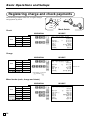
Registering charge and check payments
X
REG
Z
C-A02
CAL
OP
The following examples show how to register charges
and payments by check.
C-A32
RF
PGM
OFF
PGM
Mode Switch
Check
OPERATION
Unit price
Quantity
Item
Dept.
Taxable
Payment Check
( ): Preset value
$10.00
1
2
(1)
$20.00
10-'
s
20-k
RECEIPT
REG
06-15-2002 10:50
000018
DEPT02
TAX-AMT 1
TAX 1
TOTAL
CHECK
CHANGE
T1
$10.00
$10.00
$0.50
$10.50
$20.00
$9.50
Charge
OPERATION
Unit price
Quantity
Item
Dept.
Taxable
Reference Number
Payment Charge
( ): Preset value
$15.00
1
4
(2)
0123
$16.50
15-)
s
*
0123B
h
RECEIPT
REG
06-15-2002 10:55
000019
DEPT04
#/NS
TAX-AMT 2
TAX 2
CHARGE
T2
$15.00
0123— Reference No.
$15.00
$1.50
$16.50
* In Canada, you can use
b instead of B.
Mixed tender (cash, charge and check)
OPERATION
Unit price
Quantity
Item
Dept.
Taxable
Check
Payment
Cash
Charge
( ): Preset value
E
36
$55.00
1
4
(2)
$30.00
$5.00
$25.50
55-)
s
30-k
5-a
h
RECEIPT
REG
06-15-2002 11:00
000020
DEPT04
TAX-AMT 2
TAX 2
TOTAL
CHECK
CASH
CHARGE
T2
$55.00
$55.00
$5.50
$60.50
$30.00
$5.00
$25.50
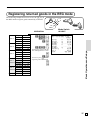
Registering returned goods in the REG mode
X
REG
Z
C-A02
CAL
OP
The following example shows how to use the R key in
the REG mode to register goods returned by customers.
C-A32
RF
PGM
OFF
PGM
Mode Switch
Unit price
Quantity
Item 1
Dept.
Taxable
Unit price
Quantity
Item 2
Dept.
Taxable
Unit price
Quantity
Item 3
PLU
Taxable
Unit price
Item 1 Quantity
Returned Dept.
Taxable
Unit price
Item 3 Quantity
Returned
PLU
Taxable
Payment Cash
( ): Preset value
$2.35
1
2
(1)
$2.00
1
4
(2)
($1.20)
1
1
(2)
$2.35
1
2
(1)
($1.20)
1
1
(2)
$2.20
RECEIPT
235'
2-)
1*
R
235'
Pressing R specifies that the
next item registered is a return.
R
1*
REG
06-15-2002 11:05
000021
DEPT02
DEPT04
PLU0001
REFUND
DEPT02
REFUND
PLU0001
TAX-AMT 2
TAX 2
CASH
T1
$2.35
T2
$2.00
T2
$1.20
••••••••••••
T1
-2.35
••••••••••••
T2
-1.20
$2.00
$0.20
$2.20
Basic Operations and Setups
OPERATION
You have to press R before
registering each returned item.
s
a
37
E
Basic Operations and Setups
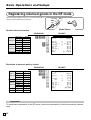
Registering returned goods in the RF mode
The following examples show how to use the RF mode to
register goods returned by customers.
REG
Z
C-A32
X
OFF
PGM
CAL
RF
PGM
Mode Switch
Normal refund transaction
OPERATION
RECEIPT
RF mode symbol
Unit price
Item 1 Quantity
Returned Dept.
Taxable
Unit price
Item 2 Quantity
Returned
PLU
Taxable
Payment
Cash
( ): Preset value
$1.50
2
2
(1)
($1.20)
6
2
(2)
$11.07
150'
'
6x
2*
s
a
RF
06-15-2002 11:10
000022
DEPT02
DEPT02
T1
T1
6 X
PLU0002
TAX-AMT 1
TAX 1
TAX-AMT 2
TAX 2
CASH
$1.50
$1.50
@1.20
T2
$7.20
$3.00
$0.15
$7.20
$0.72
$11.07
Reduction of amounts paid on refund
OPERATION
RECEIPT
RF mode symbol
Unit price
Item 1 Quantity
Returned Dept.
Taxable
Reduction Amount
Unit price
Item 2 Quantity
Returned
PLU
Taxable
Discount
Rate
Payment
Cash
( ): Preset value
$1.50
2
2
(1)
$0.15
($1.20)
1
2
(2)
(5%)
$5.30
4-'
15m
2*
\
s
a
RF
06-15-2002 11:15
000023
DEPT02
PLU0002
5%
%TAX-AMT 1
TAX 1
TAX-AMT 2
TAX 2
CASH
T1
T2
T2
$4.00
-0.15
$1.20
-0.06
$4.00
$0.20
$1.14
$0.11
$5.30
Important!
To avoid miss registrations in the RF mode, return the mode switch to the former position immediately.
E
38
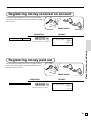
Registering money received on account
X
REG
Z
C-A02
CAL
OP
The following example shows how to register money
received on account. This registration must be performed
out of a sale.
C-A32
C-A32
PGM
RF
PGM
OFF
PGM
Mode Switch
OPERATION
Received amount
$700.00
RECEIPT
7--r
REG
06-15-2002 11:20
000024
Amount can be up to 8 digits.
$700.00
Basic Operations and Setups
RC
Registering money paid out
X
REG
Z
C-A02
CAL
OP
The following example shows how to register money
paid out from the register. This registration must be
performed out of a sale.
OFF
RF
PGM
Mode Switch
OPERATION
Paid out amount
$1.50
150P
Amount can be up to 8 digits.
RECEIPT
REG
PD
06-15-2002 11:30
000025
$1.50
39
E
Basic Operations and Setups
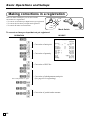
Making corrections in a registration
X
REG
Z
C-A02
CAL
OP
C-A32
OFF
RF
PGM
Mode Switch
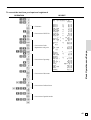
To correct an item you input but not yet registered
OPERATION
2—
C
—
1-'
—
12x
—
C
11x —
2-)
—
2
—
C
—
3*
—
15*
—
6C
15* —
Enter subdepartment No. again.
RECEIPT
REG
Correction of unit price
Correction of quantity
06-15-2002 11:35
000026
DEPT02
11 X
DEPT04
PLU0003
PLU0015
TAX-AMT 1
TAX 1
TAX-AMT 2
TAX 2
TOTAL
CASH
CHARGE
Correction of PLU No.
Correction of subdepartment unit price
(See page 62 for registering.)
10-:
—
s
10—
C
— Correction of partial tender amount
15-a
—
h
E
40
T1
$1.00
@2.00
T2
$22.00
T1
$1.30
T1
$10.00
$12.30
$0.62
$22.00
$2.20
$37.12
$15.00
$22.12
PGM
There are three techniques you can use to make
corrections in a registration.
• To correct an item that you input but not yet registered.
• To correct the last item you input and registered.
• To cancel all items in a transaction.
To correct the last item you input and registered
1-'
2-)
)—
—
e—
2* —
e —
5* —
15* —
6-:
e —
15*
10-: —
8x —
4-)
e —
6x
4-) —
M—
50\
e —
M
5\ —
R2-) —
e —
R220) —
s
30-a —
e —
15-a —
h
RECEIPT
REG
Clearance
Correction of PLU No.
Correction of subdepartment unit price
Correction of quantity
06-15-2002 11:40
000027
DEPT02
DEPT04
DEPT04
ERR CORR
PLU0002
ERR CORR
PLU0005
PLU0015
ERR CORR
PLU0015
8 X
DEPT04
ERR CORR
6 X
DEPT04
ST
50%
%ERR CORR
ST
5%
%REFUND
DEPT04
ERR CORR
REFUND
DEPT04
TAX-AMT 1
TAX 1
TAX-AMT 2
TAX 2
TOTAL
CASH
ERR CORR
CASH
CHARGE
T1
T2
T2
T2
T1
T1
T1
T2
T2
*
$1.00
$2.00
$2.00
-2.00
$1.20
-1.20
$1.50
$6.00
-6.00
$10.00
@4.00
$32.00
-32.00
@4.00
$24.00
$38.50
-19.25
$19.25
$38.50
*
-1.93
••••••••••••
T2
-2.00
$2.00
••••••••••••
T2
-2.20
$11.87
$0.59
$22.50
$2.25
$37.21
$30.00
-30.00
$15.00
$22.21
Basic Operations and Setups
OPERATION
Correction of discount
Correction of refund item
Correction of partial tender
41
E
Basic Operations and Setups
To cancel all items in a transaction
OPERATION
RECEIPT
1-&
2-'
3-(
4-)
M
REG
06-15-2002 11:45
000028
DEPT01
DEPT02
DEPT03
DEPT04
CANCEL TTL
$1.00
T1
$2.00
T1T2
$3.00
T2
$4.00
••••••••••••
Pressing M key is necessary to cancel
the transaction.
e
Important!
• Note that the number of items included in the transaction to be cancelled is limited (24 ~ 40
items), depending on the complexity of the transaction. If you try to cancel a transaction that
exceeds the limit, an error occurs.
In case of occurrence of this error, register these items in the RF mode.
• You can program the cash register that this cancel operation is not allowed.
No sale registration
X
REG
Z
C-A02
CAL
OP
You can use the following procedure to open the drawer
without registering a sale. This operation must be
performed out of a sale.
C-A32
RF
PGM
Mode Switch
OPERATION
RECEIPT
B
(V: Canada)
E
42
REG
#/NS
06-15-2002 11:50
000029
••••••••••••
PGM
OFF
Printing the daily sales reset report
This report shows daily sales totals.
OPERATION
Z
OFF
RF
PGM
Mode Switch
8
a
*1
*2
*3
— Reset mode/date/time
06-15-2002 12:00
000030— Consecutive No.
Z 0001— Report code/report title/reset symbol/
reset counter
*1
DEPT01
QT
15— Department descriptor/No. of items
*1
—
Department
amount
$339.50
DEPT02
QT
19
$62.70
DEPT03
QT
31
$139.10
DEPT04
QT
23
$332.67
NON-LINK DPT QT
10— Non-link department No. of items
$94.90— Non-link department amount
-----------------------GROSS TOTAL
QT
253— Gross No. of items
$1146.90— Gross sales amount
NET TOTAL
No
100— No. of customers
$1217.63— Net sales amount
CASH-INDW
$903.06— Cash in drawer amount
CHARGE-INDW
$197.17— Charge in drawer amount
CHECK-INDW
$183.60— Check in drawer amount
*2
TAX-AMT 1
$732.56— Taxable amount 1
*2
TAX 1
$43.96— Tax amount 1
*2
TAX-AMT 2
$409.72— Taxable amount 2
*2
—
Tax
amount
2
TAX 2
$21.55
*2
TAX-AMT 3
$272.50— Taxable amount 3
*2
TAX 3
$8.18— Tax amount 3
CANCEL TTL
No
2— Cancellation count
$108.52— Cancellation amount
*3
RF-MODE TTL
No
2— Refund mode operation count
*3
$3.74— Refund mode operation amount
-----------------------CASH
No
81— Cash sales count
$836.86— Cash sales amount
CHARGE
No
10— Charge sales count
$197.17— Charge sales amount
CHECK
No
9— Check sales count
$183.60— Check sales amount
RC
No
2— Received on Account count
$78.00— Received on Account amount
PD
No
1— Paid out count
$6.80— Paid out amount
No
8— Subtraction count
$3.00— Subtraction amount
%No
10— Discount count
$4.62— Discount amount
%+
No
1— Premium count
$1.00— Premium amount
*3
REFUND
No
7— Refund key count
*3
$27.79— Refund key amount
ERR CORR
No
10— Error correction count
$12.76— Error correction amount
#/NS
No
5— No sale count
-----------------------*3
GRND TTL $0000001217.63— Non-resettable grand-sales total
0000 DAILY
Basic Operations and Setups
REG
Z
C-A32
X
PGM
CAL
REPORT
Zero totalled departments (the amount and item numbers are both zero) are not printed.
Taxable amount and tax amount are printed only if the corresponding tax table is programmed.
These items can be skipped by programming.
43
E
Convenient Operations and Setups
This section describes more sophisticated setups and operations that you can use to suit the needs of your retail
environment.
Clerk control function
Clerk name printing on receipt/journal, and sales amounts summing by clerk.
To use clerk function, refer to page 47.
REG /RF/
CAL / X / Z
Clerk sign on and sign off
Any time you begin any registration, clerk sign on operation is necessary.
Mode Switch
Clerk sign on
OPERATION
Signing clerk 1 on:
○
Signing clerk 2 on:
1 6 S
2 6 S
RECEIPT
REG 06-15-2002 12:34
CLERK 01
000123— Clerk name/consecutive No.
DEPT01
DEPT02
○
○
5
10 6 S
X
○
○
○
Signing clerk 10 on:
DEPT03
$1.00
$2.00
@1.00
T1T2
$5.00
T1
Clerk sign off
OPERATION
Signing clerk off:
0 6 S
• The current clerk is also signed off whenever you set the mode switch to OFF position.
Important!
• The error code “E08” appears on the display whenever you try to perform a registration, a read/
reset operation without signing on.
• The signed on clerk is also identified on the receipt/journal.
E
44
Post-finalization receipt format,
General printing control,
Compulsory, Machine features
About post-finalization receipt
The post-finalization receipt lets you issue a receipt after finalization of the transaction.
Note that all of the following conditions must be satisfied.
• The receipt issuance status must be OFF.
• The transaction must be finalized in the REG or RF mode using the a, h or k key.
Post-finalization receipt example
You can program the cash register to print the transaction total only (below Total
format) or full details (below Detailed format) on the post-finalization receipt.
Note that if the transaction contains more than 45 lines (including receipt header),
the cash register prints in a Total format regardless of your programming.
Unit price
Quantity
Item 1
Dept.
Taxable
Unit price
Quantity
Item 2
Dept.
Taxable
Payment
Cash
( ): Preset value
$10.00
1
2
(1)
$20.00
1
4
(2)
$32.50
RECEIPT
10-'
20-)
s
3250a
<
Mode Switch
Convenient Operations and Setups
OPERATION
REG
Receipt is not issued.
Post-finalization receipt is issued.
If “Automatic issue” is selected, no need to press < key.
Total format
Detailed format
REG 06-15-2002 12:35
CLERK 01
000123
REG 06-15-2002 12:35
CLERK 01
000123
CASH
DEPT02
DEPT04
TAX-AMT 1
TAX 1
TAX-AMT 2
TAX 2
TOTAL
CASH
CHANGE
$32.50
T1
T2
$10.00
$20.00
$10.00
$0.50
$20.00
$2.00
$32.50
$32.50
$0.00
Important!
• You can issue only one post-finalization receipt per transaction.
45
E
Convenient Operations and Setups
Programming general printing control
:D
No = 0
Yes = 1
Suppress printing of the subtotal line during tender operation.
Print the current time.
a
Yes = 0
No = 1
Skip the date on journal.
b
Yes = 0
No = 2
8
Skip the consecutive number.
c
No = 0
Yes = 4
Issue post receipt by Finalize key (automatic issue)/
Post receipt key (manual issue)
a
Manual = 0
Automatic = 2
Detail format/Total format in the post receipt
b
Detail = 0
Total = 4
Print taxable amount.
a
Yes = 0
No = 1
Print tax symbols.
b
Yes = 0
No = 2
Print number of item sold.
c
No = 0
Yes = 4
Skip item lines on journal. (journal skip)
a
No = 0
Yes = 1
Print subtotal when the key is pressed.
b
No = 0
Yes = 2
1=0
2=4
Time system:
1 24 hour system, 2 12 hour system
c
Digit separator symbol.
a
Comma = 0
Period = 1
Decimal symbol.
b
Period = 0
Comma = 2
Journal compressed print (print by half height characters)
c
Yes = 0
No = 4
Print hyphens before finalizing a transaction.
a
No = 0
Yes = 1
Print tax total on receipt and report.
b
No = 0
Yes = 2
a+b+c =
:D
a+b =
:D
a+b+c =
:D
a+b+c =
:D
a+b+c =
:D
a+b =
:D
6
5
4
3
2
:D
No = 0
Yes = 2
Print receipt by double height characters.
7
1
63s 6 0522s 6
PGM
Mode Switch
6 :::::::: a 6 s
D8
E
46
D7
D6
D5
D4
D3
D2 D1
Programming compulsory and clerk control function
Force s operation before finalization.
a
No = 0
Yes = 2
Force a money declaration before allowing a daily read/reset
and financial read operation.
b
No = 0
Yes = 4
a+b =
:D
8
; ~ ; D ~D
Always “000”
7
Clear the key buffer when a receipt is issued.
a
No = 0
Yes = 1
Perform auto sign-off when a receipt/report is issued.
b
No = 0
Yes = 2
Display “seconds” during time display.
No = 0
Yes = 2
Reset the consecutive number when the daily reset report
is issued.
a
Yes = 0
No = 1
Prohibit cancel operation.
b
No = 0
Yes = 2
Assign – as “00” or “000”.
a
“00” = 0
“000” = 1
Use “clerk” function:
(If you select “Yes”, sign on operation is necessary before registration.
b
No = 0
Yes = 4
a+b =
5
:D
4
:D
3
a+b =
:D
a+b =
:D
2
1
63s 6 0622s 6
Convenient Operations and Setups
PGM
Mode Switch
6 :;;;:::: a 6 s
D8
D7
D6
D5
D4
D3
D2 D1
47
E
Convenient Operations and Setups
Programming read/reset report printing control
Print the first and the last consecutive number of the day
(consecutive No. range) on the daily sales reset report.
No = 0
Yes = 4
Skip zero total lines on department and transaction read/reset report.
a
Yes = 0
No = 1
Skip zero total lines on PLU read/reset report.
b
Yes = 0
No = 2
Skip zero total lines on hourly sales report.
c
Yes = 0
No = 4
Print the sales ratio on read/reset report.
a
No = 0
Yes = 1
Suppress printing of the non-resettable grand total on the daily reset
report.
b
No = 0
Yes = 2
Suppress printing of RF total and count (both RF mode and RF key)
on the read/reset report.
a
No = 0
Yes = 1
Print tax rate with tax totalizer.
b
No = 0
Yes = 2
:D
6
a+b+c =
:D
a+b =
:D
a+b =
:D
5
4
3
;;D D
Always “00”
2
1
63s 6 0822s 6
PGM
Mode Switch
6 ::::;; a 6 s
D6
D5
D4
D3
D2
D1
Setting a store/machine number
You can set a 4-digit machine number to identify your machine. The machine number is printed on receipts/journal
for each transaction.
63s 6 0222s 6 : : : : a 6 s
PGM
Mode Switch
D4
$1.00
$2.00
@1.00
T1T2
$5.00
T1
5
DEPT03
48
D2
D1
— Mode/date/time
REG 06-15-2002 12:34
CLERK 01
0001-000123— Clerk/machine No./consecutive No.
DEPT01
DEPT02
E
D3
X
Programming to clerk
You can program up to 4-digit assigning number (clerk number) and trainee status of clerk (i.e. training cashier) for
each clerk.
Programming clerk number
To other clerk
Clerk No.
1
PGM
{ }
6 3s 6
Mode Switch
15
(Canada)
40
(U. S.)
07 s
6 :::: a6 s
Clerk number
Programming trainee status of clerk
To the next clerk
PGM
Mode Switch
Clerk No.
1
6 3s6
{ }
15
(Canada)
40
(U. S.)
67s
6
{ }
Training clerk:
1
Normal clerk:
0
a 6s
When a training clerk signs on, the cash register automatically enters the training mode.
In the training mode, no operations are affected on any totalizers nor counters.
The training mode symbols are printed in the columns of receipt entries produced in the training mode.
The cash register exits the training mode when the training clerk signs off.
49
Convenient Operations and Setups
To other clerk
E
Convenient Operations and Setups
Programming descriptors and messages
The following descriptors and messages can be programmed;
• Report descriptor (such as gross total, net total, cash in drawer…)
• Grand total
• Special character (such as mode symbol, taxable symbol…)
• Read/reset report title
• Messages (Logo, commercial and bottom message)
• Clerk name
• Function key descriptor
• PLU item descriptor
• Department key descriptor
Programming report descriptor, grand total, special character, report title,
receipt message and clerk name
To other program code
To the next memory No.
PGM
62s 6 : : : : s 6
Memory
code
Mode Switch
Program
code
Characters
6 a 6s
☞ See “Entering characters” section,
on page 55.
Report descriptor
Memory
No.
01
02
03
04
05
06
07
08
09
10
11
12
13
14
15
16
17
18
19
20
21
22
23
24
25
26
27
E
50
Program
code
01
Contents
Gross total
Net total
Cash in drawer
Charge in drawer
Check in drawer
not used
Foreign currency cash in drawer
Foreign currency check in drawer
not used
not used
Taxable amount 1
Tax 1
Taxable amount 2
Tax 2
Taxable amount 3
Tax 3
Taxable amount 4
Tax 4
not used
not used
not used
Cancellation total
Refund mode total
not used
not used
Calculator mode count
Non-link department total
Initial character
GROSS TOTAL
NET TOTAL
CASH-INDW
CHARGE-INDW
CHECK-INDW
CE-CASH 1
CE-CHECK 1
TAX-AMT
TAX 1
TAX-AMT
TAX 2
TAX-AMT
TAX 3
TAX-AMT
TAX 4
1
2
3
4
CANCEL TTL
RF-MODE TTL
CALCULATOR
NON-LINK DPT
Yours
Grand total, special character
Program
code
20
23
Contents
Initial character
Yours
GRND TTL
$ @NoQT
NoCT
X /
T1T2T3T4 ‹
*
*
REG RF
PGM n (n=1~6)
X
Z
CAL
****
********
TOTAL
CHANGE
Grand total
Amount/@/No./Quantity (2 each)
Item count/Customer (2 each)
Multiplication/Split pricing (2 each)
Taxable status 1 ~ 4 (2 each)
All taxable status
Foreign currency symbol (2)
REG mode/Refund mode (4 each)
not used (4)/Program mode (3)
X/Z mode (4 each)
CAL mode (4)
Training mode
Training symbol
Total symbol (Tendering)
Change symbol
not used
Total symbol (Post receipt)
Total symbol (% registration)
AM, PM (3 each)
Tax total
not used
not used
not used
not used
not used
not used
Total message on report
TOTAL
ST
AM PM
TAX
Convenient Operations and Setups
Memory
No.
01
01
02
03
04
05
06
07
08
09
10
11
12
13
14
15
16
17
18
19
20
21
22
23
24
25
26
TOTAL
Report title
Memory
No.
01
02
03
04
05
06
07
08
09
10
11
12
Program
code
24
Contents
Daily report title
PLU report title
Hourly sales report title
Group report title
Not used
Financial report title
Monthly report title
Periodic-1 report title
Periodic-2 report title
Individual report title
Not used
Not used
Initial character
Yours
DAILY
PLU
HOURLY
GROUP
CLERK
FLASH
MONTHLY
PERIODIC-1
PERIODIC-2
Clerk name
Memory
No.
01
02
03
04
05
Program
code
07
Contents
Clerk 01
Clerk 02
Clerk 03
Clerk 04
Initial character
CLERK
CLERK
CLERK
CLERK
CLERK
Yours
01
02
03
04
05
51
E
Convenient Operations and Setups
Receipt message
Refer to “Programming receipt message/logo stamp control function” on page 54.
Memory
No.
01
02
03
04
05
06
07
08
09
10
11
12
13
14
15
16
Program
code
32
Contents
Initial character
1st line of logo message
2nd line of logo message
3rd line of logo message
4th line of logo message
5th line of logo message
6th line of logo message
1st line of commercial message
2nd line of commercial message
3rd line of commercial message
4th line of commercial message
5th line of commercial message
1st line of bottom message
2nd line of bottom message
3rd line of bottom message
4th line of bottom message
5th line of bottom message
Yours
YOUR RECEIPT
THANK YOU
CALL AGAIN
Programming department key descriptor
To other department
PGM
62s 6
Characters
6 -6
Department
6s
☞ See “Entering characters” section,
Mode Switch
Contents
Department 01
Department 02
Department 03
Department 04
Department 05
Department 06
Department 07
Department 08
Department 09
Department 10
Department designation
Department
E
52
on page 55.
Initial character
DEPT01
DEPT02
DEPT03
DEPT04
DEPT05
DEPT06
DEPT07
DEPT08
DEPT09
DEPT10
Yours
for the U.S.
! (Dept.1)
" (Dept.2)
:
% (Dept.24)
d! (Dept.25)
:
d% (Dept.48)
for Canada
dd! (Dept.49)
dd" (Dept.50)
:
dd% (Dept.72)
ddd! (Dept.73)
:
ddd% (Dept.96)
& (Dept.1)
' (Dept.2)
:
. (Dept.24)
Programming PLU descriptor
To a new (not sequential) PLU
To the next PLU
62s 6
PLU No.
*
(1 ~ 1600; U.S.)
(1 ~ 800; Canada)
a6 s
on page 55.
Contents
PLU001
PLU002
PLU003
PLU004
PLU005
PLU006
PLU007
PLU008
PLU009
PLU010
PLU011
PLU012
PLU013
PLU014
PLU015
PLU016
PLU017
PLU018
PLU019
PLU020
PLU021
PLU022
PLU023
PLU024
PLU025
PLU026
PLU027
PLU028
PLU029
PLU030
PLU031
PLU032
PLU033
PLU034
PLU035
PLU036
PLU037
PLU038
PLU039
Characters
☞ See “Entering characters” section,
Mode Switch
PLU No.
001
002
003
004
005
006
007
008
009
010
011
012
013
014
015
016
017
018
019
020
021
022
023
024
025
026
027
028
029
030
031
032
033
034
035
036
037
038
039
6
Initial character
PLU0001
PLU0002
PLU0003
PLU0004
PLU0005
PLU0006
PLU0007
PLU0008
PLU0009
PLU0010
PLU0011
PLU0012
PLU0013
PLU0014
PLU0015
PLU0016
PLU0017
PLU0018
PLU0019
PLU0020
PLU0021
PLU0022
PLU0023
PLU0024
PLU0025
PLU0026
PLU0027
PLU0028
PLU0029
PLU0030
PLU0031
PLU0032
PLU0033
PLU0034
PLU0035
PLU0036
PLU0037
PLU0038
PLU0039
Yours
Convenient Operations and Setups
PGM
53
E
Convenient Operations and Setups
Programming function key descriptor
To other function key
62s 6
PGM
6- 6
Characters
6s
Function key
☞ See “Entering characters” section,
Mode Switch
on page 55.
Contents
Cash/amount tendered
Charge
Check
Received on account
Paid out
Minus
Discount
Premium
Refund
Error correct/Cancel
Non-add/No sale
Non-add
No sale
Post receipt
Currency exchange
MD/ST
Price
Open
Clerk No.
Subtotal
Receipt on/off
Multiplication/For/Date time
Initial character
CASH
CHARGE
CHECK
RC
PD
%%+
REFUND
ERR CORR
#/NS
#
NS
P/G RCT
CURR EXG
MDST
PRICE
OPEN
SIGN ON
TL
R ON/OFF
QTY/FOR
Yours
Programming receipt message/logo stamp control function
1 Print graphic logo (electronic logo stamp), 2 Logo message
a
1=0
2=1
Print commercial message.
b
No = 0
Yes = 2
:D
8
No = 0
Yes = 4
c
Print bottom message.
a+b+c =
; ~ ; D ~D
Always “0000000”
7
63s 6 2122s 6
PGM
Mode Switch
6 :;;;;;;; a 6 s
D8
E
54
D7
D6
D5
D4
D3
D2 D1
1
Entering characters
In this section, the method to enter descriptors or messages (characters) to the cash register during programming is
described.
Characters are specified by character keyboard or by codes. In the first half of this section, the usage of character
keyboard is described. In the latter half, inputting method by character code is described.
Using character keyboard
2
1
RECEIPT
JOURNAL
FEED
FEED
E
7
2
1
3
4
6
8
DBL
SIZE
2
4
7
8
9
K
4
5
6
Q
3
U
•
Y
3
PLU/
7
S.DEPT
5
9
5
0
1
8
6
SPACE
2
C
0
9
00
1 Feed key
Hold this key down to feed paper from the printer.
2 Alphabet keys
Used input to characters.
3 PLU/S.DEPT key
Use this key to input PLU/Subdepartment numbers.
4 Double size letter key
Specifies that the next character you input to a double size
character. You must press this key before each double size
character.
5 Space key
Set a space by depression.
6 Clear key
Clears all input characters in the programming.
7 Numeric keys
Used to enter program codes, memory number and
character codes.
a
e
k
q
u
y
B
F
L
R
V
Z
C
b
c
G
f
M
l
g
m
S
r
W
v
0
s
w
D
H
N
T
X
d
O
n
J
i
o
P
j
p
t
B
x
A
#-2
C
CAPS
z
I
h
SHIFT
#-1
8 Character fixed key
Enter when the alphabetic entry for a descriptor, name or
message has been completed.
9 Backspace/Character code fixed key
Registers one character with code (2 or 3 digits).
Clears the last input character, much like a back space
key.
0 CAPS key
Pressing this key shifts the character from the lowercase
letter to upper case letter.
A Shift key
Pressing this key shifts the character from the uppercase
letter to lower case letter.
B Program end key
Convenient Operations and Setups
A
Terminates the character programming.
C Character enter key
Registers the programmed characters.
Example:
Input “
A
p
p l e
J
u
i
c e ”,
enter “DBL SIZE”, “A”, “SHIFT”, “p”, “p”, “l”, “e”, “SPACE”, “CAPS”, “J”, “SHIFT”, “u”, “i”, “c”, “e” .
55
E
Convenient Operations and Setups
Entering characters by code
Every time you enter a character, choose character codes by the character code list (below) and press the ^ key
to settle it.
Example:
Input “
A
p
p
l
e
J
u
i
c
e
”,
enter “ 255^65^ 112^ 112^ 108^ 101^ 32^ 74^ 117^ 105^ 99^ 101^ ”.
Character code list
Chara
Code
Chara
Code Chara
Space
32
0
48
@
!
33
1
49
A
Code
Chara
Code
Chara
Code
64
P
65
Q
80
'
81
a
96
p
112
Ç
128
97
q
113
ü
129
Chara Code
"
34
2
50
B
66
R
82
b
98
r
114
é
130
35
3
51
C
67
S
83
c
99
s
115
â
131
$
36
4
52
D
68
T
84
d
100
t
116
ä
132
%
37
5
53
E
69
U
85
e
101
u
117
à
133
&
118
å
134
38
6
54
F
70
V
86
f
102
v
'
39
7
55
G
71
W
87
g
103
w
119
ç
135
(
40
8
56
H
72
X
88
h
104
x
120
ê
136
)
41
9
57
I
73
Y
89
i
105
y
121
ë
137
*
42
:
58
J
74
Z
90
j
106
z
122
è
138
+
43
;
59
K
75
[
91
k
107
{
123
ï
139
,
44
<
60
L
76
\
92
l
108
|
124
î
140
-
45
=
61
M
77
]
93
m
109
}
125
ì
141
.
46
>
62
N
78
^
94
n
110
~
126
Ä
142
/
47
?
63
O
79
_
95
o
111
127
Å
143
Chara
Code
Chara
Code
Chara
Code
Chara
Code
Chara
Code
Chara
Code
É
144
á
160
176
192
208
Ó
224
-
240
209
ß
225
±
241
210
Ô
226
_
242
Code Chara
æ
145
í
161
177
193
Æ
146
ó
162
178
194
Ê
ô
147
ú
163
179
195
Ë
211
Ò
227
3/4
243
ö
148
ñ
164
180
196
È
212
õ
228
¶
244
ò
229
§
245
230
÷
246
231
¸
247
149
Ñ
165
Á
û
150
ª
166
Â
ù
151
º
167
À
©
197
⁄
213
Õ
182
ã
198
Í
214
µ
183
Ã
199
Î
215
Ï
216
181
ÿ
152
¿
168
184
200
232
˚
248
Ö
153
®
169
185
201
217
Ú
233
¨
249
Ü
154
¬
170
186
202
218
Û
234
•
250
ø
155
1/2
171
187
203
219
Ù
y´
235
1
251
236
3
252
´
Y
_
237
2
253
£
156
1/4
172
188
204
Ø
157
¡
173
¢
189
205
|
221
×
158
«
174
¥
190
206
Ì
222
159
»
175
ı
191
¤
207
: for R/J printer only.
The “Ä”, “Ö”, “Ü” characters are displayed as “A”, “O”, “U”.
56
Code
#
ƒ
E
Chara
220
223
238
'
239
254
Double
size
255
Department key feature programming
There are two different methods you can use to assign features to department keys.
With “Batch feature programming”, you can use a single operation to assign multiple features.
“Individual feature programming”, on the other hand, let you assign features one-by-one.
This method is recommended for programming of special features to individual department keys.
Batch feature programming
When using this procedure to assign multiple features to departments, use 9-digit codes that you create using the
following procedure
To other department key
PGM
63s6 : : : : ; ; ; : : 6
D9
D8
D7
D6 D5
D4
D3 D2
6s
Department
D1
Mode Switch
a
No = 0
Yes = 2
Hash department
b
No = 0
Yes = 4
a+b =
:D
:D
No = 0
Yes = 1
Single item sale
Significant
number
High digit limit specification
Taxable status 1 (for the U.S. model)
a
No = 0
Yes = 1
Taxable status 2 (for the U.S. model)
b
No = 0
Yes = 2
c
Taxable status 3 (for the U.S. model)
Taxable status (for the Canadian model)
Non tax = 0, Taxable 1 = 1, Taxable 2 = 2, Taxable 3 = 3, Taxable 4 = 4,
Taxable 1 & 2 = 5, Taxable 1 & 3 = 6, Taxable 1 & 4 = 7
:D
a+b+c =
:D
9
8
7
6
No = 0
Yes = 4
Significant
number
Always “000”
:D
; ~;D~D
: :D D
6
5
Significant
numbers
Group link (00 ~ 50)
Department designation
Department
for the U.S.
! (Dept.1)
" (Dept.2)
:
% (Dept.24)
d! (Dept.25)
:
d% (Dept.48)
Convenient Operations and Setups
Negative department
2
3
1
for Canada
dd! (Dept.49)
dd" (Dept.50)
:
dd% (Dept.72)
ddd! (Dept.73)
:
ddd% (Dept.96)
& (Dept.1)
' (Dept.2)
:
. (Dept.24)
57
E
Convenient Operations and Setups
Individual feature programming
With this procedure, you can assign individual features to specific departments. Please select the command code of
the contents you want to program, and follow the procedure below.
To other department key
Different program to
the next department key
PGM
Mode Switch
6
Command
code
Program code
a
No = 0
Yes = 2
Hash department
b
No = 0
Yes = 4
Single item sale
1566
High digit limit specification
Deptartment
6s
Program
code
Negative department
1866
1166
6
Contents/selection
0166
0366
Same program to the
next department key
63s 6 Command code s 6
a+b =
:
:
No = 0
Yes = 1
Significant
number
Taxable status 1 (for the U.S. model)
a
No = 0
Yes = 1
Taxable status 2 (for the U.S. model)
b
No = 0
Yes = 2
Taxable status 3 (for the U.S. model)
c
No = 0
Yes = 4
Taxable status (for the Canadian model) Non tax = 0,
Taxable 1 = 1, Taxable 2 = 2, Taxable 3 = 3, Taxable 4 = 4,
Taxable 1 & 2 = 5, Taxable 1 & 3 = 6, Taxable 1 & 4 = 7
Significant
number
Group link (00 ~ 50)
Significant
numbers
:
a+b+c =
:
:
::
To program a unit price to a department key, please refer the page 27.
Department designation
Department
E
58
for the U.S.
! (Dept.1)
" (Dept.2)
:
% (Dept.24)
d! (Dept.25)
:
d% (Dept.48)
for Canada
dd! (Dept.49)
dd" (Dept.50)
:
dd% (Dept.72)
ddd! (Dept.73)
:
ddd% (Dept.96)
& (Dept.1)
' (Dept.2)
:
. (Dept.24)
PLU feature programming
There are two different methods you can use to assign features to PLUs.
With “Batch feature programming”, you can use a single operation to assign multiple features.
“Individual feature programming”, on the other hand, let you assign features one-by-one.
This method is recommended for programming of special features to individual PLUs.
Batch feature programming
When using this procedure to assign multiple features to PLUs, use 9-digit codes that you create using the
following procedure.
To a new (not sequential) PLU
Different program to the next PLU
6 3s 6 PLU No. * 6
Mode Switch
(1 ~ 1600; U. S.)
(1 ~ 800; Canada)
6::::;::;; 6 a 6s
D9
D8
D7
D6 D5
D4
D3 D2
Negative PLU
a
No = 0
Yes = 2
Hash PLU
b
No = 0
Yes = 4
Single item sale
a
No = 0
Yes = 1
Treat as subdepartment/PLU.
b
PLU = 0
Subdept. = 4
a+b =
:D
a+b =
:D
Taxable status 1 (for the U.S. model)
a
No = 0
Yes = 1
Taxable status 2 (for the U.S. model)
b
No = 0
Yes = 2
Taxable status 3 (for the U.S. model)
c
No = 0
Yes = 4
Significant
number
Always “0”
9
8
:D
Significant
number
High digit limit specification (for subdepartment)
Taxable status (for the Canadian model)
Non tax = 0, Taxable 1 = 1, Taxable 2 = 2, Taxable 3 = 3, Taxable 4 = 4,
Taxable 1 & 2 = 5, Taxable 1 & 3 = 6, Taxable 1 & 4 = 7
D1
Convenient Operations and Setups
PGM
7
a+b+c =
:D
6
:D
;D
::D D
;;D D
6
5
Department link (00 ~ 96; U.S., 00 ~ 24; Canada)
Always “00”
Significant
numbers
4
3
2
1
59
E
Convenient Operations and Setups
Individual feature programming
With this procedure, you can assign individual features to specific PLUs. Please select the command code of the
contents you want to program, and follow the procedure below.
To a new (not sequential) PLU
PGM
63s 6 Command code s 6
Different program
to the next PLU
Same program
to the next PLU
Mode Switch
6 PLU No. * 6 Program code 6 a 6 s
(1 ~ 1600; U. S.)
(1 ~ 800; Canada)
Command
code
Negative PLU
a
No = 0
Yes = 2
Hash PLU
b
No = 0
Yes = 4
Single item sale
a
No = 0
Yes = 1
Treat as subdepartment (If “No”, treat as PLU.)
b
No = 0
Yes = 4
0166
1866
1566
0366
1166
Program
code
Contents/selection
60
:
a+b =
:
:
Significant
number
High digit limit specification
Taxable status 1 (for the U.S. model)
a
No = 0
Yes = 1
Taxable status 2 (for the U.S. model)
b
No = 0
Yes = 2
Taxable status 3 (for the U.S. model)
c
No = 0
Yes = 4
Taxable status (for the Canadian model) Non tax = 0,
Taxable 1 = 1, Taxable 2 = 2, Taxable 3 = 3, Taxable 4 = 4,
Taxable 1 & 2 = 5, Taxable 1 & 3 = 6, Taxable 1 & 4 = 7
Significant
number
Department link (00 ~ 96; U.S., 00 ~ 24; Canada)
Significant
numbers
To program a unit price to a PLU or a subdepartment, please refer to the page 29.
E
a+b =
a+b+c =
:
:
: :;;
Registering example
REG
Mode Switch
Locking out and releasing high digit limitation
OPERATION
Unit price
Quantity
Item
Dept.
Taxable
Max. digit
Payment
Cash
( ): Preset value
$10.50
1
2
(1)
(3)
$20.00
RECEIPT
1050'
ERROR ALARM
(Exceeding max. digits)
C
j
Cancels limitations
for next entry
REG
06-15-2002 12:40
000030
DEPT02
TAX-AMT 1
TAX 1
TOTAL
CASH
CHANGE
T1
$10.50
$10.50
$0.53
$11.03
$20.00
$8.97
1050'
s
20-a
Single item sales items
Single item
OPERATION
Unit price
$2.00
Quantity
1
Item
Dept.
4
Taxable
(2)
Sales status (Single item)
( ): Preset value
2-)
RECEIPT
REG 06-15-2002 12:45
CLERK 01
000031
DEPT04
TAX-AMT 2
TAX 2
CASH
T2
$2.00
$2.00
$0.20
$2.20
Multiple item sale
OPERATION
RECEIPT
Unit price
$2.00
2-' REG 06-15-2002 12:50
CLERK 01
000032
Quantity
1
5-) DEPT02
Item 1
Dept.
2
T2
$2.00
Single item status is not
Taxable
(2)
DEPT04
T2
$5.00
$7.00
effective during transaction. TAX-AMT 2
Sales status (Normal)
TAX 2
$0.70
a CASH
Unit price
$2.00
$7.70
It is necessary to press the
Quantity
1
finalize key.
Item 2
Dept.
4
Taxable
(2)
Sales status (Single item)
Payment
Cash
$7.70
( ): Preset value
Note: The single item sales department or PLU should be registered at the top of the transaction, otherwise the
transaction is not finalized. It is necessary to press a, h or k key.
61
Convenient Operations and Setups
You can issue a receipt by simply touching the single item sales department or PLU. The following examples show how
you register single-item-sale departments. Registration of single item sale PLUs is identical.
E
Convenient Operations and Setups
Examples of registering subdepartments
Single item sale
OPERATION
Unit price
Quantity
Item
Subdept.
Taxable
Payment
Cash
( ): Preset value
$6.00
1
15
(1)
$10.00
15*
PLU (subdepartment) code
6-:
Unit price
s
10-a
RECEIPT
REG 06-15-2002 12:55
CLERK 01
000033
PLU0015
TAX-AMT 1
TAX 1
TOTAL
CASH
CHANGE
T1
$6.00
$6.00
$0.30
$6.30
$10.00
$3.70
Repeat
OPERATION
Unit price
Quantity
Item 1
Subdept.
Taxable
Unit price
Quantity
Item 2
Subdept.
Taxable
Payment
Cash
( ): Preset value
($3.00)
3
15
(1)
$2.00
2
15
(1)
$20.00
15*
*
Hit : without a unit price
recalls preset price.
:
:
15*
2-:
:
s
20-a
RECEIPT
REG 06-15-2002 13:00
CLERK 01
000034
PLU0015
PLU0015
PLU0015
PLU0015
PLU0015
TAX-AMT 1
TAX 1
TOTAL
CASH
CHANGE
T1
T1
T1
T1
T1
$3.00
$3.00
$3.00
$2.00
$2.00
$13.00
$0.65
$13.65
$20.00
$6.35
Multiplication
OPERATION
Unit price
Quantity
Item
Subdept.
Taxable
Payment Cash
( ): Preset value
E
62
$6.00
1.25
15
(1)
$10.00
1^25x
Quantity
(4-digit integer/2-digit decimal)
15*
6-:
s
10-a
RECEIPT
REG 06-15-2002 13:05
CLERK 01
000035
1.25 X
PLU0015
TAX-AMT 1
TAX 1
TOTAL
CASH
CHANGE
T1
@6.00
$7.50
$7.50
$0.38
$7.88
$10.00
$2.12
Split sales of packaged item
OPERATION
Unit price
Quantity
Item
Subdept.
Taxable
Payment
Cash
( ): Preset value
$30.00
7 / 12
37
(1)
$20.00
RECEIPT
7x
REG
Quantity being purchased
(4-digit integer/2-digit decimal)
12x
Quantity being purchased
(4-digit integer/2-digit decimal)
37*
30-:
Package price
s
20-a
06-15-2002 08:55
000007
7
X
@12
PLU0037
TAX-AMT 1
TAX 1
TOTAL
CASH
CHANGE
— Quantity
30.00 — Package quantity/
unit price
$17.50
$17.50
$0.88
$18.38
$20.00
$1.62
/
T1
Percent key feature programming
In this section, detail information of \/] is described.
Programming to the percent key
PGM
{ }
6 3s 6 : : ; : ; ; ; 6
D7
D6
D5
D4 D3
D2
D1
\
Convenient Operations and Setups
To program a percent rate, please refer to the page 31.
]
6s
Mode Switch
:D
Significant
number
Fraction control, round off = 0, cut off = 1, round up = 2
Key attribution
a
Original = 0
M-Tax = 4
Prohibit manual entry to override programmed percentage.
b
No = 0
Yes = 2
7
a+b =
:D
6
;D
Always “0”
5
Taxable status 1 (for the U.S. model)
a
No = 0
Yes = 1
Taxable status 2 (for the U.S. model)
b
No = 0
Yes = 2
c
No = 0
Yes = 4
Taxable status 3 (for the U.S. model)
Taxable status (for the Canadian model)
Non tax = 0, Taxable 1 = 1, Taxable 2 = 2, Taxable 3 = 3, Taxable 4 = 4,
Taxable 1 & 2 = 5, Taxable 1 & 3 = 6, Taxable 1 & 4 = 7, All taxable = 9
Always “000”
Significant
number
a+b+c =
:D
4
:D
; ~ ; D ~D
4
3
1
63
E
Convenient Operations and Setups
Registering manual tax
REG
You can program the cash register to change the function of the \/] key to
that of a l (manual tax) key. The l key is used to register manually entered
tax amounts.
Mode Switch
Example
OPERATION
Unit price
Quantity
Item 1
Dept.
Taxable
M-Tax
Unit price
Quantity
Item 2
Dept.
Taxable
Payment
Cash
( ): Preset value
$10.00
1
2
(No)
50
$20.00
1
4
(2)
$33.00
10-"
50l
\/] key is assigned
to l key.
20-$
s
33-a
RECEIPT
REG 06-15-2002 13:20
CLERK 01
000038
DEPT02
M-TAX
DEPT04
TAX-AMT 2
TAX 2
TOTAL
CASH
CHANGE
$10.00
$0.50
T2
$20.00
$20.00
$2.00
$32.50
$33.00
$0.50
Important!
If you program the cash register to perform registrations with manually entered tax amounts, the
l key replaces the \/] key, so discount/premium registration will be impossible.
Also, please set the appropriate key descriptor to the key.
E
64
Currency exchange programming
When the Z key is pressed, a current subtotal including tax is converted directly into foreign currency and the
result is displayed, and the subsequent finalization is handled using the foreign currency. The currency exchange
function is released by finalizing a transaction, partial tender operation, receipt issuance, or by pressing the s
key.
Currency exchange rate programming
PGM
61s 6 : : : : : : : : 6 Z 6 s
Integer
(Max. 4-digit)
Mode Switch
Decimal
(Max. 4-digit)
Preset rate
Example:
$1.00 = ¥110.50
¥100 = $0.9050
2
2
1^105
0^905
PGM
Convenient Operations and Setups
Currency exchange feature programming
63s 6 : ; ; : ; : : 6 Z 6 s
D7
D6
D5
D4 D3
D2
D1
Mode Switch
Fraction control, round off = 0, cut off = 1, round up = 2
:D
; ;D D
Significant
number
7
Always “00”
6
Monetary symbol for foreign currency;
Local currency symbol = 0
Foreign currency symbol (in the special character program) = 1
Significant
number
:D
Significant
number
;D
:D
Always “0”
Digit separator for foreign currency;
Period = 0, Comma = 2
Monetary system code (decimal places) following currency
exchange operation;
Same as local currency = 0, º0 = 1, º00 = 2, 0 = 3
Significant
number
]
:D
5
4
3
2
1
65
E
Convenient Operations and Setups
Registering foreign currency
REG
Mode Switch
1) Full amount tender in foreign currency
* Preprogrammed exchange rate: ¥ 1 = $0.0090
Important!
Tenders in a foreign currency can be registered using the a and k keys only. Other finalize
keys cannot be used.
OPERATION
DISPLAY
10-& 5
20-& 5
Z5
50-Z 5
a5
E
66
Enter the unit price and press the
applicable department key.
Enter the next unit price and press
the applicable department key.
Press the Z key without entering a numeric value. This operation converts the subtotal (including tax) dollar value into yen by
applying a preprogrammed exchange rate. The result is shown
on the display but not printed on
the receipt or journal.
Enter the amount tendered in yen
and press the Z key. This operation converts the entered yen
amount into dollars by applying a
preprogrammed exchange rate.
The result is shown on the display.
Press to finalize the transaction.
Note that you do not need to reenter
the dollar amount.
The register automatically calculates the change amount due in
dollars and shows it on the display,
receipts and journal.
1º00
(Displays in $)
2º00
(Displays in $)
£333
(Displays in ¥: 3,333)
4%00
(Displays in $: 45.00)
1%00
(Displays in $)
RECEIPT
REG 06-15-2002 13:20
CLERK 01
000038
DEPT01
DEPT01
TOTAL
CURR EXG
CASH
CASH
CHANGE
$10.00
$20.00
$30.00
¥5,000
$45.00
$15.00
2) Partial tender in a foreign currency
* Preprogrammed exchange rate: ¥ 1 = $0.0090
Important!
Partial tender in a foreign currency can be registered using the a key and k keys only.
Other finalization keys cannot be used, but the remaining tender can be finalized using any
finalize key.
10-&
20-&
Z
20-Z
a
k
DISPLAY
5 Enter the unit price and press the
applicable department key.
5 Enter the next unit price and press
the applicable department key.
5 Press the Z key without entering a numeric value. This operation converts the subtotal (including tax) dollar value into yen
by applying a preprogrammed
exchange rate. The result is
shown on the display but not
printed on the receipt or journal.
5 Enter the partial amount tendered
in yen and press the Z key.
This operation converts the entered yen amount into dollars by
applying a preprogrammed exchange rate. The result is shown
on the display.
5 Press the a key to specify
cash tender for the yen partial
tender. Note that you do not need
to reenter the dollar amount.
The register automatically deducts the dollar equivalent of the
yen amount tendered from the
total amount due and shows the
amount on the display.
5 Press to finalize the transaction.
1º00
(Displays in $)
2º00
(Displays in $)
£333
RECEIPT
REG 06-15-2002 13:25
CLERK 01
000039
DEPT01
DEPT01
TOTAL
CURR EXG
CASH
CASH
CHECK
$10.00
$20.00
$30.00
¥2,000
$18.00
$12.00
(Displays in ¥: 3,333)
Convenient Operations and Setups
OPERATION
1•00
(Displays in $: 18.00)
1™00
(Displays in $)
1™00
(Displays in $)
67
E
Convenient Operations and Setups
Other function key feature programming
You can define a selection of features for the function keys by specifying an 8-digit program code for each key.
To other function key
PGM
63s 6 : : : : : : 6
D6
D5
D4
D3 D2
Function key
6 s
D1
Mode Switch
Cash, Charge, Check key
High amount limit specification for subtotal and tendering amounts
Maximum
value (0 ~ 9)
*1
Number of
zeros (0 ~ 9)
Prohibit entry of a partial payment
a
No = 0
Yes = 1
Prohibit the entry of the amount tendered.
b
No = 0
Yes = 2
c
No = 0
Yes = 4
Force entry of the amount tendered.
::D D
6
a+b+c =
5
:D
4
;D
Always “0”
3
High amount limit specification for change amount due. *1
*1
E
68
Maximum
value (0 ~ 9)
Number of
zeros (0 ~ 9)
::D D
2
1
High amounts limits:
High amount limitations are specified as 2-digits. The first digit you specify limits the maximum value of the
leftmost digit of the value within the range of 0 through 9. The second digit you specify indicates the number of
zeros in the limit value, again within the range of 0 through 9.
Example: $600.00 maximum 2 Enter 64.
Entering “00” clears the limitation.
Received on account, Paidout key
Maximum
value (0 ~ 9)
High amount limit specification for change amount due.
(refer to *1 on the previous page.)
Number of
zeros (0 ~ 9)
::D D
6
5
; ~ ; D ~D
Always “0000”
4
1
Minus key
6
Significant
number
Taxable status 1 (for the U.S. model)
a
No = 0
Yes = 1
Taxable status 2 (for the U.S. model)
b
No = 0
Yes = 2
Taxable status 3 (for the U.S. model)
c
No = 0
Yes = 4
Significant
number
Always “000”
5
a+b+c =
:D
4
:D
; ~ ; D ~D
4
3
1
#/No sale key, No sale key
Treat as the first transaction.
Always “00000”
No = 0
Yes = 1
:D
; ~ ; D ~D
6
5
1
69
Convenient Operations and Setups
High digit limit specification
Taxable status (for the Canadian model)
Non tax = 0, Taxable 1 = 1, Taxable 2 = 2, Taxable 3 = 3, Taxable 4 = 4,
Taxable 1 & 2 = 5, Taxable 1 & 3 = 6, Taxable 1 & 4 = 7, All taxable = 9
:D
:D
No = 0
Yes = 1
Allow credit balance.
E
Convenient Operations and Setups
Calculator functions
CAL
While registering at the REG mode, you can switch to CAL mode and then return
to REG mode to resume the registration.
Mode Switch
Example 1 (Calculation examples)
OPERATION
DISPLAY
Clear
CC
0
5+3-2=
5&3'2a
§
(23-56)×78=
23'56(78a
-257¢
12 % on 1500
1500'(12\
18º
Example 2 (Memory recall)
OPERATION
Unit price $10.00
Quantity
1
Dept.
1
Unit price $20.00
Item 2 Quantity
1
Dept.
1
Payment Cash
$10.00
by 3 persons each,
Item 1
DISPLAY/RECEIPT
Turn to REG
10-&
20-&
s
REG 06-15-2002 13:35
CLERK 01
000041
DEPT01
DEPT01
$10.00
$20.00
Turn to CAL
r
3º
Memory recall:
Recalls subtotal amount
)3a
1º
Divides the subtotal by 3
persons
Turn to REG
*
Memory recall:
Recalls the result amount
a
ra
ra
E
70
TOTAL
CASH
CASH
CASH
CHANGE
$30.00
$10.00
$10.00
$10.00
$0.00
Programming calculator mode control
Open drawer when a (equal) is pressed in CAL mode.
a
No = 0
Yes = 1
Open drawer when B (or V) is pressed in CAL mode.
b
No = 0
Yes = 2
c
Yes = 0
No = 4
Print calculator total on the daily report.
a+b+c =
:D
5
;~;D~D
Always “0000”
4
1
6 3s 6 1022s 6
PGM
Mode Switch
6:;;;; a 6s
D5
D4
D3
D2
D1
It is possible to set the internal clock forward/backward
by 1 ~ 9 hour(s) for the daylight saving time.
Convenient Operations and Setups
About the daylight saving time
REG
Mode Switch
OPERATION
• Forward by 1 hour
• Backward by 1 hour
DISPLAY
x
*
1
x
C
12-3$
x
m
*
1
x
C
12-3$
12-3$
13-3$
(Blinking)
Set forward by 1 hour.
~00
12-3$
(Blinking)
12-3$
(Blinking)
11-3$
Set backward by 1 hour.
~00
* Put 2 ~ 9, in case of set the clock by 2 ~ 9 hours.
71
E
Convenient Operations and Setups
Printing read/reset reports
• Read report
You can print read reports at any time during the business day without affecting the data stored in the cash
register's memory.
• Reset report
You should print reset reports at the end of the business day.
Important!
• The reset operation issues a report and also clears all sales data from the cash register's memory.
• Be sure to perform the reset operations at the end of each business day. Otherwise, you will not
be able to distinguish between the sales data for different dates.
To print the individual department, PLU/subdepartment read report
This report shows sales for specific departments or PLU/subdepartments.
OPERATION
REPORT
— Read mode/date/time
X
06-15-2002 17:05
CLERK 01
000250— Clerk/consecutive No.
X mode
X
— Read symbol
DEPT01
QT
15—
29.6%
$339.50—
DEPT02
QT
19
5.46%
$62.70
PLU0001
QT
31—
12.12%
$139.10—
PLU0002
QT
23
29%
$332.67
-----------------------TOTAL
QT
88—
76.1%
$873.97—
Mode Switch
8
• Specifying a department
Department
• Specifying a PLU
Department descriptor/No. of items
Sales ratio/department amount
PLU descriptor/No. of items
Sales ratio/PLU amount
Total No. of items
Total amount
1~16- * (U. S.)
1~800 * (Canada)
8
s
After you finish to select departments, PLU/subdepartments, press s to terminate.
Department designation
Department
E
72
for the U.S.
! (Dept.1)
" (Dept.2)
:
% (Dept.24)
d! (Dept.25)
:
d% (Dept.48)
for Canada
dd! (Dept.49)
dd" (Dept.50)
:
dd% (Dept.72)
ddd! (Dept.73)
:
ddd% (Dept.96)
& (Dept.1)
' (Dept.2)
:
. (Dept.24)
To print the financial read report
This report shows gross sales, net sales, cash in drawer and check in drawer.
OPERATION
X mode
REPORT
— Read mode/date/time
X
06-15-2002 17:10
CLERK 01
000251— Clerk/consecutive No.
FLASH
Mode Switch
8
GROSS TOTAL
NET TOTAL
Money declaration *1
CASH-INDW
(Cash in drawer amount Borb)
#
8
X
— Report title/read symbol
QT
1216—
$21954.50—
No
523—
$27733.12—
$27289.10—
CHARGE-INDW
CHECK-INDW
$27270.00—
$19.10—
$398.00—
$332.67—
Gross No. of items
Gross amount
Net No. of customers
Net amount
Cash in drawer (b)
Declared amount (a)
Difference (b) - (a)
Charge in drawer
Check in drawer
x
Money declaration:
Count how much cash is in the drawer and input this amount (up to 8-digits).
The cash register will automatically compare the input with the cash in drawer in the memory and print the
difference between these two amounts.
Note that if money declaration is required by programming (page 47), you cannot skip this procedure.
Convenient Operations and Setups
*1
To print the group read report
This report shows group totals.
OPERATION
X mode
Mode Switch
8
6a
REPORT
— Read mode/date/time
X
06-15-2002 17:15
CLERK 01
000252— Clerk/consecutive No.
— Report code/report title/read
symbol
01•••••••• QT
16— Group 01/No. of items
0.24%
$54.50— Sales ratio/group 01 amount
02•••••••• QT
25
0.09%
$21.33
03•••••••• QT
132
0.12%
$90.78
•••••••••••• QT
6
0.02%
$4.50— Total of non-group link PLUs
-----------------------TOTAL
QT
156— Total No. of items
0.47%
$332.67— Total amount
0006 GROUP
X
Issue this report before the daily sales reset report, otherwise the group totals are all reset.
73
E
Convenient Operations and Setups
To print the PLU/subdepartment read/reset report
This report shows sales for PLUs/subdepartments.
OPERATION
Read:
Reset:
X mode
Z mode
Mode Switch
8
1a
REPORT
— Reset mode/date/time
Z
06-15-2002 17:25
CLERK 01
000254— Clerk/consecutive No.
Z 0001— Report code/report title/reset
symbol/reset counter
PLU0001
QT
16— PLU001/No. of items
0.24%
$54.50— Sales ratio/PLU001 amount
PLU0002
QT
25
0.09%
$21.33
PLU0003
QT
132
0.12%
$90.78
PLU0400
QT
6
0.02%
$4.50
-----------------------TOTAL
QT
156— Total No. of items
100%
$21960.90— Total amount
0001 PLU
To print the hourly sales read/reset report
This report shows hourly breakdowns of sales.
OPERATION
Read:
Reset:
X mode
Z mode
Mode Switch
8
2a
E
74
REPORT
— Reset mode/date/time
Z
06-15-2002 17:30
CLERK 01
000255— Clerk/consecutive No.
0002 HOURLY Z 0001— Report code/report title/reset
symbol/reset counter
00:00-01:00
No
6— Time range/No. of customers
$4.50— Sales amount
01:00-02:00
No
25
$21.33
02:00-03:00
No
132
$90.78
23:00-24:00
No
1
$1.50
-----------------------TOTAL
No
56— Total No. of customers
$1338.40— Total amount
To print the monthly sales read/reset report
This report shows monthly breakdowns of sales.
OPERATION
Reset:
X mode
Z mode
Mode Switch
8
3a
Z
06-15-2002 17:35
— Reset mode/date/time
CLERK 01
000256— Clerk/consecutive No.
0003 MONTHLY
Z 0001— Report code/report title/reset
symbol/reset counter
1••••
No
6— Date of a month/No. of customers
$4.50— Sales amount
2••••
No
25
$21.33
3••••
No
132
$90.78
31••••
No
1
$1.50
-----------------------TOTAL
No
56— Total No. of customers
$1338.40— Total amount
Convenient Operations and Setups
Read:
REPORT
75
E
Convenient Operations and Setups
To print the daily sales read/reset report
This report shows sales except for PLUs.
OPERATION
Read:
Reset:
REPORT
X mode
Z mode
Mode Switch
8
Money declaration *1
(Cash in drawer amount Borb)
8
a
— Reset mode/date/time
Z
06-15-2002 17:20
CLERK 01
000258— Clerk/consecutive No.
Z 0001— Report code/report title/reset symbol/
reset counter *5
DEPT01
QT
1015— Department descriptor/No. of items *2
47.07%
$10339.50— Sales ratio/department amount *2
DEPT02
QT
19
31.87%
$7000.70
DEPT03
QT
31
18.84%
$4139.10
DEPT04
QT
23
1.51%
$332.67
NON-LINK DPT QT
10— Non-link department No. of items
0.43%
$94.90— Non-link department amount
-----------------------GROSS TOTAL
QT
1253— Gross No. of items
$21960.90— Gross sales amount
NET TOTAL
No
545— No. of customers
$30217.63— Net sales amount
CASH-INDW
$29903.06— Cash in drawer amount (b)
0000 DAILY
#
CHARGE-INDW
CHECK-INDW
CE-CASH 1
CE-CHECK 1
TAX-AMT 1
*1
*2
*3
*4
*5
E
76
$29903.06—
$0.00—
$183.60—
$197.17—
¥7,000—
¥4,000—
$732.56—
TAX 1
TAX-AMT 2
TAX 2
TAX-AMT 3
TAX 3
TAX-AMT 4
TAX 4
TAX
CANCEL TTL
$43.96—
$409.72—
$21.55—
$272.50—
$8.18—
$5.50—
$0.06—
$73.75—
No
2—
$108.52—
RF-MODE TTL
No
2—
$3.74—
CALCULATOR
No
10—
-----------------------CASH
No
81—
$836.86—
CHARGE
No
10—
$197.17—
CHECK
No
9—
$183.60—
RC
No
2—
$78.00—
PD
No
1—
$6.80—
No
8—
$3.00—
%No
10—
$4.62—
%+
No
1—
$1.00—
REFUND
No
7—
$27.79—
ERR CORR
No
10—
$12.76—
#/NS
No
5—
-----------------------CLERK 01
No
12—
$127.63—
********
—
CLERK 02
No
6
$27.63
********
—
CLERK 03
No
24
Tax amount 1 *3
Taxable amount 2 *3
Tax amount 2 *3
Taxable amount 3 *3
Tax amount 3 *3
Taxable amount 4 (Canada only) *3
Tax amount 4 (Canada only) *3
Tax total *4
Cancellation count
Cancellation amount
Refund mode operation count *4
Refund mode operation amount *4
CAL mode operation count
Cash sales count
Cash sales amount
Charge sales count
Charge sales amount
Check sales count
Check sales amount
Received on Account count
Received on Account amount
Paid out count
Paid out amount
Subtraction count
Subtraction amount
Discount count
Discount amount
Premium count
Premium amount
Refund key count *4
Refund key amount *4
Error correction count
Error correction amount
No sale count
Clerk 1/clerk 1 sales count
Clerk 1 sales amount
Training clerk
Declared amount (a)
Difference (b) - (a)
Charge in drawer amount
Check in drawer amount
Currency exchange cash in drawer -----------------------Currency exchange check in drawer GRND TTL $0000351217.63— Non-resettable grand-sales total *4
Taxable amount 1 *3
000001---»000253— Consecutive No. range of the day *4
Money declaration:
Count how much cash is in the drawer and input this amount (up to 8-digits).
The cash register will automatically compare the input with the cash in drawer in the memory and print the
difference between these two amounts.
Note that if money declaration is required by programming (page 47), you cannot skip this procedure.
Zero totalled departments (the amount and item numbers are both zero) are not printed.
Taxable amount and tax amount are printed only if the corresponding tax table is programmed.
These items can be skipped by programming.
The “*” symbol is printed on the reset report, if memory overflow occurred in the totalizer.
To print the periodic-1/-2 sales read/reset reports
These reports show sales breakdowns of sales by any two kinds of period you want.
OPERATION
Read:
Reset:
REPORT
X mode
Z mode
Mode Switch
8
100 (Periodic-1 Read)
300 (Periodic-2 Read)
200 (Periodic-1 Reset)
400 (Periodic-2 Reset)
8
a
— Reset mode/date/time
Z
06-15-2002 17:40
CLERK 01
000257— Clerk/consecutive No.
ZZ0001— Report code/report title/reset symbol/
reset counter
DEPT01
QT
1015— Department descriptor/No. of items *1
47.07%
$10339.50— Sales ratio/department amount *1
DEPT02
QT
19
31.87%
$7000.70
DEPT03
QT
31
18.84%
$4139.10
DEPT04
QT
23
1.51%
$332.67
NON-LINK DPT QT
10— Non-link department No. of items
0.43%
$94.90— Non-link department amount
-----------------------GROSS TOTAL
QT
1253— Gross No. of items
$21960.90— Gross sales amount
NET TOTAL
No
545— No. of customers
$30217.63— Net sales amount
CASH-INDW
$29903.06— Cash in drawer amount
CHARGE-INDW
$183.60— Charge in drawer amount
CHECK-INDW
$197.17— Check in drawer amount
TAX-AMT 1
$732.56— Taxable amount 1 *2
TAX 1
$43.96— Tax amount 1 *2
TAX-AMT 2
$409.72— Taxable amount 2 *2
TAX 2
$21.55— Tax amount 2 *2
TAX-AMT 3
$272.50— Taxable amount 3 *2
TAX 3
$8.18— Tax amount 3 *2
TAX-AMT 4
$5.50— Taxable amount 4 (Canada only) *2
TAX 4
$0.06— Tax amount 4 (Canada only) *2
TAX
$73.75— Tax total *3
CANCEL TTL
No
2— Cancellation count
$108.52— Cancellation amount
0200 PERIODIC-1
*1
*2
*3
No
2—
$3.74—
CALCULATOR
No
10—
-----------------------CASH
No
81—
$836.86—
CHARGE
No
10—
$197.17—
CHECK
No
9—
$183.60—
RC
No
2—
$78.00—
PD
No
1—
$6.80—
No
8—
$3.00—
%No
10—
$4.62—
%+
No
1—
$1.00—
REFUND
No
7—
$27.79—
ERR CORR
No
10—
$12.76—
#/NS
No
5—
-----------------------CLERK 01
No
12—
$127.63—
********
—
CLERK 02
No
6
$27.63
********
—
CLERK 03
No
24
Refund mode operation count *3
Refund mode operation amount *3
CAL mode operation count
Cash sales count
Cash sales amount
Charge sales count
Charge sales amount
Check sales count
Check sales amount
Received on Account count
Received on Account amount
Paid out count
Paid out amount
Subtraction count
Subtraction amount
Discount count
Discount amount
Premium count
Premium amount
Refund key count *3
Refund key amount *3
Error correction count
Error correction amount
No sale count
Clerk 1/clerk 1 sales count
Clerk 1 sales amount
Training clerk
Convenient Operations and Setups
RF-MODE TTL
$217.63
Zero totalled departments (the amount and item numbers are both zero) are not printed.
Taxable amount and tax amount are printed only if the corresponding tax table is programmed.
These items can be skipped by programming.
77
E
Convenient Operations and Setups
Reading the cash register's program
To print unit price/rate program (except PLU)
OPERATION
REPORT
PGM mode
— Mode/date/time
PGM1 06-10-2002 09:30
CLERK 01
000010— Clerk/consecutive No.
Mode Switch
8
PGM1••••••••••••••••••••— Program read symbol
DEPT01
T1
@1.00— Dept. descriptor/tax status/unit price *1
DEPT02
@2.00
DEPT23
@0.00
DEPT24
@0.00
1s
%%+
CURR EXG
8
s
*1
@0.00—
12.34%—
10%—
105.05—
Reduction preset amount
Discount rate
Premium rate
Currency exchange rate
Departments without being programmed are not printed on this report.
To print the PLU program
OPERATION
PGM mode
Mode Switch
8
6s
8
s
*1
E
78
REPORT
— Mode/date/time
PGM6 06-10-2002 09:45
CLERK 01
000013— Clerk/consecutive No.
PGM6••••••••••••••••••••— Program read symbol
PLU0001
T1
0001— Item character/tax symbol/PLU No.
0000100000
@1.00— Status program/unit price *1
PLU0002
0002
0000000000
@2.00
PLU0003
0003
0000000000
@3.00
PLU0004
0004
0000000000
@4.00
PLU0005
0005
0000000000
@5.00
PLU0006
0006
0000000000
@6.00
PLU0007
T2
0007
0000200000
@7.00
PLU0008
0008
0000000000
@8.00
PLU0009
0009
0000000000
@9.00
PLU0010
0010
0000000000
@10.00
PLU0499
T2
0499
0000200000
@499.00
PLU0500
0500
0000000000
@500.00
PLU without being programmed are not printed on this report.
To print key descriptor, name, message program (except PLU)
PGM mode
Mode Switch
8
2s
8
s
REPORT
— Mode/date/time
PGM2 06-10-2002 09:35
CLERK 01
000011— Clerk/consecutive No.
PGM2••••••••••••••••••••—
GROSS TOTAL
01—
NET TOTAL
02—
CASH-INDW
03—
CHARGE-INDW
04—
CREDIT-INDW
05
CE-CASH 1
07—
CE-CHECK 1
08—
CE-CHECK 2
09
TAX-AMT 1
12—
TAX 1
13—
TAX-AMT 2
14
TA3
15
21
CANCEL TTL
22—
RF-MODE TTL
23—
24
CALCULATOR
26
NON-LINK DPT
27—
CASH
01—
TL
02
CURR EXG
04—
CHECK
05—
PD
06—
HELP
07
MDST
09
CHARGE
10—
RC
11—
12
PRICE
63
P/G RCT
66—
%+
67
%68
OPEN
69
DEPT01
01—
DEPT02
02—
DEPT95
03
DEPT96
96—
CLERK 01
01—
CLERK 02
02—
CLERK 39
03
CLERK 40
40—
GRND TTL
01—
$ @NoQT
01—
NoCT
02
X /
03
T1T2T3T4
04
*
05
30
31—
DAILY
01—
PLU
02
HOURLY
03
PERIODIC-1
04
PERIODIC-2
10
11
12—
01—
Program read symbol
Gross character
Net character
Cash in drawer character
Charge in drawer character
Foreign currency cash character
Foreign currency check character
Taxable amount 1 character
Tax 1 character
Cancellation total character
Refund mode total character
Non link department character
Cash key descriptor
Currency exchange key descriptor
Check key descriptor
Paid out key descriptor
Charge key descriptor
Received on account key descriptor
Receipt on/off key descriptor
Department 1 key character
Department 2 key character
Department 96 key character
Clerk 01 character
Clerk 02 character
Clerk 40 character
Grand total character
Special character
Report header
Convenient Operations and Setups
OPERATION
02
ECEIPT Receipt message
16
—
79
E
Convenient Operations and Setups
To print the print control, compulsory clerk program (except PLU)
OPERATION
REPORT
PGM3 06-10-2002 09:40
— Mode/date/time
CLERK 01
000012— Clerk/consecutive No.
PGM mode
PGM3••••••••••••••••••••— Program read symbol
0122
00000012— General control
0222
00000000
0422
00000000
0522
00000120
0622
00000004
2122
00000000
2922
00000000
0125
— Tax table 1
6 %
0000
5002
0225
— Tax table 2
5 %
0000
5002
0325
— Tax table 3
10 %
0000
5003
CLERK 01
01— Clerk name
00 0001
— Clerk program
CLERK 02
02
00 0002
CLERK 40
10
00 0040
Mode Switch
8
3s
8
s
DEPT01
0000000000
DEPT02
0000000000
DEPT96
0000000000
CASH
TL
CURR EXG
%+
%OPEN
*1
E
80
01— Dept. descriptor/Dept. No.
@1.00— Sales status/unit price *1
02
@2.00
96
@0.00
00002100— Cash key program
00000000
00000000— Currency exchange key program
00000000
00400000
00000000
Departments without being programmed are not printed on this report.
Troubleshooting
When an error occurs
Errors are indicated by an error tone. When this happens, you can usually find out what the problem is as
shown below.
Does the display show an error code?
No
Yes
4
8
4
4
4
Error code
Meaning
Action
(Message)
E01
Mode switch position changed before Return the mode switch to its original
(ERR-MODE) finalization.
setting and finalize the operation.
E08
Registration without entering a clerk
Enter a clerk number.
(SIGN-ON) number.
4
E10
(PRNT-LID) Platen arm of the printer is opened.
Close the platen arm.
4
E11
Registration is made while the cash
(DRW-OPEN) drawer is opened.
Close the cash drawer.
E12
(JPAP-END) Journal paper end
Replace the new paper roll.
E14
(RPAP-END) Receipt paper end
Replace the new paper roll.
E27
(BUF-FULL) Transaction cancel buffer full.
Finalize the transaction.
4
4
4
4
4
4
4
4
Convenient Operations & Setups/
Troubleshooting
This section describes what to do when you have problems with operation.
E31
Finalization of a transaction attempted
Press the s key.
(PRESS-ST) without confirming the subtotal.
E33
Finalize operation attempted without
Enter the amount tendered.
(TEND-AMT) entering amount tender.
E35
(CNG-OVER) Change amount exceeds preset limit. Input amount tendered again.
Read/reset operation without declaring
E38
in drawer. This error appears only Perform money declaration.
(DECL-AMT) cash
when this function is activated.
4
Press C key and check the appropriate section of this manual for the operation you want to perform.
81
E
Troubleshooting
When the register does not operate at all
Perform the following check whenever the cash register enters an error condition as soon as you switch it on.
The results of this check are required by service personnel, so be sure to perform this check before you
contact a CASIO representative for servicing.
Start
Is register plugged in?
Is power on?
Do figures appear on the display?
Yes :
No:
Plug in the power cord.
Set the mode switch to any position other than OFF.
Is the electric outlet active?
Use other outlet.
Contact CASIO service
representative
Do the keys function?
Is the mode position correct?
Set to correct position.
Contact CASIO service
representative
Does paper feed?
Is paper loaded correctly?
Contact CASIO service
representative
E
82
Load paper.
Troubleshooting
In case of power failure
• Power failure during a registration
The subtotal for items registered up to the power failure is retained in memory. You will be able to continue
with the registration when power is restored.
• Power failure during printing a read/reset report
The data already printed before the power failure is retained in memory. You will be able to issue a report when
power is restored.
• Power failure during printing of a receipt and the journal
Printing will resume after power is restored. A line that was being printed when the power failure occurred is
printed in full.
• Other
The power failure symbol is printed and any item that was being printed when the power failure occurred is
reprinted in full.
Important!
Once receipt/journal printing or printing of a report starts, it can be stopped only by interruption of
power to the cash register.
Troubleshooting
If the power supply to the cash register is cut by a power failure or any other reason, simply wait for
power to be restored. The details of any ongoing transaction as well as all sales data in memory are
protected by the memory backup batteries.
When the L sign appears on the display
About the low battery indicator…
The following shows the low battery indicator.
l
~00
If this indicator appears when you switch the cash register on, it can mean one of three things:
• No memory backup batteries are loaded in the cash register.
• The power of the batteries loaded in the unit is below a certain level.
• The batteries loaded in the unit are dead.
To clear this sign, press C key.
Important!
Whenever the low battery indicator appears on the display, load a set of three new batteries as
soon as possible. If there is a power failure or you unplug the cash register when this indicator
appears, you will lose all of your sales data and settings.
BE SURE TO KEEP THE POWER CORD OF THE CASH REGISTER
PLUGGED IN WHENEVER YOU REPLACE THE BATTERIES.
83
E
User Maintenance and Options
To replace journal paper
Step 1
E
84
CAL
X
REG
Z
OFF
RF
Set the mode switch to the
REG position and remove
the printer cover.
PGM
Step 2
Step 6
Press f to feed about 20
cm of paper.
Slide the printed journal
from the take-up reel.
Step 3
Step 7
Cut the journal paper at the
point where nothing is
printed.
Open the platen arm.
Step 4
Step 8
Remove the journal takeup reel from its holder.
Remove the old paper roll
from the cash register.
Step 5
Step 9
Remove the paper guide
from the take-up reel.
Load new paper.
Go to the step 3 described
on page 10 of this manual.
User Maintenance and Options
To replace receipt paper
Step 1
Set the mode switch to the
REG position and remove
the printer cover.
CAL
X
REG
Z
OFF
RF
PGM
Step 2
User Maintenance and Options
Open the platen arm.
Step 3
Remove the old paper roll
from the cash register.
Step 4
Load new paper.
Go to the step 3 described
on page 9 of this manual.
NOTE:
After completion of register programming, enter 6200 and s in the PGM 3 mode
(PGM mode ⇒ 3s) to backup the program data into the internal non-volatile memory.
(This opration takes about 10 seconds.)
Options
WT-82 wetproof cover
The optional wetproof cover protects the keyboard from moisture damage.
Consult your CASIO dealer for details.
85
E
Specifications
Input method
Entry:
Department:
Display
10-key system; Buffer memory 8 keys (2-key roll over)
Full key system
Amount 8 digits (Zero suppression) ; No. of repeats, Receipt On/Off
Character 8 digits; Item descriptor, Key descriptor, Mode
Printer
Printer:
Journal:
Print speed:
Feed speed:
Paper roll:
Calculations
Chronological data
Date print:
Time print:
Time display:
Alarm
Dot matrix thermal printer (Receipt and journal printing)
24 digits (Amount 10 digits/descriptor 8, 12 or 24 digits)
Automatic take up roll winding
Max. 14 lines/sec.
Max. 14 lines/sec.
58 mm × 80 mm Ø (Max.)
CASIO P-5880T
Entry 8 digits; Registration 7 digits; Total 8 digits
Automatic date printout on receipt or journal
Automatic calendar
Automatic time printout on receipt or journal
24-hour system
Entry confirmation signal; Error alarm
Totalizers
Contents
No. of
Totalizers
No. of
customers
(4 digits)
Amount
(10 digits)
No. of items
(4 digits)
✔
✔ *1
1600 /800
✔
✔
Hourly sales
24
✔
✔
Monthly
31
✔
✔
40*3/15*4
✔
✔
Transaction
Non resettable
grand sales total
Reset counter
30
✔
1
✔ *2
6
✔
Consecutive No.
1
✔
Category
Department
PLU
Clerk
96*3/24*4
*3
*4
or
Count
(4 digits)
Periodic
Totalizer
✔
*1
✔
or
✔
or
✔
✔
✔
*1: 4 digit integer + 2 digit decimal, *2: 12 digits, *3: for the U.S., *4: for Canada
Memory protection
batteries
The effective service life of the memory protection batteries (three new SUM-3 or UM-3 type
batteries) is approximately one year from installation into the machine.
Power supply/
Power consumption
As noted on the plate affixed to right side of register.
Operating temperature
0°C ~ 40°C
Humidity
10 ~ 90%
Dimensions and Weight
291mm (H) × 410mm (W) × 474mm (D) / 11.2kg ......... with medium size drawer
* Specifications and design are subject to change without notice.
E
86
Index
A
E
alphabet keys 55
arithmetic operation key 21
equal key 21
error code 81
error correct 20, 41
error correct/cancel key 20
B
F
feed key 20
financial report 73
force entry of the amount tendered 69
C
CAL mode 17
calculator mode 17, 21, 70
cancel 20, 42
CAPS key 55
cash amount tendered 21
change preparation 24
character code list 56
character enter key 55
character entering 55
character fixed key 55
character keyboard 55
charge 21, 36
check 21, 36
clear 20, 40
clear/all clear key 21
clerk name 50, 51
clerk number 20, 49
commercial message 22
consecutive No. range 48
consecutive number 22
correction 40
credit balance 69
currency exchange 21, 65
customer display 16, 19
G
grand-sales total 43, 76
group link 58, 60
H
hash department 57, 59, 60
help key 21
high amount limit 69
high digit limit 57, 59, 60, 69
I
item counter 22
J
journal 22
journal compressed print 46
journal skip 22, 46
K
key descriptor 50, 54
keyboard 16, 20
L
D
daily sales report 43, 76
date setting 12
daylight saving time 71
decimal symbol 46
department 19, 20, 25, 27, 50, 57, 72, 76, 78
department link 59
department shift 21, 25
digit separator symbol 46
discount (percent) 20, 31, 63
display 16, 19
displaying the time 24
displaying the time and date 24
double size letter key 55
drawer 16, 18
drawer key 16
drawer lock 16
drawer open key 21
drawer release lever 18
Specifications/Index
backspace/character code fixed key 55
bottom message 22
L sign 83
logo message 22
low battery indicator 83
M
machine number 48
main display 16, 19
memory recall 21, 70
merchandise subtotal 35
merchandise subtotal key 21
message 22
minus (reduction) 20, 33
mode key 16
mode switch 16, 17
money declaration 47, 73, 76
multiplication 20, 26
multiplication/for/date/time key 20
multipurpose tray 16, 18
87
E
Index
N
R
negative department 57, 59, 60
no sale 20, 21, 42
non-add 21, 36
non-add/no sale key 20
non-resettable grand total 43, 76
read mode 17
read report 72, 73, 74, 75, 76, 77
receipt message 52
receipt on/off 20
receipt on/off indicator 19
received on account 21, 39
reduction (minus) 20, 33
refund (return) 37, 38
refund key 20
refund mode 17
REG mode 17
register mode 17
repeat 19, 26, 30
report descriptor 50
report title 50, 51
reset mode 17
reset report 43, 72, 74, 75, 76, 77
reset the consecutive number 47
return 37, 38
RF mode 17
roll paper installation 9
roll paper specification 86
O
open 20, 61
open/clerk number key 20
operator display 16, 19
operator key 16
P
paid out 39
paid out key 21
paid out/tax shift 2 key 21
paper feed key 20
paper installation 9
paper loading 9
paper replacement 84, 85
percent 21, 31, 63
periodic report 77
PGM mode 17
PLU 29, 30, 53, 59, 72, 74, 78
PLU/subdepartment key 20
pop-up display 16, 19
post receipt 20, 45
post receipt/currency exchange key 20
power failure 83
preset price 27, 28, 29
price 20, 62
print subtotal 46
print tax rate with tax totalizer 48
print the sales ratio 48
printer 16
printer cover 16
program end key 55
program key 16
program mode 17
program read 78, 79, 80
prohibit cancel operation 47
S
shift key 55
single item sale 25, 57, 58, 60, 61, 62
skip zero total lines 48
space key 55
stand-by mode 17
store number (machine number) 48
subdepartment 59, 60, 62
subtotal 21, 26
T
take-up reel 16
tax shift 1 20
tax shift 2 20
tax status 27, 29, 31, 33
ten key pad 20
time setting 12
time system (12/24Hr) 46
training clerk 49, 76, 77
X
X mode 17
X report (read report) 72, 73, 74, 75, 76, 77
Z
Z mode 17
Z report (reset report) 43, 72, 74, 75, 76, 77
E
88
LIMITED WARRANTY: ELECTRONIC CASH REGISTERS
This product, except the battery, is warranted by Casio to the original purchaser to be free from defects in material and workmanship under normal use for a period,
from the data of purchase, of one year for parts and 90 days for labor. For one year, upon proof of purchase, the product will be repaired or replaced (with the same
or a similar model) at Casio's option, at a Casio Authorized Service Center without charge for parts. Labor will be provided without charge for 90 days. The
terminal resident software and programmable software, if any, included with this product or any programmable software which may be licensed by Casio or one
of its authorized dealers, is warranted by Casio to the original licensee for a period of ninety (90) days from the date of license to conform substantially to
published specifications and documentation provided it is used with the Casio hardware and software for which it is designed.
For a period of ninety (90) days, upon proof of license, Casio will, at its option, replace defective terminal resident software or programmable software, correct
significant program errors, or refund the license fee for such software. Significant program errors will be significant deviations from written documentation or
specifications. These are your sole remedies for any breach of warranty. In no event will Casio's liability exceed the license fee, if any, for such software. This
warranty will not apply if the product has been misused, abused, or altered.
Without limiting the foregoing, battery leakage, bending of the unit, a broken display tube, and any cracks or breaks in the display will be presumed to have
resulted from misuse or abuse. To obtain warranty service you must take or ship the product, freight prepaid, with a copy of the sales receipt or other proof of
purchase and the date of purchase, to a Casio Authorized Service Center. Due to the possibility of damage or loss, it is recommended when shipping the product
to a Casio Authorized Service Center that you package the product securely and ship it insured. CASIO HEREBY EXPRESSLY DISCLAIMS ALL OTHER
WARRANTIES, EXPRESS OR IMPLIED, INCLUDING ANY IMPLIED WARRANTY OF MERCHANTABILITY OR OF FITNESS FOR A PARTICULAR
PURPOSE. NO RESPONSIBILITY IS ASSUMED FOR ANY INCIDENTAL OR CONSEQUENTIAL DAMAGES, INCLUDING WITHOUT LIMITATION
DAMAGES RESULTING FROM MATHEMATICAL INACCURACY OF THE PRODUCT OR LOSS OF STORED DATA. SOME STATES DO NOT ALLOW THE EXCLUSION OR LIMITATION OF INCIDENTAL OR CONSEQUENTIAL DAMAGES, SO THE ABOVE LIMITATIONS OR EXCLUSIONS
MAY NOT APPLY TO YOU. This warranty gives you specific rights, and you may also have other rights which vary from state to state.
CASIO, INC.
570 MOUNT PLEASANT AVENUE,
P. O. BOX 7000, DOVER, NEW JERSEY 07801 U.S.A.
Model:.........................................Serial Number:......................................Date of Purchase:........................................
Your Name:....................................................................................................................................................................
Address:........................................................................................................................................................................
Dealer's Name:..............................................................................................................................................................
Index
Address:........................................................................................................................................................................
89
E
CASIO COMPUTER CO., LTD.
6-2, Hon-machi 1-chome
Shibuya-ku, Tokyo 151-8543, Japan
MO0304-D
Printed in Indonesia
PCR-T2000*E