1
Safety
Getting
Started
Battery
Installation
Installation
Ethernet
Configuration
Usage
Troubleshooting
Glossary
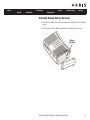
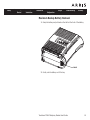
Extended Backup Battery Removal
1
Pull back the battery door latch and remove the battery door. Set the door
aside.
2
Pull the strap until the battery disconnects and slides out of the bay.
Battery
Pull Strap
Touchstone TM604 Telephony Modem User’s Guide
17