1
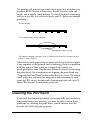
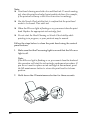
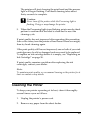
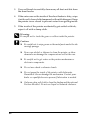
Color Ink Jet Printer
Color Ink Jet Printer
Daily Use
Daily Use
Printed in Japan
02.XX-XX
Daily Use
4032203 Rev.0
cover-F DICF43
4032203
cover-F
4032203
cover-F
Rev.0
PMS265
Rev.0
DIC2425
4032203-00
EUL
4032203 Rev.0
cover-F
BK
Where to Find Information
Setup Guide
This guide will help you set up and begin using your printer. It
includes information on setting up your printer and installing the
printer software.
Photo Print Software Setup included on the CD-ROM
This guide provides information on installing EPSON
PhotoQuicker, EPSON PhotoStarter and EPSON CardMonitor. It
also contains uninstalling and system requirements.
Daily Use guide
This guide provides information mainly for direct printing. It also
contains troubleshooting tips and customer support information.
For printing with a computer, please refer to the Online Reference
Guide.
EPSON PhotoQuicker User’s Guide
Included on the printer software CD-ROM, this guide provides
basic information on using the EPSON PhotoQuicker utility to
print your photo data. It also contains troubleshooting tips.
Reference Guide included on the CD-ROM
The Reference Guide contained on the CD-ROM included with
your printer provides detailed information about printer software
settings, printing on special paper, maintenance, and problem
solving.
To access the Reference Guide, refer to the Setup Guide.
All rights reserved. No part of this publication may be reproduced, stored in a retrieval
system, or transmitted in any form or by any means, electronic, mechanical, photocopying,
recording, or otherwise, without the prior written permission of SEIKO EPSON
CORPORATION. The information contained herein is designed only for use with this EPSON
printer. EPSON is not responsible for any use of this information as applied to other printers.
Neither SEIKO EPSON CORPORATION nor its affiliates shall be liable to the purchaser of
this product or third parties for damages, losses, costs, or expenses incurred by the purchaser
or third parties as a result of accident, misuse, or abuse of this product or unauthorized
modifications, repairs, or alterations to this product, or (excluding the U.S.) failure to strictly
comply with SEIKO EPSON CORPORATION's operating and maintenance instructions.
SEIKO EPSON CORPORATION shall not be liable for any damages or problems arising from
the use of any options or any consumable products other than those designated as Original
EPSON Products or EPSON Approved Products by SEIKO EPSON CORPORATION.
SEIKO EPSON CORPORATION shall not be held liable for any damage resulting from
electromagnetic interference that occurs from the use of any interface cables other than those
designated as EPSON Approved Products by SEIKO EPSON CORPORATION.
EPSON is a registered trademark and EPSON Stylus is a trademark of SEIKO EPSON
CORPORATION.
Copyright 2001 SEIKO EPSON CORPORATION. All rights reserved. PRINT Image Matching
is a trademark of SEIKO EPSON CORPORATION. The PRINT Image Matching logo is a
trademark of SEIKO EPSON CORPORATION.
Microsoft and Windows are registered trademarks of Microsoft Corporation.
Apple and Macintosh are registered trademarks of Apple Computer, Inc.
DPOF is a trademark of CANON INC., Eastman Kodak Company, Fuji Photo Film Co., Ltd.
and Matsushita Electric Industrial Co., Ltd.
SanDisk Host Developer’s Tool Kit © 1999 SANDISK CORPORATION
General Notice: Other product names used herein are for identification purposes only and
may be trademarks of their respective owners. EPSON disclaims any and all rights in those
marks.
Copyright © 2002 by SEIKO EPSON CORPORATION, Nagano, Japan.
ii
Contents
Safety Instructions . . . . . . . . . . . . . . . . . . . . . . . . . . . . . 1
Important Safety Instructions . . . . . . . . . . . . . . . . . . . . . . . . . . . . . . . 1
Warnings, Cautions, and Notes . . . . . . . . . . . . . . . . . . . . . . . . . . . . . 6
Printer Parts and Control Panel Functions . . . . . . . . . . 7
Printer Parts . . . . . . . . . . . . . . . . . . . . . . . . . . . . . . . . . . . . . . . . . . . . . . 7
Buttons . . . . . . . . . . . . . . . . . . . . . . . . . . . . . . . . . . . . . . . . . . . . . . . . . . 8
Lights . . . . . . . . . . . . . . . . . . . . . . . . . . . . . . . . . . . . . . . . . . . . . . . . . . . 10
Using Roll Paper . . . . . . . . . . . . . . . . . . . . . . . . . . . . . . 11
Using the Roll Paper Holder . . . . . . . . . . . . . . . . . . . . . . . . . . . . . . . 11
Removing Roll Paper from the Printer . . . . . . . . . . . . . . . . . . . . . . . 17
Storing EPSON Roll Paper . . . . . . . . . . . . . . . . . . . . . . . . . . . . . . . . . 18
Printing Photos Directly from PC Cards . . . . . . . . . . . 19
Available Media Types . . . . . . . . . . . . . . . . . . . . . . . . . . . . . . . . . . . .
Loading Paper . . . . . . . . . . . . . . . . . . . . . . . . . . . . . . . . . . . . . . . . . . .
Loading PC Cards . . . . . . . . . . . . . . . . . . . . . . . . . . . . . . . . . . . . . . . .
Printing from the Control Panel . . . . . . . . . . . . . . . . . . . . . . . . . . . .
Display . . . . . . . . . . . . . . . . . . . . . . . . . . . . . . . . . . . . . . . . . . . . . . . . .
Printing All Photographs on a PC Card . . . . . . . . . . . . . . . . . . . . . .
Printing an Index Print . . . . . . . . . . . . . . . . . . . . . . . . . . . . . . . . . . . .
Printing a Selected Photo . . . . . . . . . . . . . . . . . . . . . . . . . . . . . . . . . .
Printing Multiple Selected Photos . . . . . . . . . . . . . . . . . . . . . . . . . .
Printing with the DPOF setting . . . . . . . . . . . . . . . . . . . . . . . . . . . . .
Expanded Layout Options . . . . . . . . . . . . . . . . . . . . . . . . . . . . . . . . .
Using Filters . . . . . . . . . . . . . . . . . . . . . . . . . . . . . . . . . . . . . . . . . . . . .
Brightness Adjustment . . . . . . . . . . . . . . . . . . . . . . . . . . . . . . . . . . . .
Changing Default Settings . . . . . . . . . . . . . . . . . . . . . . . . . . . . . . . . .
19
22
25
30
33
37
39
41
43
45
46
52
54
55
Replacing Ink Cartridges . . . . . . . . . . . . . . . . . . . . . . 57
Checking the Ink Supply . . . . . . . . . . . . . . . . . . . . . . . . . . . . . . . . . . 57
iii
Replacing an Ink Cartridge . . . . . . . . . . . . . . . . . . . . . . . . . . . . . . . . .58
Maintenance . . . . . . . . . . . . . . . . . . . . . . . . . . . . . . . . 64
Checking the Print Head Nozzles . . . . . . . . . . . . . . . . . . . . . . . . . . .64
Cleaning the Print Head . . . . . . . . . . . . . . . . . . . . . . . . . . . . . . . . . . .65
Cleaning the Printer . . . . . . . . . . . . . . . . . . . . . . . . . . . . . . . . . . . . . . .67
Transporting the Printer . . . . . . . . . . . . . . . . . . . . . . . . . . . . . . . . . . .69
Troubleshooting . . . . . . . . . . . . . . . . . . . . . . . . . . . . . . 71
Error Indicators and Display . . . . . . . . . . . . . . . . . . . . . . . . . . . . . . .71
Print Quality Problems . . . . . . . . . . . . . . . . . . . . . . . . . . . . . . . . . . . .74
Printout Problems Not Related to Print Quality . . . . . . . . . . . . . . .77
Paper Does Not Feed Correctly . . . . . . . . . . . . . . . . . . . . . . . . . . . . .78
Printer Does Not Print . . . . . . . . . . . . . . . . . . . . . . . . . . . . . . . . . . . . .81
Cancelling Printing . . . . . . . . . . . . . . . . . . . . . . . . . . . . . . . . . . . . . . . .84
Exif Print . . . . . . . . . . . . . . . . . . . . . . . . . . . . . . . . . . . . . . . . . . . . . . . .85
Printing with PRINT Image Matching . . . . . . . . . . . . . . . . . . . . . . .86
Customer Support . . . . . . . . . . . . . . . . . . . . . . . . . . . . 88
Technical Support Web Site . . . . . . . . . . . . . . . . . . . . . . . . . . . . . . . .88
Contacting Customer Support . . . . . . . . . . . . . . . . . . . . . . . . . . . . . .88
Options and Consumable Products . . . . . . . . . . . . . . 91
Options . . . . . . . . . . . . . . . . . . . . . . . . . . . . . . . . . . . . . . . . . . . . . . . . . .91
Consumable products . . . . . . . . . . . . . . . . . . . . . . . . . . . . . . . . . . . . .93
Printer Specifications . . . . . . . . . . . . . . . . . . . . . . . . . . 95
Printing . . . . . . . . . . . . . . . . . . . . . . . . . . . . . . . . . . . . . . . . . . . . . . . . . .95
Paper . . . . . . . . . . . . . . . . . . . . . . . . . . . . . . . . . . . . . . . . . . . . . . . . . . . .95
Ink Cartridges . . . . . . . . . . . . . . . . . . . . . . . . . . . . . . . . . . . . . . . . . . . .99
Mechanical . . . . . . . . . . . . . . . . . . . . . . . . . . . . . . . . . . . . . . . . . . . . . .101
Electrical . . . . . . . . . . . . . . . . . . . . . . . . . . . . . . . . . . . . . . . . . . . . . . . .101
Operating Environment . . . . . . . . . . . . . . . . . . . . . . . . . . . . . . . . . . .102
Standards and Approvals . . . . . . . . . . . . . . . . . . . . . . . . . . . . . . . . .102
iv
v
Safety Instructions
Important Safety Instructions
Read all of the instructions in this section before using your
printer. Also, be sure to follow all warnings and instructions
marked on the printer.
When setting up your printer
Observe the following when setting up the printer:
❏ Do not block or cover the openings in the printer’s cabinet.
❏ Use only the type of power source indicated on the printer’s
label.
❏ Be sure your AC power cord meets the relevant local safety
standard.
❏ Connect all equipment to properly grounded power outlets.
Avoid using outlets on the same circuit as photocopiers or air
control systems that regularly switch on and off.
❏ Avoid electrical outlets controlled by wall switches or
automatic timers.
❏ Keep the entire computer system away from potential sources
of electromagnetic interference, such as loudspeakers or the
base units of cordless telephones.
❏ Do not use a damaged or frayed power cord.
1
❏ If you use an extension cord with the printer, make sure that
the total ampere rating of the devices plugged into the
extension cord does not exceed the cord’s ampere rating. Also,
make sure that the total ampere rating of all devices plugged
into the wall outlet does not exceed the wall outlet’s ampere
rating.
❏ Do not attempt to service the printer yourself.
❏ Unplug the printer and refer servicing to qualified service
personnel under the following conditions:
The power cord or plug is damaged; liquid has entered the
printer; the printer has been dropped or the cabinet damaged;
the printer does not operate normally or exhibits a distinct
change in performance.
❏ If you plan to use the printer in Germany, the building
installation must be protected by a 10 or 16 amp circuit
breaker to provide adequate short-circuit protection and
over-current protection for this printer.
When choosing a place for the printer
Observe the following when choosing a place for the printer:
❏ Place the printer on a flat, stable surface that extends beyond
the printer base in all directions. The printer will not operate
properly if it is tilted or at an angle.
❏ Leave enough space in front of the printer for the paper to be
fully ejected.
❏ Avoid places subject to rapid changes in temperature and
humidity. Also, keep the printer away from direct sunlight,
strong light, or heat sources.
❏ Avoid places subject to dust, shocks, and vibrations.
2
❏ Leave enough room around the printer to allow for sufficient
ventilation.
❏ Place the printer near a wall outlet where the plug can be
easily unplugged.
When using the printer
Observe the following when using the printer:
❏ Do not insert objects through the slots in the printer’s cabinet.
❏ Take care not to spill liquid on the printer.
❏ Do not put your hand inside the printer or touch the ink
cartridges during printing.
❏ Do not move the print head by hand; otherwise, you may
damage the printer.
❏ Always turn the printer off using the P power button. When
this button is pressed, the Processing light flashes briefly and
then goes out. Do not unplug the printer or turn off the power
to the outlet until the Processing light stops flashing.
❏ Before transporting the printer, make sure that the print head
is in the home (far right) position and the ink cartridges are
in place.
When using a memory card
❏ Do not remove the memory card or turn off the printer power
while the computer and the memory card are communicating
(when the Processing light is flashing). Doing so can corrupt
memory card data.
3
❏ The handling method varies depending on the storage media.
Be sure to refer to the documentation packaged with your
memory card and PC card adapter for details.
❏ You can only use memory cards and PC card adapters that
are based on PCMCIA ATA standards (Memory Card ATA
standards) with this printer. For details about PCMCIA ATA
standards, please see the manual packaged with your
memory card or PC card adapter, or contact the manufacturer.
When using the display or the optional Preview
Monitor
❏ Your LCD panel may contain a few small bright or dark spots.
These are normal and do not mean that your LCD monitor is
broken.
❏ Only use a dry, soft cloth to clean the display or the optional
Preview Monitor. Do not use liquid or chemical cleansers.
❏ If the display on the printer or the Preview Monitor’s LCD
panel is damaged, contact your dealer. If the liquid crystal
solution gets on your hands, wash them thoroughly with soap
and water. If the liquid crystal solution gets into your eyes,
flush them immediately with water. If discomfort or vision
problems remain after a thorough flushing, see a physician
immediately.
❏ Always attach the cover on the Preview Monitor slot, unless
using the optional Preview Monitor.
When handling the ink cartridges
Observe the following when handling the ink cartridges:
4
❏ Keep ink cartridges out of the reach of children. Do not allow
children to drink from or otherwise handle the cartridges.
❏ Be careful when you handle used ink cartridges, as there may
be some ink remaining around the ink supply port. If ink gets
on your skin, wash the area thoroughly with soap and water.
If discomfort or vision problems remain after a thorough
flushing, see a doctor immediately.
❏ Do not shake an ink cartridge; this can cause leakage.
❏ Install the ink cartridge immediately after you remove it from
its package. Leaving the cartridge unpacked for a long time
before use may result in reduced print quality.
❏ Do not use an ink cartridge beyond the date printed on the
cartridge carton. For best results, use up the ink cartridges
within six months of installing them.
❏ Do not dismantle the ink cartridges or try to refill them. This
could damage the print head.
❏ After bringing an ink cartridge inside from a cold storage site,
allow it to warm up at room temperature for at least three
hours before using it.
❏ Store ink cartridges in a cool, dark place.
❏ Do not touch the green IC chip on the side of the cartridge.
This may affect normal operation and printing.
❏ The IC chip on this ink cartridge retains a variety of cartridge
related-information, such as the amount of ink remaining, so
that a cartridge may be removed and reinserted freely.
However, each time the cartridge is inserted, some ink is
consumed because the printer automatically performs a
reliability check.
5
❏ If you remove an ink cartridge for later use, protect the ink
supply area from dirt and dust and store it in the same
environment as the printer. A valve in the ink supply port
makes covers or plugs unnecessary, but the ink may stain
items that come in contact with this area of the cartridge. Do
not touch the ink supply port or surrounding area.
ENERGY STAR® Compliance
As an ENERGY STAR® Partner, EPSON has
determined that this product meets the ENERGY
STAR® guidelines for energy efficiency.
The International ENERGY STAR® Office Equipment Program is
a voluntary partnership with the computer and office equipment
industry to promote the introduction of energy-efficient personal
computers, monitors, printers, fax machines, copiers, and
scanners in an effort to reduce air pollution caused by power
generation.
Warnings, Cautions, and Notes
w
c
Warnings must be followed carefully to avoid bodily injury.
Cautions must be observed to avoid damage to your equipment.
Notes contain important information and useful tips on the operation
of your printer.
6
Printer Parts and Control Panel
Functions
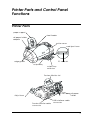
Printer Parts
paper support
sheet feeder
roll paper holder
adapter
printer cover
card eject lever
PC card slot
edge guides
output tray
output tray
extension
Preview Monitor slot
roll paper
holder
Adjust lever
Preview Monitor cable
connector
USB interface cable
connector
7
ink cartridge clamps
control panel, top
print head
control panel, front
Buttons
Control panel, front
Button
Function
P
Turns the printer on and off.
power
Clears the printer's memory if pressed twice while the
power is on.
b
Loads or ejects paper if pressed and released within
two seconds.
maintenance
Resumes printing if pressed and released after a paper
out error.
Performs print head cleaning if pressed for 3 seconds
while the b error light is off.
Moves the print head to the ink cartridge replacement
position and charges ink to the printer when ink is out.
8
z
Loads and ejects roll paper.
roll paper
Feeds roll paper in reverse to a position where it can be
easily removed from the sheet feeder, if pressed for
more than 3 seconds.
Clears the b error light if pressed after removing roll
paper.
e
Moves the print head to the ink cartridge replacement
position and charges ink to the printer when ink is out.
ink cartridge
replacement
Control panel, top
Display:
Shows the items and settings you change
with the buttons on the control panel.
Arrow buttons (up, down, left, right):
Use arrow buttons, up or down to select
setting menus. Use arrow button, left or
right to decide the settings.
Select Photo button: Sets the number of
copies for the photo selected on the
Select Photo menu.
Brightness button: Press to change into the
brightness setting mode. Press three
seconds to change into the filter setting
mode.
Cancel button:
Cancels print operation, or settings on the
display.
Start Print button:
Starts printing with the settings selected
via the buttons on the control panel.
Processing light:
On when ready to print.
Flashes while processing the data.
9
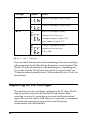
Note:
The buttons on the top control panel only affect direct printing from a
PC card.
Lights
Light
Description
Processing
On when the printer is on.
Flashes when the printer is receiving data, reading data
from a PC card, sending PC card data to the computer,
printing, charging ink, cleaning the print head, or when
an ink cartridge is being replaced.
b
error
On when the printer is out of paper. Load paper into the
sheet feeder, then press the b maintenance button to
resume printing.
On when the paper is jammed. Take all of the paper out
of the feeder, then reload it. If the light continues to flash,
turn off the printer and gently pull all of the paper out of
the printer.
Flashes when the black or color ink cartridge is nearly
empty.
On when the black or color ink cartridge is empty.
Replace the empty black ink cartridge or color ink
cartridge.
Black:
T007 Standard Capacity
T010 Light Capacity
Color:
T008
Flashes when the print head has moved to the ink
cartridge replacement position.
10
Using Roll Paper
Using the Roll Paper Holder
With the roll paper holder mounted on the printer, you can print
in roll paper format, which is convenient for banner printing.
When you are printing using the roll paper holder, keep the
following in mind:
❏ Load the paper printable side up.
❏ Use flat, undamaged paper. If the paper is curled, flatten it
before loading to avoid paper feeding problems.
❏ Always handle the paper by the edges.
❏ Provide ample space in front of the printer for the paper to
eject fully.
❏ Make sure that the output tray is down and the output tray
extension is closed.
❏ Check that the end of the paper is cut cleanly, perpendicular
to the long axis of the paper. If it is cut on a diagonal or not
cleanly, the paper may not feed smoothly or the print may
extend off the edge of the paper.
❏ EPSON recommends using media distributed by EPSON to
ensure high-quality results.
Loading the roll paper
Follow the directions below to mount the roll paper holder and
load the following types of roll paper.
11
Photo Paper (100 mm × 8 m)
Photo Paper (210 mm × 10 m)
Premium Glossy Photo Paper (100 mm × 8 m)
Premium Glossy Photo Paper (127 mm × 8 m)
Premium Glossy Photo Paper (210 mm × 10 m)
1. Load roll paper in the roll paper holder.
Note:
Remove the transparent sheet after setting the roll paper into the
holders.
2. Check that the end of the roll is cut perpendicularly to the
edges as shown, using a triangle.
12
c
Caution:
Always use a triangle or other tool to ensure that the end of
the roll is cut perpendicularly. A diagonal cut may cause
paper feed problems.
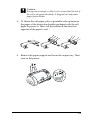
3. To flatten the roll paper, place it printable-side up between
the pages of the instruction booklet packaged with the roll
paper to protect it. Then, roll the booklet in the direction
opposite of the paper’s curl.
4. Remove the paper support and lower the output tray. Then
turn on the printer.
13
5. Insert the roll paper holder adapter into the slot at the rear of
the printer, then attach the roll paper holder to the adapter.
6. Gently insert the end of the paper into the printers as far as it
will go, flush with the right edge guide. Slide the left edge
guide against the left edge of the printer.
7. To load the paper correctly, you must hold the paper in place
with your hand while you press the z roll paper button. The
paper will feed into the printer.
14
8. Open the printer cover and make sure that the paper is
feeding correctly. If it is not straight, press the z roll paper
button for at least three seconds to eject the paper. The error
light comes on. Press the z roll paper button to clear the error,
then feed the paper again.
The roll paper is now loaded.
Note:
❏ Always check the ink levels before printing on roll paper as replacing
ink cartridges while the roll paper is loaded can smear the paper.
❏ We recommend replacing the roll paper with a new roll when there
is 20 cm remaining. Otherwise, print quality may be compromised
on the remaining portion.
❏ Do not select A4 or 100 × 150 mm sheet paper for the Paper Size
setting when roll paper is loaded in the sheet feeder. Doing so causes
unnecessary paper to be fed after each print job. If you have already
started printing, press the Cancel button. Wait until the printer
stops printing and feeding paper. Cut off the paper at the back of the
printer, then turn off the printer. The remaining paper is ejected.
Printing area and margins
Follow the steps below to change the margins between pages of
printed data.
1. Select Roll Paper as the Paper Size on the control panel, top.
15
2. When printing is finished, press the z roll paper button once
to print a cutting guideline about 12 mm from the bottom of
the print data.
3. To print the next print job, press the z roll paper button to
feed the paper back to the printing position. Then start the
next print job. The space between pages is automatically set
to 36 mm, as shown below.
Standard margins
No margins
Note:
You must press the z roll paper button, or the printer will not
operate even if you send a new print job. Do not press the z roll
paper button more than necessary. Doing so can damage the prinout.
To print data with no margins between separate files, as
shown below, do not press the z roll paper button between
print jobs.
Standard margins
16
No margins
Note:
The top margin is automatically set to 20 mm, regardless of the margin
setting.
Removing Roll Paper from the Printer
Follow the directions below to remove the paper from the printer.
1. Press the z roll paper button to feed the paper. A cutting
guide line is printed on the roll paper.
Note:
To cancel the paper removal sequence and print more data, press the
z roll paper button and send the next print job. The paper will
return to the printing start position before starting the next print
job. Do not press the z roll paper button more than necessary.
Doing so can damage the printout.
2. Cut the paper along the printed line. Never pull the paper as
you cut it. Doing so may damage the printout. When cutting
the paper, do not cut inside the line (closer to the printer) as
this may cause paper feed problems.
Note:
EPSON recommends that you use a triangle or other tool to ensure
that the end of the roll is cut perpendicularly. A diagonal cut may
cause paper feed problems.
17
3. Once you have cut the paper, hold down the z roll paper
button for about 3 seconds. The paper feeds in reverse to a
position where it can be easily removed from the sheet feeder
at the back of the printer. If it does not feed to this position,
repeat this step.
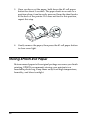
4. Gently remove the paper, then press the z roll paper button
to clear error light.
Storing EPSON Roll Paper
Return unused paper to the original package as soon as you finish
printing. EPSON recommends storing your printouts in a
resealable plastic bag. Keep them away from high temperature,
humidity, and direct sunlight.
18
Printing Photos Directly from PC Cards
Available Media Types
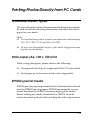
The type and quality of media determines the finish of your prints.
Be sure to read the following information and select the correct
paper for your needs.
Note:
❏ You should always print at normal room temperature and humidity:
15 to 25°C (59 to 77°F) and 40 to 60% RH.
❏ Do not touch the printable surface of the media. Fingerprints may
degrade in print quality.
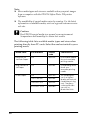
Plain paper (A4, 100 x 150 mm)
When using plain paper, please observe the following:
❏ Use paper of 64 to 90 g/m² weight and 0.08 to 0.11 inches thick.
❏ Load paper up to the arrow mark on the edge guides.
EPSON special media
EPSON provides special print media that is formulated for the ink
used on EPSON ink jet printers. EPSON recommends you use
media distributed by EPSON to ensure high-quality results.
Before loading any media distributed by EPSON, read the
instruction sheet packed with it and keep the following in mind:
19
Note:
❏ More media types and sizes are available when you print images
from a computer with the EPSON Stylus Photo 915 printer
software.
❏ The availability of special media varies by country. For the latest
information on available media, visit our regional customer service
web site.
c
Caution:
Use EPSON special media in a normal room environment
(temperature and humidity) to obtain best results.
The following table lists available media types and sizes when
printing directly from PC cards. Select the one best suited to your
printing needs.
20
Media name
Size available
Product
code
Characteristics
Premium Ink
Jet Plain Paper
A4
S041214
EPSON plain paper
for your everyday
printings needs.
Bright White Ink
Jet Paper
A4
S041442
Outstanding results
for all your
everyday printing
needs.
Photo Paper
A4
S041140
100 × 150 mm
S041255
100 mm × 8 m
S041279
210 mm × 10 m
S041280
This media gives
you the highest
quality printouts at
moderate printing
cost. The glossy
surface provides
you with a
photo-like finish.
Media name
Size available
Product
code
Characteristics
Matte
Paper-Heavyw
eight
A4
S041256
S041258
S041259
Bright white, ultra
smooth coated
paper. For photo
quality color with a
matte finish.
Perfect for
photographs, signs,
crafts projects and
much more.
Premium
Glossy Photo
Paper
A4
S041285
S041287
S041297
100 mm × 8 m
S041302
S041303
Borderless prints for
glass frames and
photo albums.
Looks and feels like
a real photograph.
127 mm × 8 m
S041474
210 mm × 10 m
S041376
S041377
About cleaning sheets
The cleaning sheet packaged with some special types of media
cannot be used with the paper feeding mechanism in this printer.
Forcing it into the printer could damage the paper feeding
mechanism.
Precautions on paper storage
❏ Store paper flat where it is not exposed to high temperature,
high humidity, or direct sunlight.
❏ Do not let the paper get wet.
❏ Keep unused paper in its original packaging and store it in a
cool, dry place to preserve quality.
21
Loading Paper
Loading sheet paper
This section applies to the following paper types:
Plain Paper
Premium Ink Jet Plain Paper
Bright White Ink Jet Paper
Photo Paper
Matte Paper-Heavyweight
Premium Glossy Photo Paper
Note:
Read all instruction sheets packed with your EPSON special media
before loading it in the printer.
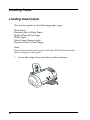
1. Lower the output tray and slide out the extension.
22
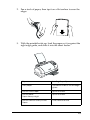
2. Fan a stack of paper; then tap it on a flat surface to even the
edges.
3. With the printable side up, load the paper so it is against the
right edge guide, and slide it into the sheet feeder.
Paper
Loading Capacity
Plain paper
Up to arrow mark on the left edge
guide
EPSON Photo Paper
Up to 20 Sheets
EPSON Matte
Paper-Heavyweight
Up to 20 Sheets
EPSON Premium Glossy Photo
Paper
One sheet at a time
23
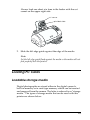
4. Slide the left edge guide against the paper.
Note:
Be sure to make the left edge guide flush against the paper or the
paper will not feed properly into the printer.
Loading EPSON Photo Stickers 16
To load EPSON Photo Stickers 16, follow the steps below.
Note:
Be sure to read the instruction sheet packed with the media before
loading.
1. With the printable side up, set the media against the right
edge guide and slide it into the sheet feeder.
24
Always load one sheet at a time in the feeder with the cut
corner on the upper right side.
cut corner
printable side
2. Slide the left edge guide against the edge of the media.
Note:
Set the left edge guide flush against the media or the media will not
feed properly into the printer.
Loading PC Cards
Loadable storage media
Digital photographs are stored either in the digital camera’s
built-in memory or in card-type memory which can be inserted
and removed from the camera. The latter is referred to as “storage
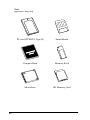
media.” The types of storage media that can be used with this
printer are shown below.
25
Note:
appearance may vary.
26
PC card (PCMCIA Type II)
SmartMedia
CompactFlash
Memory Stick
Microdrive
SD Memory Card
c
Caution:
❏ Always load any storage media other than a PC card into a
PC card adapter before loading it into the PC card slot.
❏ The handling method varies depending on the storage media.
Be sure to refer to the documentation packaged with your
memory card and PC card adapter for details.
Note:
❏ Use the PC card adapter for CompactFlash packed with your printer.
PC card adapters for SmartMedia, Memory Stick, Microdrive and
SD Memory Card are sold separately.
❏ Not all storage media and PC card adapters are compatible with the
EPSON Stylus Photo 915. Contact your EPSON dealer for detailed
information on the compatibility of storage media and PC card
adapters.
Loading PC cards
To load a PC card into the PC card slot, follow the steps below.
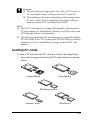
1. Insert the storage media into the PC card adapter as shown
below.
CompactFlash
SmartMedia
SD Memory Card
Memory Stick
Microdrive
27
c
Caution:
The loading method varies depending on the storage media.
Be sure to refer to the manuals packaged with your memory
card and PC card adapter for details.
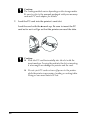
2. Load the PC card into the printer’s card slot.
Load the card with the u mark up. Be sure to insert the PC
card as far as it will go so that the printer can read the data.
c
Caution:
❏ Slide the PC card horizontally into the slot with the
insert mark up. Forcing the card into the slot or inserting
it at an angle can damage the printer and the card.
❏ Do not eject PC cards or turn off power to the printer
while the printer is processing (reading or writing) data.
Doing so can cause data to be lost.
28
Ejecting PC cards
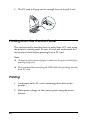
1. Check that the Processing light is not flashing.
2. Press the button as shown to eject the PC card.
c
Caution:
❏ Do not remove or insert CompactFlash, SmartMedia,
Microdrive or SD memory card while the PC card
adapter is in the slot. Doing so can cause data to be lost.
❏ The ejecting method varies depending on the storage
media. Be sure to refer to the documentation packaged
with your memory card and PC card adapter for details.
29
3. The PC card will pop out far enough for you to pull it out.
Printing from the Control Panel
This section briefly describes how to print from a PC card using
the printer’s control panel. Be sure to read and understand the
instructions below before printing from a PC card.
Note:
❏ Always test a few sheets of paper to make sure the print results before
printing large jobs.
❏ We recommend disconnecting the USB cable when printing directly
from PC card.
Printing
1. Load paper and a PC card containing photo data in the
printer.
2. Make print settings on the control panel using the arrow
buttons.
30
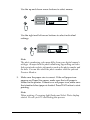
Use the up and down arrow buttons to select menus.
Use the right and left arrow buttons to select individual
settings.
Note:
The photo numbering order may differ from your digital camera’s
settings. Always check the photo numbering by printing an Index.
Index prints show photo information such as the photo number and
the date. You can also check the photo number with the optional
Preview Monitor.
3. Make sure the paper size is correct. If the roll paper icon
appears on Paper Size menu, make sure that roll paper is
loaded in the printer. If there is no roll paper icon, make sure
that standard sheet paper is loaded. Press Start button to start
printing.
Note:
When printing, Processing light flashes and Select Photo display
rotates. Do not eject PC card during this process.
31
Cancelling printing
To stop printing in progress, press Cancel button. The printer
will cancel all print jobs and stop printing, and eject any pages
which is printing. Depending on the printer’s status, printing may
not stop immediately.
Data format
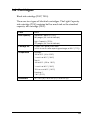
You can use image files that meet the following requirements with
this printer.
Digital camera
Based on DCF version 1.0 standards*
File format
JPEG format image files taken with a DCF
version 1.0 standard-compliant digital
camera
Image size
Vertical 160 to 3200 pixels, horizontal 160
to 3200 pixels
Number of files
Up to 999 files on a memory card
* DCF stands for the “Design rule for Camera File system” standards, set by the
Japan Electronics and Information Technology Industries Association (JEITA).
Note:
The file names containing double-byte characters are not valid when
printing directly from a PC card.
32
Display
This section explains the Print Mode, Paper Type, Paper Size,
Layout, Select Photo, Select Copies, Quality, and Photo Enhance
settings.
1
2
3
4
5
6
7
8
1. Print Mode
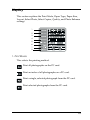
This selects the printing method.
Print all photographs on the PC card.
Print an index of all photographs on a PC card.
Print a single, selected photograph from the PC card.
Print selected photographs from the PC card.
33
2. Paper Type
This selects the type of paper to print on.
Print on the Photo Paper.
Print on the Matte paper-heavyweight.
Print on the plain paper, Premium Ink Jet Plain Paper or
Bright White Ink Jet Paper.
When you want to print on Premium Glossy Photo Paper, move
cursor to Paper Type, then press the right arrow button for three
seconds. “Pr” flashes on the Select Photo menu, and now you can
print on the Premium Glossy Photo Paper. Press the left or right
arrow buttons to exit.
3. Paper Size
This selects the size of paper to print on.
Print on A4 size (210 × 297 mm) of sheet paper
Print on 100 × 150 mm size of sheet paper
Print on 210 mm width of roll paper
34
Print on 100 mm width of roll paper
Print on 127 mm width of roll paper
Note:
Do not select A4 or 100 × 150 mm sheet paper for the Paper Size setting
when roll paper is loaded in the sheet feeder. Doing so causes unnecessary
paper to be fed after each print job. If you have already started printing,
press the Cancel button. Wait until the printer stops printing and
feeding paper. Cut off the paper at the back of the printer, then turn off
the printer. The remaining paper is ejected.
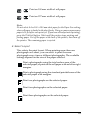
4. Select Layout
This selects the print layout. When printing more than one
photograph on a sheet, you can select to print the same
photograph every time or different photographs. The available
settings depend on the size of the paper selected.
Print a photograph using the total surface area of the
selected paper, or print on the roll paper with no left or right
margins.
Print a photograph using the standard printable area of the
selected paper with margins.
Print two photographs on the selected paper.
Print four photographs on the selected paper.
Print three photographs on the selected paper.
35
Print a photograph twenty times or twenty different
photographs with the photo number, date, time or so on the
selected paper. This layout is good for printing high quality
index.
When printing on the total surface area of the selected paper, keep
note the following.
❏ Printing with this setting selected takes longer than for
normal printing.
❏ Because this setting enlarges the image to a size slightly larger
than the paper size, the portion of the image that extends
beyond the edges of the paper will not be printed.
❏ Print quality may decline in the top and bottom areas of the
printout, or the area may be smeared when printing on the
sheet paper.
❏ We recommend printing a single sheet to check quality before
printing large jobs.
5. Select Photo
This specifies photo that you want to print by number when the
printer is in One or Set mode. The total number of photographs
on the PC card is displayed when the printer is in the All or Index
mode.
Note:
The printer can handle up to 999 photo data files on a PC card.
6. Copies
This specifies the number of copies of selected photos to print,
from 1 to 100 when the printer is in the All, One or Index mode.
In the Set mode, you can specify the number of copies from 1 to 10.
36
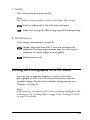
7. Quality
This selects the photo print quality.
Note:
The Quality settings available depend on the Paper Type setting.
Prints at high quality, but with reduced speed.
Prints fast, saving ink. This setting is good for draft printing.
8. PhotoEnhance
Turns image enhancement on and off.
Images imported from the PC card are automatically
enhanced. Printing requires more time, but the image is
enhanced to ensure higher picture quality.
Enhancement is off.
Printing All Photographs on a PC Card
You can print a specified number of copies of all of the
photographs on a PC card. The instruction below show an
example setting. For the other available setting options, see
“Display” on page 33.
Note:
Before printing, load paper and a PC card containing digital photo data
in the printer. See “Loading Paper” on page 22 and “Loading PC Cards”
on page 25 for details.
37
1. Select ALL as the Print Mode setting.
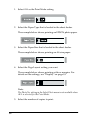
2. Select the Paper Type that is loaded in the sheet feeder.
The example below shows printing on EPSON photo paper.
3. Select the Paper Size that is loaded in the sheet feeder.
The example below shows printing on A4-size paper.
4. Select the Page Layout setting you want.
The example below shows printing with no margins. For
details on the settings, see “Display” on page 33.
Note:
The Photo No. setting in the Select Photo menu is not available when
ALL is selected for the Print Mode.
5. Select the number of copies to print.
38
The example below is two copies of each photo.
6. Select the print quality.
The example below shows printing at high quality.
7. Turn PhotoEnhance on or off.
The example below shows PhotoEnhance on.
8. Press the Print button.
Printing an Index Print
You can print one or more copies of an index of all the
photographs on a loaded PC card. An index can be helpful in
selecting which photos you want to print. The settings used in the
instructions below are only examples. To find out what other
settings are available, see “Display” on page 33.
Note:
Before printing, load paper and a PC card containing digital photo data
in the printer. See “Loading Paper” on page 22 and “Loading PC Cards”
on page 25 for details.
39
1. Select Index as the Print Mode setting.
2. Select the media type that is loaded in the sheet feeder.
The example below shows printing on plain paper.
3. Select the Paper Size that is loaded in the sheet feeder.
The example below shows printing on A4-size paper.
4. Select the number of copies to print.
The example shows printing only one sheet.
5. Select the Print Quality.
The example below shows printing at high speed.
40
Note:
The Page Layout and PhotoEnhance settings are not available when
printing an Index print.
6. Press the Print button.
All photographs on the PC card are printed out as an index.
Printing a Selected Photo
To print a selected photo, follow the instructions below. The
settings used in the instructions are only examples. To find out
what other settings are available, see “Display” on page 33.
1. Select One as the Print Mode setting.
2. Select the type and size of the media loaded in the sheet
feeder. The example below shows A4-size EPSON Matte
Paper-Heavyweight.
3. Select the Page Layout setting you want. The example below
shows printing a photo twice on a single sheet of paper.
41
4. Specify the number of the photo you want to print. The
example below shows photo number 2.
Note:
Be sure to check the photo number with an index print or the optional
Preview Monitor before you print.
5. Specify the number of copies for the photo you selected in
step 4.
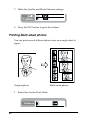
6. Make the Quality and Photo Enhance settings. The example
below shows printing at high quality with PhotoEnhance on.
7. Press the Print button to print the specified photos.
Note:
To change the number of copies, move the cursor to the Copies setting,
then select the number of copies with the left and right arrow buttons.
42
Printing Multiple Selected Photos
It is possible to specify the photo number and the number of
copies for each photo before start printing. This function prints
photos in the order that you specified on the display or with the
optional Preview Monitor. The instructions below contain one
example of the settings you can use. To find out about other
available setting options, see “Display” on page 33.
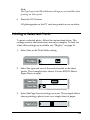
1. Select Set as the Print Mode setting.
2. Select the type and size of the media loaded in the sheet
feeder. The example below shows a 100 mm × 150 mm-size
EPSON Photo Paper.
3. Select the layout that you want to print. The example below
shows when printing four photos on a single sheet of paper.
43
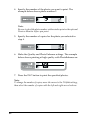
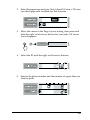
4. Specify the number of the photo you want to print. The
example below shows photo number 2. Specify 0 as the
number of photos to leave the print area blank.
5. Specify the number of copies for the photo you selected in
step 4.
6. Repeat steps 4 through 5 to select photos and specify the
number of copies for each.
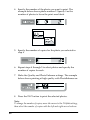
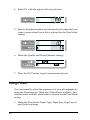
7. Make the Quality and Photo Enhance settings. The example
below shows printing at high quality with PhotoEnhance on.
8. Press the Print button to print the selected photos.
Note:
To change the number of copies, move the cursor to the Copies setting,
then select the number of copies with the left and right arrow buttons.
44
Printing with the DPOF setting
This printer conforms to DPOF (Digital Print Order Format)
version 1.10. DPOF lets you set the photo numbers and the
number of copies for photos on the digital camera before you
print. To create DPOF data, you must use a digital camera that
supports DPOF.
1. Load paper and a PC card which contains DPOF data. DPOF
icon appears on the Select Photo menu as soon as you load
the PC card into the printer’s card slot. The printer is in DPOF
mode.
To exit DPOF mode, move the cursor to the Select Photo
menu. Then press the right or left arrow button. The DPOF
icon disappears and the photo number appears.
2. Make the Paper Type, Paper Size, Page Layout, Quality,
PhotoEnhance settings. The Copies menu shows the number
of sheets of paper required for the selected layout.
Note:
Page Layout setting is not available when the DPOF settings are
for an Index print.
3. Press the Print button to start printing.
For more details about DPOF settings, see your digital camera’s
documentation.
45
Expanded Layout Options
There are expanded layout options available for printing Stickers,
Multi-sized photos, and Panoramic Layout Photos.
Printing stickers
You can print photographs directly from PC card on EPSON
Photo Stickers 16.
Original Photo
EPSON Photo Stickers 16
1. Load EPSON Photo Stickers 16 in the sheet feeder.
2. Insert a PC card which contains photo data.
3. Select the Print Mode; All, One or Set.
46
All:
Print all photographs on a PC card one by one.
One:
Print a selected photo on all stickers.
Set:
Print multiple selected photos.
The example below shows the One mode.
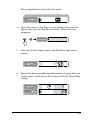
4. Move the cursor to the Page Layout setting, then press the
right or left arrow button for 3 seconds. All layout icons
disappear.
5. Select SE on the Copies menu with the left or right arrow
button.
6. Specify the photo number and the number of copies that you
want to print, when One or Set is selected for the Print Mode
setting.
47
7. Make the Quality and Photo Enhance settings.
8. Press the Print button to print the stickers.
Printing Multi-sized photos
You can print several different photo sizes on a single sheet of
paper.
Original photo
1. Select One for the Print Mode.
48
Multi-sized photos
2. Select the paper type and size. Only A4 and 100 mm × 150 mm
size sheet paper are available for this function.
3. Move the cursor to the Page Layout setting, then press and
hold the right or left arrow button for 3 seconds. All layout
icons disappear.
4. Select the ID with the right or left arrow buttons.
5. Specify the photo number and the number of copies that you
want to print.
49
6. Make the Quality and Photo Enhance settings.
7. Press the Print button to print the Multi-sized photos.
Printing photos using the panoramic layout
You can print photos using a panoramic layout. This function
adjusts the sides of photo image to the printable area. Note that
data cannot be printed larger than the printable area.
Original Photo
Panoramic Layout Photos
Note:
The purpose of this setting is to make a normal size photo look like
a panoramic photo. Do not use this setting with photos taken with
a digital camera in panoramic format.
50
1. Select the Print Mode; All, One or Set.
All:
Print all photographs one by one in the panoramic
layout.
One:
Print a selected photo in the panoramic layout.
Set:
Continuously print the selected photos in the
panoramic layout.
2. Select the type and size of the media loaded in the printer.
3. Move the cursor to the Page Layout setting, then press and
hold the left or right arrow button for 3 seconds. All layout
icons disappear.
51
4. Select PA with the right or left arrow button.
5. Specify the photo number and the number of copies that you
want to print when One or Set is selected for the Print Mode
setting.
6. Make the Quality and Photo Enhance settings.
7. Press the Print button to print in panoramic layout.
Using Filters
You can manually adjust the appearance of your photographs by
using the filter function. There are 9 filter effects available. This
function is not available when Index is selected for the Print Mode
setting.
1. Make the Print Mode, Paper Type, Paper Size, Page Layout
and Quality settings.
52
2. Specify the photo number and the number of copies that you
want to print, when One or Set is selected for the Print Mode
setting.
3. Press and hold the Brightness button for three seconds. The
Filter icon flashes on the Copies menu.
4. If you selected All or Set for the Print Mode setting, select the
number of the photo on which you want to apply a filter.
5. Select the number of the filter you want to use. The table below
lists the filter numbers and their effects. Also refer to the color
pages at the end of this guide for the examples of filter effects.
No.
Effect
No.
Effect
0
Off
5
Brighter
1
Monochrome
6
Slightly darker
2
Sepia
7
Darker
3
High contrast
8
Vivid
4
Slightly brighter
9
Sharp
Note:
If you select All or Set for the Print Mode setting and want to use
a filter effect on all of the selected photographs, press and hold the
Brightness button for 3 seconds. ALL appears on the Select Photo
menu and the Filter icon stops flashing. The filter is applied to all
photographs. To clear the filter setting, press the Cancel button.
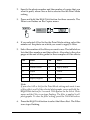
6. Press the Brightness button to select the filter effect. The Filter
icon stops flashing.
53
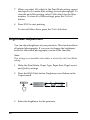
7. When you select All or Set for the Print Mode setting, repeat
the steps 3 to 5 to make filter settings for each photograph. To
clear the each filter setting, select 0 (No effect) for the filter
number. To clear all of filter settings, press the Cancel
button.
8. Press Start to start printing.
To turn off filter effects, press the Cancel button.
Brightness Adjustment
You can adjust brightness of your printouts. This function effects
all printed photographs. If you want to change the brightness
levels for individual photographs, use the Filter function.
Note:
This setting is not available when Index is selected for the Print Mode
setting.
1. Make the Print Mode, Paper Type, Paper Size, Page Layout
and Quality settings.
2. Press the Brightness button. Brightness icon flashes on the
Copies menu.
3. Select the brightness for the printouts.
54
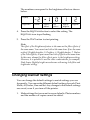
The numbers correspond to the brightness effects as shown
below.
Display
Brightness
Darker
Slightly
darker
No
effect
Slightly
brighter
Brighter
4. Press the Brightness button to select the setting. The
Brightness icon stops flashing.
5. Press the Start button to start printing.
Note:
The effect of the Brightness feature is the same as the filter effects of
the same name. You cannot use both at the same time. If are the same
as the 4. Slightly brighter, 5. Brighter, 6. Slightly darker, 7. Darker
of the Filter effects, so you cannot use both of effects at the same time.
In this case, always the filter effects prior to the brightness setting.
However, it is possible to use the other combinations; for example,
Dark Sepia, Slightly bright monochrome with using both filter and
brightness setting.
Changing Default Settings
You can change the default settings to match settings you use
frequently. You can make different default settings for each Print
Mode, All, Index, One and Set. Any changes to the default settings
are saved, even if you turn off the printer.
1. Make settings that you want to use as defaults. Photo numbers
and the number of copies cannot be added.
55
2. Press the Select Photo and the Brightness button at the same
time. The settings are saved as defaults.
If you want to reset the default settings, specify the Print
Mode that you want to reset, then press the Select Photo,
Brightness and Cancel button at the same time. The Factory
settings reappear and the preserved setting clears.
56
Replacing Ink Cartridges
Checking the Ink Supply
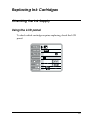
Using the LCD panel
To check which cartridge requires replacing, check the LCD
panel.
57
Error light
F
Display
b
Action
Black ink cartridge is nearly empty.
Color ink cartridge is nearly empty.
O
b
Black ink cartridge is empty.
Replace with a new one.
Standard capacity, black: T007
Light capacity, black: T010
Color ink cartridge is empty.
Replace with a new one.
Color: T008
O = on, N = off, F = flashing
You can check the amount of ink remaining in the ink cartridges
when running Nozzle Check from the printer’s control panel. The
Nozzle Check printout shows the percentage of remaining ink.
To run the Nozzle Check from the printer’s control panel, see
“Using the control panel buttons” in the online Reference Guide for
instructions.
Replacing an Ink Cartridge
This printer uses ink cartridges equipped with IC chips. The IC
chip accurately monitors the amount of ink used by each
cartridge, so even if a cartridge is removed and later inserted
again, all of its ink can be used. However, some ink is consumed
each time the cartridge is inserted because the printer
automatically checks reliability.
58
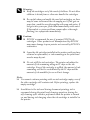
w
Warning:
❏ Keep ink cartridges out of the reach of children. Do not allow
children to drink from or otherwise handle the cartridges.
❏ Be careful when you handle the used ink cartridges, as there
may be some ink around the ink supply port. If ink gets on
your skin, wash the area thoroughly with soap and water. If
ink gets into your eyes, flush them immediately with water.
If discomfort or vision problems remain after a thorough
flushing, see a physician immediately.
c
Caution:
❏ EPSON recommends the use of genuine EPSON ink
cartridges. Other products not manufactured by EPSON
may cause damage to your printer not covered by EPSON's
warranties.
❏ Leave the old cartridge installed in the printer until you have
obtained a replacement, or ink remaining in the print head
nozzles may dry out.
❏ Do not refill the ink cartridges. The printer calculates the
amount of ink remaining using an IC chip on the ink
cartridge. Even if the cartridge is refilled, the amount of ink
remaining will not be recalculated by the IC chip and the
amount of ink available for use will not change.
Note:
❏ You cannot continue printing with one ink cartridge empty, even if
the other cartridge still contains ink. Before printing, replace the
empty cartridge.
❏ In addition to the ink used during document printing, ink is
consumed during the print head cleaning operation, during the
self-cleaning cycle which is performed when the printer is turned
on, and during ink charging when the ink cartridge is installed in
the printer.
59
❏ If you replace the ink cartridges while the roll paper is loaded, the
media may be smeared.
For more information about ink cartridges, see “When handling
the ink cartridges” on page 4.
1. Make sure that the printer is on, but not printing, then open
the printer cover.
Note:
You can identify the status of the printer condition. If the error light
is flashing, it means the black or color ink cartridge is low. If the
error light is on and not flashing, it means the black or color ink
cartridge is empty.
2. Press the e ink cartridge replacement button. The print head
moves left to the Ink cartridge replacement position. The
Processing light flashes, and the b error light comes on or
flashes. To find out which cartridge requires replacing, see
“Checking the Ink Supply” on page 57.
c
Caution:
Do not move the print head by hand, as this may damage the
printer. Always press the e ink cartridge replacement
button to move it.
3. Lift up the ink cartridge clamp as far as it will go. Take the
cartridge out of the printer. If the cartridge is empty, dispose
of it properly. Do not take the used cartridge apart or try to
refill it.
w
60
Warning:
If ink gets on your hands, wash them thoroughly with soap
and water. If ink gets into your eyes, flush them immediately
with water. If discomfort or vision problems remain after a
thorough flushing, see a physician immediately.
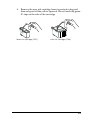
4. Remove the new ink cartridge from its protective bag and
then only peel off the yellow tape seal. Do not touch the green
IC chip on the side of the cartridge.
black ink cartridge (T007)
color ink cartridge (T008)
61
c
Caution:
❏ You must remove the yellow tape seal from the cartridge
before installing it, or the cartridge will become unusable
and you will be unable to print.
❏ If you have installed an ink cartridge without removing
the yellow tape seal, you must remove the cartridge and
install a new one. Prepare the new cartridge by removing
the yellow tape seal, then install it in the printer.
❏ Do not remove the blue portion of the tape seal from the
top of the cartridge, or the print head may become clogged
and be unable to print.
❏ Do not remove the tape seal from the bottom of the
cartridge or the ink will leak.
❏ Do not touch the green IC chip on the side of the
cartridge, or normal operation and printing may not be
possible.
Do not touch this part.
❏ If an ink cartridge should be removed temporarily from
the printer, be sure to protect the ink supply area of the
ink cartridge from dirt and dust. Store the ink cartridge
in the same environment as the printer. When storing
the cartridge, be sure that it stands as shown in the
illustration above (the label that identifies the color of the
ink cartridge should be displayed on the top of the
cartridge). The valve in the ink supply port is designed
to contain any excess ink that may be released. However,
62
careful handling is recommended. Do not touch the
supply port of the ink cartridge or its surrounding area.
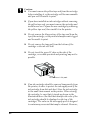
5. Align the tabs on the ink cartridge so that they are resting on
the tabs protruding from the base of the opened ink cartridge
clamp. Push the clamps down until they lock firmly into place.
Make sure that the ink cartridge tabs are not under the hinges
protruding from the base of the opened ink cartridge clamp.
c
Caution:
After you remove an ink cartridge from the printer, please
insert a new one immediately. If no cartridge is present, the
print head may dry out and become unable to print.
6. Press the e ink cartridge replacement button. The print head
will move and begins charging the ink delivery system. This
process takes about one minute to complete. When the ink
charging process is finished, the print head will return to its
home position, the process light will stop flashing and remain
on and the b error light will go out.
c
Caution:
The Processing light will continue to flash while the printer
is charging ink. Never turn off the printer while this light is
flashing. Doing so can result in incomplete charging of ink.
7. Close the printer cover.
63
Maintenance
Checking the Print Head Nozzles
If you find that the printed image is unexpectedly faint or dots in
the printed image are missing, you may be able to identify the
problem by checking the print head nozzles.
Follow the steps below to check the print head nozzles using the
control panel buttons.
1. Turn off your printer.
2. Make sure that A4 or Letter size paper is loaded in the sheet
feeder.
3. Hold down the b maintenance button (➀ in the illustration
below) and press the P power button (➁ in the illustration
below) to turn on the printer.
4. Release only the P power button. After the nozzle check
starts, then release the b maintenance button.
64
The printer will print an operation check page that includes your
printer’s ROM version information, the ink counter code, ink
levels, and a nozzle check pattern. To check the black remaining
ink levels, see BK. For color ink levels, see CL. Below are sample
printouts.
Good sample
Print head needs to be cleaned
Segments are missing
The above sample may be shown in black and white, but the actual test
prints in color (CMYK).
If the nozzle check page does not print satisfactorily (for example,
if any segment of the printed lines is missing), there is a problem
with the printer. This could be a clogged ink nozzle or a
misaligned print head. See the next section for details on cleaning
the print head. For information on aligning the print head, see
“Aligning the Print Head” in the online Reference Guide.The nozzle
check page also indicates the amount of ink remaining in each
cartridge. BK: shows the amount of remaining black ink, and CL:
shows the amount of remaining color ink.
Cleaning the Print Head
If you find that the printed image is unexpectedly faint or dots in
the printed image are missing, you may be able to solve these
problems by cleaning the print head, which ensures that the
nozzles are delivering ink properly.
65
Note:
❏ Print head cleaning uses both color and black ink. To avoid wasting
ink, clean the print head only if print quality declines (for example,
if the printout is blurry or the color is incorrect or missing).
❏ Use the Nozzle Check utility first to confirm that the print head
needs to be cleaned. This saves ink.
❏ When the b error light is flashing or on, you cannot clean the print
head. Replace the appropriate ink cartridge first.
❏ Do not start the Head Cleaning or Nozzle Check utility while
printing is in progress, or your printout may be marred.
Follow the steps below to clean the print head using the control
panel buttons.
1. Make sure that the Processing light is on and that the b error
light is off.
Note:
If the b error light is flashing or on, you cannot clean the head and
this operation will start the ink cartridge replacement procedure. If
you do not want to replace an ink cartridge at this moment, press
the b maintenance button to return the print head to its home
position.
2. Hold down the b maintenance button for three seconds.
66
The printer will start cleaning the print head and the process
light will begin flashing. Print head cleaning takes about
thirty seconds to complete.
c
Caution:
Never turn off the printer while the Processing light is
flashing. Doing so may damage the printer.
3. When the Processing light stops flashing, print a nozzle check
pattern to confirm that the head is clean and to reset the
cleaning cycle.
If print quality has not improved after repeating this procedure
four or five times, turn the printer off and leave it alone overnight,
then try head cleaning again.
If the print quality still has not improved, one or both of your ink
cartridges may be old or damaged and may need to be replaced.
To replace an ink cartridge before it is empty, see “Replacing an
Ink Cartridge” on page 58.
If print quality remains a problem after replacing the ink
cartridges, contact your dealer.
Note:
To maintain print quality, we recommend turning on the printer for at
least one minute every month.
Cleaning the Printer
To keep your printer operating at its best, clean it thoroughly
several times a year as follows.
1. Unplug the printer’s power cord.
2. Remove any paper from the sheet feeder.
67
3. Use a soft brush to carefully clean away all dust and dirt from
the sheet feeder.
4. If the outer case or the inside of the sheet feeder is dirty, wipe
it with a soft, clean cloth dampened with mild detergent. Keep
the printer cover closed to prevent water from getting inside.
5. If the inside of the printer accidentally gets soiled with ink,
wipe it off with a damp cloth.
w
c
Warning:
Be careful not to touch the gears or rollers inside the printer.
Caution:
❏ Be careful not to wipe grease on the metal parts under the ink
carriage passage.
❏ Never use alcohol or thinner to clean the printer, as these
chemicals can damage the components as well as the case.
❏ Be careful not to get water on the printer mechanism or
electronic components.
❏ Do not use a hard or abrasive brush.
❏ Do not spray the inside of the printer with lubricants.
Unsuitable oils can damage the mechanism. Contact your
dealer or a qualified service person if lubrication is needed.
❏ Only use a dry, soft cloth to clean the display and the optional
Preview Monitor. Do not use liquid or chemical cleansers.
68
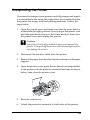
Transporting the Printer
If you need to transport your printer, carefully prepare and repack
it as described below using the original box (or a similar box that
the printer fits snugly into) and packing materials. Follow the
steps below.
1. Open the printer cover and make sure that the print head is
in the home (far right) position. If not, plug in the printer, wait
until the print head returns to the home position, then close
the printer cover and unplug the printer.
c
Caution:
Leave the ink cartridges installed when you transport the
printer. Transporting the printer without cartridges in place
can damage the printer.
2. Disconnect the interface cable from the printer.
3. Remove the paper from the sheet feeder and remove the paper
support.
4. Open the printer cover again. Secure the ink cartridge holder
to the printer with the protective material and tape as shown
below, then close the printer cover.
5. Raise the output tray.
6. Attach the protective materials to both sides of the printer.
69
7. Repack the printer and power cord in the original box.
8. Keep the printer level during transport.
70
Troubleshooting
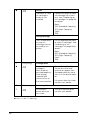
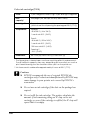
Error Indicators and Display
You can identify many common printer problems using the lights
or display on your printer’s control panel. If the lights are on or
flashing, use the following table of panel light patterns to
diagnose the problem, then implement the recommended
corrective measures.
Lights
O
Problem and Solution
b
Paper out
No paper is
loaded in the
printer.
b
F
Paper jam
Paper has jammed
in the printer.
O
b
Load paper in the sheet
feeder, then press the
b maintenance button.
The printer will resume
printing and the light will
go out.
Press the b maintenance
button to eject the
jammed paper. If the error
does not clear, open the
printer cover and remove
all of the paper inside,
including any torn pieces.
Reload the paper in the
sheet feeder and press the
b maintenance button to
resume printing.
Ink low
The black or color
ink cartridge is
nearly empty.
Obtain a replacement
black or color ink
cartridge.
Black:
T007 (Standard Capacity)
T010 (Light Capacity)
Color:
T008
71
O
b
Ink out
The black or color
ink cartridge is
empty or not
installed.
Replace the black or color
ink cartridge with a new
one. See “Replacing an
Ink Cartridge” on page 58
for details.
Black:
T007 (Standard Capacity)
T010 (Light Capacity)
Color:
T008
Wrong cartridge
The installed black
or color ink
cartridge cannot
be used by this
printer.
Use the appropriate black
or color ink cartridge. See
“Replacing an Ink
Cartridge” on page 58 for
details.
Black:
T007 (Standard Capacity)
T010 (Light Capacity)
Color:
T008
N
Processing
Carriage error
O
b
The print head
carriage is
obstructed by
jammed paper or
other foreign
material and
cannot return to
the home position.
F
Processing
Unknown printer error
F
b
An unknown
printer error has
occurred.
O = on, N = off, F = flashing
72
Turn off the printer. Open
the printer cover and
remove any paper from
the paper path by hand,
then, turn the printer back
on.
If the error does not clear,
contact your dealer.
Turn off the printer and
contact your dealer.
Display
Problem
Solution
The black ink
cartridge is nearly
empty.
Obtain a replacement black ink
cartridge.
The color ink cartridge
is nearly empty.
Obtain a replacement color ink
cartridge.
The black ink
cartridge is empty.
Replace the black ink cartridge
with a new one.
The color ink cartridge
is empty.
Replace the color ink cartridge
with a new one.
No paper is loaded in
the printer.
Load paper in the sheet feeder;
then press the b maintenance
button to turn this light off. The
printer resumes printing.
Paper has jammed in
the printer.
Take all the paper out of the
feeder, and reload the paper;
then press the b maintenance
button to turn this light off. If the
light continues to flash, turn off the
printer and gently pull all the
paper out of the printer. If it tears
and pieces remain inside the
printer, open the printer cover
and remove the pieces of paper.
Turn on the printer and try again.
The black or/and
color ink cartridge is
not installed properly.
Reinstall cartridge.
73
Internal printer parts
need adjustment or
replacement.
Turn the printer off, and after a
few seconds, turn it on again. If
the error is not cleared, contact
your dealer.
The storage media or
PC card is not
compatible with this
printer.
Use a compatible storage media
or PC card. See “Loadable
storage media” on page 25.
An unknown printer
error has occurred.
Turn the printer off, and after a
few seconds, turn it on again. If
the error is not cleared, contact
your dealer.
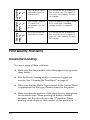
Print Quality Problems
Horizontal banding
Try one or more of these solutions:
❏ Make sure that the printable side of the paper is face up in the
sheet feeder.
❏ Run the Head Cleaning utility to clear any clogged ink
nozzles. See “Cleaning the Print Head” on page 65.
❏ Make sure that the Media Type selected in the Control Panel
is appropriate for the type of media loaded in the printer.
❏ Make sure that the position of the adjust lever is appropriate
for the media type. When printing on media of normal
thickness, set the adjust lever to the “0” position. When
printing on envelopes or thick media, set the position to “+”.
74
Vertical misalignment or banding
Try one or more of these solutions:
❏ Make sure that the printable side of the paper is face up in the
sheet feeder.
❏ Run the Head Cleaning utility to clear any clogged ink
nozzles. See “Cleaning the Print Head” on page 65.
❏ Make sure that the Media Type setting selected in the Control
Panel is appropriate for the type of media loaded in the
printer.
❏ Make sure that the position of the adjust lever is appropriate
for the media type. When printing on media of normal
thickness, set the adjust lever to the “0” position. When
printing on envelopes or thick media, set the position to “+”.
Color gaps
Try one or more of these solutions:
❏ Make sure that your paper is not damaged, dirty, or too old.
Also, make sure that the printable side of the paper is face up
in the sheet feeder.
❏ Run the Head Cleaning utility to clear any clogged ink
nozzles. See “Cleaning the Print Head” on page 65.
❏ Check the b error light. If the light is flashing, replace the
appropriate ink cartridge. See “Replacing an Ink Cartridge”
on page 58.
❏ Make sure that the Media Type setting selected in the Control
Panel is appropriate for the type of media that is loaded in the
printer.
75
Incorrect or missing colors
Try one or more of these solutions:
❏ Run the Head Cleaning utility. See “Cleaning the Print Head”
on page 65. If colors are still incorrect or missing, replace the
color ink cartridge. If the problem persists, replace the black
ink cartridge. See “Replacing an Ink Cartridge” on page 58 for
details.
❏ Make sure that you are not using an ink cartridge with an
expired date printed on the cartridge carton. Also, if you have
not used the printer for a long time, replace with new ink
cartridges. See “Replacing an Ink Cartridge” on page 58.
Blurry or smeared printout
Try one or more of these solutions:
❏ Make sure that the printer is on a flat, stable surface that
extends beyond the printer base in all directions. The printer
will not operate properly if it is tilted.
❏ Make sure that your paper is dry and that the printable side
is facing up. Also, make sure that you are using an acceptable
paper type. See “Paper” on page 95 for specifications.
❏ If the paper is curled toward the printable side, flatten it or
curl it slightly in the opposite direction.
❏ Set the adjust lever to the “+” position, and make sure the
Media Type setting in the Control Panel is correct.
❏ Remove each sheet from the output tray as it is printed,
especially if you are using transparencies.
76
❏ If you are printing on glossy media, place a support sheet (or
a sheet of plain paper) beneath the stack, or load only one
sheet at a time.
❏ When printing on thick media, set the adjust lever to the “+”
position.
❏ Run the Head Cleaning utility. See “Cleaning the Print Head”
on page 65.
❏ Load and eject dry paper several times. If the problem
persists, ink may have leaked inside the printer, so wipe the
inside of the printer with a soft, clean cloth.
Wipe here
w
c
Warning:
Be careful not to touch the gears or rollers inside the printer.
Caution:
Be careful not to wipe grease on the metal parts under the
print head path.
Printout Problems Not Related to Print Quality
If one of the following problems has occurred, try the solutions
listed for the problem.
❏ Blank pages print
77
❏ Printout has smears on the bottom edge
❏ Printing is too slow
Blank pages print
❏ Run the Head Cleaning utility to clear any clogged
nozzles.See “Cleaning the Print Head” on page 65.
Printout has smears on the bottom edge
❏ If the paper is curled toward the printable side, flatten it or
curl it slightly in the opposite direction.
❏ Set the adjust lever to the “+” position.
Printing is too slow
❏ Make sure that the Media Type setting in the Control Panel is
correct.
Paper Does Not Feed Correctly
If one of the following problems has occurred, try the solution(s)
listed for that problem.
❏ Paper does not feed
❏ Multiple pages feed
❏ The paper jams
❏ Paper is not ejected fully or is wrinkled
78
Paper does not feed
Remove the stack of paper and make sure of the following:
❏ The paper is not curled or creased.
❏ The paper is not too old. See the instructions that came with
the paper for more information.
❏ The paper is not loaded higher than the arrow on the left edge
guide.
❏ Paper is not jammed inside the printer. If it is, remove the
jammed paper.
❏ The black and/or color ink cartridges are not empty. If one is,
replace the appropriate cartridge. To determine which
cartridge is empty, see “Replacing an Ink Cartridge” on page
58.
Load the paper again. Make sure that you follow any special
loading instructions that came with your paper. Also see
“Available Media Types” on page 19.
Multiple pages feed
❏ For the users directly printing from PC card, do not select A4
or 100 × 150 mm sheet paper for the Paper Size setting when
roll paper is loaded in the sheet feeder. Doing so causes
unnecessary paper to be fed after each print job. If you have
already started printing, press the Cancel button. Wait until
the printer stops printing and feeding paper. Cut off the paper
at the back of the printer, then turn off the printer. The
remaining paper is ejected.
❏ Make sure that the paper stack fits under the arrow mark
located on the inside surface on the left edge guide.
79
❏ Make sure that the left edge guide is snug to the left edge of
the paper.
❏ Make sure that the paper is not curled or folded. If so, flatten
it or curl it slightly toward the opposite side before loading.
❏ Make sure that the position of the adjust lever is appropriate
for the media type. When printing on media of normal
thickness, set the adjust lever to the “0” position. When
printing on envelopes and thick media, set the position to “+”.
❏ Remove the stack of paper and make sure that the paper is
not too thin. See “Paper” on page 95 for specifications. Fan the
edges of the stack to separate the sheets, then reload the paper.
Paper jams
Press the b maintenance button to eject the jammed paper. If the
error does not clear, open the printer cover and remove all of the
paper inside, including any torn pieces, then reload the paper in
the sheet feeder and press b maintenance button to resume
printing.
Note:
If you cannot remove a foreign object easily by yourself, do not use force
and do not disassemble the printer. Call your dealer for assistance.
If your paper jams frequently, make sure of the following:
❏ The paper is smooth, not curled or wrinkled.
❏ The printable side of the paper is face up in the sheet feeder.
❏ The paper stack was fanned before loading.
❏ The paper is not loaded above the arrow on the left edge
guide.
80
❏ The left edge guide is adjusted to fit your paper.
❏ The printer is on a flat, stable surface that extends beyond the
printer base in all directions. The printer will not operate
properly if it is tilted.
Paper improperly loaded
If you have loaded the paper too far into the printer, the printer
cannot feed the paper correctly. Turn the printer off and gently
remove the paper. Then turn the printer on and reload the paper
properly.
Paper is not ejected fully or is wrinkled
Try one or more of these solutions:
❏ If the paper does not eject fully, press the b maintenance
button, then open the printer cover and remove the paper.
Also, check the Paper Size setting in the Control Panel.
❏ If the paper is wrinkled when it comes out, it may be damp
or too thin. Load a new stack.
Note:
Store any unused paper in its original packaging in a dry area. See
“Paper” on page 95 for specifications
Printer Does Not Print
If the printer does not print, check and see if one of the following
error indications is displayed, then try the solutions listed.
❏ All lights are off
81
❏ Lights came on and then went out
❏ Only the process light is on
❏ The b error light is flashing or on
❏ One of the ink out lights is flashing or on
❏ Ink out lights are on and the other lights are flashing
All lights are off
Try one or more of these solutions:
❏ Press the P power button to make sure that the printer is on.
❏ Turn off the printer and make sure that the power cord is
securely plugged in.
❏ Make sure that your outlet works and is not controlled by a
wall switch or timer.
Lights came on and then went out
The printer’s voltage may not match the outlet rating. Turn off the
printer and unplug it immediately, then check the printer labels.
If the voltage does not match, DO NOT PLUG YOUR PRINTER
BACK IN. Contact your dealer.
Only the Processing light is on
Try one or more of these solutions:
❏ Make sure that there is no packing material in the printer.
82
❏ If the printer sounds like it is trying to print, but is unable to,
run the Head Cleaning utility. See “Cleaning the Print Head”
on page 65.
If this does not work, replace the ink cartridges. See
“Replacing an Ink Cartridge” on page 58 for instructions.
Error light is flashing or on
Try one or more of these solutions:
❏ If the b error light is on and paper is jammed in the printer,
remove the paper from the printer.
❏ If the b error light is on and no paper is loaded, load more
paper in the sheet feeder.
❏ If the b error light is flashing, ink is low. Obtain a
replacement cartridge of the appropriate type. To determine
which cartridge is low, see “Replacing an Ink Cartridge” on
page 58.
❏ If the b error light is on and ink is out, replace the
appropriate ink cartridge. To determine which ink cartridge
is empty, see “Replacing an Ink Cartridge” on page 58.
Error light is on and the Processing light is flashing
Follow the steps below.
1. Press the b maintenance button, then remove any paper in
the printer.
83
2. Turn the printer off. Check for and remove any foreign objects
or pieces of paper from inside the printer. Also, make sure
that there is sufficient space around the vent on the back of
the printer to allow proper ventilation. Remove any objects
blocking the vent, then turn the printer back on.
Note:
If you cannot remove a foreign object easily by yourself, do not use
force and do not disassemble the printer. Call your dealer for
assistance.
3. If the error does not clear, contact your dealer.
Cancelling Printing
If you encounter problems while printing, you may need to cancel
printing. To stop printing in progress, press Cancel button. The
printer will cancel all print jobs and stop printing, and eject any
pages which is printing. Depending on the printer’s status,
printing may not stop immediately.
84
Exif Print
Exif2.2, a new standard for digital cameras, also called “Exif
Print.”, has been established to make the use of fine digital photos
easier.
85
Printing with PRINT Image Matching
How is PRINT Image Matching used?
This product supports PRINT Image Matching and PRINT Image
Matching II. When used in combination, PRINT Image Matching
or PRINT Image Matching II enabled digital still cameras, printers
and software help photographers to produce images more
faithful to their intentions.
The PRINT Image Matching function can be utilized if this
EPSON printer is used to print images from input devices, such
as digital cameras, loaded with the PRINT Image Matching
function. Print commands are attached to image data for printing
if photos are taken with an input device loaded with the PRINT
Image Matching function.
Note:
❏ See the relevant input device instruction manual for details
concerning the use of devices loaded with the PRINT Image
Matching function.
❏ Please check with the input device manufacturer to determine
whether it is loaded with the PRINT Image Matching function.
Printing without a PC
Insert the digital camera memory card into the memory card slot,
specify the image to be printed to retrieve print commands
registered in the image file and print.
86
Media for which PRINT Image Matching is
enabled
PRINT Image Matching is enabled when the following media are
used:
Plain Paper/EPSON Premium Ink Jet Plain Paper/
EPSON Bright White Ink Jet Paper/EPSON Photo Paper/
EPSON Matte Paper-Heavyweight/
EPSON Premium Glossy Photo Paper/
EPSON ColorLife Photo Paper
87
Customer Support
Technical Support Web Site
EPSON's Technical Support Web Site provides help with
problems that cannot be solved using the troubleshooting
information in your printer documentation. If you have a Web
browser and can connect to the Internet, access that site at:
http://support.epson.net/StylusPhoto915/
Contacting Customer Support
If your EPSON product is not operating properly and you cannot
solve the problem using the troubleshooting information in your
product documentation, contact customer support services for
assistance. If customer support for your area is not listed below,
contact the dealer where you purchased your product.
Customer support will be able to help you much more quickly if
you give them the following information:
❏ Product serial number
(The serial number label is usually on the back of the product.)
❏ Product model
❏ Product software version
(Click About, Version Info, or similar button in the product
software.)
❏ Brand and model of your computer
❏ Your computer operating system name and version
88
❏ Names and versions of the software applications you
normally use with your product
United Kingdom
www.epson.co.uk
Stylus Products Warranty & Support: 08705 133 640
Scanner Products Warranty & Support: 08702 413 453
Sales: 0800 220 546
Republic of Ireland
www.epson.co.uk
Stylus Products Warranty & Support: 01 679 9016
Other Products Warranty & Support: 01 679 9015
Sales: 1 800 409 132
Denmark
www.epson.dk
Warranty & Support: 80 88 11 27
Sales: 38 48 71 37
Finland
www.epson.fi
Warranty & Support: 0800 523 010
Sales: (09) 8171 0083
89
Norway
www.epson.no
Warranty & Support: 800 11 828
Sales: 23 16 21 24
Sweden
www.epson.se
Warranty & Support: 08 445 12 58
Sales: 08 519 92 082
Israel
www.epson.com
Warranty & Support: 04 8 560 380
Middle East
www.epson.com
Warranty & Support: + 971 (0) 4 352 44 88 or 351 77 77
Support Email: [email protected]
South Africa
www.epson.co.za/
For details of EPSON Express centres and Service Repair centres:
http://www.epson.co.za/support/index.htm
Warranty & Support: (011) 444 8278 / 91 or 0800 600 578
Sales: (011) 262 9200 or 0800 00 5956
90
Options and Consumable Products
Options
The following options are available for your printer.
Interface cables
EPSON supplies the following interface cable for your printer.
However, you can use any interface cables that meet these
specifications. See your computer manual for any additional
requirements.
USB Interface Cable (shielded) C83623✽ from Series A 4-pin
(computer) to series B 4-pin (printer).
Note:
❏ The asterisk (✽) is a substitute for the last digit of the product
number, which varies by location.
❏ Depending on your geographic location, this cable may not be
supplied.
c
Caution:
Use only interface cables which meet the specifications listed
above. Using other cables not covered by EPSON warranties may
cause the printer to malfunction.
91
Preview Monitor
When printing directly from PC card, the Preview Monitor
C86000✽ lets you easily find photos on the memory card. Use the
left and right arrow buttons on the Select Photo menu to select the
photos that you want to print on the memory card. This monitor
only displays the Page Layout and Select Photo settings.
c
Caution:
Be sure to turn off your printer and unplug the printer’s power
cord before attaching or removing the preview monitor. Failure
to do so can damage the preview monitor.
Note:
❏ The asterisk (✽) is a substitute for the last digit of the product
number, which varies by location.
❏ To adjust the tilt of the Preview Monitor, loosen the knob on the
right side of the Preview Monitor.
92
Consumable products
The following ink cartridges and EPSON special media are
available for your printer.
Ink cartridges
You can use the following cartridges with your printer:
Type of ink
Product numbers of ink
Black ink cartridge
Standard Capacity: T007
Light Capacity: T010
Color ink cartridge
T008
Note:
The product numbers of ink cartridges may vary by location.
Media types
EPSON offers specially-designed media for ink jet printers to
meet most high-quality printing needs.
Plain Paper
Plain paper
EPSON Premium Ink Jet Plain Paper (A4)
S041214
EPSON Bright White Ink Jet Paper (A4)
S041442
93
Photo Paper
EPSON Photo Paper (A4)
S041140
EPSON Photo Paper (100 × 150 mm)
S041255
EPSON Photo Paper (100 mm × 8 m)
S041279
EPSON Photo Paper (210 mm × 10 m)
S041280
Matte Paper-Heavyweight
EPSON Matte Paper-Heavyweight (A4)
S041256
S041258
S041259
Premium Glossy Photo Paper
EPSON Premium Glossy Photo Paper (A4)
S041287
S041297
S041285
EPSON Premium Glossy Photo Paper
(100 mm × 8 m)
S041302
S041303
EPSON Premium Glossy Photo Paper
(127 mm × 8 m)
S041474
EPSON Premium Glossy Photo Paper
(210 mm × 10 m)
S041376
S041377
Photo Stickers
EPSON Photo Stickers 16 (A6)
94
S041144
Printer Specifications
Printing
Printing method
On-demand ink jet
Nozzle configuration
Monochrome (black) 48 nozzles
Color (cyan, magenta, yellow, light cyan, light
magenta) 240 nozzles (48 × 5 colors)
Resolution
Maximum 2880 dpi × 720 dpi
Print direction
Bidirectional with logic seeking
Control code
ESC/P Raster
EPSON Remote
Input buffer
32 KB
Paper
Note:
Since the quality of any particular brand or type of paper may be changed
by the manufacturer at any time, EPSON cannot attest to the quality of
any non-EPSON brand or type of paper. Always test samples of paper
stock before purchasing large quantities or printing large jobs.
95
Paper specifications
Single sheets:
Size
A4 (210 mm × 297 mm)
Paper types Plain bond paper, special paper distributed by
EPSON
Thickness 0.08 mm to 0.11 mm (0.003 to 0.004 inch)
(for plain
bond paper)
Weight
64 g/m² (17 lb) to 90 g/m² (24 lb)
(for plain
bond paper)
Matte Paper-Heavyweight:
Size
A4 (210 mm × 297 mm)
Paper types Special paper distributed by EPSON
Photo Paper:
Size
A4 (210 mm × 297 mm)
100 mm × 150 mm
100 mm × 8 m
210 mm × 10 m
Paper types Special paper distributed by EPSON
96
Premium Glossy Photo Paper:
Size
A4 (210 mm × 297 mm)
100 mm × 8 m
127 mm × 8 m
210 mm × 10 m
Paper types Special paper distributed by EPSON
Photo Stickers:
Size
A6 (105 mm × 148 mm) with 16 frames
Paper types Special paper distributed by EPSON
Note:
❏ Poor quality paper may reduce print quality and cause paper jams
or other problems. If you encounter problems, switch to a higher
grade of paper.
❏ Do not load curled or folded paper.
❏ Use paper under normal conditions:
Temperature 15 to 25° C (59 to 77° F)
Humidity 40 to 60% RH
97
Printable area
Single sheets
Normal
No Margins✽✽
A
B-L
B-R
C
Diagonal lines show printable area.
A:
The minimum top margin is 3.0 mm (0.12").
B-L:
The minimum left margin is 3.0 mm (0.12").
B-R:
The minimum right margin is as follows:
3.0 mm (0.12") for single sheets.
C:
The minimum bottom margin is 14.0 mm (0.55").
✽✽:
When printing with the No Margins feature, print
quality may decline in the top and bottom areas of the
printout, or the area may be smeared.
Note:
Always load paper into the sheet feeder short edge first. Load
envelopes flap edge first with the flap side down.
98
Ink Cartridges
Black ink cartridge (T007, T010)
There are two types of black ink cartridges. The Light Capacity
ink cartridge (T010) contains half as much ink as the standard
capacity ink cartridge (T007).
Color
Black
Print capacity*
Standard Capacity (T007):
540 pages (A4, text at 360 dpi)
Light Capacity (T010):
270 pages (A4, text at 360 dpi)
Cartridge life
2 years from production date
(within 6 months after opening package, at 25°C [77°F])
Temperature
Storage:
-20 to 40°C (-4 to 104°F)
1 month at 40°C (104°F)
Transit:
-30 to 60°C (-22 to 140°F)
1 month at 40°C (104°F)
120 hours at 60°C (140°F)
Freezing:**
-16°C (3.2°F)
Dimensions
20.1 mm (W) × 60.0 mm (D) × 38.5 mm (H)
99
Color ink cartridge (T008)
Color
Cyan, Magenta, Yellow, Light cyan and Light magenta
Print
capacity*
220 pages (A4, 360 dpi, 5% duty each color)
Cartridge life
2 years from production date
(within 6 months of opening the package at 25°C [77°F])
Temperature
Storage:
-20 to 40°C (-4 to 104°F)
1 month at 40°C (104°F)
Transit:
-30 to 60°C (-22 to 140°F)
1 month at 40°C (104°F)
120 hours at 60°C (140°F)
Freezing:**
-18°C (-0.4°F)
Dimensions
49.1 mm (W) × 60.0 mm (D) × 38.5 mm (H)
* The figure given is based upon continuous printing after ink replacement.
The actual print capacity may vary, depending on how often you use the
print head cleaning function and how often you turn the printer on.
** Ink thaws and is usable after approximately 3 hours at 25°C (77°F).
c
Caution:
❏ EPSON recommends the use of original EPSON ink
cartridges only. Products not manufactured by EPSON may
cause damage to your printer not covered by EPSON's
warranties.
❏ Do not use an ink cartridge if the date on the package has
expired.
❏ Do not refill the ink cartridge. The printer calculates the
amount of ink remaining using an IC chip on the ink
cartridge, so even if the cartridge is refilled, the IC chip will
report that it is empty.
100
Mechanical
Paper feed
method
Friction
Paper path
Sheet feeder, rear entry
Sheet feeder
capacity
About 100 sheets at 64 g/m² (17 lb) paper
Dimensions
Storage
Width: 467 mm (18.4 inches)
Depth: 255.7 mm (10.1 inches)
Height: 212.1 mm (8.4 inches)
Printing
Width: 467 mm (18.4 inches)
Depth: 547 mm (21.5 inches)
Height: 302 mm (11.9 inches)
Weight
5.25 kg (11.6 lb) without the ink cartridges
Electrical
120 V Model
220-240 V Model
Input voltage range
99 to 132 V
198 to 264 V
Rated frequency range
50 to 60 Hz
Input frequency range
49.5 to 60.5 Hz
Rated current
0.45 A
Power consumption
Approx. 19 W (ISO10561 Letter Pattern)
Approx. 3.5 W in standby mode
0.25 A
Note:
Check the label on the back of the printer for the voltage of your printer.
101
Operating Environment
Temperature
Operation:
10 to 35°C (50 to 95°F)
Storage:
-20 to 40°C (-4 to 104°F)
1 month at 40°C (104°F)
Transit:*
-20 to 60°C (-4 to 140°F)
120 hours at 60°C (140°F)
Humidity
Operation:
20 to 80% RH
Storage:*,**
5 to 85% RH
* Stored in a shipping container
** Without condensation
Standards and Approvals
U.S. model:
102
Safety
UL 1950
CSA C22.2 No.950
EMC
FCC Part 15 Subpart B Class B
CSA C108.8 Class B
European model:
Low Voltage
Directive
73/23/EEC
EN 60950
EMC Directive
89/336/EEC
EN 55022 Class B
EN 55024
EN 61000-3-2
EN 61000-3-3
Australian model:
EMC
AS/NZS 3548 Class B
103
104
EPSON OVERSEAS MARKETING LOCATIONS
EPSON AMERICA, INC.
3840 Kilroy Airport Way
Long Beach, CA 90806
Phone: (562) 981-3840
Fax: (562) 290-5220
EPSON UK LTD.
Campus 100, Maylands Avenue,
Hemel Hempstead, Herts,
HP2 7TJ, U.K.
Phone: (+44) 01442 261144
Fax: (+44) 01442 227227
EPSON DEUTSCHLAND GmbH
Zülpicher Straße 6,
40549 Düsseldorf Germany
Phone: (0211) 56030
Fax: (0211) 5047787
EPSON FRANCE S.A.
68 bis, rue Marjolin
92300, Levallois-Perret, France
Phone: 33.1.41.86.26.56
Telex: 610657
EPSON AUSTRALIA PTY. LTD.
70 GIBBES STREET,
CHATSWOOD 2067 NSW.
Phone: 2-9903-9000
Fax: 2-9903-9177
EPSON SINGAPORE PTE. LTD.
No. 1 Temasek Avenue #36-00
Millenia Tower, Singapore 039192
Phone: (065) 633 77 911
Fax: (065) 633 41 185
EPSON HONG KONG LTD.
Rooms 4706-10, 47/F,
China Resources Bldg.,
26 Harbour Road, Wanchai, Hong Kong
Phone: 2585-4300
Fax: 2827-7083
EPSON TAIWAN TECHNOLOGY &
TRADING LTD.
10F, No. 287 Nanking E. Road, Sec. 3,
Taipei, Taiwan,
Phone: (02) 2717-7360
Fax: (02) 2712-9164
EPSON ITALIA S.p.A.
V.le F.lli Casiraghi 427
20099 Sesto S.Giovanni
MI, Italy
Phone: +3902262331
Fax: +39022440750
EPSON IBERICA S.A.
Av. de Roma, 18-26
08290 Cerdanyola del Valles
Barcelona, Spain
Phone: 582. 15.00
Fax: 582. 15.55
SEIKO EPSON CORPORATION
(Hirooka Office)
80 Harashinden, Hirooka
Shiojiri-shi, Nagano-ken
399-0785 Japan
EPSON PORTUGAL, S.A.
R. do Progresso, 471, 1° Perafita
4460 Matosinhos, Portugal
Phone: (02) 996 14 02
Fax: (02) 996 14 11
2002 January
Color Ink Jet Printer
Color Ink Jet Printer
Daily Use
Daily Use
Printed in Japan
02.XX-XX
Daily Use
4032203 Rev.0
cover-F DICF43
4032203
cover-F
4032203
cover-F
Rev.0
PMS265
Rev.0
DIC2425
4032203-00
XXX
4032203 Rev.0
cover-F
BK