1
MIGRATING FROM
SOLARIS™ 9 ENTERPRISE ON SUN FIRE™ V440
WITH BIND 8.3.3
TO
SOLARIS™ 10 ENTERPRISE ON DELL™
POWEREDGE™ R900
WITH BIND 9.3.5-P1
Table of contents
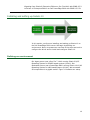
Table of contents .......................................................... 2 Introduction ................................................................. 3 Scope of this Guide ...................................................... 3 New features of Solaris 10 ............................................ 5 New features of BIND 9 ................................................ 5 Pre-migration considerations .......................................... 7 General considerations ................................................. 7 Differences between BIND 8 and BIND 9 ......................... 8 Installing and setting up Solaris 10................................. 10 Defining our environment ........................................... 10 Configuring the RAID drives ........................................ 12 Installing Solaris 10 ................................................... 13 Creating the Solaris Container ..................................... 15 Migrating DNS services ................................................. 18 Post-migration considerations ........................................ 23 Managing your DNS services ....................................... 23 Summing up ............................................................... 25 Appendix A. Methodology: Creating the RAID disk groups .. 26 Appendix B. Methodology: Installing Solaris 10 on the
PowerEdge R900.......................................................... 28 Appendix C. Methodology: Migrating your DNS server ....... 33 Preliminary steps ....................................................... 33 Creating the Solaris Container ..................................... 34 Migrating DNS services ............................................... 36 About Principled Technologies ........................................ 40 Migrating from Solaris 9 Enterprise Edition on Sun Fire V440 with BIND 8.3.3
to Solaris 10 Enterprise Edition on Dell PowerEdge R900 with BIND 9.3.5-P1 Introduction
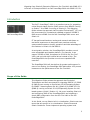
Dell PowerEdge R900
The Dell™ PowerEdge™ R900 is an excellent server for upgrading
critical Domain Name Service (DNS) servers from BIND 8 running
on Solaris™ 9 to BIND 9 running on Solaris 10. This Migration
Guide reviews the approach that Principled Technologies® (PT) and
Dell recommend for a tested and validated migration of BIND 8
DNS servers to BIND 9 on the Dell PowerEdge R900 server and
Solaris 10.
PT has performed hands-on testing and research and drawn on
real-world experiences to document best practices and help
systems administrators simplify operations and take advantage of
new features in Solaris 10 and BIND 9.
As a migration solution, the PowerEdge R900 provides a much
more expandable and capable platform. For example, it can
support 256 GB of RAM, as opposed to 32 GB in the Sun Fire™
V440, and can hold eight internal drives instead of four. The
PowerEdge R900 also provides a much more capable RAID
controller.
The PowerEdge R900 will also deliver far greater performance. In
some of our testing, the PowerEdge R900 delivered a 45.5 percent
increase over the performance of the Sun Fire V440.
Scope of this Guide
This Migration Guide reviews the approach that Principled
Technologies and Dell recommend for migrating BIND 8.3.3 (BIND
8) DNS servers running on Sun Solaris 9 9/05 Operating System
for SPARC™-based systems (64-bit) (Solaris 9) to BIND 9.3.5-P1
(BIND 9) running on Solaris 10 10/08 Operating System for x86based systems (64-bit) (Solaris 10). We cover installing Solaris 10
and configuring DNS on the PowerEdge R900 and migrating a
simple DNS configuration from the Sun Fire V440 to the Dell
PowerEdge R900.
In this Guide, we use Solaris built-in virtualization. Solaris uses two
terms that are specific to its virtualization: Solaris Zones and
Solaris Containers. Zones implement operating system level
3
Migrating from Solaris 9 Enterprise Edition on Sun Fire V440 with BIND 8.3.3
to Solaris 10 Enterprise Edition on Dell PowerEdge R900 with BIND 9.3.5-P1 virtualization in Solaris. Containers combine Zones with Solaris 10’s
resource management capabilities.
"A DNS server … is a
core service that
needs to be isolated
in case it is
compromised and to
prevent something
else from bringing it
down.… With containers it is possible
to run DNS safely
with minimal services
that cannot be compromised by access to
other applications or
the applications
themselves.”
Consolidating
Applications with
Solaris Containers
http://www.sun.com/
datacenter/consolidati
on/solaris10_whitepa
per.pdf
Solaris Containers offer a convenient and secure way to consolidate
DNS servers, and even to securely consolidate DNS servers with
other services. For example, Mark Thacker, Group Product
Manager, Security & Virtualization at Sun, notes, “You could run
two different DNS servers, one in each Container. So, you could
have an internal DNS server and an external DNS Server running in
another Container. Each utilizing process rights management to
run with a reduced set of privileges.”
http://nettalk.sun.com/bhive/t/1000/chat_details.jsp?content_id=
1307
Because of the security benefits, you may want to consider running
DNS in a container, even if you are only planning a simple
migration.
DNS is highly configurable, and implementations vary greatly from
installation to installation. In this Guide, we have chosen a simple
and clear scenario. Where there were several ways of
accomplishing the same goal, we used the simplest method. For
example, instead of using file distribution utilities such as rdist, or
adding the new server as a slave name server and then promoting
it to be a master name server, we used simple file copies from
machine to machine.
Our scenario is that of replacing the old DNS server while keeping
the server name and IP address constant. This makes the new
server implementation transparent to client machines, as DNS
server name, IP addresses, etc. will remain the same. The main
configuration file for our example, the named.conf file, uses no
deprecated clauses. This allows us to move the DNS configuration
files unchanged.
NOTE: In this Guide, we use BIND 9.3.5-P1 because this
version of BIND ships with Solaris 10 10/08. The latest
version is 9.6.0, available at www.isc.org. However, as
we write this Guide, Sun does not provide an installation
package for it.
4
Migrating from Solaris 9 Enterprise Edition on Sun Fire V440 with BIND 8.3.3
to Solaris 10 Enterprise Edition on Dell PowerEdge R900 with BIND 9.3.5-P1 New features of Solaris 10
Solaris 10 introduces a wide variety of new features. While there
are far too many to discuss in this Guide, the following list
mentions some of the more significant ones:
•
•
•
•
•
•
DTrace. DTrace provides a comprehensive view of
application and operating system activity. In a single
scriptable tool, DTrace allows to you to examine both kernel
and user-level activity. Sun designed DTrace to run on live
production servers, often with negligible impact on
performance. Per Sun’s documentation, for disabled probes,
there is no performance impact at all.
Solaris Containers. Solaris 10 provides operating systemlevel virtualization. Solaris Containers combine the isolation
of Solaris Zones with resource controls.
Solaris ZFS. The zetabyte file system combines enormous
storage capacity, snapshots, integrity checking and repair,
volume management, built-in copy-on-write support, and
the integrated redundancy capability of RAID-Z.
Predictive Self-Healing. Solaris 10 can diagnose and help
you recover from many hardware and software problems.
The Solaris Fault Manager can automatically detect many
hardware and application problems, while the Solaris
Service Manager gives administrators a uniform interface
for managing application services.
Solaris Trusted Extensions. Solaris 10 includes security
capabilities that were formerly available only in the Trusted
Solaris product. These allow you to combine mandatory
access control with fine-grained control of user privileges.
Service Management Facility. A replacement for UNIX
init.d scripts, the Service Management Facility gives
administrators a single interface for managing software
services. One of the features it provides is the ability to give
a service the minimal set of root-level privileges it needs to
do its job. The ability to give privileges to services allows
ordinary users to do more tasks without compromising
security, thus letting you more tightly control access to the
root account.
New features of BIND 9
The Internet Systems Consortium (ISC) released BIND 9 in
September of 2000. The developers of BIND 9 rewrote BIND to
5
Migrating from Solaris 9 Enterprise Edition on Sun Fire V440 with BIND 8.3.3
to Solaris 10 Enterprise Edition on Dell PowerEdge R900 with BIND 9.3.5-P1 address some significant issues in the underlying architecture of
BIND. We discuss some of the differences between BIND 8 and
BIND 9 below.
Some of the important features of BIND 9 include the following:
•
DNS security. BIND 9 greatly enhances security by
supporting standards such as Domain Name System
Security Extensions (DNSSEC) and Transaction Signature
(TSIG). DNSSEC adds such capabilities to DNS as origin
authentication of DNS data, data integrity, and
authenticated denial of existence. See www.dnssec.net for
more details. TSIG helps secure DNS updates by securely
identifying each endpoint of the transaction. RFC1035
defines TSIG.
BIND 9 also addresses security holes in the architecture of
BIND 8. Because of a flaw that could allow a hacker to
redirect URLs to fraudulent Web sites, ISC formally retired
BIND 8 in September of 2007.
•
IP version 6. Compared with IPv4, IPv6 vastly expands the
available addresses on the Internet. BIND 9 fully supports
all IPv6 address-to-name and name-to-address translations.
•
Support for DNS protocol enhancements. BIND 9
supports a number of enhancements to DNS, including the
following:
o
o
o
EDNS0, a version of Extension Mechanisms for DNS,
allows DNS packets larger than 500 bytes. RFC2671
defines EDNS0.
Views allow BIND 9 to respond differently to internal
hosts than to external hosts.
Multiprocessor support allows BIND 9 to spawn
threads and use the available processors to satisfy
all requests.
6
Migrating from Solaris 9 Enterprise Edition on Sun Fire V440 with BIND 8.3.3
to Solaris 10 Enterprise Edition on Dell PowerEdge R900 with BIND 9.3.5-P1 Pre-migration considerations
This section reviews some of the topics you should consider prior to
migrating your DNS servers. We consider some general concerns
and then focus on some of the differences between BIND 8 and
BIND 9.
Before beginning any upgrade, you should carefully map out your
DNS infrastructure and make certain that the upgrade will not
adversely affect your slave servers, DNS zone transfers, and so on.
General considerations
Mixed environments. If you are working in a mixed environment,
one with both BIND and non-BIND servers, be sure not to use
features that will break the non-BIND servers. Migration in a mixed
environment, such as a Solaris/Windows environment, is outside
the scope of this Guide.
Old versions of BIND. BIND 9 uses the many-answers zone
transfer format by default. The many-answers format is more
efficient that the one-answer format because it packs as many
resource records as possible into a message. However, older
versions of BIND, such as BIND 4, cannot interpret the manyanswers format. These issues are outside the scope of this Guide.
However, for security reasons, you should consider upgrading any
such servers to a later version of BIND.
Redundancy. Because DNS is a critical service, you do not want it
to have a single point of failure. When consolidating DNS servers,
be sure to reserve the appropriate level of redundancy for your
organization.
Security. The techniques in this Guide will allow you to consolidate
multiple DNS servers on a single system securely, even when some
of the servers are internal and others are external. However, your
7
Migrating from Solaris 9 Enterprise Edition on Sun Fire V440 with BIND 8.3.3
to Solaris 10 Enterprise Edition on Dell PowerEdge R900 with BIND 9.3.5-P1 organization may have particular security concerns or contractual
obligations that will prevent such a consolidation.
Differences between BIND 8 and BIND 9
We list below of some of the more significant differences between
BIND 8 and BIND 9. You can find a fuller discussion in the file
/usr/share/doc/bind/migration.txt, which is part of the Solaris 10
installation.
Configuration file compatibility
• Options. BIND 9 implements most, but not all, of the
options in BIND 8. The migration.txt file gives a complete
list of implemented options. Should your named.conf file
contain an unimplemented option, or an option with a
different default value, BIND 9 will log a warning.
• Configuration file errors. BIND 9 will not start if it detects
an error in named.conf. Under certain circumstances, earlier
versions of BIND would start, and the DNS server would be
running with incomplete or erroneous information.
• Logging changes. The BIND 9 logging categories differ
from the BIND 8 logging categories, and the logging
statement takes effect later in the initialization. If you have
customized the logging in your current installation, you may
need to modify your logging statements.
Zone file compatibility
• Stricter time to live (TTL) checking. Versions of BIND
from 8.2 up to 9 would use the default value of Start of
Authority (SOA) Minimum Time to Live (MINTTL) if you did
not specify the TTL. (Versions before 8.2 did not support the
TTL statement at all.) However, all versions of BIND 9
comply with the relevant RFCs on this subject. It will use
the value of the last $TTL statement, or display an error if
there are none.
•
Miscellaneous syntax changes. There are a number of
syntax changes in BIND 9:
o BIND 9 does not allow dots in SOA serial numbers.
They must be integers.
o Unbalanced quotes may cause errors because BIND
9 will not assume the string ends at the end of the
line.
8
Migrating from Solaris 9 Enterprise Edition on Sun Fire V440 with BIND 8.3.3
to Solaris 10 Enterprise Edition on Dell PowerEdge R900 with BIND 9.3.5-P1 o
o
Line breaks not within parentheses will cause a
syntax error.
BIND 9 now deprecates $$ in favor of \$.
Interoperability impact of new protocol features
• EDNS0. Support for EDNS0 is new in BIND 9. BIND 9
assumes that servers not supporting EDNS0 will return an
error. However, some servers ignore EDNS0 requests. In
these cases, name resolution may be slow, or even fail.
• Many-answers now the default for zone transfers. As
we noted previously, this new default setting may cause
problems with older BIND 4 servers. If you cannot upgrade
these servers, you will need to specify using one-answer for
the transfer-format clause on any such servers.
Unrestricted character set
• BIND 9 implements the full 8-bit character set and does not
restrict its use. However, versions of BIND from 9.3.0 on do
implement the check-names option, allowing you to ensure
that your labels conform to RFC252.
No information leakage between zones
• In BIND 8, the name server (NS) resource records from a
child could “leak” to the parent, modifying the parent
configuration. Some BIND 8 installations use this behavior
to avoid adding glue NS records to the parent. (Glue records
are records that a zone stores for the name servers in its
subdomains.) BIND 9 complies with RFC1035, so you may
need to add the glue records to your configuration.
umask not modified
• BIND 8 unconditionally set the file permission mask
(umask) to 022, which caused files to have permissions of
644 (rw-r--r--) and directories to have permissions of 755
(rwxr-xr-x). In contrast, BIND 9 inherits the file permission
of its parent process. If this inheritance causes you any
problems, you can set the umask from the command line by
typing the umask command.
9
Migrating from Solaris 9 Enterprise Edition on Sun Fire V440 with BIND 8.3.3
to Solaris 10 Enterprise Edition on Dell PowerEdge R900 with BIND 9.3.5-P1 Installing and setting up Solaris 10
In this section, we focus on installing and setting up Solaris 10 on
the Dell PowerEdge R900 server. We begin by defining our
environment. Next, we present an overview of the steps we took to
configure the drives and to install and configure Solaris 10.
Defining our environment
Our legacy server was a Sun Fire™ V440 running Solaris 9 9/05
Operating System for SPARC-based systems (64-bit). Our
destination server was a PowerEdge R900 running Solaris 10 10/08
Operating System for x86-based systems (64-bit). We connected
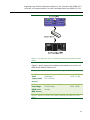
all components via a gigabit switch. Figure 1 illustrates our setup.
10
Migrating from Solaris 9 Enterprise Edition on Sun Fire V440 with BIND 8.3.3
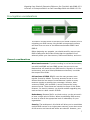
to Solaris 10 Enterprise Edition on Dell PowerEdge R900 with BIND 9.3.5-P1 Figure 1. The setup we used in our hands-on testing and research for this
Guide.
Figures 2 and 3 present the hardware and software we used in our
BIND 8 and BIND 9 DNS servers.
Server
Processor
Memory
Disk
Sun Fire
V440
(legacy DNS
server)
4x
UltraSparc™
IIIi 1.59 GHz
32 GB
4 x Ultra320
SCSI, 73 GB
Dell
PowerEdge
R900 (new
DNS server)
4 x 6-Core
E7450 Intel®
Xeon®
64 GB
8 x SAS, 15K
RPM, 73 GB
Figure 2. Servers we used in our hands-on testing and research for this
Guide.
11
Migrating from Solaris 9 Enterprise Edition on Sun Fire V440 with BIND 8.3.3
to Solaris 10 Enterprise Edition on Dell PowerEdge R900 with BIND 9.3.5-P1 Server
Sun Fire V440
(legacy DNS
server)
Dell PowerEdge
R900
(new DNS server)
Server operating
system
Sun Solaris 9 9/05
Operating System
for SPARC-based
systems (64-bit)
Sun Solaris 10 5/08
Operating System
for x86-based
systems (64-bit)
Version of BIND
BIND 8.3.3
BIND 9.3.5-P1
Figure 3. Software we used in our hands-on testing and research for this
Guide.
We also used a 16-port gigabit switch.
BEST PRACTICE: Use the latest tested and validated
software, firmware, and driver versions for NICs,
storage arrays, and other components. You can find
these software components at
http://support.dell.com/support/downloads/
index.aspx?c=us&l=en&s=gen.
Configuring the RAID drives
Overview
We had eight internal disk drives in our PowerEdge R900. We
configured them as four RAID 1 arrays of two drives each (see
Figure 4). One RAID held the operating system. A second RAID
held the container for the DNS server. The remaining two arrays
were available for further consolidation.
NOTE: Plan on at least 10 minutes for drive
configuration.
12
Migrating from Solaris 9 Enterprise Edition on Sun Fire V440 with BIND 8.3.3
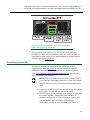
to Solaris 10 Enterprise Edition on Dell PowerEdge R900 with BIND 9.3.5-P1 Figure 4. The drive configuration we used in our hands-on
testing and research for this Guide.
The first RAID array held the OS. The second array held the
container for DNS. The third and fourth arrays were available for
consolidating other servers. For detailed steps on configuring the
RAID groups, see Appendix A.
Installing Solaris 10
This section provides an overview of the operating system
installation process. (Appendix B provides complete, detailed
installation instructions.) We downloaded the operating system
from http://www.sun.com/software/solaris/get.jsp and burned
DVDs from which we installed.
NOTE: Plan on at least 60 minutes for installing Solaris
10 on the Dell PowerEdge R900 server. Each step below
takes at least 1 minute. These times exclude data entry
time.
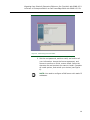
1. Insert the Solaris 10 DVD into the DVD drive, and reboot
the system. Use the Solaris interactive install.
2. Select English as the language, and respond to the tests
for screen legibility. These tests time out after 30
seconds, at which point Solaris reverts to a commandline installation. Next, configure your network
information, as well as time and date (see Figure 5).
13
Migrating from Solaris 9 Enterprise Edition on Sun Fire V440 with BIND 8.3.3
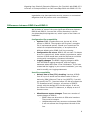
to Solaris 10 Enterprise Edition on Dell PowerEdge R900 with BIND 9.3.5-P1 Figure 5. Confirming time and date.
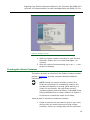
3. Set the root password, and then verify and confirm all
your information. Accept the license agreement, and
choose to perform an initial, custom install. Select the
character set and products you want to install. Complete
all install options, and review your choices (see Figure
6).
NOTE: You need to configure a DNS server with static IP
addresses.
14
Migrating from Solaris 9 Enterprise Edition on Sun Fire V440 with BIND 8.3.3
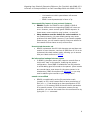
to Solaris 10 Enterprise Edition on Dell PowerEdge R900 with BIND 9.3.5-P1 Figure 6. Ready to install.
4. When the system reboots, remember to eject the disk.
Otherwise, Solaris will try to install itself again. (40
minutes)
5. After the systems finishes booting, log on as root, and
select your desktop.
Creating the Solaris Container
This section provides an overview of the Solaris Container creation
process. (Appendix C provides complete, detailed installation
instructions.)
NOTE: Should you need to maintain a Solaris 9 or
Solaris 8 environment for compatibility reasons, Sun
provides the capability to do that. While working in a
Solaris 10 environment, Sun calls Zones running
operating systems other than Solaris 10 Branded Zones.
Using a Branded Zone to create a Solaris 8 or Solaris 9
environment is outside the scope of this Guide.
Allow at least 20 minutes to create the container.
1. Create a processor set and resource pool for your zone;
doing so lets you restrict the zone to using a single
processor. Verify your configuration with the command
15
Migrating from Solaris 9 Enterprise Edition on Sun Fire V440 with BIND 8.3.3
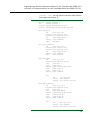
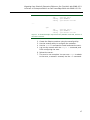
to Solaris 10 Enterprise Edition on Dell PowerEdge R900 with BIND 9.3.5-P1 pooladm | more. You will see the resource pool listed in
the output (see Figure 7).
system default
string
int
boolean
string
system.comment
system.version 1
system.bind-default true
system.poold.objectives wt-load
pool dns-pool
int
boolean
boolean
int
string
pset
pool.sys_id 1
pool.active true
pool.default false
pool.importance 1
pool.comment
dns-pset
pool pool_default
int
pool.sys_id 0
boolean pool.active true
boolean pool.default true
int
pool.importance 1
string pool.comment
pset
pset_default
pset dns-pset
int
boolean
uint
uint
string
uint
uint
string
pset.sys_id 1
pset.default false
pset.min 1
pset.max 1
pset.units population
pset.load 0
pset.size 1
pset.comment
cpu
int
string
string
cpu.sys_id 0
cpu.comment
cpu.status on-line
pset pset_default
int
pset.sys_id -1
boolean pset.default true
uint
pset.min 1
uint
pset.max 65536
string pset.units population
uint
pset.load 42
uint
pset.size 23
string pset.comment
cpu
int
string
string
cpu.sys_id 12
cpu.comment
cpu.status on-line
16
Migrating from Solaris 9 Enterprise Edition on Sun Fire V440 with BIND 8.3.3
to Solaris 10 Enterprise Edition on Dell PowerEdge R900 with BIND 9.3.5-P1 cpu
int
string
string
cpu.sys_id 9
cpu.comment
cpu.status on-line
int
string
string
cpu.sys_id 15
cpu.comment
cpu.status on-line
………
cpu
Figure 7. Truncated sample output from the pooladm command, with 20 of
the CPUs removed.
2. Create the Solaris container using the zonecfg utility.
3. Use the zonecfg utility to configure the container.
4. Use the zoneadm command to install and start the zone. 5. Log into the console with the zlogin –C command, and
finish configuring the zone. 6. Reboot the server.
7. The zone is now complete. You can use zlogin to attach
to the zone, or access it remotely via the ssh command.
17
Migrating from Solaris 9 Enterprise Edition on Sun Fire V440 with BIND 8.3.3
to Solaris 10 Enterprise Edition on Dell PowerEdge R900 with BIND 9.3.5-P1 Migrating DNS services
This section summarizes the steps required to migrate DNS
services running on a legacy Sun Fire V440 to a new Dell
PowerEdge R900 server running Solaris Containers. As we noted
previously, there are multiple ways of accomplishing the same
goal. For clarity, we chose to manually copy and edit the
configuration files. The migration itself is quite simple, but you
should plan it carefully to avoid downtime for users.
NOTE: The process below assumes that you are
replacing the existing DNS server and will disconnect the
old DNS server from the network at the completion of
this exercise.
In this scenario, there are just a few files BIND uses. You copy
those to the new DNS server and modify if necessary. Below are
the files you will migrate, along with a brief description of each.
•
•
named.conf. This file is typically located in the /etc
directory. It contains the main configuration for your DNS
server and is vital to its operation. Your BIND 8 named.conf
is likely to port to BIND 9 just fine, but be aware there are
some differences in the two versions. For more details on
differences between the two versions, see the file
/usr/share/doc/bind/migration.txt and the Guide section
Differences between BIND 8 and BIND 9.
The root cache data file. DNS allows you to choose the
name for this file, and to choose the directory where you
will store it. In our example below, we name the file
db.cache and store it in /var/named. Your root cache data
file contains information regarding the Internet’s root
servers. ICANN (The Internet Corporation for Assigned
Names and Numbers) maintains the root server data.
Update this file at migration time to be sure you have the
18
Migrating from Solaris 9 Enterprise Edition on Sun Fire V440 with BIND 8.3.3
to Solaris 10 Enterprise Edition on Dell PowerEdge R900 with BIND 9.3.5-P1 •
•
latest data. You will find the latest version at
ftp://ftp.rs.internic.net/domain/named.root.
Zone files. Every domain will have at least two zone files:
one for forward lookups, which convert hostnames to IP
addresses, and one for reverse lookups, which convert IP
addresses to hostnames. These files typically follow the
naming convention of db.<domain> for forward lookups and
db.XXX.XXX.XXX for reverse lookups (where XXX is the first
three octets of the IP network). As with the root data file,
you store the zone files in the directory you specify.
/var/named is the name we use for this directory.
Loopback file. A name server will need a data file to direct
traffic to itself. A typical name for this file is db.127.0.0
and you specify the directory to store it in. /var/named is
the name we use for this directory.
Because DNS is very configurable, your file names may differ from
ours, but the migration action you follow should be similar.
The table below presents the files we use for our example. These
are the filenames in our environment. Because we replaced the old
name server with a new one, we were able to leave much of the
information unchanged. However, in the table below, we also
include actions you would need to take if you plan have both
servers on the network at the same time.
NOTE: As we explain above, DNS lets you choose where
you want to store its data files. We used the directory
/var/named, as shown in the table below (see Figure 8).
19
Migrating from Solaris 9 Enterprise Edition on Sun Fire V440 with BIND 8.3.3
to Solaris 10 Enterprise Edition on Dell PowerEdge R900 with BIND 9.3.5-P1 Filename
Typical
path
Migration action
named.conf
/etc
The name of this file is always
named.conf. As we noted
previously, you will need to
check for BIND 8 to BIND 9
issues. If you are not replacing
the old server, you may need to
modify named.conf with a new
serial number and new server
information.
db.cache
/var/named
The name of this file is typically
db.cache, but may vary based on
your naming conventions.
Refresh from ftp download:
ftp://ftp.rs.internic.net/domain/n
amed.root
db.mydomain
/var/named
A common practice is to base the
name of this file on your domain
name, although your naming
conventions may differ. If you
are not replacing the old server,
you may need to modify your
equivalent of db.mydomain with
a new serial number and new
server information.
db.10.5.41
/var/named
A common practice is to base the
name of this file on the network
and subnetwork IP addresses,
although your naming
conventions may differ. If you
are not replacing the old server,
you may need to modify your
equivalent of db.10.5.41 with a
new serial number and new
server information.
20
Migrating from Solaris 9 Enterprise Edition on Sun Fire V440 with BIND 8.3.3
to Solaris 10 Enterprise Edition on Dell PowerEdge R900 with BIND 9.3.5-P1 Filename
Typical
path
Migration action
db.127.0.0
/var/named
The name of this file is typically
db.127.0.0, although your
naming conventions may differ.
If you are not replacing the old
server, you may need to modify
db.127.0.0 with a new serial
number and new server
information.
resolv.conf
/etc
The name of this file is always
resolv.conf. If you are not
replacing the old server, you may
need to modify this DNS resolver
(i.e., client) file to tell the new
name server to point to itself for
name resolution.
Figure 8. DNS filenames and pathnames.
Begin your migration by following these steps. For detailed steps,
see Appendix C.
1. Copy the appropriate files from the Sun Fire V440 to the
PowerEdge R900. In our scenario, these files included
the following:
•
•
•
•
•
•
/etc/named.conf
/var/named/db.mydomain
/var/named/db.127.0.0
/var/named/db.cache
/var/named/db.10.5.41
/etc/resolv.conf
2. Configure security on the PowerEdge R900. Create a
user that will run the named process and a group for
this user. Modify the DNS service settings to use this
user by default on startup.
3. Configure local IP settings on the PowerEdge R900 with
new information. In our scenario, we replaced a legacy
21
Migrating from Solaris 9 Enterprise Edition on Sun Fire V440 with BIND 8.3.3
to Solaris 10 Enterprise Edition on Dell PowerEdge R900 with BIND 9.3.5-P1 server altogether. To avoid having to reconfigure clients,
we made the IP address the same as our legacy server.
4. Verify your new configuration using the
named-checkconf utility, and then start BIND using the
Service Management Framework (SMF) svcadm utility.
5. Verify the functionality of your secondary name servers
or other machines in your infrastructure that depended
on this name server. Check to see that communication
remains intact.
22
Migrating from Solaris 9 Enterprise Edition on Sun Fire V440 with BIND 8.3.3
to Solaris 10 Enterprise Edition on Dell PowerEdge R900 with BIND 9.3.5-P1 Post-migration considerations
Managing your DNS services
Service Management Facility utilities
The Service Management Facility (SMF) is a part of the Predictive
Self-Healing technology in Solaris 10. The SMF is a service
management feature that allows system administrators to view,
manipulate, and administer services within Solaris. Below, we list
several command line utilities providing the interface to the SMF.
For each command, consult the main page in Solaris for full details.
Each of these three features uses a Fault Management Resource
Identifier (FMRI) as a parameter. A FMRI is simply an identifier of a
service instance. The fully qualified FMRI for the default DNS server
on Solaris 10 is svc:/network/dns/server:default. You do not
always have to fully qualify the FMRI, as we show in the examples
below.
•
svcs. You use the svcs utility to display information about
the current state of services from the service configuration
repository. There are multiple output options and switches.
You can view the state of services that depend on DNS and
on which DNS depends. To determine whether your DNS
server was running, you would use svcs, as shown in the
example below.
svcs network/dns/server
•
svcadm. You should use the svcadm utility to perform
basic actions on the DNS service, such as stopping, starting,
restarting, refreshing configurations, and so on. When you
issue these requests via svcadm, the actions occur within
23
Migrating from Solaris 9 Enterprise Edition on Sun Fire V440 with BIND 8.3.3
to Solaris 10 Enterprise Edition on Dell PowerEdge R900 with BIND 9.3.5-P1 the SMF, which tracks service interdependencies. The
example below shows a simple stop and then start of the
DNS service.
svcadm disable network/dns/server
svcadm enable network/dns/server
•
svccfg. You use the svccfg tool to manipulate properties of
services in the service configuration repository. Specific to
the DNS service, you use this tool to set the user account,
which port DNS listens on, and so on. The example below
shows how to list the current properties for DNS.
svccfg
svc:> select network/dns/server:default
svc:/network/dns/server:default> listprop
rndc and nsupdate
Both of these tools are part of the BIND 9 release and are not
specific to Solaris, but rather BIND.
•
•
rndc. In addition to the SMF controls available to you as a
DNS administrator, you can use rndc to control the
operation of your name server. This includes reloading or
refreshing specific zones, stopping the name server, and
several other maintenance activities. It replaces the BIND 8
ndc utility. You can use this tool remotely, but you will have
to configure some setup files in order to communicate
remotely with BIND 9.
nsupdate. If you so choose, you can set up your named
configuration to allow updates from the nsupdate utility.
You can use this command line tool to update resource
records in zone files without actually modifying the files.
24
Migrating from Solaris 9 Enterprise Edition on Sun Fire V440 with BIND 8.3.3
to Solaris 10 Enterprise Edition on Dell PowerEdge R900 with BIND 9.3.5-P1 Summing up
Solaris 10 and BIND 9 introduce many new features and
enhancements. As this Guide has explained, the process of
deploying these products on a Dell PowerEdge R900 Server and
migrating your Solaris 9/BIND 8 DNS servers to the new
environment is relatively straightforward; you can perform a basic
installation and migration in a few hours. By using Solaris
Containers, you can easily consolidate multiple DNS servers on a
single system. The isolation Solaris Containers provide will also let
you securely use extra capacity for other purposes. Spending some
up-front time planning can help you avoid potential problems
during your migration.
THIS WHITE PAPER IS FOR INFORMATIONAL PURPOSES ONLY, AND MAY CONTAIN
TYPOGRAPHICAL ERRORS AND TECHNICAL INACCURACIES. THE CONTENT IS
PROVIDED AS IS, WITHOUT EXPRESS OR IMPLIED WARRANTIES OF ANY KIND.
Trademarks and trade names may be used in this document to refer to either the
entities claiming the marks and names or their products. Dell disclaims proprietary
interest in the marks and names of others.
For more information, contact Dell.
Information in this document is subject to change without notice.
25
Migrating from Solaris 9 Enterprise Edition on Sun Fire V440 with BIND 8.3.3
to Solaris 10 Enterprise Edition on Dell PowerEdge R900 with BIND 9.3.5-P1 Appendix A. Methodology: Creating the RAID disk groups
For our installation, we decided to use two RAID 1 groups, which
we allocated as follows:
•
•
operating system files
the Solaris Zone containing our DNS server
We configured the remaining disks as two additional RAID 1
groups, which were available for other consolidation.
We explain below how we configured these disk groups. The
directions in this appendix assume you have not configured any
virtual disks on your RAID controllers.
Allow at least 10 minutes to complete the installation.
1. During the boot sequence, the message “Press
<Ctrl><R> to Run Configuration Utility” appears. Press
<Ctrl><R>. Note: You have only a few seconds to do
this.
2. First configure the mirrored RAID for the OS.
3. While Controller 0 is highlighted, press F2, and select
Create New VD.
4. With the RAID level field highlighted, press Enter to
open the drop-down list, and select RAID 1.
5. Using the Tab key for navigation, move to the Physical
Disks section, and use the space bar to select the first
two drives (Drives 0 and 1). Then tab to highlight OK,
and press Enter.
6. A message box appears telling you that initializing the
RAID is highly recommended, but destructive. Press
Enter to clear the message.
7. Highlight Controller 0, press F2, and select Create New
VD.
8. With the RAID level field highlighted, press Enter to
open the drop-down list, and select RAID 1.
9. Using the Tab key for navigation, move to the Physical
Disks section, and use the space bar to select the next
two remaining drives (Drives 2 and 3). Note that the
drives you allocated earlier no longer appear in the
available list. Then tab to highlight OK, and press Enter.
10. A message box appears telling you that initializing the
RAID is highly recommended, but destructive. Press
Enter to clear the message.
26
Migrating from Solaris 9 Enterprise Edition on Sun Fire V440 with BIND 8.3.3
to Solaris 10 Enterprise Edition on Dell PowerEdge R900 with BIND 9.3.5-P1 11. Highlight Controller 0, press F2, and select Create New
VD.
12. With the RAID level field highlighted, press Enter to
open the drop-down list, and select RAID 1.
13. Using the Tab key for navigation, move to the Physical
Disks section, and use the space bar to select the next
two remaining drives (Drives 4 and 5). Note that the
drives you allocated earlier no longer appear in the
available list. Then tab to highlight OK, and press Enter.
14. A message box appears telling you that initializing the
RAID is highly recommended, but destructive. Press
Enter to clear the message.
15. Highlight Controller 0, press F2, and select Create New
VD.
16. With the RAID level field highlighted, press Enter to
open the drop-down list, and select RAID 1.
17. Using the Tab key for navigation, move to the Physical
Disks section, and use the space bar to select the last
two remaining drives (Drives 6 and 7). Note that the
drives you allocated earlier no longer appear in the
available list. Then tab to highlight OK, and press Enter.
18. A message box warns you that initializing the RAID is
highly recommended, but destructive. Press Enter to
clear the message.
19. Highlight Virtual Disk 0, and press F2.
20. Select Initialization, and then select Fast Init. Highlight
OK, and when the system prompts you with any
warnings, press Enter.
21. Highlight Virtual Disk 1, and press F2.
22. Select Initialization, and then select Fast Init. Highlight
OK, and when the system prompts you with any
warnings, press Enter.
23. Highlight Virtual Disk 2, and press F2.
24. Select Initialization, and then select Fast Init. Highlight
OK, and when the system prompts you with any
warnings, press Enter.
25. Highlight Virtual Disk 3, and press F2.
26. Select Initialization, and then select Fast Init. Highlight
OK, and when the system prompts you with any
warnings, press Enter.
27. Exit the RAID utility, and reboot the server.
27
Migrating from Solaris 9 Enterprise Edition on Sun Fire V440 with BIND 8.3.3
to Solaris 10 Enterprise Edition on Dell PowerEdge R900 with BIND 9.3.5-P1 Appendix B. Methodology: Installing Solaris 10 on the PowerEdge R900
Install Solaris 10 by following these steps.
Allow at least 60 minutes to complete the installation. We used
version Solaris 10 10/08 Operating System for x86-based systems
(64-bit), which we downloaded from
http://www.sun.com/software/solaris/get.jsp and burned to a DVD.
NOTE: In this appendix, we use the primary network
interface name, which in our case was bnx0. You should
use the name of the primary network interface that you
encounter, which may differ from what we present here.
We also configure an interface that we use for the container with
the DNS server. In our case, that is bnx1. As we explained
previously, we use the same IP address as the existing DNS server.
Therefore, it is important that the primary network interface (bnx0)
is the only interface on the network at the start of this procedure.
Otherwise, you will get IP address conflicts when you configure the
zone for the DNS container. You attach a cable to the bnx1
interface later in this procedure.
1. Insert the install DVD. Reboot and wait for the GNU
GRUB boot screen to appear. (3 minutes)
2. Accept the default of Solaris. (2 minutes)
3. At the next menu, select menu item 1, Solaris
interactive (default). This is the default and the system
automatically uses it after 30 seconds. The system then
continues its initialization.
4. Solaris installer will attempt to configure the NICs. You
may ignore any messages because you will be
configuring the NICs later. The installer then sets up
Java and does other initialization. (8 minutes)
5. At the Configure Keyboard Layout Screen, select the
keyboard layout that applies to you. This Guide assumes
US-English, default. There is no timeout. Press function
key 2 (F2) to continue.
6. When the screen says Starting Solaris Interactive
(graphical user interface) Installation, press Enter.
7. When the screen says If the screen is legible, press
ENTER in this window, move the mouse cursor inside the
box, and press Enter. You have 30 seconds, after which
the system reverts to a command-line based install.
28
Migrating from Solaris 9 Enterprise Edition on Sun Fire V440 with BIND 8.3.3
to Solaris 10 Enterprise Edition on Dell PowerEdge R900 with BIND 9.3.5-P1 8. At the Select a Language prompt, select the language
that applies to you. The instructions below assume you
chose 0, English. Press Enter. A Please Wait While the
System Information is Loaded screen appears. (less
than 1 minute)
9. After a few seconds, a Welcome message appears. Click
Next.
NOTE: A Solaris Install Console message screen appears
during many of these steps. It presents messages, but
you do not interact with it.
10. On the Network Connectivity screen, select Networked,
and click Next.
11. On the Configure Multiple Network Interfaces screen,
select bnx0 and bnx1. We use bnx0 for the primary
network interface for the global zone, and bnx1 for the
DNS container. Click Next.
12. On the Primary Network Interface screen, select bnx0 to
be the primary network interface.
13. On the DHCP for bnx0 screen, accept the default of No.
You should assign a static IP address to your DNS
server. Click Next.
14. On the Host Name for bnx0 screen, enter a valid name
for the interface. You should use all lowercase letters.
Click Next.
15. On the IP Address for bnx0 screen, enter a valid IP
address, and click Next.
16. On the Netmask for bnx0 screen, enter the correct
netmask for your network. The default is 255.255.255.0,
which may not be correct for you. Click Next.
17. On the IPv6 for bnx0 screen, accept the default of No,
and click Next.
18. On the Set the Default Route for bnx0 screen, select
Specify One, and click Next.
19. On the Set the Default Route for bnx0 screen, fill in the
appropriate address for your network, and click Next.
20. On the DHCP for bnx1 screen, accept the default of No.
You should assign a static IP address to your DNS
server. Click Next.
21. On the Host Name for bnx1 screen, enter a valid name
for this physical interface. You should use all lowercase
letters. This should not be the same as the host name
for the current DNS server. (The Solaris Container for
29
Migrating from Solaris 9 Enterprise Edition on Sun Fire V440 with BIND 8.3.3
to Solaris 10 Enterprise Edition on Dell PowerEdge R900 with BIND 9.3.5-P1 the DNS server will have the same host name as the
existing DNS server.) Click Next.
22. On the IP Address for bnx1 screen, enter the same IP
address as your current DNS server. Remember that, at
this point, bnx1 is not connected to the network. Click
Next.
23. On the Netmask for bnx1 screen, enter the correct
netmask for your network. The default is 255.255.255.0,
which may not be correct for you. Click Next.
24. On the IPv6 for bnx1 screen, accept the default of No,
and click Next.
25. On the Set the Default Route for bnx1 screen, select
Specify One, and click Next.
26. On the Set the Default Route for bnx1 screen, fill in the
appropriate address for your network, and click Next.
27. On the Kerberos screen, accept the default of No. Note:
Because this choice affects network security, check with
your administrator regarding this setting. Click Next.
28. On the Name Service screen, select None. You will add
your DNS client information later. Click Next.
29. On the NFSv4 Domain Name screen, accept the default
of Use the NFSv4 domain derived by the system, and
click Next.
30. On the Time Zone screen, accept the default of
Geographic Continent/Country/Region, and click Next.
31. On the Continent and Country screen, select AmericasÆ
United StatesÆEastern Time, and click Next.
32. On the Date and Time screen, set the date and time, if
needed, and click Next.
33. On the Root Password screen, enter the root password
for your server, confirm it, and click Next.
34. On the Enabling Remote Services screen, accept the
default of Yes, and click Next.
35. On the Confirm Information screen, verify that all the
information is correct. Resize the window to view all the
information if necessary. Click Confirm. A message then
appears telling you to “Please wait while the system is
configured with these settings.”
36. The dialog disappears and the screen is blank for a few
seconds before a Welcome screen appears. On the
Welcome screen, click Next.
37. On the Installer Options screen, accept the default of
Yes for “Reboot automatically after software
installation?” and “Eject additional CDs/DVDs
automatically after software installation?” Click Next.
30
Migrating from Solaris 9 Enterprise Edition on Sun Fire V440 with BIND 8.3.3
to Solaris 10 Enterprise Edition on Dell PowerEdge R900 with BIND 9.3.5-P1 Note: We received a notice saying “You must also
manually eject the CD/DVD or select a different boot
device after reboot to avoid repeating the installation
process.” We clicked OK.
38. On the Specify Media Screen, accept the default of
CD/DVD, and click Next. (1 minute)
39. On the License screen, select Accept to accept the
license agreement, and click Next.
40. On the Select Upgrade or Initial Install screen, select
Initial Install, and click Next.
41. On the Select Type of Install screen, select Custom
Install, and click Next.
42. On the Select Software Localizations screen, make no
changes, and click Next.
43. On the Select System Locale screen, make no changes,
and click Next.
44. On the Additional Products screen, accept the default of
None, and click Next.
45. On the Select Solaris Software Group screen, accept the
default of Entire Group, and click Next.
46. On the Disk Select screen, select each disk listed under
Available Disks, and click Add. After adding all disks,
click Next.
47. On the Select Disks for fdisk Partition Customization
screen, make no changes, and click Next.
48. On each of the Customize fdisk Partitions screens, make
no changes, and click Next.
49. On the Lay Out File Systems screen, make no changes,
and click Next.
50. On the Ready to Install screen, review the information.
Note how each RAID is associated with a different
/export/home directory: /export/home, /export/home0,
/export/home1, and /export/home2. Click Install Now.
(40 minutes)
51. The Installing… screen appears, with a progress bar.
After the installation completes, the system pauses for
90 seconds. You can skip the pause by clicking Continue
in the Pausing dialog box.
52. After installing any additional software, the system again
pauses, this time for 30 seconds. You can skip the pause
by clicking Continue in the Pausing dialog box.
53. Before rebooting, the system pauses for 90 seconds.
You can skip the pause by clicking Continue in the
Pausing dialog box. Note: Remember to eject the DVD
31
Migrating from Solaris 9 Enterprise Edition on Sun Fire V440 with BIND 8.3.3
to Solaris 10 Enterprise Edition on Dell PowerEdge R900 with BIND 9.3.5-P1 during the reboot, or Solaris will start installing itself
again. (7 minutes)
54. After the system reboots, log in as root.
55. Select your desktop. We accepted the default of Sun
Java Desktop System Release 3.
56. On the Welcome to the Sun Java Desktop System splash
screen, click Close.
32
Migrating from Solaris 9 Enterprise Edition on Sun Fire V440 with BIND 8.3.3
to Solaris 10 Enterprise Edition on Dell PowerEdge R900 with BIND 9.3.5-P1 Appendix C. Methodology: Migrating your DNS server
Preliminary steps
NOTE: We chose to completely decommission our
legacy DNS server. Therefore, to avoid client issues
or other hosts that refer to the legacy DNS server by
IP address, we chose to assign the same hostname
and IP address to our new DNS server. This makes
the transition more transparent to end users.
As we noted previously, bnx0 should be the only NIC
attached to the network at this point. The steps below
assume that you are still logged in as root.
1. Copy the files from your old server to your new server.
We used NFS to mount a remote filesystem, but you can
use other methods if you wish. We copied the following
files from the legacy server:
/etc/named.conf
/etc/resolv.conf
/var/named/db.10.5.41
/var/named/db.127.0.0
/var/named/db.cache
/var/named/db.mydomain
NOTE: As we explained previously, BIND lets you
choose where you want to store its data files, as well
as what you wish to name them. We used the
directory /var/named, as shown in the list above.
2. Create a directory on the new DNS server to hold the
files. In this appendix, we use /tempfiles as the name
for this directory.
3. Right-click the desktop, and choose Open Terminal.
4. Before installing the zone, you must make the network
interface available to the zone. If the NIC is up, the
global zone has control of it, and your new zone will not
be able to use the NIC. Therefore, you must put the NIC
in the down state. Using bnx1, you accomplish this by
typing the following command line:
ifconfig bnx1 down
33
Migrating from Solaris 9 Enterprise Edition on Sun Fire V440 with BIND 8.3.3
to Solaris 10 Enterprise Edition on Dell PowerEdge R900 with BIND 9.3.5-P1 5. To make sure the interface will be available after
rebooting, you must edit its interface file. For the
interface bnx1, you can edit it with the following
command line:
gedit /etc/hostname.bnx1
The hostname.bnx1 file should have a single line, of
the form <hostname>
Where <hostname> is the hostname of this NIC, not
the host name of the server you are replacing.
Append +down to this line. Assuming that the
hostname was NIC1, the line would be of the form
<NIC hostname> +down
If you do not do this, the zone will not autoboot.
6. Save the file, and exit gedit.
Creating the Solaris Container
Create a Solaris 10 Zone by following the below steps.
Allow at least 20 minutes to create the zone.
1.
2.
3.
4.
5.
Enable the pools facility, and save the current
configuration with the following commands:
pooladm -e
pooladm –s
Create a processor set with the following commands (In
this case, we are only giving the processor set one CPU
core.):
poolcfg -c 'create pset dns-pset (uint
pset.min=1; uint pset.max=1)'
Create a resource pool for the processor set, link it to
the processor set, and activate the configuration with
the following commands:
poolcfg -c 'create pool dns-pool'
poolcfg -c 'associate pool dns-pool (pset dnspset)'
pooladm –c
Verify your configuration with the following command:
pooladm | more
You will see the resource pool you created listed in the
output.
You will need the IP address and name of a network
interface. You can list these with the following
command:
ifconfig –a
34
Migrating from Solaris 9 Enterprise Edition on Sun Fire V440 with BIND 8.3.3
to Solaris 10 Enterprise Edition on Dell PowerEdge R900 with BIND 9.3.5-P1 6.
7.
8.
9.
10.
11.
12.
13.
14.
15.
In our example, we use the address 10.5.41.103. As we
noted previously, we use the name bnx1.
The root directory of the zone may not allow any group
or world level access. Using /export/home0 as the root
of the container, set the access mode with the following
command:
chmod 700 /export/home0
Start the zone configuration tool with the following
command:
zonecfg –z <DNS server hostname>
You should see the message <Zone name>: No such
zone configured. Use 'create' to begin configuring a new
zone. While in the zone configuration tool, your prompt
will be
zonecfg:dns-zone>
While in the zone configuration tool, create the Zone and
set it to start automatically when the server boots using
the following commands:
zonecfg:dns-zone> create
zonecfg:dns-zone> set autoboot=true
Set the root directory for the Zone and set its resource
pool using the following commands:
zonecfg:dns-zone> set zonepath=/export/home0
zonecfg:dns-zone> set pool=dns-pool
Set the IP address and the network interface for the
Zone using the following commands:
zonecfg:dns-zone> add net
zonecfg:dns-zone:net> set address=10.5.41.103
zonecfg:dns-zone:net> set physical=bnx1
zonecfg:dns-zone:net> end
Verify the configuration with the verify command:
zonecfg:dns-zone:net> verify
If the syntax is correct, you will not see any message.
To write the configuration and exit the zonecfg utility,
type the following commands:
zonecfg:dns-zone> commit
zonecfg:dns-zone> exit
You are now ready to install the zone. Do this with the
following command (7 minutes):
zoneadm -z <DNS server hostname> install
Start the Solaris Zone with the following command:
zoneadm -z <DNS server hostname> boot
Once the zone has finished booting, finish the
configuration. Log into the console for the zone with the
following command: 35
Migrating from Solaris 9 Enterprise Edition on Sun Fire V440 with BIND 8.3.3
to Solaris 10 Enterprise Edition on Dell PowerEdge R900 with BIND 9.3.5-P1 zlogin -C <DNS server hostname>
Provide the following answers to the questions it asks:
• For the console type, type 3 to choose VT100.
• Accept the default of <DNS server hostname> for
bnx1.
• Accept the default of no Kerebos.
• Set name service to None.
• Accept the default of using the NFSv4 domain name
derived by the system.
• Set the time zone as appropriate.
• Set the root password according to your conventions.
The zone now reboots. Disconnect from the zone console
by typing ~. (tilde-dot).
16. Having exited the zone, reboot the server from the
global zone with the following command:
reboot (3 minutes)
The zone is now complete. You can use zlogin, or access it
remotely via the ssh command.
Migrating DNS services
You should allow approximately 30 minutes to complete this DNS
migration. Note that, because the older DNS server will remain in
operation for almost the entire process, you will not have 30
minutes of downtime. Rather, 30 minutes is the amount of work
time involved. If you follow these steps, you should have little to
no downtime.
NOTE: The name of the DNS service is named.
Set up the user account for the DNS service
Best practices specify that you should run the DNS named process
as a non-root user. The default action is to run as root. For
security, use these steps to set up a non-root user and configure
that user account to run the named daemon.
1. Log into the new PowerEdge R900 as root.
2. Right-click the desktop, and choose Open Terminal.
3. Log into the DNS container with the following command:
zlogin <DNS server hostname>
4. Create a new group in the container. The command
below creates a new group with the group ID of 500 and
the group name of named:
groupadd -g 500 named
36
Migrating from Solaris 9 Enterprise Edition on Sun Fire V440 with BIND 8.3.3
to Solaris 10 Enterprise Edition on Dell PowerEdge R900 with BIND 9.3.5-P1 5. Create a new user called named and add it to the named
group. The command below creates a user called named
with a UID of 2000, belonging to the group ID 500 (the
named group above), and creates and sets the default
directory:
useradd -u 2000 -g 500 -d /export/named -c
“named user for dns server” -m named
6. Set the password for the named user:
passwd named
7. Enter the service configuration utility to set the default
user that DNS will run under:
svccfg
Select the DNS server service, and set the user and
group information with the following commands:
svc:> select svc:/network/dns/server:default
svc:/network/dns/server:default> setprop
start/user = named
svc:/network/dns/server:default> setprop
start/group = named
svc:/network/dns/server:default> exit
Perform the DNS migration
Here, we view and modify the necessary configuration and data
files, and test the DNS service (named) locally before
decommissioning the legacy DNS server.
1. If not already logged in the DNS Container as root, then
log in as root.
2. Open a terminal (right-click the desktop, and choose
Open Terminal). Place the configuration files in the
appropriate directories. In this example, we had initially
copied our files from the legacy server to a directory
called /tempfiles. For consistency, we chose to keep
the same directory structure as our old server. In our
case, the DNS directory was /var/named, which we use
in the example below.
mkdir /var/named
chmod 774 /var/named
chown –R named:named /var/named
3. Copy the DNS files from the global zone to the DNS
container.
4. Because named will be running as a non-root user,
modify the location for the PID file (Only root has
permission to write to the default PID file location.):
mkdir /var/named/pidlocation
37
Migrating from Solaris 9 Enterprise Edition on Sun Fire V440 with BIND 8.3.3
to Solaris 10 Enterprise Edition on Dell PowerEdge R900 with BIND 9.3.5-P1 chmod 662 /var/named/pidlocation
chown named:named /var/named/pidlocation
5. Use the gedit text editor to modify named.conf with the
following command:
gedit /etc/named.conf
6. Add the relevant path pointing to the folder where the
DNS server stores the PID file. Type the following in the
options section of named.conf:
pid-file “/var/named/pidlocation/named.pid”;
7. Close the named.conf file.
8. Verify that the contents of your db.cache or root hints
file are the latest. You will find the latest version at
ftp://ftp.rs.internic.net/domain/named.root.
9. Copy named.conf and resolv.conf to the /var directory
with the following command:
mv /var/named/*.conf /etc
10. Run the named-checkconf utility to check the syntax of
your named configuration:
/usr/sbin/named-checkconf
If there are no syntax errors, you will not see any
output.
You can tell named-checkconf to load each zone file for
syntax checking by using the -z switch. You will see
output for each zone file in your configuration. Below we
show sample output from the command
/usr/sbin/named-checkconf –z
zone mydomain.com/IN: loaded serial 2008121501
zone 5.41.10.in-addr.arpa/IN: loaded serial
2008121501
zone 0.0.127.in-addr.arpa/IN: loaded serial
2008121501
11. You can verify that DNS server is not yet running by
querying the services with the following command: svcs -a | grep dns
You should see output like this:
disabled
12:42:19
svc:/network/dns/server:default
online
12:42:22
svc:/network/dns/client:default
12. Now, you can start BIND by running the Service
Management Facility tool. Type the following command:
svcadm enable /network/dns/server
13. Verify once more by querying the services. Type the
following command:
38
Migrating from Solaris 9 Enterprise Edition on Sun Fire V440 with BIND 8.3.3
to Solaris 10 Enterprise Edition on Dell PowerEdge R900 with BIND 9.3.5-P1 svcs -a | grep dns
You should see output like this:
online
12:42:22
svc:/network/dns/client:default
online
12:47:26
svc:/network/dns/server:default
14. Login to the legacy server as root.
15. Shut down the legacy server by typing or selecting the
following command:
shutdown
16. Plug the Ethernet cable into the PowerEdge R900.
17. Verify that any secondary servers are getting their
information from your new primary DNS server.
39
Migrating from Solaris 9 Enterprise Edition on Sun Fire V440 with BIND 8.3.3
to Solaris 10 Enterprise Edition on Dell PowerEdge R900 with BIND 9.3.5-P1 About Principled Technologies
We provide industry-leading technology assessment and fact-based
marketing services. We bring to every assignment extensive
experience with and expertise in all aspects of technology testing
and analysis, from researching new technologies, to developing
new methodologies, to testing with existing and new tools.
When the assessment is complete, we know how to present the
results to a broad range of target audiences. We provide our clients
with the materials they need, from market-focused data to use in
their own collateral to custom sales aids, such as test reports,
performance assessments, and white papers. Every document
reflects the results of our trusted independent analysis.
Principled Technologies, Inc.
1007 Slater Road, Suite 250
Durham, NC, 27703
www.principledtechnologies.com
We provide customized services that focus on our clients’ individual
requirements. Whether the technology involves hardware,
software, Web sites, or services, we offer the experience,
expertise, and tools to help you assess how it will fare against its
competition, its performance, whether it’s ready to go to market,
and its quality and reliability.
Our founders, Mark L. Van Name and Bill Catchings, have worked
together in technology assessment for over 20 years. As
journalists, they published over a thousand articles on a wide array
of technology subjects. They created and led the Ziff-Davis
Benchmark Operation, which developed such industry-standard
benchmarks as Ziff Davis Media’s Winstone and WebBench. They
founded and led eTesting Labs, and after the acquisition of that
company by Lionbridge Technologies were the head and CTO of
VeriTest.
Principled Technologies is a registered trademark of Principled Technologies, Inc.
All other product names are the trademarks of their respective owners
Disclaimer of Warranties; Limitation of Liability:
PRINCIPLED TECHNOLOGIES, INC. HAS MADE REASONABLE EFFORTS TO ENSURE THE ACCURACY AND VALIDITY OF
ITS TESTING, HOWEVER, PRINCIPLED TECHNOLOGIES, INC. SPECIFICALLY DISCLAIMS ANY WARRANTY, EXPRESSED
OR IMPLIED, RELATING TO THE TEST RESULTS AND ANALYSIS, THEIR ACCURACY, COMPLETENESS OR QUALITY,
INCLUDING ANY IMPLIED WARRANTY OF FITNESS FOR ANY PARTICULAR PURPOSE. ALL PERSONS OR ENTITIES
RELYING ON THE RESULTS OF ANY TESTING DO SO AT THEIR OWN RISK, AND AGREE THAT PRINCIPLED
TECHNOLOGIES, INC., ITS EMPLOYEES AND ITS SUBCONTRACTORS SHALL HAVE NO LIABILITY WHATSOEVER FROM
ANY CLAIM OF LOSS OR DAMAGE ON ACCOUNT OF ANY ALLEGED ERROR OR DEFECT IN ANY TESTING PROCEDURE
OR RESULT.
IN NO EVENT SHALL PRINCIPLED TECHNOLOGIES, INC. BE LIABLE FOR INDIRECT, SPECIAL, INCIDENTAL, OR
CONSEQUENTIAL DAMAGES IN CONNECTION WITH ITS TESTING, EVEN IF ADVISED OF THE POSSIBILITY OF SUCH
DAMAGES. IN NO EVENT SHALL PRINCIPLED TECHNOLOGIES, INC.’S LIABILITY, INCLUDING FOR DIRECT DAMAGES,
EXCEED THE AMOUNTS PAID IN CONNECTION WITH PRINCIPLED TECHNOLOGIES, INC.’S TESTING. CUSTOMER’S
SOLE AND EXCLUSIVE REMEDIES ARE AS SET FORTH HEREIN.
40