1
<Characters and Symbols Used in City Names>
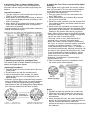
• Letters of the alphabet (A to Z)
• Numbers (0-9)
• Symbols (--: hyphens, ■ : blank spaces)
<Display Sequence>
When the crown is turned forward (clockwise), the
display changes in the order of letters (A-Z),
numbers (0-9) and then symbols (■ : blank spaces,
--: hyphens)
When the crown is turned backward (counterclockwise), the display sequence is opposite that
when turning the crown forward.
<Order in which Registered Cities are
Displayed>
The location having the same time difference
among the 30 cities pre-registered in this watch is
displayed first. However, a city is not displayed if the
time difference of a registered city has not been set.
<Cancelling Registered Cities>
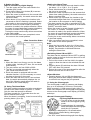
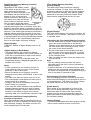
1. Turn the crown to set the mode hand to the zone
setting [SET] mode.
2. When the crown is pulled out to the second click
(city setting position), the watch enters the city
name correction state.
3. Turn the crown to change the display of the
registered city name to “__ __ __”.
4. After cancelling registration, return the crown to
the normal position.
14. All-Reset
When this watch indicates an abnormal display,
alarm continues to sound, etc., as a result of being
subjected to the effects of static electricity or strong
impact and so forth, perform the all-reset procedure
described below.
When performing the all-reset procedure, first
make sure that the watch is sufficiently charged
and that the charge indicator is lit.
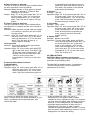
15. Functions Unique to Solar-Powered Watches
<All-Reset Procedure>
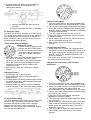
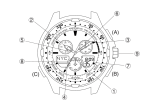
1. Turn the crown to set the mode hand to the
chronograph [CHR] mode.
2. Pull out the crown to the second click (0-position
correction mode).
• The second hand, minute hand, 24 hour hand,
UTC hour hand and UTC minute hand rapidly
advance to the 0 position stored in the memory.
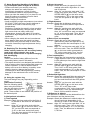
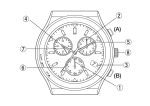
3. Press button (A) and (B) simultaneously and then
release.
• All segments of the digital display are shown
when either of the buttons is released.
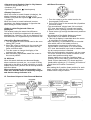
4. This fully lit display is cancelled when the crown
is returned to the normal position.
• After cancelling, a confirmation tone is sounded
after which each of the hands perform a
demonstration movement in the order of the
second hand, minute hand, UTC minute hand,
UTC hour hand and 24 hour hand to indicate that
the all-reset procedure is finished.
• After the demonstration movement, pull the crown
out to the second click to switch the watch to the
watch base position setting state.
Always make sure to set the 0 position (base
position) for the hour hand, minute hand, second
hand, 24 hour hand and UTC minute and hour
hands while referring to “5. Checking 0-Position of
Each Hand <0-Position Correction>”.
Note:
After setting the 0 position (base position) for each
hand, correctly reset the time, calendar and other
modes before using the watch.