1
SiUS39 - 601
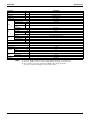
RXYQ72, 96, 144, 168, 192MTJU
R-410A Heat Pump 60Hz
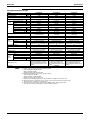
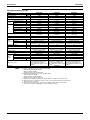
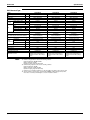
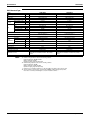
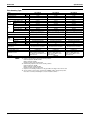
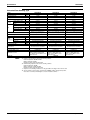
RXYQ72MTJU RXYQ96MTJU
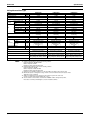
RXYQ144MTJU
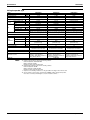
RXYQ168MTJU
RXYQ192MTJU
SiUS39-601
R-410A Heat Pump
60Hz
1. Introduction ................................................................................................ vi
1.1 Safety Cautions ............................................................................................vi
1.2 PREFACE .................................................................................................... x
Part 1 General Information .............................................................. 1
1. Model Names of Indoor/Outdoor Units........................................................2
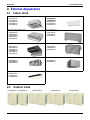
2. External Appearance...................................................................................3
2.1 Indoor Units .................................................................................................. 3
2.2 Outdoor Units ............................................................................................... 3
3. Model Selection...........................................................................................4
Part 2 Specifications ....................................................................... 5
1. Specifications ..............................................................................................6
1.1 Outdoor Units ............................................................................................... 6
1.2 Indoor Units ................................................................................................ 11
Part 3 Refrigerant Circuit .............................................................. 23
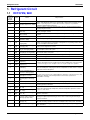
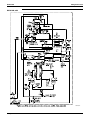
1. Refrigerant Circuit .....................................................................................24
1.1 RXYQ72M, 96M ......................................................................................... 24
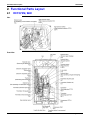
2. Functional Parts Layout ............................................................................26
2.1 RXYQ72M, 96M ......................................................................................... 26
3. Refrigerant Flow for Each Operation Mode...............................................27
Part 4 Function............................................................................... 31
1. Operation Mode ........................................................................................32
2. Basic Control.............................................................................................33
2.1
2.2
2.3
2.4
Normal Operation ....................................................................................... 33
Compressor PI Control............................................................................... 34
Electronic Expansion Valve PI Control....................................................... 38
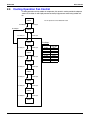
Cooling Operation Fan Control................................................................... 39
3. Special Control..........................................................................................40
3.1
3.2
3.3
3.4
3.5
3.6
Table of Contents
Startup Control ........................................................................................... 40
Oil Return Operation .................................................................................. 41
Defrosting Operation .................................................................................. 43
Pump-down Residual Operation ................................................................ 44
Restart Standby.......................................................................................... 45
Stopping Operation .................................................................................... 46
i
SiUS39-601
3.7 Pressure Equalization prior to Startup........................................................ 48
4. Protection Control .....................................................................................49
4.1
4.2
4.3
4.4
4.5
High Pressure Protection Control............................................................... 49
Low Pressure Protection Control................................................................ 50
Discharge Pipe Protection Control ............................................................. 51
Inverter Protection Control ......................................................................... 52
STD Compressor Overload Protection....................................................... 53
5. Other Control.............................................................................................54
5.1
5.2
5.3
5.4
Outdoor Unit Rotation................................................................................. 54
Emergency Operation ................................................................................ 55
Demand Operation ..................................................................................... 57
Heating Operation Prohibition .................................................................... 57
6. Outline of Control (Indoor Unit) .................................................................58
6.1 Drain Pump Control.................................................................................... 58
6.2 Thermostat Sensor in Remote Controller................................................... 60
6.3 Freeze Prevention ...................................................................................... 62
Part 5 Test Operation .................................................................... 63
1. Test Operation ..........................................................................................64
1.1 Procedure and Outline ............................................................................... 64
1.2 Operation When Power is Turned On ........................................................ 67
2. Outdoor Unit PC Board Layout .................................................................68
3. Field Setting ..............................................................................................69
3.1 Field Setting from Remote Controller ......................................................... 69
3.2 Field Setting from Outdoor Unit.................................................................. 81
Part 6 Troubleshooting ................................................................ 105
1. Troubleshooting by Remote Controller ...................................................108
1.1
1.2
1.3
1.4
The INSPECTION / TEST Button............................................................. 108
Self-diagnosis by Wired Remote Controller ............................................. 109
Self-diagnosis by Wireless Remote Controller ......................................... 110
Operation of The Remote Controller’s Inspection /
Test Operation Button .............................................................................. 112
1.5 Remote Controller Service Mode ............................................................. 113
1.6 Remote Controller Self-Diagnosis Function ............................................. 115
2. Troubleshooting by Indication on the Remote Controller ........................120
2.1
2.2
2.3
2.4
2.5
2.6
“A0” Indoor Unit: Error of External Protection Device ............................... 120
“A1” Indoor Unit: PC Board Defect............................................................. 121
“A3” Indoor Unit: Malfunction of Drain Level Control System (S1L) .......... 122
“A6” Indoor Unit: Fan Motor (M1F) Lock, Overload................................... 124
“A7” Indoor Unit: Malfunction of Swing Flap Motor (MA) ........................... 125
“A9” Indoor Unit: Malfunction of Moving Part of
Electronic Expansion Valve (20E) ............................................................ 127
2.7 “AF” Indoor Unit: Drain Level above Limit.................................................. 129
2.8 “AJ” Indoor Unit: Malfunction of Capacity Determination Device .............. 130
2.9 “C4” Indoor Unit: Malfunction of Thermistor (R2T) for Heat Exchanger .... 131
ii
Table of Contents
SiUS39-601
2.10 “C5” Indoor Unit: Malfunction of Thermistor (R3T) for Gas Pipes.............. 132
2.11 “C9” Indoor Unit: Malfunction of Thermistor (R1T) for Suction Air............. 133
2.12 “CJ” Indoor Unit: Malfunction of Thermostat Sensor
in Remote Controller ................................................................................ 134
2.13 “E1” Outdoor Unit: PC Board Defect .......................................................... 135
2.14 “E3” Outdoor Unit: Actuation of High Pressure Switch .............................. 136
2.15 “E4” Outdoor Unit: Actuation of Low Pressure Sensor .............................. 137
2.16 “E5” Compressor Motor Lock .................................................................... 139
2.17 “E6” Compressor Motor Overcurrent/Lock ................................................ 141
2.18 “E7” Malfunction of Outdoor Unit Fan Motor.............................................. 142
2.19 “E9” Outdoor Unit: Malfunction of Moving Part
of Electronic Expansion Valve (Y1E, Y2E)............................................... 144
2.20 “F3” Outdoor Unit: Abnormal Discharge Pipe Temperature ...................... 146
2.21 “F6” Refrigerant Overcharged ................................................................... 147
2.22 “H7” Abnormal Outdoor Fan Motor Signal ................................................. 148
2.23 “H9” Outdoor Unit: Malfunction of Thermistor (R1T) for Outdoor Air......... 150
2.24 “J2” Current Sensor Malfunction............................................................... 151
2.25 “J3” Outdoor Unit: Malfunction of Discharge
Pipe Thermistor (R31~33T)...................................................................... 152
2.26 “J5” Outdoor Unit: Malfunction of Thermistor (R2T) for Suction Pipe ....... 153
2.27 “J6” Outdoor Unit: Malfunction of Thermistor (R4T)
for Outdoor Unit Heat Exchanger Deicer.................................................. 154
2.28 “J7” Malfunction of Receiver Outlet Liquid Pipe
Thermistor (R6T) ...................................................................................... 155
2.29 “J8”Malfunction of Oil Equalizing Pipe Thermistor (R7T).......................... 156
2.30 “J9” Malfunction of Sub-Cooling Gas Pipe Thermistor (R5T) ................... 157
2.31 “JA” Outdoor Unit: Malfunction of Discharge Pipe Pressure Sensor......... 158
2.32 “JC” Outdoor Unit: Malfunction of Suction Pipe Pressure Sensor ............. 160
2.33 “L4” Outdoor Unit: Malfunction of Inverter Radiating
Fin Temperature Rise............................................................................... 161
2.34 “L5” Outdoor Unit: Inverter Compressor Abnormal ................................... 162
2.35 “L8” Outdoor Unit: Inverter Current Abnormal........................................... 163
2.36 “L9” Outdoor Unit: Inverter Start up Error.................................................. 165
2.37 “LC” Outdoor Unit: Malfunction of Transmission Between Inverter
and Control PC Board .............................................................................. 166
2.38 “P1” Outdoor Unit: Inverter Over-Ripple Protection ................................... 168
2.39 “P4” Outdoor Unit: Malfunction of Inverter Radiating
Fin Temperature Rise Sensor .................................................................. 170
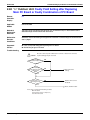
2.40 “PJ” Outdoor Unit: Faulty Field Setting after Replacing Main
PC Board or Faulty Combination of PC Board ......................................... 171
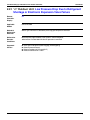
2.41 “UO” Outdoor Unit: Low Pressure Drop Due to Refrigerant Shortage
or Electronic Expansion Valve Failure...................................................... 172
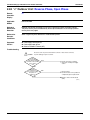
2.42 “U1” Outdoor Unit: Reverse Phase, Open Phase ...................................... 174
2.43 “U2” Outdoor Unit: Power Supply Insufficient
or Instantaneous Failure........................................................................... 175
2.44 “U3” Outdoor Unit: Check Operation not executed.................................... 177
2.45 “U4” Malfunction of Transmission Between Indoor Units
and Outdoor Units .................................................................................... 178
Table of Contents
iii
SiUS39-601
2.46 “U5” Indoor Unit: Malfunction of Transmission Between
Remote Controller and Indoor Unit........................................................... 180
2.47 “U7” Indoor Unit: Malfunction of Transmission
Between Outdoor Units ............................................................................ 181
2.48 “U8” Indoor Unit: Malfunction of Transmission Between Main
and Sub Remote Controllers .................................................................... 183
2.49 “U9” Indoor Unit: Malfunction of Transmission Between Indoor Units
and Outdoor Units in the Same System ................................................... 184
2.50 “UA” Improper Combination of Indoor Units
and Outdoor Units/Indoor Units and Remote Controller........................... 186
2.51 “UC” Address Duplication of Central Remote Controller ............................ 188
2.52 “UE” Malfunction of Transmission Between Centralized Controller
and Indoor Unit......................................................................................... 189
2.53 “UF” System is not Set yet ......................................................................... 191
2.54 “UH” Malfunction of System, Refrigerant System Address Undefined....... 192
3. Troubleshooting (OP: Central Remote Controller) ..................................194
3.1 “M1” PC Board Defect ................................................................................ 194
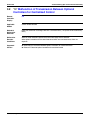
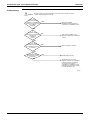
3.2 “M8” Malfunction of Transmission Between Optional Controllers
for Centralized Control ............................................................................. 195
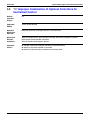
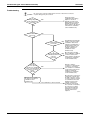
3.3 “MA” Improper Combination of Optional Controllers
for Centralized Control ............................................................................. 197
3.4 “MC” Address Duplication, Improper Setting .............................................. 199
4. Troubleshooting (OP: Schedule Timer)...................................................200
4.1 “UE” Malfunction of Transmission Between Central Remote Controller
and Indoor Unit......................................................................................... 200
4.2 “M1” PC Board Defect ................................................................................ 202
4.3 “M8” Malfunction of Transmission Between Optional Controllers
for Centralized Control ............................................................................. 203
4.4 “MA” Improper Combination of Optional Controllers
for Centralized Control ............................................................................. 205
4.5 “MC” Address Duplication, Improper Setting .............................................. 207
5. Troubleshooting (OP: Unified ON/OFF Controller) .................................208
5.1 Operation Lamp Blinks ............................................................................. 208
5.2 Display “Under Centralized Control” Blinks (Repeats Single Blink) ......... 210
5.3 Display “Under Centralized Control” Blinks (Repeats Double Blink) ........ 213
Part 7 Replacement Procedure for INV Compressor, VRV ......... 217
1. Replacement Procedure for INV Compressor,
VRV (RXYQ72M, 96M) ...........................................................................218
1.1 Replacement Procedure........................................................................... 218
Part 8 Appendix............................................................................ 219
1. Piping Diagrams......................................................................................220
1.1 Outdoor Unit ............................................................................................. 220
1.2 Indoor Unit................................................................................................ 221
iv
Table of Contents
SiUS39-601
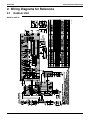
2. Wiring Diagrams for Reference...............................................................223
2.1 Outdoor Unit ............................................................................................. 223
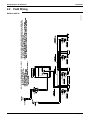
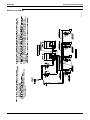
2.2 Field Wiring .............................................................................................. 224
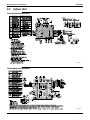
2.3 Indoor Unit................................................................................................ 226
3. List of Electrical and Functional Parts .....................................................230
3.1 Outdoor Unit ............................................................................................. 230
3.2 Indoor Side ............................................................................................... 231
4. Option List ...............................................................................................235
4.1 Option List of Controllers.......................................................................... 235
4.2 Option Lists (Outdoor Unit)....................................................................... 236
5.
6.
7.
8.
Example of Connection ...........................................................................237
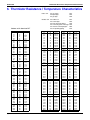
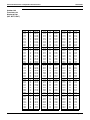
Thermistor Resistance / Temperature Characteristics............................239
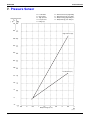
Pressure Sensor .....................................................................................241
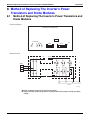
Method of Replacing The Inverter’s Power Transistors
and Diode Modules .................................................................................242
8.1 Method of Replacing The Inverter’s Power Transistors
and Diode Modules .................................................................................. 242
Part 9 Precautions for New Refrigerant (R-410A) ....................... 245
1. Precautions for New Refrigerant (R-410A) .............................................246
1.1 Outline ...................................................................................................... 246
1.2 Service Tools............................................................................................ 248
Index
................................................................................................ i
Drawings & Flow Charts ................................................................... v
Table of Contents
v
Introduction
SiUS39-601
1. Introduction
1.1
Safety Cautions
Cautions and
Warnings
Be sure to read the following safety cautions before conducting repair work.
The caution items are classified into “
Warning” and “
Caution”. The “
Warning”
items are especially important since they can lead to death or serious injury if they are not
followed closely. The “
Caution” items can also lead to serious accidents under some
conditions if they are not followed. Therefore, be sure to observe all the safety caution items
described below.
About the pictograms
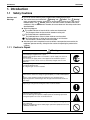
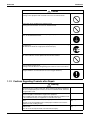
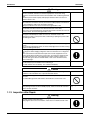
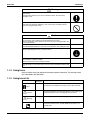
This symbol indicates an item for which caution must be exercised.
The pictogram shows the item to which attention must be paid.
This symbol indicates a prohibited action.
The prohibited item or action is shown inside or near the symbol.
This symbol indicates an action that must be taken, or an instruction.
The instruction is shown inside or near the symbol.
After the repair work is complete, be sure to conduct a test operation to ensure that the
equipment operates normally, and explain the cautions for operating the product to the
customer
1.1.1 Caution in Repair
Warning
Be sure to disconnect the power cable plug from the plug socket before
disassembling the equipment for a repair.
Working on the equipment that is connected to a power supply can cause an
electrical shook.
If it is necessary to supply power to the equipment to conduct the repair or
inspecting the circuits, do not touch any electrically charged sections of the
equipment.
If the refrigerant gas discharges during the repair work, do not touch the
discharging refrigerant gas.
The refrigerant gas can cause frostbite.
When disconnecting the suction or discharge pipe of the compressor at the
welded section, release the refrigerant gas completely at a well-ventilated place
first.
If there is a gas remaining inside the compressor, the refrigerant gas or
refrigerating machine oil discharges when the pipe is disconnected, and it can
cause injury.
If the refrigerant gas leaks during the repair work, ventilate the area. The
refrigerant gas can generate toxic gases when it contacts flames.
The step-up capacitor supplies high-voltage electricity to the electrical
components of the outdoor unit.
Be sure to discharge the capacitor completely before conducting repair work.
A charged capacitor can cause an electrical shock.
Do not start or stop the air conditioner operation by plugging or unplugging the
power cable plug.
Plugging or unplugging the power cable plug to operate the equipment can cause
an electrical shock or fire.
vi
SiUS39-601
Introduction
Caution
Do not repair the electrical components with wet hands.
Working on the equipment with wet hands can cause an electrical shock.
Do not clean the air conditioner by splashing water.
Washing the unit with water can cause an electrical shock.
Be sure to provide the grounding when repairing the equipment in a humid or wet
place, to avoid electrical shocks.
Be sure to turn off the power switch and unplug the power cable when cleaning
the equipment.
The internal fan rotates at a high speed, and cause injury.
Do not tilt the unit when removing it.
The water inside the unit can spill and wet the furniture and floor.
Be sure to check that the refrigerating cycle section has cooled down sufficiently
before conducting repair work.
Working on the unit when the refrigerating cycle section is hot can cause burns.
Use the welder in a well-ventilated place.
Using the welder in an enclosed room can cause oxygen deficiency.
1.1.2 Cautions Regarding Products after Repair
Warning
Be sure to use parts listed in the service parts list of the applicable model and
appropriate tools to conduct repair work. Never attempt to modify the equipment.
The use of inappropriate parts or tools can cause an electrical shock, excessive
heat generation or fire.
When relocating the equipment, make sure that the new installation site has
sufficient strength to withstand the weight of the equipment.
If the installation site does not have sufficient strength and if the installation work
is not conducted securely, the equipment can fall and cause injury.
Be sure to install the product correctly by using the provided standard installation
frame.
Incorrect use of the installation frame and improper installation can cause the
equipment to fall, resulting in injury.
Be sure to install the product securely in the installation frame mounted on a
window frame.
If the unit is not securely mounted, it can fall and cause injury.
For integral units
only
For integral units
only
vii
Introduction
SiUS39-601
Warning
Be sure to use an exclusive power circuit for the equipment, and follow the
technical standards related to the electrical equipment, the internal wiring
regulations and the instruction manual for installation when conducting electrical
work.
Insufficient power circuit capacity and improper electrical work can cause an
electrical shock or fire.
Be sure to use the specified cable to connect between the indoor and outdoor
units. Make the connections securely and route the cable properly so that there is
no force pulling the cable at the connection terminals.
Improper connections can cause excessive heat generation or fire.
When connecting the cable between the indoor and outdoor units, make sure that
the terminal cover does not lift off or dismount because of the cable.
If the cover is not mounted properly, the terminal connection section can cause an
electrical shock, excessive heat generation or fire.
Do not damage or modify the power cable.
Damaged or modified power cable can cause an electrical shock or fire.
Placing heavy items on the power cable, and heating or pulling the power cable
can damage the cable.
Do not mix air or gas other than the specified refrigerant (R-410A) in the refrigerant
system.
If air enters the refrigerating system, an excessively high pressure results, causing
equipment damage and injury.
If the refrigerant gas leaks, be sure to locate the leak and repair it before charging
the refrigerant. After charging refrigerant, make sure that there is no refrigerant
leak.
If the leak cannot be located and the repair work must be stopped, be sure to
perform pump-down and close the service valve, to prevent the refrigerant gas
from leaking into the room. The refrigerant gas itself is harmless, but it can
generate toxic gases when it contacts flames, such as fan and other heaters,
stoves and ranges.
When replacing the coin battery in the remote controller, be sure to disposed of
the old battery to prevent children from swallowing it.
If a child swallows the coin battery, see a doctor immediately.
Caution
Installation of a leakage breaker is necessary in some cases depending on the
conditions of the installation site, to prevent electrical shocks.
Do not install the equipment in a place where there is a possibility of combustible
gas leaks.
If a combustible gas leaks and remains around the unit, it can cause a fire.
Be sure to install the packing and seal on the installation frame properly.
If the packing and seal are not installed properly, water can enter the room and
wet the furniture and floor.
1.1.3 Inspection after Repair
Warning
Check to make sure that the power cable plug is not dirty or loose, then insert the
plug into a power outlet all the way.
If the plug has dust or loose connection, it can cause an electrical shock or fire.
viii
For integral units
only
SiUS39-601
Introduction
Warning
If the power cable and lead wires have scratches or deteriorated, be sure to
replace them.
Damaged cable and wires can cause an electrical shock, excessive heat
generation or fire.
Do not use a joined power cable or extension cable, or share the same power
outlet with other electrical appliances, since it can cause an electrical shock,
excessive heat generation or fire.
Caution
Check to see if the parts and wires are mounted and connected properly, and if
the connections at the soldered or crimped terminals are secure.
Improper installation and connections can cause excessive heat generation, fire
or an electrical shock.
If the installation platform or frame has corroded, replace it.
Corroded installation platform or frame can cause the unit to fall, resulting in injury.
Check the grounding, and repair it if the equipment is not properly grounded.
Improper grounding can cause an electrical shock.
Be sure to measure the insulation resistance after the repair, and make sure that
the resistance is 1 Mohm or higher.
Faulty insulation can cause an electrical shock.
Be sure to check the drainage of the indoor unit after the repair.
Faulty drainage can cause the water to enter the room and wet the furniture and
floor.
1.1.4 Using Icons
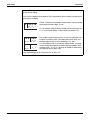
Icons are used to attract the attention of the reader to specific information. The meaning of each
icon is described in the table below:
1.1.5 Using Icons List
Icon
Type of
Information
Note
Description
Caution
A “caution” is used when there is danger that the reader, through
incorrect manipulation, may damage equipment, loose data, get an
unexpected result or has to restart (part of) a procedure.
Warning
A “warning” is used when there is danger of personal injury.
Reference
A “reference” guides the reader to other places in this binder or in
this manual, where he/she will find additional information on a
specific topic.
A “note” provides information that is not indispensable, but may
nevertheless be valuable to the reader, such as tips and tricks.
Note:
Caution
Warning
ix
Introduction
1.2
SiUS39-601
PREFACE
Thank you for your continued patronage of Daikin products.
This is the new service manual for Daikin's Year 2006 VRV series Heat Pump System.
Daikin offers a wide range of models to respond to building and office air conditioning needs.
We are confident that customers will be able to find the models that best suit their needs.
This service manual contains information regarding the servicing of VRV series Heat Pump
System.
Oct., 2006
After Sales Service Division
x
SiUS39-601
Part 1
General Information
1. Model Names of Indoor/Outdoor Units........................................................2
2. External Appearance...................................................................................3
2.1 Indoor Units .................................................................................................. 3
2.2 Outdoor Units ............................................................................................... 3
3. Model Selection...........................................................................................4
General Information
1
Model Names of Indoor/Outdoor Units
SiUS39-601
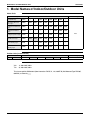
1. Model Names of Indoor/Outdoor Units
Indoor Units
Type
Model Name
Power Supply
Ceiling Mounted Cassette
Type (Multi Flow)
FXFQ
—
—
12M
18M
24M
30M
36M
—
Slim Ceiling Mounted
Duct Type
FXDQ
07M
09M
12M
18M
24M
—
—
—
Ceiling Mounted Built-In
Type
FXSQ
—
—
12M
18M
24M
30M
36M
48M
Ceiling Mounted Duct
Type
FXMQ
—
—
—
—
—
30M
36M
48M
Ceiling Suspended Type
FXHQ
—
—
12M
—
24M
—
36M
—
Wall Mounted Type
FXAQ
07M
09M
12M
18M
24M
—
—
—
Floor Standing Type
FXLQ
—
—
12M
18M
24M
—
—
—
Concealed Floor
Standing Type
FXNQ
—
—
12M
18M
24M
—
—
—
VJU
Outdoor Units (Inverter Series)
Inverter
Series
Heat Pump
VJU:
TJU:
RXYQ
72M
Model Name
96M
144M
168M
192M
Power Supply
TJU
1φ, 208~230V, 60Hz
3φ, 208~230V, 60Hz
This time we publish SiUS39-601 (New information: RXYQ 72, 144, 168MTJU) Wall Mounted Type FXAQ07,
09MVJU) as shown by
.
2
General Information
SiUS39-601
External Appearance
2. External Appearance
2.1
Indoor Units
Ceiling mounted cassette type (Multi flow)
Wall mounted type
FXFQ12MVJU
FXFQ18MVJU
FXFQ24MVJU
FXFQ30MVJU
FXFQ36MVJU
FXAQ07MVJU
FXAQ09MVJU
FXAQ12MVJU
FXAQ18MVJU
FXAQ24MVJU
Slim ceiling mounted duct type
Floor standing type
FXDQ07MVJU
FXDQ09MVJU
FXDQ12MVJU
FXDQ18MVJU
FXDQ24MVJU
FXLQ12MVJU
FXLQ18MVJU
FXLQ24MVJU
Ceiling mounted built-in type
Concealed floor standing type
FXSQ12MVJU
FXSQ18MVJU
FXSQ24MVJU
FXSQ30MVJU
FXSQ36MVJU
FXSQ48MVJU
FXNQ12MVJU
FXNQ18MVJU
FXNQ24MVJU
Ceiling mounted duct type
BS Units
FXMQ30MVJU
FXMQ36MVJU
FXMQ48MVJU
BSVQ36MVJU
BSVQ60MVJU
Ceiling suspended type
FXHQ12MVJU
FXHQ24MVJU
FXHQ36MVJU
2.2
Outdoor Units
RXYQ72MTJU
RXYQ96MTJU
General Information
RXYQ144MTJU
RXYQ168MTJU
RXYQ192MTJU
3
Model Selection
SiUS39-601
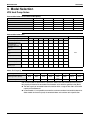
3. Model Selection
VRV Heat Pump Series
Connectable Indoor Units Number and Capacity
6 ton
8 ton
12 ton
14 ton
16 ton
System name
Ton
RXYQ72M
RXYQ96M
RXYQ144M
RXYQ168M
RXYQ192M
Outdoor unit 1
RXYQ72M
RXYQ96M
RXYQ72M
RXYQ72M
RXYQ96M
Outdoor unit 2
—
—
RXYQ72M
RXYQ96M
RXYQ96M
Total number of connectable indoor units
Total Capacity Index of Indoor Units to be Connected
12
16
20
20
20
50.5~93.5
67.5~124.5
101~187
118~218
134.5~249.5
Connectable Indoor Unit
Type
Capacity Range
Capacity Index
0.6ton 0.8ton
7.5
9.5
1ton
12
Model Name
1.5ton 2ton
18
24
Power Supply
2.5ton
30
3ton
36
4ton
48
Ceiling Mounted Cassette
Type (Multi Flow)
FXFQ
—
—
12M
18M
24M
30M
36M
—
Slim Ceiling Mounted
Duct Type
FXDQ
07M
09M
12M
18M
24M
—
—
—
Ceiling Mounted Built-In
Type
FXSQ
—
—
12M
18M
24M
30M
36M
48M
Ceiling Mounted Duct
Type
FXMQ
—
—
—
—
—
30M
36M
48M
Ceiling Suspended Type
FXHQ
—
—
12M
—
24M
—
36M
—
Wall Mounted Type
FXAQ
07M
09M
12M
18M
24M
—
—
—
Floor Standing Type
FXLQ
—
—
12M
18M
24M
—
—
—
Concealed Floor
Standing Type
FXNQ
—
—
12M
18M
24M
—
—
—
VJU
Indoor Unit Capacity
New refrigerant model code
Selecting model capacity
Equivalent output
07 type
7,500
Btu/h
0.6 ton
09 type
9,500
Btu/h
0.8 ton
12 type
12,000
Btu/h
1 ton
18 type
18,000
Btu/h
1.5 ton
24 type
24,000
Btu/h
2 ton
30 type
30,000
Btu/h
2.5 ton
36 type
36,000
Btu/h
3 ton
48 type
48,000
Btu/h
4 ton
Use the above tables to determine the capacities of indoor units to be connected. Make sure the
total capacity of indoor units connected to each outdoor unit is within the specified value (Btu/h).
The total capacity of connected indoor units must be within a range of 70 to 130% of the rated
capacity of the outdoor unit.
In some models, it is not possible to connect the maximum number of connectable indoor units.
Select models so the total capacity of connected indoor units conforms to the specification.
4
General Information
SiUS39-601
Part 2
Specifications
1. Specifications ..............................................................................................6
1.1 Outdoor Units ............................................................................................... 6
1.2 Indoor Units ................................................................................................ 11
Specifications
5
Specifications
SiUS39-601
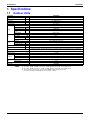
1. Specifications
1.1
Outdoor Units
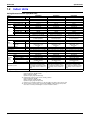
Model Name
★1 Cooling Capacity
★2 Heating Capacity
Casing Color
Dimensions: (H×W×D)
Heat Exchanger
Type
Piston Displacement
Number of Revolutions
Comp.
Motor Output × Number
of Units
Starting Method
Type
Motor Output
Fan
Air Flow Rate
Drive
Liquid Pipe
Connecting
Gas Pipe
Pipes
Discharge Gas Pipe
Machine Weight (Mass)
★3 Sound Level (Reference Value)
Btu / h
Btu / h
in
m3/h
r.p.m
kW
kW
cfm
in
in
in
Lbs
dBA
Safety Devices
Defrost Method
Capacity Control
Refrigerant Name
Refrigerant
Charge
Control
Refrigerator
Oil
Charge Volume
Standard Accessories
Drawing No.
Notes:
%
Lbs
L
RXYQ72MTJU
72,000
81,000
Ivory White (5Y7.5/1)
64 × 48-7/8 × 30-1/8
Cross Fin Coil
Hermetically Sealed Scroll Type
13.72+10.47
6480, 2900
(2.7+4.5) × 1
Direct on line
Propeller Fan
0.75 × 1
7,400
Direct Drive
3/8 in C1220T (Flare Connection)
3/4 in C1220T (Brazing Connection)
—
666
60
High Pressure Switch, Fan Driver Overload Protector, Over Current Relay, Inverter Overload Protector, Fusible Plugs,
Ground fault circuit interrupter
Deicer
14~100
R-410A
25.1
Electronic Expansion Valve
Synthetic (ether) oil
1.9+1.6
Installation Manual, Operation Manual, Connection Pipes, Clamps
4D053300A
★1 Indoor temp. : 80°FDB or 67°FWB / outdoor temp. : 95°FDB / Equivalent piping length : 25 ft, level difference: 0.
★2 Indoor temp. : 70°FDB / outdoor temp. : 47°FDB or 43°FWB / Equivalent piping length : 25 ft, level difference: 0.
★3 Anechoic chamber conversion value, measured under JISB8616 conditions. During actual operation,
these values are normally somewhat higher as a result of ambient conditions.
6
Specifications
SiUS39-601
Specifications
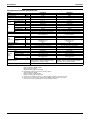
Model Name
★1 Cooling Capacity
★2 Heating Capacity
Casing Color
Dimensions: (H×W×D)
Heat Exchanger
Type
Piston Displacement
Number of Revolutions
Comp.
Motor Output × Number
of Units
Starting Method
Type
Motor Output
Fan
Air Flow Rate
Drive
Liquid Pipe
Connecting
Gas Pipe
Pipes
Discharge Gas Pipe
Machine Weight (Mass)
★3 Sound Level (Reference Value)
Safety Devices
Defrost Method
Capacity Control
Refrigerant Name
Refrigerant
Charge
Control
Refrigerator
Oil
Charge Volume
Standard Accessories
Drawing No.
Notes:
Btu / h
Btu / h
in
m3/h
r.p.m
kW
kW
cfm
in
in
in
Lbs
dBA
%
Lbs
L
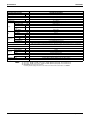
RXYQ96MTJU
96,000
108,000
Ivory White (5Y7.5/1)
64 × 48-7/8 × 30-1/8
Cross Fin Coil
Hermetically Sealed Scroll Type
13.72+10.47
6480, 2900
(2.7+4.5) × 1
Direct on line
Propeller Fan
0.75 × 1
7,400
Direct Drive
3/8 in C1220T (Flare Connection)
7/8 in C1220T (Brazing Connection)
—
666
60
High Pressure Switch, Fan Driver Overload Protector, Over Current Relay, Inverter Overload Protector, Fusible Plugs
Deicer
14~100
R-410A
25.1
Electronic Expansion Valve
Synthetic (ether) oil
1.9+1.6
Installation Manual, Operation Manual, Connection Pipes, Clamps
4D042657B
★1 Indoor temp. : 80°FDB or 67°FWB / outdoor temp. : 95°FDB / Equivalent piping length : 25 ft, level difference: 0.
★2 Indoor temp. : 70°FDB / outdoor temp. : 47°FDB or 43°FWB / Equivalent piping length : 25 ft, level difference: 0.
★3 Anechoic chamber conversion value, measured under JISB8616 conditions. During actual operation,
these values are normally somewhat higher as a result of ambient conditions.
Specifications
7
Specifications
SiUS39-601
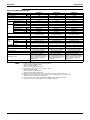
Model Name (Combination Unit)
Model Name (Independent Unit)
★1 Cooling Capacity
★2 Heating Capacity
Casing Color
Dimensions: (H×W×D)
Heat Exchanger
Type
Piston Displacement
Number of Revolutions
Comp.
Motor Output × Number
of Units
Starting Method
Type
Motor Output
Fan
Air Flow Rate
Drive
Liquid Pipe ★3
Connecting
Gas Pipe ★3
Pipes
Oil Equalizing Pipe
Machine Weight (Mass)
Btu / h
Btu / h
in
m3/h
r.p.m
kW
kW
cfm
in
in
in
Lbs
Safety Devices
Defrost Method
Capacity Control
Refrigerant Name
Refrigerant
Charge
Control
Refrigerator
Oil
Charge Volume
Standard Accessories
Drawing No.
Notes:
%
Lbs
L
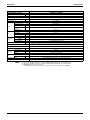
RXYQ144MTJU
RXYQ72MTJU+RXYQ72MTJU
144,000
162,000
Ivory White (5Y7.5/1)
(64 × 48-7/8 × 30-1/8) + (64 × 48-7/8 × 30-1/8)
Cross Fin Coil
Hermetically Sealed Scroll Type
(13.72+10.47) × 2
(6480, 2900) × 2
(2.7+4.5) × 2
Direct on line
Propeller Fan
0.75 × 2
7,400+7,400
Direct Drive
5/8 in C1220T (Brazing Connection) — Main line —
1-1/8 in C1220T (Brazing Connection) — Main line —
φ 1/4 in C1220T (Flare Connection)
666+666
High Pressure Switch, Fan Driver Overload Protector, Over Current Relay, Inverter Overload Protector, Fusible Plugs,
Ground fault circuit interrupter
Deicer
10~100
R-410A
25.1+25.1
Electronic Expansion Valve
Synthetic (ether) oil
(1.9+1.6) + (1.9+1.6)
Installation Manual, Operation Manual, Connection Pipes, Clamps
4D053301
★1 Indoor temp. : 80°FDB or 67°FWB / outdoor temp. : 95°FDB / Equivalent piping length : 25 ft, level difference: 0.
★2 Indoor temp. : 70°FDB / outdoor temp. : 47°FDB or 43°FWB / Equivalent piping length : 25 ft, level difference: 0.
★3 BHFP22M90V is necessary for the connection.
Concerning about the piping connection for each outdoor unit to the main line as shown above, use REFNET.
8
Specifications
SiUS39-601
Specifications
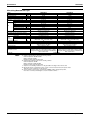
Model Name (Combination Unit)
Model Name (Independent Unit)
★1 Cooling Capacity
★2 Heating Capacity
Casing Color
Dimensions: (H×W×D)
Heat Exchanger
Type
Piston Displacement
Number of Revolutions
Comp.
Motor Output × Number
of Units
Starting Method
Type
Motor Output
Fan
Air Flow Rate
Drive
Liquid Pipe ★3
Connecting
Gas Pipe ★3
Pipes
Oil Equalizing Pipe
Machine Weight (Mass)
Btu / h
Btu / h
in
m3/h
r.p.m
kW
kW
cfm
in
in
in
Lbs
Safety Devices
Defrost Method
Capacity Control
Refrigerant Name
Refrigerant
Charge
Control
Refrigerator
Oil
Charge Volume
Standard Accessories
Drawing No.
Notes:
%
Lbs
L
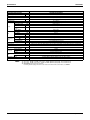
RXYQ168MTJU
RXYQ72MTJU+RXYQ96MTJU
168,000
189,000
Ivory White (5Y7.5/1)
(64 × 48-7/8 × 30-1/8) + (64 × 48-7/8 × 30-1/8)
Cross Fin Coil
Hermetically Sealed Scroll Type
(13.72+10.47) × 2
(6480, 2900) × 2
(2.7+4.5) × 2
Direct on line
Propeller Fan
0.75 × 2
7,400+7,400
Direct Drive
5/8 in C1220T (Brazing Connection) — Main line —
1-1/8 in C1220T (Brazing Connection) — Main line —
φ 1/4 in C1220T (Flare Connection)
666+666
High Pressure Switch, Fan Driver Overload Protector, Over Current Relay, Inverter Overload Protector, Fusible Plugs,
Ground fault circuit interrupter
Deicer
7~100
R-410A
25.1+25.1
Electronic Expansion Valve
Synthetic (ether) oil
(1.9+1.6) + (1.9+1.6)
Installation Manual, Operation Manual, Connection Pipes, Clamps
4D053302
★1 Indoor temp. : 80°FDB or 67°FWB / outdoor temp. : 95°FDB / Equivalent piping length : 25 ft, level difference: 0.
★2 Indoor temp. : 70°FDB / outdoor temp. : 47°FDB or 43°FWB / Equivalent piping length : 25 ft, level difference: 0.
★3 BHFP22M90V is necessary for the connection.
Concerning about the piping connection for each outdoor unit to the main line as shown above, use REFNET.
Specifications
9
Specifications
SiUS39-601
Model Name (Combination Unit)
Model Name (Independent Unit)
★1 Cooling Capacity
★2 Heating Capacity
Casing Color
Dimensions: (H×W×D)
Heat Exchanger
Type
Piston Displacement
Number of Revolutions
Comp.
Motor Output × Number
of Units
Starting Method
Type
Motor Output
Fan
Air Flow Rate
Drive
Liquid Pipe ★3
Connecting
Gas Pipe ★3
Pipes
Oil Equalizing Pipe
Machine Weight (Mass)
Safety Devices
Defrost Method
Capacity Control
Refrigerant Name
Refrigerant
Charge
Control
Refrigerator
Oil
Charge Volume
Standard Accessories
Drawing No.
Notes:
Btu / h
Btu / h
in
m3/h
r.p.m
kW
kW
cfm
in
in
in
Lbs
%
Lbs
L
RXYQ192MTJU
RXYQ96MTJU+RXYQ96MTJU
192,000
216,000
Ivory White (5Y7.5/1)
(64 × 48-7/8 × 30-1/8) + (64 × 48-7/8 × 30-1/8)
Cross Fin Coil
Hermetically Sealed Scroll Type
(13.72+10.47) × 2
(6480, 2900) × 2
(2.7+4.5) × 2
Direct on line
Propeller Fan
0.75 × 2
7,400+7,400
Direct Drive
5/8 in C1220T (Brazing Connection) — Main line —
1-1/8 in C1220T (Brazing Connection) — Main line —
φ 1/4 in C1220T (Flare Connection)
666+666
High Pressure Switch, Fan Driver Overload Protector, Over Current Relay, Inverter Overload Protector, Fusible Plugs
Deicer
7~100
R-410A
25.1+25.1
Electronic Expansion Valve
Synthetic (ether) oil
(1.9+1.6) + (1.9+1.6)
Installation Manual, Operation Manual, Connection Pipes, Clamps
4D050355
★1 Indoor temp. : 80°FDB or 67°FWB / outdoor temp. : 95°FDB / Equivalent piping length : 25 ft, level difference: 0.
★2 Indoor temp. : 70°FDB / outdoor temp. : 47°FDB or 43°FWB / Equivalent piping length : 25 ft, level difference: 0.
★3 BHFP22M90V is necessary for the connection.
Concerning about the piping connection for each outdoor unit to the main line as shown above, use REFNET.
10
Specifications
SiUS39-601
1.2
Specifications
Indoor Units
Ceiling Mounted Cassette Type (Multi-flow)
Model
★1 Cooling Capacity
Btu/h
Btu/h
★2 Heating Capacity
Casing / Color
Dimensions: (H×W×D)
Rows × Stages × FPI
Coil (Cross
Fin Coil)
Face Area
Model
Type
Motor Output
Fan
Air Flow Rate (H/L)
Drive
in
ft²
HP
cfm
Temperature Control
Sound Absorbing Thermal Insulation Material
Piping
Connections
Liquid Pipes
Gas Pipes
in
in
Drain Pipe
in
Machine Weight (Mass)
★4 Sound Level (H/L)
Safety Devices
Refrigerant Control
Connectable outdoor unit
Model
Color
Decoration
Dimensions: (H×W×D)
Panels
(Option)
Air Filter
Lbs
dBA
Weight
Lbs
Standard Accessories
Drawing No.
Notes:
in
FXFQ12MVJU
FXFQ18MVJU
FXFQ24MVJU
12,000
13,500
Galvanized Steel Plate
9-1/8 × 33-1/8 × 33-1/8
2 × 8 × 17
3.56
QTS45B14M
Turbo Fan
0.06
460/350
Direct Drive
Microprocessor Thermostat
for Cooling and Heating
Foamed Polystyrene /
Foamed Polyethylene
φ1/4 (Flare Connection)
φ1/2 (Flare Connection)
VP25
External Dia. 1-1/4
Internal Dia. 1
55
31/28
Fuse, Thermal Protector for Fan Motor
Electronic Expansion Valve
R-410A Series
BYC125K-W1
White (10Y9/0.5)
1-5/8 × 37-3/8 × 37-3/8
Resin Net
(with Mold Resistant)
11
Operation manual, Installation manual,
Paper pattern for installation, Drain
hose, Clamp metal, Washers, Sealing
pads, Clamps, Screws, Insulation for
fitting.
18,000
20,000
Galvanized Steel Plate
9-1/8 × 33-1/8 × 33-1/8
2 × 8 × 17
3.56
QTS45B14M
Turbo Fan
0.06
570/390
Direct Drive
Microprocessor Thermostat
for Cooling and Heating
Foamed Polystyrene /
Foamed Polyethylene
φ1/4 (Flare Connection)
φ1/2 (Flare Connection)
VP25
External Dia. 1-1/4
Internal Dia. 1
55
33/28
Fuse, Thermal Protector for Fan Motor
Electronic Expansion Valve
R-410A Series
BYC125K-W1
White (10Y9/0.5)
1-5/8 × 37-3/8 × 37-3/8
Resin Net
(with Mold Resistant)
11
Operation manual, Installation manual,
Paper pattern for installation, Drain
hose, Clamp metal, Washers, Sealing
pads, Clamps, Screws, Insulation for
fitting.
C:3D042686
24,000
27,000
Galvanized Steel Plate
9-1/8 × 33-1/8 × 33-1/8
2×8×17
3.56
QTS45B14M
Turbo Fan
0.06
670/490
Direct Drive
Microprocessor Thermostat
for Cooling and Heating
Foamed Polystyrene /
Foamed Polyethylene
φ3/8 (Flare Connection)
φ5/8 (Flare Connection)
VP25
External Dia. 1-1/4
Internal Dia. 1
55
34/29
Fuse, Thermal Protector for Fan Motor
Electronic Expansion Valve
R-410A Series
BYC125K-W1
White (10Y9/0.5)
1-5/8 × 37-3/8 × 37-3/8
Resin Net
(with Mold Resistant)
11
Operation manual, Installation manual,
Paper pattern for installation, Drain
hose, Clamp metal, Washers, Sealing
pads, Clamps, Screws, Insulation for
fitting.
(
)
(
)
(
)
★1 Nominal cooling capacities are based on the following conditions:
Return air temperature: 80°FDB, 67°FWB
Outdoor temperature: 95°FDB
Equivalent ref. piping length: 25ft (Horizontal)
★2 Nominal heating capacities are based on the following conditions:
Return air temperature: 70°FDB.
Outdoor temperature: 47°FDB, 43°FWB
Equivalent ref. piping length: 25ft (Horizontal)
3 Capacities are net, including a deduction for cooling (an addition for heating) for indoor fan motor heat.
★4 Anechoic chamber conversion value, measured under JISB8616 conditions. During actual operation,
these values are normally somewhat higher as a result of installation conditions.
Specifications
11
Specifications
SiUS39-601
Ceiling Mounted Cassette Type (Multi-flow)
Model
FXFQ30MVJU
★1 Cooling Capacity
Btu/h
Btu/h
★2 Heating Capacity
Casing / Color
Dimensions: (H×W×D)
Rows × Stages × FPI
Coil (Cross
Fin Coil)
Face Area
Model
Type
Motor Output
Fan
Air Flow Rate (H/L)
Drive
Temperature Control
in
ft²
HP
cfm
Sound Absorbing Thermal Insulation Material
Piping
Connections
Liquid Pipes
Gas Pipes
in
in
Drain Pipe
in
Machine Weight (Mass)
★4 Sound Level (H/L)
Safety Devices
Refrigerant Control
Connectable outdoor unit
Model
Color
Decoration
Dimensions: (H×W×D)
Panels
(Option)
Air Filter
Lbs
dBA
Weight
Lbs
Standard Accessories
Drawing No.
Notes:
in
FXFQ36MVJU
30,000
36,000
34,000
40,000
Galvanized Steel Plate
Galvanized Steel Plate
11-3/8 × 33-1/8 × 33-1/8
11-3/8 × 33-1/8 × 33-1/8
2 × 12 × 17
2×12×17
5.35
5.35
QTS45A17M
QTS45A17M
Turbo Fan
Turbo Fan
0.12
0.12
990/710
990/740
Direct Drive
Direct Drive
Microprocessor Thermostat for Cooling and Heating
Microprocessor Thermostat for Cooling and Heating
Foamed Polystyrene /
Foamed Polystyrene /
Foamed Polyethylene
Foamed Polyethylene
φ3/8 (Flare Connection)
φ3/8 (Flare Connection)
φ5/8 (Flare Connection)
φ5/8 (Flare Connection)
VP25
VP25
External Dia. 1-1/4
External Dia. 1-1/4
Internal Dia. 1
Internal Dia. 1
66
66
38/32
40/33
Fuse, Thermal Protector for Fan Motor
Fuse, Thermal Protector for Fan Motor
Electronic Expansion Valve
Electronic Expansion Valve
R-410A Series
R-410A Series
BYC125K-W1
BYC125K-W1
White (10Y9/0.5)
White (10Y9/0.5)
1-5/8 × 37-3/8 × 37-3/8
1-5/8 × 37-3/8 × 37-3/8
Resin Net
Resin Net
(with Mold Resistant)
(with Mold Resistant)
11
11
Operation manual, Installation manual, Paper pattern for
Operation manual, Installation manual, Paper pattern for
installation, Drain hose, Clamp metal, Washers, Sealing
installation, Drain hose, Clamp metal, Washers, Sealing
pads, Clamps, Screws, Insulation for fitting.
pads, Clamps, Screws, Insulation for fitting.
C:3D042686
(
)
(
)
★1 Nominal cooling capacities are based on the following conditions:
Return air temperature: 80°FDB, 67°FWB
Outdoor temperature: 95°FDB
Equivalent ref. piping length : 25ft (Horizontal)
★2 Nominal heating capacities are based on the following conditions:
Return air temperature: 70°FDB.
Outdoor temperature: 47°FDB, 43°FWB
Equivalent ref. piping length: 25ft (Horizontal)
3 Capacities are net, including a deduction for cooling (an addition for heating) for indoor fan motor heat.
★4 Anechoic chamber conversion value, measured under JISB8616 conditions. During actual operation,
these values are normally somewhat higher as a result of installation conditions.
12
Specifications
SiUS39-601
Specifications
Slim Ceiling Mounted Duct Type
Model
★1 Cooling Capacity
Btu/h
Btu/h
★2 Heating Capacity
Casing / Color
Dimensions: (H×W×D)
Rows × Stages × FPI
Coil (Cross
Fin Coil)
Face Area
Model
Type
Motor Output
Fan
Air Flow Rate (H/L)
External Static Pressure ★4
Drive
in
ft²
HP
cfm
Pa
Temperature Control
Sound Absorbing Thermal Insulation Material
Air Filter
Liquid Pipes
in
Gas Pipes
in
Piping
Connections
Drain Pipe
in
Machine Weight (Mass)
★5 Sound Level (H/L)
Lbs
dBA
Safety Devices
Refrigerant Control
Connectable outdoor unit
Standard Accessories
Drawing No.
Notes:
FXDQ09MVJU
FXDQ12MVJU
7,500
8,500
Galvanized Steel Plate
7-7/8 × 27-9/16 × 24-7/16
2 × 12× 17
1.36
—
Sirocco Fan
0.08
280/226 (H/L)
30-10
Direct Drive
Microprocessor Thermostat
for Cooling and Heating
Foamed Polyethylene
Removal, Washable, Mildew Proof
φ1/4 (Flare Connection)
φ1/2 (Flare Connection)
VP20
(External Dia. 1-1/32 Internal Dia. 25/32)
51
33/29
Fuse,
Thermal Protector for Fan Motor
Electronic Expansion Valve
R-410A Series
Operation Manual, Installation
Manual, Paper Pattern for Installation,
Drain Hose, Clamp Metal, Insulation for
Fitting, Sealing Pads, Clamps, Screws,
Washers, Conduit Mounting Plate,
Insulation Tube.
9,500
10,500
Galvanized Steel Plate
7-7/8 × 27-9/16 × 24-7/16
2 × 12× 17
1.36
—
Sirocco Fan
0.08
280/226 (H/L)
30-10
Direct Drive
Microprocessor Thermostat
for Cooling and Heating
Foamed Polyethylene
Removal, Washable, Mildew Proof
φ1/4 (Flare Connection)
φ1/2 (Flare Connection)
VP20
(External Dia. 1-1/32 Internal Dia. 25/32)
51
33/29
Fuse,
Thermal Protector for Fan Motor
Electronic Expansion Valve
R-410A Series
Operation Manual, Installation
Manual, Paper Pattern for Installation,
Drain Hose, Clamp Metal, Insulation for
Fitting, Sealing Pads, Clamps, Screws,
Washers, Conduit Mounting Plate,
Insulation Tube.
C:3D051780A
12,000
13,500
Galvanized Steel Plate
7-7/8 × 27-9/16 × 24-7/16
3 × 12× 17
1.36
—
Sirocco Fan
0.08
280/226 (H/L)
30-10
Direct Drive
Microprocessor Thermostat
for Cooling and Heating
Foamed Polyethylene
Removal, Washable, Mildew Proof
φ1/4 (Flare Connection)
φ1/2 (Flare Connection)
VP20
(External Dia. 1-1/32 Internal Dia. 25/32)
51
33/29
Fuse,
Thermal Protector for Fan Motor
Electronic Expansion Valve
R-410A Series
Operation Manual, Installation
Manual, Paper Pattern for Installation,
Drain Hose, Clamp Metal, Insulation for
Fitting, Sealing Pads, Clamps, Screws,
Washers, Conduit Mounting Plate,
Insulation Tube.
★1 Nominal cooling capacities are based on the following conditions:
★2
3
★4
★5
Specifications
FXDQ07MVJU
Return air temperature: 80°FDB, 67°FWB
Outdoor temperature: 95°FDB
Equivalent ref. piping length: 25ft (Horizontal)
Nominal heating capacities are based on the following conditions:
Return air temperature: 70°FDB.
Outdoor temperature: 47°FDB, 43°FWB
Equivalent ref. piping length: 25ft (Horizontal)
Capacities are net, including a deduction for cooling (an addition for heating) for indoor fan motor heat.
External static pressure is changeable to change over the connectors inside electrical box, this pressure means
"High static pressure – Standard – Low static pressure".
Anechoic chamber conversion value, measured under JISB8616 conditions. During actual operation,
these values are normally somewhat higher as a result of installation conditions.
13
Specifications
SiUS39-601
Slim Ceiling Mounted Duct Type
Model
★1 Cooling Capacity
★2 Heating Capacity
Casing / Color
Dimensions: (H×W×D)
Rows × Stages × FPI
Coil (Cross
Fin Coil)
Face Area
Model
Type
Motor Output
Fan
Air Flow Rate (H/L)
External Static Pressure ★4
Drive
Btu/h
Btu/h
in
ft²
HP
cfm
Pa
Temperature Control
Sound Absorbing Thermal Insulation Material
Air Filter
Liquid Pipes
in
Gas Pipes
in
Piping
Connections
Drain Pipe
in
Machine Weight (Mass)
Lbs
dBA
★5 Sound Level (H/L)
Safety Devices
Refrigerant Control
Connectable outdoor unit
Standard Accessories
Drawing No.
Notes:
★1 Nominal cooling capacities are based on the following conditions:
★2
3
★4
★5
14
FXDQ18MVJU
FXDQ24MVJU
18,000
24,000
20,000
27,000
Galvanized Steel Plate
Galvanized Steel Plate
7-7/8 × 43-5/16 × 24-7/16
7-7/8 × 35-7/16 × 24-7/16
3 × 12 × 17
3 × 12 × 17
1.89
2.44
—
—
Sirocco Fan
Sirocco Fan
0.17
0.17
440/350 (H/L)
580/460 (H/L)
44-15
44-15
Direct Drive
Direct Drive
Microprocessor Thermostat
Microprocessor Thermostat
for Cooling and Heating
for Cooling and Heating
Foamed Polyethylene
Foamed Polyethylene
Removal, Washable, Mildew Proof
Removal, Washable, Mildew Proof
φ1/4 (Flare Connection)
φ3/8 (Flare Connection)
φ1/2 (Flare Connection)
φ5/8 (Flare Connection)
VP20
VP20
(External Dia. 1-1/32 Internal Dia. 25/32)
(External Dia. 1-1/32 Internal Dia. 25/32)
63
71
35/31
36/32
Fuse,
Fuse,
Thermal Protector for Fan Motor
Thermal Protector for Fan Motor
Electronic Expansion Valve
Electronic Expansion Valve
R-410A Series
R-410A Series
Operation Manual, Installation Manual, Paper Pattern for
Operation Manual, Installation Manual, Paper Pattern for
Installation, Drain Hose, Clamp Metal, Insulation for Fitting, Installation, Drain Hose, Clamp Metal, Insulation for Fitting,
Sealing Pads, Clamps, Screws, Washers, Conduit Mounting Sealing Pads, Clamps, Screws, Washers, Conduit Mounting
Plate, Insulation Tube.
Plate, Insulation Tube.
C:3D051780A
Return air temperature: 80°FDB, 67°FWB
Outdoor temperature: 95°FDB
Equivalent ref. piping length: 25ft (Horizontal)
Nominal heating capacities are based on the following conditions:
Return air temperature: 70°FDB.
Outdoor temperature: 47°FDB, 43°FWB
Equivalent ref. piping length: 25ft (Horizontal)
Capacities are net, including a deduction for cooling (an addition for heating) for indoor fan motor heat.
External static pressure is changeable to change over the connectors inside electrical box, this pressure means
"High static pressure – Standard – Low static pressure".
Anechoic chamber conversion value, measured under JISB8616 conditions. During actual operation,
these values are normally somewhat higher as a result of installation conditions.
Specifications
SiUS39-601
Specifications
Ceiling Mounted Built-in Type
Model
★1 Cooling Capacity
Btu/h
Btu/h
★2 Heating Capacity
Casing / Color
Dimensions: (H×W×D)
Rows × Stages × FPI
Coil (Cross
Fin Coil)
Face Area
Model
Type
Motor Output
Fan
Air Flow Rate (H/L)
External Static Pressure ★4
Drive
in
ft²
HP
cfm
in. Aq
Temperature Control
Sound Absorbing Thermal Insulation Material
Air Filter
Liquid Pipes
in
Gas Pipes
in
Piping
Connections
Drain Pipe
in
Machine Weight (Mass)
Lbs
dBA
★5 Sound Level (H/L)
Safety Devices
Refrigerant Control
Connectable outdoor unit
Model
Decoration
Panel Color
Panel
Dimensions: (H×W×D)
(Option)
Weight
Standard Accessories
Drawing No.
Notes:
FXSQ18MVJU
FXSQ24MVJU
12,000
13,500
Galvanized Steel Plate
11-7/8 × 21-5/8 × 31-1/2
3 × 14 × 14
0.95
D18H3A
Sirocco Fan
0.07
340/230
0.37-0.19-0.06
Direct Drive
Microprocessor Thermostat for
Cooling and Heating
Glass Fiber
Resin Net (with Mold Resistant)
φ1/4 (Flare Connection)
φ1/2 (Flare Connection)
VP25
(External Dia. 1-1/4 Internal Dia. 1)
69
41/35
Fuse,
Thermal Protector for Fan Motor
Electronic Expansion Valve
R-410A Series
BYBS32DJW1
White (10Y9/0.5)
2-1/8 × 25-5/8 × 19-5/8
6.6
Operation Manual, Installation
Manual, Paper Pattern for Installation,
Drain Hose, Clamp Metal, Insulation for
Fitting, Sealing Pads, Clamps, Screws,
Washers.
18,000
20,000
Galvanized Steel Plate
11-7/8 × 27-1/2 × 31-1/2
3 × 14 × 14
1.42
D18H2A
Sirocco Fan
0.11
530/390
0.38-0.19-0.06
Direct Drive
Microprocessor Thermostat for Cooling
and Heating
Glass Fiber
Resin Net (with Mold Resistant)
φ1/4 (Flare Connection)
φ1/2 (Flare Connection)
VP25
(External Dia. 1-1/4 Internal Dia. 1)
73
44/38
Fuse,
Thermal Protector for Fan Motor
Electronic Expansion Valve
R-410A Series
BYBS45DJW1
White (10Y9/0.5)
2-1/8 × 31-1/2 × 19-5/8
7.7
Operation Manual, Installation Manual,
Paper Pattern for Installation, Drain
Hose, Clamp Metal, Insulation for
Fitting, Sealing Pads, Clamps, Screws,
Washers.
C:3D042684
24,000
27,000
Galvanized Steel Plate
11-7/8 × 39-3/8 × 31-1/2
3 × 14 × 14
2.38
2D18H2A
Sirocco Fan
0.17
740/490
0.51-0.29-0.06
Direct Drive
Microprocessor Thermostat for Cooling
and Heating
Glass Fiber
Resin Net (with Mold Resistant)
φ3/8 (Flare Connection)
φ5/8 (Flare Connection)
VP25
(External Dia. 1-1/4 Internal Dia. 1)
95
44/38
Fuse,
Thermal Protector for Fan Motor
Electronic Expansion Valve
R-410A Series
BYBS71DJW1
White (10Y9/0.5)
2-1/8 × 43-1/4 × 19-5/8
9.9
Operation Manual, Installation Manual,
Paper Pattern for Installation, Drain
Hose, Clamp Metal, Insulation for
Fitting, Sealing Pads, Clamps, Screws,
Washers.
★1 Nominal cooling capacities are based on the following conditions:
★2
3
★4
★5
Specifications
in
Lbs
FXSQ12MVJU
Return air temperature: 80°FDB, 67°FWB
Outdoor temperature: 95°FDB
Equivalent ref. piping length: 25ft (Horizontal)
Nominal heating capacities are based on the following conditions:
Return air temperature: 70°FDB.
Outdoor temperature: 47°FDB, 43°FWB
Equivalent ref. piping length: 25ft (Horizontal)
Capacities are net, including a deduction for cooling (an addition for heating) for indoor fan motor heat.
External static pressure is changeable to change over the connectors inside electrical box, this pressure means
"High static pressure – Standard – Low static pressure".
Anechoic chamber conversion value, measured under JISB8616 conditions. During actual operation,
these values are normally somewhat higher as a result of installation conditions.
15
Specifications
SiUS39-601
Ceiling Mounted Built-in Type
Model
★1 Cooling Capacity
Btu/h
Btu/h
★2 Heating Capacity
Casing / Color
Dimensions: (H×W×D)
Rows × Stages × FPI
Coil (Cross
Fin Coil)
Face Area
Model
Type
Motor Output
Fan
Air Flow Rate (H/L)
External Static Pressure ★4
Drive
in
ft²
HP
cfm
in. Aq
Temperature Control
Sound Absorbing Thermal Insulation Material
Air Filter
Liquid Pipes
Gas Pipes
Piping
Connections
Drain Pipe
Machine Weight (Mass)
★5 Sound Level (H/L)
in
in
in
Lbs
dBA
Safety Devices
Refrigerant Control
Connectable outdoor unit
Model
Decoration
Panel Color
Panel
Dimensions: (H×W×D)
(Option)
Weight
Standard Accessories
Drawing No.
Notes:
FXSQ36MVJU
FXSQ48MVJU
30,000
34,000
Galvanized Steel Plate
11-7/8 × 55-1/8 × 31-1/2
3 × 14 × 14
3.64
3D18H2A
Sirocco Fan
0.30
950/720
0.57-0.39
Direct Drive
Microprocessor Thermostat for Cooling
and Heating
Glass Fiber
Resin Net (with Mold Resistant)
φ3/8 (Flare Connection)
φ5/8 (Flare Connection)
VP25
(External Dia. 1-1/4 Internal Dia. 1)
119
45/39
Fuse,
Thermal Protector for Fan Motor
Electronic Expansion Valve
R-410A Series
BYBS125DJW1
White (10Y9/0.5)
2-1/8 × 59 × 19-5/8
14
Operation Manual, Installation Manual,
Paper Pattern for Installation, Drain
Hose, Clamp Metal, Insulation for
Fitting, Sealing Pads, Clamps, Screws,
Washers.
36,000
40,000
Galvanized Steel Plate
11-7/8 × 55-1/8 × 31-1/2
3 × 14 × 14
3.64
3D18H2A
Sirocco Fan
0.30
990/740
0.57-0.35
Direct Drive
Microprocessor Thermostat for Cooling
and Heating
Glass Fiber
Resin Net (with Mold Resistant)
φ3/8 (Flare Connection)
φ5/8 (Flare Connection)
VP25
(External Dia. 1-1/4 Internal Dia. 1)
119
45/39
Fuse,
Thermal Protector for Fan Motor
Electronic Expansion Valve
R-410A Series
BYBS125DJW1
White (10Y9/0.5)
2-1/8 × 59 × 19-5/8
14
Operation Manual, Installation Manual,
Paper Pattern for Installation, Drain
Hose, Clamp Metal, Insulation for
Fitting, Sealing Pads, Clamps, Screws,
Washers.
C:3D042684
48,000
54,000
Galvanized Steel Plate
11-7/8 × 55-1/8 × 31-1/2
3 × 14 × 14
3.64
3D18H2A
Sirocco Fan
0.30
1,300/950
0.34-0.10
Direct Drive
Microprocessor Thermostat for Cooling
and Heating
Glass Fiber
Resin Net (with Mold Resistant)
φ3/8 (Flare Connection)
φ5/8 (Flare Connection)
VP25
(External Dia. 1-1/4 Internal Dia. 1)
122
48/43
Fuse,
Thermal Protector for Fan Motor
Electronic Expansion Valve
R-410A Series
BYBS125DJW1
White (10Y9/0.5)
2-1/8 × 59 × 19-5/8
14
Operation Manual, Installation Manual,
Paper Pattern for Installation, Drain
Hose, Clamp Metal, Insulation for
Fitting, Sealing Pads, Clamps, Screws,
Washers.
★1 Nominal cooling capacities are based on the following conditions:
★2
3
★4
★5
16
in
Lbs
FXSQ30MVJU
Return air temperature: 80°FDB, 67°FWB
Outdoor temperature: 95°FDB
Equivalent ref. piping length: 25ft (Horizontal)
Nominal heating capacities are based on the following conditions:
Return air temperature: 70°FDB.
Outdoor temperature: 47°FDB, 43°FWB
Equivalent ref. piping length: 25ft (Horizontal)
Capacities are net, including a deduction for cooling (an addition for heating) for indoor fan motor heat.
External static pressure is changeable to change over the connectors inside electrical box, this pressure means
"High static pressure – Standard".
Anechoic chamber conversion value, measured under JISB8616 conditions. During actual operation,
these values are normally somewhat higher as a result of installation conditions.
Specifications
SiUS39-601
Specifications
Ceiling Mounted Duct Type
Model
★1 Cooling Capacity
Btu/h
Btu/h
★2 Heating Capacity
Casing / Color
Dimensions: (H×W×D)
Rows × Stages × FPI
Coil (Cross
Fin Coil)
Face Area
Model
Type
Motor Output
Fan
Air Flow Rate (H/L)
External Static Pressure ★4
Drive
in
ft²
HP
cfm
in. Aq
Temperature Control
Sound Absorbing Thermal Insulation Material
Air Filter
Liquid Pipes
in
Gas Pipes
in
Piping
Connections
Drain Pipe
in
Machine Weight (Mass)
★6 Sound Level (H/L)
Lbs
dBA
Safety Devices
Refrigerant Control
Connectable outdoor unit
Standard Accessories
Drawing No.
Notes:
FXMQ36MVJU
FXMQ48MVJU
30,000
34,000
Galvanized Steel Plate
15-3/8 × 28-3/8 × 27-1/8
3×16×13
1.95
D11/2D3AA1VE
Sirocco Fan
0.21
690/565
0.66-0.43
Direct Drive
Microprocessor Thermostat for Cooling
and Heating
Glass Fiber
★5
φ3/8 (Flare Connection)
φ5/8 (Flare Connection)
VP25
External Dia. 1-1/4
Internal Dia. 1
99
45/41
Fuse,
Thermal Fuse for Fan Motor
Electronic Expansion Valve
R-410A Series
Operation Manual, Installation Manual,
Drain Hose, Clamp Metal, Insulation for
Fitting, Sealing Pads, Clamps, Screws.
36,000
40,000
Galvanized Steel Plate
15-3/8 × 43-3/4 × 27-1/8
3×16×13
3.43
2D11/2D3AG1VE
Sirocco Fan
0.36
1,020/810
0.71-0.43
Direct Drive
Microprocessor Thermostat for Cooling
and Heating
Glass Fiber
★5
φ3/8 (Flare Connection)
φ5/8 (Flare Connection)
VP25
External Dia. 1-1/4
Internal Dia. 1
139
45/41
Fuse,
Thermal Fuse for Fan Motor
Electronic Expansion Valve
R-410A Series
Operation Manual, Installation Manual,
Drain Hose, Clamp Metal, Insulation for
Fitting, Sealing Pads, Clamps, Screws.
C:3D042685
48,000
54,000
Galvanized Steel Plate
15-3/8 × 43-3/4 × 27-1/8
3×16×13
3.43
2D11/2D3AF1VE
Sirocco Fan
0.58
1,270/1,020
1.0-0.72
Direct Drive
Microprocessor Thermostat for Cooling
and Heating
Glass Fiber
★5
φ3/8 (Flare Connection)
φ5/8 (Flare Connection)
VP25
External Dia. 1-1/4
Internal Dia. 1
144
48/45
Fuse,
Thermal Fuse for Fan Motor
Electronic Expansion Valve
R-410A Series
Operation Manual, Installation Manual,
Drain Hose, Clamp Metal, Insulation for
Fitting, Sealing Pads, Clamps, Screws.
(
)
(
)
(
)
★1 Nominal cooling capacities are based on the following conditions:
★2
3
★4
★5
★6
Specifications
FXMQ30MVJU
Return air temperature: 80°FDB, 67°FWB
Outdoor temperature: 95°FDB
Equivalent ref. piping length: 25ft (Horizontal)
Nominal heating capacities are based on the following conditions:
Return air temperature: 70°FDB.
Outdoor temperature: 47°FDB, 43°FWB
Equivalent ref. piping length: 25ft (Horizontal)
Capacities are net, including a deduction for cooling (an addition for heating) for indoor fan motor heat.
External static pressure is changeable to change over the connectors inside electrical box, this pressure means
"High static pressure – Standard".
Air filter is not standard accessory, but please mount it in the duct system of the suction side.
Select its colorimetric method (gravity method) 50% or more.
Anechoic chamber conversion value, measured under JISB8616 conditions. During actual operation,
these values are normally somewhat higher as a result of installation conditions.
17
Specifications
SiUS39-601
Ceiling Suspended Type
Model
★1 Cooling Capacity
Btu/h
Btu/h
★2 Heating Capacity
Casing / Color
Dimensions: (H×W×D)
Rows × Stages × FPI
Coil (Cross
Fin Coil)
Face Area
Model
Type
Motor Output
Fan
Air Flow Rate (H/L)
Drive
in
ft²
W
cfm
Temperature Control
Sound Absorbing Thermal Insulation Material
Air Filter
Liquid Pipes
in
Gas
Pipes
in
Piping
Connections
Drain Pipes
in
Machine Weight (Mass)
★4 Sound Level (H/L)
Safety Devices
Refrigerant Control
Connectable Outdoor Unit
Standard Accessories
Drawing No.
Notes:
Lbs
dBA
FXHQ12MVJU
FXHQ24MVJU
FXHQ36MVJU
12,000
13,500
White(10Y9/0.5)
7-11/16 × 37-13/16 × 26-3/4
2×12×15
1.96
3D12K1AA1
Sirocco Fan
62
410/340
Direct Drive
Microprocessor Thermostat for Cooling
and Heating
Glass Wool
24,000
27,000
White(10Y9/0.5)
7-11/16 × 55-1/8 × 26-3/4
3×12×15
3.15
3D12K2AA1
Sirocco Fan
130
710/600
Direct Drive
Microprocessor Thermostat for Cooling
and Heating
Glass Wool
Resin Net (with Mold Resistant)
φ3/8 (Flare Connection)
φ5/8 (Flare Connection)
VP20
External Dia. 1
Internal Dia. 3/4
80
44
Fuse,
Thermal Protector for Fan Motor
Electronic Expansion Valve
R-410A Series
Operation Manual, Installation Manual,
Drain Hose, Paper Pattern for
Installation, Clamp Metal, Insulation for
Fitting, Clamps, Washers.
C:4D049326
36,000
40,000
White(10Y9/0.5)
7-11/16 × 62-5/8 × 26-3/4
2×12×15+2×10×15
3.66+2.95
—
Sirocco Fan
130
830/670
Direct Drive
Microprocessor Thermostat for Cooling
and Heating
Glass Wool
φ1/4 (Flare Connection)
φ1/2 (Flare Connection)
VP20
External Dia. 1
Internal Dia. 3/4
55
42
Fuse,
Thermal Protector for Fan Motor
Electronic Expansion Valve
R-410A Series
Operation Manual, Installation Manual,
Drain Hose, Paper Pattern for
Installation, Clamp Metal, Insulation for
Fitting, Clamps, Washers.
(
)
(
φ3/8 (Flare Connection)
φ5/8 (Flare Connection)
VP20
External Dia. 1
( Internal
Dia. 3/4)
)
90
46
Fuse,
Thermal Protector for Fan Motor
Electronic Expansion Valve
R-410A Series
Operation Manual, Installation Manual,
Drain Hose, Paper Pattern for
Installation, Clamp Metal, Insulation for
Fitting, Clamps, Washers.
★1 Nominal cooling capacities are based on the following conditions:
Return air temperature: 80°FDB, 67°FWB
Outdoor temperature: 95°FDB
Equivalent ref. piping length: 25ft (Horizontal)
★2 Nominal heating capacities are based on the following conditions:
Return air temperature: 70°FDB.
Outdoor temperature: 47°FDB, 43°FWB
Equivalent ref. piping length: 25ft (Horizontal)
3 Capacities are net, including a deduction for cooling (an addition for heating) for indoor fan motor heat.
★4 Anechoic chamber conversion value, measured under JISB8616 conditions. During actual operation,
these values are normally somewhat higher as a result of installation conditions.
18
Specifications
SiUS39-601
Specifications
Wall Mounted Type
Model
FXAQ07MVJU
FXAQ09MVJU
★1 Cooling Capacity
Btu/h
7,500
9,500
12,000
★2 Heating Capacity
Btu/h
8,500
White (3.0Y8.5/0.5)
11–3/8×31–1/4×9
2×14×17
1.73
QCL9661M
Cross Flow Fan
0.054
260/160
Direct Drive
Microprocessor Thermostat for Cooling
and Heating
Foamed Polystyrene /
Foamed Polyethylene
Resin Net (Washable)
φ1/4 (Flare Connection)
φ1/2 (Flare Connection)
VP13
(External Dia. 11/16 Internal Dia. 1/2)
25
36
Fuse
Electronic Expansion Valve
R-410A Series
Operation Manual, Installation Manual,
Installation Panel, Paper Pattern for
Installation, Insulation Tube, Clamps,
Screws.
10,500
White (3.0Y8.5/0.5)
11–3/8×31–1/4×9
2×14×17
1.73
QCL9661M
Cross Flow Fan
0.054
280/175
Direct Drive
Microprocessor Thermostat for Cooling
and Heating
Foamed Polystyrene /
Foamed Polyethylene
Resin Net (Washable)
φ1/4 (Flare Connection)
φ1/2 (Flare Connection)
VP13
(External Dia. 11/16 Internal Dia. 1/2)
25
37
Fuse
Electronic Expansion Valve
R-410A Series
Operation Manual, Installation Manual,
Installation Panel, Paper Pattern for
Installation, Insulation Tube, Clamps,
Screws.
C:3D046038A
13,500
White (3.0Y8.5/0.5)
11–3/8×31–1/4×9
2×14×17
1.73
QCL9661M
Cross Flow Fan
0.054
300/180
Direct Drive
Microprocessor Thermostat for Cooling
and Heating
Foamed Polystyrene /
Foamed Polyethylene
Resin Net (Washable)
φ1/4 (Flare Connection)
φ1/2 (Flare Connection)
VP13
(External Dia. 11/16 Internal Dia. 1/2)
25
38
Fuse
Electronic Expansion Valve
R-410A Series
Operation Manual, Installation Manual,
Installation Panel, Paper Pattern for
Installation, Insulation Tube, Clamps,
Screws.
Casing Color
Dimensions: (H×W×D)
Coil (Cross Rows × Stages × FPI
Fin Coil)
Face Area
Model
Type
Motor Output
Fan
Air Flow Rate (H/L)
Drive
in
ft²
HP
cfm
Temperature Control
Sound Absorbing Thermal Insulation Material
Air Filter
Liquid Pipes
Piping
Gas Pipes
Connections
Drain Pipe
Machine Weight (Mass)
★4 Sound Level (H)
Safety Devices
Refrigerant Control
Connectable outdoor unit
Standard Accessories
Drawing No.
Notes:
in
in
in
Lbs
dBA
FXAQ12MVJU
★1 Nominal cooling capacities are based on the following conditions:
Return air temperature: 80°FDB, 67°FWB
Outdoor temperature: 95°FDB
Equivalent ref. piping length: 25ft (Horizontal)
★2 Nominal heating capacities are based on the following conditions:
Return air temperature: 70°FDB.
Outdoor temperature: 47°FDB, 43°FWB
Equivalent ref. piping length: 25ft (Horizontal)
3 Capacities are net, including a deduction for cooling (an addition for heating) for indoor fan motor heat.
★4 Anechoic chamber conversion value, measured under JISB8616 conditions. During actual operation,
these values are normally somewhat higher as a result of installation conditions.
Specifications
19
Specifications
SiUS39-601
Wall Mounted Type
Model
★1 Cooling Capacity
Btu/h
★2 Heating Capacity
Btu/h
Casing Color
Dimensions: (H×W×D)
Rows × Stages × FPI
Coil (Cross
Fin Coil)
Face Area
Model
Type
Motor Output
Fan
Air Flow Rate (H/L)
Drive
Temperature Control
in
ft²
HP
cfm
Sound Absorbing Thermal Insulation Material
Air Filter
Piping
Connections
Liquid Pipes
Gas Pipes
Drain Pipe
Machine Weight (Mass)
★4 Sound Level (H)
Safety Devices
Refrigerant Control
Connectable outdoor unit
Standard Accessories
Drawing No.
Notes:
in
in
in
Lbs
dBA
FXAQ18MVJU
FXAQ24MVJU
18,000
24,000
20,000
27,000
White (3.0Y8.5/0.5)
White (3.0Y8.5/0.5)
11–3/8×41–3/8×9
11–3/8×41–3/8×9
2×14×17
2×14×17
2.29
2.29
QCL9686
QCL9686
Cross Flow Fan
Cross Flow Fan
0.058
0.058
500/400
635/470
Direct Drive
Direct Drive
Microprocessor Thermostat for Cooling and Heating
Microprocessor Thermostat for Cooling and Heating
Foamed Polystyrene /
Foamed Polystyrene /
Foamed Polyethylene
Foamed Polyethylene
Resin Net (Washable)
Resin Net (Washable)
φ1/4 (Flare Connection)
φ3/8 (Flare Connection)
φ1/2 (Flare Connection)
φ5/8 (Flare Connection)
VP13
VP13
(External Dia. 11/16 Internal Dia. 1/2)
(External Dia. 11/16 Internal Dia. 1/2)
31
31
43
47
Fuse
Fuse
Electronic Expansion Valve
Electronic Expansion Valve
R-410A Series
R-410A Series
Operation Manual, Installation Manual, Installation Panel,
Operation Manual, Installation Manual, Installation Panel,
Paper Pattern for Installation, Insulation Tube, Clamps,
Paper Pattern for Installation, Insulation Tube, Clamps,
Screws.
Screws.
C:3D046038A
★1 Nominal cooling capacities are based on the following conditions:
Return air temperature: 80°FDB, 67°FWB
Outdoor temperature: 95°FDB
Equivalent ref. piping length: 25ft (Horizontal)
★2 Nominal heating capacities are based on the following conditions:
Return air temperature: 70°FDB.
Outdoor temperature: 47°FDB, 43°FWB
Equivalent ref. piping length: 25ft (Horizontal)
3 Capacities are net, including a deduction for cooling (an addition for heating) for indoor fan motor heat.
★4 Anechoic chamber conversion value, measured under JISB8616 conditions. During actual operation,
these values are normally somewhat higher as a result of installation conditions.
20
Specifications
SiUS39-601
Specifications
Floor Standing Type
Model
★1 Cooling Capacity
Btu/h
Btu/h
★2 Heating Capacity
Casing Color
Dimensions: (H×W×D)
Coil (Cross Rows × Stages × FPI
Fin Coil)
Face Area
Model
Type
Motor Output
Fan
Air Flow Rate (H/L)
Drive
in
ft²
HP
cfm
Temperature Control
Sound Absorbing Thermal Insulation Material
Air Filter
Liquid Pipes
in
Piping
Gas
Pipes
in
Connections
Drain Pipe
in
Machine Weight (Mass)
Lbs
★4 Sound Level (H/L)
dBA
Safety Devices
Refrigerant Control
Connectable Outdoor Unit
Standard Accessories
Drawing No.
Notes:
FXLQ12MVJU
FXLQ18MVJU
FXLQ24MVJU
12,000
13,500
Ivory White (5Y7.5/1)
23–5/8×44–7/8×8–3/4
3×14×17
2.15
2D14B13
Sirocco Fan
0.034
280/210
Direct Drive
Microprocessor Thermostat for
Cooling and Heating
Glass Fiber/ Urethane Foam
Resin Net (with Mold Resistant)
φ1/4 (Flare Connection)
φ1/2 (Flare Connection)
φ27/32 O.D (Vinyl Chloride)
66
36
Fuse,
Thermal Protector for Fan Motor
Electronic Expansion Valve
R-410A Series
Operation Manual, Installation
Manual, Insulation for Fitting, Drain
Hose, Clamps, Screws, Washers, Level
Adjustment Screw.
18,000
20,000
Ivory White (5Y7.5/1)
23–5/8×55–7/8×8–3/4
3×14×17
3.04
2D14B20
Sirocco Fan
0.047
490/380
Direct Drive
Microprocessor Thermostat for Cooling
and Heating
Glass Fiber/ Urethane Foam
Resin Net (with Mold Resistant)
φ1/4 (Flare Connection)
φ1/2 (Flare Connection)
φ27/32 O.D (Vinyl Chloride)
80
40
Fuse,
Thermal Protector for Fan Motor
Electronic Expansion Valve
R-410A Series
Operation Manual, Installation Manual,
Insulation for Fitting, Drain Hose,
Clamps, Screws, Washers, Level
Adjustment Screw.
3D045640
24,000
27,000
Ivory White (5Y7.5/1)
23–5/8×55–7/8×8–3/4
3×14×17
3.04
2D14B20
Sirocco Fan
0.047
560/420
Direct Drive
Microprocessor Thermostat for Cooling
and Heating
Glass Fiber/ Urethane Foam
Resin Net (with Mold Resistant)
φ3/8 (Flare Connection)
φ5/8 (Flare Connection)
φ27/32 O.D (Vinyl Chloride)
80
41
Fuse,
Thermal Protector for Fan Motor
Electronic Expansion Valve
R-410A Series
Operation Manual, Installation Manual,
Insulation for Fitting, Drain Hose,
Clamps, Screws, Washers, Level
Adjustment Screw.
★1 Nominal cooling capacities are based on the following conditions:
Return air temperature: 80°FDB, 67°FWB
Outdoor temperature: 95°FDB
Equivalent ref. piping length: 25ft (Horizontal)
★2 Nominal heating capacities are based on the following conditions:
Return air temperature: 70°FDB.
Outdoor temperature: 47°FDB, 43°FWB
Equivalent ref. piping length: 25ft (Horizontal)
3 Capacities are net, including a deduction for cooling (an addition for heating) for indoor fan motor heat.
★4 Anechoic chamber conversion value, measured under JISB8616 conditions. During actual operation,
these values are normally somewhat higher as a result of installation conditions.
Specifications
21
Specifications
SiUS39-601
Concealed Floor Standing Type
Model
★1 Cooling Capacity
Btu/h
Btu/h
★2 Heating Capacity
Casing Color
Dimensions: (H×W×D)
Coil (Cross Rows × Stages × FPI
Fin Coil)
Face Area
Model
Type
Motor Output
Fan
Air Flow Rate (H/L)
Drive
in
ft²
HP
cfm
Temperature Control
Sound Absorbing Thermal Insulation Material
Air Filter
Liquid Pipes
in
Piping
Gas
Pipes
in
Connections
Drain Pipe
in
Machine Weight (Mass)
Lbs
★4 Sound Level (H/L)
dBA
Safety Devices
Refrigerant Control
Connectable Outdoor Unit
Standard Accessories
Drawing No.
Notes:
FXNQ12MVJU
FXNQ18MVJU
FXNQ24MVJU
12,000
13,500
Galvanized Steel Plate
24×42–1/8×8–5/8
3×14×17
2.15
2D14B13
Sirocco Fan
0.034
280/210
Direct Drive
Microprocessor Thermostat for
Cooling and Heating
Glass Fiber/ Urethane Foam
Resin Net (with Mold Resistant)
φ1/4 (Flare Connection)
φ1/2 (Flare Connection)
φ27/32 O.D (Vinyl Chloride)
66
36
Fuse,
Thermal Protector for Fan Motor
Electronic Expansion Valve
R-410A Series
Operation Manual, Installation
Manual, Insulation for Fitting, Drain
Hose, Clamps, Screws, Washers, Level
Adjustment Screw.
18,000
20,000
Galvanized Steel Plate
24×53–1/8×8–5/8
3×14×17
3.04
2D14B20
Sirocco Fan
0.047
490/380
Direct Drive
Microprocessor Thermostat for Cooling
and Heating
Glass Fiber/ Urethane Foam
Resin Net (with Mold Resistant)
φ1/4 (Flare Connection)
φ1/2 (Flare Connection)
φ27/32 O.D (Vinyl Chloride)
80
40
Fuse,
Thermal Protector for Fan Motor
Electronic Expansion Valve
R-410A Series
Operation Manual, Installation Manual,
Insulation for Fitting, Drain Hose,
Clamps, Screws, Washers, Level
Adjustment Screw.
3D045640
24,000
27,000
Galvanized Steel Plate
24×53–1/8×8–5/8
3×14×17
3.04
2D14B20
Sirocco Fan
0.047
560/420
Direct Drive
Microprocessor Thermostat for Cooling
and Heating
Glass Fiber/ Urethane Foam
Resin Net (with Mold Resistant)
φ3/8 (Flare Connection)
φ5/8 (Flare Connection)
φ27/32 O.D (Vinyl Chloride)
80
41
Fuse,
Thermal Protector for Fan Motor
Electronic Expansion Valve
R-410A Series
Operation Manual, Installation Manual,
Insulation for Fitting, Drain Hose,
Clamps, Screws, Washers, Level
Adjustment Screw.
★1 Nominal cooling capacities are based on the following conditions:
Return air temperature: 80°FDB, 67°FWB
Outdoor temperature: 95°FDB
Equivalent ref. piping length: 25ft (Horizontal)
★2 Nominal heating capacities are based on the following conditions:
Return air temperature: 70°FDB.
Outdoor temperature: 47°FDB, 43°FWB
Equivalent ref. piping length: 25ft (Horizontal)
3 Capacities are net, including a deduction for cooling (an addition for heating) for indoor fan motor heat.
★4 Anechoic chamber conversion value, measured under JISB8616 conditions. During actual operation,
these values are normally somewhat higher as a result of installation conditions.
22
Specifications
SiUS39-601
Part 3
Refrigerant Circuit
1. Refrigerant Circuit .....................................................................................24
1.1 RXYQ72M, 96M ......................................................................................... 24
2. Functional Parts Layout ............................................................................26
2.1 RXYQ72M, 96M ......................................................................................... 26
3. Refrigerant Flow for Each Operation Mode...............................................27
Refrigerant Circuit
23
Refrigerant Circuit
SiUS39-601
1. Refrigerant Circuit
1.1
RXYQ72M, 96M
No. in
refrigerant
Symbol
system
diagram
Major Function
A
M1C
B
M2C
D
M1F
Inverter fan
Since the system is of air heat exchanging type, the fan is operated at 8-step rotation
speed by using the inverter.
E
Y1E
Electronic expansion valve
(Main: EV1)
While in heating operation, PI control is applied to keep the outlet superheated degree of
air heat exchanger constant.
F
Y2E
Electronic expansion valve
(Subcool: EV2)
PI control is applied to keep the outlet superheated degree of subcooling heat exchanger
constant.
G
Y1S
Solenoid valve (Hot gas: SVP)
Used to prevent the low pressure from transient falling.
H
Y2S
Solenoid valve (Oil
equalization: SVO)
Used for oil equalizing among outdoor units in multiple-outdoor-unit system.
I
Y3S
Solenoid valve (Receiver gas
charging: SVL)
Used to maintain high pressure while in cooling operation at low outdoor temperature.
And also used to prevent the accumulation of refrigerant in non-operating outdoor units in
the case of multiple-outdoor-unit system.
J
Y4S
Solenoid valve (Receiver gas
discharging: SV)
Used to collect refrigerant to receiver.
K
Y5S
Solenoid valve (Non-operating
unit gas discharging SVSG)
Used to prevent the accumulation of refrigerant in non-operating outdoor units in the
case of multiple-outdoor-unit system.
L
Y6S
Solenoid valve (Non-operating
unit liquid pipe closing: SVSL)
Used to prevent the accumulation of refrigerant in non-operating outdoor units in the
case of multi-outdoor unit system.
Y7S
4-way valve
M
24
Name
Inverter compressor (INV)
Inverter compressor is operated on frequencies between 52 Hz and 210 Hz by using the
inverter, while Standard compressor is operated with commercial power supply only. The
Standard compressor 1 (STD1) number of operating steps is as follows when Inverter compressor is operated in
combination with Standard compressor.
Used to switch the operation mode between cooling and heating.
N
S1NPH High pressure sensor
Used to detect high pressure.
O
S1NPL Low pressure sensor
Used to detect low pressure.
P
S1PH
HP pressure switch (For INV
compressor)
Q
S2PH
HP pressure switch (For STD
compressor 2)
S
—
Fusible plug
T
—
Pressure regulating valve 1
(Receiver to discharge pipe)
U
—
Pressure regulating valve 2
(Liquid pipe to receiver)
V
—
Pressure regulating valve 3
(Equalizing pipe to discharge
pipe)
1
R1T
Thermistor (Outdoor air: Ta)
Used to detect outdoor temperature, correct discharge pipe temperature, and others.
used to detect suction pipe temperature, keep the suction superheated degree constant
in heating operation, and others.
In order to prevent the increase of high pressure when a malfunction occurs, this switch
is activated at high pressure of 550 psi or more to stop the compressor operation.
In order to prevent the increase of pressure when abnormal heating is caused by fire or
others, the fusible part of the plug is molten at a temperature of 158 to 167°F to release
the pressure into the atmosphere.
This valve opens at a pressure of 290 to 390 psi for prevention of pressure increase, thus
resulting in no damage of functional parts due to the increase of pressure in
transportation or storage.
2
R2T
Thermistor (Suction pipe: Ts)
3
R31T
Thermistor (INV discharge
pipe: Tdi)
4
R32T
Thermistor (STD1 discharge
pipe: Tds1)
6
R4T
Thermistor (Heat exchanger
deicer: Tb)
Used to detect liquid pipe temperature of air heat exchanger, determine defrosting
operation, and others.
7
R5T
Thermistor (Subcooling heat
exchanger gas pipe: Tsh)
Used to detect gas pipe temperature on the evaporation side of subcooling heat
exchanger, keep the superheated degree at the outlet of subcooling heat exchanger
constant, and others.
8
R6T
Thermistor (Receiver outlet
liquid pipe: Tl)
Used to detect receiver outlet liquid pipe temperature, prevent the drift between outdoor
units while in heating operation in the case of multiple-outdoor-unit system, and others.
9
R7T
Thermistor (Oil equalizing pipe: Used to detect equalizing pipe temperature, opening/closing of the equalizing pipe stop
To)
valve, and others.
used to detect discharge pipe temperature, make the temperature protection control of
compressor, and others.
Refrigerant Circuit
SiUS39-601
Refrigerant Circuit
RXYQ72M, 96M
J
8
S
U
L
D
E
F
6
7
I
1
2
G
M
K
T
V
N
Q
P
4
3
B
A
O
9
H
4D042651A
Refrigerant Circuit
25
Functional Parts Layout
SiUS39-601
2. Functional Parts Layout
2.1
RXYQ72M, 96M
Plan
Front View
26
Refrigerant Circuit
SiUS39-601
Refrigerant Flow for Each Operation Mode
3. Refrigerant Flow for Each Operation Mode
RXYQ72M, 96M
Cooling Operation
Indoor unit operation
Fan ON
Fan ON
" ON "
Fan OFF
Heat exchanger
" OFF "
" ON "
Heat exchanger
Heat exchanger
High temperature, high pressure gas
High temperature, high pressure liquid
Low temperature, low pressure
Fan
Electronic
expansion
valve
Filter
Filter
Indoor unit
Fan
Fan
Electronic
expansion
valve
Electronic
expansion
valve
Filter
Filter
Indoor unit
Filter
Filter
Indoor unit
Thermostat "ON"
Thermostat "OFF"
5/16
Refrigerant Circuit
S
To other outdoor unit oil equalizing pipe
S
To other outdoor unit liquid pipe
S
To other outdoor unit gas pipe
4D040338A
27
Refrigerant Flow for Each Operation Mode
SiUS39-601
Cooling Oil Return
Indoor unit operation
Fan ON
" ON "
Fan OFF
" OFF "
Fan OFF
" ON "
Heat exchanger
Heat exchanger
Heat exchanger
Fan
Fan
Fan
High temperature, high pressure gas
High temperature, high pressure liquid
Low temperature, low pressure
EXV : Normal control
Filter
Filter
Indoor unit
EXV : 200 pls
EXV : 200 pls
Filter
Filter
Indoor unit
Filter
Filter
Indoor unit
Thermostat "ON"
Thermostat "OFF"
5/16
S
To other outdoor unit oil equalizing pipe
S
To other outdoor unit liquid pipe
S
To other outdoor unit gas pipe
4D040338A
28
Refrigerant Circuit
SiUS39-601
Refrigerant Flow for Each Operation Mode
Heating Oil Return & Defrost
Indoor unit operation
Fan OFF
" ON "
Fan OFF
" OFF "
Fan OFF
" ON "
Heat exchanger
Heat exchanger
Heat exchanger
Fan
Fan
Fan
High temperature, high pressure gas
High temperature, high pressure liquid
Low temperature, low pressure
EXV : 512 pls
Filter
Filter
Indoor unit
EXV : 512 pls
EXV : 512 pls
Filter
Filter
Indoor unit
Filter
Filter
Indoor unit
Thermostat "ON"
Thermostat "OFF"
5/16
S
To other outdoor unit oil equalizing pipe
S
To other outdoor unit liquid pipe
S
To other outdoor unit gas pipe
4D040338A
Refrigerant Circuit
29
Refrigerant Flow for Each Operation Mode
SiUS39-601
Heating Operation
Indoor unit operation
Fan ON
Fan LL
Fan OFF
Heat exchanger
Heat exchanger
Heat exchanger
Fan
Fan
High temperature, high pressure gas
High temperature, high pressure liquid
Low temperature, low pressure
Fan
EXP : Normal control
Filter
Filter
Indoor unit
EXV : 200 pls
EXV : 200 pls
Filter
Filter
Indoor unit
Filter
Filter
Indoor unit
Thermostat "ON"
Thermostat "OFF"
5/16
30
S
To other outdoor unit oil equalizing pipe
S
To other outdoor unit liquid pipe
S
To other outdoor unit gas pipe
4D040338A
Refrigerant Circuit
SiUS39-601
Part 4
Function
1. Operation Mode ........................................................................................32
2. Basic Control.............................................................................................33
2.1
2.2
2.3
2.4
Normal Operation ....................................................................................... 33
Compressor PI Control............................................................................... 34
Electronic Expansion Valve PI Control....................................................... 38
Cooling Operation Fan Control................................................................... 39
3. Special Control..........................................................................................40
3.1
3.2
3.3
3.4
3.5
3.6
3.7
Startup Control ........................................................................................... 40
Oil Return Operation .................................................................................. 41
Defrosting Operation .................................................................................. 43
Pump-down Residual Operation ................................................................ 44
Restart Standby.......................................................................................... 45
Stopping Operation .................................................................................... 46
Pressure Equalization prior to Startup........................................................ 48
4. Protection Control .....................................................................................49
4.1
4.2
4.3
4.4
4.5
High Pressure Protection Control............................................................... 49
Low Pressure Protection Control................................................................ 50
Discharge Pipe Protection Control ............................................................. 51
Inverter Protection Control ......................................................................... 52
STD Compressor Overload Protection....................................................... 53
5. Other Control.............................................................................................54
5.1
5.2
5.3
5.4
Outdoor Unit Rotation................................................................................. 54
Emergency Operation ................................................................................ 55
Demand Operation ..................................................................................... 57
Heating Operation Prohibition .................................................................... 57
6. Outline of Control (Indoor Unit) .................................................................58
6.1 Drain Pump Control.................................................................................... 58
6.2 Thermostat Sensor in Remote Controller................................................... 60
6.3 Freeze Prevention ...................................................................................... 62
Function
31
Operation Mode
SiUS39-601
1. Operation Mode
Operation in
stop mode
Indoor unit stop or
thermostat OFF
Indoor unit thermostat ON
Malfunction/Standby
Restart standby
(Compressor stop)
Pressure
equalization
prior to startup
Malfunction/
Standby
Indoor unit stop or
thermostat OFF
Startup control
• Cooling startup
control
• Heating startup
control
Indoor unit thermostat ON
Pump-down
residual
operation
Malfunction/Standby
Outdoor unit
rotation
Indoor unit stop or
thermostat OFF
Normal operation
• Compressor PI control
• Motorized valve PI control
• Protection control
Cooling or heating
operation
Malfunction/
Standby
Oil return IN
conditions are met.
Yes
Oil return operation
No
Outdoor unit
rotation
Defrost IN
conditions are met.
Yes
Defrosting operation
No
Operation mode
changeover
No
32
Yes
*)
In the event indoor unit stops or the thermostat
turns OFF while in oil return operation or
defrosting operation, pump-down residual
operation is performed on completion of the oil
return operation or defrosting operation.
Function
SiUS39-601
Basic Control
2. Basic Control
2.1
Normal Operation
Cooling Operation
Actuator
Operation
Compressor
Compressor PI control
Outdoor unit fan
Four way valve
Main motorized valve (EV1)
Subcooling motorized valve (EV2)
Cooling fan control
OFF
0 pls
PI control
Hot gas bypass valve (SVP)
OFF
Oil equalization valve (SVO)
ON
Receiver gas charging valve (SVL)
Receiver gas discharging valve (SVG)
Non-operating unit gas discharging valve
(SVSG)
Non-operating unit liquid pipe stop valve
(SVSL)
OFF
OFF
Remarks
Used for high pressure protection control, low
pressure protection control, discharge pipe
temperature protection control, and compressor
operating frequency upper limit control with inverter
protection control.
This valve turns on with low pressure protection
control.
In the case of multi-outdoor-unit system, this valve
repeats ON/OFF operation at regular intervals of
time.
This valve turns on when outdoor temperature is low.
OFF
ON
Heating Operation
Actuator
Operation
Compressor
Compressor PI control
Outdoor unit fan
Four way valve
Main motorized valve (EV1)
Subcooling motorized valve (EV2)
STEP8 or 9
ON
PI control
0 pls
Hot gas bypass valve (SVP)
OFF
Oil equalization valve (SVO)
ON
Receiver gas charging valve (SVL)
Receiver gas discharging valve (SVG)
Non-operating unit gas discharging valve
(SVSG)
Non-operating unit liquid pipe stop valve
(SVSL)
OFF
OFF
Remarks
Used for high pressure protection control, low
pressure protection control, discharge pipe
temperature protection control, and compressor
operating frequency upper limit control with inverter
protection control.
This valve turns on with low pressure protection
control.
In the case of multi-outdoor-unit system, this valve
repeats ON/OFF operation at regular intervals of
time.
OFF
ON
★Heating operation is not functional at an outdoor air temperature of 75°F or more.
Function
33
Basic Control
2.2
SiUS39-601
Compressor PI Control
Compressor PI Control
Carries out the compressor capacity PI control to maintain Te at constant during cooling operation
and Tc at constant during heating operation to ensure stable unit performance.
[Cooling operation]
Controls compressor capacity to adjust Te to
achieve target value (TeS).
Te setting
L
M (Normal)
H
(factory setting)
37.5
43
48
Te : Low pressure equivalent saturation temperature
(°F)
TeS : Target Te value
(Varies depending on Te setting, operating
frequency, etc.)
[Heating operation]
Controls compressor capacity to adjust Tc to
achieve target value (TcS).
Tc setting
L
M (Normal)
H
(factory setting)
109.5
115
120
34
Tc : High pressure equivalent saturation temperature
(°F)
TcS : Target Tc value
(Varies depending on Tc setting, operating
frequency, etc.)
Function
SiUS39-601
Basic Control
Compressor Operating Priority
Each compressor operates in the following order of priority.
INV: Inverter compressor
STD1: Standard compressor 1
RXYQ72M
RXYQ96M
No. 1 No. 2
INV
INV
STD1
STD1
RXYQ96M
RXYQ72M
STEP
1
2
3
4
5
6
7
8
9
10
11
12
13
14
15
16
17
18
19
20
21
22
23
24
25
26
27
28
29
No. 1 No. 2
INV
52Hz
57Hz
62Hz
68Hz
74Hz
81Hz
88Hz
96Hz
104Hz
110Hz
116Hz
124Hz
133Hz
143Hz
158Hz
165Hz
177Hz
189Hz
202Hz
210Hz
52Hz
74Hz
96Hz
116Hz
133Hz
158Hz
177Hz
202Hz
210Hz
STD1
OFF
OFF
OFF
OFF
OFF
OFF
OFF
OFF
OFF
OFF
OFF
OFF
OFF
OFF
OFF
OFF
OFF
OFF
OFF
OFF
ON
ON
ON
ON
ON
ON
ON
ON
ON
STEP
1
2
3
4
5
6
7
8
9
10
11
12
13
14
15
16
17
18
19
20
21
22
23
24
25
26
27
28
29
INV
52Hz
57Hz
62Hz
68Hz
74Hz
81Hz
88Hz
96Hz
104Hz
110Hz
116Hz
124Hz
133Hz
143Hz
158Hz
165Hz
177Hz
189Hz
202Hz
210Hz
52Hz
74Hz
96Hz
116Hz
133Hz
158Hz
177Hz
202Hz
210Hz
STD1
OFF
OFF
OFF
OFF
OFF
OFF
OFF
OFF
OFF
OFF
OFF
OFF
OFF
OFF
OFF
OFF
OFF
OFF
OFF
OFF
ON
ON
ON
ON
ON
ON
ON
ON
ON
∗
•
•
Compressors are operated in the order of descending priorities.
Compressors may operate in a pattern other than those listed in above tables subject to the operating conditions.
Function
35
Basic Control
SiUS39-601
Compressor Operating Priority
Each compressor operates in the following order of priority.
INV: Inverter compressor
STD1: Standard compressor 1
RXYQ144M
No. 1 No. 3
No. 2 No. 4
No. 1 No. 3
No. 2 No. 4
No. 2 No. 4
No. 1 No. 3
No. 2 No. 4
No. 1 No. 3
INV
INV
INV
INV
STD1
∗
•
•
36
STEP
1
2
3
4
5
6
7
8
9
10
11
12
13
14
15
16
17
18
19
20
21
22
23
24
25
26
27
28
29
30
31
32
33
34
35
36
37
38
39
40
41
42
STD1
STD1
STD1
RXYQ168M
RXYQ144M
Master unit
INV
52Hz
57Hz
62Hz
68Hz
74Hz
81Hz
88Hz
96Hz
104Hz
110Hz
116Hz
124Hz
133Hz
143Hz
158Hz
165Hz
177Hz
189Hz
202Hz
210Hz
52Hz
74Hz
96Hz
116Hz
133Hz
158Hz
177Hz
202Hz
210Hz
52Hz
88Hz
124Hz
158Hz
189Hz
210Hz
52Hz
88Hz
124Hz
158Hz
189Hz
210Hz
210Hz
RXYQ168M
Slave unit
INV
OFF
OFF
OFF
OFF
OFF
OFF
OFF
OFF
OFF
OFF
OFF
OFF
OFF
OFF
OFF
OFF
OFF
OFF
OFF
OFF
189Hz
189Hz
189Hz
189Hz
189Hz
189Hz
189Hz
189Hz
189Hz
189Hz
189Hz
189Hz
189Hz
189Hz
189Hz
189Hz
189Hz
189Hz
189Hz
189Hz
189Hz
210Hz
STD unit
No.1
OFF
OFF
OFF
OFF
OFF
OFF
OFF
OFF
OFF
OFF
OFF
OFF
OFF
OFF
OFF
OFF
OFF
OFF
OFF
OFF
OFF
OFF
OFF
OFF
OFF
OFF
OFF
OFF
OFF
ON
ON
ON
ON
ON
ON
ON
ON
ON
ON
ON
ON
ON
STD unit
No.2
OFF
OFF
OFF
OFF
OFF
OFF
OFF
OFF
OFF
OFF
OFF
OFF
OFF
OFF
OFF
OFF
OFF
OFF
OFF
OFF
OFF
OFF
OFF
OFF
OFF
OFF
OFF
OFF
OFF
OFF
OFF
OFF
OFF
OFF
OFF
ON
ON
ON
ON
ON
ON
ON
STEP
1
2
3
4
5
6
7
8
9
10
11
12
13
14
15
16
17
18
19
20
21
22
23
24
25
26
27
28
29
30
31
32
33
34
35
36
37
38
39
40
41
42
Master unit
INV
52Hz
57Hz
62Hz
68Hz
74Hz
81Hz
88Hz
96Hz
104Hz
110Hz
116Hz
124Hz
133Hz
143Hz
158Hz
165Hz
177Hz
189Hz
202Hz
210Hz
52Hz
74Hz
96Hz
116Hz
133Hz
158Hz
177Hz
202Hz
210Hz
52Hz
88Hz
124Hz
158Hz
189Hz
210Hz
52Hz
88Hz
124Hz
158Hz
189Hz
210Hz
210Hz
Slave unit
INV
OFF
OFF
OFF
OFF
OFF
OFF
OFF
OFF
OFF
OFF
OFF
OFF
OFF
OFF
OFF
OFF
OFF
OFF
OFF
OFF
189Hz
189Hz
189Hz
189Hz
189Hz
189Hz
189Hz
189Hz
189Hz
189Hz
189Hz
189Hz
189Hz
189Hz
189Hz
189Hz
189Hz
189Hz
189Hz
189Hz
189Hz
210Hz
STD unit
No.1
OFF
OFF
OFF
OFF
OFF
OFF
OFF
OFF
OFF
OFF
OFF
OFF
OFF
OFF
OFF
OFF
OFF
OFF
OFF
OFF
OFF
OFF
OFF
OFF
OFF
OFF
OFF
OFF
OFF
ON
ON
ON
ON
ON
ON
ON
ON
ON
ON
ON
ON
ON
STD unit
No.2
OFF
OFF
OFF
OFF
OFF
OFF
OFF
OFF
OFF
OFF
OFF
OFF
OFF
OFF
OFF
OFF
OFF
OFF
OFF
OFF
OFF
OFF
OFF
OFF
OFF
OFF
OFF
OFF
OFF
OFF
OFF
OFF
OFF
OFF
OFF
ON
ON
ON
ON
ON
ON
ON
Compressors are operated in the order of descending priorities.
Compressors may operate in a pattern other than those listed in above tables subject to the operating conditions.
Function
SiUS39-601
Basic Control
Compressor Operating Priority
Each compressor operates in the following order of priority.
INV: Inverter compressor
STD1: Standard compressor 1
RXYQ192M
No. 1 No. 3
No. 2 No. 4
No. 2 No. 4
No. 1 No. 3
INV
INV
STD1
STD1
RXYQ192M
STEP
1
2
3
4
5
6
7
8
9
10
11
12
13
14
15
16
17
18
19
20
21
22
23
24
25
26
27
28
29
30
31
32
33
34
35
36
37
38
39
40
41
42
Master unit
INV
52Hz
57Hz
62Hz
68Hz
74Hz
81Hz
88Hz
96Hz
104Hz
110Hz
116Hz
124Hz
133Hz
143Hz
158Hz
165Hz
177Hz
189Hz
202Hz
210Hz
52Hz
74Hz
96Hz
116Hz
133Hz
158Hz
177Hz
202Hz
210Hz
52Hz
88Hz
124Hz
158Hz
189Hz
210Hz
52Hz
88Hz
124Hz
158Hz
189Hz
210Hz
210Hz
Slave unit
INV
OFF
OFF
OFF
OFF
OFF
OFF
OFF
OFF
OFF
OFF
OFF
OFF
OFF
OFF
OFF
OFF
OFF
OFF
OFF
OFF
189Hz
189Hz
189Hz
189Hz
189Hz
189Hz
189Hz
189Hz
189Hz
189Hz
189Hz
189Hz
189Hz
189Hz
189Hz
189Hz
189Hz
189Hz
189Hz
189Hz
189Hz
210Hz
STD unit
No.1
OFF
OFF
OFF
OFF
OFF
OFF
OFF
OFF
OFF
OFF
OFF
OFF
OFF
OFF
OFF
OFF
OFF
OFF
OFF
OFF
OFF
OFF
OFF
OFF
OFF
OFF
OFF
OFF
OFF
ON
ON
ON
ON
ON
ON
ON
ON
ON
ON
ON
ON
ON
STD unit
No.2
OFF
OFF
OFF
OFF
OFF
OFF
OFF
OFF
OFF
OFF
OFF
OFF
OFF
OFF
OFF
OFF
OFF
OFF
OFF
OFF
OFF
OFF
OFF
OFF
OFF
OFF
OFF
OFF
OFF
OFF
OFF
OFF
OFF
OFF
OFF
ON
ON
ON
ON
ON
ON
ON
∗
•
•
Compressors are operated in the order of descending priorities.
Compressors may operate in a pattern other than those listed in above tables subject to the operating conditions.
Function
37
Basic Control
2.3
SiUS39-601
Electronic Expansion Valve PI Control
Main Motorized Valve EV1 Control
Carries out the motorized valve (Y1E) PI control to maintain the evaporator outlet superheated
degree (SH) at constant during heating operation to make maximum use of the outdoor unit heat
exchanger (evaporator).
SH = Ts - Te
SH : Evaporator outlet superheated degree (°F)
Ts : Suction pipe temperature detected by thermistor
R2T (°F)
Te : Low pressure equivalent saturation temperature
(°F)
The optimum initial value of the evaporator outlet superheated degree is 9°F, but varies depending
on the discharge pipe superheated degree of inverter compressor.
Subcooling Motorized Valve EV2 Control
Makes PI control of the motorized valve (Y2E) to keep the superheated degree of the outlet gas
pipe on the evaporator side for the full use of the subcooling heat exchanger.
SH = Tsh -Te
38
SH : Outlet superheated degree of evaporator (°F)
Tsh : Suction pipe temperature detected with the
thermistor R5T (°F)
Te : Low pressure equivalent saturation temperature
(°F)
Function
SiUS39-601
2.4
Basic Control
Cooling Operation Fan Control
In cooling operation with low outdoor air temperature, this control is used to provide the adequate
amount of circulation air with liquid pressure secured by high pressure control using outdoor unit
fan.
Pc: HP pressure sensor detection value
STEP9
Pc<406 psi
Pc<478 psi
Pc>450 psi
STEP8
Pc<261 psi
Pc<391 psi
Fan Steps
STEP7
Pc<261 psi
Pc<391 psi
STEP6
Pc<261 psi
Pc<391 psi
STEP5
Pc<261 psi
STEP1
STEP2
STEP3
STEP4
STEP5
STEP6
STEP7
STEP8
STEP9
RXYQ
72M, 96M
0rpm
300rpm
325rpm
355rpm
400rpm
500rpm
630rpm
880rpm
920rpm
Pc<391 psi
STEP4
Pc<261 psi
Pc<391 psi
STEP3
Pc<261 psi
Pc<391 psi
STEP2
Pc<333 psi
Pc<391 psi
STEP1
Function
39
Special Control
SiUS39-601
3. Special Control
3.1
Startup Control
3.1.1 Startup Control in Cooling Operation
Actuator
Operation
Compressor
Differential pressure control
Outdoor unit fan
High pressure control
Four way valve
Main motorized valve (EV1)
Subcooling motorized valve (EV2)
Hot gas bypass valve (SVP)
Oil equalization valve (SVO)
Receiver gas charging valve (SVL)
Receiver gas discharging valve (SVG)
Non-operating unit gas discharging
valve (SVSG)
Non-operating unit liquid pipe stop valve
(SVSL)
OFF
0 pls
0 pls
ON
ON
OFF
OFF
Remarks
Compressor operating frequency
increases by 1 step / 20 sec until
Pc - Pe>58 psi
Initial compressor operating frequency is
set to STEP 1.
1-step increase with Pc>319 psi
1-step decrease with Pc<261 psi
OFF
ON
Ending conditions
or
• 200 sec.
• Pc - Pe>58 psi
3.1.2 Startup Control in Heating Operation
Actuator
Compressor
Differential pressure control
Outdoor unit fan
Four way valve
Main motorized valve (EV1)
Subcooling motorized valve (EV2)
Hot gas bypass valve (SVP)
Oil equalization valve (SVO)
Receiver gas charging valve (SVL)
Receiver gas discharging valve (SVG)
Non-operating unit gas discharging
valve (SVSG)
Non-operating unit liquid pipe stop valve
(SVSL)
STEP9
ON
200 pls
0 pls
ON
ON
OFF
OFF
Remarks
Compressor operating frequency
increases by 1 step / 20 sec until
Pc - Pe>58 psi
OFF
ON
Ending conditions
or
40
Operation
• 200 sec.
• Pc - Pe>58 psi
Function
SiUS39-601
3.2
Special Control
Oil Return Operation
3.2.1 Oil Return Operation in Cooling Operation
Oil return preparation
operation
Outdoor unit actuator
Oil return operation
Post-oil-return operation
Compressor
Upper limit control
124 Hz + ON
52 Hz + OFF
Outdoor unit fan
Fan control
Fan control
Fan control
Four way valve
OFF
OFF
OFF
Main motorized valve (EV1)
0 pls
0 pls
0 pls
Subcooling motorized valve (EV2)
SH control
0 pls
0 pls
Hot gas bypass valve (SVP)
OFF
ON
ON
Oil equalization valve (SVO)
ON
ON
ON
Receiver gas charging valve (SVL)
OFF
OFF
OFF
Receiver gas discharging valve (SVG) OFF
OFF
OFF
Non-operating unit gas discharging
valve (SVSG)
OFF
OFF
OFF
Non-operating unit liquid pipe stop
valve (SVSL)
ON
ON
ON
Ending conditions
2 min.
or
Indoor unit actuator
Thermostat ON unit
Fan
Stopping unit
Thermostat OFF unit
Thermostat ON unit
Electronic expansion valve
Stopping unit
Thermostat OFF unit
Function
• 6 min.
• Ts - Te<9
10 sec.
Cooling oil return operation
Set Air Volume
OFF
OFF
Normal opening
200 pls
200 pls
41
Special Control
SiUS39-601
3.2.2 Oil Return Operation in Heating Operation
Oil return preparation
operation
Outdoor Unit Actuator
Oil return operation
Post-oil-return operation
Compressor
Upper limit control
124 Hz + ON
1-step increase from
(74 Hz + OFF) to
(Pc - Pe>58 psi) time
Outdoor unit fan
STEP8
or
STEP9
OFF
STEP9
Four way valve
ON
OFF
ON
Main motorized valve (EV1)
SH control
0 pls
180 pls
Subcooling motorized valve (EV2)
0 pls
0 pls
0 pls
Hot gas bypass valve (SVP)
OFF
ON
ON
Oil equalization valve (SVO)
ON
ON
ON
Receiver gas charging valve (SVL)
OFF
OFF
OFF
Receiver gas discharging valve (SVG) OFF
OFF
OFF
Non-operating unit gas discharging
valve (SVSG)
OFF
OFF
OFF
Non-operating unit liquid pipe stop
valve (SVSL)
ON
ON
ON
Ending conditions
2 min.
or
Indoor unit actuator
Thermostat ON unit
Fan
Stopping unit
Thermostat OFF unit
Thermostat ON unit
Electronic expansion valve
Stopping unit
Thermostat OFF unit
• 6 min.
• Ts - Te<9
or
• 160 sec.
• Pc - Pe>58 psi
Heating oil return operation
OFF
OFF
OFF
512 pls
512 pls
512 pls
<In condition of oil return operation>
Compressor cumulative operation time > 8 hours
(However, 2 hours after turning power on first time.)
42
Function
SiUS39-601
3.3
Special Control
Defrosting Operation
Defrost preparation
operation
Outdoor unit actuator
Defrost operation
Post Defrost operation
Compressor
Upper limit control
143 Hz + ON
1-step increase from
(74 Hz + OFF) to
(Pc - Pe>58 psi)
Outdoor unit fan
STEP8
or
STEP9
OFF
STEP9
Four way valve
ON
OFF
ON
Main motorized valve (EV1)
SH control
0 pls
200 pls
Subcooling motorized valve (EV2)
0 pls
0 pls
0 pls
Hot gas bypass valve (SVP)
OFF
ON
ON
Oil equalization valve (SVO)
ON
ON
ON
Receiver gas charging valve (SVL)
OFF
OFF
OFF
Receiver gas discharging valve (SVG) OFF
OFF
OFF
Non-operating unit gas discharging
valve (SVSG)
OFF
OFF
OFF
Non-operating unit liquid pipe stop
valve (SVSL)
ON
ON
ON
Ending conditions
2 min.
or
Indoor unit actuator
Thermostat ON unit
Fan
Stopping unit
Thermostat OFF unit
Thermostat ON unit
Electronic expansion valve
Stopping unit
Thermostat OFF unit
• 12 min.
• Ts >52°F
or
• 160 sec.
• Pc - Pe>58 psi
During defrost
OFF
OFF
OFF
512 pls
512 pls
512 pls
<Defrost starting condition>
Defrost operation is started when the outdoor heat exchanger temperature becomes lower than deicer temperature.
Defrost operation is conducted once in max. 2 hours.
Function
43
Special Control
3.4
SiUS39-601
Pump-down Residual Operation
3.4.1 Pump-down Residual Operation in Cooling Operation
Actuator
Operation
Compressor
210 Hz + OFF
Outdoor unit fan
Fan control
Four way valve
OFF
Main motorized valve (EV1)
0 pls
Subcooling motorized valve (EV2)
0 pls
Hot gas bypass valve (SVP)
ON
Oil equalization valve (SVO)
ON
Receiver gas charging valve (SVL)
OFF
Receiver gas discharging valve (SVG)
ON
Non-operating unit gas discharging valve (SVSG)
OFF
Non-operating unit liquid pipe stop valve (SVSL)
ON
Ending conditions
or
• 5 min.
• Pe<72.5 psi
• Td>230°F
3.4.2 Pump-down Residual Operation in Heating Operation
Actuator
Operation
Compressor
124 Hz + OFF
Outdoor unit fan
STEP8
Four way valve
ON
Main motorized valve (EV1)
0 pls
Subcooling motorized valve (EV2)
0 pls
Hot gas bypass valve (SVP)
ON
Oil equalization valve (SVO)
ON
Receiver gas charging valve (SVL)
OFF
Receiver gas discharging valve (SVG)
ON
Non-operating unit gas discharging valve (SVSG)
OFF
Non-operating unit liquid pipe stop valve (SVSL)
ON
Ending conditions
or
44
• 30 sec.
• Pe<36 psi
• Td>230°F
Function
SiUS39-601
3.5
Special Control
Restart Standby
Actuator
Operation
Compressor
OFF
Outdoor unit fan
Ta>86°F: STEP5
Ta≤86°F: OFF
Four way valve
Holds
Main motorized valve (EV1)
0 pls
Subcooling motorized valve (EV2)
0 pls
Hot gas bypass valve (SVP)
OFF
Oil equalization valve (SVO)
ON
Receiver gas charging valve (SVL)
OFF
Receiver gas discharging valve (SVG)
OFF
Non-operating unit gas discharging valve (SVSG)
OFF
Non-operating unit liquid pipe stop valve (SVSL)
ON
Ending conditions
5 min.
Function
45
Special Control
3.6
SiUS39-601
Stopping Operation
3.6.1 When System is in Stop Mode
Actuator
Operation
Compressor
OFF
Outdoor unit fan
OFF
Four way valve
Holds
Main motorized valve (EV1)
0 pls
Subcooling motorized valve (EV2)
0 pls
Hot gas bypass valve (SVP)
OFF
Oil equalization valve (SVO)
OFF
Receiver gas charging valve (SVL)
OFF
Receiver gas discharging valve (SVG)
OFF
Non-operating unit gas discharging valve (SVSG)
OFF
Non-operating unit liquid pipe stop valve (SVSL)
ON
Ending conditions
Indoor unit thermostat is turned ON.
46
Function
SiUS39-601
Special Control
3.6.2 Stopping Operation of Slave Units During Master Unit is in Operation
with Multi-Outdoor-Unit System
In cooling operation: The system operates in Mode A or Mode B listed in the table below.
Actuator
Mode-A operation
Mode-B operation
Compressor
OFF
OFF
Outdoor unit fan
STEP4
OFF
Four way valve
OFF
Holds
Main motorized valve (EV1)
150 pls to 300 pls
0 pls
Subcooling motorized valve (EV2)
0 pls
0 pls
Hot gas bypass valve (SVP)
ON
ON
Oil equalization valve (SVO)
OFF
OFF
Receiver gas discharging valve
(SVG)
OFF
OFF
Non-operating unit liquid pipe stop
valve (SVSL)
OFF
ON
Mode transition conditions
To Mode B when Tc-Tl >0.27×(Tc - Ta) +6
To Mode A when gas shortage signal
is sent from indoor unit
Ending conditions
Slave units are required to operate.
In heating operation: The system operates in Mode A or Mode B listed in the table below.
Actuator
Compressor
Mode-A operation
Mode-B operation
OFF
OFF
Outdoor unit fan
STEP2
STEP2
Four way valve
ON
ON
Main motorized valve (EV1)
0 pls
0 pls
Subcooling motorized valve (EV2)
0 pls
0 pls
Hot gas bypass valve (SVP)
OFF
OFF
Oil equalization valve (SVO)
OFF
OFF
Receiver gas discharging valve
(SVG)
OFF
OFF
Non-operating unit liquid pipe stop
valve (SVSL)
OFF
ON
Mode transition conditions
To Mode B when Tc-mean temperature of
indoor unit liquid pipes>10°C
To Mode A when motorized valve of
operating outdoor unit fully opens.
Ending conditions
Slave units are required to operate.
∗ Mode A or B operation
Operating
unit
Stopping
unit
Mode A : Operating unit collects refrigerant.
Mode B : Stopping unit storage refrigerant.
The changeover operation for mode A and B is performed for the reason that the required refrigerant amount varies
depending on the indoor unit operation capacity.
Function
47
Special Control
3.7
SiUS39-601
Pressure Equalization prior to Startup
Actuator
Operation
Compressor
OFF
Outdoor unit fan
Cooling:OFF
Heating:STEP 4
Four way valve
Holds
Main motorized valve (EV1)
0 pls
Subcooling motorized valve (EV2)
0 pls
Hot gas bypass valve (SVP)
OFF
Oil equalization valve (SVO)
OFF
Receiver gas charging valve (SVL)
OFF
Receiver gas discharging valve (SVG)
OFF
Non-operating unit gas discharging valve (SVSG)
OFF
Non-operating unit liquid pipe stop valve (SVSL)
OFF
Ending conditions
10 sec.
48
Function
SiUS39-601
Protection Control
4. Protection Control
4.1
High Pressure Protection Control
This high pressure protection control is used to prevent the activation of protection devices due to
abnormal increase of high pressure and to protect compressors against the transient increase of
high pressure.
[In cooling operation]
High pressure not limited
Pc: HP pressure sensor detection
value for each outdoor unit
Pc>505 psi
INV upper limit frequency :
3-step / 10 sec down from
current compressor frequency
INV upper limit frequency = 210 Hz
Pc>505 psi
Pc<464 psi
High pressure limited
Pc>512 psi
INV upper limit frequency:
1-step / 20 sec up from
current compressor frequency
Pc>519 psi
STD compressor
standby for 5 mins
High pressure standby
When occurring 3 times within
30 min., HPS is activated without high
pressure standby, thus outputting the
malfunction code “E3”.
[In heating operation]
High pressure not limited
Pc: HP pressure sensor detection
value for master unit
Pc>490 psi
Pc<435 psi
Lower-priority compressor stops.
Pc>490 psi
High pressure limited
Pc>506 psi
52 Hz + OFF
Pc>519 psi
High pressure standby
Function
When occurring 3 times within
30 min., HPS is activated without high
pressure standby, thus outputting the
malfunction code “E3” .
49
Protection Control
4.2
SiUS39-601
Low Pressure Protection Control
This low pressure protection control is used to protect compressors against the transient decrease
of low pressure.
[In cooling operation]
Low pressure not limited
Pe: LP pressure sensor detection
value for master unit
Pe>58 psi
Pe<50 psi
Low pressure limited
All STD compressors
stop.
Pe<36 psi
Master unit:52 Hz + OFF
Slave unit:Stop
Pe<10 psi
When occurring 3 times within 30 min.,
the malfunction code “ E4 ” is output.
Low pressure standby
[In heating operation]
Low pressure not limited
Pe: LP pressure sensor detection
value for each outdoor unit
Pe<23 psi
&
124 Hz + OFF
Pe >36 psi
INV upper limit frequency = 210 Hz
Pe<23 psi
Low pressure limited
Pe>28 psi
Pe<19 psi
52 Hz + OFF
Pe<10 psi
Low pressure standby
50
INV upper limit frequency: 1-step /
20 sec up from current compressor
frequency
When occurring 3 times within 30 min.,
the malfunction code “E4” is output.
Function
SiUS39-601
4.3
Protection Control
Discharge Pipe Protection Control
This discharge pipe protection control is used to protect the compressor internal temperature
against a malfunction or transient increase of discharge pipe temperature.
★
Each compressor performs the discharge pipe temperature protection control individually in
the following sequence.
[INV compressor]
Discharge pipe temp.
protection control not limited
or
HTdi : Value of INV compressor discharge pipe
temperature (Tdi) compensated with
outdoor air temperature
Tp : Value of compressor port temperature
calculated by Tc and Te, and suction
superheated degree.
HTdi>230˚F
Tp>239˚F
INV upper limit frequency:
1-step down from current
compressor frequency
&
HTdi<203˚F
Tp<212˚F
Every 30 sec.
or
HTdi>230˚F
Tp>239˚F
Every 60 sec.
&
HTdi>266˚F
HTdi>239˚F
or
for 90 sec.
or more.
Tp>266˚F
In discharge pipe temp.
protection control
or
INV62 Hz + OFF
HTdi<221˚F
Tp<239˚F
INV upper limit frequency: 1-step up
from current compressor frequency
HTdi>275˚F
HTdi>239˚F for 10 min. or more.
Discharge pipe
temp.control standby
When occurring 3 times within 100 minutes,
the malfunction code “F3” is output.
[STD compressor]
HTds : Value of STD compressor discharge
pipe temperature ( Tds) compensated
with outdoor air temperature
Tp : Value of compressor port temperature
calculated by Tc and Te , and suction
superheated degree.
or
• HTds>239˚F continues for 5 min. or more.
• HTds>275˚F
• Tp>239˚F continues for 10 min. or more.
• Tp>266˚F
Discharge pipe temp.
protection control not limited
Applicable STD
compressor stops.
10 min.
Function
51
Protection Control
4.4
SiUS39-601
Inverter Protection Control
Inverter current protection control and inverter fin temperature control are performed to prevent
tripping due to a malfunction, or transient inverter overcurrent, and fin temperature increase.
[Inverter overcurrent protection control]
Not limited
Invertercurrent >Ia
INV upper limit frequency: 1-step down
from current compressor frequency
Invertercurrent <Ia
& INV upper limit frequency = 210 Hz
Inverter current >Ia
MgS Reset
OC function
→MgS off
or
25 A
Ib
26.1 A
Ic
31 A
Inverter current<Ia continues
for 3 min. or more.
INV upper limit frequency: 1-step up from
current compressor frequency
Under inverter current
protection control
Inverter
current
> 34A
Ia
Inverter current > Ib continues for 260 sec.
Inverter current > Ic continues for 5 sec.
Inverter current standby
• When occurring 3 times within 60 min.,
the malfunction code “L8 ” is output.
• When occurring 3 times within 30 min.,
the malfunction code “L9” is output
[Inverter fin temperature control]
Not limited
Tfin>183˚F
INV upper limit frequency: 1-step /
1 min down from current compressor
frequency
&
Tfin>183˚F
Under fin temperature
protection control
Tfin<178˚F
INV upper limit frequency = 210 Hz
Inverter current<178˚F continues
for 3 min. or more.
INV upper limit frequency: 1-step / 1 min
up from current compressor frequency
Interval
Tfin>192˚F
Fin temp. standby
52
• When occurring 3 times within 60 min.,
the malfunction code “L4” is output.
Function
SiUS39-601
4.5
Protection Control
STD Compressor Overload Protection
This control is used to prevent abnormal heating due to overcurrent to the compressor resulting
from failures of STD compressor such as locking.
current > 30A
STD compressor ON
OC function
→MgS off
MgS Reset
Demand to operate.
CT detection current value>A
for more than 3 sec.
A
28.8A
STD compressor OFF for 30 min.
When occurring 3 times within 90 minutes,
the malfunction code “ E6 ”is output.
Function
53
Other Control
SiUS39-601
5. Other Control
5.1
Outdoor Unit Rotation
In the case of multi-outdoor-unit system, this outdoor unit rotation is used to prevent the
compressor from burning out due to unbalanced oil level between outdoor units.
[Details of outdoor unit rotation]
In the case of multi-outdoor-unit system, each outdoor unit is given an operating priority for the
control.
Outdoor unit rotation makes it possible to change the operating priority of outdoor units.
Thus, the system becomes free of compressors that stop over an extended period of time at the
time of partial loading, preventing unbalanced oil level.
[Timing of outdoor unit rotation]
or
After oil return operation
After defrosting operation
At the beginning of the starting control
Example) The following diagram shows outdoor unit rotation in combination of 3 outdoor units.
Starting
control
Normal operation
Oil return operation
or defrosting
operation
Normal operation
Master Slave
Outdoor unit
rotation
Priority
1
Master Slave
Outdoor unit
rotation
Priority
2
Oil return operation
or defrosting
Normal operation operation
Priority
2
Normal operation
Master Slave
Priority
2
Priority
1
Priority
1
Master Slave
Outdoor unit
rotation
Priority
1
Priority
2
* “Master unit” and “slave unit” in this section are the names for installation.
They are determined in installation work, and not changed thereafter. (These names are different
from “master unit” and “slave unit” for control.)
The outdoor unit connected the control wires (F1 and F2) for the indoor unit should be designated
as master unit
Consequently, The LED display on the main PCB for “master unit”, “slave unit” do not change.
(Refer to the page 56.)
54
Function
SiUS39-601
5.2
Other Control
Emergency Operation
If the compressor cannot operate, this control inhibits any applicable compressor or outdoor unit
from operating to perform emergency operation only with the operative compressor or outdoor unit.
Caution
"For making a compressor unable to operate due to malfunction, etc., be sure to conduct
the work with emergency operation setting.
Never execute work such as disconnection of the power cable from magnet contactor.
(Otherwise, other normal compressors may malfunction.)
* Because the units will be operated in the combination with which oil pressure
equalization between compressors cannot be performed.
5.2.1 Restrictions for Emergency Operation
• In the case of system with 1 outdoor unit installed, only when thermostats of indoor units having a
capacity of 50% or more of the outdoor unit capacity turn ON, the emergency operation is
functional. (If the total capacity of indoor units with thermostat ON is small, the outdoor unit cannot
operate.)
• If the emergency operation is set while the outdoor unit is in operation, the outdoor unit stops once
after pump-down residual operation (a maximum of 5 minutes elapsed).
5.2.2 In the Case of 1-Outdoor-Unit System
• Emergency operation with settings in service mode
∗ “Inhibition of operation” is set with each compressor.
• To inhibit INV compressor from operating → Set setting
mode 2 from No. 0 to No. 2.
(Procedure)
(1) Press and hold the MODE button (BS1) for 5 sec. or
more.
(2) Press the RETURN button (BS3) once.
(3) Press the SET button (BS2) one.
(4) Press the RETURN button (BS3) twice.
(5) Press the MODE button (BS1) once.
• To inhibit STD1 compressors from operating → Set
setting mode 2 from No. 19 to No. 2.
(Procedure)
(1) Press and hold the MODE button (BS1) for 5 sec. or
more.
(2) Press the SET button (BS2) 19 times.
(3) Press the RETURN button (BS3) once.
(4) Press the SET button (BS2) once.
(5) Press the RETURN button (BS3) twice.
(6) Press the MODE button (BS1) once.
Function
LED display (7:ON 7:OFF 9:Blink)
H1P---H7P
7777777
777777
777777
777779
9 (Factory set)
77777
77779
97
7777777
777777
7777777
77
7777
LED display (7:ON 7:OFF 9:Blink)
H1P---H7P
7777777
777777
77
7777
7777
777777
777779
9 (Factory set)
77777
77779
97
7777777
777777
7777777
77
7777
55
Other Control
SiUS39-601
5.2.3 In The Case of Multi-Outdoor-Unit System (RXYQ144, 168, 192MTJU)
Automatic backup operation
With multi-outdoor-unit system, if a certain outdoor unit system malfunctions (i.e., the system
stops and indoor unit remote controller displays the malfunction), by resetting the system with the
indoor unit remote controller, the applicable outdoor unit is inhibited from operating for 8 hours,
thus making it possible to perform emergency operation automatically.
However, in the event any of the following malfunctions occurs, automatic backup operation can
be performed.
Malfunctions under which automatic backup operation can be performed:
• E3, E4, E5, E7
• F3
• H7, H9
• J2, J3, J5, J6, J7, J9, JA, JC
• L3, L4, L5, L8, L9, LC
• U2, UJ
Emergency operation with settings in service mode
∗ “Inhibition of operation” is set with each outdoor unit.
Make the following settings with the master unit. (Setting with the slave unit becomes disabled.)
∗ Discriminate the operating status of the master unit/slave units through the following LED
display.
LED display (7:ON 7:OFF 9:Blink)
H1P---H7P H8P
7777777
7777 7
Master: 77
Slave : 7777777 9
(Factory set)
• To inhibit the master unit from operating → Set setting
mode 2 from No. 38 to No. 2.
(Procedure)
(1) Press and hold the MODE button (BS1) for 5 sec. or
more.
(2) Press the SET button (BS2) 38 times.
(3) Press the RETURN button (BS3) once.
(4) Press the SET button (BS2) once.
(5) Press the RETURN button (BS3) twice.
(6) Press the MODE button (BS1) once.
• To inhibit the slave unit from operating → Set setting
mode 2 from No. 39 to No. 2.
(Procedure)
(1) Press and hold the MODE button (BS1) for 5 sec. or
more.
(2) Press the SET button (BS2) 39 times.
(3) Press the RETURN button (BS3) once.
(4) Press the SET button (BS2) once.
(5) Press the RETURN button (BS3) twice.
(6) Press the MODE button (BS1) once.
56
LED display (7:ON 7:OFF 9:Blink)
H1P---H7P
7777777
777777
7777
77777
7
777777
777779
9 (Factory set)
77777
77779
97
7777777
777777
7777777
77
7777
LED display (7:ON 7:OFF 9:Blink)
H1P---H7P
7777777
777777
7777
77777
777777
777779
9 (Factory set)
77777
77779
97
7777777
777777
7777777
77
7777
Function
SiUS39-601
5.3
Other Control
Demand Operation
In order to save the power consumption, the capacity of outdoor unit is saved with control forcibly
by using “Demand 1 Setting” or “Demand 2 Setting”.
To operate the unit with this mode, additional setting of “Continuous Demand Setting” or
external input by external control adapter is required.
[Demand 1 setting]
Setting
Demand 1 setting 1
Demand 1 setting 2 (factory setting)
Demand 1 setting 3
Standard for upper limit of power consumption
Approx. 80%
Approx. 70%
Approx. 60%
[Demand 2 setting]
Setting
Demand 2 setting 2 (factory setting)
Standard for upper limit of power consumption
Approx. 40%
★ Other protection control functions have precedence over the above operation.
5.4
Heating Operation Prohibition
Heating operation is prohibited above 75°F ambient temperature.
Function
57
Outline of Control (Indoor Unit)
SiUS39-601
6. Outline of Control (Indoor Unit)
6.1
Drain Pump Control
1. The drain pump is controlled by the ON/OFF buttons (4 button (1) - (4) given in the figure
below).
6.1.1 When the Float Switch is Tripped While the Cooling Thermostat is ON:
∗ 1. The objective of residual operation is to completely drain any moisture adhering to the fin of the
indoor unit heat exchanger when the thermostat goes off during cooling operation.
6.1.2 When the Float Switch is Tripped While Cooling OFF by Thermostat:
58
Function
SiUS39-601
Outline of Control (Indoor Unit)
6.1.3 When the Float Switch is Tripped During Heating Operation:
During heating operation, if the float switch is not reset even after the 5 minutes operation, 5
seconds stop, 5 minutes operation cycle ends, operation continues until the switch is reset.
6.1.4 When the Float Switch is Tripped and “AF” is Displayed on the Remote
Controller:
Note:
Function
If the float switch is tripped five times in succession, a drain malfunction is determined to have
occurred. “AF” is then displayed as operation continues.
59
Outline of Control (Indoor Unit)
6.2
SiUS39-601
Thermostat Sensor in Remote Controller
Temperature is controlled by both the thermostat sensor in remote controller and air suction
thermostat in the indoor unit. (This is however limited to when the field setting for the thermostat
sensor in remote controller is set to “Use.”)
Cooling
If there is a significant difference in the preset temperature and the suction temperature, fine
adjustment control is carried out using a body thermostat sensor, or using the sensor in the remote
controller near the position of the user when the suction temperature is near the preset
temperature.
Ex: When cooling
Assuming the preset temperature in the figure above is 75°F, and the suction temperature
has changed from 64°F to 86°F (A → F):
(This example also assumes there are several other air conditioners, the VRV system is off, and
that temperature changes even when the thermostat sensor is off.)
Body thermostat sensor is used for temperatures from 64°F to 73°F (A → C).
Remote controller thermostat sensor is used for temperatures from 73°F to 81°F (C → E).
Body thermostat sensor is used for temperatures from 81°F to 86°F (E → F).
And, assuming suction temperature has changed from 86°F to 64°F (F → A):
Body thermostat sensor is used for temperatures from 86°F to 77°F (F → D).
Remote controller thermostat sensor is used for temperatures from 77°F to 70°F (D → B).
Body thermostat sensor is used for temperatures from 70°F to 64°F (B → A).
60
Function
SiUS39-601
Heating
Outline of Control (Indoor Unit)
When heating, the hot air rises to the top of the room, resulting in the temperature being lower near
the floor where the occupants are. When controlling by body thermostat sensor only, the unit may
therefore be turned off by the thermostat before the lower part of the room reaches the preset
temperature. The temperature can be controlled so the lower part of the room where the occupants
are doesn’t become cold by widening the range in which thermostat sensor in remote controller can
be used so that suction temperature is higher than the preset temperature.
Ex: When heating
Assuming the preset temperature in the figure above is 75°F, and the suction temperature
has changed from 64°F to 82°F (A → D):
(This example also assumes there are several other air conditioners, the VRV system is off, and
that temperature changes even when the thermostat sensor is off.)
Body thermostat sensor is used for temperatures from 64°F to 77°F (A → C).
Remote controller thermostat sensor is used for temperatures from 77°F to 82°F (C → D).
And, assuming suction temperature has changed from 82°F to 64°F (D → A):
Remote controller thermostat sensor is used for temperatures from 82°F to 73°F (D → B).
Body thermostat sensor is used for temperatures from 73°F to 64°F (B → A).
Function
61
Outline of Control (Indoor Unit)
6.3
SiUS39-601
Freeze Prevention
Freeze
Prevention by Off
Cycle (Indoor
Unit)
When the temperature detected by liquid pipe temperature thermistor (R2T) of the indoor unit heat
exchanger drops too low, the unit enters freeze prevention operation in accordance with the
following conditions, and is also set in accordance with the conditions given below.
Conditions for starting freeze prevention: Temperature is 30°F or less for total of 40 min., or
temperature is 23°F or less for total of 10 min.
Conditions for stopping freeze prevention: Temperature is 45°F or more for 10 min. continuously
Ex: Case where temperature is 23°F or less for total of 10 min.
62
Function
SiUS39-601
Part 5
Test Operation
1. Test Operation ..........................................................................................64
1.1 Procedure and Outline ............................................................................... 64
1.2 Operation When Power is Turned On ........................................................ 67
2. Outdoor Unit PC Board Layout .................................................................68
3. Field Setting ..............................................................................................69
3.1 Field Setting from Remote Controller ......................................................... 69
3.2 Field Setting from Outdoor Unit.................................................................. 81
Test Operation
63
Test Operation
SiUS39-601
1. Test Operation
1.1
Procedure and Outline
Follow the following procedure to conduct the initial test operation after installation.
1.1.1 Check Work Prior to Turn Power Supply on
1.1.2 Turn Power on
Turn outdoor unit power on.
{ Be sure to turn the power on 6 hours before starting operation to protect
compressors. (to power on clankcase heater)
Carry out field setting on
outdoor PC board
{ For field settings, refer to “Field Settings” on and after P81.
After the completion of field settings, set to “Setting mode 1”.
Turn indoor unit power on.
64
(V3056)
Test Operation
SiUS39-601
Test Operation
1.1.3 Check Operation
* During check operation, mount front panel to avoid the misjudging.
* Check operation is mandatory for normal unit operation.
(When the check operation is not executed, alarm code "U3" will be displayed.)
On completion of test operation, LED on outdoor unit PC board displays the following.
H3P ON: Normal completion
H2P and H3P ON: Abnormal completion →Check the indoor unit remote controller for
abnormal display and correct it.
In the case of multi-outdoor-unit system, make setting on the master unit PC board. (Setting with
the slave unit is disabled.)
[LED display in the case of multi-outdoor-unit system] (Same as that in emergency operation)
* Discriminate the operating status of the master unit/slave units through the following LED
display.
LED display (7:ON 7:OFF 9:Blink)
H1P---H7P H8P
7777777
7777 7
Master: 77
Slave : 7777777 9
(Factory set)
Test Operation
65
Test Operation
SiUS39-601
Malfunction code
In case of an alarm code displayed on remote controller:
Cause of trouble due to faulty
installation work
Closed stop valve of outdoor unit
Reversed phase in power cable
connection for outdoor unit
Electric power for outdoor or indoor unit
is not supplied. (Including open phase)
Incorrect wiring between units
Refrigerant overcharge
Alarm
code
E3
E4
F3
UF
U1
In case of RXYQ72M, 96M Single outdoor installation
Liquid side stop valve
: Open
Gas side stop valve
: Open
Oil equalizing pipe stop valve : Close
In case of RXYQ144M, 168M, 192M Multi outdoor installation
Liquid side stop valve
: Open
Gas side stop valve
: Open
Oil equalizing pipe stop valve : Open
Change connection of two wires among three for correct phasing.
U4
Check that the power cable for outdoor unit is connected properly.
UF
Check that the wiring between units corresponds correctly to
refrigerant piping system.
Compute again optimum amount of refrigerant to be added based on
the piping length, then, collect the excessive amount by using
refrigerant collector to make the refrigerant amount proper.
- Check that additional charging has been carried out.
- Compute again the refrigerant amount to be added based on the
piping length, and charge proper amount of refrigerant additionally.
E3
F6
UF
E4
F3
Insufficient refrigerant
Countermeasure
1.1.4 Confirmation on Normal Operation
•
Conduct normal unit operation after the check operation has been completed.
(When outdoor air temperature is 75°F or higher, the unit can not be operated with heating
mode. See the instruction manual attached.)
Confirm that the indoor/outdoor units can be operated normally.
(When an abnormal noise due to liquid compression by the compressor can be heard, stop the
unit immediately, and turn on the crankcase heater to heat up it sufficiently, then start operation
again.)
• Operate indoor unit one by one to check that the corresponding outdoor unit operates.
• Confirm that the indoor unit discharges cold air (or warm air).
• Operate the air direction control button and flow rate control button to check the function of the
devices.
66
Test Operation
SiUS39-601
1.2
Test Operation
Operation When Power is Turned On
1.2.1 When Turning On Power First Time
The unit cannot be run for up to 12 minutes to automatically set the master power and address
(indoor-outdoor address, etc.).
Status
Outdoor unit
Test lamp H2P .... Blinks
Can also be set during operation described above.
Indoor unit
If ON button is pushed during operation described above, the “UH” malfunction
indicator blinks.
(Returns to normal when automatic setting is complete.)
1.2.2 When Turning On Power The Second Time and Subsequent
Tap the RESET button on the outdoor unit PC board. Operation becomes possible for about 2
minutes. If you do not push the RESET button, the unit cannot be run for up to 10 minutes to
automatically set master power.
Status
Outdoor unit
Test lamp H2P .... Blinks
Can also be set during operation described above.
Indoor unit
If ON button is pushed during operation described above, the operation lamp
lights but the compressor does not operate. (Returns to normal when automatic
setting is complete.)
1.2.3 When an Indoor Unit or Outdoor unit Has Been Added, or Indoor or
Outdoor Unit PC Board Has Been Changed
Be sure to push and hold the RESET button for 5 seconds. If not, the addition cannot be
recognized. In this case, the unit cannot be run for up to 12 minutes to automatically set the
address (indoor-outdoor address, etc.)
Status
Test Operation
Outdoor unit
Test lamp H2P .... ON
Can also be set during operation described above.
Indoor unit
If ON button is pushed during operation described above, the “UH” or “U4”
malfunction indicator blinks. (Returns to normal when automatic setting is
complete.)
67
Outdoor Unit PC Board Layout
SiUS39-601
2. Outdoor Unit PC Board Layout
Outdoor Unit PC Board
(2) Set mode display (LED)
(3) Mode setting switch
H1P H2P H3P H4P H5P H6P H7P
BS1
BS2
BS3
BS4
BS5
MODE
SET
RETURN
TEST
RESET
H8P
(1) Microcomputer normal monitor
HAP
1
2
DS3
1 2 3 4 1 2 3 4
DS1
DS2
(4) Local setting switch
Connection terminal for transmission use
A
B
C
Switch cool/heat
F1 F2 F1 F2 Q1 Q2
Indoor −
Outdoor
Outdoor −
Outdoor
Multi outdoor
(V3054)
(1) Microcomputer normal monitor
This monitor blinks while in normal operation, and turns on or off when a malfunction occurs.
(2) Set mode display (LED)
LEDs display mode according to the setting.
(3) Mode setting switch
Used to change mode.
(4) Local setting switch
Used to make local settings.
68
Test Operation
SiUS39-601
Field Setting
3. Field Setting
3.1
Field Setting from Remote Controller
Individual function of indoor unit can be changed from the remote controller. At the time of
installation or after service inspection / repair, make the local setting in accordance with the
following description.
Wrong setting may cause malfunction.
(When optional accessory is mounted on the indoor unit, setting for the indoor unit may be required
to change. Refer to information in the option handbook.)
3.1.1 Wired Remote Controller <BRC1C71>
1. When in the normal mode, push the
button for 4 seconds or more, and operation then
enters the “field set mode.”
2. Select the desired “mode No.” with the
button.
3. During group control and you want to set by each individual indoor unit (when mode No. 20, 21,
22, 23, 25 has been selected), push the time mode
button and select the “indoor unit
No.” to be set.
Note: This operation is not required when setting as a group.
4. Push the
button and select the first code No.
5. Push the
button and select the second code No.
6. Push the timer
button one time and “define” the currently set contents.
7. Push the
button to return to the normal mode.
(Example)
When setting the filter sign time to “Filter Dirtiness-High” in all group unit setting, set the Mode No.
to “10”, Mode setting No. to “0” and setting position No. to “02”.
Test Operation
69
Field Setting
SiUS39-601
3.1.2 Wireless Remote Controller - Indoor Unit
BRC7C812
BRC4C82
BRC7E818
BRC7E83
1. When in the normal mode, push the
button for 4 seconds or more, and operation then
enters the “field set mode.”
2. Select the desired “mode No.” with the
button.
3. Pushing the
button, select the first code No.
4. Pushing the
button, select the second code No.
5. Push the timer
button and check the settings.
6. Push the
button to return to the normal mode.
(Example)
When setting the filter sign time to “Filter Dirtiness-High” in all group unit setting, set the Mode No.
to “10”, Mode setting No. to “0” and setting position No. to “02”.
70
Test Operation
SiUS39-601
Field Setting
3.1.3 Simplified Remote Controller
BRC2A71
Group No. setting by simplified remote controller.
1. Remove the cover of remote controller.
2. While in normal mode, press the [BS6] BUTTON (field set) to enter the FIELD SET MODE.
3. Select the mode No. [00] with [BS2] BUTTON (temperature setting ▲) and [BS3] BUTTON
(temperature setting ▼).
4. Select the group No. with [BS9] BUTTON (set A) and [BS10] BUTTON (set B). (Group Nos.
increase in the order of 1-00, 1-01......1-15, 2-00,.....4-15. However, the unified ON/OFF
controller displays only group No. set within the range of control.)
5. Press [BS7] BUTTON (set/cancel) to set group No.
6. Press [BS6] BUTTON (field set) to return to the NORMAL MODE.
Test Operation
71
Field Setting
SiUS39-601
3.1.4 Setting Contents and Code No. – VRV Unit
VRV
Mode Setting
Setting Contents
Switch
system No.
indoor Note 2 No.
unit
10(20)
0
Filter contamination heavy/
settings
light (Setting for display
time to clean air filter)
(Sets display time to clean
air filter to half when there is
heavy filter contamination.)
Super
long life
filter
Long life
filter
Standard
filter
1
2
3
12(22)
0
1
2
3
4
13(23)
5
0
1
3
4
5
15(25)
1
2
3
5
6
Note:
72
Second Code No.(Note 3)
02
03
01
Long life filter type
Thermostat sensor in remote controller
Display time to clean air filter
calculation (Set when filter sign is not
to be displayed.)
Optional accessories output selection
(field selection of output for adaptor for
wiring)
ON/OFF input from outside (Set when
ON/OFF is to be controlled from outside.)
Thermostat differential changeover
(Set when remote sensor is to be
used.)
Note6
OFF by thermostat fan speed
Automatic mode differential (automatic
temperature differential setting for VRV
system heat recovery series cool/heat)
Power failure automatic reset
High air outlet velocity
(Set when installed in place with ceiling
higher than 2.7 m.)
Selection of air flow direction
(Set when a blocking pad kit has been
installed.)
Air flow direction adjustment (Set at
installation of decoration panel.)
Field set air flow position setting
Field set fan speed selection
(fan speed control by air discharge
outlet for phase control)
Thermostat OFF excess humidity
Direct duct connection
(when the indoor unit and heat reclaim
ventilation unit are connected by duct
directly.) ∗Note 6
Drain pump humidifier interlock selection
Field set selection for individual
ventilation setting by remote controller
Field set selection for individual
ventilation setting by remote controller
—
—
—
—
—
—
Operation output
Malfunction
output
External
protection device
input
—
—
Light
Approx. Heavy Approx.
10,000
5,000
hrs.
hrs.
Approx.
Approx.
2,500
1,250
hrs.
hrs.
Approx.
Approx.
200
100
hrs.
hrs.
Super long life filter
Long life filter
Use
No use
Display
No display
Indoor unit
turned ON by
thermostat
Forced OFF
ON/OFF control
2°F
1°F
LL
01:0
02:1
Set fan speed
03:2
04:3
04
—
—
05:4
—
06:5
07:6
08:7
Not equipped
N
Equipped
H
—
S
—
—
F (4 directions)
T (3 directions)
W (2 directions)
—
Equipped
Not equipped
Draft prevention
Standard
Standard
Optional
accessory 1
Ceiling Soiling
prevention
Optional
accessory 2
Not equipped
Not equipped
Equipped
Equipped
—
—
—
—
Not equipped
Not equipped
Equipped
Equipped
—
—
—
—
Not equipped
Equipped
—
—
—
—
—
1. Settings are made simultaneously for the entire group, however, if you select the mode No.
inside parentheses, you can also set by each individual unit. Setting changes however cannot
be checked except in the individual mode for those in parentheses.
2. The mode numbers inside parentheses cannot be used by wireless remote controllers, so they
cannot be set individually. Setting changes also cannot be checked.
3. Marked
are factory set.
4. Do not make settings other than those described above. Nothing is displayed for functions the
indoor unit is not equipped with.
5. “88” may be displayed to indicate the remote controller is resetting when returning to the normal
mode.
6. This setting is only applicable to FXFQ and FXHQ type.
7. If the setting mode to “Equipped”, heat reclaim ventilation fan conducts the fan residual
operation by linking to indoor unit.
Test Operation
SiUS39-601
Field Setting
3.1.5 Applicable range of Field setting
Ceiling
Slim Ceiling Ceiling
mounted
mounted duct mounted
cassette type type
built-in type
Ceiling
Ceiling
mounted duct Suspended
type
type
Wall mounted Floor
Concealed
type
standing type Floor
standing type
Multi flow
FXFQ
FXSQ
FXMQ
FXHQ
FXAQ
FXLQ
FXNQ
Filter sign
{
{
{
{
{
{
{
{
Ultra long life filter sign
{
—
—
—
—
—
—
—
Remote controller
thermostat sensor
{
{
{
{
{
{
{
{
Set fan speed when
thermostat OFF
{
{
{
{
{
{
{
{
Air flow adjustment Ceiling
height
{
—
—
—
{
—
—
—
Air flow direction
{
—
—
—
—
—
—
—
Air flow direction
adjustment
(Down flow operation)
—
—
—
—
—
—
—
—
Air flow direction
adjustment range
{
—
—
—
—
—
—
—
Field set fan speed
selection
{
{∗1
—
—
{
—
—
—
∗1 Static pressure selection
3.1.6 Detailed Explanation of Setting Modes
Filter Sign Setting
If switching the filter sign ON time, set as given in the table below.
Set Time
Filter Specs.
Setting
Contamination Light
Contamination Heavy
Standard
Long Life
Ultra Long Life Filter
200 hrs.
100 hrs.
2,500 hrs.
1,250 hrs.
10,000 hrs.
5,000 hrs.
Ultra-Long-Life Filter Sign Setting
When a Ultra-long-life filter is installed, the filter sign timer setting must be changed.
Setting Table
Mode No.
10 (20)
Test Operation
Setting Switch No.
1
Setting Position No.
01
02
03
Setting
Long-Life Filter
Ultra-Long-Life Filter (1)
—
73
Field Setting
SiUS39-601
External ON/OFF input
This input is used for "ON / OFF operation" and "Protection device input" from the outside. The
input is performed from the T1-T1 terminal of the operation terminal block (X1A) in the electric
component box.
F2 T1 T2
Forced stop
Input A
Setting Table
Mode No.
Setting
Switch No.
Setting
Position No.
01
12 (22)
1
02
03
Operation by input of the signal A
ON: Forced stop (prohibition of using the remote
controller)
OFF: Permission of using the remote controller
OFF → ON: Permission of operation
ON → OFF: Stop
ON: Operation
OFF: The system stops, then the applicable unit
indicates "A0". The other indoor units indicate "U9".
Fan Speed Changeover When Thermostat is OFF
By setting to “Set Fan Speed,” you can switch the fan speed to the set fan speed when the heating
thermostat is OFF.
∗ Since there is concern about draft if using “fan speed up when thermostat is OFF,” you should
take the setup location into consideration.
Setting Table
Mode No.
12(22)
First Code No.
3
Second Code No.
01
02
Setting
LL Fan Speed
Set Fan Speed
Auto Restart after Power Failure Reset
For the air conditioners with no setting for the function (same as factory setting), the units will be left
in the stop condition when the power supply is reset automatically after power failure reset or the
main power supply is turned on again after once turned off. However, for the air conditioners with
the setting, the units may start automatically after power failure reset or the main power supply
turned on again (return to the same operation condition as that of before power failure).
For the above reasons, when the unit is set enabling to utilize “Auto restart function after power
failure reset”, utmost care should be paid for the occurrence of the following situation.
Caution 1. The air conditioner starts operation suddenly after power failure reset or the
main power supply turned on again. Consequently, the user might be
surprised (with question for the reason why).
2. In the service work, for example, turning off the main power switch during the
unit is in operation, and turning on the switch again after the work is
completed start the unit operation (the fan rotates).
74
Test Operation
SiUS39-601
Field Setting
Air Flow Adjustment - Ceiling height
Make the following setting according to the ceiling height. The setting position No. is set to “01” at
the factory.
In the Case of FXAQ07~24, FXHQ12~36
Mode No.
Setting Switch
No.
13(23)
0
Setting Position
Setting
No.
01
Wall-mounted type: Standard
02
Wall-mounted type: Slight increase
03
Wall-mounted type: Normal increase
In the Case of FXFQ12~36
Mode
No.
13 (23)
First Second
Ceiling height
code
code
Setting
4-way Outlets
3-way Outlets
2-way Outlets
No.
No.
01
Standard (N)
Lower than 2.7 m Lower than 3.0 m Lower than 3.5 m
0
02
High Ceiling (H) Lower than 3.0 m Lower than 3.3 m Lower than 3.8 m
03
Higher Ceiling (S) Lower than 3.5 m Lower than 3.5 m
—
Air Flow Direction Setting
Set the air flow direction of indoor units as given in the table below. (Set when optional air outlet
blocking pad has been installed.) The second code No. is factory set to “01.”
Setting Table
Mode No.
First Code No.
13 (23)
1
Second Code
No.
01
02
03
Setting
F : 4-direction air flow
T : 3-direction air flow
W : 2-direction air flow
Setting of Air Flow Direction Adjustment Range
Make the following air flow direction setting according to the respective purpose.
Setting Table
Mode No.
13 (23)
First Code No.
4
Second Code No.
01
02
03
Setting
Upward (Draft prevention)
Standard
Downward (Ceiling soiling
prevention)
Air Flow Rate Switching at Discharge Grille for Field Air Flow Rate Switching
When the optional parts (high performance filter, etc.) is installed, sets to change fan speed for
securing air flow rate.
Follow the instruction manual for the optional parts to enter the setting numbers.
Test Operation
75
Field Setting
SiUS39-601
3.1.7 Centralized Control Group No. Setting
BRC1C Type
If carrying out centralized control by central remote controller or unified ON/OFF controller,
group No. must be set for each group individually by remote controller.
Group No. setting by remote controller for centralized control
1. When in the normal mode, push the
button for 4 seconds or more, and operation then
enters the “field setting mode.”
2. Set mode No. “00” with the
button. ∗
3. Push the
button to inspect the group No. display.
4. Set the group No. for each group with the
button (The group No. increases in the manner
of 1-00, 1-01, ...,1-15, 2-00,...4-15. However, the unified ON/OFF controller displays only the
group No. within the range selected by the switch for setting each address.)
5. Push the timer
button to define the selected group No.
6. Push the
button to return to the normal mode.
Even if not using a remote controller, connect the remote controller when setting the group No.,
set the group No. for centralized control, and disconnect after making the setting.
Set the group No. after turning on the power supply for the central remote controller, unified ON/
OFF controller, and indoor unit.
76
Test Operation
SiUS39-601
Field Setting
BRC7C Type
BRC4C Type
BRC7E Type
Group No. setting by wireless remote controller for centralized control
1. When in the normal mode, push
button for 4 seconds or more, and operation then enters
the “field set mode.”
2. Set mode No. “00” with
button.
3. Set the group No. for each group with
button (advance/backward).
4. Enter the selected group numbers by pushing
button.
5. Push
button and return to the normal mode.
Test Operation
77
Field Setting
SiUS39-601
Group No. Setting
Example
Indoor/Outdoor Outdoor/Outdoor
Centoral Remote
Controller
Indoor/Outdoor Outdoor/Outdoor
F1 F2
F1 F2
F1 F2
F1 F2 P1 P2
RC
1-00
F1 F2 P1 P2
No Remote Controller
1-03
Caution
78
F1 F2
F1 F2 P1 P2
Main RC
RC Sub
1-01
F1 F2 P1 P2
RC
1-04
F1 F2
F1 F2 P1 P2
RC
1-02
F1 F2 P1 P2
F1 F2 P1 P2
Group Control by Remote Contoller
(autmatic unit address)
F1 F2 P1 P2
(V0917)
When turning the power supply on, the unit may often not accept any operation while "88" is
displaying after all indications were displayed once for about 1 minute on the liquid crystal display.
This is not an operative fault.
Test Operation
SiUS39-601
Field Setting
3.1.8 Setting of Operation Control Mode from Remote Controller
(Local Setting)
The operation control mode is compatible with a variety of controls and operations by limiting the
functions of the operation remote controller. Furthermore, operations such as remote controller ON/
OFF can be limited in accordance with the combination conditions. (Refer to information in the table
below.)
Centralized controller is normally available for operations. (Except when centralized monitor is
connected)
3.1.9 Contents of Control Modes
Twenty modes consisting of combinations of the following five operation modes with temperature
and operation mode setting by remote controller can be set and displayed by operation modes 0
through 19.
ON/OFF control impossible by remote controller
Used when you want to turn on/off by central remote controller only.
(Cannot be turned on/off by remote controller.)
OFF control only possible by remote controller
Used when you want to turn on by central remote controller only, and off by remote controller
only.
Centralized
Used when you want to turn on by central remote controller only, and turn on/off freely by
remote controller during set time.
Individual
Used when you want to turn on/off by both central remote controller and remote controller.
Timer operation possible by remote controller
Used when you want to turn on/off by remote controller during set time and you do not want to
start operation by central remote controller when time of system start is programmed.
Test Operation
79
Field Setting
How to Select
Operation Mode
Example
ON by remote
controller
(Unified ON by
central remote
controller)
↓
Rejection
Control mode
ON/OFF control
impossible by
remote controller
SiUS39-601
Whether operation by remote controller will be possible or not for turning on/off, controlling
temperature or setting operation mode is selected and decided by the operation mode given on the
right edge of the table below.
OFF by remote
controller
(Unified OFF by
central remote
controller)
↓
Rejection
OFF by
remote
controller
↓
Rejection
Temperature
control by
remote controller
Operation mode
setting by
remote controller
↓
Acceptance
↓
Acceptance
Control by remote controller
Operation
OFF
Unified operation,
Unified OFF,
individual operation
individual stop by
by central remote
central remote
controller, or
controller, or timer
operation controlled
stop
by timer
Rejection (Example) Rejection (Example)
Rejection
(Example)
Acceptance
Operation
mode setting
Rejection
Acceptance
Rejection
Acceptance
(Example)
Rejection
Acceptance
Rejection
Acceptance
Rejection
Acceptance
Rejection
Acceptance
Rejection
Acceptance
Rejection
Acceptance
Rejection
Acceptance
Rejection
Acceptance
Rejection
Rejection
Acceptance
Centralized
Acceptance
Rejection
Acceptance
Individual
Acceptance
Rejection
Acceptance
Timer operation
Acceptance
possible by remote (During timer at ON
controller
position only)
Acceptance
(During timer at ON
position only)
(VL069)
Control mode
Temperature
control
Acceptance
(Example)
OFF control only
possible by remote
controller
Control
mode is "1."
Rejection
Acceptance
0
10
1(Example)
11
2
12
3
13
4
14
5
15
6
16
7 ∗1
17
8
18
9
19
Do not select “timer operation possible by remote controller” if not using a remote controller.
Operation by timer is impossible in this case.
∗1. Factory setting
80
Test Operation
SiUS39-601
3.2
Field Setting
Field Setting from Outdoor Unit
3.2.1 Field Setting from Outdoor Unit
Setting by dip switches
The following field settings are made by dip switches on PC board.
No.
DS1-1
Caution
Dipswitch
Setting item
Description
Setting
ON
to set cool / heat select by remote controller
Cool / Heat select Used
equipped with outdoor unit.
OFF (Factory set)
DS1-2
~DS1-4
ON
OFF (Factory set)
Not used
Do not change the factory settings.
DS2-1
~4
ON
OFF (Factory set)
Not used
Do not change the factory settings.
DS3-1, 2
ON
OFF (Factory set)
Not used
Do not change the factory settings.
DIP switch Setting after changing the main P.C.Board(A1P) to spare parts P.C.B.
When you change the main P.C.Board(A1P) to spare parts P.C.B., please carry out the following
setting.
ON
OFF
ON
OFF
1 2 3 4
DS1
1 2 3 4
DS2
DIP Switch Detail
DS No.
Item
DS1-1 Cool/Heat change
over setting
DS1-2
DS1-3
DS1-4
Power supply
setting
Cooling only/Heatpump setting
Refrigerant
classification
DS2-1
DS2-2
DS2-3
DS2-4
Contents
The Cool/Heat change over setting is carried out by COOL/
HEAT changeover remote controller fitted to outdoor unit.
OFF The Cool/Heat change over setting is not carried out by COOL/
HEAT changeover remote controller fitted to outdoor unit.
ON 3 phase 200 Volt area
ON
OFF 3 phase 400 Volt area
ON
Cooling only
OFF Heat-pump
DS1-4
DS2-1
R-22
OFF
OFF
DS2-2
DS2-3
DS2-4
72, 96
OFF
OFF
ON
Capacity setting
Not used
ON
OFF
R-410A
OFF
ON
∗ If the DS1-4,DS2-1 setting(refrigerant classification) has not been carried out, error code
“UA” is displayed and unit can not be operated.
Test Operation
81
Field Setting
SiUS39-601
Setting by pushbutton switches
The following settings are made by pushbutton switches on PC board.
BS1
BS2
BS3
BS4
BS5
MODE
SET
RETURN
TEST
RESET
(V2760)
There are the following three setting modes.
c Setting mode 1 (H1P off)
Initial status (when normal) : Used to select the cool/heat setting. Also indicates during “abnormal”,
“low noise control” and “demand control”.
d Setting mode 2 (H1P on)
Used to modify the operating status and to set program addresses, etc. Usually used in servicing
the system.
e Monitor mode (H1P blinks)
Used to check the program made in Setting mode 2.
Mode changing procedure
Using the MODE button, the modes can be changed as follows.
Setting mode 2
(Normal)
Push and hold the BS1
(MODE button) for 5 seconds.
Setting mode 1
Push the BS1(MODE button)
one time.
Monitor mode
Push the BS1(MODE button) one time. MODE
MODE
MODE
Off
On
H1P
Blinking
H1P
H1P
(V2761)
Mode changing procedure
(Set): Select mode with BS2 (SET button) in each selection step.
Press BS1 (MODE button) for more than 5 sec.
Setting mode 1
(Initial condition)
Press BS1(MODE button).
Setting mode 2
Monitor mode
Setting item selection
(SET button)
Check item selection
(SET button)
Press BS3
(RETURN button).
Setting condition
selection (SET button)
Press BS3
(RETURN button).
Press BS3
(RETURN button).
Contents display
Press BS3
(RETURN button).
Setting condition
(Contents) display
Press BS3
(RETURN button).
Press BS1
(MODE button).
Press BS1
(MODE button).
(V2762)
82
Test Operation
SiUS39-601
Field Setting
a. “Setting mode 1”
Normally, “Setting mode 1” is set. In
case of other status, push MODE
button (BS1) one time and set to
“Setting mode 1”.
8: ON 7: OFF 9: Blink
<Selection of setting items>
Push the SET button (BS2) and set
LED display to a setting item you
want.
z Regarding setting item No. 1,5,6,
only the present status is
displayed. For the respective
description, refer to the table
shown on lower right.
z The cool/heat selection setting can
be changed on setting item 2, 3, 4.
→ After setting, push the RETURN
button (BS3) and decide the
item.
No.
Setting (displaying) item
1
Display for malfunction /
preparing / test run
2
C/H selector (individual)
3
C/H selector (Master)
4
C/H selector (Slave)
5
Low noise operation
6
Demand operation
LED display example
H3P H4P H5P
H1P
H2P
∗
7
7
8
7
∗
∗
7
7
7
7
7
7
7
7
7
7
8
7
7
{
{
∗ Setting No. 1, 5, 6 are the present status display only.
H6P
H7P
7
7
7
7
8
7
7
7
7
7
8
7
7
7
7
7
7
7
7
7
7
7
7
Display for malfunction/preparing/test-run
Normal
Malfunction
Preparing/Test-run
7
7
7
7
8
9
8
8
8
7
7
7
7
7
7
7
7
7
7
7
7
7
7
8
8
7
7
7
7
7
8
7
7
7
7
7
8
Display during low noise operation
Normal
When the RETURN button (BS3) is
pushed, the status becomes the initial
status of “Setting mode 1”.
During low noise operation
7
7
H3P to H5P LED
display changes
depending on
setting No. 2, 3, 4.
(V2763)
Display during demand operation
Normal
During demand operation
7
7
7
7
8
8
7
7
7
7
H3P to H5P LED
display changes
depending on
setting No. 2, 3, 4.
Test Operation
83
Field Setting
SiUS39-601
b. “Setting mode 2”
No.
Push and hold the MODE button
(BS1) for 5 seconds and set to
“Setting mode 2”.
0
EMG (Emergency
operation 1)
1
Cool/heat unified
address
Low noise/demand
address
Indoor unit forced
fan H
Indoor unit forced
operation
Te setting
Tc setting
Defrost changeover
setting
Sequential operation
setting
External low noise
setting / Demand
setting
AIRNET address
High static pressure
setting
2
<Selection of setting items>
5
Push the SET button (BS2) and set
the LED display to a setting item
shown in the table on the right.
↓
Push the RETURN button (BS3) and
decide the item. (The present setting
condition is blinked.)
6
8
9
10
11
12
13
<Selection of setting conditions>
Push the SET button (BS2) and set
to the setting condition you want.
↓
Push the RETURN button (BS3) and
decide the condition.
18
19
20
21
Push the RETURN button (BS3) and
set to the initial status of “Setting
mode 2”.
22
25
∗ If you become unsure of how to
proceed, push the MODE button
(BS1) and return to setting mode 1.
26
Description
Operates by Standard compressor only when inverter
compressor malfunctions. Temporary operation until the
compressor is replaced. Since the comfortability is
extremely deteriorated, immediately replace the
compressor.
Sets address for cool/heat unified operation.
Address for low noise/demand operation
Allows forced operation of indoor unit fan while unit is
stopped. (H tap)
Allows forced operation of indoor unit.
Target evaporation temperature for cooling
Target condensation temperature for heating
Changes the temperature condition for defrost and sets to
quick defrost or slow defrost.
Sets sequential operation
Reception of external low noise or demand signal
Set address for AIRNET.
Make this setting in the case of operating in high static
pressure mode with diffuser duct mounted.
Used to operate system only with inverter compressor when
Emergency
STD compressor malfunctions. This is a temporary
operation
operation extremely impairing comfortable environment.
(STD compressor
prompt replacement of the compressor is
operation prohibited) Therefore,
required.
Additional refrigerant
charge operation
Carries out additional refrigerant charge operation.
setting
Refrigerant recovery /
vacuuming mode
Sets to refrigerant collection mode.
setting
Sets automatic nighttime low noise operation in a simple
Night-time low noise way.
setting
The operating time is based on “Starting set” and “Ending
set”.
Sets low noise level when the low noise signal is input from
Low noise setting
outside.
Night-time low noise Sets starting time of nighttime low noise operation.
control starting
(Nighttime low noise setting is also required.)
setting
Night-time low noise
control ending
setting
Power transistor
check mode
∗Check after
disconnection of
compressor wires
Sets ending time of nighttime low noise operation.
(Nighttime low noise setting is also required.)
29
Capacity
precedence setting
30
Demand setting 1
32
Normal demand
setting
If the capacity control is required, the low noise control is
automatically released by this setting during carrying out
low noise operation and nighttime low noise operation.
Changes target value of power consumption when demand
control 1 is input.
Normally enables demand control 1 without external input.
(Effective to prevent a problem that circuit breaker of small
capacity is shut down due to large load.
27
(V2764)
28
84
Setting item
Used for trouble diagnosis of DC compressor. Since the
waveform of inverter is output without wiring to the
compressor, it is convenient to probe whether the trouble
comes from the compressor or PC board.
Test Operation
SiUS39-601
Field Setting
8: ON 7: OFF 9: Blink
Setting item display
No.
0
1
Setting item
EMG (emergency
operation)
INV compressor
operation inhibited.
Cool / Heat
Unified address
MODE
H1P
TEST
H2P
IND
H3P
C/H selection
Master
Slave
H4P
H5P
Low
noise
H6P
Setting condition display
Demand
H7P
Normal operation
8
8
7
7
7
7
7
7
7
7
7
7
7
8
Emergency operation
Address
0
Binary number
1
(6 digits)
~
31
2
Low noise/demand
address
8
7
7
7
7
8
7
Address
0
Binary number
1
(6 digits)
6
8
7
7
7
8
7
8
Indoor forced
operation
8
7
7
7
8
8
7
Te setting
8
7
7
8
7
7
7
Indoor forced fan H
External low noise/demand:
NO
8788888
8777778 ∗
8777787
8777778 ∗
8777787
8777877
8777787 ∗
8777778
8777877
8777787 ∗
8777778
8777877
8777787 ∗
8777778
8777778
8777787 ∗
8777778 ∗
External low noise/demand:
YES
8777787
Normal operation
Indoor forced fan H
Normal operation
Indoor forced operation
High
8
Normal (factory setting)
Low
High
9
Tc setting
8
7
7
8
7
7
8
Normal (factory setting)
Low
Quick defrost
10 Defrost setting
8
7
7
8
7
8
7
Normal (factory setting)
Slow defrost
Sequential operation
11 setting
External low noise/
12 demand setting
13 Airnet address
8
8
8
7
7
7
7
7
7
8
8
8
7
8
8
8
7
7
8
7
8
OFF
ON
Address
0
Binary number
1
(6 digits)
8
7
8
7
7
8
7
High static pressure setting:
OFF
8888888
8777778 ∗
High static pressure setting:
ON
8777787
OFF
Emergency operation
19 (STD compressor is
inhibited to operate.)
8
7
8
7
7
8
8
STD 1, 2 operation: Inhibited
STD 2 operation: Inhibited
Additional refrigerant
20 charge operation
setting
8
7
8
7
8
7
7
Refrigerant recovery /
21 vacuuming mode
setting
8
7
8
7
8
7
8
Refrigerant charging: OFF
Refrigerant charging: ON
Refrigerant recovery: OFF
Refrigerant recovery: ON
OFF
22 Night-time low noise
setting
8
7
8
7
8
8
7
Level 1 (outdoor fan with 6 step or lower)
Level 2 (outdoor fan with 5 step or lower)
Level 3 (outdoor fan with 4 step or lower)
Test Operation
8777777 ∗
8777778
~
63
static pressure
18 High
setting
8788888
8777777 ∗
8777778
~
31
5
∗ Factory set
8777778 ∗
8777787
8777777 ∗
8777778
8777777 ∗
8777778
8777787
8777778 ∗
8777787
8777778 ∗
8777787
8777777 ∗
8777778
8777787
8777788
85
Field Setting
SiUS39-601
8: ON 7: OFF 9: Blink
Setting item display
No.
Setting item
MODE
H1P
TEST
H2P
IND
H3P
C/H selection
Master
Slave
H4P
H5P
Low
noise
H6P
Setting condition display
Demand
H7P
Level 1 (outdoor fan with 6 step or lower)
25 Low noise setting
8
7
8
8
7
7
8
Level 2 (outdoor fan with 5 step or lower)
Level 3 (outdoor fan with 4 step or lower) ∗
About 20:00
Night-time low noise
26 operation start
setting
8
7
8
8
7
8
7
About 22:00 (factory setting)
About 24:00
About 6:00
27 Night-time low noise
operation end setting
8
7
8
8
7
8
8
About 7:00
About 8:00 (factory setting)
28 Power transistor
check mode
8
7
8
8
8
7
7
precedence
29 Capacity
setting
8
7
8
8
8
7
8
OFF
ON
OFF
ON
60 % demand
30 Demand setting 1
8
7
8
8
8
8
7
70 % demand
80 % demand
demand
32 Normal
setting
86
8
8
7
7
7
7
7
OFF
ON
∗ Factory set
8777778
8777787 ∗
8777877
8777778
8777787 ∗
8777877
8777778
8777787
8777877 ∗
8777778 ∗
8777787
8777778 ∗
8777787
8777778
8777787 ∗
8777877
8777778 ∗
8777787
Test Operation
SiUS39-601
Field Setting
8: ON 7: OFF 9: Blink
c. Monitor mode
No.
To enter the monitor mode, push the
MODE button (BS1) when in
“Setting mode 1”.
Setting item
<Confirmation on setting contents>
Push the RETURN button (BS3) to
display different data of set items.
Push the RETURN button (BS3) and
switches to the initial status of
“Monitor mode”.
∗ Push the MODE button (BS1) and
returns to “Setting mode 1”.
H1P
H2P
H4P
H5P
H6P
Data display
H7P
Number of units for sequential
starting, and others
9 7 7 7 7 7 7
1
C/H unified address
2
Low noise/demand address
3
Not used
4
Airnet address
5
Number of connected indoor units
6
Number of connected BS units
9
9
9
9
9
9
7
Number of connected zone units
(excluding outdoor and BS unit)
9 7 7 7 8 8 8
8
Number of outdoor units
9 7 7 8 7 7 7
9
Number of connected BS units
9 7 7 8 7 7 8
Lower 4 digits:
upper
10
Number of connected BS units
9 7 7 8 7 8 7
Lower 4 digits:
lower
11
Number of zone units (excluding
outdoor and BS unit)
9 7 7 8 7 8 8
Lower 6 digits
12
Number of terminal blocks
9 7 7 8 8 7 7
Lower 4 digits:
upper
13
Number of terminal blocks
9 7 7 8 8 7 8
Lower 4 digits:
lower
14
Contents of malfunction (the latest)
Malfunction
code table
15
(1 cycle before)
8 7 7 8 8 8 7
8 7 7 8 8 8 8
Contents of malfunction
Contents of malfunction
16
(2 cycle before)
20
Contents of retry (the latest)
21
Contents of retry (1 cycle before)
22
Contents of retry (2 cycle before)
8
8
8
8
7
7
7
7
7
7
7
7
7
7
7
7
7
7
7
7
8
8
8
8
7
7
7
7
7
7
7
7
7
7
7
7
7
8
8
8
7
8
8
8
7
8
8
7
7
8
7
7
7
8
8
7
8
7
8
7
See below
Lower 6 digits
Refer page
118,119.
7
7
8
7
Setting item 0 Display contents of “Number of units for sequential start, and
others”
Number of units for sequential
start
1 unit
2 units
(V2765)
3 units
EMG operation /backup operation ON
setting
OFF
Defrost select setting
Short
Medium
Long
Te setting
H
M
L
Tc setting
H
M
L
Test Operation
H3P
0
<Selection of setting item>
Push the SET button (BS2) and set
the LED display to a setting item.
LED display
9
9
9
9
9
9
9
9
9
9
9
9
9
9
7
7
7
7
7
7
7
7
7
7
7
7
7
7
7
9
8
7
7
7
7
7
7
7
7
7
7
7
7
7
7
8
7
7
7
7
7
7
7
7
7
7
7
7
7
7
7
8
9
7
7
7
7
7
7
7
7
7
7
7
7
7
7
7
8
9
7
7
7
7
7
7
7
7
7
7
7
7
7
7
7
8
9
7
87
Field Setting
SiUS39-601
Push the SET button and match with the LEDs No. 1 - 15, push the RETURN button, and enter
the data for each setting.
★ Data such as addresses and number of units is expressed as binary numbers; the two ways of
expressing are as follows:
9 797997
16
32
4
8
1
2
In c the address is 010110 (binary number), which translates to 16 +
4 + 2 = 22 (base 10 number). In other words, the address is 22.
977 7979
64 16
No.12 128 32
977 7997
4
No.13
8
The No. 1 cool/heat unified address is expressed as a binary number
consisting of the lower 6 digits. (0 - 63)
1
2
The number of terminal blocks for No. 12 and 13 is expressed as an
8-digit binary number, which is the combination of four upper, and
four lower digits for No. 12 and 13 respectively. (0 - 128)
In d the address for No. 12 is 0101, the address for No. 13 is 0110,
and the combination of the two is 01010110 (binary number), which
translates to 64 + 16 + 4 + 2 = 86 (base 10 number). In other words,
the number of terminal block is 86.
★ See the preceding page for a list of data, etc. for No. 0 - 22.
88
Test Operation
SiUS39-601
Field Setting
3.2.2 Cool / Heat Mode Switching
There are the following 4 cool/heat switching modes.
c Set cool/heat separately for each outdoor unit system by indoor unit remote controller.
d Set cool/heat separately for each outdoor unit system by cool/heat selector.
e Set cool/heat for more than one outdoor unit system simultaneously in accordance with unified
master outdoor unit by indoor unit remote controller.
f Set cool/heat for more than one outdoor unit system simultaneously in accordance with unified
master outdoor unit by cool/heat switching remote controller.
c Set Cool / Heat Separately for Each Outdoor Unit System by Indoor Unit Remote Controller
It does not matter whether or not there is outdoor - outdoor unit wiring.
Set outdoor unit PC board DS1-1 to IN (factory set).
Set cool/heat switching to IND (individual) for “Setting mode 1” (factory set).
Set the master unit (= indoor unit having the right to select the cooling/heating operation mode).
<Set the master unit (= indoor unit having the right to In the case of wireless remote controllers
• After the check operation, the timer lamp is flashing in all
select the cooling/heating operation mode).>
connected indoor units.
In the case of wired remote controllers
• Select an indoor unit to be used as the master unit in
• After the check operation, “CHANGEOVER UNDER
accordance with the request from the customer.
CONTROL” is flashing in all connected remote controllers. (It is recommended to select an indoor unit which will be
• Select an indoor unit to be used as the master unit in
used most often as the master unit.)
accordance with the request from the customer.
• Press the operation selector mode button in the remote
(It is recommended to select an indoor unit which will be
controller of the indoor unit selected as the master unit. A
used most often as the master unit.)
“peep” sound is emitted, and the timer lamp turns off in all
• Press the operation mode selector button in the remote
indoor units.
controller of the indoor unit selected as the master unit.
• That indoor unit will control changeover of the cooling/
• In that remote controller, “CHANGEOVER UNDER
heating operation mode.
CONTROL” disappears. That remote controller will control
changeover of the cooling/heating operation mode.
• In other remote controllers, “CHANGEOVER UNDER
CONTROL” lights.
For the details, refer to the installation manual
supplied together with the indoor unit.
Test Operation
89
Field Setting
SiUS39-601
d Set Cool / Heat Separately for Each Outdoor Unit System by Cool / Heat Selector
It does not matter whether or not there is outdoor - outdoor unit wiring.
Set outdoor unit PC board DS1-1 to OUT (factory set).
Set cool/heat switching to IND (individual) for “Setting mode 1” (factory set).
90
Test Operation
SiUS39-601
Field Setting
e Set Cool / Heat for More Than One Outdoor Unit System Simultaneously in Accordance with Unified
Master Outdoor Unit by Indoor Unit Remote Controller
Install the external control adapter for outdoor unit on either the outdoor-outdoor, indooroutdoor, or transmission line.
Set outdoor unit PC board DS1-1 to “Indoor” (factory set).
In setting mode 1, set the outdoor unit you want to give cool/heat selection permission to as the
group master, and set the other outdoor units as group slave units.
Set the external control adapter for outdoor unit SS1 to BOTH (factory set) or C/H, and SS2 to
OFF (factory set).
Multi outdoor units connection
Test Operation
91
Field Setting
SiUS39-601
f Set Cool / Heat for More Than One Outdoor Unit System Simultaneously in Accordance with Unified
Master Outdoor Unit by Cool/Heat Switching Remote Controller
Install cool/heat select remote controller on the group master outdoor unit.
Install the external control adapter for outdoor unit on either the outdoor-outdoor, indooroutdoor, or transmission line.
Set group master outdoor unit PC board DS1-1 to “Outdoor” (factory set).
In setting mode 1, set the outdoor unit you want to give cool/heat selection permission to as the
group master, and set the other outdoor units as group slave units.
Set the external control adapter for outdoor unit SS1 to BOTH (factory set) or C/H, and SS2 to
OFF (factory set).
Multi outdoor units connection
92
Test Operation
SiUS39-601
Field Setting
Supplementation on e and f.
When switching cool/heat for each adapter PC board with the use of more than one adapter PC
board, set the address of the adapter PC board DS1 and DS2 so that it matches the unified cool/
heat address of outdoor unit PC board.
Address setting for e and f (Set lower 5 digits with binary number.) [No.0 to No.31]
Address
No.
No 0
Adapter PCB
Outdoor unit PCB LED
Set with setting mode 2
87
DS2
DS1
77777
0
No 1
87
0
77778
1
No 2
87
1
77787
2
No 3
87
2
77788
3
3
No 4
87
4
~
No 31
4
~
~
No 30
77877
87
88887
87
88888
8ON
7OFF
30
30
31
31
Upper position (ON)
lower position (OFF)
(The shaded part shows knob)
(V2724)
Test Operation
93
Field Setting
SiUS39-601
3.2.3 Setting of Low Noise Operation and Demand Operation
Setting of Low Noise Operation
By connecting the external contact input to the low noise input of the outdoor unit external control
adapter (optional), you can lower operating noise by 2-3 dB.
A. When the low noise operation is carried out by external instructions (with the use of
the external control adapter for outdoor unit)
1. Set “External low noise / Demand YES/NO setting” to “External low noise / Demand YES”. (Set
by Setting Mode 2)
2. Set “External low noise level setting” on the outdoor unit PC board, as the need arises.
(Lower noise operation can be carried out by “Mode 2” than by “Mode 1”, and by “Mode 3” than
by “Mode 2”.)
3. Set “Capacity precedence setting” on the outdoor unit PC board, as the need arises.
(If set to “ON”, when air conditioning load gets higher, the low noise instructions are neglected
to switch to normal operation.) (Set by Setting Mode 2)
B. When the low noise operation is carried out automatically at night (The external control
adapter for outdoor unit is not required)
1. Set “Night-time low noise setting” on the outdoor unit PC board. (Set by Setting Mode 2)
(Lower noise operation can be carried out by “Mode 2” than by “Mode 1”, and by “Mode 3” than
by “Mode 2”.)
2. Set “Night-time low noise start setting” on the outdoor unit PC board, as the need arises. (Set by
Setting Mode 2)
(Since the time is presumed in accordance with the outdoor temperature, the starting time is a
target only.)
3. Set “Night-time low noise end setting” on the outdoor unit PC board, as the need arises.
(Set by Setting Mode 2)
(Since the time is presumed in accordance with the outdoor temperature, the ending time is a
target only.)
4. Set “Capacity precedence setting” on the outdoor unit PC board, as the need arises.
(Set by Setting Mode 2)
(If set to “ON”, when air conditioning load gets higher, the status is switched to normal operation
even at night.)
94
Test Operation
SiUS39-601
Field Setting
Image of operation in the case of A
Image of operation in the case of B
Image of operation in the case of A and B
Test Operation
95
Field Setting
SiUS39-601
Setting of Demand Operation
By connecting the external contact input to the demand input of the outdoor unit external control
adapter (optional), the power consumption of unit operation can be saved suppressing the
compressor operating condition.
A. When the demand operation is carried out by external instructions (with the use of the
external control adapter for outdoor unit).
1. Set the "External low noise/Demand YES/NO setting" switch on the outdoor unit PCB to the
"External low noise/Demand YES".
(Set by Setting Mode 2)
2. Set the "Demand 1 level setting" on the outdoor unit PCB, as the need arises.
(During the demand level 1 instruction, the power consumption can be saved to 80 %, 70 % or
60 % of the rated value respectively.)
B. When the normal demand operation is carried out. (Use of the external control adapter
for outdoor unit is not required.)
1. Set the "Normal demand setting" on the outdoor unit PCB to ON.
2. Set the "Demand 1 setting" on the outdoor unit PCB, as the need arises.
(During the normal demand setting operation, the power consumption can be saved to 80 %, 70
% or 60 % of the rated value respectively.)
96
Test Operation
SiUS39-601
Field Setting
Image of operation in the case of A
Power consumption
Rated power consumption
80 % of rated power consumption
70 % of rated power consumption
60 % of rated power consumption
Demand level 1 instructing Demand level 2 instructing Demand level 3 instructing
Power consumption set by
"Demand 1 level setting".
40 % of rated power consumption
Forced thermostat OFF
(Fan operation)
The power
consumption during
the demand level 1
instructing can be
set with the
"Demand 1 level
setting".
("70 % of rated
power consumption"
has been set at
factory.)
(V3081)
Image of operation in the case of B
Power consumption
Rated power consumption
80 % of rated power consumption
70 % of rated power consumption
60 % of rated power consumption
The power consumption set with "Demand 1 level setting".
When the
"Normal demand
setting" is set to ON
("OFF" has been set
at factory.) , the
power consumption
can be set with the
"Demand 1 level
setting". ("70 % of
rated power
consumption" has
been set at factory.)
(V3082)
Image of operation in the case of A and B
Test Operation
97
Field Setting
SiUS39-601
Detailed Setting Procedure of Low Noise Operation and Demand Control
1. Setting mode 1 (H1P off)
c In setting mode 2, push the BS1 (MODE button) one time. → Setting mode 2 is entered and
H1P lights.
During the setting mode 1 is displayed, “In low noise operation” and “In demand control” are
displayed.
2. Setting mode 2 (H1P on)
c In setting 1, push and hold the BS1 (MODE button) for more than 5 seconds. → Setting mode 2
is entered and H1P lights.
d Push the BS2 (SET button) several times and match the LED display with the Setting No. you
want.
e Push the BS3 (RETURN button) one time, and the present setting content is displayed.
→ Push the BS2 (SET button) several times and match the LED display with the setting content
(as shown below) you want.
f Push the BS3 (RETURN button) two times. → Returns to c.
g Push the BS1 (MODE button) one time. → Returns to the setting mode 1 and turns H1P off.
98
Test Operation
SiUS39-601
Field Setting
d
c
Setting
No.
Setting
contents
12
External low
noise /
Demand
setting
22
Night-time
low noise
setting
e
Setting No. indication
Setting No. indication
Setting
contents
H1P H2P H3P H4P H5P H6P H7P H1P H2P H3P H4P H5P H6P H7P
{
{
z
z
z
z
z
z
{
z
z
z
{
{
z
{
{
z
{
z
z
H1P H2P H3P H4P H5P H6P H7P
NO (Factory
setting)
{
z
z
z
z
z
9
YES
{
z
z
z
z
9
z
OFF
(Factory
setting)
{
z
z
z
z
z
z
{
{
{
{
z
z
z
z
z
z
z
z
z
z
z
z
z
z
z
z
z
9
9
z
9
z
9
9
{
z
z
z
z
9
z
{
{
z
z
z
z
z
z
9
z
z
z
z
9
PM 10:00
(Factory
setting)
{
z
z
z
z
9
z
PM 0:00
{
z
z
z
9
z
z
AM 6:00
{
{
z
z
z
z
z
z
z
z
z
9
9
z
AM 8:00
(Factory
setting)
{
z
z
z
9
z
z
Low noise
precedence
(Factory
setting)
{
z
z
z
z
z
9
Capacity
precedence
{
z
z
z
z
9
z
60 % of
rated power
consumption
{
z
z
z
z
z
9
70 % of
rated power
consumption
(Factory
setting)
{
z
z
z
z
9
z
80 % of
rated power
consumption
{
z
z
z
9
z
z
OFF
(Factory
setting)
{
z
z
z
z
z
9
ON
{
z
z
z
z
9
z
Mode 1
Mode 2
Mode 3
25
{
External low
noise
setting
z
{
{
z
z
{
Mode 1
Mode 2
(Factory
setting)
Mode 3
26
27
29
30
32
{
Night-time
low noise
start setting
{
Night-time
low noise
end setting
z
{
{
{
{
z
z
{
{
z
{
PM 8:00
AM 7:00
Capacity
precedence
setting
{
Demand
setting 1
{
Normal
demand
setting
{
Setting mode indication section
Test Operation
z
z
z
z
{
{
z
{
{
z
{
{
z
z
{
z
Setting No. indication section
{
z
z
Setting contents indication (Initial setting)
Set contents indication section
99
Field Setting
SiUS39-601
3.2.4 Setting of Refrigerant Additional Charging Operation
When additional refrigerant is not charged all with outdoor unit in stop mode, operate the outdoor
unit and charge the liquid refrigerant from the service port of liquid stop value. The additional
charging operation is activated by pushbutton switch on the outdoor unit PC board.
[Additional refrigerant charge total flow]
STEP 1
Confirm LIQ & SUCTION and
Oil equalizing Stop valve closed.
Additional
charge
Turn off the power.
without
Compressor
operation
Charge through Service port of
LIQ. Stop valve.
Is all refrigerant charged?
YES
NO
STEP 2
Open LIQ & SUCTION Stop
valve.
Open Gas Stop valve.
(Liquid side stop valve : close)
Disconnect charge hose.
Additional
charge
with
Compressor
operation
Start additional refrigerant
charge mode.
(Setting Mode 2 : Refer
operation procedure detail on
next page.)
Is all refrigerant charged?
END of charge method.
YES
Open LIQUID Stop valve.
NO
STOP refrigerant charge model
(V2892)
100
Test Operation
SiUS39-601
Field Setting
[Operation procedure detail]
c After turning the respective power supply switch of indoor and outdoor units off and charging the
refrigerant, turn on the power of indoor and outdoor units.
Do not fail to turn the power off and charge the refrigerant with outdoor unit in stop mode before
adding the refrigerant following this procedure, otherwise resulting in trouble.
d Fully open the stop valve on the gas side and oil equalizing valve for multi outdoor connection,
and do not fail to fully close the stop valve on the liquid side. (If the stop valve on the liquid side
is open, the refrigerant cannot be charged.)
e In Setting mode 2 (H1P : ON) with outdoor unit in stop mode, Set “Additional refrigerant
charging operation” switch to ON to start the operation. (H2P turns to display TEST
OPERATION (blinks), and “TEST OPERATION” and “UNDER CENTRALIZED CONTROL” are
displayed on the remote controller.)
f When the refrigerant is charged up to the specified amount, press the RETURN button (BS3) to
stop charging.
The charging operation is automatically stopped after operating for a maximum of about 30
minutes.
If the charging is not complete within 30 minutes, set the Additional refrigerant charging
operation again to start charging. When the charging immediately stops even by restarting, the
refrigerant is charged excessively. The refrigerant cannot be charged any more.
g Do not fail to fully open the stop valve on the liquid side as soon as disconnecting the
refrigerant charging hose.
(The piping may be burst due to the liquid sealing.)
[Operation state]
• Compressor frequency : 210Hz
• Y1S, Y2S, Y3S Solenoid valve : Open
• Outdoor unit fan : High pressure control
• Indoor unit expansion valve (All unit) : 1024 pulse
• Indoor unit fan : H tap
3.2.5 Setting of Refrigerant Recovery Mode
When carrying out the refrigerant collection on site, fully open the respective expansion valve of
indoor and outdoor units.
All indoor and outdoor unit’s operation are prohibited.
[Operation procedure]
c In setting mode 2 with units in stop mode, set “Refrigerant Recovery / Vacuuming mode” to
ON. The respective expansion valve of indoor and outdoor units are fully opened. (H2P turns to
display “TEST OPERATION” (blinks), “TEST OPERATION” and “UNDER CENTRALIZED
CONTROL” are displayed on the remote controller, and the all indoor and outdoor unit operation
are prohibited.
After setting, do not cancel “Setting Mode 2” until completion of refrigerant recovery operation.
d Collect the refrigerant using a refrigerant recovery unit. (See the instruction attached to the
refrigerant recovery unit for more detal.)
e Press Mode button “BS1” once and reset “Setting Mode 2”.
Test Operation
101
Field Setting
SiUS39-601
3.2.6 Setting of Vacuuming Mode
In order to perform vacuuming operation at site, fully open the expansion valves of indoor and
outdoor units and turn on some solenoid valves.
[Operating procedure]
c With Setting Mode 2 while the unit stops, set (B) Refrigerant recovery / Vacuuming mode to
ON. The expansion valves of indoor and outdoor units fully open and some of solenoid valves
open.
(H2P blinks to indicate the test operation, and the remote controller displays "Test Operation"
and "Under Centralized control", thus prohibiting operation.)
After setting, do not cancel “Setting Mode 2” until completion of Vacuuming operation.
d Use the vacuum pump to perform vacuuming operation.
e Press Mode button “BS1” once and reset “Setting Mode 2”.
3.2.7 Check Operation
To prevent any trouble in the period of installation at site, the system is provided with a test
operation mode enabling check for incorrect wiring, stop valve left in closed, coming out (or
misplacing with suction pipe thermistor) of discharge pipe thermistor and judgment of piping length,
refrigerant overcharging, and learning for the minimum opening degree of motorized valve.
CHECK OPERATION FUNCTION
LED display (H1P~H7P) (8:ON
Unit stopping
9:BLINK 3:OFF)
3383333
Press the TEST button for 5 seconds.
Step 1
Pressure equalizing
10 sec to 10 minutes
Step 2
Cooling start control
Step 3
Stability waiting operation
3933338
3933383
20 sec to 2 minutes
3933388
10 minutes
Step4~6
Step 7
Judgement function
• Stop valve close check
• Wrong wiring check
• Refrigerant over change check
• Piping length check
3 minutes
Pump down residual operation
3933833
3933838
3933883
3933888
5 minutes
Step 8
Standby for restarting
3938333
5 minutes
Completion
102
Test Operation
SiUS39-601
Field Setting
3.2.8 Power Transistor Check Operation
When the inverter system malfunctions (malfunction of inverter, INV compressor), to locate where
the malfunction occurs, switching to the power transistor check mode of inverter in the service
mode setting enables not to judge the position detection signal malfunction but to output waveform
only during inverter operation. (The waveform can be checked by disconnecting the wiring of
compressor.)
After the completion of checks, return the system to the previous mode and wait for 30 seconds or
more until the discharge of capacitor is completed. Then, conduct a subsequent work.
Notes:
Be sure to disconnect the compressor wiring when conducting the check operation mentioned
above.
When the output voltage is approx. 100~200 V (10 Hz) and the voltage balance between phases
U-V, V-W, W-U is within ±5%, the inverter PCB is normal.
Refer the detail power transistor check to page 215.
Test Operation
103
Field Setting
104
SiUS39-601
Test Operation
SiUS39-601
Part 6
Troubleshooting
1. Troubleshooting by Remote Controller ...................................................108
1.1
1.2
1.3
1.4
The INSPECTION / TEST Button............................................................. 108
Self-diagnosis by Wired Remote Controller ............................................. 109
Self-diagnosis by Wireless Remote Controller ......................................... 110
Operation of The Remote Controller’s Inspection /
Test Operation Button .............................................................................. 112
1.5 Remote Controller Service Mode ............................................................. 113
1.6 Remote Controller Self-Diagnosis Function ............................................. 115
2. Troubleshooting by Indication on the Remote Controller ........................120
2.1
2.2
2.3
2.4
2.5
2.6
2.7
2.8
2.9
2.10
2.11
2.12
2.13
2.14
2.15
2.16
2.17
2.18
2.19
2.20
2.21
2.22
2.23
2.24
2.25
2.26
2.27
Troubleshooting
“A0” Indoor Unit: Error of External Protection Device ............................... 120
“A1” Indoor Unit: PC Board Defect............................................................. 121
“A3” Indoor Unit: Malfunction of Drain Level Control System (S1L) .......... 122
“A6” Indoor Unit: Fan Motor (M1F) Lock, Overload................................... 124
“A7” Indoor Unit: Malfunction of Swing Flap Motor (MA) ........................... 125
“A9” Indoor Unit: Malfunction of Moving Part of
Electronic Expansion Valve (20E) ............................................................ 127
“AF” Indoor Unit: Drain Level above Limit.................................................. 129
“AJ” Indoor Unit: Malfunction of Capacity Determination Device .............. 130
“C4” Indoor Unit: Malfunction of Thermistor (R2T) for Heat Exchanger .... 131
“C5” Indoor Unit: Malfunction of Thermistor (R3T) for Gas Pipes.............. 132
“C9” Indoor Unit: Malfunction of Thermistor (R1T) for Suction Air............. 133
“CJ” Indoor Unit: Malfunction of Thermostat Sensor in
Remote Controller .................................................................................... 134
“E1” Outdoor Unit: PC Board Defect .......................................................... 135
“E3” Outdoor Unit: Actuation of High Pressure Switch .............................. 136
“E4” Outdoor Unit: Actuation of Low Pressure Sensor .............................. 137
“E5” Compressor Motor Lock .................................................................... 139
“E6” Compressor Motor Overcurrent/Lock ................................................ 141
“E7” Malfunction of Outdoor Unit Fan Motor.............................................. 142
“E9” Outdoor Unit: Malfunction of Moving Part of
Electronic Expansion Valve (Y1E, Y2E)................................................... 144
“F3” Outdoor Unit: Abnormal Discharge Pipe Temperature ...................... 146
“F6” Refrigerant Overcharged ................................................................... 147
“H7” Abnormal Outdoor Fan Motor Signal ................................................. 148
“H9” Outdoor Unit: Malfunction of Thermistor (R1T) for Outdoor Air......... 150
“J2” Current Sensor Malfunction............................................................... 151
“J3” Outdoor Unit: Malfunction of Discharge
Pipe Thermistor (R31~33T)...................................................................... 152
“J5” Outdoor Unit: Malfunction of Thermistor (R2T) for Suction Pipe ....... 153
“J6” Outdoor Unit: Malfunction of Thermistor (R4T) for
Outdoor Unit Heat Exchanger Deicer....................................................... 154
105
SiUS39-601
2.28 “J7” Malfunction of Receiver Outlet Liquid Pipe
Thermistor (R6T) ...................................................................................... 155
2.29 “J8”Malfunction of Oil Equalizing Pipe Thermistor (R7T).......................... 156
2.30 “J9” Malfunction of Sub-Cooling Gas Pipe Thermistor (R5T) ................... 157
2.31 “JA” Outdoor Unit: Malfunction of Discharge Pipe Pressure Sensor......... 158
2.32 “JC” Outdoor Unit: Malfunction of Suction Pipe Pressure Sensor ............. 160
2.33 “L4” Outdoor Unit: Malfunction of Inverter Radiating
Fin Temperature Rise............................................................................... 161
2.34 “L5” Outdoor Unit: Inverter Compressor Abnormal ................................... 162
2.35 “L8” Outdoor Unit: Inverter Current Abnormal........................................... 163
2.36 “L9” Outdoor Unit: Inverter Start up Error.................................................. 165
2.37 “LC” Outdoor Unit: Malfunction of Transmission Between Inverter
and Control PC Board .............................................................................. 166
2.38 “P1” Outdoor Unit: Inverter Over-Ripple Protection ................................... 168
2.39 “P4” Outdoor Unit: Malfunction of Inverter Radiating
Fin Temperature Rise Sensor .................................................................. 170
2.40 “PJ” Outdoor Unit: Faulty Field Setting after Replacing Main
PC Board or Faulty Combination of PC Board ......................................... 171
2.41 “UO” Outdoor Unit: Low Pressure Drop Due to Refrigerant Shortage or
Electronic Expansion Valve Failure.......................................................... 172
2.42 “U1” Outdoor Unit: Reverse Phase, Open Phase ...................................... 174
2.43 “U2” Outdoor Unit: Power Supply Insufficient or Instantaneous Failure .... 175
2.44 “U3” Outdoor Unit: Check Operation not executed.................................... 177
2.45 “U4” Malfunction of Transmission Between Indoor Units
and Outdoor Units .................................................................................... 178
2.46 “U5” Indoor Unit: Malfunction of Transmission Between
Remote Controller and Indoor Unit........................................................... 180
2.47 “U7” Indoor Unit: Malfunction of Transmission Between Outdoor Units .... 181
2.48 “U8” Indoor Unit: Malfunction of Transmission Between Main
and Sub Remote Controllers .................................................................... 183
2.49 “U9” Indoor Unit: Malfunction of Transmission Between Indoor Units
and Outdoor Units in the Same System ................................................... 184
2.50 “UA” Improper Combination of Indoor Units and
Outdoor Units/Indoor Units and Remote Controller.................................. 186
2.51 “UC” Address Duplication of Central Remote Controller ............................ 188
2.52 “UE” Malfunction of Transmission Between Centralized Controller
and Indoor Unit......................................................................................... 189
2.53 “UF” System is not Set yet ......................................................................... 191
2.54 “UH” Malfunction of System, Refrigerant System Address Undefined....... 192
3. Troubleshooting (OP: Central Remote Controller) ..................................194
3.1 “M1” PC Board Defect ................................................................................ 194
3.2 “M8” Malfunction of Transmission Between Optional Controllers
for Centralized Control ............................................................................. 195
3.3 “MA” Improper Combination of Optional Controllers
for Centralized Control ............................................................................. 197
3.4 “MC” Address Duplication, Improper Setting .............................................. 199
106
Troubleshooting
SiUS39-601
4. Troubleshooting (OP: Schedule Timer)...................................................200
4.1 “UE” Malfunction of Transmission Between Central Remote Controller
and Indoor Unit......................................................................................... 200
4.2 “M1” PC Board Defect ................................................................................ 202
4.3 “M8” Malfunction of Transmission Between Optional Controllers
for Centralized Control ............................................................................. 203
4.4 “MA” Improper Combination of Optional Controllers
for Centralized Control ............................................................................. 205
4.5 “MC” Address Duplication, Improper Setting .............................................. 207
5. Troubleshooting (OP: Unified ON/OFF Controller) .................................208
5.1 Operation Lamp Blinks ............................................................................. 208
5.2 Display “Under Centralized Control” Blinks (Repeats Single Blink) ......... 210
5.3 Display “Under Centralized Control” Blinks (Repeats Double Blink) ........ 213
Troubleshooting
107
Troubleshooting by Remote Controller
SiUS39-601
1. Troubleshooting by Remote Controller
1.1
The INSPECTION / TEST Button
The following modes can be selected by using the [Inspection/Test Operation] button on the remote
control.
Indoor unit settings can be made
• Filter sign time
• Air flow direction
• Others
Depress Inspection/Test Operation button
for more than 4 seconds.
Local
setting
mode
Service
mode
Depress Inspection/Test Operation button
for more than 4 seconds.
Service data can be obtained.
• Malfunciton code history
• Temperature data of various sections
Service settings can be made.
• Forced fan ON
• Air flow direction/volume setting
Press Inspection/Test Operation button once.
Normal
mode
Press Inspection/Test Operation button once.
Or after 30 minutes
Press Inspection/Test Operation
button once.
After 10 seconds
Following codes can be checked.
• Malfunction codes
Inspection
• Indoor model code
mode
• Outdoor model code
Test
operation
mode
Press Inspection/Test Operation
button once.
108
Thermostat is forcibly turned on.
(V0815)
Troubleshooting
SiUS39-601
1.2
Troubleshooting by Remote Controller
Self-diagnosis by Wired Remote Controller
Explanation
Troubleshooting
If operation stops due to malfunction, the remote controller’s operation LED blinks, and malfunction
code is displayed. (Even if stop operation is carried out, malfunction contents are displayed when
the inspection mode is entered.) The malfunction code enables you to tell what kind of malfunction
caused operation to stop. See page 116 for malfunction code and malfunction contents.
109
Troubleshooting by Remote Controller
1.3
SiUS39-601
Self-diagnosis by Wireless Remote Controller
In the Case of
BRC7C ~ Type
If equipment stops due to a malfunction, the operation indicating LED on the light reception section
flashes.
The malfunction code can be determined by following the procedure described below. (The
malfunction code is displayed when an operation error has occurred. In normal condition, the
malfunction code of the last problem is displayed.)
1. Press the INSPECTION/TEST button to select “Inspection.”
The equipment enters the inspection mode. The “Unit” indication lights and the Unit No. display
shows flashing “0” indication.
2. Set the Unit No.
Press the UP or DOWN button and change the Unit No. display until the buzzer (*1) is
generated from the indoor unit.
*1 Number of beeps
3 short beeps : Conduct all of the following operations.
1 short beep : Conduct steps 3 and 4.
Continue the operation in step 4 until a buzzer remains ON. The continuous buzzer indicates
that the malfunction code is confirmed.
Continuous beep : No abnormality.
3. Press the MODE selector button.
The left “0” (upper digit) indication of the malfunction code flashes.
4. Malfunction code upper digit diagnosis
Press the UP or DOWN button and change the malfunction code upper digit until the
malfunction code matching buzzer (*2) is generated.
The upper digit of the code changes as shown below when the UP and DOWN buttons are
pressed.
*2 Number of beeps
Continuous beep : Both upper and lower digits matched. (Malfunction code confirmed)
2 short beeps : Upper digit matched.
1 short beep : Lower digit matched.
5. Press the MODE selector button.
The right “0” (lower digit) indication of the malfunction code flashes.
6. Malfunction code lower digit diagnosis
Press the UP or DOWN button and change the malfunction code lower digit until the continuous
malfunction code matching buzzer (*2) is generated.
110
Troubleshooting
SiUS39-601
Troubleshooting by Remote Controller
The lower digit of the code changes as shown below when the UP and DOWN
buttons are pressed.
Troubleshooting
111
Troubleshooting by Remote Controller
1.4
SiUS39-601
Operation of The Remote Controller’s Inspection / Test
Operation Button
0
Unit
L0
Malfunction code
Inspection
Malfunction code blinks when a malfunction occurs.
Normal display (No display)
Inspection/test
operation
Push the button.
0
Unit
L0
Malfunction code
Inspection
Inspection mode
Inspection/test
operation
Example of capacity code display
0 7 1... Capacity code
F... Indoor unit system code
C... Indoor unit type code
J... Progression code
Display
Example model
FXAQ09
028
FXSQ24
071
Push the button.
Indoor unit system code
Product classification
System classification
1
VRV system
(VAV indoor unit)
2
VRV system
Outdoor air intake
F
VRV system
Standard indoor unit
Display
071
FCJ
Indoor unit model code display
Indoor unit type code
Inspection/test
operation
Display
Push the button.
–––
AA1
Outdoor unit model code display
Inspection/test
operation
Push the button.
Model
Type
A
Wall mounted
FXAQ
F
Multi flow
FXFQ
H
Ceiling suspended
FXHQ
J
Built-in
FXSQ
L
Floor standing
FXLQ
P
Concealed ceiling duct
FXMQ
L
Concealed floor standing type
FXNQ
6
Multi flow 600×600
FXZQ
3
Slim Ceiling mounted duct
FXDQ
Outdoor model code
Test operation
Test operation mode
Inspection/test
operation
Type
Display
Model
AAA
VRV
RXYQ-M
A96
VRV Heat Recovery
REYQ-M
Push the button.
(V2775)
112
Troubleshooting
SiUS39-601
1.5
Troubleshooting by Remote Controller
Remote Controller Service Mode
How to Enter the
Service Mode
Service Mode
Operation
Method
1. Select the mode No.
Set the desired mode No. with the
button.
(For wireless remote controller, Mode 43 only can be set.)
2. Select the unit No. (For group control only)
Select the indoor unit No. to be set with the time mode
. (For wireless remote controller,
button.)
3. Make the settings required for each mode. (Modes 41, 44, 45)
In case of Mode 44, 45, push
button to be able to change setting before setting work. (LCD
“code” blinks.)
For details, refer to the table in next page.
4. Define the setting contents. (Modes 44, 45)
Define by pushing the timer
button.
After defining, LCD “code” changes blinking to ON.
5. Return to the normal operation mode.
Push the
button one time.
Troubleshooting
113
Troubleshooting by Remote Controller
Mode
No
40
Function
Malfunction
hysteresis display
Contents and operation method
Display malfunction hysteresis.
The history No. can be changed with the
button.
SiUS39-601
Remote controller display example
Unit 1
Malfunction code
2-U4
40
Malfunction code
Hystory No: 1 - 9
1: Latest
(VE007)
41
Display of sensor
and address data
Display various types of data.
Select the data to be displayed with the
button.
Sensor data
0: Thermostat sensor in remote controller.
1: Suction
2: Liquid pipe
3: Gas pipe
Address data
4: Indoor unit address
5: Outdoor unit address
6: BS unit address
7: Zone control address
8: Cool/heat group address
9: Demand / low noise address
Sensor data display
Unit No.
Sensor type
1 1
41
27
Temperature ºC
Address display
Unit No.
Address type
1 8
41
1
Address
(VE008)
43
Forced fan ON
Manually turn the fan ON by each unit. (When
you want to search for the unit No.)
By selecting the unit No. with the
button,
you can turn the fan of each indoor unit on
(forced ON) individually.
Unit 1
43
(VE009)
44
Individual setting
Set the fan speed and air flow direction by each
unit
Select the unit No. with the time mode
button.
Set the fan speed with the
button.
Set the air flow direction with the
button.
Unit 1
Code
1 3
Fan speed 1: Low
3: High
44
Air flow direction
P0 - P4
(VE010)
45
Unit No. transfer
Transfer unit No.
Select the unit No. with the
button.
Set the unit No. after transfer with the
button.
Present unit No.
Unit
1
Code
0 2
45
Unit No. after
transfer
(VE011)
46
47
114
This function is not used by VRV R-410A Heat Pump 50Hz.
Troubleshooting
SiUS39-601
1.6
Troubleshooting by Remote Controller
Remote Controller Self-Diagnosis Function
The remote controller switches are equipped with a self diagnosis function so that more appropriate
maintenance can be carried out. If a malfunction occurs during operation, the operation lamp,
malfunction code and display of malfunctioning unit No. let you know the contents and location of
the malfunction.
When there is a stop due to malfunction, the contents of the malfunction given below can be
diagnosed by a combination of operation lamp, INSPECTION display of the liquid crystal display
and display of malfunction code. It also lets you know the unit No. during group control.
Troubleshooting
115
Troubleshooting by Remote Controller
SiUS39-601
8: ON 7: OFF 9: Blink
Indoor
Unit
Outdoor
Unit
116
Malfunction
code
A0
A1
A3
A6
A7
A9
Operation
lamp
9
9
9
9
8
9
Inspection
display
9
9
9
9
7
9
Unit No.
Malfunction contents
9
9
9
9
9
9
AF
AH
AJ
C4
8
8
9
9
7
7
9
9
9
9
9
9
C5
9
9
9
C9
9
9
9
CJ
E1
E3
E4
E5
E6
E7
E9
8
9
9
9
9
9
9
9
8
9
9
9
9
9
9
9
8
9
9
9
9
9
9
9
F3
F6
H3
H4
H7
H9
9
9
8
9
9
9
9
9
7
9
9
9
9
9
9
9
9
9
J2
J3
9
9
9
9
9
9
J5
9
9
9
J6
9
9
9
J7
J8
9
9
9
9
9
9
J9
9
9
9
JA
JC
L0
L4
L5
L6
L8
L9
9
9
9
9
9
9
9
9
9
9
9
9
9
9
9
9
9
9
9
9
9
9
9
9
Error of external protection device
PC board defect, E2 PROM defect
Malfunction of drain level control system (S1L)
Fan motor (M1F) lock, overload
Malfunction of swing flap motor (MA)
Malfunction of moving part of electronic expansion
valve (20E)
Drain level above limit
Malfunction of air filter maintenance
Malfunction of capacity setting
Malfunction of thermistor (R2T) for heat exchange
(loose connection, disconnection, short circuit,
failure)
Malfunction of thermistor (R3T) for gas pipes (loose
connection, disconnection, short circuit, failure)
Malfunction of thermistor (R1T) for air inlet (loose
connection, disconnection, short circuit, failure)
Malfunction of thermostat sensor in remote controller
PC board defect
Actuation of high pressure switch
Actuation of low pressure sensor
Compressor motor lock (INV compressor)
Standard compressor lock or over current
Malfunction of outdoor unit fan motor
Malfunction of moving part of electronic expansion
valve (Y1E~3E)
Abnormal discharge pipe temperature
Refrigerant overcharged
Malfunction of High pressure switch
Actuation of Low pressure switch
Abnormal outdoor fan motor signal
Malfunction of thermistor (R1T) for outdoor air (loose
connection, disconnection, short circuit, failure)
Current sensor malfunction
Malfunction of discharge pipe thermistor (R31~33T)
(loose connection, disconnection, short circuit, failure)
Malfunction of thermistor (R2T) for suction pipe (loose
connection, disconnection, short circuit, failure)
Malfunction of thermistor (R4T) for heat exchanger
(loose connection, disconnection, short circuit,
failure)
Malfunction of receiver outlet liquid pipe thermistor (R6T)
Malfunction of thermistor (R7T) for oil equalizing pipe.
(loose connection, disconnection, short circuit,
failure)
Malfunction of sub-cooling heat exchanger gas pipe
thermistor (R5T)
Malfunction of discharge pipe pressure sensor
Malfunction of suction pipe pressure sensor
Inverter system error
Malfunction of inverter radiating fin temperature rise
Inverter compressor motor grounding, short circuit
Compressor motor coil grounding on short circuit
Inverter current abnormal
Inverter start up error
Page
Referred
120
121
122
124
125
127
129
—
130
131
132
133
134
135
136
137
139
141
142
144
146
147
—
—
148
150
151
152
153
154
155
156
157
158
160
—
161
162
—
163
165
Troubleshooting
SiUS39-601
Troubleshooting by Remote Controller
Malfunction
code
Outdoor
LA
Unit
LC
System
Central
remote
Control
ler and
Schedu
le
Timer
Heat
Reclai
m
Ventilat
ion
Operation
lamp
9
9
Inspection
display
9
9
Unit No.
Malfunction contents
9
9
P1
P4
9
9
9
9
9
9
PJ
U0
9
8
9
7
9
9
U1
U2
U3
U4
9
9
9
9
9
9
9
9
9
9
9
9
U5
9
9
9
U5
7
8
7
U7
U8
9
9
9
9
9
7
U9
9
9
9
UA
UC
UE
9
8
9
9
8
9
9
8
9
UF
9
9
9
UH
9
9
9
M1
8 or 7
9
9
M8
8 or 7
9
9
MA
8 or 7
9
9
MC
8 or 7
9
9
Malfunction of power unit
Malfunction of transmission between inverter and
control PC board
Inverter over-ripple protection
Malfunction of inverter radiating fin temperature rise
sensor
Faulty field setting or faulty combination of PC board
Low pressure drop due to refrigerant shortage or
electronic expansion valve failure
Reverse phase / open phase
Power supply insufficient or instantaneous failure
Check operation is not conducted.
Malfunction of transmission between indoor and
outdoor units
Malfunction of transmission between remote
controller and indoor unit
Failure of remote controller PC board or setting
during control by remote controller
Malfunction of transmission between outdoor units
Malfunction of transmission between main and sub
remote controllers (malfunction of sub remote
controller)
Malfunction of transmission between indoor unit and
outdoor unit in the same system
Excessive number of indoor units etc.
Address duplication of central remote controller
Malfunction of transmission between central remote
controller and indoor unit
Refrigerant system not set, incompatible wiring /
piping
Malfunction of system, refrigerant system address
undefined
Central remote controller or schedule timer PC board
defect
Malfunction of transmission between optional
controllers for centralized control
Improper combination of optional controllers for
centralized control
Address duplication, improper setting
64
65
6A
6A
6F
6H
94
8
8
8
9
8
8
9
7
7
7
9
7
7
9
9
9
9
9
9
9
9
Indoor unit’s air thermistor error
Outside air thermistor error
Damper system alarm
Damper system + thermistor error
Malfunction of simple remote controller
Malfunction of door switch or connector
Internal transmission error
Page
Referred
—
166
168
170
171
172
174
175
177
178
180
180
181
183
184
186
188
189
200
191
192
194
202
195
203
197
205
199
207
—
—
—
—
—
—
—
The system operates for malfunction codes indicated in black squares, however, be sure to check and repair.
Troubleshooting
117
Troubleshooting by Remote Controller
SiUS39-601
Malfunction code indication by outdoor unit PCB
Contents of malfunction
To enter the monitor mode, push the
MODE button (BS1) when in
“Setting mode 1”.
Malfunction
code
Abnormal discharge pressure
HPS activated
E3
Abnormal suction pressure
Abnormal Pe
E4
Compressor lock
Detection of INV compressor lock
E5
Activation of OC
Detection of STD1 compressor lock
E6
Detection of STD2 compressor lock
Over load, over current,
Instantaneous over current of DC fan motor
abnormal lock of outdoor unit fan motor
Detection of DC fan motor lock
Malfunction of electronic expansion valve
EV1
E9
EV2
<Selection of setting item>
EV3
Push the SET button (BS2) and set
the LED display to a setting item.
Abnormal position signal of outdoor unit fan motor Abnormal position signal of DC fan motor
Faulty sensor of outdoor air temperature
Faulty Ta sensor
HC
Abnormality in water system of heat storage unit
HJ
Transmission error between heat storage unit and controller
HF
Abnormal discharge pipe temperature
Abnormal Td
F3
Abnormal heat exchanger temperature
Refrigerant over charge
F6
Faulty current sensor
Faulty CT1 sensor
J2
<Confirmation of malfunction 1>
Faulty CT2 sensor
Faulty sensor of discharge pipe temperature
Push the RETURN button (BS3)
once to display "First digit" of
malfunction code.
Push the SET button (BS2) once to
display "Second digit" of malfunction
code.
H7
H9
Faulty sensor of heat storage unit
<Confirmation of malfunction 2>
E7
Faulty Tdi sensor
J3
Faulty Tds1 sensor
Faulty Tds2 sensor
Detail
description
on next
page.
Faulty sensor of suction pipe temperature
Faulty Ts sensor
J5
Faulty sensor of heat exchanger temperature
Faulty Tb sensor
J6
Faulty sensor of receiver temperature
Faulty Tl sensor
J7
Faulty sensor of oil pressure equalizing pipe temperature
Faulty To sensor
J8
Faulty sensor of subcool heat exchanger temperature
Faulty Tsh sensor
J9
Faulty sensor of discharge pressure
Faulty Pc sensor
JA
Faulty sensor of suction pressure
Faulty Pe sensor
JC
Inverter radiation fin temperature rising
Over heating of inverter radiation fin temperature
L4
DC output over current
Inverter instantaneous over current
L5
Electronic thermal switch
Electronic thermal switch 1
L8
Electronic thermal switch 2
Out-of-step
Speed down after startup
Lightening detection
Stall prevention (Limit time)
Stall prevention (Current increasing)
L9
Stall prevention (Faulty startup)
Abnormal wave form in startup
Out-of-step
<Confirmation of malfunction 3>
Push the SET button (BS2) once to
display "master or slave1 or slave2"
and "malfunction location".
Transmission error between inverter and outdoor unit
Inverter transmission error
LC
Open phase/Power supply imbalance
Imbalance of inverter power supply voltage
P1
Faulty temperature sensor inside switch box
Faulty thermistor of inverter box
P3
Faulty temperature sensor of inverter radiation fin
Faulty thermistor of inverter fin
P4
Incorrect combination of inverter and fan driver
Faulty field setting or faulty conbination of PC board
PJ
Gas shortage
Gas shortage alarm
U0
Reverse phase
Reverse phase error
U1
Abnormal power supply voltage
Insufficient inverter voltage
U2
Inverter open phase (phase T)
Charging error of capacitor in inverter main circuit
U3
No implementation of test-run
Transmission error between indoor and outdoor unit
I/O transmission error
U4
Transmission error between outdoor units, transmission error
O/O transmission error
U7
Indoor unit system malfunction in other system or
U9
between thermal storage units, duplication of IC address
Push the RETURN button (BS3) and
switches to the initial status of
“Monitor mode”.
Transmission error of other system
other unit of own system
Erroneous on-site setting
Abnormal connection with excessive number of indoor units
UA
Conflict of refrigerant type in indoor units
∗ Push the MODE button (BS1) and
returns to “Setting mode 1”.
118
UH
Faulty system function
Incorrect wiring (Auto address error)
Transmission error in accessory devices, conflict
Malfunction of multi level converter, abnormality in
UJ
in wiring and piping, no setting for system
conflict check
UF
Troubleshooting
SiUS39-601
Troubleshooting by Remote Controller
Malfunction
code
Confirmation of malfunction 1
H1P
H2P
H3P
H4P
H5P
Confirmation of malfunction 2
H6P
H7P
H1P
H2P
H3P
H4P
H5P
Confirmation of malfunction 3
H6P
H7P
H1P
H2P
H3P
H4P
H5P
H6P
H7P
E3
E4
E5
E6
E7
E9
H7
H9
HC
HJ
HF
F3
F6
J2
J3
J5
J6
J7
J8
J9
JA
JC
L4
L5
L8
L9
LC
P1
P3
P4
PJ
U0
U1
U2
U3
U4
U7
U9
UA
UH
UJ
UF
Malfunction code 1st
digit display section
Malfunction code 2nd
digit display section
Master
Malfunction
location
Slave 1
Slave 2
Troubleshooting
119
Troubleshooting by Indication on the Remote Controller
SiUS39-601
2. Troubleshooting by Indication on the Remote
Controller
2.1
“A0” Indoor Unit: Error of External Protection Device
Remote
Controller
Display
A0
Applicable
Models
All indoor unit models
Method of
Malfunction
Detection
Detect open or short circuit between external input terminals in indoor unit.
Malfunction
Decision
Conditions
When an open circuit occurs between external input terminals with the remote controller set to
“external ON/OFF terminal”.
Supposed
Causes
Actuation of external protection device
Improper field set
Defect of indoor unit PC board
Troubleshooting
Caution
Be sure to turn off power switch before connect or disconnect connector,
or parts damage may be occurred.
External
protection device is
connected to terminals T1
and T2 of the indoor
unit terminal
block.
YES
Actuation of external protection
device.
NO
ON/OFF
input from
outside (mode No. 12,
first code No. 1) has been
set to external protection
device input (second
code No. 03)
by remote
controller.
NO
YES
Change the second code No. to
"01" or "02" .
Indoor unit PC board replacement.
(V2776)
120
Troubleshooting
SiUS39-601
2.2
Troubleshooting by Indication on the Remote Controller
“A1” Indoor Unit: PC Board Defect
Remote
Controller
Display
A1
Applicable
Models
All indoor unit models
Method of
Malfunction
Detection
Check data from E²PROM.
Malfunction
Decision
Conditions
When data could not be correctly received from the E²PROM
E²PROM : Type of nonvolatile memory. Maintains memory contents even when the power supply is
turned off.
Supposed
Causes
Defect of indoor unit PC board
Troubleshooting
Caution
Be sure to turn off power switch before connect or disconnect connector,
or parts damage may be occurred.
Turn power supply OFF, then
power ON again.
Does
the system return
to normal?
NO
YES
External factor other than
malfunction (for example,
noise etc.).
Replace the indoor unit PC
board.
(V2777)
Troubleshooting
121
Troubleshooting by Indication on the Remote Controller
2.3
“A3” Indoor Unit: Malfunction of Drain Level Control
System (S1L)
Remote
Controller
Display
A3
Applicable
Models
FXFQ, FXDQ, FXSQ, FXMQ, FXHQ, FXAQ
Method of
Malfunction
Detection
By float switch OFF detection
Malfunction
Decision
Conditions
When rise of water level is not a condition and the float switch goes OFF.
Supposed
Causes
122
SiUS39-601
208~230V power supply is not provided
Defect of float switch or short circuit connector
Defect of drain pump
Drain clogging, upward slope, etc.
Defect of indoor unit PC board
Loose connection of connector
Troubleshooting
SiUS39-601
Troubleshooting by Indication on the Remote Controller
Troubleshooting
Caution
Be sure to turn off power switch before connect or disconnect connector,
or parts damage may be occurred.
NO
Is power supply
208~230V provided?
Provide 208~230V power
supply.
YES
The float
switch is connected to
X8A of the indoor unit
PC board.
NO
YES
The float
switch contact is
forming a short circuit
(continuity check
with X8A or X15A
disconnected)
A short
circuit connector is
connected to
X8A.
NO
Connect either a short circuit
connector or float switch and
turn on again.
YES
YES
Becomes
normal when X8A of
the indoor unit PC board
is short circuited
NO
Defect of indoor unit PC board.
YES
Loose connection of connector.
NO
Water builds up
in the drain pan.
NO
YES
YES
The drain
pump is connected
to X25A or terminals Y1
and Y2 of the
indoorunit PC
board.
The float switch
functions normally.
NO
Replace float switch.
Modify the float switch's
connection and turn on again.
NO
Connect the drain pump and
turn on again.
YES
The drain
pump works when
the power supply is reset
for the indoor
unit.
YES
Check the drain piping for
clogging or upward slope, etc.
NO
The voltage
of terminals Y1
and Y2 or X25A is
208~230 V (within
5minutes of resetting
the power
supply).
YES
NO
Replace indoor unit PC board.
Replace the drain pump or
check for dirt, etc.
(V2778)
Troubleshooting
123
Troubleshooting by Indication on the Remote Controller
2.4
SiUS39-601
“A6” Indoor Unit: Fan Motor (M1F) Lock, Overload
Remote
Controller
Display
A6
Applicable
Models
All indoor unit models
Method of
Malfunction
Detection
Detection by failure of signal for detecting number of turns to come from the fan motor
Malfunction
Decision
Conditions
When number of turns can’t be detected even when output voltage to the fan is maximum
Supposed
Causes
Fan motor lock
Disconnected or faulty wiring between fan motor and PC board
Troubleshooting
Caution
Be sure to turn off power switch before connect or disconnect connector,
or parts damage may be occurred.
Is the
wiring from the fan
motor securely connected
to connectors on the
indoor unit PC
board?
NO
Connect the wiring and turn on
again.
YES
Wiring
between the
indoor unit PC board and
fan motor is
disconnected.
YES
Fix the wiring and turn on again.
NO
Does the fan motor run?
NO
YES
Replace the indoor unit PC board.
Replace the fan motor.
(V2779)
124
Troubleshooting
SiUS39-601
2.5
Troubleshooting by Indication on the Remote Controller
“A7” Indoor Unit: Malfunction of Swing Flap Motor (MA)
Remote
Controller
Display
A7
Applicable
Models
FXHQ only
Method of
Malfunction
Detection
Utilizes ON/OFF of the limit switch when the motor turns.
Malfunction
Decision
Conditions
When ON/OFF of the microswitch for positioning cannot be reversed even though the swing flap
motor is energized for a specified amount of time (about 30 seconds).
Supposed
Causes
Troubleshooting
Defect of swing motor
Defect of connection cable (power supply and limit switch)
Defect of air flow direction adjusting flap-cam
Defect of indoor unit PC board
125
Troubleshooting by Indication on the Remote Controller
SiUS39-601
Troubleshooting
Caution
Be sure to turn off power switch before connect or disconnect connector,
or parts damage may be occurred.
Is power supply
208~230V provided?
NO
Provide 208~230V power
supply.
YES
Indoor unit
is a model equipped
with a swing flap
function
NO
Replace indoor unit PC board.
YES
The swing
motor works when
the power supply is turned
off and then back
on.
YES
NO
The connector
is connected to X9A of
the indoor unit PC
board.
NO
Connect the connector to X9A
and turn on again.
YES
The limit switch
functions normally.
NO
Replace swing motor.
YES
After
turning
the swing-flap
ON and then
stopping with the
remote controller, the
voltage of X6A of the indoor
unit PC board is 208 ~ 230V
when turnedon
again (within 30
seconds of
turning on
again).
The connecting
cable is short-circuited
or disconnected.
YES
Replace the limit switch
connecting cable.
NO
NO
Replace indoor unit PC board.
YES
The connecting cable
has no continuity.
YES
Replace the power supply
connecting cable.
NO
When
the air flow
direction flap's cam
mechanism is disconnected
from the swing motor,
operation is normal
when turned
on again.
YES
NO
Replace swing motor.
Take the cam mechanism
apart, reassemble and turn on
again.
(V2780)
126
Troubleshooting
SiUS39-601
2.6
Troubleshooting by Indication on the Remote Controller
“A9” Indoor Unit: Malfunction of Moving Part of Electronic
Expansion Valve (20E)
Remote
Controller
Display
A9
Applicable
Models
All indoor unit models
Method of
Malfunction
Detection
Use a microcomputer to check the electronic expansion valve for coil conditions.
Malfunction
Decision
Conditions
When the pin input of the electronic expansion valve is not normal while in the initialization of the
microcomputer.
Supposed
Causes
Malfunction of moving part of electronic expansion valve
Defect of indoor unit PC board
Defect of connecting cable
Troubleshooting
Caution
Be sure to turn off power switch before connect or disconnect connector,
or parts damage may be occurred.
The
electronic
expansion valve is
connected to X7A of the
indoor unit PC
board.
YES
Normal
when coil check
(∗1) of the moving part of
the electronic expansion
valve is
checked.
NO
NO
After connecting, turn the power
supply off and then back on.
Replace the moving part of the
electronic expansion valve.
YES
The connecting
cable is short-circuited or
disconnected.
YES
Replace the connecting cable.
NO
If you turn the power supply off
and turn on again, and it still does
not help, replace the indoor unit
PC board.
(V2781)
Troubleshooting
127
Troubleshooting by Indication on the Remote Controller
SiUS39-601
∗1 Coil check method for the moving part of the electronic expansion valve
Disconnect the electronic expansion valve from the PC board and check the continuity between the
connector pins.
(Normal)
Pin No.
1. White
1. White
2. Yellow
3. Orange
4. Blue
5. Red
2. Yellow
×
3. Orange
Approx.
300Ω
×
4. Blue
×
Approx.
300Ω
×
5. Red
{
Approx.
150Ω
×
{
Approx.
150Ω
×
6. Brown
×
{
Approx.
150Ω
×
{
Approx.
150Ω
×
6. Brown
: Continuity Approx. 300Ω
{ : Continuity Approx. 150Ω
× : No continuity
128
Troubleshooting
SiUS39-601
2.7
Troubleshooting by Indication on the Remote Controller
“AF” Indoor Unit: Drain Level above Limit
Remote
Controller
Display
AF
Applicable
Models
FXFQ, FXDQ, FXSQ, FXMQ, FXHQ
Method of
Malfunction
Detection
Water leakage is detected based on float switch ON/OFF operation while the compressor is in nonoperation.
Malfunction
Decision
Conditions
When the float switch changes from ON to OFF while the compressor is in non-operation.
Supposed
Causes
Humidifier unit (optional accessory) leaking
Defect of drain pipe (upward slope, etc.)
Defect of indoor unit PC board
Troubleshooting
Caution
Be sure to turn off power switch before connect or disconnect connector,
or parts damage may be occurred.
Field drain
piping has a defect such as
upward sloping.
YES
Modify the drain piping.
NO
A humidifier
unit (optional accessory)
is installed on the
indoor unit.
YES
Check if the humidifier unit is
leaking.
NO
Defect of indoor unit PC board.
(V2782)
Troubleshooting
129
Troubleshooting by Indication on the Remote Controller
2.8
SiUS39-601
“AJ” Indoor Unit: Malfunction of Capacity Determination
Device
Remote
controller display
AJ
Applicable
Models
All indoor unit models
Method of
Malfunction
Detection
Capacity is determined according to resistance of the capacity setting adaptor and the memory
inside the IC memory on the indoor unit PC board, and whether the value is normal or abnormal is
determined.
Malfunction
Decision
Conditions
Operation and:
1. When the capacity code is not contained in the PC board’s memory, and the capacity setting
adaptor is not connected.
2. When a capacity that doesn’t exist for that unit is set.
Supposed
Causes
You have forgotten to install the capacity setting adaptor.
Defect of indoor unit PC board
Troubleshooting
Caution
Be sure to turn off power switch before connect or disconnect connector,
or parts damage may be occurred.
The indoor
unit PC board was replaced
with a replacement
PC board.
NO
Replace the indoor unit PC board.
YES
The indoor
unit is a model that
requires installation of a
capacity setting adaptor
when replacing the
PC board.
YES
NO
Replace the indoor unit PC board.
Install a capacity setting adaptor.
(V2783)
130
Troubleshooting
SiUS39-601
2.9
Troubleshooting by Indication on the Remote Controller
“C4” Indoor Unit: Malfunction of Thermistor (R2T) for Heat
Exchanger
Remote
Controller
Display
C4
Applicable
Models
All indoor unit models
Method of
Malfunction
Detection
Malfunction detection is carried out by temperature detected by heat exchanger thermistor.
Malfunction
Decision
Conditions
When the heat exchanger thermistor becomes disconnected or shorted while the unit is running.
Supposed
Causes
Defect of thermistor (R2T) for liquid pipe
Defect of indoor unit PC board
Troubleshooting
Caution
Be sure to turn off power switch before connect or disconnect connector,
or parts damage may be occurred.
Connector
is connected to X12A
of the indoor unit PC
board.
NO
Connect the thermistor and turn
on again.
YES
Resistance
is normal when
measured after
disconnecting the thermistor
(R2T) from the indoor
unit PC board
(3.5kΩ~
360kΩ)
*1
YES
NO
Replace the thermistor (R2T).
Replace the indoor unit PC board.
(V2784)
∗1: Refer to thermistor resistance / temperature characteristics table on P239.
Troubleshooting
131
Troubleshooting by Indication on the Remote Controller
SiUS39-601
2.10 “C5” Indoor Unit: Malfunction of Thermistor (R3T) for Gas
Pipes
Remote
Controller
Display
C5
Applicable
Models
All indoor unit models
Method of
Malfunction
Detection
Malfunction detection is carried out by temperature detected by gas pipe thermistor.
Malfunction
Decision
Conditions
When the gas pipe thermistor becomes disconnected or shorted while the unit is running.
Supposed
Causes
Defect of indoor unit thermistor (R3T) for gas pipe
Defect of indoor unit PC board
Troubleshooting
Caution
Be sure to turn off power switch before connect or disconnect connector,
or parts damage may be occurred.
Connector is
connected to X11A of
the indoor unit PC
board.
NO
Connect the thermistor and turn
on again.
YES
Resistance
is normal when
measured after
disconnecting the thermistor
(R3T) from the indoor
unit PC board.
(0.6kΩ~
360kΩ)
*1
YES
NO
Replace the thermistor (R3T).
Replace the indoor unit PC board.
(V2785)
∗1: Refer to thermistor resistance / temperature characteristics table on P239.
132
Troubleshooting
SiUS39-601
Troubleshooting by Indication on the Remote Controller
2.11 “C9” Indoor Unit: Malfunction of Thermistor (R1T) for
Suction Air
Remote
Controller
Display
C9
Applicable
Models
AII indoor unit models
Method of
Malfunction
Detection
Malfunction detection is carried out by temperature detected by suction air temperature thermistor.
Malfunction
Decision
Conditions
When the suction air temperature thermistor becomes disconnected or shorted while the unit is
running.
Supposed
Causes
Defect of indoor unit thermistor (R1T) for air inlet
Defect of indoor unit PC board
Troubleshooting
Caution
Be sure to turn off power switch before connect or disconnect connector,
or parts damage may be occurred.
Connector
is connected to X13A of
the indoor unit PC
board.
NO
Connect the thermistor and turn
on again.
YES
Resistance
is normal when
measured after
disconnecting the thermistor
(R1T) from the indoor
unit PC board.
(7.2kΩ~
112kΩ)
*1
YES
NO
Replace the thermistor (R1T).
Replace the indoor unit PC board.
(V2786)
∗1: Refer to thermistor resistance / temperature characteristics table on P239.
Troubleshooting
133
Troubleshooting by Indication on the Remote Controller
SiUS39-601
2.12 “CJ” Indoor Unit: Malfunction of Thermostat Sensor in
Remote Controller
Remote
Controller
Display
CJ
Applicable
Models
AII indoor unit models
Method of
Malfunction
Detection
Malfunction detection is carried out by temperature detected by remote controller air temperature
thermistor. (Note)
Malfunction
Decision
Conditions
When the remote controller air temperature thermistor becomes disconnected or shorted while the
unit is running.
Supposed
Causes
Defect of remote controller thermistor
Defect of remote controller PC board
Troubleshooting
Caution
Be sure to turn off power switch before connect or disconnect connector,
or parts damage may be occurred.
Turn power supply OFF, then
power ON again.
Is "CJ"
displayed on the remote
controller?
*1
NO
YES
Replace remote controller.
External factor other than
equipment malfunction.
(for example, noise etc.)
(V2787)
Note:
In case of remote controller thermistor malfunction, unit is still operable by suction air thermistor on
indoor unit.
∗1: Refer to thermistor resistance / temperature characteristics table on P239.
134
Troubleshooting
SiUS39-601
Troubleshooting by Indication on the Remote Controller
2.13 “E1” Outdoor Unit: PC Board Defect
Remote
Controller
Display
E1
Applicable
Models
RXYQ72M, 96M
Method of
Malfunction
Detection
Check data from E²PROM
Malfunction
Decision
Conditions
When data could not be correctly received from the E²PROM
E²PROM : Type of nonvolatile memory. Maintains memory contents even when the power supply is
turned off.
Supposed
Causes
Defect of outdoor unit PC board (A1P)
Troubleshooting
Caution
Be sure to turn off power switch before connect or disconnect connector,
or parts damage may be occurred.
Turn off the power once and
turn on again.
Return to normal?
NO
YES
External factor other than
malfunction (for example,
noise etc.).
Replace the outdoor unit
main PC Board (A1P).
(V3064)
Troubleshooting
135
Troubleshooting by Indication on the Remote Controller
SiUS39-601
2.14 “E3” Outdoor Unit: Actuation of High Pressure Switch
Remote
Controller
Display
E3
Applicable
Models
RXYQ72M, 96M
Method of
Malfunction
Detection
Abnormality is detected when the contact of the high pressure protection switch opens.
Malfunction
Decision
Conditions
Error is generated when the HPS activation count reaches the number specific to the operation
mode.
Supposed
Causes
Actuation of outdoor unit high pressure switch
Defect of High pressure switch
Defect of outdoor unit PC board
Instantaneous power failure
Faulty high pressure sensor
Troubleshooting
Caution
Be sure to turn off power switch before connect or disconnect connector,
or parts damage may be occurred.
Are the HPS
connectors connected
to the outdoor main
P.C.Board?
+1
YES
Contact
S1PH or S2PH
is open.
NO
YES
Connect the connector and
operate again.
Actuation of high pressure switch.
+1
NO
Operation
is normal when turned
on again by remote
controller.
YES
NO
There was an instantaneous
power failure or a past safety
device actuated. Re-check
refrigerant system.
Replace outdoor unit PC board
(A1P).
(V3065)
★1: Actuation of high pressure switch (HPS)
•
•
•
•
•
136
The outdoor unit PC board’s connector is disconnected.
Is the outdoor unit heat exchanger dirty?
Defect of outdoor fan
Is the refrigerant over-charged?
Faulty high pressure sensor
Troubleshooting
SiUS39-601
Troubleshooting by Indication on the Remote Controller
2.15 “E4” Outdoor Unit: Actuation of Low Pressure Sensor
Remote
Controller
Display
E4
Applicable
Models
RXYQ72M, 96M
Method of
Malfunction
Detection
Abnormality is detected by the pressure value with the low pressure sensor.
Malfunction
Decision
Conditions
Error is generated when the low pressure is dropped under specific pressure.
Supposed
Causes
Abnormal drop of low pressure (Lower than 21psi)
Defect of low pressure sensor
Defect of outdoor unit PC board
Stop valve is not opened.
Troubleshooting
Caution
Be sure to turn off power switch before connect or disconnect connector,
or parts damage may be occurred.
Is stop valve opened?
NO
Open stop valve.
YES
Low pressure
at stop due to malfunction
is 21psi.
YES
NO
Measure
the voltage (VL)
of X45A pin No. (2) - (3)
of outdoor PC board (A2P).∗1 YES
Is the relationship
between low
voltage and VL
normal?
NO
Out of gas, refrigerant system
clogging, wiring and piping wrong
connection, stop valve closed,
electronic expantion valve fully
close malfunction.
Replace the low pressure sensor.
Replace outdoor unit PC board
(A1P).
(V2791)
Troubleshooting
137
Troubleshooting by Indication on the Remote Controller
SiUS39-601
∗1: Voltage measurement point
∗1: Refer to pressure sensor, pressure / voltage characteristics table on P241.
138
Troubleshooting
SiUS39-601
Troubleshooting by Indication on the Remote Controller
2.16 “E5” Compressor Motor Lock
Remote
Controller
Display
E5
Applicable
Models
RXYQ72M, 96M
Method of
Malfunction
Detection
Inverter PC board takes the position signal from UVWN line connected between the inverter and
compressor, and detects the position signal pattern.
Malfunction
Decision
Conditions
The position signal with 3 times cycle as imposed frequency is detected when compressor motor
operates normally, but 2 times cycle when compressor motor locks. When the position signal in 2
times cycle is detected.
Supposed
Causes
Troubleshooting
Compressor lock
High differential pressure (72psi or more)
Incorrect UVWN wiring
Faulty inverter PC board
Stop valve is left in closed.
139
Troubleshooting by Indication on the Remote Controller
SiUS39-601
Troubleshooting
Caution
Be sure to turn off power switch before connect or disconnect connector,
or parts damage may be occurred.
Check the installation
conditions.
Is the stop valve open?
NO
Open the stop valve.
YES
Is the UVWN wiring
normal?
YES
Is high
differential pressure
starting? (72psi
or more)
NO
YES
Connect correctly.
Remedy the cause.
NO
Check and see
whether compressor is
short-circuited or
ground.
YES
Replace the compressor.
NO
Are inverter
output voltages the same
for 3 phases?
NO
Replace the inverter PC
board (A2P).
YES
Does low or
high pressure vary
even instantaneously when
restarting
compressor?
NO
YES
Replace the compressor.
(V2793)
140
Troubleshooting
SiUS39-601
Troubleshooting by Indication on the Remote Controller
2.17 “E6” Compressor Motor Overcurrent/Lock
Remote
Controller
Display
E6
Applicable
Models
RXYQ72M, 96M
Method of
Malfunction
Detection
Detects the overcurrent with current sensor (CT).
Malfunction
Decision
Conditions
Malfunction is decided when the detected current value exceeds the below mentioned value for 2
seconds.
200V unit : 28.8A
Supposed
Causes
Closed stop value
Obstacles at the discharge port
Improper power voltage
Faulty magnetic switch
Faulty compressor
Faulty current sensor (A5P)
Troubleshooting
Caution
Be sure to turn off power switch before connect or disconnect connector,
or parts damage may be occurred.
Is the stop valve open?
YES
Obstacle
exists around the air
discharge port.
NO
YES
Open the stop valve.
Remove the obstacle.
NO
Is the power
supply voltage
normal?
YES
Is the
magnetic switch
(K2M) normal?
NO
NO
Correct the power voltage.
Replace the magnetic
switch.
Check the wiring from power supply~current
sensor (A5P)~Mgs (K2M)~Compressor.
Is above
wiring correct?
NO
Correct wiring.
YES
Is the current
sensor correct?
YES
NO
Replace the current sensor
(A5P).
Replace the compressor.
(V3051)
Troubleshooting
141
Troubleshooting by Indication on the Remote Controller
SiUS39-601
2.18 “E7” Malfunction of Outdoor Unit Fan Motor
Remote
Controller
Display
E7
Applicable
Models
RXYQ72M, 96M
Method of
Malfunction
Detection
Malfunction of fan motor system is detected according to the fan speed detected by hall IC when
the fan motor runs.
Malfunction
Decision
Conditions
When the fan runs with speed less than a specified one for 15 seconds or more when the fan
Supposed
Causes
Malfunction of fan motor
The harness connector between fan motor and PC board is left in disconnected, or faulty
motor running conditions are met
When connector detecting fan speed is disconnected
When malfunction is generated 4 times, the system shuts down.
connector
Fan does not run due to foreign matters tangled
Clearing condition: Operate for 5 minutes (normal)
Troubleshooting
Caution
Be sure to turn off power switch before connect or disconnect connector,
or parts damage may be occurred.
Connector
of fan motor is
disconnected.
YES
Connect the connector.
NO
Harness connector
between compressor
inverter PCB and fan
inverter PCB
(A2P, A3P) is
disconnected.
YES
Connect the harness
connector.
NO
Is there any
obstacle around
the fan?
YES
Remove the obstacle.
NO
Can the fan
be turned smoothly
with hand after disconnect
the connector of
fan motor?
NO
Replace the fan motor of
outdoor unit.
YES
1A
(V3076)
142
Troubleshooting
SiUS39-601
Troubleshooting by Indication on the Remote Controller
Troubleshooting
1A
Check No. 12
Check on pulse input of
position signal of fan inverter
PCB
Is the LED
(HAP) on fan inverter
PCB blinking?
NO
Replace the fan inverter
PCB.
YES
Check No. 8
Check on connector of fan
motor (Power supply cable)
Are the
resistance values
between phases of
U, V, W balanced?
Is there any short
circuiting between
phases of
U, V, W?
NO
Replace the fan motor of
outdoor unit.
YES
Check No. 9
Check on connector of fan
motor (Signal wire)
Is the
resistance value
between Vcc and UVW,
and GND and UVW
balanced?
NO
YES
Replace the fan motor of
outdoor unit.
Replace the fan inverter
PCB.
(V3077)
Note:
Troubleshooting
Refer check 8, 9 and 12 to P.214~215.
143
Troubleshooting by Indication on the Remote Controller
SiUS39-601
2.19 “E9” Outdoor Unit: Malfunction of Moving Part of Electronic
Expansion Valve (Y1E, Y2E)
Remote
Controller
Display
E9
Applicable
Models
RXYQ72M, 96M
Method of
Malfunction
Detection
Check disconnection of connector
Check continuity of expansion valve coil
Malfunction
Decision
Conditions
Error is generated under no common power supply when the power is on.
Supposed
Causes
Defect of moving part of electronic expansion valve
Defect of outdoor unit PC board (A1P)
Defect of connecting cable
Troubleshooting
Caution
Be sure to turn off power switch before connect or disconnect connector,
or parts damage may be occurred.
Turn power supply off, and
turn power supply on again.
Return to normal?
YES
NO
Electronic
expansion valve is
connected to X26A or X28A
of outdoor unit
PC board
(A1P).
NO
External factor other than
malfunction (for example, noise
etc.).
After connecting, turn the power
off and then back on again.
YES
Normal
when coil
check (∗1) of the moving
part of the electronic
expansion valve is
checked.
NO
Replace the moving part of the
electronic expansion valve.
YES
The connecting
cable is short-circuited or
disconnected.
NO
YES
Replace the connecting cable.
Replace outdoor unit PC board
(A1P).
(V3067)
144
Troubleshooting
SiUS39-601
Troubleshooting by Indication on the Remote Controller
∗1 Coil check method for the moving part of the electronic expansion valve
Disconnect the electronic expansion valve from the PC board and check the continuity between the
connector pins.
(Normal)
Pin No.
1. White
1. White
2. Yellow
3. Orange
4. Blue
5. Red
2. Yellow
×
3. Orange
Approx.
300Ω
×
4. Blue
×
Approx.
300Ω
×
5. Red
{
Approx.
150Ω
×
{
Approx.
150Ω
×
6. Brown
×
{
Approx.
150Ω
×
{
Approx.
150Ω
×
6. Brown
: Continuity Approx. 300Ω
{ : Continuity Approx. 150Ω
× : No continuity
Troubleshooting
145
Troubleshooting by Indication on the Remote Controller
SiUS39-601
2.20 “F3” Outdoor Unit: Abnormal Discharge Pipe Temperature
Remote
Controller
Display
F3
Applicable
Models
RXYQ72M, 96M
Method of
Malfunction
Detection
Abnormality is detected according to the temperature detected by the discharge pipe temperature
sensor.
Malfunction
Decision
Conditions
When the discharge pipe temperature rises to an abnormally high level
When the discharge pipe temperature rises suddenly
Supposed
Causes
Faulty discharge pipe temperature sensor
Faulty connection of discharge pipe temperature sensor
Faulty outdoor unit PC board
Troubleshooting
Caution
Be sure to turn off power switch before connect or disconnect connector,
or parts damage may be occurred.
Discharge pipe
temperature is 239˚F
or higher.
YES
NO
Are
the characteristics
of the discharge pipe
thermistor normal?
(3.5~400KΩ)
NO
Out of gas, compression defect,
etc. Defect of the refrigerant
system.
Replace the discharge pipe
thermistor.
*1
YES
Replace outdoor unit PC board
(A1P).
(V3068)
∗1: Refer to thermistor resistance / temperature characteristics table on P239.
146
Troubleshooting
SiUS39-601
Troubleshooting by Indication on the Remote Controller
2.21 “F6” Refrigerant Overcharged
Remote
Controller
Display
F6
Applicable
Models
RXYQ72M, 96M
Method of
Malfunction
Detection
Refrigerant overcharge is detected from the receiver gas pipe temperature during test operation.
Malfunction
Decision
Conditions
When the receiver gas pipe temperature is lower than evaporating temperature during test
operation.
Supposed
Causes
Refrigerant overcharge
Disconnection of the receiver gas pipe thermistor
Troubleshooting
Caution
Be sure to turn off power switch before connect or disconnect connector,
or parts damage may be occurred.
Is the
receiver gas pipe
thermistor installed
the gas relief pipe on
top of receiver?
NO
Install thermistor correctly.
YES
Is the
characteristic of the
receiver gas pipe
thermistor
normal?
YES
NO
Replace thermistor.
Refrigerant overcharged.
(V2797)
Troubleshooting
147
Troubleshooting by Indication on the Remote Controller
SiUS39-601
2.22 “H7” Abnormal Outdoor Fan Motor Signal
Remote
Controller
Display
H7
Applicable
Models
RXYQ72M, 96M
Method of
Malfunction
Detection
Detection of abnormal signal from fan motor.
Malfunction
Decision
Conditions
In case of detection of abnormal signal at starting fan motor.
Supposed
Causes
Abnormal fan motor signal (circuit malfunction)
Broken, short or disconnection connector of fan motor connection cable
Fan Inverter PC board malfunction
Troubleshooting
148
Troubleshooting
SiUS39-601
Troubleshooting by Indication on the Remote Controller
★1: Disconnect connector (X2A) and measure the following resistance.
X2A
5 Gray
GND
4 Pink
Vcc
3 Orange
W
2 Blue
V
1 Yellow
U
Measure the
resistance
between VccUVW and
GND-UVW.
(V2799)
Troubleshooting
149
Troubleshooting by Indication on the Remote Controller
SiUS39-601
2.23 “H9” Outdoor Unit: Malfunction of Thermistor (R1T) for
Outdoor Air
Remote
Controller
Display
H9
Applicable
Models
RXYQ72M, 96M
Method of
Malfunction
Detection
The abnormal detection is based on current detected by current sensor.
Malfunction
Decision
Conditions
When the outside air temperature sensor has short circuit or open circuit.
Supposed
Causes
Defect of thermistor (R1T) for outdoor air
Defect of outdoor unit PC board (A1P)
Troubleshooting
Be sure to turn off power switch before connect or disconnect connector,
or parts damage may be occurred.
Caution
Connector is
connected to X44A of
outdoor PC board
(A1P).
NO
Connect the thermistor and turn
on again.
YES
Resistance
is normal when
measured after
disconnecting the thermistor
(R1T) from the outdoor
unit PC board.
(3.5kΩ~
360kΩ)
NO
Replace the thermistor (R1T)
*1
YES
Replace outdoor unit PC board
(A1P).
(V3070)
The alarm indicator is displayed when the fan only is being used also.
∗1: Refer to thermistor resistance / temperature characteristics table on P239.
150
Troubleshooting
SiUS39-601
Troubleshooting by Indication on the Remote Controller
2.24 “J2” Current Sensor Malfunction
Remote
Controller
Display
J2
Applicable
Models
RXYQ72M, 96M
Method of
Malfunction
Detection
Malfunction is detected according to the current value detected by current sensor.
Malfunction
Decision
Conditions
When the current value detected by current sensor becomes 5A or lower, or 40A or more during
standard compressor operation.
Supposed
Causes
Faulty current sensor
Faulty outdoor unit PC board
Troubleshooting
Caution
Be sure to turn off power switch before connect or disconnect connector,
or parts damage may be occurred.
Is the
connector for
current sensor
connected to X30A, X31A
on outdoor unit
PC board
(A1P)?
YES
Is the
current sensor
mounted on the T-phase
wire?
YES
NO
NO
Connect the connector, and
operate unit again.
Mount the current sensor
correctly, and operate unit again.
Replace current sensor and
outdoor unit PC board.
(V3071)
Troubleshooting
151
Troubleshooting by Indication on the Remote Controller
SiUS39-601
2.25 “J3” Outdoor Unit: Malfunction of Discharge Pipe
Thermistor (R31~33T)
Remote
Controller
Display
J3
Applicable
Models
RXYQ72M, 96M
Method of
Malfunction
Detection
Malfunction is detected from the temperature detected by discharge pipe temperature thermistor.
Malfunction
Decision
Conditions
When a short circuit or an open circuit in the discharge pipe temperature thermistor is detected.
Supposed
Causes
Defect of thermistor (R31T, R32T) for outdoor unit discharge pipe
Defect of outdoor unit PC board (A1P)
Troubleshooting
Be sure to turn off power switch before connect or disconnect connector,
or parts damage may be occurred.
Caution
Connector
is connected to X34A
of outdoor unit
PC board
(A1P).
NO
Connect the thermistor and turn
on again.
YES
Resistance
is normal when
measured after
disconnecting the thermistor
R31, 32T from the outdoor
unit PC board.
(3.5kΩ~
400kΩ)
NO
Replace the thermistor (R31, 32T)
*1
YES
Replace outdoor unit PC board
(A1P).
(V3072)
The alarm indicator is displayed when the fan is being used also.
∗1: Refer to thermistor resistance / temperature characteristics table on P240.
152
Troubleshooting
SiUS39-601
Troubleshooting by Indication on the Remote Controller
2.26 “J5” Outdoor Unit: Malfunction of Thermistor (R2T) for
Suction Pipe
Remote
Controller
Display
J5
Applicable
Models
RXYQ72M, 96M
Method of
Malfunction
Detection
Malfunction is detected from the temperature detected by the suction pipe temperature thermistor.
Malfunction
Decision
Conditions
When a short circuit or an open circuit in the suction pipe temperature thermistor is detected.
Supposed
Causes
Defect of thermistor (R2T) for outdoor unit suction pipe
Defect of outdoor unit PC board (A1P)
Troubleshooting
Caution
Be sure to turn off power switch before connect or disconnect connector,
or parts damage may be occurred.
Connector
is connected to
X37A, of outdoor unit
PC board.
(A1P)
NO
Connect the thermistor and turn
on again.
YES
Resistance
is normal when
measured after
disconnecting the thermistor
(R2T) from the outdoor
unit PC board.
(3.5kΩ ~
360kΩ)
*1
YES
NO
Replace the thermistor R2T.
Replace outdoor unit PC board
(A1P).
(V3073)
∗1: Refer to thermistor resistance / temperature characteristics table on P239.
Troubleshooting
153
Troubleshooting by Indication on the Remote Controller
SiUS39-601
2.27 “J6” Outdoor Unit: Malfunction of Thermistor (R4T) for
Outdoor Unit Heat Exchanger Deicer
Remote
Controller
Display
J6
Applicable
Models
RXYQ72M, 96M
Method of
Malfunction
Detection
Malfunction is detected from the temperature detected by the heat exchanger thermistor.
Malfunction
Decision
Conditions
When a short circuit or an open circuit in the heat exchange thermistor is detected.
Supposed
Causes
Defect of thermistor (R4T) for outdoor unit coil
Defect of outdoor unit PC board (A1P)
Troubleshooting
Be sure to turn off power switch before connect or disconnect connector,
or parts damage may be occurred.
Caution
Connector
is connected to X37A
of outdoor unit PC
board (A1P).
NO
Connect the thermistor and turn
on again.
YES
Resistance
is normal when
measured after
disconnecting the thermistor
R4T from the indoor
unit PC board.
(3.5kΩ~
360kΩ)
NO
Replace the thermistor R4T.
*1
YES
Replace outdoor unit PC board
(A1P).
(V3074)
∗1: Refer to thermistor resistance / temperature characteristics table on P239.
154
Troubleshooting
SiUS39-601
Troubleshooting by Indication on the Remote Controller
2.28 “J7” Malfunction of Receiver Outlet Liquid Pipe
Thermistor (R6T)
Remote
Controller
Display
J7
Applicable
Models
RXYQ72M, 96M
Method of
Malfunction
Detection
Malfunction is detected according to the temperature detected by receiver outlet liquid pipe
thermistor.
Malfunction
Decision
Conditions
When the receiver outlet liquid pipe thermistor is short circuited or open.
Supposed
Causes
Faulty receiver outlet liquid pipe thermistor (R6T)
Faulty outdoor unit PC board
Troubleshooting
Caution
Be sure to turn off power switch before connect or disconnect connector,
or parts damage may be occurred.
Is
the connector
for receiver
outlet liquid pipe thermistor
connected to X37A on
outdoor unit PC
board (A1P)?
NO
Connect thermistor and operate
unit again.
YES
Is the
resistance
measured after
removing the thermistor
(R6T) from outdoor unit PC
board normal?
(3.5 kΩ to
360 kΩ)
∗1
YES
NO
Replace thermistor (R6T).
Replace outdoor unit PC board
(A1P).
(V3075)
∗1: Refer to thermistor resistance / temperature characteristics table on P239.
Troubleshooting
155
Troubleshooting by Indication on the Remote Controller
SiUS39-601
2.29 “J8”Malfunction of Oil Equalizing Pipe Thermistor (R7T)
Remote
Controller
Display
J8
Applicable
Models
RXYQ72M, 96M
Method of
Malfunction
Detection
Malfunction is detected according to the temperature detected by oil equalizing pipe thermistor.
Malfunction
Decision
Conditions
When the oil equalizing pipe thermistor is short circuited or open.
Supposed
Causes
Faulty oil equalizing pipe thermistor (R7T)
Faulty outdoor unit PC board
Troubleshooting
Caution
Be sure to turn off power switch before connect or disconnect connector,
or parts damage may be occurred.
Is
the connector
for oil equalizing
pipe thermistor
connected to X37A on
outdoor unit PC
board (A1P)?
NO
Connect thermistor and operate
unit again.
YES
Is the
resistance
measured after
removing the thermistor
(R7T) from outdoor unit PC
board normal?
(3.5 kΩ to
360 kΩ)
∗1
YES
NO
Replace thermistor (R7T).
Replace outdoor unit PC board
(A1P).
(V3075)
∗1: Refer to thermistor resistance / temperature characteristics table on P239.
156
Troubleshooting
SiUS39-601
Troubleshooting by Indication on the Remote Controller
2.30 “J9” Malfunction of Sub-Cooling Gas Pipe Thermistor (R5T)
Remote
Controller
Display
J9
Applicable
Models
RXYQ72M, 96M
Method of
Malfunction
Detection
Malfunction is detected according to the temperature detected by Sub Cooling gas pipe thermistor.
Malfunction
Decision
Conditions
When the Sub Cooling gas pipe thermistor is short circuited or open.
Supposed
Causes
Faulty Sub Cooling gas pipe thermistor (R5T)
Faulty outdoor unit PC board
Troubleshooting
Be sure to turn off power switch before connect or disconnect connector,
or parts damage may be occurred.
Caution
Is
the connector
for Sub Cooling
gas pipe thermistor
connected to X37A on
outdoor unit PC
board (A1P)?
NO
Connect thermistor and operate
unit again.
YES
Is the
resistance
measured after
removing the thermistor
(R5T) from outdoor unit PC
board normal?
(3.5 kΩ to
360 kΩ)
NO
Replace thermistor (R5T).
*1
YES
Replace outdoor unit PC board
(A1P).
(V3075)
∗1: Refer to thermistor resistance / temperature characteristics table on P239.
Troubleshooting
157
Troubleshooting by Indication on the Remote Controller
SiUS39-601
2.31 “JA” Outdoor Unit: Malfunction of Discharge Pipe Pressure
Sensor
Remote
Controller
Display
JA
Applicable
Models
RXYQ72M, 96M
Method of
Malfunction
Detection
Malfunction is detected from the pressure detected by the high pressure sensor.
Malfunction
Decision
Conditions
When the discharge pipe pressure sensor is short circuit or open circuit.
Supposed
Causes
Defect of high pressure sensor system
Connection of low pressure sensor with wrong connection.
Defect of outdoor unit PC board.
Troubleshooting
Caution
Be sure to turn off power switch before connect or disconnect connector,
or parts damage may be occurred.
The high
pressure sensor is
connected to X46A of
outdoor unit PC
board (A1P).
NO
Connect the high pressure sensor
and turn on again.
YES
The
relationship
between the ∗1
VH and high pressure
is normal (see ∗2) when
YES
voltage is measured between
X46A pins (1) and (3) of
outdoor unit PC
board (A1P)
(see ∗1).
NO
Replace outdoor unit PC board
(A1P).
Replace the high pressure sensor.
(V2806)
158
Troubleshooting
SiUS39-601
Troubleshooting by Indication on the Remote Controller
∗1: Voltage measurement point
∗2: Refer to pressure sensor, pressure / voltage characteristics table on P241.
Troubleshooting
159
Troubleshooting by Indication on the Remote Controller
SiUS39-601
2.32 “JC” Outdoor Unit: Malfunction of Suction Pipe Pressure Sensor
Remote
Controller
Display
JC
Applicable
Models
RXYQ72M, 96M
Method of
Malfunction
Detection
Malfunction is detected from pressure detected by low pressure sensor.
Malfunction
Decision
Conditions
When the suction pipe pressure sensor is short circuit or open circuit.
Supposed
Causes
Defect of low pressure sensor system
Connection of high pressure sensor with wrong connection.
Defect of outdoor unit PC board.
Troubleshooting
Caution
Be sure to turn off power switch before connect or disconnect connector,
or parts damage may be occurred.
The low
pressure sensor is
connected to X45A (blue)
of outdoor unit PC
board (A1P).
NO
Connect low pressure sensor
property and restart system.
YES
The
relationship
between the ∗1
VH and low pressure is
normal (see ∗2) when voltage
is measured between X45A pins
(2) and (3) of outdoor unit
PC board (A1P)
(see ∗1).
NO
YES
Replace outdoor unit PC board
(A1P).
Replace the low pressure sensor.
(V2808)
∗1: Voltage measurement point
∗2: Refer to pressure sensor, pressure/voltage characteristics table on P241.
160
Troubleshooting
SiUS39-601
Troubleshooting by Indication on the Remote Controller
2.33 “L4” Outdoor Unit: Malfunction of Inverter Radiating Fin
Temperature Rise
Remote
Controller
Display
L4
Applicable
Models
RXYQ72M, 96M
Method of
Malfunction
Detection
Fin temperature is detected by the thermistor of the radiation fin.
Malfunction
Decision
Conditions
When the temperature of the inverter radiation fin increases above 192°F.
Supposed
Causes
Actuation of fin thermal (Actuates above 192°F)
Defect of inverter PC board
Defect of fin thermistor
Troubleshooting
Caution
Be sure to turn off power switch before connect or disconnect connector,
or parts damage may be occurred.
Temperature
of the radiator fin rises.
Actuates at min.
192 ˚F
NO
Resistance
check of the radiator fin
thermistor
YES
Abnormal
Defect of power unit radiation.
• Intake port is clogged
• Radiator fin is dirty
• Outdoor temperature is high
Replace the thermistor.
*1
Normal
Is reset possible?
NO
Replace the inverter PC board
YES
Reset and operate.
(V2811)
∗1: Refer to thermistor resistance / temperature characteristics table on P239.
Troubleshooting
161
Troubleshooting by Indication on the Remote Controller
SiUS39-601
2.34 “L5” Outdoor Unit: Inverter Compressor Abnormal
Remote
Controller
Display
L5
Applicable
Models
RXYQ72M, 96M
Method of
Malfunction
Detection
Malfunction is detected from current flowing in the power transistor.
Malfunction
Decision
Conditions
When an excessive current flows in the power transistor.
(Instantaneous overcurrent also causes activation.)
Supposed
Causes
Defect of compressor coil (disconnected, defective insulation)
Compressor start-up malfunction (mechanical lock)
Defect of inverter PC board
Troubleshooting
Compressor inspection
Caution
Be sure to turn off power switch before connect or disconnect connector,
or parts damage may be occurred.
The compressor's
coil is disconnected or the
insulation is
defective.
YES
Replace the compressor.
NO
Check No.13
Disconnect the connection
between the compressor and
inverter. Make the power
transistor check mode setting
ON by service mode.
Inverter
output
voltage check
Inverter output
voltage is not balanced.
(Normal if within ±5V)
Must be measured
when frequency
is stable.
YES
Replace the inverter unit.
NO
There is
instantenious power
drop.
NO
YES
Correct power supply.
Compressor inspection
Inspect according to the diagnosis
procedure for odd noises, vibration
and operating status of the
compressor.
(V2812)
Higher voltage than actual is displayed when the inverter output voltage is checked by tester.
162
Troubleshooting
SiUS39-601
Troubleshooting by Indication on the Remote Controller
2.35 “L8” Outdoor Unit: Inverter Current Abnormal
Remote
Controller
Display
L8
Applicable
Models
RXYQ72M, 96M
Method of
Malfunction
Detection
Malfunction is detected by current flowing in the power transistor.
Malfunction
Decision
Conditions
When overload in the compressor is detected.
Supposed
Causes
Compressor overload
Compressor coil disconnected
Defect of inverter PC board
Troubleshooting
163
Troubleshooting by Indication on the Remote Controller
Troubleshooting
SiUS39-601
Output current check
Caution
Be sure to turn off power switch before connect or disconnect connector,
or parts damage may be occurred.
The secondary
current of the inverter is
higher than 26.1A
for each phase.
YES
Compressor overload
Inspection of the compressor and
refrigerant system is required.
NO
Compressor
inspection The
compressor's coil is
disconnected.
YES
Replace the compressor.
NO
Check No.13
Disconnect the the connection
between the compressor and
inverter. Make the power
transistor check mode setting
ON by service mode.
Inverter
output
voltage check
Inverter output voltage
is not balanced.
(Normal if within ±5V)
Must be measured
when frequency
is stable.
NO
Replace the inverter PC board.
YES
After turning
on again, "L8" blinks
again.
YES
NO
Reset and restart.
Compressor inspection
Inspect according to the diagnosis
procedure for odd noises, vibration
and operating status of the
compressor.
(V2813)
164
Troubleshooting
SiUS39-601
Troubleshooting by Indication on the Remote Controller
2.36 “L9” Outdoor Unit: Inverter Start up Error
Remote
Controller
Display
L9
Applicable
Models
RXYQ72M, 96M
Method of
Malfunction
Detection
Malfunction is detected from current flowing in the power transistor.
Malfunction
Decision
Conditions
When overload in the compressor is detected during startup
Supposed
Causes
Defect of compressor
Pressure differential start
Defect of inverter PC board
Troubleshooting
Caution
Be sure to turn off power switch before connect or disconnect connector,
or parts damage may be occurred.
The difference
between high and low
pressure when starting
is above
29psi.
NO
Unsatisfactory pressure
equalization
Check refrigerant system.
YES
Check No.13
Disconnect the connection
between the compressor and
inverter. Make the power
transistor check mode ON by
service mode.
Inverter
output
voltage check
Inverter output voltage
is not balanced.
(Normal if within ±5V)
Must be measured
when frequency
is stable.
NO
Replace the inverter PC board
YES
After turning
on again, "L9" blinks
again.
YES
NO
Reset and restart.
Compressor inspection
Inspect according to the diagnosis
procedure for odd noises, vibration
and operating status of the
compressor.
(V2814)
Troubleshooting
165
Troubleshooting by Indication on the Remote Controller
SiUS39-601
2.37 “LC” Outdoor Unit: Malfunction of Transmission Between
Inverter and Control PC Board
Remote
Controller
Display
LC
Applicable
Models
RXYQ72M, 96M
Method of
Malfunction
Detection
Check the communication state between inverter PC board and control PC board by microcomputer.
Malfunction
Decision
Conditions
When the correct communication is not conducted in certain period.
Supposed
Causes
166
Malfunction of connection between the inverter PC board and outdoor control PC board
Defect of outdoor control PC board (transmission section)
Defect of inverter PC board
Defect of noise filter
External factor (Noise etc.)
Troubleshooting
SiUS39-601
Troubleshooting by Indication on the Remote Controller
Troubleshooting
Caution
Be sure to turn off power switch before connect or disconnect connector,
or parts damage may be occurred.
Are the
connectors
between the main
PC board (A1P),
fan drive PC board (A3P)
and inverter PC board
(A2P) connected
securely?
NO
Connect transmission wiring and
turn on again.
YES
The
transmission
wiring between the
outdoor unit PC board,
fan drive board and
inverter unit is
disconnected.
YES
Fix the disconnection and turn on
again.
NO
The
microcomputer
monitor (green) on
fan drive board is
blinking.
NO
Check connection of the connector.
YES
The
microcomputer
monitor (green) on
the inverter P.C.B
is blinking.
YES
Defect of outdoor main PC board
or defect of inverter PC board.
NO
The voltage
between 2 pins
of X1A on the inverter
unit is 208 ~ 230 V.
NO
YES
Replace inverter PC board.
When the LC malfunction occur
again, replace control PC board.
Check the noise filter (Z1F) for
disconnection, and check the
power supply wiring or the inverter
PC board.
(V2815)
Troubleshooting
167
Troubleshooting by Indication on the Remote Controller
SiUS39-601
2.38 “P1” Outdoor Unit: Inverter Over-Ripple Protection
Remote
Controller
Display
P1
Applicable
Models
RXYQ72M, 96M
Method of
Malfunction
Detection
Imbalance in supply voltage is detected in PC board.
Malfunction
Decision
Conditions
When the resistance value of thermistor becomes a value equivalent to open or short circuited
status.
Malfunction is not decided while the unit operation is continued.
"P1" will be displayed by pressing the inspection button.
Supposed
Causes
168
Open phase
Voltage imbalance between phases
Defect of main circuit capacitor
Defect of inverter PC board
Defect of K1M
Improper main circuit wiring
Troubleshooting
SiUS39-601
Troubleshooting by Indication on the Remote Controller
Troubleshooting
Caution
Be sure to turn off power switch before connect or disconnect connector,
or parts damage may be occurred.
Imbalance
in supplied voltage is
in excess of 10 V
(TJU). ∗1
YES
Open phase?
NO
NO
Is
the voltage
imbalance applied to the
inverter in excess of
10 V (TJU)?
∗2
YES
NO <When voltage monitoring is possible:>
Using a device capable of
constant recording of power
supply voltage record
power supply voltage
between 3 phases (L1 ~ L2,
L2 ~ L3, L3~L1) for about
one continuous week.
YES
Open phase
Normalize field cause.
Fix power supply voltage
imbalance.
Part or wiring defect
After turning the power supply
OFF, check and repair the
main circuit wiring or parts.
(1) Loose or disconnected
wiring between power
supply and inverter
(2) K1M contact disposition,
fusion or contact is poor.
(3) Loose or disconnected
noise filter
∗1. Measure voltage at the X1M power supply
terminal block.
∗2. Measure voltage at terminals L1, L2 and L3 of
the diode module inside the inverter while the
compressor is running.
Power supply voltage imbalance
measure
Explanation for users ∗In accordance with "notification of inspection results" accompanying spare parts.
Give the user a copy of "notification of inspection results"and leave Be sure to explain to the user that
there is a "power supply imbalance"
it up to him to improve the imbalance.
for which DAIKIN is not responsible.
(V2816)
Troubleshooting
169
Troubleshooting by Indication on the Remote Controller
SiUS39-601
2.39 “P4” Outdoor Unit: Malfunction of Inverter Radiating Fin
Temperature Rise Sensor
Remote
Controller
Display
P4
Applicable
Models
RXYQ72M, 96M
Method of
Malfunction
Detection
Resistance of radiation fin thermistor is detected when the compressor is not operating.
Malfunction
Decision
Conditions
When the resistance value of thermistor becomes a value equivalent to open or short circuited
status.
Malfunction is not decided while the unit operation is continued.
"P4" will be displayed by pressing the inspection button.
Supposed
Causes
Defect of radiator fin temperature sensor
Defect of inverter PC board
Troubleshooting
Be sure to turn off power switch before connect or disconnect connector,
or parts damage may be occurred.
Caution
Measure the resistance of
radiation fin thermistor.
Is the
resistance of thermistor
correct?
NO
*1
YES
Is the resetting possible?
NO
Replace inverter PC board.
(Thermistor can not be removed
from inverter PC board)
Replace inverter PC board.
YES
After resetting, restart.
(V2818)
∗1: Refer to thermistor resistance / temperature characteristics table on P239.
170
Troubleshooting
SiUS39-601
Troubleshooting by Indication on the Remote Controller
2.40 “PJ” Outdoor Unit: Faulty Field Setting after Replacing
Main PC Board or Faulty Combination of PC Board
Remote
Controller
Display
PJ
Applicable
Models
RXYQ72M, 96M
Method of
Malfunction
Detection
The faulty (or no) field setting after replacing main PC board or faulty PC board combination is
detected through communications with the inverter.
Malfunction
Decision
Conditions
Whether or not the field setting or the type of the PC board is correct through the communication
date is judged.
Supposed
Causes
Faulty (or no) field setting after replacing main PC board
Mismatching of type of PC board
Troubleshooting
Caution
Be sure to turn off power switch before connect or disconnect connector,
or parts damage may be occurred.
Has the PC
board been replaced?
NO
YES
When replacing
the main PC board, were field
setting properly
made?
NO
Correct the field
settings.
YES
Is the type of
PC board correct?
∗
YES
NO
Replace with a correct
PC board.
Reset, and then restart.
∗Note) Type of PC board mismatching includes;
Main PC board
Inverter PC board (for compressor)
Fan driver PC board
Troubleshooting
171
Troubleshooting by Indication on the Remote Controller
SiUS39-601
2.41 “UO” Outdoor Unit: Low Pressure Drop Due to Refrigerant
Shortage or Electronic Expansion Valve Failure
Remote
Controller
Display
U0
Applicable
Models
RXYQ72M, 96M
Method of
Malfunction
Detection
Short of gas malfunction is detected by discharge pipe temperature thermistor.
Malfunction
Decision
Conditions
Microcomputer judge and detect if the system is short of refrigerant.
★Malfunction is not decided while the unit operation is continued.
Supposed
Causes
172
Out of gas or refrigerant system clogging (incorrect piping)
Defect of pressure sensor
Defect of outdoor unit PC board (A1P)
Defect of thermistor R2T or R4T
Troubleshooting
SiUS39-601
Troubleshooting by Indication on the Remote Controller
Troubleshooting
Caution
Be sure to turn off power switch before connect or disconnect connector,
or parts damage may be occurred.
Cooling
YES
NO
The suction
pipe temperature minus
coil temperature is 57 ˚F
or higher.
Low pressure
is 14.5psi
or less.
NO
The
voltage
of X45A pins (2)
and (3) on main
outdoor unit PC board
(A1P) is 0.8 VDC or less.
(Low pressure
sensor output
voltage)
∗2
NO
YES
YES
YES
Out of gas, closing of stop
valve or refrigerant system is
clogged. Requires check of
refrigerant system.
Replace main outdoor unit
PC board (A1P).
Replace low pressure sensor.
Out of gas or refrigerant
system is clogged. Requires
check of refrigerant system.
NO
Resistance
is normal when
measured with the
suction pipe thermistor
(R2T) and coil thermistor
(R4T) disconnected
from the outdoor
unit PC
board.
∗1
YES
NO
Replace the thermistor.
Replace the outdoor unit PC
board (A1P).
(V2819)
∗1: Refer to thermistor resistance / temperature characteristics table on P239.
∗2: Refer to pressure sensor, pressure / voltage characteristics table on P241.
Troubleshooting
173
Troubleshooting by Indication on the Remote Controller
SiUS39-601
2.42 “U1” Outdoor Unit: Reverse Phase, Open Phase
Remote
Controller
Display
U1
Applicable
Models
RXYQ72M, 96M
Method of
Malfunction
Detection
Detection is based on the voltage in main circuit capacitor for inverter and supply voltage.
The phase of each phase are detected by reverse phase detection circuit and right phase or
reverse phase are judged.
Malfunction
Decision
Conditions
When a significant phase difference is made between phases.
Supposed
Causes
Power supply reverse phase
Power supply open phase
Defect of outdoor PC board (A1P)
Troubleshooting
Caution
Be sure to turn off power switch before connect or disconnect connector,
or parts damage may be occurred.
There
is an open phase
at the power supply
terminal section (X1M)
of the outdoor
unit.
YES
Fix the open phase. Requires
inspection of field power supply
section.
NO
Operation
is normal if one
place of power supply
line phase is
replaced.
NO
YES
Reverse phase
Counter measure of the problem is
completed by phase replacement.
Replace outdoor unit PC board
(A1P).
(V2820)
174
Troubleshooting
SiUS39-601
Troubleshooting by Indication on the Remote Controller
2.43 “U2” Outdoor Unit: Power Supply Insufficient or
Instantaneous Failure
Remote
Controller
Display
U2
Applicable
Models
RXYQ72M, 96M
Method of
Malfunction
Detection
Detection of voltage of main circuit capacitor built in the inverter and power supply voltage.
Malfunction
Decision
Conditions
When the capacitor above only has a voltage of 190 V or less.
Supposed
Causes
Troubleshooting
Power supply insufficient
Instantaneous failure
Open phase
Defect of inverter PC board
Defect of outdoor control PC board
Defect of K1M.
Main circuit wiring defect
175
Troubleshooting by Indication on the Remote Controller
SiUS39-601
Troubleshooting
Caution
Be sure to turn off power switch before connect or disconnect connector,
or parts damage may be occurred.
Is
connection
wire connected
between the connector
X21A and X6A?
NO
Repair wiring.
YES
Turn on again.
Turn K1M ON.
NO
YES
The
voltage
between the P and N
terminals is 190 VDC (TJU)
or morewhen the
compressor is
running.
YES
Is
208 ~ 230 V of
power reaching the
K1M coil?
YES
Replace K1M.
NO
NO
Does
the voltage
between terminals P
and N gradually rise to 283
VDC (TJU) after
turning
on?
YES
Replace the inverter PC
board.
NO
Is
208 ~ 230 V
at the connector X1A of
inverter PC
board.
NO
Is
208 ~ 230 V
at the connector X1A of
outdoor PC board
side?
YES
YES
NO
Replace the inverter PC
board.
Replace the outdoor unit
PC board (A1P).
Check the transmission
wiring between the
outdoor unit PC board
and inverter unit.
Replace the inverter
PC board.
Monitor field power
supply.
(V2821)
176
Troubleshooting
SiUS39-601
Troubleshooting by Indication on the Remote Controller
2.44 “U3” Outdoor Unit: Check Operation not executed
Remote
Controller
Display
U3
Applicable
Models
RXYQ72M, 96M
Method of
Malfunction
Detection
Check operation is executed or not
Malfunction
Decision
Conditions
Malfunction is decided when the unit starts operation without check operation.
Supposed
Causes
Check operation is not executed.
Troubleshooting
Caution
Be sure to turn off power switch before connect or disconnect connector,
or parts damage may be occurred.
Has the
check operation
performed on Outdoor
unit P.C.B?
NO
Press the BS4 on P.C. board on
the outdoor unit for 5 seconds or
more to execute check operation.
YES
Replace the main P.C. board on
the outdoor unit.
(V3052)
Troubleshooting
177
Troubleshooting by Indication on the Remote Controller
SiUS39-601
2.45 “U4” Malfunction of Transmission Between Indoor Units
and Outdoor Units
Remote
Controller
Display
U4
Applicable
Models
All model of indoor unit
RXYQ72M, 96M
Method of
Malfunction
Detection
Microcomputer checks if transmission between indoor and outdoor units is normal.
Malfunction
Decision
Conditions
When transmission is not carried out normally for a certain amount of time
Supposed
Causes
Indoor to outdoor, outdoor to outdoor transmission wiring F1, F2 disconnection, short circuit or
178
wrong wiring
Outdoor unit power supply is OFF
System address doesn’t match
Defect of indoor unit PC board
Defect of outdoor unit PC board
Troubleshooting
SiUS39-601
Troubleshooting by Indication on the Remote Controller
Troubleshooting
Caution
Be sure to turn off power switch before connect or disconnect connector,
or parts damage may be occurred.
Has
the indoor
or outdoor unit PC
board been replaced,
or has the indoor - outdoor
or outdoor - outdoor unit
transmission wiring
been
modified?
YES
Push and hold the RESET
button on the outdoor unit PC
Board for 5 seconds.
∗ The unit will not operate for
up to 12 minutes.
NO
All
indoor unit
remote controllers of the
same refrigerant system
display
"U4."
NO
Is indoor
- outdoor and outdoor outdoor unit transmission
wiring normal?
YES
NO
YES
Fix the indoor/outdoor or
outdoor/outdoor unit
transmission wiring.
Reset the power supply.
Outdoor
unit PC board
microcomputer monitor
(HAP) blinks.
NO
YES
The
voltage between
terminals L1 and N of the
outdoor unit PC board
is 208~230 V.
NO
Supply 208~230 V.
YES
The fuse on
the outdoor unit's PC
board is burnt.
NO
The
secondary voltage
of the transformer is
about 22 V.
YES
NO
Replace the indoor unit PC
Board.
Operation
ready lamp (H2P) is
blinking.
YES
NO
Replace the fuse.
Replace the transformer.
replacement
Replace outdoor unit PC
board. (A1P)
YES
Lamp does
not go off for 12 minutes
or more.
YES
NO
Is
indoor - outdoor
and outdoor - outdoor unit
transmission wiring
normal?
YES
NO
Push and hold the RESET
button on the outdoor unit PC
board for 5 seconds.
Fix the indoor/outdoor or
outdoor/outdoor unit
transmission wiring.
Replace the outdoor unit PC
Board (A1P).
(V2822)
Troubleshooting
179
Troubleshooting by Indication on the Remote Controller
SiUS39-601
2.46 “U5” Indoor Unit: Malfunction of Transmission Between
Remote Controller and Indoor Unit
Remote
Controller
Display
U5
Applicable
Models
All models of indoor units
Method of
Malfunction
Detection
In case of controlling with 2-remote controller, check the system using microcomputer is signal
transmission between indoor unit and remote controller (main and sub) is normal.
Malfunction
Decision
Conditions
Normal transmission does not continue for specified period.
Supposed
Causes
Malfunction of indoor unit remote controller transmission
Connection of two main remote controllers (when using 2 remote controllers)
Defect of indoor unit PC board
Defect of remote controller PC board
Malfunction of transmission caused by noise
Troubleshooting
Caution
Be sure to turn off power switch before connect or disconnect connector,
or parts damage may be occurred.
Using
2-remote controllers
control.
YES
NO
All indoor
PC board microcomputer
monitors blink.
NO
YES
NO
NO
Operation
returns to normal when
the power is turned off
momentarily.
YES
YES
Multi-core cable
is used for the indoor
unit remote controller
transmission
wiring.
SS1 of
both remote controllers
is set to "MAIN."
YES
NO
Set one remote controller to
"SUB"; turn the power supply
off once and then back on.
Replace indoor unit PC
board.
There is possibility of
malfunction caused by noise.
Check the surrounding area
and turn on again.
Switch to double-core
independent cable.
replacement
Defect of remote controller PC
board or indoor unit PC board.
Replace whichever is
defective.
(V2823)
180
Troubleshooting
SiUS39-601
Troubleshooting by Indication on the Remote Controller
2.47 “U7” Indoor Unit: Malfunction of Transmission Between
Outdoor Units
Remote
Controller
Display
U7
Applicable
Models
All models of indoor units
Method of
Malfunction
Detection
Microcomputer checks if transmission between outdoor units.
Malfunction
Decision
Conditions
When transmission is not carried out normally for a certain amount of time
Supposed
Causes
Improper connection of transmission wiring between outdoor unit and external control adaptor
Troubleshooting
for outdoor unit.
Improper cool/heat selection
Improper cool/heat unified address (outdoor unit, external control adaptor for outdoor unit)
Defect of outdoor unit PC board (A1P)
Defect of external control adaptor for outdoor unit
Improper connection of transmission wiring between outdoor units.
181
Troubleshooting by Indication on the Remote Controller
SiUS39-601
Troubleshooting
Caution
Be sure to turn off power switch before connect or disconnect connector,
or parts damage may be occurred.
Is the
outdoor units multi
connection transmission
wiring normal?
NO
Fix the outdoor units multi
connection transmission
wiring and reset power.
YES
Is the
indoor / outdoor unit
transmission wiring
normal?
NO
Fix the indior / outdoor unit
transmission wiring.
YES
C/H SELECT is set to "IND".
YES
Replace the outdoor unit PC
Board (A1P).
NO
Cool / heat selection is
unified.
NO
Set C/H SELECT to "IND."
YES
C/H SELECT
is set to "MASTER."
YES
NO
C/H SELECT
is set to "SLAVE."
YES
The cool / heat unified
address for outdoor units in
outdoor - outdoor unit
transmission is duplicated.
Set the address correctly.
Check
NO
and see if the following items
Fix the problem.
are normal.
NO
External control adaptor for outdoor unit
•Is this PCB energized?
•Does the cool/heat unified address match?
Outdoor unit (unified master unit)
•Is this energized?
•Does the cool/heat unified address match?
YES
Does a
malfunction occur when
the cool / heat selector is
set to "IND?"
NO
Replace the external control
adaptor for outdoor unit.
YES
Replace the outdoor unit PC
board (A1P).
(V2824)
182
Troubleshooting
SiUS39-601
Troubleshooting by Indication on the Remote Controller
2.48 “U8” Indoor Unit: Malfunction of Transmission Between
Main and Sub Remote Controllers
Remote
Controller
Display
U8
Applicable
Models
All models of indoor units
Method of
Malfunction
Detection
In case of controlling with 2-remote controller, check the system using microcomputer if signal
transmission between indoor unit and remote controller (main and sub) is normal.
Malfunction
Decision
Conditions
Normal transmission does not continue for specified period.
Supposed
Causes
Malfunction of transmission between main and sub remote controller
Connection between sub remote controllers
Defect of remote controller PC board
Troubleshooting
Caution
Be sure to turn off power switch before connect or disconnect connector,
or parts damage may be occurred.
Using 2-remote
controllers control.
NO
YES
SS1
of both remote controllers is
setto "SUB."
YES
SS1
of remote controller PC boards
is set to "MAIN."
NO
Set SS1 to "MAIN"; the
power supply off once and
then back on.
YES
NO
Turn the power off and then
back on. If a malfunction
occurs, replace the remote
controller PC board.
Set one remote controller to
"MAIN"; the power supply
off once and then back on.
(V2825)
Troubleshooting
183
Troubleshooting by Indication on the Remote Controller
SiUS39-601
2.49 “U9” Indoor Unit: Malfunction of Transmission Between
Indoor Units and Outdoor Units in the Same System
Remote
Controller
Display
U9
Applicable
Models
All models of indoor units
Method of
Malfunction
Detection
Detect the malfunction signal of any other indoor unit within the system concerned.
Malfunction
Decision
Conditions
When the malfunction decision is made on any other indoor unit within the system concerned.
Supposed
Causes
184
Malfunction of transmission within or outside of other system
Malfunction of electronic expansion valve in indoor unit of other system
Defect of PC board of indoor unit in other system
Improper connection of transmission wiring between indoor and outdoor unit
Troubleshooting
SiUS39-601
Troubleshooting by Indication on the Remote Controller
Troubleshooting
Caution
Be sure to turn off power switch before connect or disconnect connector,
or parts damage may be occurred.
"U9"
has been displayed for 2
minutes or more.
NO
Re-diagnose by display after
passage of 2 minutes or more.
YES
Turn on all indoor units.
The "UA"
display blinks on the
remote controllers of other
units within the same
refrigerant
system.
YES
Refer to failure diagnosis for "UA"
malfunction code.
NO
The "A1"
display blinks on
the remote controllers of
other units within the same
refrigerant
system.
YES
Refer to failure diagnosis for "A1"
malfunction code.
NO
The "A9"
display blinks on
the remote controllers of
other units within the same
refrigerant
system.
YES
Refer to failure diagnosis for "A9"
malfunction code.
NO
The "U4"
display blinks on
the remote controllers of
other units within the same
refrigerant
system.
NO
YES
Refer to failure diagnosis for "U4"
malfunction code.
Refer to failure diagnosis for "U5"
malfunction code.
(V2826)
Troubleshooting
185
Troubleshooting by Indication on the Remote Controller
SiUS39-601
2.50 “UA” Improper Combination of Indoor Units and Outdoor
Units/Indoor Units and Remote Controller
Remote
Controller
Display
UA
Applicable
Models
All indoor unit models
RXYQ72M, 96M
Remote controller
Method of
Malfunction
Detection
A difference occurs in data by the type of refrigerant between indoor and outdoor units.
The number of indoor units is outside of the allowable range.
Malfunction
Decision
Conditions
The malfunction decision is made as soon as either of the abnormalities aforementioned is
detected.
Supposed
Causes
186
Excess of connected indoor units
Defect of outdoor unit PC board (A1P)
Mismatching of the refrigerant type of indoor and outdoor unit
Setting of outdoor PC board was not conducted after replacing to spare parts PC board
Troubleshooting
SiUS39-601
Troubleshooting by Indication on the Remote Controller
Troubleshooting
Caution
Be sure to turn off power switch before connect or disconnect connector,
or parts damage may be occurred.
Is the outdoor
PC board replaced
to spare parts PC
board ?
YES
The setting after replacing spare
PC board has not been set yet.
Please set as per page 73.
NO
The total
of indoor units
displaying "UA" and
indoor units connected to the NO
same refrigerant system is
within connectable
number of
unit∗
There are too many indoor units
within the same refrigerant
system.
YES
Push and hold the RESET
button on the outdoor unit
PC board for 5 seconds.
Does a malfunction occur?
NO
Normal
YES
Does the
refrigerant type of indoor
and outdoor unit
match?
YES
NO
Matches the refrigerant type of
indoor and outdoor unit.
Replace outdoor unit PC board
(A1P).
(V2827)
∗ The number of indoor units that can be connected to a single outdoor unit system depends on the
type of outdoor unit.
Troubleshooting
187
Troubleshooting by Indication on the Remote Controller
SiUS39-601
2.51 “UC” Address Duplication of Central Remote Controller
Remote
Controller
Display
UC
Applicable
Models
All models of indoor unit
Centralized controller
Method of
Malfunction
Detection
The principal indoor unit detects the same address as that of its own on any other indoor unit.
Malfunction
Decision
Conditions
The malfunction decision is made as soon as the abnormality aforementioned is detected.
Supposed
Causes
Address duplication of centralized remote controller
Defect of indoor unit PC board
Troubleshooting
Caution
Be sure to turn off power switch before connect or disconnect connector,
or parts damage may be occurred.
Optional
controllers for
centralized control are
connected to the
indoor unit.
NO
YES
Address duplication of central
remote controller
The setting must be changed so
that the central remote control
address is not duplicated.
Replace indoor unit PC board.
(V2828)
188
Troubleshooting
SiUS39-601
Troubleshooting by Indication on the Remote Controller
2.52 “UE” Malfunction of Transmission Between Centralized
Controller and Indoor Unit
Remote
Controller
Display
UE
Applicable
Models
All models of indoor units
Centralized controller
Method of
Malfunction
Detection
Microcomputer checks if transmission between indoor unit and centralized controller is normal.
Malfunction
Decision
Conditions
When transmission is not carried out normally for a certain amount of time
Supposed
Causes
Troubleshooting
Malfunction of transmission between optional controllers for centralized control and indoor unit
Connector for setting master controller is disconnected
Failure of PC board for central remote controller
Defect of indoor unit PC board
189
Troubleshooting by Indication on the Remote Controller
Troubleshooting
Caution
SiUS39-601
Be sure to turn off power switch before connect or disconnect connector,
or parts damage may be occurred.
Has
an indoor unit once
connected been removed
or its address
changed?
YES
Reset power supply
simultaneously for all optional
controllers for centralized
control.
NO
Is
the power supply
turned on for indoor units
displaying
malfunction?
NO
Turn indoor unit's power
supply.
YES
Is
transmission wiring
disconnected or
wired incorrectly?
NO
Fix the wiring correctly.
YES
Is
transmission with
all indoor units
malfunctioning?
NO
YES
YES
Is
the transmission
wiring with the master
controller disconnected
or wired
incorrectly?
Is the group
No. of malfunctioning
indoor units set?
NO
NO
Set the group No.
correctly.
Replace indoor unit PC
board.
Fix the wiring correctly.
YES
Is the
master controller's
connector for setting
master controller
disconnected?
YES
NO
Connect the connector
correctly.
Replace the central remote
controller.
(V2829)
190
Troubleshooting
SiUS39-601
Troubleshooting by Indication on the Remote Controller
2.53 “UF” System is not Set yet
Remote
Controller
Display
UF
Applicable
Models
All indoor units models
RXYQ72M, 96M
Method of
Malfunction
Detection
The number of indoor units in terms of data transmission becomes mismatched to that of indoor
units with changes in temperature on operation for checks.
Malfunction
Decision
Conditions
The malfunction is determined as soon as the abnormality aforementioned is detected through
checking the system for any erroneous connection of units on the check operation.
Supposed
Causes
Improper connection of transmission wiring between indoor - outdoor unit and outdoor unit -
external control adaptor for outdoor unit
Failure to execute check operation
Defect of indoor unit PC board
Stop valve is left in closed
Troubleshooting
Caution
Be sure to turn off power switch before connect or disconnect connector,
or parts damage may be occurred.
Are the stop
valves openned?
NO
Open stop valve.
YES
Is the
check operation
carried out?
NO
YES
Is
indoor - outdoor
and outdoor - outdoor unit
transmission wiring
normal?
YES
Is indoor
-outdoor and outdooroutdoor unit transmission
wiring normal?
YES
Replace indoor unit PC board.
NO
NO
After fixing incorrect wiring,
push and hold the RESET
button on the master outdoor
unit PC board for 5 seconds.
(Wiring check operation)
∗ The unit will not run for up to
12 minutes.
Wiring check operation may
not have been carried out
successfully.
(V2830)
Note:
Troubleshooting
Wiring check operation may not be successful if carried out after the outdoor unit has been off for
more than 12 hours, or if it is not carried out after running all connected indoor units in the fan mode
for at least an hour.
191
Troubleshooting by Indication on the Remote Controller
SiUS39-601
2.54 “UH” Malfunction of System, Refrigerant System Address
Undefined
Remote
Controller
Display
UH
Applicable
Models
All models of indoor units
RXYQ72M, 96M
Method of
Malfunction
Detection
Malfunction
Decision
Conditions
Supposed
Causes
Improper connection of transmission wiring between indoor - outdoor unit and outdoor - outdoor
unit.
Defect of indoor unit PC board
Defect of outdoor unit PC board (A1P)
192
Troubleshooting
SiUS39-601
Troubleshooting by Indication on the Remote Controller
Troubleshooting
Caution
Be sure to turn off power switch before connect or disconnect connector,
or parts damage may be occurred.
Is
electricity
being introduce for
the first time after
YES
installation or after an indoor
or outdoor unit PC
board has been
replaced?
NO
Is
indoor - outdoor and
outdoor - outdoor unit
transmission wiring
normal?
Does
a malfunction
occur even after 12
minutes elapses from the
time when electricity is
introduced to indoor
and outdoor
units?
NO
Normal
YES
NO
YES
After fixing incorrect wiring,
push and hold the RESET
button on the outdoor unit PC
board for 5 seconds.
∗ The unit will not run for up to
12 minutes.
Push and hold the RESET
button on the outdoor unit
PC board for 5 seconds.
Does a malfunction occur?
NO
Normal
YES
Does
a "UH" malfunction occur
for all indoor units in
the system?
YES
NO
Replace indoor unit PC board.
Replace outdoor unit PC
board (A1P).
(V2831)
Troubleshooting
193
Troubleshooting (OP: Central Remote Controller)
SiUS39-601
3. Troubleshooting (OP: Central Remote Controller)
3.1
“M1” PC Board Defect
Remote
Controller
Display
M1
Applicable
Models
Central remote controller
Method of
Malfunction
Detection
Detect an abnormality in the DIII-NET polarity circuit.
Malfunction
Decision
Conditions
When + polarity and - polarity are detected at the same time.
Supposed
Causes
Defect of central remote controller PC board
Troubleshooting
Replace the central remote controller.
194
Troubleshooting
SiUS39-601
3.2
Troubleshooting (OP: Central Remote Controller)
“M8” Malfunction of Transmission Between Optional
Controllers for Centralized Control
Remote
Controller
Display
M8
Applicable
Models
Central remote controller
Method of
Malfunction
Detection
Detect the malfunction according to DIII-NET transmission data. (The system will be automatically
reset.)
Malfunction
Decision
Conditions
When no master controller is present at the time of the startup of slave controller.
When optional controllers for the centralized control which was connected once, shows no
response.
Supposed
Causes
Malfunction of transmission between optional controllers for centralized control
Defect of PC board of optional controllers for centralized control
Troubleshooting
195
Troubleshooting (OP: Central Remote Controller)
SiUS39-601
Troubleshooting
Caution
Be sure to turn off power switch before connect or disconnect connector,
or parts damage may be occurred.
Has a once
connected optional
controller for centralized
control been disconnected
or its address
changed?
YES
Reset power supply
simultaneously for all optional
controllers for centralized control.
NO
Is
the power supply
turned on for all optional
controllers for
centralized
control?
NO
Turn on power supply for all
optional controllers for centralized
control.
YES
Is
the reset switch
of all optional controllers
for centralized control set
to ''normal?''
NO
Set reset switch to "normal."
YES
Is
transmission wiring
disconnected or wired
incorrectly?
NO
YES
Fix the wiring correctly.
The PC board of one of the
optional controllers for centralized
control is defective. Try turning
on/off using each optional
controllers for centralized control,
and replace the one that is unable
to control the indoor unit.
(V2833)
196
Troubleshooting
SiUS39-601
3.3
Troubleshooting (OP: Central Remote Controller)
“MA” Improper Combination of Optional Controllers for
Centralized Control
Remote
Controller
Display
MA
Applicable
Models
Central remote controller
Method of
Malfunction
Detection
Detect the malfunction according to DIII-NET transmission data.
Malfunction
Decision
Conditions
When the schedule timer is set to individual use mode, other central component is present.
When multiple master controller are present.
When the remote control adapter is present.
Supposed
Causes
Improper combination of optional controllers for centralized control
More than one master controller is connected
Defect of PC board of optional controller for centralized control
Troubleshooting
197
Troubleshooting (OP: Central Remote Controller)
SiUS39-601
Troubleshooting
Caution
Be sure to turn off power switch before connect or disconnect connector,
or parts damage may be occurred.
Is
the wiring adaptor for
electrical appendices
connected?
Cannot be used in
combination with a wiring
adaptor for electrical
appendices. Remove the
wiring adaptor for electrical
appendices and reset the
power supply for all optional
controllers for centralized
control simultaneously.
YES
NO
Is a schedule timer
connected?
YES
NO
Is a parallel interface
connected?
NO
Is
the schedule timer's
individual/combined
connector
connected?
Schedule timer and parallel
YES interface cannot be used in
combination. Disconnect
either the schedule timer or
parallel interface and reset
the power supply for all
optional controllers for
centralized control
simultaneously.
YES
Disconnect the schedule
timer's individual / combined
connector and reset the
power supply for all optional
controllers for centralized
control simultaneously.
NO
Are
there two
or more optional
controllers for centralized
control connected with the
connector for setting
master
controller?
YES
NO
Reset the power supply for
all optional controllers for
centralized control
simultaneously.
If the malfunction is still not cleared:
Arrange so that the
connector for setting master
controller is connected to
one controller for centralized
control and reset the power
supply for all optional
controllers for centralized
control simultaneously.
Disconnect the connector for
setting main controller from
the main controller, connect
to another optional controller
for centralized control and
simultaneously reset all
optional controllers for
centralized control again.
The controller connected by
the connector for setting
main controller when the
malfunction is cleared is
defective and must be
replaced.
(V2834)
198
Troubleshooting
SiUS39-601
3.4
Troubleshooting (OP: Central Remote Controller)
“MC” Address Duplication, Improper Setting
Remote
Controller
Display
MC
Applicable
Models
Central remote controller
Method of
Malfunction
Detection
Detect the malfunction according to DIII-NET transmission data.
Malfunction
Decision
Conditions
Two units are both set to master controller mode or slave controller mode.
Supposed
Causes
Address duplication of centralized controller
Troubleshooting
Caution
Be sure to turn off power switch before connect or disconnect connector,
or parts damage may be occurred.
Are two
or more centralized
remote controllers
connected?
NO
YES
If the two units are both set to
master controller mode or sub
control mode, set either of the
units to master controller
mode and then reset the
power supply of the central
remote controller.
Reset power supply of the
central remote controller.
(V2835)
Troubleshooting
199
Troubleshooting (OP: Schedule Timer)
SiUS39-601
4. Troubleshooting (OP: Schedule Timer)
4.1
“UE” Malfunction of Transmission Between Central Remote
Controller and Indoor Unit
Remote
Controller
Display
UE
Applicable
Models
Schedule timer
Indoor units
Method of
Malfunction
Detection
Microcomputer checks if transmission between indoor unit and centralized controller is normal.
Malfunction
Decision
Conditions
When transmission is not carried out normally for a certain amount of time
Supposed
Causes
Malfunction of transmission between centralized controller and indoor unit
Disconnection of connector for setting master controller (or individual/combined switching
connector)
Defect of schedule timer PC board
Defect of indoor unit PC board
200
Troubleshooting
SiUS39-601
Troubleshooting (OP: Schedule Timer)
Troubleshooting
Caution
Be sure to turn off power switch before connect or disconnect connector,
or parts damage may be occurred.
Has
an indoor unit
once connected been
removed or its address
changed?
YES
Reset power supply
simultaneously for all optional
controllers for centralized
control.
NO
Is
the power supply
turned on for indoor
units displaying
malfunction?
NO
Turn indoor unit's power
supply.
YES
Is
transmission wiring
disconnected or wired
incorrectly?
YES
Fix the wiring correctly.
NO
Is
transmission with all
indoor units
malfunctioning?
NO
YES
YES
Is
the transmission
wiring with the master
controller disconnected or
wired incorrectly?
Is the group
No. of malfunctioning
indoor units set?
YES
NO
Set the group No. correctly.
Replace indoor unit PC board.
Fix the wiring correctly.
NO
Is
the master controller's
connector for setting
master controller
disconnected?
NO
YES
Connect the connector
correctly.
Replace the schedule timer.
(V2836)
Troubleshooting
201
Troubleshooting (OP: Schedule Timer)
4.2
SiUS39-601
“M1” PC Board Defect
Remote
Controller
Display
M1
Applicable
Models
Schedule timer
Method of
Malfunction
Detection
Detect an abnormality in the DIII-NET polarity circuit.
Malfunction
Decision
Conditions
When + polarity and - polarity are detected at the same time.
Supposed
Causes
Defect of schedule timer PC board
Troubleshooting
Caution
Be sure to turn off power switch before connect or disconnect connector,
or parts damage may be occurred.
Reset power supply.
Does the
system return to normal?
NO
YES
External factor other
than equipment
malfunction (noise etc.)
Replace the schedule
timer.
(V2837)
202
Troubleshooting
SiUS39-601
4.3
Troubleshooting (OP: Schedule Timer)
“M8” Malfunction of Transmission Between Optional
Controllers for Centralized Control
Remote
Controller
Display
M8
Applicable
Models
Schedule timer
Method of
Malfunction
Detection
Detect the malfunction according to DIII-NET transmission data. (The system will be automatically
reset.)
Malfunction
Decision
Conditions
When no master controller at the time of the startup of slave controller.
When the optional controllers for centralized control which was connected once, shows no
response.
Supposed
Causes
Malfunction of transmission between optional controllers for centralized control
Defect of PC board of optional controllers for centralized control
Troubleshooting
203
Troubleshooting (OP: Schedule Timer)
SiUS39-601
Troubleshooting
Caution
Be sure to turn off power switch before connect or disconnect connector,
or parts damage may be occurred.
Has a
once connected
optional controller for
centralized control been
disconnected or
its address
changed?
YES
Reset power supply
simultaneously for all optional
controllers for centralized control.
NO
Is
the power supply
turned on for all optional
controllers for
centralized
control?
NO
Turn on power supply for all
optional controllers for centralized
control.
YES
Is
the reset switch
of all optional controllers
for centralized control
set to "normal" ?
NO
Set reset switch to "normal."
YES
Is
transmission wiring
disconnected or wired
incorrectly?
NO
YES
Fix the wiring correctly.
The PC board of one of the
optional controllers for centralized
control is defective. Try turning
on/off using each optional
controllers for centralized control,
and replace the one that is unable
to control the indoor unit.
(V2838)
204
Troubleshooting
SiUS39-601
4.4
Troubleshooting (OP: Schedule Timer)
“MA” Improper Combination of Optional Controllers for
Centralized Control
Remote
Controller
Display
MA
Applicable
Models
Schedule timer
Method of
Malfunction
Detection
Detect the malfunction according to DIII-NET transmission data.
Malfunction
Decision
Conditions
When the schedule timer is set to individual use mode, other central component is present.
When multiple master controller are present.
Supposed
Causes
Improper combination of optional controllers for centralized control
More than one master controller is connected.
Defect of PC board of optional controller for centralized control
Troubleshooting
205
Troubleshooting (OP: Schedule Timer)
SiUS39-601
Troubleshooting
Caution
Be sure to turn off power switch before connect or disconnect connector,
or parts damage may be occurred.
Is the wiring
adaptor for electrical
appendices
connected?
Cannot be used in
combination with a wiring
adaptor for electrical
appendices. Remove the
wiring adaptor for electrical
appendices and reset the
power supply for all optional
controllers for centralized
control simultaneously.
YES
NO
Is the schedule
timer connected?
YES
NO
Is a parallel interface
connected?
YES
NO
Is the schedule
timer's individual/combined
connector connected?
NO
Are
there two or
more optional
controllers
for centralized control
connected with the
connector for setting
master
controller?
YES
NO
Reset the power supply
for all optional controllers
for centralized control
simultaneously.
If the malfunction is still not cleared:
YES
Schedule timer and parallel
interface cannot be used in
combination. Disconnect
either the schedule timer or
parallel interface and reset
the power supply for all
optional controllers for
centralized control
simultaneously.
Disconnect the schedule
timer's individual / combined
connector and reset the
power supply for all optional
controllers for centralized
control simultaneously.
Arrange so that the connector
for setting master controller is
connected to one controller
for centralized control and
reset the power supply for all
optional controllers for
centralized control
simultaneously.
Disconnect the connector for
setting master controller from
the master controller, connect
to another optional controller
for centralized control and
simultaneously reset all
optional controllers for
centralized control again. The
controller connected by the
connector for setting master
controller when the
malfunction is cleared is
defective and must be
replaced.
(V2839)
206
Troubleshooting
SiUS39-601
4.5
Troubleshooting (OP: Schedule Timer)
“MC” Address Duplication, Improper Setting
Remote
Controller
Display
MC
Applicable
Models
schedule timer
Method of
Malfunction
Detection
Detect the malfunction according to DIII-NET transmission data.
Malfunction
Decision
Conditions
When two or more schedule timers are connected.
Supposed
Causes
Address duplication of schedule timer
Troubleshooting
Caution
Be sure to turn off power switch before connect or disconnect connector,
or parts damage may be occurred.
Are two or more
schedule timer
connected?
YES
Disconnect all schedule timer
except one and reset the
schedule timer’s power supply.
NO
Reset the power supply for the
schedule timer.
(V2840)
Troubleshooting
207
Troubleshooting (OP: Unified ON/OFF Controller)
SiUS39-601
5. Troubleshooting (OP: Unified ON/OFF Controller)
5.1
Operation Lamp Blinks
Remote
Controller
Display
Operation lamp blinks
Applicable
Models
All models of indoor units
Unified ON/OFF controller
Method of
Malfunction
Detection
Detect the malfunction according to DIII-NET transmission data.
Malfunction
Decision
Conditions
Supposed
Causes
208
Malfunction of transmission between optional controller and indoor unit
Connector for setting master controller is disconnected
Defect of unified ON/OFF controller
Defect of indoor unit PC board
Malfunction of air conditioner
Troubleshooting
SiUS39-601
Troubleshooting (OP: Unified ON/OFF Controller)
Troubleshooting
Caution
Be sure to turn off power switch before connect or disconnect connector,
or parts damage may be occurred.
Is a
malfunction
code displayed on the
remote controller?
YES
Diagnose the cause with the
air conditioner's failure
diagnosis manual.
NO
Has a
once connected
indoor unit been removed
or its address
changed?
YES
Reset power supply for all
optional controllers for
centralized control
simultaneously.
NO
Is the
power supply for
the indoor unit displaying
a malfunction
turned
on?
YES
Is
transmission wiring
disconnected or wired
incorrectly?
NO
Is
transmission
with all indoor units
malfunctioning?
NO
YES
NO
YES
Is the
transmission
wiring with the master
controller disconnected or
wired incorrectly?
Turn the power supply of the
indoor unit on.
Fix the wiring correctly.
Is
the group
No. of malfunctioning
indoor units
set?
YES
NO
Set the group No.
correctly.
Replace indoor unit PC board.
NO
Fix the wiring correctly.
YES
Is the
master
controller's connector for
setting master controller
disconnected.
YES
Connect the connector
correctly.
NO
Replace the central PC board.
(V2841)
Troubleshooting
209
Troubleshooting (OP: Unified ON/OFF Controller)
5.2
SiUS39-601
Display “Under Centralized Control” Blinks (Repeats
Single Blink)
“under centralized control” (Repeats single blink)
Remote
Controller
Display
Applicable
Models
Unified ON/OFF controller
Central remote controller
Schedule timer
Method of
Malfunction
Detection
Detect the malfunction according to DIII-NET transmission data.
Malfunction
Decision
Conditions
When the centralized controller, which was connected once, shows no response.
The control ranges are overlapped.
When multiple master central controller are present.
When the schedule timer is set to individual use mode, other central controller is present.
When the wiring adaptor for electrical appendices is present.
Supposed
Causes
210
Address duplication of central remote controller
Improper combination of optional controllers for centralized control
Connection of more than one master controller
Malfunction of transmission between optional controllers for centralized control
Defect of PC board of optional controllers for centralized control
Troubleshooting
SiUS39-601
Troubleshooting (OP: Unified ON/OFF Controller)
Troubleshooting
Be sure to turn off power switch before connect or disconnect connector,
or parts damage may be occurred.
Caution
Has a once
connected optional
controller for centralized
control been disconnected
or itsaddress
changed?
YES
Reset power supply
simultaneously for all optional
controllers for centralized
control.
NO
Is the
power supply
turned on for all
optional controllers for
centralized
control?
YES
Is the
reset switch
of all optional controllers
for centralized
control set to
"normal"?
NO
Turn on power supply for
all optional controllers for
centralized control.
NO
Set reset switch to
"normal."
YES
Is
transmission wiring
disconnected or wired
incorrectly?
YES
Fix the wiring correctly.
NO
Is a
centralized remote
controller or schedule
timer connected?
YES
NO
Are
two or more unified
ON / OFF controllers
connected?
NO
Is the
central remote
controller or schedule
timer displaying a
malfunction?
Troubleshooting
Refer to failure diagnosis for
centralized remote controller
or schedule timer.
NO
YES
Is the setting
of the unified
ON / OFF controller's
switch for setting
each address
duplicated?
YES
2A
YES
NO
Correct the setting of the
unified ON / OFF controller's
switch for setting each
address and reset the power
supply of the unified ON /
OFF controller.
(V2842)
211
Troubleshooting (OP: Unified ON/OFF Controller)
SiUS39-601
2A
Is the
wiring adaptor for
electrical appendices
connected?
YES
Cannot be used in
combination with a wiring
adaptor for electrical
appendices. Remove the
wiring adaptor for electrical
appendices and reset the
power supply for all optional
controllers for centralized
control simultaneously.
NO
Is a schedule timer
connected?
YES
NO
Is a parallel interface
connected?
YES
NO
Is the
schedule timer's
individual/combined
connector
connected?
NO
Are
there two or
more optional
controllers for centralized
control connected with the
connector for setting
master
controller?
YES
NO
Reset the power supply
for all optional controllers
for centralized control
simultaneously.
If the malfunction is still not cleared:
YES
Schedule timer and parallel
interface cannot be used in
combination. Disconnect
either the schedule timer or
parallel interface and reset the
power supply for all optional
controllers for centralized
control simultaneously.
Disconnect the schedule
timer's individual / combined
connector and reset the power
supply for all optional
controllers for centralized
control simultaneously.
Arrange so that the connector
for setting master controller is
connected to one controller for
centralized control and reset
the power supply for all
optional controllers for
centralized control
simultaneously.
Disconnect the connector for
setting master controller from
the master controller, connect
to another optional controller
for centralized control and
simultaneously reset all
optional controllers for
centralized control again. The
controller connected by the
connector for setting master
controller when the
malfunction is cleared is
defective and must be
replaced.
(V2843)
212
Troubleshooting
SiUS39-601
5.3
Troubleshooting (OP: Unified ON/OFF Controller)
Display “Under Centralized Control” Blinks (Repeats
Double Blink)
Remote
Controller
Display
“under centralized control” (Repeats double blink)
Applicable
Models
Unified ON/OFF controller
Method of
Malfunction
Detection
Detect the malfunction according to DIII-NET transmission data.
Malfunction
Decision
Conditions
When no central control addresses are set to indoor units.
When no indoor units are connected within the control range.
Supposed
Causes
Central control address (group No.) is not set for indoor unit.
Improper control range setting switch
Improper wiring of transmission wiring
Troubleshooting
Caution
Be sure to turn off power switch before connect or disconnect connector,
or parts damage may be occurred.
Is the central
control address (group No.)
set for the
indoor unit?
NO
YES
Is the control
range setting switch
set correctly?
NO
YES
Is
the transmission
wiring disconnected or
wired incorrectly?
YES
Set by remote controller the
central control address for all
indoor units connected to the
central control line.
Set the control range setting
switch correctly and
simultaneously reset the power
supply for all optional controllers
for centralized control.
Fix the wiring correctly.
NO
Replace the unified ON/OFF
controller.
(V2844)
Troubleshooting
213
Troubleshooting (OP: Unified ON/OFF Controller)
Check No. 8
Check No. 9
214
SiUS39-601
Check on connector of fan motor (Power supply cable)
(1) Turn off the power supply.
Measure the resistance between phases of U,V,W at the motor side connectors (three-core
wire) to check that the values are balanced and there is no short circuiting, while connector or
relay connector is disconnected.
Red
U
White
V
Black
W
Measure the resistance
values between phases
U,V,W.
Check on connector of fan motor (Signal wire)
(1) Turn off the power supply.
(2) Measure the resistance between Vcc and each phase of U,V,W, and GND and each phase at
the motor side connectors (five-core wire) to check that the values are balanced within the
range of ± 20 %, while connector or relay connector is disconnected.
5 Gray
GND
4 Pink
Vcc
3 Orange
W
2 Blue
V
1 Yellow
U
Measure the resistance
values between Vcc
and U,V,W, and GND
and U,V,W.
Troubleshooting
SiUS39-601
Troubleshooting (OP: Unified ON/OFF Controller)
Check No. 12
Check on pulse input of position signal of fan inverter PCB
(1) Disconnect the connector X2A while power supply OFF and operation OFF.
(2) Is the voltage between pins No. 4 and 5 on X2A approx. 15 V after power supply is turned on?
(3) Connect the connector X2A while power supply OFF and operation OFF.
(4) Check below conditions when the fan motor is rotated one turn manually under the condition of
operation OFF after power supply is turned ON.
Are the pulse (approx. 0 V and 5 V) generated 4 times between No. 1 and 5 on X2A?
Are the pulse (approx. 0 V and 5 V) generated 4 times between No. 2 and 5 on X2A?
Are the pulse (approx. 0 V and 5 V) generated 4 times between No. 3 and 5 on X2A?
The condition (2) dose not appear → Faulty PCB → Replacing the PCB
The conditions (4) do not appear → Faulty hall IC → Replacing fan motor of outdoor unit
Check No. 13
Notes:
5 Gray
GND
4 Pink
Vcc (approx. 15 V)
3 Orange
Position signal W
2 Blue
Position signal V
1 Yellow
Position signal U
Power transistor check mode
When the inverter system malfunctions (malfunction of inverter, INV compressor), to locate where
the malfunction occurs, switching to the power transistor check mode of inverter in the service
mode setting enables not to judge the position detection signal malfunction but to output waveform
only during inverter operation. (The waveform can be checked by disconnecting the wiring of
compressor.)
After the completion of checks, return the system to the previous mode and wait for 30 seconds or
more until the discharge of capacitor is completed. Then, conduct a subsequent work.
Be sure to disconnect the compressor wiring when conducting the check operation mentioned
above.
When the output voltage is approx. 100~200 V (10 Hz) and the voltage balance between phases
U-V,V-W, W-U is within ±5%, the inverter PCB is normal.
step 1 :
mode 2
code 28
set 01→02
Voltage
output
U-V-W
Frequency
= 10 Hz
Magn.sw.
K1M on
–100
~200
VAC
–6 sec
Voltage
output
U-V-W
Magn.sw.
K1M off –100
~200
VAC
step 2 :
mode 2
code 28
set 02→01
–3 sec
Frequency = 240 Hz
–50 VAC
–30 sec
* Voltage output will be different depend on measuring device.
Troubleshooting
215
Troubleshooting (OP: Unified ON/OFF Controller)
216
SiUS39-601
Troubleshooting
SiUS39-601
Part 7
Replacement Procedure
for INV Compressor,
VRV
1. Replacement Procedure for INV Compressor,
VRV (RXYQ72M, 96M) ...........................................................................218
1.1 Replacement Procedure........................................................................... 218
Replacement Procedure for INV Compressor, VRV
217
Replacement Procedure for INV Compressor, VRV (RXYQ72M, 96M)
SiUS39-601
1. Replacement Procedure for INV Compressor,
VRV (RXYQ72M, 96M)
1.1
Replacement Procedure
Suction pipe
Equalizing seat outlet pipe
(1) Collect the refrigerant by using refrigerant recovery
unit.
(Since the setting on outdoor unit PCB is
Discharge pipe
required for refrigerant recovery, refer to the
warning plate "Precautions in service work"
INV
attached on the switch box cover.)
compressor
Oil
equalizing
(2) Remove the sound insulator mat covering the faulty
pipe
compressor, and disconnect the power cable from
terminal board of the compressor.
Equalizing seat
(3) Disconnect the brazing sections of suction pipe and
discharge pipe by using brazing torch after the
Bolts
refrigerant has been collected completely.
(4) Pinch the oil pressure equalizing pipe of the faulty
Cushion
compressor at the lower part of the brazed joint as
rubber
shown in figure 1, and cut it between the pinched
section and brazed joint in order to prevent residual
oil from discharging.
(5) Remove three bolts at cushion rubber section to
Brazed section
take out the faulty compressor outside the unit.
(6) Check that no oil remains in the oil pressure
equalizing pipe as shown in figure 2, then remove
2. Cut
the cut pipe from the brazed joint with brazing torch.
1. Pinch
(7) Install the new compressor in the unit.
(Be sure to insert the cushion rubbers before
tightening the fixing bolts of compressor.)
(8) Remove the rubber caps put on the suction and
Equalizing seat
discharge pipe of the new compressor to release the
sealing nitrogen gas.
Fig. 1
(Take note that oil may spout due to the pipe inside
pressure if the plug put on the equalizing seat is
removed before removing of rubber cap.)
(9) Remove the plug put on the equalizing seat of the
new compressor.
(10) Install the outlet pipe on the equalizing seat of the
new compressor.
Oil pressure equalizing pipe
(11) Braze the equalizing seat outlet pipe to the oil
pressure equalizing pipe with brazing torch.
Brazed section
* Since an O-ring is put in the equalizing seat, be
sure to maintain the parts around O-ring in cool.
(12) Braze the suction and discharge pipe with brazing
Remove
torch to the compressor.
(13) Conduct air tight test to check the piping system is
Cut section
free from leakage.
* Check that no oil remains in the oil pressure
(14) Connect power cable to the terminal board of
equalizing pipe before removing of the cut
compressor and cover the compressor with sound
pipe.
insulator mat.
Fig. 2
(15) Conduct vacuum drying.
(Since the setting on outdoor unit PCB is required for vacuum drying, refer to the warning plate
“Precautions in service work” attached on the switch box cover.)
(16) Charge refrigerant after the completion of vacuum drying, and check the function of
compressor with cooling or heating operation.
218
Replacement Procedure for INV Compressor, VRV
SiUS39-601
Part 8
Appendix
1. Piping Diagrams......................................................................................220
1.1 Outdoor Unit ............................................................................................. 220
1.2 Indoor Unit................................................................................................ 221
2. Wiring Diagrams for Reference...............................................................223
2.1 Outdoor Unit ............................................................................................. 223
2.2 Field Wiring .............................................................................................. 224
2.3 Indoor Unit................................................................................................ 226
3. List of Electrical and Functional Parts .....................................................230
3.1 Outdoor Unit ............................................................................................. 230
3.2 Indoor Side ............................................................................................... 231
4. Option List ...............................................................................................235
4.1 Option List of Controllers.......................................................................... 235
4.2 Option Lists (Outdoor Unit)....................................................................... 236
5.
6.
7.
8.
Example of Connection ...........................................................................237
Thermistor Resistance / Temperature Characteristics............................239
Pressure Sensor .....................................................................................241
Method of Replacing The Inverter’s Power Transistors and
Diode Modules ........................................................................................242
8.1 Method of Replacing The Inverter’s Power Transistors and
Diode Modules ......................................................................................... 242
Appendix
219
Piping Diagrams
SiUS39-601
1. Piping Diagrams
1.1
Outdoor Unit
RXYQ72M, 96M
220
Appendix
SiUS39-601
1.2
Piping Diagrams
Indoor Unit
FXFQ 12M / 18M / 24M / 30M / 36MVJU
FXSQ 12M / 18M / 24M / 30M / 36M / 48MVJU
FXMQ 30M / 36M / 48MVJU
FXHQ 12M / 24M / 36MVJU
FXAQ 07M / 09M / 12M / 18M / 24MVJU
FXLQ 12M / 18M / 24MVJU
FXNQ 12M / 18M / 24MVJU
Gas piping connection port
Heat exchanger
R3T
R1T
Fan
R2T
Liquid piping connection port
Filter
Electronic
Filter
expansion valve
J:DU220-602J
R1T : Thermistor for suction air temperature
R2T : Thermistor for liquid line temperature
R3T : Thermistor for gas line temperature
Capacity
07/09/12/18M
24/30/36/48M
Appendix
GAS
φ1/2
φ5/8
Liquid
φ1/4
φ3/8
221
Piping Diagrams
SiUS39-601
FXDQ
4D043864J
Refrigerant pipe connection port diameters
Model
FXDQ07M / 09M / 12M / 18MVJU
FXDQ24MVJU
222
Gas
φ1/2
φ5/8
Liquid
φ1/4
φ3/8
Appendix
SiUS39-601
Wiring Diagrams for Reference
2. Wiring Diagrams for Reference
2.1
Outdoor Unit
3D043287C
RXYQ72, 96MTJU
Appendix
223
Wiring Diagrams for Reference
2.2
SiUS39-601
Field Wiring
C:3D042647B
RXYQ72, 96MTJU
224
Appendix
SiUS39-601
Wiring Diagrams for Reference
C:3D050353A
RXYQ144, 168,192MTJU
Appendix
225
Wiring Diagrams for Reference
2.3
SiUS39-601
Indoor Unit
FXFQ12M/18M/24M/30M/36MVJU
3D042620B
FXDQ07M/09M/12M/18M/24MVJU
3D050501A
226
Appendix
SiUS39-601
Wiring Diagrams for Reference
FXSQ12M/18M/24M/30M/36M/48MVJU
3D043177A
FXMQ30M/36M/48MVJU
3D043176A
Appendix
227
Wiring Diagrams for Reference
SiUS39-601
FXAQ07M/09M/12M/18M/24MVJU
3D046039C
FXHQ12M/24M/36M
3D048116
228
Appendix
SiUS39-601
Wiring Diagrams for Reference
FXLQ12M/18M/24MVJU
FXNQ12M/18M/24MVJU
3D045644A
Appendix
229
List of Electrical and Functional Parts
SiUS39-601
3. List of Electrical and Functional Parts
3.1
Outdoor Unit
3.1.1 RXYQ72M, 96MTJU
Item
Compressor
Name
Symbol
Inverter
Type
STD.1
Type
RXYQ72M, 96MTJU
M1C
JT100FCVDKT@3
M2C
JT170FCKTJ@3
Crankcase heater (INV)
E1HC
240V 33W
Crankcase heater (STD.1)
E2HC
240V 33W
Crankcase heater (STD.2)
E3HC
—
—
28.8A
M1F
0.75kw
—
3.2A
OC protection device for STD compressor
Fan motor
Model
Motor
OC protection device
Functional parts Electronic expansion valve
(Main)
Cooling
Electronic expansion valve
(Subcool)
Cooling
Y1E
Heating
0pls
PI control
Y2E
PI control
Solenoid valve (Hot gas)
Y1S
TEV1620DQ2
Solenoid valve (External multi oil)
Y2S
TEV1620DQ2
Solenoid valve (Receiver gas charge)
Y3S
TEV1620DQ2
Solenoid valve (Receiver gas discharge)
Y4S
VPV-603D
Solenoid valve (Non-operating unit gas discharge)
Y5S
TEV1620DQ2
Solenoid valve (Non-operating unit liquid pipe close)
Y6S
VPV-803DQ50
Heating
4 way valve
0pls
Y7S
VHV0404
S1PH
PS80 ON : 551+0/-21.8psi OFF : 413±21.8psi
Pressure-related Pressure switch (INV)
parts
Pressure switch (STD1)
S2PH
Pressure switch (STD2)
S3PH
PS80
ON : 551+0/-21.8psi
OFF : 413±21.8psi
—
Fusible plug
Thermistor
Others
230
—
FPGD-3D 158 to 167°F
Pressure sensor (HP)
S1NPH
PS8051A 0 to 601.9psi
Pressure sensor (LP)
S1NPL
PS8051A -14.5 to 246.6psi
INV PCB
For fin
R1T
3.5 to 360Ω
Main PCB
For outdoor air
R1T
3.5 to 360Ω
For suction pipe
R2T
3.5 to 360Ω
For discharge pipe (INV)
R31T
3.5 to 400Ω
For discharge pipe (STD.1)
R32T
3.5 to 400Ω
For discharge pipe (STD.2)
R33T
3.5 to 400Ω
Fuse (A1P)
For heat exchanger
R4T
3.5 to 360Ω
For subcooling heat exchanger
R5T
3.5 to 360Ω
For receiver liquid pipe
R6T
3.5 to 360Ω
For equalizing pipe
R7T
3.5 to 360Ω
F1, 2U
250VAC 10A Class B
Appendix
SiUS39-601
3.2
List of Electrical and Functional Parts
Indoor Side
3.2.1 Indoor Units
Model
Parts Name
Remote
Controller
FXFQ
12MVJU
FXFQ
18MVJU
FXFQ
24MVJU
Wired Remote
Controller
BRC1C71
Wireless Remote
Controller
BRC7C812
Fan Motor
Motors
Symbol
Capacitor, fan motor
FXFQ
30MVJU
1φ45W 6P
M1F
1φ90W 6P
Thermal Protector 266°F : OFF
C1
176°F : ON
3.5µF 450VAC
5.0µF 450VAC
Drain Pump
M1P
Swing Motor
M1S
MP35HCA [3P007482-1]
Thermistor (Suction Air)
R1T
ST8601A-1 φ4 L250
20kΩ (77°F)
(for Heat
Thermistors Thermistor
Exchanger High Temp.)
R3T
ST8605-3 φ8 L630
20kΩ (77°F)
R2T
ST8602A-3 φ6 L630
20kΩ (77°F)
Others
Remark
Option
PLD-12230DM
Thermal Fuse 293°F
Thermistor (Heat
Exchanger)
FXFQ
36MVJU
Float Switch
S1L
FS-0211
Fuse
F1U
250V 5A φ5.2
Transformer
T1R
TR25H25R0
Model
Parts Name
Remote
Controller
Motors
Symbol
FXDQ
07MVJU
FXDQ
09MVJU
FXDQ
12MVJU
Wired Remote
Controller
BRC1C71
Wireless Remote
Controller
BRC4C82
Fan Motor
Capacitor, fan motor
M1F
C1
1φ62W 4P
4.0µF 450VAC
181±27°F : ON
7.0µF 450VAC
R1T
Thermistor (for Heat
Thermistors Exchanger High
Temp.)
R3T
ST8605-4 φ8 L800
20kΩ (77°F)
R2T
ST8602A-4 φ6 L800
20kΩ (77°F)
Appendix
Remark
1φ13W 4P
Thermal Protector 266±9°F : OFF
ST8601A-1 φ4 L250
20kΩ (77°F)
Others
FXDQ
24MVJU
Option
Thermistor (Suction
Air)
Thermistor (Heat
Exchanger)
FXDQ
18MVJU
Float Switch
S1L
FS-0211
Transformer
T1R
TR25H25R0
231
List of Electrical and Functional Parts
SiUS39-601
Model
Parts Name
Remote
Controller
Symbol
FXSQ
12MVJU
FXSQ
18MVJU
FXSQ
24MVJU
FXSQ
30MVJU
Wired Remote
Controller
BRC1C71
Wireless Remote
Controller
BRC4C82
1φ50W 4P
1φ85W 4P
1φ125W 4P
Drain Pump
M1P
PLD-12230DM
Thermal Fuse 336.2°F
Thermistor (Suction Air)
R1T
ST8601-13 φ4 L630
20kΩ (77°F)
(for Heat
Thermistors Thermistor
Exchanger High Temp.)
R3T
ST8605-7 φ8 L1600
20kΩ (77°F)
R2T
ST8602A-7 φ6 L1600
20kΩ (77°F)
Thermistor (Heat
Exchanger)
Others
Remark
1φ225W 4P
M1F
Motors
FXSQ
48MVJU
Option
Fan Motor
Thermal Fuse 305.6°F
FXSQ
36MVJU
Thermal protector 275°F : OFF 188.6°F : ON
Float Switch
S1L
FS-0211
Fuse
F1U
250V 5A φ5.2
Transformer
T1R
TR25H25R0
Model
Parts Name
Remote
Controller
Motors
Symbol
FXMQ
30MVJU
FXMQ
36MVJU
Wired Remote
Controller
BRC1C71
Wireless Remote
Controller
BRC4C82
FXMQ
48MVJU
Option
Fan Motor
M1F
Capacitor for Fan Motor
C1R
1φ160W
1φ270W
1φ430W
Thermal protector 275°F : OFF
6µF 450V
188.6°F : ON
9µF 450V
8µF 450V
Thermistor (Suction Air)
R1T
ST8601A-5 φ4 L1000
20kΩ (77°F)
(for Heat
Thermistors Thermistor
Exchanger High Temp.)
R3T
ST8605A-4 φ8 L800
20kΩ (77°F)
R2T
ST8602A-4 φ6 L800
20kΩ (77°F)
Thermistor (Heat
Exchanger)
Others
232
Remark
Float switch
S1L
Fuse
F1U
Transformer
T1R
FS-0211
250V 5A φ5.2
250V 10A φ5.2
TR25H25R0
Appendix
SiUS39-601
List of Electrical and Functional Parts
Model
Parts Name
Remote
Controller
Symbol
FXHQ
12MVJU
FXHQ
24MVJU
Wired Remote
Controller
FXHQ
36MVJU
BRC1C71
Wireless Controller
Option
BRC7E83
1φ63W
1φ130W
Fan Motor
M1F
Capacitor for Fan Motor
C1R
Swing Motor
M1S
MT8-L[3P058751-1]
AC200~240V
Thermistor (Suction Air)
R1T
ST8601A-1 φ4 L250
20kΩ (77°F)
(for Heat
Thermistors Thermistor
Exchanger High Temp.)
R3T
ST8605-6 φ8 L = 1250
20kΩ (77°F)
ST8605-6 φ8 L = 1250
20kΩ (77°F)
R2T
ST8602A-6 φ6 L = 1250
20kΩ (77°F)
ST8602A-6 φ6 L = 1250
20kΩ (77°F)
Motors
Thermistor (Heat
Exchanger)
Others
Remark
Thermal protector 266°F : OFF
3.0µF-450V
176°F : ON
9.0µF-450V
Fuse
F1U
250V 5A
Transformer
T1R
TR25H25R0
Model
Parts Name
Remote
Controller
Symbol
FXAQ
07MVJU
FXAQ
09MVJU
FXAQ
12MVJU
FXAQ
24MVJU
Remark
Wired Remote
Controller
BRC1C71
Option
Wireless Remote
Controller
BRC7E818
Option
1φ40W
1φ43W
Fan Motor
M1F
Swing Motor
M1S
Thermistor (Suction Air)
R1T
ST8601-2 φ4 L400
20kΩ (77°F)
(for Heat
Thermistors Thermistor
Exchanger High Temp.)
R3T
ST8605-2 φ8 L400
20kΩ (77°F)
R2T
ST8602-2 φ6 L400
20kΩ (77°F)
Thermal protector 266°F : OFF
Motors
Thermistor (for Heat
Exchanger)
Others
FXAQ
18MVJU
MP24[3SB40333-1]
AC200~240V
176°F : ON
MSFBC20C21 [3SB40550-1]
AC200~240V
Float Switch
S1L
OPTION
Fuse
F1U
250V 3.15A
Model
Parts Name
Remote
Controller
Motors
Symbol
FXLQ
12MVJU
Wired Remote
Controller
FXLQ
18MVJU
Option
—
Fan Motor
M1F
Capacitor for Fan Motor
C1R
1φ25W
1φ35W
Thermal protector 275°F : OFF
0.5µF-450V
1.5µF-450V
Thermistor (Suction Air)
R1T
ST8601-6 φ4 L1250
20kΩ (77°F)
(for Heat
Thermistors Thermistor
Exchanger High Temp.)
R3T
ST8605-9 φ8 L2500
20kΩ (77°F)
R2T
ST8602A-9 φ6 L2500
20kΩ (77°F)
Others
Appendix
Remark
BRC1C71
Wireless Remote
Controller
Thermistor (for Heat
Exchanger)
FXLQ
24MVJU
Fuse
F1U
AC250V 5A
Transformer
T1R
TR25H25R0
248°F : ON
2.0µF-450V
233
List of Electrical and Functional Parts
SiUS39-601
Model
Parts Name
Remote
Controller
Motors
Symbol
FXNQ
12MVJU
Wired Remote
Controller
FXNQ
18MVJU
Option
—
Fan Motor
M1F
Capacitor for Fan Motor
C1R
1φ25W
1φ35W
Thermal protector 275°F : OFF
0.5µF-450V
1.5µF-450V
Thermistor (Suction Air)
R1T
ST8601-6 φ4 L1250
20kΩ (77°F)
(for Heat
Thermistors Thermistor
Exchanger High Temp.)
R3T
ST8605-9 φ8 L2500
20kΩ (77°F)
R2T
ST8602A-9 φ6 L2500
20kΩ (77°F)
Others
234
Remark
BRC1C71
Wireless Remote
Controller
Thermistor (for Heat
Exchanger)
FXNQ
24MVJU
Fuse
F1U
AC250V 5A
Transformer
T1R
TR25H25R0
248°F : ON
2.0µF-450V
Appendix
SiUS39-601
Option List
4. Option List
4.1
Option List of Controllers
Optional Accessories of Operation Control System
No.
Type
Item
Wireless
1
Remote controller
2
Set back time clock
3
Remote sensor
4
Installation box for adaptor PCB
5
Central remote controller
FXFQ~MVJU FXSQ~MVJU FXMQ~MVJU FXAQ~MVJU
BRC7C812
BRC4C82
Wired
—
BRC7E83
BRC4C82
KRP1C93
KRP1B101
BRC1D71
BRC15A71
KRCS01-1
KRP1B98
—
DCS302C71
KJB311A
Unified on/off controller
DCS301C71
6-1 Electrical box
7
BRC7E818
BRC1C71
5-1 Electrical box
6
FXLQ~MVJU
FXHQ~MVJU FXDQ~MVJU
FXNQ~MVJU
KJB212A
Schedule timer
DST301B61
8
External control adaptor for outdoor unit
9
D3-NET Expander adaptor
★DTA104A62
DTA104A61
—
DTA104A61 ★DTA104A62 ★DTA104A53
DTA109A51
10 Simplified remote controller
—
BRC2A71
—
BRC2A71
—
BRC2A71
11 Adaptor for wiring
★KRP1B72
KRP1B71
★KRP1B73
—
12 Wiring adaptor for electrical appendices (2)
★KRP4A73
KRP4A71
★KRP4A72
★KRP4A74
C:3D043022D
Notes:
1. Installation box (No.4) is necessary for each adaptor marked ★.
2. Electrical box (5-1/6-1) is required for controller (No. 5/6).
Building management system
Contact/Analog
signal
Communication
Line
intelligent Touch
Controller
Part name
Model No.
Function
basic
Hardware
intelligent
Touch
Controller
Option
Software
Web
DCS004A71
• Monitors and controls the air conditioning system using the Internet and Web browser
application on a PC.
∗2 Interface for use in BACnet®
DMS502A71
Interface unit to allow communications between VRV and BMS. Operation and monitoring of airconditioning systems through BACnet® communications.
Optional DIII board
DAM411A1
Expansion kit, installed on DMS502A71, to provide 3 more DIII-NET communication ports. Not
usable independently.
Optional Di board
DAM412A1
Expansion kit, installed on DMS502A71, to provide 16 more wattmeter pulse input points. Not
usable independently.
∗3 Interface for use in LONWORKS
DMS504B71
Interface unit to allow communications between VRV and BMS. Operation and monitoring of airconditioning systems through LONWORKS communication.
Unification adaptor for computerized
control
DCS302A72
Interface between the central monitoring board and central control units
Wiring adaptor for electrical
appendices (2)
KRP4A71-74
To control the group of indoor units collectively, which are connected by the transmission wiring
of remote controller.
External control adaptor for outdoor
unit (Must be installed on indoor units.)
DCS601C71
• Air-Conditioning management system that can be controlled by a compact all-in-one unit.
DTA104A53, 61,
62
Cooling/Heating mode change over. Demand control and Low noise control are available
between the plural outdoor units.
Notes:
BACnet® is a registered trademark of American Society of Heating, Refrigerating and AirConditioning Engineers (ASHRAE).
★
2. LonWorks® is a registered trade mark of Echelon Corporation.
★1.
Appendix
235
Option List
4.2
SiUS39-601
Option Lists (Outdoor Unit)
RXYQ72, 96, 144, 168, 192MTJU
INVERTER “M” SERIES (Heat Pump Type)
Series
Models
Cool/Heat Selector
Distributive Cool/Heat
piping
Selector
RXYQ144, 168, 192MTJU
RXYQ72, 96MTJU
Optional
accessories
KRC19-26A
Fixing box
Model
REFNET header
Model
KHRP26M22H KHRP26M33H
(Max.4 branch), (Max.8 branch)
KHRP26M22H KHRP26M33H KHRP26M72H
(Max.4 branch), (Max.8 branch), (Max.8 branch)
REFNET joint
Model
KHRP26M22T, KHRP26M33T
KHRP26M22T, KHRP26M33T, KHRP26M72TU
Model
—
BHFP22M90U
Outdoor unit multi
connection piping kit
KJB111A
3D042655B
236
Appendix
SiUS39-601
Example of Connection
5. Example of Connection
Branch with REFNET joint
1 indoor unit
REFNET joint (
Outdoor unit
A REFNET joint
a
b
A
h
c
d
B
C
i
j
1
e
D
k
2
g
f
E
3
F
l
4
5
Outdoor unit
b
A
Allowable
height
length
Between outdoor and indoor units
Between indoor and indoor units
Between outdoor and outdoor units
REFNET joint (
6
-
1
H1
REFNET header
c
7 H2
8
A
B
b
j
e
2
j
2
e
3
-
G
k
3
F
l
4
m
5
-
H1
n
6
1
H1
P
G
8
Branch with REFNET header
Outdoor unit
)
4
k
H1
8
H2
h
5
1
6
1
-
c
b
d
2
3
)
8
e
A
•
B
B
j
e
2
g
f
3
4
h
5
b
6
1
-
c
1
8
d
2
3
)
Difference in height between outdoor unit (main) and outdoor unit (sub) (H3) ≤ 16ft.
Pipe length from first refrigerant branch kit (either REFNET joint or REFNET header ) to indoor unit ≤ 130ft.
Example unit 8: b + c + d + e + f + g + p ≤ 130ft.
Example unit 6: b + h ≤ 130ft., unit 8:i + k ≤ 130ft.
5
h
6
1
7
-
8
)
H2 i
8
Approximately length: max 43ft.
(Max 130ft. if the outdoor unit is below)
How to select the REFNET joint
• When using REFNET joints at the first branch counted from the outdoor unit side, choose from the following table
in accordance with the capacity of the outdoor unit.
Outdoor unit
example in case of REFNET joint C; indoor units 3 + 4 + 5 + 6 + 7 + 8
Piping between outdoor units and refrigerant branch kit (part A)
• Match to the size of the connection piping on the outdoor unit.
Outdoor unit connection piping size
(Unit: in.)
Piping size
Gas pipe
Liquid pipe
φ3/4
φ3/8
φ7/8
φ3/8
φ1-1/8
φ5/8
r ≤ 33ft. (Approximately length: max 43ft.)
t ≤ 33ft. (Approximately length: max 43ft.)
r
t
Example unit 8: i ≤ 130ft.
How to select the REFNET header
• Choose from the following table in accordance with the total capacity of all the indoor units connected below the REFNET
header.
Refrigerant branch kit name
KHRP26M22T, KHRP26M33T
KHRP26M22T, KHRP26M33T, KHRP26M72TU
• For REFNET joints other than the first branch, select the proper branch kit model based on the total capacity
index.
indoor capacity index
Refrigerant branch kit name
< 72
KHRP26M22T
72 ≤ x < 111
KHRP26M33T
111 ≤
KHRP26M72TU
RXYQ72
RXYQ96
RXYQ144/168/192
4
Indoor units (
Difference in height
Outdoor unit capacity type
g
f
e
Difference in height between outdoor and indoor units (H1) ≤ 164ft.
Difference in height between adjacent indoor units (H2) ≤ 49ft.
Caution
The thickness and material shall be selected in accordance with local code.
For an outdoor unit multi installation, make the settings in accordance with the
following figure.
i
8
)
H1
H2
Piping length from outdoor branch to outdoor unit
Pipe size selection
8
a
8
Difference in height
Difference in height
Example of downstream indoor units
-
k
7
d
1
A
b
Actual pipe length
Outdoor unit capacity type
RXYQ72/96
RXYQ144/168/192
6
1
H3
Equivalent length
Total extension length
Refrigerant branch kits can only be
used with R-410A.
5
h
7 H2
REFNET header
)
Pipe length between outdoor and indoor units ≤ 490ft.
Example unit 8: a + b + c + d + e + f + g + p ≤ 490ft.
Example unit 8: a + i ≤ 490ft.
Example unit 6: a + b + h ≤ 330ft., unit 8: a + i + k ≤ 490ft.
Equivalent pipe length between outdoor and indoor units ≤ 575ft. (assume equivalent pipe length of REFNET joint to be 1.6ft., that of REFNET header to be 3.3ft. calculation purposes)
Total piping length from outdoor unit* to all indoor units ≤ 950ft.
Refrigerant branch kit selection
4
Indoor units (
REFNET joint (
Indoor units (
≤ 33ft.
g
f
i
c
8
REFNET header
Outdoor unit
REFNET header
7 H2
)
B
Outdoor unit
)
a
g
f
E
D
g
f
Indoor units (
A
•
a
7
d
1
8
)
A
i
H3
Indoor units (
Actual pipe length
Allowable length after the branch
d
C
i
1
Actual pipe length
Between outdoor branch and indoor unit
(Only for multiple outdoor units)
c
B
h
Maximum
allowable
length
Outdoor unit
)
H3
a
∗ In case of multiple outdoor units installed, re-read to
the first outdoor branch as seen from the indoor unit.
n
REFNET joint (
First outdoor
branch
units installed
Between outdoor
and indoor units
G
H1
P
G
m
Indoor units (
Multiple outdoor
-
a
One outdoor
unit installed
REFNET header
Branch with REFNET joint and REFNET header
A
indoor capacity index
< 72
< 111
111 ≤
Refrigerant branch kit name
KHRP26M22H (Max. 4 kit)
KHRP26M33H (Max. 8 kit)
KHRP26M72H (Max. 8 kit)
In case of multiple outdoor units installed, use outdoor branch kit.
Number of outdoor units
2 units
Branch kit name
BHFP22M90U
example in case of REFNET joint B indoor units 7 + 8,
example in case of REFNET header; indoor units 1 + 2 + 3 + 4 + 5 + 6
example in case of REFNET header; indoor units 1 + 2 + 3 + 4 + 5 + 6 + 7 + 8
Piping between refrigerant branch kits
• Choose from the following table in accordance with the total capacity of all the
indoor units connected below this.
• Do not let the connection piping exceed the refrigerant piping size chosen by
general system model name.
Between refrigerant branch kit and indoor unit
• Pipe size for direct connection to indoor unit must be the same as the
connection size of indoor unit.
(Unit: in.)
indoor capacity type
(Unit: in.)
indoor capacity index
< 72
72 ≤ x < 111
111 ≤ x < 156
156 ≤
Gas pipe
φ5/8
φ7/8
Piping size
Liquid pipe
φ1-1/8
07, 09, 12, 18 type
24, 30, 36, 48 type
Gas pipe
φ1/2
φ5/8
Piping size
Liquid pipe
φ1/4
φ3/8
φ3/8
φ1/2
φ5/8
(Unit: in.)
Piping between outdoor branch and outdoor unit (part B)
Oil-equalizing line (part C)
outdoor capacity type
RXYQ72
RXYQ96
Piping between outdoor
branch and outdoor unit (part B)
Piping size
Gas pipe
Liquid pipe
φ3/8
φ3/4
φ3/8
φ7/8
Oil-equalizing line (Only for multiple outdoor units installed) (part C)
Piping between outdoor units and refrigerant
branch kit (part A)
How to calculate the additional refrigerant
to be charged
Additional referigerant to be charged R (lb.)
R should be rounded off in units of 0.1 (lb.).
NOTE:
If a negative result is gotten for R from the formula at right, no refrigerant
needs to be added.
Appendix
R=
Example for refrigerant branch using REFNET joint and REFNET header for RXYQ192
Total length (ft.)
Total length (ft.)
Total length (ft.)
Total length (ft.)
of liquid piping ×0.235 + of liquid piping ×0.168 + of liquid piping ×0.114 + of liquid piping ×0.074
size at φ7/8
size at φ3/4
size at φ5/8
size at φ1/2
+
Total length (ft.)
Total length (ft.)
of liquid piping ×0.036 + of liquid piping ×0.015 _
size at φ3/8
size at φ1/4
Model name
RXYQ72/96
RXYQ144/168/192
(Unit: in.)
φ1/4
Piping size
If the outdoor unit is
RXYQ192 units and the
piping lengths are as at
right
Amount of refrigerant
0 lb.
6.6 lb.
a: φ3/4 × 100ft.
b: φ5/8 × 30ft.
c: φ3/8 × 30ft.
d: φ3/8 × 30ft.
e: φ3/8 × 30ft.
f : φ3/8 × 30ft.
g: φ1/4 × 30ft.
h: φ1/4 × 70ft.
i : φ1/2 × 30ft.
j : φ1/4 × 30ft.
k: φ1/4 × 25ft.
R= 100 0.168 + 30 0.014 + 30 0.074 + 120 0.036 + 155 0.015 - 6.6 =22.485
a
b
i
c+d+e+f
g+h+j+k
22.5
237
Example of Connection
238
SiUS39-601
Appendix
SiUS39-601
Thermistor Resistance / Temperature Characteristics
6. Thermistor Resistance / Temperature Characteristics
Indoor unit
Outdoor unit fin thermistor R1T
T°F
14
18
21
25
28
32
35
39
43
46
50
54
57
61
64
68
72
75
79
82
86
90
93
97
100
104
108
111
115
118
122
126
129
133
136
140
144
147
151
154
158
162
165
169
172
176
180
183
187
190
194
198
201
205
208
Appendix
T°C
-10
-8
-6
-4
-2
0
2
4
6
8
10
12
14
16
18
20
22
24
26
28
30
32
34
36
38
40
42
44
46
48
50
52
54
56
58
60
62
64
66
68
70
72
74
76
78
80
82
84
86
88
90
92
94
96
98
kΩ
—
—
88.0
79.1
71.1
64.1
57.8
52.3
47.3
42.9
38.9
35.3
32.1
29.2
26.6
24.3
22.2
20.3
18.5
17.0
15.6
14.2
13.1
12.0
11.1
10.3
9.5
8.8
8.2
7.6
7.0
6.7
6.0
5.5
5.2
4.79
4.46
4.15
3.87
3.61
3.37
3.15
2.94
2.75
2.51
2.41
2.26
2.12
1.99
1.87
1.76
1.65
1.55
1.46
1.38
For air suction
For liquid pipe
For gas pipe
R1T
R2T
R3T
Outdoor unit For outdoor air
For suction pipe
For heat exchanger deicer
For sub cooling heat exchanger
For receiver outlet liquid pipe
For oil equalizing piping
T°F
-4.0
-2.2
-0.4
1.4
3.2
5.0
6.8
8.6
10.4
12.2
14.0
15.8
17.6
19.4
21.2
23.0
24.8
26.6
28.4
30.2
32.0
33.8
35.6
37.4
39.2
41.0
42.8
44.6
46.4
48.2
50.0
51.8
53.6
55.4
57.2
59.0
60.8
62.6
64.4
66.2
68.0
69.8
71.6
73.4
75.2
77.0
78.8
80.6
82.4
84.2
86.0
T°C
-20
-19
-18
-17
-16
-15
-14
-13
-12
-11
-10
-9
-8
-7
-6
-5
-4
-3
-2
-1
0
1
2
3
4
5
6
7
8
9
10
11
12
13
14
15
16
17
18
19
20
21
22
23
24
25
26
27
28
29
30
kΩ
197.81
186.53
175.97
166.07
156.80
148.10
139.94
132.28
125.09
118.34
111.99
106.03
100.41
95.14
90.17
85.49
81.08
76.93
73.01
69.32
65.84
62.54
59.43
56.49
53.71
51.09
48.61
46.26
44.05
41.95
39.96
38.08
36.30
34.62
33.02
31.50
30.06
28.70
27.41
26.18
25.01
23.91
22.85
21.85
20.90
20.00
19.14
18.32
17.54
16.80
16.10
T°F
86.0
87.8
89.6
91.4
93.2
95.0
96.8
98.6
100.4
102.2
104.0
105.8
107.6
109.4
111.2
113.0
114.8
116.6
118.4
120.2
122.0
123.8
125.6
127.4
129.2
131.0
132.8
134.6
136.4
138.2
140.0
141.8
143.6
145.4
147.2
149.0
150.8
152.6
154.4
156.2
158.0
159.8
161.6
163.4
165.2
167.0
168.8
170.6
172.4
174.2
176.0
R1T
R2T
R4T
R5T
R6T
R7T
T°C
30
31
32
33
34
35
36
37
38
39
40
41
42
43
44
45
46
47
48
49
50
51
52
53
54
55
56
57
58
59
60
61
62
63
64
65
66
67
68
69
70
71
72
73
74
75
76
77
78
79
80
kΩ
16.10
15.43
14.79
14.18
13.59
13.04
12.51
12.01
11.52
11.06
10.63
10.21
9.81
9.42
9.06
8.71
8.37
8.05
7.75
7.46
7.18
6.91
6.65
6.41
6.65
6.41
6.18
5.95
5.74
5.14
4.96
4.79
4.62
4.46
4.30
4.16
4.01
3.88
3.75
3.62
3.50
3.38
3.27
3.16
3.06
2.96
2.86
2.77
2.68
2.60
2.51
239
Thermistor Resistance / Temperature Characteristics
SiUS39-601
Outdoor Unit
Thermistors for
Discharge Pipe
(R3T, R31T, R32T)
T°F
32.0
33.8
35.6
37.4
39.2
41.0
42.8
44.6
46.4
48.2
50.0
51.8
53.6
55.4
57.2
59.0
60.8
62.6
64.4
66.2
68.0
69.8
71.6
73.4
75.2
77.0
78.8
80.6
82.4
84.2
86.0
86.0
87.8
89.6
91.4
93.2
95.0
96.8
98.6
100.4
102.2
104.0
105.8
107.6
109.4
111.2
113.0
114.8
116.6
118.4
120.2
240
T°C
0
1
2
3
4
5
6
7
8
9
10
11
12
13
14
15
16
17
18
19
20
21
22
23
24
25
26
27
28
29
30
31
32
33
34
35
36
37
38
39
40
41
42
43
44
45
46
47
48
49
50
kΩ
640.44
609.31
579.96
552.00
525.63
500.66
477.01
454.60
433.37
413.24
394.16
376.05
358.88
342.58
327.10
312.41
298.45
285.18
272.58
260.60
249.00
238.36
228.05
218.24
208.90
200.00
191.53
183.46
175.77
168.44
161.45
154.79
148.43
142.37
136.59
131.06
125.79
120.76
115.95
111.35
106.96
102.76
98.75
94.92
91.25
87.74
84.38
81.16
78.09
75.14
72.32
T°F
122.0
123.8
125.6
127.4
129.2
131.0
132.8
134.6
136.4
138.2
140.0
141.8
143.6
145.4
147.2
149.0
150.8
152.6
154.4
156.2
158.0
159.8
161.6
163.4
165.2
167.0
168.8
170.6
172.4
174.2
176.0
177.8
179.6
181.4
183.2
185.0
186.8
188.6
190.4
192.2
194.0
195.8
197.6
199.4
201.2
203.0
204.8
206.6
208.4
210.2
212.0
T°C
50
51
52
53
54
55
56
57
58
59
60
61
62
63
64
65
66
67
68
69
70
71
72
73
74
75
76
77
78
79
80
81
82
83
84
85
86
87
88
89
90
91
92
93
94
95
96
97
98
99
100
kΩ
72.32
69.64
67.06
64.60
62.24
59.97
57.80
55.72
53.72
51.98
49.96
48.19
46.49
44.86
43.30
41.79
40.35
38.96
37.63
36.34
35.11
33.92
32.78
31.69
30.63
29.61
28.64
27.69
26.79
25.91
25.07
24.26
23.48
22.73
22.01
21.31
20.63
19.98
19.36
18.75
18.17
17.61
17.07
16.54
16.04
15.55
15.08
14.62
14.18
13.76
13.35
T°F
212.0
213.8
215.6
217.4
219.2
221.0
222.8
224.6
226.4
228.2
230.0
231.8
233.6
235.4
237.2
239.0
240.8
242.6
244.4
246.2
248.0
249.8
251.6
253.4
255.2
257.0
258.8
260.6
262.4
264.2
266.0
267.8
269.6
271.4
273.2
275.0
276.8
278.6
280.4
282.2
284.0
285.8
287.6
289.4
291.2
293.0
294.8
296.6
298.4
300.2
302.0
T°C
100
101
102
103
104
105
106
107
108
109
110
111
112
113
114
115
116
117
118
119
120
121
122
123
124
125
126
127
128
129
130
131
132
133
134
135
136
137
138
139
140
141
142
143
144
145
146
147
148
149
150
kΩ
13.35
12.95
12.57
12.20
11.84
11.49
11.15
10.83
10.52
10.21
9.92
9.64
9.36
9.10
8.84
8.59
8.35
8.12
7.89
7.68
7.47
7.26
7.06
6.87
6.69
6.51
6.33
6.16
6.00
5.84
5.69
5.54
5.39
5.25
5.12
4.98
4.86
4.73
4.61
4.49
4.38
4.27
4.16
4.06
3.96
3.86
3.76
3.67
3.58
3.49
3.41
Appendix
SiUS39-601
Pressure Sensor
7. Pressure Sensor
Detected Pressure
psi
725
PH = 1.38V-0.69
PL = 0.57V-0.28
PH : High pressure
VL : Low pressure
V : Voltage (V)
PH : Detected Pressure [High Side]
PL : Detected Pressure [Low Side]
VH : Output Voltage [High Side] VDC
VL : Output Voltage [Low Side] VDC
652
High Pressure (PH)
580
507
435
362
290
Low Pressure (PL)
217
145
72
0
-72
Output Voltage (VH, VL)
(V3053)
Appendix
241
Method of Replacing The Inverter’s Power Transistors and Diode Modules
SiUS39-601
8. Method of Replacing The Inverter’s Power
Transistors and Diode Modules
8.1
Method of Replacing The Inverter’s Power Transistors and
Diode Modules
Inverter P.C.Board
Inverter PC board (A1P)
PC0208
Fasten Tab
X10A
N3
P3 P2 P1
Pin
X11A
L1 L2 L3
U
V
W
N
Electronic circuit
DM
P1
P2 P3
IGBT
X10A
L1
L2
L3
N3
U
V
W
N
X11A
(V2895)
[Decision according to continuity check by analog tester]
Before checking, disconnect the electric wiring connected to the power transistor and diode
module.
242
Appendix
SiUS39-601
Method of Replacing The Inverter’s Power Transistors and Diode Modules
Power Transistor
IGBT (On Inverter
PC Board)
(Decision)
If other than given above, the power unit is defective and must be replaced.
Note:
If using a digital tester, ∞ and continuity may be reversed.
Diode Module
(Decision)
If other than given above, the diode module is defective and must be replaced.
Note:
Appendix
If using a digital tester, ∞ and continuity may be reversed.
243
Method of Replacing The Inverter’s Power Transistors and Diode Modules
244
SiUS39-601
Appendix
SiUS39-601
Part 9
Precautions for New
Refrigerant (R-410A)
1. Precautions for New Refrigerant (R-410A) .............................................246
1.1 Outline ...................................................................................................... 246
1.2 Service Tools............................................................................................ 248
Precautions for New Refrigerant (R-410A)
245
Precautions for New Refrigerant (R-410A)
SiUS39-601
1. Precautions for New Refrigerant (R-410A)
1.1
Outline
1.1.1 About Refrigerant R-410A
Characteristics of new refrigerant, R-410A
1. Performance
Almost the same performance as R-22 and R-407C
2. Pressure
Working pressure is approx. 1.4 times more than R-22 and R-407C.
3. Refrigerant composition
Few problems in composition control, since it is a Quasi-azeotropic mixture refrigerant.
Refrigerant name
Composing
substances
Design pressure
Refrigerant oil
Ozone destruction
factor (ODP)
Combustibility
Toxicity
HFC units (Units using new refrigerants)
R-407C
R-410A
Non-azeotropic mixture of Quasi-azeotropic mixture
HFC32, HFC125 and
of HFC32 and JFC125
HFC134a (*1)
(*1)
3.2 MPa (gauge pressure) 4.0 MPa (gauge pressure)
= 40.8 kgf/cm2
= 32.6 kgf/cm2
= 464 psi
= 580 psi
Synthetic oil (Ether)
HCFC units
R-22
Single-component
refrigerant
2.75MPa (gauge pressure)
= 28.0 kgf/cm2
= 399 psi
Mineral oil (Suniso)
0
0
0.05
None
None
None
None
None
None
★1. Non-azeotropic mixture refrigerant: mixture of two or more refrigerants having different boiling
points.
★2. Quasi-azeotropic mixture refrigerant: mixture of two or more refrigerants having similar boiling
points.
★3. The design pressure is different at each product. Please refer to the installation manual for
each product.
(Reference) 1 MPa
1 MPa
10.19716 kgf / cm2
145 psi
Pressure-Enthalpy curves of HFC-32/125 (50/50wt%)
246
Precautions for New Refrigerant (R-410A)
SiUS39-601
Precautions for New Refrigerant (R-410A)
Thermodynamic characteristic of R-410A
Temperature
( )
Steam pressure
(kPa)
Liquid
Vapor
Precautions for New Refrigerant (R-410A)
Density
(kg/m3 )
Liquid
Vapor
Specific heat at constant
pressure (kJ/kgK)
Liquid
Vapor
Specific enthalpy
(kJ/kg)
Liquid
Vapor
Specific entropy
(kJ/KgK)
Liquid
Vapor
247
Precautions for New Refrigerant (R-410A)
1.2
SiUS39-601
Service Tools
R-410A is used under higher working pressure, compared to previous refrigerants (R-22,R-407C).
Furthermore, the refrigerating machine oil has been changed from Suniso oil to Ether oil, and if oil
mixing is occurred, sludge results in the refrigerants and causes other problems. Therefore, gauge
manifolds and charge hoses that are used with a previous refrigerant (R-22,R-407C) can not be
used for products that use new refrigerants.
Be sure to use dedicated tools and devices.
Tool compatibility
Tool
Compatibility
HFC
HCFC
R-410A
R-407C
R-22
Gauge manifold
Charge hose
✕
✕
{
Gas detector
Vacuum pump
(pump with reverse flow
preventive function)
Weighting instrument
{
2Do not use the same tools for R-22 and
R-410A.
2Thread specification differs for R-410A
and R-407C.
2The same tool can be used for HFCs.
2To use existing pump for HFCs,
vacuum pump adaptor must be
installed.
{
Flaring tool (Clutch type)
Torque wrench
Pipe cutter
{
{
{
Pipe expander
{
Pipe bender
{
Pipe assembling oil
✕
Refrigerant recovery
device
Check your recovery device.
Refrigerant piping
Reasons for change
2For R-410A, flare gauge is necessary.
2Torque-up for 1/2 and 5/8
2Due to refrigerating machine oil
change. (No Suniso oil can be used.)
See the chart below.
2Only φ19.1 is changed to 1/2H material
while the previous material is "O".
As for the charge mouthpiece and packing, 1/2UNF20 is necessary for mouthpiece size of
charge hose.
Copper tube material and thickness
R-410A
R-407C
Pipe size
φ6.4
φ9.5
φ12.7
φ15.9
φ19.1
φ22.2
φ25.4
φ28.6
φ31.8
φ38.1
φ44.5
Material
O
O
O
O
O
1/2H
1/2H
1/2H
1/2H
1/2H
1/2H
Thickness
[mm]
0.8
0.8
0.8
1.0
1.0
1.0
1.0
1.0
1.2
1.4
1.6
Material
O
O
O
O
1/2H
1/2H
1/2H
1/2H
1/2H
1/2H
1/2H
Thickness
[mm]
0.8
0.8
0.8
1.0
1.0
1.0
1.0
1.0
1.1
1.4
1.6
* O: Soft (Annealed)
H: Hard (Drawn)
248
Precautions for New Refrigerant (R-410A)
SiUS39-601
Precautions for New Refrigerant (R-410A)
1. Flaring tool
Flare gauge
Specifications
2 Dimension A
Unit:mm
Nominal size
A
Tube O.D.
+0
-0.4
Do
Class-2 (R-410A)
Class-1 (Conventional)
6.35
9.1
9.0
3/8
9.52
13.2
13.0
1/2
12.70
16.6
16.2
5/8
15.88
19.7
19.4
3/4
19.05
24.0
23.3
1/4
Differences
2 Change of dimension A
Dimension A
For class-1: R-407C
For class-2: R-410A
Conventional flaring tools can be used when the work process is changed.
(change of work process)
Previously, a pipe extension margin of 0 to 0.5mm was provided for flaring. For R-410A air
conditioners, perform pipe flaring with a pipe extension margin of 1.0 to 1.5mm.
(For clutch type only)
Conventional tool with pipe extension margin adjustment can be used.
Precautions for New Refrigerant (R-410A)
249
Precautions for New Refrigerant (R-410A)
SiUS39-601
2. Torque wrench
Specifications
2 Dimension B
Nominal size
1/2
5/8
Unit:mm
Class-1
24
27
Class-2
26
29
Previous
24
27
No change in tightening torque
No change in pipes of other sizes
Differences
2 Change of dimension B
Only 1/2", 5/8" are extended
For class-1: R-407C
For class-2: R-410A
Dimension B
3. Vacuum pump with check valve
Vacuum pump adapter
Reverse flow preventive
vacuum adapter
Specifications
2 Discharge speed
50 l/min (50Hz)
60 l/min (60Hz)
2 Suction port UNF7/16-20(1/4 Flare)
UNF1/2-20(5/16 Flare) with adapter
z Maximum degree of vacuum
Select a vacuum pump which is able to keep
the vacuum degree of the system in excess of
–14.6 psi (5 torr or 5000 micron or – 755 mmHg).
Differences
2 Equipped with function to prevent reverse oil flow
2 Previous vacuum pump can be used by installing adapter.
250
Precautions for New Refrigerant (R-410A)
SiUS39-601
Precautions for New Refrigerant (R-410A)
4. Leak tester
Specifications
2 Hydrogen detecting type, etc.
2 Applicable refrigerants
R-410A, R-407C, R-404A, R-507A, R-134a, etc.
Differences
2 Previous testers detected chlorine. Since HFCs do not contain chlorine, new tester detects
hydrogen.
5. Refrigerant oil
Specifications
2 Contains synthetic oil, therefore it can be used for piping work of every refrigerant cycle.
2 Offers high rust resistance and stability over long period of time.
Differences
2 Can be used for R-410A and R-22 units.
6. Gauge manifold for R-410A
Specifications
2 High pressure gauge
15 to 770 psi (-76 cmHg to 53 kg/cm2)
2 Low pressure gauge
15 to 550 psi (-76 cmHg to 38 kg/cm2)
Precautions for New Refrigerant (R-410A)
251
Precautions for New Refrigerant (R-410A)
SiUS39-601
2 1/4" → 5/16" (2min → 2.5min)
2 No oil is used in pressure test of gauges.
→ For prevention of contamination
2 Temperature scale indicates the relationship between pressure and temperature in gas
saturated state.
Differences
2 Change in pressure
2 Change in service port diameter
7. Charge hose for R-410A
(Hose with ball valve)
Specifications
2 Working pressure 737 psi (51.8 kg/cm2)
2 Rupture pressure 3685 psi (259 kg/cm2)
2 Available with and without hand-operate valve that prevents refrigerant from outflow.
Differences
2 Pressure proof hose
2 Change in service port diameter
2 Use of nylon coated material for HFC resistance
8. Weigher for refrigerant charge
Specifications
2 High accuracy
TA101A (for 10-kg cylinder) = ± 2g
TA101B (for 20-kg cylinder) = ± 5g
2 Equipped with pressure-resistant sight glass to check liquid refrigerant charging.
2 A manifold with separate ports for HFCs and previous refrigerants is equipped as standard
accessories.
Differences
2 Measurement is based on weight to prevent change of mixing ratio during charging.
252
Precautions for New Refrigerant (R-410A)
SiUS39-601
Precautions for New Refrigerant (R-410A)
Regarding purchasing of service tools, please contact following address.
Daikin U. S. Corporation (Dallas Office)
1645 Wallace Dr, Ste 110 Carrollton, TX 75006
“Tel : 1-972-245-1510 Fax : 1-972-245-1038”
Precautions for New Refrigerant (R-410A)
253
Precautions for New Refrigerant (R-410A)
254
SiUS39-601
Precautions for New Refrigerant (R-410A)
SiUS39-601
Index
Symbols
D
“Under Centralized Control” Blinks (Repeats Single
Blink) ............................................................... 210
Defrosting Operation ................................................43
Demand Operation ...................................................57
Diode Module .........................................................243
Discharge Pipe Protection Control ...........................51
Display “Under Centralized Control” Blinks
(Repeats Double Blink) ....................................213
Drain Level above Limit ..........................................129
Drain Pump Control ..................................................58
A
A0 ........................................................................... 120
A1 ........................................................................... 121
A3 ........................................................................... 122
A6 ........................................................................... 124
A7 ........................................................................... 125
A9 ........................................................................... 127
AF .......................................................................... 129
AJ ........................................................................... 130
Abnormal Discharge Pipe Temperature ................. 146
Abnormal Outdoor Fan Motor Signal ..................... 148
About Refrigerant R-410A ...................................... 246
Actuation of High Pressure Switch ......................... 136
Actuation of Low Pressure Sensor ......................... 137
Address Duplication of Central
Remote Controller ........................................... 188
Address Duplication, Improper Setting ........... 199, 207
Air Flow Direction Setting ......................................... 75
Applicable range of Field setting .............................. 73
B
Basic Control ............................................................ 33
C
C4 .......................................................................... 131
C5 .......................................................................... 132
C9 .......................................................................... 133
CHECK OPERATION FUNCTION ......................... 102
CJ ........................................................................... 134
Centralized Control Group No. Setting ..................... 76
Check No. 12 ......................................................... 215
Check No. 13 ......................................................... 215
Check No. 8 ........................................................... 214
Check No. 9 ........................................................... 214
Check Operation ...................................................... 65
Check Operation not executed .............................. 177
Compressor Motor Lock ......................................... 139
Compressor Motor Overcurrent/Lock ..................... 141
Compressor PI Control ............................................ 34
Connectable Indoor Unit ............................................ 4
Connectable Indoor Units Number and Capacity ....... 4
Contents of Control Modes ...................................... 79
Cool/Heat Mode Switching ....................................... 89
Cooling Operation Fan Control ................................ 39
Current Sensor Malfunction ................................... 151
Index
E
E1 ...........................................................................135
E3 ...........................................................................136
E4 ...........................................................................137
E5 ...........................................................................139
E6 ...........................................................................141
E7 ...........................................................................142
E9 ...........................................................................144
Electrical and Functional Parts
Indoor Units ......................................................231
Outdoor Unit .....................................................230
Electronic Expansion Valve PI Control .....................38
Electronic circuit .....................................................242
Emergency Operation ...............................................55
Error of External Protection Device ........................120
Example of Connection ..........................................237
External Appearance ..................................................3
F
F3 ...........................................................................146
F6 ...........................................................................147
Fan Motor (M1F) Lock, Overload ...........................124
Field Setting ..............................................................69
Field Setting from Outdoor Unit ................................81
Freeze Prevention ....................................................62
Functional Parts Layout
RXYQ72M, 96M .................................................26
H
H7 ...........................................................................148
H9 ...........................................................................150
Heating Operation Prohibition ..................................57
High Pressure Protection Control .............................49
I
Improper Combination of Optional Controllers for
Centralized Control ................................. 197, 205
Indoor Unit Capacity ...................................................4
Inverter Compressor Abnormal ..............................162
Inverter Current Abnormal ......................................163
i
SiUS39-601
Inverter Over-Ripple Protection .............................. 168
Inverter P.C.Board ................................................. 242
Inverter Protection Control ....................................... 52
Inverter Start up Error ............................................ 165
J
J2
J3
J5
J6
J7
J8
J9
JA
JC
........................................................................... 151
........................................................................... 152
........................................................................... 153
........................................................................... 154
........................................................................... 155
........................................................................... 156
........................................................................... 157
........................................................................... 158
........................................................................... 160
L
L4 ........................................................................... 161
L5 ........................................................................... 162
L8 ........................................................................... 163
L9 ........................................................................... 165
LC .......................................................................... 166
Low Noise Operation and Demand Operation ......... 94
Low Pressure Drop Due to Refrigerant Shortage or
Electronic Expansion Valve Failure ................ 172
Low Pressure Protection Control ............................. 50
M
M1 .................................................................. 194, 202
M8 .................................................................. 195, 203
MA .................................................................. 197, 205
MC ................................................................. 199, 207
Malfunction code indication by outdoor
unit PCB .......................................................... 118
Malfunction of Capacity Determination Device ...... 130
Malfunction of Discharge Pipe Pressure Sensor .... 158
Malfunction of Discharge Pipe Thermistor
(R31~33T) ....................................................... 152
Malfunction of Drain Level Control
System (S1L) .................................................. 122
Malfunction of Inverter Radiating Fin
Temperature Rise ........................................... 161
Malfunction of Inverter Radiating Fin
Temperature Rise Sensor ............................... 170
Malfunction of Moving Part of Electronic Expansion
Valve (20E) ..................................................... 127
Malfunction of Moving Part of Electronic Expansion
Valve (Y1E, Y2E) ............................................ 144
Malfunction of Outdoor Unit Fan Motor .................. 142
Malfunction of Receiver Outlet Liquid Pipe
Thermistor (R6T) ............................................. 155
Malfunction of Sub-Cooling Gas Pipe
Thermistor (R5T) ............................................. 157
Malfunction of Suction Pipe Pressure Sensor ........ 160
Malfunction of Swing Flap Motor (MA) ................... 125
ii
Malfunction of System, Refrigerant System Address
Undefined ........................................................192
Malfunction of Thermistor (R1T) for Outdoor Air ....150
Malfunction of Thermistor (R1T) for Suction Air .....133
Malfunction of Thermistor (R2T)
for Heat Exchanger ..........................................131
Malfunction of Thermistor (R2T)
for Suction Pipe ...............................................153
Malfunction of Thermistor (R3T) for Gas Pipes ......132
Malfunction of Thermistor (R4T) for
Outdoor Unit Heat Exchanger Deicer ..............154
Malfunction of Thermostat Sensor in
Remote Controller ...........................................134
Malfunction of Transmission Between Central Remote
Controller and Indoor Unit ...............................200
Malfunction of Transmission Between Centralized
Controller and Indoor Unit ...............................189
Malfunction of Transmission Between
Indoor Units and Outdoor Units .......................178
Malfunction of Transmission Between Indoor Units and
Outdoor Units in the Same System .................184
Malfunction of Transmission Between Inverter and
Control PC Board ............................................166
Malfunction of Transmission Between Main and Sub
Remote Controllers ..........................................183
Malfunction of Transmission Between Optional
Controllers for Centralized Control ......... 195, 203
Malfunction of Transmission Between
Outdoor Units ..................................................181
Malfunction of Transmission Between Remote
Controller and Indoor Unit ...............................180
O
Oil Return Operation .................................................41
Operation Lamp Blinks ...........................................208
Operation Mode ........................................................32
Operation When Power is Turned On ......................67
Option List ..............................................................235
Other Control ............................................................54
Outdoor Unit PC Board Layout .................................68
Outdoor Unit Rotation ...............................................54
P
P1 ...........................................................................168
P4 ...........................................................................170
PC Board Defect ............................ 121, 135, 194, 202
PJ ...........................................................................171
Power Supply Insufficient or Instantaneous
Failure ..............................................................175
Power Transistor IGBT (On Inverter PC Board) .....243
Precautions for New Refrigerant (R-410A) .............246
Pressure Equalization prior to Startup ......................48
Pressure Sensor .....................................................241
Protection Control .....................................................49
Pump-down Residual Operation ...............................44
Index
SiUS39-601
R
U
Refrigerant Additional Charging Operation ............ 100
Refrigerant Circuit
RXYQ72M, 96M ................................................ 24
Refrigerant Flow for Each Operation Mode
RXYQ72M, 96M ................................................ 27
Refrigerant Overcharged ....................................... 147
Remote Controller Self-Diagnosis Function ........... 115
Remote Controller’s Inspection /
Test Operation Button ..................................... 112
Replacement Procedure for INV Compressor,
VRV ................................................................ 218
Replacing The Inverter’s Power Transistors and Diode
Modules .......................................................... 242
Restart Standby ....................................................... 45
Reverse Phase, Open Phase ................................ 174
U0 ...........................................................................172
U1 ...........................................................................174
U2 ...........................................................................175
U3 ...........................................................................177
U4 ...........................................................................178
U5 ...........................................................................180
U7 ...........................................................................181
U8 ...........................................................................183
U9 ...........................................................................184
UA ...........................................................................186
UC ..........................................................................188
UE .................................................................. 189, 200
UF ...........................................................................191
UH ..........................................................................192
S
STD Compressor Overload Protection ..................... 53
Service Mode
How to Enter .................................................... 113
Mode No .......................................................... 114
Operation Method ............................................ 113
Remote controller display example ................. 114
Service Tools ......................................................... 248
Setting Contents and Code No.– VRV Unit ............. 72
Setting Modes
Auto Restart after Power Failure Reset ............. 74
Fan Speed Changeover When Thermostat
is OFF ................................................... 74
Filter Sign Setting .............................................. 73
Ultra-Long-Life Filter Sign Setting ..................... 73
Setting by pushbutton switches ............................... 82
Setting of Air Flow Direction Adjustment Range ...... 75
Special Control ......................................................... 40
Specifications ............................................................. 6
Indoor Units ....................................................... 11
Outdoor Units ...................................................... 6
Startup Control ......................................................... 40
Stopping Operation .................................................. 46
System is not Set yet ............................................. 191
V
Vacuuming Mode ....................................................102
Z
dip switches ..............................................................81
T
Test Operation
Procedure and Outline ....................................... 64
Thermistor Resistance / Temperature
Characteristics ................................................ 239
Thermostat Sensor in Remote Controller ................. 60
Troubleshooting
(OP: Central Remote Controller) ..................... 194
Troubleshooting
(OP: Schedule Timer) ..................................... 200
Troubleshooting
(OP: Unified ON/OFF Controller) .................... 208
Troubleshooting by Remote Controller .................. 108
Index
iii
SiUS39-601
iv
Index
SiUS39-601
Drawings & Flow Charts
A
E
Abnormal Discharge Pipe Temperature.................. 146
Abnormal Outdoor Fan Motor Signal ...................... 148
Actuation of High Pressure Switch.......................... 136
Actuation of Low Pressure Sensor.......................... 137
Additional refrigerant charge total flow.................... 100
Address Duplication of Central
Remote Controller............................................ 188
Address Duplication, Improper Setting............ 199, 207
Error of External Protection Device .........................120
Example of Connection............................................237
External ON/OFF input ..............................................74
B
BRC4C Type ............................................................. 77
BRC7C Type ............................................................. 77
BRC7E Type ............................................................. 77
C
Centralized Control Group No. Setting
BRC1C Type ...................................................... 76
Group No. Setting Example ................................ 78
Charge hose for R-410A ......................................... 252
Check No. 12 .......................................................... 215
Check No. 13 .......................................................... 215
Check No. 8 ............................................................ 214
Check No. 9 ............................................................ 214
Check Operation ....................................................... 65
Check Operation not executed................................ 177
Check Work Prior to Turn Power Supply on ............. 64
Compressor Motor Lock.......................................... 139
Compressor Motor Overcurrent/Lock...................... 141
Contents of Control Modes
How to Select Operation Mode........................... 80
Cool / Heat Mode Switching...................................... 89
Current Sensor Malfunction .................................... 151
D
Display “Under Centralized Control” Blinks
(Repeats Double Blink) .................................... 213
Display “Under Centralized Control” Blinks
(Repeats Single Blink) ..................................... 210
Display of sensor and address data........................ 114
Drain Level above Limit........................................... 129
Drain Pump Control
When the Float Switch is Tripped and “AF” is
Displayed on the Remote Controller...... 59
When the Float Switch is Tripped During Heating
Operation ............................................... 59
When the Float Switch is Tripped While Cooling
OFF by Thermostat................................ 58
When the Float Switch is Tripped While the Cooling
Thermostat is ON................................... 58
Drawings & Flow Charts
F
Fan Motor (M1F) Lock, Overload.............................124
Faulty Field Setting after Replacing Main PC Board or
Faulty Combination of PC Board ......................171
Field Setting From Outdoor Unit
Mode changing procedure ..................................82
Field Setting from Outdoor Unit
Setting by dip switches........................................81
Field Wiring
RXYQ72M, 96M ................................................224
Flaring tool ...............................................................249
Forced fan ON .........................................................114
Freeze Prevention .....................................................62
Functional Parts Layout
RXYQ72M, 96M ..................................................26
G
Gauge manifold for R-410A .....................................251
H
How to Enter the Service Mode ...............................113
I
Improper Combination of Indoor Units and Outdoor
Units/Indoor Units and Remote Controller........186
Improper Combination of Optional Controllers for
Centralized Control.................................. 197, 205
Individual setting ......................................................114
Inverter Compressor Abnormal................................162
Inverter Current Abnormal .......................................163
Inverter Over-Ripple Protection ...............................168
Inverter Start up Error ..............................................165
L
Leak tester ...............................................................251
Low Pressure Drop Due to Refrigerant Shortage or
Electronic Expansion Valve Failure ..................172
M
Malfunction hysteresis display .................................114
Malfunction of Capacity Determination Device ........130
Malfunction of Discharge Pipe Pressure Sensor .....158
Malfunction of Discharge Pipe Thermistor
(R31~33T) ........................................................152
Malfunction of Drain Level Control System
(S1L).................................................................122
v
SiUS39-601
Malfunction of Inverter Radiating Fin Temperature
Rise.................................................................. 161
Malfunction of Inverter Radiating Fin Temperature
Rise Sensor ..................................................... 170
Malfunction of Moving Part of Electronic Expansion
Valve (20E) ...................................................... 127
Malfunction of Moving Part of Electronic Expansion
Valve (Y1E, Y2E) ............................................. 144
Malfunction of Oil Equalizing Pipe Thermistor
(R7T)................................................................ 156
Malfunction of Outdoor Unit Fan Motor ................... 142
Malfunction of Receiver Outlet Liquid Pipe Thermistor
(R6T)................................................................ 155
Malfunction of Sub-Cooling Gas Pipe Thermistor
(R5T)................................................................ 157
Malfunction of Suction Pipe Pressure Sensor......... 160
Malfunction of Swing Flap Motor (MA) .................... 125
Malfunction of System, Refrigerant System Address
Undefined......................................................... 192
Malfunction of Thermistor (R1T)
for Outdoor Air ................................................. 150
Malfunction of Thermistor (R1T) for Suction Air...... 133
Malfunction of Thermistor (R2T) for
Heat Exchanger ............................................... 131
Malfunction of Thermistor (R2T) for Suction Pipe ... 153
Malfunction of Thermistor (R3T) for Gas Pipes....... 132
Malfunction of Thermistor (R4T) for
Outdoor Unit Heat Exchanger Deicer .............. 154
Malfunction of Thermostat Sensor in
Remote Controller............................................ 134
Malfunction of Transmission Between Central Remote
Controller and Indoor Unit................................ 200
Malfunction of Transmission Between Centralized
Controller and Indoor Unit................................ 189
Malfunction of Transmission Between Indoor Units and
Outdoor Units................................................... 178
Malfunction of Transmission Between Indoor Units and
Outdoor Units in the Same System.................. 184
Malfunction of Transmission Between Inverter and
Control PC Board............................................. 166
Malfunction of Transmission Between Main and
Sub Remote Controllers................................... 183
Malfunction of Transmission Between Optional
Controllers for Centralized Control........... 195, 203
Malfunction of Transmission Between
Outdoor Units................................................... 181
Malfunction of Transmission Between Remote
Controller and Indoor Unit................................ 180
Method of Replacing The Inverter’s Power Transistors
and Diode Modules .......................................... 242
Diode Module ................................................... 243
Power Transistor IGBT
(On Inverter PC Board)........................ 243
Operation of The Remote Controller’s Inspection /
Test Operation Button ......................................112
Outdoor Unit PC Board Layout ..................................68
O
Unit No. transfer.......................................................114
P
PC Board Defect............................. 121, 135, 194, 202
Piping Diagrams
FXFQ, FXSQ, FXMQ, FXHQ,
FXAQ, FXLQ, FXNQ ............................221
RXYQ72M, 96M ................................................220
Power Supply Insufficient or Instantaneous
Failure...............................................................175
Pressure Sensor ......................................................241
R
Refrigerant Circuit
RXYQ72M, 96M ..................................................25
Refrigerant Flow for Each Operation Mode
RXYQ72M, 96M ..................................................27
Refrigerant oil ..........................................................251
Refrigerant Overcharged .........................................147
Remote Controller Self-Diagnosis Function.............115
Replacement Procedure for INV Compressor,
VRV ..................................................................218
Reverse Phase, Open Phase ..................................174
S
Self-diagnosis by Wireless Remote Controller ........110
Setting of Air Flow Direction Adjustment Range........75
Setting of Demand Operation
Image of operation in the case of A ....................97
Image of operation in the case of A and B ..........97
Image of operation in the case of B ....................97
Setting of Low Noise Operation
Image of operation in the case of A ....................95
Image of operation in the case of A and B ..........95
Image of operation in the case of B ....................95
Simplified Remote Controller .....................................71
System is not Set yet ...............................................191
T
Test Operation
Procedure and Outline ........................................64
Thermostat Sensor in Remote Controller
Cooling ................................................................60
Heating................................................................61
Torque wrench.........................................................250
Troubleshooting (OP: Central Remote Controller)...194
Troubleshooting (OP: Schedule Timer) ...................200
Troubleshooting
(OP: Unified ON/OFF Controller)......................208
Turn Power on ...........................................................64
U
Operation Lamp Blinks............................................ 208
vi
Drawings & Flow Charts
SiUS39-601
W
Weigher for refrigerant charge ................................ 252
Wired Remote Controller........................................... 69
Wireless Remote Controller - Indoor Unit ................. 70
Wiring Diagrams for Reference
Indoor Unit ........................................................ 226
Outdoor Unit ..................................................... 223
Drawings & Flow Charts
vii
AMERICAS
1645 Wallace Drive, Suite 110
Carrollton, TX75006
[email protected]
www.daikinac.com
This book is made of recycled paper.
SiUS39-601
Printed in U.S.A. 10/2006 AK